Carrier 48Tj016 028 Users Manual
CARRIER Package Units(both units combined) Manual L0606341 CARRIER Package Units(both units combined) Owner's Manual, CARRIER Package Units(both units combined) installation guides
2015-01-24
: Carrier Carrier-48Tj016-028-Users-Manual-310808 carrier-48tj016-028-users-manual-310808 carrier pdf
Open the PDF directly: View PDF  .
.
Page Count: 56

48TJ016-028
Single-Package Rooftop Units
Electric Cooling/Gas Heating
Installation, Start-Up and
Service Instructions
CONTENTS
Page
SAFETY CONSIDERATIONS ...................... l
INSTALLATION ................................ 2-31
Step 1 -- Provide Unit Support ................... 2
• ROOF CURB
• ALTERNATE UNIT SUPPORT
Step 2 -- Rig and Place Unit ..................... 2
• POSITIONING
• ROOF MOUNT
Step 3-- Field Fabricate Ductwork ............... 9
Step 4 -- Make Unit Duct Connections ........... 9
Step 5 -- Install Flue Hood and Wind Baffle ...... 9
Step 6 -- Trap Condensate Drain ................. 9
Step 7 -- Orifice Change ........................ 10
Step 8 -- Install Gas Piping ..................... 11
Step 9 -- Make Electrical Connections .......... 11
• FIELD POWER SUPPLY
• FIELD CONTROL WIRING
• OPTIONAL NON-FUSED DISCONNECT
• OPTIONAL CONVENIENCE OUTLET
Step 10 -- Make Outdoor-Air Inlet Adjustments.. 14
Step 11 -- Install Outdoor-Air Hood ............. 14
Step 12- Install All Accessories ............... 15
• MOTORMASTER® I CONTROL INSTALLATION
• MOTORMASTER V CONTROL INSTALLATION
Step 13- Adjust Factory-Installed Options ..... 17
• PREMIERLINK TM CONTROL
• ENTHALPY SWITCH/RECEIVER
• OUTDOOR ENTHALPY CONTROL
• DIFFERENTIALENTHALPY CONTROL
• ENTHALPY SENSORS AND CONTROL
• OPTIONAL ECONOMI$ERIV AND
ECONOMI$ER2
• ECONOMI$ERIV STANDARD SENSORS
• ECONOMI$ERIV CONTROL MODES
Step 14 -- Install Humidistat for
Optional MoistureMi$er TM Package ............ 29
START-UP .................................... 31-38
SERVICE ..................................... 39-47
TROUBLESHOOTING ......................... 48-52
INDEX ........................................... 53
START-UP CHECKLIST ........................ CL-I
SAFETY CONSIDERATIONS
Installation and selwicing of air-conditioning equipment can
be hazardous due to system pressure and electric_d compo-
nents. Only trained and qualified service personnel should in-
stall, repaiL or service ai>conditioning equipment.
Untrained personnel can perform basic maintenance func-
tions of cleaning coils and filters and replacing filters. All other
operations should be performed by trained service personnel.
When working on ai>conditioning equipment, observe
precautions in the literature, tags and labels attached to the unit,
and other safety precautions that may apply.
Follow all safety codes. Wear safety glasses and work
gloves. Use quenching cloth for unbrazing operations. Have
fire extinguishers available for all brazing operations.
Before perforlning service or maintenance operations on
unit, turn off main power switch to unit. Electrical shock
could cause personal injury.
1. Improper inst_dlation, adjustment, alteration, service,
or maintenance can cause property &image, personal
injury, or loss of life. Refer to the User's Information
Manual provided with this unit for more details.
2. Do not store or use gasoline or other flammable
vapors and liquids in the vicinity of this or any other
appliance.
What to do if you smell gas:
I. DO NOT Uyto light any appliance.
2. DO NOT touch any electrical switch, or use any
phone in your building.
3. IMMEDIATELY call your gas supplier from a neigh-
bor's phone. Follow the gas supplier's instructions.
4. If you cannot reach your gas supplier, czfll the fire
department.
Disconnect gas piping hom unit when pressure testing at
pressure greater than 0.5 psig. Pressures greater than
0.5 psig will cause gas valve damage resulting in haz_udous
condition. If gas valve is subjected to pressure greater than
0.5 psig, it must be replaced before use. When pressure
testing field-supplied gas piping at pressures of 0.5 psig or
less, a unit connected to such piping must be isolated by
closing the manual gas valve(s).
IMPORTANT: Units have high ambient operating lim- ]
its. If limits are exceeded, the units will automatically I
lock the compressor out of operation. Manu_d reset will
be required to restgu-tthe compressor.
Manufacturer reserves the right to discontinue, or change at any time, specifications or designs without notice and without incurring obligations.
Catalog No. 04-53480009-01 Printed in U,S.A, Form 48TJ-22SI Pg 1 3-06 Replaces: 48TJ-21SI

INSTALLATION
Inspect unit for transportation dmnage. If &_mage is found,
file claim with transportation agency.
Step 1 -- Provide Unit Support
ROOF CURB -- Assemble and install accessory roof curb or
horizont_d a&tpter roof curb in accordance with instructions
shipped with this accessory. See Fig. 1 and 2. Install insulation,
cant strips, roofing, and counter flashing as shown. Ductwork
can be installed to roof curb or horizontal adapter roof curb be-
fore unit is set in place. Curb or a&tpter roof curb should be
level. This is necessary to permit unit drain to function proper-
ly. Unit leveling tolerance is + l/l(_ in. per linear fl in any direc-
tion. Refer to Accessory Roof Curb or Horizontal A&_pter
Roof Curb Installation Instructions for additional information
as required. When accessory roof curb or horizontal adapter
roof curb is used, unit may be installed on class A, B, or C roof
covering material.
IMPORTANT: The gasketing of the unit to the roof curb
or adapter roof curb is critical for a watertight se_d.
Inst_fll gasket with the roof curb or adapter as shown in
Fig. 2. Improperly applied gasket can _dso result in air
leaks and poor unit performance.
ALTERNATE UNIT SUPPORT -- When the curb or adapter
cannot be used, install unit on a noncombustible surface. Sup-
port unit with sleepers, using unit curb support area. If sleepers
cannot be used, support long sides of unit with a minimum of 3
equally spaced 4-in. x 4-in. pads on each side.
Step 2 -- Rig and Place Unit -- Do not diop unit;
keep upright. Use spreader bras over unit to prevent sling or
cable &image. Rollers may be used to move unit across a roof.
Level by using unit frame as a refelence; leveling tolerance is
_+1/1_in. per linear fl in any direction. See Fig. 3 for additiomfl
information. Unit operating weight is shown in Table 1.
Four lifting holes are provided in ends of unit base rails as
shown in Fig. 3. Refer to rigging instructions on unit.
POSITIONING- Maintain clearance, per Fig. 4 and 5,
around and above unit to provide minimum distance from
combustible materials, proper airflow, and service access.
Do not install unit in an indoor location. Do not locate unit
air inlets near exhaust vents or other sources of contmninated
all: For proper unit operation, adequate combustion and venti-
lation air must be provided in accordance with Section 5.3 (Air
for Combustion and Ventilation) of the National Fuel Gas
Code, ANSI Z223.1 (American National Stan&_rds Institute).
Although unit is weatherproof, guard against water from
higher level runoff and overhangs.
Ix)cate mechanical diaft system flue assembly at least 4 ft
from any opening through which combustion products could
enter the building, and at least 4 ft from any adjacent building.
When unit is located adjacent to public walkways, flue assem-
bly must be at least 7 ft above grade.
ROOF MOUNT-- Check building codes for weight distri-
bution requirements. Unit operating weight is shown in
Table 1.
hlstructions continued on page 9.
14-3/4_
NOTE: CRRFCURB013A00 is a fully factory preassembled hori-
zontal adapter and includes an insulated transition duct. The pres-
sure drop through the adapter curb is negligible.
For horizontal return applications: The power exhaust and baro-
metric relief dampers must be installed in the return air duct.
25% VENT AIR//
ECONOMIZER
HOOD
BLOCK-OFFJ___ i
PAN
A,R
OUT
HORIZONTALSUPPLY/
CURB (CRRFCURB013A00)
I
TRANSITION DUCT
FULLY INSULATED
SUPPLY PLENUM
1 1/2 # DENSITY,
STICK PINNED & GLUED
12" WIDE STANDING--
SEAM PANELS
ACCESSORY CURB
PACKAGE NO. HEIGHT
1'-11"
CRRFCURB013A00 (584
DESCRIPTION
Pre-Assembled, Roof Curb,
Horizontal Adapter
Fig. 1 -- Horizontal Supply/Return Adapter Installation

CURB
PKG. NO. REF. HEIGHT
CRRFCURBOIOAO0 1"- 2" (305)
CRRFCURBO11AO0 2'- 0" (610)
CRRFCURBO12AO0 2'- 0" (610)
DESCRIPTION
Standard Curb 14" High
Standard Curb for Units Requiring High Installation
Side Supply and Return Curb for High Installation
S'-I0 I/2" =I PLAN VIEW OF ROOF CURB
--OUTLINEGPUN,T
iBOHPRi5UPPL
IBECT. OPENING
CURB
G' 2 3/1S _
(1SSS)
(REF SUPPLY OPENING)
NO-E5_
1, ROOF CURB ACCESSORY IS SHIPPED DISASSEMBLED.
2. IN5ULATED PANEL5_ 1_ THICK NEOPRENE COATED I-I/2 LS DENSITY
3. DIMEN51ON5 iN ( ) ARE IN MILLIMETER5,
4. I:zZ_>DIRECTiON OF AIR FLOW
5, ROOFCURB= IS GA_ (VAO3-SS) 5TL,
6. A 90 DEGREE ELBOW MUST BE INBTALLEO ON THE SUPPLY DUCT
WORK BELOW THE UNIT DIgCHARGE FOR UNITS EQUIPPED WITH
ELECTRIC HEATERS.
NOTE_
TO PREVENT THE HAZARD OF STAGNANT WATER
BUILD-UP IN THE DRAIN PAN OF THE INDOOR
SECTION, UNIT CAN ONL V BE PITCHED AS SHOWN.
5'-9" i AND 1
(1753) 1 = CSMPRES50R
ENSi
)R CONDENSER I
KEEP THIS AREA CLEAR FOR AND i
COMPRESSOR J B_L
POWER (GAS ENTRY FOR GAS FIR D ROOFTOPS) END
_-o-s 3/s"
(132)
ATTACH DUCT TO ROOF CURB
A_
DIMEN51ON5 (degPees ond ir/chetO
(310) (578)
UNIT LEVELING TOLERANCES
_Fro_ edge OF uniL to horizonLaL,
(Sl)
NOM, 514" X
(S2) X (102)
TYP. 4PLCS
O' 1
(44)
5'-7 1116"
(1703A
O'-S
I"-6 _ ,
_*_q(14s7 _0"_2 I/2 (CRRFCURSOI2AO0 ONLY)
(CRRFCURBOI2AO0 ONLY) (64)
HEIGHT
FROM TABLE
(75)
////_ _NAIL
GASKET _ j
COUNTER FLASHING
(FIELD SUPPLIED)
ROOFING FELT
DUCT (FIELD SUPPLIED)
(FIELD SUPPLIED) CANT 5TRP
(FIELD SUPPLIED)
ROOFING MATERIAL
(FIELD SUPPLIED)
UNIT OPENINGS
(421) (FIELD SUPPLIED)
RETURN _
i_ OPTIONAL
SUPPLY AIR RETUR AIR =SIDE SUPPLY
SECTION A-A
Fig. 2 -- Roof Curb Details

I0'-0"
(3048)
,SPREADERBARS "DETAIL A"
_ _RIGGINGHOOK
3'-7 112"
(t t 05)
UNIT BASE RAIL
SEE
"DETAIL A'
NOTES:
1. Dimensions in ( ) are in millimeters.
2. Refer to Fig. 4 and 5 for unit operating weights.
3. Remove boards at ends of unit and runners prior to rigging,
4. Rig by inserting hooks into unit base rails as shown. Use corner post from packaging to protect coil from
damage, Use bumper boards for spreader bars on all units.
5. Weights do not include optional economizer, Add 90 Ib (41 kg) for economizer weight,
6. Weights given are for aluminum evaporator and condenser coil plate fins.
All panels must be in place when rigging.
UNIT
48TJ
016
020
024
028
MAXIMUM
SHIPPING WEIGHT
Ib kg
1775 805
1875 850
1985 900
2135 988
DIMENSIONS
A B
R-in. mm Ft-in. mm
6-111_ 2121 3-5 1041
6-111_ 2121 3-3 991
6-111_ 2121 3-2 985
6-111_ 2121 3-2 985
Fig. 3 -- Rigging Details

STD UNIT ECONOMIZER CORNER CORNER CORNER CORNER
UNIT WEIGHT WEIGHT A B C D
Ib kg Ib kg Ib kg Ib kg Ib kg Ib kg
48TJD,
TJF016 1650 748 90 41 423 192 386 175 403 183 438 199
48TJD,
TJF020 1800 816 90 41 432 196 410 186 461 209 472 214
DIM A DIM B DIM C
ft-in, mm if-in, mm ft-in, mm
3-5 1041 3-5 1041 1-10 559
3-3 991 3-7 1092 1-8 508
L_
NOTES:
1. Refer to print for roof curb accessory dimensions.
2. Dimensions in ( ) are in millimeters.
3. _ Center of Gravity.
4. E_ Direction of airflow.
5. Ductwork to be attached to accessory roof curb only.
6. Minimum clearance:
• Rear: T-O" (2134) for coil removal. This dimension can be reduced to
4'-0" (1219) if conditions permit coil removal from the top.
• 4'-0" (1219) to combustible surfaces, all four sides (includes between
units).
• Left side: 4'-0" (1219) for proper condenser coil airflow.
• Front: 4'-0" (1219) for control box access.
• Right side: 4'-0" (1219) for proper operation of damper and power
exhaust if so equipped.
• Top: 6'-0" (1829) to assure proper condenser fan operation.
• Bottom: 14" (356) to combustible surfaces (when not using curb).
• Control box side: 3'-0" (914) to ungrounded surfaces, non-combustible.
• Control box side: 3"-6" (1067) to block or concrete walls, or other
grounded surfaces.
• Local codes or jurisdiction may prevail.
7. With the exception of clearance for the condenser coil and the damper/
power exhaust as stated in Note #6, a removable fence or barricade
requires no clearance.
8. Dimensions are from outside of corner post. Allow 0'-s/l_" (8) on each side
for top cover drip edge.
CORNER CS 3" S
iT6)
LEFT SIDE
39
(lt43}
3/8" OIA CONCENTRIC K.O.
(35)
TOP
iS1)
FRONT
0 3 //8"_
_0"11 _5/I_CORNER B t791
(3031
r[LTERS
ACCESSFARS]OE
VIEW Z-Z
BAROMETRIC RELIEF/POWER EXHAUST
(ACCESSORY ONLY)
SECTION A+A
Fig. 4- Base Unit Dimensions; 48TJ016,020

BTD UNIT ECONOMIZER CORNER CORNER CORNER CORNER
UNIT WEIGHT WEIGHT A B C D
Ib kg Ib kg Ib kg Ib kg Ib kg Ib kg
48TJD,
TJF024 1850 839 90 41 443 201 406 184 476 216 525 238
48TJ D,
TJF028 2000 907 90 41 471 214 428 194 526 239 574 260
DIM A DIM B DIM C
ft-in, mm ft-in, mm ft-in, mm
3-2 965 3-5 1041 1-8 508
3-2 965 3-8 1041 1-8 508
TYPICAL 4CORNERS
NOTES:
1. Refer to print for roof curb accessory dimensions.
2. Dimensions in ( ) are in millimeters•
3. _ Center of Gravity.
4. E_ Direction of airflow•
5. Ductwork to be attached to accessory roof curb only.
6. Minimum clearance:
• Rear: 7'-0" (2134) for coil removal• This dimension can be reduced to
4'-0" (1219) if conditions permit coil removal from the top.
• 4'-0" (1219) to combustible surfaces, all four sides (includes between
units).
• Left side: 4'-0" (1219) for proper condenser coil airflow.
• Front: 4'-0" (1219) for control box access•
• Right side: 4'-0" (1219) for proper operation of damper and power
exhaust if so equipped.
• Top: 6"-0" (1829) to assure proper condenser fan operation•
• Bottom: 14" (356) to combustible surfaces (when not using curb).
• Control box side: 3'-0 _"(914) to ungrounded surfaces, non-combustible.
• Control box side: 3'-6" (1067) to block or concrete walls, or other
grounded surfaces•
• Local codes or jurisdiction may prevail•
7. With the exception of clearance for the condenser coil and the damper/
power exhaust as stated in Note #6, a removable fence or barricade
requires no clearance•
8. Dimensions are from outside of corner post. Allow O'-S/16" (8) on each
side for top cover drip edge.
L£rT SIDE
3'11 1/4'
t12002
(51 I
1
OIA HOLE (20Z)_
I-_o, 11 lJ,,o COHRER6trg2
13031
SECTION A-A
Fig. 5 -- Base Unit Dimensions; 48TJ024,028

Table 1 -- Physical Data
016D/F
UNIT 48TJ 020D/F 024D/F 028D/F
208/230, 460 v I 575 v
NOMINAL CAPACITY (tons) 15 18 20 25
OPERATING WEIGHT (Ib) 1650 1800 1850 2000
Economizer 90 90 90 90
Roof Curb 200 200 200 200
COMPRESSOR Scroll
1...SM120, 1...SM120, 1...SM161,
Quantity,.,Model (Ckt 1, Ckt 2) 2_.SR*942AE 1_.SR*782AE 1._SM110 1_.SM120
Number of Refrigerant Circuits 2 2 2 2
Oil (oz) (Ckt 1, Ckt 2) 90, 90 110, 72 110,110 112, 110
Stages of Capacity Control (%) 50/50 60/40 52/48 56/44
REFRIGERANT TYPE R-22
Expansion Device TXV
Operating Charge (Ib-oz)
c,rcu,t,* 10-13 I 15-2I 16-3 I 21-0Circuit 2 10-5 11-5 14-8 15-4
CONDENSER COIL Cross-Hatched 3/8-in. Copper Tubes, Aluminum Lanced,
Aluminum Pre-Coated, or Copper Plate Fins
Rows...Fins/in. 2...17 I3_.15 I3...15 I 4...15
Total Face Area (sq ft) 21.7 21.7 21.7 21.7
CONDENSER FAN Propeller Type
Nominal Cfm 10,400 9300 13,700 12,500
Quantity,..Diameter (in.) 3...22 3..,22 2...30 2...30
Motor Hp...Rpm V2...1050 V2._1050 1..,1075 1.,.1075
Watts Input (Total) 1100 1100 3400 3400
EVAPORATOR COIL Cross-Hatched 3/8-in. Copper Tubes, Aluminum Lanced or
Copper Plate Fins, Face Split
2...17 I3...15 I3_.15 I4_.15
17.5 17.5 17.5 17.5
Centrifugal Type
Rows...Fins/in.
Total Face Area (sq ft)
EVAPORATOR FAN
Quantity...Size (in.)
Type Drive
Nominal Cfm
Motor Hp
Motor Nominal Rpm
Maximum Continuous Bhp
Motor Frame Size
Nominal Rpm High/Low
Fan r/s Range
Motor Bearing Type
Maximum Allowable Rpm
Motor Pulley Pitch Diameter
Min/Max (in.)
Low-Medium Static
High Static
Nominal Motor Shaft Diameter (in.)
Fan Pulley Pitch Diameter (in,)
Nominal Fan Shaft Diameter (in,)
Belt, Quantity...Type...Length (in.)
Pulley Center Line Distance (in.)
Speed Change per Full Turn of
Movable Pulley Flange (rpm)
Movable Pulley Maximum Full Turns
From Closed Position
Factory Speed
Factory Speed Setting (rpm)
Low-Medium Static
High Static
Low-Medium Static
High Static
Low-Medium Static
High Static
Low-Medium Static
High Static
Low-Medium Static
High Static
Fan Shaft Diameter at Pulled/lin.t
LEGEND
Bhp -- Brake Horsepower
TXV -- Thermostatic Expansion Valve
*Circuit 1 uses the lower portion of condenser coil and lower portion of evap-
orator coils; and Circuit 2 uses the upper portion of both coils.
tRollout switch is manual reset.
2,..10 x 10
Belt
6000
3.7
1725
4.25
56H
891-1179
1227-1550
Ball
1550
3.1/4.1
3.7/4.7
7/8
6.0
5.2
13/16
1,..BX_,42
1,..BX_,42
13.5-15.5
48
55
5
3.5
1035
1389
13/16
2,.,10 x 10
Belt
6000
3,0
1725
3,45
56H
1159-1429
Ball
1550
4.3/5,3
7&
6,4
13/16
1,..BX..,45
13.5-15.5
44
2...12 x 12
Belt
7200
5
1745
5.90
184T
910-1095
1069-1287
Ball
1550
4.9/5.9
4.9/5.9
1V8
9,4
8,0
17/16
1.-BX,..50
1.-BX-.48
13.3-14.8
37
34
2...12 x 12
Belt
8000
7.5
1745
8.7 [208/230,575 v]
9.5 [460 v]
213T
1002-1225
1193-1458
Ball
1550
5,4/6,6
5,4/6,6
13/8
9.4
7.9
17/16
1-.BX-.54
1...BX-.50
14.6-15,4
37
44
2._12x12
Belt
10,000
10
1740
10.2 [208/230, 575 v]
11,8 [460 v]
215T
1066-1283
1332-1550
Ball
1550
4,9/5.9
4,9/5.9
lS/s
8.0
6,4
17/16
2..,BX,..50
2..,BX,..47
14.6-15,4
36
45
5 5 5 5
3.5 3.5 3.5 3.5
1296 1002 1120 1182
-- 1178 1328 1470
13/16 17/16 17/16 17/16
**The 48TJ028 units requires 2-in. industrial-grade filters capable of handling
face velocities of up to 625 ft/min (such as American Air Filter no. 5700 or
equivalent).
NOTE: The 48TJ016-028 units have a low-pressure switch (standard) located
on the suction side.
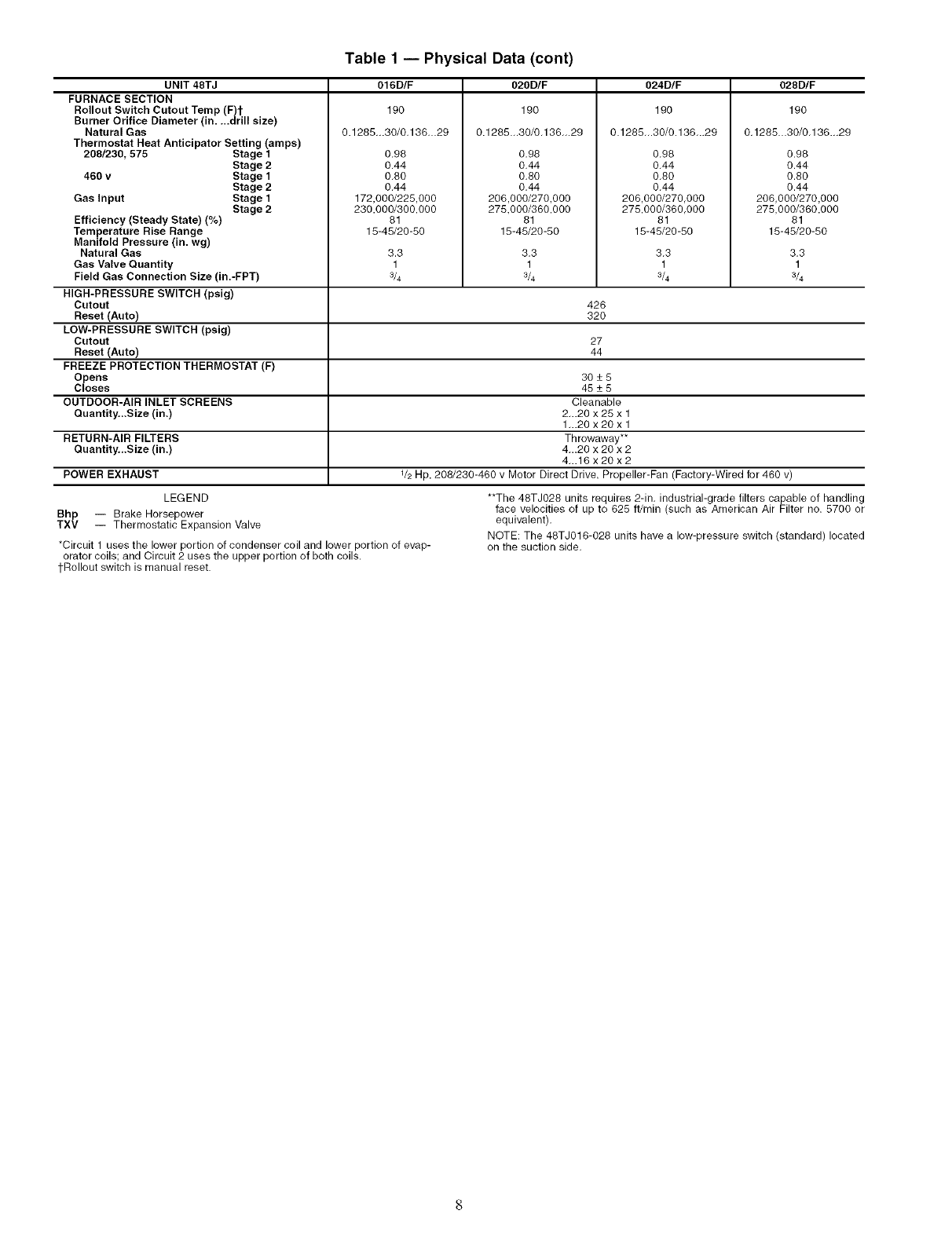
Table 1 -- Physical Data (cont)
UNIT 48TJ
FURNACE SECTION
Rollout Switch Cutout Temp (F)t
Burner Orifice Diameter (in....drill size)
Natural Gas
Thermostat Heat Anticipator Setting (amps)
208/230, 575 Stage 1
460 v
Gas Input
Stage 2
Stage 1
Stage 2
Stage 1
Stage 2
Efficiency (Steady State) (%)
Temperature Rise Range
Manifold Pressure (in. wg)
Natural Gas
Gas Valve Quantity
Field Gas Connection Size (in.-FPT)
HIGH-PRESSURE SWITCH (psig)
Cutout
Reset (Auto)
LOW-PRESSURE SWITCH (psig)
Cutout
Reset (Auto)
FREEZE PROTECTION THERMOSTAT (F)
Opens
Closes
OUTDOOR-AIR INLET SCREENS
Quantity...Size (in.)
016D/F O20D/F 024D/F 028D/F
190
0.1285-.30/0.136-.29
0.98
0.44
0.80
0.44
172,000/225,000
230,000/300,000
81
15-45/20-50
3.3
1
3/4
190
0.1285.-30/0.136-.29
0.98
0.44
0.80
0.44
206,000/270,000
275,000/360,000
81
15-45/20-50
3.3
1
3/4
190
0.1285.-30/0.136-.29
0.98
0.44
0.80
0.44
206,000/270,000
275,000/360,000
81
15-45/20-50
3.3
1
3/4
190
0.1285_.30/0.136...29
0.98
0.44
0.80
0.44
206,000/270,000
275,000/360,000
81
15-45/20-50
426
32O
27
44
3O-+5
45-+5
Cleanable
2...20 x 25 x 1
1...20 x 20 x 1
RETURN-AIR FILTERS Throwaway**
Quantity.,.Size (in.) 4_.20 x 20 x 2
4...16 x 20 x 2
POWER EXHAUST V2 Hp, 208/230-460 v Motor Direct Drive, Propeller-Fan (Factory-Wired for 460 v)
3.3
1
3/4
LEGEND
Bhp -- Brake Horsepower
TXV -- Thermostatic Expansion Valve
*Circuit 1 uses the lower portion of condenser coil and lower portion of evap-
orator coils; and Circuit 2 uses the upper portion of both coils.
tRollout switch is manual reset.
**The 48TJ028 units requires 2-in. industrial-grade filters capable of handling
face velocities of up to 625 ft/min (such as American Air Filter no. 5700 or
equivalent).
NOTE: The 48TJ016-028 units have a low-pressure switch (standard) located
on the suction side.

Step 3 -- Field Fabricate Ductwork -- Secure all
ducts to building structure. Use flexible duct connectors be-
tween unit and ducts as required. Insulate and weatherproof all
external ductwork, joints, and roof openings with counter
flashing and mastic in accordance with applicable codes.
Ducts passing through an unconditioned space must be in-
sulated and covered with a vapor barrie];
Step 4 -- Make Unit Duct Connections -- Unit
is shipped for thru-the-bottonl duct connections. Ductwork
openings are shown in Fig. 1, 4, and 5. Duct connections are
shown in Fig. 6. Field-fabricated concentric ductwork may be
connected as shown in Fig. 7 and 8. Attach all ductwork to roof
curb and roof CUlb basepans.
Step 5 -- Install Flue Hood and Wind Baffle --
Flue hood and wind baffle are shipped secured under main
control box. To install, secure flue hood to access panel. See
Fig. 9. The wind baffle is then installed over the flue hood.
NOTE: When properly installed, flue hood will line up with
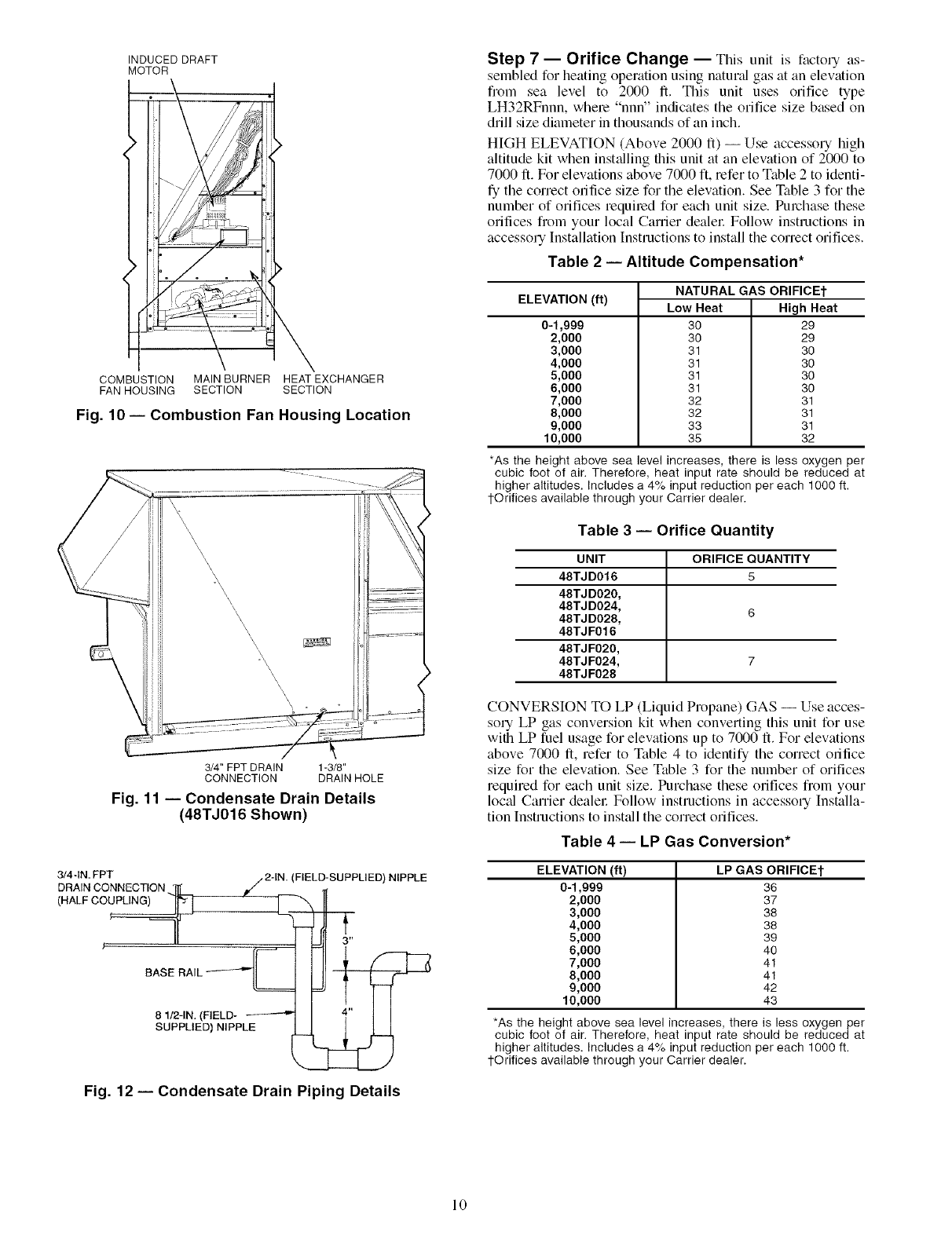
combustion fan housing. See Fig. 10.
Step 6 -- Trap Condensate Drain -- See Fig, 11
for drain location. One 3/4-in. half coupling is provided inside
unit evaporator section for condensate drain connection. An
81/2-in. x 3/4-in. diameter and 2-in. x 3/4-in. diameter pipe nip-
ple, coupled to standard 3/4-in. diameter elbows, provide a
straight path down through hole in unit base rails (see Fig. 12).
A trap at least 4-in. deep must be used.
HEAT
SEE NOTE
[_AIR
OUT
NOTE: Do not drill in this area; damage to basepan may result in
water leak.
Fig. 6 -- Air Distribution -- Thru-the-Bottom
I'-O1
24"MIN.
/
BAFFLE
NOTE: Dimensions A, A', and B' are obtained from field-supplied
ceiling diffuser.
Shaded area indicates block-off panels.
Fig. 8- Concentric Duct Details
NOTE SEE NOTE
AIR OUT AIR IN AIR OUT
NOTE: Do not drill in this area; damage to basepan may result in
water leak.
Fig. 7 -- Concentric Duct Air Distribution
/
/
\\J
WIND
BAFFLE
FLUE
HOOD
\ ii
,.ii
/\
/\N\
\
\
\
COMBUSTION [l
FANHOUSING [l
(INSIDE) [
[
[
[
[
[
[
WIND BAFFLE
MOUNTING HOLES
Fig. 9 -- Flue Hood Location
INDUCED DRAFT
MOTOR
COMBUSTION MAIN BURNER HEAT EXCHANGER
FAN HOUSING SECTION SECTION
Fig. 10- Combustion Fan Housing Location
3/4" FPT DRAIN 1-3/8"
CONNECTION DRAIN HOLE
Fig. 11 -- Condensate Drain Details
(48TJ016 Shown)
3/4 -IN. FPT
DRAIN CONNECTION
(HALF CO_--
BASE RAIL _@_
____. (FIELD-SUPPLIED)NIPPLE
3"
81/2-1N. (FIELD ....
SUPPLIED) NIPPLE
Fig. 12- Condensate Drain Piping Details
Step 7 -- Orifice Change -- This unit is factory as-
sembledfor heating operation using natund gas at an elevation
from sea level to 2000 ft. This unit uses orifice type
LH32RFnnn, where "nnn" indicates the orifice size based on
drill size diameter in thousands of an inch.
HIGH ELEVATION (Above 2000 ft) -- Use accessory high
altitude kit when inst_dling this unit at an elewttion of 2000 to
7000 ft. For elevations above 7000 ft, refer to Table 2 to identi-
fy the correct orifice size for the elevation. See Table 3 for the
number of orifices requiled for each unit size. Purchase these
orifices from your local Carrier dealel: Follow instructions in
accessory Installation Instructions to install the correct orifices.
Table 2 -- Altitude Compensation*
ELEVATION (ft)
0-1,999
2,000
3,000
4,000
5,000
6,000
7,000
8,000
9,000
10,000
NATURAL GAS ORIFICE]-
Low Heat High Heat
30 29
30 29
31 30
31 30
31 30
31 30
32 31
32 31
33 31
35 32
*As the height above sea level increases, there is less oxygen per
cubic foot of air. Therefore, heat input rate should be reduced at
higher altitudes. Includes a 4% input reduction per each 1000 ft.
1-Orifices available through your Carrier dealer.
Table 3 -- Orifice Quantity
UNIT ORIFICE QUANTITY
48TJD016 5
48TJD020,
48TJD024, 6
48TJD028,
48TJF016
48TJF020,
48TJF024, 7
48TJF028
CONVERSION TO LP (Liquid Propane) GAS -- Use acces-
sory LP gas conversion kit when converting this unit for use
with LP fuel usage for elevations up to 7000 ft. For elevations
above 7000 ft, refer to Table 4 to identify the correct orifice
size for the elewttion. See Table 3 for the number of orifices
required for each unit size. Purchase these orifices from your
loc_fl Carrier dealel: Follow instructions in accessory Installa-
tion Instructions to inst_dl the correct orifices.
Table 4 -- LP Gas Conversion*
ELEVATION (ft)
0-1,999
2,000
3,000
4,000
5,000
6,000
7,000
8,000
0,000
10,000
LP GAS ORIFICE]"
36
37
38
38
39
40
41
41
42
43
*As the height above sea level increases, there is less oxygen per
cubic foot of air. Therefore, heat input rate should be reduced at
higher altitudes. Includes a 4% input reduction per each 1000 ft.
1-Orifices available through your Carrier dealer.
10

Step 8 -- Install Gas Piping -- Unit is equipped for
use with natured gas. Installation must conform with loc_d
building codes or. in the absence of loc_d codes, with the
National Fuel Gas Code, ANSI Z223.1.
Install field-supplied manu_d gas shutoff valve with a lh-in.
NPT pressme tap for test gage connection at unit. Field gas pip-
ing must include sediment trap and union. See Fig. 13.
Tlansformer no. 1 is wired for 230-v unit. If 208/230-v unit
is to be run with 208-v power supply, the transformer must be
rewired as follows:
1. Remove cap fiom red (208 v) wire.
2. Remove cap from orange (230 v) spliced wire.
3. Replace orange wire with led wire.
4. Recap both wires.
Do not pressure test gas supply while connected to unit.
Always disconnect union before servicing. Exceeding
maximum manifold pressure may cause explosion and
injury.
I IMPORTANT: Natural gas pressure at unit gas connec-
tion must not be less than 5.5 in. wg or greater than
13.5 in. wg.
Size gas-supply piping for 0.5-in. wg maximum pressure
drop. Do not use supply pipe sm_dler than unit gas connection.
MANUAL SHUTOFF
(FIELD SUPPLIED) _FT'I
__GAS
PRESSURE TAP
(1/8" NPT PLUG)
UNIT _
o& •---- SEDIMENTTRAP
Fig. 13 -- Field Gas Piping
Step 9 -- Make Electrical Connections
FIELD POWER SUPPLY- Unit is factory wiled for volt-
age shown on nameplate.
When inst_dling units, provide a disconnect per NEC (Na-
tional Electrical Code) of adequate size (Table 5).
All field wiring must comply with NEC and local
requirements.
Route power ground lines through control box end panel or
unit basepan (see Fig. 4 and 5) to connections as shown on unit
wiring diagram and Fig. 14.
The correct power phasing is critical in the operation of the
scroll compressol,s. An incorrect phasing will cause the
compressor to rotate in the wrong direction. This may lead
to premature compressor failure.
The unit must be electrically grounded in accor&mce with
local codes and NEC ANSI/NFPA 70 (National Fire Pro-
tection Association) to protect against fire and electric
shock.
Field wiring must confirm to temperature limitations for
type "T" wire. All field wiring must comply with NEC and lo-
cal requirements.
Be certain unused wires ale capped. Failure to do so may
&_magethe transformers.
Operating voltage to compressor must be within voltage
range indicated on unit nameplate. On 3-phase units, voltages
between phases must be balanced within 2%.
Unit failure as a result of operation on improper line voltage
or excessive phase imbalance constitutes abuse and may cause
&Lmage to electrical components.
FIELD CONTROL WIRING -- Install a Carrier-approved
accessory thermostat assembly according to installation in-
structions included with accessory. Ix)cate thermostat assembly
on a solid interior wall in the conditioned space to sense aver-
age temperature.
Route thermostat cable or equivalent single leads of
colored wire from subbase termimds through conduit in unit to
low-voltage connections as shown on unit label wiring diagram
and in Fig. 15.
NOTE: For wire runs up to 50 ft, use no. 18 AWG (American
Wire Gage) insulated wire (35 Cminimum). For 50 to 75 ft,
use no. 16 AWG insulated wire (35 Cminimum). For over
75 ft, use no. 14 AWG insulated wire (35 Cminimum). All
wire larger than no. 18 AWG cannot be directly connected at
the thermostat and will require a junction box and splice at the
thermostat.
Set heat anticipator settings as follows:
VO LTAGE W 1 W2
208/230,575 0.98 0.44
460 0.80 0.44
Settings may be changed slightly to provide a greater degree
of comfort for a particuku installation.
----1 TBI
II FIELD i _
i_II III I III II_
[POWER I _
=U.l ....... SUP_PLY
z z
iI-IN
l EQUIP GND
I
.............. ]
LEGEND
EQUIP -- Equipment
GND -- Ground
NEC -- National Electrical Code
TB -- Terminal Block
NOTE: The maximum wire size for TB1 is 2/0.
Fig. 14- Field Power Wiring Connections
11
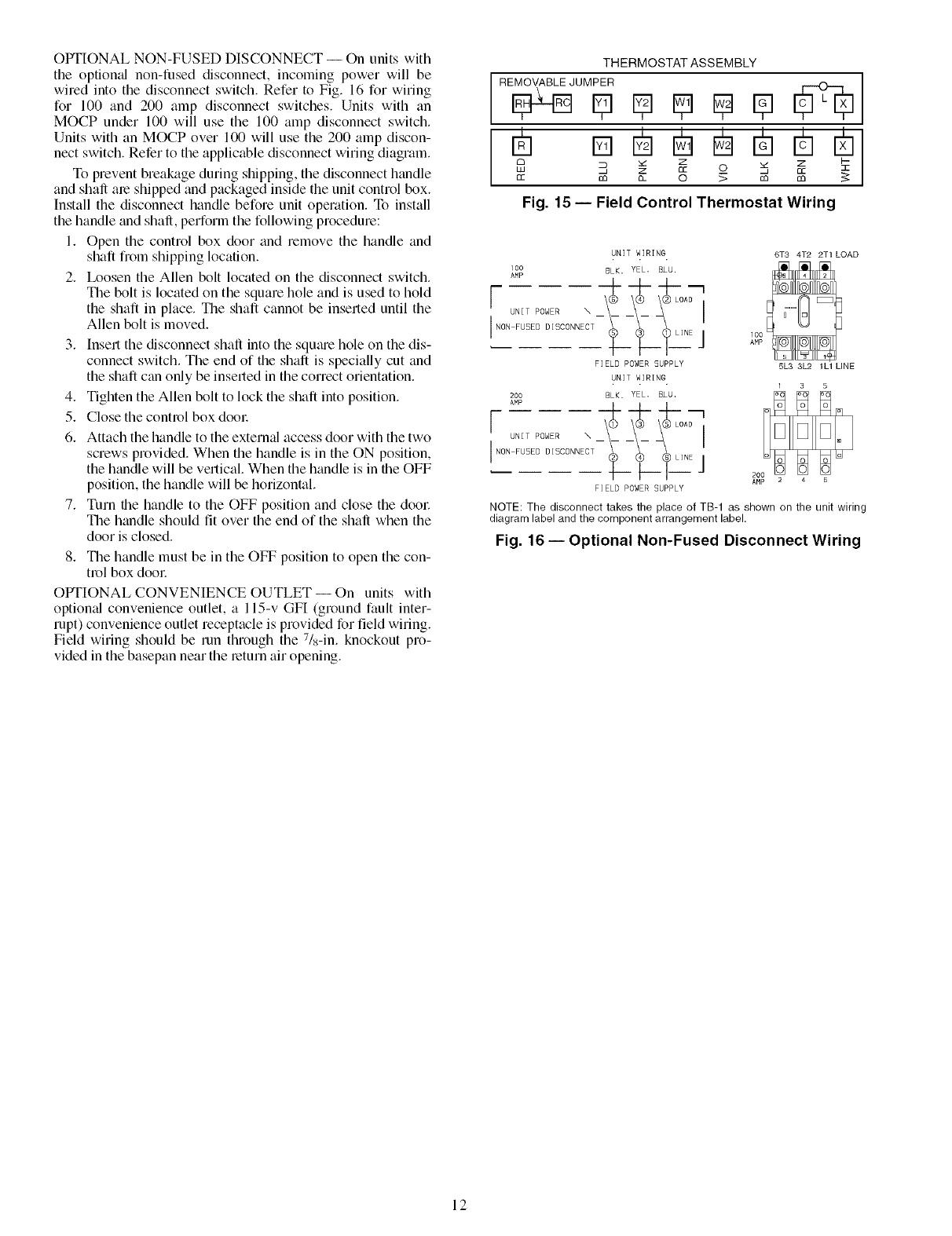
OPTIONAL NON-FUSED DISCONNECT -- On units with
the optiomfl non-fused disconnect, incoming power will be
wired into the disconnect switch. Refer to Fig. 16 for wiring
for 100 and 200 amp disconnect switches. Units with an
MOCP under 100 will use the 100 amp disconnect switch.
Units with an MOCP over 100 will use the 200 amp discon-
nect switch. Refer to the applicable disconnect wMng diagram.
To prevent breakage during shipping, the disconnect handle
and shaft are shipped and packaged inside the unit control box.
Install the disconnect handle before unit operation. To install
the handle and shaft, perform the following procedure:
1. Open the control box door and remove the handle and
shaft from shipping location.
2. Ix_osen the Allen bolt located on the disconnect switch.
The bolt is located on the square hole and is used to hold
the shaft in place. The shaft cannot be inserted until the
Allen bolt is moved.
3. Insert the disconnect shaft into the squae hole on the dis-
connect switch. The end of the shaft is specially cut and
the shaft can only be inserted in the correct orientation.
4. Tighten the Allen bolt to lock the shaft into position.
5. Close the control box dool:
6. Attach the handle to the external access door with the two
screws provided. When the handle is in the ON position,
the handle will be vertical. When the handle is in the OFF
position, the handle will be horizontal.
7. Turn the handle to the OFF position and close the dool:
The handle should fit over the end of the shaft when the
door is closed.
8. The handle must be in the OFF position to open the con-
trol box dool:
OPTIONAL CONVENIENCE OUTLET-- On units with
optiomfl convenience outlet, a 115-v GFI (ground fault inter-
rupt) convenience outlet receptacle is provided for field wiring.
Field wiring should be run through the 7Is-in. knockout pro-
vided in the basepan near the return air opening.
THERMOSTAT ASSEMBLY
I
_ Z Z
Lu q z cc o _, cc
cc m a_ o_m m
Fig. 15 -- Field Control Thermostat Wiring
UNIT WIRING 6T3 4T2 2T1 LOAD
lO0 BLK, YEL. BLU.
AMP I
[NON_:EPDOWDEIRsCONNE_T _-- _ _ OA: '
I ;_ ;__T2Ej
FIELD POWER SUPPLY 5L3 3L2 1L1 LINE
UNIT WIRING
200 BLK. YEL. BLU,
AMP 4--+--t--- '
[NON FUSED DISCONNECT __i _i_ Lli E j
FIELD POWER SUPPLY
NOTE: The disconnect takes the place of TB-1 as shown on the unit wiring
diagram label and the component arrangement label.
Fig. 16- Optional Non-Fused Disconnect Wiring
12

Table 5 -- Electrical Data
UNIT
48TJ
016
(15 Tons)
020
(18 Tons)
O24
(20 Tons)
028
(28 Tons)
NOMINAL VOLTAGE COMPRESSOR OFM
VOLTAGE RANGE No. 1 No, 2
(3Ph, 60Hz) Min Max RLA LRA RLA LRA Q_ Hp FLA(ea) Hp
208/230
460
575
208/230
460
575
208/230
460
575
208/230
46O
575
POWER COMBUSTION
IFM EXHAUST FAN MOTOR
FLA FLA LRA FLA
187 253 25.6 190 25.6 190 3 0.5 1.7 3.7 10.5/11.0 4.6 18.8
414 508 13.5 95 13.5 95 3 0.5 0.8 3.7 4.8 2.3 6.0
518 632 10.2 75 10.2 75 3 0.5 0.8 3.0 3.9 2.1 4.8
187 253 33 237 23 184 3 0.5 1.7 5.0 15.8/15.8 4.6 18.8
414 508 16.2 130 10.2 90 3 0.5 0.8 5.0 7.9 2.3 6.0
518 632 12.7 85 9 73 3 0.5 0.8 5.0 6.0 2.1 4.8
187 253 33 237 29.5 237 2 1 6.6 7.5 25.0/25.0 4.6 18.8
414 508 16.2 130 14.1 130 2 1 3.3 7.5 13.0 2.3 6.0
518 632 12.7 85 11.3 85 2 1 3.4 7.5 10.0 2.1 4.8
187 253 47.5 265 33 237 2 1 6.6 10.0 28.0/28.0 4.6 18.8
414 508 22.9 145 16.2 130 2 1 3.3 10.0 14.6 2.3 6.0
518 632 17.9 102 12.7 85 2 1 3.4 10.0 13.0 2.1 4.8
POWER
SUPPLY
MCA MOCP*
0.57 74/74 90/90
0.57 79/79 100/100
0.30 38 50
0.30 40 50
0.57 30 35
0.57 32 40
0.87 88/88 110/110
0.57 90/90 110/110
0,30 41 80
0.30 43 50
0,87 33 45
0.57 35 45
0.57 109/109 125/125
0.57 114/114 125/125
0.30 54 70
0.30 56 70
0.57 44 80
0.57 46 50
0.87 134/134 178/175
0.57 138/138 175/175
0,30 66 80
0.30 68 90
0.57 55 70
0.57 57 70
LEGEND
FLA -- Full Load Amps
HACR -- Heating, Air Conditioning and Refrigeration
IFM -- Indoor (Evaporator) Fan Motor
LRA -- Locked Rotor Amps
MCA -- Minimum Circuit Amps
MOCP -- Maximum Overcurrent Protection
NEC -- National Electrical Code
OFM -- Outdoor (Condenser) Fan Motor
RLA -- Rated Load Amps
*Fuse or HACR circuit breaker.
cCt os
NOTES:
1. In compliance with NEC requirements for multimotor and combination load
equipment (refer to NEC Articles 430 and 440), the overcurrent protective
device for the unit shall be fuse or HACR breaker. Canadian units may be
fuse or circuit breaker.
2. Unbalanced 3-Phase Supply Voltage
Never operate a motor where, a phase imbalance in supply voltage is
o
greater than 2_, Use the following formula to determine the percent of volt-
age imbalance,
% Voltage Imbalance
= 100 x max voltage deviation from average voltage
average voltage
Example: Supply voltage is 460-3-60.
AB = 452 v
A B C BC = 464 v
(_ AC =455 v
Average Voltage 482 + 464 + 488
3
1371
=-- 3
= 457
Determine maximum deviation from average voltage.
(AB) 487 - 482 = 8 v
(BC) 464 - 487 = 7 v
(AC) 487 - 488 = 2 v
Maximum deviation is 7 v.
Determine percent of voltage imbalance.
7
% Voltage Imbalance = 100 x 487
= 1.53%
This amount of phase imbalance is satisfactory as it is below the maximum
allowable 2%.
I IMPORTANT: If the supply voltage phase imbalance is more than I
2%, contact your local electric utility company immediately. I
13

Step 10 -- Make Outdoor-Air Inlet Adjust-
ments
MANUAL OUTDOOR-AIR DAMPER -- All units (except
those equipped with a factory-inst_dled economizer) have a
manual outdoor-air &tmper to provide ventilation ail:
Damper can be preset to admit up to 25% outdoor air into
return-tdr compartment. To adjust, loosen secunng screws and
move &tmper to desired setting, then retighten screws to secure
dmnper (see Fig. 17).
OUTDOOR-AIR HOOD AND
MOUNTING BRACKETS
÷I
25% ADJUSTABLE
AIR DAMPER
/
/I
\/
o g
/
SECURING SCREWS
ol
Fig. 17 -- Standard 25% Outdoor-Air
Section Details
BASE
UNIT
F[_ER
PACKAGEAN[
HOOD
COMPONENTS
RETURN-AIRFILTE}
ACCESS PANEL
Fig. 18- Outdoor-Air Hood Component Location
PANEL
Step 11 -- Install Outdoor-Air Hood
IMPORTANT: If the unit is equipped with the optional I
EconoMiSerIV. move the outdoor air temperature sensor I
prior to installing the outdoor air hood. See the Optional
EconoMiSerIV and EconoMiSer2 section for more details.
The outdoor- air hood is common to 25% air ventilation and
economizel: If EconoMiSerIV is used, all electrical connec-
tions have been made and adjusted at the factoly. Assemble
and install hood in the field.
NOTE: The hood top panel, upper and lower filter retainel_,
hood drain pan, baffle (size 024 and 028), and filter support
bracket me secured opposite the condenser end of the unit. The
screens, hood side panels, remaining section of tilter support
bracket, seal strip, and hmdware are in a package located
inside the return-air filter access panel (Fig. 18).
1. Attach seal strip to upper filter retainer. See Fig. 19.
2. Assemble hood top panel, side panels, upper filter retain-
el: and dnun pan (see Fig. 20).
3. Secure lower filter rettuner and support bracket to unit.
See Fig. 20. Leave screws loose on size 024 and 028
units.
4. Slide bafile (size 024 and 028) behind lower filter retainer
and tighten screws.
5. Ix_osen sheet metal screws for top panel of base unit
located above outdoor-air inlet opening, and remove
screws for hood side panels located on the sides of the
outdoor-air inlet opening.
6. Match notches in hood top panel to unit top panel screws.
|nsert hood flange between top panel fange and unit.
Tighten screws.
7. Hold hood side panel flanges flat against unit, and install
screws removed in Step 5.
8. Insert outdoor-air inlet screens and spacer in channel cre-
ated by lower filter retainer and filter support bracket.
UPPER
RETAINER PAN
SEAL;
Fig. 19- Seal Strip Location
BAFFLE
/
\
LOWER FILTER
RETAINER
HOOD SIDE
PANELS (2)
BAFFLE
. (024 TO
028 ONLY)
LOWER
FILTER
RETAINER
FILTER SUPPORT
BRACKET
HOOD DRAIN PAN
UPPER FILTER RETAINER
Fig. 20 -- Outdoor-Air Hood Details
14

Step 12 -- Install All Accessories-- Install all
field-installed accessories. Refer to the accessoly installation
instructions included with each accessory.
MOTORMASTER® I CONTROL INSTALLATION
(48TJ016,020 UNITS)
Install Field-Fabricated Wind Baffles -- Wind baffles must
be field-fabricated for all units to ensure proper cooling cycle
operation at low ambient temperatures. See Fig. 21 for baffle
details. Use 20-gage, galvanized sheet metal, or similar
conosion-resistant metal for baffles. Use field-supplied screws
to attach baffles to unit. Screws should be 1/4-in. diameter and
5/8-in. long. Drill required screw holes for mounting baffles.
To avoid dmnage to the refiigemnt coils and electric_d com-
ponents, use recommended screw sizes only. Use care
when drilling holes.
) MIN
BAFFLE TOP VIEW 1" (25) MIN--_
78.12" -+0.125"
0984 -+3)
.j \
3/4"(19)0-¥P)--'_
BAFFLE FRONT VIEW
NOTE: Dimensions in ( ) are in mm.
I 10" (254)
_..]--" _¥p)
-- 40"
' 1016
_10" (254)
+"-- = ffYP)
""-'--I 15" (381)
-4i----,i 1_ (TYP)
_"_ "1" (25) MIN
Fig. 21 -- Wind Baffle Details
Install Motormaster [Controls -- Only one Motormaster I
control is required per unit. The Motormaster I control must be
used in conjunction with the Accessory 0° F Ix_w Ambient Kit
(purchased separately). The Motormaster [ device controls out-
door fan no. 1 while outdoor fans no. 2 and 3 are sequenced off
by the Accessory 0 ° F Low Ambient Kit.
Accessoiw 0°FDin' Ambient Kit -- Inst_dl the Accessory 0° F
Ix_w Ambient Kit per instruction supplied with accessory.
Sensor Assembly -- Install the sensor assembly in the location
shown in Fig. 25_
Motor Mount- To ensure proper fan height, replace the exist-
ing motor mount with the new motor mount provided with
accessory.
Tran._fiwmer (460 and 575-v Units On@) -- On 460 and 575-v
units, a transhmner is required. The transformer is provided
with the accessory and must be field-installed.
Motormaswr I Control -- Recommended mounting location is
on the inside of the panel to the left of the control box. The
control should be mounted on the inside of the panel, verti-
cally, with leads protruding from bottom of extrusion.
SENSOR
LOCATION
_Oo
_:tOo°
_:toO°
_:to°
_o°
_:_o°
_$o°
_o°
_o°
_:to°
€:to°
_o°
_1_oo°
_:_o°
_o°
_oOO°
HAIRPIN END
48TJ016
m
_o°
_o°
_o
_o
_o
_o
_o
_o
_o
_o
SENSOR _ ,_ o
LOCATION _ o
_o
_o
_o
_o°
HAIRPIN END
48TJ020
NOTE: All sensors are located on the eighth hairpin up from the
bottom.
Fig. 22 -- Motormaster I Sensor Locations
15

MOTORMASTER® V CONTROL INSTALLATION
(48TJ024,028 UNITS)
Install Field-Fabricated Wind Baflles -- Wind baflles must
be field-fabricated for all units to ensure proper cooling cycle
operation at low ambient temperatures. See Fig. 21 for baflle
details. Use 20-gage, galvanized sheet metal, or similar corro-
sion-resistant metal for baffles. Use field-supplied screws to at-
tach baffles to unit. Screws should be l/4-in, diameter and
5/8-in. long. Drill required screw holes for mounting baffles.
To avoid dmnage to the refligerant coils and electrical com-
ponents, use lecommended screw sizes only. Use cme
when &'illing holes.
Install Motormaster V Controls -- The Motormaster V
(MMV) control is a motor speed control device which adjusts
condenser fan motor speed in response to declining liquid le-
frigerant pressure. A properly applied Motormaster V control
extends the operating range of air-conditioning systems and
permits operation at lower outdoor ambient temperatures.
The minimum mnbient temperatures at which the unit will
operate are:
TEMPERATURE OPERATING LIMITS -- F°
Standard Unit with I Unit with
Unit Low Ambient Kit I MMV Control40 25 -20
To operate down to the ambient temperatures listed,
Motormaster V controls (Fig. 23) must be added. Field-fabricat-
ed and installed wind baffles gue _dso required for _dl units (see
Fig. 21). The Motormaster V control permits operation of the
unit to an ambient temperature of-20 IF.The control regulates the
speed of 3-phase fan motors that gue compatible with the control.
These motors me factory installed.
See Table 6 for the Motormaster V control accessory pack-
age usage. Table 7 shows applicable voltages and motors.
Replacement of motor or fan blade IS NOT REQUIRED ON
CURRENT PRODUCTION UNITS since the control is
compatible with the factory-installed fan motors. Only field
wiring control is required.
Inst_dl the Motormaster V control per instructions supplied
with accessory.
o
TO PRESSURE
TRANSDUCER
FROM FUSE BLOCK
10 o---1
>- ca
u1.2 1.3
o
o
B
13B
ooo
o
TO MOTOR(S)
Fig. 23 -- Motormaster V Control
Table 6 -- Motormaster VControl Package Usage
UNIT I VOLTAGE
208/230
48TJ024,028 460
575
ITEM DESCRIPTION
CRLOWAMB015A00
CR LOWAMB016A00
CRLOWAMB017A00
Table 7 -- Applicable Voltages and Motors
VOLTAGE COMPATIBLEMOTOR
208/230-3-60 HD52AK654
480-3-60 HD52AK654
575-3-60 HD52GE576
16

Step 13 --Adjust Factory-Installed Options
PREMIERLINK TM CONTROL -- The PrelnierLink control-
ler is available as a special order from the facto Uand is com-
patible with the Ctmier Comfort Network® (CCN) system.
This control is designed to allow usel_ the access and ability to
change factoly-defined settings, thus expanding the function of
the standard unit control board. Carrier's diagnostic stan&ud
tier display tools such as Navigator r_'_ device or Scrolling
Marquee can be used with the PremierLink controller.
The PremierLink controller (see Fig. 24) requires the use of
a C;urier electronic themiostat or a CCN connection for time
broadcast to initiate its internal timeclock. This is necessmy for
broadcast of time of day functions (occupied/unoccupied). No
sensors are supplied with the field-mounted PremierLink con-
trol. The factou-installed PremierLink control includes only
the supply-tfir temperature (SAT) sensor and the outdoor air
temperature (OAT) sensor as standmd. An indoor air quality
(CO2) sensor can be added as tin option. Refer to Table 8 for
sensor usage. Refer to Fig. 25 for PremierLink controller wir-
ing. The PremierLink control may be mounted in the control
panel or an men below the control panel.
NOTE: PremierLink controller version 1.3 and later is shipped
in Sensor mode. If used with a thermostat, the PremierLink
controller must be configured to Thermostat mode.
Install the Supply Air Temperature (SAT) Sensor -- When
the unit is supplied with a factou-mounted PremierLink con-
trol, the supply-air temperature (SAT) sensor (33ZCSENSAT)
is factory-supplied and wired. The wiring is muted from the
PlemierLink control over the control box, through a grommet,
into the fan section, down along the back side of the fan, and
_dong the fan deck over to the supply-air opening.
The SAT probe is wire-tied to the supply-air opening (on the
horizontal opening end) in its shipping position. Remove the
sensor for installation. Re-position the sensor in the flange of
the supply-air opening or in the supply air duct (as required by
local codes). Drill or punch a l/2-in, hole in the flange or duct.
Use two field-supplied, self-drilling screws to secme the sensor
probe in a horizontal orientation.
NOTE: The sensor must be mounted in the dischmge airstream
downstream of the cooling coil and any heating devices. Be
sure the probe tip does not come in contact with any of the unit
or heat surfaces.
Outdoor Air Temperature (OAT) Sensor -- When the unit is
supplied with a factoly-mounted PremierLink control, the
outdoor-air temperature sensor (OAT) is factory-supplied and
wired.
Install the Indoor Air Quality (CO2) Sensor -- Mount the
optional indoor air quality (CO2) sensor according to manufac-
turer specifications.
A sepmate field-supplied transformer must be used to
power the CO2 sensoc
Wire the CO2 sensor to the COM and IAQI terminals of J5
on the PremierLink controflec Refer to the PremierLink Instal-
lation, Start-up, and Configuration Instructions for detailed
wiring and configuration information.
HVACSENSOR INPUTS 0
SPACE TEMP ,_ [TT_
SET POINT _ t"1
SUPPLY AIR TEMP _ Nil
OUTDOOR TEMP _ ]1il
INDOOR AIR QUALITY _ ETa'
OUTDOOR AIR QUALITY _ 1! [
DUAL MODE SENSOR (STAT) ]Jr_
TH:I
COMP SAFETY (Y1) "J_ H ; I
FIRE SHUTDOWN (Y2) _
SUPPLY PAN STATUS (Wl) "'_[1 i ]
NOT USED (W2) ""I"13 • I
ENTHALPY STATUS (ENTH) /.._]__ttol
CCN/LEN
PORT
0¢
...........................
_ _ , Rm Numt_e 33CSP_lEML_
i2;_1_ PremlerZ_nk .....
....._,___._!.,.a_ _, : -/_
_o_ i ea
I._o'1 I<,<>,<,_/" \ L_I..,,..'It '<I =I If,= _1 '[ '1
/ t 4 20MA/ t_ _
NAVIGATOR -INDOOR COMPR HEAT EXHAUST
PORT ECONOMIZER FAN MOTOR 1 & 2 LOW/HIGH RVSVALVE
OUTPUTS
Fig. 24 -- PremierLink Controller
17

SAT
GRN
WHT
BLU
_] BLUE
(_ BRN
(_ BLK
BRN
i ORN
BRN • BRN
VlO • VlO
[_ BRN
OAT PNK
RED
BRN
BLU
GRN
YEL
BLU
RED
RED
RED
_Lu
RRN
BLK
COM
BRN CO_'_
w• _
BRN COM
RED _
COM
DDC
CONF{OL
GRN_
RED _
YEL
RED _
BLU
RED FT FsD
:
PremierLink
Control
(_-- WNT
CL01
DDC CONTROL R TSTAT CONTROL
CMP SAFE Y1 Y1
FSD Y2 Y2
SFS Wl Wl
NOT USED W2 W2
RMTOCC G G
c c c
x x x
TB2t
Y1
Y2
Wl
w2=_-T_
q I
I '
TB_1 I I
i 7 II_
I IL
I I
II
L
LWriT WHT _
RED RED T _
PNK RED C_ ]
_ORN ORN _ _' NOT ]
__ RED _ _ ECONO USED ] RELAYS
IIII IIIII IIIIIIII IIIIIIIIIIIIII
I RJo "
,RA , II R,O, REDRED ,RED
'w.z /
J_ _'"EO BLUW_T_1_O_,NR_o
_F,ELD [_ _ GRINYEL/ _
"(_ PL1 TRANSFORMER BOR FpR1OM8 FROM FGRC_M MFGRv(wM2 FGROM
_PL FROM
IGC-G
ECONOMIZER LEGEND
(_ 50TJ401148
(CRECOMZROIOBO0) CLO -- Compressor Lockout
CMP -- Compressor
WNTI _2 ECONO-- Economizer
I 4-20ma
L:
ECONO ENTH -- Enthalpy Sensor
MOTOR IGC -- Integrated Gas Unit Controller
MGV -- Main Gas Valve
OAT -- Outdoor Air Temperature Sensor
PL -- Plug
SAT -- Supply Air Temperature Sensor
SPT -- Space Temperature Sensor
TB -- Terminal Block
*If PremierLink control is in thermostat mode.
1-TB2 terminal designations for 24 vac discrete inputs. Default is for DDC control.
L_ RED
Fig. 25 -- PremierLink TM Controls Wiring
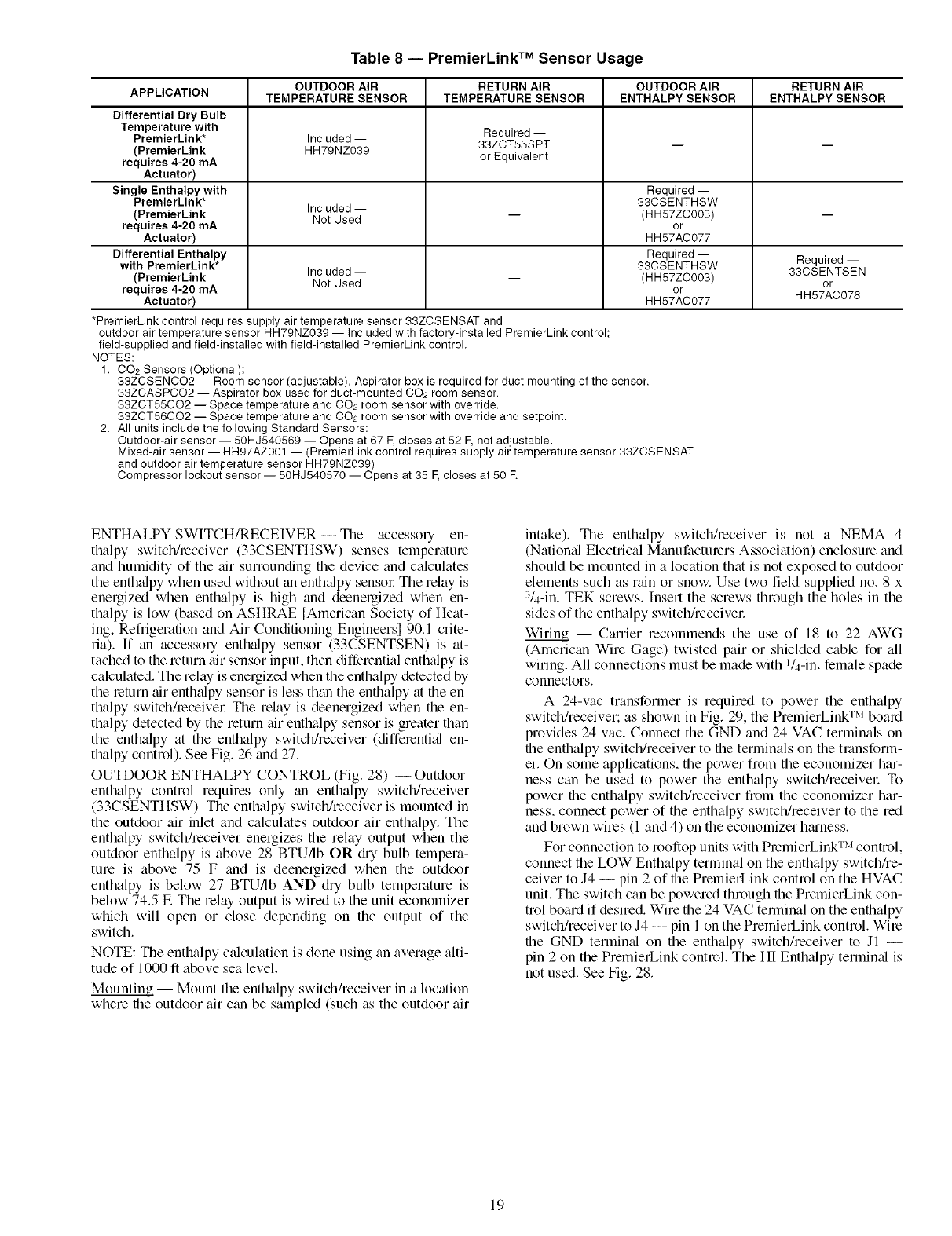
Table 8 -- PremierLink TM Sensor Usage
OUTDOOR AIR RETURN AIR OUTDOOR AIR RETURN AIR
APPLICATION TEMPERATURE SENSOR TEMPERATURE SENSOR ENTHALPY SENSOR ENTHALPY SENSOR
DifferentialDryBulb
Temperature with Required --
PremierLink* Included-- 33ZCT55SPT -- --
(PremierLink HH79NZ039 or Equivalent
requires 4-20mA
Actuator)
Single Enthalpy with Required --
PremierLink* 33CSENTHSW
(PremierLink Included -- -- (HH57ZC003) --
requires 4-20mA NotUsed or
Actuator) HH57AC077
Differential Enthalpy Required -- Required --
with PremierLink* Included-- 33CSENTHSW 33CSENTSEN
(PremierLink NotUsed -- (HH57ZC003) or
requires 4-20mA or HH57AC078
Actuator) HH57AC077
*PremierLink control requires supply air temperature sensor 33ZCSENSAT and
outdoor air temperature sensor HH79NZ039 -- included with factory-installed PremierLink control;
field-supplied and field-installed with field-installed PremierLink control.
NOTES:
1. CO2 Sensors (Optional):
33ZCSENCO2 -- Room sensor (adjustable). Aspirator box is required for duct mounting of the sensor.
33ZCASPCO2 -- Aspirator box used for duct-mounted CO2 room sensor.
33ZCT55CO2 -- Space temperature and CO2 room sensor with override.
33ZCT56CO2 -- Space temperature and CO2 room sensor with override and setpoint.
2. All units include the following Standard Sensors:
Outdoor-air sensor -- 50HJ540569 -- Opens at 67 F,closes at 52 F,not adjustable.
Mixed-air sensor -- HH97AZ001 -- (PremierLink control requires supply air temperature sensor 33ZCSENSAT
and outdoor air temperature sensor HH79NZ039)
Compressor lockout sensor -- 50HJ540570 -- Opens at 35 E closes at 50 E
ENTHALPY SWITCH/RECEIVER -- The accessory en-
thalpy switclffreceiver (33CSENTHSW) senses temperature
and humidity of the air surrounding the device and calculates
the enthalpy when used without an enth_dpy sensol: The relay is
energized when enthalpy is high and deenergized when en-
thalpy is low (based on ASHRAE [American Society of Heat-
ing, Refrigeration and Air Conditioning Engineersl 90.1 crite-
ria). If an accessory enthalpy sensor (33CSENTSEN) is at-
tached to the return air sensor input, then differential enth_dpy is
calculated. The relay is energized when the enthalpy detected by
the return air enth_dpy sensor is less than the enthalpy at the en-
thalpy switch/receivel: The relay is deenergized when the en-
thalpy detected by the return air enthalpy sensor is greater than
the enthalpy at the enthalpy switch/receiver (differential en-
thalpy control). See Fig. 26 and 27.
OUTDOOR ENTHALPY CONTROL (Fig. 28) -- Outdoor
enthalpy control requires only an enthalpy switclffreceiver
(33CSENTHSW). The enthalpy switclffreceiver is mounted in
the outdoor air inlet and calculates outdoor air enthalpy. The
enthalpy switch/receiver energizes the relay output when the
outdoor enthalpy is above 28 BTU/Ib OR @ bulb tempera-
ture is above 75 F and is deenergized when the outdoor
enthalpy is below 27 BTU/Ib AND dry bulb temperature is
below 74.5 IF.The relay output is wired to the unit economizer
which will open or close depending on the output of the
switch.
NOTE: The enthalpy calculation is done using an average alti-
tude of 1000 ft above sea level.
Mounting -- Mount the enthalpy switch/receiver in a location
where the outdoor air can be sampled (such as the outdoor air
intake). The enthalpy switch/receiver is not a NEMA 4
(Natiomd Electrical Manufacturers Association) enclosure and
should be mounted in a location that is not exposed to outdoor
elements such as rain or snow. Use two field-supplied no. 8 x
3/4-in. TEK screws. Insert the screws through the holes in the
sides of the enthalpy switchheceiver
Wiring -- Cmrier recommends the use of 18 to 22 AWG
(American Wire Gage) twisted pair or shielded cable for all
wiring. All connections must be made with l/4-in, female spade
connectors.
A 24-vac transformer is required to power the enthalpy
switch/receiver; as shown in Fig. 29, the PremierLink TM board
provides 24 vac. Connect the GND and 24 VAC terminals on
the enthalpy switclffreceiver to the terminals on the transform-
er. On some applications, the power from the economizer har-
ness can be used to power the enthalpy switclffreceivel: To
power the enthalpy switclffreceiver from the economizer har-
ness, connect power of the enthalpy switclffreceiver to the red
and brown wires (1 and 4) on the economizer hmness.
For connection to rooftop units with PlemierLink TM control,
connect the LOW Enthalpy terminal on the enthalpy switch/re-
ceiver to J4 -- pin 2 of the PremierLink control on the HVAC
unit. The switch can be powered through the PremierLink con-
trol board if desired. Wire the 24 VAC terminal on the enthalpy
switch/receiver to J4 -- pin 1 on the PremierLink control. Wile
the GND terminal on the enthalpy switch/receiver to Jl --
pin 2 on the PremierLink control. The HI Enthalpy terminal is
not used. See Fig. 28.
19

Thermistor
fSensor
Fig. 26 -- Enthalpy SwitchlReceiver Dimensions
(33CSENTHSW)
Thermistor _ S Humidi_ Sensor
I
Fig. 27 -- Enthalpy Sensor Dimensions
(33CSENTSEN)
/
o
\
....... _(OR UNIT GROUND)
*Used with Differential Enthalpy Control only,
TM
Fig. 28 -- Typical Wiring Schematic -- Carrier Rooftop Unit with PremierLink Controls
20
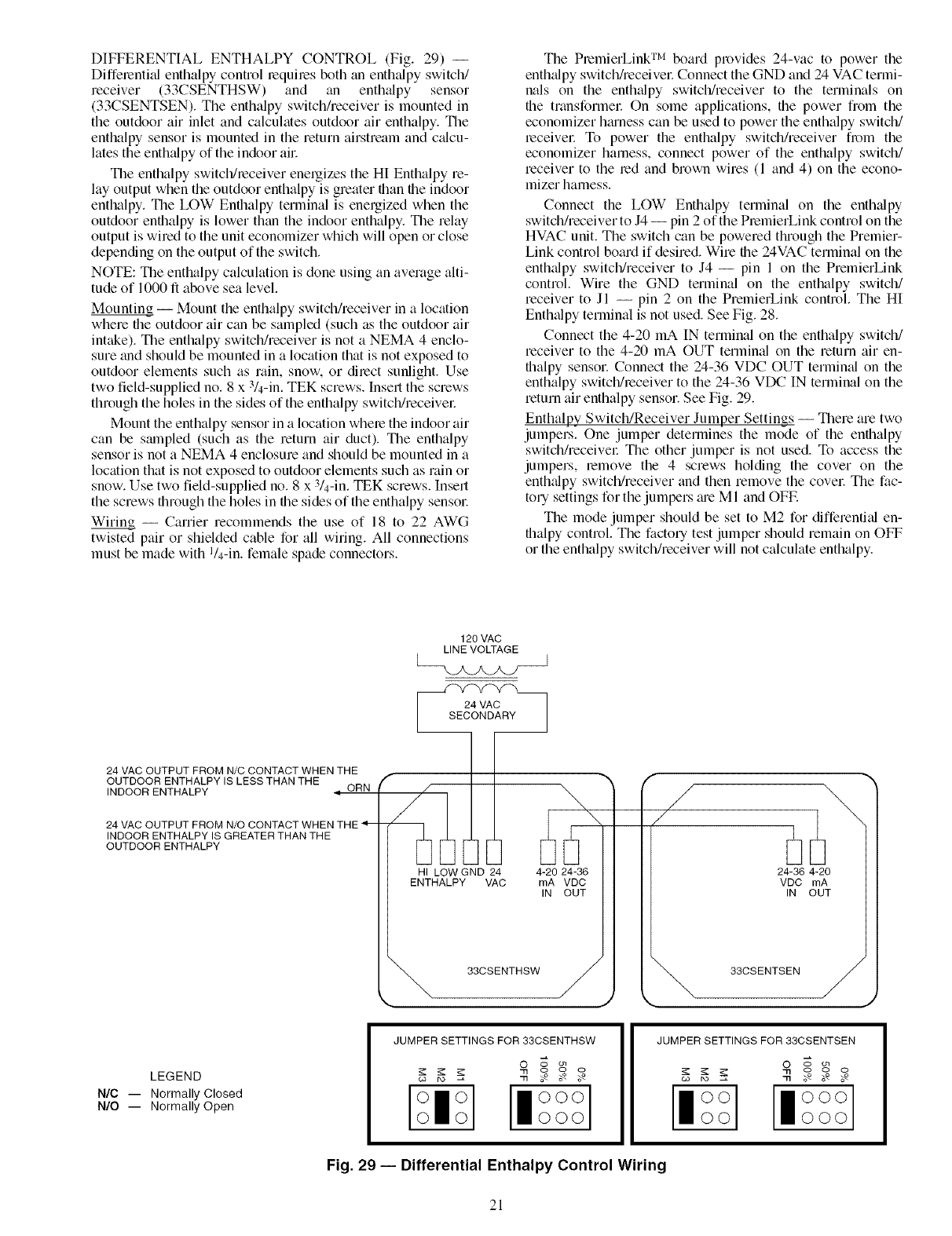
DIFFERENTIAL ENTHALPY CONTROL (Fig. 29) --
Diffemntifd enthalpy control mquiles both fin enthalpy switch/
receiver (33CSENTHSW) and fin enthalpy sensor
(33CSENTSEN). The enthalpy switchkeceiver is mounted in
the outdoor air inlet and calculates outdoor air enthalpy. Tile
enthalpy sensor is mounted in the return airstream and cfflcu-
lates the enthalpy of the indoor all:
The enthalpy switclffleceiver energizes the HI Enthalpy re-
lay output when the outdoor enthalpy is greater than file indoor
enthalpy. The LOW Enthalpy terminal is energized when the
outdoor enthalpy is lower than the indoor enthalpy. The relay
output is wired to the unit economizer which will open or close
depending on the output of the switch.
NOTE: The enthalpy calculation is done using an average alti-
tude of 1000 fl above sea level.
Mounting -- Mount the enthalpy switch/receiver in a location
where the outdoor air can be sampled (such as the outdoor air
intake). The enthalpy switch/receiver is not a NEMA 4 enclo-
sure fred should be mounted in a location that is not exposed to
outdoor elements such as rain, snow. or dilect sunlight. Use
two field-supplied no. 8 x 3/4-in. TEK screws. Insert the screws
through the holes in the sides of the enthalpy switclffreceivel:
Mount the enthalpy sensor in a location whele the indoor air
can be smnpled (such as the return air duct). The enthalpy
sensor is not a NEMA 4 enclosure and should be mounted in a
location that is not exposed to outdoor elements such as rain or
snow. Use two field-supplied no. 8 x 3/4-in. TEK screws. Insert
the screws through the holes in the sides of the enthalpy sensol:
Wiring -- Carrier recommends the use of 18 to 22 AWG
twisted pair or shielded cable for all wiring. All connections
must be made with I/4-in. female spade connectors.
The PlemierLink TM board provides 24-vac to power the
enthfflpy switch/receivel: Connect the GND and 24 VAC termi-
nals on the enthfflpy switch/receiver to the terminals on
the transformer On some applications, the power from the
economizer hmness can be used to power the enthalpy switch/
leceivel: To power the enthalpy switchkeceiver from the
economizer harness, connect power of the enthalpy switch/
receiver to the led and brown wires (1 and 4) on the econo-
mizer harness.
Connect the LOW Enthalpy terminal on the enthalpy
switch/receiver to J4 -- pin 2 of the PlemierLink control on the
HVAC unit. The switch can be powered through the Premier-
Link control board if desired. Wire file 24VAC terminal on the
enthalpy switclffreceiver to J4 -- pin 1 on the PremierLink
control. Wire the GND terminal on the enthalpy switch/
receiver to Jl -- pin 2 on the PremierLink control. The HI
Enthalpy terminal is not used. See Fig. 28.
Connect the 4-20 mA IN terminal on the enthalpy switch/
receiver to the 4-20 mA OUT terminal on the return air en-
thalpy sensor. Connect the 24-36 VDC OUT terminfd on the
enthalpy switch/leceiver to the 24-36 VDC IN terminal on the
return air enthalpy sensor. See Fig. 29.
Enthalpy Switch/Receiver Jumper Settings -- There are two
jumpers. One jumper determines the mode of the enthalpy
switch/receivel: The other jumper is not used. To access the
jumpers, lemove the 4 screws holding the cover on the
enthalpy switclffreceiver find then remove the covel: The fac-
tory settings for the jumpers me M I and OFE
The mode jumper should be set to M2 for differential en-
thalpy control. The factory test jumper should remain on OFF
or the enthalpy switch/receiver will not calculate enthalpy.
120 VAC
LINE VOLTAGE
_jk.jM.Z.__/ ]
24 VAC OUTPUT FROM N/C CONTACT WHEN THE
OUTDOOR ENTHALPY IS LESS THAN THE f
INDOOR ENTHALPY ,i ORN
24 VAC OUTPUT FROM N/O CONTACT WHEN THE 4--
INDOOR ENTHALPY IS GREATER THAN THE
OUTDOOR ENTHALPY
HI LOW GND 24
ENTHALPY VAC
33CSENTHSW
4-20 24-36
mA VDC
IN OUT
fj!
/
24-36 4-20
VDC mA
IN OUT
33CSENTSEN
J
LEGEND
N/C -- Normally Closed
N/O -- Normally Open
JUMPER SETTINGS FOR 33CSENTHSW JUMPER SETTINGS FOR 33CSENTSEN
O o on
[l°°°l
O0 000
Fig. 29 -- Differential Enthalpy Control Wiring
21

Enthalpy Sensor Jumper Settings -- There me two jumpers.
One julnper determines the mode of the enthalpy sensor. The
other jumper is not used. To access the jumpers, relnove the
4 screws holding the cover on the enthalpy sensor and then re-
move the covel: The factory settings for the jumpers are M3
and OFF.
The mode jumper should be set to M3 for 4 to 20 mA
output. The factory test jumper should remain on OFF or the
enthalpy sensor will not calculate enth_dpy.
ENTHALPY SENSORS AND CONTROL -- The enthalpy
control (HH57AC077) is supplied as a field-installed accessory
to be used with the EconoMiSer2 &unper control option. The
outdoor air enthalpy sensor is part of the enthalpy control. The
separate field-installed accessory return air enthalpy sensor
(HH57AC078) is required for differential enthalpy control.
NOTE: The enthalpy control must be set to the "D" setting for
differenti_d enthalpy control to work properly.
The enthalpy control receives the indoor and return
enthalpy from the outdoor and return air enthalpy sensol_ and
provides a dry contact switch input to the PremierLink TM
controllel: Locate the controller in place of an existing econo-
mizer controller or near the actuatol: The mounting plate may
not be needed if existing bracket is used.
A closed contact indicates that outside air is preferred to the
return air An open contact indicates that the economizer
should remain at minilnuln position.
Outdoor Air Enthalpy Sensor/Enthalpy Controller
(HH57AC077) -- To wire the outdoor air enthalpy sensor,
perform the following (see Fig. 30 and 31 ):
NOTE: The outdoor air sensor can be removed froln the back
of the enth_dpy controller and mounted relnotely.
1. Use a 4-conductol, 18 or 20 AWG cable to connect the
enthalpy control to the PremierLink controller and power
tl_dnsformel:
2. Connect the following 4 wires fiom the wire h_uness
located in rooftop unit to the enthalpy controller:
a. Connect the BRN wire to the 24 vac terminal (TRI)
on enthalpy control and to pin 1 on 12-pin harness.
b. Connect the RED wire to the 24 vac GND terminal
(TR) on enthalpy sensor and to pin 4 on 12-pin
harness.
c. Connect the GRAY/ORN wire to J4-2 on Premier-
Link controller and to terminal (3) on enthalpy
sensor.
d. Connect the GRAY/RED wire to J4-1 on Premier-
Link controller and to terminal (2) on enthalpy sensol:
NOTE: If installing in a Carrier rooftop, use the two gray wires
provided fiom the control section to the economizer to connect
PrelnierLink controller to terminals 2 and 3 on enth_dpy sensol:
Return Air Enthalpy Sensor -- Mount the return-air enthalpy
sensor (HH57AC078) in the return-air duct. The return air
sensor is wired to the enthalpy controller (HH57AC077). The
outdoor enth_dpy changeover set point is set at the controller.
To wire the return air enthalpy sensol; perform the follow-
ing (see Fig. 30):
1. Use a 2-conductor, 18 or 20 AWG, twisted pair cable to
connect the return air enthalpy sensor to the enthalpy
controller.
2. At the enthalpy control remove the factory-installed
resistor fi_m the (SR) and (+) terminals.
3. Connect the field-supplied RED wire to (+) spade
connector on the return air enthalpy sensor and the (SR+)
terminal on the enthalpy controllel: Connect the BLK
wire to (S) spade connector on the return air enthalpy
sensor and the (SR) terminal on the enthalpy controller.
ENTHALPY CONTROLLER RED
TR r_ TRI_"" BRN
A( CSOD+rn--
SRI-h+ID-
LED
/OUTDOOR[
AIR
ENTHALPY
BLK SENSOR)
RED
___]1 F[S (RETURN AIR I
[] + ENTHALPY
SENSOR
GRAY/ORN
LWIRE HARNESS
GRAY/RED JIN UNIT
NOTES:
1. Remove factory-installed jumper across SR and + before con-
necting wires from return air sensor,
2. Switches shown in high outdoor air enthalpy state. Terminals 2
and 3 close on low outdoor air enthalpy relative to indoor air
enthalpy.
3. Remove sensor mounted on back of control and locate in out-
side airstream.
Fig. 30 -- Outdoor and Return Air Sensor Wiring
Connections for Differential Enthalpy Control
HH57AC077
ENTHALPY
CONTROL AND
OUTDOOR AIR
ENTHALPY SENSOR
HH57AC078 ENTHALPY
SENSOR (USED WITH
ENTHALPY CONTROL
FOR DIFFERENTIAL
ENTHALPY OPERATION)
÷ ÷
MOUNTING PLATE
e,
Fig. 31 -- Differential Enthalpy Control,
Sensor and Mounting Plate (33AMKITENT006)
22
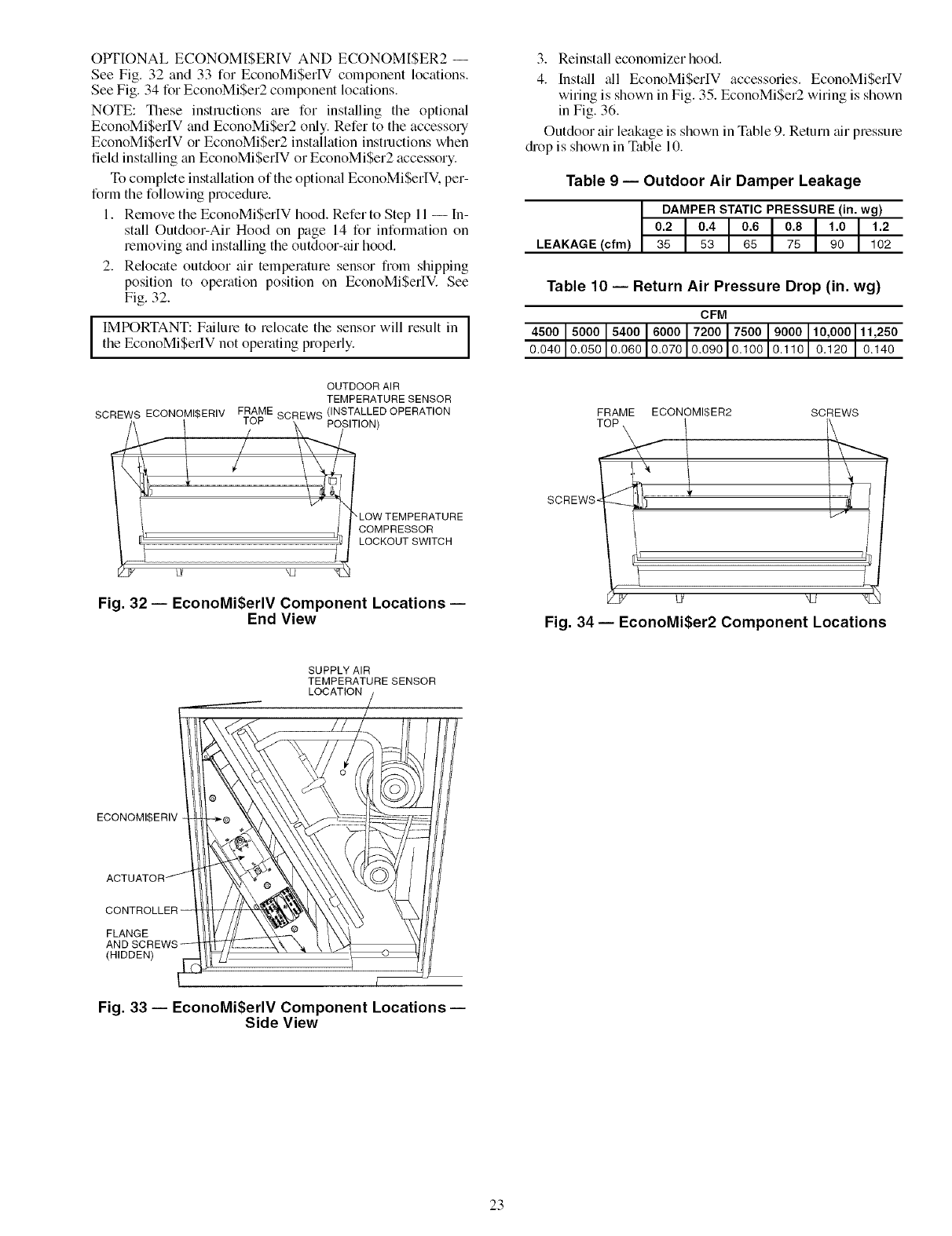
OPTIONAL ECONOMISERIV AND ECONOMISER2 --
See Fig. 32 and 33 for EconoMiSerIV component locations.
See Fig. 34 for EconoMi$er2 component locations.
NOTE: These instructions are for installing the optional
EconoMiSerIV and EconoMiSer2 only. Refer to the accessory
EconoMiSerIV or EconoMiSer2 installation instructions when
field installing an EconoMi$erIV or EconoMiSer2 accessory.
To complete inst_fllation of the optional EconoMiSerIV. per-
form the following procedure.
1. Remove the EconoMiSerIV hood. Refer to Step 11 -- In-
stall Outdoor-Air Hood on page 14 for information on
removing and installing the outdoor-air hood.
2. Relocate outdoor air temperature sensor from shipping
position to operation position on EconoMiSerIV. See
Fig. 32.
IMPORTANT: Failure to relocate the sensor will result in
the EconoMiSerIV not operating properly.
SCREWS ECONOMI$ERIV
OUTDOOR AIR
TEMPERATURE SENSOR
FRAME SCREWS (INSTALLED OPERATION
IUb' POSITION)
LOW TEMPERATURE
COMPRESSOR
LOCKOUT SWITCH
Fig. 32--EconoMiSerlVComponent Locations--
End View
3. Reinstall economizer hood.
4. Install _dl EconoMiSerIV accessories. EconoMiSerlV
wiring is shown in Fig. 35. EconoMi$er2 wiring is shown
in Fig. 36.
Outdoor air leakage is shown in Table 9. Return air pressure
drop is shown in Table 10.
Table 9 -- Outdoor Air Damper Leakage
DAMPER STATIC PRESSURE (in. wg)
0.2 0.4 0.6 0.8 1.0 1.2
LEAKAGE (cfm) 35 53 65 75 90 102
Table 10 -- Return Air Pressure Drop (in. wg)
CFM
4500 5000 5400 6000 7200 7500 9000 10,000 11,250
0.040 0.050 0.060 0.070 0.090 0.100 0.110 0.120 0.140
FRAME ECONOMISER2 SCREWS
SCREWS.
/
i_ 7
ju/J N2
Fig. 34- EconoMi$er2 Component Locations
SUPPLY AIR
TEMPERATURE SENSOR
LOCATION
ECONOMI$ERIV
FLANGE
(HIDDEN)
[
Fig. 33 -- EconoMi$erlV Component Locations-
Side View
23

L1 _4
L1 -S
- (NOT BSEDI
L1-9 m
PLI _8
TO MAIN PLI _5
CONTROL /_ I
BOX PL1-6
PLI-II 1
PLI*I
PLI _R
PL1-10
(NOT USED)
LEGEND
DCV -- Demand Controlled Ventilation
IAQ --Indoor Air Quality
LALS I Low Temperature Compressor
Lookout Switch
OAT IOutdoor_Air Temperature
POT -- Potentiometer
-- ORN
(FIE£B
ACCESSORY}
REMOTE MIN
POSITION POT
_E_T[ POT (ISS_hmT "
DISCHARGE AIR
SENSOR (Bk Ohm)
BLK_I_EO -
1 fIELD INSTALLED _IA_
FIAO SENSORI .....
I I OAT TEWPI L
I 1 ENTHALPY SENSOR
I I _Lu-
I I .T--
RETURN AIR TEHP!
1 ENTRALPY SEICSOR
IT _---
I I
1 l BLU
I l PNK--_
I I RED LALS
I I FIELD SPLICE
,_I aR.
FIELD SPLICE
ECONOMIZER MOTOR
Potentiometer Default Settings: NOTES:
Power Exhaust Middle
Minimum Pos. Fully Closed
DCV Max, Middle
DCV Set Middle
Enthalpy C Setting
YEL
PNK
-8LU
RED
EXH
I_ 1 [_ SET
BLK BV IOV
POS
OPEN
2v IBv
_so. N _ SET
_v lov
/BC
[COBOMISER il
BOARD
©
1, 620 ohm, 1 watt 5% resistor should be removed only when using differential
enthalpy or dry bulb.
2, If a separate field-supplied 24 v transformer is used for the IAQ sensor power
supply, it cannot have the secondary of the transformer grounded.
3, For field-installed remote minimum position POT, remove black wire jumper
between P and P1 and set control minimum position POT to the minimum
position,
Fig. 35 -- EconoMi$erlV Wiring
NOTE 1
NOTE 2
J
50HJ540573
ACTUATOR
ASSEMBLY
/
RUN
DIRECT DRIVE
ACTUATOR
500 OHM
RESISTOR- "L_
OAT
RED
PINK
BLUE
BLACK
WHITE
4
3
7
2
8
6
5
1
10
11
9
12
ECONOMI$ER2 PLUG
LEGEND
OAT -- Outdoor Air Temperature Sensor
NOTES:
1. Switch on actuator must be in run position for economizer to operate.
2. 50HJ540573 actuator consists of the 50HJ540567 actuator and a harness with 500-ohm resistor.
Fig. 36 -- EconoMi$er2 Wiring
24
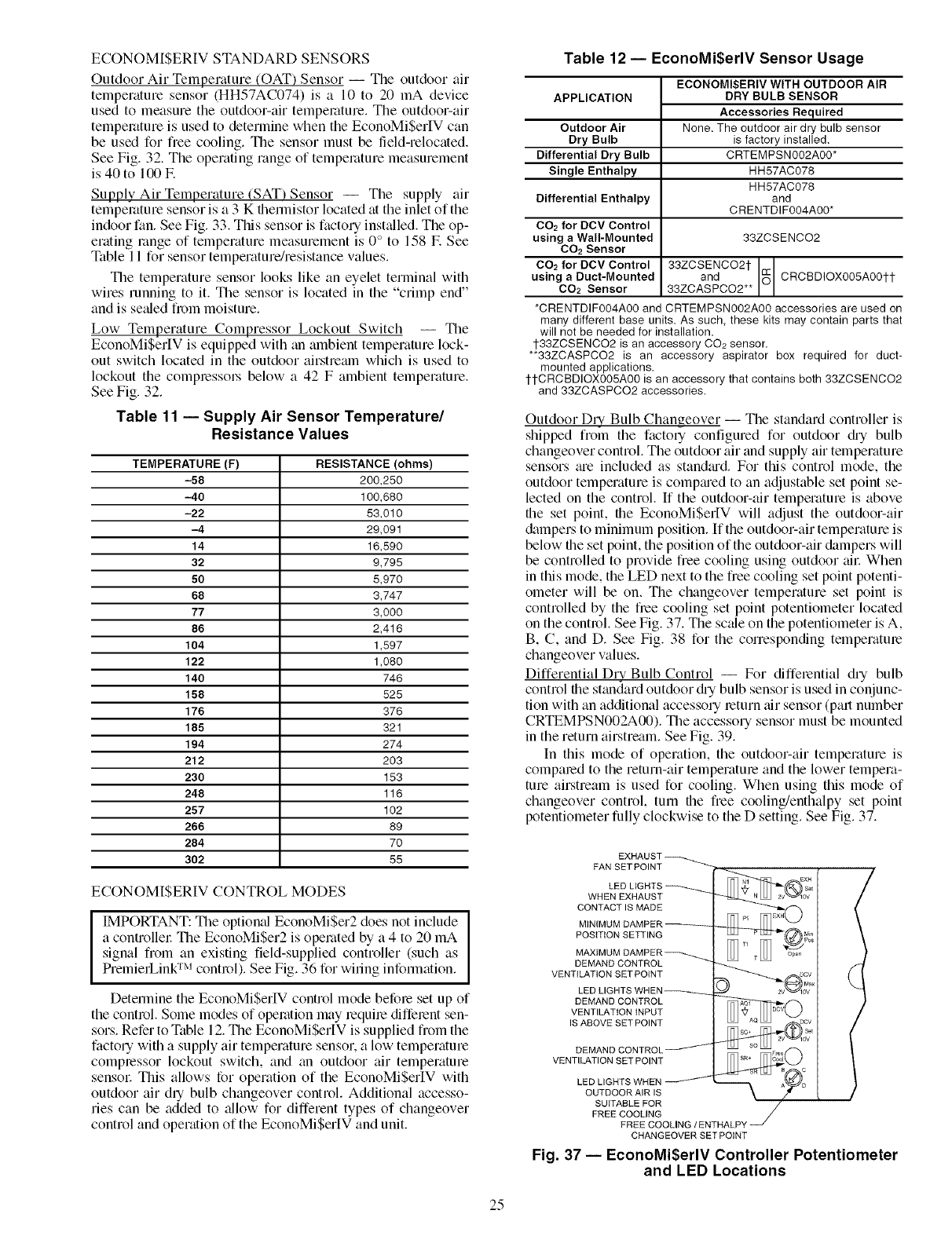
ECONOMISERIV STANDARD SENSORS
Outdoor Air Temperature (OAT) Sensor -- The outdoor air
temperature sensor (HH57AC074) is a 10 to 20 mA device
used to measure the outdoor-air temperature. The outdoor-air
temperature is used to determine when the EconoMiSerIV can
be used for free cooling. The sensor must be field-relocated.
See Fig. 32. The operating range of temperature measurement
is 40 to 100E
Supply Air Temperature (SAT) Sensor -- The supply air
temperature sensor is a 3 K tl_ermistor located at the inlet of the
indoor fan. See Fig. 33. This sensor is factory inst_flled. The op-
erating range of temperature measurement is 0° to 158 E See
Table 11 for sensor temperature/resistance values.
The temperature sensor looks like an eyelet terminal with
wires running to it. The sensor is located in the "crimp end"
and is settled from moisture.
Low Temperature Compressor Lockout Switch -- The
EconoMiSerIV is equipped with an ambient temperature lock-
out switch located in the outdoor airstrealn which is used to
lockout the compressols below a 42 F ambient temperature.
See Fig. 32.
Table 11 -- Supply Air Sensor Temperature/
Resistance Values
TEMPERATURE (F) RESISTANCE (ohms)
-58 200,250
-40 100,680
-22 53,010
-4 29,091
14 15,590
32 9,795
50 5,970
68 3,747
77 3,000
86 2,416
104 1,597
122 1,080
140 745
158 525
176 376
185 321
194 274
212 203
230 153
248 115
257 102
266 89
284 70
302 55
ECONOMI$ERIV CONTROL MODES
IMPORTANT: The option_d EconoMi$er2 does not include
a controllel: The EconoMiSer2 is operated by a 4 to 20 mA
signal from an existing field-supplied controller (such as
PrelnierLink TM control). See Fig. 36 for wiring information.
Determine the EconoMiSerlV control mode befole set up of
the control. Some modes of operation may lequire diffelent sen-
sors. Refer to Table 12. The EconoMi$erlV is supplied from the
factory with a supply air temperature sensor, a low temperature
complessor lockout switch, and an outdoor air temperature
sensol: This allows for operation of the EconoMi$erIV with
outdoor air diy bulb changeover control. Additional accesso-
ries can be added to _dlow for different types of changeover
control and operation of the EconoMiSerlV and unit.
Table 12 -- EconoMi$erlV Sensor Usage
APPLICATION
Outdoor Air
Dry Bulb
Differential Dry Bulb
Single Enthalpy
Differential Enthalpy
CO2 for DCV Control
using aWall-Mounted
CO2 Sensor
CO2 for DCV Control
using a Duct-Mounted
CO2 Sensor
ECONOMISERIV WITH OUTDOOR AIR
DRY BULB SENSOR
Accessories Required
None. The outdoor air dry bulb sensor
is factory installed.
CRTEMPSN002A00*
HH57AC078
HH57AC078
and
CRENTDIF004A00*
33ZCSENCO2
33ZCSENCO2t
and CRCBDiOX005A00tt
33ZCASPCO2**
*CRENTDiF004A00 and CRTEMPSN002A00 accessories are used on
many different base units. As such, these kits may contain parts that
will not be needed for installation.
1-33ZCSENCO2 is an accessory CO2 sensor.
**33ZCASPCO2 is an accessory aspirator box required for duct-
mounted applications.
1-1-CRCBDIOX005A00 is an accessory that contains both 33ZCSENCO2
and 33ZCASPCO2 accessories.
Outdoor DLy Bulb Changeover -- The standard controller is
shipped from the factory configured for outdoor &y bulb
changeover control. The outdoor air and supply air temperature
sensors me included as standard. For this control mode, the
outdoor temperature is compmed to an adjustable set point se-
lected on the control. If the outdoor-air temperature is above
the set point, the EconoMiSerIV will adjust the outdoor-air
dampers to minimum position. If the outdoor-air temperature is
below the set point, the position of the outdoor-air dampers will
be controlled to provide free cooling using outdoor ail: When
in this mode, the LED next to the free cooling set point potenti-
ometer will be on. The changeover temperature set point is
controlled by the free cooling set point potentiometer located
on the control. See Fig. 37. The sc_fle on the potentiometer is A,
B, C, and D. See Fig. 38 for the corresponding temperature
changeover values.
Differential Dry Bulb Control -- For differential dry bulb
control the standard outdoor @ bulb sensor is used in conjunc-
tion with an additional accessory return air sensor (part number
CRTEMPSN002A00). The accessory sensor must be mounted
in the return airstream. See Fig. 39.
In this mode of operation, the outdoor-air temperature is
compared to the return-air temperature and the lower tempera-
ture airstream is used for cooling. When using this mode of
changeover control, turn the free cooling/enthalpy set point
potentiometer fully clockwise to the D setting. See Fig. 37.
EXHAUST
FAN SET POINT
LED LIGHTS
WHEN EXHAUST
CONTACT IS MADE
MINIMUM DAMPER
POSITION SETTING
MAXIMUM DAMPER
DEMAND CONTROL
VENTILATION SET POINT
LED LIGHTS WHEN
DEMAND CONTROL
VENTILATION iNPUT
IS ABOVE SET POINT
DEMAND CONTROL
VENTILATION SET POINT
LED LIGHTS WHEN
OUTDOOR AIR IS
SUITABLE FOR
FREE COOLING
FREE COOLING /ENTHALPY
CHANGEOVER SET POINT
Fig. 37 -- EconoMi$erlV Controller Potentiometer
and LED Locations
25
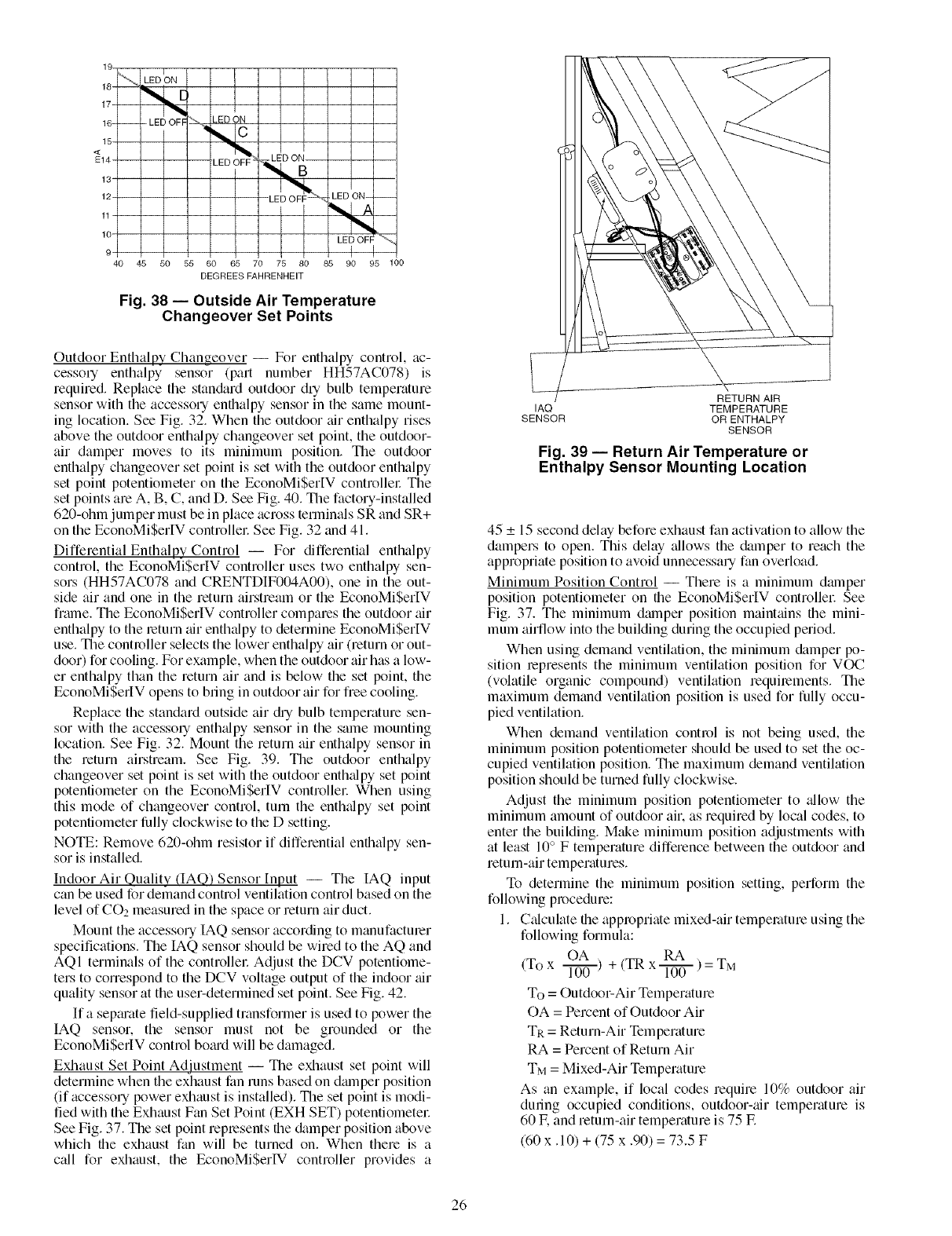
19
18
17
16-
15
<
E14
13
12
11
lO
9
40
I
LED ON
-- - LED OFF
45 50 55
_ED ON
LED O;
_< LED ON-- --
"t,4
I LED OFF
{
65 70 75 80 85 90 95 100
DEGREES FAHRENHEIT
Fig. 38 -- Outside Air Temperature
Changeover Set Points
Outdoor Enthalpy Changeover -- For enthalpy control, tic-
cessoq enthalpy sensor (part number HH57AC078) is
required. Replace the stan&ud outdoor dry bulb temperature
sensor with the accessory enthalpy sensor in the same mount-
ing location. See Fig. 32. When the outdoor tfir enthalpy rises
above the outdoor enth_@y changeover set point, the outdoor-
air damper moves to its minimum position. The outdoor
enthalpy changeover set point is set with the outdoor enthalpy
set point potentiometer on the EconoMiSerIV controllel: The
set points are A, B, C, and D. See Fig. 40. The factory-installed
620-ohm jumper must be in place across terminals SR and SR+
on the EconoMiSerIV controllel: See Fig. 32 and 41.
Differential Enthalpy Control -- For differential enthalpy
control, the EconoMiSerIV controller uses two enthalpy sen-
sors (HH57AC078 and CRENTDIF004A00), one in the out-
side air and one in the return airstream or the EconoMiSerIV
frmne. The EconoMiSerIV controller compares the outdoor tfir
enthalpy to the return tfir enthalpy to determine EconoMiSerIV
use. The controller selects the lower enthalpy air (return or out-
door) for cooling. For example, when the outdoor air has a low-
er enthalpy than the return air and is below the set point, the
EconoMiSerIV opens to bring in outdoor air for free cooling.
Replace the standard outside air ch_ bulb temperature sen-
sor with the accessory enth_dpy sensor in the same mounting
location. See Fig. 32. Mount the return air enthalpy sensor in
the return airstream. See Fig. 39. The outdoor enthalpy
changeover set point is set with the outdoor enth_flpy set point
potentiometer on the EconoMiSerIV controllel: When using
this mode of changeover control, turn the enth_flpy set point
potentiometer fiJlly clockwise to the O setting.
NOTE: Remove 620-ohm resistor if differential enthalpy sen-
sor is installed.
Indoor Air Quality (IAQ) Sensor [nput -- The IAQ input
can be used for demand control ventilation control based on the
level of CO2 measured in the space or return air duct.
Mount the accessory IAQ sensor according to manufacturer
specifications. The IAQ sensor should be wired to the AQ and
AQI terminals of the controllel: Adjust the DCV potentiome-
ters to correspond to the DCV voltage output of the indoor tfir
quality sensor at the user-determined set point. See Fig. 42.
If a sepmate field-supplied transformer is used to power the
IAQ sensor, the sensor must not be grounded or the
EconoMiSerlV control bomd will be damaged.
Exhaust Set Point Adjustment -- The exhaust set point will
determine when the exhaust fan runs based on dmnper position
(if accessory power exhaust is installed). The set point is modi-
fied with the Exhaust Fan Set Point (EXH SET) potentiometel:
See Fig. 37. The set point represents the cktmper position above
which the exhaust fan will be turned on. When there is a
c_dl for exhaust, the EconoMiSerIV controller provides a
RETURN AIR
IAQ TEMPERATURE
SENSOR OR ENTHALPY
SENSOR
Fig. 39 -- Return Air Temperature or
Enthalpy Sensor Mounting Location
45 _+15 second delay before exhaust fan actiw_tion to allow the
dampers to open. This delay _fllows the damper to reach the
appropriate position to avoid unnecessary fan overload.
Minimum Position Control -- There is a minimum damper
position potentiometer on the EconoMi$erIV controllel: See
Fig. 37. The minimum dmnper position mainttfins the mini-
mum airflow into the building during the occupied period.
When using demand ventilation, the minimum &tmper po-
sition represents the minimum ventilation position for VOC
(volatile organic compound) ventilation requirements. The
maximum demand ventilation position is used for fully occu-
pied ventilation.
When demand ventilation control is not being used, the
minimum position potentiometer should be used to set the oc-
cupied ventilation position. The maximum demand ventilation
position should be turned fully clockwise.
Adjust the minimum position potentiometer to _fllow the
minimum amount of outdoor air. as required by local codes, to
enter the building. Make minimum position adjustments with
at least 10° F temperature difference between the outdoor and
return-air temperatures.
To determine the minimum position setting, perform the
following procedure:
1. Calculate the appropriate mixed-air temperature using the
following formula:
OA + (TR RA
(To x l-T-if(]-) x _ ) = TM
To = Outdoor-Air Temperature
OA = Percent of Outdoor Air
TR = Return-Air Temperature
RA = Percent of Return Air
TM = Mixed-Air Temperature
As an example, if local codes require 10% outdoor air
during occupied conditions, outdoor-_fir temperature is
60 IF.and return-air temperature is 75 IF.
(60 x. 10) + (75 x .90) = 73.5 F
26

CONTROL CONTROL POINT
CURVE APPROX. °F (°C)
AT 50% RH
A 73 (23)
B 70 (21)
C 67/19)
D 63 (17)
85 90 95 100 105 110
(29) (32) (35) (38) (41) (43)
\1 /I \
XI IX _
35 40 45 50 55 60 65 70 75 80 85 90 95 100 105 110
(2) (4) (7) (10) (13) (16) (18) (21) (24) (27) (29) (32) (35) (38) (41) (43)
APPROXIMATE DRY BULB TEMPERATURE-- °F (°C)
Fig. 40 -- Enthalpy Changeover Set Points
CURVE
DCV
2OV
...........................................TRr_'_ TR1
2
AOlI'_ocv_
_AO_ DCV
so+N '
SO_l_JI
SR+ tee
sR_1__1_7 °
..... ..... ....
5
4
EF1
Fig. 41 -- EconoMi$erlV Controller
6000
5000
o_
Z
iO4000
CE
3000
,7-
Z
©2000
O
w
:_ 1000
CE
CO 2 SENSOR MAX RANGE SETTING
2345678
DAMPER VOLTAGE FOR MAX VENTILATION RATE
Fig. 42 -- 002 Sensor Maximum Range Setting
27
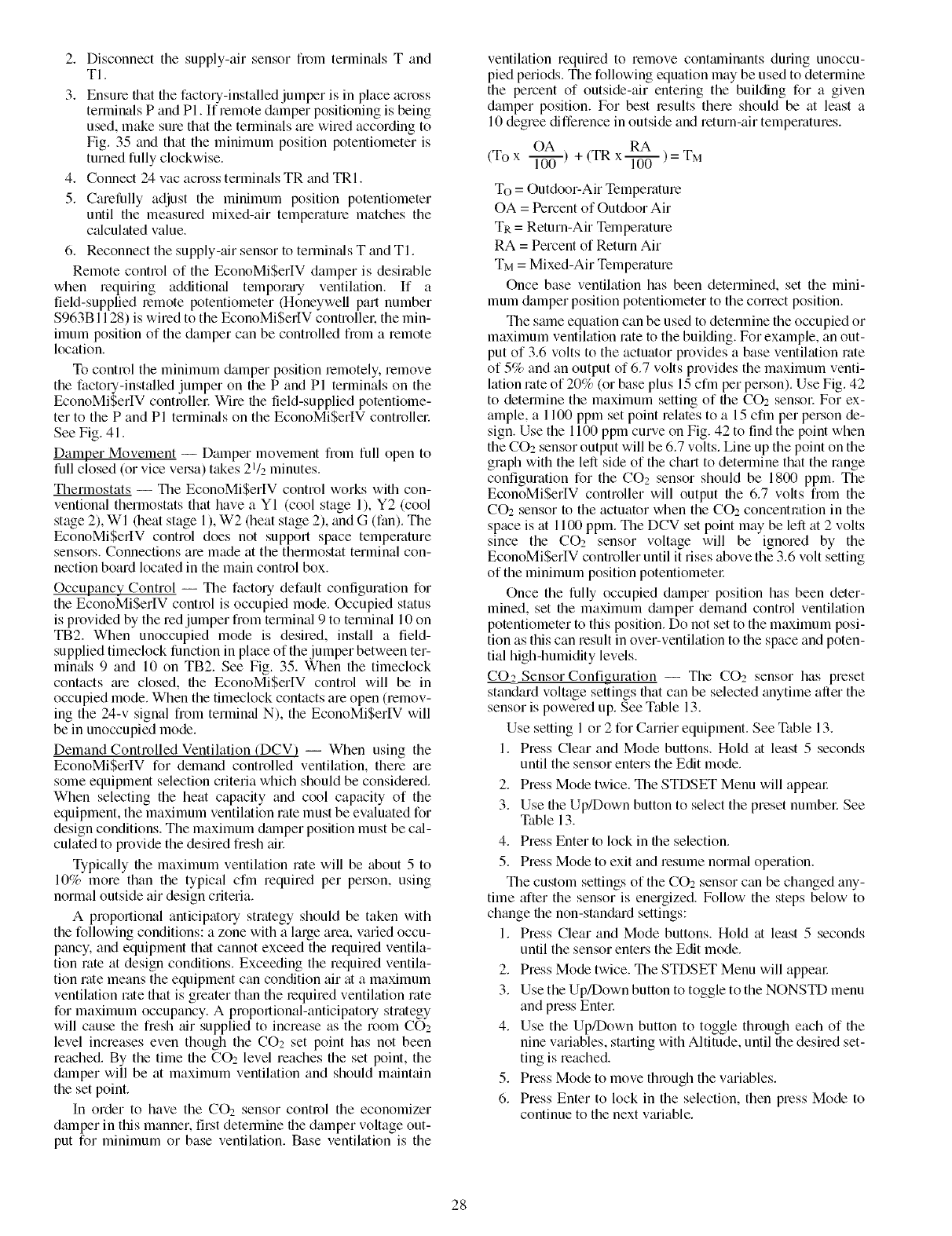
2. Disconnect the supply-air sensor from termimds T and
TI.
3. Ensure that file factory-installed jumper is in place across
terminals P and PI. If remote damper positioning is being
used, make sure that file tenninals are wired according to
Fig. 35 and that the minimum position potentiometer is
turned fully clockwise.
4. Connect 24 vac across terminals TR and TRI.
5. Carefiflly adjust the minimum position potentiometer
until the measured mixed-air temperature matches the
c_dculated value.
6. Reconnect the supply-air sensor to terminals T and TI.
Remote control of the EconoMiSerIV damper is desilable
when requiring additional tempormy ventilation. If a
field-supplied remote potentiometer (Honeywell part number
$963B1128) is wired to the EconoMiSerIV controllek the min-
imum position of the damper can be controlled from a remote
location.
To control the minimum damper position lemotely, remove
the factory-installed jumper on the P and Pl terminals on the
EconoMi$erIV controllec Wire the field-supplied potentiolne-
ter to the P and Pl terminals on the EconoMiSerIV controllec
See Fig. 41.
Damper Movement -- Damper movement from full open to
full closed (or vice velsa) takes 21/2 minutes.
Thermostats -- The EconoMiSerIV control works with con-
ventional thermostats that have a YI (cool stage 1), Y2 (cool
stage 2), WI (heat stage 1), W2 (heat stage 2), _md G (fan). The
EconoMiSerIV control does not support space temperature
senso_.s. Connections are made at the thermostat terminal con-
nection board located in the main control box.
Occupancy Control -- The factory default configuration for
the EconoMiSerIV control is occupied mode. Occupied status
is provided by the red jumper from terminal 9 to terminal 10 on
TB2. When unoccupied mode is desired, install a field-
supplied timeclock fimction in place of the jumper between ter-
minals 9 and 10 on TB2. See Fig. 35. When the timeclock
contacts me closed, file EconoMiSer[V control will be in
occupied mode. When the timeclock contacts are open (remov-
ing the 24-v signal from termimd N), the EconoMiSerlV will
be in unoccupied mode.
Demand Controlled Ventilation (DCV) -- When using the
EconoMiSerlV for demand controlled ventilation, there me
some equipment selection criteria which should be considered.
When selecting the heat capacity and cool capacity of the
equipment, the maximum ventilation rate must be evaluated for
design conditions. The maximum damper position must be c_d-
culated to provide the desired fresh ail:
Typically file maximum ventilation rate will be about 5 to
10% more than the typical cfm required per pel.son, using
normal outside air design criteria.
A proportional anticipatory strategy should be taken with
the following conditions: a zone with a large area, varied occu-
pancy, and equipment that cannot exceed the required ventila-
tion rate at design conditions. Exceeding the required ventila-
tion rate means the equipment can condition air at a maximum
ventilation rate that is greater than the required ventilation rate
for maximum occupancy. A proportional-anticipatory strategy
will cause file fresh air supplied to increase as the room COz
level increases even though the CO2 set point has not been
reached. By the time the CO2 level reaches the set point, the
dmnper will be at maximum ventilation and should maintain
the set point.
In order to have the CO2 sensor control the economizer
dmnper in this manner, first determine the damper voltage out-
put for minimum or base ventilation. Base ventilation is the
ventilation required to remove contmninants during unoccu-
pied periods. Tile following equation may be used to determine
the percent of outside-air entering the building for a given
damper position. For best results there should be at least a
10 degree difference in outside and return-air temperatures.
OA RA
(To x l---ff_)+ (TR x _ ) = TM
To = Outdoor-Air Temperature
OA = Percent of Outdoor Air
TR = Return-Air Telnperature
RA = Percent of Return Air
TM = Mixed-Air Temperature
Once base ventilation has been determined, set the mini-
mum damper position potentiometer to the correct position.
The same equation can be used to determine the occupied or
maximum ventilation rate to the building. For example, an out-
put of 3.6 volts to the actuator provides a base ventilation rate
of 5% and an output of 6.7 volts provides the maximum venti-
lation rate of 20% (or base plus 15 cfm per person). Use Fig. 42
to determine the maximum setting of file CO2 sensoc For ex-
ample, a 1100 ppm set point relates to a 15 cfm per person de-
sign. Use the 1100 ppm curve on Fig. 42 to find the point when
the CO2 sensor output will be 6.7 volts. Line up the point on the
graph with the left side of the chart to determine that the range
configuration for the CO2 sensor should be 1800 ppm. The
EconoMiSerIV controller will output the 6.7 volts fiom the
CO2 sensor to the actuator when the CO__concentration in the
space is at 1100ppm. The DCV set point may be left at 2 volts
since the CO2 sensor voltage will be ignored by the
EconoMiSerIV controller until it rises above the 3.6 volt setting
of the minimum position potentiomete_:
Once the fully occupied dmnper position has been deter-
mined, set file maximum dmnper demand control ventilation
potentiometer to this position. Do not set to the maximum posi-
tion as this can result in over-ventilation to the space and poten-
tial high-humidity levels.
CO2_Sensor Configuration -- The CO2 sensor has preset
standard voltage settings that can be selected anytime after the
sensor is powered up. See Table 13.
Use setting 1 or 2 for Carrier equipment. See Table 13.
1. Press Clear and Mode buttons. Hold at least 5 seconds
until the sensor enters the Edit mode.
2. Press Mode twice. The STDSET Menu will appear
3. Use the Up/Down button to select the preset numbel: See
Table 13.
4. Press Enter to lock in file selection.
5. Press Mode to exit and resume norm_d operation.
The custom settings of the CO2 sensor can be changed any-
time after the sensor is energized. Follow the steps below to
change file non-stan&trd settings:
1. Press Clear and Mode buttons. Hold at least 5 seconds
until the sensor enters the Edit mode.
2. Press Mode twice. The STDSET Menu will appem:
3. Use the Up/Down button to toggle to the NONSTD menu
and press Entel:
4. Use the Up/Down button to toggle through each of the
nine variables, starting with Altitude, until file desired set-
ting is reached.
5. Press Mode to move through the variables.
6. Press Enter to lock in the selection, then press Mode to
continue to the next vmiable.
28

Table 13 -- 002 Sensor Standard Settings
ANALOG
OUTPUT
SETTING
1
2
3
4
5
6
7
8
EQUIPMENT
Interface with Standard
Building Control System
Economizer
Health & Safety
9Parking/Air Intakes/
Loading Docks
LEGEND
ppm -- Parts Per Million
OUTPUT
Proportional
Proportional
Exponential
Proportional
Proportional
Exponential
Exponential
Proportional
Proportional
VENTILATION
RATE
(cfm/Pereon)
Any
Any
Any
15
20
15
20
0-10V
4-20 mA
2-10V
7-20 mA
0-10V
4-20 mA
0-10V
4-20 mA
0-10V
4-20 mA
0-10V
4-20 mA
0-10V
4-20 mA
0-10V
4-20 mA
0-10V
4-20 mA
002
CONTROLRANGE
(ppm)
0-2000
0-2000
0-2000
0-1100
0- 900
0-1100
0- 900
0-9999
0-2000
OPTIONAL
RELAY SETPOINT
(ppm)
1000
1000
1100
1100
900
1100
900
5000
700
RELAY
HYSTERESIS
(ppm)
50
50
50
50
50
50
50
50O
50
Dehumidification of Fresh Air with DCV Control -- Infor-
mation flom ASHRAE indicates that the largest humidity load
on any zone is the flesh air introduced. For some applications,
a field-installed energy recovely unit can be added to reduce
the moisture content of file fiesh tfir being brought into the
building when the enthalpy is high. In most cases, the normal
heating and cooling processes are more than adequate to re-
move the humidity loads for most commerci_d applications.
If nonnal rooftop heating and cooling operation is not ade-
quate for the outdoor humidity level, an enel_y recovery unit
and/or a dehumidification option should be considered.
Step 14 -- Install Humidistat for Optional
MoistureMi$er TM Package-- MoistureMi$er dehu-
midification package operation can be controlled by field in-
stallation of a Canier-approved humidistat. To install the humi-
distat perform the following procedure:
1. Locate humidistat on a solid interior wall in the condi-
tioned space. Location should be a well ventilated area
to sense average humidity.
2. Route thermostat cable or equivalent single leads of col-
ored wire from Humidistat terminals through conduit in
unit to the low voltage connection on the 2-pole terminal
strip (TB3) as shown in Fig. 43 and Fig. 44. See Fig. 45
for operation_d diagram.
29
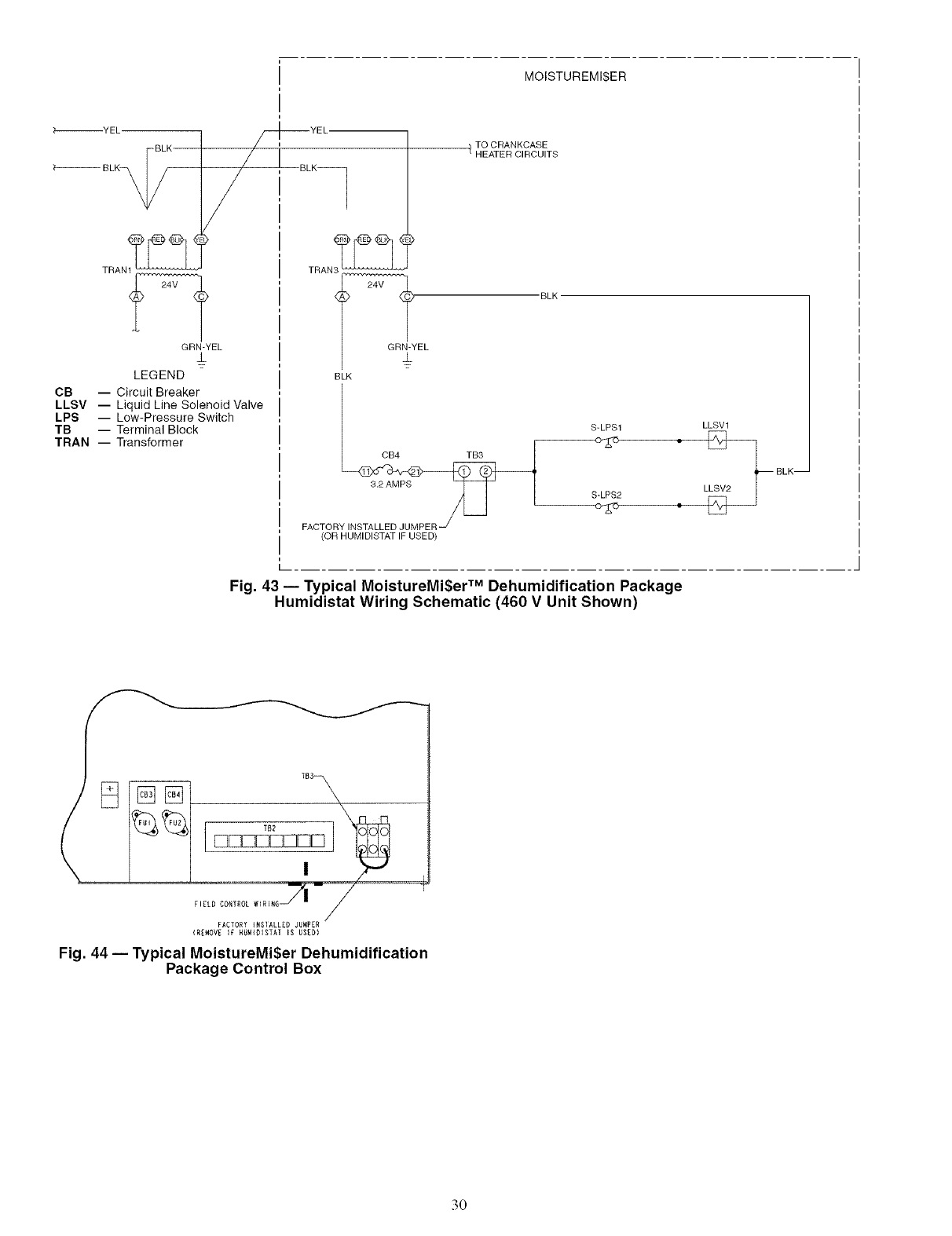
MOISTUREMI$ER
_-_YEL-
BLK
?-_ BLK_
YEL
TRANt 2_4_
GRN-YEL
LEGEND
CB -- Circuit Breaker
LLSV -- Liquid Line Solenoid Valve
LPS -- Low-Pressure Switch
TB -- Terminal Block
TRAN -- Transformer
TRAN
24V
GRN-YEL
TO CRANKCASE
1HEATER CIRCUITS
BLK
BLK
LLSVksv__
S-LPS1
CB4 TB3
BLK--
3.2 AMPS S LPS2 L
FACTOR
(OR HUMIDISTATIF USED)
Fig. 43- Typical MoistureMi$er TM Dehumidification Package
Humidistat Wiring Schematic (460 V Unit Shown)
f I[L D CONTROL
FACTORY _RSIALLEO JURPER
(REMOVE IF RUM_OISTAT IS USED)
Fig. 44 -- Typical MoistureMi$er Dehumidification
Package Control Box
30

CONDENSER COiL ,
SUCTION
l DISCHARGE
F CCH
CRANKCASE
HEATER
OUTDOOR AiR
EVAPORATOR
COIL
S-LPS J
SUB COOLERCONTROL
LOW PRESSURESWITCH
TXV
SUBCOOLER /
COIL
EQUALIZER
LINE
INDOOR AIR
3-WAY
VALVE
TXV -- Thermostatic Expansion Valve
Fig. 45 -- MoistureMi$er TM Dehumidification Package Operation Diagram
START-UP
Use the following information and Start-Up Checklist on
page CL-I to check out unit PRIOR to start-up.
Unit Preparation -- Check that unit has been installed in
accordance with these installation instructions and all applica-
ble codes.
COMPRESSOR MOUNTING -- Do not loosen or remove
complessor holddown bolts.
REFRIGERANT SERVICE PORTS -- Each reh'igerant sys-
tem has a total of 3 Schrader-type service gage ports. One port
is located on the suction line, one on the compressor discharge
line, and one on the liquid line. In addition Schmder-type
valves are located underneath the low-pressme switches. Be
sure that caps on the polls are tight.
COMPRESSOR ROTATION
48TJ016 and 020 Only -- The unit is equipped with a Phase
Monitor Relay (PMR) board located in the control box. The
PMR device will not allow the unit to run if field power is con-
nected incorrectly. To determine if the Phase Monitor Relay is
preventing the unit from starting, check to see if the red LED is
blinking, ff the LED is blinking, the 3-phase field power has
been wiled incorrectly. A solid light means that field power
connections are correct.
48TJ024 and 028 Only -- It is important to be certain the
compressors are rotaing in the proper direction. To determine
whether or not compressoB are rotaing in the proper direction:
I. Connect service gages to suction and discharge pressure
fittings.
2. Energize the compressoc
3. The suction pressure should &op and the discharge pres-
sure should rise, as is normal on any start-up.
If the suction pressure does not drop and the discharge pres-
sure does not rise to normal levels:
1. Note that the evaporator fan is probably also rotating
in the wrong direction.
2. Turn off power to the unit.
3. Reverse any two of the incoming power leads.
4. Turn on power to the unit.
5. Energize each compressoc
The suction and discharge pressure levels should now move
to their normtd start-up levels.
NOTE: When compressors are rotating in the wrong direction,
the unit will have increased noise levels and will not provide
heating and cooling.
After a few minutes of reverse operation, the scroll com-
pressor intermfl overload protection will open, which will acti-
vate the unit's lockout and requires a manual reset. Reset is
accomplished by turning the thermostat on and off.
INTERNAL WIRING -- Check all electrical connections in
unit control boxes; tighten as required.
CRANKCASE HEATER (SIZE 028 AND UNITS WITH
MOISTUREMI$ER TM DEHUMIDIFICATION PACKAGE
ONLY) -- Crankcase heater(s) is energized as long as there is
power to the unit and the compressor is not operating.
IMPORTANT: Unit power must be on for 24 houB prior to Istart-up. Otherwise, &mmge to the compressor may result. I
EVAPORATOR FAN- Fan belt and vmiable pulleys are
factory-installed. Remove tape from the fan pulley. See
Tables 14-19 for fan performance data. Be sure that fans rotate
in the proper direction. See Table 20 for air quantity limits. See
Tables 21-23 for static pressure information for accessories and
options. See Table 24 for fan rpm tit motor pulley settings. See
Tables 25 and 26 for evaporator-fan motor data and evaporator-
fan motor efficiency. To alter fan performance, see Evaporator
Fan Perforlnance Adjustment section on page 40.
NOTE: A 31/2-in. bolt and threaded plate are included in the
installer's packet for 48TJ020-028 units. They can be added to
the motor support channel below the motor mounting plate to
aid in raising the fan motor
31

AIRFLOW
(cfm)
4500
4800
5100
5400
5700
6000
6300
6600
6900
7200
7500
Table 14 -- Fan Performance -- 48TJD016 (Low Heat Units)
AVAILABLE EXTERNAL STATIC PRESSURE (in. wg)
0.2 0.4 0,6 0,8 1.0 1.2
Rpm Bhp Watts Rpm Bhp Watts Rpm Bhp Watts Rpm Bhp Watts Rpm Bhp Watts Rpm Bhp Watts
809 1.83 1317 906 1.74 1502 994 1.96 1690 1078 2.18 1882 1156 2.41 2077 1230 2,64 2275
850 1.76 1516 942 1,98 1706 1027 2.20 1899 1107 2.43 2094 1183 2,66 2293 1255 2,89 2495
892 2.01 1733 979 2.24 1928 1061 2,46 2125 1138 2.70 2325 1211 2,93 2528 1281 3,17 2733
934 2.28 1970 1017 2.52 2169 1096 2,75 2371 1170 2.99 2575 1241 3.22 2781 1309 3,47 2990
976 2.58 2225 1058 2,82 2429 1132 3,06 2635 1204 3.30 2843 1272 3.54 3053 1338 3,79 3266
1019 2.90 2500 1096 3,14 2709 1168 3,38 2919 1238 3.63 3131 1304 3.88 3345 1368 4,13 3562
1063 3.24 2795 1136 3,49 3008 1206 3,74 3223 1273 3,99 3439 1337 4.24 3657 -- -- --
1106 3.61 3111 1177 3,86 3329 1244 4,11 3547 1309 4.37 3767 ......
1150 4.00 3448 1218 4,26 3670 ............
AIRFLOW
(cfm)
4500
4800
5100
5400
5700
6000
6300
6600
6900
7200
7500
AVAILABLE EXTERNAL STATIC PRESSURE (in. wg)
1,4 1.6 1,8 1.9 2.0
Rpm Bhp Watts Rpm Bhp Watts Rpm Bhp Watts Rpm Bhp Watts Rpm Bhp Watts
1301 2.87 2477 1369 3,11 2683 1434 3,35 2891 1497 3.47 2997 1497 3,80 3103
1324 3.13 2700 1390 3,37 2909 1454 3,62 3120 1515 3.74 3226 1515 3,87 3334
1349 3.41 2942 1413 3,88 3153 1475 3,90 3367 1535 4.03 3475 1535 4,18 3584
1374 3.71 3202 1437 3,96 3418 1498 4,21 3633 ......
1402 4.04 3481 1463 4.29 3699 .........
LEGEND
Bhp -- Brake Horsepower
FlOP -- Factory-Installed Option
Watts -- Input Watts to Motor
NOTES:
1, Standard low-medium static drive range is 891 to 1179 rpm (for 208/230
and 460-v units) or 1159 to 1429 rpm (for 575-v units). Alternate high-
static drive range is 1227 to 1550 (for 208/230 and 460-v units), The
alternate high-static drive is not available for 48TJ016 575-v units. Other
rpms require a field-supplied drive,
2, Maximum continuous bhp is 4.25 (208/230 and 460 v) or 3,45 (575 v)
and the maximum continuous watts are 3775 (208/230 and 460 v) or
3065 (575 v). Do not adjust motor rpm such that motor maximum bhp
and/or watts is exceeded at the maximum operating cfm.
3. Static pressure losses (i.e., economizer) must be added to external static
pressure before entering Fan Performance table.
4. Interpolation is permissible. Do not extrapolate.
5. Fan performance is based on wet coils, clean filters, and casing losses.
See Tables 21-23 for accessory/FlOP static pressure information.
6. Extensive motor and drive testing on these units ensures that the full
horsepower and watts range of the motor can be utilized with confi-
dence. Using fan motors up to the watts or bhp rating shown will not
result in nuisance tripping or premature motor failure. Unit warranty will
not be affected.
7. Use of a field-supplied motor may affect wiring size. Contact your Carrier
representative for details.
Table 15 -- Fan Performance -- 48TJD020 and 024 (Low Heat Units)
AIRFLOW
(cfm)
AVAILABLE EXTERNAL STATIC PRESSURE (in. wg)
0,2 0,4 0,6 0,8 1.0 1,2
Rpm Bhp Watts Rpm Bhp Watts Rpm Bhp Watts Rpm Bhp Watts Rpm Bhp Watts Rpm Bhp Watts
5,500 755 2,27 1908 831 2.58 2171 901 2.91 2443 968 3.24 2723 1031 3.58 3009 1091 3,93 3302
6,000 810 2,72 2287 881 3.04 2556 947 3.37 2833 1010 3,71 3118 1070 4.05 3408 1127 4,40 3702
6,500 868 3,22 2710 932 3.55 2985 994 3.88 3288 1054 4,23 3554 1111 4.57 3847 1166 4,93 4148
7,000 923 3,78 3177 985 4.11 3458 1044 4.45 3744 1100 4.80 4036 1155 5,15 4333 1207 5,51 4635
7,500 980 4,39 3690 1038 4.73 3976 1094 5.07 4267 1148 5.43 4564 1200 5.78 4864 1250 6,15 5170
8,000 1038 5,08 4251 1093 5.40 4542 1148 5.75 4838 1197 6.11 5138 1248 6.47 5443 1294 6,84 5752
8,500 1096 5.78 4859 1148 6.13 5156 1198 8.49 5458 1247 6.85 5761 1294 7.22 6070 1340 7,59 6382
9,000 1154 6,56 5517 1204 6.92 5818 1251 7,28 6123 1298 7.65 6432 1343 8.02 6745 1388 8,40 7062
9,500 1213 7.40 6224 1260 7.77 6531 1306 8.13 6840 1350 8.51 7154 1394 8.88 7471 1436 9,26 7791
10,000 1272 8,30 6983 1317 8.67 7294 1360 9.05 7608 1403 9.43 7926 1445 9.81 8247 1486 10.19 8570
AIRFLOW
(cfm)
5,500
6,000
6,500
7,000
7,500
8,000
8,500
9,000
9,500
10,000
AVAILABLE EXTERNAL STATIC PRESSURE(in. wg)
1.4 1.6 1,8 1.9 2.0
Rpm Bhp Watts Rpm Bhp Watts Rpm Bhp Watts Rpm Bhp Watts Rpm Bhp Wat_
1149 4.28 3602 1204 4,65 3907 1258 5,02 4217 1284 5,20 4375 1309 5,39 4533
1183 4.76 4003 1238 5,13 4310 1288 5,50 4622 1313 5.68 4780 1337 5,87 4939
1219 5.29 4450 1270 5,66 1459 1320 6,03 5073 1344 6.22 5232 1368 6,41 5391
1258 5.88 4942 1307 6,25 5253 1355 6,62 5569 1378 6,81 5729 1402 7,00 5890
1299 6.52 5480 1346 6,89 5794 1392 7,27 6113 1415 7,46 6273 1437 7.65 6435
1341 7.21 6065 1387 7,59 6383 1392 7,97 6704 1453 8,16 6866 1475 8,36 7028
1385 7.97 6699 1429 8,35 7019 1472 8,73 7343 1493 8,93 7506 1514 9,12 7670
1431 8.78 7382 1473 9,15 7705 1515 9,55 8032 1535 9,75 8196 -- -- --
1478 9.65 8114 1519 10,04 8441 .......
LEGEND
Bhp -- Brake Horsepower
FlOP -- Factory-Installed Option
Watts -- Input Watts to Motor
NOTES:
1, Standard low-medium static drive range for the 020 size is 910 to
1095 rpm. Standard low-medium static drive range for the 024 size is
1002 to 1225 rpm. Alternate high-static drive range for the 020 size is
1069 to 1287, Alternate hig h-static drive range for the 024 size is 1193 to
1458 rpm. Other rpms require a field-supplied drive,
2, Maximum continuous bhp for the 020 size is 5,90. Maximum continuous
bhp for the 024 size is 8.7 (208/230, 575 v) or 9.5 (460 v). The maximum
continuous watts for the 020 size is 5180. The maximum continuous
watts for the 024 size is 7915 (208/230, 575 v) or 8640 (460 v). Do not
adjust motor rpm such that motor maximum bhp and/or watts is
exceeded at the maximum operating cfm.
3. Static pressure losses (i.e., economizer) must be added to external static
pressure before entering Fan Performance table.
4. Interpolation is permissible. Do not extrapolate.
5. Fan performance is based on wet coils, clean filters, and casing losses.
See Tables 21-23 for accessory/FlOP static pressure information.
6. Extensive motor and drive testing on these units ensures that the full
horsepower and watts range of the motor can be utilized with confi-
dence. Using fan motors up to the watts or bhp rating shown will not
result in nuisance tripping or premature motor failure. Unit warranty will
not be affected.
7. Use of a field-supplied motor may affect wiring size. Contact your Carrier
representative for details.
32
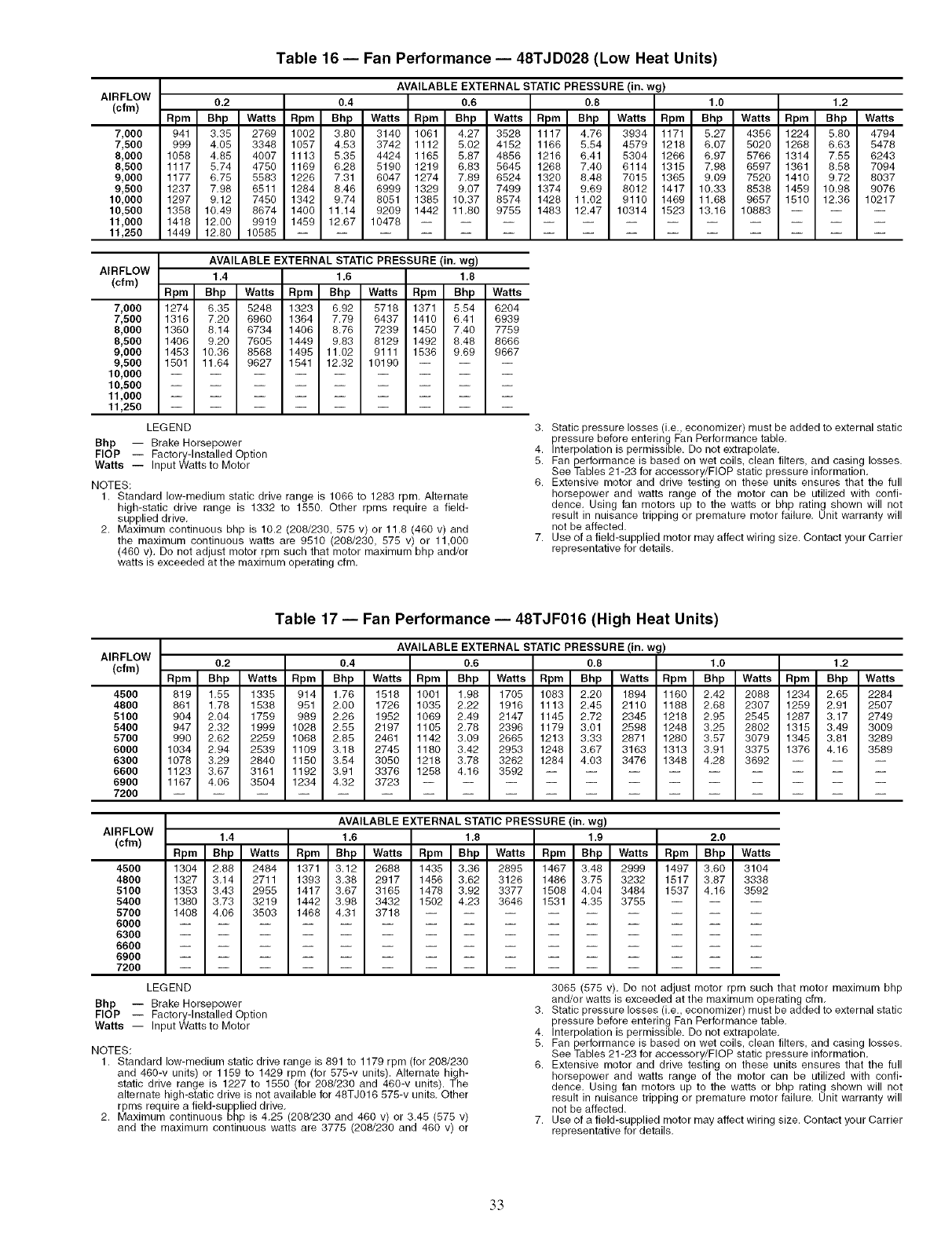
Table 16 -- Fan Performance -- 48TJD028 (Low Heat Units)
AVAILABLE EXTERNAL STATIC PRESSURE (in. wg)
AIRFLOW
(cfrn) 0.2 0.4 0.6 0.8 1.0 1.2
Rpm Bhp Watts Rpm Bhp Watts Rpm Bhp Watts Rpm Bhp Watts Rpm Bhp Watts Rpm Bhp Watts
7,000 941 3,35 2769 1002 3.60 3140 1061 4,27 3528 1117 4.76 3934 1171 5.27 4356 1224 5.60 4794
7,500 999 4,05 3346 1057 4.53 3742 1112 5,02 4152 1166 5.54 4579 1218 6.07 5020 1266 6.63 5478
8,000 1056 4,85 4007 1113 5.35 4424 1165 5,87 4856 1216 6.41 5304 1266 6,97 5766 1314 7.55 6243
8,500 1117 5,74 4750 1169 6.28 5190 1219 6,83 5645 1268 7.40 6114 1315 7,98 6597 1361 6.58 7094
9,000 1177 6,75 5583 1226 7.31 6047 1274 7,89 6524 1320 8.48 7015 1365 9,09 7520 1410 9.72 8037
9,500 1237 7,98 6511 1284 8.46 6999 1329 9,07 7499 1374 9.69 8012 1417 10,33 8538 1459 10.98 9076
10,000 1297 9,12 7450 1342 9.74 8051 1385 10,37 8574 1428 11.02 9110 1469 11,68 9657 1510 12.36 10217
10,500 1358 10,49 8674 1400 11.14 9209 1442 11,80 9755 1483 12.47 10314 1523 13,16 10883 -- -- --
11,000 1418 12,00 9919 1459 12.67 10478 ............
11,250 1449 12,80 10585 ...............
AIRFLOW
(cfm)
7,000
7,500
8,000
8,500
9,000
9,500
10,000
10,500
11,000
11,250
AVAILABLE EXTERNAL STATIC PRESSURE (in, wg)
1,4 1,6 1,8
Rpm Bhp Watts Rpm Bhp Watts Rpm Bhp Watts
1274 6.35 5248 1323 6,92 5718 1371 5.54 6204
1316 7.20 6960 1364 7,79 6437 1410 6.41 6939
1360 8.14 6734 1406 8,76 7239 1450 7.40 7759
1406 9.20 7605 1449 9,83 8129 1492 8.48 8666
1453 10,36 8568 1495 11.02 9111 1536 9.69 9667
1501 11,64 9627 1541 12,32 10190 -- -- --
LEGEND
Bhp -- Brake Horsepower
FlOP -- Factory-Installed Option
Watts -- Input Wattsto Motor
NOTES:
1. Standard low-medium static drive range is 1066 to 1283 rpm, Alternate
high-static drive range is 1332 to 1550. Other rpms require a field-
supplied drive,
2. Maximum continuous bhp is 10.2 (208/230, 575 v) or 11.8 (460 v) and
the maximum continuous watts are 9510 (208/230, 575 v) or 11,000
(460 v). Do not adjust motor rpm such that motor maximum bhp and/or
watts is exceeded at the maximum operating cfm.
3. Static pressure losses (i,e., economizer) must be added to external static
pressure before entering Fan Performance table,
4. Interpolation is permissible. Do not extrapolate,
5. Fan performance is based on wet coils, clean filters, and casing losses.
See Tables 21-23 for accessory/FlOP static pressure information,
6. Extensive motor and drive testing on these units ensures that the full
horsepower and watts range of the motor can be utilized with confi-
dence, Using fan motors up to the watts or bhp rating shown will not
result in nuisance tripping or premature motor failure. Unit warranty will
not be affected.
7. Use of a field-supplied motor may affect wiring size. Contact your Carrier
representative for details,
AIRFLOW
(cfm)
4500
4800
5100
5400
5700
6000
6300
6600
6900
7200
Table 17 -- Fan Performance -- 48TJF016 (High Heat Units)
AVAILABLE EXTERNAL STATIC PRESSURE (in, wg)
0,2 0,4 0.6 0,8 1.0 1.2
Rpm Bhp Watts Rpm Bhp Watts Rpm Bhp Watts Rpm Bhp Watts Rpm Bhp Watts Rpm Bhp Watts
819 1,55 1335 914 1,76 1518 1001 1,98 1705 1083 2.20 1894 1160 2,42 2088 1234 2,65 2284
861 1,78 1538 951 2,00 1726 1035 2,22 1916 1113 2.45 2110 1188 2,68 2307 1259 2,91 2507
904 2,04 1759 989 2,26 1952 1069 2,49 2147 1145 2,72 2345 1218 2,95 2545 1287 3,17 2749
947 2,32 1999 1028 2,55 2197 1105 2,78 2396 1179 3,01 2598 1248 3,25 2802 1315 3,49 3009
990 2,62 2259 1068 2,85 2461 1142 3,09 2665 1213 3,33 2871 1280 3,57 3079 1345 3,81 3289
1034 2,94 2539 1109 3,18 2745 1180 3,42 2953 1248 3.67 3163 1313 3,91 3375 1376 4,16 3589
1078 3,29 2840 1150 3,54 3050 1218 3,78 3262 1284 4.03 3476 1348 4,28 3692 -- -- --
1123 3,67 3161 1192 3,91 3376 1258 4,16 3592 .........
1167 4,06 3504 1234 4,32 3723 ............
AIRFLOW
(cfm)
45OO
4800
5100
5400
5700 1408 4,06 3503 1468 4,31 3718 --
6000 .......
6300 .......
6600 .......
6900 .......
7200 .......
LEGEND
Bhp -- Brake Horsepower
FlOP -- Factory-Installed Option
Watts -- Input Wattsto Motor
AVAILABLE EXTERNAL STATIC PRESSURE (in, wg)
1.4 1.6 1.8 1.9 2.0
Rpm Bhp Watts Rpm Bhp Watts Rpm Bhp Watts Rpm Bhp Watts Rpm Bhp Watts
1304 2.88 2484 1371 3.12 2688 1435 3.36 2895 1467 3,48 2999 1497 3.60 3104
1327 3,14 2711 1393 3,38 2917 1456 3,62 3126 1486 3,75 3232 1517 3.87 3338
1353 3,43 2955 1417 3,67 3165 1478 3,92 3377 1508 4,04 3484 1537 4.16 3592
1380 3,73 3219 1442 3,98 3432 1502 4,23 3646 1531 4,35 3755
NOTES:
1. Standard low-medium static drive range is 891 to 1179 rpm (for 208/230
and 460-v units) or 1159 to 1429 rpm (for 575-v units). Alternate high-
static drive range is 1227 to 1550 (for 208/230 and 460-v units). The
alternate high-static drive is not available for 48TJ016 575-v units, Other
rpms require a field-supplied drive,
2. Maximum continuous bhp is 4,25 (208/230 and 460 v) or 3.45 (575 v)
and the maximum continuous watts are 3775 (208/230 and 460 v) or
3065 (575 v). Do not adjust motor rpm such that motor maximum bhp
and/or watts is exceeded at the maximum operating cfm,
3. Static pressure losses (i,e., economizer) must be added to external static
pressure before entering Fan Performance table,
4. Interpolation is permissible. Do not extrapolate,
5. Fan performance is based on wet coils, clean filters, and casing losses.
See Tables 21-23 for accessory/FlOP static pressure information,
6. Extensive motor and drive testing on these units ensures that the full
horsepower and watts range of the motor can be utilized with confi-
dence, Using fan motors up to the watts or bhp rating shown will not
result in nuisance tripping or premature motor failure, Unit warranty will
not be affected.
7. Use of a field-supplied motor may affect wiring size. Contact your Carrier
representative for details,
.3.3

Table 18 -- Fan Performance- 48TJF020 and 024 (High Heat Units)
AVAILABLE EXTERNAL STATIC PRESSURE (in. wg)
AIRFLOW
(cfm) 0.2 0.4 0.6 0.8 1.0 1.2
Rpm Bhp Watts Rpm Bhp Watts Rpm Bhp Watts Rpm Bhp Watts Rpm Bhp Watts Rpm Bhp Watts
5_500 795 2.43 2043 866 2.74 2306 934 3.07 2578 998 3.40 2856 1059 3.74 3142 1117 4.08 3434
6,000 854 2.92 2452 921 3.24 2722 984 3.57 3998 1044 3.90 3281 1102 4.25 3570 1158 4.60 3865
6,500 914 3.46 2909 977 3.79 3184 1036 4.12 3465 1093 4.46 3752 1148 4.81 4045 1201 5.16 4343
7,000 975 4.06 3414 1034 4.39 3695 1090 4.73 3981 1144 5.08 4272 1196 5.43 4569 1246 5.79 4870
7,500 1037 4.72 3969 1092 5.06 4255 1145 5.41 4546 1196 5.76 4842 1256 6.12 5142 1294 6.48 5447
8,000 1099 5.44 4575 1150 5.79 4866 1201 6.14 5162 1249 6.50 5462 1297 6.86 5766 1343 7.22 6075
8,500 1161 6.22 5232 1210 6.57 5529 1258 6.93 5829 1304 7.29 6134 1349 7.66 6443 1393 8.03 6755
9,000 1223 7.07 5943 1270 7.43 6245 1315 7.79 6550 1360 8.16 6869 1403 8.53 7171 1445 8.90 7487
9,500 1286 7.98 6708 1331 8.34 7014 1374 8.71 7324 1416 9.08 7638 1457 9.46 7954 1498 9.84 8274
10,000 1349 8.95 7528 1392 9.32 7839 1433 9.70 8154 1473 10.07 8471 ......
AIRFLOW
(cfm)
5,500
6,000
6,500
7,000
7,500
8,000
8,500
9,000
9,500
10,000
AVAILABLE EXTERNAL STATIC PRESSURE (in. wg)
1.4 1,6 1,8 1,9 2,0
Rpm Bhp W_ Rpm Bhp Watts Rpm Bhp Wat_ Rpm Bhp Watts Rpm Bhp Watts
1173 4.44 3732 1227 4.80 4036 1279 5.17 4345 1304 5.35 4502 1329 5.54 4629
1211 4.95 4165 1263 5.32 4471 1313 5.69 4782 1337 5.87 4939 1361 6.06 5097
1252 5.53 4646 1302 5.89 4954 1350 6.26 5267 1373 6.56 5425 1396 6.64 5584
1295 6.16 5176 1343 6.52 5487 1389 6.90 5802 1412 7.09 5961 1434 7.28 6121
1340 6.85 5756 1386 7.22 6070 1431 7.60 6387 1452 7.79 6547 1474 7.98 6709
1388 7.60 6388 1431 7.97 6704 1474 8.35 7024 1495 8.54 7186 1516 8.74 7348
1436 8.41 7071 1478 8.79 7390 1520 9.17 7713 1540 9.37 7876 -- -- --
1486 9.28 7807 1527 9.67 8130 .........
1538 10.22 8597 ............
LEGEND
Bhp -- Brake Horsepower
FlOP -- Factory-Installed Option
Watts -- Input Watts to Motor
NOTES:
1. Standard low-medium static drive range for the 020 size is 910 to
1095 rpm. Standard low-medium static drive range for the 024 size is
1002 to 1225 rpm. Alternate high-static drive range for the 020 size is
1069 to 1287. Alternate hig h-static drive range for the 024 size is 1193 to
1458 rpm. Other rpms require a field-supplied drive.
2. Maximum continuous bhp for the 020 size is 5.90. Maximum continuous
bhp for the 024 size is 8.7 (208/230, 575 v) or 9.5 (460 v). The maximum
continuous watts for the 020 size is 5180. The maximum continuous
watts for the 024 size is 7915 (208/230, 575 v) or 8640 (460 v). Do not
adjust motor rpm such that motor maximum bhp and/or watts is
exceeded at the maximum operating cfm.
3. Static pressure losses (i.e., economizer) must be added to external static
pressure before entering Fan Performance table.
4. Interpolation is permissible. Do not extrapolate.
5. Fan performance is based on wet coils, clean filters, and casing losses.
See Tables 21-23 for accessory/FlOP static pressure information.
6. Extensive motor and drive testing on these units ensures that the full
horsepower and watts range of the motor can be utilized with confi-
dence. Using fan motors up to the watts or bhp rating shown will not
result in nuisance tripping or premature motor failure. Unit warranty will
not be affected.
7. Use of a field-supplied motor may affect wiring size. Contact your Carrier
representative for details.
Table 19 -- Fan Performance -- 48TJF028 (High Heat Units)
AVAILABLE EXTERNAL STATIC PRESSURE (in. wg)
AIRFLOW 0.2 0.4 0.6 0.8 1,0 1.2
(cfm) Rpm Bhp Watts Rpm Bhp Watts Rpm Bhp Watts Rpm Bhp Watts Rpm Bhp Watts Rpm Bhp Watts
7,000 992 4.05 3,348 1051 4.44 3,668 1106 4.83 3995 1160 5.24 4331 1212 5.65 4675 1262 6.08 5026
7,500 1055 4.77 3,947 1110 5.17 4,277 1162 5.58 4615 1214 6.00 4960 1263 6.43 5312 1311 6.86 5672
8,000 1118 5.58 4,610 1170 5.99 4,950 1220 6.41 5298 1268 6.84 5653 1315 7.27 6014 1361 7.72 6382
8,500 1182 6.46 5,339 1231 6.88 5,690 1278 7.31 6047 1324 7.75 6411 1369 8.20 6782 1413 8.66 7158
9,000 1246 7.42 6,136 1292 7.86 6,498 1337 8.30 6865 1381 8.75 7239 1424 9.21 7618 1466 9.68 8003
9,500 1310 8.47 7,005 1354 8.92 7,377 1397 9.38 7754 1439 9.84 8137 1480 10.31 8525 1520 10.79 8918
10,000 1374 9.61 7,947 1416 10.07 8,329 1457 10.54 8715 1497 11.02 9107 1537 11.50 9504 -- -- --
10,500 1439 10.84 8,964 1479 11.32 9,356 1518 11.79 9752 .........
11,000 1503 12.17 10,059 1542 12.65 10,460 ............
11,250 1536 12.86 10,636 ...............
AIRFLOW
(cfm)
7,000
7,500
8,000
8,500
9,000
9,500
10,000
10,500
11,000
11,250
AVAILABLE EXTERNAL STATIC PRESSURE (in. wg)
1.4 1.6 1.8
Rpm Bhp Watts Rpm Bhp Watts Rpm Bhp Watts
1311 6.51 5385 1359 6.96 5751 1405 6.00 6124
1358 7.30 6039 1403 7.76 6412 1448 6.84 6792
1406 8.17 6767 1560 8.63 7137 1492 7.75 7524
1456 9.12 7541 1498 9.59 7929 1539 8.75 8323
1507 10.15 8393 1548 10.63 8790 -- -- --
LEGEND
Bhp -- Brake Horsepower
FlOP -- Factory-Installed Option
Watts -- Input Watts to Motor
NOTES:
1. Standard low-medium static drive range is 1066 to 1283 rpm. Alternate
high-static drive range is 1332 to 1550. Other rpms require a field-
supplied drive.
2. Maximum continuous bhp is 10.2 (208/230, 575 v) or 11.8 (460 v) and
the maximum continuous watts are 9510 (208/230, 575 v) or 11,000
(460 v). Do not adjust motor rpm such that motor maximum bhp and/or
watts is exceeded at the maximum operating cfm.
3. Static pressure losses (i.e., economizer) must be added to external static
pressure before entering Fan Performance table.
4. Interpolation is permissible. Do not extrapolate.
5. Fan performance is based on wet coils, clean filters, and casing losses.
See Tables 21-23 for accessory/FlOP static pressure information.
6. Extensive motor and drive testing on these units ensures that the full
horsepower and watts range of the motor can be utilized with confi-
dence. Using fan motors up to the watts or bhp rating shown will not
result in nuisance tripping or premature motor failure. Unit warranty will
not be affected.
7. Use of a field-supplied motor may affect wiring size. Contact your Carrier
representative for details.
34
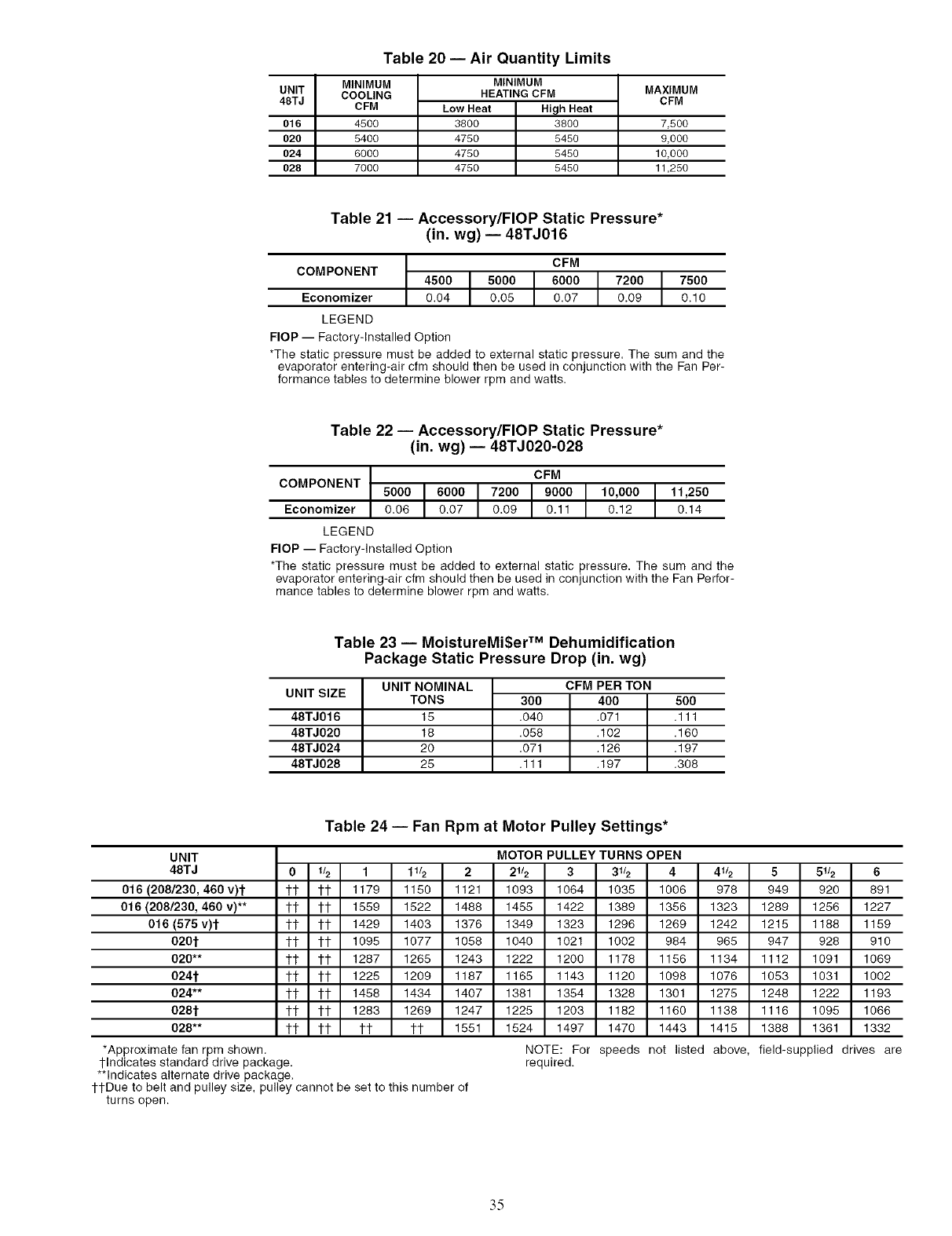
UNIT
48TJ
016
020
024
028
Table 20 -- Air Quantity Limits
MINIMUM
COOLING
CFM
4500
5400
6000
7000
MINIMUM
HEATING CFM
Low Heat High Heat
3800 3800
4750 5450
4750 5450
4750 5450
MAXIMUM
CFM
7,500
9,000
10,000
11,250
Table 21 -- Accessory/FlOP Static Pressure*
(in. wg) -- 48TJ016
4500 CFM
COMPONENT 5000 6000 7200 7500
Economizer 0.04 0.05 0.07 0.09 0.10
LEGEND
FlOP -- Factory-Installed Option
*The static pressure must be added to external static pressure. The sum and the
evaporator entering-air cfm should then be used in conjunction with the Fan Per-
formance tables to determine blower rpm and watts.
Table 22 -- Accessory/FlOP Static Pressure*
(in. wg) -- 48TJ020-028
CFM
COMPONENT 5000 6000 7200 9000 10,000 I 11,250
Economizer 0.06 0.07 0.09 0.11 0.12 I 0.14
LEGEND
FlOP -- Factory-Installed Option
*The static pressure must be added to external static pressure, The sum and the
evaporator entering-air cfm should then be used in conjunction with the Fan Perfor-
mance tables to determine blower rpm and watts.
Table 23 -- MoistureMi$er TM Dehumidification
Package Static Pressure Drop (in. wg)
UNIT SIZE
48TJ016
48TJ020
48TJ024
48TJ028
UNIT NOMINAL
TONS
15
18
2O
25
300
.040
.058
.071
.111
CFM PER TON
4OO
.071
.102
.126
.197
500
.111
.160
.197
.308
Table 24 -- Fan Rpm at Motor Pulley Settings*
UNIT MOTOR PULLEY TURNS OPEN
48TJ 0lr2 1 11/2 22112 3 31/2 4 41/2 5 5112 6
016 (208/230, 460 v)t tt tt 1179 1150 1121 1093 1064 1035 1006 978 949 920 891
016 (208/230, 460 v)** 1-t 1-t 1559 1522 1488 1455 1422 1389 1356 1323 1289 1256 1227
016 (575 v)l" 1-t 1-t 1429 1403 1376 1349 1323 1296 1269 1242 1215 1188 1159
0201" 1-t 1-t 1095 1077 1058 1040 1021 1002 984 965 947 928 910
020** tt 1-t 1287 1265 1243 1222 1200 1178 1156 1134 1112 1091 1069
0241" 1-t 1-t 1225 1209 1187 1165 1143 1120 1098 1076 1053 1031 1002
024** tt 1-t 1456 1434 1407 1381 1354 1326 1301 1275 1246 1222 1193
0281" 1-t 1-t 1283 1269 1247 1225 1203 1182 1160 1136 1116 1095 1066
028** 1-t 1-t tl- tl- 1551 1524 1497 1470 1443 1415 1386 1361 1332
*Approximate fan rpm shown. NOTE: For speeds not listed above, field-supplied drives are
l-Indicates standard drive package, required.
**Indicates alternate drive package.
ttDue to belt and pulley size, pulley cannot be set to this number of
turns open.
35
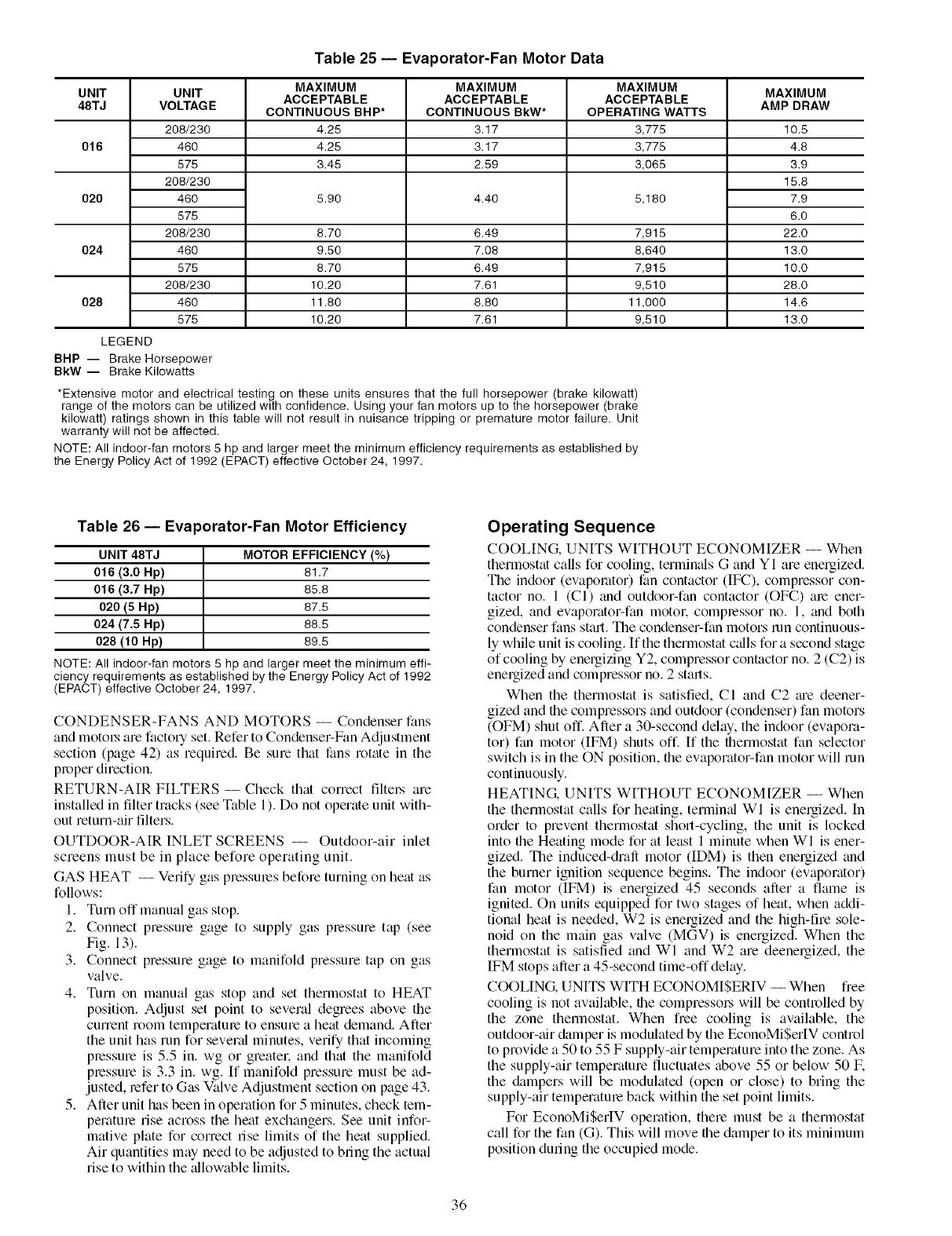
UNIT UNIT
48TJ VOLTAG E
208/230
016 460
575
208/230
020 460
575
208/230
024 460
575
208/230
028 460
575
LEGEND
BHP -- Brake Horsepower
BkW -- Brake Kilowatts
Table 25 -- Evaporator-Fan Motor Data
MAXIMUM MAXIMUM MAXIMUM
ACCEPTABLE ACCEPTABLE ACCEPTABLE
CONTINUOUS BHP* CONTINUOUS BkW* OPERATING WATTS
4.25 3.17 3,775
4.25 3.17 3,775
3.45 2.59 3,065
5.90 4.40 5,180
8.70 6.49 7,915
9.50 7.08 8,640
8.70 6.49 7,915
10.20 7.61 9,510
11.80 8.80 11,000
10.20 7.61 9,510
*Extensive motor and electrical testing on these units ensures that the full horsepower (brake kilowatt)
range of the motors can be utilized with confidence. Using your fan motors up to the horsepower (brake
kilowatt) ratings shown in this table will not result in nuisance tripping or premature motor failure. Unit
warranty will not be affected.
NOTE: All indoor-fan motors 5 hp and larger meet the minimum efficiency requirements as established by
the Energy Policy Act of 1992 (EPACT) effective October 24, 1997.
MAXIMUM
AMP DRAW
10.5
4.8
3.9
15.8
7.9
6.0
22.0
13.0
10.0
28.0
14.6
13.0
Table 26 -- Evaporator-Fan Motor Efficiency
UNIT 48TJ MOTOR EFFICIENCY (%)
016 (3.0 Hp) 81.7
016 (3.7 Hp) 65.6
020 (5 Hp) 67.5
024 (7.5 Hp) 66.5
028 (10 Hp) 69.5
NOTE: All indoor-fan motors 5 hp and larger meet the minimum effi-
ciency requirements as established by the Energy Policy Act of 1992
(EPACT) effective October 24, 1997.
CONDENSER-FANS AND MOTORS -- Condenser fans
and motol.'s am factol T set. Refer to Condenser-Fan Adjustment
section (page 42) as required. Be sure that fans rotate in the
proper direction.
RETURN-AIR FILTERS- Check that correct filtel.s are
installed in filter tracks (see Table 1). Do not operate unit with-
out return-air filters.
OUTDOOR-AIR INLET SCREENS -- Outdoor-air inlet
screens must be in place before operating unit.
GAS HEAT -- Verify gas pressmes before turning on heat as
follows:
1. Turn off manual gas stop.
2. Connect pressure gage to supply gas pressure tap (see
Fig. 13).
3. Connect pressure gage to manifold pressure tap on gas
valve.
4. Turn on manual gas stop and set thermostat to HEAT
position. Adjust set point to several degrees above the
current room temperature to ensure a heat demand. After
the unit has mn for sevend minutes, verify that incoming
pressure is 5.5 in. wg or greater, and that the manifold
pressure is 3.3 in. wg. If manifold pressure must be ad-
justed, refer to Gas Valve Adjustment section on page 43.
5. After unit has been in operation for 5 minutes, check tem-
perature rise across the heat exchangers. See unit infor-
mative plate for correct rise limits of the heat supplied.
Air quantities may need to be adjusted to bring the actual
rise to within the zdlowable limits.
Operating Sequence
COOLING, UNITS WITHOLTT ECONOMIZER -- When
thermostat calls for cooling, terminals G and Y I are energized.
The indoor (evaporator) fan contactor (IF(?_), compressor con-
tactor no. 1 (CI) and outdoor-fan contactor (OFC) are ener-
gized, and evaporator-fan motor, compressor no. 1, and both
condenser fans stall. The condenser-fan motors mn continuous-
ly while unit is cooling. If the thermostat calls for a second stage
of cooling by energizing Y2, compressor contactor no. 2 (C2) is
energized and compressor no. 2 starts.
When the thermostat is satisfied, CI and C2 tue deener-
gized and the compressors and outdoor (condenser) fan motors
(OFM) shut off. After a 30-second delay, the indoor (evapora-
tor) fan motor (IFM) shuts off. If the thermostat fan selector
switch is in the ON position, the evaporator-fan motor will run
continuously.
HEATING. UNITS WITHOUT ECONOMIZER -- When
the thermostat calls for heating, terminal WI is energized. In
order to prevent thermostat short-cycling, the unit is locked
into the Heating mode for at least 1 minute when WI is ener-
gized. The induced-draft motor (IDM) is then energized and
the burner ignition sequence begins. The indoor (evaporator)
fan motor (IFM) is energized 45 seconds after a fame is
ignited. On units equipped for two stages of heat, when addi-
tional heat is needed, W2 is enelgized and the high-fire sole-
noid on the main gas valve (MGV) is energized. When the
thermostat is satisfied and WI and W2 are deenergized, the
IFM stops after a 45-second time-off delay.
COOLING. UNITS WITH ECONOMISERIV -- When free
cooling is not available, the compressol_ will be controlled by
the zone thermostat. When free cooling is available, the
outdoor-air &unper is modulated by the EconoMiSerIV control
to provide a 50 to 55 F supply-air temperature into the zone. As
the supply-air temperature fluctuates above 55 or below 50 IF.
the &lmpers will be modulated (open or close) to bring the
supply-air temperature back within the set point limits.
For EconoMiSerIV operation, there must be a thermostat
call for the fan (G). This will move the damper to its minimum
position during the occupied mode.
36
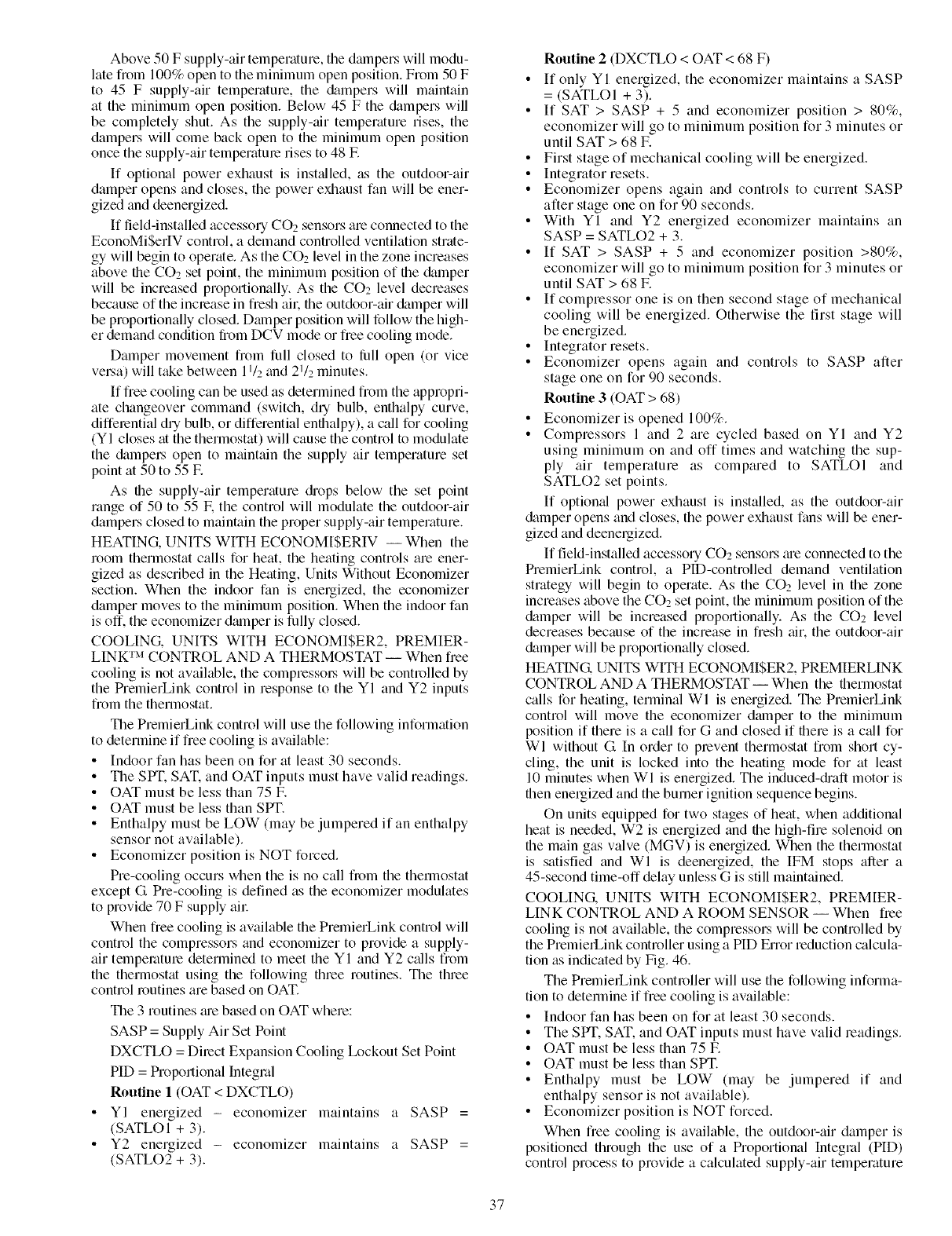
Above50Fsupply-airtemperature,thedmnperswillmodu-
latefrom100%opentotheminimumopenposition.From50F
to 45F supply-airtemperature,the&tmperswill maintain
attheminimumopenposition.Below45Fthe&lmperswill
becompletelyshut.Asthesupply-airtemperaturerises,the
damperswillcomebackopentotheminimumopenposition
oncethesupply-airtemperatmerisesto48IF.
If optionalpowerexhaustisinst_dled,astheoutdoor-air
damperopensandcloses,thepowerexhaustfanwillbeener-
gizedanddeenergized.
If field-installed accessory COz sensors are connected to the
EconoMiSerIV control, a demand controlled ventilation strate-
gy will begin to operate. As the CO2 level in the zone increases
above the CO2 set point, the minimum position of the &_mper
will be increased proportionally. As the CO2 level decreases
because of the inclease in fresh aik the outdoor-air damper will
be proportionally closed. Daraper position will follow the high-
er demand condition from DCV mode or free cooling mode.
Damper movement from full closed to lifll open (or vice
veLsa) will take between 11/2and 21/: minutes.
If free cooling can be used as determined from the appropri-
ate changeover command (switch, diy bulb, enthalpy curve,
differential dry bulb, or differential enthalpy), a call for cooling
(YI closes at the thermostat) will cause the control to modulate
the &tmpeLs open to maintain the supply air temperature set
point at 50 to 55 E
As the supply-air temperature diops below the set point
range of 50 to 55 E the control will modulate the outdoor-air
dampers closed to maintain the proper supply-air temperature.
HEATING, UNITS WITH ECONOMISERIV -- When the
room thermostat calls for heat, the heating controls are ener-
gized as described in the Heating, Units Without Economizer
section. When the indoor fan is energized, the economizer
damper moves to the minimum position. When the indoor fan
is off. the economizer dmnper is fully closed.
COOLING. UNITS WITH ECONOMISER2, PREMIER-
LINK TM CONTROL AND A THERMOSTAT -- When free
cooling is not available, the compressoLs will be controlled by
the PremierLink control in response to the YI and Y2 inputs
from the thermostat.
The PremierLink control will use the following information
to determine if free cooling is available:
• Indoor fan has been on for at least 30 seconds.
• The SPT. SAT. and OAT inputs must have valid readings.
• OAT must be less than 75 F.
• OAT must be less than Sir[ '.
• Enthalpy must be LOW (may be jumpered if an enthalpy
sensor not available).
• Economizer position is NOT forced.
Pre-cooling occurs when the is no call fi_m the thermostat
except G Pre-cooling is defined as the economizer modulates
to provide 70 F supply air
When free cooling is available the PremierLink control will
control the compressors and economizer to provide a supply-
air tempemtme determined to meet the YI and Y2 c_dls from
the thermostat using the following three routines. The three
control routines are based on OAT.
The 3 routines ;ue based on OAT where:
SASP = Supply Air Set Point
DXCTLO = Dilect Expansion Cooling Ix_ckout Set Point
PID = Proportional Integral
Routine 1 (OAT < DXCTLO)
YI energized - economizer maintains a SASP =
(SATLOI + 3).
Y2 energized - economizer maintains a SASP =
(SATLO2 + 3).
Routine 2 (DXCTLO < OAT < 68 F)
• If only YI energized, the economizer maintains a SASP
= (SATLOI + 3).
• If SAT > SASP + 5 and economizer position > 80%,
economizer will go to minimum position for 3 minutes or
until SAT > 68 IF.
• First stage of mechanical cooling will be energized.
• Integrator resets.
• Economizer opens again and controls to current SASP
after stage one on for 90 seconds.
• With YI and Y2 energized economizer maintains an
SASP = SATLO2 + 3.
• If SAT > SASP + 5 and economizer position >80%,
economizer will go to minimum position for 3 minutes or
until SAT > 68 E
• If compressor one is on then second stage of mechanical
cooling will be energized. Otherwise the first stage will
be energized.
• Integrator resets.
• Economizer opens again and controls to SASP after
stage one on for 90 seconds.
Routine 3 (OAT > 68)
• Economizer is opened 100%.
• Compressors 1 and 2 are cycled based on YI and Y2
using minimum on and off times and watching the sup-
ply air temperature as compared to SATLOI and
SATLO2 set points.
If optiomd power exhaust is installed, as the outdoor-air
&tmper opens and closes, the power exhaust fans will be ener-
gized and deenergized.
If field-installed accessory CO2 sensors me connected to the
PremierLink control, a PlD-controlled demand ventilation
strategy will begin to operate. As the CO2 level in the zone
increases above the CO2 set point, the minimum position of the
&_mper will be increased proportionally. As the COz level
decreases because of the increase in fresh air, the outdoor-air
&tmper will be proportionally closed.
HEATING, UNITS WITH ECONOMISER2, PREMIERLINK
CONTROL AND A THERMOSTAT -- When the thermostat
calls for heating, terminal Wl is energized. The PremierLink
control will move the economizer damper to the minimum
position if there is a call for G and closed if there is a call for
WI without G In order to prevent thermostat from short cy-
cling, the unit is locked into the heating mode for at least
10 minutes when WI is energized. The induced-di'aft motor is
then energized and the burner ignition sequence begins.
On units equipped for two stages of heat, when additional
heat is needed, W2 is energized and the high-fire solenoid on
the main gas valve (MGV) is energized. When the thermostat
is satisfied and WI is deenergized, the IFM stops after a
45-second time-off delay unless G is still maintained.
COOLING, UNITS WITH ECONOMISER2, PREMIER-
LINK CONTROL AND A ROOM SENSOR -- When free
cooling is not available, the compressors will be controlled by
the PremierLink controller using a PID Enor reduction calcula-
tion as indicated by Fig. 46.
The PremierLink controller will use the following informa-
tion to determine if free cooling is available:
• Indoor fan has been on for at least 30 seconds.
• The SPT. SAT. and OAT inputs must have valid readings.
• OAT must be less than 75 E
• OAT must be less than SPT.
• Enthalpy must be LOW (may be jumpered if and
enthalpy sensor is not available).
• Economizer position is NOT forced.
When free cooling is available, the outdoor-air damper is
positioned through the use of a Proportional Integral (PID)
control process to provide a calculated supply-air temperature
37
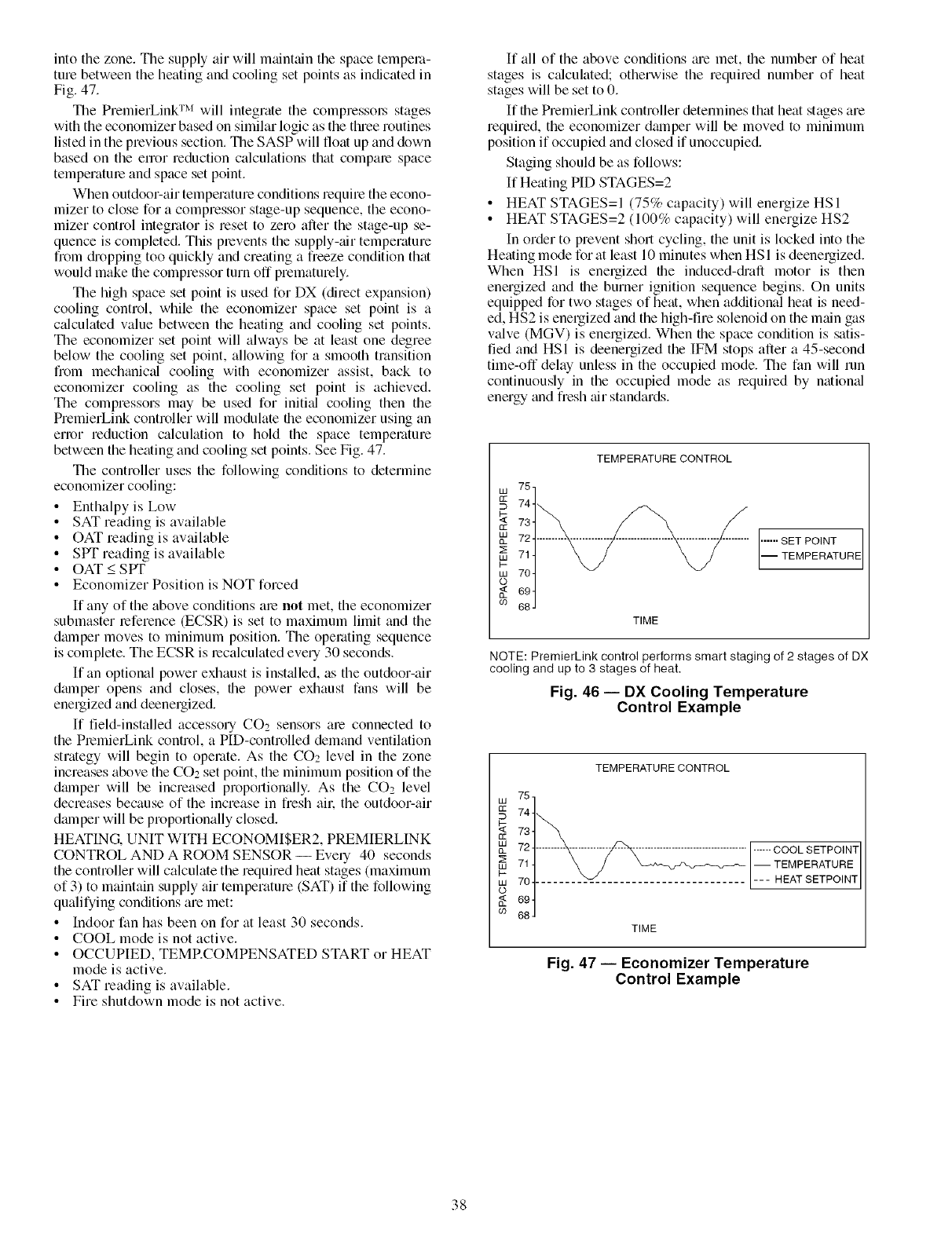
intothezone.Thesupplyairwillmaintainthespacetempera-
turebetweentheheatingandcoolingsetpointsasindicatedin
Fig.47.
ThePremierLinkTM will integrate the compressol_ stages
with the economizer based on similar logic as the three routines
listed in the previous section. The SASP will float up and down
based on the error reduction calculations that compare space
temperature and space set point.
When outdoor-air temperature conditions require the econo-
mizer to close for a compressor stage-up sequence, the econo-
mizer control integrator is reset to zero after the stage-up se-
quence is completed. This prevents the supply-tOT temperature
from &'opping too quickly and creating a freeze condition that
would make the compressor turn off prematurely.
The high space set point is used for DX (direct expansion)
cooling control, while the economizer space set point is a
c:dculated value between the heating and cooling set points.
The economizer set point will always be at least one degree
below the cooling set point, allowing for a smooth transition
from mechanical cooling with economizer assist, back to
economizer cooling as the cooling set point is achieved.
The compressors may be used for initkd cooling then the
PremierLink controller will modulate the economizer using an
enor reduction calculation to hold the space temperature
between the heating and cooling set points. See Fig. 47.
The controller uses the following conditions to determine
economizer cooling:
• Enthalpyis Low
• SAT reading is available
• OAT reading is available
• SPT reading is available
• OAT < SPT
• Economizer Position is NOT forced
If any of the above conditions me not met, the economizer
submaster reference (ECSR) is set to maximum limit and the
dmnper moves to minimum position. The operating sequence
is complete. The ECSR is recalculated every 30 seconds.
If an optional power exhaust is inst:dled, as the outdoor-air
dmnper opens and closes, the power exhaust fans will be
energized and deenergized.
If field-installed accessory CO2 sensors are connected to
the PlemierLink control, a PID-controlled demand ventilation
strategy will begin to operate. As the CO2 level in the zone
increases above the CO2 set point, the minimum position of the
dmnper will be increased proportionally. As the CO2 level
decreases because of the increase in fresh all: the outdoor-air
dalnper will be proportionally closed.
HEATING. UNIT WITH ECONOMI$ER2, PREMIERLINK
CONTROL AND A ROOM SENSOR -- Every 40 seconds
the controller will calculate the required heat stages (maximum
of 3) to maintain supply air temperature (SAT) if the following
qualifying conditions are met:
• Indoor fan has been on for at least 30 seconds.
• COOL mode is not active.
• OCCUPIED, TEMRCOMPENSATED START or HEAT
mode is active.
• SAT reading is available.
• Fire shutdown mode is not active.
If all of the above conditions m'e met, the number of heat
stages is c_dculated; otherwise the required number of heat
stages will be set to 0.
If the PremierLink controller detemfines that heat stages are
required, the economizer dalnper will be moved to minimum
position if occupied and closed if unoccupied.
Staging should be as follows:
If Heating PID STAGES=2
• HEAT STAGES=I (75% capacity) will energize HSI
• HEAT STAGES=2 (100% capacity) will energize HS2
In order to prevent short cycling, the unit is locked into the
Heating mode forat least 10 minutes when HSI is deenergized.
When HSI is energized the induced-di'aft motor is then
energized and the burner ignition sequence begins. On units
equipped for two stages of heat, when additional heat is need-
ed, HS2 is energized and the high-fire solenoid on the main gas
valve (MGV) is energized. When the space condition is satis-
fied and HSI is deenergized the IFM stops after a 45-second
time-off delay unless in the occupied mode. The fan will run
continuously in the occupied mode as lequired by nafiomd
energy and fiesh air standards.
TEMPERATURE CONTROL
w75,
•_ 73
w 72 ............................................... """ SET POINT
2: 71 -- TEMPERATURE
_- 70
W
o
694
cO 68J
TIME
NOTE: PremierLink control performs smart staging of 2 stages of DX
cooling and up to 3 stages of heat.
Fig. 46 -- DX Cooling Temperature
Control Example
W
QZ
QZ
W
Q_
W
W
09
TEMPERATURE CONTROL
75
741_ "
73
72 ......... _ .................................... ------ COOL SETPOINT
71 t _ /j X_"_H%_,_-_'- -- TEMPERATURE
704 ........ _ .......................... -- - HEAT SETPOINT
J
69
68
TIME
Fig. 47 -- Economizer Temperature
Control Example
38

SERVICE
Before performing service or maintenance operations on
unit, turn off main power switch to unit and install lockout
tag on disconnect switch. Electrical shock could cause per-
sonal injury.
Cleaning- Inspect unit interior at beginning of each
heating and cooling season and as operating conditions require
(see Fig. 48). Remove unit top panel and/or side panels for ac-
cess to unit interioc
COIL MAINTENANCE AND CLEANING RECOMMEN-
DATION -- Routine cleaning of coil surfaces is essential to
maintain proper operation of the unit. Elimination of contmni-
nation and remowd of harmful residues will greatly increase
the life of the coil and extend the life of the unit. The following
maintenance and cleaning procedures are recommended as part
of the routine maintenance activities to extend the life of the
coil.
INDUCED DRAFT INTEGRATED GAS
MOTOR UNIT CONTROLLER
(HIDDEN)
VIEW CONTROL BOX
PORT ACCESS PANEL
ilGC
FAULT
\
COMBUSTION MAIN BURNER FLUE BOX MAIN GAS
FAN HOUSING SECTION COVER VALVE
Fig. 48 -- Typical Gas Heating Section
Remove Surface Loaded Fibers -- Surface loaded fibers or
dirt should be removed with a vacuum cleanel: If a vacuum
cleaner is not available, a soft non-metallic bristle brush may
be used. In either case, the tool should be applied in the direc-
tion of the fins. Coil surfaces can be easily &_maged (fin edges
can be easily bent over graddamage to the coating of a protect-
ed coil) if the tool is applied across the fins.
NOTE: Use of a water stream, such as a garden hose, against a
surface loaded coil will drive the fibers and diri into the coil.
This will make cleaning efforts morn difficult. Surface loaded
fibeL'smust be completely removed prior to using low velocity
clean water nnse.
Periodic Clean Water Rinse --A periodic clean water rinse is
veUbeneficial for coils that am applied in coastal or industrial
environments. HoweveL it is very important that the water
rinse is made with veqlow velocity water stream to avoid
damaging the fin edges. Monthly cleaning as described below
is recommended.
Routine Cleaning of Coil Surfaces -- Monthly cleaning with
Totaline® environmentally sound coil cleaner is essential to
extend the life of coils. This cleaner is available from Cmrier
Replacement parts division as part number P902-0301 for a
one gallon containel; and pmt number lX)02-0305 for a 5 gallon
containel: It is recommended that all coils, including stan&trd
aluminum, pro-coated, copper/copper or E-coated coils be
cleaned with the Totaline environmentally sound coil cleaner
as described below. Coil cleaning should be part of the unit's
reguhuty scheduled maintenance procedures to ensure long life
of the coil. Failure to clean the coils may result in reduced du-
rability in the environment.
Avoid the use of:
• Coil brighteners
• Acid cleaning prior to painting
• High pressure washers
• Poor quality water for cleaning
Totaline environmentally sound coil cleaner is non-flamma-
ble, hypoallergenic, nonbacterial, and a USDA accepted biode-
gradable agent that will not harm the coil or surrounding com-
ponents such as electrical wiring, painted metal surfaces, or in-
sulation. Use of non-recommended coil cleaners is strongly
discouraged since coil and unit durability could be affected.
Totaline Environmentally Sound Coil Cleaner Al)l)lRz_tion
Equipment
• 21/2 gallon garden sprayer
• Water rinse with low velocity spray nozzle
Harsh chemicals, household bleach or acid or basic clean-
ers should not be used to clean outdoor or indoor coils of
any kind. These cleaners can be very difficult to rinse out
of the coil and can accelerate corrosion at the fin/tube inter-
face where dissimilar materials are in contact. If there is
dirt below the surface of the coil, use the Totaline environ-
mentally sound coil cleaner as described above.
High velocity water fi'om a pressure washeL garden hose,
or compressed air should never be used to clean a coil. The
force of the water or air jet will bend the fin edges and
increase airside pressure drop. Reduced unit performance
or nuisance unit shutdown may occm:
Totaline Environmentally Sound Coil Cleaner Al)l)fi{zaion
Instructions
1. Proper eye protection such as safety glasses is recom-
mended during mixing and application.
2. Remove all surface loaded fibers and dirt with a vacuum
cleaner as described above.
3. Thoroughly wet finned surfaces with clean water and a
low velocity garden hose, being careful not to bend fins.
4. Mix Totaline environmentally sound coil cleaner in a
2V2 gallon gmden sprayer according to the instructions
included with the cleanel: The optimum solution temper-
ature is 100E
NOTE: Do NOT USE water in excess of 130 F. as the enzy-
matic activity will be destroyed.
5. Thoroughly apply Totaline environmentally sound coil
cleaner solution to all coil surfaces including finned area,
tube sheets and coil headers.
6. Hold garden sprayer nozzle close to finned areas and ap-
ply cleaner with a vertical, up-and-down motion. Avoid
spraying in horizontal pattern to minimize potential for
fin damage.
7. Ensure cleaner thoroughly penetrates deep into finned
gueas.
8. Interior and exterior finned meas must be thoroughly
cleaned.
9. Finned surfaces should remain wet with cleaning solution
for 10 minutes.
39
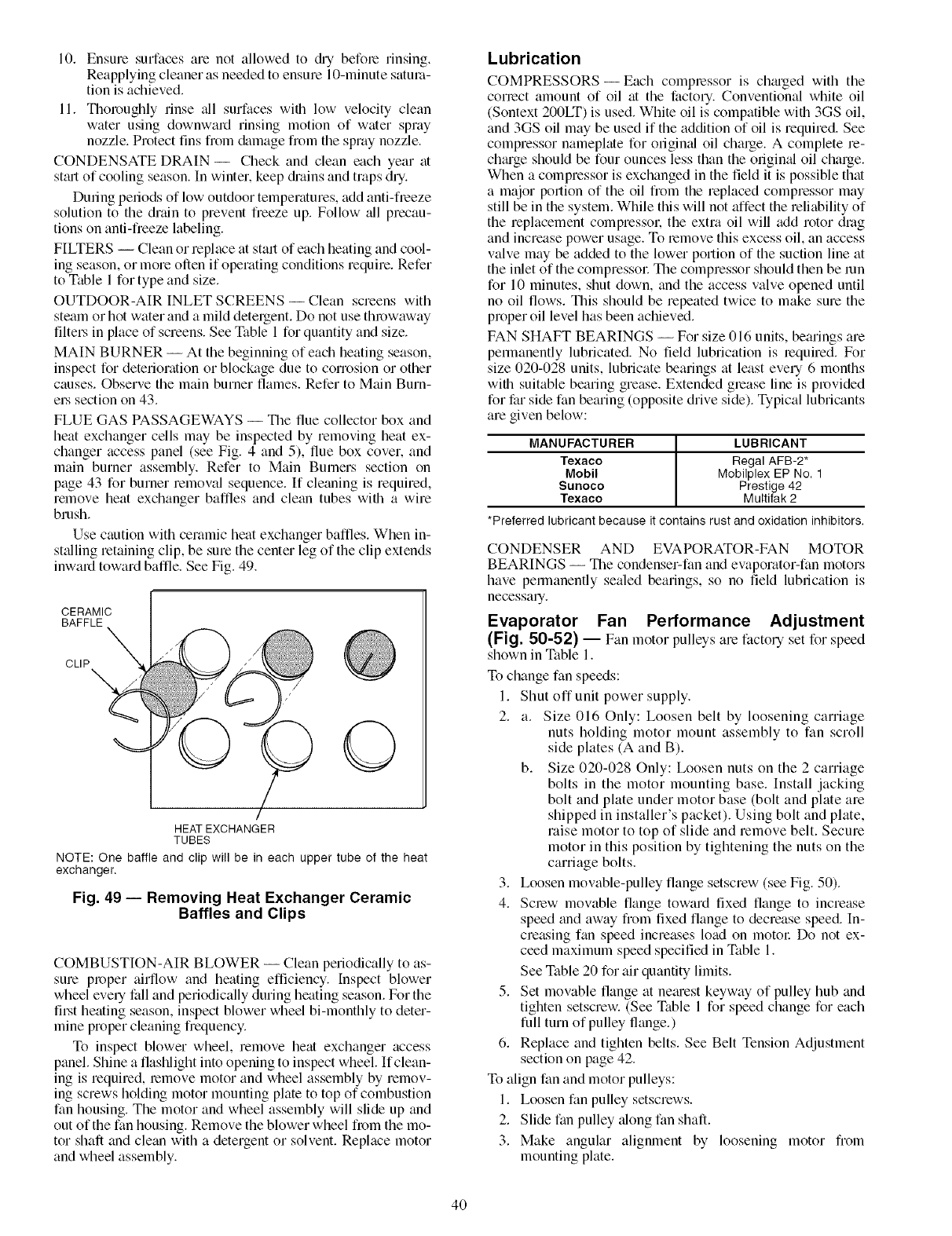
10. Ensure surfaces are not allowed to &y before rinsing.
Reapplying cleaner as needed to ensure 10-minute satura-
tion is achieved.
11. Thoroughly rinse _dl surfaces with low velocity clean
water using downward rinsing motion of water spray
nozzle. Protect tins from &_mage from the spray nozzle.
CONDENSATE DRAIN- Check and clean each year at
sttut of cooling season. In wintel, keep &ains and traps dry.
During periods of low outdoor temperatures, add anti-freeze
solution to the drain to prevent freeze up. Follow _dl precau-
tions on anti-freeze labeling.
FILTERS -- Clean or replace at start of each heating and cool-
ing season, or more often if operating conditions require. Refer
to Table 1 for type and size.
OUTDOOR-AIR INLET SCREENS -- Clean screens with
steam or hot water and a mild detergent. Do not use throwaway
filteL's in place of screens. See Table 1 for quantity and size.
MAIN BURNER -- At the beginning of each heating season,
inspect for deterioration or blockage due to corrosion or other
causes. Observe the main burner flames. Refer to Main Burn-
eLs section on 43.
FLUE GAS PASSAGEWAYS -- The flue collector box and
heat exchanger cells may be inspected by removing heat ex-
changer access panel (see Fig. 4 and 5), flue box cover, and
main burner assembly. Refer to Main Burners section on
page 43 for burner removal sequence. If cleaning is required,
remove heat exchanger baffles and clean tubes with a wire
brush.
Use caution with ceramic heat exchanger baffles. When in-
st_dling retaining clip, be sure the center leg of the clip extends
inward toward baffle. See Fig. 49.
CERAMIC
BAFFLE
CLIP_
/
HEAT EXCHANGER
TUBES
NOTE: One baffle and clip will be in each upper tube of the heat
exchanger.
Fig. 49 -- Removing Heat Exchanger Ceramic
Baffles and Clips
COMBUSTION-AIR BLOWER -- Clean periodically to as-
sure proper airflow and heating efficiency. Inspect blower
wheel evely fall and periodically during heating season. For the
fiLst heating season, inspect blower wheel bi-monthly to deter-
mine proper cleaning frequency.
To inspect blower wheel, remove heat exchanger access
panel. Shine a flashlight into opening to inspect wheel. If clean-
ing is required, remove motor and wheel assembly by remov-
ing screws holding motor mounting plate to top of combustion
fan housing. The motor and wheel assembly will slide up and
out of the fan housing. Remove the blower wheel from the mo-
tor shaft and clean with a detergent or solvent. Replace motor
and wheel assembly.
Lubrication
COMPRESSORS- Each compressor is ch_uged with the
correct amount of oil at the factory. Conventional white oil
(Sontext 200LT) is used. White oil is compatible with 3GS oil,
and 3GS oil may be used if the addition of oil is required. See
compressor nameplate for origimd oil charge. A complete re-
ch_uge should be four ounces less than the origimd oil charge.
When a compressor is exchanged in the field it is possible that
a major portion of the oil from the replaced compressor may
still be in the system. While this will not affect the reliability of
the replacement compressor, the extra oil will add rotor drag
and increase power usage. To remove this excess oil, an access
valve may be added to the lower portion of the suction line at
the inlet of the compressol: The compressor should then be mn
for 10 minutes, shut down, and the access valve opened until
no oil flows. This should be repeated twice to make sure the
proper oil level has been achieved.
FAN SHAFT BEARINGS -- For size 016 units, bearings are
permanently lubricated. No field lubrication is required. For
size 020-028 units, lubricate bearings at least every 6 months
with suitable bearing grease. Extended grease line is provided
for far side fan bearing (opposite drive side). Typical lubricants
are given below:
MANUFACTURER LUBRICANT
Texaco Regal AFB-2*
Mobil Mobilplex EP No. 1
Sunoco Prestige 42
Texaco Multifak 2
*Preferred lubricant because it contains rust and oxidation inhibitors.
CONDENSER AND EVAPORATOR-FAN MOTOR
BEARINGS -- The condenser-fan and evaporator-fan motors
have permanently sealed bearings, so no field lubrication is
necessaq.
Evaporator Fan Performance Adjustment
(Fig. 50-52) -- Fan motor pulleys are factory set for speed
shown in Table 1.
To change fan speeds:
1. Shut off unit power supply.
2. a. Size 016 Only: Loosen belt by loosening carriage
nuts holding motor mount assembly to fan scroll
side plates (A and B).
b. Size 020-028 Only: Loosen nuts on the 2 carriage
bolts in the motor mounting base. Install jacking
bolt and plate under motor base (bolt and plate are
shipped in installer's packet). Using bolt and plate,
raise motor to top of slide and remove belt. Secure
motor in this position by tightening the nuts on the
carriage bolts.
3. Loosen movable-pulley flange setscrew (see Fig. 50).
4. Screw movable flange toward fixed flange to increase
speed and away from fixed flange to decrease speed. In-
creasing fan speed increases load on motor Do not ex-
ceed maximum speed specified in Table 1.
See Table 20 for air quantity limits.
5. Set movable flange at netuest keyway of pulley hub and
tighten setscrew. (See Table 1 for speed change for each
full turn of pulley flange.)
6. Replace and tighten belts. See Belt Tension Adjustment
section on page 42.
To align fan and motor pulleys:
1. Loosen fan pulley setscrews.
2. Slide fan pulley _dong fan shaft.
3. Make angular alignment by loosening motor from
mounting plate.
4O
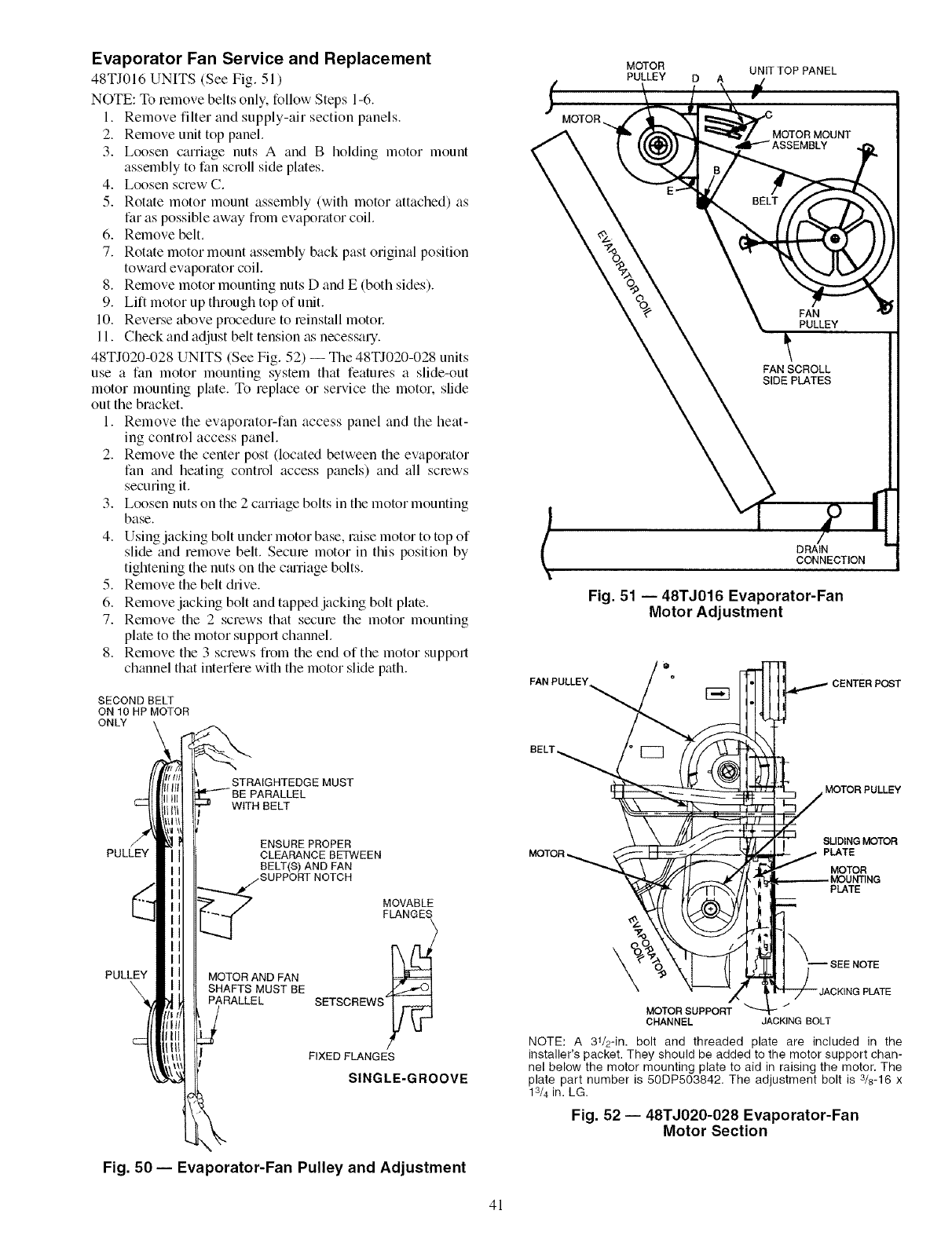
Evaporator Fan Service and Replacement
48TJ016 UNITS (See Fig. 51 )
NOTE: To lemove belts only. follow Steps 1-6.
1. Remove filter and supply-air section panels.
2. Remove unit top panel.
3. Loosen carriage nuts A and B holding motor mount
assembly to fan scroll side plates.
4. Loosen screw C.
5. Rotate motor mount assembly (with motor attached) as
far as possible away from evaporator coil.
6. Remove belt.
7. Rotate motor mount assembly back past original position
toward evaporator coil.
8. Remove motor mounting nuts D and E (both sides).
9. Lift motor up through top of unit.
10. Reverse above procedure to leinstall motol:
11. Check and adjust belt tension as necessary.
48TJ020-028 UNITS (See Fig. 52) -- The 48TJ020-028 units
use a fan motor mounting system that features a slide-out
motor mounting plate. To replace or service the motor, slide
out the bracket.
1. Remove the evaporator-fan access panel and the heat-
ing control access panel.
2. Remove the center post (located between the evaporator
fan and heating control access panels) and all screws
securing it.
3. Loosen nuts on the 2 carriage bolts in the motor mounting
base.
4. Using jacking bolt under motor base, raise motor to top of
slide and remove belt. Secure motor in this position by
tightening the nuts on the cturiage bolts.
5. Remove the belt drive.
6. Remove jacking bolt and tapped jacking bolt plate.
7. Remove the 2 screws that secure the motor mounting
plate to the motor support channel.
8. Remove the 3 screws from the end of the motor support
channel that interfere with the motor slide path.
SECOND BELT
ON 10 HP MOTOR
ONLY
j,MOTOR
MOTOR UNIT TOP PANEL
PULLEY D A
FAN
PULLEY
FAN SCROLL
SIDE PLATES
DRAIN
CONNECTION
Fig. 51 -- 48TJ016 Evaporator-Fan
Motor Adjustment
FAN PULLEY_
BELT,
STRAIGHTEDGE MUST
PARALLEL
WITH BELT
MOTOR PULLEY
PULLEY ENSURE PROPER
CLEARANCE BETWEEN
BELT(_ AND FAN
.SUPPORT NOTCH
PULLEY MOTOR AND FAN
\ SHAFTS MUST BE
PARALLEL
MOVABLE
FLANGES
SETSCREWS
FIXED FLANGE
SINGLE-GROOVE
SLIDING MOTOR
PLATE
MOTOR
PLATE
\
-JACKING PLATE
MOTOR SUPPORT
CHANNEL JACKING BOLT
NOTE: A 31/2-in. bolt and threaded plate are included in the
installer's packet. They should be added to the motor support chan-
nel below the motor mounting plate to aid in raising the motor. The
plate part number is 50DP503842. The adjustment bolt is 3/8-16 x
13/4 in. LG.
Fig. 52 -- 48TJ020-028 Evaporator-Fan
Motor Section
Fig. 50 -- Evaporator-Fan Pulley and Adjustment
41

9. Slide out the motor and motor mounting plate.
10. Disconnect wiring connections and remove the 4 mount-
ing bolts.
11. Remove the motol:
12. To inst;dl the new motor, revel.se Steps 1-11.
Belt Tension Adjustment -- To adjust belt tension:
1. Loosen fan motor bolts.
2. a Size 016 Units:
Move motor mounting plate up or down for proper
belt tension (1/2 in. deflection with one finger).
b. Size 020-028 Units:
Turn motor jacking bolt to move motor mounting
plate up or down for propel belt tension (3/8 in.
deflection at midspan with one finger [9 lb force]).
3. Tighten nuts.
4. Adjust bolts and nut on mounting plate to secure motor in
fixed position.
Condenser-Fan Adjustment
48TJ01 (7,020 UNITS (Fig. 53)
1. Shut off unit power supply.
2. Remove access panel(s) closest to the fan to be adjusted.
3. Ix)osen fan hub setscrews.
4. Adjust fan height on shaft using a strtdghtedge placed
across the fan orifice.
5. Tighten setscrews and replace panel(s).
6. Turn on unit powec
48TJ024,028 UNITS (Fig. 54)
1. Shut off unit power supply.
2. Remove fan top-grille assembly and loosen fan hub
screws.
3. Adjust fan heigN on unit, using a straightedge placed
across the Nn orifice.
4. Tighten setscrews and replace rubber hubcap to prevent
hub from rusting to motor shaft.
5. Fill hub recess with permagum if robber hubcap is
missing.
Power Failure -- Dampers have a spring return. In event
of power failme, dampers will return to fully closed position
until power is restored. Do not manual@ ol)eraw economizer
mo_ol_
Refrigerant Charge -- Amount of refligerant chmge is
listed on unit nameplate and in Table 1. Refer to Carrier
_f =....N
NOTE: Dimensions are in inches.
Fig. 53 -- Condenser Fan Adjustment, 48TJ016,020
RAIN
SHIELD
NOTE: Dimensions are in inches.
Fig. 54 -- Condenser-Fan Adjustment, 48TJ024,028
GTAC II; Module 5; Charging, Recovery. Recycling, and
Reclamation section for chguging methods and procedures.
Unit panels must be in place when unit is operating during
chguging procedure.
NOTE: Do not use recycled refrigerant as it may contain
contaminants.
NO CHARGE -- Use standard evacuating techniques. After
ewtcuating system, weigh in the specified amount of refriger-
ant (refer to Table 1).
LOW CHARGE COOLING -- Using cooling charging chart
(see Fig. 55), add or remove refrigerant until conditions of the
chart are met. Note that ch_uging ch_ut is different from those
nominally used. An accurate pressure gage and temperature-
sensing device is required. Charging is accomplished by ensur-
ing the proper amount of liquid sub-cooling. Measure liquid
line pressure at the liquid line service valve using pressure
gage. Connect temperature sensing device to the liquid line
ne;u the liquid line service valve and insulate it so that outdoor
ambient temperature does not affect reading.
TO USE THE COOLING CHARGING CHART -- Use the
above temperature and pressure readings, and find the intersec-
tion point on the cooling charging chin1. If intersection point
on chart is above line, add refrigerant. If intel.section point on
chtut is below line, carefully recover some of the charge.
Recheck suction pressure as charge is adjusted.
NOTE: Indoor-air cfm must be within normal operating range
of unit. All outdoor fans must be operating.
The TXV (thermostatic expansion valve) is set to maintain
between 15 and 20 degrees of supefl]eat at the compressors.
The valves are factory set and should not require re-adjustment.
MOISTUREMISER TM SYSTEM CHARGING -- The sys-
tem charge for units with the MoistureMiSer option is greater
than that of the standard unit _done. The chtuge for units with
this option is indicated on the unit nameplate &awing. To
chm:ge systems using the MoistureMiSer dehumidification
package, fully evacuate, recover, and re-chtuge the system to
the nameplate specified charge level. To check or adjust
refrigerant charge on systems using the MoistureMiSer dehu-
midification package, charge per the standard subcooling
chtuts. The subcooler MUST be deenergized to use the chalg-
ing chmts. The charts reference a liquid pressure (psig) and
temperature at a point between the condenser coil and the sub-
cooler coil. A tap is provided on the unit to measure liquid
pressure entering the subcooler (leaving the condenser).
BOTH CIRCUITS
ALL OUTDOOR FANS MUST BE OPERATING
_140,
_12°1I I 'Abd_HAR'G'E'I_AB'Ot/&CORV'E
Illll lllllllll llllll i
soolillilillilili ililli I
IIIIIIIIIIIIIIIIII1 t"
011111111IIIIIIIIJ,Z'II
lili ilili iliiJZliliiI
III II III IIJZI"I4Eb6&&&.'ARGE,FBELowCURVE
LU 60 IIIIIIIL/IIII
III1 11 III
50 100 150 200 250 300 350 400
LIQUID PRESSURE AT LIQUID VALVE (PSIG)
Fig. 55- Cooling Charging Chart
42

Gas Valve Adjustment
NATURAL GAS- The gas valve ()pens and closes in re-
sponse to the thermostat or limit control.
When power is supplied to valve terminals DI and C2, the
m;dn v_dve opens to its preset position.
The regular factory setting is stamped on the v;dve body
(3.3 in. wg).
To adjust regulator:
1. Set thermostat at setting for no call for heat.
2. Turn main gas valve to OFF position.
3. Remove l/s-in, pipe plug from manifold or gas v;dve
pressure tap connection. Install a suitable pressure-
measuring device.
4. Set main gas valve to ON position.
5. Set thennostat at setting to call for heat.
6. Remove screw cap covering regulator adjustment sclew
(see Fig. 56).
7. Turn adjustment screw clockwise to increase pressure or
counterclockwise to decrease pressure.
8. Once desired pressure is established, set thermostat set-
ting for no call for heat, turn off main gas valve, remove
pressure-measuring device, and replace I/s-in. pipe plug
and screw cap.
REGULATOR
..-----"ADJUSTMENT
SCREW
(REMOVE
COVER)
Fig. 56 -- Gas Valve
Main Burners -- For all applications, main burners are
factory set and should require no adjustment.
MAIN BURNER REMOVAL
1. Shut off (field-supplied) manual main gas v;dve.
2. Shut off power to unit.
3. Remove unit control box access panel, burner section ac-
cess panel, and center post (see Fig. 4 and 5).
4. Disconnect gas piping from gas valve inlet.
5. Remove wires from gas valve.
6. Remove wires from rollout switch.
7. Remove sensor wire and ignitor cable from [GC board.
8. Remove 2 screws securing manifold bracket to basepan.
9. Remove 2 screws that hold the burner support plate
flange to the vestibule plate.
10. Lift burner assembly out of unit.
CLEANING AND ADJUSTMENT
1. Remove burner rack from unit as described in Main
Burner Removal section above.
2. Inspect burners, and if dirty, remove burners fiom rack.
3. Using a soft brush, clean burners and crossover port as
required.
4. Adjust spark gap. See Fig. 57.
5. Reinst_dl burners on rack.
6. Reinstall burner rock as described above.
Filter Drier- Replace whenever refrigerant system is
exposed to atmosphere.
Protective Devices
COMPRESSOR PROTECTION
Phase Protection -- On 48TJ016 and 020 units, the phase
monitor relay (PMR) will monitor the sequence of the 3-phase
electric_d system to provide phase reversal protection. The
PMR will also monitor the 3-phase voltage inputs to provide
phase loss protection for the 3-phase device.
Overcurrent -- Each compressor has internal line break motor
protection, except the circuit no. 1 on the 48TJ028 units. Com-
pressor no. 1 on the 48TJ028 unit uses an electronic module,
located with the compressor junction box, to provide motor
protection. This electronic module monitors winding and dis-
chtuge temperatures. If these temperatures reach the trip val-
ues, the module interrupts the control line and causes the
compressor to switch off.
Crankcase Heater -- Only the 48TJ028 unit and units with
optional MoistureMiSer TM dehumidification system are
equipped with a 70-watt crankcase heater to prevent absorption
of liquid refrigerant by oil in the crankcase when the compres-
sor is idle. The crankcase heater is energized whenever there is
a main power to the unit and the compressor is not energized.
IIMPORTANT: After a prolonged shutdown or servicing, I
energize the crankcase heaters for 24 houLs before stmt- I
ing the compressors.
Compressor Lockout -- If any of the safeties (high-pressure,
low-pressure, freeze protection thermostat, compressor internal
thermostat) trip, or if there is loss of power to the compressors,
the cooling lockout (CLO) will lock the compressors off. To
reset, manually move the thermostat setting.
EVAPORATOR-FAN MOTOR PROTECTION -- A man-
ual reset, calibrated trip, magnetic circuit bleaker protects
against overcurrent. Do not bypass connections or increase the
size of the breaker to correct trouble. Determine the cause and
correct it before resetting the breakel:
CONDENSER-FAN MOTOR PROTECTION -- Each
condenser-fan motor is internally protected against
overtemperature.
HIGH-PRESSURE AND LOW-PRESSURE SWITCHES --
If either switch trips, or if the compressor overtemperature
switch activates, that refrigerant circuit will be automatically
locked out by the CLO. To reset, manually move the thermo-
stat setting.
FREEZE PROTECTION THERMOSTAT (FPT) -- An FPT
is located on the top and bottom of the evaporator coil. They
detect frost build-up and turn off the compressol: allowing the
coil to clem: Once the frost has melted, the compressor can be
reenergized by resetting the compressor lockout.
Relief Devices -- All units have relief devices to protect
against damage from excessive pressures (i.e., fire). These
devices protect the high and low side.
Control Circuit, 24-7--This control circuit is pro-
tected against overcurrent by a 3.2 amp circuit breakec
Bre;_ker can be reset. If it trips, determine cause of trouble
before resetting. See Fig. 58 and 59 for typical wiring diagram
and component ;urangement.
Replacement Parts -- A complete list of replacement
parts may be obtained from any Carrier distributor upon
request.
Diagnostic IGC Control LEDs-- The IGC bom'd
has LEDs for diagnostic purposes. Refer to Troubleshooting
section on page 48.
43
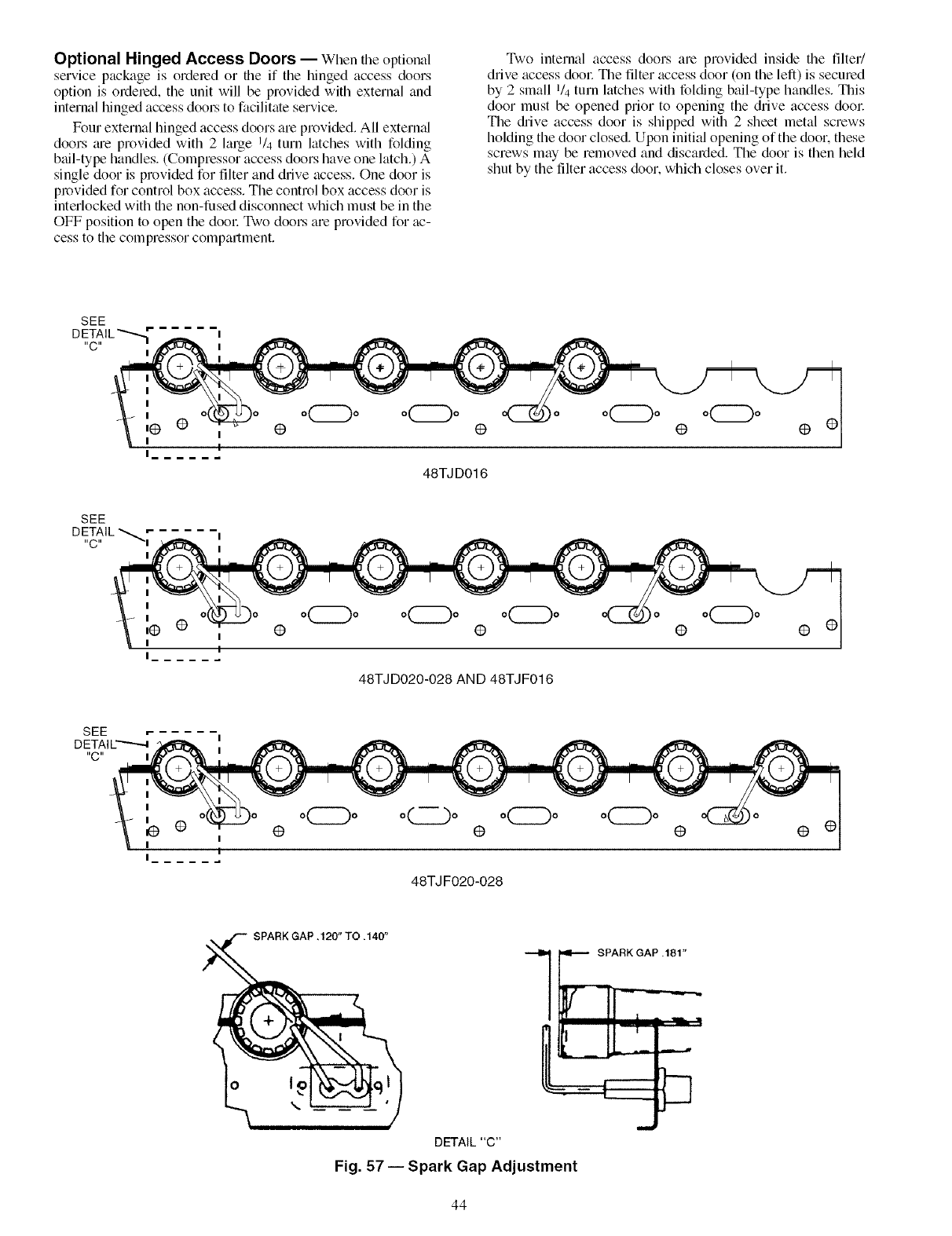
Optional Hinged Access Doors --When the optional
service package is ordered or the if the hinged access doors
option is ordered, the unit will be provided with external and
internal hinged access dool_ to facilitate service.
Four external hinged access doors are provided. All extern;d
doors _ue provided with 2 large 1/4 turn latches with folding
bail-type handles. (Compressor access doors have one latch.) A
single door is provided for filter and drive access. One door is
provided for control box access. The control box access door is
interlocked with the non-fused disconnect which must be in the
OFF position to open the dool: Two doors are provided for ac-
cess to the compressor compartment.
Two internal access doors are provided inside the filter/
drive access dool: The filter access door (on the left) is secured
by 2 small 1/4 turn latches with folding bail-type handles. This
door must be opened prior to opening the drive access dool:
The &ive access door is shipped with 2 sheet metal screws
holding the door closed. Upon initial opening of the dooL these
screws may be removed and discarded. The door is then held
shut by the filter access door, which closes over it.
SEE
"C"
I
I
,@ •
I
I
@ @
48TJD016
@ @ @
I
I
,@ @
I
I
Io
I
I
@
48TJD020-028 AND 48TJF016
o(_o
@@
@o_o @
48TJ F020-028
@
SPARK GAP .120" TO .140"
1 _RK IAP .181"
DETAIL"C"
Fig. 57 -- Spark Gap Adjustment
44
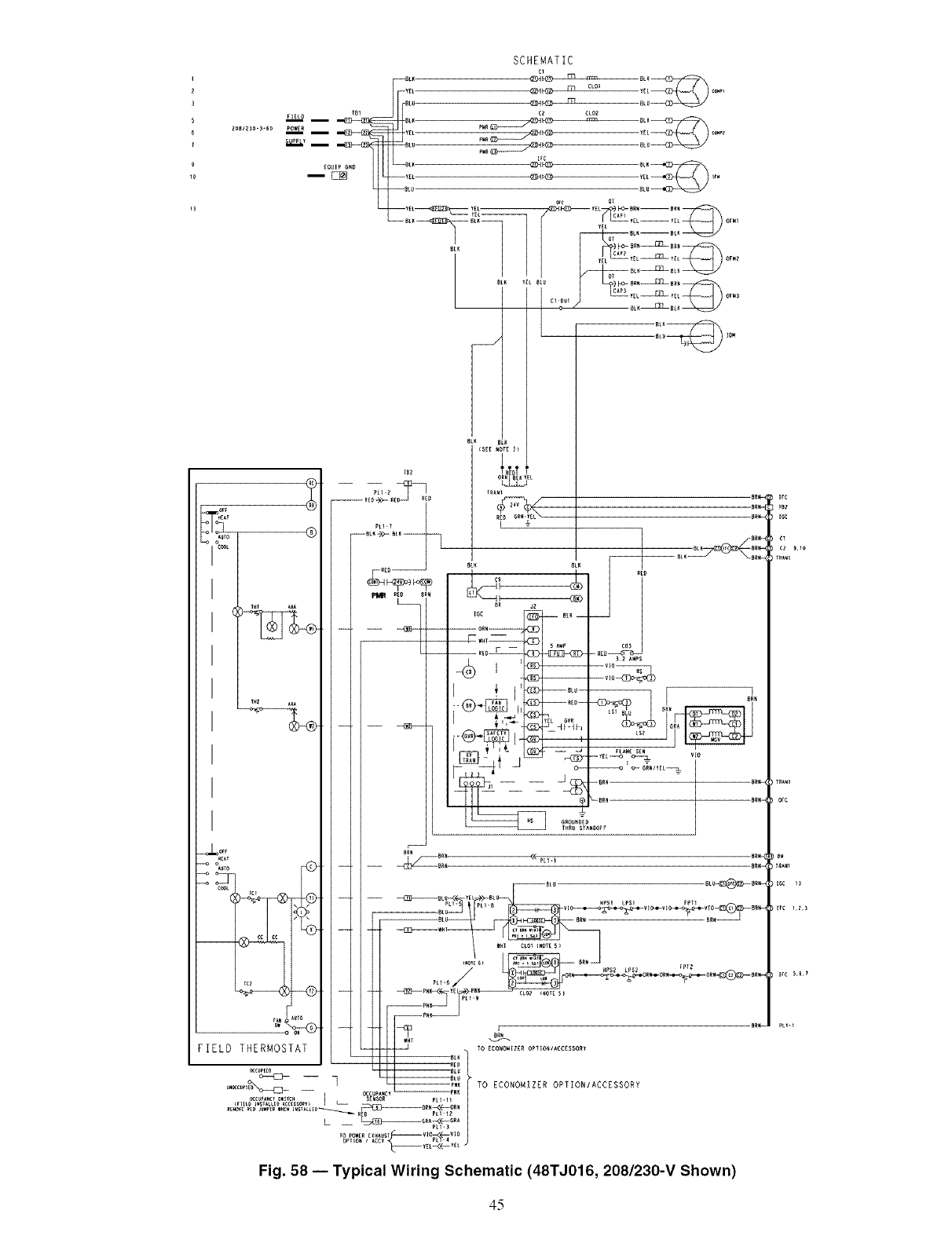
A_TO
I
I
I
-k_:,
°AUTO
SCHEMATIC
L_ B _ CAP_
CAP2gff__ gg£ OrMZ
o_
__ __ % -- -- ORN_.._ ,<]D
4i ......
[12® -._
y_4t J® _ .... ,
GROUNOZO
?_RU STAWO0_
IFC
ore
IELD THERMOSTAT....... ___t_tu ! TO _CONO"IZ_R O_IIO"/_CC_SSOR_
"X_,'_ -- O_C,p,wr_P" K |TO gCONOI_IZER OPTIOR/aCCZSSO_y
R D PL1-12
L__o,,-<_o. /
Fig. 58 -- Typical Wiring Schematic (48TJ016, 208/230-V Shown)
45

LEO
IG¢
1
J2
©
COMPONENT ARRANGEMENT
CONTROL BOX 0
0
®@@
II--_LK
OFMI ,2,3
_Lt,R
•II..Iii ii__ i
IIII
o_, --I I II.=,
GAS SECTION
BtK
2v _Ov
[_pt p_ _x_ [ .........80AeO
[]_" 0
_1011
,IOli
,1Oll
,IOll
PL_
Fig. 59 -- Typical Component Arrangement (48TJ016 Unit Shown)
I
46

LEGEND AND NOTES FOR FIG. 58 AND 59
LEGEND
AHA -- Adjustable, Heat Anticipator SN -- Sensor
BKR W/AT -- Breaks with Amp Turns TB -- Terminal Block
C -- Contactor, Compressor TC -- Thermostat Cooling
CAP -- Capacitor TH -- Thermostat Heating
CB -- Circuit Breaker TRAN -- Transformer
CC -- Cooling Compensator
CLO -- Compressor Lockout _ Terminal (Marked)
COMP -- Compressor Motor O Terminal (Unmarked)
DM -- Damper Motor
DU -- Dummy Terminal _ Terminal Block
EQUIP -- Equipment
FPT -- Freeze Protection Thermostat • Splice
FU -- Fuse Factory Wiring
GND -- Ground
HPS -- High-Pressure Switch _ m-- Field Control Wiring
IAQ -- Indoor Air Quality Sensor Accessory or Optional Wiring
IDM -- Induced-Draft Motor
IFM -- Indoor-Fan Motor ......m_ To indicate common potential only;
not to represent wiring.
IGC -- Integrated Gas Unit Controller
L -- Light _ Economizer Motor
LED -- Light Emitting Diode
LPS -- Low-Pressure Switch _ Remote POT Field Accessory
LS -- Limit Switch
MGV -- Main Gas Valve OAT Sensor
NEC -- National Electrical Code
OAT -- Outdoor Air Temperature Sensor _ Disch Air Sensor
OCCUP -- Occupancy Sensor RAT Accessory Sensor
OFC -- Outdoor-Fan Contactor
OFM -- Outdoor-Fan Motor Low Ambient Lockout Switch
PL -- Plug Assembly
PMR -- Phase Monitor Relay
QT -- Quadruple Terminal
RAT -- Return Air Temperature Sensor
RS -- Rollout Switch
NOTES:
1. Compressor and/or fan motor(s) thermally protected three phase motors protected against primary
single phasing conditions.
2. If any of the original wire furnished must be replaced, it must be replaced with Type 90 ° C or its
equivalent.
3. TRAN1 is wired for 230-v operation. If unit is 208 v, disconnect the black wires from the ORN TRAN
wire and reconnect to the RED TRAN wire. Apply wirenuts to wires.
4. CB1,2 Must Trip Amps are equal to or less than 156% FLA. IFCB 140%.
5. The CLO locks out the compressor to prevent short cycling on compressor overload and safety devices;
before replacing CLO check these devices.
6. Jumpers are omitted when unit is equipped with economizer.
7. Number(s) indicates the line location of used contacts. A bracket over (2) numbers signifies a single
pole, double throw contact. An underlined number signifies a normally closed contact. Plain (no line)
number signifies a normally open contact.
8. Remove jumper between RC and RH.
9. 620 Ohm, 1 watt, 5% resistor should be removed only when using differential enthalpy or dry bulb.
10. If a separate field-supplied 24 v transformer is used for the IAQ sensor power supply, it cannot have the
secondary of the transformer grounded.
11. OAT sensor is shipped inside unit and must be relocated in the field for proper operation.
12. For field-installed remote minimum position POT. remove black wire jumper between P and P1 and set
control minimum position POT to the minimum position.
47

TROUBLESHOOTING
Unit Troubleshooting- Refer to Tables 27-29 and
Fig. 60.
EconoMi$erlV Troubleshooting-- See Table 30
for EconoMi$erlV logic.
A limctional view of the EconoMiSerlV is shown in Fig. 61.
Typic_d settings, sensor ranges, and jumper positions ale also
shown. An EconoMiSerIV simulator program is available from
Ctuder to help with EconoMi$erIV training and troubleshooting.
ECONOMISERIV PREPARATION -- This procedure is
used to prepare the EconoMiSerIV for troubleshooting. No
troubleshooting or testing is done by performing the following
procedure.
NOTE: This procedure requires a 9-v battery, 1.2 kilo-ohm
resistol, and a 5.6 kilo-ohln resistor which are not supplied
with the EconoMiSerlV.
[IMPORTANT: Be sure to record the positions of aH poten- ]tiometers before starting troubleshooting.
1. Disconnect power at TR and TRI. All LEDs should be
off. Exhaust fan contacts should be open.
2. Disconnect device at P and PI.
3. Jumper P to PI.
4. Disconnect wires at T and TI. Place 5.6 kilo-ohm resistor
across T and TI.
5. Jumper TR to 1.
6. Jumper TR to N.
7. If connected, remove sensor from termimds So and +.
Connect 1.2 kilo-ohm 4074EJM checkout resistor across
terminals So and +.
8. Put 620-ohm resistor across terminals SR and +.
9. Set minimum position, DCV set point, and exhaust
potentiometers fully CCW (counteMockwise).
10. Set DCV maximum position potentiometer fully CW
(clockwise).
11. Set enthalpy potentiometer to D.
12. Apply power (24 vac) to terminals TR and TRI.
DIFFERENTIAL ENTHALPY-- To check differential
enthalpy:
1. Make sure EconoMiSerIV prep_uation procedure has
been performed.
2. Place 620-ohm resistor across So and +.
3. Place 1.2 kilo-ohm resistor across SR and +. The Free
Cool LED should be lit.
4. Remove 620-ohm resistor across So and +. Tile Free
Cool LED should turn off.
5. Return EconoMiSerIV settings and wiring to normal
after completing troubleshooting.
SINGLE ENTHALPY -- To check single enthalpy:
1. Make sure EconoMiSerIV prepmation procedure has
been performed.
2. Set the enthalpy potentiometer to A (fully CCW). The
Free Cool LED should be lit.
3. Set the enth_flpy potentiometer to D (fully CW). The Free
Cool LED should turn off.
4. Return EconoMiSerlV settings and wiring to normal
after completing troubleshooting.
DCV (Demand Controlled Ventilation) AND POWER
EXHAUST -- To check DCV and Power Exhaust:
1. Make sure EconoMiSerIV prepmation procedure has
been performed.
2. Ensure terminals AQ and AQI _ue open. The LED for
both DCV and Exhaust should be off. The actuator
should be fldly closed.
3. Connect a 9-v battery to AQ (positive node) and AQI
(negative node). The LED for both DCV and Exhaust
should turn on. The actuator should &ive to between 90
and 95% open.
4. Turn the Exhaust potentiometer CW until the Exhaust
LED turns off. The LED should turn off when the
potentiometer is approximately 90%. The actuator should
remain in position.
5. Turn the DCV set point potentiometer CW until the DCV
LED turns off. The DCV LED should turn off when the
potentiometer is approximately 9-v. Tile actuator should
drive fully closed.
6. Turn the DCV and Exhaust potentiometers CCW until
the Exhaust LED turns on. The exhaust contacts will
close 30 to 120 seconds after the Exhaust LED turns on.
7. Return EconoMi$erIV settings and wiring to normal
after completing troubleshooting.
DCV MINIMUM AND MAXIMUM POSITION -- To check
the DCV minimum and maximum position:
1. Make sure EconoMiSerIV preparation procedure has
been perforlned.
2. Connect a 9-v battery to AQ (positive node) and AQI
(negative node). The DCV LED should turn on. The
actuator should drive to between 90 and 95% open.
3. Turn the DCV Maximum Position potentiometer to mid-
point. The actuator should drive to between 20 and 80%
open.
4. Turn the DCV Maximum Position potentiometer to lidly
CCW. The actuator should drive fully closed.
5. Turn the Minimum Position potentiometer to midpoint.
The actuator should drive to between 20 and 80% open.
6. Turn the Minimum Position Potentiometer lully CW. The
actuator should drive fully open.
7. Remove the jumper from TR and N. The actuator should
drive fully closed.
8. Return EconoMiSerIV settings and wiring to norm¢fl
after completing troubleshooting.
SUPPLY-AIR [NPUT -- To check supply-air input:
1. Make sure EconoMiSerIV preparation procedure has
been performed.
2. Set the Enthalpy potentiometer to A. The Free Cool LED
turns on. The actuator should drive to between 20 and
80% open.
3. Remove the 5.6 kilo-ohm lesistor and jumper T to TI.
The actuator should drive fidly open.
4. Remove the jumper across T and TI. The actuator should
drive fully closed.
5. Return EconoMiSerlV settings and wiring to normal
after completing troubleshooting.
ECONOMISER IV TROUBLESHOOTING COMPLE-
TION -- Tiffs procedure is used to return the EconoMiSerIV
to operation. No troubleshooting or testing is done by perform-
ing the following procedure.
1. Disconnect power at TR and TRI.
2. Set enthalpy potentiometer to previous setting.
3. Set DCV maximum position potentiometer to previous
setting.
4. Set minimum position, DCV set point, and exhaust
potentiometers to previous settings.
5. Remove 620-ohm resistor fix_m terminals SR and +.
6. Remove 1.2 kilo-ohln checkout resistor from terminals So
and +. If used, reconnect sensor fix_mterminals So and +.
7. Remove jumper from TR to N.
8. Remove jumper from TR to 1.
9. Remove 5.6 kilo-ohm resistor from T and TI. Reconnect
wires at T and TI.
10. Remove jumper from P to PI. Reconnect device at P and
PI.
11. Apply power (24 vac) to termimds TR and TRI.
48
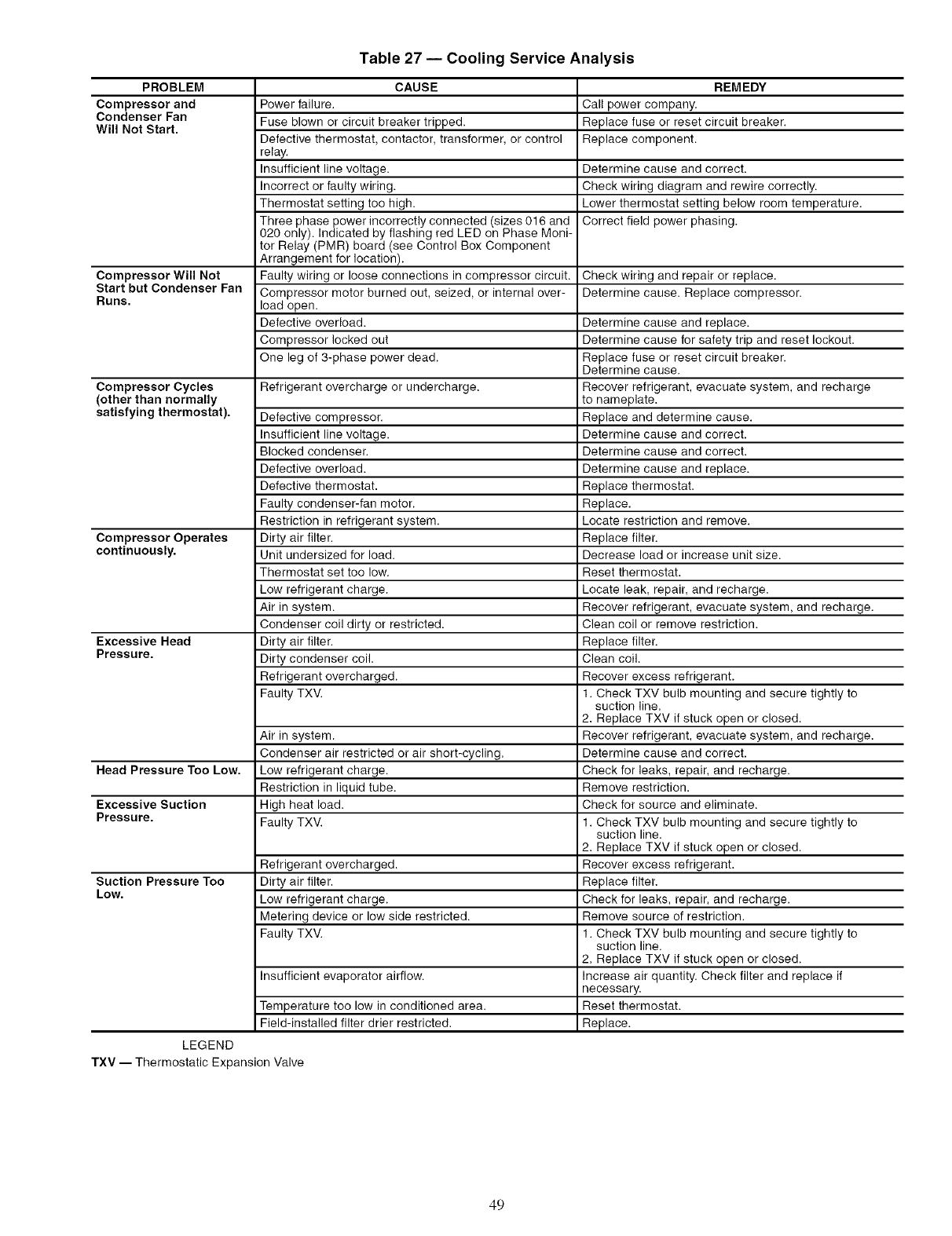
Table 27 -- Cooling Service Analysis
PROBLEM CAUSE REMEDY
Compressor and Power failure. Call power company.
Condenser Fan Fuse blown or circuit breaker tripped. Replace fuse or reset circuit breaker.
Will Not Start. Defective thermostat, contactor, transformer, or control Replace component.
relay.
Insufficient line voltage. Determine cause and correct.
Incorrect or faulty wiring. Check wiring diagram and rewire correctly.
Thermostat setting too high. Lower thermostat setting below room temperature.
Three phase power incorrectly connected (sizes 016 and Correct field power phasing.
020 only). Indicated by flashing red LED on Phase Moni-
tor Relay (PMR) board (see Control Box Component
Arrangement for location).
Compressor Will Not Faulty wiring or loose connections in compressor circuit. Check wiring and repair or replace.
Start but Condenser Fan Compressor motor burned out, seized, or internal over- Determine cause. Replace compressor.
Runs. load open.
Defective overload. Determine cause and replace.
Compressor locked out Determine cause for safety trip and reset lockout.
One leg of 3-phase power dead. Replace fuse or reset circuit breaker.
Determine cause.
Compressor Cycles Refrigerant overcharge or undercharge. Recover refrigerant, evacuate system, and recharge
(other than normally to nameplate.
satisfying thermostat). Defective compressor. Replace and determine cause.
Insufficient line voltage. Determine cause and correct.
Blocked condenser. Determine cause and correct.
Defective overload. Determine cause and replace.
Defective thermostat. Replace thermostat.
Faulty condenser-fan motor. Replace.
Restriction in refrigerant system. Locate restriction and remove.
Compressor Operates Dirty air filter. Replace filter.
continuously. Unit undersized for load. Decrease load or increase unit size.
Thermostat set too low. Reset thermostat.
Low refrigerant charge. Locate leak, repair, and recharge.
Air in system. Recover refrigerant, evacuate system, and recharge.
Condenser coil dirty or restricted. Clean coil or remove restriction.
Excessive Head Dirty air filter. Replace filter.
Pressure. Dirty condenser coil. Clean coil.
Refrigerant overcharged. Recover excess refrigerant.
Faulty TXV. 1. Check TXV bulb mounting and secure tightly to
suction line.
2. Replace TXV if stuck open or closed.
Air in system. Recover refrigerant, evacuate system, and recharge.
Condenser air restricted or air short-cycling. Determine cause and correct.
Head Pressure Too Low. Low refrigerant charge. Check for leaks, repair, and recharge.
Restriction in liquid tube. Remove restriction.
Excessive Suction High heat load. Check for source and eliminate.
Pressure. Faulty TXV. 1. Check TXV bulb mounting and secure tightly to
suction line.
2. Replace TXV if stuck open or closed.
Refrigerant overcharged. Recover excess refrigerant.
Suction Pressure Too Dirty air filter. Replace filter.
Low. Low refrigerant charge. Check for leaks, repair, and recharge.
Metering device or low side restricted. Remove source of restriction.
Faulty TXV. 1. Check TXV bulb mounting and secure tightly to
suction line.
2. Replace TXV if stuck open or closed.
Insufficient evaporator airflow. Increase air quantity. Check filter and replace if
necessary.
Temperature too low in conditioned area. Reset thermostat.
Field-installed filter drier restricted, Replace.
LEGEND
TXV -- Thermostatic Expansion Valve
49
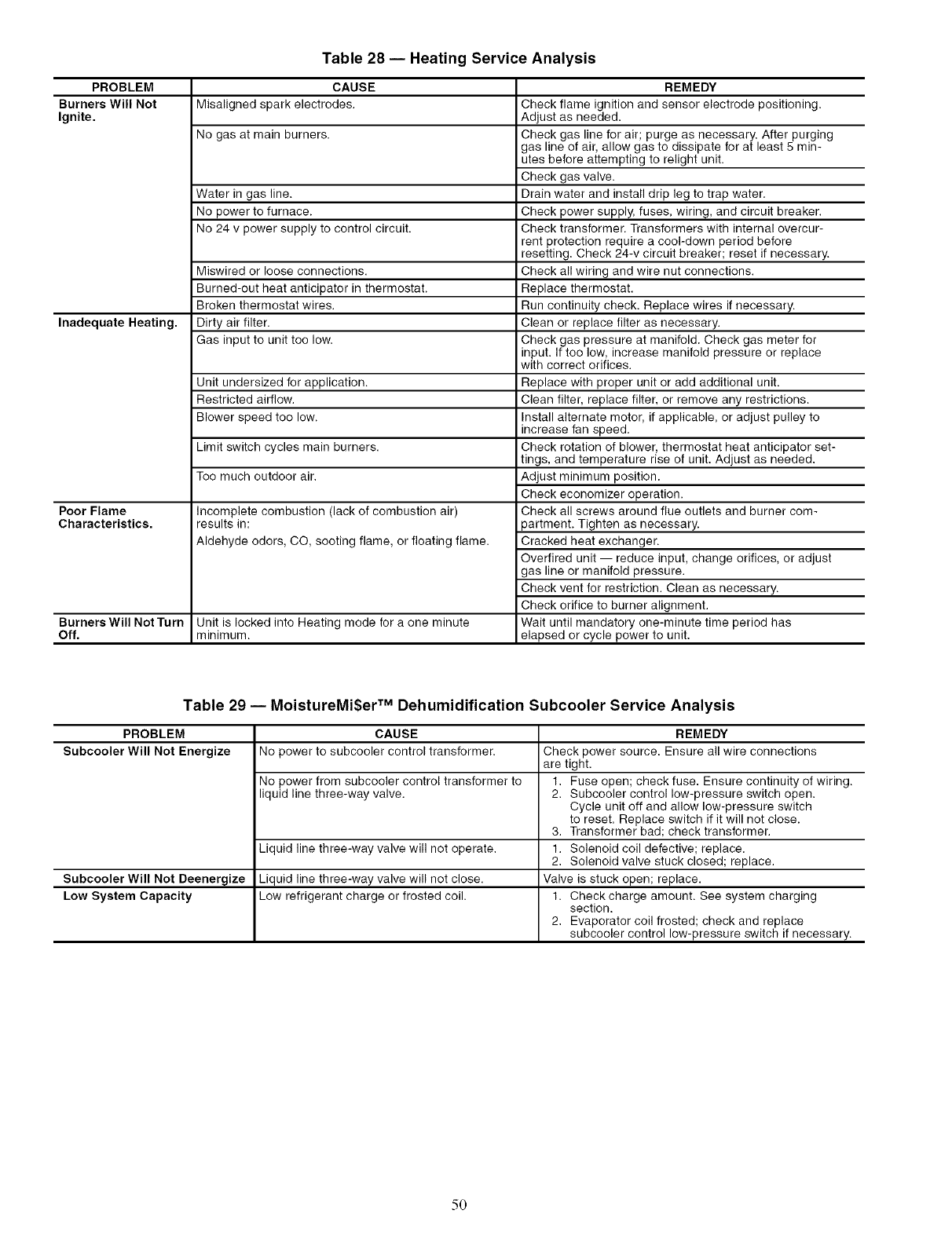
Table 28 -- Heating Service Analysis
PROBLEM CAUSE
Burners Will Not Misaligned spark electrodes.
Ignite.
No gas at main burners.
Water in gas line.
No power to furnace.
No 24 v power supply to control circuit.
Miswired or loose connections.
Burned-out heat anticipator in thermostat.
Broken thermostat wires.
Inadequate Heating, Dirty air filter.
Gas input to unit too low.
Unit undersized for application.
Restricted airflow.
Blower speed too low.
Limit switch cycles main burners.
Too much outdoor air.
Poor Flame
Characteristics. Incomplete combustion (lack of combustion air)
results in:
Aldehyde odors, CO, sooting flame, or floating flame.
Burners Will Not Turn Unit is locked into Heating mode for a one minute
Off. minimum.
Table 29 -- MoistureMi$er TM Dehumidification Subcooler Service Analysis
PROBLEM CAUSE
Subcooler Will Not Energize No power to subcooler control transformer.
REMEDY
Check flame ignition and sensor electrode positioning.
Adjust as needed.
Check gas line for air; purge as necessary. After purging
gas line of air, allow gas to dissipate for at least 5 min-
utes before attempting to relight unit.
Check gas valve.
Drain water and install drip leg to trap water.
Check power supply, fuses, wiring, and circuit breaker.
Check transformer. Transformers with internal overcur-
rent protection require a cool-down period before
resetting. Check 24-v circuit breaker; reset if necessary.
Check all wiring and wire nut connections.
Replace thermostat.
Run continuity check. Replace wires if necessary.
Clean or replace filter as necessary.
Check gas pressure at manifold. Check gas meter for
input. If too low, increase manifold pressure or replace
with correct orifices.
Replace with proper unit or add additional unit.
Clean filter, replace filter, or remove any restrictions.
Install alternate motor, if applicable, or adjust pulley to
increase fan speed.
Check rotation of blower, thermostat heat anticipator set-
tings, and temperature rise of unit. Adjust as needed.
Adjust minimum position.
Check economizer operation.
Check all screws around flue outlets and burner com-
partment. Tighten as necessary.
Cracked heat exchanger.
Overtired unit -- reduce input, change orifices, or adjust
gas line or manifold pressure.
Check vent for restriction. Clean as necessary.
Check orifice to burner alignment.
Wait until mandatory one-minute time period has
elapsed or cycle power to unit.
Subcooler Will Not Deenergize
Low System Capacity
No power from subcooler control transformer to
liquid line three-way valve.
Liquid line three-way valve will not operate.
Liquid line three-way valve will not close.
Low refrigerant charge or frosted coil.
REMEDY
Check power source. Ensure all wire connections
are tight.
1. Fuse open; check fuse. Ensure continuity of wiring.
2. Subcooler control low-pressure switch open.
Cycle unit off and allow low-pressure switch
to reset. Replace switch if it will not close.
3. Transformer bad; check transformer.
1. Solenoid coil defective; replace.
2. Solenoid valve stuck closed; replace.
Valve is stuck open; replace.
1. Check charge amount. See system charging
section.
2. Evaporator coil frosted; check and replace
subcooler control low-pressure switch if necessary.
5O
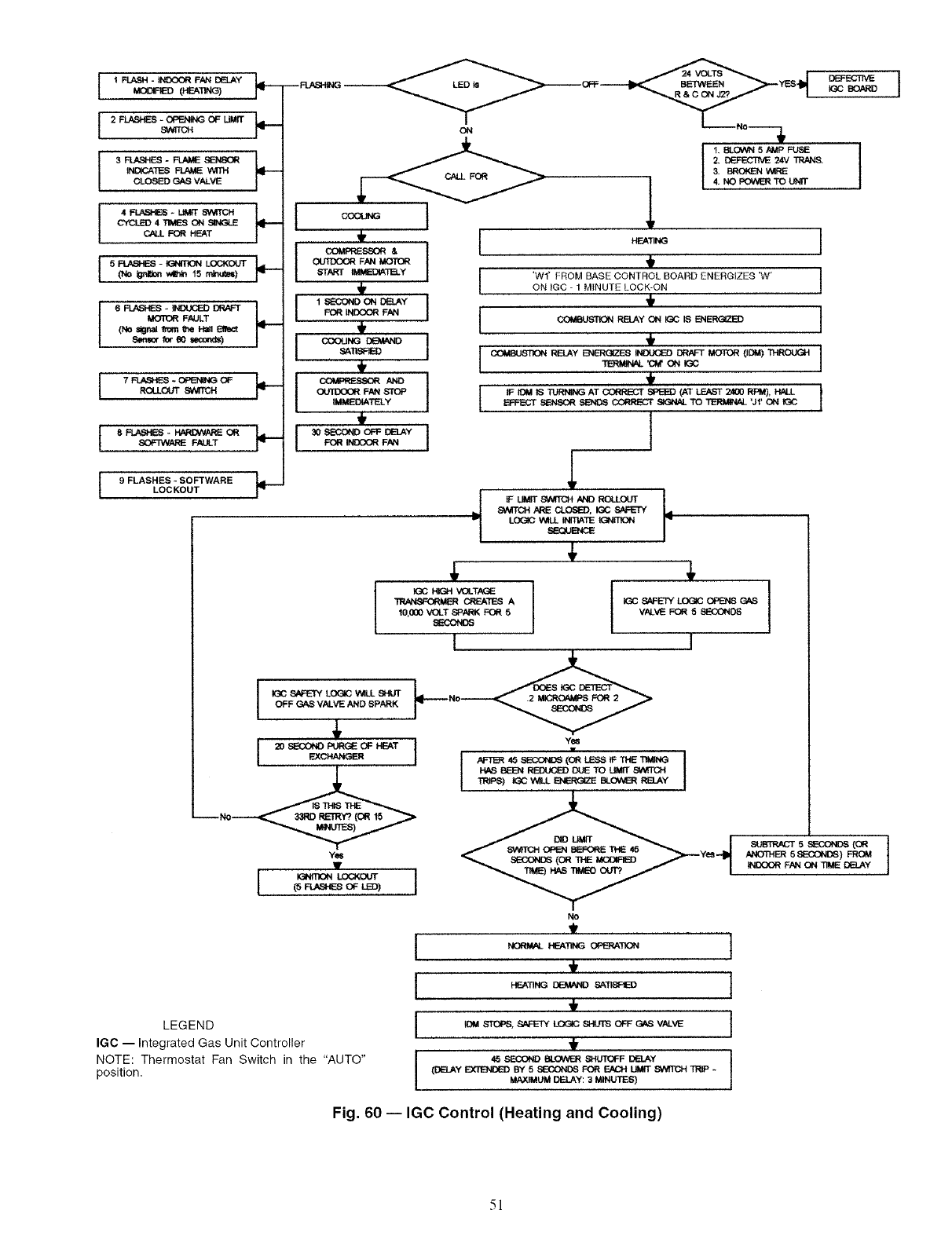
I_-INDO(:W_FANI)EI.AY J___(HEATING)
2_S - OFmNING OF LIMffSWRCH
3_S -_ 81_813f1
IN_CATES FLAME WITH
CLOSED C:':':':':':':':':_VALVE
4FI.ASI'E8 - LIW_ SWITCH
CYCLED 4 TIMES ON SINGLE
CALL FOR HEAT
(No _ wth_ 15 _)
6FI.ASHES-iNDUCED DRAFT
MOTORFAULT
(NOsigr_ frem f_'_ _ !_t
8enm:,rforB0 mKx_,es)
I 7 _ - OPtENING OFROLLCtrr 8_MICH
SOFTWARE FAULT
I 9 FLASHES - SOFTWARELOCKOUT
F
I , I
I_ OU113OOR FAN MOTOR
STeEr I_TELY
I. I , ,FOR iNDOOR FAN I
I COOLING DEMAND
t
OUIDOOR F/M_STOP
IMMEDIATELY
I;GC SAFELY LOGIC WILL SHUT
OFF GAS VALVE AND sPARK
4,
Y_
LEGEND
IGC -- Integrated Gas Unit Controller
NOTE: Thermostat Fan Switch in the "AUTO"
position.
--_ OFF YES IGC BOARD
I,BLOWN 5AMP FUSE
2. DEFECTIVE _V TRANS.
& BROKB_ V_IRE
1L & NO POWB_ TO U_T
HEATING
I
I
I
'Wl' FROM BASE CONTROL BOARD ENERGIZES 'W'
ON IGC - 1 MINUTE LOCK-ON
RELAY ON _C BEN_
I
I
I
t
t,
1__ B_N.o ATCO_-CT_ (ATLEA-__0.P_, _L I
EE--CT 8EN8OR SENDS CORRECT 81GNAL TO _ 'Jf ON K3C
F LIMIT swrrcH AND ROLLOUT
9A,TI'CH ARE CLOSED, IGC _
LOGIC _ INITIATIE IGNITION
SEQUENCE
_ _I"ES A
10,000 Vt3LT 8PN_K FO_ 5
I
Yes
I _FrER_OONI_(O_LESS.:T_ETI_e I
H_S BEEN R_ D_J_ TO _ 81/_TCH
TRIPS) tGC _MLL B_ERGIZE BLOWISR RELAY
I _3c SAFEW LO_C OPENS GAS
VALVE FOR 5 SEONOS
I
No
t
I_,, s_.._Er_ LO_C_._rsOFF_ VALVE I
I 45 SECOND BLOWER SHUTOFF DELAY I
(DELAY _ BY 5 880OND8 FOR ESE;H UMfr 8w_roH TRP -
MAXIMUM DELAY: 3 MINLrlEs)
!
SUBTRACT 5 S_CONDS (OR J
5_:CONDS) FROM J
_DOOR F_ ON TIME DE_AY
Fig. 60 -- IGC Control (Heating and Cooling)
51
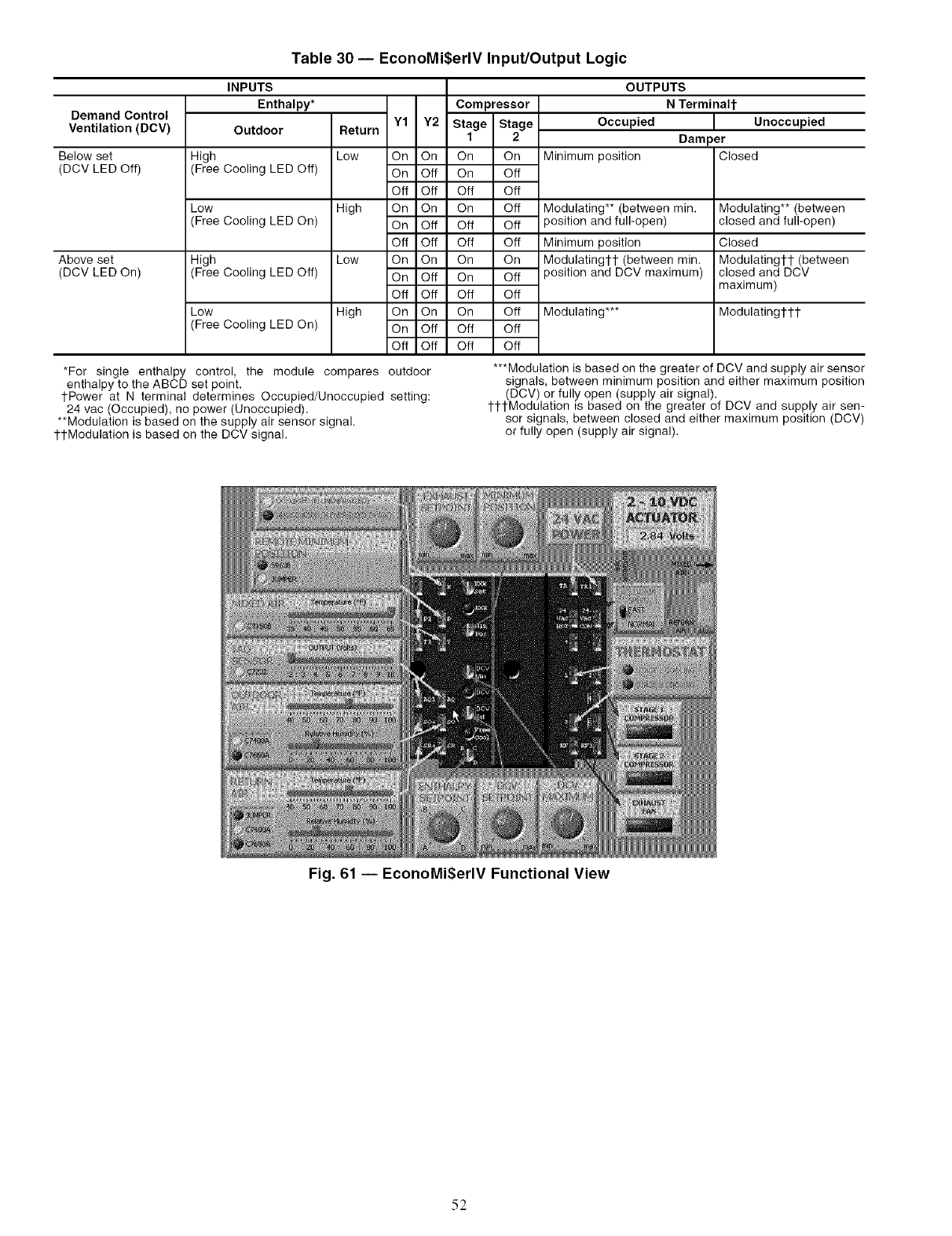
Table 30 -- EconoMi$erlV Input/Output Logic
Demand Control
Ventilation (DCV)
Below set
(DCV LED Off)
Above set
(DCV LED On)
INPUTS
Enthalpy* Compressor
Outdoor Return Y1 Y2 Stage Stage
1 2
High Low On On On On
(Free Cooling LED Off) On Off On Off
Off Off Off Off
Low High On On On Off
(Free Cooling LED On) On Off Off Off
Off Off Off Off
High Low On On On On
(Free Cooling LED Off) On Off On Off
Off Off Off Off
Low High On On On Off
(Free Cooling LED On) On Off Off Off
Off Off Off Off
*For single enthalpy control, the module compares
enthalpy to the ABCD set point.
tPower at N terminal determines Occupied/Unoccupied
24 vac (Occupied), no power (Unoccupied).
**Modulation is based on the supply air sensor signal.
1-tModulation is based on the DCV signal.
OUTPUTS
NTerminalt
Occupied
Minimum position
Modulating** (between rain.
position and full-open)
Minimum position
Modulating1-1- (between min.
position and DCV maximum)
Modulating***
Unoccupied
Dam )er
Closed
Modulating** (between
closed and full-open)
Closed
Modulatingtl- (between
closed and DCV
maximum)
Modulatingtl-t
outdoor
setting:
***Modulation is based on the greater of DCV and supply air sensor
signals, between minimum position and either maximum position
(DCV) or fully open (supply air signal).
ttl-Modulation is based on the greater of DCV and supply air sen-
sor signals, between closed and either maximum position (DCV)
or fully open (supply air signal).
Fig. 61 -- EconoMiSerlV Functional View
52
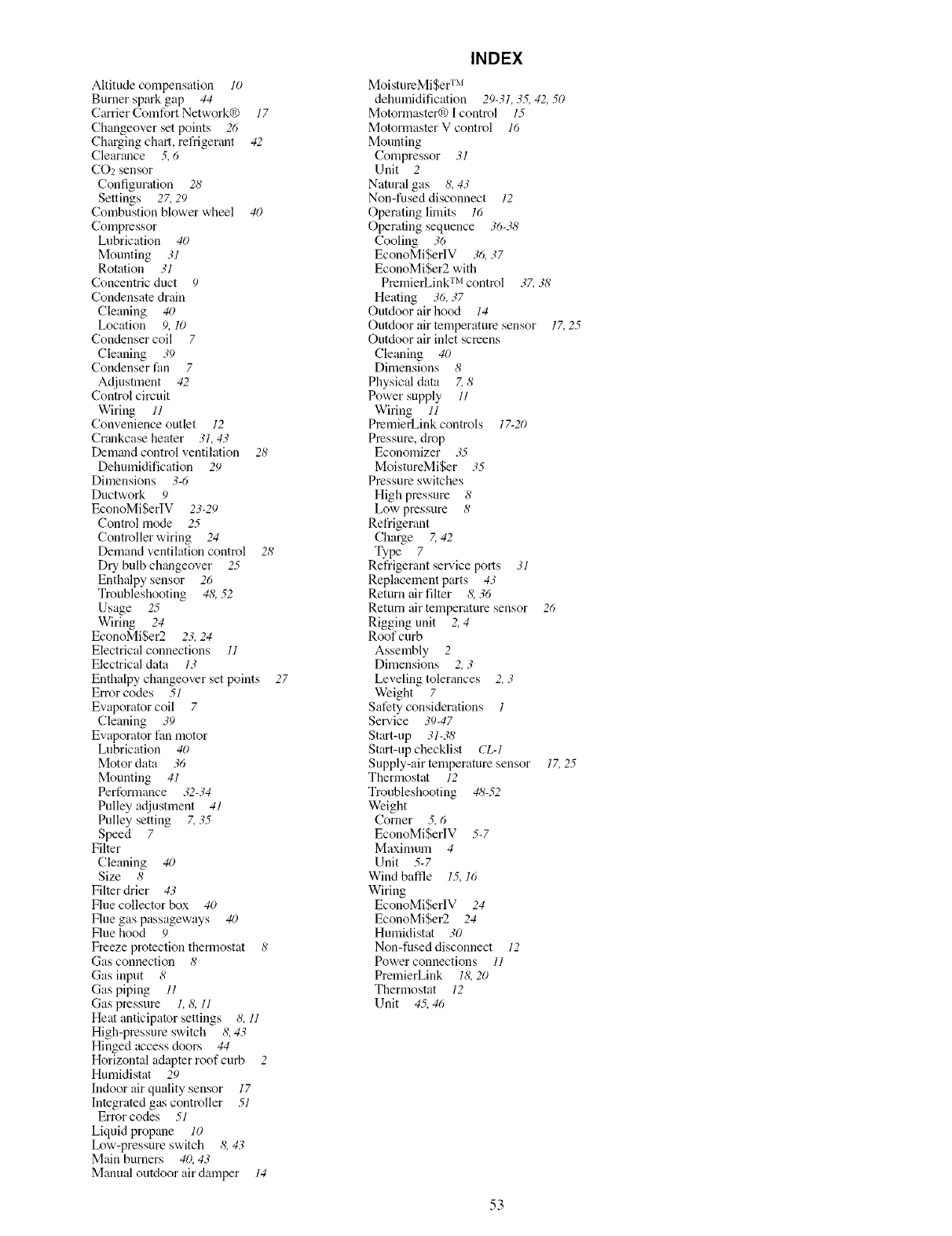
Altitude compensation lO
Burner spark gap 44
Carrier Comfort Network@ 17
Changeover set points 26
Charging chart, ret_igerant 42
Clearance 5, 6
CO2 sensor
Configuration 28
Settings 27, 29
Combustion blower wheel 40
Compressor
Lubrication 40
Mounting 31
Rotation 31
Concentric duct 9
Condensate drain
Cleaning 40
Location 9, 10
Condenser coil 7
Cleaning 39
Condenser fan 7
Adjustment 42
Control circuit
Wiring 11
Convenience outlet 12
Crankcase heater .31,43
Demand control ventilation 28'
Dehumidification 29
Dimensions 3-6
Ductwork 9
EconoMiSerlV 23-29
Control mode 25
Controller wiring 24
Demand ventilation control 28
Dry bulb changeover 25
Enthalpy sensor 26
Troubleshooting 4& .52
Usage 25
Wiring 24
EconoMi$er2 23, 24
Electrical connections l]
Electrical data 13
Enthalpy changeover set points 27
Error codes 51
Evaporator coil 7
Cleaning 39
Evaporator fan motor
Lubrication 40
Motor data 36
Mounting 41
Performance 32-34
Pulley adjustnlent 41
Pulley setting 7, 35
Speed 7
Filter
Cleaning 40
Size 8
Filter drier 43
Flue collector box 40
Flue gas passageways 40
Flue hood 9
Freeze protection thermostat 8
Gas connection 8
Gas input 8
Gas piping 11
Gas pressure 1, &11
Heat anticipator settings 8, 11
High-pressure switch 8, 43
Hinged access doors 44
Horizontal adapter roof curb 2
Humidistat 29
Indoor air quality sensor 17
Integrated gas controller 51
Error codes 51
Liquid propane 10
Ix_w-pressure switch 8, 43
Main burners 40, 43
Manual outdoor air damper 14
INDEX
MoistureMiSer TM
dehumidification 29-31,3.5,42, 50
Motormaster@ I control 15
Motormaster V control 16
Mounting
Compressor .31
Unit 2
Natnral gas 8,43
Non-fused disconnect 12
Operating limits 16
Operating sequence 36-38
Cooling 36
EconoMi$erlV 36, 37
EconoMi$er2 with
PremierLink TM control 37,38'
Heating 36, 37
Outdoor air hocKt 14
Outdoor air temperature sensor 17,25
Outdoor air inlet screens
Cleaning 40
Dimensions 8
Physical data Z 8
Power supply 11
Wiring 11
PmmierLink controls 17-20
Pressure, drop
Economizer 35
MoistureMi$er 35
Pressure switches
High pressure 8
Low pressure 8
Refrigerant
Charge Z 42
Type 7
Refrigerant selwice ports 31
Replacement parts 43
Return air filter &36
Return air temperature sensor 26
Rigging unit 2,4
Roof curb
Assembly 2
Dimensions 2, 3
Leveling tolerances 2,3
Weight 7
Safety considerations 1
Ser_,ice .39-47
Start-up 31-38
Start-up checklist CL-]
Supply-air temperature sensor 17,25
Thermostat 12
Troubleshooting 48-.52
Weight
Corner .5,,5
EconoMi$erlV 5-7
Maximum 4
Unit 5-7
Wind baffle 15,16
Wiring
EconoMiSerlV 24
EconoMi$er2 24
Humidistat 30
Non-fused disconnect 12
Power connections l]
PremierLink 18,20
Thermostat 12
Unit 4.5,4'5
53

SERVICE TRAINING
Packaged Service Training programs tue an excellent way to increase your knowledge of the equipment
discussed in this manual, including:
• Unit Familiarization
• [nstallation Overview
• Maintenance
• Opel_ting Sequence
A large selection of pl_duct, theory, and skills programs are available, using popular video-based formats
and materials. All include video and/or slides, plus companion book.
Classroom Service Training which includes "hands-on" experience with the products in our labs can
mean increased confidence that really pays dividends in faster troubleshooting and fewer c_fllbacks. Course
descriptions and schedules tue in our catalog.
CALL FOR FREE CATALOG 1-800-644-5544
] Packaged Selvice Training [] Classroom Service Training
Copyright 2008 Carrier Corporation
Manufacturer reserves the right to discontinue, or change at any time, specifications or designs without notice and without incurring obligations.
Catalog No. 04-53480009-01 Printed in U.S.A. Form 48TJ-22SI Pg 54 3-06 Replaces: 48TJ-21SI

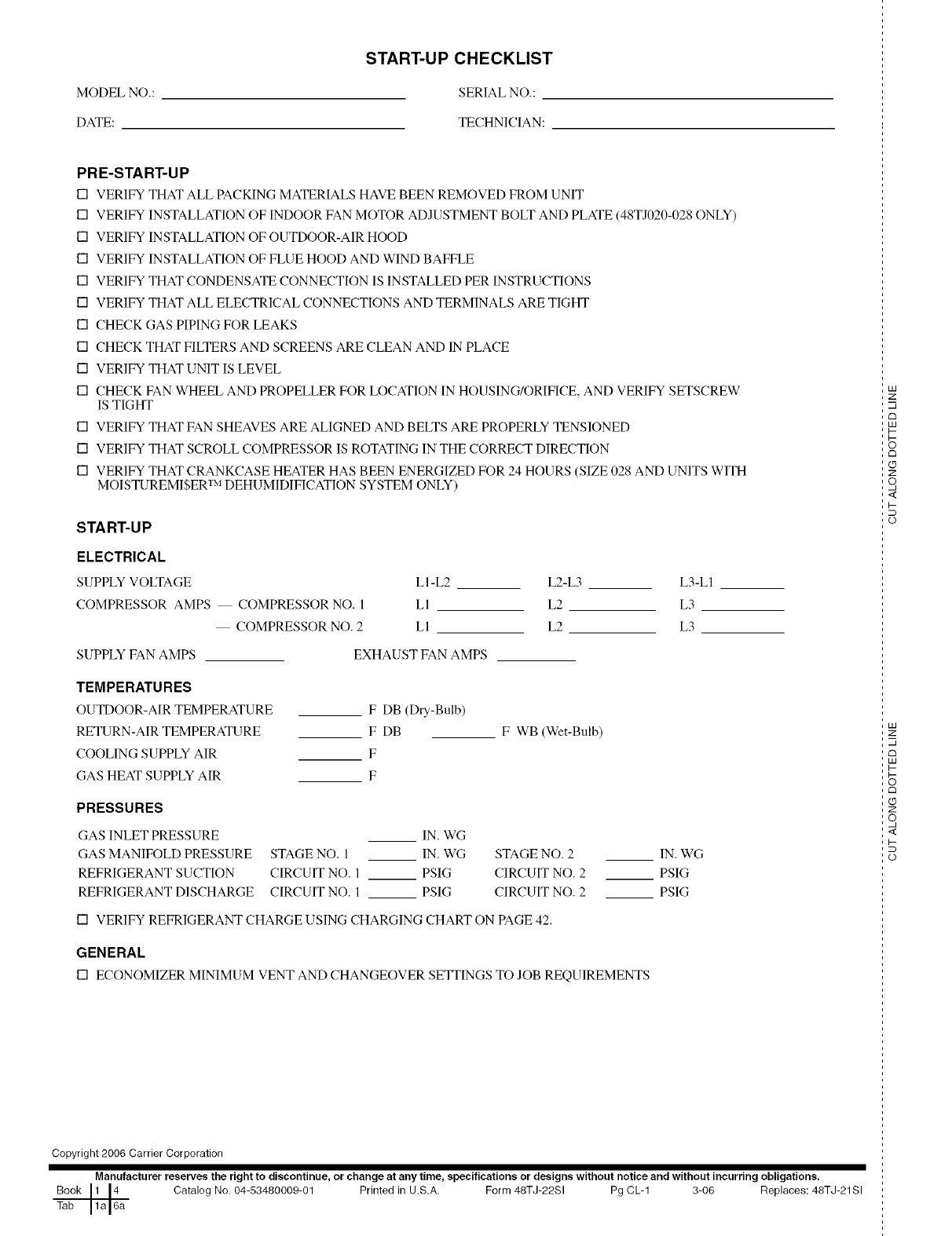
START-UP CHECKLIST
MODEL NO.: SERIAL NO.:
DATE: TECHNICIAN:
PRE-START-UP
[] VERIFY THAT ALL PACKING MATERIALS HAVE BEEN REMOVED FROM UNIT
[] VERIFY INSTALLATION OF INDOOR FAN MOTOR ADJUSTMENT BOLT AND PLATE (48TJ020-028 ONLY)
[] VERIFY INSTALLATION OF OUTDOOR-AIR HOOD
[] VERIFY INSTALLATION OF FLUE HOOD AND WIND BAFFLE
[] VERIFY THAT CONDENSATE CONNECTION IS INSTALLED PER INSTRUCTIONS
[] VERIFY THAT ALL ELECTRICAL CONNECTIONS AND TERMINALS ARE TIGHT
[] CHECK GAS PIPING FOR LEAKS
[] CHECK THAT FILTERS AND SCREENS ARE CLEAN AND IN PLACE
[] VERIFY THAT UNIT IS LEVEL
[] CHECK FAN WHEEL AND PROPELLER FOR LOCATION IN HOUSING/ORIFICE, AND VERIFY SETSCREW
IS TIGHT
[] VERIFY THAT FAN SHEAVES ARE ALIGNED AND BELTS ARE PROPERLY TENSIONED
[] VERIFY THAT SCROLL COMPRESSOR IS ROTATING IN THE CORRECT DIRECTION
[] VERIFY THAT CRANKCASE HEATER HAS BEEN ENERGIZED FOR 24 HOURS (SIZE 028 AND UNITS WITH
MOISTUREMISER T:'IDEHUMIDIFICATION SYSTEM ONLY)
START-UP
ELECTRICAL
SUPPLY VOLTAGE
COMPRESSOR AMPS COMPRESSOR NO. 1
COMPRESSOR NO. 2
SUPPLY FAN AMPS
LI-L2 L2-L3 L3-LI
LI L2 L3
LI L2 L3
EXHAUST FAN AMPS
TEMPERATURES
OUTDOOR-AIR TEMPERATURE
RETURN-AIR TEMPERATURE
COOLING SUPPLY AIR
GAS HEAT SUPPLY AIR
F DB (Dry-Bulb)
F DB
F
F
F WB (Wet-Bulb)
PRESSURES
GAS INLET PRESSURE
GAS MANIFOLD PRESSURE
REFRIGERANT SUCTION
REFRIGERANT DISCHARGE
IN. WG
STAGE NO. 1 IN. WG
CIRCUIT NO. 1 PSIG
CIRCUIT NO. 1 PSIG
STAGE NO. 2 IN. WG
CIRCUIT NO. 2 PSIG
CIRCUIT NO. 2 PSIG
[] VERIFY REFRIGERANT CHARGE USING CHARGING CHART ON PAGE 42.
GENERAL
[] ECONOMIZERMINIMUMVENTAND CHANGEOVERSETFINGSTOJOB REQUIREMENTS
Copyright 2006 Carrier Corporation
Manufacturer reserves the right to discontinue, or change at any time, specifications or designs without notice and without incurring obligations.
Book 1 14 Catalog No. 04-53480009-01 Printed in U.S.A. Form 48TJ-22SI Pg CL-1 3-06 Replaces: 48TJ-21Sl
Tab 1a 16a
LU
z
c_
LU
I--
rm
Z
o,
<
I-
o
LU
z
rm
LU
I-
c_
Z
o,
<
I-
o
