Casio CFX9850GC PLUS_Eng Appendix Fx Plus EN
User Manual: Casio Appendix fx-9750G PLUS | Calculators | Manuals | CASIO
Open the PDF directly: View PDF  .
.
Page Count: 30

Appendix
Appendix A Resetting the Calculator
Appendix B Power Supply
Appendix C Error Message Table
Appendix D Input Ranges
Appendix E Specifications
430
Appendix A Resetting the Calculator
Warning!
The procedure described here clears all memory contents. Never perform this
operation unless you want to totally clear the memory of the calculator. If you
need the data currently stored in memory, be sure to write it down somewhere
before performing the RESET operation.
uu
uu
uTo reset the calculator
F
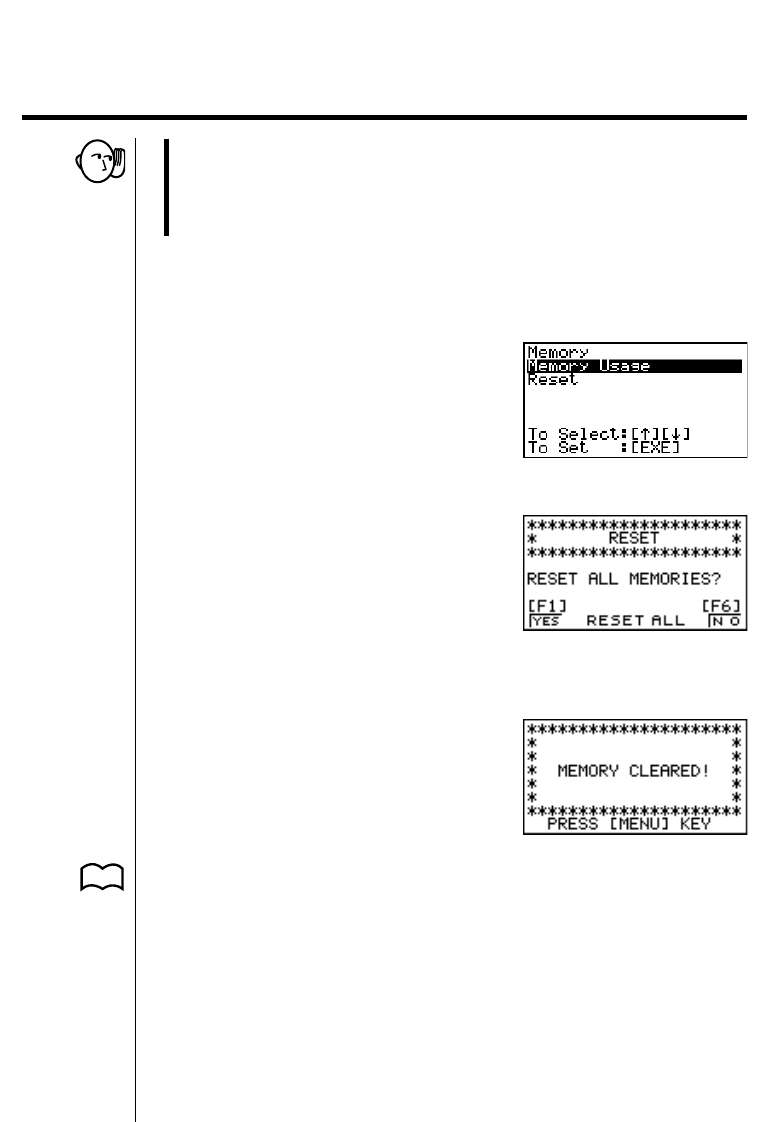
1. Highlight the MEM icon on the main menu and then press w, or press t.
2. Use c to move the highlighting down to “Reset” and then press w.
123456
3. Press 1 (YES) to reset the calculator or 6 (NO) to abort the operation
without resetting anything.
4. Press m.
P. 11 •If the display appears to dark or dim after you reset the calculator, adjust the
contrast.
431
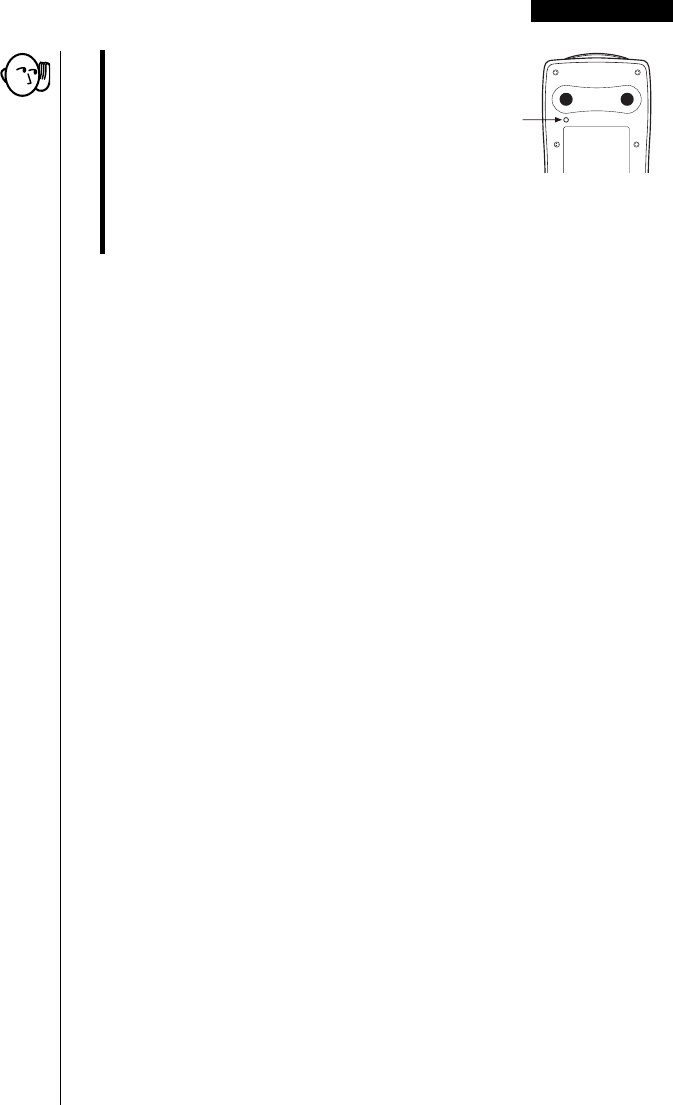
•If the calculator stops operating correctly for
some reason, use a thin, pointed object to
press the P button on the back of the
calculator. This should make the RESET
screen appear on the display. Perform the
procedure to complete the RESET operation.
•Pressing the P button while an internal calculation is being performed will
cause all data in memory to be deleted.
Resetting the Calculator Appendix A
P button
432
Appendix B Power Supply
This calculator is powered by four AAA-size (LR03 (AM4) or R03 (UM-4))
batteries. In addition, it uses a single CR2032 lithium battery as a back up power
supply for the memory.
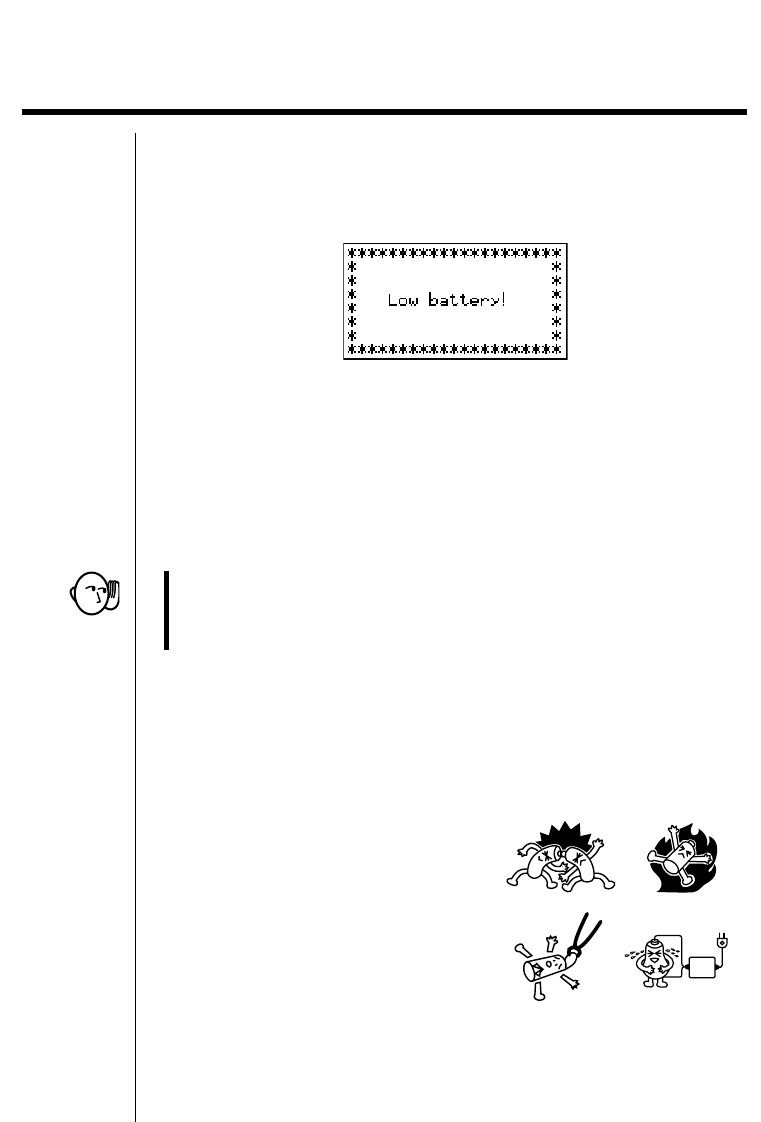
If the following message appears on the display, immediately turn off the calculator
and replace batteries.
If you try to continue using the calculator, it will automatically turn off in order to
protect memory contents. You will not be able to turn power back on until you
replace batteries.
Be sure to replace the main batteries at least once every two years, no matter how
much you use the calculator during that time.
The batteries that come with this calculator discharge slightly during shipment and
storage. Because of this, they may require replacement sooner than the normal
expected battery life.
Warning!
All memory contents will be deleted if you remove both the main power supply
and the memory back up batteries at the same time. If you ever remove both
batteries, correctly reload them and then perform the reset operation.
kk
kk
kReplacing Batteries
Precautions:
Incorrectly using batteries can cause them to burst or leak, possibly damaging the
interior of the calculator. Note the following precautions:
•Be sure that the positive (+) and negative (–) poles of each battery are facing in
the proper directions.
•Never mix batteries of different types.
•Never mix old batteries and new ones.
•Never leave dead batteries in the battery
compartment.
•Remove the batteries if you do not plan
to use the calculator for long periods.
•Never try to recharge the batteries
supplied with the calculator.
•Do not expose batteries to direct heat, let them become shorted, or try to take
them apart.
433
Power Supply Appendix B
(Should a battery leak, clean out the battery compartment of the calculator
immediately, taking care to avoid letting the battery fluid come into direct
contact with your skin.)
Keep batteries out of the reach of small children. If swallowed, consult with a
physician immediately.
uu
uu
uTo replace the main power supply batteries
*Never remove the main power supply and the memory back up batteries
from the calculator at the same time.
*Never turn on the calculator while the main power supply batteries are
removed or not loaded correctly. Doing so can cause memory data to be
deleted and malfunction of the calculator. If mishandling of batteries causes
such problems, correctly load batteries and then perform the RESET
operation to resume normal operation.
*Be sure to replace all four batteries with new ones.
1. Press !O to turn off the calculator.
Warning!
*Be sure to turn the calculator off before replacing batteries. Replacing
batteries with power on will cause data in memory to be deleted.
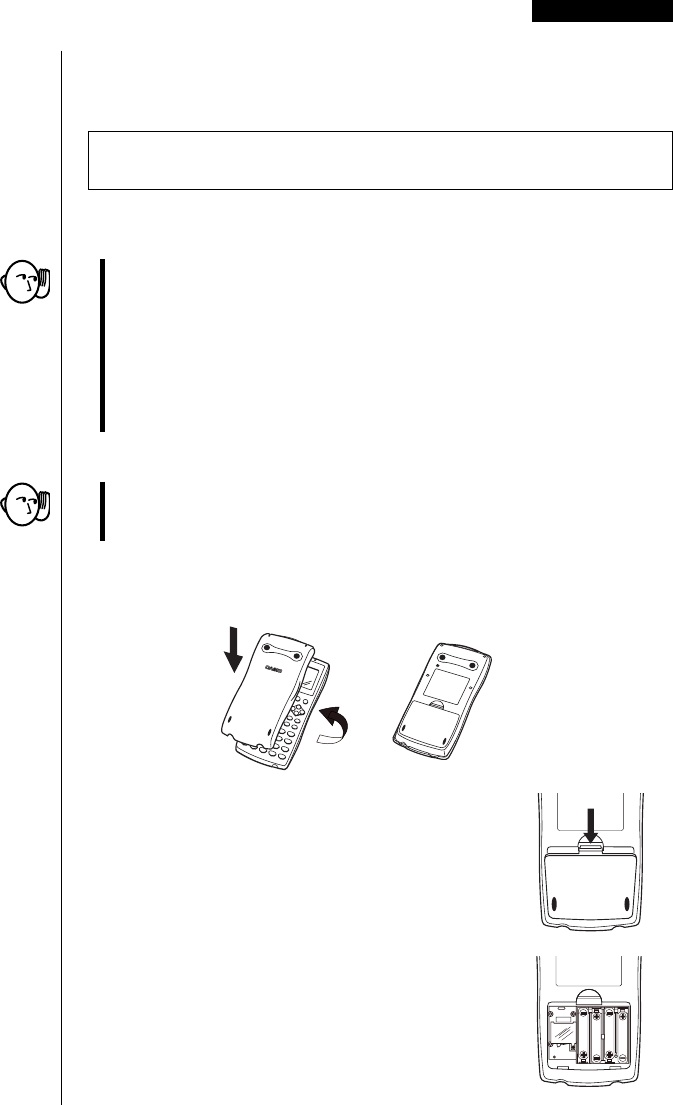
2. Making sure that you do not accidently press the o key, attach the case to
the calculator and then turn it over.
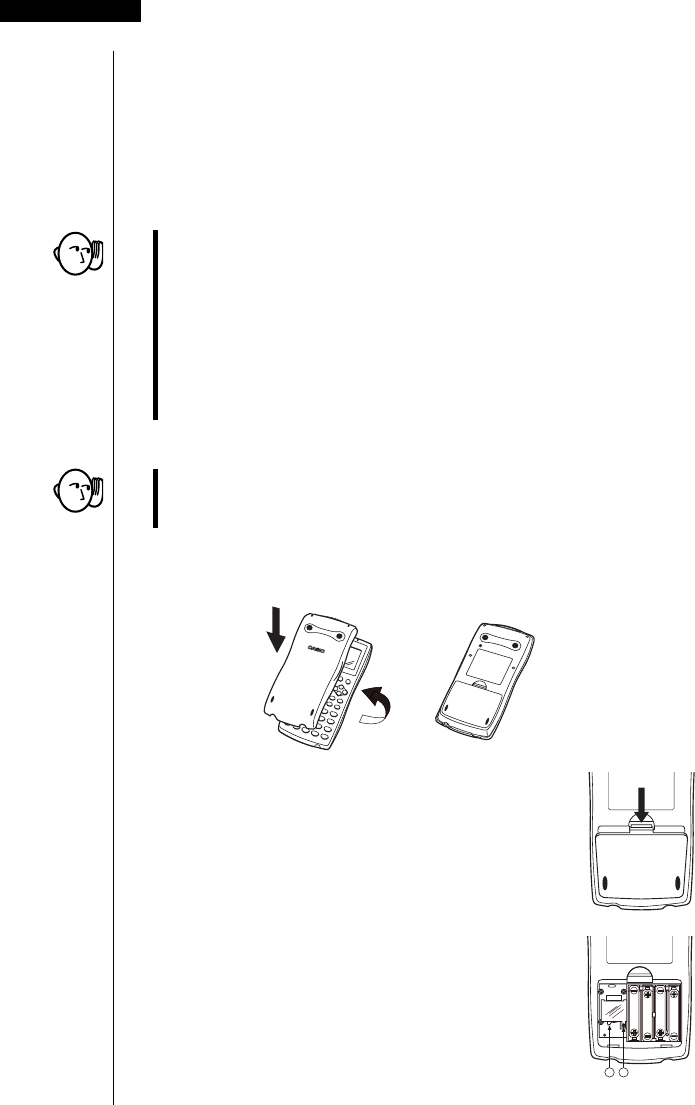
3. Remove the back cover from the calculator by
pulling with your finger at the point marked 1.
4. Remove the four old batteries.
5. Load a new set of four batteries, making sure that
their positive (+) and negative (–) ends are facing in
the proper directions.
6. Replace the back cover.
7. Turn the calculator front side up and remove its case.
Next, press o to turn on power.
1
BACK UP
434
Appendix B Power Supply
•Power supplied by memory back up battery while the main power supply
batteries are removed for replacement retains memory contents.
•Do not leave the calculator without main power supply batteries loaded for long
periods. Doing so can cause deletion of data stored in memory.
•If the figures on the display appear too light and hard to see after you turn on
power, adjust the contrast.
uu
uu
uTo replace the memory back up battery
*Before replacing the memory back up battery, turn on the calculator and
check to see if the “Low battery!” message appears on the display. If it does,
replace the main power supply batteries before replacing the back up power
supply battery.
*Never remove the main power supply and the memory back up batteries
from the calculator at the same time.
*Be sure to replace the back up power supply battery at least once 2 years,
regardless of how much you use the calculator during that time. Failure to do
so can cause data in memory to be deleted.
1. Press !O to turn off the calculator.
Warning!
*Be sure to turn the calculator off before replacing batteries. Replacing
batteries with power on will cause data in memory to be deleted.
2. Making sure that you do not accidently press the o key, attach the case to
the calculator and then turn it over.
3. Remove the back cover from the calculator by
pulling with your finger at the point marked 1.
4. Remove screw i on the back of the calculator, and
remove the back up battery compartment cover.
5. Insert a thin, pointed non-metal object
(such as a toothpick) into the hole maked j
and remove the old battery.
1
A
B
BACK UP

435
Power Supply Appendix B
6. Wipe off the surfaces of a new battery with a soft,
dry cloth. Load it into the calculator so that its positive
(+) side is facing up.
7. Install the memory protection battery cover onto the
calculator and secure it in place with the screw.
Next, replace the back cover.
8. Turn the calculator front side up and remove its case. Next, press o to turn
on power.
kk
kk
kAbout the Auto Power Off Function
Calculator power turns off automatically if you do not perform any key operation
for about 6 minutes. To restore power, press o.
BACK UP

436
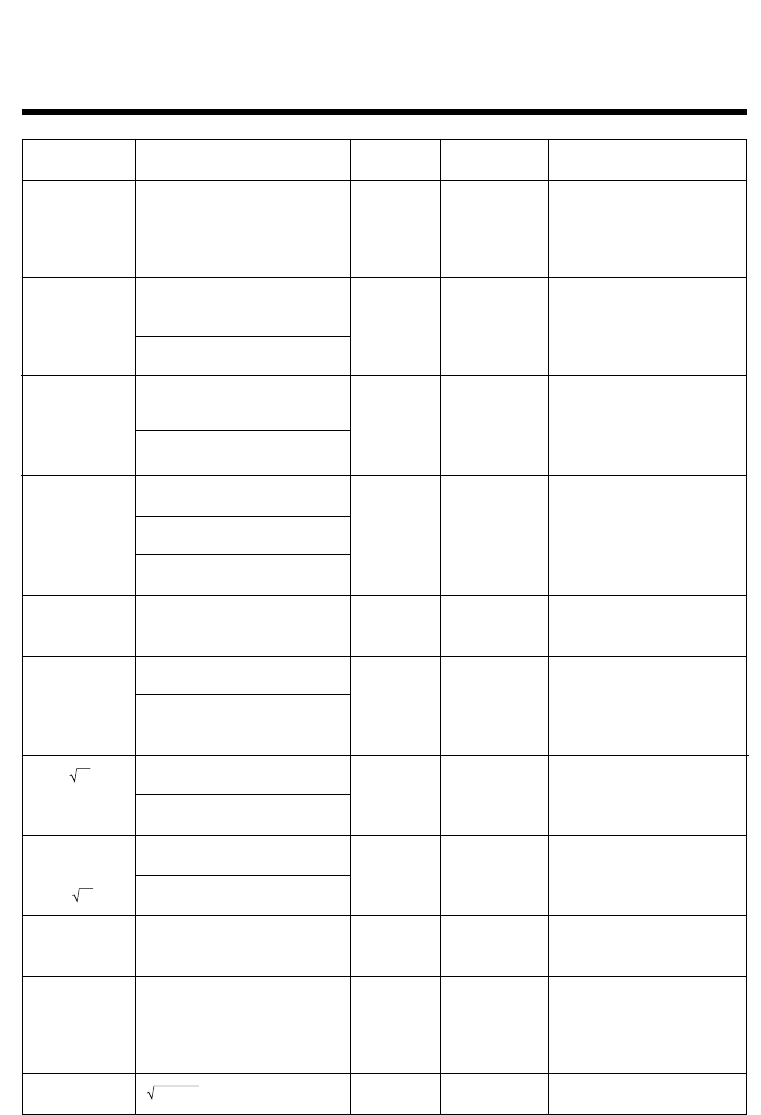
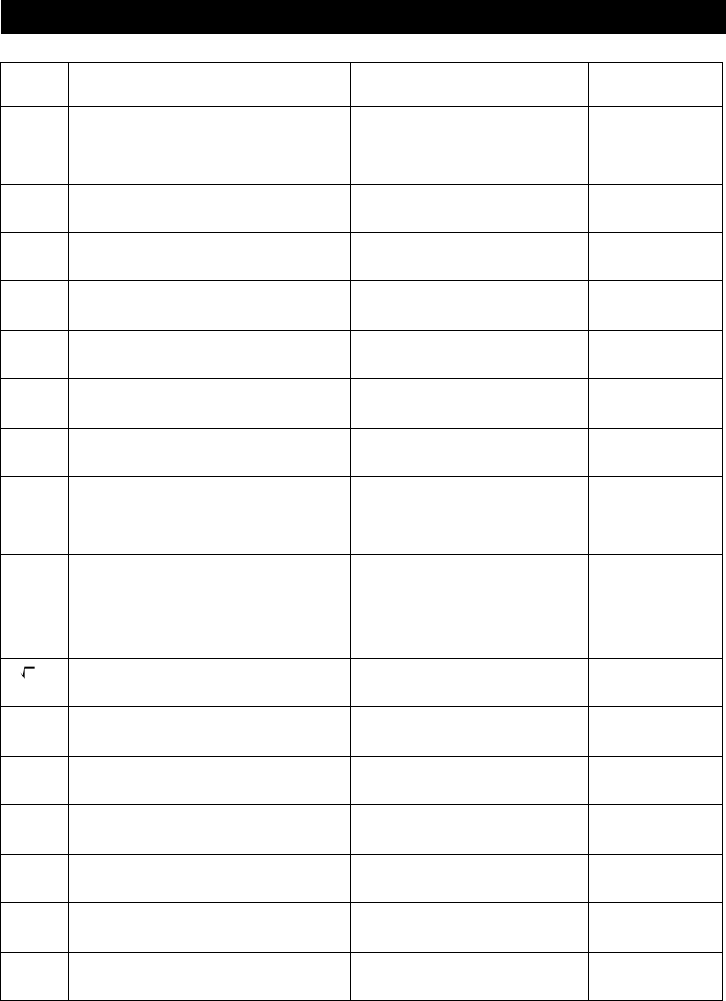
Meaning
1Calculation formula contains an
error.
2Formula in a program contains
an error.
1Calculation result exceeds
calculation range.
2Calculation is outside the input
range of a function.
3Illogical operation (division by
zero, etc.)
4Poor precision in ∑ calculation
results.
5Poor precision in differential
calculation results.
6Poor precision in integration
calculation results.
7Cannot find results of equation
calculations.
1No corresponding Lbl n for
Goto n.
2No program stored in program
area Prog ”file name”.
•Nesting of subroutines by Prog
”file name” exceeds 10 levels.
Message
Syn ERROR
Ma ERROR
Go ERROR
Ne ERROR
Countermeasure
1Use d or e to display the
point where the error was
generated and correct it.
2Use d or e to display the point
where the error was generated
and then correct the program.
1234
Check the input numeric value
and correct it.
When using memories, check
that the numeric values stored
in memories are correct.
5Try using a smaller value for Ax
(x increment/decrement).
6Try changing the tolerance “tol”
when using Gauss-Kronrod
Rule or the number of divisions
“n” when using Simpson's Rule
to another value.
7Check the coefficients of the
equation.
1Correctly input a Lbl n to corres-
pond to the Goto n , or delete
the Goto n if not required.
2Store a program in program
area Prog ”file name”, or delete
the Prog ”file name” if not
required.
•Ensure that Prog ”file name” is
not used to return from
subroutines to main routine. If
used, delete any unnecessary
Prog ”file name”.
•Trace the subroutine jump
destinations and ensure that no
jumps are made back to the
original program area. Ensure
that returns are made correctly.
Appendix C Error Message Table

Meaning
•Execution of calculations that
exceed the capacity of the
stack for numeric values or
stack for commands.
•Not enough memory to input a
function into function memory.
•Not enough memory to create a
matrix using the specified
dimension.
•Not enough memory to hold
matrix calculation result.
•Not enough memory to store
data in list function.
•Not enough memory to input
coefficient for equation.
•Not enough memory to hold
equation calculation result.
•Not enough memory to hold
function input in the Graph
Mode for graph drawing.
•Not enough memory to hold
function input in the DYNA
Mode for graph drawing.
•Not enough memory to hold
function or recursion input.
•Incorrect argument specification
for a command that requires an
argument.
•Illegal dimension or list used
during matrix calculations.
•Problem with cable connection
or parameter setting during
program data communications.
•Problem with cable connection
or parameter setting during
data communications.
•Problem with cable connection
or parameter setting during
data communications.
•Memory of receiving unit
became full during program
data communications.
Message
Stk ERROR
Mem ERROR
Arg ERROR
Dim ERROR
Com ERROR
Transmit
ERROR!
Receive
ERROR!
Memory Full!
Countermeasure
•Simplify the formulas to keep
stacks within 10 levels for the
numeric values and 26 levels
for the commands.
•Divide the formula into two or
more parts.
•Keep the number of variables
you use for the operation within
the number of variables
currently available.
•Simplify the data you are trying
to store to keep it within the
available memory capacity.
•Delete no longer needed data
to make room for the new data.
•Correct the argument.
•Lbl n , Goto n : n = integer from
0 through 9.
•Check matrix or list dimension.
•Check cable connection.
•Check cable connection.
•Check cable connection.
•Delete some data stored in the
receiving unit and try again.
437
Error Message Table Appendix C
438
Function
sinx
cosx
tanx
sin–1x
cos–1x
tan–1x
sinhx
coshx
tanhx
sinh–1x
cosh–1x
tanh–1x
logx
Inx
10x
ex
x
x2
1/x
3x
x
!
nPr
nCr
Pol (x, y)
Accuracy
As a rule,
accuracy is
±1 at the
10th digit.*
"
"
"
"
"
"
"
"
"
"
Notes
However, for tanx:
|x|
GG
GG
G
90(2n+1):DEG
|x|
GG
GG
G
π/2(2n+1):RAD
|x|
GG
GG
G
100(2n+1):GRA
Input ranges
(DEG) |x| < 9 × (109)°
(RAD) |x| < 5 × 10⁷πrad
(GRA) |x| < 1 × 10¹⁰grad
|x| < 1
|x| < 1 × 10100
|x| < 230.2585092
|x| < 1 ×10100
|x| < 5 × 1099
1< x < 5 × 1099
|x| < 1
1 × 10–99 < x < 1 × 10100
–1 × 10100 < x < 100
–1 × 10100
< x < 230.2585092
0 < x < 1 × 10100
|x| <1 × 1050
|x| < 1 × 10100, x
GG
GG
G
0
|x| < 1 × 10100
0 < x < 69
(x is an integer)
Result < 1 × 10100
n, r (n and r are integers)
0 < r < n,
n < 1 × 10¹⁰
< 1 × 10100
x2 + y2
Appendix D Input Ranges
Internal
digits
15 digits
"
"
"
"
"
"
"
"
"
"

Function
Rec
(r ,
θ
)
° ’ ”
←
° ’ ”
^(xy)
xy
ab/c
STAT
Internal
digits
15 digits
"
"
"
"
"
Accuracy
As a rule,
accuracy is
±1 at the
10th digit.*
"
"
"
"
"
Notes
However, for tan
θ
:
|
θ
|
GG
GG
G
90(2n+1):DEG
|
θ
|
GG
GG
G
π/2(2n+1):RAD
|
θ
|
GG
GG
G
100(2n+1):GRA
Input ranges
|r| < 1 × 10100
(DEG) |
θ
| < 9 × (109)°
(RAD) |
θ
| < 5 × 10⁷π rad
(GRA) |
θ
| < 1 × 10¹⁰grad
|a|, b, c < 1 × 10100
0 < b, c
|x| < 1 × 10100
Sexagesimal display:
|x| < 1 × 10⁷
x > 0:
–1 × 10100 < ylogx < 100
x = 0 : y > 0
x < 0 :
1
y = n,–––– (n is an integer
2n+1 or a fraction)
However;
–1 × 10100 < y log |x| < 100
y > 0 : x
GG
GG
G
0
1
–1 × 10100 < –– logy < 100
x
y = 0 : x > 0 1
y < 0 : x = 2n +1, ––
n
(n
GG
GG
G
0, n is an integer or a
fraction)
However;
1
–1 × 10100 < –– log |y| < 100
x
Total of integer, numerator
and denominator must be
within 10 digits (includes
division marks).
|x| < 1 × 1050
|y| < 1 × 1050
|n| < 1 × 10100
x
σ
n, y
σ
n, x, y, a, b, c, d, e, r :
n
GG
GG
G
0
x
σ
n–1, y
σ
n–1: n
GG
GG
G
0, 1
439
Input Ranges Appendix D
440
Function
Binary,
octal,
decimal,
hexadecimal
calculation
Input ranges
Values fall within following ranges after conversion:
DEC: –2147483648 < x < 2147483647
BIN: 1000000000000000 < x
< 1111111111111111 (negative)
0 < x < 0111111111111111 (0, positive)
OCT: 20000000000 < x < 37777777777 (negative)
0 < x < 17777777777 (0, positive)
HEX: 80000000 < x < FFFFFFFF (negative)
0 < x < 7FFFFFFF (0, positive)
*For a single calculation, calculation error is ±1 at the 10th digit. (In the case of exponential display,
calculation error is ±1 at the last significant digit.) Errors are cumulative in the case of consecutive
calculations, which can also cause them to become large. (This is also true of internal consecutive
calculations that are performed in the case of ^(xy), xy, x!, 3x, nPr, nCr, etc.)
In the vicinity of a function’s singular point and point of inflection, errors are cumulative and may
become large.
Appendix D Input Ranges

441
Appendix E Specifications
Variables: 28
Calculation range:
±1 × 10–99 to ±9.999999999 × 1099 and 0. Internal operations use 15-digit mantissa.
Exponential display range: Norm 1: 10–2 > |x|, |x| > 1010
Norm 2: 10–9 > |x|, |x| > 1010
User memory capacity: fx-9750G PLUS ....... 28,000 bytes (max.)
CFX-9850G PLUS ....... 30,000 bytes (max.)
CFX-9850GB PLUS ....... 30,000 bytes (max.)
CFX-9850GC PLUS ....... 61,000 bytes (max.)
CFX-9950GB PLUS ....... 61,000 bytes (max.)
Power supply:
Main: Four AAA-size batteries (LR03 (AM4) or R03 (UM-4))
Back-up: One CR2032 lithium battery
Power consumption: 0.06W
Approximate battery life
Main (fx-9750G PLUS):
LR03 (AM4): 420 hours (continuous display of main menu)
350 hours continuous operation (5 minutes calculation, 55
minutes display)
R03 (UM-4): 240 hours (continuous display of main menu)
200 hours continuous operation (5 minutes calculation, 55
minutes display)
Main (CFX-9850G PLUS / CFX-9850GB PLUS / CFX-9850GC PLUS
CFX-9950GB PLUS):
LR03 (AM4): 320 hours (continuous display of main menu)
280 hours continuous operation (5 minutes calculation, 55
minutes display)
R03 (UM-4): 180 hours (continuous display of main menu)
160 hours continuous operation (5 minutes calculation, 55
minutes display)
Back-up: 2 years
Auto power off:
Power is automatically turned off approximately 6 minutes after last operation
except when drawing dynamic graphs.
The calculator automatically turns off if it is left for about 60 minutes with a
calculation stopped by an output command (^), which is indicated by the “-Disp-”
message on the display.
Ambient temperature range: 0°C to 40°C
Dimensions: 24.5 mm (H) × 90.0 mm (W) × 182.5 mm (D)
15/16" (H) × 3 9/16" (W) × 7 3/16" (D)
Weight: 215g (7.58 oz) (including batteries)
442
Appendix E Specifications
Data Communications
Functions:
Program contents and file names; function memory data; matrix memory data; list
data; variable data; Table & Graph data; graph functions; equation calculation
coefficients
Method: Start-stop (asynchronous), half-duplex
Transmission speed (BPS): 9600 bits/second
Parity: none
Bit length: 8 bits
Stop bit:
Send: 3 bits
Receive: 2 bits
X ON/X OFF Control: None

443
Symbols
AList ....................................................... 242
Σ calculation ............................................. 65
Σ display ............................................ 7, 224
χ2 Test ............................................ 276, 289
A
Absolute value ................................... 69, 96
Active screen ......................................... 168
Amortization of a loan ............................ 341
Analysis of variance ............................... 292
Analyzing a function graph .................... 145
And .......................................................... 78
Angle unit ....................................... 5, 14, 44
Annual percentage rate ......................... 345
ANOVA .......................................... 277, 292
Answer Function ...................................... 39
Argument ................................................. 69
Arithmetic calculations ............................. 36
Asymptotes ............................................ 202
Auto power off function .......................... 435
Auto View Window ................................. 135
Axis of symmetry ................................... 202
B
Backup data ........................................... 407
Bar Graph .............................................. 257
Binary, octal, decimal, or hexadecimal
calculation .......................................... 74
Binomial distribution .............................. 313
Bitwise operations ................................... 78
Borrowing power .................................... 335
Box zoom ............................................... 133
BPS ....................................................... 403
Broken line graph .................................. 259
Bug ........................................................ 358
Built in function .............................. 123, 194
C
Calculation execution indicator ................ 10
Calculation priority sequence .................. 16
Carriage return ...................................... 373
Cell ........................................................ 233
Center .................................................... 200
Central difference .................................... 56
Chi-square distribution ........................... 310
Clear commands ................................... 382
Coefficient of determination ................... 261
Color tint ................................................... 11
Combination ............................................ 48
Comment text ........................................ 164
Communications parameter .................. 403
Complex numbers ................................... 67
Compound interest calculations ............ 326
Conditional jump relational operators .... 387
Confidence interval ................................ 294
Confidence level .................................... 294
Conic section ......................................... 194
CONICS Mode ....................................... 194
Conjugate complex number ..................... 70
Connect type ......................................... 128
Constant term ........................................ 261
Continuous calculations ........................... 39
Contrast .................................................... 11
Convergence ......................................... 225
Conversion ............................................ 345
Coordinate ............................................. 149
Coordinate conversion ....................... 44, 48
Coordinate rounding .............................. 136
Copying a table column to a list ............. 216
Correlation coefficient ............................ 261
Cost ....................................................... 347
Count jump ............................................ 380
Index

444
Cubic equation ....................................... 104
Cubic regression .................................... 262
Cumulative frequency ............................ 241
D
Data communications ............................ 399
Data transfer operation .......................... 404
Day/Date calculations ............................ 349
Debugging ............................................. 358
Degrees ................................................... 14
Derivative in conic section graph ............... 7
Derivative value ......................... 5, 129, 209
Determinant ............................................. 93
Differential calculations ............................ 55
Differential numeric table ....................... 209
Dimension ................................................ 80
Directrix ................................................. 202
Display ....................................................... 8
Display colors ............................................ 8
Display commands ................................ 383
Display format ...................................... 6, 14
Distribution ............................................. 304
Distribution probability ........................... 304
Divergence ............................................ 225
Drawing a circle ..................................... 162
Drawing a line ........................................ 160
Drawing vertical and horizontal lines ..... 163
Dual screen ....................... 7, 168, 176, 215
DYNA Mode ........................................... 182
Dynamic graph ...................................... 181
Dynamic graph locus ......................... 7, 188
Dynamic graph type ........................... 7, 186
E
Editing calculations .................................. 20
Editing list values ................................... 233
Effective interest rate ..................... 336, 345
Ellipse .................................................... 197
Eng .......................................................... 15
Engineering notation .................... 15, 44, 50
EQUA Mode ........................................... 100
Error message ....................................... 436
Errors ....................................................... 19
Estimated values ................................... 272
Exponential display ........................ 9, 15, 37
Exponential function ................................ 46
Exponential regression graph ................ 263
F
F distribution .......................................... 312
F Test ............................................. 277, 290
Factor zoom ........................................... 134
Fibonacci series ..................................... 220
File name ............................................... 353
Financial calculations ............................ 321
First quartile ........................................... 260
Fix ...................................................... 14, 37
Focus ..................................................... 197
Fraction .............................................. 10, 49
Fraction part ............................................ 96
Freehand drawing .................................. 163
Frequency .............................................. 253
Function memory ..................................... 23
Function menu ......................................... 43
G
Gauss-Kronrod rule ................................. 60
Gaussian plane ........................................ 69
Generating a table ................................. 208
Geometric distribution ............................ 317
Grads ....................................................... 14
Graph axis ......................................... 6, 121
Graph axis labels ............................... 6, 121
Graph background ............................. 6, 140
Index

445
Graph drawing type ........................... 5, 128
Graph function display ....................... 6, 187
Graph function menu .............................. 112
Graph gridlines .................................. 6, 121
Graph memory ....................................... 122
GRAPH Mode ......................... 112, 168, 176
Graph pointer coordinates ................. 6, 130
Graph range adjustment ........................ 136
Graph solve ........................................... 143
Graphic display ........................................ 20
Graphing in a specific range .................. 131
H
Hexadecimal values ................................ 10
Histogram .............................................. 257
Hyperbola .............................................. 196
Hyperbolic function ............................ 27, 46
I
Icon ............................................................ 3
Identity matrix .......................................... 93
Imaginary part .......................................... 70
Inactive screen ...................................... 168
Inequality ................................................ 118
Input command ...................................... 372
Input, output and operation limitations ..... 18
Input/output commands ......................... 385
Input ranges ........................................... 438
Inputting calculations ............................... 16
Installment savings ................................ 329
Integer function ...................................... 137
Integer part .............................................. 96
Integral ................................................... 150
Integration calculation .......................... 6, 60
Integration graph ................................... 127
Interest rate ........................................... 334
Inverse hyperbolic function ...................... 46
Inverse trigonometric function ................. 45
Investment appraisal ............................. 337
J
Jump commands ................................... 380
K
Key markings ............................................. 2
L
Latus rectum .......................................... 200
Line graph color ......................................... 6
Line menu .............................................. 160
Line normal to a curve ........................... 156
Linear equations with two to six
unknowns ........................................ 101
Linear recursion between three terms ... 218
Linear recursion between two terms ...... 218
Linear regression graph ......................... 261
LinearReg t Test .................................... 287
LINK Mode ............................................. 403
List ......................................................... 229
List file specification ........................... 7, 248
LIST Mode ............................................. 231
Loans ..................................................... 329
Local maximum values and
local minimum values ...................... 146
Logarithmic function ................................ 46
Logarithmic regression graph ................ 263
Logical operator ....................................... 51
Logistic regression graph ...................... 265
Low battery .............................................. 12
M
Main power supply batteries .................. 433
Main routine ........................................... 378
Index

446
Making corrections .................................. 41
Margin .................................................... 348
MAT Mode ............................................... 80
Matrix answer memory ............................ 80
Matrix arithmetic operation ...................... 92
Matrix cell operation ................................ 83
Matrix data input format ........................... 88
Matrix inversion ....................................... 95
Matrix row operation ........................ 85, 389
Matrix transposition ................................. 94
Maximum ............................................... 260
Maximum integer ..................................... 96
Maximum value in a list ......................... 239
Maximum/minimum value calculation ...... 63
Mean ...................................................... 240
Mean of data .......................................... 259
Mean-box graph .................................... 258
Med-box graph ...................................... 257
Med-Med graph ..................................... 261
Median ........................................... 240, 260
Memory .................................................... 22
Memory back up battery ........................ 434
Memory capacity ..................................... 19
Memory status ......................................... 24
Menu item .................................................. 8
Minimum value in a list .......................... 239
Mode ...................................................... 260
Modifying matrices ................................... 90
Multiplication operation ............................ 17
Multi-statement command ..................... 373
Multistatements ....................................... 41
N
Negation .................................................. 78
Newton’s method ........................... 108, 328
Norm .................................................. 15, 37
Normal distribution ................................. 305
Normal distribution curve ....................... 258
Normal probability graphing ................... 275
Normal probability plot ........................... 255
Normal probability distribution
calculations ...................................... 273
Normalized variate ................................. 273
Not ........................................................... 78
Number of bytes .................................... 359
Number of days per year
setting .................................. 7, 324, 349
Number system ....................................... 76
Numeric calculations ............................... 43
O
Option (OPTN) menu ............................... 27
Or ............................................................. 78
Outliers .................................................. 258
Output command ................................... 372
Overflow .................................................. 19
Overwrite ............................................... 131
P
Paired-variable statistics ........................ 251
Parabola ................................................ 197
Parametric function ......................... 118, 191
Parentheses ............................................ 36
Parity ..................................................... 403
Password ............................................... 360
Payment period setting ...................... 7, 328
Percentage ............................................ 242
Permutation ............................................. 48
Picture memory ..................................... 139
Pixel ....................................................... 165
Plot graph color ......................................... 6
Plot type ................................................. 128
Pointer ................................................... 128
Points of intersection for two graphs ..... 148
Index

447
Poisson distribution ............................... 316
Polar coordinate function ........................ 117
Population standard deviation ............... 259
Power regression graph ........................ 264
PRGM Mode .......................................... 352
Principal ................................................. 331
Probability density ................................. 304
Probability/distribution calculations .......... 43
Product of values ................................... 241
Program (PRGM) menu ................... 34, 369
Program commands .............................. 373
Program control commands .................. 378
Programming ......................................... 351
Q
Quadratic differential calculation.............. 58
Quadratic equation ................................ 104
Quadratic regression ............................. 262
Quartic regression ................................. 262
R
Radians ................................................... 14
Radius ................................................... 200
Raising a matrix to a power ..................... 96
Real part .................................................. 70
Rectangular coordinate function ............. 117
RECUR Mode ........................................ 218
Recursion table & graph function .. 218, 393
Regression coefficient ........................... 261
Regression formula parameter .............. 256
Relational operator ................................ 370
Replacing batteries ................................ 432
Replay function ........................................ 40
RESET operation ............................. 12, 430
Residual calculation ........................... 6, 267
Root ....................................................... 145
Row swapping ......................................... 83
RUN Mode ................................................. 4
S
Sample standard deviation .................... 259
Savings .......................................... 328, 331
Scalar multiplication ................................. 93
Scatter diagram ..................................... 251
Sci ............................................................ 15
Scroll ...................................................... 130
Secret function ....................................... 360
Selling price ........................................... 348
Sequence .............................................. 218
Set up screen ............................................ 4
Sexagesimal operations .......................... 44
Sexagesimal values ................................. 10
Significant digits ................................. 15, 36
Simple interest calculations ................... 324
Simpson’s rule ......................................... 60
Simultaneous graphing .............................. 7
Sine regression graph ........................... 264
Single-variable statistics ........................ 257
Sketch menu .......................................... 154
Solve calculation ............................ 107, 394
Sorting list values .................................. 234
Squaring a matrix .................................... 96
Stacks ...................................................... 18
STAT Mode ............................................ 250
Statistical data list .................................. 250
Statistical graph view window
setting .......................................... 6, 251
Statistical graphs and
calculations .............................. 249, 395
Student-t distribution .............................. 308
Subroutine ............................................. 378
Sum ....................................................... 241
Sum of data ........................................... 259
Sum of squares ..................................... 259
Symbol ‘‘t’’ ............................................. 21
Index

448
T
t confidence interval ............................... 300
t Test .............................................. 276, 283
Table & graph ........................................ 205
Table generation and graph draw
settings ........................................ 7, 208
TABLE Mode .......................................... 206
Table range ............................................ 207
Tangent .................................................. 155
Tests ...................................................... 276
Text display ...................................... 20, 388
Third quartile .......................................... 260
Trace ...................................................... 128
Trigonometric function ............................. 45
TVM Mode ............................................. 323
Type A functions ...................................... 16
Type B functions ...................................... 16
V
Variable .............................................. 22, 38
Variable data (VARS) menu ..................... 28
Vertex .................................................... 197
View Window .......................................... 113
W
WEB graph ............................................ 225
Whiskers ................................................ 257
X
X = constant expression ......................... 118
Xnor ......................................................... 78
Xor ........................................................... 78
xy line graph .......................................... 255
Y
y-intercepts ............................................ 147
Z
Z confidence interval .............................. 295
Z Test ............................................. 276, 277
Zoom ..................................................... 132
Index

449
Command Index
Break ..................................................................................... 378
ClrGraph ................................................................................ 382
ClrList .................................................................................... 382
ClrText ................................................................................... 382
DispF-Tbl, DispR-Tbl ............................................................. 383
Do~LpWhile ........................................................................... 377
DrawDyna ............................................................................. 383
DrawFTG-Con, DrawFTG-Plt ................................................ 383
DrawGraph ............................................................................ 383
DrawR-Con, DrawR-Plt ......................................................... 384
DrawRΣ-Con, DrawRΣ-Plt ..................................................... 384
DrawStat ............................................................................... 384
DrawWeb ............................................................................... 384
Dsz ........................................................................................ 380
For~To~Next ......................................................................... 375
For~To~Step~Next ................................................................ 376
Getkey ................................................................................... 385
Goto~Lbl ................................................................................ 380
If~Then .................................................................................. 373
If~Then~Else ......................................................................... 374
If~Then~Else~IfEnd .............................................................. 375
If~Then~IfEnd ....................................................................... 374
Isz .......................................................................................... 381
Locate ................................................................................... 385
Prog ....................................................................................... 378
Receive ( ............................................................................... 386
Return ................................................................................... 379
Send ( .................................................................................... 387
Stop ....................................................................................... 379
While~WhileEnd .................................................................... 377
? (Input Command) ............................................................... 372
^ (Output Command) ........................................................... 372
: (Multi-statement Command) ................................................ 373
_ (Carriage Return) ............................................................. 373
⇒ (Jump Code) ..................................................................... 381
=,
GG
GG
G
, >, <, ≥, ≤ (Relational Operators) ................................... 387

450
Key Index
Key Primary Function combined with !combined with
a
Trace
1
Turns trace function on/off.
Selects 1st function menu item.
Zoom
2
Turns zoom function on.
Selects 2nd function menu item.
V-Window
3
Displays View Window parameter
input screen.
Select 3rd function menu item.
Sketch
4
Displays sketch menu.
Selects 4th function menu item.
G-Solv
5
Displays graph solve menu.
Selects 5th function menu item.
G↔T
6
Switches display between graph
& text screens.
Selects 6th function menu item.
!
Activates shift functions of other
keys and function menus.
K
Displays option menu.
PRGM
J
Displays the variable data menu. Displays program command
menu.
SET UP
m
Returns to the Main Menu. Shows the set up display.
A -LOCK
a
Allows entry of alphanumeric
characters shown in red.
Locks/Unlocks entry of
alphanumeric characters.
r
x
x
Press after entering value to
calculate square.
Press before entering value
to calculate square root.
Enters
character r.
θ
M
Press between two values to
make second value exponent of
first.
Press between entering
values for X & Y to show xth
root of y.
Enters
character
θ
.
QUIT
J
Backsteps to the previous menu. Returns directly to initial
screen of the mode.
f
Moves cursor upward.
Scrolls screen.
Switches to previous
function in trace mode.
c
Moves cursor downward.
Scrolls screen.
Switches to next function in
trace mode.
d
Moves cursor to left. Scrolls
screen. Press after EXE to display
calculation from end.
451
Key Primary Function combined with !combined with
a
e
Moves cursor to right. Scrolls
screen. Press after EXE to display
calculation from beginning.
A
v
Allows input of variable X,
θ
, and
T. Enters letter A.
10
x
B
l
Press before entering value to
calculate common logalithm.
Press before entering
exponent value of 10. Enters letter B.
e
x
C
sin
–1
D
cos
–1
E
tan
–1
F
I
Press before entering value to
calculate natural logarithm.
Press before entering
exponent value of e. Enters letter C.
s
Press before entering value to
calculate sine.
Press before entering value
to calculate inverse sine. Enters letter D.
c
Press before entering value to
calculate cosine.
Press before entering value
to calculate inverse cosine. Enters letter E.
t
Press before entering value to
calculate tangent.
Press before entering value
to calculate inverse tangent. Enters letter F.
d/c
G
$
Press between entering fraction
values.
Converts fraction to decimal.
Displays improper fractions. Enters letter G.
H
M
Converts a fraction to a decimal
value or a decimal value to a
fraction.
Sends a shot of the current screen
to a connected device.
Enters letter H.
I
(
Enters open parenthesis in
formula.
Press before entering value
to calculate cube root. Enters letter I.
x
–1
J
)
Enters close parenthesis in
formula.
Press after entering value to
calculate reciprocal. Enters letter J.
K
,Enters comma. Enters letter K.
L
a
Assigns value to a value memory
name. Enters letter L.
M
hEnters number 7. Enters letter M.
N
iEnters number 8. Enters letter N.
O
jEnters number 9. Enters letter O.
3
Key Index

452
Key Primary Function combined with !combined with
a
INS
D
Deletes character at current
cursor location.
Allows insertion of
characters at cursor
location.
OFF
o
Turns power on.
Clears the display. Turns power off.
P
e
Enters number 4. Enters letter P.
Q
f
Enters number 5. Enters letter Q.
R
g
Enters number 6. Enters letter R.
{ S
*
Multiplication function. Enters open curly bracket. Enters letter S.
} T
/
Division function. Enters close curly bracket. Enters letter T.
U
b
Enters number 1. Enters letter U.
V
c
Enters number 2. Enters letter V.
W
d
Enters number 3. Enters letter W.
[ X
+
Addition function.
Specifies positive value. Enters open bracket. Enters letter X.
] Y
-
Subtraction function.
Specifies negative value. Enters close bracket. Enters letter Y.
Z
a
Enters number 0. Enters letter Z.
=
SPACE
.
Enters decimal point. Enters character =. Enters a blank
space.
π
E
Allows entry of exponent. Inputs value of pi.
Enters pi symbol.
Ans
-
Enter before value to specify as
negative.
Recalls most recent
calculation result.
_
w
Displays result of calculation. Inputs a new line.
Key Index
453
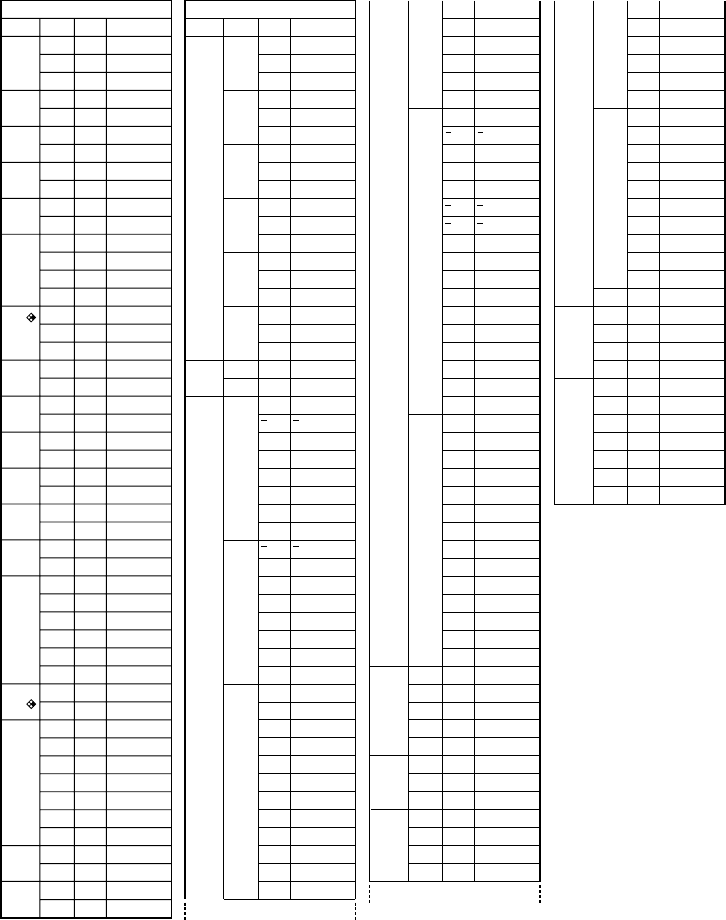
Level 1
ANGL
COOR
GRID
AXES
LABL
DISP
P/L
DRAW
DERV
BACK
FUNC
SIML
S-WIN
LIST
LOCS
T-VAR
Σ DSP
RESID
Level 2
Deg
Rad
Gra
On
Off
On
Off
On
Off
On
Off
Fix
Sci
Norm
Eng
Blue
Orng
Grn
Con
Plot
On
Off
None
Pict
On
Off
On
Off
Auto
Man
File1
File2
File3
File4
File5
File6
On
Off
Rang
LIST
On
Off
None
List
Level 3
List1
List2
List3
List4
List5
List6
Command
Deg
Rad
Gra
CoordOn
CoordOff
GridOn
GridOff
AxesOn
AxesOff
LabelOn
LabelOff
Fix_
Sci_
Norm
Eng
P/L-Blue
P/L-Orange
P/L-Green
G-Connect
G-Plot
DerivOn
DerivOff
BG-None
BG-Pict_
FuncOn
FuncOff
SimulOn
SimulOff
S-WindAuto
S-WindMan
File1
File2
File3
File4
File5
File6
LocusOn
LocusOff
VarRange
VarList1
VarList2
VarList3
VarList4
VarList5
VarList6
Σ dispOn
Σ dispOff
Resid-None
Resid-List_
[SETUP] key
Level 1
V-WIN
FACT
STAT
GRPH
DYNA
TABL
RECR
EQUA
TVM
Level 2
X
Y
T,
R-X
R-Y
R-T,
Xfct
Yfct
X
Y
GRPH
PTS
TEST
RESLT
Y
r
Xt
Yt
X
Strt
End
Pitch
Strt
End
Pitch
Reslt
FORM
RANG
Reslt
S-Rlt
S-Cof
P-Rlt
P-Cof
n
I%
PV
PMT
FV
P/Y
C/Y
Level 3
min
max
scal
min
max
scal
min
max
ptch
min
max
scal
min
max
scal
min
max
ptch
n
x
Σx
Σx2
xσn
xσn-1
minX
maxX
y
Σy
Σy2
Σxy
yσn
yσn-1
minY
maxY
a
b
c
d
e
r
Q1
Med
Q3
Mod
Strt
Pitch
x1
y1
x2
y2
x3
y3
n
x
xσn-1
n1
n2
x1
x2
x1σ
x2σ
xpσ
F
Fdf
SS
MS
Edf
SSe
MSe
p
z
t
Chi
F
Left
Right
ˆp
ˆp1
ˆp2
df
s
r
r2
an
an+1
an+2
bn
bn+1
bn+2
Strt
End
a0
a1
a2
b0
b1
b2
anSt
bnSt
Command
Xmin
Xmax
Xscl
Ymin
Ymax
Yscl
T
min
T
max
T
ptch
RightXmin
RightXmax
RightXscl
RightYmin
RightYmax
RightYscl
RightT
min
RightT max
RightT ptch
Xfct
Yfct
n
x
Σx
Σx2
xσn
xσn-1
minX
maxX
y
Σy
Σy2
Σxy
yσn
yσn-1
minY
maxY
a
b
c
d
e
r
Q1
Med
Q3
Mod
H_Start
H_pitch
x1
y1
x2
y2
x3
y3
n
x
xσn-1
n1
n2
x1
x2
x1σn-1
x2σn-1
xpσn-1
F
Fdf
SS
MS
Edf
SSe
MSe
p
z
t
χ2
F
Left
Right
ˆp
ˆp1
ˆp2
df
s
r
r2
Y
r
Xt
Yt
X
D_Start
D_End
D_pitch
F_Start
F_End
F_pitch
F_Result
an
an+1
an+2
bn
bn+1
bn+2
R_Start
R_End
a0
a1
a2
b0
b1
b2
anStart
bnStart
R_Result
Sim_Result
Sim_Coef
Ply_Result
Ply_Coef
n
I%
PV
PMT
FV
P/Y
C/Y
[VARS] key
θθ
θ
θ
θθ
θ
θ
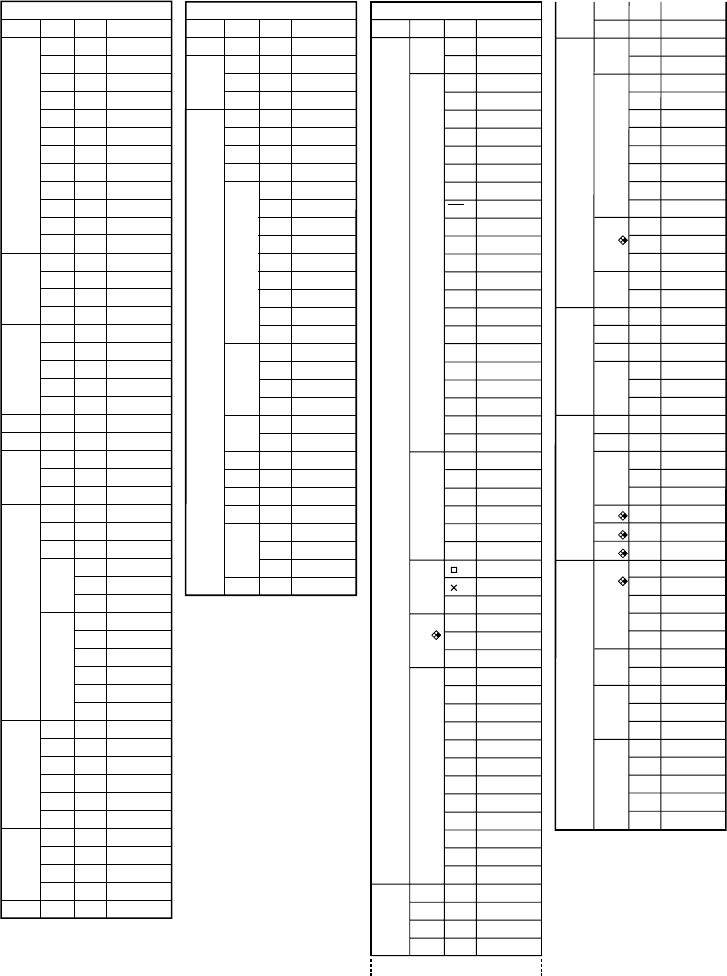
Program Mode Command List
454
Level 1
COM
CTL
JUMP
?
^
CLR
DISP
REL
I/O
:
Level 2
If
Then
Else
I-End
For
To
Step
Next
Whle
WEnd
Do
Lp-W
Prog
Rtrn
Brk
Stop
Lbl
Goto
⇒
Isz
Dsz
Text
Grph
List
Stat
Grph
Dyna
F-Tbl
R-Tbl
=
G
>
<
≥
≤
Lcte
Gtky
Send
Recv
Level 3
Tabl
G-Con
G-Plt
Tabl
Web
an-Cn
Σa-Cn
an-Pl
Σa-Pl
Command
If_
Then_
Else_
IfEnd
For_
_To_
_Step_
Next
While_
WhileEnd
Do
LpWhile_
Prog_
Return
Break
Stop
Lbl_
Goto_
⇒
Isz_
Dsz_
?
^
ClrText
ClrGraph
ClrList
DrawStat
DrawGraph
DrawDyna
DispF-Tbl
DrawFTG-Con
DrawFTG-Plt
DispR-Tbl
DrawWeb_
DrawR-Con
DrawR Σ-Con
DrawR-Plt
DrawR Σ -Plt
=
G
>
<
≥
≤
Locate_
Getkey
Send(
Receive(
:
[PRGM] key
Level 1
ZOOM
V-WIN
SKTCH
Level 2
Fact
V-Win
Sto
Rcl
Cls
Tang
Norm
Inv
GRPH
PLOT
LINE
Crcl
Vert
Hztl
Text
PIXL
Test
Level 3
Y=
r=
Parm
X=c
G- dx
Y>
Y<
Y≥
Y≤
Plot
Pl-On
Pl-Off
Pl-Chg
Line
F-Line
On
Off
Chg
Command
Factor_
ViewWindow_
StoV-Win_
RclV-Win_
Cls
Tangent_
Normal_
Inverse_
Graph_Y=
Graph_r=
Graph(X,Y)=(
Graph_X=
Graph_
Graph_Y>
Graph_Y<
Graph_Y≥
Graph_Y≤
Plot_
PlotOn_
PlotOff_
PlotChg_
Line
F-Line_
Circle_
Vertical_
Horizontal_
Text_
PxlOn_
PxlOff_
PxlChg_
PxlTest_
[SHIFT] key
∫∫
Level 1
STAT
MAT
LIST
GRPH
DYNA
TABL
RECR
Level 2
DRAW
GRPH
LIST
MARK
COLR
CALC
Swap
×Rw
×Rw+
Rw+
Srt-A
Srt-D
SEL
TYPE
COLR
GMEM
On
Off
Var
TYPE
On
Off
TYPE
Blue
Orng
Grn
SEL+C
SEL
TYPE
n.an..
Level 3
On
Off
GPH1
GPH2
GPH3
Scat
xy
Hist
Box
Box
N-Dis
Brkn
X
Med
X^2
X^3
X^4
Log
Exp
Pwr
Sin
NPP
Lgst
List1
List2
List3
List4
List5
List6
•
Blue
Orng
Grn
1VAR
2VAR
X
Med
X^2
X^3
X^4
Log
Exp
Pwr
Sin
Lgst
On
Off
Y=
r=
Parm
X=c
Y>
Y<
Y≥
Y≤
Blue
Orng
Grn
Sto
Rcl
Y=
r=
Parm
Y=
r=
Parm
On
Off
Blue
Orng
Grn
On
Off
an
an+1
an+2
n
an
an+1
bn
bn+1
Command
DrawOn
DrawOff
S-Gph1_
S-Gph2_
S-Gph3_
Scatter
xyLine
Hist
MedBox
MeanBox
N-Dist
Broken
Linear
Med-Med
Quad
Cubic
Quart
Log
Exp
Power
Sinusoidal
NPPlot
Logistic
List1
List2
List3
List4
List5
List6
Square
Cross
Dot
Blue_
Orange_
Green_
1-Variable_
2-Variable_
LinearReg_
Med-MedLine_
QuadReg_
CubicReg_
QuartReg_
LogReg_
ExpReg_
PowerReg_
SinReg_
LogisticReg_
Swap_
*Row_
*Row+_
Row+_
SortA(
SortD(
G_SelOn_
G_SelOff_
Y=Type
r=Type
ParamType
X=cType
Y>Type
Y<Type
Y≥Type
Y≤Type
BlueG_
OrangeG_
GreenG_
StoGMEM_
RclGMEM_
D_SelOn_
D_SelOff_
D_Var_
Y=Type
r=Type
ParamType
T_SelOn_
T_SelOff_
Y=Type
r=Type
ParamType
BlueG_
OrangeG_
GreenG_
R_SelOn_
R_SelOff_
BlueG_
OrangeG_
GreenG_
R_SelOn_
R_SelOff_
anType
an+1Type
an+2Type
n
an
an+1
bn
bn+1
[F4](MENU) key
(fx-9750G
PLUS)
455
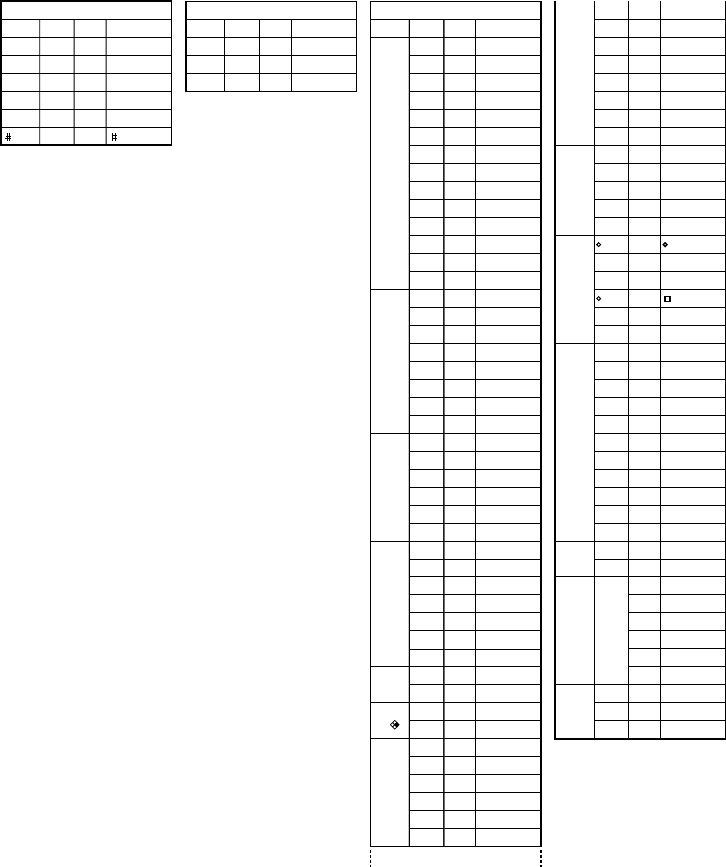
[OPTN] key
Level 1
LIST
MAT
CPLX
CALC
STAT
COLR
HYP
PROB
NUM
ANGL
ESYM
PICT
FMEM
LOGIC
Level 2
List
L→M
Dim
Fill
Seq
Min
Max
Mean
Med
Sum
Prod
Cuml
%
A
Mat
M→L
Det
Trn
Aug
Iden
Dim
Fill
i
Abs
Arg
Conj
ReP
ImP
Solve
d/dx
d
2
/dx
2
dx
FMin
FMax
Σ(
ˆ x
ˆy
Orng
Grn
sinh
cosh
tanh
sinh
-1
cosh
-1
tanh
-1
X!
nPr
nCr
Ran#
P(
Q(
R(
t(
Abs
Int
Frac
Rnd
Intg
r
g
' "
Pol(
Rec(
m
n
p
f
k
M
G
T
P
E
Sto
Rcl
fn
And
Or
Not
Level 3
f1
f2
f3
f4
f5
f6
Command
List_
List→Mat(
Dim_
Fill(
Seq(
Min(
Max(
Mean(
Median(
Sum_
Prod_
Cuml_
Percent_
AList_
Mat_
Mat→List(
Det_
Trn_
Augment(
Identity_
Dim_
Fill(
i
Abs_
Arg_
Conjg_
ReP_
ImP_
Solve(
d/dx(
d
2
/dx
2
(
(
FMin(
FMax(
Σ(
ˆx
ˆy
Orange_
Green_
sinh_
cosh_
tanh_
sinh
-1
_
cosh
-1
_
tanh
-1
_
!
P
C
Ran#
P(
Q(
R(
t(
Abs_
Int_
Frac_
Rnd
Intg_
r
g
Pol(
Rec(
m
n
p
f
k
M
G
T
P
E
StoPict_
RclPict_
f1
f2
f3
f4
f5
f6
_And_
_Or_
Not_
∫∫
µµ
Level 1
'
"
~
*
/
Level 2 Level 3 Command
'
"
~
*
/
[F6](SYBL) key
Level 1
'
"
~
Level 2
Level 3
Command
'
"
~
[ALPHA] key

456

GUIDELINES LAID DOWN BY FCC RULES FOR USE OF THE UNIT IN THE U.S.A. (not appli-
cable to other areas).
NOTICE
This equipment has been tested and found to comply with the limits for a Class B digital device,
pursuant to Part 15 of the FCC Rules. These limits are designed to provide reasonable protec-
tion against harmful interference in a residential installation. This equipment generates, uses
and can radiate radio frequency energy and, if not installed and used in accordance with the
instructions, may cause harmful interference to radio communications. However, there is no
guarantee that interference will not occur in a particular installation. If this equipment does
cause harmful interference to radio or television reception, which can be determined by turning
the equipment off and on, the user is encouraged to try to correct the interference by one or more
of the following measures:
•Reorient or relocate the receiving antenna.
•Increase the separation between the equipment and receiver.
•Connect the equipment into an outlet on a circuit different from that to which the receiver is
connected.
•Consult the dealer or an experienced radio/TV technician for help.
FCC WARNING
Changes or modifications not expressly approved by the party responsible for compliance could
void the user’s authority to operate the equipment.
Proper connectors must be used for connection to host computer and/or peripherals in order to
meet FCC emission limits.
Connector SB-62 Power Graphic Unit to Power Graphic Unit
Connector FA-123 Power Graphic Unit to PC for IBM/Macintosh Machine
IBM is a registered trademark of International Business Machines Corporation.
Macintosh is a registered trademark of Apple Computer, Inc.
Declaration of Conformity
Model Number: fx-9750G PLUS/CFX-9850G PLUS/CFX-9850GB PLUS/CFX-9950GB PLUS
Trade Name: CASIO COMPUTER CO., LTD.
Responsible party: CASIO, INC.
Address: 570 MT. PLEASANT AVENUE, DOVER, NEW JERSEY 07801
Telephone number: 973-361-5400
This device complies with Part 15 of the FCC Rules. Operation is subject to the following two
conditions: (1) This device may not cause harmful interference, and (2) this device must accept any
interference received, including interference that may cause undesired operation.

CASIO COMPUTER CO., LTD.
6-2, Hon-machi 1-chome
Shibuya-ku, Tokyo 151-8543, Japan
G355-21, G356-21, G357-21, G359-21
