Cassia Networks S1000 Cassia Bluetooth Router User Manual S1000 User Guide 03202017 draft

Cassia Networks Inc. Cassia Bluetooth Router S1000 User Guide 03202017 draft

User Guide

CASSIA S1000 / S1100 Bluetooth Router  QUICK START GUIDE© Cassia Networks, Inc. Cassia Networks and the Cassia Networks logo are trademarks of Cassia Networks, Inc.
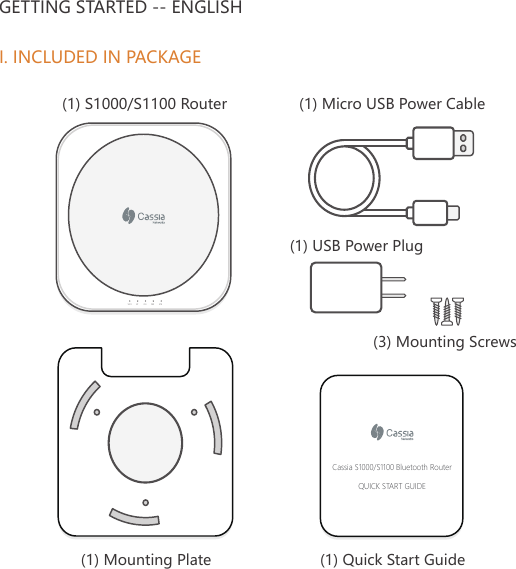
GETTING STARTED -- ENGLISHI. INCLUDED IN PACKAGE(1) Quick Start Guide(1) Mounting PlateWIFI BT SYS PRW ETHCassia S1000/S1100 Bluetooth RouterQUICK START GUIDE(1) Micro USB Power Cable(1) S1000/S1100 Router(1) USB Power Plug(3) Mounting Screws
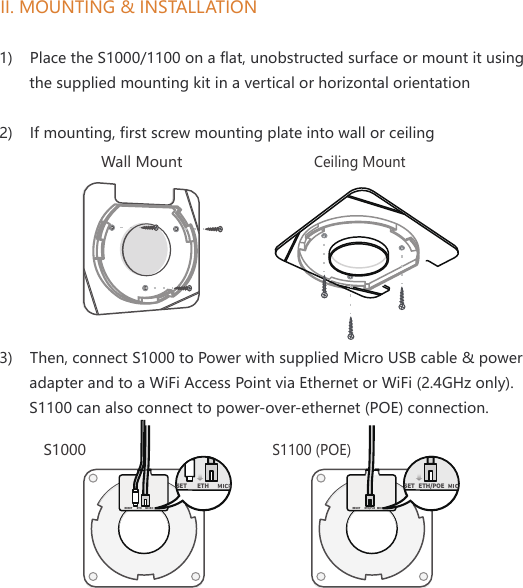
II. MOUNTING & INSTALLATIONWall MountCeiling Mount1)    Place the S1000/1100 on a flat, unobstructed surface or mount it using        the supplied mounting kit in a vertical or horizontal orientation2)    If mounting, first screw mounting plate into wall or ceiling3)    Then, connect S1000 to Power with supplied Micro USB cable & power        adapter and to a WiFi Access Point via Ethernet or WiFi (2.4GHz only).       S1100 can also connect to power-over-ethernet (POE) connection. RESET ETH  MICRO USBSET ETH RESET MICRO USBSETETH/PoE ETH/POE S1000S1100 (POE)
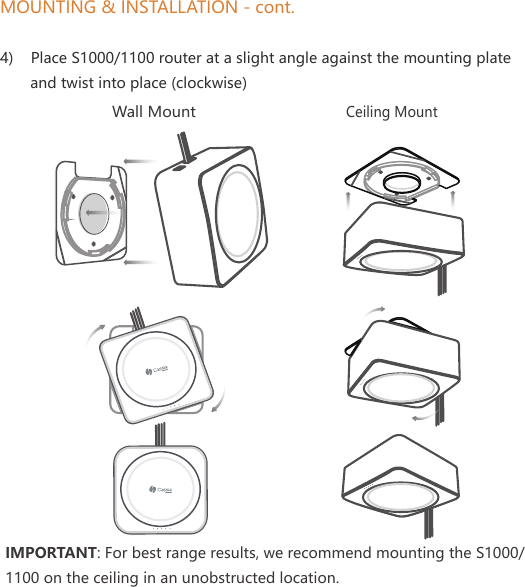
MOUNTING & INSTALLATION - cont.4)    Place S1000/1100 router at a slight angle against the mounting plate        and twist into place (clockwise)WIFI BT SYS PRW ETHWIFI BT SYS PRW ETHWall MountCeiling MountIMPORTANT: For best range results, we recommend mounting the S1000/1100 on the ceiling in an unobstructed location.
III. SETUP S1000/1100 BLUETOOTH ROUTER1)    The Cassia IoT Access Controller (AC) is the software used to easily        setup and manage both your S1000/1100 and your Bluetooth low       energy end devices2)    For instructions on accessing and using the AC, please go to the Cassia       Networks website for the latest information:       http://www.cassianetworks.com/enterprise/s1000-startIV. PRODUCT INTERFACE       Bluetooth (4.0, 4.1)       WiFi (802.11b/g/n, 2.4GHz only)       Ethernet (10/100 Base-T); PoE 48V power (802.3af/at for S1100 only)       Micro USB (2.0; DC 5V, 2.1A power)       USB (2.0; supports 3G/4G dongle)       LEDs (activity indicator) & Reset ButtonV. ENVIRONMENTAL       Operating temperature: 0°C to 50°C (32°F to 122°F)       Humidity: 5% to 90% non-condensing  For additional assistance, please email: support@cassianetworks.com
Federal Communications Commission (FCC) Interference StatementThis equipment has been tested and found to comply with the limits for a Class B digital device, pursuant to part 15 of the FCC Rules. These limits are designed to provide reasonable protection against harmful interference in a residential installation. This equipment generates, uses and can radiate radio frequency energy and, if not installed and used in accordance with the instructions, may cause harmful interference to radio communications. However, there is no guarantee that interference will not occur in a particular installation. If this equipment does cause harmful interference to radio or television reception, which can be determined by turning the equipment off and on, the user is encouraged to try to correct the interference by one or more of the following measures:— Reorient or relocate the receiving antenna.— Increase the separation between the equipment and receiver.— Connect the equipment into an outlet on a circuit different from that to     which the receiver is connected.— Consult the dealer or an experienced radio/TV technician for help.Note: Any changes or modifications not expressly approved by the party responsible for compliance could void the user's authority to operate the equipment.For additional information, please go to: http://www.cassianetworks.com
Routeur Bluetooth CASSIA S1000 / S1100  GUIDE DE DÉMARRAGE RAPIDE© Cassia Networks, Inc. Cassia Networks et le logo Cassia Networks sont des marques déposées de Cassia Networks, Inc.
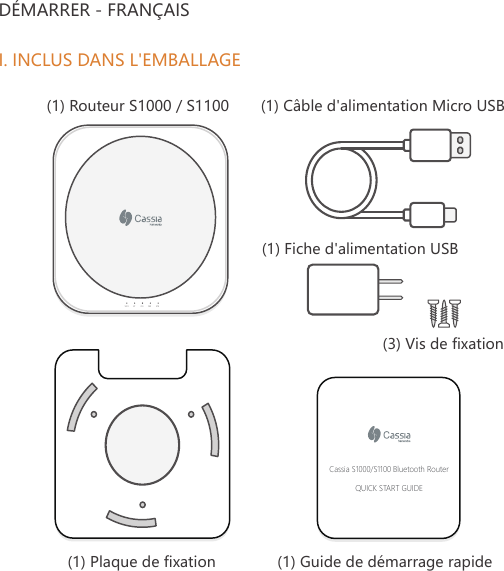
DÉMARRER - FRANÇAISI. INCLUS DANS L'EMBALLAGE(1) Guide de démarrage rapide(1) Plaque de fixationWIFI BT SYS PRW ETHCassia S1000/S1100 Bluetooth RouterQUICK START GUIDE(1) Câble d'alimentation Micro USB(1) Routeur S1000 / S1100(1) Fiche d'alimentation USB(3) Vis de fixation
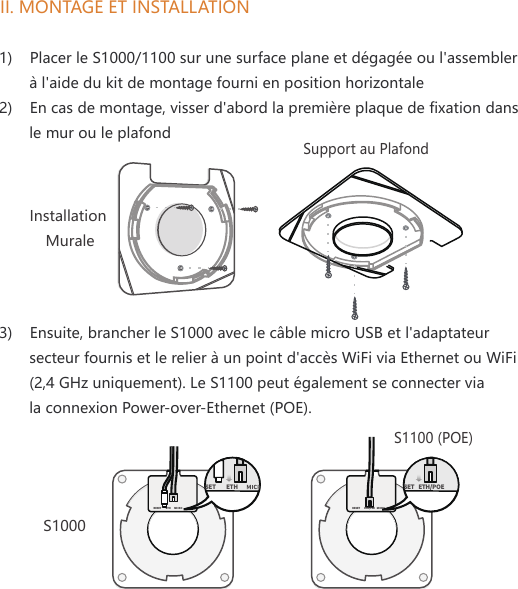
II. MONTAGE ET INSTALLATIONInstallation MuraleSupport au Plafond1)    Placer le S1000/1100 sur une surface plane et dégagée ou l'assembler        à l'aide du kit de montage fourni en position horizontale2)    En cas de montage, visser d'abord la première plaque de fixation dans        le mur ou le plafond3)    Ensuite, brancher le S1000 avec le câble micro USB et l'adaptateur        secteur fournis et le relier à un point d'accès WiFi via Ethernet ou WiFi        (2,4 GHz uniquement). Le S1100 peut également se connecter via        la connexion Power-over-Ethernet (POE).RESET ETH  MICRO USBSET ETH RESET MICRO USBSETETH/PoE ETH/POE S1000S1100 (POE)
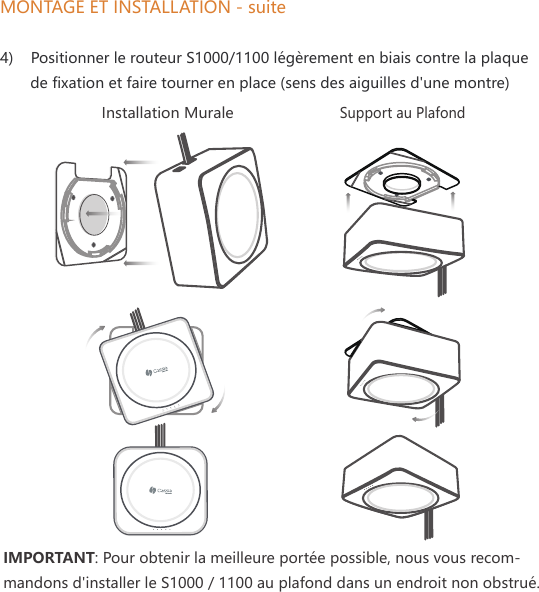
MONTAGE ET INSTALLATION - suite4)    Positionner le routeur S1000/1100 légèrement en biais contre la plaque        de fixation et faire tourner en place (sens des aiguilles d'une montre)WIFI BT SYS PRW ETHInstallation MuraleSupport au PlafondIMPORTANT: Pour obtenir la meilleure portée possible, nous vous recom-mandons d'installer le S1000 / 1100 au plafond dans un endroit non obstrué.
III. CONFIGURATION DU ROUTEUR BLUETOOTH X1000 1)    Le loT Access Controller (AC) de Cassia est le logiciel utilisé pour        configurer et gérer facilement vos appareils terminaux à faible énergie        S1000 / 1100 et Bluetooth 2)    Pour savoir comment obtenir et utiliser le logiciel AC, veuillez consulter        le site Web de Cassia Networks pour obtenir les dernières informations:       http://www.cassianetworks.com/enterprise/s1000-startIV. INTERFACE PRODUIT       Bluetooth (4.0, 4.1)       WiFi (802.11b/g/n, 2.4GHz uniquement)       Ethernet (10/100 Base-T; PoE 48V - 802.3af/at pour S1100 seulement)       Micro USB (2,0; DC 5V, 2.1A puissance)       USB (2.0; Prend en charge 3G / 4G dongle)       LEDs (indicateur d'activité) & Bouton de RéinitializationV. ENVIRONNEMENT       Température de fonctionnement: 0°C à 50°C (32°F à 122°F)       Humidité: 5% à 90% sans condensation  Pour obtenir de l'aide supplémentaire, envoyez un courriel à  support@cassianetworks.com
IC Radiation Exposure Statement for CanadaThis device complies with Industry Canada licence-exempt RSS standard(s). Operation is subject to the following two conditions: (1) this device may not cause interference, and (2) this device must accept any interference, including interference that may cause undesired operation of the device.Le présent appareil est conforme aux CNR d'Industrie Canada applicables aux appareils radio exempts de licence. L'exploitation est autorisée aux deux conditions suivantes : (1) l'appareil ne doit pas produire de brouillage, et (2)l'utilisateur de l'appareil doit accepter tout brouillage radioélectrique subi, même si le brouillage est susceptible d'en compromettre le fonctionnement.Pour obtenir de l'aide supplémentaire, rendez-vous sur: http://www.cassianetworks.comBeijing Cassia Networks Technology Co., Ltd.
RF exposure warningThis equipment must be installed and operated in accordance with provided instructions and the antenna(s) used for this transmitter must be installed to provide a separation distance of at least 20 cm from all persons and must not be co-located or operating in conjunction with any other antenna or transmitter. End-users and installers must be provided with antenna installation instructions and transmitter operating conditions for satisfying RF exposure compliance.EU Regulatory ConformanceCassia Networks Inc., hereby declares that Cassia S1000/S1100 Series Bluetooth Router are in compliance with directives listed below:     EMC Directive 2014       Low Voltage Directive 2014       R&TTE Directive 1999       REACH Regulation (EC) No.: 1907/2006       RoHS Directive 2011       WEEE Directive 2012A Declaration of Conformity for these directives is available for viewing at http://www.cassianetworks.com.Beijing Cassia Networks Technology Co., Ltd.

Navigation menu