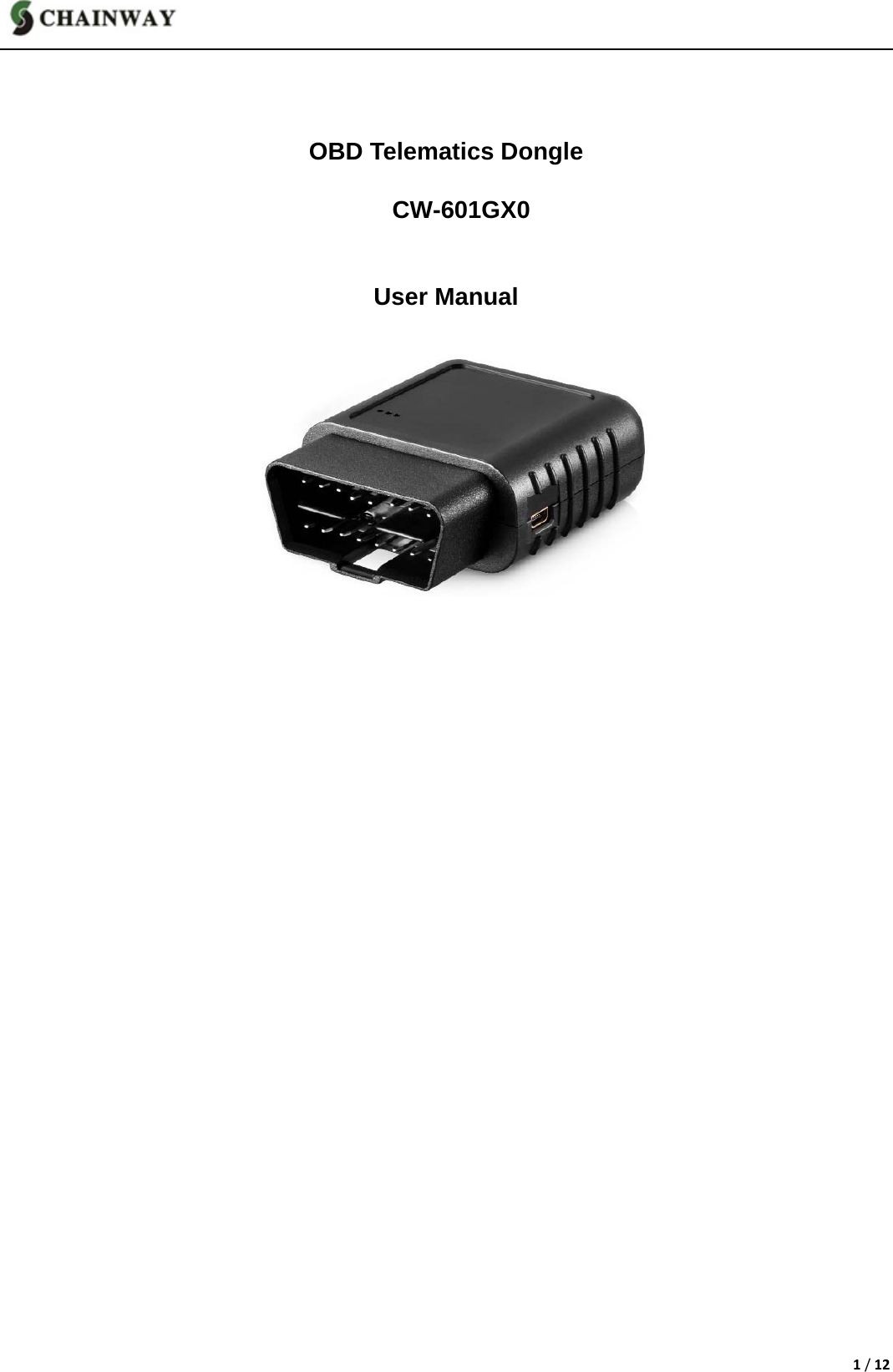
Chainway ITS CW-601G OBD Telematics Dongle User Manual CW 601G V1 3

Shenzhen Chainway ITS Co., Ltd. OBD Telematics Dongle CW 601G V1 3

User Manual

1/12   OBD Telematics Dongle    CW-601GX0   User Manual
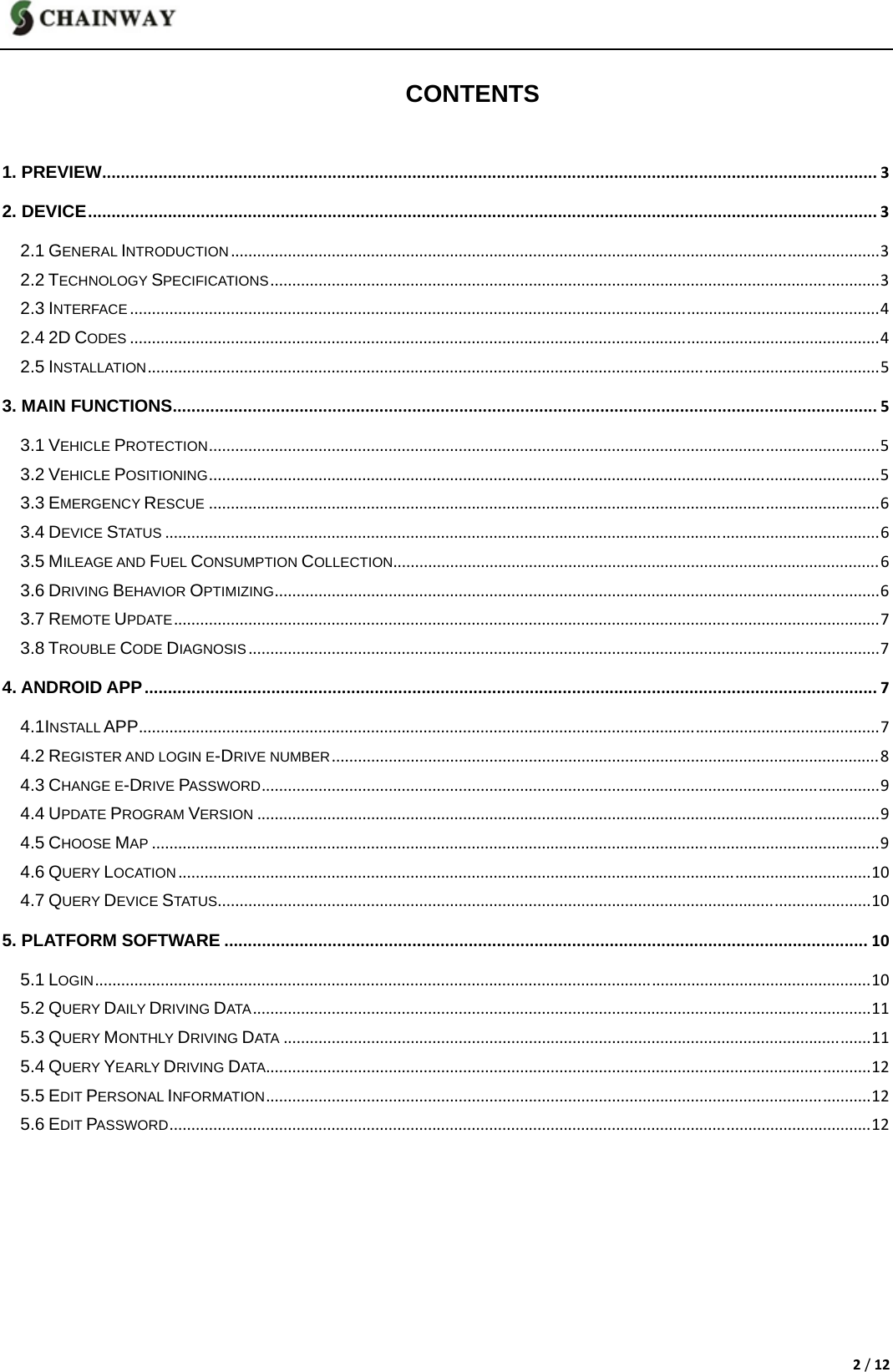
2/12 CONTENTS 1. PREVIEW.....................................................................................................................................................................32. DEVICE........................................................................................................................................................................32.1 GENERAL INTRODUCTION....................................................................................................................................................32.2 TECHNOLOGY SPECIFICATIONS...........................................................................................................................................32.3 INTERFACE...........................................................................................................................................................................42.4 2D CODES...........................................................................................................................................................................42.5 INSTALLATION.......................................................................................................................................................................53. MAIN FUNCTIONS......................................................................................................................................................53.1 VEHICLE PROTECTION.........................................................................................................................................................53.2 VEHICLE POSITIONING.........................................................................................................................................................53.3 EMERGENCY RESCUE.........................................................................................................................................................63.4 DEVICE STATUS...................................................................................................................................................................63.5 MILEAGE AND FUEL CONSUMPTION COLLECTION...............................................................................................................63.6 DRIVING BEHAVIOR OPTIMIZING..........................................................................................................................................63.7 REMOTE UPDATE.................................................................................................................................................................73.8 TROUBLE CODE DIAGNOSIS................................................................................................................................................74. ANDROID APP............................................................................................................................................................74.1INSTALL APP.........................................................................................................................................................................74.2 REGISTER AND LOGIN E-DRIVE NUMBER.............................................................................................................................84.3 CHANGE E-DRIVE PASSWORD.............................................................................................................................................94.4 UPDATE PROGRAM VERSION..............................................................................................................................................94.5 CHOOSE MAP......................................................................................................................................................................94.6 QUERY LOCATION..............................................................................................................................................................104.7 QUERY DEVICE STATUS.....................................................................................................................................................105. PLATFORM SOFTWARE.........................................................................................................................................105.1 LOGIN.................................................................................................................................................................................105.2 QUERY DAILY DRIVING DATA.............................................................................................................................................115.3 QUERY MONTHLY DRIVING DATA......................................................................................................................................115.4 QUERY YEARLY DRIVING DATA..........................................................................................................................................125.5 EDIT PERSONAL INFORMATION..........................................................................................................................................125.6 EDIT PASSWORD................................................................................................................................................................12
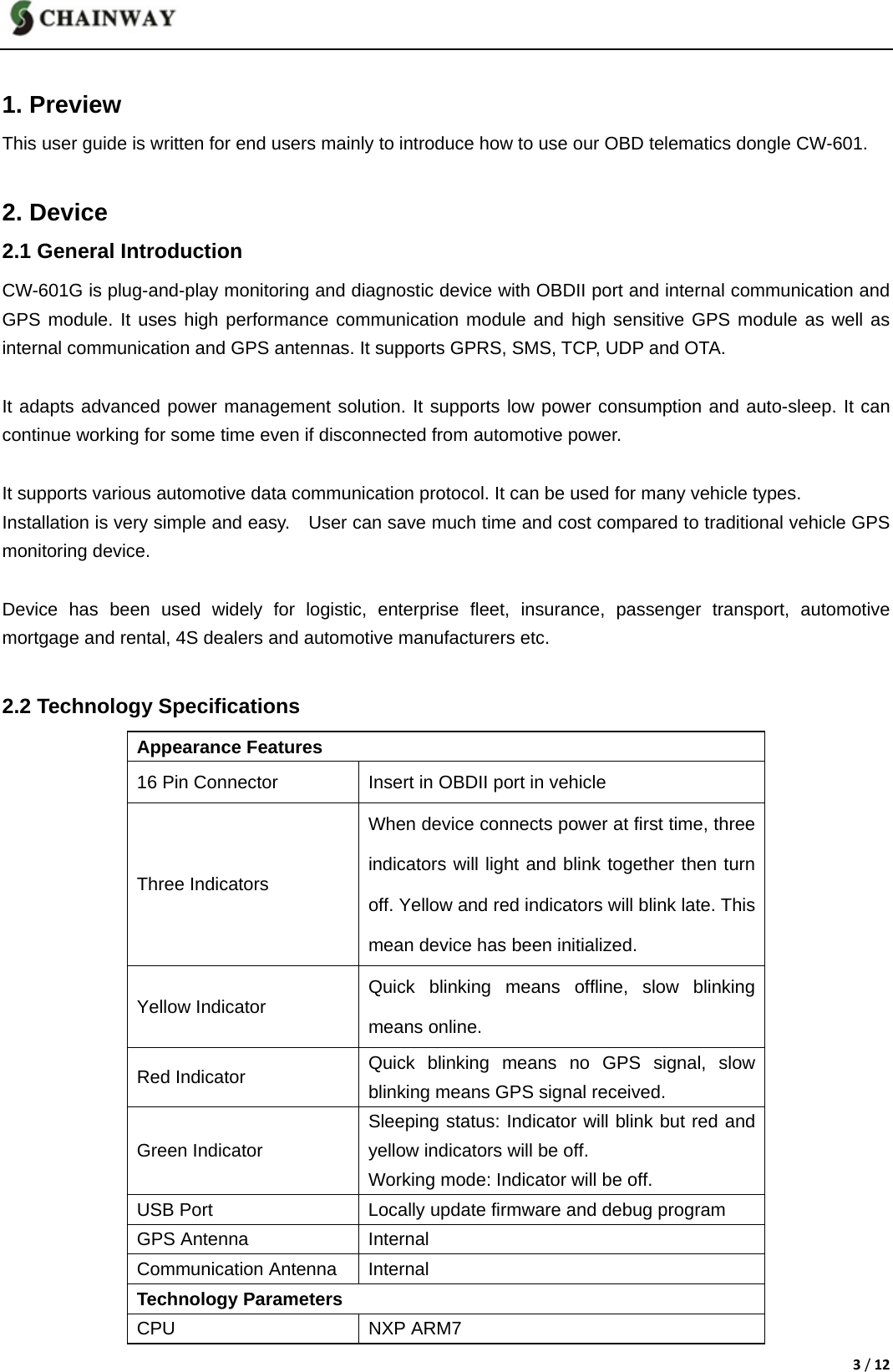
3/12 1. Preview This user guide is written for end users mainly to introduce how to use our OBD telematics dongle CW-601.  2. Device 2.1 General Introduction CW-601G is plug-and-play monitoring and diagnostic device with OBDII port and internal communication and GPS module. It uses high performance communication module and high sensitive GPS module as well as internal communication and GPS antennas. It supports GPRS, SMS, TCP, UDP and OTA.  It adapts advanced power management solution. It supports low power consumption and auto-sleep. It can continue working for some time even if disconnected from automotive power.  It supports various automotive data communication protocol. It can be used for many vehicle types. Installation is very simple and easy.    User can save much time and cost compared to traditional vehicle GPS monitoring device.  Device has been used widely for logistic, enterprise fleet, insurance, passenger transport, automotive mortgage and rental, 4S dealers and automotive manufacturers etc.  2.2 Technology Specifications Appearance Features 16 Pin Connector  Insert in OBDII port in vehicle Three Indicators When device connects power at first time, three indicators will light and blink together then turn off. Yellow and red indicators will blink late. This mean device has been initialized. Yellow Indicator  Quick blinking means offline, slow blinking means online. Red Indicator  Quick blinking means no GPS signal, slow blinking means GPS signal received. Green Indicator Sleeping status: Indicator will blink but red and yellow indicators will be off.   Working mode: Indicator will be off.   USB Port  Locally update firmware and debug program GPS Antenna  Internal Communication Antenna  Internal Technology Parameters CPU NXP ARM7
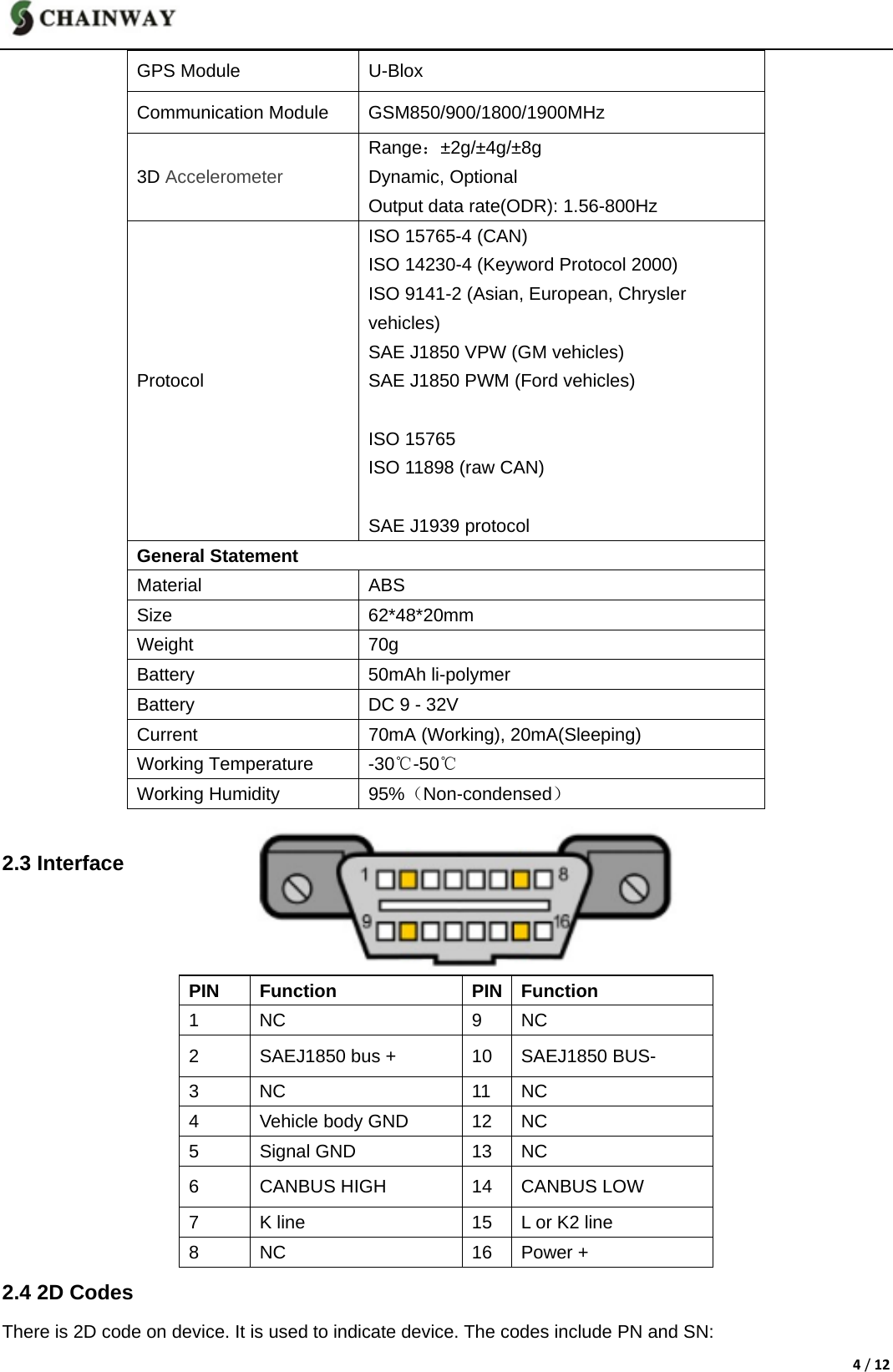
4/12GPS Module  U-Blox Communication Module  GSM850/900/1800/1900MHz 3D Accelerometer  Range:±2g/±4g/±8g Dynamic, Optional Output data rate(ODR): 1.56-800Hz Protocol ISO 15765-4 (CAN) ISO 14230-4 (Keyword Protocol 2000) ISO 9141-2 (Asian, European, Chrysler   vehicles) SAE J1850 VPW (GM vehicles) SAE J1850 PWM (Ford vehicles)  ISO 15765 ISO 11898 (raw CAN)  SAE J1939 protocol General Statement Material ABS Size 62*48*20mm Weight 70g Battery 50mAh li-polymer Battery  DC 9 - 32V Current  70mA (Working), 20mA(Sleeping) Working Temperature  -30℃-75℃ Working Humidity  95%(Non-condensed)  2.3 Interface    PIN Function PIN Function 1 NC  9 NC 2  SAEJ1850 bus +  10  SAEJ1850 BUS- 3 NC  11 NC 4  Vehicle body GND  12  NC 5 Signal GND  13 NC 6  CANBUS HIGH  14  CANBUS LOW 7  K line  15  L or K2 line 8 NC  16 Power + 2.4 2D Codes There is 2D code on device. It is used to indicate device. The codes include PN and SN: -50
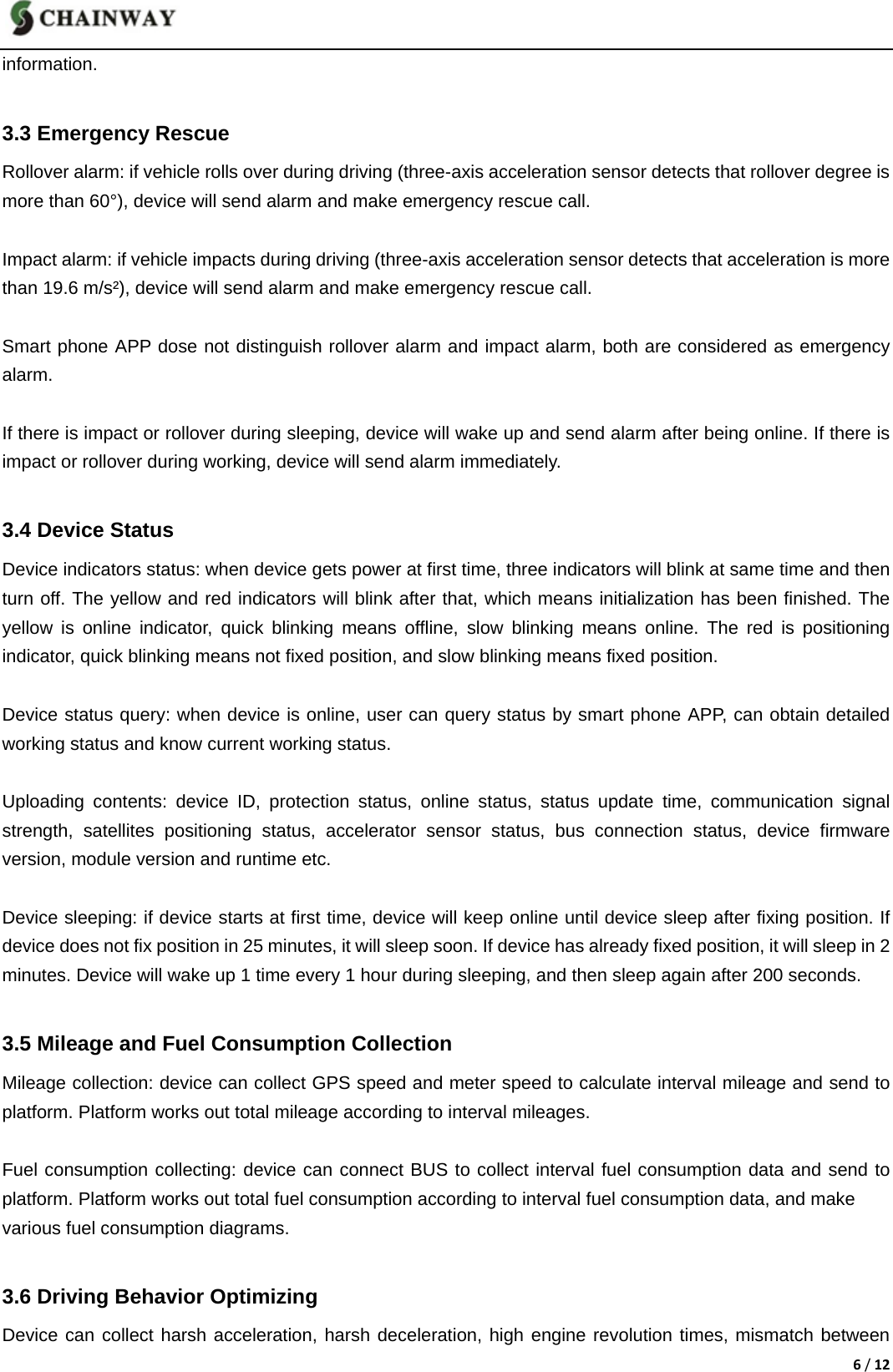
5/12PN:Product number, 15 digits, the only identification for device SN:Serial number, 20 digits, also the only one        2.5 Installation It is very easy to install device. User only need insert device in OBDII port in vehicle. Different vehicle maybe have different OBDII position. User can query device status after finishing installation.  3. Main Functions 3.1 Vehicle Protection Vibration alarm: set protection status on smart phone APP. If device has inspected that vehicle is vibrating under sleeping status, device will wake up automatically and send alarm after being online.  Starting alarm: set protection status on smart phone APP. If device has inspected that engine is turned on under sleeping status, device will wake up automatically and send alarm after being online. Special situation: there will be illegally starting alarm if engine is turned on before the first-time online that device goes online before installation or wakes up regularly.      Special situation: device will issue illegal starting alarm if the vehicle is ignited before online at first time or timing wake-up. This is starting alarm under special situation. APP will tell there is illegal starting alarm.  Moving alarm: set protection status on smart phone APP. If device has inspected vehicle is moving under sleeping status, device will wake up automatically and send alarm after being online.  Power disconnection alarm: device will send power disconnection alarm message to the server. The alarm message will be shown on platform software.  3.2 Vehicle Positioning When speed is more than 8km/h and turn is more than 50°, device will send position information including   positioning time, GPS speed, meter speed, direction, altitude, position and ignition status information in order to improve driving trace accuracy.  When there is harsh acceleration, harsh deceleration, harsh turn, protection alarm and emergency alarm, device will send position information including positioning time, GPS speed, meter speed, direction and altitude etc.  Users can query driving trace on platform or smart phone APP calculated according to the above position
6/12information.    3.3 Emergency Rescue Rollover alarm: if vehicle rolls over during driving (three-axis acceleration sensor detects that rollover degree is   more than 60°), device will send alarm and make emergency rescue call.  Impact alarm: if vehicle impacts during driving (three-axis acceleration sensor detects that acceleration is more than 19.6 m/s²), device will send alarm and make emergency rescue call.    Smart phone APP dose not distinguish rollover alarm and impact alarm, both are considered as emergency alarm.   If there is impact or rollover during sleeping, device will wake up and send alarm after being online. If there is impact or rollover during working, device will send alarm immediately.  3.4 Device Status Device indicators status: when device gets power at first time, three indicators will blink at same time and then turn off. The yellow and red indicators will blink after that, which means initialization has been finished. The yellow is online indicator, quick blinking means offline, slow blinking means online. The red is positioning indicator, quick blinking means not fixed position, and slow blinking means fixed position.  Device status query: when device is online, user can query status by smart phone APP, can obtain detailed working status and know current working status.  Uploading contents: device ID, protection status, online status, status update time, communication signal strength, satellites positioning status, accelerator sensor status, bus connection status, device firmware version, module version and runtime etc.    Device sleeping: if device starts at first time, device will keep online until device sleep after fixing position. If device does not fix position in 25 minutes, it will sleep soon. If device has already fixed position, it will sleep in 2 minutes. Device will wake up 1 time every 1 hour during sleeping, and then sleep again after 200 seconds.  3.5 Mileage and Fuel Consumption Collection Mileage collection: device can collect GPS speed and meter speed to calculate interval mileage and send to platform. Platform works out total mileage according to interval mileages.  Fuel consumption collecting: device can connect BUS to collect interval fuel consumption data and send to platform. Platform works out total fuel consumption according to interval fuel consumption data, and make   various fuel consumption diagrams.  3.6 Driving Behavior Optimizing Device can collect harsh acceleration, harsh deceleration, high engine revolution times, mismatch between
7/12speed and revolution, over speed times and idle times etc and send to platform for calculation and statistics. Smart phone APP grades driving behavior according to platform data.  Over speed: if driving speed is over than preset speed and last preset time, it will be considered as over speed. Harsh acceleration: when acceleration in 2 seconds is more than preset acceleration, it will be considered as harsh acceleration.  Harsh deceleration: if deceleration in 2 seconds is more than preset deceleration, it will be considered as   harsh deceleration.  Harsh turn: if turn in 5 seconds is more than 50° and driving speed is more than 3.5 km/h, it will be considered as harsh turn.  High revolution: if revolution is more than preset revolution, it will be considered as high revolution.  Speed not matches revolution: device obtains vehicle speed and engine revolution, and then check whether the matching relation between the revolution and the speed has obeyed the preset matching relations.  Idle times: if vehicle keeps static status or speed is always less than preset value, it will be considered as idle status. The idle times will add one more every 10 minutes if vehicle is in idle status. Idle times are judged by ignition and speed.  3.7 Remote Update Device supports automatically update and manual update.    Automatically update: platform configure update files. Platform sends synchronization parameters when device is online. If it is different version, device will start to update automatically.    Manual update: platform sends update command when device is online. If it is different version, device will start to update. Device will restart and run new program after finishing update.  Device can keep waking up during update until finishing update.  3.8 Trouble Code Diagnosis Device supports various protocols. It can read vehicle fault information and send to server. User can check detailed fault information on smart phone APP.  4. Android APP 4.1Install APP Please contact your local service provider to get Android APP APK and install in your smart phone.
8/12                    4.2 Register and login e-Drive number   4.2.1 Register Register successfully Login e-Drive APP -> Register -> Scan 2D code (on device) -> Register e-Drive number -> Register successfully            Failed to login   Login e-Drive APP -> Register -> Scan 2D code(on device) -> Register e-Drive number -> Failed to register -> Call customer service            4.2 .2 Login   Input e-Drive number and password -> Login -> Enter homepage
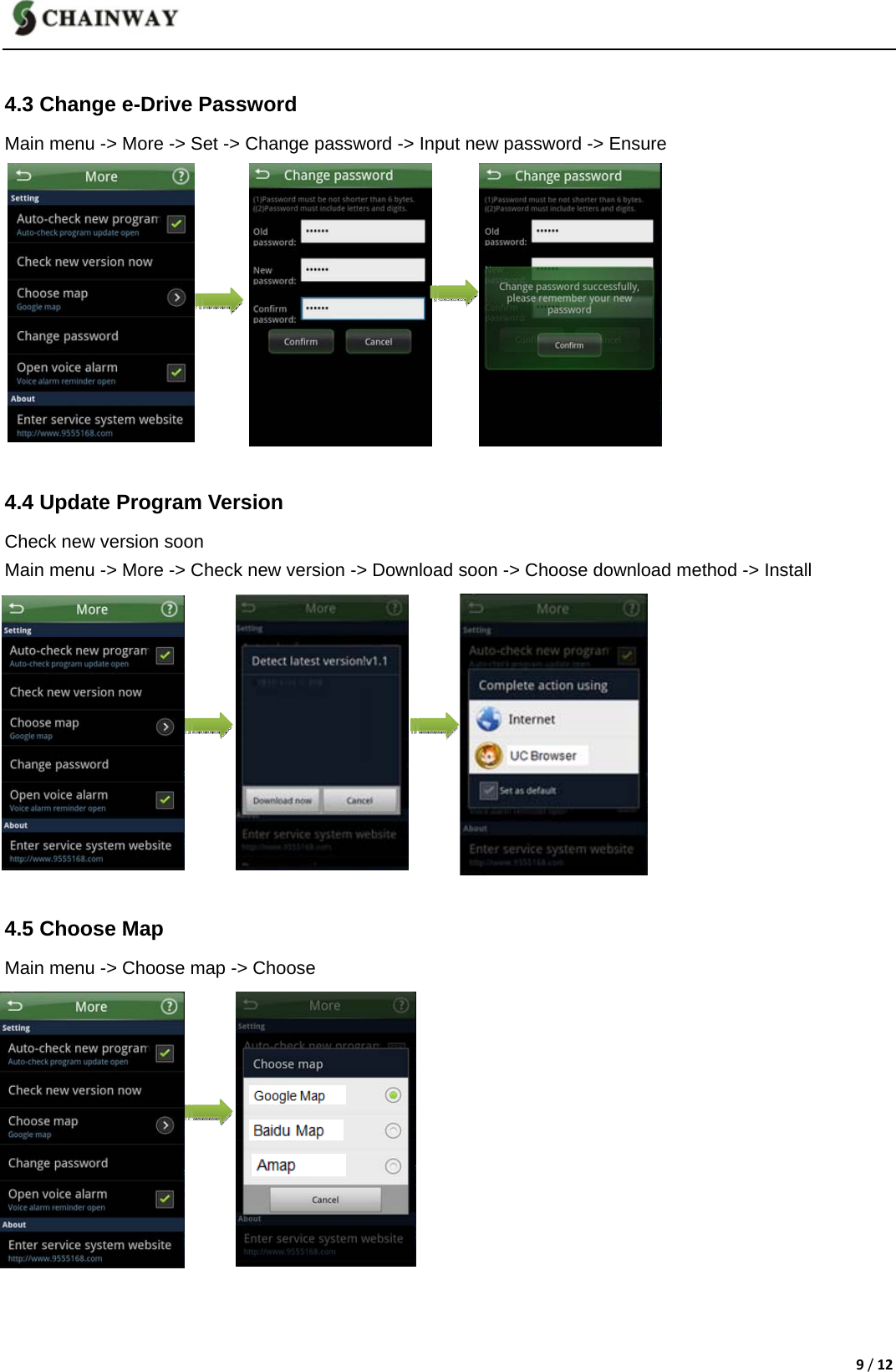
9/12  4.3 Change e-Drive Password         Main menu -> More -> Set -> Change password -> Input new password -> Ensure                4.4 Update Program Version Check new version soon Main menu -> More -> Check new version -> Download soon -> Choose download method -> Install            4.5 Choose Map Main menu -> Choose map -> Choose
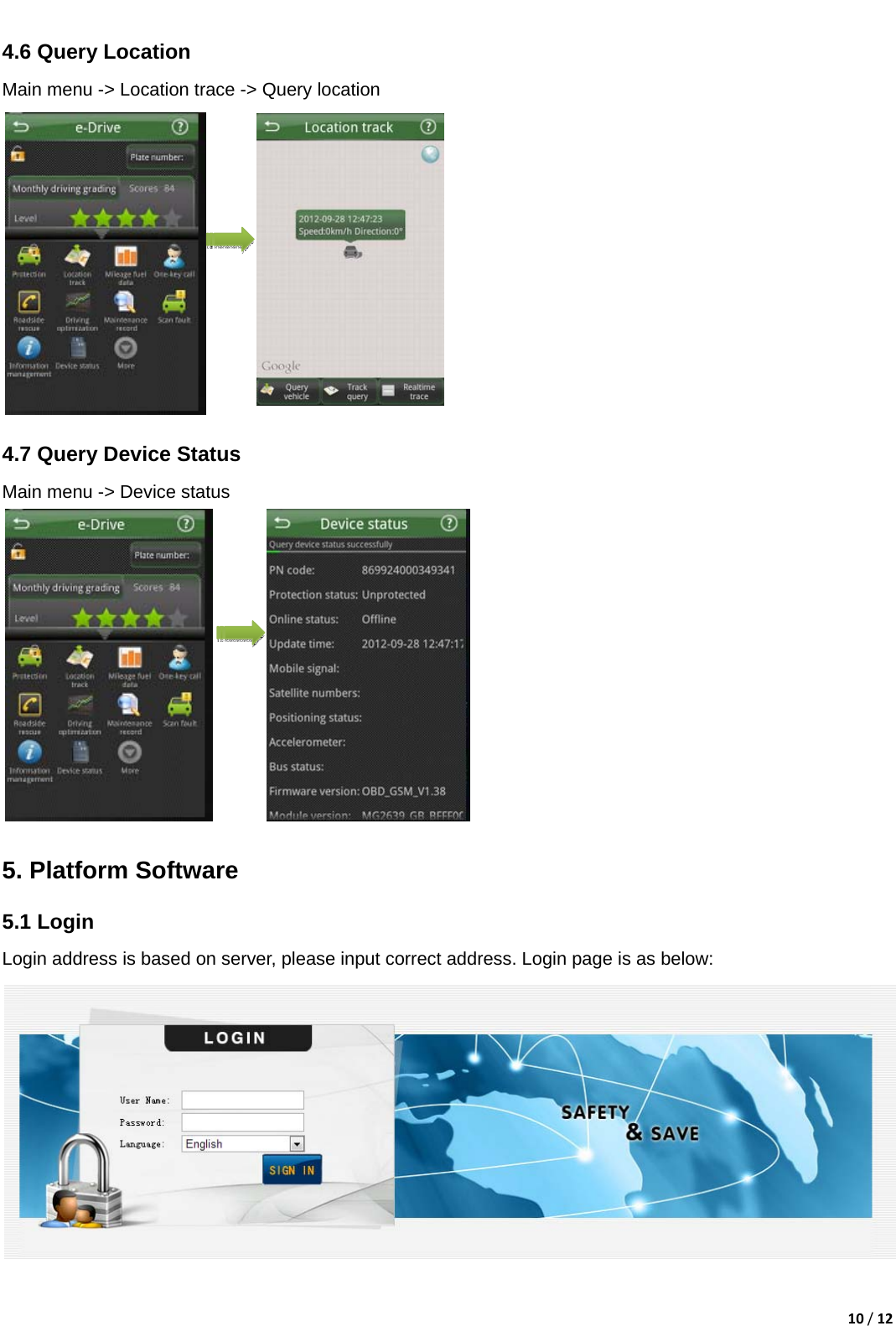
10/12  4.6 Query Location Main menu -> Location trace -> Query location             4.7 Query Device Status     Main menu -> Device status                   5. Platform Software   5.1 Login Login address is based on server, please input correct address. Login page is as below:
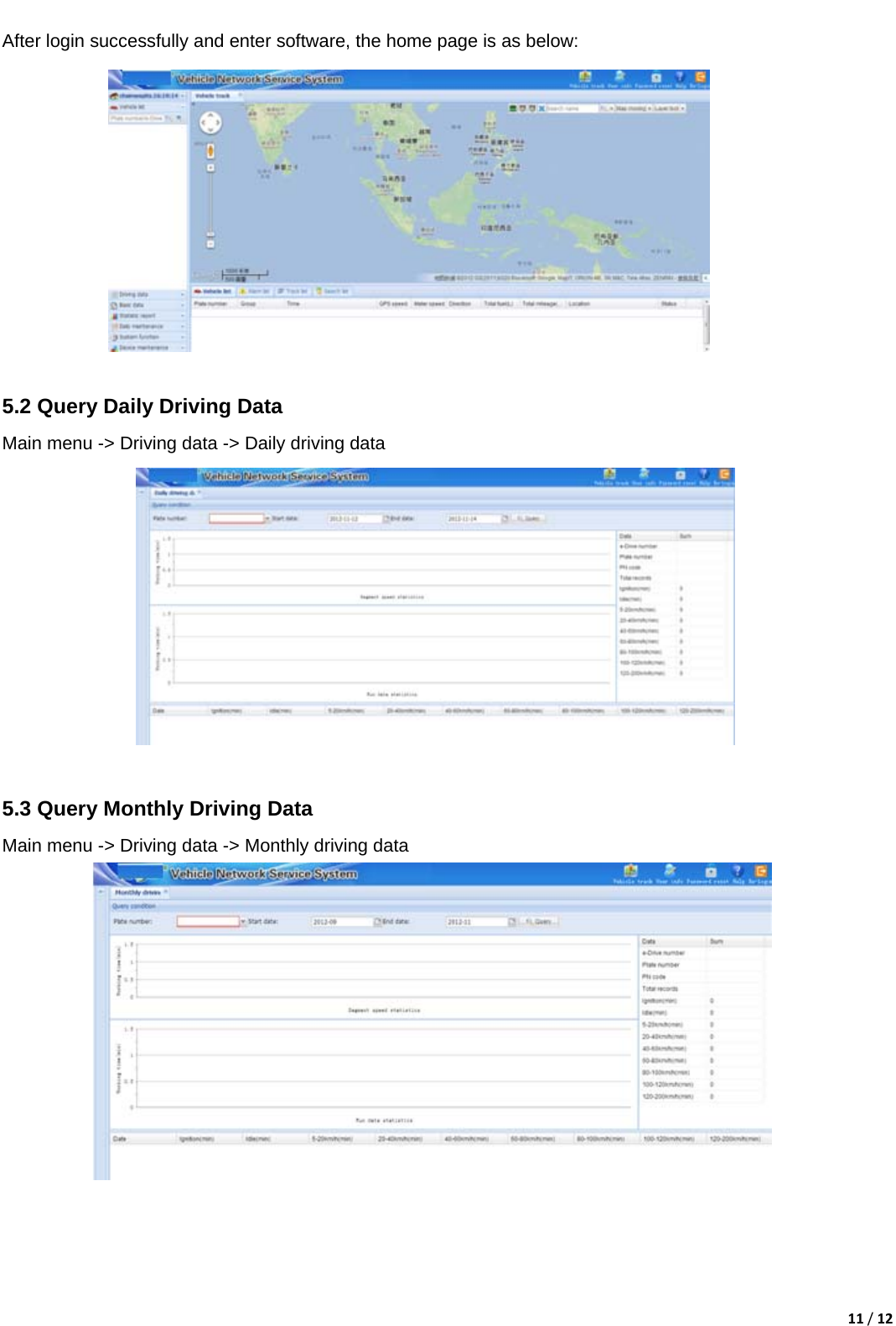
11/12  After login successfully and enter software, the home page is as below:             5.2 Query Daily Driving Data   Main menu -> Driving data -> Daily driving data             5.3 Query Monthly Driving Data Main menu -> Driving data -> Monthly driving data
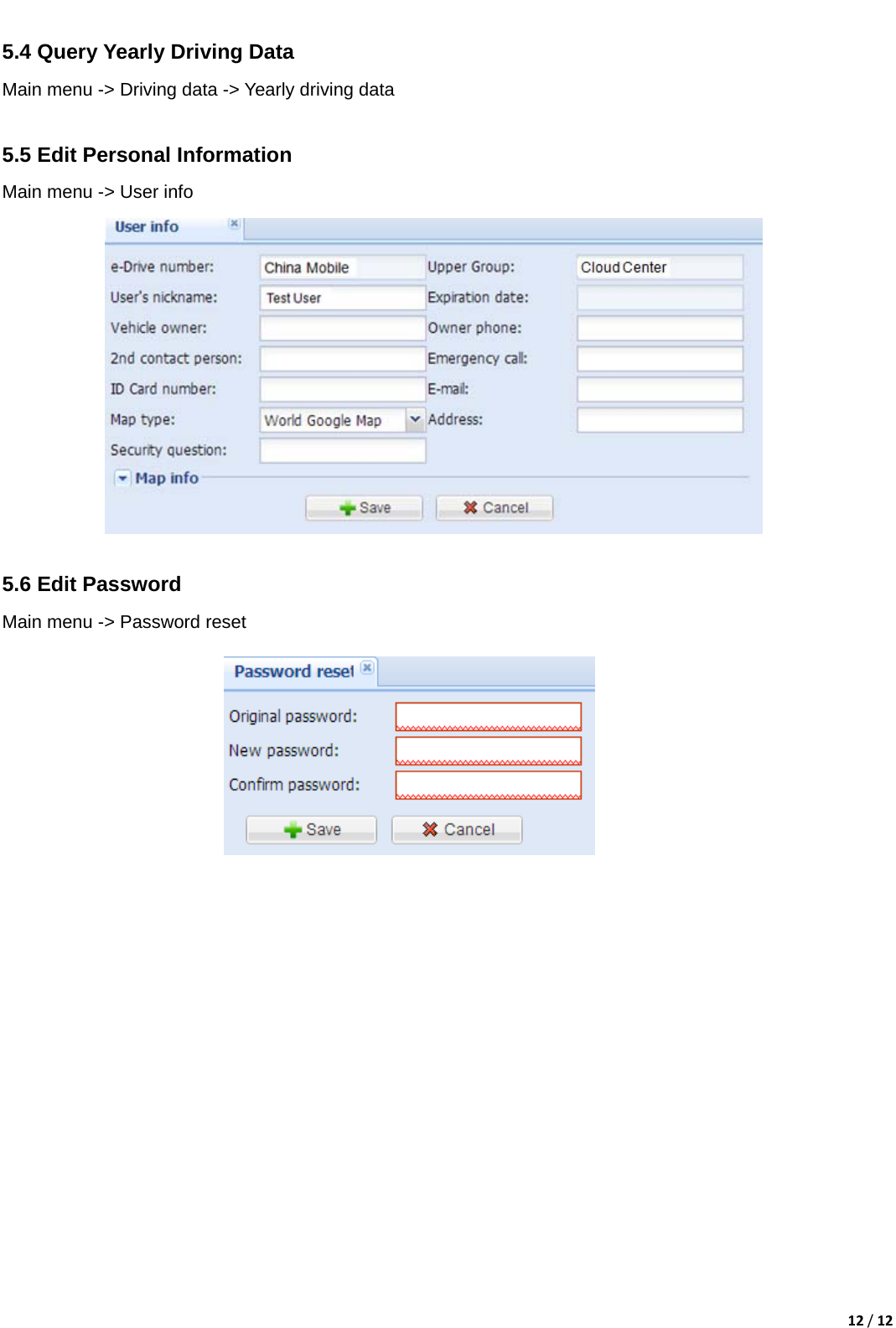
12/12 5.4 Query Yearly Driving DataMain menu -> Driving data -> Yearly driving data          5.5 Edit Personal Information                           Main menu -> User info              5.6 Edit Password Main menu -> Password reset
This device complies with part 15 of the FCC rules. Operation is subject to the  following  two  conditions:  (1)  this  device  may  not  cause  harmful interference,  and  (2)  this  device  must  accept  any  interference  received, including interference that may cause undesired operation.  Changes or modifications not expressly approved by the party responsible for compliance could void the user’s authority to operate the equipment. Note: This equipment has been tested and found to comply with the limits for a Class B digital device, pursuant to part 15 of the FCC Rules. These limits are designed to provide reasonable protection against harmful interference in a residential installation. This equipment generates, uses and can radiate radio frequency energy and, if not installed and used in accordance with the instructions, may cause harmful interference to radio communications. However, there is no guarantee that interference will not occur in a particular installation. If this equipment does cause harmful interference to radio or television reception, which can be determined by turning the equipment off
and on, the user is encouraged to try to correct the interference by one or more of the following measures: —Reorient or relocate the receiving antenna. —Increase the separation between the equipment and receiver. —Connect the equipment into an outlet on a circuit different from that to which the receiver is connected. —Consult the dealer or an experienced radio/TV technician for help. RF Exposure When using the device, ensure that the antenna of the device is as least 20 cm away from all persons.

Navigation menu