Changhong Electronics LT55BN93L LCD Monitor User Manual LT55BN93L SPEC ver03

Guangdong Changhong Electronics Co.,Ltd. LCD Monitor LT55BN93L SPEC ver03

User Manual

   Specification For  55 Inch LCD Monitor         Buyer:   Model:  LT55BN93L     December, 2014
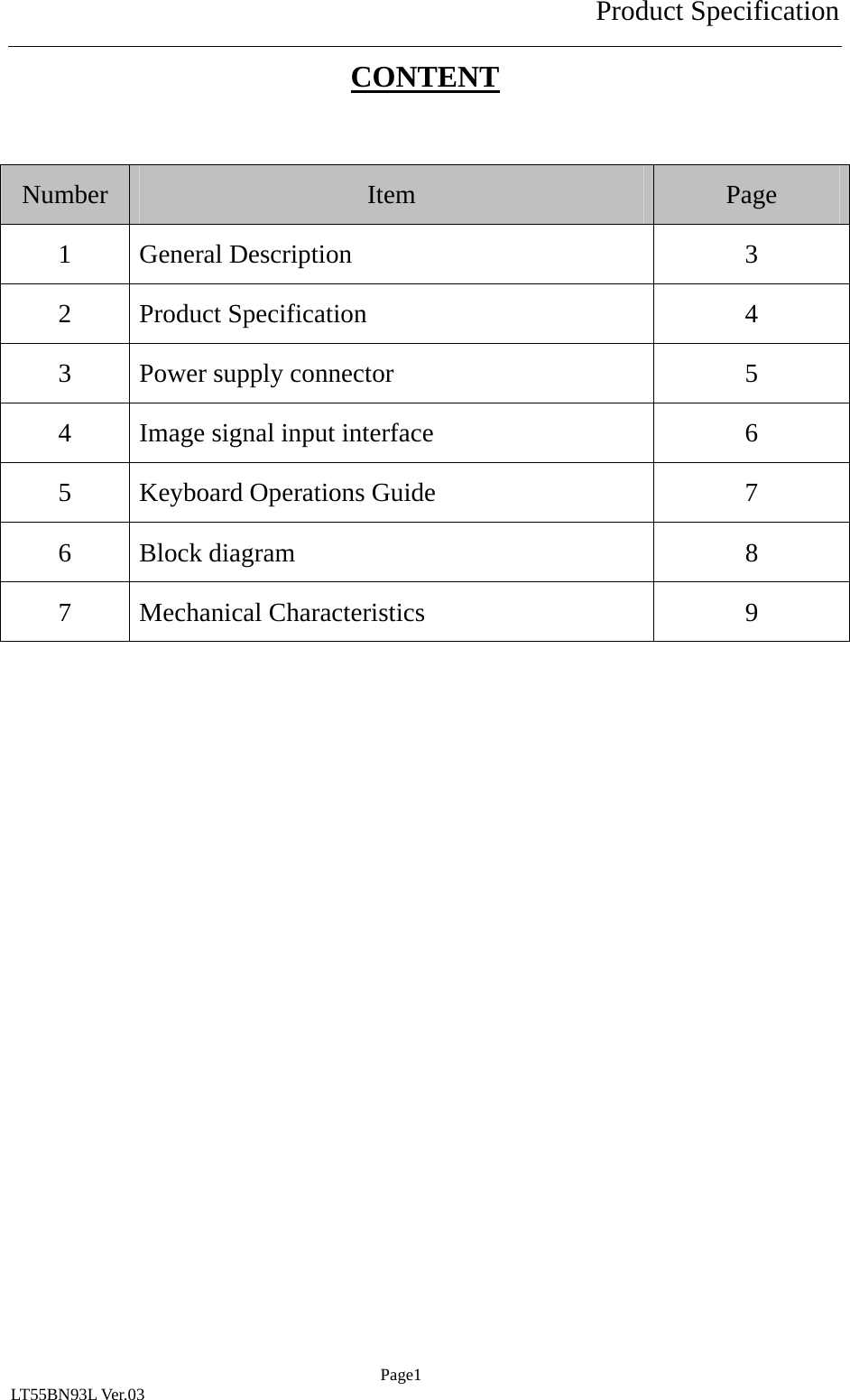
Product Specification  Page1 LT55BN93L Ver.03 CONTENT  Number  Item  Page 1 General Description  3 2 Product Specification  4 3  Power supply connector  5 4  Image signal input interface  6 5  Keyboard Operations Guide  7 6 Block diagram  8 7 Mechanical Characteristics  9
Product Specification  Page2 LT55BN93L Ver.03 Warning:  Changes or modifications to this unit not expressly approved by the party responsible for compliance could void the user’s authority to operate the equipment.          NOTE:    This equipment has been tested and found to comply with the limits for a Class B digital device, pursuant to Part 15 of the FCC Rules.  These limits are designed to provide reasonable protection against harmful interference in a residential installation.  This equipment generates uses and can radiate radio frequency energy and, if not installed and used in accordance with the instructions, may cause harmful interference to radio communications. However, there is no guarantee that interference will not occur in a particular installation.  If this equipment does cause harmful interference to radio or television reception, which can be determined by turning the equipment off and on, the user is encouraged to try to correct the interference by one or more of the following measures: Reorient or relocate the receiving antenna. Increase the separation between the equipment and receiver.Connect the equipment into an outlet on a circuit different from that to which the receiver is connected.Consult the dealer or an experienced radio/TV technician for help. 
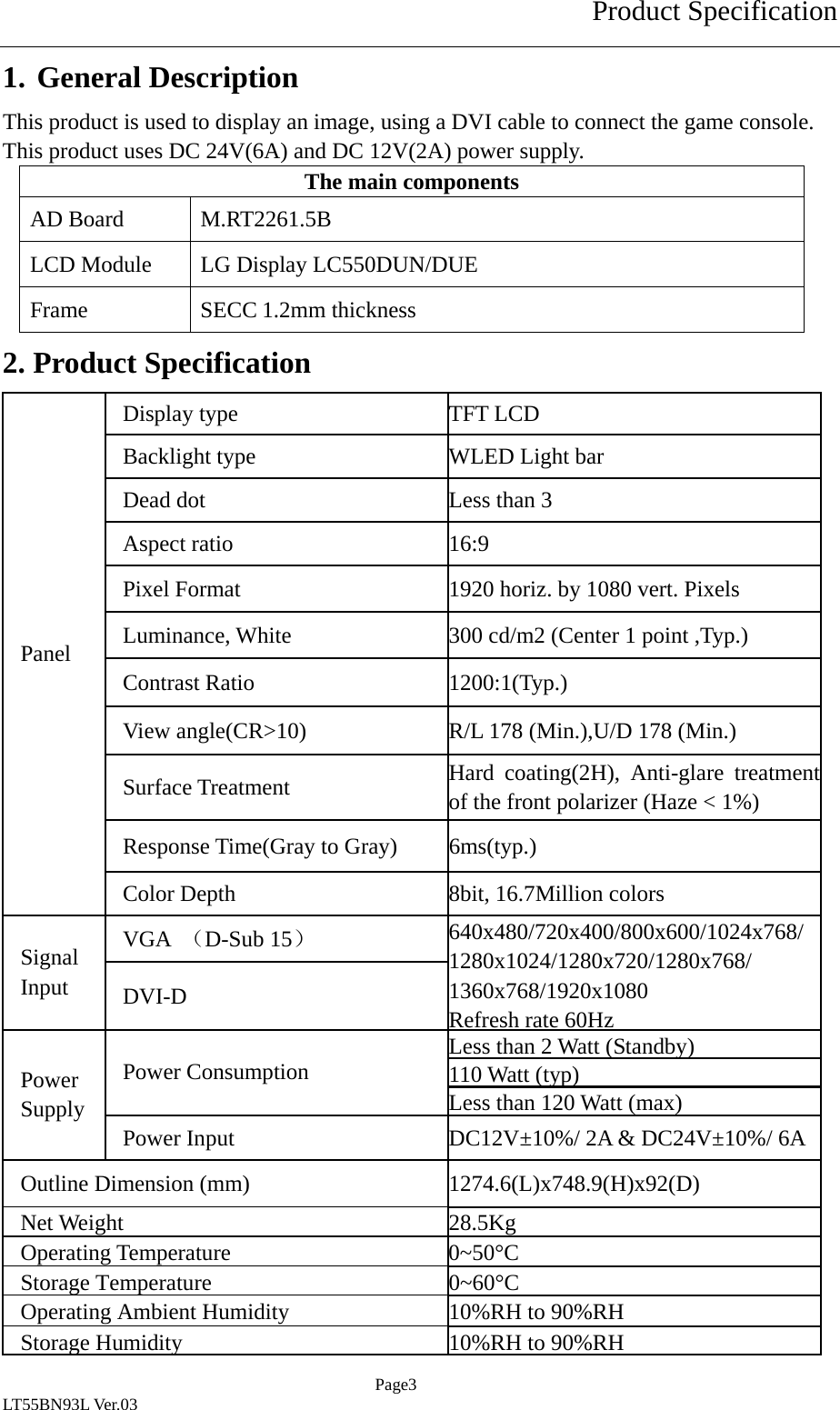
Product Specification  Page3 LT55BN93L Ver.03 1. General Description This product is used to display an image, using a DVI cable to connect the game console. This product uses DC 24V(6A) and DC 12V(2A) power supply. The main components AD Board  M.RT2261.5B LCD Module  LG Display LC550DUN/DUE   Frame SECC 1.2mm thickness 2. Product Specification Display type  TFT LCD Backlight type  WLED Light bar Dead dot    Less than 3 Aspect ratio  16:9 Pixel Format  1920 horiz. by 1080 vert. Pixels Luminance, White  300 cd/m2 (Center 1 point ,Typ.) Contrast Ratio  1200:1(Typ.) View angle(CR>10)  R/L 178 (Min.),U/D 178 (Min.)   Surface Treatment  Hard coating(2H), Anti-glare treatment of the front polarizer (Haze < 1%) Response Time(Gray to Gray)  6ms(typ.) Panel Color Depth  8bit, 16.7Million colors VGA  (D-Sub 15) Signal Input  DVI-D 640x480/720x400/800x600/1024x768/1280x1024/1280x720/1280x768/ 1360x768/1920x1080 Refresh rate 60HzLess than 2 Watt (Standby) 110Watt (typ)Power Consumption Less than 120 Watt (max) Power Supply  Power Input  DC12V±10%/ 2A & DC24V±10%/ 6AOutline Dimension (mm)  1274.6(L)x748.9(H)x92(D)   Net Weight 28.5Kg Operating Temperature  0~50°C Storage Temperature 0~60°COperating Ambient Humidity  10%RH to 90%RH Storage Humidity10%RH to 90%RH
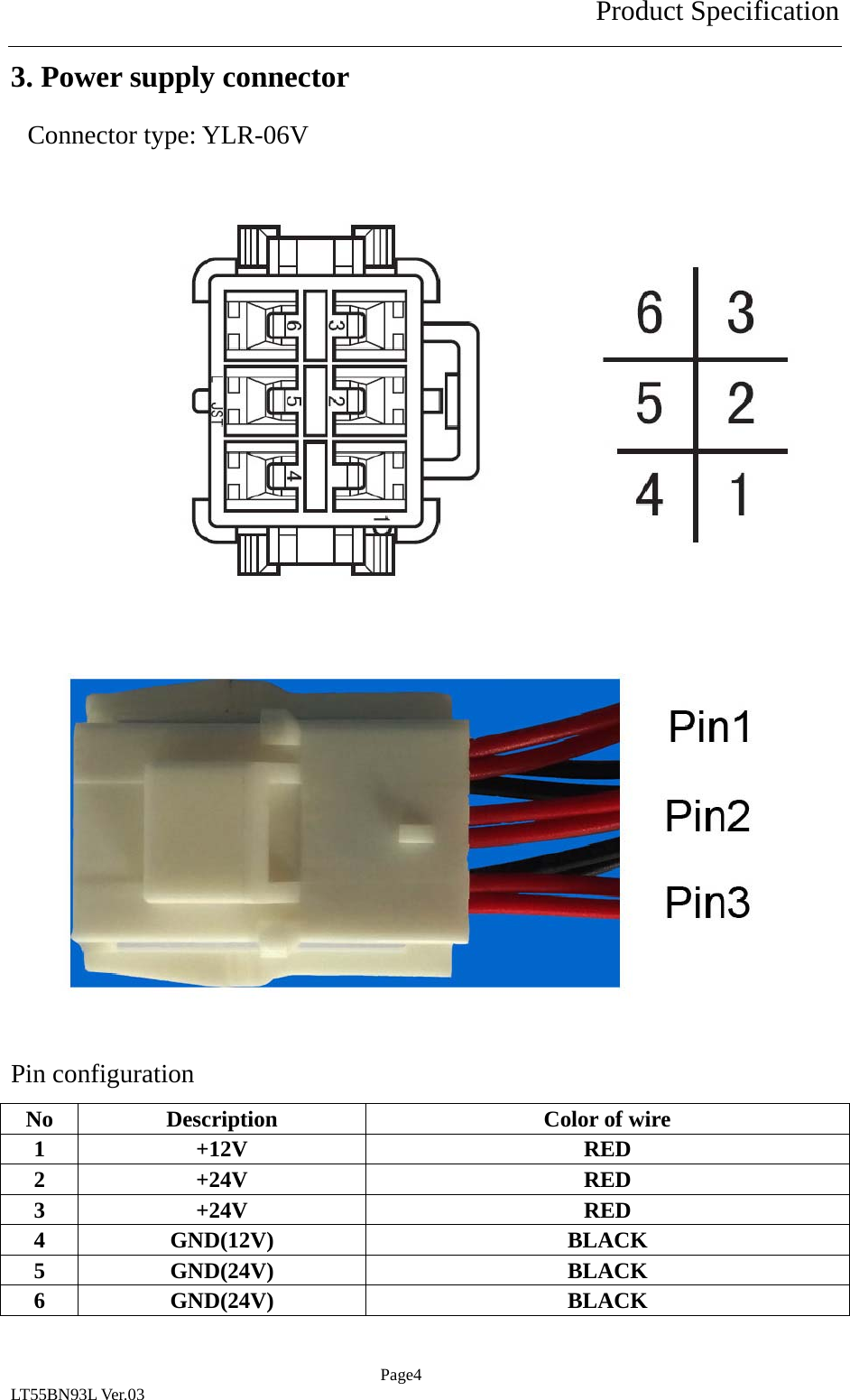
Product Specification  Page4 LT55BN93L Ver.03 3. Power supply connector Connector type: YLR-06V                Pin configuration No  Description  Color of wire 1 +12V  RED 2 +24V  RED 3 +24V  RED 4 GND(12V)  BLACK 5 GND(24V)  BLACK 6 GND(24V)  BLACK
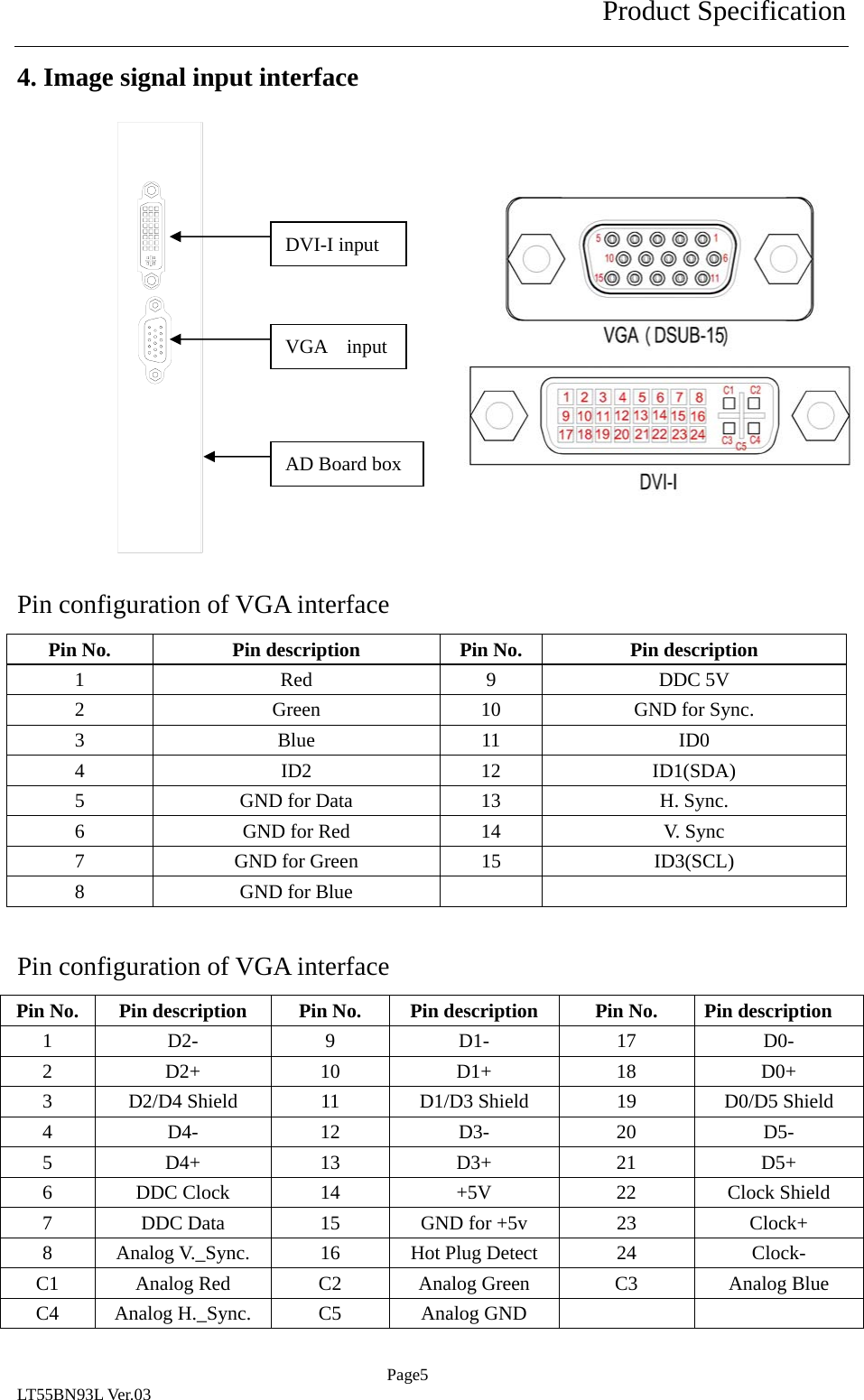
Product Specification  Page5 LT55BN93L Ver.03 4. Image signal input interface                 Pin configuration of VGA interface Pin No.  Pin description  Pin No.  Pin description 1 Red 9 DDC 5V 2  Green  10  GND for Sync. 3 Blue 11 ID0 4 ID2 12 ID1(SDA) 5  GND for Data  13  H. Sync. 6  GND for Red  14  V. Sync 7  GND for Green  15  ID3(SCL) 8  GND for Blue      Pin configuration of VGA interface Pin No.  Pin description  Pin No.  Pin description  Pin No.  Pin description 1 D2- 9 D1- 17 D0- 2 D2+  10  D1+  18  D0+ 3  D2/D4 Shield  11  D1/D3 Shield  19  D0/D5 Shield 4 D4- 12 D3- 20 D5- 5 D4+  13  D3+  21  D5+ 6  DDC Clock  14  +5V  22  Clock Shield 7  DDC Data  15  GND for +5v  23  Clock+ 8  Analog V._Sync.  16  Hot Plug Detect  24  Clock- C1  Analog Red  C2  Analog Green  C3  Analog Blue C4  Analog H._Sync.  C5  Analog GND      DVI-I input VGA  input AD Board box
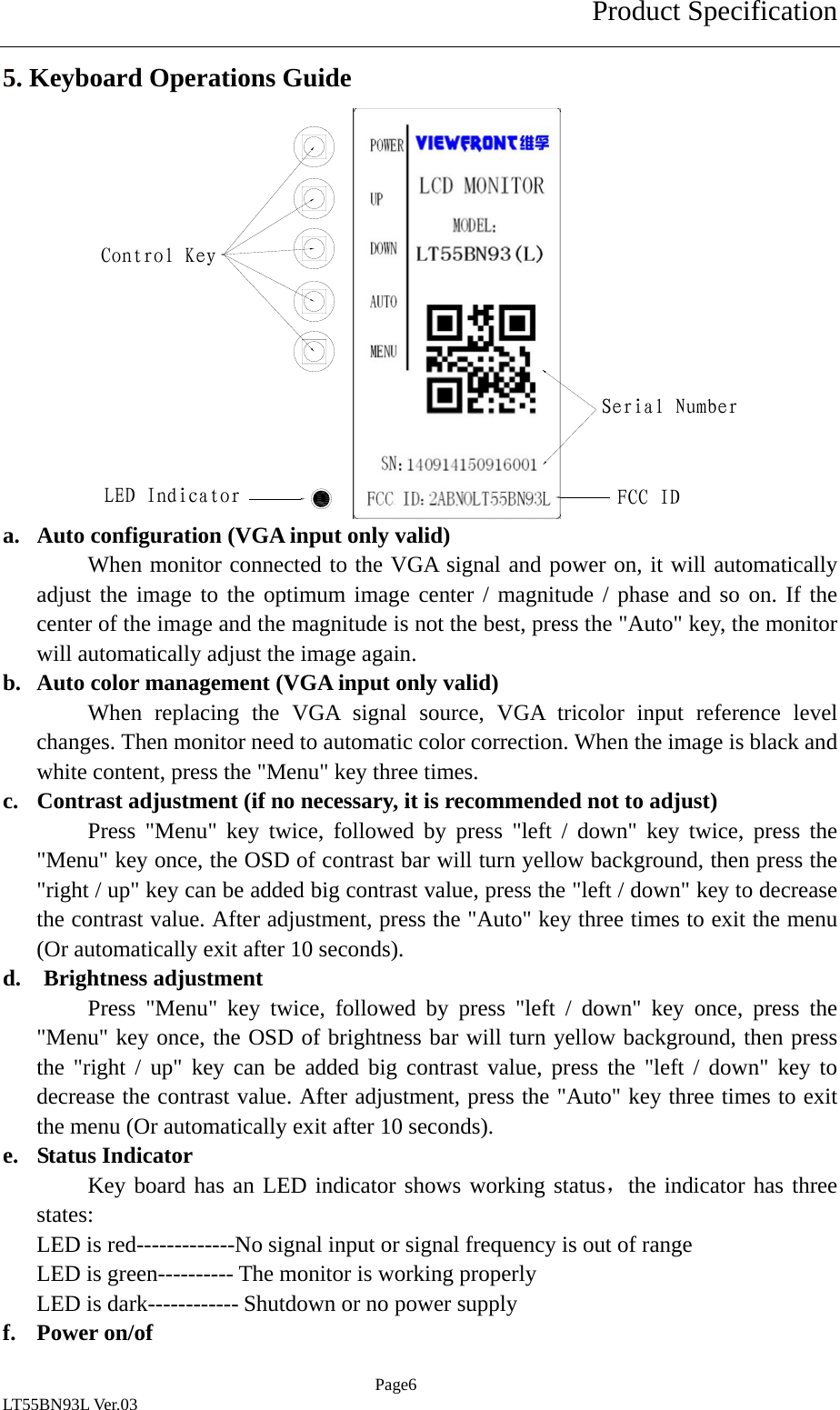
Product Specification  Page6 LT55BN93L Ver.03 5. Keyboard Operations Guide               a. Auto configuration (VGA input only valid) When monitor connected to the VGA signal and power on, it will automatically adjust the image to the optimum image center / magnitude / phase and so on. If the center of the image and the magnitude is not the best, press the "Auto" key, the monitor will automatically adjust the image again. b. Auto color management (VGA input only valid) When replacing the VGA signal source, VGA tricolor input reference level changes. Then monitor need to automatic color correction. When the image is black and white content, press the "Menu" key three times. c. Contrast adjustment (if no necessary, it is recommended not to adjust) Press "Menu" key twice, followed by press "left / down" key twice, press the "Menu" key once, the OSD of contrast bar will turn yellow background, then press the "right / up" key can be added big contrast value, press the "left / down" key to decrease the contrast value. After adjustment, press the "Auto" key three times to exit the menu (Or automatically exit after 10 seconds). d.  Brightness adjustment Press "Menu" key twice, followed by press "left / down" key once, press the "Menu" key once, the OSD of brightness bar will turn yellow background, then press the "right / up" key can be added big contrast value, press the "left / down" key to decrease the contrast value. After adjustment, press the "Auto" key three times to exit the menu (Or automatically exit after 10 seconds). e. Status Indicator Key board has an LED indicator shows working status,the indicator has three states: LED is red-------------No signal input or signal frequency is out of range LED is green---------- The monitor is working properly LED is dark------------ Shutdown or no power supply f. Power on/of Control KeyLED IndicatorSerial NumberFCC ID
Product Specification  Page7 LT55BN93L Ver.03 Press the "power" key can switch on or shutdown the monitor. This monitor can store switch state before the power supply failure. g. Other adjustments The monitor is shipped, has all image adjustment parameters set to default the best value, in addition to brightness/contrast should be adjusted according to the actual signal status and user requirements, other project proposals no necessary adjustment. If you do need to change the adjustment parameters, accordance with OSD, adjust the following manner: 1. Press "Menu" key to enter the OSD menu, press the "Left / Down" key or "right /" key to change menu items, frame color selected menu item turns yellow, then press the "Menu" key to confirm the adjustment, confirmed adjustments will turn yellow background color, press the "left / Down" key or "right /" key to adjust the value of the selected item, press the "Auto" key to return to the previous menu. 2. If you adjust the project mess, according to the method described above to select "Reset" in the OSD menu, you can restore the factory default settings. (Tips: Press the "Menu" key once, then press the "Left / Down" key twice, then press "Menu" key once, then press the "Left / Down" key four times, then press the "Menu" key once complete reset)
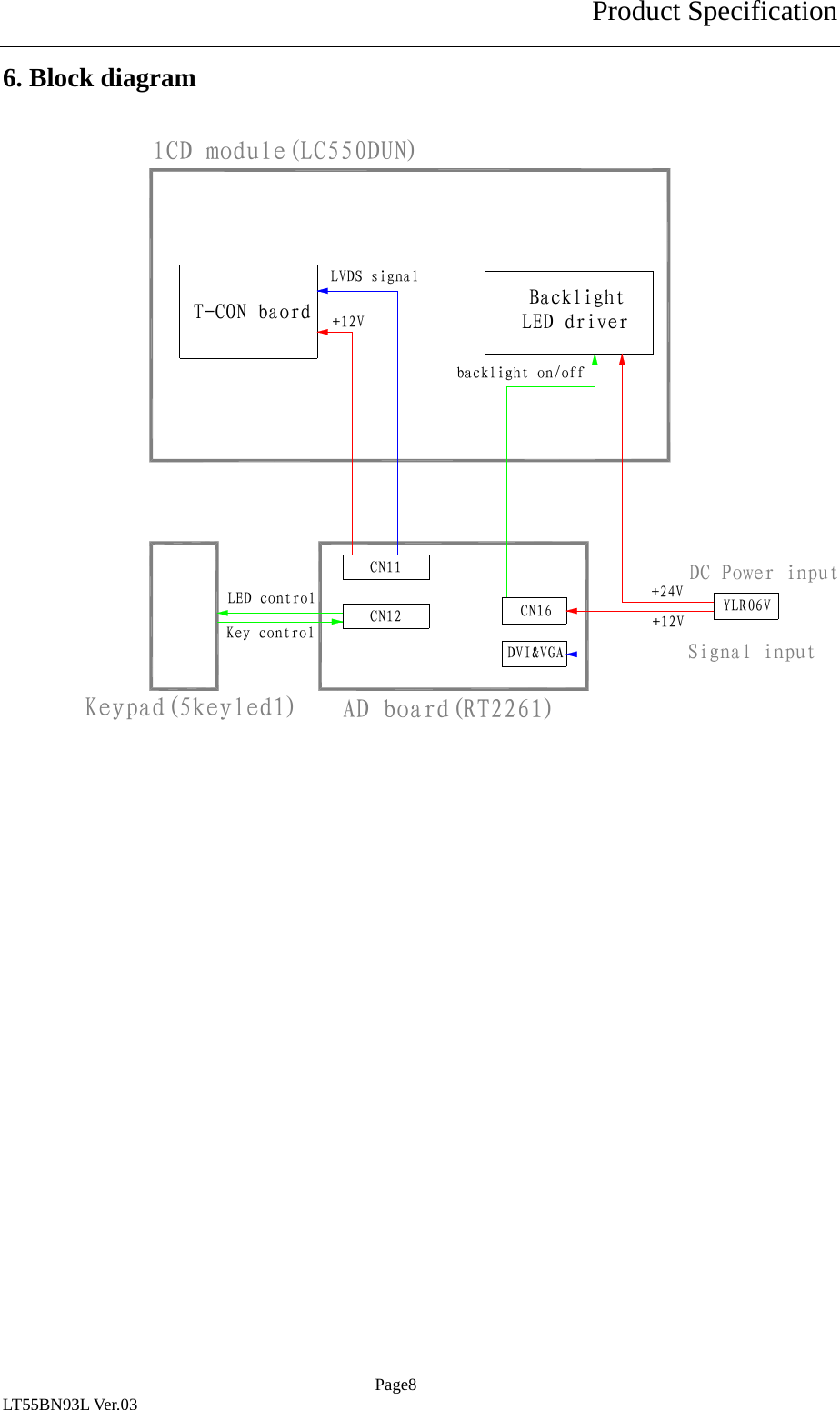
Product Specification  Page8 LT55BN93L Ver.03 6. Block diagram                        lCD module(LC550DUN)AD board(RT2261)Keypad(5keyled1)LED driverBacklightT-CON baordCN12CN11CN16DVI&VGAYLR06VDC Power input+24V+12V+12VLVDS signalKey controlLED controlbacklight on/offSignal input
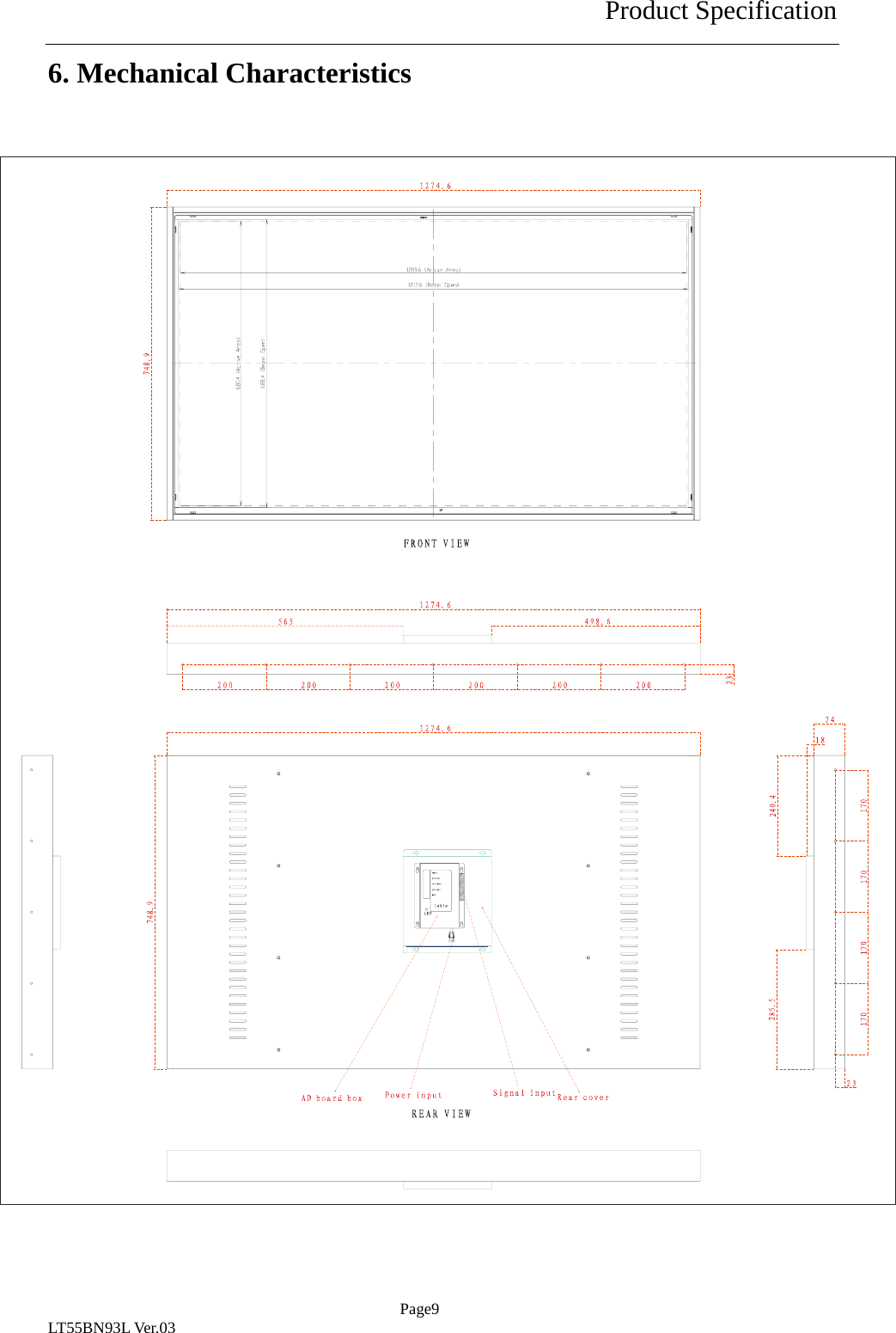
Product Specification  Page9 LT55BN93L Ver.03 6. Mechanical Characteristics

Navigation menu