Changsite Technology WH8 Wi-Fi Industrial Endoscope User Manual

Shenzhen Changsite Technology Co., Ltd Wi-Fi Industrial Endoscope

User Manual

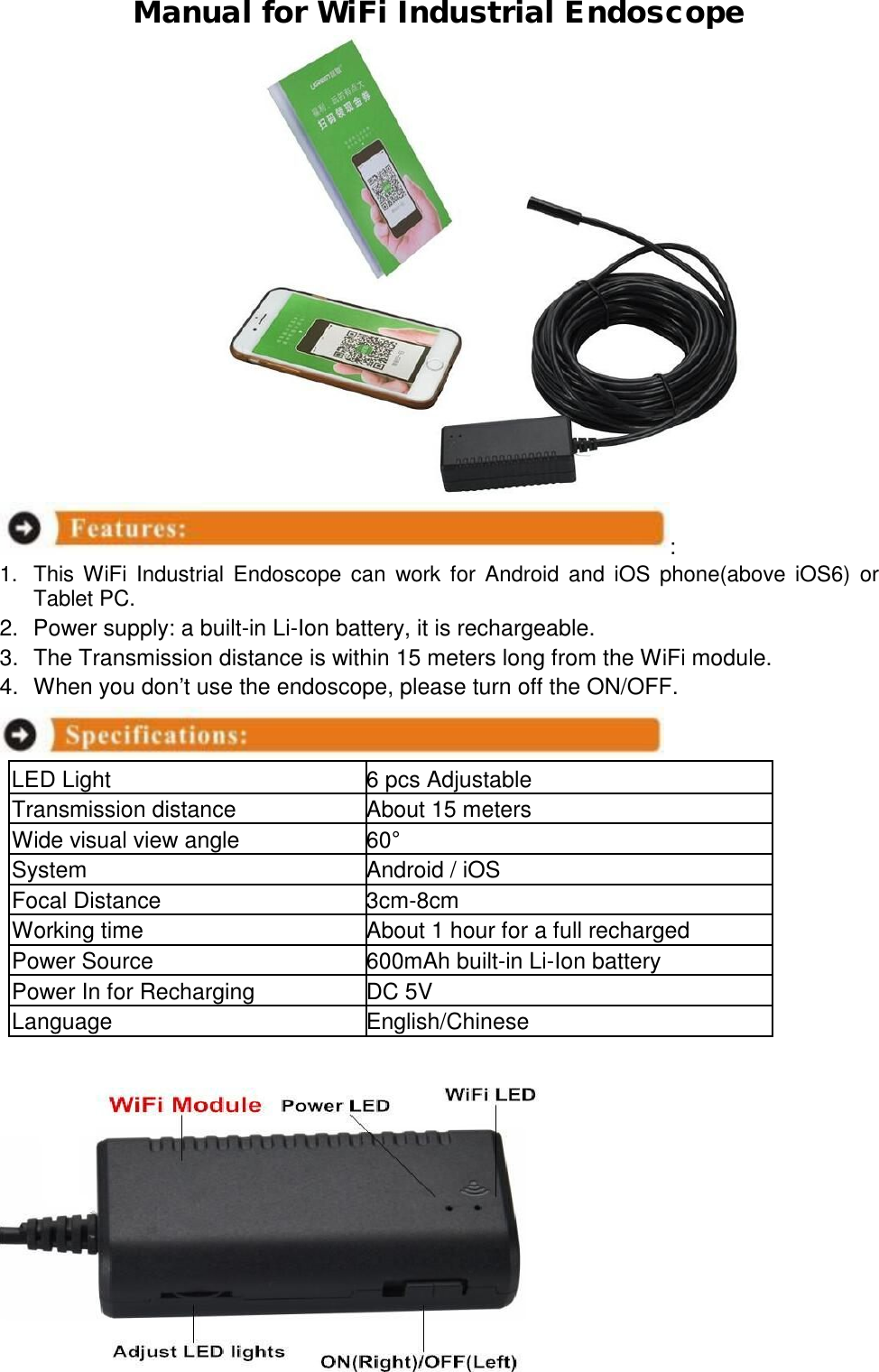
 Manual for WiFi Industrial Endoscope                          :  1. This WiFi Industrial Endoscope can work for Android and iOS phone(above iOS6) or Tablet PC.  2. Power supply: a built-in Li-Ion battery, it is rechargeable.  3. The Transmission distance is within 15 meters long from the WiFi module.  4. When you don’t use the endoscope, please turn off the ON/OFF.    LED Light  6 pcs Adjustable Transmission distance About 15 meters Wide visual view angle  60° System Android / iOS Focal Distance  3cm-8cm Working time About 1 hour for a full recharged Power Source  600mAh built-in Li-Ion battery Power In for Recharging  DC 5V Language  English/Chinese
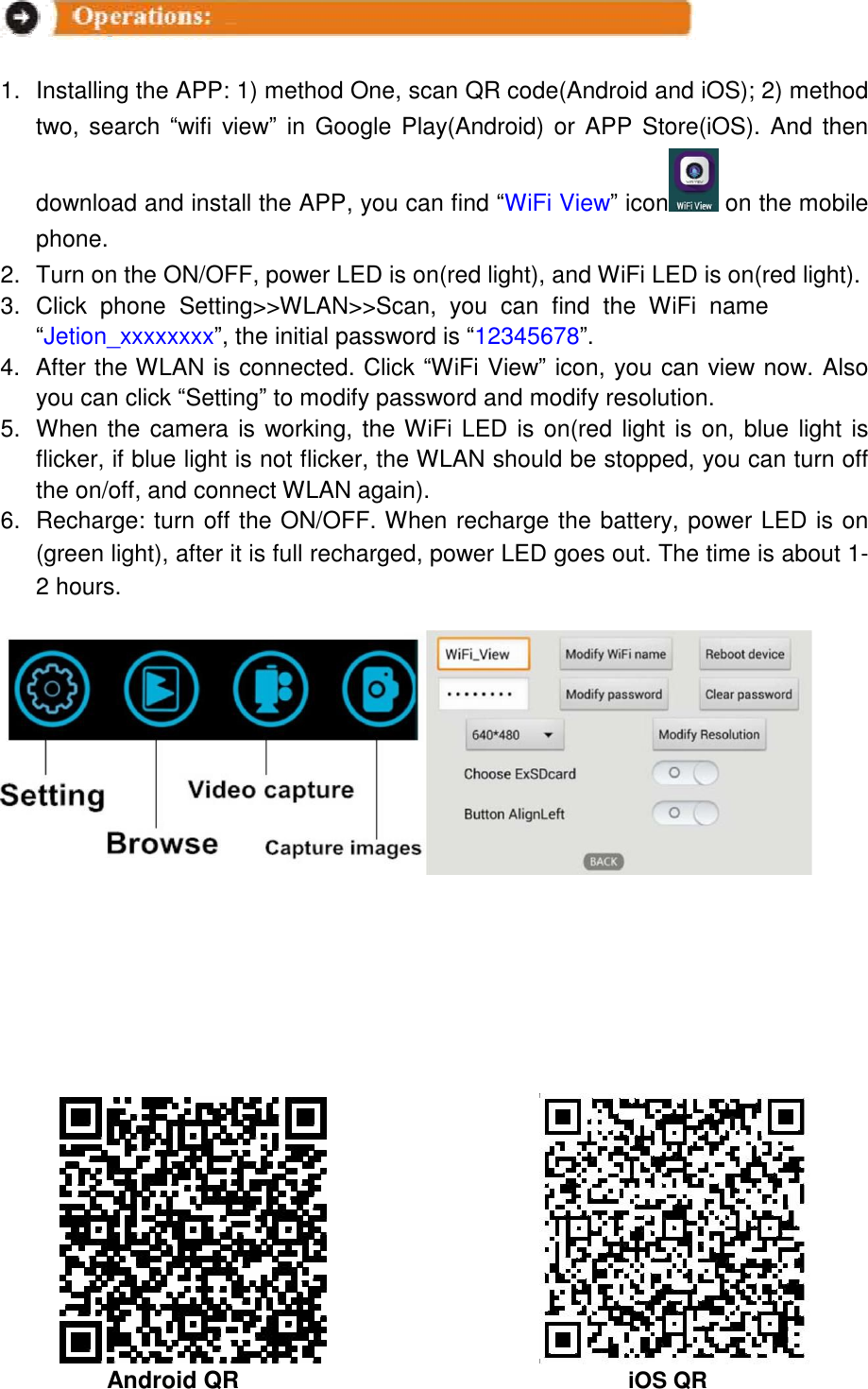
    1. Installing the APP: 1) method One, scan QR code(Android and iOS); 2) method two, search “wifi view” in Google Play(Android) or APP Store(iOS). And then download and install the APP, you can find “WiFi View” icon  on the mobile phone.  2. Turn on the ON/OFF, power LED is on(red light), and WiFi LED is on(red light).  3. Click  phone  Setting>>WLAN>>Scan,  you  can  find  the  WiFi  name  “Jetion_xxxxxxxx”, the initial password is “12345678”.  4. After the WLAN is connected. Click “WiFi View” icon, you can view now. Also you can click “Setting” to modify password and modify resolution. 5. When the camera is working, the WiFi LED is on(red light is on, blue light is flicker, if blue light is not flicker, the WLAN should be stopped, you can turn off the on/off, and connect WLAN again).  6. Recharge: turn off the ON/OFF. When recharge the battery, power LED is on (green light), after it is full recharged, power LED goes out. The time is about 1-2 hours.                                       Android QR iOS QR
FCCCautionThisdevicecomplieswithpart15oftheFCCRules.Operationissubjecttothefollowingtwoconditions:(1)Thisdevicemaynotcauseharmfulinterference,and(2)thisdevicemustacceptanyinterferencereceived,includinginterferencethatmaycauseundesiredoperation.AnyChangesormodificationsnotexpresslyapprovedbythepartyresponsibleforcompliancecouldvoidtheuser'sauthoritytooperatetheequipment.Note: ThisequipmenthasbeentestedandfoundtocomplywiththelimitsforaClassBdigitaldevice,pursuanttopart15oftheFCCRules.Theselimitsaredesignedtoprovidereasonableprotectionagainstharmfulinterferenceinaresidentialinstallation.Thisequipmentgeneratesusesandcanradiateradiofrequencyenergyand,ifnotinstalledandusedinaccordancewiththeinstructions,maycauseharmfulinterferencetoradiocommunications.However,thereisnoguaranteethatinterferencewillnotoccurinaparticularinstallation.Ifthisequipmentdoescauseharmfulinterferencetoradioortelevisionreception,whichcanbedeterminedbyturningtheequipmentoffandon,theuserisencouragedtotrytocorrecttheinterferencebyoneormoreofthefollowingmeasures:-Reorientorrelocatethereceivingantenna.-Increasetheseparationbetweentheequipmentandreceiver.-Connecttheequipmentintoanoutletonacircuitdifferentfromthattowhichthereceiverisconnected.-Consultthedealeroranexperiencedradio/TVtechnicianforhelp.Thisequipmenthas been evaluated to meet general RF exposure requirement.The device can be used in portable exposure condition without restriction.

Navigation menu