Chauvet Home Safety Product Sweeper LED User Manual (Rev. 01b) To The 756ad951 1c8f 4f03 Aeea 12ab74ae8074
User Manual: Chauvet Home Safety Product to the manual
Open the PDF directly: View PDF  .
.
Page Count: 17
User Manual
CHAUVET®, 2011, All Rights Reserved
Information and specifications in this User Manual are subject to change without notice. CHAUVET® assumes no responsibility or
liability for any errors or inaccuracies that may appear in this manual.
Author: Anthony Chiappone
Revision: 01b
Release Date: 01-12-2011
TABLE OF CONTENTS
1. BEFORE YOU BEGIN .................................................................................................................................................................... 3
WHAT IS INCLUDED .............................................................................................................................................................................. 3
UNPACKING INSTRUCTIONS ................................................................................................................................................................... 3
MANUAL CONVENTIONS ........................................................................................................................................................................ 3
ICONS ................................................................................................................................................................................................ 3
SAFETY INSTRUCTIONS ......................................................................................................................................................................... 4
2. INTRODUCTION ............................................................................................................................................................................. 5
PRODUCT OVERVIEW ........................................................................................................................................................................... 5
3. SETUP ............................................................................................................................................................................................. 6
AC POWER......................................................................................................................................................................................... 6
Power Linking ........................................................................................................................................................................................................6
MOUNTING ......................................................................................................................................................................................... 7
Orientation .............................................................................................................................................................................................................7
Rigging ..................................................................................................................................................................................................................7
4. OPERATING INSTRUCTIONS ...................................................................................................................................................... 8
USING THE CONTROL PANEL ................................................................................................................................................................. 8
MENU MAP ......................................................................................................................................................................................... 8
CONFIGURING THE STARTING ADDRESS .................................................................................................................................................. 8
OPERATION ........................................................................................................................................................................................ 9
DMX Operation ......................................................................................................................................................................................................9
DMX Channel Values .............................................................................................................................................................................................9
Master/Slave Mode (Sound-Active) ....................................................................................................................................................................... 10
STANDALONE .................................................................................................................................................................................... 10
Sound-Active ....................................................................................................................................................................................................... 10
Automatic ............................................................................................................................................................................................................ 10
5. APPENDIX .................................................................................................................................................................................... 11
GENERAL TROUBLESHOOTING ............................................................................................................................................................. 11
DMX PRIMER ................................................................................................................................................................................... 12
FIXTURE LINKING (DAISY CHAIN) .......................................................................................................................................................... 12
DATA CABLING .................................................................................................................................................................................. 12
DMX Data Cable .................................................................................................................................................................................................. 12
CABLE CONNECTORS ......................................................................................................................................................................... 13
SETTING THE STARTING ADDRESS ........................................................................................................................................................ 13
3-Pin to 5-Pin Conversion Chart ........................................................................................................................................................................... 14
Setting up a DMX Daisy Chain.............................................................................................................................................................................. 14
GENERAL MAINTENANCE..................................................................................................................................................................... 15
RETURNS PROCEDURE ....................................................................................................................................................................... 15
CLAIMS ............................................................................................................................................................................................ 15
TECHNICAL SPECIFICATIONS ...................................................................................................................................................... 16
CONTACT US ................................................................................................................................................................................... 17
1. Before You Begin 3 1/12/2011 11:51 AM
1. BEFORE YOU BEGIN
What is included
• 1 x Sweeper™ LED
• 1 x Power Cord
• 1 x Warranty Card
• 1 x User Manual
Unpacking Instructions
Immediately upon receiving a fixture, carefully unpack the carton, check the contents to ensure
that all parts are present, and have been received in good condition. Notify the shipper
immediately and retain packing material for inspection if any parts appear damaged from
shipping or the carton itself shows signs of mishandling. Save the carton and all packing
materials. In the event that a fixture must be returned to the factory, it is important that the
fixture be returned in the original factory box and packing.
Manual Conventions
CHAUVET® manuals use the following conventions to differentiate certain types of information
from the regular text.
CONVENTION MEANING
[10] A DIP switch to be configured
<Menu> A key to be pressed on the fixture’s control panel
1~512 A range of values
50/60 A set of values of which only one can be chosen
Settings A menu option not to be modified (for example, showing the operating
mode/current status)
MENU >
Settings A sequence of menu options to be followed
ON A value to be entered or selected
Icons
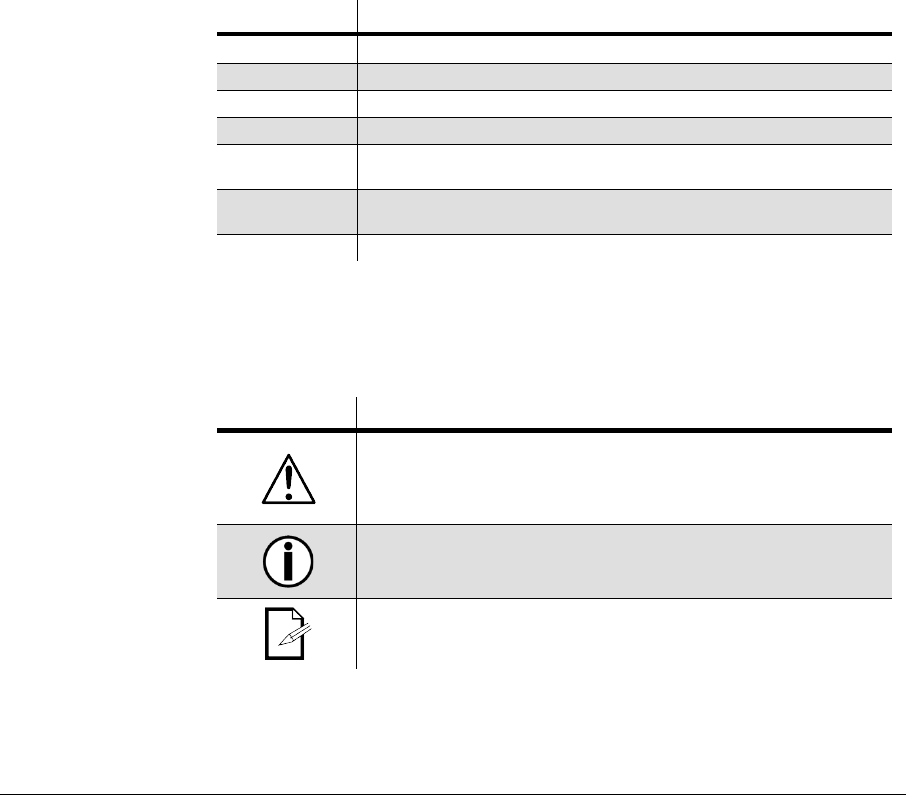
This manual uses the following icons to indicate information that requires special attention on
the part of the user.
ICONS MEANING
This paragraph contains critical installation, configuration or operation
information. Failure to comply with this information may render the
fixture partially or completely inoperative, cause damage to the fixture or
cause harm to the user.
This paragraph contains important installation or configuration
information. Failure to comply with this information may prevent the
fixture from functioning correctly.
This paragraph reminds you of useful, although not critical, information.

1. Before You Begin 4 1/12/2011 11:51 AM
Safety Instructions
• Please keep this User Manual for future consultation. If you sell the unit to another
user, be sure that they also receive this instruction booklet.
• Always make sure that you are connecting to the proper voltage, and that the line
voltage you are connecting to is not higher than that stated on the decal or rear panel
of the fixture.
• This product is intended for indoor use only! To prevent risk of fire or shock, do not
expose fixture to rain or moisture.
• Make sure there are no flammable materials close to the unit while operating.
• The unit must be installed in a location with adequate ventilation, at least 20 in (50
cm) from adjacent surfaces. Be sure that no ventilation slots are blocked.
• Always disconnect from power source before servicing or replacing fuse and be sure
to replace with same fuse source.
• Secure fixture to fastening device using a safety chain.
• Maximum ambient temperature (Ta) is 104° F (40° C). Do not operate fixture at
temperatures higher than this.
• In the event of a serious operating problem, stop using the unit immediately. Never try
to repair the unit by yourself. Repairs carried out by unskilled people can lead to
damage or malfunction. Please contact the nearest authorized technical assistance
center.
• Never connect the device to a dimmer pack.
• Make sure the power cord is never crimped or damaged.
• Never disconnect the power cord by pulling or tugging on the cord.
• Never carry the fixture directly from the cord. Always use the hanging/mounting
bracket.
• Avoid direct eye exposure to the light source while it is on.
Please read these instructions carefully. It includes important information
about the installation, usage and maintenance of this product.
2. Introduction 5 1/12/2011 11:51 AM
2. INTRODUCTION
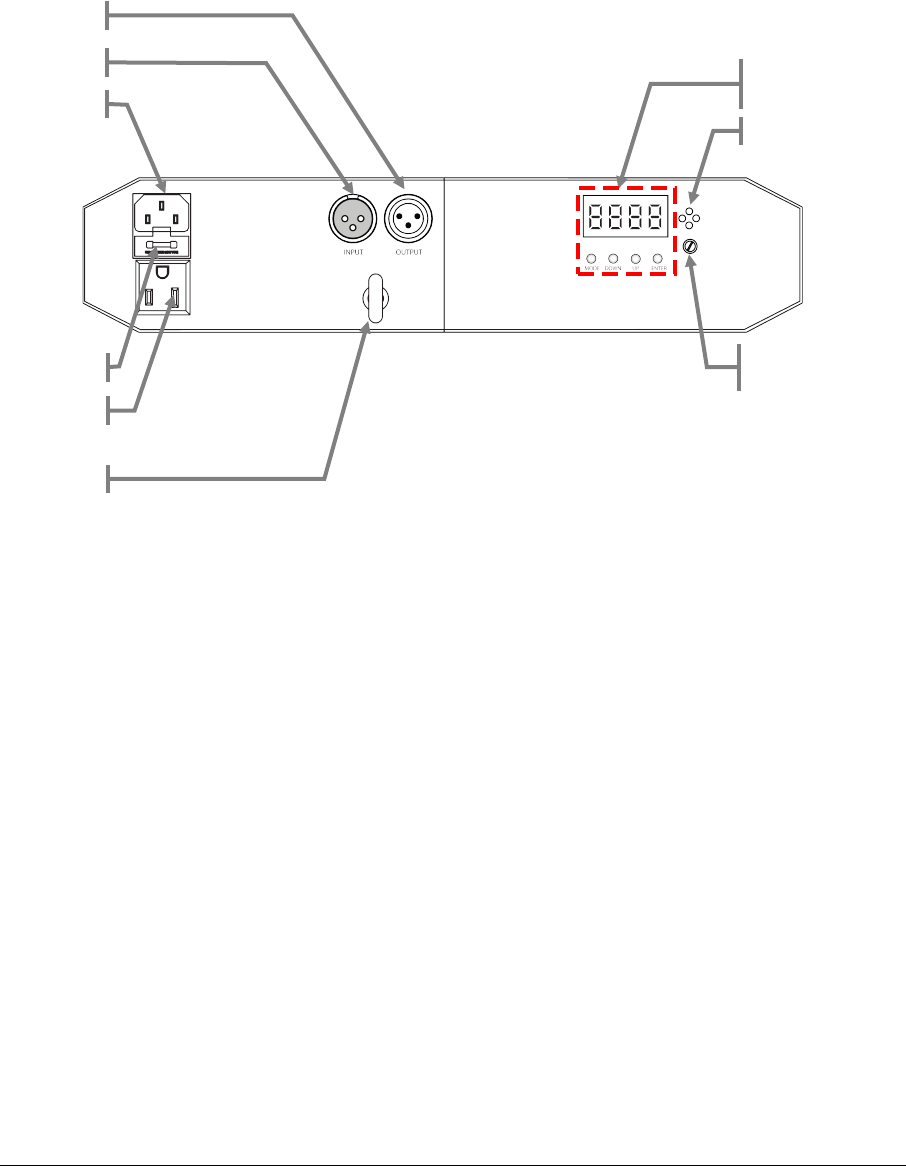
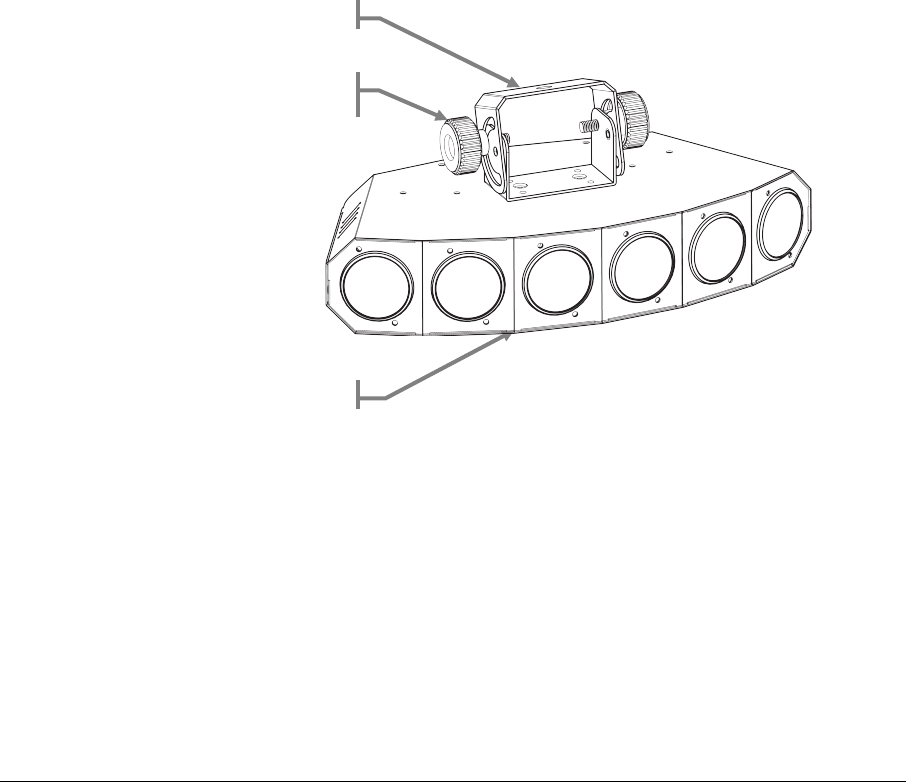
Product Overview
Microphone
DMX Out
Control Panel
(LED display)
DMX In
Power In
Fuseholder
Power Linking Out
Microphone
Adjustment
Safety
3. Setup 6 1/12/2011 11:51 AM
3. SETUP
AC Power
This fixture is auto-ranging and runs on 100~240 VAC, 50/60 Hz power.
To determine the power requirements for a particular fixture, see the label affixed to the back
plate of the fixture or refer to the fixture’s specifications chart. A fixture’s listed current rating
indicates its average current draw under normal conditions.
Always connect the fixture to a switched circuit. Never connect the fixture to a rheostat
(variable resistor) or dimmer circuit, even if the rheostat or dimmer channel is used only
as a 0 to 100% switch.
Always connect the fixture to a circuit with a suitable electrical ground.
Power Linking
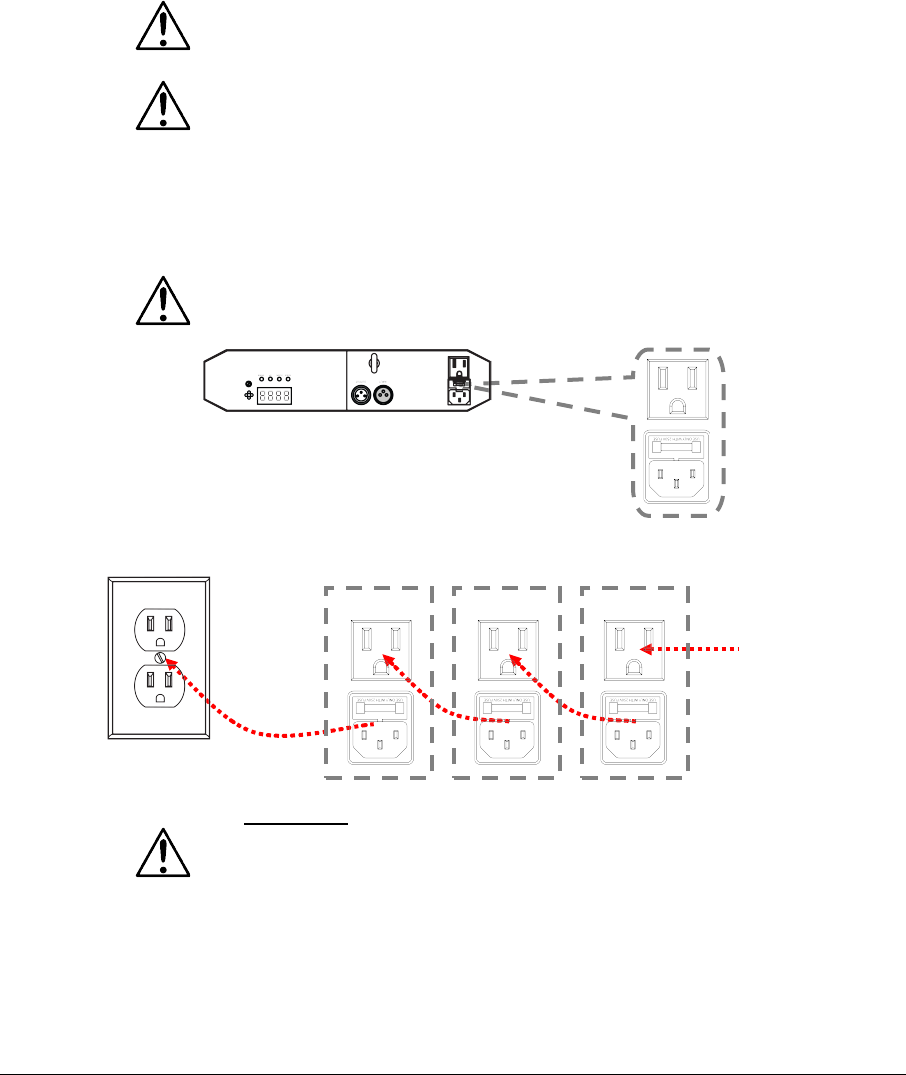
This fixture contains power linking via the Edison outlet located in front of the power input cable.
Please see the diagram below for further explanation.
The maximum quantity of Sweeper™ LEDs that may be linked is 20 units @ 120V, 33
units @ 230V
The power linking shown in this document is for the CHAUVET® North American version
ONLY! Therefore, it is the customer’s responsibility to check with the Dealer/Distributor
regarding power linking on the local version of the product. Connections and availability
may change, depending on the power requirements and/or regulations of each
country/region.
Additional power
link out
Fixture #1
Fixture #2
Fixture #3
3. Setup 7 1/12/2011 11:51 AM
Mounting
Orientation
The Sweeper™ LED
may be mounted in any position, provided there is adequate room for
ventilation.
Rigging
Be sure that the structure can support the weight of the fixture. Please see the “Technical
Specifications” section of this manual for a detailed weight listing. Mount the fixture securely.
This may be done with a screw, nut and bolt, or a mounting clamp.
The hole in each bracket is 13 mm in diameter.
When rigging, consider routine maintenance and control panel access. Please see the following
notes on installation.
• If the power link out is intended to be used with multiple fixtures, take into account the
length of each power cable, and mount the fixtures close enough to one another to
accommodate for this.
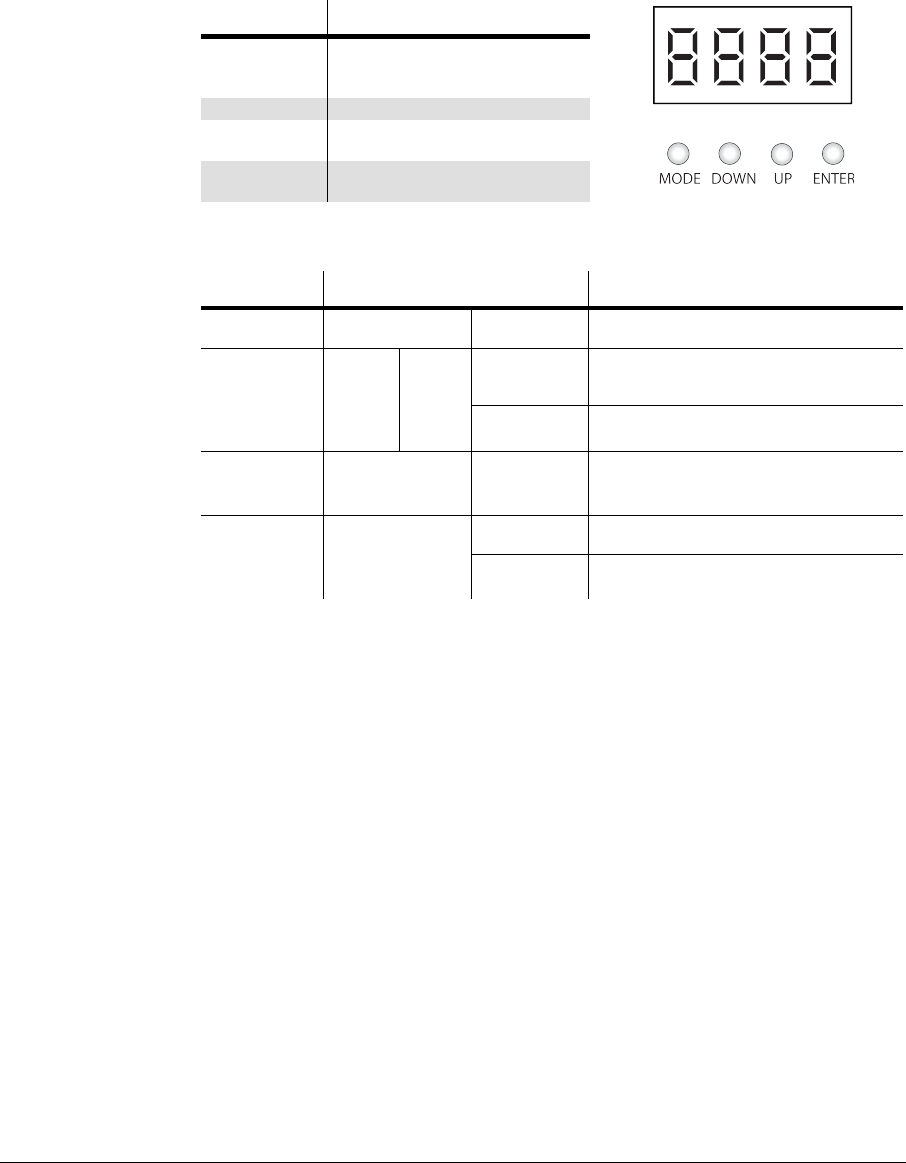
• When aiming the fixtures, use the bracket/yoke adjustment knobs. Loosen the knobs,
adjust to the desired angle, and then tighten the knobs by turning them clockwise. Do
not use tools for this step, as it may cause damage.
•
Safety cables must always be used!
Hanging Bracket
Bracket Adjustment
Knob
Rubber Feet (4)
4. Operating Instructions 8 1/12/2011 11:51 AM
4. OPERATING INSTRUCTIONS
Using the Control Panel
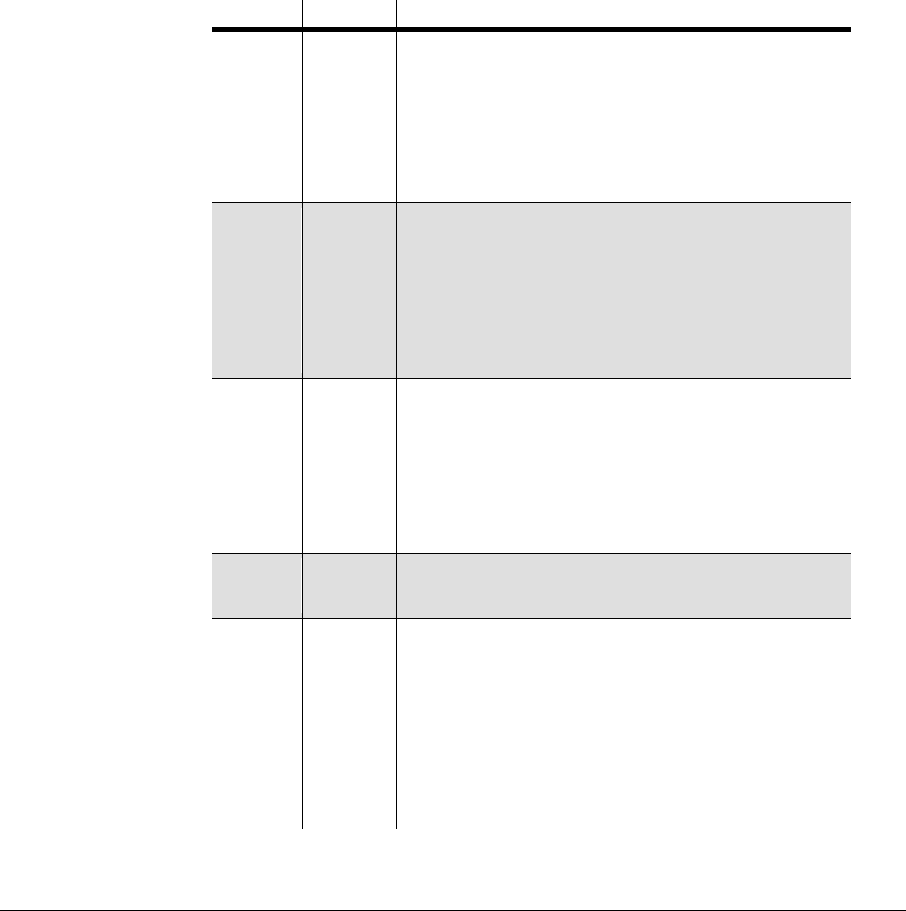
Access control panel functions using the four buttons located directly underneath the LED
display.
BUTTON FUNCTION
<MODE/
ESC>
Used to scroll through the current
operating mode, as well as back
out of the current menu option
<DOWN>
Used to select a decreasing value
<UP> Used to select an increasing
value
<ENTER> Used to activate a selection and
store it to memory
Menu Map
Mode Programming Description
DMX Mode Addr d001~d512 Selects the DMX starting address
Slave
Operation SLAU H-
NO The Slave fixture follows the actions of
the Master fixture
YES The Slave fixture mirrors the actions of
the Master fixture
Sound-active SoUd rUn Triggers the built-in program to the beat
of the music, using the internal
microphone
Automatic P-
P-_1~10 Selects one of the built-in programs
S 01~S100 Adjusts the speed of the automatic
program
Configuring the Starting Address
The Sweeper™ LED fixture uses up to eight DMX channels.
In this DMX
configuration/personality, the highest configurable address is 505. Any address higher than this
will prevent access to all of the channels while in this mode; however, if you desire to use one of
the other DMX configurations (personalities), please consider the total DMX channels when
selecting a DMX address.
If this is your first time using DMX, we recommend
reading the “DMX Primer” section in the
“Appendix”.
4. Operating Instructions 9 1/12/2011 11:51 AM
Operation
DMX Operation
This operating mode will allow for control with an external DMX controller. You must set the
starting address for this mode.
If this is your first time using DMX, then it is recommended that you refer to the “DMX Primer”
section in the “Appendix” of this manual.
Please see the instructions below for details on this mode.
1. Plug the fixture into power.
2. Plug a DMX controller into the fixture in a daisy chain configuration.
3. Press <MODE> until Addr appears on the LED screen.
4. Press <ENTER>.
5. Using <UP> & <DOWN>, select the DMX starting address.
6. Press
<ENTER>
.
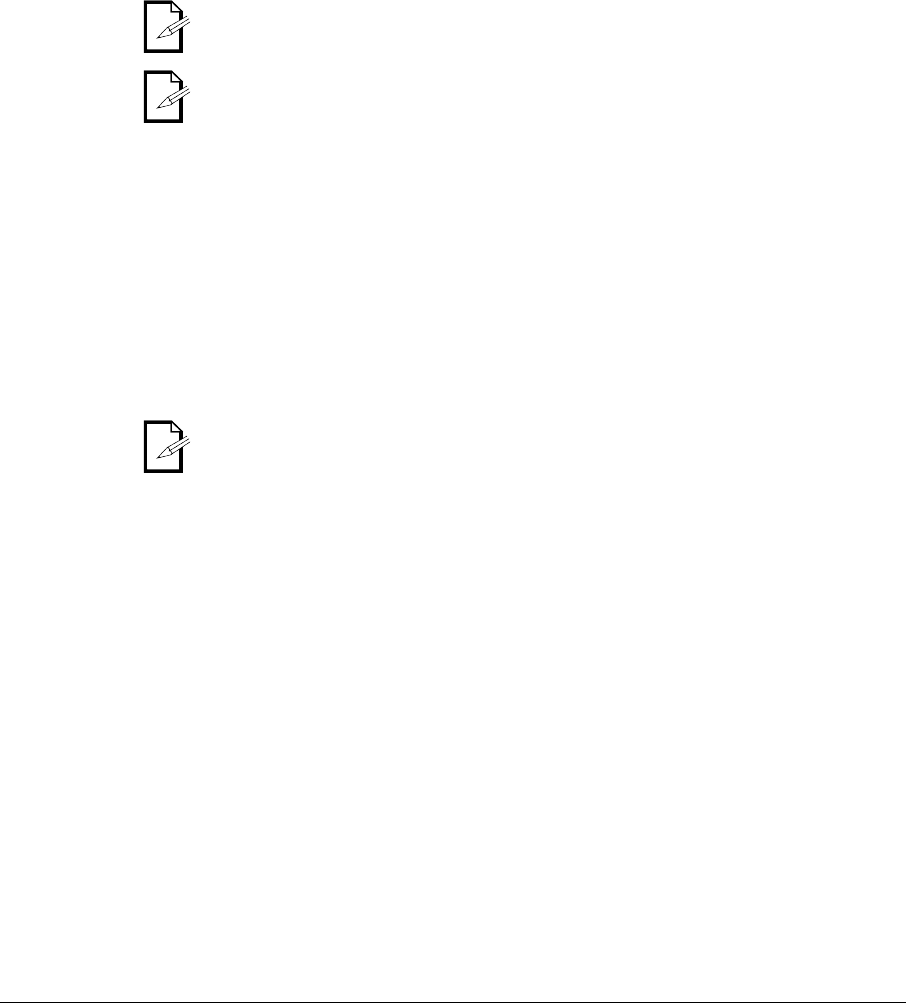
DMX Channel Values
CHANNEL
VALUE
FUNCTION
1
000 ó 010
011 ó 045
046 ó 080
081 ó 115
116 ó 150
151 ó 185
186 ó 220
221
ó
255
Pod 1
Blackout
Red
Green
Blue
Yellow
Magenta
Cyan
White
2
000 ó 010
011 ó 045
046 ó 080
081 ó 115
116 ó 150
151 ó 185
186 ó 220
221 ó 255
Pod 2 (run speed when CH.8 is between 011~239)
Blackout
Red
Green
Blue
Yellow
Magenta
Cyan
White
3~6
000 ó 010
011 ó 045
046 ó 080
081 ó 115
116 ó 150
151 ó 185
186 ó 220
221
ó
255
Pod 3~6
Blackout
Red
Green
Blue
Yellow
Magenta
Cyan
White
7
000 ó 009
010 ó 255
Strobe
No function
Strobe
(
slow~fast)
8
000 ó 010
011 ó 047
048 ó 095
096 ó 119
120 ó 144
145 ó 167
168 ó 191
192 ó 215
216 ó 239
240 ó 255
Mode
Individual pod control with strobe (channels 1~7)
Automatic 1
Automatic 2
Automatic 3
Automatic 4
Automatic 5
Automatic 6
Automatic 7
Automatic 8
Sound-active
4. Operating Instructions 10 1/12/2011 11:51 AM
Master/Slave Mode (Sound-Active)
This mode allows a single unit, the master, to operate in either automatic or sound-active mode.
When additional (slave) fixtures are daisy chained to the master, they will all synchronize with
the master and run the same lighting show.
Please see the instructions below for details on this mode.
Master:
1. Place the master fixture first in the daisy chain.
2. Set the master fixture to operate in either automatic or sound-active mode; please see
the appropriate sections of this manual for details on this procedure.
Slave:
1. Daisy chain from the output of the master fixture.
2. Press <MODE> until SLAU appears on the LED screen.
Plug the master fixture in LAST!
Only connect 31 slave fixtures when operating in this mode!
Standalone
Sound-Active
Please see the instructions below for details on this mode.
1. Plug the fixture into power.
2. Press <MODE> until SoUd appears on the LED screen.
3. Press <ENTER>.
4. Use the microphone sensitivity adjustment knob to adjust the fixture to react to the
beat of the music.
5. Press <ENTER>.
The microphone will only respond to low frequencies (bass).
Automatic
Please see the instructions below for details on this mode.
1. Plug the fixture into power.
2. Press <MODE> until AUTO appears on the LED screen.
3. Press <ENTER>.
4. Using <UP> & <DOWN>, adjust the program speed (S_ _1~S100) (fast~slow).
5. Press <ENTER>.
5. Appendix 11 1/12/2011 11:51 AM
5. APPENDIX
General Troubleshooting
S
YMPTOM
P
OSSIBLE
C
AUSE
(
S
)
P
OSSIBLE
A
CTION
(
S
)
Breaker/Fuse
keeps blowing
• Excessive circuit load • Check total load placed on the electrical
circuit
• Short circuit along the power
wires • Check for a short in the electrical wiring
(internal and/or external)
Device does not
power up
•
No power
•
Check for power on Mains
• Loose power cord • Check power cord
Fixture is not
responding to DMX
• Wrong DMX addressing • Check Control Panel and unit
addressing
•
Damaged DMX cables
•
Check DMX cables
• Wrong polarity settings on the
controller
• Check polarity switch settings on the
controller
•
Loose DMX cables
•
Check cable connections
•
Faulty DMX interface
•
Replace DMX input
•
Faulty Main PCB
•
Replace Main PCB
Loss of signal
• Non DMX cables • Use only DMX compatible cables
•
Bouncing signals
•
Install terminator as suggested
• Long cable / low level signal • Install amplifier right after fixture with
strong signal.
• Too many fixtures • Install an optically coupled DMX splitter
after unit #32
• Interference from AC wires • Keep DMX cables separated from power
cables or black lights
If you still have a problem after trying the above solutions, please contact CHAUVET® Technical
Support.

5. Appendix 12 1/12/2011 11:51 AM
DMX Primer
There are 512 channels in a DMX connection. A fixture capable of receiving DMX will require
one or a number of sequential channels. The user must assign a starting address on the fixture
that indicates the first channel reserved in the controller. There are many different types of DMX
controllable fixtures and they all may vary in the total number of channels required. Choosing a
start address should be planned in advance. Channels should never overlap. If they do, this will
result in erratic operation of the fixtures whose starting address is set incorrectly. You can
however, control multiple fixtures of the same type using the same starting address as long as
the intended result is that of unison movement or operation. In other words, the fixtures will all
respond exactly the same.
DMX fixtures are designed to receive data through a daisy chain. A daisy chain connection is
where the DATA OUT of one fixture connects to the DATA IN of the next fixture. The order in
which the fixtures are connected is not important and has no effect on how a controller
communicates to each fixture. Use an order that provides for the easiest and most direct
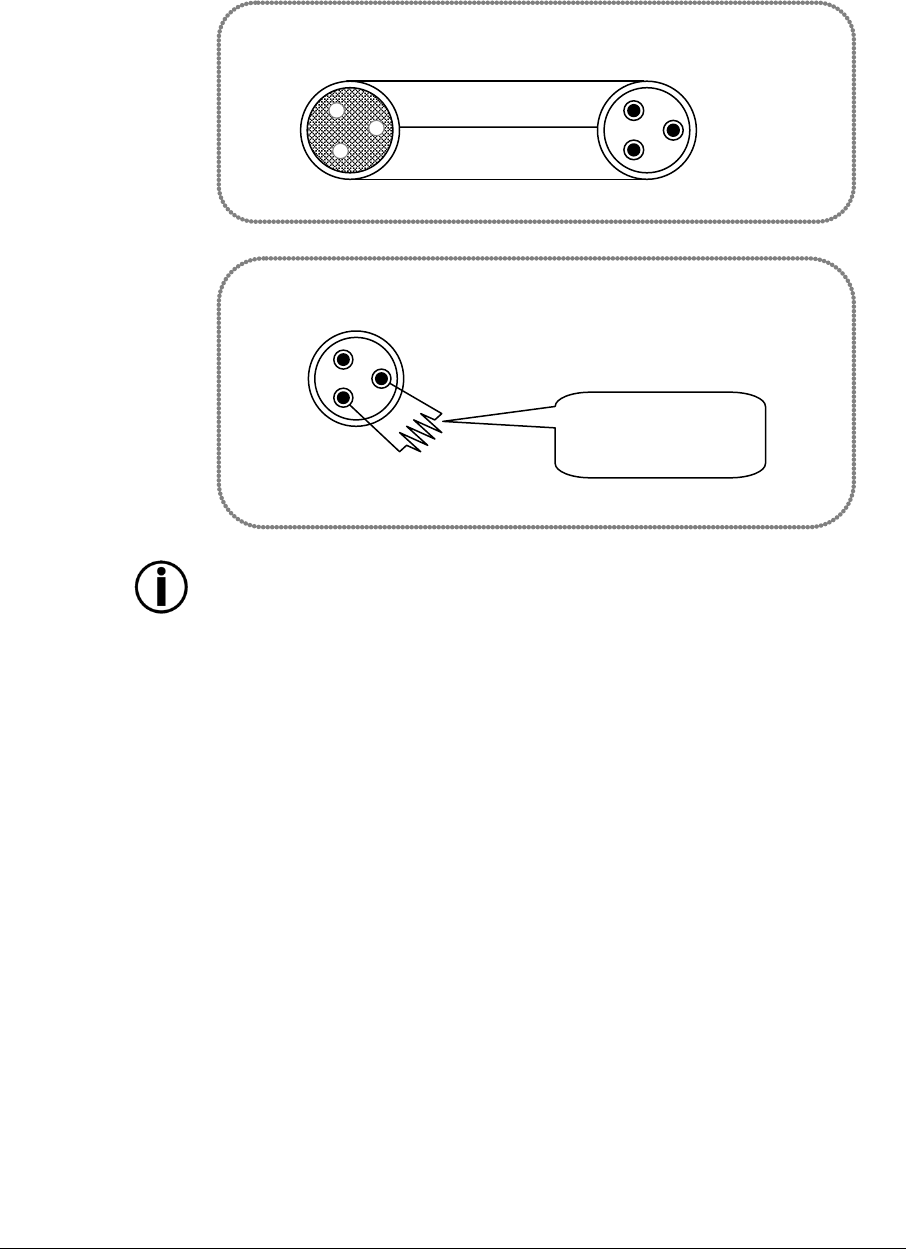
cabling. Connect fixtures using shielded two conductor twisted pair DMX data cable with three
pin XLR male to female connectors. The shield connection is pin 1, while pin 2 is Data Negative
(S-) and pin 3 is Data positive (S+).
Fixture Linking (Daisy Chain)
You will need a daisy chain to run light shows of one or more fixtures using a DMX controller or
to run synchronized shows on two or more fixtures set to a master/slave operating mode. The
combined number of channels required by all the fixtures on a daisy chain determines the
number of fixtures the data link can support.
To comply with the EIA-485 standard, do not connect more than 32 fixtures on one daisy
chain. Connecting more than 32 fixtures on one daisy chain without the use of a DMX
optically-isolated splitter may result in deterioration of the digital DMX signal.
Maximum recommended cable distance: 500 m (1640 ft)
Maximum recommended number of fixtures on a daisy chain: 32
Data Cabling
To link fixtures together you must obtain data cables. You can purchase CHAUVET® certified
DMX cables directly from a dealer/distributor or construct your own cable. If you choose to
create your own cable please use data-grade cables that can carry a high quality signal and are
less prone to electromagnetic interference.
DMX Data Cable
Use a Belden© 9841 or equivalent cable which meets the specifications for EIA RS-485
applications. Standard microphone cables cannot transmit DMX data reliably over long
distances. The cable must have the following characteristics:
Type: shielded, 2-conductor twisted pair
Maximum capacitance between conductors: 30 pF/ft
Maximum capacitance between conductor and shield: 55 pF/ft
Maximum resistance: 20 ohms/1000 ft
Nominal impedance: 100 ~ 140 ohms
5. Appendix 13 1/12/2011 11:51 AM
Cable Connectors
Cabling must have a male XLR connector on one end and a female XLR
connector on the other end.
Do not allow contact between the common and the fixture’s chassis ground. Grounding
the common can cause a ground loop, and your fixture may perform erratically. Test
cables with an ohm meter to verify correct polarity and to make sure the pins are not
grounded or shorted to the shield or each other.
Setting the Starting Address
This DMX mode enables the use of a universal DMX controller device. Each fixture requires a
start address from 1~512. A fixture requiring one or more channels for control begins to read the
data on the channel indicated by the start address. For example, a fixture that uses six DMX
channels and was addressed to start on DMX channel 100, would read data from channels:
100, 101, 102, 103, 104, and 105. Choose start addresses so that the channels used do not
overlap, and note the start address selected for future reference.
If this is your first time addressing a fixture using the DMX control protocol, we suggest jumping
to the “Appendix” section and reading the heading “DMX Primer”. It contains very useful
information that will help you understand its use.
COMMON
DMX +
DMX -
INPUT
OUTPUT
1
3
2
1
3
2
1
3
2
120 ohm ¼ W resistor
between pin 2 (DMX -) and
pin 3 (DMX +) on the
output of the last fixture
To avoid signal transmission problems
and interference, it is always advisable to
connect a DMX signal terminator.
DMX connector configuration
Terminator
5. Appendix 14 1/12/2011 11:51 AM
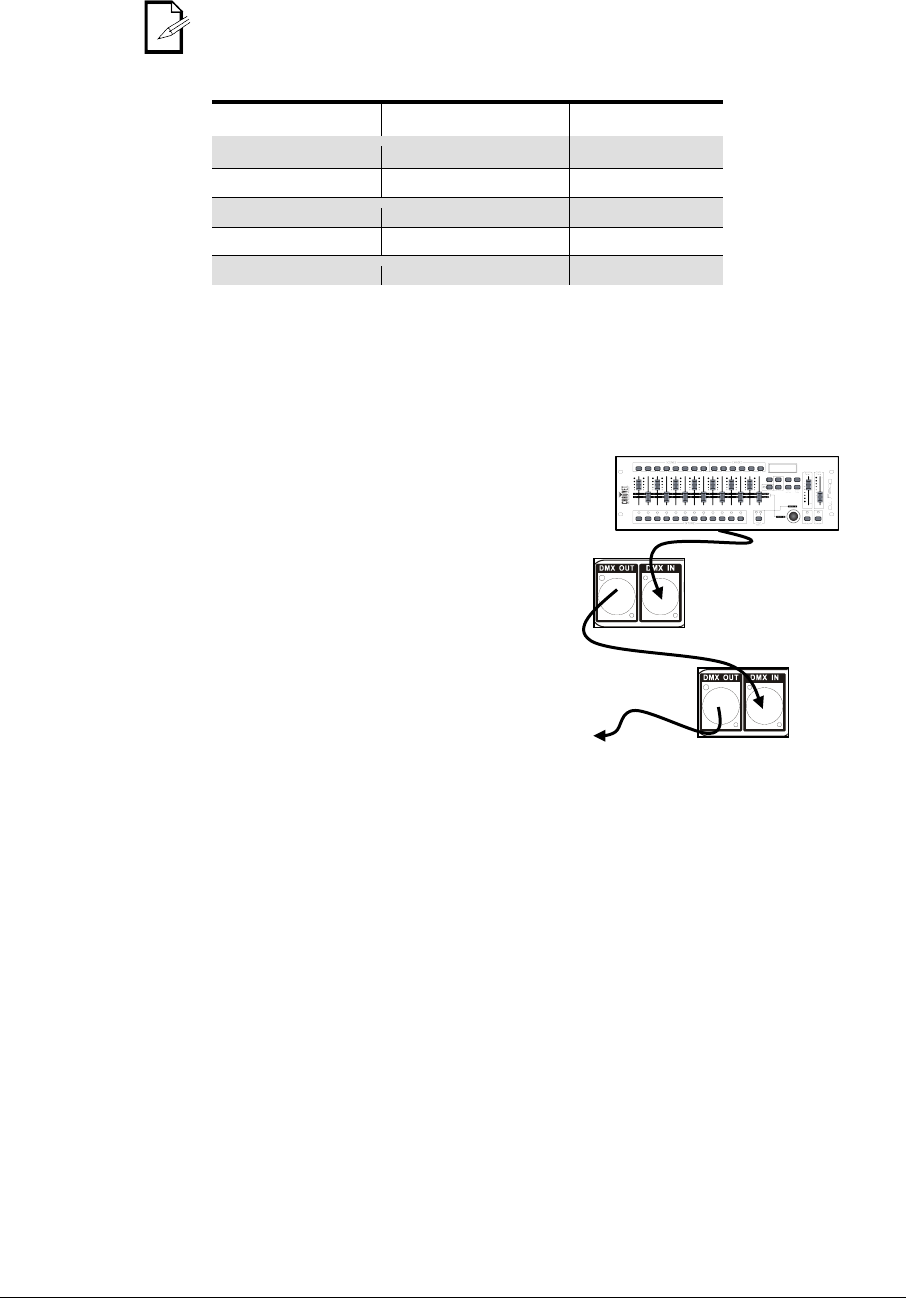
3-Pin to 5-Pin Conversion Chart
If you use a controller with a 5-pin DMX output connector, you will need to use a 5-pin to
3-pin adapter. The chart below details a proper cable conversion:
3-PIN TO 5-PIN CONVERSION CHART
Conductor
3-Pin Female (Output)
5-Pin Male (Input)
Ground/Shield
Pin 1
Pin 1
Data ( - ) signal
Pin 2
Pin 2
Data ( + ) signal
Pin 3
Pin 3
Not used
Pin 4
Not used
Pin 5
Setting up a DMX Daisy Chain
1. Connect the (male) 3-pin connector side of
the DMX cable to the output (female) 3-pin
connector of the controller.
2. Connect the end of the cable coming from the
controller which will have a (female) 3-pin
connector to the input connector of the next
fixture consisting of a (male) 3-pin connector.
3. Then, proceed to connect from the output as
stated above to the input of the following
fixture and so on.
Universal DMX Controller
This drawing provides a
general illustration of the
DMX input/output panel of
a lighting fixture.
Continue the link
5. Appendix 15 1/12/2011 11:51 AM
General Maintenance
To maintain optimum performance and minimize wear, fixtures should be cleaned frequently.
Usage and environment are contributing factors in determining cleaning frequency. As a general
rule, fixtures should be cleaned at least twice a month. Dust build up reduces light output
performance and can cause overheating. This can lead to reduction in the life of the light source
and mechanical wear. Be sure to power off fixture before conducting maintenance.
• Unplug fixture from power.
• Use a vacuum or air compressor and a soft brush to remove dust collected on
external vents.
• Clean all lenses when the fixture is cool with a mild solution of glass cleaner or
Isopropyl Alcohol and a soft lint free cotton cloth or lens tissue.
• Apply solution to the cloth or tissue and drag dirt and grime to the outside of the lens.
•
Gently polish optical surfaces until they are free of haze and lint.
Always dry the parts carefully after cleaning them.
If the fixture has one or more fans, never spin them using compressed air.
Returns Procedure
Returned merchandise must be sent prepaid and in the original packing; call tags will not be
issued. Package must be clearly labeled with a Return Merchandize Authorization Number (RMA
#). Products returned without the RMA # will be refused. Call CHAUVET® and request an RMA #
prior to shipping the fixture. Be prepared to provide the model number, serial number and a brief
description of the cause for the return. Be sure to pack fixture properly; any shipping damage
resulting from inadequate packaging is the customer’s responsibility. As a suggestion, proper
UPS packing or double-boxing is always a safe method to use. CHAUVET® reserves the right to
use its own discretion to repair or replace product(s).
If you are given an RMA #, please include the following information on a piece of paper
inside the box:
1) Your name
2) Your address
3) Your phone number
4) The RMA #
5) A brief description of the symptoms
Claims
Damage incurred in shipping is the responsibility of the shipper; therefore, the damage must be
reported to the carrier upon receipt of merchandise. It is the customer's responsibility to notify
and submit claims with the shipper in the event that a fixture is damaged due to shipping. Any
other claim for items such as missing component/part, damage not related to shipping, and
concealed damage, must be made within seven (7) days of receiving merchandise.
TECHNICAL SPECIFICATIONS
WEIGHT & DIMENSIONS
Length.............................................................................................................. 14.8 in (375 mm)
Width ................................................................................................................. 7.5 in (190 mm)
Height ................................................................................................................ 6.3 in (160 mm)
Weight .................................................................................................................... 5 lbs (2.2 kg)
POWER
Input voltage ................................................................ 100~240 VAC, 50/60 Hz (auto-ranging)
Power and current ................................................................. 51 W; 0.42 A max (120 V, 60 Hz)
Power consumption .............................................................. 54 W; 0.24 A max (230 V, 50 Hz)
Power linking ............................................................ max 20 units @ 120 V; 33 units @ 230 V
LIGHT SOURCE
Type .................................................................................................... high-power, tri-color LED
Quantity ..................................................................................................................................... 6
Rating .......................................................................................... (3 W) 375 mA x 3; 50,000 hrs
PHOTO OPTIC
Lux (per light) ............................................................................................................ 814 @ 1 m
Beam angle (per light) ........................................................................................................... 11°
Coverage angle ...................................................................................................................... 76°
INDOOR/OUTDOOR
Rating ...........................................................................................................For indoor use only
THERMAL
Maximum ambient temperature .......................................................................... 104° F (40° C)
CONTROL & PROGRAMMING
Data input ................................................................................... locking 3-pin XLR male socket
Data output .............................................................................. locking 3-pin XLR female socket
Data pin configuration ................................................................ pin 1 shield, pin 2 (-), pin 3 (+)
Protocols .......................................................................................................... DMX-512 USITT
DMX Channels ...........................................................................................................................8
ORDERING INFORMATION
Sweeper™ LED ................................................................................................ SWEEPERLED
WARRANTY INFORMATION
Warranty ................................................................................................. 2-year limited warranty

CONTACT US
WORLD HEADQUARTERS
General Information ................................................................................................. CHAUVET®
Address .............................................................................................. 5200 NW 108th Ave
Sunrise, FL 33351
Voice ........................................................................................................... 954-929-1115
Voice (toll free) ............................................................................................ 800-762-1084
Fax .............................................................................................................. 954-929-5560
Technical Support .................................................................................................... CHAUVET®
Voice ........................................................................................... 954-929-1115 (Press 4)
Fax .............................................................................. 954-929-5560 (Attention: Service)
Email ....................................................................................... tech@chauvetlighting.com
World Wide W eb ....................................................................... http://www.chauvetlighting.com
UNITED KINGDOM & IRELAND
General Information .............................................................................. CHAUVET® Europe Ltd
Address .................................................................................................................. Unit 1C
Brookhill Road Industrial Estate
Pinxton, Nottingham, UK
NG16 6NT
Voice ................................................................................................. +44 (0)1773 511115
Fax .................................................................................................... +44 (0)1773 511110
EMail ................................................................................... uktech@chauvetlighting.com
World Wide W eb ......................................................................http://www.chauvetlighting.co.uk
