Chi Mei Communication Systems 0205NWT01 GSM Referance design User Manual newton

Chi Mei Communication Systems, Inc. GSM Referance design newton

Manual

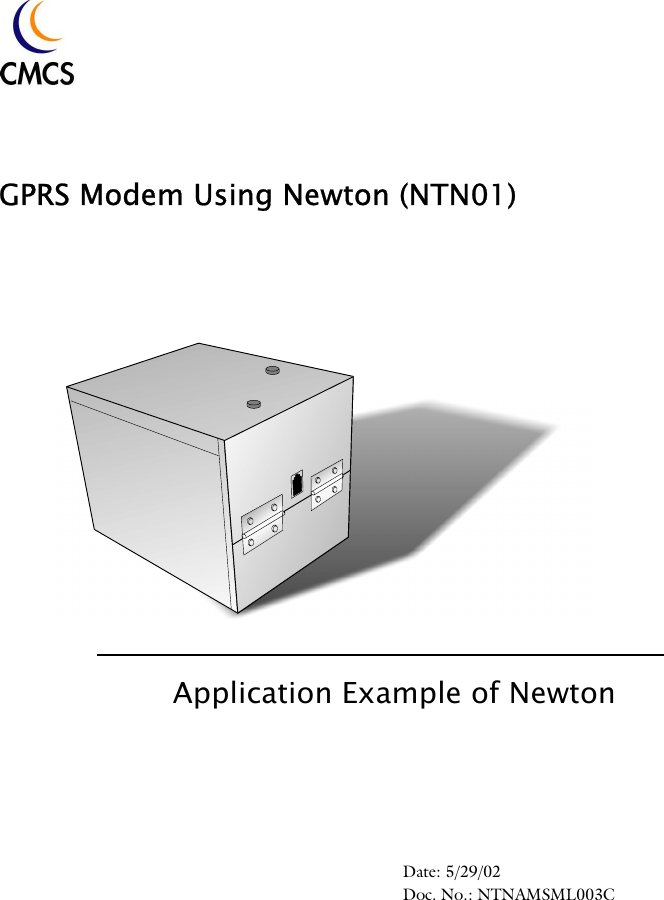
GPRS Modem Using Newton (NTN01)Application Example of NewtonDate: 5/29/02Doc. No.: NTNAMSML003C
Copyright StatementCopyright 2002 by Chi Mei Communication Systems, Inc. (CMCS) All rights reserved. No part of this publication may be reproduced, transmitted, transcribed, stored in a retrieval system or translated into any language or computer language, in any form or by any means, electronic, mechanical, magnetic, optical, chemical, manual or otherwise, without the prior written permission of CMCS.DisclaimerCMCS makes no representations or warranties, either expressed or implied, with respect to the contents hereof and specifically disclaims any warranties, merchantability or fitness for any particular purpose. Further, CMCS reserves the right to revise this publication and to make changes from time to time in the contents hereof without obligation of CMCS to notify any person of such revision or changes.ALL INFORMATION IS PROVIDED BY CMCS ON AN "AS IS" BASIS ONLY. CMCS PROVIDES NO REPRESENTATIONS AND WARRANTIES, EXPRESS OR IMPLIED, INCLUDING THE IMPLIED WARRANTIES OF FITNESS FOR A PARTICULAR PURPOSE, MERCHANTABILITY AND NONINFRINGE-MENT.
iTable of ContentsWelcome ....................................................... 1Features ............................................................... 1Overview .......................................................2Package contents  ................................................. 2Minimum system requirements ............................ 2The Tri-Band GSM/GPRS module box  ............... 3Installation and configuration......................... 5Installing SIM card .............................................. 5Installing batteries  ............................................... 7Making connections ............................................. 7Configuring the connection with PC  ................... 7Using the module box  ...................................18Appendix: SAR Report  ................................... 20
iiSafety PrecautionsWhen using this product, the safety precautions below must be taken against possible legal issues and damages.SAFETY IN AIRCRAFTThe interference would be caused by this product to an aircraft's navigation system and its network. In most countries, using this product on board an airplane is against the law.SAFETY FOR ENVIRONMENTSDo not use this product in gas stations. Also the use of this product is prohibited in fuel storehouse, chemical plants and locations containing explosives.SAFETY ON THE ROADVehicle drivers in motion are not permitted to use telephony services with the handheld device, except in the case of emergency. In some countries, using hand-free devices as an alternative is allowed.SAFETY ABOUT RADIATIONThis product should be operated in the suggested normal condition only to ensure the radiative performance and safety of the interference.SAFETY FOR MEDICAL EQUIPMENTSThis product may cause malfunctions of medical equipments. In most hospital or medical centers, the use of this product is forbidden.Attention• There are no user serviceable parts inside this product. If this product appears to be broken, call a qualified service personnel or send this product to your original dealer. Do not attempt to disassemble or repair this product as it may result in electric shock or unrecoverable damage to the product itself.• Keep this product out of reach of small children.• Remove this product from your handheld device when not in use. Store this product in its protective case in a cool dry place.
iii• The antenna of this product is not removable. Do not try to detach the antenna from the product.• Avoid touching the antenna while in use, otherwise it may cause adverse effect to signal reception.FCC Compliance StatementThis device complies with Part 15 of the FCC Rules. Operation is subject to the following two conditions: (1) this device may not cause harmful interference, and (2) this device must accept any interference received, including interference that may cause undesired operation.Statement according FCC part 15.21Modifications not expressly approved by CMCS could void the user's authority to operate the equipment.Statement according FCC part 15.105NOTE: This equipment has been tested and found to comply with the limits for a Class B digital device, pursuant to Part 15 of the FCC Rules. These limits are designed to provide reasonable protection against harmful interference in a resi-dential installation. This equipment generates, uses and can radiate radio fre-quency energy and, if not installed and used in accordance with the instructions, may cause harmful interference to radio communications. However, there is no guarantee that interference will not occur in a particular installation. If this equipment does cause harmful interference to radio or television reception, which can be determined by turning the equipment off and on, the user is encouraged to try to correct the interference by one or more of the following measures:• Reorient or relocate the receiving antenna.• Increase the separation between the equipment and receiver.• Connect the equipment into an outlet on a circuit different from that to which the receiver  is connected.Consult the dealer or an experienced radio/TV technician for help.RF exposure Tests for SAR are conducted using standard operating positions specified by the FCC with the phone transmitting at its highest certified power level in all tested frequency bands. Although the SAR is determined at the highest certified power level, the actual SAR level of the phone while operation can be well below the maximum value. This is because the phone is designed to operate at multiple power levels so as to use only the power required to reach the network. In gen-
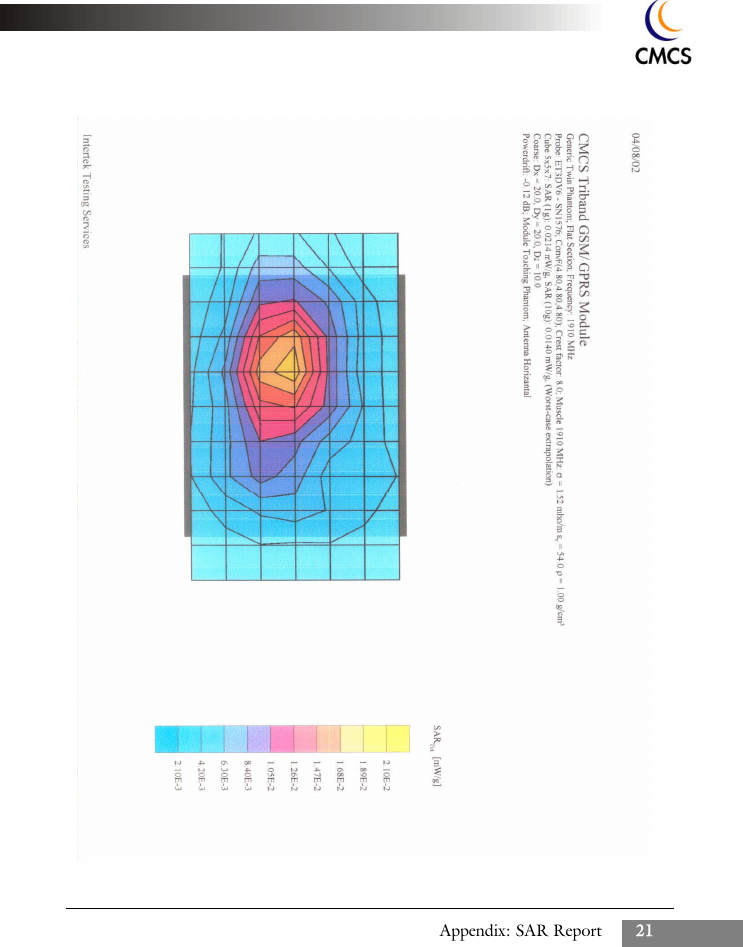
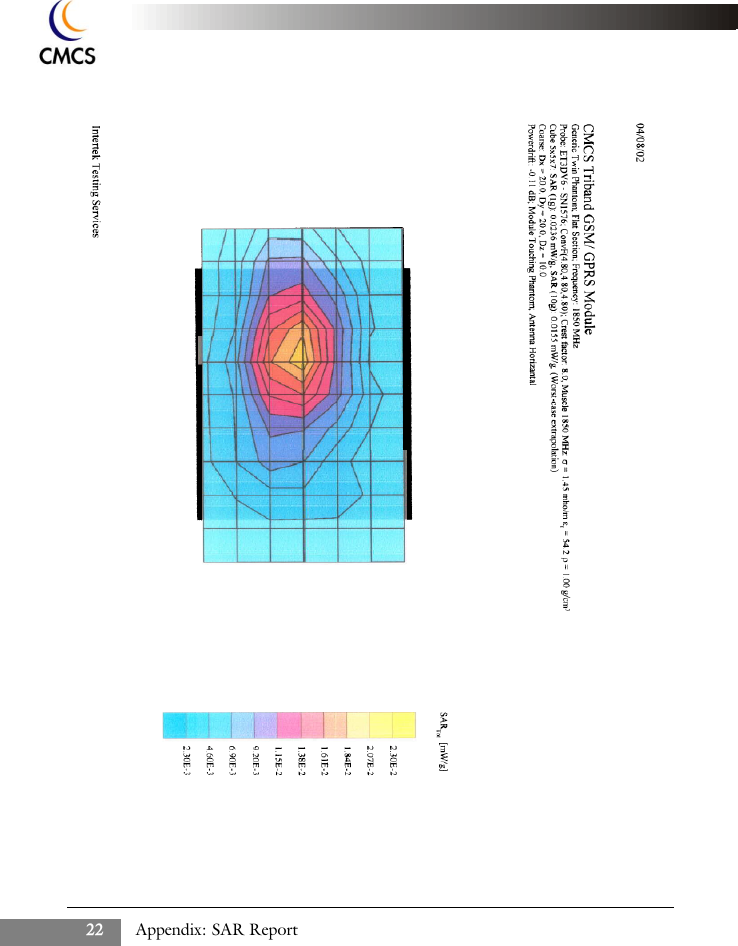
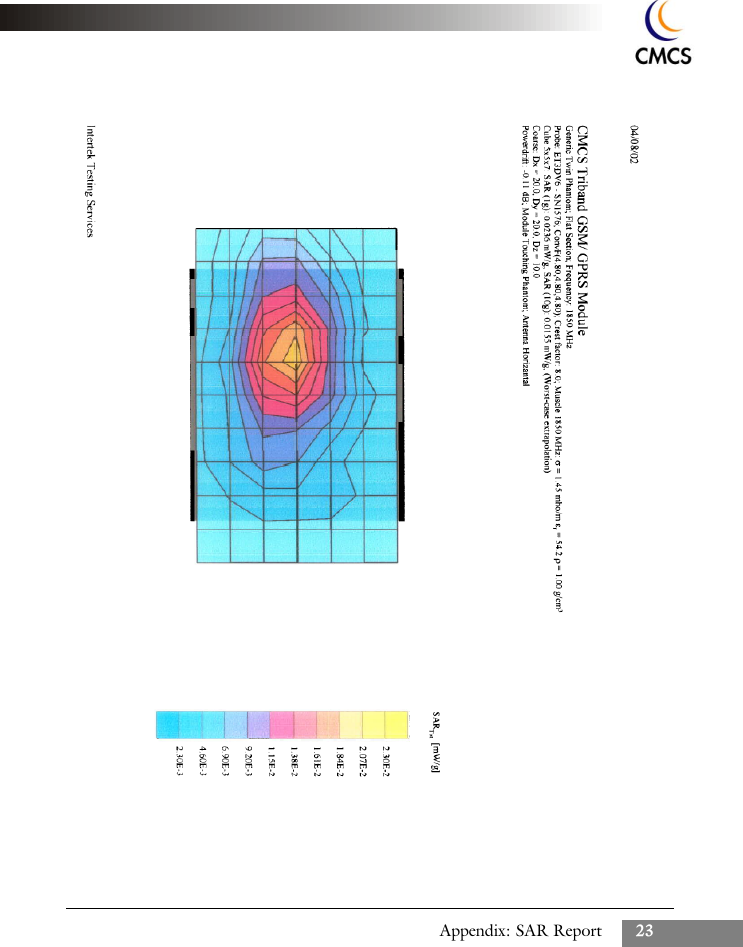
iveral, the closer you are to a wireless base station antenna, the lower the power output. Before a phone model is available for sale to the public, it must be tested and cer-tified to the FCC that it does not exceed the limit established by the govern-ment-adopted requirement for safe exposure. The tests are performed in positions and locations (e.g., at the ear and worn on the body) as required by the FCC for each model. (Body-worn measurements may differ among phone mod-els, depending upon available accessories and FCC requirements). While there may be differences between the SAR levels of various phones and at various positions, they all meet the government requirement for safe exposure. For body worn operation, to maintain compliance with FCC RF exposure guidelines, use only CMCS approved accessories. When carrying the phone while it is on, use the specific CMCS-supplied or approved carrying case, holster, or other body-worn accessory.Use of non-CMCS-approved accessories may violate FCC RF exposure guide-lines and should be avoided.Health and Safety InformationEXPOSURE TO RADIO FREQUENCY (RF) SIGNALSYour wireless phone is a radio transmitter and receiver. It is designed and manu-factured not to exceed the emission limits for exposure to radio frequency (RF) energy set by the Federal Communications Commission of the U.S. Govern-ment. These limits are part of comprehensive guidelines and establish permitted levels of RF energy for the general population. The guidelines are based on the safety standards previously set by both U.S. and international standards bodies: * American National Standards Institute (ANSI) IEEE. C95.1-1992* National Council on Radiation Protection and Measurement (NCRP). Report 86. 1986* International Commission on Non-Ionizing Radiation Protection (ICNIRP) 1996* Ministry of Health (Canada), Safety Code 6. The standards include a substan-tial safety margin designed to assure the safety of all persons, regardless of age and health.The exposure standard for wireless mobile phones employs a unit of measure-ment known as the Specific Absorption Rate, or SAR. The SAR limit set by the FCC is 1.6W/kg *.* In the U.S. and Canada, the SAR limit for mobile phones used by the public is 1.6 watts/kg (W/kg) averaged over one gram of tissue. The standard incorporates a substantial mar-gin of safety to give additional protection for the public and to account for any variations in.
vStatement for OEMsSeparate approval is required for operations with respect to 2.1093 as a portabletransmitter.This device is approved as a module to be installed in other devices. Each OEMmust obtain their own Certification for each device containing this module. Thisincludes measurements to satisfy RF exposure requirements.
Welcome 1WelcomeThank you for purchasing the CMCS Tri-Band GSM/GPRS module.Combining extra-small profile with powerful features, the module pro-vides the best design flexibility and outstanding performance to meet avariety of demands for integration into different devices. Plus, the rapidGPRS capability realizes faster and permanent data connection withoutcables.Features• Tri-band EGSM900/DCS1800/PCS1900• Always on line: GPRS Class B, multi-slot Class 10• Small form factor design• Low power consumption• SIM application tool kit• Easy to integrate with a wide range of applications, such as mobile computers, handheld devices, remote control/monitoring systems, POS terminals, vending machines, and security systems
Overview2OverviewPackage contentsOpen the shipping package and check for the following items. If there isany item missing or damaged, please contact your dealer immediately.• One CMCS Tri-Band GSM/GPRS module box• One handset with connection cord• Two RS232 cablesMinimum system requirements• A PC running Windows 95/98/2000 or XP with  at least an RS232 port• A valid SIM card
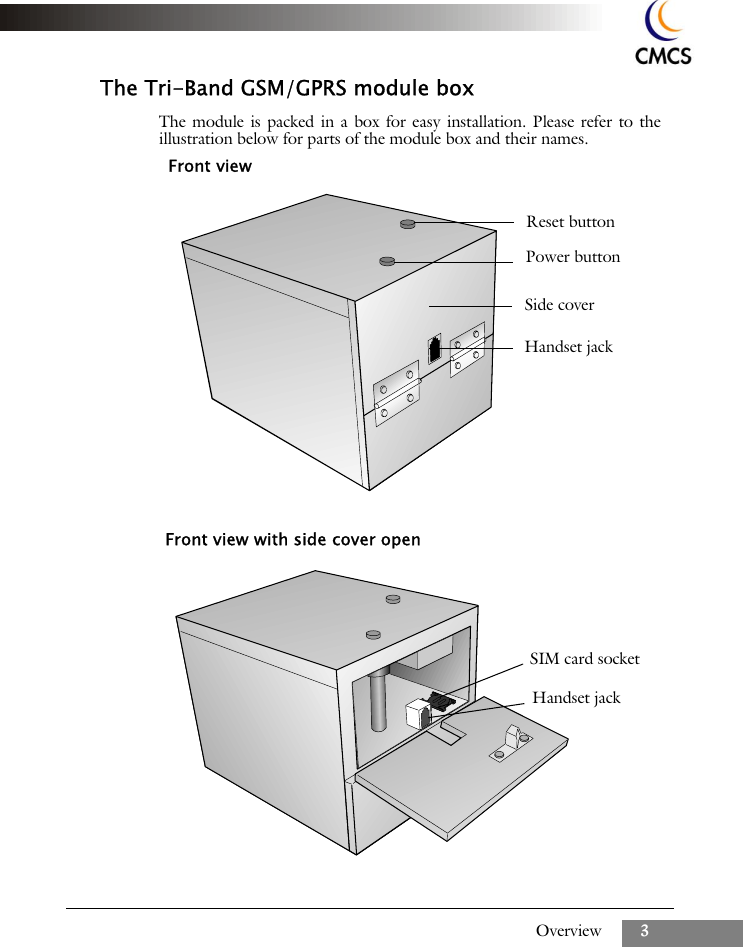
Overview 3The Tri-Band GSM/GPRS module boxThe module is packed in a box for easy installation. Please refer to theillustration below for parts of the module box and their names.Reset buttonPower buttonHandset jackSide coverFront view with side cover openHandset jackSIM card socketFront view
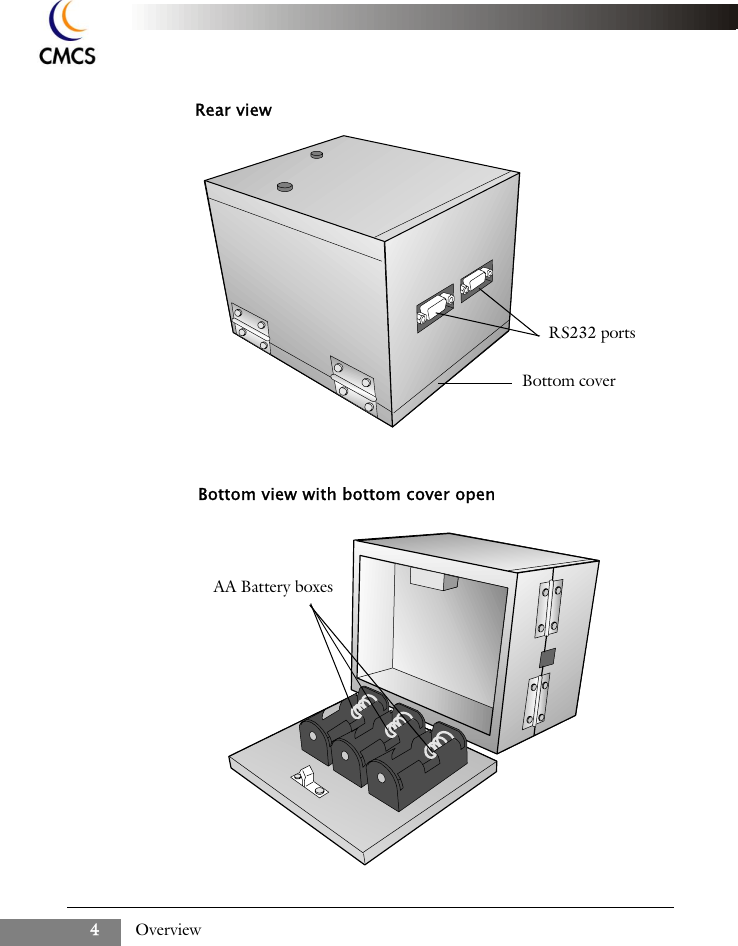
Overview4Rear viewRS232 portsBottom view with bottom cover openAA Battery boxesBottom cover
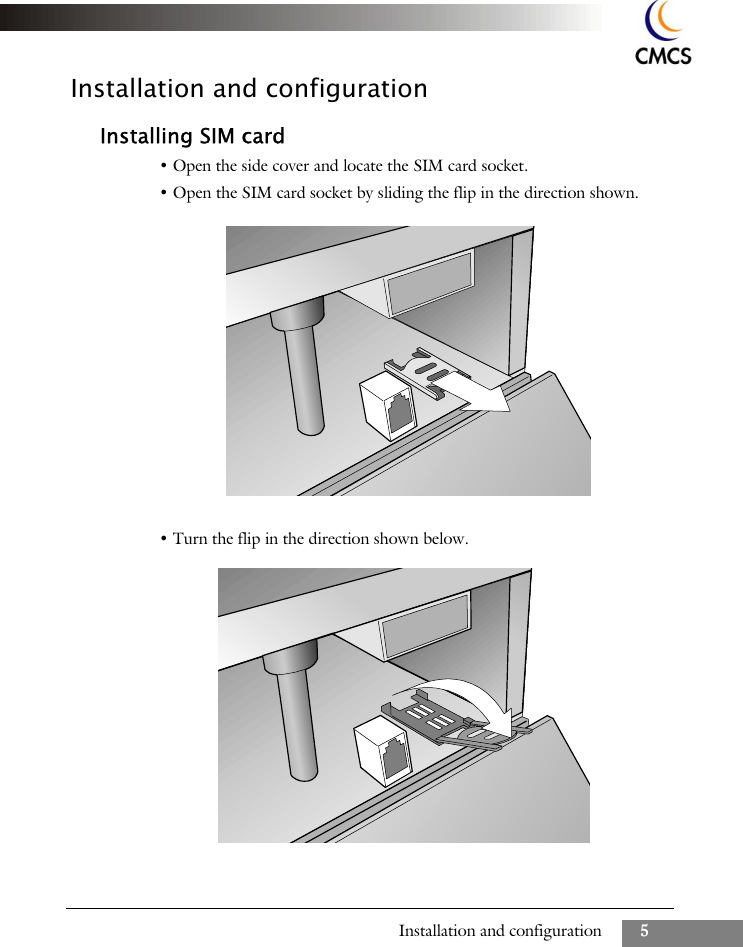
Installation and configuration 5Installation and configurationInstalling SIM card• Open the side cover and locate the SIM card socket.• Open the SIM card socket by sliding the flip in the direction shown.• Turn the flip in the direction shown below.
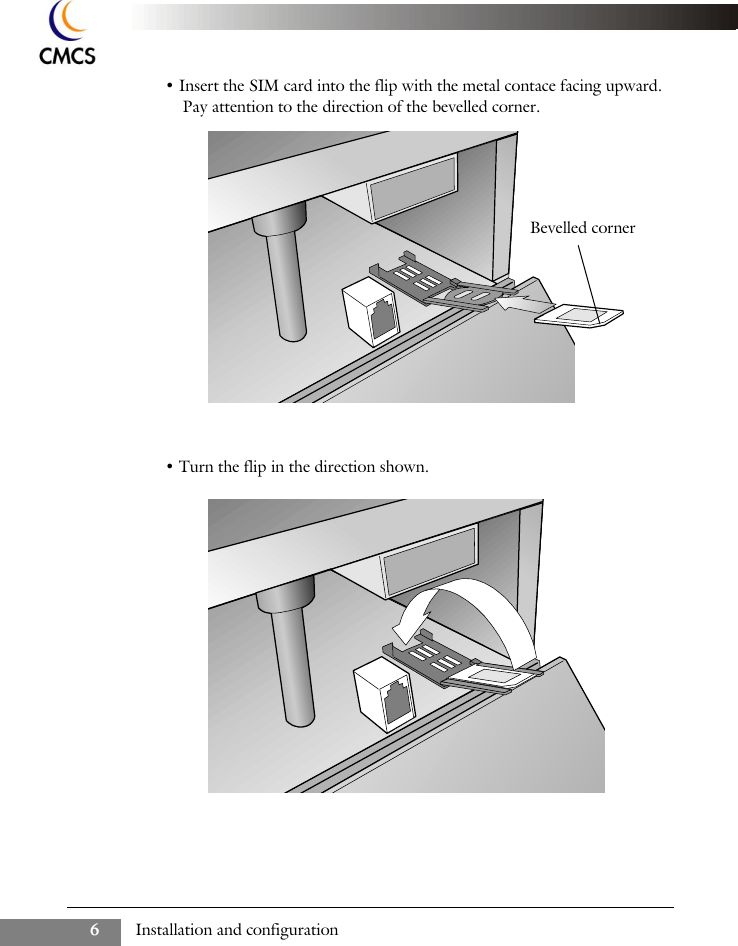
Installation and configuration6• Insert the SIM card into the flip with the metal contace facing upward. Pay attention to the direction of the bevelled corner.• Turn the flip in the direction shown.Bevelled corner
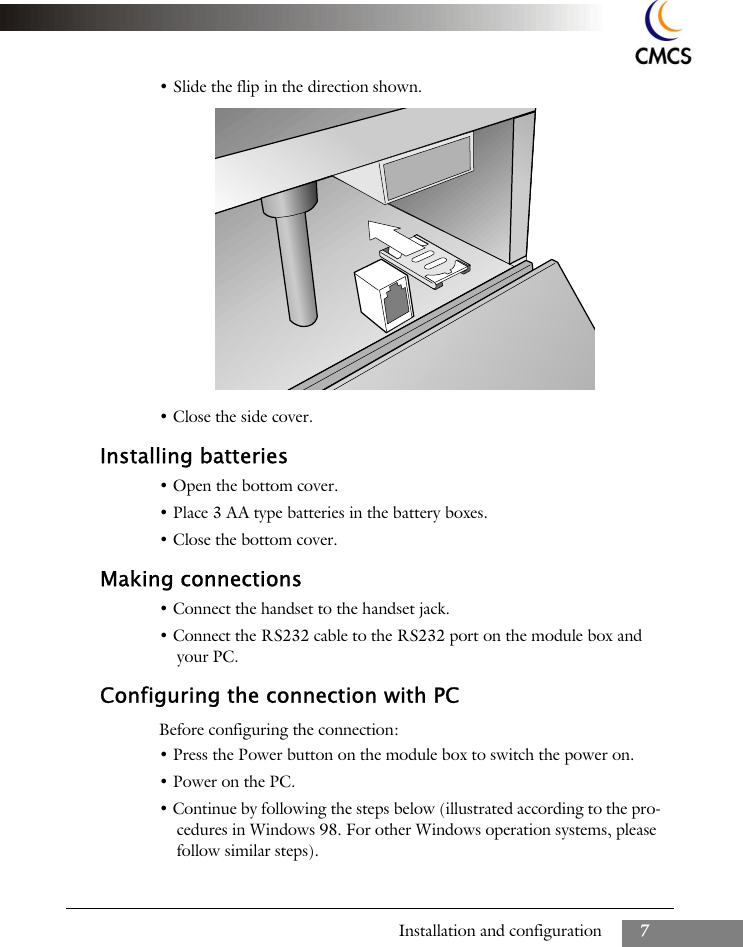
Installation and configuration 7• Slide the flip in the direction shown.• Close the side cover.Installing batteries• Open the bottom cover.• Place 3 AA type batteries in the battery boxes.• Close the bottom cover.Making connections• Connect the handset to the handset jack.• Connect the RS232 cable to the RS232 port on the module box and your PC.Configuring the connection with PCBefore configuring the connection:• Press the Power button on the module box to switch the power on.• Power on the PC.• Continue by following the steps below (illustrated according to the pro-cedures in Windows 98. For other Windows operation systems, please follow similar steps).
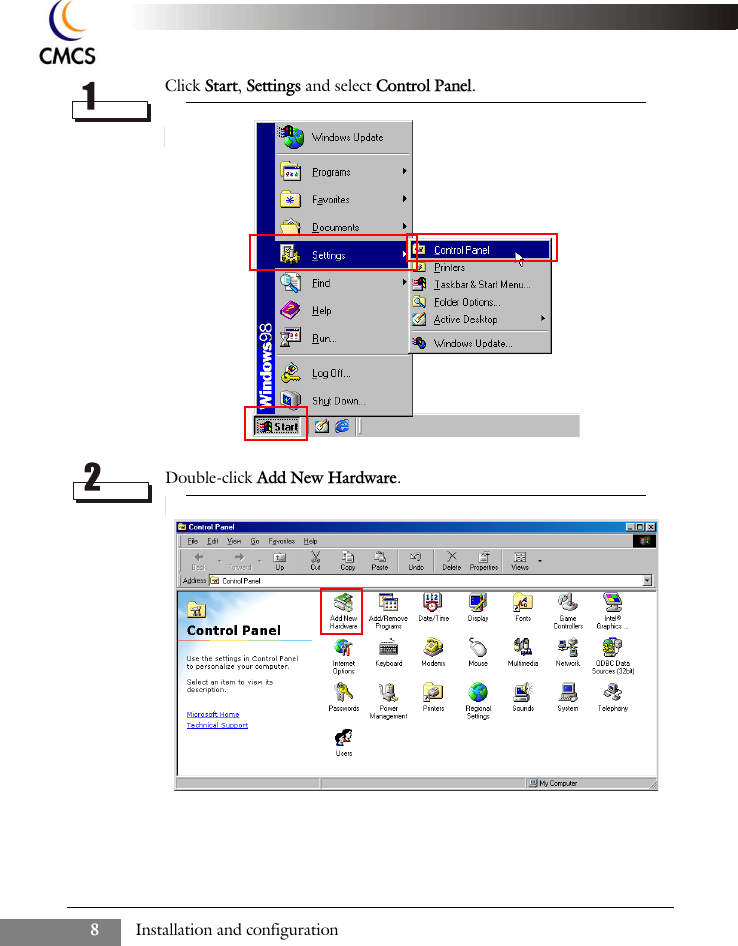
Installation and configuration8Click Start, Settings and select Control Panel. Double-click Add New Hardware.
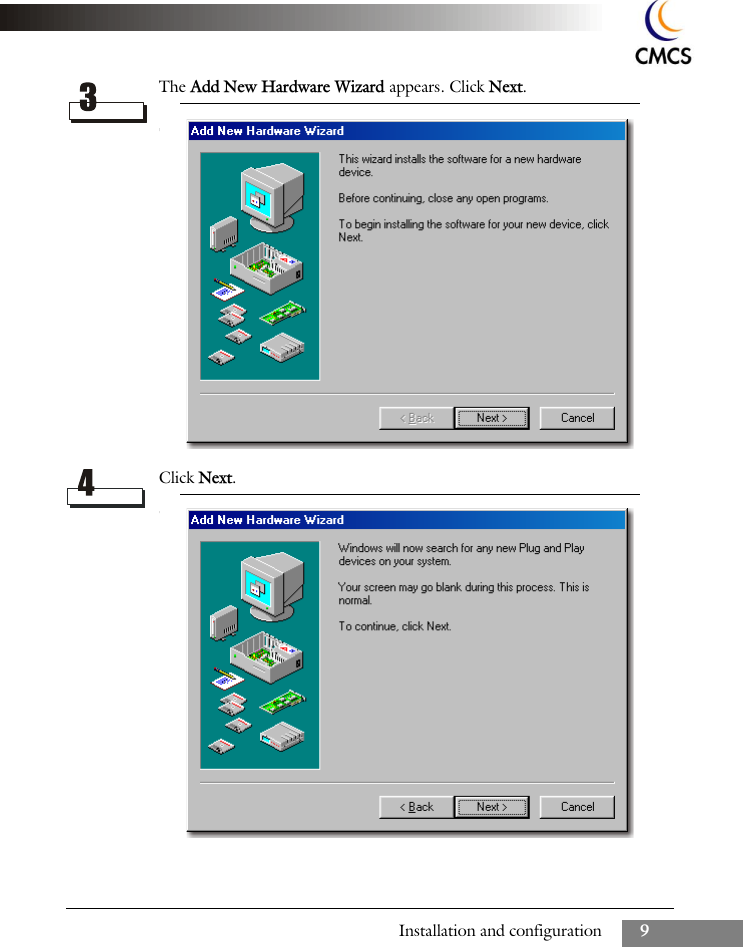
Installation and configuration 9The Add New Hardware Wizard appears. Click Next.Click Next.
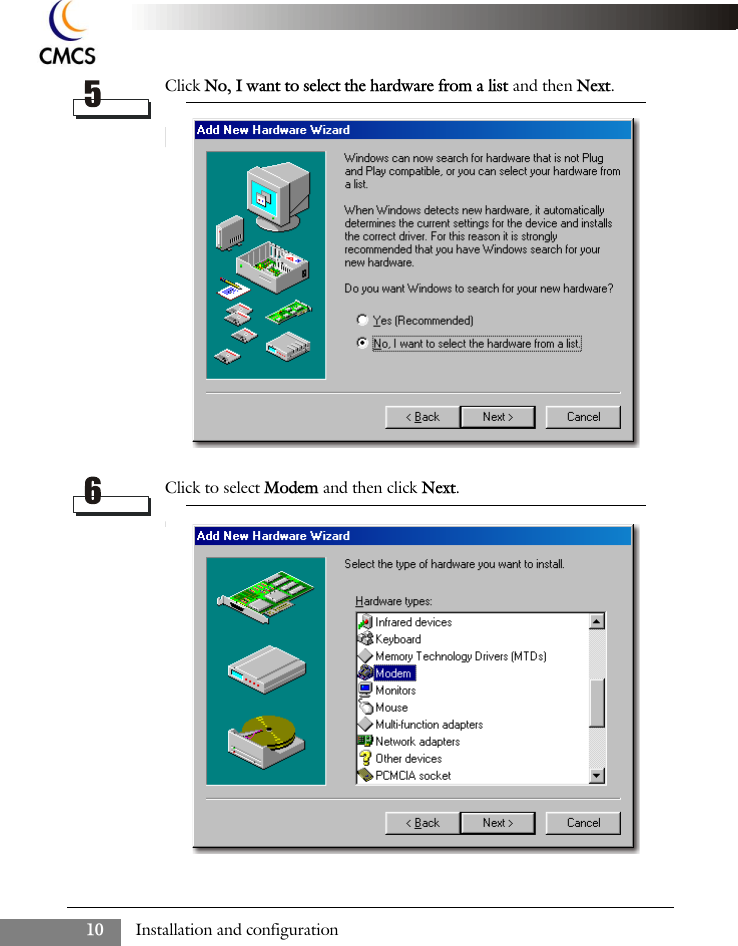
Installation and configuration10Click No, I want to select the hardware from a list and then Next.Click to select Modem and then click Next.
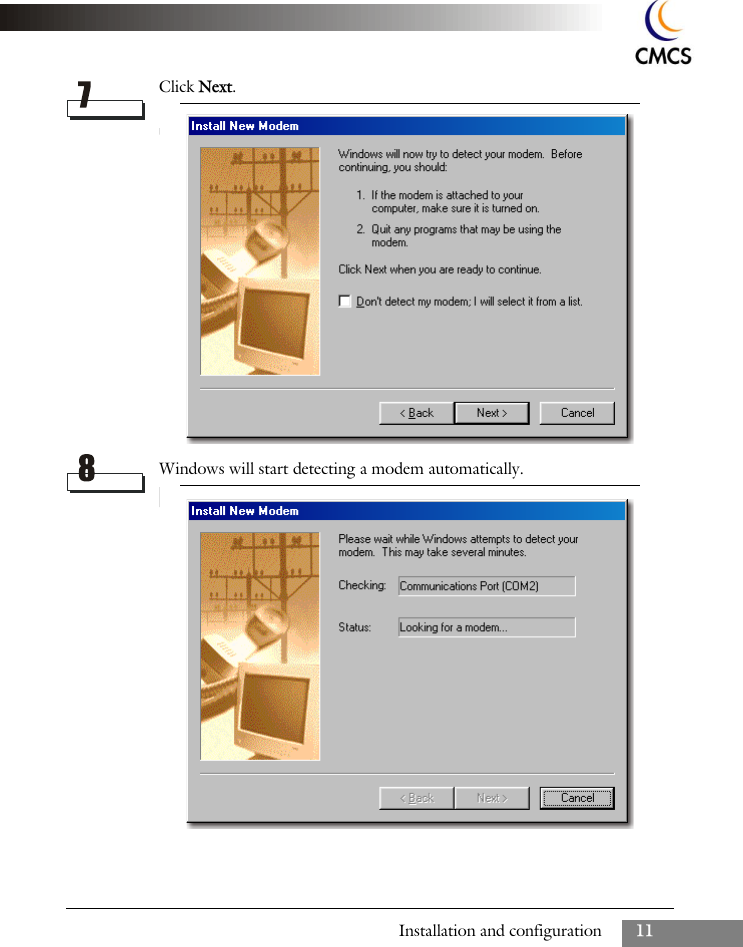
Installation and configuration 11Click Next.Windows will start detecting a modem automatically.
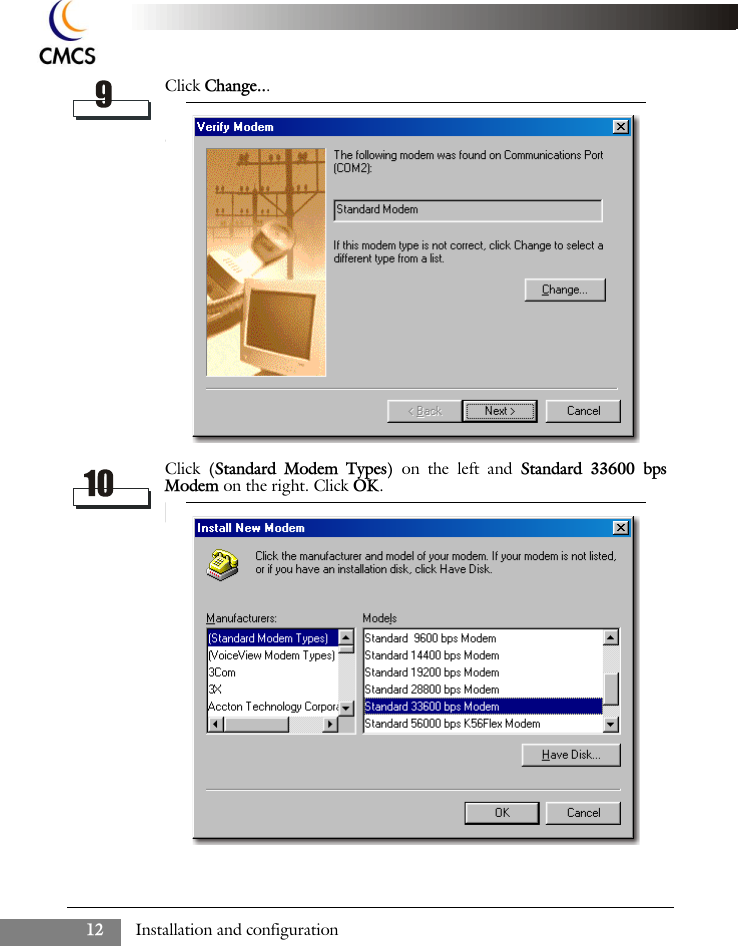
Installation and configuration12Click Change...Click  (Standard Modem Types) on the left and Standard 33600 bpsModem on the right. Click OK.
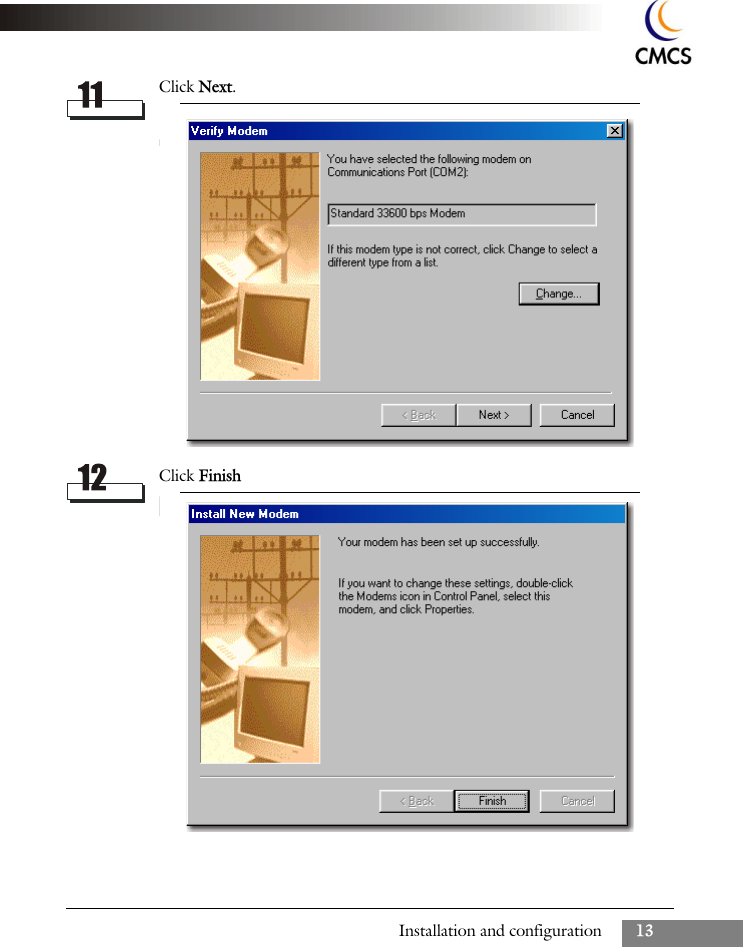
Installation and configuration 13Click Next.Click Finish
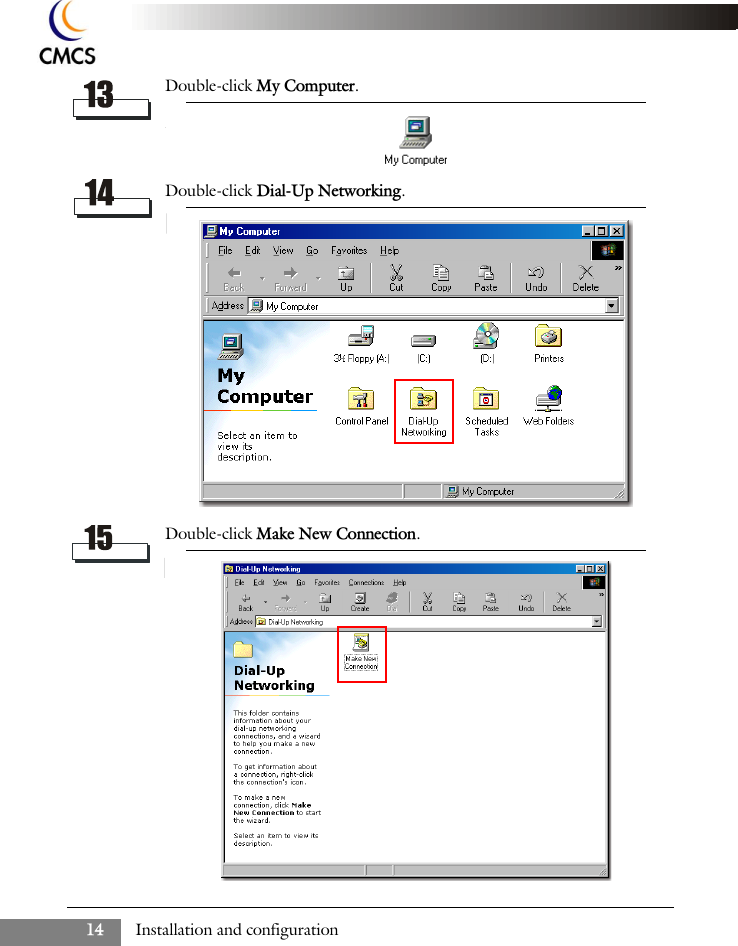
Installation and configuration14Double-click My Computer.Double-click Dial-Up Networking.Double-click Make New Connection.
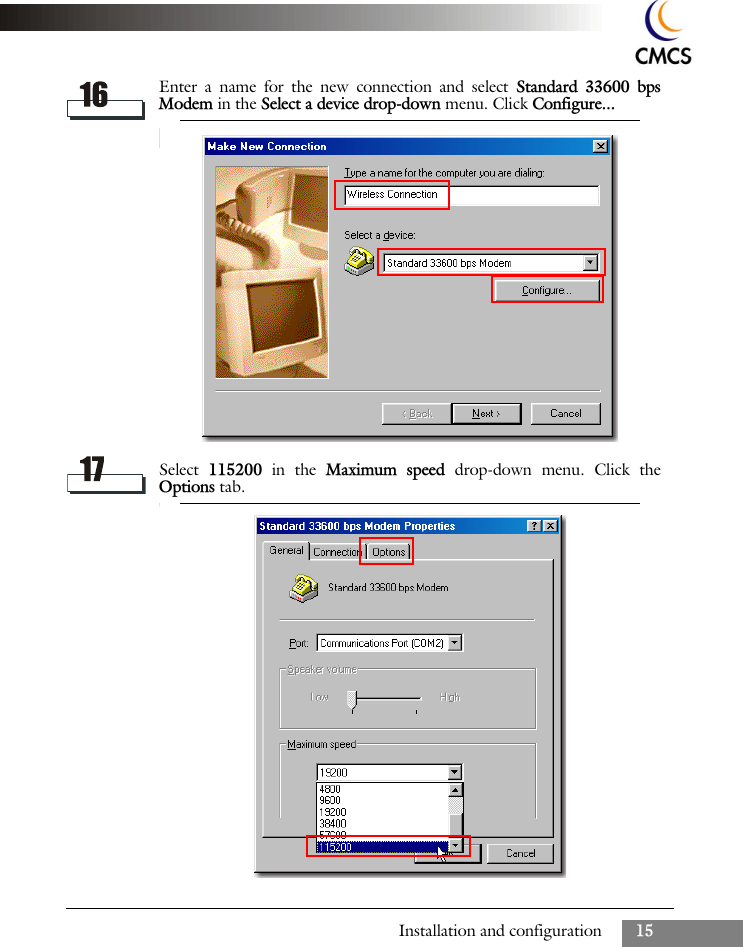
Installation and configuration 15Enter a name for the new connection and select Standard 33600 bpsModem in the Select a device drop-down menu. Click Configure...Select  115200  in the Maximum speed drop-down menu. Click theOptions tab.
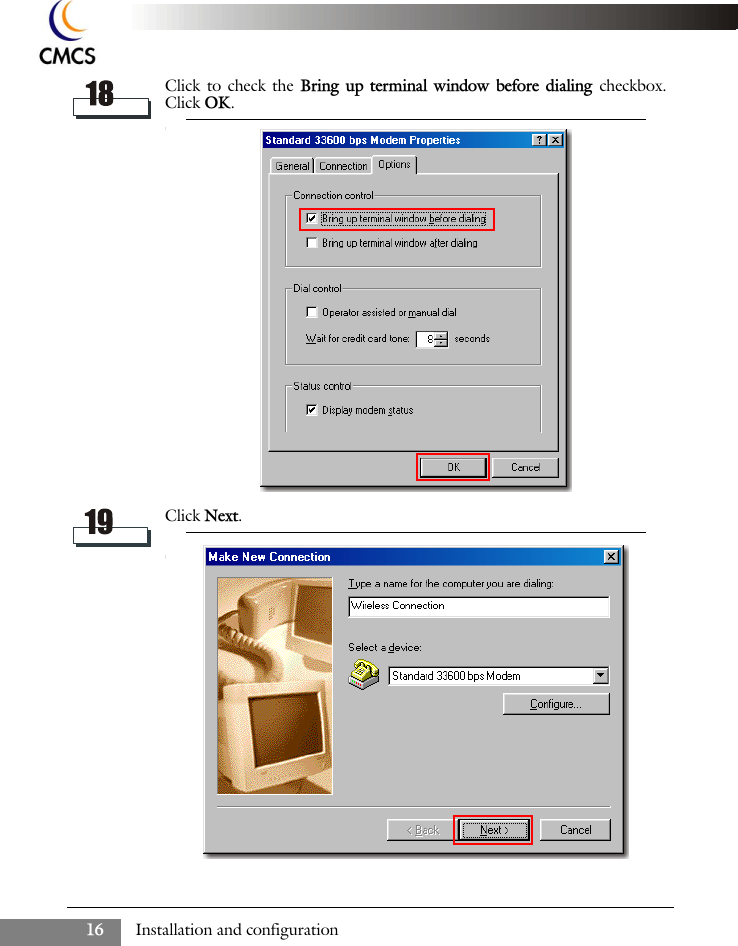
Installation and configuration16Click to check the Bring up terminal window before dialing checkbox.Click OK.Click Next.
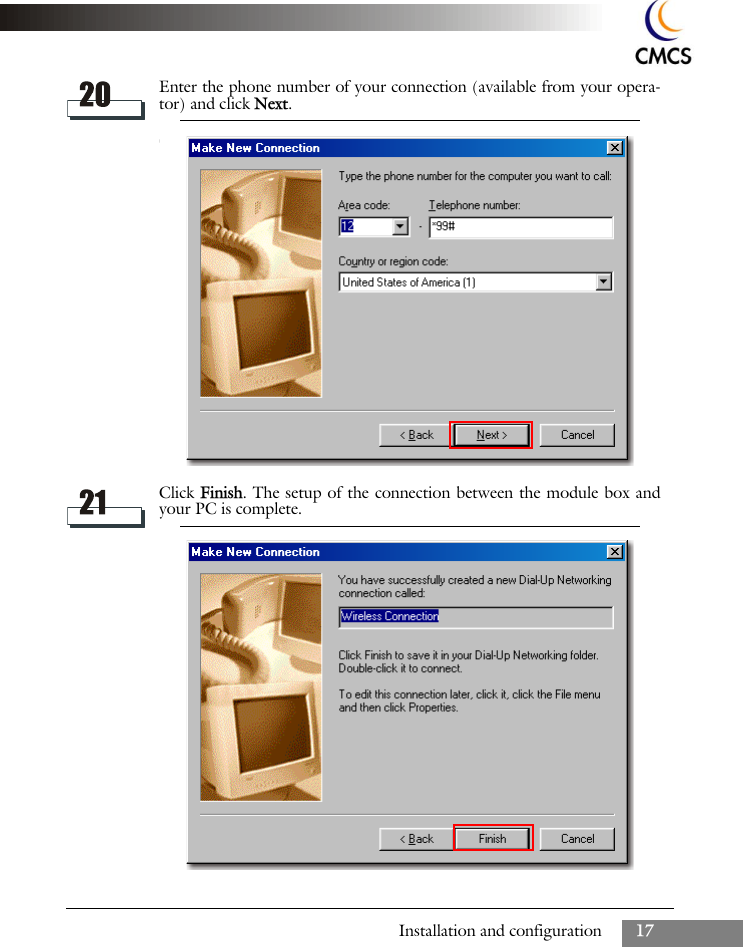
Installation and configuration 17Enter the phone number of your connection (available from your opera-tor) and click Next.Click Finish. The setup of the connection between the module box andyour PC is complete.
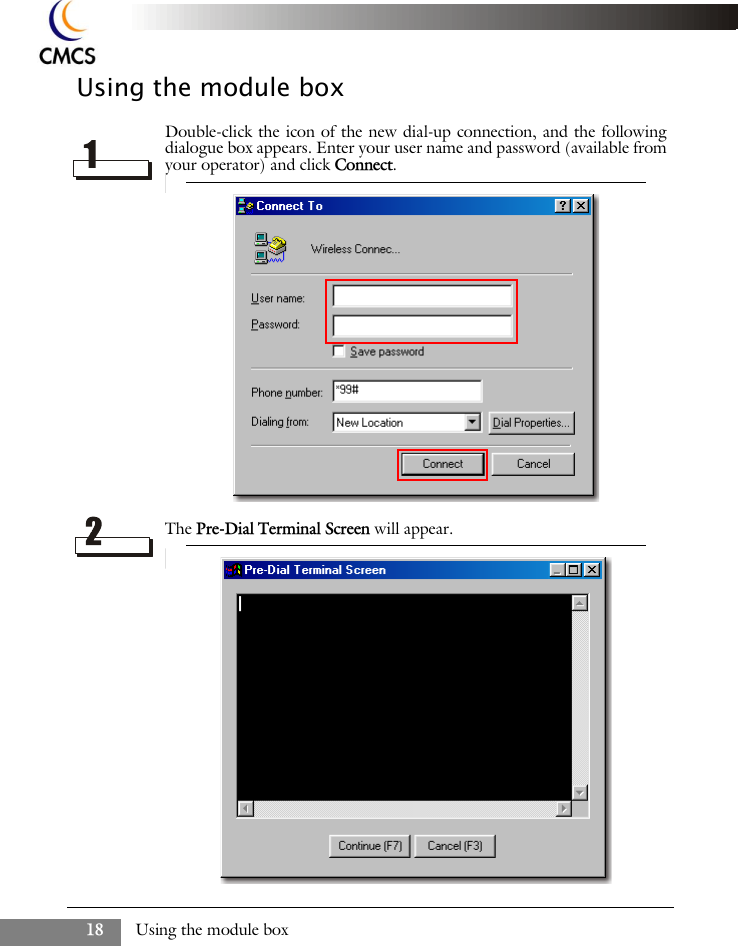
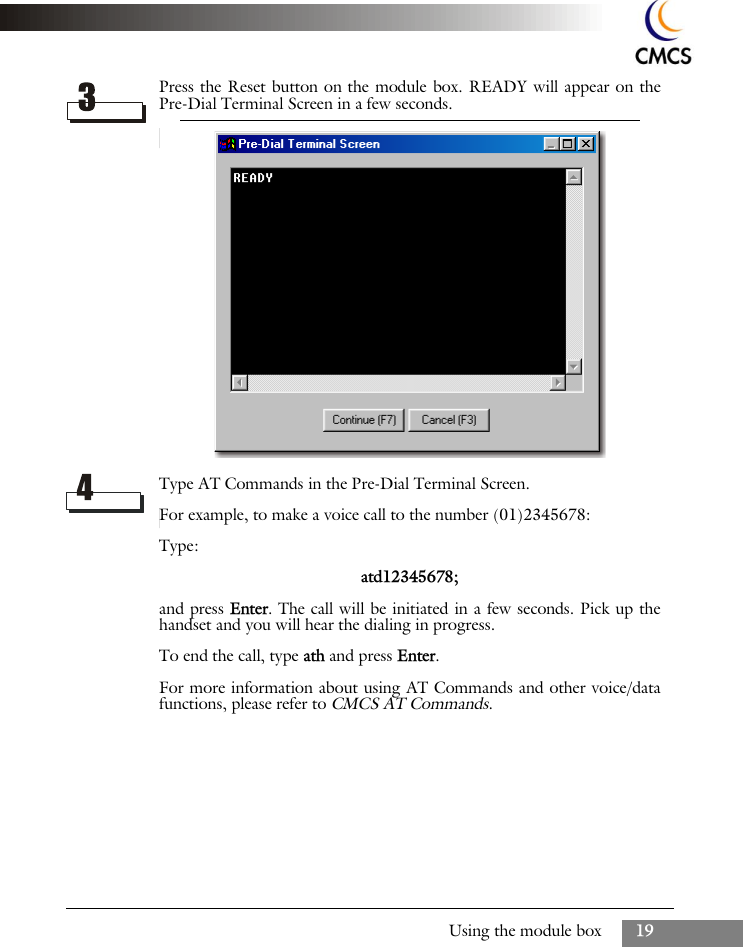
Using the module box18Using the module boxDouble-click the icon of the new dial-up connection, and the followingdialogue box appears. Enter your user name and password (available fromyour operator) and click Connect.The Pre-Dial Terminal Screen will appear.
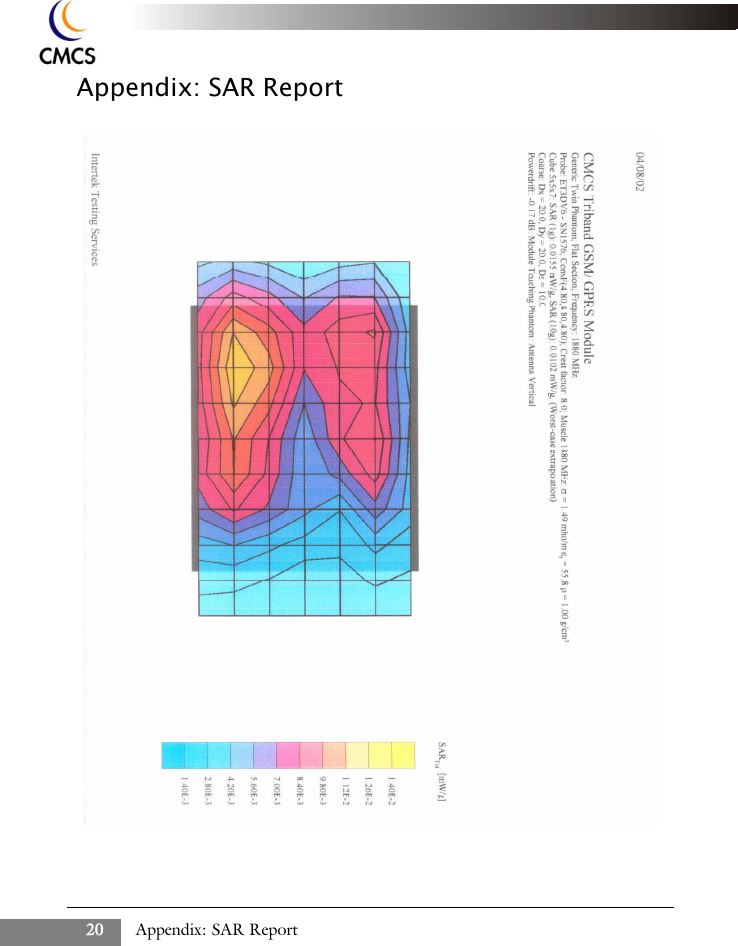
Using the module box 19Press the Reset button on the module box. READY will appear on thePre-Dial Terminal Screen in a few seconds.Type AT Commands in the Pre-Dial Terminal Screen.For example, to make a voice call to the number (01)2345678:Type:atd12345678;and press Enter. The call will be initiated in a few seconds. Pick up thehandset and you will hear the dialing in progress.To end the call, type ath and press Enter.For more information about using AT Commands and other voice/datafunctions, please refer to CMCS AT Commands.
Appendix: SAR Report20Appendix: SAR Report
Appendix: SAR Report 21
Appendix: SAR Report22
Appendix: SAR Report 23
Appendix: SAR Report24<Blank Page>

Navigation menu