China T A Wow Stuff TX-1027H Ai Camera Drone User Manual TX 1027 Ai CAMERA DRONE IM

China Industries Ltd T/A Wow! Stuff Ai Camera Drone TX 1027 Ai CAMERA DRONE IM

User Manual

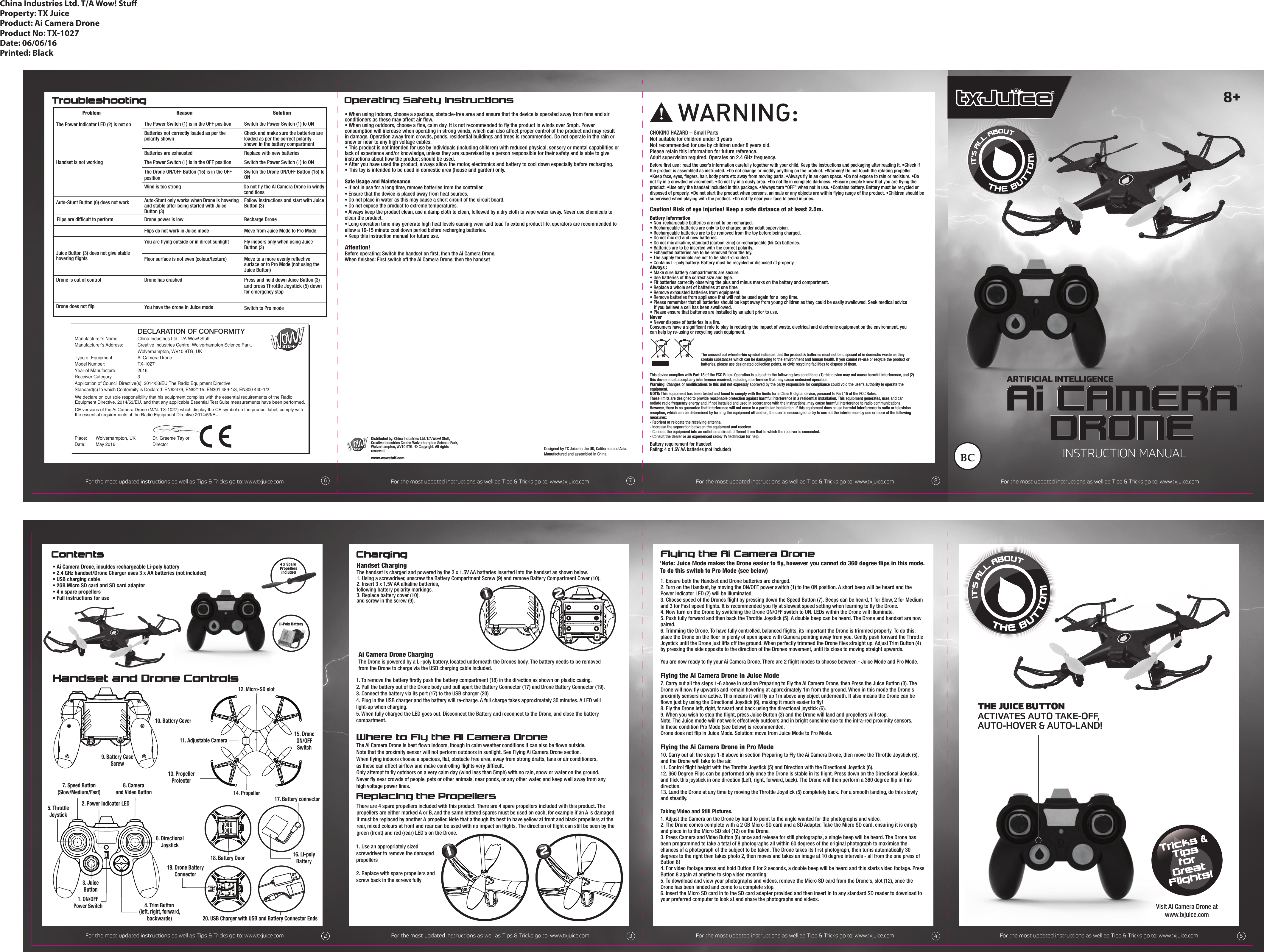
Tricks &TipsforGreatFlights!Flying the Ai Camera Drone1. Ensure both the Handset and Drone batteries are charged.2. Turn on the Handset, by moving the ON/OFF power switch (1) to the ON position. A short beep will be heard and the Power Indicator LED (2) will be illuminated.3. Choose speed of the Drones flight by pressing down the Speed Button (7). Beeps can be heard, 1 for Slow, 2 for Medium and 3 for Fast speed flights. It is recommended you fly at slowest speed setting when learning to fly the Drone.4. Now turn on the Drone by switching the Drone ON/OFF switch to ON. LEDs within the Drone will illuminate.5. Push fully forward and then back the Throttle Joystick (5). A double beep can be heard. The Drone and handset are now paired.6. Trimming the Drone. To have fully controlled, balanced flights, its important the Drone is trimmed properly. To do this, place the Drone on the floor in plenty of open space with Camera pointing away from you. Gently push forward the Throttle Joystick until the Drone just lifts off the ground. When perfectly trimmed the Drone flies straight up. Adjust Trim Button (4) by pressing the side opposite to the direction of the Drones movement, until its close to moving straight upwards.You are now ready to fly your Ai Camera Drone. There are 2 flight modes to choose between - Juice Mode and Pro Mode. Flying the Ai Camera Drone in Juice Mode7. Carry out all the steps 1-6 above in section Preparing to Fly the Ai Camera Drone, then Press the Juice Button (3). The Drone will now fly upwards and remain hovering at approximately 1m from the ground. When in this mode the Drone's proximity sensors are active. This means it will fly up 1m above any object underneath. It also means the Drone can be flown just by using the Directional Joystick (6), making it much easier to fly!8. Fly the Drone left, right, forward and back using the directional joystick (6).9. When you wish to stop the flight, press Juice Button (3) and the Drone will land and propellers will stop.Note. The Juice mode will not work effectively outdoors and in bright sunshine due to the infra-red proximity sensors.In these condition Pro Mode (see below) is recommended. Drone does not flip in Juice Mode. Solution: move from Juice Mode to Pro Mode.Flying the Ai Camera Drone in Pro Mode10. Carry out all the steps 1-6 above in section Preparing to Fly the Ai Camera Drone, then move the Throttle Joystick (5), and the Drone will take to the air.11. Control flight height with the Throttle Joystick (5) and Direction with the Directional Joystick (6).12. 360 Degree Flips can be performed only once the Drone is stable in its flight. Press down on the Directional Joystick, and flick this joystick in one direction (Left, right, forward, back). The Drone will then perform a 360 degree flip in this direction.13. Land the Drone at any time by moving the Throttle Joystick (5) completely back. For a smooth landing, do this slowly and steadily.Taking Video and Still Pictures. 1. Adjust the Camera on the Drone by hand to point to the angle wanted for the photographs and video. 2. The Drone comes complete with a 2 GB Micro-SD card and a SD Adapter. Take the Micro SD card, ensuring it is empty and place in to the Micro SD slot (12) on the Drone. 3. Press Camera and Video Button (8) once and release for still photographs, a single beep will be heard. The Drone has been programmed to take a total of 8 photographs all within 60 degrees of the original photograph to maximise the chances of a photograph of the subject to be taken. The Drone takes its first photograph, then turns automatically 30 degrees to the right then takes photo 2, then moves and takes an image at 10 degree intervals - all from the one press of Button 8!4. For video footage press and hold Button 8 for 2 seconds, a double beep will be heard and this starts video footage. Press Button 8 again at anytime to stop video recording.5. To download and view your photographs and videos, remove the Micro SD card from the Drone's, slot (12), once the Drone has been landed and come to a complete stop.6. Insert the Micro SD card in to the SD card adapter provided and then insert in to any standard SD reader to download to your preferred computer to look at and share the photographs and videos.Contents ChargingReplacing the PropellersProblem Reason SolutionThe Power Indicator LED (2) is not on The Power Switch (1) is in the OFF position Switch the Power Switch (1) to ON Replace with new batteriesHandset is not workingAuto-Stunt Button (6) does not work Flips are difficult to performBatteries not correctly loaded as per the polarity shownCheck and make sure the batteries areloaded as per the correct polarity shown in the battery compartmentThe Power Switch (1) is in the OFF position Switch the Power Switch (1) to ONAuto-Stunt only works when Drone is hovering and stable after being started with Juice Button (3)Follow instructions and start with Juice Button (3)Drone power is low Recharge DroneMove from Juice Mode to Pro ModeYou are flying outside or in direct sunlight Fly indoors only when using Juice Button (3)Floor surface is not even (colour/texture) Move to a more evenly reflective surface or to Pro Mode (not using the Juice Button) Juice Button (3) does not give stable hovering flightsDrone is out of controlFlips do not work in Juice modeDrone has crashed Press and hold down Juice Button (3)  and press Throttle Joystick (5) down  for emergency stopThe Drone ON/OFF Button (15) is in the OFF positionWind is too strong Do not fly the Ai Camera Drone in windy conditions Switch the Drone ON/OFF Button (15) toONTroubleshootingWhere to Fly the Ai Camera DroneOperating Safety InstructionsChina Industries Ltd. T/A Wow! StuProperty: TX JuiceProduct: Ai Camera DroneProduct No: TX-1027Date: 06/06/16Printed: BlackDistributed by: China Industries Ltd. T/A Wow! Stuff,Creative Industries Centre, Wolverhampton Science Park,Wolverhampton, WV10 9TG. © Copyright. All rights reserved. www.wowstuff.comDesigned by TX Juice in the UK, California and Asia.Manufactured and assembled in China.Battery requirement for HandsetRating: 4 x 1.5V AA batteries (not included) This device complies with Part 15 of the FCC Rules. Operation is subject to the following two conditions: (1) this device may not cause harmful interference, and (2) this device must accept any interference received, including interference that may cause undesired operationWarning: Changes or modifications to this unit not expressly approved by the party responsible for compliance could void the user's authority to operate the equipment.NOTE: This equipment has been tested and found to comply with the limits for a Class B digital device, pursuant to Part 15 of the FCC Rules.These limits are designed to provide reasonable protection against harmful interference in a residential installation. This equipment generates, uses and can radiate radio frequency energy and, if not installed and used in accordance with the instructions, may cause harmful interference to radio communications. However, there is no guarantee that interference will not occur in a particular installation. If this equipment does cause harmful interference to radio or televisionreception, which can be determined by turning the equipment off and on, the user is encouraged to try to correct the interference by one or more of the following measures:- Reorient or relocate the receiving antenna.- Increase the separation between the equipment and receiver.- Connect the equipment into an outlet on a circuit different from that to which the receiver is connected.- Consult the dealer or an experienced radio/ TV technician for help.CHOKING HAZARD – Small PartsNot suitable for children under 3 yearsNot recommended for use by children under 8 years old.Please retain this information for future reference.Adult supervision required. Operates on 2.4 GHz frequency. !Battery Information• Non-rechargeable batteries are not to be recharged.• Rechargeable batteries are only to be charged under adult supervision.• Rechargeable batteries are to be removed from the toy before being charged.• Do not mix old and new batteries.• Do not mix alkaline, standard (carbon-zinc) or rechargeable (Ni-Cd) batteries.• Batteries are to be inserted with the correct polarity.• Exhausted batteries are to be removed from the toy.• The supply terminals are not to be short-circuited.• Contains Li-poly battery. Battery must be recycled or disposed of properly.Always :• Make sure battery compartments are secure.• Use batteries of the correct size and type.• Fit batteries correctly observing the plus and minus marks on the battery and compartment. • Replace a whole set of batteries at one time. • Remove exhausted batteries from equipment.• Remove batteries from appliance that will not be used again for a long time.• Please remember that all batteries should be kept away from young children as they could be easily swallowed. Seek medical advice    if you believe a cell has been swallowed.• Please ensure that batteries are installed by an adult prior to use.Never• Never dispose of batteries in a fire. Consumers have a significant role to play in reducing the impact of waste, electrical and electronic equipment on the environment, you can help by re-using or recycling such equipment.The crossed out wheelie-bin symbol indicates that the product & batteries must not be disposed of in domestic waste as they contain substances which can be damaging to the environment and human health. If you cannot re-use or recycle the product or batteries, please use designated collection points, or civic recycling facilities to dispose of them.Before first use : read the user’s information carefully together with your child. Keep the instructions and packaging after reading it. •Check if the product is assembled as instructed. •Do not change or modify anything on the product. •Warning! Do not touch the rotating propeller. •Keep face, eyes, fingers, hair, body parts etc away from moving parts. •Always fly in an open space. •Do not expose to rain or moisture. •Do not fly in a crowded environment. •Do not fly in a dusty area. •Do not fly in complete darkness. •Ensure people know that you are flying the product. •Use only the handset included in this package. •Always turn “OFF” when not in use. •Contains battery. Battery must be recycled or disposed of properly. •Do not start the product when persons, animals or any objects are within flying range of the product. •Children should be supervised when playing with the product. •Do not fly near your face to avoid injuries.Caution! Risk of eye injuries! Keep a safe distance of at least 2.5m. • Ai Camera Drone, inculdes rechargeable Li-poly battery• 2.4 GHz handset/Drone Charger uses 3 x AA batteries (not included)• USB charging cable• 2GB Micro SD card and SD card adaptor• 4 x spare propellers• Full instructions for use1. Using a screwdriver, unscrew the Battery Compartment Screw (9) and remove Battery Compartment Cover (10).2. Insert 3 x 1.5V AA alkaline batteries,following battery polarity markings.3. Replace battery cover (10),and screw in the screw (9).1. Use an appropriately sized screwdriver to remove the damaged propellers2. Replace with spare propellers and screw back in the screws fully• When using indoors, choose a spacious, obstacle-free area and ensure that the device is operated away from fans and air conditioners as these may affect air flow.  • When using outdoors, choose a fine, calm day. It is not recommended to fly the product in winds over 5mph. Power consumption will increase when operating in strong winds, which can also affect proper control of the product and may result in damage. Operation away from crowds, ponds, residential buildings and trees is recommended. Do not operate in the rain or snow or near to any high voltage cables. • This product is not intended for use by individuals (including children) with reduced physical, sensory or mental capabilities or lack of experience and/or knowledge, unless they are supervised by a person responsible for their safety and is able to give instructions about how the product should be used.• After you have used the product, always allow the motor, electronics and battery to cool down especially before recharging.• This toy is intended to be used in domestic area (house and garden) only.  Safe Usage and Maintenance• If not in use for a long time, remove batteries from the controller.• Ensure that the device is placed away from heat sources.• Do not place in water as this may cause a short circuit of the circuit board.• Do not expose the product to extreme temperatures.• Always keep the product clean, use a damp cloth to clean, followed by a dry cloth to wipe water away. Never use chemicals to clean the product.• Long operation time may generate high heat levels causing wear and tear. To extend product life, operators are recommended to allow a 10-15 minute cool down period before recharging batteries.• Keep this instruction manual for future use.Attention!Before operating: Switch the handset on first, then the Ai Camera Drone. When finished: First switch off the Ai Camera Drone, then the handsetBatteries are exhaustedThe Ai Camera Drone is best flown indoors, though in calm weather conditions it can also be flown outside. Note that the proximity sensor will not perform outdoors in sunlight. See Flying Ai Camera Drone section. When flying indoors choose a spacious, flat, obstacle free area, away from strong drafts, fans or air conditioners, as these can affect airflow and make controlling flights very difficult. Only attempt to fly outdoors on a very calm day (wind less than 5mph) with no rain, snow or water on the ground. Never fly near crowds of people, pets or other animals, near ponds, or any other water, and keep well away from any high voltage power lines. There are 4 spare propellers included with this product. There are 4 spare propellers included with this product. The propellers are either marked A or B, and the same lettered spares must be used on each, for example if an A is damaged it must be replaced by another A propeller. Note that although its best to have yellow at front and black propellers at the rear, mixed colours at front and rear can be used with no impact on flights. The direction of flight can still be seen by the green (front) and red (rear) LED's on the Drone.1. To remove the battery firstly push the battery compartment (18) in the direction as shown on plastic casing.2. Pull the battery out of the Drone body and pull apart the Battery Connector (17) and Drone Battery Connector (19).3. Connect the battery via its port (17) to the USB charger (20)4. Plug in the USB charger and the battery will re-charge. A full charge takes approximately 30 minutes. A LED will light-up when charging.5. When fully charged the LED goes out. Disconnect the Battery and reconnect to the Drone, and close the battery compartment.Visit Ai Camera Drone atwww.txjuice.com4 x Spare PropellersincludedLi-Poly Battery2Handset and Drone Controls2. Power Indicator LED1. ON/OFFPower Switch3. JuiceButton4. Trim Button(left, right, forward,backwards)6. DirectionalJoystick5. ThrottleJoystick7. Speed Button(Slow/Medium/Fast)8. Cameraand Video Button9. Battery CaseScrew13. PropellerProtector10. Battery Cover1Ai Camera Drone ChargingThe Drone is powered by a Li-poly battery, located underneath the Drones body. The battery needs to be removedfrom the Drone to charge via the USB charging cable included.11. Adjustable Camera12. Micro-SD slot15. DroneON/OFFSwitch14. Propeller18. Battery Door1219. Drone BatteryConnector20. USB Charger with USB and Battery Connector EndsFor the most updated instructions as well as Tips & Tricks go to: www.txjuice.com245317. Battery connector16. Li-polyBattery7 86For the most updated instructions as well as Tips & Tricks go to: www.txjuice.com For the most updated instructions as well as Tips & Tricks go to: www.txjuice.com For the most updated instructions as well as Tips & Tricks go to: www.txjuice.com For the most updated instructions as well as Tips & Tricks go to: www.txjuice.comFor the most updated instructions as well as Tips & Tricks go to: www.txjuice.com For the most updated instructions as well as Tips & Tricks go to: www.txjuice.com For the most updated instructions as well as Tips & Tricks go to: www.txjuice.comARTIFICIAL INTELLIGENCETMINSTRUCTION MANUAL8+THE JUICE BUTTONACTIVATES AUTO TAKE-OFF,AUTO-HOVER & AUTO-LAND!Handset ChargingThe handset is charged and powered by the 3 x 1.5V AA batteries inserted into the handset as shown below.Drone does not flip You have the drone in Juice mode Switch to Pro mode'Note: Juice Mode makes the Drone easier to fly, however you cannot do 360 degree flips in this mode.To do this switch to Pro Mode (see below)Manufacturer’s Name:  China Industries Ltd. T/A Wow! StuffManufacturer’s Address:  Creative Industries Centre, Wolverhampton Science Park,      Wolverhampton, WV10 9TG, UKType of Equipment:     Ai Camera DroneModel Number:    TX-1027Year of Manufacture:   2016Receiver Category    3Application of Council Directive(s): 2014/53/EU The Radio Equipment DirectiveStandard(s) to which Conformity is Declared: EN62479, EN62115, EN301 489-1/3, EN300 440-1/2 Place:   Wolverhampton, UK              Dr. Graeme TaylorDate:   May 2016                           Director                  DECLARATION OF CONFORMITYWe declare on our sole responsibility that his equipment complies with the essential requirements of the Radio Equipment Directive, 2014/53/EU, and that any applicable Essential Test Suite measurements have been performed.CE versions of the Ai Camera Drone (M/N: TX-1027) which display the CE symbol on the product label, comply with the essential requirements of the Radio Equipment Directive 2014/53/EU.

Navigation menu