Chiyu Technology AC-RF400 TCPIP TO WIRELESS CONVERTER User Manual AC RF400M manual
Chiyu Technology Co., Ltd. TCPIP TO WIRELESS CONVERTER AC RF400M manual
Users Manual
1
Manual
一、 Power and Environment:
Power DC12V﹐300mA
Operation Temperature 0 ~ 55℃
Operation Humidity 5 ~ 95%RH
Storage Temperature –20 ~ 85℃
二、 Connect Way:
1. Connect with computer directly:Please connect with computer via “Cross Over” Cat5 cable.
2. Connect by HUB:Make computer and AC-RF400M connecting to HUB separately viaCat5 cable.
三、 Converter Quick Setup
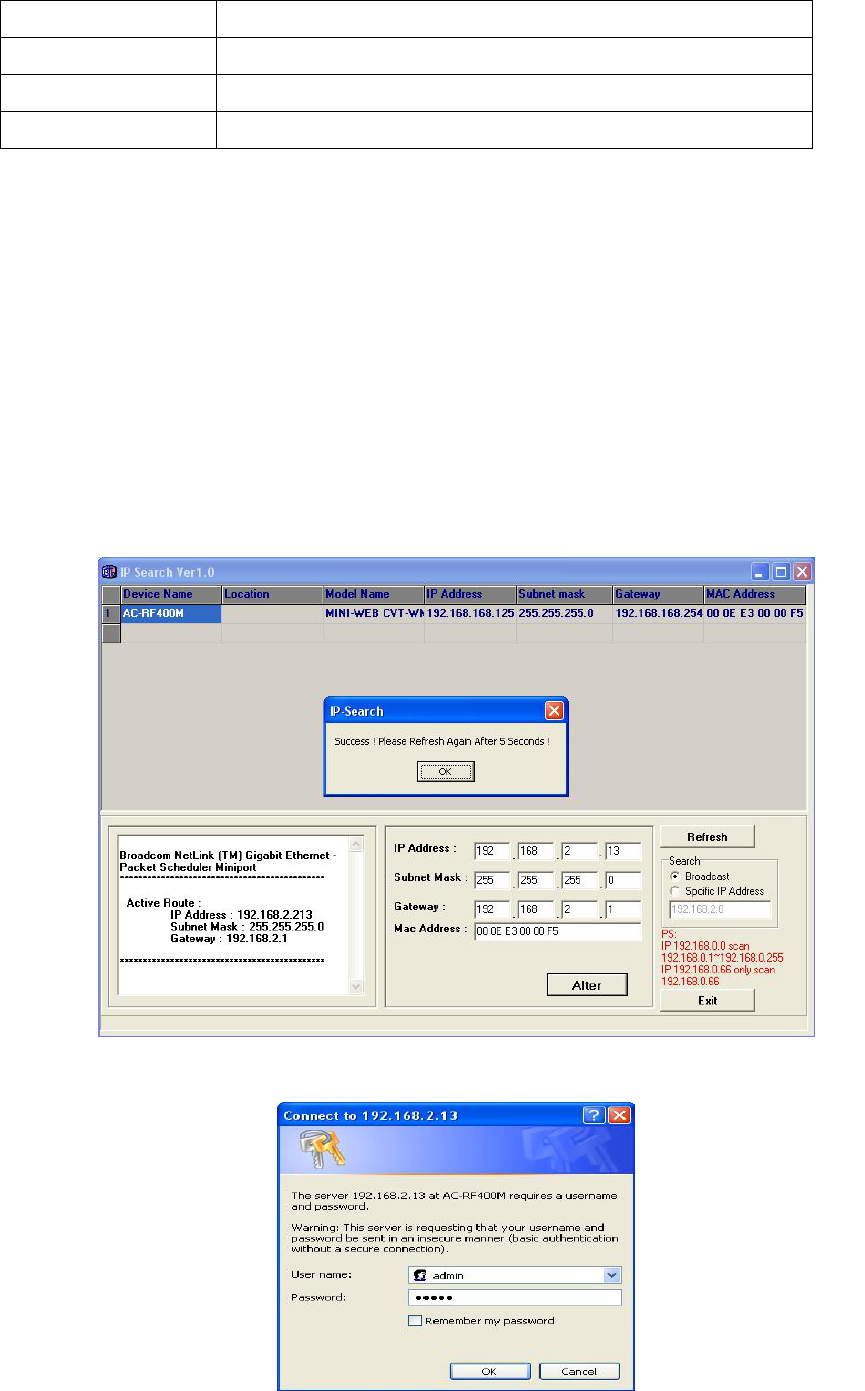
1. Run IP Search tool. You can find the file in CD-Rom attached with AC-RF400M.
2. Press “Refresh” to search AC-RF400M. If you can’t find AC-RF400M connected, please check connection is correct or
not and the computer installs TCP/IP protocol or not.
3. Move the mouse icon on AC-RF400M and click left button.
4. Key-in applicable IP address , Subnet Mask , Gateway and press “Alter” to modify.
5. Close the message window and press “Refresh” to upgrade data. Move the mouse icon on AC-RF400M and double
click left button then you will go into AC-RF400M Web configuration window. 【Picture 2】、【Picture 3】。
【Picture 1】
User Name:admin
Password:admin
2
【Picture 2】
【Picture 3】
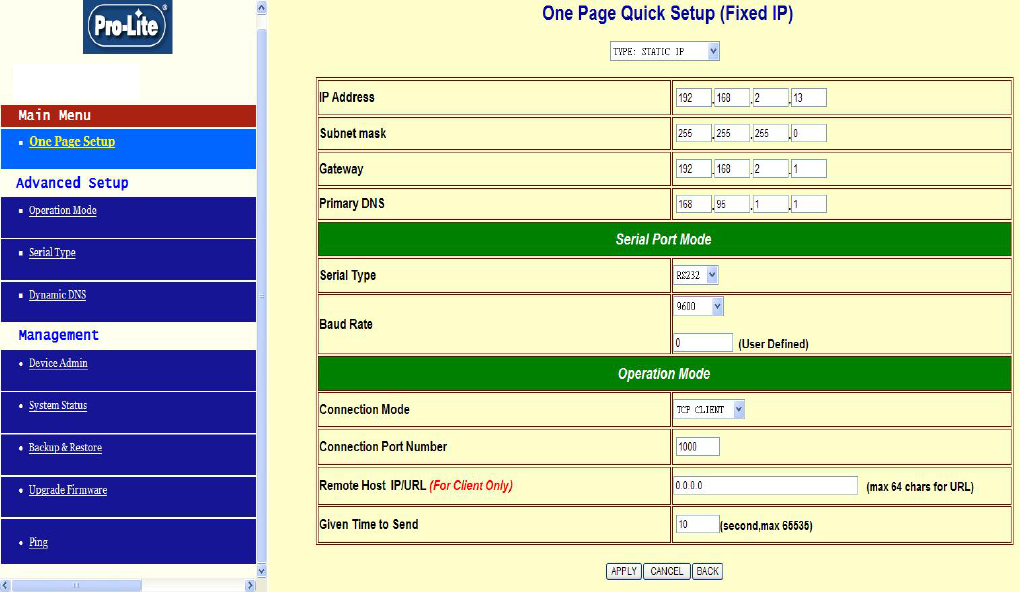
Web configuration field explain.
A. Type:Setup obtaining IP way of AC-RF400M. There are 3 choices.
STATIC IP:Assign fix IP to AC-RF400M by User.
DHCP CLIENT:AC-RF400M obtains IP from the DHCP server of domain. You can execute IP Search to know
IP Address of AC-RF400M obtained.
PPPoE:AC-RF400M obtains IP from ISP via xDSL modem. You can execute IP Search to know IP Address of
AC-RF400M obtained or enable DDNS service to access equipment without fix IP address.
B. IP:Setup AC-RF400M IP、Subnet Mask、Gateway and Primary DNS. If you have setup IP address and Subnet
Mask from IP Search. Then you just need to assign Gateway according the domain environment. (You need to
assign if the domain of Equipment and AC-RF400M are different.)
C. Serial Port Mode:Setup the serial type and baud rate of AC-RF400M.
Serial Type:Choose the serial type.
Baud Rate:Setup the baud rate of serial port.
D. Operation Mode:Setup the operation mode of AC-RF400M
Connect Mode:Choose TCP SERVER / TCP CLIENT / UDP SERVER / UDP CLIENT depend on operation
environment.
Connect Port Number:Assign TCP/IP communication port. The value must same as your software.
Remote Host IP Address(For Client Only):Assign the remote server. You need to assign when AC-RF400M is
used as CLIENT.
AC-RF400M
FCC STATEMENT
1. This device complies with Part 15 of the FCC Rules.
Operation is subject to the following two conditions:
(1) This device may not cause harmful interference, and
(2) This device must accept any interference received, including interference that may cause
undesired operation.
2. Changes or modifications not expressly approved by the party responsible for compliance could
void the user’s authority to operate the equipment.
FCC ID: ZDZAC-RF400
NOTE: This equipment has been tested and found to comply with the limits for a
Class B digital device, pursuant to Part 15 of the FCC Rules. These limits are
designed to provide reasonable protection against harmful interference in a
residential installation. This equipment generates, uses and can radiate radio
frequency energy and, if not installed and used in accordance with the
instructions, may cause harmful interference to radio communications. However,
there is no guarantee that interference will not occur in a particular installation.
If this equipment does cause harmful interference to radio or television reception,
which can be determined by turning the equipment off and on, the user is
encouraged to try to correct the interference by one or more of the following
measures:
-- Reorient or relocate the receiving antenna.
-- Increase the separation between the equipment and receiver.
-- Connect the equipment into an outlet on a circuit different
from that to which the receiver is connected.
-- Consult the dealer or an experienced radio/TV technician for help.