Chuango Security Technology SR1000 wireless signal repeater User Manual
Chuango Security Technology Corporation wireless signal repeater
User Manual
© 2016 SMANOS HOLDING LTD. All Rights Reserved. Ver: SR1000-UM-ML-V1.0
Printed in China
SR1000
Plug-in Wireless Signal Repeater
MULTILINGUAL
USER MANUAL
EN DE ESFR PTNL IT
ENEN
Introduction
The repeater is a wireless signal relay transmission device.
With MCU technology, it can decode the signal in the air and
strengthen the transmitting power to extend the transmission
distance range. Failure to receive signal to panel from wireless
accessories is frequently happened due to the long distance range
when the remote controlling or wireless alarm systems are applied
to large scale of commercial tall buildings, villa, and industrial
areas. This wireless signal repeater could solve this problem and
further distance range signal transmitting could be achieved.
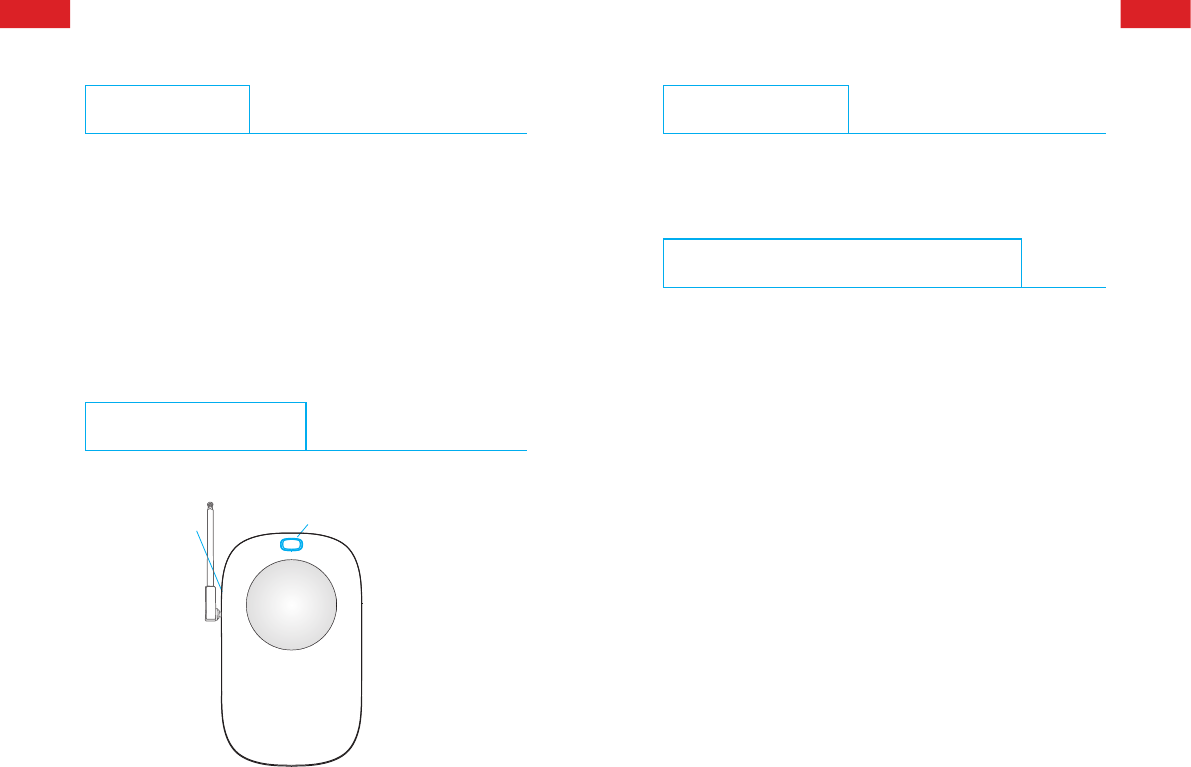
Product Overview
Power ON/OFF Learning Button
LED Indication
Green LED on: working status
Blue LED ashes once: signal transmitting
Green and blue LEDs ash alternatively: in connect status
Adding and Deleting Accessories
Before adding and deleting accessories, make sure SR1000 repeater
has been activated to 'connect status'. To activate connect status,
you need to turn 'power' button to 'ON'; if it is already in 'ON' mode,
reboot the repeater from 'OFF' to 'ON'. Indicator light will then
alternately ash between green and blue. Choose following options
to add or delete accessories:
Extend Transmission Distance between Accessories and Control Panel
First, press the 'Learning Button' upon the repeater, you will hear a
short beep. After that, you can trigger any accessory you wish to pair
to the repeater, for example, separates two components of door/
window contact; if the repeater is successfully paired, a two-second
length “beep” will sound with blue light on, and light will alternately
shining between blue and green. You may add more accessories by
repeating the steps above.
Note: If the repeater does not receive any signal within one minute, the pairing
process will be canceled, it would sound beep twice meanwhile. If the repeater
exits the connect status, switch off and then switch on the repeater to re-enter the
connect status. Then repeat the above operation to add more accessories.
ENEN
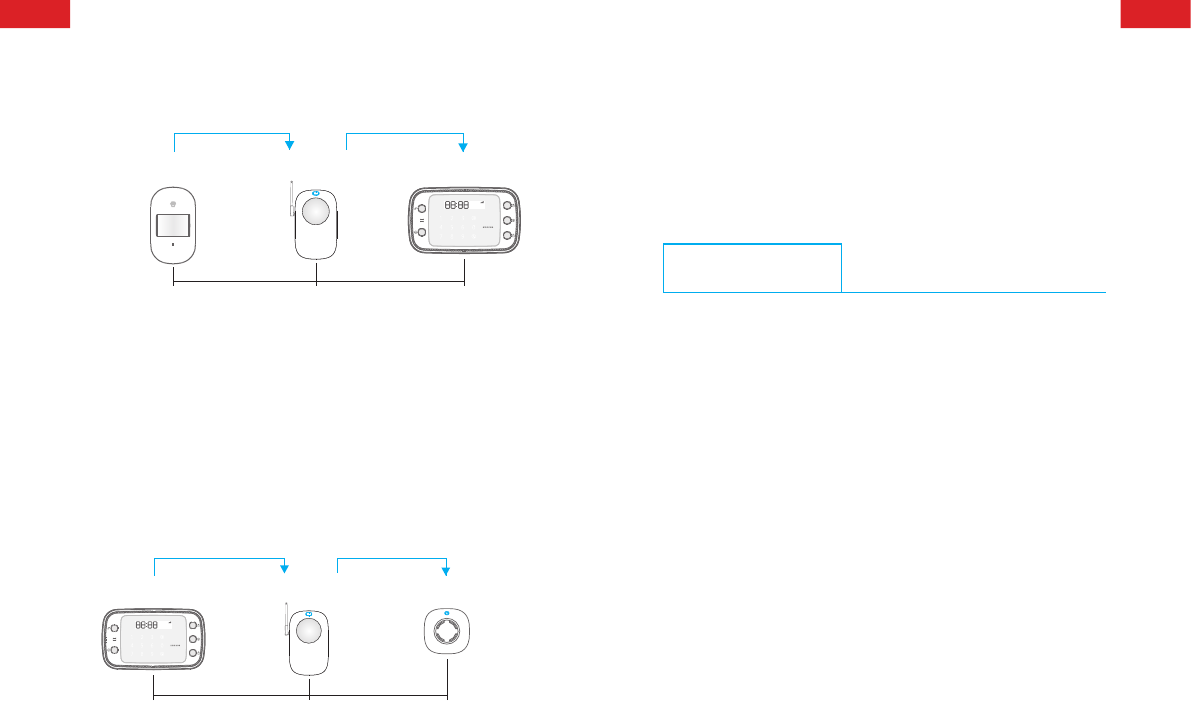
Workow:
Signal transmitting
Trigger contact/detector or
activate remote control
Max. distance
(in open area) ≤ 80m
Max. distance
(in open area) ≤ 120m
Repeater receives
signals
Control panel receives
signals
Signal transmitting
Extend Transmission Distance between Control Panel and Siren
First, press the 'Learning Button' upon the repeater, you will hear
a short beep. After that, press SOS button or 'Arm' the control
panel; if it is successfully paired, a two-second length 'beep' will
sound with blue light on, and light will alternately shining between
blue and green. Transmission distance between control panel and
siren is therefore extended.
If the repeater does not receive any signal within 1 minute, the
pairing process will be canceled, it would sound beep twice
meanwhile.
Workow:
Signal transmitting
Control panel arm/
disarm/alarm
Max. distance
(in open area) ≤80m
Max. distance
(in open area) ≤ 120m
Repeater receives
signals Siren receives
signals
Signal transmitting
Deleting Accessories
To remove all paired accessories, you only need to press and hold
'Learning Button' upon the repeater for ve seconds; indicator
light would turn blue, wait two seconds until the light turns green
with three times beeps, then you would successfully remove all
accessories.
Specications
Power Supply: AC 110V-240V, 50/60Hz
Wireless Transmitting Range: < 150m
Wireless Receiving Range: < 80m
Radio Frequency: 915MHz (±75KHz)
Static Current: < 20.5mA
Transmitting Current: < 330mA
Maximum Accessories Supportable: 40 PCS
Back-up Battery: 3.7V 600mAh Lithium Battery, 2.22Wh
Housing Material: ABS plastic
Operating Condition:
Temperature: 0°C ~ +55°C
Relative Humidity: < 80% (non-condensing)
Dimension (L x W x H): 140 x 86 x 87mm

ENEN
FCC STATEMENT
1.This device complies with Part 15 of the FCC Rules. Operation is subject to the
following two conditions:
(1)This device may not cause harmful interference.
(2)This device must accept any interference received, including interference that
may cause undesired operation.
2. Changes or modications not expressly approved by the party responsible for
compliance could void the user's authority to operate the equipment.
NOTE: This equipment has been tested and found to comply with the limits for
a Class B digital device, pursuant to Part 15 of the FCC Rules. These limits are
designed to provide reasonable protection against harmful interference in a
residential installation.
This equipment generates uses and can radiate radio frequency energy and, if
not installed and used in accordance with the instructions, may cause harmful
interference to radio communications. However, there is no guarantee that
interference will not occur in a particular installation. If this equipment does cause
harmful interference to radio or television reception, which can be determined
by turning the equipment off and on, the user is encouraged to try to correct the
interference by one or more of the following measures:
Reorient or relocate the receiving antenna.
Increase the separation between the equipment and receiver.
Connect the equipment into an outlet on a circuit different from that to which the
receiver is connected.
Consult the dealer or an experienced radio/TV technician for help.
FCC Radiation Exposure Statement:
This equipment complies with FCC radiation exposure limits set forth for an
uncontrolled environment. In order to avoid the possibility of exceeding the FCC
radio frequency exposure limits, Human proximity to the antenna shall not be less
than 20cm(8 inches) during normal operation.