Citrix Systems Network Router 9 2 Users Manual Policy
9.2 to the manual 7326bdf5-cbfe-45df-89bf-9f7c76077eaa
2015-02-05
: Citrix-Systems Citrix-Systems-Network-Router-9-2-Users-Manual-534679 citrix-systems-network-router-9-2-users-manual-534679 citrix-systems pdf
Open the PDF directly: View PDF  .
.
Page Count: 302 [warning: Documents this large are best viewed by clicking the View PDF Link!]
- Contents
- Preface
- Introduction to Policies and Expressions
- Advanced and Classic Policies
- Advanced and Classic Expressions
- About Migration from Classic to Advanced Policies and Expressions
- Before You Proceed
- Configuring Advanced Policies
- Creating or Modifying an Advanced Policy
- Binding Advanced Policies
- Feature-Specific Differences in Policy Bindings
- Bind Points and Order of Evaluation
- Advanced Policy Evaluation Across Features
- Entries in a Policy Bank
- Evaluation Order Within a Policy Bank
- How Policy Evaluation Ends
- How Features Use Actions After Policy Evaluation
- Binding a Policy Globally
- Binding a Policy to a Virtual Server
- Displaying Policy Bindings
- Unbinding an Advanced Policy
- Creating Policy Labels
- Configuring a Policy Label or Virtual Server Policy Bank
- Invoking or Removing a Policy Label or Virtual Server Policy Bank
- Configuring and Binding Policies with the Policy Manager
- Configuring Advanced Expressions: Getting Started
- Advanced Expressions: Evaluating Text
- About Text Expressions
- Expression Prefixes for Text
- Operations on Text
- Complex Operations on Text
- Operations on the Length of a String
- Operations on a Portion of a String
- Operations for Comparing the Alphanumeric Order of Two Strings
- Extracting the nth Integer from a String of Bytes that Represent Text
- Converting Text to a Hash Value
- Encoding and Decoding Text by Applying the Base64 Encoding Algorithm
- Refining the Search in a Rewrite Action by Using the EXTEND Operator
- Converting Text to Hexadecimal Format
- Advanced Expressions: Working with Dates, Times, and Numbers
- Advanced Expressions: Parsing HTTP, TCP, and UDP Data
- Advanced Expressions: Parsing SSL Certificates
- Advanced Expressions: IP and MAC Addresses, Throughput, VLAN IDs
- Advanced Expressions: String Sets, String Patterns, and Data Formats
- Advanced Policies: Controlling the Rate of Traffic
- Advanced Policies: Sending HTTP Service Callouts to Applications
- Configuring Classic Policies and Expressions
- Expressions Reference
- Summary Examples of Advanced Expressions and Policies
- Tutorial Examples of Advanced Policies for Rewrite
- Tutorial Examples of Classic Policies
- Migration of Apache mod_rewrite Rules to Advanced Policies
- Converting URL Variations into Canonical URLs
- Converting Host Name Variations to Canonical Host Names
- Moving a Document Root
- Moving Home Directories to a New Web Server
- Working with Structured Home Directories
- Redirecting Invalid URLs to Other Web Servers
- Rewriting a URL Based on Time
- Redirecting to a New File Name (Invisible to the User)
- Redirecting to New File Name (User-Visible URL)
- Accommodating Browser Dependent Content
- Blocking Access by Robots
- Blocking Access to Inline Images
- Creating Extensionless Links
- Redirecting a Working URI to a New Format
- Ensuring That a Secure Server Is Used for Selected Pages
- New Advanced Expression Operators in This Release
- Operators for Extracting and Evaluating Numeric Data
- Operators for Extracting and Evaluating Text
- Operators for Extracting and Evaluating HTTP Data
- Operators for the CLIENT and ipv6 Expression Prefixes
- XPath and JSON Operators for Evaluating XML and JSON Data
- Operators for Evaluating Groups to Which a User Belongs
- Index
Citrix® NetScaler® 9.2
Citrix NetScaler
Policy Configuration and Reference Guide
Copyright and Trademark Notice
© CITRIX SYSTEMS, INC., 2010. ALL RIGHTS RESERVED. NO PART OF THIS DOCUMENT MAY BE REPRODUCED OR
TRANSMITTED IN ANY FORM OR BY ANY MEANS OR USED TO MAKE DERIVATIVE WORK (SUCH AS TRANSLATION,
TRANSFORMATION, OR ADAPTATION) WITHOUT THE EXPRESS WRITTEN PERMISSION OF CITRIX SYSTEMS, INC.
ALTHOUGH THE MATERIAL PRESENTED IN THIS DOCUMENT IS BELIEVED TO BE ACCURATE, IT IS PRESENTED
WITHOUT WARRANTY OF ANY KIND, EXPRESS OR IMPLIED. USERS MUST TAKE ALL RESPONSIBILITY FOR THE USE
OR APPLICATION OF THE PRODUCT(S) DESCRIBED IN THIS MANUAL.
CITRIX SYSTEMS, INC. OR ITS SUPPLIERS DO NOT ASSUME ANY LIABILITY THAT MAY OCCUR DUE TO THE USE OR
APPLICATION OF THE PRODUCT(S) DESCRIBED IN THIS DOCUMENT. INFORMATION IN THIS DOCUMENT IS SUBJECT
TO CHANGE WITHOUT NOTICE. COMPANIES, NAMES, AND DATA USED IN EXAMPLES ARE FICTITIOUS UNLESS
OTHERWISE NOTED.
The following information is for FCC compliance of Class A devices: This equipment has been tested and found to comply with the limits
for a Class A digital device, pursuant to part 15 of the FCC rules. These limits are designed to provide reasonable protection against
harmful interference when the equipment is operated in a commercial environment. This equipment generates, uses, and can radiate radio-
frequency energy and, if not installed and used in accordance with the instruction manual, may cause harmful interference to radio
communications. Operation of this equipment in a residential area is likely to cause harmful interference, in which case users will be
required to correct the interference at their own expense.
Modifying the equipment without Citrix' written authorization may result in the equipment no longer complying with FCC requirements
for Class A digital devices. In that event, your right to use the equipment may be limited by FCC regulations, and you may be required to
correct any interference to radio or television communications at your own expense.
You can determine whether your equipment is causing interference by turning it off. If the interference stops, it was probably caused by
the NetScaler Request Switch™ 9000 Series equipment. If the NetScaler equipment causes interference, try to correct the interference by
using one or more of the following measures:
Move the NetScaler equipment to one side or the other of your equipment.
Move the NetScaler equipment farther away from your equipment.
Plug the NetScaler equipment into an outlet on a different circuit from your equipment. (Make sure the NetScaler equipment and your
equipment are on circuits controlled by different circuit breakers or fuses.)
Modifications to this product not authorized by Citrix Systems, Inc., could void the FCC approval and negate your authority to operate the
product.
BroadCom is a registered trademark of BroadCom Corporation. Fast Ramp, NetScaler, and NetScaler Request Switch are trademarks of
Citrix Systems, Inc. Linux is a registered trademark of Linus Torvalds. Internet Explorer, Microsoft, PowerPoint, Windows and Windows
product names such as Windows NT are trademarks or registered trademarks of the Microsoft Corporation. NetScape is a registered
trademark of Netscape Communications Corporation. Red Hat is a trademark of Red Hat, Inc. Sun and Sun Microsystems are registered
trademarks of Sun Microsystems, Inc. Other brand and product names may be registered trademarks or trademarks of their respective
holders.
Software covered by the following third party copyrights may be included with this product and will also be subject to the software license
agreement: Copyright 1998 © Carnegie Mellon University. All rights reserved. Copyright © David L. Mills 1993, 1994. Copyright ©
1992, 1993, 1994, 1997 Henry Spencer. Copyright © Jean-loup Gailly and Mark Adler. Copyright © 1999, 2000 by Jef Poskanzer. All
rights reserved. Copyright © Markus Friedl, Theo de Raadt, Niels Provos, Dug Song, Aaron Campbell, Damien Miller, Kevin Steves. All
rights reserved. Copyright © 1982, 1985, 1986, 1988-1991, 1993 Regents of the University of California. All rights reserved. Copyright ©
1995 Tatu Ylonen, Espoo, Finland. All rights reserved. Copyright © UNIX System Laboratories, Inc. Copyright © 2001 Mark R V
Murray. Copyright 1995-1998 © Eric Young. Copyright © 1995,1996,1997,1998. Lars Fenneberg. Copyright © 1992. Livingston
Enterprises, Inc. Copyright © 1992, 1993, 1994, 1995. The Regents of the University of Michigan and Merit Network, Inc. Copyright ©
1991-2, RSA Data Security, Inc. Created 1991. Copyright © 1998 Juniper Networks, Inc. All rights reserved. Copyright © 2001, 2002
Networks Associates Technology, Inc. All rights reserved. Copyright (c) 2002 Networks Associates Technology, Inc. Copyright 1999-
2001© The Open LDAP Foundation. All Rights Reserved. Copyright © 1999 Andrzej Bialecki. All rights reserved. Copyright © 2000
The Apache Software Foundation. All rights reserved. Copyright (C) 2001-2003 Robert A. van Engelen, Genivia inc. All Rights
Reserved. Copyright (c) 1997-2004 University of Cambridge. All rights reserved. Copyright (c) 1995. David Greenman. Copyright (c)
2001 Jonathan Lemon. All rights reserved. Copyright (c) 1997, 1998, 1999. Bill Paul. All rights reserved. Copyright (c) 1994-1997 Matt
Thomas. All rights reserved. Copyright © 2000 Jason L. Wright. Copyright © 2000 Theo de Raadt. Copyright © 2001 Patrik Lindergren.
All rights reserved.
Last Updated: July 2010

C
ONTENTS
Contents
Preface
About This Guide . . . . . . . . . . . . . . . . . . . . . . . . . . . . . . . . . . . . . . . . . . . . . . . . . . . ix
New in This Release . . . . . . . . . . . . . . . . . . . . . . . . . . . . . . . . . . . . . . . . . . . . . . . . . xi
Audience . . . . . . . . . . . . . . . . . . . . . . . . . . . . . . . . . . . . . . . . . . . . . . . . . . . . . . . . . . xi
Formatting Conventions . . . . . . . . . . . . . . . . . . . . . . . . . . . . . . . . . . . . . . . . . . . . . xii
Related Documentation. . . . . . . . . . . . . . . . . . . . . . . . . . . . . . . . . . . . . . . . . . . . . . xiii
Getting Service and Support. . . . . . . . . . . . . . . . . . . . . . . . . . . . . . . . . . . . . . . . . . xiii
Documentation Feedback . . . . . . . . . . . . . . . . . . . . . . . . . . . . . . . . . . . . . . . . . . . . xiv
Chapter 1 Introduction to Policies and Expressions
Advanced and Classic Policies. . . . . . . . . . . . . . . . . . . . . . . . . . . . . . . . . . . . . . . . . .1
Benefits of Using Advanced Policies . . . . . . . . . . . . . . . . . . . . . . . . . . . . . . . . . .2
Basic Components of an Advanced or a Classic Policy. . . . . . . . . . . . . . . . . . . .2
How Different NetScaler Features Use Policies. . . . . . . . . . . . . . . . . . . . . . . . . .3
About Actions and Profiles . . . . . . . . . . . . . . . . . . . . . . . . . . . . . . . . . . . . . . . . . .5
About Policy Bindings . . . . . . . . . . . . . . . . . . . . . . . . . . . . . . . . . . . . . . . . . . . . .7
About Evaluation Order of Policies . . . . . . . . . . . . . . . . . . . . . . . . . . . . . . . . . . .8
Order of Evaluation Based on Traffic Flow . . . . . . . . . . . . . . . . . . . . . . . . . . . . .9
Advanced and Classic Expressions . . . . . . . . . . . . . . . . . . . . . . . . . . . . . . . . . . . . . .9
About Advanced Expressions . . . . . . . . . . . . . . . . . . . . . . . . . . . . . . . . . . . . . . . .9
About Classic Expressions . . . . . . . . . . . . . . . . . . . . . . . . . . . . . . . . . . . . . . . . .10
About Migration from Classic to Advanced Policies and Expressions. . . . . . . . . .11
Before You Proceed . . . . . . . . . . . . . . . . . . . . . . . . . . . . . . . . . . . . . . . . . . . . . . . . .11
Chapter 2 Configuring Advanced Policies
Creating or Modifying an Advanced Policy . . . . . . . . . . . . . . . . . . . . . . . . . . . . . .14
Policy Configuration Examples . . . . . . . . . . . . . . . . . . . . . . . . . . . . . . . . . . . . .15

iv Citrix NetScaler Policy Configuration and Reference Guide
Binding Advanced Policies. . . . . . . . . . . . . . . . . . . . . . . . . . . . . . . . . . . . . . . . . . . .16
Feature-Specific Differences in Policy Bindings . . . . . . . . . . . . . . . . . . . . . . . .16
Bind Points and Order of Evaluation . . . . . . . . . . . . . . . . . . . . . . . . . . . . . . . . .18
Advanced Policy Evaluation Across Features . . . . . . . . . . . . . . . . . . . . . . . . . .19
Entries in a Policy Bank . . . . . . . . . . . . . . . . . . . . . . . . . . . . . . . . . . . . . . . . . . .19
Evaluation Order Within a Policy Bank . . . . . . . . . . . . . . . . . . . . . . . . . . . . . . .20
How Policy Evaluation Ends . . . . . . . . . . . . . . . . . . . . . . . . . . . . . . . . . . . . . . .21
How Features Use Actions After Policy Evaluation . . . . . . . . . . . . . . . . . . . . .22
Binding a Policy Globally. . . . . . . . . . . . . . . . . . . . . . . . . . . . . . . . . . . . . . . . . .22
Binding a Policy to a Virtual Server . . . . . . . . . . . . . . . . . . . . . . . . . . . . . . . . . .24
Displaying Policy Bindings. . . . . . . . . . . . . . . . . . . . . . . . . . . . . . . . . . . . . . . . .25
Unbinding an Advanced Policy . . . . . . . . . . . . . . . . . . . . . . . . . . . . . . . . . . . . . . . .25
Creating Policy Labels . . . . . . . . . . . . . . . . . . . . . . . . . . . . . . . . . . . . . . . . . . . . . . .27
Creating a Policy Label. . . . . . . . . . . . . . . . . . . . . . . . . . . . . . . . . . . . . . . . . . . .27
Binding a Policy to a Policy Label . . . . . . . . . . . . . . . . . . . . . . . . . . . . . . . . . . .29
Configuring a Policy Label or Virtual Server Policy Bank. . . . . . . . . . . . . . . . . . .29
Configuring a Policy Label . . . . . . . . . . . . . . . . . . . . . . . . . . . . . . . . . . . . . . . . .30
Configuring a Policy Bank for a Virtual Server . . . . . . . . . . . . . . . . . . . . . . . . .32
Invoking or Removing a Policy Label or Virtual Server Policy Bank . . . . . . . . . .33
Configuring and Binding Policies with the Policy Manager. . . . . . . . . . . . . . . . . .35
Chapter 3 Configuring Advanced Expressions: Getting Started
Expression Characteristics . . . . . . . . . . . . . . . . . . . . . . . . . . . . . . . . . . . . . . . . . . . .40
Basic Elements of an Advanced Expression . . . . . . . . . . . . . . . . . . . . . . . . . . . . . .40
Prefixes . . . . . . . . . . . . . . . . . . . . . . . . . . . . . . . . . . . . . . . . . . . . . . . . . . . . . . . .41
Single-Element Expressions . . . . . . . . . . . . . . . . . . . . . . . . . . . . . . . . . . . . . . . .43
Operations . . . . . . . . . . . . . . . . . . . . . . . . . . . . . . . . . . . . . . . . . . . . . . . . . . . . . .43
Basic Operations on Expression Prefixes . . . . . . . . . . . . . . . . . . . . . . . . . . . . . .44
Compound Advanced Expressions. . . . . . . . . . . . . . . . . . . . . . . . . . . . . . . . . . . . . .45
Booleans in Compound Expressions . . . . . . . . . . . . . . . . . . . . . . . . . . . . . . . . .46
Parentheses in Compound Expressions . . . . . . . . . . . . . . . . . . . . . . . . . . . . . . .46
Compound Operations for Strings . . . . . . . . . . . . . . . . . . . . . . . . . . . . . . . . . . .46
Compound Operations for Numbers. . . . . . . . . . . . . . . . . . . . . . . . . . . . . . . . . .48
Classic Expressions in Advanced Expressions . . . . . . . . . . . . . . . . . . . . . . . . . . . .57
Configuring Advanced Expressions in a Policy. . . . . . . . . . . . . . . . . . . . . . . . . . . .57
Configuring Named Advanced Expressions . . . . . . . . . . . . . . . . . . . . . . . . . . . . . .60
Configuring Advanced Expressions Outside the Context of a Policy. . . . . . . . . . .61

Contents v
Chapter 4 Advanced Expressions: Evaluating Text
About Text Expressions . . . . . . . . . . . . . . . . . . . . . . . . . . . . . . . . . . . . . . . . . . . . . .64
About Operations on Text. . . . . . . . . . . . . . . . . . . . . . . . . . . . . . . . . . . . . . . . . .64
Compounding and Precedence in Text Expressions. . . . . . . . . . . . . . . . . . . . . .65
Categories of Text Expressions. . . . . . . . . . . . . . . . . . . . . . . . . . . . . . . . . . . . . .65
Guidelines for Text Expressions. . . . . . . . . . . . . . . . . . . . . . . . . . . . . . . . . . . . .66
Expression Prefixes for Text . . . . . . . . . . . . . . . . . . . . . . . . . . . . . . . . . . . . . . . . . .67
Expression Prefixes for Text in HTTP Requests and Responses. . . . . . . . . . . .67
Expression Prefixes for VPNs and Clientless VPNs . . . . . . . . . . . . . . . . . . . . .76
Operations on Text . . . . . . . . . . . . . . . . . . . . . . . . . . . . . . . . . . . . . . . . . . . . . . . . . .86
Basic Operations on Text . . . . . . . . . . . . . . . . . . . . . . . . . . . . . . . . . . . . . . . . . .86
Operations for Calculating the Length of a String . . . . . . . . . . . . . . . . . . . . . . .87
Operations for Controlling Case Sensitivity. . . . . . . . . . . . . . . . . . . . . . . . . . . .87
Complex Operations on Text . . . . . . . . . . . . . . . . . . . . . . . . . . . . . . . . . . . . . . . . . .88
Operations on the Length of a String . . . . . . . . . . . . . . . . . . . . . . . . . . . . . . . . .88
Operations on a Portion of a String. . . . . . . . . . . . . . . . . . . . . . . . . . . . . . . . . . .89
Operations for Comparing the Alphanumeric Order of Two Strings . . . . . . . .90
Extracting the nth Integer from a String of Bytes that Represent Text . . . . . . .91
Converting Text to a Hash Value . . . . . . . . . . . . . . . . . . . . . . . . . . . . . . . . . . . .91
Encoding and Decoding Text by Applying the Base64 Encoding Algorithm. .92
Refining the Search in a Rewrite Action by Using the EXTEND Operator . . .92
Converting Text to Hexadecimal Format . . . . . . . . . . . . . . . . . . . . . . . . . . . . . .93
Chapter 5 Advanced Expressions: Working with Dates, Times, and Numbers
Format of Dates and Times in an Expression . . . . . . . . . . . . . . . . . . . . . . . . . . . . .96
Dates and Times in a Rewrite Action. . . . . . . . . . . . . . . . . . . . . . . . . . . . . . . . . . . .97
Expressions for the NetScaler System Time . . . . . . . . . . . . . . . . . . . . . . . . . . . . . .97
Expressions for SSL Certificate Dates . . . . . . . . . . . . . . . . . . . . . . . . . . . . . . . . . .101
Expressions for HTTP Request and Response Dates . . . . . . . . . . . . . . . . . . . . . .110
Expression Prefixes for Numeric Data Other Than Date and Time . . . . . . . . . . .111
Chapter 6 Advanced Expressions: Parsing HTTP, TCP, and UDP Data
About Evaluating HTTP and TCP Payload . . . . . . . . . . . . . . . . . . . . . . . . . . . . . .114
About Evaluating the Payload Body. . . . . . . . . . . . . . . . . . . . . . . . . . . . . . . . .114
Expressions for HTTP Headers . . . . . . . . . . . . . . . . . . . . . . . . . . . . . . . . . . . . . . .115
Prefixes for HTTP Headers. . . . . . . . . . . . . . . . . . . . . . . . . . . . . . . . . . . . . . . .116
Operations for HTTP Headers . . . . . . . . . . . . . . . . . . . . . . . . . . . . . . . . . . . . .122
Prefixes for Cache-Control Headers . . . . . . . . . . . . . . . . . . . . . . . . . . . . . . . . .126
Operations for Cache-Control Headers. . . . . . . . . . . . . . . . . . . . . . . . . . . . . . .126

vi Citrix NetScaler Policy Configuration and Reference Guide
Expressions for Extracting Segments of URLs . . . . . . . . . . . . . . . . . . . . . . . . . . .129
Expressions for Numeric HTTP Payload Data Other Than Dates . . . . . . . . . . . .130
Operations for HTTP, HTML, and XML Encoding and “Safe” Characters. . . . .131
Expressions for TCP, UDP, and VLAN Data . . . . . . . . . . . . . . . . . . . . . . . . . . . .134
XPath and JSON Expressions. . . . . . . . . . . . . . . . . . . . . . . . . . . . . . . . . . . . . . . . .136
Chapter 7 Advanced Expressions: Parsing SSL Certificates
About SSL and Certificate Expressions. . . . . . . . . . . . . . . . . . . . . . . . . . . . . . . . .141
Prefixes for Text-Based SSL and Certificate Data . . . . . . . . . . . . . . . . . . . . . . . .142
Prefixes for Numeric Data in SSL Certificates . . . . . . . . . . . . . . . . . . . . . . . . . . .143
Expressions for SSL Certificates . . . . . . . . . . . . . . . . . . . . . . . . . . . . . . . . . . . . . .143
Chapter 8 Advanced Expressions: IP and MAC Addresses, Throughput, VLAN IDs
Expressions for IP Addresses and IP Subnets . . . . . . . . . . . . . . . . . . . . . . . . . . . .149
Prefixes for IPV4 Addresses and IP Subnets . . . . . . . . . . . . . . . . . . . . . . . . . .150
Operations for IPV4 Addresses. . . . . . . . . . . . . . . . . . . . . . . . . . . . . . . . . . . . .150
About IPv6 Expressions . . . . . . . . . . . . . . . . . . . . . . . . . . . . . . . . . . . . . . . . . .151
Expression Prefixes for IPv6 Addresses. . . . . . . . . . . . . . . . . . . . . . . . . . . . . .152
Operations for IPV6 Prefixes . . . . . . . . . . . . . . . . . . . . . . . . . . . . . . . . . . . . . .153
Expressions for MAC Addresses . . . . . . . . . . . . . . . . . . . . . . . . . . . . . . . . . . . . . .154
Prefixes for MAC Addresses. . . . . . . . . . . . . . . . . . . . . . . . . . . . . . . . . . . . . . .154
Operations for MAC Addresses . . . . . . . . . . . . . . . . . . . . . . . . . . . . . . . . . . . .154
Expressions for Numeric Client and Server Data . . . . . . . . . . . . . . . . . . . . . . . . .155
Chapter 9 Advanced Expressions: String Sets, String Patterns, and Data Formats
Matching Text With Strings in a Set . . . . . . . . . . . . . . . . . . . . . . . . . . . . . . . . . . .157
Operators That Use a Pattern Set . . . . . . . . . . . . . . . . . . . . . . . . . . . . . . . . . . .158
Configuring a Pattern Set . . . . . . . . . . . . . . . . . . . . . . . . . . . . . . . . . . . . . . . . .160
Matching Text With a Pattern. . . . . . . . . . . . . . . . . . . . . . . . . . . . . . . . . . . . . . . . .164
Basic Characteristics of Regular Expressions. . . . . . . . . . . . . . . . . . . . . . . . . .165
Operations for Regular Expressions . . . . . . . . . . . . . . . . . . . . . . . . . . . . . . . . .165
Transforming Text and Numbers into Different Data Types . . . . . . . . . . . . . . . .169
Chapter 10 Advanced Policies: Controlling the Rate of Traffic
About Policies that Monitor the Traffic Rate. . . . . . . . . . . . . . . . . . . . . . . . . . . . .183
Expressions for Controlling the Traffic Rate. . . . . . . . . . . . . . . . . . . . . . . . . . . . .183
Configuring Policies That Control the Traffic Rate. . . . . . . . . . . . . . . . . . . . . . . .184

Contents vii
Chapter 11 Advanced Policies: Sending HTTP Service Callouts to Applications
About Calling Out to an External Application. . . . . . . . . . . . . . . . . . . . . . . . . . . .186
About HTTP Callout Policies. . . . . . . . . . . . . . . . . . . . . . . . . . . . . . . . . . . . . . . . .186
Note on the Format of an HTTP Request . . . . . . . . . . . . . . . . . . . . . . . . . . . . .187
Note on the Format of an HTTP Response. . . . . . . . . . . . . . . . . . . . . . . . . . . .187
Configuring an HTTP Callout Policy. . . . . . . . . . . . . . . . . . . . . . . . . . . . . . . . . . .188
Invoking an HTTP Callout Policy . . . . . . . . . . . . . . . . . . . . . . . . . . . . . . . . . . . . .193
Notes on Invoking a Callout . . . . . . . . . . . . . . . . . . . . . . . . . . . . . . . . . . . . . . .194
Chapter 12 Configuring Classic Policies and Expressions
Where Classic Policies Are Used. . . . . . . . . . . . . . . . . . . . . . . . . . . . . . . . . . . . . .197
Viewing Classic Policies . . . . . . . . . . . . . . . . . . . . . . . . . . . . . . . . . . . . . . . . . . . .200
Configuring a Classic Policy . . . . . . . . . . . . . . . . . . . . . . . . . . . . . . . . . . . . . . . . .201
Configuring a Classic Expression. . . . . . . . . . . . . . . . . . . . . . . . . . . . . . . . . . .203
Binding a Classic Policy. . . . . . . . . . . . . . . . . . . . . . . . . . . . . . . . . . . . . . . . . . . . .207
Creating Named Classic Expressions. . . . . . . . . . . . . . . . . . . . . . . . . . . . . . . . . . .209
Appendix A Expressions Reference
Advanced Expressions . . . . . . . . . . . . . . . . . . . . . . . . . . . . . . . . . . . . . . . . . . . . . .211
Classic Expressions. . . . . . . . . . . . . . . . . . . . . . . . . . . . . . . . . . . . . . . . . . . . . . . . .224
Operators . . . . . . . . . . . . . . . . . . . . . . . . . . . . . . . . . . . . . . . . . . . . . . . . . . . . . .224
General Expressions . . . . . . . . . . . . . . . . . . . . . . . . . . . . . . . . . . . . . . . . . . . . .225
Client Security Expressions. . . . . . . . . . . . . . . . . . . . . . . . . . . . . . . . . . . . . . . .228
Network-Based Expressions . . . . . . . . . . . . . . . . . . . . . . . . . . . . . . . . . . . . . . .229
Date/Time Expressions . . . . . . . . . . . . . . . . . . . . . . . . . . . . . . . . . . . . . . . . . . .230
File System Expressions . . . . . . . . . . . . . . . . . . . . . . . . . . . . . . . . . . . . . . . . . .230
Built-In Named Expressions (General). . . . . . . . . . . . . . . . . . . . . . . . . . . . . . .232
Built-In Named Expressions (Anti-Virus) . . . . . . . . . . . . . . . . . . . . . . . . . . . .235
Built-In Named Expressions (Personal Firewall). . . . . . . . . . . . . . . . . . . . . . .235
Built-In Named Expressions (Client Security). . . . . . . . . . . . . . . . . . . . . . . . .236
Appendix B Summary Examples of Advanced Expressions and Policies
Appendix C Tutorial Examples of Advanced Policies for Rewrite
Redirecting an External URL to an Internal URL . . . . . . . . . . . . . . . . . . . . . . . . .245
Redirecting a Query . . . . . . . . . . . . . . . . . . . . . . . . . . . . . . . . . . . . . . . . . . . . . . . .247
Redirecting HTTP to HTTPS . . . . . . . . . . . . . . . . . . . . . . . . . . . . . . . . . . . . . . . . .247
Removing Unwanted Headers . . . . . . . . . . . . . . . . . . . . . . . . . . . . . . . . . . . . . . . .248

viii Citrix NetScaler Policy Configuration and Reference Guide
Reducing Web Server Redirects. . . . . . . . . . . . . . . . . . . . . . . . . . . . . . . . . . . . . . .249
Masking the Server Header . . . . . . . . . . . . . . . . . . . . . . . . . . . . . . . . . . . . . . . . . .249
. . . . . . . . . . . . . . . . . . . . . . . . . . . . . . . . . . . . . . . . . . . . . . . . . . . . . . . . . . . . . . . . .250
Appendix D Tutorial Examples of Classic Policies
Access Gateway Policy to Check for a Valid Client Certificate . . . . . . . . . . . . . .251
Application Firewall Policy to Protect a Shopping Cart Application . . . . . . . . . .252
Application Firewall Policy to Protect Scripted Web Pages . . . . . . . . . . . . . . . . .255
DNS Policy to Drop Packets from Specific IPs. . . . . . . . . . . . . . . . . . . . . . . . . . .256
SSL Policy to Require Valid Client Certificates . . . . . . . . . . . . . . . . . . . . . . . . . .257
Appendix E Migration of Apache mod_rewrite Rules to Advanced Policies
Converting URL Variations into Canonical URLs . . . . . . . . . . . . . . . . . . . . . . . .260
Converting Host Name Variations to Canonical Host Names. . . . . . . . . . . . . . . .260
Moving a Document Root . . . . . . . . . . . . . . . . . . . . . . . . . . . . . . . . . . . . . . . . . . .261
Moving Home Directories to a New Web Server . . . . . . . . . . . . . . . . . . . . . . . . .262
Working with Structured Home Directories . . . . . . . . . . . . . . . . . . . . . . . . . . . . .262
Redirecting Invalid URLs to Other Web Servers . . . . . . . . . . . . . . . . . . . . . . . . .263
Rewriting a URL Based on Time. . . . . . . . . . . . . . . . . . . . . . . . . . . . . . . . . . . . . .264
Redirecting to a New File Name (Invisible to the User) . . . . . . . . . . . . . . . . . . . .265
Redirecting to New File Name (User-Visible URL) . . . . . . . . . . . . . . . . . . . . . . .265
Accommodating Browser Dependent Content . . . . . . . . . . . . . . . . . . . . . . . . . . .266
Blocking Access by Robots . . . . . . . . . . . . . . . . . . . . . . . . . . . . . . . . . . . . . . . . . .267
Blocking Access to Inline Images . . . . . . . . . . . . . . . . . . . . . . . . . . . . . . . . . . . . .268
Creating Extensionless Links . . . . . . . . . . . . . . . . . . . . . . . . . . . . . . . . . . . . . . . . .268
Redirecting a Working URI to a New Format . . . . . . . . . . . . . . . . . . . . . . . . . . . .270
Ensuring That a Secure Server Is Used for Selected Pages. . . . . . . . . . . . . . . . . .271
Appendix F New Advanced Expression Operators in This Release
Operators for Extracting and Evaluating Numeric Data . . . . . . . . . . . . . . . . . . . .273
Operators for Extracting and Evaluating Text . . . . . . . . . . . . . . . . . . . . . . . . . . . .274
Operators for Extracting and Evaluating HTTP Data . . . . . . . . . . . . . . . . . . . . . .275
Operators for the CLIENT and ipv6 Expression Prefixes . . . . . . . . . . . . . . . . . . .275
XPath and JSON Operators for Evaluating XML and JSON Data . . . . . . . . . . . .276
Operators for Evaluating Groups to Which a User Belongs . . . . . . . . . . . . . . . . .276
Index . . . . . . . . . . . . . . . . . . . . . . . . . . . . . . . . . . . . . . . . . . . . . . . . . . . . . . . . . . . 277

P
REFACE
Preface
Before you begin to configure policies and expressions as described in this
document, take a few minutes to review this chapter and learn about related
documentation, other support options, and ways to send us feedback.
In This Preface
About This Guide
New in This Release
Audience
Formatting Conventions
Related Documentation
Getting Service and Support
Documentation Feedback
About This Guide
The Citrix NetScaler Policy Configuration and Reference Guide provides
configuration and reference information for controlling the behavior of NetScaler
features by using policies and expressions. This guide discusses classic and
advanced policies and expressions. It also covers additional topics for advanced
policy configuration, including policy labels, HTTP service callouts, traffic rate
policies, and pattern sets.
This guide provides the following information:
•Chapter 1, “Introduction to Policies and Expressions.” Describes the
purpose of expressions, policies, and actions, and how different NetScaler
applications make use of them.
•Chapter 2, “Configuring Advanced Policies.” Describes the structure of
advanced policies and how to configure them individually and as policy
banks.

x Citrix NetScaler Policy Configuration and Reference Guide
•Chapter 3, “Configuring Advanced Expressions: Getting Started.”
Describes expression syntax and semantics, and briefly introduces how to
configure expressions and policies.
•Chapter 4, “Advanced Expressions: Evaluating Text.” Describes
expressions that you configure when you want to operate on text (for
example, the body of an HTTP POST request or the contents of a user
certificate).
•Chapter 5, “Advanced Expressions: Working with Dates, Times, and
Numbers.” Describes expressions that you configure when you want to
operate on any type of numeric data (for example, the length of a URL, a
client's IP address, or the date and time that an HTTP request was sent).
•Chapter 6, “Advanced Expressions: Parsing HTTP, TCP, and UDP Data.”
Describes expressions for parsing IP and IPv6 addresses, MAC addresses,
and data that is specific to HTTP and TCP traffic.
•Chapter 7, “Advanced Expressions: Parsing SSL Certificates.” Describes
how to configure expressions for SSL traffic and client certificates, for
example, how to retrieve the expiration date of a certificate or the certificate
issuer.
•Chapter 8, “Advanced Expressions: IP and MAC Addresses, Throughput, VLAN
IDs.” Describes expressions that you can use to work with any other client-
or server-related data not discussed in other chapters.
•Chapter 9, “Advanced Expressions: String Sets, String Patterns, and Data
Formats.” Describes expressions that you can use to parse structured text
and convert it into different formats.
•Chapter 10, “Advanced Policies: Controlling the Rate of Traffic.”
Describes policies that you can configure to control the flow of traffic to
different destinations, primarily for the purpose of throttling excessive
traffic.
•Chapter 11, “Advanced Policies: Sending HTTP Service Callouts to
Applications.” Describes expressions that you can use to send HTTP
requests to external applications.
•Chapter 12, “Configuring Classic Policies and Expressions.” Provides
details on how to configure the simpler policies and expressions known as
classic policies and classic expressions.
•Appendix A, “Expressions Reference.” A reference for classic and
advanced expression arguments.
•Appendix B, “Summary Examples of Advanced Expressions and Policies.”
Examples of classic and advanced expressions and policies, in both quick
reference and tutorial format, that you can customize for your own use.

Preface xi
•Appendix C, “Tutorial Examples of Advanced Policies for Rewrite.”
Examples of advanced policies for use in the Rewrite feature.
•Appendix D, “Tutorial Examples of Classic Policies.” Examples of classic
policies for NetScaler features such as Application Firewall and SSL.
•Appendix E, “Migration of Apache mod_rewrite Rules to Advanced
Policies.” Examples of functions that were written using the Apache HTTP
Server mod_rewrite engine, with examples of these functions after
translation into Rewrite and Responder policies on the NetScaler.
•Appendix F, “New Advanced Expression Operators in This Release.” A
summary of the new advanced expression operators and methods. This list
supplements the advanced expressions documented in Appendix A.
New in This Release
NetScaler nCore Technology uses multiple CPU cores for packet handling and
greatly improves the performance of many NetScaler features. Release 9.2 adds
nCore support for many additional features, including load balancing and virtual
private networks (VPNs). For a summary of the new features and remaining
unsupported nCore features, see the Citrix NetScaler 9.2 Release Notes.
You can now use advanced policies and expressions to configure Compression,
Authorization, and Application Firewall. Advanced expressions provide a rich set
of expression elements along with options to control the flow of evaluation within
a policy bank. These elements and options enable you to maximize the
capabilities of these NetScaler features. Advanced policies, which comprise a set
of rules and actions that use the advanced expression format, further enhance
your ability to analyze data at various network layers and at different points along
the flow of traffic. For more information about the benefits of using advanced
policies and expressions, see “Benefits of Using Advanced Policies,” on page 2.
The Citrix NetScaler Policy Configuration and Reference Guide has been
updated with information about new operators that you can use in advanced
policy expressions. For more information about the new expression operators, see
Appendix F, “New Advanced Expression Operators in This Release.”
Audience
This guide is intended for the following audience:
• NetScaler administrators who want to learn more about policies and
expressions or who need to configure policies to control the behavior of
particular features.

xii Citrix NetScaler Policy Configuration and Reference Guide
• NetScaler programmers who want to develop advanced policies and
expressions.
The concepts and tasks described in this guide require you to have a basic
understanding of the NetScaler system and the particular feature for which you
want to configure a policy.
Formatting Conventions
This documentation uses the following formatting conventions
Formatting Conventions
Convention Meaning
Boldface Information that you type exactly as shown (user input);
elements in the user interface.
<angled braces> Placeholders for information or parameters that you
provide. For example, <FileName> in a command means
you type the actual name of a file. Also, new terms, and
words used as specific terms, as opposed to their ordinary,
descriptive meaning.
Monospace System output or characters in a command line. User input
and placeholders also are formatted using monspace text.
{braces} A series of items, one of which is required in command
statements. For example, { yes | no } means you must type
yes or no. Do not type the braces themselves.
[brackets] Optional items in command statements. For example, in
the following command, [-range
positiveInteger] means that you have the option of
entering a range, but it is not required:
add lb vserver name serviceType IPAddress
port [-range positiveInteger]
Do not type the brackets themselves.
| (vertical bar) A separator between options in braces or brackets in
command statements. For example, the following indicates
that you choose one of the following load balancing
methods:
lbMethod = ( ROUNDROBIN | LEASTCONNECTION |
LEASTRESPONSETIME | URLHASH | DOMAINHASH |
DESTINATIONIPHASH | SOURCEIPHASH |
SRCIPDESTIPHASH | LEASTBANDWIDTH |
LEASTPACKETS | TOKEN | SRCIPSRCPORTHASH |
LRTM | CALLIDHASH | CUSTOMLOAD )
… (ellipsis) You can repeat the previous item or items in command
statements. For example, /route:DeviceName[,…] means
you can type additional DeviceNames separated by
commas.

Preface xiii
Related Documentation
A complete set of documentation is available on the Documentation tab of your
NetScaler and from http://support.citrix.com/. (Most of the documents require
Adobe Reader, available at http://adobe.com/.)
To view the documentation
1. From a Web browser, log on to the NetScaler.
2. Click the Documentation tab.
3. To view a short description of each document, hover your cursor over the
title. To open a document, click the title.
Getting Service and Support
Citrix offers a variety of resources for support with your Citrix environment,
including the following:
• The Knowledge Center is a self-service, Web-based technical support
database that contains thousands of technical solutions, including access to
the latest hotfixes, service packs, and security bulletins.
• Technical Support Programs for both software support and appliance
maintenance are available at a variety of support levels.
• The Subscription Advantage program is a one-year membership that gives
you an easy way to stay current with the latest product version upgrades
and enhancements.
• Citrix Education provides official training and certification programs on
virtually all Citrix products and technologies.
For detailed information about Citrix services and support, see the Citrix Systems
Support Web site at
http://www.citrix.com/lang/English/support.asp.
You can also participate in and follow technical discussions offered by the experts
on various Citrix products at the following sites:
• http://community.citrix.com
• http://twitter.com/citrixsupport

xiv Citrix NetScaler Policy Configuration and Reference Guide
Documentation Feedback
You are encouraged to provide feedback and suggestions so that we can enhance
the documentation. You can send email to the following alias or aliases, as
appropriate. In the subject line, specify “Documentation Feedback.” Be sure to
include the document name, page number, and product release version.
• For NetScaler documentation, send email to nsdocs_feedback@citrix.com.
• For Command Center documentation, send email to
ccdocs_feedback@citrix.com.
• For Access Gateway documentation, send email to
agdocs_feedback@citrix.com.
You can also provide feedback from the Knowledge Center at http://
support.citrix.com/.
To provide feedback from the Knowledge Center home page
1. Go to the Knowledge Center home page at http://support.citrix.com.
2. On the Knowledge Center home page, under Products, expand NetScaler,
and then click the release for which you want to provide feedback.
3. On the Documentation tab, click the guide name, and then click Article
Feedback.
4. On the Documentation Feedback page, complete the form, and then click
Submit.

C
HAPTER
1
Introduction to Policies and
Expressions
For many NetScaler features, policies control how the feature evaluates data,
which ultimately determines what the feature does with the data. A policy uses a
logical expression, also called a rule, to evaluate requests, responses, or other
data, and applies one or more actions determined by the outcome of the
evaluation. Or a policy can apply a profile, which defines a complex action.
Some NetScaler features use advanced policies, which provide greater
capabilities than do the older, classic, policies. If you migrated to a newer release
of the NetScaler software and have configured classic policies for features that
now use advanced policies, you might have to manually migrate policies to the
advanced-policy format.
In This Chapter
Advanced and Classic Policies
Advanced and Classic Expressions
About Migration from Classic to Advanced Policies and Expressions
Before You Proceed
Advanced and Classic Policies
Classic policies evaluate basic characteristics of traffic and other data. For
example, classic policies can identify whether an HTTP request or response
contains a particular type of header or URL.
Advanced policies can perform the same type of evaluations as classic policies. In
addition, advanced policies enable you to analyze more data (for example, the
body of an HTTP request) and to configure more operations in the policy rule (for
example, transforming data in the body of a request into an HTTP header).
In addition to assigning a policy an action or profile, you bind the policy to a
particular point in the processing associated with the NetScaler features. The bind
point is one factor that determines when the policy will be evaluated.

2 Citrix NetScaler Policy Configuration and Reference Guide
Benefits of Using Advanced Policies
Advanced policies use a powerful expression language that is built on a class-
object model, and they offer several options that enhance your ability to configure
the behavior of various NetScaler features. With advanced policies, you can do
the following:
• Perform fine-grained analyses of network traffic from layers 2 through 7.
• Evaluate any part of the header or body of an HTTP or HTTPS request or
response.
• Bind policies to the multiple bind points that the advanced policy
infrastructure supports at the default, override, and virtual server levels.
• Use goto expressions to transfer control to other policies and bind points, as
determined by the result of expression evaluation.
• Use special tools such as pattern sets, policy labels, rate limit identifiers,
and HTTP callouts, which enable you to configure policies effectively for
complex use cases.
Additionally, the configuration utility extends robust graphical user interface
support for advanced policies and expressions and enables users who have
limited knowledge of networking protocols to configure policies quickly and
easily. The configuration utility also includes a policy evaluation feature for
advanced policies. You can use this feature to evaluate an advanced policy and
test its behavior before you commit it, thus reducing the risk of configuration
errors.
Basic Components of an Advanced or a Classic
Policy
Following are a few characteristics of both classic and advanced policies:
•Name. Each policy has a unique name.
•Rule. The rule is a logical expression that enables the NetScaler feature to
evaluate a piece of traffic or another object.
For example, a rule can enable the NetScaler to determine whether an
HTTP request originated from a particular IP address, or whether a Cache-
Control header in an HTTP request has the value “No-Cache”.
Advanced policies can use all of the expressions that are available in a
classic policy, with the exception of classic expressions for the SSL VPN
client. In addition, advanced policies enable you to configure more
complex expressions.

Chapter 1 Introduction to Policies and Expressions 3
•Bindings. To ensure that the NetScaler can invoke a policy when it is
needed, you associate the policy, or bind it, to one or more bind points.
You can bind a policy globally or to a virtual server. For more information,
see “About Policy Bindings,” on page 7.
•An associated action. An action is a separate entity from a policy. Policy
evaluation ultimately results in the NetScaler performing an action.
For example, a policy in the Integrated Cache can identify HTTP requests
for .gif or .jpeg files. An action that you associate with this policy
determines that the responses to these types of requests are served from the
cache.
For some features, you configure actions as part of a more complex set of
instructions known as a profile. For more information, see “Order of
Evaluation Based on Traffic Flow,” on page 9.
How Different NetScaler Features Use Policies
The NetScaler supports a variety of features that rely on policies for operation.
The following table summarizes how the NetScaler features use policies:
NetScaler Feature, Policy Type, and Policy Usage
Feature Name Policy Type How You Use Policies in the Feature
System Classic For the Authentication function, policies contain
authentication schemes for different
authentication methods.
For example, you can configure LDAP and
certificate-based authentication schemes.
You also configure policies in the Auditing
function.
DNS Advanced To determine how to perform DNS resolution for
requests.
SSL Classic To determine when to apply an encryption
function and add certificate information to clear
text.
To provide end-to-end security, after a message is
decrypted, the SSL feature re-encrypts clear text
and uses SSL to communicate with Web servers.
Compression Classic and
Advanced To determine what type of traffic is compressed.
Integrated
Caching Advanced To determine whether HTTP responses are
cacheable.
Responder Advanced To configure the behavior of the Responder
function.

4 Citrix NetScaler Policy Configuration and Reference Guide
Protection
Features Classic To configure the behavior of the Filter,
SureConnect, and Priority Queueing functions.
Content
Switching Classic and
Advanced To determine what server or group of servers is
responsible for serving responses, based on
characteristics of an incoming request.
Request characteristics include device type,
language, cookies, HTTP method, content type,
and associated cache server.
AAA - Traffic
Management Classic
Exceptions:
• Traffic policies
support only
advanced
policies
• Authorization
policies support
both classic and
advanced
policies.
To check for client-side security before users log
in and establish a session.
Traffic policies, which determine whether single
sign-on (SSO) is required, use only the advanced
policy format.
Authorization policies authorize users and
groups that access intranet resources through the
appliance.
Cache
Redirection Classic To determine whether responses are served from
a cache or from an origin server.
Rewrite Advanced To identify HTTP data that you want to modify
before serving. The policies provide rules for
modifying the data.
For example, you can modify HTTP data to
redirect a request to a new home page, or a new
server, or a selected server based on the address
of the incoming request, or you can modify the
data to mask server information in a response for
security purposes.
The URL Transformer function identifies URLs
in HTTP transactions and text files for the
purpose of evaluating whether a URL should be
transformed.
Application
Firewall Classic and
Advanced To identify characteristics of traffic and data that
should or should not be admitted through the
firewall.
Access
Gateway,
Clientless
Access
function
Advanced To define rewrite rules for general Web access
using the Access Gateway.
NetScaler Feature, Policy Type, and Policy Usage
Feature Name Policy Type How You Use Policies in the Feature

Chapter 1 Introduction to Policies and Expressions 5
About Actions and Profiles
Policies do not themselves take action on data. Policies provide read-only logic
for evaluating traffic. To enable a feature to perform an operation based on a
policy evaluation, you configure actions or profiles and associate them with
policies.
Note: Actions and profiles are specific to particular features. For information
about assigning actions and profiles to features, see the documentation for the
individual features.
About Actions
Actions are steps that the NetScaler takes, depending on the evaluation of the
expression in the policy. For example, if an expression in a policy matches a
particular source IP address in a request, the action that is associated with this
policy determines whether the connection is permitted.
The types of actions that the NetScaler can take are feature specific. For example,
in Rewrite, actions can replace text in a request, change the destination URL for a
request, and so on. In Integrated Caching, actions determine whether HTTP
responses are served from the cache or an origin server.
In some NetScaler features actions are predefined, and in others they are
configurable. In some cases, (for example, Rewrite), you configure the actions
using the same types of expressions that you use to configure the associated
policy rule.
About Profiles
Some NetScaler features enable you to associate profiles, or both actions and
profiles, with a policy. A profile is a collection of settings that enable the feature
to perform a complex function. For example, in the Application Firewall, a
profile for XML data can perform multiple screening operations, such as
examining the data for illegal XML syntax or evidence of SQL injection.
Access
Gateway Classic To determine how the Access Gateway performs
authentication, authorization, auditing, and other
functions.
Authorization policies, however, can be
configured with both classic and advanced policy
formats.
NetScaler Feature, Policy Type, and Policy Usage
Feature Name Policy Type How You Use Policies in the Feature

6 Citrix NetScaler Policy Configuration and Reference Guide
Use of Actions and Profiles in Particular Features
The following table summarizes the use of actions and profiles in different
NetScaler features. The table is not exhaustive. For more information on specific
uses of actions and profiles for a feature, see the documentation for the feature.
Use of Actions and Profiles in Different NetScaler Features
Feature Use of an Action Use of a Profile
Application Firewall Synonymous with a profile All Application Firewall
features use profiles to define
complex behaviors, including
pattern-based learning.
You add these profiles to
policies.
Access Gateway The following features of the
Access Gateway use actions:
•Pre-Authentication. Uses
Allow and Deny actions.
You add these actions to a
profile.
•Authorization. Uses Allow
and Deny actions. You add
these actions to a policy.
•TCP Compression. Uses
various actions. You add
these actions to a policy.
The following features use a
profile:
• Pre-Authentication
•Session
•Traffic
• Clientless Access
After configuring the profiles,
you add them to policies.
Rewrite You configure URL rewrite
actions and add them to a
policy.
Not used.
Integrated Caching You configure caching and
invalidation actions within a
policy
Not used.
AAA - Traffic
Management You select an authentication
type, set an authorization action
of ALLOW or DENY, or set
auditing to SYSLOG or
NSLOG.
You can configure session
profiles with a default timeout
and authorization action.
Protection Features You configure actions within
policies for the following
functions:
• Filter
• Compression
• Responder
• SureConnect
Not used.
SSL You configure actions within
SSL policies Not used.

Chapter 1 Introduction to Policies and Expressions 7
About Policy Bindings
A policy is associated with, or bound to, an entity that enables the policy to be
invoked. For example, you can bind a policy to request-time evaluation that
applies to all virtual servers. A collection of policies that are bound to a particular
bind point constitutes a policy bank.
Following is an overview of different types of bind points for a policy:
Request time global. A policy can be available to all components in a feature at
request time.
Response time global. A policy can be available to all components in a feature at
response time.
Request time, virtual server-specific. A policy can be bound to request-time processing
for a particular virtual server. For example, you can bind a request-time policy
to a cache redirection virtual server to ensure that particular requests are
forwarded to a load balancing virtual server for the cache, and other requests
are sent to a load balancing virtual server for the origin.
Response time, virtual server-specific. A policy can also be bound to response-time
processing for a particular virtual server.
System The action is implied. For the
Authentication function, it is
either Allow or Deny. For
Auditing, it is Auditing On or
Auditing Off.
Not used.
DNS The action is implied. It is
either Drop Packets or the
location of a DNS server.
Not used.
SSL Offload The action is implied. It is
based on a policy that you
associate with an SSL virtual
server or a service.
Not used.
Compression Determine the type of
compression to apply to the
data.
Not used.
Content Switching The action is implied. If a
request matches the policy, the
request is directed to the virtual
server associated with the
policy.
Not used.
Cache Redirection The action is implied. If a
request matches the policy, the
request is directed to the origin
server.
Not used.
Use of Actions and Profiles in Different NetScaler Features
Feature Use of an Action Use of a Profile

8 Citrix NetScaler Policy Configuration and Reference Guide
User-defined policy label. For advanced policies, you can configure custom groupings
of policies (policy banks) by defining a policy label and collecting a set of
related policies under the policy label.
Other bind points. The availability of additional bind points depends on type of policy
(classic or advanced), and specifics of the relevant NetScaler feature. For
example, classic policies that you configure for the Access Gateway have user
and group bind points.
For additional information about advanced policy bindings, see “Binding
Advanced Policies,” on page 16, “Configuring a Policy Bank for a Virtual
Server,” on page 32. For additional information on classic policy bindings, see
“Configuring a Classic Policy,” on page 201.
About Evaluation Order of Policies
For classic policies, policy groups and policies within a group are evaluated in a
particular order, depending on the following:
• The bind point for the policy, for example, whether the policy is bound to
request-time processing for a virtual server or global response-time
processing. For example, at request time, the NetScaler evaluates all
request-time classic policies before evaluating any virtual server-specific
policies.
• The priority level for the policy. For each point in the evaluation process, a
priority level that is assigned to a policy determines the order of evaluation
relative to other policies that share the same bind point. For example, when
the NetScaler evaluates a bank of request-time, virtual server-specific
policies, it starts with the policy that is assigned to the lowest priority value.
In classic policies, priority levels must be unique across all bind points.
For advanced policies, as with classic policies, the NetScaler selects a grouping,
or bank, of policies at a particular point in overall processing. Following is the
order of evaluation of the basic groupings, or banks, of advanced policies:
1. Request-time global override
2. Request-time, virtual server-specific (one bind point per virtual server)
3. Request-time global default
4. Response-time global override
5. Response-time virtual server-specific
6. Response-time global default
However, within any of the preceding banks of policies, the order of evaluation is
more flexible than in classic policies. Within a policy bank, you can point to the
next policy to be evaluated regardless of the priority level, and you can invoke
policy banks that belong to other bind points and user-defined policy banks.

Chapter 1 Introduction to Policies and Expressions 9
Order of Evaluation Based on Traffic Flow
As traffic flows through the NetScaler and is processed by various features, each
feature performs policy evaluation. Whenever a policy matches the traffic, the
NetScaler stores the action and continues processing until the data is about to
leave the NetScaler. At that point, the NetScaler typically applies all matching
actions. Integrated Caching, which only applies a final Cache or NoCache action,
is an exception.
Some policies affect the outcome of other policies. Following are examples:
• If a response is served from the Integrated Cache, some other NetScaler
features do not process the response or the request that initiated it.
• If the Content Filtering feature prevents a response from being served, no
subsequent features evaluate the response.
If the Application Firewall rejects an incoming request, no other features can
process it.
Advanced and Classic Expressions
One of the most fundamental components of a policy is its rule. A policy rule is a
logical expression that enables the policy to analyze traffic. Most of the policy's
functionality is derived from its expression.
An expression matches characteristics of traffic or other data with one or more
parameters and values. For example, an expression can enable the NetScaler to
accomplish the following:
• Determine whether a request contains a certificate.
• Determine the IP address of a client that sent a TCP request.
• Identify the data that an HTTP request contains (for example, a popular
spreadsheet or word processing application).
• Calculate the length of an HTTP request.
About Advanced Expressions
Any feature that uses advanced policies also uses advanced expressions. For
information on which features use advanced policies, see the table, “NetScaler
Feature, Policy Type, and Policy Usage,” on page 3.
Advanced expressions have a few other uses. In addition to configuring advanced
expressions in policy rules, you configure advanced expressions in the following
situations:

10 Citrix NetScaler Policy Configuration and Reference Guide
•Integrated Caching: You use advanced expressions to configure a selector
for a content group in the Integrated Cache.
•Load Balancing: You use advanced expressions to configure token
extraction for a load balancing virtual server that uses the TOKEN method
for load balancing.
•Rewrite: You use advanced expressions to configure Rewrite actions.
•Rate-based policies: You use advanced expressions to configure Limit
Selectors when configuring a policy to control the rate of traffic to various
servers.
Following are a few simple examples of advanced expressions:
• An HTTP request URL contains no more than 500 characters.
http.req.url.length <= 500
• An HTTP request contains a cookie that has fewer than 500 characters.
http.req.cookie.length < 500
• An HTTP request URL contains a particular text string.
http.req.url.contains(".html")
About Classic Expressions
Classic expressions enable you to evaluate basic characteristics of data. They
have a structured syntax that performs string matching and other operations.
Following are a few simple examples of classic expressions:
• An HTTP response contains a particular type of Cache Control header.
res.http.header Cache-Control contains public
• An HTTP response contains image data.
res.http.header Content-Type contains image/
• An SSL request contains a certificate.
req.ssl.client.cert exists

Chapter 1 Introduction to Policies and Expressions 11
About Migration from Classic to Advanced Policies and
Expressions
The NetScaler supports either classic or advanced policies within a feature. You
cannot have both types in the same feature. Over the past few releases, some
NetScaler features have migrated from using classic policies and expressions to
advanced policies and expressions. If a feature of interest to you have changed to
the advanced format, you may have to manually migrate the older information.
Following are guidelines for deciding if you need to migrate your policies:
• If you configured classic policies in a version of the Integrated Caching
feature prior to release 9.0 and then upgrade to version 9.0 or later, there is
no impact. All legacy policies are migrated to the advanced policy format.
• For other features, you need to manually migrate classic policies and
expressions to the advanced format if the feature has migrated its format.
Before You Proceed
Before configuring expressions and policies, be sure you understand the relevant
NetScaler feature and the structure of your data, as follows:
• Read the documentation on the relevant feature.
• Look at the data stream for the type of data that you want to configure.
You may want to run a trace on the type of traffic or content that you want
to configure. This will give you an idea of the parameters and values, and
operations on these parameters and values, that you need to specify in an
expression.

12 Citrix NetScaler Policy Configuration and Reference Guide

C
HAPTER
2
Configuring Advanced Policies
You can create advanced policies for various NetScaler features, including DNS,
Rewrite, Responder, and Integrated Caching, and the clientless access function in
the Access Gateway. Policies control the behavior of these features.
When you create an advanced policy, you assign it a name, a rule (an expression),
feature-specific attributes, and an action that is taken when data matches the
policy. After creating the policy, you determine when it is invoked by binding it
globally or to either request-time or response-time processing for a virtual server.
Policies that share the same bind point are known as a policy bank. For example,
all policies that are bound to a virtual server constitute the policy bank for the
virtual server. When binding the policy, you assign it a priority level to specify
when it is invoked relative to other policies in the bank. In addition to assigning a
priority level, you can configure an arbitrary evaluation order for policies in a
bank by specifying Goto expressions.
In addition to policy banks that are associated with a built-in bind point or a
virtual server, you can configure policy labels. A policy label is a policy bank that
is identified by an arbitrary name. You invoke a policy label, and the policies in it,
from a global or virtual-server-specific policy bank. A policy label or a
virtual-server policy bank can be invoked from multiple policy banks.
For some features, you can use the policy manager to configure and bind policies.
In This Chapter
Creating or Modifying an Advanced Policy
Binding Advanced Policies
Unbinding an Advanced Policy
Creating Policy Labels
Configuring a Policy Label or Virtual Server Policy Bank
Invoking or Removing a Policy Label or Virtual Server Policy Bank
Configuring and Binding Policies with the Policy Manager

14 Citrix NetScaler Policy Configuration and Reference Guide
Creating or Modifying an Advanced Policy
All advanced policies have some common elements. Creating an advanced policy
consists, at minimum, of naming the policy and configuring a rule. The policy
configuration tools for the various features have areas of overlap, but also
differences. For the details of configuring a policy for a particular feature,
including associating an action with the policy, see the documentation for the
feature.
To create a policy, begin by determining the purpose of the policy. For example,
you may want to define a policy that identifies HTTP requests for image files, or
client requests that contain an SSL certificate. In addition to knowing the type of
information that you want the policy to work with, you need to know the format
of the data that the policy is analyzing.
Next, determine whether the policy is globally applicable, or if it pertains to a
particular virtual server. Also consider the effect that the order in which your
policies are evaluated (which will be determined by how you bind the policies)
will have on the policy that you are about to configure.
To create an advanced policy by using the NetScaler command line
At the NetScaler command prompt, type:
add responder|dns|cs|rewrite|cache policy <policyName> -rule
<expression> [<feature-specific information>]
To modify an existing advanced policy by using the NetScaler command line
At the NetScaler command prompt, type:
set responder|dns|cs|rewrite|cache policy <policyName> -rule
<expression> [<feature-specific information>]
Advanced-Policy Parameters
Argument Specifies
policyName A unique name for the policy. (Cannot be changed for an
existing policy.)
Note that in the Content Switching feature, the name cannot
start with app_ because this is a reserved name. Policies
with this name are not displayed in the configuration utility.
expression A logical expression. See “Configuring Advanced
Expressions: Getting Started,” on page 39.
feature-specific
information Varies by feature. Includes a built-in or user-defined action
that you associate with the policy. See the documentation for
the feature to which the policy applies.

Chapter 2 Configuring Advanced Policies 15
To create or modify an advanced policy by using the configuration utility
1. In the navigation pane, expand the name of the feature for which you want
to configure a policy, and then click Policies. For example, you can select
Content Switching, Integrated Caching, DNS, Rewrite, or Responder.
2. In the details pane, click Add, or select an existing policy and click Open.
A policy configuration dialog box appears.
3. Specify values for the following parameters. (An asterisk indicates a
required parameter. For a term in parentheses, see the corresponding
parameter in the table above.)
• Name* (policyName)
• Expression* (expression)
• Other parameters, as required (feature-specific information)
4. Click Create, and then click Close.
5. Click Save.
Note: After you create a policy, you can view the policy’s details by clicking
the policy entry in the configuration pane. Details that are highlighted and
underlined are links to the corresponding entity (for example, a named
expression).
Policy Configuration Examples
These examples show how policies and their associated actions are entered at the
NetScaler command line. In the configuration utility, the expressions would
appear in the Expression window of the feature-configuration dialog box for the
integrated caching or rewrite feature.
Following is an example of creating a caching policy. Note that actions for
caching policies are built in, so you do not need to configure them separately
from the policy.
add cache policy BranchReportsCachePolicy -rule
q{http.req.url.query.value("actionoverride").contains("branchReport
s")} -action cache
Following is an example of a Rewrite policy and action:
add rewrite action myAction1 INSERT_HTTP_HEADER "myHeader"
"valueForMyHeader"
add rewrite policy myPolicy1
"http.req.url.contains(\"myURLstring\")" myAction1

16 Citrix NetScaler Policy Configuration and Reference Guide
Note: At the command line, quote marks within a policy rule (the expression)
must be escaped or delimited with the q delimiter. For more information, see
“Configuring Advanced Expressions in a Policy,” on page 57.
Binding Advanced Policies
After defining a policy, you indicate when the policy is to be invoked by binding
the policy to a bind point and specifying a priority level. You can bind a policy to
only one bind point. A bind point can be global, that is, it can apply to all virtual
servers that you have configured. Or, a bind point can be specific to a particular
virtual server, which can be either a load balancing or a content switching virtual
server. Not all bind points are available for all features.
The order in which policies are evaluated determines the order in which they are
applied, and features typically evaluate the various policy banks in a particular
order. Sometimes, however, other features can affect the order of evaluation.
Within a policy bank, the order of evaluation depends on the values of parameters
configured in the policies. Most features apply all of the actions associated with
policies whose evaluation results in a match with the data that is being processed.
The integrated caching feature is an exception.
Feature-Specific Differences in Policy Bindings
You can bind policies to built-in, global bind points (or banks), to virtual servers,
or to policy labels.
However, the NetScaler features differ in terms of the types of bindings that are
available. The following table summarizes how you use policy bindings in
various NetScaler features that use advanced policies.
Feature-Specific Bindings for Advanced Policies
Feature Name Virtual Servers
Configured in the
Feature
Policies
Configured in the
Feature
Bind Points
Configured for the
Policies
Use of Advanced Policies in
the Feature
DNS none DNS policies Global To determine how to
perform DNS resolution for
requests.

Chapter 2 Configuring Advanced Policies 17
Content Switching
Note: This feature
can support either
advanced or
classic policies,
but not both.
Content Switching
(CS) Content Switching
policies • Content
switching or
cache
redirection
virtual server
• Policy label
To determine what server or
group of servers is
responsible for serving
responses, based on
characteristics of an
incoming request.
Request characteristics
include device type,
language, cookies, HTTP
method, content type, and
associated cache server.
Integrated
Caching none Caching policies • Global override
• Global default
• Policy label
• Load balancing,
content
switching, or
SSL offload
virtual server
To determine whether HTTP
responses can be stored in,
and served from, the
NetScaler's integrated
cache.
Responder none Responder
policies • Global override
• Global default
• Policy label
• Load balancing,
content
switching, or
SSL offload
virtual server
To configure the behavior of
the Responder function.
Rewrite none Rewrite policies • Global override
• Global default
• Policy label
• Load balancing,
content
switching, or
SSL offload
virtual server
To identify HTTP data that
you want to modify before
serving. The policies
provide rules for modifying
the data.
For example, you can
modify HTTP data to
redirect a request to a
selected server based on the
address of the incoming
request, or to mask server
information in a response
for security purposes.
URL Transform
function in the
Rewrite feature
none Transformation
policies • Global override
• Global default
• Policy label
To identify URLs in HTTP
transactions and text files
for the purpose of evaluating
whether a URL should be
altered.
Feature-Specific Bindings for Advanced Policies
Feature Name Virtual Servers
Configured in the
Feature
Policies
Configured in the
Feature
Bind Points
Configured for the
Policies
Use of Advanced Policies in
the Feature

18 Citrix NetScaler Policy Configuration and Reference Guide
Bind Points and Order of Evaluation
For an advanced policy to take effect, you must ensure that the policy is invoked
at some point during processing. To do so, you associate the policy with a bind
point. The collection of policies that is bound to a bind point is known as a policy
bank.
Following are the bind points that the NetScaler evaluates, listed in the typical
order of evaluation:
1. Request-time override. When a request flows through a feature, the
NetScaler first evaluates request-time override policies for the feature.
2. Request-time Load Balancing virtual server. If policy evaluation cannot
be completed after all the request-time override policies have been
evaluated, the NetScaler processes request-time policies for load balancing
virtual servers.
3. Request-time Content Switching virtual server. If policy evaluation
cannot be completed after all the request-time policies for load balancing
virtual servers have been evaluated, the NetScaler processes request-time
policies for content switching virtual servers.
4. Request-time default. If policy evaluation cannot be completed after all
request-time, virtual server-specific policies have been evaluated, the
NetScaler processes request-time default policies.
5. Response-time override. At response time, the NetScaler starts with
policies that are bound to the response-time override bind point.
6. Response-time Load Balancing virtual server. If policy evaluation
cannot be completed after all response-time override policies have been
evaluated, the NetScaler process the response-time policies for load
balancing virtual servers.
7. Response-time Content Switching virtual server. If policy evaluation
cannot be completed after all policies have been evaluated for load
Access Gateway
(clientless VPN
functions only)
VPN server Clientless Access
policies • VPN Global
•VPN server To determine how the
Access Gateway performs
authentication,
authorization, auditing, and
other functions, and to
define rewrite rules for
general Web access using
the Access Gateway.
Feature-Specific Bindings for Advanced Policies
Feature Name Virtual Servers
Configured in the
Feature
Policies
Configured in the
Feature
Bind Points
Configured for the
Policies
Use of Advanced Policies in
the Feature

Chapter 2 Configuring Advanced Policies 19
balancing virtual servers, the NetScaler process the response-time policies
for content switching virtual servers.
8. Response-time default. If policy evaluation cannot be completed after all
response-time, virtual-server-specific policies have been evaluated, the
NetScaler processes response-time default policies.
Advanced Policy Evaluation Across Features
In addition to attending to evaluation of policies within a feature, if you have
bound policies to a content switching virtual server, note that these policies are
evaluated before other policies. Binding a policy to a content switching vserver
produces a different result in NetScaler versions 9.0.x and later than in 8.x
versions. In NetScaler 9.0 and later versions, evaluation occurs as follows:
• Content switching policies are evaluated before other policies. If a content
switching policy evaluates to TRUE, the target load balancing vserver is
selected.
• If all content switching policies evaluate to FALSE, the default load
balancing vserver under the content switching VIP is selected.
After a target load balancing vserver is selected by the content switching process,
policies are evaluated in the following order:
1. Policies that are bound to the global override bind point.
2. Policies that are bound to the default load balancing vserver.
3. Policies that are bound to the target content switching vserver.
4. Policies that are bound to the global default bind point.
To be sure that the policies are evaluated in the intended order, follow these
guidelines:
• Make sure that the default load balancing vserver is not directly reachable
from the outside; for example, the vserver IP address can be 0.0.0.0.
• To prevent exposing internal data on the load balancing default vserver,
configure a policy to respond with a “503 Service Unavailable” status and
bind it to the default load balancing vserver.
Entries in a Policy Bank
Each entry in a policy bank has, at minimum, a policy and a priority level. You
can also configure entries that change the priority-based evaluation order, and you
can configure entries that invoke external policy banks.

20 Citrix NetScaler Policy Configuration and Reference Guide
The following table summarizes each entry in a policy bank.
If the policy evaluates to TRUE, the NetScaler stores the action that is associated
with the policy. If the policy evaluates to FALSE, the NetScaler evaluates the next
policy. If the policy is neither TRUE nor FALSE, the NetScaler uses the
associated Undef (undefined) action.
Evaluation Order Within a Policy Bank
Within a policy bank, the evaluation order depends on the following items:
•A priority. The most minimal amount of information about evaluation
order is a numeric priority level. The lower the number, the higher the
priority.
•A Goto expression. If supplied, the Goto expression indicates the next
policy to be evaluated, typically within the same policy bank.. Goto
expressions can only proceed forward in a bank. To prevent looping, a
policy bank configuration is not valid if a Goto statement points backwards
in the bank.
•Invocation of other policy banks. Any entry can invoke an external policy
bank. The NetScaler provides a built-in entity named NOPOLICY that does
not have a rule. You can add a NOPOLICY entry in a policy bank when you
want to invoke another policy bank, but do not want to process any other
rules prior to the invocation. You can have multiple NOPOLICY entries in
multiple policy banks.
Values for a Goto expression are as follows:
Format of Each Entry in a Policy Bank
Policy Name Priority Goto
Expression Invocation
Type Policy Bank to
be Invoked
The policy name, or a
“dummy” policy
named NOPOLICY.
The NOPOLICY
entry controls
evaluation flow
without processing a
rule. For more
information, see
“Evaluation Order
Within a Policy
Bank,” on page 20.
An integer. Optional.
Identifies the
next policy in
the bank to
evaluate, or
ends any
further
evaluation.
Optional.
Indicates that
an external
policy bank
will be
invoked.
This field
restricts the
choices to a
global policy
label or a
virtual server.
Optional.
Used with
Invocation
Type. This is
the label for a
policy bank or
a virtual server
name.
The NetScaler
returns to the
current bank
after
processing the
external bank.

Chapter 2 Configuring Advanced Policies 21
•NEXT. This keyword selects the policy with the next higher priority level
in the current policy bank.
•An integer. If you supply an integer, it must match the priority level of
another policy in the current policy bank.
•END. This keyword stops evaluation after processing the current policy,
and no additional policies in this bank are processed.
•Blank. If the Goto expression is empty, it is the same as specifying END.
•A numeric expression. This is an advanced expression that resolves to a
priority number for another policy in the current bank.
•USE_INVOCATION_RESULT. This phrase can be used only if you are
invoking an external policy bank. Entering this phrase causes the NetScaler
to perform one of the following actions:
• If the final Goto in the invoked policy bank has a value of END or is
empty, the invocation result is END, and evaluation stops.
• If the final Goto expression in the invoked policy bank is anything
other than END, the NetScaler performs a NEXT.
The following table illustrates a policy bank that uses Goto statements and policy
bank invocations.
How Policy Evaluation Ends
Evaluation of a policy bank ends when the following takes place:
Example of a Policy Bank That Uses Gotos and External Bank Invocations
Policy Name Priority Goto Invocation Policy Bank
to be Invoked
ClientCertificatePolicy
(rule: does the request
contain a client certificate?)
100 300 None None
SubnetPolicy (rule: is the
client from a private
subnet?)
200 NEXT None None
NOPOLICY 300 USE
INVOCATION
RESULT
Request
vserver My_Request
_VServer
NOPOLICY 350 USE
INVOCATION
RESULT
Policy Label My_Policy_
Label
WorkingHoursPolicy (rule:
is it working hours?) 400 END None None

22 Citrix NetScaler Policy Configuration and Reference Guide
• A policy evaluates to TRUE and its Goto statement value is END.
No further policies or policy banks in this feature are evaluated.
• An external policy bank is invoked, its evaluation returns an END, and the
Goto statement uses a value of USE_INVOCATION_RESULT or END.
Evaluation continues with the next policy bank for this feature. For
example, if the current bank is the request-time override bank, the
NetScaler next evaluates request-time policy banks for the virtual servers.
• The NetScaler has walked through all the policy banks in this feature, but
has not encountered an END.
If this is the last entry to be evaluated in this policy bank, the NetScaler
proceeds to the next feature.
How Features Use Actions After Policy Evaluation
After evaluating all relevant policies for a particular data point (for example, an
HTTP request), the NetScaler stores all the actions that are associated with any
policy that matched the data.
For most features, all the actions from matching policies are applied to a traffic
packet as it leaves the NetScaler. The Integrated Caching feature only applies one
action: CACHE or NOCACHE. This action is associated with the policy with the
lowest priority value in the “highest priority” policy bank (for example,
request-time override policies are applied before virtual server-specific policies).
Binding a Policy Globally
The following binding procedures are typical. However, refer to the
documentation for the feature of interest to you for complete instructions.
To bind an Integrated Caching advanced policy globally by using the
NetScaler command line
At the NetScaler command prompt, type:
bind cache global <policyName> -priority <positiveInteger> [-type
REQ_OVERRIDE | REQ_DEFAULT | RES_OVERRIDE | RES_DEFAULT]
Example
bind cache global myCachePolicy -priority 100 -type req_default
The type argument is optional to maintain backward compatibility. If you omit
the type, the policy is bound to REQ_DEFAULT or RES_DEFAULT, depending
on whether the policy rule is a response-time or a request-time expression.

Chapter 2 Configuring Advanced Policies 23
To bind a Rewrite advanced policy globally by using the NetScaler
command line
At the NetScaler command prompt, type:
bind rewrite global <policyName> <positiveIntegerAsPriority> [-type
REQ_OVERRIDE | REQ_DEFAULT | RES_OVERRIDE | RES_DEFAULT]
The type argument is optional for globally bound policies, to maintain
backward compatibility. If you omit the type, the policy is bound to
REQ_DEFAULT or RES_DEFAULT, depending on whether the policy rule is a
response-time or a request-time expression.
Example
bind rewrite global myPolicy1 200
To bind a Responder advanced policy globally by using the NetScaler
command line
At the NetScaler command prompt, type:
bind responder global <policyName> <positiveIntegerAsPriority>
[-type OVERRIDE | DEFAULT ]
To bind a DNS advanced policy globally by using the NetScaler command
line
At the NetScaler command prompt, type:
bind dns global <policyName> <positiveIntegerAsPriority>
To bind an Integrated Caching, Responder, or Rewrite advanced policy
globally by using the configuration utility
1. In the navigation pane, click the name of the feature for which you want to
bind the policy.
2. In the details pane, click <Feature Name> policy manager.
3. In the Policy Manager dialog box, select the bind point to which you want
to bind the policy (for example, for Integrated Caching or Rewrite, you
could select Request and Default Global). The Responder does not
differentiate between request-time and response-time policies.
4. Click Insert Policy and, from the Policy Name pop-up menu, select the
policy name. A priority is assigned automatically to the policy, but you can
click the cell in the Priority column and drag it anywhere within the dialog
box if you want the policy to be evaluated after other policies in this bank.
The priority is automatically reset. Note that priority values within a policy
bank must be unique.
5. Click Apply Changes.

24 Citrix NetScaler Policy Configuration and Reference Guide
6. Click Close.
To bind a DNS advanced policy globally by using the configuration utility
1. In the navigation pane, expand DNS, and then click Policies.
2. In the details pane, click Global Bindings.
3. In the global bindings dialog box, click Insert Policy, and select the policy
that you want to bind globally.
4. Click in the Priority field and enter the priority level.
5. Click OK.
Binding a Policy to a Virtual Server
A globally bound policy applies to all load balancing and content switching
virtual servers.
Note that when binding a policy to a virtual server, you must identify it as a
request-time or a response-time policy.
To bind an advanced policy to a load balancing or content switching virtual
server by using the NetScaler command line
At the NetScaler command prompt, type:
bind lb|cs vserver <virtualServerName> -policyName <policyName>
-priority <positiveInteger> -type REQUEST|RESPONSE
To bind an advanced policy to an SSL offload virtual server by using the
NetScaler command line
At the NetScaler command prompt, type:
bind ssl vserver <virtualServerName> -policyName <policyName>
-priority <positiveInteger>
To bind an advanced policy to a virtual server by using the configuration
utility
1. In the navigation pane, expand Load Balancing, Content Switching, SSL
Offload, AAA- Application Traffic, or Access Gateway, and then click
Virtual Servers.
2. In the details pane, double-click the virtual server to which you want to
bind the policy, and then click Open.
3. On the Policies tab, click the icon for the type of advanced policy that you
want to bind (the choices are feature-specific), and then click the name of
the policy. Note that for some features, you can bind both classic and
advanced policies to the virtual server.

Chapter 2 Configuring Advanced Policies 25
4. If you are binding a policy to a Content Switching virtual server, in the
Target field select a load balancing virtual server to which traffic that
matches the policy is sent.
5. Click OK.
Displaying Policy Bindings
You can display policy bindings to verify that they are correct.
To display advanced policy bindings by using the NetScaler command line
At the NetScaler command prompt, type:
show <featureName> policy <policyName>
To display global policy bindings for Integrated Caching, Rewrite, or
Responder by using the configuration utility
1. In the navigation pane, expand the feature that contains the advanced policy
that you want to view, and then click Policy Manager.
2. In the details pane, click the policy. Bound policies have a check mark next
to them.
3. At the bottom of the page, under Details, next to Bound to, view the entity
to which the policy is bound.
To display global policy bindings for DNS or Clientless Access in the
Access Gateway by using the configuration utility
1. In the navigation pane, expand DNS, and then click Policies.
2. In the details pane, click Global Bindings.
To display global policy bindings for Content Switching by using the
configuration utility
1. In the navigation pane, expand Content Switching, and then click Policies.
2. In the details pane, click Show Bindings.
Unbinding an Advanced Policy
If you want to re-assign a policy or delete it, you must first remove its binding.
To unbind an advanced policy globally by using the NetScaler command
line
At the NetScaler command prompt, to unbind an Integrated Caching or Rewrite
policy, type:

26 Citrix NetScaler Policy Configuration and Reference Guide
unbind cache|rewrite global <policyName> [-type
req_override|req_default|res_override|res_default]
[-priority <positiveInteger>]
The priority is required only for the “dummy” policy named NOPOLICY.
At the NetScaler command prompt, to unbind a Responder policy, type:
unbind responder global <policyName> [-type override|default]
[-priority <positiveInteger>]
The priority is required only for the “dummy” policy named NOPOLICY.
At the NetScaler command prompt, to unbind a DNS policy, type:
unbind responder global <policyName>
To unbind an advanced policy from a virtual server by using the NetScaler
command line
At the NetScaler command prompt, type:
unbind <featureType> vserver <virtualServerName> -policyName
<policyName> [-priority <positiveInteger>] [-type REQUEST|RESPONSE]
The priority is required only for the “dummy” policy named NOPOLICY.
To unbind an Integrated Caching, Responder, or Rewrite advanced policy
globally by using the configuration utility
1. In the navigation pane, click the feature with the policy that you want to
unbind (for example, Integrated Caching).
2. In the details pane, click <Feature Name> policy manager.
3. In the Policy Manager dialog box, select the bind point with the policy that
you want to unbind, for example, Default Global.
4. Click the policy name that you want to unbind, and then click Unbind
Policy.
5. Click Apply Changes.
6. Click Close.
To unbind a DNS advanced policy globally by using the configuration utility
1. In the navigation pane, expand DNS, and then click Policies.
2. In the details pane, click Global Bindings.
3. In the global bindings dialog box, in the Active column, clear the check box
next to the policy that you want to unbind.
4. Click OK.

Chapter 2 Configuring Advanced Policies 27
To unbind an advanced policy from a Load Balancing or Content Switching
virtual server by using the configuration utility
1. In the navigation pane, expand Load Balancing or Content Switching,
and then click Virtual Servers.
2. In the details pane, double-click the virtual server from which you want to
unbind the policy.
3. On the Policies tab, in the Active column, clear the check box next to the
policy that you want to unbind.
4. Click OK.
Creating Policy Labels
In addition to the built-in bind points where you set up policy banks, you can also
configure user-defined policy labels and associate policies with them.
Within a policy label, you bind policies and specify the order of evaluation of
each policy relative to others in the bank of policies for the policy label. The
NetScaler also permits you to define an arbitrary evaluation order as follows:
• You can use “goto” expressions to point to the next entry in the bank to be
evaluated after the current one.
• You can use an entry in a policy bank to invoke another bank.
Creating a Policy Label
Each feature determines the type of policy that you can bind to a policy label, the
type of load balancing virtual server that you can bind the label to, and the type of
content switching virtual server from which the label can be invoked. For
example, a TCP policy label can only be bound to a TCP load balancing virtual
server. You cannot bind HTTP policies to a policy label of this type. And you can
invoke a TCP policy label only from a TCP content switching virtual server.
After configuring a new policy label, you can invoke it from one or more banks
for the built-in bind points.
To create a policy label by using the NetScaler command line
At the NetScaler command prompt, to create a caching policy label, type:
add cache policylabel <policyLabelName> -evaluates req|res
At the NetScaler command prompt, to create a Content Switching policy label,
type:
add cs policylabel <policyLabelName> http|tcp|rtsp|ssl
At the NetScaler command prompt, to create a Rewrite policy label, type:

28 Citrix NetScaler Policy Configuration and Reference Guide
add rewrite policylabel <policyLabelName>
http_req|http_res|url|text|clientless_vpn_req|clientless_vpn_res
At the NetScaler command prompt, to create a Responder policy label, type:
add rewrite policylabel <policyLabelName>
Note: Invoke this policy label from a policy bank. For more information, see
“Binding a Policy to a Policy Label,” on page 29.
To create a policy label by using the configuration utility
1. In the navigation pane, expand the feature for which you want to create a
policy label, and then click Policy Labels.
The choices are Integrated Caching, Rewrite, Content Switching,
Rewrite, or Responder.
2. In the details pane, click Add.
3. In the Name box, enter a unique name for this policy label.
4. Enter feature-specific information for the policy label. For example, for
Integrated Caching, in the Evaluates drop-down menu, you would select
REQ if you want this policy label to contain request-time policies, or select
RES if you want this policy label to contain response-time policies. For
Rewrite, you would select a Transform type. For information on integrated
caching, see the Citrix NetScaler Application Optimization Guide. For
information on rewrite, see the Citrix NetScaler Application Security
Guide.
5. Click Create.
6. Configure one of the built-in policy banks to invoke this policy label. For
more information, see “Binding a Policy to a Policy Label,” on page 29.

Chapter 2 Configuring Advanced Policies 29
Binding a Policy to a Policy Label
As with policy banks that are bound to the built-in bind points, each entry in a
policy label is a policy that is bound to the policy label. As with policies that are
bound globally or to a vserver, each policy that is bound to the policy label can
also invoke a policy bank or a policy label that is evaluated after the current entry
has been processed. The following table summarizes the entries in a policy label.
Configuring a Policy Label or Virtual Server Policy Bank
After you have created policies, and created policy banks by binding the policies,
you can perform additional configuration of polices within a label or policy bank.
For example, before you configure invocation of an external policy bank, you
might want to wait until you have configured that policy bank.
Entries in a Policy Bank
Attribute Description
Name The name of a policy, or, to invoke another policy bank without
evaluating a policy, the “dummy” policy name NOPOLICY.
You can specify NOPOLICY more than once in a policy bank, but you
can specify a named policy only once.
Priority An integer. This setting can work with the Goto expression.
Goto Expression Determines the next policy to evaluate in this bank. You can provide
one of the following values:
•NEXT: Go to the policy with the next higher priority.
•END: Stop evaluation.
•USE_INVOCATION_RESULT: Applicable if this entry invokes
another policy bank. If the final Goto in the invoked bank has a
value of END, evaluation stops. If the final Goto is anything other
than END, the current policy bank performs a NEXT.
•Positive number: The priority number of the next policy to be
evaluated.
•Numeric expression: An expression that produces the priority
number of the next policy to be evaluated.
The Goto can only proceed forward in a policy bank.
If you omit the Goto expression, it is the same as specifying END.
Invocation Type Designates a policy bank type. The value can be one of the following:
• Request Vserver: Invokes request-time policies that are associated
with a virtual server.
• Response Vserver: Invokes response-time policies that are
associated with a virtual server.
• Policy label: Invokes another policy bank, as identified by the
policy label for the bank.
Invocation
Name The name of a virtual server or a policy label, depending on the value
that you specified for the Invocation Type.

30 Citrix NetScaler Policy Configuration and Reference Guide
Configuring a Policy Label
A policy label consists of a set of policies and invocations of other policy labels
and virtual server-specific policy banks. An Invoke parameter enables you to
invoke a policy label or a virtual server-specific policy bank from any other
policy bank. A special-purpose NoPolicy entry enables you to invoke an external
bank without processing an expression (a rule). The NoPolicy entry is a
“dummy” policy that does not contain a rule.
For configuring policy labels from the NetScaler command line, note the
following elaborations of the command syntax:
•gotoPriorityExpression is configured as described in “Entries in a Policy
Bank,” on page 29.
•The type argument is required. This is unlike binding a conventional
policy, where this argument is optional.
• You can invoke the bank of policies that are bound to a virtual server by
using the same method as you use for invoking a policy label.
To configure a policy label by using the NetScaler command line
At the NetScaler command prompt, type:
bind cache|rewrite|responder policylabel <policylabelName>
-policyName <policyName> -priority <priority>
-gotoPriorityExpression <gotopriorityExpression> -invoke
reqvserver|resvserver|policylabel <policyLabelName>|<vserverName>
To invoke a policy label from a Rewrite policy bank with a NOPOLICY entry
by using the NetScaler command line
At the NetScaler command prompt, type:
bind rewrite global NOPOLICY <priority>
-gotoPriorityExpression <gotopriorityExpression>
-type REQ_OVERRIDE|REQ_DEFAULT|RES_OVERRIDE|RES_DEFAULT
-invoke reqvserver|resvserver|policylabel
<policyLabelName>|<vserverName>
To invoke a policy label from an Integrated Caching policy bank by using the
NetScaler command line
At the NetScaler command prompt, type:
bind cache global NOPOLICY -priority <priority>
-gotoPriorityExpression <gotopriorityExpression>
-type REQ_OVERRIDE|REQ_DEFAULT|RES_OVERRIDE|RES_DEFAULT
-invoke reqvserver|resvserver|policylabel
<policyLabelName>|<vserverName>
Example

Chapter 2 Configuring Advanced Policies 31
bind cache global NOPOLICY -priority 104 -gotoPriorityExpression
next -type RES_OVERRIDE -invoke resvserver lab2
To invoke a policy label from a Responder policy bank by using the
NetScaler command line
At the NetScaler command prompt, type:
bind responder global NOPOLICY <priority>
<gotopriorityExpression>
-type OVERRIDE|DEFAULT -invoke vserver|policylabel
<policyLabelName>|<vserverName>
Example
bind responder global NOPOLICY 100 NEXT -type OVERRIDE -invoke
policylabel responderlabel2
To configure a policy label by using the configuration utility
1. In the navigation pane, expand the feature for which you want to configure
a policy label, and then click Policy Labels.
The choices are Integrated Caching, Rewrite, or Responder.
2. In the details pane, double-click the label that you want to configure.
3. If you are adding a new policy to this policy label, click Insert Policy, and
in the Policy Name field, select New Policy. For more information about
adding a policy, see “Creating or Modifying an Advanced Policy,” on page
14.
Note that if you are invoking a policy bank, and do not want a rule to be
evaluated prior to the invocation, click Insert Policy, and in the Policy
Name field select NOPOLICY.
4. For each entry in this policy label, configure the following:
• Policy Name: This is already determined by the Policy Name, new
policy, or NOPOLICY entry that you inserted in this bank.
•Priority: A numeric value that determines either an absolute order of
evaluation within the bank, or is used in conjunction with a Goto
expression.
•Expression: The policy rule. Advanced policy expressions are
described in detail in the following chapters. For an introduction, see
“Configuring Advanced Expressions: Getting Started,” on page 39.
•Action: The action to be taken if this policy evaluates to TRUE.
•Goto Expression: Optional. Used to augment the Priority level to
determine the next policy or policy bank to evaluate. For more

32 Citrix NetScaler Policy Configuration and Reference Guide
information on possible values for a Goto expression, see the table,
“Entries in a Policy Bank,” on page 29.
•Invoke: Optional. Invokes another policy bank.
Configuring a Policy Bank for a Virtual Server
You can configure a bank of policies for a virtual server. The policy bank can
contain individual policies, and each entry in the policy bank can optionally
invoke a policy label or a bank of policies that you configured for another virtual
server. If you invoke a policy label or policy bank, you can do so without
triggering an expression (a rule) by selecting a NOPOLICY “dummy” entry
instead of a policy name.
To add policies to a virtual server policy bank by using the NetScaler
command line
At the NetScaler command prompt, type:
bind lb|cs vserver <virtualServerName> -policyName <policyName>
-priority <positiveInteger> -gotoPriorityExpression <expression>
-type REQUEST|RESPONSE
To invoke a policy label from a virtual server policy bank with a NOPOLICY
entry by using the NetScaler command line
At the NetScaler command prompt, type:
bind lb|cs vserver <virtualServerName> -policyName
NOPOLICY_REWRITE|NOPOLICY_CACHE|NOPOLICY_RESPONDER -priority
<integer> -type REQUEST|RESPONSE -gotoPriorityExpression
<gotopriorityExpression> -invoke reqVserver|resVserver|policyLabel
<vserverName>|<labelName>
Example
bind lb vserver myLoadBalancingVserver1 -policyname
NOPOLICY-REWRITE -priority 200 -type REQUEST
-gotoPriorityExpression NEXT -invoke policyLabel myPolicyLabel
To configure a virtual server policy bank by using the configuration utility
1. In the left navigation pane, expand Load Balancing, Content Switching,
SSL Offload, AAA - Application Traffic, or Access Gateway, as
appropriate, and then click Virtual Servers.
2. In the details pane, select the virtual server that you want to configure, and
then click Open.
3. In the Configure Virtual Server dialog box click the Policies tab.

Chapter 2 Configuring Advanced Policies 33
4. To create a new policy in this bank, click the icon for the type of policy or
policy label that you want to add to the virtual server’s bank of policies,
click Insert Policy.
Note that if you want to invoke a policy label without evaluating a policy
rule, select the NOPOLICY “dummy” policy.
5. To configure an existing entry in this policy bank, enter the following:
•Priority: A numeric value that determines either an absolute order of
evaluation within the bank or is used in conjunction with a Goto
expression.
•Expression: The policy rule. Advanced policy expressions are
described in detail in the following chapters. For an introduction, see
“Configuring Advanced Expressions: Getting Started,” on page 39.
•Action: The action to be taken if this policy evaluates to TRUE.
•Goto Expression: Optional. Determines the next policy or policy
bank to evaluate. For more information on possible values for a Goto
expression, see the table, “Entries in a Policy Bank,” on page 29.
•Invoke: Optional. To invoke another policy bank, select the name of
the policy label or virtual server policy bank that you want to invoke.
6. When you are done, click OK.
Invoking or Removing a Policy Label or Virtual Server
Policy Bank
Unlike a policy, which can only be bound once, you can use a policy label or a
virtual server’s policy bank any number of times by invoking it. Invocation can
be performed from two places:
• From the binding for a named policy in a policy bank.
• From the binding for a NOPOLICY “dummy” entry in a policy bank.
Typically, the policy label must be of the same type as the policy from which it is
invoked. For example, you would invoke a Responder policy label from a
Responder policy.
Note: When binding or unbinding a global NOPOLICY entry in a policy bank
at the command line, you specify a priority to distinguish one NOPOLICY entry
from another.

34 Citrix NetScaler Policy Configuration and Reference Guide
To invoke a policy label or virtual server policy bank by using the NetScaler
command line
At the NetScaler command prompt, for Rewrite or Integrated Caching, type:
bind cache|rewrite global <policy_Name> -priority
<positive_integer> [-gotoPriorityExpression <expression>] -type
REQ_OVERRIDE|REQ_DEFAULT|RES_OVERRIDE|RES_DEFAULT] -invoke
reqvserver|resvserver|policylabel <label_name>
Example
bind cache global myCachePolicy -priority 100 -type req_override
-invoke policylabel myCachePolicyLabel
At the NetScaler command prompt, for the Responder, type:
bind responder global <policy_Name> <priority_as_positive_integer>
[<gotoPriorityExpression>] -type
REQ_OVERRIDE|REQ_DEFAULT|OVERRIDE|DEFAULT -invoke
vserver|policylabel <label_name>
Example
bind responder global testpolicy3 300 -invoke policylabel
myResponderLabel
At the NetScaler command prompt, for a virtual server, type:
bind lb vserver <vserver_name> -policyName <policy_Name> -priority
<positive_integer> [-gotoPriorityExpression <expression>] -type
REQUEST|RESPONSE -invoke reqvserver|resvserver|policylabel
<policy_Label_Name>
Example
bind lb vserver myLBVserver -policyname testCachePolicy -priority
5555 -type request -invoke policylabel cachePolicyLabel
To remove a policy label invocation from a NOPOLICY entry by using the
NetScaler command line
At the NetScaler command prompt, for Rewrite or Integrated Caching, type:
unbind rewrite|cache global NOPOLICY -priority <positiveInteger>
-type REQ_OVERRIDE|REQ_DEFAULT|RES_OVERRIDE|RES_DEFAULT
Example
unbind rewrite global NOPOLICY -priority 100 -type REQ_OVERRIDE 200
At the NetScaler command prompt, for the Responder, type:
unbind responder global NOPOLICY -priority <positiveInteger> -type
OVERRIDE|DEFAULT
Example
unbind responder global NOPOLICY -priority 200 -type OVERRIDE
At the NetScaler command prompt, for a virtual server, type:

Chapter 2 Configuring Advanced Policies 35
unbind lb|cs vserver <virtualServerName> -policyName
NOPOLICY-REWRITE|NOPOLICY-RESPONDER|NOPOLICY-CACHE -type
REQUEST|RESPONSE -priority <positiveInteger>
Example
unbind lb vserver myLBVserver -policyName NOPOLICY-REWRITE
-priority 200 -type REQUEST
To invoke a policy label or virtual server policy bank by using the
configuration utility
1. Bind a policy, as described in “Binding a Policy Globally,” on page 22,
“Binding a Policy to a Virtual Server,” on page 24, or “Binding a Policy to
a Policy Label,” on page 29.
Alternatively, you can enter a NOPOLICY “dummy” entry instead of a
policy name. You do this if you do not want to evaluate a policy before
evaluating the policy bank.
2. In the Invoke field, select the name of the policy label or virtual server
policy bank that you want to evaluate if traffic matches the bound policy.
To remove a policy label invocation by using the configuration utility
Open the policy and clear the Invoke field. Unbinding the policy also removes
the invocation of the label.
Configuring and Binding Policies with the Policy
Manager
Some applications provide a specialized Policy Manager in the NetScaler
configuration utility to simplify configuring policy banks. It also lets you find and
delete policies and actions that are not being used.
The Policy Manager is currently available for the Rewrite, Integrated Caching,
and Responder features.
The following are keyboard equivalents for the procedures in this section:
• For editing a cell in the Policy Manager, you can tab to the cell and click F2
or press the space bar on the keyboard.
• To select an entry in a drop-down menu, you can tab to the entry, press the
space bar to view the drop-down menu, use the up- and down-arrow keys to
navigate to the entry that you want, and press the space bar again to select
the entry.
• To cancel a selection in a drop-down menu, press the Escape key.

36 Citrix NetScaler Policy Configuration and Reference Guide
• To insert a policy, tab to the row above the insertion point and click
Control + Insert, or click Insert Policy.
• To remove a policy, tab to the row that contains the policy and press Delete.
Note that when you delete the policy, the NetScaler searches the Goto
Expression values of other policies in the bank. If any of these Goto
Expression values match the priority level of the deleted policy, they are
removed.
To configure policy bindings and banks by using the Policy Manager
1. In the navigation pane, click the feature to which you want to configure the
policy bank.
The choices are Responder, Integrated Caching, or Rewrite.
2. In the details pane, click <Feature Name> policy manager.
3. For features other than Responder, determine the bind point, click Request
or Response, and then click one of the request-time or response-time bind
points. The options are Override Global, LB Virtual Server, CS Virtual
Server, Default Global, or Policy Label.
If you are configuring the Responder, the Request and Response flow
types are not available.
4. To bind a policy to this bind point, click Insert Policy, and select a
previously configured policy, a NOPOLICY label, or the New policy
option. Depending on the option that you select, you have the following
choices:
•New policy: Create the policy as described in “Creating or Modifying
an Advanced Policy,” on page 14, and then configure the priority
level, GoTo expression, and policy invocation as described in the
table, "Format of Each Entry in a Policy Bank" on page 20.
• Existing policy, NOPOLICY, or NOPOLICY<feature name>:
Configure the priority level, GoTo expression, and policy invocation
as described in the table, "Format of Each Entry in a Policy Bank" on
page 20.
5. Repeat the preceding steps to add entries to this policy bank.
6. To modify the priority level for an entry, you can do any of the following:
• Double-click the Priority field for an entry and edit the value.
• Click and drag a policy to another row in the table.
•Click Regenerate Priorities.

Chapter 2 Configuring Advanced Policies 37
In all three cases, priority levels of all other policies are modified as needed
to accommodate the new value. Goto Expressions with integer values are
also updated automatically. For example, if you change a priority value of
10 to 100, all policies with a Goto Expression value of 10 are updated to
the value 100.
7. To change the policy, action, or policy bank invocation for an row in the
table, click the down arrow to the right of the entry and do one of the
following:
• To change the policy, select another policy name or select New
Policy and follow the steps in “Creating or Modifying an Advanced
Policy,” on page 14.
• To change the Goto Expression, select Next, End,
USE_INVOCATION_RESULT, or select more and enter a
advanced expression whose result returns the priority level of another
entry in this policy bank.
• To modify an invocation, select an existing policy bank, or click New
Policy Label and follow the steps in “Binding a Policy to a Policy
Label,” on page 29.
8. To unbind a policy or a policy label invocation from this bank, click any
field in the row that contains the policy or policy label, and then click
Unbind Policy.
9. When you are done, click Apply Changes.
To remove unused policies by using the Policy Manager
1. In the navigation pane, click the feature for which you want to configure the
policy bank.
The choices are Responder, Integrated Caching, or Rewrite.
2. In the details pane, click <Feature Name> policy manager.
3. In the <Feature Name> Policy Manager dialog box, click Cleanup
Configuration.
4. In the Cleanup Configuration dialog box, select the items that you want to
delete, and then click Remove.
5. Click Close.

38 Citrix NetScaler Policy Configuration and Reference Guide

C
HAPTER
3
Configuring Advanced Expressions:
Getting Started
Advanced policies evaluate data on the basis of information that you supply in
advanced expressions. An advanced expression analyzes data elements (for
example, HTTP headers, source IP addresses, the NetScaler system time, and
POST body data).
To create an advanced expression, you select a prefix that identifies a piece of
data that you want to analyze, and then you specify an operation to perform on the
data. For example, an operation can match a piece of data with a text string that
you specify, or it can transform a text string into an HTTP header. Other
operations match a returned string with a set of strings or a string pattern. You
configure compound expressions by specifying Boolean and arithmetic operators,
and by using parentheses to control the order of evaluation. You can also include
classic expressions in an advanced expression.
Advanced expressions are typically part of a policy, and you can assign names to
frequently used expressions so that you do not have to enter the full expression
repeatedly in multiple policies. But for some features, you configure advanced
expressions outside the context of a policy.
In This Chapter
Expression Characteristics
Basic Elements of an Advanced Expression
Compound Advanced Expressions
Classic Expressions in Advanced Expressions
Configuring Advanced Expressions in a Policy
Configuring Named Advanced Expressions
Configuring Advanced Expressions Outside the Context of a Policy

40 Citrix NetScaler Policy Configuration and Reference Guide
Expression Characteristics
Policies and a few other entities include rules that the NetScaler uses to evaluate a
packet in the traffic flowing through it, to extract data from the NetScaler system
itself, to send a request (a callout) to an external application, or to analyze another
piece of data. A rule takes the form of a logical expression that is compared
against traffic and ultimately returns values of TRUE or FALSE.
The elements of the rule can themselves return TRUE or FALSE, string, or
numeric values.
Before configuring an advanced expression, you need to understand the
characteristics of the data that the policy or other entity is to evaluate. For
example, when working with the Integrated Caching feature, a policy determines
what data can be stored in the cache. With Integrated Caching, you need to know
the URLs, headers, and other data in the HTTP requests and responses that the
NetScaler receives. With this knowledge, you can configure policies that match
the actual data and enable the NetScaler to manage caching for HTTP traffic. This
information helps you determine the type of expression that you need to
configure in the policy.
Basic Elements of an Advanced Expression
An advanced expression consists of, at a minimum, a prefix (or a single element
used in place of a prefix). Most expressions also specify an operation to be
performed on the data that the prefix identifies. You format an expression, of up
to 1,499 characters, as follows:
<prefix>.<operation> [<compound-operator>
<prefix>.<operation>. . .]
Where:
• <prefix> is an anchor point for starting an expression.
The prefix is a period-delimited key that identifies a unit of data. For
example, the following prefix examines HTTP requests for the presence of
a header named Content-Type:
http.req.header("Content-Type")
Prefixes can also be used on their own to return the value of the object that
the prefix identifies.
• <operation> identifies an evaluation that is to be performed on the data
identified by the prefix.
For example, consider the following expression:
http.req.header("Content-Type").eq("text/html")

Chapter 3 Configuring Advanced Expressions: Getting Started 41
In this expression, the following is the operator component:
eq("text/html")
This operator causes the NetScaler to evaluate any HTTP requests that
contain a Content-Type header, and in particular, to determine if the value
of this header is equal to the string text/html.
• <compound-operator> is a Boolean or arithmetic operator that forms a
compound expression from multiple prefix or prefix.operation elements.
For example, consider the following expression:
http.req.header("Content-Type").eq("text/html") &&
http.req.url.contains(".html")
Prefixes
An expression prefix represents a discrete piece of data. For example, an
expression prefix can represent an HTTP URL, an HTTP Cookie header, or a
string in the body of an HTTP POST request. An expression prefix can identify
and return a wide variety of data types, including the following:
• A client IP address in a TCP/IP packet
• NetScaler system time
• An external callout over HTTP
• A TCP or UDP record type
In most cases, an expression prefix begins with one of the following keywords:
•CLIENT: Identifies a characteristic of the client that is either sending a
request or receiving a response, as in the following examples:
• The prefix client.ip.dst designates the destination IP address
in the request or response.
• The prefix client.ip.src designates the source IP address.
•HTTP: Identifies an element in an HTTP request or a response, as in the
following examples:
• The prefix http.req.body(integer) designates the body of
the HTTP request as a multiline text object, up to the character
position designated in integer.
• The prefix http.req.header("header_name") designates
an HTTP header, as specified in header_name.

42 Citrix NetScaler Policy Configuration and Reference Guide
• The prefix http.req.url designates an HTTP URL in URL-
encoded format.
•SERVER: Identifies an element in the server that is either processing a
request or sending a response.
•SYS: Identifies a characteristic of the NetScaler that is processing the
traffic.
•TARGET:Represents all the strings that result from a search in the target
text. This prefix can be used only in the string expression that specifies
replacement text in a rewrite action. The expression that is used to search
the target text must be a regular expression, and the type of action must be
REPLACE_ALL, INSERT_AFTER_ALL, or INSERT_BEFORE_ALL.
Any operator that is used with the TARGET prefix operates on all the
strings that are found in the target text.
For example, if a search that uses a regular expression finds n occurrences
of the specified string, and if the action type is REPLACE_ALL, the
expression TARGET.TO_UPPER changes the case of all n occurrences of
the string to upper case.
Note: DNS policies support only SYS, CLIENT, and SERVER objects.
In addition, in the Access Gateway, the Clientless VPN function can use the
following types of prefixes:
•TEXT: Identifies any text element in a request or a response.
•TARGET: Identifies the target of a connection.
•URL: Identifies an element in the URL portion of an HTTP request or
response.
As a general rule of thumb, any expression prefix can be a self-contained
expression. For example, the following prefix is a complete expression that
returns the contents of the HTTP header specified in the string argument
(enclosed in quotation marks):
http.res.header.("myheader")
Or you can combine prefixes with simple operations to determine TRUE and
FALSE values. For example, the following returns a value of TRUE or FALSE:
http.res.header.("myheader").exists
You can also use complex operations on individual prefixes and multiple prefixes
within an expression, as in the following example:
http.req.url.length + http.req.cookie.length <= 500

Chapter 3 Configuring Advanced Expressions: Getting Started 43
Which expression prefixes you can specify depends on the NetScaler feature. The
following table describes the expression prefixes that are of interest on a per-
feature basis.
Note: For details on the permitted expression prefixes in a feature, see the
documentation for that feature.
Single-Element Expressions
The simplest type of advanced expression contains a single element. This element
can be one of the following:
•true. An advanced expression can consist simply of the value true. This
type of expression always returns a value of TRUE. It is useful for chaining
policy actions and triggering Goto expressions.
•false. An advanced expression can consist simply of the value false.
This type of expression always returns a value of FALSE.
• A prefix for a compound expression. For example, the prefix
HTTP.REQ.HOSTNAME is a complete expression that returns a host name, and
HTTP.REQ.URL is a complete expression that returns a URL. The prefix
could also be used in conjuction with operations and additional prefixes to
form a compound expression.
Operations
In most expressions, you specify an operation on the data that the prefix
identifies. For example, suppose that you specify the following prefix:
http.req.url
Permitted Types of Expression Prefixes in Various NetScaler Feature
Feature Types of Expression Prefix Used in the Feature
DNS SYS, CLIENT, SERVER
Responder in Protection
Features HTTP, SYS, CLIENT
Content Switching HTTP, SYS, CLIENT
Rewrite HTTP, SYS, CLIENT, SERVER, URL, TEXT,
TARGET, VPN
Integrated Caching HTTP, SYS, CLIENT, SERVER
Access Gateway,
Clientless Access HTTP, SYS, CLIENT, SERVER, URL, TEXT,
TARGET, VPN

44 Citrix NetScaler Policy Configuration and Reference Guide
This prefix extracts URLs in HTTP requests. This expression prefix does not
require any operators to be used in an expression. However, when you configure
an expression that processes HTTP request URLs, you can specify operations that
analyze particular characteristics of the URL. Following are a few possibilities:
• Search for a particular host name in the URL.
• Search for a particular path in the URL.
• Evaluate the length of the URL.
• Search for a string in the URL that indicates a time stamp and convert it to
GMT.
The following is an example of a prefix that identifies an HTTP header named
Server and an operation that searches for the string IIS in the header value:
http.res.header("Server").contains("IIS")
Following is an example of a prefix that identifies host names and an operation
that searches for the string www.mycompany.com as the value of the name:
http.req.hostname.eq("www.mycompany.com")
Basic Operations on Expression Prefixes
The following table describes a few of the basic operations that can be performed
on expression prefixes:
Basic Operations for Expressions
Operation Determines whether or not
CONTAINS(<string
>)
The object matches <string>. Following is an example:
http.req.header("Cache-Control").contains("no-
cache")
EXISTS A particular item is present in an object. Following is an example:
http.res.header("MyHdr").exists
EQ(<text>) A particular non-numeric value is present in an object. Following
is an example:
http.req.method.eq(post)
EQ(<integer>) A particular numeric value is present in an object. Following is an
example:
client.ip.dst.eq(10.100.10.100)
LT(<integer>) An object's value is less than a particular value. Following is an
example:
http.req.content_length.lt(5000)

Chapter 3 Configuring Advanced Expressions: Getting Started 45
The following table summarizes a few of the available types of operations.
Compound Advanced Expressions
You can configure an advanced expression that contains Boolean or arithmetic
operators and multiple atomic operations. The following compound expression
contains a boolean AND:
http.req.hostname.eq("mycompany.com") && http.req.method.eq(post)
The following expression adds the value of two targets, and compares the result
to a third value:
http.req.url.length + http.req.cookie.length <= 500
A compound expression can contain any number of logical and arithmetic
operators. The following expression evaluates the length of an HTTP request on
the basis of its URL and cookie, evaluates text in the header, and performs a
Boolean AND on these two results:
http.req.url.length + http.req.cookie.length <= 500 &&
http.req.header.contains("some text")
GT(<integer>) An object's value is greater than a particular value. Following is
an example:
http.req.content_length.gt(5)
Basic Types of Operations
Operation Type Description
Text operations Match individual strings and sets of strings with any portion
of a target. The target can be an entire string, the start of a
string, or any portion of text in between the start and the end
of the string.
For example, you can extract the string "XYZ" from
"XYZSomeText". Or, you can compare an HTTP header
value with an array of different strings.
You can also transform text into another type of data.
Following are examples:
• Transform a string into an integer value
• Create a list from the query strings in a URL
• Transform a string into a time value
Numeric operations Numeric operations include applying arithmetic operators,
evaluating content length, the number of items in a list,
dates, times, and IP addresses.
Basic Operations for Expressions
Operation Determines whether or not

46 Citrix NetScaler Policy Configuration and Reference Guide
You can use parentheses to control the order of evaluation in a compound
expression.
Booleans in Compound Expressions
You configure compound expressions with the following operators:
•&&. This operator is a logical AND. For the expression to evaluate to
TRUE, all components that are joined by the And must evaluate to TRUE.
Following is an example:
http.req.url.hostname.eq("myHost") &&
http.req.header("myHeader").exists
• ||. This operator is a logical OR. If any component of the expression that is
joined by the OR evaluates to TRUE, the entire expression is TRUE.
•!. Performs a logical NOT on the expression.
In some cases, the NetScaler configuration utility offers AND, NOT, and OR
operators in the Add Expression dialog box. However, these are of limited use.
Citrix recommends that you use the operators &&, ||, and ! to configure
compound expressions that use Boolean logic.
Parentheses in Compound Expressions
You can use parentheses to control the order of evaluation of an expression. The
following is an example:
http.req.url.contains("myCompany.com") ||
(http.req.url.hostname.eq("myHost") &&
http.req.header("myHeader").exists)
The following is another example:
(http.req.header("Content-Type").exists &&
http.req.header("Content-Type").eq("text/html")) ||
(http.req.header("Transfer-Encoding").exists ||
http.req.header("Content-Length").exists)
Compound Operations for Strings
The following table describes operators that you can use to configure compound
operations on string data.
String-Based Operations for Compound Advanced Expressions
All string operations
Operations that produce a string value

Chapter 3 Configuring Advanced Expressions: Getting Started 47
str + str Concatenates the value of the expression on the left of the operator with the
value on the right. Following is an example:
http.req.hostname + http.req.url.protocol
str + num Concatenates the value of the expression on the left of the operator with a
numeric value on the right. Following is an example:
http.req.hostname + http.req.url.content_length
num + str Concatenates the numeric value of the expression on the left side of the
operator with a string value on the right. Following is an example:
http.req.url.content_length + http.req.url.hostname
str + ip Concatenates the string value of the expression on the left side of the
operator with an IP address value on the right. Following is an example:
http.req.hostname + 10.00.000.00
ip + str Concatenates the IP address value of the expression on the left of the
operator with a string value on the right.Following is an example:
client.ip.dst + http.req.url.hostname
str1 ALT
str2 Uses the string1 or string2 value that is derived from the expression on
either side of the operator, as long as neither of these expressions is a
compound expressions.Following is an example:
http.req.hostname alt client.ip.src
Operations on strings that produce a result of TRUE or FALSE
str == str Evaluates whether the strings on either side of the operator are the same.
Following is an example:
http.req.header("myheader") ==
http.res.header("myheader")
str <= str Evaluates whether the string on the left side of the operator is the same as
the string on the right, or precedes it alphabetically.
str >= str Evaluates whether the string on the left side of the operator is the same as
the string on the right, or follows it alphabetically.
str < str Evaluates whether the string on the left side of the operator precedes the
string on the right alphabetically.
str > str Evaluates whether the string on the left side of the operator follows the
string on the right alphabetically.
str !!= str Evaluates whether the strings on either side of the operator are different.
Logical operations on strings
String-Based Operations for Compound Advanced Expressions
All string operations

48 Citrix NetScaler Policy Configuration and Reference Guide
Compound Operations for Numbers
You can configure compound numeric expressions. For example, the following
expression returns a numeric value that is the sum of an HTTP header length and
a URL length:
http.req.header.length + http.req.url.length
The following table describes operators that you can use to configure compound
expressions for numeric data.
bool &&
bool This operator is a logical AND. When evaluating the components of the
compound expression, all components that are joined by the AND must
evaluate to TRUE. Following is an example:
http.req.method.eq(GET) &&
http.req.url.query.contains("viewReport &&
my_pagelabel")
bool || bool This operator is a logical OR. When evaluating the components of the
compound expression, if any component of the expression that is joined by
the OR evaluates to TRUE, the entire expression is TRUE. Following is an
example:
http.req.url.contains(".js") ||
http.res.header.("Content-
Type").contains("javascript")
!bool Performs a logical NOT on the expression.
Arithmetic Operations for Compound Advanced Expressions
Operator Description
Arithmetic operations on number
num + num Add the value of the expression on the left of the operator to the
value of the expression on the right. Following is an example:
http.req.content_length + http.req.url.length
num – num Subtract the value of the expression on the right of the operator from
the value of the expression on the left.
num * num Multiply the value of the expression on the left of the operator with
the value of the expression on the right. Following is an example:
client.interface.rxthroughput * 9
num / num Divide the value of the expression on the left of the operator by the
value of the expression on the right.
String-Based Operations for Compound Advanced Expressions
All string operations

Chapter 3 Configuring Advanced Expressions: Getting Started 49
num % num Calculate the modulo, or the numeric remainder on a division of the
value of the expression on the left of the operator by the value of the
expression on the right.
For example, the values "15 mod 4" equals 3, and "12 mod 4" equals
0.
~number Returns a number after applying a bitwise logical negation of the
number. The following example assumes that numeric.expression
returns 12 (binary 1100):
~numeric.expression.
The result of applying the ~ operator is -11 (a binary 1110011, 32
bits total with all ones to the left).
Note that all returned values of less than 32 bits before applying the
operator implicitly have zeros to the left to make them 32 bits wide.
number ^ number Compares two bit patterns of equal length and performs an XOR
operation on each pair of corresponding bits in each number
argument, returning 1 if the bits are different, and 0 if they are the
same.
Returns a number after applying a bitwise XOR to the integer
argument and the current number value. If the values in the bitwise
comparison are the same, the returned value is a 0. The following
example assumes that numeric.expression1 returns 12 (binary 1100)
and numeric.expression2 returns 10 (binary 1010):
numeric.expression1 ^ numeric.expression2
The result of applying the ^ operator to the entire expression is 6
(binary 0110).
Note that all returned values of less than 32 bits before applying the
operator implicitly have zeros to the left to make them 32 bits wide.
number | number Returns a number after applying a bitwise OR to the number values.
If either value in the bitwise comparison is a 1, the returned value is
a 1. The following example assumes that numeric.expression1
returns 12 (binary 1100) and numeric.expression2 returns 10 (binary
1010):
numeric.expression1 | numeric.expression2
The result of applying the | operator to the entire expression is 14
(binary 1110).
Note that all returned values of less than 32 bits before applying the
operator implicitly have zeros to the left to make them 32 bits wide.
Arithmetic Operations for Compound Advanced Expressions
Operator Description

50 Citrix NetScaler Policy Configuration and Reference Guide
number & number Compares two bit patterns of equal length and performs a bitwise
AND operation on each pair of corresponding bits, returning 1 if
both of the bits contains a value of 1, and 0 if either bits are 0.
The following example assumes that numeric.expression1 returns 12
(binary 1100) and numeric.expression2 returns 10 (binary 1010):
numeric.expression1 & numeric.expression2
The whole expression evaluates to 8 (binary 1000).
Note that all returned values of less than 32 bits before applying the
operator implicitly have zeros to the left to make them 32 bits wide.
num << num Returns a number after a bitwise left shift of the number value by the
right-side number argument number of bits.
Note that the number of bits shifted is integer modulo 32. The
following example assumes that numeric.expression1 returns 12
(binary 1100) and numeric.expression2 returns 3:
numeric.expression1 << numeric.expression2
The result of applying the LSHIFT operator is 96 (a binary
1100000).
Note that all returned values of less than 32 bits before applying the
operator implicitly have zeros to the left to make them 32 bits wide.
num >> num Returns a number after a bitwise right shift of the number value by
the integer argument number of bits.
Note that the number of bits shifted is integer modulo 32. The
following example assumes that numeric.expression1 returns 12
(binary 1100) and numeric.expression2 returns 3:
numeric.expression1 >> numeric.expression2
The result of applying the RSHIFT operator is 1 (a binary 0001).
Note that all returned values of less than 32 bits before applying the
operator implicitly have zeros to the left to make them 32 bits wide.
Numeric operators that produce a result of TRUE or FALSE
num == num Determine if the value of the expression on the left of the operator is
equal to the value of the expression on the right.
num != num Determine if the value of the expression on the left of the operator is
not equal to the value of the expression on the right.
num > num Determine if the value of the expression on the left of the operator is
greater than the value of the expression on the right.
num < num Determine if the value of the expression on the left of the operator is
less than the value of the expression on the right.
num >= num Determine if the value of the expression on the left of the operator is
greater than or equal to the value of the expression on the right.
Arithmetic Operations for Compound Advanced Expressions
Operator Description

Chapter 3 Configuring Advanced Expressions: Getting Started 51
num <= num Determine if the value of the expression on the left of the operator is
less than or equal to the value of the expression on the right
Operations on numbers of data type “integer”
number.ADD
(integer)Returns a number after adding the integer argument to the number
value.
Following is an example:
http.req.content_length.add(10)
number.SUB
(integer)Returns a number after subtracting the integer argument from the
number value.
Following is an example:
http.req.header.length.sub(10)
number.DIV
(integer)Returns a number after dividing the number value by the integer
argument.
Following is an example:
http.req.content_length.div(2)
number.MUL
(integer)Returns a number after multiplying the number by the integer
argument value.
Following is an example:
http.req.content_length.mul(2)
number.
BETWEEN
(lower_integer,
higher_integer)
Returns a Boolean TRUE if the number value is greater than or
equal to the lower_integer argument and less than or equal to the
higher_integer argument.
Following is an example:
http.req.content_length.between(5, 500)
number.EQ
(integer)Return a Boolean TRUE if the number value is equal to the integer
argument.
Following is an example:
http.req.content_length.eq(50)
number.NE
(integer)Returns a Boolean TRUE if the value designated by number is not
equal to the argument.
Following is an example:
http.req.content_length.ne(50)
number.GE
(integer)Return a Boolean TRUE if the number value is greater than or equal
to the integer argument.
Following is an example:
http.req.content_length.ge(500)
Arithmetic Operations for Compound Advanced Expressions
Operator Description

52 Citrix NetScaler Policy Configuration and Reference Guide
number.GT
(integer)Return a Boolean TRUE if the number value is greater than the
integer argument.
Following is an example:
http.req.content_length.gt(500)
number.LE
(integer)Return a Boolean TRUE if the number value is less than or equal to
the integer argument.
Following is an example:
http.req.content_length.le(5)
number.LT
(integer). Return a Boolean TRUE if the number value is less than the integer
argument.
Following is an example:
http.req.content_length.lt(5)
number.NEG Returns a number after negating the current number value.
Following is an example:
http.req.content_length.neg
number.BITAND
(integer)Returns a number after applying a bitwise AND to the integer
argument and the current number value.
A bitwise AND operates on each pair of corresponding bits,
returning 1 if both of the bits contains a value of 1, and 0 if either bits
are 0. The following example assumes that numeric.expression
returns 12 (binary 1100):
numeric.expression.bitand(10)
The binary value of 10 is 1010, and the result of applying the
BITAND operator to the whole expression is 8 (binary 1000).
The following is another example of an expression that uses a
BITAND. Assume that the expression prior to the BITAND returns a
value of 8:
http.req.header(\"test\").contains_index(\"pat1\"
).bitand(4)
The result of this expression is 0.
An ampersand (&) performs a similar function to BITAND, but
takes another expression as an argument rather than an integer.
Note that all returned values of less than 32 bits before applying the
operator implicitly have zeros to the left to make them 32 bits wide.
Arithmetic Operations for Compound Advanced Expressions
Operator Description

Chapter 3 Configuring Advanced Expressions: Getting Started 53
number.BITNEG Returns a number after applying a bitwise logical negation of the
number. The following example assumes that numeric.expression
returns 12 (binary 1100):
numeric.expression.bitneg()
The result of applying the BITNEG operator is -11 (a binary
1110011, 32 bits total with all ones to the left).
The following is another example of an expression that uses a
BITNEG. Assume that the expression prior to the BITNEG returns a
value of 8:
http.req.header(\"test\").contains_index(\"pat1\"
).bitneg
The result of this expression is -9.
A tilde (~) performs a similar function to BITNEG, but takes another
expression as an argument rather than an integer.
Note that all returned values of less than 32 bits before applying the
operator implicitly have zeros to the left to make them 32 bits wide.
number.BITOR
(integer)Returns a number after applying a bitwise OR to the integer
argument and the current number value. If either value in the bitwise
comparison is a 1, the returned value is a 1. The following example
assumes that numeric.expression returns 12 (binary 1100):
numeric.expression.bitor(10)
The binary value of 10 is 1010, and the result of applying the BITOR
operator to the entire expression is 14 (binary 1110).
The following is another example of an expression that uses a
BITOR. Assume that the expression prior to the BITOR returns a
value of 8:
http.req.header(\"test\").contains_index(\"pat1\"
).bitor(8)
The result of this expression is 8.
A bar (|) performs a similar function to BITOR, but takes another
expression as an argument rather than an integer.
Note that all returned values of less than 32 bits before applying the
operator implicitly have zeros to the left to make them 32 bits wide.
Arithmetic Operations for Compound Advanced Expressions
Operator Description

54 Citrix NetScaler Policy Configuration and Reference Guide
number.BITXOR
(integer)Returns a number after applying a bitwise XOR to the integer
argument and the current number value. If the values in the bitwise
comparison are the same, the returned value is a 0. The following
example assumes that numeric.expression returns 12 (binary 1100):
numeric.expression.bitxor(10)
The binary value of 10 is 1010, and the result of applying the
BITXOR operator to the entire expression is 6 (binary 0110).
The following is another example of an expression that uses a
BITXOR. Assume that the expression prior to the BITXOR returns a
value of 8:
http.req.header(\"test\").contains_index(\"pat1\"
).bitxor(8)
The result of this expression is 0.
A caret (^) performs a similar function to BITXOR, but takes
another expression as an argument rather than an integer.
Note that all returned values of less than 32 bits before applying the
operator implicitly have zeros to the left to make them 32 bits wide.
number.LSHIFT
(integer)Returns a number after a bitwise left shift of the number value by the
integer argument number of bits.
Note that the number of bits shifted is integer modulo 32. The
following example assumes that numeric.expression returns 12
(binary 1100):
numeric.expression.lshift(3)
The result of applying the LSHIFT operator is 96 (a binary
1100000).
The following is another example of an expression that uses an
LSHIFT. Assume that the expression prior to the LSHIFT returns a
value of 8:
http.req.header(\"test\").contains_index(\"pat1\"
).lshift(2)
The result of this expression is 32.
A double less-than (<<) performs a similar function to LSHIFT, but
takes another expression as an argument rather than an integer.
Note that all returned values of less than 32 bits before applying the
operator implicitly have zeros to the left to make them 32 bits wide.
Arithmetic Operations for Compound Advanced Expressions
Operator Description

Chapter 3 Configuring Advanced Expressions: Getting Started 55
number.RSHIFT
(integer)Returns a number after a bitwise right shift of the number value by
the integer argument number of bits.
Note that the number of bits shifted is integer modulo 32. The
following example assumes that numeric.expression returns 12
(binary 1100):
numeric.expression.rshift(3)
The result of applying the RSHIFT operator is 1 (a binary 0001).
The following is another example of an expression that uses an
RSHIFT. Assume that the expression prior to the RSHIFT returns a
value of 8:
http.req.header(\"test\").contains_index(\"pat1\"
).rshift(2)
The result of this expression is 2.
A double greater-than (>>) performs the same function as RSHIFT,
but takes another expression as an argument rather than an integer.
Note that all returned values of less than 32 bits before applying the
operator implicitly have zeros to the left to make them 32 bits wide.
Operations on numbers of data type “double”
double.ADD(i) Returns a value of data type double after adding the argument i to the
value represented by double.
Parameters:
i - Value of type double
double.BETWEE
N(i, j)Returns a Boolean value (TRUE or FALSE) that indicates whether
the value represented by double is greater than or equal to the lower
argument i and lesser than or equal to the upper argument j.
Parameters:
i - Lower value of type double
j - Upper value of type double
double.DIV(i)Returns a value of data type double after dividing the value
(represented by double) by the argument i.
Parameters:
i - Value of type double
double.EQ(i) Returns a Boolean value (TRUE or FALSE) that indicates whether
the value represented by double is equal to the argument i.
Parameters:
i - Value of type double
Arithmetic Operations for Compound Advanced Expressions
Operator Description

56 Citrix NetScaler Policy Configuration and Reference Guide
double.GE(i) Returns a Boolean value (TRUE or FALSE) that indicates whether
the value represented by double is greater than or equal to the
argument i.
Parameters:
i - Value of type double
double.GT(i) Returns a Boolean value (TRUE or FALSE) that indicates whether
the value represented by double is greater than the argument i.
Parameters:
i - Value of type double
double.LE(i)Returns a Boolean value (TRUE or FALSE) that indicates whether
the value represented by double is lesser than or equal to the
argument i.
Parameters:
i - Value of type double
double.LT(i) Returns a Boolean value (TRUE or FALSE) that indicates whether
the value represented by double is lesser than the argument i.
Parameters:
i - Value of type double
double.MUL(i)Returns a value of data type double after multiplying the argument i
with the value represented by double.
Parameters:
i - Value of type double
double.NE(i) Returns Boolean value TRUE if the value represented by double is
not equal to the argument i, and FALSE otherwise.
Parameters:
i - Value of type double
double.NEG Negates the value represented by double.
double.SUB(i) Returns a value of data type double after subtracting the argument i
from the value represented by double.
Parameters:
i - Value of type double
Arithmetic Operations for Compound Advanced Expressions
Operator Description

Chapter 3 Configuring Advanced Expressions: Getting Started 57
Classic Expressions in Advanced Expressions
Classic expressions describe basic characteristics of traffic. In some cases, you
may want to use the classic expression syntax in an advanced policy. You can do
so with the advanced expression configuration tool. This can be helpful when
manually migrating older, classic expressions to the advanced expression format.
Note that when you upgrade the NetScaler to version 9.0 or higher, Integrated
Caching policies are automatically upgraded to advanced policy format, and the
expressions in these policies are upgraded to the advanced expression method of
describing a classic expression.
The following is the syntax for all advanced expressions that use the classic
expression syntax:
sys.eval_classic_expr("expression")
The following are examples of classic expressions that you can embed in an
advanced expression using this syntax:
sys.eval_classic_expr("req.ssl.client.cipher.bits > 1000")
sys.eval_classic_expr("url contains abc")
sys.eval_classic_expr("req.ip.sourceip == 10.102.1.61 -netmask
255.255.255.255")
sys.eval_classic_expr("time >= *:30:00GMT")
sys.eval_classic_expr("e1 || e2")
sys.eval_classic_expr("req.http.urllen > 50")
sys.eval_classic_expr("dayofweek == wedGMT")
Configuring Advanced Expressions in a Policy
You can configure an advanced expression of up to 1,499 characters in a policy.
The user interface for advanced expressions depends to some extent on the
feature for which you are configuring the expression, and on whether you are
configuring an expression for a policy or for another use.
When configuring expressions on the command line, you delimit the expression
by using quotation marks (“. . .”or '. . .'). Within an expression, you escape
additional quotation marks by using a back-slash (\). For example, the following
are standard methods for escaping quotation marks in an expression:
"\"abc\""
‘\"abc\"’

58 Citrix NetScaler Policy Configuration and Reference Guide
You must also use a backslash to escape question marks and other backslashes on
the command line. For example, the expression
http.req.url.contains(“\?”) requires a backslash so that the question
mark is parsed. Note that the backslash character will not appear on the command
line after you type the question mark. On the other hand, if you escape a
backslash (for example, in the expression
'http.req.url.contains("\\\\http")'), the escape characters are
echoed on the command line.
To make an entry more readable, you can escape the quotation marks for an entire
expression. At the start of the expression you enter the escape sequence “q” plus
one of the following special characters: /{<|~$^+=&%@`?.
You enter only the special character at the end of the expression, as follows:
q@http.req.url.contains("sometext") && http.req.cookie.exists@
q~http.req.url.contains("sometext") && http.req.cookie.exists~
Note that an expression that uses the { delimiter is closed with }.
For some features (for example, Integrated Caching and Responder), the
configuration utility’s policy configuration dialog box provides a secondary
dialog box for configuring expressions. This dialog box enables you to choose
from drop-down lists that show the available choices at each point during
expression configuration. You cannot use arithmetic operators in these
configuration dialogs, but most other advanced expression features are available.
To use arithmetic operators , write your expressions in free-form format.
To configure an advanced policy rule by using the NetScaler command line
At the NetScaler command prompt, type:
add cache|dns|rewrite|cs policy policyName -rule expression
featureSpecificParameters
Following is an example of configuring a caching policy:
add cache policy cacheReports -rule
q~http.req.url.query.value("actionoverride").contains("branchReport
s")~ -action cache
To configure an advanced policy expression by using the configuration
utility
1. In the navigation pane, click the name of the feature where you want to
configure a policy, for example, you can select Integrated Caching,
Responder, DNS, Rewrite, or Content Switching, and then click Policies.
2. Click Add.
3. For most features, click in the Expression field. For Content Switching,
click Configure and then click Advanced Syntax.

Chapter 3 Configuring Advanced Expressions: Getting Started 59
4. Click the Prefix icon (the house) and select the first expression prefix from
the drop-down list. For example, in Responder, the options are HTTP,
SYS, and CLIENT. The next set of applicable options appear in a drop-
down list.
5. Double-click the next option to select it, and then type a period (.). Again, a
set of applicable options appears in another drop-down list.
6. Continue selecting options until an entry field (signalled by parentheses)
appears. When you see an entry field, enter an appropriate value in the
parentheses. For example, if you select GT(int) (greater-than, integer
format), you specify an integer in the parentheses. Text strings are delimited
by quotation marks. Following is an example:
HTTP.REQ.BODY(1000).BETWEEN("this","that")
7. To insert an operator between two parts of a compound expression, click
the Operators icon (the sigma), and select the operator type. Following is
an example of a configured expression with a Boolean OR (signalled by
double vertical bars, ||):
HTTP.REQ.URL.EQ("www.mycompany.com")||HTTP.REQ.BODY(1
000).BETWEEN("this","that")
8. To insert a named expression, click the down arrow next to the Add icon
(the plus sign) and select a named expression.
9. To configure an expression by using drop-down menus, and to insert built-
in expressions, click the Add icon (the plus sign). The Add Expression
dialog box works in a similar way to the main dialog box, but it provides
drop-down lists for selecting options, and it provides text fields for data
entry instead of parentheses. This dialog box also provides a Frequently
Used Expressions drop-down list that inserts commonly used expressions.
When you are done adding the expression, click OK.
10. When finished, click Create.
To test an advanced policy expression by using the configuration utility
1. In the navigation pane, click the name of the feature for which you want to
configure a policy (for example, you can select Integrated Caching,
Responder, DNS, Rewrite, or Content Switching), and then click
Policies.
2. Select a policy and click Open.
3. To test the expression, click the Advanced Expression Evaluator icon (the
check mark).
4. In the Advanced Expression Evaluator dialog box, select the Flow Type
that matches the expression.

60 Citrix NetScaler Policy Configuration and Reference Guide
5. In the HTTP Request Data or HTTP Response Data field, paste the
HTTP request or response that you want to parse with the expression, and
click Evaluate.
Note that you must supply a complete HTTP request or response, and the
header and body should be separated by blank line. Some programs that
trap HTTP headers do not also trap the response. If you are copying and
pasting only the header, insert a blank line at the end of the header to form a
complete HTTP request or response.
6. Click Close to close this dialog box.
Configuring Named Advanced Expressions
Instead of re-typing the same expression multiple times in multiple policies, you
can configure a named expression and refer to the name any time you want to use
the expression in a policy. For example, you could create the following named
expressions:
•ThisExpression: http.req.body(100).contains("this")
•ThatExpression: http.req.body(100).contains("that")
You can then use these named expressions in a policy expression. For example,
the following is a legal expression based on the preceding examples:
ThisExpression || ThatExpression
To configure a named advanced expression by using the NetScaler
command line
At the NetScaler command prompt, type:
add policy expression expressionName rule
Following is an example:
add policy expression advancedNamedExpression
"http.req.body(100).contains(\"the other\")"
The expression can be up to 1,499 characters.
To configure a named advanced expression by using the configuration
utility
1. In the navigation pane, expand AppExpert, and then click Expressions.
2. Click Advanced Expressions.
3. Click Add.
4. Enter a name and a description for the expression.

Chapter 3 Configuring Advanced Expressions: Getting Started 61
5. Configure the expression as described in “To configure an advanced policy
expression by using the configuration utility,” on page 58.
Configuring Advanced Expressions Outside the Context
of a Policy
A number of functions, including the following, can require an advanced
expression that is not part of a policy:
•Integrated Caching selectors. You define multiple non-compound
expressions (selectlets) in the definition of the selector. Each selectlet is in
an implicit logical AND relationship with the others.
•Load Balancing. You configure an expression for the TOKEN method of
load balancing for a load balancing virtual server.
•Rewrite actions. Expressions define the location of the rewrite action and
the type of rewriting to be performed, depending on the type of rewrite
action that you are configuring. For example, a DELETE action only uses a
target expression. A REPLACE action uses a target expression and an
expression to configure the replacement text.
•Rate-based policies: You use advanced expressions to configure Limit
Selectors. You can use these selectors when configuring policies to throttle
the rate of traffic to various servers. You define up to five non-compound
expressions (selectlets) in the definition of the selector. Each selectlet is in
an implicit logical AND with the others.
To configure an advanced expression outside a policy by using the
NetScaler command line (cache selector example)
From the NetScaler command line, enter the command for configuring the object
that requires an advanced expression. Following is an example of configuring a
cache selector. Note that line breaks in the following example are for readability.
Do not insert line breaks in the command:
add cache selector mainpage_selector
"http.req.cookie.value(\"ABC_def\")"
"http.req.url.query.value(\"_ghi\")" http.req.url.path
"http.req.body(150).typecast_nvlist_t(\'=\',\'&\').value(\"por
tlet_C{actionForm.endDate}\")"
"http.req.body(150).typecast_nvlist_t(\'=\',\'&\').value(\"por
tlet_C{actionForm.startDate}\")"
Following is an equivalent command that uses the more readable q delimiter, as
described in “Configuring Advanced Expressions in a Policy,” on page 57:
add cache selector mainpage_selector
q~http.req.cookie.value("ABC_def")~

62 Citrix NetScaler Policy Configuration and Reference Guide
q~http.req.url.query.value("_ghi")~ http.req.url.path
q~http.req.body(150).typecast_nvlist_t('=','&').value("portlet
_C{actionForm.endDate}")~
q~http.req.body(150).typecast_nvlist_t('=','&').value("portlet
_C{actionForm.startDate}")~

C
HAPTER
4
Advanced Expressions: Evaluating
Text
You can configure an advanced expression to examine text in a request or a
response. For example, a expression can perform string matching on the
following types of data:
• An HTTP header type
• An HTTP header value
• A user or group name in an HTTP request
• A file type in a URL
• A string in an HTTP POST body
You can configure text expressions to be case sensitive or case insensitive and to
use or ignore spaces.You can also configure complex expressions for text, for
example, by skipping x number of bytes before starting a search of a POST body
or by finding a string that occurs after the end of another string.
The rest of this chapter discusses the expression prefixes that extract text and the
operations that you can perform on the extracted text.
In This Chapter
About Text Expressions
Expression Prefixes for Text
Operations on Text
Complex Operations on Text
Note: You can apply complex functions to text expressions. For example, you
can transform a text string to a name-value list. Or, you can perform a match
against a pattern or set of patterns. For information on these advanced text
expressions, see “Advanced Expressions: String Sets, String Patterns, and Data
Formats,” on page 157.

64 Citrix NetScaler Policy Configuration and Reference Guide
About Text Expressions
You can configure various expressions for working with text that flows through
the NetScaler. Following are some examples of how you can parse text using an
advanced expression:
• Determine that a particular HTTP header exists.
For example, you may want to identify HTTP requests that contains a
particular Accept-Language header for the purpose of directing the request
to a particular server.
• Determine that a particular HTTP URL contains a particular string.
For example, you may want to block requests for particular URLs. Note
that the string can occur at the beginning, middle, or end of another string.
• Identify a POST request that is directed to a particular application.
For example, you may want to identify all POST requests that are directed
to a database application for the purpose of refreshing cached application
data.
Note that there are specialized tools for viewing the data stream for HTTP
requests and responses. For example, you can download a Firefox Web browser
plug-in that displays HTTP request and response headers from the following
URL:
https://addons.mozilla.org/en-US/firefox/addon/3829
The following plug-in displays headers, query strings, POST data, and other
information:
https://addons.mozilla.org/en-US/firefox/addon/6647
After downloading these plug-ins, they are accessible from the Firefox Tools
menu.
About Operations on Text
A text-based expression consists of at least one prefix to identify an element of
data and usually (although not always) an operation on that prefix. Text-based
operations can apply to any part of a request or a response. Basic operations on
text include various types of string matches.
For example, the following expression compares a header value with a string:
http.req.header("myHeader").contains("some-text")
Following expressions are examples of matching a file type in a request:
http.req.url.suffix.contains("jpeg")
http.req.url.suffix.eq("jpeg")

Chapter 4 Advanced Expressions: Evaluating Text 65
In the preceding examples, the contains operator permits a partial match and
the eq operator looks for an exact match.
Other operations are available to format the string before evaluating it, for
example, to strip out quotes and white spaces, to convert the string to all
lowercase, or to concatenate strings.
Note: Complex operations are available to perform matching based on patterns
or to convert one type of text format to another type. For more information, see
“Advanced Expressions: String Sets, String Patterns, and Data Formats,” on page
157.
Compounding and Precedence in Text
Expressions
You can apply various operators to combine text prefixes or expressions. For
example, the following expression concatenates the returned values of each
prefix:
http.req.hostname + http.req.url
Following expression is an example of forming a compound text expression that
uses a logical AND. In this example, both components of the expression must be
TRUE for a request to match the expression:
http.req.method.eq(post) && http.req.body(1024).
startswith("destination=")
Note: For more information on operators for compounding, see “Compound
Advanced Expressions,” on page 45.
Categories of Text Expressions
The primary categories of text expressions that you can configure are:
• Information in HTTP headers, HTTP URLs, and the POST body in HTTP
requests.
For more information, see “Expression Prefixes for Text in HTTP Requests
and Responses,” on page 67.
• Information regarding a VPN or a clientless VPN.
For more information, see “Expression Prefixes for VPNs and Clientless
VPNs,” on page 76.
• TCP payload information.

66 Citrix NetScaler Policy Configuration and Reference Guide
TCP payload expressions are discussed in another chapter. For more
information, see “Advanced Expressions: Parsing HTTP, TCP, and UDP
Data,” on page 113.
• Text in an Secure Sockets Layer (SSL) certificate.
SSL and certificate expressions are discussed in another chapter. For
information on SSL and certificate data, see “Advanced Expressions:
Parsing SSL Certificates,” on page 141 and “Expressions for SSL
Certificate Dates,” on page 101.
Note: Parsing a document body, such as the body of a POST request, can affect
performance. You may want to test the performance impact of policies that
evaluate a document body.
Guidelines for Text Expressions
From a performance standpoint, it typically is best to use protocol-aware
functions in an expression. For example, the following expression makes use of a
protocol-aware function:
HTTP.REQ.URL.QUERY
The performance of the previous expression is typically better than the following
equivalent expression that is based on string parsing:
HTTP.REQ.URL.AFTER_STR("?")
In the first case, the expression looks specifically at the URL query. In the second
case, the expression scans the data for the first occurrence of a question mark.
There is also a performance benefit from structured parsing of text, as in the
following expression:
HTTP.REQ.HEADER("Example").TYPECAST_LIST_T(',').GET(1)
(For more information on typecasting, see “Transforming Text and Numbers into
Different Data Types,” on page 169.) The typecasting expression, which collects
comma-delimited data and structures it into a list, typically would perform better
than the following unstructured equivalent:
HTTP.REQ.HEADER("Example").AFTER_STR(",").BEFORE_STR(",")
Finally, unstructured text expressions typically have better performance than
regular expressions. For example, the following is an unstructured text
expression:
HTTP.REQ.HEADER("Example").AFTER_STR("more")
The previous expression would generally provide better performance than the
following equivalent, which uses a regular expression:

Chapter 4 Advanced Expressions: Evaluating Text 67
HTTP.REQ.HEADER("Example").AFTER_REGEX(re/more/)
For more information on regular expressions, see “Matching Text With a
Pattern,” on page 164.
Expression Prefixes for Text
The following sections discuss expression prefixes for strings.
Expression Prefixes for Text in HTTP Requests
and Responses
An HTTP request or response typically contains text, such as in the form of
headers, header values, URLs, and POST body text. You can configure
expressions to operate on one or more of these text-based items in an HTTP
request or response.
The following table describes the expression prefixes that you can configure to
extract text from different parts of an HTTP request or response.
HTTP Expression Prefixes that Return Text
Prefix Description
HTTP.REQ.BODY(integer)Returns the body of an HTTP request as a multiline text
object, up to the character position designated in
integer.
There is no maximum value for the body argument, but
you should use as small a value as is practical. Larger
values can affect performance.
Note: Although it is possible to specify this prefix
without an integer argument, this usage is deprecated.
HTTP.REQ.HOSTNAME Returns the HTTP host name in the first line of the
request, if there is one. Otherwise, this prefix returns the
value in the last occurrence of the HOST header.
Note that there are two similar prefixes that return host
names, as follows:
•http.req.url.hostname only returns the
host name from the URL
•http.req.header("Host") only returns the
value from the Host header. To use this value as a
host name you must typecast this string, as
illustrated in the following example: http.req.
header("host").typecast_http_
hostname_t
For more information on typecasting, see
“Transforming Text and Numbers into Different Data
Types,” on page 169.

68 Citrix NetScaler Policy Configuration and Reference Guide
HTTP.REQ.HOSTNAME.
DOMAIN
Returns the domain name part of the host name. For
example, if the host name is www.myhost.com or www.
myhost.com:8080, the domain is myhost.com.
Returns incorrect results if the host name has an IP
address. For information on expressions for IP
addresses, see “Advanced Expressions: IP and MAC
Addresses, Throughput, VLAN IDs,” on page 149.
All text operations that you specify after this prefix are
case insensitive.
HTTP.REQ.HOSTNAME.
SERVER
Returns the server name part of the host name. If the
host name is www.myhost.com or www.myhost.
com:8080, the server is www.myhost.com.
All text operations that you specify after this prefix are
case insensitive.
HTTP.REQ.METHOD Returns the value of the METHOD in an HTTP request,
or matches the method type if you provide it as an
argument, for example, http.req.method.
eq(get). If you enclose the argument in quotes,
evaluation is case-sensitive.
HTTP.REQ.URL Returns the HTTP URL.
HTTP.REQ.URL.HOSTNAME Returns the host name in the HTTP URL.
Do not use this prefix in bidirectional policies.
Note that there are two similar prefixes that return host
names, as follows:
•HTTP.REQ.HOSTNAME returns the host name
from the URL if there is one; otherwise, it returns
the value in the last occurrence of the Host header.
•HTTP.REQ.HEADER("Host") only returns the
value from the Host header. To use this value as a
host name you must typecast this string, as
illustrated in the following example: http.req.
header("host").typecast_http_
hostname_t
For more information on typecasting, see
“Transforming Text and Numbers into Different Data
Types,” on page 169.
HTTP Expression Prefixes that Return Text
Prefix Description

Chapter 4 Advanced Expressions: Evaluating Text 69
HTTP.REQ.URL.HOSTNAME.
DOMAIN
Returns the domain name part of the host name. For
example, if the host name is www.myhost.com or www.
myhost.com:8080, the domain is myhost.com.
This operation returns incorrect results if the host name
has an IP address. For information on expressions for IP
addresses, see “Advanced Expressions: IP and MAC
Addresses, Throughput, VLAN IDs,” on page 149.
All text operations that you specify after this prefix are
case insensitive unless explicitly set by the SET_
TEXT_MODE operator.
HTTP.REQ.URL.HOSTNAME.
SERVER
Returns the server name part of the host name. For
example, if the host name is www.myhost.com or www.
myhost.com:8080, the server is www.myhost.com.
All text operations that you specify after this prefix are
case insensitive.
HTTP.REQ.URL.PATH Returns a slash- (/) separated list from the path in a
URL.
For example, if the URL is http://www.myhost.com/a/b/
c/mypage.html?a=1, this prefix returns the string /a/b/c/
mypage.html.
The expression http.req.url.path.get(1)
returns "a" from the preceding URL. For more
information on the GET operation, see “Expressions
for Extracting Segments of URLs,” on page 129.
HTTP.REQ.URL.PATH_AND_
QUERY
Returns the portion of the URL that follows the host
name.
For example, if the URL is http://www.myhost.com/a/b/
c/mypage.html?a=1, this prefix returns /a/b/c/mypage.
html?a=1.
HTTP.REQ.URL.PROTOCOL Returns the protocol in the URL.
This prefix cannot be used in bidirectional policies.
Following is an example:
http.req.hostname + http.req.url.
protocol
HTTP.REQ.URL.QUERY Returns a name-value list, using the delimiters “=” and
“&”, from the query component in the URL.
Following is an example:
http.req.url.query.contains("viewReport
&& my_pagelabel")
HTTP Expression Prefixes that Return Text
Prefix Description

70 Citrix NetScaler Policy Configuration and Reference Guide
HTTP.REQ.URL.QUERY.
VALUE
Returns the value from the name-value pair in the
argument supplied to this prefix, using the delimiter “=”
from the query component in the URL.
Following is an example:
http.req.url.query.value("action")
The first component that matches the name is selected.
The matching process honors the IGNORECASE and
the NOIGNORECASE text modes. The
URLENCODED and the NOURLENCODED text
modes are ignored.
HTTP.REQ.URL.SUFFIX Returns the file name suffix in a URL.
For example, if the path in the URL is /a/b/c/mypage.
html, this suffix selects “html”. Following is another
example:
http.req.url.suffix.contains("jpeg")
HTTP.REQ.USER Returns the AAA user associated with the current
HTTP transaction.
HTTP.REQ.USER.EXTERNAL_
GROUPS
Returns a list of the external groups to which a user
belongs. The groups are separated by a comma (",").
For example, HTTP.REQ.USER.EXTERNAL_
GROUPS returns a comma-separated list of all the
external groups to which the user belongs.
HTTP.REQ.USER.EXTERNAL_
GROUPS.IGNORE_EMPTY_
ELEMENTS
Ignores the empty elements in the list of external groups
to which the user belongs.
If the element delimiter in the list is a comma (","), then
the following list has an empty element following
"a=10":
a=10,,b=11, ,c=89
But the element following "b=11" is not considered an
empty element.
For example, consider the following header in an HTTP
request packet:
Cust_Header : 123,,24, ,15
Then the following expression returns a value of 4:
HTTP.REQ.HEADER("Cust_Header").TYPECAST_
LIST_T(','). IGNORE_EMPTY_ELEMENTS.COUNT
The following expression returns a value of 5:
HTTP.REQ.HEADER("Cust_Header").TYPECAST_
LIST_T(',').COUNT.
HTTP Expression Prefixes that Return Text
Prefix Description

Chapter 4 Advanced Expressions: Evaluating Text 71
HTTP.REQ.USER.EXTERNAL_
GROUPS(sep)
Returns a list of all the external groups to which the user
belongs. The groups are separated by the given
delimiter.
For example, the following expression gives a list of all
the external groups, and the groups are separated by a
colon (":"):
HTTP.REQ.USER.EXTERNAL_GROUPS(':')
Parameters:
sep - delimiter
HTTP.REQ.USER.EXTERNAL_
GROUPS.IGNORE_EMPTY_
ELEMENTS
Ignores the empty elements in the list of external groups
to which the user belongs.
If the element delimiter in the list is a comma (","), then
the following list has an empty element following
"a=10":
a=10,,b=11, ,c=89
But the element following "b=11" is not considered an
empty element.
For example, consider the following header in an HTTP
request packet:
Cust_Header : 123,,24, ,15
The following expression returns a value of 4:
HTTP.REQ.HEADER("Cust_Header").TYPECAST_
LIST_T(','). IGNORE_EMPTY_ELEMENTS.COUNT
The following expression returns a value of 5:
HTTP.REQ.HEADER("Cust_Header").TYPECAST_
LIST_T(',').COUNT
HTTP.REQ.USER.GROUPS Returns a list of the internal and external groups to
which the user belongs. The groups are separated by a
comma (",").
In this list, internal groups are listed first, followed by
external groups.
HTTP Expression Prefixes that Return Text
Prefix Description

72 Citrix NetScaler Policy Configuration and Reference Guide
HTTP.REQ.USER.GROUPS.
IGNORE_EMPTY_ELEMENTS
Ignores the empty elements in the list of groups to
which the user belongs.
If the element delimiter in the list is a comma (","), then
the following list has an empty element following
"a=10":
a=10,,b=11, ,c=89
But the element that follows "b=11" is not considered
an empty element.
For example, consider the following header in an HTTP
request packet:
Cust_Header : 123,,24, ,15
The following expression returns a value of 4:
HTTP.REQ.HEADER("Cust_Header").TYPECAST_
LIST_T(','). IGNORE_EMPTY_ELEMENTS.COUNT
The following expression returns a value of 5:
HTTP.REQ.HEADER("Cust_Header").TYPECAST_
LIST_T(',').COUNT
HTTP.REQ.USER.
GROUPS(sep)
Returns a list of groups to which the user belongs. The
groups in the list are separated by the delimiter
specified as the argument.
For example, the following expression returns a colon-
separated list of all the groups to which the user
belongs.
HTTP.REQ.USER.GROUPS(':')
In this list, internal groups are listed first, followed by
external groups.
Parameters:
sep - delimiter
HTTP Expression Prefixes that Return Text
Prefix Description

Chapter 4 Advanced Expressions: Evaluating Text 73
HTTP.REQ.USER.GROUPS.
IGNORE_EMPTY_ELEMENTS
Ignores the empty elements in the list of groups to
which the user belongs.
If the element delimiter in the list is a comma (","), then
the following list has an empty element following
"a=10":
a=10,,b=11, ,c=89
But the element following "b=11" is not considered an
empty element.
For example, consider the following header in an HTTP
request packet:
Cust_Header : 123,,24, ,15
The following expression returns a value of 4:
HTTP.REQ.HEADER("Cust_Header").TYPECAST_
LIST_T(','). IGNORE_EMPTY_ELEMENTS.COUNT
The following expression returns a value of 5:
HTTP.REQ.HEADER("Cust_Header").TYPECAST_
LIST_T(',').COUNT.
HTTP.REQ.USER.INTERNAL_
GROUPS
Returns a list of internal groups to which the user
belongs. The groups are separated by a comma (",").
For example, the following expression returns a
comma-separated list of all the internal groups to which
a user belongs.
HTTP.REQ.USER.INTERNAL_GROUPS
HTTP.REQ.USER.INTERNAL_
GROUPS.IGNORE_EMPTY_
ELEMENTS
Ignores the empty elements in the list of internal groups
to which the user belongs.
If the element delimiter in the list is a comma (","), then
the following list has an empty element following
"a=10":
a=10,,b=11, ,c=89
But the element following "b=11" is not considered an
empty element.
For example, consider the following header in an HTTP
request packet:
Cust_Header : 123,,24, ,15
The following expression returns a value of 4:
HTTP.REQ.HEADER("Cust_Header").TYPECAST_
LIST_T(','). IGNORE_EMPTY_ELEMENTS.COUNT
The following expression returns a value of 5:
HTTP.REQ.HEADER("Cust_Header").TYPECAST_
LIST_T(',').COUNT
HTTP Expression Prefixes that Return Text
Prefix Description

74 Citrix NetScaler Policy Configuration and Reference Guide
HTTP.REQ.USER.INTERNAL_
GROUPS(sep)
Returns a list of the internal groups to which the user
belongs. The groups are separated by the given
delimiter.
For example, the following expression returns a colon-
separated list of all the internal groups to which the user
belongs.
HTTP.REQ.USER.INTERNAL_GROUPS(':')
Parameters:
sep - delimiter
HTTP.REQ.USER.INTERNAL_
GROUPS.IGNORE_EMPTY_
ELEMENTS
Ignores the empty elements in the list of internal groups
to which the user belongs.
If the element delimiter in the list is a comma (","), then
the following list has an empty element following
"a=10":
a=10,,b=11, ,c=89
But the element following "b=11" is not considered an
empty element.
For example, consider the following header in an HTTP
request packet:
Cust_Header : 123,,24, ,15
The following expression returns a value of 4:
HTTP.REQ.HEADER("Cust_Header").TYPECAST_
LIST_T(','). IGNORE_EMPTY_ELEMENTS.COUNT
The following expression returns a value of 5:
HTTP.REQ.HEADER("Cust_Header").TYPECAST_
LIST_T(',').COUNT.
HTTP.REQ.USER.IS_
MEMBER_OF(group_name)
Returns a boolean TRUE if the user who is named in
the request is a member of the argument specified in
group.
Following is an example:
http.req.user.is_member_of("mygroup")
Parameter:
group_name: The name of the group.
HTTP.REQ.USER.NAME Returns the name of the user in the request.
Following is an example:
http.req.username.contains("rohit")
HTTP.REQ.USER.PASSWD Returns the password of the user.
HTTP Expression Prefixes that Return Text
Prefix Description

Chapter 4 Advanced Expressions: Evaluating Text 75
HTTP.REQ.VERSION Returns the HTTP version listed in the request.
Following is an example:
http.req.version "\"HTTP/1.0\"
HTTP.RES.BODY(integer)Returns a portion of the HTTP response body. The
length of the returned text is equal to the number in the
integer argument.
If there are fewer characters in the body than are
specified in integer, the entire body is returned.
Following is an example:
http.res.body(100).suffix('L',1)
HTTP.RES.STATUS_MSG Returns the HTTP response status message.
HTTP.RES.VERSION Returns the HTTP version listed in the response.
HTTP.REQ.URL.HOSTNAME.
EQ("hostname")
Returns a Boolean TRUE value if the host name
matches the hostname argument. The comparison is
case insensitive and if textmode is URLENCODED, the
host name is decoded before comparison. For example,
if the host name is www.mycompany.com., the
following is TRUE:
http.req.url.hostname.eq("www.mycompany.
com")
HTTP.REQ.URL.HOSTNAME.
PORT
Returns the port in the host name. The string following
and including the first colon (“:”) is considered the port
value. For example, if the host name is www.
mycompany.com:8080, the port is ":8080". If the host
name is www.mycompany.com: the port is ":". If the
host name is www.mycompany.com, the port is "" and
points to a location just after ".com".
If the numerical value in the port is missing, it assumes
a default value of 80 or 443 (for HTTPS connections).
HTTP.REQ.URL.HOSTNAME.
SERVER
Returns the server name portion of the host name. For
example, if the host name is www.mycompany.com or
www.mycompany.com:8080, the returned server name
is www.mycompany.com.
This method sets the text mode to case insensitive. All
text operations after this method are case insensitive.
HTTP.REQ.IS_NTLM_OR_
NEGOTIATE
Returns a Boolean TRUE if the request is a part of an
NTLM or NEGOTIATE connection.
HTTP.REQ.URL.CVPN_
ENCODE
Converts the URL to the clientless VPN format.
HTTP Expression Prefixes that Return Text
Prefix Description

76 Citrix NetScaler Policy Configuration and Reference Guide
Expression Prefixes for VPNs and Clientless
VPNs
The advanced expression engine provides prefixes that are specific to parsing
VPN or Clientless VPN data. This data includes the following:
• Host names, domains, and URLs in VPN traffic.
• Protocols in the VPN traffic.
HTTP.REQ.URL.PATH.
IGNORE_EMPTY_ELEMENTS
Ignores the empty elements in the list. For example, if
the element delimiter in the list is a comma, the
following list has an empty element following a=10:
a=10,b=11, ,c=89
The element following b=11 is not considered an empty
element.
As another example, consider the following header:
Cust_Header : 123,,24, ,15
The following expression returns a value of 4:
http.req.header("Cust_Header").typecast_
list_t(',').ignore_empty_elements.count
The following expression returns a value of 5:
http.req.header("Cust_Header").typecast_
list_t(','). count
HTTP.REQ.URL.QUERY.
IGNORE_EMPTY_ELEMENTS
This method ignores the empty elements in a name-
value list. For example, if the list delimiter is a
semicolon, the following list has an empty element
following a=10:
a=10;;b=11; ;c=89
The element following b=11 is not considered an empty
element.
For example, consider the following header:
Cust_Header : a=1;;b=2; ;c=3
The following expression returns a value of 4:
http.req.header("Cust_Header").typecast_
nvlist_t('=',';').ignore_empty_elements.
count
The following expression returns a value of 5:
http.req.header("Cust_Header").typecast_
nvlist_t('=',';'). count
HTTP Expression Prefixes that Return Text
Prefix Description

Chapter 4 Advanced Expressions: Evaluating Text 77
• Queries in the VPN traffic.
These text elements are often URLs and components of URLs. In addition to
applying the text-based operations on these elements as described elsewhere in
this chapter, you can parse these elements using operations that are specific to
parsing URLs. For more information, see “Expressions for Extracting Segments of
URLs,” on page 129.
The following table describes the expression prefixes for this type of data.
VPN and Clientless VPN Expression Prefixes that Return Text
VPN and Clientless VPN
Expression Description
VPN.BASEURL.CVPN_DECODE Extracts the original URL from a clientless VPN
URL.
VPN.BASEURL.CVPN_ENCODE Converts a URL to clientless VPN format.
VPN.BASEURL.HOSTNAME Extracts the HTTP host name from the host name
in the URL.
This prefix cannot be used in bidirectional policies.
VPN.BASEURL.HOSTNAME.DOMAIN Extracts the domain name from the host name.
For example, if the host name is www.
mycompany.com or www.mycompany.com:8080,
this prefix extracts mycompany.com.
This prefix returns incorrect results if the host
name is an IP address. For information on
expressions for IP addresses, see “Advanced
Expressions: IP and MAC Addresses,
Throughput, VLAN IDs,” on page 149.
All text operations after this prefix are case
insensitive.
VPN.BASEURL.HOSTNAME.EQ
("hostname")
Returns a Boolean TRUE if the host name matches
hostname. The comparison is case insensitive.
For example, if the host name is www.
mycompany.com, the following returns TRUE:
vpn.baseurl.hostname.eq("www.
mycompany.com")
If the text mode is URLENCODED, the host name
is decoded before comparison. For more
information, see “Operations for HTTP, HTML,
and XML Encoding and “Safe” Characters,” on
page 131.

78 Citrix NetScaler Policy Configuration and Reference Guide
VPN.BASEURL.HOSTNAME.SERVER Evaluates the server portion of the host name.
For example, if the host name is www.
mycompany.com or www.mycompany.com:8080,
the server is www.mycompany.com.
All text operations after this prefix are case
insensitive.
VPN.BASEURL.PATH Extracts a slash- (/) separated list from the path
component of the URL. For example, this prefix
extracts /a/b/c/mypage.html from the following
URL:
http://www.mycompany.com/a/b/c/mypage.
html?a=1
The following expression selects just the “a”:
http.req.url.path.get(1)
For more information on the GET operation, see
“Expressions for Extracting Segments of URLs,”
on page 129.
VPN.BASEURL.PATH.IGNORE_
EMPTY_ELEMENTS
This prefix ignores the elements in a list. For
example, the following comma-separated list has
an empty element after “a=10”:
a=10,,b=11, ,c=89
The element following b=11 contains a space, and
by default, is not considered an empty element.
Consider the following HTTP header:
Cust_Header : 123,,24, ,15
The following expression returns a count of 4
when evaluating this header:
http.req.header("Cust_Header").
typecase_list_t(',').ignore_empty_
elements.count
The following expression returns a count of 5
when evaluating this header:
http.req.header("Cust_Header").
typecase_list_t(','). count
VPN.BASEURL.PATH_AND_QUERY Evaluates the text in the URL that follows the host
name.
For example, if the URL is http://www.
mycompany.com/a/b/c/mypage.html?a=1, this
prefix evaluates /a/b/c/mypage.html?a=1.
VPN and Clientless VPN Expression Prefixes that Return Text
VPN and Clientless VPN
Expression Description

Chapter 4 Advanced Expressions: Evaluating Text 79
VPN.BASEURL.PROTOCOL Evaluates the protocol in the URL.
Do not use this prefix in bidirectional policies.
VPN.BASEURL.QUERY Extracts a name-value list, using the “=” and “&”
delimiters from the query string in a URL.
VPN.BASEURL.QUERY.IGNORE_
EMPTY_ELEMENTS
This method ignores the empty elements in a
name-value list. For example, in the following
name-value list, there is an empty element
following “a=10”:
a=10;;b=11; ;c=89
The element following b=11 contains a space and
is not considered an empty element.
Consider the following HTTP header:
Cust_Header : a=1;;b=2; ;c=3
The following expression produces a count of 4
after evaluating this header:
http.req.header("Cust_Header").
typecast_nvlist_t('=',';').ignore_
empty_elements.count
The following expression produces a count of 5
after evaluating the header:
http.req.header("Cust_Header").
typecast_nvlist_t('=',';').
VPN.BASEURL.SUFFIX Evaluates the file name suffix in a URL.
For example, if the path is /a/b/c/my.page.html,
this operation selects “html”.
VPN.CLIENTLESS_BASEURL Evaluates the clientless VPN base URL.
VPN.CLIENTLESS_BASEURL.
CVPN_DECODE
Extracts the original URL from the clientless VPN
formatted URL.
VPN.CLIENTLESS_BASEURL.
CVPN_ENCODE
Converts a URL to the clientless VPN format.
VPN.CLIENTLESS_BASEURL.
HOSTNAME
Evaluates the host name in the URL.
Do not use this prefix in bidirectional policies.
VPN and Clientless VPN Expression Prefixes that Return Text
VPN and Clientless VPN
Expression Description

80 Citrix NetScaler Policy Configuration and Reference Guide
VPN.CLIENTLESS_BASEURL.
HOSTNAME.DOMAIN
Evaluates the domain name part of the host name.
For example, if the host name is www.
mycompany.com or www.mycompany.com:8080,
the domain is mycompany.com.
This operation returns incorrect results if the host
name is an IP address. For information on
expressions for IP addresses, see “Advanced
Expressions: IP and MAC Addresses,
Throughput, VLAN IDs,” on page 149.
All text operations after this prefix are case
insensitive.
VPN.CLIENTLESS_BASEURL.
HOSTNAME.EQ("hostname")
Returns a Boolean TRUE if the host name matches
hostname.
For example, if the host name is www.
mycompany.com or www.mycompany.com:8080,
the following is true:
vpn.clientless_baseurl. hostname.
eq("www.mycompany.com")
The comparison is case insensitive. If the textmode
is URLENCODED, the host name is decoded
before comparison. For more information, see
“Operations for HTTP, HTML, and XML
Encoding and “Safe” Characters,” on page 131.
VPN.CLIENTLESS_BASEURL.
HOSTNAME.SERVER
Evaluates the server part of a host name.
For example, if the host name is www.
mycompany.com or www.mycompany.com:8080,
the server is www.mycompany.com.
All text operations after this prefix are case
insensitive.
VPN.CLIENTLESS_BASEURL.PATH Evaluates a slash- (/) separated list in the URL
path.
For example, this prefix selects /a/b/c/mypage.html
from the following URL:
http://www.mycompany.com/a/b/c/mypage.
html?a=1
The following expression selects “a” from the
preceding URL:
http.req.url.path.get(1)
For more information on the GET operation, see
“Expressions for Extracting Segments of URLs,”
on page 129.
VPN and Clientless VPN Expression Prefixes that Return Text
VPN and Clientless VPN
Expression Description

Chapter 4 Advanced Expressions: Evaluating Text 81
VPN.CLIENTLESS_BASEURL.
PATH.IGNORE_EMPTY_ELEMENTS
Ignores empty elements in a list. For example, if
the list delimiter is a comma (,) the following list
has an empty element following “a=10”:
a=10,b=11, ,c=89
The element following b=11 contains a space and
is not considered an empty element.
Consider the following HTTP header:
Cust_Header : 123,,24, ,15
The following expression returns a value of 4 after
evaluating this header:
http.req.header("Cust_Header").
typecast_list_t(',').ignore_empty_
elements.count
The following expression returns a value of 5 after
evaluating this header:
http.req.header("Cust_Header").
typecast_list_t(',').
VPN.CLIENTLESS_BASEURL.
PATH_AND_QUERY
Evaluates the text following the host name in a
URL.
For example, this prefix selects /a/b/c/mypage.
html?a=1 from the following URL:
http://www.mycompany.com/a/b/c/mypage.
html?a=1
VPN.CLIENTLESS_BASEURL.
PROTOCOL
Evaluates the protocol in the URL.
Do not use this prefix in bidirectional policies.
VPN.CLIENTLESS_BASEURL.
QUERY
Extracts a name-value list that uses the delimiters
“=” and “&” from a URL query string.
VPN and Clientless VPN Expression Prefixes that Return Text
VPN and Clientless VPN
Expression Description

82 Citrix NetScaler Policy Configuration and Reference Guide
VPN.CLIENTLESS_BASEURL.
QUERY.IGNORE_EMPTY_
ELEMENTS
Ignores empty elements in a name-value list. For
example, the following list contains an empty
element after “a=10”:
a=10;;b=11; ;c=89
The element following b=11 contains a space and
is not considered an empty element.
As another example, consider the following http
header:
Cust_Header : a=1;;b=2; ;c=3
The following expression returns a value of 4 after
evaluating the preceding header:
http.req.header("Cust_Header").
typecast_nvlist_t('=',';').ignore_
empty_elements.count
The following expression returns a value of 5 after
evaluating the preceding header:
http.req.header("Cust_Header").
typecast_nvlist_t('=',';')
VPN.CLIENTLESS_BASEURL.
SUFFIX
Evaluates the file suffix in a URL. For example, if
the URL path is /a/b/c/mypage.html then this
operation selects html.
VPN.CLIENTLESS_HOSTURL Selects the clientless VPN host URL.
VPN.CLIENTLESS_HOSTURL.
CVPN_DECODE
Selects the original URL from the clientless VPN
formatted URL.
VPN.CLIENTLESS_HOSTURL.
CVPN_ENCODE
Converts a URL to clientless VPN format.
VPN.CLIENTLESS_HOSTURL.
HOSTNAME
Extracts the host name in the URL.
Do not use this prefix in bidirectional policies.
VPN.CLIENTLESS_HOSTURL.
HOSTNAME.DOMAIN
Extracts the domain name from the host name. For
example, if the host name is www.mycompany.
com or www.mycompany.com:8080, the domain is
mycompany.com.
This operation returns incorrect results if the host
name contains an IP address. For information on
expressions for IP addresses, see “Advanced
Expressions: IP and MAC Addresses,
Throughput, VLAN IDs,” on page 149.
All text operations after this prefix are case
insensitive.
VPN and Clientless VPN Expression Prefixes that Return Text
VPN and Clientless VPN
Expression Description

Chapter 4 Advanced Expressions: Evaluating Text 83
VPN.CLIENTLESS_HOSTURL.
HOSTNAME.EQ("hostname")
Results in Boolean TRUE if the host name
matches the hostname argument. The comparison
is case insensitive.
For example, if the host name is www.
mycompany.com or www.mycompany.com., the
following expression returns TRUE:
vpn.clilentless_hosturl. hostname.
eq("www.mycompany.com")
If the text mode is URLENCODED, the host name
is decoded before comparison. For more
information, see “Operations for HTTP, HTML,
and XML Encoding and “Safe” Characters,” on
page 131.
VPN.CLIENTLESS_HOSTURL.
HOSTNAME.SERVER
Evaluates the server part of the host name.
For example, if the host name is www.
mycompany.com or www.mycompany.com:8080,
the server is www.mycompany.com.
The comparison is case insensitive, and all text
operations after this method are case insensitive.
VPN.CLIENTLESS_HOSTURL.PATH Evaluates a slash- (/) separated list on the path
component of the URL.
For example, consider the following URL:
http://www.mycompany.com/a/b/c/mypage.
html?a=1
This prefix selects /a/b/c/mypage.html from the
preceding URL.
VPN and Clientless VPN Expression Prefixes that Return Text
VPN and Clientless VPN
Expression Description

84 Citrix NetScaler Policy Configuration and Reference Guide
VPN.CLIENTLESS_HOSTURL.
PATH.IGNORE_EMPTY_ELEMENTS
This method ignores the empty elements in a list.
For example, if the delimiter in a list is “,” the
following list contains an empty element after the
entry “a=10”:
a=10,b=11, ,c=89
The element following b=11 contains a space and
is not considered an empty element.
Consider the following header:
Cust_Header : 123,,24, ,15
The following expression returns a value of 4 for
this header:
http.req.header("Cust_Header").
typecast_list_t(','). ignore_empty_
elements.count
The following expression returns a value of 5 for
the same header:
http.req.header("Cust_Header").
typecast_list_t(',').
VPN.CLIENTLESS_HOSTURL.
PATH_AND_QUERY
Evaluates the portion of the URL that follows the
host name.
For example, consider the following URL:
http://www.mycompany.com/a/b/c/mypage.
html?a=1
This prefix returns /a/b/c/mypage.html?a=1 from
the preceding URL.
VPN.CLIENTLESS_HOSTURL.
PROTOCOL
Evaluates the protocol in the URL.
Do not use this prefix in bidirectional policies.
VPN.CLIENTLESS_HOSTURL.
QUERY
Extracts a name-value list, using the “=” and “&”
delimiters from a URL query string.
VPN and Clientless VPN Expression Prefixes that Return Text
VPN and Clientless VPN
Expression Description

Chapter 4 Advanced Expressions: Evaluating Text 85
VPN.CLIENTLESS_HOSTURL.
QUERY.IGNORE_EMPTY_
ELEMENTS
Ignores empty elements in a name-value list. For
example, the following list uses a semicolon (;)
delimiter. This list contains an empty element after
“a=10”:
a=10;;b=11; ;c=89
In the preceding example, the element following
b=11 is not considered an empty element.
Consider the following header:
Cust_Header : a=1;;b=2; ;c=3
The following expression returns a value of 4 after
evaluating this header:
http.req.header("Cust_Header").
typecast_nvlist_t('=',';').ignore_
empty_elements.count
The following expression returns a value of 5 after
evaluating the same header:
http.req.header("Cust_Header").
typecast_nvlist_t('=',';')
VPN.CLIENTLESS_HOSTURL.
SUFFIX
Extracts a file name suffix in a URL.
For example, if the path is /a/b/c/my.page.html,
this prefix selects html.
VPN.HOST.DOMAIN Extracts the domain name part of the host name.
For example, if the host name is www.
mycompany.com or www.mycompany.com:8080,
the domain is mycompany.com.
This prefix returns incorrect results if the host
name contains an IP address. For information on
expressions for IP addresses, see “Advanced
Expressions: IP and MAC Addresses,
Throughput, VLAN IDs,” on page 149.
All text operations after this prefix case insensitive.
VPN and Clientless VPN Expression Prefixes that Return Text
VPN and Clientless VPN
Expression Description

86 Citrix NetScaler Policy Configuration and Reference Guide
Operations on Text
The following sections describe text operations that examine text.
Be aware of the following conditions for any text-based operation:
• For any operation that takes a string argument, the string cannot exceed 255
characters.
• You can include white space when you specify a string in an expression.
Basic Operations on Text
The following table lists basic operations on text.
VPN.HOST.EQ("hostname") Returns a Boolean TRUE value if the host name
matches the hostname. The comparison is case
insensitive.
For example, if the host name is www.
mycompany.com or www.mycompany.com:8080,
the following returns TRUE:
vpn.host.eq("www.mycompany.com")
If the text mode is URLENCODED the host name
is decoded before comparison. For more
information, see “Operations for HTTP, HTML,
and XML Encoding and “Safe” Characters,” on
page 131.
VPN.HOST.SERVER Extracts the server name part of the host name. For
example, if the host name is www.mycompany.
com or www.mycompany.com:8080, the server is
www.mycompany.com.
All text operations after this prefix are case
insensitive.
VPN and Clientless VPN Expression Prefixes that Return Text
VPN and Clientless VPN
Expression Description
Basic Operations on Text
Basic Text Operation Description
text.CONTAINS("string") Returns a Boolean TRUE value if the target contains
string.
Following is an example:
http.req.url.contains(".jpeg")

Chapter 4 Advanced Expressions: Evaluating Text 87
Operations for Calculating the Length of a String
The following operation returns a numeric value that shows the number of
characters (not bytes) of a string:
text.LENGTH
For example, you may want to identify request URLs that exceed a particular
length. Following is the expression that implements this example:
HTTP.REQ.URL.LENGTH < 500
After taking a count of the characters or elements in a string, you can apply
numeric operations to them. For more information, see “Advanced Expressions:
Working with Dates, Times, and Numbers,” on page 95.
Operations for Controlling Case Sensitivity
The following operation turns case sensitivity on or off for an expression.
text.EQ("string") Returns a Boolean TRUE value if the target is an exact
match with string.
For example, the following expression returns a
Boolean TRUE for a URL with a host name of
“myhostabc”:
http.req.url.hostname.eq("myhostabc")
text.
STARTSWITH("string")
Returns a Boolean TRUE value if the target begins
with string.
For example, the following expression returns a
Boolean TRUE for a URL with a host name of
“myhostabc”:
http.req.url.hostname.
startswith("myhost")
text.ENDSWITH("string") Returns a Boolean TRUE value if the target ends with
string.
For example, the following expression returns a
Boolean TRUE for a URL with a host name of
“myhostabc”:
http.req.url.hostname.endswith("abc")
Operations on Case Sensitivity of Text
Case Operation Description
text.SET_TEXT_
MODE(IGNORECASE|
NOIGNORECASE)
This operation turns case sensitivity on or off
for all text operations.
Basic Operations on Text
Basic Text Operation Description

88 Citrix NetScaler Policy Configuration and Reference Guide
Complex Operations on Text
In addition to performing simple string matching, you can configure expressions
that examine more complex aspects of text, including examining the length of a
string and looking within a text block for patterns rather than specific strings.
Be aware of the following for any text-based operation:
• For any operation that takes a string argument, the string cannot exceed 255
characters.
• You can include white space when you specify a string in an expression.
Operations on the Length of a String
The following operations extract strings based on a character count.
text.TO_LOWER Converts the target to lowercase.
For example, the string “ABCd:” is converted
to “abcd:”.
text.TO_UPPER Converts the target to uppercase.
For example, the string “abcD:” is converted to
“ABCD:”.
Operations on Case Sensitivity of Text
Case Operation Description
Operations on Strings Based on a Character Count
Character Count Operation Description
text.TRUNCATE(count)Returns a string after truncating the end of the
target by the number of characters in count.
If the entire string is shorter than count, nothing is
returned.
text.TRUNCATE(character,
count)
Returns a string after truncating the text after
character by the number of characters specified in
count.
text.PREFIX(character,
count)
Selects the longest prefix in the target that has at
most count occurrences of character.

Chapter 4 Advanced Expressions: Evaluating Text 89
Operations on a Portion of a String
You can extract a subset of a larger string using one of the operations in the
following table.
text.SUFFIX(character,
count)
Selects the longest suffix in the target that has at
most count occurrences of character.
For example, consider the following response
body:
JLEwx
The following expression returns a value of
“JLEwx”:
http.res.body(100).suffix('L',1)
The following expression returns “LLEwx”:
http.res.body(100).suffix('L',2)
text.SUBSTR(starting_
offset, length)
Select a string with length number of characters
from the target object. Begin extracting the string
after the starting_offset. If the number of
characters after the offset are fewer than the value
of the length argument, select all the remaining
characters.
text.SKIP(character, count)Select a string from the target after skipping over
the longest prefix that has at most count
occurrences of character.
Basic Operations on a Portion of a String
Basic Text Operation Description
text.BEFORE_
STR("string")
Returns the text that precedes the first occurrence of string.
If there is no match for string, the expression returns a text
object of 0 length.
Following is an example:
http.res.body(1024).after_str("start_
string").before_str("end_string").
contains("https")
text.AFTER_
STR("string")
Returns the text that follows the first occurrence of string.
If there is no match for string, the expression returns a text
object of 0 length.
Following is an example:
http.res.body(1024).after_str("start_
string").before_str("end_string").
contains("https")
Operations on Strings Based on a Character Count
Character Count Operation Description

90 Citrix NetScaler Policy Configuration and Reference Guide
Operations for Comparing the Alphanumeric
Order of Two Strings
The COMPARE operation examines the first non-matching character of two
different strings. This operation is based on lexicographic order, which is the
method used when ordering terms in dictionaries.
This operation returns the arithmetic difference between the ASCII values of the
first non-matching characters in the compared strings. The following differences
are examples:
text.
BETWEEN("starting
string", "ending
string")
Returns a Boolean TRUE value if the length of the text
object is greater than or equal to the sum starting string,
ending string argument lengths, and if a prefix of the target
matches starting string, and if the suffix of the target
matches ending string.
text.PREFIX(prefix
length)
Returns the starting string from a target block of text that
contains the number of characters in the length argument.
If the prefix length argument exceeds the number of
characters in the target, the entire string is selected.
text.SUFFIX(suffix
length)
Returns the ending string from a target block of text that
contains the number of characters in the length argument. If
the suffix length argument exceeds the number characters in
the target, the entire string is selected.
text.
SUBSTR("string")
Select the first block of text in the target that matches the
string.
text.SKIP(prefix
length)
Selects the text in the target after skipping over a prefix
length number of characters.
If the entire target has fewer characters than prefix length, the
entire target is skipped.
text.STRIP_END_WS Selects the text after removing white space from the end of
the target.
text.STRIP_START_WS Selects the text after removing white space from the
beginning of the target.
text.
UNQUOTE(character)
Selects the character, removes white space that immediately
precedes and follows the character, and if the remaining text
is quoted by character, this prefix also removes the quotes.
For example, the operation UNQUOTE('"') changes the
following text:
"abc xyz def "
To the following:
abc xyz def
Basic Operations on a Portion of a String
Basic Text Operation Description

Chapter 4 Advanced Expressions: Evaluating Text 91
• The difference between “abc” and “abd” is -1 (based on the third pair-wise
character comparison).
• The difference between “@” and “abc” is -33.
• The difference between “1” and “abc” is -47.
The following is the syntax for the COMPARE operation.
text.COMPARE("string")
Extracting the nth Integer from a String of Bytes
that Represent Text
You can use the following operators to treat a string of bytes that represent text as
a sequence of 8-bit, 16-bit, or 32-bit signed or unsigned integers, and then extract
the nth integer from the sequence.
Converting Text to a Hash Value
You can convert a text string to a hash value by using the .HASH operator. This
operator returns a 31-bit positive integer as a result of the operation. Following is
the format of the expression:
text.HASH
This operator ignores case and white spaces. For example, after the operation, the
two strings "Ab c" and "a bc" would produce the same hash value.
Operations for Extracting the nth Integer from a String of Bytes that Represent Text
Operation Description
text.GET_SIGNED16(n,
endianness)
Treats the string of bytes represented by text as a sequence of
16-bit signed integers and returns the nth integer. The second
argument takes a value of 0 for little endian or 1 for big
endian.
text.GET_SIGNED32(n,
endianness)
Treats the string of bytes represented by text as a sequence of
32-bit signed integers and returns the nth integer. The second
argument takes a value of 0 for little endian or 1 for big
endian.
text.GET_SIGNED8(n)Treats the string of bytes represented by text as a sequence of
8-bit signed integers and returns the nth integer.
text.GET_
UNSIGNED16(n,
endianness)
Treats the string of bytes represented by text as a sequence of
16-bit unsigned integers and returns the nth integer. The
second argument takes a value of 0 for little endian or 1 for
big endian.
text.GET_
UNSIGNED8(n)
Treats the string of bytes represented by text as a sequence of
8-bit unsigned integers and returns the nth integer.

92 Citrix NetScaler Policy Configuration and Reference Guide
Encoding and Decoding Text by Applying the
Base64 Encoding Algorithm
The following two operators encode and decode a text string by applying the
Base64 encoding algorithm:
Refining the Search in a Rewrite Action by Using
the EXTEND Operator
The EXTEND operator is used in rewrite actions that specify patterns or pattern
sets and target the bodies of HTTP packets. When a pattern match is found, the
EXTEND operator extends the scope of the search by a predefined number of
bytes on both sides of the matching string. A regular expression can then be used
to perform a rewrite on matches in this extended region. Rewrite actions that are
configured with the EXTEND operator perform rewrites faster than rewrite
actions that evaluate entire HTTP bodies using only regular expressions.
The format of the EXTEND operator is EXTEND(m,n), where m and n are the
number of bytes by which the scope of the search is extended before and after the
matching pattern, respectively. When a match is found, the new search scope
comprises m bytes that immediately precede the matching string, the string itself,
and the n bytes that follow the string. A regular expression can then be used to
perform a rewrite on a portion of this new string.
The EXTEND operator can be used only if the rewrite action in which it is used
fulfills the following requirements:
• The search is performed by using patterns or patterns sets (not regular
expressions)
• The rewrite action evaluates only the bodies of HTTP packets.
Additionally, the EXTEND operator can be used only with the following types of
rewrite actions:
• replace_all
• insert_after_all
Operators for Encoding and Decoding a Text String by Using Base64 Encoding
Operator Description
text.B64ENCODE Encodes the text string (designated by text) by applying the
Base64 encoding algorithm.
text.B64DECODE Decodes the Base64-encoded string (designated by text) by
applying the Base64 decoding algorithm. The operation
raises an UNDEF if text is not in B64-encoded format.

Chapter 4 Advanced Expressions: Evaluating Text 93
• delete_all
• insert_before_all
For example, you might want to delete all instances of "http://exampleurl.com/"
and "http://exampleurl.au/" in the first 1000 bytes of the body. To do this, you can
configure a rewrite action to search for all instances of the string "exampleurl,"
extend the scope of the search on both sides of the string when a match is found,
and then use a regular expression to perform the rewrite in the extended region.
The following example extends the scope of the search by 20 bytes to the left and
50 bytes to the right of the matching string:
add rewrite action delurl_example delete_all 'HTTP.REQ.
BODY(1000)' -pattern exampleurl -refineSearch 'extend(20,50).
regex_select(re#http://exampleurl.(com|au)#)'
Converting Text to Hexadecimal Format
The following operator converts text to hexadecimal format and extracts the
resulting string:
text.BLOB_TO_HEX("string")
For example, this operator converts the byte string “abc” to “61:62:63”.

94 Citrix NetScaler Policy Configuration and Reference Guide

C
HAPTER
5
Advanced Expressions: Working
with Dates, Times, and Numbers
Most numeric data that the NetScaler processes consists of dates and times.
However, advanced expressions also work with other numeric data, for example,
the lengths of HTTP requests and responses.
You can configure advanced expressions to evaluate and to perform operations on
dates, times, and other numeric data. For example, you can configure an
expression to perform the following:
• Extract an expiration date and time from an SSL certificate, and determine
if it falls within a specified range.
• Extract the NetScaler system time.
• Extract other numeric data points, for example, a status code or a version
number.
• Extract a full IP address or MAC address, or a subset of one.
• Add the lengths of two strings.
This chapter concentrates on date and time data, and a few other types of non-
date-related numeric data.
In This Chapter
Format of Dates and Times in an Expression
Dates and Times in a Rewrite Action
Expressions for the NetScaler System Time
Expressions for SSL Certificate Dates
Expressions for HTTP Request and Response Dates
Expression Prefixes for Numeric Data Other Than Date and Time

96 Citrix NetScaler Policy Configuration and Reference Guide
Note: Numeric operations are also covered in “Compound Operations for
Numbers,” on page 48 and “Advanced Expressions: Parsing HTTP, TCP, and
UDP Data,” on page 113.
Format of Dates and Times in an Expression
When configuring an advanced expression in a policy that works with dates and
times, for example, the NetScaler system time or a date in an SSL certificate, you
specify a time format as follows:
GMT|LOCAL [yyyy] [month] [d] [h] [m] [s]
Where:
•yyyy is a four-digit year after GMT or LOCAL.
•month is a three-character abbreviation for the month, for example, Jan,
Dec.
•d is a day of the week or an integer for the date.
You cannot specify the day as Monday, Tuesday, and so on. You specify
either an integer for a specific day of the month, or you specify a date as the
first, second, third weekday of the month, and so on. Following are
examples of specifying a day of the week:
•Sun_1 is the first Sunday of the month.
•Sun_3 is the third Sunday of the month.
•Wed_3 is the third Wednesday of the month.
•30 is an example of an exact date in a month.
•h is the hour, for example, 10h.
•s is the number of seconds, for example, 30s.
The following example expression is TRUE if the time is between10:00 a.m. and
5:30 p.m. local time, as determined from the time zone setting on the NetScaler.
(Note that not all local time zones are supported.):
http.req.date.between(GMT 2008 Jan, GMT 2009 Jan)
The following example expression is TRUE for March and all months that follow
March in the calendar year, based on GMT time:
sys.time.ge(GMT 2008 Mar)

Chapter 5 Advanced Expressions: Working with Dates, Times, and Numbers 97
When you specify a date and time, note that the format is case sensitive and must
preserve the exact number of blank spaces between entries.
Note: In an expression that requires two time values, both must use GMT or both
must use LOCAL. You cannot mix the two in an expression.
Dates and Times in a Rewrite Action
Unlike using the SYS.TIME prefix in an advanced policy expression, if you
specify SYS.TIME in a rewrite action, the NetScaler returns a string in
conventional date format (for example, Sun, 06 Nov 1994 08:49:37 GMT). For
example, the following rewrite action replaces the http.res.date header
with the NetScaler system time using a conventional date format:
add rewrite action sync_date replace http.res.date sys.time
Expressions for the NetScaler System Time
The SYS.TIME expression prefix extracts the Netscaler system time. You can
configure expressions that establish whether a particular event occurred at a
particular time or within a particular time range according to the NetScaler
system time.

98 Citrix NetScaler Policy Configuration and Reference Guide
The following table describes the available expressions that you can configure
using the SYS.TIME prefix and its associated operations.
Expressions that Return NetScaler System Dates and Times
NetScaler Time
Operation Description
SYS.TIME.
BETWEEN(time1,
time2)
Returns a Boolean TRUE if the returned value is later than
time1 and earlier than time2.
You format the time1, time2 arguments as follows:
• They must both be GMT or both LOCAL.
•Time2 must be later than time1.
For example, if the current time is GMT 2005 May 1 10h 15m
30s, and it is the first Sunday of the month, you can specify the
following:
•sys.time.between(GMT 2004, GMT 2006)
•sys.time.between(GMT 2004 Jan, GMT 2006
Nov)
•sys.time.between(GMT 2004 Jan, GMT 2006)
•sys.time.between(GMT 2005 May Sun_1, GMT
2005 May Sun_3)
•sys.time.between(GMT 2005 May 1, GMT May
2005 1)
•sys.time.between(LOCAL 2005 May 1, LOCAL
May 2005 1)
SYS.TIME.DAY Returns the current day of the month as a number from 1
through 31.
SYS.TIME.EQ(time)Returns a Boolean TRUE if the current time is equal to the time
argument.
For example, if the current time is GMT 2005 May 1 10h 15m
30s, and it is the first Sunday of the month, you can specify the
following (evaluation results are shown in parentheses):
•sys.time.eq(GMT 2005) (TRUE in this example.)
•sys.time.eq(GMT 2005 Dec) (FALSE in this
example.)
•sys.time.eq(LOCAL 2005 May) (Evaluates to
TRUE or FALSE in this example, depending on the current
time zone.)
•sys.time.eq(GMT 10h) (TRUE in this example.)
•sys.time.eq(GMT 10h 30s) (TRUE in this
example.)
•sys.time.eq(GMT May 10h) (TRUE in this
example.)
•sys.time.eq(GMT Sun) (TRUE in this example.)
•sys.time.eq(GMT May Sun_1) (TRUE in this
example.)

Chapter 5 Advanced Expressions: Working with Dates, Times, and Numbers 99
SYS.TIME.GE(time)Returns a Boolean TRUE if the current time is later than or
equal to time.
For example, if the current time is GMT 2005 May 1 10h 15m
30s, and it is the first Sunday of the month, you can specify the
following (evaluation results are shown in parentheses):
•sys.time.ge(GMT 2004) (TRUE in this example.)
•sys.time.ge(GMT 2005 Jan) (TRUE in this
example.)
•sys.time.ge(LOCAL 2005 May) (TRUE or FALSE
in this example, depending on the current time zone.)
•sys.time.ge(GMT 8h) (TRUE in this example.)
•sys.time.ge(GMT 30m) (FALSE in this example.)
•sys.time.ge(GMT May 10h) (TRUE in this
example.)
•sys.time.ge(GMT May 10h 0m) (TRUE in this
example.)
•sys.time.ge(GMT Sun) (TRUE in this example.)
•sys.time.ge(GMT May Sun_1) (TRUE in this
example.)
SYS.TIME.GT(time)Returns a Boolean TRUE if the time value is later than the time
argument.
For example, if the current time is GMT 2005 May 1 10h 15m
30s, and it is the first Sunday of the month, you can specify the
following (evaluation results are shown in parentheses):
•sys.time.gt(GMT 2004) (TRUE in this example.)
•sys.time.gt(GMT 2005 Jan) (TRUE in this
example.)
•sys.time.gt(LOCAL 2005 May) (TRUE or
FALSE, depending on the current time zone. )
•sys.time.gt(GMT 8h) (TRUE in this example.)
•sys.time.gt(GMT 30m) (FALSE in this example.)
•sys.time.gt(GMT May 10h) (FALSE in this
example.)
•sys.time.gt(GMT May 10h 0m) (TRUE in this
example.)
•sys.time.gt(GMT Sun) (FALSE in this example.)
•sys.time.gt(GMT May Sun_1) (FALSE in this
example.)
SYS.TIME.HOURS Returns the current hour as an integer from 0 to 23.
Expressions that Return NetScaler System Dates and Times
NetScaler Time
Operation Description

100 Citrix NetScaler Policy Configuration and Reference Guide
SYS.TIME.LE(time)Returns a Boolean TRUE if the current time value precedes or
is equal to the time argument.
For example, if the current time is GMT 2005 May 1 10h 15m
30s, and it is the first Sunday of the month, you can specify the
following (evaluation results are shown in parentheses):
•sys.time.le(GMT 2006) (TRUE in this example.)
•sys.time.le(GMT 2005 Dec) (TRUE in this
example.)
•sys.time.le(LOCAL 2005 May) (TRUE or
FALSE depending on the current timezone. )
•sys.time.le(GMT 8h) (FALSE in this example.)
•sys.time.le(GMT 30m) (TRUE in this example.)
•sys.time.le(GMT May 10h) (TRUE in this
example.)
•sys.time.le(GMT Jun 11h) (TRUE in this
example.)
•sys.time.le(GMT Wed) (TRUE in this example.)
•sys.time.le(GMT May Sun_1) (TRUE in this
example.)
SYS.TIME.LT(time)Returns a Boolean TRUE if the current time value precedes the
time argument.
For example, if the current time is GMT 2005 May 1 10h 15m
30s, and it is the first Sunday of the month, you can specify the
following (evaluation results are shown in parentheses):
•sys.time.lt(GMT 2006) (TRUE in this example.)
•sys.time.lt.time.lt(GMT 2005 Dec) (TRUE
in this example.)
•sys.time.lt(LOCAL 2005 May) (TRUE or
FALSE depending on the current time zone.)
•sys.time.lt(GMT 8h) (FALSE in this example.)
•sys.time.lt(GMT 30m) (TRUE in this example.)
•sys.time.lt(GMT May 10h) (FALSE in this
example.)
•sys.time.lt(GMT Jun 11h) (TRUE in this
example.)
•sys.time.lt(GMT Wed) (TRUE in this example.)
•sys.time.lt(GMT May Sun_1) (FALSE in this
example.)
SYS.TIME.MINUTES Returns the current minute as an integer from 0 to 59.
SYS.TIME.MONTH Extracts the current month and returns an integer from 1
(January) to 12 (December).
SYS.TIME.
RELATIVE_BOOT
Calculates the number of seconds to the closest previous or
scheduled reboot, and returns an integer.
If the closest boot time is in the past, the integer is negative. If it
is in the future, the integer is positive.
Expressions that Return NetScaler System Dates and Times
NetScaler Time
Operation Description

Chapter 5 Advanced Expressions: Working with Dates, Times, and Numbers 101
Expressions for SSL Certificate Dates
You can determine the validity period for SSL certificates by configuring an
expression that contains the following prefix:
SYS.TIME.
RELATIVE_NOW
Calculates the number of seconds between the current
NetScaler system time and the specified time, and returns an
integer showing the difference.
If the designated time is in the past, the integer is negative; if it
is in the future, the integer is positive.
SYS.TIME.SECONDS Extracts the seconds from the current NetScaler system time,
and returns that value as an integer from 0 to 59.
SYS.TIME.WEEKDAY Returns the current weekday as a value from 0 (Sunday) to 6
(Saturday).
SYS.TIME.WITHIN
(time1, time2)
Returns a Boolean TRUE if all time elements (day, hour, and so
on) exist within the range defined by time1, time2. If you
omit an element of time in time1, for example, the day or hour,
it is assumed to have the lowest value in its range. If you omit
an element in time2, it is assumed to have the highest value of
its range.
The ranges for the elements of time are as follows: month 1-12,
day 1-31, weekday 0-6, hour 0-23, minutes 0-59 and seconds 0-
59. If you specify the year, you must do so in both time1 and
time2.
For example, if the time is GMT 2005 May 10 10h 15m 30s,
and it is the second Tuesday of the month, you can specify the
following (evaluation results are shown in parentheses):
•sys.time.within(GMT 2004, GMT 2006)
(TRUE in this example.)
•sys.time.within(GMT 2004 Jan, GMT 2006
Mar) (FALSE, May is not in the range of January to
March.)
•sys.time.within(GMT Feb, GMT) (TRUE, May
is in the range of February to December.)
•sys.time.within(GMT Sun_1, GMT Sun_3)
(TRUE, the second Tuesday is between the first Sunday
and the third Sunday.)
•sys.time.within(GMT 2005 May 1 10h, GMT
May 2005 1 17h) (TRUE in this example.)
•sys.time.within(LOCAL 2005 May 1, LOCAL
May 2005 1) (TRUE or FALSE, depending on the
NetScaler system time zone.)
SYS.TIME.YEAR Extracts the year from the current system time and returns that
value as a four-digit integer.
Expressions that Return NetScaler System Dates and Times
NetScaler Time
Operation Description

102 Citrix NetScaler Policy Configuration and Reference Guide
CLIENT.SSL.CLIENT_CERT
The following example expression matches a particular time for expiration with
the information in the certificate:
client.ssl.client_cert.valid_not_after.eq(GMT 2009)
The following table describes time-based operations on SSL certificates.
Operations on Certificate (client.ssl.client_cert) Dates and Times
SSL Certificate Operation Description
certificate.
VALID_NOT_AFTER
Returns the last day before certificate expiration. The
return format is the number of seconds since GMT
January 1, 1970 (0 hours, 0 minutes, 0 seconds).
certificate.
VALID_NOT_AFTER.
BETWEEN(time1, time2)
Returns a Boolean TRUE value if the certificate validity
is between the time1 and time2 arguments. Both time1
and time2 must be fully specified. Following are
examples:
• GMT 1995 Jan is fully specified.
• GMT Jan is not fully specified
• GMT 1995 20 is not fully specified.
• GMT Jan Mon_2 is not fully specified.
The time1 and time2 arguments must be both GMT or
both LOCAL, and time2 must be bigger than time1.
For example, if it is GMT 2005 May 1 10h 15m 30s,
and the first Sunday of the month, you can specify the
following (evaluation results are in parentheses).
•. . .between(GMT 2004, GMT 2006)
(TRUE)
•. . .between(GMT 2004 Jan, GMT 2006
Nov) (TRUE)
•. . .between(GMT 2004 Jan, GMT
2006) (TRUE)
•. . .between(GMT 2005 May Sun_1,
GMT 2005 May Sun_3) (TRUE)
•. . .between(GMT 2005 May 1, GMT
May 2005 1) (TRUE)
•. . .between(LOCAL 2005 May 1,
LOCAL May 2005 1) (TRUE or FALSE,
depending on the NetScaler system time zone.)
certificate.
VALID_NOT_AFTER.DAY
Extracts the last day of the month that the certificate is
valid, and returns a number from 1 through 31, as
appropriate for the date.

Chapter 5 Advanced Expressions: Working with Dates, Times, and Numbers 103
certificate.
VALID_NOT_AFTER.
EQ(time)
Returns a Boolean TRUE if the time is equal to the time
argument.
For example, if the current time is GMT 2005 May 1
10h 15m 30s, and it is the first Sunday of the month,
you can specify the following (evaluation results for
this example are in parentheses):
•. . .eq(GMT 2005) (TRUE)
•. . .eq(GMT 2005 Dec) (FALSE)
•. . .eq(LOCAL 2005 May) (TRUE or
FALSE, depending on the current time zone)
•. . .eq(GMT 10h) (TRUE)
•. . .eq(GMT 10h 30s) (TRUE)
•. . .eq(GMT May 10h) (TRUE)
•. . .eq(GMT Sun) (TRUE)
•. . .eq(GMT May Sun_1) (TRUE)
certificate.
VALID_NOT_AFTER.
GE(time)
Returns a Boolean TRUE if the time value is greater
than or equal to the argument time.
For example, if the time value is GMT 2005 May 1 10h
15m 30s, and it is the first Sunday of the month of May
in 2005, you can specify the following (evaluation
results for this example are in parentheses):
•. . .ge(GMT 2004) (TRUE)
•. . .ge(GMT 2005 Jan) (TRUE)
•. . .ge(LOCAL 2005 May) (TRUE or
FALSE, depending on the current time zone.)
•. . .ge(GMT 8h) (TRUE)
•. . .ge(GMT 30m) (FALSE)
•. . .ge(GMT May 10h) (TRUE)
•. . .ge(GMT May 10h 0m) (TRUE)
•. . .ge(GMT Sun) (TRUE)
•. . .ge(GMT May Sun_1) (TRUE)
certificate.
VALID_NOT_AFTER.
GT(time)
Returns a Boolean TRUE if the time value is greater
than the argument time.
For example, if the time value is GMT 2005 May 1 10h
15m 30s, and it is the first Sunday of the month of May
in 2005, you can specify the following (evaluation
results for this example are in parentheses):
•. . .gt(GMT 2004) (TRUE)
•. . .gt(GMT 2005 Jan) (TRUE)
•. . .gt(LOCAL 2005 May) (TRUE or
FALSE, depending on the current time zone.)
•. . .gt(GMT 8h) (TRUE)
•. . .gt(GMT 30m) (FALSE)
•. . .gt(GMT May 10h) (FALSE)
•. . .gt(GMT Sun) (FALSE)
•. . .gt(GMT May Sun_1) (FALSE)
Operations on Certificate (client.ssl.client_cert) Dates and Times
SSL Certificate Operation Description

104 Citrix NetScaler Policy Configuration and Reference Guide
certificate.
VALID_NOT_AFTER.HOURS
Extracts the last hour that the certificate is valid and
returns that value as an integer from 0 to 23.
certificate.
VALID_NOT_AFTER.
LE(time)
Returns a Boolean TRUE if the time precedes or is
equal to the time argument.
For example, if the time value is GMT 2005 May 1 10h
15m 30s, and it is the first Sunday of the month of May
in 2005, you can specify the following (evaluation
results for this example are in parentheses):
•. . .le(GMT 2006) (TRUE)
•. . .le(GMT 2005 Dec) (TRUE)
•. . .le(LOCAL 2005 May) (TRUE or
FALSE, depending on the current time zone.)
•. . .le(GMT 8h) (FALSE)
•. . .le(GMT 30m) (TRUE)
•. . .le(GMT May 10h) (TRUE)
•. . .le(GMT Jun 11h) (TRUE)
•. . .le(GMT Wed) (TRUE)
•. . .le(GMT May Sun_1) (TRUE)
certificate.
VALID_NOT_AFTER.
LT(time)
Returns a Boolean TRUE if the time precedes the time
argument.
For example, if the current time is GMT 2005 May 1
10h 15m 30s, and it is the first Sunday of the month,
you can specify the following:
•. . .lt(GMT 2006) (TRUE)
•. . .lt(GMT 2005 Dec) (TRUE)
•. . .lt(LOCAL 2005 May) (TRUE or
FALSE, depending on the current time zone.)
•. . .lt(GMT 8h) (FALSE)
•. . .lt(GMT 30m) (TRUE)
•. . .lt(GMT May 10h) (FALSE)
•. . .lt(GMT Jun 11h) (TRUE)
•. . .lt(GMT Wed) (TRUE)
•. . .lt(GMT May Sun_1) (FALSE)
certificate.
VALID_NOT_AFTER.MINUTES
Extracts the last minute that the certificate is valid and
returns that value as an integer from 0 to 59.
certificate.
VALID_NOT_AFTER.MONTH
Extracts the last month that the certificate is valid and
returns that value as an integer from 1 (January) to 12
(December).
certificate.
VALID_NOT_AFTER.
RELATIVE_BOOT
Calculates the number of seconds to the closest
previous or scheduled reboot and returns an integer. If
the closest boot time is in the past, the integer is
negative. If it is in the future, the integer is positive.
Operations on Certificate (client.ssl.client_cert) Dates and Times
SSL Certificate Operation Description

Chapter 5 Advanced Expressions: Working with Dates, Times, and Numbers 105
certificate.
VALID_NOT_AFTER.
RELATIVE_NOW
Calculates the number of seconds between the current
system time and the specified time and returns an
integer. If the time is in the past, the integer is negative;
if it is in the future, the integer is positive.
certificate.
VALID_NOT_AFTER.SECONDS
Extracts the last second that the certificate is valid and
returns that value as an integer from 0 to 59.
certificate.
VALID_NOT_AFTER.WEEKDAY
Extracts the last weekday that the certificate is valid.
Returns a number between 0 (Sunday) and 6 (Saturday)
to give the weekday in the time value.
certificate.
VALID_NOT_AFTER.
WITHIN(time1, time2)
Returns a Boolean TRUE if the time lies within all the
ranges defined by the elements in time1, time2.
If you omit an element of time from time1, it is assumed
to have the lowest value in its range. If you omit an
element from time2, it is assumed to have the highest
value of its range. If you specify a year in time1, you
must specify it in time2.
The ranges for elements of time are as follows: month
1-12, day 1-31, weekday 0-6, hour 0-23, minutes 0-59
and seconds 0-59. For the result to be TRUE, each
element in the time must exist in the corresponding
range that you specify in time1, time2.
For example, if time is GMT 2005 May 10 10h 15m
30s, and it is the second Tuesday of the month, you can
specify the following (evaluation results are in
parentheses):
•. . .within(GMT 2004, GMT 2006)
(TRUE)
•. . .within(GMT 2004 Jan, GMT 2006
Mar) (FALSE, May is not in the range of January
to March.)
•. . .within(GMT Feb, GMT) (TRUE, May
is in the range for February to December)
•. . .within(GMT Sun_1, GMT Sun_3)
(TRUE, the second Tuesday lies within the range of
the first Sunday through the third Sunday)
•. . .within(GMT 2005 May 1 10h, GMT
May 2005 1 17h) (TRUE)
•. . .within(LOCAL 2005 May 1, LOCAL
May 2005 1) (TRUE or FALSE, depending on
the NetScaler system time zone)
certificate.
VALID_NOT_AFTER.YEAR
Extracts the last year that the certificate is valid and
returns a four-digit integer.
certificate.
VALID_NOT_BEFORE
Returns the date that the client certificate becomes
valid.
The return format is the number of seconds since GMT
January 1, 1970 (0 hours, 0 minutes, 0 seconds).
Operations on Certificate (client.ssl.client_cert) Dates and Times
SSL Certificate Operation Description

106 Citrix NetScaler Policy Configuration and Reference Guide
certificate.
VALID_NOT_BEFORE.
BETWEEN(time1, time2)
Returns a Boolean TRUE if the time value is between
the time1, time2 arguments. Both the time1, time2
arguments must be fully specified.
Following are examples:
• GMT 1995 Jan is fully specified.
• GMT Jan is not fully specified.
• GMT 1995 20 is not fully specified.
• GMT Jan Mon_2 is not fully specified.
The time1, time2 arguments must be both GMT or both
LOCAL, and time2 must be bigger than time1.
For example, if the time value is GMT 2005 May 1 10h
15m 30s, and it is the first Sunday of the month of May
in 2005, you can specify the following (evaluation
results for this example are in parentheses):
•. . .between(GMT 2004, GMT 2006)
(TRUE)
•. . .between(GMT 2004 Jan, GMT 2006
Nov) (TRUE)
•. . .between(GMT 2004 Jan, GMT
2006) (TRUE)
•. . .between(GMT 2005 May Sun_1,
GMT 2005 May Sun_3) (TRUE)
•. . .between(GMT 2005 May 1, GMT
May 2005 1) (TRUE)
•. . .between(LOCAL 2005 May 1,
LOCAL May 2005 1) (TRUE or FALSE,
depending on the NetScaler system time zone.)
certificate.
VALID_NOT_BEFORE.DAY
Extracts the last day of the month that the certificate is
valid and returns that value as a number from 1 through
31 representing that day.
certificate.
VALID_NOT_BEFORE.
EQ(time)
Returns a Boolean TRUE if the time is equal to the time
argument.
For example, if the time value is GMT 2005 May 1 10h
15m 30s, and it is the first Sunday of the month of May
in 2005, you can specify the following (evaluation
results for this example are in parentheses):
•. . .eq(GMT 2005) (TRUE)
•. . .eq(GMT 2005 Dec) (FALSE)
•. . .eq(LOCAL 2005 May) (TRUE or
FALSE, depending on the current time zone.)
•. . .eq(GMT 10h) (TRUE)
•. . .eq(GMT 10h 30s) (TRUE)
•. . .eq(GMT May 10h) (TRUE)
•. . .eq(GMT Sun) (TRUE)
•. . .eq(GMT May Sun_1) (TRUE)
Operations on Certificate (client.ssl.client_cert) Dates and Times
SSL Certificate Operation Description

Chapter 5 Advanced Expressions: Working with Dates, Times, and Numbers 107
certificate.
VALID_NOT_BEFORE.
GE(time)
Returns a Boolean TRUE if the time is greater than
(after) or equal to the time argument.
For example, if the time value is GMT 2005 May 1 10h
15m 30s, and it is the first Sunday of the month of May
in 2005, you can specify the following (evaluation
results are in parentheses):
•. . .ge(GMT 2004) (TRUE)
•. . .ge(GMT 2005 Jan) (TRUE)
•. . .ge(LOCAL 2005 May) (TRUE or
FALSE, depending on the current time zone.)
•. . .ge(GMT 8h) (TRUE)
•. . .ge(GMT 30m) (FALSE)
•. . .ge(GMT May 10h) (TRUE)
•. . .ge(GMT May 10h 0m) (TRUE)
•. . .ge(GMT Sun) (TRUE)
•. . .ge(GMT May Sun_1) (TRUE)
certificate.
VALID_NOT_BEFORE.
GT(time)
Returns a Boolean TRUE if the time occurs after the
time argument.
For example, if the time value is GMT 2005 May 1 10h
15m 30s, and it is the first Sunday of the month of May
in 2005, you can specify the following (evaluation
results are in parentheses):
•. . .gt(GMT 2004) (TRUE)
•. . .gt(GMT 2005 Jan) (TRUE)
•. . .gt(LOCAL 2005 May) (TRUE or
FALSE, depending on the current time zone.)
•. . .gt(GMT 8h) (TRUE)
•. . .gt(GMT 30m) (FALSE)
•. . .gt(GMT May 10h) (FALSE)
•. . .gt(GMT May 10h 0m) (TRUE)
•. . .gt(GMT Sun) (FALSE)
•. . .gt(GMT May Sun_1) (FALSE)
certificate.
VALID_NOT_BEFORE.HOURS
Extracts the last hour that the certificate is valid and
returns that value as an integer from 0 to 23.
Operations on Certificate (client.ssl.client_cert) Dates and Times
SSL Certificate Operation Description

108 Citrix NetScaler Policy Configuration and Reference Guide
certificate.
VALID_NOT_BEFORE.
LE(time)
Returns a Boolean TRUE if the time precedes or is
equal to the time argument.
For example, if the time value is GMT 2005 May 1 10h
15m 30s, and it is the first Sunday of the month of May
in 2005, you can specify the following (evaluation
results for this example are in parentheses):
•. . .le(GMT 2006) (TRUE)
•. . .le(GMT 2005 Dec) (TRUE)
•. . .le(LOCAL 2005 May) (TRUE or
FALSE, depending on the current time zone.)
•. . .le(GMT 8h) (FALSE)
•. . .le(GMT 30m) (TRUE)
•. . .le(GMT May 10h) (TRUE)
•. . .le(GMT Jun 11h) (TRUE)
•. . .le(GMT Wed) (TRUE)
•. . .le(GMT May Sun_1) (TRUE)
certificate.
VALID_NOT_BEFORE.
LT(time)
Returns a Boolean TRUE if the time precedes the time
argument.
For example, if the time value is GMT 2005 May 1 10h
15m 30s, and it is the first Sunday of the month of May
in 2005, you can specify the following (evaluation
results for this example are in parentheses):
•. . .lt(GMT 2006) (TRUE)
•. . .lt(GMT 2005 Dec) (TRUE)
•. . .lt(LOCAL 2005 May) (TRUE or
FALSE, depending on the current time zone.)
•. . .lt(GMT 8h) (FALSE)
•. . .lt(GMT 30m) (TRUE)
•. . .lt(GMT May 10h) (FALSE)
•. . .lt(GMT Jun 11h) (TRUE)
•. . .lt(GMT Wed) (TRUE)
•. . .lt(GMT May Sun_1) (FALSE)
certificate.
VALID_NOT_BEFORE.
MINUTES
Extracts the last minute that the certificate is valid.
Returns the current minute as an integer from 0 to 59.
certificate.
VALID_NOT_BEFORE.MONTH
Extracts the last month that the certificate is valid.
Returns the current month as an integer from 1
(January) to 12 (December).
certificate.
VALID_NOT_BEFORE.
RELATIVE_BOOT
Calculates the number of seconds to the closest
previous or scheduled NetScaler reboot and returns an
integer. If the closest boot time is in the past, the integer
is negative; if it is in the future, the integer is positive.
certificate.
VALID_NOT_BEFORE.
RELATIVE_NOW
Returns the number of seconds between the current
NetScaler system time and the specified time as an
integer. If the designated time is in the past, the integer
is negative. If it is in the future, the integer is positive.
Operations on Certificate (client.ssl.client_cert) Dates and Times
SSL Certificate Operation Description

Chapter 5 Advanced Expressions: Working with Dates, Times, and Numbers 109
certificate.
VALID_NOT_BEFORE.
SECONDS
Extracts the last second that the certificate is valid.
Returns the current second as an integer from 0 to 59.
certificate.
VALID_NOT_BEFORE.
WEEKDAY
Extracts the last weekday that the certificate is valid.
Returns the weekday as a number between 0 (Sunday)
and 6 (Saturday).
certificate.
VALID_NOT_BEFORE.
WITHIN(time1, time2)
Returns a Boolean TRUE if each element of time exists
within the range defined in the time1, time2 arguments.
If you omit an element of time from time1, it is assumed
to have the lowest value in its range. If you omit an
element of time from time2, it is assumed to have the
highest value in its range. If you specify a year in time1,
it must be specified in time2. The ranges for elements of
time are as follows: month 1-12, day 1-31, weekday 0-
6, hour 0-23, minutes 0-59 and seconds 0-59.
For example, if the time is GMT 2005 May 10 10h 15m
30s, and it is the second Tuesday of the month, you can
specify the following (evaluation results are in
parentheses):
•. . .within(GMT 2004, GMT 2006)
(TRUE)
•. . .within(GMT 2004 Jan, GMT 2006
Mar) (FALSE, May is not in the range of January
to March.)
•. . .within(GMT Feb, GMT) (TRUE, May
is in the range of February to December.)
•. . .within(GMT Sun_1, GMT Sun_3)
(TRUE, the second Tuesday is between the first
Sunday and the third Sunday.)
•. . .within(GMT 2005 May 1 10h, GMT
May 2005 1 17h) (TRUE)
•. . .within(LOCAL 2005 May 1, LOCAL
May 2005 1) (TRUE or FALSE, depending on
the NetScaler system time zone)
certificate.
VALID_NOT_BEFORE.YEAR
Extracts the last year that the certificate is valid. Returns
the current year as a four-digit integer.
Operations on Certificate (client.ssl.client_cert) Dates and Times
SSL Certificate Operation Description

110 Citrix NetScaler Policy Configuration and Reference Guide
Expressions for HTTP Request and Response Dates
The following expression prefixes return the contents of the HTTP Date header as
text or as a date object.
These values can be evaluated as follows:
•As a number. The numeric value of an HTTP Date header is returned in the
form of the number of seconds since Jan 1 1970.
For example, the expression http.req.date.mod(86400) returns
the number of seconds since the beginning of the day. These values can be
evaluated using the same operations as other non-date-related numeric data.
For more information, see “Expression Prefixes for Numeric Data Other
Than Date and Time,” on page 111.
•As an HTTP header. Date headers can be evaluated using the same
operations as other HTTP headers.
For more information, see “Advanced Expressions: Parsing HTTP, TCP,
and UDP Data,” on page 113.
•As text. Date headers can be evaluated using the same operations as other
strings.
For more information, see “Advanced Expressions: Evaluating Text,” on
page 63.
Prefixes That Evaluate HTTP Date Headers
Prefix Description
HTTP.REQ.DATE Returns the contents of the HTTP Date header as
text or as a date object.The date formats
recognized are:
RFC822. Sun, 06 Jan 1980 08:49:37 GMT
RFC850. Sunday, 06-Jan-80 09:49:37 GMT
ASCTIME. Sun Jan 6 08:49:37 1980
HTTP.RES.DATE Returns the contents of the HTTP Date header as
text or as a date object.The date formats
recognized are:
RFC822. Sun, 06 Jan 1980 8:49:37 GMT
RFC850. Sunday, 06-Jan-80 9:49:37 GMT
ASCTIME. Sun Jan 6 08:49:37 1980

Chapter 5 Advanced Expressions: Working with Dates, Times, and Numbers 111
Expression Prefixes for Numeric Data Other Than Date
and Time
In addition to expressions that operate on time, you can configure expressions for
the following types of numeric data:
• The length of HTTP requests, the number of HTTP headers in a request,
and so on.
For more information, see “Expressions for Numeric HTTP Payload Data
Other Than Dates,” on page 130.
• IP and MAC addresses.
For more information, see “Expressions for IP Addresses and IP Subnets,”
on page 149.
• Client and server data in regard to interface IDs and transaction throughput
rate.
For more information, see “Expressions for Numeric Client and Server
Data,” on page 155.
• Numeric data in client certificates other than dates.
For information on these prefixes, including the number of days until
certificate expiration and the encryption key size, see “Prefixes for Numeric
Data in SSL Certificates,” on page 143.

112 Citrix NetScaler Policy Configuration and Reference Guide

C
HAPTER
6
Advanced Expressions: Parsing
HTTP, TCP, and UDP Data
You can configure advanced expressions to parse the payload for HTTP requests
and responses, including headers and body content. For example, you can ensure
that an HTTP request or response contains a header of a particular type, or you
can extract a particular segment from a URL path. You can also configure
expressions to transform the URL encoding and apply HTML or XML “safe”
coding for subsequent evaluation.
Similarly, you can analyze the payload in a TCP or UDP packet using an
advanced expression. For example, you can extract the source or destination port
and evaluate DNS record types.
In This Chapter
About Evaluating HTTP and TCP Payload
Expressions for HTTP Headers
Expressions for Extracting Segments of URLs
Expressions for Numeric HTTP Payload Data Other Than Dates
Operations for HTTP, HTML, and XML Encoding and “Safe” Characters
Expressions for TCP, UDP, and VLAN Data
XPath and JSON Expressions
Note: You can also use text-based and numeric advanced expressions to
evaluate HTTP request and response data. For more information, see “Advanced
Expressions: Evaluating Text,” on page 63 and “Advanced Expressions: Working
with Dates, Times, and Numbers,” on page 95.

114 Citrix NetScaler Policy Configuration and Reference Guide
About Evaluating HTTP and TCP Payload
The payload of an HTTP request or response consists of header fields, URLs, the
body content, the version, status, and so on. For example, the following
expression performs a simple matching operation on an HTTP request to
determine if it contains a header named “myHeader”:
http.req.header("myHeader").exists
The following example compound expression evaluates HTTP headers. You
could use the following expression in various NetScaler features, such as
Integrated Caching, Rewrite, and Responder:
(http.req.header("Content-Type").exists && http.req.
header("Content-Type").eq("text/html")) || (http.req.
header("Transfer-Encoding").exists) || (http.req.
header("Content-Length").exists)
The payload of a TCP or UDP packet is the data portion of the packet. You can
configure advanced expressions to examine features of a TCP or UDP packet,
including the following:
• Source and destination domains
• Source and destination ports
• The text in the payload
• Record types
About Evaluating the Payload Body
There are three expression prefixes that extract text from the body of the payload,
as follows:
•HTTP.REQ.BODY(integer). Returns the body of an HTTP request as
a multiline text object, up to the character position designated in the integer
argument. If there are fewer characters in the body than is specified in the
argument, the entire body is returned.
•HTTP.RES.BODY(integer). Returns a portion of the HTTP response
body. The length of the returned text is equal to the number in the integer
argument. If there are fewer characters in the body than is specified in
integer, the entire body is returned.
•CLIENT.TCP.PAYLOAD(integer). Returns TCP payload data as a
string, starting with the first character in the payload and continuing for the
number of characters in the integer argument.

Chapter 6 Advanced Expressions: Parsing HTTP, TCP, and UDP Data 115
Following is an example that evaluates to TRUE if a response body of 1024 bytes
contains the string “https”, and this string occurs after the string “start string” and
before the string “end string”:
http.res.body(1024).after_str("start_string").before_str("end_
string").contains("https")
Note: You can apply any text operation to the payload body. For information on
operations that you can apply to text, see “Advanced Expressions: Evaluating
Text,” on page 63.
Expressions for HTTP Headers
One common method of evaluating HTTP traffic is to examine the headers in a
request or a response. A header can perform a number of functions, including the
following:
• Provide cookies that contain data about the sender.
• Identify the type of data that is being transmitted.
• Identify the route that the data has traveled (the Via header).
As noted in the section “About Evaluating HTTP and TCP Payload,” on page
114, the EXISTS operation identifies if a request or a response contains a
particular object. Following is a request-time example that determines if a
particular header type exists:
http.req.header("myHeader").exists
You can configure expressions to identify almost any data in a header, including
header types and values, and almost any type of information in a Cookie header.
Note: Note that if the same operation is used to evaluate header and text data,
the header-based operation always overrides any text-based operation.

116 Citrix NetScaler Policy Configuration and Reference Guide
Prefixes for HTTP Headers
The following table describes expression prefixes that extract HTTP headers.
Prefixes That Extract HTTP Headers
HTTP Header Prefix Description
HTTP.REQ.HEADER("header_name") Returns the contents of the HTTP header
specified by the header_name argument. The
header name cannot exceed 32 characters.
Note that this prefix returns the value from the
Host header by default. To use this value as a
host name you need to typecast it as follows:
http.req.header("host").typecast_
http_hostname_t
For more information on typecasting, see
“Transforming Text and Numbers into
Different Data Types,” on page 169.
HTTP.REQ.FULL_HEADER("header_
name")
Returns the contents of the HTTP header
specified by the header_name argument,
including the terminating \r\n\r\n. The
header name cannot exceed 32 characters.
HTTP.REQ.DATE Returns the contents of the HTTP Date
header.The following date formats are
recognized:
RFC822. Sun, 06 Jan 1980 8:49:37 GMT
RFC850. Sunday, 06-Jan-80 9:49:37 GMT
ASCII TIME. Sun Jan 6 08:49:37 1980
To evaluate a Date header as a date object, see
“Advanced Expressions: Working with
Dates, Times, and Numbers,” on page 95.
HTTP.REQ.COOKIE (Name/Value List) Returns the contents of the
HTTP Cookie header.
HTTP.REQ.TXID Returns the HTTP transaction ID. The value
is a function of an internal transaction
number, system boot time and system MAC
address.
HTTP.RES.HEADER("header_name") Returns the contents of the HTTP header
specified by the header_name argument. The
header name cannot exceed 32 characters.
HTTP.RES.FULL_HEADER("header_
name")
Returns the contents of the HTTP header
specified by the header_name argument,
including the terminating \r\n\r\n. The
header name cannot exceed 32 characters.

Chapter 6 Advanced Expressions: Parsing HTTP, TCP, and UDP Data 117
HTTP.RES.SET_COOKIE
or
HTTP.RES.SET_COOKIE2
Returns the HTTP Set-Cookie header object
in a response.
HTTP.RES.SET_COOKIE("name")
or
HTTP.RES.SET_COOKIE2("name")
Returns the cookie of the specified name if it
is present. If it is not present, returns a text
object of length 0. Returns UNDEF if more
than 15 Set-Cookie headers are present and
the specified cookie was not found in these
headers.
HTTP.RES.SET_COOKIE("name").
DOMAIN
or
HTTP.RES.SET_COOKIE2("name").
DOMAIN
Returns the value of the first Domain field in
the cookie. For example, if the cookie is Set-
Cookie : Customer = "ABC"; DOMAIN=".
abc.com"; DOMAIN=.xyz.com, the
following expression returns .abc.com:
http.res.set_cookie.
cookie("customer").domain
A string of zero length is returned if the
Domain field or its value is absent.
HTTP.RES.SET_COOKIE.
EXISTS("name")
or
HTTP.RES.SET_COOKIE2.
EXISTS("name")
Returns a Boolean TRUE if a Cookie with the
name specified in the name argument exists in
the Set-Cookie header.
This prefix returns UNDEF if more than 15
Set-Cookie headers are present and the named
cookie is not in the first 15 headers.
HTTP.RES.SET_COOKIE.
COOKIE("name").EXPIRES
or
HTTP.RES.SET_COOKIE2.
COOKIE("name").EXPIRES
Returns the Expires field of the cookie. This is
a date string that can be evaluated as a
number, as a time object, or as text. If multiple
Expires fields are present, the first one is
returned. If the Expires field is absent, a text
object of length zero is returned.
To evaluate the returned value as a time
object, see “Advanced Expressions: Working
with Dates, Times, and Numbers,” on page
95.
Prefixes That Extract HTTP Headers
HTTP Header Prefix Description

118 Citrix NetScaler Policy Configuration and Reference Guide
HTTP.RES.SET_COOKIE.
COOKIE("name").PATH|PATH.
GET(n)
or
HTTP.RES.SET_COOKIE2.
COOKIE("name").PATH|PATH.
GET(n)
Returns the value of Path field of the cookie
as a slash- (“/”) separated list. Multiple
instances of a slash are treated as single slash.
If multiple Path fields are present, the value of
the first instance is returned.
For example, the following is a cookie with
two path fields:
Set-Cookie : Customer = "ABC";
PATH="/a//b/c"; PATH= "/x/y/z"
The following expression returns /a//b/c from
this cookie:
http.res.set_cookie.
cookie("Customer").path
The following expression returns b:
http.res.set_cookie.
cookie("Customer").path.get(2)
Quotes are stripped from the returned value.
A string of zero length is returned if the Path
field or its value is absent.
HTTP.RES.SET_COOKIE.
COOKIE("name").PATH.IGNORE_
EMPTY_ELEMENTS
or
HTTP.RES.SET_COOKIE2.
COOKIE("name").PATH.IGNORE_
EMPTY_ELEMENTS
Ignores the empty elements in the list. For
example, in the list a=10,b=11, ,c=89, the
element delimiter in the list is , and the list has
an empty element following a=10. The
element following b=11 is not considered an
empty element.
As another example, in the following
expression, if a request contains Cust_Header
: 123,,24, ,15 the following expression returns
a value of 4:
http.req.header("Cust_Header").
typecast_list_t(',').ignore_
empty_elements.count
The following expression returns a value of 5:
http.req.header("Cust_Header").
typecast_list_t(',').count
Prefixes That Extract HTTP Headers
HTTP Header Prefix Description

Chapter 6 Advanced Expressions: Parsing HTTP, TCP, and UDP Data 119
HTTP.RES.SET_COOKIE.
COOKIE("name").PORT
or
HTTP.RES.SET_COOKIE2.
COOKIE("name").PORT
Returns the value of Port field of the cookie.
Operate as a comma-separated list.
For example, the following expression returns
80. 2580 from Set-Cookie : Customer =
"ABC"; PATH="/a/b/c"; PORT= "80, 2580":
http.res.set_cookie.
cookie("ABC").port
A string of zero length is returned if the Port
field or value is absent.
HTTP.RES.SET_COOKIE.
COOKIE("name").PORT.IGNORE_
EMPTY_ELEMENTS
or
HTTP.RES.SET_COOKIE2.
COOKIE("name").PORT.IGNORE_
EMPTY_ELEMENTS
Ignores the empty elements in the list. For
example, in the list a=10,b=11, ,c=89, the
element delimiter in the list is , and the list has
an empty element following a=10. The
element following b=11 is not considered an
empty element.
As another example, in the following
expression, if a request contains Cust_Header
: 123,,24, ,15 the following expression returns
a value of 4:
http.req.header("Cust_Header").
typecast_list_t(',').ignore_
empty_elements.count
The following expression returns a value of 5:
http.req.header("Cust_Header").
typecast_list_t(',').count
HTTP.RES.SET_COOKIE.
COOKIE("name").VERSION
or
HTTP.RES.SET_COOKIE2.
COOKIE("name").VERSION
Returns the value of the first Version field in
the cookie as a decimal integer.
For example, the following expression returns
1 from the cookie Set-Cookie : Customer =
"ABC"; VERSION = "1"; VERSION = "0"
http.res.set_cookie.
cookie("CUSTOMER").version
A zero is returned if the Version field or its
value is absent or if the value is not a decimal
number.
HTTP.RES.SET_COOKIE.
COOKIE("name", integer)
or
HTTP.RES.SET_COOKIE2.
COOKIE("name", integer)
Returns the nth instance (0-based) of the
cookie with the specified name. If the cookie
is absent, returns a text object of length 0.
Returns UNDEF if more than 15 Set-Cookie
headers are present and the cookie is not
found.
Prefixes That Extract HTTP Headers
HTTP Header Prefix Description

120 Citrix NetScaler Policy Configuration and Reference Guide
HTTP.RES.SET_COOKIE.
COOKIE("name", integer).DOMAIN
or
HTTP.RES.SET_COOKIE2.
COOKIE("name", integer).DOMAIN
Returns the value of the Domain field of the
first cookie with the specified name. For
example, the following expression returns a
value of abc.com from the cookie Set-Cookie
: Customer = "ABC"; DOMAIN=".abc.com";
DOMAIN=.xyz.com
http.res.set_cookie.
cookie("CUSTOMER").domain
A string of zero length is returned if the
Domain field or its value is absent.
HTTP.RES.SET_COOKIE.
COOKIE("name", integer).
EXPIRES
or
HTTP.RES.SET_COOKIE2.
COOKIE("name", integer).
EXPIRES
Returns the nth instance (0-based) of the
Expires field of the cookie with the specified
name as a date string. The value can be
operated upon as a time object that supports a
number of date formats. If the Expires
attribute is absent a string of length zero is
returned.
HTTP.RES.SET_COOKIE.
COOKIE("name", integer).PATH |
PATH.GET(i)
or
HTTP.RES.SET_COOKIE2.
COOKIE("name", integer).PATH |
PATH.GET(i)
Returns the value of the Path field of the nth
cookie, as a '/' separated list. Multiple /s are
treated as a single /.
For example, the following expression returns
/a//b/c from the cookie Set-Cookie : Customer
= "ABC"; PATH="/a//b/c"; PATH= "/x/y/z"
http.res.set_cookie.
cookie("CUSTOMER").path
The following returns b:
http.res.set_cookie.
cookie("CUSTOMER").path.get(2)
A string of zero length is returned if the Path
field or its value is absent.
Prefixes That Extract HTTP Headers
HTTP Header Prefix Description

Chapter 6 Advanced Expressions: Parsing HTTP, TCP, and UDP Data 121
HTTP.RES.SET_COOKIE.
COOKIE("name", integer).PATH.
IGNORE_EMPTY_ELEMENTS
or
HTTP.RES.SET_COOKIE2.
COOKIE("name", integer).PATH.
IGNORE_EMPTY_ELEMENTS
Ignores the empty elements in the list. For
example, in the list a=10,b=11, ,c=89, the
element delimiter in the list is , and the list has
an empty element following a=10. The
element following b=11 is not considered an
empty element.
As another example, in the following
expression, if a request contains Cust_Header
: 123,,24, ,15 the following expression returns
a value of 4:
http.req.header("Cust_Header").
typecast_list_t(',').ignore_
empty_elements.count
The following expression returns a value of 5:
http.req.header("Cust_Header").
typecast_list_t(',').count
HTTP.RES.SET_COOKIE.
COOKIE("name", integer).PORT
or
HTTP.RES.SET_COOKIE2.
COOKIE("name", integer).PORT
Returns the value or values of the Port field of
the named cookie as a ',' separated list. For
example, the following expression returns 80,
2580 from the cookie Set-Cookie : Customer
= "ABC"; PATH="/a/b/c"; PORT= "80, 2580"
http.res.set_cookie.
cookie("ABC").port
A string of zero length is returned if the Port
field or its value is absent.
HTTP.RES.SET_COOKIE.
COOKIE("name", integer).PORT.
IGNORE_EMPTY_ELEMENTS
or
HTTP.RES.SET_COOKIE2.
COOKIE("name", integer).PORT.
IGNORE_EMPTY_ELEMENTS
Ignores the empty elements in the list. For
example, in the list a=10,b=11, ,c=89, the
element delimiter in the list is , and the list has
an empty element following a=10. The
element following b=11 is not considered an
empty element.
As another example, in the following
expression, if a request contains Cust_Header
: 123,,24, ,15 the following expression returns
a value of 4:
http.req.header("Cust_Header").
typecast_list_t(',').ignore_
empty_elements.count
The following expression returns a value of 5:
http.req.header("Cust_Header").
typecast_list_t(',').count
Prefixes That Extract HTTP Headers
HTTP Header Prefix Description

122 Citrix NetScaler Policy Configuration and Reference Guide
Operations for HTTP Headers
The following table describes operations that you can specify with the prefixes
for HTTP headers.
Note that if the same operation is also used to evaluate text, the header-based
operation always overrides any text-based operation. For example, the AFTER_
STR operation, when applied to a header, overrides text-based AFTER_STR
operations for all instances of the current header type.
HTTP.RES.SET_COOKIE.
COOKIE("name", integer).
VERSION
or
HTTP.RES.SET_COOKIE2.
COOKIE("name", integer).
VERSION
Returns the value of Version field of the nth
cookie as a decimal integer.
A string of zero length is returned if the Port
field or its value is absent.
HTTP.RES.TXID Returns the HTTP transaction ID. The value
is a function of an internal transaction
number, system boot time and system MAC
address.
Operations That Evaluate HTTP Headers
HTTP Header Operation Description
http header.EXISTS Returns a Boolean TRUE if an instance of the specified
header type exists.
Following is an example:
http.req.header("Cache-Control").exists
Prefixes That Extract HTTP Headers
HTTP Header Prefix Description

Chapter 6 Advanced Expressions: Parsing HTTP, TCP, and UDP Data 123
http header.
CONTAINS("string")
Returns a Boolean TRUE if the string argument appears
in any instance of the header value.
Note: This operation overrides any text-based Contains
operations on all instances of the current header type.
Following is an example of request with two headers:
HTTP/1.1 200 OK\r\n
MyHeader: abc\r\n
Content-Length: 200\r\n
MyHeader: def\r\n
\r\n
The following returns a Boolean TRUE:
http.res.header("MyHeader").
contains("de")
The following returns FALSE. Note that the NetScaler
does not concatenate the different values.
http.res.header("MyHeader").
contains("bcd")
http header.COUNT Returns the number of headers in a request or response,
to a maximum of 15 headers of the same type. The
result is undefined if there are more than 15 instances of
the header.
Following is sample data in a request:
HTTP/1.1 200 OK\r\n
MyHeader: abc\r\n
Content-Length: 200\r\n
MyHeader: def\r\n
\r\n
When evaluating the preceding request, the following
returns a count of 2:
http.res.header("MyHeader").count
Operations That Evaluate HTTP Headers
HTTP Header Operation Description

124 Citrix NetScaler Policy Configuration and Reference Guide
http header.AFTER_
STR("string")Extracts the text that follows the first occurrence of the
string argument.The headers are evaluated from the last
instance to the first.
Following is an example of a request:
HTTP/1.1 200 OK\r\n
MyHeader: 111abc\r\n
Content-Length: 200\r\n
MyHeader: 111def\r\n
\r\n
The following extracts the string "def" from the last
instance of MyHeader. This is value "111def".
http.res.header("MyHeader").after_
str("111")
The following extracts the string "c" from the first
instance of MyHeader. This is the value "abc111".
http.res.header("MyHeader").after_
str("1ab")
http header.BEFORE_
STR("string")Extracts the text that appears prior to the first
occurrence of the input string argument.The headers are
evaluated from the last instance to the first.
Following is an example of a request that contains
headers:
HTTP/1.1 200 OK\r\n
MyHeader: abc111\r\n
Content-Length: 200\r\n
MyHeader: def111\r\n
\r\n
The following extracts the string "def" from the last
instance of MyHeader. This is the value "def111".
http.res.header("MyHeader").before_
str("111")
The following extracts the string "a" from the first
instance of MyHeader. This is the value "abc111".
http.res.header("MyHeader").before_
str("bc1")
Operations That Evaluate HTTP Headers
HTTP Header Operation Description

Chapter 6 Advanced Expressions: Parsing HTTP, TCP, and UDP Data 125
http header.
INSTANCE(instance
number)
An HTTP header can occur multiple times in a request
or a response. This operation returns the header that
occurs instance number of places before the final
instance. For example, instance(0) selects the last
instance of the current type, instance(1) selects the
next-to-last instance, and so on. This prefix cannot be
used in bidirectional policies.
The instance number argument cannot exceed 14.
Following is an example of a request with two headers:
HTTP/1.1 200 OK\r\n
MyHeader: abc\r\n
Content-Length: 200\r\n
MyHeader: def\r\n
\r\n
The following returns a text object that refers to
"MyHeader: abc\r\n":
http.res.header("MyHeader").instance(1)
http header.
SUBSTR("string")
Extracts the text that matches the string argument. The
headers are evaluated from the last instance to the first.
Following is an example of a request with two headers
that contain the string “111”:
HTTP/1.1 200 OK\r\n
MyHeader: abc111\r\n
Content-Length: 200\r\n
MyHeader: 111def\r\n
\r\n
The following returns "111" from the last instance of
MyHeader. This is the header with the value "111def".
http.res.header("MyHeader").
substr("111")
Operations That Evaluate HTTP Headers
HTTP Header Operation Description

126 Citrix NetScaler Policy Configuration and Reference Guide
Prefixes for Cache-Control Headers
The following prefixes apply specifically to Cache-Control headers.
Operations for Cache-Control Headers
You can apply any of the operations for HTTP headers to Cache-Control headers.
For more information, see “Operations for HTTP Headers,” on page 122.
http header.
VALUE(instance number)
An HTTP header can occur multiple times in a request
or a response. VALUE(0) selects the value in the last
instance, VALUE(1) selects the value in the next-to-
last instance, and so on. The instance number argument
cannot exceed 14.
Following is an example of a request with two headers:
HTTP/1.1 200 OK\r\n
MyHeader: abc\r\n
Content-Length: 200\r\n
MyHeader: def\r\n
\r\n
The following returns "abc\r\n":
http.res.header("MyHeader").value(1)
Prefixes That Extract Cache-Control Headers
HTTP Header Prefix Description
HTTP.REQ.CACHE_CONTROL Returns a Cache-Control header in an HTTP
request.
HTTP.RES.CACHE_CONTROL Returns a Cache-Control header in an HTTP
response.
Operations That Evaluate HTTP Headers
HTTP Header Operation Description

Chapter 6 Advanced Expressions: Parsing HTTP, TCP, and UDP Data 127
In addition, the following operations identify specific types of Cache-Control
headers. See RFC 2616 for details on these header types.
Operations That Evaluate Cache-Control Headers
HTTP Header Operation Description
Cache-Control header.
NAME(integer)
Returns as a text value the name of the Cache-Control
header that corresponds to the nth component in a
name-value list, as specified by integer.
The index of the name-value component is 0-based. If
the index that is specified by the integer argument is
greater than the number of components in the list, a
zero-length text object is returned.
Following is an example:
http.req.cache_control.name(3).
contains("some_text")
Cache-Control header.
IS_INVALID
Returns a Boolean TRUE if the Cache-Control header
is not present in the request or response.
Following is an example:
http.req.cache_control.is_invalid
Cache-Control header.
IS_PRIVATE
Returns a Boolean TRUE if the Cache-Control header
has the value Private.
Following is an example:
http.req.cache_control.is_private
Cache-Control header.
IS_PUBLIC
Returns a Boolean TRUE if the Cache-Control header
has the value Private.
Following is an example:
http.req.cache_control.is_public
Cache-Control header.
IS_NO_STORE
Returns a Boolean TRUE if the Cache-Control header
has the value No-Store.
Following is an example:
http.req.cache_control.is_no_store
Cache-Control header.
IS_NO_CACHE
Returns a Boolean TRUE if the Cache-Control header
has the value No-Cache.
Following is an example:
http.req.cache_control.is_no_cache
Cache-Control header.
IS_MAX_AGE
Returns a Boolean TRUE if the Cache-Control header
has the value Max-Age.
Following is an example:
http.req.cache_control.is_max_age

128 Citrix NetScaler Policy Configuration and Reference Guide
Cache-Control header.
IS_MIN_FRESH
Returns a Boolean TRUE if the Cache-Control header
has the value Min-Fresh.
Following is an example:
http.req.cache_control.is_min_fresh
Cache-Control header.
IS_MAX_STALE
Returns a Boolean TRUE if the Cache-Control header
has the value Max-Stale.
Following is an example:
http.req.cache_control.is_max_stale
Cache-Control header.
IS_MUST_REVALIDATE
Returns a Boolean TRUE if the Cache-Control header
has the value Must-Revalidate.
Following is an example:
http.req.cache_control.is_must_
revalidate
Cache-Control header.
IS_NO_TRANSFORM
Returns a Boolean TRUE if the Cache-Control header
has the value No-Transform.
Following is an example:
http.req.cache_control.is_no_transform
Cache-Control header.
IS_ONLY_IF_CACHED
Returns a Boolean TRUE if the Cache-Control header
has the value Only-If-Cached.
Following is an example:
http.req.cache_control.is_only_if_cached
Cache-Control header.
IS_PROXY_REVALIDATE
Returns a Boolean TRUE if the Cache-Control header
has the value Proxy-Revalidate.
Following is an example:
http.req.cache_control.is_proxy_
revalidate
Cache-Control header.
IS_S_MAXAGE
Returns a Boolean TRUE if the Cache-Control header
has the value S-Maxage.
Following is an example:
http.req.cache_control.is_s_maxage
Cache-Control header.
IS_UNKNOWN
Returns a Boolean TRUE if the Cache-Control header
is of an unknown type.
Following is an example:
http.req.cache_control.is_unknown
Operations That Evaluate Cache-Control Headers
HTTP Header Operation Description

Chapter 6 Advanced Expressions: Parsing HTTP, TCP, and UDP Data 129
Expressions for Extracting Segments of URLs
You can extract URLs and portions of URLs, such as the host name, or a segment
of the URL path. For example, the following expression identifies HTTP requests
for image files by extracting image file suffixes from the URL:
http.req.url.suffix.eq("jpeg") || http.req.url.suffix.eq("gif")
Most expressions for URLs operate on text and are described in “Expression
Prefixes for Text in HTTP Requests and Responses,” on page 67. This section
discusses the GET operation. The GET operation extracts text when used with the
following prefixes:
•HTTP.REQ.URL.PATH
•VPN.BASEURL.PATH
•VPN.CLIENTLESS_BASEURL.PATH
Cache-Control header.
MAX_AGE
Returns the value of the Cache-Control header Max-
Age. If this header is absent or invalid, 0 is returned.
Following is an example:
http.req.cache_control.max_age.le(3)
Cache-Control header.
MAX_STALE
Returns the value of the Cache-Control header Max-
Stale. If this header is absent or invalid, 0 is returned.
Following is an example:
http.req.cache_control.max_stale.le(3)
Cache-Control header.
MIN_FRESH
Returns the value of the Cache-Control header Min-
Fresh. If this header is absent or invalid, 0 is returned.
Following is an example:
http.req.cache_control.min_fresh.le(3)
Cache-Control header.S_
MAXAGE
Returns the value of the Cache-Control header S-
Maxage. If this header is absent or invalid, 0 is returned.
Following is an example:
http.req.cache_control.s_maxage.eq(2)
Operations That Evaluate Cache-Control Headers
HTTP Header Operation Description

130 Citrix NetScaler Policy Configuration and Reference Guide
The following table describes prefixes for HTTP URLs that are not described
elsewhere.
Expressions for Numeric HTTP Payload Data Other Than
Dates
The following table describes prefixes for numeric values in HTTP data other
than dates. You would use numeric operations with the following prefixes.
Prefixes That Extract URLs
URL Prefix Description
HTTP.REQ.URL.PATH.
GET(n)
Returns a slash- (“/”) separated list from the URL path.
For example, consider the following URL:
http://www.mycompany.com/dir1/dir2/dir3/
index.html?a=1
The following expression returns dir1 from this URL:
http.req.url.path.get(1)
The following expression returns dir2:
http.req.url.path.get(2)
HTTP.REQ.URL.PATH.GET_
REVERSE(n)
Returns a slash- (“/”) separated list from the URL path,
starting from the end of the path. For example, consider
the following URL:
http://www.mycompany.com/dir1/dir2/dir3/
index.html?a=1
The following expression returns index.html from this
URL:
http.req.url.path.get_reverse(0)
The following expression returns dir3:
http.req.url.path.get_reverse(1)
Prefixes That Evaluate HTTP Request or Response Length
Prefix Description
HTTP.REQ.CONTENT_LENGTH Returns the length of an HTTP request as a
number.
Following is an example:
http.req.content_length < 500
HTTP.RES.CONTENT_LENGTH Returns the length of the HTTP response as a
number.
Following is an example:
http.res.content_length <= 1000

Chapter 6 Advanced Expressions: Parsing HTTP, TCP, and UDP Data 131
Operations for HTTP, HTML, and XML Encoding and
“Safe” Characters
The following operations work with the encoding of HTML data in a request or
response and XML data in a POST body.
HTTP.RES.STATUS Returns the response status code
Prefixes That Evaluate HTTP Request or Response Length
Prefix Description
Operations That Evaluate HTML and XML Encoding
HTML or XML Operation Description
text.HTML_XML_SAFE Transforms special characters into XML safe
format, as in the following examples:
• A left-pointing angle bracket (<) is converted
to <
• A right-pointing angle bracket (>) is converted
to >
• An ampersand (&) is converted to &
This operation safeguards against cross-site
scripting attacks. This is a read-only operation.
After applying the transformation, additional
operators that you specify in the expression are
applied to the selected text. Following is an
example:
http.req.url.query.html_xml_safe.
contains("myQueryString")
text.HTTP_HEADER_SAFE Converts all new line ('\n') characters in the input
text to '%0A' to enable the input to be used safely
in HTTP headers.
This operation safeguards against response-
splitting attacks. This is a read-only operation.

132 Citrix NetScaler Policy Configuration and Reference Guide
text.HTTP_URL_SAFE Converts unsafe URL characters to '%xx' values,
where “xx” is a hex-based representation of the
input character. For example, the ampersand (&) is
represented as %26 in URL-safe encoding. This is
a read-only operation.
Following are URL safe characters. All others are
unsafe:
• Alpha-numeric characters: a-z, A-Z, 0-9
• Asterix: "*"
• Ampersand: "&"
• At-sign: "@"
• Colon: ":"
• Dollar: "$"
• Dot: "."
• Equals: "="
• Exclamation mark: "!"
• Hyphen: "-"
• Open and close parentheses: "(", ")"
• Plus: "+"
• Semicolon: ";"
• Single quote: "'"
• Slash: "/"
• Tilde: "~"
• Underscore: "_"
text.MARK_SAFE Marks the text as safe without applying any type of
data transformation.
text.SET_TEXT_
MODE(URLENCODED|NOURLENCODE
D)
Transforms all %HH encoding in the byte stream.
This operation works with characters (not bytes).
By default, a single byte represents a character in
ASCII encoding. However, if you specify
URLENCODED mode, three bytes can represent a
character.
In the following example, a PREFIX(3) operation
selects the first 3 characters in a target.
http.req.url.hostname.prefix(3)
In the following example, the NetScaler can select
up to 9 bytes from the target:
http.req.url.hostname.set_text_
mode(urlencoded).prefix(3)
text.SET_TEXT_MODE(PLUS_AS_
SPACE|NO_PLUS_AS_SPACE)
Specifies how to treat the plus character (+). The
PLUS_AS_SPACE option replaces a plus
character with white space. For example, the text
“hello+world” becomes “hello world.” The NO_
PLUS_AS_SPACE option leaves plus characters
as they are.
Operations That Evaluate HTML and XML Encoding
HTML or XML Operation Description

Chapter 6 Advanced Expressions: Parsing HTTP, TCP, and UDP Data 133
text.SET_TEXT_
MODE(BACKSLASH_ENCODED|NO_
BACKSLASH_ENCODED)
Specifies whether or not backslash decoding is
performed on the text object represented by text.
If BACKSLASH_ENCODED is specified, the SET_
TEXT_MODE operator performs the following
operations on the text object:
• All occurrences of “\XXX” will be replaced
with the character “Y” (where XXX represents
a number in the octal system and Y represents
the ASCII equivalent of XXX). The valid range
of octal values for this type of encoding is 0 to
377. For example, the encoded text "http\72//"
and "http\072//" will both be decoded to "http:/
/", where the colon (:) is the ASCII equivalent
of the octal value “72”.
• All occurrences of “\xHH” will be replaced
with the character “Y” (HH represents a
number in the hexadecimal system and Y
denotes the ASCII equivalent of HH. For
example, the encoded text "http\x3a//" will be
decoded to "http://", where the colon (:) is the
ASCII equivalent of the hexadecimal value
“3a“.
• All occurrences of “\\uWWXX” will be
replaced with the character sequence “YZ”
(Where WW and XX represent two distinct
hexadecimal values and Y and Z represent their
ASCII equivalents of WW and XX respectively.
For example, the encoded text "http%u3a2f/"
and "http%u003a//" will both be decoded to
"http://", where “3a” and “2f” are two
hexadecimal values and the colon (:) and
forward slash (“/”) represent their ASCII
equivalents respectively.
• All occurrences of "\b", "\n", "\t", "\f", and "\r"
are replaced with the corresponding ASCII
characters.
If NO_BACKSLASH_ENCODED is specified,
backslash decoding is not performed on the text
object.
text.SET_TEXT_MODE(BAD_
ENCODE_RAISE_UNDEF|NO_BAD_
ENCODE_RAISE_UNDEF)
Performs the associated undefined action if either
the URLENCODED or the BACKSLASH_
ENCODED mode is set and bad encoding
corresponding to the specified encoding mode is
encountered in the text object represented by text.
If NO_BAD_ENCODE_RAISE_UNDEF is
specified, the associated undefined action will not
be performed when bad encoding is encountered in
the text object represented by text.
Operations That Evaluate HTML and XML Encoding
HTML or XML Operation Description

134 Citrix NetScaler Policy Configuration and Reference Guide
Expressions for TCP, UDP, and VLAN Data
TCP and UDP data takes the form of a string or a number. For expression prefixes
that return string values for TCP and UDP data, you can apply any text-based
operations. For more information, see “Advanced Expressions: Evaluating Text,”
on page 63.
For expression prefixes that return numeric value, such as a source port, you can
apply an arithmetic operation. For more information, see “Basic Operations on
Expression Prefixes,” on page 44 and “Compound Operations for Numbers,” on
page 48.
The following table describes prefixes that extract TCP and UDP data.
Prefixes that Extract TCP and UDP Data
GET Operation Description
CLIENT.TCP.PAYLOAD(integer)Returns TCP payload data as a string, starting with
the first character in the payload and continuing for
the number of characters in the integer argument.
You can apply any text-based operation to this
prefix.
CLIENT.TCP.SRCPORT Returns the ID of the current packet's source port
as a number.
CLIENT.TCP.DSTPORT Returns the ID of the current packet's destination
port as a number.
CLIENT.UDP.DNS.DOMAIN Returns the DNS domain name.
CLIENT.UDP.DNS.DOMAIN.
EQ("hostname")
Returns a Boolean TRUE if the domain name
matches the hostname argument. The comparison
is case insensitive.
Following is an example:
client.udp.dns.domain.eq("www.
mycompany.com")
CLIENT.UDP.DNS.IS_AAAAREC Returns a Boolean TRUE if the record type is
AAAA. These types of records indicate an IPv6
address in forward lookups.
CLIENT.UDP.DNS.IS_ANYREC Returns a Boolean TRUE if it is of any record type.
CLIENT.UDP.DNS.IS_AREC Returns a Boolean TRUE if the record is type A.
Type A records provide the host address.
CLIENT.UDP.DNS.IS_CNAMEREC Returns a Boolean TRUE if the record is of type
CNAME. In systems that use multiple names to
identify a resource, there is one canonical name
and a number of aliases. The CNAME provides the
canonical name.

Chapter 6 Advanced Expressions: Parsing HTTP, TCP, and UDP Data 135
CLIENT.UDP.DNS.IS_MXREC Returns a Boolean TRUE if the record is of type
MX (mail exchanger). This DNS record describes
a priority and a host name. The MX records for the
same domain name specify the email servers in the
domain and the priority for each server.
CLIENT.UDP.DNS.IS_NSREC Returns a Boolean TRUE if the record is of type
NS. This is a name server record that includes a
host name with an associated A record. This
enables locating the domain name that is
associated with the NS record.
CLIENT.UDP.DNS.IS_PTRREC Returns a Boolean TRUE if the record is of type
PTR. This is a domain name pointer and is often
used to associate a domain name with an IPv4
address.
CLIENT.UDP.DNS.IS_SOAREC Returns a Boolean TRUE if the record is of type
SOA. This is a start of authority record.
CLIENT.UDP.DNS.IS_SRVREC Returns a Boolean TRUE if the record is of type
SRV. This is a more general version of the MX
record.
CLIENT.UDP.DSTPORT Returns the numeric ID of the current packet's
UDP destination port.
CLIENT.UDP.SRCPORT Returns the numeric ID of the current packet's
UDP source port.
CLIENT.UDP.RADIUS Returns RADIUS data for the current packet.
CLIENT.UDP.RADIUS.ATTR_
TYPE(type)
Returns the value for the attribute type specified as
the argument.
CLIENT.UDP.RADIUS.USERNAME Returns the RADIUS user name.
CLIENT.TCP.MSS Returns the maximum segment size (MSS) for the
current connection as a number.
CLIENT.VLAN.ID Returns the numeric ID of the VLAN through
which the current packet entered the NetScaler.
SERVER.TCP.DSTPORT Returns the numeric ID of the current packet's
destination port.
SERVER.TCP.SRCPORT Returns the numeric ID of the current packet's
source port.
SERVER.VLAN Operates on the VLAN through which the current
packet entered the NetScaler.
SERVER.VLAN.ID Returns the numeric ID of the VLAN through
which the current packet entered the NetScaler.
Prefixes that Extract TCP and UDP Data
GET Operation Description

136 Citrix NetScaler Policy Configuration and Reference Guide
XPath and JSON Expressions
The advanced expression engine supports expressions for evaluating and
retrieving data from XML and JavaScript Object Notation (JSON) files. This
enables you to find specific nodes in an XML or JSON document, determine if a
node exists in the file, locate nodes in XML contexts (for example, nodes that
have specific parents or a specific attribute with a given value), and return the
contents of such nodes. Additionally, you can use XPath expressions in rewrite
expressions.
The advanced expression implementation for XPath comprises an advanced
expression prefix (such as “HTTP.REQ.BODY”) that designates XML text and
the XPATH operator that takes the XPath expression as its argument.
JSON files are either a collection of name/value pairs or an ordered list of values.
You can use the XPATH_JSON operator, which takes an XPath expression as its
argument, to process JSON files.
XPath and JSON Expression Prefixes that Return Text
XPath Prefix Description
text.XPATH(xpathex) Operate on an XML file and return a Boolean
value.
For example, the following expression returns
a Boolean TRUE if a node called “creator”
exists under the node “Book” within the first
1000 bytes of the XML file.
HTTP.REQ.BODY(1000).
XPATH(xp%boolean(//Book/creator)%)
Parameters:
xpathex - XPath Boolean expression
text.XPATH(xpathex) Operate on an XML file and return a value of
data type “double.”
For example, the following expression
converts the string “36” (a price value) to a
value of data type “double” if the string is in
the first 1000 bytes of the XML file:
HTTP.REQ.BODY(1000).
XPATH(xp%number(/Book/price)%)
Parameters:
xpathex - XPath numeric expression

Chapter 6 Advanced Expressions: Parsing HTTP, TCP, and UDP Data 137
text.XPATH(xpathex) Operate on an XML file and return a node-set
or a string. Node-sets are converted to
corresponding strings by using the standard
XPath string conversion routine.
For example, the following expression selects
all the nodes that are enclosed by “/Book/
creator” (a node-set) in the first 1000 bytes of
the body:
HTTP.REQ.BODY(1000).XPATH(xp%/
Book/creator%)
Parameters:
xpathex - XPath expression
text.XPATH_JSON(xpathex) Operate on a JSON file and return a Boolean
value.
For example, {consider the following JSON
file:
{ "Book":{ "creator":{ "person":{
"name":'<name>' } }, "title":'<title>' } }
The following expression operates on the
JSON file and returns a Boolean TRUE if the
JSON file contains a node named “creator,”
whose parent node is “Book,” in the first 1000
bytes:
HTTP.REQ.BODY(1000).XPATH_
JSON(xp%boolean(/Book/creator)%)
Parameters:
xpathex - XPath Boolean expression
text.XPATH_JSON(xpathex) Operate on a JSON file and return a value of
data type “double.”
For example, consider the following JSON
file:
{ "Book":{ "creator":{ "person":{
"name":'<name>' } }, "title":'<title>',
"price":"36" } }
The following expression operates on the
JSON file and converts the string “36” to a
value of data type “double” if the string is
present in the first 1000 bytes of the JSON
file.
HTTP.REQ.BODY(1000).XPATH_
JSON(xp%number(/Book/price)%)
Parameters:
xpathex - XPath numeric expression
XPath Prefix Description

138 Citrix NetScaler Policy Configuration and Reference Guide
text.XPATH_JSON(xpathex) Operate on a JSON file and return a node-set
or a string. Node-sets are converted to
corresponding strings by using the standard
XPath string conversion routine.
For example, consider the following JSON
file:
{ "Book":{ "creator":{ "person":{
"name":'<name>' } }, "title":'<title>' } }
The following expression selects all the nodes
that are enclosed by “/Book" (a node-set) in
the first 1000 bytes of the body of the JSON
file and returns the corresponding string
value, which is "<name><title>":
HTTP.REQ.BODY(1000).XPATH_
JSON(xp%/Book%)
Parameters:
xpathex - XPath expression
text.XPATH_JSON_WITH_
MARKUP(xpathex) Operate on an XML file and return a string
that contains the entire portion of the
document for the result node, including
markup such as including the enclosing
element tags.
For example, consider the following JSON
file:
{"Book":{ "creator":{ "person":{
"name":'<name>' } }, "title":'<title>' } }
The following expression operates on the
JSON file and selects all the nodes that are
enclosed by “/Book/creator" in the first 1000
bytes of the body, which is “creator:{ person:{
name:'<name>' } }.”
HTTP.REQ.BODY(1000).XPATH_JSON_
WITH_MARKUP(xp%/Book/creator%)
The portion of the JSON body that is selected
by the expression is marked for further
processing.
Parameters:
xpathex - XPath expression
XPath Prefix Description

Chapter 6 Advanced Expressions: Parsing HTTP, TCP, and UDP Data 139
text.XPATH_WITH_
MARKUP(xpathex) Operate on an XML file and return a string
that contains the entire portion of the
document for the result node, including
markup such as including the enclosing
element tags.
For example, the following expression
operates on an XML file and selects all the
nodes enclosed by “/Book/creator" in the first
1000 bytes of the body.
HTTP.REQ.BODY(1000).XPATH_WITH_
MARKUP(xp%/Book/creator%)
The portion of the JSON body that is selected
by the expression is marked for further
processing.
Parameters:
xpathex - XPath expression
XPath Prefix Description

140 Citrix NetScaler Policy Configuration and Reference Guide

C
HAPTER
7
Advanced Expressions: Parsing
SSL Certificates
You can configure expressions that parse information in X.509 Secure Sockets Layer (SSL)
certificates, including the following:
• Issuers
•Keys
•Subjects
• Signatures
• Expiration dates
In This Chapter
About SSL and Certificate Expressions
Prefixes for Text-Based SSL and Certificate Data
Prefixes for Numeric Data in SSL Certificates
Expressions for SSL Certificates
Note: For information on parsing dates and times in a certificate, see “Format
of Dates and Times in an Expression,” on page 96 and “Expressions for SSL
Certificate Dates,” on page 101.
About SSL and Certificate Expressions
A client certificate is an electronic document that can be used to authenticate a
user's identity. The NetScaler examines information in client certificates that
conform to the X.509 standard. These client certificates contain, at a minimum,
the following information:

142 Citrix NetScaler Policy Configuration and Reference Guide
•Version
• Serial number
• Signature algorithm ID
• Issuer name
• Validity period
• Subject (user) name
• A public key
• Signatures
You can configure a policy that examines both SSL connections and data in a
client certificate. For example, suppose that you want to send SSL requests that
use low strength ciphers to a particular load balancing virtual server farm. The
following command is an example of a Content Switching policy that parses
cipher strength in a request and matches cipher strengths that are less than or
equal to 40:
add cs policy p1 -rule "client.ssl.cipher_bits.le(40)"
As another example, you can configure a policy that determines whether a request
contains a client certificate:
add cs policy p2 -rule "client.ssl.client_cert EXISTS"
Finally, you can configure a policy that examines particular information in a
client certificate. For example, the following policy ensures that the certificate
has one or more days before expiration:
add cs policy p2 -rule "client.ssl.client_cert exists && client.
ssl.client_cert.days_to_expire.le(1)"
Prefixes for Text-Based SSL and Certificate Data
The following table describes expression prefixes that identify text-based items in
SSL transactions and client certificates.
Prefixes That Return Text or Boolean Values for SSL and Client Certificate Data
Prefix Description
CLIENT.SSL.CLIENT_CERT Returns the SSL client certificate in the current
SSL transaction.
CLIENT.SSL.CLIENT_CERT.
TO_PEM Returns the SSL client certificate in binary format.
CLIENT.SSL.
CIPHER_EXPORTABLE Returns a Boolean TRUE if the SSL cryptographic
SSL cryptographic cipher is exportable.

Chapter 7 Advanced Expressions: Parsing SSL Certificates 143
Prefixes for Numeric Data in SSL Certificates
The following table describes prefixes that evaluate numeric data other than dates
in SSL certificates. These prefixes can be used with the operations that are
described in “Basic Operations on Expression Prefixes,” on page 44 and
“Compound Operations for Numbers,” on page 48.
Note: For expressions related to expiration dates in a certificate, see
“Expressions for SSL Certificate Dates,” on page 101.
Expressions for SSL Certificates
You can parse SSL certificates by configuring expressions that use the following
prefix:
CLIENT.SSL.CIPHER_NAME Returns the name of the SSL Cipher if invoked
from an SSL connection, and a NULL string if
invoked from a non-SSL connection.
CLIENT.SSL.IS_SSL Returns a Boolean TRUE if the current connection
is SSL-based.
Prefixes That Return Text or Boolean Values for SSL and Client Certificate Data
Prefix Description
Prefixes That Evaluate Numeric Data Other Than Dates in SSL Certificates
Prefix Description
CLIENT.SSL.CLIENT_CERT.
DAYS_TO_EXPIRE
Returns the number of days that the certificate is
valid, or returns -1 for expired certificates.
CLIENT.SSL.CLIENT_CERT.
PK_SIZE
Returns the size of the public key used in the
certificate.
CLIENT.SSL.CLIENT_CERT.
VERSION
Returns the version number of the certificate. If the
connection is not SSL-based, returns zero (0).
CLIENT.SSL.CIPHER_BITS Returns the number of bits in the cryptograhic key.
Returns 0 if the connection is not SSL based.
CLIENT.SSL.VERSION Returns a number that represents the SSL protocol
version, as follows:
•0. The transaction is not SSL based.
•0x002. The transaction is SSLv2.
•0x300. The transaction is SSLv3.
•0x301. The transaction is TLSv1.

144 Citrix NetScaler Policy Configuration and Reference Guide
CLIENT.SSL.CLIENT_CERT
This section discusses the expressions that you can configure for certificates, with
the exception of expressions that examine certificate expiration. Time-based
operations are described in “Advanced Expressions: Working with Dates, Times,
and Numbers,” on page 95.
The following table describes operations that you can specify for the CLIENT.
SSL.CLIENT_CERT prefix.
Operations That Can Be Specified with the CLIENT.SSL.CLIENT_CERT Prefix
SSL Certificate Operation Description
certificate.EXISTS Returns a Boolean TRUE if the client has an SSL
certificate.
certificate.ISSUER Returns the Distinguished Name (DN) of the
Issuer in the certificate as a name-value list. An
equals sign (“=”) is the delimiter for the name and
the value, and the slash (“/”) is the delimiter that
separates the name-value pairs.
Following is an example of the returned DN:
/C=US/O=myCompany/OU=www.
mycompany.com/CN=www.mycompany.
com/
emailAddress=myuserid@mycompany.
com
certificate.ISSUER.
IGNORE_EMPTY_ELEMENTS Returns the Issuer and ignores the empty elements
in a name-value list. For example, consider the
following:
Cert-Issuer: /c=in/st=kar//
l=bangelore //o=mycompany/ou=sales/ /
emailAddress=myuserid@mycompany.com
The following Rewrite action returns a count of 6
based on the preceding Issuer definition:
sh rewrite action insert_ssl_header
Name: insert_ssl
Operation: insert_http_header
Target:Cert-Issuer
Value:CLIENT.SSL.CLIENT_CERT.ISSUER.
COUNT
However, if you change the value to the following,
the returned count is 9:
CLIENT.SSL.CLIENT_CERT.ISSUER.
IGNORE_EMPTY_ELEMENTS.COUNT
certificate.AUTH_KEYID Returns a string that contains the Authority Key
Identifier extension of the X.509 V3 certificate.
certificate.AUTH_KEYID.
CERT_SERIALNUMBER Returns the SerialNumber field of the Authority
Key Identifier as a blob.

Chapter 7 Advanced Expressions: Parsing SSL Certificates 145
certificate.AUTH_KEYID.
EXISTS Returns a Boolean TRUE if the certificate contains
an Authority Key Identifier extension.
certificate.AUTH_KEYID.
ISSUER_NAME Returns the Issuer Distinguished Name in the
certificate as a name-value list. An equals sign
(“=”) is the delimiter for the name and the value,
and the slash (“/”) is the delimiter that separates the
name-value pairs.
Following is an example:
/C=US/O=myCompany/OU=www.
mycompany.com/CN=www.mycompany.
com/
emailAddress=myuserid@mycompany.
com
certificate.AUTH_KEYID.
ISSUER_NAME.
IGNORE_EMPTY_ELEMENTS
Returns the Issuer Distinguished Name in the
certificate as a name-value list and ignores the
empty elements in the list.
For example, the following name-value list has an
empty element following “a=10”:
a=10;;b=11; ;c=89
The element following b=11 is not considered an
empty element.
certificate.AUTH_KEYID.
KEYID Returns the keyIdentifier field of the Authority
Key Identifier as a blob.
certificate.CERT_POLICY Returns a string that contains the client certificate
policy. Note that this represents a sequence of
certificate policies.
Operations That Can Be Specified with the CLIENT.SSL.CLIENT_CERT Prefix
SSL Certificate Operation Description

146 Citrix NetScaler Policy Configuration and Reference Guide
certificate.
KEY_USAGE(string)Returns a Boolean value to indicate whether the
specified key usage extension bit value in the
X.509 certificate is set. The string argument
specifies which bit is checked. Following are valid
arguments:
•DIGITAL_SIGNATURE. Returns TRUE if
the digital signature bit is set; otherwise, it
returns FALSE.
•NONREPUDIATION. Returns TRUE if the
nonrepudiation bit is set; otherwise, it returns
FALSE.
•KEYENCIPHERMENT. Returns TRUE if the
key encipherment bit is set; otherwise, it
returns FALSE.
•DATAENCIPHERMENT. Returns TRUE if the
data encipherment bit is set; otherwise, it
returns FALSE.
•KEYAGREEMENT. Returns TRUE if the key
agreement bit is set; otherwise, it returns
FALSE.
•KEYCERTSIGN. Returns TRUE if the key cert
sign bit is set; otherwise, it returns FALSE.
•CRLSIGN. Returns TRUE if the CRL bit is
set; otherwise, it returns FALSE.
•ENCIPHERONLY. Returns TRUE if the
encipher only bit is set; otherwise, it returns
FALSE.
•DECIPHERONLY. Returns TRUE if the
decipher only bit is set; otherwise, it returns
FALSE.
certificate.PK_ALGORITHM Returns the name of the public key algorithm used
by the certificate.
certificate.PK_SIZE Returns the size of the public key used in the
certificate.
certificate.SERIALNUMBER Returns the serial number of the client certificate.
If this is a non-SSL transaction or there is an error
in the certificate, this operation returns an empty
string.
certificate.
SIGNATURE_ALGORITHM Returns the name of the cryptographic algorithm
used by the CA to sign this certificate.
Operations That Can Be Specified with the CLIENT.SSL.CLIENT_CERT Prefix
SSL Certificate Operation Description

Chapter 7 Advanced Expressions: Parsing SSL Certificates 147
certificate.SUBJECT Returns the Distinguished Name of the Subject as
a name-value. An equals sign (“=”) separates
names and values and a slash (“/”) delimits name-
value pairs.
Following is an example:
/C=US/O=myCompany/OU=www.
mycompany.com/CN=www.mycompany.
com/
emailAddress=myuserid@mycompany.
com
certificate.SUBJECT.
IGNORE_EMPTY_ELEMENTS Returns the Subject as a name-value list, but
ignores the empty elements in the list. For
example, consider the following:
Cert-Issuer: /c=in/st=kar//
l=bangelore //o=mycompany/ou=sales/ /
emailAddress=myuserid@mycompany.com
The following Rewrite action returns a count of 6
based on the preceding Issuer definition:
sh rewrite action insert_ssl_header
Name: insert_ssl
Operation: insert_http_header
Target:Cert-Issuer
Value:CLIENT.SSL.CLIENT_CERT.ISSUER.
COUNT
However, if you change the value to the following,
the returned count is 9:
CLIENT.SSL.CLIENT_CERT.ISSUER.
IGNORE_EMPTY_ELEMENTS.COUNT
certificate.
SUBJECT_KEYID Returns the Subject KeyID of the client certificate.
If there is no Subject KeyID, this operation returns
a zero-length text object.
Operations That Can Be Specified with the CLIENT.SSL.CLIENT_CERT Prefix
SSL Certificate Operation Description

148 Citrix NetScaler Policy Configuration and Reference Guide

C
HAPTER
8
Advanced Expressions: IP and MAC
Addresses, Throughput, VLAN IDs
You can configure expressions that parse IP and MAC addresses, IP subnets, and
transaction throughput rates.
In This Chapter
Expressions for IP Addresses and IP Subnets
Expressions for MAC Addresses
Expressions for Numeric Client and Server Data
Expressions for IP Addresses and IP Subnets
You can use advanced expressions to parse IP addresses and subnets. For
example, you can identify whether a request has originated from a client in a
particular subnet, as follows:
client.ip.src.in_subnet(147.1.0.0/16)
The following is an example of a Rewrite policy that examines subnets and
provides a different rewrite action for the Host header, depending on the subnet in
the request:
add rewrite action URL1-rewrite-action replace
"http.req.header(\"Host\")" "\"www.mycompany1.com\""
add rewrite policy URL1-rewrite-policy
"http.req.header(\"Host\").contains(\"www.test1.com\") &&
client.ip.src.in_subnet(147.1.0.0/16)" URL1-rewrite-action
add rewrite action URL2-rewrite-action replace
"http.req.header(\"Host\")" "\"www.mycompany2.com\""
add rewrite policy URL2-rewrite-policy
"http.req.header(\"Host\").contains(\"www.test2.com\") &&
client.ip.src.in_subnet(10.202.0.0/16)" URL2-rewrite-action

150 Citrix NetScaler Policy Configuration and Reference Guide
Note: As the preceding example shows, if you configure an advanced
expression on the command line, you must escape the quotation marks. For more
information, see “Configuring Advanced Expressions in a Policy,” on page 57.
Prefixes for IPV4 Addresses and IP Subnets
The following table describes prefixes that return IPv4 addresses and subnets and
segments of the addresses.
You can apply the IP address-specific operations to this prefix, as described in
this chapter. You can also apply numeric operations. For more information on
numeric operations, see “Basic Operations on Expression Prefixes,” on page 44
and “Compound Operations for Numbers,” on page 48.
Operations for IPV4 Addresses
An IPv4 address is a traditional format that uses four numeric values that are
separated by periods, for example, nn.nnn.nn.nnn.
The following table describes operations on IP addresses.
Prefixes That Evaluate IP and MAC Addresses
Prefix Description
CLIENT.IP.SRC Returns the source IP of the current packet as an IP
address or as a number.
CLIENT.IP.DST Returns the destination IP of the current packet as
an IP address or as a number.
SERVER.IP.SRC Returns the source IP of the current packet as an IP
address or as a number.
SERVER.IP.DST Returns the destination IP of the current packet as
an IP address or as a number.
Operations on IPV4 Addresses
Prefix Description
ip address.EQ(address)Returns a Boolean TRUE if the IP address value is
same as the address argument. The following
example checks whether the client's destination IP
address is equal to 10.100.10.100:
client.ip.dst.eq(10.100.10.100)

Chapter 8 Advanced Expressions: IP and MAC Addresses, Throughput, VLAN IDs 151
About IPv6 Expressions
IP addresses that are formatted for Internet Protocol version 6 (IPv6) enable more
flexibility when assigning addresses than the older IPv4 format. An IPv6 address
in a URL has a different appearance from a traditional URL. The following is an
example of an IPv6 URL:
ip address.GET1. . .GET4 Returns a portion of an IP address as a numeric
value. For example, if the IP address value is
10.100.200.1, the following is returned:
client.ip.src.get1 Returns 10
client.ip.src.get2 returns 100
client.ip.src.get3 returns 200
ip
address.IN_SUBNET(subnet)
Returns a Boolean TRUE if the subnet argument
matches the subnet of the IP address value. For
example, the following determines whether the
client's destination IP address subnet is
10.100.10.100/18:
client.ip.dst.eq(10.100.10.100/18)
ip address.SUBNET(n)Returns the IP address after applying the subnet
mask specified as the argument. The subnet mask
can take values between 0 and 32.
For example:
CLIENT.IP.SRC.SUBNET(24) will return
192.168.1.0 if the IP address represented by the
prefix is 192.168.1.[0-255].
ip address.IS_IPV6 Returns a Boolean TRUE if this is an Internet
Protocol version 6 (IPv6) host for the client or
server. Following is an example:
client.ip.src.is_ipv6
ip
address.MATCHES("hostname")
Returns a Boolean TRUE if the IP address for the
host specified in hostname matches the current IP
address. The hostname cannot exceed 255
characters.
ip
address.MATCHES_LOCATION(lo
cation)
Returns a Boolean TRUE if the location of the IP
address matches the location argument. The
Location string can take the following form:
qual1.qual2.qual3.qual4.qual5.qual6,
for example: NorthAmeria.CA.*
Following is an example:
client.ip.src.matches_location(\"Euro
pe.GB.17.London.*.*\")
Operations on IPV4 Addresses
Prefix Description

152 Citrix NetScaler Policy Configuration and Reference Guide
http://[9901:0ab1:22a2:88a3:3333:4a4b:5555:6666]/
The brackets in the IPv6 URL differentiate the IP address and the port number.
The following expression is an example of an IPv6 URL that contains a port
number:
https://[9901:0ab1:22a2:88a3:3333:4a4b:5555:6666]:8080/
IPv6 addresses are always in hex format (RFC 2373).
Note that you can only use the '+' operator to combine IPv6 expressions with
other expressions. The output is a concatenation of the string values that are
returned from the individual expressions. You cannot use any other arithmetic
operator with an IPv6 expression. The following syntax is an example:
client.ipv6.src + server.ip.dst
For example, if the client source IPv6 address is ABCD:1234::ABCD, and the
server destination IPv4 address is 10.100.10.100, the preceding expression
returns "ABCD:1234::ABCD10.100.10.100".
Note that when the NetScaler receives an IPv6 packet, it assigns a temporary IPv4
address from an unused IPv4 address range and changes the source address of the
packet to this temporary address. At response time, the outgoing packet's source
address is replaced with the original IPv6 address.
Note: You can combine an IPv6 expression with any other expression except an
expression that produces a Boolean result.
Expression Prefixes for IPv6 Addresses
When an IP address uses IPv6 format, it can be treated as text data. For example,
the prefix client.ipv6.dst returns a string that can be evaluated as text.
The following table describes IPv6 expression prefixes.
IPv6 Expression Prefixes that Return Text
Prefix Description
CLIENT.IPV6 Operates on the IPv6 address in with the current packet.
CLIENT.IPV6.DST Returns the IPv6 address in the destination field of the
IP header.
CLIENT.IPV6.SRC Returns the IPv6 address in the source field of the IP
header. Following are examples:
client.ipv6.src.in_subnet(2007::2008/64)
client.ipv6.src.get1.le(2008)
SERVER.IPV6 Operates on the IPv6 address in with the current packet.

Chapter 8 Advanced Expressions: IP and MAC Addresses, Throughput, VLAN IDs 153
You can specify a GET operation to extract segments of IPv6 addresses and URL
paths and apply numeric operations on these segments. Note that with IPv6
addresses, the GET operation returns numbers. This is different from operations
on the entire IPv6 address, which return text.
Operations for IPV6 Prefixes
The following table describes operations on IPv6 IP addresses:
SERVER.IPV6.DST Returns the IPv6 address in the destination field of the
IP header.
SERVER.IPV6.SRC Returns the IPv6 address in the source field of the IP
header. Following are examples:
server.ipv6.src.in_subnet(2007::2008/64)
server.ipv6.src.get1.le(2008)
Operations That Evaluate IPv6 Addresses
IPv6 Operation Description
ipv6.EQ(IPv6_address )Returns a Boolean TRUE if the IP address value is
same as the IPv6_address argument.
Following is an example:
client.ipv6.dst.eq(ABCD:1234::ABCD)
ipv6.GET1. . .GET8 Evaluates a segment of an IPv6 address.
For example, if the ipv6 address is
1000:1001:CD10:0000:0000:89AB:4567:CDEF,
the following values can be returned:
•client.ipv6.dst.get5 extracts 0000,
which is the fifth set of bits in the address.
•client.ipv6.dst.get6 extracts 89AB.
•client.ipv6.dst.get7 extracts 4567.
ipv6.IN_SUBNET(subnet)Returns a Boolean TRUE if the IPv6 address value
is in the subnet specified by the ip subnet
argument.
Following is an example:
client.ipv6.dst.eq(1000:1001:CD10:000
0:0000:89AB:4567:CDEF/60)
ipv6.IS_IPV4 Returns a Boolean TRUE if this is an IPv4 client,
and returns a Boolean FALSE if it is not.
IPv6 Expression Prefixes that Return Text
Prefix Description

154 Citrix NetScaler Policy Configuration and Reference Guide
Expressions for MAC Addresses
MAC addresses are colon-delimited hexadecimal codes in the format
##:##:##:##:##:##, where # represents the numbers 0-9 and the letters A-F.
Prefixes for MAC Addresses
The following table describes prefixes that return MAC addresses.
Operations for MAC Addresses
All MAC addresses are given as colon-delimited hexadecimal codes in the format
##:##:##:##:##:##. The following table describes operations on MAC addresses.
ipv6.SUBNET(n)Returns the IPv6 address after applying the subnet
mask specified as the argument. The subnet mask
can take values between 0 and 128.
For example:
CLIENT.IPV6.SRC.SUBNET(24)
Operations That Evaluate IPv6 Addresses
IPv6 Operation Description
Prefixes That Evaluate MAC Addresses
Prefix Description
client.ether.dstmac Returns the MAC address in the destination field
of the Ethernet header.
client.ether.srcmac Returns the MAC address in the source field of the
Ethernet header.
Operations on MAC Addresses
Prefix Description
mac address.EQ(address)Returns a Boolean TRUE if the MAC address
value is same as the address argument.
mac address.GET1. . .GET4 Returns a numeric value extracted from the
segment of the MAC address that is specified in
the GET operation.
For example, if the MAC address is
12:34:56:78:9a:bc, the following returns 34:
client.ether.dstmac.get2

Chapter 8 Advanced Expressions: IP and MAC Addresses, Throughput, VLAN IDs 155
Expressions for Numeric Client and Server Data
The following table describes prefixes for working with numeric client and server
data, including throughput, port numbers, and VLAN IDs.
Prefixes That Evaluate Numeric Client and Server Data
Prefix Description
client.interface.rxthroughput Returns an integer representing the raw
received traffic throughput in kilobytes per
second (KBps) for the previous seven
seconds.
client.interface.txthroughput Returns an integer representing the raw
transmitted traffic throughput in KBps for
the previous seven seconds.
client.interface.rxtxthroughput Returns an integer representing the raw
received and transmitted traffic throughput in
KBps for the previous seven seconds.
server.interface.rxthroughput Returns an integer representing the raw
received traffic throughput in KBps for the
previous seven seconds.
server.interface.txthroughput Returns an integer representing the raw
transmitted traffic throughput in KBps for
the previous seven seconds.
server.interface.rxtxthroughput Returns an integer representing the raw
received and transmitted traffic throughput in
KBps for the previous seven seconds.
server.vlan.id Returns a numeric ID of the VLAN through
which the current packet entered the
NetScaler.
client.vlan.id Returns a numeric ID for the VLAN through
which the current packet entered the
NetScaler.

156 Citrix NetScaler Policy Configuration and Reference Guide

C
HAPTER
9
Advanced Expressions: String Sets,
String Patterns, and Data Formats
You can configure an operation that matches text in a target against a set of
strings (an array) or a single string within an array. You can also match a target
against a pattern defined in a regular expression. You can use a regular expression
to specify wildcard characters in a pattern, such as text, numbers, and spaces.
Finally, you can use typecasting to convert one type of data into another type. For
example, you can extract a string from an HTTP request POST body and format it
as an HTTP header for the purpose of inserting the header into an HTTP
response.
In This Chapter
Matching Text With Strings in a Set
Matching Text With a Pattern
Transforming Text and Numbers into Different Data Types
Matching Text With Strings in a Set
A pattern set compares a target with multiple static strings. A pattern set can be
efficient if an expression would otherwise have a large number of Boolean OR
operations. A pattern set reduces the overhead that would be required to process
the ORs.
For example, you can define a pattern set with the strings “host1” and “host2”,
“host3” and compare the target against each string. You can also compare the
target with just one particular string in the set. For example, you can define a
pattern set with the strings “vserver1”, “vserver2”, vserver3” and compare the
target against only the string “vserver1”. For this type of comparison, you specify
a unique index that is assigned to each string in the pattern set.
You can use a pattern set in any expression that evaluates HTTP headers or text.
For information about expression prefixes for HTTP headers, see “Expressions
for HTTP Headers,” on page 115. For information about expression prefixes for
text, see “Expression Prefixes for Text,” on page 67.

158 Citrix NetScaler Policy Configuration and Reference Guide
Note: The patterns in a pattern set can be regular expressions in PCRE format.
Operators That Use a Pattern Set
The following table describes operations that match text and HTTP header values
with a collection of static strings in a pattern set.
Operators That Compare Text and HTTP Headers With a Pattern Set
Matching Operators Description
text.CONTAINS_ANY (pattern_
set_name)
Evaluates whether the target contains any of the
strings that are bound to pattern_set_name.
Returns a Boolean TRUE value if the target
contains any of the strings that are bound to
pattern_set_name.
text.SUBSTR_ANY(pattern_
set_name)
Selects the first sub-string that matches any string
in the given pattern set. The pattern set cannot have
strings longer than 255 characters.
Parameters:
pattern_set_name - The name of the pattern
set.
http header.CONTAINS_ANY
(pattern_set_name)
Works with the following prefixes:
•HTTP.REQ.COOKIE
•HTTP.REQ.HEADER("header_name")
•HTTP.RES.HEADER("header_name")
•HTTP.RES.SET_COOKIE
•HTTP.RES.SET_COOKIE2
Evaluates whether the target contains any of the
strings that are bound to pattern_set_name.
Returns a Boolean TRUE if the target contains any
string that is bound to pattern_set_name.
text.EQUALS_ANY (pattern_
set_name)
Evaluates whether the target matches any of the
strings that are bound to pattern_set_name.
Returns a Boolean TRUE value if the target is an
exact match with any of the strings that are bound
to pattern_set_name.

Chapter 9 Advanced Expressions: String Sets, String Patterns, and Data Formats 159
http header.EQUALS_ANY
(pattern_set_name)
Works with the following prefixes:
•HTTP.REQ.COOKIE
•HTTP.REQ.HEADER("header_name")
•HTTP.RES.HEADER("header_name")
•HTTP.RES.SET_COOKIE
•HTTP.RES.SET_COOKIE2
Evaluates whether the target matches any of the
strings that are bound to pattern_set_name.
Returns a Boolean TRUE if the target is an exact
match with any string that is bound to pattern_set_
name.
text.ENDSWITH_ANY(pattern_
set_name)
Evaluates whether the target ends with any of the
strings that are bound to pattern_set_name.
Returns a Boolean TRUE value if the target ends
with any of the strings that are bound to pattern_
set_name.
text.STARTSWITH_
ANY(pattern_set_name)
Evaluates whether the target starts with any of the
strings that are bound to pattern_set_name.
Returns a Boolean TRUE value if the target starts
with any of the strings that are bound to pattern_
set_name.
text.STARTSWITH_
INDEX(pattern_set_name)
Evaluates whether the target starts with any of the
strings that are bound to pattern_set_name.
If a match is found, this operation returns the
numerical index of the matching string.
text.ENDSWITH_
INDEX(pattern_set_name)
Evaluates whether the target ends with any of the
strings that are bound to pattern_set_name.
If a match is found, this operation returns the
numerical index of the matching string.
text.CONTAINS_
INDEX(pattern_set_name)
Evaluates whether the target contains any of the
strings that are bound to pattern_set_name.
If a match is found, this operation returns the
numerical index of the matching string.
Operators That Compare Text and HTTP Headers With a Pattern Set
Matching Operators Description

160 Citrix NetScaler Policy Configuration and Reference Guide
Configuring a Pattern Set
A pattern set contains a name and string patterns. Each string pattern is assigned
an index that enables you to select the associated string from the set.
When you configure a pattern set, you can assign index values to the patterns, or
you can let the NetScaler assign the index values, as follows:
• When configuring the first pattern in the pattern set, if you omit an index
the NetScaler generates an index and issues an error if you specify an index
value for any additional patterns in the set.
• If you provide an index for the first pattern in the set, you must provide an
index for all subsequent patterns in the set.
Note: Pattern sets are case-sensitive.
http header.CONTAINS_INDEX
(pattern_set_name)
Operates on all the instances of the current header
type. Evaluates all header values, and returns the
index of the matching pattern in the pattern set
name argument that is present in any instance of a
header value. This operations works with the
following prefixes:
•HTTP.REQ.COOKIE
•HTTP.REQ.HEADER("header_name")
•HTTP.RES.HEADER("header_name")
•HTTP.RES.SET_COOKIE
•HTTP.RES.SET_COOKIE2
text.EQUALS_INDEX(pattern_
set_name)
Evaluates whether the target is an exact match with
any of the strings that are bound to pattern_set_
name.
If an exact match is found, this operation returns
the numerical index of the matching string.
http header.EQUALS_INDEX
(pattern_set_name)
Operates on all the instances of the current header
type. Evaluates all header values and returns the
index of the matching pattern in the pattern set
name argument that is present in any instance of a
header value. This operations works with the
following prefixes:
•HTTP.REQ.COOKIE
•HTTP.REQ.HEADER("header_name")
•HTTP.RES.HEADER("header_name")
•HTTP.RES.SET_COOKIE
•HTTP.RES.SET_COOKIE2
Operators That Compare Text and HTTP Headers With a Pattern Set
Matching Operators Description

Chapter 9 Advanced Expressions: String Sets, String Patterns, and Data Formats 161
To create a named pattern set using the AppExpert in the configuration
utility
1. In the navigation pane, expand AppExpert, and click Pattern Sets.
2. In the details pane, click Add.
3. In the Create Pattern Set dialog box, enter a name in the Name field, and
then click Add.
4. In the Add Pattern dialog box, enter a pattern in the Pattern field.
5. If you want to manually assign an index number to this pattern set, in the
Index field, enter an integer. Note that if you manually add an index to this
entry, you must do this for all entries in the set. Otherwise, the NetScaler
will automatically assign an index to each entry in the set.
6. Click Create.
7. Continue to add patterns, as needed, as described in the previous steps.
8. Click Create.
To add a pattern set to a policy expression using the configuration utility
1. In the navigation pane, click the name of the feature for which you want to
configure an advanced policy, for example, you can select Integrated
Caching, Responder, DNS, Rewrite, or Content Switching, and then
click Policies.
2. Click Add.
3. In the Create Policy dialog box for most features, instead of clicking
directly in the Expression field, click the Add icon (the plus sign). For
Content Switching, click Configure, click Advanced Syntax, and then
click the Add icon (the plus sign).
4. In the Add Expression dialog box, select the initial expression parameters
from the drop-down menus.
5. Select one of the “_ANY” or “_INDEX” operators (for example,
CONTAINS_ANY or EQUALS_INDEX). For more information about
pattern set operators, see the table, “Operators That Compare Text and
HTTP Headers With a Pattern Set,” on page 158.
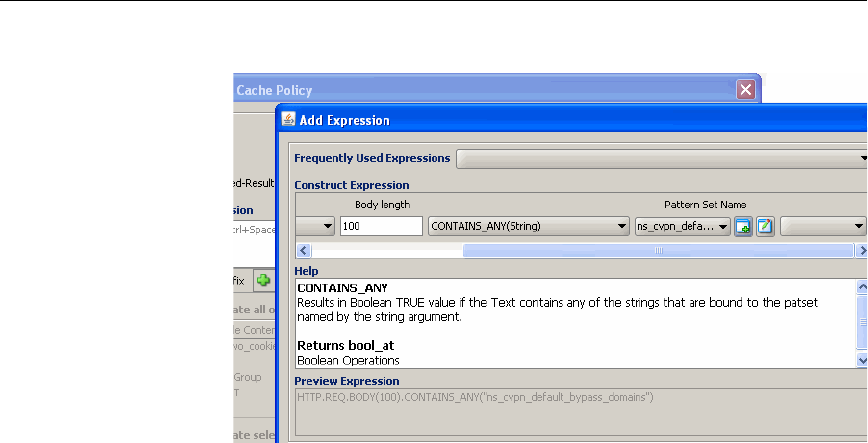
162 Citrix NetScaler Policy Configuration and Reference Guide
The following screen shot is an example of an “_ANY” operator..
6. To use an existing pattern set, select it from the Pattern Set Name drop-
down menu.
7. To create a new pattern set, click the icon for creating a new pattern set, and
configure the pattern set as follows:
•In the Name field, enter a name, and then click Add.
•In the Add Pattern dialog box, enter a pattern in the Pattern field.
• If you want to manually assign an index to this pattern set, in the
Index field, enter an integer. Note that if you manually add an index
to an entry, you must do this for all entries in the set. Otherwise, the
NetScaler automatically assigns an index to each entry in the set.
•Click Create.
8. Repeat the previous step until you have added all of the patterns that you
want.
9. Click Create.
Note: To view the new pattern set, click the icon for modifying a pattern
set.
To create and use a CONTAINS_ANY pattern set using the NetScaler
command line
1. At a NetScaler command prompt, type:
add policy patset patternName
Where pattern_name is the name of a pattern that you want to configure.

Chapter 9 Advanced Expressions: String Sets, String Patterns, and Data Formats 163
2. Associate a pattern with the named pattern set, as follows:
bind policy patset pattern_name pattern
Where pattern_name is the name of a pattern that you want to configure
and pattern is an actual text pattern. Following is an example:
add policy patset myPatSet
bind policy patset myPatSet aaa
bind policy patset myPatSet bbb
bind policy patset myPatSet ccc
3. To view the named pattern set and its associated patterns, enter the
following command:
show policy patset pattern_name
Where pattern_name is the name of a pattern that you want to view.
4. Configure the pattern set as part of an expression in a policy.
For more information, see “Creating or Modifying an Advanced Policy,” on
page 14. Following is an example that uses the pattern set myPatSet, and
returns TRUE if the value of the HTTP header named myHeader contains
any of the strings that you defined earlier in this procedure:
add cache policy testPatSet -rule
http.req.header("myHeader").contains_any("myPatSet") -action
cache
To configure and use an index-based pattern set using the NetScaler
command line
1. At a NetScaler command prompt, type:
add policy patset patternName
Where pattern_name is the name of a pattern that you want to configure.
2. Associate a pattern and an index with the named pattern set, as follows:
bind policy patset patternName pattern -index number
Where patternName is the name of a pattern that you want to configure,
pattern is an actual text pattern, and number is the index value. Following is
an example:
add policy patset myPatSet1
bind policy patset myPatSet1 aaa -index 1
bind policy patset myPatSet1 bbb -index 5
bind policy patset myPatSet1 ccc -index 4
3. To view the named pattern set and its associated patterns, type:

164 Citrix NetScaler Policy Configuration and Reference Guide
show policy patset pattern_name
Where patternName is the name of a pattern that you want to view.
4. Configure the pattern set as part of an expression.
For example, you can configure it in a policy rule. For more information,
see “Creating or Modifying an Advanced Policy,” on page 14. Following is
an example that uses the pattern set myPatSet, and returns TRUE if the
value of the HTTP header named myHeader contains any of the strings that
you defined earlier in this procedure:
add cache policy testPatSet -rule
http.req.header("myHeader").contains_index("myPatSet1") -
action cache
Matching Text With a Pattern
In addition to matching text with a set of patterns, you can define an arbitrary
pattern that uses wildcards. In most types of expressions, you should avoid using
wildcards. For example, the following expression is legal but may have
unexpected results:
http.req.url.path.contains("/*.jpeg")
Note that this expression would not, for example, match the following URL:
http://10.102.58.201/icon.jpeg
Following is an example of a regular expression that matches a URL that contains
the file name suffix, “.jpeg”:
http.req.url.regex_match(re/*.jpeg/)
In general, for simple pattern matching, it is preferable to use the CONTAINS or
EQ operation to perform a partial string match. For example, the following
expressions check the file name extension:
http.req.url.suffix.contains("jpeg")
http.req.url.suffix.eq("jpeg")
However, if you need to match more complex patterns in text, you can define a
regular expression. For example, the following example selects "text" from "text/
plain":
http.res.header("content-type").before_regex(re#/#)
The NetScaler supports regular expression syntax as described on the following
Web site:
http://www.pcre.org/pcre.txt
For an introduction to regular expressions, see the following URLs:

Chapter 9 Advanced Expressions: String Sets, String Patterns, and Data Formats 165
http://www.regular-expressions.info/quickstart.html
http://www.silverstones.com/thebat/Regex.html
These sites provide tutorial and reference information on regular expressions.
Note: Processing of regular expressions can be slow, and should only be used if
other expression types do not satisfy your requirements.
Basic Characteristics of Regular Expressions
The following are a few characteristics of a regular expression:
• The string “re” followed by a delimiter indicates the start of a regular
expression within an advanced policy expression.
The expression is ended with a matching delimiter. For example, (re#/#)
extracts information before or after a slash.
• A regular expression cannot exceed 1499 characters.
• To represent a digit, use the string \d (a backslash, followed by d).
• To represent white space, use \s (a backslash, followed by s).
• The regular expression can contain white space. The white space is ignored.
The following are differences between the NetScaler syntax and PCRE syntax:
• The NetScaler does not allow back references.
• You should not use recursive regular expressions.
• The dot meta-character also matches new lines.
• Unicode is not supported.
• The operation SET_TEXT_MODE(IGNORECASE) overrides the (?i)
internal option in the regular expression.
Operations for Regular Expressions
Operations for regular expressions are evaluated somewhat differently, depending
on whether they evaluate text or HTTP headers. Operations that evaluate headers
override any text-based operations for all instances of the current header type.

166 Citrix NetScaler Policy Configuration and Reference Guide
The following table describes operations that use regular expressions.
Operations That Apply Regular Expressions to Text and HTTP Headers
Regular Expression Operation Description
text.BEFORE_REGEX(regular
expression)
Selects text that precedes the string that matches
the regular expression argument. If the regular
expression does not match any data in the target,
the expression returns a text object of length of 0.
The following expression selects the string "text"
from "text/plain".
http.res.header("content-
type").before_regex(re#/#)
text.AFTER_REGEX(regular
expression)
Selects text that follows the string that matches the
regular expression argument. If the regular
expression does not match any text in the target,
the expression returns a text object of length of 0.
The following expression extracts "Example" from
"myExample":
http.req.header("etag").after_
regex(re/my/)
text.REGEX_SELECT(regular
expression)
Selects a string that matches the regular expression
argument. If the regular expression does not match
the target, a text object of length of 0 is returned.
The following example extracts the string "NS-
CACHE-9.0: 90" from a Via header:
http.req.header("via").regex_
select(re!NS-CACHE-
\d\.\d:\s*\d{1,3}!)

Chapter 9 Advanced Expressions: String Sets, String Patterns, and Data Formats 167
text.REGEX_MATCH(regular
expression)
Returns TRUE if the target matches a regular
expression argument of up to 1499 characters.
The regular expression must be of the following
format:
re<delimiter>regular expression<
delimiter>
Both delimiters must be the same. Additionally, the
regular expression must conform to the Perl-
compatible (PCRE) regular expression library
syntax. For more information, go to http://
www.pcre.org/pcre.txt. In particular, see the
pcrepattern man page. However, make note of the
following:
• Back-references are not allowed.
• Recursive regular expressions are not
recommended.
• The dot metacharacter also matches new lines.
• The Unicode character set is not supported.
• SET_TEXT_MODE(IGNORECASE)
overrides the “(?i)” internal option specified in
the regular expression.
The following are examples:
http.req.hostname.regex_match(re/
[[:alpha:]]+(abc){2,3}/)
http.req.url.set_text_
mode(urlencoded).regex_
match(re#(a*b+c*)#)
The following example matches ab and aB:
http.req.url.regex_match(re/a(?i)b/)
The following example matches ab, aB, Ab and
AB:
http.req.url.set_text_
mode(ignorecase).regex_match(re/ab/)
The following example performs a case-
insensitive, multiline match where the dot meta-
character also matches a new line:
http.req.body.regex_match(re/(?ixm)
(^ab (.*) cd$) /)
Operations That Apply Regular Expressions to Text and HTTP Headers
Regular Expression Operation Description

168 Citrix NetScaler Policy Configuration and Reference Guide
http header.AFTER_
REGEX(regular expression)
Evaluates all instances of the header and extracts
the text following the string that matches the
regular expression argument in any instance of the
header value. The header instances are matched
from the last to the first.
The following example extracts "BBCCDD" from
"AABBCCDD".
http.req.header("etag").after_
regex(re/AA/)
http header.BEFORE_
REGEX(regular expression)
For any instance of the header, this operation
returns the text that precedes the string matching
the regular expression argument. The header
instances are evaluated from the last to the first.
The following example extracts "text" from "text/
plain":
http.res.header("content-
type").before_regex(re#/#)
http header.REGEX_
MATCH(regular expression)
This operation returns a Boolean TRUE if the
regular expression argument matches any instance
of the header value. The header instances are
evaluated from the last to the first.
Following are examples:
http.req.hostname.regex_match(re/
[[:alpha:]]+(abc){2,3}/)
http.req.url.set_text_
mode(urlencoded).regex_
match(re#(a*b+c*)#)
The following example matches the strings “ab”
and “aB”:
http.req.url.regex_match(re/a(?i)b/)
The following example matches the strings “ab”,
“aB”, “Ab”, and “AB”:
http.req.url.set_text_
mode(ignorecase).regex_match(re/ab/)
The following example performs a case-
insensitive, multi-line match, where the dot (.)
meta-character also matches a new line:
http.req.body.regex_match(re/(?ixm)
(^ab (.*) cd$) /)
Operations That Apply Regular Expressions to Text and HTTP Headers
Regular Expression Operation Description

Chapter 9 Advanced Expressions: String Sets, String Patterns, and Data Formats 169
Transforming Text and Numbers into Different Data
Types
You can extract text or a number and treat it like another type of data. For
example, you can do the following:
• Extract a string from an HTTP request body and treat it like an HTTP
header.
• Extract a value from one type of request header and insert it in a response
header of a different type.
After typecasting the data, you can apply any operation that is appropriate for the
new data type. For example, if you typecast text to an HTTP header, you can
apply any operation that is applicable to HTTP headers to the returned value.
http header.REGEX_
SELECT(regular expression)
Selects the text that matches the regular expression
argument in any instance of the http header value.
The header instances are matched from the last to
the first.
The following example selects "NS-CACHE-9.0:
90":
http.req.header("via").regex_
select(re!NS-CACHE-
\d\.\d:\s*\d{1,3}!)
Operations That Apply Regular Expressions to Text and HTTP Headers
Regular Expression Operation Description

170 Citrix NetScaler Policy Configuration and Reference Guide
The following table describes various typecasting operations.
Typecasting Operations
Operation Description
text.TYPECAST_LIST_
T(separator)
Treats the text in an HTTP request or response body as a list
whose elements are delimited by the character in the
separator argument.
Text mode settings have no effect on the separator. For
example, even if you set the text mode to IGNORECASE,
and the separator is the letter “p,” an uppercase “P” is not
treated as a separator.
The following example creates a Rewrite action that
constructs a list from an HTTP request body and extracts the
fourth item in the list:
add rewrite action myreplace_action REPLACE
'http.req.body(100)'
'http.req.body(100).typecast_list_
t('?').get(4)'
set rewrite policy myreplace_policy -action
myreplace_action
This policy returns the string “fourth item” from the
following request:
GET?first item?second item?third item?fourth
item?
The following example extracts the fourth item from the last
from the list.
add rewrite action myreplace_action1 REPLACE
'http.req.body(100)'
'http.req.body(100).typecast_list_
t('?').get_reverse(4)'
set rewrite policy myreplace_policy1 -action
myreplace_action1
This policy returns the string “first item” from the following
request:
GET?first item?second item?third item?fourth
item
Note that the GET_REVERSE operations ignores empty
elements in a list.

Chapter 9 Advanced Expressions: String Sets, String Patterns, and Data Formats 171
text.TYPECAST_
NVLIST_T(separator,
delimiter)
or
text.TYPECAST_
NVLIST_T(separator,
delimiter, quote)
Treats the text as a name-value list. The separator argument
identifies the character and separates the name and the value.
The delimiter argument identifies the character that separates
each name-value pair. The quote character is required when
typecasting text into a name-value list that supports quoted
strings. Any delimiters that appear within the quoted string
are ignored.
The text mode has no effect on the delimiters. For example,
if the current text mode is IGNORECASE and you specify
“p” as the delimiter, an uppercase “P” is not treated as a
delimiter.
For example, the following policy counts the number of
name-value pairs and inserts the result in a header named
name-value-count:
add rewrite action mycount_action insert_
http_header name-value-count
'http.req.header("Cookie").typecast_nvlist_
t('=',';').count'
set rewrite policy mycount_policy -action
mycount_action
This policy can extract a count of arguments in
Cookie headers and insert the count in a name-
value-count header:
Cookie: name=name1; rank=rank1
text.TYPECAST_TIME_T Treats the designated text as a date string. The following
formats are supported:
• RFC822: Sun, 06 Nov 1994 08:49:37 GMT
• RFC850: Sunday, 06-Nov-94 08:49:37 GMT
• ASCII TIME: Sun Nov 6 08:49:37 1994
• HTTP Set-Cookie Expiry date: Sun, 06-Nov-
1994 08:49:37 GMT
For example, the following policy searches for the string
“dec” and converts it to a time value. This policy matches all
requests that contain “dec” in the request body:
Add rewrite policy mytime_policy
"http.req.body(100).typecast_time_
t.contains("dec")" mytime_action
bind rewrite global mytime_policy 100
Typecasting Operations
Operation Description

172 Citrix NetScaler Policy Configuration and Reference Guide
numeric
string.TYPECAST_IP_
ADDRESS_T
Treats a numeric string like an IP address.
For example, the following policy matches HTTP requests
that contains Cookie headers with a value of:
12.34.56.78\r\n.
set rewrite policy ip_check_policy -rule
'http.req.cookie.value("ip").typecast_ip_
address_t.eq(12.34.56.78)'
bind rewrite global ip_check_policy 200 -
type req_default
numeric
string.TYPECAST_
IPV6_ADDRESS_T
Treats a string as an IPv6 address in the following format:
0000:0000:CD00:0000:0000:00AB:0000:CDEF
text.TYPECAST_HTTP_
URL_T
Treats the designated text as the URL in the first line of an
HTTP request header. The supported format is [protocol://
hostname]path?query, and the text mode is set to
URLENCODED by default.
For example, the following policy replaces a URL-encoded
part of a string in an HTTP header named Test.
add rewrite action replace_header_string
replace "http.req.header(\"Test\").typecast_
http_url_t.path.before_str(\"123\").after_
str(\"ABC\")" "\"string\""
add rewrite policy rewrite_test_header_
policy true replace_header_string
bind rewrite global rewrite_test_header_
policy 1 END -type res_override
Consider the following header:
Test: ABC%12123\r\n
This policy would replace the preceding header with the
value ABC%string123\r\n.
Typecasting Operations
Operation Description

Chapter 9 Advanced Expressions: String Sets, String Patterns, and Data Formats 173
number.TYPECAST_NUM_
T(DECIMAL)
Converts a numeric string into decimal format. For example,
the following policy extracts a numeric portion of a query
string, adds 4 to the number, and inserts an HTTP header
named Company with a value of the resulting decimal value.
add rewrite action myadd_action insert_http_
header Company "http.req.url.query.typecast_
num_t(decimal).add(4)"
add rewrite policy myadd_policy true myadd_
action
bind rewrite global myadd_policy 300 END -
type RES_DEFAULT
For example, this policy would extract “4444” from the
following:
/test/file.html?4444
The action that is associated with the policy would insert the
following HTTP response header:
Company: 4448\r\n
text.TYPECAST_HTTP_
HOSTNAME_T
Provides operations for parsing an HTTP host name as it
appears in HTTP data. The format for a host name is
abc.def.com:8080.
text.TYPECAST_HTTP_
METHOD_T
Converts text to an HTTP method.
For example, suppose that you define the following pattern
set:
add policy patset method_pattern
bind policy patset method_pattern TRACE
bind policy patset method_pattern GET
bind policy patset method_pattern POST
bind policy patset method_pattern PUT
bind policy patset method_pattern HEAD
bind policy patset method_pattern OPTIONS
bind policy patset method_pattern DELETE
The following policy matches any HTTP request that
contains a Host header with any of the preceding values:
Add rewrite policy method_policy
"http.req.header(\"Host\").typecast_http_
method_t.contains_any(\"pat1\")" act1
text.TYPECAST_DNS_
DOMAIN_T
Enables the designated text to be parsed like a DNS domain
name in the format ab.def.com.
Typecasting Operations
Operation Description

174 Citrix NetScaler Policy Configuration and Reference Guide
text.TYPECAST_HTTP_
HEADER_T
Overrides the behavior of certain methods that are used with
protocol-aware prefixes. This operator can be used only with
protocol-aware prefixes that qualify standard HTTP headers,
that is, prefixes of the format HTTP.REQ.<STANDARD_
HEADER> (for example, HTTP.REQ.COOKIE and
HTTP.REQ.SET_COOKIE).
Protocol-aware prefixes of the format
HTTP.REQ.<STANDARD_HEADER> are used with
several methods, such as COUNT and VALUE("string").
TYPECAST_HTTP_HEADER_T overrides the behavior of
these methods.
Following are two examples of how TYPECAST_HTTP_
HEADER_T overrides the behavior of methods associated
with protocol-aware prefixes for HTTP headers:
Example 1: HTTP.REQ.COOKIE.COUNT returns the total
number of name-value pairs present in Cookie headers.
HTTP.REQ.COOKIE.TYPECAST_HTTP_HEADER_
T.COUNT, however, overrides this behavior and returns the
number of instances of the COOKIE header.
Example 2: HTTP.REQ.COOKIE.VALUE(n) accepts an
unsigned integer n (whose value can range from 0 to 14) as
an argument and selects the value of the first name-value
pair in the nth instance of the Cookie header, starting from
the last instance. Therefore,
HTTP.REQ.COOKIE.VALUE(0) selects the value of the
first name-value pair in the last instance of the Cookie
header, HTTP.REQ.COOKIE.VALUE(1) selects the value of
the first name-value pair in the second to last instance of the
Cookie header, and so on. When used with TYPECAST_
HTTP_HEADER_T, however, the method returns the entire
value of the nth occurrence of the Cookie header, starting
from the last instance. Therefore, HTTP.REQ.COOKIE.
TYPECAST_HTTP_HEADER_T.VALUE(0) selects the
entire value of the last instance of the Cookie header,
HTTP.REQ.COOKIE.TYPECAST_HTTP_HEADER_T
.VALUE(1) selects the entire value of the second to last
instance of the Cookie header, and so on.
TYPECAST_HTTP_HEADER_T returns an error if used
with prefixes that are not protocol-aware. It returns an error
regardless of whether or not the header that is used in the
prefix is a standard HTTP header. For example, the
following expression returns an error even though the prefix
contains a standard header:
HTTP.REQ.HEADER("Cookie").TYPECAST_HTTP_
HEADER_T.CONTAINS("abc")
Typecasting Operations
Operation Description

Chapter 9 Advanced Expressions: String Sets, String Patterns, and Data Formats 175
text.TYPECAST_HTTP_
HEADER_T("name")
Converts the designated text to a multi-line HTTP header
that you specify in a name argument.
For example, the following expression converts
“MyHeader” to “InHeader”:
http.req.header("MyHeader").typcast_http_
header_t("InHeader")
Typically, text operations that you specify in this type of
expression apply to only the last line of this header, with
some exceptions. For example, the CONTAINS operation
operates on values in all the lines in instances of this header
type.
text.TYPCAST_COOKIE_
T
Treats the designated text as an HTTP cookie as it appears in
a Set-Cookie or Set-Cookie2 header. You can apply name-
value list operations as well as text operations to the
designated text. For example, you can designate an equals (=
) as the name-value delimiter and the semicolon (;) as the list
element delimiter.
If you apply name-value list operations, note that the list is
parsed as if IGNORE_EMPTY_ELEMENTS were in effect.
Each cookie begins with a cookie-name=cookie-value pair,
optionally followed by attribute-value pairs that are
separated by a semicolon, as follows:
cookie1=value1;version=n.n;value;domain=
value;path=value
If the same attribute appears more than once in a cookie, the
value for the first instance of the attribute is returned.
number.TYPECAST_
DOUBLE_AT
Transforms the number to a value of data type “double”.
number.TYPECAST_IP_
ADDRESS_AT
Converts the number to an IP address.
number.TYPECAST_
TIME_AT
Converts the number to time format.
Typecasting Operations
Operation Description

176 Citrix NetScaler Policy Configuration and Reference Guide
number.TYPECAST_
TIME_
AT.BETWEEN(time1,
time2)
Returns a Boolean value (TRUE or FALSE) that indicates
whether the time value designated by number is between the
lower and upper time value arguments time1 and time2.
The following are prerequisites for this operator:
• Both the lower and upper time arguments must be fully
specified. For example, GMT 1995 Jan is fully
specified. But GMT Jan, GMT 1995 20 and GMT Jan
Mon_2 are not fully specified.
• Both arguments must be either GMT or Local.
• The day of the week must not be present in either
argument. However, the day of the month can be
specified as the first, second, third, or fourth weekday of
the month (example Wed_3 is the third Wednesday of
the month).
• The upper time argument, time2, must be bigger than the
lower time argument, time1.
The following examples assume that the current time value
is GMT 2005 May 1 10h 15m 30s and that the day is the first
Sunday of the month of May in 2005. The result of the
evaluation is given after each example.
BETWEEN(GMT 2004, GMT 2006): TRUE
BETWEEN(GMT 2004 Jan, GMT 2006 Nov): TRUE
BETWEEN(GMT 2004 Jan, GMT 2006): TRUE
BETWEEN(GMT 2005 May Sun_1, GMT 2005 May Sun_
3): TRUE
BETWEEN(GMT 2005 May 1, GMT May 2005 1): TRUE
BETWEEN(LOCAL 2005 May 1, LOCAL May 2005 1):
The result depends on the NetScaler system's timezone.
Parameters:
time1 - Lower time value
time2 - Upper time value
number.TYPECAST_
TIME_AT.DAY
Extracts the day of the month from the current system time
and returns the value as a number that corresponds to the day
of the month. The value that is returned ranges from 1 to 31.
Typecasting Operations
Operation Description

Chapter 9 Advanced Expressions: String Sets, String Patterns, and Data Formats 177
number.TYPECAST_
TIME_AT.EQ(t)
Returns a Boolean value (TRUE or FALSE) that indicates
whether the time value designated by number is equal to the
time value argument t.
The following examples assume that the current time value
is GMT 2005 May 1 10h 15m 30s and that the day is the 1st
Sunday of the month of May in 2005. The result of the
evaluation is given after each example.
EQ(GMT 2005): TRUE
EQ(GMT 2005 Dec): FALSE
EQ(Local 2005 May): TRUE or FALSE, depending on the
current timezone.
EQ(GMT 10h): TRUE
EQ(GMT 10h 30s): TRUE
EQ(GMT May 10h): TRUE
EQ(GMT Sun): TRUE
EQ(GMT May Sun_1): TRUE
Parameters:
t - Time
number.TYPECAST_
TIME_AT.GE(t)
Returns a Boolean value (TRUE or FALSE) that indicates
whether the time value designated by number is greater than
or equal to the time value argument t.
The following examples assume that the current time value
is GMT 2005 May 1 10h 15m 30s and that the day is the 1st
Sunday of the month of May in 2005. The result of the
evaluation is given after each example.
GE(GMT 2004): TRUE
GE(GMT 2005 Jan): TRUE
GE(Local 2005 May): TRUE or FALSE, depending on the
current timezone.
GE(GMT 8h): TRUE
GE(GMT 30m): FALSE
GE(GMT May 10h): TRUE
GE(GMT May 10h 0m): TRUE
GE(GMT Sun): TRUE
GE(GMT May Sun_1): TRUE
Parameters:
t - Time
Typecasting Operations
Operation Description

178 Citrix NetScaler Policy Configuration and Reference Guide
number.TYPECAST_
TIME_AT.GT(t)
Returns a Boolean value (TRUE or FALSE) that indicates
whether the time value designated by number is greater than
the time value argument t.
The following examples assume that the current time value
is GMT 2005 May 1 10h 15m 30s and that the day is the 1st
Sunday of the month of May in 2005. The result of the
evaluation is given after each example.
GT(GMT 2004): TRUE
GT(GMT 2005 Jan): TRUE
GT(Local 2005 May): TRUE or FALSE, depending on the
current timezone.
GT(GMT 8h): TRUE
GT(GMT 30m): FALSE
GT(GMT May 10h): FALSE
GT(GMT May 10h 0m): TRUE
GT(GMT Sun): FALSE
GT(GMT May Sun_1): FALSE
Parameters:
t - Time
number.TYPECAST_
TIME_AT.HOURS
Extracts the hour from the current system time and returns
the corresponding value as an integer that ranges from 0 to
23.
Typecasting Operations
Operation Description

Chapter 9 Advanced Expressions: String Sets, String Patterns, and Data Formats 179
number.TYPECAST_
TIME_AT.LE(t)
Returns a Boolean value (TRUE or FALSE) that indicates
whether the time value designated by number is lesser than
or equal to the time value argument t.
The following examples assume that the current time value
is GMT 2005 May 1 10h 15m 30s and that the day is the 1st
Sunday of the month of May in 2005. The result of the
evaluation is given after each example.
LE(GMT 2006): TRUE
LE(GMT 2005 Dec): TRUE
LE(Local 2005 May): TRUE or FALSE, depending on the
current timezone.
LE(GMT 8h): FALSE
LE(GMT 30m): TRUE
LE(GMT May 10h): TRUE
LE(GMT Jun 11h): TRUE
LE(GMT Wed): TRUE
LE(GMT May Sun_1): TRUE
Parameters:
t - Time
number.TYPECAST_
TIME_AT.LT(t)
Returns a Boolean value (TRUE or FALSE) that indicates
whether the time value designated by number is lesser than
the time value argument t.
The following examples assume that the current time value
is GMT 2005 May 1 10h 15m 30s and that the day is the 1st
Sunday of the month of May in 2005. The result of the
evaluation is given after each example.
LT(GMT 2006): TRUE
LT(GMT 2005 Dec): TRUE
LT(Local 2005 May): TRUE or FALSE, depending on the
current timezone.
LT(GMT 8h): FALSE
LT(GMT 30m): TRUE
LT(GMT May 10h): FALSE
LT(GMT Jun 11h): TRUE
LT(GMT Wed): TRUE
LT(GMT May Sun_1): FALSE
Parameters:
t - Time
Typecasting Operations
Operation Description

180 Citrix NetScaler Policy Configuration and Reference Guide
number.TYPECAST_
TIME_AT.MINUTES
Extracts the minute from the current system time and returns
the value as an integer that ranges from 0 to 59.
number.TYPECAST_
TIME_AT.MONTH
Extracts the month from the current system time and returns
the value as an integer that ranges from 1 (January) to 12
(December).
number.TYPECAST_
TIME_AT.RELATIVE_
BOOT
Calculates the number of seconds that have elapsed after the
most recent reboot or the number of seconds to the next
scheduled reboot, depending on which of these is closer to
the current time, and returns an integer. If the closest boot
time is in the past, the integer is negative; if the closest boot
time is in the future (scheduled reboot time), the integer is
positive.
number.TYPECAST_
TIME_AT.RELATIVE_NOW
Calculates the number of seconds between the current
system time and the specified time, and returns the value as
an integer. If the designated time is in the past, the integer is
negative; if it is in the future, the integer is positive.
number.TYPECAST_
TIME_AT.SECONDS
Extracts the seconds from the current system time and
returns the value as an integer that ranges from 0 to 59.
number.TYPECAST_
TIME_AT.WEEKDAY
Returns an integer that corresponds to the day of the week; 0
for Sunday and 6 for Saturday.
Typecasting Operations
Operation Description

Chapter 9 Advanced Expressions: String Sets, String Patterns, and Data Formats 181
number.TYPECAST_
TIME_
AT.WITHIN(time1,
time2)
Returns a Boolean value (TRUE or FALSE) that indicates
whether the time value designated by number lies within all
the ranges defined by lower and upper time value arguments
time1 and time2.
If an element of time such as the day or the hour is left
unspecified in the lower argument, time1, then it is assumed
to have the lowest value possible for its range.
If an element is left unspecified in the upper argument ,
time2, then it is assumed to have the highest value possilbe
for its range.
If the year is specified in one of the arguments, then it must
be specified in the other argument as well.
Following are the ranges for different elements of time:
• month: 1-12
• day: 1-31
• weekday: 0-6
• hour: 0-23
• minutes: 0-59
• seconds: 0-59.
Each element of time in the lower time value argument
defines a range in combination with the corresponding
element in the upper time value argument. For the result to
be TRUE, each element of time in the time value designated
by number must lie in the corresponding range specified by
the lower and upper arguments.
The following examples assume that the current time value
is GMT 2005 May 10 10h 15m 30s.and that the day is the
second Tuesday of the month. The result of the evaluation is
given after each example.
WITHIN(GMT 2004, GMT 2006): TRUE
WITHIN(GMT 2004 Jan, GMT 2006 Mar): FALSE (May
doesn't fall in the Jan-Mar range.)
WITHIN(GMT Feb, GMT): TRUE (May falls in the Feb-
Dec range.)
WITHIN(GMT Sun_1, GMT Sun_3): TRUE (2nd Tuesday
lies within 1st Sunday and the 3rd Sunday.)
WITHIN(GMT 2005 May 1 10h, GMT May 2005 1 17h):
TRUE
WITHIN(LOCAL 2005 May 1, LOCAL May 2005 1): The
result depends on the NetScaler system's timezone.
Parameters:
time1 - Lower time value
time2 - Upper time value
Typecasting Operations
Operation Description

182 Citrix NetScaler Policy Configuration and Reference Guide
number.TYPECAST_
TIME_AT.YEAR
Extracts the year from the current system time and returns
the value as a four-digit integer.
double.TYPECAST_NUM_
AT
Transforms the double-precision number represented by
double to an integer.
Typecasting Operations
Operation Description

C
HAPTER
10
Advanced Policies: Controlling the
Rate of Traffic
You can limit access to virtual servers or any other user-defined entity and
prevent overloading the network by configuring policies and expressions that
control the rate of traffic. You can also configure the NetScaler to perform any
other supported action based on the traffic rate, including redirecting traffic if the
rate exceeds a particular threshold. To do this, you configure policies that enable
the NetScaler to monitor the traffic rate.
In This Chapter
About Policies that Monitor the Traffic Rate
Expressions for Controlling the Traffic Rate
Configuring Policies That Control the Traffic Rate
Note: This chapter provides a brief overview of limiting the traffic rate. For
more information, see the chapter on controlling data flow based on the traffic
rate in the Citrix NetScaler AppExpert Guide.
About Policies that Monitor the Traffic Rate
You can configure policies that monitor the following types of traffic:
• The number of HTTP requests that the NetScaler intercepts.
• The number of DNS requests that the NetScaler intercepts.
• The bandwidth usage.
Expressions for Controlling the Traffic Rate
The following expression prefix can be used to parse the traffic rate:
sys.check_limit("limit_identifier")

184 Citrix NetScaler Policy Configuration and Reference Guide
Where limit_identifier is a NetScaler function that indicates the type of traffic to
be monitored. For an example, see “Summary Examples of Advanced
Expressions and Policies,” on page 237. For more information on configuring
limit identifiers, see the Citrix NetScaler Traffic Management Guide.
This prefix can be used in any NetScaler feature that uses advanced policies and
expressions, such as Rewrite and Responder.
Configuring Policies That Control the Traffic Rate
For complete instructions on configuring rate-limiting policies, see the Citrix
NetScaler Traffic Management Guide. Following is an overview of configuring
policies to control the rate of traffic.
Task overview: Configuring policies to limit the amount of traffic
1. Optionally, configure a rate limit selector.
2. Configure a rate limit identifier, and if you have configured a rate limit
selector, include it in the rate limit identifier's definition. The rate limit
identifier assesses particular types of traffic for a user-configured time
interval, and returns a boolean TRUE if the amount of traffic exceeds a
user-configured limit within the time interval.
3. Configure an advanced policy that applies the rate limit identifier to
particular types of data, for example, to HTTP requests with particular IP
addresses or subnets to particular file types. The policy expression must be
a compound expression that contains at least two components:
• An expression that identifies traffic to which the rate limit identifier
is applied, for example:
http.req.url.contains("myAspx.aspx").
• An expression that identifies a rate limit identifier, for example:
sys.check_limit("myLimitIdentifier").
Following is a complete example of the policy rule:
http.req.url.contains("myAspx.aspx") &&
sys.check_limit("myLimitIdentifier")

C
HAPTER
11
Advanced Policies: Sending HTTP
Service Callouts to Applications
You can use HTTP callouts to obtain information from external applications. For
example, if a server makes a request, you can use an HTTP callout to determine if
this server is on a “deny access” list. The callout policy sends an HTTP request to
an external application. An agent that you deploy in front of the application
formats the request for the application. When the application returns a response,
the agent formats the response for the NetScaler, and the callout policy extracts
data of interest from the response. For example, you can configure a callout that
sends a client's source domain to a server that looks up bad domains from a list.
When the server sends a response, the callout can extract just the “allowed” or
“denied” portion of the response.
You configure an HTTP callout as a specialized type of policy. After configuring
an HTTP callout policy, you can invoke it from policies and other functions (for
example, actions) that use advanced expressions. The expression prefix SYS.
HTTP_CALLOUT invokes a callout policy. For example, you can invoke an
HTTP callout policy from a Rewrite action and insert the value that is returned by
the callout in an HTTP response header.
Note that you cannot invoke an HTTP callout in a DELETE Rewrite action.
In This Chapter
About Calling Out to an External Application
About HTTP Callout Policies
Configuring an HTTP Callout Policy
Invoking an HTTP Callout Policy
Note: To deploy an HTTP callout, in addition to configuring the policy as
described in this chapter, you must also create an agent that formats the callout
request for the receiving application and formats the application's response to the
NetScaler. For details on the callout agent, see the chapter on HTTP callouts in
the Citrix NetScaler AppExpert Guide.

186 Citrix NetScaler Policy Configuration and Reference Guide
About Calling Out to an External Application
A callout to an external application consists of an HTTP request and a set of
parameters that parse the response to the request. You configure the entire
request, or significant parameters in the request, in the HTTP callout policy. The
HTTP callout policy also contains information about the recipient of the request
and advanced expressions for parsing the HTTP response when it is received.
A callout can send only an HTTP request. The service can only be an HTTP or
HTTPS service.
After configuring an HTTP callout policy, you do not bind it or add it to a policy
bank, as you would another policy. Instead, you invoke it using an advanced
expression in one of the following:
• Content Switching: For content switching of HTTP and TCP data
•Rewrite
• Responder: For content filtering functions
• Load Balancing: For token-based load balancing
Task overview: Configuring a callout to an external application
1. Create a callout policy in the Rewrite feature, as described in “Configuring
an HTTP Callout Policy,” on page 188.
2. In the feature where the callout policy is needed, invoke the callout policy
from an advanced expression, as described in “Invoking an HTTP Callout
Policy,” on page 193.
3. Configure an HTTP callout agent to format the callout to the receiving
application, as described in the “HTTP Service Callout” chapter in the
Citrix NetScaler AppExpert Guide.
About HTTP Callout Policies
You configure HTTP callout policies in the Rewrite feature. After you define the
callout policy, it can be invoked from a policy expression in other NetScaler
features. For information on configuring the callout policy, see “Configuring an
HTTP Callout Policy,” on page 188. For information on invoking the callout
policy, see “Invoking an HTTP Callout Policy,” on page 193.
An HTTP callout policy contains the following components:
• Parameters that identify the application to be queried.

Chapter 11 Advanced Policies: Sending HTTP Service Callouts to Applications 187
• Parameters that the NetScaler uses to create an HTTP request or a single
parameter that contains a fully-formed HTTP request.
• Parameters for extracting data of interest from the HTTP response.
Note on the Format of an HTTP Request
You can specify a literal HTTP request in an HTTP callout policy. Even though
this is not required, it is useful to have a general idea of the format of an HTTP
request before configuring an HTTP callout.
An HTTP request contains a series of lines that each end with a carriage return
and a line feed, represented as either <CR><LF> or \r\n.
The first line of a request contains the HTTP method and target. For example, a
message line for a GET request contains the keyword GET and a string that
represents the object that is to be fetched, as in the following example:
GET /mysite/mydirectory/index.html HTTP/1.1\r\n
The rest of the request contains HTTP headers, including a required Host header
and, if applicable, a message body.
The request ends with a bank line (an extra <CR><LF> or \r\n).
Following is an example of a request:
Get /mysite/index.html HTTP/1.1\r\n
Host: 10.101.101.10\r\n
Accept: */*\r\n
\r\n
Note on the Format of an HTTP Response
Because the callout policy extracts data from an HTTP response, it is useful to
have a general idea of the format of an HTTP response before configuring an
HTTP callout policy.
An HTTP response contains a status message, response HTTP headers, and the
requested object, or, if the requested object cannot be served, an error message.
Following is an example of a response:
HTTP/1.1 200 OK\r\n
Content-Length: 55\r\n
Content-Type: text/html\r\n
Last-Modified: Wed, 12 Aug 1998 15:03:50 GMT\r\n
Accept-Ranges: bytes\r\n
ETag: “04f97692cbd1:377”\r\n
Date: Thu, 19 Jun 2008 19:29:07 GMT\r\n
\r\n
<55-character response>

188 Citrix NetScaler Policy Configuration and Reference Guide
Configuring an HTTP Callout Policy
You configure an HTTP callout policy by using the AppExpert feature. You
invoke this policy by specifying the SYS.HTTP_CALLOUT expression prefix in
an advanced expression. For details on invocation, see “Invoking an HTTP
Callout Policy,” on page 193.
The following table describes the elements in an HTTP callout policy.
Elements in an HTTP Callout Policy
Parameter Specifies
Name
(name)
Name of the callout, 127 characters maximum.
IP address and port
(ipAddress|*
port|*)
or
Virtual server name
(vserver)
IPv4 or IPv6 address of the server to which the callout is sent, or a
wildcard, and the port on the server to which the callout is sent, or
a wildcard.
Or, the name of a load balancing, content switching, or cache
redirection virtual server with a service type of HTTP.

Chapter 11 Advanced Policies: Sending HTTP Service Callouts to Applications 189
Attribute-based
request to send to the
server (mutually
exclusive with
sending an
expression-based
request to the server)
HTTP Method (httpMethod).
Method used in the HTTP request that this callout sends. Valid
values: GET or POST. Default: GET.
Host expression (hostExpr).
Advanced text expression to configure the Host header.
Maximum length: 255.
The expression can contain a literal value or it can be an advanced
expression that derives the value. Examples:
"10.101.10.11"
"http.req.header("Host")"
URL stem expression (urlStemExpr)
An advanced string expression for generating the URL stem.
Maximum length: 8191.
The expression can contain a literal string or an expression that
derives the value. Examples:
""/mysite/index.html""
"http.req.url"
HTTP Headers (headers).
Advanced text expression to insert HTTP headers and their
values in the HTTP callout request.
You must specify a value for every header. You specify the
header name as a string and the header value as an advanced
expression.
Query Parameters (parameters).
Advanced expression to insert query parameters in the HTTP
request that the callout sends.
You must specify a value for every parameter that you configure.
If the callout request uses the GET method, these parameters are
inserted in the URL. If the callout request uses the POST method,
these parameters are inserted in the POST body.
You configure the query parameter name as a string and the value
as an advanced expression. The parameter values are URL
encoded.
Elements in an HTTP Callout Policy
Parameter Specifies

190 Citrix NetScaler Policy Configuration and Reference Guide
Note: If a request or response that you configure in an HTTP callout
(-fullReqExpr or -resultExpr) contains the expression SYS.
HTTP_CALLOUT, the callout can recursively generate additional callouts. You
should avoid this. Also, be sure that the HTTP callout configuration is complete.
For example, if the callout contains a rule but not a server where the callout is to
be sent, it can return a value of “undefined.”
To configure a callout policy using the configuration utility
1. In the left navigation pane, expand AppExpert, and then click HTTP
Callouts.
Expression-based
request to send to the
server
(fullReqExpr)
Exact HTTP request that the NetScaler is to send as an advanced
expression to 8191 characters.
If you specify this parameter, you must omit the httpMethod,
hostExpr, urlStemExpr, headers, and parameters
arguments.
The request expression is constrained by the feature where the
callout is used. For example, an HTTP.RES expression cannot be
used in a request-time policy bank or in a TCP content switching
policy bank.
The NetScaler does not check the validity of this request. You
must manually validate the request.
Return type
(returnType)
Type of data that the target application returns in the response to
the callout. Valid values:
•TEXT: Treat the returned value as a text string.
•NUM: Treat the returned value as a number.
•BOOL: Treat the returned value as a Boolean value.
Note: You cannot change the return type after it is set.
Expression to extract
data from the
response
(resultExpr)
Advanced expression that extracts HTTP.RES objects from the
response to the HTTP callout. The maximum length is 8191.
The operations in this expression must match the return type. For
example, if you configure a return type of text, the result
expression must be a text-based expression. If the return type is
num, the result expression (resultExpr) must return a
numeric value similar to the following:
"http.res.body(10000).length"
Note: In some cases, if you set a return type of TEXT and the
result sent from the server exceeds 16 KB, the result expression
can return NULL. For example, this can happen when the result is
a concatenated string that exceeds 16 KB.
Elements in an HTTP Callout Policy
Parameter Specifies

Chapter 11 Advanced Policies: Sending HTTP Service Callouts to Applications 191
2. In the details pane, click Add.
3. In the Create HTTP Callout dialog box, in the Name field, enter a name
for the callout.
4. In the Server to receive callout request section, select the name of a
virtual server to which you want to send the callout, or specify an IP
address and port for the server. If this server uses IPv6 format, select the
IPv6 check box to enable the IP Address field to accept the appropriate
address format.
5. In the Request to send to the server section, do one of the following:
• To configure individual parameters for the request, click
Attribute-based and specify the attribute-based parameters
described in the table, “Elements in an HTTP Callout Policy,” on
page 188. For an example of the content of an HTTP request, see
“Note on the Format of an HTTP Request,” on page 187.
• To configure the entire HTTP request, click Expression-based and
enter the expression in the text box, as described in “Configuring
Advanced Expressions in a Policy,” on page 57, with one exception.
Unlike other expression entry fields, the request must start with the
string GET or POST. For an example of an expression that formats a
legal request, see “To configure a callout policy using the NetScaler
command line,” on page 191.
6. In the Server Response section, click the Return Type drop-down menu
and select BOOL, NUM, or TEXT, depending on the format of the data
that you expect the server to return. In the Expression to extract data
from the response field, enter an expression to extract the data that you
want from the HTTP response to this callout.
For more information on configuring an advanced expression, see
“Configuring Advanced Expressions in a Policy,” on page 57. Note that this
expression must start with the string http.res. For an example of an
HTTP response, see “Note on the Format of an HTTP Response,” on page
187. For an example of an expression that parses the response, see “To
configure a callout policy using the NetScaler command line,” on page 191.
7. Click Create.
To configure a callout policy using the NetScaler command line
1. At a NetScaler command prompt, type:
add policy httpCallout calloutName
2. Enter the following command to configure the policy.

192 Citrix NetScaler Policy Configuration and Reference Guide
The following is the basic syntax for an HTTP callout policy. Note that in
the following syntax, line breaks have been added for readability. You
specify the command parameters without entering a line break:
set policy httpCallout calloutName
{
-IPAddress [ipAddress|ipv6Address|*] -port [port|*] |
-vServer virtualServerName]
}
-returnType BOOL|NUM|TEXT
{
[-httpMethod (GET|POST)
-hostExpr string or expression
-urlStemExpr string or expression
-headers Name(value) ...
-parameters Name(value) ...] |
[-fullReqExpr string]
}
-resultExpr string
For parameter descriptions, see the table, “Elements in an HTTP Callout
Policy,” on page 188:
Examples
add policy httpCallout myCallout
set httpCallout myCallout -ipaddress 10.101.10.10 -port 80
-returnType text -httpMethod GET -hostExpr "'/10.101.10.11/'"
-urlStemExpr "'/mysite/index.html/'" -parameters name("My Name")
-resultExpr http.res.header("Hostname")
add policy httpCallout myCallout2
set httpCallout myCallout2 -vserver my_HTTP_LB_vserver -returnType
num -httpMethod GET -hostExpr 'http.req.header("Host")'
-urlStemExpr "http.req.url" -parameters Name("My Name") -headers
Name("MyHeader") -resultExpr "http.res.body(10000).length"
add policy httpCallout fullReqCallout
set policy httpCallout fullReqCallout -vserver my_HTTP_LB_vserver
-returnType num -httpMethod GET -fullReqExpr q{"GET " + http.req.
url + " HTTP/" + http.req.version.major + "." + http.req.version.
minor.sub(1) + "r\nHost: 10.101.10.10\r\nAccept: */*\r\n\r\n"}
To modify a callout policy using the NetScaler command line
At a NetScaler command prompt, type:
unset httpCallout calloutName -argument
Where:

Chapter 11 Advanced Policies: Sending HTTP Service Callouts to Applications 193
•calloutName is the name of the HTTP callout policy that you are
configuring.
•argument is one of the arguments that you supplied when you configured
the callout, including returnType, parameters, fullReqEx, and so
on.
After unsetting the configuration, use the set command to apply any new
settings.
Examples
unset httpCallout myCallout -parameters
unset httpCallout myCallout -headers
unset httpCallout myCallout -resultExpr
To delete a callout policy using the NetScaler command line
At a NetScaler command prompt, type:
rm policy httpCallout calloutName
Where calloutName is the name of the HTTP callout policy that you are deleting.
Example
rm policy httpCallout myCallout
To view a callout policy using the NetScaler command line
At a NetScaler command prompt, type:
show httpCallout
Invoking an HTTP Callout Policy
You can invoke the callout from a policy or another entity that uses advanced
expressions (for example, a Rewrite action). For a list of features that support
HTTP callouts, see “About Calling Out to an External Application,” on page 186.
You can invoke an HTTP callout policy by including the following in an
advanced expression:
SYS.HTTP_CALLOUT(calloutName)
Only HTTP.RES based advanced expressions can be used to build the result.
Note that you must know the return type of the HTTP callout policy that you are
invoking. The expression must conform to the return type of the invoked policy.
For example, if the return type of the HTTP callout policy is TEXT, the following
expression is valid:

194 Citrix NetScaler Policy Configuration and Reference Guide
sys.http_callout(authCallout).contains("someText")
If the return type is NUM, the following expression is valid:
sys.http_callout(authCallout).gt(500)
The following example shows the use of SYS.HTTP_CALLOUT to retrieve a
source IP address and insert it in a header of an HTTP request. (Bold is used for
emphasis.)
set policy httpCallout extractSrcIPCallout -ipAddress 10.101.
10.10 -port 80 -returnType text -hostExpr "\"10.101.10.10\""
-urlStemExpr "\"/mysite/index.html\"" -resultExpr 'server.ip.
src'
add rewrite action insertSrcIPAction insert_http_header Name
"sys.http_callout(extractSrcIPCallout)" -bypassSafetyCheck yes
add rewrite policy insertSrcIPPolicy "http.req.
header(\"MyHeader\").exists" insertSrcIPAction
bind rewrite global insertHostHeaderPolicy 100 END -type
req_default
The following example shows the use of SYS.HTTP_CALLOUT to retrieve
notification regarding whether a client IP address is blocked from a server and
configure a “You are banned” message in the Responder. (Bold is used for
emphasis.)
add policy httpCallout blockedCalloutPolicy
set policy httpCallout blockedCalloutPolicy -returnType text
-ipAddress 10.100.10.10 -port 80 -fullReqExpr '"Get
/cgi-bin/is_ip_blocked?ip=" + client.ip.src + "http/1.1\r\n" +
"Host: my_server\r\n\r\n"' -resultExpr 'http.res.
header("Result")'
add responder action blockedResponderAction respondwith
'"HTTP/1.1 200OK\r\n Content=Length: 17 \r\n\r\nYour IP is
banned"'
add responder policy blockedResponderPolicy "http.req.url.
eq("/") && sys.http.callout(blockedCalloutPolicy).
eq("Blocked") blockedResponderAction
bind responder global blockedResponderPolicy 100 END -type
res_override
Notes on Invoking a Callout
When invoking an HTTP callout in a policy or an action, be sure that the callout
invocation does not trigger additional callouts. For example, a policy should not
invoke an HTTP callout named MyCalloutPL if the policy expression contains
the URL /mycallout.pl. The following is an example:

Chapter 11 Advanced Policies: Sending HTTP Service Callouts to Applications 195
add responder policy 'http.req.url.eq("/callout.pl").NOT && sys.
http_callout(MyCalloutPL)' some_action
Also, if you modify an expression in an HTTP callout policy, you may get an
error if any policy that invokes it is bound to a new policy label or bind point. For
example, suppose that you create an HTTP callout policy named
myCalloutPolicy1, and invoke it from a rewrite policy named
rewriteCalloutPolicy1. If you change the expression in myCalloutPolicy1, you
might receive an error when binding rewriteCalloutPolicy1 to a new bind point.
The work-around is to modify these expressions before using the callout in the
policy.

196 Citrix NetScaler Policy Configuration and Reference Guide

C
HAPTER
12
Configuring Classic Policies and
Expressions
A number of NetScaler features use classic policies and classic expressions. As
with advanced policies, classic policies can be global or specific to a virtual
server.
The configuration method and bind points for classic policies are somewhat
different from those of advanced policies. As with advanced expressions, you can
configure named expressions and use each named expression in multiple classic
policies.
In This Chapter
Where Classic Policies Are Used
Viewing Classic Policies
Configuring a Classic Policy
Binding a Classic Policy
Creating Named Classic Expressions
Where Classic Policies Are Used
The following table summarizes NetScaler features that use classic policies and
specifics regarding support for these policies:
Policy Type and Bind Points for Policies in Features That Use Classic Policies
Feature Virtual Servers Supported Policies Policy Bind Points How You Use the Policies
System None Authentication
policies
(Note that
Command and
Auditing policies
in the System
feature are
unrelated to
classic policies.)
Global For the Authentication
function, policies contain
authentication schemes for
different authentication
methods. For example, you
can configure LDAP and
certificate-based
authentication schemes.

198 Citrix NetScaler Policy Configuration and Reference Guide
SSL None SSL policies • Global
• Load Balancing
virtual server
To determine when to apply
an encryption function and
add certificate information
to clear text.
To provide end-to-end
security. After a message is
decrypted, the SSL feature
re-encrypts clear text and
uses SSL to communicate
with back-end Web servers.
Content Switching
(Can use either
classic or
advanced policies,
but not both)
Content Switching
virtual server Content Switching
policies • Content
Switching
virtual server
• Cache
Redirection
virtual server
To determine what server or
group of servers is
responsible for serving
responses, based on
characteristics of an
incoming request.
Request characteristics
include device type,
language, cookies, HTTP
method, content type and
associated cache server.
Compression None HTTP
Compression
policies
• Global
• Content
Switching
virtual server
• Load Balancing
virtual server
• SSL Offload
virtual server
• Service
To determine what type of
HTTP traffic is compressed.
Protection
Features, Filter None Content Filtering
policies • Global
• Content
Switching
virtual server
• Load Balancing
virtual server
• SSL Offload
virtual server
• Service
To configure the behavior of
the filter function.
Protection
Features,
SureConnect
None SureConnect
policies • Load Balancing
virtual server
• SSL Offload
virtual server
• Service
To configure the behavior of
the SureConnect function.
Protection
Features, Priority
Queueing
None Priority Queueing
policies • Load Balancing
virtual server
• SSL Offload
virtual server
To configure the behavior of
the Priority Queueing
function.
Policy Type and Bind Points for Policies in Features That Use Classic Policies
Feature Virtual Servers Supported Policies Policy Bind Points How You Use the Policies

Chapter 12 Configuring Classic Policies and Expressions 199
HTML Injection None HTML Injection
Policies • Global
• Load Balancing
virtual server
• Content
Switching
virtual server
• SSL Offload
virtual server
To enable the NetScaler to
insert text or scripts into an
HTTP response that it serves
to a client.
AAA - Traffic
Management None Authentication,
Authorization,
Auditing, and
Session policies
• Authentication
virtual server
(authentication,
session, and
auditing
policies)
• Load Balancing
or Content
Switching
virtual server
(authorization
and auditing
policies)
• Global (session
and audit
policies)
• AAA group or
user (session,
auditing, and
authorization
policies)
To configure rules for user
access to specific sessions
and auditing of user access.
Cache Redirection Cache Redirection
virtual server Cache Redirection
policies
Map policies
Cache Redirection
virtual server To determine whether HTTP
responses are served from a
cache or an origin server.
Application
Firewall None Application
Firewall policies Global To identify characteristics of
traffic and data that should
or should not be admitted
through the firewall.
Policy Type and Bind Points for Policies in Features That Use Classic Policies
Feature Virtual Servers Supported Policies Policy Bind Points How You Use the Policies

200 Citrix NetScaler Policy Configuration and Reference Guide
Viewing Classic Policies
You can view classic policies using the configuration utility and the command
line, including the policy’s name, expression, and bindings.
To view classic policies and policy bindings using the configuration utility
1. In the navigation pane, expand the function whose policies you want to
view, for example, expand Application Firewall.
2. Click Policies.
3. To view details for a specific policy, click the policy entry. Details appear in
the Details area of the configuration pane. Details that are highlighted and
underlined are links to the corresponding entity (for example, a named
expression).
4. To view bindings for a specific policy, click the policy and then click Show
Bindings.
5. If the feature supports globally bound policies, to view global bindings,
click Global Bindings. Note that you cannot bind a Content Switching,
Access Gateway VPN server
Pre-
Authentication
policies
• AAA Global
• VPN vserver
To determine how the
Access Gateway performs
authentication,
authorization, auditing, and
other functions and To
define rewrite rules for
general Web access using
the Access Gateway.
Authentication
policies • System Global
• AAA Global
• VPN vserver
Auditing policies •User
• User group
• VPN vserver
Session policies • VPN Global
•User
• User Group
• VPN vserver
Authorization
policies •User
• User Group
Traffic policies • VPN Global
•User
• User Group
• VPN vserver
TCP Compression
policies VPN Global
Policy Type and Bind Points for Policies in Features That Use Classic Policies
Feature Virtual Servers Supported Policies Policy Bind Points How You Use the Policies

Chapter 12 Configuring Classic Policies and Expressions 201
Cache Redirection, SureConnect, Priority Queuing, or Access Gateway
Authorization policy globally.
To view classic policies and policy bindings using the command line
Type the following command:
show featureName policy policyName
Note that if you omit the policy name, all policies are listed without the binding
details. Following is an example:
show appfw policy test
Configuring a Classic Policy
You can configure classic policies and classic expressions using the configuration
utility or the command line. When configuring the policy rule, you can use
predefined named expressions that are stored in the AppExpert feature, in the
Expressions folder. No matter where it is configured, the policy rule cannot
exceed 1,499 characters. For more information on named expression, see
“Creating Named Classic Expressions,” on page 209. After configuring the
policy you bind it globally or to a virtual server.
Note that there are small variations in the method that you use to configure a
policy, depending on the feature in which the policy resides.
Note: You can also embed a classic expression in an advanced expression using
the syntax SYS.EVAL_CLASSIC_EXPR(classic_expression), specifying
the classic expression as the argument.
To create a policy with classic expressions using the configuration utility
1. In the navigation pane, expand the feature for which you want to configure
a policy.
2. Access the policy configuration pane as follows:
• For Content Switching, Cache Redirection, and the Application
Firewall, select Policies.
• For SSL, expand SSL, click Policies, and then select the Policies tab.
• For the Access Gateway, expand Policies and then select the policy
type.
• For System Authentication, select Authentication and then select the
Policies tab.

202 Citrix NetScaler Policy Configuration and Reference Guide
• For Filter, SureConnect, and Priority Queuing, expand Protection
Features, click the appropriate function, and then select the Policies
tab.
• For the Access Gateway, expand Access Gateway, expand Policies,
select the appropriate function, and then select the Policies tab.
3. For most features, click the Add button.
4. In the Policy Name or Name text box, enter a name for the policy.
You must begin a policy name with a letter or underscore. A policy name
can consist of 1 to 127 characters, including letters, numbers, hyphen (-),
period (.), pound sign (#), space ( ), and underscore (_).
5. For most policies, you associate an action or a profile. In the Action list box
click the name of an action, or, in the case of an Access Gateway or
Application Firewall policy, select a profile to associate with this policy. A
profile is a set of configuration options that operate as a set of actions that
are applied when the data being analyzed matches the policy rule.
For information on creating a profile, see “Configuring Policies and
Profiles on the Access Gateway” at http://edocs.citrix.com/ or the Citrix
Application Firewall Guide.
6. Create an expression that describes the type of data that you want this
policy to match.
Depending on the type of policy you wish to create, you can choose a
predefined expression, or you can create a new expression. For information
on how to create an expression for most types of classic policies, see “To
configure an expression in a classic policy using the configuration utility,”
on page 204.
Named expressions are predefined expressions that you can reference by
name in a policy rule. For more information on named expressions, see
“Creating Named Classic Expressions,” on page 209. For a list of all the
default named expressions and a definition of each, see “Expressions
Reference,” on page 211.
7. Click Create to create your new policy.
Your new policy is created and appears in the Policies page list.
8. Click Close to return to the Policies screen for the type of policy you were
creating.
To create a classic policy using the NetScaler command line
1. At the command line, type:
add feature policy name -rule expression -action action

Chapter 12 Configuring Classic Policies and Expressions 203
•For feature, substitute the feature for which you are creating the
policy. For example, for Access Gateway policies, type accessgw.
For Application Firewall policies, type appfw. For SSL policies,
type ssl.
•For
name, substitute a name for the policy. You must begin a policy
name with a letter or underscore. A policy name can consist of 1 to
127 characters, including letters, numbers, hyphen (-), period (.),
pound sign (#), space ( ), and underscore (_).
•For
expression, configure the expression as described in “To
create a classic policy expression using the NetScaler command line,”
on page 206.
•For action, substitute the name of the action you want to associate
with this policy. For Access Gateway and Application Firewall
policies, you substitute the appropriate profile instead of an action.
Configuring a Classic Expression
Classic expressions consist of the following hierarchy of elements:
•Flow Type. Whether the connection is incoming or outgoing. For incoming
connections, the flow type is REQ. For outgoing connections, it is RES.
•Protocol. Which protocol you want. Your choices are HTTP, SSL, TCP,
and IP.
•Qualifier. The protocol attribute you want. Your choices are dependent
upon the protocol you selected.
•Operator. The type of test you want to perform on the connection data.
Your choices depend upon the connection information you are testing. If the
connection information you are testing is text, you can use any of several
text operators. If it is a number, you can use standard numeric operators.
•Value. The string or number against which the connection data element—
defined by the flow type, protocol, and qualifier—is tested. The value can
be literal, or can consist of an expression, that matches the data type of the
connection data element.
In a policy, classic expressions can be combined into more complex expressions
using boolean and comparative operators.
The following classic expression returns the client source IP for an incoming
connection.
REQ.IP.SOURCEIP

204 Citrix NetScaler Policy Configuration and Reference Guide
You read the expression from left to right. The leftmost term is either REQ,
designating a request, or RES, designating a response. Successive terms define a
specific type of connection and specific attribute of that connection type. Each
term is separated from any preceding or following terms with a period.
Arguments appear in parentheses following the term to which they apply.
In the example, the IP parameter identifies an IP address in the request. Finally,
the term SOURCEIP designates the source IP address rather than the destination
IP address.
This expression fragment may not be useful by itself. You can extend an
expressio to determine whether the returned value meets specific criteria.The
following expression tests whether the client source IP is in the subnet 200.0.0.0/
8, and returns a boolean TRUE value if the client IP is located within the
designated network:
REQ.IP.SOURCEIP == 200.0.0.0 -netmask 255.0.0.0
To configure an expression in a classic policy using the configuration utility
1. To create a new expression, in the Create Policy dialog box you typically
click Add. Note that for Content Switching policies, you click Configure
to view the expression configuration dialog box.
2. In the Add Expression dialog box, under Flow Type, choose a flow type.
The flow type is typically REQ or RES. The REQ option specifies that the
policy will apply to all incoming connections, or requests. The RES option
applies the policy to all outgoing connections, or responses.
For Application Firewall policies, you should leave the expression type set
to General Expression, and the flow type set to REQ. The Application
Firewall treats each request and response as a single paired entity, so all
Application Firewall policies begin with REQ.
3. Under Protocol, click the down arrow and choose the protocol you want for
your policy expression. Your choices are:
•HTTP. Evaluates HTTP requests that are sent to a Web server. In
classic expressions, HTTP includes HTTPS requests, as well.
•SSL. Evaluates SSL data associated with the current connection.
•TCP. Evaluates the TCP data associated with the current connection.
•IP. Evaluates the IP addresses associated with the current connection.
4. In the Qualifier list box, and choose a qualifier for your policy.
The qualifier defines the type of data to be evaluated. The list of qualifiers
that appears depends on which protocol you selected in the previous step.
The following list describes the qualifier choices for the HTTP protocol.

Chapter 12 Configuring Classic Policies and Expressions 205
For a complete list of protocols and qualifiers, see “Classic Expressions,”
on page 224. The following choices appear for the HTTP protocol:
•METHOD. Filters HTTP requests that use a particular HTTP
method.
•URL. Filters HTTP requests to a specific Web page.
•URLQUERY. Filters HTTP requests that contain a particular query
string, choose URLQUERY as your qualifier.
•VERSION. Filters HTTP requests to a particular host.
•HEADER. Filters based on a particular HTTP header.
•URLLEN. Filters based on the length of the URL.
•URLQUERY. Filters based on the query portion of the URL.
•URLQUERYLEN. Filters based on the length of the query portion
of the URL only.
5. Under Operator, choose the operator for your policy expression. For a
complete list of choices see the Operators table in “Classic Expressions,”
on page 224. Some common operators are:
6. If a Value text box appears, type a string or numeric value, as appropriate.
For example, you chose REQ as the Flow Type, HTTP as the Protocol, and
HEADER as the qualifier, type the value of the header string in the Value
Operator Description
== Matches the following string exactly, or is exactly equal to
the following number.
!= Does not match the following string.
>Is greater than the following number.
<Is less than the following number.
>= Is greater than or equal to the following number.
<= Is less than or equal to the following number.
CONTAINS Contains the following string.
CONTENTS The contents of the designated header, URL, or URL query.
EXISTS The specified header or query exists.
NOTCONTAINS Does not contain the following string.
NOTEXISTS The specified header or query does not exist.

206 Citrix NetScaler Policy Configuration and Reference Guide
field and the header type for which you want to match the string in the
Header Name text box.
7. Click OK.
8. To create a compound expression, click Add. Note that the type of
compounding that is done depends on the following choices on the Create
Policy dialog box:
•Match Any Expression. The expressions are in a logical OR
relationship.
•Match All Expressions. The expressions are in a logical AND
relationship.
•Tabular Expressions. Click the AND, OR, and parentheses buttons
to control evaluation.
•Advanced Free-Form. Enter the expressions components directly in
the Expression field, and click the AND, OR, and parentheses
buttons to control evaluation.
To create a classic policy expression using the NetScaler command line
1. Start the policy as described in “To create a classic policy using the
NetScaler command line,” on page 202.
add feature policy name -rule expression -action action
2. For expression, substitute a classic expression that defines the
connections you want to match using this policy. This regular expression
can take many forms, but all follow this syntax:
"<flow
type>.<protocol>.<qualifier>.<operator>[.<value>][.<header
name>]"
Note: All rules must be enclosed in double quotes.
For each of the designated elements, you substitute the appropriate value.
The following list describes each element and provides the right values or
explains how to determine what they are:
•Flow type. Whether the policy filters requests or responses.
The flow type can be either REQ or RES for Access Gateway or SSL
policies. For Application Firewall policies, it is always REQ, because
the Application Firewall filters each request and its associated
response as a unit.

Chapter 12 Configuring Classic Policies and Expressions 207
•Protocol. The protocol of the connections that this policy will filter.
This can be HTTP, SSL, TCP, or IP.
•Qualifier. The aspect of the protocol that the policy should consider.
The list of valid qualifiers varies depending on which protocol you
chose. For a list of all valid qualifiers for each Protocol, and a
description of each, see “Classic Expressions,” on page 224.
•Operator. The symbol that describes the condition you want the
Application Firewall to test. For a list of all valid operators and a
description of each, see “Classic Expressions,” on page 224.
•Value. The text or number that the expression is comparing to the
current connection to determine whether it matches the policy or not.
For example, if you are testing the URL header to see if it contains
the subdomain shopping.example.com, you type the string
shopping.example.com. If you are testing the length of the URL
header to see if it is greater than 1024 characters, you type the
number 1024.
•Header Name. If you chose HEADER as your Qualifier, you must
also include the name of the header that contains the attribute or
string you want the NetScaler appliance to use for the test.
Binding a Classic Policy
Depending on the policy type, you can bind the policy either globally or to a
virtual server. Policy bind points are described in the table, “Policy Type and Bind
Points for Policies in Features That Use Classic Policies,” on page 197.
Note: You can bind the same classic policy to multiple bind points.
To bind a classic policy globally using the configuration utility
1. If the policy can be bound globally, click Global Bindings.
2. To bind the policy, select Insert Policy, and then click the name of the
policy that you want to bind.
3. In the Priority field, type the priority value.
The lower the number, the sooner this policy is evaluated relative to other
policies. For example, a policy assigned a priority of 10 is performed before
a policy with a priority of 100. You can use the same priority for different
policies. All features that use classic policies implement only the first

208 Citrix NetScaler Policy Configuration and Reference Guide
policy that a connection matches. So policy priority is important to get the
results you intended.
As a best practice, leave room to add policies by setting priorities with
intervals of 50 (or 100) between each policy.
4. Click OK.
To bind a classic policy globally using the NetScaler command line
At the command line, type:
bind feature global policy_name priority
•For feature, for Application Firewall policies, you substitute appfw. For
Access Gateway policies, you substitute accessgw. For SSL policies, you
substitute ssl.
•For
policy_name, substitute the name of the policy you just created.
•For
priority, substitute a positive integer that represents the priority you
want to assign to that policy.
In the NetScaler OS, policy priorities work in reverse order—the higher the
number, the lower the priority. For example, if you have three policies with
priorities of 10, 100, and 1000, the policy assigned a priority of 10 is
performed first, then the policy assigned a priority of 100, and finally the
policy assigned an order of 1000. All features except the Rewrite feature on
the NetScaler appliance implement only the first policy that a connection
matches, not any additional policies that it might also match.
You can leave yourself plenty of room to add other policies in any order,
and still set them to evaluate in the order you want, by setting priorities with
intervals of 50 (or, better, 100) between each policy when you globally bind
your policies. If you do this, you can add additional policies at any time
without having to reassign the priority of an existing policy. You simply
look at the priorities assigned to the preceding and following policies, and
assign a new policy a priority between that of those two numbers.
To bind a classic policy to a virtual server using the configuration utility
1. Expand the feature that contains the virtual server, for example, expand
Content Switching or Load Balancing, and then click Virtual Servers.
2. Select the virtual server to which you want to bind a policy and then click
Open.
3. In the Configure Virtual Server dialog box, click the Policies tab.
4. Click the icon for the type policy that you want, click Insert Policy, and
then click the name of the policy that you want to bind.

Chapter 12 Configuring Classic Policies and Expressions 209
5. In the Priority field, set the priority.
6. If you are binding policy to a Content Switching virtual server, in the
Target field select a load balancing virtual server to which traffic that
matches the policy is sent.
7. Click OK.
Creating Named Classic Expressions
Named classic expressions are expressions that are given a name and can be used
in any classic policy. Some named expressions are built-in, and a subset of these
are read-only. You can also configure new named classic expressions.
Built-in named expressions fit into one of four categories: General, Anti-Virus,
Personal Firewall, and Internet Security. General named expressions have a wide
variety of uses, including the following:
• Allowing a value of TRUE or FALSE to always be returned for all traffic.
The general named expressions ns_true and ns_false provide these
options.
• Identifying data of a particular type (for example, .htm, .doc, or .gif files).
• Determining the presence of caching headers.
• Determining whether a round trip between a client and the NetScaler is
slow (over 80 milliseconds).
Anti-Virus, Personal Firewall, and Internet Security named expressions test
clients for the presence of a particular program and version and are used primarily
to create Access Gateway policies.
For descriptions of the default named expressions, see “Classic Expressions,” on
page 224.
Note: You cannot modify or delete built-in named expressions.
To create a named classic expression using the configuration utility
1. In the navigation pane, expand AppExpert, expand Expressions, and then
click Classic Expressions.
2. In the details pane, click Add.
Note that some of the built-in expressions in the Expressions list are read
only.

210 Citrix NetScaler Policy Configuration and Reference Guide
3. In the Create Policy Expression dialog box, in the Expression Name
field, enter a name for your new expression.
You must begin a policy name with a letter or underscore. A policy name
can consist of 1 to 127 characters, including letters, numbers, hyphen (-),
period (.), pound sign (#), space ( ), and underscore (_).
4. In the Create Policy Expression dialog box, in the Client Security
Message dialog box, type an error message.
This field is optional; you can leave it blank. This error message is used for
Client Security based expressions in the Access Gateway. This setting
delivers custom error messages to VPN users through a client when a client
security check fails. For all other features, this error message is ignored.
5. In the Description field, type the purpose of this expression.
6. Create the expression.
• You can choose inputs to this expression from the Named
Expressions list boxes.
• You can create a new expression, as described in “To configure an
expression in a classic policy using the configuration utility,” on page
204,
7. When you are done, click Close.
If you have created a new expression, scroll to the bottom of the
Expressions list to see it.

A
PPENDIX
A
Expressions Reference
The following tables list expressions and expression elements that you can use to
identify specific types of data. The first table applies to advanced expressions, in
alphabetic order. The remaining tables cover the different types of classic
expressions.
In This Appendix
Advanced Expressions
Classic Expressions
Advanced Expressions
The following table is a listing of advanced expression prefixes, with
cross-references to descriptions of these prefixes and the operators that you can
specify for them. Note that some prefixes can work with multiple types of
operators. For example, a cookie can be parsed by using operators for text or
operators for HTTP headers.
You can use any element in the following tables as a complete expression on its
own, or you can use various operators to combine these expression elements with
others to form more complex expressions.
Note: The Description column in the following table contains cross-references
to additional information about prefix usage and applicable operators for the
prefix.
Expression Prefix Notes and Links to Prefix and Applicable Operator
Descriptions
CLIENT.ETHER “Prefixes for MAC Addresses,” on page 154
“Operations for MAC Addresses,” on page 154

212 Citrix NetScaler Policy Configuration and Reference Guide
CLIENT.ETHER.[DSTMAC |
SRCMAC]
“Prefixes for MAC Addresses,” on page 154
“Operations for MAC Addresses,” on page 154
CLIENT.INTERFACE Designates an expression that refers to the ID of the
network interface through which the current packet
entered the Application Switch. See the other
CLIENT.INTERFACE prefix descriptions in this
table.
CLIENT.INTERFACE.ID Extracts the ID of the network interface that received
the current packet of data. See the other
CLIENT.INTERFACE prefix descriptions in this
table.
CLIENT.INTERFACE.ID.EQ("i
d")
Returns Boolean TRUE if the interface's ID matches
the ID that is passed as the argument. For example:
CLIENT.INTERFACE.ID.EQ("1/1")
See “Booleans in Compound Expressions,” on page
46
CLIENT.INTERFACE.[RXTHROU
GHPUT | RXTXTHROUGHPUT |
TXTHROUGHPUT]
“Expressions for Numeric Client and Server Data,”
on page 155
“Compound Operations for Numbers,” on page 48
CLIENT.IP Operates on the IP protocol data associated with the
current packet. See the other CLIENT.IP prefixes in
this table.
CLIENT.IP.DST “Prefixes for IPV4 Addresses and IP Subnets,” on
page 150
“Operations for IPV4 Addresses,” on page 150
“Compound Operations for Numbers,” on page 48
CLIENT.IP.SRC “Prefixes for IPV4 Addresses and IP Subnets,” on
page 150
“Operations for IPV4 Addresses,” on page 150
“Compound Operations for Numbers,” on page 48
CLIENT.IPV6 Operates on IPv6 protocol data. See the other
CLIENT.IPV6 prefixes in this table.
CLIENT.IPV6.DST “Expression Prefixes for IPv6 Addresses,” on page
152
“Operations for IPV6 Prefixes,” on page 153
CLIENT.IPV6.SRC “Expression Prefixes for IPv6 Addresses,” on page
152
“Operations for IPV6 Prefixes,” on page 153
Expression Prefix Notes and Links to Prefix and Applicable Operator
Descriptions

Appendix A Expressions Reference 213
CLIENT.SSL Operates on the SSL protocol data for the current
packet. See the other CLIENT.SSL prefixes in this
table.
CLIENT.SSL.CIPHER_BITS “Prefixes for Numeric Data in SSL Certificates,” on
page 143
“Compound Operations for Numbers,” on page 48
CLIENT.SSL.CIPHER_EXPORTA
BLE
“Prefixes for Text-Based SSL and Certificate
Data,” on page 142
“Booleans in Compound Expressions,” on page 46
CLIENT.SSL.CLIENT_CERT “Expressions for SSL Certificates,” on page 143
“Expressions for SSL Certificate Dates,” on page
101
CLIENT.SSL.IS_SSL “Prefixes for Text-Based SSL and Certificate
Data,” on page 142
“Booleans in Compound Expressions,” on page 46
CLIENT.SSL.VERSION “Prefixes for Numeric Data in SSL Certificates,” on
page 143
“Compound Operations for Numbers,” on page 48
CLIENT.TCP Operates on TCP protocol data. See the other
CLIENT.TCP prefixes in this table.
CLIENT.TCP.[DSTPORT | MSS
| SRCPORT]
“Expressions for TCP, UDP, and VLAN Data,” on
page 134
“Compound Operations for Numbers,” on page 48
CLIENT.TCP.PAYLOAD(intege
r)
“Expressions for TCP, UDP, and VLAN Data,” on
page 134
“Advanced Expressions: Evaluating Text,” on page
63
CLIENT.UDP Operates on the UDP protocol data associated with
the current packet. See the other CLIENT.UDP
prefixes in this table.
CLIENT.UDP.DNS.DOMAIN “Expressions for TCP, UDP, and VLAN Data,” on
page 134
“Advanced Expressions: Evaluating Text,” on page
63
CLIENT.UDP.DNS.DOMAIN.EQ(
"hostname")
“Expressions for TCP, UDP, and VLAN Data,” on
page 134
“Booleans in Compound Expressions,” on page 46
Expression Prefix Notes and Links to Prefix and Applicable Operator
Descriptions

214 Citrix NetScaler Policy Configuration and Reference Guide
CLIENT.UDP.DNS.
[IS_AAAAREC | IS_ANYREC |
IS_AREC | IS_CNAMEREC |
IS_MXREC | IS_NSREC |
IS_PTRREC | IS_SOAREC |
IS_SRVREC]
“Expressions for TCP, UDP, and VLAN Data,” on
page 134
“Booleans in Compound Expressions,” on page 46
CLIENT.UDP.[DSTPORT |
SRCPORT]
“Expressions for TCP, UDP, and VLAN Data,” on
page 134
“Compound Operations for Numbers,” on page 48
CLIENT.VLAN Operates on the VLAN through which the current
packet entered the NetScaler. See the other
CLIENT.VLAN prefixes in this table.
CLIENT.VLAN.ID “Expressions for TCP, UDP, and VLAN Data,” on
page 134
“Compound Operations for Numbers,” on page 48
HTTP.REQ Operates on HTTP requests. See the other
HTTP.REQ prefixes in this table.
HTTP.REQ.BODY(integer)“Expression Prefixes for Text in HTTP Requests
and Responses,” on page 67
“Operations on Text,” on page 86
HTTP.REQ.CACHE_CONTROL “Prefixes for Cache-Control Headers,” on page 126
“Operations for Cache-Control Headers,” on page
126
HTTP.REQ.CONTENT_LENGTH “Expressions for Numeric HTTP Payload Data
Other Than Dates,” on page 130
“Compound Operations for Numbers,” on page 48
HTTP.REQ.COOKIE “Prefixes for HTTP Headers,” on page 116
“Operations for HTTP Headers,” on page 122
“Advanced Expressions: Evaluating Text,” on page
63
HTTP.REQ.DATE “Format of Dates and Times in an Expression,” on
page 96
“Expressions for HTTP Request and Response
Dates,” on page 110
“Advanced Expressions: Evaluating Text,” on page
63
“Compound Operations for Numbers,” on page 48
“Operations for HTTP Headers,” on page 122
Expression Prefix Notes and Links to Prefix and Applicable Operator
Descriptions

Appendix A Expressions Reference 215
HTTP.REQ.HEADER("header_n
ame") “Expression Prefixes for Text in HTTP
Requests and Responses,” on page 67
“Prefixes for HTTP Headers,” on page 116
“Operations for HTTP Headers,” on page 122
HTTP.REQ.FULL_HEADER("hea
der_name")
“Prefixes for HTTP Headers,” on page 116
“Operations for HTTP Headers,” on page 122
HTTP.REQ.HOSTNAME “Expression Prefixes for Text in HTTP Requests
and Responses,” on page 67
HTTP.REQ.HOSTNAME.[DOMAIN
| Server]
“Expression Prefixes for Text in HTTP Requests
and Responses,” on page 67
“Operations on Text,” on page 86
HTTP.REQ.HOSTNAME.EQ("hos
tname")
“Expression Prefixes for Text in HTTP Requests
and Responses,” on page 67
“Booleans in Compound Expressions,” on page 46
“Basic Operations on Expression Prefixes,” on
page 44
HTTP.REQ.HOSTNAME.PORT “Expression Prefixes for Text in HTTP Requests
and Responses,” on page 67
“Compound Operations for Numbers,” on page 48
HTTP.REQ.IS_VALID Returns TRUE if the HTTP request is properly
formed. See “Booleans in Compound Expressions,”
on page 46
HTTP.REQ.METHOD “Expression Prefixes for Text in HTTP Requests
and Responses,” on page 67
“Operations on Text,” on page 86
“Complex Operations on Text,” on page 88
HTTP.REQ.TRACKING Returns the HTTP body tracking mechanism. See
the descriptions of other HTTP.REQ.TRACKING
prefixes in this table.
HTTP.REQ.TRACKING.EQ("tra
cking_mechanism")
Returns TRUE or FALSE. See “Booleans in
Compound Expressions,” on page 46
HTTP.REQ.URL Obtains the HTTP URL object from the request and
sets the text mode to URLENCODED by default.
See “Expression Prefixes for Text in HTTP
Requests and Responses,” on page 67
Expression Prefix Notes and Links to Prefix and Applicable Operator
Descriptions

216 Citrix NetScaler Policy Configuration and Reference Guide
HTTP.REQ.URL.[CVPN_ENCODE
| HOSTNAME |
HOSTNAME.DOMAIN | SERVER
| PATH | PATH_AND_QUERY |
PROTOCOL | QUERY | SUFFIX
| VERSION]
“Expression Prefixes for Text in HTTP Requests
and Responses,” on page 67
“Operations on Text,” on page 86
“Complex Operations on Text,” on page 88
HTTP.REQ.URL.HOSTNAME.EQ(
"hostname")
“Expression Prefixes for Text in HTTP Requests
and Responses,” on page 67
“Booleans in Compound Expressions,” on page 46
HTTP.REQ.URL.HOSTNAME.POR
T “Expression Prefixes for Text in HTTP
Requests and Responses,” on page 67
“Compound Operations for Numbers,” on page 48
HTTP.REQ.URL.PATH.IGNORE_
EMPTY_ELEMENTS
Ignores spaces in the data. See the table “HTTP
Expression Prefixes that Return Text,” on page 67
HTTP.REQ.URL.QUERY.IGNORE
_EMPTY_ELEMENTS
Ignores spaces in the data. See the table “HTTP
Expression Prefixes that Return Text,” on page 67
HTTP.REQ.USER.IS_MEMBER_O
F
“HTTP Expression Prefixes that Return Text,” on
page 67
HTTP.REQ.USER.NAME “HTTP Expression Prefixes that Return Text,” on
page 67
HTTP.REQ.VERSION “Expression Prefixes for Text in HTTP Requests
and Responses,” on page 67
HTTP.REQ.VERSION.[MAJOR |
MINOR]
Operates on the major or minor HTTP version string.
See “Expression Prefixes for Text in HTTP
Requests and Responses,” on page 67 and
“Compound Operations for Numbers,” on page 48
HTTP.RES Operates on HTTP responses.
HTTP.RES.BODY(integer) “Expression Prefixes for Text in HTTP Requests
and Responses,” on page 67
“Operations on Text,” on page 86
“Complex Operations on Text,” on page 88
HTTP.RES.CACHE_CONTROL “Prefixes for Cache-Control Headers,” on page 126
“Operations for Cache-Control Headers,” on page
126
HTTP.RES.CONTENT_LENGTH “Expression Prefixes for Text in HTTP Requests
and Responses,” on page 67
“Operations for HTTP Headers,” on page 122
“Compound Operations for Numbers,” on page 48
Expression Prefix Notes and Links to Prefix and Applicable Operator
Descriptions

Appendix A Expressions Reference 217
HTTP.RES.DATE “Format of Dates and Times in an Expression,” on
page 96
“Expressions for HTTP Request and Response
Dates,” on page 110
“Expression Prefixes for Text in HTTP Requests
and Responses,” on page 67
“Compound Operations for Numbers,” on page 48
“Operations for HTTP Headers,” on page 122
HTTP.RES.HEADER("header_n
ame")
“Expression Prefixes for Text in HTTP Requests
and Responses,” on page 67
“Prefixes for HTTP Headers,” on page 116
“Operations for HTTP Headers,” on page 122
HTTP.REQ.FULL_HEADER("hea
der_name")
“Prefixes for HTTP Headers,” on page 116
“Operations for HTTP Headers,” on page 122
HTTP.REQ.TXID “Prefixes for HTTP Headers,” on page 116
“Operations for HTTP Headers,” on page 122
HTTP.RES.IS_VALID Returns TRUE if the HTTP response is properly
formed. See “Booleans in Compound Expressions,”
on page 46.
HTTP.RES.SET_COOKIE “Prefixes for HTTP Headers,” on page 116
“Operations for HTTP Headers,” on page 122
“Advanced Expressions: Evaluating Text,” on page
63
HTTP.RES.SET_COOKIE.COOKI
E("name")
“Prefixes for HTTP Headers,” on page 116
“Operations for HTTP Headers,” on page 122
“Advanced Expressions: Evaluating Text,” on page
63
HTTP.RES.SET_COOKIE.COOKI
E.[DOMAIN | PATH | PORT ]
“Prefixes for HTTP Headers,” on page 116
“Operations for HTTP Headers,” on page 122
“Advanced Expressions: Evaluating Text,” on page
63
Expression Prefix Notes and Links to Prefix and Applicable Operator
Descriptions

218 Citrix NetScaler Policy Configuration and Reference Guide
HTTP.RES.SET_COOKIE.COOKI
E.EXPIRES
Obtains the Expires field of the cookie as a date
string. The value of the Expires attribute can be
operated upon as a time object. If multiple Expires
fields are present, this expression operates on the
first one. If the Expires attribute is absent, a string of
length zero is returned.
Also see:
“Prefixes for HTTP Headers,” on page 116
“Operations for HTTP Headers,” on page 122
“Advanced Expressions: Evaluating Text,” on page
63
“Compound Operations for Numbers,” on page 48
HTTP.RES.SET_COOKIE.COOKI
E.PATH.IGNORE_EMPTY_ELEME
NTS
Ignores spaces in the data. For an example, see the
table “Expression Prefixes for Text in HTTP
Requests and Responses,” on page 67.
HTTP.RES.SET_COOKIE.COOKI
E.PORT.IGNORE_EMPTY_ELEME
NTS
Ignores spaces in the data. For an example, see the
table “HTTP Expression Prefixes that Return Text,”
on page 67.
HTTP.RES.SET_COOKIE.COOKI
E.VERSION
“Prefixes for HTTP Headers,” on page 116
“Compound Operations for Numbers,” on page 48
HTTP.RES.SET_COOKIE.COOKI
E("name", integer)[.PORT
| PATH | DOMAIN | VERSION
| EXPIRES]
“Prefixes for HTTP Headers,” on page 116
“Advanced Expressions: Evaluating Text,” on page
63
HTTP.RES.SET_COOKIE.COOKI
E.EXPIRES
“Prefixes for HTTP Headers,” on page 116
“Operations for HTTP Headers,” on page 122
“Advanced Expressions: Evaluating Text,” on page
63
“Compound Operations for Numbers,” on page 48
HTTP.RES.SET_COOKIE.EXIST
S("name")
“Prefixes for HTTP Headers,” on page 116
“Booleans in Compound Expressions,” on page 46
HTTP.RES.SET_COOKIE2 “Prefixes for HTTP Headers,” on page 116
“Operations for HTTP Headers,” on page 122
“Advanced Expressions: Evaluating Text,” on page
63
HTTP.RES.SET_COOKIE2.COOK
IE("name")
“Prefixes for HTTP Headers,” on page 116
“Operations for HTTP Headers,” on page 122
“Advanced Expressions: Evaluating Text,” on page
63
Expression Prefix Notes and Links to Prefix and Applicable Operator
Descriptions

Appendix A Expressions Reference 219
HTTP.RES.SET_COOKIE2.COOK
IE.[DOMAIN | PATH | PORT ]
“Prefixes for HTTP Headers,” on page 116
“Operations for HTTP Headers,” on page 122
“Advanced Expressions: Evaluating Text,” on page
63
HTTP.RES.SET_COOKIE2.
COOKIE.PATH.IGNORE_EMPTY_
ELEMENTS
Ignores spaces in the data. For an example, see the
table “HTTP Expression Prefixes that Return Text,”
on page 67.
HTTP.RES.SET_COOKIE2.
COOKIE.PORT.IGNORE_EMPTY_
ELEMENTS
Ignores spaces in the data. For an example, see the
table “HTTP Expression Prefixes that Return Text,”
on page 67
See also “Advanced Expressions: Evaluating Text,”
on page 63 and “Compound Operations for
Numbers,” on page 48.
HTTP.RES.SET_COOKIE2.COOK
IE("name", integer)[.PORT
| PATH | DOMAIN | VERSION
| EXPIRES]
“Prefixes for HTTP Headers,” on page 116
“Operations for HTTP Headers,” on page 122
“Advanced Expressions: Evaluating Text,” on page
63
HTTP.RES.SET_COOKIE2.COOK
IE.DOMAIN
“Prefixes for HTTP Headers,” on page 116
“Operations for HTTP Headers,” on page 122
“Advanced Expressions: Evaluating Text,” on page
63
HTTP.RES.SET_COOKIE2.COOK
IE.EXPIRES
“Prefixes for HTTP Headers,” on page 116
“Operations for HTTP Headers,” on page 122
“Advanced Expressions: Evaluating Text,” on page
63
“Compound Operations for Numbers,” on page 48
HTTP.RES.SET_COOKIE2.COOK
IE.VERSION
“Prefixes for HTTP Headers,” on page 116
“Operations for HTTP Headers,” on page 122
“Advanced Expressions: Evaluating Text,” on page
63
“Compound Operations for Numbers,” on page 48
HTTP.RES.SET_COOKIE2.EXIS
TS("name")
“Prefixes for HTTP Headers,” on page 116
“Operations for HTTP Headers,” on page 122
“Booleans in Compound Expressions,” on page 46
HTTP.RES.STATUS “Expression Prefixes for Text in HTTP Requests
and Responses,” on page 67
“Compound Operations for Numbers,” on page 48
Expression Prefix Notes and Links to Prefix and Applicable Operator
Descriptions

220 Citrix NetScaler Policy Configuration and Reference Guide
HTTP.RES.STATUS_MSG “Expression Prefixes for Text in HTTP Requests
and Responses,” on page 67
HTTP.RES.TRACKING Returns the HTTP body tracking mechanism. See
the descriptions of other HTTP.REQ.TRACKING
prefixes in this table.
HTTP.RES.TRACKING.EQ
("tracking_method")
Returns TRUE or FALSE. See “Booleans in
Compound Expressions,” on page 46
HTTP.RES.TXID “Prefixes for HTTP Headers,” on page 116
“Operations for HTTP Headers,” on page 122
HTTP.RES.VERSION “Expression Prefixes for Text in HTTP Requests
and Responses,” on page 67
HTTP.RES.VERSION.[MAJOR |
MINOR]
Operates on the major or minor HTTP version string.
See “Expression Prefixes for Text in HTTP
Requests and Responses,” on page 67 and
“Compound Operations for Numbers,” on page 48.
SERVER Designates an expression that refers to the server.
This is the starting point for access into parameters
such as Ether and SSL. See the other SERVER
prefixes in this table.
SERVER.ETHER Operates on the ethernet protocol data associated
with the current packet. See the other SERVER
prefixes in this table.
SERVER.ETHER.DSTMAC “Prefixes for MAC Addresses,” on page 154
“Operations for MAC Addresses,” on page 154
SERVER.INTERFACE Designates an expression that refers to the ID of the
network interface that received the current packet of
data. See the other SERVER.INTERFACE prefixes
in this table.
SERVER.INTERFACE.ID.EQ("i
d")
Returns Boolean TRUE if the interface's ID matches
the ID that is passed as the argument. For example:
SERVER.INTERFACE.ID.EQ("LA/1")
See “Booleans in Compound Expressions,” on page
46
SERVER.INTERFACE.[RXTHROU
GHPUT | RXTXTHROUGHPUT |
TXTHROUGHPUT]
“Expressions for Numeric Client and Server Data,”
on page 155
“Compound Operations for Numbers,” on page 48
SERVER.IP Operates on the IP protocol data associated with the
current packet. See the other SERVER.IP prefixes in
this table.
Expression Prefix Notes and Links to Prefix and Applicable Operator
Descriptions

Appendix A Expressions Reference 221
SERVER.IP.[DST | SRC] “Prefixes for IPV4 Addresses and IP Subnets,” on
page 150
“Operations for IPV4 Addresses,” on page 150
“Compound Operations for Numbers,” on page 48
SERVER.IPV6 Operates on IPv6 protocol data. See the other
SERVER.IPV6 prefixes in this table.
SERVER.IPV6.DST “Expression Prefixes for IPv6 Addresses,” on page
152
“Operations for IPV6 Prefixes,” on page 153
SERVER.IPV6.SRC “Expression Prefixes for IPv6 Addresses,” on page
152
“Operations for IPV6 Prefixes,” on page 153
SERVER.TCP Operates on TCP protocol data. See the other
CLIENT.TCP prefixes in this table.
SERVER.TCP.[DSTPORT | MSS
| SRCPORT]
“Expressions for TCP, UDP, and VLAN Data,” on
page 134
“Compound Operations for Numbers,” on page 48
SERVER.VLAN Operates on the VLAN through which the current
packet entered the NetScaler. See the other
SERVER.VLAN prefixes in this table.
SERVER.VLAN.ID “Expressions for TCP, UDP, and VLAN Data,” on
page 134
“Compound Operations for Numbers,” on page 48
SYS Designates an expression that refers to the NetScaler
itself, not to the client or server.. See the other SYS
prefixes in this table.
SYS.EVAL_CLASSIC_EXPR(cla
ssic_expression)
“Classic Expressions in Advanced Expressions,” on
page 57
“Booleans in Compound Expressions,” on page 46
SYS.HTTP_CALLOUT(http_cal
lout)
“Advanced Policies: Sending HTTP Service
Callouts to Applications,” on page 185
SYS.CHECK_LIMIT “Advanced Policies: Controlling the Rate of
Traffic,” on page 183
SYS.TIME “Expressions for the NetScaler System Time,” on
page 97
“Compound Operations for Numbers,” on page 48
Expression Prefix Notes and Links to Prefix and Applicable Operator
Descriptions

222 Citrix NetScaler Policy Configuration and Reference Guide
SYS.TIME.[BETWEEN(time1,
time2) | EQ(time) |
GE(time) | GT(time) |
LE(time) | LT(time) |
WITHIN(time1, time2)]
“Expressions for the NetScaler System Time,” on
page 97
“Booleans in Compound Expressions,” on page 46
“Compound Operations for Numbers,” on page 48
SYS.TIME.[DAY | HOURS |
MINUTES | MONTH |
RELATIVE_BOOT |
RELATIVE_NOW SECONDS |
WEEKDAY | YEAR]
“Expressions for the NetScaler System Time,” on
page 97
“Compound Operations for Numbers,” on page 48
VPN.BASEURL.[CVPN_DECODE
| CVPN_ENCODE | HOSTNAME |
HOSTNAME.DOMAIN |
HOSTNAME.SERVER | PATH |
PATH_AND_QUERY | PROTOCOL
| QUERY | SUFFIX]
“Expression Prefixes for VPNs and Clientless
VPNs,” on page 76
VPN.BASEURL.HOSTNAME.EQ("
hostname")
“Expression Prefixes for VPNs and Clientless
VPNs,” on page 76
“Booleans in Compound Expressions,” on page 46
VPN.BASEURL.HOSTNAME.PORT “Expression Prefixes for VPNs and Clientless
VPNs,” on page 76
“Compound Operations for Numbers,” on page 48
VPN.BASEURL.PATH.IGNORE_E
MPTY_ELEMENTS
Ignores spaces in the data. For an example, see the
table “HTTP Expression Prefixes that Return Text,”
on page 67
VPN.BASEURL.QUERY.IGNORE_
EMPTY_ELEMENTS
Ignores spaces in the data. For an example, see the
table “HTTP Expression Prefixes that Return Text,”
on page 67.
VPN.CLIENTLESS_BASEURL “Expression Prefixes for VPNs and Clientless
VPNs,” on page 76
VPN.CLIENTLESS_BASEURL.
[CVPN_DECODE |
CVPN_ENCODE | HOSTNAME |
HOSTNAME.DOMAIN |
HOSTNAME.SERVER | PATH |
PATH_AND_QUERY | PROTOCOL
| QUERY | SUFFIX]
“Expression Prefixes for VPNs and Clientless
VPNs,” on page 76
VPN.CLIENTLESS_BASEURL.HO
STNAME.EQ("hostname")
“Expression Prefixes for VPNs and Clientless
VPNs,” on page 76
“Booleans in Compound Expressions,” on page 46
VPN.CLIENTLESS_BASEURL.HO
STNAME.PORT
“Expression Prefixes for VPNs and Clientless
VPNs,” on page 76
“Compound Operations for Numbers,” on page 48
Expression Prefix Notes and Links to Prefix and Applicable Operator
Descriptions

Appendix A Expressions Reference 223
VPN.CLIENTLESS_BASEURL.PA
TH.IGNORE_EMPTY_ELEMENTS
Ignores spaces in the data. For an example, see the
table “HTTP Expression Prefixes that Return Text,”
on page 67.
VPN.CLIENTLESS_BASEURL.QU
ERY.IGNORE_EMPTY_ELEMENTS
Ignores spaces in the data. For an example, see the
table “HTTP Expression Prefixes that Return Text,”
on page 67.
VPN.CLIENTLESS_HOSTURL “Expression Prefixes for VPNs and Clientless
VPNs,” on page 76
VPN.CLIENTLESS_HOSTURL.[C
VPN_DECODE | CVPN_ENCODE
| HOSTNAME |
HOSTNAME.DOMAIN |
HOSTNAME.SERVER | PATH |
PATH_AND_QUERY | PROTOCOL
| QUERY | SUFFIX]
“Expression Prefixes for VPNs and Clientless
VPNs,” on page 76
VPN.CLIENTLESS_HOSTURL.HO
STNAME.EQ("hostname")
“Expression Prefixes for VPNs and Clientless
VPNs,” on page 76
“Booleans in Compound Expressions,” on page 46
VPN.CLIENTLESS_HOSTURL.HO
STNAME.PORT
“Expression Prefixes for VPNs and Clientless
VPNs,” on page 76
“Compound Operations for Numbers,” on page 48
VPN.CLIENTLESS_HOSTURL.PA
TH.IGNORE_EMPTY_ELEMENTS
Ignores spaces in the data. For an example, see the
table “HTTP Expression Prefixes that Return Text,”
on page 67.
VPN.CLIENTLESS_HOSTURL.QU
ERY.IGNORE_EMPTY_ELEMENTS
Ignores spaces in the data. For an example, see the
table “HTTP Expression Prefixes that Return Text,”
on page 67.
VPN.HOST “Expression Prefixes for VPNs and Clientless
VPNs,” on page 76
VPN.HOST.[DOMAIN |
Server]
“Expression Prefixes for VPNs and Clientless
VPNs,” on page 76
VPN.HOST.EQ("hostname") “Expression Prefixes for VPNs and Clientless
VPNs,” on page 76
“Booleans in Compound Expressions,” on page 46
VPN.HOST.PORT “Expression Prefixes for VPNs and Clientless
VPNs,” on page 76
“Advanced Expressions: Evaluating Text,” on page
63
“Compound Operations for Numbers,” on page 48
Expression Prefix Notes and Links to Prefix and Applicable Operator
Descriptions

224 Citrix NetScaler Policy Configuration and Reference Guide
Classic Expressions
The following tables provide a complete list of NetScaler classic expressions.
These expressions continue to be supported for backward compatibility with
NetScaler versions earlier than 8.1, and for features that have not yet
implemented the PI expression language.
In the table of operators, the result type of each operator is shown at the beginning
of the description. In the other tables, the level of each expression is shown at the
beginning of the description. For named expressions, each expression is shown as
a whole.
Operators
Expression Element Definition
== Boolean.
Returns TRUE if the current expression equals the
argument. For text operations, the items being
compared must exactly match one another. For
numeric operations, the items must evaluate to the
same number.
!= Boolean.
Returns TRUE if the current expression does not
equal the argument. For text operations, the items
being compared must not exactly match one
another. For numeric operations, the items must
not evaluate to the same number.
CONTAINS Boolean.
Returns TRUE if the current expression contains
the string that is designated in the argument.
NOTCONTAINS Boolean.
Returns TRUE if the current expression does not
contain the string that is designated in the
argument.
CONTENTS Text.
Returns the contents of the current expression.
EXISTS Boolean.
Returns TRUE if the item designated by the
current expression exists.
NOTEXISTS Boolean.
Returns TRUE if the item designated by the
current expression does not exist.

Appendix A Expressions Reference 225
General Expressions
> Boolean.
Returns TRUE if the current expression evaluates
to a number that is greater than the argument.
< Boolean.
Returns TRUE if the current expression evaluates
to a number that is less than the argument.
>= Boolean.
Returns TRUE if the current expression evaluates
to a number that is greater than or equal to the
argument.
<= Boolean.
Returns TRUE if the current expression evaluates
to a number that is less than or equal to the
argument.
Expression Element Definition
REQ Flow Type.
Operates on incoming (or request) packets.
REQ.HTTP Protocol
Operates on HTTP requests.
REQ.HTTP.METHOD Qualifier
Designates the HTTP method.
REQ.HTTP.URL Qualifier
Designates the URL.
REQ.HTTP.URLTOKENS Qualifier
Designates the URL token.
REQ.HTTP.VERSION Qualifier
Designates the HTTP version.
REQ.HTTP.HEADER Qualifier
Designates the HTTP header.
REQ.HTTP.URLLEN Qualifier
Designates the number of characters in the URL.
REQ.HTTP.URLQUERY Qualifier
Designates the query portion of the URL.
Expression Element Definition

226 Citrix NetScaler Policy Configuration and Reference Guide
REQ.HTTP.URLQUERYLEN Qualifier
Designates the length of the query portion of the
URL.
REQ.SSL Protocol
Operates on SSL requests.
REQ.SSL.CLIENT.CERT Qualifier
Designates the entire client certificate.
REQ.SSL.CLIENT.CERT.SUBJEC
TQualifier
Designates the client certificate subject.
REQ.SSL.CLIENT.CERT.ISSUER Qualifier
Designates the issuer of the client certificate.
REQ.SSL.CLIENT.CERT.SIGALG
OQualifier
Designates the validation algorithm used by the
client certificate.
REQ.SSL.CLIENT.CERT.VERSIO
NQualifier
Designates the client certificate version.
REQ.SSL.CLIENT.CERT.VALIDF
ROM Qualifier
Designates the date before which the client
certificate is not valid.
REQ.SSL.CLIENT.CERT.VALIDT
OQualifier
Designates the date after which the client
certificate is not valid.
REQ.SSL.CLIENT.CERT.SERIAL
NUMBER Qualifier
Designates the serial number of the client
certificate.
REQ.SSL.CLIENT.CIPHER.TYPE Qualifier
Designates the encryption protocol used by the
client.
REQ.SSL.CLIENT.CIPHER.BITS Qualifier
Designates the number of bits used by the client’s
SSL key.
REQ.SSL.CLIENT.SSL.VERSION Qualifier
Designates the SSL version that the client is using.
REQ.TCP Protocol
Operates on incoming TCP packets.
Expression Element Definition

Appendix A Expressions Reference 227
REQ.TCP.SOURCEPORT Qualifier
Designates the source port of the incoming packet.
REQ.TCP.DESTPORT Qualifier
Designates the destination port of the incoming
packet.
REQ.IP Protocol
Operates on incoming IP packets.
REQ.IP.SOURCEIP Qualifier
Designates the source IP of the incoming packet.
REQ.IP.DESTIP Qualifier
Designates the destination IP of the incoming
packet.
RES Flow Type
Operates on outgoing (or response) packets.
RES.HTTP Protocol
Operates on HTTP responses.
RES.HTTP.VERSION Qualifier
Designates the HTTP version.
RES.HTTP.HEADER Qualifier
Designates the HTTP header.
RES.HTTP.STATUSCODE Qualifier
Designates the status code of the HTTP response.
RES.TCP Protocol
Operates on incoming TCP packets.
RES.TCP.SOURCEPORT Qualifier
Designates the source port of the outgoing packet.
RES.TCP.DESTPORT Qualifier
Designates the destination port of the outgoing
packet.
RES.IP Protocol
Operates on outgoing IP packets.
Expression Element Definition

228 Citrix NetScaler Policy Configuration and Reference Guide
Client Security Expressions
RES.IP.SOURCEIP Qualifier
Designates the source IP of the outgoing packet.
This can be in IPv4 or IPv6 format. For example:
add expr exp3 “sourceip ==
10.102.32.123 –netmask 255.255.255.0
&& destip == 2001::23/120”.
RES.IP.DESTIP Qualifier
Designates the destination IP of the outgoing
packet.
Actual Expression Definition
CLIENT.APPLICATION.AV({NAME}.VERSION ==
{VERSION}Checks whether the client is
running the designated
anti-virus program and version.
CLIENT.APPLICATION.AV({NAME}.VERSION !=
{VERSION}Checks whether the client is
not running the designated
anti-virus program and version.
CLIENT.APPLICATION.PF({NAME}.VERSION ==
{VERSION}Checks whether the client is
running the designated
personal firewall program and
version.
CLIENT.APPLICATION.PF({NAME}.VERSION !=
{VERSION}Checks whether the client is
not running the designated
personal firewall program and
version.
CLIENT.APPLICATION.IS({NAME}.VERSION ==
{VERSION}Checks whether the client is
running the designated internet
security program and version.
CLIENT.APPLICATION.IS({NAME}.VERSION !=
{VERSION}Checks whether the client is
not running the designated
internet security program and
version.
CLIENT.APPLICATION.AS({NAME}.VERSION ==
{VERSION}Checks whether the client is
running the designated
anti-spam program and
version.
CLIENT.APPLICATION.AS({NAME}.VERSION !=
{VERSION}Checks whether the client is
not running the designated
anti-spam program and
version.
Expression Element Definition

Appendix A Expressions Reference 229
Network-Based Expressions
Expression Definition
REQ Flow Type.
Operates on incoming, or request, packets.
REQ.VLANID Qualifier.
Operates on the virtual LAN (VLAN) ID.
REQ.INTERFACE.ID Qualifier.
Operates on the ID of the designated NetScaler
interface.
REQ.INTERFACE.RXTHROUGH
PUT Qualifier.
Operates on the raw received packet throughput of
the designated NetScaler interface.
REQ.INTERFACE.TXTHROUGH
PUT Qualifier.
Operates on the raw transmitted packet throughput
of the designated NetScaler interface.
REQ.INTERFACE.RXTXTHROU
GHPUT Qualifier.
Operates on the raw received and transmitted
packet throughput of the designated NetScaler
interface.
REQ.ETHER.SOURCEMAC Qualifier.
Operates on the source MAC address.
REQ.ETHER.DESTMAC Qualifier.
Operates on the destination MAC address.
RES Flow Type.
Operates on outgoing (or response) packets.
RES.VLANID Qualifier.
Operates on the virtual LAN (VLAN) ID.
RES.INTERFACE.ID Qualifier.
Operates on the ID of the designated NetScaler
interface.
RES.INTERFACE.RXTHROUGH
PUT Qualifier.
Operates on the raw received packet throughput of
the designated NetScaler interface.
RES.INTERFACE.TXTHROUGH
PUT Qualifier.
Operates on the raw transmitted packet throughput
of the designated NetScaler interface.

230 Citrix NetScaler Policy Configuration and Reference Guide
Date/Time Expressions
File System Expressions
You can specify file system expressions in authorization policies for users and
groups who access file sharing through the Access Gateway file transfer utility
(the VPN portal). These expressions work with the Access Gateway’s file transfer
authorization feature to control user access to file servers, folders, and files. For
example, you can use these expressions in authorization policies to control access
based on file type and size.
RES.INTERFACE.RXTXTHROU
GHPUT Qualifier.
Operates on the raw received and transmitted
packet throughput of the designated NetScaler
interface.
RES.ETHER.SOURCEMAC Qualifier.
Operates on the source MAC address.
RES.ETHER.DESTMAC Qualifier.
Operates on the destination MAC address.
Expression Definition
TIME Qualifier.
Operates on the date and time of day, GMT.
DATE Qualifier.
Operates on the date, GMT.
DAYOFWEEK Operates on the specified day in the week, GMT.
Expression Definition

Appendix A Expressions Reference 231
Expression Definition
FS.COMMAND Qualifier.
Operates on a file system command. The user can
issue multiple commands on a file transfer portal.
(For example, ls to list files or mkdir to create a
directory). This expression returns the current
action that the user is taking.
Possible values: Neighbor, login, ls, get,
put, rename, mkdir, rmdir, del, logout,
any.
Following is an example:
Add authorization policy pol1
“fs.command eq login && (fs.user eq
administrator || fs.serverip eq
10.102.88.221 –netmask
255.255.255.252)” allow
FS.USER Returns the user who is logged on to the file
system.
FS.SERVER Returns the host name of the target server. In the
following example, the string win2k3-88-22 is
the server name:
fs.server eq win2k3-88-221
FS.SERVERIP Returns the IP address of the target server.
FS.SERVICE Returns a shared root directory on the file server. If
a particular folder is exposed as shared, a user can
directly log on to the specified first level folder.
This first level folder is called a service. For
example, in the path \\hostname\SERVICEX\ETC,
SERVICEX is the service. As another example, if a
user accesses the file
\\hostname\service1\dir1\file1.doc, FS.SERVICE
will return service1.
Following is an example:
fs.service notcontains New
FS.DOMAIN Returns the domain name of the target server.
FS.PATH Returns the complete path of the file being
accessed. For example, if a user accesses the file
\\hostname\service1\dir1\file1.doc, FS.PATH will
return \service\dir1\file1.doc.
Following is an example:
fs.path notcontains SSL
FS.FILE Returns the name of the file being accessed. For
example, if a user accesses the file
\\hostname\service1\dir1\file1.doc, FS.FILE will
return file1.doc.

232 Citrix NetScaler Policy Configuration and Reference Guide
Note: File system expressions do not support regular expressions.
Built-In Named Expressions (General)
FS.DIR Returns the directory being accessed. For example,
if a user accesses the file
\\hostname\service1\dir1\file1.doc, FS.DIR will
return \service\dir1.
FS.FILE.ACCESSTIME Returns the time at which the file was last
accessed. This is one of several options that
provide you with granular control over actions that
the user performs. (See the following entries in this
table.)
FS.FILE.CREATETIME Returns the time at which the file was created.
FS.FILE.MODIFYTIME Returns the time at which the file was edited.
FS.FILE.WRITETIME Returns the time of the most recent change in the
status of the file.
FS.FILE.SIZE Returns the file size.
FS.DIR.ACCESSTIME Returns the time at which the directory was last
accessed.
FS.DIR.CREATETIME Returns the time at which the directory was
created.
FS.DIR.MODIFYTIME Returns the time at which the directory was last
modified.
FS.DIR.WRITETIME Returns the time at which the directory status last
changed.
Expression Definition
ns_all_apps_ncomp Tests for connections with destination ports
between 0 and 65535. In other words, tests for all
applications.
ns_cachecontrol_nocache Tests for connections with an HTTP
Cache-Control header that contains the value
“no-cache”.
ns_cachecontrol_nostore Tests for connections with an HTTP
Cache-Control header that contains the value
“no-store”.
Expression Definition

Appendix A Expressions Reference 233
ns_cmpclient Tests the client to determine if it accepts
compressed content.
ns_content_type Tests for connections with an HTTP Content-Type
header that contains “text”.
ns_css Tests for connections with an HTTP Content-Type
header that contains “text/css”.
ns_ext_asp Tests for HTTP connections to any URL that
contains the string .asp—in other words, any
connection to an active server page (ASP).
ns_ext_cfm Tests for HTTP connections to any URL that
contains the string .cfm
ns_ext_cgi Tests for HTTP connections to any URL that
contains the string .cgi—in other words, any
connection to a common gateway interface (CGI)
script.
ns_ext_ex Tests for HTTP connections to any URL that
contains the string .ex
ns_ext_exe Tests for HTTP connections to any URL that
contains the string .exe—in other words, any
connection to a executable file.
ns_ext_htx Tests for HTTP connections to any URL that
contains the string .htx
ns_ext_not_gif Tests for HTTP connections to any URL that does
not contain the string .gif—in other words, any
connection to a URL that is not a GIF image.
ns_ext_not_jpeg Tests for HTTP connections to any URL that does
not contain the string .jpeg—in other words, any
connection to a URL that is not a JPEG image.
ns_ext_shtml Tests for HTTP connections to any URL that
contains the string .shtml—in other words, any
connection to a server-parsed HTML page.
ns_false Always returns a value of FALSE.
Expression Definition

234 Citrix NetScaler Policy Configuration and Reference Guide
ns_farclient Client is in a different geographical region from
the NetScaler, as determined by the geographical
region in the client’s IP address. The following
regions are predefined:
• 192.0.0.0 – 193.255.255.255: Multi-regional
• 194.0.0.0 – 195.255.255.255: European Union
• 196.0.0.0 – 197.255.255.255: Other1
• 198.0.0.0 – 199.255.255.255: North America
• 200.0.0.0 – 201.255.255.255: Central and
South America
• 202.0.0.0 – 203.255.255.255: Pacific Rim
• 204.0.0.0 – 205.255.255.255: Other2
• 206.0.0.0 – 207.255.255.255: Other3
ns_header_cookie Tests for HTTP connections that contain a Cookie
header
ns_header_pragma Tests for HTTP connections that contain a
Pragma: no-cache header.
ns_mozilla_47 Tests for HTTP connections whose User-Agent
header contains the string Mozilla/4.7—in
other words, any connection from a client using the
Mozilla 4.7 web browser.
ns_msexcel Tests for HTTP connections whose Content-Type
header contains the string application/
vnd.msexcel—in other words, any connection
transmitting a Microsoft Excel spreadsheet.
ns_msie Tests for HTTP connections whose User-Agent
header contains the string MSIE—in other words,
any connection from a client using any version of
the Internet Explorer web browser.
ns_msppt Tests for HTTP connections whose Content-Type
header contains the string application/
vnd.ms-powerpoint—in other words, any
connection transmitting a Microsoft PowerPoint
file.
ns_msword Tests for HTTP connections whose Content-Type
header contains the string application/
vnd.msword—in other words, any connection
transmitting a Microsoft Word file.
ns_non_get Tests for HTTP connections that use any HTTP
method except for GET.
ns_slowclient Returns TRUE if the average round trip time
between the client and the NetScaler is more than
80 milliseconds.
ns_true Returns TRUE for all traffic.
ns_url_path_bin Tests the URL path to see if it points to the /bin/
directory.
Expression Definition

Appendix A Expressions Reference 235
Built-In Named Expressions (Anti-Virus)
Built-In Named Expressions (Personal Firewall)
ns_url_path_cgibin Tests the URL path to see if it points to the
CGI-BIN directory.
ns_url_path_exec Tests the URL path to see if it points to the
/exec/
directory.
ns_url_tokens Tests for the presence of URL tokens.
ns_xmldata Tests for the presence of XML data.
Expression Definition
McAfee Virus Scan 11 Tests to determine whether the client is running the
latest version of McAfee VirusScan.
Mcafee Antivirus Tests to determine whether the client is running
any version of McAfee Antivirus.
Symantec AntiVirus 10 (with
Updated Definition File) Tests to determine whether the client is running the
most current version of Symantec AntiVirus.
Symantec AntiVirus 6.0 Tests to determine whether the client is running
Symantec AntiVirus 6.0.
Symantec AntiVirus 7.5 Tests to determine whether the client is running
Symantec AntiVirus 7.5.
TrendMicro OfficeScan 7.3 Tests to determine whether the client is running
Trend Microsystems’ OfficeScan, version 7.3.
TrendMicro AntiVirus 11.25 Tests to determine whether the client is running
Trend Microsystems’ AntiVirus, version 11.25.
Sophos Antivirus 4 Tests to determine whether the client is running
Sophos Antivirus, version 4.
Sophos Antivirus 5 Tests to determine whether the client is running
Sophos Antivirus, version 5.
Sophos Antivirus 6 Tests to determine whether the client is running
Sophos Antivirus, version 6.
Expression Definition
TrendMicro OfficeScan 7.3 Tests to determine whether the client is running
Trend Microsystems’ OfficeScan, version 7.3.
Expression Definition

236 Citrix NetScaler Policy Configuration and Reference Guide
Built-In Named Expressions (Client Security)
Sygate Personal Firewall 5.6 Tests to determine whether the client is running the
Sygate Personal Firewall, version 5.6.
ZoneAlarm Personal Firewall 6.5 Tests to determine whether the client is running the
ZoneAlarm Personal Firewall, version 6.5.
Expression Definition
Norton Internet Security Tests to determine whether the client is running
any version of Norton Internet Security.
Expression Definition

A
PPENDIX
B
Summary Examples of Advanced Expressions
and Policies
The following table provides examples of advanced expressions that you can use
as the basis for your own advanced expressions.
Examples of Advanced Expressions
Expression Type Sample Expressions
Look at the method used in the
HTTP request. http.req.method.eq(post)
http.req.method.eq(get)
Check the Cache-Control or Pragma
header value in an HTTP request
(req) or response (res).
http.req.header("Cache-Control").cont
ains("no-store")
http.req.header("Cache-Control").cont
ains("no-cache")
http.req.header("Pragma").contains("n
o-cache")
http.res.header("Cache-Control").cont
ains("private")
http.res.header("Cache-Control").cont
ains("public")
http.res.header("Cache-Control").cont
ains("must-revalidate")
http.res.header("Cache-Control").cont
ains("proxy-revalidate")
http.res.header("Cache-Control").cont
ains("max-age")
Check for the presence of a header
in a request (req) or response
(res).
http.req.header("myHeader").exists
http.res.header("myHeader").exists

238 Citrix NetScaler Policy Configuration and Reference Guide
Look for a particular file type in an
HTTP request based on the file
extension.
http.req.url.contains(".html")
http.req.url.contains(".cgi")
http.req.url.contains(".asp")
http.req.url.contains(".exe")
http.req.url.contains(".cfm")
http.req.url.contains(".ex")
http.req.url.contains(".shtml")
http.req.url.contains(".htx")
http.req.url.contains("/cgi-bin/")
http.req.url.contains("/exec/")
http.req.url.contains("/bin/")
Look for anything that is other than
a particular file type in an HTTP
request.
http.req.url.contains(".gif").not
http.req.url.contains(".jpeg").not
Check the type of file that is being
sent in an HTTP response based on
the Content-Type header.
http.res.header("Content-Type").conta
ins("text")
http.res.header("Content-Type").conta
ins("application/msword")
http.res.header("Content-Type").conta
ins("vnd.ms-excel")
http.res.header("Content-Type").conta
ins("application/vnd.ms-powerpoint")
http.res.header("Content-Type").conta
ins("text/css")
http.res.header("Content-Type").conta
ins("text/xml")
http.res.header("Content-Type").conta
ins("image/")
Check whether this response
contains an expiration header. http.res.header("Expires").exists
Check for a Set-Cookie header in a
response http.res.header("Set-Cookie").exists
Check the agent that sent the
response. http.res.header("User-Agent").contain
s("Mozilla/4.7")
http.res.header("User-Agent").contain
s("MSIE")
Examples of Advanced Expressions
Expression Type Sample Expressions

Appendix B Summary Examples of Advanced Expressions and Policies 239
The following table shows examples of policy configurations and bindings for
commonly-used functions.
Check if the first 1024 bytes of the
body of a request starts with the
string “some text”.
http.req.body(1024).contains("some
text")
Examples of Advanced Expressions and Policies
Purpose Example
Use the Rewrite feature to
replace occurrences of
http:// with https:// in the
body of an HTTP
response.
add rewrite action httpRewriteAction
replace_all http.res.body(50000) "\"https://
\"" -pattern http://
add rewrite policy demo_rep34312
"http.res.body(50000).contains(\"http://\")"
httpRewriteAction
Replace all occurrences of
“abcd” with “1234”. add rewrite action abcdTo1234Action
replace_all "http.req.body(1000)" "\"1234\""
-pattern abcd
add rewrite policy abcdTo1234Policy
"http.req.body(1000).contains(\"abcd\")"
abcdTo1234Action
bind rewrite global abcdTo1234Policy 100 END
-type REQ_OVERRIDE
Downgrade the HTTP
version to 1.0 to prevent
the server from chunking
HTTP responses.
add rewrite action downgradeTo1.0Action
replace http.req.version.minor "\"0\""
add rewrite policy downgradeTo1.0Policy
"http.req.version.minor.eq(1)"
downgradeTo1.0Action
bind lb vserver myLBVserver -policyName
downgradeTo1.0Policy -priority 100
-gotoPriorityExpression NEXT -type REQUEST
Remove references to the
HTTP or HTTPS protocol
in all responses, so that if
the user's connection is
HTTP, the link is opened
by using HTTP, and if the
user's connection is
HTTPS, the link is opened
by using HTTPS.
add rewrite action remove_http_https
replace_all
"http.res.body(1000000).set_text_mode(ignore
case)" "\"//\"" -pattern "re~https?://
|HTTPS?://~"
add rewrite policy remove_http_https true
remove_http_https
bind lb vserver test_vsvr -policyName
remove_http_https -priority 20
-gotoPriorityExpression NEXT -type RESPONSE
Examples of Advanced Expressions
Expression Type Sample Expressions

240 Citrix NetScaler Policy Configuration and Reference Guide
Rewrite instances of http:/
/ to https:// in all URLs.
This policy uses
Responder functionality.
add responder action httpToHttpsAction
redirect "\"https://\" + http.req.hostname +
http.req.url" -bypassSafetyCheck YES
add responder policy httpToHttpsPolicy
"!CLIENT.SSL.IS_SSL" httpToHttpsAction
bind responder global httpToHttpsPolicy 1 END
-type OVERRIDE
Modify a URL to redirect
from URL A to URL B. In
this example, “file5.html”
is appended to the path.
This policy uses
Responder functionality.
add responder action appendFile5Action
redirect "\"http://\" + http.req.hostname +
http.req.url + \"/file5.html\""
-bypassSafetyCheck YES
add responder policy appendFile5Policy
"http.req.url.eq(\"/testsite\")"
appendFile5Action
bind responder global appendFile5Policy 1 END
-type OVERRIDE
Redirect an external URL
to an internal URL. add rewrite action act_external_to_internal
REPLACE 'http.req.hostname.server'
'"www.my.host.com"'
add rewrite policy pol_external_to_internal
'http.req.hostname.server.eq("www.external.h
ost.com")' act_external_to_internal
bind rewrite global pol_external_to_internal
100 END -type REQ_OVERRIDE
Redirect requests to
www.example.com that
have a query string to
www.Webn.example.com.
The value n is derived
from a server parameter in
the query string, for
example, server=5.
add rewrite action act_redirect_query REPLACE
q#http.req.header("Host").before_str(".examp
le.com")' '"Web" +
http.req.url.query.value("server")#
add rewrite policy pol_redirect_query
q#http.req.header("Host").eq("www.example.co
m") && http.req.url.contains("?")'
act_redirect_query#
Examples of Advanced Expressions and Policies
Purpose Example

Appendix B Summary Examples of Advanced Expressions and Policies 241
Limit the number of
requests per second from a
URL.
add ns limitSelector ip_limit_selector
http.req.url "client.ip.src"
add ns limitIdentifier ip_limit_identifier
-threshold 4 -timeSlice 3600 -mode
request_rate -limitType smooth -selectorName
ip_limit_selector
add responder action
my_Web_site_redirect_action redirect
"\"http://www.mycompany.com/\""
add responder policy
ip_limit_responder_policy
"http.req.url.contains(\"myasp.asp\") &&
sys.check_limit(\"ip_limit_identifier\")"
my_Web_site_redirect_action
bind responder global
ip_limit_responder_policy 100 END -type
default
Check the client IP
address but pass a request
through unchanged
add rewrite policy check_client_ip_policy
'HTTP.REQ.HEADER("x-forwarded-for").EXISTS
|| HTTP.REQ.HEADER("client-ip").EXISTS'
NOREWRITE
bind rewrite global check_client_ip_policy
100 END
Examples of Advanced Expressions and Policies
Purpose Example

242 Citrix NetScaler Policy Configuration and Reference Guide
Remove old headers from
a request and insert an
NS-Client header
add rewrite action del_x_forwarded_for
delete_http_header x-forwarded-for
add rewrite action del_client_ip
delete_http_header client-ip
add rewrite policy
check_x_forwarded_for_policy
'HTTP.REQ.HEADER("x-forwarded-for").EXISTS'
del_x_forwarded_for
add rewrite policy check_client_ip_policy
'HTTP.REQ.HEADER("client-ip").EXISTS'
del_client_ip
add rewrite action insert_ns_client_header
insert_http_header NS-Client 'CLIENT.IP.SRC'
add rewrite policy insert_ns_client_policy
'HTTP.REQ.HEADER("x-forwarded-for").EXISTS
|| HTTP.REQ.HEADER("client-ip").EXISTS'
insert_ns_client_header
bind rewrite global
check_x_forwarded_for_policy 100 200
bind rewrite global check_client_ip_policy
200 300
bind rewrite global insert_ns_client_policy
300 END
Examples of Advanced Expressions and Policies
Purpose Example

Appendix B Summary Examples of Advanced Expressions and Policies 243
Remove old headers from
a request, insert an
NS-Client header, and
then modify the “insert
header” action so that the
value of the inserted
header contains the client
IP values from the old
headers and the
NetScaler’s connection IP
address.
Note that this example
repeats the previous
example, with the
exception of the final set
rewrite action.
add rewrite action del_x_forwarded_for
delete_http_header x-forwarded-for
add rewrite action del_client_ip
delete_http_header client-ip
add rewrite policy
check_x_forwarded_for_policy
'HTTP.REQ.HEADER("x-forwarded-for").EXISTS'
del_x_forwarded_for
add rewrite policy check_client_ip_policy
'HTTP.REQ.HEADER("client-ip").EXISTS'
del_client_ip
add rewrite action insert_ns_client_header
insert_http_header NS-Client 'CLIENT.IP.SRC'
add rewrite policy insert_ns_client_policy
'HTTP.REQ.HEADER("x-forwarded-for").EXISTS
|| HTTP.REQ.HEADER("client-ip").EXISTS'
insert_ns_client_header
bind rewrite global
check_x_forwarded_for_policy 100 200
bind rewrite global check_client_ip_policy
200 300
bind rewrite global insert_ns_client_policy
300 END
set rewrite action insert_ns_client_header
-stringBuilderExpr
'HTTP.REQ.HEADER("x-forwarded-for").VALUE(0)
+ " " + HTTP.REQ.HEADER("client-ip").VALUE(0)
+ " " + CLIENT.IP.SRC' -bypassSafetyCheck YES
Examples of Advanced Expressions and Policies
Purpose Example

244 Citrix NetScaler Policy Configuration and Reference Guide

A
PPENDIX
C
Tutorial Examples of Advanced Policies for
Rewrite
With the rewrite feature, you can modify any part of an HTTP header, and, for
responses, you can modify the HTTP body. You can use this feature to
accomplish a number of useful tasks, such as removing unnecessary HTTP
headers, masking internal URLs, redirecting Web pages, and redirecting queries
or keywords.
In the following examples, you first create a rewrite action and a rewrite policy.
Then you bind the policy globally.
In This Appendix
Redirecting an External URL to an Internal URL
Redirecting a Query
Redirecting HTTP to HTTPS
Removing Unwanted Headers
Reducing Web Server Redirects
Masking the Server Header
Redirecting an External URL to an Internal URL
This example describes how to create a Rewrite action and Rewrite policy that
redirects an external URL to an internal URL. You create an action, called
act_external_to_internal, that performs the rewrite. Then you create a policy
called pol_external_to_internal
To redirect an external URL to an internal URL by using the command line
To create the rewrite action, at the NetScaler command prompt, type:

246 Citrix NetScaler Policy Configuration and Reference Guide
add rewrite action act_external_to_internal REPLACE
'http.req.hostname.server'
'"host_name_of_internal_Web_server"'
To create the rewrite policy, at the NetScaler command prompt, type:
add rewrite policy pol_external_to_internal
'http.req.hostname.server.eq("host_name_of_external_Web_server
")' act_external_to_internal
Bind the policy globally.
To redirect an external URL to an internal URL by using the configuration
utility
1. In the navigation pane, expand Rewrite, and then click Actions.
2. In the details pane, click Add.
3. In the Create Rewrite Action dialog box, enter the name
act_external_to_internal.
4. To replace the HTTP server hostname with the internal server name, choose
Replace from the Type list box.
5. In the Header Name field, type Host.
6. In the String expression for replacement text field, type the internal
hostname of your Web server.
7. Click Create and then click Close.
8. In the navigation pane, click Policies.
9. In the details pane, click Add.
10. In the Name field, type pol_external_to_internal. This policy will detect
connections to the Web server.
11. In the Action drop-down menu, choose the action
act_external_to_internal.
12. In the Expression editor, construct the following expression:
HTTP.REQ.HOSTNAME.SERVER.EQ("www.example.com")
13. Bind your new policy globally.

Appendix C Tutorial Examples of Advanced Policies for Rewrite 247
Redirecting a Query
This example describes how to create a Rewrite action and Rewrite policy that
redirects a query to the proper URL. The example assumes that the request
contains a Host header set to www.example.com and a GET method with the
string /query.cgi?server=5. The redirect extracts the domain name from the
host header and the number from the query string, and redirects the user’s query
to the server Web5.example.com, where the rest of the user’s query is
processed.
Note: Although the following commands appears on multiple lines, you should
enter them on a single line without line breaks.
To redirect a query to the appropriate URL using the command line
1. To create a Rewrite action named act_redirect_query that replaces
the HTTP server hostname with the internal server name, type:
add rewrite action act_redirect_query REPLACE
q#http.req.header("Host").before_str(".example.com")' '"Web" +
http.req.url.query.value("server")#
2. To create a Rewrite policy named pol_redirect_query, type the
following commands at the NetScaler command prompt.. This policy
detects connections, to the Web server, that contain a query string. Do not
apply this policy to connections that do not contain a query string:
add rewrite policy pol_redirect_query
q#http.req.header("Host").eq("www.example.com") &&
http.req.url.contains("?")' act_redirect_query#
3. Bind your new policy globally.
Since this Rewrite policy is highly specific and should be run before any
other Rewrite policies, it is advisable to assign it a high priority. If you
assign it a priority of 1, it will be evaluated first.
Redirecting HTTP to HTTPS
This example describes how to rewrite Web server responses to find all URLs that
begin with the string “http” and replace that string with “https”. You can use this
to avoid having to update Web pages after moving a server from HTTP to
HTTPS.

248 Citrix NetScaler Policy Configuration and Reference Guide
To redirect HTTP URLs to HTTPS by using the command line
1. To create a Rewrite action named act_replace_http_with_https
that replaces all instances of the string “http” with the string “https”, at the
NetScaler command prompt, type:
add rewrite action act_replace_http_with_https replace_all
'http.res.body(100)' '"https"' -pattern http
2. To create a Rewrite policy named pol_replace_http_with_https
that detects connections to the Web server, at the NetScaler command
prompt, type:
add rewrite policy pol_replace_http_with_https TRUE
replace_https NOREWRITE
3. Bind your new policy globally.
Removing Unwanted Headers
This example explains how to use a Rewrite policy to remove unwanted headers.
Specifically, the example shows how to remove the following headers:
•Accept Encoding header. Removing the Accept Encoding header from
HTTP responses prevents compression of the response.
•Content Location header. Removing the Content Location header from
HTTP responses prevents your server from providing a hacker with
information that might allow a security breach.
To delete headers from HTTP responses, you create a rewrite action and a rewrite
policy, and you bind the policy globally.
To create the appropriate Rewrite action by using the NetScaler command
line
At the NetScaler command prompt, type one of the following commands to either
remove the Accept Encoding header and prevent response compression or
remove the Content Location header:
add rewrite action "act_remove-ae" delete_http_header
"Accept-Encoding"
add rewrite action "act_remove-cl" delete_http_header
"Content-Location"
To create the appropriate Rewrite policy by using the NetScaler command
line
At the NetScaler command prompt, type one of the following commands to
remove either the Accept Encoding header or the Content Location header:

Appendix C Tutorial Examples of Advanced Policies for Rewrite 249
add rewrite policy "pol_remove-ae" true "act_remove-ae"
add rewrite policy "pol_remove-cl" true "act_remove-cl"
To bind the policy globally by using the NetScaler command line
At the NetScaler command prompt, type one of the following commands, as
appropriate, to globally bind the policy that you have created:
bind rewrite global pol_remove_ae 100
bind rewrite global pol_remove_cl 200
Reducing Web Server Redirects
This example explains how to use a Rewrite policy to modify connections to your
home page and other URLs that end with a forward slash (/) to the default index
page for your server, preventing redirects and reducing load on your server.
To modify directory-level HTTP requests to include the default home page
by using the command line
1. To create a Rewrite action named action-default-homepage that
modifies URLs that end in a forward slash to include the default home page
index.html, type:
add rewrite action "action-default-homepage" replace
q#http.req.url.path "/" "/index.html"#
2. To create a Rewrite policy named policy-default-homepage that
detects connections to your home page and applies your new action, type:
add rewrite policy "policy-default-homepage"
q#http.req.url.path.EQ("/") "action-default-homepage"#
3. Globally bind your new policy to put it into effect.
Masking the Server Header
This example explains how to use a Rewrite policy to mask the information in the
Server header in HTTP responses from your Web server. That header contains
information that hackers can use to compromise your Web site. While masking
the header will not prevent a skilled hacker from finding out information about
your server, it will make hacking your Web server more difficult and encourage
hackers to choose less well protected targets.
To mask the Server header in responses from the command line
1. To create a Rewrite action named act_mask-server that replaces the
contents of the Server header with an uninformative string, type:

250 Citrix NetScaler Policy Configuration and Reference Guide
add rewrite action "act_mask-server" replace
"http.RES.HEADER(\"Server\")" "\"Web Server 1.0\""
2. To create a Rewrite policy named pol_mask-server that detects all
connections, type:
add rewrite policy "pol_mask-server" true "act_mask-server"
3. Globally bind your new policy to put it into effect.

A
PPENDIX
D
Tutorial Examples of Classic Policies
Following are useful examples of classic policy configuration for certain
NetScaler features such as Access Gateway, Application Firewall, and SSL.
In This Appendix
Access Gateway Policy to Check for a Valid Client Certificate
Application Firewall Policy to Protect a Shopping Cart Application
Application Firewall Policy to Protect Scripted Web Pages
DNS Policy to Drop Packets from Specific IPs
SSL Policy to Require Valid Client Certificates
Access Gateway Policy to Check for a Valid Client
Certificate
The following policies enable the NetScaler to ensure that a client presents a valid
certificate before establishing a connection to a company’s SSL VPN.
To check for a valid client certificate by using the NetScaler command line
1. At a NetScaler command prompt, create an Access Gateway profile named
act_current_client_cert that requires that users have a current
client certificate to establish an SSL connection with the Access Gateway
or NetScaler.
add ssl action act_current_client_cert-clientAuth DOCLIENTAUTH
-clientCert ENABLED -certHeader
"header_of_client_certificate_issued_by_your_company"
-clientCertNotBefore ENABLED -certNotBeforeHeader "Mon, 01 Jan
2007 00:00:00 GMT"
2. To create an SSL policy named client_cert_policy that detects
connections to the Web server that contain a query string, type:

252 Citrix NetScaler Policy Configuration and Reference Guide
add ssl policy client_cert_policy
'REQ.SSL.CLIENT.CERT.VALIDFROM >= "Mon, 01 Jan 2008 00:00:00
GMT"' act_block_ssl
3. Globally bind your new policy to put it into effect.
Since this SSL policy should apply to any user’s SSL connection unless a
more specific SSL policy applies, you may want to assign a large priority
value. For example, if you assign it a priority of one thousand (1000), that
should ensure that other SSL policies are evaluated first, meaning that this
policy will apply only to connections that do not match more specific
policy criteria.
Application Firewall Policy to Protect a Shopping Cart
Application
Shopping cart applications handle sensitive customer information, for example,
credit card numbers and expiration dates, and they access back-end database
servers. Many shopping cart applications also use legacy CGI scripts, which can
contain security flaws that were unknown at the time they were written, but are
now known to hackers and identity thieves.
A shopping cart application is particularly vulnerable to the following attacks:
•Cookie tampering. If a shopping cart application uses cookies, and does
not perform the appropriate checks on the cookies that users return to the
application, an attacker could modify a cookie and gain access to the
shopping cart application under another user's credentials. Once logged on
as that user, the attacker could obtain sensitive private information about
the legitimate user or place orders using the legitimate user’s account.
•SQL injection. A shopping cart application normally accesses a back-end
database server. Unless the application performs the appropriate safety
checks on the data users return in the form fields of its Web forms before it
passes that information on to the SQL database, an attacker can use a Web
form to inject unauthorized SQL commands into the database server.
Attackers normally use this type of attack to obtain sensitive private
information from the database or modify information in the database.
The following configuration will protect a shopping cart application against these
and other attacks.
To protect a shopping cart application by using the configuration utility
1. In the navigation pane, expand Application Firewall, click Profiles, and
then click Add.

Appendix D Tutorial Examples of Classic Policies 253
2. In the Create Application Firewall Profile dialog box, in the Profile Name
field, enter shopping_cart.
3. In the Profile Type drop-down list, select Web Application.
4. In the Configure Select Advanced defaults.
5. Click Create and then click Close.
6. In the details view, double-click the new profile.
7. In the Configure Web Application Profile dialog box, configure your new
profile as described below:
A. Click the Checks tab, double-click the Start URL check, and in the
Modify Start URL Check dialog box, click the General tab and
disable blocking, and enable learning, logging, statistics, and URL
closure. Click OK and then click Close.
Note that if you are using the command line, you configure these
settings by typing the following at the prompt, and pressing Enter:
set appfw profile shopping_cart -startURLAction LEARN LOG
STATS -startURLClosure ON
B. For the Cookie Consistency check and Form Field Consistency
checks, disable blocking, and enable learning, logging, statistics,
using a similar method to the Modify Start URL Check
configuration.
If you are using the command line, you configure these settings by
typing the following commands:
set appfw profile shopping_cart -cookieConsistencyAction
LEARN LOG STATS
set appfw profile shopping_cart -fieldConsistencyAction
LEARN LOG STATS
C. For the SQL Injection check, disable blocking, and enable learning,
logging, statistics, and transformation of special characters in the
Modify SQL Injection Check dialog box, General tab, Check
Actions section.
If you are using the command line, you configure these settings by
typing the following at the prompt, and pressing Enter:
set appfw profile shopping_cart -SQLInjectionAction LEARN
LOG STATS -SQLInjectionTransformSpecialChars ON

254 Citrix NetScaler Policy Configuration and Reference Guide
D. For the Credit Card check, disable blocking; enable logging,
statistics, and masking of credit card numbers; and enable protection
for those credit cards you accept as forms of payment.
• If you are using the configuration utility, you configure
blocking, logging, statistics, and masking (or x-out) in the
Modify Credit Card Check dialog box, General tab, Check
Actions section. You configure protection for specific credit
cards in the Settings tab of the same dialog box.
• If you are using the command line, you configure these settings
by typing the following at the prompt, and pressing Enter:
set appfw profile shopping_cart -creditCardAction LOG
STATS -creditCardXOut ON -creditCard <name> [<name>...]
For <name> you substitute the name of the credit card you want to
protect. For Visa, you substitute VISA. For Master Card, you
substitute MasterCard. For American Express, you substitute
Amex. For Discover, you substitute Discover. For Diners Club, you
substitute DinersClub. For JCB, you substitute JCB.
8. Create a policy named shopping_cart that detects connections to your
shopping cart application and applies the shopping_cart profile to those
connections.
To detect connections to the shopping cart, you examine the URL of
incoming connections. If you host your shopping cart application on a
separate host (a wise measure for security and other reasons), you can
simply look for the presence of that host in the URL. If you host your
shopping cart in a directory on a host that handles other traffic, as well, you
must determine that the connection is going to the appropriate directory
and/or HTML page.
The process for detecting either of these is the same; you create a policy
based on the following expression, and substitute the proper host or URL
for <string>.
REQ.HTTP.HEADER URL CONTAINS <string>
• If you are using the configuration utility, you navigate to the
Application Firewall Policies page, click the Add... button to add a
new policy, and follow the policy creation process described in “To
create a policy with classic expressions using the configuration
utility” beginning on page 201 and following.
• If you are using the command line, you type the following command
at the prompt and press Enter:
add appfw policy shopping_cart "REQ.HTTP.HEADER URL
CONTAINS <string>" shopping_cart

Appendix D Tutorial Examples of Classic Policies 255
9. Globally bind your new policy to put it into effect.
Since you want to ensure that this policy will match all connections to the
shopping cart, and not be preempted by another more general policy, you
should assign a high priority to it. If you assign one (1) as the priority, no
other policy can preempt this one.
Application Firewall Policy to Protect Scripted Web
Pages
Web pages with embedded scripts, especially legacy Javascripts, often violate the
“same origin rule,” which does not allow scripts to access or modify content on
any server but the server where they are located. This security vulnerability is
called cross-site scripting. The Application Firewall Cross-Site Scripting rule
normally filters out requests that contain cross-site scripting.
Unfortunately, this can cause Web pages with older Javascripts to stop
functioning, even when your system administrator has checked those scripts and
knows that they are safe. The example below explains how to configure the
Application Firewall to allow cross-site scripting in Web pages from trusted
sources without disabling this important filter for the rest of your Web sites.
To protect Web pages with cross-site scripting by using the NetScaler
command line
1. At the NetScaler command line, to create an advanced profile, type:
add appfw profile pr_xssokay -defaults advanced
2. To configure the profile, type:
set appfw profile pr_xssokay
-startURLAction NONE
-startURLClosure OFF
-cookieConsistencyAction LEARN LOG STATS
-fieldConsistencyAction LEARN LOG STATS
-crossSiteScriptingAction LEARN LOG STATS$"
3. Create a policy that detects connections to your scripted Web pages and
applies the pr_xssokay profile, type:
add appfw policy pol_xssokay "REQ.HTTP.HEADER URL CONTAINS
^\.pl\?$ || REQ.HTTP.HEADER URL CONTAINS ^\.js$" pr_xssokay
4. Globally bind the policy.

256 Citrix NetScaler Policy Configuration and Reference Guide
To protect Web pages with cross-site scripting by using the configuration
utility
1. In the navigation pane, expand Application Firewall, and then click
Profiles.
2. In the details view, click Add.
3. In the Create Application Firewall Profile dialog box, create a Web
Application profile with advanced defaults and name it pr_xssokay.
Click Create and then click Close.
4. In the details view, click the profile, click Open, and in the Configure Web
Application Profile dialog box, configure the pr_xssokay profile as
shown below.
• Start URL Check: Clear all actions.
• Cookie Consistency Check: Disable blocking.
• Form Field Consistency Check: Disable blocking.
• Cross-Site Scripting Check: Disable blocking.
This should prevent blocking of legitimate requests involving Web pages
with cross-site scripting that you know are nonetheless safe.
5. Click Policies, and then click Add.
6. In the Create Application Firewall Policy dialog box, create a policy that
detects connections to your scripted Web pages and applies the
pr_xssokay profile:
• Policy name: pol_xssokay
• Associated profile: pr_xssokay
• Policy expression: "REQ.HTTP.HEADER URL CONTAINS ^\.pl\?$ ||
REQ.HTTP.HEADER URL CONTAINS ^\.js$"
7. Globally bind your new policy to put it into effect.
DNS Policy to Drop Packets from Specific IPs
The following example describes how to create a DNS action and DNS policy
that detects connections from unwanted IPs or networks, such as those used in a
DDOS attack, and drops all packets from those locations. The example shows
networks within the IANA reserved IP block 192.168.0.0/16. A hostile
network will normally be on publicly routable IPs.

Appendix D Tutorial Examples of Classic Policies 257
To drop packets from specific IPs by using the NetScaler command line
1. To create a DNS policy named pol_ddos_drop that detects connections
from hostile networks and drops those packets, type:
add dns policy pol_ddos_drop
'client.ip.src.in_subnet(192.168.253.128/25) ||
client.ip.src.in_subnet(192.168.254.32/27)' -drop YES'
For the example networks in the 192.168.0.0/16 range, you substitute
the IP and netmask in ###.###.###.###/## format of each network
you want to block. You can include as many networks as you want,
separating each CLIENT.IP.SRC.IN_SUBNET(###.###.###.###./
##) command with the OR operator.
2. Globally bind your new policy to put it into effect.
SSL Policy to Require Valid Client Certificates
The following example shows an SSL policy that checks the user's client
certificate validity before initiating an SSL connection with a client.
To block connections from users with expired client certificates
1. Log on to the NetScaler command line.
If you are using the GUI, navigate to the SSL Policies page, then in the
Data area, click the Actions tab.
2. Create an SSL action named act_current_client_cert that requires
that users have a current client certificate to establish an SSL connection
with the NetScaler.
add ssl action act_current_client_cert-clientAuth DOCLIENTAUTH
-clientCert ENABLED -certHeader "clientCertificateHeader"
-clientCertNotBefore ENABLED -certNotBeforeHeader "Mon, 01 Jan
2007 00:00:00 GMT"
3. Create an SSL policy named pol_current_client_cert that detects
connections to the Web server that contain a query string.
add ssl policy pol_current_ client_cert
'REQ.SSL.CLIENT.CERT.VALIDFROM >= "Mon, 01 Jan 2007 00:00:00
GMT"' act_block_ssl
4. Bind your new policy globally.
Since this SSL policy should apply to any user’s SSL connection unless a
more specific SSL policy applies, you may want to assign it a low priority.
If you assign it a priority of one thousand (1000), that should ensure that
other SSL policies are evaluated first, meaning that this policy will apply
only to connections that do not match more specific policy criteria.

258 Citrix NetScaler Policy Configuration and Reference Guide

A
PPENDIX
E
Migration of Apache mod_rewrite Rules to
Advanced Policies
The Apache HTTP Server provides an engine known as mod_rewrite for
rewriting HTTP request URLs. If you migrate the mod_rewrite rules from
Apache to the NetScaler, you boost back-end server performance. In addition,
because the NetScaler typically load balances multiple (sometimes thousands of)
Web servers, after migrating the rules to the NetScaler you will have a single
point of control for these rules.
This appendix provides examples of mod_rewrite functions, and translations of
these functions into Rewrite and Responder policies on the NetScaler.
In This Appendix
Converting URL Variations into Canonical URLs
Converting Host Name Variations to Canonical Host Names
Moving a Document Root
Moving Home Directories to a New Web Server
Working with Structured Home Directories
Redirecting Invalid URLs to Other Web Servers
Rewriting a URL Based on Time
Redirecting to a New File Name (Invisible to the User)
Redirecting to New File Name (User-Visible URL)
Accommodating Browser Dependent Content
Blocking Access by Robots
Blocking Access to Inline Images
Creating Extensionless Links
Redirecting a Working URI to a New Format
Ensuring That a Secure Server Is Used for Selected Pages

260 Citrix NetScaler Policy Configuration and Reference Guide
Converting URL Variations into Canonical URLs
On some Web servers you can have multiple URLs for a resource. Although the
canonical URLs should be used and distributed, other URLs can exist as shortcuts
or internal URLs. You can make sure that users see the canonical URL regardless
of the URL used to make an initial request.
In the following examples, the URL /~user is converted to /u/user.
Apache mod_rewrite solution for converting a URL
RewriteRule ^/~([^/]+)/?(.*) /u/$1/$2[R]
NetScaler solution for converting a URL
add responder action act1 redirect '"/u/"+HTTP.REQ.URL.AFTER_STR("/
~")' -bypassSafetyCheck yes
add responder policy pol1 'HTTP.REQ.URL.STARTSWITH("/~") &&
HTTP.REQ.URL.LENGTH.GT(2)' act1
bind responder global pol1 100
Converting Host Name Variations to Canonical Host
Names
You can enforce the use of a particular host name for reaching a site. For
example, you can enforce the use of www.example.com instead of example.com.
Apache mod_rewrite solution for enforcing a particular host name for sites
running on a port other than 80
RewriteCond %{HTTP_HOST} !^www.example.com
RewriteCond %{HTTP_HOST} !^$
RewriteCond %{SERVER_PORT} !^80$
RewriteRule ^/(.*) http://www.example.com:%{SERVER_PORT}/$1
[L,R]
Apache mod_rewrite solution for enforcing a particular host name for sites
running on port 80
RewriteCond %{HTTP_HOST} !^www.example.com
RewriteCond %{HTTP_HOST} !^$
RewriteRule ^/(.*) http://www.example.com/$1 [L,R]

Appendix E Migration of Apache mod_rewrite Rules to Advanced Policies 261
NetScaler solution for enforcing a particular host name for sites running on
a port other than 80
add responder action act1 redirect '"http://
www.example.com:"+CLIENT.TCP.DSTPORT+HTTP.REQ.URL'
-bypassSafetyCheck yes
add responder policy pol1
'!HTTP.REQ.HOSTNAME.CONTAINS("www.example.com")&&!HTTP.REQ.HOSTNAME
.EQ("")&&!HTTP.REQ.HOSTNAME.PORT.EQ(80)&&HTTP.REQ.HOSTNAME.CONTAINS
("example.com")' act1
bind responder global pol1 100 END
NetScaler solution for enforcing a particular host name for sites running on
port 80
add responder action act1 redirect '"http://
www.example.com"+HTTP.REQ.URL' -bypassSafetyCheck yes
add responder policy pol1
'!HTTP.REQ.HOSTNAME.CONTAINS("www.example.com")&&!HTTP.REQ.HOSTNAME
.EQ("")&&HTTP.REQ.HOSTNAME.PORT.EQ(80)&&HTTP.REQ.HOSTNAME.CONTAINS(
"example.com")' act1
bind responder global pol1 100 END
Moving a Document Root
Usually the document root of a Web server is based on the URL “/”. However, the
document root can be any directory. You can redirect traffic to the document root
if it changes from the top-level “/” directory to another directory.
In the following examples, you change the document root from / to /e/www. The
first two examples simply replace one string with another. The third example is
more universal because, along with replacing the root directory, it preserves the
rest of the URL (the path and query string), for example, redirecting /example/
file.html to /e/www/example/file.html.
Apache mod_rewrite solution for moving the document root
RewriteEngine on
RewriteRule ^/$ /e/www/ [R]
NetScaler solution for moving the document root
add responder action act1 redirect '"/e/www/"' -bypassSafetyCheck
yes
add responder policy pol1 'HTTP.REQ.URL.EQ("/")' act1
bind responder global pol1 100

262 Citrix NetScaler Policy Configuration and Reference Guide
NetScaler solution for moving the document root and appending path
information to the request
add responder action act1 redirect '"/e/www"+HTTP.REQ.URL'
-bypassSafetyCheck yes
add responder policy pol1 '!HTTP.REQ.URL.STARTSWITH("/e/www/")'
act1
bind responder global pol1 100 END
Moving Home Directories to a New Web Server
You may want to redirect requests that are sent to home directories on a Web
server to a different Web server. For example, if a new Web server is replacing an
old one over time, as you migrate home directories to the new location you need
to redirect requests for the migrated home directories to the new Web server.
In the following examples, the host name for the new Web server is newserver.
Apache mod_rewrite solution for redirecting to another Web server
RewriteRule ^/(.+) http://newserver/$1 [R,L]
NetScaler solution for redirecting to another Web server (method 1)
add responder action act1 redirect '"http://
newserver"+HTTP.REQ.URL' -bypassSafetyCheck yes
add responder policy pol1 'HTTP.REQ.URL.REGEX_MATCH(re#^/(.+)#)'
act1
bind responder global pol1 100 END
NetScaler solution for redirecting to another Web server (method 2)
add responder action act1 redirect '"http://
newserver"+HTTP.REQ.URL' -bypassSafetyCheck yes
add responder policy pol1 'HTTP.REQ.URL.LENGTH.GT(1)' act1
bind responder global pol1 100 END
Working with Structured Home Directories
Typically, a site with thousands of users has a structured home directory layout.
For example, each home directory may reside under a subdirectory that is named
using the first character of the user name. For example, the home directory for
jsmith (/~jsmith/anypath) might be /home/j/smith/.www/anypath, and the home
directory for rvalveti (/~rvalveti/anypath) might be /home/r/rvalveti/.www/
anypath.

Appendix E Migration of Apache mod_rewrite Rules to Advanced Policies 263
The following examples redirect requests to the home directory.
Apache mod_rewrite solution for structured home directories
RewriteRule ^/~(([a-z])[a-z0-9]+)(.*) /home/$2/$1/.www$3
NetScaler solution for structured home directories
add rewrite action act1 replace 'HTTP.REQ.URL' '"/home/"+
HTTP.REQ.URL.AFTER_STR("~").PREFIX(1)+"/"+
HTTP.REQ.URL.AFTER_STR("~").BEFORE_STR("/")+"/
.www"+HTTP.REQ.URL.SKIP(\'/\',1)' -bypassSafetyCheck yes
add rewrite policy pol1 'HTTP.REQ.URL.PATH.STARTSWITH("/~")' act1
bind rewrite global pol1 100
Redirecting Invalid URLs to Other Web Servers
If a URL is not valid, it should be redirected to another Web server. For example,
you should redirect to another Web server if a file that is named in a URL does
not exist on the server that is named in the URL.
On Apache, you can perform this check using mod_rewrite. On the NetScaler, an
HTTP callout can check for a file on a server by running a script on the server. In
the following NetScaler examples, a script named file_check.cgi processes the
URL and uses this information to check for the presence of the target file on the
server. The script returns TRUE or FALSE, and the NetScaler uses the value that
the script returns to validate the policy.
In addition to performing the redirection, the NetScaler can add custom headers
or, as in the second NetScaler example, it can add text in the response body.
Apache mod_rewrite solution for redirection if a URL is wrong
RewriteCond /your/docroot/%{REQUEST_FILENAME} !-f
RewriteRule ^(.+) http://webserverB.com/$1 [R]
NetScaler solution for redirection if a URL is wrong (method 1)
add HTTPCallout Call
set policy httpCallout Call -IPAddress 10.102.59.101 -port 80
-hostExpr '"10.102.59.101"' -returnType BOOL -ResultExpr
'HTTP.RES.BODY(100).CONTAINS("True")' -urlStemExpr '"/cgi-bin/
file_check.cgi"' -parameters query=http.req.url.path -headers
Name("ddd")
add responder action act1 redirect '"http://
webserverB.com"+HTTP.REQ.URL' -bypassSafetyCheck yes

264 Citrix NetScaler Policy Configuration and Reference Guide
add responder policy pol1 '!HTTP.REQ.HEADER("Name").EXISTS &&
!SYS.HTTP_CALLOUT(call)' act1
bind responder global pol1 100
NetScaler solution for redirection if a URL is wrong (method 2)
add HTTPCallout Call
set policy httpCallout Call -IPAddress 10.102.59.101 -port 80
-hostExpr '"10.102.59.101"' -returnType BOOL -ResultExpr
'HTTP.RES.BODY(100).CONTAINS("True")' -urlStemExpr '"/cgi-bin/
file_check.cgi"' -parameters query=http.req.url.path -headers
Name("ddd")
add responder action act1 respondwith '"HTTP/1.1 302 Moved
Temporarily\r\nLocation: http://
webserverB.com"+HTTP.REQ.URL+"\r\n\r\nHTTPCallout Used"'
-bypassSafetyCheck yes
add responder policy pol1 '!HTTP.REQ.HEADER("Name").EXISTS &&
!SYS.HTTP_CALLOUT(call)' act1
bind responder global pol1 100
Rewriting a URL Based on Time
You can rewrite a URL based on the time. The following examples change a
request for example.html to example.day.html or example.night.html, depending
on the time of day.
Apache mod_rewrite solution for rewriting a URL based on the time
RewriteCond %{TIME_HOUR}%{TIME_MIN} >0700
RewriteCond %{TIME_HOUR}%{TIME_MIN} <1900
RewriteRule ^example\.html$ example.day.html [L]
RewriteRule ^example\.html$ example.night.html
NetScaler solution for rewriting a URL based on the time
add rewrite action act1 insert_before
'HTTP.REQ.URL.PATH.SUFFIX(\'.\',0)' '"day."'
add rewrite action act2 insert_before
'HTTP.REQ.URL.PATH.SUFFIX(\'.\',0)' '"night."'
add rewrite policy pol1 'SYS.TIME.WITHIN(LOCAL 07h 00m,LOCAL 18h
59m)' act1
add rewrite policy pol2 'true' act2
bind rewrite global pol1 101
bind rewrite global pol2 102

Appendix E Migration of Apache mod_rewrite Rules to Advanced Policies 265
Redirecting to a New File Name (Invisible to the User)
If you rename a Web page, you can continue to support the old URL for backward
compatibility while preventing users from recognizing that the page was
renamed.
In the first two of the following examples, the base directory is /~quux/. The third
example accommodates any base directory and the presence of query strings in
the URL.
Apache mod_rewrite solution for managing a file name change in a fixed
location
RewriteEngine on
RewriteBase /~quux/
RewriteRule ^foo\.html$ bar.html
NetScaler solution for managing a file name change in a fixed location
add rewrite action act1 replace 'HTTP.REQ.URL.AFTER_STR("/
~quux").SUBSTR("foo.html")' '"bar.html"'
add rewrite policy pol1 'HTTP.REQ.URL.ENDSWITH("/~quux/foo.html")'
act1
bind rewrite global pol1 100
NetScaler solution for managing a file name change regardless of the base
directory or query strings in the URL
add rewrite action act1 replace 'HTTP.REQ.URL.PATH.SUFFIX(\'/\',0)'
'"bar.html"'
Add rewrite policy pol1 'HTTP.REQ.URL.PATH.CONTAINS("foo.html")'
act1
Bind rewrite global pol1 100
Redirecting to New File Name (User-Visible URL)
If you rename a Web page, you may want to continue to support the old URL for
backward compatibility and allow users to see that the page was renamed by
changing the URL that is displayed in the browser.
In the first two of the following examples, redirection occurs when the base
directory is /~quux/. The third example accommodates any base directory and the
presence of query strings in the URL.

266 Citrix NetScaler Policy Configuration and Reference Guide
Apache mod_rewrite solution for changing the file name and the URL
displayed in the browser
RewriteEngine on
RewriteBase /~quux/
RewriteRule ^old\.html$ new.html [R]
NetScaler solution for changing the file name and the URL displayed in the
browser
add responder action act1 redirect
'HTTP.REQ.URL.BEFORE_STR("foo.html")+"new.html"' -bypassSafetyCheck
yes
add responder policy pol1 'HTTP.REQ.URL.ENDSWITH("/~quux/
old.html")' act1
bind responder global pol1 100
NetScaler solution for changing the file name and the URL displayed in the
browser regardless of the base directory or query strings in the URL
add responder action act1 redirect
'HTTP.REQ.URL.PATH.BEFORE_STR("old.html")+"new.html"+HTTP.REQ.URL.A
FTER_STR("old.html")' -bypassSafetyCheck yes
add responder policy pol1 'HTTP.REQ.URL.PATH.CONTAINS("old.html")'
act1
bind responder global pol1 100
Accommodating Browser Dependent Content
To accommodate browser-specific limitations—at least for important top-level
pages—it is sometimes necessary to set restrictions on the browser type and
version. For example, you might want to set a maximum version for the latest
Netscape variants, a minimum version for Lynx browsers, and an average feature
version for all others.
The following examples act on the HTTP header "User-Agent", such that if this
header begins with "Mozilla/3", the page MyPage.html is rewritten to
MyPage.NS.html. If the browser is "Lynx" or "Mozilla" version 1 or 2, the URL
becomes MyPage.20.html. All other browsers receive page MyPage.32.html.
Apache mod_rewrite solution for browser-specific settings
RewriteCond %{HTTP_USER_AGENT} ^Mozilla/3.*
RewriteRule ^MyPage\.html$ MyPage.NS.html [L]
RewriteCond %{HTTP_USER_AGENT} ^Lynx/.* [OR]
RewriteCond %{HTTP_USER_AGENT} ^Mozilla/[12].*

Appendix E Migration of Apache mod_rewrite Rules to Advanced Policies 267
RewriteRule ^MyPage\.html$ MyPage.20.html [L]
RewriteRule ^fMyPage\.html$ MyPage.32.html [L]
NetScaler solution for browser-specific settings
add patset pat1
bind patset pat1 Mozilla/1
bind Patset pat1 Mozilla/2
bind patset pat1 Lynx
bind Patset pat1 Mozilla/3
add rewrite action act1 insert_before 'HTTP.REQ.URL.SUFFIX' '"NS."'
add rewrite action act2 insert_before 'HTTP.REQ.URL.SUFFIX' '"20."'
add rewrite action act3 insert_before 'HTTP.REQ.URL.SUFFIX' '"32."'
add rewrite policy pol1
'HTTP.REQ.HEADER("User-Agent").STARTSWITH_INDEX("pat1").EQ(4)' act1
add rewrite policy pol2
'HTTP.REQ.HEADER("User-Agent").STARTSWITH_INDEX("pat1").BETWEEN(1,3
)' act2
add rewrite policy pol3
'!HTTP.REQ.HEADER("User-Agent").STARTSWITH_ANY("pat1")' act3
bind rewrite global pol1 101 END
bind rewrite global pol2 102 END
bind rewrite global pol3 103 END
Blocking Access by Robots
You can block a robot from retrieving pages from a specific directory or a set of
directories to ease up the traffic to and from these directories. You can restrict
access based on the specific location or you can block requests based on
information in User-Agent HTTP headers.
In the following examples, the Web location to be blocked is /~quux/foo/arc/, the
IP addresses to be blocked are 123.45.67.8 and 123.45.67.9, and the robot’s name
is NameOfBadRobot.
Apache mod_rewrite solution for blocking a path and a User-Agent header
RewriteCond %{HTTP_USER_AGENT} ^NameOfBadRobot.*
RewriteCond %{REMOTE_ADDR} ^123\.45\.67\.[8-9]$
RewriteRule ^/~quux/foo/arc/.+ - [F]

268 Citrix NetScaler Policy Configuration and Reference Guide
NetScaler solution for blocking a path and a User-Agent header
add responder action act1 respondwith '"HTTP/1.1 403
Forbidden\r\n\r\n"'
add responder policy pol1
'HTTP.REQ.HEADER("User_Agent").STARTSWITH("NameOfBadRobot")&&CLIENT
.IP.SRC.EQ(123.45.67.8)&&CLIENT.IP.SRC.EQ(123.45.67.9) &&
HTTP.REQ.URL.STARTSWITH("/~quux/foo/arc")' act1
bind responder global pol1 100
Blocking Access to Inline Images
If you find people frequently going to your server to copy inline graphics for their
own use (and generating unnecessary traffic), you may want to restrict the
browser’s ability to send an HTTP Referer header.
In the following example, the graphics are located in http://www.quux-corp.de/
~quux/.
Apache mod_rewrite solution for blocking access to an inline image
RewriteCond %{HTTP_REFERER} !^$
RewriteCond %{HTTP_REFERER} !^http://www.quux-corp.de/~quux/.*$
RewriteRule .*\.gif$ - [F]
NetScaler solution for blocking access to an inline image
add patset pat1
bind patset pat1 .gif
bind patset pat1 .jpeg
add responder action act1 respondwith '"HTTP/1.1 403
Forbidden\r\n\r\n"'
add responder policy pol1 '!HTTP.REQ.HEADER("Referer").EQ("") &&
!HTTP.REQ.HEADER("Referer").STARTSWITH("http://www.quux-corp.de/
~quux/")&&HTTP.REQ.URL.ENDSWITH_ANY("pat1")' act1
bind responder global pol1 100
Creating Extensionless Links
To prevent users from knowing application or script details on the server side,
you can hide file extensions from users. To do this, you may want to support
extensionless links. You can achieve this behavior by using rewrite rules to add an
extension to all requests, or to selectively add extensions to requests.

Appendix E Migration of Apache mod_rewrite Rules to Advanced Policies 269
The first two of the following examples show adding an extension to all request
URLs. In the last example, one of two file extensions is added. Note that in the
last example, the mod_rewrite module can easily find the file extension because
this module resides on the Web server. In contrast, the NetScaler must invoke an
HTTP callout to check the extension of the requested file on the Web server.
Based on the callout response, the NetScaler adds the .html or .php extension to
the request URL.
Note: In the second NetScaler example, an HTTP callout is used to query a
script named file_check.cgi hosted on the server. This script checks whether the
argument that is provided in the callout is a valid file name.
Apache mod_rewrite solution for adding a .php extension to all requests
RewriteRule ^/?([a-z]+)$ $1.php [L]
NetScaler policy for adding a .php extension to all requests
add rewrite action act1 insert_after 'HTTP.REQ.URL' '".php"'
add rewrite policy pol1 'HTTP.REQ.URL.PATH.REGEX_MATCH(re#^/
([a-z]+)$#)' act1
bind rewrite global pol1 100
Apache mod_rewrite solution for adding either .html or .php extensions to
requests
RewriteCond %{REQUEST_FILENAME}.php -f
RewriteRule ^/?([a-zA-Z0-9]+)$ $1.php [L]
RewriteCond %{REQUEST_FILENAME}.html –f
RewriteRule ^/?([a-zA-Z0-9]+)$ $1.html [L]
NetScaler policy for adding either .html or .php extensions to requests
add HTTPCallout Call_html
add HTTPCallout Call_php
set policy httpCallout Call_html -IPAddress 10.102.59.101 -port 80
-hostExpr '"10.102.59.101"' -returnType BOOL -ResultExpr
'HTTP.RES.BODY(100).CONTAINS("True")' -urlStemExpr '"/cgi-bin/
file_check.cgi"' -parameters query=http.req.url+".html"
set policy httpCallout Call_php -IPAddress 10.102.59.101 -port 80
-hostExpr '"10.102.59.101"' -returnType BOOL -ResultExpr
'HTTP.RES.BODY(100).CONTAINS("True")' -urlStemExpr '"/cgi-bin/
file_check.cgi"' -parameters query=http.req.url+".php"
add patset pat1

270 Citrix NetScaler Policy Configuration and Reference Guide
bind patset pat1 .html
bind patset pat1 .php
bind patset pat1 .asp
bind patset pat1 .cgi
add rewrite action act1 insert_after 'HTTP.REQ.URL.PATH'
'".html"'
add rewrite action act2 insert_after "HTTP.REQ.URL.PATH" '".php"'
add rewrite policy pol1 '!HTTP.REQ.URL.CONTAINS_ANY("pat1") &&
SYS.HTTP_CALLOUT(Call_html)' act1
add rewrite policy pol2 '!HTTP.REQ.URL.CONTAINS_ANY("pat1") &&
SYS.HTTP_CALLOUT(Call_php)' act2
bind rewrite global pol1 100 END
bind rewrite global pol2 101 END
Redirecting a Working URI to a New Format
Suppose that you have a set of working URLs that resemble the following:
/index.php?id=nnnn
To change these URLs to /nnnn and make sure that search engines update their
indexes to the new URI format, you need to do the following:
• Redirect the old URIs to the new ones so that search engines update their
indexes.
• Rewrite the new URI back to the old one so that the index.php script runs
correctly.
To accomplish this, you can insert marker code into the query string (making sure
that the marker code is not seen by visitors), and then removing the marker code
for the index.php script.
The following examples redirect from an old link to a new format only if a
marker is not present in the query string. The link that uses the new format is
re-written back to the old format, and a marker is added to the query string.
Apache mod_rewrite solution
RewriteCond %{QUERY_STRING} !marker
RewriteCond %{QUERY_STRING} id=([-a-zA-Z0-9_+]+)
RewriteRule ^/?index\.php$ %1? [R,L]
RewriteRule ^/?([-a-zA-Z0-9_+]+)$ index.php?marker&id=$1 [L]

Appendix E Migration of Apache mod_rewrite Rules to Advanced Policies 271
NetScaler solution
add responder action act_redirect redirect
'HTTP.REQ.URL.PATH.BEFORE_STR("index.php")+HTTP.REQ.URL.QUERY.VALUE
("id")' -bypassSafetyCheck yes
add responder policy pol_redirect
'!HTTP.REQ.URL.QUERY.CONTAINS("marker")&&
HTTP.REQ.URL.QUERY.VALUE("id").REGEX_MATCH(re/[-a-zA-Z0-9_+]+/) &&
HTTP.REQ.URL.PATH.CONTAINS("index.php")' act_redirect
bind responder global pol_redirect 100 END
add rewrite action act1 replace 'HTTP.REQ.URL.PATH.SUFFIX(\'/\',0)'
'"index.phpmarker&id="+HTTP.REQ.URL.PATH.SUFFIX(\'/\',0)'
-bypassSafetyCheck yes
add rewrite policy pol1 '!HTTP.REQ.URL.QUERY.CONTAINS("marker")'
act1
bind rewrite global pol1 100 END
Ensuring That a Secure Server Is Used for Selected
Pages
To make sure that only secure servers are used for selected Web pages, you can
use the following Apache mod_rewrite code or NetScaler Responder policies.
Apache mod_rewrite solution
RewriteCond %{SERVER_PORT} !^443$
RewriteRule ^/?(page1|page2|page3|page4|page5)$ https://
www.example.com/%1 [R,L]
NetScaler solution using regular expressions
add responder action res_redirect redirect '"https://
www.example.com"+HTTP.REQ.URL' -bypassSafetyCheck yes
add responder policy pol_redirect
'!CLIENT.TCP.DSTPORT.EQ(443)&&HTTP.REQ.URL.REGEX_MATCH(re/
page[1-5]/)' res_redirect
bind responder global pol_redirect 100 END
NetScaler solution using pattern sets
add patset pat1
bind patset pat1 page1
bind patset pat1 page2
bind patset pat1 page3

272 Citrix NetScaler Policy Configuration and Reference Guide
bind patset pat1 page4
bind patset pat1 page5
add responder action res_redirect redirect '"https://
www.example.com"+HTTP.REQ.URL' -bypassSafetyCheck yes
add responder policy pol_redirect
'!CLIENT.TCP.DSTPORT.EQ(443)&&HTTP.REQ.URL.CONTAINS_ANY("pat1")'
res_redirect
bind responder global pol_redirect 100 END

A
PPENDIX
F
New Advanced Expression Operators in This
Release
NetScaler 9.2 supports new advanced expression operators for extracting and
evaluating numeric data, text, HTTP data, XML and JSON data, and user groups.
NetScaler 9.2 also supports new operators and methods for the CLIENT and ipv6
expression prefixes.
In This Appendix
Operators for Extracting and Evaluating Numeric Data
Operators for Extracting and Evaluating Text
Operators for Extracting and Evaluating HTTP Data
Operators for the CLIENT and ipv6 Expression Prefixes
XPath and JSON Operators for Evaluating XML and JSON Data
Operators for Evaluating Groups to Which a User Belongs
Operators for Extracting and Evaluating Numeric Data
The following operators have been introduced for extracting and evaluating
numeric data.
New Operators for Extracting and Evaluating Numeric Data
Operators Operation
number.NE(i) Determine whether a given number is
equal to the argument.
number.TYPECAST_DOUBLE_AT Transform an integer to a
double-precision floating-point number.
number.TYPECAST_IP_ADDRESS_AT Transform an integer to the format of an
IP address.

274 Citrix NetScaler Policy Configuration and Reference Guide
Operators for Extracting and Evaluating Text
The following operators have been introduced for extracting and evaluating text.
number.TYPECAST_TIME_AT
and operators of the format
"number.TYPECAST_TIME_AT.<operator>."
For example,
number.TYPECAST_TIME_AT.DAY,
number.TYPECAST_TIME_AT.BETWEEN(t
ime1, time2), and
number.TYPECAST_TIME_AT.EQ(t).
Transform, extract, and evaluate time
values.
Operators of the format "double.<operator>."
For example, double.ADD (i),
double.BETWEEN(i, j), and double.DIV(i).
Extract and evaluate double-precision
floating-point numeric data.
New Operators for Extracting and Evaluating Numeric Data
Operators Operation
New Operators for Evaluating Text
Operators Operation
EXTEND(m,n) Extend the scope of the search by a
specified number of bytes on both sides of
a pattern match.
text.GET_SIGNED16(n, endianness),
text.GET_SIGNED32(n, endianness),
text.GET_SIGNED8(n),
text.GET_UNSIGNED16(n, endianness),
and text.GET_UNSIGNED8(n)
Extract a series of bytes that represent a
sequence of 8, 16, or 32 bit integers (signed
or unsigned), and the extract the nth integer
from the sequence.
text.SUBSTR_ANY(patset_name) Select a sub-string that matches a string in
the given pattern set.
text.SET_TEXT_MODE(PLUS_AS_SPAC
E | NO_PLUS_AS_SPACE),
text.SET_TEXT_MODE(BACKSLASH_E
NCODED |
NO_BACKSLASH_ENCODED), and
text.SET_TEXT_MODE(BAD_ENCODE_
RAISE_UNDEF |
NO_BAD_ENCODE_RAISE_UNDEF)
Set the mode of a text object.
.B64DECODE and .B64ENCODE Encode and decode text by using the
Base64 encoding algorithm.
.HASH Convert text to a hash value.

Appendix F New Advanced Expression Operators in This Release 275
Operators for Extracting and Evaluating HTTP Data
The following operators have been introduced for extracting and evaluating
HTTP data.
Operators for the CLIENT and ipv6 Expression Prefixes
The following operators and methods have been introduced for the CLIENT and
IPv6 expression prefixes.
New Operators for Extracting and Evaluating HTTP data
Operators Operation
HTTP.REQ.IS_NTLM_OR_NEGOTIATE Determine whether a request is a part of an
NTLM or NEGOTIATE connection.
HTTP.REQ.USER Extract the AAA user associated with the
current HTTP transaction.
HTTP.REQ.USER.PASSWD Returns the password of the user.
HTTP.REQ.USER.NAME Extract the name of the user.
HTTP.REQ.USER.IS_MEMBER_OF(grou
p_name) Determine whether the current user is a
member of a given group.
Operators for CLIENT and ipv6 Expression Prefixes
Operators Operation
CLIENT.SSL.CLIENT_CERT.TO_PEM Retrieve the SSL certificate in binary format.
CLIENT.SSL.CIPHER_NAME Extract the SSL cipher name.
CLIENT.UDP.RADIUS,
CLIENT.UDP.RADIUS.ATTR_TYPE(i),
and
CLIENT.UDP.RADIUS.USERNAME
Extract RADIUS data
IPV6 ADDRESS VALUE.SUBNET(n) Extract the IPV6 address after applying the
subnet mask.

276 Citrix NetScaler Policy Configuration and Reference Guide
XPath and JSON Operators for Evaluating XML and
JSON Data
The following operators have been introduced for evaluating XML and JSON
text.
Operators for Evaluating Groups to Which a User
Belongs
The following operators have been introduced for retrieving the internal and
external groups to which a user belongs.
XPath and JSON Operators for Evaluating XML and JSON Text
Operators Operations
Operators of the format text.XPATH(xpathex) Evaluate XML text.
Operators of the format
text.XPATH_JSON(xpathex) Evaluate JSON text.
Operators for Evaluating Groups to Which a User Belongs
Operators Operations
HTTP.REQ.USER.EXTERNAL_GROUPS,
HTTP.REQ.USER.EXTERNAL_GROUPS.IGN
ORE_EMPTY_ELEMENTS,
HTTP.REQ.USER.EXTERNAL_GROUPS(sep)
, and
HTTP.REQ.USER.EXTERNAL_GROUPS.IGN
ORE_EMPTY_ELEMENTS
Return a list of the external groups to
which a user belongs.
HTTP.REQ.USER.GROUPS,
HTTP.REQ.USER.GROUPS.IGNORE_EMPTY
_ELEMENTS,
HTTP.REQ.USER.GROUPS(sep), and
HTTP.REQ.USER.GROUPS.IGNORE_EMPTY
_ELEMENTS
Return a list of the internal and
external groups to which a user
belongs
HTTP.REQ.USER.INTERNAL_GROUPS,
HTTP.REQ.USER.INTERNAL_GROUPS.IGN
ORE_EMPTY_ELEMENTS,
HTTP.REQ.USER.INTERNAL_GROUPS(sep),
and
HTTP.REQ.USER.INTERNAL_GROUPS.IGN
ORE_EMPTY_ELEMENTS
Return a list of the internal groups to
which a user belongs

Index
A
AAA - Traffic Management
use of actions and profiles 6
use of policies 4
Access Gateway 4, 43
and policy bindings 18
use of actions and profiles 6
use of policies 5
actions 14
about 5
how used in NetScaler modules 6
how used with policies 5
advanced expressions
about 9
classic expressions within 57
client prefix 41
configuration outside of a policy 61
configuring in a policy 57
creating from a simple prefix 43
false 43
for clientless VPNs 76
for dates and times 97
for dates and times in a rewrite action 97
for VPNs 76
format of 40
getting started 39
http prefix 41
non-compound expressions 43
operations for, about 43
operations. See operations for advanced
expressions
order of evaluation 46
parameters for, about 41
parameters. See expression prefix
parentheses in 46
prefixes, about 41
server prefix 42
simple expressions 43
sys prefix 42
SYS.EVAL_CLASSIC_EXPR 57
target prefix 42
text based 67
text prefix 42
text, parsing 63–64
true 43
url prefix 42
uses outside of a policy 9
advanced policies
actions
relationship to a policy 3
when stored and applied 14
binding
configuration of bindings 16
global binding 22
how different modules use bindings 16
module-specific 14
request-time default 18
request-time override 18
request-time virtual server 18
response-time default 19
response-time override 18
response-time virtual server 18
to a virtual server 24
unbinding 25
binding a policy label 34–35
configuration overview 14
configuration procedure 14
configuring the rule 57
configuring, introduction
evaluation order in a bank 20
evaluation, how it ends 21
Goto expression 20, 29
Goto expression values 21
invocation name for an invoked bank 29
invocation type 20
invocation type of an invoked bank 29
invoking a policy bank 32
migration from classic 11
NOPOLICY invocation, adding 34–35

278 Citrix NetScaler Policy Configuration and Reference Guide
NOPOLICY invocation, removing 35
order of evaluation, configuration of 18
policy banks 19
configuring 27
entries 19
evaluation order within 20
example of configured bank 21
Goto expression values 20
invocation of 19–20
invocation of other banks within a bank 20
policy configuration in a policy label 29
policy configuration in a virtual server policy bank
32
policy label 19–20
configuring 27
configuring a user-defined label 27
policy name 20, 29
priority 20, 29
unbinding 25
unbinding a policy label 33, 35
USE_INVOCATION_RESULT 21
alphanumeric operations 90, 93
Application Firewall
cross-site scripting 255
use of actions and profiles 6
use of policies 4
B
before you begin 11
binding a policy
about 7
C
Cache Redirection
use of policies 4
Cache Redirection module
use of actions and profiles 7
classic expressions
about 9–10
client security expressions 228
CLIENT.APPLICATION.AS 228
CLIENT.APPLICATION.AV 228
CLIENT.APPLICATION.IS 228
CLIENT.APPLICATION.PF 228
date/time expressions 230
general expressions 225
REQ 225
REQ.HTTP 225
REQ.HTTP.HEADER 225
REQ.HTTP.METHOD 225
REQ.HTTP.URL 225
REQ.HTTP.URLLEN 225
REQ.HTTP.URLQUERY 225
REQ.HTTP.URLQUERYLEN 226
REQ.HTTP.URLTOKEN 225
REQ.HTTP.VERSION 225
REQ.IP 227
REQ.IP.DESTIP 227
REQ.IP.SOURCEIP 227
REQ.SSL 226
REQ.SSL.CLIENT.CERT 226
REQ.SSL.CLIENT.CERT.ISSUER 226
REQ.SSL.CLIENT.CERT.SERIALNUMBE
R 226
REQ.SSL.CLIENT.CERT.SIGALGO 226
REQ.SSL.CLIENT.CERT.SUBJECT 226
REQ.SSL.CLIENT.CERT.VALIDFROM
226
REQ.SSL.CLIENT.CERT.VALIDTO 226
REQ.SSL.CLIENT.CERT.VERSION 226
REQ.SSL.CLIENT.CIPHERBITS 226
REQ.SSL.CLIENT.CIPHERTYPE 226
REQ.SSL.CLIENT.SSL.VERSION 226
REQ.TCP 226
REQ.TCP.DESTPORT 227
REQ.TCP.SOURCEPORT 227
RES 227
RES.HTTP 227
RES.HTTP.HEADER 227
RES.HTTP.STATUSCODE 227
RES.HTTP.VERSION 227
RES.IP 227
RES.IP.DESTIP 228
RES.IP.SOURCEIP 228
RES.TCP 227
RES.TCP.DESTPORT 227
RES.TCP.SOURCEPORT 227
introduction to 224
migration to advanced 57

Index 279
named expressions 209, 232
ns_all_apps_ncomp 232
ns_cachecontrol_nocache 232
ns_cachecontrol_nostore 232
ns_cmpclient 233
ns_content_type 233
ns_css 233
ns_ext_asp 233
ns_ext_cfm 233
ns_ext_cgi 233
ns_ext_ex 233
ns_ext_exe 233
ns_ext_htx 233
ns_ext_not_gif 233
ns_ext_not_jpeg 233
ns_ext_shtml 233
ns_false 233
ns_farclient 234
ns_header_cookie 234
ns_header_pragma 234
ns_mozilla_47 234
ns_msexcel 234
ns_msie 234
ns_msppt 234
ns_msword 234
ns_non_get 234
ns_slowclient 234
ns_true 234
ns_url_path_bin 234
ns_url_path_cgibin 235
ns_url_path_exec 235
ns_url_tokens 235
ns_xmldata 235
named expressions, anti-virus 235
McAfee 235
Norton 236
Sophos 235
Symantec 235
TrendMicro 235
named expressions, client security 236
named expressions, personal firewall 235
Sygate 236
TrendMicro 235
ZoneAlarm 236
network-based expressions 229
DATE 230
FS.DIR 232
FS.DIR.ACCESSTIME 232
FS.DIR.CREATETIME 232
FS.DIR.MODIFYTIME 232
FS.DIR.WRITETIME 232
FS.DOMAIN 231
FS.FILE 231
FS.FILE.ACCESSTIME 232
FS.FILE.CREATETIME 232
FS.FILE.MODIFYTIME 232
FS.FILE.SIZE 232
FS.FILE.WRITETIME 232
FS.PATH 231
FS.SERVER 231
FS.SERVERIP 231
FS.SERVICE 231
FS.USER 231
REQ 229
REQ.ETHER.DESTMAC 229
REQ.ETHER.SOURCEMAC 229
REQ.INTERFACE.ID 229
REQ.INTERFACE.RXTHROUGHPUT 229
REQ.INTERFACE.RXTXTHROUGHPUT
229
REQ.INTERFACE.TXTHROUGHPUT 229
REQ.VLANID 229
RES 229
RES.ETHER.DESTMAC 230
RES.ETHER.SOURCEMAC 230
RES.INTERFACE.ID 229
RES.INTERFACE.RXTHROUGHPUT 229
RES.INTERFACE.RXTXTHROUGHPUT
230
RES.INTERFACE.TXTHROUGHPUT 229
RES.VLANID 229
TIME 230–231
operators
225
CONTAINS 224
CONTENTS 224
EXISTS 224
NOTCONTAINS 224
NOTEXISTS 224
!= 224
== 224
> 225
>= 225
operators for 224
specifying in an advanced expression 57

280 Citrix NetScaler Policy Configuration and Reference Guide
classic policies
migration to advanced 11
Clientless Access function
use of policies 4
clientless VPN 65, 76
compound expressions
for text 65
Compression feature
use of policies 3
Compression module
use of actions and profiles 7
Content Switching 43
use of policies 4
Content Switching module
and policy bindings 17
use of actions and profiles 7
cross-site scripting
about 255
CVPN 65, 76
D
DNS feature
use of policies 3
DNS module 43
and policy bindings 16
use of actions and profiles 7
E
escaping characters
" or ’ 57
? 58
expression parameter. See expression prefix
expression prefix
CLIENT.ETHER.DSTMAC 154
CLIENT.ETHER.SRCMAC 154
CLIENT.INTERFACE.RXTHROUGHPUT 155
CLIENT.INTERFACE.RXTXTHROUGHPUT
155
CLIENT.INTERFACE.TXTHROUGHPUT 155
CLIENT.IPV6 152
CLIENT.IPV6.DST 152
CLIENT.IPV6.SRC 152
CLIENT.IP.DST 150
CLIENT.IP.SRC 150
CLIENT.SSL.CIPHER_BITS 143
CLIENT.SSL.CIPHER_EXPORTABLE 142
CLIENT.SSL.CLIENT_CERT 142
CLIENT.SSL.CLIENT_CERT.DAYS_TO_EXPI
RE 143
CLIENT.SSL.CLIENT_CERT.PK_SIZE 143
CLIENT.SSL.CLIENT_CERT.VERSION 143
CLIENT.SSL.IS_SSL 143
CLIENT.SSL.VERSION 143
CLIENT.TCP.DSTPORT 134
CLIENT.TCP.MSS 135
CLIENT.TCP.PAYLOAD 134
CLIENT.TCP.SRCPORT 134
CLIENT.UDP.DESTPORT 135
CLIENT.UDP.DNS.DOMAIN.EQ 134
CLIENT.UDP.DNS.IS_AAAAREC 134
CLIENT.UDP.DNS.IS_ANYREC 134
CLIENT.UDP.DNS.IS_AREC 134
CLIENT.UDP.DNS.IS_CNAMEREC 134
CLIENT.UDP.DNS.IS_MXREC 135
CLIENT.UDP.DNS.IS_NSREC 135
CLIENT.UDP.DNS.IS_PTRREC 135
CLIENT.UDP.DNS.IS_SOAREC 135
CLIENT.UDP.DNS.IS_SRVREC 135
CLIENT.UDP.SRCPORT 135
CLIENT.VLAN.ID 135, 155
HTTP.REQ.BODY 67
HTTP.REQ.CACHE_CONTROL 126
HTTP.REQ.CONTENT_LENGTH 130
HTTP.REQ.COOKIE 116
HTTP.REQ.DATE 110, 116
HTTP.REQ.FULL_HEADER 116
HTTP.REQ.HEADER 116
HTTP.REQ.HOSTNAME 67
HTTP.REQ.HOSTNAME.DOMAIN 68
HTTP.REQ.HOSTNAME.SERVER 68–69
HTTP.REQ.METHOD 68
HTTP.REQ.TXID 116
HTTP.REQ.URL 68
HTTP.REQ.URL.CVPN.ENCODE 75
HTTP.REQ.URL.HOSTNAME 68
HTTP.REQ.URL.HOSTNAME.DOMAIN 69
HTTP.REQ.URL.HOSTNAME.PORT 75
HTTP.REQ.URL.HOSTNAME.SERVER 75
HTTP.REQ.URL.PATH 69
HTTP.REQ.URL.PATH.GET(n) 130
HTTP.REQ.URL.PATH.GET_REVERSE(n) 130
HTTP.REQ.URL.PATH.IGNORE_EMPTY_ELE
MENTS 76
HTTP.REQ.URL.PATH_AND_QUERY 69
HTTP.REQ.URL.PROTOCOL 69
HTTP.REQ.URL.QUERY 69
HTTP.REQ.URL.QUERY.IGNORE_EMPTY_EL
EMENTS 76
HTTP.REQ.URL.QUERY.VALUE 70
HTTP.REQ.URL.SUFFIX 70
HTTP.REQ.USER.IS_MEMBER_OF 74

Index 281
HTTP.REQ.USER.NAME 74
HTTP.REQ.VERSION 75
HTTP.RES.BODY 75
HTTP.RES.CACHE_CONTROL 126
HTTP.RES.CONTENT_LENGTH 130
HTTP.RES.DATE 110
HTTP.RES.FULL_HEADER 116
HTTP.RES.HEADER 116
HTTP.RES.SET_COOKIE 117
HTTP.RES.SET_COOKIE2 117
HTTP.RES.SET_COOKIE2(name).DOMAIN 117
HTTP.RES.SET_COOKIE2.COOKIE(name).EXP
IRES 117
HTTP.RES.SET_COOKIE2.COOKIE(name).PAT
H 118
HTTP.RES.SET_COOKIE2.COOKIE(name).PAT
H.IGNORE_EMPTY_ELEMENTS 118
HTTP.RES.SET_COOKIE2.COOKIE(name).PO
RT 119
HTTP.RES.SET_COOKIE2.COOKIE(name).PO
RT.IGNORE_EMPTY_ELEMENTS
119
HTTP.RES.SET_COOKIE2.COOKIE(name).VE
RSION 119
HTTP.RES.SET_COOKIE2.COOKIE(name, i)
119
HTTP.RES.SET_COOKIE2.COOKIE(name,
i).DOMAIN 120
HTTP.RES.SET_COOKIE2.COOKIE(name,
i).EXPIRES 120
HTTP.RES.SET_COOKIE2.COOKIE(name,
i).PATH 120
HTTP.RES.SET_COOKIE2.COOKIE(name,
i).PATH.IGNORE_EMPTY_ELEMEN
TS 121
HTTP.RES.SET_COOKIE2.COOKIE(name,
i).PORT 121
HTTP.RES.SET_COOKIE2.COOKIE(name,
i).PORT.IGNORE_EMPTY_ELEMEN
TS 121
HTTP.RES.SET_COOKIE2.COOKIE(name,
i).VERSION 122
HTTP.RES.SET_COOKIE2.EXISTS 117
HTTP.RES.SET_COOKIE(name).DOMAIN 117
HTTP.RES.SET_COOKIE.COOKIE(name).EXPI
RES 117
HTTP.RES.SET_COOKIE.COOKIE(name).PAT
H 118
HTTP.RES.SET_COOKIE.COOKIE(name).PAT
H.IGNORE_EMPTY_ELEMENTS 118
HTTP.RES.SET_COOKIE.COOKIE(name).POR
T 119
HTTP.RES.SET_COOKIE.COOKIE(name).POR
T.IGNORE_EMPTY_ELEMENTS 119
HTTP.RES.SET_COOKIE.COOKIE(name).VER
SION 119
HTTP.RES.SET_COOKIE.COOKIE(name, i) 119
HTTP.RES.SET_COOKIE.COOKIE(name,
i).DOMAIN 120
HTTP.RES.SET_COOKIE.COOKIE(name,
i).EXPIRES 120
HTTP.RES.SET_COOKIE.COOKIE(name,
i).PATH 120
HTTP.RES.SET_COOKIE.COOKIE(name,
i).PATH.IGNORE_EMPTY_ELEMEN
TS 121
HTTP.RES.SET_COOKIE.COOKIE(name,
i).PORT 121
HTTP.RES.SET_COOKIE.COOKIE(name,
i).PORT.IGNORE_EMPTY_ELEMEN
TS 121
HTTP.RES.SET_COOKIE.COOKIE(name,
i).VERSION 122
HTTP.RES.SET_COOKIE.EXISTS 117
HTTP.RES.STATUS 131
HTTP.RES.STATUS_MSG 75
HTTP.RES.TXID 122
HTTP.RES.URL.HOSTNAME 75
IGNORE_EMPTY_ELEMENTS 76
SERVER.INTERFACE.RXTHROUGHPUT 155
SERVER.INTERFACE.RXTXTHROUGHPUT
155
SERVER.INTERFACE.TXTHROUGHPUT 155
SERVER.IPV6 152
SERVER.IPV6.DST 153
SERVER.IPV6.SRC 153
SERVER.IP.DST 150
SERVER.IP.SRC 150
SERVER.TCP.DSTPORT 135
SERVER.TCP.SRCPORT 135
SERVER.VLAN 135
SERVER.VLAN.ID 135, 155
SYS.CHECK_LIMIT 183
SYS.HTTP_CALLOUT 193
SYS.TIME.BETWEEN 98
SYS.TIME.DAY 98
SYS.TIME.EQ 98
SYS.TIME.GE 99
SYS.TIME.GT 99
SYS.TIME.HOURS 99
SYS.TIME.LE 100
SYS.TIME.LT 100
SYS.TIME.MINUTES 100
SYS.TIME.MONTH 100
SYS.TIME.RELATIVE_BOOT 100

282 Citrix NetScaler Policy Configuration and Reference Guide
SYS.TIME.RELATIVE_NOW 101
SYS.TIME.SECONDS 101
SYS.TIME.WEEKDAY 101
SYS.TIME.WITHIN 101
SYS.TIME.YEAR 101
VPN.BASEURL.CVPN_DECODE 77
VPN.BASEURL.CVPN_ENCODE 77
VPN.BASEURL.HOSTNAME 77
VPN.BASEURL.HOSTNAME.DOMAIN 77
VPN.BASEURL.HOSTNAME.EQ 77
VPN.BASEURL.HOSTNAME.SERVER 78
VPN.BASEURL.PATH 78
VPN.BASEURL.PATH.IGNORE_EMPTY_ELE
MENTS 78
VPN.BASEURL.PATH_AND_QUERY 78
VPN.BASEURL.PROTOCOL 79
VPN.BASEURL.QUERY 79
VPN.BASEURL.QUERY.IGNORE_EMPTY_EL
EMENTS 79
VPN.BASEURL.SUFFIX 79
VPN.CLIENTLESS_BASEURL 79
VPN.CLIENTLESS_BASEURL.CVPN_DECOD
E 79
VPN.CLIENTLESS_BASEURL.CVPN_ENCOD
E 79
VPN.CLIENTLESS_BASEURL.HOSTNAME 79
VPN.CLIENTLESS_BASEURL.HOSTNAME.D
OMAIN 80
VPN.CLIENTLESS_BASEURL.HOSTNAME.E
Q 80
VPN.CLIENTLESS_BASEURL.HOSTNAME.S
ERVER 80
VPN.CLIENTLESS_BASEURL.PATH 80
VPN.CLIENTLESS_BASEURL.PATH.IGNORE
_EMPTY_ELEMENTS 81
VPN.CLIENTLESS_BASEURL.PATH_AND_Q
UERY 81
VPN.CLIENTLESS_BASEURL.PROTOCL 81
VPN.CLIENTLESS_BASEURL.QUERY 81
VPN.CLIENTLESS_BASEURL.QUERY.IGNOR
E_EMPTY_ELEMENTS 82
VPN.CLIENTLESS_BASEURL.SUFFIX 82
VPN.CLIENTLESS_HOSTURL 82
VPN.CLIENTLESS_HOSTURL.CVPN_DECOD
E 82
VPN.CLIENTLESS_HOSTURL.CVPN_ENCOD
E 82
VPN.CLIENTLESS_HOSTURL.HOSTNAME 82
VPN.CLIENTLESS_HOSTURL.HOSTNAME.D
OMAIN 82
VPN.CLIENTLESS_HOSTURL.HOSTNAME.E
Q 83
VPN.CLIENTLESS_HOSTURL.HOSTNAME.S
ERVER 83
VPN.CLIENTLESS_HOSTURL.PATH 83
VPN.CLIENTLESS_HOSTURL.PATH.IGNORE
_EMPTY_ELEMENTS 84
VPN.CLIENTLESS_HOSTURL.PATH_AND_Q
UERY 84
VPN.CLIENTLESS_HOSTURL.PROTOCOL 84
VPN.CLIENTLESS_HOSTURL.QUERY 84
VPN.CLIENTLESS_HOSTURL.QUERY.IGNOR
E_EMPTY_ELEMENTS 85
VPN.CLIENTLESS_HOSTURL.SUFFIX 85
VPN.CLIENTLESS_HOST.DOMAIN 85
VPN.CLIENTLESS_HOST.EQ 86
VPN.CLIENTLESS_HOST.SERVER 86
expressions
about 1, 9
F
FALSE 233
false 43
false values 233
G
Goto expression 20, 29
H
HTTP headers 65
HTTP header, parsing 63
HTTP requests 67
HTTP responses 67
I
Integrated Caching 43
and policy bindings 17
selectors 10, 61
use of actions and profiles 6
use of policies 3
introduction to policies and expressions 1
invocation type 20
L
Load Balancing
token extraction 61
Load Balancing module
token extraction 10

Index 283
M
migration 11
N
named classic expressions 209
new features in this release xi
O
operations for advanced expressions
50–51
- 48
ADD 51
AFTER_REGEX 166, 168
AFTER_STR 89, 124
ALT 47
AUTHKEY_ID.ISSUER_NAME.IGNORE_EMP
TY_ELEMENTS 145
AUTH_KEYID 144
AUTH_KEYID.CERTIFICATE_SERIALNUMB
ER 144
AUTH_KEYID.EXISTS 145
AUTH_KEYID.ISSUER_NAME 145
AUTH_KEYID.KEYID 145
BEFORE_REGEX 166, 168
BEFORE_STR 89, 124
BETWEEN 51, 90
BITAND 52
BITNEG 53
BITOR 53
BITXOR 54
BLOB_TO_HEX 93
CERT_POLICY 145
COMPARE 90, 93
CONTAINS 44, 123
CONTAINS_ANY 158
CONTAINS_INDEX 159–160
COUNT 123
DIV 51
ENDSWITH 87
ENDSWITH_ANY 159
ENDSWITH_INDEX 159
EQ 44, 51, 87, 150, 153–154
EQUALS_ANY 158–159
EQUALS_INDEX 160
EXISTS 44, 122, 127, 144
GE 51
GET(n) 151, 153–154
GT 45, 52
HTML_XML_SAFE 131
HTTP_HEADER_SAFE 131
HTTP_URL_SAFE 132
II 48
INSTANCE(number) 125
IN_SUBNET 151, 153
ISSUER 144
ISSUER.IGNORE_EMPTY_ELEMENTS 144
IS_INVALID 127
IS_IPV4 153–154
IS_IPV6 151
IS_MAX_AGE 127
IS_MAX_STALE 128
IS_MIN_FRESH 128
IS_MUST_REVALIDATE 128
IS_NO_STORE 127
IS_NO_TRANSFORM 128
IS_ONLY_IF_CACHED 128
IS_PRIVATE 127
IS_PROXY_REVALIDATE 128
IS_PUBLIC 127
IS_S_MAXAGE 128
IS_UNKNOWN 128
KEY_USAGE 146
LE 52
LENGTH 87
LSHIFT 54
LT 44, 52
MARK_SAFE 132
MATCHES 151
MATCHES_LOCATION 151
MAX_AGE 129
MAX_STALE 129
MIN_FRESH 129
MUL 51
NAME 127
NEG 52
PK_ALGORITHM 146
PK_SIZE 146
PREFIX 88, 90
REGEX_MATCH 167–168
REGEX_SELECT 166, 169
RSHIFT 55
SERIALNUMBER 146
SET_TEXT_MODE(IGNORECASE) 87
SET_TEXT_MODE(NOIGNORECASE) 87
SET_TEXT_MODE(nourlencoded) 132
SET_TEXT_MODE(urlencoded) 132
SIGNATURE_ALGORITHM 146
SKIP 89–90
STARTSWITH 87
STARTSWITH_ANY 159

284 Citrix NetScaler Policy Configuration and Reference Guide
STARTSWITH_INDEX 159
STRIP_END_WS 90
STRIP_START_WS 90
SUB 51
SUBJECT 147
SUBJECT.IGNORE_EMPTY_ELEMENTS 147
SUBJECT_KEYID 147
SUBSTR 89–90, 125
SUFFIX 89–90
S_MAXAGE 129
text-based operations
TO_LOWER 88
TO_UPPER 88
TRUNCATE 88
TYPECAST_COOKIE_T 175
TYPECAST_DNS_DOMAIN_T 173
TYPECAST_HTTP_HEADER_T 175
TYPECAST_HTTP_HOSTNAME_T 173
TYPECAST_HTTP_METHOD_T 173
TYPECAST_IPV6_ADDRESS_T 172
TYPECAST_IP_ADDRESS_T 172
TYPECAST_LIST_T 170
TYPECAST_NUM_T 173
TYPECAST_NVLIST_T 171
TYPECAST_TIME_T 171
TYPECAST_URL_T 172
UNQUOTE 90
VALID_NOT_AFTER 102
VALID_NOT_AFTER.DAYS 102
VALID_NOT_AFTER.EQ 103
VALID_NOT_AFTER.GE 103
VALID_NOT_AFTER.GT 103
VALID_NOT_AFTER.HOURS 104
VALID_NOT_AFTER.LE 104
VALID_NOT_AFTER.LT 104
VALID_NOT_AFTER.MINUTES 104
VALID_NOT_AFTER.MONTH 104
VALID_NOT_AFTER.RELATIVE_BOOT 104
VALID_NOT_AFTER.RELATIVE_NOW 105
VALID_NOT_AFTER.SECONDS 105
VALID_NOT_AFTER.WEEKDAY 105
VALID_NOT_AFTER.WITHIN 105
VALID_NOT_AFTER.YEAR 105
VALID_NOT_BEFORE 105
VALID_NOT_BEFORE.BETWEEN 106
VALID_NOT_BEFORE.DAYS 106
VALID_NOT_BEFORE.EQ 106
VALID_NOT_BEFORE.GE 107
VALID_NOT_BEFORE.GT 107
VALID_NOT_BEFORE.HOURS 107
VALID_NOT_BEFORE.LE 108
VALID_NOT_BEFORE.LT 108
VALID_NOT_BEFORE.MINUTES 108
VALID_NOT_BEFORE.MONTH 108
VALID_NOT_BEFORE.RELATIVE_BOOT 108
VALID_NOT_BEFORE.RELATIVE_NOW 108
VALID_NOT_BEFORE.SECONDS 109
VALID_NOT_BEFORE.WEEKDAY 109
VALID_NOT_BEFORE.WITHIN 109
VALID_NOT_BEFORE.YEARS 109
VALID_NOT_BETWEEN 102
VALUE(instance number) 126
! 46, 48
!! 47
!= 50
% 49
& 50
&& 46, 48
* 48
+ 47–48
/ 48
== 47, 50
> 47, 50
>= 50
>> 50
^ 49
| 49
~ 49
P
parameter. See expression prefix
policies
about 1
actions for 3
advanced expressions. See advanced expressions
advanced versus classic 1
and traffic flow through the NetScaler 9
basic components 2
bindings 3
classic expressions. See classic expressions
evaluation order 8
evaluation order based on traffic flow 9
expressions in policy rules 9
invocation of 7
migrating from classic to advanced 11
migration of 11
name 2
policy banks
configuring an entry in a policy label 29

Index 285
policy bindings
about 7
evaluation order based on binding 8
policy label 8
request-time global 7
request-time virtual server 7
response-time global 7
response-time virtual server 7
specialized 8
priority level 8
rule 2
See also advanced policies, classic policies
types of policy 1
what NetScaler applications use them 3
policy banks
See advanced policies
policy bindings 7
policy labels
binding 34–35
unbinding 35
POST body 65
POST body, parsing 63
prefixes 43
prefix. See expression prefix
prerequisites 11
Procedure
To bind a DNS advanced policy globally from the
command line 24
To bind a policy label to a responder policy bank
using the command line 31
To bind a policy label to an integrated cache policy
bank using the command line 30
To bind a Responder advanced policy globally from
the command line 23
To bind a Rewrite advanced policy globally from
the command line 23
To bind an advanced policy globally from the
configuration utility 23–24
To bind an advanced policy to a virtual server from
the configuration utility 24
To bind an integrated caching policy globally from
the command line 24
To bind and advanced policy to a virtual server from
the command line 24
To configure a callout policy from the command
line 191
To configure a callout policy from the configuration
utility 190
To configure a CONTAINS_ANY patter set from
the command line 162
To configure a named advanced expression from
the command line 60
To configure a named advanced expression using
the configuration utility 60
To configure a named classic expression using the
configuration utility 209
To configure a pattern set using the AppExpert in
the configuration utility 161
To configure a policy in a policy label from the
command line 30
To configure a policy in a virtual server policy bank
from the command line 32
To configure a policy in a virtual server policy bank
from the configuration utility 32
To configure a policy under a policy label from the
configuration utility 30
To configure a rule in an advanced policy from the
configuration utility 58
To configure an advanced expression outside of a
policy from the command line 61
To configure an advanced policy from the
configuration utility 15
To configure an advanced policy rule from the
command line 59
To configure an index-based pattern set from the
command line 163
To configure policy bindings and banks using the
Policy Manager 36
To create a policy label from the command line 29
To create a policy label from the configuration
utility 28
To create a policy with classic expressions from the
command line 202
To create a policy with classic expressions using the
configuration utility 201
To delete a callout policy from the command line
193
To drop packets from specific IPs using the
command line 257
To invoke a policy bank using NOPOLICY entry
from the command line 30
To invoke a policy label from a virtual server policy
bank with a NOPOLICY entry using the
command line 32
To mask the Server header in responses from the
command line 249
To modify a callout policy from the command line
192
To modify directory-level HTTP requests to include
the default home page using the
command line 249
To protect a shopping cart application using the
configuration utility 252
To redirect a query to the appropriate URL using the
command line 247

286 Citrix NetScaler Policy Configuration and Reference Guide
To redirect an external URL to an internal URL
using the command line 245
To redirect an external URL to an internal URL
using the configuration utility 246
To redirect HTTP URLs to HTTPS using the
command line 248
To remove invalid policies and policy labels using
the Policy Manager 37
To ubbind an advanced policy globally from the
configuration utility 26
To unbind a NOPOLICY invocation from a rewrite,
integrated caching, or content switching
policy bank from the command line 34
To unbind an advanced policy from a virtual server
using the command line 27
To unbind an advanced policy from a virtual server
using the configuration utility 27
To unbind an advanced policy globally from the
command line 27
To unbind an advanced policy globally from the
configuration utility 26
To use a CONTAINS_ANY pattern set in a policy
expression using the configuration utility
161
To view a callout policy from the command line
193
To view advanced policy bindings 25
To view classic policies and policy bindings using
the command line 201
To view classic policies and policy bindings using
the configuration utility 200
profiles
about 5
how used in NetScaler modules 6
profiles, how used with policies 5
Protection Features
use of policies 4
Protection Features module
use of actions and profiles 6
Q
query string ? character 58
question mark, escaping 58
quote marks, escaping 57
R
Rate Limiting 61
Rate thresholds
use of advanced expressions with 10, 61
Responder 43
use of policies 3
Responder function
and policy bindings 17
Rewrite 43
and policy bindings 17
rewrite actions and limit selectors 10, 61
use of actions and profiles 6
use of policies 4
S
same origin rule. See cross-site scripting.
SSL feature
use of policies 3
SSL module
use of actions and profiles 6
SSL Offload module
use of actions and profiles 7
string length 87
System feature
use of policies 3
System module
use of actions and profiles 7
T
Task overview
Advanced policy configuration 14
Configuring a callout to an external application 186
text
complex operations for 88
compound expressions for 65
expression prefixes for 67
extracting a portion of a string 89
operations for 86
text-based expressions 64
text, operations on text 64
text, parsing using an expression 63
TRUE 234
true 43
true values 234
U
upgrading 11
URL Transform module
and policy bindings 17
URL Transformer module
use of policies 4
URLs 65
URL, parsing 63
USE_INVOCATION_RESULT 21


288 Citrix NetScaler Policy Configuration and Reference Guide
