CloudMinds A1 Mobile phone with GSM/GPRS/EDGE/ 850/1900MHz, CDMA/EVDO BC0/BC1, WCDMA/HSPA FDD II/V, LTE User Manual
CloudMinds (Shenzhen) Holdings Co., Ltd Mobile phone with GSM/GPRS/EDGE/ 850/1900MHz, CDMA/EVDO BC0/BC1, WCDMA/HSPA FDD II/V, LTE Users Manual
Users Manual

Tolearnabout
Dothis
Consulting
F
AQ
Go
t
o
http://www.cloudminds.com/
Finding your serial number
or IMEI
You can find your serial number or International
Mobile Equipment Identity (IMEI) on the
packaging materials. Or, on the phone, choose
Settings > About phone > Status.
Obtaining warranty service
First follow the advice in this guide. Then check
hotlines and repair centres information through
http://www.cloudminds.com/
Viewing legal information
On the phone, go to Settings > About phone >
Legal information.
Introduction
This device is a 4G LTE Mobile phone.It has
5.7inch QHD Screen,Qualcomm MSM8996 and
4GB RAM/32GB ROM. enabling you with high-
speed data access through LTE wireless
broadband data network and Wi-Fi connectivity
anywhere.enable you to get in touch with others
easily everywhere at anytime and listen to the
music,watch video.
Manufacturer
CloudMinds (Shenzhen) Holdings Co., Ltd.
Address
Room 201 Building A No.1 Qian hai shengang
Corporation Zone Qian hai Road 1st Shenzhen
(Stay by Shenzhen Qianhai Commerce
Secretariat Co., Ltd )
No
t
e
:
Thisisauser
manual
forCloudMinds A1-901
H
elp
Refertothe following resourcesto get more
F
A
Q
,
software,andservice
information.
Tableof
C
on
t
en
ts
Safetyanduse
.................................................................................................
5
Radiowaves
.....................................................................................................
9
Lic
ences
.............................................................................................................
12
General
in
f
orma
tion
.......................................................................................
13
1 Your
mobile
...............................................................................................
15
1.1
Keys
and
c
onnector
s
...................................................................
15
1.2 Getting
started
.............................................................................
21
1.3 Home
scr
een
.................................................................................
22
2 PowerKey
..................................................................................................
.28
3 Text
input
...................................................................................................
29
3.1 Usingthe
onscreenkeyboard
....................................................
29
3.2 Text
editing
....................................................................................
30
4 Call,Calllogand
C
on
tacts
....................................................................
31
4.1
Call
..................................................................................................
31
4.2 Call
log
............................................................................................
37
4.3
C
on
tacts
.........................................................................................
38
5
Messaging
andEmail
..............................................................................
44
5.1
M
essaging
......................................................................................
44
5.2
Email
................................................................................................
49
6 Calendar,Clock,andCalculator
...........................................................
51
6.1
Calendar
.........................................................................................
51
6.2 Clock
...............................................................................................
53
6.3
Calcula
t
or
.......................................................................................
56
7 Getting
c
onne
ct
ed
...................................................................................
57
7.1
Connecting
tothe
in
t
ernet
........................................................
57
7.2
B
r
o
w
ser
..........................................................................................
59
1
2

7.3
Connecting
toaBluetooth
de
vi
ce
.................................................
66
7.4
Connecting
toacomputervia
USB
...............................................
67
7.5
Sharing
yourphone'smobiledata
c
onnection
............................
68
7.6
Connecting
tovirtualprivate
ne
tw
orks
........................................
69
7.7
Connecting
with
devices
through
NF
C
........................................
70
8 Multimedia
applica
tions
.......................................................................
72
8.1
Camer
a
.................................................................................................
72
8.2
G
allery
..................................................................................................
75
8.3
M
usic
....................................................................................................
78
9
O
thers
............................................................................................................
80
9.1
Files
.......................................................................................................
80
9.2
Sound
R
ec
or
der
..................................................................................
80
9.3
Compass
..............................................................................................
80
9.4
Boost
....................................................................................................
81
10Settings
........................................................................................................
81
10.1
Wireless
&
ne
tw
orks
.........................................................................
82
10.2
Device
..................................................................................................
86
10.3
Personal
...............................................................................................
91
10.4
S
y
st
em
................................................................................................
...
95
11Makingthemostofyour
phone
.......................................................
99
11.1
Smart
S
uite
.........................................................................................
.99
11.2
Upgrade
............................................................................................
101
12
A
cc
essories
...............................................................................................
103
13Warranty
....................................................................................................
104
14
Troubleshooting
.....................................................................................
106
15Specifications
...........................................................................................
112
Thisproductmeetsapplicablenational
SAR
limitsof1.6
W/kg.Thespecific
maximumSARvalues
canbefoundon
page
10ofthisuserguide.
Whencarryingtheproductor
using
itwhilewornon your
body
,
eitheruseanapproved
accessory
suchasaholster
orotherwisemaintaina
distance
of10mmfromthebody
to ensurecompliancewith RFexposurerequirements.
Notethattheproduct
may
betransmittingevenifyouare
not
making
aphonecall.
PROTECT
YOUR
HEARING
Topreventpossiblehearing
damage,
donotlistenathighvolume
levelsforlongperiods.
Exercise
cautionwhenholdingyourdevice
near
yourearwhilethe
loudspeaker
isinuse.
3
4
Safetyanduse
Werecommendthatyoureadthischaptercarefullybeforeusingyourphone.
Themanufacturerdisclaimsanyliabilityfor damage,whichmayresultasa
consequenceofimproperuseorusecontraryto theinstructionscontained herein.
•
TRAFFIC
S
AFETY
:
Giventhatstudiesshowthatusingaphonewhiledrivinga vehicle
c
onstitutes a
realrisk,evenwhenthehands-freekitisused(carkit,
headse
t
���
),
driversare requested
torefrainfrom usingtheirphonewhenthevehicleisnotpark
ed
�
Whendriving,donotuseyourphoneandheadsettolistentomusicortothe
radio.Usinga
headse
t
canbe
dangerous
andforbiddenin
some
areas.
Whenswitchedon,yourphoneemits
electromagnetic
wavesthatcan
in
t
erf
er
e
withthe
vehicle’s
electronic
systems
such
asABS
anti-lock
brakes
or
airbags.
To
ensure
thatthereisnoproblem:
-Do not placeyour phoneon top of the dashboardor within anairbag
deploymentarea;
-Checkwithyourcardealerorthecarmanufacturertomakesurethatthe
dashboard
is
adequa
t
ely
shielded
fromphone
RF
ener
gy
.
•
CONDITIONS OF
USE:
Youareadvisedto switchoff thephonefromtimeto timeto optimiseits performance.
S
witch
thephoneoffbeforeboardinganaircraft.
S
witch
thephoneoffwhenyouarein health
care
f
acilities,
exceptin designated
areas.
Aswithmanyothertypesofequipment nowinregularuse,phonescan
interferewithotherelectricalorelectronicdevices,orequipmentusingradio
fr
equency
.
S
witch
thephone offwhen youarenear
gas
or
flammable
liquids.
S
trictly
obey
all
signs
andinstructionspostedinafueldepot,petrolstation,or
chemical
plant,
orinanypotentially
explosive
atmosphere.
Whenthephoneisswitchedon,itshouldbekeptatleast15cmfromany
medicaldevicesuchasa
pacemaker,
ahearingaid,oraninsulinpump,etc..
Inparticularwhenusingthephone,youshould holditagainsttheearonthe
oppositesidetothe
device,
if
an
y
.
Toavoid
hearingimpairment,
pickupthe
call
before holdingyour phonetoyour
ear
.
Alsomove
the
phoneaway
fromyour
ear
while
using
the
"hands-free" mode
because
the
amplified
volumemight
causehearing
damage.
Donotletchildrenusethephoneand/orplaywiththephoneand
ac
c
essories
withoutsupervision.
If your phonehasaremovable
c
ov
er
,
note that your phonemaycontain
substances
thatcouldcreatean
allergic
reaction.
Ifyourphoneisaunibody
device,
the
back
coverandbattery arenotremovable.
Ifyou
disassemble
yourphonethewarrantywillnot
apply.Disassembling
the
phone
maydamage
the
ba
tt
ery
,
and
maycauseleakage
of
substances
thatcould
createan
allergic
reaction.
Alwayshandle
your
phone
with
careand keep
itin
acleanand
dust-freeplace.
Donotallowyourphonetobeexposedto
adverse
weatherorenvironmental
conditions
(
moistur
e,
humidity
,
rain,infiltrationof
liquids,
dust,
seaair,
e
t
c.).
The
manufacturer’srecommendedoperatingtemperaturerangeis0°C (32°F) to
+60°C (140°F),operatinghumidityrangeis5%~95%.
Atover60°C (140°F) thelegibilityofthephone’sdisplay maybeimpaired,
thoughthisistemporaryandnotserious.
Donot
open,dismantle,
or attemptto
repair
your phoneyour
self
.
Donotdrop,
thr
o
w
,
orbendyourphone.
Donot
use
thephoneifthe
glassscreen
is
damaged, cracked,
orbrokentoavoid
anyinjury
.
Donotpaint
it.
Use
only
ba
tt
eries,
battery
chargers,
and
accessories
which
arerecommended
by
CloudMinds (Shenzhen) Holdings Co., Ltd
iscompatiblewithyourphone
model.
CloudMinds (Shenzhen) Holdings Co., Ltd
disclaim any
liabilityfordamage
caused
bytheuseofother
chargers
orbatteries.
Remember
tomakebackupcopiesorkeepawritten recordofall
importan
t
informationstoredonyourphone.
Some
people
may
sufferepileptic
seizures
or
blackouts
when
exposed
toflashing
lights,
orwhen
playing
video
games.Theseseizures
or
blackoutsmayoccureven
if
apersonneverhadapreviousseizure
or
blackout.
Ifyou
haveexperiencedseizur
es
or
blackouts,
orifyouhaveafamily historyofsuch
occurrences, please
consult
yourdoctorbefore
playing
video
games
onyour
phone
or
enablinga
flashing-lights
featureonyour phone.
5
6

Parentsshouldmonitortheirchildren’suseofvideogamesorotherfeatures
thatincorporateflashinglightsonthephones.Allpersonsshoulddiscontinue use
andconsultadoctorifanyofthefollowingsymptomsoccur:convulsion, eye or
muscletwitching, lossof awareness,involuntary movements,
or
disorientation.
Tolimit the
likelihood
of
such
s
ymp
t
oms,
pleasetake
the
f
ollo
wing
safetyprecautions:
-Donot
play
or
use
a
flashing-lights
featureifyou
are
tiredor needsleep;
-
Take
aminimumofa15-minute
break
hourly;
-
Play
inaroom inwhichalllightsareon;
-
Play
atthefarthest
distancepossible
fromthescreen;
-Ifyour
hands,
wrists,or
armsbecome
tiredorsorewhile
playing,
stopandrest
for
several
hoursbefore
playing
again;
-If youcontinueto
have
sore
hands,
wrists
,
or
arms
duringor after
playing,
stop
the
game
and
see
adoct
or
.
Whenyou
playgames
onyour
phone,
you
mayexperienceoccasional
discomfort
inyourhands,arms,
shoulders,
neck,orotherpartsofyour
body.
Followthe
instructionstoavoidproblemssuchastendinitis,carpaltunnelsyndrome,
or
other
musculoskeletal
disorders.
•
PRIV
A
CY
:
Pleasenotethatyoumustrespectthelawsandregulationsinforcein
y
our
jurisdictionorotherjurisdiction(s)whereyouwilluseyourphoneregarding
takingphotographsandrecordingsoundswithyour
phone
�
Pursuanttosuch
lawsandregulations,itmaybestrictlyforbiddentotakephotographsand/or
torecordthevoicesofotherpeopleoranyoftheirpersonalattributes,and
-Donotburnor
dispose
ofausedbatteryinhouseholdrubbishorstoreitat
t
emper
a
tur
es
above60°C(140°F).
B
a
tt
eries
must
be
disposed
ofin
accordance
with
locallyapplicable
environmental
regulations.Onlyusethebatteryforthepurposeforwhichitwasdesigned.
Never
usedamaged
ba
tt
eries
or
those
not
recommended
by
CloudMinds (Shenzhen)
Holdings Co., Ltd
.and/oritsaffiliates.
Fora
non-unibody
devicewitha non-removable
ba
ttery:
Observethefollowingprecautions:
-Donotattempttoeject,
replace
oropenthebattery;
-Donotpuncture,
disassemble,
or
cause
ashortcircuitinthebattery;
-Donotburnordisposeofyourphoneinhouseholdrubbishorstoreitat
temperatureabove60°C(140°F).
Phoneandbatterymustbedisposedofin
accordance
withlocallyapplicable
environmentalregulations.
Fora unibody
de
vic
e:
Observethefollowingprecautions:
-Donotattempttoopenthe
back
cover;
-Donotattempttoeject,
replace,
oropenbattery;
-Donotpuncturethe
back
coverofyourphone;
-Donotburnordisposeofyourphoneinhouseholdrubbishorstoreitat
temperatureabove60°C(140°F).
Phone
andbattery
as
aunibodydevicemustbe
disposed
ofin
accordance
with
locallyapplicable
environmentalregulations.
This symbolonyourphone, the
ba
tt
ery
,
andthe
accessories
means
r
epr
oduc
eordistributethem,asthis
ma
y
be
c
onsider
ed
t
obean
in
v
asion
o
f
privacy
�
Itistheuser'ssoleresponsibilitytoensurethatpriorauthorisation
hasbeenobtained,ifnecessary, inordertorecordprivateorconfidential
conversationsortakeaphotographofanotherperson;themanufacturer,the
sellerorvendorofyourphone(includingtheoperator)disclaimanyliability
whichmayresultfromimproperuseofthe
phone
�
thattheseproductsmustbetakentocollectionpointsattheendo
f
theirlife:
-Municipalwaste
disposal
centreswithspecificbinsfortheseitems
ofequipment;
-Collectionbinsatpointsofsale.
•
B
A
TTER
Y
:
Followingairregulation,thebatteryofyourproductisnot charged. Please
charge
it
fir
st.
Fora
non-unibodyde
vic
e:
Observethefollowingprecautions:
-Donotattempttoopenthebattery
(
due
totheriskoftoxicfumesand
burns
);
-Donotpuncture,
disassemble,
or
cause
ashortcircuitinabattery;
Theywillthenberecycled,preventing
substances
beingdisposedofinthe
environment,sothattheircomponentscanbereused.
InEuropeanUnion
c
oun
tries:
These
collectionpointsare
accessible
freeofcharge.
All productswiththissignmustbebroughttothesecollectionpoints.
7
8

Innon-EuropeanUnionjurisdictions:
Itemsofequipmentwiththissymbolarenottobethrownintoordinarybins
if
yourjurisdictionoryourregionhassuitablerecyclingandcollectionfacilities;
instead
theyaretobetakentocollectionpointsforthem toberecycled.
CAUTION:
RISKOFEXPLOSIONIFBATTERYISREPLACED
B
Y
AN
INC
ORRE
CT
TYPE.DISPOSE
OF
USEDBATTERIESACCORDING
TOTHEINSTRUCTIONS.
•
CHAR
GERS:
Mainspoweredchargerswilloperatewithin thetemperaturerangeof:0°C
(32°F)
to40°C(104°F
)
.
Thechargersdesigned
foryour
phone
meetthe
standard
for
sa
f
e
ty
of
in
f
orma
tion
technologyequipmentand officeequipment
use.
Theyarealsocompliant
with
theecodesign directive
2009/125/E
C
.
Dueto different applicableelectrical
specifications,achargeryoupurchasedinonejurisdictionmaynotworkin
another
jurisdiction.
Theyshouldbeusedforthispurpose
only
.
Radiowaves
Proofofcompliancewith internationalstandards
(ICNIRP)
orwith European
Directive
2014/53/EU
(RED)
isrequiredofallphonemodelsbeforetheycan
beputonthemarket.Theprotectionofthehealthandsafetyfortheuserand
anyotherpersonisan
essential
requirementofthese
standards
or thisdirective.
THISDEVICE
MEETS
INTERNATIONALGUIDELINESFOR
EXPOSURE
TO
RADIOWAVES.
Yourphoneisaradiotransmitterand
receiver.
Itisdesignednottoexceed
thelimitsforexposuretoradiowaves
(
r
adio
frequencyelectromagnetic
fields
)
recommended byinternational
guidelines.
Theguidelinesweredevelopedby
anindependentscientific
organisation (ICNIRP)
andincludea
substantial
safety
margindesigned
to
assure
thesafetyofall
persons,regardless
of
age
andhealth.
Theradiowaveexposure
guidelines
useaunitof
measur
emen
t
knownasthe
Specific
Absorption
R
a
t
e,
or
SAR.
The
SAR
limitformobile
devices
is2
W
/kg.
Tests
for
SAR
areconductedusing
standard
operatingpositionswiththedevice
transmittingatitshighestcertifiedpowerlevelinalltestedfrequencybands.
Thehighest
SARvalues
underthe
ICNIRPguidelines
forthisdevicemodelare:
MaximumSARforthismodelandconditionsunderwhichit
w
as
recorded
Head SAR
0.4686W
/kg
Body SAR
1.0730
W
/kg
Duringuse,theactual
SAR
valuesforthisphoneareusuallywellbelowthe
valuesstatedabove.Thisis
because,
for
purposes
ofsystemefficiencyand
t
o
minimiseinterferenceonthenetwork,theoperatingpowerofyourphoneis
automaticallydecreased
whenfullpowerisnotneededforthecall.Thelo
w
er
thepoweroutputofthephone,thelowerits
SAR
value.
Body-worn
SAR
testing hasbeencarriedoutata
separationdistance
of5mm.
Tomeet
RFexposureguidelines
duringbody-wornoperation,thephoneshould
bepositionedatleastthis
distanceaway
fromthe
body
.
If youarenot
using
an
approvedaccessoryensure
thatwhateverproductisused
isfreeofanymetalandthatitpositionsthephonetheindicated
distance
away
fromthe
body
.
Organisations suchas
theWorldHealth
Organisation
andthe
US
FoodandDrug
Administration
have
statedthatif
peopleareconcernedand
wantto
reduce
their
exposure
theycoulduseahands-freedevicetokeepthephoneawayfromthe
headandbodyduringphone
calls,
orreducetheamountoftimespentonthe phone.
Yourphoneisequippedwith abuilt-in antenna.Foroptimaloperation,you
shouldavoidtouchingitor
degrading
it.
Asmobile
devices
offera
range
offunctions,they
can
be
used
in
positions
o
ther
than
against
your
ear.
In
suchcircumstances
the
phone
willbe
c
omplian
t
withthe
guidelines
when
used
witha
headse
t
or
USB
data
cable.
Ifyouare
using
another
accessory
ensurethatwhateverproductisusedisfreeofanymetalandthat
it
positionsthephoneatleast5mm
away
fromthe
body
.
9
10

Please
noteby
using
thedevice
some
ofyour
personal
data
may
be
shared
with
the
maindevice.
Itis
under
yourown
responsibility
toprotectyourownpersonal
data,nottosharewithitwithanyunauthoriseddevicesorthirdpartydevices
connectedtoyours.ForproductswithWi-Fifeatures,onlyconnecttotrusted Wi-
Finetworks.Alsowhenusingyourproductasahotspot
(
wher
e
a
v
ailable
),
ensure
yournetwork
security.Theseprecautions
willhelppreventunauthorised
access
toyourphone.Yourproductcanstorepersonalinformationinvarious
locationsincludingaSIMcard,memorycard,andbuilt-in
memory.
Besure
t
o
removeor
clear
all
personal
informationbeforeyou
recycle,
return,or giveaway
yourproduct.
Choose
your
apps
andupdates
care
fully
,
andinstallfromtrusted
sources
only.Some
appscanimpactyourproduct’sperformanceand/orhave
access
toprivateinformation
including
account
details,calldata,
locationdetails,
andnetworkresources.
Notethatanydatashared withCloudMinds (Shenzhen) Holdings Co.,
Ltd.isstoredin accordancewith applicabledataprotection legislation.For
thesepurposes CloudMinds (Shenzhen) Holdings Co., Ltd. implementsand
maintainsappropriate technical and
organisational
measures
toprotectallpersonaldata,for
example,
against
unauthorisedorunlawfulprocessingandaccidentallossordestructionof
or
damage
tosuchpersonaldatawherebythe
measures
shallprovidealevelo
f
securitythatisappropriate
having
regard
t
o
-Thetechnical
possibilities
a
v
ailable;
-Thecostsfor
implementing
the
measur
es;
-The
risks
involvedwiththe
processing
ofthe
personaldata,
and;
-Thesensitivityofthe
personal
datapr
oc
essed.
Youcanaccess,
r
e
vie
w
,
and
edityour
personal
informationat
any
timebylogging
intoyouruseraccount,visitingyouruserprofileorbycontactingusdirectly
.
Should
yourequireustoeditordelete your
personal
data,wemay
ask
you
t
o
provideuswith
evidence
ofyouridentitybefore wecanactonyourrequest.
Lic
ences
microSD
Logoisa
tr
ademark.
TheBluetoothwordmarkand
logos
areownedbythe
B
lue
t
oo
th
SIG,
Inc.
TheWi-FiLogoisacertificationmarkoftheWi-Fi
A
llianc
e.
Thisequipmentmaybeoperated inall
European
countries.The
5150-5350MHzbandisrestrictedtoindoor
use
only
.
BE
BG
CZ
DK
DE
EE
IE
EL
ES
FR
HR
IT
CY
LV
LT
LU
HU
MT
NL
AT
PL
PT
RO
SI
SK
FI
SE
UK
TheAndroidrobotisreproducedormodifiedfromworkcreatedand
shared
by
GoogleandusedaccordingtotermsdescribedintheCreativeCommons3.0
Attribution
License
(
thetextwillshowwhenyoutouchGooglelegalinSettings
>About phone>Legal
in
f
orma
tion
)
(1)
.
Youhave
purchased
a productwhich
uses
theopensource
(h
ttp:
//
opensour
c
e.
org/)
programmes
mtd,
msdosfs,
ne
tfilter
/i
p
tables
andinitrdinobjectcodeand
otheropensource programslicensedundertheGNUGeneralPublicLicence
and
Apache
Licence.
Wewillprovideyouwithacompletecopyofthecorrespondingsourcecodes
uponrequestwithinaperiodofthree
years
fromthedistributionoftheproduct
byCloudMinds (Shenzhen) Holdings Co., Ltd
Weherebypointoutthattheenduserwarrantyforinfringement
IPR
issolely
limitedtothe
EU
.
11
12
If andto theextentthat theProductisexported,takenwith, orusedby endcustomer
orenduseroutsidetheEUany
r
esponsibility
,
warranty
or
indemnification
of
manufacturerand
its
suppliers
in
regard
totheProductexpires
(including
anyindemnificationinregardtoinfringementIPR).
General
information
• Internet address: http://www.cloudminds.com/
•
Hotline:
See
the
"SERVICES"
leafletthatcamewithyourphone
or
gotoour
website.
• Manufacturer: CloudMinds (Shenzhen) Holdings Co., Ltd.
• Address: Room 201 Building A No.1 Qian hai shengang
Corporation Zone Qian hai Road 1st Shenzhen(Stay by
Shenzhen Qianhai Commerce Secretariat Co., Ltd )
•
Electroniclabelingpath:TouchSettings>Regulatory&safety
or
press
*#07#,youcanfindmoreinformationabout
labelling
(1)
.
Onour
website,
youwillfindourFAQ
(FrequentlyAsked
Q
uestions
)
section.
You
can
also
contactusby
email
to
ask
any
questions
you
may
have.
Protectionagainstthe
ft
(1)
YourphoneisidentifiedbyanIMEI (phoneserialnumber)shown onthe
packaging
labelandinthephone’s
memor
y.
Werecommendthatyou notethe
numberthe firsttimeyouuseyourphonebyentering*#06#andkeepitina
safe
p
lace.Itmaybe requestedby thepoliceoryouroperatorifyourphoneis
st
olen
.
Thisnumberallows yourphonetobeblockedpreventingathirdperson from
usingit,evenwitha differentSIMcar
d.
D
isclaimer
Theremaybe certaindifferencesbetweentheuser
manual
descriptionandthe
phone’s
operation,
depending
onthesoftware
release
ofyourphoneorspecific
operatorservices.
CloudMinds (Shenzhen) Holdings Co., Ltd.shallnot beheldlegallyresponsible
for such differences,if
any,
norfortheirpotential
consequences,
whichresponsibility
shallbebornebytheoperator
exclusively.
Thisphonemay containmaterials,
includingapplicationsandsoftwareinexecutableorsourcecodeform,which
issubmitted by thirdpartiesfor
inclusion
inthisphone("ThirdPartyMaterials").
AllThirdPartyMaterialsinthisphoneareprovided"as
is",
without warranty
ofanykind,whetherexpressorimplied.ThepurchaserundertakesthatCloudMinds
(Shenzhen) Holdings Co., Ltd.
has
complied
withallquality
obligations
incumbentupon
it
asa
manufacturerofmobile
devices
andphonesincomplyingwithIntellectual
Propertyrights.CloudMinds (Shenzhen) Holdings Co., Ltd.willatno
stage
be
responsible
forthe
inabilityorfailureoftheThirdPartyMaterialstooperateonthisphoneorin
interactionwithanyotherdevice.Tothemaximumextentpermittedby
la
w
,
CloudMinds (Shenzhen) Holdings Co.,
Ltd.
disclaims
allliabilityforany
claims,demands,
suits
or
actions,
andmore
specifically
–
butnotlimitedto–tortlaw
actions,
underany
theoryof
liability
,
arising
outofthe
use,
bywhatever
means,
orattemptstouse,
suchThirdPartyMaterials.
M
or
eo
v
er
,
thepresentThirdPartyMaterials,which
areprovidedfreeofchargebyCloudMinds (Shenzhen) Holdings Co.,
Ltd.,maybesubject
t
o paidupdatesand
upgrades
inthefuture;CloudMinds
(Shenzhen) Holdings Co., Ltd.waivesany
responsibilityregardingsuchadditionalcosts,
which
shall
beborne
exclusively
by the
purchaser.
CloudMinds (Shenzhen) Holdings Co.,
Ltd.
shall
notbeheld
responsible
forthe lack
ofavailabilityofanyapplication,asitsavailabilitydependsonthecountryand
theoperatorofthe
purchaser.
CloudMinds (Shenzhen) Holdings Co.,
Ltd.
reserves
therightatany
timeto
add
or
remove
Third
Party
M
a
t
erials
fromits
phones
withoutpriornotice;
innoevent
shall
CloudMinds (Shenzhen) Holdings Co., Ltd. beheld
responsible
by
thepurchaser forany
consequences
ofsuchremoval.
13
14
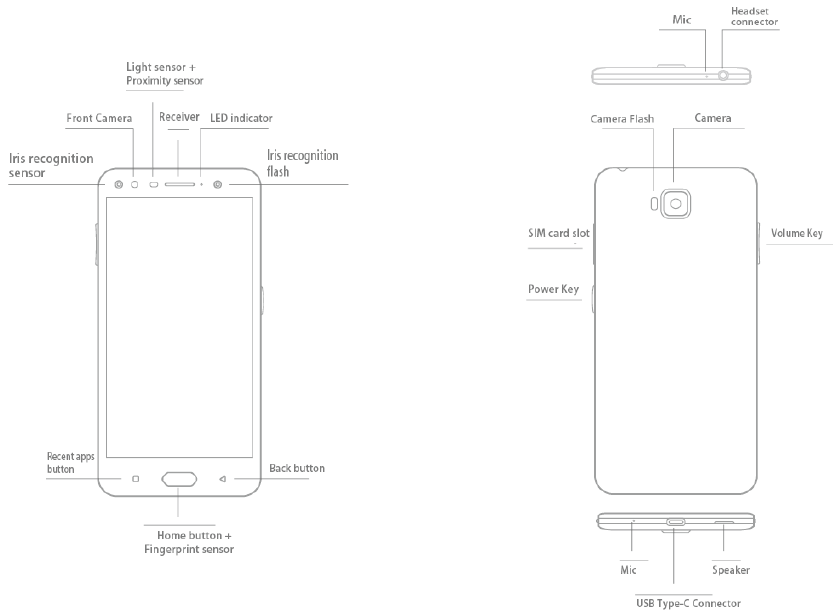
1Your
mobile
1.1
Keysand
c
onnector
s
CloudMinds A1
:
15
16
Power
K
e
y
PowerKeysettingsare
available
at:Settings >Power
K
e
y
.
IfPowerKeyisenabled,
•
FromHome
screen,press
thekeytoshowweather
e
ff
ect.
•
Press
thekeytoinstantlytakeaphotowhenyourphone islocked.
•
Pressandholdthekeyto takeburstshotswhenyour
phoneislocked.
•
Press
thekeytotriggeraudioeffectwhena
song
or movie
isplaying.
•
Press
thekeyto
enhance
voicequalityduringacall.
•
Press
thekeyfromGalleryMOMENTS tocreatea
pho
t
o collage.
•
Pressthekeytotriggerspecialeffectsuchassequence
change
whenamovieisplaying.
•
You canalsocustomisethe PowerKey function. For
example,
enablescreenshottakingorapplicationrunning
by
pressing
thePowerKeywhenthe
screen
islocked.
•
Whenphoneislocked
(displayo
ff
):
-
press
toscreen-on;
-double
press
toinstantshot
(800ms
);
-long
press
tocontinuouslyshot.
Recentappsbutton
•
Touch to switch between individualapp activitiesand
documents.
Homebutton
•
Fromanyapplicationorscreen, touchto return to the
Homescreen.
•
Long
press
toturnonGoogle
N
o
w
.
Youcangethelpsuch
asgettingdirectionsand restaurantinformation
based
on
thecontentdetectedonthescreen.
Backbutton
•
Touchtogobacktotheprevious
screen,
orcloseadialog
box,options
menu,
theNotification
panel,
etc.
Power
k
e
y
•
Press:
Lockthescreen/Lightupthescreen.
•
Pressandhold:
Show
thepopupmenuto select
fr
om
Poweroff/Restart/Aeroplane
mode.
•
Press
andholdthePowerkeyandVolumeupkeyto
en
t
er
recoverymode.
•
Press
andholdthePowerkeyandVolumedownkey
t
o
make
ascreenshot.
•
Press
andholdthePowerkeyforatleast10
seconds
t
o
forcereboot.
Volume
k
e
y
s
•
Incall
mode,adjusts
the
earpiece
or
headse
t
volume.
•
In Music/Video/Streaming mode, adjusts the media
volume.
•
In
generalmode,adjusts
theringtonevolume.
•
Mutestheringtoneofanincomingcall.
•
In
camera
preview
mode,press
Volumeupordown key
t
o
takeaphotoor
press
andhold to
make
burst shoot.
17 18

1.2
Getting
start
ed
1.2.1
Settingup
Insertingor removingtheSIM/microSDcard
YoumustinsertyourSIMcardto
make
phone
calls.
Youdonotneed topower
offyour phonebefore insertingorremovingtheSIMcardas
thisphonesupportshotswap.
Yourphone onlysupportsnano-SIM
cards.
Donotattempt
t
o
insertotherSIMtypeslikeminiandmicro
cards;
otherwisethis
maycausedamage
toyourphone.
Chargingthe
ba
tt
ery
Youareadvisedto fully chargethe battery
( ).
Charging
status
is
indicatedbyapercentagedisplayedonscreen.Thepercentage
increasesas
thephoneischarged.
Toreducepowerconsumptionandenergywastewhenthe
batteryisfully
charged,disconnect
your
charger
fromtheplug;
switch off
W
i
-F
i
,
GPS,Bluetooth or background-running
applications
whennotin
use;
reducethebacklighttime,etc.
1.2.3
Poweringoffyour phone
Press
andhold thePowerkeyuntiloptions
appear,select
Power
o
ff
.
1.3
Home
scr
een
Youcan
bring
all
the
items
(
applica
tio
ns,
shortcuts,
folders
and
widg
e
ts
)
youloveor
use
mostfrequentlytoyourHome
screen
forquick
ac
c
ess.
TouchtheHomebuttontoswitchtotheHome
scr
een
.
Reversible
scr
een
Thephonesupportsthereversiblefunction.FromtheHomescreen, touch
toopenthe
applications
list,thentouchSettings>
D
ispla
y
>
R
e
v
er
si
ble
.
Turnon to
enable
thefunction.
1.2.2
Poweringonyour phone
HolddownthePowerkeyuntilthephonepowerson,unlock
your phone
(Swipe,PIN,Password
or
P
a
tt
ern
)
if
necessary
andconfirm.
The Home
screen
isdisplayed.
IfyoudonotknowyourPINcodeorforgetit,contactyour
ne
tw
ork
oper
a
t
or
.
Besureto
keep
yourPINcodewell.
19
20

1.3.1
Usingthe
t
ouchscreen
T
ouch
To
access
an
application,
touchitwithyourfing
er
.
Long
pr
es
s
Toenterthe
available
optionsforanitem,longpresstheitem.For
example,selectacontactinContacts,longpressthiscontact,an
optionlistwill
appear
.
Drag
Long
press
anitemanddragittoanotherlocation.
Slide/Swipe
Slide
thescreentoscrollupanddownthe
applications, images,
and
web
pages.
Youcanslidethe
screen
horizontally
t
oo.
F
lick
Similar
to
swiping,
flickingisalighterandquickerstroke.
P
inch/S
pr
ead
Placetwo fingersonthescreensurfaceanddrawthemapart
or
togetherto
scale
anelementonthescreen.
ThephonealsosupportsonefingerzoominginCameraand
G
allery
.
Doubletouchthe
screen
tozoom
in/
out.
R
o
ta
t
e
Automaticallychange
the
screen
orientationfromportraitto
landscape
byturningthephone
sideways
tohaveabetter
screen
vie
w
.
1.3.2
Statusbar
Fromthe
Statusbar,
you
can
viewbothphone
status
(
on
theright
side
)
andnotificationinformation
(
on
theleft
side
).
Dragdownthe
Status
bartoviewnotificationsand
dragagain
to
en
t
er
theQuicksettingspanel.
Touch and draguptocloseit.Whentherearenotifications,youcan
touchthemto
access
notifications.
Notificationpanel
Whentherearenotifications,touchanddragdownthe
Status
bar
t
o
opentheNotificationpaneltoreadmoredetailedinformation.
21 22
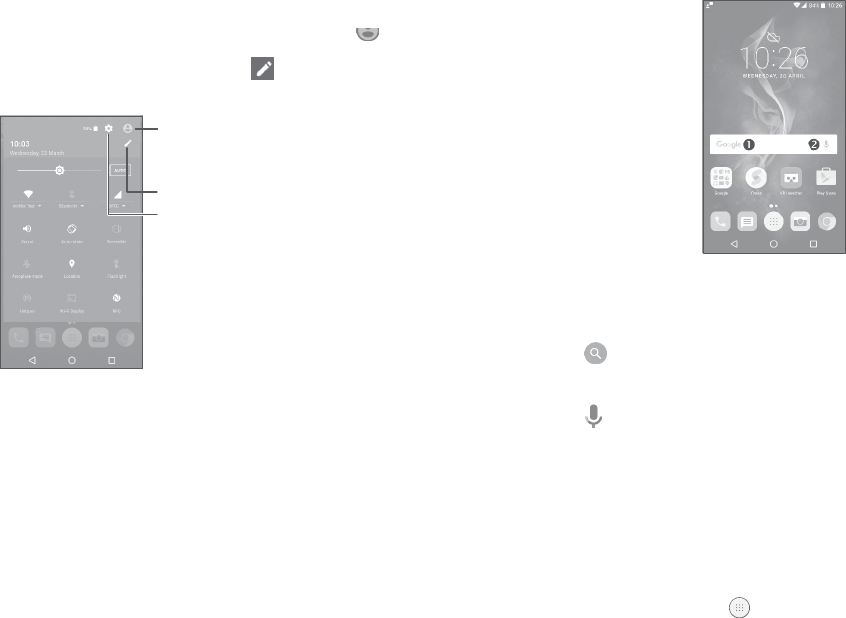
Quicksettingspanel
TouchanddragdowntheNotificationpanelortouch toopenthe
Quicksettings panel.Youcanenableordisablefunctionsorchange
modesbytouchingtheicons.Touch to customiseyourQuick
settingspanel.
Enteruser
screen
toeditand
save
owner's
name,
phone
number
,
andotherinformation.
Customise
Quicksettingspanel.
Access
Settingstoview thefulllisto
f
settings.
1.3.3
Searchbar
Thephoneprovidesa
Search
functionwhichcanbeused tolocate
informationwithin
applications,
thephoneortheweb.
Searchby
t
e
xt
•
Touchthe
Search
barfromtheHomescreen.
•
Enterthetext/phraseyouwantto
search
f
or
.
•
Touch onthe
keyboard
ifyouwantto
search
ontheweb.
Searchby
v
oice
•
Touch fromthe
Search
barto
display
a
dialog
screen.
•
Speak
theword/phraseyouwantto
search
f
or
.
Alistof
search
results
will
display
foryouto
select
from.
1.3.4
Lockingandunlockingyour
scr
een
Toprotectyourphoneandpriv
acy
,
youcanlockthephonewitha
pattern,PINor
password,
etc.
Tocreateascreenunlock
pa
tt
ern
•
FromtheHome
screen,
touch toopenthe
applications
list,then
touchSettings >Lockscreen>Screenlock>
P
a
tt
ern
.
•
Drawyourownpattern.
23
24
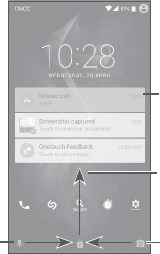
Tolockphone
scr
een
Press
thePowerkeyoncetolockthescreen.
Tounlockthephone
scr
een
Press
thePowerkeyoncetolightupthescreen,slidetodrawthe
unlockpatternyouhavecreatedorenteryourPINor
password,
etc.
If you
havechosen
Swipe
as
the
screenlock,
you
canpress
the
P
o
wer
keytolightupthe
screen,
thenswipeuptounlockthe
screen,
swipe
the
camera
iconlefttoenter
Camera
orswipe theVoice
search
icon
righttoenterVoicesearch.
Doubletouchto
en
t
er
thedetailedscreen
Swipe
uptounlock
thescreen
Reposition
Longpressan
item
and drag
ittothe
desired
position
and
then
r
elease.
YoucanmoveitemsbothontheHome
screen
andtheFavourite
tr
a
y
.
Holdtheicon ontheleftorrightedgeofthe
screen
todragtheitem
toanotherHomescreen.
R
e
m
o
v
e
Long
press
anitemand
drag
ituptothetopoftheXicon,and
r
elease
aftertheitemturnsred.
Create
f
older
s
Toimprovethe
organisation
ofshortcutsor
applications
ontheHome
screenand
the
Favourite
tr
a
y
,
you
canadd
themtoafolderbystacking
oneitemon topof
another.
To
rename
a
f
older
,
openitandtouchthe
folder’stitlebartoinputthenewname.
Wallpapercustomisation
Long pressan empty area on the Home
screen,
then
t
o
uch
WALLPAPERS
to
customise
w
allpaper
.
1.3.6
Widgetsandrecently-usedapplications
Swipe
right
t
o
enterVoicesearch
1.3.5
Personalisingyour Home
scr
een
Add
Swipe
left
t
o
enter
Camer
a
Consultwidgets
Longpress
theempty
area
onthe Home
screen,
thentouch
WIDGET
S
to
display
allwidgets.
Touchtheselectedwidgetandslideit to movetoyourpreferred screen.
Youcanlong
press
a
f
older
,
an
application
orawidgettoactivatethe
Move
mode,
anddragtheitemtoyourpreferredHomescreen.
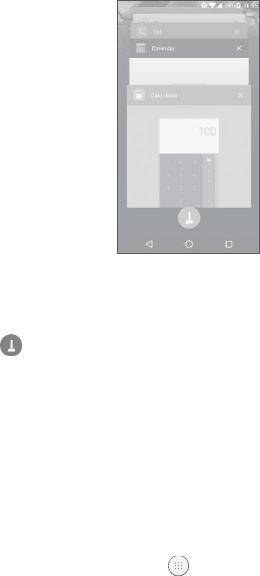
Consultrecently-usedapplications
Toconsultrecently-used
applications,
touchtheRecentapps
button.
Touchathumbnailinthewindowtoopentheapplication.
25 26
2Power
K
e
y
Touchonethumbnailandslideitright/left ortouchXtoclosean application.
Touch at the bottom of the screento closeallthe running
applications.
1
.
3
.
7
Volumeadjustment
Usingthevolume
k
e
y
PresstheVolumekeytoadjustthevolume.Toactivatethevibrate
mode,press
theVolumedownkeyuntilthephonevibrates.
Usingthesettingsmenu
FromtheHome
screen,
touch toopentheapplicationslist,then
touchSettings>Sound¬ification>Soundtosetthevolumeo
f
media,
ringtone,
alarm,
etc.toyourpreference.
PowerKeysettingsare
available
at:Settings >Power
K
e
y
.
Youcan setthePowerkeyto enablethefollowingfeatureswhilethe
screenis
o
ff:
•
Press
thekeytolightupthescreen;
•
Double
press
totakeaphoto;orlong
press
totakeburst shots.
YoucansetthePowerkeytoenableoneofthefollowing
f
ea
tur
es
whilethescreenison:
•
Experience
liveweatheranimations;
•
Take
aninstantscreenshot;
•
Trigger
a
desired
application;
•
Trigger
audioeffectwhenasongormovieisplaying;
•
Enhance
voicequalityduringacall;
•
Press
thekeyfrom
Gallery
Moments tocreateaphotocollage;
•
Triggerspecial effect suchassequencechangewhenamovieis playing;
•
Double
press
totakeaphoto;orlong
press
totakeburst shots.
27 28
3Text
input
3.1
Usingtheonscreenkeyboard
Onscreenkeyboard settings
GotoSettings>Language&
input
,
touchthekeyboardyouwant
t
o
setupanda
series
of
settings
will
become
available.
Adjusttheonscreenkeyboard orientation
Turnthephone
sideways
oruprighttoadjustthe
onscreen
keyboard
orientation.Youcanadjustitby
changing
thesettings
(Touch
Settings
>Display>Auto-rotate
scr
ee
n
).
3.1.1
Androidkeyboard
Entertextor
number
s.
3.2
Textediting
Youcaneditthetextsyouentered.
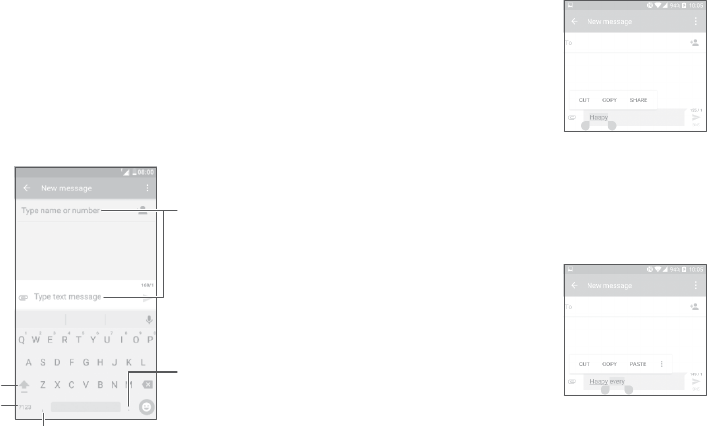
•
Long
press
ordoubletouchwithinthetextsyouwanttoedit.
•
Dragthetabsto
change
the
selected
texts.
•
Thefollowing optionswill show:SELECT
ALL
,
CUT
,
COPY and
SHARE
.
Youcanalsoinsertnewtextsif
pr
e
f
err
ed
•
Touchwhereyouwanttotype,orlongpressablankspace,the
cursorwillblinkandthetabwill
show.
Dragthetabtomovethe
cur
sor
.
•
Ifyouhavecutorcopiedanytext,touchthetabtoshow
PASTE
which
allows
youto
paste
anytextyouhave
previously
copied.
S
witch
be
tw
een
"abc/Abc"
mode;
Long
press
to
switch
to"abc/ABC"
mode.
S
witch
be
tw
een
symbol
and
numeric
k
e
yboar
d.
Long
press
toselect
symbols.
Long
press
toshow
input
options.
29 30
4Call,CalllogandContacts
4.1
Call
4.1.1
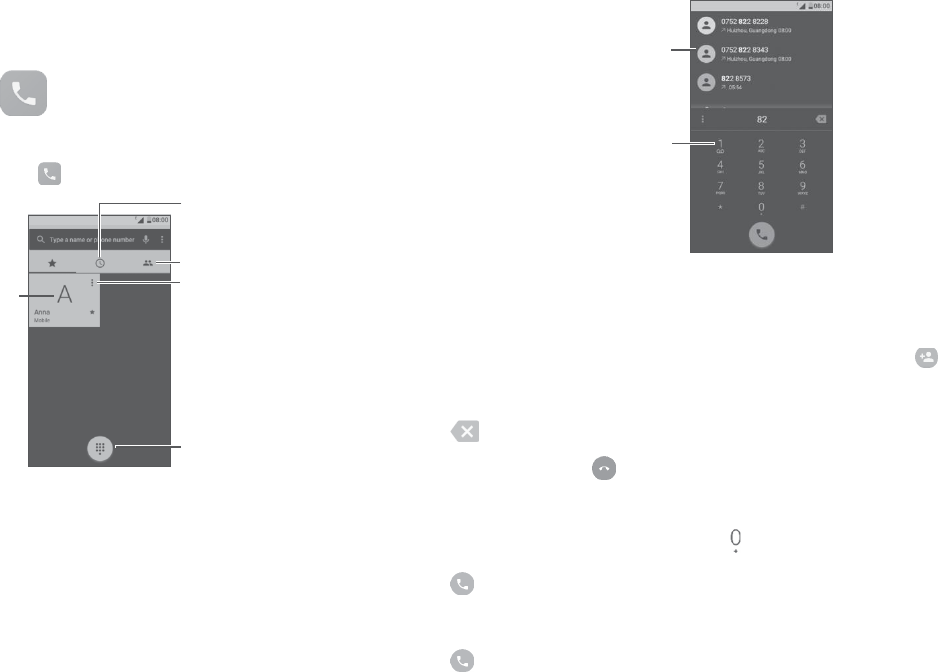
Makingacall
To
make
a
call,
touch
.
Calllog
D
ispla
y
suggested
number
s
Long
press
t
o
access
v
oic
email
Callthe
pr
e
vie
w
ed
number
Contacts
Viewthe
contact’s
de
tailed
in
formation.Youcanalsoedit,
delete,
share
thecontact,ors
enda
messag
e
tothecontact.
Show
thedialpad
Enterthe
desired
numberfromthe
dialpadandtouchbattomto
place
the
call
orselectacontactfromCONTACT
S orRECENTS bysliding
or
touching
tabs,
thento
make
thecall.
Thenumberyouenteredcan besavedtoContactsby
t
ouching
and
thentouchingCreatenew
c
on
tact
.
Ifyou
make
a
mistake,
youcandeletetheincorrectdigitsbytouching
.
To
hang
upa
call,
touch
.
Internationalcall
Todialaninternationalcall,longpress toenter“+”
,
thenenterthe
internationalcountryprefixfollowedbythefullphonenumberand touch
.
Emergencycall
Ifyourphone hasnetwork
coverage,
dialthe
emergency
numberand touch
to
make
an
emergencycall.
ThisworksevenwithoutaSIM
cardandwithouttypingthePINcode.
31
32
4.1.2
Answeringor rejectingacall
To setyour voicemailnumber:Longpress
,
then touch
ADD
NUMBER >Voicemail >Setup>Voicemail
number
.
Ifyoureceiveavoicemail,
appears
onthe
Statusbar.
Openthe
NotificationpanelandtouchNew
v
oic
email
.
4.1.4
Duringacall
Toadjustthevolumeduringa
call,press
theVolumeup/downkey.
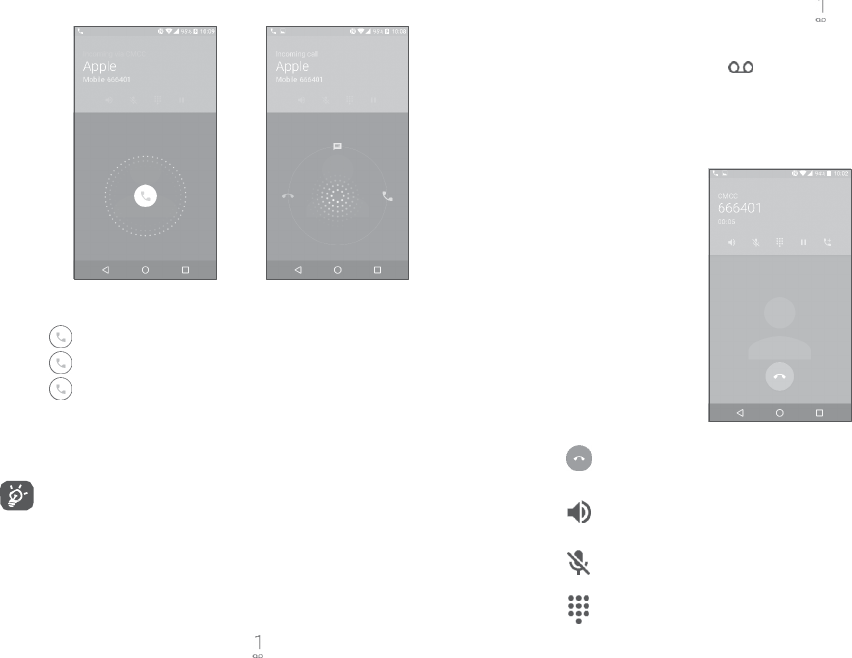
Whenyoureceiveacall:
•
Slide
totherighttoanswer;
•
Slide
tothelefttoreject;
•
Slide
upwardstorejectthecallby
sending
apreset
message.
Tomute anincoming
call,press
theVolumeup/down
key,
orturnthe
phoneover
(
when
theSettings>Gestures>Turnovertomute
op
tion
isactivated).
Foryour
convenience,
yourphone
f
ea
tur
es
aunique
R
e
v
er
sible
UI,whichensuresfunctionality
,
includingnormalcall,even
whenthephoneisheldin
reverse
(
upside-do
wn
)
position.
4.1.3
Callingyourvoicemail
Yourvoicemailisprovidedbyyournetworktoavoid
missingcalls.
I
t
workslikean
answeringmachine
thatyoucanconsultatanytime.
To
access
your
voicemail,
longpress
.
Endthecurrentcall.
Touch
once
to
acti
v
a
t
e
the
speaker
duringthecurrentcall.
Touchthisicon
again
to
deactiv
a
t
e
the
speak
er
.
Touchoncetomutethecurrent
call.
Touchthisiconagain
tounmutethecall.
Display
thedialpad.
33
34

Touchoncetoholdthecurrent
call.
Touchthisicon
again
t
oretrieve
thecall.
OpenAddcallorStartrecording
op
tion.
To avoid
accidental
operation ofthe
t
ouchscreen
duringacall,
the
screen
willbe
lockedautomatically
whenyouputthephone
closetoyourear;anditwillbeunlockedwhenthephoneis
taken
away
fromyour
ear
.
4.1.5
Managing
multiplecalls
Withthisphoneyoucan
handle
multiple
calls
atthe
same
time.
Swapcall
s
Whenyouaccepttwo
calls,
touch
,
youcannowswitch
be
tw
een
tw
o
lines.
Thecurrentcallwillbeputonholdandyouareabletojoin
theothercall.
Conferencecalls(1)
Youcansetupaconferencecall
as
follows.
•
Place
acalltothefirstparticipantoftheconferencecall.
•
Touch andselectAddcall
.
•
Enter the phone number of the personyou want to add
t
o
conferenceandtouch
.
YoucanalsoaddparticipantsfromCall
l
og
or
C
on
tacts
.
•
Touch tostarttheconference.
•
Touch toendtheconferencecalland
disconnect
allcallers.
(1) Dependingonyournetwork
oper
a
t
or
.
4.1.6
Callsettings
Touch fromtheCallscreen,thentouch
Settings
.
The
f
ollo
wing
optionsareavailable:
Displayoptions
•
Sortby:Touchtosortthelistbythefirst
name
orlastname.
•
Nameformat:Touchtochoosewhethertodisplayfirstname
fir
st,
orlast
name
fir
st.
Soundsand
vibr
a
t
e
Touchtosetincomingcallringtone,andmarkthe
checkbox
toenable
dialpadtonesorvibrateforcalls.
Quickresponse
Editquick
responses
whichwillbeusedwhen yourejectacallwitha
message.
Callingac
c
oun
ts
•
Dualcallsettings:
select
SIM1orSIM2tosetunderoptions.
-
V
oic
ema
il
Service:Opensadialogbox whereyoucanselectyouroperator’s
voicemailservice
oranotherservice.
Setup: If youare
using
your
oper
a
t
or’
s
voicemailservice,
thisopens
adialogboxwhereyoucanenterthephonenumbertouse
f
or
listening
toand
managing
your
voicemail.
You
can
entera
comma (,)
toinserta
pause
intothe
number
—
for
example,
to
add
apassword
afterthephone
number
.
Sound:Touchtosetthesoundwhenanew
voicemail
arrives. Vibrate:
Mark the checkboxto enablevibration when anew
voicemail
arrives.
35
36
-FixedDiallingNumbers
Fixeddialling
number
(FDN)
isa
SIMservicemode,
whereoutgoing
calls
arerestrictedtoaset ofphone
numbers.These
numbersare
addedtotheFDNlist.The mostcommonpracticalapplicationo
f
FDNisforparents torestrictthephonenumberstowhich
their
children
candial.
For
securityreasons,
you’llbepromptedtoenable
FDNbyenteringSIMPIN2whichisusuallyacquiredfromyour
service
providerorSIM
mak
er
.
-Vibrationreminder
Turnon to
enable
vibratewhencall
c
onnects
.
-ServiceDiallingNumbers
Youcan
place
acallfromtheSDNlist.
-Turnonvideocalling
Markthe
checkbox
to
enable
videocalling.
-GSMcallsettings
Callforwarding:Touch toconfigurehowyourcallsare
f
orw
ar
ded
whenyourphoneis
busy,unanswered
orunreachable.
Additionalsettings:TouchCallerIDtouse defaultoperator
settingstodisplayyournumberinoutgoingcalls.MarktheCall
waiting
check
boxtonotifyyouofnew
incomingcalls
duringacall.
Callbarring:Touchto configurecallbarringsettings.Markthe
checkboxtoactivatethecallbarringforoutgoingandincoming calls.
4.2
Calllog
Youcan
access
yourcalllogbytouching fromtheCallscreen
t
o view
missedcalls,
outgoing
calls
andincomingcalls.
Touchacontactornumbertoviewinformationorfurtheroperations,
youcanlaunchanew
call,
send
SMS
tothecontactor
number
,
view
detailedinformationofthe
call,
or
clear
thecall.
TouchViewfullcallhistorytoviewall
calllogs.
Touch andClearcall
logto
clear
theentirecall
memory
.
4.3
Contacts
Contacts
enables
quickandeasy
access
tothecontactyouwant
t
o
reach.
Youcanviewandcreatecontactsonyourphoneandsynchronise
themwithyourGmailcontactsorotherapplicationsontheweb
or
onyourphone.
4.3.1
Consultyour
C
on
tacts
To
see
your
contacts,
touch
.
Search
in
C
on
tacts
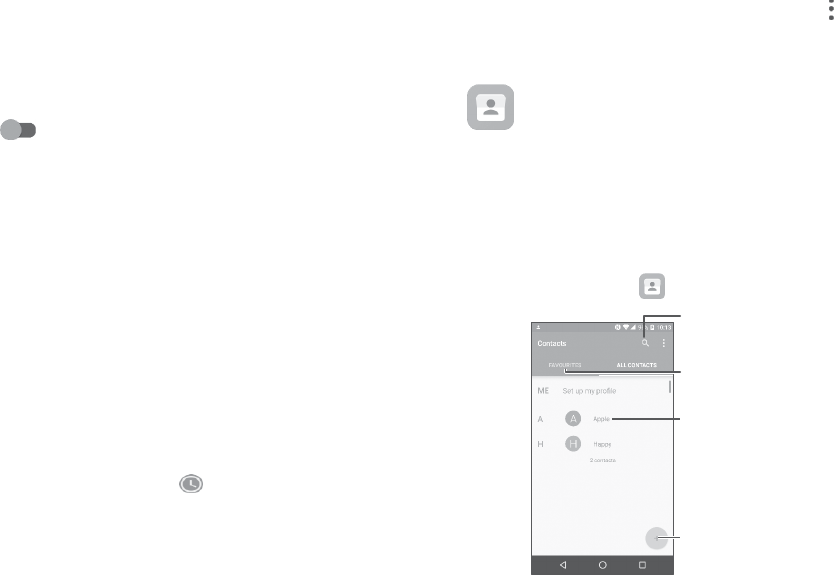
Viewyourfavorites
Openthe
Quick
contactpanel
Longpress
to
selec
t
c
on
tact(
s
)
todelete
Addnewcontact
37 38
Deletea
c
on
tact
Long
press
thecontactyouwantto
dele
t
e,
then touch
andconfirm
t
odelete.Touch toselectall
contacts,
thentouch
andconfirm
t
odeleteallcontacts.
Thecontactyouhavedeletedwill
also
beremovedfromo
ther
applications
onthe
phone
orwebthenexttimeyousynchronise
yourphone.
Touch todisplaythecontactslistoptionmenu, followingactions
areenabled:
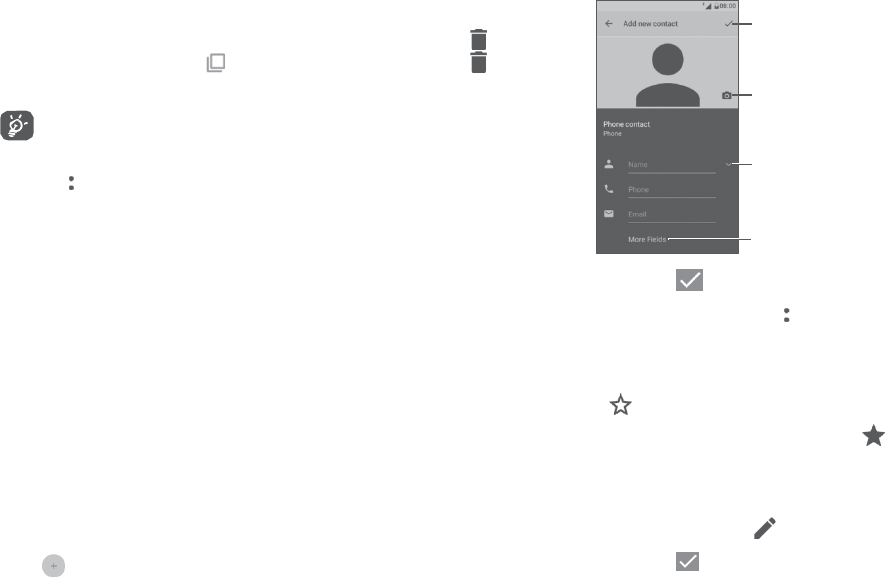
When
finished,
touchthe
icontosave
Select
apictureortake
aphotoforthecontact
Touchtoopen
available
labels
•
Contacts
t
o
display
Choose
contactsto
displa
y
.
Touchto
expand
fields
•
Mergecontacts
Select
duplicatecontactstomerge.
•
Import/Export Importorexportcontacts betweenphone,SIM
card,microSD
cardandphone
storage,
etc.
•
Blockedcontacts Touchtoviewyourblockedcontacts.Youcan
also
unblockthem.
•
Accounts
Manage
the
synchronisationsettings
for
diff
er
en
t
accounts.
•
Settings Touch to
change
the
display
ofthesortlistand
contactnames.
4.3.2
Addinga
c
on
tact
Touch inthecontactlisttocreateanewcontact.
Youarerequiredtoenterthecontact'sname andothercontact information.
By
scrolling
upanddownthe
screen,
youcanmove
fr
om
onefieldto
ano
the
r
.
When
finished,
touch tosave.
Toexitwithout saving,youcantouch andthentouch
D
iscar
d
chang
es
.
Addto/Removefrom
F
a
v
ourites(1)
Toaddacontactto
f
a
v
ourites,
you
can
touchacontacttoviewdetails
thentouch toaddthecontacttofavourites.
To
remove
acontactfrom
f
a
v
ourites,
touch thestar onthecontact
details
screen.
4.3.3
Editingyour
c
on
tacts
Toeditcontactinformation,touch inthecontact
details
screen.
When
finished,
touch tosave.
Changea contact’sdefaultphonenumber
(1) Onlyphonecontactscanbe
added
toFavourites.
39
40

You cansetthedefaultphonenumberforacontactwithmorethan
one
number
.
Thedefault phonenumber
(
the numberwhichhaspriority when
making
acallor
sending
a
message)
will
always
be
displayed
underthe
contactname.
To
change
thedefaultphone
number
,
long
press
thedesired
number
,
and
select
Set
default
.
Then will
appearahead
ofthe
number
.
4.3.4
UseQuickcontactforAndroid
TouchacontacttoopenQuickcontactforAndroid.Youcanthen touch
orthenumberto
make
a
call.
To
send
a
message,
touch
t
osendamessage.
Theiconsavailableon the Quick contact paneldependon the
informationyouhaveforthecontactandtheapplications and
accounts
onyourphone.
4.3.5
Importing,exportingandsharing
c
on
tacts
This phone
enables
youtoimportorexportcontactsbetweenyour
phone,SIMcardandphonestorage.
FromtheContacts
screen,
touch toopentheoptions
menu.
Touch
I
mport/Export
,
thenselectto
impor
t/
e
xport
contactsfrom/to your
accounts,
SIM
card,Phone,
internal
storage,
microSD
card,
etc.
Youcan
share
a
single
contactorcontactswithothersby
sending
the
contact'svCardtothemviaBluetooth,
Gmail,
etc.
Touchthecontactyouwanttoshare,touch andSharefromthe
contact
detailsscreen. Select
the
number
youwantto
share
and
t
ouch
,
andthen
select
the
application
toperformthisaction.
4.3.6
Displaying
c
on
tacts
Youcanconfigure whichlistofcontacts,foreachaccount,you
w
an
t
to
display
inthe
Contacts
list.Touch andtouchContactsto display
fromcontactslistscreen,thenyoucanchoosewhichcontacts
t
o
displa
y
.
Touch andSettingstosortthelistbytouchingFirstnameor
Last
name
,
aswellasviewingcontact
names
bytouchingFirstname
fir
st
orLastname
fir
st
.
4.3.7
Joining/Separating
c
on
tacts
(1)
Toavoidduplication,youcanaddanynewcontactinformation
t
o
existing
contactsina
single
action.
Touchthecontactwhichyouwanttoaddinformationto,touch
t
oenter
theeditcontact
screen,
thentouch
again
andtouch
J
oin
.
(1) Only
applicable
forphonecontacts.
41
42
Atthistime,youarerequiredtoselectthecontactwhose
in
f
orma
tion
youwantto joinwith thefirst contact.Theinformationfrom the
secondcontactisaddedtothefirstone,andthesecondcontact
will
nolongerbe
displayed
intheContactslist.
To
separ
a
t
e
contactinformation,touchthecontactwhose
in
f
orma
tion
youwantto
separ
a
t
e,
touch toentertheeditcontact
screen,
then
touch
again
andtouch
Separate
.
TouchOKtoconfirm.
4.3.8
Synchronisingcontactsin multipleac
c
oun
ts
Contacts,
dataorother information
can
be
synchronised
frommultiple
accounts,depending
onthe
applicationsinstalled
onyourphone.
Toaddan
account,
touch fromthe
contacts
listandtouch
A
cc
oun
ts
>Addac
c
oun
t
,
orfromtheHome
screen,
touch thenSettings>
Accounts>Addac
c
oun
t
.
Youarerequiredtoselectthekindofaccountyouareadding,like
Google,
C
orpor
a
t
e,
etc.
Aswithotheraccount
setups,
youneedtoenter detailedinformation,
like
username,password,
etc.
Youcanremoveanaccountandall
associa
t
ed
informationfromthe
phone.Touchtheaccountyouwanttodelete,touch andselect
Removeac
c
oun
t
,
andthenconfirm.
A
ut
o-s
ync
Onthe Accounts screen,touch andmarkthe Auto-syncdata
checkbox.
When
activ
a
t
ed,
all
changes
toinformation onthe phone
or
onlinewillbe
automaticallysynchronised
with
each
o
ther
.
5
Messaging
and
E
mail
5.1
M
essaging
Youcan
cr
ea
t
e,
editandreceive
SMS
andMMS withthisphone.
Tosenda
message,
touch
.
5.1.1
Writeanewmessage
On the messagelist screen,touch to write
t
e
xt/
multimedia
messages.
Addrecipients
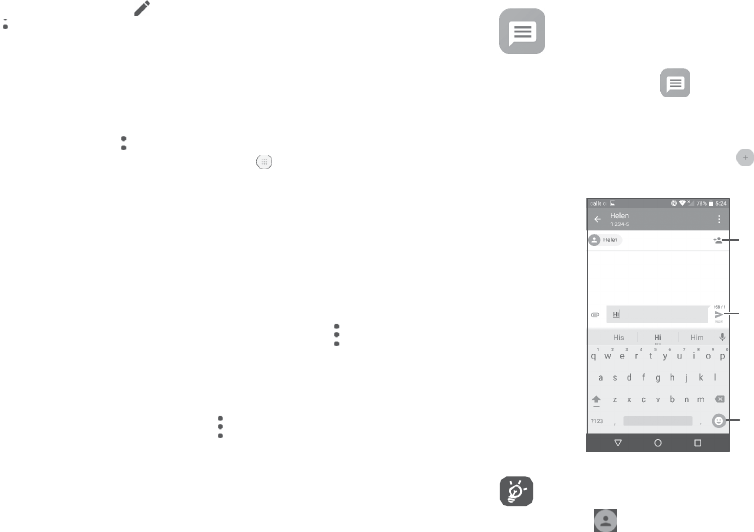
Send
thetextmessage
Insert
emoticons
For
savedcontacts,
touch thephototoopenthe Quickcontact
panelto
c
ommunica
t
e
withthecontact.For
unsaved
contacts,
touch toaddthenumbertoyour
C
on
tacts.
43
44

Sendingatextmessage
Enterthe
name
orthephonenumberoftherecipientintheTobar
or
touch
toadd
recipients.
Touchthe
Sendmessagebartoenterthe
t
e
xt
ofthe
message.
Touch
toinsertemoticons.When
finished
,
t
ouch
tosendthetextmessage.
AnSMS
message
ofmorethan160characterswillbechargedas
severalSMS.
Thereisacounterontherightofthetextboxtoremind
youhow
manycharacters
areallowedtobeenteredinonemessage.
Specific
letters
(
ac
c
en
t
ed)
will
alsoincrease
the
size
oftheSMS.
This
maycause
multiple
SMS
tobesenttoyourrecipient.
Sendingamultimediamessage
MMSenablesyoutosendvideo
clips,images,
photos,
anima
tions,
slides
and
sounds
toother
compatiblemobiles
ande-mailaddresses.
AnSMSwillbeconvertedtoMMSautomaticallywhenmediafiles
(image,video,audio,slides,etc.)areattachedorsubjectoremail
addresses
areadded.
Tosendamultimedia
message,
entertherecipient'sphonenumberin
theTobar and touchtheSendmessagebar toenterthetextofthe message.
Messages
are
displayedas
conversation.
Toucha
message
toenter the
messagecomposing
screen:
•
Touch tocallthenumber;
•
Touch to
save
the
number
to
contacts
orviewthecontactdetails
ifthenumber
has
beensaved;
•
Toreplytoa
message,
enterthetext,ortouch toinsertquicktext,
contact,etc.When
finished,
touch
.
•
Ifyoulongpressa
message,
thefollowingoptionswillbeavailable:
copytext
,
forward
,
view
details ,
delete
e
t
c.,
touch
to
save
the
message
toSIMcard.
5.1.3
Adjustmessagesettings
Onthe
message
list
screen,
touch and
select
S
e
ttings
.
GENERAL
•
SMSenabled Opentheoptions
dialog
ortouchSMSapp
to
change
yourdefault
SMS
app.
•
Quicktext Touchtoeditquick
response
t
e
xt.
Storage
Touch toopentheoptionsmenu,touchAddsubjecttoinserta
subject.
Touch toattachapicture,video,audioorcontact..
When
finished,
touch tosendthe
multimedia
message.
•
Deleteold
messages
Select
to delete old messageswhen the
maximumnumber of stored messages is
reached.
5.1.2
Managemessages
•
Textmessagelimit Touchto setthemaximumnumberof
t
e
xt
messages
tobe
saved
perconversation.
Whenreceivingamessage, willappearonthe
Status
barasa
notification.Dragdownthe
Status
bartoopentheNotificationpanel,
touchthenew
message
toopenandreadit.Youcanalso
access
the
Messagingapplication
andtouchthe
message
toopen
it.
•
Multimedia
messagelimit
Touch to set the maximum number of
multimedia messagesto be savedper
conversation.
45
46
N
o
tifica
tions
•
Notifications
Select
todisplay
message
notificationsinthe
Status
bar
.
•
Selectringtone Touch toselectaringtoneasanew
messag
e
notificationtone.
AD
V
ANCED
Textmessage(SMS)settings
•
Deliveryreports
Select
torequestadeliveryreportforeach
text
message
yousend.
•
Vibrate
Select
tohavephonevibrateasa
no
tifica
tion
when
receiving
anewmessage.
•
Manage
SIM
messag
es
Touchto
manage
text
messages
storedinyour
SIMcard.
WAPmessagesettings
•
SMSServiceCentre Touch to edit or view the servicecentre
number
.
•
WAPmessage
enable
Touchto enablereceipt of push
messag
es
from
ne
tw
ork.
•
Validityperiod Touchto selectthe validity period,during
whichthenetworkproviderwillcontinue
t
o
trytosendthemessage.
CellBroadcastsettings
•
Cellbroadcast Markthecheckboxtoenable receiptofcell
broadcast
messages.
•
Alphabet
management
Touchto
select
the Alphabetmode.
•
SelectCBringtone TouchtoselectCBringtonewhenreceiving
cell
broadcast
messages.
•
SMSsignature Markthecheckboxtoenableasignature
f
or
the
message
you
send.
•
EditSMSsignature Touchtoedit
SMS
signature.
•
EnableCB
LED
indicator
•
Enablelightup
scr
een
Markthe
checkbox
to
enableCBLED
indica
t
or
.
Mark the checkboxto light up the screen
when
receiving
newcellbroadcast.
Multimediamessage(MMS)settings
•
Deliveryreports
Select
torequestadeliveryreportforeach
multimedia message
yousend.
•
Vibrate
Select
tohavephonevibrateasa
no
tifica
tion
when
receiving
anewmessage.
•
Readreports
Select
torequestareportonwhethereach
recipienthasreadamultimedia
message
sent
byyo
u
.
•
Cellbroadcast
settings
Touch to select channels and configure
languages.
•
Auto-retrieve
Select
to downloadthe full MMSmessage
(includingmessagebody and
a
tt
ac
hme
n
t
)
•
Emergencyalerts Touch to enter emergencyalert
se
tt
i
ng
s,
includingwhethertoshowthreatsandalert tones.
automatically to your
phone.
O
t
he
r
w
i
se
,
downloadonlytheMMS
message
header
.
47 48

•
Roamingauto-
r
e
trie
v
e
Select
todownload thefullMMS
messag
e
(includingmessagebody and
a
tt
ac
hme
n
t
)
automatically whenroaming.Otherwise,
downloadonlytheMMS
message
header
t
o
avoidextracharges.
Tocreateandsendemails
•
Touch fromtheInboxscreen.
•
Enter
r
ecipien
t(
s
)
emailaddress(es)
intheTofield.
•
If
necessary,
touchCc/Bcc toaddacopyorablindcarboncopy
t
o
themessage.
•
Creationmode
Select
to
change
creationmode.
•
Enterthesubjectandthecontentofthemessage.
•
Maximummessage
size
Select
toinputthe
maximummessage
size.
•
Touch toaddanattachment.
•
If youdonotwantto
send
themailright
away,
you
can
touch and
•
Priority Touchtosetthe
priority
.
5.2
Email
T
he
fir
st
timeyousetupyour
phone,
you
canselect
to
use
an
e
xisting
E
mail
ortocreateanew
email
account.
YoucanalsosetupexternalPOP3orIMAPemailaccountsinyour phone.
Tosetupyouremailaccount,touch fromtheHome
screen,
then
select
E
mail
.
Anemailwizardwillguideyouthroughthestepstosetupanemail account.
•
Entertheemail
address
andpasswordoftheaccountyouwant
t
o setup.
•
TouchNe
x
t
.
Iftheaccountyouenteredisnotprovidedbyyour
service
providerinthe
phone,
youwillbepromptedtogototheemail
account
settingsscreen
toenter
settingsmanually.
A
lt
erna
tiv
ely
,
you
can
touchManualsetup todirectlyenterthe
incoming
andoutgoing
settingsforthe
email
accountyouaresettingup.
•
Entertheaccount
name
and
displayname
inoutgoingemails.
•
Toadd anotheremailaccount,youcantouch ontheupper
le
ft
cornerand
select
Settings
.
AndthentouchAddac
c
oun
t
.
SavedraftortouchtheBackkeyto
save
a
c
op
y
.
•
Touch tosend.
Ifyoudonotwanttosendorsavethe
email,
youcantouch and
then
select
D
iscar
d
.
Toadda
signature
toyour
emails,
touch andselect
Settings,
then
choose
the
ac
c
oun
t
whereyouwant tocreateormodifythe signature,
touch
Signature
toedit.
49
50
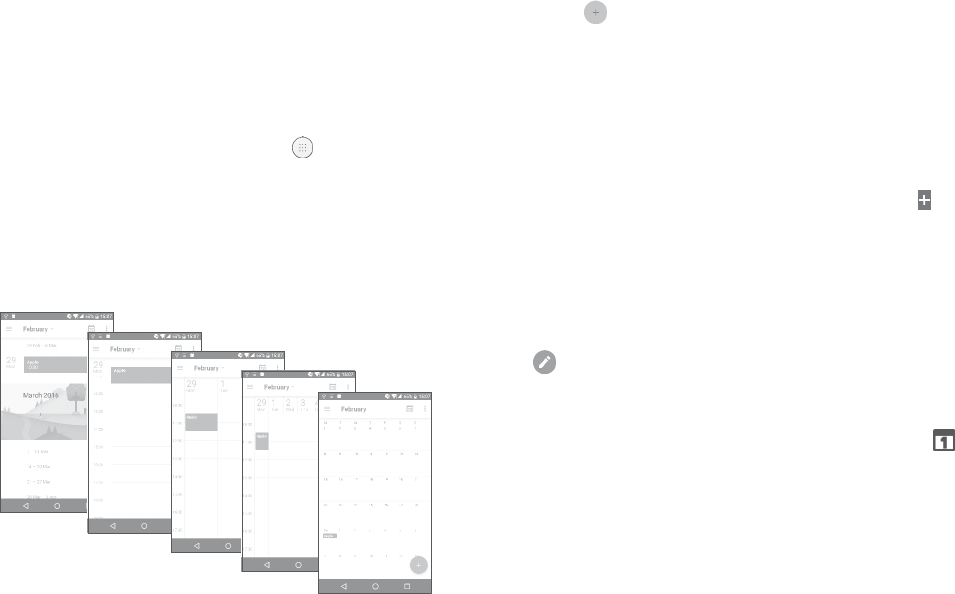
6Calendar,Clock,andCalculator
6.1
Calendar
You can use Calendar to keep track of important meetings,
appointments,
etc.
Toviewthecalendarandcreateevents,touch fromtheHome
screen,
thentouchCalendar
.
6.1.1
Multimode
vie
w
YoucandisplaytheCalendar by
S
che
dule
,
Day
,
3-da
y
,
W
eek
,
or
M
on
th
.
6.1.2
Tocreatenewe
v
en
ts
Youcanaddnew eventsfromany
Calendar
vie
w
.
•
Touch
.
•
Fillinallrequiredinformationforthis new event.Ifitisawhole-day
event,youcanselect
A
ll-da
y
.
•
Invitegueststotheevent.Entertheemail
addresses
oftheguests you
wanttoinvitewith
commas
to
separ
a
t
e.
The
guests
willreceive
aninvitationfrom
Calendar
andEmail.
•
When
finished,
touchSAVEfromthetopofthescreen.
ToquicklycreateaneventfromtheWeekview
screens,
touchan empty
spottoselectatarget
area
whichwillthenturn
,
and
t
ouch
theicontocreatethenew event.
Beforeyoucanaddanevent,youmustaddatleastoneCalendar
accountand
make
a
calendar
visible.
6.1.3
Todeleteoreditane
v
en
t
Schedule
vie
w
Day
v
ie
w
3-day
vie
w
Week
vie
w
M
on
th
vie
w
Todeleteoreditanevent,touchtheeventtoenteritsdetailsscreen, touch
toedittheevent,andtouch
DELETE
todelete.
6.1.4
Eventreminder
Ifareminderissetforanevent,theupcomingeventicon
will
appearonthe
Status
barasanotificationwhentheremindertime arrives.
Touchanddragdownthe
Status
bartoopentheNotificationpanel,
touchanevent
name
toview the
Calendar
notificationlist.
Touch
theBackbuttonto
keep
the
reminderspending
inthe
Status
bar
andtheNotificationpanel.
(1) Theiconwillvarywithdate.
51
52
6.2
Clock
Yourmobilephone
has
abuilt-inclock.
Toviewthe currenttime,touch fromthe Home
screen,
then
t
ouch
Clock
.
6.2.1
Worldclock
Toview theworld
clock,
touch onthe Timescreen.
Touch toaddatimezone.
6.2.2
Alarm
FromtheTime
screen,
touch toenter theAlarmscreen.
Turnon to
enable
thealarm.
Touch toaddanew
alarm,
thefollowingoptionswillappear:
•
Time Touchtosetthe
alarm
time.
•
Repeat Touchtoselectthe
days
whenyouwantthe
alarm
t
o work.
•
Ringtone Touchto
select
aringtone forthealarm.
•
Vibrate
Select
toactivatevibration.
•
Label Touchtoseta
name
forthealarm.
Touchacurrently
existingalarm
toenter the
alarm
editingscreen.
Touch thentouch todeletethe
selected
alarm.
6.2.3C
ountdo
wn
FromtheTime
screen,
touch toenter theCountdownscreen.
•
Enterthetime.Thetime
should
betypedin
second,
minuteandhour
numbersequence.
•
Touch toactivatecountdown.
•
Touch tosetthecountdowntimeinpanel.
•
Touch to
deactiv
a
t
e
countdown.
•
Touch todeletecurrentcountdownlabel.
6.2.4
T
imer
FromtheTime
screen,
touch toenter theTimerscreen.
•
Touch tostartthetimer
.
•
Touch toshowalistofrecords
according
totheupdatedtime.
•
Touch tohaltthetotalandlap
times. These
willonlyrestartafter
istouched.
•
Touch todeletetherecord.
•
Touch toshare.
53
54
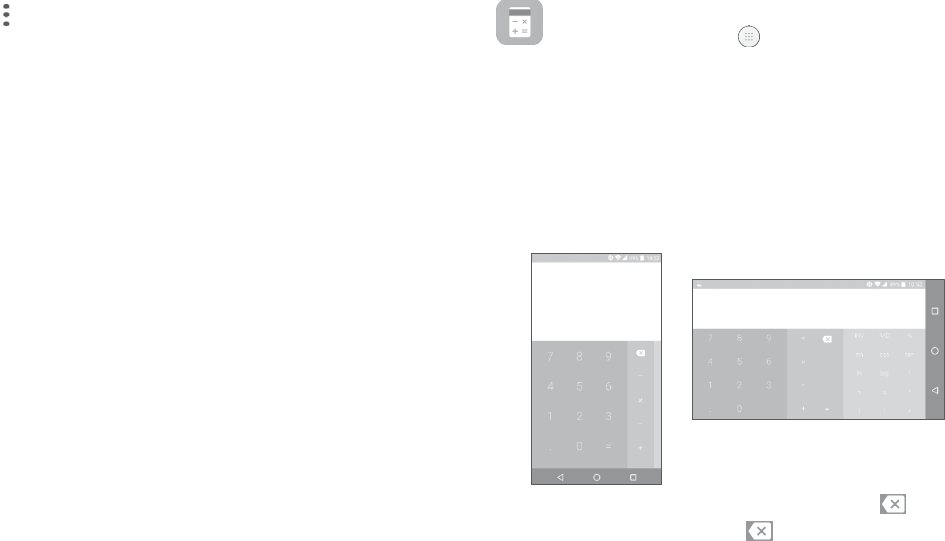
6.2.5
AdjustClocksettings
Touch andthenSettingstoadjustthefollowingoptions:
Clock
•
Style Touchtosettheclockstyletoanalogue
or
digital.
6.3
Calcula
t
or
Tousethe
calcula
t
or
,
touch fromtheHomescreen,then
t
ouch
Calcula
t
or
.
Therearetwo
panelsavailable:Basic
paneland
Advanced
panel.
Toswitchbetween
panels,select
oneofthefollowingtwoways:
•
Automatic home
clock
Mark the checkboxto enablethe
function
whentravellinginanareawherethetimeis
different,addaclockforhome.
•
Swipe
the
basic
calculationscreentothelefttoopenthescientific
calculation.
Orturnthephonetothe
landscape
orientationfromthe
basic
panel
•
Hometime zone TouchtosetHometimezone. toopenthescientific
calculation.
Thisoptiononly
available
ifSettings
>Display>Whendeviceisrotated>Rotatescreencontentsison.
•
ChangeDate&
time
Touchto enableautomaticdata&time,
or
change
time
manually
.
A
larms
•
Silenceafter Touchtosetatemporaryturnofftimeforan alarm.
•
Snoozelength Touchtosettheduration ofalarms.
•
Alarmvolume Touchtoset
alarm
volume.
•
Graduallyincrease
volume
Touch to select the duration after which the
alarmvolumeincreases,or disablethis function.
Enter anumberand thearithmeticoperationtobeperformed,
en
t
er
•
Volumebuttons Touch to set side Volume up/down key
behaviours
when
alarmsounds:
None,Snooze
or
D
ismiss
.
•
Startweekon Touchto
choose
thestartofa
w
eek.
the
second
numbe
r
,
thentouch“=”to
display
the
result.
Touch
to
deletedigitsonebyone,longpress todeleteallatatime.
T
imer
s
•
Timerringtone Touchto
select
thetimerringtone.
55
56

7Gettingconnected
Toconnectto the internet with thisphone,youcanuseGPRS/
EDGE/3G/4GnetworksorWi-Fi,whicheverismostconvenient.
7.1
Connectingtothe
in
t
erne
t
7.1.1
GPRS/EDGE/3G/4G
ThefirsttimeyouturnonyourphonewithyourSIMcardinserted,
it
willautomaticallyconfigureyournetworkservice:
GPRS,
EDGE
,
3G or4G.
Ifthenetwork isnot connected,youcanturn onmobiledatain
Settings>Data
usag
e
�
To
check
thenetwork
connection
you
are using,
touchSettings>
M
ore
>Mobilenetworks>AccessPointNamesorNetwork
oper
a
t
or
s
.
Tocreateanewaccesspoint
Anew
GPRS/EDGE/3G/4G
networkconnection
can
be
added
toyour
phonewiththefollowingsteps:
•
TouchSettings >More>Mobilenetworks>AccessPoint
N
ames
.
•
Touch toenter therequiredAPNinformation.
•
When
finished,
touch andtouch
S
a
v
e
.
Toactivatedataroaming
•
TouchSettings >More>Mobilene
tw
orks
.
•
TouchDataroamingand
chooseRoamingmodes:
D
isable
,
National
roaming
only
,
Allne
tw
orks
.
•
Whendataroamingis
disabled,
youcanstillperformdataexchange
withaWi-Ficonnection
(
r
e
f
er
to
“
7.1.2
W
i-F
i
”).
Tosetpreferrednetworkmode
•
TouchSettings>More>Mobilenetworks >Preferred ne
tw
ork
mode
.
7.1.2
W
i-F
i
Youcanconnecttotheinternetwhenyourphoneiswithinrangeo
f
a
wireless
network.Wi-Ficanbe usedonyourphoneevenwithouta
SIMcardinserted.
ToturnWi-Fionandconnecttoawirelessne
tw
ork
•
TouchSettings >
W
i-F
i
.
•
Turnon
.
•
OnceWi-Fiisturnedon,detectedWi-Finetworksarelisted.
•
TouchaWi-Finetworktoconnecttoit.Ifthenetworkyouselected
is
secured,
you arerequiredtoentera
password
orothercredentials
(
y
ou
maycontactthenetworkoperatorfor
details).
Whenfinished,
touch
C
ONNE
CT
.
Toactivatenotificationwhenanewnetworkis
de
t
ect
ed
WhenWi-Fiisonandthenetworknotificationis
activ
a
t
ed,
the
W
i-F
i
iconwillappearonthe
Status
barwheneverthephonedetectsan
available
wirelessnetworkwithin
range.
Thefollowingstepsactivate
thenotificationfunctionwhenWi-Fiison:
•
TouchSettings >
W
i-F
i
.
•
Touch andthen
A
dvanc
ed
.
•
Turnon
beside
Network
no
tific
a
tion
.
ToaddaWi-Fine
tw
ork
WhenWi-Fiis
on,
you
may
addnewWi-Finetworks
according
toyour
preference.
•
TouchSettings >
W
i-F
i
..
57 58

•
Touch andthenAddne
tw
ork
.
•
E
n
t
er
the
name
ofthenetwork
andanyrequired
networkinformation.
•
Touch
S
AV
E
.
Toforget aWi-Fine
tw
ork
Thefollowing
steps
prevent
automaticconnections
tonetworkswhich
younolongerwishtouse.
•
TurnonWi-Fi,ifit’snot
already
on.
•
OntheWi-Fi
screen,
touchthe
name
ofthe
saved
ne
tw
ork.
•
TouchFORGET inthe
dialog
thatopens.
7.2
Browser
Usingthe
B
r
o
w
ser
,
youcanenjoysurfingtheWeb.
Tosurfthe
web,
touch fromtheHome
screen,
thentouch
B
r
o
w
ser
.
Togotoawebpage
OntheBrowserscreen,touchtheURLbaratthetop,enterthe
address
oftheweb
page,
then
c
on
firm
.
Search
andgotothisaddress
Delete allcontents
Gotothe
suggested
website
Tosetahomepage
•
Touch from
Browserscreen
to
display
option
menu,
touchSettings
>
H
omepag
e
.
•
Choose
a
page
ormostvisitedwebsite
as
your
homepag
e.
•
Ifyouchoose
O
ther
,
enterthe
URL
ofthewebsiteyouwanttoset
as
your
homepage,
touchOKtoconfirm.
Viewingwebpages
Whenopeningawebsite,youcannavigateonweb
pages
bysliding
yourfingeronthescreeninanydirectiontolocatethe
in
f
orma
tion
youwantto
vie
w
.
59
60

Tofindtextonawebpage
•
Touch fromBrowserscreentodisplayoptionmenu,and
t
ouch
Findon
pag
e
.
•
Enterthetextor
phrase
youwanttofind.
•
Thefirstwordwithmatching
characters
willbehighlighted onthe
Otheroptions:
•
•
Torefreshthecurrentpage.
To forwardthe
pages
youhaveopened.
screen,
and
subsequen
t
ma
t
ches
willbeboxed.
•
Touchtheupordownarrowto switchto thepreviousornext
ma
t
ching
items.
•
When
finished,
youcantouchtheBackkeyto
close
the
Search
bar
.
Furtheroperationsforthetextonawebpage
Youcan
c
op
y
,
share
or
search
thetextfromawebpage:
•
Long
press
thetexttohighlightthe
t
e
xt.
•
Movetwotabsto
select
the
t
e
xt.
•
Touch toshowfurther
actions,
including
share
and
search
onthe
page
ortheweb.
•
Bookmarks To
see
the
bookmarks
andbrowsing
hist
ory
.
•
Toadd
thecurrent
websitepage
asa
bookmark.
•
History Toviewyourbrowsing
hist
ory
.
•
Sharepage Tosharethecurrentpagewithyourfriends in
various
ways, e.g.
viaMessaging,
E
mail,
Bluetooth,etc.
•
Findonpage Toinputcontentsyouwantto find onthe
currentpage.
•
When
finished,
touchtheBackkeyto
deactiv
a
t
e
themode.
Toopennewwindow/switchbetweenwindo
w
s
Multiple
windows
can
be
opened
a
t
the
same
timeforyourconvenience.
•
Touch toopenallwindows'thumbnails.
•
Requestdesktop
sit
e
•
Savefor
o
ffline
reading
To
enable/disable
computerversionwebsites.
To
save
thewebpageforoffline
reading.
You
canfinditbytouchingtheMenu
key,
then
Bookmarks>SAVED
P
A
GES
.
•
Slide
upanddowntoview all
windows,
touchonetoview
it.
•
Touch toopenanewwindo
w
.
•
Touch and toopenawindowwithoutanytrace.
•
Tocloseawindo
w
,
touch onthewindowyouwanttoclose
or
slideitsideways.
•
Exit To
close
alltabsandexit.
Bytouchingtheiconontheleftofthe
URL,
you
can
viewmore
informationaboutthecurrentpage.
61
62

7.2.1
Managelinks,history,downloads
To
manage
alink,phonenumberoraddressdisplayedonawebpage
•
Link Touchthelinktoopenthewebpage.
Longpressthelinktoopenoptionsfor
further
operation,likeopeninnewwindo
w
,
savelink,
share
link,copylink,etc.
•
Phonenumber Touchtocallthephone
number
.
•
Address Touchto openGoogleMapsandlocatethe
address.
Todownloadawebapplication/viewyour downloads
Before
downloading a
web
applica
tion
,
you
need
to
enable
yourphone
Toopenabookmark
•
Touch and
B
ookmarks
.
•
Touchthe
bookmark
youwanttoopen.
•
Youcanalsolongpresstodisplaytheoptionsscreen,then
t
ouch
OpenorOpenin new
tab
.
Toeditabookmark
•
Touch and
B
ookmarks
.
•
Long
press
the
bookmark
youwanttoedit.
•
TouchEdit
bookm
ark
,
andenteryourchanges.
•
When
finished,
touchOKtoconfirm.
Longpressabookmarkinthebookmarklisttoviewtheseadditional options:
to installwebapplications(TouchSettings>
S
ecurity
,
enablethe
Unknownsourcesbyturningon
).
•
Addshortcut
t
o
home
Toaddabookmarkshortcut to the Home
screen.
To
downloadan
item,touchtheitemorthelinkyouwanttodownload.
Tocanceladownload,
touchthe
downloaded
itemfromthe
N
otifica
tion
panel,select
theitemtobe
cancelled,
andtouch toconfirm.
Toviewitemsyouhavedownloaded,touch
,
thentouchthe
application
D
o
wnlo
ads
.
7.2.2
Managebookmarks
Tobookmarkawebpage
•
Opentheweb
page
youwanttobookmark.
•
Touch and
.
•
Enterthe
name
andthelocationif
needed
andtouchOKtoconfirm.
•
Sharelink To
share
thebookmark.
•
CopylinkURL Tocopythe
bookmark
link.
•
Deletebookmark Todeleteabookmark.
•
Setashomepage Tosetthis
pageas
thehomepage.
63
64

7.2.3
Settings
Aseries
of
settingsareavailable
foryour
adjustment.
To
access
Browser
settings,
touch fromtheBrowser
screen,
andtouch
S
e
ttings
.
G
ener
al
•
Homepage Touchtosethomepage.
•
Setsearchengine Touchto chooseyoursearchengineinthe phone.
•
Formauto-fill Turnon tofilloutwebformswith
a
single
touch.
•
Auto-filltext Touchtosetuptexttoauto-fillin webforms.
A
dvanc
ed
•
Privacy&Security
Touch
toupdatethe
settings
r
ela
t
ed
toprivacy
andsecuritysuchaswhetherto remember your
passwords,enabling"Do not track"
mode,
and
application
permissions.
•
Accessibility Touchtoadjustthetextsize.
•
Resettodefault TouchtorestoreBrowsertodefaultsettings.
7.3
ConnectingtoaBluetooth
de
vic
e
(1)
Bluetoothisashort-rangewirelesscommunicationtechnology
tha
t
youcanuseto
exchange
data,orconnecttootherBluetoothdevices
for
various
uses.
ToturnonBluetooth,touchSettings>
B
lue
t
oo
th
.
Yourphoneand
other
availabledevices
will
display
onthescreen.
Toturnon
B
lue
t
oo
th
•
Touch
S
e
ttings
.
•
S
witch
thetoggle toactivatethisfunction.
To
make
yourphonemore
recognisable,
youcan
rename
yourphone
whichis
visible
toothers.
•
TouchSettings >
B
lue
t
oo
th
.
•
Touch and
rename
yourphone.
•
Entera
name,
andtouchRENAMEtoconfirm.
Topair/connectyour phonewithaBluetooth
de
vic
e
To
exchange
datawithanother
device,
youneedtoturnBluetoothon and
pairyourphone withtheBluetoothdevicewithwhichyou
w
an
t
to
exchange
data.
•
TouchSettings >
B
lue
t
oo
th
.
•
Touch and
R
e
fr
esh
.
•
Toucha
Bluetooth
device
youwantto
pair
your
phone
withinthelist.
•
Inthe
dialog
thatpopsup,touchPAIRtoconfirm.
•
Ifthepairingis
successful,
yourphone
connects
tothedevice.
65
66

Todisconnect/unpairfrom aBluetooth
de
vic
e
•
Touch
beside
the
device
youwantto
unpai
r
.
•
TouchFORGET toconfirm.
7.4
Connectingtoacomputervia
USB
Witha
USB cable,
you
can
transfer
media
filesandotherfilesbetween
yourphoneanda
c
omputer
.
Toconnectyour phonetothecomputer
Usethe
USB
cablethat
came
withyourphonetoconnectthephone
toa
USB
portonyour
computer.You
will
receive
anotificationof
USB
forfile
tr
ansf
er
�
Thefirsttimeyouconnectthephonevia
USB,
a
debugging
dialogue
boxpopsup,touchOKtoallow data
exchange
betweenyourphone
and
c
omputer
,
otherwise,
youcanuse
USB
for
charging
only
.
TouchUSBforfile
tr
ans
f
er
,
choosethewayinwhichyouwant
t
o
transfer
files.By
default,Transferfiles(MTP)isselected.
Beforeusing
MTP
,
make
surethatthedriver(Windows Media
Player
11orhigherv
er
sion
)
has
beeninstalled.
Tolocatethe
data
you
have
transferredordownloadedtoyourphone,
touch
F
iles
.
All
data
you
have
downloadedisstoredinFileswhereyou
canviewmediafiles
(videos,
photos,musicand
more),
renamefiles,
install
applications
onyourphone,etc.
7.5
Sharingyourphone'smobiledataconnection
Youcanshareyourphone'smobiledataconnectionwith asingle
computerviaa
USB
cable
(USB
tethering)orwithuptoeightdevices
atoncebyturningyourphoneintoamobilehotspotorviaBluetooth.
Thefunctionsbelowmayincuradditionalnetwork charges
fromyour network
oper
a
t
or
.
Extrafees
mayalso
be
charged
in
roaming
areas.
Toshare your phone'sdataconnectionvia
USB
Usethe
USB
cablethatcomewithyourphonetoconnectthephone
toa
USB
portonyour
c
omputer
.
•
TouchSettings >More>Tethering&portable
ho
tspo
t
.
•
Turnon
beside
USBtetheringtoactivatethisfunction.
Toshare your phone'sdataconnectionasamobilehotspot
•
TouchSettings >More>Tethering&portable
ho
tspo
t
.
•
Turnon
beside
PortableWi-Fihotspotto
activ
a
t
e
thisfunction.
Toshare your phone’sdataconnectionvia
B
lue
t
oo
th
•
Touch ontheQuicksettingspanel.
•
GotoMore>Tethering&portable
ho
tspo
t
.
•
Turnon afterBluetoothtetheringtoactivatethisfunction.
67 68

Torenameorsecureyour mobilehotspot
Whenthemobilehotspotis activated,youcanrenameyourphone's
Wi-Finetwork
(SSID)
and
secure
itsWi-Fi
ne
tw
ork.
•
TouchSettings >More>Tethering&portable
ho
tspo
t.
•
TouchSetupWi-Fihotspotto
rename
thenetwork
SSID
orsetyour
network
security
.
•
Touch
S
AV
E
.
ToplaymediafilesonadevicewiththeWi-FiDisplay
f
ea
tur
e
Youcanshareyourphone’sdatasuchasmusicandvideofiles
with
yourTVviaWi-Fi
displa
y
.
•
TouchSettings >Display>Cast
S
cr
een
.
•
To
use
Wi-Fi
display,
youmustturnon
W
i-F
i.
7.6
Connectingtovirtualprivatene
tw
orks
Virtualprivatenetworks
(VPNs)
allowyou toconnecttotheresources
insideasecuredlocalnetworkfromoutsidethatnetwork.VPNsare
commonlydeployedbycorporations,schools,andotherinstitutions
sothattheir
userscanaccess
localnetwork
resources
whennotinside
thatnetwork,orwhenconnectedtoa
wireless
ne
tw
ork.
Toadda
VPN
•
TouchSettings >More>VPNandthentouch
.
•
On the screenthat opens,follow your network administrator's
instructionstoconfigure
each
componentofthe VPNsettings.
•
Touch
S
AV
E
.
TheVPNis
added
tothelistonthe VPNsettingsscreen.
BeforeaddingaVPN,youshouldsetaPINcodeorpassword
foryourphone.
Toconnect/disconnectto/from
VPN
ToconnecttoaVPN:
•
TouchSettings >More>
VPN
.
•
TheVPNsyouhaveaddedarelisted.TouchtheVPNyouwant
t
o
connect
with.
•
Inthedialogthat
opens,
enteranyrequested
credentials
and
t
ouch
C
ONNE
CT
.
To
disconnect
fromaVPN:
•
OpentheNotificationpanelandtouchthenotificationfortheVPN
disc
onnection.
Toedit/deletea
VPN
ToeditaVPN:
•
TouchSettings >More>
VPN
.
•
The
VPNs
youhave
added
are
listed.
Touch
beside
the VPNyou
wanttoedit.
•
Afterediting,touch
S
AV
E
.
TodeleteaVPN:
•
Touch
beside
the VPNyouwanttodelete,thentouch
F
OR
GET
.
7.7
Connectingwithdevicesthrough
NFC
NFC,short for NearFieldCommunication,isashort-rangehigh
frequencywirelesscommunicationtechnologywhich enablesthe
exchange
of
data
between
devices
overabouta10centimeter
(
ar
ound
4
inches)
distanc
e.
69
70
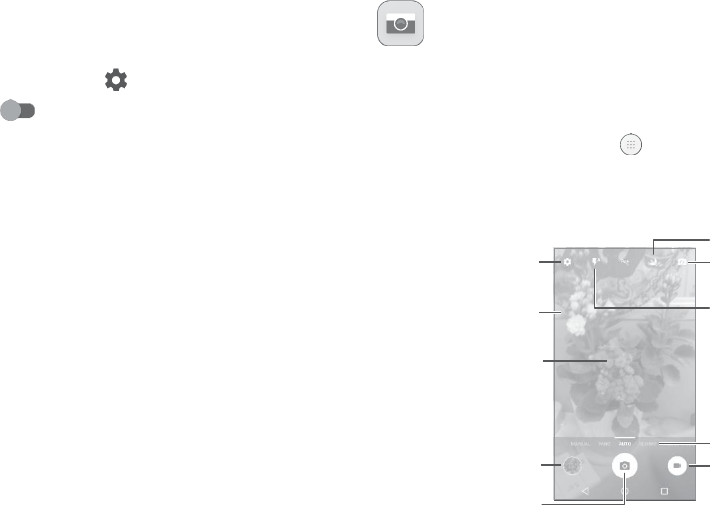
NFCdevicescanbeusedin
contactless
payment
systems,
similar
t
o
thosecurrentlyusedincreditcardsandelectronicticket
smart
car
ds,
andallowmobilepaymenttoreplaceorsupplementthese
s
y
st
ems.
NFCcanalsobeusedin
social
networking
situations,
suchassharing
contacts, photos,videosorfiles,andenteringmultiplayermobile games.
To
enable
NFC
fun
ction:
•
DragdownNotificationpanelandtouch to
access
S
e
ttings
.
•
TouchMoreandturnon
.
OrdragdownNotificationpaneland
touchtheNFCicontoturniton.
8Multimedia
applications
8.1
Camera
Yourmobilephoneisfittedwitha
camera
anda
camcorder
fortaking
photosandshootingvideos.
Before
using
the
camera
or
camc
or
der
,
make sure
thatyou
remove
the
protectivelenscovertoavoiditaffectingyourpicture
quality
.
Totakea photoorvideo,touch fromtheHomescreenandthen
touchCamer
a
.
Ifthephoneis
locked,press
the
Power
keyandthenswipethecamera
icontothelefttoopenthe
camer
a.
Open
se
ttings
Touchthe
scr
een
toseta
f
ocus
Pinch/spread
tw
o
fingers
t
o
g
e
ther
/
aparttozoom
out/in
Viewthephotos
or
videos
you
have
tak
en
Take
apictur
e
Turn
on
/
o
ff
nigh
t
mode
S
witch
between
front/backcamera
Select
flashmode
Slide
leftorright
t
o
change
thecamera
modetoManual,
Pano,
Auto, etc.
S
witch
tovideo
recorder
71
72

Totakeapicture
Thescreen actsasthe
viewfinder.
First,positiontheobject
or
landscape
inthevi
e
wfinder
,
touchthe
screen
tofocusif
necessary
and touch
to
take
thepicturewhichwillbe
automaticallysaved.You
can
also
longpress totakeburst shots.
Toshootavideo
Touch onthebottomrightofthe
screen
tostartvideorecording.
Youcan
also
touch totakeapictureduringvideorecording.
Touch tostop
recording.
Thevideowillbe
automatically
saved.
Furtheroperationswhenviewingapicture/videoyouhave
tak
en
•
Slide
leftorrighttoview thephotosor
videos
youhavetaken.
•
Touch thenGmail,Bluetooth,MMS,etctosharethephoto
or
video.
•
Touch orslidedowntoreturntoCamer
a
.
8.1.1
Modesandsettings
Beforetakingaphoto,slideleftorrightto
change
the
camera
mode.
•
MANUAL Touchto
manually
set
ISO,
shutter
speed,
focal
length,or white
balanceas
your
wish
.
•
SLO-MO Touchtostartrecordingslowmotionvideos.
•
MICRO-VIDEO
Long
press
tostartrecordingamicrovideo.
Settings
Ph
o
to
•
Size Touchto
select
picturesize.
•
Grid Turnon toenablegrid
view.
Itdividesthe
screen
into
equal
partsand
helps
youtake
be
tt
er
photosby
making
it
simple
to
align
compositional
elementsto the grid,suchasthe horizon
or
buildings
tothelinesinthegrid.
•
Attentionsound/Turnon to
enable
thesound.
seeker
Video
Backcamerashootingmode
•
Backcamera
video
Touchto
select
thevideorecording
quality
.
•
AUTO Automodeisturnedon.
•
PANO Touchtoturnon
panorama
function.Touchthe
shutterbuttontostarttakingpanoramic
pho
t
o and
movethephonetowardsyourcapture
directionandoverlapthetwo lines.Oncethe
slotsarefilled,thephotowillbeautomatically
saved.
Iftheslotsarenotfullyfilled
,
touchthe shutter
button
again
to
save
thephoto.
•
EIS Turnon to enabletheElectronicImage
Stabilization
(EIS)
feature.It
helpsreduce
blurring
associa
t
ed
withthemotionofacameraduring
exposure.
73
74
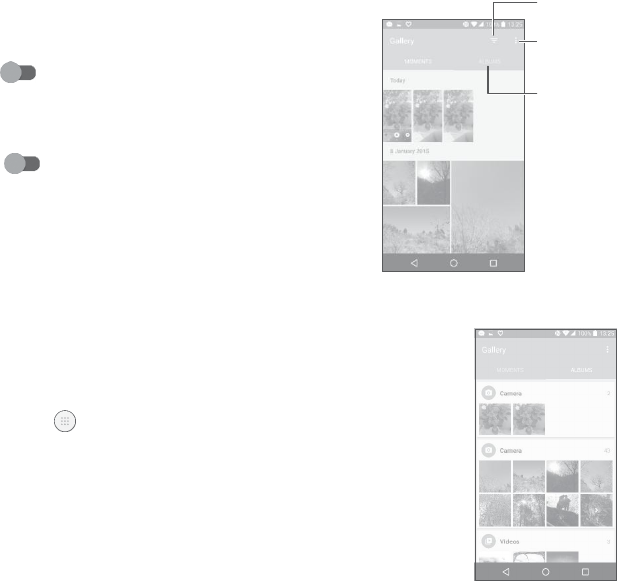
G
ener
al
•
Storage TouchtochoosethephoneorSDcardtosave photos.
•
GPStagging Turnon toactivatethefunctionoftagging
photos
andvideos
withyour
location.This
op
tion
is
availablewhen GPSlocation servicesand
wireless
networkareswitchedon.
•
Shuttersound Turnon to enableshuttersound
when
takingaphoto.
•
AntiBanding
Touch
to
adjustcamerasettings
to
avoid
banding.
Select
theitemsshown
in
G
allery
.
Select
photos
f
or
furtheroperation.
Access
youralbums.
•
Resetto
f
actory
settings
Touchandconfirmtoresetthe
camera
settings.
Toviewapicture/playavideo
Pictures
andvideosare
displayed
by
albums
inthe
G
allery
.
8.2
Gallery
Gallery
acts
as
a
media
playerforyoutoview photos andplayvideos.
Inaddition,asetoffurther operationsto picturesandvideosare
available
foryourchoice.
Toviewthephotosyouhave
taken,
touch fromtheHomescreen,
thentouch
G
allery
.
•
Touchan
album.
All picturesor
videos
will
spreadacross
thescreen.
•
Touchthepicture/videotoview or
pla
y
.
75
76
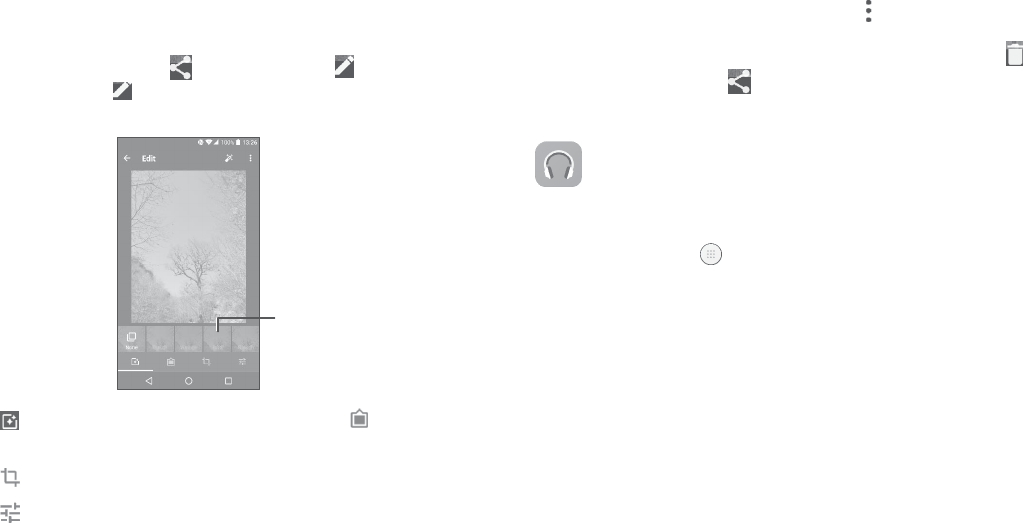
•
Slide
left/right
toview previousornextpictures/videos.
Workingwithpictures
You
can
workwithpicturesbyrotating orcroppingthem,
sharing
them
withfriends,settingthem
as
acontact photoor
w
allpaper
,
etc.
Locatethepictureyouwanttoworkon,andtouchthepictureinthe full-
screenpicture
view.
Touch tosharethepicture,or toedit
thepicture.Touch and
select
Setas...tosetthepicture
as
Contact
photoor
W
allpaper
.
Turn
on/
o
ff
nightmode
Batchoperation
The
Galleryprovides
amulti-selectfunction,sothat you
can
work
with
pictures/videosinbatches.
OnMOMENTS orALBUMS
screen ,
touch andtouchSelect
it
em
t
oactivatebatchoperationmode
(
y
ou
can
also
long
press
onealbum/
pictur
e
),
thentouchvideos/picturesyouwanttoworkwith.Touch
t
odelete
selectedfiles.
Touch to
shareselected
files.
8.3
Music
Youcanplay
music
filesstoredonyour
phoneor
microSDcard.
Musicfilescan
bedownloadedfromyourcomputertothephoneusingaUSBcable.
Toplayamusicfile,touch fromtheHomescreen,then
t
ouch
M
usic
.
S
e
t
effectssuch
as
Punch,Vintage,B/W,Bleach,etc
.
A
dd
abor
der
.
Crop,Straighten,Rotate,MirrororDrawthepicture.
Adjustthepicture
c
olour
.
77 78
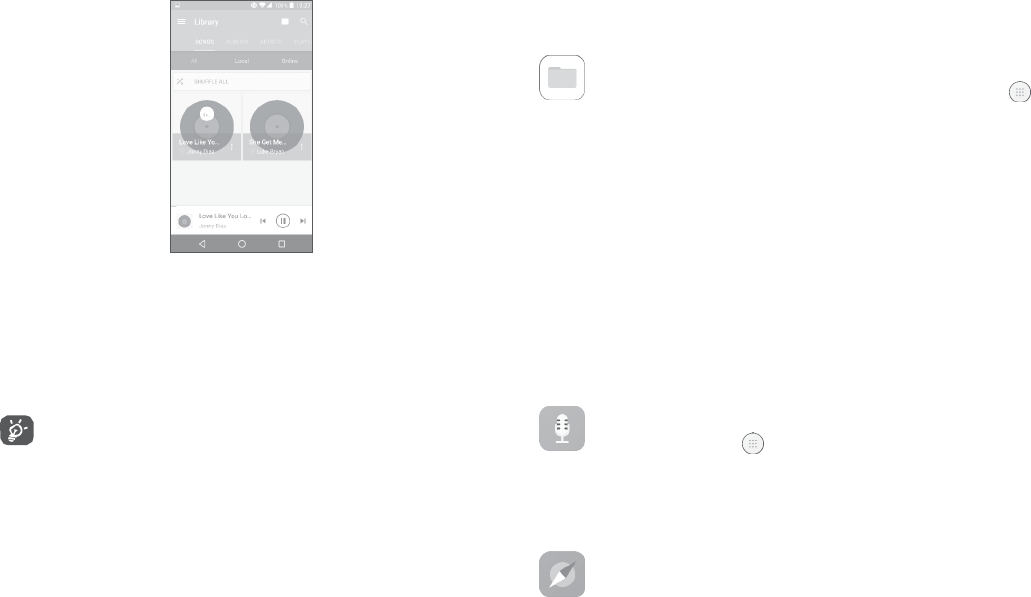
8.3.1
Playing music
Touchasongto
pla
y
.
Access
themenu.
Change
thesong
displa
y
.
Search
forasong.
Access
morefunctions.
Play
orpause.
Play
thenextsong.
While
playingsongs
with
Music,
theoperationof
pause,play
or
skipisstill
available
evenifthe
screen
islocked.
9 Others
9.1
Files
To
manage
thefilesinyourphone,touch
fromtheHome
screen,
thentouch
F
iles
.
FilesworkswithbothexternalSDcardandinternalstorage.
Files displaysalldatastoredonthephone,includingapplications,
mediafilesdownloadedfromGooglePlay
S
t
or
e,
YouTubeoro
ther
locations; videos,picturesoraudiosyouhavecaptured;otherdata
transferredviaBluetooth,
USBcable,
etc.
Whenyou downloadan
application
from
PC
to
phone,
you canlocate
the
applicationusingFiles,
thentouchittoinstallitin yourphone.
Filesallowsyoutoperformandisreallyefficientwiththe
f
ollo
wing
commonoperations:
cr
ea
t
e
(sub)
f
older
,
open
f
older
/
file,vie
w
,
rename,
move,
c
op
y
,
delete,
play,share,
etc.
9.2
Sound
R
ec
or
der
Torecordvoice,touch fromtheHome
screen,
thentouchSound
R
ec
or
der
.
SoundRecorder
allows
youtorecordvoice/soundforseconds/hours.
9.3C
ompass.
Waveyourphoneinafigure 8motionto
have
yourdetailedlocation.
79
80

9.4
B
oost
Boost
provides
youwiththephone
storage
andbattery
status,
andits
performance.
Youcan
manage
andoptimiseyourphone byusingthis
application.
10
S
e
ttings
Togoto
Settings,
touch from the
Homescreen,then
t
ouch
S
e
ttings
.
10.1
Wireless&ne
tw
orks
10.1.1
W
i-F
i
Using
Wi-Fi you
can
nowsurftheinternet without
using
your
SIM
card
wheneveryouareinrangeofa
wireless
network.Theonlythingyou
havetodoistoentertheWi-Fi
screen
andconfigurean
access
poin
t
toconnectyourphonetothe
wirelessne
tw
ork.
Fordetailedinstructionson
using
Wi-Fi,referto
“
7.1.2
W
i-F
i
”.
10.1.2
B
lue
t
oo
th
Bluetooth
allows
yourphoneto
exchange
data
(videos,images,
music,
etc.)withinasmallrangewithanotherBluetoothsupporteddevice
(
phone,
c
omputer
,
prin
t
er
,
headset,
carkit,etc.).
Formoreinformation on Bluetooth, refer to
“
7
�
3
Connecting
t
o
Bluetoothdevices”.
10.1.3
SIMcar
ds
Touch
to
chooseSIM
1or
SIM
2for
connecting
tothenetwork,making
calls
and
sendingSMS
messages.
81
82

10.1.4
Datausage
Mobiledata
Ifyoudonotneedtotransmitdataonmobilenetworks,turno
ff
mobile
datatoavoidincurring
signific
an
t
charges
fordata
use
onlocal
operatormobilenetworks,particularlyifyoudonothaveamobile
dataagreement.
Setmobiledatalimit
ByenablingSetmobiledata
limit
,
yourmobiledataconnection
will
be
disabled
whenthe
specified
limitis
reached.
Youcan
alsochoose
a
data
usage
cycletoviewthestatisticsand
applications
relatedtothe
datauseofyourphone.
Data
usage
is
measured
byyour
phone,
andyouroperatormay
count
diff
er
en
tly
.
10.1.5
More >Aeroplanemode
TurnonAeroplanemodeswitch to
simultaneously
disableall
wirelessconnectionsincluding
Wi-Fi,Bluetoothandmore.
10.1.6
More >
N
FC
Turnon to
enable
NFC.
Thefunctionallowsdata
exchange
whenthephonetouchesanother
device.
10.1.7
More >Android
B
eam
Android
beam
canbeactivatedonlywhenNFCison.
ThefunctionallowstotransmitappcontentviaNFC.
10.1.8
More >Tethering&portablehotspot
This
function
allows
youto
share
your
phone's
mobiledataconnection
via
USB
or
as
aportableWi-Fi
access
point
(
r
e
f
er
to
“
7
�
5
Sharing
y
our
phone'smobiledataconnection”).
10.1.9
More >
VPN
Amobile
virtualpriv
a
t
e
network
(
mobile
VPN
or
mVPN)provides
mobile
devices
with
access
tonetwork
resourcesand
software
applications
on
theirhomenetwork,whentheyconnectviaotherwirelessor
wir
ed
networks.Mobile
VPNs
are
used
in
environments
whereworkersneed
tokeep
applicationsessions
openat all
times,
throughoutthe working
day,
astheuserconnectsviavariouswirelessnetworks,encounters
gaps
in
coverage,
or
suspends-and-resumes
their
devices
topreserve
battery life.A
conventional
VPNcan't
survivesuch
events
because
the
networktunnelisdisrupted,
causingapplications
to
disconnect,
time
out,fail,oreventhecomputingdeviceitself tocrash.
FormoreinformationonVPN,referto
“
7.6
Connectingto
virtual
privatene
tw
orks
”.
10.1.10
More >Mobilene
tw
orks
Dataroaming
Ifyoudon’t
need
totransmit
data
onother
oper
a
t
or
s
’
mobile
networks,
disable
Dataroamingtoavoidincurring
significan
t
roaming
charges.
Preferrednetworkmode
Youcansetyourpreferrednetworkmode,suchas
GSM/W
CDMA,
LTE
etc.
83 84

Enhanced4GLTEmode
Touchtoimprovethe
communication
quality
.
Show
roaming
reminder
Touchto
select
whethertoshowareminderunder
roaming
mode.
AccessPointNames
Youcan
select
yourpreferrednetworkwiththismenu.
Networkoperators
Youcan
select
anetwork
oper
a
t
or
.
10.1.11
Mobileplan
Touchtosetthemobileplan.
10.2
D
e
vic
e
10.2.1
G
estur
es
Thefollowing
gestures
canbeusedforquickoperations:
•
TouchlessUIApproachthe
screen
withyourfingertoshow the
e
ff
ect.
•
Glovemode(1)
Enable
glovemodethenyou
can
touch onthe
screen
withthingloves.
•
Turnovertomute Turnon
tomuteringtonesof
incomingcalls
byturningtheph
oneov
er
.
•
Doubletapscreen Turn on to enablethe function
tha
t
allowsyoutoturnthescreenonoroffbya
doubletap.
10.1.12
Emergency alert
s
Touchtoenteremergencyalertssettings,includewhethertoshow
threatsandalertTone.
•
Black
scr
een
gesture(1)
10.2.2
D
ispla
y
Enable
theblack
screengesture,
drawa
le
tt
er
on
the blackscreento quicklyaccessan
application.
Inthismenu,youcanadjustyourscreen
brightness,
w
allpaper
,
f
on
t
size,
colourtemperatureofyour
screen,
etc.
PressPowerkeytwiceforCamera
If
enabled,
youcanquickly
access
Camerabydoublepressingthe
Powerkeywithout
unlocking
yourphone.
85 86

R
e
v
er
sible
Ifactivated,youcanansweracallevenifyourphoneisheldupside down.
Matrix
F
lip
Case
Ife
nabled,
•
Thecoverwilllightuptoshowthetime
and
weatherwhenyoupress
thepowerkeyordoubletouchthe
screen
area.
•
Swipe
left/right
toplaytheprevious/nextsongor
channel
when the
music
playerorradioison.
•
Thecoverwillshowthe
name
orphonenumberofanincomingcall.
Youcanswipe
le
ft
/
righ
t
toreject/answerthe
call,
orswipedown
t
o
endacall.
•
Thecover
reminds
youoftheevent details.
10.2.3
Lock
scr
een
Func
sho
rt
cuts
Touchto
customise
theapplicationshortcuts
displayed
onyourlock screen.
W
all
Shuffle
Ifthisfunctionisenabled,differentwallpaperswillbedisplayedon
yourlockscreeneachtimeyoupressthepowerkeytounlock your phone.
Screenlock
Touchtosetyour
screen
unlockmethod.For
example,
youcanunlock
yourphonebyslidingthe
screen,
enteringa
password,
ordrawinga
pattern,etc.
Makepatternvisible
Thisoption onlydisplayswhenyouselectPatternto unlockyour
phone.
Touch to
make
patternvisible.
Automaticallylock
Touchto
select
thedurationtolockthephoneafterthe
screen
iso
ff
.
Lockscreenmessage
Touchtoinputownerinformationwhichwilldisplayonthelocked screen.
10.2.4
Sound&
no
tifica
tion
Touchtoadjustcallandnotification
ringtones,music,
andotheraudio
settings.
87 88

•
Sound
S
e
t
volumefor
media,
ringtone,andalarms.
•
Headsetmode Markthecheckboxtoenableheadsetmode.
Ringtones
willonlybeheardfromtheheadset
ifitis
plugged
in.
10.2.5
Power
K
e
y
PowerKeysettingsare
available
at:Settings >Power
K
e
y
.
Youcan setthePowerkeyto enablethefollowingfeatureswhilethe
screenis
o
ff:
•
Also vibrate
f
or
calls
Turnon to
enable
vibrationfor
incomingcalls.
•
Press
thekeytolightupthescreen;
•
Double
press
totakeaphoto;orlong
press
totakeburst shots.
•
MaxxAudio Touchtosetthesoundeffectformusicand movies.
•
DoNotDisturb Touchto allowalarms,
reminders,
calls,etc.
when DoNotdisturbmodeisenabled.
•
Phoneringtone Touchtosetyourincomingcallringtone.
•
Defaultnotification
Touch
to
se
t
thedefault
sound
fornotifications.
ringtone
YoucansetthePowerkeytoenableoneofthefollowing
f
ea
tur
es
whilethescreenison:
•
Experience
liveweatheranimations;
•
Take
aninstantscreenshot;
•
Trigger
a
desired
application;
•
Trigger
audioeffectwhenasongormovieisplaying;
•
Enhance
voicequalityduringacall;
•
Press
thekeyfrom
Gallery
Moments tocreateaphotocollage;
•
Mutepoweron&
offringtone
Touchtoenable/disablethepoweron&o
ff
ringtone.
•
Triggerspecial effect suchassequencechangewhenamovieis playing;
•
Othersounds Touchto setdialpadtones,screenlocking
sounds,
touch
sounds
andvibrateontouch.
•
Double
press
totakeaphoto;orlong
press
totakeburst shots.
•
Pulse
no
tifica
tion
light
•
Whendeviceis
locked
Touchto
enable
light
reminding
when thereis
a
no
tification.
Youcan configurewhethertoshowall
notificationcontentordon'tshow
no
tifica
tion
atallwhenyourdeviceislocked.
10.2.6
Apps
Touchtoviewdetailsaboutthe
applications
installedonyourphone,
to
manage
theirdata
usage
andforcethemtostop.
In the App permissions menu of anapplication,you cangrant
permissionsfor theapp,suchasallowingtheappto
access
your
•
Appnotifications Touch to block or set priority for app
notifications.
•
Notificationaccess Touchtoview thenotificationlisteners.
Camera,Contacts,
L
oca
tion
,
etc.
IntheNotificationmenu,youcanconfigurewhethertoblockthe
notificationsfromthis
app,
hide
sensitive
content, etc.
89
90

10.2.7
Storage&
USB
Usethesesettingstomonitorthetotaland
available
spaceonyour phone.
10.2.8
B
a
tt
ery
Touchanycategoryinthebatterymanagementscreentoviewits
powerconsumption.
Youcanadjustpower
use
viathe
screenbrightness
or
screen
timeout
settingsinthe
Display
screen.
10.2.9
M
emory
Touchtoviewthe totalmemoryandthe memory
used
by
applica
tions.
10.2.10U
sers
Touchtoaddanaccountforthisphone.
10.3
P
er
sonal
10.3.1
L
oca
tion
On
Turnon to
enable
theuseofinformationfromWi-Fiandmobile
networkstodetermineyourapproximatelocation,foruseinGoogle
Maps,
whenyou
search,andsoon.
Whenyou
select
thisoption,you’re
asked
whetheryouconsentto
share
yourlocation
anonymously
with
Google’s
locationservice.
Mode
Touchto
select
High
accuracy,
Battery
saving
orDeviceonlymode.
•
Highaccuracy:Use
GPS,
Wi-Fiandmobilenetworktodetermine location.
•
Batterysaving:
Use
Wi-Fitodeterminelocation.
•
Deviceonly:Use
GPS
todeterminelocation.
Recentlocation
r
equests
Thislistshowstherecentlocationrequests.
10.3.2
S
ecurity
Encryptphone
Requires
a numericPIN,pattern,orpasswordtodecryptyourphone
each
timeyoupoweriton.
Preventmis-operation(1)
Turnon toprevent
mis-operation
indoubletouchunlockmode.
SetupSIMcardlock
•
TurnonLockSIMcardswitch tolocktheSIMcardwithaPIN
code.
•
TouchChangeSIMPINto
change
thePINcode.
Makepasswordsvisible
Turnon toshow
passwords as
youtype.
Deviceadministrators
Touchtoview or
deactiv
a
t
e
deviceadministrators.
Unknownsour
c
es
Turnon
topermitinstallationofapplicationsthatyouobtain
fr
om
websites,emails,
or
other
locations
otherthan
GooglePlay
S
t
or
e.
Toprotectyourphoneand
personal
data,download
applications
only
fromtrusted
sources,
such
asGooglePlay
S
t
or
e.
91
92

Trusted
cr
eden
tials
Touchto
display
trustedCAcertificates.
Installfrom storage
Touch
to
install
encrypted
c
ertifica
t
es
frominternal
storage
or
SD
card.
Clear
cr
eden
tials
Touchtoremoveallcertificates.
Screenpinning
Whenthisfunctionis
enabled,
you can
always
keepawindowinview
bytouchingtheOverviewbuttonandthenthepinicon.Inthiscase,
theusercannotgotoanyotherwindoworopenanyotherapp.
Tostoppinningawindowin
vie
w
,
longpressboththeBack and
Overviewkeys
t
o
g
e
ther
,
thenenteringyourscreenunlockpassword
ordrawingyourunlockpattern.
Appswithusageac
c
ess
Touch
to
display
the
apps
which
cantrack
what
apps
you
are using,
and
the
usingfrequency.
Turnon toallowpermission.
10.3.3
Language
&input
Usethe
Language
&inputsettingstoselectthe
language
forthe
t
e
xt
onyourphoneandforconfiguringtheonscreenkeyboard.Youcan
also
configurevoiceinputsettingsandthepointerspeed.
Language
Touchto
select
the
language
andtheregionyouwant.
Spellchec
k
er
Turnon to
enable
the
system
toshow
suggested
words.
Personaldictionary
Touch
toopenalistofthewords
you’veadded
tothe
dictionary.
Touch
awordtoeditordeleteit. Touchtheaddbutton
(+)
toadda
w
or
d.
Current
K
eyboar
d
Touchto
select
adefaultinputmethod.
Text-to-speechoutput
•
Preferred engine: Touch to choosea Preferred text-to-speech
engine,
touch toshowmore
choices
for
each
engine.
•
Speechrate:Touchto openadialogwhereyoucanselect
ho
w
quickly
youwantthe
synthesizer
tospeak.
•
Listentoanexample:Touchtoplayabriefsampleofthespeech
s
yn
thesiz
er
,
using
yourcurrentsettings.
Pointerspeed
Touch
toopena
dialog
whereyou
canchange
thepointer
speed,
t
ouch
OKtoconfirm.
10.3.4
Backup&
r
ese
t
Backupmydata
Turnon
tobackupyourphone’ssettingsandother
application
datatoGoogleserver
s.Ifyoureplaceyourphone,thesettingsanddata
you’vebacked
upwillberes
toredontothenewphoneforthefirsttimeyousigninwithyourGoogleaccou
nt.Ifyoumarkthisoption,awidevarietyofsettingsanddataare
backed
up,in
cludingyour
W
i-F
i
passwords,bookmarks,
alistofthe
applications
you’veinstalled,the
wordsyou’ve
added
tothedictionaryusedbythe
onscreen
keyboard,
andmostofthe
settings
thatyouconfigureinthe
Settings
application.
Ifyouunmarkthisoption,youstop
backing
upyour
settings,
andany
existingbackups
aredeletedfrom
Google
servers.
93 94

Backupaccount
Touchtosetyour
backup
account.
Automatic
restore
Turnon torestoreyourbacked-
upsettingsorotherdatawhenyou
reinstall
anapplication.
Networksettings
r
ese
t
Touchtoresetallnetworksettings.
Factorydata
r
ese
t
Erase
allofyour
personal
datafrominternal phone
storage,
including
informationaboutyourGoogleaccount,anyotheraccounts,your
systemandapplicationsettings,andanydownloadedapplications.
Resettingthephonedoesnoteraseanysystemsoftwareupdates
you’ve
do
wnloaded
.
Ifyouresetthephoneinthis
w
a
y
,
you’repromptedtore-enterthe
same
kindofinformation
as
whenyoufirststartedAndroid.
Whenyou
areunable
topoweronyour
phone,
thereis
another
way
t
o
performafactorydataresetby
usinghardwarekeys.Press
theVolume
upkeyandthePowerkeyat
same
timeuntilthe
screen
lightsup.
10.4
S
y
st
em
10.4.1
Date&time
UseDate×ettingsto
customise
yourpr
e
f
er
enc
es
forhowdate
andtimearedisplayed.
Automatic date&time
Turnon tousethenetwork-provideddateandtime.
Automatic time zone
Turnon tousethenetwork-providedtimezone.
Setdate
Touchtoopena
dialog
whereyoucan
manually
setthe
phone’s
date.
Settime
Touchtoopena
dialog
whereyoucan
manually
setthe
phone’s
time.
Selecttime zone
Touchtoopena
dialog
whereyoucansetthe
phone’s
timezone.
Use24-hour
f
orma
t
Turnon to
display
thetime
using
the24-hourclockformat.
10.4.2
A
cc
essibility
Use
the
Accessibilitysettings
toconfigure
anyaccessibilityplug-ins
you
have
installed
onyourphone.
T
alkB
ack
Touchto
enablespoken
f
eedback
fromyourphone.
Captions
Touchtoactivate/deactivate
captions
forphonescreen.
Magnification gestures
Touchtoturnon/off toactivate/deactivatezoomin/out functionby triple-
tappingthescreen.
95
96

Large
t
e
xt
Turnon to
enlarge
the
screen
t
e
xt.
Highcontrast
t
e
xt
Turnon toactivatehighcontrast
t
e
xt.
Powerbuttonendscall
Turnon to
enable
Powerbuttonendscall.
Auto-rotate
scr
een
Turnon toactivateauto-
rotate
screen.
Contentonthe
screen
or
thekeyboardwillbeautomaticallyrot
atedwhenyourotateyour phone.
Speakpasswor
ds
Turnon to
speakpasswords
whiletyping.
Accessibilityshort
cut
Touchto
enable/disable
quickactivatingfor
accessibility
features.
Text-to-speechoutput
Touchtoupdatethesettingsfortext-to-speechoutput,suchasthe
speech
rate.
Longpressdelay
Touchtoadjustthedurationoftouchandhold
delay.
This
function
enables
yourphonetodiffertouch andtouch &
hold,
which
may
avoid
incorrectoperations.
Colour
in
v
er
sion
Turnon toturnoncolourinversion.
Colour
c
orrection
Touchtoturnon/offcolourcorrection.
10.4.3
Regulatory&sa
f
e
ty
Touchtoview productinformation.
10.4.4
Aboutphone
ThiscontainsinformationrangingfromLegal information,
M
odel
number
,
Firmwareversion,
Baseband
version,Kernelversion,Build
numbertothoselistedbelow:
U
pda
t
es
Touchto
check
for
system
updates.
Experienceimprovement
If thisfunction isenabled,your deviceperformancedatawill be
collectedforimprovingthequalityand
performance
ofthedevice.
S
tatus
Thiscontains
the
status
oftheBattery
status,
Battery
level,
Myphone
number
,
Network,
Signal
strength,etc.
97 98
11Makingthemostof
y
our
phone
11.1
Smart
S
uite
Youcandownloadsoftware upgradesfor free from the website
(
www.cloudminds.com
).
SmartSuite
includes:
•
C
on
tacts
Allowsyoutobackupcontactentriessothatyoudon'thave
t
o
worryabout
losing,breaking,
switchingphonesor
changing
service
providers.
•
Messages
Freesyoufrom
painstakingly
inputtingtextonthe
keypads.
Allo
f
your
messages
are
easilyaccessible
andwell-organised.
•
Calendar
AllowsyoutosynceventsfreelybetweenyourphoneandOutlook
andcreateandeditnew eventsfromaPC.
•
Ph
o
to
s
Allowsyouto
easily
importphotosfromyour
PC
orthe
handse
t
and
organise
themindifferent
albums
forbettermanagement.
•
Videos
Allowsyoutoinsertvideo filesfromyourPCfor
playback
andthen
uploadthemtoa
handse
t
f
older
.
99
100

•
M
usic
Allowsyoutoquickly
search
foryourfavouritesinyour
PC,
manage
theultimate
Libr
ary
,
andenjoy
the
easiest
digital
jukebox
inyouro
wn
mobile
w
a
y
.
•
Application
Allows
youtoimport
downloadedmobile applicationsandhave
them
installed
intoyour
handse
t
upon synchronisation.
•
B
ackup
Allowsyouto
back
upyour
contacts,messages,calendar,
photosand
applications,
thenimportthe
backup
filestoyourphone.
SupportedOperating
S
y
st
ems
Windows
XP
/
Vista
/W
indo
w
s
7/Windows8.
11.2
Upgrade
You
canuse
the Mobile
Upgrade
toolor
FOTAUpgrade
tooltoupdate
yourphone'ssoftware.
11.2.1
MobileUpgrade
Download Mobile Upgrade from website
(
www.cloudminds.com
)
andinstallitonyourPC.Launchthe
t
ool
andupdateyourphonebyfollowingthestepbystepinstructions
(
r
e
f
er
tothe
UserGuide
providedtogetherwiththe tool).Yourphone’s software
willnowhavethelatestsoftware.
All
personal
informationwillbepermanentlylostfollowingthe
updateprocess.Werecommend youbackupyourpersonal
data
usingSmartSuite
beforeupgrading.
11.2.2
FOTAUpgrade
UsetheFOTA(FirmwareOverThe
A
ir
)
Upgradetooltoupdateyour
phone'ssoftware.To
access
U
pda
t
es
,
touchtheApplicationtab
fr
om
theHomescreen,thenselectUpdatesortouchSettings>About
phone>
U
pda
t
es
.
Touch andthephonewillsearchforthelatestsoftware.Ifyou
wanttoupdatethesystem,touchthe button,andwhenthat’s
finished,touch to completetheupdate.Nowyourphone
will
have
thelatestversionofthesoftware.Turnondataconnection
or
Wi-
Fibefore
searching
for
upda
t
es.
Settings
for
auto-check
frequency
arealsoavailableonceyourestartthephone.Ifyouhavechosen
auto-
check,
whenthesystem
discovers
thenewversion,adialog
will
popupwhereyoucanchoosetodownloadtheupdateorignore.A
notificationwill
alsoappear
inthe
Statusbar.
Thenotificationwillalso
appear
in
Status
bar
.
DuringFOTA
downloading
or
updating,
toavoiderrorsinlocatingthe
correctupdate
packages,
do not
change
your default
storage
location.
101
102

12Accessories
ThelatestgenerationofCloudMinds mobilephonesoffersa
built-in
handsfree featurethatallowsyoutousethetelephonefroma
distance,placed
onatablefor
example.
Forthosewhoprefertokeep
theirconversationsconfidential,anearpieceisalso
available
known
as
theheadset.
1.
Char
g
er
2.
USB
cable
3.
S
t
ereo
headse
t
Only use the CloudMindsbatteries,
chargers,
and
ac
c
ess
ories
included
along
withyourdevice.
13
W
arr
an
ty
Yourphoneis warranted
against
anydefectormalfunctioningwhich
mayoccurinconditionsofnormaluseduringthewarrantyperiodo
f
twelve(12)months(1) fromthedateofpurchaseasshownonyour
originalinvoice.
Batteries(2)and
accessories
soldwithyourphonearealsowarranted
against
any defectwhichmayoccurduringthefirstsix (6)months(1)
fromthedateof
purchaseas
shownonyouroriginalinvoice.
In
case
ofanydefectofyourphonewhichpreventsyoufromnormal
use
ther
eo
f
,
youmustimmediatelyinformyourvendorandpresent
yourphonewithyourproofofpurchase.
Ifthedefectisconfirmed, yourphoneorpartthereofwillbeeither
replacedor
repaired,
asappropriate.
Repaired
phoneand
ac
c
essories
areentitledtoaone(1)monthwarrantyforthe
same
defect.Repair
orreplacementmaybecarriedoutusing reconditionedcomponents
offeringequivalentfunctionality
.
Thiswarrantycoversthecostofpartsandlaborbutexcludesany
othercosts.
Thiswarrantyshall notapplytodefectstoyourphone
and/or
accessory
dueto
(
without
any
limita
ti
on
):
-
Non-compliance
withtheinstructionsforuseor
installation,
or
with
technicalandsafetystandardsapplicableinthe
geographical
area
whereyourphoneisused;
103
104
-Connectiontoanyequipmentnotsuppliedornot
recommended
by
CloudMinds (Shenzhen) Holdings Co., Ltd.;
-Modificationorrepairperformedbyindividualsnotauthorisedby
CloudMinds (Shenzhen) Holdings Co., Ltd.oritsaffiliatesoryour vendor;
-Modification, adjustmentor alteration of software or hardware
performedby
individuals
not
authorised
byCloudMinds (Shenzhen)
Holdings Co., Ltd.;
-Inclement
w
ea
ther
,
lightning,fire, humidity
,
infiltration of liquids
orfoods,
chemical
products,downloadoffiles,
crash,
highvoltage,
corrosion,
o
xida
tion
…
Yourphonewillnotbe
repaired
in
caselabels
or
serialnumbers
(IMEI)
havebeenremovedoraltered.
Therearenoexpresswarranties,whetherwritten, oralorimplied,
otherthanthisprintedlimitedwarrantyorthemandatorywarranty
providedbyyourcountryorjurisdiction.
InnoeventshallCloudMinds (Shenzhen) Holdings Co.,
Ltd.oranyofitsaffiliatesbe liable forindirect,incidentalor
consequential
damages
ofanynature
whatsoe
v
er
,
including
butnotlimitedto
commercial
or
financialloss
or
damage,loss
ofdataor
loss
of
image
tothefullextentthose
damag
es
canbe
disclaimed
by
la
w
.
Some
countries/states do not allow the exclusionor
limita
tion
of
indirect, incidentalor consequentialdamages,or limitation o
f
thedurationofimpliedwarranties,sotheprecedinglimitations
or
exclusionsmay
notapplytoyou.
14
T
r
oubleshoo
ting
Beforecontactingtheservice
c
en
t
er
,
herearesomeinstructions
t
o
helpyoutroubleshoot yourdevice:
•
Tohaveoptimaloperation,fully
charge
the
ba
tt
ery
.
•
Toimprovethephone’sperformance,remove
unnecessary
files
or
apps
onyourphone.
•
Updateyourphone'ssoftwareviatheUpdatesapplication.Oryou
cantouchSettings>About phone>Updatestoupdatesoftware.
•
ResetyourphoneviaFactorydata
r
ese
t
.
YoucantouchSettings
>Backup&reset >Factory data
r
ese
t
,
andthentouch
RESET
PHONE
.
AnothermethodistoholddownthePowerkeyandthe
Volumeupkey atthe
same
timewhenyourphoneis poweredo
ff
.
Allyourphonedatawillbelost
permanently.
Itisstrongly
advised
t
o
fully
back
upyourphonedatabeforeresetting.
andcarryoutthefollowingchecks:
Myphonecan't beswitchedonoris
fr
o
zen
•
Whenthephonecan'tbe
switched
on,
charge
forat
least
20minutes
toensuretheminimumbatterypowerneeded.Thenswitchiton again.
•
Whenthephonefallsintoaloopduringpoweronanimationand
theuserinterfacecan'tbe
accessed,
pressandholdtheVolume down
keytoenter
Recoverymode.This
elimina
t
es
any
abnormal
OS booting
issuescaused
bythirdpartyapplications.
•
Ifneithermethodiseffective,resetthephoneusingthePowerkey and
theVolumeupkey(holdingboth
t
o
g
e
ther
)
orupdatesoftware
viatheUpdatesapplication.
Myphonehasnotrespondedforseveralminutes
•
Ifyourphonedoesn’t
respond,
turnoffyourphoneby
pressing
and
holdingthePowerkeyuntilitturns offandthenrestartitagain.
105
106
•
Ifyourphonehasaremovable
ba
tt
er
y
,
removethebatteryand
reinsertit,thenrestartthephone.
•
Ifitstilldoesn'twork,resetthephone.
Myphoneturnsoffby
itself
•
Check
that your
screen
is
locked
whenyou
are
not
using
yourphone,
and
make
surethatthePowerkeyisnot
accidentallypressed
while
the
screen
isunlocked.
•
Check
thebattery
charge
level.
•
Ifitstilldoesn'twork,resetthephone.
Myphonecan't chargeproperly
•
MakesurethatyouareusingtheCloudMindschargerthatcomes
with
thephone.
•
Ifyourphonehasaremovable
ba
tter
y
,
makesurethatyour
ba
tt
ery
isinsertedproperlyand
clean
thebatterycontact ifit’s
dirty
.
Itmust
beinsertedbefore
plugging
inthe
char
g
er
.
•
Makesurethatyourbatteryisnotcompletelydischarged;ifthe
batterypowerhasbeenemptyforalongtime,itmaytakearound
20minutesto
display
thebattery
charging
indicatoronthe
screen.
•
Makesurethat
charging
iscarriedoutundernormalconditions
(
0°C
(32°F)
to40°C(104°F
)
).
•
When
abroad,check
thatthevoltageinputiscompatible.
Myphonecan't connecttoanetworkor"Noservice"isdisplayed
•
Try connectingto the network by movingto another physical location.
•
Verifythenetwork
coverage
withyour
oper
a
t
or
.
•
Check
withyouroperatorthatyourSIMcardisvalid.
•
Tryconnectingatalatertimeifthenetworkisoverloaded.
Myphonecan't connecttothe
in
t
erne
t
•
CheckthattheIMEInumber
(press
*#06#)isthe
same
astheone
printedonyourwarrantycardorbox.
•
Make
sure
thattheinternet
accessservice
ofyour
SIMcardis
available.
•
Check
yourphone'sinternetconnectionsettings.
•
Makesurethatyouareina
place
withnetworkcoverage.
•
Tryconnectingatalatertimeoranotherlocation.
Invalid SIMcard
•
Makesurethat the SIMcardhasbeencorrectly inserted
(
see
"Inserting
orremovingtheSIMcard").
•
MakesurethatthechiponyourSIMcardisnotdamaged.
•
Makesurethatthe
service
ofyourSIMcardisavailable.
Myphonecan't make
outgoing
calls
•
Makesure thatyouhavedialledavalidnumberandhavetouched
Call
.
•
Forinternational
calls,check
thecountryand
area
codes.
•
Makesurethatyourphoneisconnectedto anetwork,andthe
networkisnot
overloaded
orunavailable.
•
Checkyoursubscriptionstatuswithyouroperator
(
cr
edit,
SIMcard
valid,
etc.).
•
Makesurethatyouhavenotbarredoutgoingcalls.
•
Makesurethatyourphoneisnotin
aeroplane
mode.
Myphonecan't receive
incoming
calls
•
Makesurethatyourphoneisswitchedonandconnectedto a
network
(check
for
overloaded
or
unavailable
network).
•
Checkyoursubscriptionstatuswithyouroperator
(
cr
edit,
SIMcard
valid,
etc.).
•
Makesurethatyouhavenotforwardedincomingcalls.
•
Makesurethatyouhavenotbarredcertaincalls.
•
Makesurethatyourphoneisnotin
aeroplane
mode.
Thecaller’sname/numberdoesn'tappearwhenacallis
r
ec
eiv
ed
•
Check
thatyou
havesubscribed
tothis
service
withyour
oper
a
t
or
.
•
Your
callermay
have
concealed
his
name
or
number
.
107
108
Ican't findmy
c
on
tacts
•
MakesurethatyourSIMcardisnotbroken.
•
MakesurethatyourSIMcardisinsertedpr
operly
.
•
ImportallcontactsstoredinSIMcardtophone.
Thesoundqualityofthecallsispoor
•
Adjustthe
volume
during
acall
by
pressing
theVolumeup/downkey.
•
Check
thenetworkstrength.Movetoalocationwithstrongersignal
strength.
•
Makesure
that
the
r
ec
eiver
,
connector
or
speakeronyourphoneis
clean.
Ican't usethefeaturesdescribedin themanual
•
Checkwith your operator to makesurethat your subscription
includes
thisservice.
•
Makesurethatthisfeature doesn'trequireanCloudMinds
ac
cessory
.
When Iselectanumberfrommycontacts,thenumbercan'tbe dialled
•
Make
sure
thatyou
have
correctly recordedthe
number
inyourfile.
•
Makesurethatyouhaveselectedthecountrycodewhencallingan
international
number
.
Ican't adda
c
on
tact
•
MakesurethatyourSIMcardcontactsarenotfull;delete
some
files
or
save
thefilestothephone.
Mycallerscan't leavemessagesonmyvoicemail
•
Contactyournetworkoperatorto
checkservice
a
v
ailability
.
Ican't accessmyvoicemail
•
Make
sure
thatyour
oper
a
t
or’
s
voicemail
numberiscorrectlyentered
in
"Voicemail
number"
.
•
Trylaterifthenetworkis
bus
y
.
Ican't sendandreceive
MMS
•
Check
yourphonememory
as
itmightbefull.
•
Contact
yournetwork operatorto
checkserviceavailabilityand
MMS
parameters.
•
VerifytheservercentrenumberoryourMMSprofilewith your
oper
a
t
or
.
•
The
server
centre
may
be
swamped.
Try
again
la
t
er
.
SIMcardPINlocked
•
Contact your network operator to obtain the PUK
(P
er
sonal
Unblocking
Key)
c
ode.
Ican't connectmyphonetomycomputer
•
Install
Smart
S
uite.
•
Check
thatyour
USB
driver is
installed
pr
operly
.
•
OpentheNotificationpaneltocheckifthe
SmartSuite
Agenthas
beenactivated.
•
Check
thatyouhave
marked
the
USBdebugging
checkbox.
•
Checkthatyourcomputermeetstherequirementsfor
Smart
S
uite
installation.
•
Makesurethatyou’re
using
theright
cable
fromthebox.
Ican't downloadnew
files
•
Makesurethat thereissufficientphonestoragespaceforyour download.
•
Select
the
microSD
card
as
thelocationtostoredownloadedfiles.
•
Check
your
subscriptionstatus
withyour
oper
a
t
or
.
Thephonecan't bedetectedby othersvia
B
lue
t
oo
th
•
MakesurethatBluetoothisturnedonandyourphoneisvisible
t
o
otherusers.
•
Make
sure
thatthetwo
phonesare
withinBluetooth’sdetectionrange.
Thebatterydrainstoo
f
ast
•
Makesurethatyoufollowthecomplete
charge
time
(
minimum
135
minutes
).
109
110

P
r
oc
essor
Qualcomm
MSM8996
P
la
tf
orm
Android7X
M
emory
32GBROM+4GBRAM
Dimensions
(Lx
W
x
T)
159 X 78 X 8.4 mm
Weight
174g
D
ispla
y
5.7QHD
,
2560x1440
Network
GSM: 850/900/1800/1900
UMTS: 850/900/1900/2100
LTE: 1/3/7/8/20/22/28/33/34/38/40/41/42/43
(Band frequency and data speed are
operator dependent.)
GPS
A-GPS,GPS
C
onnectivity
•Bluetooth V4.1
•802.11a/b/g/n/ac (2.4GHz & 5GHz)
• 3.5 mm audio jack
• micro-USB
•
Afterapartial
charge,
thebatterylevelindicatormaynotbeexact.
Waitforatleast20minutesafterremovingthe
charger
toobtainan
exactindication.
•
Adjustthe
brightness
of
screenas
appropriate.
•
Extendthe
emailauto-check
interval for
as
long
as
possible.
•
Update news andweather information on manualdemand,
or
increase
their
auto-check
interval.
•
Exit
background-runningapplications
iftheyarenotbeingused
f
or
extendedperiodsoftime.
•
DeactivateBluetooth,Wi-Fi,or
GPS
whennotinuse.
Thephonebecomeswarmfollowingprolongedcalls,gameplaying,
internetsurfingorrunningother complexapplications
•
Thisheating
isanormal
consequence
ofthe
CPUhandling
ex
c
essiv
e
data.Endingthe aboveactionswill makeyourphonereturn
t
o
normaltemperature.
AfterFactorydataresetisperformed,Ican'tusemyphone
without
enteringGoogleaccount
cr
eden
tials
•
Afterresetis
performed,
youmustenterthe
originalGoogle
account
credentials
thatwere usedonthisphone.
•
Ifyoudon’trememberyourGoogleaccountcredentials,complete
Google
accountrecoveryprocedures.
•
Ifyoustillcannot
access
yourphone,applytotheauthorisedrepair
centre,but
remember
thatitwillnotbe
regarded as
warrantycase.
Thephonedoesn'tringwhenacallormessage
arriv
es
•
MakesurethatDoNotDisturbmode(gotoSettings>Sound&
notification>DoNot
D
isturb
)
isnot
activ
a
t
ed.
•
Press
theVolume
up
/
do
wn
keyto
adjust
volume.
Iforget somepasswords/codes/keysonphone
•
PerformFactorydata
r
ese
t
.
•
Ifyoustillcannot
access
yourphone,applytotheauthorisedrepair
centre,but
remember
thatitwillnotbe
regarded as
warrantycase.
15
S
pecifica
tions
111
112

Camera
•
16
megapixelback
camera
•
8
megapixel
frontcamera
Audiosupported
f
orma
ts
MIDI/MP3/AAC
Videosupported
f
orma
ts
MP4/3GP/MKV/AVI/WMV
Battery(1)
•
Rechargeable
Lithium-ion
ba
tt
ery
•
Capacity:308
0mAh
Expansion
S
lo
t
microSD™
memorycard
(Availability
of
microSD
card
depends
on
market)
Special
F
ea
tur
es
• GPS
• G-sensor
• Light Sensor
• Proximity Sensor
• E Compass
• Gyro
•Iris recognition sensor
Note:
Specifications
aresubjectto
change
withoutpriornotice.
(1) Theoriginalbatteryhasundergonerigoroussafetyinspectionstomeet
qualificationstandards,
the
use
of
non-original
ba
tt
eriesmay
bedangerous.
113
114
FCC Compliance
This device complies with part 15 of the FCC Rules. Operation is
subject to the following twoconditions:
(1) This device may not cause harmful interference, and
(2) this device must accept any interference received, including
interference that may causeundesired operation.
Caution:
Changes or modifications not expressly approved by the
manufacturer could void theuser's authority to operate he equipment.
NOTE: This equipment has been tested and found to comply with
the limits for a Class B digitaldevice, pursuant to part 15 of the FCC
Rules. These limits are designed to provide reasonableprotection
against harmful interference in a residential installation. This
equipment generates, usesand can radiate radio frequency energy
and, if not installed and used in accordance with theinstructions, may
cause harmful interference to radiocommunications. However, there
is no guarantee that interference will not occur in a
particularinstallation. If thisequipment does cause harmful
interference to radio or television reception, which can bedetermined
by turning the equipment off and on, the user is encouraged to try to
correct theinterference by one or more of the following measures:
-Reorient or relocate the receiving antenna.
-Increase the separation between the equipment and receiver.
-Connect the equipment into an outlet on a circuit different from that
to which the receiver isconnected.
-Consult the dealer or an experienced radio/ TV technician for help.
Health and safety informationRadio Frequency (RF) Energy
This model phone meets the government's requirements for
exposure to radio waves.
This phone is designed and manufactured not to exceed the
emission limits for exposure to radiofrequency (RF)energy set by the
Federal Communications Commission of the U.S. Government:
The exposure standard for wireless mobile phones employs a unit
of measurement known as theSpecificAbsorption Rate, or SAR.
The SAR limit set by the FCC is 1.6W/kg.
The maximum SAR value is obtained at the
values are:1.0730W/Kg.
Tests for SAR are conducted usingstandardoperating positions
accepted by the FCC with the phone transmitting at its
highestcertified power level in all testedfrequency bands. Although
the SAR is determined at the highest certified power level, the
actualSAR level of the phone while operating can be well below
the maximum value. This is becausethe phone is designed to
operate at multiple power levels so as to use only the poser
required toreach the network. In general, the closer you are to a
wireless base station antenna, the lower thepower output.While
there may be differences between the SAR levels of various
phones and atvarious positions, they all meet the government
requirement.The FCC has granted an Equipment59Authorization
for this model phone with all reported SAR levels evaluated as in
compliance withthe FCC RF exposure guidelines. SAR information
on this model phone is on file with the FCCand can be found
under the Display Grant section of http://www.fcc.gov/oet/fccid
after searchingon FCC ID: 2AK9KA1.