Collis SMARTLINKBOX SmartCard Testing Terminal User Manual SmartLink Box

Collis B.V. SmartCard Testing Terminal SmartLink Box

manual

SmartLink Box User Manual        Status: preliminary ii Version: 3.5  Document Data      Document Title SmartLink Box User Manual File Name SmartLink Box User Manual CE FCC v3.51.doc Status final draft
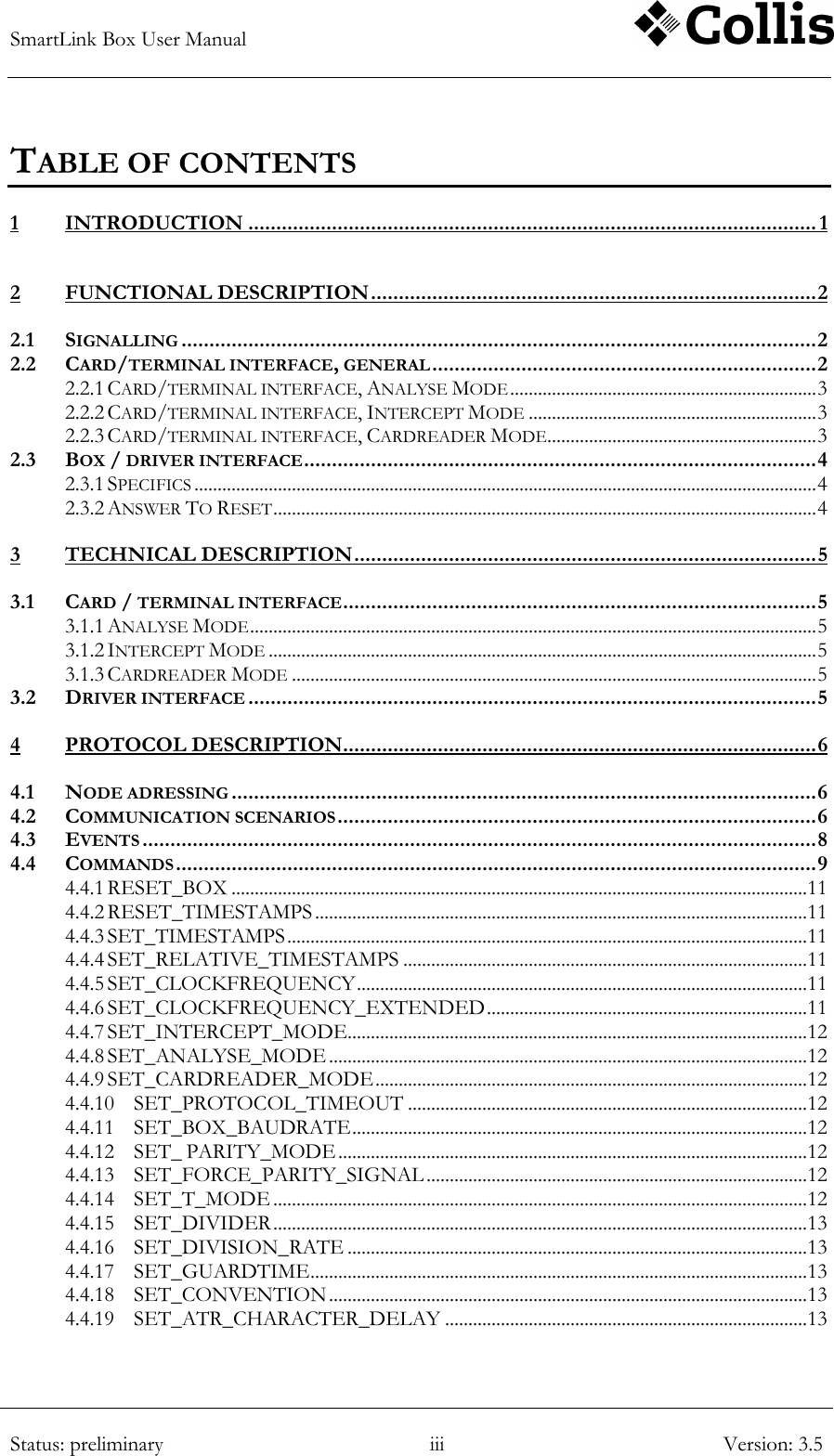
SmartLink Box User Manual        Status: preliminary iii Version: 3.5  TABLE OF CONTENTS 1 INTRODUCTION ...................................................................................................... 1 2 FUNCTIONAL DESCRIPTION ................................................................................ 2 2.1 SIGNALLING .................................................................................................................. 2 2.2 CARD/TERMINAL INTERFACE, GENERAL ..................................................................... 2 2.2.1 CARD/TERMINAL INTERFACE, ANALYSE MODE .................................................................. 3 2.2.2 CARD/TERMINAL INTERFACE, INTERCEPT MODE .............................................................. 3 2.2.3 CARD/TERMINAL INTERFACE, CARDREADER MODE .......................................................... 3 2.3 BOX / DRIVER INTERFACE ............................................................................................ 4 2.3.1 SPECIFICS ...................................................................................................................................... 4 2.3.2 ANSWER TO RESET ..................................................................................................................... 4 3 TECHNICAL DESCRIPTION ................................................................................... 5 3.1 CARD / TERMINAL INTERFACE ..................................................................................... 5 3.1.1 ANALYSE MODE .......................................................................................................................... 5 3.1.2 INTERCEPT MODE ...................................................................................................................... 5 3.1.3 CARDREADER MODE ................................................................................................................. 5 3.2 DRIVER INTERFACE ...................................................................................................... 5 4 PROTOCOL DESCRIPTION ..................................................................................... 6 4.1 NODE ADRESSING ......................................................................................................... 6 4.2 COMMUNICATION SCENARIOS ...................................................................................... 6 4.3 EVENTS ......................................................................................................................... 8 4.4 COMMANDS ................................................................................................................... 9 4.4.1 RESET_BOX ............................................................................................................................ 11 4.4.2 RESET_TIMESTAMPS .......................................................................................................... 11 4.4.3 SET_TIMESTAMPS ................................................................................................................ 11 4.4.4 SET_RELATIVE_TIMESTAMPS ....................................................................................... 11 4.4.5 SET_CLOCKFREQUENCY ................................................................................................. 11 4.4.6 SET_CLOCKFREQUENCY_EXTENDED ..................................................................... 11 4.4.7 SET_INTERCEPT_MODE................................................................................................... 12 4.4.8 SET_ANALYSE_MODE ....................................................................................................... 12 4.4.9 SET_CARDREADER_MODE ............................................................................................. 12 4.4.10 SET_PROTOCOL_TIMEOUT ...................................................................................... 12 4.4.11 SET_BOX_BAUDRATE .................................................................................................. 12 4.4.12 SET_ PARITY_MODE ..................................................................................................... 12 4.4.13 SET_FORCE_PARITY_SIGNAL .................................................................................. 12 4.4.14 SET_T_MODE ................................................................................................................... 12 4.4.15 SET_DIVIDER ................................................................................................................... 13 4.4.16 SET_DIVISION_RATE ................................................................................................... 13 4.4.17 SET_GUARDTIME ........................................................................................................... 13 4.4.18 SET_CONVENTION ....................................................................................................... 13 4.4.19 SET_ATR_CHARACTER_DELAY .............................................................................. 13
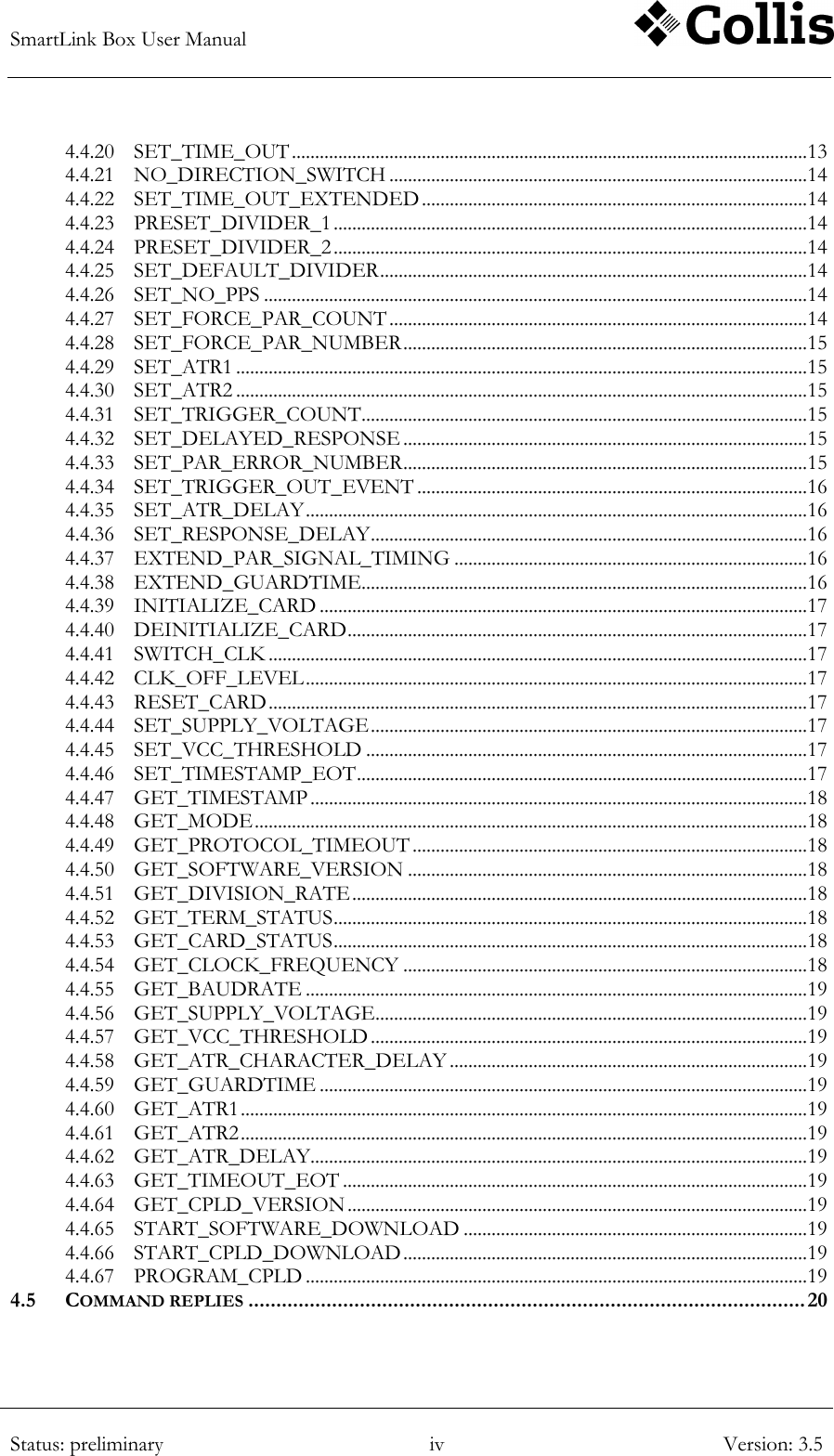
SmartLink Box User Manual        Status: preliminary iv Version: 3.5  4.4.20 SET_TIME_OUT ............................................................................................................... 13 4.4.21 NO_DIRECTION_SWITCH .......................................................................................... 14 4.4.22 SET_TIME_OUT_EXTENDED ................................................................................... 14 4.4.23 PRESET_DIVIDER_1 ...................................................................................................... 14 4.4.24 PRESET_DIVIDER_2 ...................................................................................................... 14 4.4.25 SET_DEFAULT_DIVIDER ............................................................................................ 14 4.4.26 SET_NO_PPS ..................................................................................................................... 14 4.4.27 SET_FORCE_PAR_COUNT .......................................................................................... 14 4.4.28 SET_FORCE_PAR_NUMBER ....................................................................................... 15 4.4.29 SET_ATR1 ........................................................................................................................... 15 4.4.30 SET_ATR2 ........................................................................................................................... 15 4.4.31 SET_TRIGGER_COUNT ................................................................................................ 15 4.4.32 SET_DELAYED_RESPONSE ....................................................................................... 15 4.4.33 SET_PAR_ERROR_NUMBER ....................................................................................... 15 4.4.34 SET_TRIGGER_OUT_EVENT .................................................................................... 16 4.4.35 SET_ATR_DELAY ............................................................................................................ 16 4.4.36 SET_RESPONSE_DELAY .............................................................................................. 16 4.4.37 EXTEND_PAR_SIGNAL_TIMING ............................................................................ 16 4.4.38 EXTEND_GUARDTIME ................................................................................................ 16 4.4.39 INITIALIZE_CARD ......................................................................................................... 17 4.4.40 DEINITIALIZE_CARD ................................................................................................... 17 4.4.41 SWITCH_CLK .................................................................................................................... 17 4.4.42 CLK_OFF_LEVEL ............................................................................................................ 17 4.4.43 RESET_CARD .................................................................................................................... 17 4.4.44 SET_SUPPLY_VOLTAGE .............................................................................................. 17 4.4.45 SET_VCC_THRESHOLD ............................................................................................... 17 4.4.46 SET_TIMESTAMP_EOT ................................................................................................. 17 4.4.47 GET_TIMESTAMP ........................................................................................................... 18 4.4.48 GET_MODE ....................................................................................................................... 18 4.4.49 GET_PROTOCOL_TIMEOUT ..................................................................................... 18 4.4.50 GET_SOFTWARE_VERSION ...................................................................................... 18 4.4.51 GET_DIVISION_RATE .................................................................................................. 18 4.4.52 GET_TERM_STATUS ...................................................................................................... 18 4.4.53 GET_CARD_STATUS ...................................................................................................... 18 4.4.54 GET_CLOCK_FREQUENCY ....................................................................................... 18 4.4.55 GET_BAUDRATE ............................................................................................................ 19 4.4.56 GET_SUPPLY_VOLTAGE ............................................................................................. 19 4.4.57 GET_VCC_THRESHOLD .............................................................................................. 19 4.4.58 GET_ATR_CHARACTER_DELAY ............................................................................. 19 4.4.59 GET_GUARDTIME ......................................................................................................... 19 4.4.60 GET_ATR1 .......................................................................................................................... 19 4.4.61 GET_ATR2 .......................................................................................................................... 19 4.4.62 GET_ATR_DELAY........................................................................................................... 19 4.4.63 GET_TIMEOUT_EOT .................................................................................................... 19 4.4.64 GET_CPLD_VERSION ................................................................................................... 19 4.4.65 START_SOFTWARE_DOWNLOAD .......................................................................... 19 4.4.66 START_CPLD_DOWNLOAD ....................................................................................... 19 4.4.67 PROGRAM_CPLD ............................................................................................................ 19 4.5 COMMAND REPLIES .................................................................................................... 20
SmartLink Box User Manual        Status: preliminary v Version: 3.5  5 APPENDIX ................................................................................................................ 21 5.1 FCC STATEMENT ........................................................................................................ 21
SmartLink Box User Manual        Status: preliminary 1/21 Version: 3.5  1 INTRODUCTION In June 1998, Collis started the development of a hardware interface that should facilitate the use of Collis‟ generic test-tool “Conclusion Smartlink” for testing SmartCards and SmartCard terminals. The result of this effort, the “Conclusion Smartlink Box” has been in use since early 1999.  Because of the rapid development in SmartCard technology, the original hardware no longer meets the demands placed on it by today‟s market. For example, it is not possible to use the device to communicate with terminal/card combinations that work at 3V supply voltage, commonly used in GSM.  Therefore a decision has been made to design a new version of the SmartLink Box that does meet these demands and is also more flexible and easier to upgrade. This document is the basis for this new hardware design.
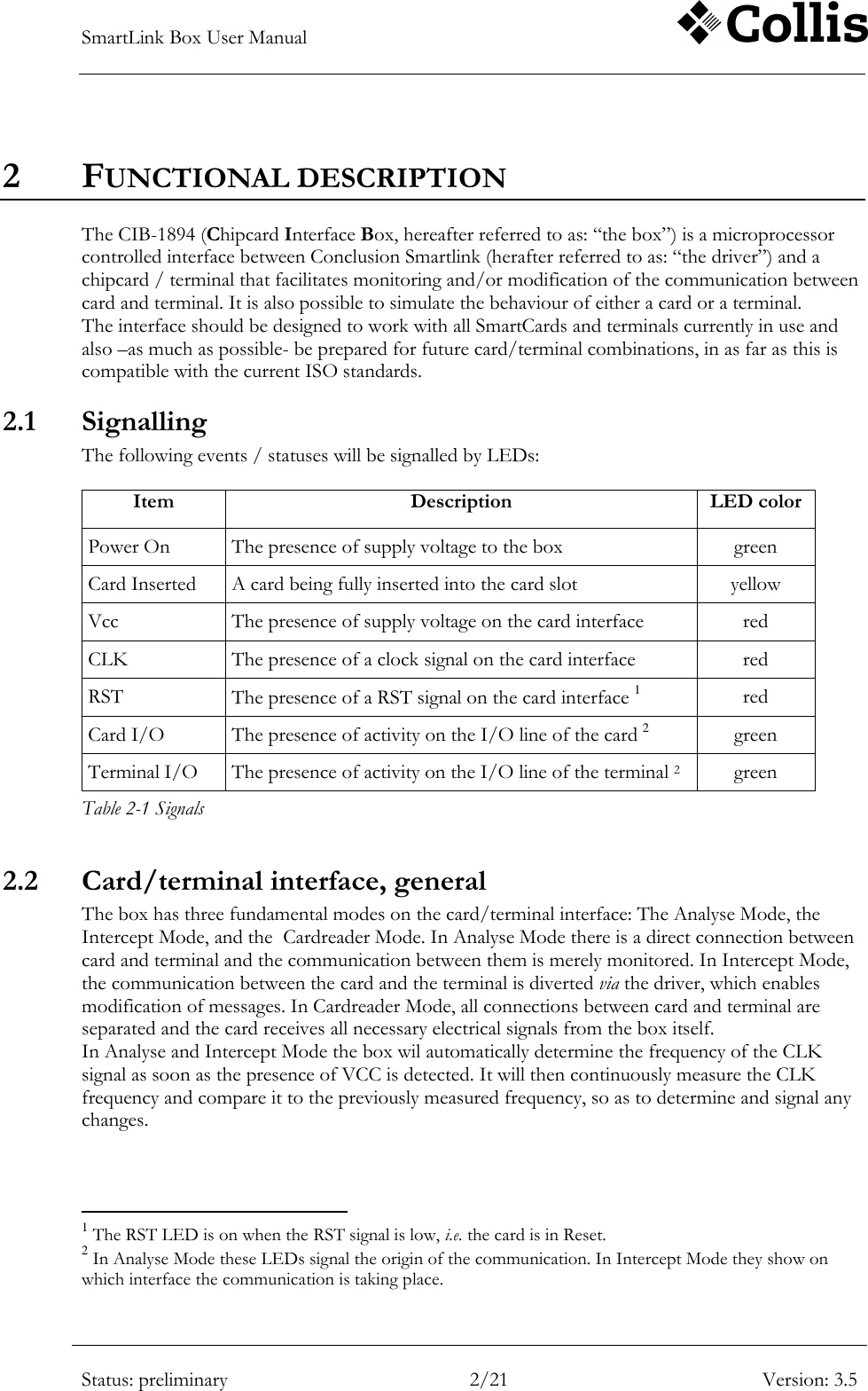
SmartLink Box User Manual        Status: preliminary 2/21 Version: 3.5  2 FUNCTIONAL DESCRIPTION The CIB-1894 (Chipcard Interface Box, hereafter referred to as: “the box”) is a microprocessor controlled interface between Conclusion Smartlink (herafter referred to as: “the driver”) and a chipcard / terminal that facilitates monitoring and/or modification of the communication between card and terminal. It is also possible to simulate the behaviour of either a card or a terminal.  The interface should be designed to work with all SmartCards and terminals currently in use and also –as much as possible- be prepared for future card/terminal combinations, in as far as this is compatible with the current ISO standards. 2.1 Signalling The following events / statuses will be signalled by LEDs:  Item Description LED color Power On The presence of supply voltage to the box green Card Inserted A card being fully inserted into the card slot yellow Vcc The presence of supply voltage on the card interface red CLK The presence of a clock signal on the card interface red RST The presence of a RST signal on the card interface 1 red Card I/O The presence of activity on the I/O line of the card 2 green Terminal I/O The presence of activity on the I/O line of the terminal 2 green Table 2-1 Signals 2.2 Card/terminal interface, general The box has three fundamental modes on the card/terminal interface: The Analyse Mode, the Intercept Mode, and the  Cardreader Mode. In Analyse Mode there is a direct connection between card and terminal and the communication between them is merely monitored. In Intercept Mode, the communication between the card and the terminal is diverted via the driver, which enables modification of messages. In Cardreader Mode, all connections between card and terminal are separated and the card receives all necessary electrical signals from the box itself. In Analyse and Intercept Mode the box wil automatically determine the frequency of the CLK signal as soon as the presence of VCC is detected. It will then continuously measure the CLK frequency and compare it to the previously measured frequency, so as to determine and signal any changes.                                                          1 The RST LED is on when the RST signal is low, i.e. the card is in Reset. 2 In Analyse Mode these LEDs signal the origin of the communication. In Intercept Mode they show on which interface the communication is taking place.
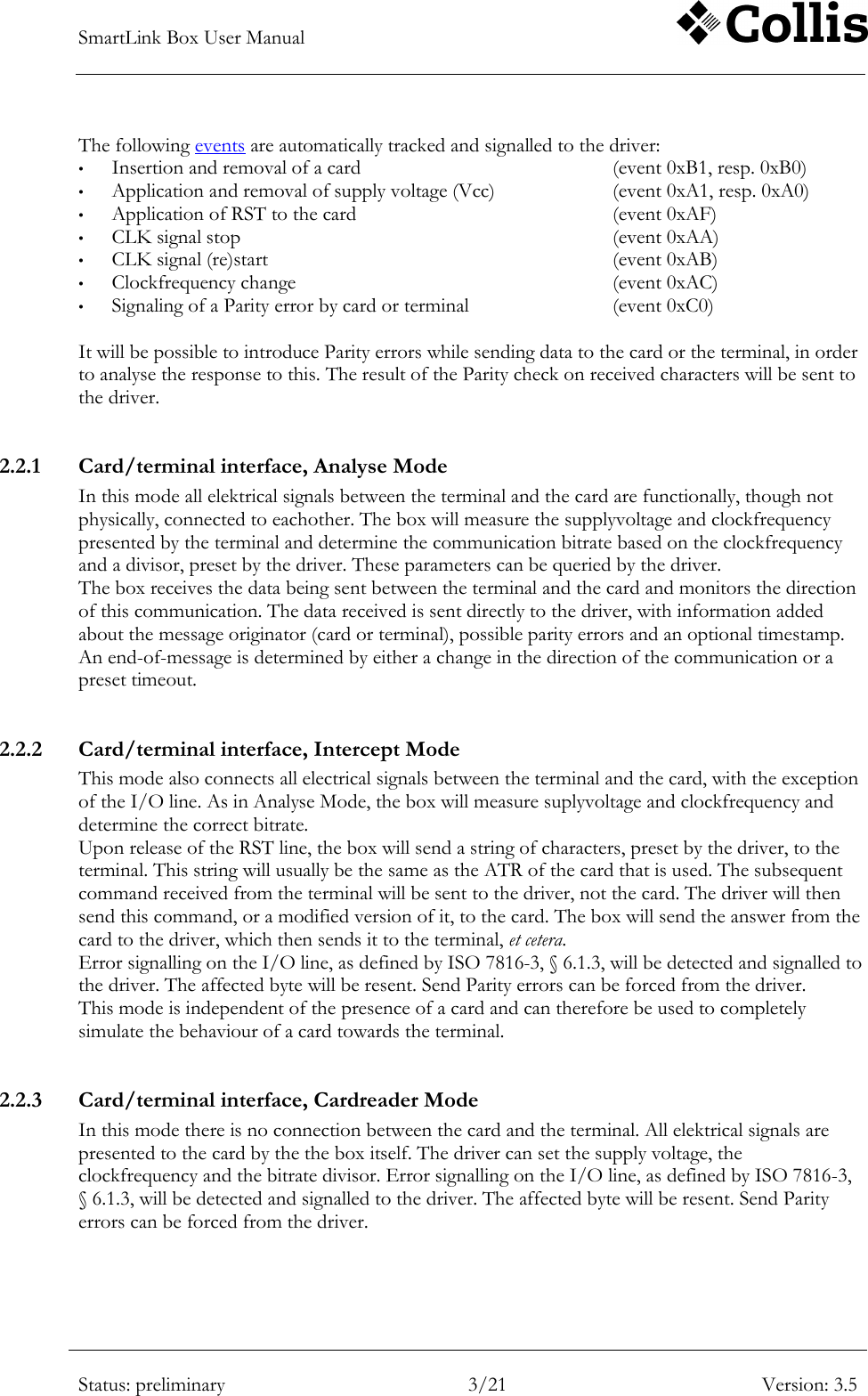
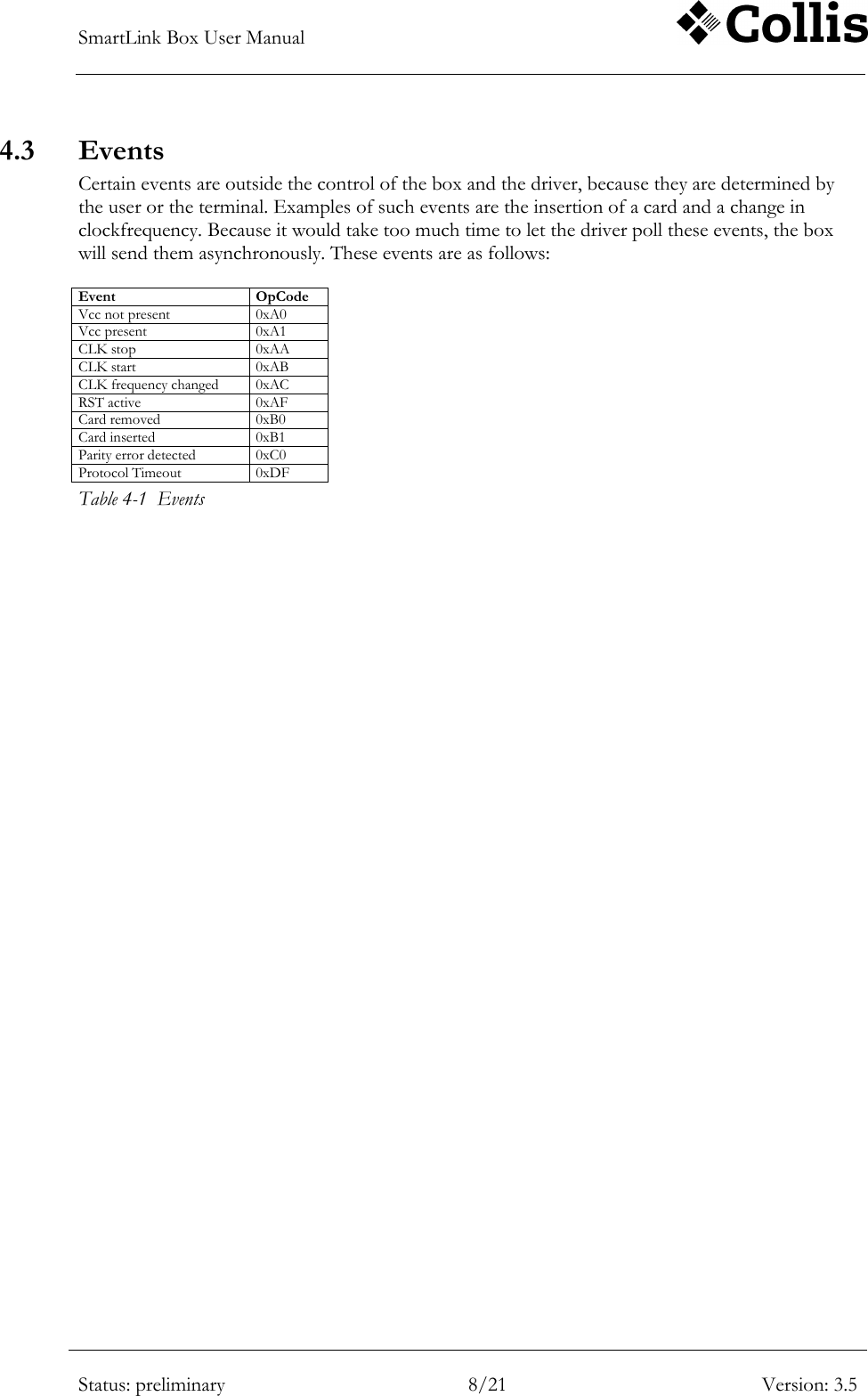
SmartLink Box User Manual        Status: preliminary 3/21 Version: 3.5  The following events are automatically tracked and signalled to the driver: • Insertion and removal of a card        (event 0xB1, resp. 0xB0) • Application and removal of supply voltage (Vcc)    (event 0xA1, resp. 0xA0) • Application of RST to the card        (event 0xAF) • CLK signal stop            (event 0xAA) • CLK signal (re)start            (event 0xAB) • Clockfrequency change          (event 0xAC) • Signaling of a Parity error by card or terminal      (event 0xC0)  It will be possible to introduce Parity errors while sending data to the card or the terminal, in order to analyse the response to this. The result of the Parity check on received characters will be sent to the driver.   2.2.1 Card/terminal interface, Analyse Mode In this mode all elektrical signals between the terminal and the card are functionally, though not physically, connected to eachother. The box will measure the supplyvoltage and clockfrequency presented by the terminal and determine the communication bitrate based on the clockfrequency and a divisor, preset by the driver. These parameters can be queried by the driver.  The box receives the data being sent between the terminal and the card and monitors the direction of this communication. The data received is sent directly to the driver, with information added about the message originator (card or terminal), possible parity errors and an optional timestamp. An end-of-message is determined by either a change in the direction of the communication or a preset timeout.  2.2.2 Card/terminal interface, Intercept Mode This mode also connects all electrical signals between the terminal and the card, with the exception of the I/O line. As in Analyse Mode, the box will measure suplyvoltage and clockfrequency and determine the correct bitrate.  Upon release of the RST line, the box will send a string of characters, preset by the driver, to the terminal. This string will usually be the same as the ATR of the card that is used. The subsequent command received from the terminal will be sent to the driver, not the card. The driver will then send this command, or a modified version of it, to the card. The box will send the answer from the card to the driver, which then sends it to the terminal, et cetera. Error signalling on the I/O line, as defined by ISO 7816-3, § 6.1.3, will be detected and signalled to the driver. The affected byte will be resent. Send Parity errors can be forced from the driver. This mode is independent of the presence of a card and can therefore be used to completely simulate the behaviour of a card towards the terminal.  2.2.3 Card/terminal interface, Cardreader Mode In this mode there is no connection between the card and the terminal. All elektrical signals are presented to the card by the the box itself. The driver can set the supply voltage, the clockfrequency and the bitrate divisor. Error signalling on the I/O line, as defined by ISO 7816-3, § 6.1.3, will be detected and signalled to the driver. The affected byte will be resent. Send Parity errors can be forced from the driver.
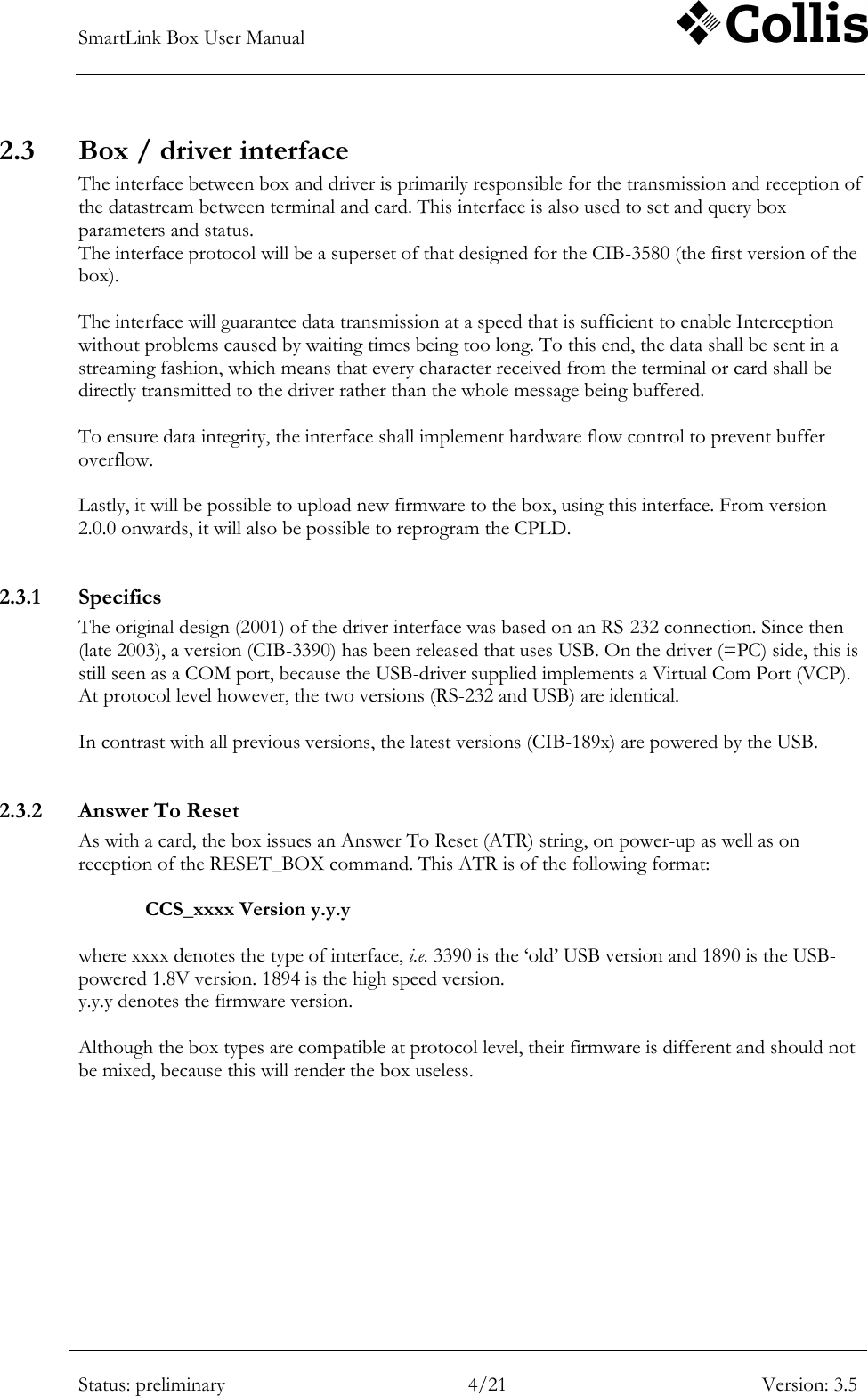
SmartLink Box User Manual        Status: preliminary 4/21 Version: 3.5  2.3 Box / driver interface The interface between box and driver is primarily responsible for the transmission and reception of the datastream between terminal and card. This interface is also used to set and query box parameters and status.  The interface protocol will be a superset of that designed for the CIB-3580 (the first version of the box).  The interface will guarantee data transmission at a speed that is sufficient to enable Interception without problems caused by waiting times being too long. To this end, the data shall be sent in a streaming fashion, which means that every character received from the terminal or card shall be directly transmitted to the driver rather than the whole message being buffered.  To ensure data integrity, the interface shall implement hardware flow control to prevent buffer overflow.   Lastly, it will be possible to upload new firmware to the box, using this interface. From version 2.0.0 onwards, it will also be possible to reprogram the CPLD.  2.3.1 Specifics  The original design (2001) of the driver interface was based on an RS-232 connection. Since then (late 2003), a version (CIB-3390) has been released that uses USB. On the driver (=PC) side, this is still seen as a COM port, because the USB-driver supplied implements a Virtual Com Port (VCP).  At protocol level however, the two versions (RS-232 and USB) are identical.  In contrast with all previous versions, the latest versions (CIB-189x) are powered by the USB.  2.3.2 Answer To Reset As with a card, the box issues an Answer To Reset (ATR) string, on power-up as well as on reception of the RESET_BOX command. This ATR is of the following format:  CCS_xxxx Version y.y.y  where xxxx denotes the type of interface, i.e. 3390 is the „old‟ USB version and 1890 is the USB-powered 1.8V version. 1894 is the high speed version. y.y.y denotes the firmware version.  Although the box types are compatible at protocol level, their firmware is different and should not be mixed, because this will render the box useless.
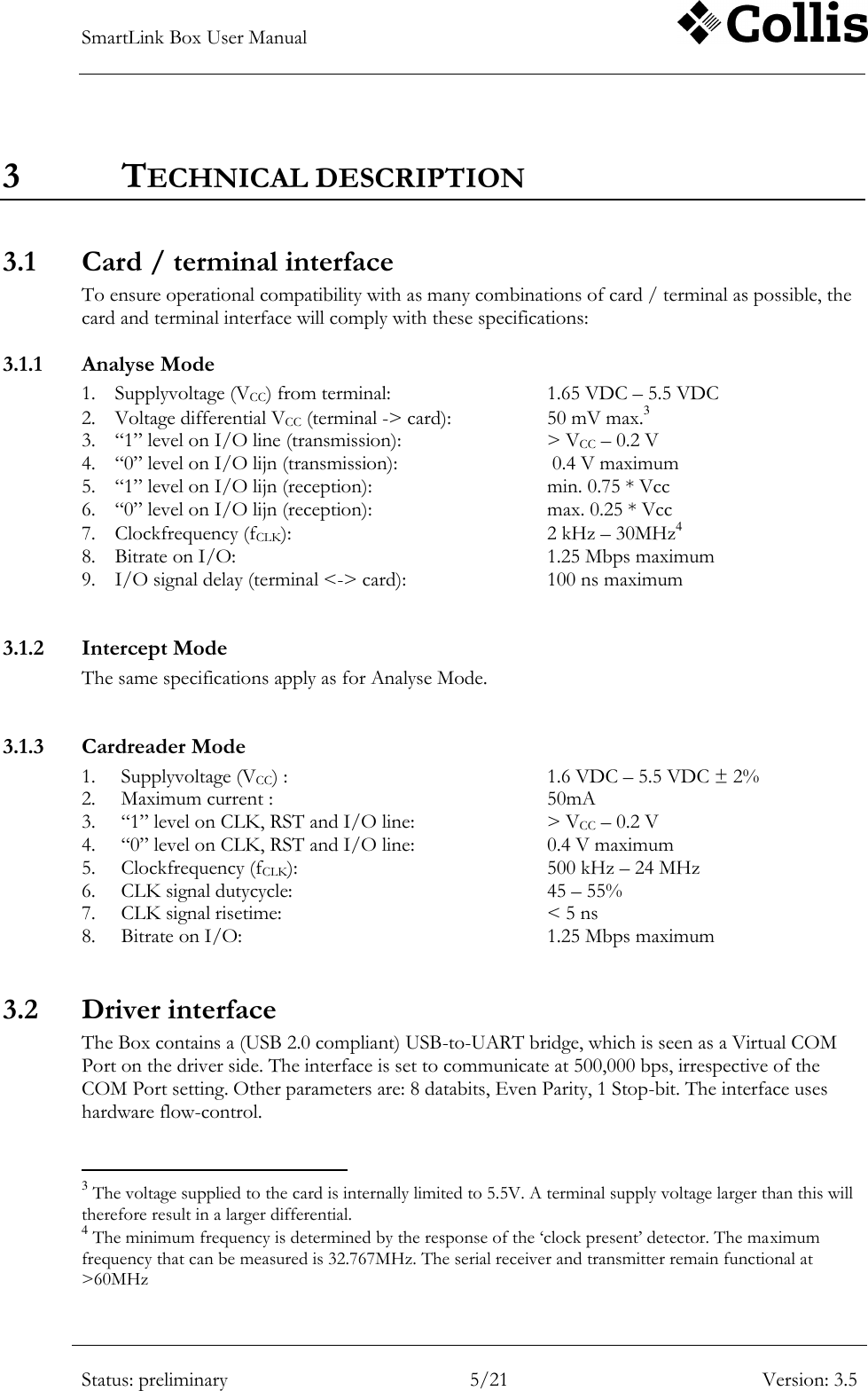
SmartLink Box User Manual        Status: preliminary 5/21 Version: 3.5  3 TECHNICAL DESCRIPTION 3.1 Card / terminal interface To ensure operational compatibility with as many combinations of card / terminal as possible, the card and terminal interface will comply with these specifications: 3.1.1 Analyse Mode 1. Supplyvoltage (VCC) from terminal:      1.65 VDC – 5.5 VDC 2. Voltage differential VCC (terminal -> card):    50 mV max.3 3. “1” level on I/O line (transmission):      > VCC – 0.2 V 4. “0” level on I/O lijn (transmission):       0.4 V maximum 5. “1” level on I/O lijn (reception):      min. 0.75 * Vcc 6. “0” level on I/O lijn (reception):      max. 0.25 * Vcc 7. Clockfrequency (fCLK):        2 kHz – 30MHz4 8. Bitrate on I/O:          1.25 Mbps maximum 9. I/O signal delay (terminal <-> card):      100 ns maximum  3.1.2 Intercept Mode The same specifications apply as for Analyse Mode.  3.1.3 Cardreader Mode 1. Supplyvoltage (VCC) :        1.6 VDC – 5.5 VDC ± 2% 2. Maximum current :          50mA 3. “1” level on CLK, RST and I/O line:    > VCC – 0.2 V 4. “0” level on CLK, RST and I/O line:    0.4 V maximum 5. Clockfrequency (fCLK):        500 kHz – 24 MHz 6. CLK signal dutycycle:        45 – 55% 7. CLK signal risetime:        < 5 ns 8. Bitrate on I/O:          1.25 Mbps maximum  3.2 Driver interface The Box contains a (USB 2.0 compliant) USB-to-UART bridge, which is seen as a Virtual COM Port on the driver side. The interface is set to communicate at 500,000 bps, irrespective of the COM Port setting. Other parameters are: 8 databits, Even Parity, 1 Stop-bit. The interface uses hardware flow-control.                                                       3 The voltage supplied to the card is internally limited to 5.5V. A terminal supply voltage larger than this will therefore result in a larger differential. 4 The minimum frequency is determined by the response of the „clock present‟ detector. The maximum frequency that can be measured is 32.767MHz. The serial receiver and transmitter remain functional at >60MHz
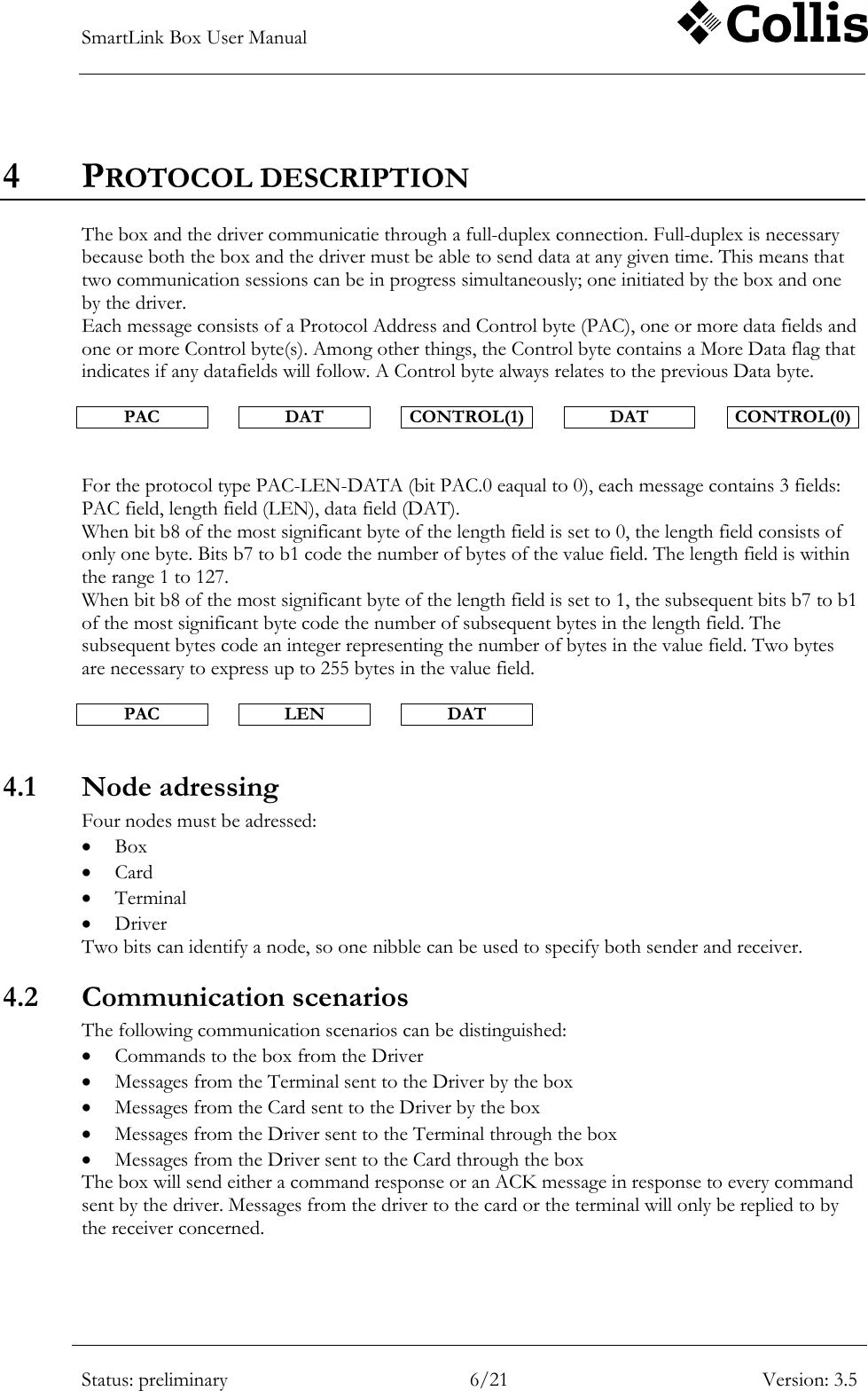
SmartLink Box User Manual        Status: preliminary 6/21 Version: 3.5  4 PROTOCOL DESCRIPTION The box and the driver communicatie through a full-duplex connection. Full-duplex is necessary because both the box and the driver must be able to send data at any given time. This means that two communication sessions can be in progress simultaneously; one initiated by the box and one by the driver.  Each message consists of a Protocol Address and Control byte (PAC), one or more data fields and one or more Control byte(s). Among other things, the Control byte contains a More Data flag that indicates if any datafields will follow. A Control byte always relates to the previous Data byte.  PAC  DAT  CONTROL(1)  DAT  CONTROL(0)   For the protocol type PAC-LEN-DATA (bit PAC.0 eaqual to 0), each message contains 3 fields: PAC field, length field (LEN), data field (DAT). When bit b8 of the most significant byte of the length field is set to 0, the length field consists of only one byte. Bits b7 to b1 code the number of bytes of the value field. The length field is within the range 1 to 127.  When bit b8 of the most significant byte of the length field is set to 1, the subsequent bits b7 to b1 of the most significant byte code the number of subsequent bytes in the length field. The subsequent bytes code an integer representing the number of bytes in the value field. Two bytes are necessary to express up to 255 bytes in the value field.  PAC  LEN  DAT  4.1 Node adressing Four nodes must be adressed:  Box  Card  Terminal  Driver Two bits can identify a node, so one nibble can be used to specify both sender and receiver.  4.2 Communication scenarios  The following communication scenarios can be distinguished:  Commands to the box from the Driver  Messages from the Terminal sent to the Driver by the box  Messages from the Card sent to the Driver by the box  Messages from the Driver sent to the Terminal through the box  Messages from the Driver sent to the Card through the box The box will send either a command response or an ACK message in response to every command sent by the driver. Messages from the driver to the card or the terminal will only be replied to by the receiver concerned.
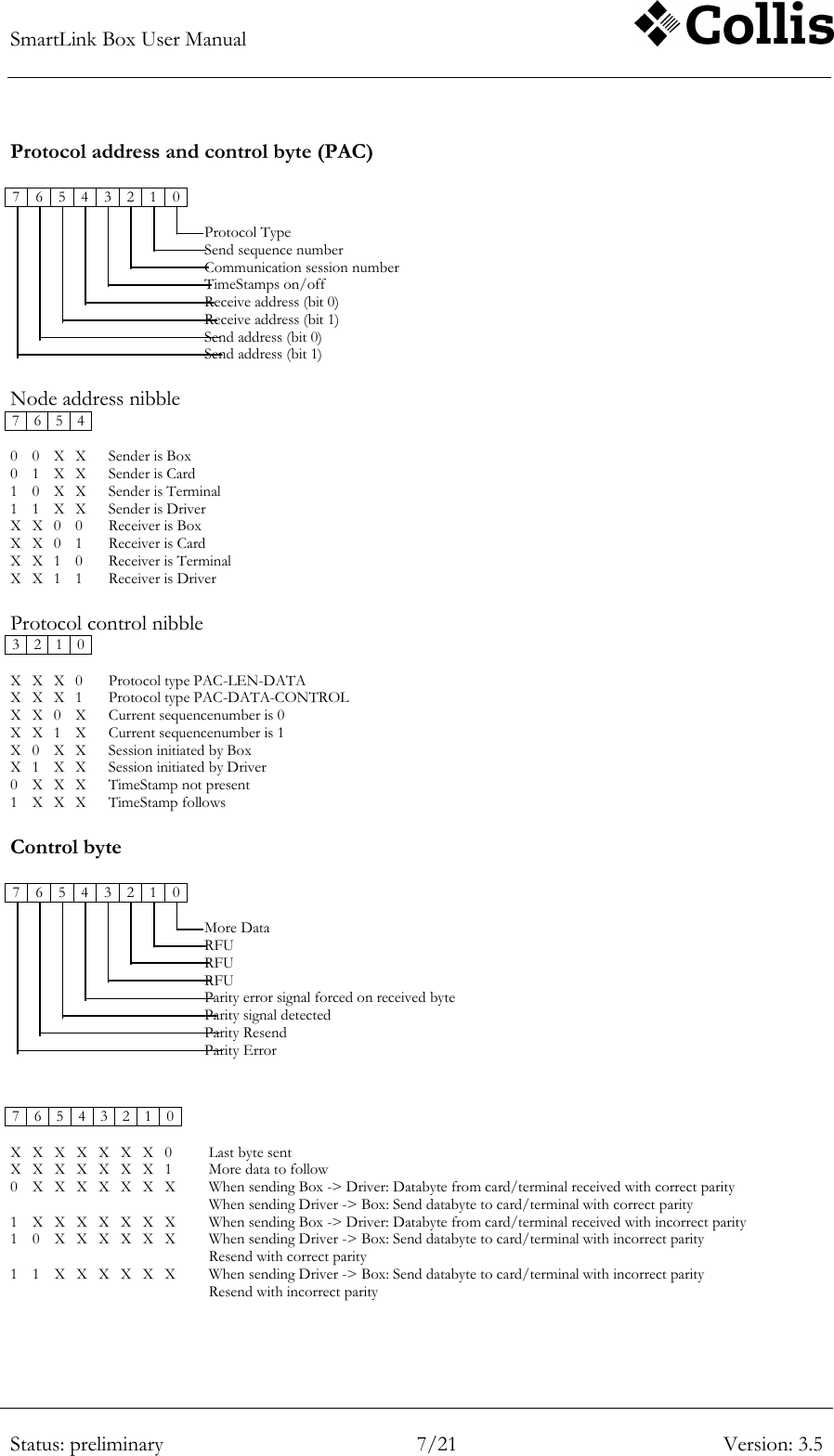
SmartLink Box User Manual        Status: preliminary 7/21 Version: 3.5  Protocol address and control byte (PAC)  7 6 5 4 3 2 1 0                                      Protocol Type                   Send sequence number                  Communication session number                  TimeStamps on/off                  Receive address (bit 0)                  Receive address (bit 1)                  Send address (bit 0)                  Send address (bit 1)  Node address nibble 7 6 5 4         0 0 X X  Sender is Box 0 1 X X  Sender is Card 1 0 X X  Sender is Terminal 1 1 X X  Sender is Driver X X 0 0  Receiver is Box X X 0 1  Receiver is Card X X 1 0  Receiver is Terminal X X 1 1  Receiver is Driver  Protocol control nibble 3 2 1 0         X X X 0  Protocol type PAC-LEN-DATA X X X 1  Protocol type PAC-DATA-CONTROL X X 0 X  Current sequencenumber is 0 X X 1 X  Current sequencenumber is 1 X 0 X X  Session initiated by Box X 1 X X  Session initiated by Driver 0 X X X  TimeStamp not present 1 X X X  TimeStamp follows  Control byte  7 6 5 4 3 2 1 0                                      More Data                  RFU                  RFU                  RFU                  Parity error signal forced on received byte                  Parity signal detected                  Parity Resend                  Parity Error   7 6 5 4 3 2 1 0             X X X X X X X 0  Last byte sent X X X X X X X 1  More data to follow 0 X X X X X X X  When sending Box -> Driver: Databyte from card/terminal received with correct parity When sending Driver -> Box: Send databyte to card/terminal with correct parity 1 X X X X X X X  When sending Box -> Driver: Databyte from card/terminal received with incorrect parity 1 0 X X X X X X  When sending Driver -> Box: Send databyte to card/terminal with incorrect parity Resend with correct parity 1 1 X X X X X X  When sending Driver -> Box: Send databyte to card/terminal with incorrect parity Resend with incorrect parity
SmartLink Box User Manual        Status: preliminary 8/21 Version: 3.5  4.3 Events Certain events are outside the control of the box and the driver, because they are determined by the user or the terminal. Examples of such events are the insertion of a card and a change in clockfrequency. Because it would take too much time to let the driver poll these events, the box will send them asynchronously. These events are as follows:  Event  OpCode Vcc not present 0xA0 Vcc present 0xA1 CLK stop 0xAA CLK start 0xAB CLK frequency changed 0xAC RST active 0xAF Card removed 0xB0 Card inserted 0xB1 Parity error detected 0xC0 Protocol Timeout 0xDF Table 4-1  Events
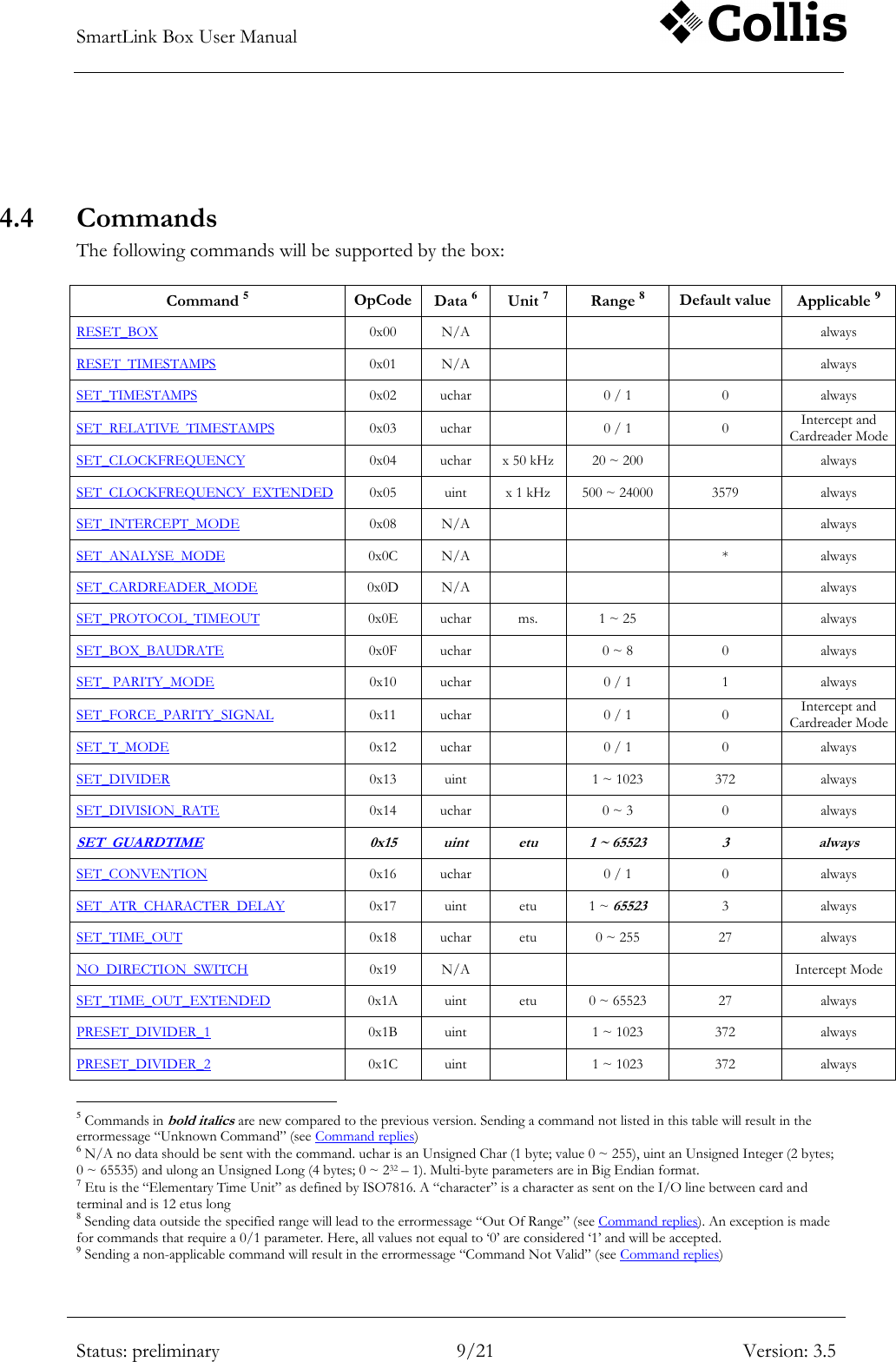
SmartLink Box User Manual        Status: preliminary 9/21 Version: 3.5   4.4 Commands The following commands will be supported by the box:  Command 5 OpCode Data 6 Unit 7 Range 8 Default value Applicable 9 RESET_BOX 0x00 N/A    always RESET_TIMESTAMPS 0x01 N/A    always SET_TIMESTAMPS 0x02 uchar  0 / 1 0 always SET_RELATIVE_TIMESTAMPS 0x03 uchar  0 / 1 0 Intercept and Cardreader Mode SET_CLOCKFREQUENCY 0x04 uchar x 50 kHz 20 ~ 200  always SET_CLOCKFREQUENCY_EXTENDED 0x05 uint x 1 kHz 500 ~ 24000 3579 always SET_INTERCEPT_MODE 0x08 N/A    always SET_ANALYSE_MODE 0x0C N/A   * always SET_CARDREADER_MODE 0x0D N/A    always SET_PROTOCOL_TIMEOUT 0x0E uchar ms. 1 ~ 25  always SET_BOX_BAUDRATE 0x0F uchar  0 ~ 8 0 always SET_ PARITY_MODE 0x10 uchar  0 / 1 1 always SET_FORCE_PARITY_SIGNAL 0x11 uchar   0 / 1 0 Intercept and Cardreader Mode SET_T_MODE 0x12 uchar  0 / 1 0 always SET_DIVIDER 0x13 uint  1 ~ 1023 372 always SET_DIVISION_RATE 0x14 uchar  0 ~ 3 0 always SET_GUARDTIME 0x15 uint etu 1 ~ 65523 3 always SET_CONVENTION 0x16 uchar  0 / 1 0 always SET_ATR_CHARACTER_DELAY 0x17 uint etu 1 ~ 65523 3 always SET_TIME_OUT 0x18 uchar etu 0 ~ 255 27 always NO_DIRECTION_SWITCH 0x19 N/A    Intercept Mode SET_TIME_OUT_EXTENDED 0x1A uint etu 0 ~ 65523 27 always PRESET_DIVIDER_1 0x1B uint  1 ~ 1023 372 always PRESET_DIVIDER_2 0x1C uint  1 ~ 1023 372 always                                                       5 Commands in bold italics are new compared to the previous version. Sending a command not listed in this table will result in the errormessage “Unknown Command” (see Command replies) 6 N/A no data should be sent with the command. uchar is an Unsigned Char (1 byte; value 0 ~ 255), uint an Unsigned Integer (2 bytes; 0 ~ 65535) and ulong an Unsigned Long (4 bytes; 0 ~ 232 – 1). Multi-byte parameters are in Big Endian format. 7 Etu is the “Elementary Time Unit” as defined by ISO7816. A “character” is a character as sent on the I/O line between card and terminal and is 12 etus long  8 Sending data outside the specified range will lead to the errormessage “Out Of Range” (see Command replies). An exception is made for commands that require a 0/1 parameter. Here, all values not equal to „0‟ are considered „1‟ and will be accepted. 9 Sending a non-applicable command will result in the errormessage “Command Not Valid” (see Command replies)
SmartLink Box User Manual        Status: preliminary 10/21 Version: 3.5  Command 5 OpCode Data 6 Unit 7 Range 8 Default value Applicable 9 SET_DEFAULT_DIVIDER 0x1D uint  1 ~ 1023 372 always SET_NO_PPS 0x1E N/A   off always SET_FORCE_PAR_COUNT 0x1F uchar characters 0 ~ 255 0 Intercept and Cardreader Mode SET_FORCE_PAR_NUMBER 0x20 uchar  1 ~ 255 1 Intercept and Cardreader Mode SET_ATR1 0x21 char[32]   <empty> always SET_ATR2 0x22 char[32]   <empty> always SET_TRIGGER_COUNT 0x25 uchar characters 0 ~ 255 <empty> Intercept and Cardreader Mode SET_DELAYED_RESPONSE 0x26 char[32]   <empty> Intercept and Cardreader Mode SET_ATR_DELAY 0x2A uint etu 1 ~ 65523 12 always SET_RESPONSE_DELAY 0x2B uint etu 1 ~ 65523 12 Intercept and Cardreader Mode INITIALIZE_CARD 0x30 N/A    Cardreader Mode DEINITIALIZE_CARD 0x31 N/A    Cardreader Mode SWITCH_CLK 0x32 uchar  0 / 1  Cardreader Mode CLK_OFF_LEVEL 0x33 uchar  0 / 1 0 Cardreader Mode RESET_CARD 0x34 N/A    Cardreader Mode SET_SUPPLY_VOLTAGE 0x36 uchar x 100 mV. 0 ~ 55 and „0xFF‟ 50 always SET_VCC_THRESHOLD 0x37 uchar x 100mV. 10 ~ 45 24 always SET_TIMESTAMP_EOT 0x38 uchar  0 / 1 0 always GET_TIMESTAMP 0x41 uint x 100 µs. 0 ~ 65535  always GET_MODE 0x48 uchar  0 ~ 2  always GET_PROTOCOL_TIMEOUT 0x4E uchar ms. 0 ~ 25  always GET_SOFTWARE_VERSION 0x51 uchar    always GET_DIVISION_RATE 0x53 uint  0 ~ 1023  always GET_TERM_STATUS 0x60 uchar  0xA0 ~ 0xA1  always GET_CARD_STATUS 0x70 uchar  0xB0 ~ 0xB1  always GET_CLOCK_FREQUENCY 0x64 ulong Hz 0 ~ 32x106  always GET_BAUDRATE 0x65 ulong bps   always GET_SUPPLY_VOLTAGE 0x66 uint x 100 mV 0 ~ 63  always GET_VCC_THRESHOLD 0x67 uchar x 100mV. 10 ~ 45  always GET_ATR_CHARACTER_DELAY 0x78 uint etu 1 ~ 65523  always GET_GUARDTIME 0x79 uint etu 1 ~ 65523  always GET_ATR1 0x71 char[32]    always GET_ATR2 0x72 char[32]    always GET_ATR_DELAY 0x7A uint etu 1 ~ 65523  always
SmartLink Box User Manual        Status: preliminary 11/21 Version: 3.5  Command 5 OpCode Data 6 Unit 7 Range 8 Default value Applicable 9 GET_TIMEOUT_EOT 0x7B uint etu 0 ~ 65523  always GET_CPLD_VERSION 0x7C uchar[3]    always START_SOFTWARE_DOWNLOAD 0xAA     always START_CPLD_DOWNLOAD 0xCC     always PROGRAM_CPLD 0xCD     always Table 4-2 Command set 4.4.1 RESET_BOX This command is used to reset the box. The effect of this is that all settings will assume their default values and all buffers will be cleared. 4.4.2 RESET_TIMESTAMPS Use this command to reset the Timestamp counter. 4.4.3 SET_TIMESTAMPS This command switches sending of Timestamp information on (Data = 1) or off (Data = 0) When the Timestamps are „on‟, a 16-bit Timestamp will be added to each of the following messages: 1. Vcc on / off 2. Card in / out 3. RST active ( = „1‟ -> „0‟ !) 4. Message received from card or terminal 5. CLK on/off In case 4. one TimeStamp is sent that signifies the moment the first character of the message was received. 4.4.4 SET_RELATIVE_TIMESTAMPS This command switches between Relative Timestamps on (Data = 1) and off (Data = 0). Relative Timestamps differ from normal Timestamps in that a). they are only applicable in Intercept and Cardreader Modes and b). the Timestamp counter is reset at the last byte of each message that is sent to the Card or the Terminal. The actual Timestamp is still added to messages received (see SET_TIMESTAMPS), thus it enables the user to get an idea of the responsetime of either the Card or the Terminal.  Note that the Timestamp reset coincides with the start of the last character sent by the box. The actual responsetime is therefore 2 charactertimes shorter than indicated by the Timestamp. 4.4.5 SET_CLOCKFREQUENCY This command sets the frequency of the CLK signal when the box is in Cardreader Mode. This command is a “Compatibility Command”, that is being implemented to maintain compatibility with the old box. 4.4.6 SET_CLOCKFREQUENCY_EXTENDED A different type of generator enables the new box to generate clockfrequencies over a wider range and with improved resolution. This command is added to make optimum use of this new generator and is the preferred command over SET_CLOCKFREQUENCY.
SmartLink Box User Manual        Status: preliminary 12/21 Version: 3.5  The frequency can be set over a range of 500 kHz to 24 MHz, in steps of 1 kHz. The default value is 3579, which equates to a generated clock frequency of 3.579 MHz. 4.4.7 SET_INTERCEPT_MODE This command is used to switch the box to Intercept Mode. This will disconnect the I/O line between card and terminal and all messages will be routed to the driver interface. The Vcc, CLK and RST on the card side are still determined by the terminal. 4.4.8 SET_ANALYSE_MODE This command is used to set the box to Analyse Mode. This is the default mode when the box is powered.  4.4.9 SET_CARDREADER_MODE This command is used to set the box to Cardreader Mode. All electrical signals between card and terminal are now disconnected. 4.4.10 SET_PROTOCOL_TIMEOUT This command is used to set the timeout used for communication with the driver. If data is expected, but not received within the set timeout, the box will send the errormessage “Protocol Timeout” to the driver. The timeout is set in milliseconds. At a communication speed of 500,000 bps one millisecond equals about 40 characters. 4.4.11 SET_BOX_BAUDRATE This command is kept for compatibility with the previous version of the Box.   The USB interface is set to communicate at 500,000 bps at all times, so this command no longer has any meaning. 4.4.12 SET_ PARITY_MODE This command switches reception and transmission on the card/terminal side between “No Parity” (parameter == 0) and “Parity” (parameter != 0). With “No Parity” selected, the length of a full character frame is 10 bit-times (Start, 8 data, Stop). 4.4.13 SET_FORCE_PARITY_SIGNAL Use this command to force the box to generate a parity error signal on the first received byte from the Terminal (parameter == 0) or the Card (parameter != 0). This command works only once after issuing and should therefore be sent again for every time the error signal is to be generated. 4.4.14 SET_T_MODE In order to correctly handle Parity error signalling, the Box needs to „know‟ whether the transmission uses T=0 or T=1.  In T=1 mode, the box will ignore any Parity error signalling. It is „highly recommended‟ to set this mode when working with T=1 cards, because due to the possible shorter inter-character timing, the box might miss characters or falsely interpret a startbit as Parity error signal.
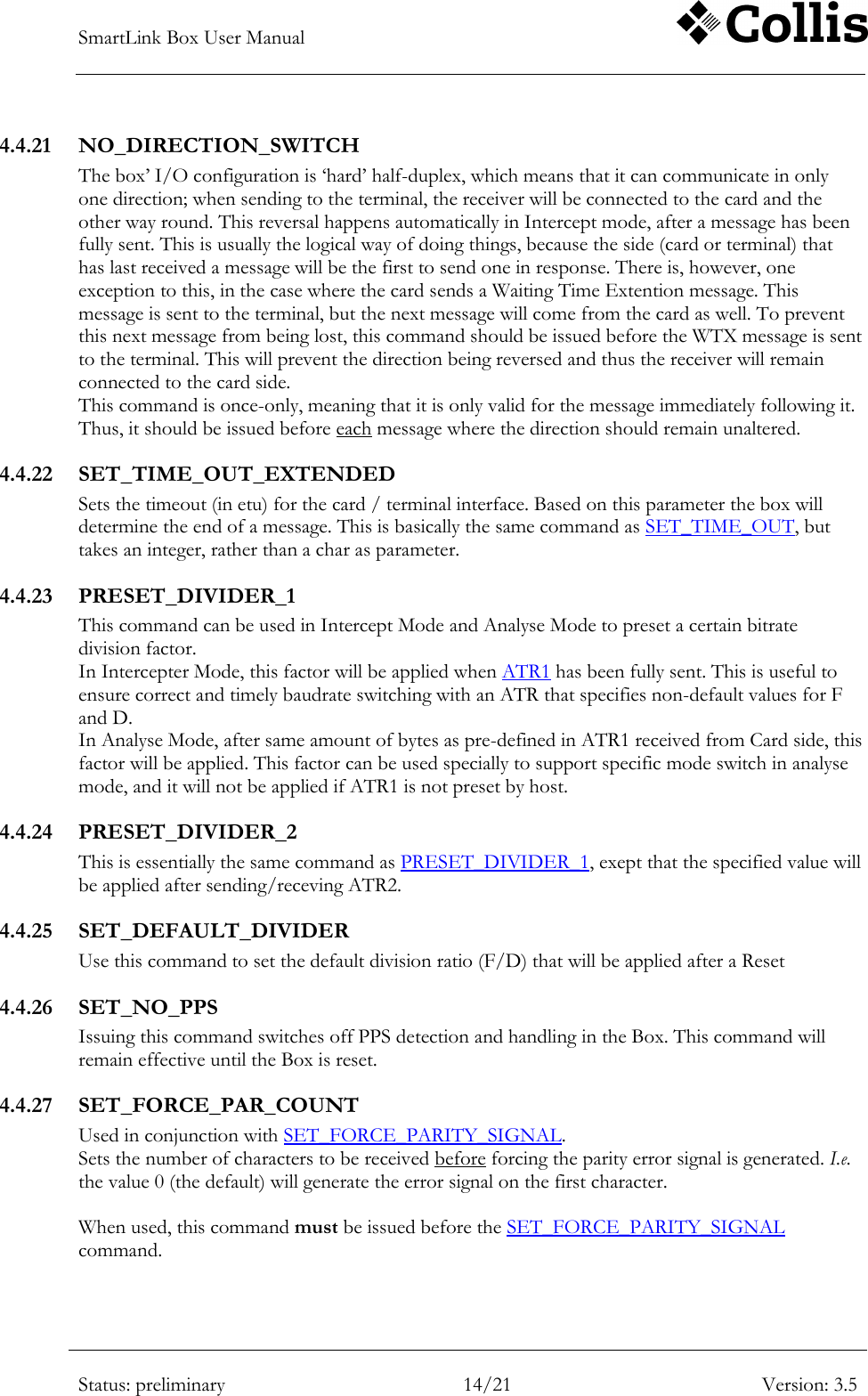
SmartLink Box User Manual        Status: preliminary 13/21 Version: 3.5  4.4.15 SET_DIVIDER The bitrate of the communication between card and terminal is determined by the division of the clock frequency by an integer number. This command is used to set this number, so that the box will be able to correctly set the communication speed. The default value is 372 (cf. ISO7816).   Driver->Box:  Card(command)      SET_DIVIDER(93)  Terminal(response)    Card(command)  Divisor:              372   93        93        93  4.4.16 SET_DIVISION_RATE This command can be used to set the baudrate divisor (see SET_DIVIDER) to one of four standard values: 0. 372 1. 186 2. 93 3. 46 This command is implemented for compatibility with the old box. 4.4.17 SET_GUARDTIME This command sets the ISO7816 parameter “Extra Guardtime”. This is the waitingtime – in etu – between two consecutive characters. This parameter is used by the box while sending data in Intercept- and Cardreader Mode. The actual minimum delay time will be 3 etus in T_Mode 0, and 1 etu in T_Mode 1.  4.4.18 SET_CONVENTION Use this command to switch between Normal Convention (“0”), where a „high‟ level on the I/O line signifies a logic „1‟ and data is sent LSB-first, and Inverse Convention, where a „high‟ level on the I/O line signifies a logic „0‟ and data is sent MSB-first. This switch must be made in order to make sure the value of the Parity bit can be correctly determined by the box. The convention is determined by the driver, using the first character of the card ATR. 4.4.19 SET_ATR_CHARACTER_DELAY This command sets an additional waitingtime – in etu – between consecutive characters in the ATR. This parameter is used by the box when sending an ATR in Intercept Mode. It can be used to force the time taken by the box to send the ATR to be at least as long as the time taken by the card. This helps to prevent the terminal command being sent to the card while it is still busy sending its ATR. The actual minimum delay time will be 3 etus in T_Mode 0, and 1 etu in T_Mode 1. 4.4.20 SET_TIME_OUT Sets the timeout (in etu) for the card / terminal interface. Based on this parameter the box will determine the end of a message.  Note: The timeout value plus 10 etu should be equal or bigger than the delay between the leading edges of two consecutive character in order to keep them received as one message.
SmartLink Box User Manual        Status: preliminary 14/21 Version: 3.5  4.4.21 NO_DIRECTION_SWITCH The box‟ I/O configuration is „hard‟ half-duplex, which means that it can communicate in only one direction; when sending to the terminal, the receiver will be connected to the card and the other way round. This reversal happens automatically in Intercept mode, after a message has been fully sent. This is usually the logical way of doing things, because the side (card or terminal) that has last received a message will be the first to send one in response. There is, however, one exception to this, in the case where the card sends a Waiting Time Extention message. This message is sent to the terminal, but the next message will come from the card as well. To prevent this next message from being lost, this command should be issued before the WTX message is sent to the terminal. This will prevent the direction being reversed and thus the receiver will remain connected to the card side. This command is once-only, meaning that it is only valid for the message immediately following it. Thus, it should be issued before each message where the direction should remain unaltered. 4.4.22 SET_TIME_OUT_EXTENDED Sets the timeout (in etu) for the card / terminal interface. Based on this parameter the box will determine the end of a message. This is basically the same command as SET_TIME_OUT, but takes an integer, rather than a char as parameter.  4.4.23 PRESET_DIVIDER_1 This command can be used in Intercept Mode and Analyse Mode to preset a certain bitrate division factor.  In Intercepter Mode, this factor will be applied when ATR1 has been fully sent. This is useful to ensure correct and timely baudrate switching with an ATR that specifies non-default values for F and D. In Analyse Mode, after same amount of bytes as pre-defined in ATR1 received from Card side, this factor will be applied. This factor can be used specially to support specific mode switch in analyse mode, and it will not be applied if ATR1 is not preset by host. 4.4.24 PRESET_DIVIDER_2 This is essentially the same command as PRESET_DIVIDER_1, exept that the specified value will be applied after sending/receving ATR2. 4.4.25 SET_DEFAULT_DIVIDER Use this command to set the default division ratio (F/D) that will be applied after a Reset 4.4.26 SET_NO_PPS Issuing this command switches off PPS detection and handling in the Box. This command will remain effective until the Box is reset. 4.4.27 SET_FORCE_PAR_COUNT Used in conjunction with SET_FORCE_PARITY_SIGNAL.  Sets the number of characters to be received before forcing the parity error signal is generated. I.e. the value 0 (the default) will generate the error signal on the first character.  When used, this command must be issued before the SET_FORCE_PARITY_SIGNAL command.
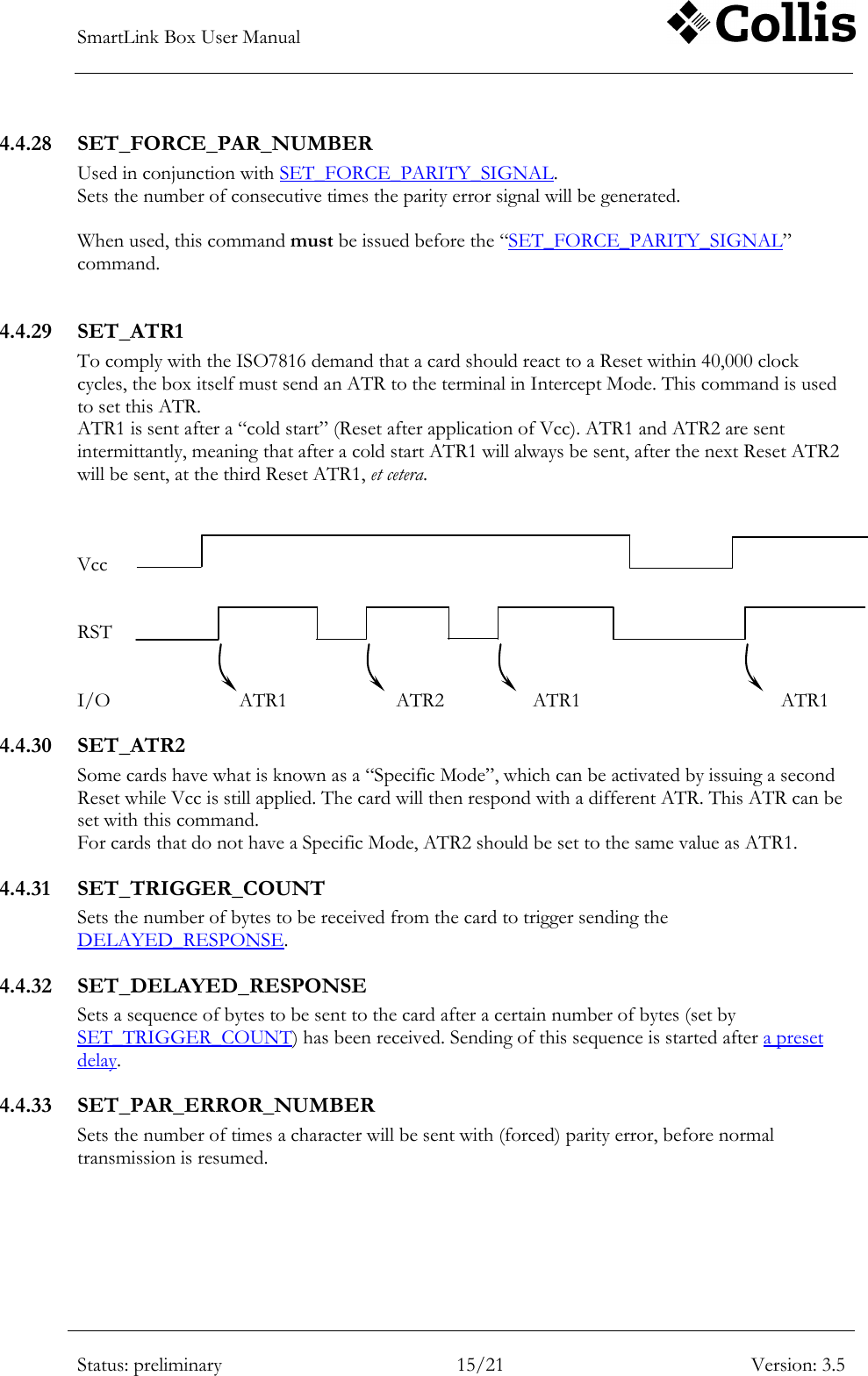
SmartLink Box User Manual        Status: preliminary 15/21 Version: 3.5  4.4.28 SET_FORCE_PAR_NUMBER Used in conjunction with SET_FORCE_PARITY_SIGNAL.  Sets the number of consecutive times the parity error signal will be generated.   When used, this command must be issued before the “SET_FORCE_PARITY_SIGNAL” command.  4.4.29 SET_ATR1 To comply with the ISO7816 demand that a card should react to a Reset within 40,000 clock cycles, the box itself must send an ATR to the terminal in Intercept Mode. This command is used to set this ATR.  ATR1 is sent after a “cold start” (Reset after application of Vcc). ATR1 and ATR2 are sent intermittantly, meaning that after a cold start ATR1 will always be sent, after the next Reset ATR2 will be sent, at the third Reset ATR1, et cetera.    Vcc   RST   I/O          ATR1             ATR2              ATR1               ATR1 4.4.30 SET_ATR2 Some cards have what is known as a “Specific Mode”, which can be activated by issuing a second Reset while Vcc is still applied. The card will then respond with a different ATR. This ATR can be set with this command. For cards that do not have a Specific Mode, ATR2 should be set to the same value as ATR1. 4.4.31 SET_TRIGGER_COUNT Sets the number of bytes to be received from the card to trigger sending the DELAYED_RESPONSE. 4.4.32 SET_DELAYED_RESPONSE Sets a sequence of bytes to be sent to the card after a certain number of bytes (set by SET_TRIGGER_COUNT) has been received. Sending of this sequence is started after a preset delay. 4.4.33 SET_PAR_ERROR_NUMBER Sets the number of times a character will be sent with (forced) parity error, before normal transmission is resumed.
SmartLink Box User Manual        Status: preliminary 16/21 Version: 3.5  4.4.34 SET_TRIGGER_OUT_EVENT Selects which signal will be routed to the Box‟ „Direction‟ output. The actual direction signal is the default selection, but other signals can be selected so as to provide a convenient trigger for oscilloscope viewing of several events.  Available selections are: 00. Direction 01. Forced parity signal 02. Forced parity error  Five more selections are available for future use.  Note: In order to avoid possible false triggers, it is highly recommended to issue this command at the earliest possible stage in a script. 4.4.35 SET_ATR_DELAY Sets the delay (in etu) between detection of the RST event and sending the first byte of the ATR. The minimum delay time could be set is 1 etu. 4.4.36 SET_RESPONSE_DELAY Sets the required delay between the “delayed response” trigger (4.4.31) and sending the first byte in the response sequence (4.4.32). 4.4.37 EXTEND_PAR_SIGNAL_TIMING Use this command to influence the timing of the forced parity error signal (enabled by SET_FORCE_PARITY_SIGNAL). By default, the signal will start at t = 10.5 etu, which corresponds to a parameter value of 0. The timing can be shortened or lenghtened by up to 0.9 etu. A negative value for the parameter will shorten the timing, i.e. a value of –2 will let the signal start at t = 10.3 etu.  The actual change in timing is achieved by setting the clock divider to a different value for the duration of one bit time. This “different value” (N‟) is calculated as follows:  N’ = (N * 10 * (10 + x)) / 100  Where N is the Clock divider and x is the parameter value .  As th divider can only accept integer values, this means the accuracy of the timing may vary somewhat, although at higher values of the divider (like the default 372) it will be accurate enough.  Note: This command is mutually exclusive with the EXTEND_GUARDTIME command. When issued one after the other in the same session, only the last command will be effective. 4.4.38 EXTEND_GUARDTIME Use this command to influence the timing of the Guardtime. By default, the time between two consecutive characters is 11 (or 12, for T=0) etu, plus an optional extra Guardtime. This corresponds to a parameter value of 0. The timing can be shortened or lenghtened by up to 0.9 etu. A negative value for the parameter will shorten the timing, i.e. a value of –2 will let the next character start at t = 10.8 + ETG etu.
SmartLink Box User Manual        Status: preliminary 17/21 Version: 3.5   The considerations for timing accuracy as described for EXTEND_PAR_SIGNAL_TIMING apply equally to this command. 4.4.39 INITIALIZE_CARD Used in Cardreader Mode to initialise a card. Activates Vcc, then CLK and then deactivates RST. The card should now respond with an ATR. 4.4.40 DEINITIALIZE_CARD Used in Cardreader Mode to deactivate a card. Activates RST, then deactivates CLK and finally deactivates Vcc. 4.4.41 SWITCH_CLK Used in Cardreader Mode to switch CLK signal on or off. The „off‟ level is determined by the  “CLK_OFF_LEVEL” command. 4.4.42 CLK_OFF_LEVEL Used in Cardreader Mode to set the logic level at which the CLK line to the card will be when the signal is switched „off‟. 4.4.43 RESET_CARD Used in Cardreader Mode to reset the card. Activates RST, the deactivates it again after about 2ms. 4.4.44 SET_SUPPLY_VOLTAGE Used in all modes to set card Vcc in 100 mV steps. Range is 1.6V to 5.5V.   In Analyse and Intercept mode the card Vcc will normally follow the terminal Vcc. Using this command, the card Vcc can be set to a different value, so that, for example, a 3V card can be used in conjunction with a 5V terminal. Issuing this command with parameter „0x0FF‟ will restore the coupling between terminal and card Vcc.  In Cardreader mode the default Vcc is 5.0V. 4.4.45 SET_VCC_THRESHOLD Used in all modes to set the threshold level for „Vcc On‟. This setting affects the voltage at which the „Vcc Present‟ event will be triggered, as well as the lighting of the front-panel Vcc LED.   Resolution is 100mV, cf. SET_SUPPLY_VOLTAGE.  The default setting is 2.4V. This is sufficient for use with 5V and 3V systems. For lower voltages, the setting should be adjusted accordingly. As a rule of thumb: 10-15% lower than the applied VCC voltage. For example, 1.6V would be a good setting for a 1.8V terminal. 4.4.46 SET_TIMESTAMP_EOT Option to switches on/off Timestamp information on EOT. This command should be used with combination if timestamping is enabled in the box by SET_TIMESTAMP, a 16-bit Timestamp will be attached to end of the each message received from card or terminal.
SmartLink Box User Manual        Status: preliminary 18/21 Version: 3.5  This TimeStamp is sent at the moment when a timeout EOT is detected (depend on the Timeout EOT setting).  For example: Assume box received a message contains N bytes from card, and this message will be sent to PC with two timestamps attached(namely, T1 and T2), then  T2 – T1 = (N-1)* Tchar+ (10 + EOT) * Tetu Where: Tchar : the delay between the leading edges of  two consecutive characters EOT: the timeout value set by SET_TIME_OUT command Tetu : one etu duration  Note: Above equation is true only if the end of the message is determined before a new message comes. If the timeout setting is too big, then T2-T1 will indicate the delay between the leading edges of the two consecutive MESSAGES. 4.4.47 GET_TIMESTAMP Returns the current value of the Timestamp counter. This is the time elapsed since the last RESET_TIMESTAMPS command. 4.4.48 GET_MODE Returns the current box mode. 0. Cardreader Mode 1. Intercept Mode 2. Analyse Mode 4.4.49 GET_PROTOCOL_TIMEOUT Returns the value (in ms.) of the set timeout (see 4.4.10) 4.4.50 GET_SOFTWARE_VERSION Returns the current firmware version. The first nibble is the Major version, the second nibble the Minor. 4.4.51 GET_DIVISION_RATE Returns the set bitrate divisor (see 4.4.15 en4.4.16). 4.4.52 GET_TERM_STATUS Returns presence (0xA1) or absence (0xA0) of card Vcc. In Analyse and Intercept Mode this can be used as an indication of whether or not a terminal is connected. 4.4.53 GET_CARD_STATUS Returns the presence (0xB1) or absence (0xB0) of a card in the box‟ cardslot. 4.4.54 GET_CLOCK_FREQUENCY Returns the frequency of the CLK, as measured (in Analyse and Intercept Mode) or as set (in Cardreader Mode).
SmartLink Box User Manual        Status: preliminary 19/21 Version: 3.5  4.4.55 GET_BAUDRATE Returns the baudrate on the I/O line, as calculated using the clockfrequency and the set divisor (see 4.4.15). 4.4.56 GET_SUPPLY_VOLTAGE Returns the voltage on Vcc, in 100 mV steps. In Analyse and Intercept mode this is the Vcc voltage coming from the terminal. In Cardreader mode it is the voltage presented to the card. (see 4.4.44). 4.4.57 GET_VCC_THRESHOLD Returns the current threshold level for „Vcc On‟, in 100mV steps. (see 4.4.45). 4.4.58 GET_ATR_CHARACTER_DELAY Returns the value set by the SET_ATR_CHARACTER_DELAY command (see 4.4.19). 4.4.59 GET_GUARDTIME Returns the value for Extra Guardtime (see 4.4.17). 4.4.60 GET_ATR1 Returns the string set for ATR1 (see 4.4.29), otherwise return 0 if ATR1 is not pre-loaded. 4.4.61 GET_ATR2 Returns the string set for ATR2 (see 4.4.30), otherwise return 0 if ATR2 is not pre-loaded. 4.4.62 GET_ATR_DELAY Returns the value set by the SET_ATR_DELAY command (see 4.4.35). 4.4.63 GET_TIMEOUT_EOT Returns the value set by the SET_TIME_OUT and SET_TIME_OUT_EXTENDED commands (4.4.20 and 4.4.22). 4.4.64 GET_CPLD_VERSION This command returns the version number of the CPLD content as ASCII text in the form: “major.minor”. 4.4.65 START_SOFTWARE_DOWNLOAD This command is used to initiate the download of new firmware. The download protocol is described in a separate document.  4.4.66 START_CPLD_DOWNLOAD This command is used to initiate the download of new CPLD content. The download protocol is described in a separate document.  4.4.67 PROGRAM_CPLD This command is used to initiate programming of the CPLD. The protocol is described in a separate document.
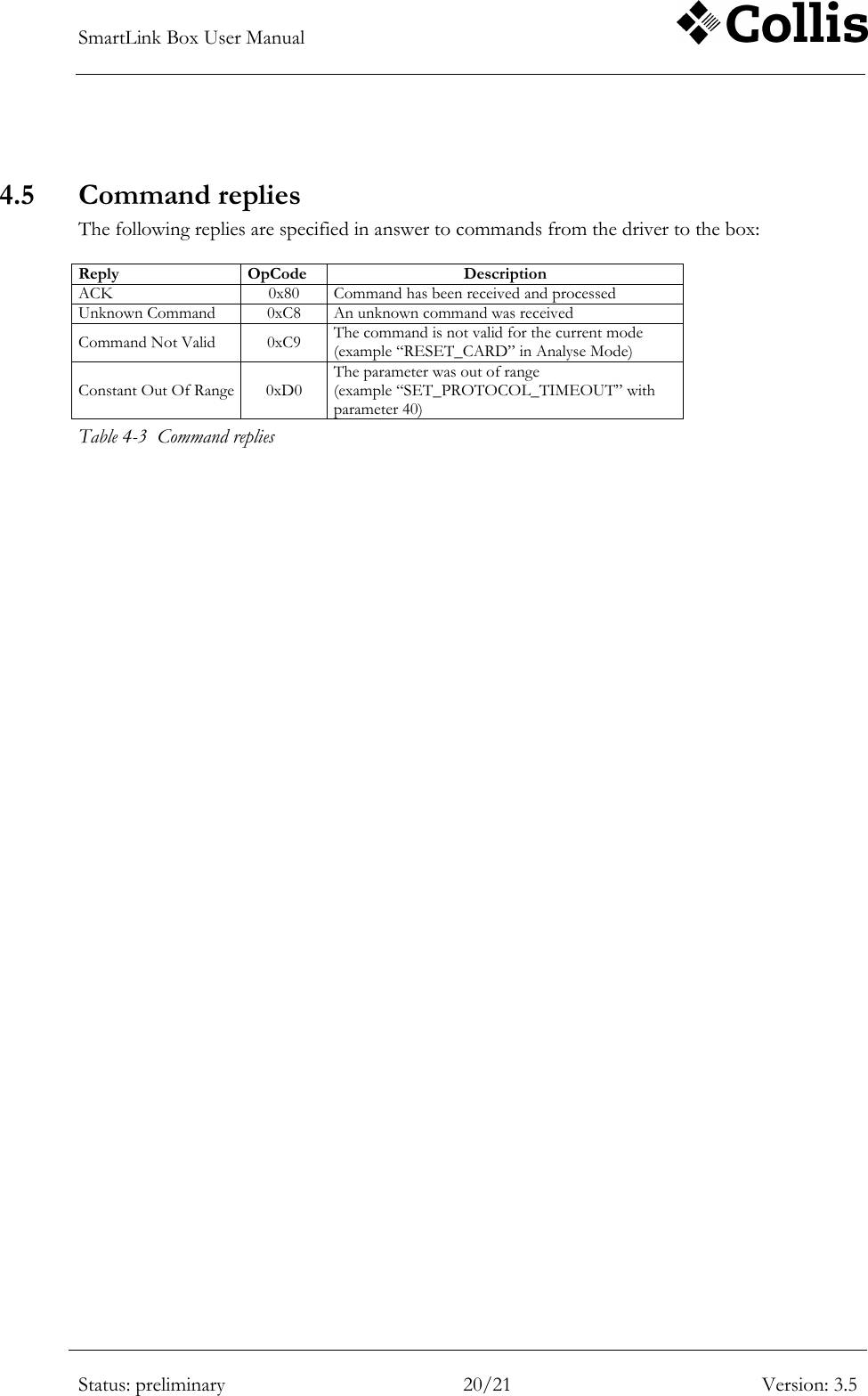
SmartLink Box User Manual        Status: preliminary 20/21 Version: 3.5   4.5 Command replies The following replies are specified in answer to commands from the driver to the box:  Reply OpCode Description ACK 0x80 Command has been received and processed Unknown Command 0xC8 An unknown command was received Command Not Valid 0xC9 The command is not valid for the current mode (example “RESET_CARD” in Analyse Mode) Constant Out Of Range 0xD0 The parameter was out of range (example “SET_PROTOCOL_TIMEOUT” with parameter 40) Table 4-3  Command replies
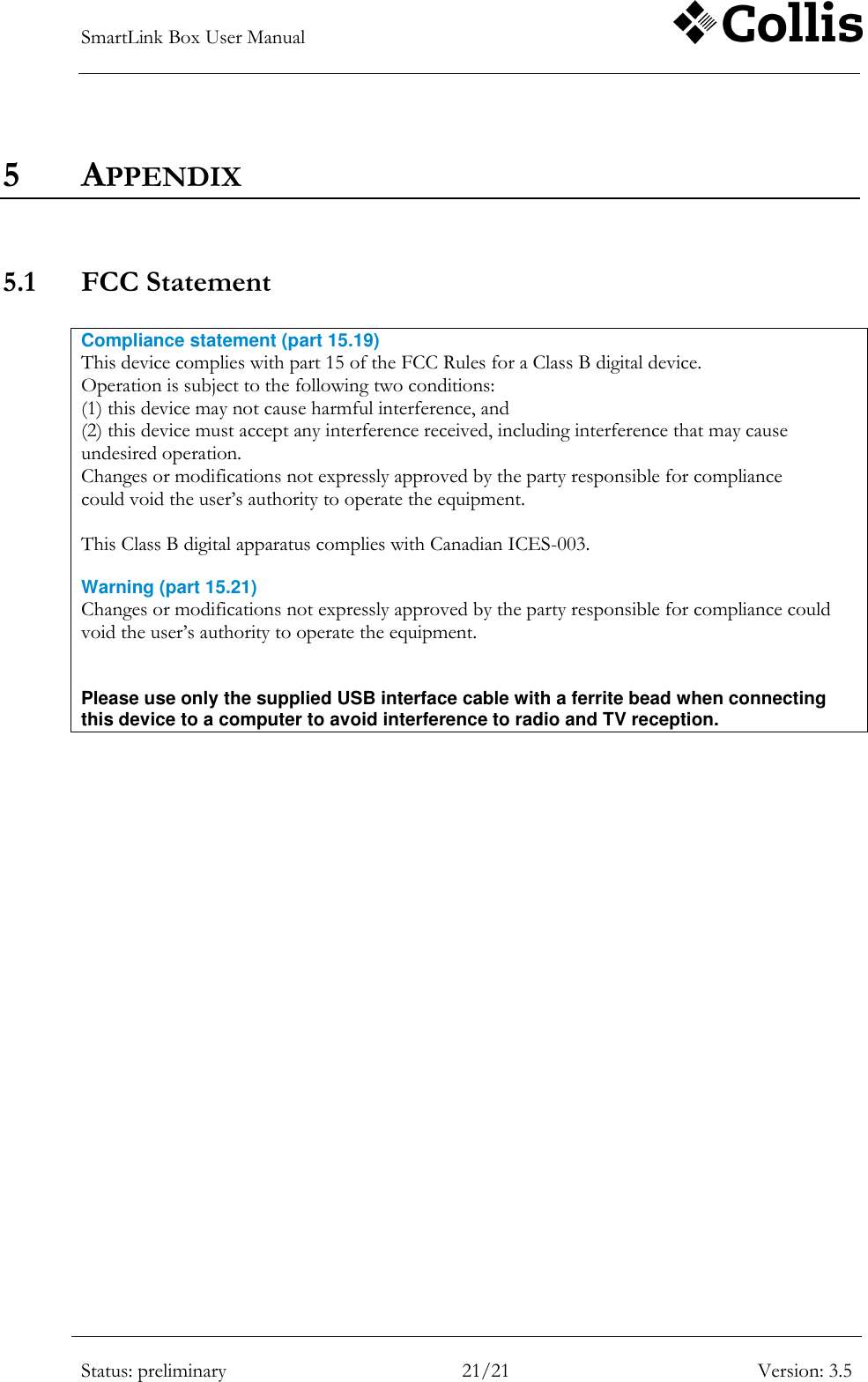
SmartLink Box User Manual        Status: preliminary 21/21 Version: 3.5  5 APPENDIX   5.1 FCC Statement   Compliance statement (part 15.19)  This device complies with part 15 of the FCC Rules for a Class B digital device. Operation is subject to the following two conditions: (1) this device may not cause harmful interference, and (2) this device must accept any interference received, including interference that may cause undesired operation. Changes or modifications not expressly approved by the party responsible for compliance could void the user‟s authority to operate the equipment.  This Class B digital apparatus complies with Canadian ICES-003.  Warning (part 15.21) Changes or modifications not expressly approved by the party responsible for compliance could void the user‟s authority to operate the equipment.   Please use only the supplied USB interface cable with a ferrite bead when connecting this device to a computer to avoid interference to radio and TV reception.

Navigation menu