Columbia Telecommunications Group GM18 GMRS/FRS 2-Way Radio User Manual GM18 Manual FCC

Columbia Telecommunications Group Inc GMRS/FRS 2-Way Radio GM18 Manual FCC

users manual

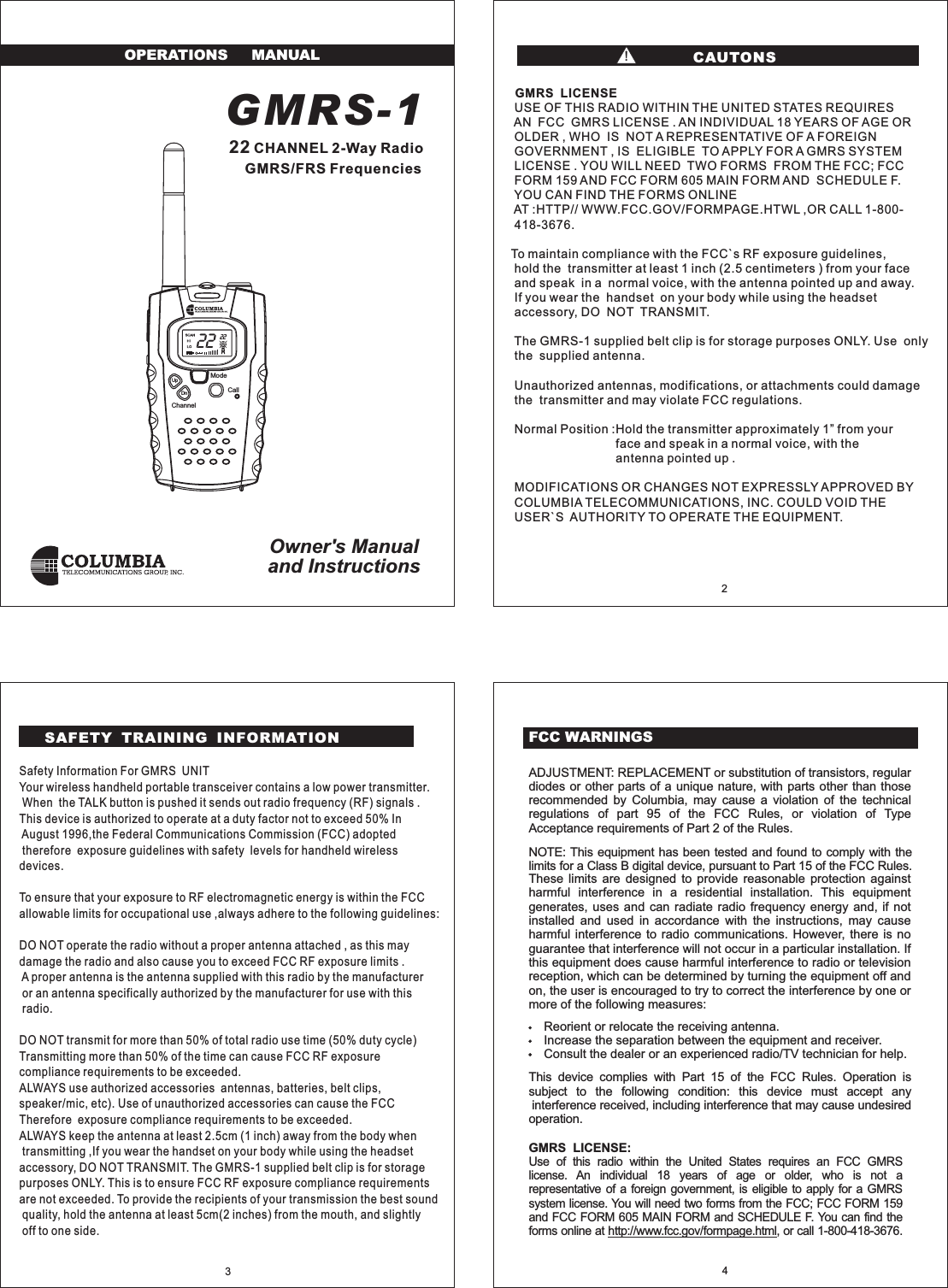
GMRS-1CHANNEL 2-Way RadioGMRS/FRS22FrequenciesOwner's Manualand InstructionsOPERATIONS MANUALFCC WARNINGSmore of the following measures:Reorient or relocate the receiving antenna.Increase the separation between the equipment and receiver.Consult the dealer or an experienced radio/TV technician for help.operation.ADJUSTMENT: REPLACEMENT or substitution of transistors, regulardiodes or other parts of a unique nature, with parts other than thoserecommended by Columbia, may cause a violation of the technicalregulations of part 95 of the FCC Rules, or violation of TypeUse of this radio within the United States requires an FCC GMRSlicense. An individual 18 years of age or older, who is not arepresentative of a foreign government, is eligible to apply for a GMRSsystem license. You will need two forms from the FCC; FCC FORM 159and FCC FORM 605 MAIN FORM and SCHEDULE F. You can find theforms online at , or call 1-800-418-3676.http://www.fcc.gov/formpage.htmlThese limits are designed to provide reasonable protection againstharmful interference in a residential installation. This equipmentgenerates, uses and can radiate radio frequency energy and, if notinstalled and used in accordance with the instructions, may causeharmful interference to radio communications. However, there is noguarantee that interference will not occur in a particular installation. Ifthis equipment does cause harmful interference to radio or televisionreception, which can be determined by turning the equipment off andon, the user is encouraged to try to correct the interference by one orNOTE: This equipment has been tested and found to comply with thelimits for a Class B digital device, pursuant to Part 15 of the FCC Rules.This device complies with Part 15 of the FCC Rules. Operation issubject to the following condition: this device must accept anyinterference received, including interference that may cause undesiredAcceptance requirements of Part 2 of the Rules.GMRS LICENSE:432ModeCallChannelUpDnSafety Information For GMRS UNITYour wireless handheld portable transceiver contains a low power transmitter.When the TALK button is pushed it sends out radio frequency (RF) signals .This device is authorized to operate at a duty factor not to exceed 50% InAugust 1996,the Federal Communications Commission (FCC) adoptedtherefore exposure guidelines with safety levels for handheld wirelessdevices.To ensure that your exposure to RF electromagnetic energy is within the FCCallowable limits for occupational use ,always adhere to the following guidelines:DO NOT operate the radio without a proper antenna attached , as this maydamage the radio and also cause you to exceed FCC RF exposure limits .A proper antenna is the antenna supplied with this radio by the manufactureror an antenna specifically authorized by the manufacturer for use with thisradio.DO NOT transmit for more than 50% of total radio use time (50% duty cycle)Transmitting more than 50% of the time can cause FCC RF exposurecompliance requirements to be exceeded.ALWAYS use authorized accessories antennas, batteries, belt clips,speaker/mic, etc). Use of unauthorized accessories can cause the FCCTherefore exposure compliance requirements to be exceeded.ALWAYS keep the antenna at least 2.5cm (1 inch) away from the body whentransmitting ,If you wear the handset on your body while using the headsetaccessory, DO NOT TRANSMIT. The GMRS-1 supplied belt clip is for storagepurposes ONLY. This is to ensure FCC RF exposure compliance requirementsare not exceeded. To provide the recipients of your transmission the best soundquality, hold the antenna at least 5cm(2 inches) from the mouth, and slightlyoff to one side.GMRS LICENSEUSE OF THIS RADIO WITHIN THE UNITED STATES REQUIRESAN FCC GMRS LICENSE . AN INDIVIDUAL 18 YEARS OF AGE OROLDER , WHO IS NOT A REPRESENTATIVE OF A FOREIGNGOVERNMENT , IS ELIGIBLE TO APPLY FOR A GMRS SYSTEMLICENSE . YOU WILL NEED TWO FORMS FROM THE FCC; FCCFORM 159 AND FCC FORM 605 MAIN FORM AND SCHEDULE F.YOU CAN FIND THE FORMS ONLINEAT :HTTP// WWW.FCC.GOV/FORMPAGE.HTWL ,OR CALL 1-800-418-3676.To maintain compliance with the FCC`s RF exposure guidelines,hold the transmitter at least 1 inch (2.5 centimeters ) from your faceand speak in a normal voice, with the antenna pointed up and away.If you wear the handset on your body while using the headsetaccessory, DO NOT TRANSMIT.The GMRS-1 supplied belt clip is for storage purposes ONLY. Use onlythe supplied antenna.Unauthorized antennas, modifications, or attachments could damagethe transmitter and may violate FCC regulations.Normal Position :Hold the transmitter approximately 1 from yourface and speak in a normal voice, with theantenna pointed up .MODIFICATIONS OR CHANGES NOT EXPRESSLY APPROVED BYCOLUMBIA TELECOMMUNICATIONS, INC. COULD VOID THEUSER`S AUTHORITY TO OPERATE THE EQUIPMENT.”CAUTONS!SAFETY TRAINING INFORMATION22 22
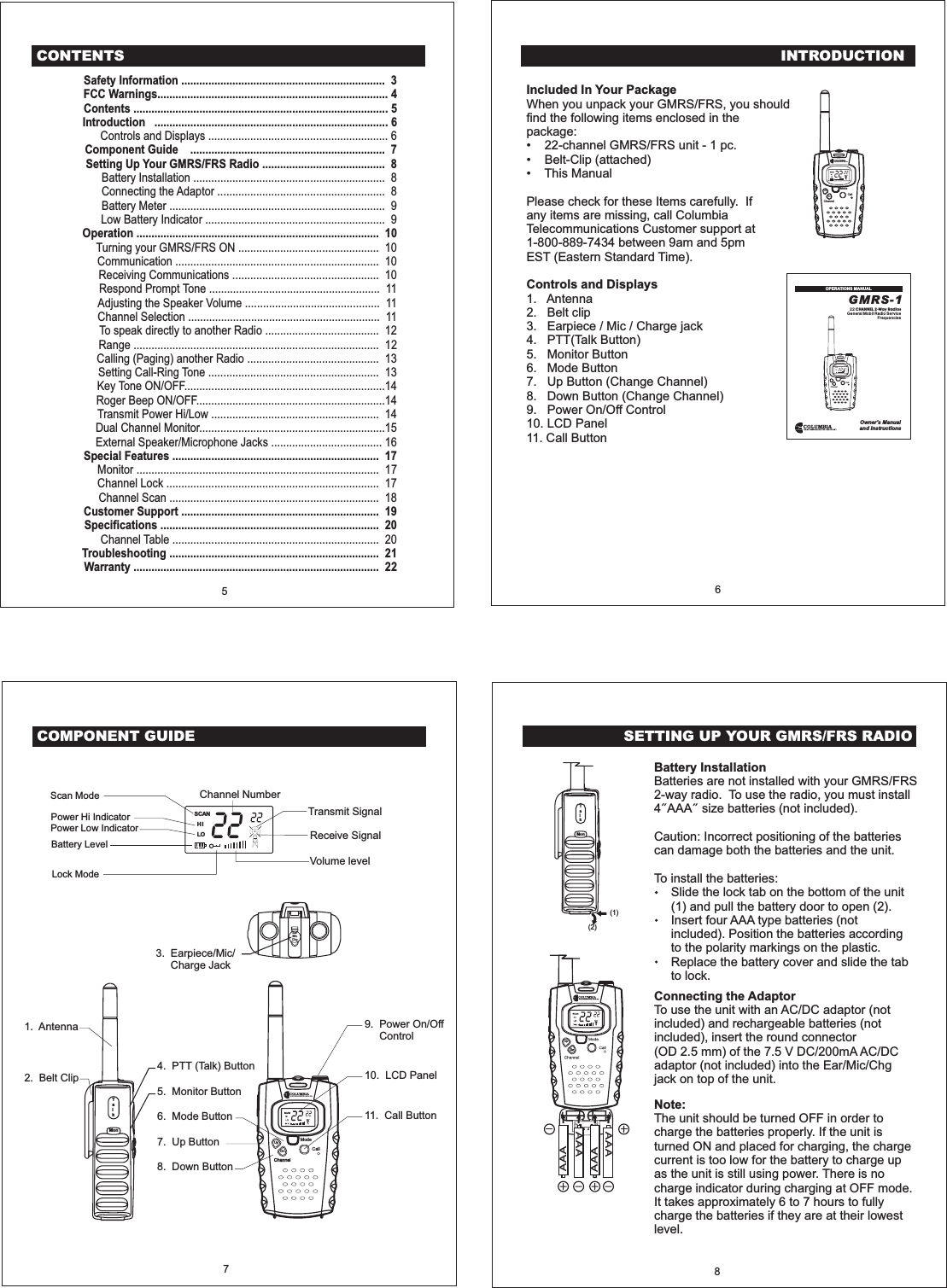
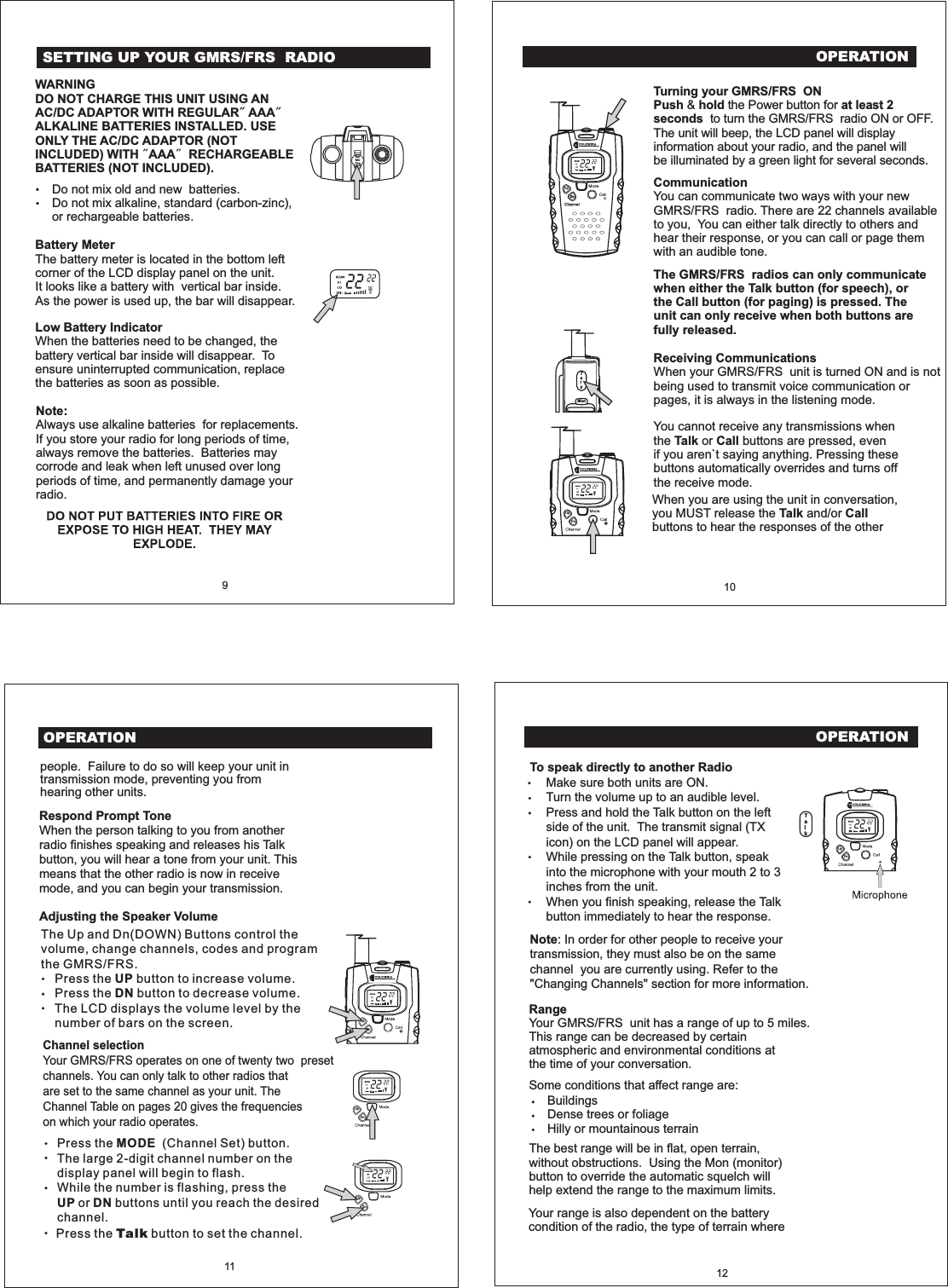
INTRODUCTIONIncluded In Your PackageControls and DisplaysWhen you unpack your GMRS/FRS, you shouldfind the following items enclosed in thepackage:22-channel GMRS/FRS unit-1pc.Belt-Clip (attached)This ManualPlease check for these Items carefully. Ifany items are missing, call ColumbiaTelecommunications Customer support at1-800-889-7434 between 9am and 5pmEST (Eastern Standard Time).1.2.3. E4.5.•••AntennaBelt cliparpiece / Mic / Charge jackPTT(Talk Button)Monitor Button6. Mode Button7. Up Button (Change Channel)8. Down Button (Change Channel)9. Power On/Off Control10. LCD Panel11. Call ButtonGMRS-122General Mobil Radio ServiceFrequenciesCHANNEL 2-Way RadiosOwner's Manualand InstructionsOPERATIONS MANUAL6EarMicChgCOMPONENT GUIDEModeCallChannelTalkMon1. Antenna 9. Power On/OffControl10. LCD Panel11. Call Button3. Earpiece/Mic/Charge Jack2. Belt Clip4. PTT (Talk) Button5. Monitor Button6. Mode Button7. Up Button8. Down ButtonTransmit SignalChannel NumberReceive SignalVolume levelPower Hi IndicatorPower Low IndicatorLock ModeScan ModeBattery Level7UpDnSETTING UP YOUR GMRS/FRS RADIO8(1)(2)TalkMonAAAAAAAAAAAAUpDnBattery InstallationBatteries are not installed with your GMRS/FRS2-way radio. To use the radio, you must install4 AAA size batteries (not included).Caution: Incorrect positioning of the batteriescan damage both the batteries and the unit.To install the batteries:Slide the lock tab on the bottom of the unit(1) and pull the battery door to open (2).Insert four AAA type batteries (notincluded). Position the batteries accordingto the polarity markings on the plastic.Replace the battery cover and slide the tabto lock.Connecting the AdaptorTo use the unit with an AC/DC adaptor (notincluded) and rechargeable batteries (notincluded), insert the round connector(OD 2.5 mm) of the 7.5 V DC/200mA AC/DCadaptor (not included) into the Ear/Mic/Chgjack on top of the unit.Note:The unit should be turned OFF in order tocharge the batteries properly. If the unit isturned ON and placed for charging, the chargecurrent is too low for the battery to charge upas the unit is still using power. There is nocharge indicator during charging at OFF mode.It takes approximately 6 to 7 hours to fullycharge the batteries if they are at their lowestlevel.SCANHILOModeCallChannelSCANHILOCONTENTSSafety Information .................................................................... 3FCC Warnings............................................................................. 4Contents ..................................................................................... 5Introduction .............................................................................. 6Component Guide ................................................................. 7Setting Up Your GMRS/FRS Radio ......................................... 8Operation ................................................................................. 10Special Features ..................................................................... 17Customer Support .................................................................. 19Specifications ......................................................................... 20Troubleshooting ...................................................................... 21Warranty .................................................................................. 22Controls and Displays ............................................................ 6Battery Installation ................................................................ 8Connecting the Adaptor ........................................................ 8Battery Meter ........................................................................ 9Low Battery Indicator ............................................................ 9Turning your GMRS/FRS ON ............................................... 10Communication .................................................................... 10Receiving Communications ................................................. 10Respond Prompt Tone ......................................................... 11Adjusting the Speaker Volume ............................................. 11Channel Selection ................................................................ 11To speak directly to another Radio ...................................... 12Range .................................................................................. 12Calling (Paging) another Radio ............................................ 13Setting Call-Ring Tone ......................................................... 13Key Tone ON/OFF...................................................................14Roger Beep ON/OFF...............................................................14Transmit Power Hi/Low ........................................................ 14Dual Channel Monitor..............................................................15External Speaker/Microphone Jacks ..................................... 16Monitor ................................................................................. 17Channel Lock ....................................................................... 17Channel Scan ...................................................................... 18Channel Table ..................................................................... 205ModeCallChannelUpDn
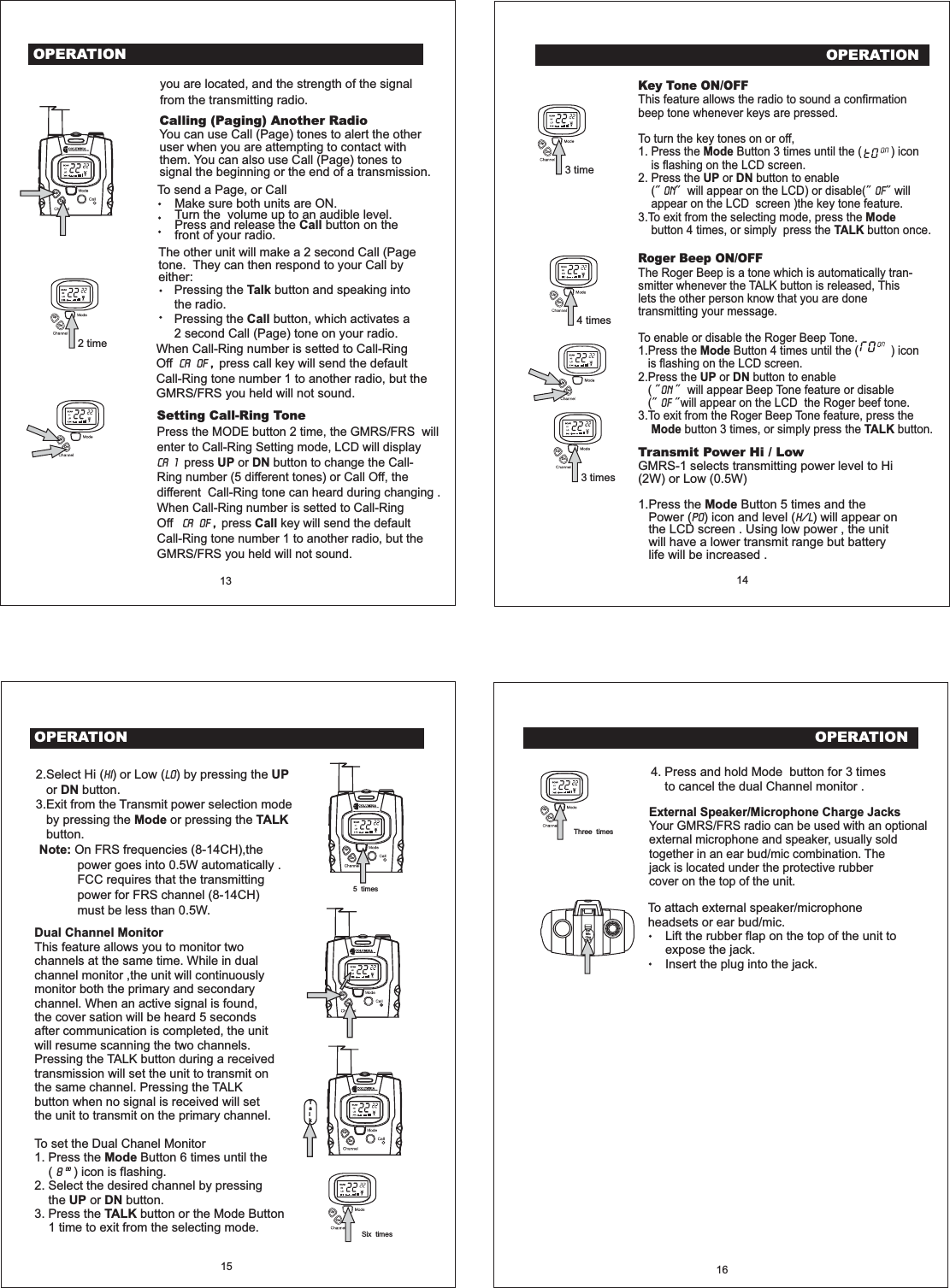
OPERATION10CommunicationYou can communicate two ways with your newGMRS/FRS radio. There are 22 channels availableto you, You can either talk directly to others andhear their response, or you can call or page themwith an audible tone.The GMRS/FRS radios can only communicatewhen either the Talk button (for speech), orthe Call button (for paging) is pressed. Theunit can only receive when both buttons arefully released.Receiving CommunicationsWhen your GMRS/FRS unit is turned ON and is notbeing used to transmit voice communication orpages, it is always in the listening mode.Turning your GMRS/FRS ONPush hold at least 2seconds& the Power button forto turn the GMRS/FRS radio ON or OFF.The unit will beep, the LCD panel will displayinformation about your radio, and the panel willbe illuminated by a green light for several seconds.You cannot receive any transmissions whenthe or buttons are pressed, evenif you aren`t saying anything. Pressing thesebuttons automatically overrides and turns offthe receive mode.Talk CallTalkMonUpDnUpDnOPERATION11people. Failure to do so will keep your unit intransmission mode, preventing you fromhearing other units.Channel selectionYour GMRS/FRS operates on one of twenty two presetchannels. You can only talk to other radios thatare set to the same channel as your unit. TheChannel Table on pages 20 gives the frequencieson which your radio operates.Adjusting the Speaker VolumeRespond Prompt ToneWhen the person talking to you from anotherradio finishes speaking and releases his Talkbutton, you will hear a tone from your unit. Thismeans that the other radio is now in receivemode, and you can begin your transmission.UpDnOPERATION12RangeYour GMRS/FRS unit has a range of up to 5 miles.This range can be decreased by certainatmospheric and environmental conditions atthe time of your conversation.Make sure both units are ON.Turn the volume up to an audible level.Press and hold the Talk button on the leftside of the unit. The transmit signal (TXicon) on the LCD panel will appear.While pressing on the Talk button, speakinto the microphone with your mouth 2 to 3inches from the unit.When you finish speaking, release the Talkbutton immediately to hear the response.To speak directly to another RadioThe best range will be in flat, open terrain,without obstructions. Using the Mon (monitor)button to override the automatic squelch willhelp extend the range to the maximum limits.BuildingsDense trees or foliageHilly or mountainous terrainSome conditions that affect range are:Note: In order for other people to receive yourtransmission, they must also be on the samechannel you are currently using. Refer to the"Changing Channels" section for more information.UpDnThe Up and Dn(DOWN) Buttons control thevolume, change channels, codes and programthe GMRS/FRS.Press the button to increase volume.Press the button to decrease volume.The LCD displays the volume level by thenumber of bars on the screen.UPDNPress the (Channel Set) button.The large 2-digit channel number on thedisplay panel will begin to flash.While the number is flashing, press theor buttons until you reach the desiredchannel.MODEUP DNWhen you are using the unit in conversation,you MUST release the and/orbuttons to hear the responses of the otherTalk Call9WARNINGDO NOT CHARGE THIS UNIT USING ANAC/DC ADAPTOR WITH REGULAR AAAALKALINE BATTERIES INSTALLED. USEONLY THE AC/DC ADAPTOR (NOTINCLUDED) WITH AAA RECHARGEABLEBATTERIES (NOT INCLUDED).Do not mix old and new batteries.Do not mix alkaline, standard (carbon-zinc),or rechargeable batteries.Battery MeterThe battery meter is located in the bottom leftcorner of the LCD display panel on the unit.It looks like a battery with vertical bar inside.As the power is used up, the bar will disappear.Low Battery IndicatorWhen the batteries need to be changed, thebattery vertical bar inside will disappear. Toensure uninterrupted communication, replacethe batteries as soon as possible.Note:Always use alkaline batteries for replacements.If you store your radio for long periods of time,always remove the batteries. Batteries maycorrode and leak when left unused over longperiods of time, and permanently damage yourradio.EarMicChgSETTING UP YOUR GMRS/FRS RADIOUpUpDnDnPress the button to set the channel.TalkYour range is also dependent on the batterycondition of the radio, the type of terrain whereTalk
OPERATIONCalling (Paging) Another RadioYou can use Call (Page) tones to alert the otheruser when you are attempting to contact withthem. You can also use Call (Page) tones tosignal the beginning or the end of a transmission.13 14you are located, and the strength of the signalfrom the transmitting radio.To send a Page, or CallMake sure both units are ON.Turn the volume up to an audible level.Press and release the button on thefront of your radio. CallThe other unit will make a 2 second Call (Pagetone. They can then respond to your Call byeither:Pressing the button and speaking intothe radio.Pressing the button, which activates a2 second Call (Page) tone on your radio.TalkCallUpDn2 time3 time3 times4 timesOPERATIONKey Tone ON/OFFRoger Beep ON/OFFThis feature allows the radio to sound a confirmationbeep tone whenever keys are pressed.To turn the key tones on or off,1. Press the Button 3 times until the ( ) iconis flashing on the LCD screen.2. Press the or button to enable( will appear on the LCD) or disable( willappear on the LCD screen )the key tone feature.3.To exit from the selecting mode, press thebutton 4 times, or simply press the button once.The Roger Beep is a tone which is automatically tran-smitter whenever the TALK button is released, Thislets the other person know that you are donetransmitting your message.To enable or disable the Roger Beep Tone.1.Press the Button 4 times until the ( ) iconis flashing on the LCD screen.2.Press the or button to enable( will appear Beep Tone feature or disable( will appear on the LCD the Roger beef tone.3.To exit from the Roger Beep Tone feature, press thebutton 3 times, or simply press the button.ModeUP DNModeTALKModeUP DNMode TALKOn oFOnoFUpUpUpUpUpUpDnDnDnDnDnDnSetting Call-Ring ToneUP DNCallPress the MODE button 2 time, the GMRS/FRS willenter to Call-Ring Setting mode, LCD will displaypress or button to change the Call-Ring number (5 different tones) or Call Off, thedifferent Call-Ring tone can heard during changing .When Call-Ring number is setted to Call-RingOff press key will send the defaultCall-Ring tone number 1 to another radio, but theGMRS/FRS you held will not sound.CA 1CA OF ,When Call-Ring number is setted to Call-RingOff press call key will send the defaultCall-Ring tone number 1 to another radio, but theGMRS/FRS you held will not sound.,CA OFTransmit Power Hi / LowModeGMRS-1 selects transmitting power level to Hi(2W) or Low (0.5W)1.Press the Button 5 times and thePower ( ) icon and level ( ) will appear onthe LCD screen . Using low power , the unitwill have a lower transmit range but batterylife will be increased .Po H/L5 timesUpDnUpDnTalkUpDnOPERATION15Dual Channel MonitorModeUP DNTALKThis feature allows you to monitor twochannels at the same time. While in dualchannel monitor ,the unit will continuouslymonitor both the primary and secondarychannel. When an active signal is found,the cover sation will be heard 5 secondsafter communication is completed, the unitwill resume scanning the two channels.Pressing the TALK button during a receivedtransmission will set the unit to transmit onthe same channel. Pressing the TALKbutton when no signal is received will setthe unit to transmit on the primary channel.To set the Dual Chanel Monitor1. Press the Button 6 times until the( ) icon is flashing.2. Select the desired channel by pressingthe or button.3. Press the button or the Mode Button1 time to exit from the selecting mode.8002.Select Hi ( ) or Low ( ) by pressing theor button.3.Exit from the Transmit power selection modeby pressing the or pressing thebutton.On FRS frequencies (8-14CH),thepower goes into 0.5W automatically .FCC requires that the transmittingpower for FRS channel (8-14CH)must be less than 0.5W.Hi Lo UPDNMode TALKNote:16To attach external speaker/microphoneheadsets or ear bud/mic.Lift the rubber flap on the top of the unit toexpose the jack.Insert the plug into the jack.EarMicChgExternal Speaker/Microphone Charge JacksYour GMRS/FRS radio can be used with an optionalexternal microphone and speaker, usually soldtogether in an ear bud/mic combination. Thejack is located under the protective rubbercover on the top of the unit.4. Press and hold Mode button for 3 timesto cancel the dual Channel monitor .OPERATIONSix timesThree timesUpUpDnDn
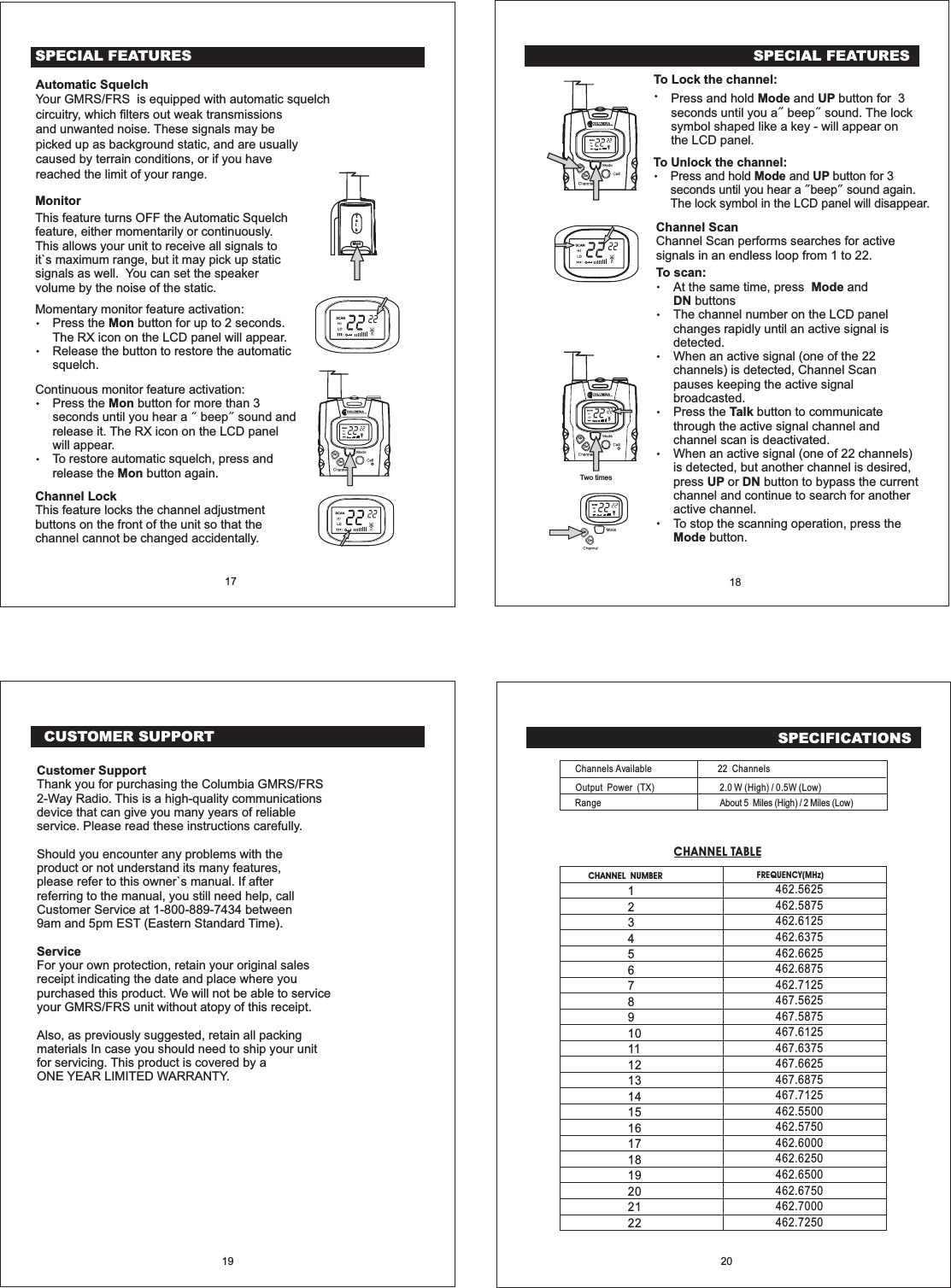
CUSTOMER SUPPORT19SPECIFICATIONSCHANNEL NUMBERChannels AvailableOutput Power (TX)RangeFREQUENCY(MHz)12345678910111213141516171819202122CHANNEL TABLE22 Channels2.0 W (High) / 0.5W (Low)About 5 Miles (High) / 2 Miles (Low)20462.5625462.5875462.6125462.6375462.6625462.6875462.7125467.5625467.5875467.6125467.6375467.6625467.6875467.7125462.5500462.5750462.6000462.6250462.6500462.6750462.7000462.7250Customer SupportServiceThank you for purchasing the Columbia GMRS/FRS2-Way Radio. This is a high-quality communicationsdevice that can give you many years of reliableservice. Please read these instructions carefully.Should you encounter any problems with theproduct or not understand its many features,please refer to this owner`s manual. If afterreferring to the manual, you still need help, callCustomer Service at 1-800-889-7434 between9am and 5pm EST (Eastern Standard Time).For your own protection, retain your original salesreceipt indicating the date and place where youpurchased this product. We will not be able to serviceyour GMRS/FRS unit without atopy of this receipt.Also, as previously suggested, retain all packingmaterials In case you should need to ship your unitfor servicing. This product is covered by aONE YEAR LIMITED WARRANTY.To Lock the channel:Press and hold and button for 3seconds until you a beep sound. The locksymbol shaped like a key - will appear onthe LCD panel.Mode UPTo Unlock the channel:Press and hold and button for 3seconds until you hear a beep sound again.The lock symbol in the LCD panel will disappear.Mode UPSPECIAL FEATURES18Channel ScanChannel Scan performs searches for activesignals in an endless loop from 1 to 22.To scan:At the same time, press andbuttonsThe channel number on the LCD panelchanges rapidly until an active signal isdetected.When an active signal (one of the 22channels) is detected, Channel Scanpauses keeping the active signalbroadcasted.ModeDNPress the button to communicatethrough the active signal channel andchannel scan is deactivated.When an active signal (one of 22 channels)is detected, but another channel is desired,press or button to bypass the currentchannel and continue to search for anotheractive channel.To stop the scanning operation, press thebutton.TalkUP DNModeUpDnTwo timesUpDnUpDnSPECIAL FEATURES17MonitorThis feature turns OFF the Automatic Squelchfeature, either momentarily or continuously.This allows your unit to receive all signals toit`s maximum range, but it may pick up staticsignals as well. You can set the speakervolume by the noise of the static.Momentary monitor feature activation:Press the button for up to 2 seconds.Release the button to restore the automaticsquelch.MonThe RX icon on the LCD panel will appear.Continuous monitor feature activation:Press the button for more than 3seconds until you hear a beep sound andrelease it.MonTo restore automatic squelch, press andrelease the button again.MonThe RX icon on the LCD panelwill appear.Channel LockThis feature locks the channel adjustmentbuttons on the front of the unit so that thechannel cannot be changed accidentally.TalkMonUpDnAutomatic SquelchYour GMRS/FRS is equipped with automatic squelchcircuitry, which filters out weak transmissionsand unwanted noise. These signals may bepicked up as background static, and are usuallycaused by terrain conditions, or if you havereached the limit of your range.
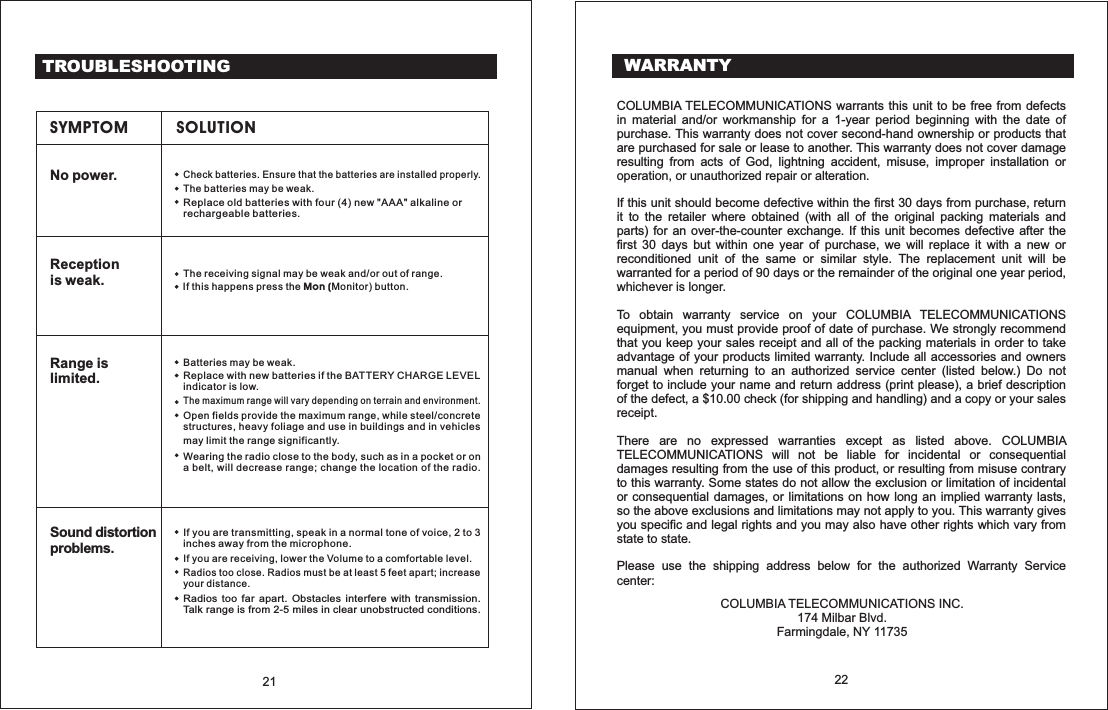
TROUBLESHOOTINGSYMPTOM SOLUTIONNo power.Replace old with four (4) new "AAA" alkaline orrechargeable .batteriesbatteriesThe may be weak.batteriesCheck batteries. Ensure that the batteries are installed properly.Receptionis weak. The receiving signal may be weak and/or out of range.If this happens press the button.Mon (Monitor)Range islimited.Wearing the radio close to the body, such as in a pocket or ona belt, will decrease range; change the location of the radio.may limit the range significantly.Open fields provide the maximum range, while steel/concretestructures, heavy foliage and use in buildings and in vehiclesThe maximum range will vary depending on terrain and environment.Replace with new if the BATTERY CHARGE LEVELindicator is low.batteriesBatteries may be weak.Sound distortionproblems.Radios too far apart. Obstacles interfere with transmission.Talk range is from 2-5 miles in clear unobstructed conditions.Radios too close. Radios must be at least 5 feet apart; increaseyour distance.If you are transmitting, speak in a normal tone of voice, 2 to 3inches away from the microphone.If you are receiving, lower the Volume to a comfortable level.21 22WARRANTYCOLUMBIA TELECOMMUNICATIONS warrants this unit to be free from defectsin material and/or workmanship for a 1-year period beginning with the date ofpurchase. This warranty does not cover second-hand ownership or products thatare purchased for sale or lease to another. This warranty does not cover damageresulting from acts of God, lightning accident, misuse, improper installation orIf this unit should become defective within the first 30 days from purchase, returnit to the retailer where obtained (with all of the original packing materials andparts) for an over-the-counter exchange. If this unit becomes defective after thefirst 30 days but within one year of purchase, we will replace it with a new orreconditioned unit of the same or similar style. The replacement unit will bewarranted for a period of 90 days or the remainder of the original one year period,.To obtain warranty service on your COLUMBIA TELECOMMUNICATIONSequipment, you must provide proof of date of purchase. We strongly recommendthat you keep your sales receipt and all of the packing materials in order to takeadvantage of your products limited warranty. Include all accessories and ownersmanual when returning to an authorized service center (listed below.) Do notforget to include your name and return address (print please), a brief descriptionof the defect, a $10.00 check (for shipping and handling) and a copy or your sales.There are no expressed warranties except as listed above. COLUMBIATELECOMMUNICATIONS will not be liable for incidental or consequentialdamages resulting from the use of this product, or resulting from misuse contraryto this warranty. Some states do not allow the exclusion or limitation of incidentalor consequential damages, or limitations on how long an implied warranty lasts,so the above exclusions and limitations may not apply to you. This warranty givesyou specific and legal rights and you may also have other rights which vary fromPlease use the shipping address below for the authorized Warranty Serviceoperation, or unauthorized repair or alteration.whichever is longer.receipt.statetostate.center:COLUMBIA TELECOMMUNICATIONS INC.174 Milbar Blvd.Farmingdale, NY 11735

Navigation menu