Columbia Telecommunications Group MURS2 FM Transceiver User Manual MANUAL

Columbia Telecommunications Group Inc FM Transceiver MANUAL

Contents

Users Manual

6. Instruction Manual  1) Safety Information  Safety Information For MURS UNIT Your wireless handheld portable transceiver contains a low power(2watts)  Transmitter. When the Push-to Talk (PTT) button is pushed it sends out radio frequency (RF) signals. This device is authorized to operate at a duty factor not to exceed 50%. In August 1996, the Federal Communications Commission (FCC) adopted RF exposure guidelines with safety levels for hand-held wireless devices.  Important Note: To maintain compliance with the FCC's RF exposure guidelines, hold the transmitter and antenna at least 1 inch (2.5 centimeters) from your face and speak in a normal voice, with the antenna pointed up and away from the face. If you wear the handset on your body while using the headset accessory, use only the manufacturers supplied belt clip for this product and ensure that the antenna is at least 1 inch (2.5 centimeters) from your body when transmitting.  Use only the supplied antenna. Unauthorized antennas, modifications, or attachments could damage the transmitter and may violate FCC regulations.  THIS DEVICE COMPLIES WITH PART 15 OF THE FCC RULES. OPERATION IS SUBJECT TO THE FOLLOWING TWO CONDITIONS: (1) THIS DEVICE MAY NOT CAUSE HARMFUL INTERFERENCE, AND (2) THIS DEVICE MUST ACCEPT ANY INTERFERENCE RECEIVED, INCLUDING INTERFERENCE THAT MAY CAUSE UNDESIRED OPERATION.
 2) General a) General      This equipment, MURS is called 2 way portable handheld radios.           The frequency range is 151.820¡-154.600MHz, VHF operating channels for           International 2 way portable radios. b) Characteristic   a. All active devices in this radio is composed of semiconductor and high density            IC.          b. To design this radio in compact and weight approximately 140g including            Battery.         c. CPU of this equipment is HD4074899TE from HITACHI.           d. It’s power can operate by use of alkaline 4 cell (1.5V AA) battery.         c) Composition          This radio is composed of following.         a. Transmitter (W/Antenna)   b. Belt clip         c. Ni-MH battery (option)   3) Specification      a) General Specification  a. Frequency Range: 151.820 ¡- 154.600MHz   Weather Range: 161.650  ~  163.275 (Receiver Only)  b. Output Impedance: 50¥ØUnbalanced  c. Modulation Type: 8K0F3E          d. Communication Mode: Half duplex  e. Channel Capacity: 5 channels(MURS), 10 channels(WX)          f. Channel spacing: 12.5 KHz    g. Power: 6.0V(alkaline)          h. Battery Life: ALCA.2600mAh >40 hours (Tx5%, Rx5%, Stand-by 90%)           i. Operating Temperature: -20¡É¡-+60¡É          j. Dimension: 95.5(H) x 50(W) x 26(D) mm          k. Weight: 140g(with Battery)       b) Electrical Specification          a. Transmitter     1. Output power: Max. 2.0W            2. Frequency Stability: ¡¾2.5 ppm (-20¡É¡-+60¡É)            3. Modulation Method: FM            4. Oscillation Method: PLL SYNTHESIZER            5. Max. Frequency Deviation : < ¡¾2.5 KHz (with tone)
           6. Cooling Method: air-cooling Method             7. Spurious Emission: < 60dB             8. FM Hum/Noise: > -40dB(1kHz 60% modulation, w/CCITT)            9. Distortion: < 5% (1kHz 60% modulation)           10. Tx Audio Response: 6dB /OCT ¡¾3dB PRE-EMPHASIS (300Hz¡-2.5kHz)   b. Receiver            1. Receive Method: Double Super Heterodyne            2. Receive Sensitivity: < 0.28uV(20dB SINAD w/CCITT)            3. Squelch Sensitivity: 6¡-8dB(12dB SINAD)            4. Bandwidth: > 3kHz(6dB ATT point)            5. Selectivity: < -60dB(12.5kHz)            6. Local Frequency Stability: ¡¾2.5ppm(-20¡É¡-+60¡É)            7. Spurious Response: > 40dB            8. Audio output: 200mW(Internal 8¥Ø load THD 10%) Ext.100mW             9. Distortion: < 5% (1kHz 60% Modulation)           10. RX Audio Response: 6dB/OCT ¡¾3dB DE-EMPHASIS (300Hz¡-2.5kHz)           11. S/N Ratio: < 40dB(1kHz 60% modulation w/CCITT)           12. IF: 1'st IF = 21.7MHz                 2'nd IF = 450kHz           13. Local Frequency: 1st Local Frequency = fc - 21.7MHz                              2nd Local Frequency = 21.25MHz
 4) Operation      a) Key Name a. Function and Controls         1. Antenna          2. Belt Clip          3. Detachable Belt Clip Button         4. Power Switch         5. Mode/Scan Button          6. Vox Button         7. Lock Button         8. Wx Button         9. Built-in Microphone         10. Battery Cover         11. Charge Terminal         12. External Mic/Speaker         13. LCD Display        14. Push-To-Talk (PTT)          15.Monitor Button
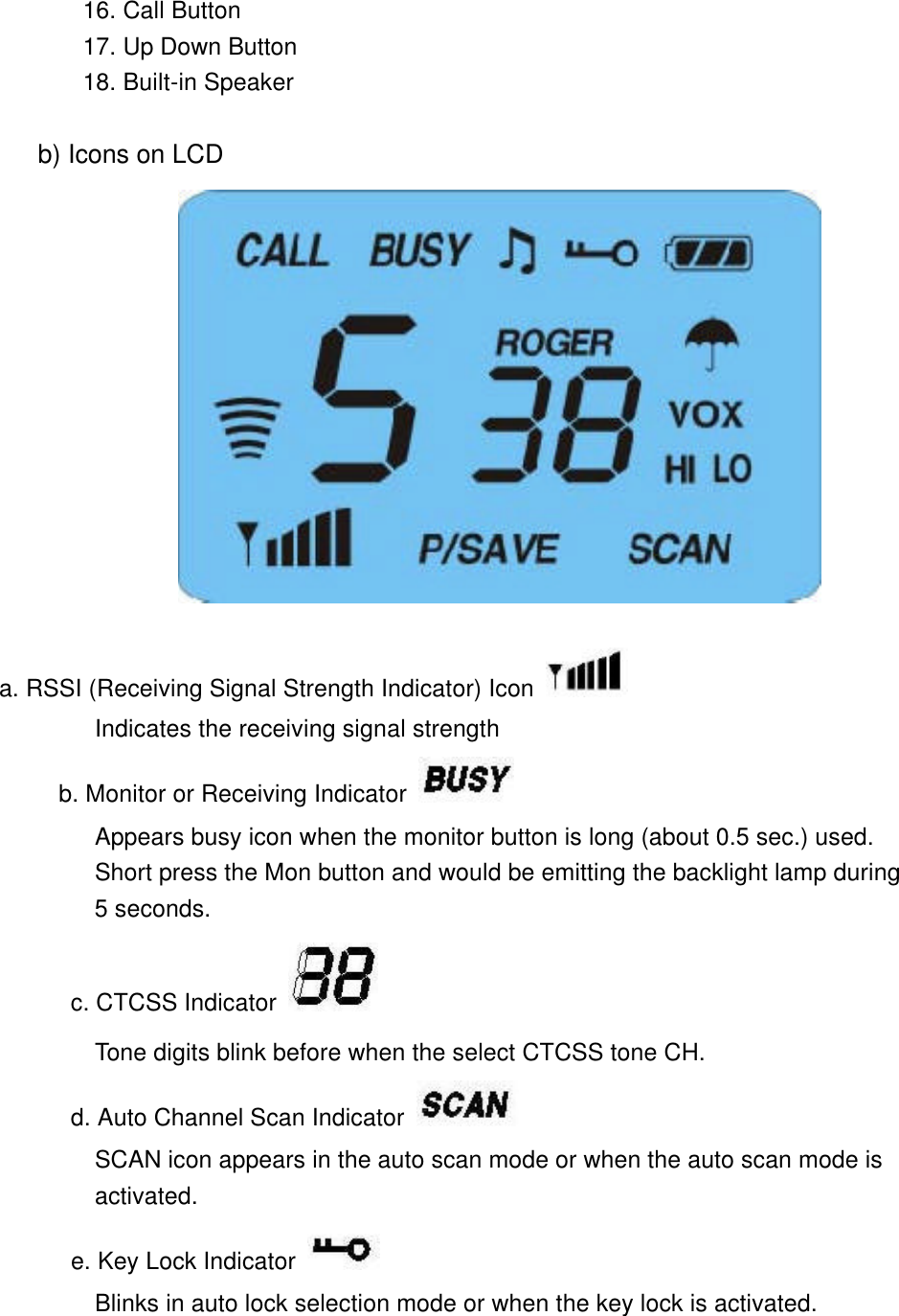
        16. Call Button        17. Up Down Button        18. Built-in Speaker       b) Icons on LCD                    a. RSSI (Receiving Signal Strength Indicator) Icon  Indicates the receiving signal strength       b. Monitor or Receiving Indicator    Appears busy icon when the monitor button is long (about 0.5 sec.) used.         Short press the Mon button and would be emitting the backlight lamp during         5 seconds. c. CTCSS Indicator   Tone digits blink before when the select CTCSS tone CH. d. Auto Channel Scan Indicator  SCAN icon appears in the auto scan mode or when the auto scan mode is         activated.       e. Key Lock Indicator  Blinks in auto lock selection mode or when the key lock is activated.
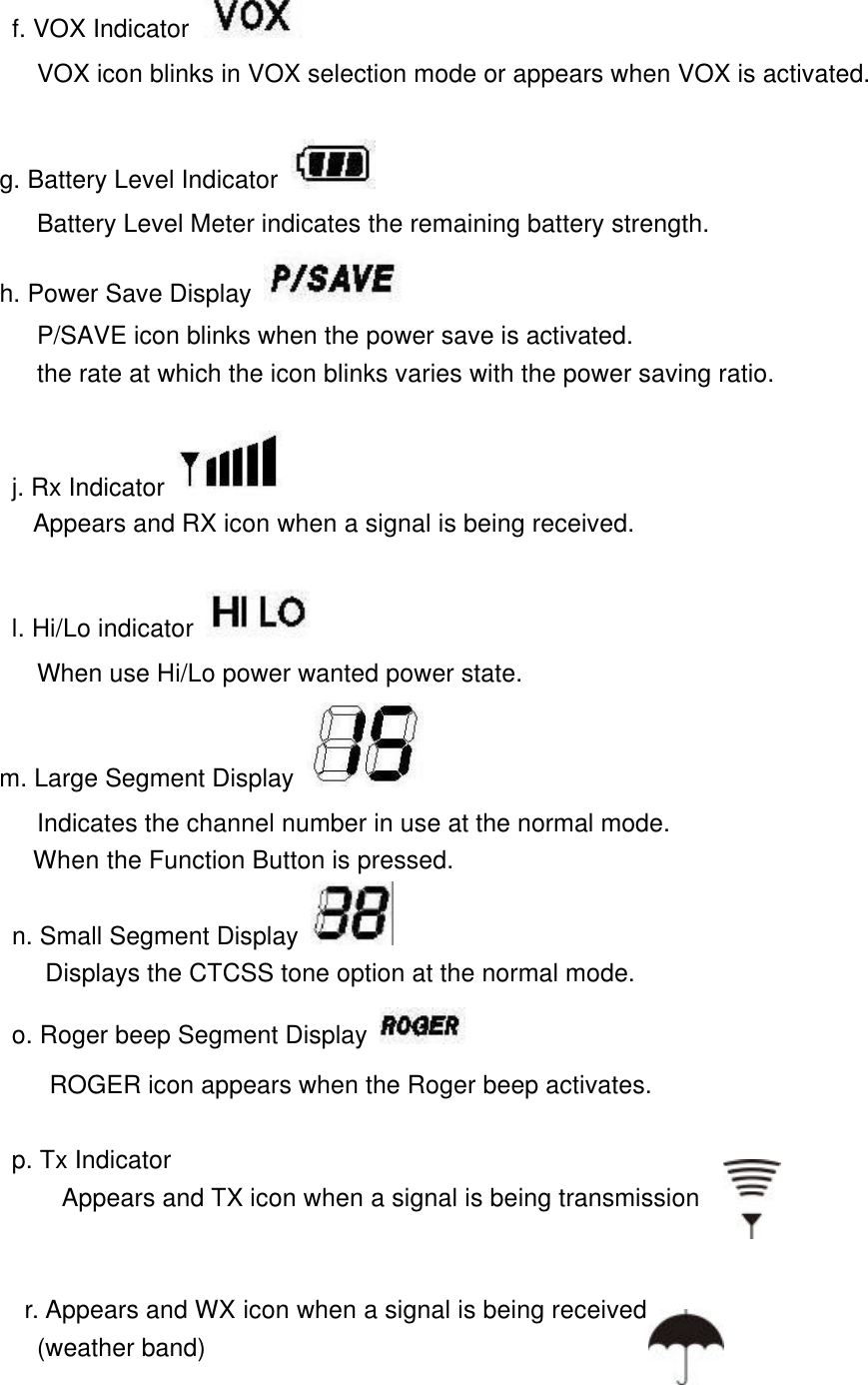
      f. VOX Indicator    VOX icon blinks in VOX selection mode or appears when VOX is activated.       g. Battery Level Indicator  Battery Level Meter indicates the remaining battery strength.      h. Power Save Display  P/SAVE icon blinks when the power save is activated.         the rate at which the icon blinks varies with the power saving ratio.               j. Rx Indicator    Appears and RX icon when a signal is being received.              l. Hi/Lo indicator          When use Hi/Lo power wanted power state.      m. Large Segment Display          Indicates the channel number in use at the normal mode.         When the Function Button is pressed.        n. Small Segment Display     Displays the CTCSS tone option at the normal mode.       o. Roger beep Segment Display             ROGER icon appears when the Roger beep activates.          p. Tx Indicator Appears and TX icon when a signal is being transmission   r. Appears and WX icon when a signal is being received  (weather band)
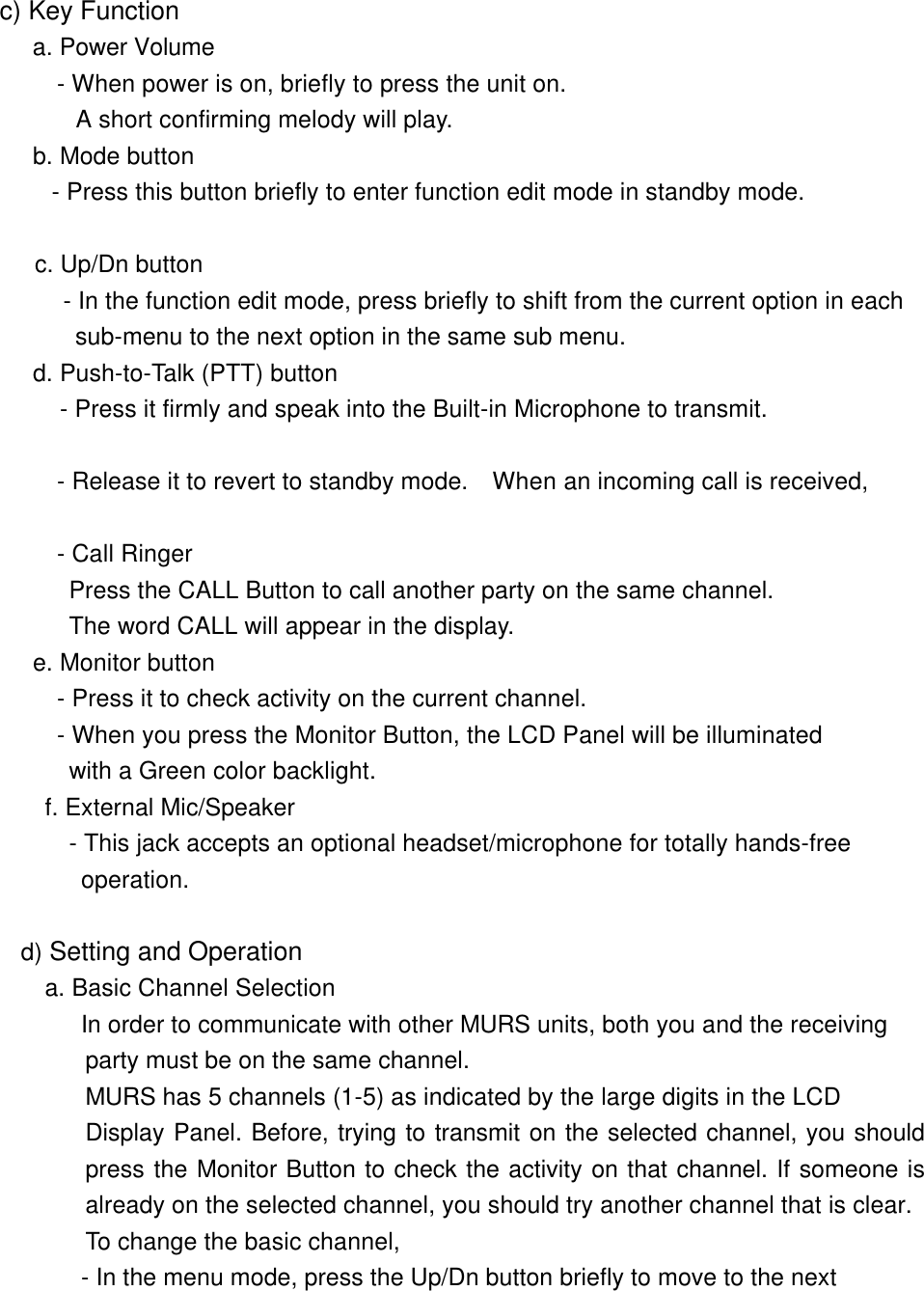
       c) Key Function   a. Power Volume          - When power is on, briefly to press the unit on.          A short confirming melody will play.       b. Mode button     - Press this button briefly to enter function edit mode in standby mode.        c. Up/Dn button         - In the function edit mode, press briefly to shift from the current option in each       sub-menu to the next option in the same sub menu.     d. Push-to-Talk (PTT) button    - Press it firmly and speak into the Built-in Microphone to transmit.                  - Release it to revert to standby mode.  When an incoming call is received,                   - Call Ringer          Press the CALL Button to call another party on the same channel.          The word CALL will appear in the display.         e. Monitor button         - Press it to check activity on the current channel.    - When you press the Monitor Button, the LCD Panel will be illuminated          with a Green color backlight.     f. External Mic/Speaker      - This jack accepts an optional headset/microphone for totally hands-free operation.         d) Setting and Operation        a. Basic Channel Selection In order to communicate with other MURS units, both you and the receiving  party must be on the same channel.   MURS has 5 channels (1-5) as indicated by the large digits in the LCD Display Panel. Before, trying to transmit on the selected channel, you should press the Monitor Button to check the activity on that channel. If someone is already on the selected channel, you should try another channel that is clear. To change the basic channel, - In the menu mode, press the Up/Dn button briefly to move to the next
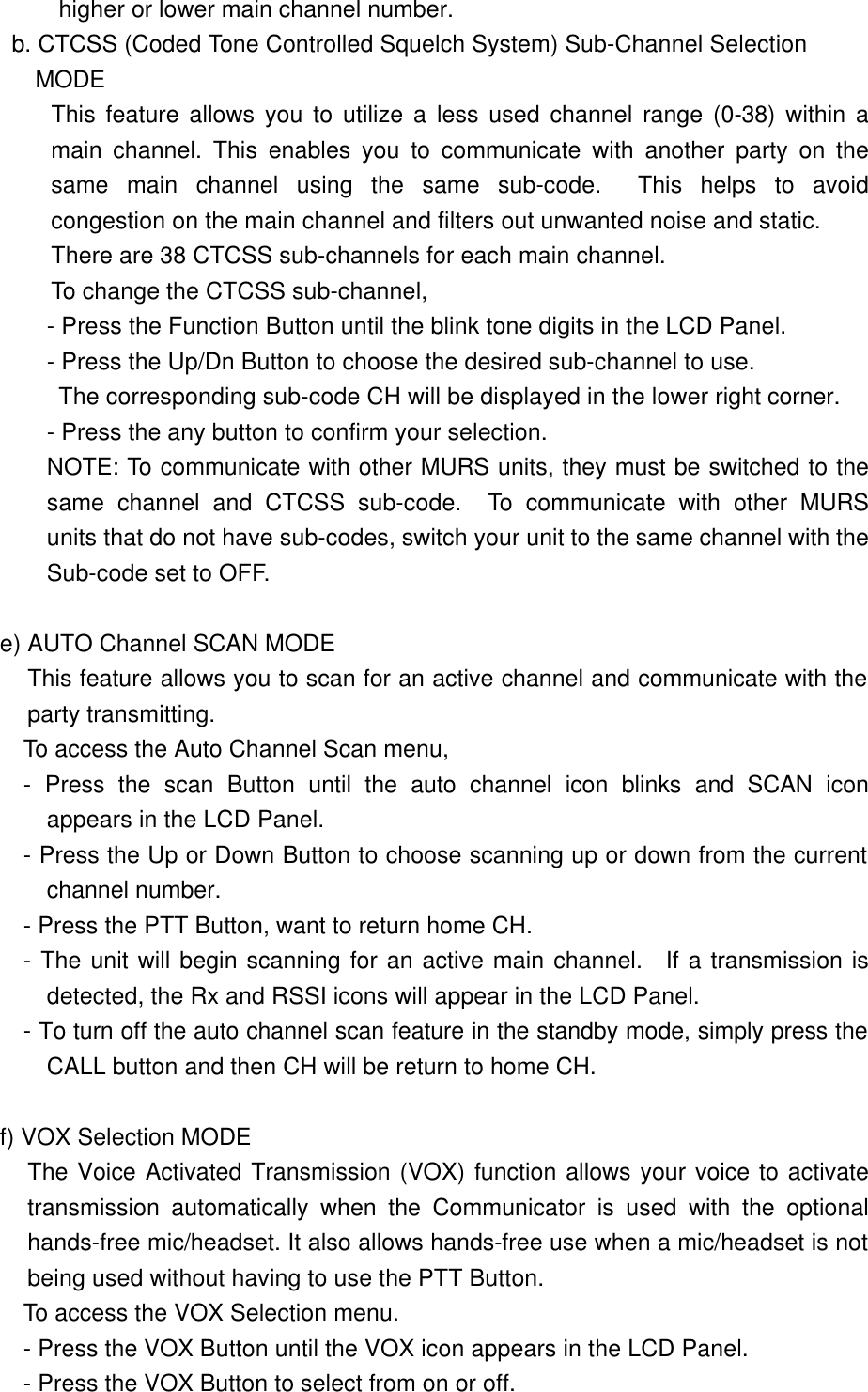
 higher or lower main channel number. b. CTCSS (Coded Tone Controlled Squelch System) Sub-Channel Selection  MODE This feature allows you to utilize a less used channel range (0-38) within a main channel. This enables you to communicate with another party on the same main channel using the same sub-code.  This helps to avoid congestion on the main channel and filters out unwanted noise and static.  There are 38 CTCSS sub-channels for each main channel. To change the CTCSS sub-channel, - Press the Function Button until the blink tone digits in the LCD Panel. - Press the Up/Dn Button to choose the desired sub-channel to use.         The corresponding sub-code CH will be displayed in the lower right corner. - Press the any button to confirm your selection.   NOTE: To communicate with other MURS units, they must be switched to the same channel and CTCSS sub-code.  To communicate with other MURS units that do not have sub-codes, switch your unit to the same channel with the          Sub-code set to OFF.  e) AUTO Channel SCAN MODE This feature allows you to scan for an active channel and communicate with the party transmitting.         To access the Auto Channel Scan menu, - Press the scan Button until the auto channel icon blinks and SCAN icon appears in the LCD Panel. - Press the Up or Down Button to choose scanning up or down from the current channel number. - Press the PTT Button, want to return home CH. - The unit will begin scanning for an active main channel.  If a transmission is detected, the Rx and RSSI icons will appear in the LCD Panel. - To turn off the auto channel scan feature in the standby mode, simply press the CALL button and then CH will be return to home CH.          f) VOX Selection MODE The Voice Activated Transmission (VOX) function allows your voice to activate transmission automatically when the Communicator is used with the optional hands-free mic/headset. It also allows hands-free use when a mic/headset is not being used without having to use the PTT Button.         To access the VOX Selection menu. - Press the VOX Button until the VOX icon appears in the LCD Panel. - Press the VOX Button to select from on or off.
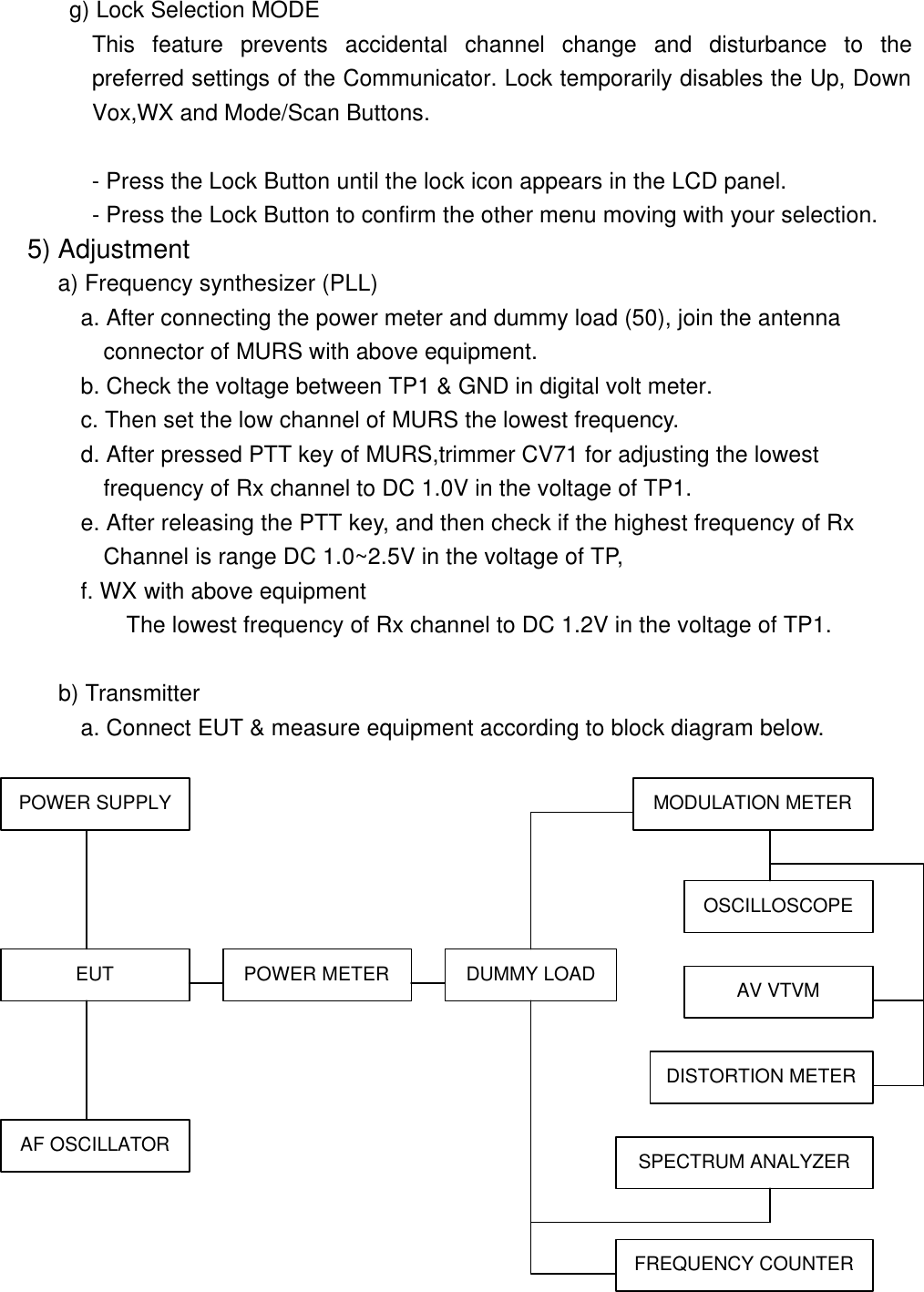
 g) Lock Selection MODE         This feature prevents accidental channel change and disturbance to the preferred settings of the Communicator. Lock temporarily disables the Up, Down Vox,WX and Mode/Scan Buttons.  - Press the Lock Button until the lock icon appears in the LCD panel. - Press the Lock Button to confirm the other menu moving with your selection. 5) Adjustment      a) Frequency synthesizer (PLL)         a. After connecting the power meter and dummy load (50), join the antenna           connector of MURS with above equipment.        b. Check the voltage between TP1 & GND in digital volt meter.        c. Then set the low channel of MURS the lowest frequency.        d. After pressed PTT key of MURS,trimmer CV71 for adjusting the lowest           frequency of Rx channel to DC 1.0V in the voltage of TP1.        e. After releasing the PTT key, and then check if the highest frequency of Rx          Channel is range DC 1.0~2.5V in the voltage of TP,         f. WX with above equipment            The lowest frequency of Rx channel to DC 1.2V in the voltage of TP1.        b) Transmitter a. Connect EUT & measure equipment according to block diagram below.  POWER SUPPLY EUT AF OSCILLATOR POWER METER DUMMY LOAD AV VTVM MODULATION METER OSCILLOSCOPE DISTORTION METER SPECTRUM ANALYZER FREQUENCY COUNTER
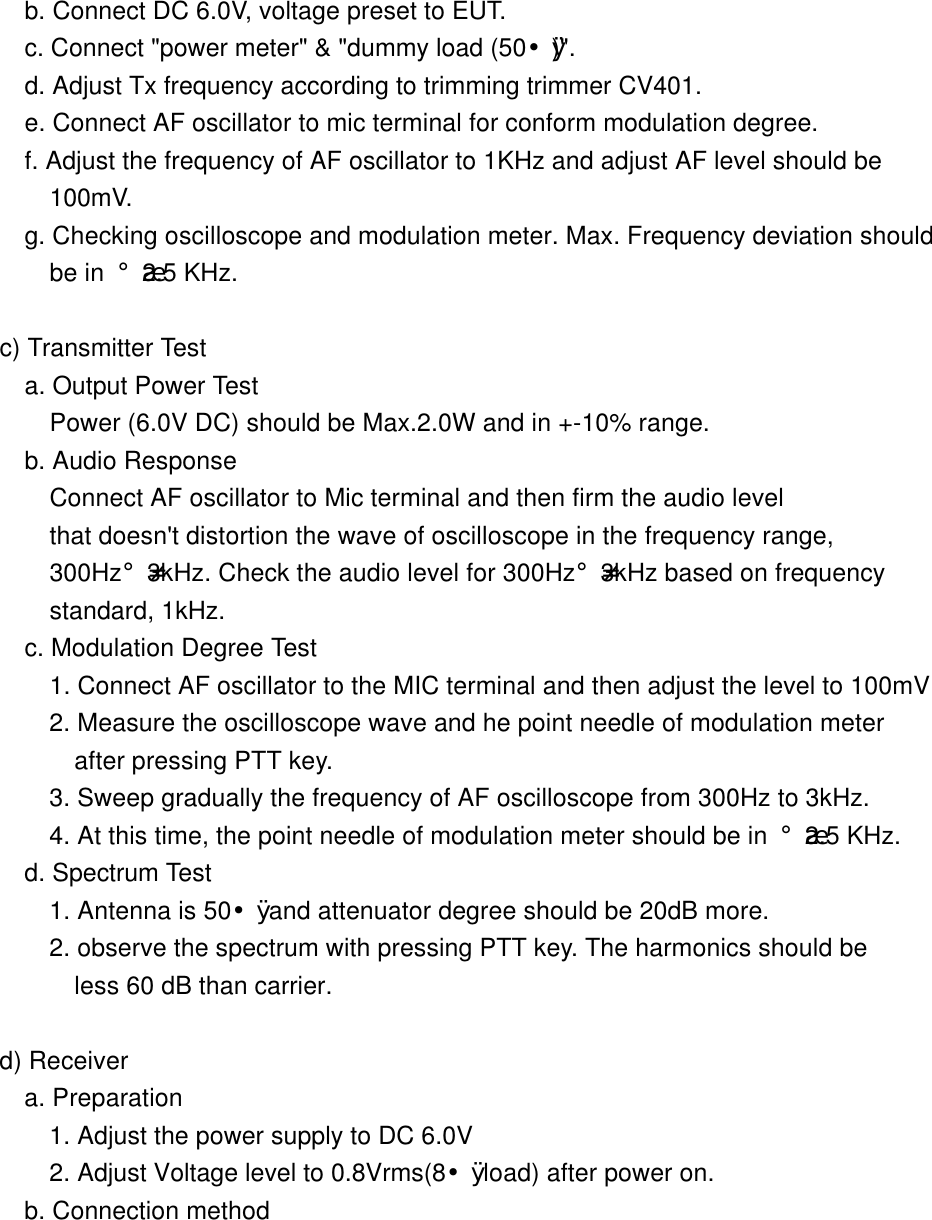
       b. Connect DC 6.0V, voltage preset to EUT.        c. Connect "power meter" & "dummy load (50¥Ø)".        d. Adjust Tx frequency according to trimming trimmer CV401.        e. Connect AF oscillator to mic terminal for conform modulation degree. f. Adjust the frequency of AF oscillator to 1KHz and adjust AF level should be  100mV. g. Checking oscilloscope and modulation meter. Max. Frequency deviation should  be in ¡¾2.5 KHz.       c) Transmitter Test        a. Output Power Test          Power (6.0V DC) should be Max.2.0W and in +-10% range.         b. Audio Response           Connect AF oscillator to Mic terminal and then firm the audio level          that doesn't distortion the wave of oscilloscope in the frequency range,          300Hz¡-3kHz. Check the audio level for 300Hz¡-3kHz based on frequency          standard, 1kHz.           c. Modulation Degree Test          1. Connect AF oscillator to the MIC terminal and then adjust the level to 100mV          2. Measure the oscilloscope wave and he point needle of modulation meter     after pressing PTT key.          3. Sweep gradually the frequency of AF oscilloscope from 300Hz to 3kHz.          4. At this time, the point needle of modulation meter should be in ¡¾2.5 KHz.        d. Spectrum Test          1. Antenna is 50¥Ø and attenuator degree should be 20dB more.           2. observe the spectrum with pressing PTT key. The harmonics should be       less 60 dB than carrier.       d) Receiver        a. Preparation          1. Adjust the power supply to DC 6.0V          2. Adjust Voltage level to 0.8Vrms(8¥Ø load) after power on.        b. Connection method
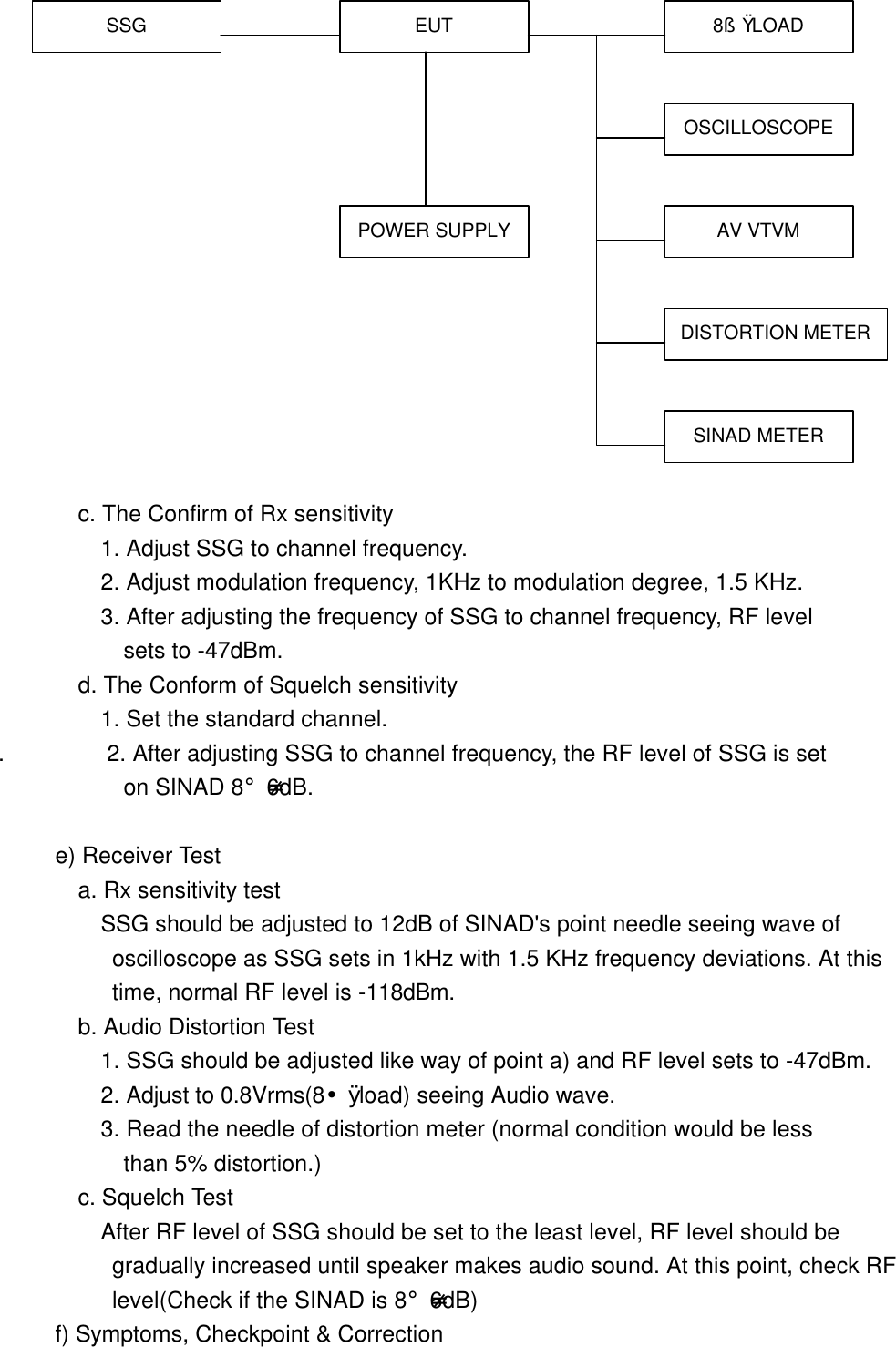
                      c. The Confirm of Rx sensitivity          1. Adjust SSG to channel frequency.          2. Adjust modulation frequency, 1KHz to modulation degree, 1.5 KHz.          3. After adjusting the frequency of SSG to channel frequency, RF level             sets to -47dBm.         d. The Conform of Squelch sensitivity            1. Set the standard channel.   .         2. After adjusting SSG to channel frequency, the RF level of SSG is set             on SINAD 8¡-6dB.       e) Receiver Test        a. Rx sensitivity test          SSG should be adjusted to 12dB of SINAD's point needle seeing wave of  oscilloscope as SSG sets in 1kHz with 1.5 KHz frequency deviations. At this  time, normal RF level is -118dBm.           b. Audio Distortion Test          1. SSG should be adjusted like way of point a) and RF level sets to -47dBm.          2. Adjust to 0.8Vrms(8¥Ø load) seeing Audio wave.          3. Read the needle of distortion meter (normal condition would be less       than 5% distortion.)        c. Squelch Test          After RF level of SSG should be set to the least level, RF level should be  gradually increased until speaker makes audio sound. At this point, check RF  level(Check if the SINAD is 8¡-6dB)      f) Symptoms, Checkpoint & Correction SSG EUT POWER SUPPLY 8§Ù LOAD OSCILLOSCOPE AV VTVM DISTORTION METER SINAD METER
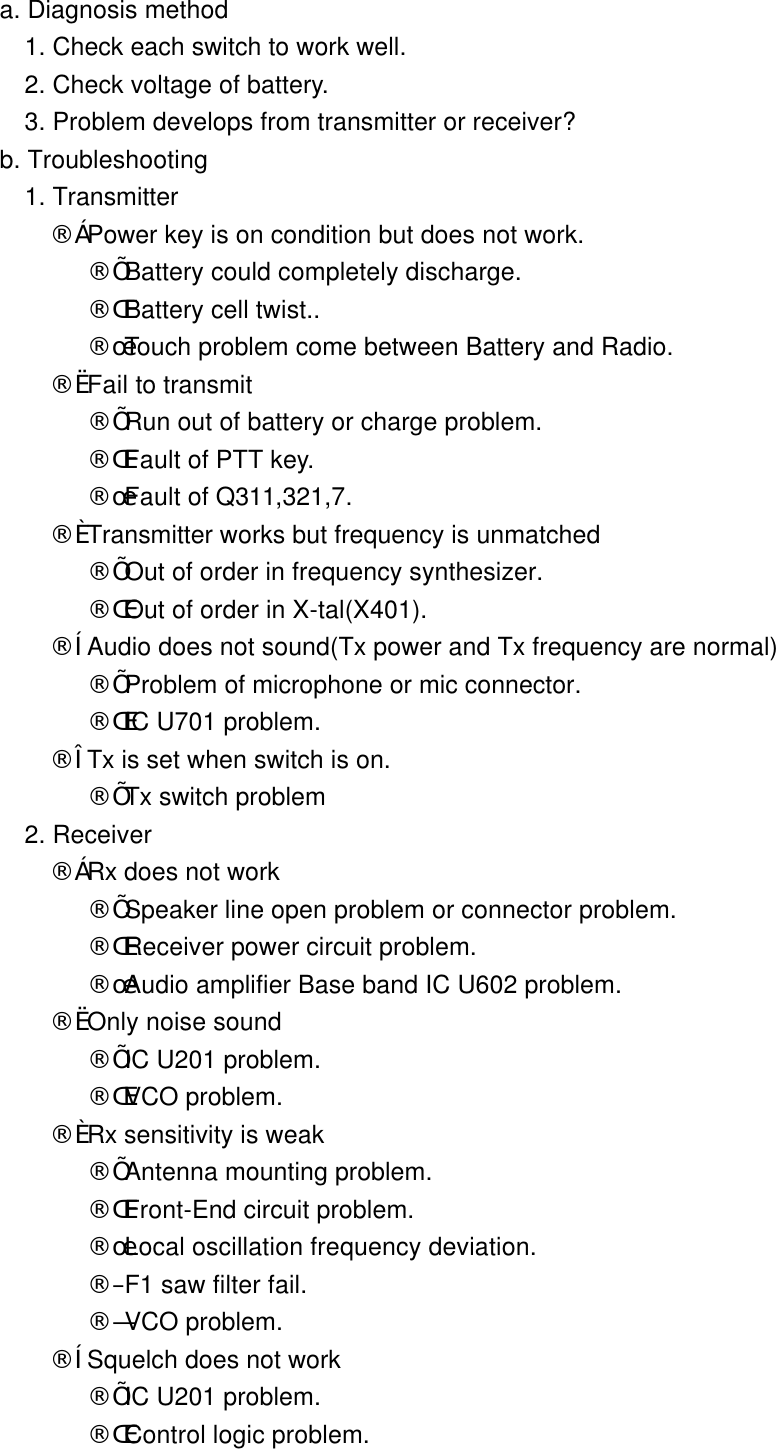
       a. Diagnosis method          1. Check each switch to work well.          2. Check voltage of battery.          3. Problem develops from transmitter or receiver?        b. Troubleshooting          1. Transmitter            ¨ç Power key is on condition but does not work.               ¨Í Battery could completely discharge.               ¨Î Battery cell twist..               ¨Ï Touch problem come between Battery and Radio.            ¨è Fail to transmit               ¨Í Run out of battery or charge problem.               ¨Î Fault of PTT key.               ¨Ï Fault of Q311,321,7.            ¨é Transmitter works but frequency is unmatched               ¨Í Out of order in frequency synthesizer.               ¨Î Out of order in X-tal(X401).            ¨ê Audio does not sound(Tx power and Tx frequency are normal)               ¨Í Problem of microphone or mic connector.               ¨Î IC U701 problem.            ¨ë Tx is set when switch is on.               ¨Í Tx switch problem          2. Receiver             ¨ç Rx does not work               ¨Í Speaker line open problem or connector problem.               ¨Î Receiver power circuit problem.               ¨Ï Audio amplifier Base band IC U602 problem.            ¨è Only noise sound               ¨Í IC U201 problem.               ¨Î VCO problem.            ¨é Rx sensitivity is weak               ¨Í Antenna mounting problem.               ¨Î Front-End circuit problem.               ¨Ï Local oscillation frequency deviation.               ¨Ð F1 saw filter fail.               ¨Ñ VCO problem.            ¨ê Squelch does not work               ¨Í IC U201 problem.               ¨Î Control logic problem.
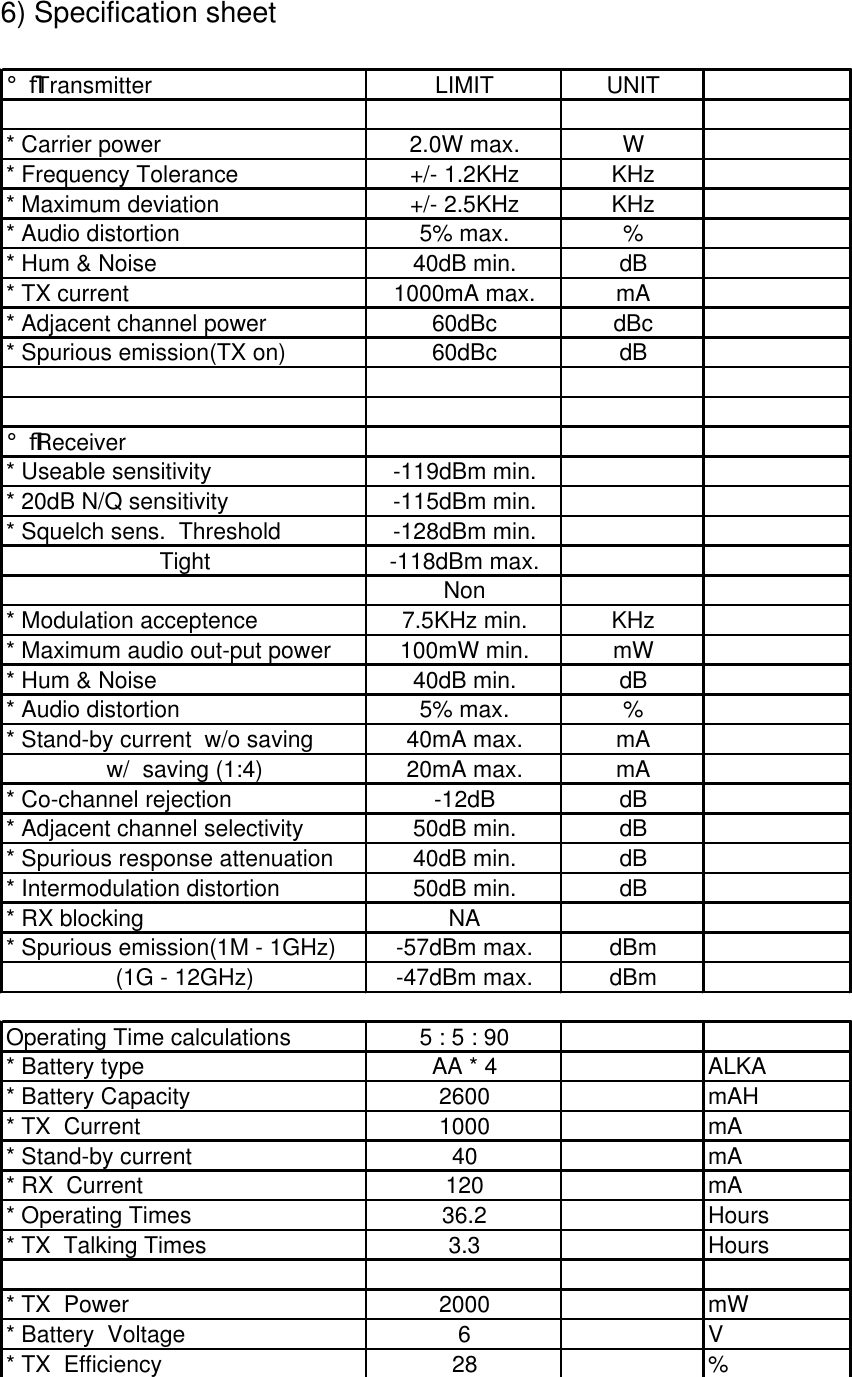
 6) Specification sheet  ¡ß Transmitter LIMIT UNIT* Carrier power 2.0W max. W* Frequency Tolerance +/- 1.2KHz KHz* Maximum deviation +/- 2.5KHz KHz* Audio distortion 5% max. %* Hum & Noise 40dB min. dB* TX current 1000mA max. mA* Adjacent channel power 60dBc dBc* Spurious emission(TX on) 60dBc dB¡ß Receiver* Useable sensitivity -119dBm min.* 20dB N/Q sensitivity -115dBm min.* Squelch sens.  Threshold -128dBm min.Tight -118dBm max.Non* Modulation acceptence 7.5KHz min. KHz* Maximum audio out-put power 100mW min. mW* Hum & Noise 40dB min. dB* Audio distortion 5% max. %* Stand-by current  w/o saving 40mA max. mAw/  saving (1:4) 20mA max. mA* Co-channel rejection -12dB dB* Adjacent channel selectivity 50dB min. dB* Spurious response attenuation 40dB min. dB* Intermodulation distortion 50dB min. dB* RX blocking NA* Spurious emission(1M - 1GHz) -57dBm max. dBm(1G - 12GHz) -47dBm max. dBmOperating Time calculations 5 : 5 : 90* Battery type AA * 4 ALKA* Battery Capacity 2600 mAH* TX  Current 1000 mA* Stand-by current   40 mA* RX  Current 120 mA* Operating Times 36.2 Hours* TX  Talking Times 3.3 Hours* TX  Power 2000 mW* Battery  Voltage 6V* TX  Efficiency 28 %
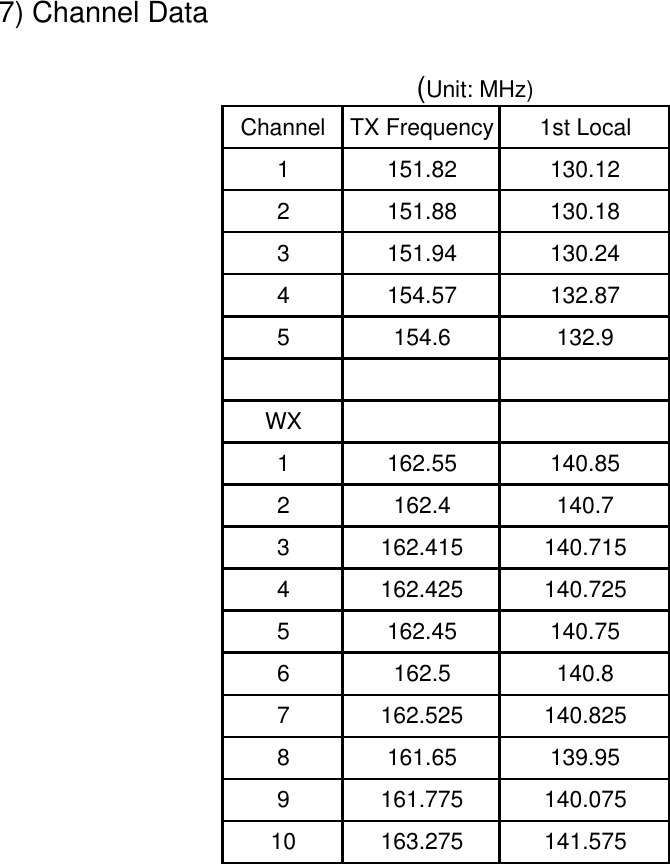
 7) Channel Data                                (Unit: MHz)                                                                            Channel TX Frequency 1st Local1151.82 130.122151.88 130.183151.94 130.244154.57 132.875154.6 132.9WX1162.55 140.852162.4 140.73162.415 140.7154162.425 140.7255162.45 140.756162.5 140.87162.525 140.8258161.65 139.959161.775 140.07510 163.275 141.575

Navigation menu