Communications ICX20UAD Outdoor 802.11ac 2x2 Dual Band Unified Access Device User Manual 2ABFZICX20UAD 03 21

International Communications Corporation Outdoor 802.11ac 2x2 Dual Band Unified Access Device 2ABFZICX20UAD 03 21

2ABFZICX20UAD_User Manual_03.21
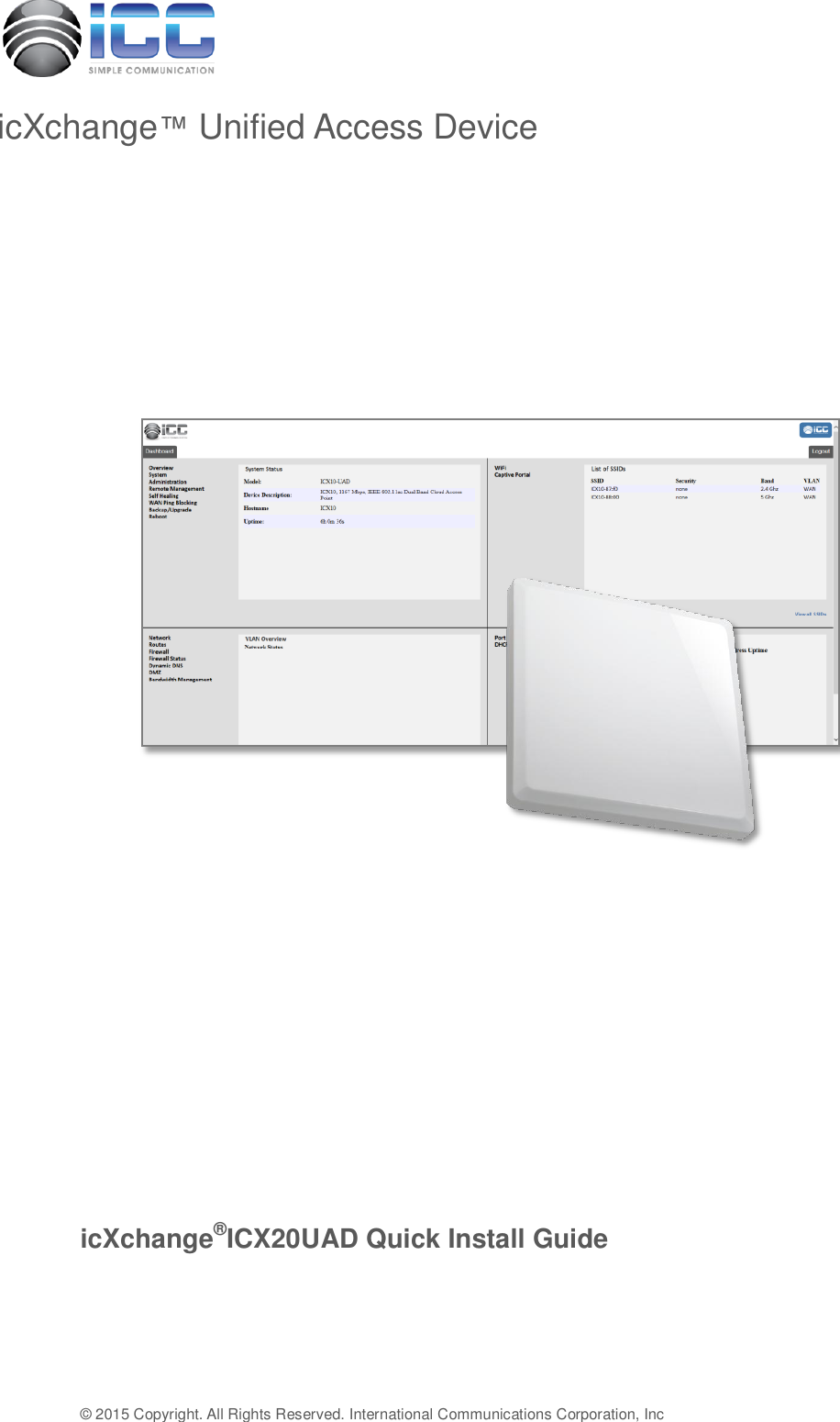
© 2015 Copyright. All Rights Reserved. International Communications Corporation, Inc                            icXchange®ICX20UAD Quick Install Guide     icXchange™ Unified Access Device
ICX20UAD Quick Install Guide 2  Intended audience This guide is designed to be used by network managers, administrators, and technicians who are responsible for installing, networking equipment in enterprise and service provider environments. Knowledge of telecommunication and internet protocol (IP) technologies is assumed.  Documentation The ICC icXchange™ product and support documentation consists of a variety of manuals, installation guides, videos, knowledge articles, sample designs, troubleshooting, and FAQ guides to assist you with the deployment of your new and innovative solution.  These and other documents are available for download at http://intcomcorp.com/client-support.html  White Glove Service Member portal at: http://intcomcorp.com/AlliancePartners.html  To view PDF files, use Adobe Acrobat Reader® 5.0 or newer. Download Acrobat Reader for free from the Adobe website: http://www.adobe.com/products.  Find additional documentation at: http://www.intcomcorp.com.  Contact information Phone:  844-242-9246 E-mail:  support@intcomcorp.com sales@intcomcorp.com
ICX20UAD Quick Install Guide 3   Table of Contents Chapter1: Overview ............................................................................................................. 4 About ICC Unified Access Device solution ...................................................................... 4 Equipment Introduction................................................................................................. 5 Product Specification .................................................................................................... 5 Product Hardware Overview ......................................................................................... 6 Product Software Overview .......................................................................................... 7 Chapter 2: Installation .......................................................................................................... 8 Installation procedure for wall mounting the unit ............................................................. 9 Chapter 3: Web UserManagement .................................................................................... 11 Logging in to the Web Page ........................................................................................... 11 Login Web Network Management .................................................................................. 12 Quit Web Network Management .................................................................................... 13 Regulatory and compliance ............................................................................................... 14 Declaration of ROHS compliance ...................................................................................... 14 FCC warning ...................................................................................................................... 14 Canada warning ................................................................................................................. 14 USA — Radio frequency requirements ............................................................................. 15 Industry Canada — Radio frequency compliance ............................................................. 15 USA – Federal Communications Commission (FCC) EMC compliance ........................... 16 Manufacturer’s FCC declaration of conformity .................................................................. 16 Industry Canada – RF compliance .................................................................................... 17 Industry Canada – Emissions compliance statement ....................................................... 17 Warranty............................................................................................................................. 19
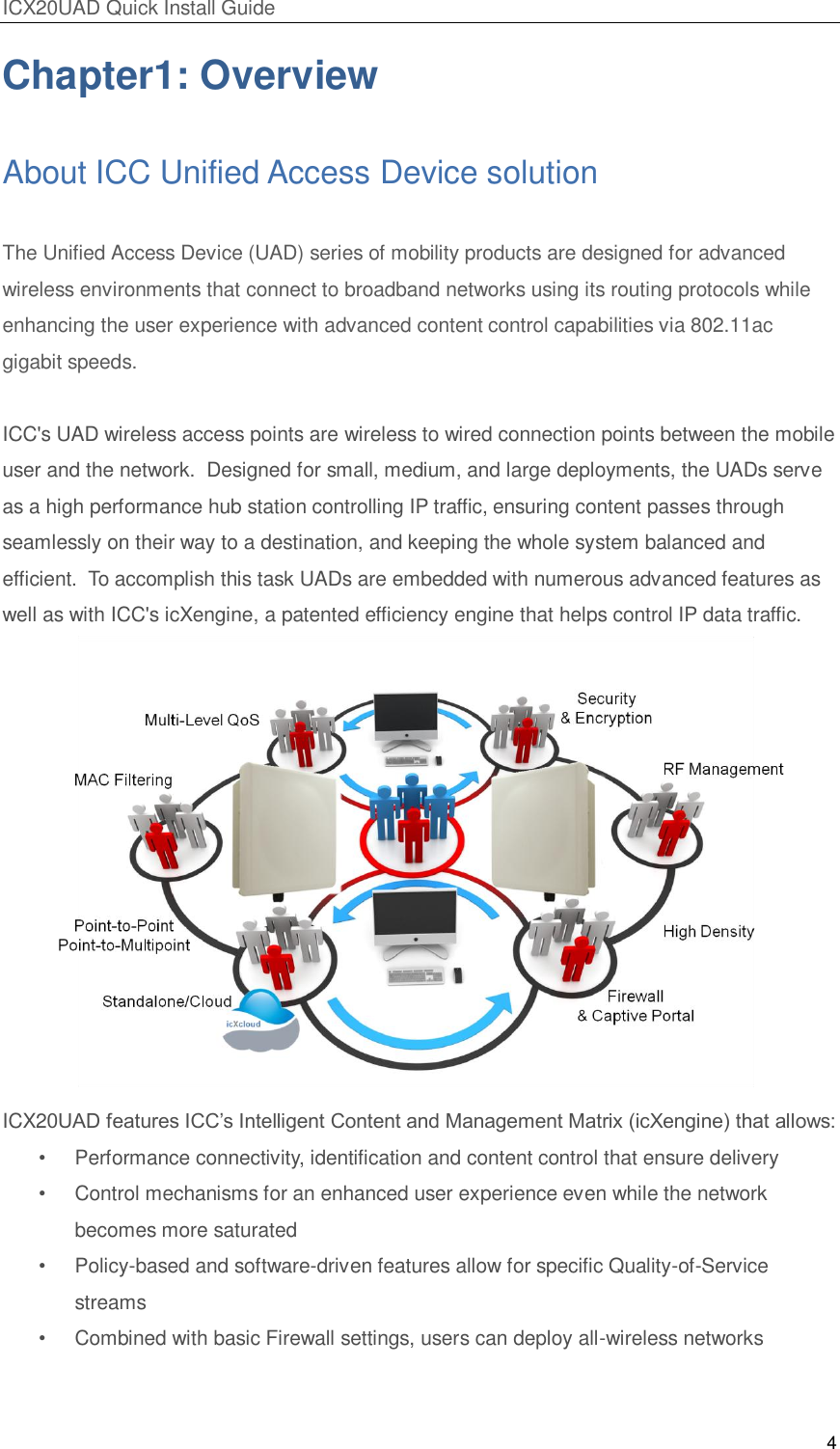
ICX20UAD Quick Install Guide 4  Chapter1: Overview About ICC Unified Access Device solution The Unified Access Device (UAD) series of mobility products are designed for advanced wireless environments that connect to broadband networks using its routing protocols while enhancing the user experience with advanced content control capabilities via 802.11ac gigabit speeds.  ICC's UAD wireless access points are wireless to wired connection points between the mobile user and the network.  Designed for small, medium, and large deployments, the UADs serve as a high performance hub station controlling IP traffic, ensuring content passes through seamlessly on their way to a destination, and keeping the whole system balanced and efficient.  To accomplish this task UADs are embedded with numerous advanced features as well as with ICC's icXengine, a patented efficiency engine that helps control IP data traffic.  ICX20UAD features ICC’s Intelligent Content and Management Matrix (icXengine) that allows: •  Performance connectivity, identification and content control that ensure delivery  •  Control mechanisms for an enhanced user experience even while the network becomes more saturated •  Policy-based and software-driven features allow for specific Quality-of-Service streams •  Combined with basic Firewall settings, users can deploy all-wireless networks
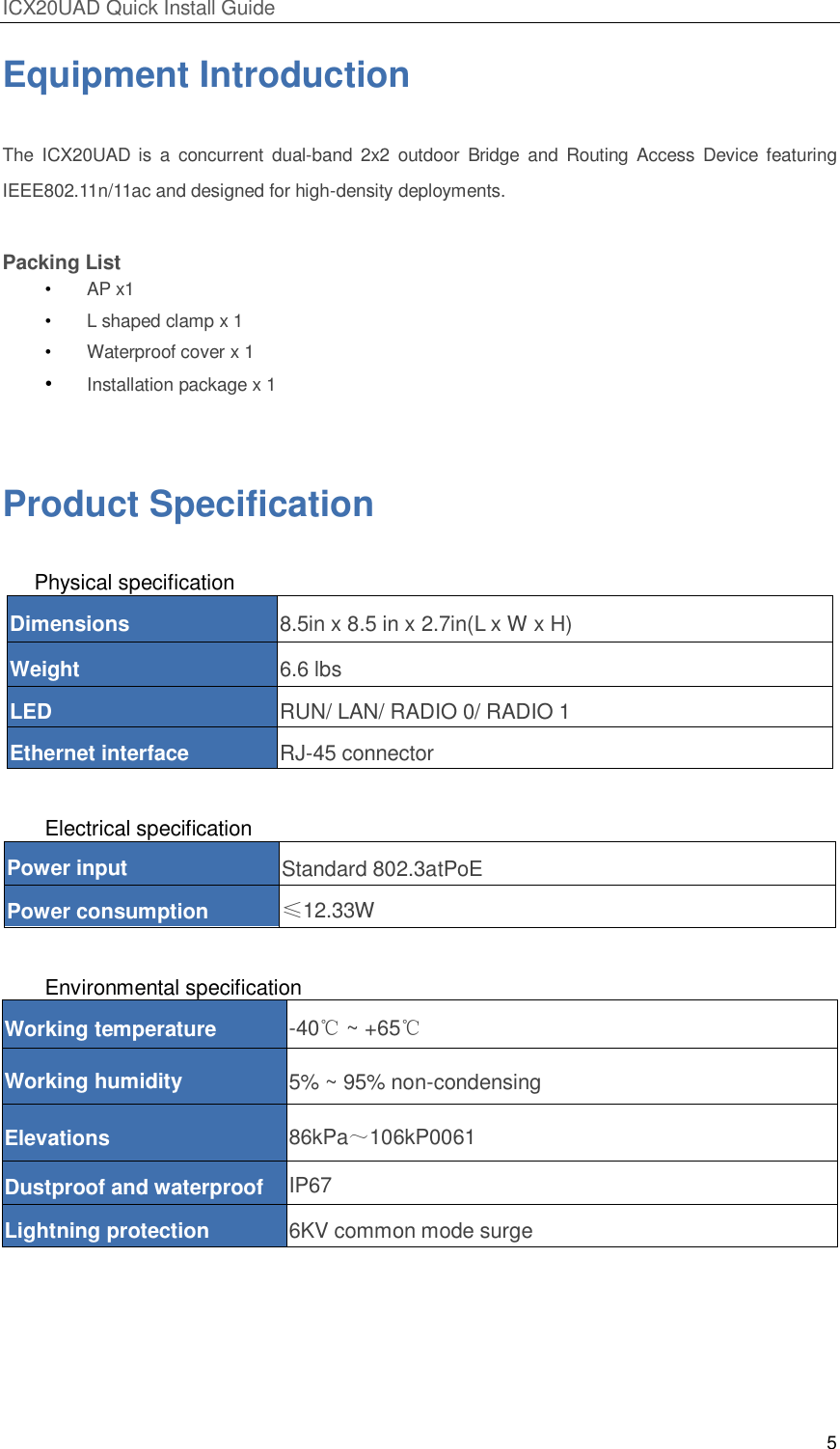
ICX20UAD Quick Install Guide 5  Equipment Introduction The  ICX20UAD  is  a  concurrent  dual-band  2x2  outdoor  Bridge  and  Routing  Access  Device  featuring IEEE802.11n/11ac and designed for high-density deployments.  Packing List • AP x1 • L shaped clamp x 1 • Waterproof cover x 1 • Installation package x 1  Product Specification Physical specification Dimensions 8.5in x 8.5 in x 2.7in(L x W x H) Weight 6.6 lbs LED RUN/ LAN/ RADIO 0/ RADIO 1 Ethernet interface RJ-45 connector  Electrical specification Power input Standard 802.3atPoE Power consumption ≤12.33W  Environmental specification Working temperature -40℃ ~ +65℃ Working humidity 5% ~ 95% non-condensing Elevations 86kPa~106kP0061 Dustproof and waterproof IP67  Lightning protection 6KV common mode surge
ICX20UAD Quick Install Guide 6  Product Hardware Overview     LED Definitions LED Function State-Color Indication RUN AP  power  /  ready status Steady - Green APis ready Red AP hardware failure Off No power to AP LAN Network Link Status Steady - Green  1000Mbps Ethernet link negotiated Steady- Yellow 10/100Mbps  Ethernet  link negotiated Flashing Ethernet link activity Off Ethernet link unavailable 0 5G Hz Radio Status Steady– Green 5GHz radio is enabled  Off 5GHz radio is disabled 1 2.4GHz Radio Status Steady– Green 2.4GHz radio is enabled  Off 2.4GHz radio is disabled  No. Name Function 1 LAN Port 10/100/1000M Base-T Ethernet port (RJ-45), used as a WAN or LAN port as well as for 802.3at PoE support 2 LEDs See LED Definition
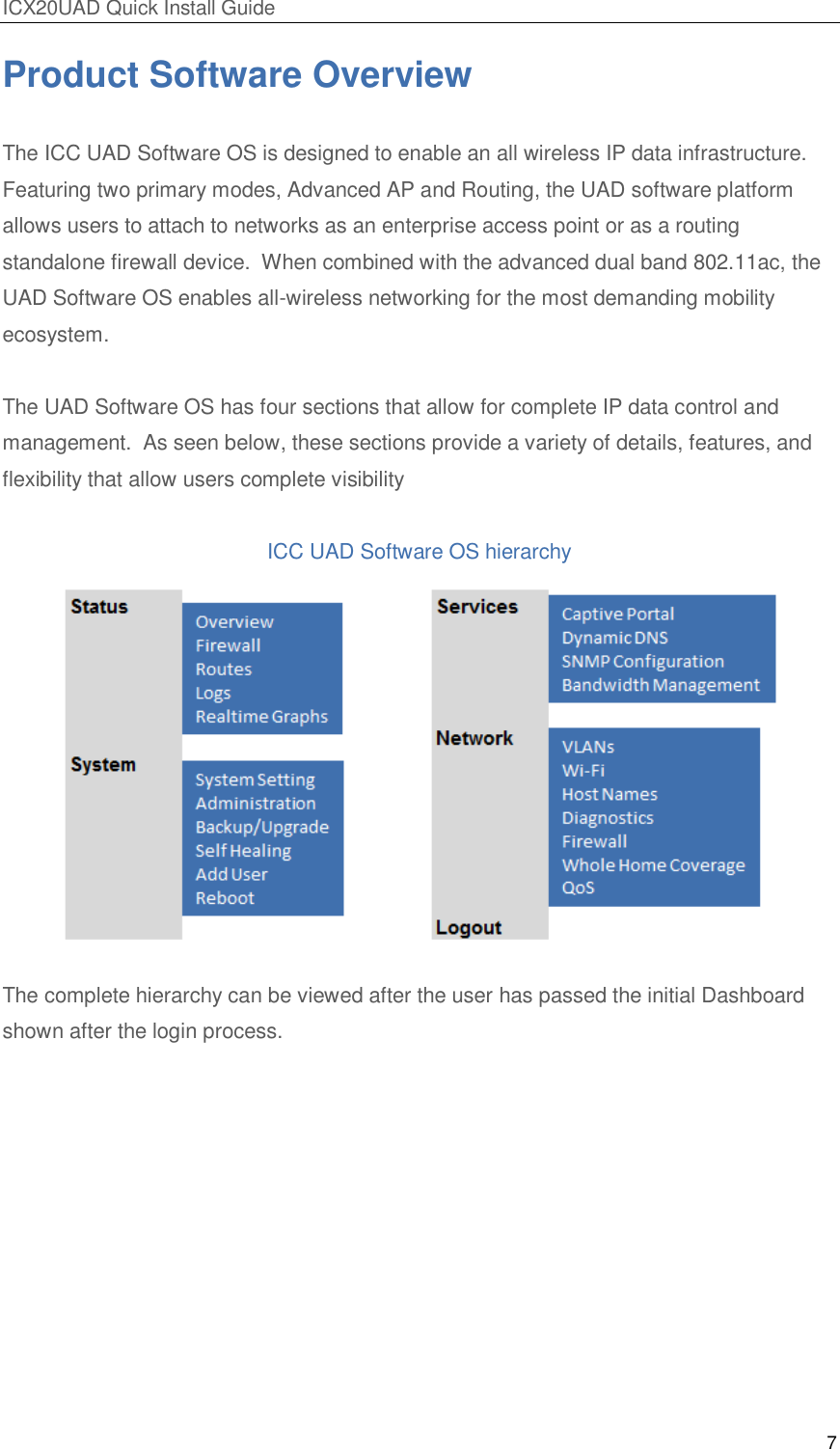
ICX20UAD Quick Install Guide 7  Product Software Overview The ICC UAD Software OS is designed to enable an all wireless IP data infrastructure.  Featuring two primary modes, Advanced AP and Routing, the UAD software platform allows users to attach to networks as an enterprise access point or as a routing standalone firewall device.  When combined with the advanced dual band 802.11ac, the UAD Software OS enables all-wireless networking for the most demanding mobility ecosystem.  The UAD Software OS has four sections that allow for complete IP data control and management.  As seen below, these sections provide a variety of details, features, and flexibility that allow users complete visibility  ICC UAD Software OS hierarchy  The complete hierarchy can be viewed after the user has passed the initial Dashboard shown after the login process.
ICX20UAD Quick Install Guide 8  Chapter 2: Installation To reduce the risk of bodily injury, electrical shock, fire, and equipment damage, read all warnings and precautions in this guide before installing or maintaining product.  NOTE: To avoid risk of injury from electrical shock or energy hazard, installation and service of this product must be performed by qualified service personnel.  NOTE: Make sure the AP fits securely on the ceiling rail when hanging the device in the ceiling.  Poor installation can cause the AP to fall and cause injury and equipment damage.  Safety Statement • To ensure optimal performance, do not install the device near the power lines, electric lamps, power grid, or in any forceful power grid location. • Ensure the power adapter you use is well grounded if used with this device.  • Install other lightning protection equipment near the device if necessary. • Use a less than 50m network cable to connect to the PoE port to ensure steady power transmission. The network cable complies with the DC resistance definition in the YD/926.2 protocol. Installation Environment • Operating ambient temperature: -40℃ ~ +65℃ • Operating ambient humidity: 5% ~ 95% non-condensing Installation mode:  • Pole mounting. Installation tool: • Screws, screw-driver, and wrench Installation site:  • Please ensure the visibility of product and no tall buildings and woods block between them.
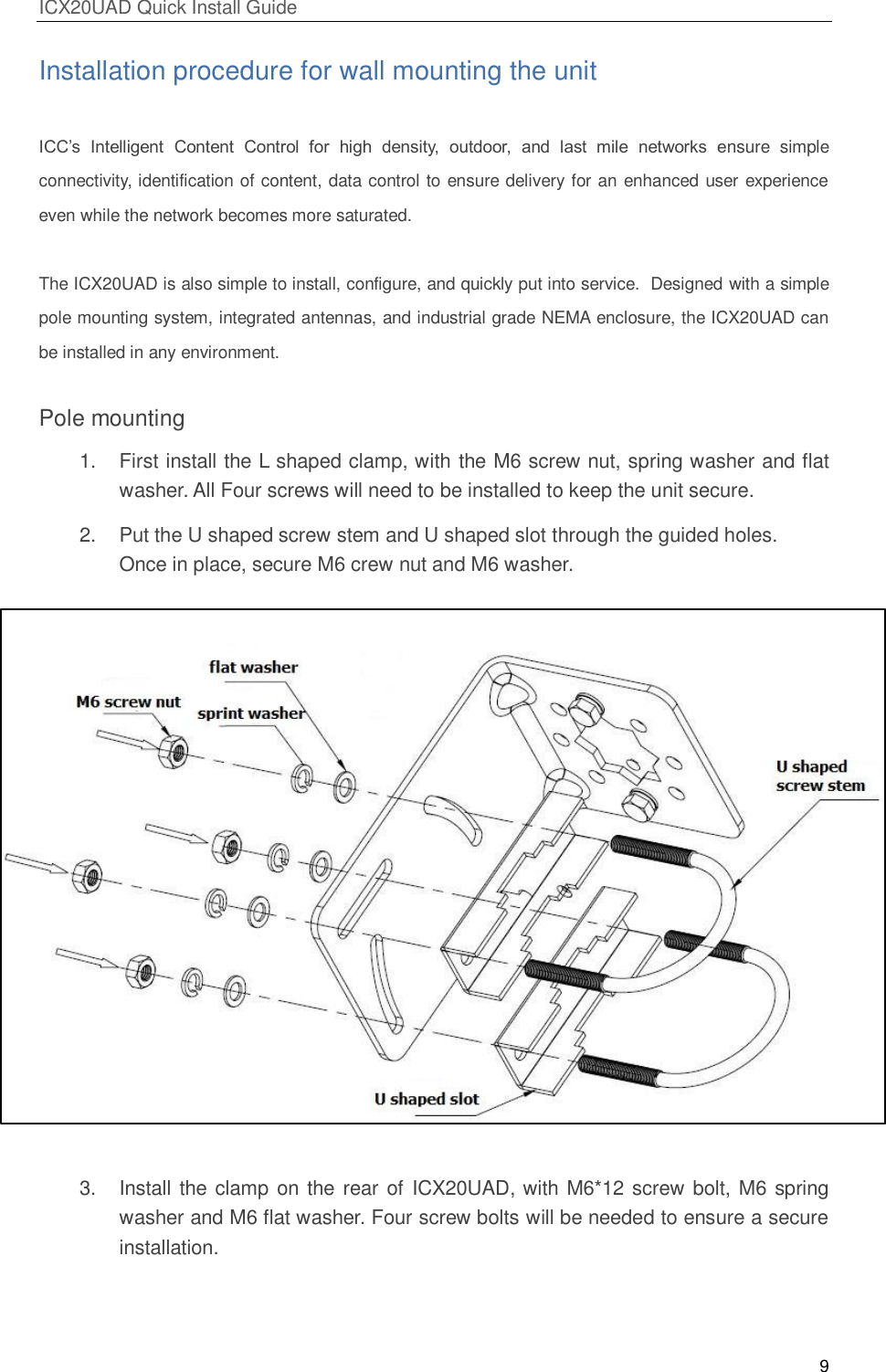
ICX20UAD Quick Install Guide 9  Installation procedure for wall mounting the unit ICC’s  Intelligent  Content  Control  for  high  density,  outdoor,  and  last  mile  networks  ensure  simple connectivity, identification of content, data control to ensure delivery for an enhanced user experience even while the network becomes more saturated.  The ICX20UAD is also simple to install, configure, and quickly put into service.  Designed with a simple pole mounting system, integrated antennas, and industrial grade NEMA enclosure, the ICX20UAD can be installed in any environment.  Pole mounting 1.  First install the L shaped clamp, with the M6 screw nut, spring washer and flat washer. All Four screws will need to be installed to keep the unit secure. 2.  Put the U shaped screw stem and U shaped slot through the guided holes. Once in place, secure M6 crew nut and M6 washer.              3.  Install the clamp on the rear of  ICX20UAD, with M6*12 screw bolt, M6 spring washer and M6 flat washer. Four screw bolts will be needed to ensure a secure installation.
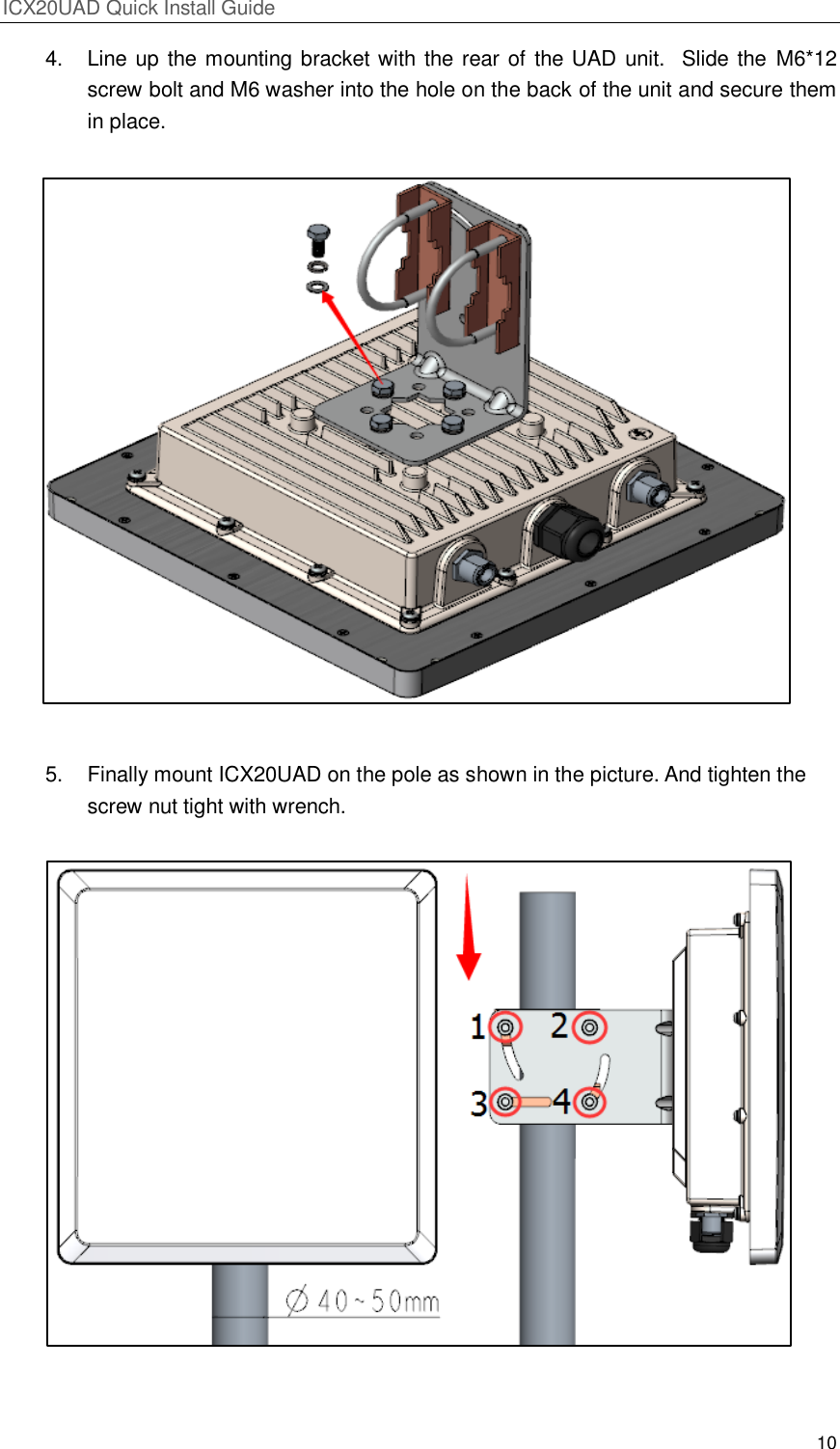
ICX20UAD Quick Install Guide 10  4.  Line up the mounting bracket with the rear of the UAD unit.  Slide the  M6*12 screw bolt and M6 washer into the hole on the back of the unit and secure them in place.  5.  Finally mount ICX20UAD on the pole as shown in the picture. And tighten the screw nut tight with wrench.
ICX20UAD Quick Install Guide 11  Chapter 3: Web User Management  While the login steps are simple, a user must understand how computer data networks operate, how to use IP addresses, and general networking theory to ensure a quick and efficient setup process.  Logging in to the Web Page 1.  To configure PC IP address, fill 192.168.0.x (where 'x' is a numeric value) in ―IP address‖ and 255.255.255.0 in ―Subnet mask‖(set Window7 as an  example to show the properties)   2.  Input the default IP address 192.168.0.1 in the address bar of the web browser and press Enter.     3.  Enter  username  and  password  (username:  admin,  password:  password), after password authentication is successful, the web page is displayed.
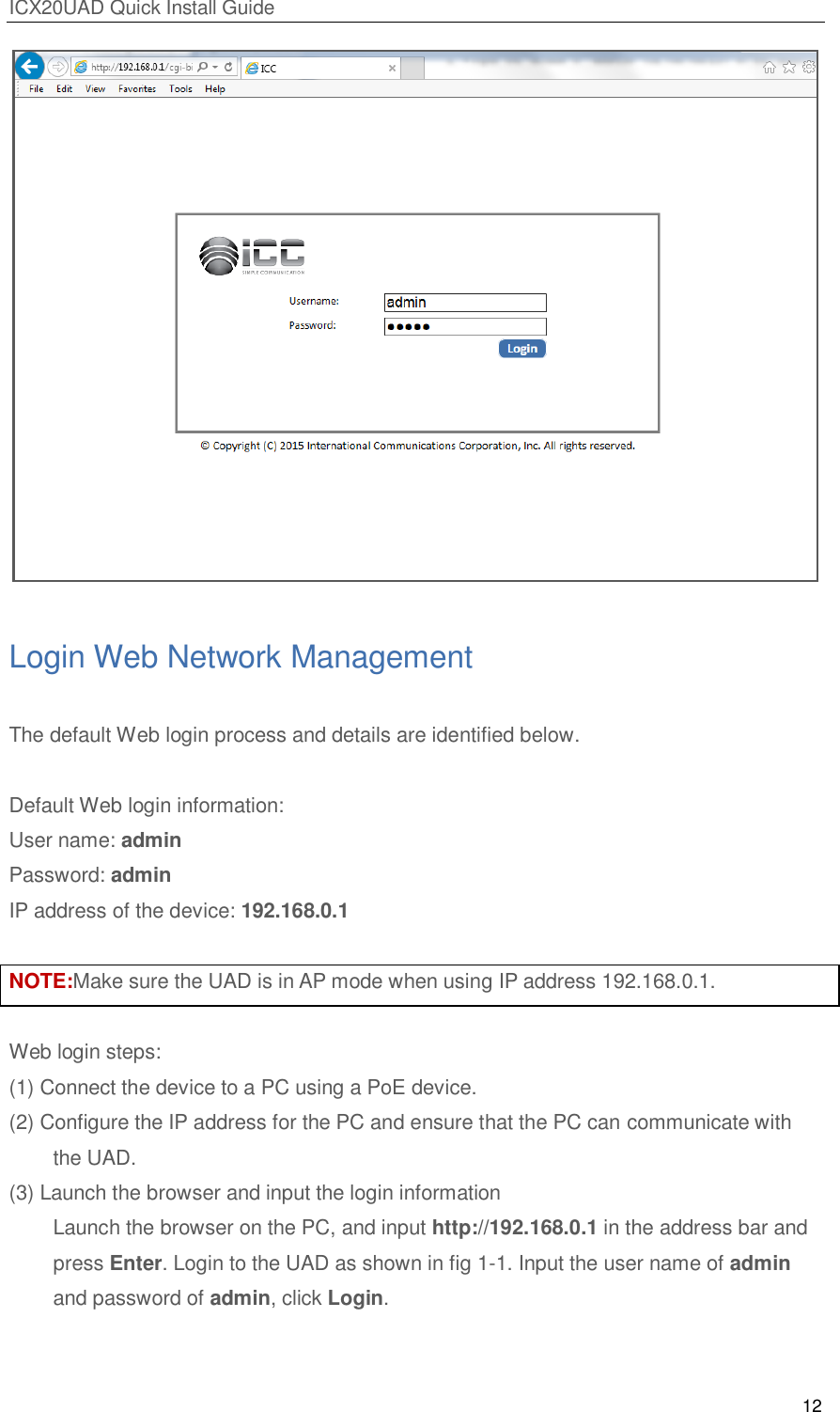
ICX20UAD Quick Install Guide 12   Login Web Network Management The default Web login process and details are identified below.    Default Web login information: User name: admin Password: admin IP address of the device: 192.168.0.1  NOTE:Make sure the UAD is in AP mode when using IP address 192.168.0.1.    Web login steps: (1) Connect the device to a PC using a PoE device. (2) Configure the IP address for the PC and ensure that the PC can communicate with the UAD. (3) Launch the browser and input the login information  Launch the browser on the PC, and input http://192.168.0.1 in the address bar and press Enter. Login to the UAD as shown in fig 1-1. Input the user name of admin and password of admin, click Login.
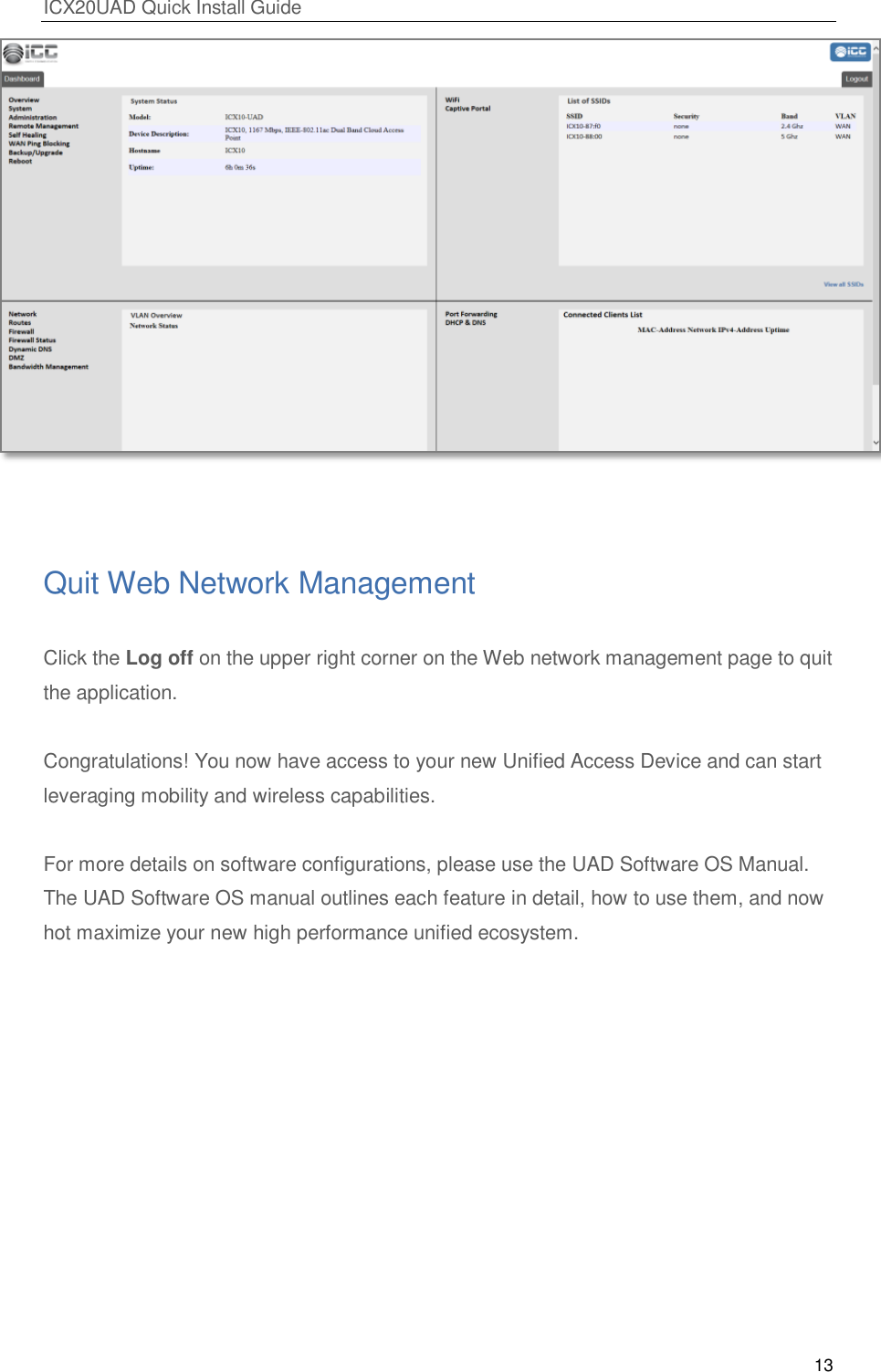
ICX20UAD Quick Install Guide 13                Quit Web Network Management Click the Log off on the upper right corner on the Web network management page to quit the application.  Congratulations! You now have access to your new Unified Access Device and can start leveraging mobility and wireless capabilities.  For more details on software configurations, please use the UAD Software OS Manual.  The UAD Software OS manual outlines each feature in detail, how to use them, and now hot maximize your new high performance unified ecosystem.
ICX20UAD Quick Install Guide 14  Regulatory and compliance The ICC icXchange™ access points must be installed and used in strict accordance with the manufacturer’s instructions as described in the user documentation that comes with the product. This product contains encryption. It is unlawful to export out of the United States without obtaining a U.S. Export License.  This product does not contain any user serviceable components. Any unauthorized product changes or modifications will invalidate ICC’s warranty and all applicable regulatory certifications and approvals.  Only antennas specified for your region by ICC can be used with this product. The use of external amplifiers or non-ICC antennas may invalidate regulatory certifications and approvals.  Declaration of ROHS compliance International Communications Corporation hereby declares that the product ICC icXchange™ access point has been designed and manufactured in accordance with Directive 2002/95/EC of the European Commission on the restriction of certain hazardous substances in electrical and electronic equipment. (ROHS)      CAUTION: Exposure to radio frequency radiation   FCC warning  This device generates and radiates radio-frequency energy. In order to comply with FCC radio-frequency exposure guidelines for an uncontrolled environment, this equipment must be installed and operated while maintaining a minimum body-to-antenna distance of 120 cm (approximately 8 in).  Canada warning The radio equipment installer must ensure that the antenna is located or pointed so that it does not emit RF field in excess of Health Canada limits for the general population; consult Safety Code 6, obtainable from Health Canada’s website: www.hc-sc.gc.ca/rpb.
ICX20UAD Quick Install Guide 15  This equipment complies with IC radiation exposure limits set forth for an uncontrolled environment. End users must follow the specific operating instructions for satisfying RF exposure compliance. This equipment should be installed and operated with a minimum distance of 120 cm between the radiator and your body. USA — Radio frequency requirements This device must not be co-located or operated in conjunction with any other antenna or transmitter. This device is for indoor use only when using in the 5.15 to 5.25 GHz, 5.745 to 5.85GHzfrequency range,   Industry Canada — Radio frequency compliance This device complies with RSS 210 of Industry Canada. Operation is subject to the following two conditions: (1) this device may not cause interference, and (2) this device must accept any interference, including interference that may cause undesired operation of this device. L’utilisation de cedispositifestautoriséeseulement aux conditions suivantes: (1) il ne doit pas produire de brouillage et (2) l’utilisateur du dispositifdoitétre prêt à accepter tout brouillageradioélectriquereçu, mêmesicebrouillageest susceptible de compromettre le fonctionnement du dispositif.  The term ―IC‖ before the equipment certification number only signifies that the Industry Canada technical specifications were met.  To reduce potential radio interference to other users, the antenna type and its gain should be chosen so that the equivalent isotropically radiated power (EIRP) is not more than the amount required for successful communication. To prevent radio interference to the licensed service, this device is intended to be operated indoors and away from windows to provide maximum shielding. Equipment (or its transmit antenna) that is installed outdoors is subject to licensing.  Pour empecher que cetappareil cause du brouillage au service faisantl’objetd’unelicence, ildoitetre utilize a l’interieur et devraitetre place loin des fenetresafin de Fournier un ecram de blindage maximal. Si le matriel (ou son antenned’emission) estinstalle a l’exterieur, ildoit faire l’objetd’unelicence.  This device must not be co-located or operated in conjunction with any other antenna or transmitter.
ICX20UAD Quick Install Guide 16  USA  –  Federal  Communications  Commission (FCC) EMC compliance This equipment has been tested and found to comply with the limits for a Class B digital device, pursuant to Part 15 of the FCC Rules. These limits are designed to provide reasonable protection against harmful interference in a residential installation. This equipment generates, uses, and can radiate radio frequency energy and, if not installed and used in accordance with the instructions, may cause harmful interference to radio communications.  However, there is no guarantee that interference will not occur in a particular installation. If this equipment does cause harmful interference to radio or television reception, which can be determined by turning the equipment off and on, the user is encouraged to try to correct the interference by one or more of the following measures:  • Reorient or relocate the receiving antenna. • Increase the separation between the equipment and receiver. • Connect the equipment into an outlet on a circuit different from that to which the    receiver is connected. • Consult the dealer or an experienced radio/TV technician for help.  The user may find the following booklet prepared by the Federal Communications Commission helpful: The Interference Handbook. This booklet is available from the US Government Printing Office, Washington, DC 20402. Stock No. 004-000-0034504.  ICC is not responsible for any radio or television interference caused by unauthorized modification of the devices included with this ICC Wireless 11b/g PoE Access Point, Model icXchange™ ICX20UAD, or the substitution or attachment of connecting cables and equipment other than specified by ICC.  The correction of interference caused by such unauthorized modification, substitution, or attachment will be the responsibility of the user.  Changes or modifications not expressly approved by ICC could void the user’s authority to operate this equipment. Manufacturer’s FCC declaration of conformity Model Number: ICX20UAD International Communications Corporation Equipment Type: WLAN Access Point Complies with Part 15 of the FCC rules. Operation is subject to the following two conditions: (1) this device may not cause harmful interference, and (2) this device must
ICX20UAD Quick Install Guide 17  accept any interference received, including interference that may cause undesired operation.   Industry Canada – RF compliance This device complies with RSS 210 of Industry Canada.  Operation is subject to the following two conditions: (1) this device may not cause interference, and (2) this device must accept any interference, including interference that may cause undesired operation of this device.  L’utilisation de cedispositifestautoriséeseulement aux conditions suivantes: (1) il ne doit pas produire de brouillage et (2) l’utilisateur du dispositifdoitétre prêt à accepter tout brouillageradioélectriquereçu, mêmesicebrouillageest susceptible de compromettre le fonctionnement du dispositif.  The term ―IC‖ before the equipment certification number only signifies that the Industry Canada technical specifications were met.  To reduce potential radio interference to other users, the antenna type and its gain should be chosen so that the equivalent isotropically radiated power (EIRP) is not more than the amount required for successful communication. To prevent radio interference to the licensed service, this device is intended to be operated indoors and away from windows to provide maximum shielding. Equipment (or its transmit antenna) that is installed outdoors is subject to licensing. Pour empecher que cetappareil cause du brouillage au service faisantl’objetd’unelicence, ildoitetre utilize a l’interieur et devraitetre place loin des fenetresafin de Fournier un ecram de blindage maximal. Si le matriel (ou son antenned’emission) estinstalle a l’exterieur, ildoit faire l’objetd’unelicence.  This device must not be co-located or operated in conjunction with any other antenna or transmitter.   Industry Canada – Emissions compliance statement This Class B digital apparatus complies with Canadian ICES-003. Avis de Conformité à la Réglementationd’Industrie Canada.Cetappareilnumérique de la classe B est conform à la norme NMB-003 du Canada.
ICX20UAD Quick Install Guide 18   Waste of Electrical and Electronic Equipment Directive  2002/96EC  on  Waste  of  Electrical  and  Electronic  Equipment  are designed to tackle the fast increasing waste stream of electrical and electronic equipment and complements European Union measures on landfill and incineration of waste. CIG products at end of life are subject to separate collection and treatment in the EU Member Statues and therefore are marked with the symbol.  European Union RoHS  EU  Restriction  and  Hazardous  Substances  Directive  2011/65/EC  (RoHS) restricts  the  use  of  specific  hazardous  materials  in  manufacture  of  electrical  and electronic  equipment.  Specially,  restricted  materials  are  Lead,  Cadmium,  Mercury, Hexavalent Chromium, and Bromine. CIG products comply with this requirement and all marked with ―RoHS‖ shown at the left.
ICX20UAD Quick Install Guide 19  Warranty All IcXchange™hardware, excluding fans and internal power supplies, is under warranty for the life of the product and 2 years after the product is End-of-Life.  Fans and internal power supplies are not included in the lifetime warranty and are covered by a warranty period of five (5) years. Should any IcXchange® product fail to function as warranted, ICC may, at  its own discretion, either repair or replace the defective product with a similar or functionally equivalent product, during the applicable warranty period. ICC will endeavor to repair or replace any product returned under warranty within thirt30) days of its receipt of the returned product.  End-of-Life of a product is defined as the date that ICC no longer makes the product readily available for sale in its authorized channels.  Support for IcXchange™ hardware can be extended via an IcXchange® Service Contract.  ICC warrants that for a period of two (2) years from the invoice date on the authorized ICC distributor’s invoice that the Software supplied by ICC will perform substantially in  accordance with the specifications set forth in the IcXchange® user guide accompanying the Product. In the case of a defect, which is reproducible by ICC, the Software will be either repaired or replaced, at ICC’s option.  All products that are returned to ICC become the property of ICC. Repaired or replacement products may be refurbished or contain refurbished materials. Any replaced or repaired product carries the remainder of the initial warranty. ICC is not responsible for any Customer or custom software or firmware, configuration information or Customer memory data contained in, stored on, or integrated with any products returned to ICC pursuant to any warranty. Customer must back up or otherwise retain any such information or data prior to shipping product to ICC. Products returned to ICC should have any customer-installed accessory or add-on components, such as expansion modules, removed prior to returning the product for replacement. ICC is not responsible for these items if they are returned to ICC with the product.  Prior to returning any defective product, Customers must contact ICC for a Return Material Authorization number (―RMA‖). Proof of the original purchase may be required. Any product returned to ICC without a valid RMA number clearly marked on the outside of the package will be returned to the customer at customer’s expense. For warranty claims within the US and Canada, please call our toll-free customer support number at 1-844-242-9246. Customers are responsible for all shipping charges and risk of loss from their location to ICC. ICC is responsible for return shipping charges and risk of loss from ICC to customer’s location.  WARRANTIES EXCLUSIVE: IF AN ICC PRODUCT DOES NOT OPERATE AS WARRANTED ABOVE, CUSTOMER’S SOLE REMEDY SHALL BE REPAIR OR REPLACEMENT OF THE PRODUCT IN QUESTION, AT ICC’S OPTION. THE
ICX20UAD Quick Install Guide 20  FOREGOING WARRANTIES AND REMEDIES ARE EXCLUSIVE AND ARE IN LIEU OF ALL OTHER WARRANTIES OR CONDITIONS, EXPRESS OR IMPLIED, EITHER IN FACT OR BY OPERATION OF LAW, STATUTORY OR OTHERWISE, INCLUDING WARRANTIES OR CONDITIONS OF MERCHANTABILITY AND FITNESS FOR A PARTICULAR PURPOSE. PRODUCTS ARE NOT WARRANTED TO OPERATE UNINTERRUPTED OR ERROR FREE. ICC NEITHER ASSUMES NOR AUTHORIZES ANY OTHER PERSON TO ASSUME FOR IT ANY OTHER LIABILITY IN CONNECTION WITH THE SALE, INSTALLATION, MAINTENANCE OR USE OF ITS PRODUCTS. ICC SHALL NOT BE LIABLE UNDER THIS WARRANTY IF ITS TESTING AND EXAMINATION DISCLOSE THE ALLEGED DEFECT IN THE PRODUCT DOES NOT EXIST OR IF IN ITS SOLE JUDGMENT THE ALLEGED DEFECT WAS CAUSED BY CUSTOMER’S OR ANY THIRD PERSON’S MISUSE, NEGLECT, IMPROPER INSTALLATION OR TESTING, UNAUTHORIZED ATTEMPTS TO REPAIR, OR ANY OTHER CAUSE BEYOND THE RANGE OF THE INTENDED USE, OR BY ACCIDENT, FIRE, LIGHTNING OR OTHER HAZARD.  LIMITATION OF LIABILITY: TO THE FULLEST EXTENT ALLOWED BY LAW, WHETHER BASED IN CONTRACT OR TORT (INCLUDING NEGLIGENCE), ICC SHALL NOT BE LIABLE FOR INCIDENTAL, CONSEQUENTIAL, INDIRECT, SPECIAL, OR PUNITIVE DAMAGES OF ANY KIND, OR FOR LOSS OF REVENUE, LOSS OF PROFIT, LOSS OF BUSINESS, OR OTHER FINANCIAL LOSS ARISING OUT OF OR IN CONNECTION WITH THE SALE, INSTALLATION, MAINTENANCE, USE, PERFORMANCE, FAILURE, OR INTERRUPTION OF ITS PRODUCTS, EVEN IF ICC OR ITS AUTHORIZED DISTRIBUTOR OR RESELLER HAS BEEN ADVISED OF THE POSSIBILITY OF SUCH DAMAGES. THE MAXIMUM LIABILITY OF ICC UNDER THIS WARRANTY IS LIMITED TO THE PURCHASE PRICE OF THE PRODUCT COVERED BY THIS WARRANTY. THIS WARRANTY GIVES YOU SPECIFIC LEGAL RIGHTS, WHICH MAY VARY FROM STATE TO STATE. NOTHING IN THIS WARRANTY SHALL BE TAKEN TO AFFECT YOUR STATUTORY RIGHTS.
ICX20UAD Quick Install Guide 21                                International Communications Corporation, Inc. www.intcomcorp.com support@intcomcorp.com  © 2015 International Communications Corporation, Inc. All Rights Reserved. Printed in U.S.A. Issue 1.0  4/15/15. icXchange™ is the registered trademark of International Communications Corporation ,Inc.  Acrobat Reader is a registered trademark of Adobe Systems, Inc. Mac OS is a registered trademark of Apple, Inc. Windows, Windows Server 2003, Windows Vista and Microsoft Internet Explorer are registered trademarks of Microsoft. Cisco is a registered trademark of Cisco, Inc. IBM is a registered trademark of International Business Machines Corporation. All other trademarks are property of their respective owners. Test results and examples are subject to unique business conditions, client IT environment, ICC products deployed, and other factors. These results may not be typical; your results may vary.

Navigation menu