ConnectScale CS2018 Connect Scale User Manual Manual

ConnectScale, LLC Connect Scale Manual

Manual

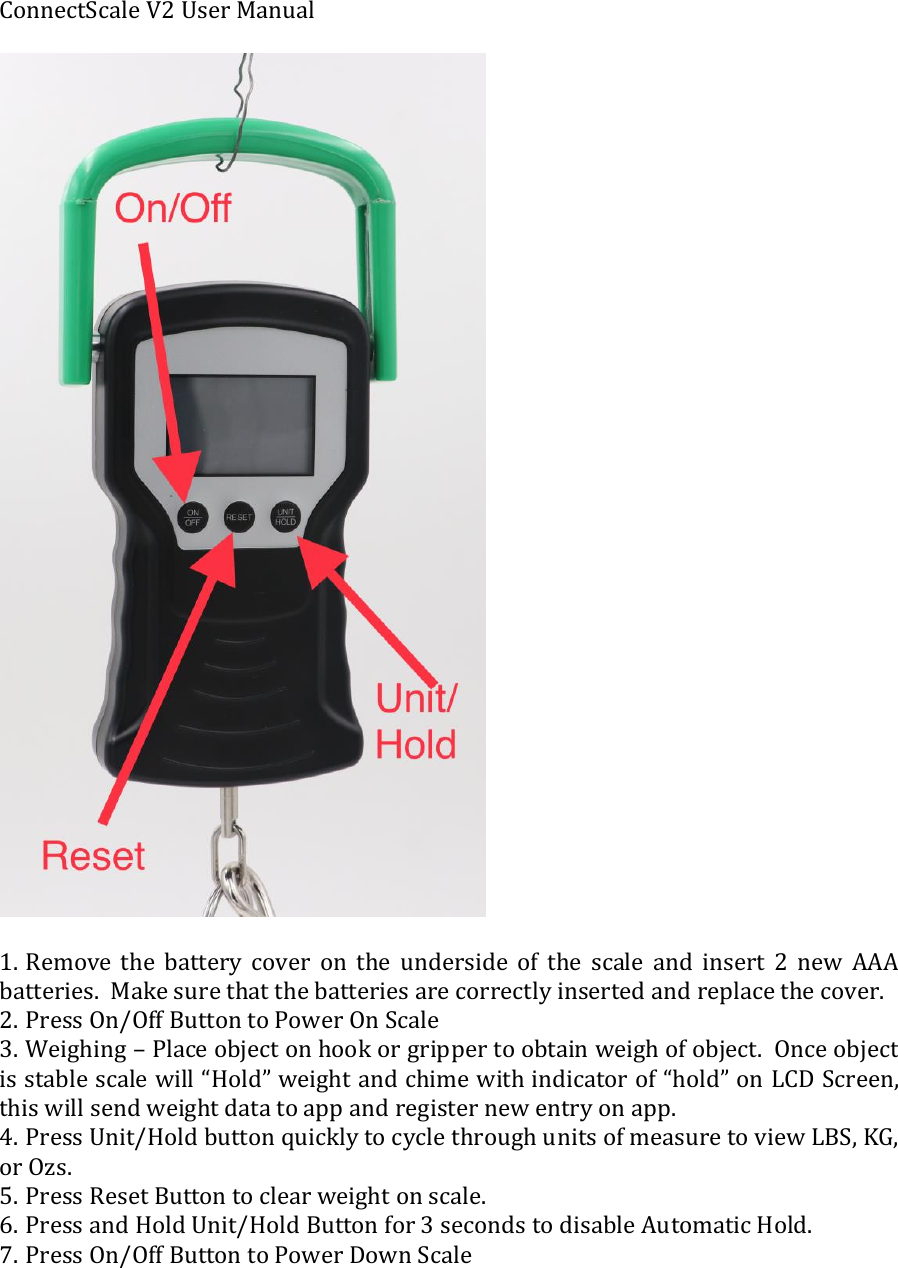
ConnectScale V2 User Manual    1. Remove  the  battery  cover  on  the  underside  of  the  scale  and  insert  2  new  AAA batteries.  Make sure that the batteries are correctly inserted and replace the cover.  2. Press On/Off Button to Power On Scale 3. Weighing – Place object on hook or gripper to obtain weigh of object.  Once object is stable scale will “Hold” weight and chime with indicator of “hold” on LCD Screen, this will send weight data to app and register new entry on app.   4. Press Unit/Hold button quickly to cycle through units of measure to view LBS, KG, or Ozs.  5. Press Reset Button to clear weight on scale.  6. Press and Hold Unit/Hold Button for 3 seconds to disable Automatic Hold. 7. Press On/Off Button to Power Down Scale
Mobile App Bluetooth Set Up and Operation: 1. Download the ConnectScale Mobile App from the Google Play or Apple App Store.  You can go to www.ConnectScale.com to find links.  2. Go to your settings on iPhone or Android Mobile device and scroll down to Bluetooth tab. Make sure Bluetooth is turned on, then back out of settings.  3. Power on you ConnectScale by pressing ON/OFF button if scale is not already on.   4. Go into the ConnectScale App.  The 1st time you log in you will need to create an account with email and password.  Agree to terms of service.   Once you have registered your account, click on the last tab “setting icon” which looks like a sprocket.  Scroll down to the section labeled Bluetooth, and find “My Device.” Click on ConnectScale, and your mobile device will pair with the ConnectScale Bluetooth® Digital Fish Scale.   Look at the top right corner and you will see the Bluetooth symbol will be highlighted in white and you know you are paired.  5. Now you can begin fishing. Once you catch a fish and hook it to the scale keep the fish on the scale until it says, “HOLD.” The weight and air temperature will then be sent to your app. Once the data has been loaded to the app you can then add additional details:  picture, species, length, bait/lure, fishing technique, waterway, and water temp. 6. If you wish to use a lip gripper, net, or sling you can tare the weight by attaching the tool when empty to the scale until a “HOLD” weight is captured.  Then while the tool is on the scale simply hit the “RESET” button on the scale to tare out the weight of the tool.   Now attach your catch to the tool of your choice and weigh the catch to capture an accurate reading.
FCC Statement:This device complies with part 15 of the FCC Rules. Operation is subject to the followingtwo conditions: (1) This device may not cause harmful interference, and (2) this devicemust accept any interference received, including interference that may cause undesiredoperation.This equipment has been tested and found to comply with the limits for a Class B digitaldevice, pursuant to part 15 of the FCC Rules. These limits are designed to provide reasonable protection against harmful interference in a residential installation. This equipment generates, uses and can radiate radio frequency energy and, if not installed and used in accordance with the instructions, may cause harmful interference to radio communications. However, there is no guarantee that interference will not occur in a particular installation. If this equipment does cause harmful interference to radio or television reception, which can be determined by turning the equipment off and on, theuser is encouraged to try to correct the interference by one or more of the following measures:—Reorient or relocate the receiving antenna.—Increase the separation between the equipment and receiver.—Connect the equipment into an outlet on a circuit different from that to which the receiver is connected.—Consult the dealer or an experienced radio/TV technician for help.Caution: Any changes or modifications not expressly approved by the party responsiblefor compliance could void the user's authority to operate the equipment.

Navigation menu