API_Codec_Quick_Start_Guide_ryan_reviewx API Codec Quick Start Guide
2015-10-16
: Controlanything Api Codec Quick Start Guide API_Codec_Quick_Start_Guide QSG
Open the PDF directly: View PDF  .
.
Page Count: 14
NATIONAL CONTROL DEVICES
API Codec Quick Start Guide

N A T I O N A L C O N T R O L D E V I C E S
API Codec Quick Start Guide
National Control Devices, LLC
PO Box 455
Osceola, MO 64776
Phone 417.646.5644 • Fax (866) 562-0406
ControlAnything.com
© Copyright 2015
All Rights Reserved.
Notice: Portions of this manual require internet access.

Table of Contents
Introduction .............................................................................. 1
What is the API Codec? ............................................................................ 1
Device Identification ........................................................................ 2
API in Base Station ......................................................................... 3
Base Station: API Codec .......................................................................... 4
Getting Started ......................................................................... 5
Coding Commands in API Format .................................................. 5
Standard Command: ................................................................................. 5
Send in API Encoded Format: .................................................................. 5
Calculating the Checksum: ....................................................................... 6
Checksum Notes:...................................................................................... 6
API Codec Options:......................................................................... 7
API Timeout .............................................................................................. 7
Testing for API Support ............................................................................ 7
Updated API Structure for E3C DropNet Devices .................................... 8
Notes from NCD Developers .................................................................... 9
Technical Support .................................................................. 10
Contact Information ....................................................................... 11

1
Introduction
What is the API Codec?
he API Codec is a faster, more reliable method of communicating to NCD
devices, particularly when working with network- or wireless-based devices.
The API Codec makes communications more resilient to errors and eliminates
timeout requirements of standard communication methods. While you will
benefit from speed and reliability, data must be encoded and decoded to fully
support the API Codec.
If you are working with TCP/IP or Wireless communications, you might want to
consider using the API Codec to handle all communication functions. The API
Codec will “wrap” standard commands with a Header, Byte Counter, and a
Checksum, which eliminates the need for timeout command processing (the
standard method of communications which stalls processing of commands).
To better understand why the API Codec was created, it is important to
understand standard timeout based communications. Timeout based
communications means you send your command to the controller, the controller
waits until you stop sending data, times out, processes your command, and reports
data back to the host computer. The API Codec eliminates the Timeout (and
delay) from the standard protocol. Because the API Codec includes a checksum,
invalid data is automatically discarded to prevent false processing of commands.
The API Codec does not interfere with standard communications in any way. If
you send a standard command to an API capable controller, you will get a
standard response. If you send an API Encoded command to an API capable
controller, you will get an API Encoded response. So any controller that supports
the API Codec is 100 percent backward compatible with standard communication
protocols. The API Codec should be thought of as a new layer of
communications that operates 100 percent independent of standard
communication protocols. Your software may be written with a mix of API and
Standard communication functions. Commands that require optimal reliability
can be sent using API communications while standard communications can be
used to preserve compatibility with older portions of your software.
Chapter
T
2
Device Identification
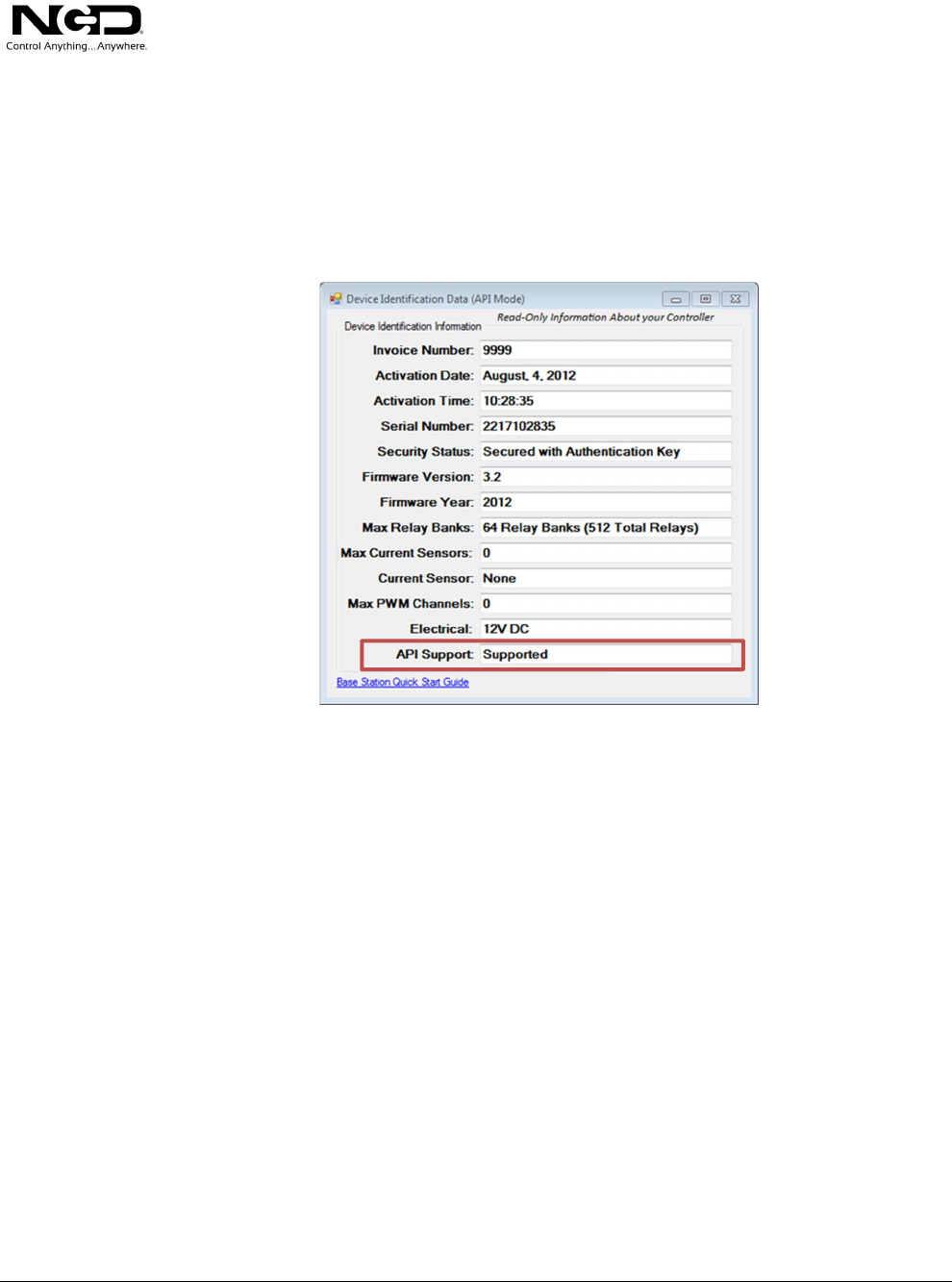
Not all controllers support the API Codec. Click Device Identification and look
at the API Support status field. All NCD devices with firmware version 3.2 or
later will support API Communications. If your controller supports the API
Codec, the word “Supported” will be displayed as shown below:
3
API in Base Station
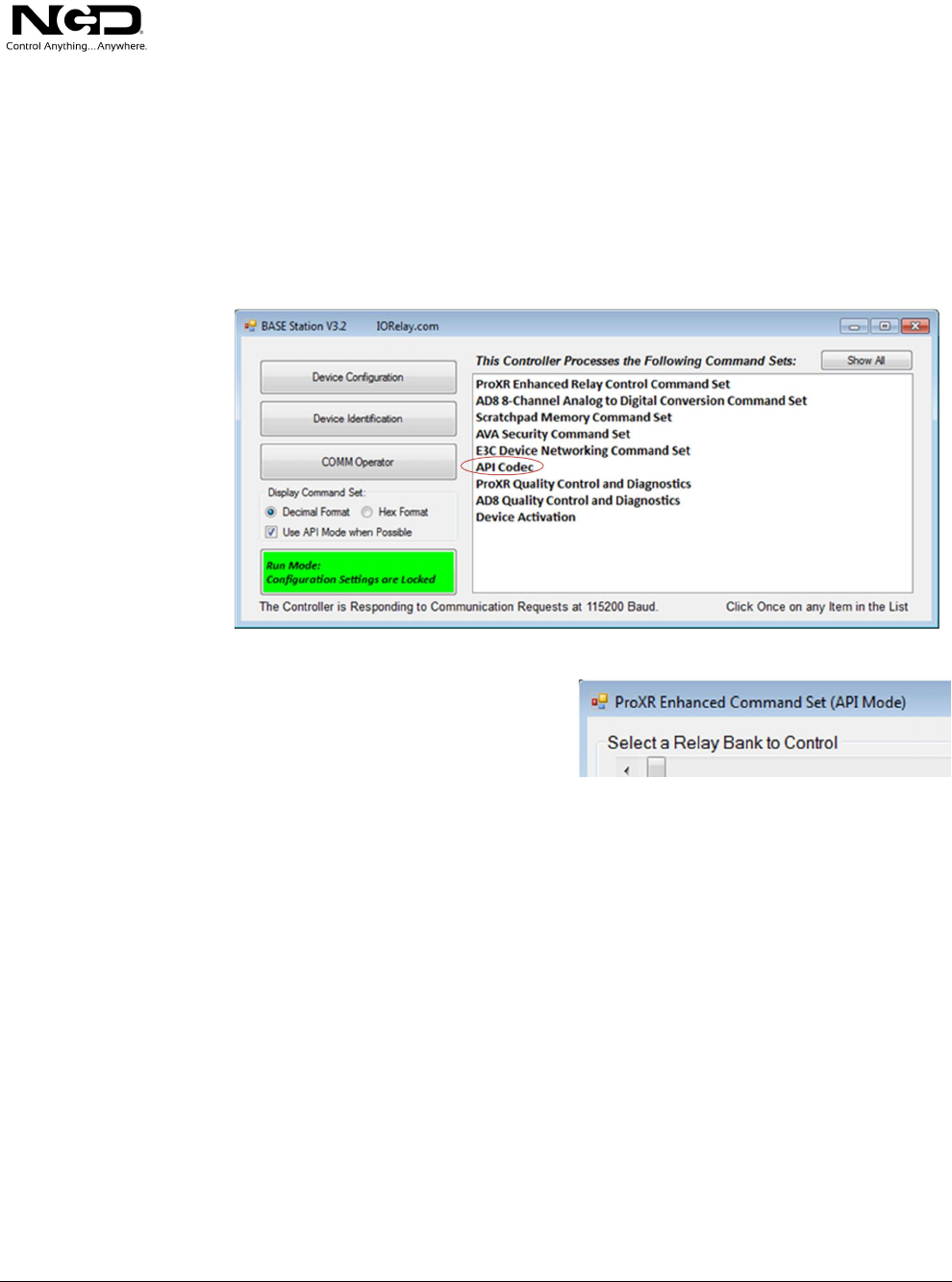
Beginning with Version 3.2 of Base Station, the Base Station software attempts to
communicate all commands in API format if API mode is supported. The “Use
API Mode when Possible” check box will be checked by default and all
subsequent portions of Base Station will communicate in API mode when
possible.
The top of all forms that support API
will indicate (API Mode) as shown here
indicating all communication is
formatted in API Format.
You may turn this off by unchecking the “Use API Mode when Possible” on the
main Base Station screen.
4
Base Station: API Codec
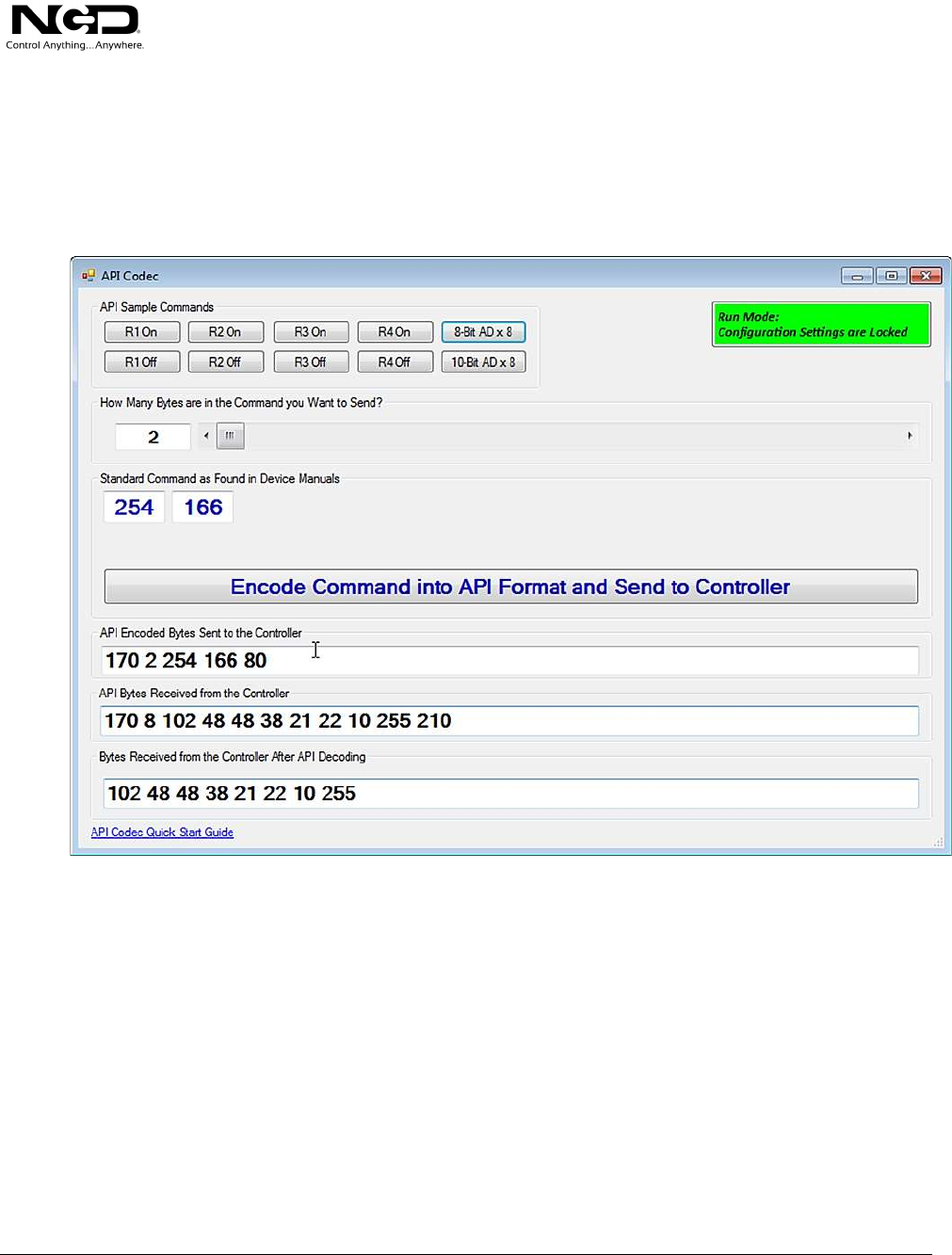
To help users better-understand the API Codec, a new control panel was created
that allows you to enter commands in Standard Format and encode/decode the
responses. This is a valuable learning tool for users who may wish to learn and
troubleshoot the API Codec.
Move the Slider to select how many bytes you would like to send. This value
should match the number of bytes in the standard command. In the example
above, the Standard command that we want to encode is 254, 166 (two bytes). By
clicking the blue “Encode” button as shown above, these data are wrapped with a
Header, Number of Bytes, and is finished with a checksum (a value of 80 shown
above). When a command is sent in API format, the controller responds in API
format. In this case, the controller will report back 8 bytes indicating the 8-bit
A/D values of analog inputs 1-8 (not supported by all controllers). The controller
will respond with a header byte of 170, followed by the number of bytes to expect
(8), followed by 8 bytes of data, concluding with a checksum of 210 as shown
above.
The API decoded data that you actually want to obtain and use is shown at the
bottom text field (102 48 48 38 21 22 10 255).

5
Getting Started
Coding Commands in API Format
Coding Commands in API Format is easy. Let’s take a simple command and
encode it for API Communications. The command 254, 33 is used to test two-
way communications. If we send this command to the controller, the device will
return 85 in Run Mode, 86 in Configuration Mode, and 87 in Security Lockdown
Mode.
Standard Command:
Send Bytes: Byte 1: Byte 2:
Function: Test Two-Way Communications
Decimal Value 254 33
Receive Byte: 85
Send in API Encoded Format:
Send Bytes: Byte 1: Byte 2: Byte 3: Byte 4: Byte5:
Decimal Value 170 2 254 33 203
Byte 1: 170 Enter API Encoding Format Command
Byte 2: 2 Contains the Number of Bytes in the Command that will be sent to the controller
Byte 3: 254 Standard Command (Byte 1 of 2)
Byte 4: 33 Standard Command (Byte 2 of 2)
Byte 5: 203 LSB Checksum (170+2+254+33)=459 (459 AND 255)=203
When an API Command is sent, the controller will send all responses to your
commands in API Mode. You will receive the following bytes from the
controller:
Receive Bytes: 170 1 86 1
Byte 1: 170 Controller will encode the Response Beginning with 170 as a Header
Byte 2: 1 Number of Bytes to expect from the Controller
Byte 3: 86 86 is the actual data byte you will receive from the controller
Byte 4: 1 LSB Checksum Value of Response (170+1+86)=257 (257 AND 255)=1
Chapter

6
Calculating the Checksum:
In order to use the API Codec, it is important that you properly calculate the
Checksum for both coding and decoding API communications. The Checksum is
very easy to calculate. Simply add all bytes together (including the Header Byte
170, and the Byte that indicates of number of bytes in the packet) then use the
Mathematical “AND” function to isolate the Least Significant Byte:
459 AND 255 = 203
257 AND 255 = 1
Checksum Notes:
Some standard commands (Non-API) may require a Checksum to process
properly. This checksum must be wrapped into the API Codec, so essentially
these commands will have two checksums. The first checksum will be required as
part of the original command, the second checksum will be required by the API
Codec. Make sure both checksums are included or the API Codec will not
function properly.
7
API Codec Options:
API Timeout
There is only one important parameter that may be changed for the API Codec.
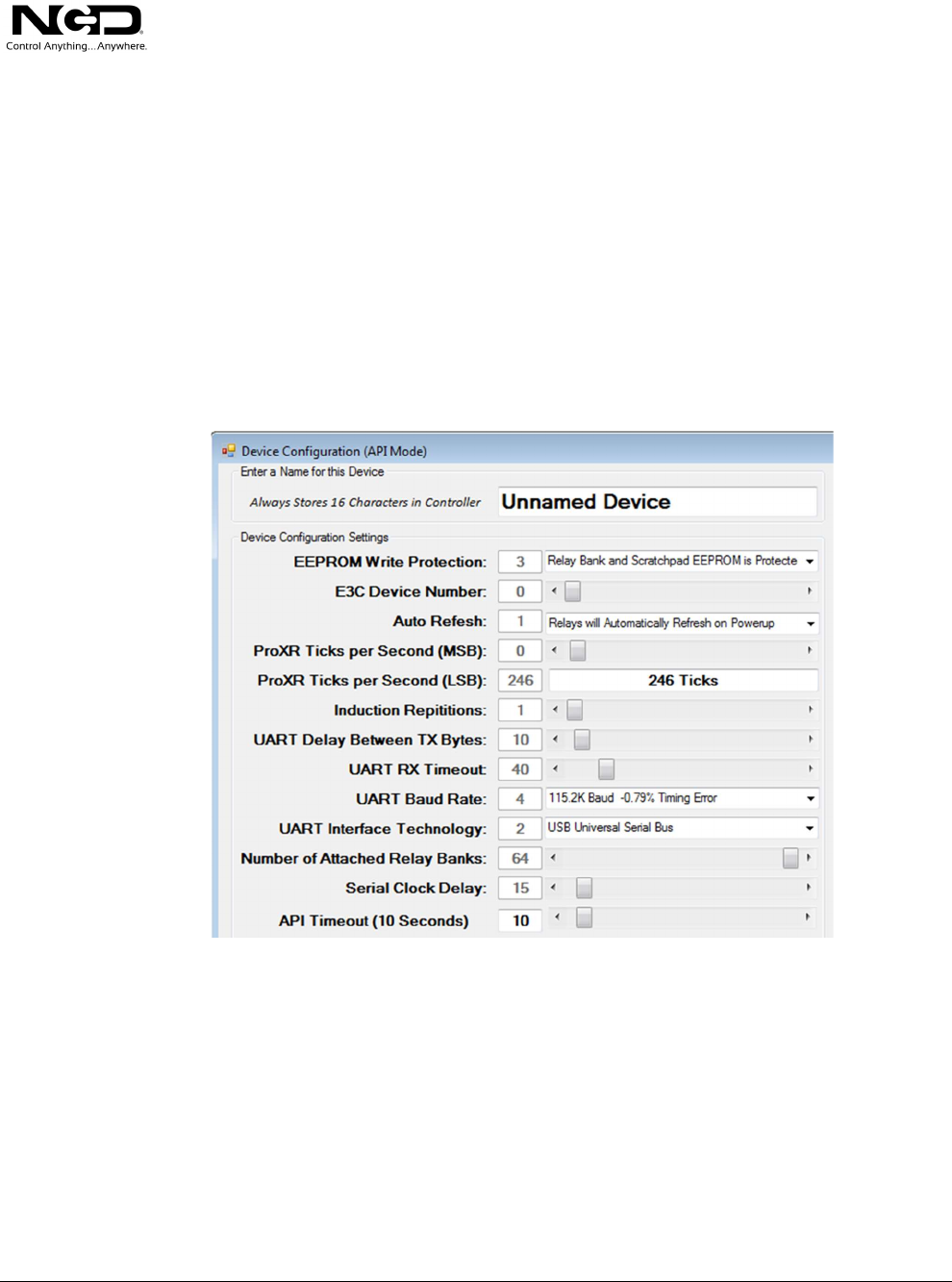
The API Timeout Parameter (shown at the bottom of Device Configuration).
When API Mode is entered, API mode will automatically timeout and exit if a
complete API Command is not received within the default timeout period. We
have chosen 10 Seconds as the API Timeout period, as this is ideal for network
communications that may experience delays between packets. You may set the
API Timeout to 0, which means API Mode will NEVER Timeout.
Testing for API Support
To ask the controller if API Mode is supported, read EEPROM Location 246 and
Test Bit 8 (the most significant bit). If Bit 8 is High, API is supported by the
controller. Please refer to the EEPROM Quick Start Guide for complete details.

8
Updated API Structure for E3C DropNet Devices
In September of 2015, an updated API Protocol was introduced to cover E3C
DropNet Devices, which is included with ALL devices sold as E3C DropNet Devices.
The current API Protocol is still valid, and works with all DropNet devices without
interruption; however, a shortcut was introduced to consolidate device targeting and
command processing as a single unified command. By using the updated API
Structure, users may effectively target and control a device using one command. Older
versions of firmware required two commands: One for targeting a device and one for
controlling a device. Using the updated API Structure for E3C DropNet Devices, you
can effectively double communication speed with minimal changes to the API
Structure.
This portion of the guide explains the updated API Packet Structure:
171 Header Byte for updated E3C DropNet Structure
0 Device you would like to control (0-255 Valid Range)
3 Number of Bytes to Send in the Command
254 Header Byte for Command
131 Toggle Relay Command
0 Apply Command to the first Relay
46 Checksum Calculations do NOT Change
Note: To simplify integration of this new packet structure, Checksums are calculated
EXACTLY as before. The 171 does NOT recalculate the checksum, checksum is
calculated as though the header byte were 170. The Device Number is NOT included
in the Checksum calculations.
Note: Each E3C DropNet Device MUST be configured with a DIFFERENT E3C
Device Number. Use our Base Station Software and choose: “Device Configuration”
to set the device number.

9
Notes from NCD Developers
The API Codec has greatly improved the reliability of the NCD product line.
When the API Codec was first implemented in device firmware, several small
malfunctions began to appear across many versions of firmware. We discovered
some firmware routines were not 100 percent independent of other unrelated
routines. While bugs were never proven in standard communications despite
exhaustive testing, API helped us red flag and repair all “Leaky” routines. The
resulting theoretical reliability of NCD Products has taken a major step forward
since the introduction of the API Codec. You will also notice the Device
Configuration and Device Identification now operate much faster than before,
thanks in large part to the API Codec. Base Station software was HEAVILY
modified to include support for API Communications while maintaining backward
compatibility with older devices. In addition, Ethernet Connect ME users will
now be able to use Base Station Version 3.2 or later to DIRECTLY communicate
with these devices WITHOUT the use of RealPort.
The API Codec has paved the way for future commands that will only process in
API mode; in fact, Base Station currently uses a few undocumented commands
that are only available in API Mode for memory alteration. Go into device
configuration of your controller with API Mode turned off…then go into device
configuration on your controller with API Mode turned on…the speed difference
is credited to API Mode in combination with a few new special commands.
We hope all users of ProXR Enhanced and Taralist controllers will review their
current version of firmware. If you are running any firmware version that does
not indicate 3.2 or greater, we invite you to return your controller to us for a
FREE firmware upgrade (inside the continental United States). While not
required, we think you will greatly benefit from the improvements made with all
versions of ProXR Enhanced, Taralist, and Base Station software.
Taralist users may see a version number as high as 21. This was first generation
firmware which only supported 3 digits. Version 3.2 or later is actually a newer
version of firmware for these controllers as this version number actually support 6
digits.
ProXR Standard firmware is now closed and will not be modified or enhanced
beyond Base Station software improvements due to memory limitations of ProXR
Standard microprocessors. If you are running ProXR Standard, we are able to
convert your controller to ProXR Enhanced. Please contact us for details
10
Technical Support
echnical support is available through our website, controlanything.com.
AccessNCD is the way we connect NCD engineers to our customers.
Click on the AccessNCD button located on the top right of the header of
each page of our website.
For technical support and application information, contact Travis Elliott, our
technical engineer. If you feel that you have discovered a bug in the firmware of
our controllers, contact Ryan Sheldon, our hardware developer. If you have
programming-related questions or have discovered a bug in our software, please
contact Shirui Xu, our software engineer.
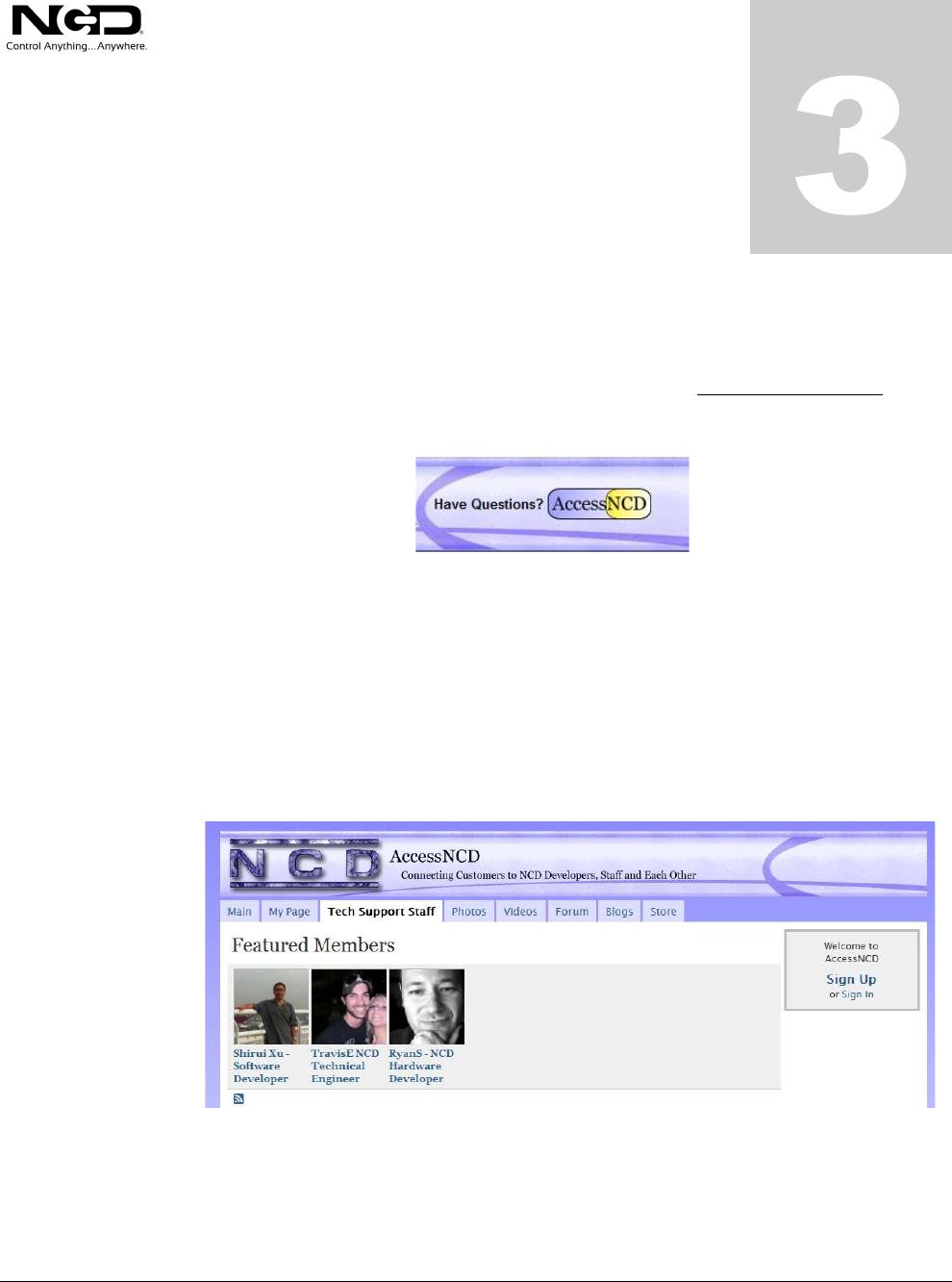
Click the ‘Tech Support Staff’ tab and click on the appropriate engineer link for assistance.
Click on our ‘Forum’ tab if you would like to post publicly or review problems that other
customers have had and our recommended solutions.
Chapter
T

11
Our engineers monitor questions and respond continually throughout the day.
Before requesting telephone technical support, we ask that customers please try to
resolve their problems through AccessNCD first. However, for persistent
problems, NCD technical support engineers will schedule a phone consultation.
Contact Information
National Control Devices, LLC
PO Box 455
Osceola, MO 64776
417-646-5644 phone
866-562-0406 fax
Open 9 a.m. - 4 p.m. CST
All orders must be placed online at our website, www.controlanything.com
Notice:
The only authorized resellers of NCD products are
www.controlanything.com
www.relaycontrollers.com
www.relaypros.com
www.amazon.com
All other websites are not authorized dealers; we have noticed some retailers
offering our products fraudulently.
Copyright © 2013
National Control Devices
All Rights Reserved.
