NCD Component Library Guide Quick Start Old
2013-08-09
: Controlanything Ncd Component Library Quick Start Guide Old NCD_Component_Library_Quick_Start_Guide_old QSG
Open the PDF directly: View PDF  .
.
Page Count: 21
This manual will guide you through the setup and use of all Reactor Series relay controllers. Following this manual in the sequence outlined is absolutely essential to proper understanding and use of
Reactor Series Controllers. Please review the entire manual BEFORE contacting NCD technical support. NCD technical support staff will direct your questions to this manual when applicable.
Communicaons Tool for NCD Product Line
Copyright © 2012
National Control Devices
All Rights Reserved.
NOTICE: Portions of this Manual REQUIRE Internet Access
NCD Component Library
Quick Start Guide
This manual will guide you through the setup and use of all Reactor Series relay controllers. Following this manual in the sequence outlined is absolutely essential to proper understanding and use of
Reactor Series Controllers. Please review the entire manual BEFORE contacting NCD technical support. NCD technical support staff will direct your questions to this manual when applicable.
Page 2 Quick Start Guide: NCD Component Library
Introduction ....................................................................................................................................................................... 3
Building Visual Basic Applications .................................................................................................................................... 4
Analog to Digital Samples .............................................................................................................................................. 10
Com Event Sample......................................................................................................................................................... 12
Potentiometer Samples .................................................................................................................................................. 12
PWM Samples ................................................................................................................................................................ 13
Relay Control Samples ................................................................................................................................................... 13
SCAN .............................................................................................................................................................................. 15
Timer Samples ............................................................................................................................................................... 16
ZB Mesh Samples .......................................................................................................................................................... 17
802.15.4 Samples........................................................................................................................................................... 18
Reactor Sample .............................................................................................................................................................. 19
Teralist Sample ............................................................................................................................................................... 20
Technical Support........................................................................................................................................................... 21
Table of Contents
This manual will guide you through the setup and use of all Reactor Series relay controllers. Following this manual in the sequence outlined is absolutely essential to proper understanding and use of
Reactor Series Controllers. Please review the entire manual BEFORE contacting NCD technical support. NCD technical support staff will direct your questions to this manual when applicable.
Page 3 Quick Start Guide: NCD Component Library
NCD Component Library
With the NCD Component Library, you will receive over 40 samples from A/D Conversion to Duration and Pulse Timing
and best of all, it's FREE!! We want the user to be able to experiment with all the different samples available, so as of
right now the samples cannot be downloaded individually.
Quick Summary of NCD Component Library
Simplifies the communications to the NCD product line
Samples available for specific applications
A/D Conversion
Motion Detection
Keypad Data
Potentiometer Values
Storage Features
Duration and Pulse Timing
ProXR Timer Calibration and Testing
Setting/Reading the Status of up to 256 Relays
Samples available for specific relays
Up to 8 Channel Relays
16 Channel Relays
ProXR Relays
SCAN Series Controllers
802.15.4 Wireless Relays
ZigBee Relays
Source code included so you can customize the sample to fit your needs
All samples are FREE
SignalSwitch Compatible
Download NCD Component Library
With the NCD Component Library we've "started" the programming for you. We say ‘started’ because these are fully
functioning samples, but we've also included the source code so you can customize them to your exact needs.
Start by downloading and installing the NCDComponentSetup.zip file: NCDComponentSetup.zip
Plugin for Visual Basic
The NCD Component library is a plugin for the Microsoft Visual Basic that greatly simplifies the communications to the
NCD product line. The sample can be run in Visual Basic and fully customizable to your needs. It is compatible with
version 2005, 2008, and 2010. The instructions are shown using Visual Basic Express 2010.
Download and install Visual Basic 2010 Express. The program may be downloaded from the Microsoft website:
http://www.microsoft.com/visualstudio/en-us/products/2010-editions/visual-basic-express
C# Language
The NCD Component Library also supports the C# programming language for those who are more comfortable with this
program.
Introducon
This manual will guide you through the setup and use of all Reactor Series relay controllers. Following this manual in the sequence outlined is absolutely essential to proper understanding and use of
Reactor Series Controllers. Please review the entire manual BEFORE contacting NCD technical support. NCD technical support staff will direct your questions to this manual when applicable.
Page 4 Quick Start Guide: NCD Component Library
Building your rst Visual Basic Applicaon
Visual Basic is our preferred language for communicating to the NCD product line. Visual Basic is engineered for produc-
tively building type-safe and object-oriented applications.
The following set of instructions will guide you in learning how to operate your device using the NCD Component Library
in Visual Basic. The example provided here is developed for Visual Basic 2010 Express Edition. Follow these simple
steps and you will be on your way to controlling the NCD device from your desktop computer in 30 minutes or less.
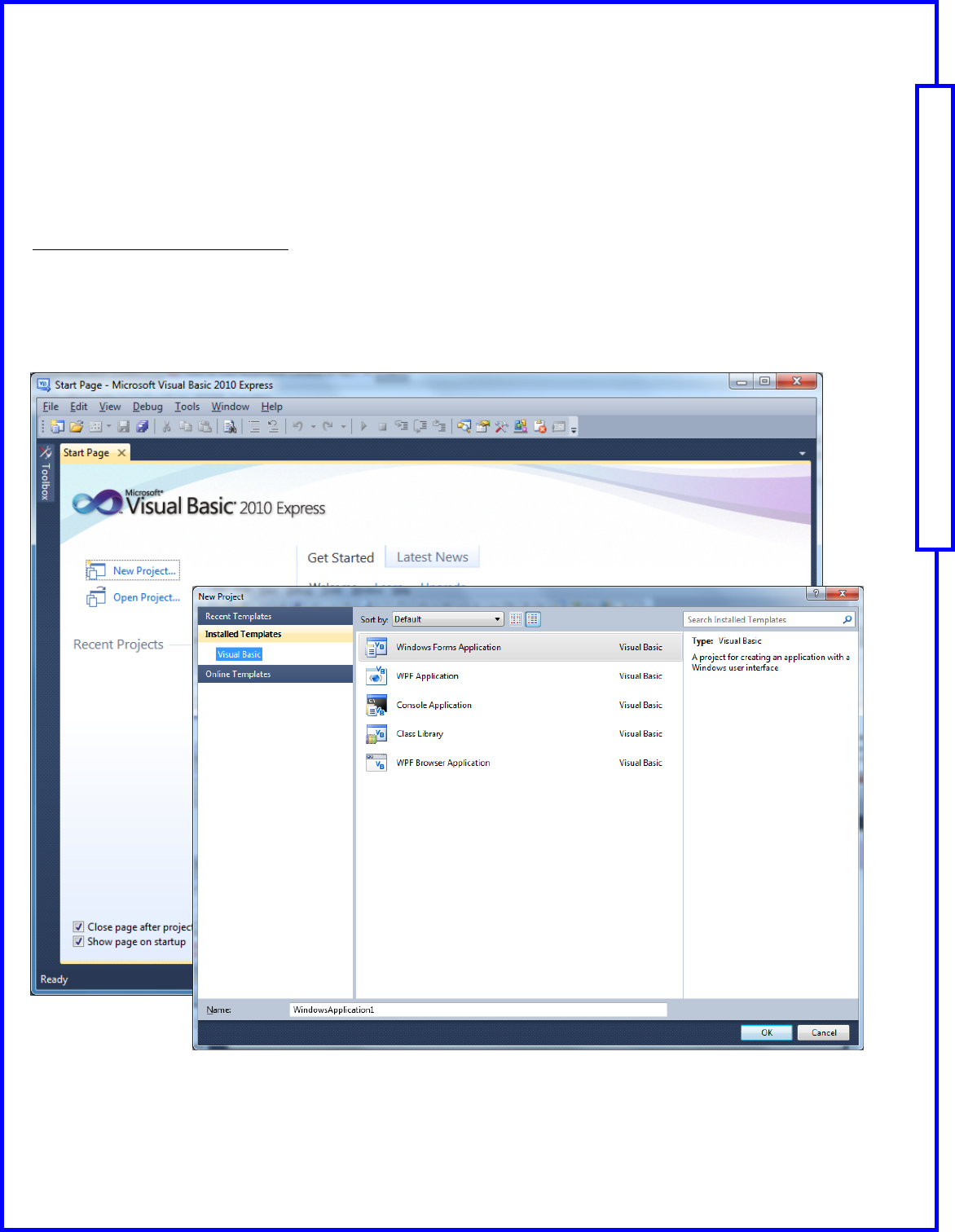
Step 1: Start Visual Basic Program
From the Windows Start Menu, open the Visual Basic Express 2010 program.
Click the ‘New Project’ link on the left.
From the ‘New Project’ dialog box, select ‘Windows Forms Application’ and click ‘OK’.
Name your application file.
This manual will guide you through the setup and use of all Reactor Series relay controllers. Following this manual in the sequence outlined is absolutely essential to proper understanding and use of
Reactor Series Controllers. Please review the entire manual BEFORE contacting NCD technical support. NCD technical support staff will direct your questions to this manual when applicable.
Page 5 Quick Start Guide: NCD Component Library
Building your rst Visual Basic Applicaon
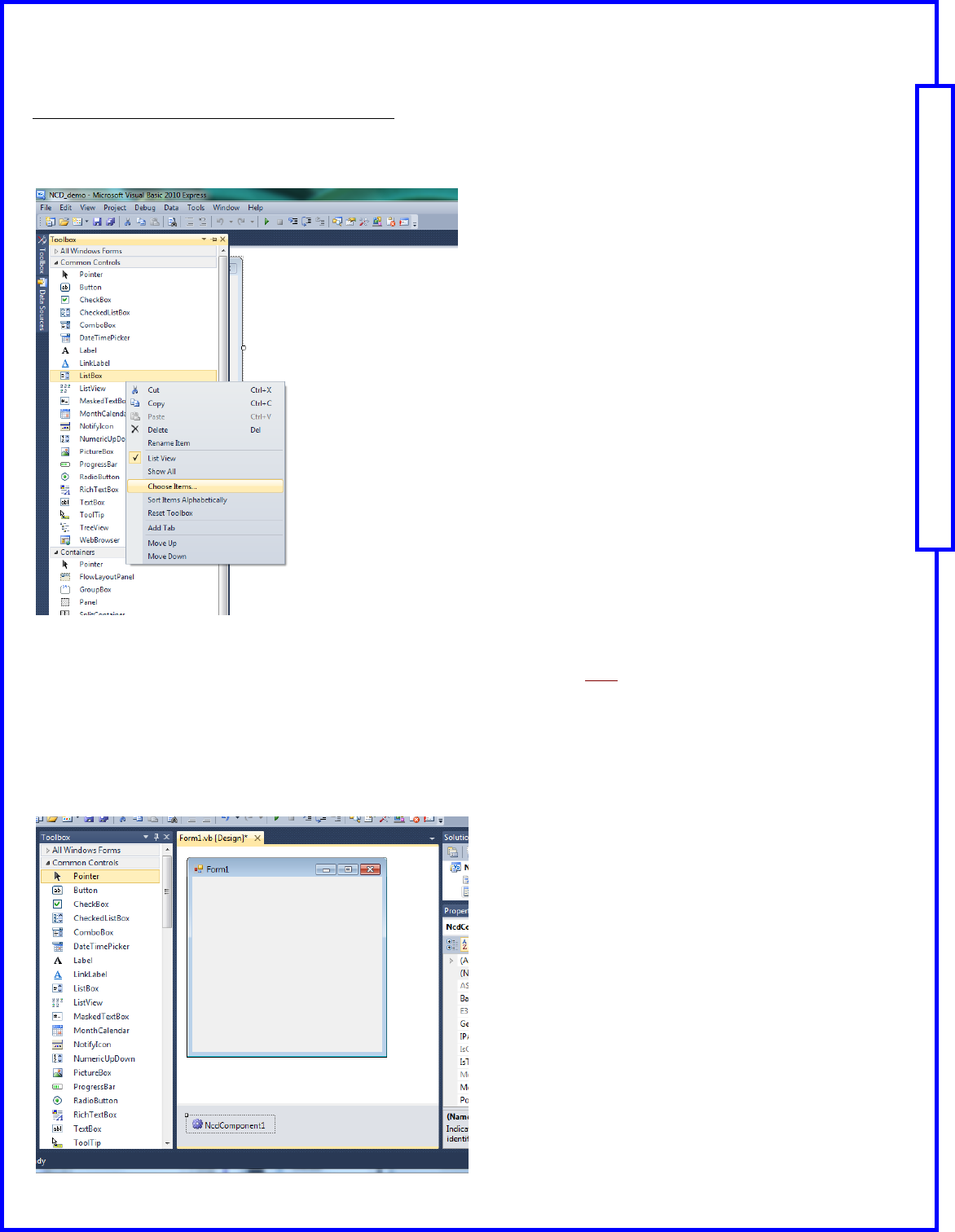
Step 2: Add the NCD Component to your toolbox.
The project will open displaying Form1.
Expand the Toolbox menu at the left.
Right-click in the Toolbox menu and select ‘Choose Items’.
Browse to select ‘ncdcomponent.dll’ from your computer.
Note: NCDComponent has to be installed, it can be downloaded from here.
NcdComponent default install position is:
C:\Program Files (x86)\NCD Component v2.0\bin for 64 bits OS
C:\Program Files\NCD Component v2.0\bin for 32 bits OS
Add NCD Component to the Form by dragging and dropping the component onto the form.
Note: It will not display on the form; however, it will display under the form.
This manual will guide you through the setup and use of all Reactor Series relay controllers. Following this manual in the sequence outlined is absolutely essential to proper understanding and use of
Reactor Series Controllers. Please review the entire manual BEFORE contacting NCD technical support. NCD technical support staff will direct your questions to this manual when applicable.
Page 6 Quick Start Guide: NCD Component Library
Building your rst Visual Basic Applicaon
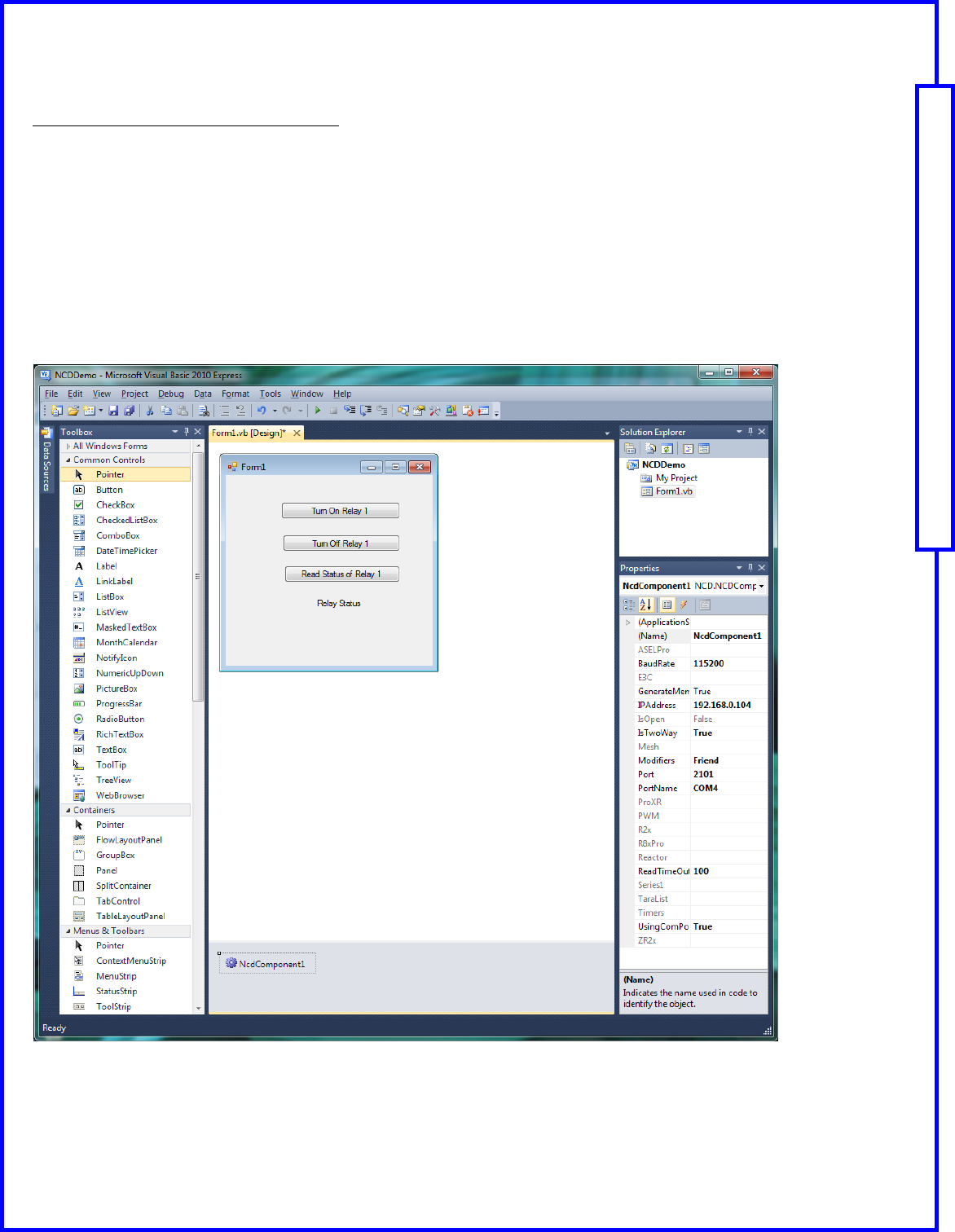
Step 3: Set Properties of NCDComponent
The next step is to set up the properties of your device.
Click on the NcdComponent1 at the bottom of the Visual Basic window as shown below.
Make sure that the Properties Window is displayed; it is shown at the right below.
If you are connecting your device through the serial port:
Set the ‘Using ComPort’ to ‘True’
Set the PortName
Set the Baud Rate
If you are connecting your device through TCP/IP:
Set the ‘Using ComPort’ to ‘False’
Set the IP Address
Set the Port
This manual will guide you through the setup and use of all Reactor Series relay controllers. Following this manual in the sequence outlined is absolutely essential to proper understanding and use of
Reactor Series Controllers. Please review the entire manual BEFORE contacting NCD technical support. NCD technical support staff will direct your questions to this manual when applicable.
Page 7 Quick Start Guide: NCD Component Library
Building your rst Visual Basic Applicaon
Step 4: Add Buttons to the Form
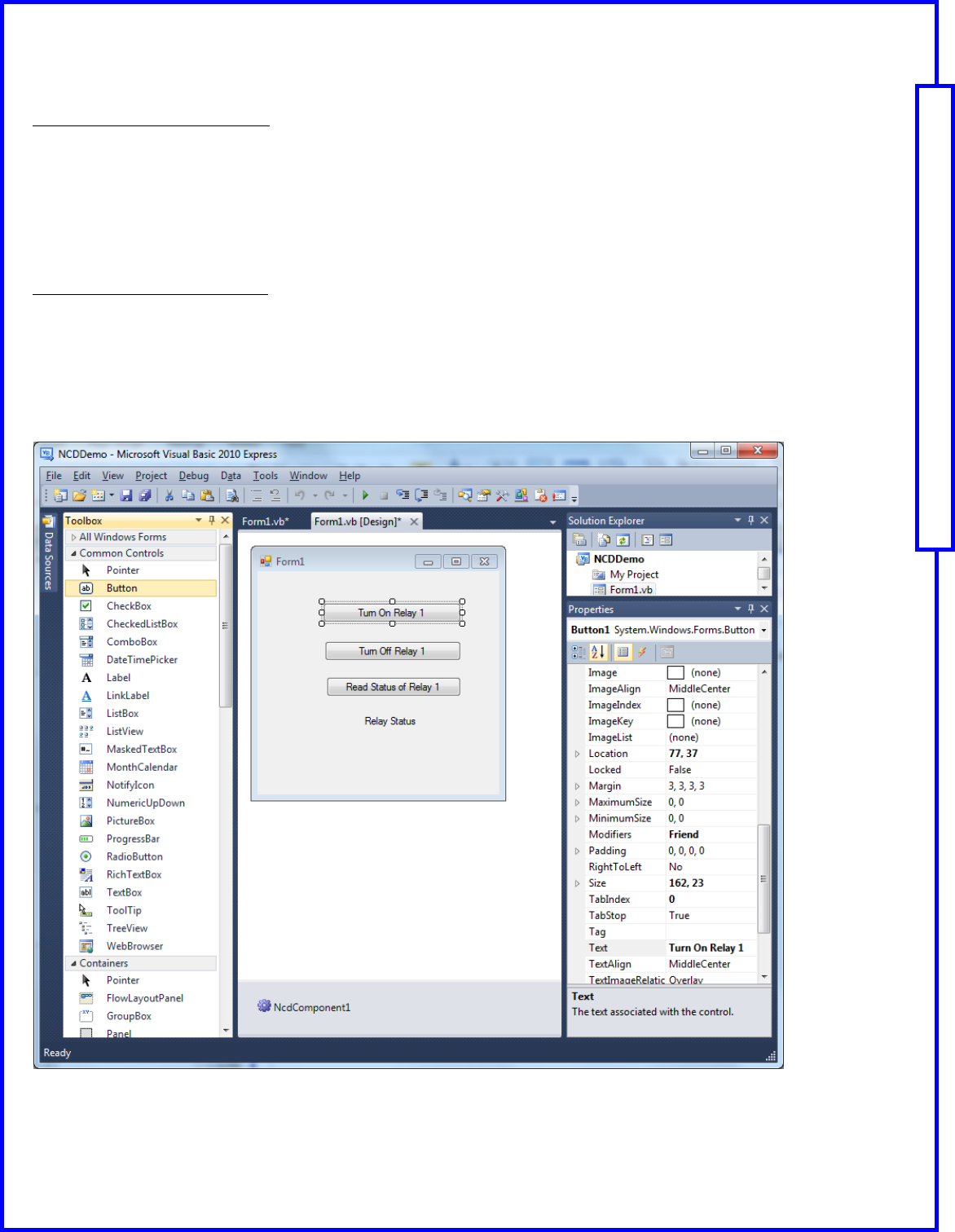
The next step is to add three buttons to the Form to allow you to make selections with your device.
Click on the ‘Button’ menu control in the Toolbox and drag it to your form. Repeat this step two times.
Properties Window is displayed; it is shown at the right below.
Use the Text property to change the words displayed on each button.
Click on ‘Button1’ and set the Text to “Turn On Relay 1”
Click on ‘Button2’ and set the Text to “Turn Off Relay 1:
Click on ‘Button2’ and set the Text to “Read Status of Relay 1
Step 5: Add a Label to the Form
The next step is to add a label to the form that will allow you to display the status of the relay.
Click on the ‘Label’ menu control in the Toolbox and drag it to your form.
Use the Text property to change the words displayed on the label.
Click on ‘Label1’ and set the Text to “Relay Status”
This manual will guide you through the setup and use of all Reactor Series relay controllers. Following this manual in the sequence outlined is absolutely essential to proper understanding and use of
Reactor Series Controllers. Please review the entire manual BEFORE contacting NCD technical support. NCD technical support staff will direct your questions to this manual when applicable.
Page 8 Quick Start Guide: NCD Component Library
Building your rst Visual Basic Applicaon
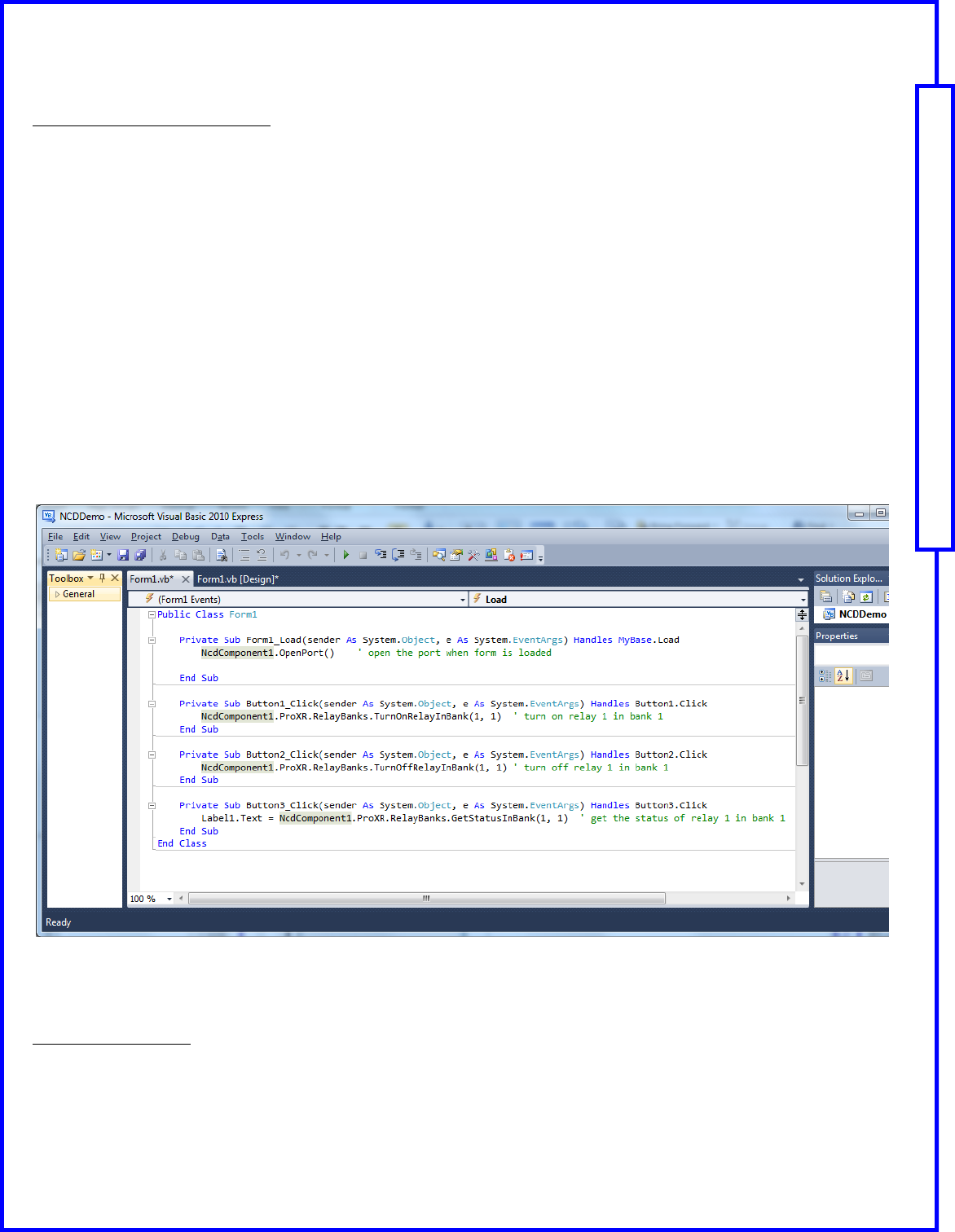
Step 6: Add Code to Open the Port
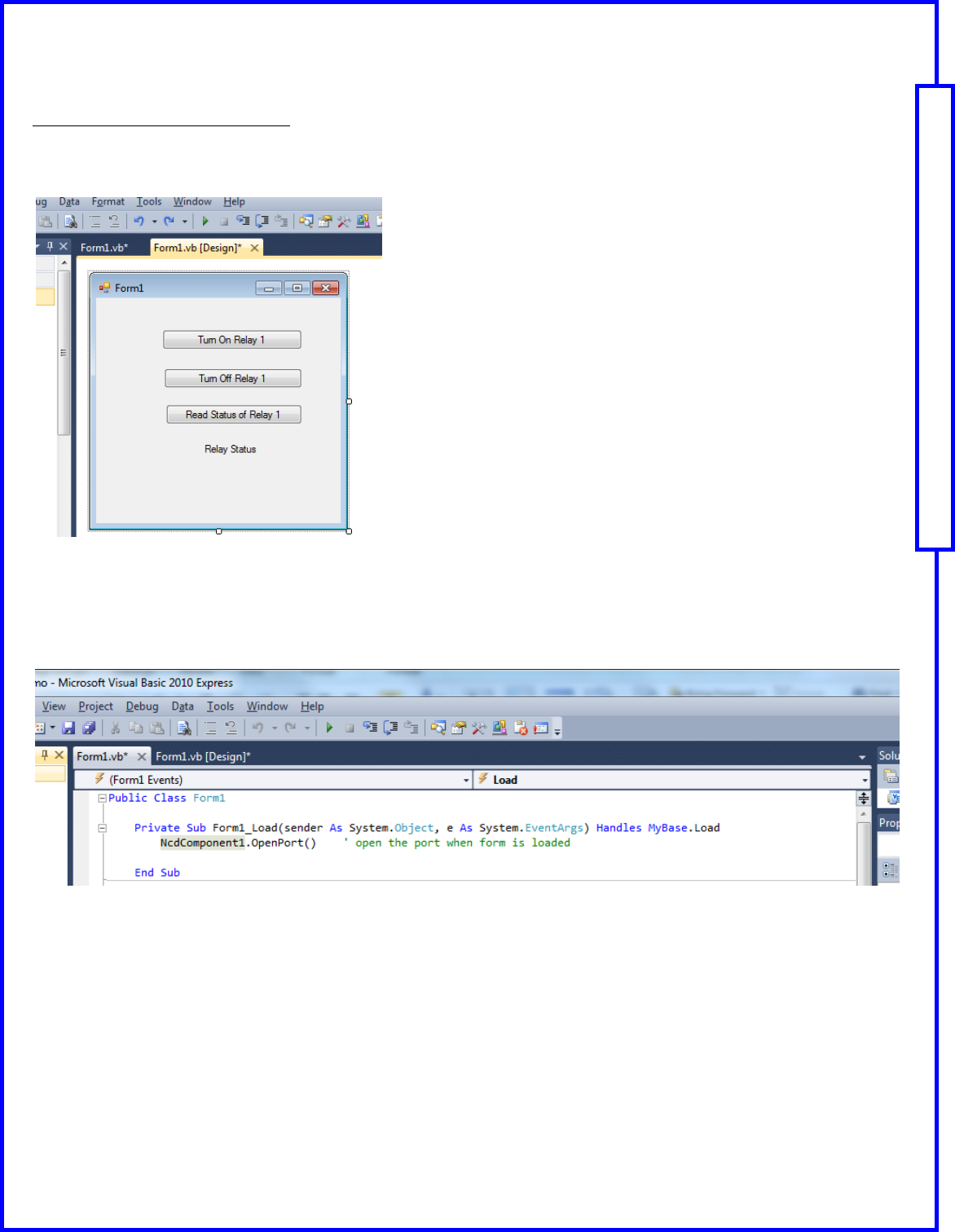
The next step is to add the visual basic code that will open the port when the form is loaded.
Double-click on the background of the Form1 in the ‘Design’ view as shown below. This will take you to the coding
window for the Load event.
Type the following code on the line between the Private Sub and End Sub lines
NcdComponent1.OpenPort()
Note: As you type, you may select the appropriate commands from the shortcut menu that appears.
This manual will guide you through the setup and use of all Reactor Series relay controllers. Following this manual in the sequence outlined is absolutely essential to proper understanding and use of
Reactor Series Controllers. Please review the entire manual BEFORE contacting NCD technical support. NCD technical support staff will direct your questions to this manual when applicable.
Page 9 Quick Start Guide: NCD Component Library
Building your rst Visual Basic Applicaon
Step 6: Add Code to the Buttons
The next step is to add the visual basic code that will turn the relay on or off and read status of the relay in the button's
click event.
Return to “Design’ view of the form and double-click on the first button. This will take you to the coding window for
the button’s Click event.
Type the following code on the line between the Private Sub and End Sub lines
NcdComponent1.ProXR.RelayBanks.TurnOnRelayInBank(1, 1)
Note: As you type, you may select the appropriate commands from the shortcut menu that appears. Choose the
appropriate NCD device (such as ProXR).
Return to “Design’ view of the form and double-click on the second button. This will take you to the coding window
for the button’s Click event.
Type the following code on the line between the Private Sub and End Sub lines
NcdComponent1.ProXR.RelayBanks.TurnOffRelayInBank(1, 1)
Return to “Design’ view of the form and double-click on the third button. This will take you to the coding window for
the button’s Click event.
Type the following code on the line between the Private Sub and End Sub lines
Label1.Text = NcdComponent1.ProXR.RelayBanks.GetStatusInBank(1, 1)
Note: This will read the status of the relay and display it on the label on the Form.
Step 7: Run Program
Click the “Play” button on the Toolbar to test and debug your application.
This manual will guide you through the setup and use of all Reactor Series relay controllers. Following this manual in the sequence outlined is absolutely essential to proper understanding and use of
Reactor Series Controllers. Please review the entire manual BEFORE contacting NCD technical support. NCD technical support staff will direct your questions to this manual when applicable.
Page 10 Quick Start Guide: NCD Component Library
NCD Component Library Samples
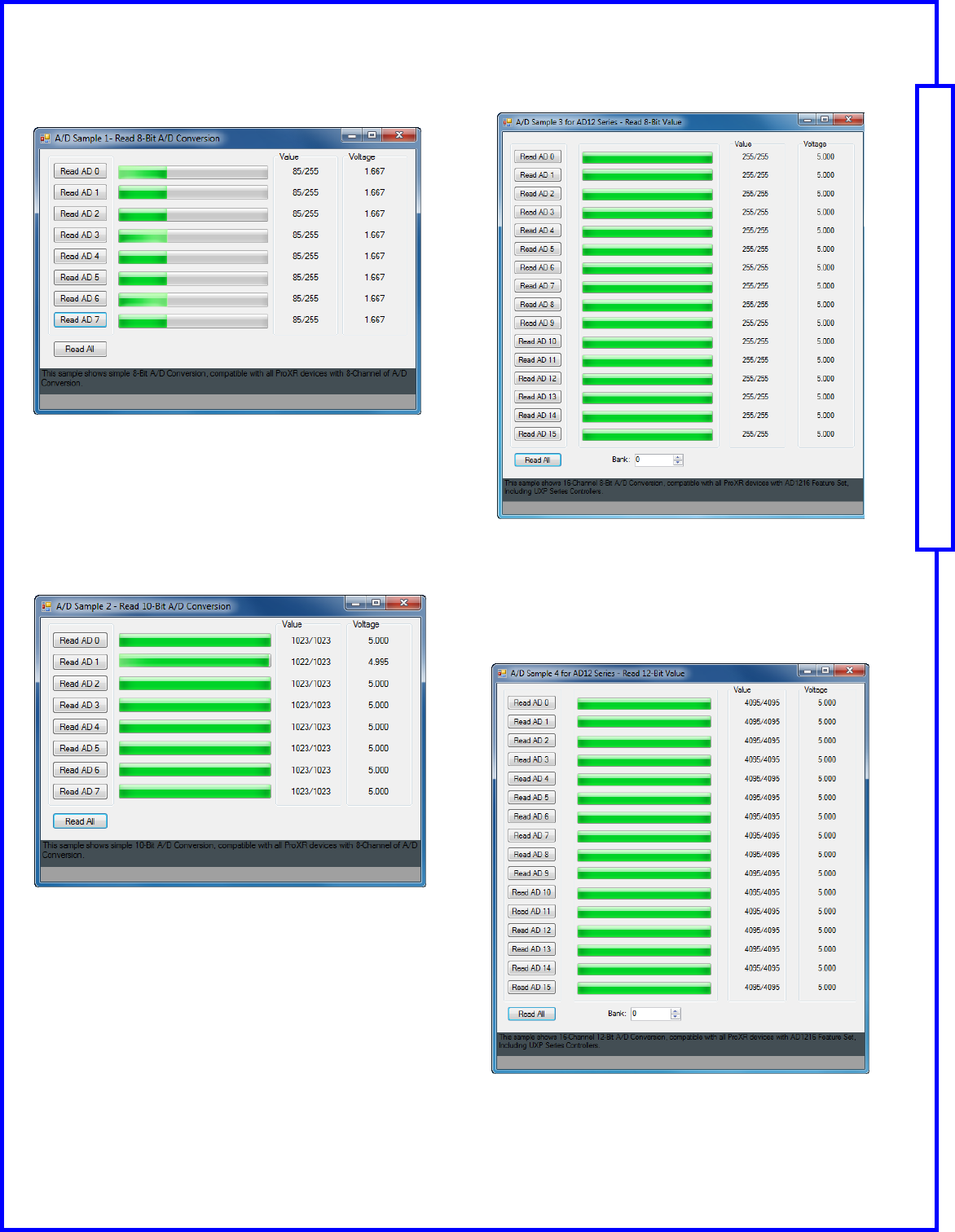
ADSample1.exe
Analog to Digital Converter Sample 1
This sample shows simple 8-Bit A/D Conversion, compatible
with all ProXR devices with 8-Channels of A/D Conversion.
ADSample2.exe
Analog to Digital Converter Sample 2
This sample shows simple 10-Bit A/D Conversion, compatible
with all ProXR devices with 8-Channels of A/D Conversion.
ADSample3.exe
Analog to Digital Converter Sample 3
This sample shows 16-Channel 8-Bit A/D Conversion, compati-
ble with all ProXR devices with AD1216 Feature Set, including
UXP Series Controllers.
ADSample4.exe
Analog to Digital Converter Sample 4
This sample shows 16-Channel 12-Bit A/D Conversion, compat-
ible with all ProXR devices with AD1216 Feature Set, including
UXP Series Controllers.
This manual will guide you through the setup and use of all Reactor Series relay controllers. Following this manual in the sequence outlined is absolutely essential to proper understanding and use of
Reactor Series Controllers. Please review the entire manual BEFORE contacting NCD technical support. NCD technical support staff will direct your questions to this manual when applicable.
Page 11 Quick Start Guide: NCD Component Library
NCD Component Library Samples
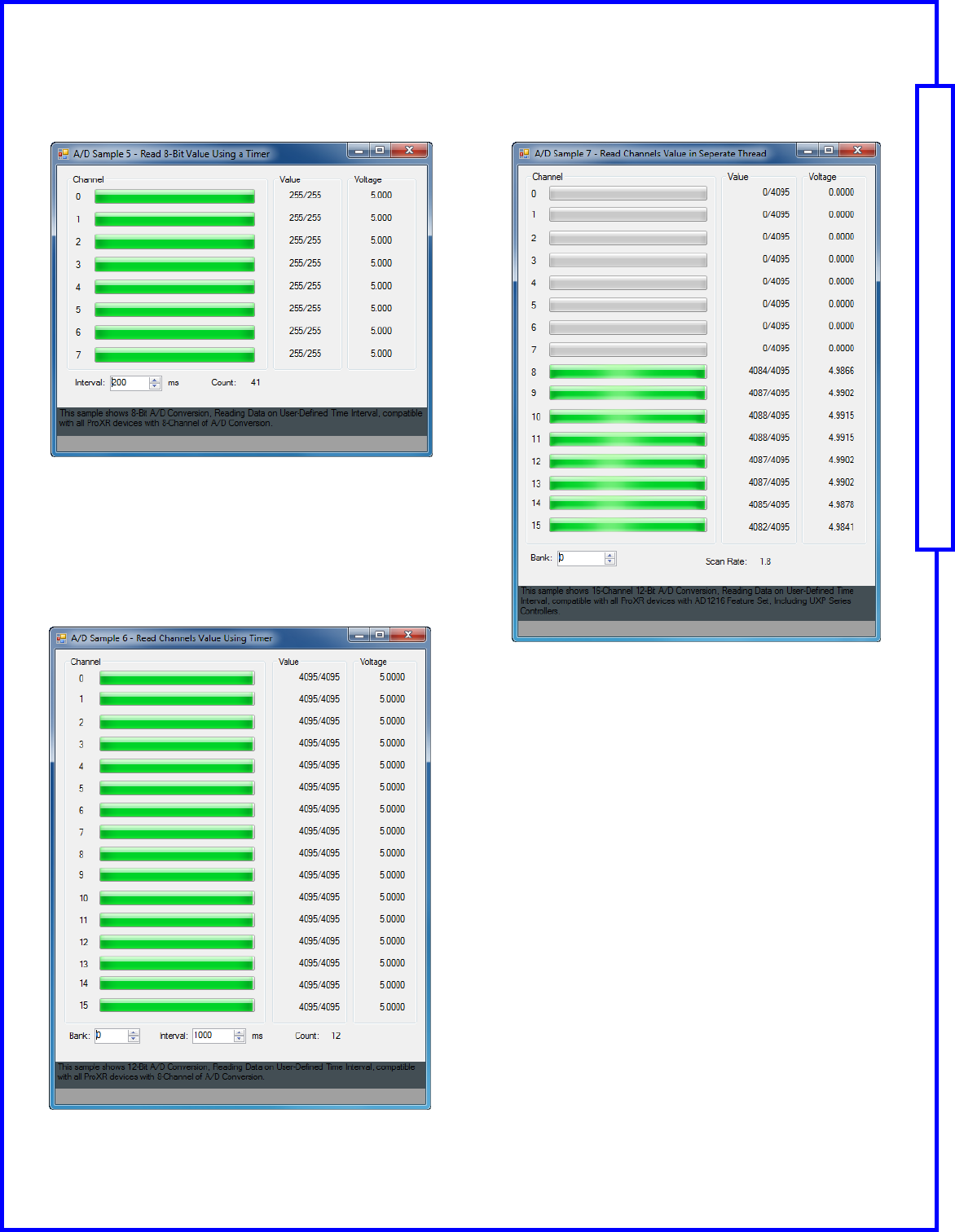
ADSample5.exe
Analog to Digital Converter Sample 5
This sample shows 8-Bit A/D Conversion, Reading data on User
-defined Time Interval, compatible with all ProXR devices with 8-
Channels of A/D Conversion.
ADSample6.exe
Analog to Digital Converter Sample 6
This sample shows 12-Bit A/D Conversion, reading data on Us-
er-defined Time Interval, compatible with all ProXR devices with
8-Channels of A/D Conversion.
ADSample7.exe
Analog to Digital Converter Sample 7
This sample shows 16-Channel 12-Bit A/D Conversion, reading
data on User-defined Time Interval, compatible with all ProXR
devices with AD1216 Feature Set, including UXP Series Con-
trollers.
This manual will guide you through the setup and use of all Reactor Series relay controllers. Following this manual in the sequence outlined is absolutely essential to proper understanding and use of
Reactor Series Controllers. Please review the entire manual BEFORE contacting NCD technical support. NCD technical support staff will direct your questions to this manual when applicable.
Page 12 Quick Start Guide: NCD Component Library
NCD Component Library Samples
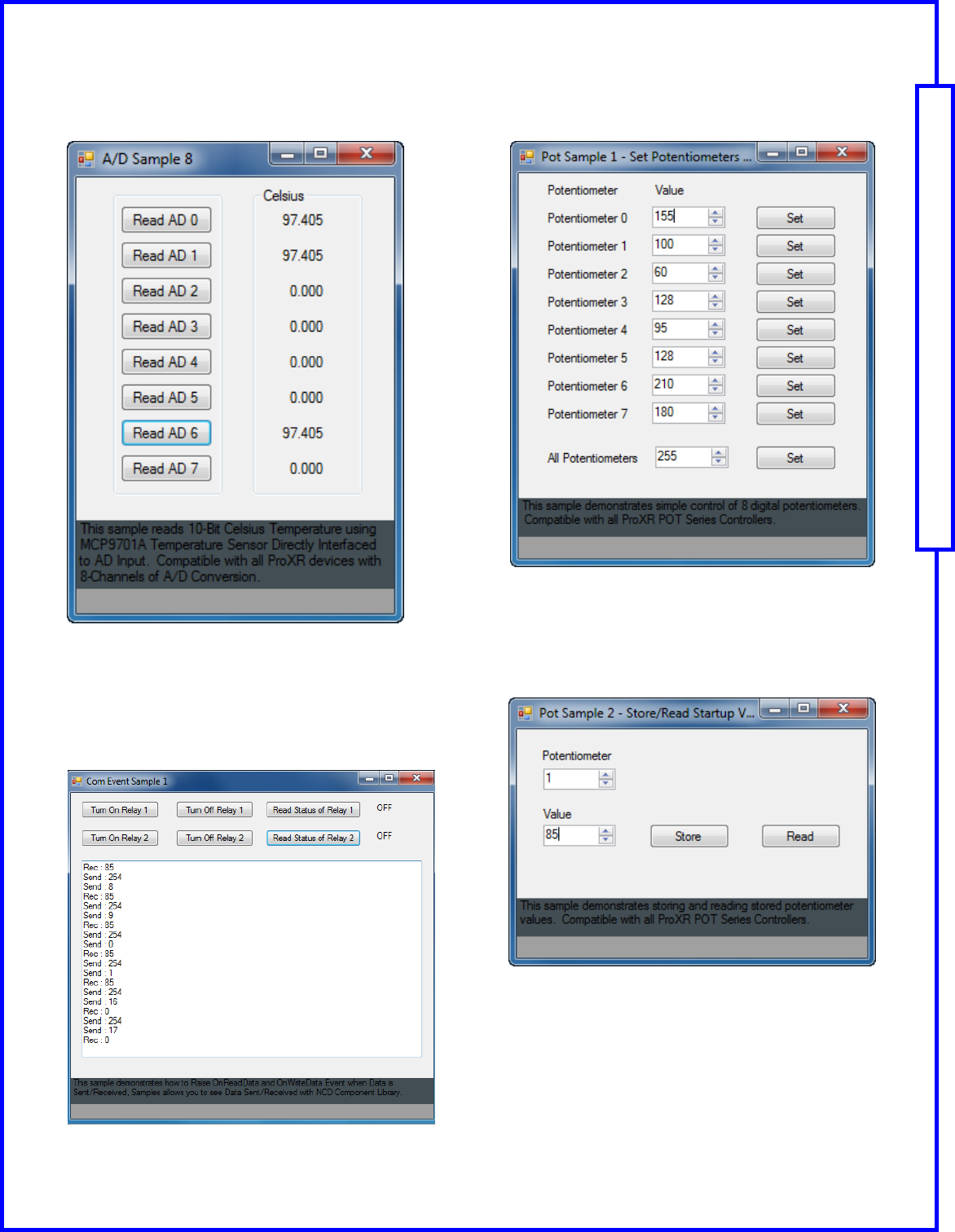
ADSample8.exe
Analog to Digital Converter Sample 8
This sample reads 10-Bit Celsius Temperature using MC9701A
Temperature Sensor directly interfaced to AD Input. Compatible
with all ProXR devices with 8-Channels of A/D Conversion.
ComEventSample1.exe
Com Event Sample 1
This sample demonstrates how to Raise OnReadData and
OnWriteData Event when data is Sent/Received, samples al-
lows you to see data Sent/Received with NCD Component Li-
brary.
PotSample1.exe
Potentiometer Sample 1
This sample demonstrates simple control of 8 digital potentiom-
eters. Compatible with all ProXR POT Series Controllers.
PotSample2.exe
Potentiometer Sample
This sample demonstrates storing and reading stored potenti-
ometer values. Compatible with all ProXR POT Series Control-
lers.
This manual will guide you through the setup and use of all Reactor Series relay controllers. Following this manual in the sequence outlined is absolutely essential to proper understanding and use of
Reactor Series Controllers. Please review the entire manual BEFORE contacting NCD technical support. NCD technical support staff will direct your questions to this manual when applicable.
Page 13 Quick Start Guide: NCD Component Library
NCD Component Library Samples
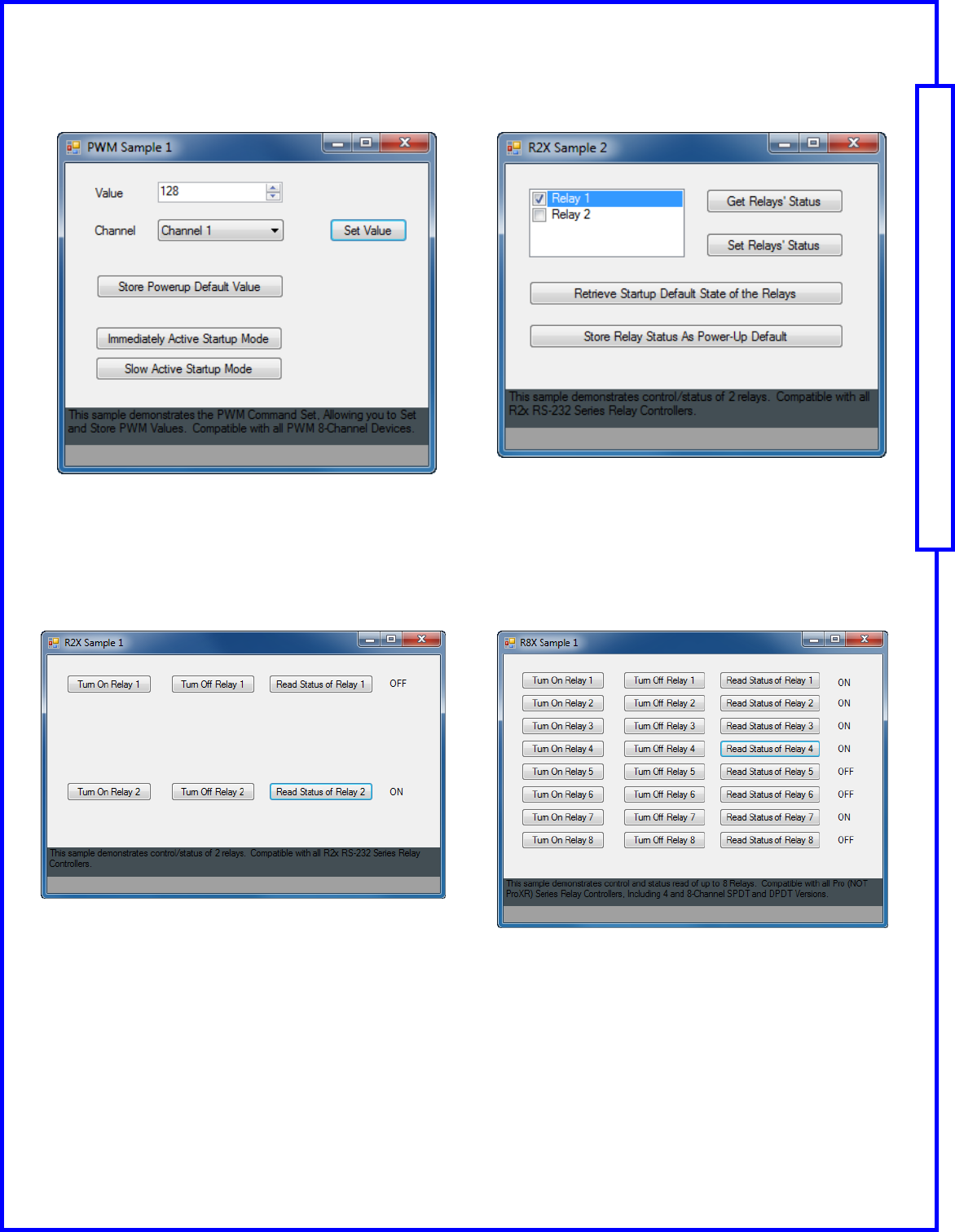
PWMSample1.exe
PWM Sample 1
This sample demonstrates the PWM Command Set, allowing
you to Set and Store PWM values. Compatible with all PWM 8-
Channel Devices.
R2xSample1.exe
2 Relay Control Sample 1
This sample demonstrates control/status of 2 relays. Compatible
with all R2x RS-232 Series Relay Controllers.
R2xSample2.exe
2 Relay Control Sample 2
This sample demonstrates control/status of 2 relays and demon-
strates data storage features . Compatible with all R2x RS-232
Series Relay Controllers.
R8XSample1.exe
8 Relay Control Sample 1
This sample demonstrates control and status read of up to 8
Relays. Compatible with all Pro (Not ProXR) Series Relay Con-
trollers, including 4 and 8-Channel SPDT and DPDT Versions
This manual will guide you through the setup and use of all Reactor Series relay controllers. Following this manual in the sequence outlined is absolutely essential to proper understanding and use of
Reactor Series Controllers. Please review the entire manual BEFORE contacting NCD technical support. NCD technical support staff will direct your questions to this manual when applicable.
Page 14 Quick Start Guide: NCD Component Library
NCD Component Library Samples
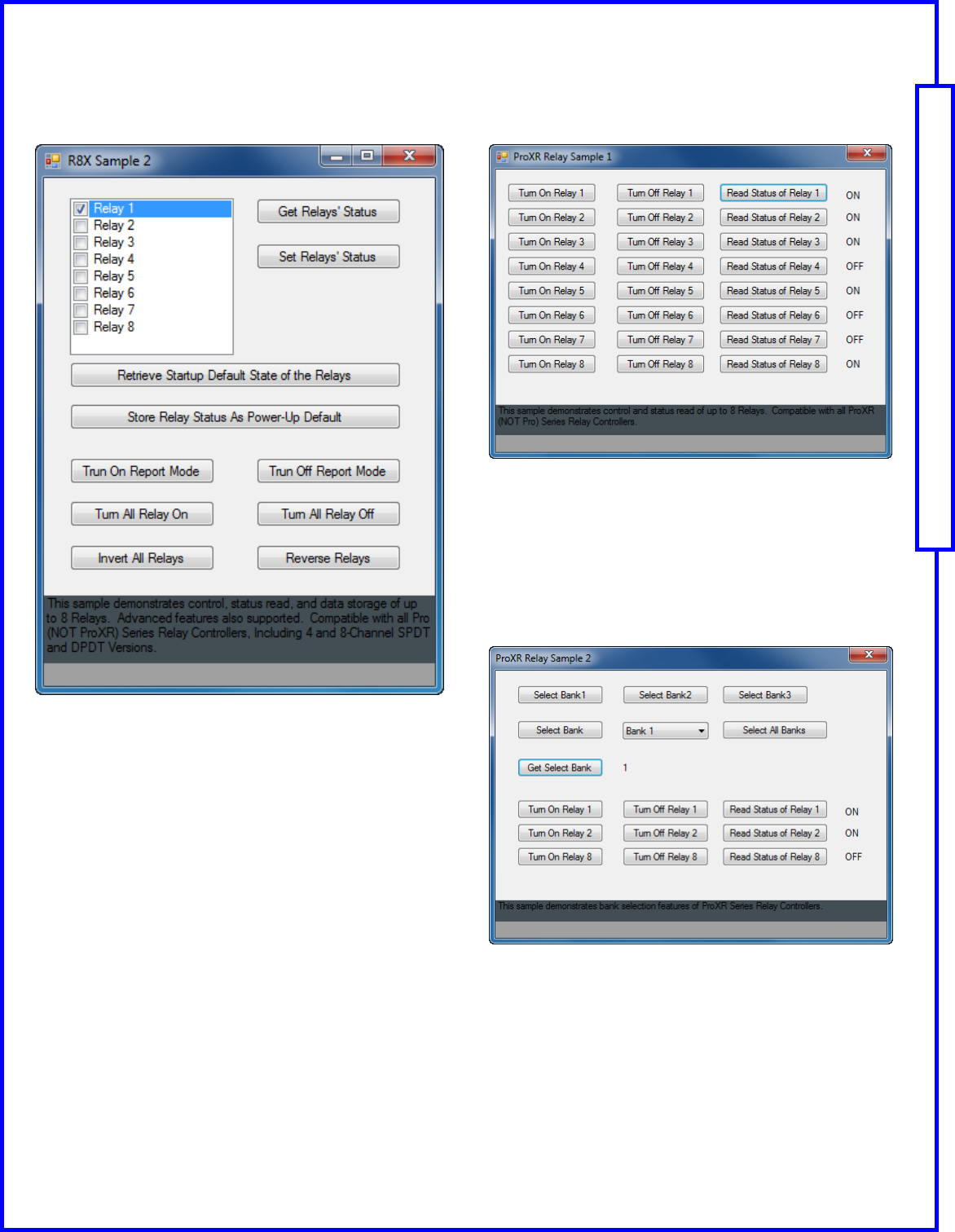
R8XSample2.exe
8 Relay Control Sample 2
This sample demonstrates control, status read, and data stor-
age of up to 8 relays. Advanced features also supported. Com-
patible with all Pro (Not ProXR) Series Relay Controllers, includ-
ing 4 and 8-Channel SPDT and DPDT Versions.
ProXRRelaySample1.exe
Up to 8 Channel ProXR Sample
This sample demonstrates control and status read of up to 8
relays. Compatible with all ProXR (Not Pro) Series Relay Con-
trollers.
ProXRRelaySample2.exe
ProXR bank Selection Features
This sample demonstrates bank selection features of ProXR
Series Relay Controllers.
This manual will guide you through the setup and use of all Reactor Series relay controllers. Following this manual in the sequence outlined is absolutely essential to proper understanding and use of
Reactor Series Controllers. Please review the entire manual BEFORE contacting NCD technical support. NCD technical support staff will direct your questions to this manual when applicable.
Page 15 Quick Start Guide: NCD Component Library
NCD Component Library Samples
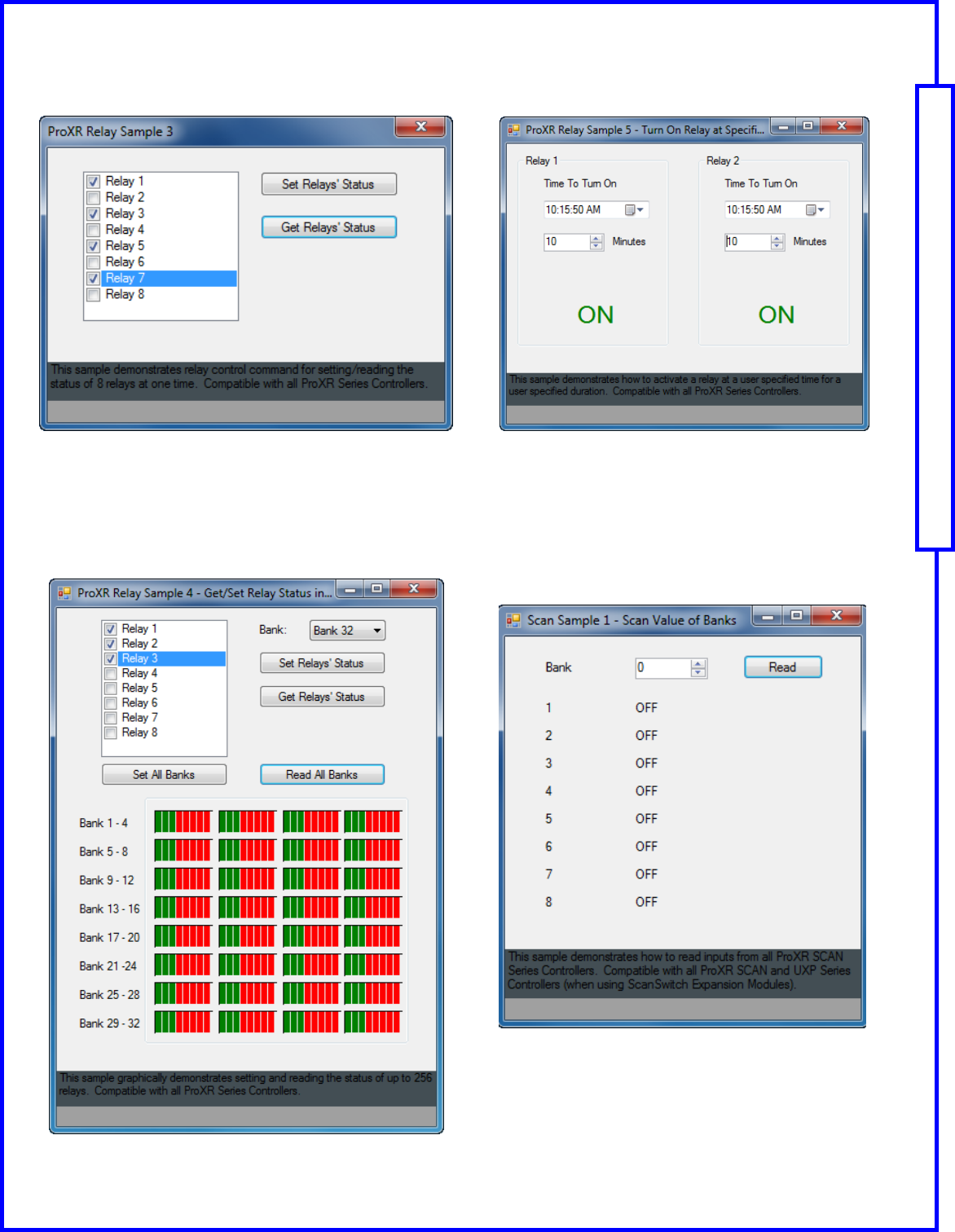
ProXRRelaySample3.exe
Setting/Reading the status of 8 Relays at one time
This sample demonstrates relay control command for setting/
reading the status of 8 relays at one time. Compatible with all
ProXR Series Controllers.
ProXRRelaySample4.exe
Setting/Reading the Status of up to 256 Relays
This sample graphically demonstrates setting and reading the
status of up to 256 Relays. Compatible with all ProXR Series
Controllers.
ProXRRelaySample5.exe
Activate a Relay with Specified Time/Duration
This sample demonstrates how to activate a relay at a user
specified time for a user specified duration. Compatible with all
ProXR Series Controllers.
ScanSample1.exe
Reads inputs from all ProXR SCAN Series Controllers
This sample demonstrates how to read inputs from all ProXR
SCAN Series Controllers. Compatible with all ProXR SCAN and
UXP Series Controllers (when using ScanSwitch Expansion
Modules).
This manual will guide you through the setup and use of all Reactor Series relay controllers. Following this manual in the sequence outlined is absolutely essential to proper understanding and use of
Reactor Series Controllers. Please review the entire manual BEFORE contacting NCD technical support. NCD technical support staff will direct your questions to this manual when applicable.
Page 16 Quick Start Guide: NCD Component Library
NCD Component Library Samples
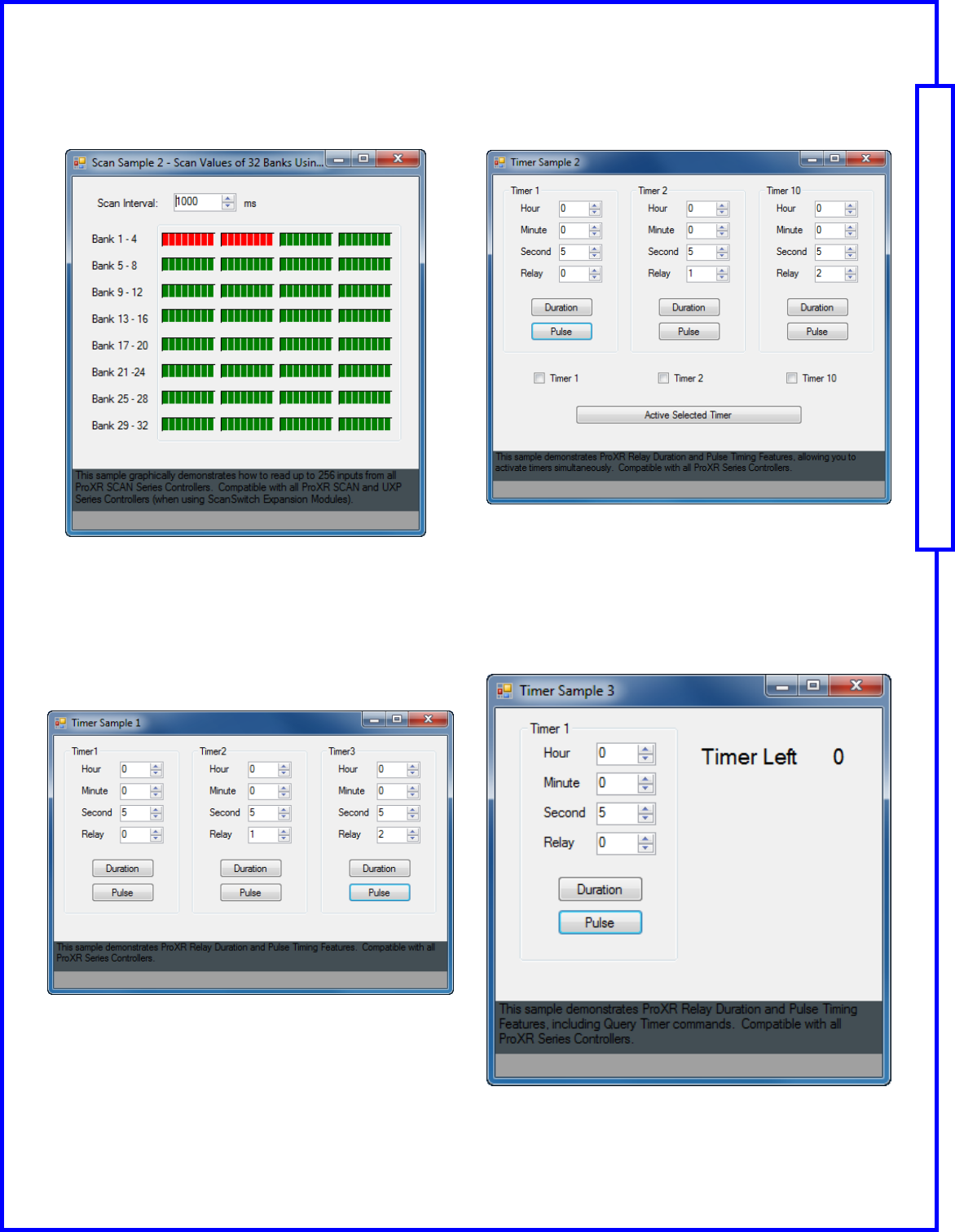
Scan Sample2.exe
Read up to 256 Inputs from All ProXR SCAN Series.
This sample demonstrates relay control command for setting/
reading the status of 8 relays at one time. Compatible with all
ProXR Series Controllers.
TimerSample1.exe
ProXR Relay Duration and Pulse Timing Features
This sample demonstrates ProXR Relay Duration and Pulse
Timing Features. Compatible with all ProXR Series Controllers.
TimerSample2.exe
Timing Features to Activate Timer Simultaneously
This sample demonstrates ProXR Relay Duration and Pulse
Timing Features, allowing you to activate timers simultaneously.
Compatible with all ProXR Series Controllers,
TimerSample3.exe
Timing Features, Including Query Timer Command
This sample demonstrates ProXR Relay Duration and Pulse
Timing Features, including Query Timer Command . Compatible
with all ProXR Series Controllers.
This manual will guide you through the setup and use of all Reactor Series relay controllers. Following this manual in the sequence outlined is absolutely essential to proper understanding and use of
Reactor Series Controllers. Please review the entire manual BEFORE contacting NCD technical support. NCD technical support staff will direct your questions to this manual when applicable.
Page 17 Quick Start Guide: NCD Component Library
NCD Component Library Samples
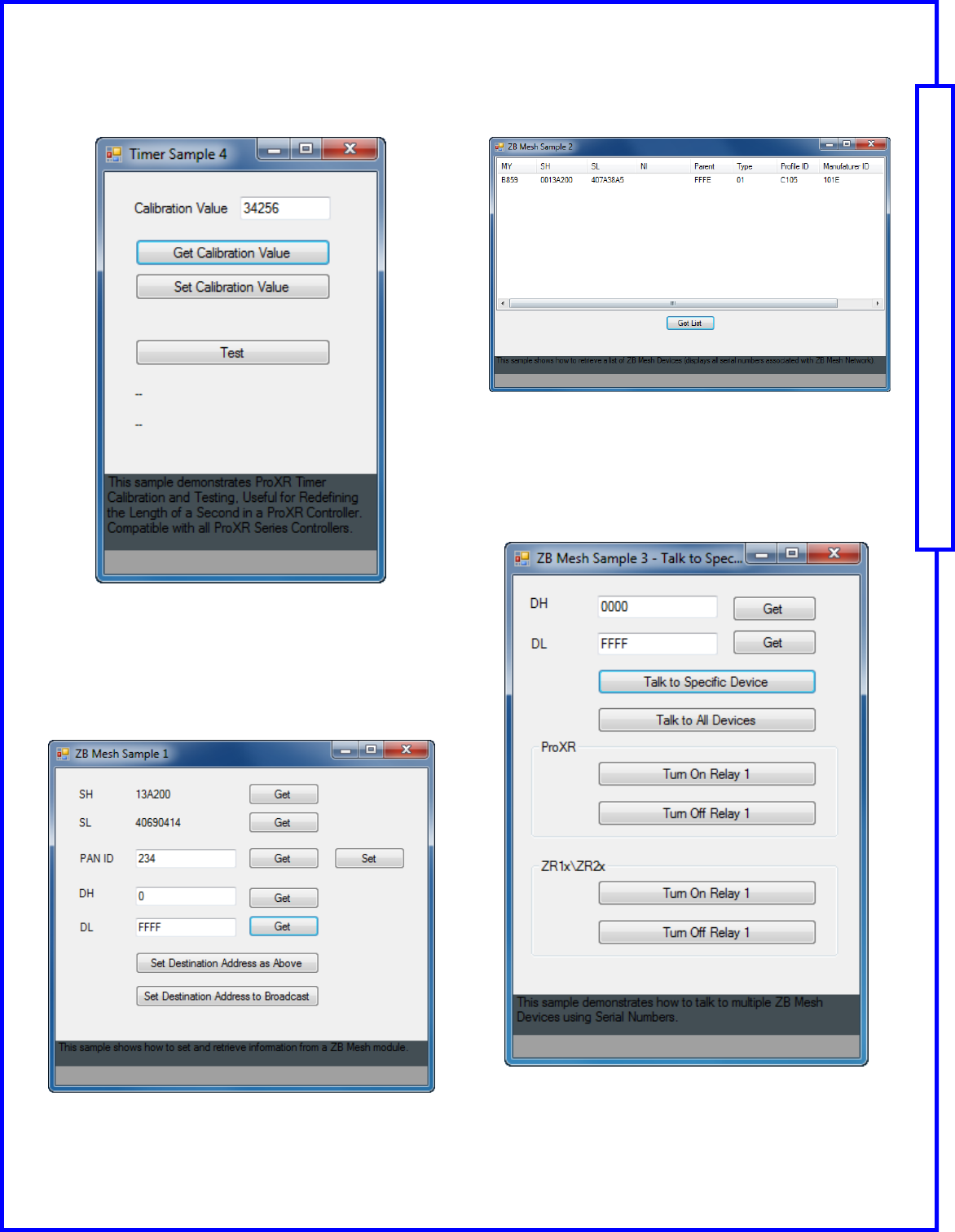
TimerSample4.exe
ProXR Timer Calibration and Testing
This sample demonstrates ProXR Timer Calibration and Testing,
Useful for Redefining the Length of a Second in a ProXR Con-
troller. Compatible with all ProXR Series Controllers.
ZBMeshSample1.exe
Set & Retrieve Information From a ZigBee module
This sample shows how to set and retrieve information from a
ZigBee module.
ZBMeshSample2.exe
How to retrieve a List of ZigBee Devices
This sample shows how to retrieve a list of ZigBee Devices
(displays all serial numbers associated with ZigBee Mesh Net-
work).
ZBMeshSample3.exe
Talk to Multiple ZigBee Devices Using Serial Numbers
This sample demonstrates how to talk to multiple ZigBee Devic-
es using Serial Numbers.
This manual will guide you through the setup and use of all Reactor Series relay controllers. Following this manual in the sequence outlined is absolutely essential to proper understanding and use of
Reactor Series Controllers. Please review the entire manual BEFORE contacting NCD technical support. NCD technical support staff will direct your questions to this manual when applicable.
Page 18 Quick Start Guide: NCD Component Library
NCD Component Library Samples
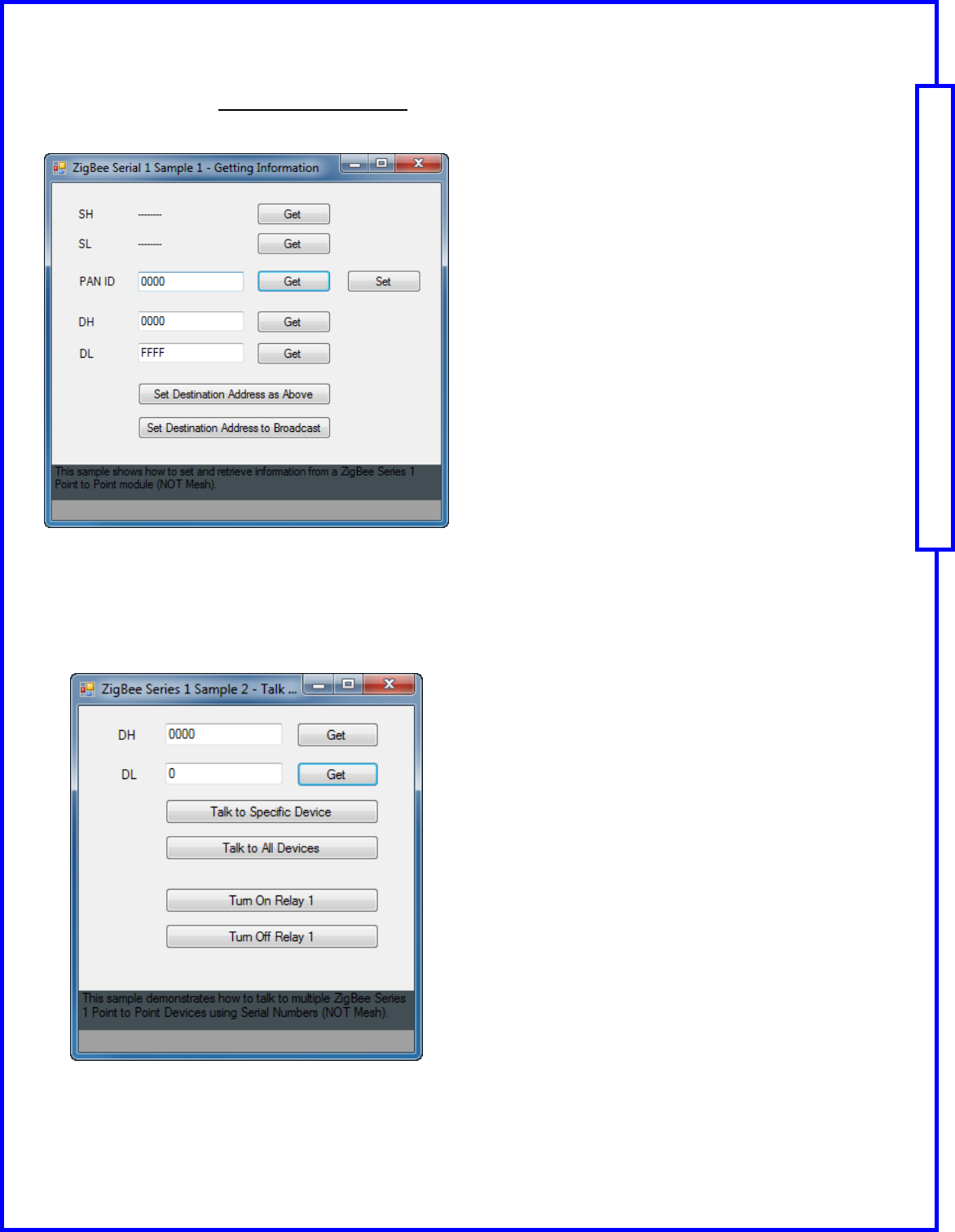
ZBSeries1Sample1.exe(802.15.4 Wireless Serial)
Set and Retrieve Information from a 802.15.4 Wireless Series
This sample shows how to send and retrieve information from a
802.15.4 Wireless Series 1 Point to Point module (NOT Mesh).
ZBSeries1Sample2.exe (802.15.4 Wireless Serial)
Talk to Multiple 802.15.4 Wireless Series 1 Point to Point Devic-
es
This sample demonstrates how to talk to multiple 802.15.4 Wire-
less Point to Point Devices using Serial Numbers (NOT Mesh).
This manual will guide you through the setup and use of all Reactor Series relay controllers. Following this manual in the sequence outlined is absolutely essential to proper understanding and use of
Reactor Series Controllers. Please review the entire manual BEFORE contacting NCD technical support. NCD technical support staff will direct your questions to this manual when applicable.
Page 19 Quick Start Guide: NCD Component Library
NCD Component Library Samples
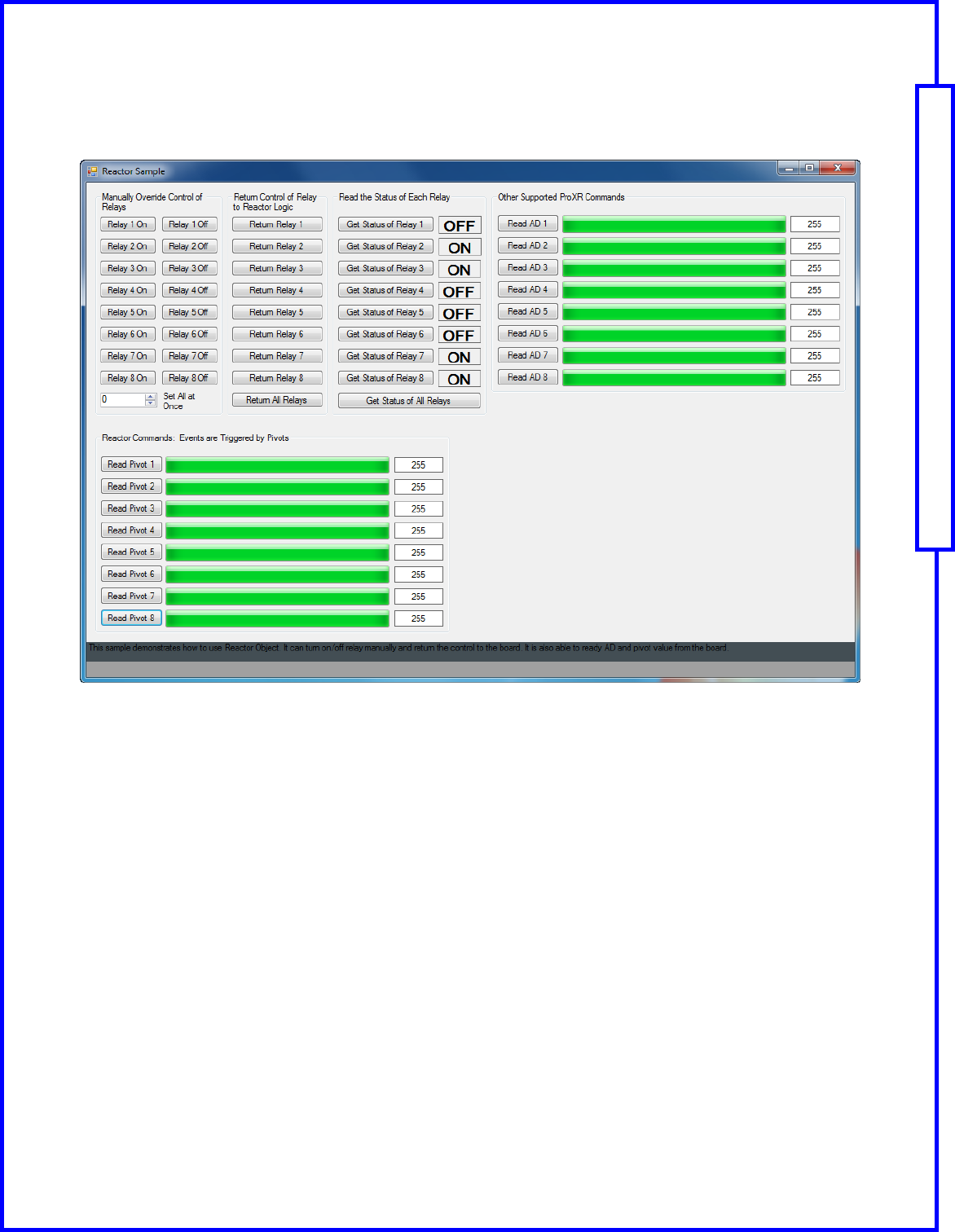
ReactorSample1.exe
Test Hardware and Basic Functions of all Reactor Series Controllers
Set and Receive Relay Status and Read AD Input values for all Reactor Series Controllers.
This manual will guide you through the setup and use of all Reactor Series relay controllers. Following this manual in the sequence outlined is absolutely essential to proper understanding and use of
Reactor Series Controllers. Please review the entire manual BEFORE contacting NCD technical support. NCD technical support staff will direct your questions to this manual when applicable.
Page 20 Quick Start Guide: NCD Component Library
NCD Component Library Samples
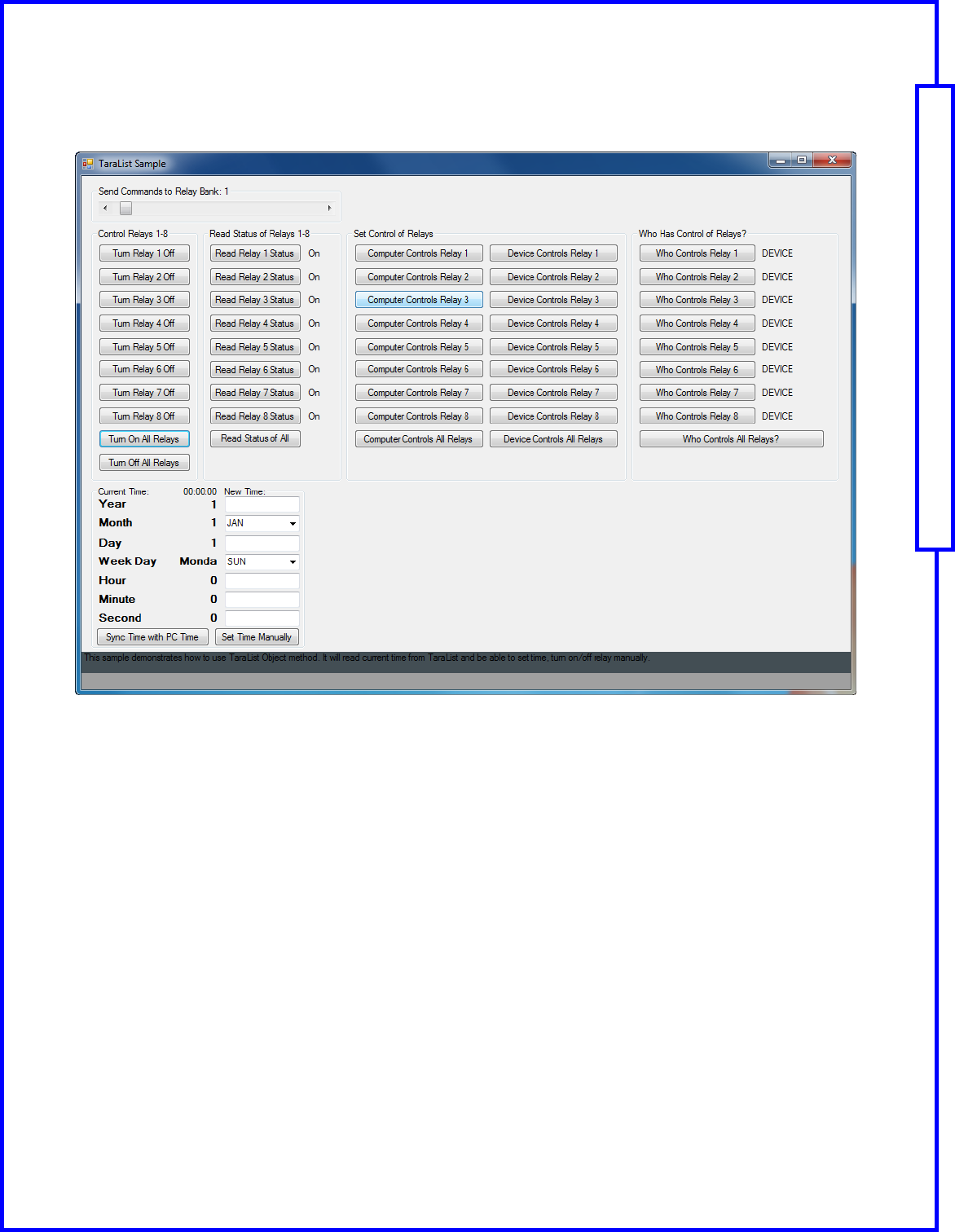
TaralistSample1.exe
Test Hardware and Basic Functions for all Tara list Series Controllers
Set and Receive Relay Status and Read AD Input Values for all Tara list Series Controllers.
This manual will guide you through the setup and use of all Reactor Series relay controllers. Following this manual in the sequence outlined is absolutely essential to proper understanding and use of
Reactor Series Controllers. Please review the entire manual BEFORE contacting NCD technical support. NCD technical support staff will direct your questions to this manual when applicable.
Page 21 Quick Start Guide: NCD Component Library
Technical Support
Technical support is available through our website, controlanything.com.
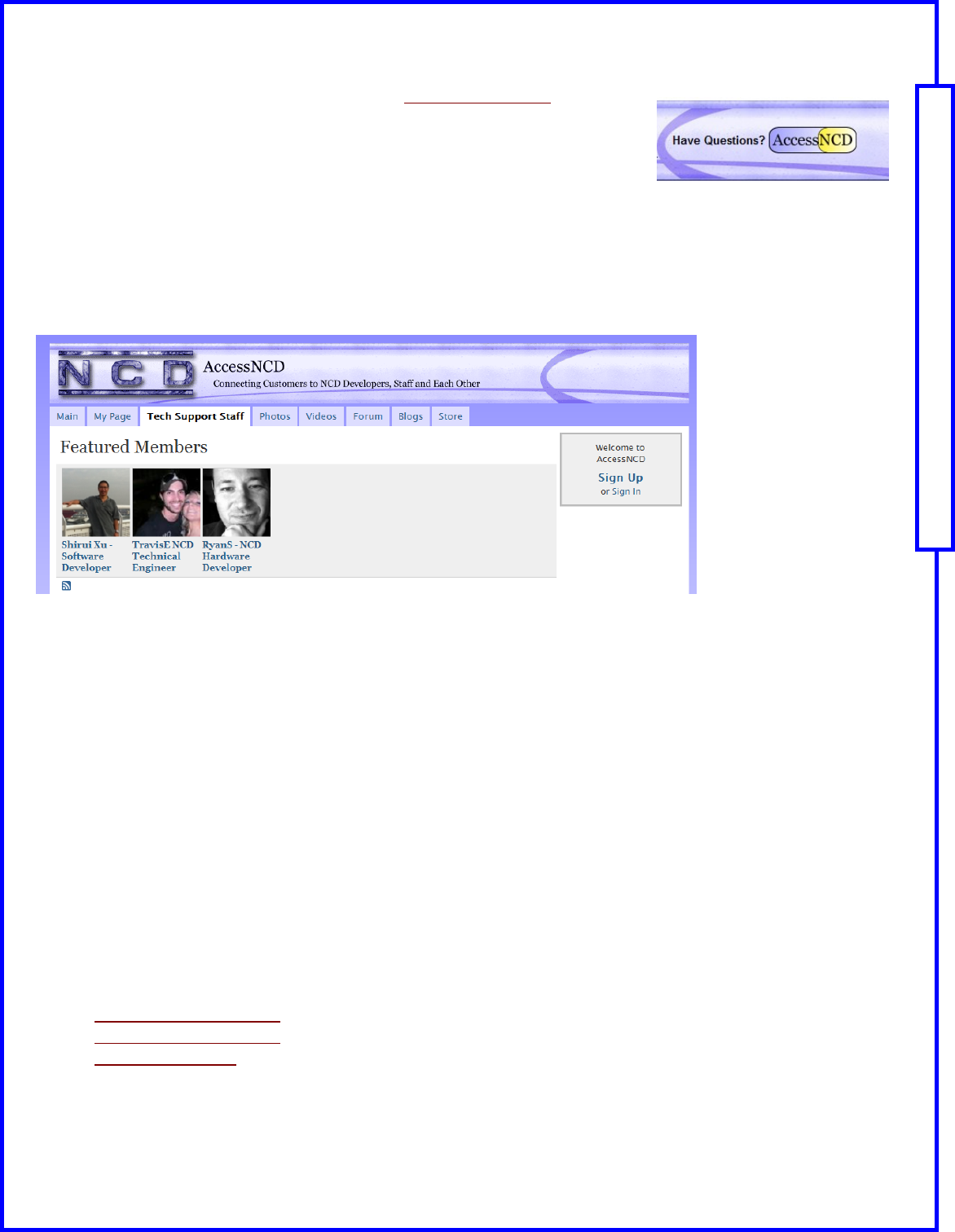
AccessNCD is the way we connect NCD engineers to our customers.
Click on the AccessNCD button located on the top right of the header of each page
of our website.
For technical support and application information, contact Travis Elliott, our technical engineer. If you feel that you have
discovered a bug in the firmware of our controllers, contact Ryan Sheldon, our hardware developer. If you have pro-
gramming-related questions or have discovered a bug in our software, please contact Shirui Xu, our software engineer.
Click the ‘Tech Support Staff’ tab and click on the appropriate engineer link for assistance. Click on our ‘Forum’ tab if
you would like to post publicly or review problems that other customers have had and our recommended solutions.
Our engineers monitor questions and respond continually throughout the day. Before requesting telephone technical
support, we ask that customers please try to resolve their problems through AccessNCD first. However, for persistent
problems, NCD technical support engineers will schedule a phone consultation.
National Control Devices, LLC
PO Box 455
Osceola, MO 64776
417-646-5644 phone
866-562-0406 fax
Open 9 a.m. - 4 p.m. CST
All orders must be placed online at our website, www.controlanything.com
Notice:
The only authorized resellers of NCD products are
www.controlanything.com
www.relaycontrollers.com
www.relaypros.com
www.amazon.com
All other websites are not authorized dealers; we have noticed some retailers offering our products fraudulently.
Copyright © 2012
National Control Devices
All Rights Reserved.
Contact Information
