Coolhear Information Technology CH00918 Digital ANC Bluetooth Headphones User Manual AIR5
Shenzhen Coolhear Information Technology Co., Ltd. Digital ANC Bluetooth Headphones AIR5
Users Manual
Headphones
Quick start guide
5
Carry case
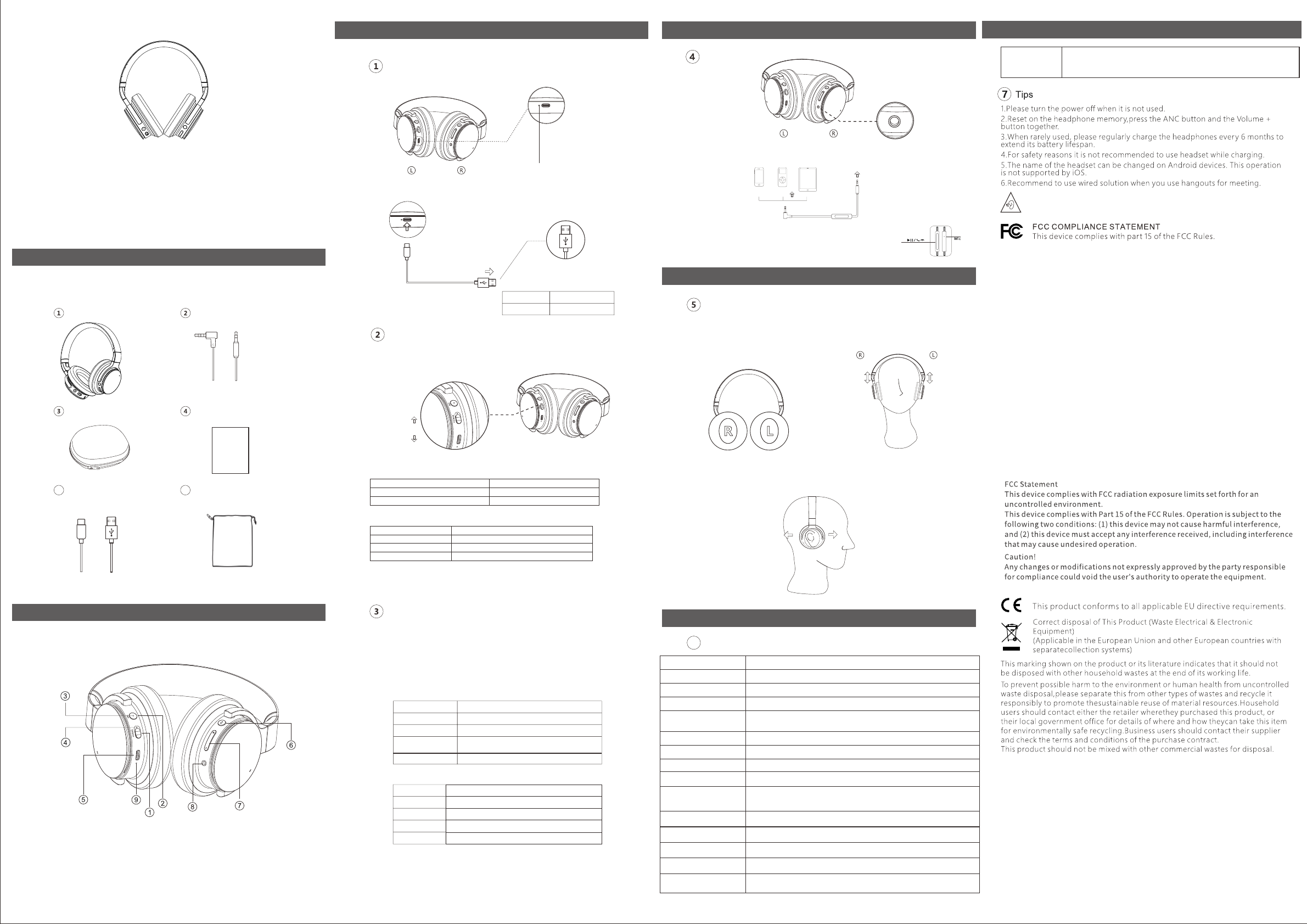
In the box
Product Overview
Indicator
USB A
Charging indicator:
Charging
Finished charging Red light off
Red light on
Charging
Light on Bluetooth connected
Blue light flashing
Light off Power off/wire connected
Blue light flash slowly
Bluetooth No connection / back connection
Search to be connected / restore factory
Bluetooth indicator light
Green light on ANC activated
Low battery alarm
Light off
Red and green alternately
ANC off
ANC indicator light
Call functions
1.Turn on the Bluetooth function on your device.
Bluetooth mode
Music
2.Switch on power button, the Bluetooth indicator blinks blue.
3.Choose your headphone from your connection list
(Pairing name is GID6B)
4. Long press MFB key for 5s to pair GID6B with different devices.
Answer a call
Play/pause Press the MFB button
Double click the MFB button
Triple click the MFB button
Long press the volume up button. Volume increases in every 0.5s.
Long press the volume down button. Volume decreases in every 0.5s.
Next Song
Previous Song
Volume Up
Volume Down
Decline an incoming call
End a call
Hold a call: when A is
on the line, B calls in;
Press the MFB button when a call is coming.
Press and hold the MFB button for 1s
Press the MFB button while on a call
Press MFB button: End the call with A to connect with B;
Double press the MFB button: Answer B and hold call with A;
Operation
How to wear AIR5
1.There is R(for right ear) and L(for left ear)
sign on ear-cups. Please make sure you
wear AIR5 in correct direction as suggested.
3.When you are wearing AIR5, please adjust the position of ear cups, so your
ears could be completely wrapped to guarantee the active noise cancelling
performance.
2.Headband length adjustment
headband
AIR5
Dynamic
40mm
32 Ohms±15%
99±3dB/mW (ANC Off)
100±3dB/mW (ANC On)
12Hz-20KHz
>25dB
25Hz-1KHz
600mAH
>25 hrs @ BT on streaming at 1/2 ROP without ANC on,
>16 hrs Plus ANC on
> 10 hrs at Max Level.
(195±5)*(170±5)*(94±5) mm³
Operation
Wired mode
is plugged in.
Plug the audio cable into
the connector on the left
smartphone music player pad
The Bluetooth will automatically turn off along with its indicator light when the AUX cable
Headphones can be used in wired mode when your device does not support Bluetooth
or the battery runs out (Note the power button must be on the 'off' position).
Tips
Wear
Specifications
Retractable
<L> <R>
1. Power switch
2. ANC button
3. ANC indicator
4. Bluetooth indicator
5. Type C charging port
6. MFB button
7. Volume up/down
8. 3.5mm audio jack
9. Charging indicator
Powering on/off
Slide power button to switch headset on and off.
Power on
Power off
Bluetooth and ANC function will be activated by default when powered on.
Charging cable type
C male to USB A male
To use AIR 5 with AUX cable
Connecting via Bluetooth
earcup.
Hold A on the line, reject B. Press and hold MFB button for 1s.
AUX cable
Specifications
6
Mode No.
Driver Type
Driver Diameter
Driver Impedance
Sensitivity
Frequency Range
ANC Peak reduction
ANC Bandwidth
Battery Capacity
Play Time
Dimension
Operating environment Operating temperature:0°C to 45°C;storage temperature:-30°C to 70°C
Battery replacement warning
Risk of explosion if the battery is replaced by an incorrect type.
This product contain build in battery that need to be removed by a specialist
before the product disposal mandatory
Keep the battery away from excessive heat and direct sunlight. Do not place
it on heating device such as microwave Owen stoves or radiators
Battery may explode if overheated. Recommended if possible
1)Risk of explosion if battery is replaced by an incorrect type.
2)Dispose of used batteries according to the instructions.
6 Pouch
2.4G (2400MHZ-2483.5MHZ)Supported Band
BT Frequency Range 2402MHZ-2480MHZ
E.I.R.P Power(Max) 1 Mbps:7.5dBm/2 Mbps:5dBm/3 Mbps:5dBm
DOC declaration:
Hereby,declares that theShenzhen Coolhear Information Technology Co., Ltd.
radio equipment type AIR5 is in complaiance with Directive 2014/53/EU.The
full text of the EU declaration of conformity is available at the following internet
address:www.coolhear.com
To prevent possible hearing damage,do not listen at high volume levels for
long periods
NOTE: The manufacturer is not responsible for any radio or TV
interference caused by unauthorized modifications to this equipment.
Such modifications could void the user's authority to operate the
equipment.
NOTE: This equipment has been tested and found to comply with the limits
for a Class B digital device, pursuant to part 15 of the FCC Rules. These
limits are designed to provide reasonable protection against harmful
interference in a residential installation.
This equipment generates uses and can radiate radio frequency energy
and, if not installed and used in accordance with the instructions, may
cause harmful interference to radio communications. However, there is
no guarantee that interference will not occur in a particular installation. If
this equipment does cause harmful interference to radio or television
reception, which can be determined by turning the equipment off and on,
the user is encouraged to try to correct the interference by one or more of
the following measures:
- Reorient or relocate the receiving antenna.
- Increase the separation between the equipment and receiver.
-Connect the equipment into an outlet on a circuit different from that to
which the receiver is connected.
-Consult the dealer or an experienced radio/TV technician for help
BTFRFExposure
The Maximum Permissible Exposure (MPE) level has been calculated based on a
distance of d=5mmbetween the device and the human body. To maintain compliance
with RF exposure requirement, use product that maintain a 5mm distance between
the device and human body.
AIR5
Digital ANC Bluetooth Headphones
Quick Start Guide