Craftsman 113198610 User Manual 10 INCH DELUXE ELECTRONIC RADIAL SAW Manuals And Guides L0903674
CRAFTSMAN Saw Radial Manual L0903674 CRAFTSMAN Saw Radial Owner's Manual, CRAFTSMAN Saw Radial installation guides
User Manual: Craftsman 113198610 113198610 CRAFTSMAN 10-INCH DELUXE ELECTRONIC RADIAL SAW - Manuals and Guides View the owners manual for your CRAFTSMAN 10-INCH DELUXE ELECTRONIC RADIAL SAW #113198610. Home:Tool Parts:Craftsman Parts:Craftsman 10-INCH DELUXE ELECTRONIC RADIAL SAW Manual
Open the PDF directly: View PDF  .
.
Page Count: 76
I
Save This Manual
For Future Reference
gJ _A/ S
owners
monuol
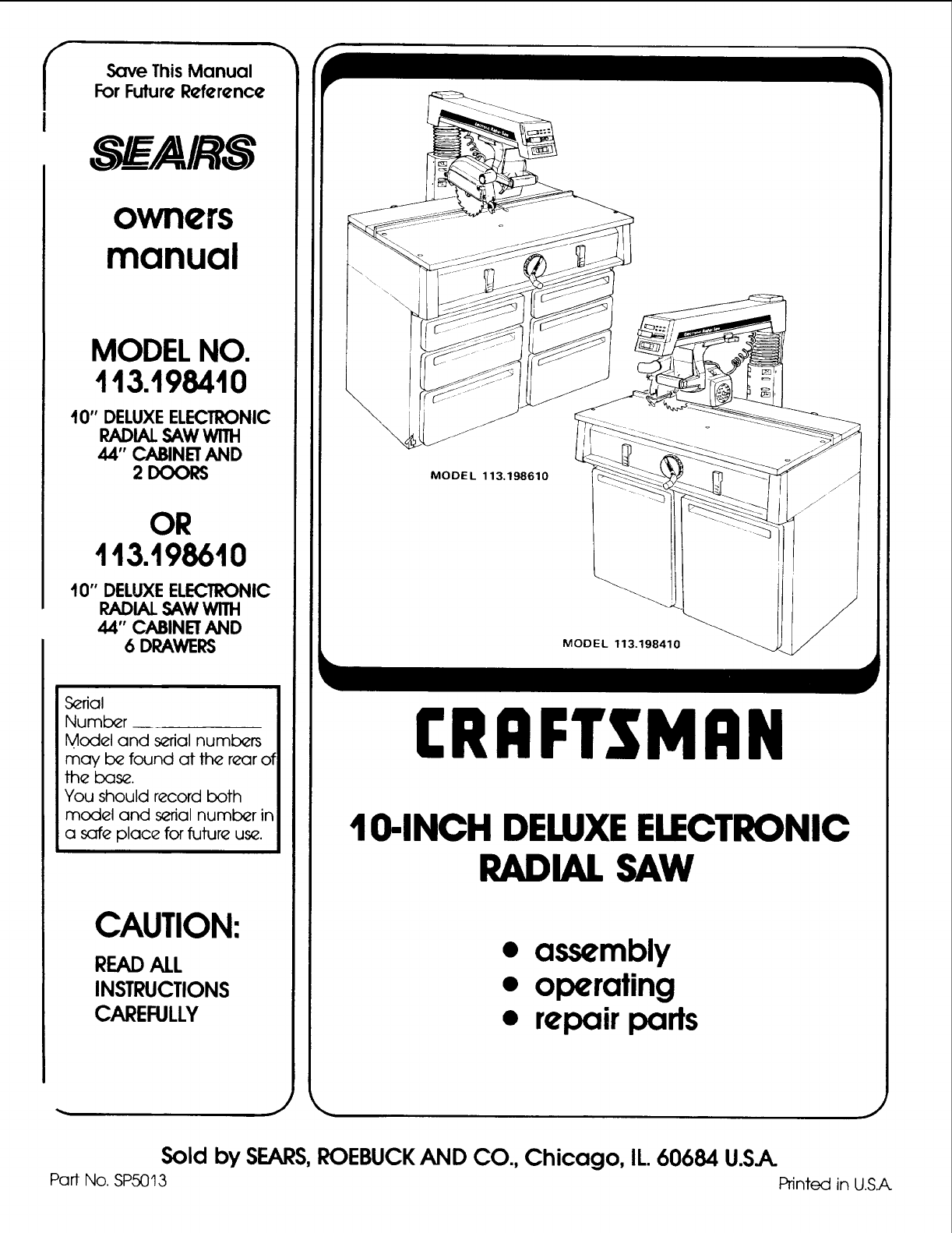
MODEL NO.
113.198410
10" DELUXEELECTRONIC
RADIAL SAW WITH
44" CABINET AND
2 DOORS
OR
t13.198610
10" DELUXEELECTRONIC
RADIAL SAW WITH
44" CABINET AND
6 DRAWERS
Serial
Number
Model and serial numlc_rs
may b_ found at the rear of
the bas_.
You should record both
model and serial number in
a safe place for future us_.
CAUTION:
READALL
INSTRUCTIONS
CAREFULLY
"x
MODEL 113,198610
MODEL 113.198410
CRRFTSMRN
IO-INCH DELUXEELECTRONIC
RADIAL SAW
• assembly
• operating
•repair parts
Sold by SEARS,ROEBUCKAND CO., Chicago, IL.60684 U.SJK.
Part No. SP5013 Printed in U.S.A
FULL ONE YEAR WARRANTY ON CRAFTSMAN RADIAL SAW
If within one year from the date of purchase, this Craftsman Radial Saw fails due to a defect in material or
workmanship, Sears will repair it, tree of charge.
WARRANTY SERVICE IS AVAILABLE BY SIMPLY CONTACTING THE NEAREST SEARS SERVICE
CENTER/DEPARTMENT THROUGHOUT THE UNITED STATES.
This warranty applies only while this produc! is used in the United States.
This warranty gives you specific legal rights and you may also have other rights which vary from state to state.
SEARS, ROEBUCK AND CO., DEPT. 698/731A Sears Tower, Chicago, IL 60684
GENERAL SAFETY INSTRUCTIONS FOR POWER TOOLS
1. KNOW YOUR POWER TOOL
Read and understand the owner's manual and
labels affixed to the tool. Learn its application
and limitations as well as the specific potential
hazards peculiar to this tool.
2. GROUND ALL TOOLS
This tool is equipped with an approved
3-conductor cord and a 3-prong grounding type
plug to fit the proper grounding type receptacle.
The green conductor in the cord is the grounding
wire. Never connect the green wire to a live
terminal.
3. KEEP GUARDS IN PLACE,
in working order, and in proper adjustment and
alignment.
4. REMOVE ADJUSTING KEYS AND WRENCHES
Form habit of checking to see that keys and
adjusting wrenches are removed from tool before
turning it on.
5. KEEP WORK AREA CLEAN
Cluttered areas and benches invite accidents.
Floor must not be slippery due to wax or sawdust.
6. AVOID DANGEROUS ENVIRONMENT
Don't use power tools in damp or wet locations or
expose them to rain. Keep work area well lighted.
Provide adequate surrounding work space.
7. KEEP CHILDREN AWAY
All visitors should be kept a safe distance from
work area.
8. MAKE WORKSHOP CHILD-PROOF
-- with padlocks, master switches, or by removing
starter keys.
9. DON'T FORCE TOOL
It will do the job better and safer at the rate for
which it was designed.
10. USE RIGHT TOOL
Don't force tool or attachment to do a job it was
not designed for.
11. WEAR PROPER APPAREL
Do not wear loose clothing, gloves, neckties or
jewelry (rings, wrist watches) to get caught in
moving parts. Nonslip footwear is recommended.
Wear protective hair covering to contain long
hair. Roll long sleeves above the elbow.
12. USE SAFETY GOGGLES (Head Protection)
Wear Safety goggles (must comply with ANSI
Z87.1) at all times. Everyday eyeglasses only
have impact resistant lenses, they are NOT
safety glasses. Also, use face or dust mask if
cutting operation is dusty, and ear protectors
(plugs or muffs) during extended periods of
operation.
13. SECURE WORK
Use clamps or a vise to hold work when practical.
It's safer than using your hand, frees both hands
to operate tool.
14. DON'T OVERREACH
Keep proper footing and balance at all times.
15. MAINTAIN TOOLS WITH CARE
Keep tools sharp and clean for best and safest
performances. Follow instructions for lubricating
and changing accessories.
16. DISCONNECT TOOLS
before servicing; when changing accessories
such as blades, bits, cutters, etc.
17. AVOID ACCIDENTAL STARTING
Make sure switch is in "OFF" position before
plugging in.
18. USE RECOMMENDED ACCESSORIES
Consult the owner's manual for recommended
accessories. Follow the instructions that accom-
pany the accessories. The use of improper acces-
sories may cause hazards.
19. NEVER STAND ON TOOL
Serious injury could occur if the tool is tipped or
if the cutting tool is accidentally contacted. Do
not store materials above or near the tool such
that it is necessary to stand on the tool to reach
them.
20. CHECK DAMAGED PARTS
Before further use of the tool, a guard or other
part that is damaged should be carefully checked
to ensure that it will operate properly and perform
its intended function. Check for alignment of
moving parts, binding of moving parts, breakage
of parts, mounting, and any other conditions that
may effect its operation. A guard or other part
that id damaged should be properly repaired or
replaced.
21. DIRECTION OF FEED
Feed work into a blade or cutter against the
direction of rotation of the blade or cutter only.
22. NEVER LEAVE TOOL RUNNING UNATTENDED
Turn power off. Don't leave tool until it comes to
a complete stop.
additional
BEFORE USING THE SAW:
instructions for radial arm saws .e..d
3 =
€_
e--
WARNING: TO AVOID MISTAKES THAT COULD
RESULT IN SERIOUS, PERMANENT INJURY, DO
NOT CONNECT POWER CORD UNTIL THE FOL-
LOWING STEPS HAVE BEEN SATISFACTORILY
COMPLETED:
1. Assembly and alignment. (See pages 12-31)
2. Examination and operating familiarity with ON-
OFF switch, elevation hand wheel, swivel lock,
bevel lock and rip lock, guard clamp screw,
spreader and anti-kickback device and miter
lock. (See pages 37, 38 & 39.)
3. Review and understanding of all safety instruc-
tions and operating procedures throughout the
manual.
FOB YOUR OWN SAFETY:
1Read an€ uncle(stand owner's _anua_
before 3perating machine
2 Wear s_,ely goggles compqying wilh
ANSI Z87 1
3 Keep hands Ou{ o1 path o¢ saw blade
4. Know he* to avoid "KICKBACKS.
5USe "PUSH STfC K • for qarrow work
6 Never reach around Ihe saw blade
?Never perlorm any opef|l_on
'FREEHANO '
8 Returp carriaQe I_ the full rear posi_on
8fief e_h cros_ cul type o_ration
sshulof,po*ermad ai_ow_aw b_.d_Io
stop befo(e Ddiusllng of se_mcing
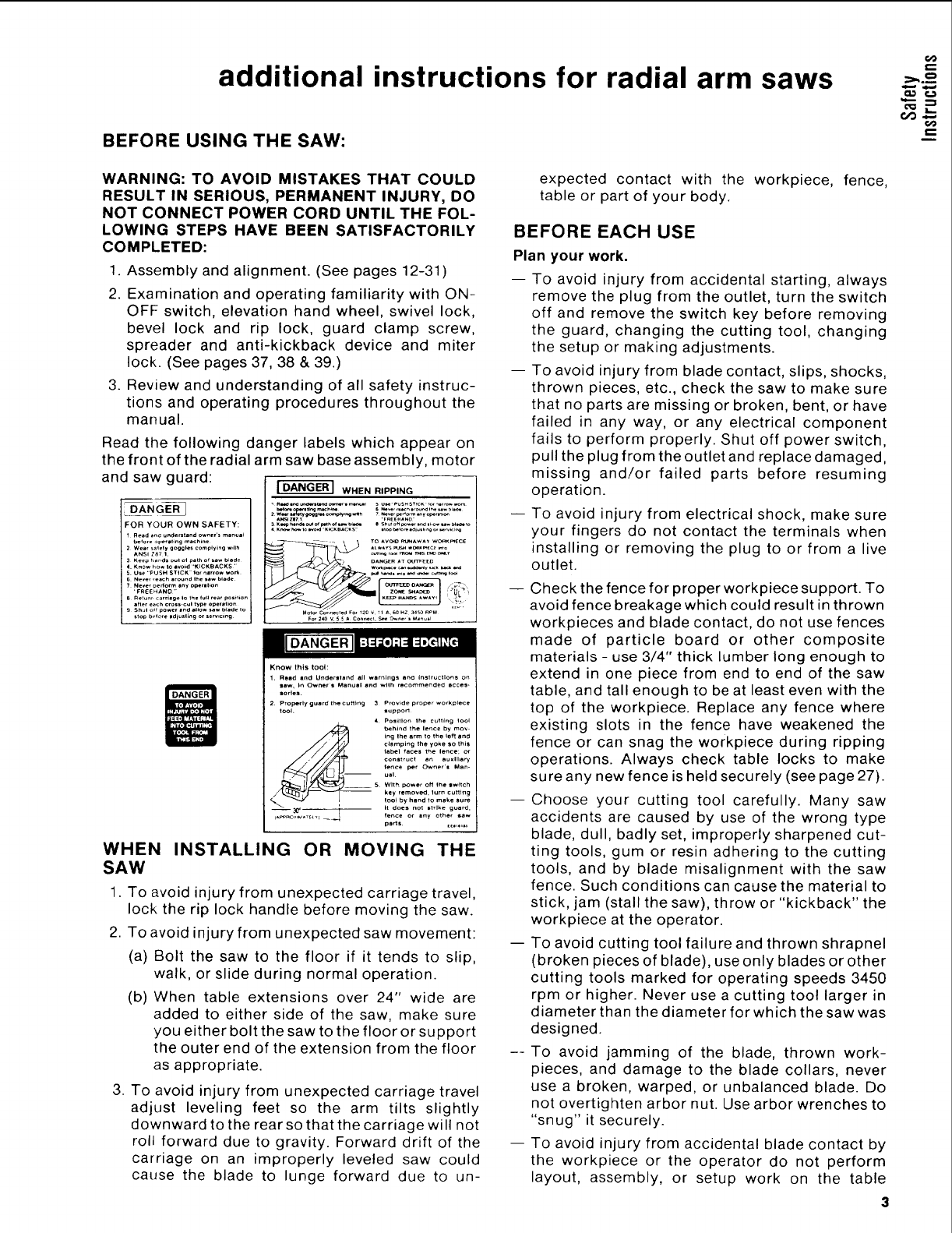
Read the following danger labels which appear on
the front of the radial arm saw base assembly, motor
and saw guard: _ WHENRIPPING
-- - TO AVOID m.'NAW=Y WORKm_OE
_ _ DA_R AT C,tn_
Know this tool:
1, Read and Under,land all warnlng_ an(3 instructlon_ o_
Saw, in Owners Manual and wilh recommended accea-
ttodes.
2 Properly guard the cuf_ng 3 Provtde proper workpl_e
tool. aupporl
4 Positlo_ the cutting _ool
.__ b_hind the lance by mov
Ing Ihe _rm to the tef'_ and
clamping the yoke SO this
label fa_n the lance; or
construct an au xill_ry
fence per Owner's Man-
ual
5 With power off Ihe aw+tch
-- key removed, 1urn cutting
1_ by hand qo make sure
It do_a no_ strike guard,
o3_f _ fl fence or any other saw
parts [[0,_,=_
WHEN INSTALLING OR MOVING THE
SAW
1. To avoid injury from unexpected carriage travel,
lock the rip lock handle before moving the saw.
2. To avoid injury from unexpected saw movement:
(a) Bolt the saw to the floor if it tends to slip,
walk, or slide during normal operation.
(b) When table extensions over 24" wide are
added to either side of the saw, make sure
you either bolt the saw to the floor or support
the outer end of the extension from the floor
as appropriate.
3. To avoid injury from unexpected carriage travel
adjust leveling feet so the arm tilts slightly
downward to the rear so that the carriage will not
roll forward due to gravity. Forward drift of the
carriage on an improperly leveled saw could
cause the blade to lunge forward due to un-
expected contact with the workpiece, fence,
table or part of your body.
BEFORE EACH USE
Plan your work.
-- To avoid injury from accidental starting, always
remove the plug from the outlet, turn the switch
off and remove the switch key before removing
the guard, changing the cutting tool, changing
the setup or making adjustments.
To avoid injury from blade contact, slips, shocks,
thrown pieces, etc., check the saw to make sure
that no parts are missing or broken, bent, or have
failed in any way, or any electrical component
fails to perform properly. Shut off power switch,
pull the plug from the outlet and replace damaged,
missing and/or failed parts before resuming
operation.
To avoid injury from electrical shock, make sure
your fingers do not contact the terminals when
installing or removing the plug to or from a live
outlet.
Check the fence for proper workpiece support. To
avoid fence breakage which could result in thrown
workpieces and blade contact, do not use fences
made of particle board or other composite
materials - use 3/4" thick lumber long enough to
extend in one piece from end to end of the saw
table, and tall enough to be at least even with the
top of the workpiece. Replace any fence where
existing slots in the fence have weakened the
fence or can snag the workpiece during ripping
operations. Always check table locks to make
sure any new fence is held securely (see page 27).
Choose your cutting tool carefully. Many saw
accidents are caused by use of the wrong type
blade, dull, badly set, improperly sharpened cut-
ting tools, gum or resin adhering to the cutting
tools, and by blade misalignment with the saw
fence. Such conditions can cause the material to
stick, jam (stall the saw), throw or "kickback" the
workpiece at the operator.
To avoid cutting tool failure and thrown shrapnel
(broken pieces of blade), use only blades or other
cutting tools marked for operating speeds 3450
rpm or higher. Never use a cutting tool larger in
diameter than the diameter for which the saw was
designed.
To avoid jamming of the blade, thrown work-
pieces, and damage to the blade collars, never
use a broken, warped, or unbalanced blade. Do
not overtighten arbor nut. Use arbor wrenches to
"snug" it securely.
To avoid injury from accidental blade contact by
the workpiece or the operator do not perform
layout, assembly, or setup work on the table
while the cutting tool is rotating. The rotating
tool could cut and throw anything hitting the
blade causing the saw to unexpectedly come
forward.
-- Use the right guard. To avoid losing control of the
workpiece, hitting the cutting tool, or being struck
by thrown pieces, never do any cutting unless the
proper guard (with all its parts in place) is installed
and adjusted properly.
-- To avoid injury from thrown pieces, slips, blade
contact, or jamming of the workpiece, make sure
no play exists between the column and column
support or in the carriage and that the arm, yoke,
bevel locks/clamps are tight.
--To avoid injury from thrown objects, slips or
jamming of the blade due to pinching of the blade
by shifting boards:
(a) Do not leavea long board unsupported so the
spring of the board causes it to twist or rise
from the table.
(b) Check to be sure that pieces will not fall off
the table once they have been cut.
(c) Provide support for the workpiece, based on
its size and the type of operation to be
performed. (See basic saw operation page
4O.)
(d) Never use another person as a substitute fora
table extension, or as an additional support
for a workpiece to assist in feeding, support-
ing, or pulling the workpiece.
(e) Never cut workpieces placed side to side or
stacked on top of each other. The pieces can
slide on each other.
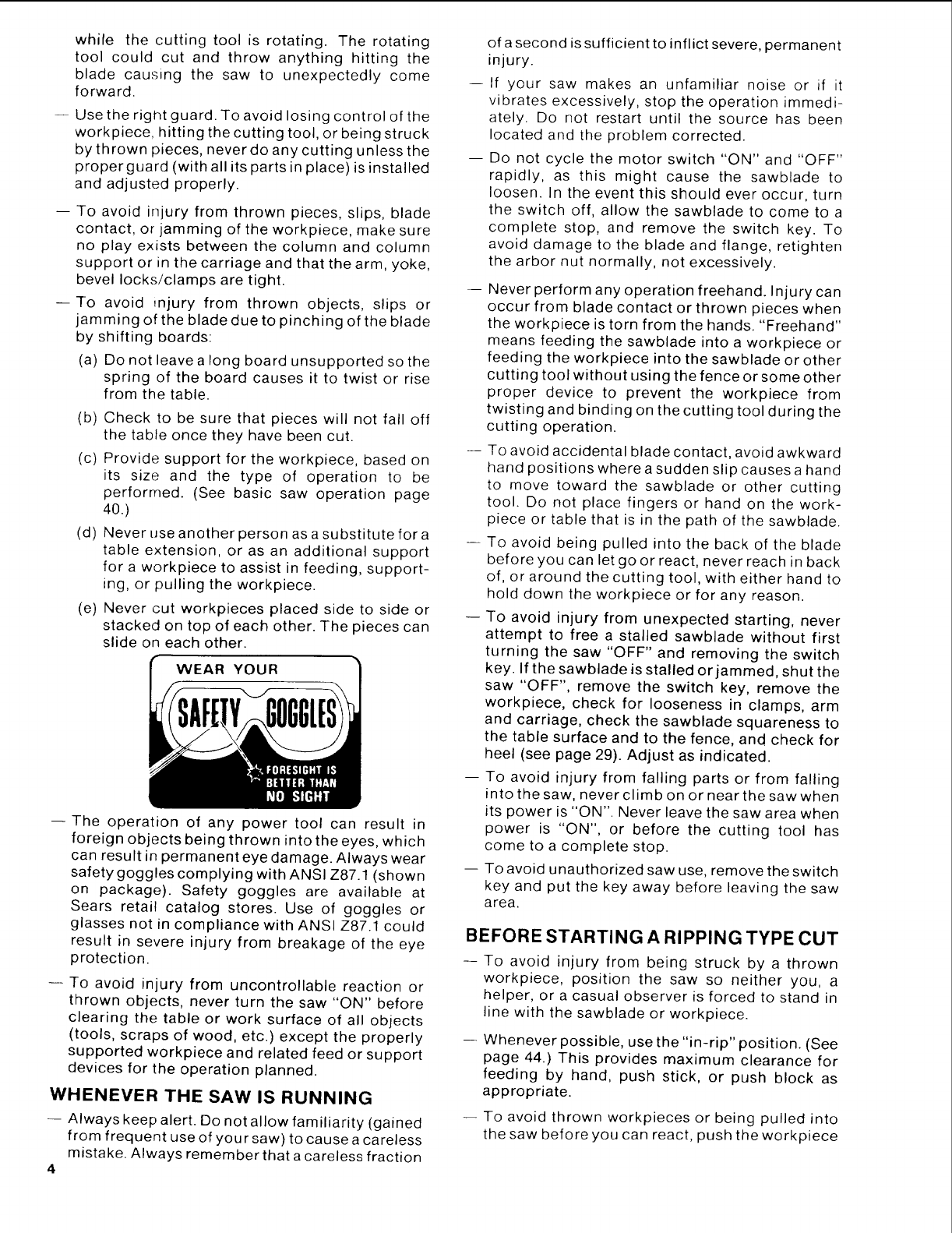
WEAR YOUR
-- The operation of any power tool can result in
foreign objects being thrown into the eyes, which
can result in permanent eye damage. Always wear
safety goggles complying with ANSI Z87.1 (shown
on package). Safety goggles are available at
Sears retail catalog stores. Use of goggles or
glasses not in compliance with ANSI Z87.1 could
result in severe injury from breakage of the eye
protection.
-- To avoid injury from uncontrollable reaction or
thrown objects, never turn the saw "ON" before
clearing the table or work surface of all objects
(tools, scraps of wood, etc.) except the properly
supported workpiece and related feed or support
devices for the operation planned.
WHENEVER THE SAW IS RUNNING
-- Always keep alert. Do not allow familiarity (gained
from frequent use of your saw) to cause a careless
mistake. Always remember that a careless fraction
4
of a second is sufficient to inflict severe, permanent
injury.
If your saw makes an unfamiliar noise or if it
vibrates excessively, stop the operation immedi-
ately. Do not restart until the source has been
located and the problem corrected.
Do not cycle the motor switch "ON" and "OFF"
rapidly, as this might cause the sawblade to
loosen. In the event this should ever occur, turn
the switch off, allow the sawblade to come to a
complete stop, and remove the switch key. To
avoid damage to the blade and flange, retighten
the arbor nut normally, not excessively.
-- Never perform any operation freehand. Injury can
occur from blade contact or thrown pieces when
the workpiece is torn from the hands. "Freehand"
means feeding the sawblade into a workpiece or
feeding the workpiece into the sawblade or other
cutting tool without using the fence or some other
proper device to prevent the workpiece from
twisting and binding on the cutting tool during the
cutting operation.
-- To avoid accidental blade contact, avoid awkward
hand positions where a sudden slip causes a hand
to move toward the sawblade or other cutting
tool. Do not place fingers or hand on the work-
piece or table that is in the path of the sawblade.
-- To avoid being pulled into the back of the blade
before you can let go or react, never reach in back
of, or around the cutting tool, with either hand to
hold down the workpiece or for any reason.
-- To avoid injury from unexpected starting, never
attempt to free a stalled sawblade without first
turning the saw "OFF" and removing the switch
key. If the sawblade is stalled or jammed, shut the
saw "OFF", remove the switch key, remove the
workpiece, check for looseness in clamps, arm
and carriage, check the sawblade squareness to
the table surface and to the fence, and check for
heel (see page 29). Adjust as indicated.
-- To avoid injury from falling parts or from falling
into the saw, never climb on or near the saw when
its power is "ON". Never leave the saw area when
power is "ON", or before the cutting tool has
come to a complete stop.
-- To avoid unauthorized saw use, remove the switch
key and put the key away before leaving the saw
area.
BEFORE STARTING A RIPPING TYPE CUT
To avoid injury from being struck by a thrown
workpiece, position the saw so neither you, a
helper, or a casual observer is forced to stand in
line with the sawblade or workpiece.
Whenever possible, use the "in-rip" position. (See
page 44.) This provides maximum clearance for
feeding by hand, push stick, or push block as
appropriate.
-- To avoid thrown workpieces or being pulled into
the saw before you can react, push the workpiece
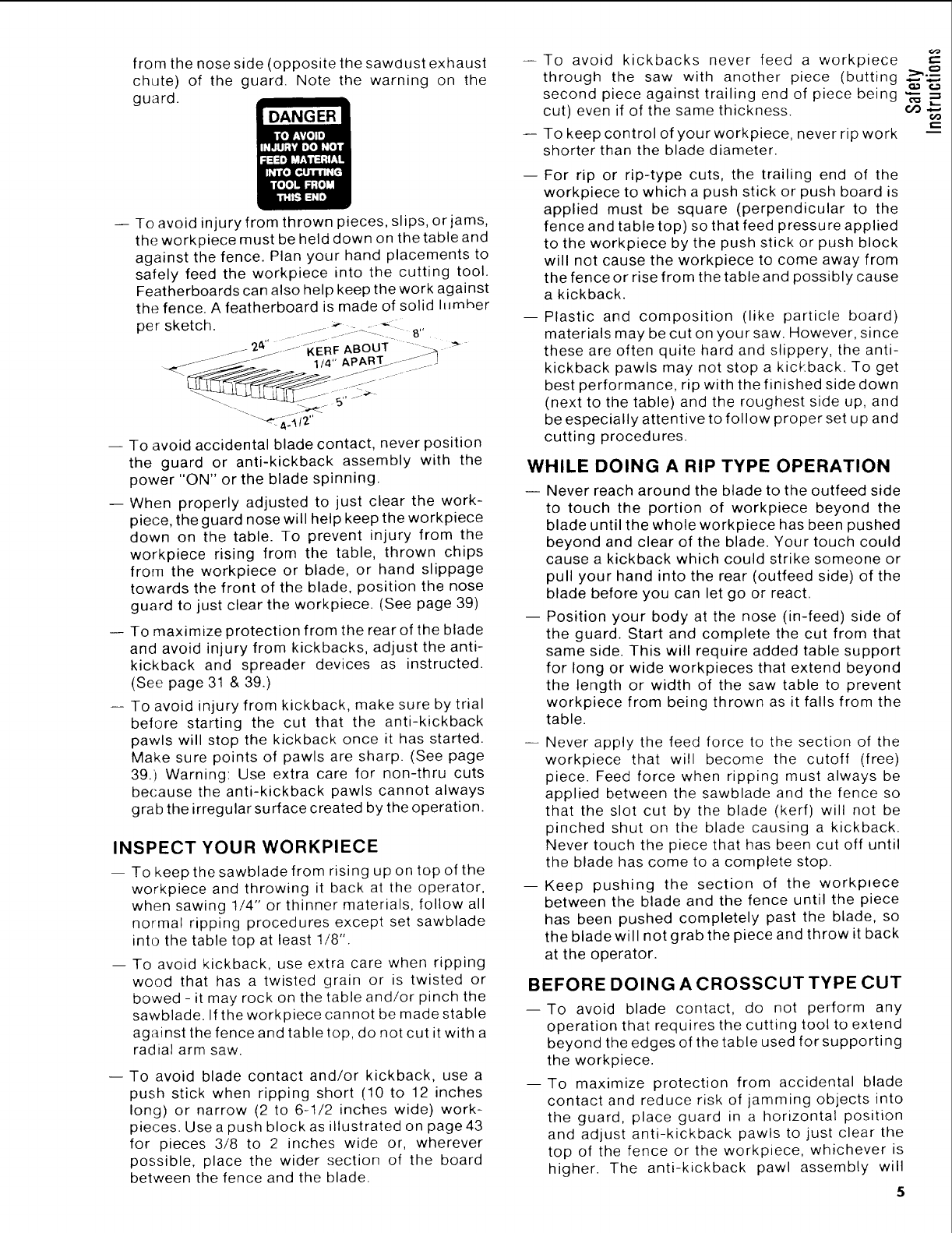
fromthenoseside(oppositethesawdustexhaust
chute)of the guard. Note the warningon the
guard.
-- Toavoidinjuryfromthrownpieces,slips,orjams,
theworkpiecemustbehelddownonthetableand
againstthefence.Planyourhandplacementsto
safelyfeedthe workpieceintothe cuttingtool.
Featherboardscanalsohelpkeeptheworkagainst
thefence.AfeatherboardismadeofsolidI_Jmher
persketch. --_ - -
jj '2._,'' _ i_--- _KE-RF ABOUT " - _ "_
-- To avoid accidental blade contact, never position
the guard or anti-kickback assembly with the
power "ON" or the blade spinning.
-- When properly adjusted to just clear the work-
piece, the guard nose will help keep the workpiece
down on the table. To prevent injury from the
workpiece rising from the table, thrown chips
from the workpiece or blade, or hand slippage
towards the front of the blade, position the nose
guard to just clear the workpiece. (See page 39)
-- To maximize protection from the rear of the blade
and avoid injury from kickbacks, adjust the anti-
kickback and spreader devices as instructed.
(See page 31 & 39.)
-- To avoid injury from kickback, make sure by trial
before starting the cut that the anti-kickback
pawls will stop the kickback once it has started.
Make sure points of pawls are sharp. (See page
39.) Warning: Use extra care for non-thru cuts
because the anti-kickback pawls cannot always
grab the irregular surface created by the operation.
INSPECT YOUR WORKPIECE
-- To keep thesawblade from rising up on top of the
workpiece and throwing it back at the operator,
when sawing 1/4" or thinner materials, follow all
normal ripping procedures except set sawblade
into the table top at least 1/8".
-- To avoid kickback, use extra care when ripping
wood that has a twisted grain or is twisted or
bowed - it may rock on the table and/or pinch the
sawblade. If the workpiece cannot be made stable
against the fence and table top, do not cut it with a
radial arm saw.
-- To avoid blade contact and/or kickback, use a
push stick when ripping short (10 to 12 inches
long) or narrow (2 to 6-1/2 inches wide) work-
pieces. Use a push block as illustrated on page 43
for pieces 3/8 to 2 inches wide or, wherever
possible, place the wider section of the board
between the fence and the blade.
--To avoid kickbacks never feed a workpiece
through the saw with another piece (butting _"._--
second piece against trailing end of piece being "_
cut) even if of the same thickness, oo .,_
-- To keep control of your workpiece, never rip work -_=
shorter than the blade diameter.
-- For rip or rip-type cuts, the trailing end of the
workpiece to which a push stick or push board is
applied must be square (perpendicular to the
fence and table top) so that feed pressure applied
to the workpiece by the push stick or push block
will not cause the workpiece to come away from
the fence or rise from the table and possibly cause
a kickback.
--Plastic and composition (like particle board)
materials may be cut on your saw. However, since
these are often quite hard and slippery, the anti-
kickback pawls may not stop a kickback. To get
best performance, rip with the finished side down
(next to the table) and the roughest side up, and
be especially attentive to follow proper set up and
cutting procedures.
WHILE DOING A RIP TYPE OPERATION
-- Never reach around the blade to the outfeed side
to touch the portion of workpiece beyond the
blade until the whole workpiece has been pushed
beyond and clear of the blade. Your touch could
cause a kickback which could strike someone or
pull your hand into the rear (outfeed side) of the
blade before you can let go or react.
-- Position your body at the nose (in-feed) side of
the guard. Start and complete the cut from that
same side. This will require added table support
for tong or wide workpieces that extend beyond
the length or width of the saw table to prevent
workpiece from being thrown as it falls from the
table.
-- Never apply the feed force to the section of the
workpiece that will become the cutoff (free)
piece. Feed force when ripping must always be
applied between the sawblade and the fence so
that the slot cut by the blade (kerf) will not be
pinched shut on the blade causing a kickback.
Never touch the piece that has been cut off until
the blade has come to a complete stop.
--Keep pushing the section of the workplece
between the blade and the fence until the piece
has been pushed completely past the blade, so
the blade will not grab the piece and throw it back
at the operator.
BEFORE DOING A CROSSCUT TYPE CUT
--To avoid blade contact, do not perform any
operation that requires the cutting tool to extend
beyond the edges of the table used forsupporting
the workpiece.
--To maximize protection from accidental blade
contact and reduce risk of jamming objects into
the guard, place guard in a horizontal position
and adjust anti-kickback pawls to just clear the
top of the fence or the workpiece, whichever is
higher. The anti-kickback pawl assembly will
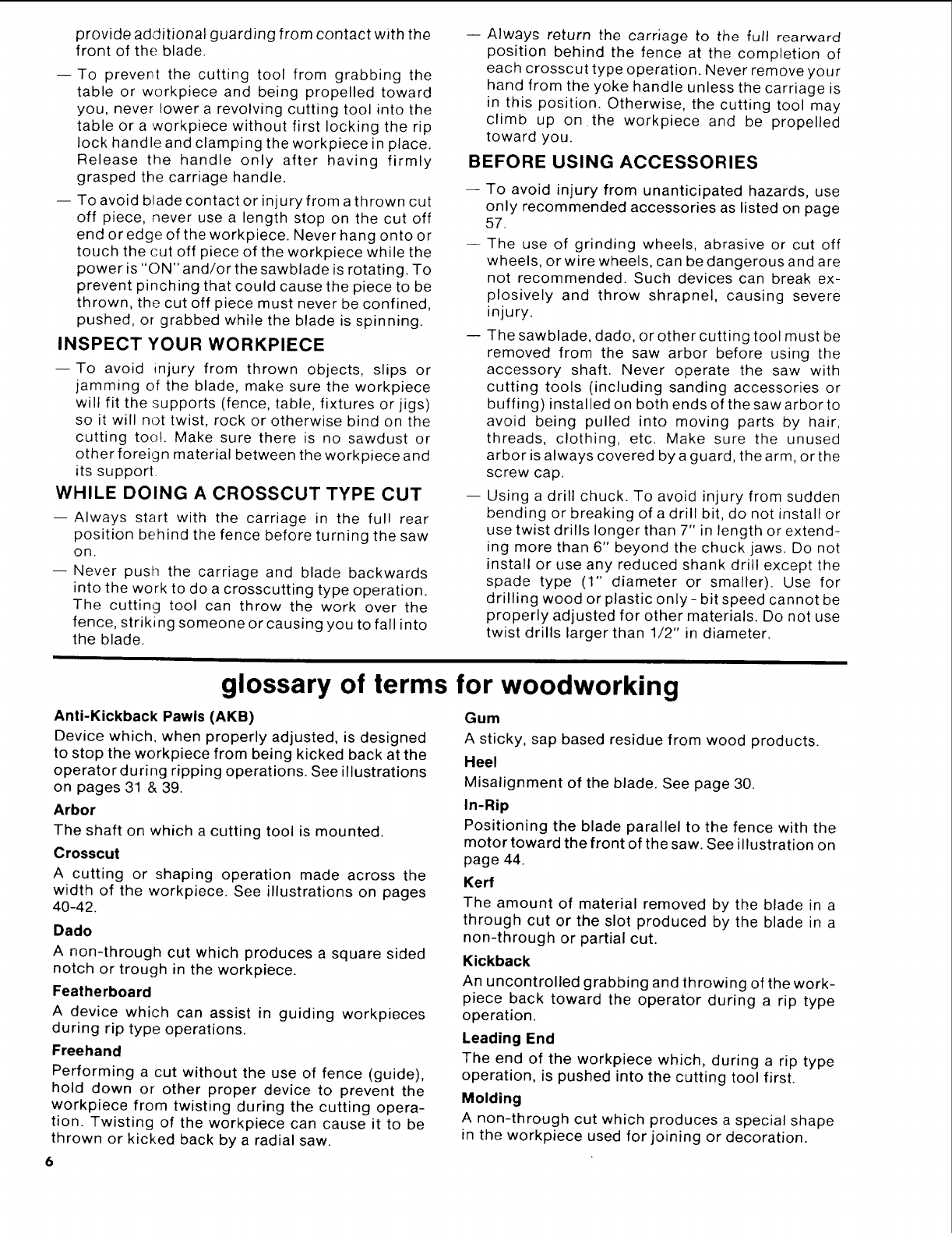
provide additional guarding from contact with the
front of the blade.
--To prevent the cutting tool from grabbing the
table or workpiece and being propelled toward
you, never lower a revolving cutting tool into the
table or a workpiece without first locking the rip
lock handle and clamping the workpiece in place.
Release the handle only after having firmly
grasped the carriage handle.
-- To avoid blade contact orinjuryfrom athrown cut
off piece, never use a length stop on the cut off
end or edge of theworkpiece. Never hang onto or
touch the cut off piece of the workpiecewhile the
power is "ON" and/or the sawblade is rotating. To
prevent pinching that could cause the piece to be
thrown, the cut off piece must never be confined,
pushed, or grabbed while the blade is spinning.
INSPECT YOUR WORKPIECE
--To avoid injury from thrown objects, slips or
jamming of the blade, make sure the workpiece
wilt fit the supports (fence, table, fixtures or jigs)
so it will not twist, rock or otherwise bind on the
cutting too!. Make sure there is no sawdust or
other foreign material between the workpiece and
its support.
WHILE DOING A CROSSCUT TYPE CUT
--Always start with the carriage in the full rear
position behind the fence before turning the saw
On.
-- Never push the carriage and blade backwards
into the work to do a crosscutting type operation.
The cutting tool can throw the work over the
fence, striking someone or causing you to fall into
the blade.
-- Always return the carriage to the full rearward
position behind the fence at the completion of
each crosscut type operation. Never remove your
hand from the yoke handle unless the carriage is
in this position. Otherwise, the cutting tool may
climb up on the workpiece and be propelled
toward you.
BEFORE USING ACCESSORIES
To avoid injury from unanticipated hazards, use
only recommended accessories as listed on page
57.
The use of grinding wheels, abrasive or cut off
wheels, or wire wheels, can be dangerous and are
not recommended. Such devices can break ex-
plosively and throw shrapnel, causing severe
injury.
The sawblade, dado, or other cutting tool must be
removed from the saw arbor before using the
accessory shaft. Never operate the saw with
cutting tools (including sanding accessories or
buffing) instal led on both ends of the saw arbor to
avoid being pulled into moving parts by hair,
threads, clothing, etc. Make sure the unused
arbor is always covered by a guard, the arm, or the
screw cap.
Using a drill chuck. To avoid injury from sudden
bending or breaking of a drill bit, do not install or
use twist drills longer than 7" in length or extend-
ing more than 6" beyond the chuck jaws. Do not
install or use any reduced shank drill except the
spade type (1" diameter or smaller). Use for
drilling wood or plastic only - bit speed cannot be
properly adjusted for other materials. Do not use
twist drills larger than 1/2" in diameter.
glossary of terms for woodworking
Anti-Kickback Pawls (AKB)
Device which, when properly adjusted, is designed
to stop the workpiece from being kicked back at the
operator during ripping operations. See illustrations
on pages 31 & 39.
Arbor
The shaft on which a cutting tool is mounted.
Crosscut
A cutting or shaping operation made across the
width of the workpiece. See illustrations on pages
40-42.
Dado
A non-through cut which produces a square sided
notch or trough in the workpiece.
Featherboard
A device which can assist in guiding workpieces
during rip type operations.
Freehand
Performing a cut without the use of fence (guide),
hold down or other proper device to prevent the
workpiece from twisting during the cutting opera-
tion. Twisting of the workpiece can cause it to be
thrown or kicked back by a radial saw.
Gum
A sticky, sap based residue from wood products.
Heel
Misalignment of the blade. See page 30.
In-Rip
Positioning the blade parallel to the fence with the
motor toward the front of the saw. See illustration on
page 44.
Kerf
The amount of material removed by the blade in a
through cut or the slot produced by the blade in a
non-through or partial cut.
Kickback
An uncontrolled grabbing and throwing of the work-
piece back toward the operator during arip type
operation.
Leading End
The end of the workpiece which, during arip type
operation, is pushed into the cutting tool first.
Molding
A non-through cut which produces a special shape
in the workpiece used for joining or decoration.
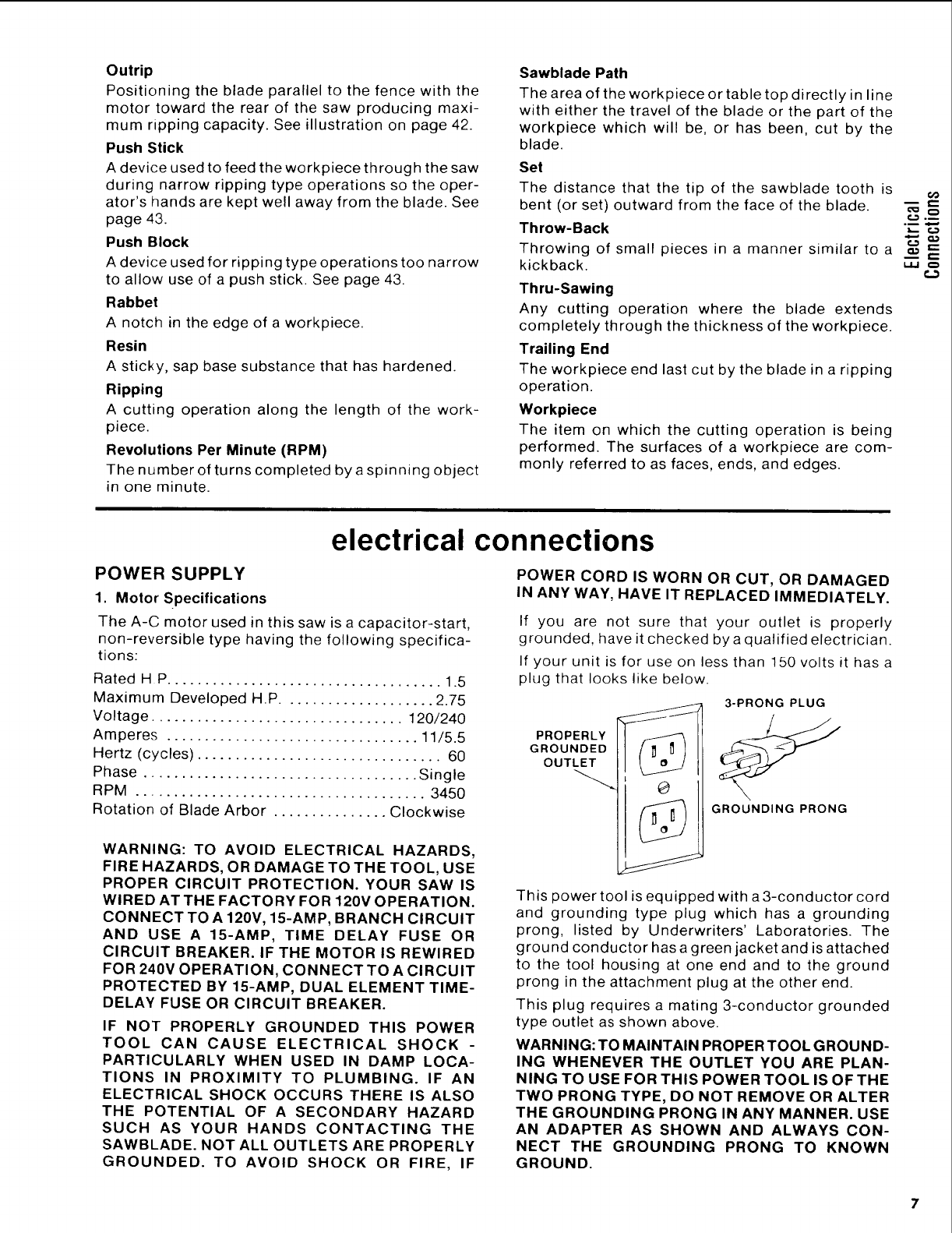
Outrip
Positioningthebladeparallelto thefencewiththe
motortowardthe rearof the sawproducingmaxi-
mumrippingcapacity.Seeillustrationonpage42.
PushStick
A deviceusedto feedtheworkpiecethroughthesaw
duringnarrowrippingtypeoperationssotheoper-
ator'shandsarekeptwellawayfromtheblade.See
page43.
Push Block
A device used for ripping type operations too narrow
to allow use of a push stick. See page 43.
Rabbet
A notch in the edge of a workpiece.
Resin
A sticky, sap base substance that has hardened.
Ripping
A cutting operation along the length of the work-
piece.
Revolutions Per Minute (RPM)
The number of turns completed by a spinning object
in one minute.
Sawblade Path
The area of the workpiece or table top directly in line
with either the travel of the blade or the part of the
workpiece which will be, or has been, cut by the
blade.
Set
The distance that the tip of the sawblade tooth is
bent (or set) outward from the face of the blade.
Throw-Back
Throwing of small pieces in a manner similar to a
kickback.
Thru-Sawing
Any cutting operation where the blade extends
completely through the thickness of the workpiece.
Trailing End
The workpiece end last cut by the blade in a ripping
operation.
Workpiece
The item on which the cutting operation is being
performed. The surfaces of a workpiece are com-
monly referred to as faces, ends, and edges.
o
electrical connections
POWER SUPPLY
1. Motor Specifications
The A-C motor used in this saw is a capacitor-start,
non-reversible type having the following specifica-
tions:
Rated H P.................................... 1.5
Maximum Developed H.P .................... 2.75
Voltage ................................. 120/240
Amperes ................................. 11/5.5
Hertz (cycles) ................................ 60
Phase .................................... Single
RPM ...................................... 3450
Rotation of Blade Arbor ............... Clockwise
WARNING: TO AVOID ELECTRICAL HAZARDS,
FIRE HAZARDS, OR DAMAGE TO THE TOOL, USE
PROPER CIRCUIT PROTECTION. YOUR SAW IS
WIRED AT THE FACTORY FOR 120V OPERATION.
CONNECT TO A 120V, 15-AMP, BRANCH CIRCUIT
AND USE A 15-AMP, TIME DELAY FUSE OR
CIRCUIT BREAKER. IF THE MOTOR IS REWIRED
FOR 240V OPERATION, CONNECTTO A CIRCUIT
PROTECTED BY 15-AMP, DUAL ELEMENT TIME-
DELAY FUSE OR CIRCUIT BREAKER.
IF NOT PROPERLY GROUNDED THIS POWER
TOOL CAN CAUSE ELECTRICAL SHOCK -
PARTICULARLY WHEN USED IN DAMP LOCA-
TIONS IN PROXIMITY TO PLUMBING. IF AN
ELECTRICAL SHOCK OCCURS THERE IS ALSO
THE POTENTIAL OF A SECONDARY HAZARD
SUCH AS YOUR HANDS CONTACTING THE
SAWBLADE. NOT ALL OUTLETS ARE PROPERLY
GROUNDED. TO AVOID SHOCK OR FIRE, IF
POWER CORD IS WORN OR CUT, OR DAMAGED
IN ANY WAY, HAVE IT REPLACED IMMEDIATELY.
If you are not sure that your outlet is properly
grounded, have it checked by a qualified electrician.
If your unit is for use on less than 150 volts it has a
plug that looks like below.
PROPERLY
GROUNDED
OUTLET
3-PRONG PLUG
GROUNDING PRONG
This power tool is equipped with a 3-conductor cord
and grounding type plug which has a grounding
prong, listed by Underwriters' Laboratories. The
ground conductor has a green jacket and is attached
to the tool housing at one end and to the ground
prong in the attachment plug at the other end.
This plug requires a mating 3-conductor grounded
type outlet as shown above.
WARNING: TO MAINTAIN PROPER TOOL GROUND-
ING WHENEVER THE OUTLET YOU ARE PLAN-
NING TO USE FOR THIS POWER TOOL IS OF THE
TWO PRONG TYPE, DO NOT REMOVE OR ALTER
THE GROUNDING PRONG IN ANY MANNER. USE
AN ADAPTER AS SHOWN AND ALWAYS CON-
NECT THE GROUNDING PRONG TO KNOWN
GROUND.
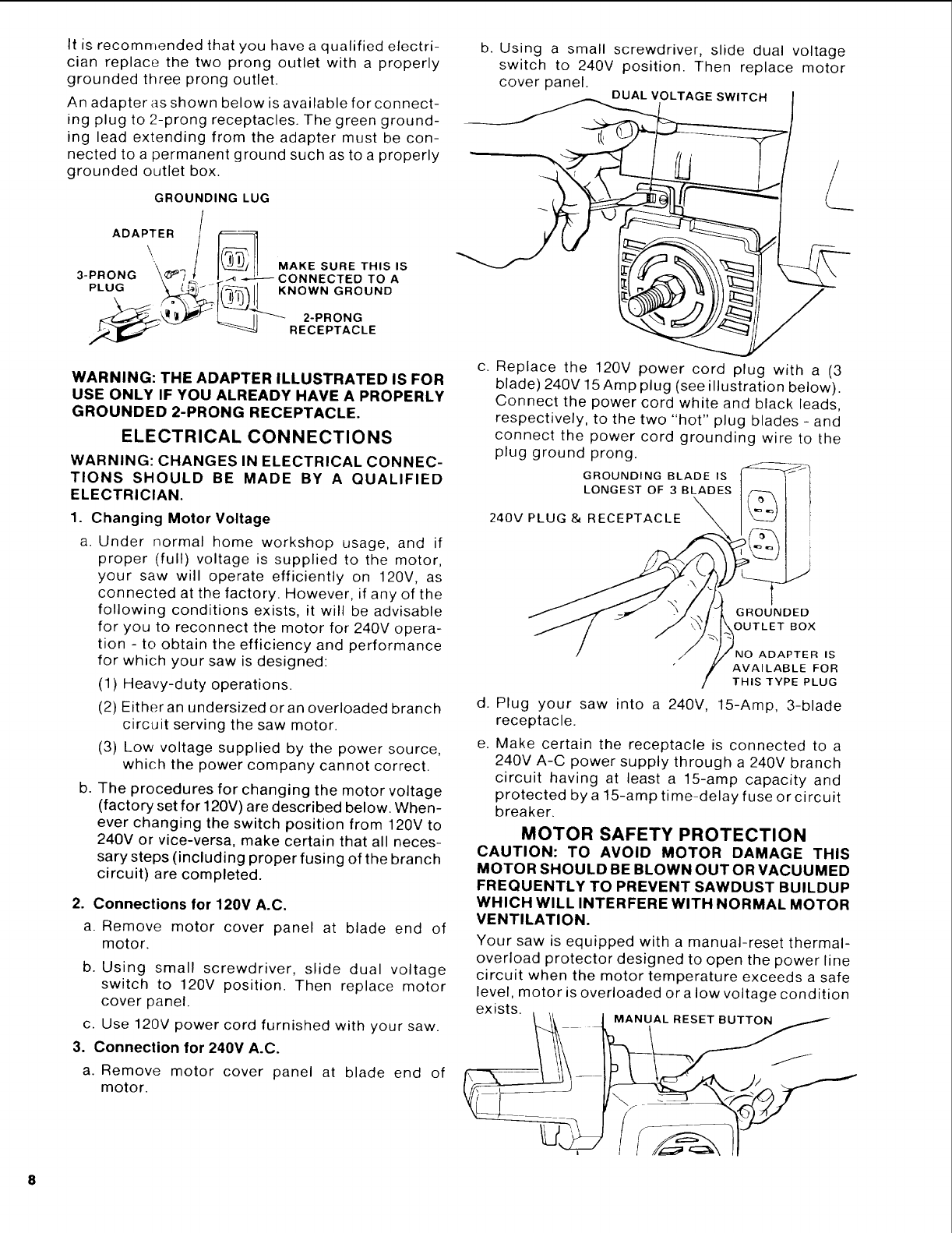
It is recommended that you have a qualified electri-
cian replace the two prong outlet with a properly
grounded three prong outlet.
An adapter as shown below is available for connect-
ing plug to 2-prong receptacles. The green ground-
ing lead extending from the adapter must be con-
nected to a permanent ground such as to a properly
grounded outlet box.
GROUNDING LUG
ADAPTER /
"\ _ MAKE SURE THIS IS
3-PRONG
__ONNECTED TO A
PLUG _r_/._.._,_ KNOWN GROUND
RECEPTACLE
b. Using a small screwdriver, slide dual voltage
switch to 240V position. Then replace motor
cover panel. DUAL VOLTAGE SWITCH
L
WARNING: THE ADAPTER ILLUSTRATED IS FOR
USE ONLY IF YOU ALREADY HAVE A PROPERLY
GROUNDED 2-PRONG RECEPTACLE.
ELECTRICAL CONNECTIONS
WARNING: CHANGES IN ELECTRICAL CONNEC-
TIONS SHOULD BE MADE BY A QUALIFIED
ELECTRICIAN.
1. Changing Motor Voltage
a, Under normal home workshop usage, and if
proper (full) voltage is supplied to the motor,
your saw will operate efficiently on 120V, as
connected at the factory. However, if any of the
following conditions exists, it will be advisable
for you to reconnect the motor for 240V opera-
tion - to obtain the efficiency and performance
for which your saw is designed:
(1) Heavy-duty operations.
b.
(2) Either an undersized oran overloaded branch
circuit serving the saw motor.
(3) Low voltage supplied by the power source,
which the power company cannot correct.
The procedures for changing the motor voltage
(factory set for 120V) are described below. When-
ever changing the switch position from 120V to
240V or vice-versa, make certain that all neces-
sary steps (including proper fusing of the branch
circuit) are completed.
2. Connections for 120V A.C.
a. Remove motor cover panel at blade end of
motor.
b. Using small screwdriver, slide dual voltage
switch to 120V position. Then replace motor
cover panel.
c. Use 120V power cord furnished with your saw.
3. Connection for 240V A.C.
a. Remove motor cover panel at blade end of
motor.
c. Replace the 120V power cord plug with a (3
blade) 240V 15 Amp plug (see illustration below).
Connect the power cord white and black leads,
respectively, to the two "hot" plug blades - and
connect the power cord grounding wire to the
plug ground prong.
GROUNDING BLADE IS
LONGEST OF 3 BLADES
240V PLUG & RECEPTACLE
GROUNDED
OUTLET BOX
ADAPTER IS
AVAILABLE FOR
THIS TYPE PLUG
d. Plug your saw into a 240V, 15-Amp, 3-blade
receptacle.
e. Make certain the receptacle is connected to a
240V A-C power supply through a 240V branch
circuit having at least a 15-amp capacity and
protected by a 15-amp time-delay fuse or circuit
breaker.
MOTOR SAFETY PROTECTION
CAUTION: TO AVOID MOTOR DAMAGE THIS
MOTOR SHOULD BE BLOWN OUT OR VACUUMED
FREQUENTLY TO PREVENT SAWDUST BUILDUP
WHICH WILL INTERFERE WITH NORMAL MOTOR
VENTILATION.
Your saw is equipped with a manual-reset thermal-
overload protector designed to open the power line
circuit when the motor temperature exceeds a safe
level, motor is overloaded or a low voltage condition
exists.
1 _ )MANUAL RESET BUTTON
1. If the protector opens the line and stops the saw
motor, immediately turn the saw switch "OFF",
remove the key and allow motor time to cool.
2. After cooling to a safe operating temperature,
the overload protector can be closed manually
by pushing the red button on the top of the
motor. If the red button will not click into place
immediately, the motor is still too hot and must
be allowed to cool for a while longer.
If the motor, after hard, long use trips the
overload protector, the time equal to the thermal
build up before the trip may be needed to cool
the motor before the overload protector can be
reset. An audible click will indicate protector is
closed (reset).
3. As soon as the red button will click into running
position, the saw may be started and operated
normally.
4. Frequent "blowing" of fuses or tripping of circuit
breakers may result if:
(a) MOTOR IS OVERLOADED - Overloading can
occur if you feed too rapidly or if saw is
misaligned so that the blade heels (pg. 29)
(b) MOTOR CIRCUIT IS FUSED DIFFERENTLY
FROM RECOMMENDATIONS- Always follow
instructions for the proper fuse/breaker. Do
not use a fuse/breaker of greater capacity
without consulting a qualified electrician.
(c) LOW VOLTAGE - Although the motor is
designed for operation on the voltage and
frequency specified on motor nameplate,
normal loads will be handled safely on vol-
tages not more than 10% above or below the
nameplate voltage. Heavy loads, however,
require that voltage at motor terminals equals
the voltage specified on nameplate.
5. Most motor troubles may be traced to loose or
incorrect connections, overloading, reduced
input voltage (such as small size wire in the
supply circuit) or to overly long supply circuit
wire. Always check the connections, the load
and the supply circuit whenever motor fails to
perform satisfactorily. Check wire sizes and
length with the Wire Size Chart below.
WIRE SIZES
The use of any extension cord will cause some loss
of power. To keep this to a minimum and to prevent
over-heating and motor burn-out, use the table
below to determine the minimum wire size (A.W.G.)
extension cord. Use only 3 wire extension cords
which have 3 prong grounding type plugs and 3-pole
receptacles which accept the tools plug.
CAUTION: For circuits that are farther away from
electrical service box, the wire size must be increased
proportionately in order to deliver ample voltage to
the saw motor.
Length of the
Conductor
0 - 50 Feet
50 - 100 Feet
Over 100 Feet
Wire Sizes Required
(American Wire Gage Number)
240V Lines 120V Lines
No. 16 _ No. 14
No. 14 t No. 12
No. 12 No. 8
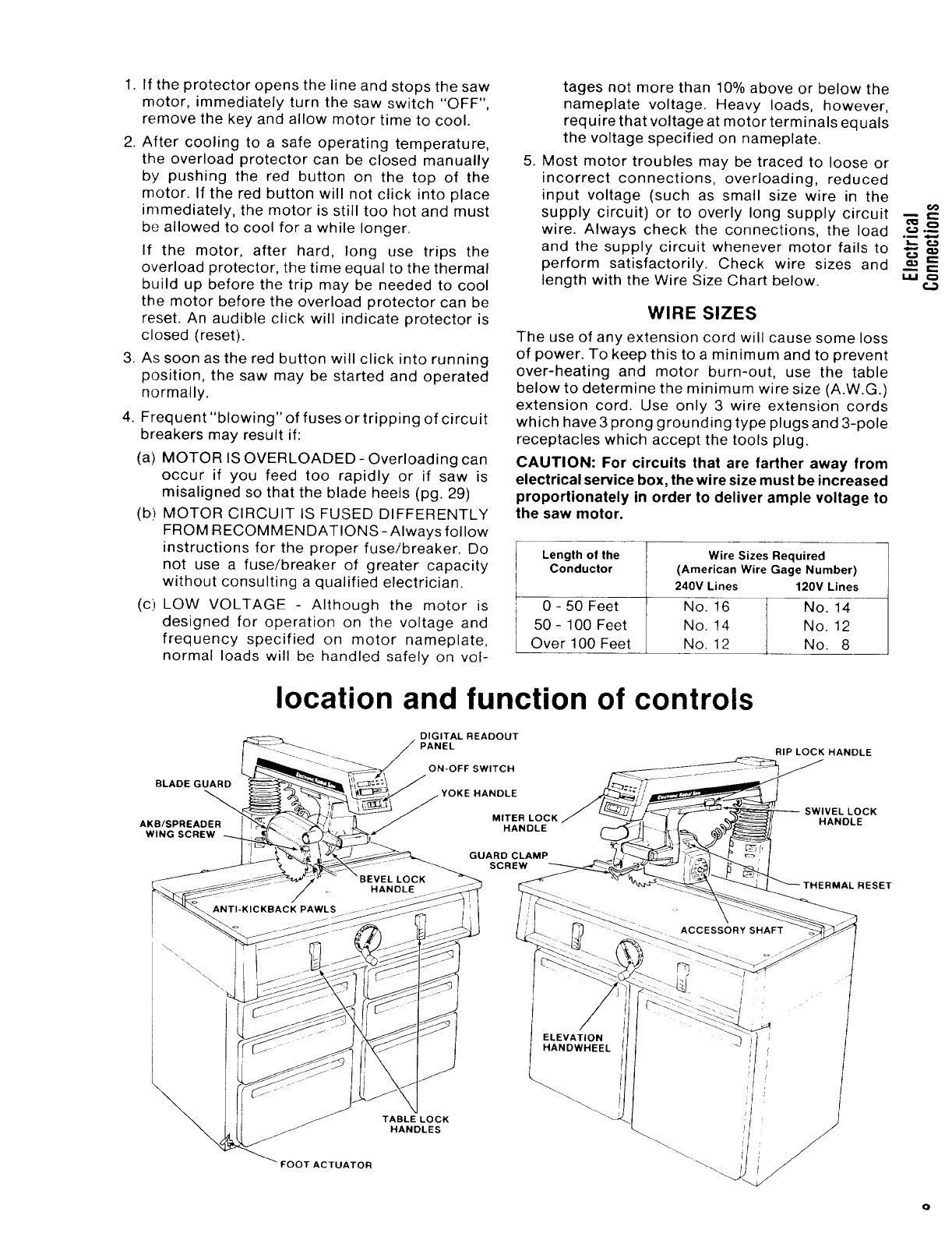
location and function of controls
BLADE GUARD
AKB/SPREADER
WING SCREW
DIGITAL READOUT
PANEL
ON-OFF SWITCH
.YOKE HANDLE
MITER LOCK
HANDLE
GUARD CLAMP
SCREW
RIP LOCK HANDLE
SWIVEL LOCK
HANDLE
°i
i..u t..3
OOTACTUATOR
TABLELOCK
HANDLES
contents
Page
Guarantee .................................... 2
General Safety Instructions for Power Tools .... 2
Additional Safety Instructions for Radial Saws .. 3
Glossary of Terms for Woodworking ........... 6
Electrical Connections ........................ 7
Assembly and Alignment ..................... 10
Unpacking and Preassembly ................ 11
Alignment Procedure ....................... 26
Page
Location and Function of Controls ............ 36
Basic Saw Operations ........................ 40
Adjustments to Compensate for Wear ......... 46
Trouble Shooting ............................ 50
Maintenance and Lubrication ................. 56
Recommended Accessories ................... 57
Repair Parts ................................. 58
assembly and alignment
@
TOOLS NEEDED
7/16" WRENCH
1/2" WRENCH
3/4" WRENCH
3/4" SOCKET
9/16" SOCKET
7/16" SOCKE'f
SOCKET EXTENSION
SOCKET WRENCH
MEDIUM SCREWDRIVER
#2 PHILLIPS SCREWDRIVER
FRAMING SQUARE
PENCIL
1/8" HEX "L" WRENCH
3/16" HEX "L" WRENCH
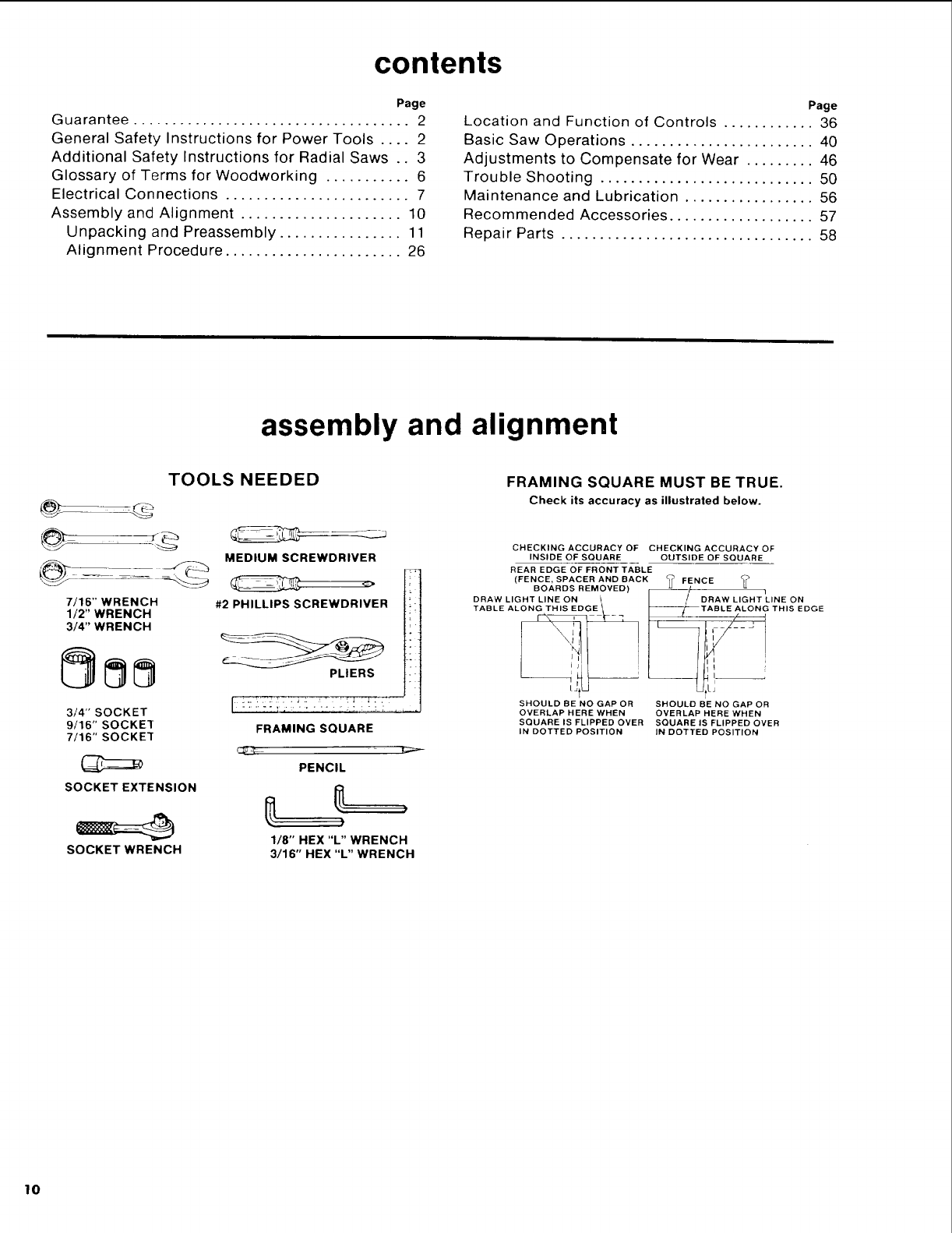
FRAMING SQUARE MUST BE TRUE.
Check its accuracy as illustrated below.
CHECKING ACCURACY OF CHECKING ACCURACY OF
INSIDE OF SQUARE OUTSIDE OF SQUARE
REAR EDGE OF FRONT TABLE
(FENCE, SPACER AND BACK _FENCE _
BOARDS REMOVED) _/t _ i
DRAW LIGHT LINE ON / I/DRAW LIGHT LINE ON
TABLE ALONG THIS EDGE _I_JL_TABLE ALONG THIS EDGE
SHOULD BE NO GAP OR SHOULD BE NO GAP OR
OVERLAP HERE WHEN OVERLAP HERE WHEN
SQUARE IS FLIPPED OVER SQUARE IS FLIPPED OVER
IN DOTTED POSITION IN DOTTED POSITION
lo
unpacking and preassembly
WARNING: TO AVOID INJURY FROM UNEXPECT-
ED STARTING OR ELECTRICAL SHOCK, DO NOT
PLUG THE POWER CORD INTO A SOURCE OF
POWER. THIS CORD MUST REMAIN UN-
PLUGGED WHENEVER YOU ARE WORKING ON
THE SAW.
Model 113.198410 Radial Saw is shipped complete
in one box.
1. Unpacking and Checking Contents
(a) Separate all "loose parts from packaging
materials and check each item with "Table of
Loose Parts" to make sure all items are
accounted for, before discarding any packing
material.
WARNING: IF ANY PARTS ARE MISSING, DO NOT
ATTEMPT TO ASSEMBLE RADIAL ARM SAW,
PLUG IN THE POWER CORD, OR TURN THE
SWITCH ON UNTIL THE MISSING PARTS ARE
OBTAINED AND ARE INSTALLED CORRECTLY.
WARNING: TO AVOID INJURY FROM UNEXPECT-
ED STARTING OR ELECTRICAL SHOCK, DO NOT
PLUG THE POWER CORD INTO A SOURCE OF
POWER. THIS CORD MUST REMAIN UN-
PLUGGED WHENEVER YOU ARE WORKING ON
THE SAW.
Model 113.198610 Radial Saw is shipped complete
in one box.
1. Unpacking and Checking Contents
(a) Separate all "loose parts from packaging
materials and check each item with "Table of
Loose Parts" to make sure all items are
accounted for, before discarding any packing -m
e" t.. ,
material._ _= ,--
WARNING: IF ANY PARTS ARE MISSING, DO NOT ._
ATTEMPT TO ASSEMBLE RADIAL ARM SAW, E ==
PLUG IN THE POWER CORD, OR TURN THE _
ra_
SWITCH ON UNTIL THE MISSING PARTS ARE <:
OBTAINED AND ARE INSTALLED CORRECTLY.
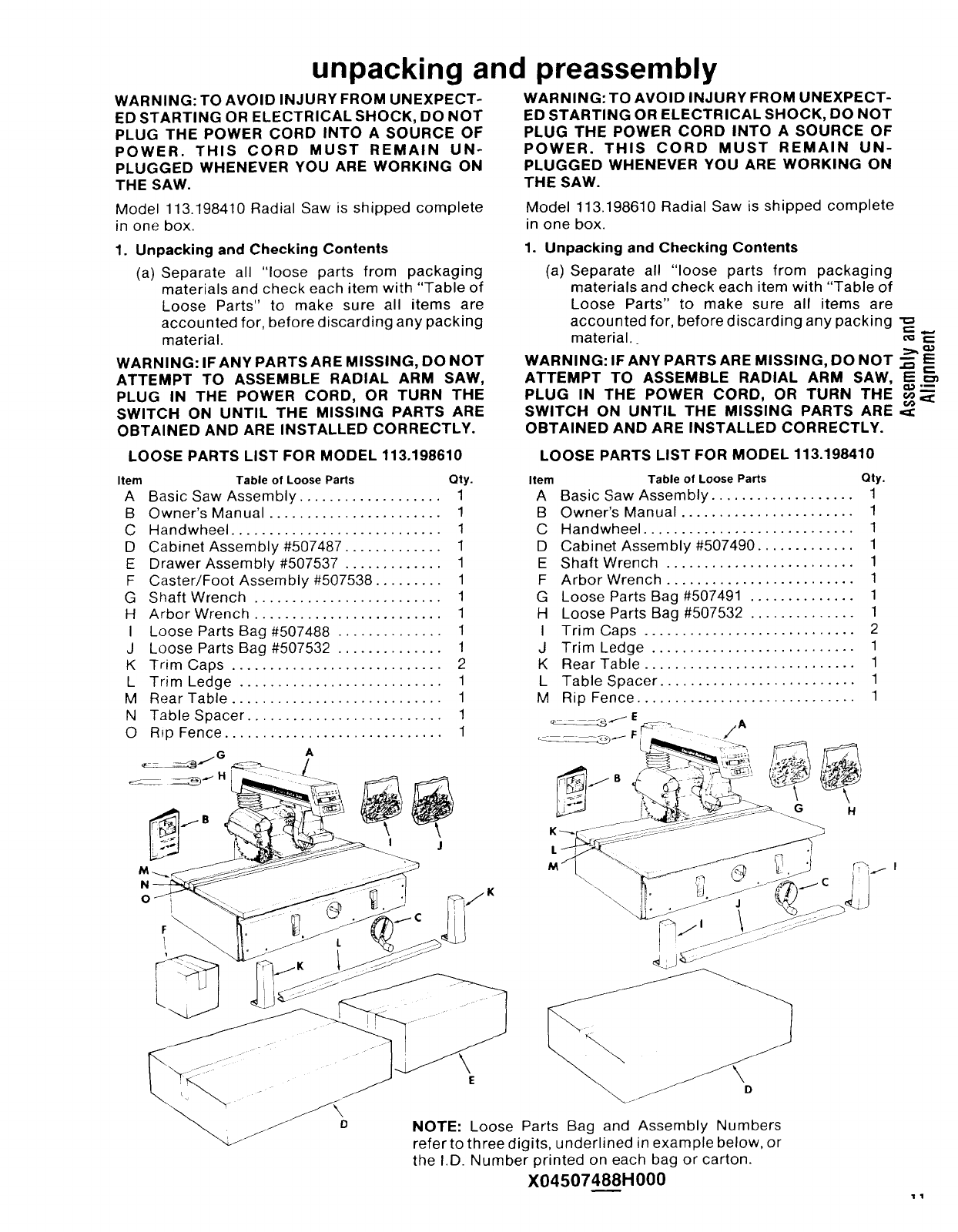
LOOSE PARTS LIST FOR MODEL 113.198610 LOOSE PARTS LIST FOR MODEL 113.198410
Item Table of Loose Parts Qty.
A Basic Saw Assembly ................... 1
B Owner's Manual ....................... 1
C Handwheel ............................ 1
D Cabinet Assembly #507487 ............. 1
E Drawer Assembly #507537 ............. 1
F Caster/Foot Assembly #507538 ......... 1
G Shaft Wrench ......................... 1
H Arbor Wrench ......................... 1
I Loose Parts Bag #507488 .............. t
J Loose Parts Bag #507532 .............. 1
K Trim Caps ............................ 2
L Trim Ledge ........................... 1
M Rear Table ............................ 1
N Table Spacer .......................... !
O Rip Fence ............................. 1
o
Item Table of Loose Parts Qty.
ABasic Saw Assembly ................... 1
B Owner's Manual ....................... 1
C Handwheel ............................ 1
D Cabinet Assembly #507490 ............. 1
E Shaft Wrench ......................... 1
F Arbor Wrench ......................... 1
G Loose Parts Bag #507491 .............. 1
H Loose Parts Bag #507532 .............. 1
I Trim Caps ............................ 2
J Trim Ledge ........................... 1
K Rear Table ............................ 1
L Table Spacer .......................... 1
M Rip Fence ............................. 1
0NOTE: Loose Parts Bag and Assembly Numbers
refer to three digits, underlined in example below, or
the I.D. Number printed on each bag or carton.
X04507488H000
'11
44" CABINET ASSEMBLY
FOR MODEL NO. 113.198610
ASSEMBLE CABINET BEFORE
MOUNTING SAW
1. Separate all "loose" parts from packing materials
and check each item with "Parts List" to make
sure all items are accounted for before discarding
any packing material.
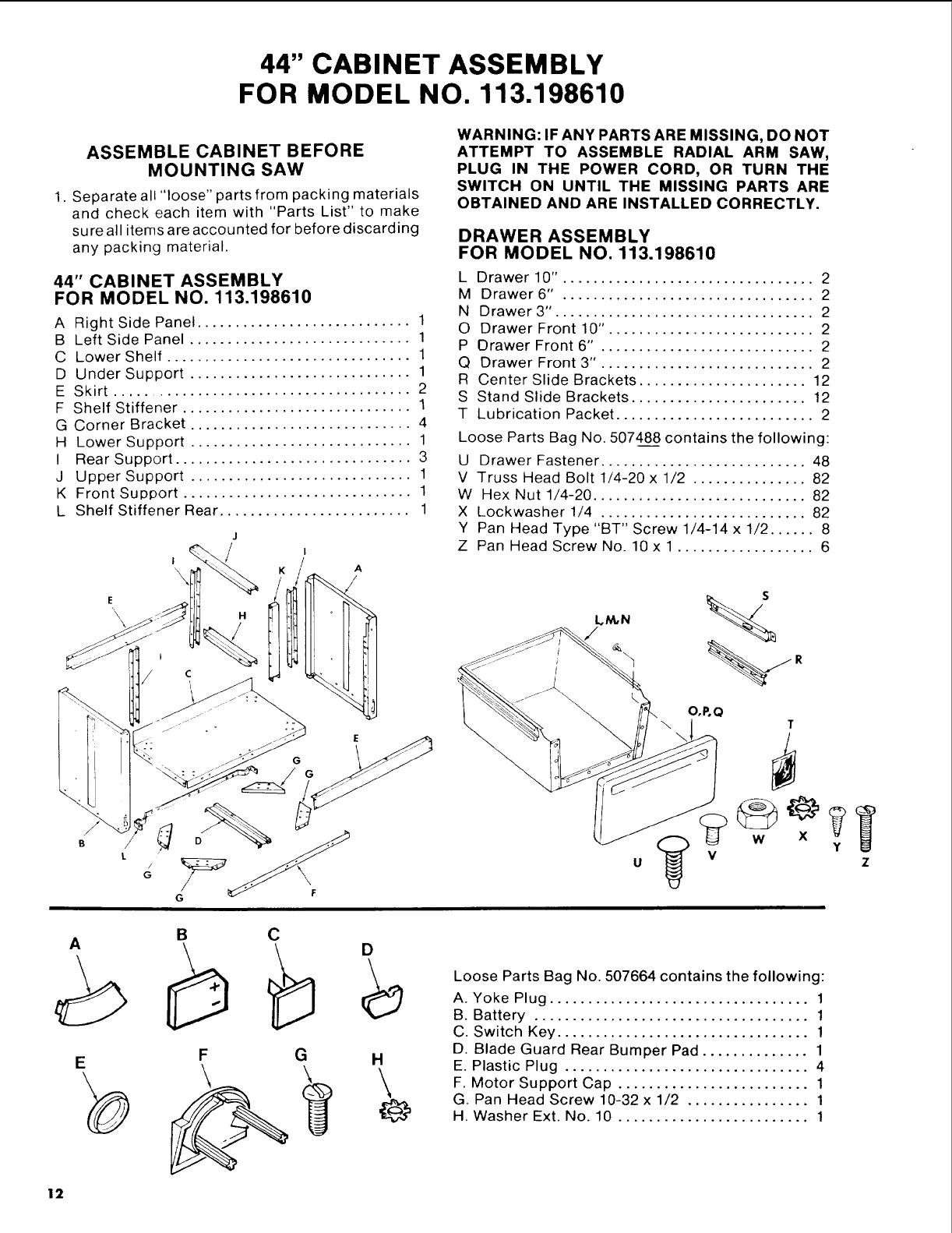
44" CABINET ASSEMBLY
FOR MODEL NO. 113.198610
A Right Side Panel ............................ 1
B Left Side Panel ............................. 1
C Lower Shelf ................................ 1
D Under Support ............................. 1
E Skirt ....................................... 2
F Shelf Stiffener .............................. 1
G Corner Bracket ............................. 4
H Lower Support ............................. 1
I Rear Support ............................... 3
J Upper Support ............................. 1
K Front Support .............................. 1
L Shelf Stiffener Rear ......................... 1
J
I
G F
WARNING: IF ANY PARTS ARE MISSING, DO NOT
ATTEMPT TO ASSEMBLE RADIAL ARM SAW,
PLUG IN THE POWER CORD, OR TURN THE
SWITCH ON UNTIL THE MISSING PARTS ARE
OBTAINED AND ARE INSTALLED CORRECTLY,
DRAWER ASSEMBLY
FOR MODEL NO. 113.198610
L Drawer 10". ................................ 2
M Drawer 6" ................................. 2
N Drawer 3". ................................. 2
O Drawer Front 10". .......................... 2
P Orawer Front 6" ............................ 2
Q Drawer Front 3". ........................... 2
R Center Slide Brackets ...................... 12
S Stand Slide Brackets ....................... 12
T Lubrication Packet .......................... 2
Loose Parts Bag No. 507488 contains the following:
U Drawer Fastener ........................... 48
V Truss Head Bolt 1/4-20 x 1/2 ............... 82
W Hex Nut 1/4-20 ............................ 82
X Lockwasher 1/4 ........................... 82
Y Pan Head Type "BT" Screw 1/4-14 x 1/2 ...... 8
ZPan Head Screw No. 10 x 1 .................. 6
U
O.P.Q T
W X YZ
A
E
12
BCD
F G H
Loose Parts Bag No. 507664 contains the following:
A. Yoke Plug .................................. 1
B. Battery .................................... 1
C. Switch Key ................................. 1
D. Blade Guard Rear Bumper Pad .............. 1
E. Plastic Plug ................................ 4
F. Motor Support Cap ......................... 1
G. Pan Head Screw 10-32 x 1/2 ................ 1
H. Washer Ext. No. 10 ......................... 1
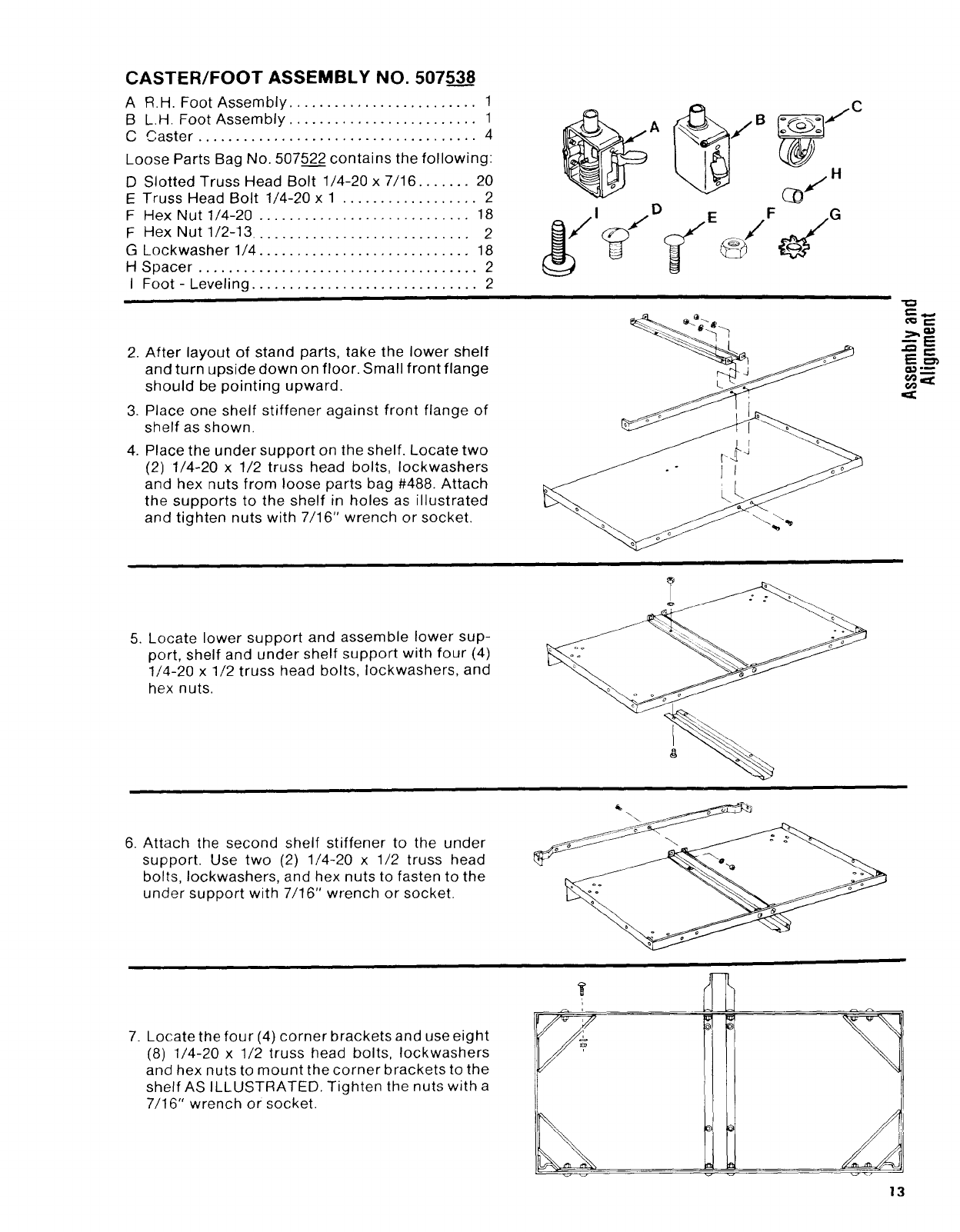
CASTER/FOOT ASSEMBLY NO. 50753____8
AR.H. Foot Assembly ......................... 1
BL.H. Foot Assembly ......................... 1
C Caster ..................................... 4
Loose Parts Bag No. 50752___2contains the following:
D Slotted Truss Head Bolt 1/4-20 x 7/16 ....... 20
E Truss Head Bolt 1/4-20 x 1 .................. 2
F Hex Nut 1/4-20 ............................ 18
F Hex Nut 1/2-13 ............................. 2
G Lockwasher 1/4 ............................ 18
H Spacer ..................................... 2
I Foot-Leveling .............................. 2
2. After layout of stand parts, take the lower shelf
and turn upside down on floor. Small front flange
should be pointing upward.
3. Place one shelf stiffener against front flange of
shelf as shown.
4. Place the under support on the shelf. Locate two
(2) 1/4-20 x 1/2 truss head bolts, Iockwashers
and hex nuts from loose parts bag #488. Attach
the supports to the shelf in holes as illustrated
and tighten nuts with 7/16" wrench or socket.
E_
5. Locate lower support and assemble lower sup-
port, shelf and under shelf support with four (4)
1/4-20 x 1/2 truss head bolts, Iockwashers, and
hex nuts.
6. Attach the second shelf stiffener to the under
support. Use two (2) 1/4-20 x 1/2 truss head
bolts, Iockwashers, and hex nuts to fasten to the
under support with 7/16" wrench or socket.
i
7. Locate the four (4) corner brackets and use eight
(8) 1/4-20 x 1/2 truss head bolts, Iockwashers
and hex nuts to mount the corner brackets to the
shelf AS ILLUSTRATED. Tighten the nuts with a
7/16" wrench or socket.
13
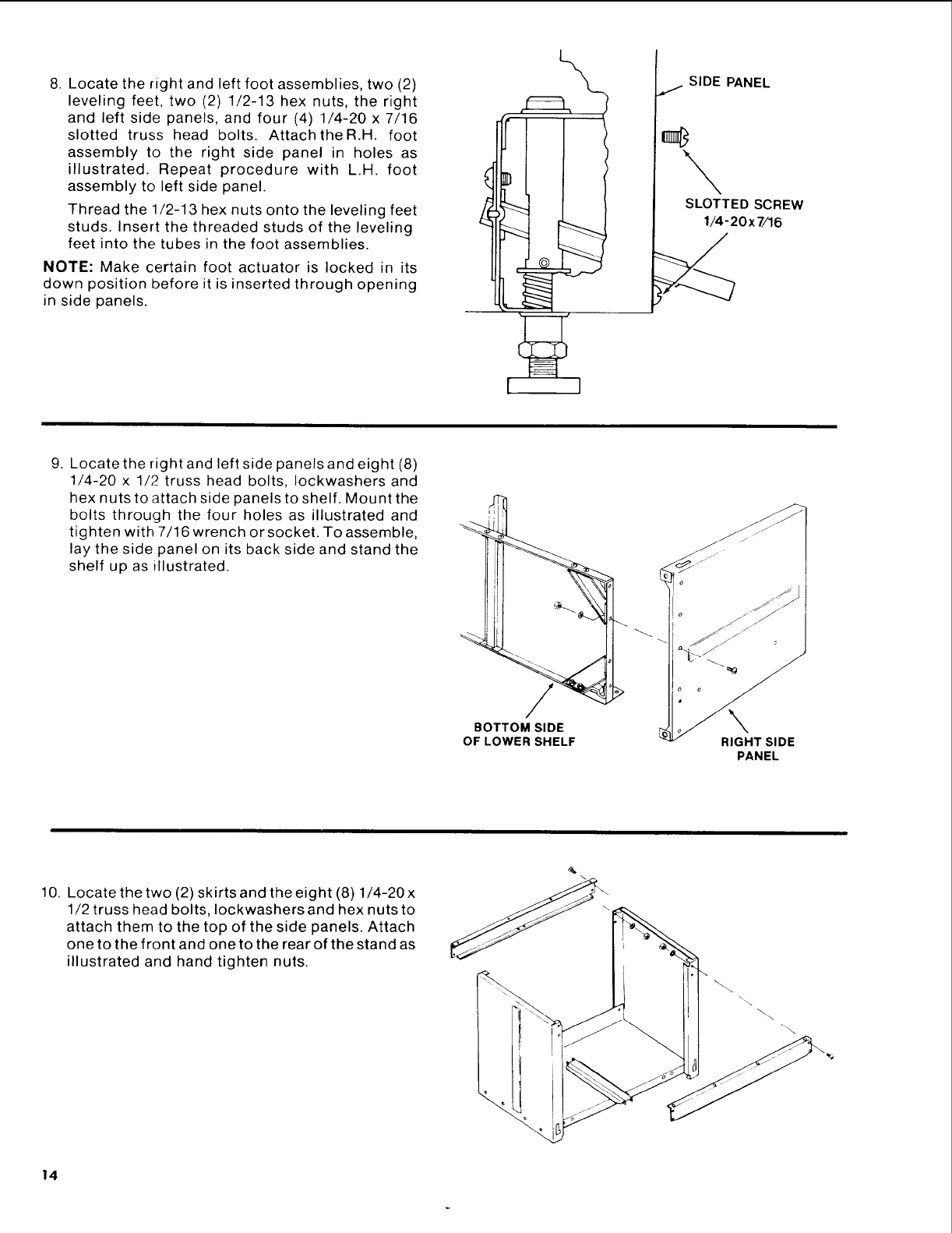
8. Locate the right and left foot assemblies, two (2)
leveling feet, two (2) 1/2-13 hex nuts, the right
and left side panels, and four (4) 1/4-20 x 7/16
slotted truss head bolts. Attach theR.H, foot
assembly to the right side panel in holes as
illustrated. Repeat procedure with L.H. foot
assembly to left side panel.
Thread the 1/2-13 hex nuts onto the leveling feet
studs. Insert the threaded studs of the leveling
feet into the tubes in the foot assemblies.
NOTE: Make certain foot actuator is locked in its
down position before it is inserted through opening
in side panels.
SIDE PANEL
J
SLOTTED SCREW
1/4-20x 7/16
9. Locate the right and left side panels and eight (8)
1/4-20 x 1/2 truss head bolts, Iockwashers and
hex nuts to attach side panels to shelf. Mount the
bolts through the four holes as illustrated and
tighten with 7/16 wrench or socket. To assemble,
lay the side panel on its back side and stand the
shelf up as illustrated.
/
BOTTOM SIDE
OF LOWER SHELF
s
RIGHT SIDE
PANEL
10. Locate the two (2) skirts and the eight (8) 1/4-20x
1/2 truss head bolts, Iockwashers and hex nuts to
attach them to the top of the side panels. Attach
one to the front and one to the rear of the stand as
illustrated and hand tighten nuts.
\.\
\
14
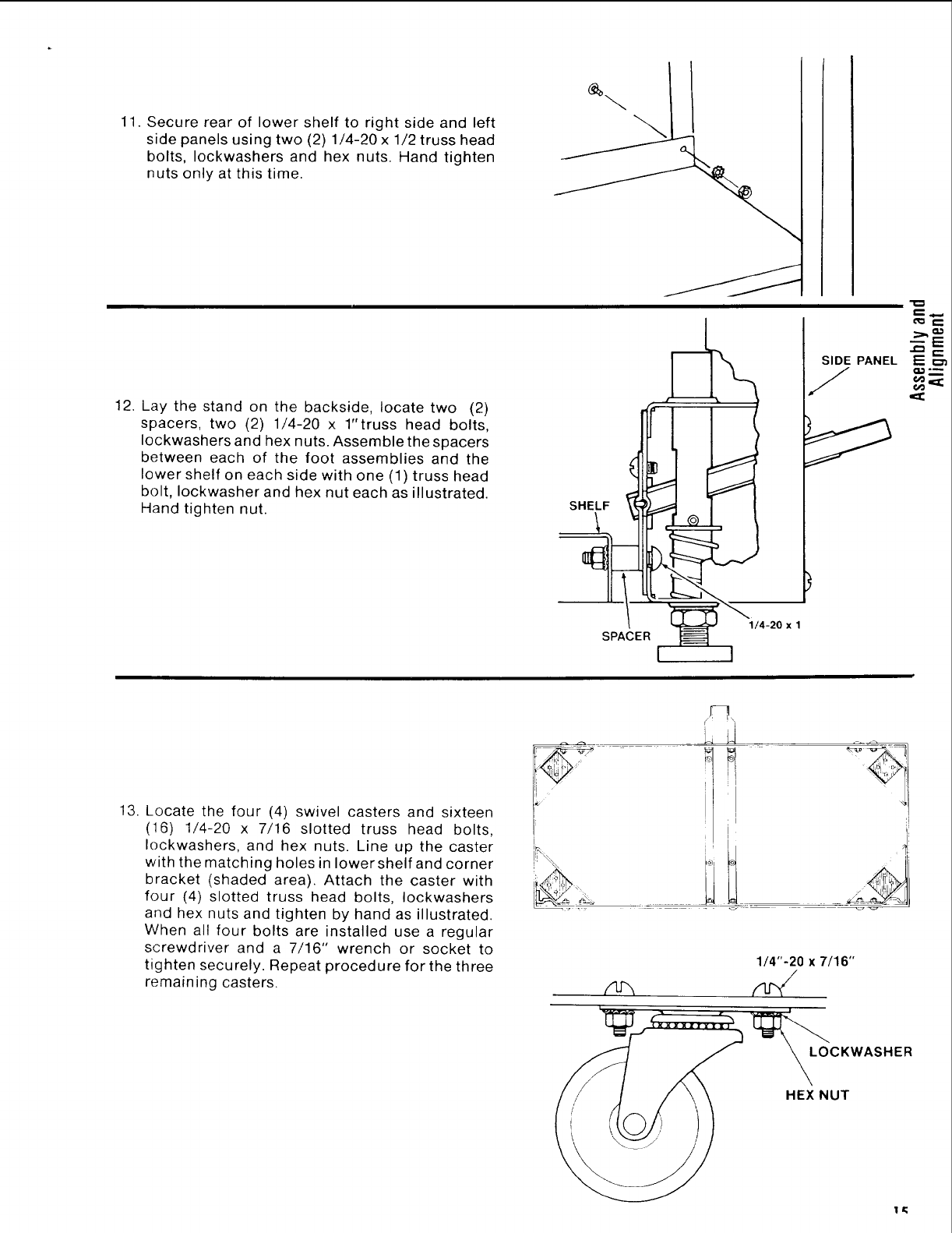
11.Securerearof lowershelfto rightsideandleft
sidepanelsusingtwo (2)1/4-20x 1/2trusshead
bolts,Iockwashersand hexnuts. Handtighten
nutsonlyatthistime.
12. Lay the stand on the backside, locate two (2)
spacers, two (2) 1/4-20 x 1"truss head bolts,
Iockwashers and hex nuts. Assemble the spacers
between each of the foot assemblies and the
lower shelf on each side with one (1) truss head
bolt, Iockwasher and hex nut each as illustrated.
Hand tighten nut. SHELF
SIDE PANEL
J
l'_ r--
SPACER
1/4-20 x 1
13. Locate the four (4) swivel casters and sixteen
(16) 1/4-20 x 7/16 slotted truss head bolts,
Iockwashers, and hex nuts. Line up the caster
with the matching holes in lower shelf and corner
bracket (shaded area). Attach the caster with
four (4) slotted truss head bolts, Iockwashers
and hex nuts and tighten by hand as illustrated.
When all four bolts are installed use a regular
screwdriver and a 7/16" wrench or socket to
tighten securely. Repeat procedure for the three
remaining casters.
l
1/4"-20 x 7/16"
LOCKWASHER
HEX NUT
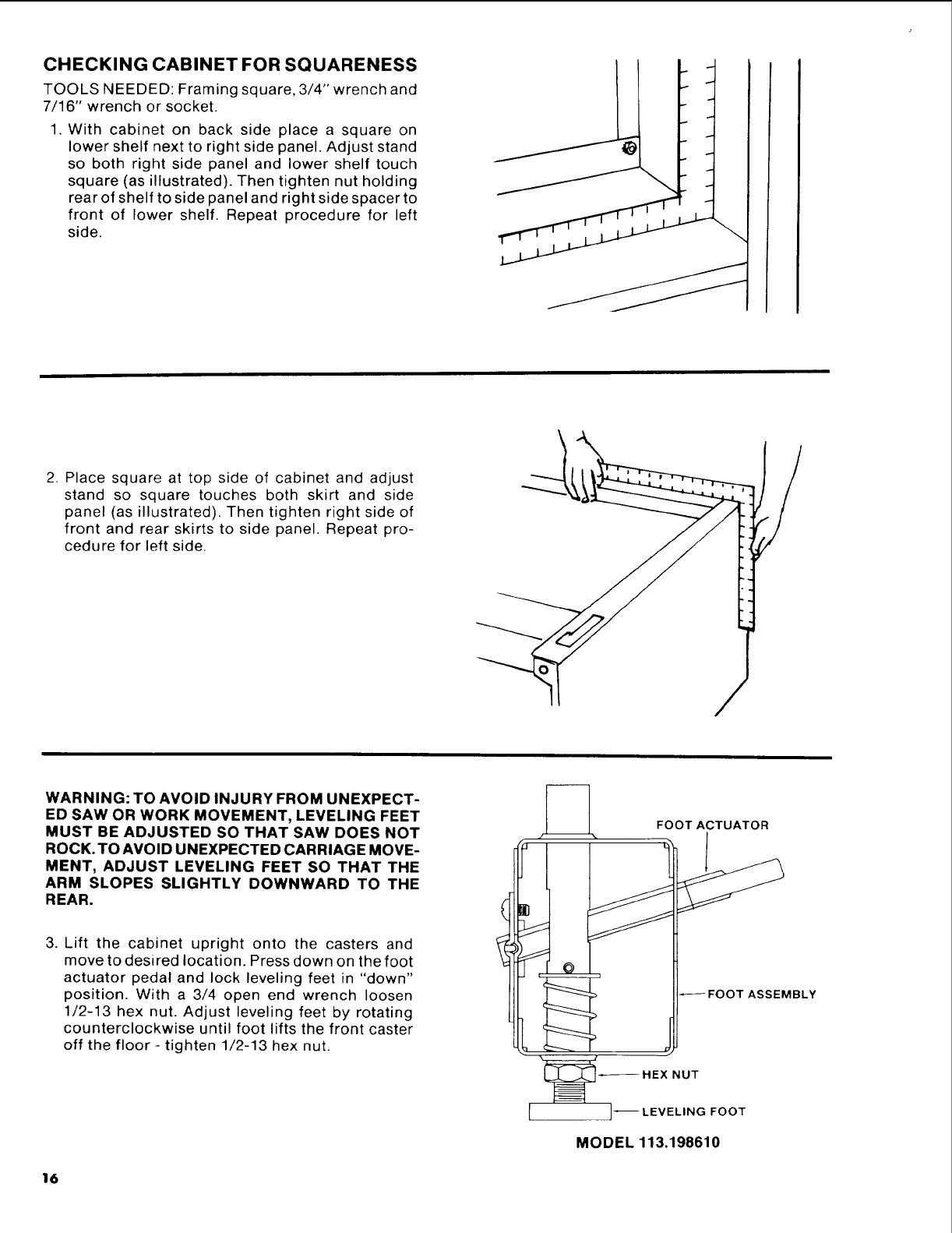
CHECKING CABINET FOR SQUARENESS
TOOLS NEEDED: Framing square, 3/4" wrench and
7/16" wrench or socket.
1. With cabinet on back side place a square on
lower shelf next to right side panel. Adjust stand
so both right side panel and lower shelf touch
square (as illustrated). Then tighten nut holding
rear of shelf to side panel and right side spacer to
front of lower shelf. Repeat procedure for left
side.
ii
2. Place square at top side of cabinet and adjust
stand so square touches both skirt and side
panel (as illustrated). Then tighten right side of
front and rear skirts to side panel. Repeat pro-
cedure for left side.
WARNING: TO AVOID INJURY FROM UNEXPECT-
ED SAW OR WORK MOVEMENT, LEVELING FEET
MUST BE ADJUSTED SO THAT SAW DOES NOT
ROCK. TO AVOID UNEXPECTED CARRIAGE MOVE-
MENT, ADJUST LEVELING FEET SO THAT THE
ARM SLOPES SLIGHTLY DOWNWARD TO THE
REAR.
3. Lift the cabinet upright onto the casters and
move to desired location. Press down on the foot
actuator pedal and lock leveling feet in "down"
position. With a 3/4 open end wrench loosen
1/2-13 hex nut. Adjust leveling feet by rotating
counterclockwise until foot lifts the front caster
off the floor - tighten 1/2-13 hex nut.
FOOT ACTUATOR
HEX NUT
LEVELING FOOT
MODEL 113.198610
16
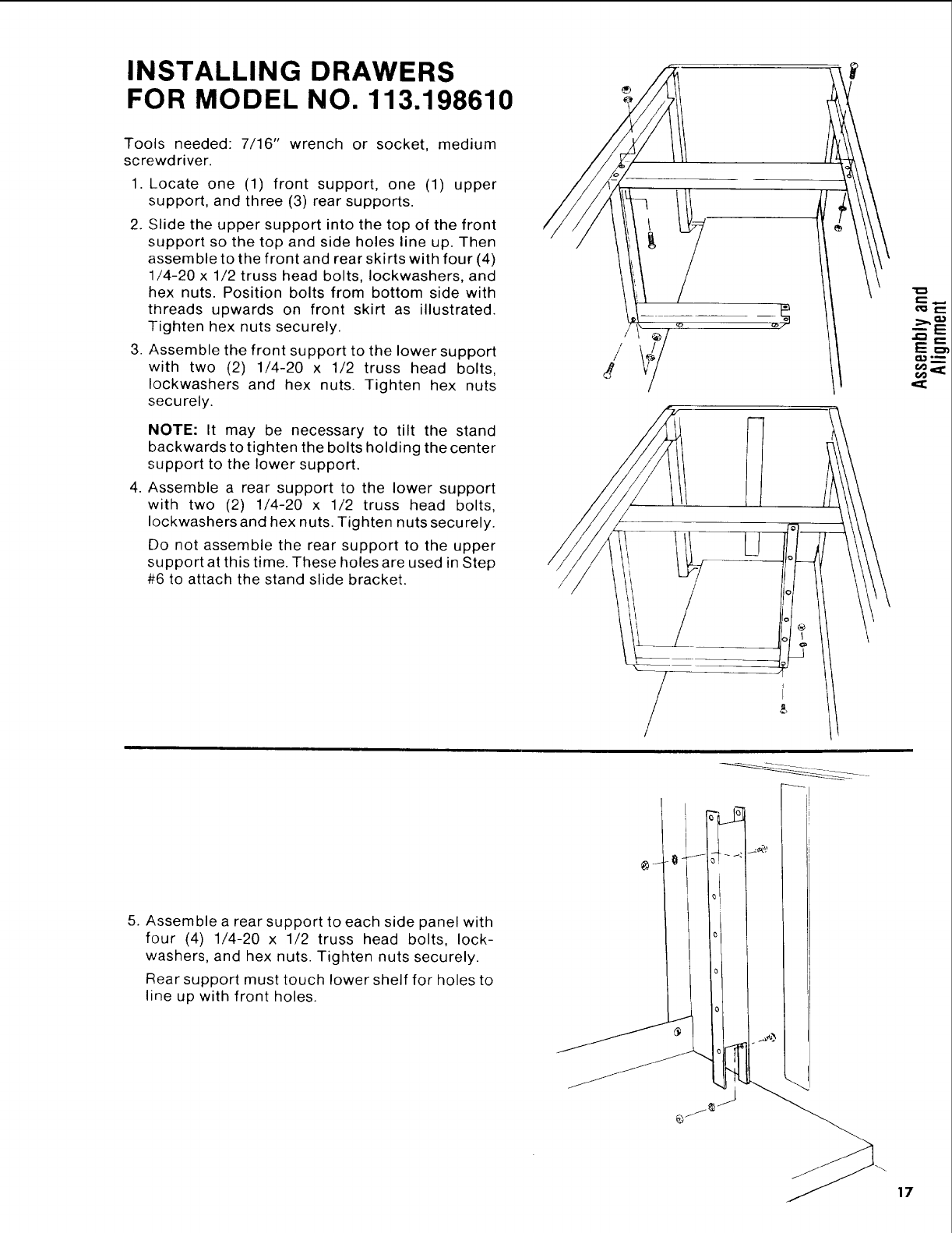
INSTALLING DRAWERS
FOR MODEL NO. 113.198610
Tools needed: 7/16" wrench or socket, medium
screwdriver.
1. Locate one (1) front support, one (1) upper
support, and three (3) rear supports.
2. Slide the upper support into the top of the front
support so the top and side holes line up. Then
assemble to the front and rear skirts with four (4)
1/4-20 x 1/2 truss head bolts, Iockwashers, and
hex nuts. Position bolts from bottom side with
threads upwards on front skirt as illustrated.
Tighten hex nuts securely.
3. Assemble the front support to the lower support
with two (2) 1/4-20 x 1/2 truss head bolts,
Iockwashers and hex nuts. Tighten hex nuts
securely.
//
/
NOTE: It may be necessary to tilt the stand
backwards to tighten the bolts holding the center
support to the lower support.
4. Assemble a rear support to the lower support
with two (2) 1/4-20 x 1/2 truss head bolts,
Iockwashers and hex nuts. Tighten nuts securely.
Do not assemble the rear support to the upper
support at this time. These holes are used in Step
#6 to attach the stand slide bracket. /
5. Assemble a rear support to each side panel with
four (4) 1/4-20 x 1/2 truss head bolts, lock-
washers, and hex nuts. Tighten nuts securely.
Rear support must touch lower shelf for holes to
line up with front holes.
(3
r-,-
E==
17
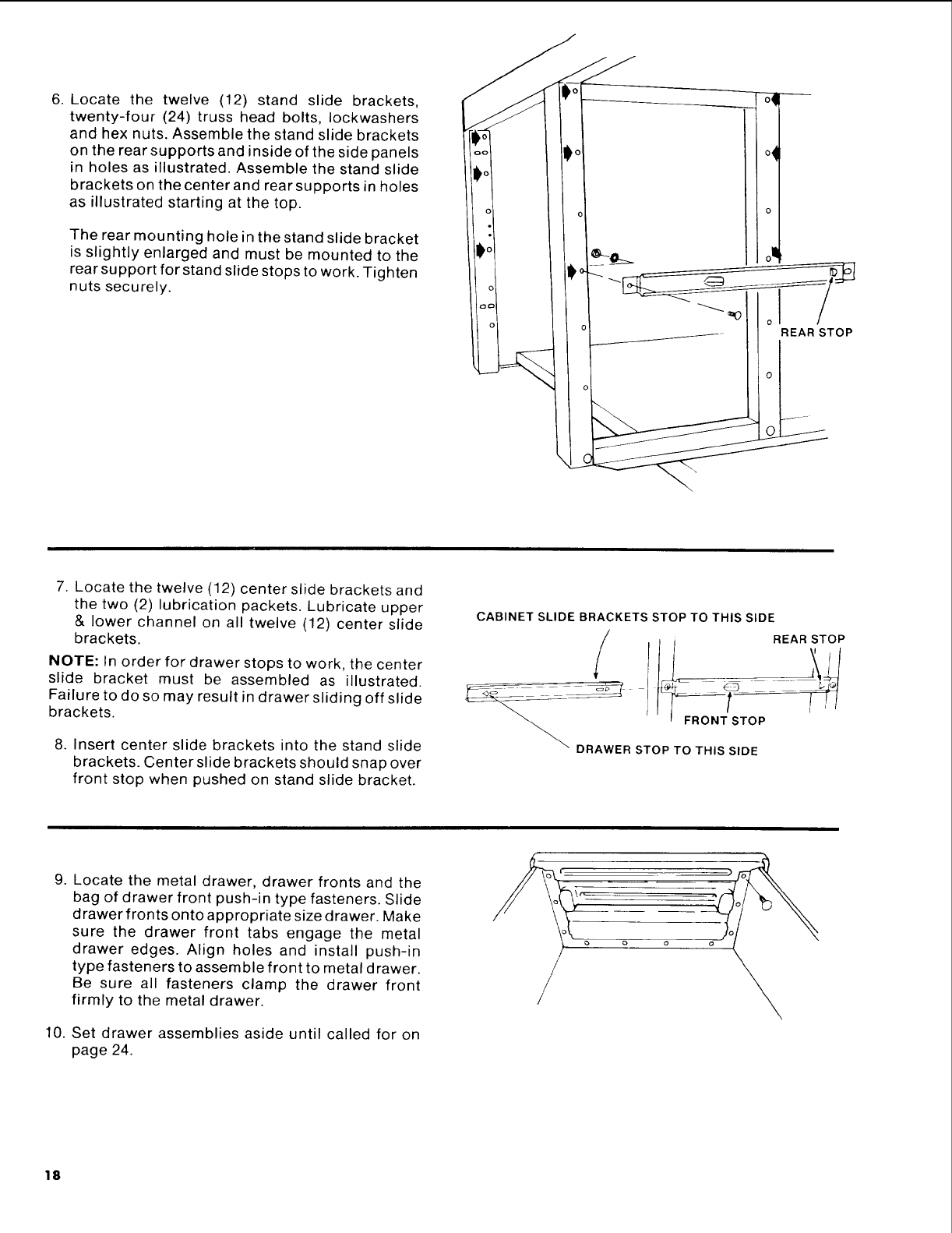
6. Locate the twelve (12) stand slide brackets,
twenty-four (24) truss head bolts, Iockwashers
and hex nuts. Assemble the stand slide brackets
on the rear supports and inside of the side panels
in holes as illustrated. Assemble the stand slide
brackets on the center and rear supports in holes
as illustrated starting at the top.
The rear mounting hole in the stand slide bracket
is slightly enlarged and must be mounted to the
rear support for stand slide stops to work. Tighten
nuts securely.
o_
TOp
7. Locate the twelve (12) center slide brackets and
the two (2) lubrication packets. Lubricate upper
& lower channel on all twelve (12) center slide
brackets,
NOTE: In order for drawer stops to work, the center
slide bracket must be assembled as illustrated.
Failure to do so may result in drawer sliding off slide
brackets.
8. Insert center slide brackets into the stand slide
brackets. Center slide brackets should snap over
front stop when pushed on stand slide bracket.
CABINET SLIDE BRACKETS STOP TO THIS SIDE
REAR STOP
DRAWER STOP TO THIS SIDE
9. Locate the metal drawer, drawer fronts and the
bag of drawer front push-in type fasteners. Slide
drawer fronts onto appropriate size drawer. Make
sure the drawer front tabs engage the metal
drawer edges. Align holes and install push-in
type fasteners to assemble front to metal drawer.
Be sure all fasteners clamp the drawer front
firmly to the metal drawer.
10. Set drawer assemblies aside until called for on
page 24.
/
/
18
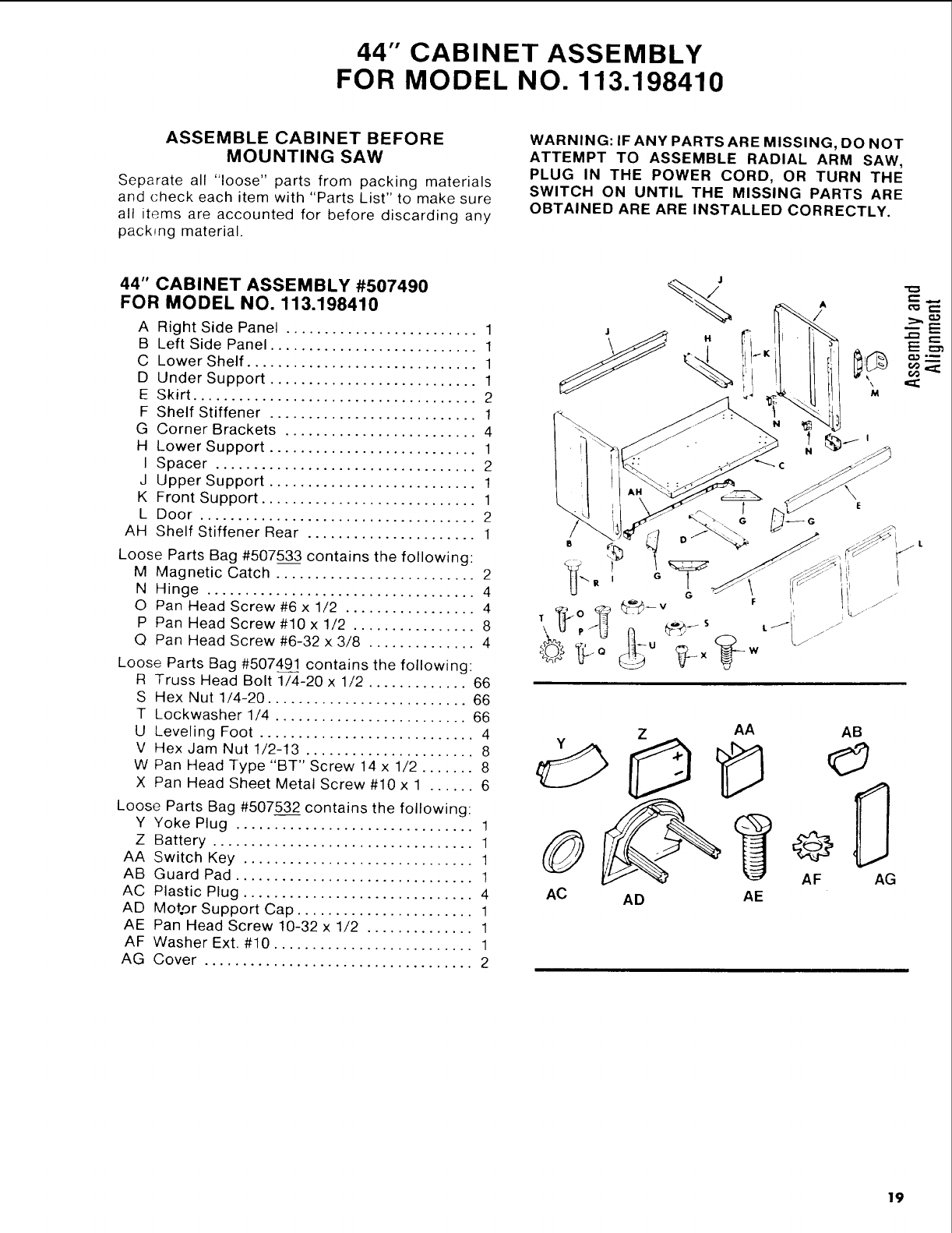
44" CABINET ASSEMBLY
FOR MODEL NO. 113.198410
ASSEMBLE CABINET BEFORE
MOUNTING SAW
Separate all "loose" parts from packing materials
and check each item with "Parts List" to make sure
all items are accounted for before discarding any
pack_ng material.
WARNING: IF ANY PARTS ARE MISSING, DO NOT
ATTEMPT TO ASSEMBLE RADIAL ARM SAW,
PLUG IN THE POWER CORD, OR TURN THE
SWITCH ON UNTIL THE MISSING PARTS ARE
OBTAINED ARE ARE INSTALLED CORRECTLY.
44" CABINET ASSEMBLY #507490
FOR MODEL NO. 113.198410
A Right Side Panel ......................... 1
B Left Side Panel ........................... 1
C Lower Shelf .............................. 1
D Under Support ........................... 1
E Skirt ..................................... 2
F Shelf Stiffener ........................... 1
G Corner Brackets ......................... 4
H Lower Support ........................... 1
I Spacer .................................. 2
J Upper Support ........................... 1
K Front Support ............................ 1
L Door .................................... 2
AH Shelf Stiffener Rear ...................... 1
Loose Parts Bag #507533 contains the following:
M Magnetic Catch .......................... 2
N Hinge ................................... 4
O Pan Head Screw #6 x 1/2 ................. 4
P Pan Head Screw #10 x 1/2 ................ 8
Q Pan Head Screw #6-32 x 3/8 .............. 4
Loose Parts Bag #507491 contains the following:
R Truss Head Bolt 1/4-20 x 1/2 ............. 66
S Hex Nut 1/4-20 .......................... 66
T Lockwasher 1/4 ......................... 66
U Leveling Foot ............................ 4
V Hex Jam Nut 1/2-13 ...................... 8
W Pan Head Type"BT" Screw 14 x 1/2 ....... 8
X Pan Head Sheet Metal Screw #10 x 1 ...... 6
Loose Parts Bag #507532 contains the following:
Y Yoke Plug ............................... 1
Z Battery .................................. 1
AA Switch Key .............................. 1
AB Guard Pad ............................... 1
AC Plastic Plug .............................. 4
AD Mot.or Support Cap ....................... 1
AE Pan Head Screw 10-32 x 1/2 .............. 1
AF Washer Ext. #10 .......................... 1
AG Cover ................................... 2
/
G
ZAA
AC AD AE
¢
L_jJ
AB
AF AG
19
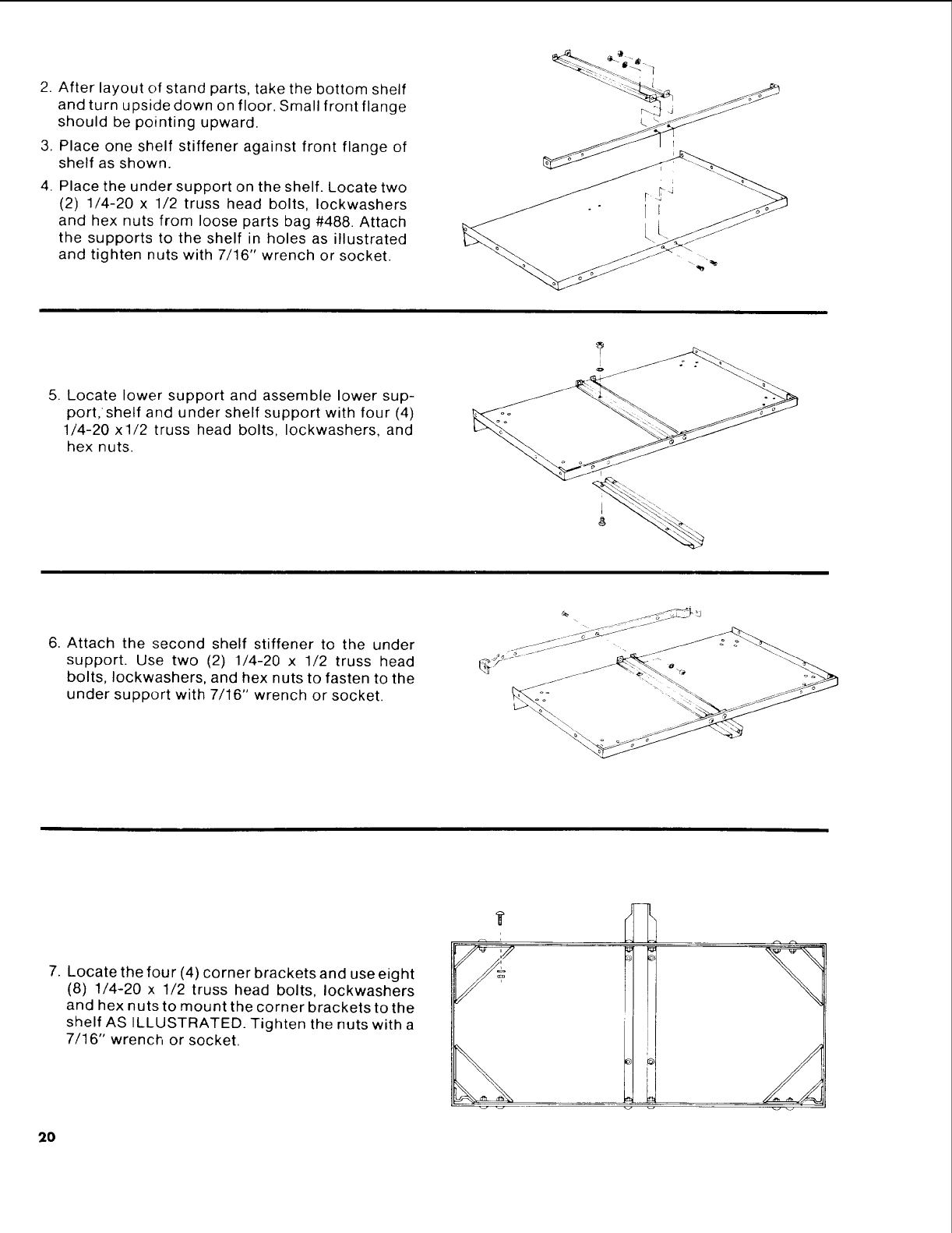
2.Afterlayoutofstandparts,takethebottomshelf
andturnupsidedownonfloor.Smallfrontflange
shouldbepointingupward.
3. Place one shelf stiffener against front flange of
shelf as shown.
4. Place the under support on the shelf. Locate two
(2) 1/4-20 x 1/2 truss head bolts, Iockwashers
and hex nuts from loose parts bag #488. Attach
the supports to the shelf in holes as illustrated
and tighten nuts with 7/16" wrench or socket.
r
5. Locate lower support and assemble lower sup-
port, shelf and under shelf support with four (4)
1/4-20 xl/2 truss head bolts, Iockwashers, and
hex nuts.
6. Attach the second shelf stiffener to the under
support. Use two (2) 1/4-20 x 1/2 truss head
bolts, Iockwashers, and hex nuts to fasten to the
under support with 7/16" wrench or socket.
_C_J -,
7. Locate the four (4) corner brackets and use eight
(8) 1/4-20 x 1/2 truss head bolts, Iockwashers
and hex nuts to mount the corner brackets to the
shelf AS ILLUSTRATED. Tighten the nuts with a
7/16" wrench or socket.
20
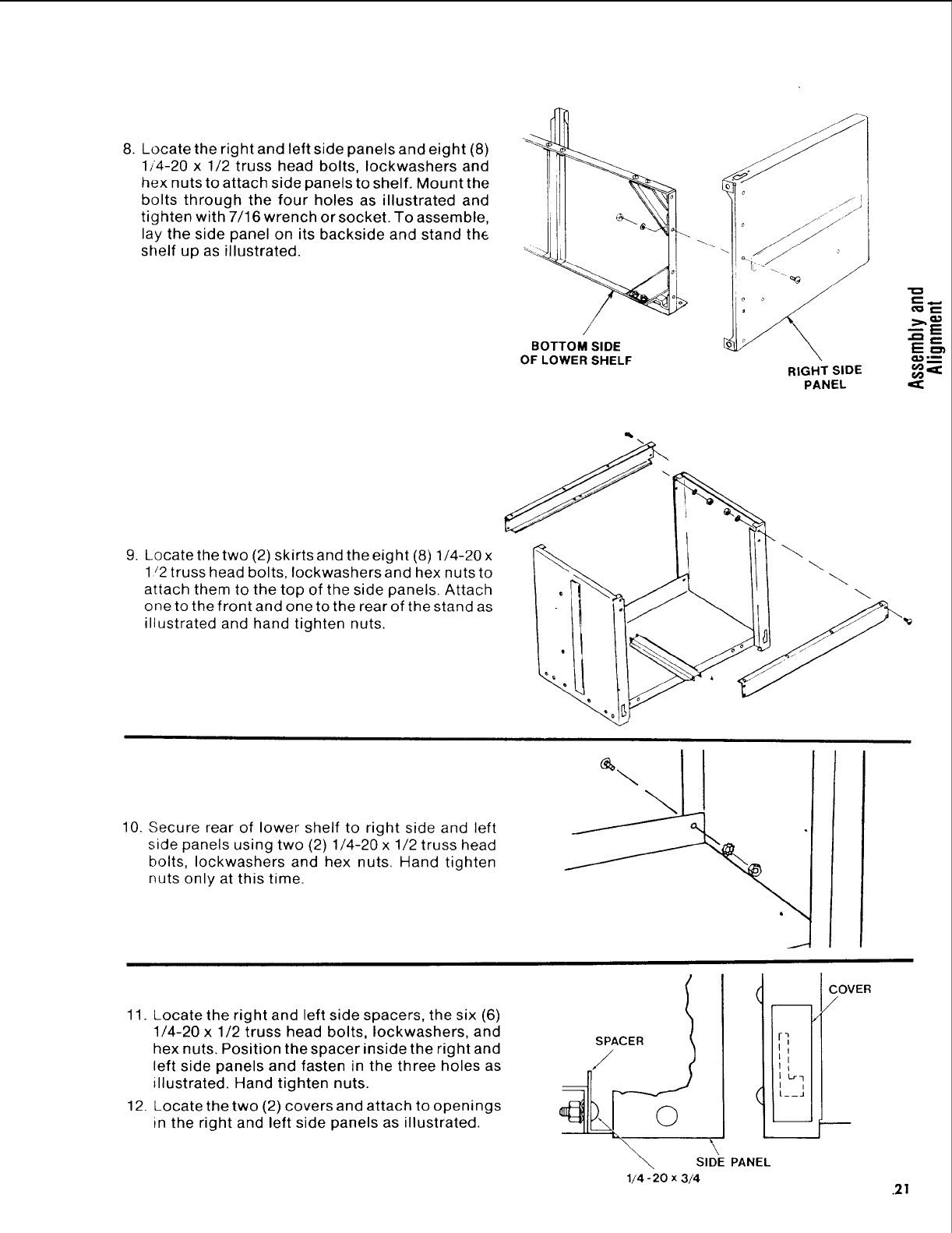
8. Locate the right and left side panels and eight (8)
1/4-20 x 1/2 truss head bolts, Iockwashers and
hex nuts to attach side panels to shelf. Mount the
bolts through the four holes as illustrated and
tighten with 7/16 wrench or socket. To assemble,
lay the side panel on its backside and stand the
shelf up as illustrated.
BOTTOM SIDE
OF LOWER SHELF RIGHT SIDE
PANEL
,t_ r-
Em_
9. Locate the two (2) skirts and theeight (8) 1/4-20 x
1/2 truss head bolts, Iockwashers and hex nuts to
attach them to the top of the side panels. Attach
one to the front and one to the rear of the stand as
illustrated and hand tighten nuts.
10. Secure rear of lower shelf to right side and left
side panels using two (2) 1/4-20 x 1/2 truss head
bolts, Iockwashers and hex nuts. Hand tighten
nuts only at this time.
11. Locate the right and left side spacers, the six (6)
1/4-20 x 1/2 truss head bolts, Iockwashers, and
hex nuts. Position the spacer inside the right and
left side panels and fasten in the three holes as
illustrated. Hand tighten nuts.
12. Locate the two (2) covers and attach to openings
in the right and left side panels as illustrated.
SPACER 1
\ SIDE PANEL
1/4 -20 x3/4
COVER
/
.21
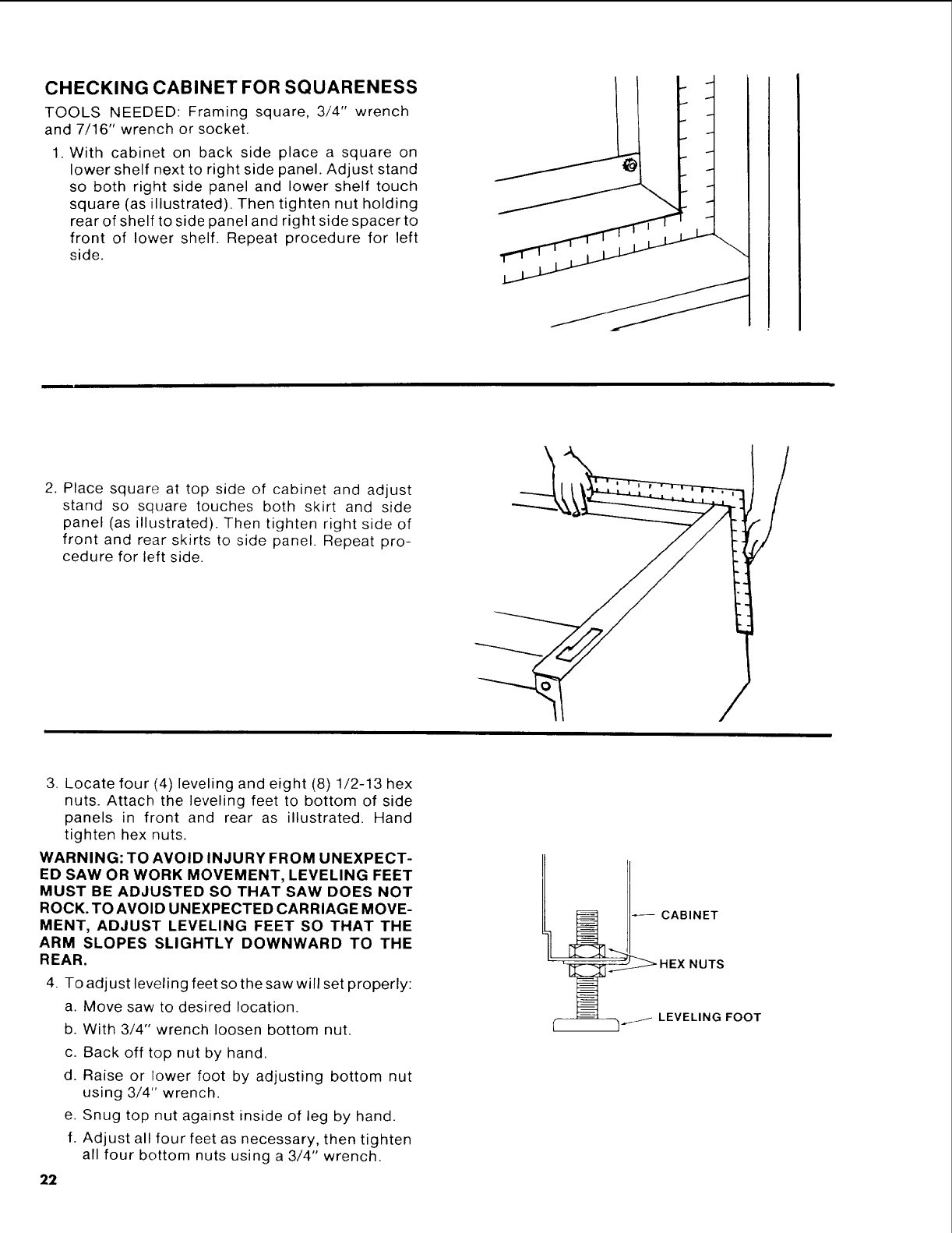
CHECKING CABINET FOR SQUARENESS
TOOLS NEEDED: Framing square, 3/4" wrench
and 7/16" wrench or socket.
1. With cabinet on back side place a square on
lower shelf next to right side panel. Adjust stand
so both right side panel and lower shelf touch
square (as illustrated). Then tighten nut holding
rear of shelf to side panel and right side spacer to
front of lower shelf. Repeat procedure for left
side.
2. Place square at top side of cabinet and adjust
stand so square touches both skirt and side
panel (as illustrated). Then tighten right side of
front and rear skirts to side panel. Repeat pro-
cedure for left side.
3. Locate four (4) leveling and eight (8) 1/2-13 hex
nuts. Attach the leveling feet to bottom of side
panels in front and rear as illustrated. Hand
tighten hex nuts.
WARNING: TO AVOID INJURY FROM UNEXPECT-
ED SAW OR WORK MOVEMENT, LEVELING FEET
MUST BE ADJUSTED SO THAT SAW DOES NOT
ROCK. TO AVOID UNEXPECTED CARRIAGE MOVE-
MENT, ADJUST LEVELING FEET SO THAT THE
ARM SLOPES SLIGHTLY DOWNWARD TO THE
REAR.
4. To adjust leveling feet so the saw will set properly:
a. Move saw to desired location.
b. With 3/4" wrench loosen bottom nut.
c. Back off top nut by hand.
d. Raise or lower foot by adjusting bottom nut
using 3/4" wrench.
e. Snug top nut against inside of leg by hand.
f. Adjust all four feet as necessary, then tighten
all four bottom nuts using a 3/4" wrench.
22
] J_ LEVELING FOOT
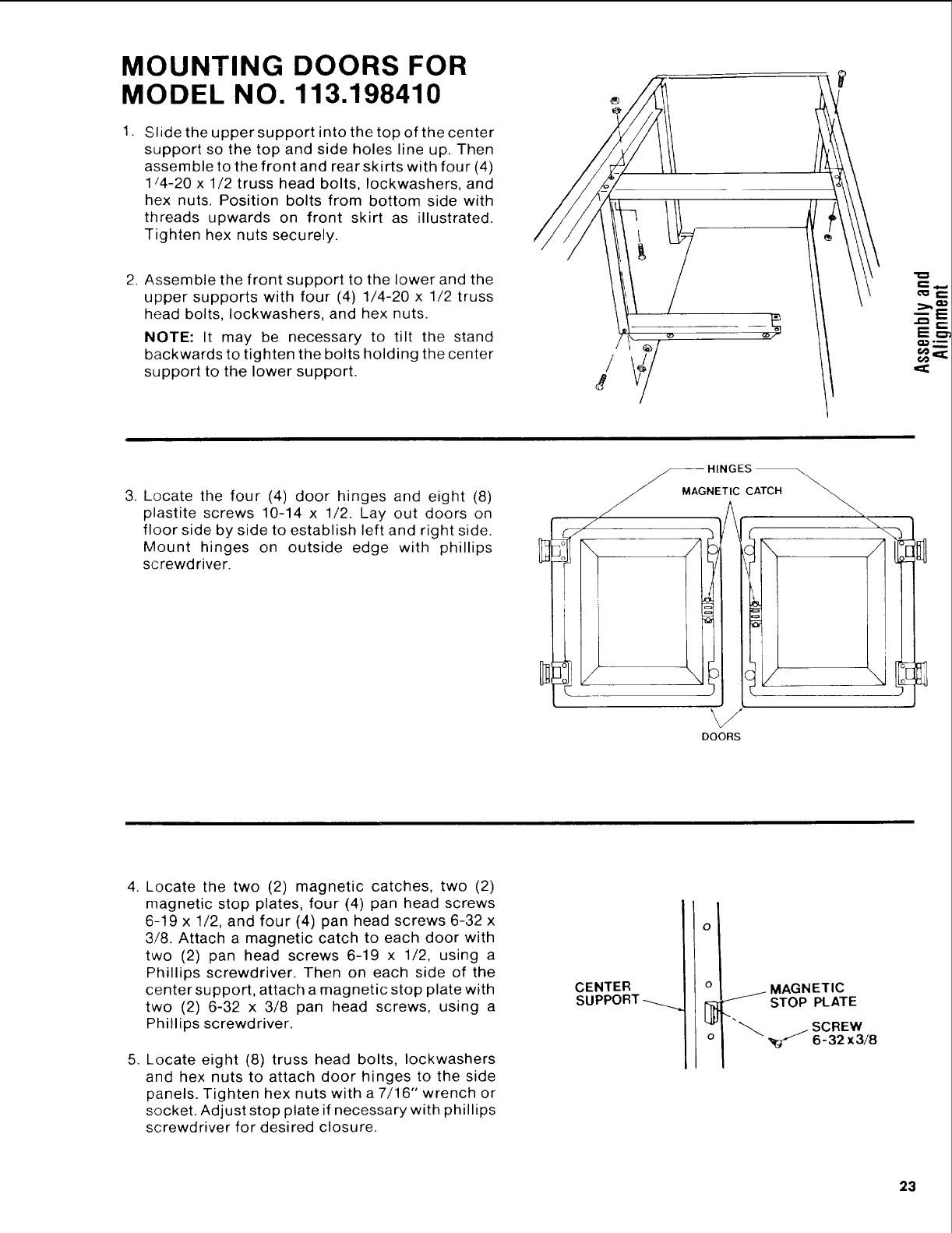
MOUNTING DOORS FOR
MODEL NO. 113.198410
1. Slide the upper support into the top of the center
support so the top and side holes line up. Then
assemble to the front and rear skirts with four (4)
1/4-20 x 1/2 truss head bolts, Iockwashers, and
hex nuts. Position bolts from bottom side with
threads upwards on front skirt as illustrated.
Tighten hex nuts securely.
2. Assemble the front support to the lower and the
upper supports with four (4) 1/4-20 x 1/2 truss
head bolts, Iockwashers, and hex nuts.
NOTE: It may be necessary to tilt the stand
backwards to tighten the bolts holding the center
support to the lower support.
E=r
t,e _
3. Locate the four (4) door hinges and eight (8)
plastite screws 10-14 x 1/2. Lay out doors on
floor side by side to establish left and right side.
Mount hinges on outside edge with phillips
screwdriver.
_HINGES
_/ MAGNETIC CATCH
_r
DOORS
4. Locate the two (2) magnetic catches, two (2)
magnetic stop plates, four (4) pan head screws
6-19 x 1/2, and four (4) pan head screws 6-32 x
3/8. Attach a magnetic catch to each door with
two (2) pan head screws 6-19 x 1/2, using a
Phillips screwdriver. Then on each side of the
center support, attach a magnetic stop plate with
two (2) 6-32 x 3/8 pan head screws, using a
Phillips screwdriver.
5. Locate eight (8) truss head bolts, Iockwashers
and hex nuts to attach door hinges to the side
panels. Tighten hex nuts with a 7/16" wrench or
socket. Adjust stop plate if necessary with phillips
screwdriver for desired closure.
CENTER
SUPPORT _
O
o
o
MAGNETIC
STOP PLATE
SCREW
"_ _ 6-32 x3/8
23
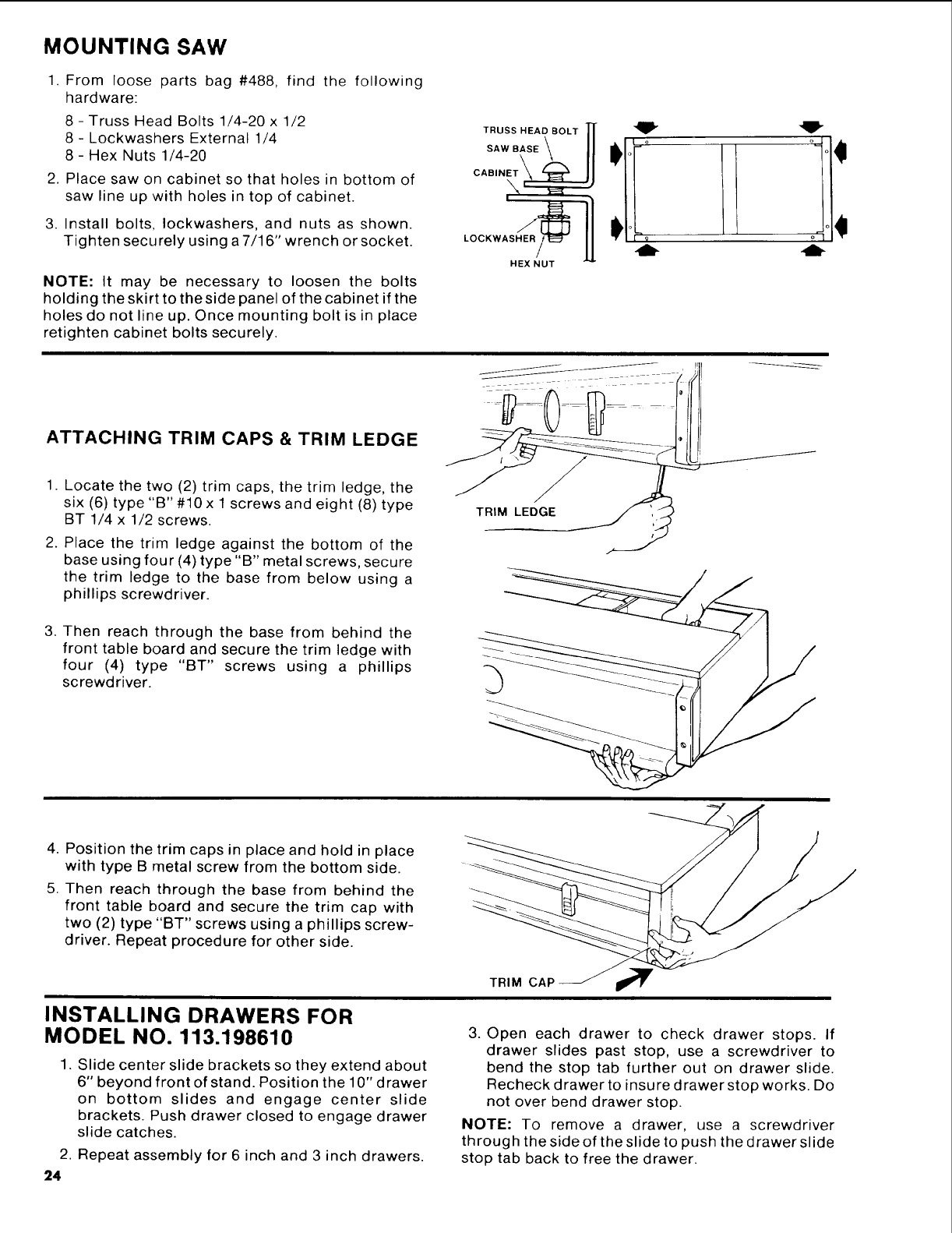
MOUNTING SAW
1. From loose parts bag #488, find the following
hardware:
8 - Truss Head Bolts 1/4-20 x 1/2
8 - Lockwashers External 1/4
8- Hex Nuts 1/4-20
2. Place saw on cabinet so that holes in bottom of
saw line up with holes in top of cabinet.
3. Install bolts, Iockwashers, and nuts as shown.
Tighten securely using a 7/16" wrench or socket.
NOTE: It may be necessary to loosen the bolts
holding the skirt to the side panel of the cabinet if the
holes do not line up. Once mounting bolt is in place
retighten cabinet bolts securely.
ATTACHING TRIM CAPS & TRIM LEDGE
1. Locate the two (2) trim caps, the trim ledge, the
six (6) type "B" #10 x 1 screws and eight (8) type
BT 1/4 x 1/2 screws.
2. Place the trim ledge against the bottom of the
base using four (4) type "B" metal screws, secure
the trim ledge to the base from below using a
phillips screwdriver.
3. Then reach through the base from behind the
front table board and secure the trim ledge with
four (4) type "BT" screws using a phillips
screwdriver.
T.uss.EAOBO,TIf 4_" "_"
sws'Ill° // °!1
HEX NUT
TRIM LEDGE
4. Position the trim caps in place and hold in place
with type B metal screw from the bottom side.
5. Then reach through the base from behind the
front table board and secure the trim cap with
two (2) type "BT" screws using a phillips screw-
driver. Repeat procedure for other side.
TRIM CAF
INSTALLING DRAWERS FOR
MODEL NO. 113.198610
1. Slide center slide brackets so they extend about
6" beyond front of stand. Position the 10" drawer
on bottom slides and engage center slide
brackets. Push drawer closed to engage drawer
slide catches.
2. Repeat assembly for 6 inch and 3 inch drawers.
24
3. Open each drawer to check drawer stops. If
drawer slides past stop, use a screwdriver to
bend the stop tab further out on drawer slide.
Recheck drawer to insure drawer stop works. Do
not over bend drawer stop.
NOTE: To remove a drawer, use a screwdriver
through the side of the slide to push the drawer slide
stop tab back to free the drawer.
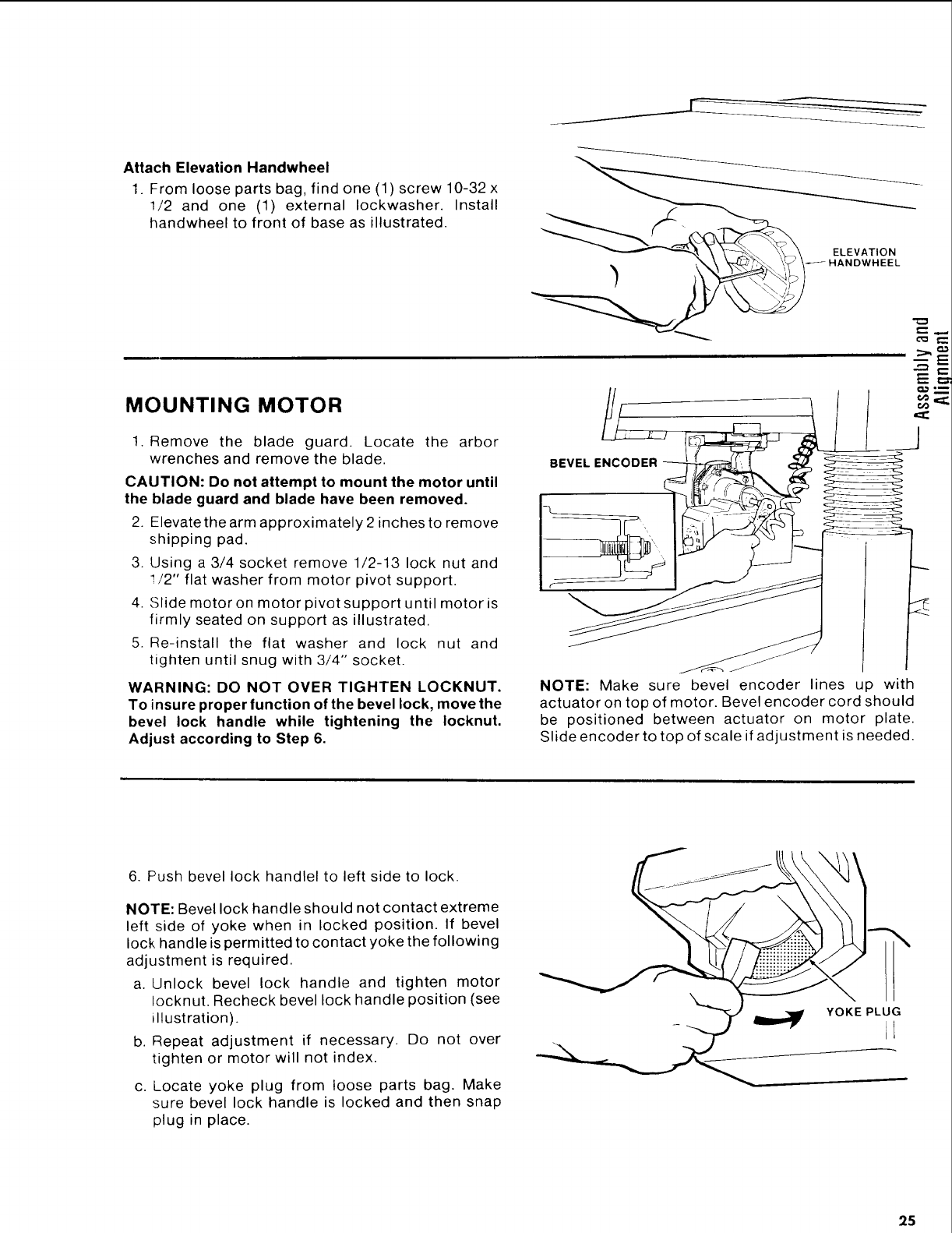
Attach Elevation Handwheel
1. From loose parts bag, find one (1) screw 10-32 x
1/2 and one (1) external Iockwasher. Install
handwheel to front of base as illustrated.
MOUNTING MOTOR
1. Remove the blade guard. Locate the arbor
wrenches and remove the blade.
CAUTION: 13o not attempt to mount the motor until
the blade guard and blade have been removed.
2. Elevatethe arm approximately 2 inches to remove
shipping pad.
3. Using a 3/4 socket remove 1/2-13 lock nut and
I/2" flat washer from motor pivot support.
4. Slide motor on motor pivot support until motor is
firmly seated on support as illustrated.
5. Re-install the flat washer and lock nut and
tighten until snug with 3/4" socket.
WARNING: DO NOT OVER TIGHTEN LOCKNUT.
To insure proper function of the bevel lock, move the
bevel lock handle while tightening the Iocknut.
Adjust according to Step 6.
[
_-
ELEVATION
HANDWHEEL
NOTE: Make sure bevel encoder lines up with
actuator on top of motor. Bevel encoder cord should
be positioned between actuator on motor plate.
Slide encoder to top of scale if adjustment is needed.
6. Push bevel lock handlel to left side to lock.
NOTE: Bevel lock handle should not contact extreme
left side of yoke when in locked position. If bevel
lock handle is permitted to contact yoke the following
adjustment is required.
a. Unlock bevel lock handle and tighten motor
Iocknut. Recheck bevel lock handle position (see
illustration).
b. Repeat adjustment if necessary. Do not over
tighten or motor will not index.
c. Locate yoke plug from loose parts bag. Make
sure bevel lock handle is locked and then snap
plug in place.
25
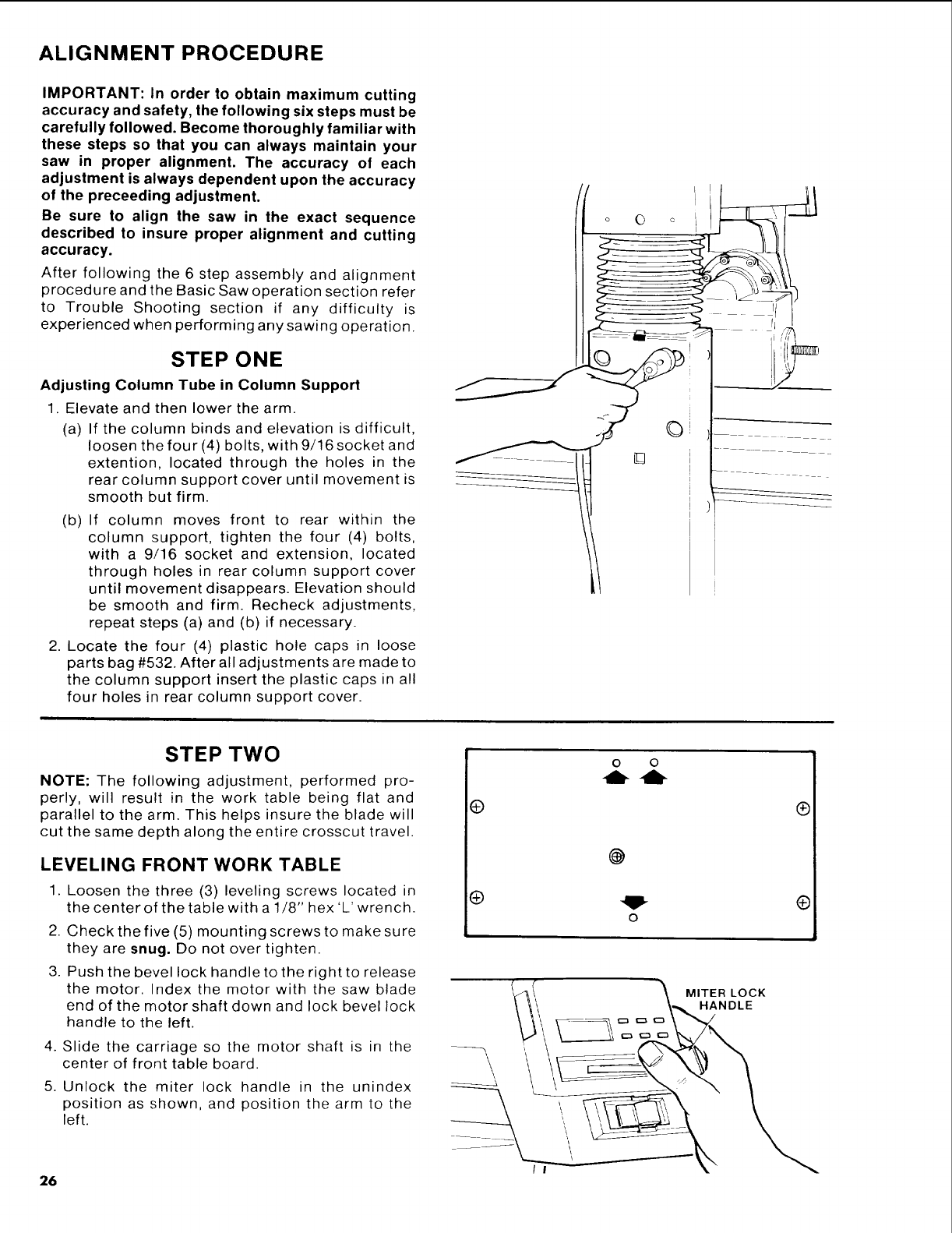
ALIGNMENT PROCEDURE
IMPORTANT: In order to obtain maximum cutting
accuracy and safety, the following six steps must be
carefully followed. Become thoroughly familiar with
these steps so that you can always maintain your
saw in proper alignment. The accuracy of each
adjustment is always dependent upon the accuracy
of the preceeding adjustment.
Be sure to align the saw in the exact sequence
described to insure proper alignment and cutting
accuracy.
After following the 6 step assembly and alignment
procedure and the Basic Saw operation section refer
to Trouble Shooting section if any difficulty is
experienced when performing any sawing operation.
STEP ONE
Adjusting Column Tube in Column Support
1. Elevate and then lower the arm.
(a) If the column binds and elevation is difficult,
loosen the four (4) bolts, with 9/16 socket and
extention, located through the holes in the
rear column support cover until movement is
smooth but firm.
(b) If column moves front to rear within the
column support, tighten the four (4) bolts,
with a 9/16 socket and extension, located
through holes in rear column support cover
until movement disappears. Elevation should
be smooth and firm. Recheck adjustments,
repeat steps (a) and (b) if necessary.
2. Locate the four (4) plastic hole caps in loose
parts bag #532. After all adjustments are made to
the column support insert the plastic caps in all
four holes in rear column support cover.
o O o _
/
STEP TWO
NOTE: The following adjustment, performed pro-
perly, will result in the work table being flat and
parallel to the arm. This helps insure the blade will
cut the same depth along the entire crosscut travel.
LEVELING FRONT WORK TABLE
1. Loosen the three (3) leveling screws located in
the center of the table with a 1/8" hex'L'wrench.
2. Check the five (5) mounting screws to make sure
they are snug. Do not over tighten.
3. Push the bevel lock handle to the right to release
the motor. Index the motor with the saw blade
end of the motor shaft down and lock bevel lock
handle to the left.
4. Slide the carriage so the motor shaft is in the
center of front table board.
5. Unlock the miter lock handle in the unindex
position as shown, and position the arm to the
left.
@
®
o o
-lb -Ib
@
MITER LOCK
HANDLE
®
®
/I
26
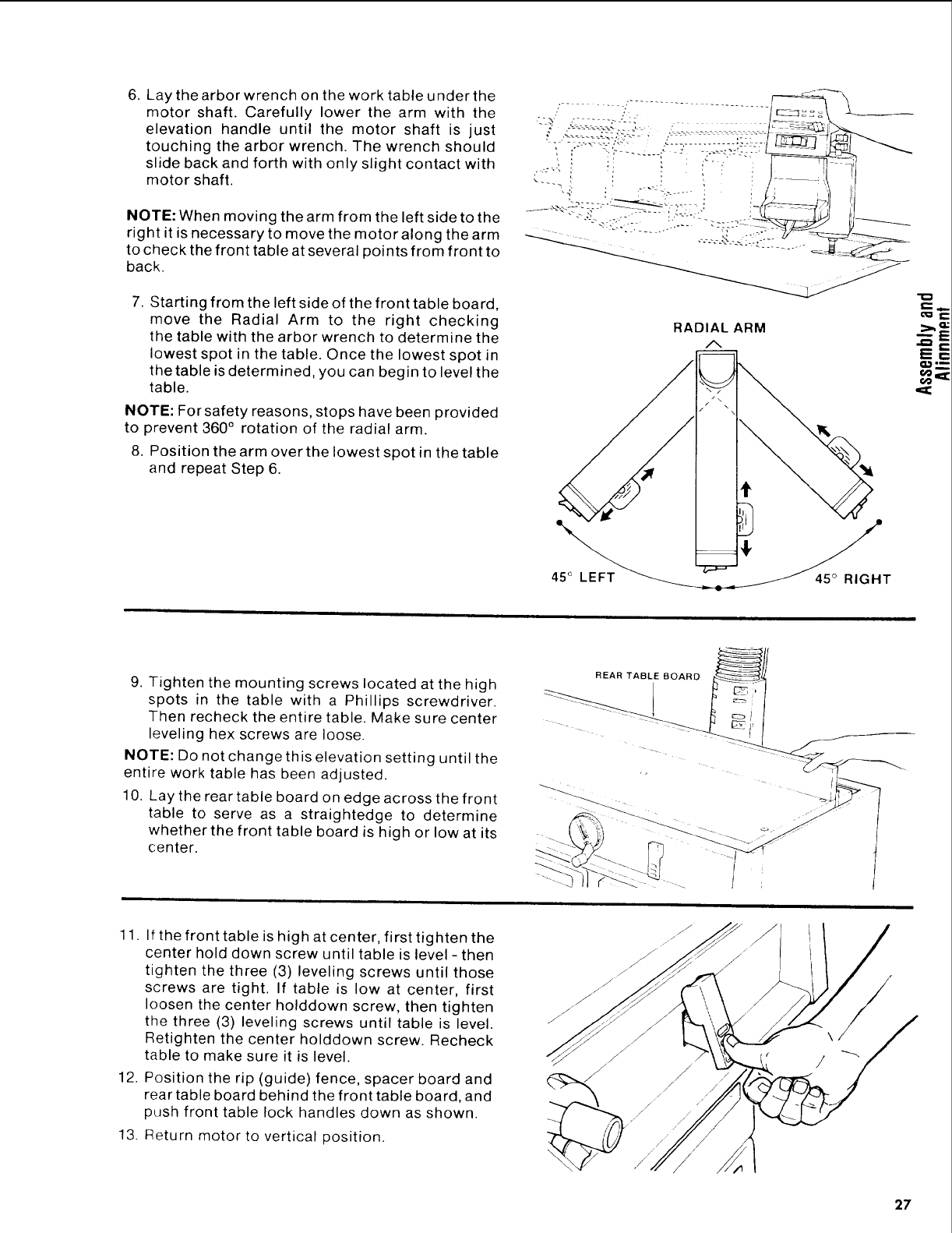
6. Lay the arbor wrench on the work tableunderthe
motor shaft. Carefully lower the arm with the
elevation handle until the motor shaft is just
touching the arbor wrench. The wrench should
slide back and forth with only slight contact with
motor shaft.
NOTE: When moving the arm from the left side to the
right it is necessary to move the motor along the arm
to check the front table at several points from front to
back.
7. Starting from the left side of the front table board,
move the Radial Arm to the right checking
the table with the arbor wrench to determine the
lowest spot in the table. Once the lowest spot in
the table is determined, you can begin to level the
table.
NOTE: For safety reasons, stops have been provided
to prevent 360 ° rotation of the radial arm.
8. Position the arm over the lowest spot in the table
and repeat Step 6.
RADIAL ARM
/%
/
€
-
45° LEFT_""_7 _ T
--_E
E==
ooi=I:
9. Tighten the mounting screws located at the high
spots in the table with a Phillips screwdriver.
Then recheck the entire table. Make sure center
leveling hex screws are loose.
NOTE: Do not change this elevation setting until the
entire work table has been adjusted.
10. Lay the rear table board on edge across the front
table to serve as a straightedge to determine
whether the front table board is high or low at its
center.
REAR TABLE BOARD _
11. If the front table is high at center, first tighten the
center hold down screw until table is level - then
tighten the three (3) leveling screws until those
screws are tight. If table is low at center, first
loosen the center holddown screw, then tighten
the three (3) leveling screws until table is level.
Retighten the center holddown screw. Recheck
table to make sure it is level.
12. Position the rip (guide) fence, spacer board and
rear table board behind the front table board, and
push front table lock handles down as shown.
13. Return motor to vertical position.
27
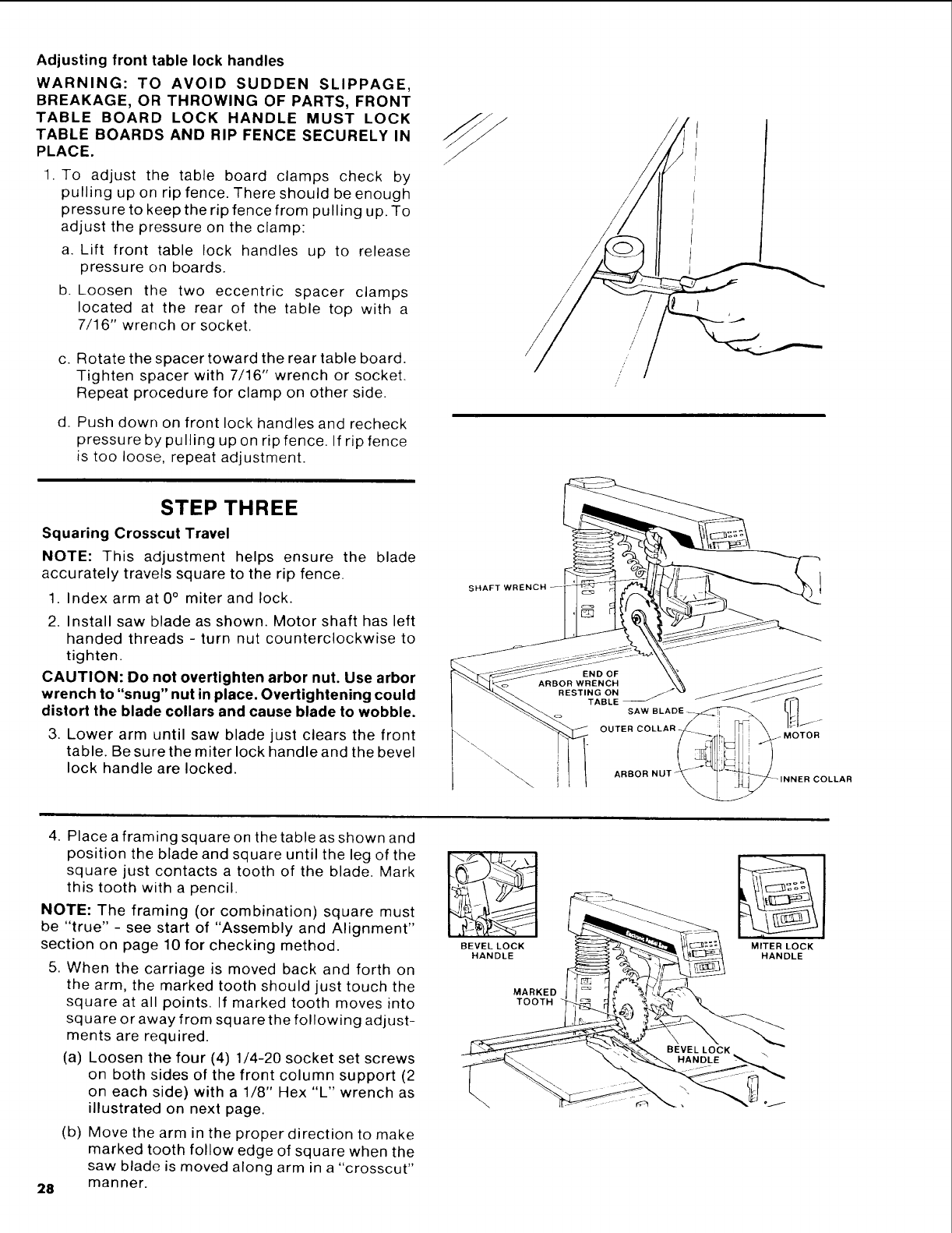
Adjusting front table lock handles
WARNING: TO AVOID SUDDEN SLIPPAGE,
BREAKAGE, OR THROWING OF PARTS, FRONT
TABLE BOARD LOCK HANDLE MUST LOCK
TABLE BOARDS AND RIP FENCE SECURELY IN
PLACE.
1. To adjust the table board clamps check by
pulling up on rip fence. There should be enough
pressure to keep the rip fence from pulling up. To
adjust the pressure on the clamp:
a. Lift front table lock handles up to release
pressure on boards.
b. Loosen the two eccentric spacer clamps
located at the rear of the table top with a
7/16" wrench or socket.
c. Rotate the spacer toward the rear table board.
Tighten spacer with 7/16" wrench or socket.
Repeat procedure for clamp on other side.
d. Push down on front lock handles and recheck
pressure by pulling up on rip fence. If rip fence
is too loose, repeat adjustment.
/
STEP THREE
Squaring Crosscut Travel
NOTE: This adjustment helps ensure the blade
accurately travels square to the rip fence.
1. Index arm at 0° miter and lock.
2. Install saw blade as shown. Motor shaft has left
handed threads - turn nut counterclockwise to
tighten.
CAUTION: Do not overtighten arbor nut. Use arbor
wrench to "snug" nut in place. Overtightening could
distort the blade collars and cause blade to wobble.
3. Lower arm until saw blade just clears the front
table. Be sure the miter lock handle and the bevel
lock handle are locked.
SHAFT
\
4. Placea framing square on the table as shown and
position the blade and square until the leg of the
square just contacts a tooth of the blade. Mark
this tooth with a pencil.
NOTE: The framing (or combination) square must
be "true" - see start of "Assembly and Alignment"
section on page 10 for checking method.
5. When the carriage is moved back and forth on
the arm, the marked tooth should just touch the
square at all points. If marked tooth moves into
square or away from square the following adjust-
ments are required.
(a) Loosen the four (4) 1/4-20 socket set screws
on both sides of the front column support (2
on each side) with a 1/8" Hex "L" wrench as
illustrated on next page.
28
(b) Move the arm in the proper direction to make
marked tooth follow edge of square when the
saw blade is moved along arm in a "crosscut"
manner.
BEVEL LOCK
HANDLE
MARKED
TOOTH
MITER LOCK
HANDLE
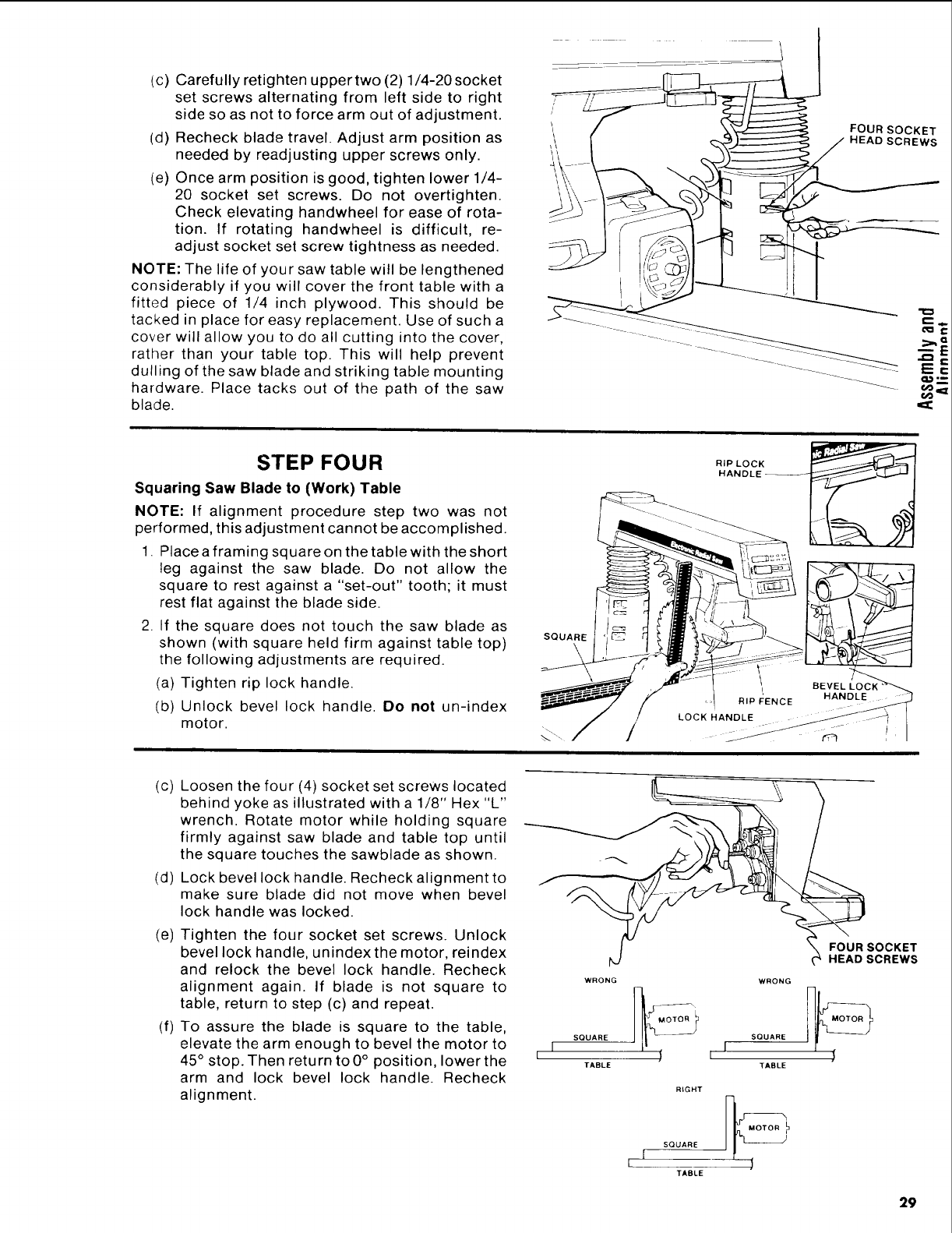
(c) Carefully retighten uppertwo (2) 1/4-20 socket
set screws alternating from left side to right
side so as not to force arm out of adjustment.
(d) Recheck blade travel. Adjust arm position as
needed by readjusting upper screws only.
(e) Once arm position is good, tighten lower 1/4-
20 socket set screws. Do not overtighten.
Check elevating handwheel for ease of rota-
tion. If rotating handwheel is difficult, re-
adjust socket set screw tightness as needed.
NOTE: The life of your saw table will be lengthened
considerably if you will cover the front table with a
fitted piece of 1/4 inch plywood. This should be
tacked in place for easy replacement. Use of such a
cover will allow you to do all cutting into the cover,
rather than your table top. This will help prevent
dulling of the saw blade and striking table mounting
hardware. Place tacks out of the path of the saw
blade.
FOUR SOCKET
HEAD SCREWS
,=8:
STEP FOUR
Squaring Saw Blade to (Work) Table
NOTE: If alignment procedure step two was not
performed, this adjustment cannot be accomplished.
1. Place a framing square on the table with the short
leg against the saw blade. Do not allow the
square to rest against a "set-out" tooth; it must
rest flat against the blade side.
2. If the square does not touch the saw blade as
shown (with square held firm against table top)
the following adjustments are required.
(a) Tighten rip lock handle.
(b) Unlock bevel lock handle. Do not un-index
motor.
SQUARE
\
II1 BEVEL
RIP F:ENCE HAND_
(c)
(d)
Loosen the four (4) socket set screws located
behind yoke as illustrated with a 1/8" Hex "L"
wrench. Rotate motor while holding square
firmly against saw blade and table top until
the square touches the sawblade as shown.
Lock bevel lock handle. Recheck alignment to
make sure blade did not move when bevel
lock handle was locked.
(e) Tighten the four socket set screws. Unlock
bevel lock handle, unindex the motor, reindex
and relock the bevel lock handle. Recheck
alignment again. If blade is not square to
table, return to step (c) and repeat.
(f) To assure the blade is square to the table,
elevate the arm enough to bevel the motor to
45° stop. Then return to 0° position, lower the
arm and lock bevel lock handle. Recheck
alignment.
I_FOUR SOCKET
t_J _HEAD SCREWS
WRONG WRONG
SQUARE SQUARE
I
I
TABLE TABLE
RIGHT
MOTOR
SQUARE
TABLE
29
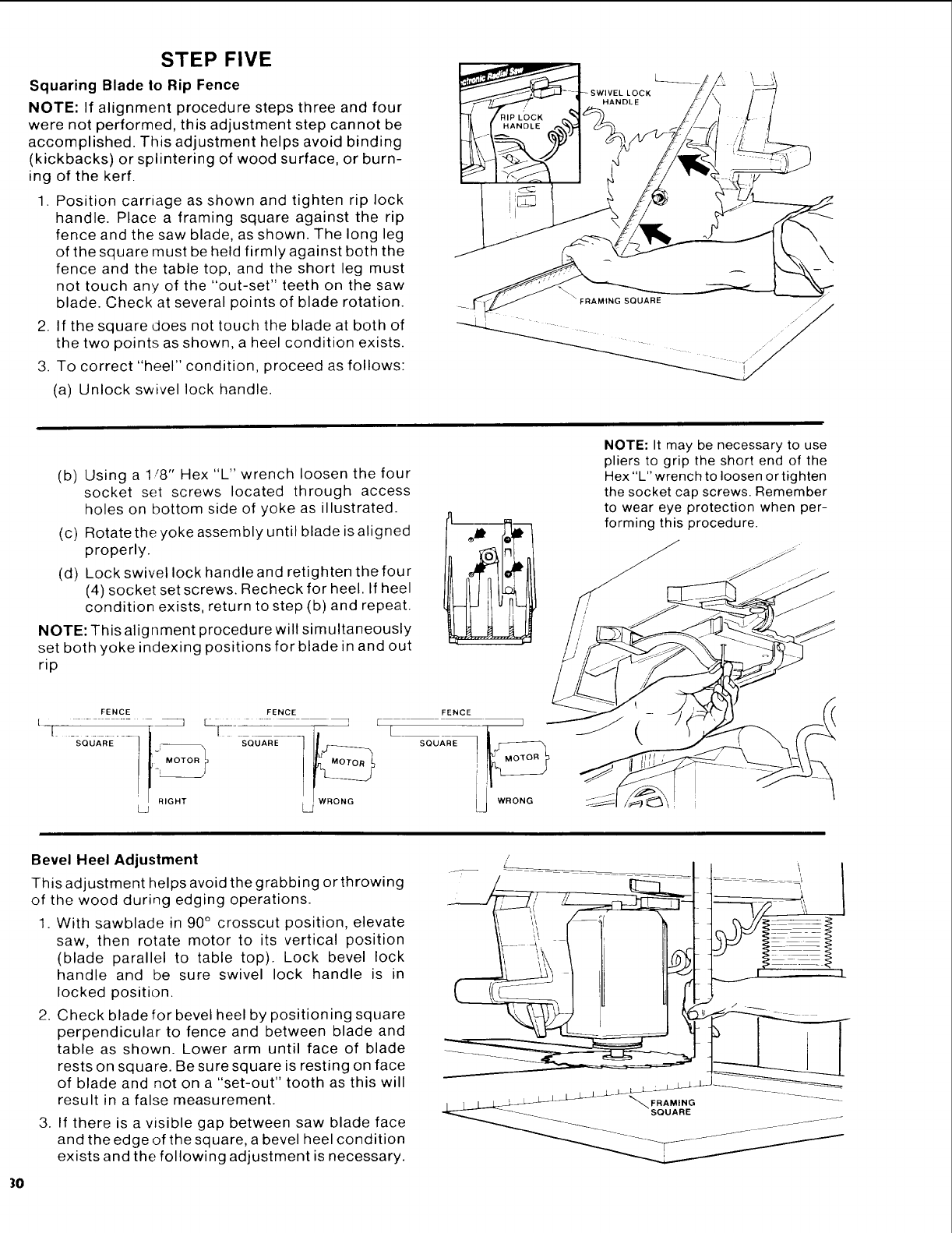
STEP FIVE
Squaring Blade to Rip Fence
NOTE: If alignment procedure steps three and four
were not performed, this adjustment step cannot be
accomplished. This adjustment helps avoid binding
(kickbacks) or splintering of wood surface, or burn-
ing of the kerf.
1. Position carriage as shown and tighten rip lock
handle. Place a framing square against the rip
fence and the saw blade, as shown. The long leg
of the square must be held firmly against both the
fence and the table top, and the short leg must
not touch any of the "out-set" teeth on the saw
blade. Check at several points of blade rotation.
2. If the square does not touch the blade at both of
the two points as shown, a heel condition exists.
3. To correct "heel" condition, proceed as follows:
(a) Unlock swivel lock handle.
FRAMING SQUARE
\
(b) Using a 1/8" Hex "L" wrench loosen the four
socket set screws located through access
holes on bottom side of yoke as illustrated.
(c) Rotate the yoke assembly until blade is aligned
properly.
(d) Lock swivel lock handleand retighten the four
(4) socket set screws. Recheck for heel. If heel
condition exists, return to step (b) and repeat.
NOTE: This alignment procedure will simultaneously
set both yoke indexing positions for blade in and out
rip
NOTE: It may be necessary to use
pliers to grip the short end of the
Hex "L" wrench to loosen or tighten
the socket cap screws. Remember
to wear eye protection when per-
forming this procedure.
FENCE FENCE
1" -SO'UARE .... ._ h-SQUARE-----,i_ L
/ _RIG_T WRONG
L_ L_
FENCE
]
SQUARE MO_TOR
Bevel Heel Adjustment
This adjustment helps avoid the grabbing or throwing
of the wood during edging operations.
1. With sawblade in 90 ° crosscut position, elevate
saw, then rotate motor to its vertical position
(blade parallel to table top). Lock bevel lock
handle and be sure swivel lock handle is in
locked position.
2. Check blade for bevel heel by positioning square
perpendicular to fence and between blade and
table as shown. Lower arm until face of blade
rests on square. Be sure square is resting on face
of blade and not on a "set-out" tooth as this will
result in a false measurement.
3. If there is a visible gap between saw blade face
and the edge of the square, a bevel heel condition
exists and the following adjustment is necessary.
/
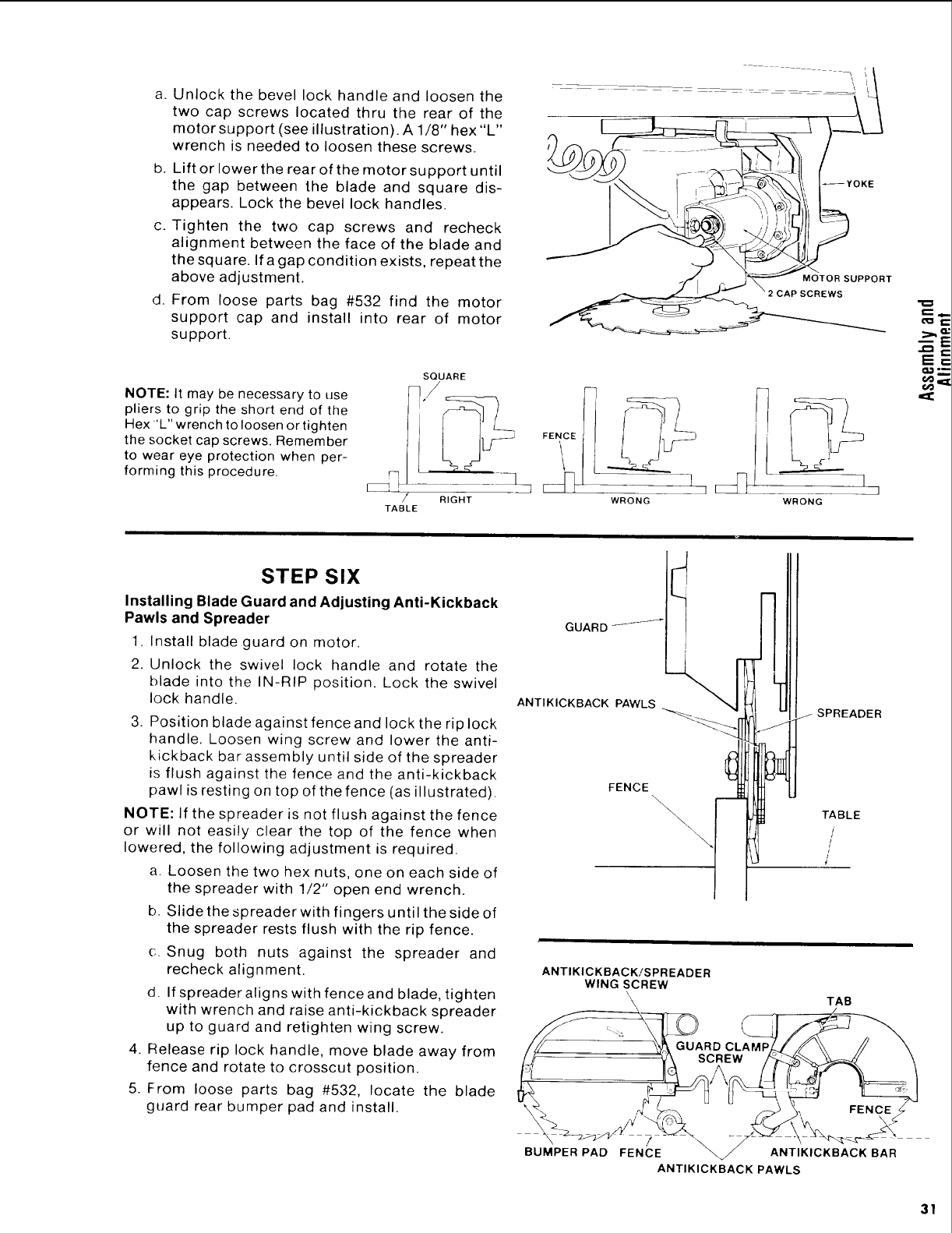
a.
b,
Unlock the bevel lock handle and loosen the
two cap screws located thru the rear of the
motor support (see illustration). A 1/8" hex "L"
wrench is needed to loosen these screws.
Lift or lower the rear of the motor support until
the gap between the blade and square dis-
appears. Lock the bevel lock handles.
c. Tighten the two cap screws and recheck
alignment between the face of the blade and
the square. If a gap condition exists, repeat the
above adjustment.
d. From loose parts bag #532 find the motor
support cap and install into rear of motor
support.
_YOKE
MOTOR SUPPORT
_AP SCREWS
NOTE: It may be necessary to use
pliers to grip the short end of the
Hex "L" wrench to loosen or tighten
the socket cap screws. Remember
to wear eye protection when per-
forming this procedure.
/
TABLE
SQUARE
RIGHT WRONG WRONG
E==
STEP SIX
Installing Blade Guard and Adjusting Anti-Kickback
Pawls and Spreader
1. Install blade guard on motor.
2. Unlock the swivel lock handle and rotate the
blade into the IN-RIP position. Lock the swivel
lock handle.
3. Position blade against fence and lock the rip lock
handle. Loosen wing screw and lower the anti-
kickback bar assembly until side of the spreader
is flush against the fence and the anti-kickback
pawl is resting on top of the fence (as illustrated).
NOTE: If the spreader is not flush against the fence
or will not easily clear the top of the fence when
lowered, the following adjustment is required.
a. Loosen the two hex nuts, one on each side of
the spreader with 1/2" open end wrench.
b. Slide the spreader with fingers until the side of
the spreader rests flush with the rip fence.
c. Snug both nuts against the spreader and
recheck alignment.
d. If spreader aligns with fence and blade, tighten
with wrench and raise anti-kickback spreader
up to guard and retighten wing screw.
4. Release rip lock handle, move blade away from
fence and rotate to crosscut position.
5. From loose parts bag #532, locate the blade
guard rear bumper pad and install.
GUARD-_-_-_-
ANTIKICKBACK PAWLS
FENCE
i
J_ SPREADER
\_ TABLE
it'
/
/
ANTIKICKBACK/SPREADER
WING SCREW
\, TAB
/\
PAD FENCE _ ANTIKICKBACK BAR
BUMPER
ANTIKICKBACK PAWLS
31
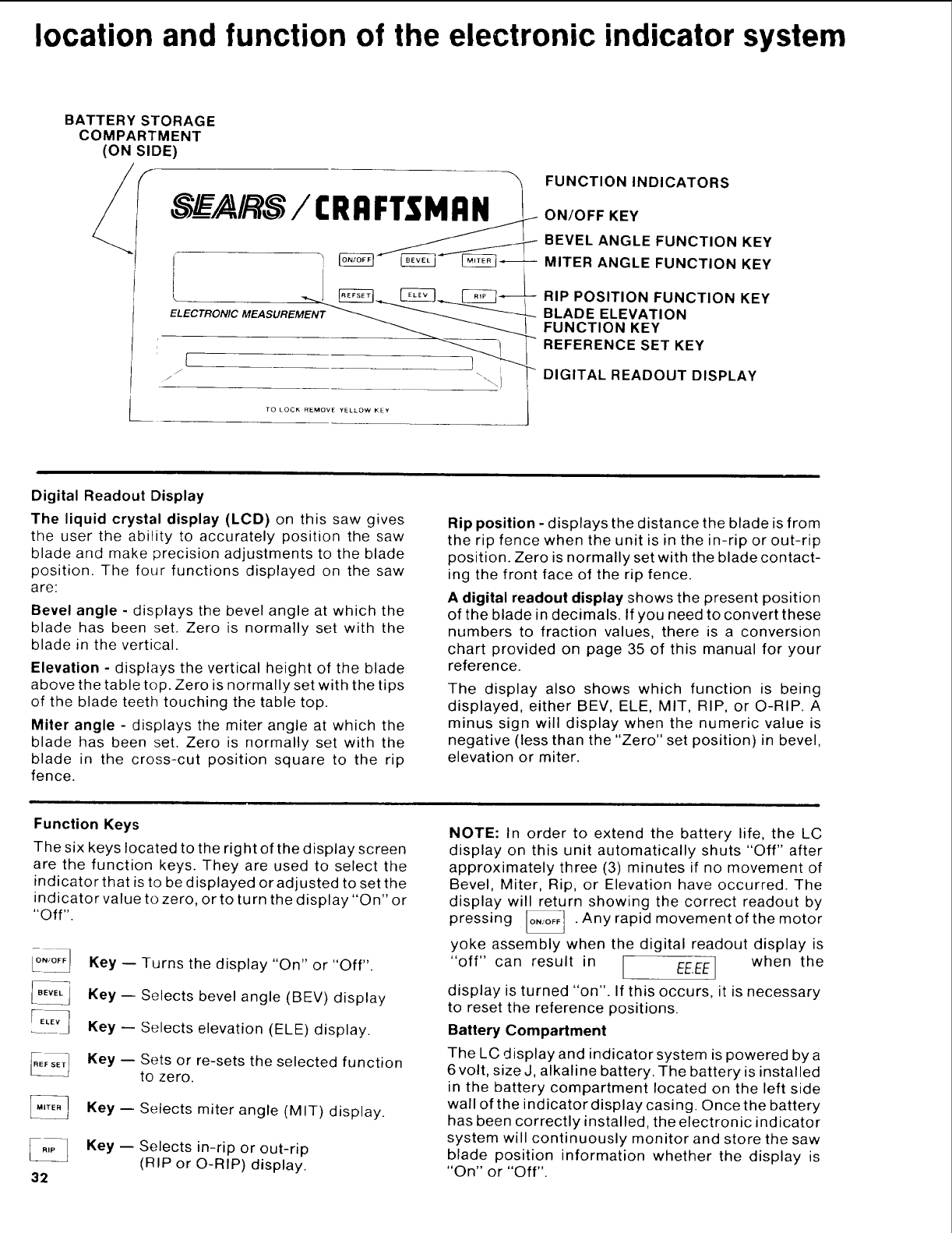
location and function of the electronic indicator system
BATTERY STORAGE
COMPARTMENT
(ON SIDE)
ELECTRONIC MEASUREMENT
TO LOCK REMOVE YELLOW KEY
FUNCTION INDICATORS
ON/OFF KEY
BEVEL ANGLE FUNCTION KEY
MITER ANGLE FUNCTION KEY
RIP POSITION FUNCTION KEY
BLADE ELEVATION
FUNCTION KEY
REFERENCE SET KEY
DIGITAL READOUT DISPLAY
Digital Readout Display
The liquid crystal display (LCD) on this saw gives
the user the ability to accurately position the saw
blade and make precision adjustments to the blade
position. The four functions displayed on the saw
are:
Bevel angle - displays the bevel angle at which the
blade has been set. Zero is normally set with the
blade in the vertical.
Elevation - displays the vertical height of the blade
above the table top. Zero is normally set with the tips
of the blade teeth touching the table top.
Miler angle - displays the miter angle at which the
blade has been set. Zero is normally set with the
blade in the cross-cut position square to the rip
fence.
Rip position - displays the distance the blade is from
the rip fence when the unit is in the in-rip or out-rip
position. Zero is normally set with the blade contact-
ing the front face of the rip fence.
Adigital readout display shows the present position
of the blade in decimals. If you need to convert these
numbers to fraction values, there is a conversion
chart provided on page 35 of this manual for your
reference.
The display also shows which function is being
displayed, either BEV, ELE, MIT, RIP, or O-RIP. A
minus sign will display when the numeric value is
negative (less than the "Zero" set position) in bevel,
elevation or miter.
Function Keys
The six keys located to the right of the display screen
are the function keys. They are used to select the
indicator that is to be displayed or adjusted to set the
indicator value to zero, orto turn the display "On" or
"Off".
32
Key -- Turns the display "On" or "Off".
Key -- Selects bevel angle (BEV) display
Key -- Selects elevation (ELE) display.
Key -- Sets or re-sets the selected function
to zero.
Key -- Selects miter angle (MIT) display.
Key -- Selects in-rip or out-rip
(RIP or O-RIP) display.
NOTE: In order to extend the battery life, the LC
display on this unit automatically shuts "Off" after
approximately three (3) minutes if no movement of
Bevel, Miter, Rip, or Elevation have occurred. The
display will return showing the correct readout by
pressing _ . Any rapid movement of the motor
yoke assembly when the digital readout display is
"off" can result in [ EE.EEJ when the
/I
display is turned "on". If this occurs, it is necessary
to reset the reference positions.
Battery Compartment
The LC display and indicator system is powered by a
6 volt, size J, alkaline battery. The battery is installed
in the battery compartment located on the left side
wall of the indicator display casing. Once the battery
has been correctly installed, the electronic indicator
system will continuously monitor and store the saw
blade position information whether the display is
"On" or "Off".
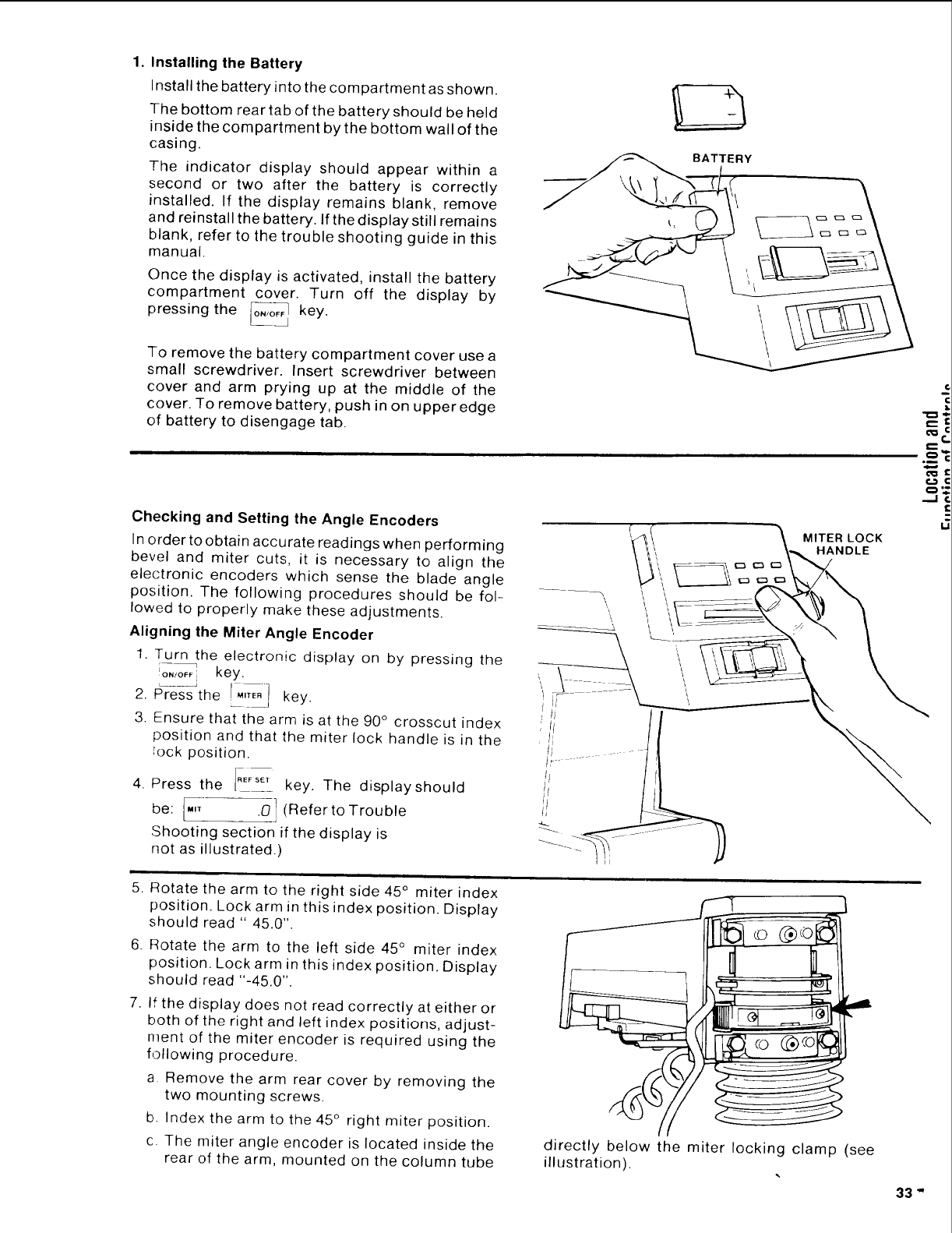
1. Installing the Battery
Install the battery into the compartment as shown.
The bottom rear tab of the battery should be held
inside the compartment by the bottom wall of the
casing.
The indicator display should appear within a
second or two after the battery is correctly
installed. If the display remains blank, remove
and reinstall the battery. If the display still remains
blank, refer to the trouble shooting guide in this
manual.
Once the display is activated, install the battery
compartment cover. Turn off the display by
pressing the o_,_o_ key.
L_
To remove the battery compartment cover use a
small screwdriver. Insert screwdriver between
cover and arm prying up at the middle of the
cover. To remove battery, push in on upper edge
of battery to disengage tab.
BATTERY
Checking and Setting the Angle Encoders
In order to obtain accurate readings when performing
bevel and miter cuts, it is necessary to align the
electronic encoders which sense the blade angle
position. The following procedures should be fol-
lowed to properly make these adjustments.
Aligning the Miter Angle Encoder
1. Turn the electronic display on by pressing the
[o,toF_ key.
2. Pr'es-sthe _MITE"It key.
3. Ensure that the arm is at the 90 ° crosscut index
position and that the miter lock handle is in the
_ock position.
4. Press the ,EFSCT key. The displayshould
be: I'" .0] (Refer to Trouble
Shooting section if the display is
not as illustrated.)
i
5. Rotate the arm to the right side 45 ° miter index
position. Lock arm in this index position. Display
should read " 45.0".
6. Rotate the arm to the left side 45 ° miter index
position. Lock arm in this index position. Display
should read "-45.0".
7. If the display does not read correctly at either or
both of the right and left index positions, adjust-
ment of the miter encoder is required using the
following procedure.
a Remove the arm rear cover by removing the
two mounting screws.
b. Index the arm to the 45 ° right miter position.
c. The miter angle encoder is located inside the
rear of the arm, mounted on the column tube
t,--
O
,..J
o__@o
directly below the miter locking clamp (see
illustration).
33"
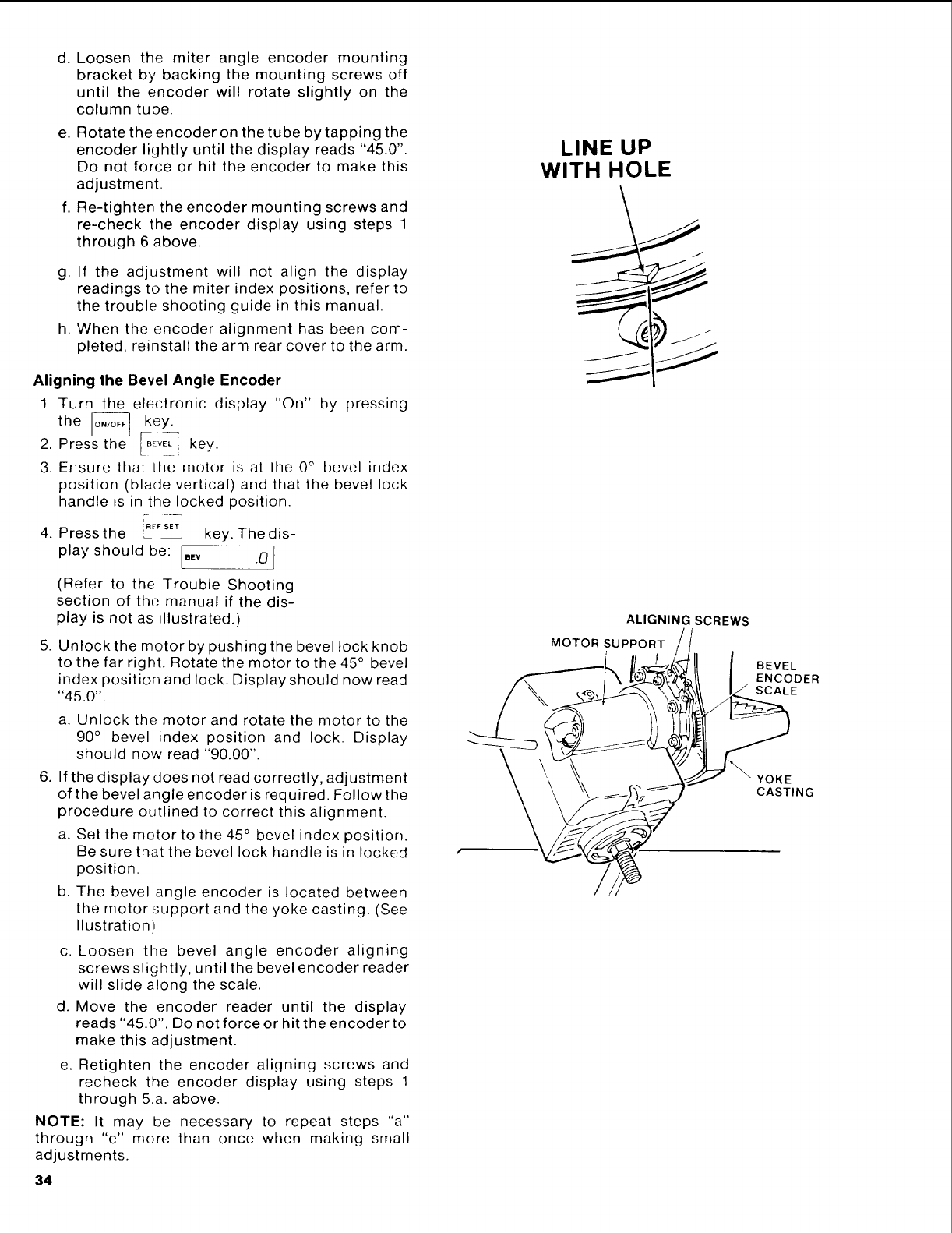
d. Loosen the miter angle encoder mounting
bracket by backing the mounting screws off
until the encoder will rotate slightly on the
column tube.
e. Rotate the encoder on the tube by tapping the
encoder lightly until the display reads "45.0".
Do not force or hit the encoder to make this
adjustment.
f. Re-tighten the encoder mounting screws and
re-check the encoder display using steps 1
through 6 above.
g. If the adjustment will not align the display
readings to the miter index positions, refer to
the trouble shooting guide in this manual.
h. When the encoder alignment has been com-
pleted, reinstall the arm rear cover to the arm.
Aligning the Bevel Angle Encoder
1. Turn the electronic display "On" by pressing
the _ key.
2. Press the [BEVELkey.
3. Ensure that the motor is at the 0° bevel index
position (blade vertical) and that the bevel lock
handle is in the locked position.
4. Pressthe _iR_FSET!_key. Thedis-
play should be: .Ev .0
(Refer to the Trouble Shooting
section of the manual if the dis-
play is not as illustrated.)
5. Unlock the motor by pushing the bevel lock knob
to the far right. Rotate the motor to the 45 ° bevel
index position and lock. Display should now read
"45.0".
a. Unlock the motor and rotate the motor to the
90 ° bevel index position and lock. Display
should now read "90.00".
6. If the display does not read correctly, adjustment
of the bevel angle encoder is required. Follow the
procedure outlined to correct this alignment.
a. Set the motor to the 45 ° bevel index position.
Be sure that the bevel lock handle is in locked
position.
b. The bevel angle encoder is located between
the motor support and the yoke casting. (See
Ilustration)
c. Loosen the bevel angle encoder aligning
screws slightly, until the bevel encoder reader
will slide along the scale.
d. Move the encoder reader until the display
reads "45.0". Do not force or hit the encoder to
make this adjustment.
e. Retighten the encoder aligning screws and
recheck the encoder display using steps 1
through 5.a. above.
NOTE: It may be necessary to repeat steps "a"
through "e" more than once when making small
adjustments.
34
LINE UP
WITH HOLE
ALIGNING SCREWS
MOTOR SUPPORT
BEVEL
ENCODER
SCALE
YOKE
CASTING
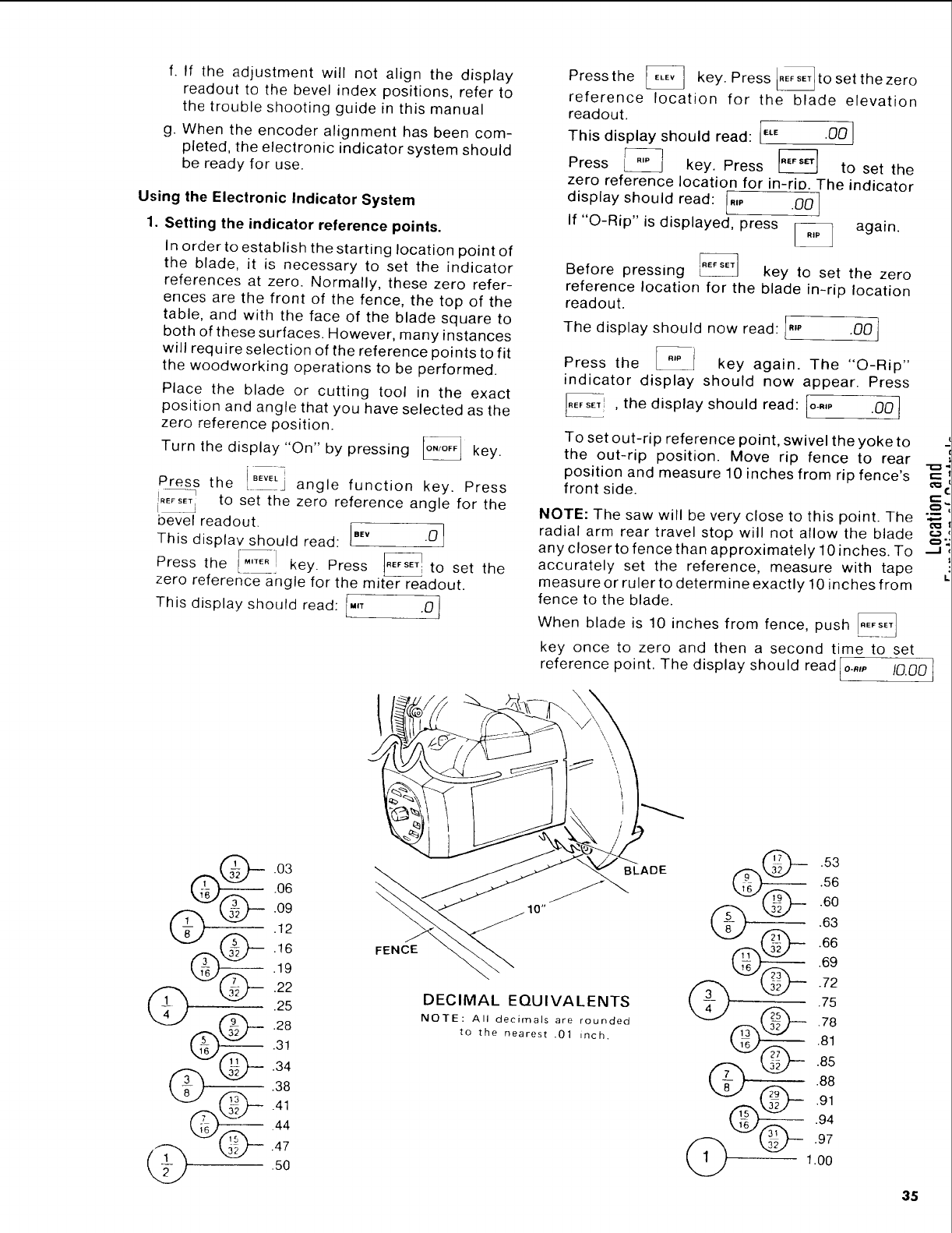
f. If the adjustment will not align the display
readout to the bevel index positions, refer to
the trouble shooting guide in this manual
g. When the encoder alignment has been com-
pleted, the electronic indicator system should
be ready for use.
Using the Electronic Indicator System
1. Setting the indicator reference points.
In order to establish the starting location point of
the blade, it is necessary to set the indicator
references at zero. Normally, these zero refer-
ences are the front of the fence, the top of the
table, and with the face of the blade square to
both of these surfaces. However, many instances
will require selection of the reference points to fit
the woodworking operations to be performed.
Place the blade or cutting tool in the exact
position and angle that you have selected as the
zero reference position.
Turn the display "On" by pressing _ key.
tho a, ,efooo,,ooke . ress
to set the zero reference angle for the
bevel readout. 1
This displav should read: BEy .0
Press the [_'TER]I key. Press _ to set the
zero reference angle for the miter readout.
This display should read: _,T .0]
Pressthe key.Press tose, thezero
reference location for the blade elevation
readout.
This display should read: [EL_ .00 !
Press _ key. Press [_ to set the
zero reference location for in-riD. The indicator
display should read: [,,, .00!
If "O-Rip" is displayed, press _] again.
Before pressing _ key to set the zero
reference location for the blade in-rip location
readout.
The display should now read: I",_ .00]
Press the _ key again. The "O-Rip"
indicator display should now appear. Press
[_,sET! , the display should read: [o-,,, .00
To set out-rip reference point, swivel theyoketo
the out-rip position. Move rip fence to rear
position and measure 10 inches from rip fence's
front side.
NOTE: The saw will be very close to this point. The
radial arm rear travel stop will not allow the blade
any closer to fence than approximately 10 inches. To --_
accurately set the reference, measure with tape
measure or ruler to determine exactly !0 inches from
fence to the blade.
When blade is 10 inches from fence, push _
key once to zero and then a second time to set
reference point. The display should read [o-,,p I0.00]
.03
.06
.09
.12
_ .16
.19
.22
.25
FENCE
DECIMAL EQUIVALENTS
NOTE: All decimals are rounded
to the nearest .01 inch.
35
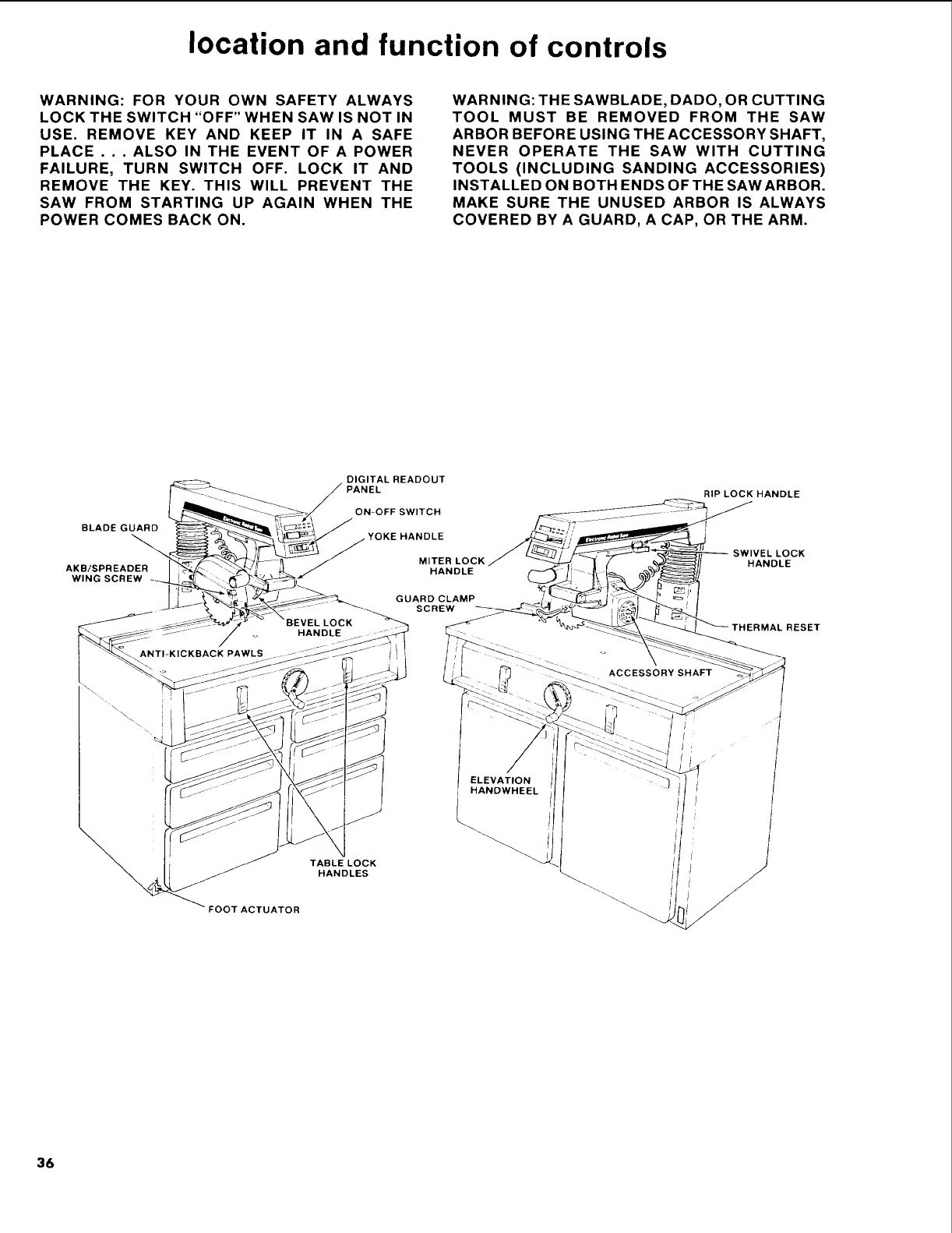
location and function of controls
WARNING: FOR YOUR OWN SAFETY ALWAYS
LOCK THE SWITCH "OFF" WHEN SAW IS NOT IN
USE. REMOVE KEY AND KEEP IT IN A SAFE
PLACE . . . ALSO IN THE EVENT OF A POWER
FAILURE, TURN SWITCH OFF. LOCK IT AND
REMOVE THE KEY. THIS WILL PREVENT THE
SAW FROM STARTING UP AGAIN WHEN THE
POWER COMES BACK ON.
WARNING: THE SAWBLADE, DADO, OR CUTTING
TOOL MUST BE REMOVED FROM THE SAW
ARBOR BEFORE USING THE ACCESSORY SHAFT,
NEVER OPERATE THE SAW WITH CUTTING
TOOLS (INCLUDING SANDING ACCESSORIES)
INSTALLED ON BOTH ENDS OF THE SAW ARBOR.
MAKE SURE THE UNUSED ARBOR IS ALWAYS
COVERED BY A GUARD, A CAP, OR THE ARM.
BLADE GUARD
AKB/SPREADER
WlNG SCREW
DIGITAL READOUT
ON-OFF SWITCH
YOKE HANDLE
MITER LOCK
HANDLE
GUARD CLAMP
SCREW
RIP LOCK HANDLE
SWIVEL LOCK
HANDLE
\
_T ACTUATOR
TABLELOCK
HANDLES
36
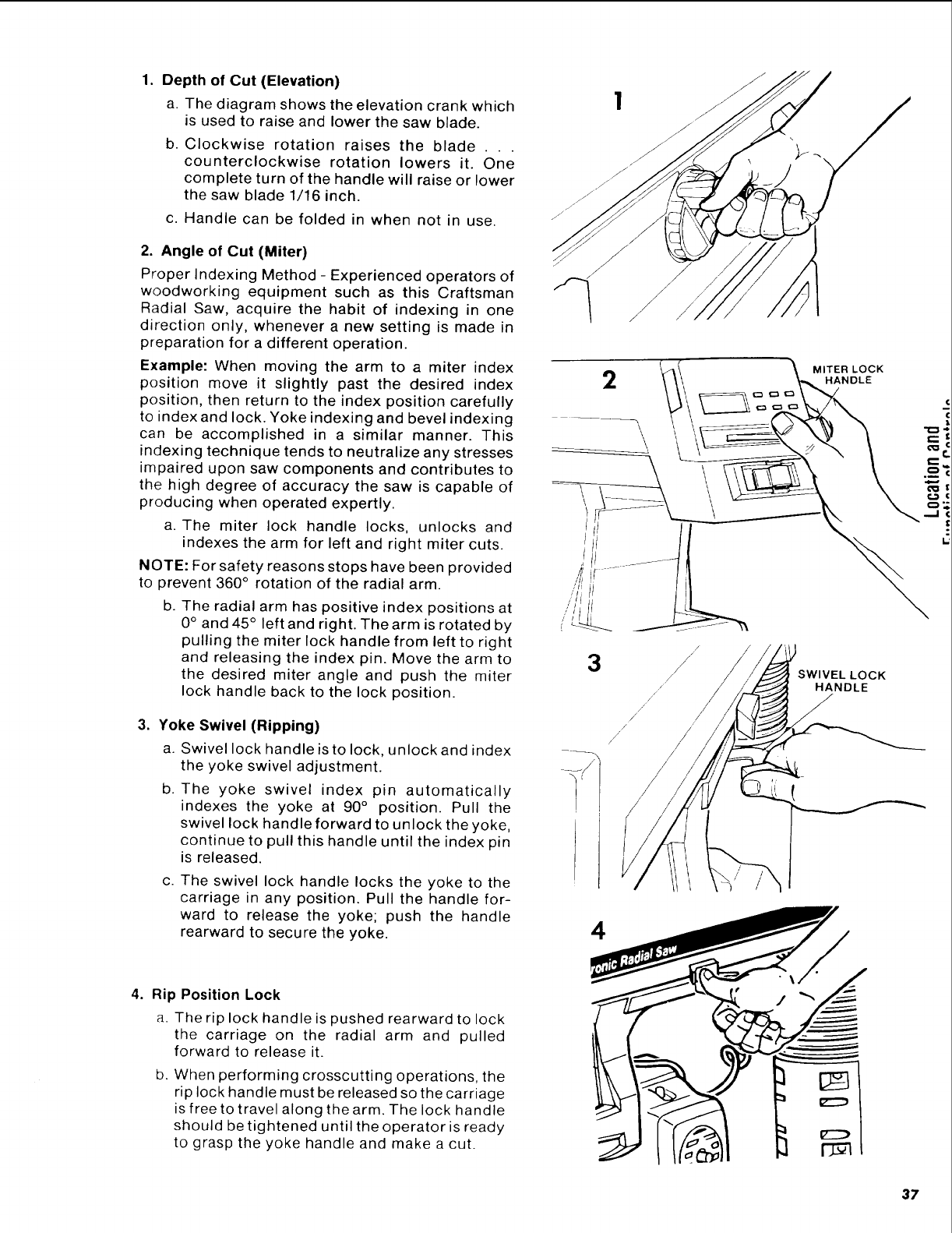
Depth of Cut (Elevation)
a. The diagram shows the elevation crank which
is used to raise and lower the saw blade.
b. Clockwise rotation raises the blade . . .
counterclockwise rotation lowers it. One
complete turn of the handle will raise or lower
the saw blade 1/16 inch.
c. Handle can be folded in when not in use.
2. Angle of Cut (Miter)
Proper Indexing Method - Experienced operators of
woodworking equipment such as this Craftsman
Radial Saw, acquire the habit of indexing in one
direction only, whenever a new setting is made in
preparation for a different operation.
Example: When moving the arm to a miter index
position move it slightly past the desired index
position, then return to the index position carefully
to index and lock. Yoke indexing and bevel indexing
can be accomplished in a similar manner. This
indexing technique tends to neutralize any stresses
impaired upon saw components and contributes to
the high degree of accuracy the saw is capable of
producing when operated expertly.
a. The miter lock handle locks, unlocks and
indexes the arm for left and right miter cuts.
NOTE: For safety reasons stops have been provided
to prevent 360 ° rotation of the radial arm.
b. The radial arm has positive index positions at
0 ° and 45 ° left and right. The arm is rotated by
pulling the miter lock handle from left to right
and releasing the index pin. Move the arm to
the desired miter angle and push the miter
lock handle back to the lock position.
,Yoke Swivel (Ripping)
a. Swivel lock handle is to lock, unlock and index
the yoke swivel adjustment.
b. The yoke swivel index pin automatically
indexes the yoke at 90° position. Pull the
swivel lock handle forward to unlock the yoke,
continue to pull this handle until the index pin
is released.
C. The swivel lock handle locks the yoke to the
carriage in any position. Pull the handle for-
ward to release the yoke; push the handle
rearward to secure the yoke.
4. Rip Position Lock
a. The rip lock handle is pushed rearward to lock
the carriage on the radial arm and pulled
forward to release it.
b. When performing crosscutting operations, the
rip lock handle must be released so the carriage
is free to travel along the arm. The lock handle
should be tightened until the operator is ready
to grasp the yoke handle and make a cut.
2
\
4
MITER LOCK
SWIVEL LOCK
HANDLE
...J
37
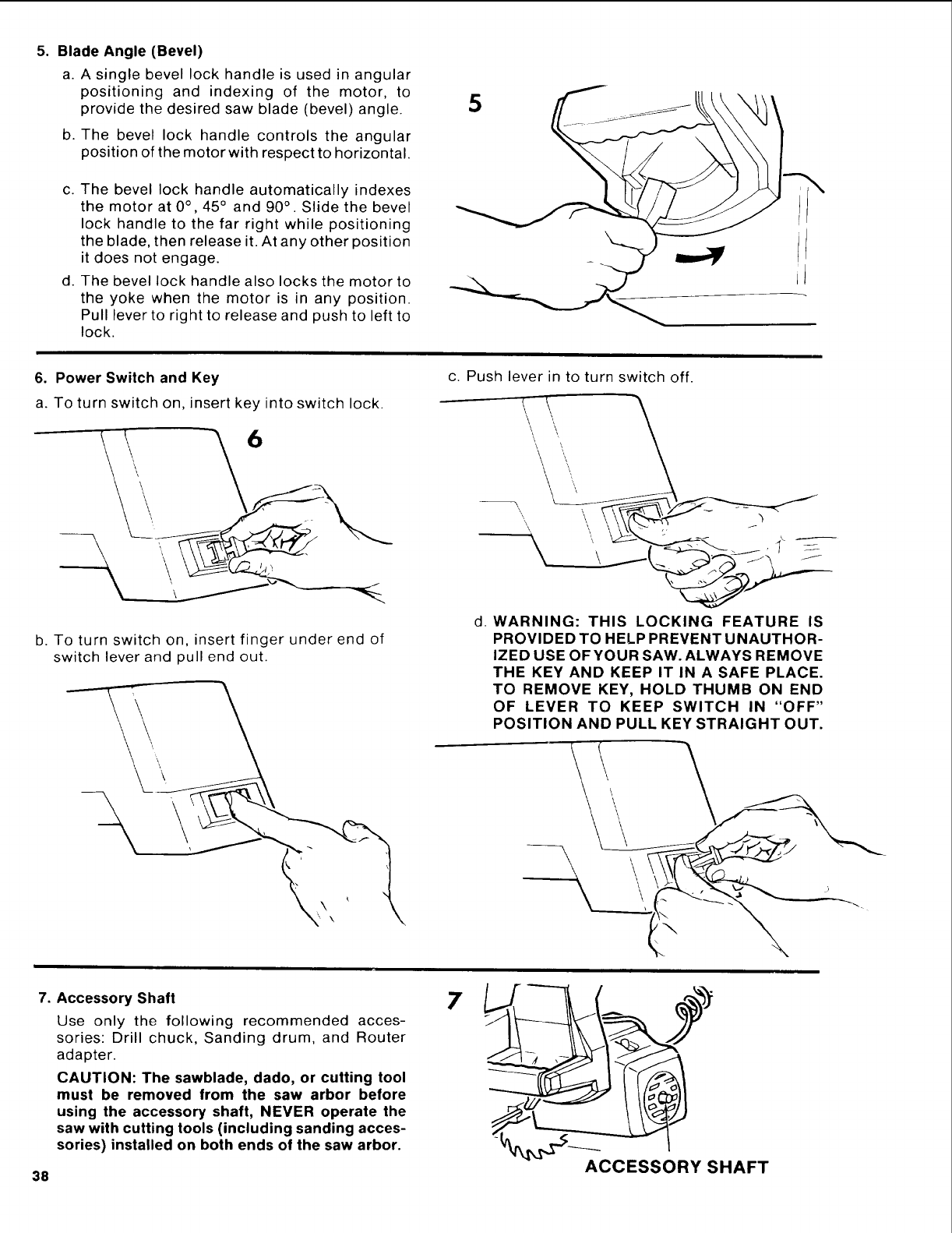
5. Blade Angle (Bevel)
a. A single bevel lock handle is used in angular
positioning and indexing of the motor, to
provide the desired saw blade (bevel) angle.
b. The bevel lock handle controls the angular
position of the motor with respect to horizontal.
C.
d°
The bevel lock handle automatically indexes
the motor at 0°, 45° and 90 ° . Slide the bevel
lock handle to the far right while positioning
the blade, then release it. At any other position
it does not engage.
The bevel lock handle also locks the motor to
the yoke when the motor is in any position.
Pull lever to right to release and push to left to
lock.
5
6. Power Switch and Key
a. To turn switch on, insert key into switch lock.
\
b. To turn switch on, insert finger under end of
switch lever and pull end out.
c. Push lever in to turn switch off.
I \\ \
\\ '\ \
d. WARNING: THIS LOCKING FEATURE IS
PROVIDED TO HELP PREVENT UNAUTHOR-
IZED USE OFYOUR SAW. ALWAYS REMOVE
THE KEY AND KEEP IT IN A SAFE PLACE.
TO REMOVE KEY, HOLD THUMB ON END
OF LEVER TO KEEP SWITCH IN "OFF"
POSITION AND PULL KEY STRAIGHT OUT.
• \
7. Accessory Shaft
Use only the following recommended acces-
sories: Drill chuck, Sanding drum, and Router
adapter.
CAUTION: The sawblade, dado, or cutting tool
must be removed from the saw arbor before
using the accessory shaft, NEVER operate the
saw with cutting tools (including sanding acces-
sories) installed on both ends of the saw arbor.
\
38 ACCESSORY SHAFT
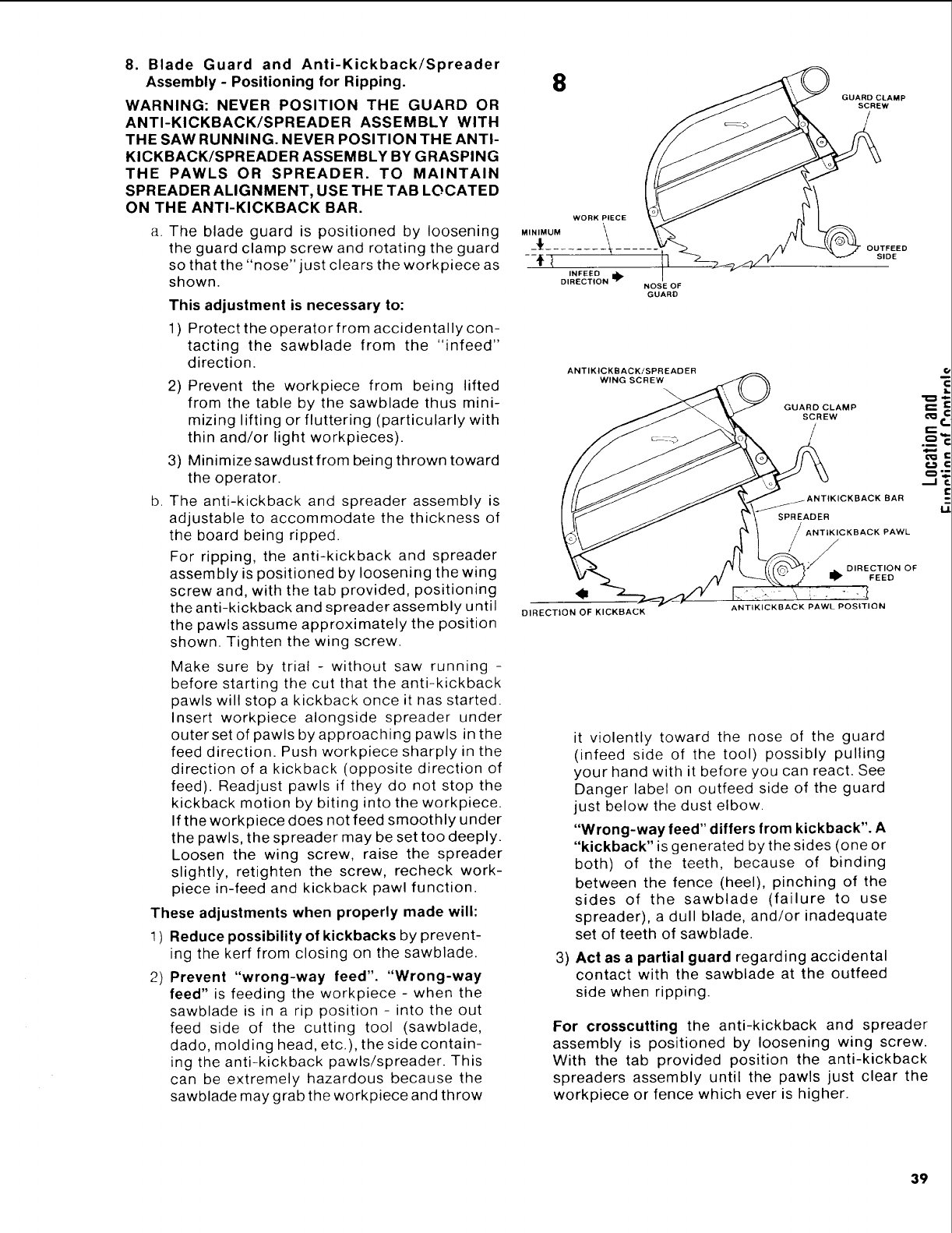
8. Blade Guard and Anti-Kickback/Spreader
Assembly- Positioningfor Ripping.
WARNING:NEVERPOSITIONTHE GUARDOR
ANTI-KICKBACK/SPREADERASSEMBLYWITH
THESAWRUNNING.NEVERPOSITIONTHEANTI-
KICKBACK/SPREADERASSEMBLYBYGRASPING
THE PAWLS OR SPREADER. TO MAINTAIN
SPREADER ALIGNMENT, USE THE TAB LOCATED
ON THE ANTI-KICKBACK BAR.
8
WORK PIECE
a. The blade guard is positioned by loosening M,,,MUM
the guard clamp screw and rotating the guard -{
so that the "nose" just clears the workpiece as zt INFEED
shown. DIRECTION I_
This adjustment is necessary to:
1) Protect the operator from accidentally con-
tacting the sawblade from the "infeed"
direction.
2) Prevent the workpiece from being lifted
from the table by the sawblade thus mini-
mizing lifting or fluttering (particularly with
thin and/or light workpieces).
b.
3) Minimizesawdust from being thrown toward
the operator.
The anti-kickback and spreader assembly is
adjustable to accommodate the thickness of
the board being ripped.
For ripping, the anti-kickback and spreader
assembly is positioned by loosening the wing
screw and, with the tab provided, positioning
the anti-kickback and spreader assembly until
the pawls assume approximately the position
shown. Tighten the wing screw.
Make sure by trial - without saw running -
before starting the cut that the anti-kickback
pawls will stop a kickback once it nas started.
Insert workpiece alongside spreader under
outer set of pawls by approaching pawls in the
feed direction. Push workpiece sharply in the
direction of a kickback (opposite direction of
feed). Readjust pawls if they do not stop the
kickback motion by biting into the workpiece.
If the workpiece does not feed smoothly under
the pawls, the spreader may be set too deeply.
Loosen the wing screw, raise the spreader
slightly, retighten the screw, recheck work-
piece in-feed and kickback pawl function.
These adjustments when properly made will:
1 ) Reduce possibility of kickbacks by prevent-
ing the kerf from closing on the sawblade.
2) Prevent "wrong-way feed". "Wrong-way
feed" is feeding the workpiece - when the
sawblade is in a rip position - into the out
feed side of the cutting tool (sawblade,
dado, molding head, etc.), the side contain-
ing the anti-kickback pawls/spreader. This
can be extremely hazardous because the
sawblade may grab the workpiece and throw
GUARD CLAMP
SCREW
NOSE OF
GUARD
OUTFEED
SIDE
ANTIKICKBACKiSPR EADER
WING SCREW
GUARD CLAMP
SCREW
/
/
DIRECTION OF KICKBACK
SPREADER
ANTIKICKBACK PAWL
/
/D,.EC ,O.OF
FEED
ANTIKICKBACK PAWL POSITION
3)
it violently toward the nose of the guard
(infeed side of the tool) possibly pulling
your hand with it before you can react. See
Danger label on outfeed side of the guard
just below the dust elbow.
"Wrong-way feed" differs from kickback". A
"kickback" is generated by the sides (one or
both) of the teeth, because of binding
between the fence (heel), pinching of the
sides of the sawbtade (failure to use
spreader), a dull blade, and/or inadequate
set of teeth of sawblade.
Act as a partial guard regarding accidental
contact with the sawblade at the outfeed
side when ripping.
For crosscutting the anti-kickback and spreader
assembly is positioned by loosening wing screw.
With the tab provided position the anti-kickback
spreaders assembly until the pawls just clear the
workpiece or fence which ever is higher.
.m"_
=.
39
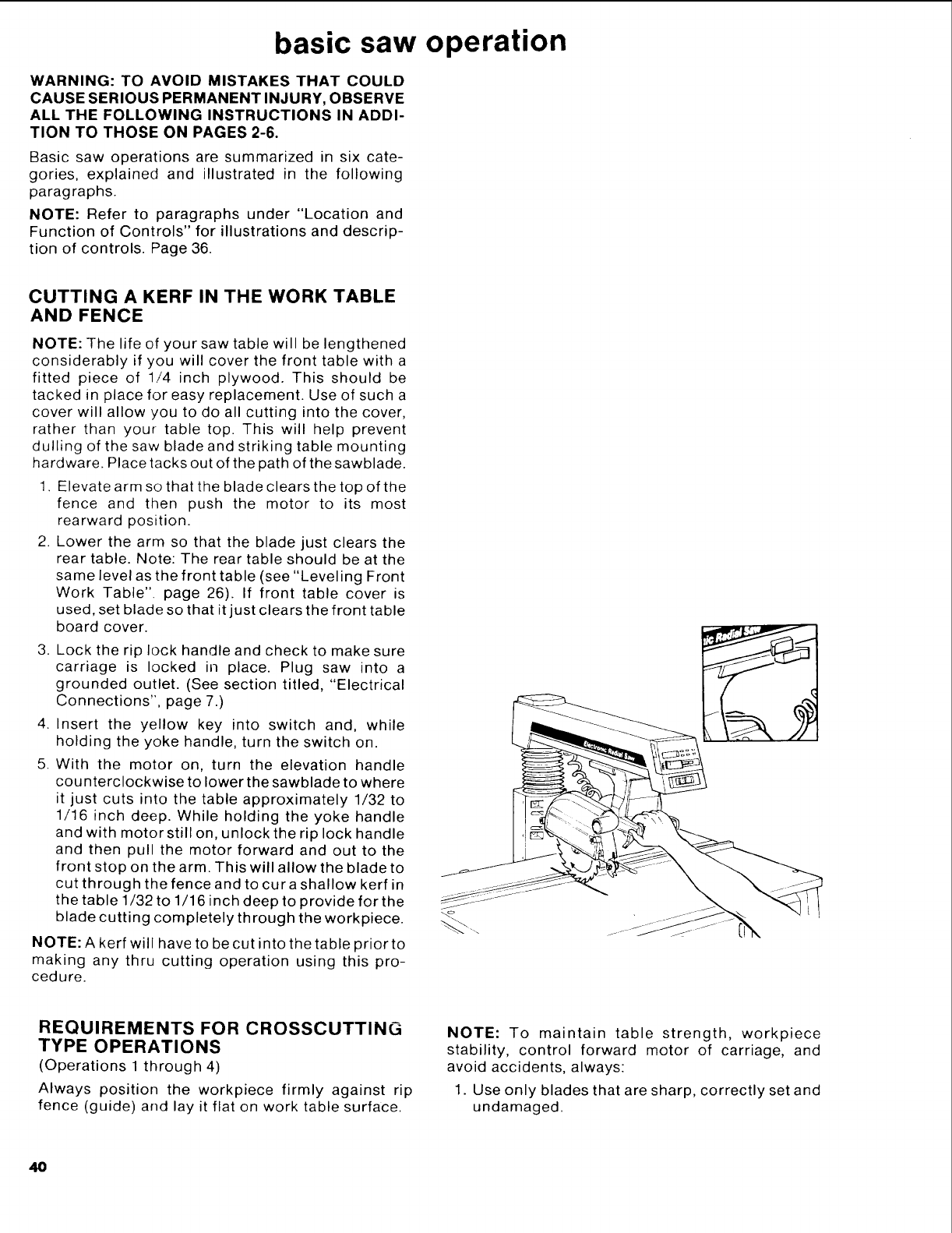
basic saw operation
WARNING: TO AVOID MISTAKES THAT COULD
CAUSE SERIOUS PERMANENT INJURY, OBSERVE
ALL THE FOLLOWING INSTRUCTIONS IN ADDI-
TION TO THOSE ON PAGES 2-6.
Basic saw operations are summarized in six cate-
gories, explained and illustrated in the following
paragraphs.
NOTE: Refer to paragraphs under "Location and
Function of Controls" for illustrations and descrip-
tion of controls. Page 36.
CUTTING A KERF IN THE WORK TABLE
AND FENCE
NOTE: The life of your saw table will be lengthened
considerably if you will cover the front table with a
fitted piece of 1/4 inch plywood. This should be
tacked in place for easy replacement. Use of such a
cover will allow you to do all cutting into the cover,
rather than your table top. This will help prevent
dulling of the saw blade and striking table mounting
hardware. Place tacks out of the path of the sawblade.
1. Elevate arm so that the blade clears the top of the
fence and then push the motor to its most
rearward position.
2. Lower the arm so that the blade just clears the
rear table. Note: The rear table should be at the
same level as the front table (see "Leveling Front
Work Table". page 26). If front table cover is
used, set blade so that it just clears the front table
board cover.
3. Lock the rip lock handle and check to make sure
carriage is locked in place. Plug saw into a
grounded outlet. (See section titled, "Electrical
Connections", page 7.)
4. Insert the yellow key into switch and, while
holding the yoke handle, turn the switch on.
5. With the motor on, turn the elevation handle
counterclockwise to lower the sawblade to where
it just cuts into the table approximately 1/32 to
1/16 inch deep. While holding the yoke handle
and with motor still on, unlock the rip lock handle
and then pull the motor forward and out to the
front stop on the arm. This will allow the blade to
cut through the fence and to curashallow kerf in
the table 1/32 to 1/16 inch deep to provide for the
blade cutting completely through the workpiece.
NOTE: A kerf will have to be cut into the table prior to
making any thru cutting operation using this pro-
cedure.
REQUIREMENTS FOR CROSSCUTTING
TYPE OPERATIONS
(Operations 1 through 4)
Always position the workpiece firmly against rip
fence (guide) and lay it flat on work table surface.
NOTE: To maintain table strength, workpiece
stability, control forward motor of carriage, and
avoid accidents, always:
1. Use only blades that are sharp, correctly set and
undamaged.
48
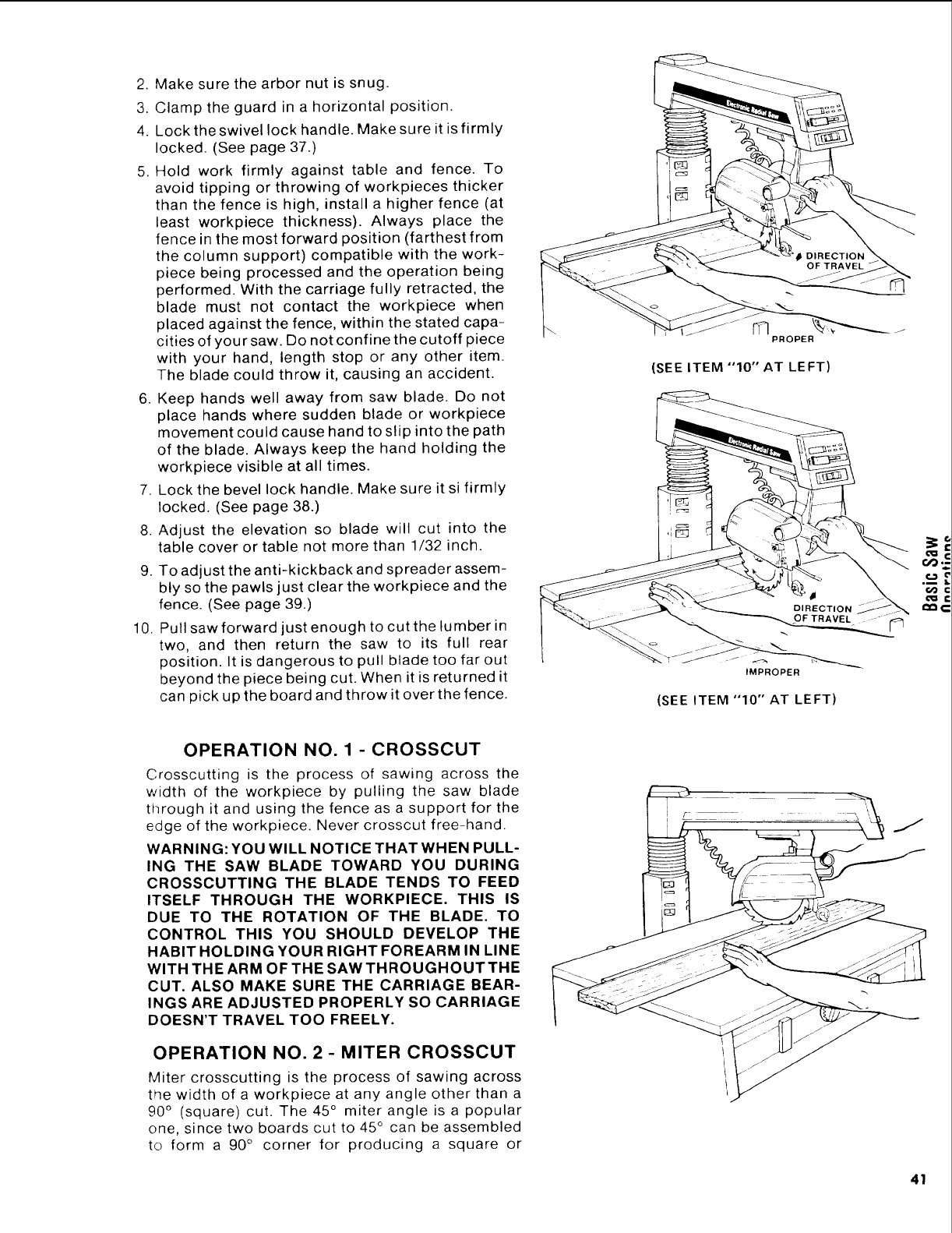
2. Make sure the arbor nut is snug.
3. Clamp the guard in a horizontal position.
4. Lock the swivel lock handle. Make sure it is firmly
locked. (See page 37.)
5. Hold work firmly against table and fence. To
avoid tipping or throwing of workpieces thicker
than the fence is high, install a higher fence (at
least workpiece thickness). Always place the
fence in the most forward position (farthest from
the column support) compatible with the work-
piece being processed and the operation being
performed. With the carriage fully retracted, the
blade must not contact the workpiece when
placed against the fence, within the stated capa-
cities of your saw. Do not confine the cutoff piece
with your hand, length stop or any other item.
The blade could throw it, causing an accident.
6. Keep hands well away from saw blade. Do not
place hands where sudden blade or workpiece
movement could cause hand to slip into the path
of the blade. Always keep the hand holding the
workpiece visible at all times.
7. Lock the bevel lock handle. Make sure it si firmly
locked. (See page 38.)
8. Adjust the elevation so blade will cut into the
table cover or table not more than 1/32 inch.
9. To adjust the anti-kickback and spreader assem-
bly so the pawls just clear the workpiece and the
fence. (See page 39.)
10. Pull saw forward just enough to cut the lumber in
two, and then return the saw to its full rear
position. It is dangerous to pull blade too far out
beyond the piece being cut. When it is returned it
can pick up the board and throw it over the fence.
OPERATION NO. 1 - CROSSCUT
Crosscutting is the process of sawing across the
width of the workpiece by pulling the saw blade
through it and using the fence as a support for the
edge of the workpiece. Never crosscut free-hand.
WARNING: YOU WILL NOTICE THAT WHEN PULL-
ING THE SAW BLADE TOWARD YOU DURING
CROSSCUTTING THE BLADE TENDS TO FEED
ITSELF THROUGH THE WORKPIEOE. THIS IS
DUE TO THE ROTATION OF THE BLADE. TO
CONTROL THIS YOU SHOULD DEVELOP THE
HABIT HOLDING YOUR RIGHT FOREARM IN LINE
WITH THE ARM OF THE SAW THROUGHOUT THE
CUT. ALSO MAKE SURE THE CARRIAGE BEAR-
INGS ARE ADJUSTED PROPERLY SO CARRIAGE
DOESN'T TRAVEL TOO FREELY.
OPERATION NO. 2 -MITER CROSSCUT
Miter crosscutting is the process of sawing across
t_e width of a workpiece at any angle other than a
90 ° (square) cut. The 45 ° miter angle is a popular
one, since two boards cut to 45 ° can be assembled
to form a 90 ° corner for producing a square or
(SEE ITEM "10" AT LEFT)
IMPROPER
(SEE ITEM "10" AT LEFT)
f,D
41
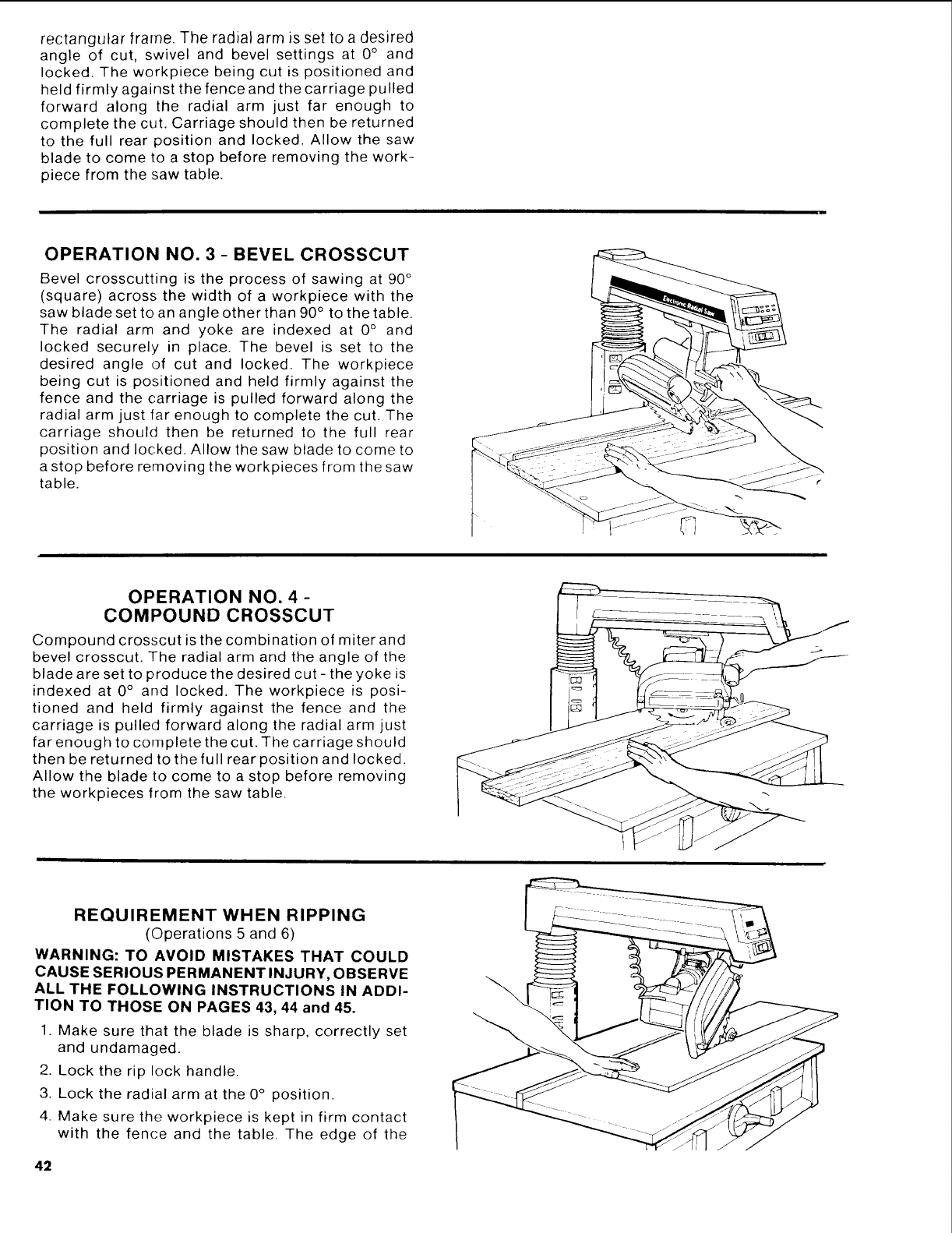
rectangular frame. The radial arm is set to a desired
angle of cut, swivel and bevel settings at 0° and
locked. The workpiece being cut is positioned and
held firmly against the fence and the carriage pulled
forward along the radial arm just far enough to
complete the cut. Carriage should then be returned
to the full rear position and locked. Allow the saw
blade to come to a stop before removing the work-
piece from the saw table.
OPERATION NO. 3 -BEVEL CROSSCUT
Bevel crosscutting is the process of sawing at 90 °
(square) across the width of a workpiece with the
saw blade set to an angle other than 90 ° to the table.
The radial arm and yoke are indexed at 0 ° and
locked securely in place. The bevel is set to the
desired angle of cut and locked. The workpiece
being cut is positioned and held firmly against the
fence and the carriage is pulled forward along the
radial arm just far enough to complete the cut. The
carriage should then be returned to the full rear
position and locked. Allow the saw blade to come to
a stop before removing the workpieces from the saw
table.
OPERATION NO. 4 -
COMPOUND CROSSCUT
Compound crosscut is the combination of miter and
bevel crosscut. The radial arm and the angle of the
blade are set to produce the desired cut - the yoke is
indexed at 0 ° and locked. The workpiece is posi-
tioned and held firmly against the fence and the
carriage is pulled forward along the radial arm just
far enough to complete the cut. The carriage should
then be returned to the full rear position and locked.
Allow the blade to come to a stop before removing
the workpieces from the saw table.
REQUIREMENT WHEN RIPPING
(Operations 5 and 6)
WARNING: TO AVOID MISTAKES THAT COULD
CAUSE SERIOUS PERMANENT INJURY, OBSERVE
ALL THE FOLLOWING INSTRUCTIONS IN ADDI-
TION TO THOSE ON PAGES 43, 44 and 45.
1. Make sure that the blade is sharp, correctly set
and undamaged.
2. Lock the rip lock handle.
3. Lock the radial arm at the 0° position.
4. Make sure the workpiece is kept in firm contact
with the fence and the table. The edge of the
42
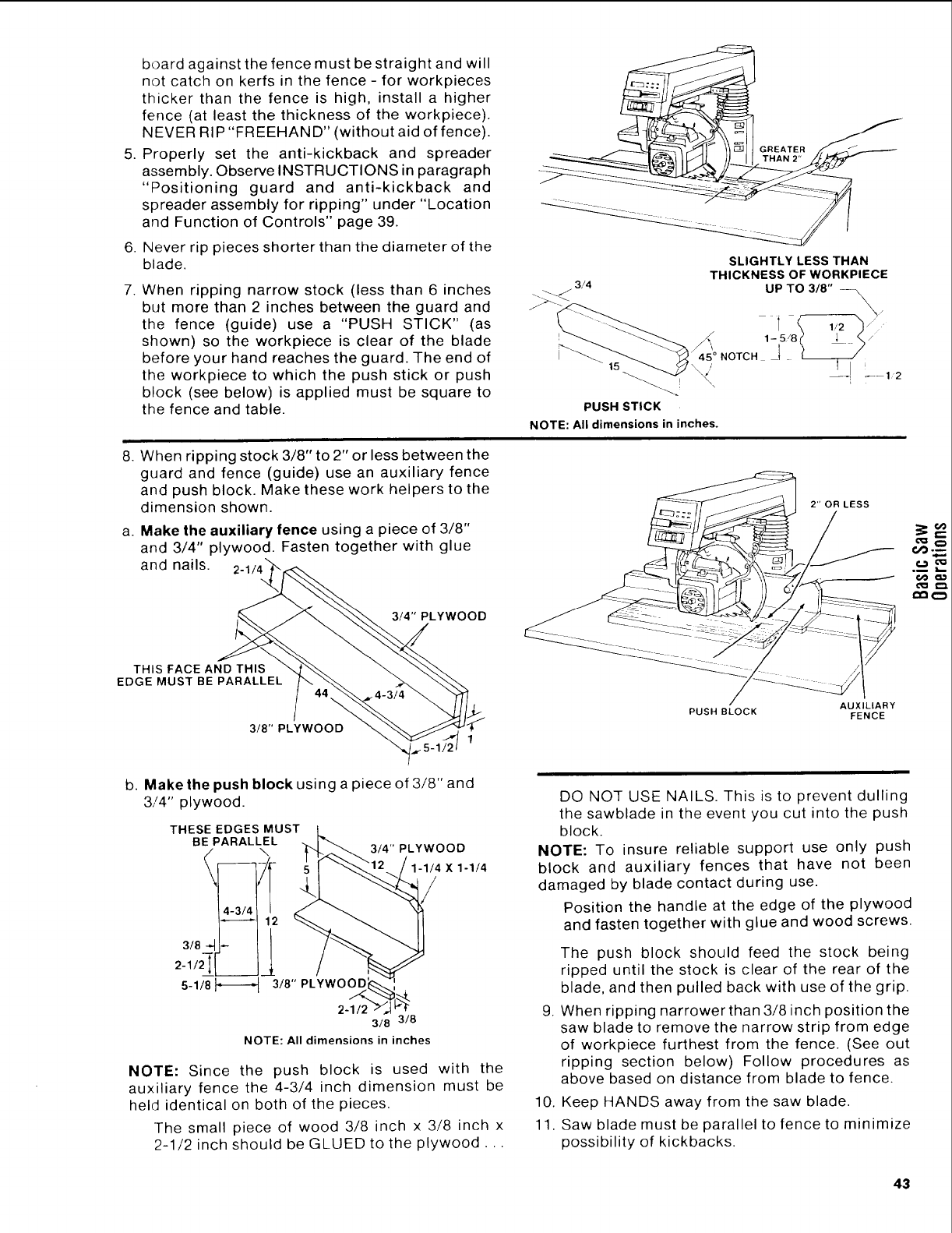
board against the fence must be straight and will
not catch on kerfs in the fence- for workpieces
thicker than the fence is high, install a higher
fence (at least the thickness of the workpiece).
N EVER RIP "FR EEHAN D" (without aid of fence).
5. Properly set the anti-kickback and spreader
assembly. Observe INSTRUCTIONS in paragraph
"Positioning guard and anti-kickback and
spreader assembly for ripping" under "Location
and Function of Controls" page 39.
6. Never rip pieces shorter than the diameter of the
blade.
7. When ripping narrow stock (less than 6 inches
but more than 2 inches between the guard and
the fence (guide) use a "PUSH STICK" (as
shown) so the workpiece is clear of the blade
before your hand reaches the guard. The end of
the workpiece to which the push stick or push
block (see below) is applied must be square to
the fence and table.
3/4
PUSH STICK
SLIGHTLY LESS THAN
THICKNESS OF WORKPIECE
UP TO 3/8" ---
NOTE: All dimensions in inches.
8. When ripping stock 3/8" to 2" or less between the
guard and fence (guide) use an auxiliary fence
and push block. Make these work helpers to the
dimension shown.
a. Make the auxiliary fence using a piece of 3/8"
and 3/4" plywood. Fasten together with glue
and nails.
3/4" PLYWOOD
THIS FACE AND THIS
EDGE MUST BE PARALLEL
2" OR LESS
O
OO Q._
3/8" PLYWOOD
b. Make the push block using a piece of 3/8" and
3/4" plywood.
THESE EDGES MUST
BE PARALLEL
3/8
2-1/2
3/8" PLYWOOD
5-1/8
3/4" PLYWOOD
1-1/4 X1-1/4
/
2-1/2
3/8 3/8
NOTE: All dimensions in inches
NOTE: Since the push block is used with the
auxiliary fence the 4-3/4 inch dimension must be
held identical on both of the pieces.
The small piece of wood 3/8 inch x 3/8 inch x
2-1/2 inch should be GLUED to the plywood...
AUXILIARY
PUSH BLOCK FENCE
DO NOT USE NAILS. This is to prevent dulling
the sawblade in the event you cut into the push
block.
NOTE: To insure reliable support use only push
block and auxiliary fences that have not been
damaged by blade contact during use.
Position the handle at the edge of the plywood
and fasten together with glue and wood screws.
.
The push block should feed the stock being
ripped until the stock is clear of the rear of the
blade, and then pulled back with use of the grip.
When ripping narrower than 3/8 inch position the
saw blade to remove the narrow strip from edge
of workpiece furthest from the fence. (See out
ripping section below) Follow procedures as
above based on distance from blade to fence.
10. Keep HANDS away from the saw blade.
11. Saw blade must be parallel to fence to minimize
possibility of kickbacks.
43
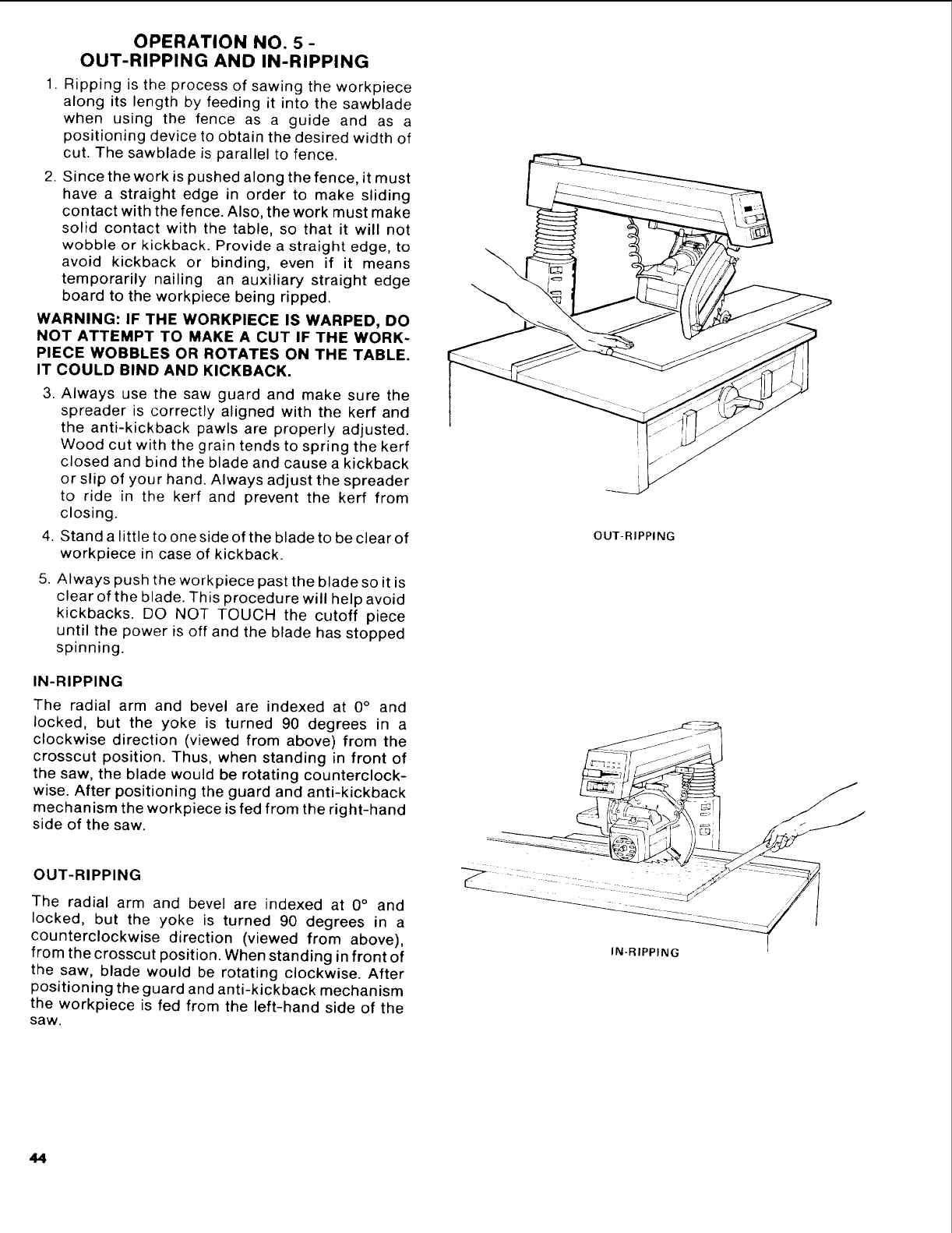
OPERATION NO. 5 -
OUT-RIPPING AND IN-RIPPING
1. Ripping is the process of sawing the workpiece
along its length by feeding it into the sawblade
when using the fence as a guide and as a
positioning device to obtain the desired width of
cut. The sawblade is parallel to fence.
2. Since the work is pushed along the fence, it must
have a straight edge in order to make sliding
contact with the fence. Also, the work must make
solid contact with the table, so that it will not
wobble or kickback. Provide a straight edge, to
avoid kickback or binding, even if it means
temporarily nailing an auxiliary straight edge
board to the workpiece being ripped.
WARNING: IF THE WORKPIECE IS WARPED, DO
NOT ATTEMPT TO MAKE ACUT IF THE WORK-
PIECE WOBBLES OR ROTATES ON THE TABLE.
IT COULD BIND AND KICKBACK.
3. Always use the saw guard and make sure the
spreader is correctly aligned with the kerf and
the anti-kickback pawls are properly adjusted.
Wood cut with the grain tends to spring the kerf
closed and bind the blade and cause a kickback
or slip of your hand. Always adjust the spreader
to ride in the kerf and prevent the kerf from
closing.
4. Stand a little to one side of the blade to be clear of
workpiece in case of kickback.
5. Always push the workpiece past the blade so it is
clear of the blade. This procedure will help avoid
kickbacks. DO NOT TOUCH the cutoff piece
until the power is off and the blade has stopped
spinning.
IN-RIPPING
The radial arm and bevel are indexed at 0° and
locked, but the yoke is turned 90 degrees in a
clockwise direction (viewed from above) from the
crosscut position. Thus, when standing in front of
the saw, the blade would be rotating counterclock-
wise. After positioning the guard and anti-kickback
mechanism the workpiece is fed from the right-hand
side of the saw.
OUT-RIPPING
OUT-RIPPING
The radial arm and bevel are indexed at 0° and
locked, but the yoke is turned 90 degrees in a
counterclockwise direction (viewed from above),
from the crosscut position. When standing in front of
the saw, blade would be rotating clockwise. After
positioning the guard and anti-kickback mechanism
the workpiece is fed from the left-hand side of the
saw.
IN-RIPPING
44
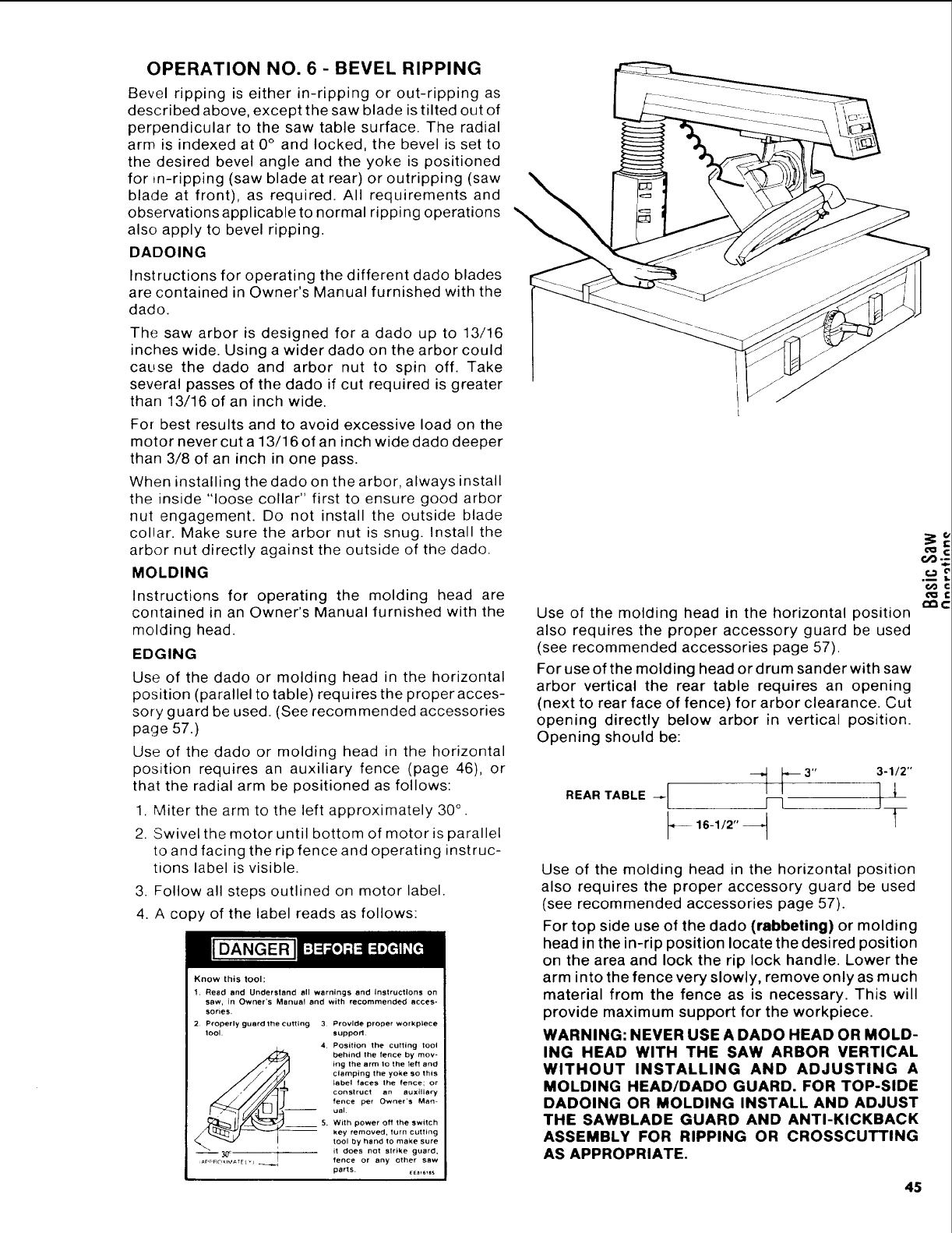
OPERATION NO. 6- BEVEL RIPPING
Bevel ripping is either in-ripping or out-ripping as
described above, except the saw blade is tilted out of
perpendicular to the saw table surface. The radial
arm is indexed at 0 ° and locked, the bevel is set to
the desired bevel angle and the yoke is positioned
for ,n-ripping (saw blade at rear) or outripping (saw
blade at front), as required. All requirements and
observations applicable to normal ripping operations
also apply to bevel ripping.
DADOING
Instructions for operating the different dado blades
are contained in Owner's Manual furnished with the
dado.
The saw arbor is designed for a dado up to 13/16
inches wide. Using a wider dado on the arbor could
cause the dado and arbor nut to spin off. Take
several passes of the dado if cut required is greater
than 13/16 of an inch wide.
For best results and to avoid excessive load on the
motor never cut a 13/16 of an inch wide dado deeper
than 3/8 of an inch in one pass.
When installing the dado on the arbor, always install
the inside "loose collar" first to ensure good arbor
nut engagement. Do not install the outside blade
collar. Make sure the arbor nut is snug. Install the
arbor nut directly against the outside of the dado.
MOLDING
Instructions for operating the molding head are
contained in an Owner's Manual furnished with the
molding head.
EDGING
Use of the dado or molding head in the horizontal
position (parallel to table) requires the proper acces-
sory guard be used. (See recommended accessories
page 57.)
Use of the dado or molding head in the horizontal
position requires an auxiliary fence (page 46), or
that the radial arm be positioned as follows:
1. Miter the arm to the left approximately 30 ° .
2. Swivel the motor until bottom of motor is parallel
to and facing the rip fence and operating instruc-
tions label is visible.
3. Follow all steps outlined on motor label.
4. A copy of the label reads as follows:
I[DANGERJ
Know this tool:
1. Read and Understand all warnings and instructions on
saw, in Owner's Manual and with recommended acces-
sorles.
2. Properly guard the cutting 3 Provide proper workplece
tO01. $upporL
4 Position the cuifing tool
behind the fence by mov-
ing the arm lo the 1ell and
clamping the yoke SO this
babel faces the fence; or
construct an auxiliary
fence per Owner's Man-
- ual
5. With power off the switch
- key removed, turn cutting
tool hand to make sure
by
Rc 3_" [t Iit does not slrike guard.
fence or any other saw
parts. [E_,6,_s
Use of the molding head in the horizontal position
also requires the proper accessory guard be used
(see recommended accessories page 57).
For use of the molding head or drum sander with saw
arbor vertical the rear table requires an opening
(next to rear face of fence) for arbor clearance. Cut
opening directly below arbor in vertical position.
Opening should be:
REARTABLE _ _1 b3"_ 3-1/2"j__
_16-1,2" _F
Use of the molding head in the horizontal position
also requires the proper accessory guard be used
(see recommended accessories page 57).
For top side use of the dado (rabbeting) or molding
head in the in-rip position locate the desired position
on the area and lock the rip lock handle. Lower the
arm into the fence very slowly, remove only as much
material from the fence as is necessary. This will
provide maximum support for the workpiece.
WARNING: NEVER USE A DADO HEAD OR MOLD-
ING HEAD WITH THE SAW ARBOR VERTICAL
WITHOUT INSTALLING AND ADJUSTING A
MOLDING HEAD/DADO GUARD. FOR TOP-SIDE
DADOING OR MOLDING INSTALL AND ADJUST
THE SAWBLADE GUARO AND ANTI-KICKBACK
ASSEMBLY FOR RIPPING OR CROSSCUTTING
AS APPROPRIATE.
cq:
o0
.i
45
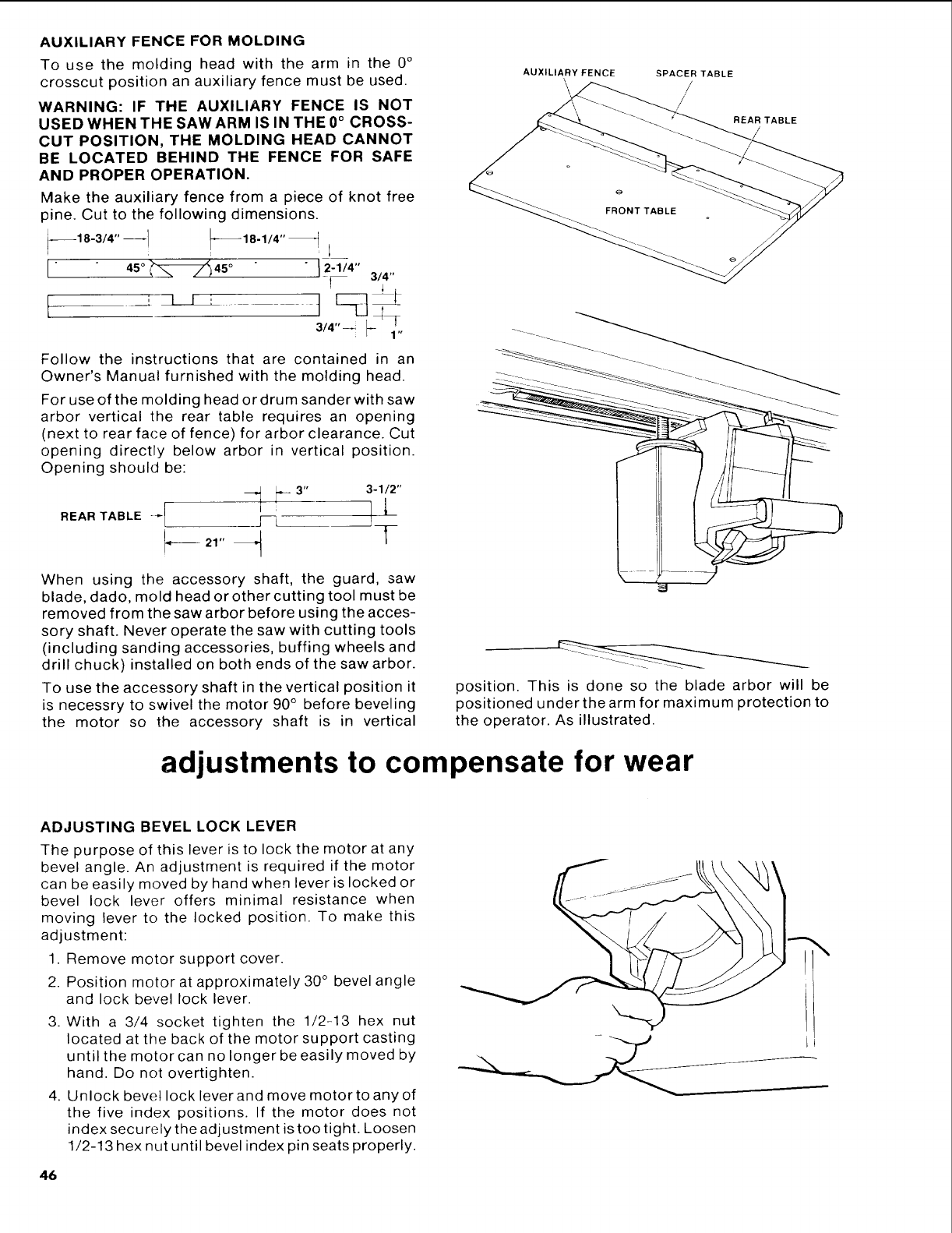
AUXILIARYFENCEFORMOLDING
To use the molding head with the arm in the 0 °
crosscut position an auxiliary fence must be used.
WARNING: IF THE AUXILIARY FENCE IS NOT
USED WHEN THE SAWARM ISIN THE0 ° CROSS-
CUT POSITION, THE MOLDING HEAD CANNOT
BE LOCATED BEHIND THE FENCE FOR SAFE
AND PROPER OPERATION.
Make the auxiliary fence from a piece of knot free
pine. Cut to the following dimensions.
--18-3/4" --1 _'_18"1/4" _i i
3/4"
Follow the instructions that are contained in an
Owner's Manual furnished with the molding head.
For use of the molding head or drum sander with saw
arbor vertical the rear table requires an opening
(next to rear face of fence) for arbor clearance. Cut
opening directly below arbor in vertical position.
Opening should be:
H F
When using the accessory shaft, the guard, saw
blade, dado, mold head or other cutting tool must be
removed from the saw arbor before using the acces-
sory shaft. Never operate the saw with cutting tools
(including sanding accessories, buffing wheels and
drill chuck) installed on both ends of the saw arbor.
To use the accessory shaft in the vertical position it
is necessry to swivel the motor 90 ° before beveling
the motor so the accessory shaft is in vertical
AUXILIARY FENCE SPACER TABLE
//
REAR TABLE
\ , i
position. This is done so the blade arbor will be
positioned under the arm for maximum protection to
the operator. As illustrated.
adjustments to compensate for wear
ADJUSTING BEVEL LOCK LEVER
The purpose of this lever is to lock the motor at any
bevel angle. An adjustment is required if the motor
can be easily moved by hand when lever is locked or
bevel lock lever offers minimal resistance when
moving lever to the locked position. To make this
adjustment:
1. Remove motor support cover.
2. Position motor at approximately 30 ° bevel angle
and lock bevel lock lever.
3. With a 3/4 socket tighten the 1/2-13 hex nut
located at the back of the motor support casting
untilthe motor can no longer be easily moved by
hand. Do not overtighten.
4. Unlock bevel lock leverand move motor to any of
the five index positions. If the motor does not
index secu rely the adjustment is too tight. Loosen
1/2-13 hex nut until bevel index pin seats properly.
46
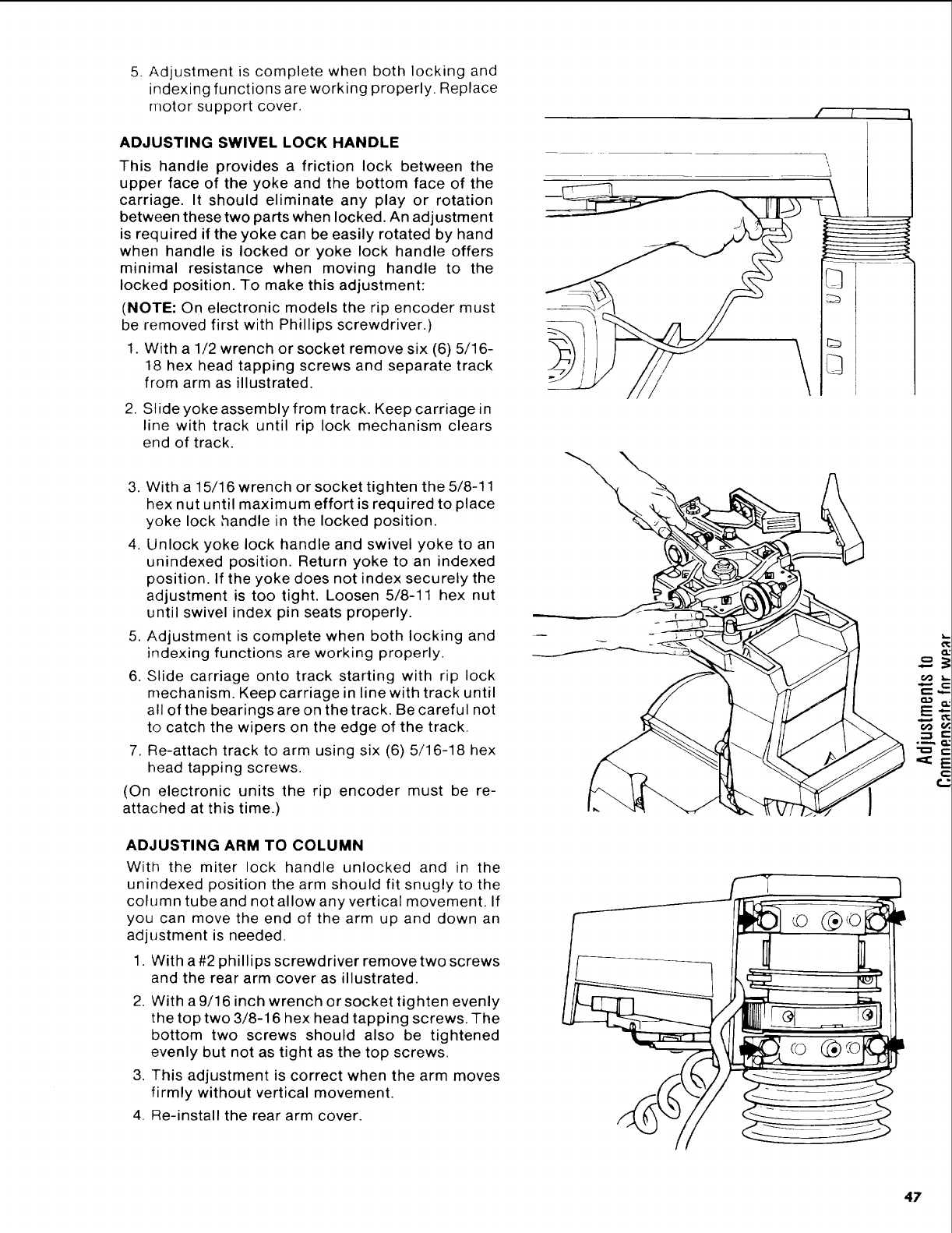
5. Adjustment is complete when both locking and
indexing functions are working properly. Replace
motor support cover.
ADJUSTING SWIVEL LOCK HANDLE
This handle provides a friction lock between the
upper face of the yoke and the bottom face of the
carriage. It should eliminate any play or rotation
between these two parts when locked. An adjustment
is required if the yoke can be easily rotated by hand
when handle is locked or yoke lock handle offers
minimal resistance when moving handle to the
locked position. To make this adjustment:
(NOTE: On electronic models the rip encoder must
be removed first with Phillips screwdriver.)
1. With a 1/2 wrench or socket remove six (6) 5/16-
18 hex head tapping screws and separate track
from arm as illustrated.
2. Slide yoke assembly from track. Keep carriage in
line with track until rip lock mechanism clears
end of track.
3. With a 15/16 wrench or socket tighten the 5/8-1 1
hex nut until maximum effort is required to place
yoke lock handle in the locked position.
4. Unlock yoke lock handle and swivel yoke to an
unindexed position. Return yoke to an indexed
position. If the yoke does not index securely the
adjustment is too tight. Loosen 5/8-11 hex nut
until swivel index pin seats properly.
5. Adjustment is complete when both locking and
indexing functions are working properly.
6. Slide carriage onto track starting with rip lock
mechanism. Keep carriage in line with track until
all of the bearings are on the track. Be careful not
to catch the wipers on the edge of the track.
7. Re-attach track to arm using six (6) 5/16-18 hex
head tapping screws.
(On electronic units the rip encoder must be re-
attached at this time.)
ADJUSTING ARM TO COLUMN
With the miter lock handle unlocked and in the
unindexed position the arm should fit snugly to the
column tube and not allow any vertical movement. If
you can move the end of the arm up and down an
adjustment is needed.
1. With a#2 phillips screwdriver remove two screws
and the rear arm cover as illustrated.
2. With a 9/16 inch wrench or socket tighten evenly
the top two 3/8-16 hex head tapping screws. The
bottom two screws should also be tightened
evenly but not as tight as the top screws.
3. This adjustment is correct when the arm moves
firmly without vertical movement.
4. Re-install the rear arm cover.
\
©
#,
6@ t_,
.=_._
47
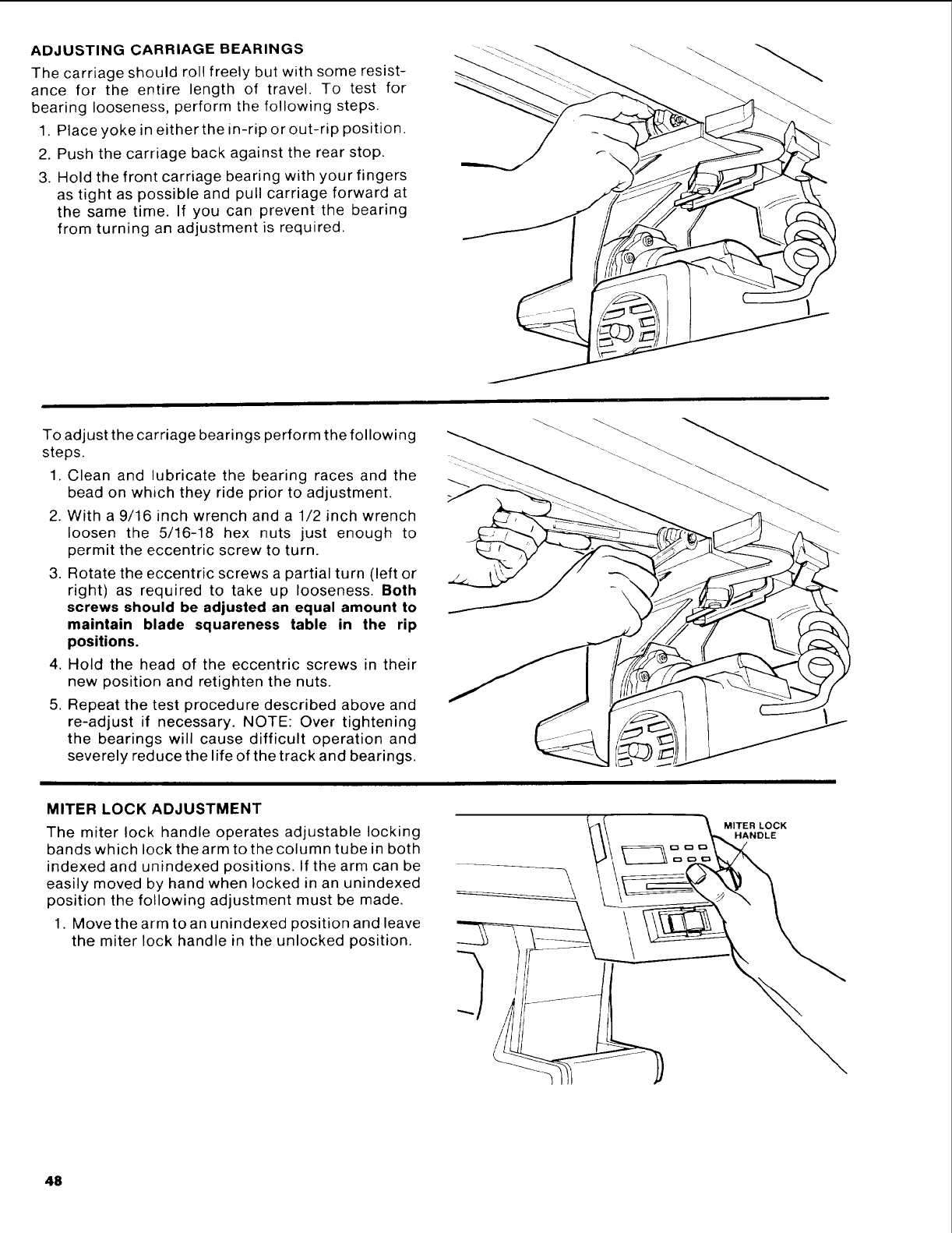
ADJUSTINGCARRIAGEBEARINGS
The carriage should roll freely but with some resist-
ance for the entire length of travel. To test for
bearing looseness, perform the following steps.
1. Place yoke in either the in-rip or out-rip position.
2. Push the carriage back against the rear stop.
3. Hold the front carriage bearing with your fingers
as tight as possible and pull carriage forward at
the same time. If you can prevent the bearing
from turning an adjustment is required.
To adjust the carriage bearings perform the following
steps.
1. Clean and lubricate the bearing races and the
bead on which they ride prior to adjustment.
2. With a 9/16 inch wrench and a 1/2 inch wrench
loosen the 5/16-18 hex nuts just enough to
permit the eccentric screw to turn.
3. Rotate the eccentric screws a partial turn (left or
right) as required to take up looseness. Both
screws should be adjusted an equal amount to
maintain blade squareness table in the rip
positions.
4. Hold the head of the eccentric screws in their
new position and retighten the nuts.
5. Repeat the test procedure described above and
re-adjust if necessary. NOTE: Over tightening
the bearings will cause difficult operation and
severely reduce the life of the track and bearings.
MITER LOCK ADJUSTMENT
The miter lock handle operates adjustable locking
bands which lock the arm to the column tube in both
indexed and unindexed positions. If the arm can be
easily moved by hand when locked in an unindexed
position the following adjustment must be made.
1. Movethe arm to an unindexed position and leave
the miter lock handle in the unlocked position.
MITER LOCK
HANDLE
48
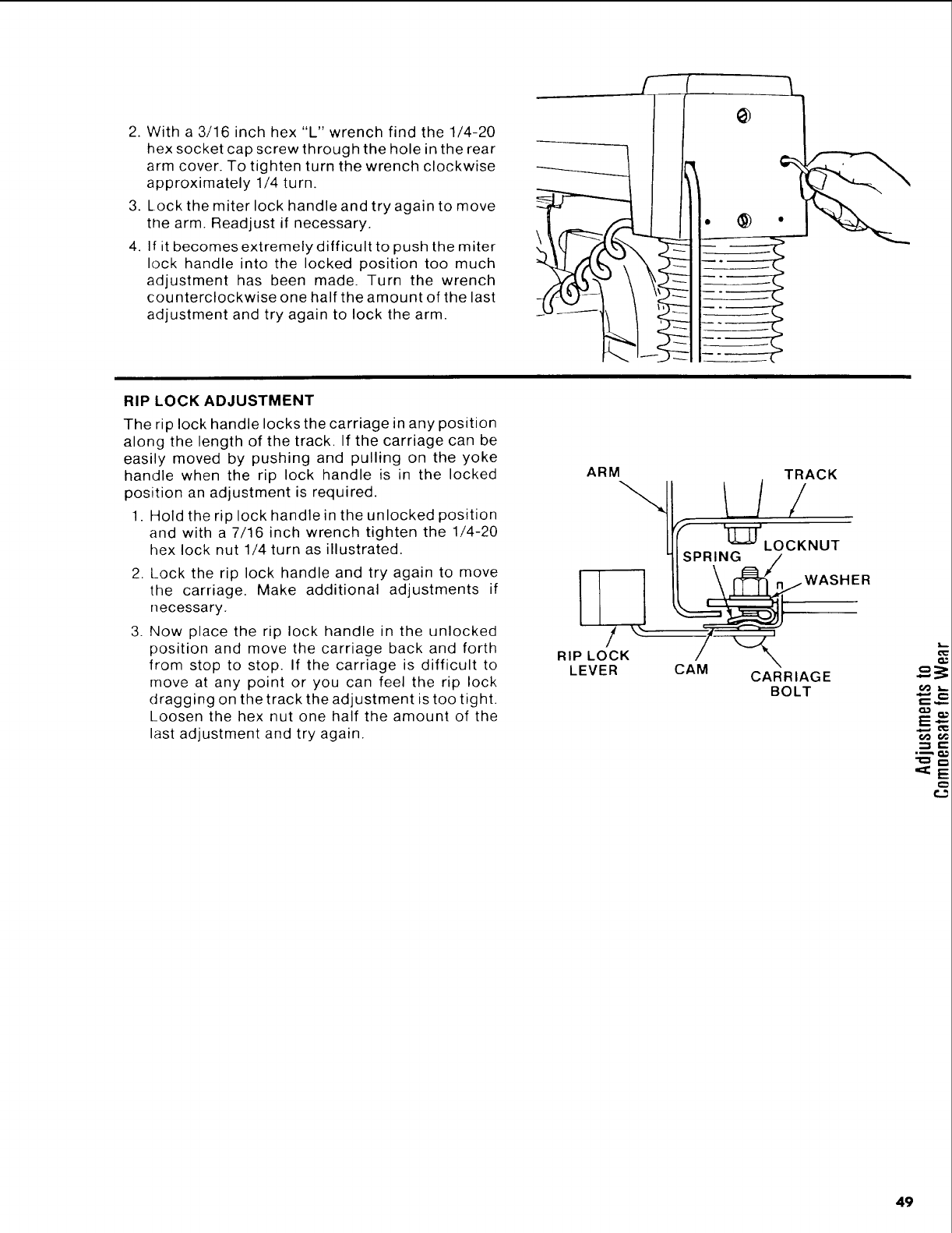
2. With a 3/16 inch hex "L" wrench find the 1/4-20
hex socket cap screw through the hole in the rear
arm cover. To tighten turn the wrench clockwise
approximately 1/4 turn.
3. Lock the miter lock handle and try again to move
the arm. Readjust if necessary.
4. If it becomes extremely difficult to push the miter
lock handle into the locked position too much
adjustment has been made. Turn the wrench
counterclockwise one half the amount of the last
adjustment and try again to lock the arm.
j-- (
° @ °
RIP LOCK ADJUSTMENT
The rip lock handle locks the carriage in any position
along the length of the track, If the carriage can be
easily moved by pushing and pulling on the yoke
handle when the rip lock handle is in the locked
position an adjustment is required.
1. Hold the rip lock handle in the unlocked position
and with a 7/16 inch wrench tighten the 1/4-20
hex lock nut 1/4 turn as illustrated.
2. Lock the rip lock handle and try again to move
the carriage. Make additional adjustments if
necessary.
3. Now place the rip lock handle in the unlocked
position and move the carriage back and forth
from stop to stop. If the carriage is difficult to
move at any point or you can feel the rip lock
dragging on the track the adjustment is too tight.
Loosen the hex nut one half the amount of the
last adjustment and try again.
ARM
III,!
RIP LOCK
LEVER
TRACK
_LOCKNUT
SPR_N_wASHE R
CAM CARRIAGE
BOLT
49
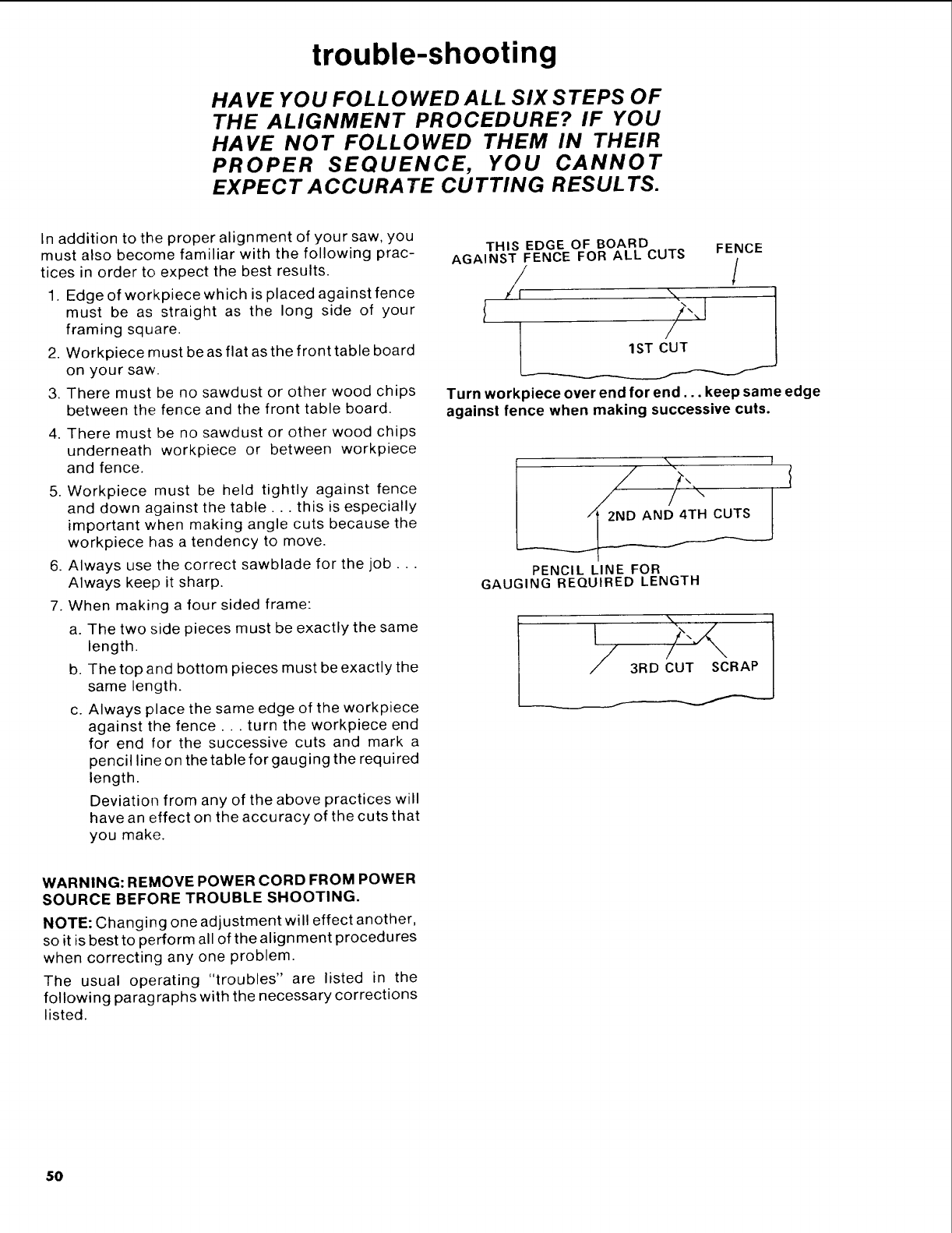
trouble-shooting
HAVE YOU FOLLOWED ALL SIX STEPS OF
THE ALIGNMENT PROCEDURE? IF YOU
HAVE NOT FOLLOWED THEM IN THEIR
PROPER SEQUENCE, YOU CANNOT
EXPECT A CCURA TE CUTTING RESUL TS.
In addition to the proper alignment of your saw, you
must also become familiar with the following prac-
tices in order to expect the best results.
1. Edge of workpiece which is placed against fence
must be as straight as the long side of your
framing square.
2. Workpiece must be as flat as the front table board
on your saw.
3. There must be no sawdust or other wood chips
between the fence and the front table board.
4. There must be no sawdust or other wood chips
underneath workpiece or between workpiece
and fence.
5. Workpiece must be held tightly against fence
and down against the table.., this is especially
important when making angle cuts because the
workpiece has a tendency to move.
6. Always use the correct sawblade for the job...
Always keep it sharp.
7. When making a four sided frame:
a. The two side pieces must be exactly the same
length.
b. The top and bottom pieces must be exactly the
same length.
c. Always place the same edge of the workpiece
against the fence.., turn the workpiece end
for end for the successive cuts and mark a
pencil line on the table for gauging the required
length.
Deviation from any of the above practices will
have an effect on the accuracy of the cuts that
you make.
THIS EDGE OF BOARD FENCE
AGAINST FENCE FOR ALL CUTS
/J /
" 1
I
Turn workpiece over end for end.., keep same edge
against fence when making successive cuts.
\ !
PENCIL LINE FOR
GAUGING REQUIRED LENGTH
_T SCRA
WARNING: REMOVE POWER CORD FROM POWER
SOURCE BEFORE TROUBLE SHOOTING.
NOTE: Changing one adjustment will effect another,
so it is best to perform all of the alignment procedures
when correcting any one problem.
The usual operating "troubles" are listed in the
following paragraphs with the necessary corrections
listed.
50
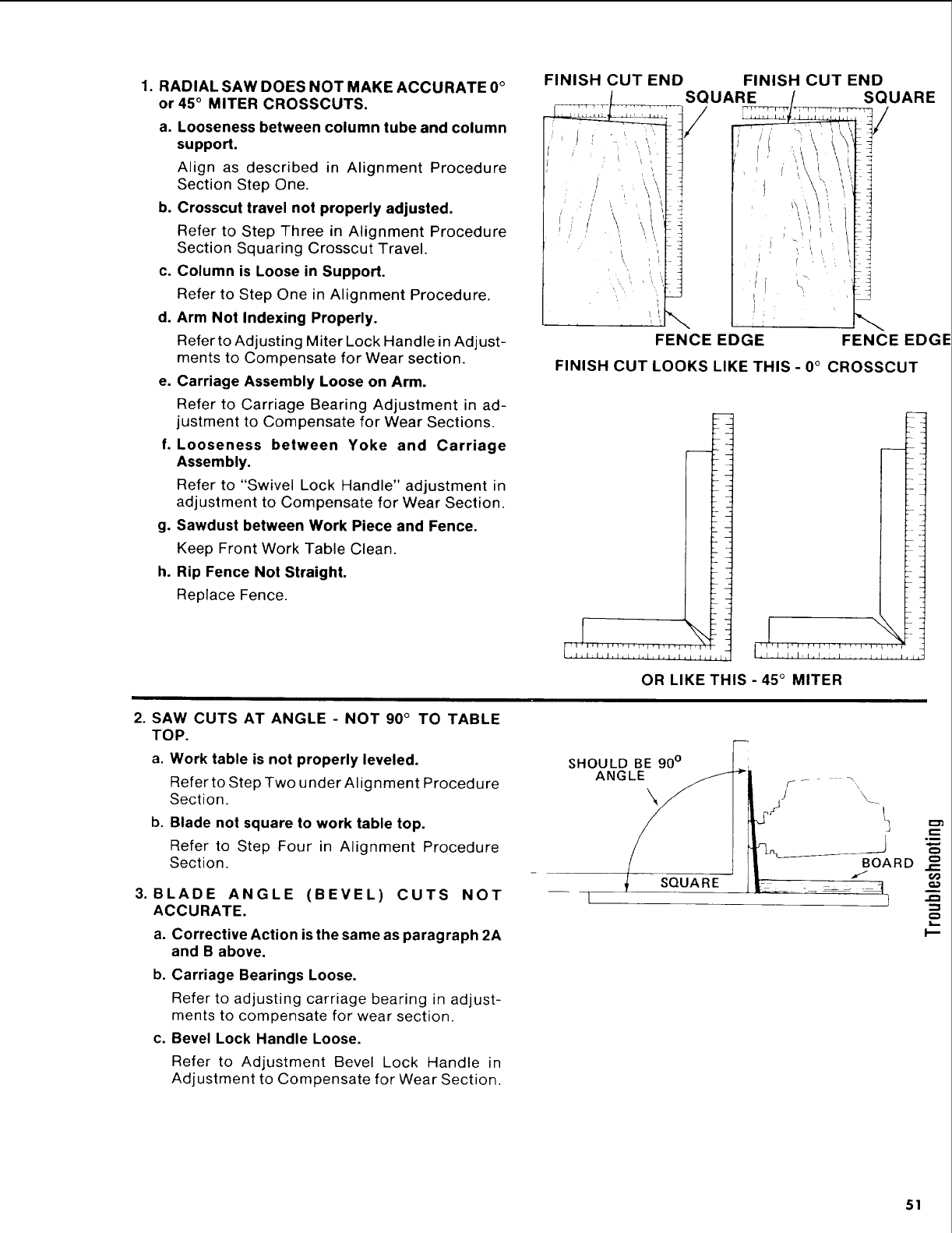
1. RADIAL SAW DOES NOT MAKE ACCURATE 0°
or 45° MITER CROSSCUTS.
a. Looseness between column tube and column
support.
Align as described in Alignment Procedure
Section Step One.
b. Crosscut travel not properly adjusted.
Refer to Step Three in Alignment Procedure
Section Squaring Crosscut Travel.
c. Column is Loose in Support.
Refer to Step One in Alignment Procedure.
d. Arm Not Indexing Properly.
Refer to Adjusting Miter Lock Handle in Adjust-
ments to Compensate for Wear section.
e. Carriage Assembly Loose on Arm.
Refer to Carriage Bearing Adjustment in ad-
justment to Compensate for Wear Sections.
f. Looseness between Yoke and Carriage
Assembly,
Refer to "Swivel Lock Handle" adjustment in
adjustment to Compensate for Wear Section.
g. Sawdust between Work Piece and Fence.
Keep Front Work Table Clean.
h. Rip Fence Not Straight.
Replace Fence.
FINISH CUT END
_SQUARE
/, /
// , '_\'\\
,t/ \_ '\\ I
j; ' I
'/i
t
FENCE EDGE
FINISH CUT END
SQUARE
FENCE EDGE
FINISH CUT LOOKS LIKE THIS- 0° CROSSCUT
I
I
.I.Ll,l,l,F,[.I ..1 .... 1,1_"
OR LIKE THIS - 45°MITER
2. SAW CUTS AT ANGLE -NOT 90 °TO TABLE
TOP.
a. Work table is not properly leveled.
Refer to Step Two under Alignment Procedure
Section.
b. Blade not square to work table top.
Refer to Step Four in Alignment Procedure
Section.
3. BLADE ANGLE (BEVEL) CUTS NOT
ACCURATE.
a. Corrective Action is the same as paragraph 2A
and B above,
b. Carriage Bearings Loose.
Refer to adjusting carriage bearing in adjust-
ments to compensate for wear section.
c. Bevel Lock Handle Loose.
Refer to Adjustment Bevel Lock Handle in
Adjustment to Compensate for Wear Section.
SHOULD BE 90°
ANGLE \
SQUARE
I
I--
51
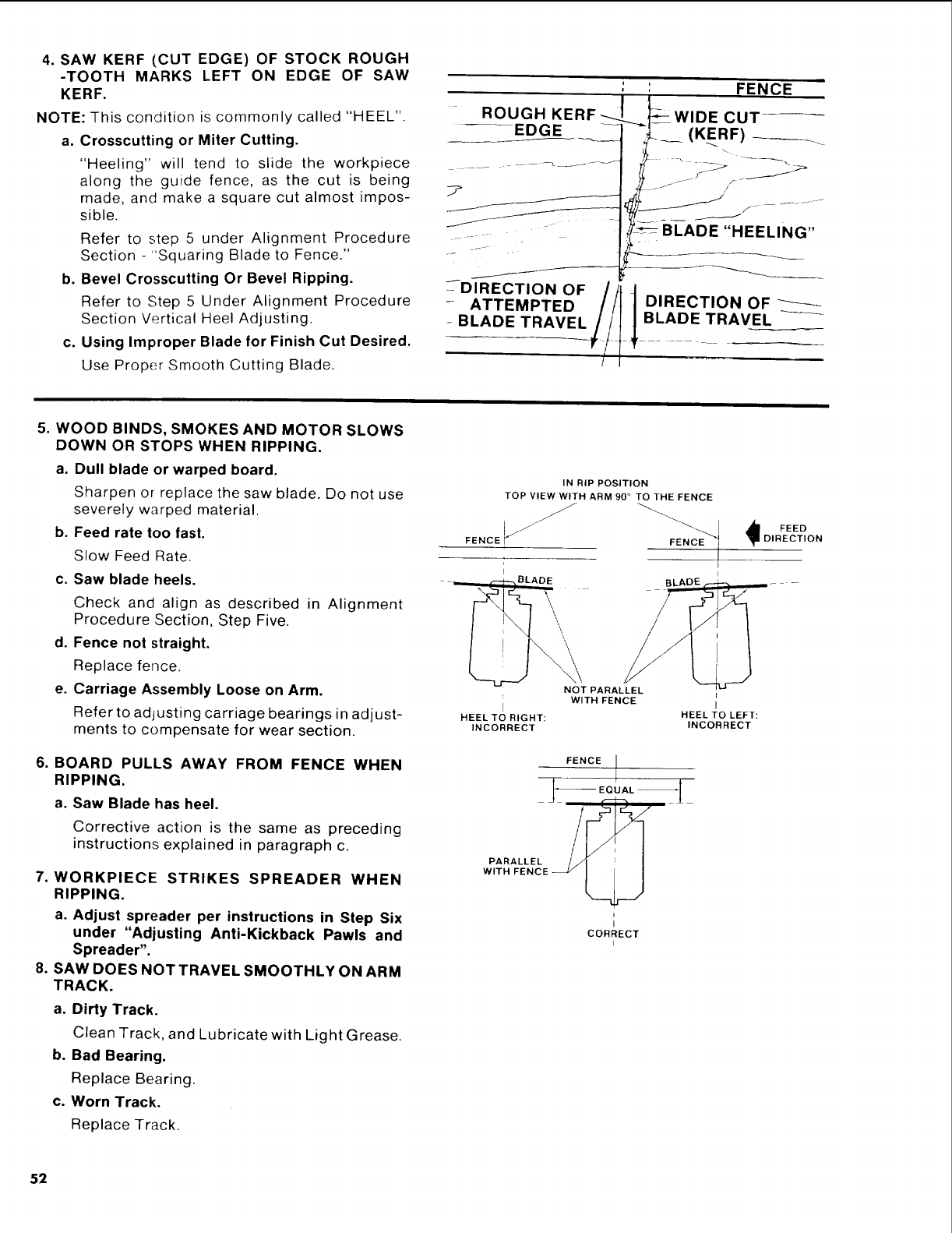
4. SAW KERF (CUT EDGE) OF STOCK ROUGH
-TOOTH MARKS LEFT ON EDGE OF SAW
KERF.
NOTE: This condition is commonly called "HEEL".
a, Crosscutting or Miter Culling.
"Heeling" will tend to slide the workpiece
along the guide fence, as the cut is being
made, and make a square cut almost impos-
sible.
Refer to step 5 under Alignment Procedure
Section -"Squaring Blade to Fence."
b. Bevel Crosscutting Or Bevel Ripping.
Refer to Step 5 Under Alignment Procedure
Section Vertical Hee! Adjusting.
c. Using Improper Blade for Finish Cut Desired.
Use Proper Smooth Cutting Blade.
: : FENCE
-ROUGH KERF J__- WIDE CU'[
OF t
-ATTEMPTED
- BLADE TRAVEL//t tBLADE TRAVE_L
5. WOOD BINDS, SMOKES AND MOTOR SLOWS
DOWN OR STOPS WHEN RIPPING.
a. Dull blade or warped board.
Sharpen or replace the saw blade. Do not use
severely warped material.
b. Feed rate Ioo fast.
Slow Feed Rate.
c. Saw blade heels.
Check and align as described in Alignment
Procedure Section, Step Five.
d. Fence not straight.
Replace fence.
e. Carriage Assembly Loose on Arm.
Refer to adjusting carriage bearings in adjust-
ments to compensate for wear section.
6. BOARD PULLS AWAY FROM FENCE WHEN
RIPPING.
a. Saw Blade has heel.
Corrective action is the same as preceding
instructions explained in paragraph c.
7. WORKPIECE STRIKES SPREADER WHEN
RIPPING.
a. Adjust spreader per instructions in Step Six
under "Adjusting Anti-Kickback Pawls and
Spreader".
8. SAW DOES NOT TRAVEL SMOOTHLY ON ARM
TRACK.
a. Dirty Track.
Clean Track, and Lubricate with Light Grease.
b. Bad Bearing.
Replace Bearing.
c. Worn Track.
Replace Track.
IN RIP POSITION
TOP VIEW WITH ARM 90 °TO THE FENCE
FENCE __
___ ¢--._--_ g LA DE
HEEL TO RIGHT:
INCORRECT
NOT PARALLEL
WITH FENCE
HEEL TO LEFT:
INCORRECT
FENCE
I
i
I
CORRECT
i
52
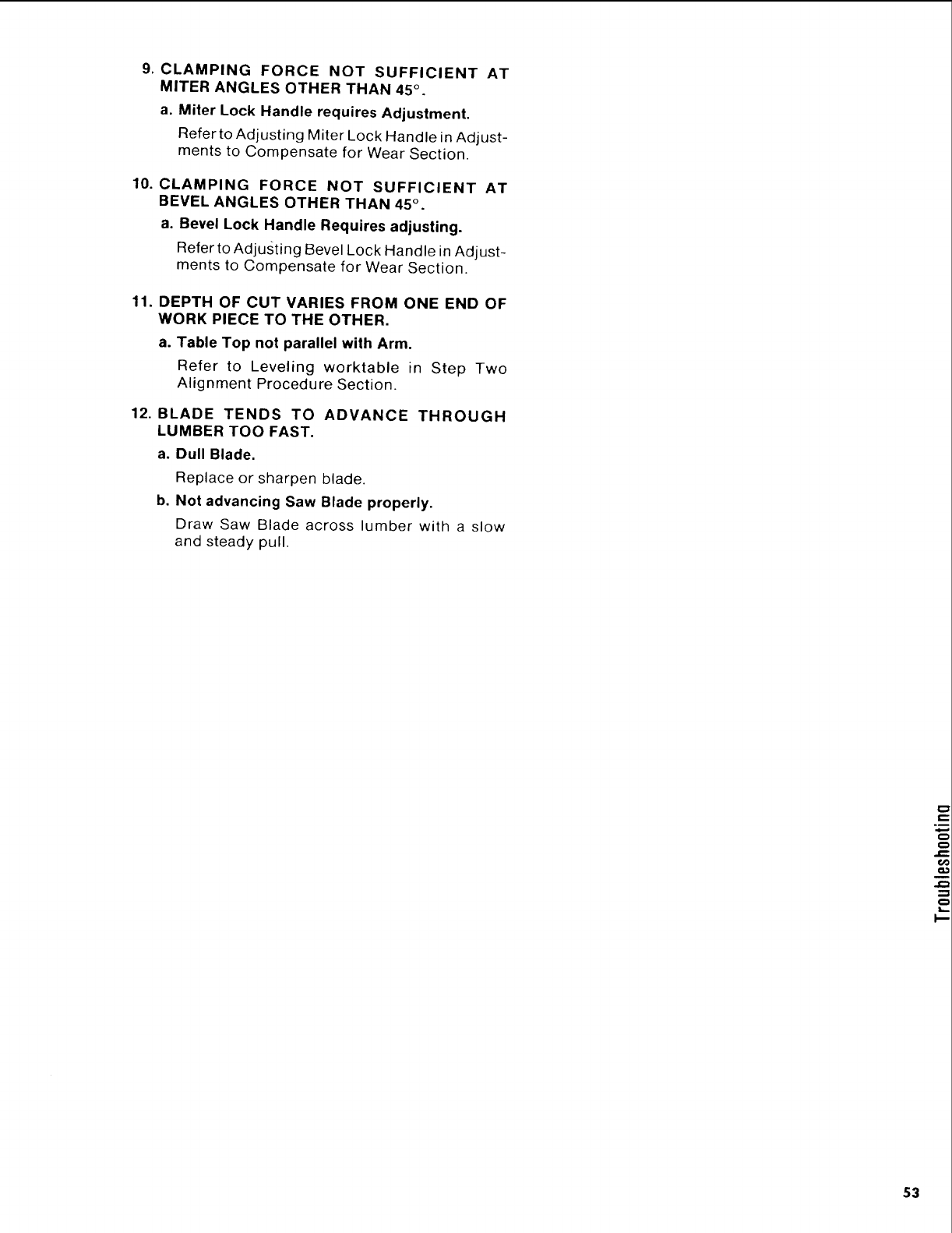
9. CLAMPING FORCE NOT SUFFICIENT AT
MITER ANGLES OTHER THAN 45 °.
a, Miter Lock Handle requires Adjustment.
Refer to Adjusting Miter Lock Handle in Adjust-
ments to Compensate for Wear Section.
10. CLAMPING FORCE NOT SUFFICIENT AT
BEVEL ANGLES OTHER THAN 45 ° .
a. Bevel Lock Handle Requires adjusting.
Refer to Adjusting Bevel Lock Handle in Adjust-
ments to Compensate for Wear Section.
11. DEPTH OF CUT VARIES FROM ONE END OF
WORK PIECE TO THE OTHER.
a. Table Top not parallel with Arm.
Refer to Leveling worktable in Step Two
Alignment Procedure Section.
12. BLADE TENDS TO ADVANCE THROUGH
LUMBER TOO FAST.
a. Dull Blade.
Replace or sharpen blade.
b. Not advancing Saw Blade properly.
Draw Saw Blade across lumber with a slow
and steady pull.
t-
=m
,4-
€
€
i-
o
G
k-
53
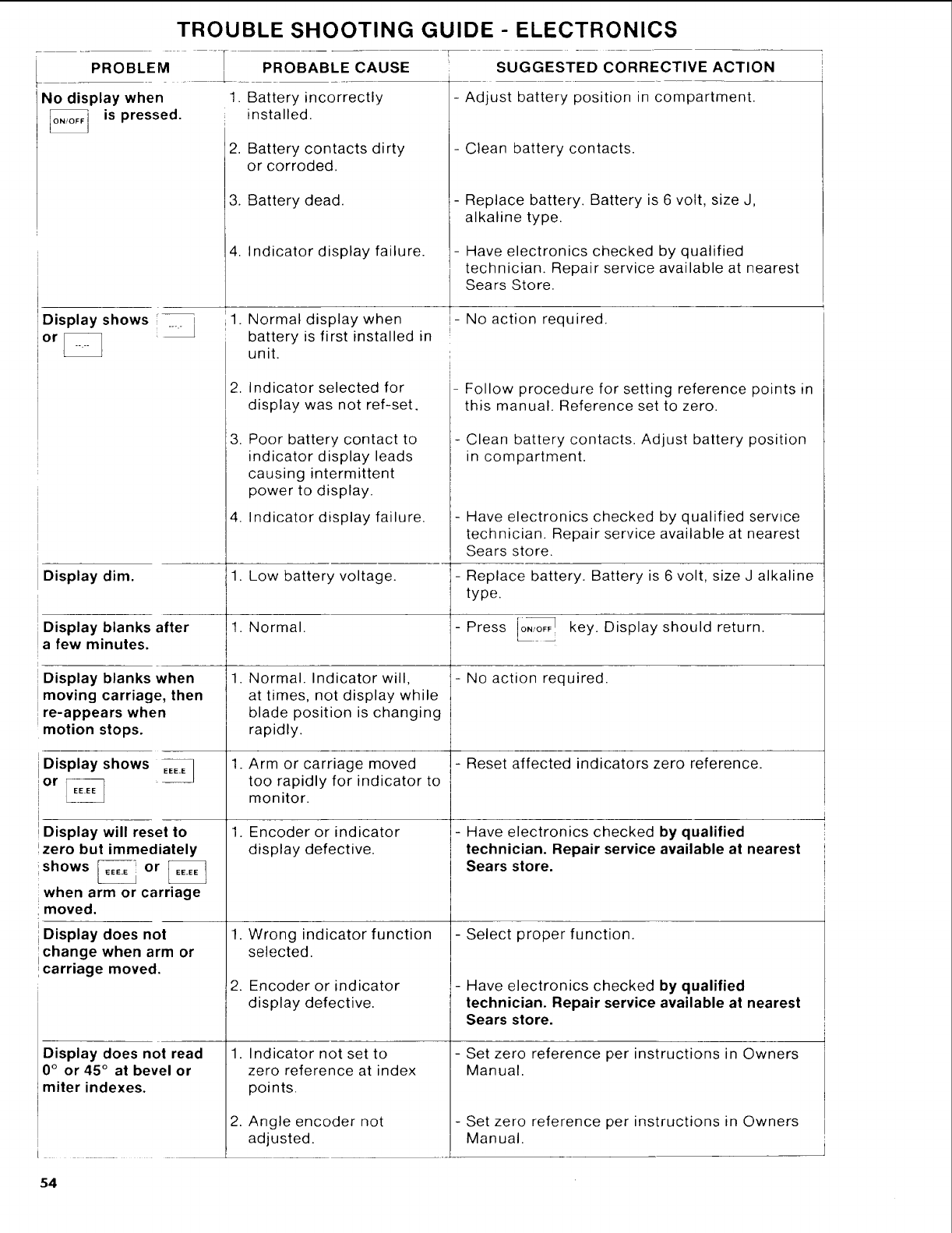
TROUBLE SHOOTING GUIDE - ELECTRONICS
PROB'EM]
No display when
is pressed.
PROBABLE CAUSE
1. Battery incorrectly
installed.
'2. Battery contacts dirty
or corroded.
3. Battery dead.
4. Indicator display failure.
SUGGESTED CORRECTIVE ACTION
i
- Adjust battery position in compartment.
- Clean battery contacts.
- Replace battery. Battery is 6 volt, size J,
alkaline type.
- Have electronics checked by qualified
technician. Repair service available at nearest
Sears Store.
Display shows
or
'1. Normal display when
;battery is first installed in
unit.
,- No action required.
I
i
i
Display dim.
i
1
Display blanks after
afew minutes.
iDisplay blanks when
!moving carriage, then
Ire-appears when
_motion stops.
--]
Display shows EEE.E
or
Display will reset to
zero but immediately
shows IEEEE or _
when arm or carriage
!moved.
iDisplay does not
ichange when arm or
carriage moved.
Display does not read
0°or 45°at bevel or
miter indexes.
,
3.
Indicator selected for
display was not ref-set.
Poor battery contact to
indicator display leads
causing intermittent
power to display.
4. Indicator display failure.
1. Low battery voltage.
1. Normal.
1, Normal. Indicator will,
at times, not display while
blade position is changing
rapidly.
1. Arm or carriage moved
too rapidly for indicator to
monitor.
1. Encoder or indicator
display defective.
1. Wrong indicator function
selected.
2. Encoder or indicator
display defective.
1. Indicator not set to
zero reference at index
points.
2. Angle encoder not
adjusted.
Follow procedure for setting reference points in
this manual. Reference set to zero.
Clean battery contacts. Adjust battery position
in compartment.
- Have electronics checked by qualified service
technician. Repair service available at nearest
Sears store.
- Replace battery. Battery is 6 volt, size J alkaline
type.
- Press I0"_ key. Display should return.
- No action required.
- Reset affected indicators zero reference.
- Have electronics checked by qualified
technician. Repair service available at nearest
Sears store.
- Select proper function.
-Have electronics checked by qualified
technician. Repair service available at nearest
Sears store.
- Set zero reference per instructions in Owners
Manual.
- Set zero reference per instructions in Owners
Manual.
54
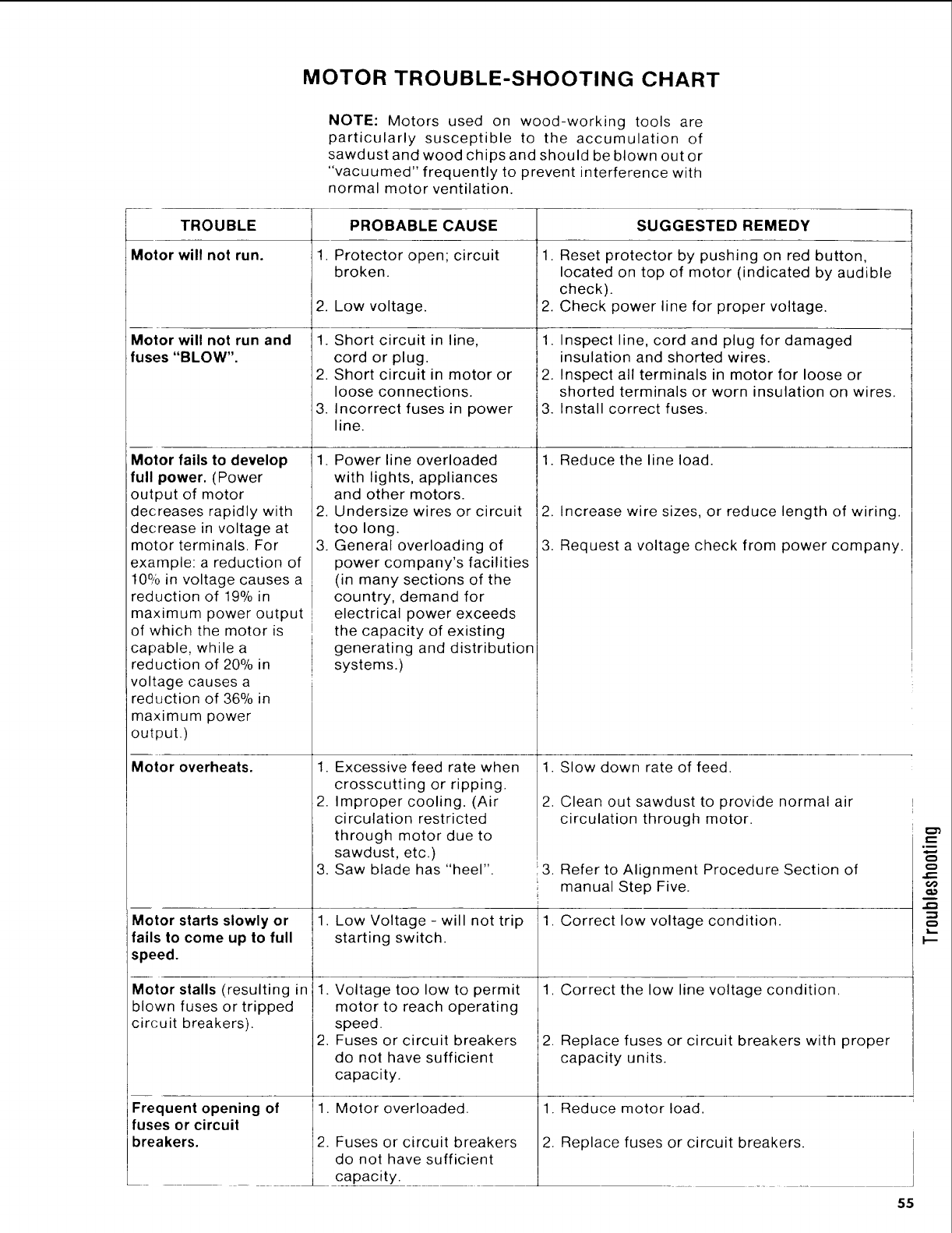
MOTOR TROUBLE-SHOOTING CHART
NOTE: Motors used on wood-working tools are
particularly susceptible to the accumulation of
sawdust and wood chips and should be blown out or
"vacuumed" frequently to prevent interference with
normal motor ventilation.
TROUBLE
Motor will not run.
Motor will not run and
fuses "BLOW".
Motor fails to develop
full power. (Power
output of motor
decreases rapidly with
decrease in voltage at
motor terminals. For
example: a reduction of
10% in voltage causes a
reduction of 19% in
maximum power output
of which the motor is
capable, while a
reduction of 20% in
voltage causes a
reduction of 36% in
maximum power
output.)
Motor overheats.
Motor starts slowly or
fails to come up to full
speed.
Motor stalls (resulting in
blown fuses or tripped
circuit breakers).
Frequent opening of
fuses or circuit
breakers.
PROBABLE CAUSE
!. Protector open; circuit
broken.
2. Low voltage.
1. Short circuit in line,
cord or plug.
2. Short circuit in motor or
loose connections.
3. Incorrect fuses in power
line.
.
.
3.
Power line overloaded
with lights, appliances
and other motors.
Undersize wires or circuit
too long.
General overloading of
power company's facilities
(in many sections of the
country, demand for
electrical power exceeds
the capacity of existing
generating and distribution
systems.)
1. Excessive feed rate when
crosscutting or ripping.
2. Improper cooling. (Air
circulation restricted
through motor due to
sawdust, etc.)
3. Saw blade has "heel".
1. Low Voltage - will not trip
starting switch.
1. Voltage too low to permit
motor to reach operating
speed.
2. Fuses or circuit breakers
do not have sufficient
capacity.
1.
2.
Motor overloaded.
Fuses or circuit breakers
do not have sufficient
capacity.
SUGGESTED REMEDY
1. Reset protector by pushing on red button,
located on top of motor (indicated by audible
check).
2. Check power line for proper voltage.
1. Inspect line, cord and plug for damaged
insulation and shorted wires.
2. Inspect all terminals in motor for loose or
shorted terminals or worn insulation on wires.
3. Install correct fuses.
1. Reduce the line load.
2. Increase wire sizes, or reduce length of wiring.
3. Request a voltage check from power company.
1. Slow down rate of feed.
2. Clean out sawdust to provide normal air
circulation through motor.
_3. Refer to Alignment Procedure Section of
manual Step Five.
i
1. Correct low voltage condition.
1. Correct the low line voltage condition.
2. Replace fuses or circuit breakers with proper
capacity units.
1. Reduce motor load.
2. Replace fuses or circuit breakers.
55
P
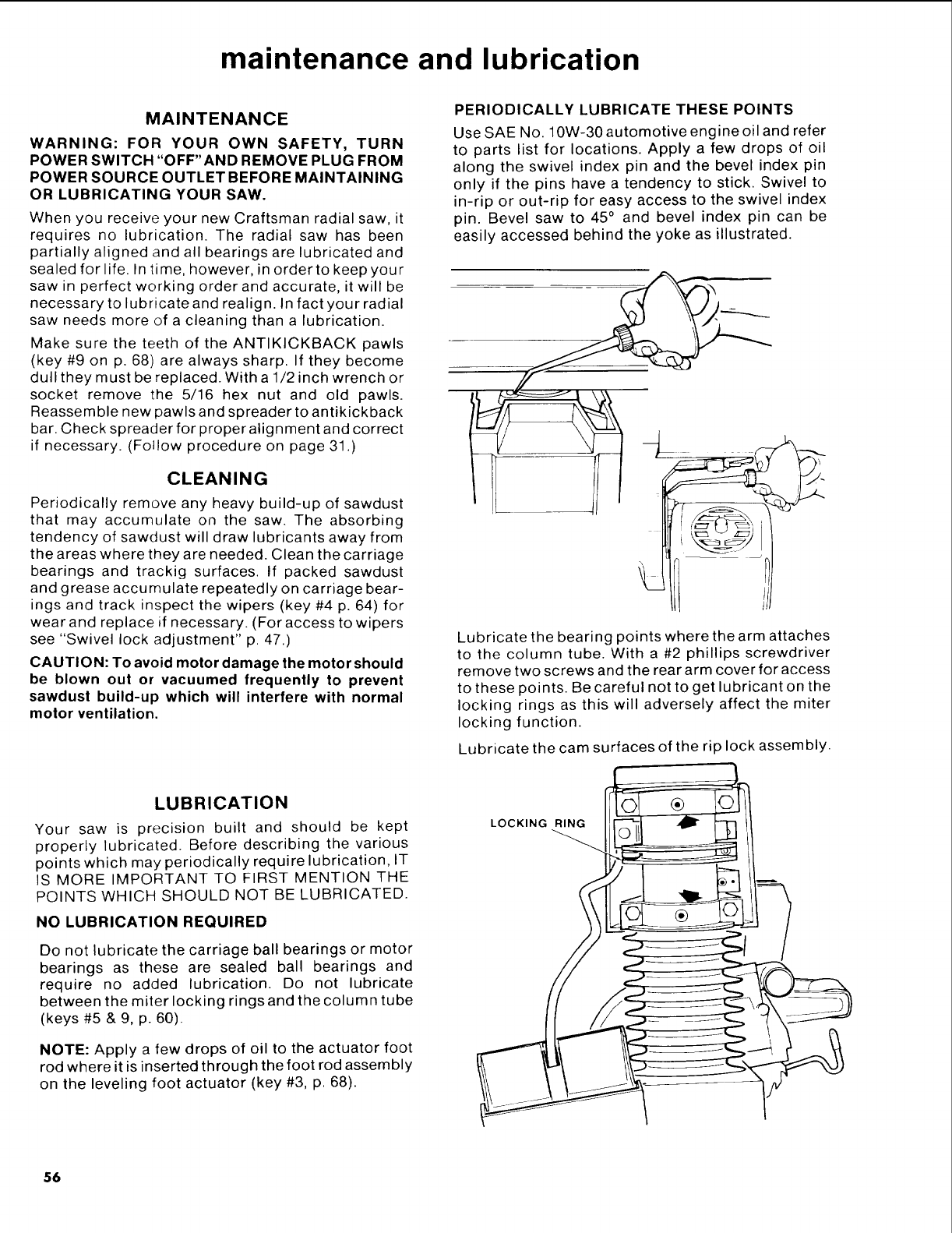
maintenance and lubrication
MAINTENANCE
WARNING: FOR YOUR OWN SAFETY, TURN
POWER SWITCH "OFF'AND REMOVE PLUG FROM
POWER SOURCE OUTLET BEFORE MAINTAINING
OR LUBRICATING YOUR SAW.
When you receive your new Craftsman radial saw, it
requires no lubrication. The radial saw has been
partially aligned and all bearings are lubricated and
sealed for life. In time, however, in order to keep your
saw in perfect working order and accurate, it will be
necessary to lubricate and realign. In fact your radial
saw needs more of a cleaning than a lubrication.
Make sure the teeth of the ANTIKICKBACK pawls
(key #9 on p. 68) are always sharp. If they become
dull they must be replaced. With a 1/2 inch wrench or
socket remove the 5/16 hex nut and old pawls.
Reassemble new pawls and spreader to antikickback
bar. Check spreader for proper alignment and correct
if necessary. (Follow procedure on page 31.)
CLEANING
Periodically remove any heavy build-up of sawdust
that may accumulate on the saw. The absorbing
tendency of sawdust will draw lubricants away from
the areas where they are needed. Clean the carriage
bearings and trackig surfaces. If packed sawdust
and grease accumulate repeatedly on carriage bear-
ings and track inspect the wipers (key #4 p. 64) for
wear and replace if necessary. (For access to wipers
see "Swivel lock adjustment" p. 47.)
CAUTION: To avoid motor damage the motor should
be blown out or vacuumed frequently to prevent
sawdust build-up which will interfere with normal
motor ventilation.
PERIODICALLY LUBRICATE THESE POINTS
Use SAE No. 10W-30 automotive engine oil and refer
to parts list for locations. Apply a few drops of oil
along the swivel index pin and the bevel index pin
only if the pins have a tendency to stick. Swivel to
in-rip or out-rip for easy access to the swivel index
pin. Bevel saw to 45° and bevel index pin can be
easily accessed behind the yoke as illustrated.
Lubricate the bearing points where the arm attaches
to the column tube. With a #2 phillips screwdriver
remove two screws and the rear arm cover for access
to these points. Be careful not to get lubricant on the
locking rings as this will adversely affect the miter
locking function.
Lubricate the cam surfaces of the rip lock assembly.
LUBRICATION
Your saw is precision built and should be kept
properly lubricated. Before describing the various
points which may periodically require lubrication, IT
IS MORE IMPORTANT TO FIRST MENTION THE
POINTS WHICH SHOULD NOT BE LUBRICATED.
NO LUBRICATION REQUIRED
Do not lubricate the carriage ball bearings or motor
bearings as these are sealed ball bearings and
require no added lubrication. Do not lubricate
between the miter locking rings and the column tube
(keys #5 & 9, p. 60).
NOTE: Apply a few drops of oil to the actuator foot
rod where it is inserted through the foot rod assembly
on the leveling foot actuator (key #3, p. 68).
LOCKING RING
56
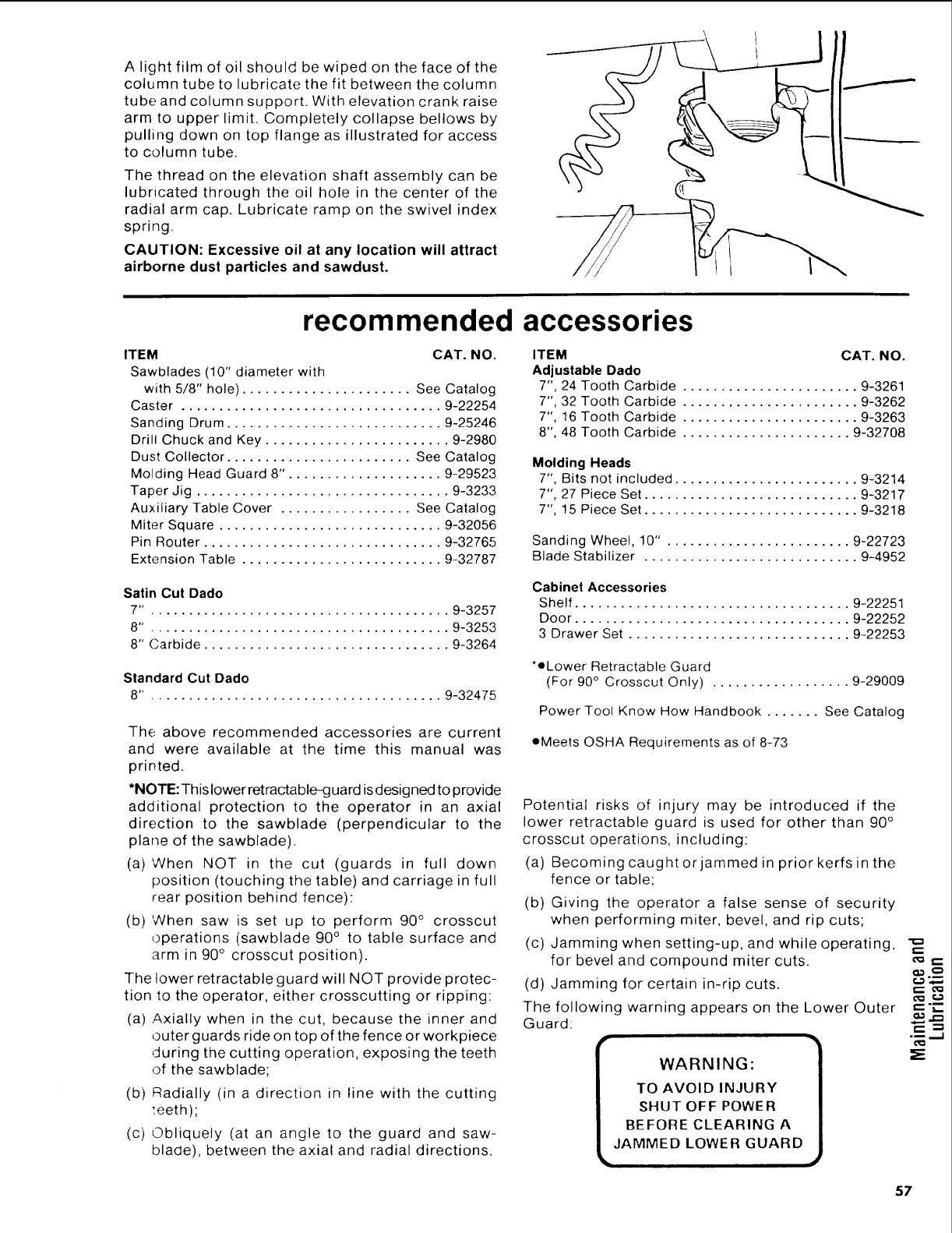
A light film of oil should be wiped on the face of the
column tube to lubricate the fit between the column
tube and column support. With elevation crank raise
arm to upper limit. Completely collapse bellows by
pulling down on top flange as illustrated for access
to column tube.
The thread on the elevation shaft assembly can be
lubricated through the oil hole in the center of the
radial arm cap. Lubricate ramp on the swivel index
spring.
CAUTION: Excessive oil at any location will attract
airborne dust particles and sawdust.
recommended accessories
ITEM CAT. NO.
Sawblades (10" diameter with
with 5/8" hole) ...................... See Catalog
Caster .................................. 9-22254
Sanding Drum ............................ 9-25246
Drill Chuck and Key ........................ 9-2980
Dust Collector ........................ See Catalog
Molding Head Guard 8". ................... 9-29523
Taper Jig ................................. 9-3233
Auxiliary Table Cover ................. See Catalog
Miter Square ............................. 9-32056
Pin Router ............................... 9-32765
Extension Table .......................... 9-32787
ITEM CAT. NO.
Adjustable Dado
7", 24 Tooth Carbide ....................... 9-3261
7", 32 Tooth Carbide ....................... 9-3262
7", 16 Tooth Carbide ....................... 9-3263
8", 48 Tooth Carbide ...................... 9-32708
Molding Heads
7", Bits not included ........................ 9-3214
7", 27 Piece Set ............................ 9-3217
7", 15 Piece Set ............................ 9-3218
Sanding Wheel, 10" . ....................... 9-22723
Blade Stabilizer ............................ 9-4952
Satin Cut Dado
7". ...................................... 9-3257
8". ...................................... 9-3253
8" Carbide ................................ 9-3264
Standard Cut Dado
8". ..................................... 9-32475
The above recommended accessories are current
and were available at the time this manual was
printed.
*NOTE: This lower ret ractable_:j uard is designed to provide
additional protection to the operator in an axial
direction to the sawblade (perpendicular to the
plane of the sawblade).
(a) When NOT in the cut (guards in full down
position (touching the table) and carriage in full
rear position behind fence):
(b) When saw is set up to perform 90 ° crosscut
operations (sawblade 90 ° to table surface and
arm in 90 ° crosscut position).
The lower retractable guard will NOT provide protec-
tion to the operator, either crosscutting or ripping:
(a) Axially when in the cut, because the inner and
outer guards ride on top of the fence or workpiece
during the cutting operation, exposing the teeth
of the sawblade;
(b) Radially (in a direction in line with the cutting
:eeth);
(c) Obliquely (at an angle to the guard and saw-
blade), between the axial and radial directions.
Cabinet Accessories
Shelf .................................... 9-22251
Door .................................... 9-22252
3 Drawer Set ............................. 9-22253
*eLower Retractable Guard
(For 90 ° Crosscut Only) .................. 9-29009
Power Tool Know How Handbook ....... See Catalog
•Meets OSHA Requirements as of 8-73
Potential risks of injury may be introduced if the
lower retractable guard is used for other than 90 °
crosscut operations, including:
(a) Becoming caughtorjammed in prior kerfs in the
fence or table;
(b) Giving the operator a false sense of security
when performing miter, bevel, and rip cuts;
(c) Jamming when setting-up, and while operating,
for bevel and compound miter cuts.
(d) Jamming for certain in-rip cuts.
The following warning appears on the Lower Outer
Guard:
r
WARNING:
TO AVOID INJURY
SHUT OFF POWER
BEFORE CLEARING A
JAMMED LOWER GUARD
i
cm _,--
,-.:-
.___=,
_E
57
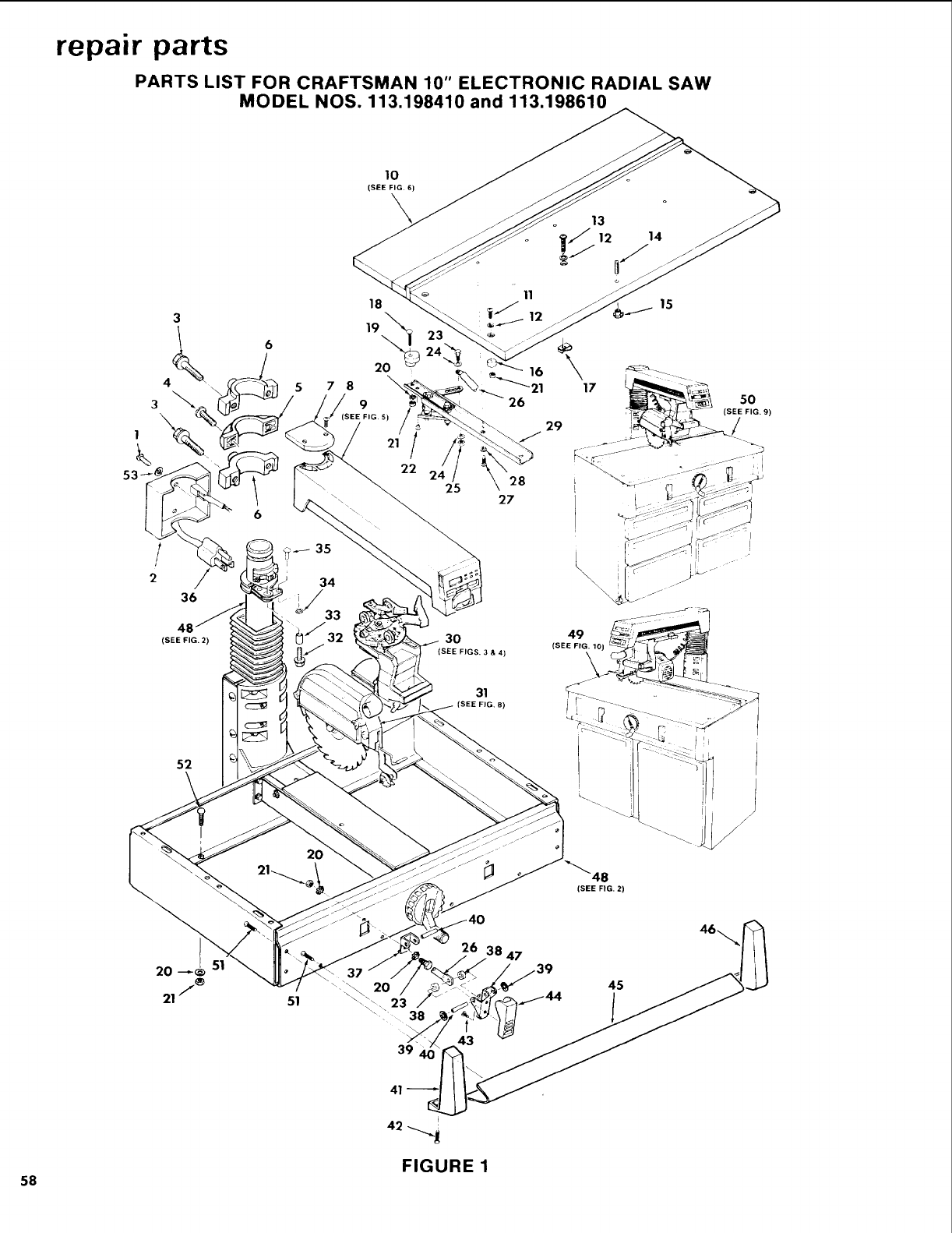
repair parts
PARTS LIST FOR CRAFTSMAN 10" ELECTRONIC RADIAL SAW
MODEL NOS. 113,198410 and 113.198610
10
(SEE FIG, 6)
1
36 iJ 33
/
22
25
26
28
27
(SEE FIG. 2) 30
(SEE FIGS. 3&4)
31
FIG. 8)
52
2O
15
16 _ ©_ .....
I
\\
49
(SEE FIG, 10)
\
/
8
(SEE FIG. 2)
39
26 47
45
4a._,,
FIGURE 1
58
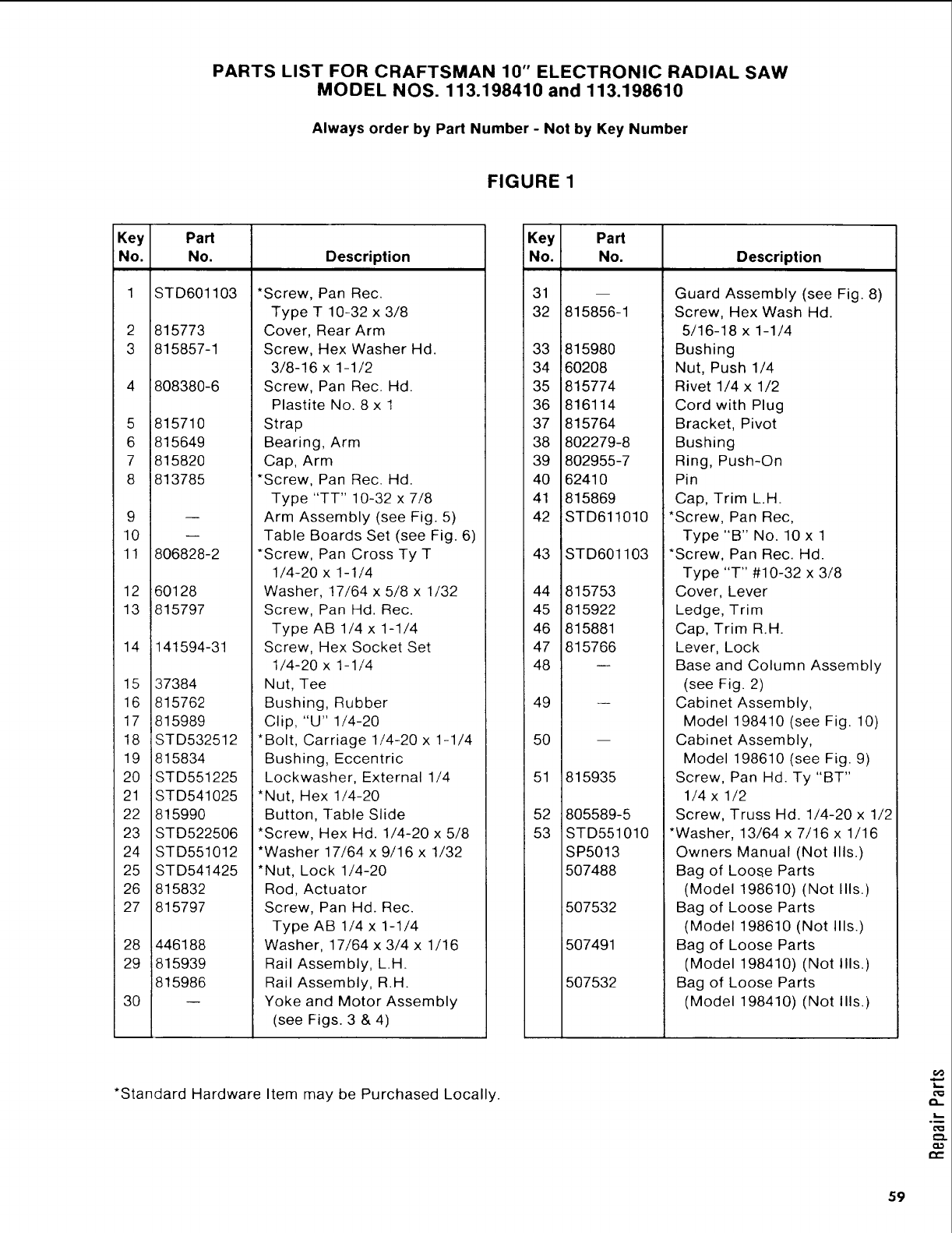
PARTS LIST FOR CRAFTSMAN 10" ELECTRONIC RADIAL SAW
MODEL NOS. 113.198410 and 113.198610
Always order by Part Number -Not by Key Number
FIGURE 1
Key Part
No. No. Description
1 ST D601103
2
3
5
6
7
8
9
10
1!
12
13
14
15
16
17
18
19
20
21
22
23
24
25
26
27
815773
815857-1
808380-6
815710
815649
815820
813785
806828-2
60128
815797
141594-31
37384
815762
815989
STD532512
815834
STD551225
STD541025
815990
STD522506
STD551012
STD541425
815832
815797
28 446188
29 815939
815986
30
*Screw, Pan Rec.
Type T 10-32 x 3/8
Cover, Rear Arm
Screw, Hex Washer Hd.
3/8-16 x 1-1/2
Screw, Pan Rec. Hd.
Plastite No. 8 x 1
Strap
Bearing, Arm
Cap, Arm
*Screw, Pan Rec. Hd.
Type "TT" 10-32 x 7/8
Arm Assembly (see Fig. 5)
Table Boards Set (see Fig. 6)
*Screw, Pan Cross Ty T
1/4-20 x 1-1/4
Washer, 17/64 x 5/8 x 1/32
Screw, Pan Hd. Rec.
Type AB 1/4 x 1-1/4
Screw, Hex Socket Set
1/4-20 x 1-1/4
Nut, Tee
Bushing, Rubber
Clip, "U" 1/4-20
*Bolt, Carriage 1/4-20 x 1-1/4
Bushing, Eccentric
Lockwasher, External 1/4
*Nut, Hex 1/4-20
Button, Table Slide
*Screw, Hex Hd. 1/4-20 x 5/8
*Washer 17/64 x 9/16 x 1/32
*Nut, Lock 1/4-20
Rod, Actuator
Screw, Pan Hd. Rec.
Type AB 1/4 x 1-1/4
Washer, 17/64 x 3/4 x 1/16
Rail Assembly, L.H.
Rail Assembly, R.H.
Yoke and Motor Assembly
(see Figs. 3 & 4)
Key Part
No. No. Description
31
32 815856-1
33 815980
34 60208
35 815774
36 816114
37 815764
38 802279-8
39 802955-7
40 62410
41 815869
42 STD611010
43 STD601103
44 815753
45 815922
46 815881
47 815766
48
49
50
51
52
53
m
815935
805589-5
STD551010
SP5013
507488
507532
507491
507532
Guard Assembly (see Fig. 8)
Screw, Hex Wash Hd.
5/16-18 x 1-1/4
Bushing
Nut, Push 1/4
Rivet 1/4 x 1/2
Cord with Plug
Bracket, Pivot
Bushing
Ring, Push-On
Pin
Cap, Trim L.H.
*Screw, Pan Rec,
Type "B" No. 10 x 1
*Screw, Pan Rec. Hd.
Type "T" #10-32 x 3/8
Cover, Lever
Ledge, Trim
Cap, Trim R.H.
Lever, Lock
Base and Column Assembly
(see Fig. 2)
Cabinet Assembly,
Model 198410 (see Fig. 10)
Cabinet Assembly,
Model 198610 (see Fig. 9)
Screw, Pan Hd. Ty "BT"
1/4 x 1/2
Screw, Truss Hd. 1/4-20 x 1/2
*Washer, 13/64 x 7/16 x 1/16
Owners Manual (Not Ills.)
Bag of Loose Parts
(Model 198610) (Not Ills.)
Bag of Loose Parts
(Model 198610 (Not Ills.)
Bag of Loose Parts
(Model 198410) (Not Ills.)
Bag of Loose Parts
(Model 198410) (Not Ills.)
*Standard Hardware Item may be Purchased Locally.
59
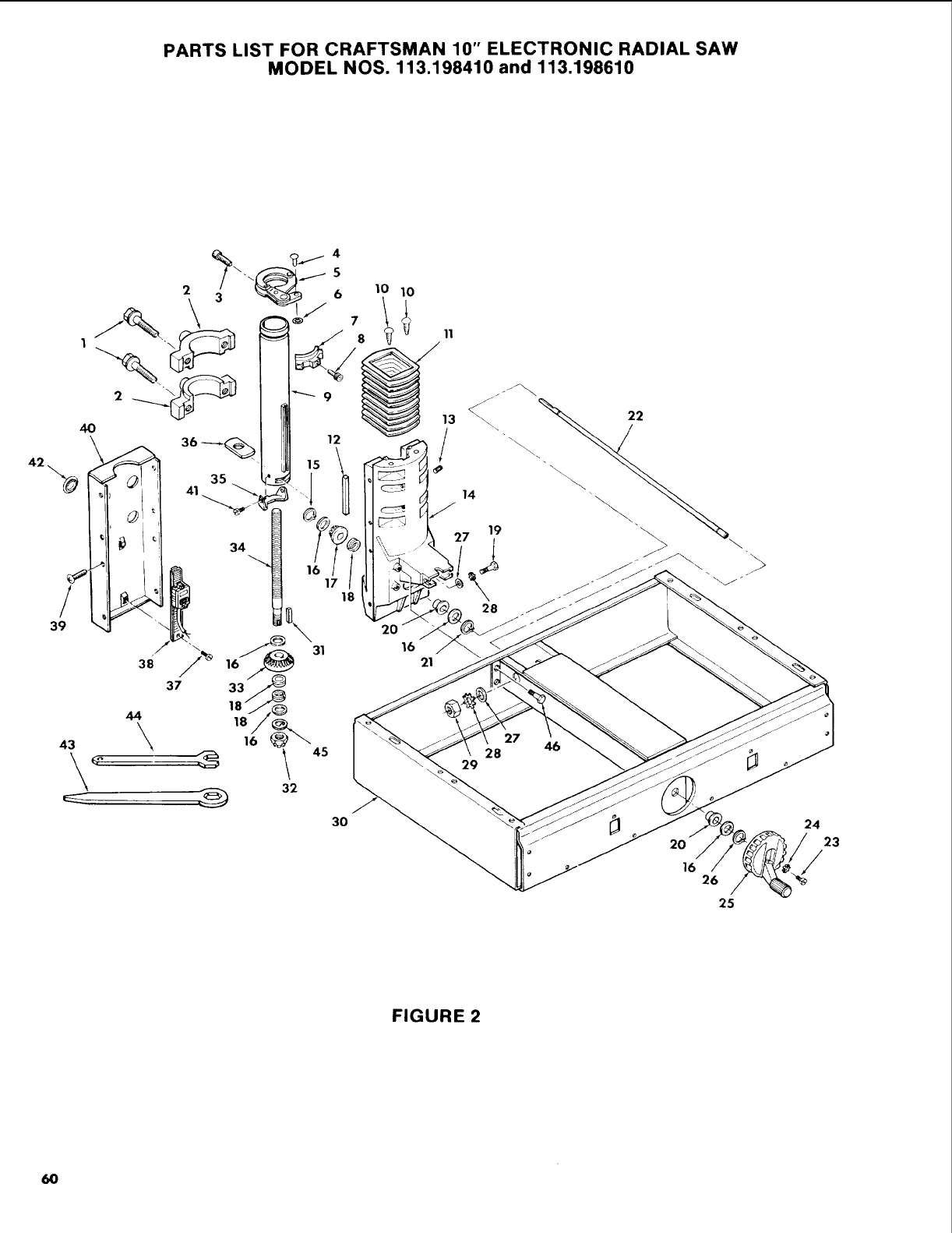
PARTS LIST FOR CRAFTSMAN 10" ELECTRONIC RADIAL SAW
MODEL NOS. 113.198410 and 113.198610
6
J%
1
4O 12
34
17
3O
18
8_!1
20
16 21
22
\\
14 "
19
>
28
29
27
28 46
J2O
16 26
25
24
23
/
FIGURE 2
60
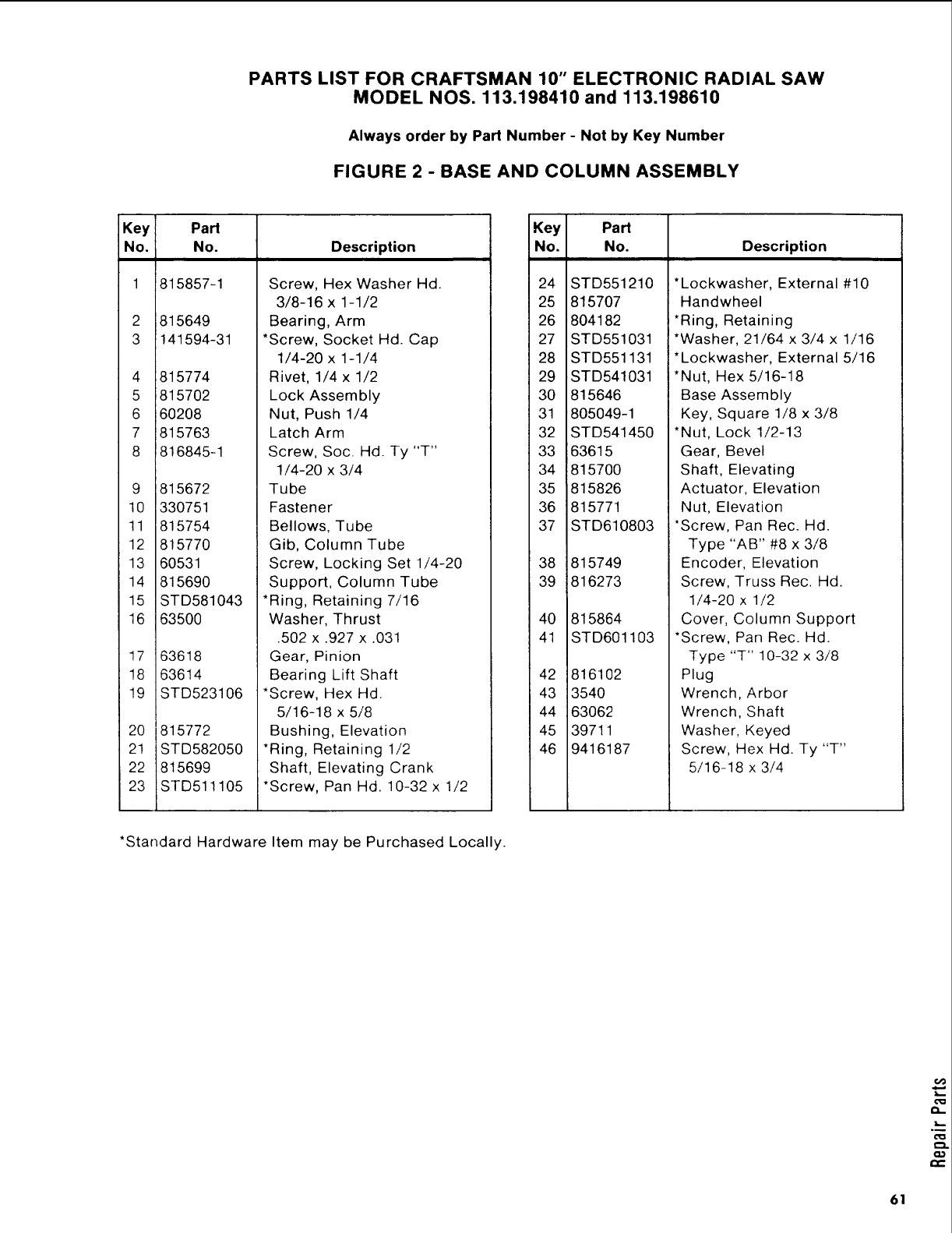
PARTS LIST FOR CRAFTSMAN 10" ELECTRONIC RADIAL SAW
MODEL NOS. 113.198410 and 113.198610
Always order by Part Number -Not by Key Number
FIGURE 2 -BASE AND COLUMN ASSEMBLY
Key
No. Description
1
2
3
4
5
6
7
8
11
12
13
14
15
16
17
18
19
20
21
22
23
Part
No.
815857-1
i815649
1141594-31
Screw, Hex Washer Hd.
3/8-16 x 1-1/2
Bearing, Arm
*Screw, Socket Hd. Cap
1/4-20 x 1-1/4
:815774
i815702
i60208
1815763
!816845-1
815672
330751
815754
815770
60531
815690
Rivet, 1/4 x 1/2
Lock Assembly
Nut, Push 1/4
Latch Arm
Screw, Soc. Hd. Ty "T"
1/4-20 x 3/4
Tube
Fastener
Bellows, Tube
Gib, Column Tube
Screw, Locking Set 1/4-20
Support, Column Tube
STD581043
63500
63618
63614
STD523106
815772
STD582050
815699
STD511105
*Ring, Retaining 7/16
Washer, Thrust
.502 x .927 x.031
Gear, Pinion
Bearing Lift Shaft
*Screw, Hex Hd.
5/16-18 x 5/8
Bushing, Elevation
*Ring, Retaining 1/2
Shaft, Elevating Crank
*Screw, Pan Hd. 10-32 x 1/2
Key Part
No. No. Description
24 STD551210
25 815707
26 804182
27 STD551031
28 STD551131
29 STD541031
30 815646
31 805049-1
32 STD541450
33 63615
34 815700
35 815826
36 815771
37 STD610803
38 815749
39 816273
40 815864
41 STD601103
42 816102
43 3540
44 63062
45 39711
46 9416187
*Lockwasher, External #10
Handwheel
*Ring, Retaining
*Washer, 21/64 x 3/4 x 1/16
*Lockwasher, External 5/16
*Nut, Hex 5/16-18
Base Assembly
Key, Square 1/8 x 3/8
*Nut, Lock 1/2-13
Gear, Bevel
Shaft, Elevating
Actuator, Elevation
Nut, Elevation
*Screw, Pan Rec. Hd.
Type "AB" #8 x 3/8
Encoder, Elevation
Screw, Truss Rec. Hd.
1/4-20 x 1/2
Cover, Column Support
*Screw, Pan Rec. Hd.
Type "T" 10-32 x 3/8
Plug
Wrench, Arbor
Wrench, Shaft
Washer, Keyed
Screw, Hex Hal. Ty "T"
5/16-18 x 3/4
*Standard Hardware Item may be Purchased Locally.
61
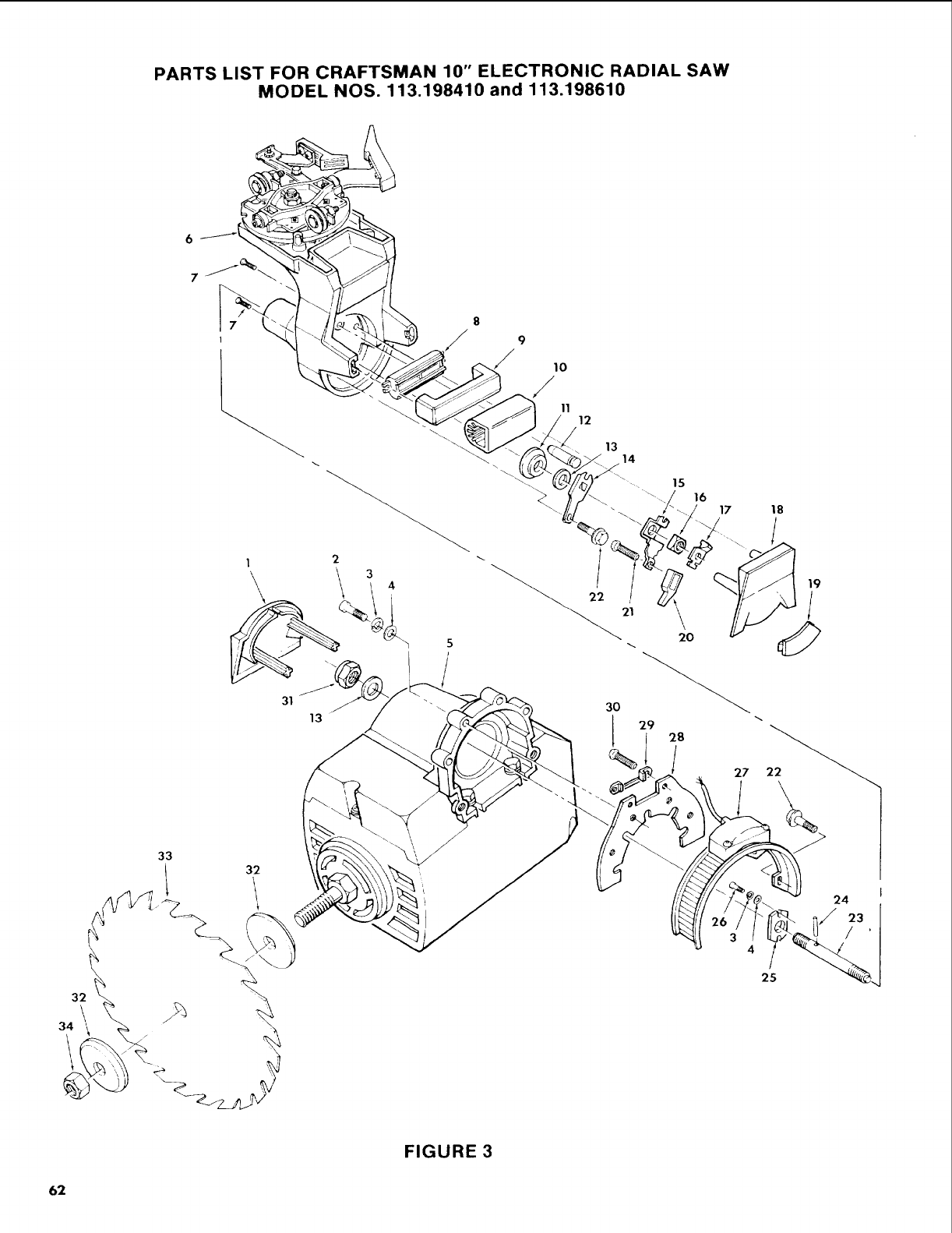
PARTS LIST FOR CRAFTSMAN 10" ELECTRONIC RADIAL SAW
MODEL NOS. 113.198410 and 113.198610
6
I
31
13
8
9
// 1o
/11 12
13
\14
22
20
J 29 28
%27
18
33
4/
25
24
FIGURE 3
62
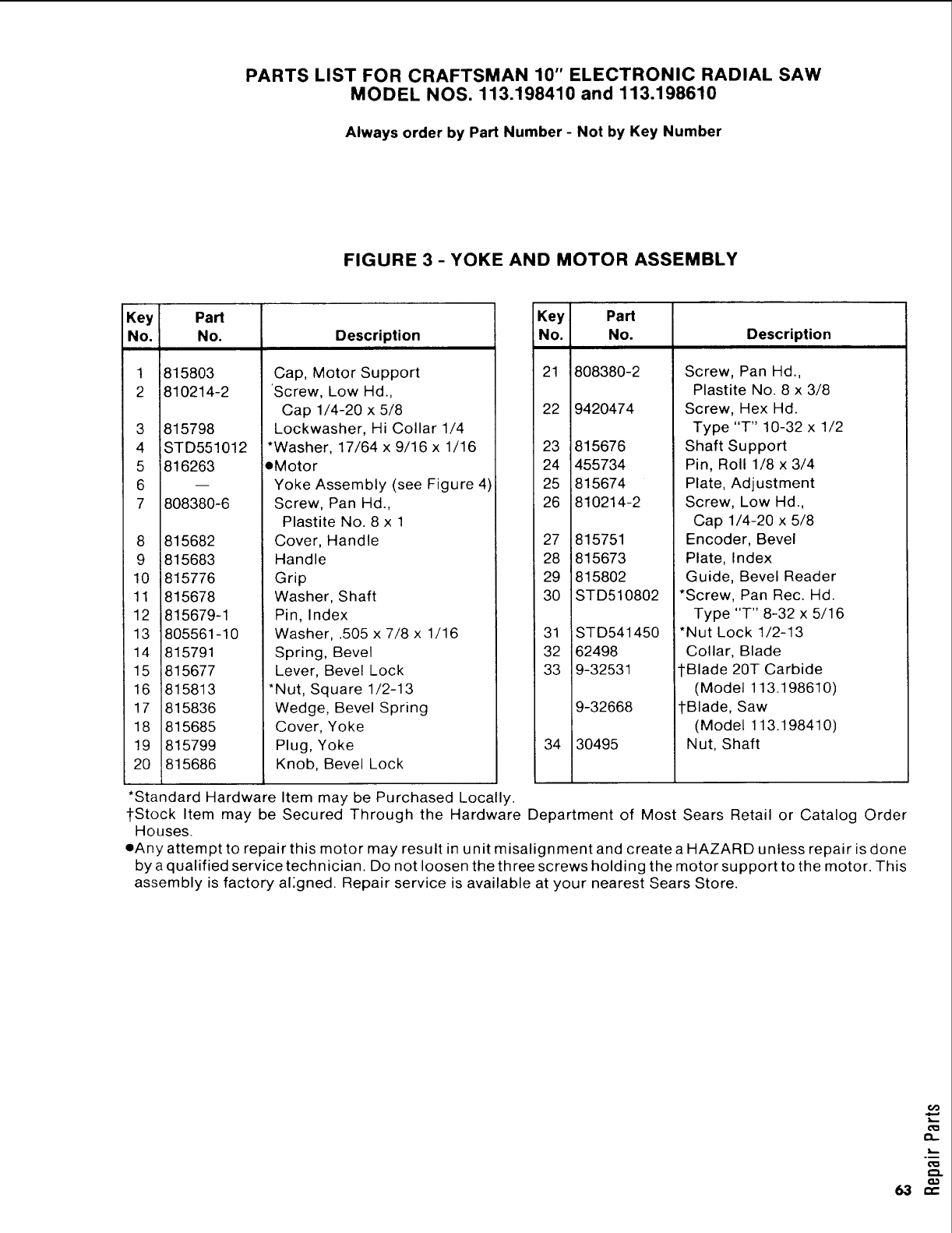
PARTS LIST FOR CRAFTSMAN 10" ELECTRONIC RADIAL SAW
MODEL NOS. 113.198410 and 113.198610
Always order by Part Number - Not by Key Number
FIGURE 3 -YOKE AND MOTOR ASSEMBLY
Key Part
No. No.
1
2
815803
810214-2
3 815798
4 STD551012
5 816263
6
7 808380-6
8 815682
9 815683
10 815776
11 815678
12 815679-1
13 805561-10
14 815791
15 815677
16 815813
17 815836
18 815685
19 815799
20 815686
Description
Cap, Motor Support
Screw, Low Hd.,
Cap 1/4-20 x 5/8
Lockwasher, Hi Collar 1/4
*Washer, 17/64 x 9/16 x 1/16
eMotor
Yoke Assembly (see Figure 4)
Screw, Pan Hd.,
Plastite No. 8 x 1
Cover, Handle
Handle
Grip
Washer, Shaft
Pin, Index
Washer, .505 x 7/8 x 1/16
Spring, Bevel
Lever, Bevel Lock
*Nut, Square 1/2-13
Wedge, Bevel Spring
Cover, Yoke
Plug, Yoke
Knob, Bevel Lock
Key Part
No. No.
21 8O8380-2
22 9420474
23 815676
24 455734
25 815674
26 810214-2
27 815751
28 815673
29 815802
30 STD510802
31
32
33
34
STD541450
162498
9-32531
9-32668
30495
Description
Screw, Pan Hd.,
Plastite No. 8 x 3/8
Screw, Hex Hd.
Type "T" 10-32 x 1/2
Shaft Support
Pin, Roll 1/8 x 3/4
Plate, Adjustment
Screw, Low Hd.,
Cap 1/4-20 x 5/8
Encoder, Bevel
Plate, Index
Guide, Bevel Reader
*Screw, Pan Rec. Hd.
Type "T" 8-32 x 5/16
*Nut Lock 1/2-13
Collar, Blade
tBlade 20T Carbide
(Model 113.198610)
tBlade, Saw
(Model 113.198410)
Nut, Shaft
*Standard Hardware Item may be Purchased Locally.
1-Stock Item may be Secured Through the Hardware Department of Most Sears Retail or Catalog Order
Houses.
eAny attempt to repair this motor may result in unit misalignment and create a HAZARD unless repair is done
by a qualified service technician. Do not loosen the three screws holding the motor support to the motor. This
assembly is factory al:gned. Repair service is available at your nearest Sears Store.
6@
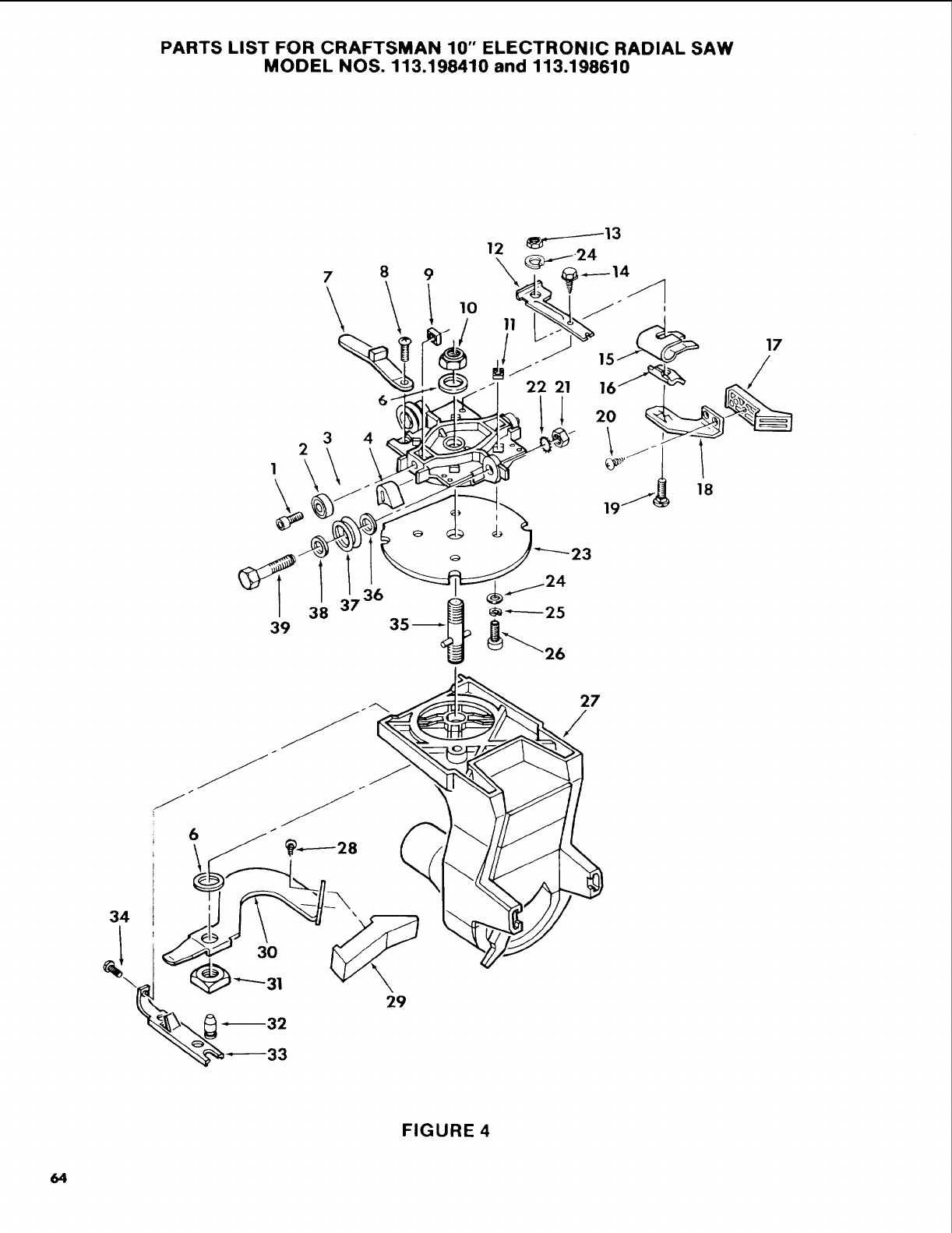
PARTS LIST FOR CRAFTSMAN 10" ELECTRONIC RADIAL SAW
MODEL NOS. 113.198410 and 113.198610
2
1
7
\
3 4
9
18
19
23
17
/
39 38
29
27
/
FIGURE 4
64
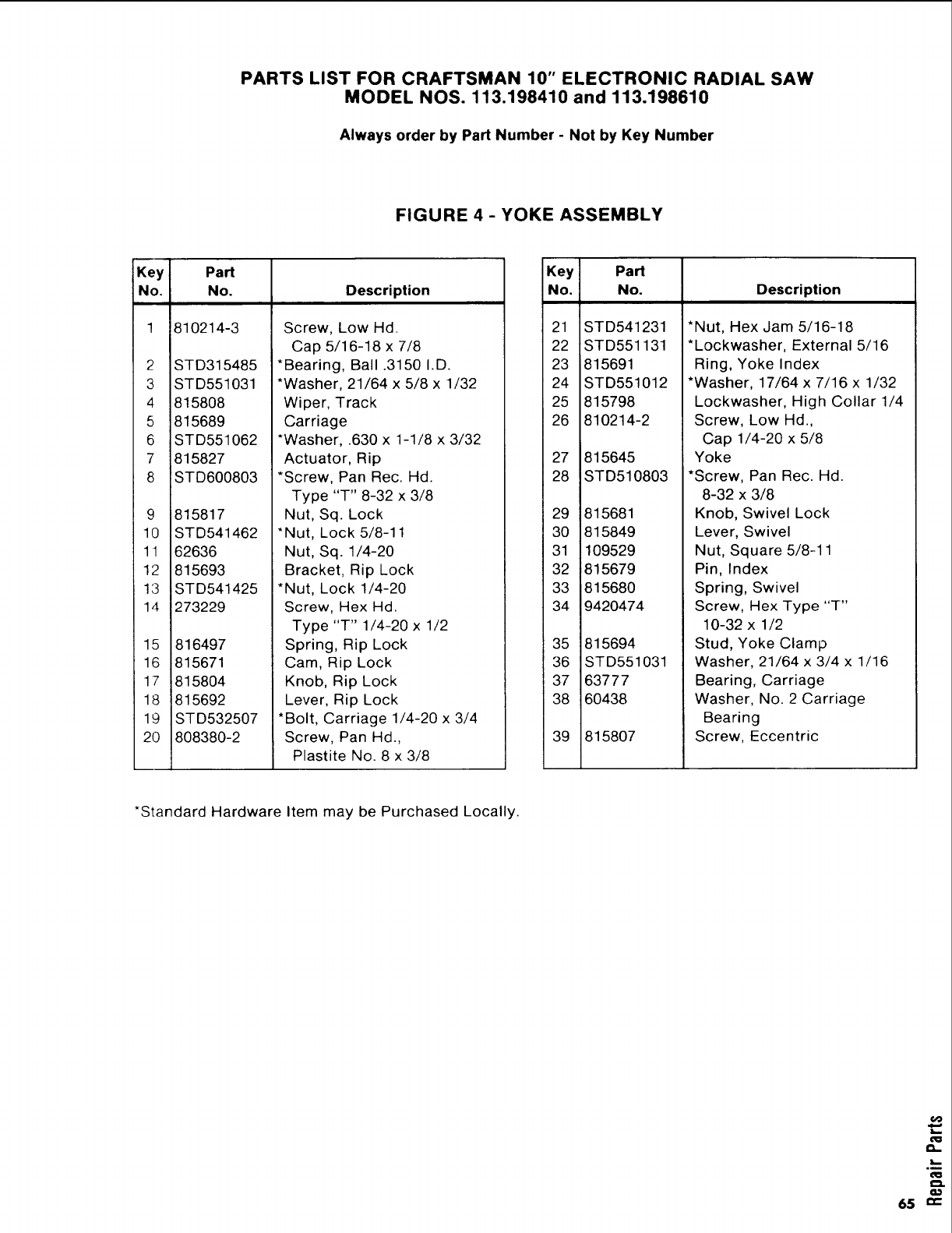
PARTS LIST FOR CRAFTSMAN 10" ELECTRONIC RADIAL SAW
MODEL NOS. 113.198410 and 113.198610
Always order by Part Number -Not by Key Number
FIGURE 4 -YOKE ASSEMBLY
Key Part
No. No, Description
! 810214-3
2
3
4
5
6
7
8
11
12
13
14
15
16
17
18
19
20
STD315485
STD551031
815808
815689
STD551062
815827
STD600803
815817
STD541462
62636
815693
STD541425
273229
816497
815671
815804
815692
STD532507
808380-2
Screw, Low Hd.
Cap 5/16-18 x 7/8
*Bearing, Ball .3150 I.D.
*Washer, 21/64 x 5/8 x 1/32
Wiper, Track
Carriage
*Washer, .630 x 1-1/8 x 3/32
Actuator, Rip
*Screw, Pan Rec. Hd.
Type "T" 8-32 x 3/8
Nut, Sq. Lock
"Nut, Lock 5/8-11
Nut, Sq. 1/4-20
Bracket, Rip Lock
[*Nut, Lock 1/4-20
Screw, Hex Hd.
Type "T" 1/4-20 x 1/2
Spring, Rip Lock
Cam, Rip Lock
Knob, Rip Lock
Lever, Rip Lock
*Bolt, Carriage 1/4-20 x 3/4
Screw, Pan Hd.,
Plastite No. 8 x 3/8
Key Part
No. No. Description
21 STD541231
22 STD551131
23 815691
24 STD551012
25 815798
26 810214-2
27 815645
28 STD510803
29 815681
30 815849
31 109529
32 _815679
33 1815680
34 [9420474
35
36
37
38
39
815694
STD551031
63777
6O438
815807
*Nut, Hex Jam 5/16-18
*Lockwasher, External 5/16
Ring, Yoke Index
*Washer, 17/64 x 7/16 x 1/32
Lockwasher, High Collar 1/4
Screw, Low Hd.,
Cap 1/4-20 x 5/8
Yoke
*Screw, Pan Rec. Hd.
8-32 x 3/8
Knob, Swivel Lock
Lever, Swivel
Nut, Square 5/8-11
Pin, Index
Spring, Swivel
Screw, Hex Type "T"
10-32 x 1/2
Stud, Yoke Clamp
Washer, 21/64 x 3/4 x 1/16
Bearing, Carriage
Washer, No. 2 Carriage
Bearing
Screw, Eccentric
*Standard Hardware Item may be Purchased Locally.
6@
n
°m
65 ""
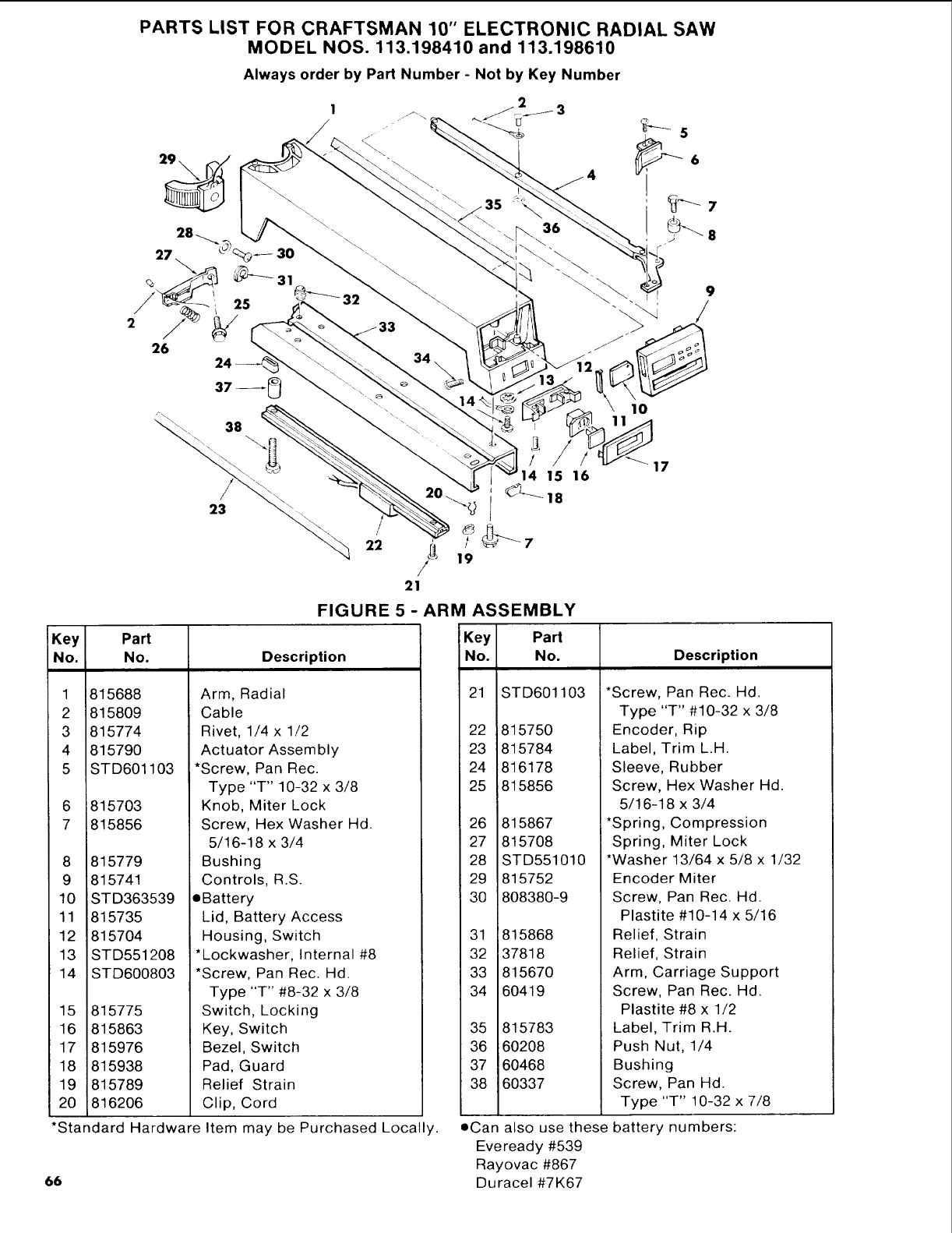
!Key
No.
66
1
2
3
4
5
6
7
8
9
10
11
12
13
14
PARTS LIST FOR CRAFTSMAN 10" ELECTRONIC RADIAL SAW
MODEL NOS. 113.198410 and 113.198610
Always order by Part Number - Not by Key Number
/
22
Part
No.
815688
815809
815774
815790
STD601103
815703
815856
815779
815741
STD363539
815735
815704
STD551208
STD600803
23
14 15 16
19
FIGURE 5 -ARM ASSEMBLY
9
10
Description
Arm, Radial
Cable
Rivet, 1/4 x 1/2
Actuator Assembly
*Screw, Pan Rec.
Type "T" 10-32 x 3/8
Knob, Miter Lock
Screw, Hex Washer Hd.
5/16-18 x 3/4
Bushing
Controls, R.S.
eBattery
Lid, Battery Access
Housing, Switch
*Lockwasher, Internal #8
*Screw, Pan Rec. Hd.
Type "T" #8-32 x 3/8
Switch, Locking
Key, Switch
Bezel, Switch
Pad, Guard
Relief Strain
Clip, Cord
15 815775
16 815863
17 815976
18 815938
19 815789
20 816206
*Standard Hardwareltem may be Purchased Locall,
Key Part
No. No. Description
21 STD601
22 815750
23 815784
24 816178
25 815856
26 815867
27 815708
28 STD551
29 815752
30 808380-9
31 815868
32 37818
33 815670
34 60419
35 815783
36 60208
37 60468
38 60337
103
010
*Screw, Pan Rec. Hd.
Type "T" #10-32 x 3/8
Encoder, Rip
Label, Trim L.H.
Sleeve, Rubber
Screw, Hex Washer Hd.
5/16-18 x 3/4
*Spring, Compression
Spring, Miter Lock
*Washer 13/64 x 5/8 x 1/32
Encoder Miter
Screw, Pan Rec. Hd.
Plastite #10-14 x 5/16
Relief, Strain
Relief, Strain
Arm, Carriage Support
Screw, Pan Rec. Hd.
Plastite #8 x 1/2
Label, Trim R.H.
Push Nut, 1/4
Bushing
Screw, Pan Hd.
Type "T" 10-32 x 7/8
•Can also usethese battery numbers:
Eveready #539
Rayovac #867
Duracel#7K67
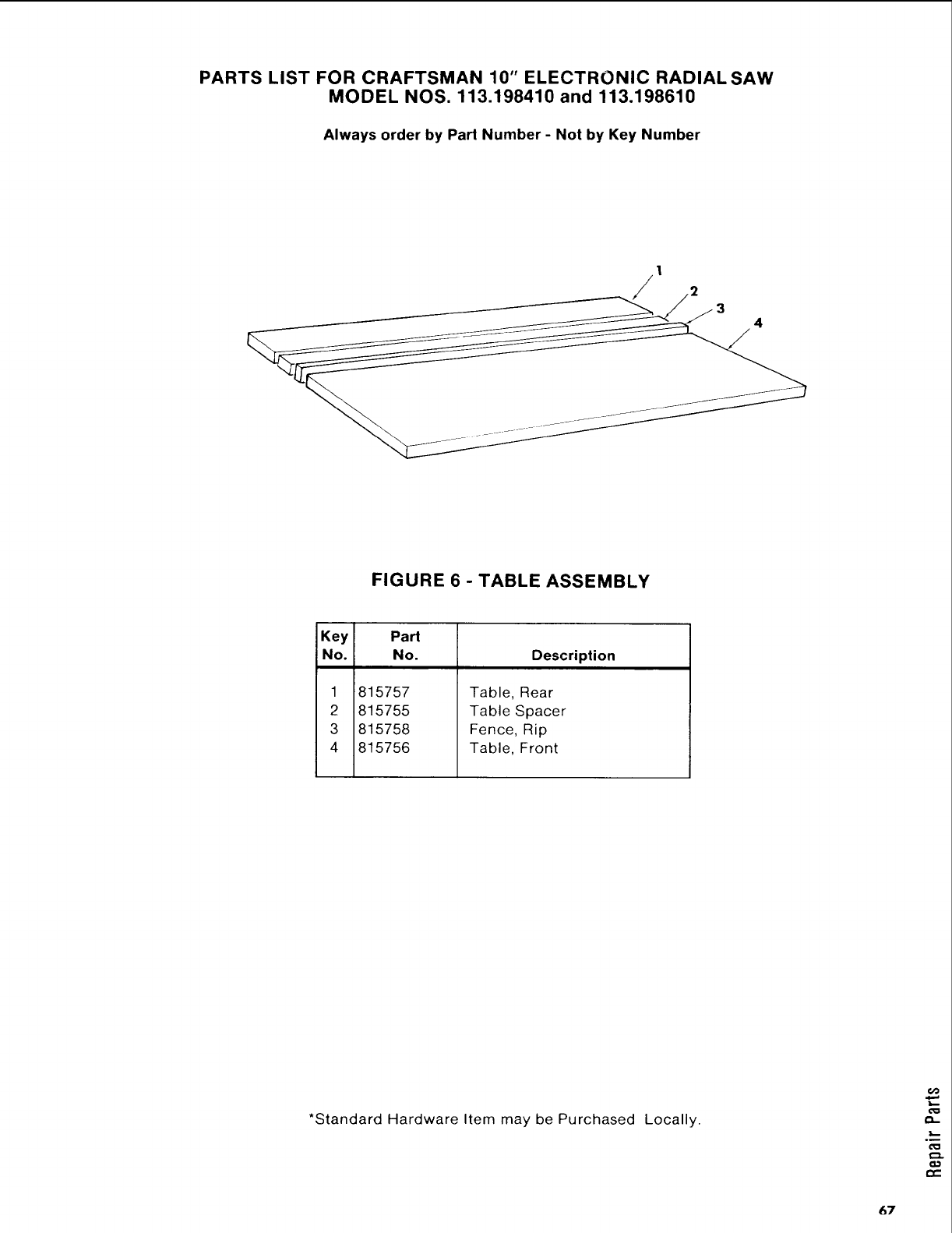
PARTS LIST FOR CRAFTSMAN 10" ELECTRONIC RADIAL SAW
MODEL NOS. 113.198410 and 113.198610
Always order by Part Number - Not by Key Number
1
FIGURE 6 - TABLE ASSEMBLY
Key Part
No. No. Description
1
2
3
4
815757
815755
815758
815756
Table, Rear
Table Spacer
Fence, Rip
Table, Front
*Standard Hardware Item may be Purchased Locally.
67
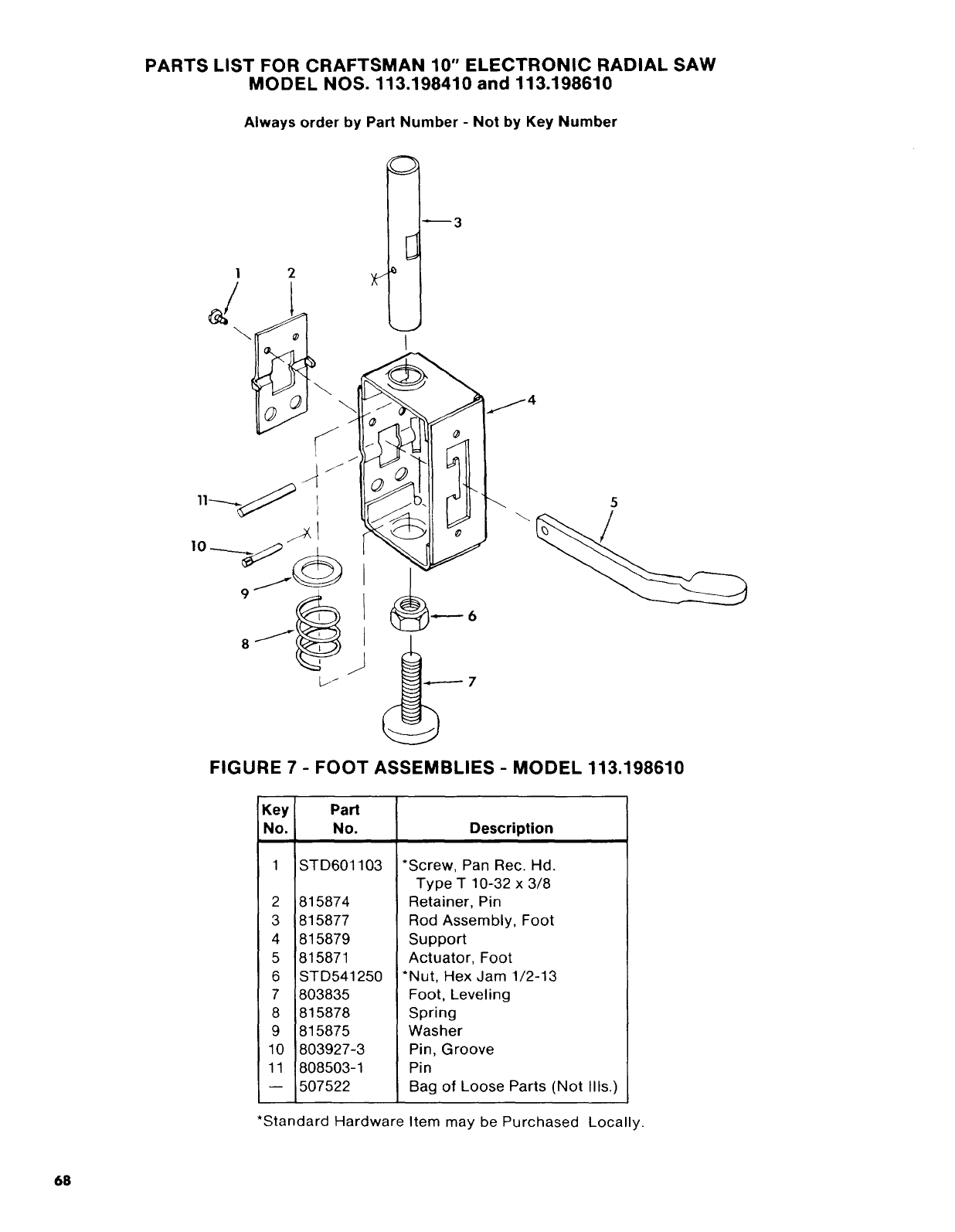
PARTS LIST FOR CRAFTSMAN 10" ELECTRONIC RADIAL SAW
MODEL NOS. 113,198410 and 113.198610
Always order by Part Number - Not by Key Number
]
FIGURE 7 -FOOT ASSEMBLIES -MODEL 113.198610
Key Part
No. No. Description
1 STD601103
2 815874
3 815877
4 815879
5 815871
6 STD541250
7 803835
8 815878
9 815875
10 803927-3
11 808503-1
-- 507522
*Screw, Pan Rec. Hd.
Type T 10-32 x 3/8
Retainer, Pin
Rod Assembly, Foot
Support
Actuator, Foot
*Nut, Hex Jam 1/2-13
Foot, Leveling
Spring
Washer
Pin, Groove
Pin
Bag of Loose Parts (Not Ills.)
*Standard Hardware Item may be Purchased Locally.
68
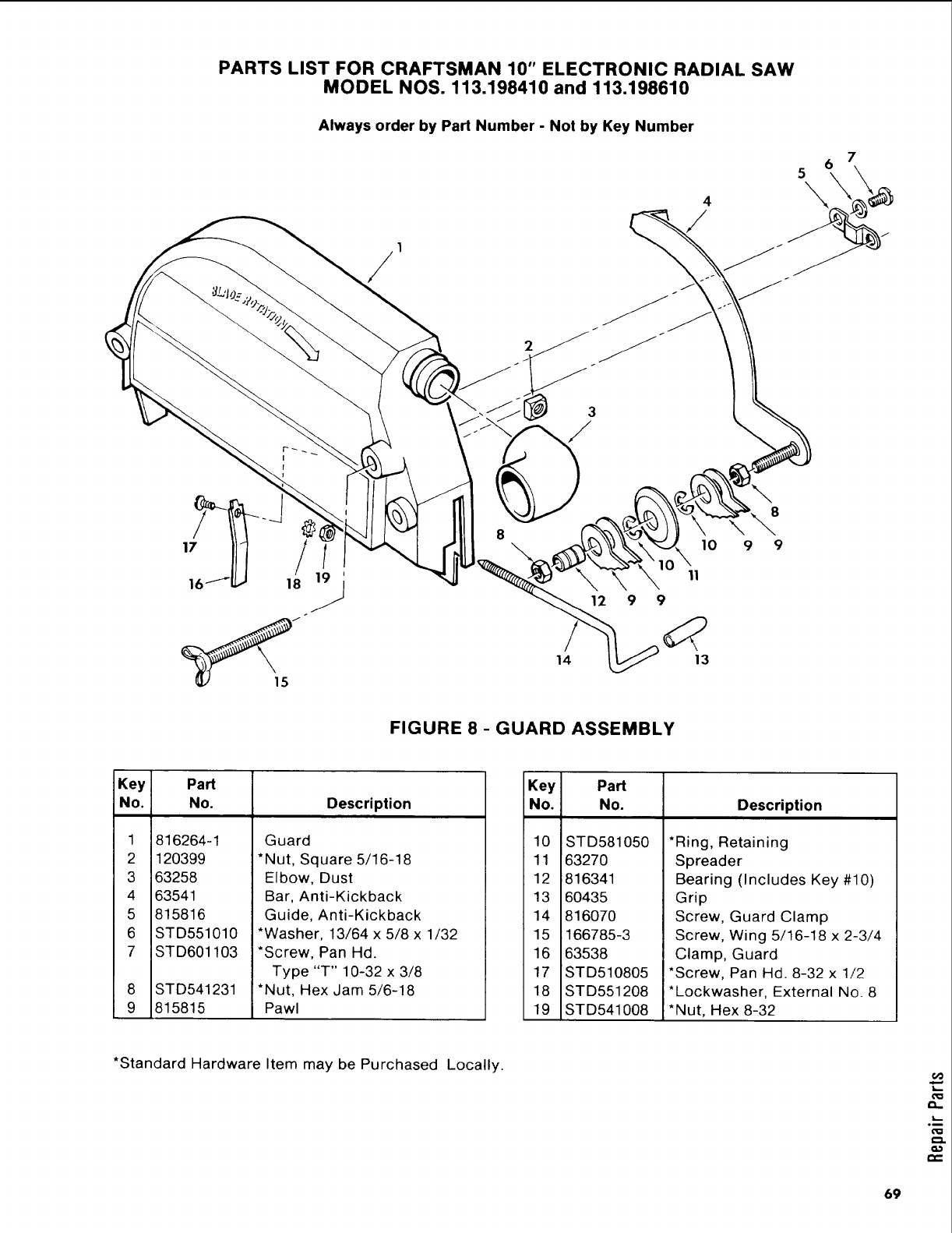
PARTS LIST FOR CRAFTSMAN 10" ELECTRONIC RADIAL SAW
MODEL NOS. 113.198410 and 113.198610
Always order by Part Number -Not by Key Number
4
7
5\
1
12 9 9
14 13
10
11
8
9 9
FIGURE 8 -GUARD ASSEMBLY
Key Part
No. No. Description
1
2
3
4
5
6
7
8
9
816264-1
120399
63258
63541
815816
STD551010
ST D601103
STD541231
815815
Guard
*Nut, Square 5/16-18
Elbow, Dust
Bar, Anti-Kickback
Guide, Anti-Kickback
*Washer, 13/64 x 5/8 x 1/32
*Screw, Pan Hd.
Type "T" 10-32 x 3/8
*Nut, Hex Jam 5/6-18
Pawl
Key Part
No. No. Description
10
11
12
13
14
15
16
17
18
19
STD581050
6327O
816341
60435
816070
166785-3
63538
STD510805
STD551208
STD541008
*Ring, Retaining
Spreader
Bearing (Includes Key #10)
Grip
Screw, Guard Clamp
Screw, Wing 5/16-18 x 2-3/4
Clamp, Guard
*Screw, Pan Hd. 8-32 x 1/2
*Lockwasher, External No. 8
*Nut, Hex 8-32
*Standard Hardware Item may be Purchased Locally.
69
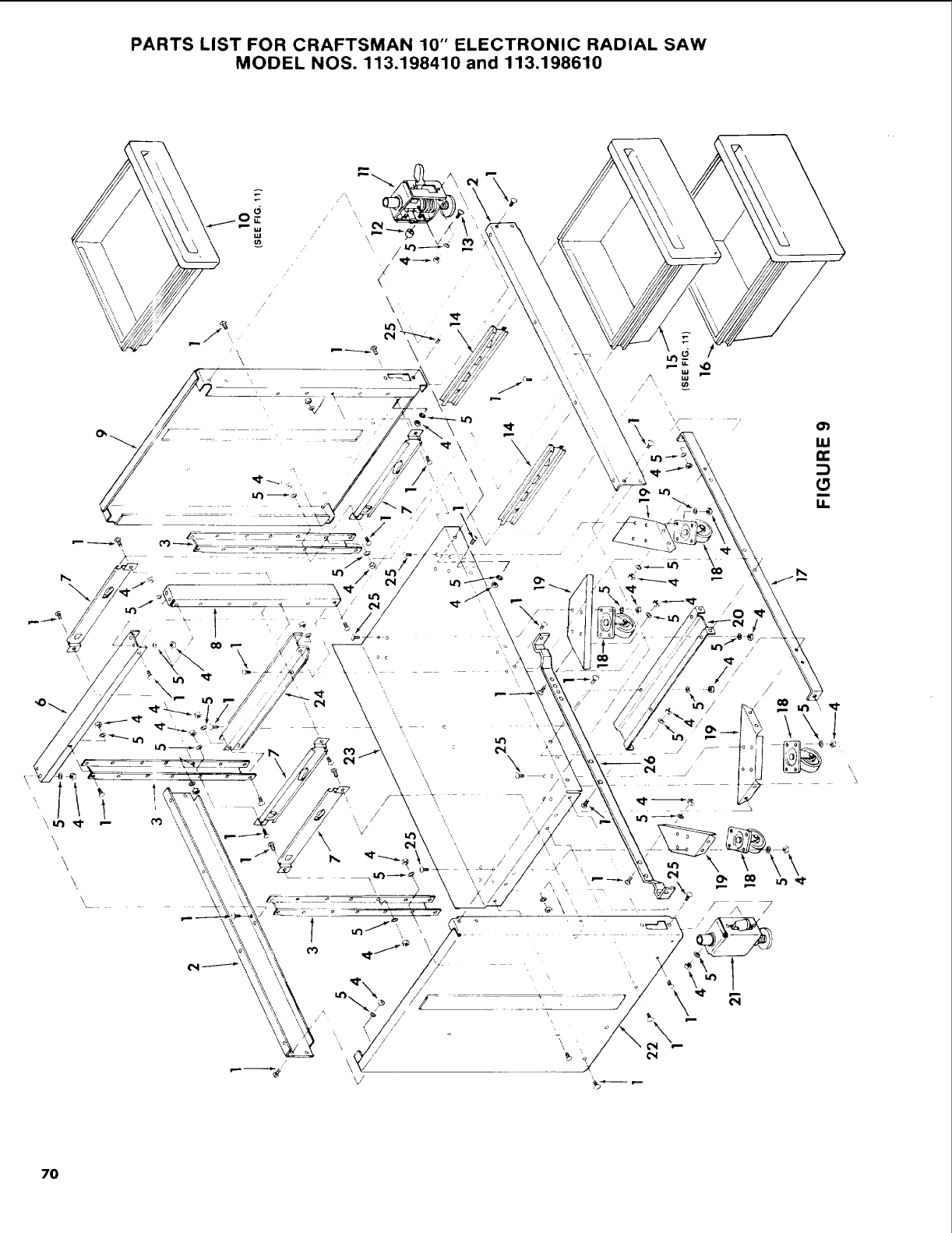
PARTS LIST FOR CRAFTSMAN 10" ELECTRONIC RADIAL SAW
MODEL NOS. 113.198410 and 113.198610
gJ
/
\
\
!
/
70
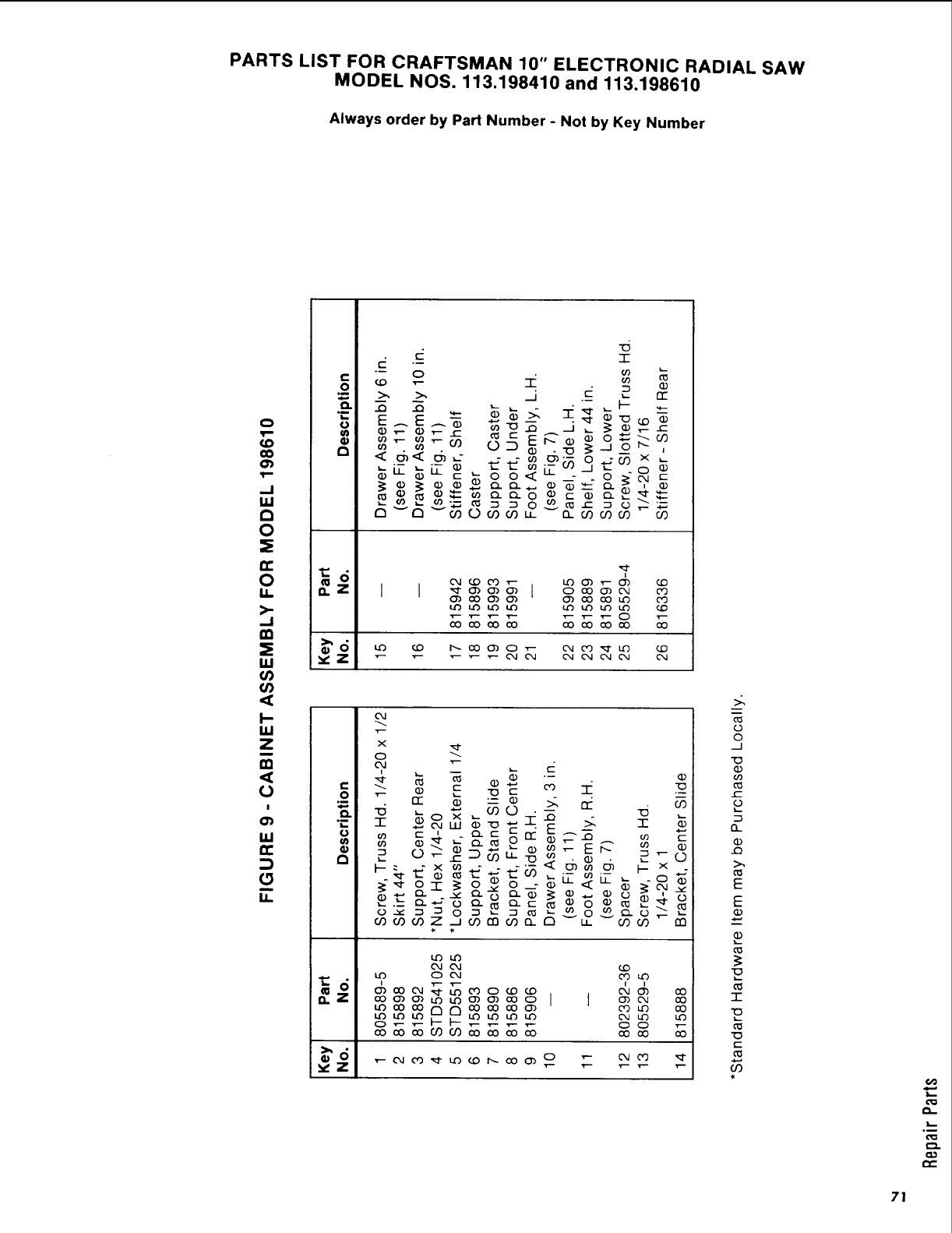
PARTS LIST FOR CRAFTSMAN 10" ELECTRONIC RADIAL SAW
MODEL NOS. 113.198410 and 113.198610
Always order by Part Number -Not by Key Number
5
0
u. _.z
03
03
I-
u.I
Z
Oc
O
om
O.
03 "."
,,, =_
m
I.I.
•.m
!?!
I I
_ Q_
_° <_o_c _
_0_ __
X
o
('kl ",r--
_(D C(D *--, CO -r':
_-- __ _ C ---
_ _ __- _
o_ _._ _ o_
O0 O0 O0 Z _ O0 O0 O0 __ F_ _ CO0"] m
0___ O0
0
0
.._1
(D
f-
13._
-r-
c
...,.,
O9
2-
71
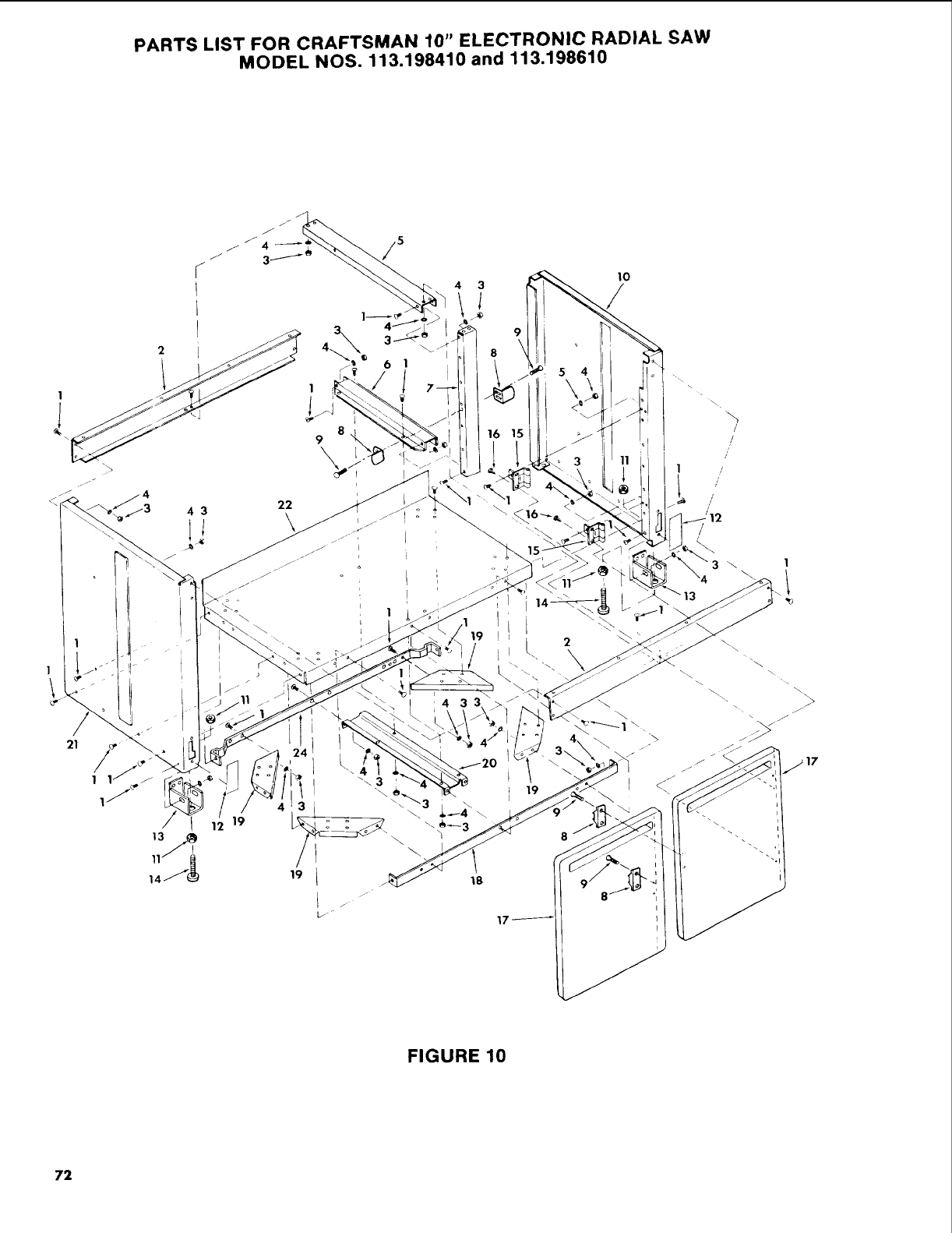
PARTS LIST FOR CRAFTSMAN 10" ELECTRONIC RADIAL SAW
MODEL NOS. 113.198410 and 113.198610
/
21
4 3
/
;4_
19
19
19
5 4
18
10
19
\
/
/
i
I/
L//'
/
FIGURE 10
72
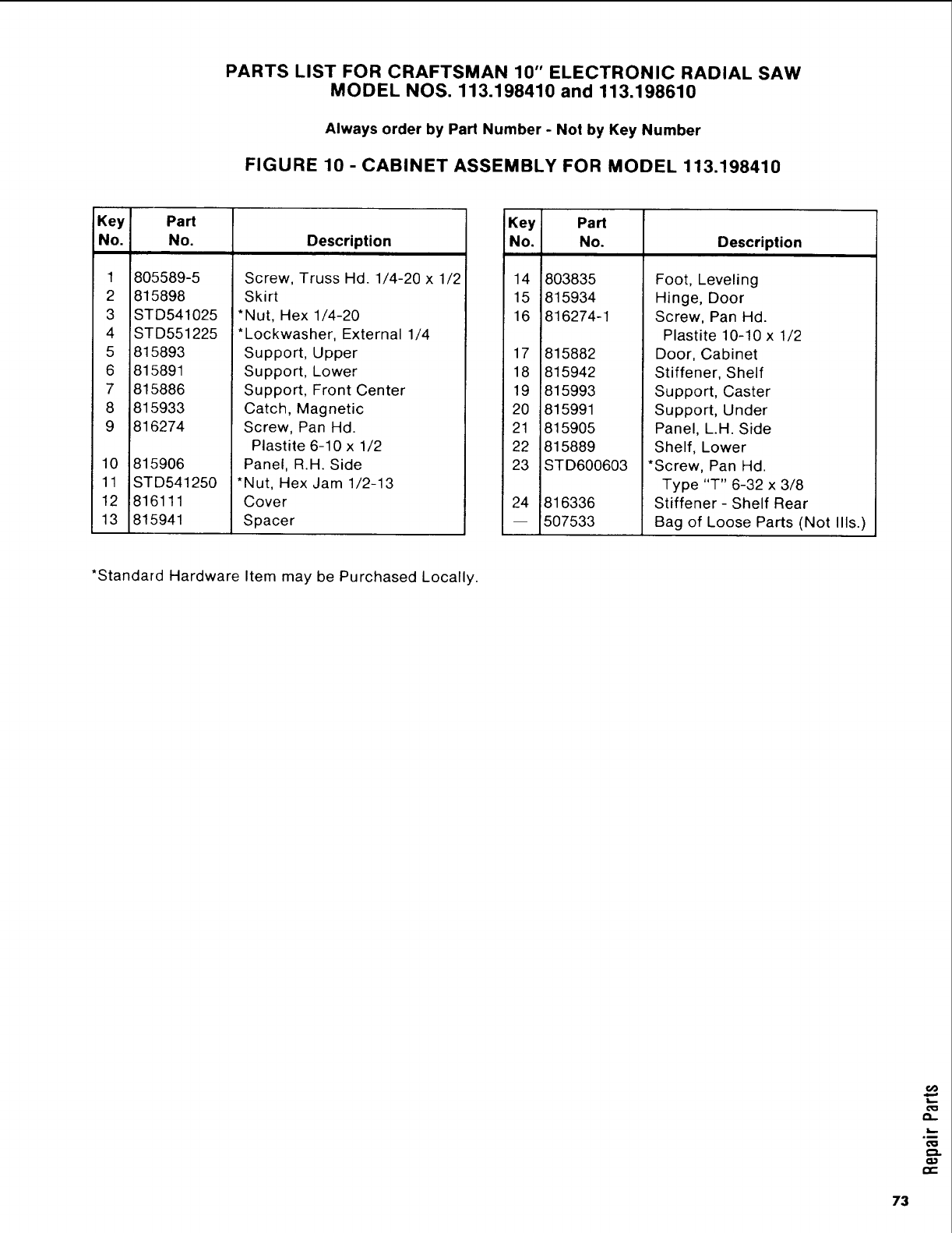
PARTS LIST FOR CRAFTSMAN 10" ELECTRONIC RADIAL SAW
MODEL NOS. 113.198410 and 113,198610
Always order by Part Number -Not by Key Number
FIGURE 10 -CABINET ASSEMBLY FOR MODEL 113.198410
Key Part
No. No. Description
1
2
3
4
5
6
7
8
9
805589-5
815898
STD541025
STD551225
815893
815891
815886
815933
816274
10 815906
11 STD541250
12 816111
13 815941
Screw, Truss Hd. 1/4-20 x 1/2
Skirt
*Nut, Hex 1/4-20
*Lockwasher, External 1/4
Support, Upper
Support, Lower
Support, Front Center
Catch, Magnetic
Screw, Pan Hd.
Plastite 6-10 x 1/2
Panel, R.H. Side
*Nut, Hex Jam 1/2-13
Cover
Spacer
Key Part
No, No. Description
14 803835
15 815934
16 816274-1
17 815882
18 815942
19 815993
20 815991
21 815905
22 815889
23 STD600603
24 816336
-- 507533
Foot, Leveling
Hinge, Door
Screw, Pan Hd.
Plastite 10-10 x 1/2
Door, Cabinet
Stiffener, Shelf
Support, Caster
Support, Under
Panel, L.H. Side
Shelf, Lower
*Screw, Pan Hd.
Type "T" 6-32 x 3/8
Stiffener - Shelf Rear
Bag of Loose Parts (Not Ills.)
*Standard Hardware Item may be Purchased Locally.
6@
.m
73
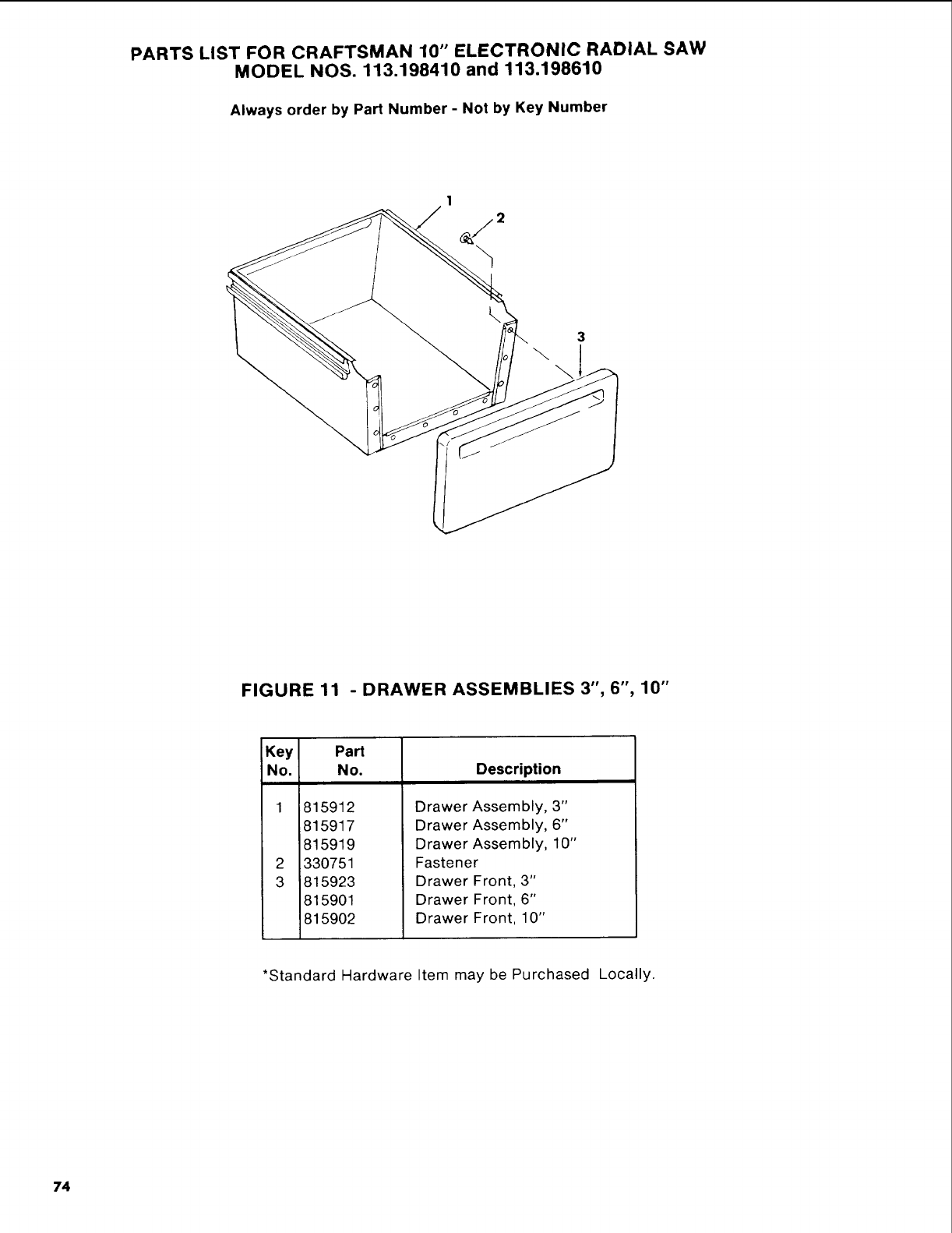
PARTS LIST FOR CRAFTSMAN 10" ELECTRONIC RADIAL SAW
MODEL NOS. 113.198410 and 113.198610
Always order by Part Number -Not by Key Number
3
\\
FIGURE 11 -DRAWER ASSEMBLIES 3", 6", 10"
Key Part
No. No. Description
1
2
3
1815912
815917
815919
330751
815923
815901
815902
Drawer Assembly, 3"
Drawer Assembly, 6"
Drawer Assembly, 10"
Fastener
Drawer Front, 3"
Drawer Front, 6"
Drawer Front, 10"
*Standard Hardware Item may be Purchased Locally.
74

NOTES
75
r -_ F
owners
manual
SERVICE
MODEL NO.
113.198410
10" DELUXEELECTRONIC
RADIAL SAW WITH
44" CABINET AND
2 DOORS
OR
113.198610
10" DELUXEELECTRONIC
RADIAL SAW WITH
44" CABINET AND
6 DRAWERS
HOW TO ORDER
REPAIRPARTS
l O-INCH DELUXEELECTRONIC
RADIAL SAW
Now that you have purchased your flO-inch electronic radial
saw, should a need ever exist for repair parts or service, simply
contact any Scars Scrvice Center and most Scars, Roebuck and
Co. stores. B_ sure to provide all pertinent facts when you call or
visit.
The model number of your 10-inch electronic radial saw will be
found on a plate attached to your saw, at the I_rt-hand side of
the bas_.
WHEN ORDERING REPAIR PARTS,ALWAYS GIVE THEFOLLOWING
INFORMATION:
PARTNUMBER PARTDESCRIPTION
MODEL NUMBER
113.198410
OR
113.198610
NAME OF ITEM
DELUXE ELECTRONIC
10-INCH RADIAL SAW
All parts listed may be ordered from any Scars Scn/ice Center
and most Scars store's. If the parts you need are not stocked
locally, your order will Ic_ electronically transmitted to a Scars
Repair Parts Distribution Center for handling.
J
Sold by SEARS,ROEBUCKAND CO., Chicago, IL.60684 U.S.A.
Part No. SP5013 Form No. SP5013-3 Printed in U.S.A. 3/87
