Craftsman 137186290 User Manual MITER SAW Manuals And Guides 1208251L
User Manual: Craftsman 137186290 137186290 CRAFTSMAN MITER SAW - Manuals and Guides View the owners manual for your CRAFTSMAN MITER SAW #137186290. Home:Tool Parts:Craftsman Parts:Craftsman MITER SAW Manual
Open the PDF directly: View PDF  .
.
Page Count: 52
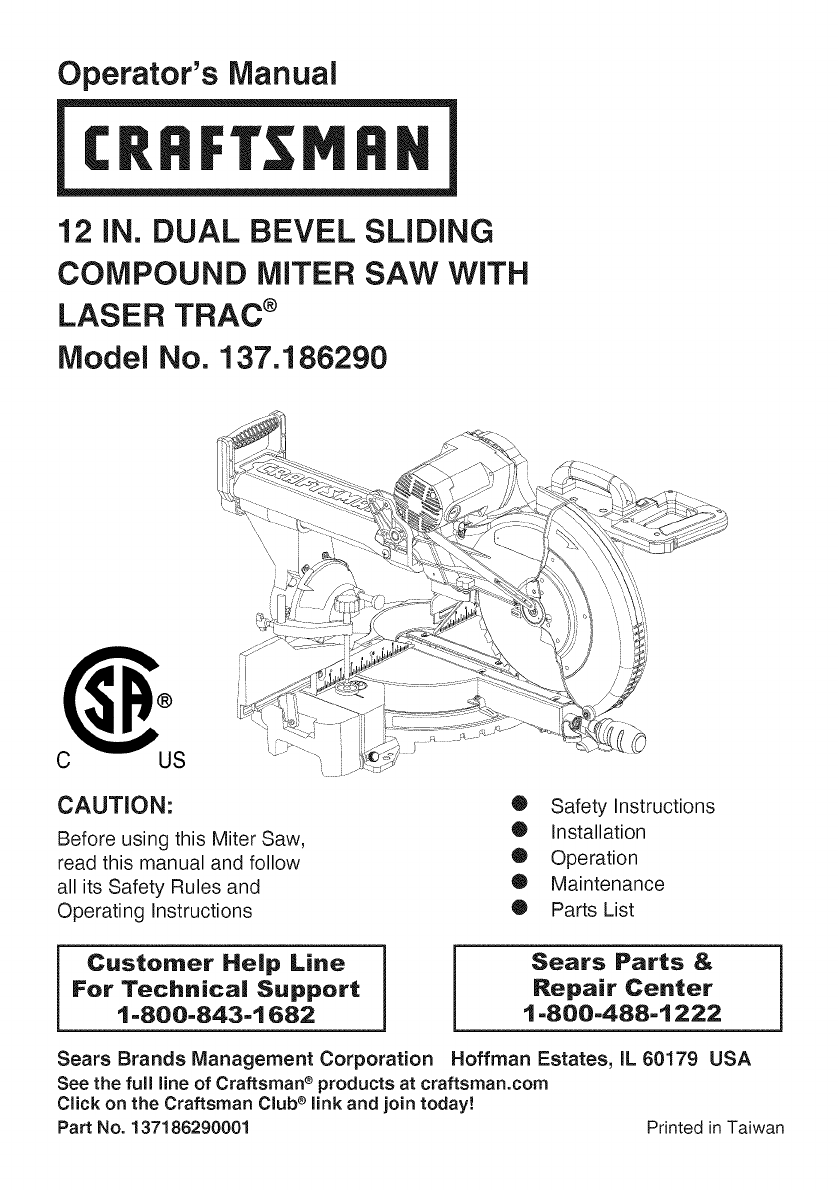
Operator's Manual
12 iN. DUAL BEVEL SLiDiNG
COMPOUND MITER SAW WiTH
LASER TRAC ®
Model No. 137.186290
C US
CAUTION:
Before using this Miter Saw,
read this manual and follow
all its Safety Rules and
Operating Instructions
0 Safety Instructions
0 Installation
0 Operation
0 Maintenance
0 Parts List
Customer Help Line
For Technical Support
1-800-843-1682
Sears Parts &
Repair Center
1-800-488-1222
Sears Brands Management Corporation Hoffman Estates, IL 60179 USA
See the full line of Craftsman e products at craftsman.corn
Click on the Craftsman Club e link and join today!
Part No. 137186290001 Printed in Taiwan

SECTION PAGE
Warranty ................................................................................................... 2
Product Specifications .............................................................................. 3
Symbols ..................................................................................................... 4
Power Tool Safety .................................................................................... 5
Compound Miter Saw Safety .................................................................... 7
Electrical Requirements and Safety .......................................................... 9
Accessories and Attachments ................................................................... 11
Tools Needed for Assembly ...................................................................... 12
Carton Contents ........................................................................................ 13
Know Your Compound Miter Saw ............................................................. 14
Glossary of Terms ..................................................................................... 15
Assembly ................................................................................................. 17
Adjustments .............................................................................................. 22
Operation .................................................................................................. 28
Maintenance ............................................................................................. 41
Troubleshooting Guide ............................................................................. 43
Parts List ................................................................................................... 45
Repair Protection Agreements .................................................................. 50
CRAFTSMAN PROFESSIONAL ONE YEAR FULL WARRANTY
FOR ONE YEAR from the date of purchase, this product is warranted against
any defects in material or workmanship. A defective product will receive free
repair or replacement if repair is unavailable.
For warranty coverage details to obtain free repair or replacement, visit the
web site: www.craftsman.com
This warranty does not cover the blade, which is an expendable part that can
wear out from normal use within the warranty period.
This warranty gives you specific legal rights, and you may also have other
rights which vary from state to state.
Sears Brands Management Corporation, Hoffman Estates, IL 60179
,_k WARNING]
Some dust created by power sanding, sawing, grinding, drilling and other
construction activities contains chemicals known to the state of California
to cause cancer, birth defects or other reproductive harm. Some examples
of these chemicals are:
o Lead from lead-based paints,
o Crystalline silica from bricks and cement and other masonry products, and
o Arsenic and chromium from chemically-treated lumber.
Your risk from these exposures varies, depending on how often you do this
type of work. To reduce your exposure to these chemical: work in a well
ventilated area, and work with approved safety equipment, such as those
2012/05
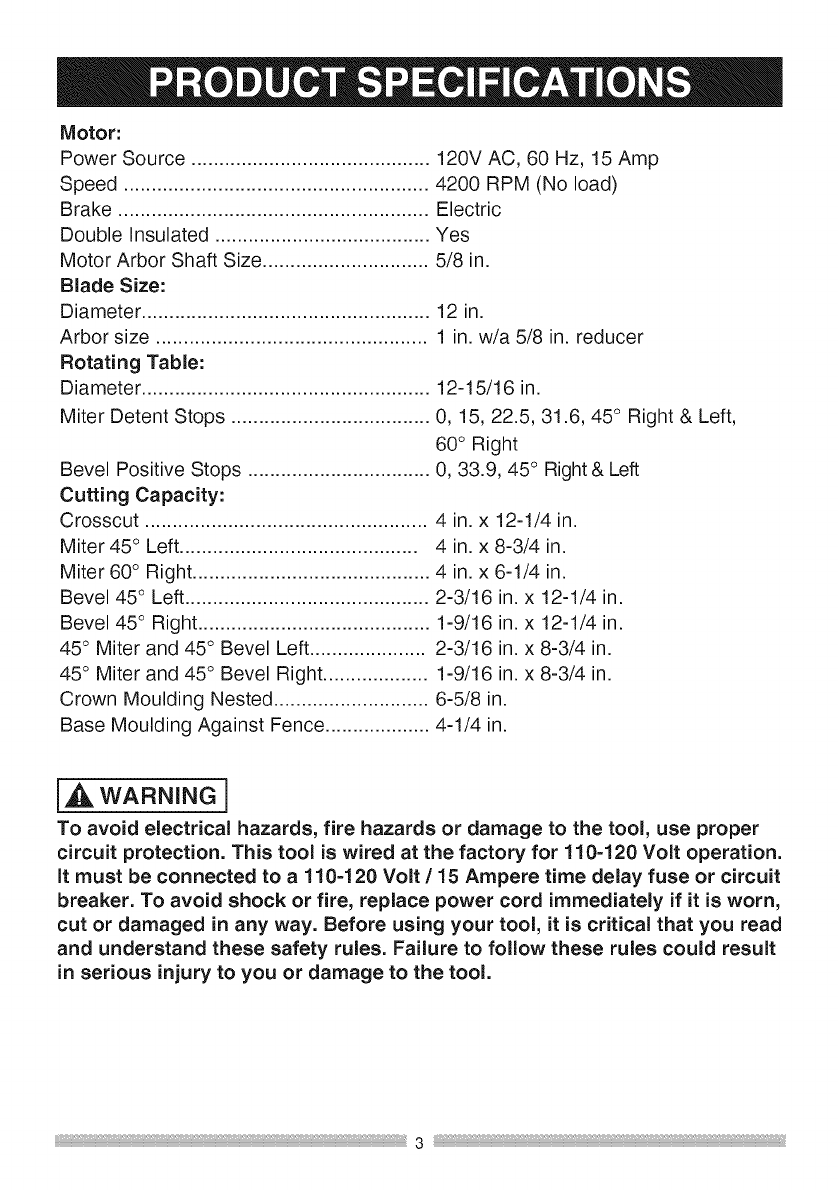
Motor:
Power Source ........................................... 120V AC, 60 Hz, 15 Amp
Speed ....................................................... 4200 RPM (No load)
Brake ........................................................ Electric
Double insulated ....................................... Yes
Motor Arbor Shaft Size .............................. 5/8 in.
Blade Size:
Diameter ....................................................
Arbor size .................................................
Rotating Table:
Diameter ....................................................
Miter Detent Stops ....................................
Bevel Positive Stops .................................
Cutting Capacity:
12 in.
1 in. w/a 5/8 in. reducer
12-15/16 in.
0, 15, 22.5, 31.6, 45° Right & Left,
60° Right
0, 33.9, 45 ° Right & Left
Crosscut ................................................... 4 in. x 12-1/4 in.
Miter 45 ° Left ........................................... 4 in. x 8-3/4 in.
Miter 60° Right ........................................... 4 in. x 6-1/4 in.
Bevel 45 ° Left ............................................ 2-3/16 in. x 12-1/4 in.
Bevel 45 ° Right .......................................... 1-9/16 in. x 12-1/4 in.
45° Miter and 45° Bevel Left ..................... 2-3/16 in. x 8-3/4 in.
45° Miter and 45° Bevel Right ................... 1-9/16 in. x 8-3/4 in.
Crown Moulding Nested ............................ 6-5/8 in.
Base Moulding Against Fence ................... 4-1/4 in.
i,i_ WARNING i
To avoid electrical hazards, fire hazards or damage to the tool, use proper
circuit protection. This tool is wired at the factory for 110-120 Volt operation.
It must be connected to a 110=120 Volt /15 Ampere time delay fuse or circuit
breaker. To avoid shock or fire, replace power cord immediately if it is worn,
cut or damaged in any way. Before using your tool, it is critical that you read
and understand these safety rules. Failure to follow these rules could result
in serious injury to you or damage to the tool.
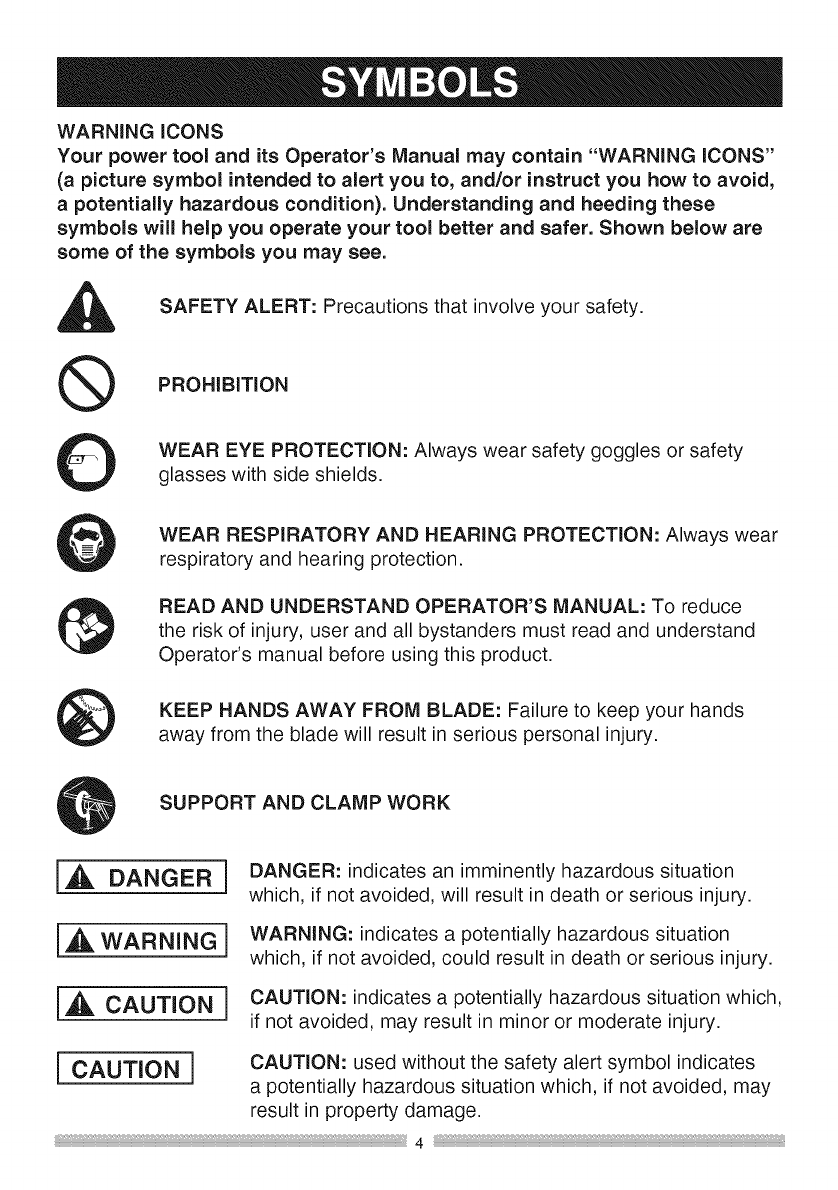
WARNING iCONS
Your power tool and its Operator's Manual may contain "WARNING iCONS"
(a picture symbol intended to alert you to, and/or instruct you how to avoid,
apotentially hazardous condition). Understanding and heeding these
symbols will help you operate your tool better and safer. Shown below are
some of the symbols you may see.
SAFETY ALERT: Precautions that involve your safety.
PROHiBiTiON
WEAR EYE PROTECTION: Always wear safety goggles or safety
glasses with side shields.
WEAR RESPIRATORY AND HEARING PROTECTION: Always wear
respiratory and hearing protection.
READ AND UNDERSTAND OPERATOR'S MANUAL: To reduce
the risk of injury, user and all bystanders must read and understand
Operator's manual before using this product.
KEEP HANDS AWAY FROM BLADE: Failure to keep your hands
away from the blade will result in serious personal injury.
SUPPORT AND CLAMP WORK
[,A DANGER i
i_ WARNING 1
IA CAUTION]
DANGER: indicates an imminently hazardous situation
which, if not avoided, will result in death or serious injury.
WARNING: indicates a potentially hazardous situation
which, if not avoided, could result in death or serious injury.
CAUTION: indicates a potentially hazardous situation which.
if not avoided, may result in minor or moderate injury.
I CAUTION i CAUTION: used without the safety alert symbol indicates
a potentially hazardous situation which, if not avoided, may
result in property damage.
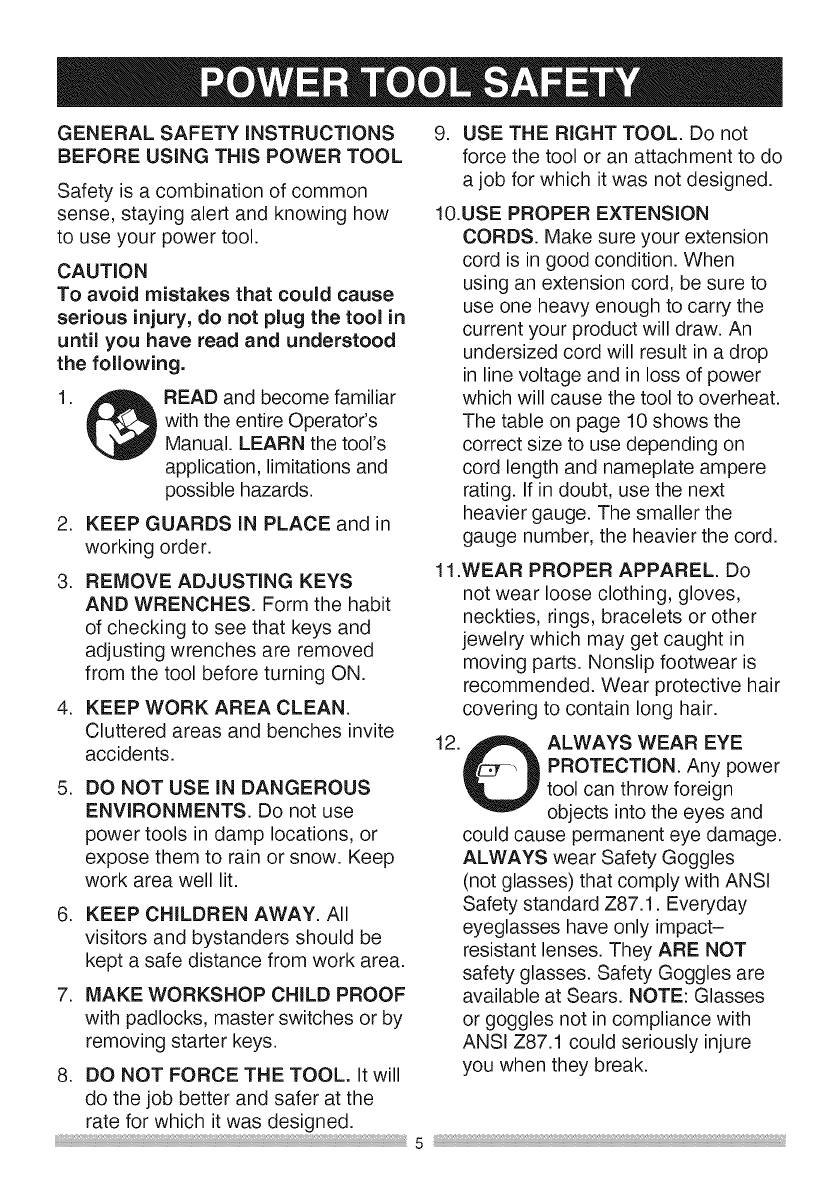
GENERALSAFETYINSTRUCTIONS
BEFOREUSINGTHISPOWERTOOL
Safetyisa combinationofcommon
sense,stayingalertandknowinghow
to useyourpowertool.
CAUTION
To avoid mistakes that could cause
serious injury, do not plug the tool in
until you have read and understood
the following.
1. READ and become familiar
with the entire Operator's
Manual. LEARN the tool's
application, limitations and
possible hazards.
2. KEEP GUARDS IN PLACE and in
working order.
3. REMOVE ADJUSTING KEYS
AND WRENCHES. Form the habit
of checking to see that keys and
adjusting wrenches are removed
from the tool before turning ON.
4. KEEP WORK AREA CLEAN.
Cluttered areas and benches invite
accidents.
.DO NOT USE IN DANGEROUS
ENVIRONMENTS. Do not use
power tools in damp locations, or
expose them to rain or snow. Keep
work area well lit.
6. KEEP CHILDREN AWAY. All
visitors and bystanders should be
kept a safe distance from work area.
7. MAKE WORKSHOP CHILD PROOF
with padlocks, master switches or by
removing starter keys.
8. DO NOT FORCE THE TOOL. It will
do the job better and safer at the
rate for which it was designed.
9. USE THE RIGHT TOOL. Do not
force the tool or an attachment to do
a job for which it was not designed.
10.USE PROPER EXTENSION
CORDS. Make sure your extension
cord is in good condition. When
using an extension cord, be sure to
use one heavy enough to carry the
current your product will draw. An
undersized cord will result in a drop
in line voltage and in loss of power
which will cause the tool to overheat.
The table on page 10 shows the
correct size to use depending on
cord length and nameplate ampere
rating. If in doubt, use the next
heavier gauge. The smaller the
gauge number, the heavier the cord.
11.WEAR PROPER APPAREL. Do
not wear loose clothing, gloves,
neckties, rings, bracelets or other
jewelry which may get caught in
moving parts. Nonslip footwear is
recommended. Wear protective hair
covering to contain long hair.
12. ,SP_L ALWAYS WEAR EYE
UPROTECTION. Any power
tool can throw foreign
objects into the eyes and
could cause permanent eye damage.
ALWAYS wear Safety Goggles
(not glasses) that comply with ANSI
Safety standard Z87.1. Everyday
eyeglasses have only impact-
resistant lenses. They ARE NOT
safety glasses. Safety Goggles are
available at Sears. NOTE: Glasses
or goggles not in compliance with
ANSI Z87.1 could seriously injure
you when they break.
5
13. WEAR A FACE MASK
OR DUST MASK. Sawing
operation produces dust.
14. SECURE WORK. Use
clamps or a vise to hold
work when practical. It
is safer than using your
hand and it frees both hands to
operate the tool.
part that is damaged should be
properly repaired or replaced.
20. NEVER LEAVE THE TOOL
RUNNING UNATTENDED. TURN
THE POWER "OFF". Do not walk
away from a running tool until the
blade comes to a complete stop
and the tool is unplugged from the
power source.
1&DISCONNECT TOOLS FROM
POWER SOURCE before servicing,
and when changing accessories
such as blades, bits and cutters.
16.REDUCE THE RISK OF
UNINTENTIONAL STARTING.
Make sure switch is in the OFF
position before plugging the tool in.
17.USE RECOMMENDED
ACCESSORIES. Consult this
Operator's Manual for recommended
accessories. The use of improper
accessories may cause risk of injury
to yourself or others.
18.NEVER STAND ON THE TOOL.
Serious injury could occur if the
tool is tipped or if the cutting tool is
unintentionally contacted.
19.CHECK FOR DAMAGED PARTS.
Before further use of the tool, a
guard or other part that is damaged
should be carefully checked to
determine that it will operate
properly and perform its intended
function - check for alignment of
moving parts, binding of moving
parts, breakage of parts, mounting
and any other conditions that may
affect its operation. A guard or other
21.
22.
23.
24.
25.
DO NOT OVERREACH. Keep
proper footing and balance at all
times.
NEVER reach your hand or arm
across the path of the cutting blade.
MAINTAIN TOOLS WITH CARE.
Keep tools sharp and clean for best
and safest performance. Follow
instructions for lubricating and
changing accessories.
WARNING: Dust generated from
certain materials can be hazardous
to your health. Always operate saw
in well-ventilated area and provide
for proper dust removal.
{_ DANGER i
People with electronic devices,
such as pacemakers, should
consult their physician(s) before
using this product. Operation
of electrical equipment in close
proximity to a heart pacemaker
could cause interference or failure
of the pacemaker.
SPECiFiCSAFETYiNSTRUCTiONS
FOR THiS COMPOUND MITER SAW
.DO NOT operate the miter saw
until it is completely assembled
and installed according to these
instructions.
.
.
.
.
.
.
.
iF YOU ARE NOT thoroughly
familiar with the operation of miter
saws, seek guidance from your
supervisor, instructor or other
qualified person.
ALWAYS hold the work firmly
against the fence and table.
DO NOT perform any operation
free hand (use clamp wherever
possible).
KEEP HANDS out of the path of the
saw blade. If the workpiece you are
cutting would cause your hands to
be within 8-3/4 in. of the saw blade,
the workpiece should be clamped in
place before making the cut.
BE SURE the blade is sharp, runs
freely and is free of vibration.
ALLOW the motor to come up to full
speed before starting a cut.
KEEP THE MOTOR AiR SLOTS
CLEAN and free of chips or dust.
ALWAYS MAKE SURE all handles
are tight before cutting, even if the
table is positioned in one of the
positive stops.
9. BE SURE both the blade and the
collar are clean and the arbor bolt is
tightened securely.
10.USE only blade collars specified for
your saw.
11.NEVER use blades larger in
diameter than 12 inches.
12.NEVER apply lubricants to the
blade when it is running.
13.ALWAYS check the blade for
cracks or damage before operation.
Replace a cracked or damaged
blade immediately.
14.NEVER use blades recommended
for operation at less than 4200 RPM.
15.ALWAYS keep the blade guards in
place and use at all times.
16.NEVER reach around the saw
blade.
17.MAKE SURE the blade is not
contacting the workpiece before the
switch is turned ON.
1&iMPORTANT: After completing the
cut, release the trigger and wait for
the blade to stop before returning
the saw to the raised position.
1&MAKE SURE the blade has come
to a complete stop before removing
or securing the workpiece, changing
the workpiece angle or changing the
angle of the blade.
20.NEVER cut metals or masonry
products with this tool. This miter
saw is designed for use on wood
and wood-like products.
7
21 .NEVER cut small pieces. If the
workpiece being cut would cause
your hand or fingers to be within
8-3/4 in. of the saw blade the
workpiece is too small.
22.PROVIDE adequate support to the
sides of the saw table for long work
pieces.
23.NEVER use the miter saw in an
area with flammable liquids or
gases.
24.NEVER use solvents to clean plastic
parts. Solvents could possibly
dissolve or otherwise damage the
material.
25.SHUT OFF the power before
servicing or adjusting the tool.
26.DISCONNECT the saw from
the power source and clean the
machine when finished using.
27.MAKE SURE the work area is clean
before leaving the machine.
28.SHOULD any part of your miter saw
be missing, damaged, or fail in any
way, or any electrical component fail
to perform properly, lock the switch
and remove the plug from the power
supply outlet. Replace missing,
damaged, or failed parts before
resuming operation.
29.Because of the downward cutting
motion, your safety requires that
you stay very alert to keeping hands
and fingers away from the path that
the blade travels.
30.Be sure all guards are in place
and working. If a guard seems
slow to return to its normal position
or "hangs-up", adjust or repair it
immediately. Be alert at all times
- especially during repetitive,
monotonous operations. Don't be
lulled into carelessness due to a
false sense of security. Blades
are extremely unforgiving. Clean
the lower guard frequently to help
visibility and movement. Unplug
before adjustment or cleaning.
31.Abrasive cut-off wheels should
not be used on miter saws. Miter
saw guards are not appropriate for
abrasive cut-off wheels.
32.To avoid loss of control or placing
hands in the path of the blade,
hold or clamp all material securely
against the fence when cutting. Do
not perform operations freehand.
33.Support long material at the same
height as the saw table.
34.After completing a cut, release the
trigger switch and allow the blade to
come to a complete stop, then raise
the saw blade from the workpiece
35.Lock the miter saw head in the
down position during transport or
when not in use.
36.DRY RUN - It is important to know
where the blade will intersect with the
workpiece during cutting operations.
Always perform a simulated cutting
sequence with the power tool switched
OFF to gain an understanding of the
projected path of the saw blade. At
some extreme angles, the right or left
side fence might have to be removed
to ensure proper clearance prior to
making a cut.
POWERSUPPLYAND MOTOR
SPECiFiCATiONS
The AC motor used in this saw is
a universal, nonreversible type.
See "MOTOR" in the "PRODUCT
SPECIFICATIONS" section on page 3.
[,,d_WARNING]
To avoid electrical hazards, fire
hazards, or damage to the tool,
use proper circuit protection. Your
saw is wired at the factory for 120V
operation. Connect to a 120V, 15A
circuit and use a 15A time delay
fuse or circuit breaker. To avoid
shock or fire, if power cord is worn
or cut, or damaged in any way, have
it replaced immediately.
DOUBLE iNSULATED []
The power tool is double insulated to
provide a double thickness of insulation
between you and tool's electrical
system. All exposed metal parts are
isolated from the internal metal motor
components with protecting insulation.
Replacement parts - When servicing,
use only identical replacement parts.
Polarized plugs - This saw has a plug
that looks like the one shown below:
To reduce the risk of electrical shock,
this saw has a polarized plug (one
blade is wider than the other). This plug
will fit in a polarized outlet only one
way. If the plug does not fit fully in the
outlet, reverse the plug. If it still does
not fit, contact a qualified electrician to
install the proper outlet. Do not change
the plug in any way.
[,_k WARNING]
Double insulation does not take the
place of normal safety precautions
when operating this tool.
To avoid electrocution:
1. Use only identical replacement parts
when servicing a tool with double
insulation. Servicing should be
performed by a qualified technician.
2. Do not use power tools in wet or
damp locations or expose them to
rain or snow.
MOTOR SAFETY PROTECTION
iMPORTANT
To avoid motor damage, the motor
should be blown out or vacuumed
frequently to keep sawdust from
interfering with the motor ventilation.
1. Connect this saw to a 120V circuit.
This circuit must not be less than a
#12 wire with a 20A time lag fuse or
a #14 wire with a 15A time lag fuse.
NOTE: When using an extension
cord on a circuit with a #14 wire, the
extension cord must not exceed 25
feet in length.
2. If the motor will not start, release
the trigger switch immediately.
UNPLUG THE SAW. Check the
saw blade to make sure it turns
freely. If the blade is free, try to
start the saw again. If the motor
still does not start, refer to the
TROUBLESHOOTING GUIDE.
9 _,
3. If the tool suddenly stalls while
cutting wood, release the trigger
switch, unplug the tool and free the
blade from the wood. The saw may
now be started and the cut finished.
4. FUSES may "blow" or circuit
breakers may trip frequently if:
a. MOTOR is overloaded -
overloading can occur if you feed
too rapidly or make too many
start/stops in a short time.
b. LINE VOLTAGE is more
than 10% above or below the
nameplate voltage rating. For
heavy loads, the voltage at motor
terminals must equal the voltage
specified on the nameplate.
c. IMPROPER or dull saw blades
are used.
5. Most motor troubles may be traced
to loose or incorrect connections,
overload, low voltage or inadequate
power supply wiring. Always check
the connections, the load and
supply circuit if the motor doesn't
run well. Check minimum gauge for
the length of cord you are using on
the chart below.
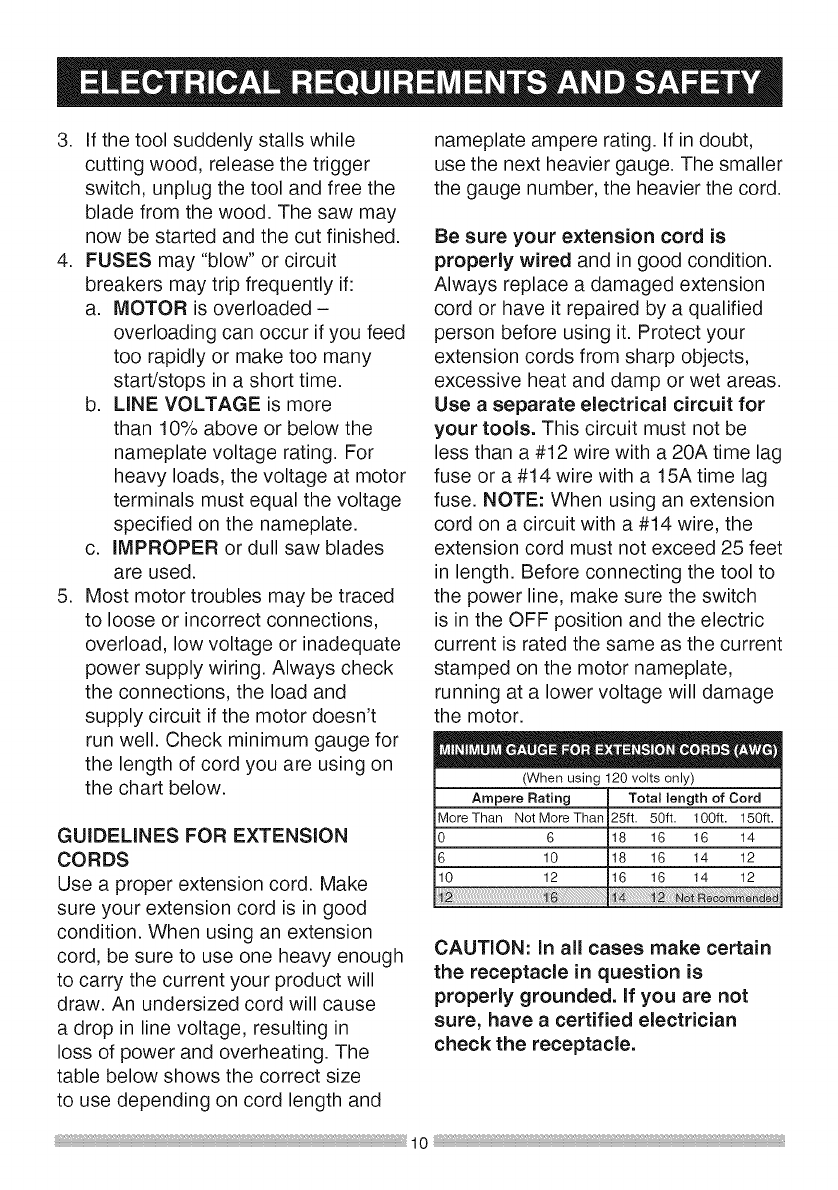
GUIDELINES FOR EXTENSION
CORDS
Use a proper extension cord. Make
sure your extension cord is in good
condition. When using an extension
cord, be sure to use one heavy enough
to carry the current your product will
draw. An undersized cord will cause
a drop in line voltage, resulting in
loss of power and overheating. The
table below shows the correct size
to use depending on cord length and
nameplate ampere rating. If in doubt,
use the next heavier gauge. The smaller
the gauge number, the heavier the cord.
Be sure your extension cord is
properly wired and in good condition.
Always replace a damaged extension
cord or have it repaired by a qualified
person before using it. Protect your
extension cords from sharp objects,
excessive heat and damp or wet areas.
Use a separate electrical circuit for
your tools. This circuit must not be
less than a #12 wire with a 20A time lag
fuse or a #14 wire with a 15A time lag
fuse. NOTE: When using an extension
cord on a circuit with a #14 wire, the
extension cord must not exceed 25 feet
in length. Before connecting the tool to
the power line, make sure the switch
is in the OFF position and the electric
current is rated the same as the current
stamped on the motor nameplate,
running at a lower voltage will damage
the motor.
(When using 120 volts only)
Ampere Rating Total length of Cord
MoreThan Not More Than 25ft. 50ft. 100ft. 150ft.
0 6 18 16 16 14
6 10 !18 16 14 12
10 j_ [_6 _6 !4 !2
!
CAUTION: In all cases make certain
the receptacle in question is
properly grounded. If you are not
sure, have a certified electrician
check the receptacle.
RECOMMENDEDACCESSORIES
i_ WARNING]
eUse only accessories
recommended for this miter saw.
Follow instructions that accompany
accessories. Use of improper
accessories may cause hazards.
o The use of any cutting tool
except 12 in. saw blades which
meet the requirements under
recommended accessories
is prohibited. Do not use
accessories such as shaper
cutters or dado sets. Ferrous
metal cutting and the use of
abrasive wheels is prohibited.
• Do not attempt to modify this
tool or create accessories not
recommended for use with this
tool. Any such alteration or
modification is misuse and could
result in a hazardous condition
leading to possible serious injury.
WAFININGI
Read warnings and conditions on
your CARBIDE TIPPED SAW BLADE.
Do not operate the saw without the
proper saw blade guard in place.
Carbide is a very hard but brittle
material. Care should be taken while
mounting, using, and storing carbide
tipped blades to prevent accidental
damage. Slight shocks, such as
striking the tip while handling, can
seriously damage the blade. Foreign
objects in the workpiece, such as
wire or nails, can also cause tips
to crack or break off. Before using,
always visually examine the blade
and tips for bent blade, cracks,
breakage, missing or loose tips, or
other damage. Do not use if damage
is suspected. Failure to heed safety
instructions and warnings can result
in serious bodily injury.
ACCESSORIES
Visit a Craftsman Hardware
Department or see the Craftsman
Power and Hand Tool Catalog to
purchase recommended accessories
for this power tool.
AkWARNINGI
To avoid the risk of personal injury,
do not modify this power tool or use
accessories that are not Craftsman
recommended.
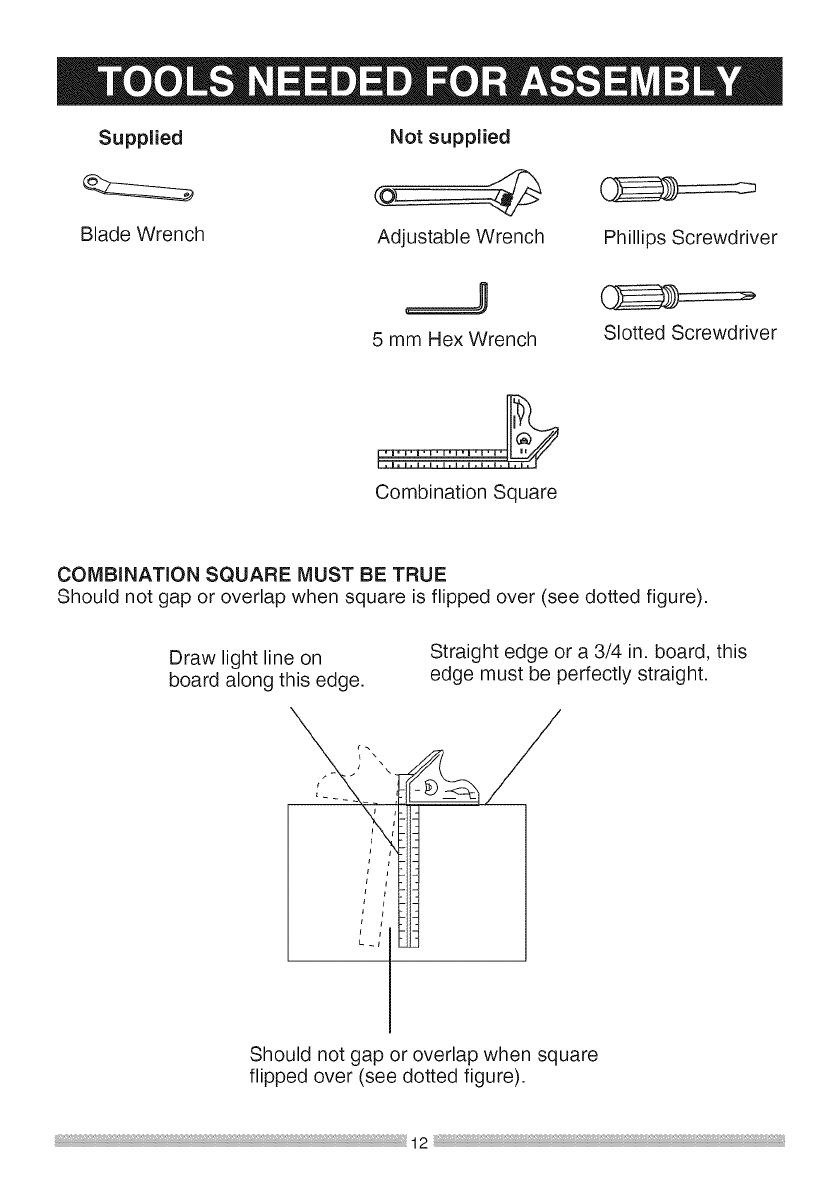
Supplied Not supplied
Blade Wrench Adjustable Wrench
5 mm Hex Wrench
Phillips Screwdriver
Slotted Screwdriver
Combination Square
COMBINATION SQUARE MUST BE TRUE
Should not gap or overlap when square is flipped over (see dotted figure).
Draw light line on
board along this edge.
Straight edge or a 3/4 in. board, this
edge must be perfectly straight.
Should not gap or overlap when square
flipped over (see dotted figure).
UNPACKINGYOUR MITER SAW
{,A WARNING j
To avoid injury from unexpected
starting or electrical shock, do not
plug the power cord into a source
of power during unpacking and
assembly. This cord must remain
unplugged whenever you are
working on the saw.
1. Remove the miter saw from the
carton.
IMPORTANT: Do not lift miter saw
by the trigger switch handle. It may
cause misalignment. Lift machine by
the built-in carry handle.
2. Place the saw on a secure stationary
work surface.
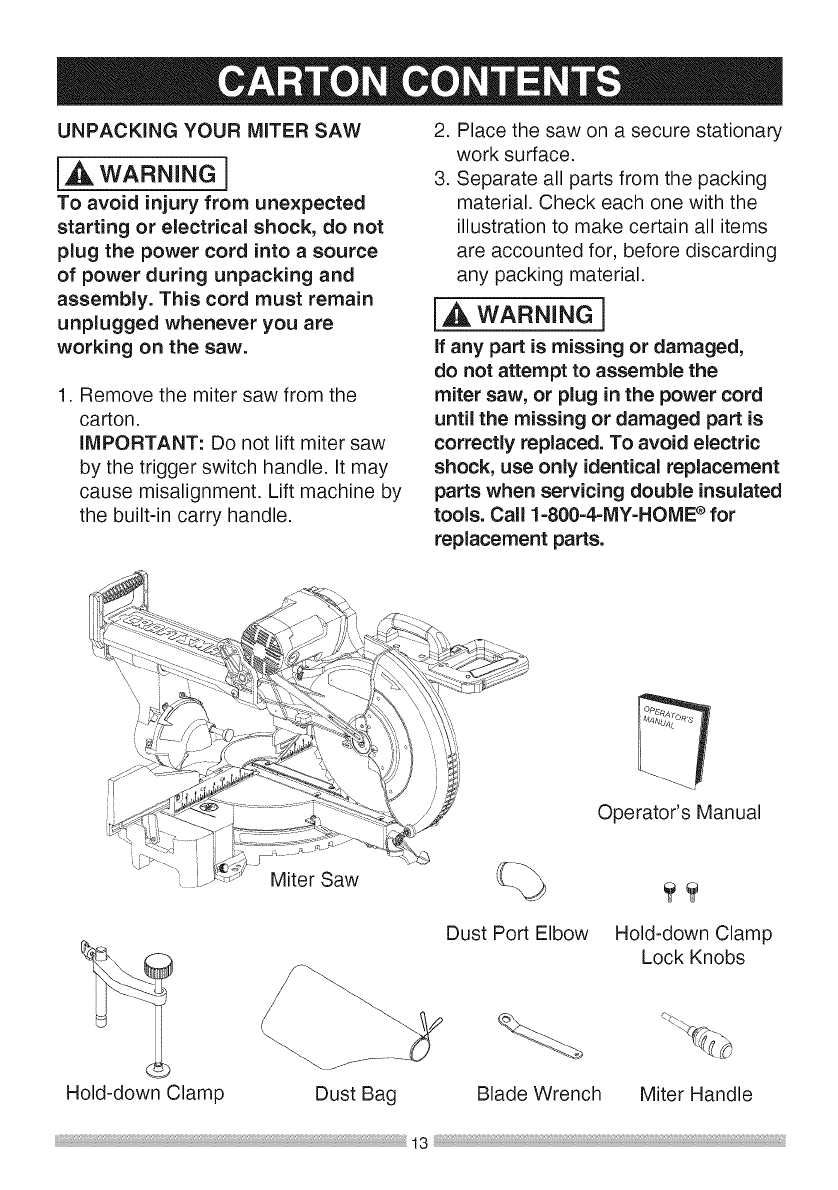
3. Separate all parts from the packing
material. Check each one with the
illustration to make certain all items
are accounted for, before discarding
any packing material.
l_ WARNING 1
If any part is missing or damaged,
do not attempt to assemble the
miter saw, or plug in the power cord
until the missing or damaged part is
correctly replaced. To avoid electric
shock, use only identical replacement
parts when servicing double insulated
tools. Call 1-800=4-MY-HOME efor
replacement parts.
Operator's Manual
Hold-down Clamp
Dust Port Elbow Hold-down Clamp
Lock Knobs
Dust Bag Blade Wrench Miter Handle
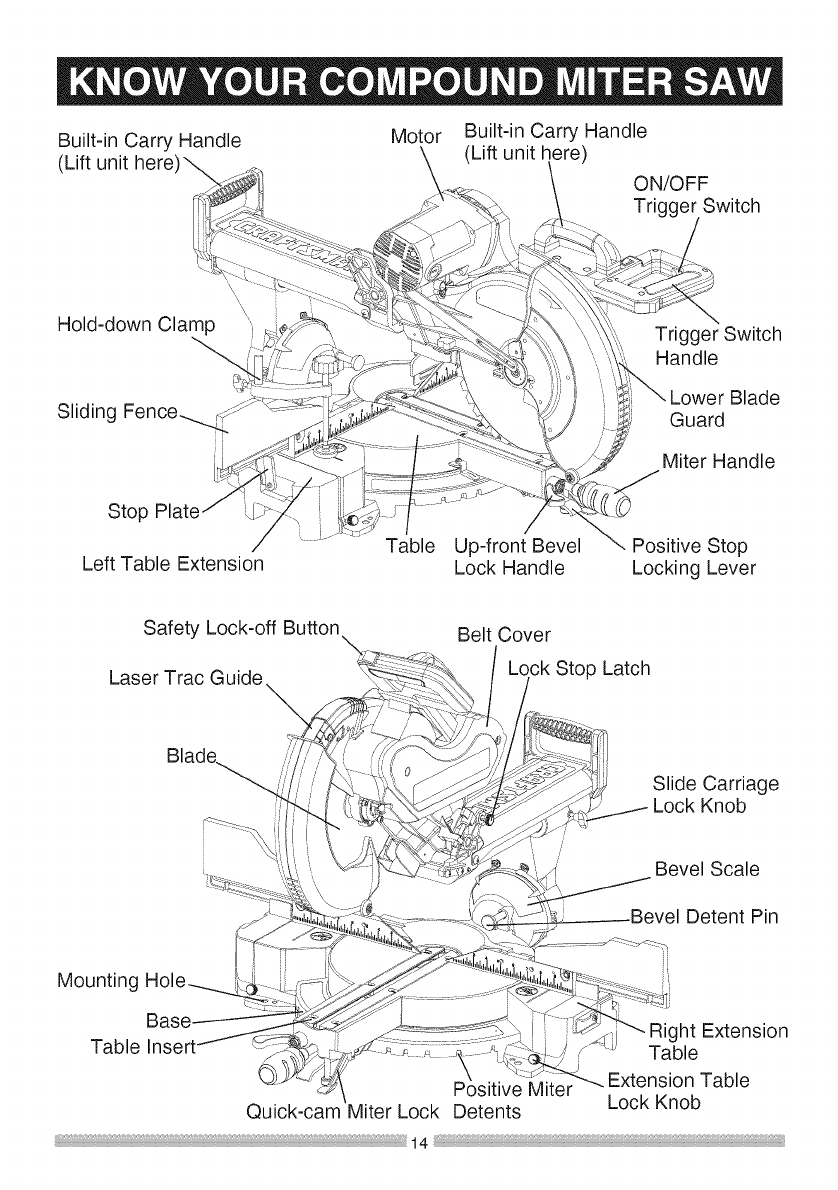
Built-inCarryHandle
(Liftunithere)_
Motor Built-inCarryHandle
(Liftunithere) ON/OFF
TriggerSwitch
Hold-downClamp
SlidingFence 4>
TriggerSwitch
Handle
Blade
Guard
MiterHandle
Stop
LeftTableExtension Table Up-frontBevel
LockHandle PositiveStop
LockingLever
SafetyLock-offButton
LaserTracGuide
Blade........
BeltCover
LockStopLatch
SlideCarriage
LockKnob
BevelScale
_Bevel DetentPin
Mounting
Base RightExtension
TableInse ,; Table
PositiveMiter
Quick-camMiterLockDetents
--.ExtensionTable
LockKnob
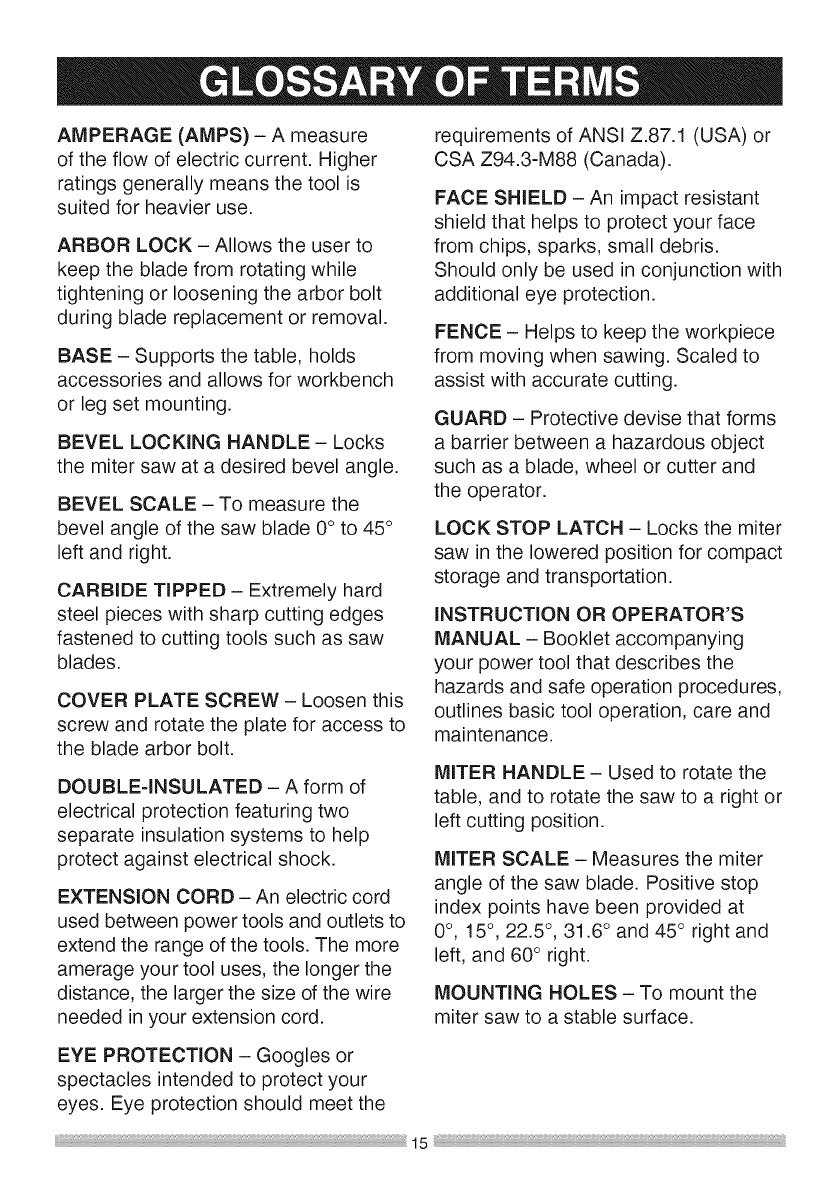
AMPERAGE(AMPS)- A measure
oftheflowofelectriccurrent.Higher
ratingsgenerallymeansthetoolis
suitedforheavieruse.
ARBORLOCK- Allowstheuserto
keepthebladefromrotatingwhile
tighteningorlooseningthearborbolt
duringbladereplacementorremoval.
BASE- Supportsthetable,holds
accessoriesandallowsforworkbench
orlegsetmounting.
BEVELLOCKINGHANDLE- Locks
themitersawat adesiredbevelangle.
BEVELSCALE- Tomeasurethe
bevelangleofthesawblade0° to45°
leftandright.
CARBIDETIPPED- Extremelyhard
steelpieceswithsharpcuttingedges
fastenedtocuttingtoolssuchassaw
blades.
COVERPLATESCREW- Loosenthis
screwandrotatetheplateforaccessto
thebladearborbolt.
DOUBLE-INSULATED- Aformof
electricalprotectionfeaturingtwo
separateinsulationsystemsto help
protectagainstelectricalshock.
EXTENSIONCORD- Anelectriccord
usedbetweenpowertoolsandoutletsto
extendtherangeofthetools.Themore
amerageyourtooluses,thelongerthe
distance,thelargerthesizeofthewire
neededinyourextensioncord.
requirementsofANSIZ.87.1(USA)or
CSAZ94.3-M88(Canada).
FACESHIELD- Animpactresistant
shieldthathelpstoprotectyourface
fromchips,sparks,smalldebris.
Shouldonlybeusedinconjunctionwith
additionaleyeprotection.
FENCE- Helpsto keeptheworkpiece
frommovingwhensawing.Scaledto
assistwithaccuratecutting.
GUARD- Protectivedevisethatforms
abarrierbetweena hazardousobject
suchasablade,wheelorcutterand
theoperator.
LOCKSTOPLATCH- Locksthemiter
sawintheloweredpositionforcompact
storageandtransportation.
INSTRUCTION OR OPERATOR'S
MANUAL - Booklet accompanying
your power tool that describes the
hazards and safe operation procedures,
outlines basic tool operation, care and
maintenance.
MITER HANDLE - Used to rotate the
table, and to rotate the saw to a right or
left cutting position.
MITER SCALE - Measures the miter
angle of the saw blade. Positive stop
index points have been provided at
0°, 15° , 22.5 °, 31.6 ° and 45 ° right and
left, and 60° right.
MOUNTING HOLES - To mount the
miter saw to a stable surface.
EYE PROTECTION - Googles or
spectacles intended to protect your
eyes. Eye protection should meet the
ON/OFFTRIGGERSWITCH- Tostart
thetool,squeezethetrigger.Release
thetriggertoturnoffthemitersaw.
POSITIVESTOPLOCKINGLEVER-
Locksthemitersawatapresetpositive
stopforthedesiredmiterangle.
SWITCHHANDLE- Theswitch
handlecontainsthetriggerswitchand
thelaseron/offswitch.Thebladeis
loweredintotheworkpiecebypushing
downonthehandle.Thesawwill
returnto itsuprightpositionwhenthe
handleisreleased.
WARNINGLABELS- Readand
understandforyourownsafety.Make
surealllabelsarepresentonmachine
andlegible.
HEEL- Misalignmentoftheblade.
KERF- Thewidthofa sawcut,
determinedbythethicknessandsetof
theblade.
KICKBACK- suddenandunintended
movementofthetoolorworkpiece.Itis
typicallycausedbybindingorpinching
oftheworkpiece.
MITERCUT- A miterisatypeofjoint
wherethetwopartsto bejoinedarecut
atanangle,andtypicallythefinished
jointformsa90-degreeangle.Also
commonlyspelled"mitre".
REVOLUTIONSPERMINUTE (RPM)
- The number of turns completed by a
spinning object in one minute.
WRENCH STORAGE - Convenient
storage to prevent misplacing the blade
wrench.
WOODWORKING TERMS
ARBOR - The shaft on which a blade
is mounted.
BEVEL CUT - An angle cut made
through the face of the workpiece.
COMPOUND CUT - An angled cut to
both the edge and face of a board, most
common use is with crown molding.
CROSS CUT - A cut which runs across
the board perpendicular to the grain.
FREEHAND - Performing a cut without
using a fence (guide), hold down or
other proper device to prevent the
workpiece from twisting during the
cutting operation.
SAW BLADE PATH - The area of the
workpiece or table top directly in line
with the travel of the blade or the part
of the workpiece which will be cut.
SET - The distance between two saw
blade tips, bent outward in opposite
directions to each other. The further
apart the tips are, the greater the set.
THIN-KERF BLADE - Thinner than
normal blades, remove less material,
smaller kerfs (between .065 in. and
.070 in.). Blade thinness also may
increase the heat generated while
cutting.
WORKPIECE - The wood being cut. The
surfaces of a workpiece are commonly
referred to as faces, ends and edges.
{_ WARNING]
To avoid injury, do not connect
this miter saw to the power source
until it is completely assembled and
adjusted and you have read and
understood this Operator's Manual.
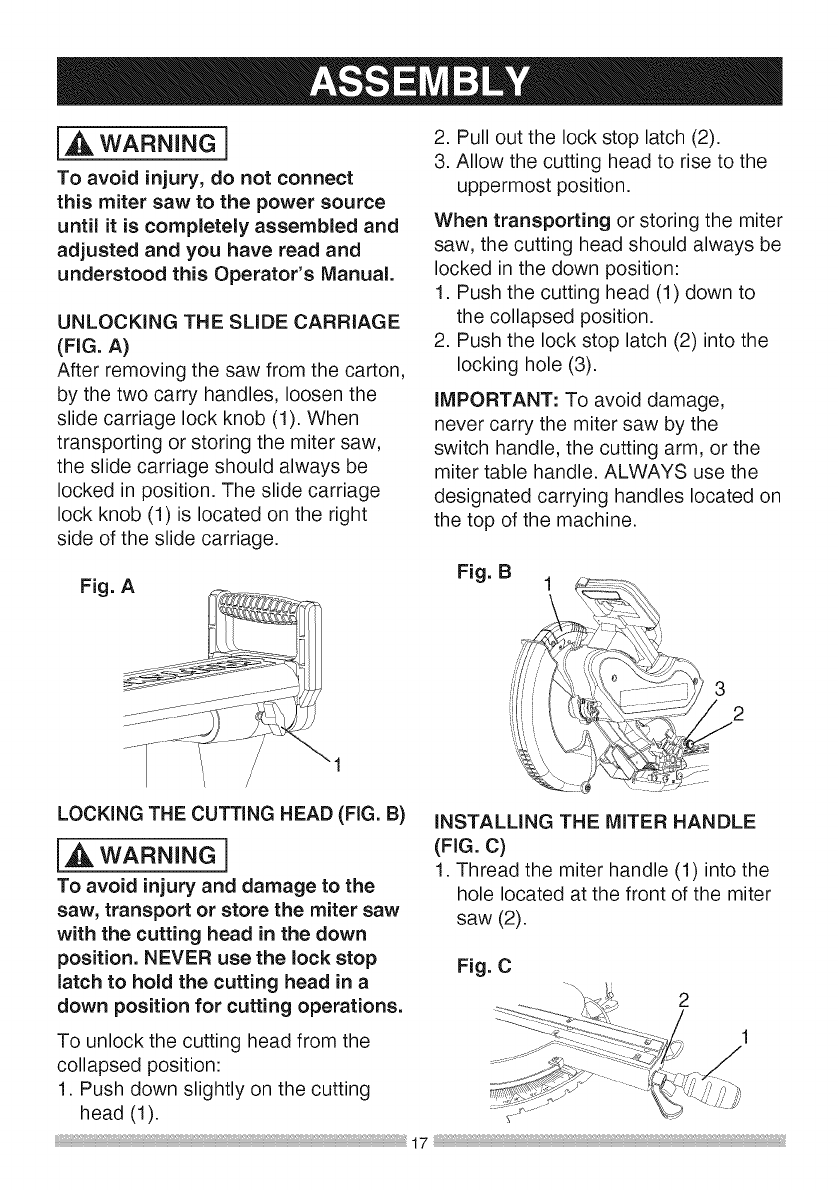
UNLOCKING THE SLIDE CARRIAGE
(FIG. A)
After removing the saw from the carton,
by the two carry handles, loosen the
slide carriage lock knob (1). When
transporting or storing the miter saw,
the slide carriage should always be
locked in position. The slide carriage
lock knob (1) is located on the right
side of the slide carriage.
Fig. A
2. Pull out the lock stop latch (2).
3. Allow the cutting head to rise to the
uppermost position.
When transporting or storing the miter
saw, the cutting head should always be
locked in the down position:
1. Push the cutting head (1) down to
the collapsed position.
2. Push the lock stop latch (2) into the
locking hole (3).
iMPORTANT: To avoid damage,
never carry the miter saw by the
switch handle, the cutting arm, or the
miter table handle. ALWAYS use the
designated carrying handles located on
the top of the machine.
Fig. B 1
3
2
LOCKING THE CUTTING HEAD (FIG. B)
{_ WARNING]
To avoid injury and damage to the
saw, transport or store the miter saw
with the cutting head in the down
position. NEVER use the lock stop
latch to hold the cutting head in a
down position for cutting operations.
iNSTALLiNG THE MITER HANDLE
(FIG. C)
1. Thread the miter handle (1) into the
hole located at the front of the miter
saw (2).
Fig. C
2
To unlock the cutting head from the
collapsed position:
1. Push down slightly on the cutting
head (1).
17
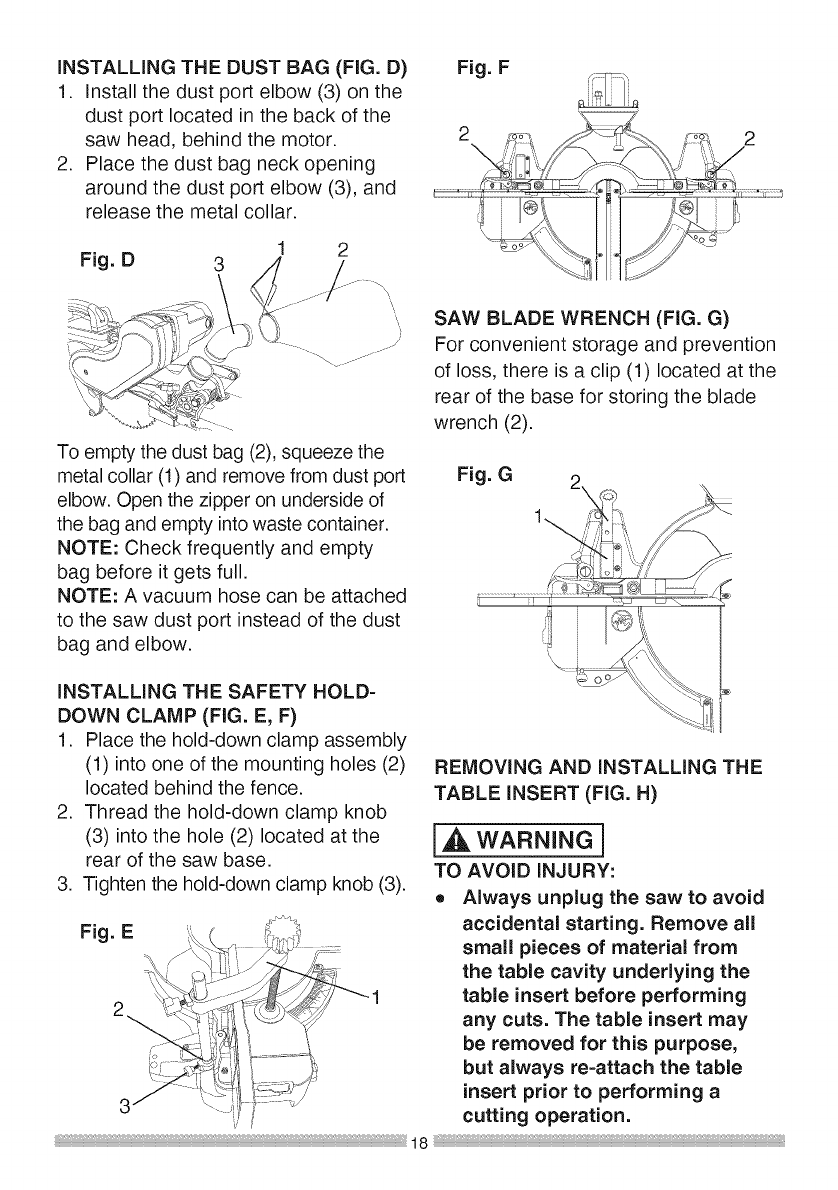
INSTALLING THE DUST BAG (FIG. D)
1. Install the dust port elbow (3) on the
dust port located in the back of the
saw head, behind the motor.
2. Place the dust bag neck opening
around the dust port elbow (3), and
release the metal collar.
Fig. D 3
Fig. F
2 ,_o_,_ o-
'.iI
_7_ ....
To empty the dust bag (2), squeeze the
metal collar (1) and remove from dust port
elbow. Open the zipper on underside of
the bag and empty into waste container.
NOTE: Check frequently and empty
bag before it gets full.
NOTE: A vacuum hose can be attached
to the saw dust port instead of the dust
bag and elbow.
INSTALLING THE SAFETY HOLD-
DOWN CLAMP (FIG. E, F)
1. Place the hold-down clamp assembly
(1) into one of the mounting holes (2)
located behind the fence.
2. Thread the hold-down clamp knob
(3) into the hole (2) located at the
rear of the saw base.
3. Tighten the hold-down clamp knob (3).
Fig. E
SAW BLADE WRENCH (FIG. G)
For convenient storage and prevention
of loss, there is a clip (1) located at the
rear of the base for storing the blade
wrench (2).
Fig. G
REMOVING AND INSTALLING THE
TABLE INSERT (FIG. H)
[_ WARNING]
TO AVOID INJURY:
o Always unplug the saw to avoid
accidental starting. Remove all
small pieces of material from
the table cavity underlying the
table insert before performing
any cuts. The table insert may
be removed for this purpose,
but always re=attach the table
insert prior to performing a
cutting operation.
o Donot start the sliding
compound miter saw without
checking for interference
between the blade and table
insert. Damage could result
to the blade, table insert or
turntable if blade strike occurs
during the cutting operation.
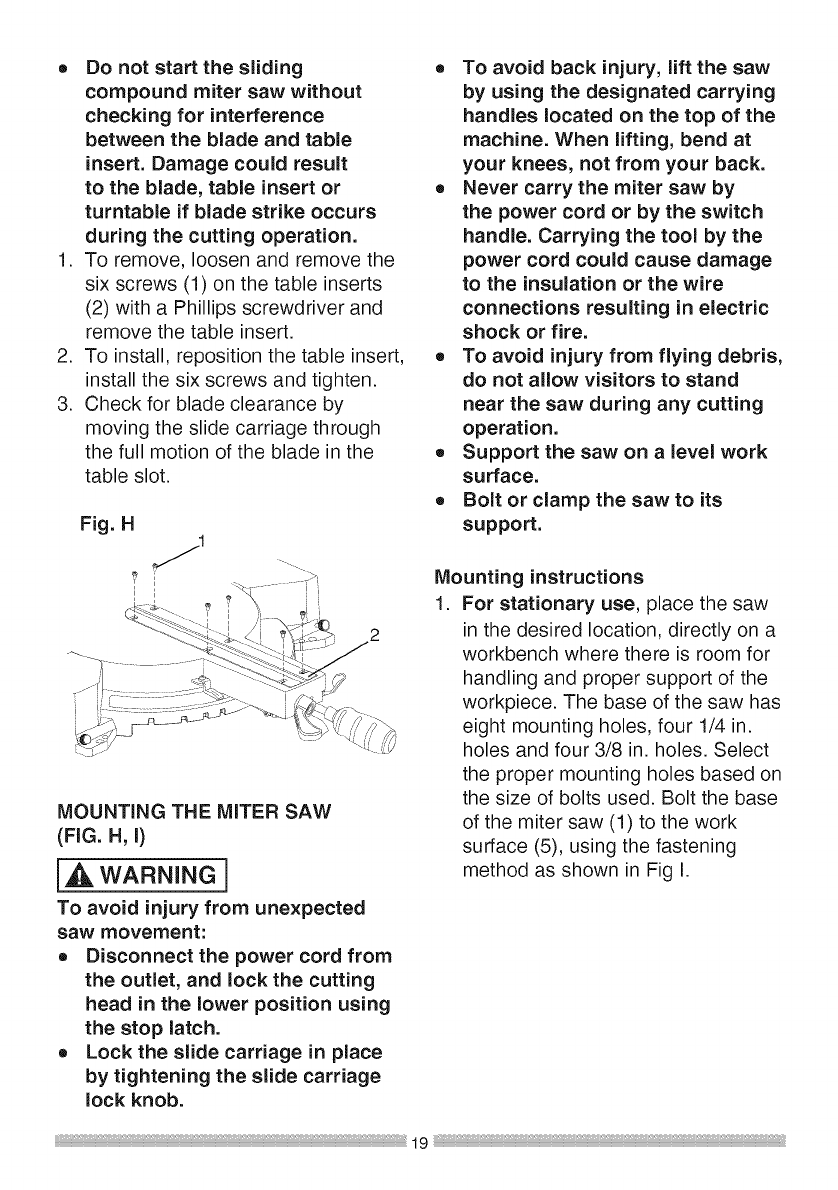
1. To remove, loosen and remove the
six screws (1) on the table inserts
(2) with a Phillips screwdriver and
remove the table insert.
2. To install, reposition the table insert,
install the six screws and tighten.
3. Check for blade clearance by
moving the slide carriage through
the full motion of the blade in the
table slot.
MOUNTING THE MITER SAW
(FIG. H, I)
i_ WARNING]
To avoid injury from unexpected
saw movement:
o Disconnect the power cord from
the outlet, and lock the cutting
head in the lower position using
the stop latch.
o Lock the slide carriage in place
by tightening the slide carriage
lock knob.
o To avoid back injury, lift the saw
by using the designated carrying
handles located on the top of the
machine. When lifting, bend at
your knees, not from your back.
o Never carry the miter saw by
the power cord or by the switch
handle. Carrying the tool by the
power cord could cause damage
to the insulation or the wire
connections resulting in electric
shock or fire.
o To avoid injury from flying debris,
do not allow visitors to stand
near the saw during any cutting
operation.
o Support the saw on alevel work
surface.
o Bolt or clamp the saw to its
support.
Mounting instructions
1. For stationary use, place the saw
in the desired location, directly on a
workbench where there is room for
handling and proper support of the
workpiece. The base of the saw has
eight mounting holes, four 1/4 in.
holes and four 3/8 in. holes. Select
the proper mounting holes based on
the size of bolts used. Bolt the base
of the miter saw (1) to the work
surface (5), using the fastening
method as shown in Fig I.
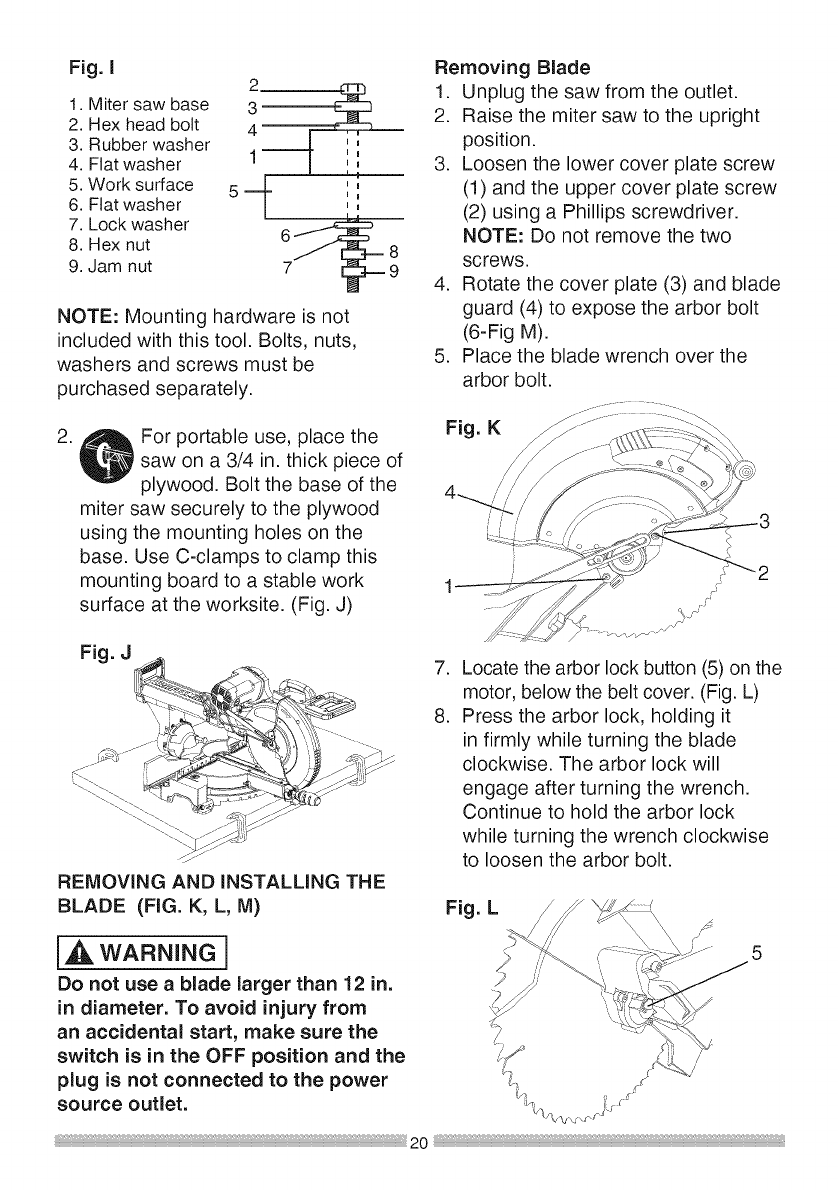
Fig. I
1Mtersaw ase
2. Hex head bolt
3. Rubber washer _ ,,
4. Flat washer 1- [ i[
5. Work surface 5 -mL- :',
6. Flat washer | ,,
7. Lock washer _ 8
6
8. Hex nut
9. Jam nut 7
NOTE: Mounting hardware is not
included with this tool. Bolts, nuts,
washers and screws must be
purchased separately.
.For portable use, place the
saw on a 3/4 in. thick piece of
plywood. Bolt the base of the
miter saw securely to the plywood
using the mounting holes on the
base. Use C-clamps to clamp this
mounting board to a stable work
surface at the worksite. (Fig. J)
Removing Blade
1. Unplug the saw from the outlet.
2. Raise the miter saw to the upright
position.
3. Loosen the lower cover plate screw
(1) and the upper cover plate screw
(2) using a Phillips screwdriver.
NOTE: Do not remove the two
screws.
4. Rotate the cover plate (3) and blade
guard (4) to expose the arbor bolt
(6-Fig M).
5. Place the blade wrench over the
arbor bolt.
Fig. K
Fig. J
REMOVING AND INSTALLING THE
BLADE (FIG. K, L, M)
WARNING I
Do not use ablade larger than 12 in.
in diameter. To avoid injury from
an accidental start, make sure the
switch is in the OFF position and the
plug is not connected to the power
source outlet.
.
8.
Locate the arbor lock button (5) on the
motor, below the belt cover. (Fig. L)
Press the arbor lock, holding it
in firmly while turning the blade
clockwise. The arbor lock will
engage after turning the wrench.
Continue to hold the arbor lock
while turning the wrench clockwise
to loosen the arbor bolt.
Fig. L
5
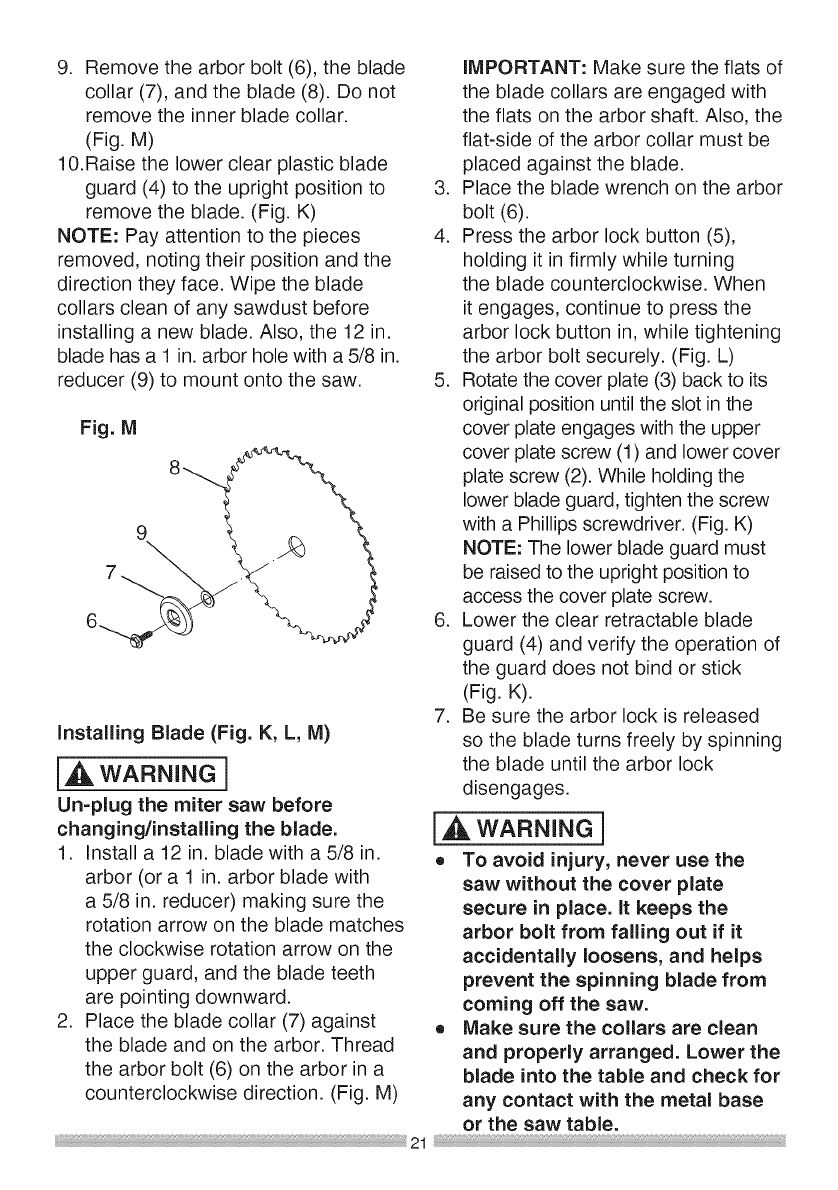
9. Removethearborbolt(6),theblade
collar(7),andtheblade(8).Donot
removetheinnerbladecollar.
(Fig.M)
10.Raisethelowerclearplasticblade
guard(4)totheuprightpositionto
removetheblade.(Fig.K)
NOTE:Payattentiontothepieces
removed,notingtheirpositionandthe
directiontheyface.Wipetheblade
collarscleanofanysawdustbefore
installinga newblade.Also,the12in.
bladehasa 1in.arborholewitha5/8in.
reducer(9)tomountontothesaw.
Fig.M
9
Installing Blade (Fig. K, L, M)
i_lk WARNING]
Un=plug the miter saw before
changing/installing the blade.
1. Install a 12 in. blade with a 5/8 in.
arbor (or a 1 in. arbor blade with
a 5/8 in. reducer) making sure the
rotation arrow on the blade matches
the clockwise rotation arrow on the
upper guard, and the blade teeth
are pointing downward.
2. Place the blade collar (7) against
the blade and on the arbor. Thread
the arbor bolt (6) on the arbor in a
counterclockwise direction. (Fig. M)
iMPORTANT: Make sure the flats of
the blade collars are engaged with
the flats on the arbor shaft. Also, the
flat-side of the arbor collar must be
placed against the blade.
3. Place the blade wrench on the arbor
bolt (6).
4. Press the arbor lock button (5),
holding it in firmly while turning
the blade counterclockwise. When
it engages, continue to press the
arbor lock button in, while tightening
the arbor bolt securely. (Fig. L)
5. Rotate the cover plate (3) back to its
original position until the slot in the
cover plate engages with the upper
cover plate screw (1) and lower cover
plate screw (2). While holding the
lower blade guard, tighten the screw
with a Phillips screwdriver. (Fig. K)
NOTE: The lower blade guard must
be raised to the upright position to
access the cover plate screw.
6. Lower the clear retractable blade
guard (4) and verify the operation of
the guard does not bind or stick
(Fig. K).
7. Be sure the arbor lock is released
so the blade turns freely by spinning
the blade until the arbor lock
disengages.
I WARNINGI
o To avoid injury, never use the
saw without the cover plate
secure in place. It keeps the
arbor bolt from falling out if it
accidentally loosens, and helps
prevent the spinning blade from
coming off the saw.
oMake sure the collars are clean
and properly arranged. Lower the
blade into the table and check for
any contact with the metal base
or the saw table.
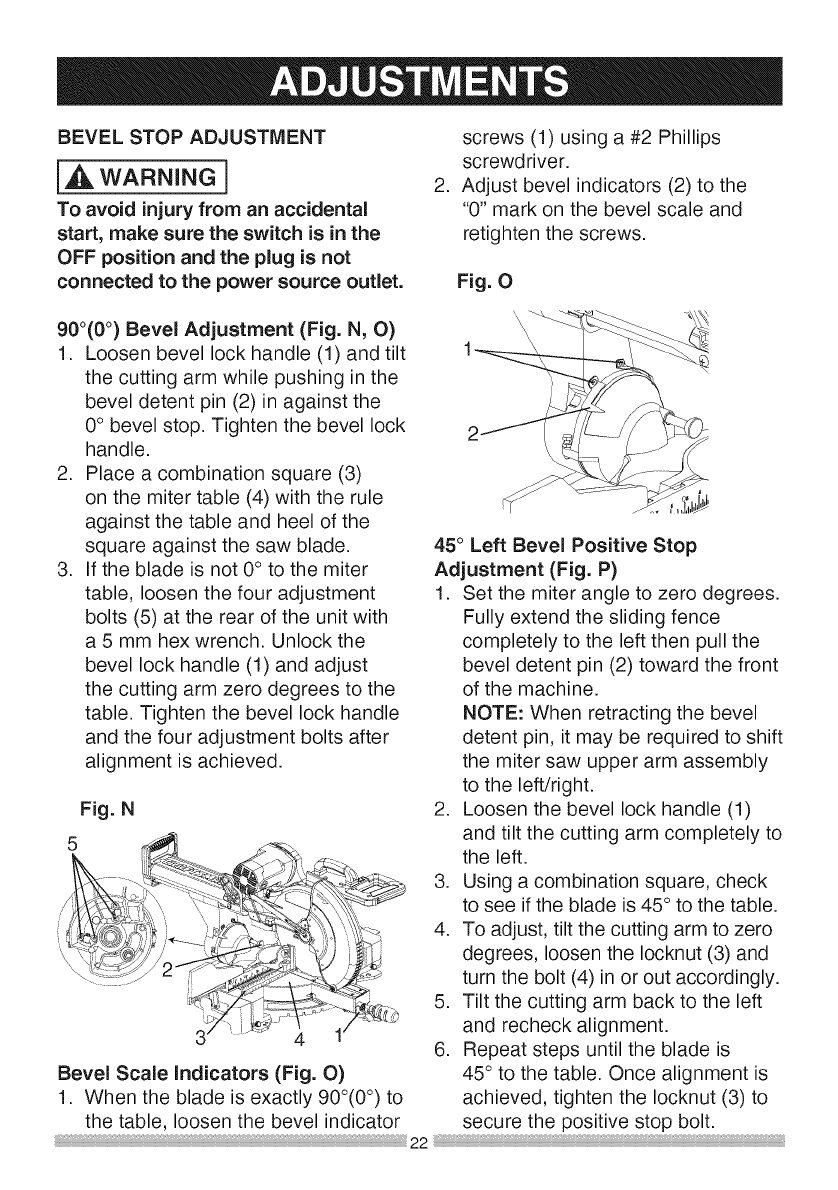
BEVELSTOP ADJUSTMENT
{,A WARNING j
To avoid injury from an accidental
start, make sure the switch is in the
OFF position and the plug is not
connected to the power source outlet.
.
screws (1) using a #2 Phillips
screwdriver.
Adjust bevel indicators (2) to the
"0" mark on the bevel scale and
retighten the screws.
Fig. O
900(0°) Bevel Adjustment (Fig. N, O)
1. Loosen bevel lock handle (1) and tilt
the cutting arm while pushing in the
bevel detent pin (2) in against the
0° bevel stop. Tighten the bevel lock
handle.
2. Place a combination square (3)
on the miter table (4) with the rule
against the table and heel of the
square against the saw blade.
3. If the blade is not 0° to the miter
table, loosen the four adjustment
bolts (5) at the rear of the unit with
a 5 mm hex wrench. Unlock the
bevel lock handle (1) and adjust
the cutting arm zero degrees to the
table. Tighten the bevel lock handle
and the four adjustment bolts after
alignment is achieved.
Fig. N
Bevel Scale Indicators (Fig. O)
1. When the blade is exactly 900(0°) to
the table, loosen the bevel indicator
45° Left Bevel Positive Stop
Adjustment (Fig. P)
1. Set the miter angle to zero degrees.
Fully extend the sliding fence
completely to the left then pull the
bevel detent pin (2) toward the front
of the machine.
NOTE: When retracting the bevel
detent pin, it may be required to shift
the miter saw upper arm assembly
to the left/right.
2. Loosen the bevel lock handle (1)
and tilt the cutting arm completely to
the left.
3. Using a combination square, check
to see if the blade is 45° to the table.
4. To adjust, tilt the cutting arm to zero
degrees, loosen the Iocknut (3) and
turn the bolt (4) in or out accordingly.
5. Tilt the cutting arm back to the left
and recheck alignment.
6. Repeat steps until the blade is
45° to the table. Once alignment is
achieved, tighten the Iocknut (3) to
secure the positive stop bolt.
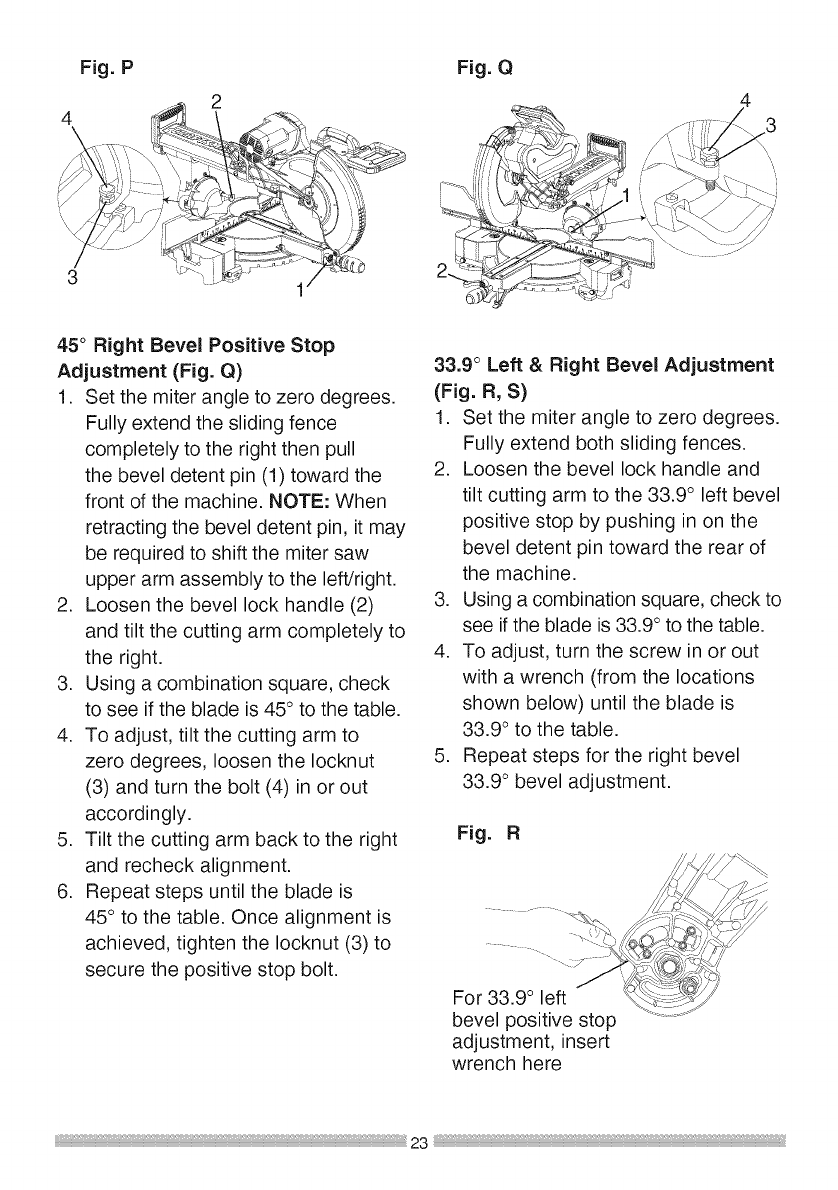
Fig.P
2
4
3
45° Right Bevel Positive Stop
Adjustment (Fig. Q)
1. Set the miter angle to zero degrees.
Fully extend the sliding fence
completely to the right then pull
the bevel detent pin (1) toward the
front of the machine. NOTE: When
retracting the bevel detent pin, it may
be required to shift the miter saw
upper arm assembly to the left/right.
2. Loosen the bevel lock handle (2)
and tilt the cutting arm completely to
the right.
3. Using a combination square, check
to see if the blade is 45° to the table.
4. To adjust, tilt the cutting arm to
zero degrees, loosen the Iocknut
(3) and turn the bolt (4) in or out
accordingly.
5. Tilt the cutting arm back to the right
and recheck alignment.
6. Repeat steps until the blade is
45 ° to the table. Once alignment is
achieved, tighten the Iocknut (3) to
secure the positive stop bolt.
Fig. Q
33.9 °Left & Right Bevel Adjustment
(Fig. R, S)
1. Set the miter angle to zero degrees.
Fully extend both sliding fences.
2. Loosen the bevel lock handle and
tilt cutting arm to the 33.9 ° left bevel
positive stop by pushing in on the
bevel detent pin toward the rear of
the machine.
3. Using a combination square, check to
see if the blade is 33.9° to the table.
4. To adjust, turn the screw in or out
with a wrench (from the locations
shown below) until the blade is
33.9 ° to the table.
5. Repeat steps for the right bevel
33.9 ° bevel adjustment.
Fig. R
bevel positive stop
adjustment, insert
wrench here
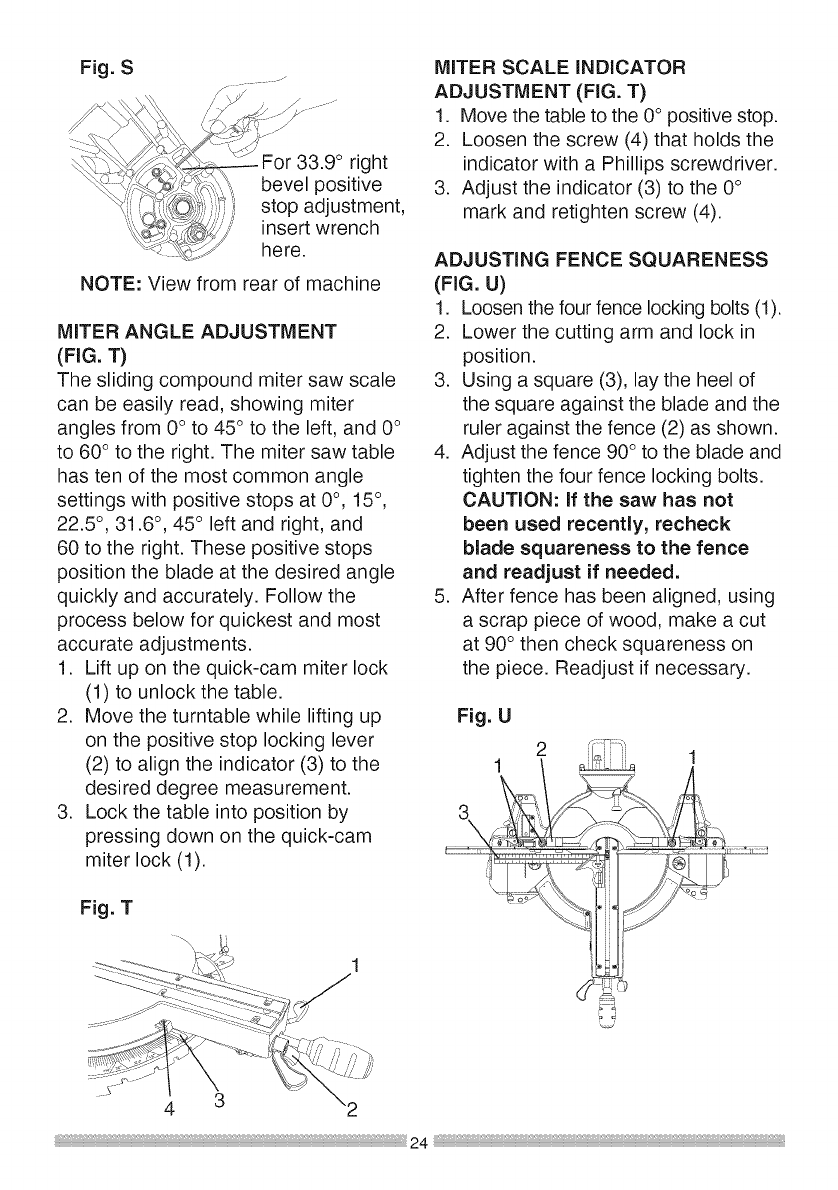
Fig.S
\,J\ ,, • j, ......
_ djq_'_For33.9 right
_ <..:,__,.,%.':, beve pos t ve
_.,7_x,1.. ,,,_,....
_', ',,,7¢'t_,s- sto ad ustment
--. ' -<,',k_>,, P J,
...._']_../,'_,j insert wrench
_J here.
NOTE: View from rear of machine
MITER ANGLE ADJUSTMENT
(FIG. T)
The sliding compound miter saw scale
can be easily read, showing miter
angles from 0° to 45° to the left, and 0°
to 60 ° to the right. The miter saw table
has ten of the most common angle
settings with positive stops at 0°, 15°,
22.5 °, 31.6 °, 45° left and right, and
60 to the right. These positive stops
position the blade at the desired angle
quickly and accurately. Follow the
process below for quickest and most
accurate adjustments.
1. Lift up on the quick-cam miter lock
(1) to unlock the table.
2. Move the turntable while lifting up
on the positive stop locking lever
(2) to align the indicator (3) to the
desired degree measurement.
3. Lock the table into position by
pressing down on the quick-cam
miter lock (1).
Fig. T
MITER SCALE INDICATOR
ADJUSTMENT (FIG. T)
1. Move the table to the 0° positive stop.
2. Loosen the screw (4) that holds the
indicator with a Phillips screwdriver.
3. Adjust the indicator (3) to the 0°
mark and retighten screw (4).
ADJUSTING FENCE SQUARENESS
(FIG.U)
1. Loosen the four fence locking bolts (1).
2. Lower the cutting arm and lock in
position.
3. Using a square (3), lay the heel of
the square against the blade and the
ruler against the fence (2) as shown.
4. Adjust the fence 90° to the blade and
tighten the four fence locking bolts.
CAUTION: if the saw has not
been used recently, recheck
blade squareness to the fence
and readjust if needed.
5. After fence has been aligned, using
a scrap piece of wood, make a cut
at 90° then check squareness on
the piece. Readjust if necessary.
Fig. U
43
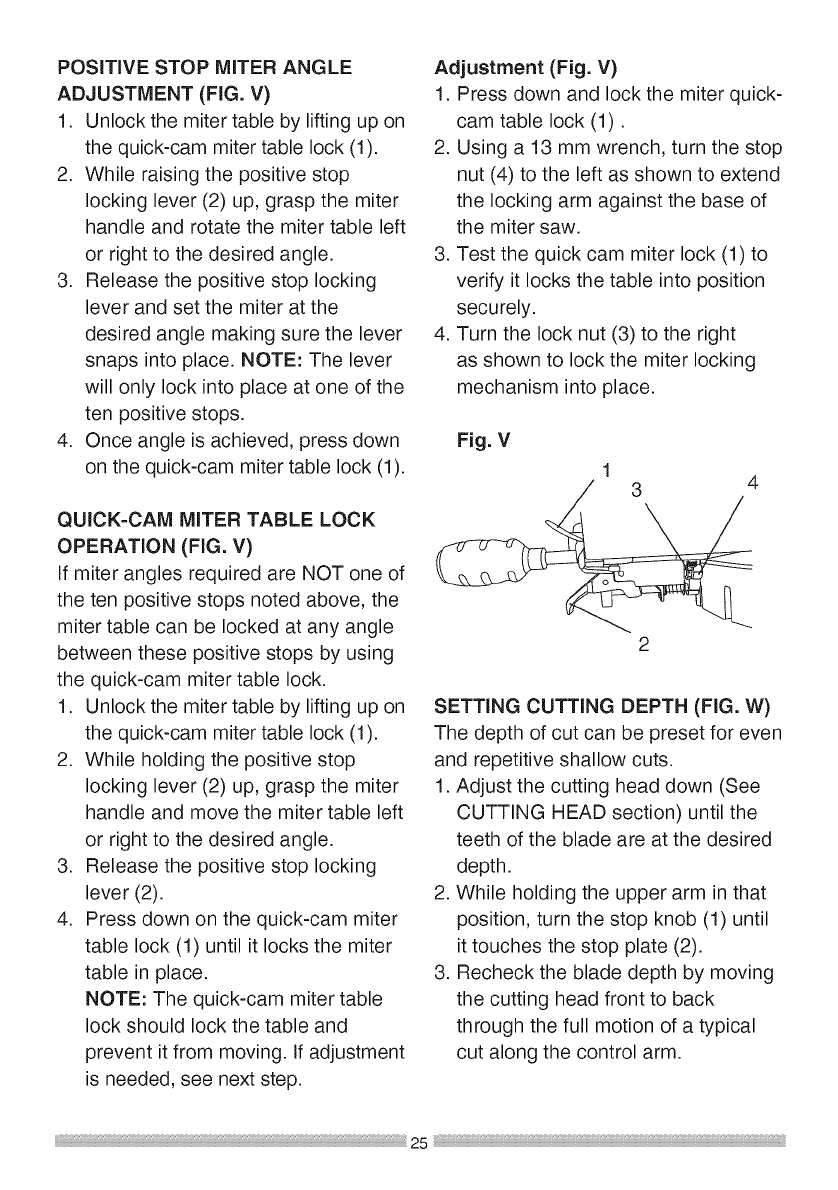
POSiTiVESTOP MITER ANGLE
ADJUSTMENT (FIG. V)
1. Unlock the miter table by lifting up on
the quick-cam miter table lock (1).
2. While raising the positive stop
locking lever (2) up, grasp the miter
handle and rotate the miter table left
or right to the desired angle.
3. Release the positive stop locking
lever and set the miter at the
desired angle making sure the lever
snaps into place. NOTE: The lever
will only lock into place at one of the
ten positive stops.
4. Once angle is achieved, press down
on the quick-cam miter table lock (1).
QUICK-CAM MITER TABLE LOCK
OPERATION (FIG. V)
If miter angles required are NOT one of
the ten positive stops noted above, the
miter table can be locked at any angle
between these positive stops by using
the quick-cam miter table lock.
1. Unlock the miter table by lifting up on
the quick-cam miter table lock (1).
2. While holding the positive stop
locking lever (2) up, grasp the miter
handle and move the miter table left
or right to the desired angle.
3. Release the positive stop locking
lever (2).
4. Press down on the quick-cam miter
table lock (1) until it locks the miter
table in place.
NOTE: The quick-cam miter table
lock should lock the table and
prevent it from moving. If adjustment
is needed, see next step.
Adjustment (Fig. V)
1. Press down and lock the miter quick-
cam table lock (1).
2. Using a 13 mm wrench, turn the stop
nut (4) to the left as shown to extend
the locking arm against the base of
the miter saw.
3. Test the quick cam miter lock (1) to
verify it locks the table into position
securely.
4. Turn the lock nut (3) to the right
as shown to lock the miter locking
mechanism into place.
Fig. V
13 4
2
SETTING CUTTING DEPTH (FIG. W)
The depth of cut can be preset for even
and repetitive shallow cuts.
1. Adjust the cutting head down (See
CUTTING HEAD section) until the
teeth of the blade are at the desired
depth.
2. While holding the upper arm in that
position, turn the stop knob (1) until
it touches the stop plate (2).
3. Recheck the blade depth by moving
the cutting head front to back
through the full motion of a typical
cut along the control arm.
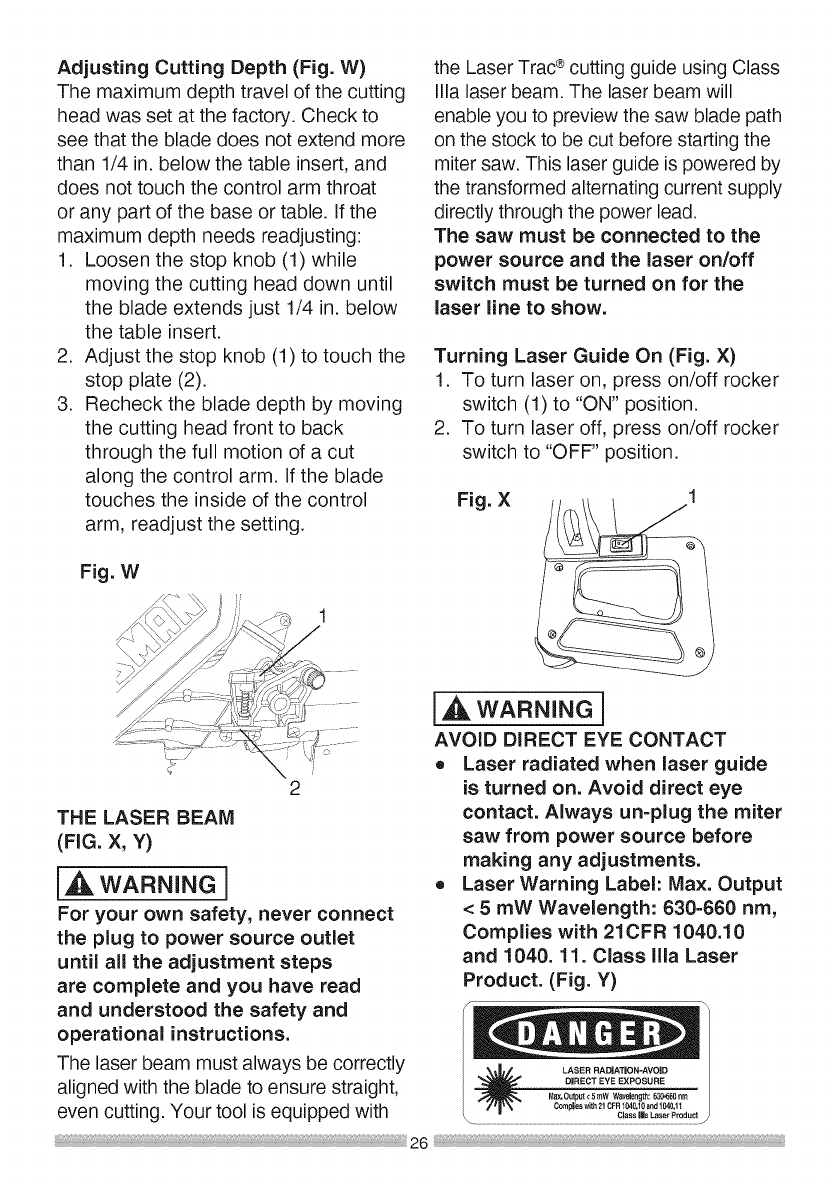
AdjustingCuttingDepth(Fig.W)
Themaximumdepthtravelofthecutting
headwassetatthefactory.Checkto
seethatthebladedoesnotextend more
than 1/4 in. below the table insert, and
does not touch the control arm throat
or any part of the base or table. If the
maximum depth needs readjusting:
1. Loosen the stop knob (1) while
moving the cutting head down until
the blade extends just 1/4 in. below
the table insert.
2. Adjust the stop knob (1) to touch the
stop plate (2).
3. Recheck the blade depth by moving
the cutting head front to back
through the full motion of a cut
along the control arm. If the blade
touches the inside of the control
arm, readjust the setting.
Fig. W
the Laser Trac®cutting guide using Class
Ilia laser beam. The laser beam will
enable you to preview the saw blade path
on the stock to be cut before starting the
miter saw. This laser guide is powered by
the transformed alternating current supply
directly through the power lead.
The saw must be connected to the
power source and the laser on/off
switch must be turned on for the
laser line to show.
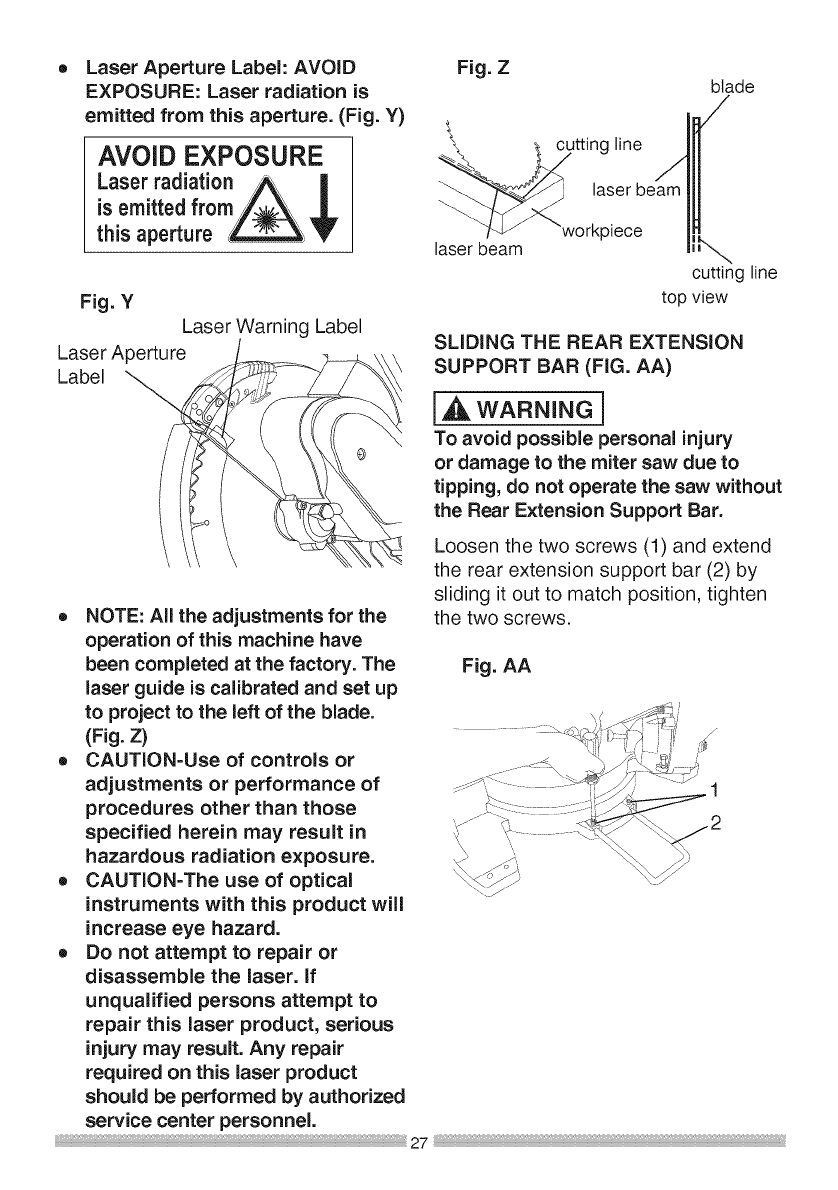
Turning Laser Guide On (Fig. X)
1. To turn laser on, press on/off rocker
switch (1) to "ON" position.
2. To turn laser off, press on/off rocker
switch to "OFF" position.
Fig. X
2
THE LASER BEAM
(FIG. X, Y)
[,,_k WARNING]
For your own safety, never connect
the plug to power source outlet
until all the adjustment steps
are complete and you have read
and understood the safety and
operational instructions.
The laser beam must always be correctly
aligned with the blade to ensure straight,
even cutting. Your tool is equipped with
i,_ WARNING j
AVOID DIRECT EYE CONTACT
oLaser radiated when laser guide
is turned on. Avoid direct eye
contact. Always un-plug the miter
saw from power source before
making any adjustments.
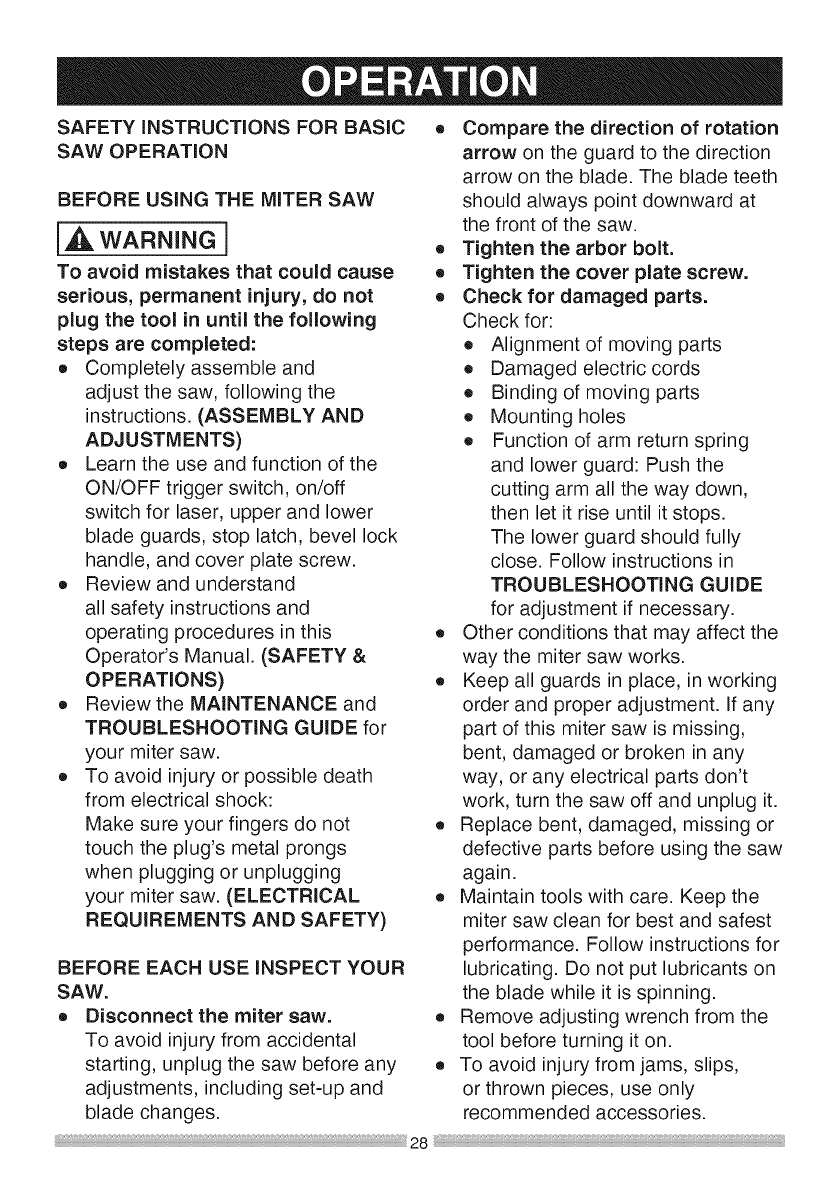
o Laser Warning Label: Max. Output
< 5 mW Wavelength: 630-660 nm,
Complies with 21CFR 1040.10
and 1040. 11. Class Ilia Laser
Product. (Fig. Y)
=_ LASER RADIATION-AVOID
DIRECT EYE EXPOSURE
_x,0utput<SrnW Wavelength:63_0nm
Complieswith21CFR1040,10and104031
....................................•...........................................................................c_ !=_L_!_od._
Laser Aperture Label: AVOID
EXPOSURE: Laser radiation is
emitted from this aperture. (Fig. Y)
AVOID EXPOSURE
Laser radiation A |
is emittedfrom/_.\ JL
this aperture _V
Fig. Y
Laser Warning Label
Laser Aperture
Label
Fig. Zblade
laser be'_am "workpiece / _k,,,_,
cutting line
top view
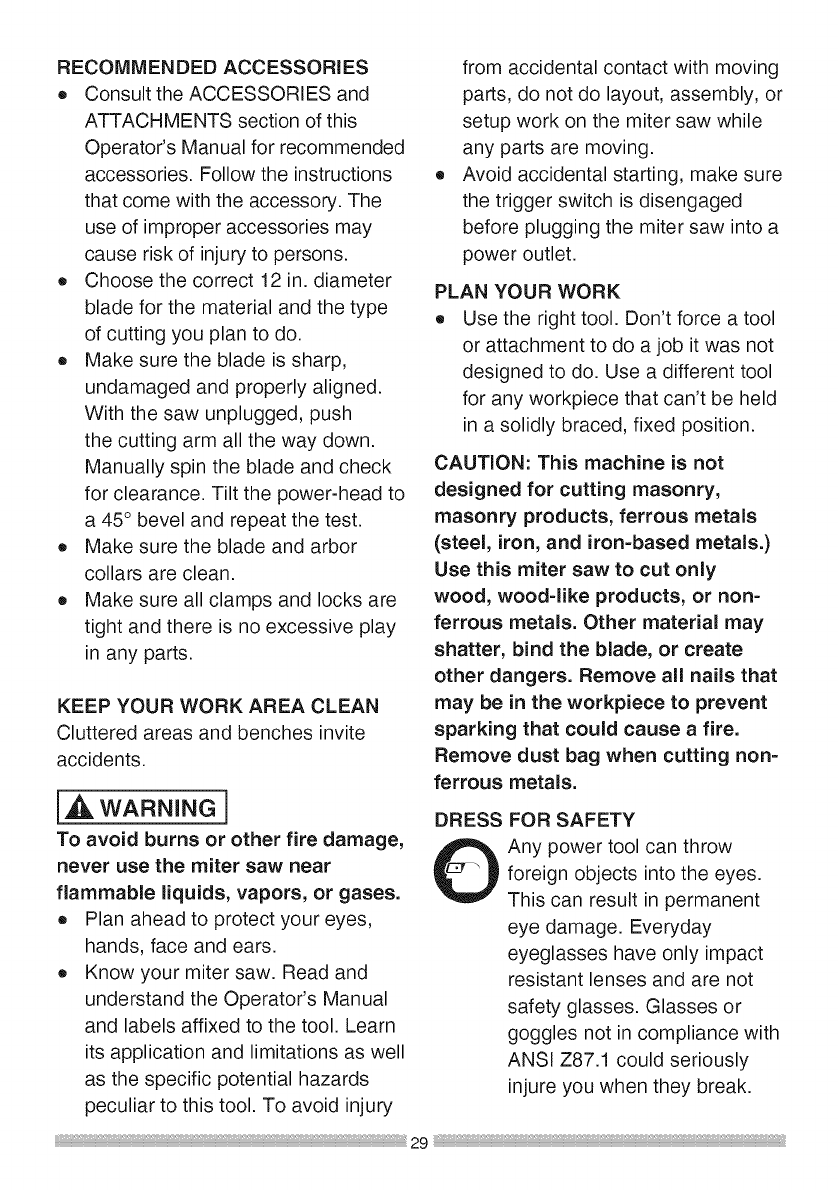
SLIDING THE REAR EXTENSION
[_, WARNING]
To avoid possible personal injury
or damage to the miter saw due to
tipping, do not operate the saw without
the Rear Extension Support Bar.
Loosen the two screws (1) and extend
the rear extension support bar (2) by
sliding it out to match position, tighten
the two screws.o NOTE: All the adjustments for the
operation of this machine have
been completed at the factory. The Fig. AA
laser guide is calibrated and set up
to project to the left of the blade.
(Fig. Z)
oCAUTION-Use of controls or
adjustments or performance of
procedures other than those
specified herein may result in
hazardous radiation exposure.
o CAUTION=The use of optical
instruments with this product will
increase eye hazard.
o Do not attempt to repair or
disassemble the laser. If
unqualified persons attempt to
repair this laser product, serious
injury may result. Any repair
required on this laser product
should be performed by authorized
service center personnel. 27
SAFETY iNSTRUCTiONS FOR BASIC
SAW OPERATION
BEFORE USING THE MITER SAW
i,_k WARNING]
To avoid mistakes that could cause
serious, permanent injury, do not
plug the tool in until the following
steps are completed:
eCompletely assemble and
adjust the saw, following the
instructions. (ASSEMBLY AND
ADJUSTMENTS)
o Learn the use and function of the
ON/OFF trigger switch, on/off
switch for laser, upper and lower
blade guards, stop latch, bevel lock
handle, and cover plate screw.
o Review and understand
all safety instructions and
operating procedures in this
Operator's Manual. (SAFETY &
OPERATIONS)
o Review the MAINTENANCE and
TROUBLESHOOTING GUIDE for
your miter saw.
o To avoid injury or possible death
from electrical shock:
Make sure your fingers do not
touch the plug's metal prongs
when plugging or unplugging
your miter saw. (ELECTRICAL
REQUIREMENTS AND SAFETY)
BEFORE EACH USE iNSPECT YOUR
SAW.
o Disconnect the miter saw.
To avoid injury from accidental
starting, unplug the saw before any
adjustments, including set-up and
blade changes.
o Compare the direction of rotation
arrow on the guard to the direction
arrow on the blade. The blade teeth
should always point downward at
the front of the saw.
o Tighten the arbor bolt.
o Tighten the cover plate screw.
o Check for damaged parts.
Check for:
o Alignment of moving parts
o Damaged electric cords
o Binding of moving parts
o Mounting holes
o Function of arm return spring
and lower guard: Push the
cutting arm all the way down,
then let it rise until it stops.
The lower guard should fully
close. Follow instructions in
TROUBLESHOOTING GUIDE
for adjustment if necessary.
o Other conditions that may affect the
way the miter saw works.
o Keep all guards in place, in working
order and proper adjustment. If any
part of this miter saw is missing,
bent, damaged or broken in any
way, or any electrical parts don't
work, turn the saw off and unplug it.
o Replace bent, damaged, missing or
defective parts before using the saw
again.
o Maintain tools with care. Keep the
miter saw clean for best and safest
performance. Follow instructions for
lubricating. Do not put lubricants on
the blade while it is spinning.
o Remove adjusting wrench from the
tool before turning it on.
o To avoid injury from jams, slips,
or thrown pieces, use only
recommended accessories.
RECOMMENDEDACCESSORIES
o ConsulttheACCESSORIESand
ATTACHMENTSsectionofthis
Operator'sManualforrecommended
accessories.Followtheinstructions
thatcomewiththeaccessory.The
useofimproperaccessoriesmay
causeriskofinjurytopersons.
o Choosethecorrect12in.diameter
bladeforthematerialandthetype
ofcuttingyouplantodo.
o Makesurethebladeissharp,
undamagedandproperlyaligned.
Withthesawunplugged,push
thecuttingarmallthewaydown.
Manuallyspinthebladeandcheck
forclearance.Tiltthepower-headto
a45°bevelandrepeatthetest.
o Makesurethebladeandarbor
collarsareclean.
o Makesureallclampsandlocksare
tightandthereisnoexcessiveplay
inanyparts.
KEEPYOURWORKAREACLEAN
Clutteredareasandbenchesinvite
accidents.
i,_ WARNING]
To avoid burns or other fire damage,
never use the miter saw near
flammable liquids, vapors, or gases.
o Plan ahead to protect your eyes,
hands, face and ears.
o Know your miter saw. Read and
understand the Operator's Manual
and labels affixed to the tool. Learn
its application and limitations as well
as the specific potential hazards
peculiar to this tool. To avoid injury
from accidental contact with moving
parts, do not do layout, assembly, or
setup work on the miter saw while
any parts are moving.
Avoid accidental starting, make sure
the trigger switch is disengaged
before plugging the miter saw into a
power outlet.
PLAN YOUR WORK
o Use the right tool. Don't force a tool
or attachment to do a job it was not
designed to do. Use a different tool
for any workpiece that can't be held
in a solidly braced, fixed position.
CAUTION: This machine is not
designed for cutting masonry,
masonry products, ferrous metals
(steel, iron, and iron-based metals.)
Use this miter saw to cut only
wood, wood-like products, or non-
ferrous metals. Other material may
shatter, bind the blade, or create
other dangers. Remove all nails that
may be in the workpiece to prevent
sparking that could cause a fire.
Remove dust bag when cutting non-
ferrous metals.
DRESS
0FOR SAFETY
Any power tool can throw
foreign objects into the eyes.
This can result in permanent
eye damage. Everyday
eyeglasses have only impact
resistant lenses and are not
safety glasses. Glasses or
goggles not in compliance with
ANSI Z87.1 could seriously
injure you when they break.
o Donotwearlooseclothing,gloves,
necktiesorjewelry(rings,watches).
Theycangetcaughtanddrawyou
intomovingparts.
o Wearnon-slipfootwear.
o Tiebacklonghair.
o Rolllongsleevesabovetheelbow.
o Noiselevelsvarywidely.Toavoid
possiblehearingdamage,wearear
plugswhenusinganymitersaw.
o Fordustyoperations,wearadust
maskalongwithsafetygoggles.
INSPECTYOURWORKPIECE
o Makesuretherearenonailsor
foreignobjectsinthepartofthe
workpiecebeingcut.
o Planyourworktoavoidsmallpieces
thatmaybind,orthataretoosmall
toclampandgetasolidgraspon.
o Planthewayyouwillgraspthe
workpiecefromstarttofinish.Avoid
awkwardoperationsandhand
positions.Asuddenslipcouldcause
yourfingersorhandto moveinto
theblade.
DONOTOVER-REACH
Keepgoodfootingandbalance.Keep
yourfaceandbodytooneside,outof
thelineofa possiblekickback.NEVER
standinthelineoftheblade.
o Keepthecutoffpiecefreetomove
sidewaysafteritiscutoff.Otherwise,
itcouldgetwedgedagainstthe
bladeandthrownviolently.
o Onlytheworkpieceshouldbeon
thesawstable.
o Securework.Useclampsoraviseto
helpholdtheworkwhenit'spractical.
USEEXTRACAUTIONWiTHLARGE
ORODDSHAPEDWORKPIECES
o Useextra supports (tables,
sawhorses, blocks, etc.) for
workpieces large enough to tip.
o Never use another person as a
substitute for a table extension, or as
an additional support for a workpiece
that is longer or wider than the basic
miter saw table, or to help feed,
support, or pull the workpiece.
o Do not use this saw to cut small
pieces. If the workpiece being cut
would cause your hand or fingers
to be within 8-3/4 inches of the saw
blade the workpiece is too small.
Keep hands and fingers out of the
"no hands zone" area marked on
the saws table.
o When cutting odd shaped
workpieces, plan your work so it
will not bind in the blade and cause
Never cut freehand:
o Brace your workpiece firmly against
the fence and table stop so it will
not rock or twist during the cut.
o Make sure there is no debris between
the workpiece and the table or fence.
o Make sure there are no gaps
between the workpiece, fence and
table that will let the workpiece shift
after it is cut.
possible injury. Molding, for example,
must lie flat or be held by a fixture or
jig that will not let it move when cut.
Properly support round material
such as dowel rods, or tubing, which
have a tendency to roll when cut,
causing the blade to "bite".
,_, WARNING i
To avoid injury, follow all applicable
safety instructions, when cutting
non=ferrous metals:
o Use only saw blades specifically
recommended for non-ferrous metal
cutting.
o Do not cut metal workpieces
that must be hand held. Clamp
workpieces securely.
o Cut non-ferrous metals only if you
are under the supervision of an
experienced person and the dust bag
has been removed from the saw.
WHEN SAW iS RUNNING
[,_ WARNING]
Do not allow familiarity from
frequent use of your miter saw
to result in a careless mistake. A
careless fraction of asecond is
enough to cause a severe injury.
Before cutting, if the saw makes an
unfamiliar noise or vibrates, stop
immediately. Turn the saw OFF.
Unplug the saw. Do not restart until
finding and correcting the problem.
Starting a cut:
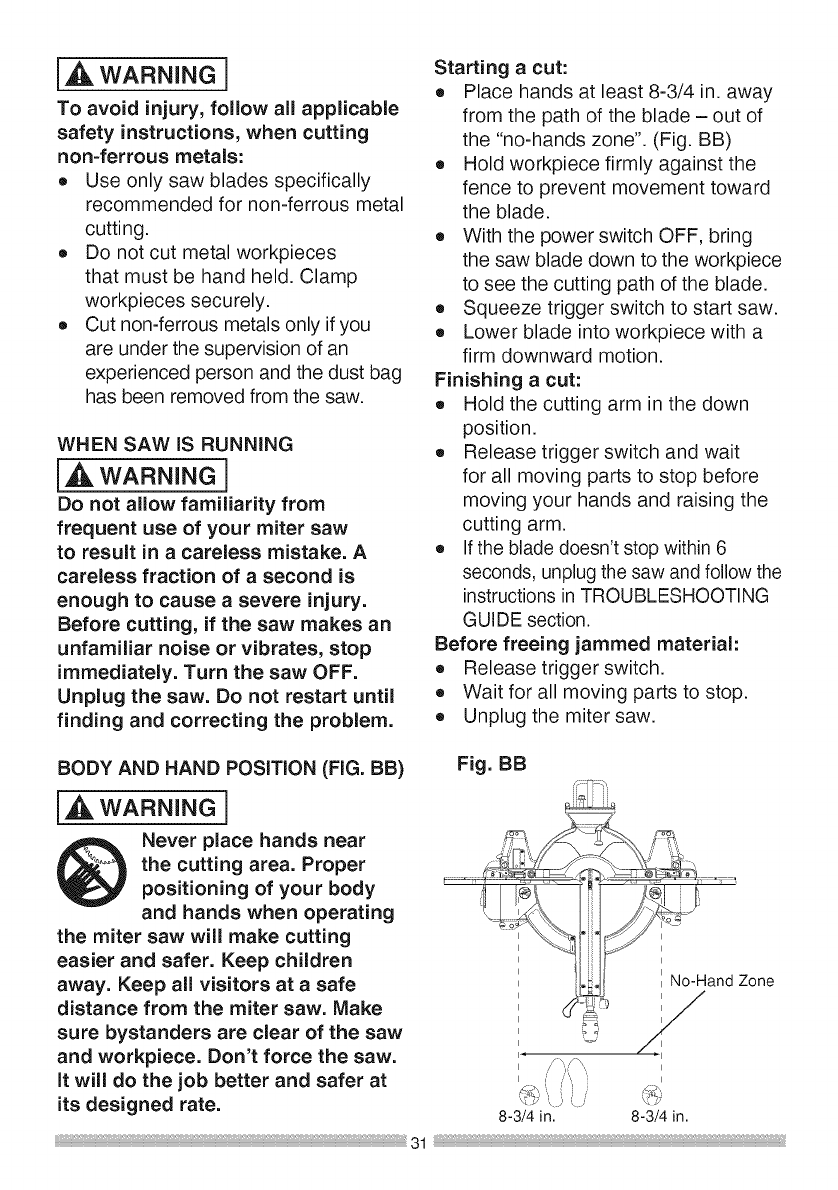
o Place hands at least 8-3/4 in. away
from the path of the blade - out of
the "no-hands zone". (Fig. BB)
o Hold workpiece firmly against the
fence to prevent movement toward
the blade.
o With the power switch OFF, bring
the saw blade down to the workpiece
to see the cutting path of the blade.
o Squeeze trigger switch to start saw.
o Lower blade into workpiece with a
firm downward motion.
Finishing a cut:
o Hold the cutting arm in the down
position.
o Release trigger switch and wait
for all moving parts to stop before
moving your hands and raising the
cutting arm.
o Ifthe blade doesn't stop within 6
seconds, unplug the saw and follow the
instructions in TROUBLESHOOTING
GUIDE section.
Before freeing jammed material:
o Release trigger switch.
o Wait for all moving parts to stop.
o Unplug the miter saw.
BODY AND HAND POSiTiON (FIG. BB) Fig. BB
i,A_ WARNING]
Never place hands near
the cutting area. Proper
positioning of your body
and hands when operating
the miter saw will make cutting
easier and safer. Keep children
away. Keep all visitors at a safe
distance from the miter saw. Make
sure bystanders are clear of the saw
and workpiece. Don't force the saw.
it will do the job better and safer at
its designed rate.
No-Hand Zone
I
8-3/4 in. 8-3/4 in.
BASIC SAW OPERATIONS
[,,A WARNING]
For your convenience, your saw
has ablade brake. The brake is
not a safety device. Never rely on
it to replace the proper use of the
guard on your saw. if the blade
doesn't stop within approximately 6
seconds, wait for the blade to stop,
unplug the saw and contact Sears or
another qualified service dealer.
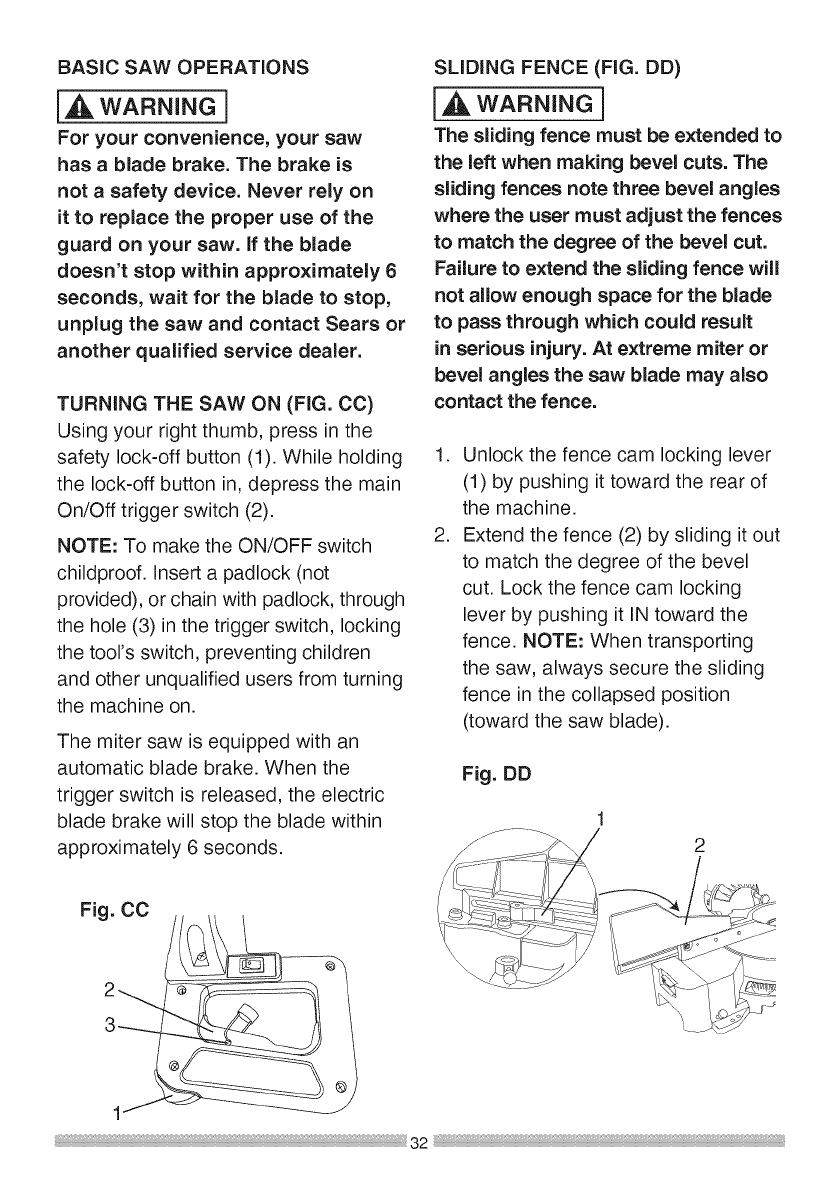
TURNING THE SAW ON (FIG. CC)
Using your right thumb, press in the
safety lock-off button (1). While holding
the lock-off button in, depress the main
On/Off trigger switch (2).
NOTE: To make the ON/OFF switch
childproof, insert a padlock (not
provided), or chain with padlock, through
the hole (3) in the trigger switch, locking
the tool's switch, preventing children
and other unqualified users from turning
the machine on.
The miter saw is equipped with an
automatic blade brake. When the
trigger switch is released, the electric
blade brake will stop the blade within
approximately 6 seconds.
Fig. CC
SLiDiNG FENCE (FIG. DD)
[,_ WARNING]
The sliding fence must be extended to
the left when making bevel cuts. The
sliding fences note three bevel angles
where the user must adjust the fences
to match the degree of the bevel cut.
Failure to extend the sliding fence will
not allow enough space for the blade
to pass through which could result
in serious injury. At extreme miter or
bevel angles the saw blade may also
contact the fence.
.
.
Unlock the fence cam locking lever
(1) by pushing it toward the rear of
the machine.
Extend the fence (2) by sliding it out
to match the degree of the bevel
cut. Lock the fence cam locking
lever by pushing it IN toward the
fence. NOTE: When transporting
the saw, always secure the sliding
fence in the collapsed position
(toward the saw blade).
Fig. DD
1
1
REMOVING OR iNSTALLiNG THE
I,A WARNING l
DRY RUN =it is important to know
where the blade will intersect with the
workpiece during cutting operations.
Always perform a simulated cutting
sequence with the power tool switched
OFF to gain an understanding of the
projected path of the saw blade. At
some extreme angles, the right or left
side fence might have to be removed
to ensure proper clearance prior to
making the cut.
{A CAUTION1
The right side and left side sliding
fence must be removed when making
any right or left bevel angle cuts
greater than 33.9 ° in combination
with any right or left miter angle.
This fence must also be removed
whenever a 45° bevel angle is desired
with a miter angle greater than 31.6 °.
Removing
1. Unlock the fence cam locking lever
by pushing it out toward the rear of
the machine.
2. Lift up on the sliding fence to
remove it from the saw.
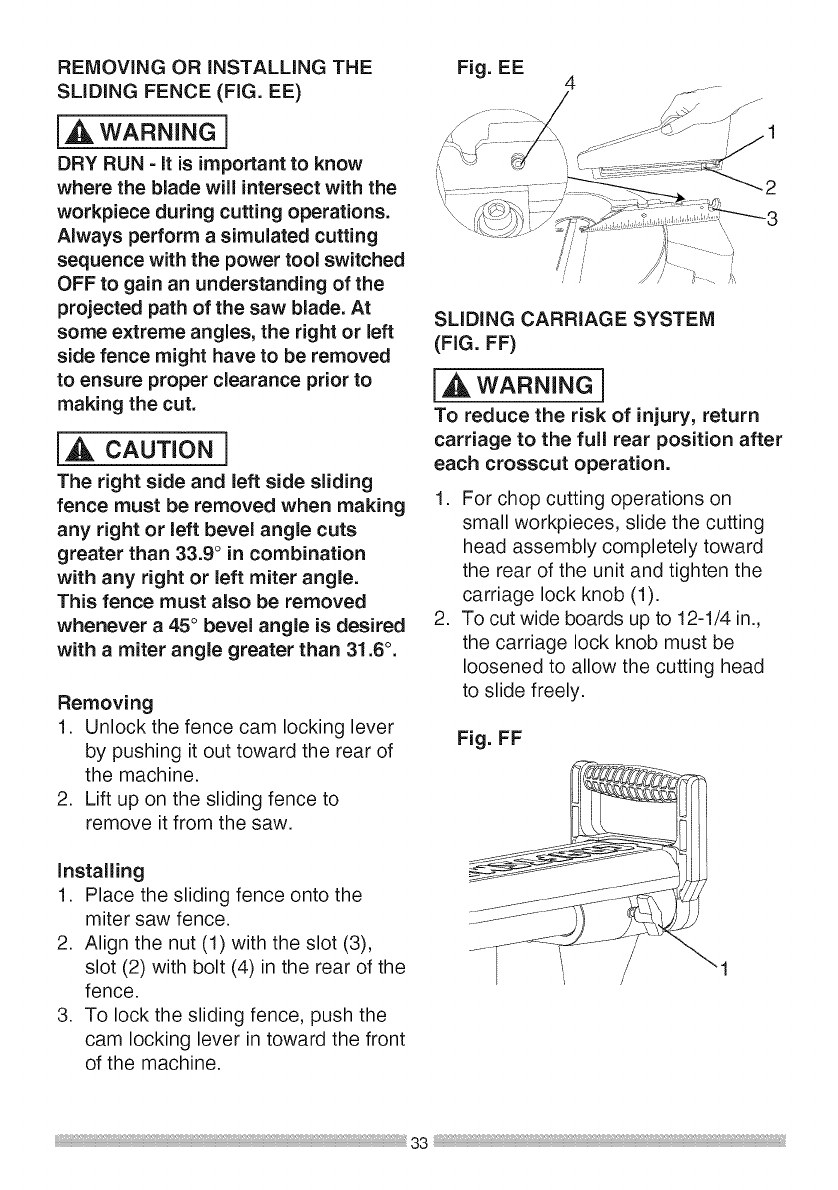
installing
1. Place the sliding fence onto the
miter saw fence.
2. Align the nut (1) with the slot (3),
slot (2) with bolt (4) in the rear of the
fence.
3. To lock the sliding fence, push the
cam locking lever in toward the front
of the machine.
Fig. EE
jf
SLiDiNG CARRIAGE SYSTEM
(FIG. FF)
[_, WARNING]
To reduce the risk of injury, return
carriage to the full rear position after
each crosscut operation.
1. For chop cutting operations on
small workpieces, slide the cutting
head assembly completely toward
the rear of the unit and tighten the
carriage lock knob (1).
2. To cut wide boards up to 12-1/4 in.,
the carriage lock knob must be
loosened to allow the cutting head
to slide freely.
Fig. FF
1
BEFORELEAVING THE SAW
eNever leave tool running
unattended. Turn power OFF. Wait
for all moving parts to stop.
eMake workshop childproof. Lock the
shop. Disconnect master switches.
Store tool away from children and
other unqualified users.
i_, WARNING]
To avoid injury from materials being
thrown, always unplug the saw
to avoid accidental starting, and
remove small pieces of material from
the table cavity. The table insert may
be removed for this purpose, but
always reattach the table insert prior
to performing a cutting operation.
.If the miter angle desired is NOT
one of the ten positive stops noted
above, simply lock the table at the
desired angle by pressing down on
the quick-cam miter table lock (2).
Fig. GG
I3
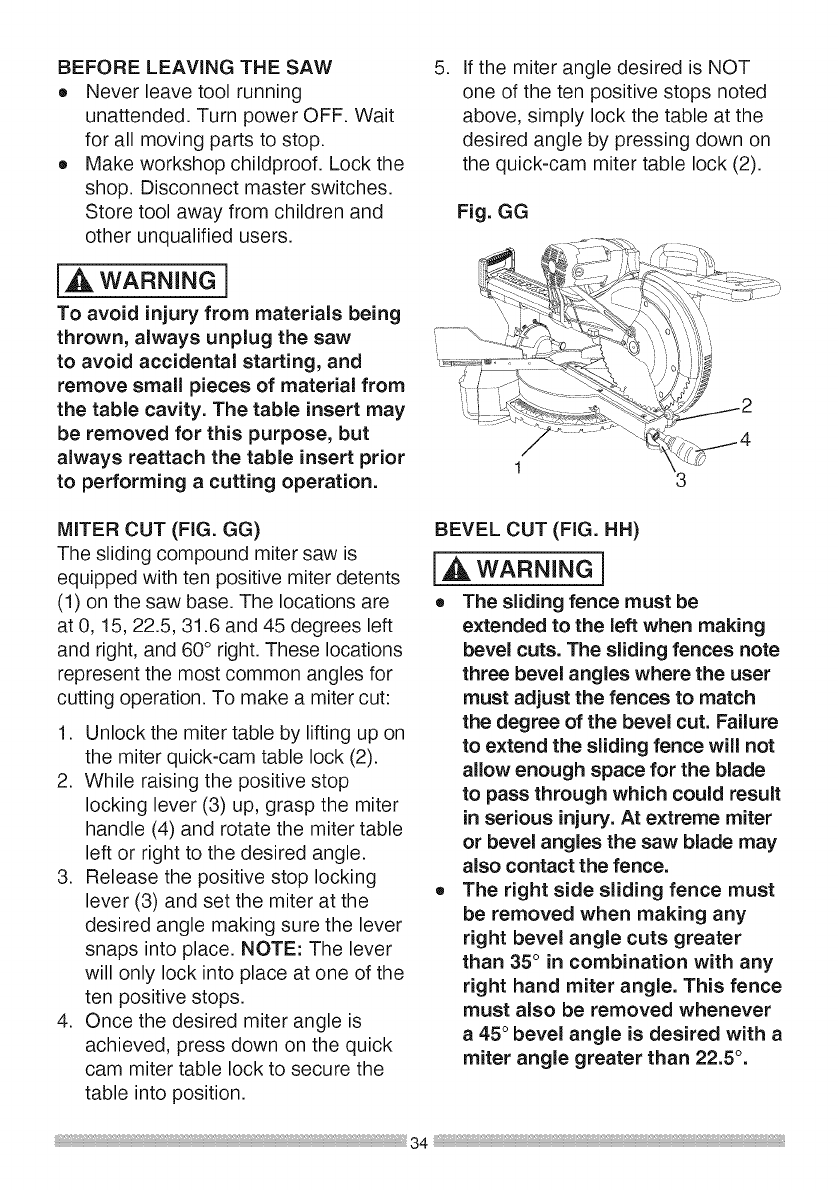
MITER CUT (FIG. GG)
The sliding compound miter saw is
equipped with ten positive miter detents
(1) on the saw base. The locations are
at 0, 15, 22.5, 31.6 and 45 degrees left
and right, and 60° right. These locations
represent the most common angles for
cutting operation. To make a miter cut:
1. Unlock the miter table by lifting up on
the miter quick-cam table lock (2).
2. While raising the positive stop
locking lever (3) up, grasp the miter
handle (4) and rotate the miter table
left or right to the desired angle.
3. Release the positive stop locking
lever (3) and set the miter at the
desired angle making sure the lever
snaps into place. NOTE: The lever
will only lock into place at one of the
ten positive stops.
4. Once the desired miter angle is
achieved, press down on the quick
cam miter table lock to secure the
table into position.
BEVEL CUT (FIG. HH)
[,A, WARNING]
eThe sliding fence must be
extended to the left when making
bevel cuts. The sliding fences note
three bevel angles where the user
must adjust the fences to match
the degree of the bevel cut. Failure
to extend the sliding fence will not
allow enough space for the blade
to pass through which could result
in serious injury. At extreme miter
or bevel angles the saw blade may
also contact the fence.
eThe right side sliding fence must
be removed when making any
right bevel angle cuts greater
than 35° in combination with any
right hand miter angle. This fence
must also be removed whenever
a45 ° bevel angle is desired with a
miter angle greater than 22.5 ° .
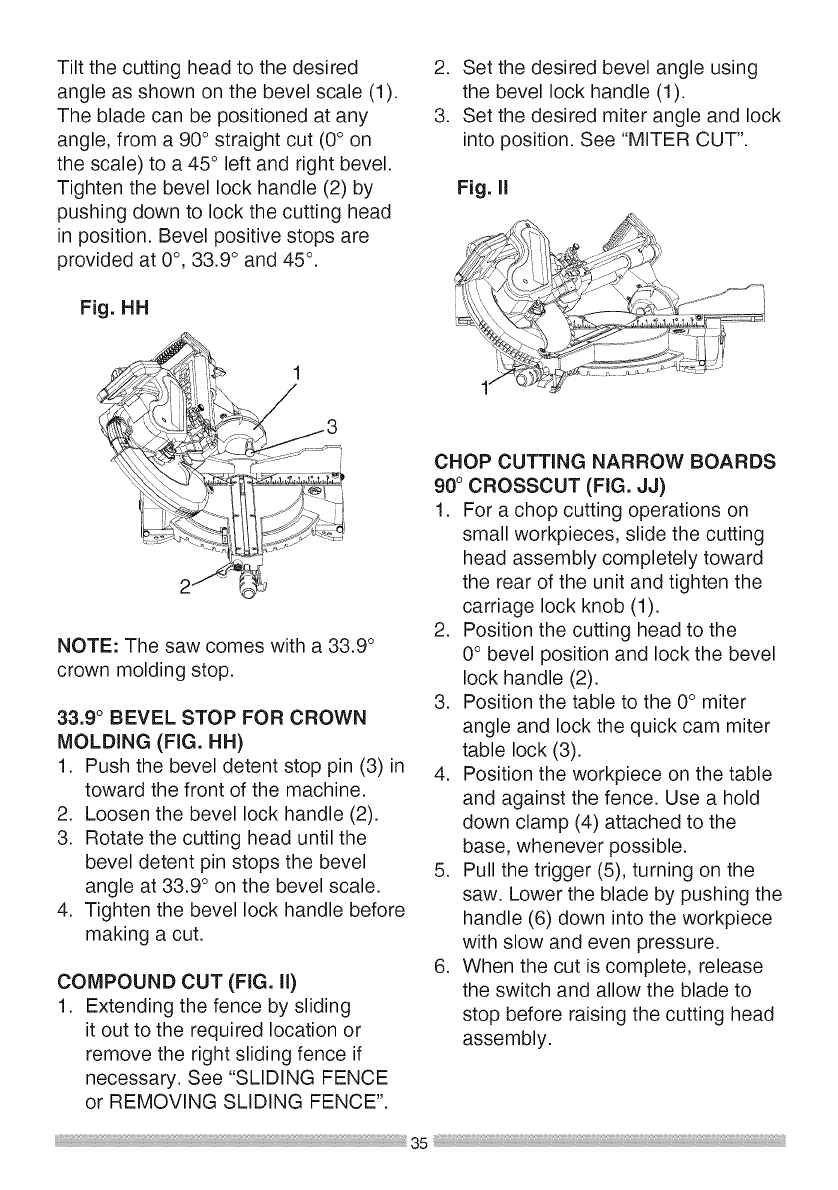
Tiltthecuttingheadtothedesired
angleasshownonthebevelscale(1).
Thebladecanbepositionedatany
angle,froma 90°straightcut(0° on
thescale)to a45° leftandrightbevel.
Tightenthebevellockhandle(2)by
pushingdowntolockthecuttinghead
inposition.Bevelpositivestopsare
providedat 0°, 33.9° and45°.
Fig.HH
2. Setthedesiredbevelangleusing
thebevellockhandle(1).
3. Setthedesiredmiterangleandlock
intoposition.See"MITERCUT".
Fig.I!
NOTE:Thesawcomeswitha33.9°
crownmoldingstop.
33.9° BEVELSTOPFORCROWN
MOLDING(FIG.HH)
1. Pushthebeveldetentstoppin(3)in
towardthefrontofthemachine.
2. Loosenthebevellockhandle(2).
3. Rotatethecuttingheaduntilthe
beveldetentpinstopsthebevel
angleat33.9° onthebevelscale.
4. Tightenthebevellockhandlebefore
makingacut.
COMPOUNDCUT(FIG.II)
1. Extendingthefencebysliding
itouttotherequiredlocationor
removetherightslidingfenceif
necessary.See"SLIDINGFENCE
or REMOVINGSLIDINGFENCE".
CHOPCUTTINGNARROWBOARDS
90°CROSSCUT(FIG.JJ)
1. Forachopcuttingoperationson
smallworkpieces,slidethecutting
headassemblycompletelytoward
therearoftheunitandtightenthe
carriagelockknob(1).
2. Positionthecuttingheadtothe
0°bevelpositionandlockthebevel
lockhandle(2).
3. Positionthetabletothe0° miter
angleandlockthequickcammiter
tablelock(3).
4. Positiontheworkpieceonthetable
andagainstthefence.Useahold
downclamp(4)attachedtothe
base,wheneverpossible.
5. Pullthetrigger(5),turningonthe
saw.Lowerthebladebypushingthe
handle(6)downintotheworkpiece
withslowandeven pressure.
6. When the cut is complete, release
the switch and allow the blade to
stop before raising the cutting head
assembly.
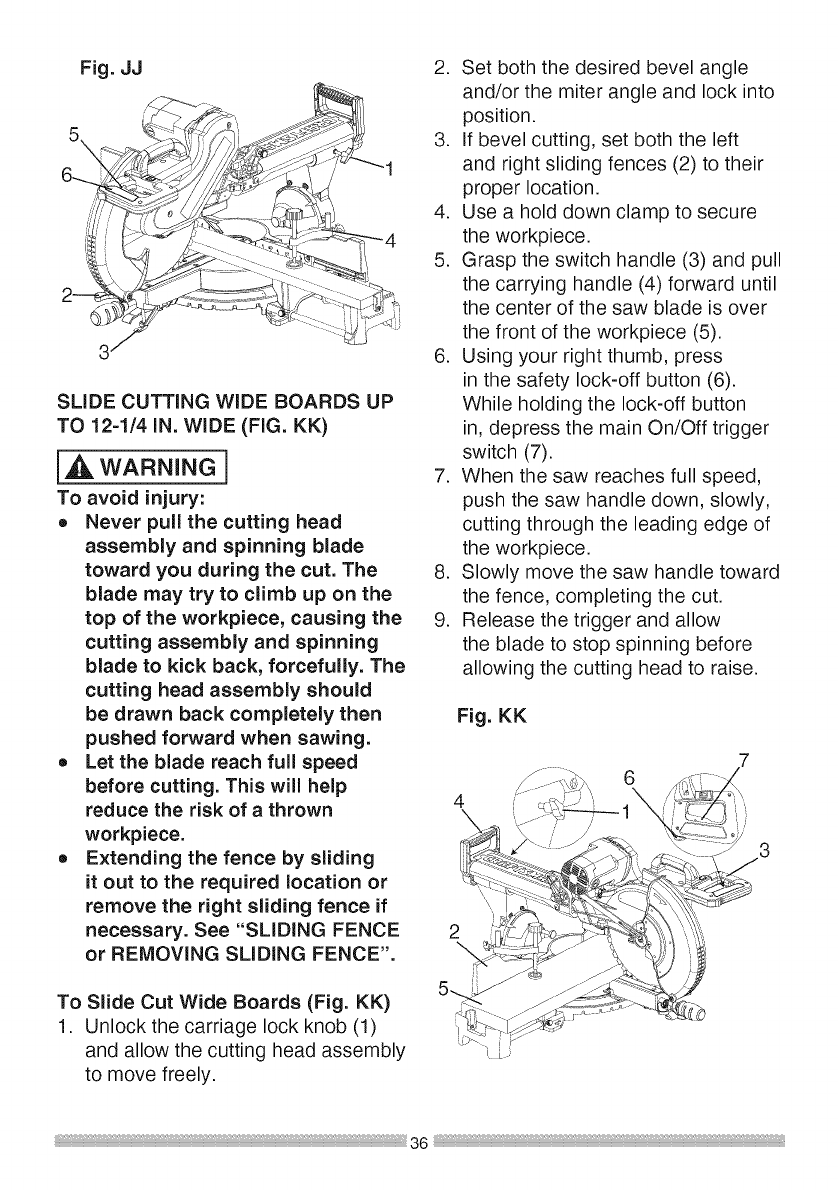
Fig. JJ
SLIDE CUTTING WiDE BOARDS UP
TO 12=1/4 iN. WiDE (FIG. KK)
i_ WARNING]
To avoid injury:
oNever pull the cutting head
assembly and spinning blade
toward you during the cut. The
blade may try to climb up on the
top of the workpiece, causing the
cutting assembly and spinning
blade to kick back, forcefully. The
cutting head assembly should
be drawn back completely then
pushed forward when sawing.
oLet the blade reach full speed
before cutting. This will help
reduce the risk of a thrown
workpiece.
oExtending the fence by sliding
it out to the required location or
remove the right sliding fence if
necessary. See "SLiDiNG FENCE
or REMOVING SLiDiNG FENCE".
To Slide Cut Wide Boards (Fig. KK)
1. Unlock the carriage lock knob (1)
and allow the cutting head assembly
to move freely.
2. Set both the desired bevel angle
and/or the miter angle and lock into
position.
3. If bevel cutting, set both the left
and right sliding fences (2) to their
proper location.
4. Use a hold down clamp to secure
the workpiece.
5. Grasp the switch handle (3) and pull
the carrying handle (4) forward until
the center of the saw blade is over
the front of the workpiece (5).
6. Using your right thumb, press
in the safety lock-off button (6).
While holding the lock-off button
in, depress the main On/Off trigger
switch (7).
7. When the saw reaches full speed,
push the saw handle down, slowly,
cutting through the leading edge of
the workpiece.
8. Slowly move the saw handle toward
the fence, completing the cut.
9. Release the trigger and allow
the blade to stop spinning before
allowing the cutting head to raise.
Fig. KK
6
4
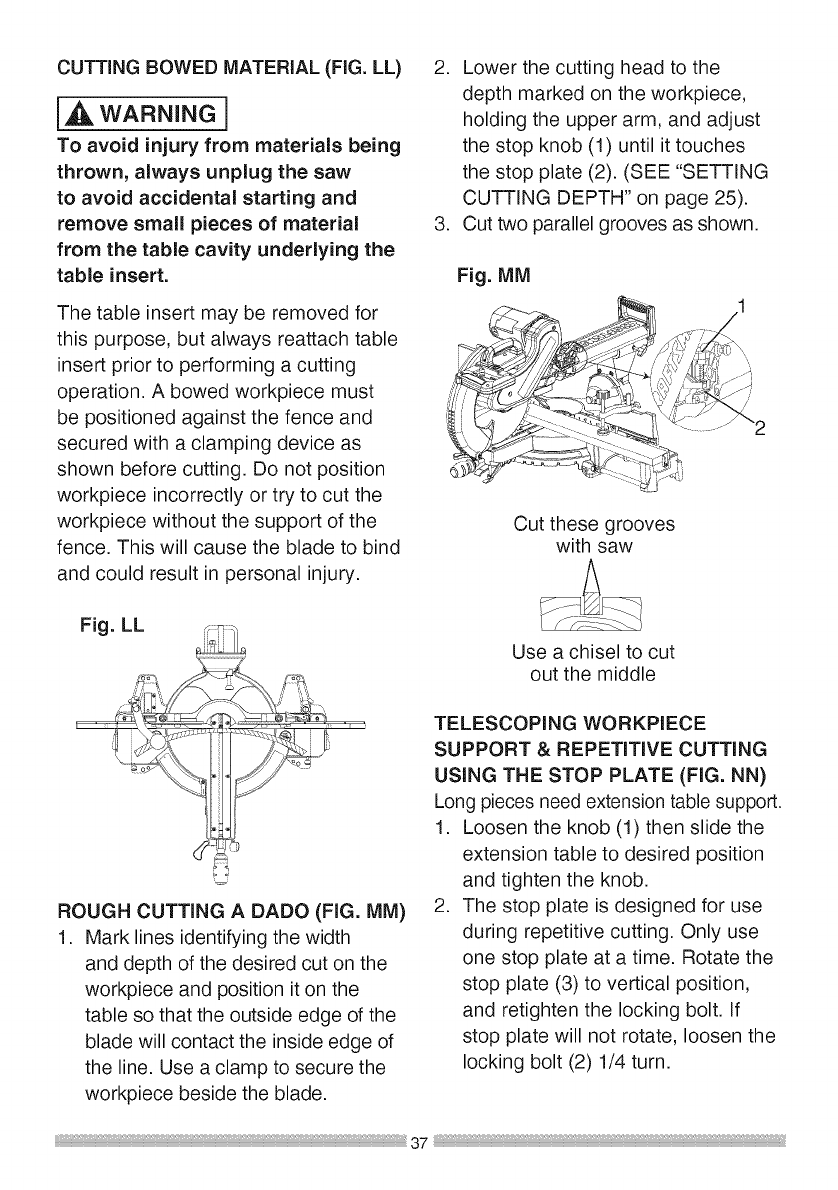
CUTTINGROWEDMATERIAL (FIG. LL)
i_ WARNING]
To avoid injury from materials being
thrown, always unplug the saw
to avoid accidental starting and
remove small pieces of material
from the table cavity underlying the
table insert.
The table insert may be removed for
this purpose, but always reattach table
insert prior to performing a cutting
operation. A bowed workpiece must
be positioned against the fence and
secured with a clamping device as
shown before cutting. Do not position
workpiece incorrectly or try to cut the
workpiece without the support of the
fence. This will cause the blade to bind
and could result in personal injury.
2. Lower the cutting head to the
depth marked on the workpiece,
holding the upper arm, and adjust
the stop knob (1) until it touches
the stop plate (2). (SEE "SETTING
CUTTING DEPTH" on page 25).
3. Cut two parallel grooves as shown.
Fig. MM
Cut these grooves
with saw
Fig. LL
o.
ROUGH CUTTING A DADO (FIG. MM)
1. Mark lines identifying the width
and depth of the desired cut on the
workpiece and position it on the
table so that the outside edge of the
blade will contact the inside edge of
the line. Use a clamp to secure the
workpiece beside the blade.
Use a chisel to cut
out the middle
TELESCOPING WORKPIECE
SUPPORT & REPETITIVE CUTTING
USING THE STOP PLATE (FIG. NN)
Long pieces need extension table support.
1. Loosen the knob (1) then slide the
extension table to desired position
and tighten the knob.
2. The stop plate is designed for use
during repetitive cutting. Only use
one stop plate at a time. Rotate the
stop plate (3) to vertical position,
and retighten the locking bolt. If
stop plate will not rotate, loosen the
locking bolt (2) 1/4 turn.
37
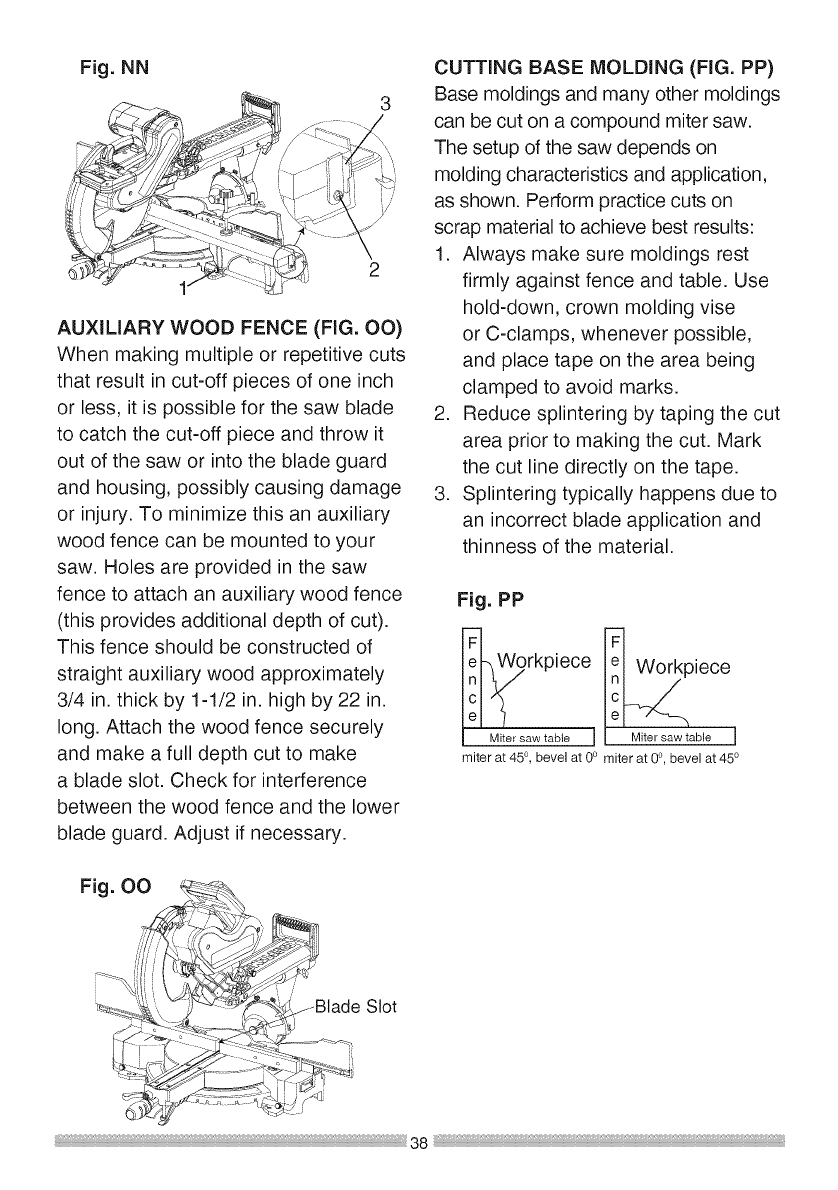
Fig. NN
AUXILIARY WOOD FENCE (FIG. OO)
When making multiple or repetitive cuts
that result in cut-off pieces of one inch
or less, it is possible for the saw blade
to catch the cut-off piece and throw it
out of the saw or into the blade guard
and housing, possibly causing damage
or injury. To minimize this an auxiliary
wood fence can be mounted to your
saw. Holes are provided in the saw
fence to attach an auxiliary wood fence
(this provides additional depth of cut).
This fence should be constructed of
straight auxiliary wood approximately
3/4 in. thick by 1-1/2 in. high by 22 in.
long. Attach the wood fence securely
and make a full depth cut to make
a blade slot. Check for interference
between the wood fence and the lower
blade guard. Adjust if necessary.
Fig. O0
CUTTING BASE MOLDING (FIG. PP)
Base moldings and many other moldings
can be cut on a compound miter saw.
The setup of the saw depends on
molding characteristics and application,
as shown. Perform practice cuts on
scrap material to achieve best results:
1. Always make sure moldings rest
firmly against fence and table. Use
hold-down, crown molding vise
or C-clamps, whenever possible,
and place tape on the area being
clamped to avoid marks.
2. Reduce splintering by taping the cut
area prior to making the cut. Mark
the cut line directly on the tape.
3. Splintering typically happens due to
an incorrect blade application and
thinness of the material.
Fig. PP
_ _piece
1 Mit..... table J [ Mit ..... table J
miter at 45 °, bevel at 0° miter at 0°, bevel at 450
Slot
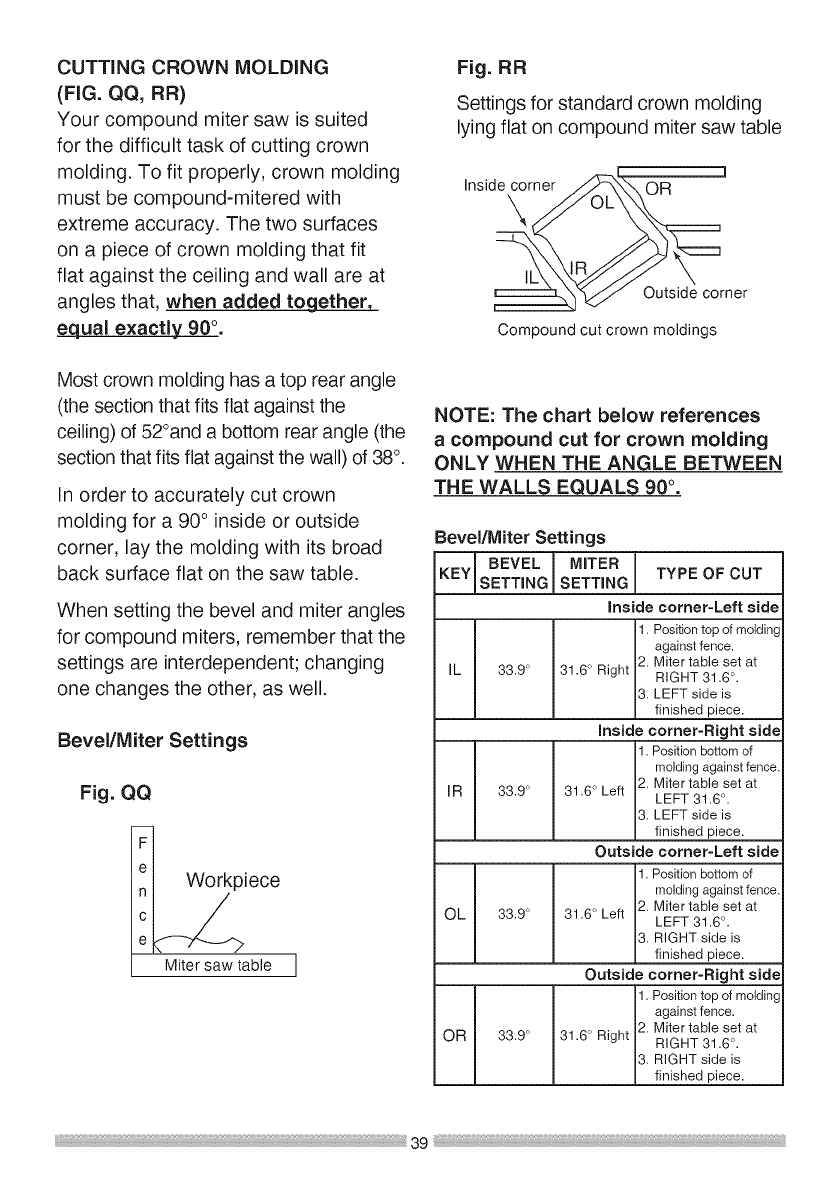
CUTTING CROWN MOLDING
(FIG. QQ, RR)
Your compound miter saw is suited
for the difficult task of cutting crown
molding. To fit properly, crown molding
must be compound-mitered with
extreme accuracy. The two surfaces
on a piece of crown molding that fit
flat against the ceiling and wall are at
angles that, when added to_
equal exactly 90°.
Most crown molding has a top rear angle
(the section that fits flat against the
ceiling) of 52°and a bottom rear angle (the
section that fits flat against the wall) of 38°.
In order to accurately cut crown
molding for a 90° inside or outside
corner, lay the molding with its broad
back surface flat on the saw table.
When setting the bevel and miter angles
for compound miters, remember that the
settings are interdependent; changing
one changes the other, as well.
Bevel/Miter Settings
Fig. QQ
k_ iece
Miter saw table
Fig. RR
Settings for standard crown molding
lying flat on compound miter saw table
Inside corner
\
_..x.
OR
Outside corner
Compound cut crown moldings
NOTE: The chart below references
acompound cut for crown molding
ONLY WHEN THE ANGLE BETWEEN
THE WALLS EQUALS 90 °.
Bevel/Miter Settings
KEY SETTINGBEVEL SETTINGMITER I
ITYPE OF CUT
n
inside comer-Left side
1. Position top of molding
against fence.
2. Miter table set at
IL 33.9 ° 31.6 ° Right RIGHT 31.6 °.
3. LEFT side is
finished piece.
inside corner-Right side
1. Position bottom of
molding against fence.
2. Miter table set at
IR 33.9 ° 31.6 ° Left LEFT 31.6 °.
3. LEFT side is
finished piece.
Outside comer-Left side
1. Position bottom of
molding against fence.
2. Miter table set at
OL 33.9 ° 31.6 ° Left LEFT 31.6 °.
3. RIGHT side is
finished piece.
Outside comer-Right side
1. Position top of molding
against fence.
OR 33.9 ° 31.6 ° Right 2. Miter table set at
RIGHT 31.6 °.
3. RIGHT side is
finished piece.
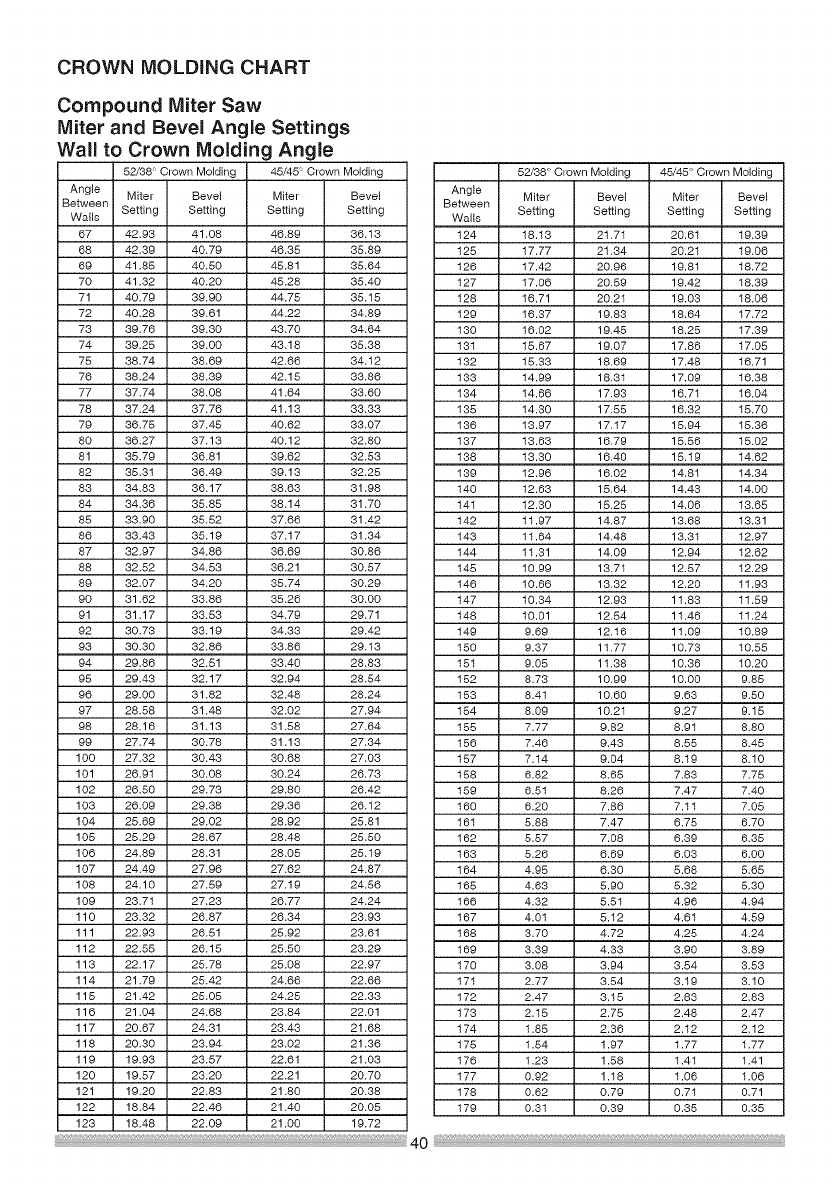
CROWN MOLDING CHART
Compound Miter Saw
Miter and Bevel Angle Settings
Wall to Crown Molding Angle
52/38 Crown Molding 45/45 Crown Molding 52/38 ° Crown Molding 45/45 ° Crown Molding
Angle Miter Bevel Miter Bevel Angle
Between Setting Setting Setting Setting Between Miter Bevel Miter Bevel
Walls Wails Setting Setting Setting Setting
67 42.93 41.08 46.89 36.13 124 18.13 21.71 20.61 19.39
68 42.39 40.79 46.35 35.89 125 17.77 21.34 20.21 19.06
69 41.88 40.50 45.81 35.64 126 17.42 20.96 19.81 18.72
70 41.32 40.20 45.28 35.40 127 17.06 20.59 19.42 18.39
71 40.79 39.90 44.75 35.15 128 16.71 20.21 19.03 18.06
72 40.28 39.61 44.22 34.89 129 16.37 19.83 18.64 17.72
73 39.76 39.30 43.70 34.64 130 16.02 19.48 18.25 17.39
74 39.25 39.00 43.18 35.38 131 18.67 19.07 17.86 17.05
75 38.74 38.69 42.66 34.12 132 15.33 18.69 17.48 16.71
76 38.24 38.39 42.15 33.86 133 14.99 18.31 17.09 16.38
77 37.74 38.08 41.64 33.60 134 14.66 17.93 16.71 16.04
78 37.24 37.76 41.13 33.33 138 14.30 17.85 16.32 18.70
79 36.75 37.45 40.62 33.07 136 13.97 17.17 15.94 18.36
80 36.27 37.13 40.12 32.80 137 13.63 16.79 15.56 15.02
81 35.79 36.81 39.62 32.53 138 13.30 16.40 15.19 14.62
82 35.31 36.49 39.13 32.25 139 12.96 16.02 14.81 14.34
83 34.83 36.17 38.63 31.98 140 12.63 15.64 14.43 14.00
84 34.36 35.85 38.14 31.70 141 12.30 15.25 14.06 13.65
85 33.90 35.52 37.66 31.42 142 11.97 14.87 13.68 13.31
86 33.43 35.19 37.17 31.34 143 11.64 14.48 13.31 12.97
87 32.97 34.86 36.69 30.86 144 11.31 14.09 12.94 12.62
88 32.52 34.53 36.21 30.57 148 10.99 13.71 12.57 12.29
89 32.07 34.20 35.74 30.29 146 10.66 13.32 12.20 11.93
90 31.62 33.86 35.26 30.00 147 10.34 12.93 11.83 11.59
91 31.17 33.53 34.79 29.71 148 I0.01 12.54 11.46 11.24
92 30.73 33.19 34.33 29.42 149 9.69 12.16 11.09 10.89
93 30.30 32.86 33.86 29.13 180 9.37 11.77 10.73 10.55
94 29.86 32.51 33.40 28.83 181 9.05 11.38 10.36 10.20
95 29.43 32.17 32.94 28.54 152 8.73 10.99 10.00 9.85
96 29.00 31.82 32.48 28.24 153 8.41 10.60 9.63 9.50
97 28.58 31.48 32.02 27.94 184 8.09 10.21 9.27 9.15
98 28.16 31.13 31.58 27.64 185 7.77 9.82 8.91 8.80
99 27.74 30.78 31.13 27.34 156 7.46 9.43 8.55 8.45
100 27.32 30.43 30.68 27.03 157 7.14 9.04 8.19 8.10
101 26.91 30.08 30.24 26.73 158 6.82 8.68 7.83 7.75
102 26.50 29.73 29.80 26.42 189 6.51 8.26 7.47 7.40
103 26.09 29.38 29.36 26.12 160 6.20 7.86 7.11 7.05
104 25.69 29.02 28.92 25.81 161 5.88 7.47 6.75 6.70
105 25.29 28.67 28.48 25.50 162 5.87 7.08 6.39 6.35
106 24.89 28.31 28.05 25.19 163 5.26 6.69 6.03 6.00
107 24.49 27.96 27.62 24.87 164 4.95 6.30 5.68 5.65
108 24.10 27.59 27.19 24.56 168 4.63 5.90 5.32 5.30
109 23.71 27.23 26.77 24.24 166 4.32 5.81 4.96 4.94
110 23.32 26.87 26.34 23.93 167 4.01 5.12 4.61 4.59
111 22.93 26.51 25.92 23.61 168 3.70 4.72 4.25 4.24
112 22.58 26.15 25.50 23.29 169 3.39 4.33 3.90 3.89
113 22.17 25.78 25.08 22.97 170 3.08 3.94 3.84 3.53
114 21.79 25.42 24.66 22.66 171 2.77 3.84 3.19 3.10
115 21.42 25.05 24.25 22.33 172 2.47 3.15 2.83 2.83
116 21.04 24.68 23.84 22.01 173 2.15 2.75 2.48 2.47
117 20.67 24.31 23.43 21.68 174 1.85 2.36 2.12 2.12
118 20.30 23.94 23.02 21.36 175 1.84 1.97 1.77 1.77
119 19.93 23.57 22.61 21.03 176 1.23 1.88 1.41 1.41
120 19.57 23.20 22.21 20.70 177 0.92 1.18 1.06 1.06
121 19.20 22.83 21.80 20.38 178 0.62 0.79 0.71 0.71
122 18.84 22.46 21.40 20.05 179 0.31 0.39 0.38 0.35
123 18.48 22.09 21.00 19.72
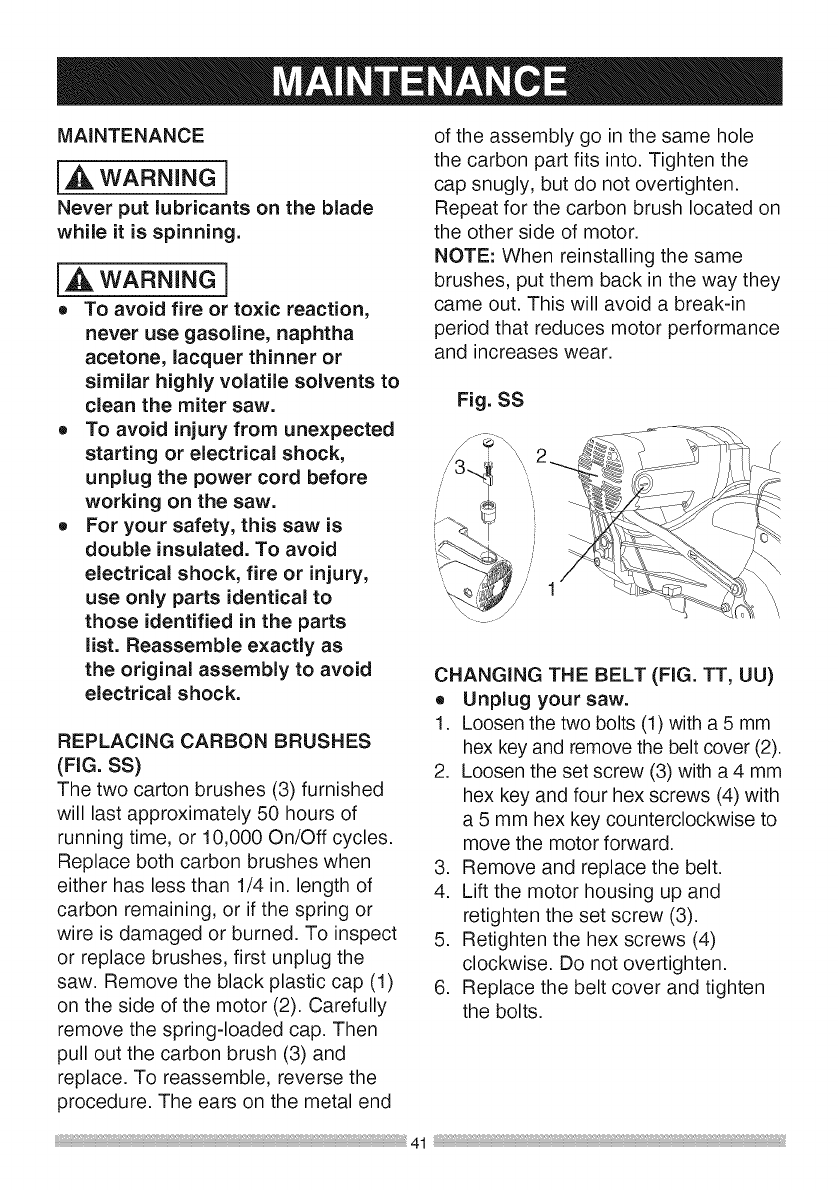
MAINTENANCE
i,A WARNING]
Never put lubricants on the blade
while it is spinning.
i,_k WARNING]
e TO avoid fire or toxic reaction,
never use gasoline, naphtha
acetone, lacquer thinner or
similar highly volatile solvents to
clean the miter saw.
e To avoid injury from unexpected
starting or electrical shock,
unplug the power cord before
working on the saw.
e For your safety, this saw is
double insulated. To avoid
electrical shock, fire or injury,
use only parts identical to
those identified in the parts
list. Reassemble exactly as
the original assembly to avoid
electrical shock.
REPLACING CARBON BRUSHES
(FIG. SS)
The two carton brushes (3) furnished
will last approximately 50 hours of
running time, or 10,000 On/Off cycles.
Replace both carbon brushes when
either has less than 1/4 in. length of
carbon remaining, or if the spring or
wire is damaged or burned. To inspect
or replace brushes, first unplug the
saw. Remove the black plastic cap (1)
on the side of the motor (2). Carefully
remove the spring-loaded cap. Then
pull out the carbon brush (3) and
replace. To reassemble, reverse the
procedure. The ears on the metal end
of the assembly go in the same hole
the carbon part fits into. Tighten the
cap snugly, but do not overtighten.
Repeat for the carbon brush located on
the other side of motor.
NOTE: When reinstalling the same
brushes, put them back in the way they
came out. This will avoid a break-in
period that reduces motor performance
and increases wear.
Fig. SS
CHANGING THE BELT (FIG. TT, UU)
o Unplug your saw.
1. Loosen the two bolts (1) with a 5 mm
hex key and remove the belt cover (2).
2. Loosen the set screw (3) with a 4 mm
hex key and four hex screws (4) with
a 5 mm hex key counterclockwise to
move the motor forward.
3. Remove and replace the belt.
4. Lift the motor housing up and
retighten the set screw (3).
5. Retighten the hex screws (4)
clockwise. Do not overtighten.
6. Replace the belt cover and tighten
the bolts.
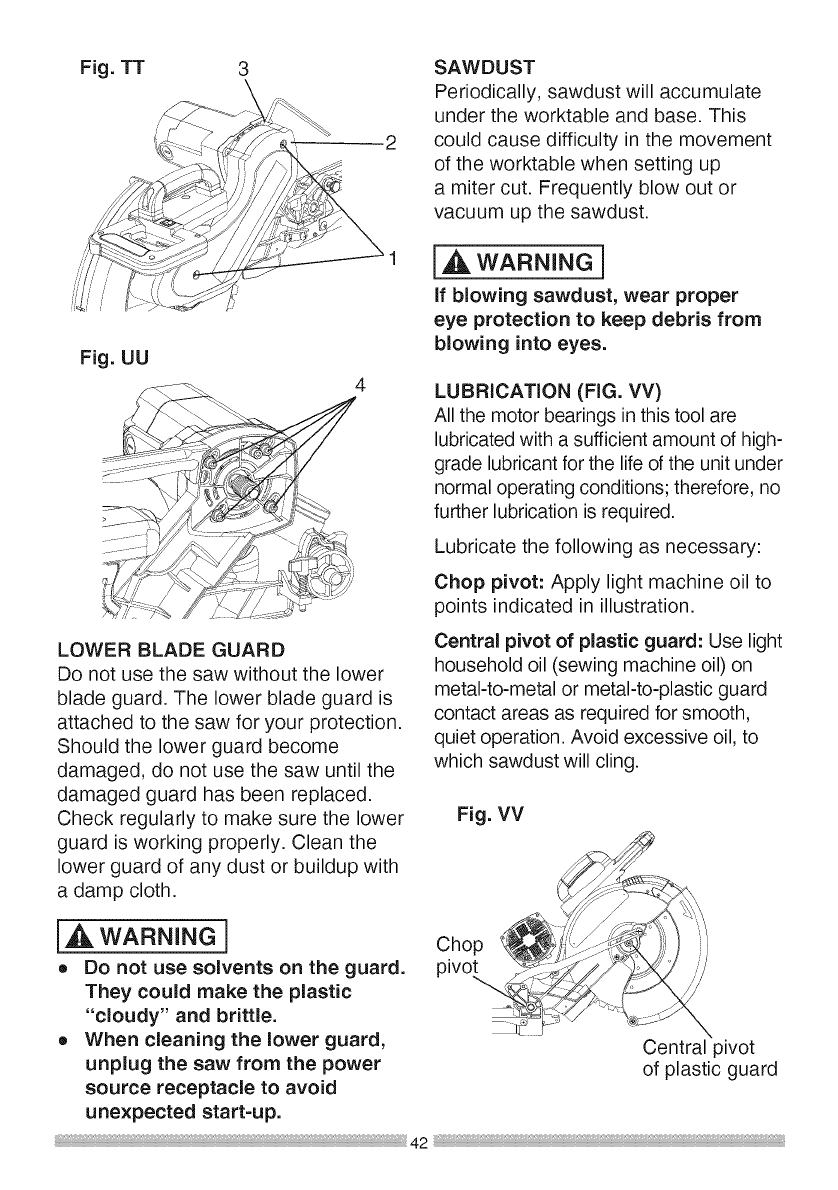
Fig.TT 3
Fig.UU 4
LOWERBLADEGUARD
Donotusethesawwithoutthelower
bladeguard.Thelowerbladeguardis
attachedtothesawforyourprotection.
Shouldthelowerguardbecome
damaged,donotusethesawuntilthe
damagedguardhasbeenreplaced.
Checkregularlyto makesurethelower
guardisworkingproperly.Cleanthe
lowerguardof anydustorbuildupwith
adampcloth.
SAWDUST
Periodically,sawdustwillaccumulate
undertheworktableandbase.This
couldcausedifficultyinthemovement
oftheworktablewhensettingup
amitercut.Frequentlyblowoutor
vacuumupthesawdust.
I,A WARNING i
If blowing sawdust, wear proper
eye protection to keep debris from
blowing into eyes.
LUBRICATION (FIG. VV)
All the motor bearings in this tool are
lubricated with a sufficient amount of high-
grade lubricant for the life of the unit under
normal operating conditions; therefore, no
further lubrication is required.
Lubricate the following as necessary:
Chop pivot: Apply light machine oil to
points indicated in illustration.
Central pivot of plastic guard: Use light
household oil (sewing machine oil) on
metal-to-metal or metal-to-plastic guard
contact areas as required for smooth,
quiet operation. Avoid excessive oil, to
which sawdust will cling.
Fig. VV
I,_ WARNING 1 Chop
o Do not use solvents on the guard, pivot
They could make the plastic
"cloudy" and brittle.
o When cleaning the lower guard, Central pivot
unplug the saw from the power of plastic guard
source receptacle to avoid
unexpected start-up.
42
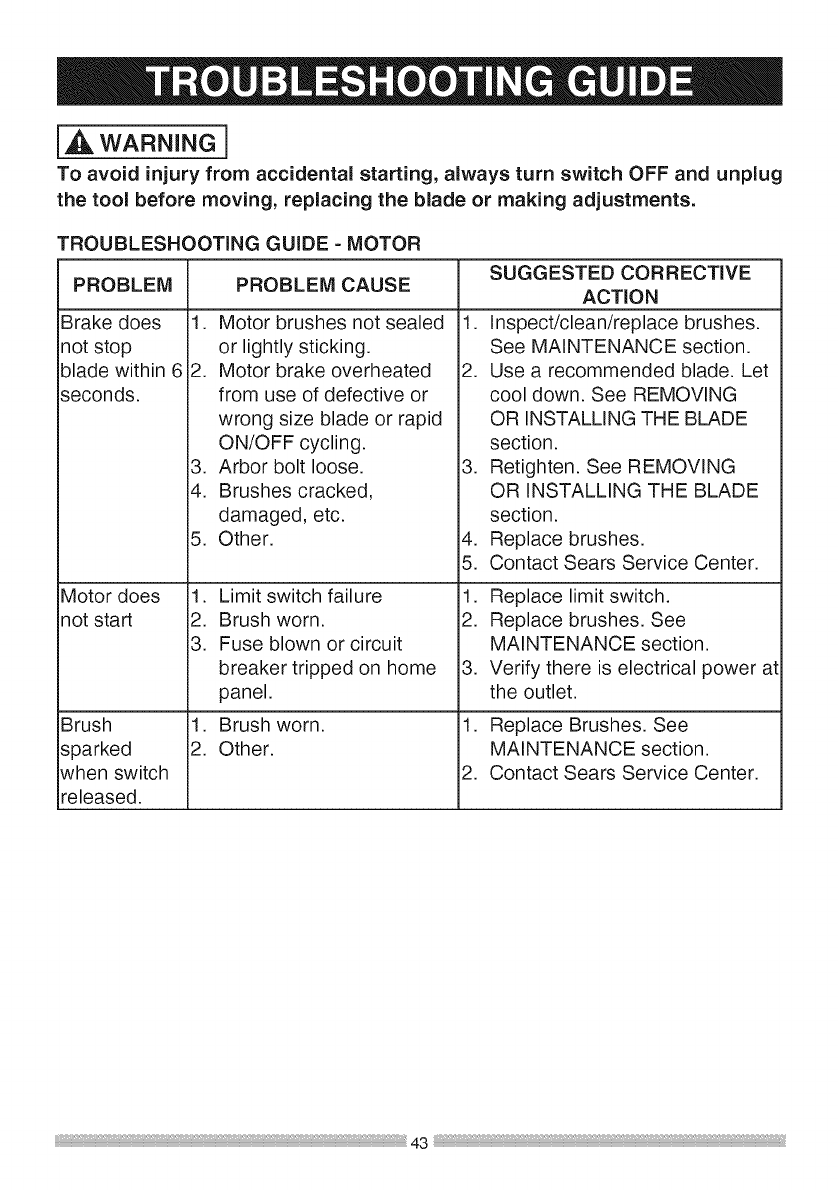
i_ WARNING]
To avoid injury from accidental starting, always turn switch OFF and unplug
the tool before moving, replacing the blade or making adjustments.
TROUBLESHOOTING GUIDE - MOTOR
PROBLEM PROBLEM CAUSE
Brake does
not stop
blade within 6
seconds.
Motor does
not start
Brush
sparked
when switch
released.
1. Motor brushes not sealed
or lightly sticking.
2. Motor brake overheated
from use of defective or
wrong size blade or rapid
ON/OFF cycling.
3. Arbor bolt loose.
4. Brushes cracked,
damaged, etc.
5. Other.
1. Limit switch failure
2. Brush worn.
3. Fuse blown or circuit
breaker tripped on home
panel.
1. Brush worn.
2. Other.
SUGGESTED CORRECTIVE
ACTION
1. Inspect/clean/replace brushes.
See MAINTENANCE section.
2. Use a recommended blade. Let
cool down. See REMOVING
OR INSTALLING THE BLADE
section.
3. Retighten. See REMOVING
OR INSTALLING THE BLADE
section.
4. Replace brushes.
5. Contact Sears Service Center.
1. Replace limit switch.
2. Replace brushes. See
MAINTENANCE section.
3. Verify there is electrical power at
the outlet.
1. Replace Brushes. See
MAINTENANCE section.
2. Contact Sears Service Center.
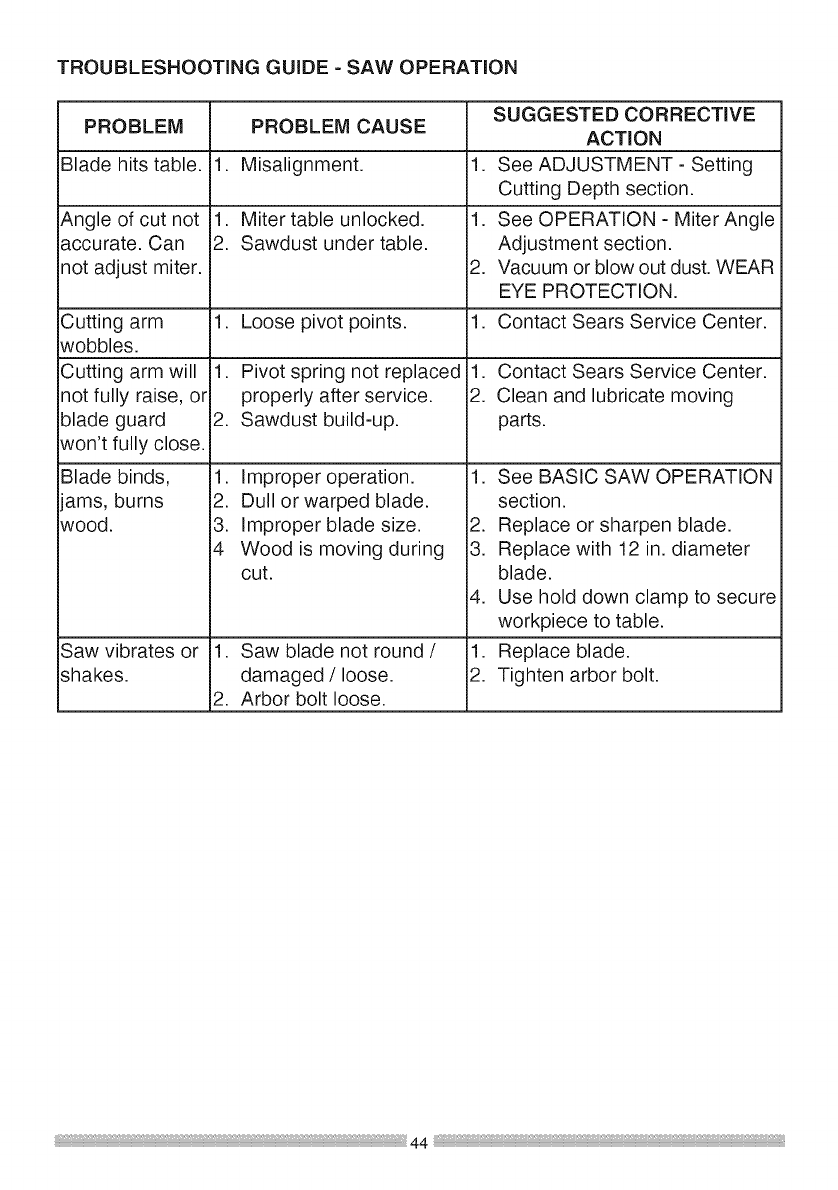
TROUBLESHOOTING GUIDE - SAW OPERATION
PROBLEM
Blade hits table.
PROBLEM CAUSE
Angle of cut not
accurate. Can
not adjust miter.
Cutting arm
wobbles.
Cutting arm will
not fully raise, or
blade guard
won't fully close.
Blade binds,
ams, burns
wood.
Saw vibrates or
shakes.
1. Misalignment.
1. Miter table unlocked.
2. Sawdust under table.
1. Loose pivot points.
1. Pivot spring not replaced
properly after service.
2. Sawdust build-up.
1. Improper operation.
2. Dull or warped blade.
3. Improper blade size.
4 Wood is moving during
cut.
1. Saw blade not round /
damaged /loose.
2. Arbor bolt loose.
.
1.
.
1.
1.
2.
SUGGESTED CORRECTIVE
ACTION
See ADJUSTMENT - Setting
Cutting Depth section.
See OPERATION - Miter Angle
Adjustment section.
Vacuum or blow out dust. WEAR
EYE PROTECTION.
Contact Sears Service Center.
Contact Sears Service Center.
Clean and lubricate moving
parts.
1. See BASIC SAW OPERATION
section.
2. Replace or sharpen blade.
3. Replace with 12 in. diameter
blade.
4. Use hold down clamp to secure
workpiece to table.
1. Replace blade.
2. Tighten arbor bolt.
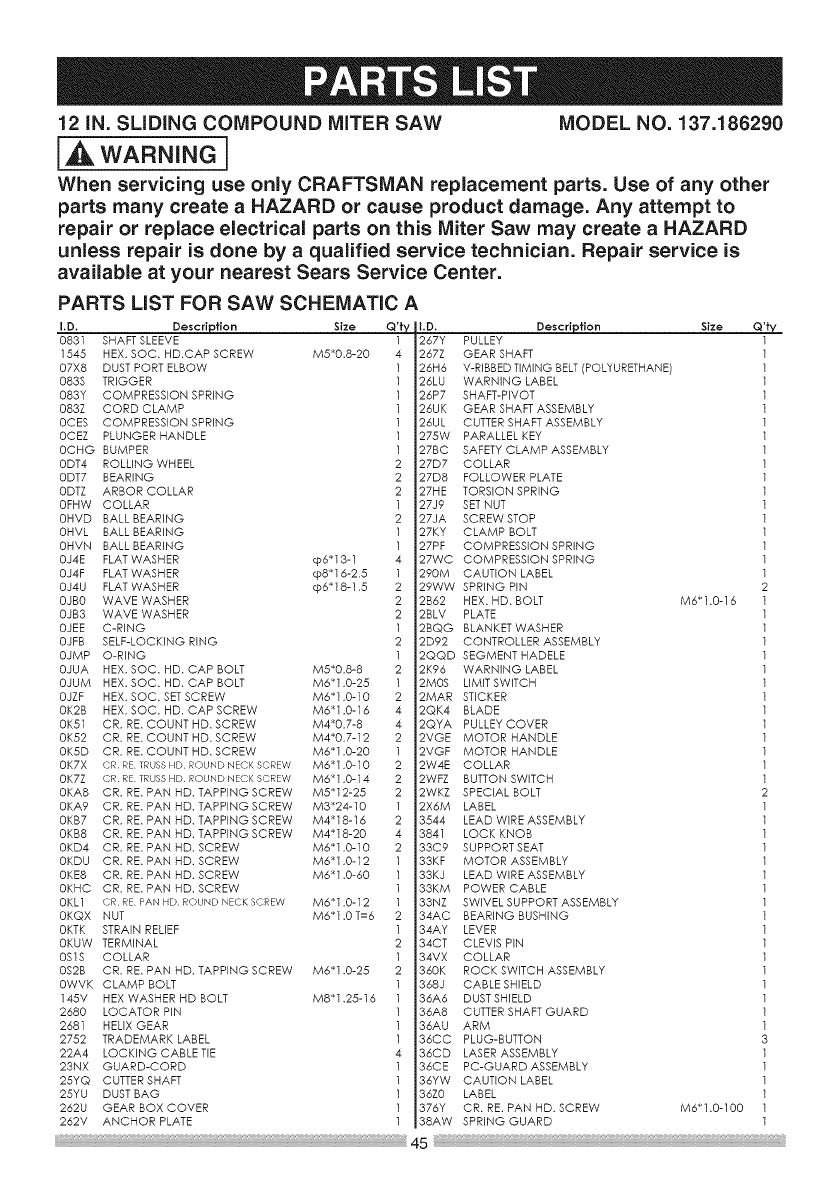
12 iN. SLiDiNG COMPOUND MITER SAW MODEL NO. 137.186290
i_ WARNING i
When servicing use only CRAFTSMAN replacement parts. Use of any other
parts many create a HAZARD or cause product damage. Any attempt to
repair or replace electrical parts on this Miter Saw may create a HAZARD
unless repair is done by a qualified service technician. Repair service is
available at your nearest Sears Service Center.
PARTS LiST FOR SAW SCHEMATIC A
Description Size Q'fy D. Description Size
I.D,
0831 SHAFT SLEEVE
1545 HEX. SOC, HD.CAP SCREW M5_0,8-20
07X8 DUST PORT ELBOW
083S TRIGGER
083Y COMPRESSION SPRING
083Z CORD CLAMP
0CES COMPRESSION SPRING
0CEZ PLUNGER HANDLE
0CHG BUMPER
0DT4 ROLLING WHEEL
0DT7 BEARING
0DTZ ARBOR COLLAR
0FHW COLLAR
0HVD BALL BEARING
0HVL BALL BEARING
0HVN BALL BEARING
0J4E FLAT WASHER cp6_13-1
0J4F FLAT WASHER cp8_16-2.5
0J4U FLAT WASHER cp6_18-1.5
0JBO WAVE WASHER
0JB3 WAVE WASHER
0JEE C-RING
0JFB SELF-LOCKING RiNG
0JMP O-RING
0JUA HEX. SOC, HD. CAP BOLT M5_0,8-8
0JUM HEX. SOC, HD. CAP BOLT M6_1,0-25
0JZF HEX. SOC, SETSCREW M6_1.0-10
0K2B HEX, SOC, HD, CAP SCREW M6_1.0-16
0K51 CR. RE, COUNT HD, SCREW M4_0,7-8
0K52 CR. RE, COUNT HD, SCREW M4_0,7-12
0K5D CR. RE, COUNT HD, SCREW M6_1.O-20
0K7X {DR RE TRUSSHD ROUND NECKSCREW M6_1.O-10
0K7Z CR RE TRUSSHD ROUND NECKSCREW M6_1.0,-14
0KA8 CR. RE. PAN HD, TAPPING SCREW M5_12-25
0KA9 CR. RE. PAN HD, TAPPING SCREW M3_24-10
0KB7 CR. RE. PAN HD, TAPPING SCREW M4_18-16
0KB8 CR. RE. PAN HD, TAPPING SCREW M4_18-20
0KD4 CR. RE. PAN HD, SCREW M6_1,0,-10
0KDU CR. RE. PAN HD, SCREW M6_1,0-12
0KE8 CR. RE. PAN HD, SCREW M6_1,0-60
0KHC CR, RE. PAN HD, SCREW
0KL1 CR RE PAN HD ROUND NECKSCREW M6_1,0-12
0KQX NUT M6_1.0 T=6
0KTK STRAIN RELIEF
0KUW TERMINAL
0S1S COLLAR
0S2B CR, RE. PAN HD, TAPPING SCREW M6_1,0-25
0WVK CLAMP BOLT
145V HEX WASHER HD BOLT M8_1,28-16
2680 LOCATOR PiN
2681 HELIX GEAR
2752 TRADEMARK LABEL
22A4 LOCKING CABLE TiE
23NX GUARD-CORD
25YQ CUTTER SHAFT
25YU DUST BAG
262U GEAR BOX COVER
262V
267Y PULLEY
267Z GEAR SHAFT
26H6 V-RIBBED TiMiNG BELT (POLYURETHANE)
26LU WARNING LABEL
26P7 SHAFT-PIVOT
26UK GEAR SHAFT ASSEMBLY
26UL CUTTER SHAFT ASSEMBLY
275W PARALLEL KEY
27BC SAFETY CLAMP ASSEMBLY
27D7 COLLAR
27D8 FOLLOWER PLATE
27HE TORSION SPRING
27J9 SET NUT
27JA SCREW STOP
27KY CLAMP BOLT
27PF COMPRESSION SPRING
27WC COMPRESSION SPRING
290M CAUTION LABEL
29WW SPRING PiN
2B62 HEX, HD, BOLT
2BLV PLATE
2BQG BLANKET WASHER
2D92 CONTROLLER ASSEMBLY
2QQD SEGMENT HADELE
2K96 WARNING LABEL
2MOS LiMiT SWITCH
2MAR STICKER
2QK4 BLADE
2QYA PULLEY COVER
2VGE MOTOR HANDLE
2VGF MOTOR HANDLE
2W4E COLLAR
2WFZ BUTTON SWITCH
2WKZ SPECIAL BOLT
2X6M LABEL
3544 LEAD WiRE ASSEMBLY
3841 LOCK KNOB
33C9 SUPPORT SEAT
33KF MOTOR ASSEMBLY
33KJ LEAD WiRE ASSEMBLY
33KM POWER CABLE
33NZ SWIVEL SUPPORT ASSEMBLY
34AC BEARING BUSHING
34AY LEVER
34CT CLEVIS PIN
34VX COLLAR
360K ROCK SWITCH ASSEMBLY
368J CABLE SHIELD
36A6 DUST SHIELD
36A8 CUTTER SHAFT GUARD
36AU ARM
36CC PLUG-BUTTON
36CD LASER ASSEMBLY
36CE PC-GUARD ASSEMBLY
36YW CAUTION LABEL
36Z0 LABEL
376Y CR. RE. PAN HD. SCREW
M6_1,0-16
M6"1.0-100
Q'ty
1
1
1
1
1
1
1
1
1
1
1
1
1
1
1
1
1
1
2
1
1
1
1
1
1
1
1
1
1
1
1
1
1
2
1
1
1
1
1
1
1
1
1
1
1
1
1
1
1
1
1
3
1
1
1
1
1
1ANCHOR PLATE 38AW SPRINGGUARD
45
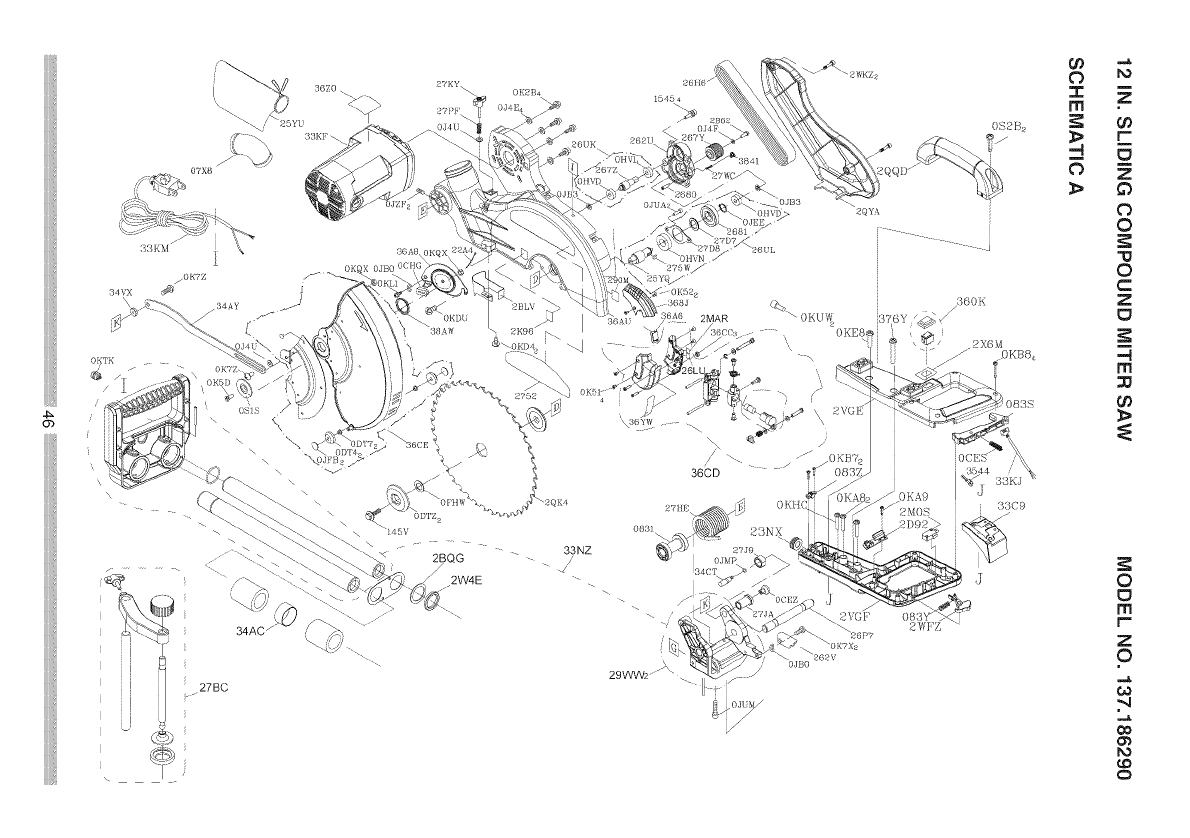
Ob
07X8
<
262U
2QYA
0S£B£
[
--- --- ... ]
860K
::=
rrl co
r-
63
0
0
0
C
Z
o
-4
m
Or}
2BQG --
/2W4E
\SQK4
33NZ
/
./
i/
29VVV_2//\
23NX
$8C9
//
0
13
rrl
r-
Z
0
,,,,,,,&
",4
CO
0'_
¢0
0
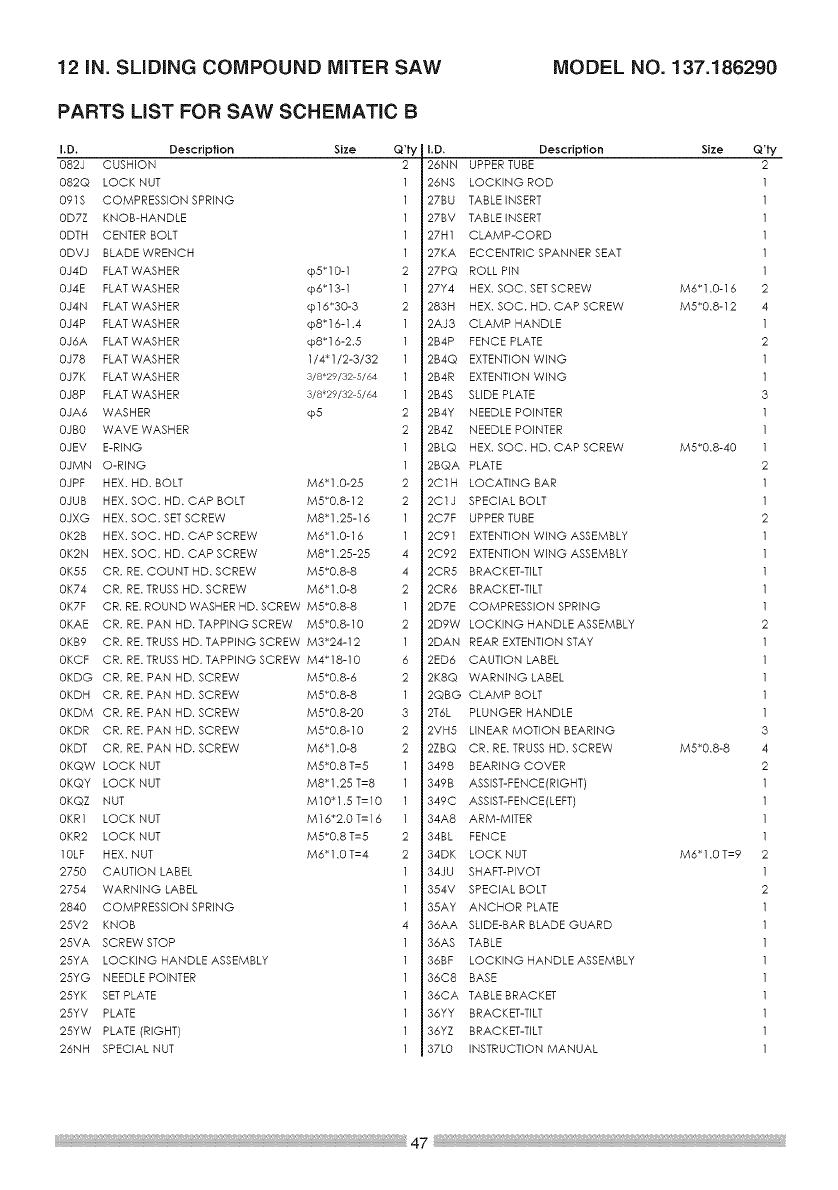
12 iN. SLiDiNG COMPOUND MITER SAW MODEL NO. 137.186290
PARTS LiST FOR SAW SCHEMATIC B
I.D. Description Size
082J CUSHION
082Q LOCK NUT
091S COMPRESSION SPRING
0D7Z KNOB-HANDLE
0DTH CENTER BOLT
0DVJ BLADE WRENCH
0J4D FLAT WASHER cp5_10-1
0J4E FLAT WASHER cp6_13-1
0J4N FLAT WASHER cpl 6"30-3
0J4P FLAT WASHER cp8"16-1.4
0J6A FLAT WASHER cp8"16-2.8
0J78 FLAT WASHER 1/4_1/2-3/32
0J7K FLAT WASHER 3/8_29/32 5/64
0J8P FLAT WASHER 3/8_29/32 5/64
0JA6 WASHER cp5
0JBO WAVE WASHER
0JEV E-RING
0JMN O-RING
0JPF HEX. HD. BOLT M6_1.0-25
0JUB HEX. SOC. HD. CAP BOLT M5_0.8-12
0JXG HEX. SOC. SETSCREW M8_1.25-16
0K2B HEX. SOC. HD. CAP SCREW M6_1.0-16
0K2N HEX. SOC. HD. CAP SCREW M8_1.25-25
0K55 CR. RE. COUNT HD. SCREW M5_0.8-8
0K74 CR. RE. TRUSS HD. SCREW M6_1.0-8
0K7F CR. RE. ROUND WASHER HD. SCREW M5_0.8-8
0KAE CR. RE. PAN HD. TAPPING SCREW M5_0.8-10
0KB9 CR. RE. TRUSS HD. TAPPING SCREW M3_24-12
0KCF CR. RE. TRUSS HD. TAPPING SCREW M4_18-10
0KDG CR. RE. PAN HD. SCREW M5_0.8-6
0KDH CR. RE. PAN HD. SCREW M5_0.8-8
0KDM CR. RE. PAN HD. SCREW M5_0.8-20
0KDR CR. RE. PAN HD. SCREW M5_0.8-10
0KDT CR. RE. PAN HD. SCREW M6_1.0-8
0KQW LOCK NUT M5_0.8 T=5
0KQY LOCK NUT M8_1.25 T=8
0KQZ NUT M10_1.5 T=10
0KR1 LOCK NUT M16_2.0 T=16
0KR2 LOCK NUT M5_0.8 T=5
10LF HEX. NUT M6_1.0 T=4
2750 CAUTION LABEL
2754 WARNING LABEL
2840 COMPRESSION SPRING
25V2 KNOB
25VA SCREW STOP
25YA LOCKING HANDLE ASSEMBLY
25YG NEEDLE POINTER
25YK SETPLATE
25YV PLATE
25YW PLATE (RIGHT)
26NH SPECIAL NUT
Q'ty
2
2
1
2
2
2
1
1
2
2
1
1
4
4
2
1
2
1
6
2
1
3
2
2
2
2
1
1
1
4
I.D. Description Size Q'ty
26NN UPPER TUBE 2
26NS LOCKING ROD 1
27BU TABLE iNSERT 1
27BV TABLE iNSERT 1
27H1 CLAMP-CORD 1
27KA ECCENTRIC SPANNER SEAT 1
27PQ ROLL PiN 1
27Y4 HEX. SOC. SETSCREW M6_1.0-16 2
283H HEX. SOC. HD. CAP SCREW M5_0.8-12 4
2A J3 CLAMP HANDLE 1
2B4P FENCE PLATE 2
2B4Q EXTENTION WiNG 1
2B4R EXTENTION WiNG 1
2B4S SLIDE PLATE 3
2B4Y NEEDLE POINTER 1
2B4Z NEEDLE POINTER 1
2BLQ HEX. SOC. HD. CAP SCREW M5_0.8-40 1
2BQA PLATE 2
2C1H LOCATING BAR 1
2C1J SPECIAL BOLT 1
2C7F UPPER TUBE 2
2C91 EXTENTION WiNG ASSEMBLY 1
2C92 EXTENTION WiNG ASSEMBLY 1
2CR5 BRACKET-TILT 1
2CR6 BRACKET-TILT 1
2D7E COMPRESSION SPRING 1
2D9W LOCKING HANDLE ASSEMBLY 2
2DAN REAR EXTENTION STAY 1
2ED6 CAUTION LABEL 1
2K8Q WARNING LABEL 1
2QBG CLAMP BOLT 1
2T6L PLUNGER HANDLE 1
2VH5 LINEAR MOTION BEARING 3
2ZBQ CR. RE. TRUSS HD. SCREW M5_0.8-8 4
3498 BEARING COVER 2
349B ASSIST-FENCE(RIGHT) 1
349C ASSIST-FENCE(LEFT) 1
34A8 ARM-MITER 1
34BL FENCE 1
34DK LOCK NUT M6_1.0 T=9 2
34JU SHAFT-PIVOT 1
354V SPECIAL BOLT 2
35AY ANCHOR PLATE 1
36AA SLIDE-BAR BLADE GUARD 1
36AS TABLE 1
36BF LOCKING HANDLE ASSEMBLY 1
36C8 BASE 1
36CA TABLE BRACKET 1
36YY BRACKET-TILT 1
36YZ BRACKET-TILT 1
37L0 iNSTRUCTiON MANUAL 1
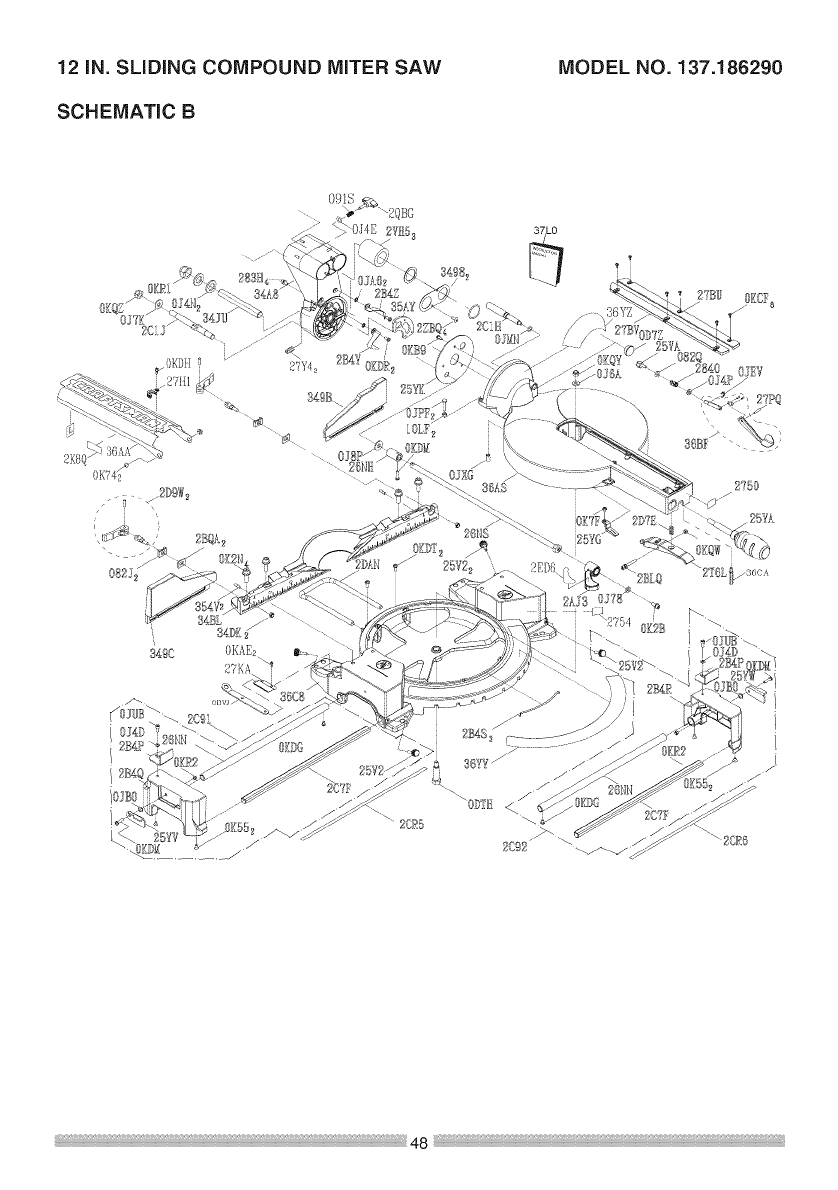
12 iN. SLiDiNG COMPOUND MITER SAW
SCHEMATIC B
MODEL NO. 137.186290
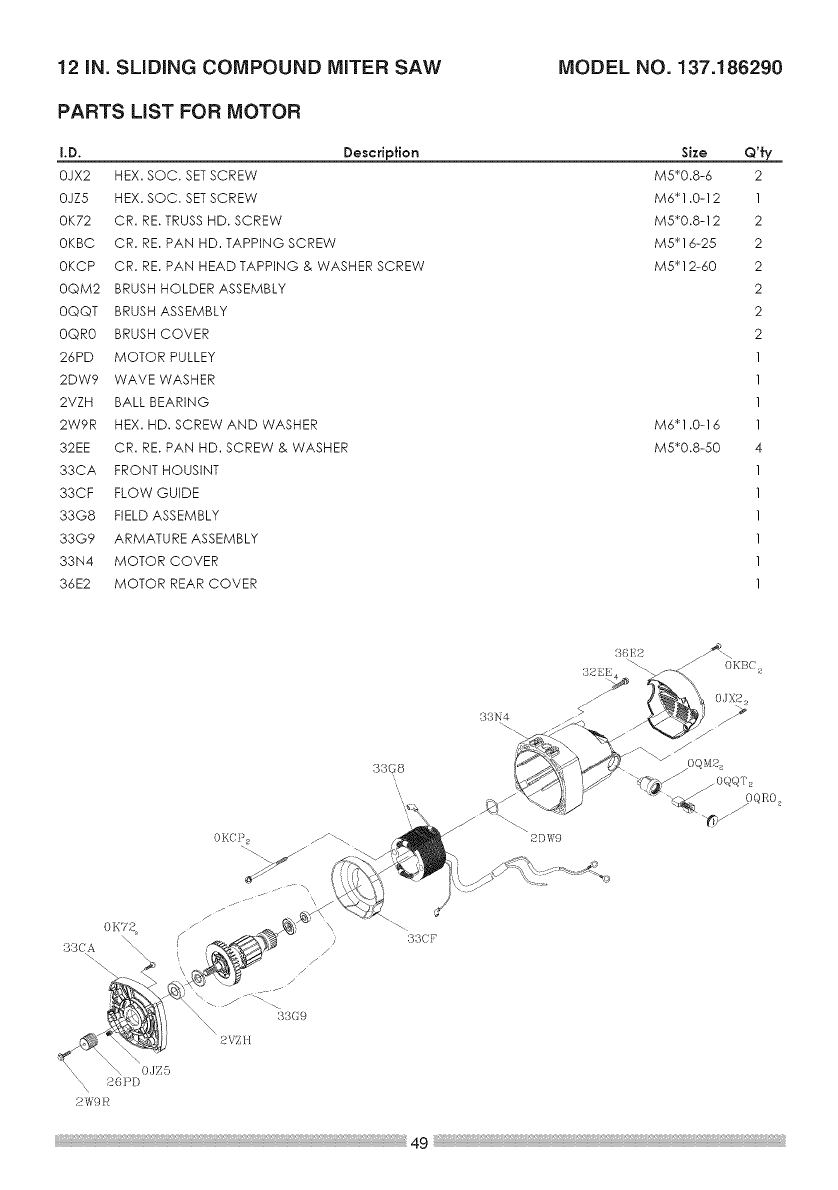
12IN. SLiDiNG COMPOUND MITER SAW MODEL NO. 137.186290
PARTS LIST FOR MOTOR
I.D. Descrip{ion
0JX2 HEX. SOC. SET SCREW
0JZ5 HEX. SOC. SET SCREW
0K72 CR. RE. TRUSSHD. SCREW
0KBC CR. RE. PAN HD. TAPPING SCREW
0KCP CR. RE. PAN HEAD TAPPING & WASHER SCREW
0QM2 BRUSH HOLDER ASSEMBLY
0QQT BRUSH ASSEMBLY
0QRO BRUSH COVER
26PD MOTOR PULLEY
2DW9 WAVE WASHER
2VZH BALL BEARING
2W9R HEX. HD. SCREW AND WASHER
32EE CR. RE. PAN HD. SCREW & WASHER
33CA FRONTHOUSINT
33CF FLOW GUIDE
33G8 FIELD ASSEMBLY
33G9 ARMATURE ASSEMBLY
33N4 MOTOR COVER
36E2 MOTOR REAR COVER
Size Q'Jy
M5"0.8-6 2
M6"1.0-12 1
M5"0.8-12 2
M5* 16-25 2
M5"12-60 2
2
2
2
1
1
1
M6"1.0-16 1
M5"0.8-50 4
1
1
1
1
1
1
'3BG8
33N4
2DW9
o_
.---
/
/
B3(A _ i/33CF
\/
2 tZH

Congratulations on making a smart purchase. Your new Craftsman _ product
is designed and manufactured for years of dependable operation. But like all
products, it may require repair from time to time. That's when having a Repair
Protection Agreement can save you money and aggravation.
Here's what the Repair Protection Agreement* includes:
[] Expert service by our 10,000 professional repair specialists
[] Unlimited service and no charge for parts and labor on all covered repairs
[] Product replacement up to $1500 if your covered product can't be fixed
[] Discount of 25% from regular price of service and related installed parts
not covered by the agreement; also, 25% off regular price of preventive
maintenance check
[] Fast help by phone - we call it Rapid Resolution - phone support from a
Sears representative. Think of us as a "talking owner's manual."
Once you purchase the Repair Protection Agreement, a simple phone call is all
that it takes for you to schedule service. You can call anytime day or night, or
schedule a service appointment online.
The Repair Protection Agreement is a risk-free purchase. If you cancel for any
reason during the product warranty period, we will provide a full refund. Or, a
prorated refund anytime after the product warranty period expires. Purchase
your Repair Protection Agreement today!
Some limitations and exclusions apply. For prices and additional
information in the U.S.A. call 1=800=827-6655.
*Coverage in Canada varies on some items. For full details call Sears
Canada at 1=800=361-6665.
Sears Installation Service
For Sears professional installation of home appliances, garage door openers,
water heaters, and other major home items, in the U.S.A. or Canada call
1=800=4=MY=HOMEe.


Your Home
For troubleshooting, product manuals and expert advice:
www.managemylife.com
For repair - in your home - of all major brand appliances,
lawn and garden equipment, or heating and cooling systems,
no matter who made it, no matter who sold it!
For the replacement parts, accessories and
owner's manuals that you need to do-it-yourself.
For Sears professional installation of home appliances
and items like garage door openers and water heaters.
1-800-4-MY-HOME ® (1-800-469-4663)
Call anytime, day or night (U.S.A. and Canada)
TM
® Registered Trademark /Trademark of KCD IP, LLC in the United States, or Sears Brands, LLC in ether countries
TM
® Marca Registrada /Marca de FAbrica de KCD IP, LLC en Estados Unidos, o Sears Brands, LLC in otros paises
Mc Marque de commerce /MD Marque deposee de Sears Brands, LLC
