Craftsman 315101211 User Manual Drill Reversing Manuals And Guides L0011129
CRAFTSMAN Drill Reversing Manual L0011129 CRAFTSMAN Drill Reversing Owner's Manual, CRAFTSMAN Drill Reversing installation guides
User Manual: Craftsman 315101211 315101211 CRAFTSMAN Drill Reversing - Manuals and Guides View the owners manual for your CRAFTSMAN Drill Reversing #315101211. Home:Tool Parts:Craftsman Parts:Craftsman Drill Reversing Manual
Open the PDF directly: View PDF  .
.
Page Count: 16
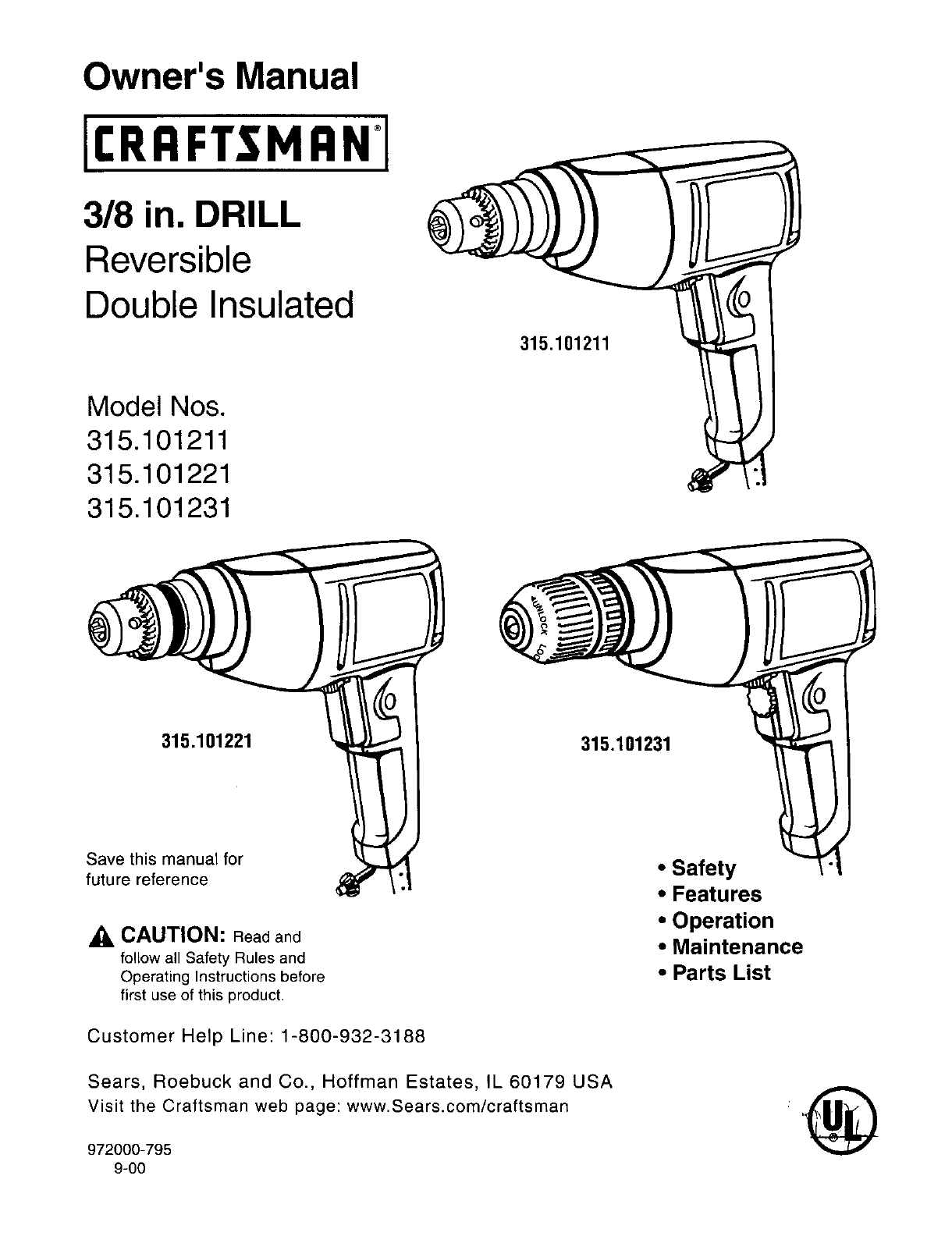
Owner's Manual
II:RRFTSMRN I
3/8 in. DRILL
Reversible
Double Insulated
Model Nos.
315.101211
315.101221
315.101231
315.101211
315.101221
Save this manual for
future reference
_, CAUTION: Readand
follow all Safety Rules and
Operating Instructions before
first use of this product.
Customer Help Line: 1-800-932-3188
315.101231
•Safety
•Features
•Operation
•Maintenance
•Parts List
Sears, Roebuck and Co., Hoffman Estates, IL 60179 USA
Visit the Craftsman web page: www.Sears.com/craftsman
972000-795
9-00 ®
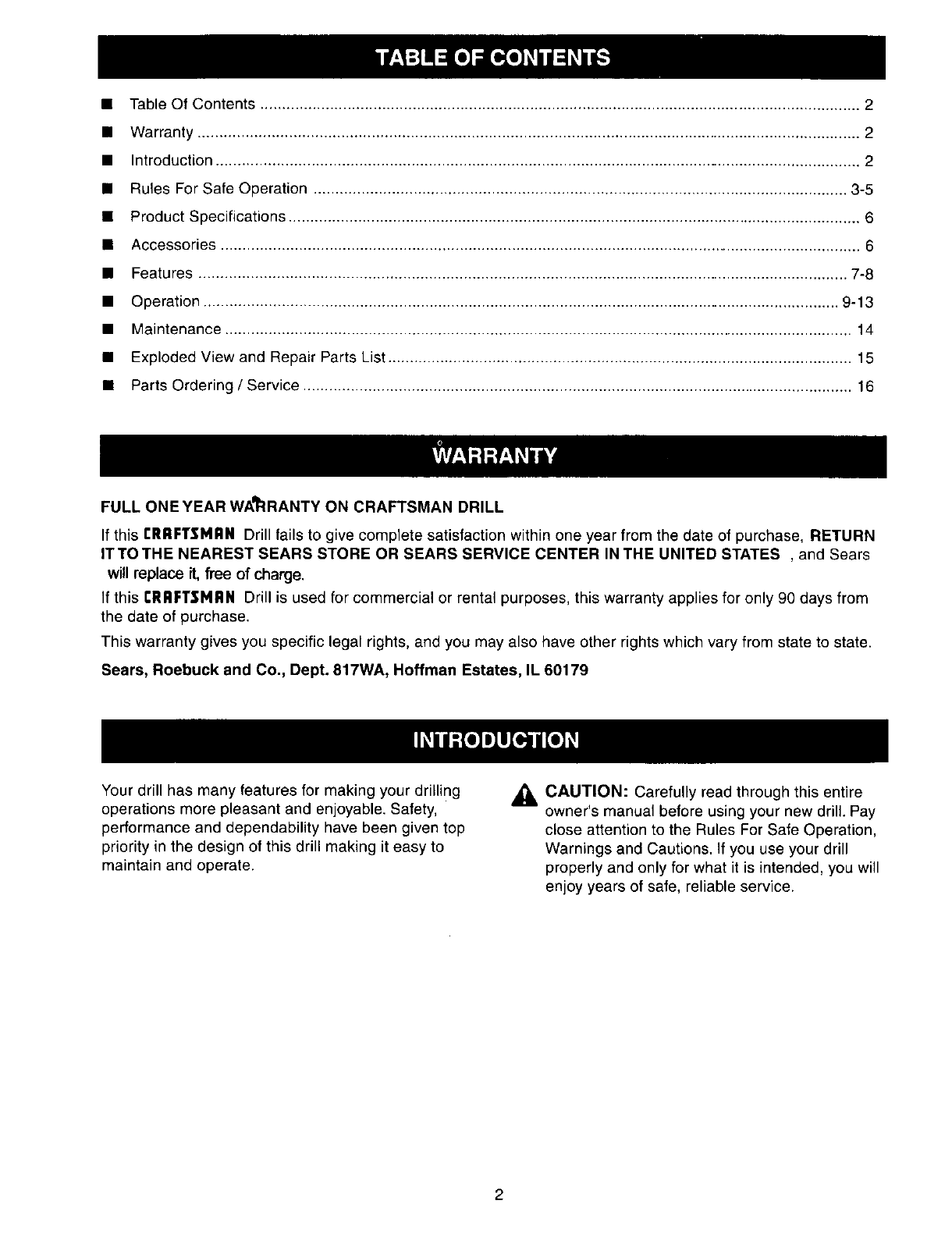
•Table Of Contents .......................................................................................................................................... 2
• Warranty ......................................................................................................................................................... 2
• Introduction ..................................................................................................................................................... 2
• Rules For Safe Operation ........................................................................................................................... 3-5
•Product Specifications .................................................................................................................................... 6
• Accessories ................................................................................................................................................... 6
• Features ...................................................................................................................................................... 7-8
• Operation ................................................................................................................................................... 9-13
• Maintenance ................................................................................................................................................. 14
• Exploded View and Repair Parts List ........................................................................................................... 15
• Parts Ordering /Service ............................................................................................................................... 16
FULL ONE YEAR WA_:IRANTY ON CRAFTSMAN DRILL
If this rRRFTSMRN Drill fails to give complete satisfaction within one year from the date of purchase, RETURN
IT TO THE NEAREST SEARS STORE OR SEARS SERVICE CENTER IN THE UNITED STATES , and Sears
will replace it, free of charge.
If this CRRFT$1_IRN Drill is used for commercial or rental purposes, this warranty applies for only 90 days from
the date of purchase.
This warranty gives you specific legal rights, and you may also have other rights which vary from state to state.
Sears, Roebuck and Co., Dept. 817WA, Hoffman Estates, IL 60179
Your drill has many features for making your drilling
operations more pleasant and enjoyable. Safety,
performance and dependability have been given top
priority in the design of this drill making it easy to
maintain and operate.
CAUTION: Carefully read through this entire
owner's manual before using your new drill. Pay
close attention to the Rules For Safe Operation,
Warnings and Cautions, If you use your drill
properly and only for what it is intended, you will
enjoy years of safe, reliable service.
The purpose of safety symbols is to attract your attention to possible dangers. The safety symbols, and
the explanations with them, deserve your careful attention and understanding. The safety warnings do
not by themselves eliminate any danger. The instructions or warnings they give are not substitutes for
proper accident prevention measures.
SYMBOL MEANING
ASAFETY ALERT SYMBOL:
Indicates danger, warning, or caution. May be used in conjunction with other symbols or picto-
graphs.
ADANGER: Failure to obey a safety warning will result in serious injury to yourself or to others.
Always follow the safety precautions to reduce the risk of fire, electric shock and personal injury.
AWARNING: Failure to obey a safety warning can result in serious injury to yourself or to others.
Always follow the safety precautions to reduce the risk of fire, electric shock and personal injury.
ACAUTION: Failure to obey a safety warning may result in property damage or personal injury to
yourself or to others. Always follow the safety precautions to reduce the risk of fire, electric shock
and personal injury.
NOTE: Advises you of information or instructions vital to the operation or maintenance of the equipment.
DOUBLE INSULATION
Double insulation is a concept in safety, in electric
power tools which eliminates the need for the usual
three-wire grounded power cord. All exposed metal
parts are isolated from internal metal motor
components with protecting insulation. Double
insulated tools do not need to be grounded.
_WARNING: Do not attempt to operate this tool
until you have read thoroughly and understand
completely all instructions, safety rules, etc.
contained in this manual. Failure to comply can
result in accidents involving fire, electric shock,
or serious personal injury. Save owner's manual
and review frequently for continuing safe
operation, and instructing others who may use
this tool.
READ ALL INSTRUCTIONS
KNOWYOUR POWERTOOL. Read owner's
manual carefully. Learn its applications and
limitations as well as the specific potential
hazards related to this tool.
GUARD AGAINST ELECTRICAL SHOCK by
preventing body contact with grounded surfaces.
For example; pipes, radiators, ranges, refrigera-
tor enclosures.
•KEEP GUARDS IN PLACE and in working
order.
IMPORTANT
Servicing of a tool with double insulation requires
extreme care and knowledge of the system and
should be performed only by a qualified service
technician. For service we suggest you return the tool
to your nearest Sears Store or Sears Service Center
for repair. Always use original factory replacement
parts when servicing.
KEEP WORK AREA CLEAN. Cluttered areas
and benches invite accidents.
AVOID DANGEROUS ENVIRONMENT. Don't
use power tools in damp or wet locations or
expose to rain. Keep work area well lit.
KEEP CHILDREN AND VISITORS AWAY. All
visitors should wear safety glasses and be kept a
safe distance from work area. Do not let visitors
contact tool or extension cord.
STORE IDLETOOLS. When not in use, tools
should be stored in a dry and high or locked-up
place - out of the reach of children.
DON'T FORCE TOOL. It will do the job better
and safer at the rate for which it was designed.
USE RIGHT TOOL. Don't force small tool or
attachment to do the job of a heavy duty tool.
Don't use tool for purpose not intended - for
example - A circular saw should never be used
for cutting tree limbs or logs.
3
RULES FOR SAFE OPERATION (Continued)
WEAR PROPER APPAREL. Do not wear loose
clothing or jewelry that can get caught in tool's
moving parts and cause personal injury. Rubber
gloves and nonskid footwear are recommended
when working outdoors. Wear protective hair
covering to contain long hair and keep it from
being drawn into nearby air vents.
ALWAYS WEAR SAFETY GLASSES. Everyday
eyeglasses have only impact-resistant lenses;
they are NOT safety glasses.
PROTECTYOUR LUNGS. Wear a face or dust
mask if the operation is dusty.
PROTECTYOUR HEARING. Wear hearing
protection during extended periods of operation.
DON'T ABUSE CORD. Never carry tool by cord
or yank it to disconnect from receptacle. Keep
cord from heat, oil, and sharp edges.
•SECURE WORK. Use clamps or a vise to hold
work. It's safer than using your hand and it frees
both hands to operate tool.
•DON'T OVERREACH. Keep proper footing and
balance at all times. Do not use on a ladder or
unstable support. Secure tools when working at
elevated positions.
MAINTAIN TOOLS WITH CARE. Keep tools
sharp and clean for best and safest performance.
Follow instructions for lubricating and changing
accessories.
DISCONNECT TOOLS. When not in use, before
servicing, or when changing attachments,
blades, bits, cutters, etc., all tools should be
disconnected from power supply.
REMOVE CHUCK KEY. Form habit of checking
to see that chuck key is removed from chuck
before turning tool on.
AVOID ACCIDENTAL STARTING. Don't carry
plugged-in tool with finger on switch. Be sure
switch is off when plugging in.
MAKE SUREYOUR EXTENSION CORD IS IN
GOOD CONDITION. When using an extension
cord, be sure to use one heavy enough to carry
the current your product will draw. An undersized
cord will cause a drop in line voltage resulting in
loss of power and overheating. A wire gage size
(A.W.G.) of at least 16 is recommended for an
extension cord 100 feet or less in length. A cord
exceeding 100 feet is not recommended. If in
doubt, use the next heavier gage. The smaller
the gage number, the heavier the cord.
OUTDOOR USE EXTENSION CORDS. When
tool is used outdoors, use only extension cords
suitable for use outdoors. Outdoor approved
cords are marked with the suffix W-A, for ex-
ample - SJTW-A or SJOW-A.
KEEP BITS CLEAN AND SHARP. Sharp bits
minimize stalling and kickback.
KEEP HANDS AWAY FROM DRILLING AREA.
Keep hands away from bits. Do not reach
underneath work while bit is rotating. Do not
attempt to remove material while bit is rotating.
NEVER USE IN AN EXPLOSIVE ATMO-
SPHERE. Normal sparking of the motor could
ignite fumes.
INSPECT TOOL CORDS PERIODICALLY and if
damaged, have repaired by an authorized
service facility. Stay constantly aware of cord
location.
INSPECT EXTENSION CORDS PERIODI-
CALLY and replace if damaged.
KEEP HANDLES DRY, CLEAN, AND FREE
FROM OIL AND GREASE. Always use a clean
cloth when cleaning. Never use brake fluids,
gasoline, petroleum-based products, or any
strong solvents to clean your tool.
STAY ALERT AND EXERCISE CONTROL.
Watch what you are doing and use common
sense. Do not operate tool when you are tired.
Do not rush.
4
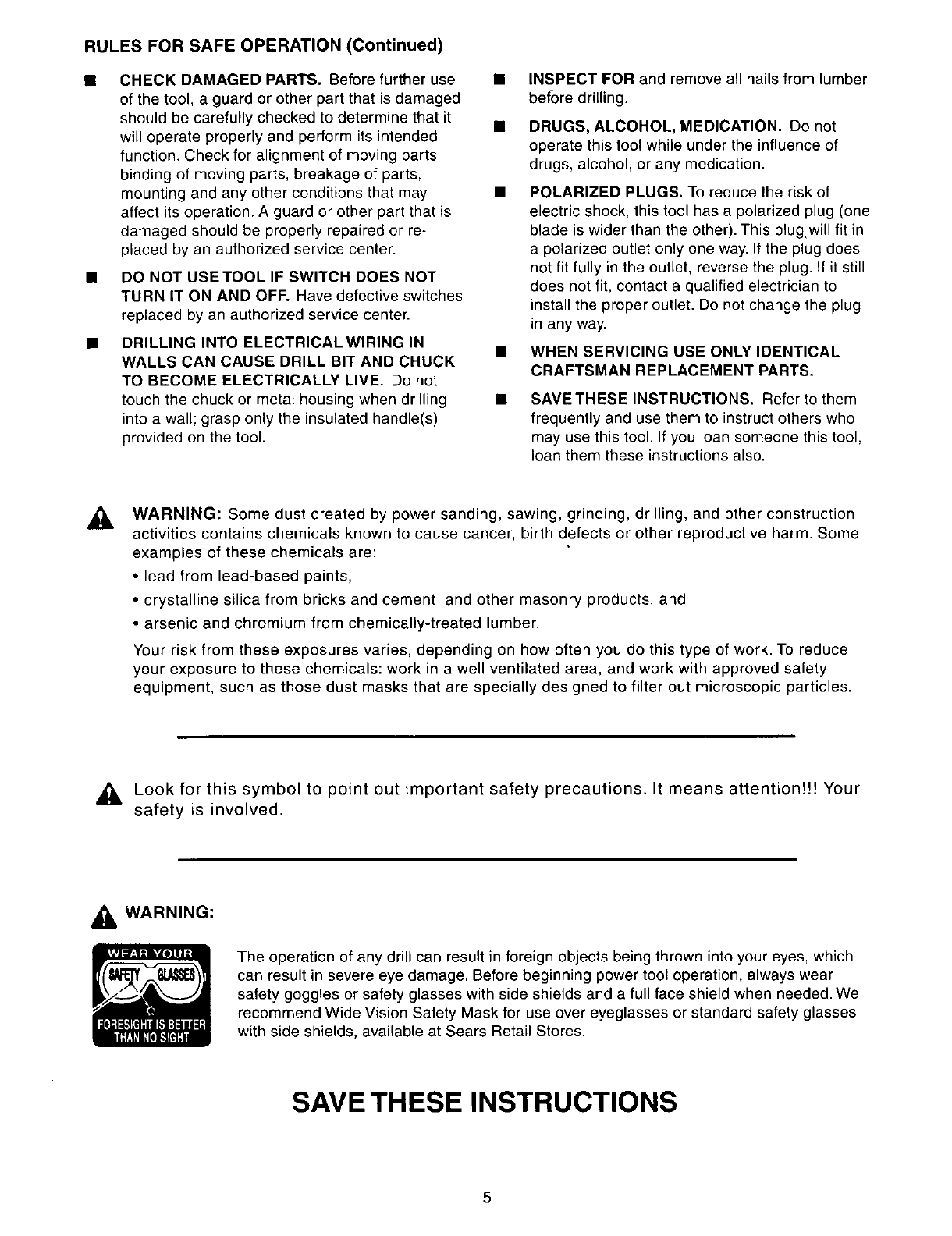
RULES FOR SAFE OPERATION (Continued)
CHECK DAMAGED PARTS. Before further use •
of the tool, a guard or other part that is damaged
should be carefully checked to determine that it
will operate properly and perform its intended
function. Check for alignment of moving parts,
binding of moving parts, breakage of parts,
mounting and any other conditions that may •
affect its operation. A guard or other part that is
damaged should be properly repaired or re-
placed by an authorized service center.
DO NOT USETOOL IF SWITCH DOES NOT
TURN IT ON AND OFF. Have defective switches
replaced by an authorized service center.
DRILLING INTO ELECTRICAL WIRING IN
WALLS CAN CAUSE DRILL BIT AND CHUCK
TO BECOME ELECTRICALLY LIVE. Do not
touch the chuck or metal housing when drilling •
into a wall; grasp only the insulated handle(s)
provided on the tool.
INSPECT FOR and remove all nails from lumber
before drilling.
DRUGS, ALCOHOL, MEDICATION. Do not
operate this tool while under the influence of
drugs, alcohol, or any medication.
POLARIZED PLUGS. To reduce the risk of
electric shock, this tool has a polarized plug (one
blade is wider than the other). This plugwill fit in
a polarized outlet only one way. If the plug does
not fit fully in the outlet, reverse the plug. If it still
does not fit, contact a qualified electrician to
install the proper outlet. Do not change the plug
in any way.
WHEN SERVICING USE ONLY IDENTICAL
CRAFTSMAN REPLACEMENT PARTS.
SAVETHESE INSTRUCTIONS. Refer to them
frequently and use them to instruct others who
may use this tool. If you loan someone this tool,
loan them these instructions also.
AWARNING: Some dust created by power sanding, sawing, grinding, drilling, and other construction
activities contains chemicals known to cause cancer, birth defects or other reproductive harm. Some
examples of these chemicals are:
• lead from lead-based paints,
• crystalline silica from bricks and cement and other masonry products, and
• arsenic and chromium from chemically-treated lumber.
Your risk from these exposures varies, depending on how often you do this type of work. To reduce
your exposure to these chemicals: work in a well ventilated area, and work with approved safety
equipment, such as those dust masks that are specially designed to filter out microscopic particles.
,_ Look for this symbol to point out important safety precautions. It means attention!!! Your
safety is involved.
WARNING:
The operation of any drill can result in foreign objects being thrown into your eyes, which
can result in severe eye damage. Before beginning power tool operation, always wear
safety goggles or safety glasses with side shields and a full face shield when needed. We
recommend Wide Vision Safety Mask for use over eyeglasses or standard safety glasses
with side shields, available at Sears Retail Stores.
SAVE THESE INSTRUCTIONS
5
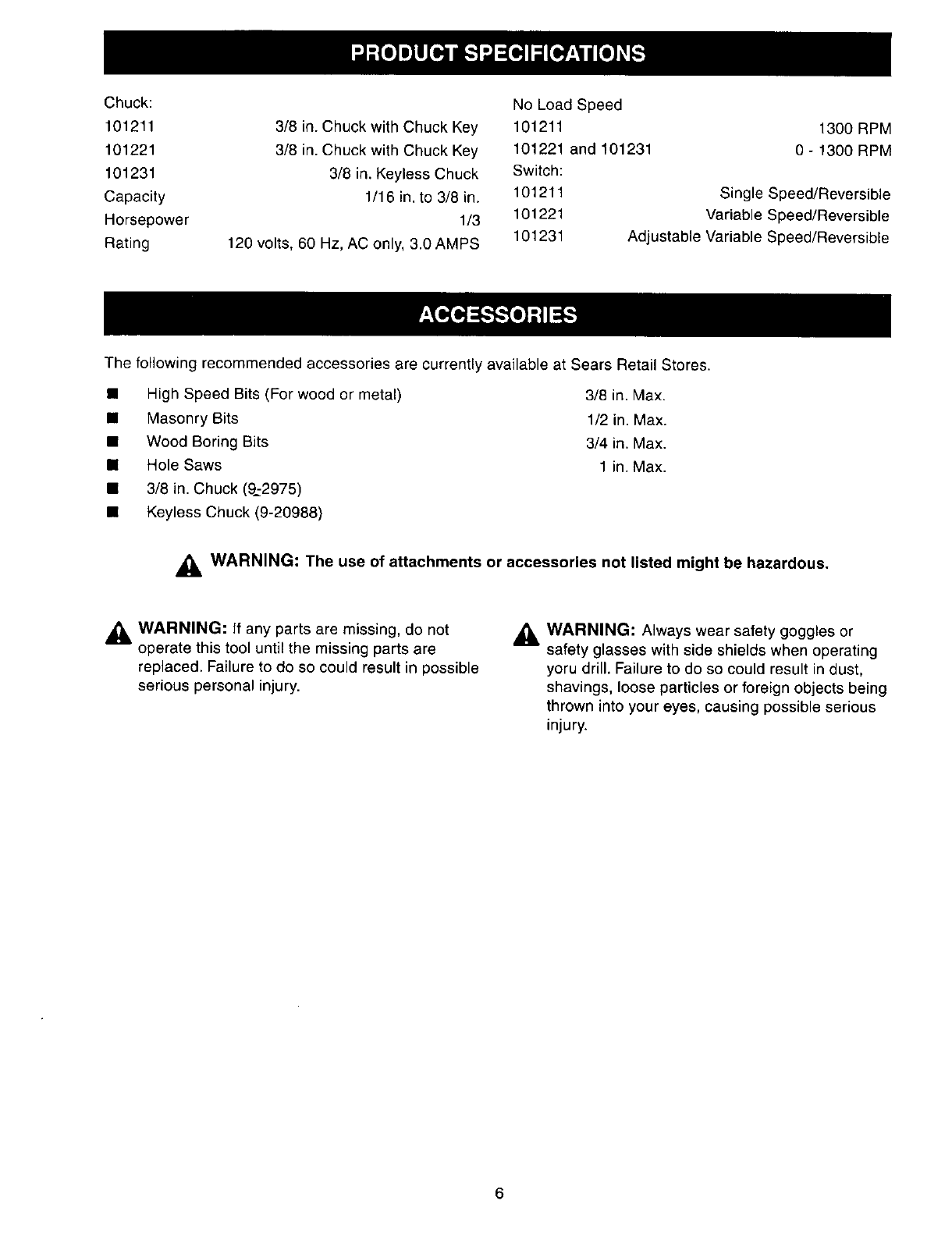
Chuck:
101211
101221
101231
Capacity
Horsepower
Rating
NoLoadSpeed
3/8in.ChuckwithChuckKey 101211
3/8in.ChuckwithChuckKey 101221and101231
3/8in.KeylessChuck Switch:
1/16in.to 3/8in. 101211
1/3 101221
120volts,60Hz,AConly,3.0AMPS 101231
1300RPM
0 - 1300RPM
SingleSpeed/Reversible
VariableSpeed/Reversible
AdjustableVariableSpeed/Reversible
Thefollowingrecommendedaccessoriesarecurrentlyavailableat SearsRetailStores.
• HighSpeedBits(Forwoodor metal) 3/8in.Max.
•Masonry Bits 1/2 in. Max.
• Wood Boring Bits 3/4 in. Max.
• Hole Saws 1 in. Max.
• 3/8 in. Chuck (9.:2975)
• Keyless Chuck (9-20988)
_WARNING: The use of attachments or accessories not listed might be hazardous.
_, WARNING: If any parts are missing, do not
operate this tool until the missing parts are
replaced. Failure to do so could result in possible
serious personal injury.
_lb WARNING: Always wear safety goggles or
safety glasses with side shields when operating
yoru drill. Failure to do so could result in dust,
shavings, loose particles or foreign objects being
thrown into your eyes, causing possible serious
injury.
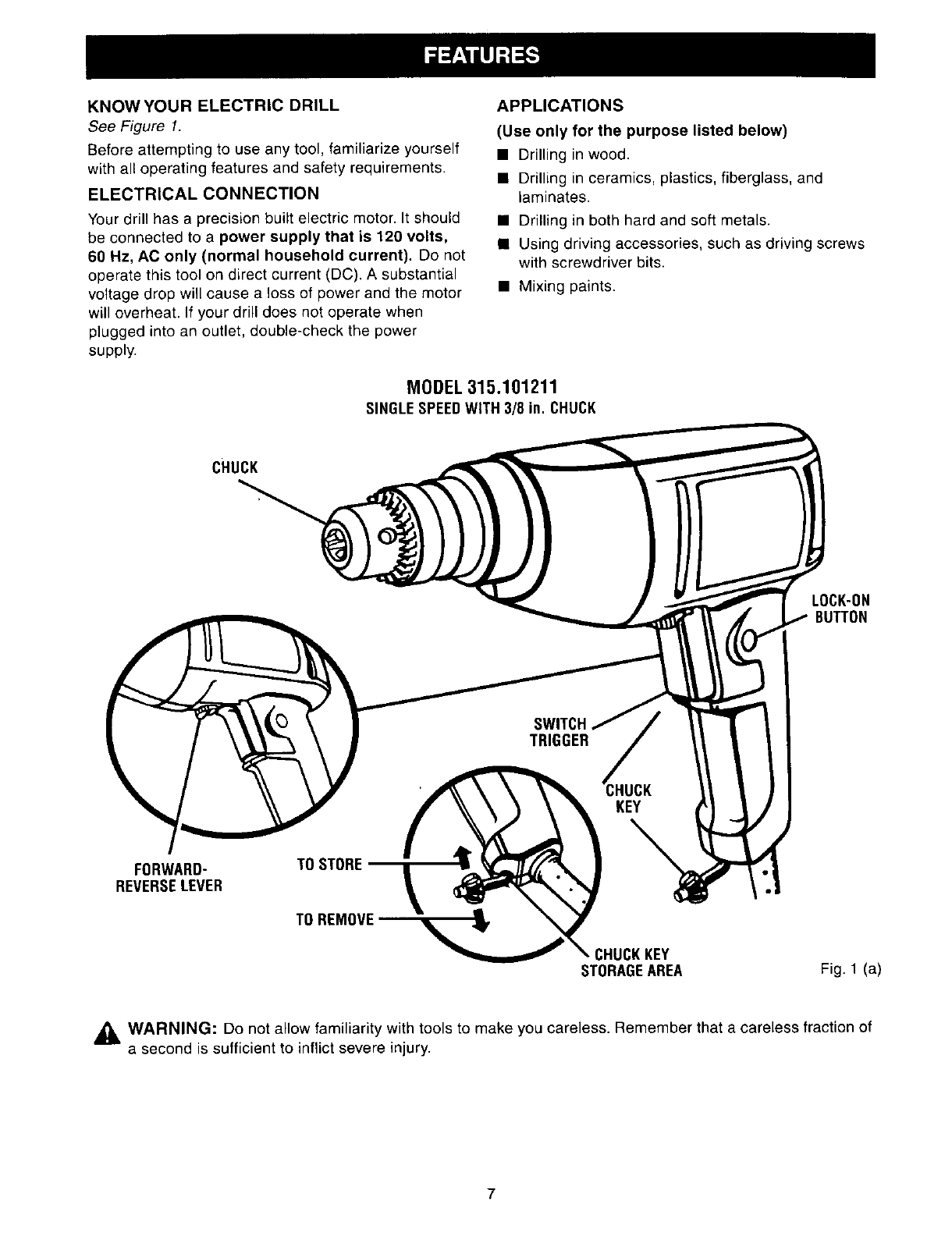
KNOWYOURELECTRICDRILL
See Figure 1.
Before attempting to use any tool, familiarize yourself
with all operating features and safety requirements.
ELECTRICAL CONNECTION
Your drill has a precision built electric motor. It should
be connected to a power supply that is 120 volts,
60 Hz, AC only (normal household current). Do not
operate this tool on direct current (DC). A substantial
voltage drop will cause a loss of power and the motor
will overheat. If your drill does not operate when
plugged into an outlet, double-check the power
supply.
APPLICATIONS
(Use only for the purpose listed below)
• Drilling in wood.
• Drilling in ceramics, plastics, fiberglass, and
laminates.
• Drilling in both hard and soft metals.
• Using driving accessories, such as driving screws
with screwdriver bits.
• Mixing paints.
MODEL315.101211
SINGLESPEEDWITH 3/8 in. CHUCK
cHucK
LOCK-ON
BUTTON
TRIGGER
FORWARD- TO STORE
REVERSELEVER
TO REMOVE
CHUCKKEY
STORAGEAREA Fig. l(a)
_ WARNING" Do not allow familiarity with tools to make you careless. Remember that a careless fraction of
a second is sufficient to inflict severe injury.
7
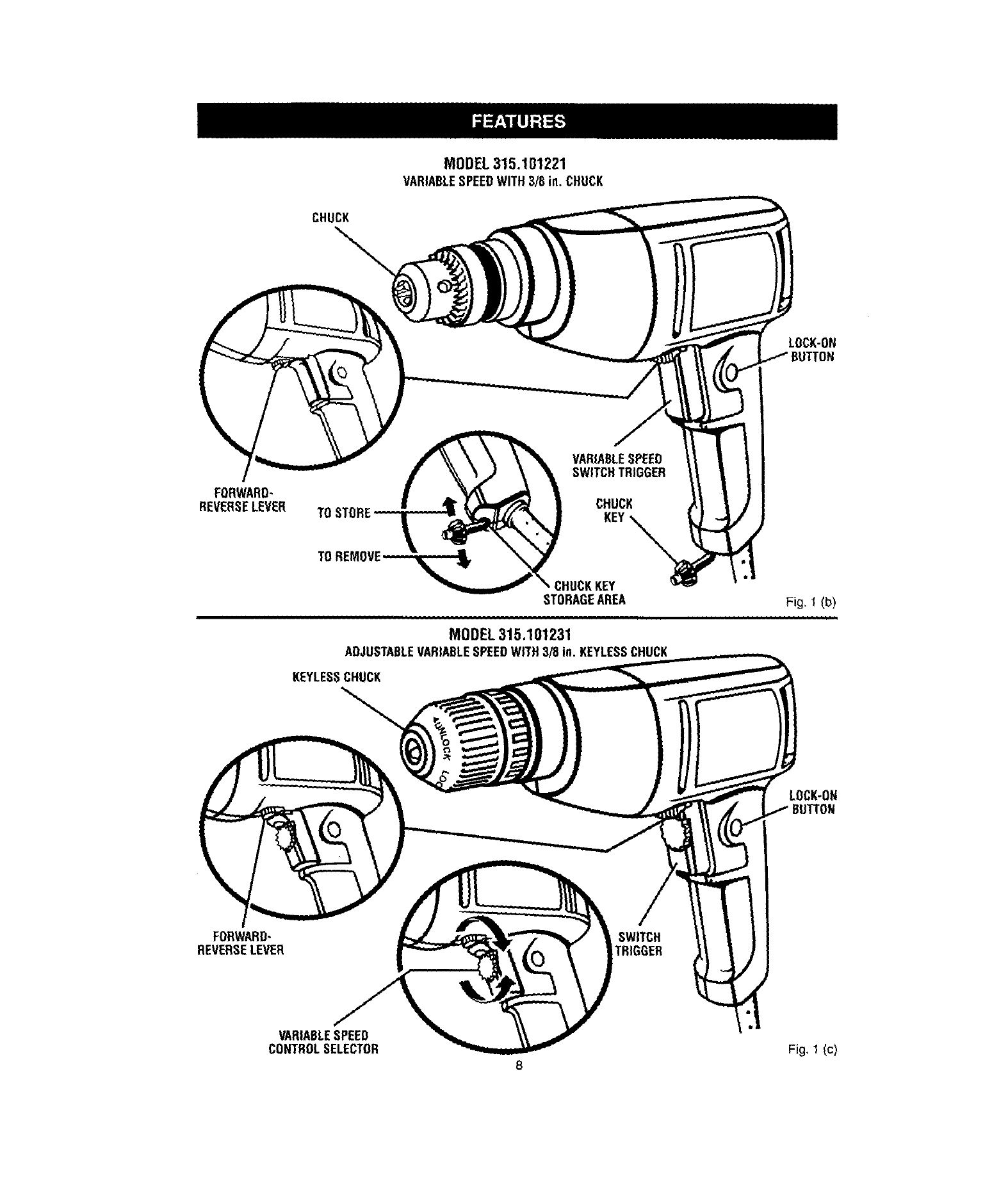
MODEL 315.101221
VARIABLESPEEDWITH3/8 in,CHUCK
CHUCK
LOCK-ON
FORWARD-
REVERSELEVER
TOSTORE
TO
CHUCK
_HUCKKEY
STORAGEAREA
MODEL 315.101231
ADJUSTABLEVARIABLESPEEDWITH3/8 in.KEYLESSCHUCK
KEYLESSCHUCK
Fig, I (b)
ii
LOCK-ON
FORWARD-
REVERSELEVER SWITCH
TRIGGER
VARIABLESPEED
CONTROLSELECTOR Fig, 1(c)
8
_IL WARNING: Your drill should never be
connected to power supply when you are
assembling parts, making adjustments, installing
or removing drill bits, cleaning, or when not in
use. Disconnecting your drill will prevent
accidental starting that could cause serious
personal injury.
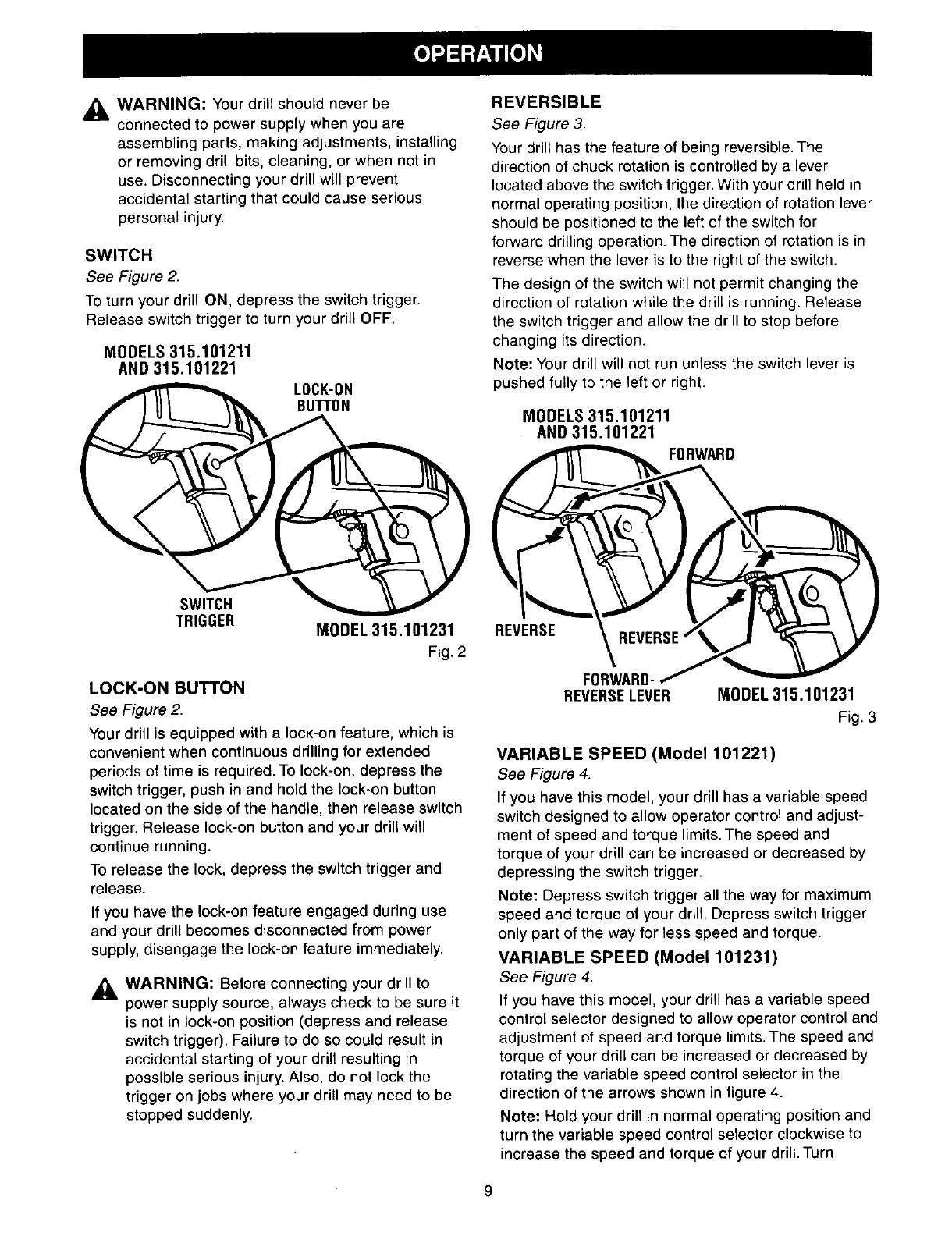
SWITCH
See Figure 2.
To turn your drill ON, depress the switch trigger.
Release switch trigger to turn your drill OFF.
MODELS 315.101211
AND 315.101221
LOCK-ON
BUTTON
SWITCH
TRIGGER MODEL 315.101231
Fig. 2
LOCK-ON BUTTON
See Figure 2.
Your drill is equipped with a lock-on feature, which is
convenient when continuous drilling for extended
periods of time is required. To lock-on, depress the
switch trigger, push in and hold the lock-on button
located on the side of the handle, then release switch
trigger. Release lock-on button and your drill will
continue running.
To release the lock, depress the switch trigger and
release.
If you have the lock-on feature engaged during use
and your drill becomes disconnected from power
supply, disengage the lock-on feature immediately.
_WARNING: Before connecting your drill to
power supply source, always check to be sure it
is not in lock-on position (depress and release
switch trigger). Failure to do so could result in
accidental starting of your drill resulting in
possible serious injury. Also, do not lock the
trigger on jobs where your drill may need to be
stopped suddenly.
REVERSIBLE
See Figure 3.
Your drill has the feature of being reversible. The
direction of chuck rotation is controlled by a lever
located above the switch trigger. With your drill held in
normal operating position, the direction of rotation lever
should be positioned to the left of the switch for
forward drilling operation. The direction of rotation is in
reverse when the lever is to the right of the switch.
The design of the switch will not permit changing the
direction of rotation while the drill is running. Release
the switch trigger and allow the drill to stop before
changing its direction.
Note: Your drill will not run unless the switch lever is
pushed fully to the left or right.
MODELS 315.101211
AND 315.101221
FORWARD
REVERSE
FORWARD,
REVERSELEVER MODEL 315.101231
Fig. 3
VARIABLE SPEED (Model 101221)
See Figure 4.
If you have this model, your drill has a variable speed
switch designed to allow operator control and adjust-
ment of speed and torque limits. The speed and
torque of your drill can be increased or decreased by
depressing the switch trigger.
Note: Depress switch trigger all the way for maximum
speed and torque of your drill. Depress switch trigger
only part of the way for less speed and torque.
VARIABLE SPEED (Model 101231)
See Figure 4.
If you have this model, your drill has a variable speed
control selector designed to allow operator control and
adjustment of speed and torque limits. The speed and
torque of your drill can be increased or decreased by
rotating the variable speed control selector in the
direction of the arrows shown in figure 4.
Note: Hold your drill in normal operating position and
turn the variable speed control selector clockwise to
increase the speed and torque of your drill. Turn
9
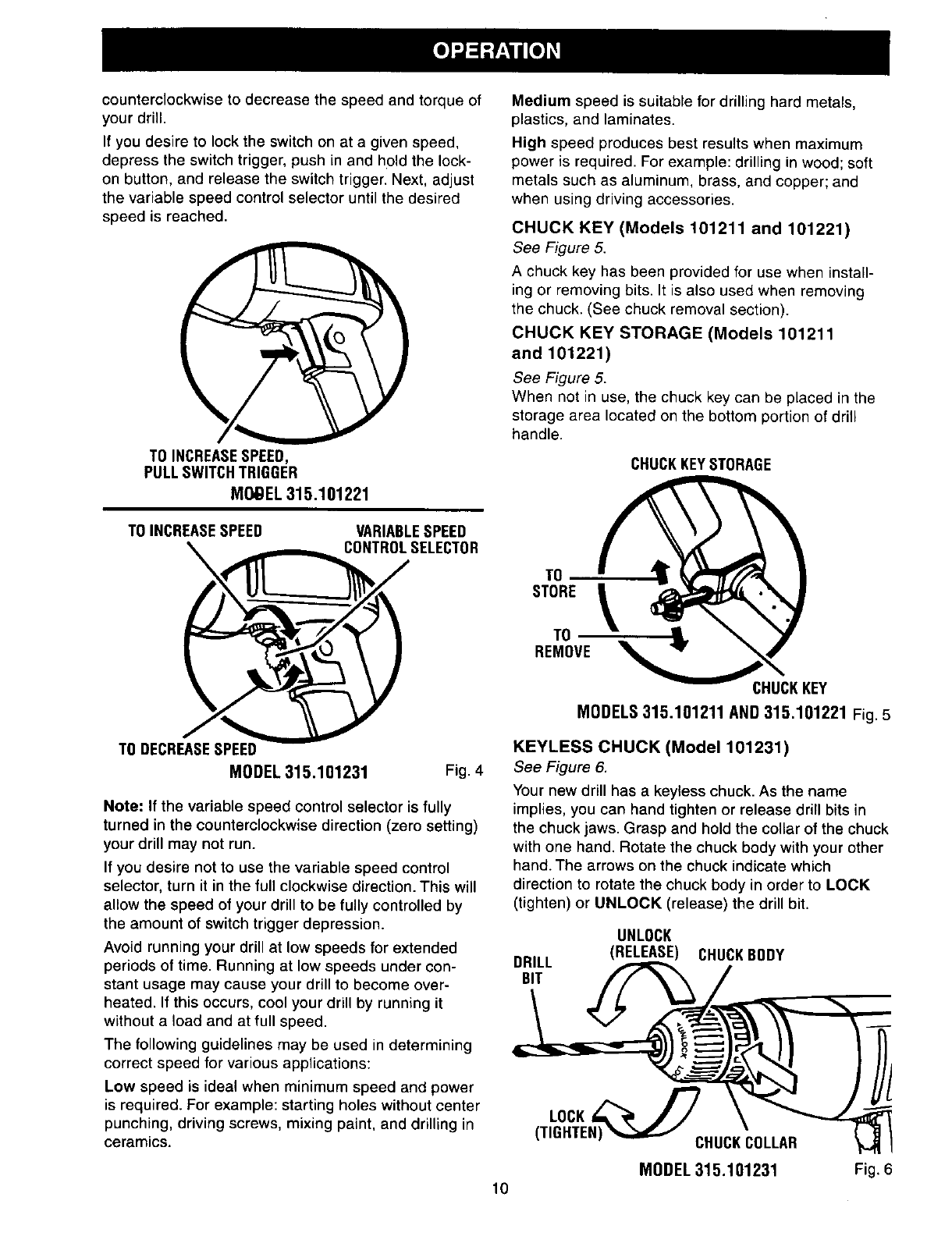
counterclockwiseto decreasethespeedandtorqueof
yourdrill.
Ifyoudesireto locktheswitchonata givenspeed,
depresstheswitchtrigger,pushinandholdthelock-
onbutton,andreleasetheswitchtrigger.Next,adjust
thevariablespeedcontrolselectoruntilthedesired
speedisreached.
TO INCREASESPEED,
PULL SWITCHTRIGGER
MO_EL 315.101221
Medium speed is suitable for drilling hard metals,
plastics, and laminates.
High speed produces best results when maximum
power is required. For example: drilling in wood; soft
metals such as aluminum, brass, and copper; and
when using driving accessories.
CHUCK KEY (Models 101211 and 101221)
See Figure 5.
A chuck key has been provided for use when install-
ing or removing bits. It is also used when removing
the chuck. (See chuck removal section).
CHUCK KEY STORAGE (Models 101211
and 101221)
See Figure 5.
When not in use, the chuck key can be placed in the
storage area located on the bottom portion of drill
handle.
CHUCKKEYSTORAGE
TO INCREASESPEED VARIABLESPEED
CONTROLSELECTOR
STORE
TO
REMOVE
TODECREASESPEED
MODEL315.101231 Fig. 4
Note: If the variable speed control selector is fully
turned in the counterclockwise direction (zero setting)
your drill may not run.
If you desire not to use the variable speed control
selector, turn it in the full clockwise direction. This will
allow the speed of your drill to be fully controlled by
the amount of switch trigger depression.
Avoid running your drill at low speeds for extended
periods of time. Running at low speeds under con-
stant usage may cause your drill to become over-
heated. If this occurs, cool your drill by running it
without a load and at full speed.
The following guidelines may be used in determining
correct speed for various applications:
Low speed is ideal when minimum speed and power
is required. For example: starting holes without center
punching, driving screws, mixing paint, and drilling in
ceramics.
CHUCKKEY
MODELS315.101211 AND315.101221 Fig. 5
KEYLESS CHUCK (Model 101231)
See Figure 6.
Your new drill has a keyless chuck. As the name
implies, you can hand tighten or release drill bits in
the chuck jaws. Grasp and hold the collar of the chuck
with one hand. Rotate the chuck body with your other
hand. The arrows on the chuck indicate which
direction to rotate the chuck body in order to LOCK
(tighten) or UNLOCK (release) the drill bit.
DRILL
BIT
UNLOCK
(RELEASE) CHUCKBODY
10
LOCK,/7
(TIGHTEN) CHUCKCOLLAR
MODEL315.101231 Fig. 6
,_ WARNING: Do not hold chuck body with one
hand and use the power of your drill to tighten
the chuck jaws on your drill bits. The chuck body
could slip in your hand or your hand could slip
and come in contact with a rotating drill bit. This
could cause an accident resulting in serious
personal injury.
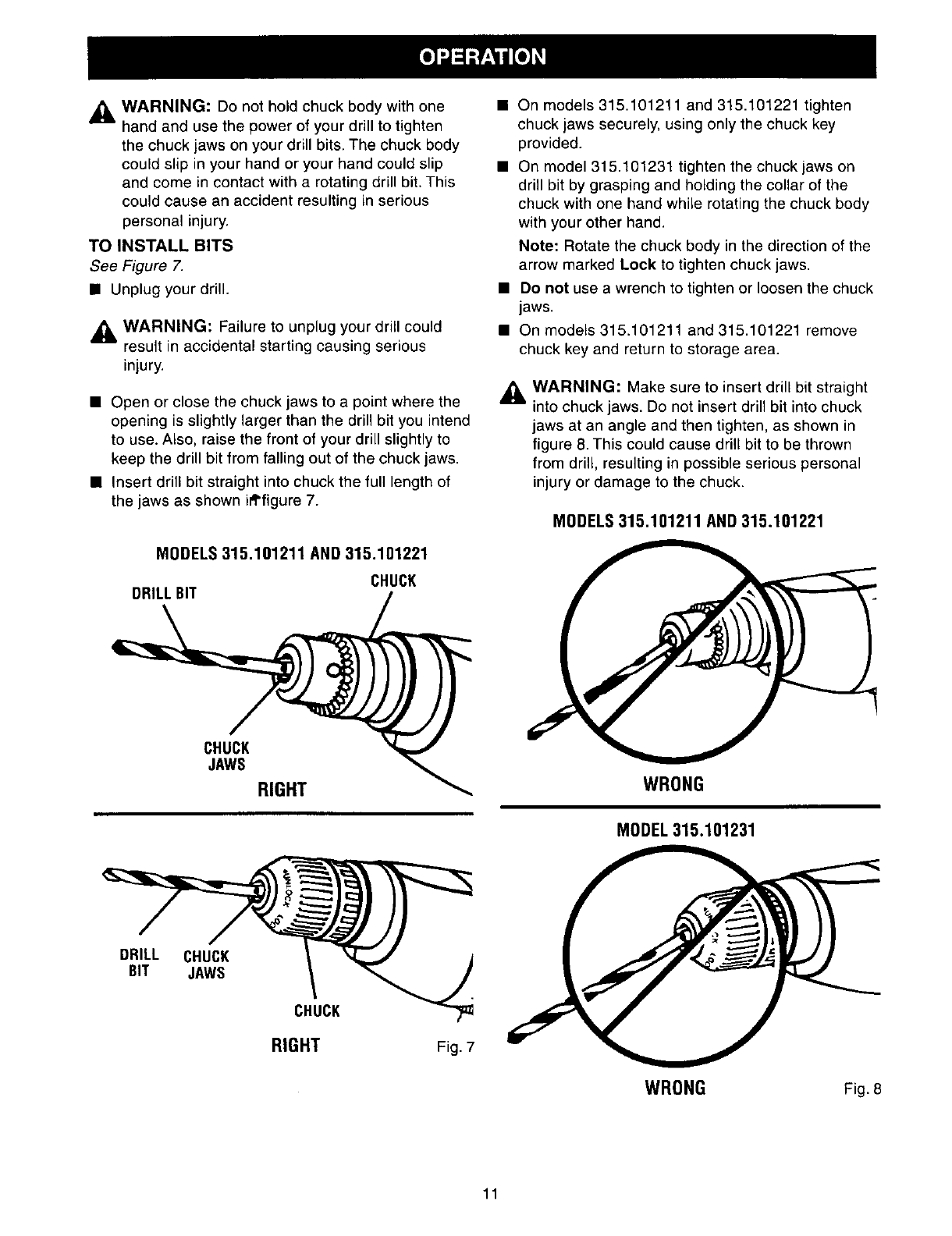
TO INSTALL BITS
See Figure 7.
• Unplug your drill.
_1= WARNING: Failure to unplug your drill could
result in accidental starting causing serious
injury.
•Open or close the chuck jaws to a point where the
opening is slightly larger than the drill bit you intend
to use. Also, raise the front of your drill slightly to
keep the drill bit from falling out of the chuck jaws.
• Insert drill bit straight into chuck the full length of
the jaws as shown ifl'figure 7.
MODELS 315.101211 AND 315.101221
CHUCK
DRILL BIT
• On models 315.101211 and 315.101221 tighten
chuck jaws securely, using only the chuck key
provided.
• On model 315.101231 tighten the chuck jaws on
drill bit by grasping and holding the collar of the
chuck with one hand while rotating the chuck body
with your other hand.
Note: Rotate the chuck body in the direction of the
arrow marked Lock to tighten chuck jaws.
•Do not use a wrench to tighten or loosen the chuck
jaws.
• On models 315.101211 and 315.101221 remove
chuck key and return to storage area.
_1= WARNING: Make sure to insert drill bit straight
into chuck jaws. De not insert drill bit into chuck
jaws at an angle and then tighten, as shown in
figure 8. This could cause drill bit to be thrown
from drill, resulting in possible serious personal
injury or damage to the chuck.
MODELS315.101211 AND315.101221
CHUCK
JAWS
RIGHT WRONG
MODEL315.101231
DRILL CHUCK
BIT JAWS
CHUCK
RIGHT Fig. 7
WRONG Fig. 8
11
REMOVING BITS
•Unplug your drill.
,_, WARNING: Failure to unplug your drill could
result in accidental starting causing serious
injury.
• On models 315.101211 and 315.101221 loosen the
chuck jaws using only the chuck key provided.
• On model 315.101231 loosen chuck jaws by
grasping and holding the collar of the chuck with
one hand and rotating the chuck body in the
direction of the arrow marked UNLOCK with your
other hand.
• Do notuse a wrench to tighten or loosen the chuck
jaws.
• Remove drill bit from chuck jaws.
•On models 315.101211 and 315.101221 remove
chuck key and return to storage area.
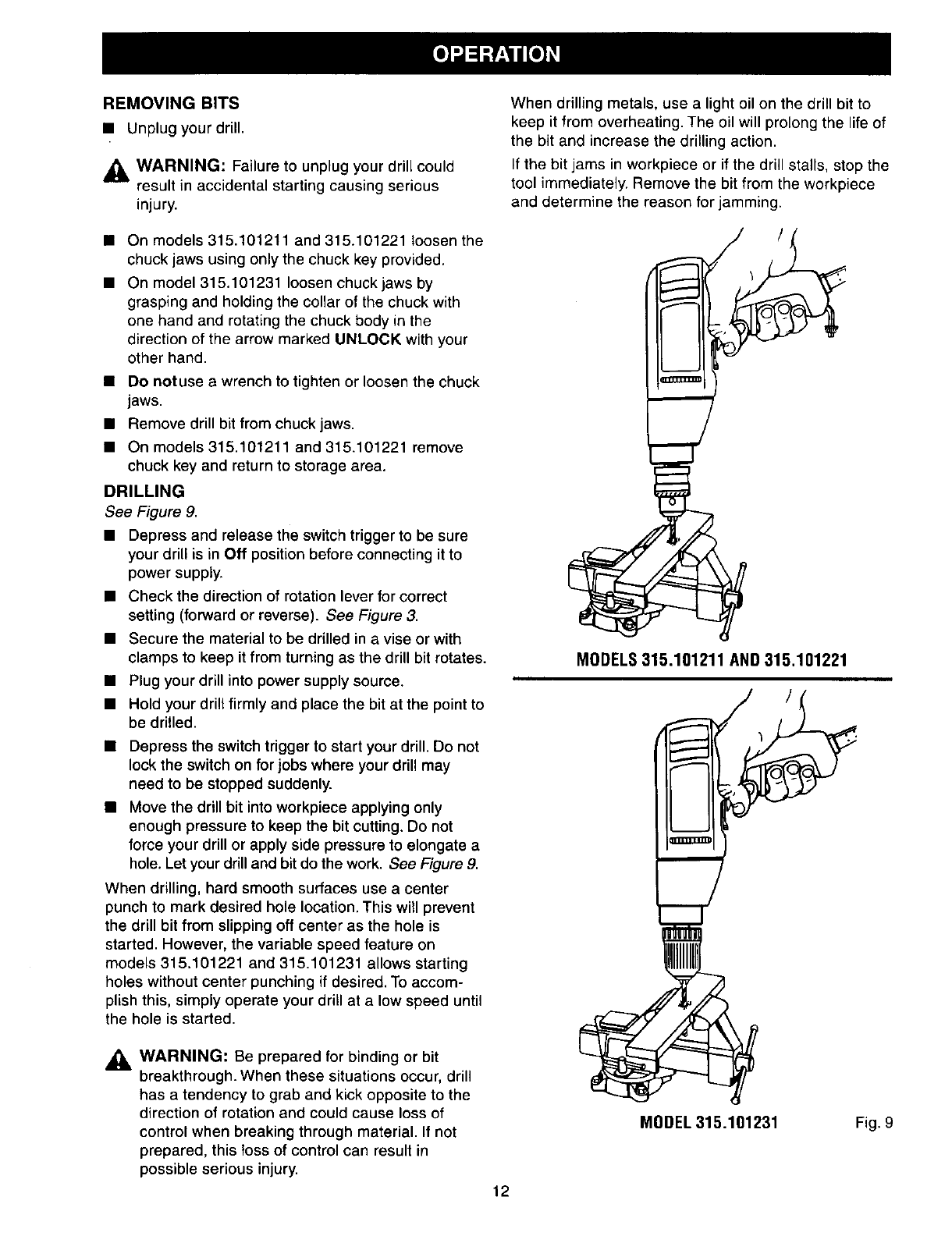
DRILLING
See Figure 9.
• Depress and release the switch trigger to be sure
your drill is in Off position before connecting it to
power supply.
• Check the direction of rotation lever for correct
setting (forward or reverse). See Figure 3.
• Secure the material to be drilled in a vise or with
clamps to keep it from turning as the drill bit rotates.
• Plug your drill into power supply source.
• Hold your drill firmly and place the bit at the point to
be drilled.
• Depress the switch trigger to start your drill. Do not
lock the switch on for jobs where your drill may
need to be stopped suddenly.
• Move the drill bit into workpiece applying only
enough pressure to keep the bit cutting. Do not
force your drill or apply side pressure to elongate a
hole. Let your drill and bit do the work. See Figure 9.
When drilling, hard smooth surfaces use a center
punch to mark desired hole location. This will prevent
the drill bit from slipping off center as the hole is
started. However, the variable speed feature on
models 315.101221 and 315.101231 allows starting
holes without center punching if desired. To accom-
plish this, simply operate your drill at a low speed until
the hole is started.
_l, WARNING: Be prepared for binding or bit
breakthrough. When these situations occur, drill
has a tendency to grab and kick opposite to the
direction of rotation and could cause loss of
control when breaking through material. If not
prepared, this toss of control can result in
possible serious injury.
When drilling metals, use a light oil on the drill bit to
keep it from overheating. The oil will prolong the life of
the bit and increase the drilling action.
If the bit jams in workpiece or if the drill stalls, stop the
tool immediately. Remove the bit from the workpiece
and determine the reason for jamming.
MODELS315.101211 AND315.101221
,.=....=-,.
.......-=-
,..,..,=,=
mZZZXD
MODEL 315.101231 Fig. 9
12
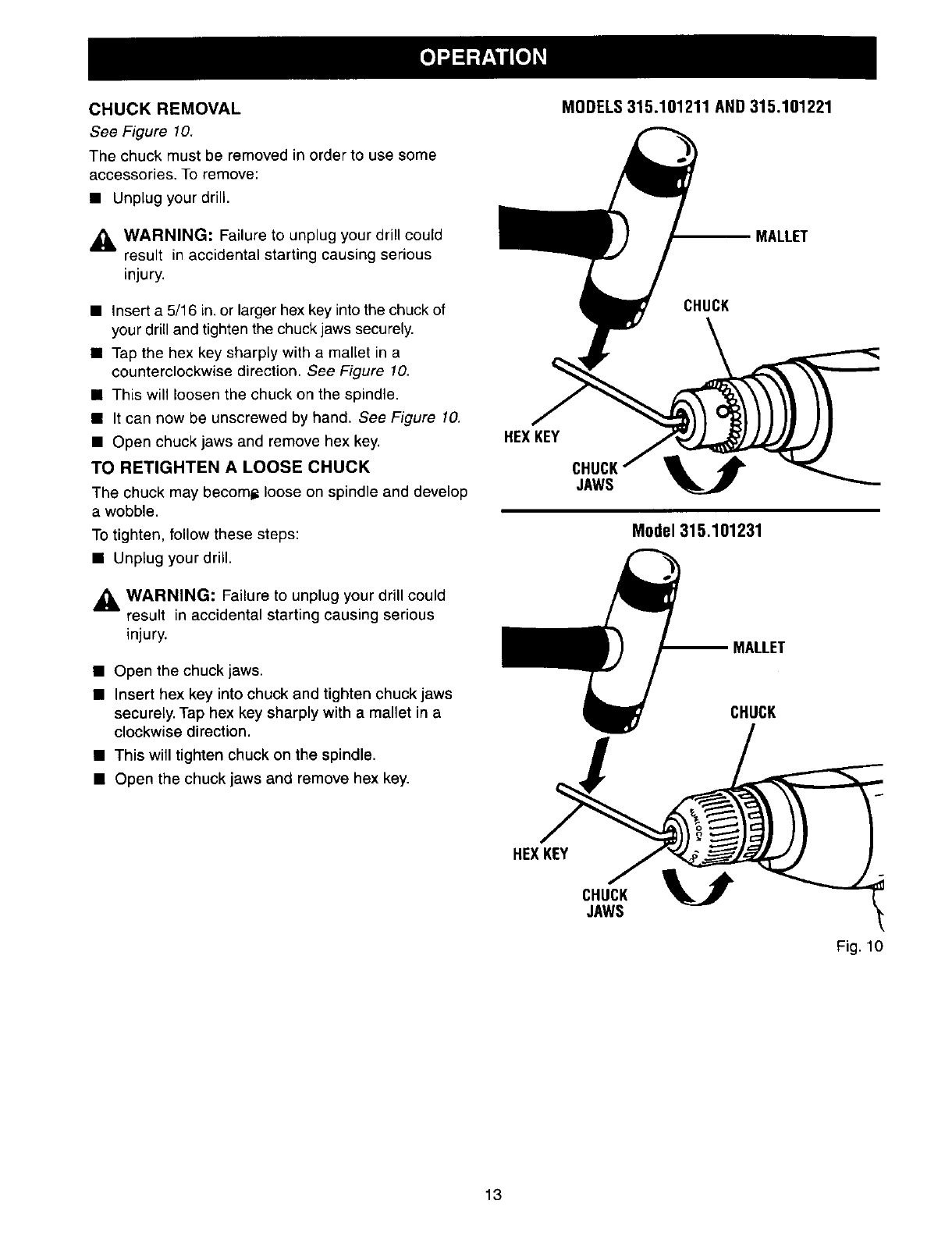
CHUCKREMOVAL
See Figure 10.
The chuck must be removed in order to use some
accessories. To remove:
• Unplug your drill.
_, WARNING: Failure to unplug your drill could
result in accidental starting causing serious
injury.
• Insert a 5/16 in. or larger hex key into the chuck of
your drill and tighten the chuck jaws securely.
• Tap the hex key sharply with a mallet in a
counterclockwise direction. See Figure 10.
• This will loosen the chuck on the spindle.
• It can now be unscrewed by hand. See Figure 10.
• Open chuck jaws and remove hex key.
TO RETIGHTEN ALOOSE CHUCK
The chuck may becomi_ loose on spindle and develop
a wobble.
To tighten, follow these steps:
• Unplug your drill.
,_1 WARNING: Failure to unplug your drill could
result in accidental starting causing serious
injury.
• Open the chuck jaws.
• Insert hex key into chuck and tighten chuck jaws
securely. Tap hex key sharply with a mallet in a
clockwise direction.
• This will tighten chuck on the spindle.
•Open the chuck jaws and remove hex key.
MODELS315.101211 AND315.101221
MALLET
CHUCK
HEXKEY
JAWS V
Model315.101231
MALLET
CHUCK
HEXKEY
CHUCK
JAWS
Fig. 10
13
,_ WARNING: When servicing, use only identical
Craftsman replacement parts. Use of any other
part may create a hazard or cause product
damage.
GENERAL
Only the parts shown on parts list, page 15, are
intended to be repaired or replaced by the customer.
All other parts represent an important part of the
double insulation system and should be serviced only
at a Sears Service Center.
Avoid using solvents when cleaning plastic parts.
Most plastics are susceptible to damage from various
types of commercial solvents and may be damaged
by their use. Use clean cloths to remove dirt, carbon
dust, etc.
_h, WARNING: Do not at any time let brake fluids,
gasoline, petroleum-based products, penetrating
oils, etc. come in contact with plastic parts. They
contain chemical_ that can damage, weaken or
destroy plastic.
It has been found that electric tools are subject to
accelerated wear and possible premature failure when
they are used on fiberglass boats, sports cars,
wallboard, spackling compounds, or plaster. The
chips and grindings from these materials are highly
abrasive to electric tool parts such as bearings,
brushes, commutators, etc. Consequently, it is not
recommended that this tool be used for extended
work on any fiberglass material, wallboard, spackling
compounds, or plaster. During any use on these
materials it is extremely important that the tool is
cleaned frequently by blowing with an air jet.
,_ WARNING: Always wear safety goggles or
safety glasses with side shields during power tool
operation or when blowing dust. If operation is
dusty, also wear a dust mask.
LUBRICATION
All of the bearings in this tool are lubricated with a
sufficient amount of high grade lubricant for the life of
the unit under normal operating conditions. Therefore,
no further lubrication is required.
EXTENSION CORDS
The use of any extension cord will cause some loss of
power. To keep the loss to a minimum and to prevent
tool overheating, use an extension cord that is heavy
enough to carry the current the tool will draw.
A wire gage size (A.W.G.) of at least 16 is
recommended for an extension cord 100 feet or less
in length. When working outdoors, use an extension
cord that is suitable for outdoor use. The cord's jacket
will be marked WA.
ACAUTION: Keep extension cords away from the
drilling area and position the cord so that it will
not get caught on lumber, tools, etc., during
drilling operation.
AWARNING: Check extension cords before each
use. If damaged, replace immediately. Never use
tool with a damaged cord since touching the
damaged area could cause electrical shock
resulting in serious injury.
Extension cords suitable for use with your drill are available
at your nearest Sears Retail Store.
14
[
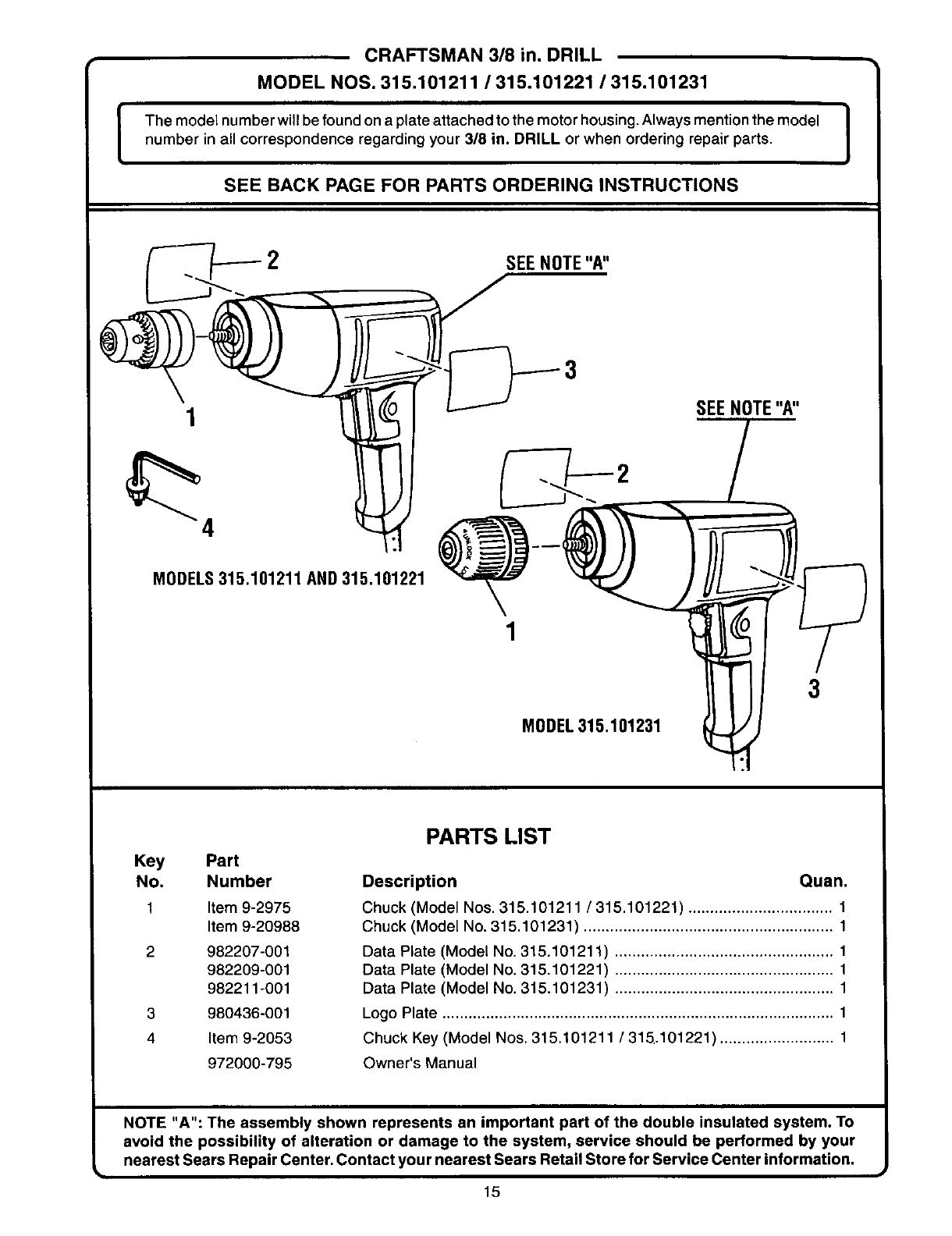
CRAFTSMAN 3/8 in. DRILL
MODEL NOS. 315.101211 /315.101221 /315.101231
The model number will be found on a plate attached to the motor housing. Always mention the model
number in all correspondence regarding your 3/8 in. DRILL or when ordering repair parts.
SEE BACK PAGE FOR PARTS ORDERING INSTRUCTIONS
MODELS315.101211 AND315.101221
1
MODEL315.101231
SEENOTE"A"
3
Key
No.
2
3
4
Part
Number
Item 9-2975
Item 9-20988
982207-001
982209-001
982211-001
980436-001
Item 9-2053
972000-795
PARTS LIST
Description Quan.
Chuck (Model Nos. 315.101211 /315.101221) ................................. 1
Chuck (Model No. 315.101231) ......................................................... 1
Data Plate (Model No. 315.101211) .................................................. 1
Data Plate (Model No. 315.101221) .................................................. 1
Data Plate (Model No. 315.101231) .................................................. 1
Logo Plate .......................................................................................... 1
Chuck Key (Model Nos. 315.101211 /315.101221) .......................... 1
Owner's Manual
NOTE "A": The assembly shown represents an important part of the double insulated system. To
avoid the possibility of alteration or damage to the system, service should be performed by your
nearest Sears Repair Center. Contact your nearest Sears Retail Store for Service Center information.
15

Get it fixed, at your home or ours!
For repair of major brand appliances in your own home...
no matter who made it, no matter who sold it!
1-800-4-MY-HOME sMAnytime, day or night
(1-800-469-4663)
www.sears.com
To bring in products such as vacuums, lawn equipment and electronics
for repair, call for the location of your nearest Sears Parts & Repair Center.
1-800-488-1222 Anytime, day or night
www.sears.com
For the replacement parts, accessories and owner's manuals
that you need to do-it-yourself, call Sears PartsDirect sM!
1-800-366-PART 6 a.m.- 11 p.m. CST,
(1-800-366-7278) 7 days a week
www.sears.com/partsdirect
To purchase or inquire about a Sears Service Agreement:
1-800-827-6655
7 a.m. - 5 p.m. CST, Mon - Sat
Para pedir servicio de reparaci6n a domicilio,
y para ordenar piezas con entrega a domicilio:
1"888"SU'HOGAR sM
(1-888-784-6427)
Au Canada pour service en fran£ais:
1-877-LE-FOYER sM
(1-877-533-6937)
TM
® Registered Trademark /Trademark of Sears, Roebuck and Co.
© Sears, Roebuck and Co. ® Marca Regist rada /TM Marca de F_brica de Sears, Roebuck and Co,
