Craftsman 315113340 User Manual DRILL Manuals And Guides L0306005
CRAFTSMAN Drill Reversing Manual L0306005 CRAFTSMAN Drill Reversing Owner's Manual, CRAFTSMAN Drill Reversing installation guides
User Manual: Craftsman 315113340 315113340 CRAFTSMAN DRILL - Manuals and Guides View the owners manual for your CRAFTSMAN DRILL #315113340. Home:Tool Parts:Craftsman Parts:Craftsman DRILL Manual
Open the PDF directly: View PDF  .
.
Page Count: 18
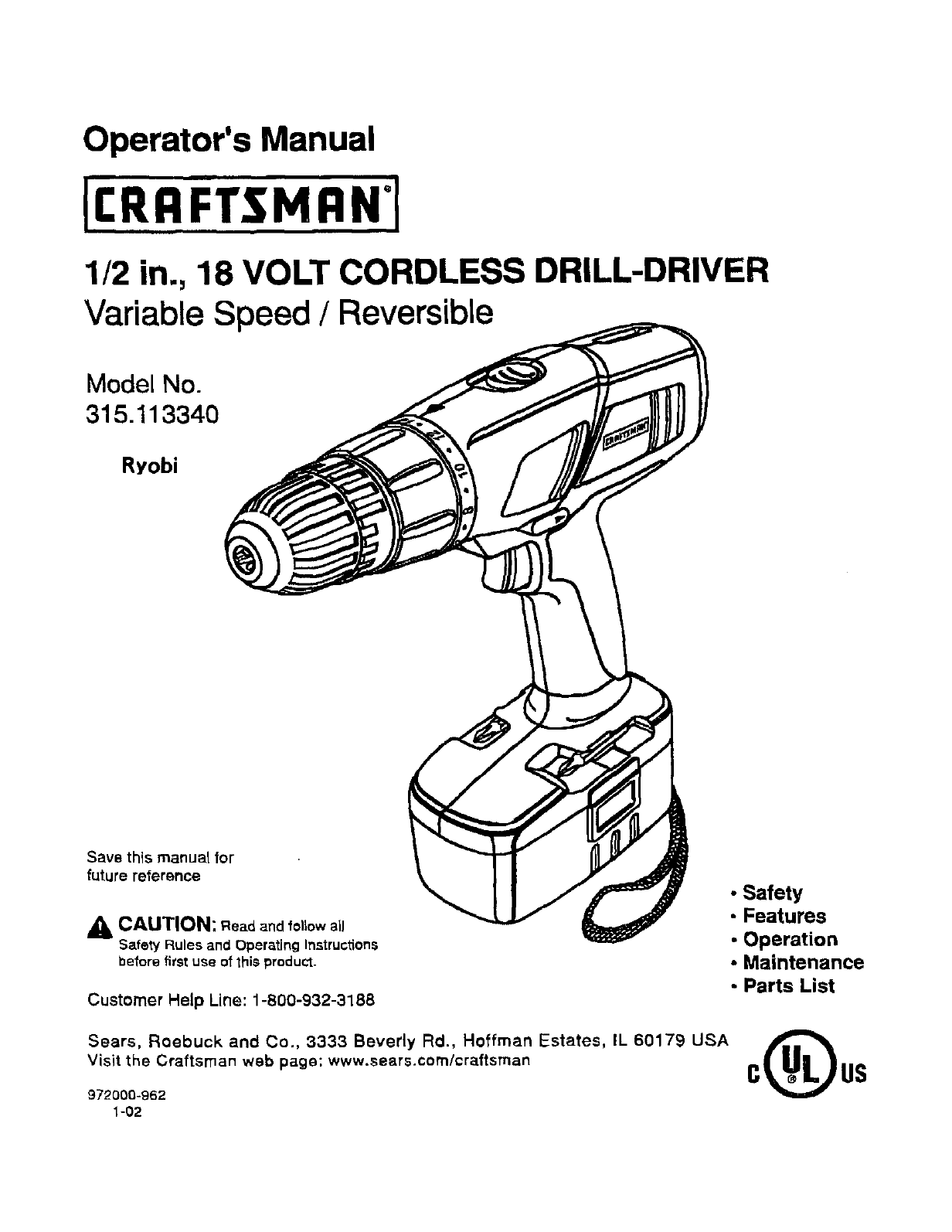
Operator's Manual
1/2 in., 18 VOLT CORDLESS DRILL-DRIVER
Variable Speed /Reversible
Model No.
315.113340
Ryobi
Save this manual for
future reference
_k CAUTION: Read and follow all
Safety Rules and Operating Instructions
before first use of *[his product.
Customer Help Line: 1-800-932-3188
Sears, Roebuck and Co., 3333 Beverly Rd., Hoffman Estates, IL 60179 USA
Visit the Craftsman web pago: www.sears.com/craftsman
972000-962
1-02
•Safety
•Features
•Operation
• Maintenance
•Parts List
0( 0s

• Table Of Contents ......................................................................................................................................................... 2
•- Warranty ......................................................................................................................................................................... 2
•Introduction ..................................................................................................................................................................... 3
•General Safety RuLes. Specific Safety Rules, And Symbols ..................................................................................... 3-6
•Product Specifications .......................................................... i......................................................................................... 7
•Features ..................................................................................................................................................................... 7-8
•Operation .................................................................................................................................................................. 9-14
•Maintenance ................................................................................................................................................................. 15
•Accessories .................................................................................................................................................................. 15
•Exploded View And Repair Parts List .......................................................................................................................... 17
•Parts Ordedng /Service ............................................................................................................................................... 18
FULL ONE YEAR WARRANTY ON CRAFTSMAN 1/2 In. CORDLESS DRILL-DRIVER
If thisCRRFTSNRN1/2 in, Cordless DrilFDdverfailsto give complete satisfaction withinone year from the date of pur-
chase, RETURN IT TO THE NEAREST SEARS STORE OR SEARS SERVICE CENTER IN THE UNITED STATES,
and Sears will repair it, free of charge.
If this CRgFT$14BN1/2 in. CordLessDrill-Driveris usedfor commercialor rental purposes,this warranty appliesfor only
90 days from the date of purchase.
This warranty gives you specific legal rights,and you may also have other dghtswhich vary from state to state.
Sears, Roebuck and Co., Dept. 817WA, Hoffmah Estates, IL 60179
A Look for this symbol to point out important safety precautions. It means attention!!1Your safety is
involved.
A WARNING:
The operationof any power tool can resultin foreignobjects beingthrown intoyour eyes, which can
result in severe eye damage. Beforebeginningpower tool operation,always wear safetygoggles or
safety glasses withside shieldsand a full face shieldwhen needed. We recommendWide Visib-n
Safety Mask for use over eyeglasses or standardsafety glasseswithside shields,available at Sears
Retail Stores. Alwayswear eye protectionwhiohis marked to complywith ANSI Z87.1.
SAFETY AND INTERNATIONAL SYMBOLS
This operator's manual describes safety and international symbols and piotographs that may appear on this produ_.
Read the operator's manual for complete safety, assemb(y, operating and maintenance, and repair information.
MEANING
Do not expose to rain or use in damp locations.
Your drill-driver has many features for making your drilling
operationsmore pleasant and enjoyable. Safety,
performanceand dependabilityhave been given top
pdorityin the designof this drill-drivermakingit easy to
maintainand operate.
_IL CAUTION: Carefullyread through this entire
operator'smanualbefore usingyour new drilL-driver.
Pay close attention to the General Safety Rules,
Spedllc Safety Rules and Symbols,Warningsend
Cautions. if youuse yourdrill-driverproperlyand only
for it'sintended use,you willenjoy years of safe.
reliable service.
_WARNING: Read and understand ell Instructions.
Failure to followall instructionslistedbelow,may
result inelectric shock,fire and/or seriouspersonal
injury.
SAVE THESE INSTRUC'nONS
Work Area
J Keep your work area clean and well lit. Cluttered
benchesand dark areas inviteaccidents.
• Do not operate power tools in explosive atmo-
spheres, such as in the presence of flammable
liquids, gases, or dust. Powertools create sparks
whichmay ignitethe dust orfumes.
•Keep bystanders, children, and visitors away while
operating e power tool. Distractionscan cause you
to lose control.
Electrical Safety
•Do not abuse the cord. Never use the cord to carry
the charger, Keep cord away from heat, oil, sharp
edges, or moving parts. Replace damaged cords
immediately. Damaged cords may create afire.
•A battery operated tool with integral batteries or a
separate battery pack must be recharged only with
the specified charger for the battery. A chargerthat
maybe suitablefor one type of batterymay create a
riskof fire when usedwith anotherbattery. Use battery
only with chargerlisted.
MODI=L BA'rrERYPACK CHARGER
315.113340 Item NO. J!11045 Item No. 911041
(1323502) (1425301 )
•Use battery operated tool only with specifically
designated battery pack. Use of any otherbatteries
may create a riskof fire. Use only withbatterypack
listed.
Personal Safety
•Stay alert, watch what you ere doing end use
estonian sense when operating apower tool, Do
not use tool while tired or under the influence of
drugs, alcohol, or medication. Amomentof inatten-
tionwhile operatingpower tools may resultin serious
personalinjury.
• Dress properly. Do not wear loose clothing or
jewelry. Contain long hair. Keep your hair, clothing,
end gloves away from moving pads. Looseclothes,
jewelry,or longhair can be caught in movingparts.
•Avoid accidental starting. Be sure switch Is In the
locked or off position before inserting battery
pack. Carryingtoolswith yourfinger onthe switchor
insertingthe batterypack intoatool withthe switchon,
invitesaccidents.
•Remove adjusting keys or wrenches before turn-
. Ing the tool on. Awrench or a key that is left attached
to • rotatingpart of the tool may resulfin personal
injury.
•Do not overreach. Keep proper footing and bal-
ance at all times. Properfootingansibalance enables
bettercontrolof the tool in unexpectedsituations.Do
not use on a [adderor unstablesupport.
•Use safety equipment. Always wear eye protection.
Dustmask, nonskidsafetyshoes, hard hat. or hearing
prOteCtionmust be usedfor appropriate conditions.
3
Tool Use and Care
•Use clamps or other practical way to secure and
support the workplace to a stable platform. Holding
the work by hand or against your body is unstable and
may lead to loss of control
•Do not force tool. Use the correct tool for your
application. The correct tool will do the job better and
safer at the rate for which it is designed.
•Do not use tool If switch does not turn It on or off.
A tool that cannot be controlled with the switch is
dangerous and must be repaired.
•Disconnect battery pack from tool or place the switch
In the locked or off position before maldng any i_lusb
merits, changing acceeeoriss, or stodng the tceL Such
preventive safety measures reduce riskof startingthe tool
acddentaily.
•Store idle tools out of reach of children end other
untrained persons. Tools are dangerous in the hands
of unVained users.
•When battery pack is not in use, keep it away from
other metal objects like: paper clips, coins, keys,
nails, screws, or other small metal objects that can
make a connection from one terminal to another.
Shodthg the battery terminals together may cause
sparks, burns, or afire.
•Maintain tools with care. Keep cutting tools sharp
and clean. Properly maintained tools,withsharp
cuttingedges are less likelyto bindand are easierto
control.
•Check for mleellgnment or binding of moving parts,
breakage of parts, and any other condition that may
affect the tool's operation. If damaged, have the tool
serviced before using. Manyaccidents are causedby
poodymaintained tools.
•Use only accessories that are recommended by
the manufacturer for your model. Accessoriesthat
may be sult=_blefor one too[,may create a riskof injury
when usedon anothertool.
Servloe
•Tool service must be performed only by qua,fled
repair personnel. Service or maintenance performed
by unqualifiedpersonnelcould result inarisk of injury.
•When servicing a tool, use only identical replace-
ment parts. Follow instructions tn the Maintenance
section of this manual. Usa of unauthorizedpartsor
failureto followMaintenancoInstructionsmay create a
riskof shockorinjury.
Hold tool by Insulated gripping surfaces when performing an operation where the cutting tool may contact hidden
wiring. Contact with a "live" wire will make exposed metal parts of the tool "live" and shock the opera,or.
Additional Rules For Safe Operation
•Know your power fool. Read operator's manual
carefully. Learn its applications and limitations, as
well as the specific putentlal hazards related to
this tool. Following this rule will reduce the risk of
electric shock, fire, or serious injury.
•Make sure your extension cord is in good condition.
When using an extension cord, be sure to use one
heavy enough to carry the current your product will
draw. A wire gage size (A.W.G.) of at leaSt 16 is
recommended for an extension cord 100 feet or less
in length. A cord exceeding 100 feet Is not recom-
mended, If In doubt, use the next heavier gage. The
smaller the gage number, the heavier the cord° An
undersized cord will cause a drop in lii_evoltage result-
ing in loss of power and overheating.
Important Rules for Battery Tools
•Battery tools do not have to be plugged into an
electrical outlet; therefore, they are always In
operating condition. Be aware of possible hazards
when not using your battery tool or when chang-
Ing accessories. FoJ]owing this rule will reduce the
risk of electric shock, fire, or serious personal iniury.
•De nat place battery tools or their batteries near
fire or heat. This will reducethe riskof explosionand
possibleinjury.
A WARNING: Batteries vent hydrogen gas alld can
explode in the presence of asource of ignition, such
as a pilot light. To reduce the risk of serious personal
injury, never use any cordless product in the pres-
ence of open flame. An exploded battery can propel
debris and chemicals. If exposed, flush with water
immediately.
Do not charge battery tool in a damp or wet
location. Following this rule will reducs the risk of
electric shock.
For best results, your battery tool should be
charged in alocation where the temperature is
more than 50°F but less than 100°F. Do not store
outside or in vehicles.
Under extreme usage or temperature conditions,
battery leakage may occur. If liquid comes In
contact with your skin, wash Immediately with
soap and water, then neutralize with lemon juice
or vinegar, If liquid gets into your eyes, flush them
with clean water for at least 10 minutes, then seek
immediate medical attention. Following this rule will
reduce the risk of serious personal injury.
4
,_WARNING: Never use abattery that has been
droppedor received a sharp blow. A damaged battery
is subjectto explosion. Properly disposeof a dropped
battery immediately. Failure to heed this warningcan
result in seriouspersonal injury.
• Save these instructions. This manual €ontains
Important safety and Operetlng Instructions for
charger. Followingthisrule will reduce the dsk of
electric shock, fire, or serious personal injury,
• Before using battery charger, read ell instructions
and cautionary markings In this manual, on
battery charger, and product using battery
charger. Followingthis rule will reduce the riskof
electric shock, fire. or seriouspersonal injury.
ACAUTION: To reduce risk of injury, charge only
nickel-cadmium and nickel metal hydride type
rechergeeble batteries. Other types of batteries
may burst causing personal injury end damage.
Following this rule will reduce the risk of electric
shock, fire, or serious personal injury
•Do not expose charger to rein or snow. Following
this rule will reduce the risk of eleck'ic shock, fire, or
serious personal injury.
•Use of an attachment not recommended or sold
by the battery charger manufacturer may result In
a risk of fire, electric shock, or injury to persons.
Following this rule will reduce the risk of electric
shock, fire, or serious personal [njury.
•To reduce risk of damage to charger body end
cord, pull by charger plug rather than cord when
disconnecting charger. Following this rule will
reduce the risk of electric shock, fire, or serious
personal injury
• Make sure cord Is located so that it will not be
stepped on, tripped ever, or otherwise subjected
to damage or stress. FoUowing this rule will reduce
the risk of serious personal injury.
•An extension cord should not be used unless
absolutely necessary. Use of improper extension
cord could result in a risk of fire and electric shock. If
extension cord must be used, make sure:
a. That pins on plug of extension cord are the
same number, size and shape as those of
plug on charger,
b, That extension cord is properly wired and in
good electrical condition; and
c That wire size is large enough for AC ampere
rating of charger as specified below:
Cord Length (Feet) 25' 50' 100'
Cord Size (AWG) 16 16 16
Note: AWG = American Wire Gage
•DO nat operate charger with a damaged cord or
plug. If damaged, have replaced Immediately by a
qualified servioegl_n. Following this ru[e will reduce the
risk of electric shock, fire, or serious personal injury.
'• Do not operate charger If It has received a sharp
blow_ been dropped, or otherwise damaged In any
way; take it to a qualified serviceman. Following
this ru[e will reduce the risk of electric shock, fire, or
serious personal injury.
•Do not disassemble charger; take it to a qualified
servicemen when service or repair Is required.
Incorrect reassembly may result In s risk of
electric shock or fire. Following this rule will reduce
the risk of electric shock, fire, or serious personal
injury.
•To reduce the risk of electric shook, unplug
charger from outlet before _'temptlng any mainta-
hence or €lesnlng. Turning off controls will not
reduce this risk. Following this rule will reduce the
risk of electric shock, fire, or serious personal injury.
•Do not use charger outdoors, Following this rule will
reduce the risk of elect_c shock, fire, or serious
personal injury.
•Disconnect charger from power supply when not
In use. Following this rule will reduce the risk of
electric shock, fire, or serious personal injury.
ADANGER: RISK OF ELECTRIC SHOCK. DO NOT
TOUCH UNINSULATED PORTION OF OUTPUT
CONNECTOR OR UNINSULATED BATrERY
TERMINAL•
•Save these instructions. Refer to them frequently
and use them to instruct others who may use this
tool. If you loan someone this tool, loan them
these instructions also. Followingthisrule will
reduce the risk of electric shock, fire, or serious
personal injury.
_LWARNING: Some dust created by power sanding,
sawing, grinding, drilling, and other construction
activities contains chemicals known to cause
cancer, birth detects or other reproductive harm.
Some examples of these chemicals are:
• lead from lead-based paints,
• crystalline silica from bricks and cement
and other masonry products, and
•arsenic and chromium from chemically-
treated lumber.
Your risk from these exposures varies, depending
on how often you do this type of work. To reduce
your exposure to these chemicals: work in a well
ventilated ares, and work with approved safety
equipment, such as those dust masks that are
specially designed to filter out microscopic particles.
SAVE THESE INSTRUCTIONS
5
mm
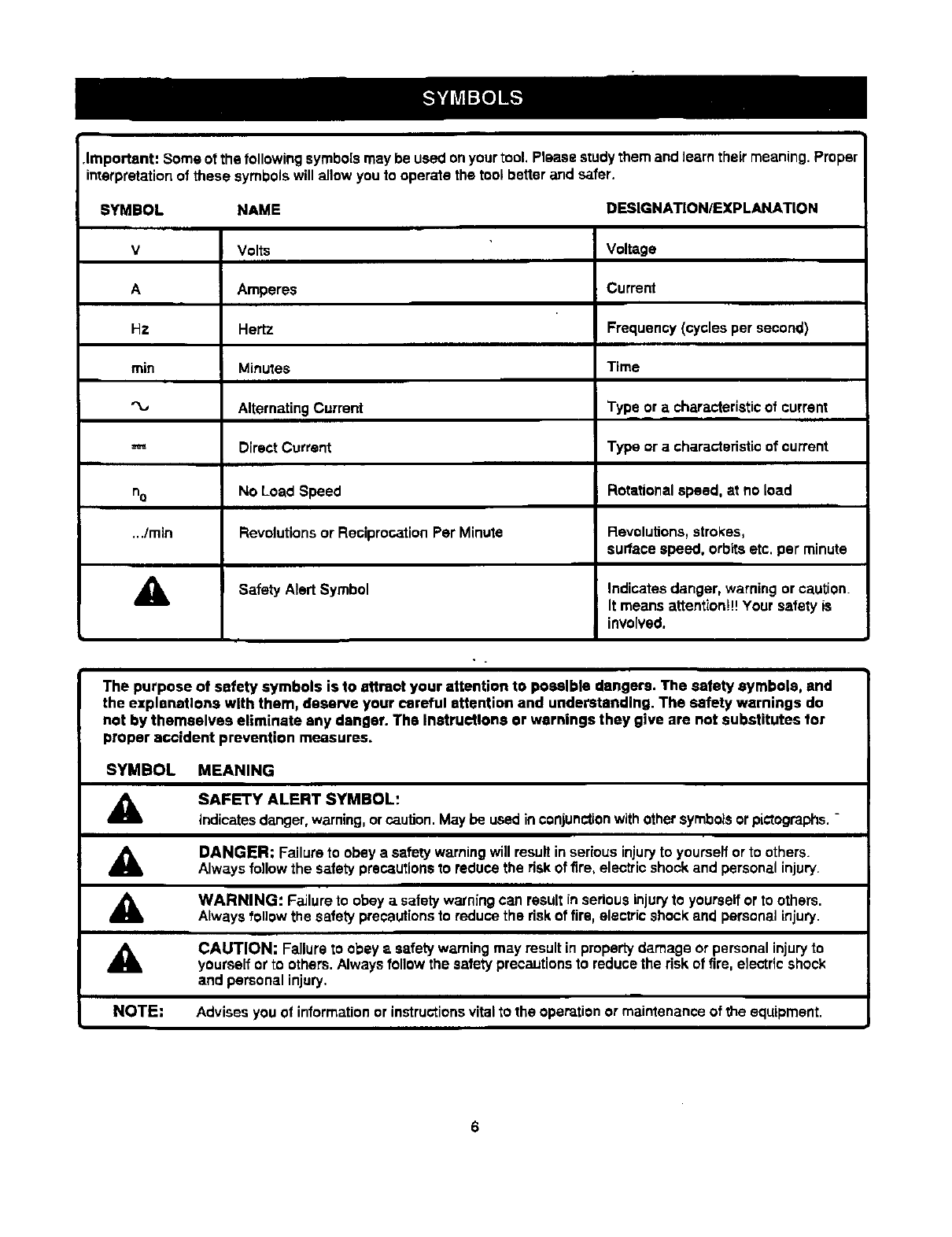
.Important: Some of the followingsymbolsmaybe usedonyourtool. Please studythem and learn their meaning.Proper
interpretationof these symbolswill allow youto operate the tool better and safer.
SYMBOL NAME DESIGNATION/EXP LANATION
VVolts Voltage
A Amperes Current
Hz Hertz Frequency (cycles per second)
rain Minutes Time
AlternatingCurrent Type or acharacteristicof current
m m
Direct Current Type or a characteristicof current
==J=
noNO Load Speed Rotationalspeed, at no load
../min Revolutionsor ReciprocationPer Minute Revolutions,strokes,
surface speed, orbitsetc. per minute
Safety Alert Symbol Indicatesdanger, warning or caution.
It means attention!!!Your safety is
involved.
The purpose of safety symbols is to attract your attention to possible dangers. The safety symbols, and
the explanations with them, deserve your careful attention and understanding. The safety warnings do
not by themselves eliminate any danger. The Instructions or warnings they give are not substitutes for
proper accident prevention measures.
SYMBOL MEANING
SAFETY ALERT SYMBOL:
indicatesdanger, warning,orcaution.May be usedinconjunctionwithothersymbolsorpictographs.-
A
A
,a,
NOTE:
DANGER; Failureto obey a safety warningwillresult inseriousinjuryto yourselforto others.
Always follow the safety precautionsto reducethe riskof fire, electricshockand personalinjury.
WARNING: Failure to obeya safetywarningcan result inseriousinjuryto yourselfor to others.
Alwaysfollowthe safety precautionsto reducethe riskof fire, electricshockand personalinjury.
CAUTION: Failure to obey a safety warningmay result in propertydamage or personal injuryto
yourselfor to others.Alwaysfollowthe safetyprecautionsto reducethe riskof fire, electricshock
and personal injury.
Advises you of informationor instructionsvitalto the operationor maintenanceof the equipment.
6
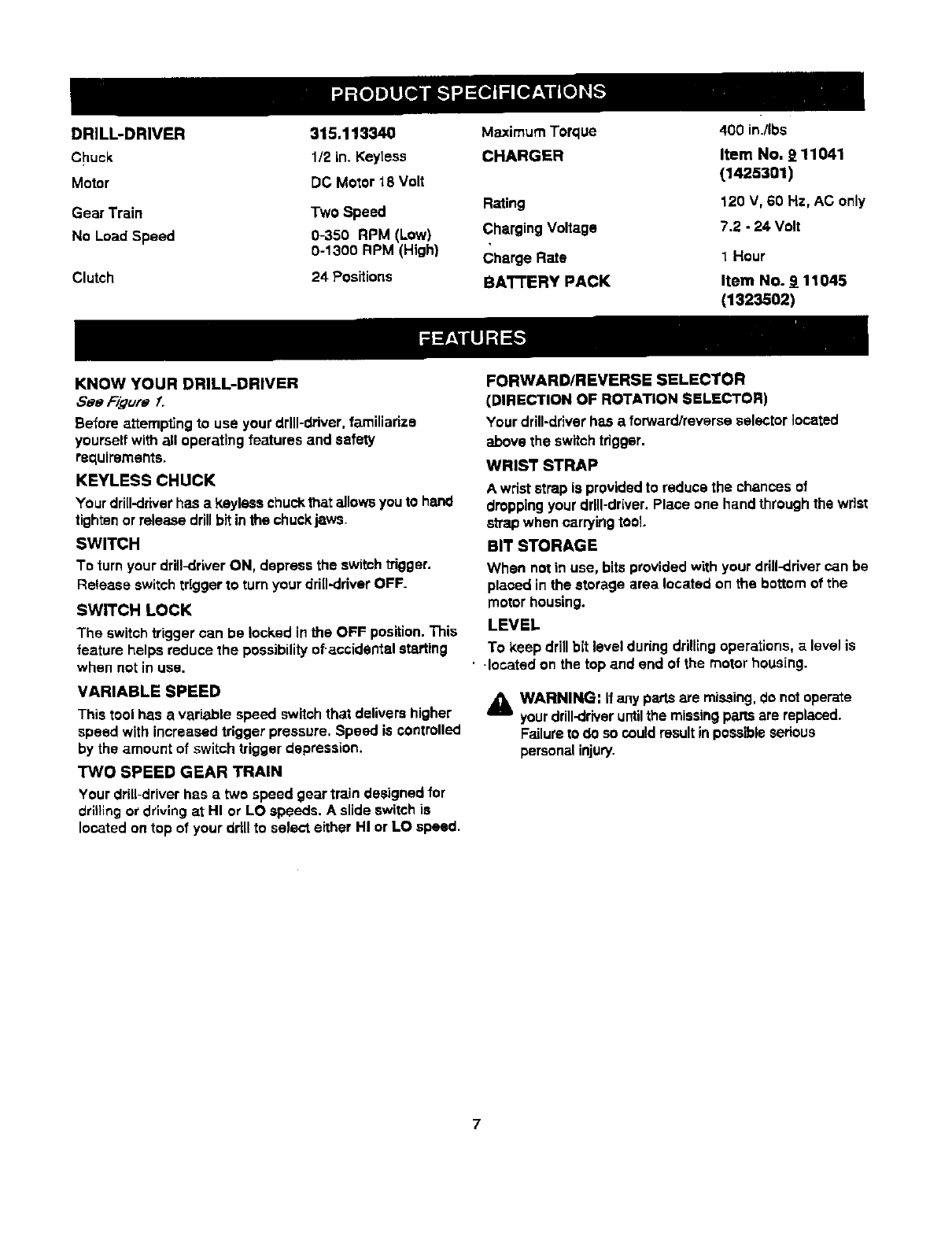
DRILL-DRIVER 315.113340
Chuck 1/2in.Keytess
Motor DCMotor18Volt
Gear Train Two Speed
No Load Speed 0-350 RPM (Low)
0-1300 RPM (High)
Clutch 24 Positions
Maximum Torque
CHARGER
400 in./Ibs
Item No. 9 11041
(1425301)
Rating 120 V, 60 Hz, AC only
Charging Voltage 7.2 - 24 Volt
Charge Rate 1Hour
BAI-rERY PACK Item No. 9 11045
(1323502)
KNOW YOUR DRILL-DRIVER
See Figure f.
Before attempting to use yourdrill-driver,familiarize
yourselfwithall operatingfeatures and safety
requirements.
KEYLESS CHUCK
Your dri[I-driverhas a keylass chuckthat allowsyouto hand
tightenor releasedrillbitinthe chuck:jaws.
SWITCH
To turn your drill-driverON, depress the switch'0"igger.
Release switchtriggerto turnyour drill-dryer OFF.
SWITCH LOCK
The switchtrigger can be locked inthe OFF position.This
feature helps reduce the possibilityof-accidentalstarting
when not in usa.
VARIABLE SPEED
This tool has avariable speed switch that delivershigher
speed with increasedtrigger pressure, Speed is controlled
by the amount of switchtrigger depression,
"I'WO SPEED GEAR TRAIN
Your drill-driverhas a two speed gear train designedfor
drilling or drivingat HI or LO speeds, A slide switchis
locatedon top of your ddll to select either HI or LO speed.
FORWARD/REVERSE SELECTOR
(DIRECTION OF ROTATION SELECTOR)
Your drill-driverhas aforward/reverseselector located
above the switchtrigger.
WRIST STRAP
A wriststrap is providedto reduce the chancesof
droppingyourdrill-driver.Place one hand throughthe wrist
strapwhen carryingtool.
BIT STORAGE
When not in use, bitsprovidedwith your drill-drivercan be
placed inthe storage area located on the bottomof the
motor housing.
LEVEL
To keep drillbit level duringdrillingoperations, alevelis
• Jocatedon the top and end of the motorhousing.
A WARNING: If any partsare missing,do notoperate
yourdrill-driveruntilthe missingpars are replaced.
Failureto do socouldresultinpossibleserious
personalinjury.

TWO-SPEED LEVEL
GEARTRAIN (HI-LO)
TORQUE
KEYLESS ADJUSTMENT
CHUCK RING
SCREWDRIVER
DIRECTIONOF
ROTATIONSELECTOR
(FORWARD/REVERSE)
B_
STORAGE
REAR VIEW
BATTERYPACK
SHOWNINTOOL
BATTERYPACK
SHOWNINCHARGER
WRISTSTRAP
4-1/2in.
CHARGER
RED LEDONIN_CATES
MOD£
GREENLEDONAFTER FAST CHARGING
CYCLE,INDICATESFULLYCHARGEDBATTERY
PACK AND IN TRICKLECHARGE MODE.
YELLOWAND GREENLEDSON INDICATESDEEPLY
DISCHARGEDORDEFECTIVEBATTERYPACK.
Fig. 1
CHARGER
Bee _'@ufe f,
Your charger has a"key ho[e" hanging feature for convenient, space saving storage. Screws should be installed so that
center distances are 4-1/2 inches apart. B
_WARNING: DOnot allow familiaritywith yourdrill-
driverto make you careless. Remember that a
careless fractionof asecond is sufficientto inflict
severe injury,
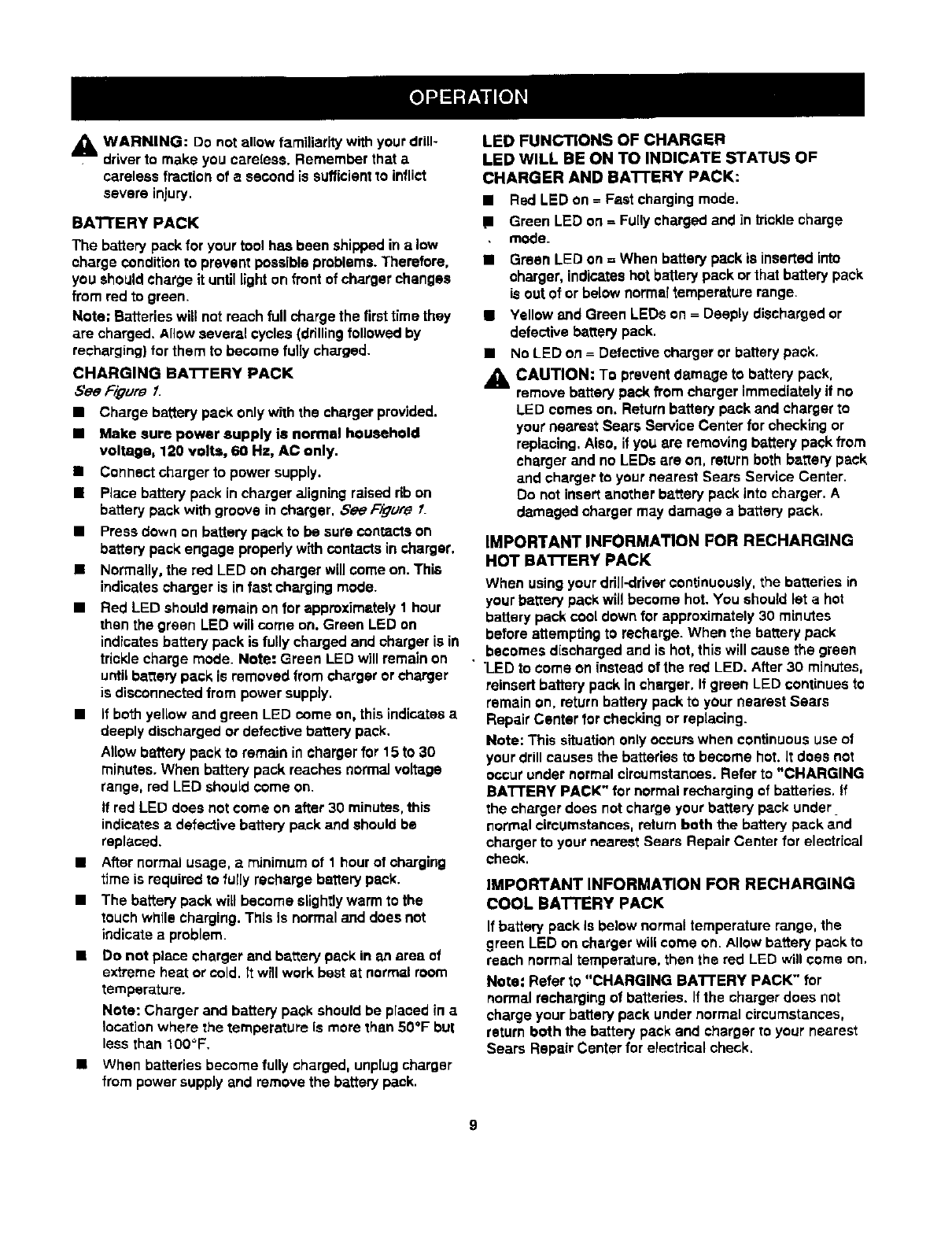
BA'I'rERY PACK
The battery packfor your tool has been shippedin a low
charge conditionto prevent possibleproblems.Therefore,
you shouldcharge it untillighton front ofcharger changes
from redto green.
Note; Batterieswill not reachfull charge the firsttime they
are charged. Allowseveral cycles (drillingfollowedby
recharging}for them to become fully charged.
CHARGING BA'I-I'ERY PACK
See F/gum [
•Charge battery pack only withthe chargerprovided.
•Make sure power supply is normal household
voltage, 120 volts, 60 Ha, AC only,
•Connectcharger to power supply.
• Place batterypack in chargeraligning raisedrib on
battery packwith groove in charger, See Figure.1.
•Press down on batterypack to be sure €ont=qctson
batterypack engage properlywithcontacts in charger,
• Normally,the red LED on charger willcome on. This
indicatescharger is in fastcharging mode.
•Red LED should remain on for approximately1 hour
then the green LED will come on. Green LED on
indicatesbattery pack is fully chargedand charger is in
trickle charge mode. Note: Green LED will remainon
untilbatterypack is removed from charger orcharger
is disconnectedfrom power supply,
•if bothyellow and green LED come on, this indicatesa
deeplydischarged or detectivebatterypack.
Allowbafferypack to remain in chargerfor 15 to 30
minutes. When battery pack reaches normalvoltage
range, red LED should come on.
If red LED does notcome on after 30 minutes,this
indicatesa defective batterypack and should be
replaced.
•After normalusage, a minimum of 1 hourof charging
time is requiredto fully recharge batterypack.
•The batterypack will become slightlywarm to the
touch while Charging.This is normaland does not
indicateaproblem.
• Do not place chargerand battery pack in alt area of
extreme heat or cold. It will workbest at normalroom
temperature.
Note: Charger and batterypack should be placed in a
locationwhere the temperature Is more than 50°F but
less than 100°F.
•When batteries becomefully charged, unplugcharger
from power supplyand removethe batterypack.
LED FUNCTIONS OF CHARGER
LED WILL BE ON TO INDICATE STATUS OF
CHARGER AND BATrERY PACK:
•Red LED on =Fast chargingmode.
1 Green LED on =Fu[lychargedand in tricklecharge
mode_
•Green LED on = When batterypack is insertedinto
charger, indicateshot batterypack or that batterypack
is outof or below norms[temperature range.
•Yellow and Green LEDs on = Deeply dischargedor
defectivebe,ttery pack,
•No LED on = Defectivechargeror batterypack.
_1, CAUTION: To prevent damage to batterypack,
remove battery pack fromcharger immediatelyif no
LED comes on. Returnbatterypack and chargerto
your nearest Sears ServiceCenter for checkingor
replacing,Also, if you ere removingbattery pack from
charger and no LEDs are on, returnboth battery pack
and chargerto your nearest Sears Service Center.
Do notinsert another battery pack intocharger. A
damaged charger may damage a battery pack.
IMPORTANT INFORMATION FOR RECHARGING
HOT !BA'I'FERY PACK
When usingyour drill-drivercontinuously,the batteries in
your batterypack will become hot. You shouldlet a hot
batterypack cooldown for approximately30 minutes
before attemptingto recharge. When the battery pack
becomes dischargedand is hot, thiswill cause the green
"LEDto come on instead of the red LED. After30 minutes,
reinsertbattery pack in charger, If green LED continuesto
remain on, returnbatterypack to your nearest Sears
Repair Center for checkingor replacing.
Note: This situationonlyoccurs when continuoususe of
your drill causes the batteries to become hot. it does not
occurunder normalcircumstances.Refer to "CHARGING
BATrERY PACK" for normal rechargingof batteries, If
the chargerdoes notcharge yourbattery pack under
normalcircumstances,returnboth the batterypack and
charger to your nearest Sears Repair Center for electrical
check.
IMPORTANT INFORMATION FOR RECHARGING
COOL BATTERY PACK
If battery pack Is below normaltemperature range, the
green LED on chargerwill come on. Allowbattery pack to
reach normaltemperature,then the red LED will come on,
Note: Refer to "CHARGING BATrERY PACK" for
normalrechargingof batteries.If the chargerdoes not
charge your batterypack under normalcircumstances,
return both the batterypack and charger to your nearest
Sears Repair Center for electricalcheck.
9
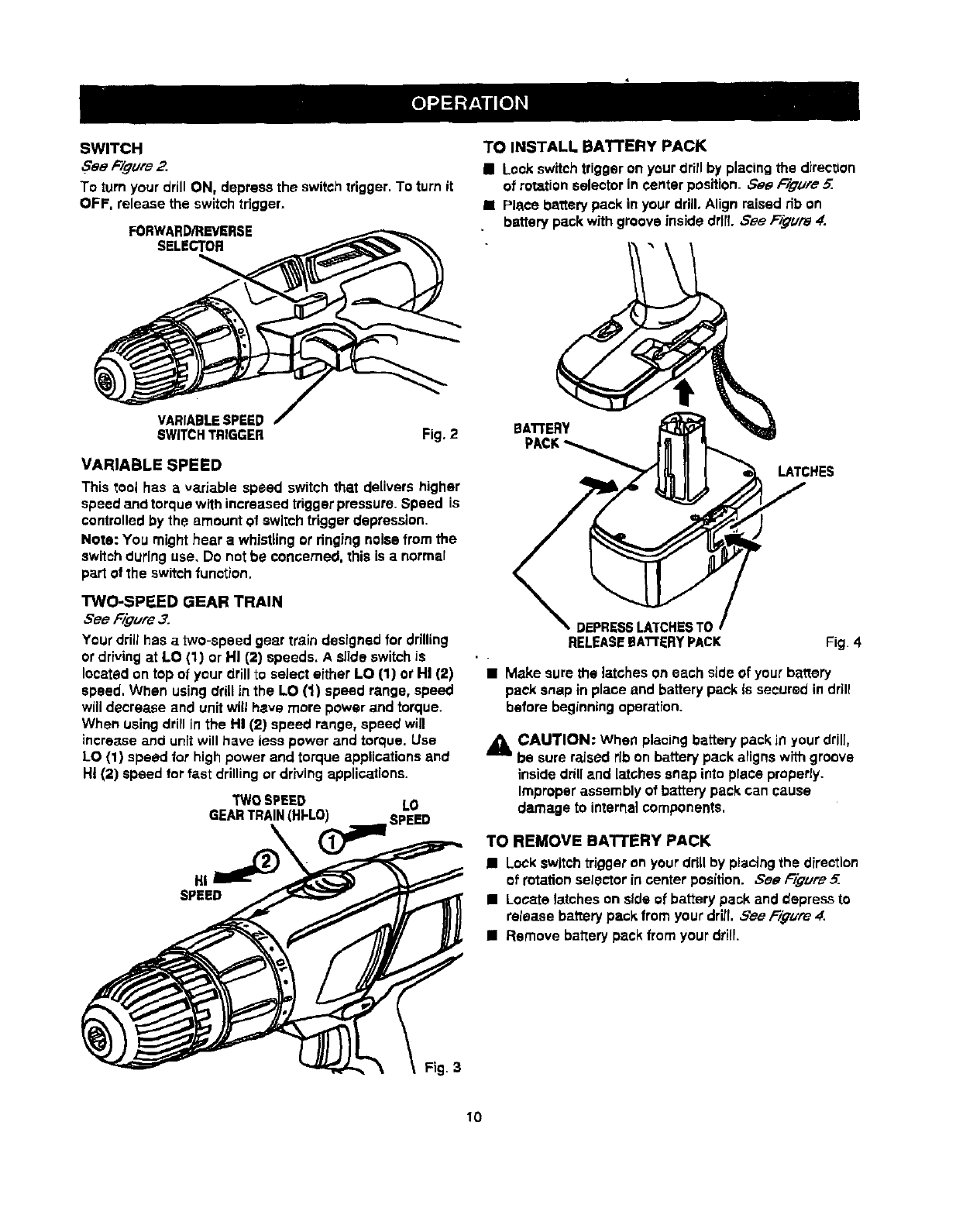
SWITCH
,FeeFigure 2.
To turn your drill ON, depress the switchtrigger.To turn it
OFF, release the switchtrigger.
FORWARD/REVERSE
SELECTOR
VARIABLESPEED
SWITCHTRIGGER Fig. 2
VARIABLESPEED
This tool has a variable speed switch that delivers higher
speed and torque withincreasedtriggerpressure.Speed is
controlledby the amount o! switchtriggerdepression.
Note: You might hear a whistlingor ringingnoisefrom the
switchduringuse, Do not be concerned,this is a normal
part of the switchfunction.
TWO-SPEED GEAR TRAIN
See Figure3.
Your drill has a two-speed gear train designed for drilling
or drivingat LO (1) or HI (2) speeds. A sllde switchis
locatedon top of your drillto select either LO (1) or HI (2)
speed. When usingdrillin the LO (1) speed range, speed
will decrease and unit will here mere power and torque.
When usingdrill in the HI (2) speed range, speed will
increase and unit will have lens power and torque. Use
LO (1) speed for high power and torque applications and
HI (2) speed !orfast drillingor drivingapplications.
TWOSPEED LO
GEARTRAIN(HFLO) SPEED
HI
SPEED
TO INSTALL BA'I-rERY PACK
• Lockswitchtriggeron your drillby placingthe direction
of rotationselectorin center position. See F/#uFe5.
•Place batterypack in yourdrill,Align raised rib on
batterypack withgroove insidedrll{, See F3_'Ure4.
LATCHES
DEPRESSLATCHESTC
RELEASEEATrERYPACK Fig 4
•Make sure the latches on each side of your battery
pack snap in place and battery pack is secured in drill
before beginning operation.
_CAUTION: When placingbatterypack Jnyour drill,
be sureraised ribon battery pack alignswith groove
insidedrilland latchessnap intoplace properly.
Improperassemblyof batterypack can cause
damage to internalcomponents.
TO REMOVE BATTERY PACK
II Lockswitchtriggeron your ddllby placingthe direction
of rotationselectorin center position. Sea Figure 5.
•Locate latcheson side of battery pack and depress to
release batterypack from your drill See F/qure 4.
•Remove bat'[erypack from your drill.
10

SWITCHLOCK
See Figure S.
The switchtrigger can be locked in the OFF position.This
feature can be used to prevent the possibilityof accidental
startingwhen not in use. To lookswitchtrigger,place the
directionof rotation selector (ForWard/ReverseSelector)
in center position.Note: When selector is incentar
position,switchtrigger is locked,
SELECTOR WITH
CENTERLOCK POSITION
REVERSE
KEYLESS CHUCK
See Fi#ure 6.
Your drillh_ akeylesschuck.ASthe name implies,youcan
handtightenor releaseddllbitsinthe chuckjaws, Graspand
holdthe collarofthe chuckwithone hand.Rotatethe chuck
"body withyourotherhand.The an'oweonthe chuck
indicatewhichdirectionto rotatethe chuckboclyin orderto
LOCK (t_ghten)or UNLOCK (release)the drillbit,
DRILLsn"
UNLOCK CHUCK
(RELEASE) COLLAR
f.SWITCH
TRIGGER
FORWARD Fig. 5
AWARNING: Battery tools are always in operating
condition. Therefore, switch should always be locked
when not in use or carrying at your side.
REVERSIBLE
See F_gum
This tool has the feature of being reversible. The direction
of rotation is controlledby aselector located above the
switchtrigger. With the drill held in normal operating
position,the directionof rotation selector shouldbe
positionedto the left of the switchfor drilling.The drilling
directionis reversed when the selector is to the right of
the switch, When the selector is in center position,the
switch trigger is locked.
_l, CAUTION: To prevent gear damage, always allow
chuck to come to a complete stop before changing
the direction of rotation.
To stop, release switchtrigger and allow the chuckto come
to a complete stop.
CHUCKJAWS LOCK CHUCK
(_GHTEH) BODY
Fig.6
_WARNING: Do not hold chuck body with one hand
and use power of the drill to tighten chuck jaws on
drill bit. Chuck body couldslip in your hand or your
hand couldslip and come in contact with rotatingdrill
• bit. This couldcause an accident resultinginserious
personalinjuPf.
11

INSTALLING BITS
See Figure 7.
BLookthe switch trigger by placing the directionof
rotationselector in center position.See F_um 5,
•Open or close chuckjaws to a pointwhere the open-
ing is slightlylargerthan the bit size you intendto use.
Also, raise the front of your drillslightlyto keep the bit
from falling out of the chuckjaws.
•Insert drillbit straightinto chuckthe full length of the
jaws as shown in Figure 7.
•Tighten the chuckjaws on drillbit.
DRILL BIT
UNLOCK CHUCK
(RELEASE) COLLAR
CHUCKJAW$
LOCK
(TIGHTEN) CHUCK
BODY
RIGHT Fig. 7
•TOtighten the chuckjaws on drill bit;grasp and hold
the collarof the chuckwith one hand, while rotating
the chuckbody with your other hand.
Note: Rotatethe chuck body in the directionof the
arrow marked LOCK to t_ghfenchuckjaws.
•Do not use awrench to tightenor loosen the chuck
jaws.
WARNING: Make sure to insert drill bit straight into
chuck jaws. Do not insert drill bR into chuck jaws at
an angle then tighten, as shown in Figure 8. This
could cause dri[I bit to be thrown from ddll, resulting
in possible serious personal injury or damage to the
chuck.
Fig. 8
12
REMOVING BITS
See Fi#ure 7.
•Lockthe switchtdggerby placingthe direction of
rotationselector incenter position.See Figure 5.
•Loosenthe chuckjaws from drill bit.
•To loosen:grasp and holdthe collarof the chuckwith
one hand, while rotatingchuckbody withyour other
hand. Note: Rotatechuckbody in the directionof the
arrow marked UNLOCK to loosenchuckjaws.
•Do not use a wrench to tightenor loosen the chuck
jaws.
•Removedrillbit from chuckjaws.
ADJUSTABLE TORQUE CLUTCH
Your drill is equipped with en adjustable torque clutch for
driving different types of screws into different materials.
The proper seffing depends on the type of materhd and the
size of screw you are using.
TO ADJUST TORQUE
Identifythe twentyfourtorque indicatorsettingslocated
on the front of your drill.See Figure9,
Rotateadjustingringto the desiredsetting.
• 1 -4 For drivingsmallscrews.
5-8 For drivingscrews intosoft
material.
• 9 -12 For drivingscrews intosoft and herd
materials.
- 13 - 16 For drivingscrews inhard wood.
•17 - 20 For driving large screws.
• 21 -411 For heavy drilling.
TODECREASE
TOROUE ADJUSTING
RING
TO INCREASE
TORQUE Fig. 9
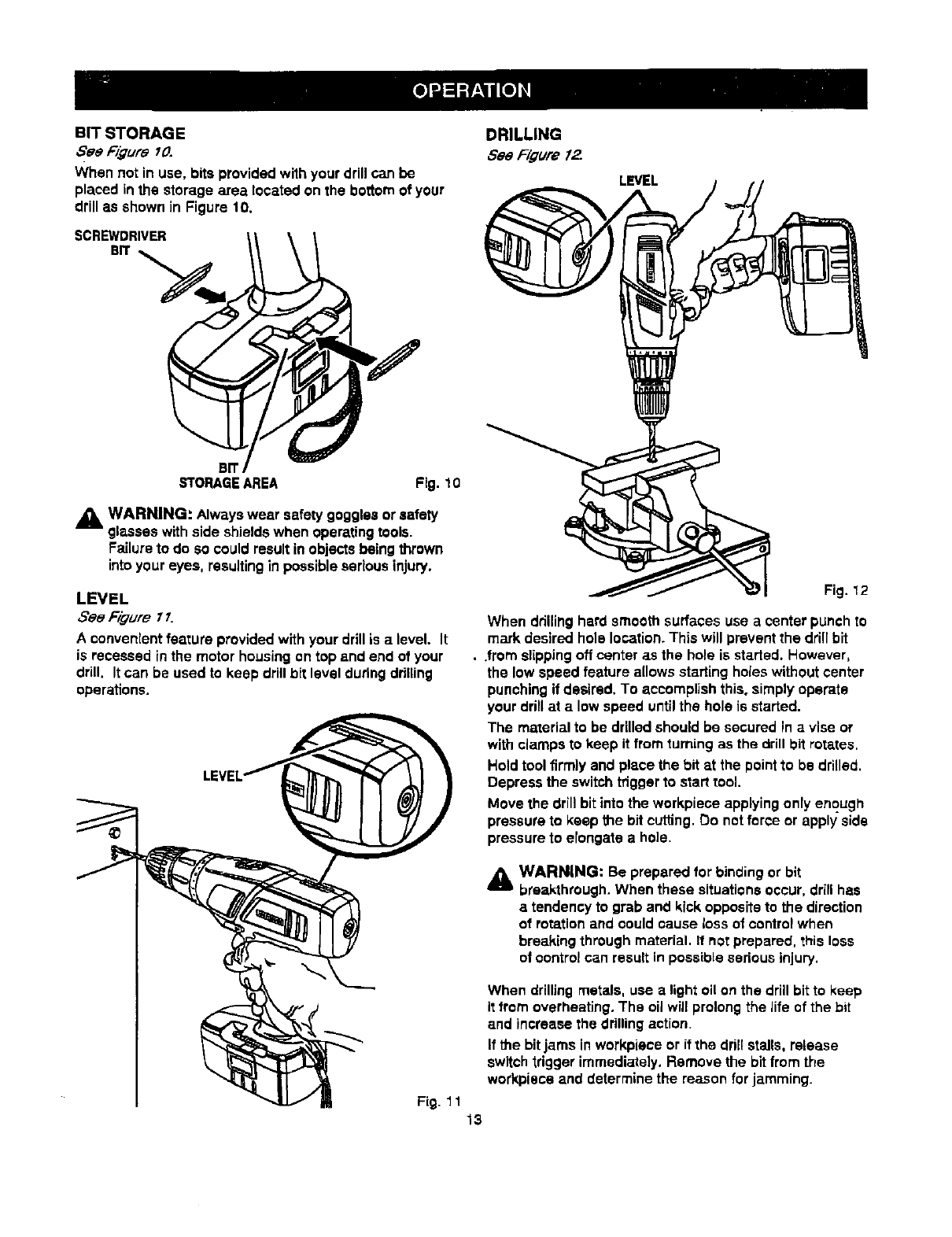
BIT STORAGE
Bee Figure 10.
When not in use, bits provided with your drillcan be
placed inthe storage area located on the bottomof your
drill as shown in Figure 10.
SCREWDRIVER
BIT
LEVEL
B!
STORAGEAREA Fig. I0
,_, WARNING: Alwayswear safetygogglesor safety
glasseswith side shieldswhen operatingt_ols.
Failureto do Socould resultin objectsbeingthrown
intoyour eyes, resultingin possibleseriousinjury.
LEVEL
See Figure77.
A convenient feature provided with your drillis a level. It
is recessed inthe motor housingon top and end of your
drill. Itcan be used to keep drillbit level duringdrilling
operations.
Fig. 12
When ddlling hard smoothsurfaces use acenterpunchto
mark desired hole location.This will prevent the drillhit
•.from slippingoff center as the hole is started. However,
the low speed feature allows startingholeswithoutcenter
punchingif desired. To accomplishthis. simply operate
your ddll at a low speed untilthe hole is started.
The materialto be drilledshould be secured in avise or
with clampsto keep it from turning as the drillbit rotates.
Hold tool firmly and placethe bit at the point to be drilled.
Depress the switchtrigger to starttool.
Move the drillbit intothe workpiece applyingonly enough
pressureto keep the bit cutting.Do notforce or apply side
pressureto elongate a ho]e.
A WARNING: Be prepared for binding or bit
breakthrough. When these situations occur, drill has
atendency to grab and kick opposite to the direction
of rotation and could cause loss of control when
breaking through material. It not prepared, this loss
of control can result in possible sedous injury.
When drillingmetals, use a lightoli on the drill bitto keep
it from overheating.The oil willprolongthe Jifeof the bit
and increase the drillingaction.
If the bitjams in workpieceor if the drillstalls, release
switchtrigger immediately. Remove the bitfrom the
work.pieceand determine the reason for jamming.
Fig. 1 1 13
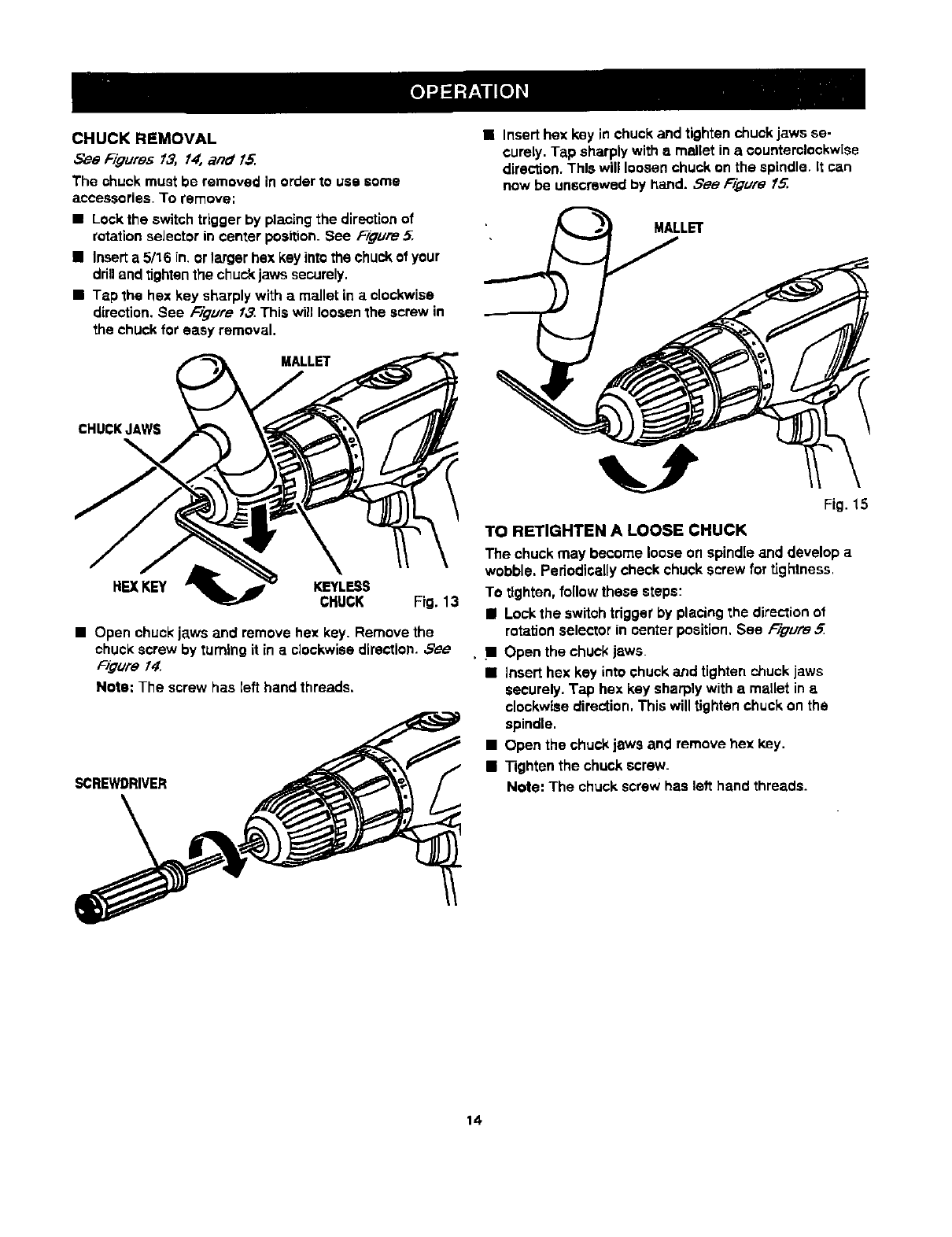
CHUCK REMOVAL
See Figures 13, 1#, and 15.
The chuck must be removed in order to use some
accessories. To remove:
•Lock the switch trigger by placing the direction of
rotation seJector in center position. See FTgure ..5..
•Insert a 5/16 in. or larger hex key into the chuck of your
dnn and tighten the chuck jaws securely.
•Tap the hex key sharply with a mallet in aclockwise
direction. See Figure 13. This wgl loosen the screw in
the chuck for easy removal.
•ALLET
CHUCKJAW$
REXKEY KEYLESS
CHUCK Fig. 13
•Open chuckjaws and remove hex key. Remove the
chuckscrew by turningit in e clockwisedirection. ,5'ee
FigureI_[
Note: The screw has left hand threads,
SCREWDRIVER
• Insert hex key in chuck and tighten chuck jaws se-
curely. Tap sharply with e mallet in acounterclockwise
direction. This will loosen chuck on the spindle. It can
now be unscrewed by hand. See Figure f_
MALLET
Fig. 15
TO RETIGHTEN A LOOSE CHUCK
The chuck may become loose on spindle and develop a
wobble. Periodically check chuck screw for tightness,
To tighten, follow these steps:
II Lock the switch tdgger by placing the direction of
rotation selector in center position. See Figure 5
..11 Open the chuck jaws.
•Insert hex key into chuck and tighten chuck jaws
securely. Tap hex key sharply with a maUet in a
clockwise direction. This will tighten chuck on the
spindle.
• Open the chuck jaws and remove hex key.
•Tighten the chuck screw.
Note: The chuck screw has left hand threads.
14
WARNING: When servicing, use only Identical
Craftsman replacement parts. Use of any other
part may create ahazard or cause productdamage.
Avoid using solvents when cleaning pJastic parts. Most
plastics are susceptible to damage from various types of
commercial solvents and may be damaged by their usa.
Use clean cloths to remove dirt, dust, eli, grease, etc.
A WARNING: Do not at any time let brake fluids,
gasoline, petroleum-based products, penetrating oils,
etc. come in contact with plastic parts. They contain
chemicals that can damage, weaken or destroy
plastic.
Do not abuse power tools. Abusive prances can
damage tool as well as workplace.
Only the parts shown on parts list. page 17, are intended
to be repaired or replaced by the customer. All other parts
should be replaced at a Sears Service Center,
_WARNING: Do not attempt to modify this tool or
create accessories not recommended for use with
this tool Any suchalteration or modificationis
misuseand couldresult in a hazardouscondition
leadingto possibleseriouspersonal injury.
BATTERIES
Your drill's battery pack is equipped with nickel-cadmium
rechargeable batteries. Length of service from each
charging will depend on the type of work you are doing.
The batteries in this tool have been designed to provide
maximum trouble free life. However, like all batteries, they
will eventually wear out. Do not disassemble battery pack
and attempt to replace the batteries. Handling of these
batteries, especially when wearing rings and jewelry,
could result in aserious bum.
To obtain the Jongest possible battery life, we suggest the
following:
•Store and charge your batteries in a coolarea.
Temperatures above or below norma[room
temperaturewill shortenbattery life.
•Never store batteriesin adischargedcondition.
Recharge them immediatelyafter they are
discharged,
•All batteriesgradually lose their char'ge.The higher
the temperaturethe quickerthey lose their charge, if
you store yourtool for long periodsof time without
usingit, rechargethe batteries every month ortwo.
This practicewill prolong batterylife.
To preservenaturalresources, please
recycleor disposeof batteriesproperly.
This product containsnickel-cadmium
batteries. Local, stateor federal laws
may prohibitdisposal of nickel-cadmium
batteries in ordinarytrash.
Consult your local waste authorityfor information
regardingavailable recyclingand/or disposaloptions.
• BATTERY PACK REMOVAL AND PREPARATION
FOR RECYCLING
AWARNING: Upon removal, cover the battery pack's
terminals with heavy duty adhesive tape. De not
attempt to destroy or disassemble battery pack or
remove any of ifs components. Nickel-cadmium
batteries must be recycled or disposed of propody.
Also. never touch both terminals with metal objects
and/or body parts as short circuit may result. Keep
away from children. Failure to comply with these
warnings could result in fire and/or serious injury.
The following recommended accessories are currently available at Sears Retail Stores.
•6-Pc. Extra Length Magnite Power Bit Set •High Speed Bits......t/2 in. Max.
•30-Pc. Power Screwdriver/Nutdriver Set and Case •Wood Boring Bits.....t-1/2 in. Max.
•17-Pc. Power Screwdr'iver/Nutdriver Set and Case
_WARNING: The use of attachmentsor accessories notlisted might be hazardous.
15

i
I
I.
I I II
16

CRAFTSMAN 1/2 In., 18 VOLT CORDLESS DRILL-DRIVER - MODEL NO. 315.113340
The model number will be found on a plate attached to the motor housing. Always mention the model number |
in all correspondence regarding your 1/2 in., 18 VOLT CORDLESS DRILL-DRIVER or when ordering repair I
parts.
SEE BACK PAGE FOR PARTS ORDERING INSTRUCTIONS
2
4
3
Key Pert
No. Number
1 975379-000
2 6903323
3 "Item No. 9 11045
4*Item No._ 11041
5 3064302
972000-962
PARTS LIST
Description Ouan.
Screw (Special) ...................................................................... 1
Chuck ..................................................................................... 1
Battery Pack (1323502) ......................................................... 1
Charger (1425301) ................................................................. !
Carrying Case - Not Shown .................................................. 1
Operator's Manual
* Can Be Purchased Thru RSOS (Retail Special Order System)
b, J
17

G:et it at, ur , ,,,
For repair of major brand appliarlces in your own home...
no matter who made it, no matter who sold it!
1-800-4-MY-HOM EsMAnytime,dayornight
(1-800469.-4663)
WW_N.seRrs.COITI
To bring in products such as vacuums, lawn equipment and electronics
for repair, call for the location of your nearest Sears Parts & Repair Center.
1-800-488-1222 Anytime, dayor night
www.sears.com
For the replacement parts, accessories and owner's manuals
that you need to do-it-yourself, call Sears PartsDirect sM!
1-800-366-PART 6am- 11pmCST
(1-800-366-7278). 7 days aweek
www.sears.com/partsdirect
To purchase or inquire about a Sears Service Agreement:
1-800-827-6655
7 a.m. - 5 p.m. CST, Mon. - Sat.
Para pedir servicio de reparacibn a domicilio,
y para ordenar plazas con entrega a domicilio:
1-888-SU-HOGAR _
(1-888-784-6427)
Au Canada pour service en franr.,ais:
1-877-LE-FOYER ='
(1-877-533q5937)
HomeCentrar J
_Rv'_i_4e red Trademark /"J'radernirk of Sean_, Roebuck and Co.
©Sears, Roebuck and C,Q. ®Mama Reglsb=0e ITM Ma_.al _e F_lbriCa dc _1_, ROebUCk and CO.
