Craftsman 351215200 User Manual 8 DISC SANDER Manuals And Guides L0522300
CRAFTSMAN Sander Manual L0522300 CRAFTSMAN Sander Owner's Manual, CRAFTSMAN Sander installation guides
User Manual: Craftsman 351215200 351215200 CRAFTSMAN 8 DISC SANDER - Manuals and Guides View the owners manual for your CRAFTSMAN 8 DISC SANDER #351215200. Home:Tool Parts:Craftsman Parts:Craftsman 8 DISC SANDER Manual
Open the PDF directly: View PDF  .
.
Page Count: 24
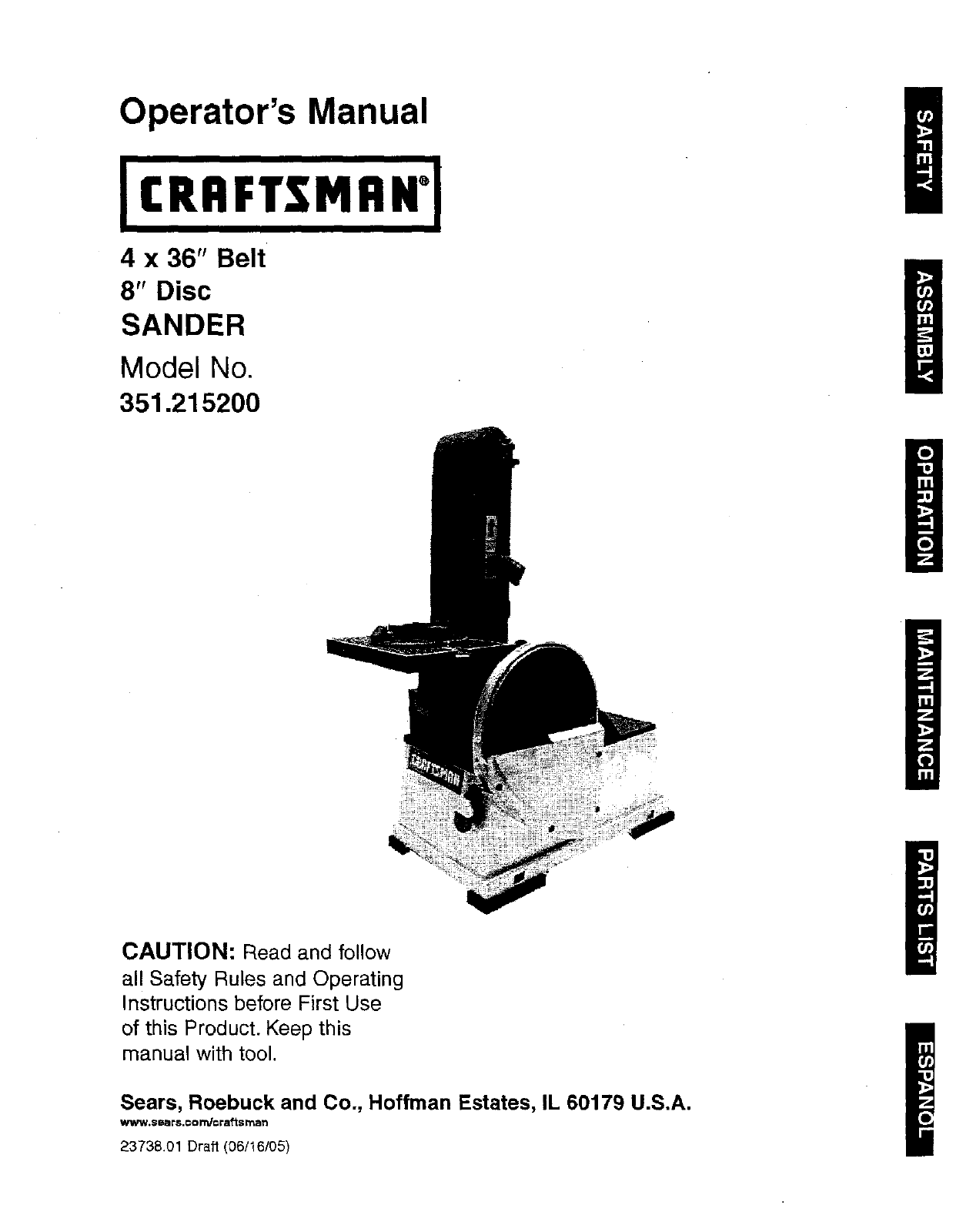
Operator's Manual
4 x 36" Belt
8" Disc
SANDER
Model No.
351.21 5200
CAUTION: Read and follow
all Safety Rules and Operating
Instructions before First Use
of this Product. Keep this
manual with tool.
Sears, Roebuck and Co., Hoffman Estates, IL 60179 U.S.A.
_II_W. $Ba rS.CO _cr a_s man
23738.01 Draft (06/16/05)
Warranty ......................................... 2
Safety Rules ...................................... 2
Unpacking ....................................... 3
Assembly ...................................... 3-4
Installation ...................................... 4-5
Operation ...................................... 6-8
Maintenance ..................................... 9
Troubleshooting ................................... 9
Parts [llustrationand List ........................ 10-13
Espafiol ...................................... 14-23
ONE-YEAR FULL WARRANTY ON CRAFTSMAN TOOL
I_thLsCraftsman tool fails due to a defect in matedal or
workmanship within one year from the date of pumhase CALL
t-80O-4-MY-HOME® TO ARRANGE FOR FREE REPAIR.
If this tool is used for commercial or rents1 purposes, this war-
ranty will apply for only ninety days from the date of purchase.
This warranty applies only while this tool is in the United
States.
This warranty gives you specific legal rights and you may also
have other dghts, which vary, from state to state.
Sears, Roebuck and Co., Dept. 817WA, Hoffman Estates,
IL 60179
WARNING: For your own safety, read all af the instructions
and precautions before operating tool.
CAUTION: Always follow proper operating procedures as
defined in this manual even if you are familiar with use of this
or similartools. Remember that being careless for even a
fraction of asecond can result in severe personal Injury.
BE PREPARED FOR JOB
•Wear proper apparel, Do not wear loose clothing, gloves,
neckties, rings, bracelets or other jewelry which may get
caught in moving parts of machine.
• Wear protective hair c=Overingto contain long hair.
• Wear safety shoes with non-slip soles.
• Wear safety glasses complyingwith United States ANSI
Z87.1. Everyday glasses have only impact resistant lenses.
They are NOT safety glasses.
• Wear face mask or dust mask if operation is dusty.
• Be alert and think clearly. Never operate power tools when
tired, intoxicated or when taking medications that cause
drowsiness.
PREPARE WORK AREA FOR JOB
• Keep work area clean. Cluttered work areas (nvfteaco_denfs.
•Do not use power tools in dangerous environments. Do not
use power tools in damp or wet locations. Do not expose
power tools to rain.
• Work area should be properly lighted.
• Proper electrical receptaale should be available for tool.
Three-prong plug should be plugged directly into properly
grounded, three-prong receptacle.
• Extension cords should have a groundingprong and me three
wires of the extension cord shouldbe of the correctgauge.
• Keep visitors at a safe distance from work area.
• Keep children out of workplace. Make workshop shildproof.
Use padlocks, master switches or remove switch keys to
prevent any unintentional use of power tools.
TOOL SHOULD BE MAINTAINED
• Always unplug tool prior to inspection.
• Consult manual for specific maintaining and adjusting
procedures.
• Keep tool lubricated and clean for safest operation.
• Remove adjusting tools. Form habit of checking to see that
adjusting tools are removed before switchingmachine on.
• Keep all parts in working order. Check to determine that the
guard or other parts will operate properly and perform their
intended function.
• Check for damaged parts. Check for alignment of moving
parts, binding, breakage, mounting and any other condition
that may affect a tool's operation.
• A guard or other part that is damaged should be properly
repaired or replaced. Do not perform makeshift repairs.
(Usa parts list provided to order replacement parts.)
KNOW HOWTO USE TOOL
• Use right teal for job. Do not force tool or attachment to do
ajob for which it was not designed.
• Disconnect tool when changing belt or abrasive disc.
• Avoid accidental start-up. Make sure that the tool is in the
"OFF" position before plugging in.
• Do not force tool. It will work most efficiently at the rate for
which it was designed.
• Keep hands away from moving parts and sanding surfaces.
• Never leave tool running unattanded.Tum the power off
and do not leave tool until it comes to acomplete stop.
• Do not overreach. Keep proper footing and balance.
• Never stand on tool. Serious injury could occur if tool is
tipped or ff belt or disc are unintentionatly contacted.
• Know your tool Learn the tool's opera, on, application and
specific limitations.
• Use recommended accessories (rarer to page 13). Use of
improper accessories may cause risk of injury to persons.
• Handle the workpiece correctly.Protect hands from possi-
ble injury.
• Turn machine off if it jams. Belt jams when itdigs too
deeply into workpiecs. (Motor force keeps it stuck inthe
work.)
Support workpieee with miter gauge, belt platen or work
table.
• Maintain '/_" maximum clearance between table and sand-
ing belt or disc.
CAUTION: Think safety! Safety is acombination of operator
common sense and alertness at all times when tool is being
used.
WARNING: Do not attempt to operate tool until it is oom-
plete)y assembled according to the instructions.
© Sears, Roebuck and Co. 2
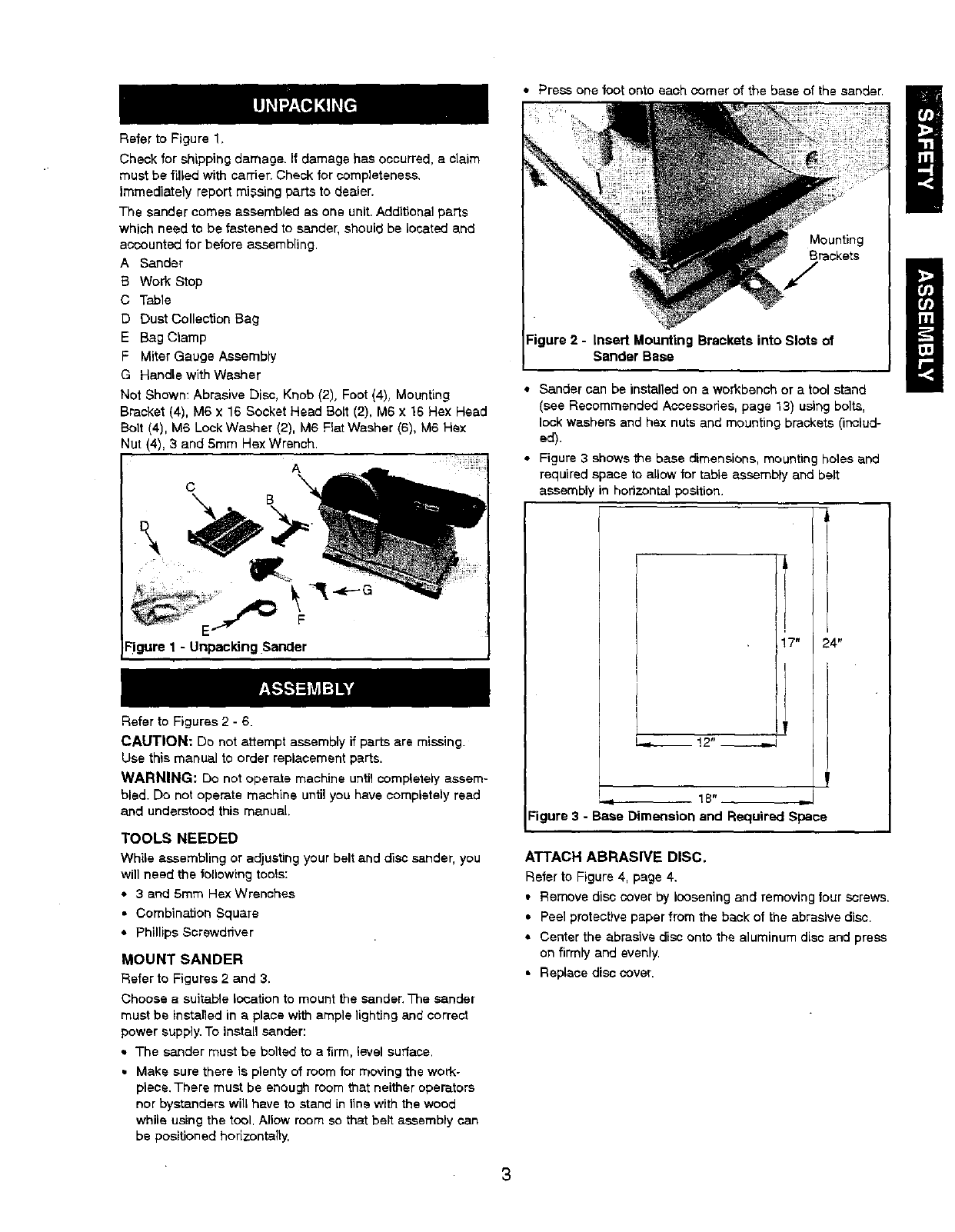
Refer to Figure 1,
Check for shipping damage. If damage has occurred, aclaim
must be filled with carrier. Check for completeness,
Immediately report missing parts to dealer.
The sander comes assembled as one unit. Additional parts
which need to be fastened to sander, should be located and
accounted for before assembling.
A Sander
B Work Stop
C Table
D Dust Collection Bag
E Bag Clamp
F Miter Gauge Assembly
G Handle with Washer
Not Shown: Abrasive Disc, Knob (2), Foot (4), Mounting
Bracket (4), M6 x 16 Socket Head Bolt (2). M6 x 16 Hex Head
Bolt (4), M6 Look Washer (2), M6 Flat Washer (6), M6 Hex
Nut (4). 3 and 5mm Hsx Wrench.
A
C
-'It
Figure 1 -Unpacking Sander
Refer to Figures 2 -6.
CAUTION: Do not attempt assembly if parts are missing.
Use this manual to order replacement parts.
WARNING: Do not operate machine untilcompletely assem-
bled. Do not operate machine until you have completely read
and understood this manual.
TOOLS NEEDED
While assembling or adjusting your belt and disc sander, you
will need the following tools:
• 3 and 5ram Rex Wrenches
• Combination Square
• Phillips Screwdriver
MOUNT SANDER
Refer to Figures 2 and 3.
Choose a suitable location to mount the sander,The sander
must be installed in a place with ample lighting and correct
power supply. To install sander:
• The sander must be bolted to a firm, level surface.
• Make sure there is plenty of room for moving the work-
piece.There must be enough room that neither operators
nor bystanders will have to stand in line with the wood
whila using the tool. Allow room so that belt assembly can
be positioned horizontally,
• Press one foot onto each comer of the base of the sander.
Mounting
Brackets
Figure 2-In_rl Mounting Brackets into Slots of
Sander Base
• Sander can be installed on aworkbench or a tool stand
(see Recommended Accessories, page 13) usir_g bolts,
lock washers and hex nuts and mounting brackets (includ-
ed).
• Figure 3 shows the base dimensions, mounting holes and
required space to allow for table assembly and belt
assembly in horizontal position.
7" 24"
I_ !2"
18"
Figure 3 - Base Dimension and Required Space
ATTACH ABRASIVE DISC.
Refer to Figure 4, page 4.
• Remove disc cover by loosening and removing four screws.
• Peel protective paper from the beck of the abrasive disc.
• Center the abrasive disc onto the aluminum disc and press
on firmly and evenly.
• Replace disc cover.
I
!
3
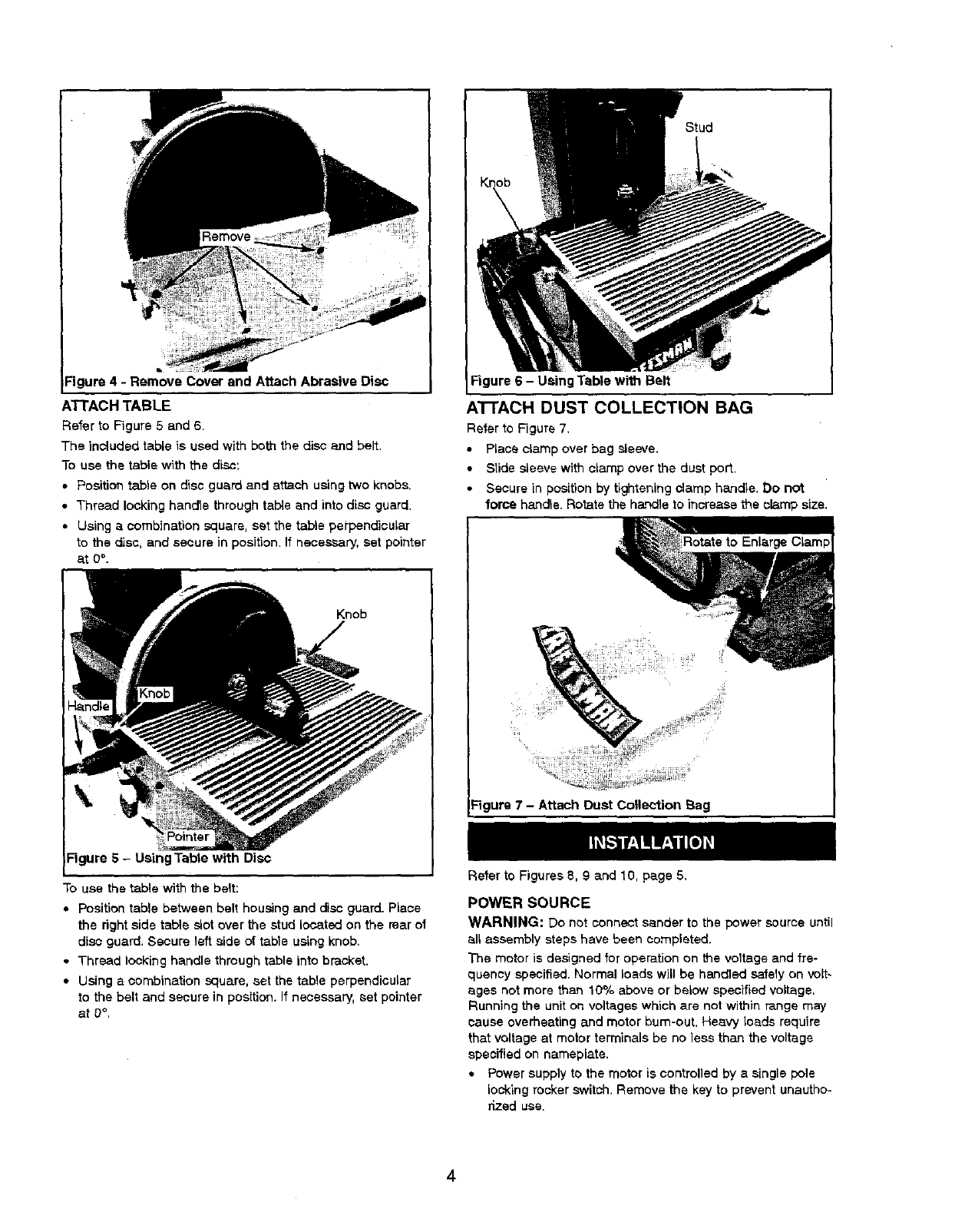
Figure 4 -Remove Cover and Attach Abrasive Disc
ATTACH TABLE
Refer to Figure 5 and 6.
The included table is used with both the disc and belt.
To use the table with the disc:
•Position table on disc guard and attach using two knobs.
• Thread locking handle through tal_e and into disc guard.
•Using a combination square, set the table perpendicular
to the disc, and secure in position.If necessary, set pointer
at 0°.
Figure 5 - Using Table with Disc
To use the table with the belt:
• Position table between belt housing and disc guard. Place
the right side table slot over the stud located on the rear of
disc guard. Secure left aide of table using knob.
• Thread locking handle through table into bracket.
• Using a combination square, set the table perpendicular
to the belt and secure in position, If necessary, set pointer
at 0°,
Figure 6-Using Table with Belt
ATTACH DUST COLLECTION BAG
Refer to Figure 7,
•Place clamp over bag sleeve.
• Slide sleeve with clamp over the dust port.
Secure in position by tightening clamp handle. Do not
force handle. Rotate the handle to increase the clamp size.
_gure 7-Attach Dust Collection Bag
Refer to Figures 8, 9 and 10, page 5,
POWER SOURCE
WARNING: Do not connect sander to the power source until
all assembly steps have been completed.
The motor is designed for operation on the voltage and fre-
quency specified. Normal loads will be handled safely on volt-
ages not more than 10% above or below specified voltage,
Running the unit on voltages which are not within range may
cause overheating and motor bum-out, Heavy loads require
that voltage at motor termlnals be no less than the voltage
specified on nameplate.
• Power supply to the motor is controlled by s single pole
locking rocker switch. Remove the key to prevent unautho-
rized use.
4
GROUNDING INSTRUCTIONS
WARNING: Improper oonnsction of equipment grounding
conductor can resultin the risk of electrical shock. Equipment
should be groundedwhile in use to protect operator from
electrical shock.
•Check with a qualified electrician if grounding instructions
are not understood or if in doubt as to whether the tool is
properly grounded.
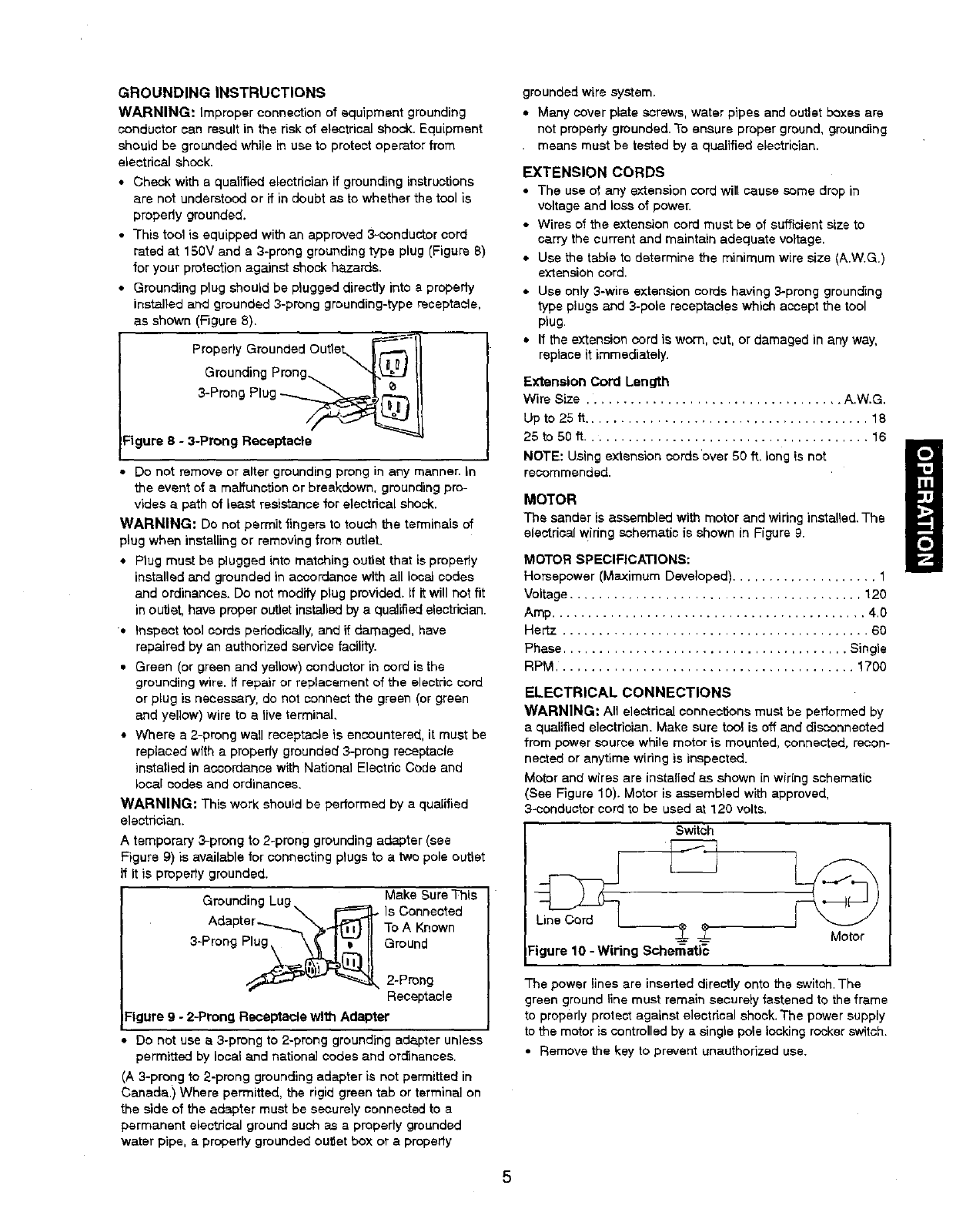
•This tool is equipped with an approved 3-conductor cord
rated at 150V and a 3-prong grounding type plug (Figure 8)
for your protection against shock hazards.
• Grounding plug should be plugged directly into a properiy
installed and grounded 3-prong grounding-type recaptacle,
as shown (Figure 8).
Properly Grounded Outlet_ _'_
Grounding Prong...
3-Prong Plug
Figure 8-3-Prong Receptacle
Do not remove or alter grounding prong in any manner. In
the event of a malfunction or breakdown, grounding pro-
vides a path of least resistance for electrical shock.
WARNING: Do not permit fingers to touch the terminals of
plug when instaUing or removing from outlet.
• Plug must be plugged into matching outlet that is properly
installed and grounded in accordance with all local codes
and ordinances. Do not modify plug provided. If it will not fit
in outlet, have proper outlet installed by a qualified electrician.
• Inspect tool cords periodically, and if damaged, have
repaired by an authorized service facility.
• Green (or green and yellow) conductor in cord is the
grounding wire. if repair or replacement of the electric cord
or plug is necessary, do not connect the green (or green
and yellow) wire to a live terminal,
• Where a 2-prong wall receptacle is encountered, it must be
replaced with a properly grounded 3-prong receptacle
installed in accordance with National Electdc Code and
local codes and ordinances.
WARNING: This work should be performed by a qualified
electrician.
A temporary 3,-prong to 2-prong grounding adapter (see
Figure 9) is available for connecting plugs to a two pole outlet
If It is propedy grounded.
•Make Sure This
Grounding Lug W'_J.I-- Is Connected
Adapter...._ "_,"'_11 To A Known
3-ProngPlu_._(_!i. Ground
_'_- _ 2-Prong
Receptacle
:igure 9-2-Prong Receptacle with Adapter
Do net use a 3-prong to 2-prong grounding adapter unless
permitted by local and nationaL] codes and ord_nancas.
(A 3-prong to 2-prong grounding adapter is not permitted in
Canada.) Where permitted, the rigid green tab or terminal on
the side of the adapter must be securely connected to a
permanent electrical ground such as a properly grounded
water pipe, a properly grounded outlet box or apropedy
grounded wire system,
• Many cover plate screws, water pipes and outlet boxes are
not propedy grounded. To ensure proper ground, grounding
• means must be tested by a qualified electrician.
EXTENSION CORDS
•The use of any extension cord will cause ,somedrop in
voltage and loss of power.
• Wires of the extension cord must be of sufficient size to
carry the current and maintain adequate voltage.
• Use the table to determine the minimum wire size (A.W.G.)
extension cord.
• Use only 3-wire extansion cords having 3-prong grounc_ng
type plugs and 3-pole receptacles which acoapt the tool
plug.
• If the extension cord is worn, cut, or damaged in any way,
replace it immediately.
Extension Cord Length
Wire Size ................................... A.W.G.
Up to 25 tl....................................... 18
25 to 50 ft ....................................... 16
NOTE: Using extension cords'over 50 ft. long is not
recommended.
MOTOR
The sander is assembled with motor and wiring installed. The
electrical widng schematic is shown in Figure 9.
MOTOR SPECIFICATIONS:
Horsepower (Maximum Developed) .................... 1
Voltage ........................................ 120
Amp ........................................... 4.0
Hertz .......................................... 60
Phase ....................................... Single
RPM ......................................... 1700
ELECTRICAL CONNECTIONS
WARNING: An electrical connections must be performed by
a qualified electrician. Make sure tool is oft and disconnected
from power source while motor is mounted, connected, recon-
nected or anytime wiring is inspected.
Motor and wires are instafied as shown in wiring schematic
(See Figure 10). Motor is assembled with approved,
3-conductor cord to be used at 120 volts.
Switch
_-- -_- Motor
Figure 10 -Wiring Schamati_
The power lines are inserled directly onto the switch. The
green ground line must remain securely fastened to the frame
to properly protect against electdcal shook. The power supply
to the motor is controlled by a single pole locking rocker switch.
• Remove the key to prevent unauthorized use.
5
Refer to Figures 11 - 38.
DESCRIPTION
The Graftaman Belt and Disc Bander is constructed of rugged
die cast aluminum and cast iron providing stabilityand vibra-
tion-free operation. The belt and disc are used to sand,
deburr, bevel and grind workpieces of wood and plastic.
The belt housing can be pivoted from vertical to
hodz.ontal for sanding large, straight workpisoes. The idler
drum permits the sanding of contoured shapes and finishes•
The disc can be used to sand or bevel surfaces.
Built in dust collection system collects dust from the belt and
disc and exhausts the dust into an included 30--micron collec-
tion bag.
The adjustable miter gauge is used on the work table for guid-
ing the workplace at a desired angle while sanding. Work stop
included for sanding long pieces on the belt.
SPECIFICATIONS
Belt alze .................................... 4 x 36"
Belt platen area ............................... 5 x 9"
Bait speed ................................ 1100 FPM
Disc diameter .................................... 8"
Disc speed ............................... 2200 RPM
Table dimenalons .............................. 6 x 9"
Table tilts ................................... 0to 45°
Dust port diameter ................................ 2"
Base dimensions ............................ 12 x 17"
Switch ............................. SP, Locking rocker
Weight ...................................... 551be
WARNING: Operation of any power tool can result in toralgn
objects being thrown into the eyes, which can result in severe
eye damage. Always wear safety goggles complying with
United States ANSf Z87.1 (shown on package) before com-
mencing power tool operation. Safety goggtes are avaltable at
Sears retail stores or catalog.
CAUTION; Always observe falio,Mmg safety precautions.
SAFETY PRECAUTIONS
•Whenever adjusting or reptacing any parts on the tool, turn
switch OFF and remove the plug from power source.
• Recheck table handle and bolts.They must be tightened
securely.
• Make sure all guards are properly attached. All guards
should be securely fastened.
• Make sure all moving parts are free and clear of any
interference.
• Make sure all fasteners are tight and have not vibrated loose.
• With power disconnected, test operation by hand for clear-
ance and adjust it necessary.
•Always wear eye protection or face shield.
• Make sure abrasive belt always tracks properly. Correct
tracking gives optimum performance.
•After tumthg switch on, always allow belt and disc to come
up to full speed before sanding or grinding.
• Be sure disc turns counterclockwise. Abrasive belt must
travel downward.
*Avoid kickbackby sanding in accordance with the direction-
al arrows.
• Keep your hands diear of abrasive belt, disc and all moving
part_.
• For optimum performance, do not stall motor or reduce
speed. Do not ferns the work into the abrasive.
• Always support workpiece with table or work stop when
sanding with belt and with table when sanding with disc.
• Never push asharp comer ot the workpisoe rapidly against
the bert or disc. Abrasive backing may tear.
• Replace abrasives when they become loaded (glazed) or
frayed.
WARNING: Some dust created by power sar_ding, sawing,
grindiog, drilling and other construction activities contains
chemicals known to cause cancer, birth defects or other
reproductive harm•
Some examples of these chemicals are:
• Lead from lead-based paints.
• Crystalline silica from bricks and cement and other mason-
P/products.
• Arsenic and chromium from chemically-trsatad lumber.
Your risk from these exposures vary, depending on how often
you do this type of work. To reduce your'exposure to these
chemicals: work in a well ventilated area and work with
approved salety equipment. Always wear MSHA/NIOSH
approved, properly fittiog face mask or respirator when using
such tools.
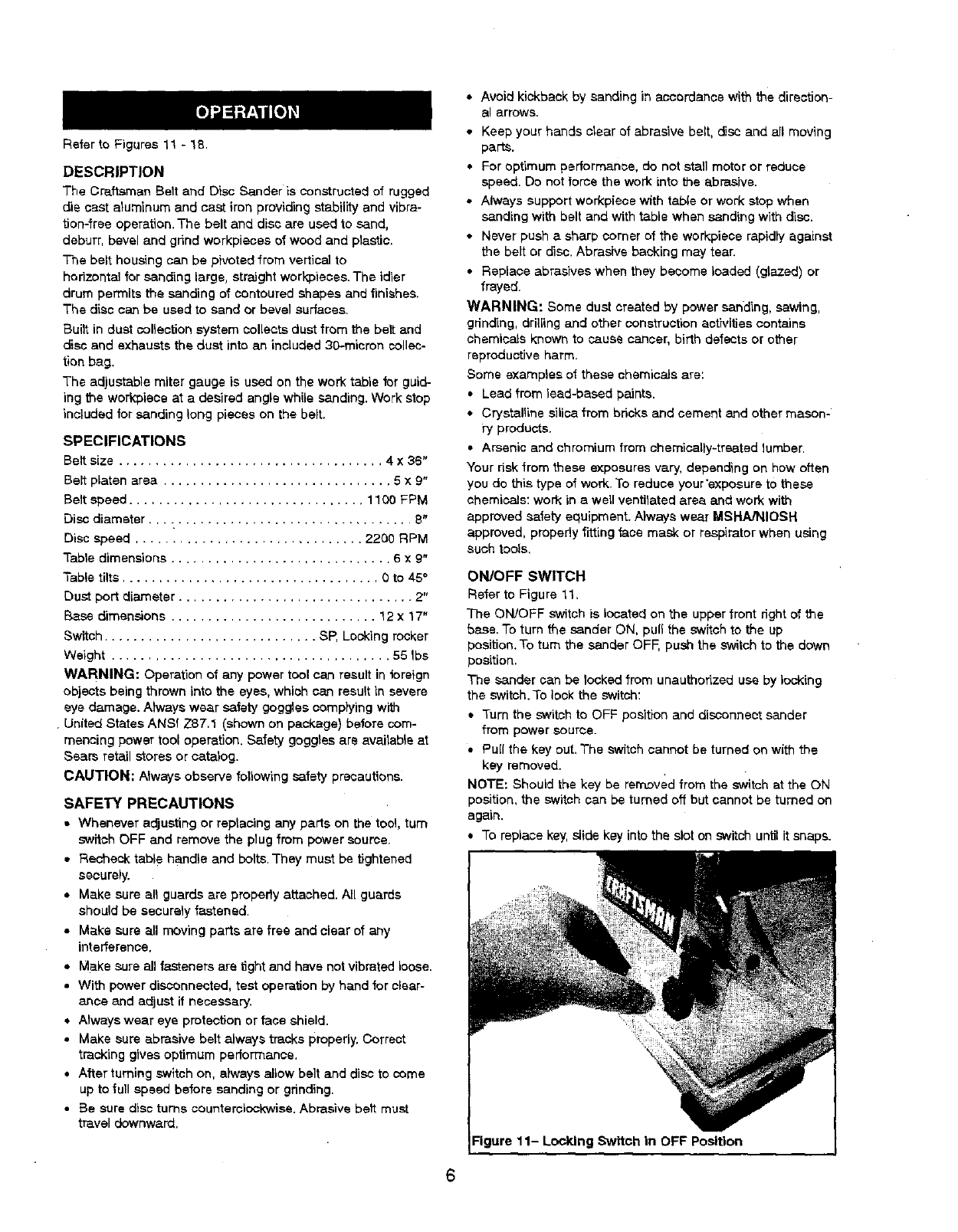
ON/OFF SWITCH
Refer to Figure 11.
The ON/OFF switch is located on the upperfront right of the
base.To turn the sander ON, puff the switch to the up
position. To turn the sander OFF, push the switchto the down
position.
The sander can be locked from unauthorized use by locking
the switch. To lock the switch:
* Turn the switch to OFF position and disconnect sander
from power source.
• PuE{the key out, The switch cannot be turned on with the
key removed.
NOTE: Should the key be removed from the switchat the ON
position, the switch can be turned of_but cannot be turned on
again.
* To replace key, slide key into the slot on switch until it snaps.
11- Locking Switch in OFF Position
ADJUSTINGBELTTRACKING
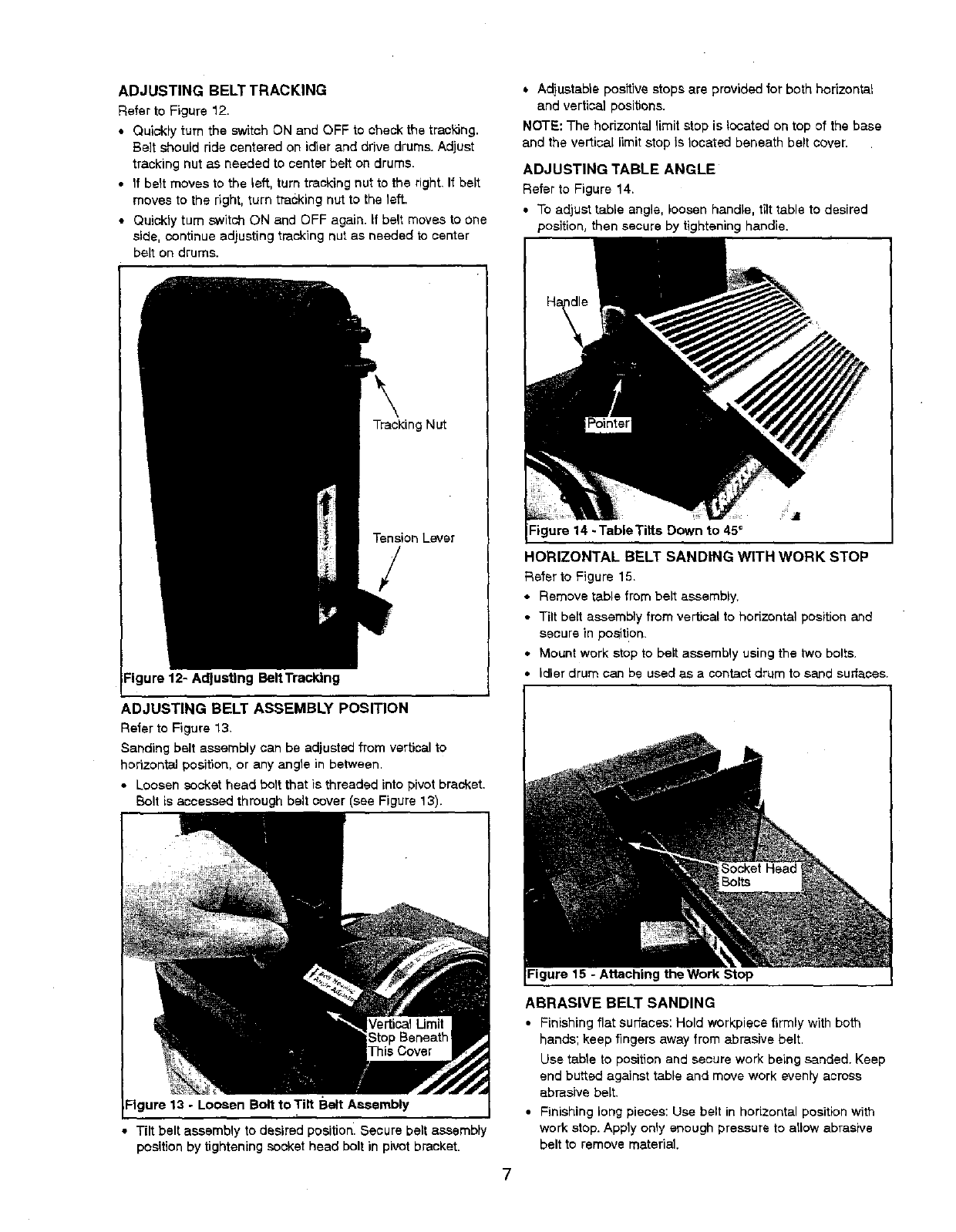
RefertoFigure 12,
•Quickly turn the sWitch ON and OFF to check the traskJng.
Be]t should ride centered on idler and drive drums. Adjust
tracking nut as needed to center belt on drums.
•If belt moves to the left, turn tracking nut to the right, If belt
moves to the right, turn tracking nut to the left.
• Quickly turn switch ON and OFF again, if belt moves to one
side, continue adjusting tracking nut as needed to center
belt on drums.
Tracking Nut
Tension Lever
/
Figure 12- Adjusting BeltTracldng
ADJUSTING BELT ASSEMBLY POSITION
Refer to Figure 13.
Sanding belt assembly can be adjusted from vertical to
horizontal position, or any angle in between.
• Loosen socket head bolt that is threaded into pivotbracket.
Bolt is accessed through belt cover (see Figure 13).
Figure 13 -Loosen Bolt to Tilt Belt Assembly
•Tilt belt assembly to desired position. Secure belt assembly
position by tightening socket head bolt in pivot bracket.
•Adjustable positive stops are provided for both horizontal
and vertical positions.
NOTE: The horizontal limit stop is located on top of the base
and the vertical limit stop Is located beneath belt cover.
ADJUSTING TABLE ANGLE
Refer to Figure 14.
•To adjust table angle, loosen handle, tilt table to desired
position, then secure by tightening handle.
Figure 14 -TableTitts Down to 45_
HORIZONTAL BELT SANDING WITH WORK STOP
Refer to Figure 15.
• Remove table from belt assembly.
• Tilt beti assembly from vertical to horizontal positionand
secure in position.
• Mount work stop to belt assembly using the two bolts.
• idler drum can be used as a contact drum to sand surfaces.
Figure 15 -Attaching the Work Stop
ABRASIVE BELT SANDING
•Finishing flat surfaces: Hold work,piece firmly with both
hands; keep fingers away from abrasive belt.
Use table to position and secure work being sanded. Keep
end butted against table and move work evenly across
abrasive belt.
• Finishing long pieces: Use belt in horizontal position with
work stop. Apply only enough pressure to allow abrasive
belt to remove material.
Use work stop to position and secure work being sanded.
Keep end butted against work stop and move work evenly
across abrasive belt, Use extra caution when finishing very
thin pieces.
• Finishing curved edges: Finish outside curves on flat por-
tion of abrasive bell Finish inside curves on idler drum por-
tion of abrasive belt.
• Finishing sod grain: It is more convenient to finish ends of
long workpiecss wild the abrasive belt in a vertical position.
Position table on belt side of sander. Move work evenly
across abrasive belt. For accuracy, use miter gauge. Table
may be tilted for beveled work.
ABRASIVE DISC SANDING
•Abrasive disc sanding is well suited for fitlishing small fiat
surfaces and convex edges.
• Move workpiece across down side (left) of abrasive disc.
Hold workplace firmly with both hands; keep fingers away
from abrasive disc.
•Abrasive disc moves fastest and removes more material at
outer edge.
• For accuracy, use miter gauge,
USING MITER GAUGE
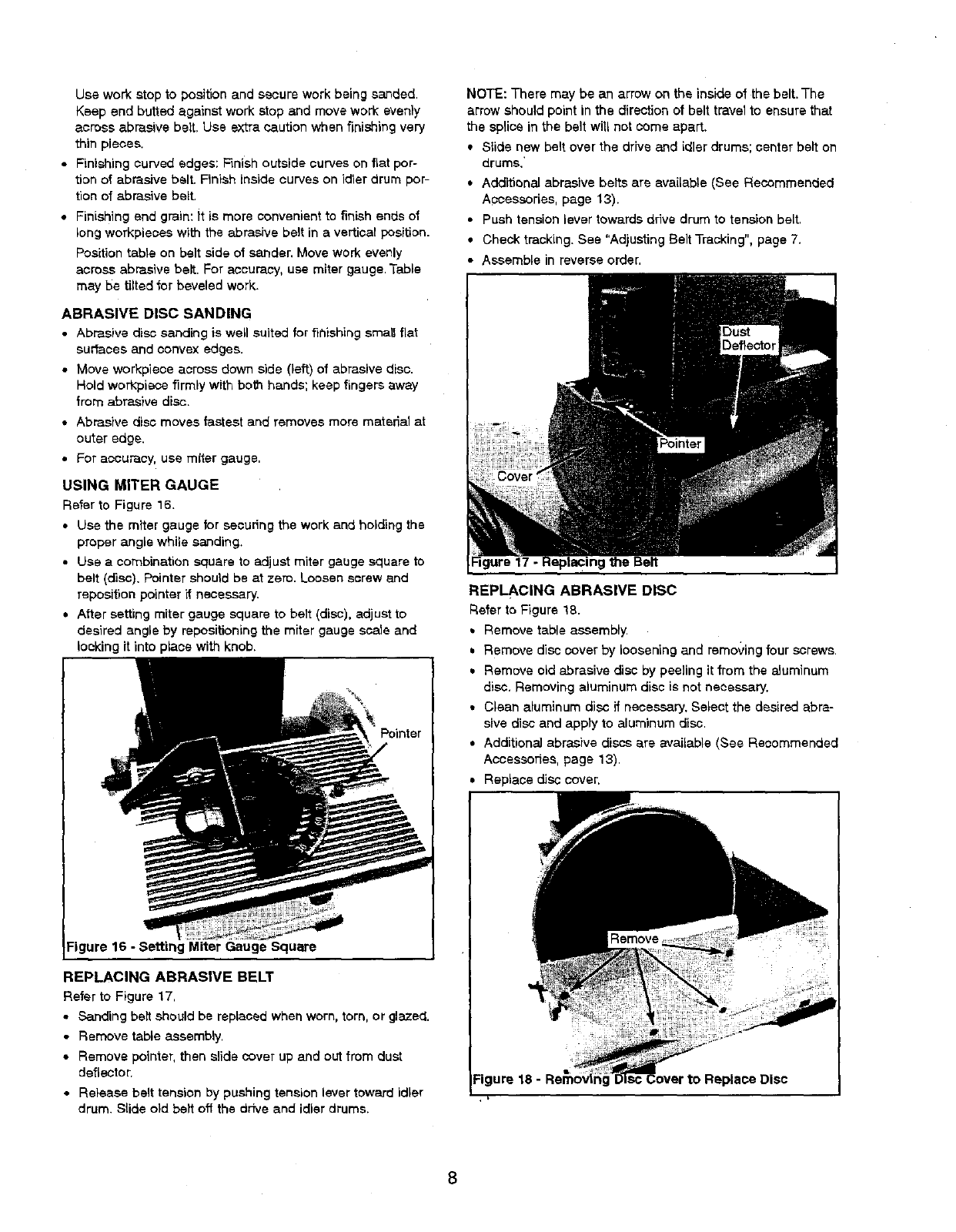
Refer to Figure 16.
•Use the miter gauge for secudng the work and holding the
proper angle while sanding.
• Use a combination square to adjust miter gauge square to
belt (disc). Pointer should be at zero. Loosen screw and
reposition pointer if necessary.
• After setting miter gauge square to belt (disc), adjust to
desired angle by repositioning the miter gauge ssale and
locking it into place with knob.
Pointer
Figure 16 -Setting Miter Gauge Square
REPLACING ABRASIVE BELT
Refer to Figure 17.
• Sanding belt should be replaced when worn, torn, or glazed.
• Remove table assembly.
• Remove pointer, then slide cover up and out from dust
deflecteL
• Release belt tension by pushing tension lever toward idler
drum. Slide old belt off the drive and idler drums.
NOTE: There may be an arrow on the inside of the belt.The
arrow should point in the direction of belt travel to ensure that
the splice in the belt will not come apart.
• Slide new belt over the drive and idler drums; center belt on
drums.'
• Additional abrasive belts are available (See Recommended
Accessories, page 13).
• Push tension lever towards drive drum to tension belt.
• Check tracking. See "Adjusting Belt Tracking", page 7.
• Assemble in reverse order,
REPLACING ABRASIVE DISC
Refer to Figure 18.
• Remove table assembly.
• Remove disc cover by loosening and removing four screws.
• Remove old abrasive disc by peeling it from the aluminum
disc, Removing aluminum disc is not necessary.
• Clean aluminum disc if necessary. Select the desired abra-
sive disc and apply to aluminum disc.
• Additional abrasive discs are available (See Recommended
Accessories, page 13).
Replace disc cover.
Figure 18 -
WARNING: Make certain that the unit is disconnected from
power source before attempting to service or remove any
component.
CLEANING
Keep machine and workshop clean. Do not allow sawdust to
accumulate on the tool Keep the drums clean. Dirt on drums
will cause poor tracking and beti slippage. Periodically empty
the dust collection bag.
Be certain motor is kept clean and is fraquentiy vacuumed
free of dust.
Use soap and water to clean painted parts, rubber parts and
plastic guards.
LUBRICATION
The shielded ball bearings in this tool are permanently
lubricated at the factory.They require no further lubrication.
• When operation seems stiff, a fightcoat of paste wax
applied to the table will make it easier to feed the work
while finishing.
• Do not apply wax to the belt platen. Belt could pick up wax
and deposit it on wheels causing belt to slip.
KEEP TOOL IN REPAIR
• If power cord is worn, cut, or damaged in any way, have it
replaced immediately.
• Replace worn abrasives when needed.
• Replace any damaged or missing parts. Use parts list to
order parts.
Any attempt to repair motor may create a hazard unless
repair is done by a qualified service technician. Repair
service is available at your nearest Sears store,
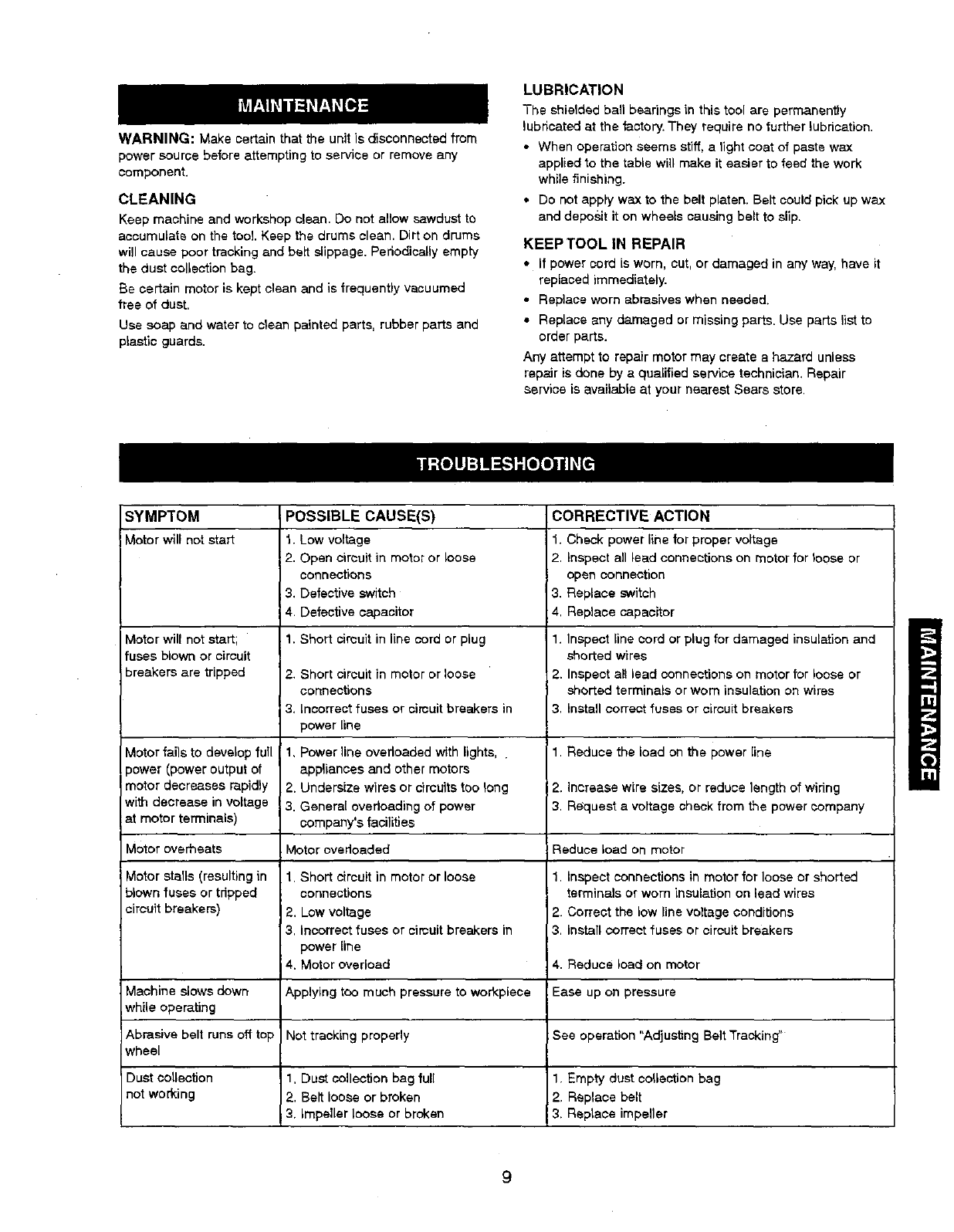
SYMPTOM
Motorwillnot start
,,lotor will not start;
fuses blown or circuit
breakers are tripped
Motor fails to develop full
)ower (power output of
motor decreases ra.pidly
with decrease in voltage
at motor terminals)
Motor overheats
victor stalls (resulting in
blown fuses or tripped
circuit breakers)
Machine slows down
while operating
Abrasive belt runs off top
wheel
Dust collection
not working
POSSIBLE CAUSE(S)
1. Low voltage
;2. Open circuit in motor or loose
connections
3. Defective switch
4. Defective capacitor
1. Short cimuit in line cord or plug
2. Short ci_uitin motor orloose
ccnne_on$
3, lncorrectfuses or slmuit braake_ in
power[ine
1, Power line overloaded with lights,
appliances and other motors
2. Undersize wires or circuits too long
;3. General overloading of power
company's facilities
Motor overloaded
1. Short circuit in motor or loose
connections
2. Low voltage
3. Incorrect fuses or cimuit breakers in
power line
4. Motor overload
Applying too much pressure to workplace
Not tracking properly
1, Dust collection bag full
2. Belt loose or broken
3. impeller loose or broken
CORRECTIVE ACTION
1. Check power line for proper voltage
2. Inspect all lead connections on motor for loose or
open connection
3. Replace switch
4, Replace capacitor
1. Inspect line cord or plug for damaged insulation and
shorted wires
2. Inspect al! lead connections on motor for loose or
shorted terminals or worn insulation on wires
3. Install correct fuses or circuit breakers
1. Reduce the load on the power line
2. Increase wire sizes, or reduce length of wiring
3. Request a voltage check from the power company
Reduce load on motor
1, Inspect connections in motor for loose or shorted
terminals or worn insulatipn on lead wires
2. Correct the low line voltage conditions
3. Install correct fuses or circuit breakers
4. Reduce load on motor
:Ease up on pressure
See operation "Adjusting Belt Tracking"
1. Empty dust collection bag
2. Replace belt
3. Raplaoe impeller
9
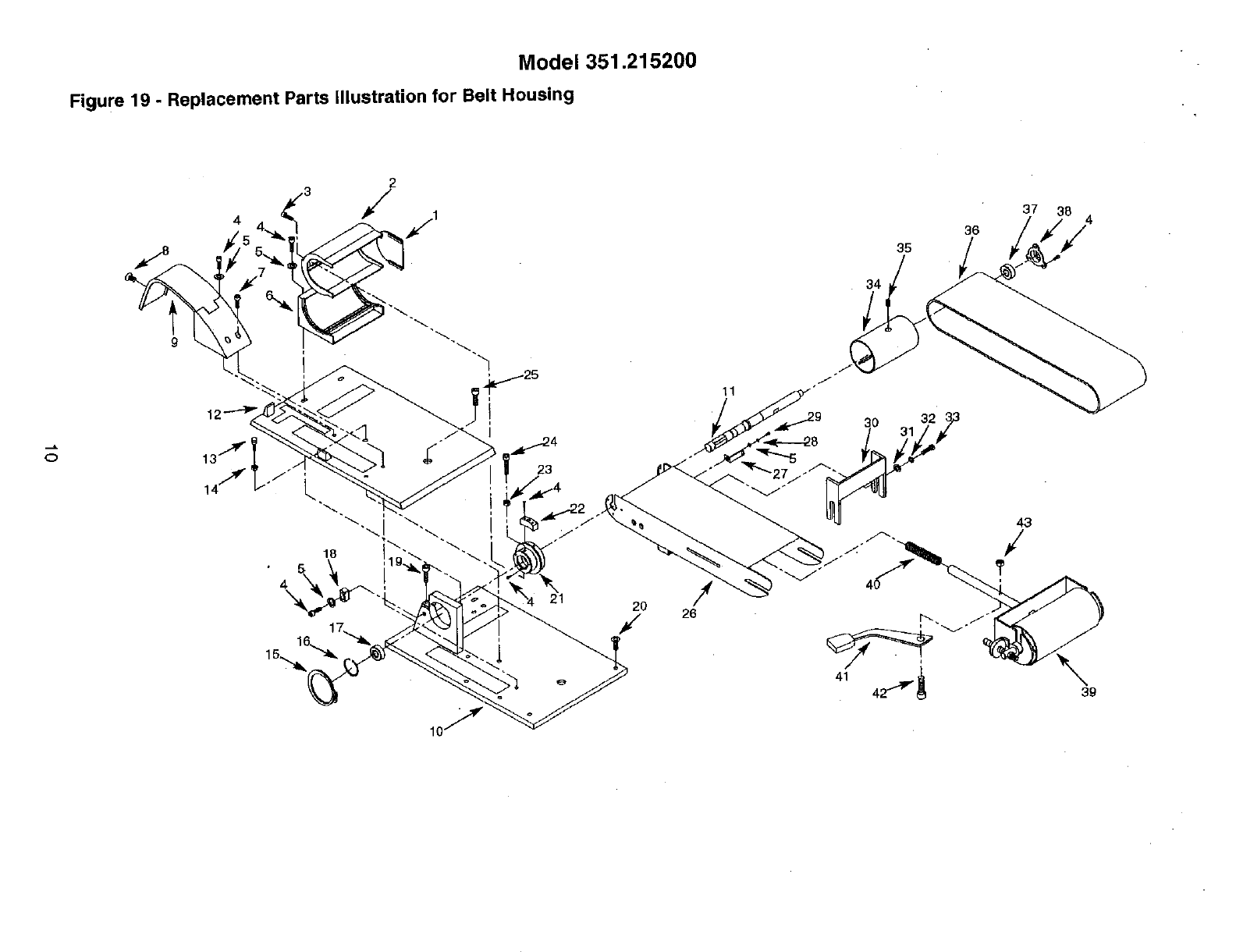
Model 351.215200
Figure 19 - Replacement Parts Illustration for Belt Housing
4
t
15,_
2
//,
18
26
11
35
34
36
43
/
?
37 4
/
39
If.
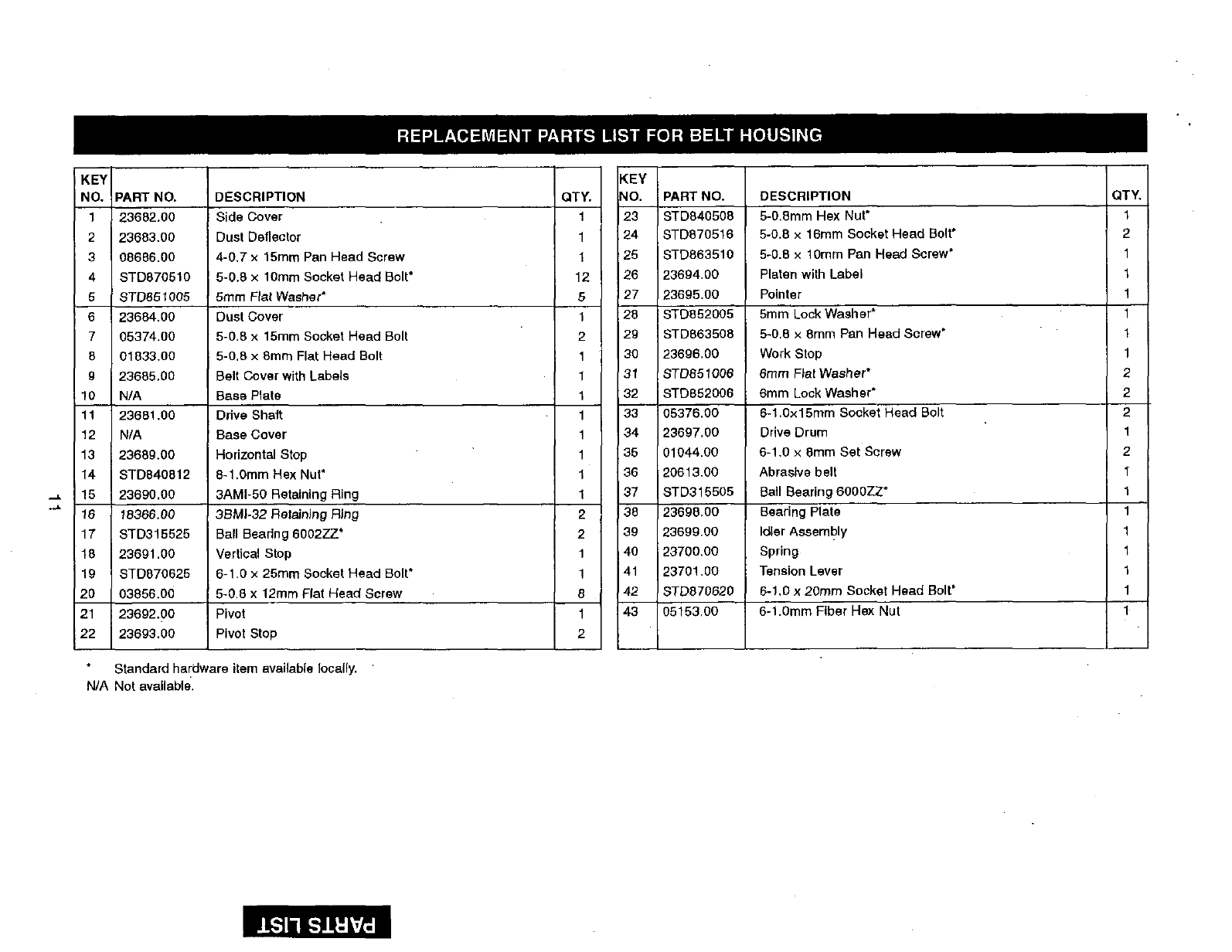
KEY
NO. PART NO. DESCRIPTION QTY,
123682.00 Side Cover 1
2 23683,00 Dust Deflector 1
3 08686.00 4-0,7 x15ram Pan Head Screw 1
4STD870510 5-0.8 x10ram Socket Head Bolt* 12
5 8TD851005 5ram Fiat Washer" 5
623684.00 Dust Cover 1
7 05374.00 5-0.8 x 15ram Socket Head Bolt 2
501833.00 5-0,8 x8mm Flat Head Bolt 1
9i23685,00 Belt Cover with Labels 1
10 N/A Base Plate 1
11 23681.00 Drive Shaft: 1
12 N/A Base Cover 1
13 23689.00 Horizontal Stop 1
14 i STD840812 8-1.0ram Hex Nut* 1
15 23690,00 3AMI-50 Retaining Ring 1
16 18366,00 35M|-32 Retaining Ring 2
17 STD315525 Ball Bearing 6002ZZ* 2
18 23691.00 Vertical Stop 1
19 STD670625 6-1.0 x 25mm Socket Head Bolt* 1
20 03856.00 5-0,8 x 12ram Flat Head Screw 8
21 23692.00 Pivot 1
22 23693.00 Pivot Stop 2
Standard hardware item available locally.
N/A Not available.
KEY
NO. PART NO. DESCRIPTION QTY.
23 STD840508 5-0.8mm Hsx Nut* 1
24 STD870516 5-0.8 x 16ram Socket Head Bolt* 2
26 STD863510 5-0.8 x 10mm Pan Head Screw* 1
26 23694.00 Platen with Label 1
27 23695.00 Pointer 1
28 STD852005 5ram Lock Washer* 1
2g STD863508 5-0,8 x 8mm Pan Head Screw" 1
30 23696.00 Work Stop 1
31 8TD851006 6ram Flat Washer* 2
32 STD852006 6mm Lock Washer* 2
33 05376,00 6-1.0x15mm Socket Head Bolt 2
34 23697.00 Drive Drum 1
35 01044.00 6-1,0 x 8mm Set Sersw 2
36 20613,00 Abrasive belt 1_
37 STD315505 Ball Bearing 6O00ZZ* 1
38 23698,00 Bearing Plate 1
39 23699.80 Idler AssemblY 1
40 23700.00 Spring 1
41 23701.00 Tension Lever 1
42 8TD870620 6-1,0 x 20ram Socket Head Bolt* 1
43 05153,00 6-1.0mm Fiber Hex Nut 1
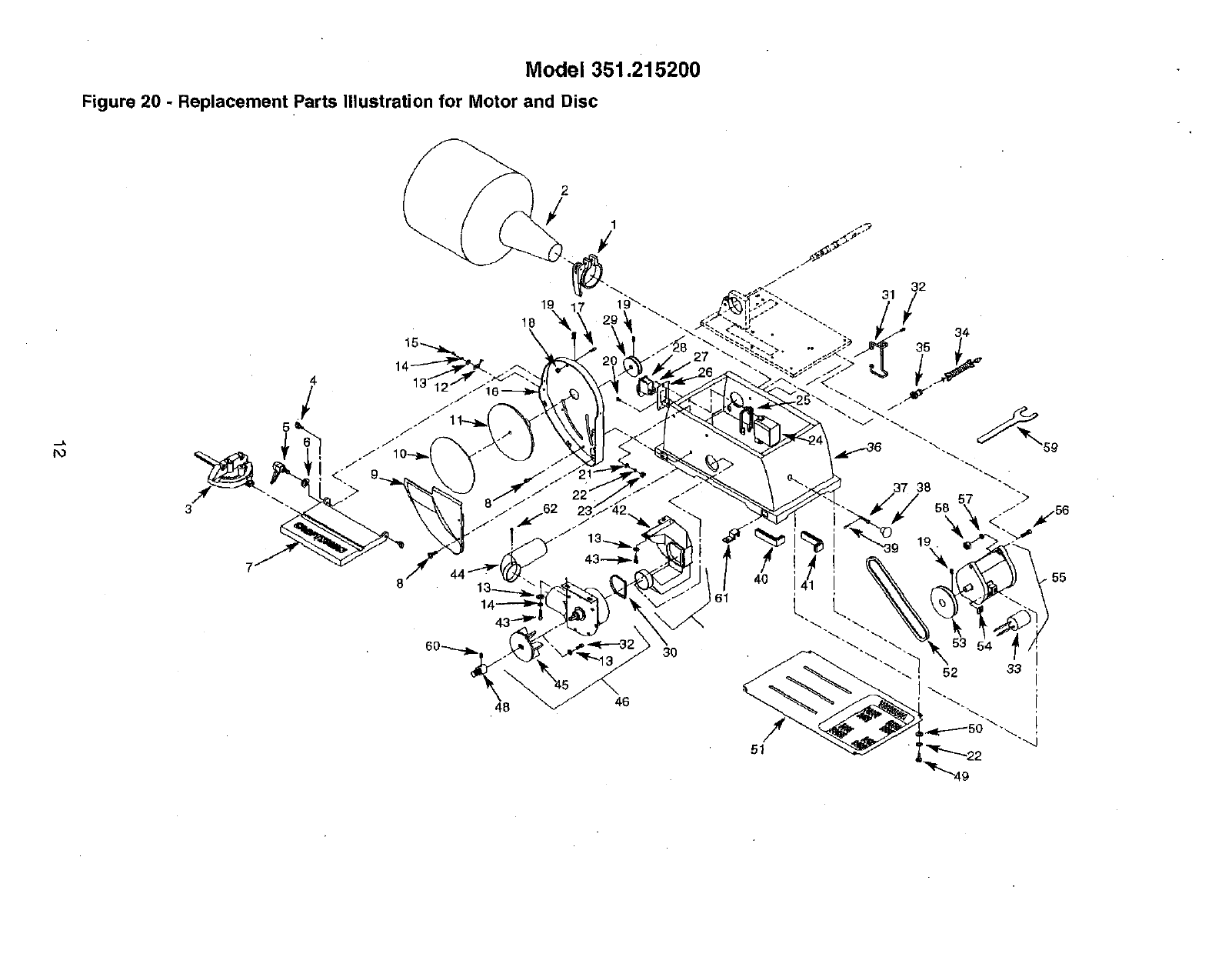
Model 351.215200
Figure 20 - Replacement Parts Illustration for Motor and Disc
3
48
3O
46
51
33
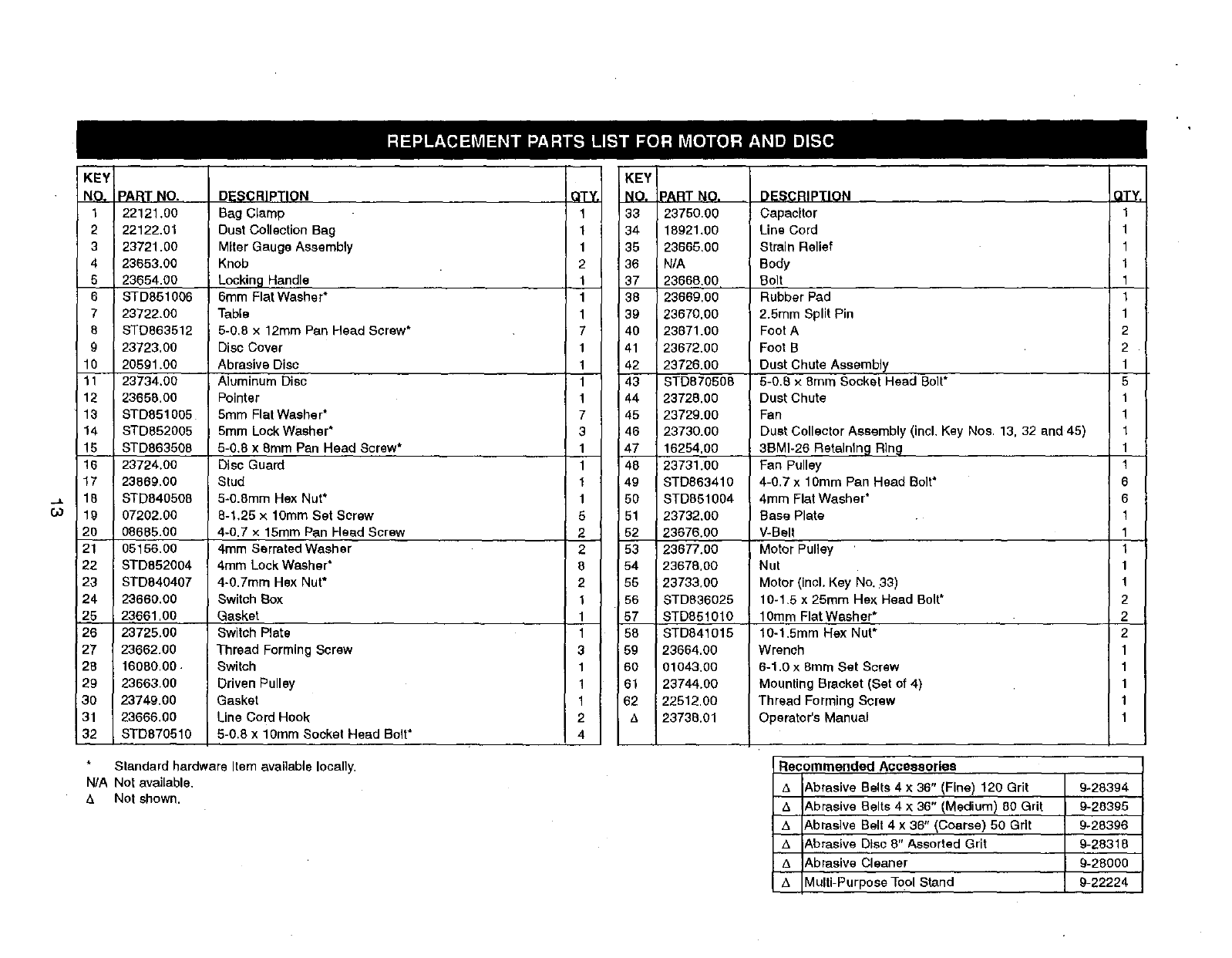
KEY
NO. PA_TNO.
1 22121.00
2 22122,01
3 23721.00
4 23653,00
523654.00
6 STD851006
7 23722.00
8 STD863612
9 23723,00
10 20591.00
11 23734.00
12 23658.00
13 STD851005
14 STD852005
15 STD863508
16 23724.00
17 23669,00
18 STD840506
19 07202.00
20 08685.00
21 05156,00
22 STD852004
23 STD640407
24 23660,00
25 23661,00
26 23725.00
27 23662.00
28 16060.00
29 23663.00
30 23749.00
31 23666.00
32 STD870510
DESCRIPTION
Bag Clamp
Dust Collection Bag
Miter Gauge Assembly
Knob
Locking Handle
6ram Flat Washer*
Table
5-0,8 x 12mm Pan Head Screw*
Disc Cover
Abrasive Disc
Aluminum Disc
Pointer
5mm Flat Washer*
5mm Lock Washer*
5-0,8 x Bmm Pan Head Screw*
Disc Guard
Stud
5-0.8mm Hex Nut*
8-1,25 x 10ram Set Screw
4-0.7 x 15mm Pan Head Screw
4ram Serrated Washer
4mm LockWasher*
4-0.Tram Hex Nut*
Switch Box
Gasket
Switch Plate
Thread Forming Screw
Switch
Driven Pulley
Gasket
Line Cord Hook
5-0.8 x 10mm Socket Head Bolt*
Standard hardware Item available locally.
N/A Not available,
&Not shown.
QTY,
1
1
1
2
1
1
1
7
1
1
1
1
7
3
1
1
1
1
5
2
2
8
2
1
1
1
3
1
1
1
2
4
KEY
NO.
33
34
35
36
37
38
39
4O
41
42
43
44
45
46
47
46
49
50
51
52
53
54
55
56
57
56
59
60
61
62
&
PART NO.
23750.00
16921.00
23665,00
,N/A
23668.00
23669.00
23670,00
23671.00
23672.00
23726.00
STD870508
23728.00
123729.00
23730.00
16254,00
:23731.00
STD863410
STD651004
23732.00
23676.00
23677.00
23676,00
23733.00
STD836025
STD851010
STD841015
23664.00
01043.00
23744.00
22512.00
23736.01
DESCRIPTION
Capacitor
Line Cord
Strain Relief
Body
Bolt
Rubber Pad
2.5ram Split Pin
Foot A
Foot B
Dust Chute Assembly
5-0.8 x 6ram Socket Head Bolt*
Dust Chute
Fan
Dust Collector Assembly (incl. Key Nos. 13.32 and 45)
3BMI-26 Retalnln_l Ring
Fan Pulley
4-0.7 x 10turn Pan Head Bolt*
4ram Flat Washer*
Base Plate
V-Belt
Motor Pulley
Nut
Motor (incl. Key No. :33)
10-1.5 x 25mrn He× Head Bolt*
10ram Flat Washer*
10-1.5mm Hex Nut*
Wrench
6-1.0 x 6mm Set Screw
Mounting Bracket {Set of 4)
Thread Forming Screw
Operator's Manual
Recommended Accessories
&Abrasive Belts 4 x 36" {Fine) 120 Grit 9-28394
Abrasive Belts 4 ×36" {Medium) 80 Grit £,-28395
Abrasive Belt 4 x 36" {Coarse) 50 Grit 9-28396
A Abrasive Disc 8" Assorted Grit 9-26316
Abrasive Cleaner 9-28000
AMulti-PurposeTool Stand 9-22224
QTY.
I
I
I
I
1
1
I
2
2
I
5
I
I
I
I
I
6
6
I
I
I
I
I
2
2
2
I
I
I
I
I
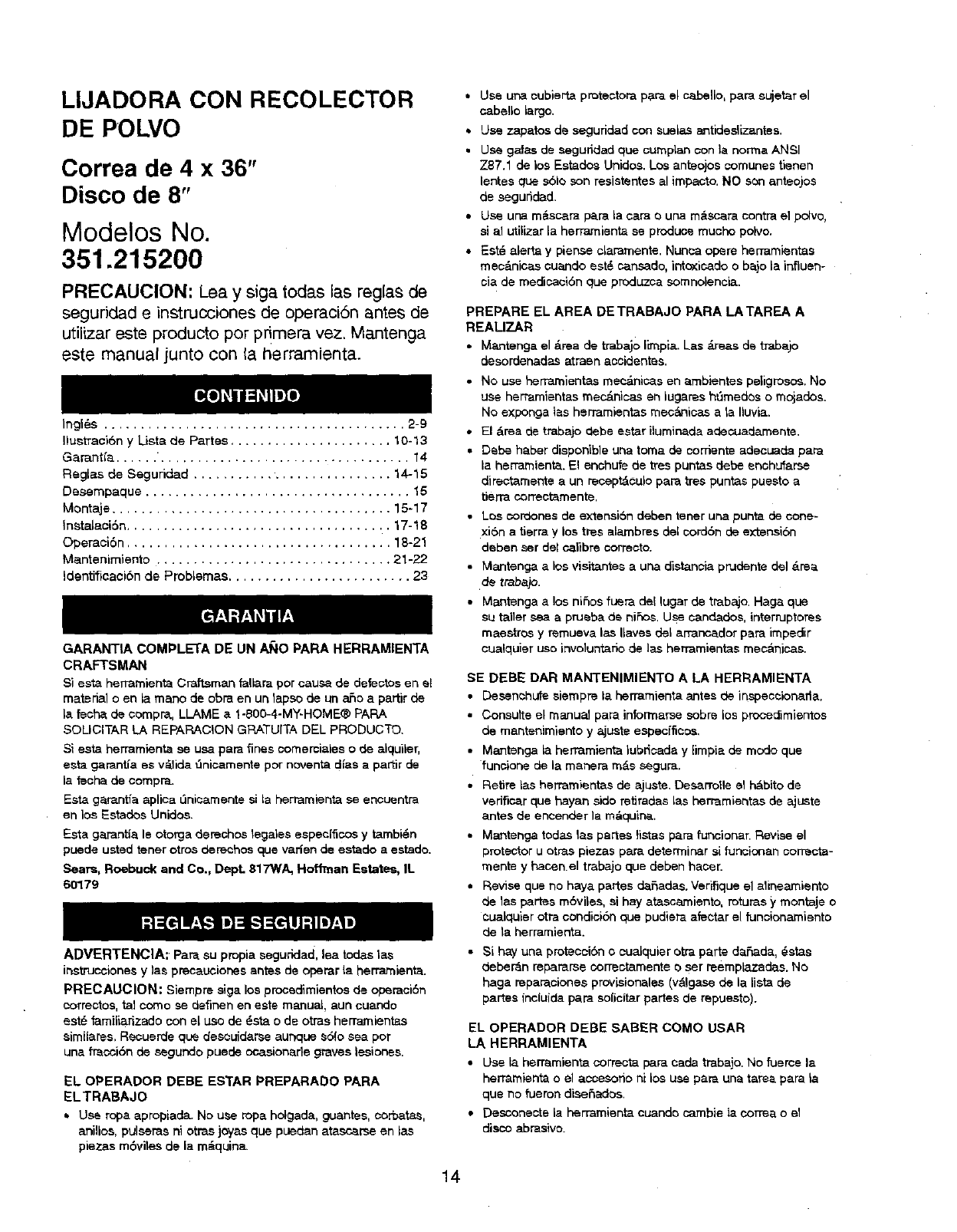
LIJADORA CON RECOLECTOR
DE POLVO
Correa de 4 x 36"
Disco de 8"
Modelos No.
351.215200
PRECAUCION: Lea y siga testes las reglas de
seguridad e instrucciones de operaci6n antes de
utilizer este producto per pdmera vez. Mantenga
este manual junto con la herramienta.
Ingl6.s ......................................... 2-g
Ilustraci6n y Lists de Partes ...................... 10-13
Garant(a ...... ".................................. 14
Reglas de Seguridad ........................... 14-15
Desempaque .................................... 15
Montaje ...................................... 15-17
Instalaci6n .................................... 17-18
Operaci6n .................................... 18-21
Mantenimianto ................................ 21-22
Identifisaci6n de Problamas ......................... 23
GARANT|A COMPLETA DE UN A_IO PARA HERRAMIENTA
CRAFTSMAN
Si esta herramienta Craftsman tellers per cause de detectos en el
material oen la mane de obra en un lapse de un a_o a partir de
la tachs de ¢ompra, LLAME a 1-800-4-MY-HOME® PAPA
SOLICITAR LA REPARACION GRATUITA DEL PRODUCTO.
Siesta herramienta se usa pars fines comerciales ode alquiler,
esta gamntia es v_lida ,',nicamente per noventa dies a partir de
la feoha de compra.
Esta gamntia aplloa L_nicamente si la herramienta se encuentra
en los Estados Unidos.
Esta garant{a le otorga detaches legales especffic, os y tambi6n
puede usted tener otros dereehos qua vaffen de estado a estado.
Sears, Roebuck and Co., Dept. 617WA, Hoffman Estates, IL
60179
ADVERTENCIA: Pare su propia seguridad, lea redes las
ir_stnJosianesy las precauciores antes de odemr la herrarnienta.
PRECAUCION: Siempre siga los procsdimientos de operaci6n
correctos, tel come se ctefinen en este manual, sun cuando
est6 farniliarizado con el use de _.sta o de otras hemarnientas
eimilares. Recuerde qua desouidarse aunque e61o sea per
una fracci6n de segundo puede ocasionade graves lesiones.
EL OPERADOR DEBE ESTAR PREPARADO PARA
ELTRABAJO
*Usa ropa apropiada. No use rope holgada, guantes, corbatas,
anillos, pulsems ni otras joy'as qua puedan atasc_rse an las
plazas m6vites de la re&quirts.
•Use ura oubierta protectors p_.r_ el cabello, pars sujet_r el
cabello largo.
• Use zapatos de segufidad con suelas antideslizantes.
• Use galas de segurldad qua cumplan con le norma ANSI
Z87.1 de los Estedos Unidos. Los anteojos comunes tienen
lentes qua s61o son resistentes al impasto. NO son anteojos
de seguridad.
•Use ur_ rn_scara pars la cars ouRa m_scara corltra e] po[vo,
sial utilizer la herramiante se produce touche polvo.
• Est_ alerts y pier_se claramente. Nunca opera herramientas
msc&nicas cuando est@ ca.nsade, intoxicado o bajo la influerl-
cia de meciicaci6n que produzca somnolencia.
PREPARE EL AREA DETRABAJO PARA LATAREA A
REAU7_AR
• Mantenga el &rea de trabajo limpia. Las _,reasde trabajo
desordenadas atrasnaocidentss.
• No use herramientas mec_nicas en ambientes peligrosos. No
use herramiantas mec_.rYicas en lugares ht_medse o mojades.
No exponga tes herramientas mec_nicas ata Iluvia.
• El &rea de trabajo dabs ester iluminade adecuademente.
• Dsbe haber disponible una toms de cements adecuade pars
la herramiante. El enchufe de tres puntas debe snohufarse
dffectamente aun receptdoulo pars tres puntas puestoa
tierra correctemente.
•Los oorOones de extensi6n deben tener una punts de cone-
xi6n atierra y los tres alambres del cord6n de extensi6n
deben ser del calibre correcto.
• Mantenga a los visitantes a una distancia prudente del drea
de trabap.
• Mantanga a los nifios fuera del lugar de trabajo. Hags que
su taller sea a prueba de niSos. Use cand_dos, interruptores
maestros y remueva las Uaves del arrancador pars impedir
cualquier use involuntario de las herramiantes mec_,nioss.
SE DEBE DAR MANTENIMIENTO A LA HERRAMIENTA
•Desenehufe siempre la herrarnienta antes de inspeceionafla.
• Consults el manual pars informarse sobre los proceciimientos
de mantenimianto y ajuste espec_ficos.
• Mantenga la hermmienta lubdsade y limpia de mode qua
funcione de la manera m&s segura.
•Retire las herramientas de a.juste. Desa.rrolle el hdbito de
vedficar qua haya_ side retirades las herramientas de ajuste
antes de encender la re&quirts.
• Mantenga redes las partes ti_tas para funcionar. Revise el
protector u otras plazas pare determinar si funcionan oorrecta-
manta y hacen el trabajo que deben haoer.
• Revise qua no hays partes dafiadas. Verifique el alineamiento
de las p_rtes m6viles, sl hay atascamiento, refutes y montaje o
eualquier otra condici6n qua pudier_ afe_tar el funcionamianto
de le herramienta.
• Si hay une proteoni6n oeualquier otra parts decade, _stas
deber_n repararse oorreetamente o ser reemplazades. No
hags reparaoiones provisionales (valgase de la list_ de
partes incluida pars solicitor partes de repuesto).
EL OPERADOR DEBE SABER COMO USAR
LA HERRAMIENTA
• Use la herramienta corrects pars cede trabajo. No fueros la
herramiant_ oel accesorio ni los use pars une tar_ pars la
qua no fueron diseSados.
• Desconecte la herramienta euando carnbie le correa o el
disoo abrasive.
14
•Evite que la herramienta se encienda accidentalmente.
Asag,3rese que el interrupter de la herramienta esti en la
poaici_q OFF (apagado) antes de enchufada.
• No fuerce la herramienta. Funoionar_ en la forms m_is eft-
ciente a ia velocidad pare la cu_,l sa disafi6.
• Mantenga [asmanes alejadasde laspartesmoviblesy de
tas superficies lijantes.
• Nunca deje desatendida una herramianta en funcionarniento.
Desoon_ctela y no abandons el lugar hasta que se hays
detenide per complete.
• No trate de alcanzar demasiado Is)as. Mant6n{:jase firme y
equilibrade.
• Nunca sa pare sabre la herramienta. Se pueden producir
lesiones graves sJla herramienta se vuelca o se toca accJderr
talmente ta correa o el disco.
• Oonozca su herramienta. Aprenda a manejar la herramienta,
su aplicaci6n y limitaciones espec[fices.
• Use los accesorios recomendedos (consulte la p_,gins 13).
Si se usan accesorios incorrectos, puede sufrii- lesiones o
_esionar e alguien.
• Maneje la pieza de traba)o en forms correcta. Prot4jase las
manes de posibles qesiones.
• Apague lam_quina slse atasca.La comma se atasca cuando
penetm muy profundamente en la pJeza de tmba)o (Isfuerza
del motor la malhtiene trabada en la pieza de traba)o).
• Soporte la plaza de trabajc; con la guia de ingletes, la platina
de la correa o la mesa de traba)o.
• Mantenga un eapacio libra m_Lximo de V,,/' entre la mesa y la
eorrea o e[ diSCo abrasive.
PRECAUCION: iPiense en la saguridad! La saguddad es una
¢ombinaci6n de[ sentido comL_ndel operador y un estade de
alerts permanente ad usar ]a herramienta.
ADVERTENCIA: No trate de operar la herramienta basra qua
hays side completamente armada seg,',n las instnJcciones.
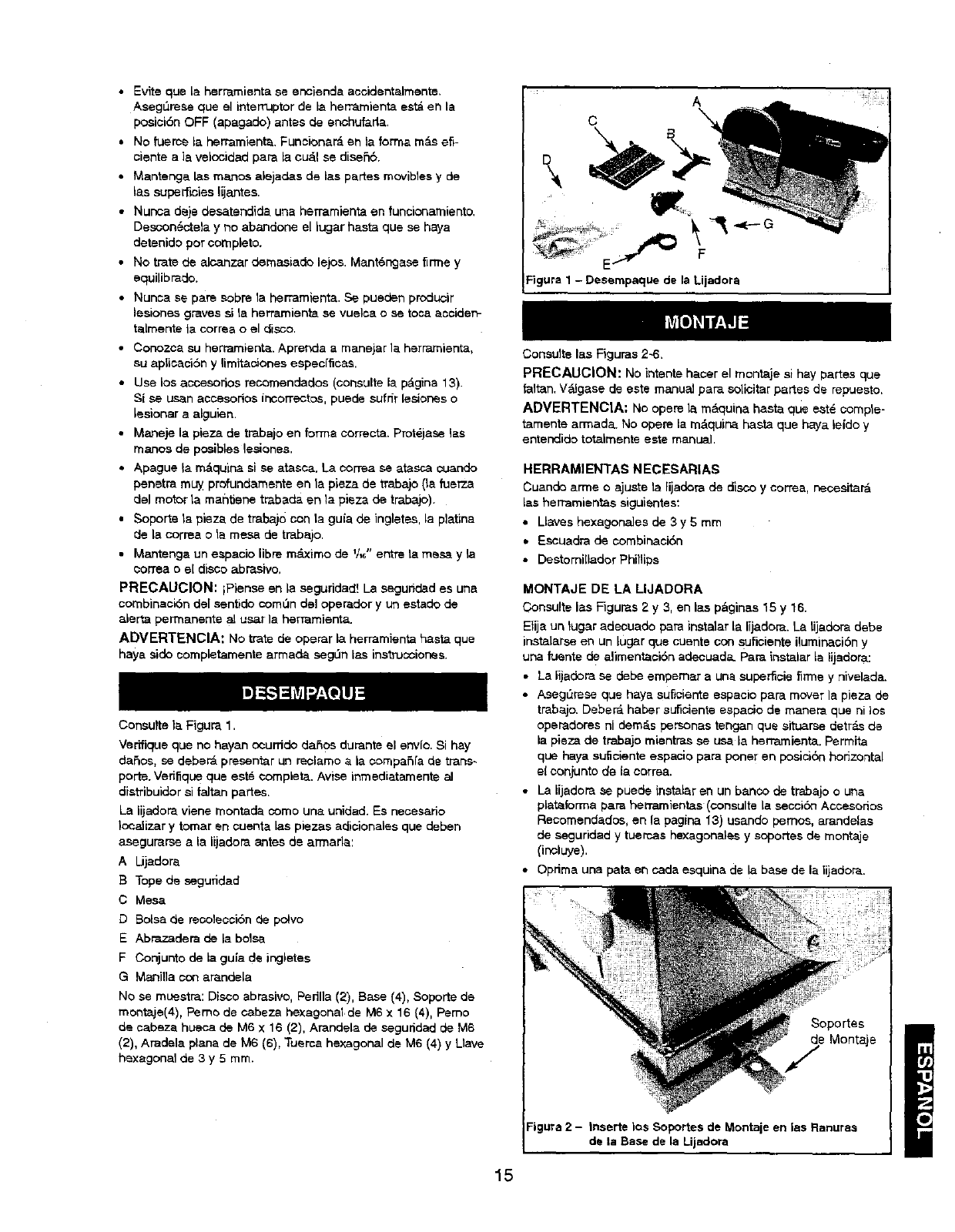
Cortsutte la Figure 1.
Verifique qua no hayan ocurrido dares durante el env[o. Si hay
da6os, se deber_ presenter un reclamo a la ¢ompafia de trans.
porte. Verifique que eat6 complete. Arise inmediatamente al
di_tribuidor _i faltan partes.
La lijadora viene montada come una unidad. Es necesario
}ocalizar y tamer en ouenta las piezas adicionales que deben
asegurarse a Is IJjadora antes de armada:
A Lijadora
B Tope de seguridad
CMesa
D Balsa de recoleo¢i6n de polvo
E Abrazadera de la balsa
F Conjunto de la gu[a de ingletes
G Manilla con arandela
No sa muestra: Disco abrasive, Pedlla (2), Base (4), Sol)oRe de
mc,ntaje(4), Pemo de cabeza hexagonal de M6 x 16 (4), Pemo
de cabeze hueca de M6 x 16 (2), Arandela de saguridad de M6
(2), Aradela plane de M6 (6), Tuerca hexagonal de M6 (4) y Lleve
hexagonal de 3 y 5 mm.
15
A
c \
\
_ E F
!Figure 1-Desempaque de la Lijadora
i
Consults las Figuras 2-6.
PRECAUCION: No intents hacer el montaje si hay partes que
faltan. V_gasa de ests manu_J pare solicitar partss de repueste.
ADVERTENCIA: No opera la mAquina haste qlJe eat4 comple-
tamente armada. No opera la m&quina haste que haya leido y
entendido totalmente este manual.
HERRAMIENTAS NECESARIAS
Cuando arme e ajuste la lijadora de disco y correa, necesitar_
ias herramientae siguientes:
• Uaves hexagonales de 3 y 5 mm
•Escuadra de combinaci6n
• Destomi[lador Phillips
MONTAJE DE t! LIJADORA
Consults las Figures 2 y 3, en las p&ginas 15 y 16.
Elija un tugar adecuado para inatalar La lijadora. La lijadora debe
instalarsa en un lugar qua cuents con suficiente iluminaci6n y
una fuente de alimentaci6n adecuada, pare instalar Le lijedora:
• La lijadora se debe empernar a one superficie firms y nivelada.
• Asegdresa qua hays eut]ciente espacio pare mover la pieza de
trabajo. Deber_ haber suf_iente espacio de manera qua ni )as
operadores ni dem&s personas tengen qua situarse detri_ de
la pieza de trabajo mientras sa usa le herramienta. Permits
qua haya suficiente espacio pare poner en posici6n horizontal
eloonjuntode laoorrea,
• La lijadora se puede inetalar en un banco de trabajo o una
plataforme pare herramientas (consults La secci6n Acce$orios
Recomendados, en la pagiPa 13) usando pemos, arandelas
de saguridad y tuercas hexagonales y soportes de montaje
(inoluye).
• Optima una pete en cada sequins de la base de la lijadora.
SopoFtes
de Montaje
/
;igura 2- Inserte los Soportes de Montaje en las Renuras
de la Base de la Lijadora
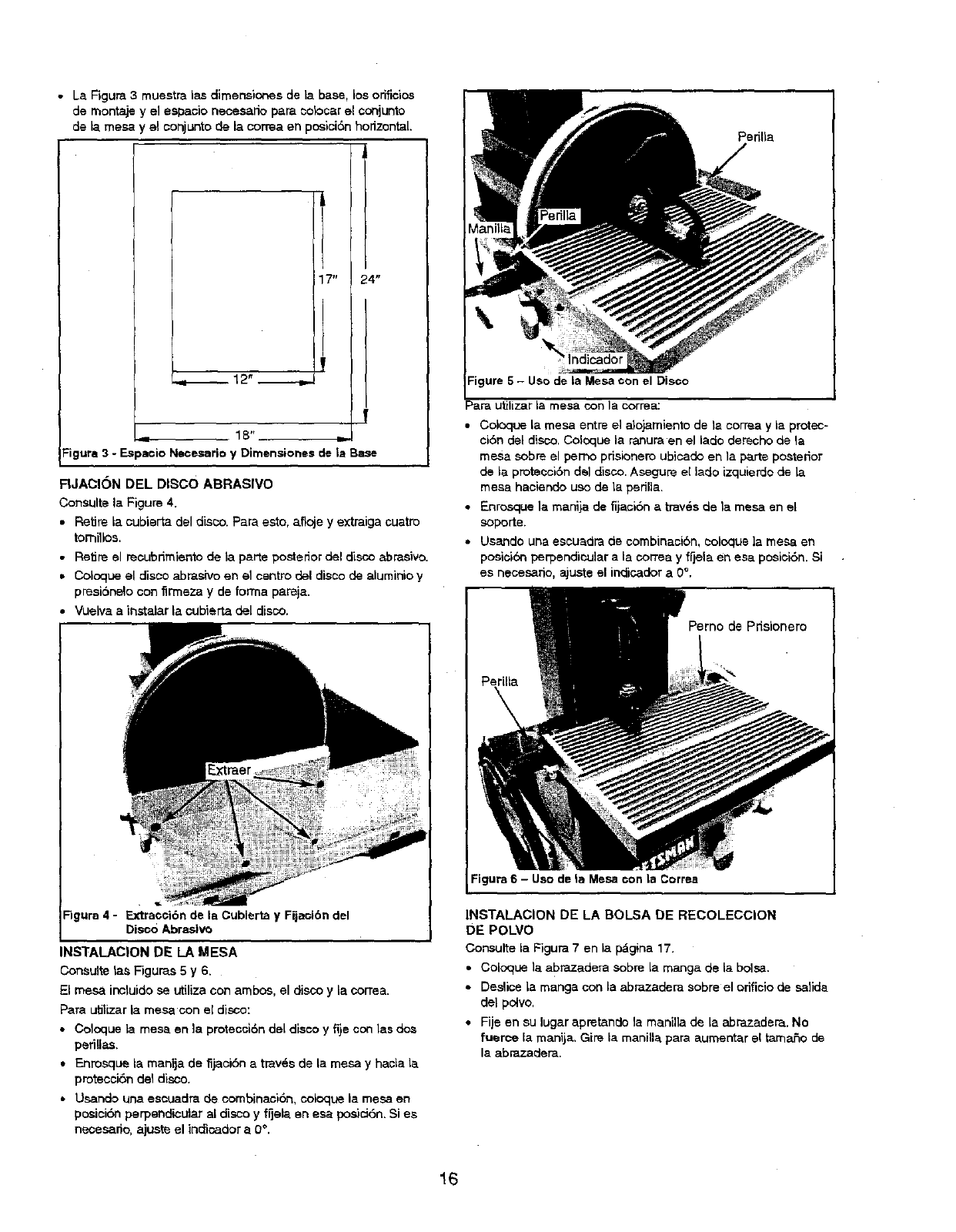
• La Rgura 3 muestrai_s dimensiones de la base, los oriflclos
de montaje y el espaoio necesado pare colocar el conjunto
de la mesa y el conjuntode la cortes en posici6n horizontal.
L
24"
12" --.,,_
f
_= 18"
Figure 3 - Espaeio Necesario y Dimensiones de la Base
FIJACION DEL DISCO ABRASIVO
Consulte la Figure 4.
•Retire la cubierta del disco. Pare eeto, afloje y extraiga cuatro
tomillos.
•Retire el recubdmiento de ta porte posterior del disco abrasive.
• Coicque el disco abrasivo en el centro del disco de aluminio y
presibnelo con tirmeza y de forms pareja.
Vuelva a instatar la cubierta del disco.
Figure 4 -Extraooi6n de la Cubierta y Fijacibn del
Disco Abrasivo
INSTALAC|ON DE LA MESA
Consulte tas F'iguras 5 y 6.
El mesa incluido sa utilize con ambes, el disco y Lacorrea.
Para utilizar la mesa con et disco:
• Coloque la mesa en la protecc_6n del disco yfije con las dos
periUes.
• Enresque la manija de fijacibn atray,s de la mesa y had=a la
protecoi6n del disco.
• Usando una escuadra de combinac_tbn, ooicque la mesa en
posici6n perpendicular al disco y fijela en esa posici6n. Si e_
nesesario, ajuste el indicador a 0 °.
Perilta
Figure 5 - Uso de la Mesa con el Disco
Pare utilizer la mesa con le correa:
• Coicque Lamesa entre el alojamiento de la correa yle protec-
ci6n del disco. Coloque ta ranura en el lado derecho de la
mesa sobre el pemo pdeicnero ubicado en ta parte posterior
de la protecciSn del disco. Asegure e[ lado izquierdo de ta
mesa haciendo uso de ta pedna.
• Enrosque la manija de fijaci6n a tray,s de la mesa en el
soporta.
*Usando una escuadra de combinaci6n, coloque ta mesa en
poslci6n perpendicular ala cortes y fOela en esa posici6n. Si
es necesario, aJuste el indicader a 0 °,
Figure 6 - Uso de le Mesa con la Correa
INSTALACION DE LA BOLSA DE RECOLECCION
DE POLVO
Consulte la Figure 7en la p_gina 1T.
• Coloque la abrazadera sobre la manga de Laboise.
• De.slice la mange con Laabrazadera sobre el orificio de salide
de] polvo.
•Fije en eu lugar apretande la manilla de la abrazader_. No
fuerce ta manija. Gire la manilla para aumentar el tamaSo de
la abrazadera.
16
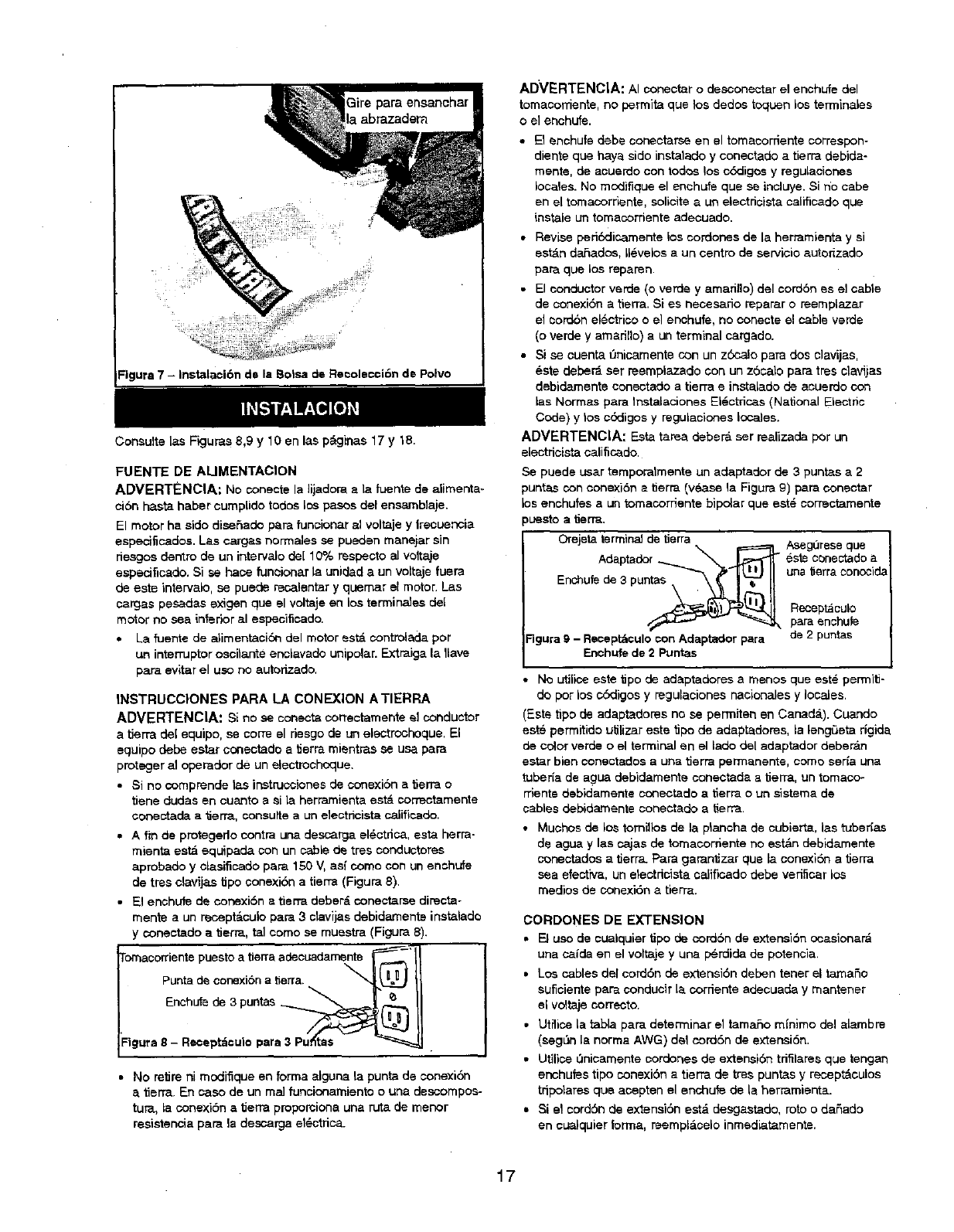
=igura 7 - Instalaci6n de la Boise de Re¢olecci6n de Polvo
Consulte las Figures 8,9 y 10 en las pdginas 17 y 18.
FUENTE DE AUMENTACION
ADVERTENCIA: No conecte la lijadom ela fuente de alimenta-
ci6n haste haber cureplido todos los pesos del ensamblaje.
El motor ha sido dise£=ado pare funcionar al voltaje y lrecuencia
espec_ficados. Las cargas normales se pueden manejar sin
riesgos dentro de un intervalo de[ 10% resdecto al voltaje
especificado. Si sa hate funeionar la unidad a un voltaje fuera
de eete intervalo, se puede rec_lentar y quemar el rector. Las
cargas pesadas exigen qua el voltaje en los terminales del
motor no sea infedor al especificado.
•La fuente de alimentaci_ del motor estd controlada por
un interruptor oscilante enclavado unipolar. Extraiga la 1lave
pare evitar el uso no aut_rizado.
INSTRUCCIONES PARA LA CONEXION A TIERRA
ADVERTENCIA: $i no sa conecta correctamente _Iconductor
a tierra del equipo, sa corm el riesgo de un electrochoque. El
equipo debe ester conectado a_erra mientras se usa pare
proteger al operador de un electrochoque.
•Si no 0oreprende tas instruosionee de conexi6n a tierra o
tiene dudes en cuanto a eila herramienta est& correctamente
coneotada a tierra, consuffe a un eleotricista calificado.
• A fin de protegedo contra una desca_a el6ctrica, esta herra-
reienta esta equipada con un cable de tres conductores
aprobado y dasificado pare 150 V, as{ come con un enchufe
de tree clavijas 8po conexiSn a tierm (Figure 8).
•El enchufe de conexiSn a tierm deber_ conectarse directa-
manta a un reoept&culo pare 3 ctavijas debidamente instalado
y oonectado atierr_, tel como se muestra (Figura 8).
'Figure 8 - Recept_culo pare 3 Pu_as
•No retire ni reodiflque en forma alguna la puntade conexi0n
a tierm. En caso de un maJfuncionareianto o una descorepos-
tun, la conexibn a tierraproporoione una rutade manor
resistencia pare la descargael_ctfica.
ADVERTENCIA: AI conectar o desoonectar el enchufe del
tomaconiante, no perrnita qua los dodos toquen los terminales
oel ecohufe.
• El anchufe debe conectar_e en el tomacorriente correspon-
diente qua haya sido instatado y conectado a tierra dabida-
reente, de acuerdo con todos los c_,digos y regulaeiones
locales. No reodifique el enchufe qua se incluye. Si no cabe
en el tomacorriente, solicite a un electricista caiificado que
instale un tomacorriente adecuado.
• Revise periSdicamente los cordones de la herramienta y si
est&n daSados, 116velosa un cantro de servicio autorizado
pare qua los reparen.
•El conductor verde (o verde y amarillo) del cord6n es el cabte
de oonexibn a tierra. Si es nacesatio reparar o reerepLazar
el corddn electrioo o el enchufe, no conecte el cable verde
(o verde y amadno) a un terminal cargado.
•Si sa cuenta t_nicamente con un zbcaJo para dos elavijas,
_ste deber_ ser reemplazado con un zScalo pare tree clavijas
debidemente coneotado atierra e instalado de acuerdo con
las Normas pare Instalaciones El_ctric_s (National Electric
Code) y los ¢6digos y regulaciones locales.
ADVERTENCIA: Esta taree deber_ ser realizade por un
electricista caliticado.
Se puede user temporatreente un adaptador de 3puntas a 2
puntas con conexiSn etJerra (vSa_e la Figure 9) para conectar
los enchufes a un toreacorriente bipolar que est_ correctamente
puesto atJerra.
Orejeta terminal de tierra \ =======_t_AsegL_resa qua
Adaptador _ L_t'_l - 6s'_ conectado a
Eoshufe de3 puntas _'_' '_'l_'j '' una ,erra conosida
-- _"_k para enchufe
Figura 9 - Reoept_culo con Adaptador para de 2 puntas
Enchufe de 2 Puntas
No utilice este tipo de adaptadores a menos qua est_ permitJ-
do por los cSdigos y regulaciones nadonales y locales.
(Este tipo de adaptadores no sa pen'niten an Cacad_.). Cuaodo
est6 permitido utilizer este tipo de adapt_dores, la lengSeta rigida
de _or verde o el terminal en el lade del adaptador deber&n
ester bien ¢onectados a una tierra perrnanente, como seda una
tuberia de agL_ debidareente conectada a tierr_, un tomaco-
rriente debidamente eonectado a tierra oun sistema de
cables debid_Lmente conectado a tierra.
•Muchos de los tomillos de la planoha de cubiert_, las 0Jbedas
de ague y las cajas de toreacorriente no est&n debidamente
conectados a tierra. Pare garantizar qua la conexiSn atierr_
sea elective, un etectdeista calificado debe verificar los
medics de conexi6n a tierra.
CORDONES DE EXTENSION
•El uso de cualquier tipo de oord6n de extensi6n ocasionar_
una ca/de en el voltaje y una I_rdida de potencia.
•Los cables del cord6n de extensi6n deden tener el tamaSo
suflclente pare conducir la corriente adecuada y mantener
el vdtaje correcto.
•Utilice _a table pare determiner el tamaSo m_nimo del alambre
(seg_n la norma AWG) dM cordSn de extensi6n.
• Utilice L_lnicareente oordones de extensi6n trifilares qua tengan
enchufes tipo conexiSn atierra de tree puntas y recapt&culsa
tdpolares qua acepten el enGhufe de la herrareienta.
•Si e! cordSn de extensiSn est,. deegastado, roto o daSado
en cuaiquier forma, reempl&calo inmediatamente.
17
Longitud del ¢ord6n de extensi6n
TarnaF_odel alambre ......................... Norma AWG
Hasta 25 pies ....................................... 18
25 a 50 pies ........................................ 16
AVISO: No se recomienda utiliz_ar cordonss de extensidn de
m_s de 50 piss de largo.
MOTOR
La lijadoraviene con el motor yel cableado instalados.La
Figure7 muestra el diagrama dsl cableadoeldctdeo,
ESPECIFICAC!ONES DEL MOTOR
Potencla en lip (m_ima desarTollade) .................... 1
Voltaje ........................................... 120
Amperaje ......................................... 4.0
Frscuencia (Hz) ..................................... 60
Fase ....................................... Monof,=_sico
RPM ............................................ 1700
CONEXIONES ELECTRICAS
ADVERTENC|A: Un slectdcista calificadodebe baser todas
tas conexionas el_ctdcas.Assg_rese que la herramientaest_
apagada y desconectadade ta fusnte de ensrgfael_ctdca
mientras monte, conects o vuelva aconectarel motoro
mientras inspections e( cableado.
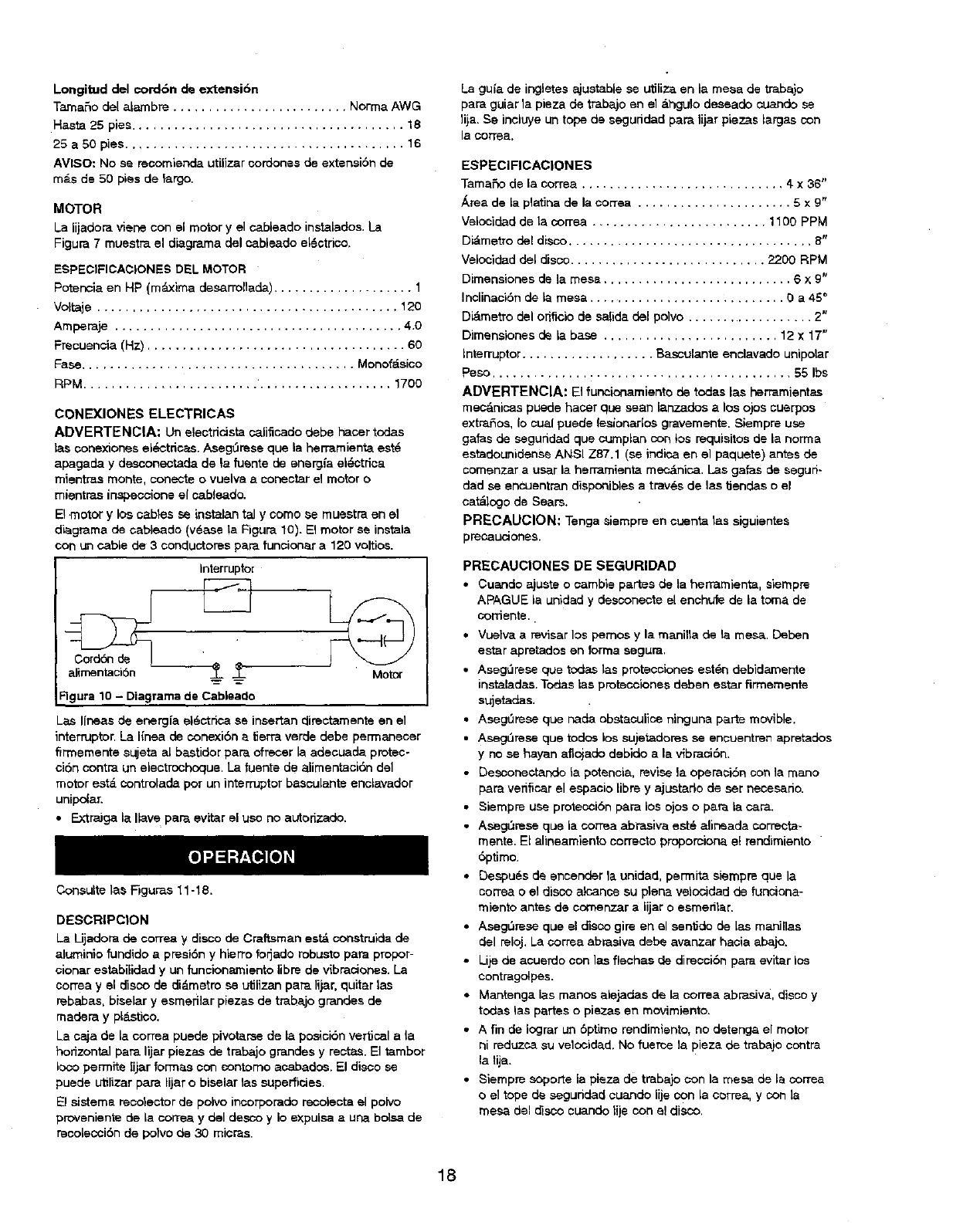
Elmotor ylos cables se instalantelly corns se muastra en el
diagrama de cableado (v@aseta Figure 10). El motor se instals
con ughcable de 3 conductoraspa.rafuncicoar a 120 voltios.
Interruptor
alirnentacidn --_- -_- Motor
FIgura 10 -Diagrams de Cablsade
Las Ifneas de energ{a eldctrica se insertan directamente en el
interruptor. La I(nea de conexibn a tierra verde debe perrnanscer
firmsmente sujeta al bas_ldor pare ofrecsr Is adecuade protec-
cidn contra un electrochoque. La fuente de alimentacidn del
motor est_ controlada por un intsrruptor bassulante enclavador
unipolar.
• ExtraJga la Ilave par_ evitar el uso no autorizado.
Consulte las Figures 11-18.
DESCRIPC|ON
La Lijadora de correa y disco de Craftsman est& construida de
aluminio fundido a presi6n yhierro fo_ade robusto pare proper-
eisner estabilidad y un funcionamiento libre de vibraciones. La
COrTesyel disco de di_.metm se utilizan pare lijar, quitar las
rebabas, biselar y esmefilar piezas de tmbajo grandes de
readers y pl_.stico.
La caja de la correa puede pivot_rse de la posicibn vertical ala
horizontal pare lijar piezas de trabajo grandas y rsctas. El tambor
Ioco permits iijar fon'nas con contorno acabados. El disco se
pusde utilizar pare lijar obiselar 1as supsrficiss.
El sisteme recotector de polvo incorporado recoleota el polvo
provsniente de la corrsa ydel desco y Io expulsa a usa boise de
recolsccidn de pofvs ds 30 micros.
La gufa de ir_letes a_ustable ss utiliz_ en la mesa de traba}o
pare guiar la pieza de trabajo en el _.hgu_o daseade ¢uando se
lija. Ss incluye un tope de seguddad pare lijar piezas largas con
la cortes.
ESPECIFICACIONES
Tamafio de la corrsa ............................. 4x36"
_rea de la platina de la cortes ...................... 5x9"
Velocidad de la _orrea ......................... 1100 PPM
Didmetro del disco ................................... B"
Velocldad del disco ............................ 2200 RPM
Dimsnsionas de la mesa ........................... 6x 9"
In¢linacidn de Is mesa ............................ 0 a 45 °
Di&mstro del orificio de salide del polvo .................. 2"
Dimensiones de la base ......................... 12 x 17"
Intsrruptor ................... Basculante enclavade unipolar
Peso ........................................... 55 Ibs
ADVERTENCIA: El fun_ionamient0 de todas las herramientas
mec&nicas puede hacer que sean lanzados alos ojos cusrpos
extrafios, Io cual pusde lesionarlos gravemente. Siempre use
galas de seguddad que cumplan con los requisitos de la norms
estadounidense ANSI Z87.1 (se indies en el paquete) antes de
comenzar auser la herramienta met&nice. L.as galas de segun-
dad se encuentran disponiblas atrav@s de las tJendas o el
cat_ogo de Sears.
PRECAUCION: Tenga _iempre en cuenta tas sigulentes
precaLiCiotles.
PRECAUCIONES DE SEGURIDAD
•Cuande ajusts o ¢ambis partas ds la herrarnienta, sismprs
APAGUE la unidad y desconecte sl enchufe de la tome de
cor_ente..
•Vueiva areviser los pemos y la manilla de Is mesa. Deben
ester epretados on forrna segura.
• Asegt_rese que todas las protecciones est@ndebidamsnte
instaladas. Todas las protscciones debsn ester firmemente
sujetadas.
• Asegt3rese que nade obstaculice ninguna parte movible.
•AsegL'Jrese que todos los sujetadores se encuentren apretados
y no se hayan afiojade debido a la vibraci6n.
• Desconectando la potanoia, revise la operasidn son la roans
pare vedflcar sl aspacio Ubrs y ajustado de set necasade.
• Siempre use protecciSn pare los ojos o pan la cam.
• AsegL'=rese que la correa abrasive est_ alineada correcta-
rnents. Et alineamiento corrects propomiona e! rendimiento
6prims.
• Dsspu_s de sncender la unidad, psrmita siempre que la
cortes o el disco alcance su plena velocidad de funciona-
miento antes de comenzar a lijar o esmerilar.
• Aseg,',rese que el disco gire en el senOde de las manillas
del reloj. La correa abrasive debs avanzar hacia abajo.
•Lijs de acuerdo con ]as fiechas de ciireccidn para evitar los
contragolpes.
• Mantenga las manos alejadas de la correa abrasive, disco y
todas las partes o piezas en movimiento.
• A fin de Iograr un 6ptimo rendimiento, no detenga el motor
ni reduzca su velocidad. No fuerca Is, pieza de trabajo contra
la tija.
• Siempre soporLe la pisza de traba}o con la mesa de Is cortes
o el tope de seguridad ¢uando lije con la correa, y con Is
mesa del disco cuando tije con sl disco.
18
• Nunca empuje r_pidamente una esquina afilada de la pieze de
trabajo centre la correa o el disco. [] papel o material abrasive
se puede romper.
•Reemplace el material abrasive cuando ss carga (as pone
lustroso) o se deshi]acha.
ADVERTENCIA: Parte del polvo producido per el lijado
me_.nico, serrado, esmerilado, taladrado y otras tareas de con-
stru¢¢i6n _ontiene sustancias qufmioas que pueden ocasionar
c_.nc.er, malformasiones ¢ong6nitas u otros da_os reproductivos.
Algunos ejemplos de estas sustansias qufmicas son:
• Plomo proveniente de pin_ras con base de plomo.
• Sili¢.e srietaJino proveniente de laddllos, 0emento y otro materi-
al de mamposterla.
• Ars_ni¢o y creme proveniente de madera qufmicamente trata-
de.
El riesgo debido ala exposici6n de estas sustancias quimicas
depende de la frecuencia con la ¢ual malice este tipo de trabajo.
Para reduoir la exposicibn aestas sustancias quimicas: trabaje
en un &rea bien ventilade y utilice equipo de seguridad aprobado.
Cuando trabaje con este ripe de herramientas, utilice siempre
una m_,ssara pare la care o respirador adecuademente ajusta-
dos, aprobados per MSHA!NIOSH.
INTERRUPTER DE ON/OFF (ENCENDIDO/APAGADO)
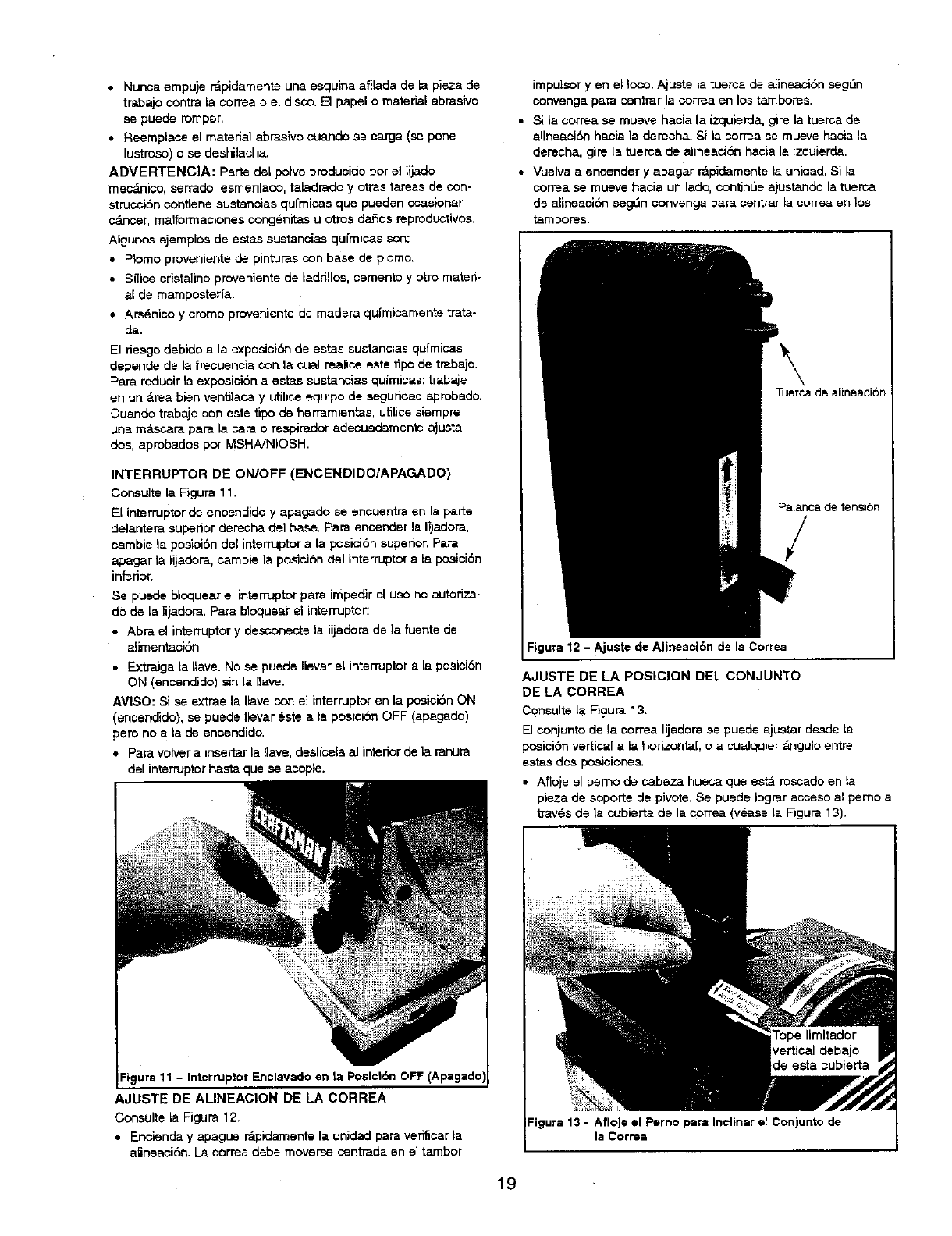
Consu]te la Figure 11.
El interrupter de encendido y apagado se encuentra en la parte
delantera superior derecha del base. Pare encender la lijadora,
cambie la posici6n del intemJptor ala posici6n superior. Pare
apagar la lijadora, cambie la posisiSn del interrupter ala posicibn
inferior.
Ss puede bloquear el interrupter pare impedir el use no autoriza-
do de la lijadora. Pare bloqusar el interrupter:
• Abra el interrupter y desconecte la lijadora de ]a fuente de
alimentaci6n.
• Extraiga la Ilavs. No ee puede Ilevar el interrdptor ala posisi6n
ON (enoendido) sin la llave.
AVI$O: Sise extrae la Ilave con e] interrupter en la posiciSn ON
(ensendiclo), se puede Ilevar 6ste ala posisibn OFF (apagado)
pete no ala de encendido.
•Para volver a insertar la Iiave, deslicela a] interior de la ranura
del interrupter haste qua se acople.
Figura11 - Interrupter Enclavadoen la Posici6nOFF
AJUSTE DE ALINEACION DE LA CORREA
Consulte la Figura 12.
• Encienda y apagus r&pidarnente la unidad pare verificar la
alineaeibn. La oorreadebe moverse oentrada en el tambor
impulsor yen e! lose. Ajuste la tuerca de alineaciSn segL_n
convenga para centrar la correa en los tambores.
• Si la correa se mueve hacia la izquierda, gire la tuerca de
alineaci6n hacia la derecha. Sila correa se musve haeia la
derecha, gire la tuerca de alinsacibn hacia la izquisrda.
•Vuelva aencender y apagar rdpidamente la unidad. Si la
correa se mueve hacia un lade, con_nL_eajustando la tusrca
de alineaci6n seg,',n ¢onvenga pare centrar la correa en los
_mbores.
Tuerca de alineaoi6n
Palanca de tensi6n
/
Figure 12 - Ajuste de Alineaei6n de la Correa
AJUSTE DE LA POSICION DEL CON JUNTO
DE LA CORREA
Consulte la Figure 13.
El conjunto de la correa lijadera se puede ajustar desde la
posici6n vertical ala horizontal, o a cualquier _J_gulo entre
estas dos posiciones.
• Aflojs el perno de cabeza hueca que estd mscado en la
pieza de seporte de pivote. Se puede Iograr acceso al pemo a
tray,s de la cubierta de la correa (v6ase la Figure 13).
Figure 13 - Afloje el Perno pare Incliner el Conjunto de
la CoFFee
19
•Incline el conjunto de la correa ala posici6n deseada. Apriete
el peme de cabeza hueoa en la pieza de soporfe de pivote
para fijar la posici6n del conjunto de la ¢orrea,
• Se ha suministrado topes positives a}ustables pars las
posiciones horizontal y vertical.
AVISO: [] tope limitador horizontal se encuentra ubicado en la
parfe superior de la base yel tope limitador vertical se encuentra
ubicado debajo de la cubierta de la 0orrea.
AJUSTE DEL ANGULO DE LA MESA
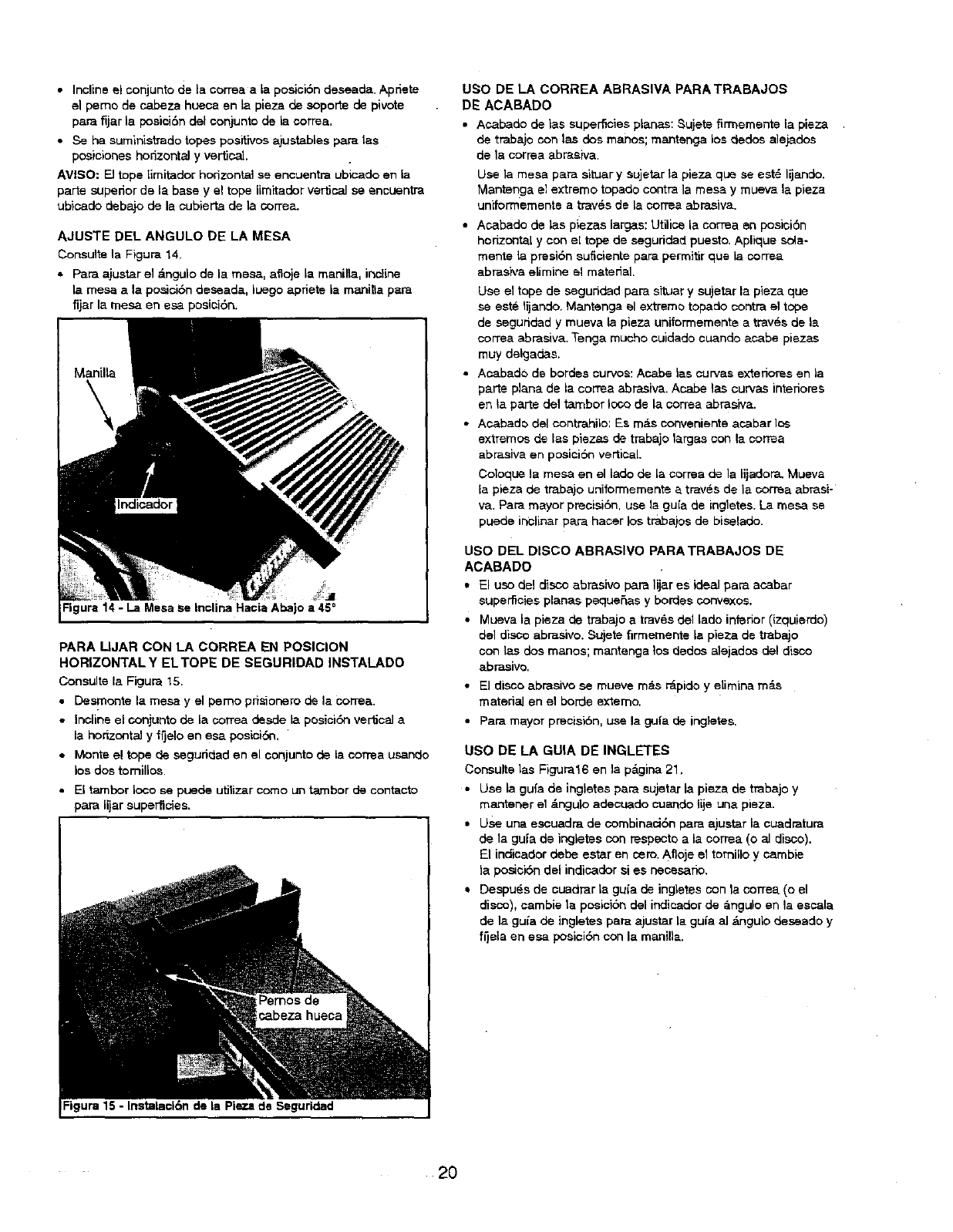
Consulte la Figura 14.
• Pars ajustar el _.ngulo de la mesa, afloje la manilta, incline
la mesa a la po_ici6n deseada, luego apriete la manilla pars
fijar la mesa en esa posici6n.
Manilla
Figura 14 - La Mesa Se Indiina Ha€is Abajo a 4$ =
PARA IIJAR CON LA CORREA EN POSICION
HORIZONTAL Y ELTOPE DE SEGURIDAD INSTAl-ADO
Consulte la Figura 15,
•Desmonte la mesa y el pemo prisionero de la cortes.
• Incline el conjunto de la correa desclelaposici6n veriical a
la horizontal y frjelo en esa poalci6n.
•Monte el tope de seguddad en el conjunto de la correa usando
los dos tomillos.
• El tambor Ioco se puede utilizar come un tambor de contacto
pars lijar superficies. I
Figura 15 - Instalaci6n de la Piet.a de Seguridad
use DE LA CORREA ABRASIVA PARATRABAJOS
DE ACABADO
• Acabado de }as superficies planas: Sujete firmemente la piesa
de trabajo con las dos manes; mantanga los dedce alejados
de la correa abra.<wa.
Use lamesa pars situar y sujetar lapieza que se eat6 lijando.
Mantenga el extreme topado contra la mesa y mueva la pieza
uniforrnemente atray,s de la correa abrasiva.
• Acabado de las piezas fergas: Utilioe la correa en pesieibn
horizontal y con el tope de seguridad puesto. Aplique sdia-
menteta presibn euficiente pars permitir que la correa
abras_a elimine el material
Use el tope de seguridad pars situar y sujetar la pieza que
se est_ lijando. Mantenga el extreme topedo contra el tope
de seguridad ymueva ta pieza uniformemente a traves de la
cortes abrasiva Tenga mucho cuidado cuando acabe piezas
rnuy delgadas
• Acabado de hordes curves: Acabe lae curvas extedorea en la
parts plans de la correa abrasiva Acabe las curvas interferes
en la parte de1 tambor Ioco de la oorrea abraeiva
• Acabado del contrahilo: Es m&s conveniente acabar los
extremes de las piezas de trabajo largas oon la correa
abrasiva en posicibn vertical.
Coloque la mesa en el lade de la correa de la lijadora. Mueva
la pieza de trabajo uniformemente a tray,s de la correa abrasi-
vs. pars mayor precialbn, use la gu[a de ingletes. La mesa se
puede inclinar pars hacer los trabajos de biselado.
Use DEL DISCO ABRASIVe PARATRABAJOS DE
ACABADO
• El usu del disco abrasive pars lijar es ideal para acabar
superficies planas peque_as y hordes convexos.
• Mueva la pieza de trabajo a traves del lade inferior (izquierdo)
del disco abrasive. Sujete firmemente la pieza de trabajo
con las dos manes; mantenga toe dedos alejados del disco
abrasive
• El disco abrasive se mueve m_ts r_pido y elimina m&s
material en el borde externo.
•Para mayor precisi6n, use la gufa de ingletes.
use DE LA GUIA DE INGLETES
Consulte las Figura16 en la p_gina 21,
• Use la gufa de ingletes para sujetar la pieza de trabajo y
mantener el _ngulo adecuado cuando lije una pieza.
• Use una escuadra de combinaci6n pars ajustar la cuadratura
de la gu[a de ingletes con respecto ala correa (o al disco).
El indicador debe eetar en cem. Afloje el tornillo y eambie
la posici6n del indicador si es neoesario,
•Despu6s de ouadrar la guia de ingletes con la cortes (o el
disco), cambie ta poalci6n dal indieador de angulo en la escala
de la gu[a de ingletes pars ajustar la guia al &ngufe deseado y
fijela en esa peeiciSn con la manilla.
2O
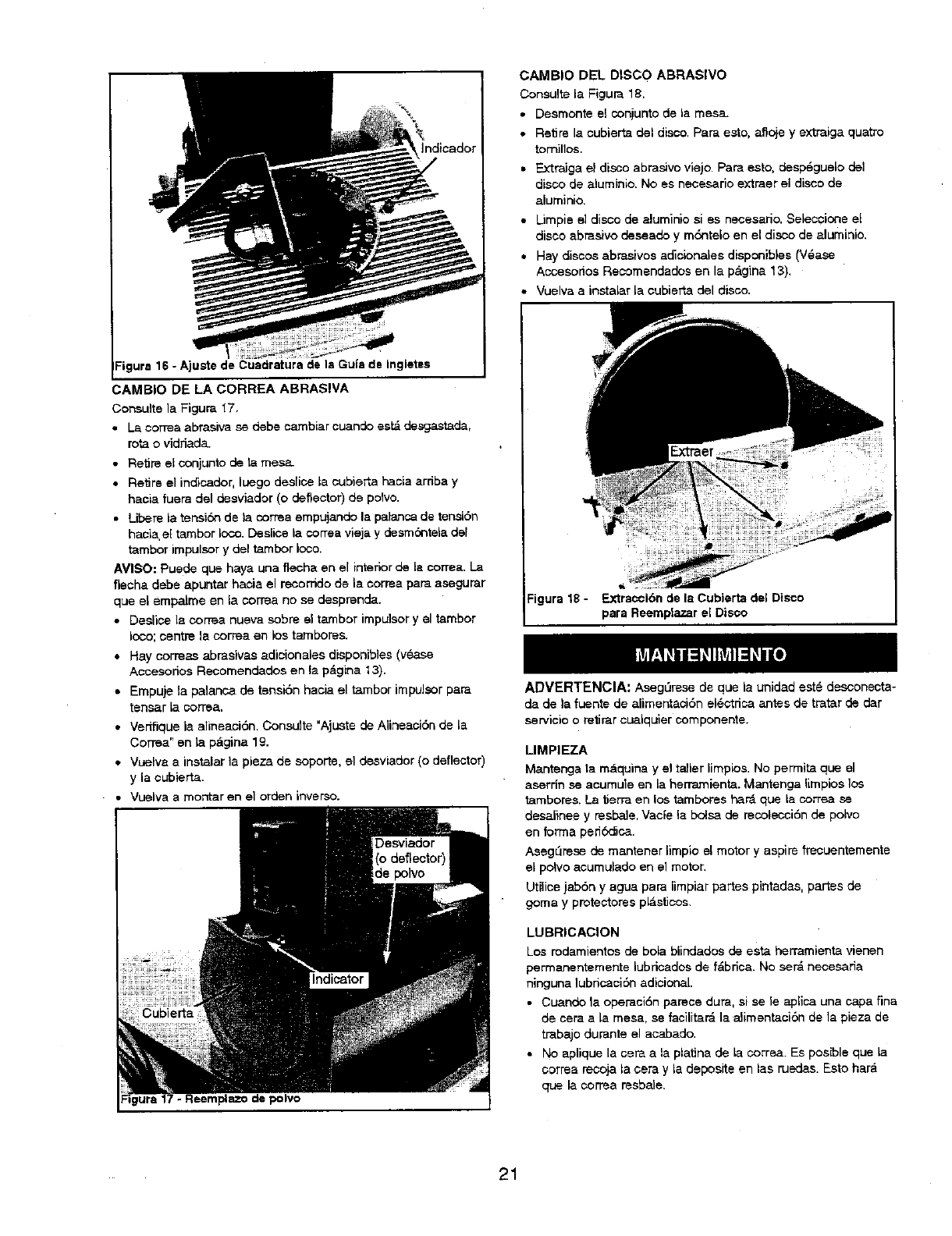
CAMBIO DEL DISCO ASRASIVO
Consults la Figure 18.
• Desmonte el conjunto de la mesa.
•Retire la cubierta del disco. Para esto, atioje y extraiga quatro
tomillos.
• E.ztraiga e! disco abrasive viejo. Para esto, desp6guelo del
disco de aluminio. No es necesario extraer el disco de
aluminio.
• Limpie el disco de aluminio si es necesario. Seleccione el
disco abrasive deseade y m6ntelo en el disco de aluminio,
•Hey discos abrasivos adicionales disponibles (V6ase
Accesorios Rsccmendados en la pdgina 13).
Vuelva ainstalar la cubierta del disco.
--igura 16 - Ajuste de Cuadratura de Is GLlia de Ingletes
CAMBIO DE LA CORREA ABRASIVA
Consults la Figura !7.
• La correa abrasiva se debe carnbiar cuando est', desgastada,
ro_ o vidriada`
• Retire el conjunto de la mesa.
•Retire el indicador, luego desrice Lacubierta hacia arnba y
hacia fuera del desviador (o deflector) de polvo.
• Libere la tensiSn de Ja correa empujando la palanca de tensi6n
hacia, e[ tambor Ioco. De.lice la ¢orrea vieja y desm6ntela del
tambor impulsor y del tambor Ioco.
AVISO: Puede que hays una fiecha en el interior de Lacorrea. La
flecha debe apuntar hacia el recomdo de la correa pare asegurer
que el empalme en la cortes no se desprenda.
• De_ice la correa nueva sobre el tambor impulsor y el tambor
Ioco; centre Is cortes en )os tambores.
• Hay correas abrasivas adicionales disponibles (v_se
Accesorios Recomendados en la p&gina _3).
• Empuje la palanca de tensi6n hacia el tambor impulsor pare
tsnsar la corrsa`
• Vedtique la alineaci6n. Consulte "Ajuste de Aiineecibn de La
Cerrea" en la pdgina 19.
•Vuelva ainstalar Is pisza de soporte, el desviador (o deflector)
y la oubierta.
• VLlelva amo;'ttar en el orden i13ver_3.
de polvo
:igura 18 -Extracci6n de la Cubierta del Disco
pare Reemplazar el Disco
ADVERTENCIA: Aseg,',rese de que la unidad est_ desconecta-
da de Isfuente de alimentaci6n ei6ctdca antes de tretar de dar
servicio o retirar oualquier components.
LIMPIEZA
Mantenga ta mdquina y el taller limpios. No permits que el
aserdn se acumule en la herr'amienta. Mantenga I[mpios los
tambores. La tierra en los tambores har_ que la correa se
desalinee y resl::_e, Vac_e la boise de recolecciSn de polvo
en forms ped6dica.
Aseg,',rese de mantener limpio el motor y aspire frecuentemente
el poIvo acumulado en el motor.
Utilice jab6n y ague para limpiar partes pintadas, partes de
goma y protectores pl_.sticos.
LUBRICACION
Los rodareientos de bola blindados de esta herramienta vienen
permanentemente lubdoados de f&brica. No ser_ necesaria
ninguna lubdcacibn adicional.
•Cuando la operaci6n parece dure, si se le aplica una capa fine
de ceraa Is mesa, se facilitar_ la aJimentaci6n de la pieza de
trabajo durante el acabado.
• No apSque la cere ala platina de la correa. Es posible que la
sorrea receja la cera y la deposite en las ruedas. Esto har_
que la correa resbale.
21

MANTENGA LA HERRAMIENTA EN BUENAS
CONDICIONES
•Si el cord6n de alimentaciSn estd descjastado, cortado o
dar_ado ell cualquier manera, ¢.Ambielo irtmediatamente.
•Reemplace los componentes abrasivos desgastados seg,',n
s_a _oe _,at] o,
• Reemplace todas las partes que est@n da5adas oque falten,
VAIgase de la Iista de piezas incluida para solicitar piezas de
repuesto.
CuaJquier intento de reparar el motor puede constituir un peligro
amenos que sea realizado por un t6cnico profesionaJ. El servicio
de reparaciSn est_ disponible en su tienda Sears m_;scemana,
22
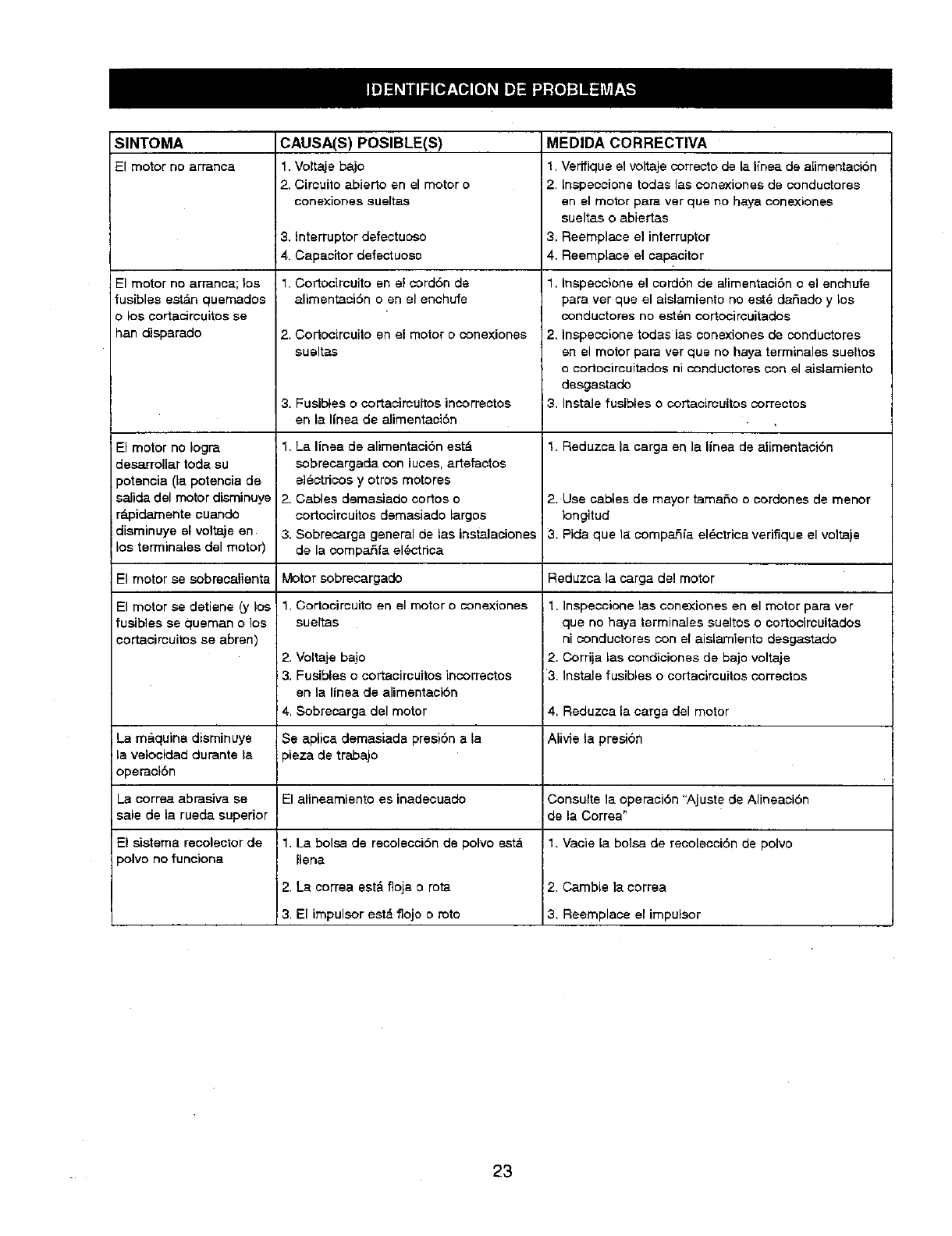
SINTOMA CAUSA(S) POSIBLE(S) MEDIDA CORRECTIVA
El motor no arranca 1. Voitaje bajo 1. Verifique el voltaje correcto de la I{nea de a[imentaci6n
2. Circuito abierto en el motor o 2. Inepecoione todas lae conexiones de conductores
oonexiones sueltas en el motor para ver que no haya conexionee
sueltas o abiertas
3, Interruptor defectuoso 3. Reemplace el interruptor
4. Capacitor defectuoso 4. Reemplace el capacitor
1. Cortocircuito en el cordSn de
alimentaciSn o en el enchufe
El motor no arranca; los
fusibles est_n quemados
o los cortacircuitoe se
han disparado
El motor no Iogra
deserrollar toda su
patencia (la potencia de
salida del motor disminuye
rdpidamente ouando
disminuye el voitaje en
los terminales del motor)
2. Cortocircuito en el motor o cone×iones
sueltas
3. Fusibles o cortacircuitos incorrectos
en la Ifnea de alimentaciSn
1. La Ifnea de alimentaci6n est&
sobrecargada con luces, artefactos
el6ctdcos y otros motores
2. Cables demasiado cortos o
cortocircuitos demasiado largos
3. Sobrecarga general de las instalaoiones
de la compa6fa el@ctrica
1. Inspeccione el cord6n de afimentacidn o el enchufe
para ver que el aislamiento no est_ dat_ade y los
conductores no est_n cortocircuitados
2, Inspeccione todas las conexiones de conductores
en el motor para ver que no haya terminales sueltos
o cotlocircuitados ni conductores con el aislamiento
desgastade
3. Instale fusibles o cortacircuitos correctos
1. Reduzca la carga en la linea de alimentaci6n
2. Use cables de mayor tamafio o cordone$ de menor
Iongitud
3. Pida que ;a compaSla el#ctrica verifique el voitaje
El motor se sobrecalienta Motor sobrecargado Reduzca la carga de1motor
El motor se detiene (y los
fusiblas se quaman o los
corLacircuitos se aBren)
1. Cortocircuito en el motor o conexiones
sueltas
2. Voltaje bajo
3. Fueibles o cortacircuitoe incorrectoe
en la linea de alimentaci6n
4, Sobrecarga del motor
1. Inspeccicoe tas oonexiones en el motor para ver
qua no haya terminalee eueltos o cortocircuitados
ni conductores con e{ aielamiento desgaetado
2. Corrija las condiciones de bajo voltaje
3. Inetale fusibles o eortacircuitos correctos
4, Reduzca la carga del motor
La m&quina disminuye Se aplica demasiada presibn a la Alivie la presibn
la velocidad durante la 3ieza de trabajo
operaci6n
La correa abrasiva se El alineamiento es inadecuado Consulte la operaci6n "Ajuste de Alineaci6n
sale de la rueda superior de la Correa"
El sistema recolector de 1. La bolsa de recolecci6n de polvo est& 1. Vacie Eabolsa de recolecci6n de polvo
polvo nofuneiona Ilena
2, La correa estd floja 0 rota 2. Cambie Is correa
3. El impulsor estd flojo o roto 3. Reemplace el impulsor
23

Your Home
For repair-in your home-of all major brand appliances,
lawn and garden equipment, or heating and cooling systems,
no matter who made it, no matter who sold it!
For the replacement parts, accessories and
owner's manuals that you need to do-it-yourself.
For Sears professional installation of home appliances
and items like garage door openers and water heaters.
1-800-4-MY-HOME ® (1-800-469-4663)
Call anytime, clay or night (U.S.A. and Canada)
www.sears.com www.sears.ca
Our Home
For repair of carry-in items like vacuums, lawn equipment,
and electronics, call or go on-line for the location of your nearest
Sears Parts & Repair Center.
1-800-488-1222
Call anytime, day or night (U.S.A. only)
www.saars.com
To purchase a protection agreement (U.S.A.)
or maintenance agreement (Canada) on a product serviced by Sears:
1-800-827-6655 (U.S.A.) 1-800-361-6665 (Canada)
Para pedir servicio de reparaciSn
adomicilio, y para ordenar piezas:
1-888-SU-HOGAR _
(1-888-784-6427)
Au Canada pour service en fran_.ais:
1-800-LE-FOYER Mc
®RegisteredTrademark /TMTrademark /sw ServiceMark of Sears, Roebuck and Co.
TM SM
®Marca Registrada/Marca de F_brica /Matca de Serviciode Sears, Roebuckand Co.
MC _113
Marque de commerce !Marque d_l:_s_e de Sears, Roebuck and Co, © Seam, Roebuck and Co.
