Crystal Video Technology 705120180319 HD Wireless Video Transmitter User Manual

Shenzhen Crystal Video Technology Co.,LTD. HD Wireless Video Transmitter Users Manual

User Manual

Version:1.0PRO 200 2017.12.27User ManualZero LatencyModel: 7051(Transmitter)3051(Receiver)
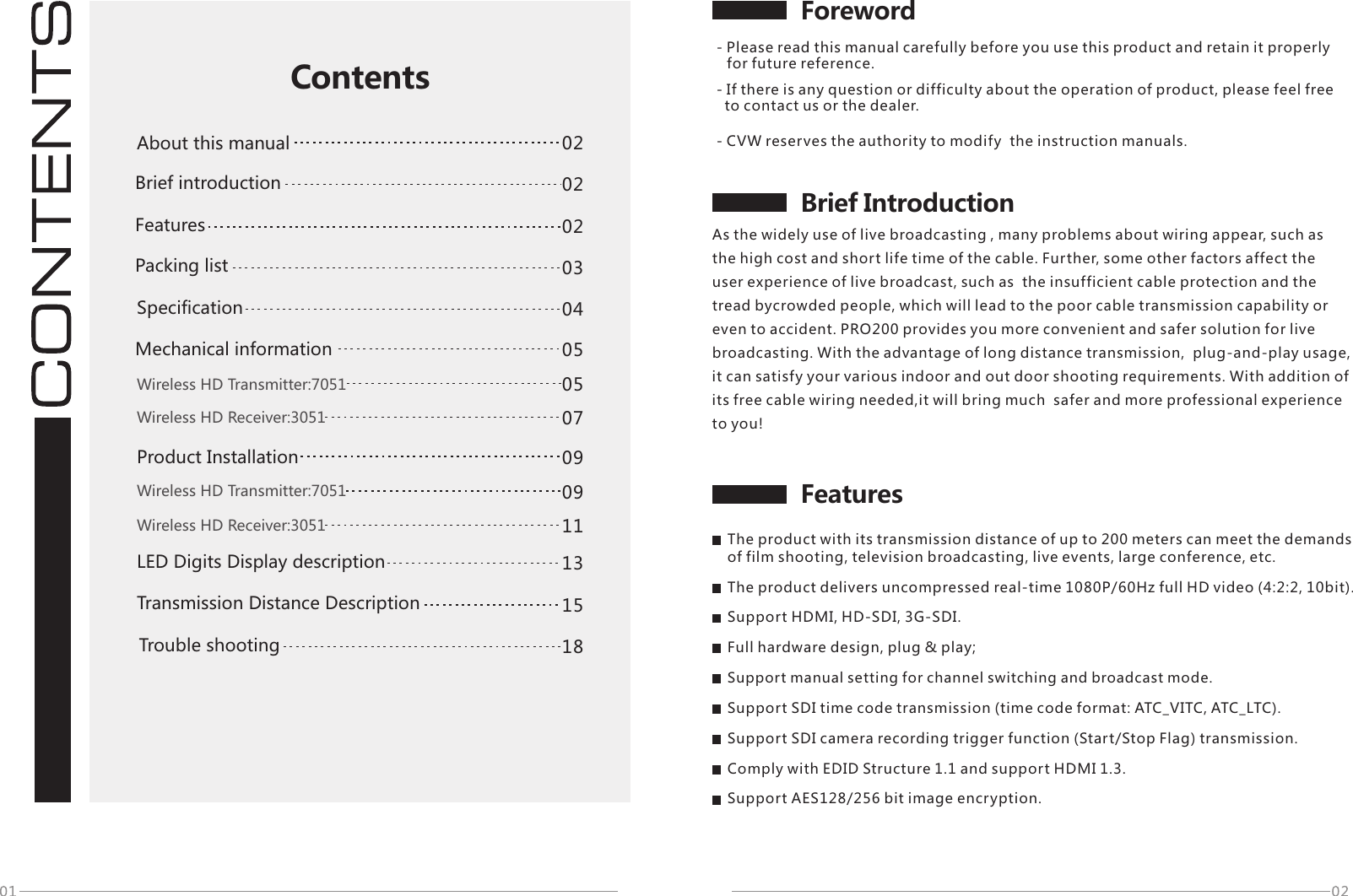
Foreword- Please read this manual carefully before you use this product and retain it properly     for future reference.FeaturesBrief Introduction02020304050913151805070911ContentsAbout this manual Packing list Brief introductionSpecificationWireless HD Transmitter:7051Wireless HD Receiver:3051Wireless HD Transmitter:7051Wireless HD Receiver:3051Trouble shootingMechanical information- CVW reserves the authority to modify  the instruction manuals.- If there is any question or difficulty about the operation of product, please feel free    to contact us or the dealer.As the widely use of live broadcasting , many problems about wiring appear, such as the high cost and short life time of the cable. Further, some other factors affect the user experience of live broadcast, such as  the insufficient cable protection and the tread bycrowded people, which will lead to the poor cable transmission capability or even to accident. PRO200 provides you more convenient and safer solution for live broadcasting. With the advantage of long distance transmission,  plug-and-play usage, it can satisfy your various indoor and out door shooting requirements. With addition of its free cable wiring needed,it will bring much  safer and more professional experience to you!02FeaturesThe product with its transmission distance of up to 200 meters can meet the demands of film shooting, television broadcasting, live events, large conference, etc.The product delivers uncompressed real-time 1080P/60Hz full HD video (4:2:2, 10bit).Support HDMI, HD-SDI, 3G-SDI.Full hardware design, plug & play;Support manual setting for channel switching and broadcast mode.Support SDI time code transmission (time code format: ATC_VITC, ATC_LTC).Support SDI camera recording trigger function (Start/Stop Flag) transmission.Comply with EDID Structure 1.1 and support HDMI 1.3.Support AES128/256 bit image encryption.LED Digits Display descriptionProduct Installation Transmission Distance Description
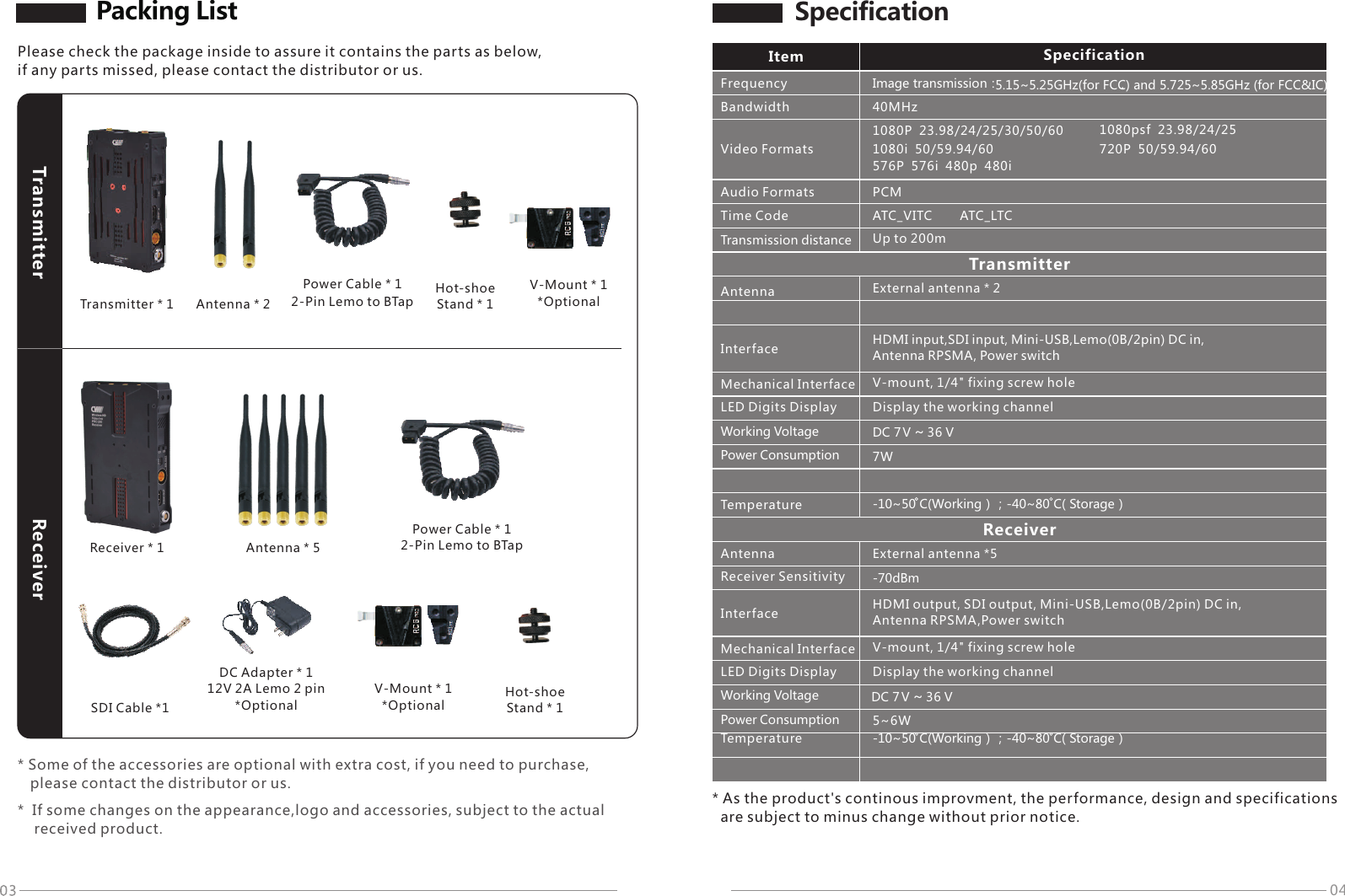
042-Pin Lemo to BTapSDI Cable *1Packing ListPlease check the package inside to assure it contains the parts as below, if any parts missed, please contact the distributor or us.Transmitter * 1  Antenna * 2 TransmitterPower Cable * 1  Hot-shoe Stand * 1 V-Mount * 1*Optional 2-Pin Lemo to BTapReceiver * 1  Antenna * 5 Hot-shoe Stand * 1 Power Cable * 1 V-Mount * 1*Optional DC Adapter * 112V 2A Lemo 2 pin*Optional Receiver* Some of the accessories are optional with extra cost, if you need to purchase,    please contact the distributor or us.*  If some changes on the appearance,logo and accessories, subject to the actual    received product.Frequency1080P  23.98/24/25/30/50/60 1080psf  23.98/24/251080i  50/59.94/60 720P  50/59.94/60576P  576i  480p  480i40MHzPCMATC_VITC ATC_LTCUp to 200mTransmitterAntenna External antenna * 2Working Voltage DC 7 V~36V7WTemperatureReceiverWorking VoltagePower Consumption 5~6WImage transmission:LED Digits Display V-mount, 1/4" fixing screw hole -10~50 C(Working);-40~80 C( Storage)Item SpecificationBandwidthVideo FormatsAudio FormatsTime CodeTransmission distanceHDMI input,SDI input, Mini-USB,Lemo(0B/2pin) DC in, Antenna RPSMA, Power switchMechanical InterfacePower ConsumptionAntenna External antenna *5Receiver Sensitivity -70dBmHDMI output, SDI output, Mini-USB,Lemo(0B/2pin) DC in, Antenna RPSMA,Power switchMechanical Interface V-mount, 1/4" fixing screw hole Temperature -10~50 C(Working);-40~80 C( Storage) InterfaceInterface* As the product's continous improvment, the performance, design and specifications   are subject to minus change without prior notice.SpecificationLED Digits Display Display the working channelDisplay the working channelDC 7 V~36V5.15~5.25GHz(for FCC) and 5.725~5.85GHz (for FCC&IC). .
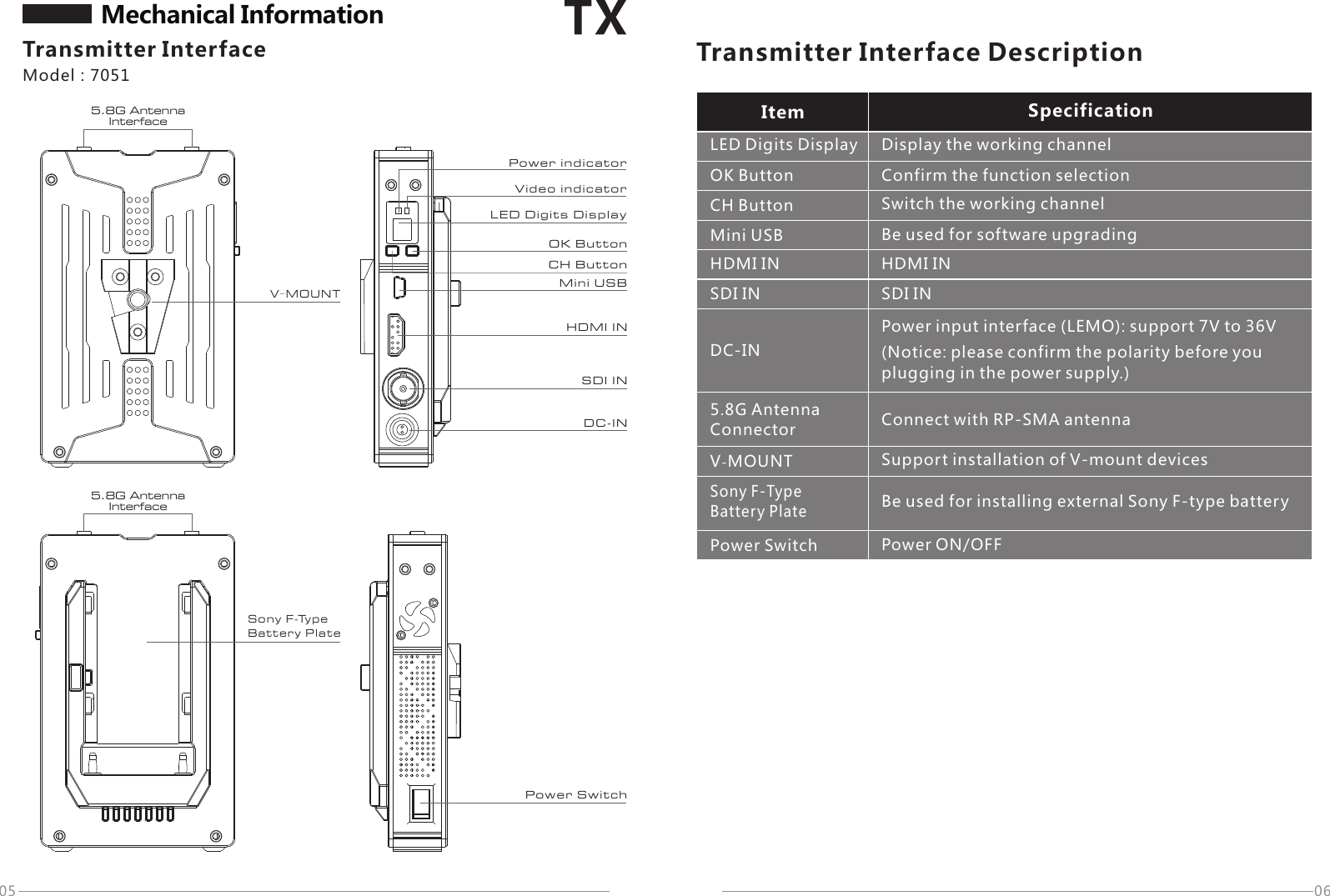
Transmitter InterfaceLED Digits DisplayOK Button   Confirm the function selectionCH Button Switch the working channelHDMI IN HDMI INSDI IN SDI INDC-INPower input interface (LEMO): support 7V to 36V5.8G Antenna ConnectorPower Switch Power ON/OFFV-MOUNTV-MOU NTSon y F-Ty pe Bat te ry Pla te Power S wi tchDisplay the working channelMini USB Be used for software upgradingSony F-Type Battery Plate0605Mechanical InformationModel:70515.8G Antenna InterfacePower i nd ica to rVid eo i ndi ca torOK Bu tt onCH Bu tt onMin i US BHDM I INSDI I NDC- INTransmitter Interface DescriptionItem Specification(Notice: please confirm the polarity before you plugging in the power supply.)Connect with RP-SMA antennaSupport installation of V-mount devicesBe used for installing external Sony F-type batteryLED D ig its D is pla y5.8G Antenna Interface
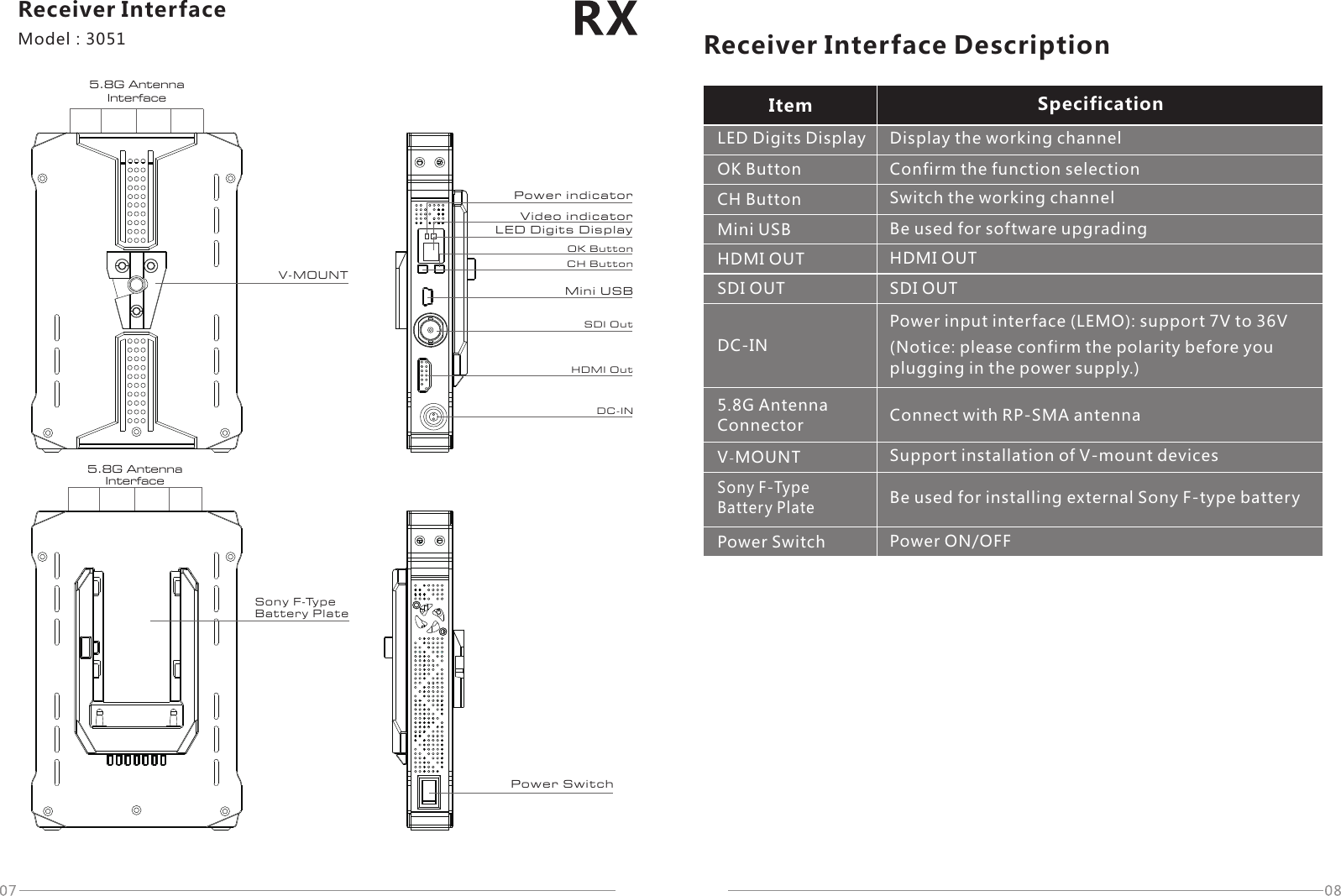
Receiver InterfaceModel:30515.8G Antenna InterfacePower i nd ica to rVid eo i ndi ca torMin i US BLED D ig its D is pla yOK ButtonCH ButtonSDI OutHDMI OutDC-INV-MOU NT5.8G Antenna InterfaceSon y F-Ty pe Bat te ry Pla tePower S wi tchLED Digits DisplayOK Button   Confirm the function selectionCH Button Switch the working channelHDMI OUT HDMI OUTSDI OUT SDI OUTDC-INPower input interface (LEMO): support 7V to 36V5.8G Antenna ConnectorPower Switch Power ON/OFFV-MOUNTDisplay the working channelMini USB Be used for software upgradingSony F-Type Battery PlateReceiver Interface DescriptionItem Specification(Notice: please confirm the polarity before you plugging in the power supply.)Connect with RP-SMA antennaSupport installation of V-mount devicesBe used for installing external Sony F-type battery
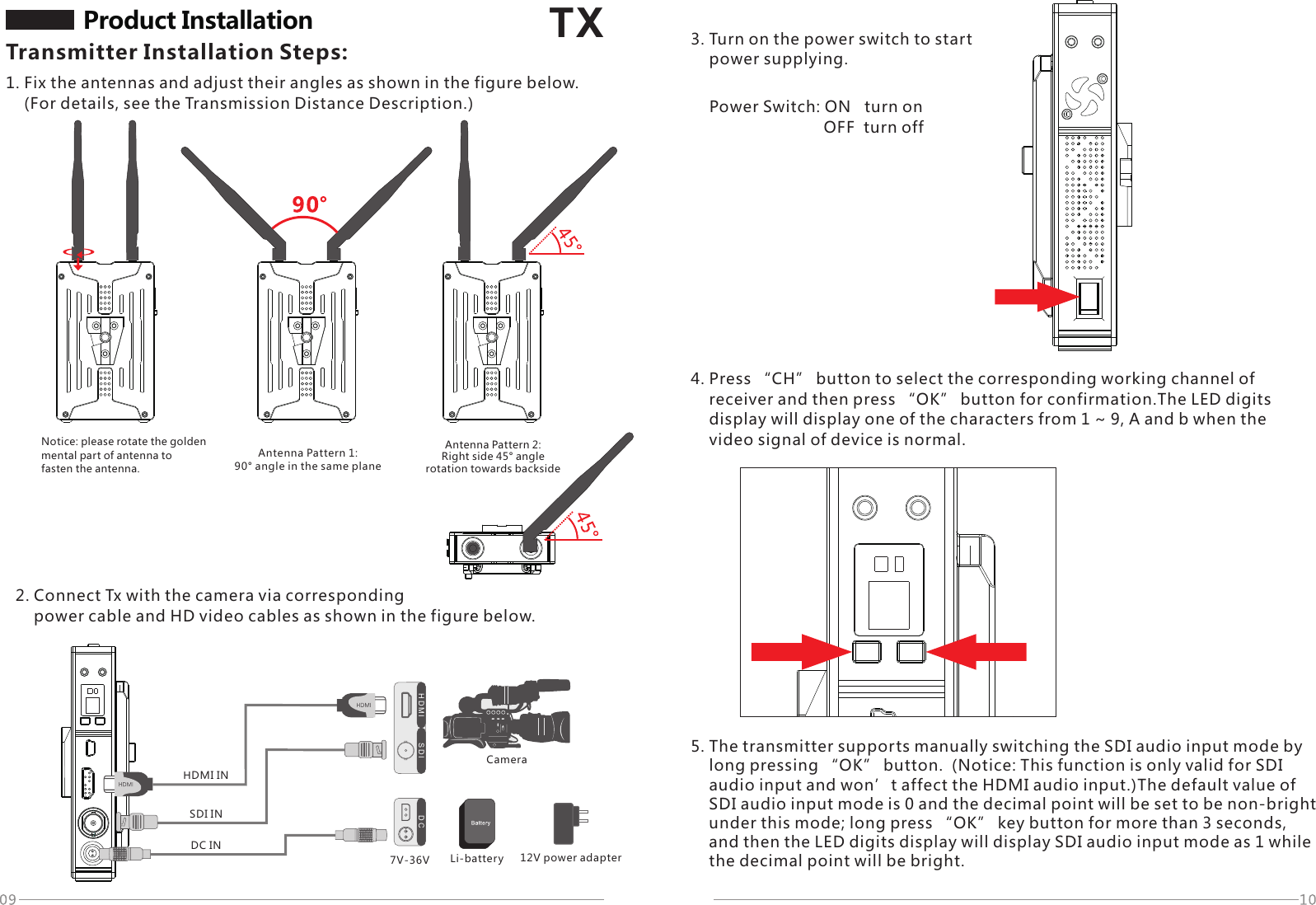
1. Fix the antennas and adjust their angles as shown in the figure below.     (For details, see the Transmission Distance Description.)TXH D M I S D I D CDC INSDI INHDMI IN7V-36VProduct Installation Transmitter Installation Steps:Notice: please rotate the golden mental part of antenna tofasten the antenna.Antenna Pattern 1: 90° angle in the same plane Antenna Pattern 2: Right side 45° angle rotation towards backside2. Connect Tx with the camera via corresponding     power cable and HD video cables as shown in the figure below.3. Turn on the power switch to start     power supplying.Power Switch: ON   turn on                          OFF  turn off4. Press “CH” button to select the corresponding working channel of     receiver and then press “OK” button for confirmation.The LED digits     display will display one of the characters from 1 ~ 9, A and b when the     video signal of device is normal.5. The transmitter supports manually switching the SDI audio input mode by     long pressing “OK” button.  (Notice: This function is only valid for SDI     audio input and won’t affect the HDMI audio input.)The default value of     SDI audio input mode is 0 and the decimal point will be set to be non-bright     under this mode; long press “OK” key button for more than 3 seconds,     and then the LED digits display will display SDI audio input mode as 1 while     the decimal point will be bright.Li-battery 12V power adapterCamera
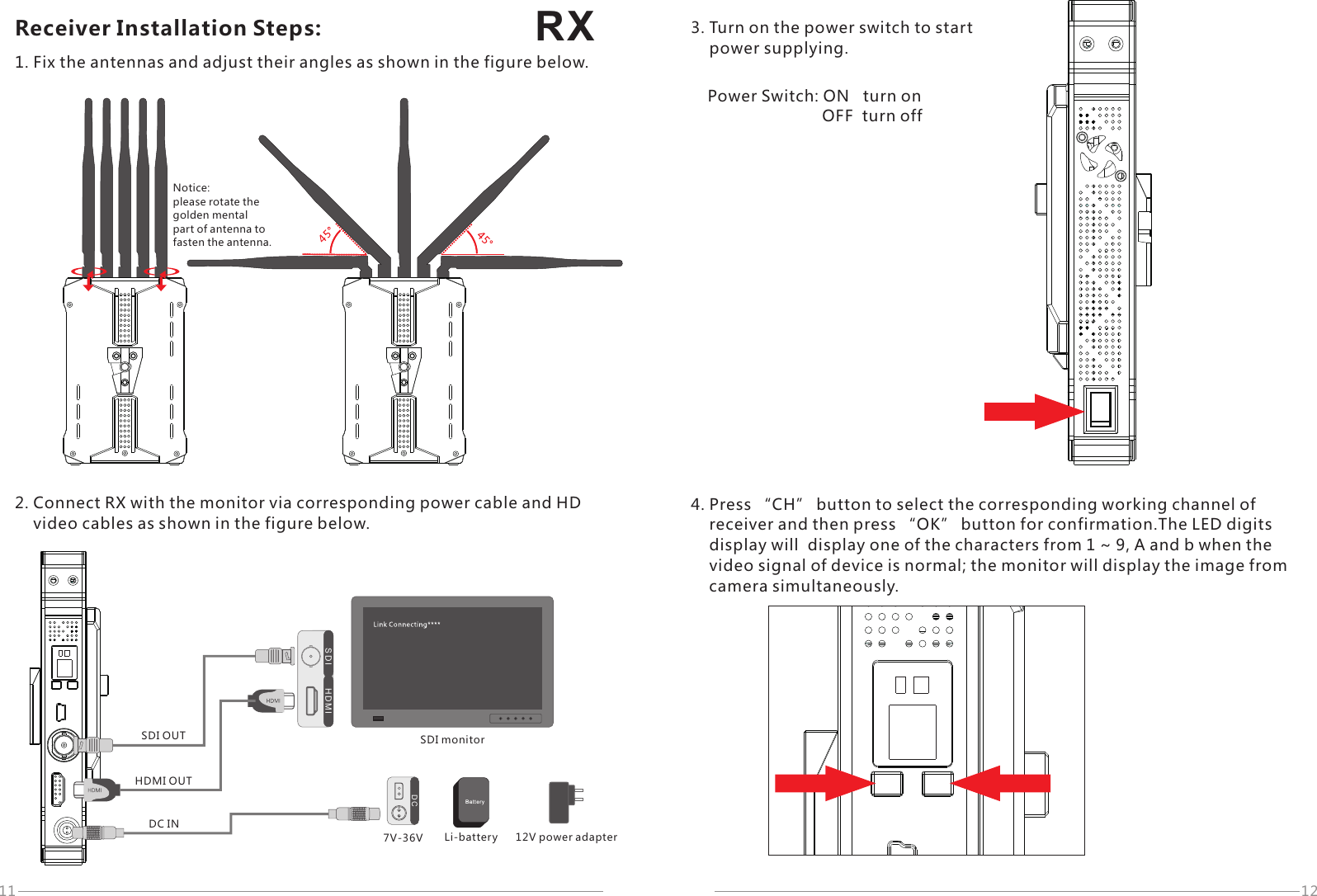
RX11 12D CDC IN7V-36VH D M IS D ISDI monitorSDI OUTHDMI OUTReceiver Installation Steps:1. Fix the antennas and adjust their angles as shown in the figure below.Notice: please rotate the golden mental part of antenna tofasten the antenna.2. Connect RX with the monitor via corresponding power cable and HD     video cables as shown in the figure below.12V power adapterLi-battery3. Turn on the power switch to start     power supplying.Power Switch: ON   turn on                          OFF  turn off4. Press “CH” button to select the corresponding working channel of     receiver and then press “OK” button for confirmation.The LED digits     display will  display one of the characters from 1 ~ 9, A and b when the     video signal of device is normal; the monitor will display the image from     camera simultaneously.
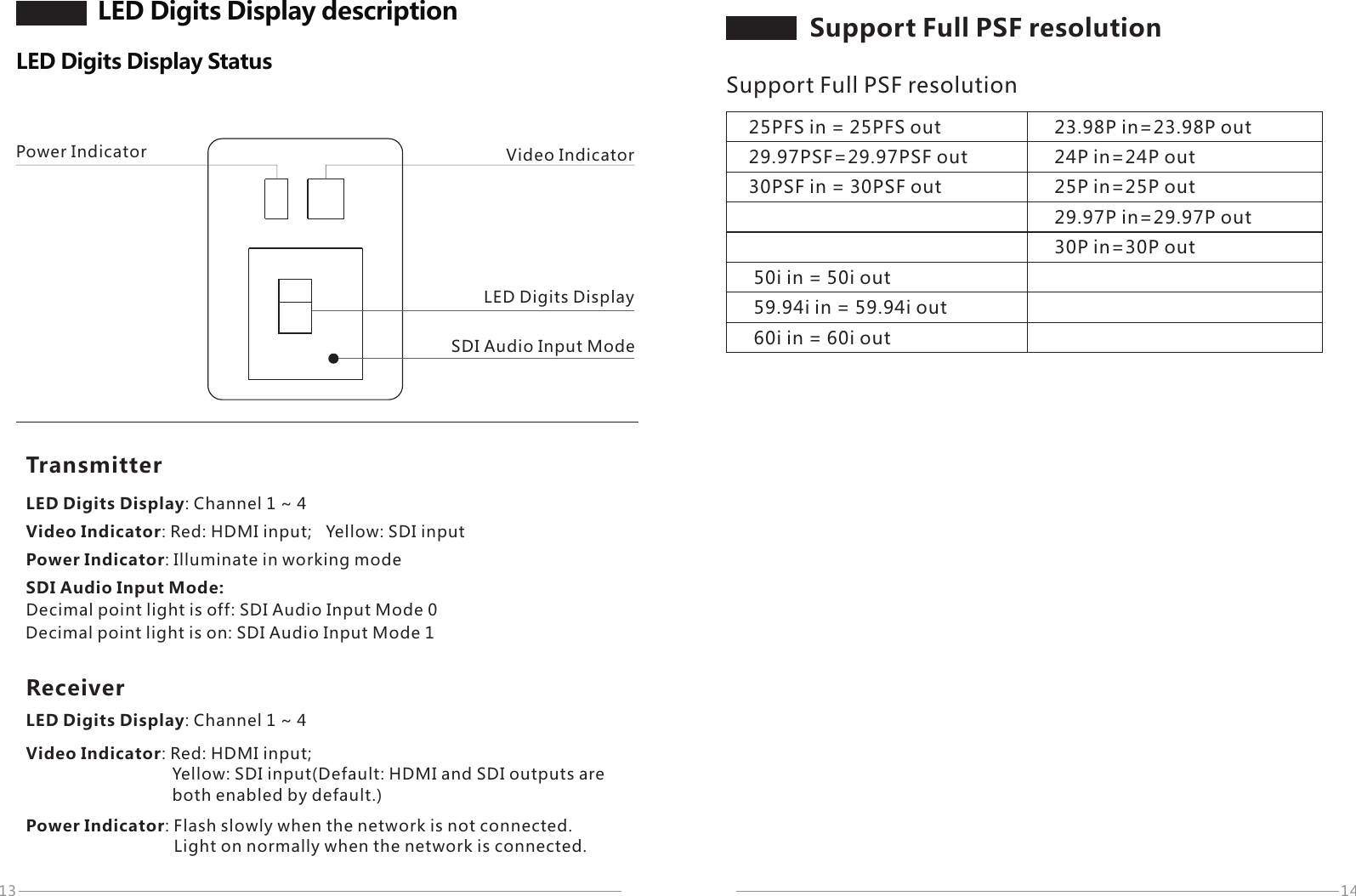
13 14LED Digits DisplayTransmitterPower Indicator Video IndicatorSDI Audio Input ModeLED Digits Display descriptionLED Digits Display StatusLED Digits Display: Channel 1 ~ 4Video Indicator: Red: HDMI input;   Yellow: SDI input  Power Indicator: Illuminate in working mode SDI Audio Input Mode:Decimal point light is off: SDI Audio Input Mode 0Decimal point light is on: SDI Audio Input Mode 1ReceiverLED Digits Display: Channel 1 ~ 4Video Indicator: Red: HDMI input;                                 Yellow: SDI input(Default: HDMI and SDI outputs are                                both enabled by default.)Power Indicator: Flash slowly when the network is not connected.Light on normally when the network is connected.25PFS in = 25PFS out29.97PSF=29.97PSF out30PSF in = 30PSF out 23.98P in=23.98P out24P in=24P out25P in=25P out29.97P in=29.97P out30P in=30P out50i in = 50i out59.94i in = 59.94i out60i in = 60i outSupport Full PSF resolution Support Full PSF resolution
15 16Provided that the product is working under the condition of line of sight distance by adopting the optimal installation:TX:7051RX:3051TX:7051RX:3051Transmission Distance DescriptionTransmission Distance1. Make sure that the fixed angle between transmitter antennas is 90° in the same plane,     and enable the face-to-face transmission between transmitter and receiver.     Under such condition, the transmission distance is up to 300 meters.2. Rotate the right side of the 2 transmitter antennas towards backside by 45°     as refer to the Antenna Pattern 2 as mentioned above. Under such condition,     the transmission distance is around 200 meters when the transmitter is revolving     during the shooting process.3. If you require the transmission distance over 300 meters, please adopt the plate     antennas which are available from us for transmitter. Under such condition,     the transmission distance is over 1000 meters.Optimal DistanceMake receiver to stand vertically; adjust antennas to a fan-shaped arrangement;Make transmitter to stand vertically; adjust antennas to 90° angle in the same plane;The distance of face-to-face transmission between TX and RX will be up to 300 meters (line of sight).Standard DistanceMake receiver to stand vertically; adjust antennas to a fan-shaped arrangement;Make transmitter to stand vertically; adjust the right side of the 2 transmitter antennas towards backside by 45°;The distance of non-face-to-face transmission between TX and RX will be up to 200 meters (line of sight).Antenna Pattern 2: Right side 45° angle rotation towards backside
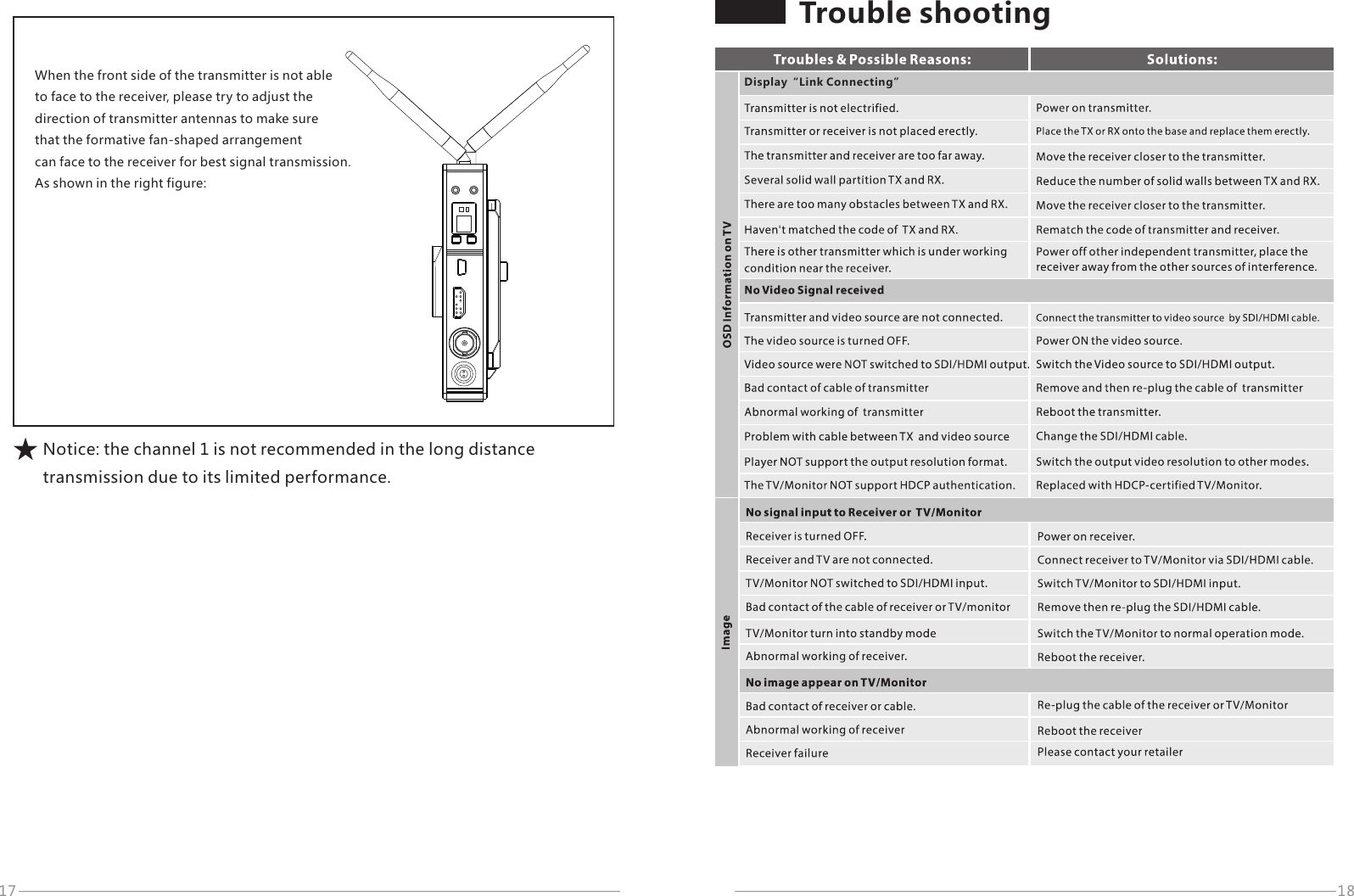
17 18When the front side of the transmitter is not able to face to the receiver, please try to adjust the direction of transmitter antennas to make sure that the formative fan-shaped arrangement can face to the receiver for best signal transmission. As shown in the right figure:Notice: the channel 1 is not recommended in the long distance transmission due to its limited performance.Trouble shootingDisplay“Link Connecting”
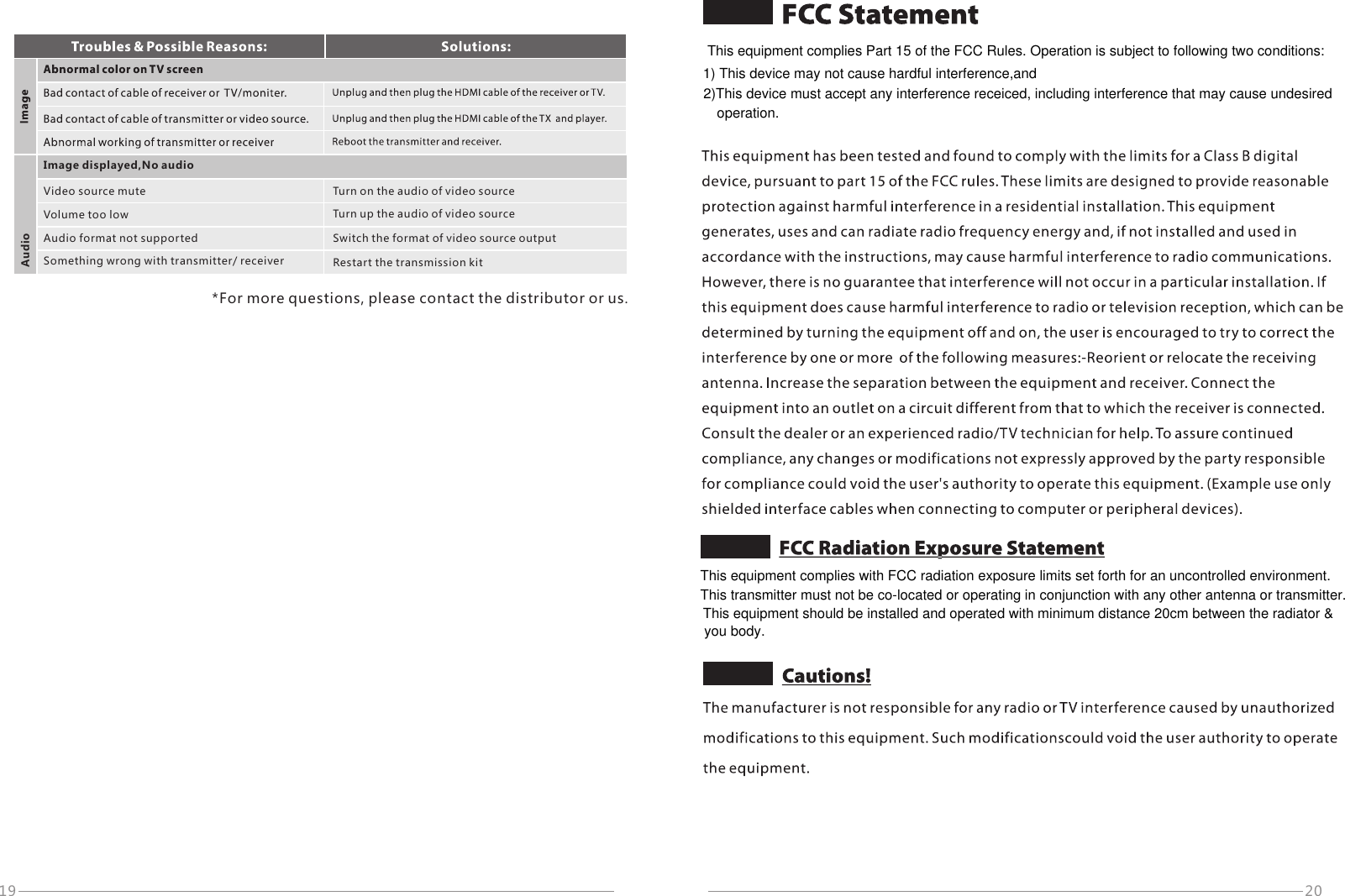
20Image displayed,No audioAudioVideo source muteVolume too lowAudio format not supportedSomething wrong with transmitter/ receiverTurn on the audio of video sourceTurn up the audio of video sourceSwitch the format of video source outputRestart the transmission kit*For more questions, please contact the distributor or us.19This equipment complies with FCC radiation exposure limits set forth for an uncontrolled environment.This transmitter must not be co-located or operating in conjunction with any other antenna or transmitter.This equipment should be installed and operated with minimum distance 20cm between the radiator &you body. This equipment complies Part 15 of the FCC Rules. Operation is subject to following two conditions:1) This device may not cause hardful interference,and2)This device must accept any interference receiced, including interference that may cause undesiredoperation.
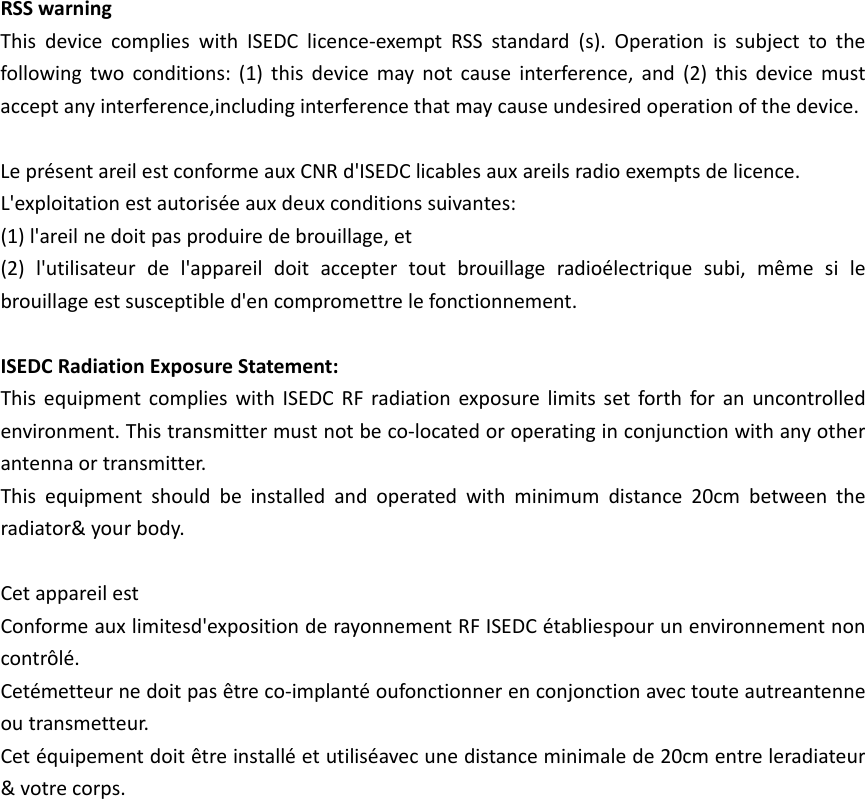
RSSwarningThisdevicecomplieswithISEDClicence‐exemptRSSstandard(s).Operationissubjecttothefollowingtwoconditions:(1)thisdevicemaynotcauseinterference,and(2)thisdevicemustacceptanyinterference,includinginterferencethatmaycauseundesiredoperationofthedevice.LeprésentareilestconformeauxCNRd'ISEDClicablesauxareilsradioexemptsdelicence.L'exploitationestautoriséeauxdeuxconditionssuivantes:(1)l'areilnedoitpasproduiredebrouillage,et(2)l'utilisateurdel'appareildoitacceptertoutbrouillageradioélectriquesubi,mêmesilebrouillageestsusceptibled'encompromettrelefonctionnement.ISEDCRadiationExposureStatement:ThisequipmentcomplieswithISEDCRFradiationexposurelimitssetforthforanuncontrolledenvironment.Thistransmittermustnotbeco‐locatedoroperatinginconjunctionwithanyotherantennaortransmitter.Thisequipmentshouldbeinstalledandoperatedwithminimumdistance20cmbetweentheradiator&yourbody.CetappareilestConformeauxlimitesd'expositionderayonnementRFISEDCétabliespourunenvironnementnoncontrôlé.Cetémetteurnedoitpasêtreco‐implantéoufonctionnerenconjonctionavectouteautreantenneoutransmetteur.Cetéquipementdoitêtreinstalléetutiliséavecunedistanceminimalede20cmentreleradiateur&votrecorps.

Navigation menu