Crystal Video Technology CP030292016818 FREECAST Receiver User Manual

Shenzhen Crystal Video Technology Co.,LTD. FREECAST Receiver

User Manual

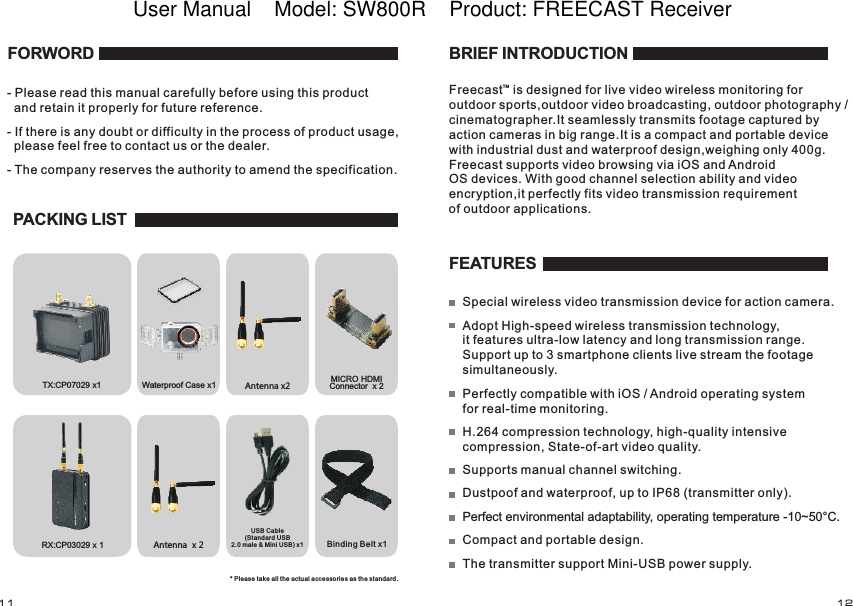
RX:  x 1CP03029Waterproof Case x1 Antenna x2Antenna  x 2Binding Belt x1TX:  x1CP07029 MICRO HDMI Connector  x 2 FORWORD- Please read this manual carefully before using this product   and retain it properly for future reference.- If there is any doubt or difficulty in the process of product usage,   please feel free to contact us or the dealer.- The company reserves the authority to amend the specification. PACKING LISTUSB Cable (Standard USB2.0 male & Mini USB) x1* Please take all the actual accessories as the standard.FEATURESSupports manual channel switching.Dustpoof and waterproof, up to IP68 (transmitter only).Perfect environmental adaptability, operating temperature -10~50°C.Compact and portable design.The transmitter support Mini-USB power supply. BRIEF INTRODUCTIONFreecast   is designed for live video wireless monitoring for outdoor sports,outdoor video broadcasting, outdoor photography / cinematographer.It seamlessly transmits footage captured by action cameras in big range.It is a compact and portable device with industrial dust and waterproof design,weighing only 400g. Freecast supports video browsing via iOS and AndroidOS devices. With good channel selection ability and video encryption,it perfectly fits video transmission requirement of outdoor applications.Special wireless video transmission device for action camera.Adopt High-speed wireless transmission technology, it features ultra-low latency and long transmission range. Support up to 3 smartphone clients live stream the footage simultaneously.Perfectly compatible with iOS / Android operating system for real-time monitoring.H.264 compression technology, high-quality intensive compression, State-of-art video quality.TM11 12User Manual    Model: SW800R    Product: FREECAST Receiver
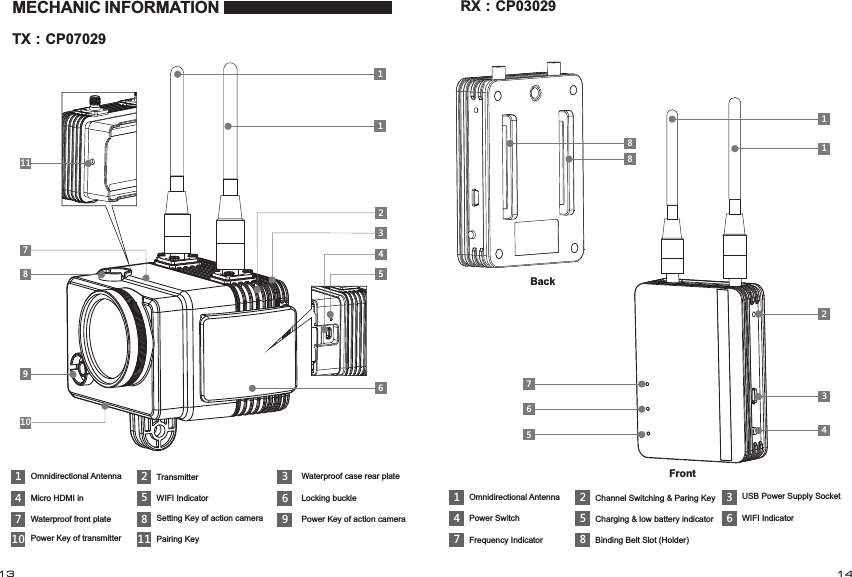
1263712345WIFI Indicator89108Power Key of transmitter6Setting Key of action camera7Power Key of action camera54TransmitterMicro HDMI in Locking buckleWaterproof front plate 91011Pairing Key11Omnidirectional Antenna Waterproof case rear plateMECHANIC INFORMATION1TX:CP0702976514Power Switch7BackOmnidirectional Antenna Frequency IndicatorRX:CP030292342Channel Switching & Paring Key 3USB Power Supply Socket5 6Front888Binding Belt Slot (Holder)WIFI IndicatorCharging & low battery indicator1113 14
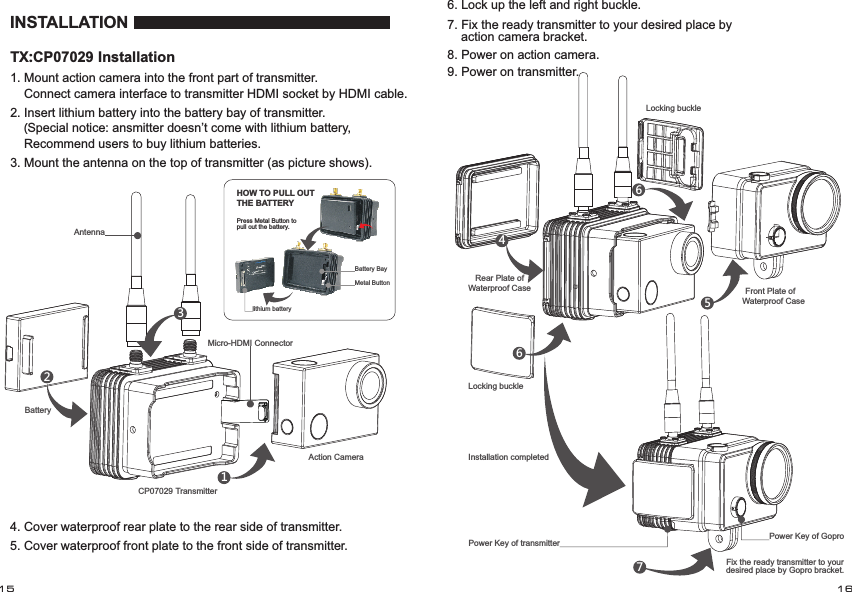
INSTALLATIONMicro-HDMI ConnectorAntenna CP07029 TransmitterAction CameraBattery 1. Mount   into the front part of transmitter.    Connect camera interface to transmitter HDMI socket by HDMI cable.action camera12. Insert lithium battery into the battery bay of transmitter.    (Special notice: ansmitter doesn’t come with lithium battery,     Recommend users to buy lithium batteries.3. Mount the antenna on the top of transmitter (as picture shows).235. Cover waterproof front plate to the front side of transmitter.4. Cover waterproof rear plate to the rear side of transmitter.Battery Baylithium batteryMetal ButtonPress Metal Button to pull out the battery.HOW TO PULL OUT THE BATTERYRear Plate of Waterproof CaseLocking buckle45666. Lock up the left and right buckle.7. Fix the ready transmitter to your desired place by     action camera bracket.Power Key of transmitter78. Power on action camera.9. Power on transmitter.Locking buckle Front Plate of Waterproof CaseInstallation completedPower Key of GoproFix the ready transmitter to your desired place by Gopro bracket.15 16TX:CP07029 Installation
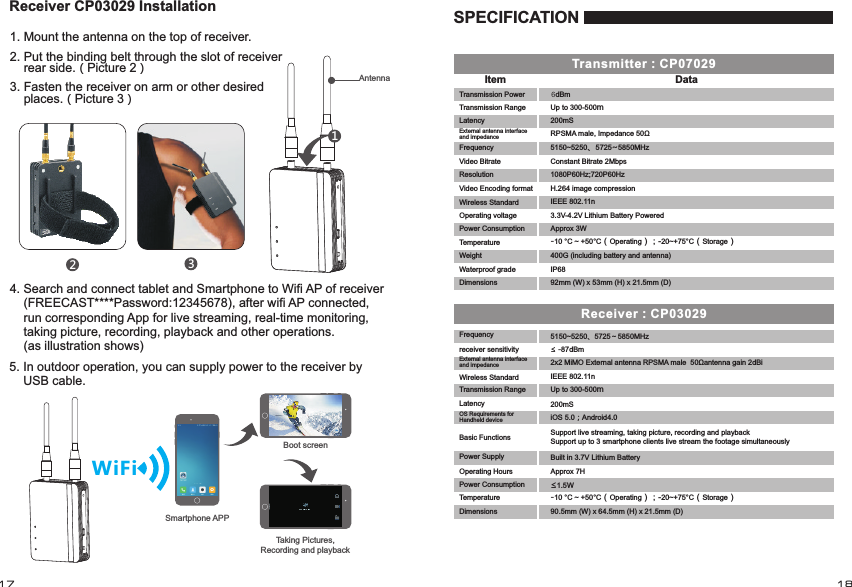
12:45 PM 100%WiFiDataItemTransmitter:CP070295150~5250、5725~5850MHzreceiver sensitivity ≤ -87dBm 2x2 MiMO External antenna RPSMA male  50Ωantenna gain 2dBiIEEE 802.11n200mSOS Requirements for Handheld device  iOS 5.0;Android4.0Basic Functions Support live streaming, taking picture, recording and playbackSupport up to 3 smartphone clients live stream the footage simultaneouslyPower Supply Built in 3.7V Lithium BatteryOperating Hours Approx 7H≤1.5WReceiver:CP0302990.5mm (W) x 64.5mm (H) x 21.5mm (D) 12:45 PM 100% 12:45 PM 100%Boot screenTaking Pictures, Recording and playbackSmartphone APPSPECIFICATION1. Mount the antenna on the top of receiver.2. Put the binding belt through the slot of receiver     rear side.(Picture 2)3. Fasten the receiver on arm or other desired     places.(Picture 3)1234. Search and connect tablet and Smartphone to Wifi AP of receiver     (FREECAST****Password:12345678), after wifi AP connected,     run corresponding App for live streaming, real-time monitoring,     taking picture, recording, playback and other operations.     (as illustration shows)5. In outdoor operation, you can supply power to the receiver by     USB cable.Receiver CP03029 InstallationAntenna DimensionsTransmission RangeLatencyExternal antenna interface and impedanceFrequency Power ConsumptionTemperatureWireless StandardUp to 300-500m-10 °C ~ +50°C(Operating);-20~+75°C(Storage)17 1892mm (W) x 53mm (H) x 21.5mm (D) DimensionsTransmission Power             6dBmTransmission Range Up to 300-500mLatency 200mSExternal antenna interface and impedanceFrequency 5150~5250、5725~5850MHzVideo Bitrate Constant Bitrate 2MbpsResolution 1080P60Hz;720P60HzOperating voltage 3.3V-4.2V Lithium Battery Powered Power Consumption Approx 3WTemperature -10 °C ~ +50°C(Operating);-20~+75°C(Storage)WeightWaterproof grade IP68400G (including battery and antenna) Video Encoding format H.264 image compressionRPSMA male, Impedance 50ΩIEEE 802.11nWireless Standard
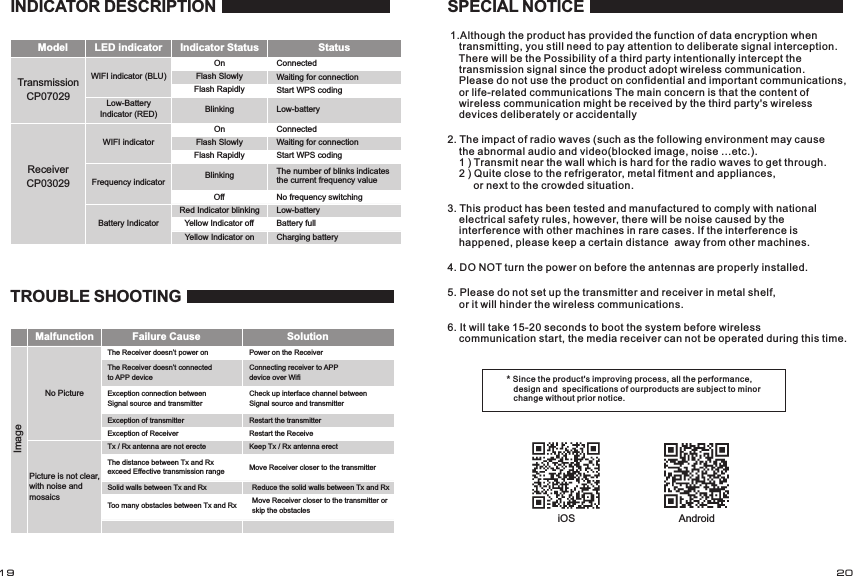
TransmissionCP07029Model LED indicator Indicator Status StatusWIFI indicator (BLU)Low-Battery Indicator (RED)OnFlash SlowlyFlash RapidlyBlinkingReceiverCP03029 Frequency indicatorBattery IndicatorOffRed Indicator blinkingYellow Indicator offYellow Indicator onConnectedWaiting for connectionStart WPS codingLow-batteryThe number of blinks indicates the current frequency value No frequency switchingLow-batteryBattery fullCharging batteryMalfunction Failure Cause SolutionNo PictureThe Receiver doesn’t power onThe Receiver doesn’t connected to APP deviceException connection between Signal source and transmitter  Exception of transmitterImagePicture is not clear,with noise and mosaicsException of ReceiverTx / Rx antenna are not erecteThe distance between Tx and Rx exceed Effective transmission rangePower on the ReceiverConnecting receiver to APP device over WifiCheck up interface channel between Signal source and transmitterRestart the transmitterRestart the ReceiveKeep Tx / Rx antenna erectMove Receiver closer to the transmitterReduce the solid walls between Tx and RxMove Receiver closer to the transmitter or skip the obstaclesSolid walls between Tx and RxToo many obstacles between Tx and RxSPECIAL NOTICE* Since the product's improving p rocess, all the performance,    design and  specifications of ou rproducts are subject to minor    change without prior notice.INDICATOR DESCRIPTIONWIFI indicator OnFlash SlowlyFlash RapidlyBlinkingConnectedWaiting for connectionStart WPS codingTROUBLE SHOOTING    1.Although the product has provided the function of data encryption when        transmitting, you still need to pay attention to deliberate signal interception.        There will be the Possibility of a third party intentionally intercept the        transmission signal since the product adopt wireless communication.        Please do not use the product on confidential and important communications,        or life-related communications The main concern is that the content of        wireless communication might be received by the third party's wireless        devices deliberately or accidentally2. The impact of radio waves (such as the following environment may cause     the abnormal audio and video(blocked image, noise ...etc.).     1 ) Transmit near the wall which is hard for the radio waves to get through.    2 ) Quite close to the refrigerator, metal fitment and appliances,          or next to the crowded situation.3. This product has been tested and manufactured to comply with national     electrical safety rules, however, there will be noise caused by the     interference with other machines in rare cases. If the interference is     happened, please keep a certain distance  away from other machines.4. DO NOT turn the power on before the antennas are properly installed.5. Please do not set up the transmitter and receiver in metal shelf,     or it will hinder the wireless communications. 6. It will take 15-20 seconds to boot the system before wireless     communication start, the media receiver can not be operated during this time.iOS Android19 20
FCC StatementChanges or modifications not expressly approved by the party responsible for compliance could void the user's authority to operate the equipment.This equipment has been tested and found to comply with the limits for a Class B digital device, pursuant to Part 15 of the FCC Rules. These limits are designed to provide reasonable protection against harmful interference in a residential installation. This equipment generates uses and can radiate radio frequency energy and, if not installed and used in accordance with theinstructions, may cause harmful interference to radio communications. However, there is no guarantee that interference will not occur in a particular installation. If this equipment does cause harmful interference to radio or television reception, which can be determined by turning the equipment off and on, the user is encouraged to try to correct the interference by one or more of the following measures:-- Reorient or relocate the receiving antenna.-- Increase the separation between the equipment and receiver.-- Connect the equipment into an outlet on a circuit different from that to which the receiver is connected.-- Consult the dealer or an experienced radio/TV technician for helpThis device complies with part 15 of the FCC rules. Operation is subject to the following two conditions (1)this device may not cause harmful interference, and (2) this device must accept any interference received, including interference that may cause undesired operation

Navigation menu