Cubic Global Tracking Solutions FMG3 Asset Tracking Device User Manual FMG 3 Uer s Guide
Cubic Global Tracking Solutions Asset Tracking Device FMG 3 Uer s Guide
User Manual

Cubic Global Tracking Solutions Page 2 of 14
4511144v1d Copyright © 2011 CGTS
Notice of Ownership
Use of this information shall be limited to persons having a need to know, within the
appropriate project organizations, as defined within the nondisclosure agreement (NDA)
between Cubic Global Tracking Solutions (Cubic GTS) and its customers.
Disclosure of the material in this document to outside organizations shall only be made
with the written consent of an authorized Cubic GTS corporate officer.
This document contains information that is considered proprietary and confidential to
Cubic GTS. No information contained in this document may be released, re-printed, or
redistributed without the permission of Cubic GTS. The information contained in this
document is subject to change without notice.
If you have questions or comments about this document, please direct them to
info.cgts@cubic.com.
Copyright © 2011 by Cubic GTS
Revision History
Revision
Date
Author(s)
Notes
1
12/8/11
Bryan Shah
Initial draft.

Cubic Global Tracking Solutions Page 3 of 14
4511144v1d Copyright © 2011 CGTS
FMG-3 USER’S MANUAL
Table of Contents
1 REGULATORY COMPLIANCE ........................................................................................................ 4
2 INTRODUCTION ............................................................................................................................... 5
2.1 FIXED MESH GATEWAY (FMG-3) .......................................................................................................... 5
2.2 THE DEVICE MANAGEMENT CENTER ..................................................................................................... 6
2.3 MANAGED ASSET TAGS ............................................................................................................................. 6
2.4 CUBIC GTS MIST™ MESH NETWORK ....................................................................................................... 6
3 FIXED MESH GATEWAY (FMG-3) ............................................................................................... 7
3.1 NOMINAL INSTALLATION .......................................................................................................................... 8
3.2 ETHERNET NETWORK – DHCP ............................................................................................................... 9
3.3 ETHERNET NETWORK – STATIC ADDRESS ............................................................................................ 9
3.4 MOUNTING ............................................................................................................................................... 10
3.5 CONFIGURING THE FMG-3 .................................................................................................................... 10
3.5.1 Console Port .............................................................................................................................................. 10
3.5.2 SSH Session ................................................................................................................................................ 11
3.6 WHAT TO CONFIGURE AND WHY ......................................................................................................... 11
APPENDIX A: SPECIFICATIONS......................................................................................................... 13
APPENDIX B: APPROVED EXTERNAL ANTENNAS ...................................................................... 14

Cubic Global Tracking Solutions Page 4 of 14
4511144v1d Copyright © 2011 CGTS
1 Regulatory Compliance
FCC STATEMENT:
This equipment has been tested and found to comply with the limits for
a Class A digital device, pursuant to part 15 of the FCC Rules. Operation is
subject to the following two conditions: (1) this device may not cause
harmful interference, and (2) this device must accept any interference
received, including interference that may cause undesired operation. This equipment generates,
uses, and can radiate radio frequency energy and, if not installed and used in accordance with
the instruction manual, may cause harmful interference to radio communications. Operation of
this equipment in a residential area is likely to cause harmful interference in which case the user
will be required to correct the interference at his/her own expense.
Changes or modifications not expressly approved by Cubic Global Tracking Solutions for
compliance could void the user’s authority to operate the equipment.
The antennas used for this transmitter must be installed to provide a separation distance of at
least 20cm from all persons during normal device operation and must not be located or
operating in conjunction with any other antenna or transmitter.
This device has been designed to operate with the antennas listed in Appendix A. Antennas not
included in this list are prohibited for use with this device without the express approval of Cubic
Global Tracking Solutions.
Cubic Global Tracking Solutions Page 5 of 14
4511144v1d Copyright © 2011 CGTS
2 Introduction
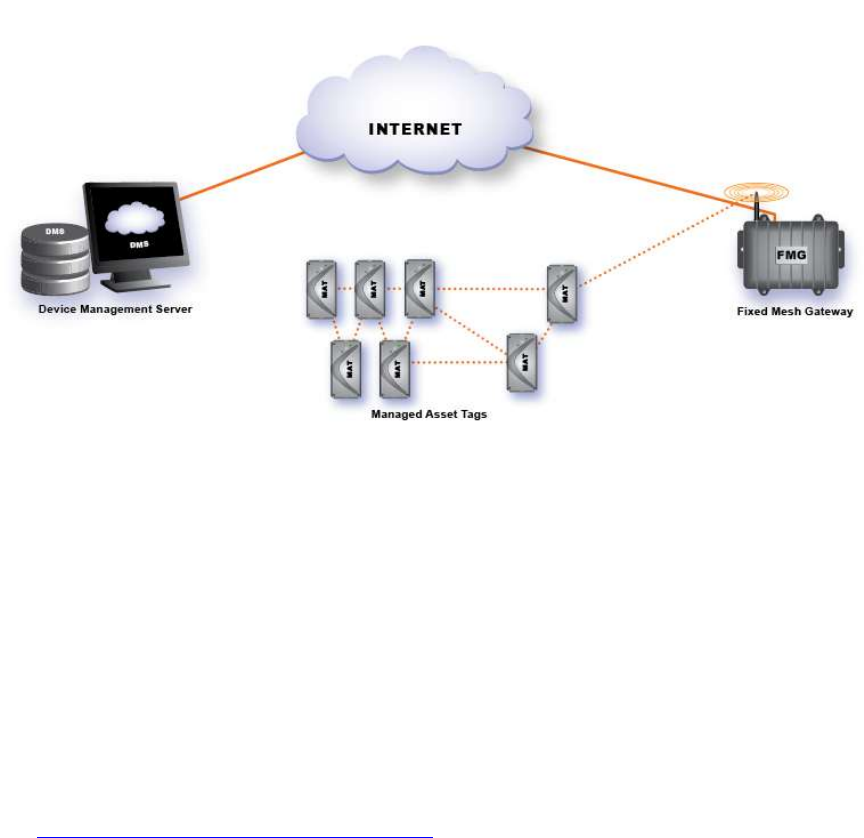
Cubic Global Tracking Solutions’ Fixed Mesh Gateway (FMG-3) is the mist™ mesh network’s
primary path to the internet. Managed Assed Tags (MAT) wirelessly communicates to the FMG-3
using the mist™ protocol and the FMG-3 forwards data from those tags through the internet to
the Device Management Center (DMC) where the data is stored indefinitely.
Figure 1: FMG-3 Network
2.1 Fixed Mesh Gateway (FMG-3)
The FMG-3 is the mist™ mesh network’s fastest, lowest-cost path to the internet. The FMG-3
contains a mist™ radio and a hardwired 10/100 Ethernet connection to the internet. These allow
the FMG-3 to receive data from MATs and forward it to the DMC, giving the end-user visibility of
the state of the MATs and the assets they monitor. Because MATs cannot send mesh traffic to
the internet without a FMG-3 or a MMG (Mobile Mesh Gateway) device, a mist™ mesh network
will not form until the MATs detect the presence of an FMG-3 or MMG.
The FMG-3 can be configured on-site through its console port or configured remotely through
its internet connection.
The FMG-3 is intended for un-attended operation; it requires only an internet connection and
power (both provided through its Ethernet cable).
See Section 3: The Fixed Mesh Gateway (FMG-3) for more information.
Cubic Global Tracking Solutions Page 6 of 14
4511144v1d Copyright © 2011 CGTS
2.2 The Device Management Center
The Device Management Center (DMC), sometimes called the Device Management Server, can
be located at a Cubic GTS facility or at an authorized user’s site. When the FMG-3 forwards mesh
data through the internet, that data’s final destination is the DMC. With the purchase of a Cubic
GTS tracking device, the customer will be provided log-in credentials to the DMC.
The DMC provides the following services:
Secure storage of data that is transmitted from Cubic GTS tracking devices.
Secure system management and configuration of Cubic GTS tracking devices.
Worldwide health monitoring of Cubic GTS tracking devices.
Routine and Unscheduled/Unplanned Event notifications to authorized individuals via
email or short messaging service (SMS).
Software upgrade of deployed devices.
2.3 Managed Asset Tags
The Managed Asset Tags (MATs) are small asset tracking devices capable of joining with other
MATs to form Cubic GTS mist™ mesh network through a fixed or mobile Gateway to the DMC.
Most MATs come with a number of sensors to monitor location and routine conditions, and
detect if it or its asset has been disturbed. MATs can also have a GPS receiver to track its
location, as well as sensors to monitor other asset conditions, such as humidity, light intrusion,
etc.
2.4 Cubic GTS mist™ mesh network
Cubic GTS mist™ mesh network is an ad-hoc, self-forming, self-healing Mesh network formed by
MATs and gateway devices. MATs and other node devices report status and location data to the
DMC through gateways devices.
The Cubic GTS mist™ mesh network allows for multiple paths between the MATs and the
gateways in the network. This allows the Cubic GTS mist™ mesh network to “heal” itself if a
node or a number of nodes drop off of the network.
Cubic Global Tracking Solutions Page 7 of 14
4511144v1d Copyright © 2011 CGTS
3 Fixed Mesh Gateway (FMG-3)
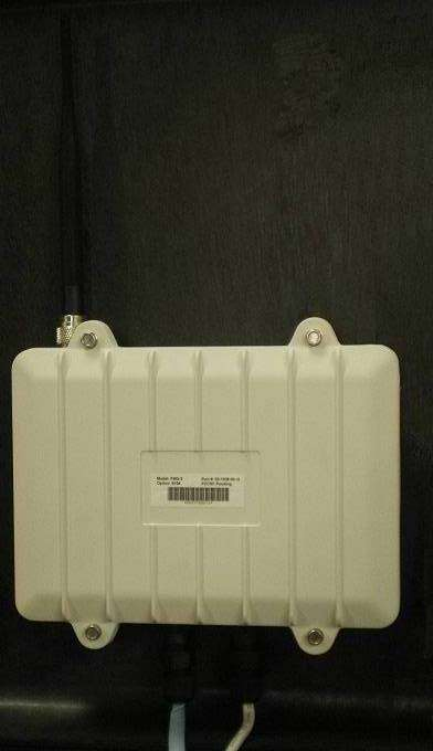
The FMG-3 (below) is an internet portal for Cubic GTS’s mist™ mesh network. It has a mist™
radio to communicate to MATs and MMGs. It then forwards data from these devices to the DMC
through its internet connection. It also has a Console port for on-site configuration port.
Figure 2: Fixed Mesh Gateway
The FMG-3 is intended for indoor or shielded outdoor installation. It requires a hardwired
Ethernet connection, through which it gets internet connectivity and power. Power is passive
Power-over-Ethernet (PoE) using either the supplied PoE injector and 15VDC wall-adapter or an
optional 803.11af PoE to passive PoE adapter.
The FMG-3 is shipped pre-configured for most applications. It only requires an internet
connection and power to begin reporting. The user may have to configure their firewall to allow
the FMG-3 to forward mesh traffic to the DMC. Contact your Cubic GTS Applications Contact for
more information. The user can also configure the FMG-3 via SSH.
Cubic Global Tracking Solutions Page 8 of 14
4511144v1d Copyright © 2011 CGTS
3.1 Nominal Installation
Select a physically secure location to mount the FMG-3. Ideally, this location is near a power
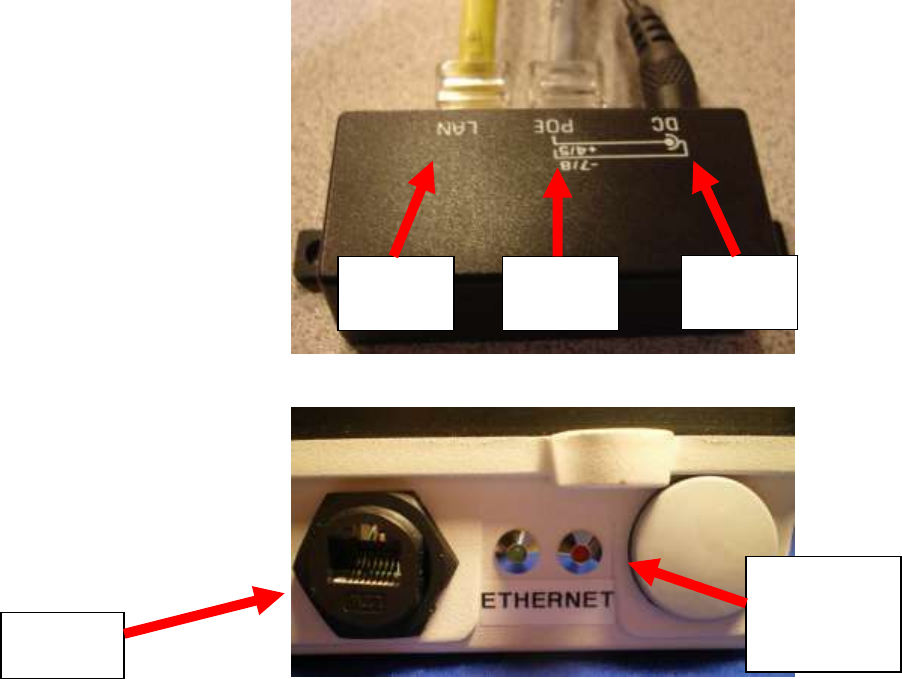
outlet and a network drop. First, plug the 15V Wall-wart that came with the FMG-3 into the wall
and connect it to the passive Power-over-Ethernet injector. Then connect a straight-through
Ethernet cable from the network drop to the LAN port of the PoE injector. Now plug the
weatherproofed end of the FMG-3 Ethernet cable into P1 of the FMG-3. Lastly, connect the free
end of the FMG-3 Ethernet cable into the POE port of the PoE injector.
Figure 3: Psuedo Power-over-Ethernet injector
Figure 4: Close-up of P1 and the FMG-3’s LEDs
The FMG-3 is now on. In a few moments, both the red and the green LEDs on the front panel
will illuminate. The LEDs will then shut off, and the red LED will periodically blink. After some
time, you will hear two beeps from within the FMG-3. This indicates that the FMG-3 has
completed its boot-up sequence. Shortly thereafter, the red LED will cease to blink and the
green LED will blink periodically. This indicates that the FMG-3 has a good internet connection
and that its radio is looking for MATs. The FMG-3 will now become a parent to any MATs in the
vicinity and begin to form a mist™ network.
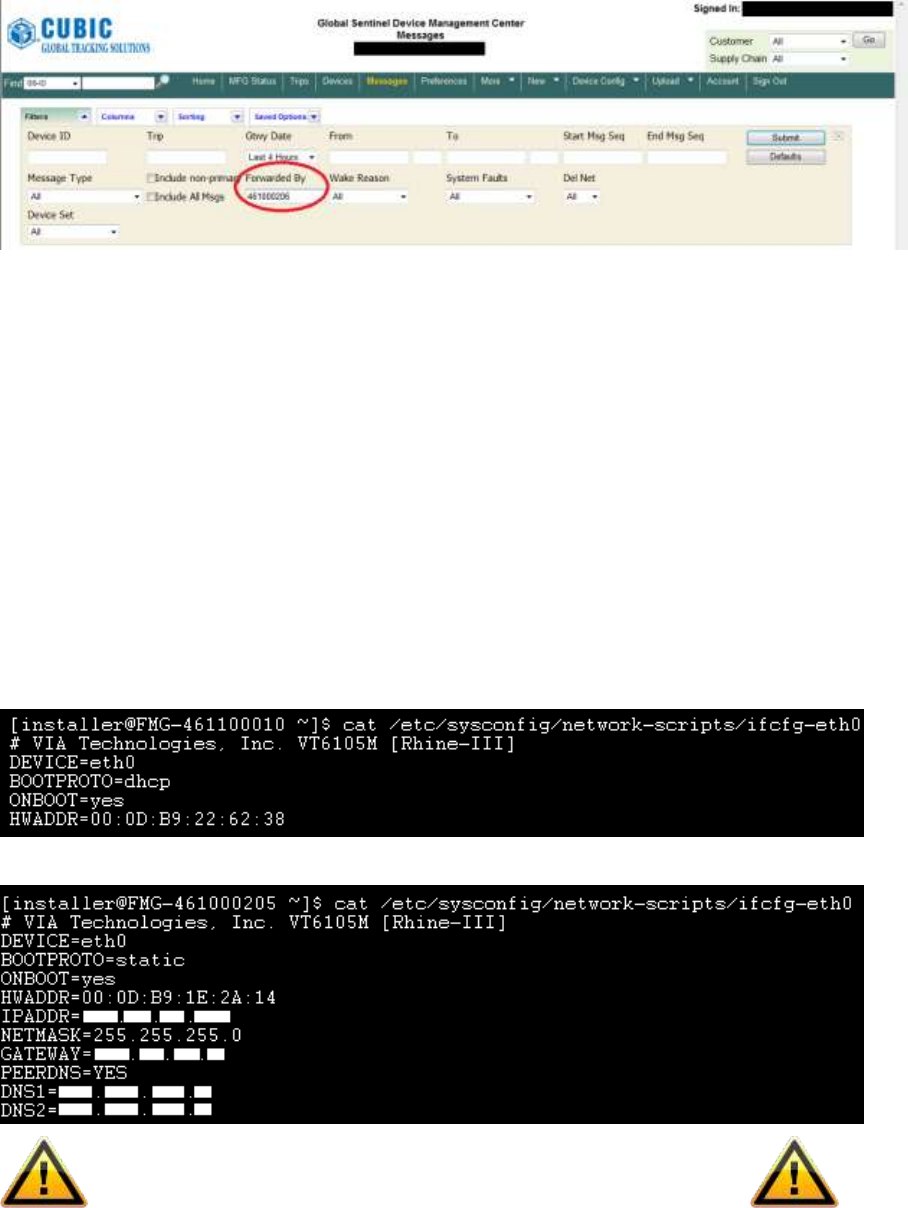
To confirm operation, log into the DMC, open up the “Filters” window in the “Messages” tab,
enter in the serial number of your FMG-3 in the “Forwarded By” box and click “Submit”. If your
FMG-3 is properly functioning, and it is the lowest cost path to the internet near your MATs,
then the DMC will display your MATs. It may take 15-20 minutes before MATs show up on the
DMC.
Network
Drop
To
FMG-3
15V
Power
Ethernet
Port (P1)
LEDs:
Green (Left)
Red (Right)
Cubic Global Tracking Solutions Page 9 of 14
4511144v1d Copyright © 2011 CGTS
Figure 5: The DMC Filters window
3.2 Ethernet Network – DHCP
The default Ethernet network configuration is for DHCP. If that is available, no network
configuration is required. Since the FMG-3 is a network appliance, the preferred normal
usage is to have a known IP address. One approach is to configure the network’s DHCP
server to provide a known address to the FMG-3. The Ethernet MAC address can be
seen on the DMC devices page. This avoids the need to obtain the MAC address from
each FMG-3.
3.3 Ethernet Network – Static Address
If DHCP is not available or if static DHCP is not available, then the FMG-3 can be
configured to use a static IP address. This must be done using the console port as
explained later.
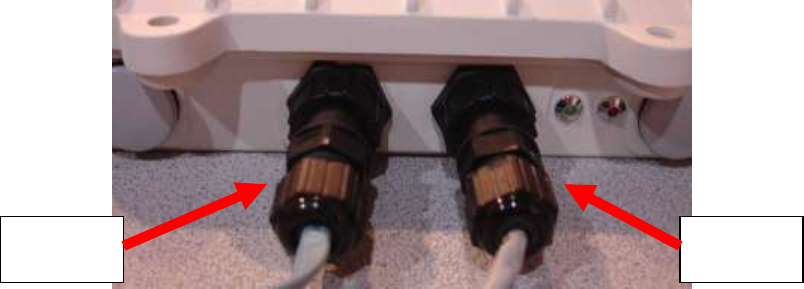
The /etc/sysconfig/network-scripts/ifcfg-eth0 file must be edited as shown below.
Before (DHCP enabled):
After (Static address required):
When finished, be sure to delete the /etc/cron.hourly/dhrenew.sh file
Cubic Global Tracking Solutions Page 10 of 14
4511144v1d Copyright © 2011 CGTS
3.4 Mounting
The FMG-3 is supplied with a universal mounting bracket that supports pole, fence or
wall mounting.
The FMG-3 should be mounted so that the antenna is at least 6 inches from nearby
metal. The exception to this is if the FMG-3 is being mounted to a metal wall.
3.5 FMG-3 Accounts
There are three accounts on the FMG: fmgcli, installer and root.
The fmgcli account is intended for normal, day to day usage of the FMG. The fmgcli
account cannot switch user roles or execute any privileged commands except restarting
the FMG application. The fmgcli account can edit the FMG mesh settings.
The installer account is used for installing the FMG. The installer account and switch
user roles to root and can execute some privileged commands. The installer account
cannot perform Ethernet network administration actions.
The root account cannot be directly logged into. The installer account must be used for
the initial log in and then an su command used to switch to the root user account.
This supports a three tiered access control scheme. Normal users can access the FMG
to perform normal activity. Mesh related configuration activity is performed using the
installer account. And Ethernet network administration, OS updates, patches and so
forth are performed using the root account.
3.6 Configuring the FMG-3
The FMG-3 can be configured through the Console Port or via SSH.
3.6.1 Console Port
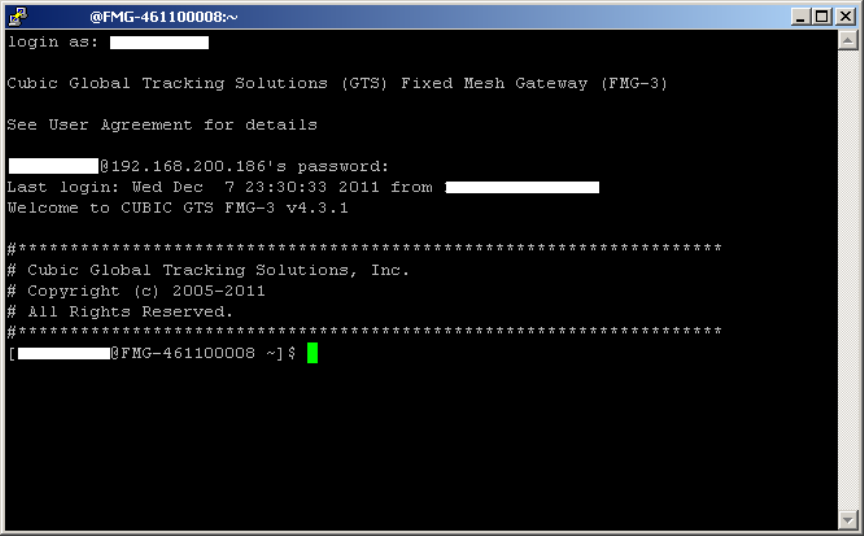
The Console port is accessed through J3 of the FMG-3 and allows the user to communicate
directly to the OS of the FMG-3 via Hyperterminal or similar serial access program. The Console
port’s primary purpose is to configure the FMG-3 at manufacturing. In rev <TBD> and later FMG-
3s, the Console port is disabled before the unit is shipped. If the user requires Console access,
contact your Cubic GTS Applications Contact for login credentials and instructions to re-enable
the Console port.
Figure 6: The FMG-3’s front connectors
Console
Port (P3)
Ethernet
Port (P1)
Cubic Global Tracking Solutions Page 11 of 14
4511144v1d Copyright © 2011 CGTS
3.6.2 SSH Session
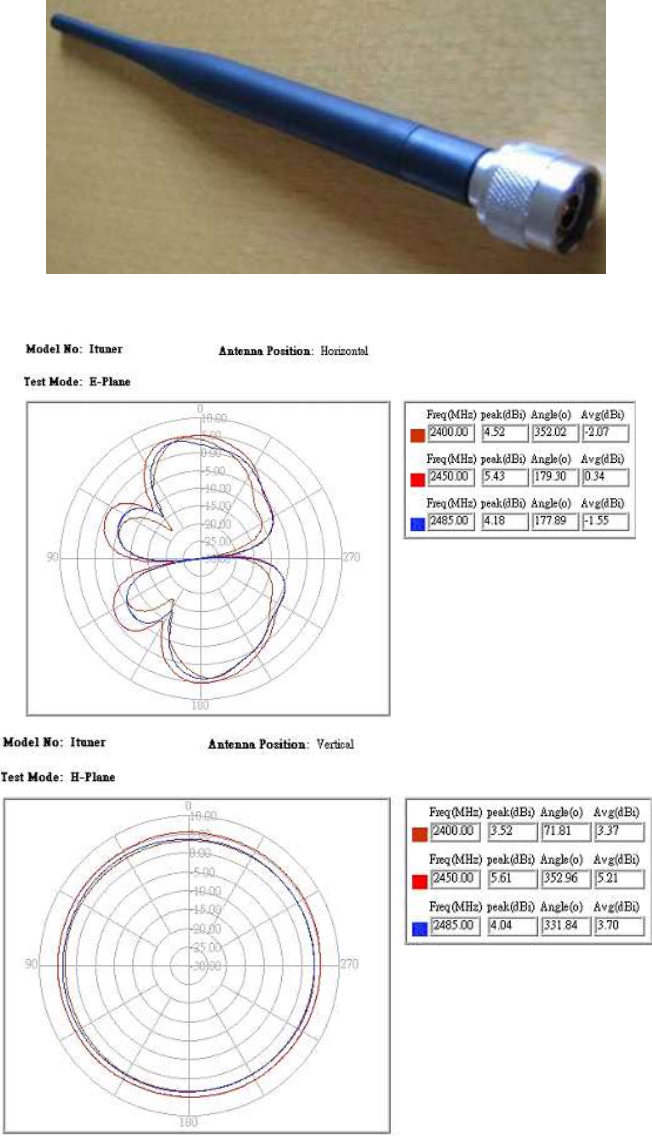
It is possible to access the FMG-3 via SSH. To do so, you need to know the FMG-3’s IP address
and will require a computer that is connected to the same network as the FMG-3. This computer
will also need a SSH client application, such as PuTTY, installed. You will also need to know the
login credentials for the FMG-3. You should have been provided these credentials when you
purchased your FMG-3. If you have lost your credentials, contact your Cubic GTS Applications
Contact for login credentials and instructions to reset your credentials to the factory state.
Figure 7: Screenshot of FMG-3 SSH session.
3.7 What To Configure and Why
There are multiple ways to configure the FMG-3. The preferred methods are to use the FMG
client commands or to change the FMG-3’s MNMP (mist Network Management Protocol)
settings. This section will cover how to make these changes. The mesh network User’s Guide
contains a complete list of FMG client commands and MNMP variables that are under user
control.
Most users will automatically enter the FMG client application upon logging in. To start the FMG
client, log in and enter the command“fmgcli.sh mnmp” at the prompt. Once in the FMG client
application, simply enter the desired command. After every successful transaction, the FMG will
send an acknowledgement of the command.
While in the FMG client application, the user can change the FMG-3’s MNMP settings. Using the
g and s commands, the user can view the MNMP settings currently in use and change the
MNMP settings for one or more units, respectively.
By default, FMG client commands apply to all nodes on the network. You can send a command
to one specific device by entering the ID of the device between the command and its argument.
Cubic Global Tracking Solutions Page 12 of 14
4511144v1d Copyright © 2011 CGTS
With typical user credentials, you will have limited access to the operating system files of the
FMG-3. Cubic GTS does not recommend altering operating system files unless specifically
instructed by your Cubic GTS Applications Contact. This contact will guide you through the
configuration process to ensure that only safe changes are made. Cubic GTS does not take
responsibility for changes the user made on their own that renders the FMG-3 inoperable or
compromises the performance of the user’s mist™ mesh network.
While in this mode the user can monitor responses from one or more tags using tail and grep.
This is because the FMG logs all traffic into a log file called “FMG-<FMG ID>_<Date>.log”.
To process the entire log file including the past
tail -n1000000 -f FMG-461100005_20110610160505.log |grep 801000732
To only process log entries from after the command
tail -f FMG-461100005_20110610160505.log |grep 801000732
Cubic Global Tracking Solutions Page 13 of 14
4511144v1d Copyright © 2011 CGTS
Appendix A: Specifications
Physical
Dimensions ....................................................................... 200mm x 140mm x 43mm
Weight .............................................................................. 1.6kg
Operating Temperature ................................................... 0°C to 50°C
Vibration ........................................................................... 6Grms, all axis
............................................................................. SAE J1455
Ingress Protection Rating ................................................. IP67
Interfaces
Ethernet ............................................................................ 10/100Base-T
Serial Console ................................................................... Cisco console interface
Antenna ............................................................................ Reverse-Polarity N-Type
Mesh Network
Operating Frequency ........................................................ 2.4GHz – 2.4835GHz
Encryption ........................................................................ AES-128/CCM
Max. Output Power .......................................................... +4dBm
Sensitivity ......................................................................... -98dBm
Mesh Population .............................................................. 1,000 (recommended)
Cubic Global Tracking Solutions Page 14 of 14
4511144v1d Copyright © 2011 CGTS
Appendix B: Approved External Antennas
Wanshih – antnr
Figure 8: antnr 2.4Ghz Whip Antenna, terminated in a reverse-polarity Type-N connector. Made by Wanshih
Figure 9: Radiation patterns of antenna