User Manual

REMOTE CONTROL
Programming Manual and User Guide
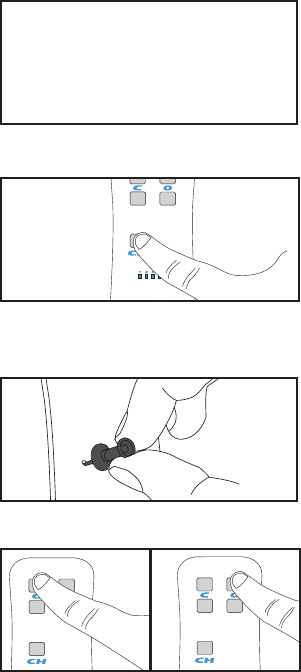
Pair or Unpair A Remote Control
1. Initiate Learn Mode
Pull down and release the TAU twice
2. Connect the Remote
the Channel button until the LED
channel is lit.
back of the remote. The LEDs on the
To Pair: Press the top left button on
the remote to pair the new remote to
the drapery.
on the remote.
has been successful.
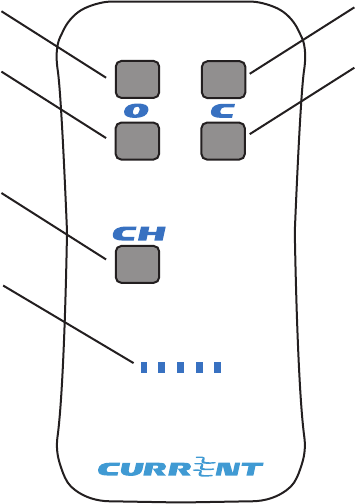
Using the Remote Control- Single Drapery
Channel
Selector
LED
Indicators
66%
closed
Full
Closed
66% Open
Full open
Full Open- A press and release moves the drapery to the full open position.
it precisely upon release.
Full Closed- A press and release moves the drapery to the full closed position.
it precisely upon release.
66% Open- A press and release moves the drapery to the approximately
66% open position.
66% Closed- A press and release moves the drapery to the approximately
66% closed position.
Channel Selector
LED Indicators
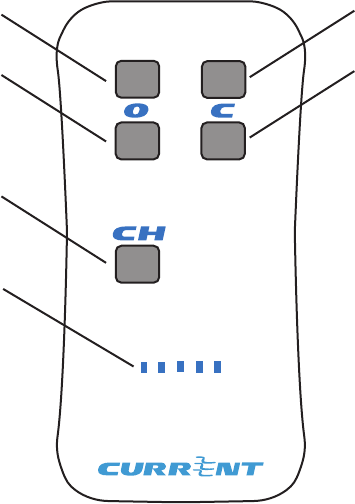
Using the Remote Control- Dual Drapery
Channel
Selector
LED Indicators
Full Closed
secondary
Full Closed
Primary
Full Open
secondary
Full open
primary
Full Open Primary
motor 1 slot to the full open position.
Full Closed Primary
the motor 1 slot to the full closed position.
Full Open Secondary
the motor 2 slot to the full open position.
Full Closed Secondary
the motor 2 slot to the full closed position.
Channel Selector
LED Indicators
Statements
SAFETY INFORMATION
WARNING
parts of this kit outside of its intended purposes in not covered under the warranty.
CAUTION
-
CAUTION
FCC STATEMENT
This device complies with Part 15 of the FCC Rules. Operation is subject to the
that may cause undesired operation.
Warning:
could void the user’s authority to operate the equipment.
NOTE: This equipment has been tested and found to comply with the limits for a
interference will not occur in a particular installation. If this equipment does cause
• Increase the separation between the equipment and receiver.
• Connect the equipment into an outlet on a circuit different from that to
which the receiver is connected.
• Consult the dealer or an experienced radio/TV technician for help.
RF WARNING STATEMENT
can be used in portable exposure condition without restriction.
IC STATEMENT
This device complies with Industry Canada license-exempt RSS standard(s).
that may cause undesired operation of the device.
Le présent appareil est conforme aux CNR d’Industrie Canada applicables aux
appareils radio exempts de license. L’exploitation est autorisee aux deux conditions
susceptible d’en compromettre le fonctionnement.
This equipment complies with the radiation exposure limits in an uncontrolled
environment. This equipment is in direct contact with the user's body under certain
conjunction with any other antenna or transmitter.
Cet équipment est conforme aux limites d'exposition aux radiations dans un
environment non controlé. Cet équipment est en contact direct avec le corps de
l'utilisateur dans des conditions de fonctionnement normals. Cet émetteur ne doit pas
WARRANTY INFORMATION
LIMITED WARRANTY
used for its intended purpose and is properly serviced in accordance with the User’s
any Products in which parts not manufactured or approved by Manufacturer have
LIMITATION OF LIABILITY
OTHER LEGAL RIGHTS
which vary from state to state.
cause by battery decay or corrosion.