Cyberdata 4 Port Poweredusb 2 0 Hub 011006 Users Manual 011006_9300231A_4Port_12_VOLT_Quick_Ref_GENERIC
011006 to the manual 0c8d2dd9-f196-4ade-ad95-b3ff7a145457
2015-02-05
: Cyberdata Cyberdata-4-Port-Poweredusb-2-0-Hub-011006-Users-Manual-530232 cyberdata-4-port-poweredusb-2-0-hub-011006-users-manual-530232 cyberdata pdf
Open the PDF directly: View PDF  .
.
Page Count: 4
Quick Reference 930231A © 2008, CyberData Corporation, ALL RIGHTS RESERVED.
Quick Reference for the 4-Port
PoweredUSB 2.0 Hub with External
Power Supply
011006
Installation information
The USB Driver for this Hub is included in the Windows 2000 operating system. For correct initial
enumeration, plug an HID-compliant mouse into the lower USB portion of one port prior to
plugging the hub into the Host PC.
Windows XP Service Pack 2 includes the updated drivers for this Hub. You can download the
Operations Guide for the 4-Port PoweredUSB 2.0 Hub, which includes information on the Windows
XP setup, from the following Product Support page:
http://www.cyberdata.net/support/pusb/4portpusb.html
Product components list
●(1) CyberData 4-Port PoweredUSB 2.0 Hub
●(1) Accessory Kit:
• (1) Short USB 2.0 Hi-Speed host cable
• (1) Host USB cable strain relief clamp
• (1) Hub External Power supply
• (1) Quick Reference for the PoweredUSB 2.0 Hub with External Power Supply
Contact CyberData
●4 Port PoweredUSB 2.0 Hub Product Support URL:
http://www.cyberdata.net/support/pusb/4portpusb.html
●CyberData Sales URL for cables and connectors:
http://www.cyberdata.net/products/poweredusb/pusbcables.html
●Phone: (831) 373-2601, Technical Support Ext. 333 or support@cyberdata.net
●Corporate Web Site URL: www.cyberdata.net
●Fax: (831) 373-4193
●Address: 2555 Garden Road, Monterey, CA 93940
●Service, warranty, and Return Materials Authorizations (RMAs): (831) 373-2601 Ext. 136
© 2008, CyberData Corporation, ALL RIGHTS RESERVED. 930231A Quick Reference
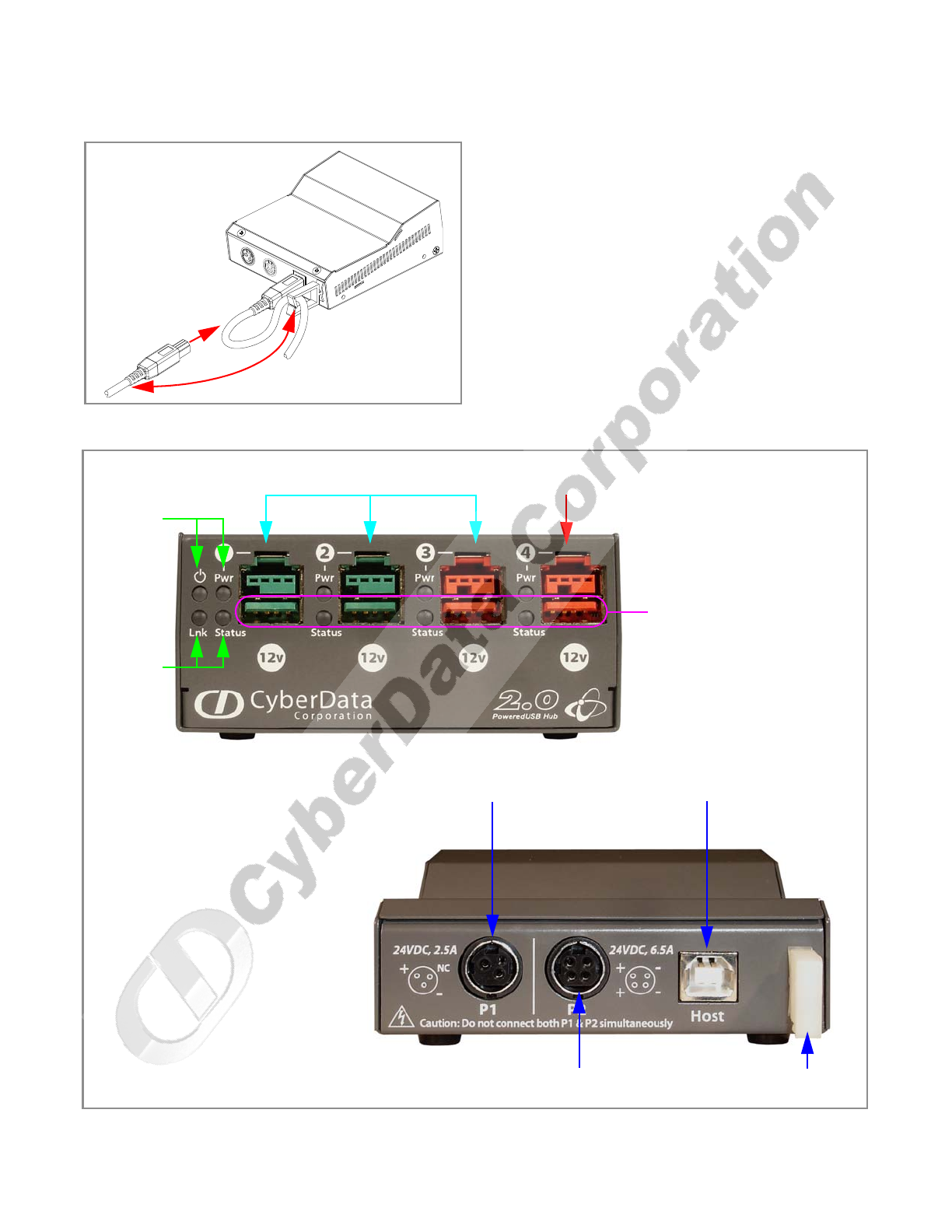
Figure 1: USB Host "B" connector and cable strain relief
Figure 2: Component identification: external front and back views
+24V up to 2.5 Amp load
+24V up to
6.5 Amp load
USB Host Connector Type B
Strain
Relief
+12V PoweredUSB Ports +12V
PoweredUSB Port
Port power
(Pwr) and
Hub power
LEDs
Link and
Port1
Status
LEDs
Standard USB 2.0 Hi-Speed
Type A Ports
Quick Reference 930231A © 2008, CyberData Corporation, ALL RIGHTS RESERVED.
Quick Reference for the 4-Port
PoweredUSB 2.0 Hub with External
Power Supply
011006
Installation information
The USB Driver for this Hub is included in the Windows 2000 operating system. For correct initial
enumeration, plug an HID-compliant mouse into the lower USB portion of one port prior to
plugging the hub into the Host PC.
Windows XP Service Pack 2 includes the updated drivers for this Hub. You can download the
Operations Guide for the 4-Port PoweredUSB 2.0 Hub, which includes information on the Windows
XP setup, from the following Product Support page:
http://www.cyberdata.net/support/pusb/4portpusb.html
Product components list
●(1) CyberData 4-Port PoweredUSB 2.0 Hub
●(1) Accessory Kit:
• (1) Short USB 2.0 Hi-Speed host cable
• (1) Host USB cable strain relief clamp
• (1) Hub External Power supply
• (1) Quick Reference for the PoweredUSB 2.0 Hub with External Power Supply
Contact CyberData
●4 Port PoweredUSB 2.0 Hub Product Support URL:
http://www.cyberdata.net/support/pusb/4portpusb.html
●CyberData Sales URL for cables and connectors:
http://www.cyberdata.net/products/poweredusb/pusbcables.html
●Phone: (831) 373-2601, Technical Support Ext. 333 or support@cyberdata.net
●Corporate Web Site URL: www.cyberdata.net
●Fax: (831) 373-4193
●Address: 2555 Garden Road, Monterey, CA 93940
●Service, warranty, and Return Materials Authorizations (RMAs): (831) 373-2601 Ext. 136
© 2008, CyberData Corporation, ALL RIGHTS RESERVED. 930231A Quick Reference
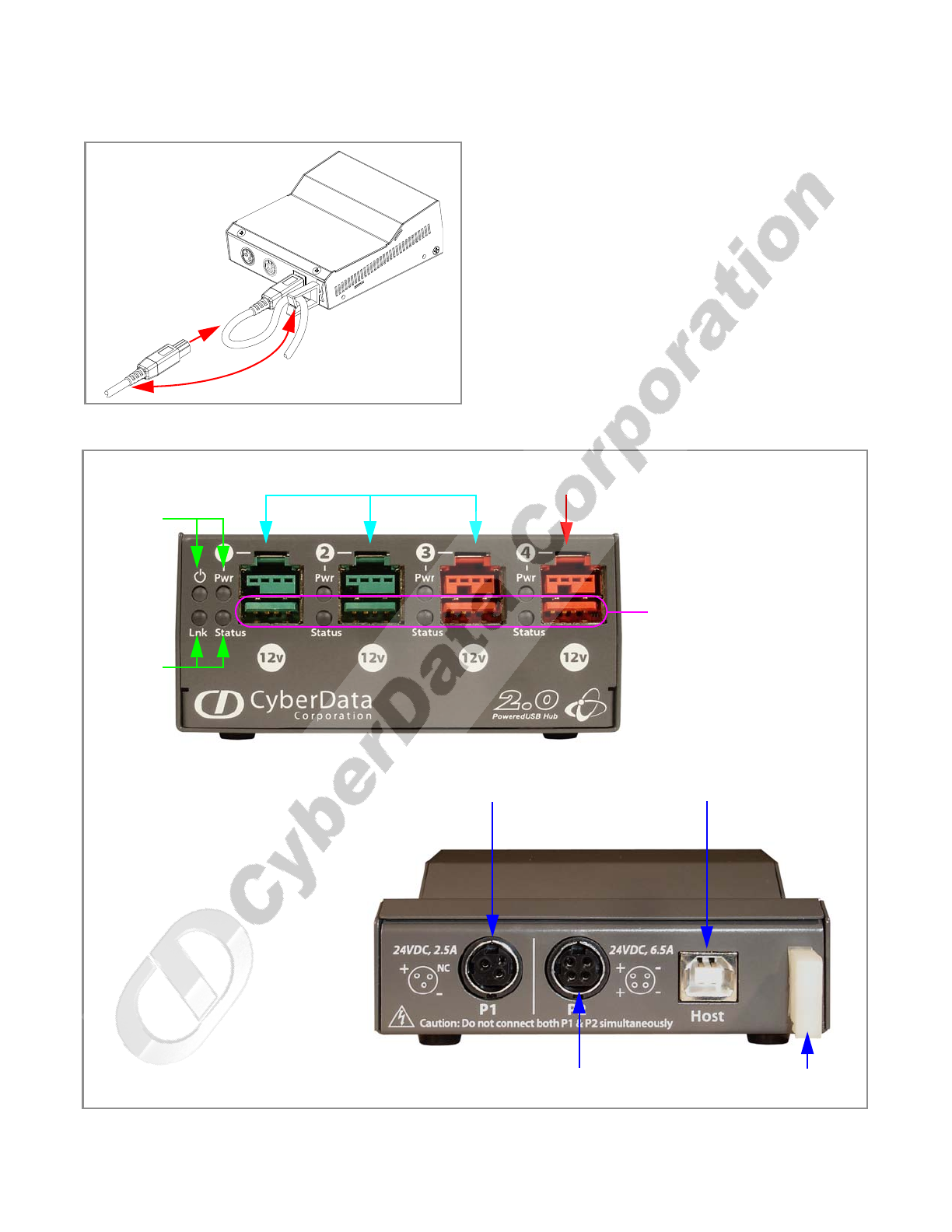
Figure 1: USB Host "B" connector and cable strain relief
Figure 2: Component identification: external front and back views
+24V up to 2.5 Amp load
+24V up to
6.5 Amp load
USB Host Connector Type B
Strain
Relief
+12V PoweredUSB Ports +12V
PoweredUSB Port
Port power
(Pwr) and
Hub power
LEDs
Link and
Port1
Status
LEDs
Standard USB 2.0 Hi-Speed
Type A Ports
