D P I TEC50 MULTI-FORMAT DIGITAL AUDIO PLAYER User Manual
DPI (HK) Ltd MULTI-FORMAT DIGITAL AUDIO PLAYER
D P I >
Contents
- 1. USERS MANUAL 1
- 2. USERS MANUAL 2
USERS MANUAL 2
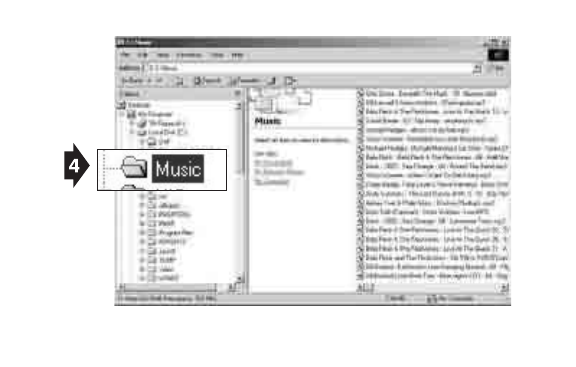
9
(fig. 4)

10
(fig. 5)
5. Drag/drop or copy/paste the
desired files to the player
(“removeable disk”).
• You can play MP3, WMA™
files.
• You can also download
photos, data, and other files
to the player which allows
the unit to function as a
portable storage/transfer
device.
• You can add a total of 64 MB
to the internal memory
(including the hidden
“system folder”).
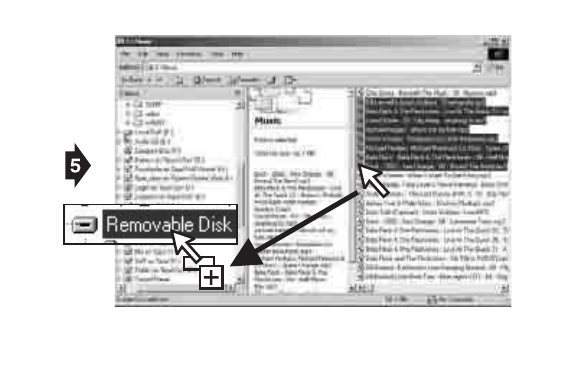
11
(fig. 5)

12
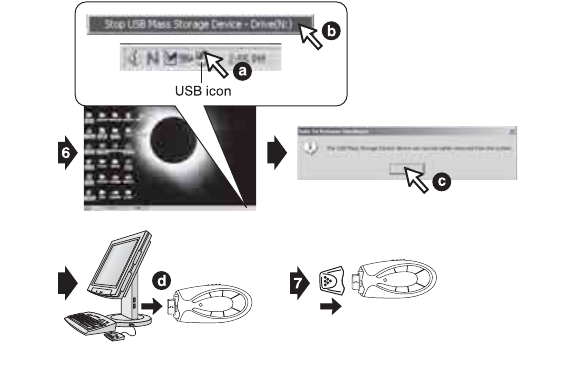
(fig. 6)
6. Disconnect the unit from
your computer.
• We recommend safely
disconnecting any USB
device in accordance with
your computer’s operating
system instructions. In
Windows98®/WindowsME®,
after copying files to the
player, wait approximately 5
seconds before unplugging
the unit. In
Windows2000®/WindowsXP
®, click the USB icon in your
computer’s System Tray and
“Stop [the] USB Mass
Storage Device”.
7. Replace the USB cap on the
unit.
13
(fig. 6)

14
OPERATION
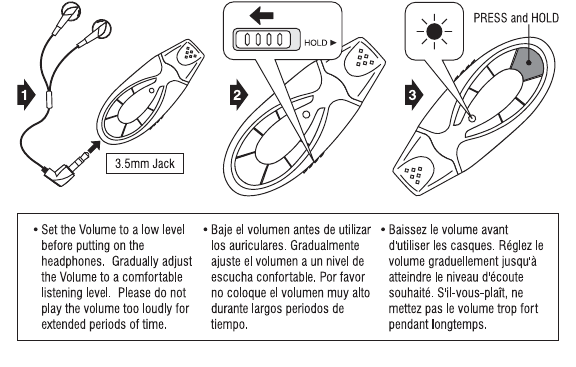
(fig. 7)
1. Connect the headphones
(included) as shown below.
2. Slide the HOLD switch to the
OFF position.
3. If the power is off, press and
hold the POWER
ON/PLAY/PAUSE button for
approximately 2 seconds.
• The power indicator will
illuminate.
15
(fig. 7)

16
(fig. 8)
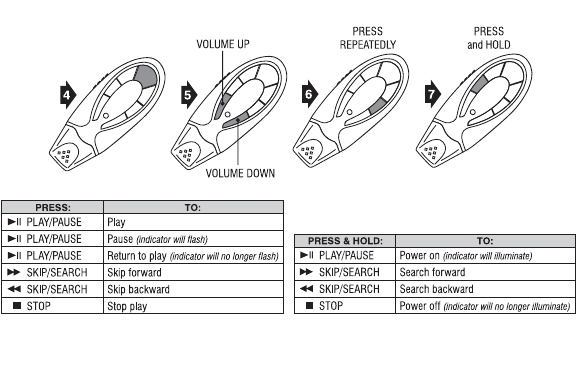
4. Press the POWER
ON/PLAY/PAUSE button to
begin playback.
5. Press the VOLUME +/-
buttons to adjust the
volume.
6. Press the EQ button
repeatedly to select between
5 preset equalizer settings.
7. To power off the player,
press and hold the POWER
OFF/STOP button for
approximately 2 seconds.
• Slide the HOLD switch to the
ON position to keep the
buttons from accidentally
being pressed.
• You will need to slide the
HOLD switch to the OFF
position to perform any
additional functions.
17
(fig. 8)

18
DELETING SONGS
(fig. 9)
1. Follow steps 1-4 of
“Downloading Files to the
Player”.
2. Highlight the desired songs
to delete in your computer’s
browser.
3. Press the “Delete” key on
your computer’s keyboard.
4. Follow the steps for safely
disconnecting USB devices
explained in “Downloading
Files to the Player”.
• You can also delete a song
directly from the player:
press and hold the POWER
OFF/STOP and POWER
ON/PLAY/PAUSE buttons
simultaneously while the
track is playing.
19
TROUBLESHOOTING
RESOLUCIÓN DE PROBLEMAS
ENCAS DE PROBLÈMES