D Parts Mobilphon and Zubehoer RX2 Bluetooth Transmitter User Manual Manual Receiver RX2 qxp
D-Parts Mobilphon & Zubehoer GmbH Bluetooth Transmitter Manual Receiver RX2 qxp
Contents
- 1. User Manual 1 of 2
- 2. User Manual 2 of 2
User Manual 1 of 2
B-Speech® Stereo Transmitter RX2
User guide
Introduction
The B-Speech®RX2 offers the latest in Bluetooth®
technology Version 2.1. The B-Speech®RX2 Receives
Music Data from players which are compatible with
Bluetooth®with A2DP Profile.
The B-Speech®RX2 can be used with any audio Player or
Speaker with a 3.5 mm or Cinch audio input.
Technical data:
· Bluetooth®V. 2.1, Class II, 10 meters
· Bluetooth®stereo profile: A2DP
· Frequency: 2.4 GHz
· Certified CE and FCC
· 3,5 mm stereo Inlet socket
· Sleep mode for energy saving
· Power supply: charging via mini USB cable
· Operation time: max. 8 hours
· Dimensions: 49mm x21mm x12mm
GB
- 4 -
Manual_Receiver_RX2.qxp 16.06.2009 14:52
Start
The contents of the package consist of:
· B-Speech®stereo Receiver RX2
· Cable charger USB (portable charger optional)
· 3,5 mm Stereo Connector Male Plug / Plug
· 3,5 mm Stereo Connector Male Plug / Cinch
· This user guide
Please check that all the parts are present and intact. Contact
your dealer as soon as possible if anything is missing or
damaged.
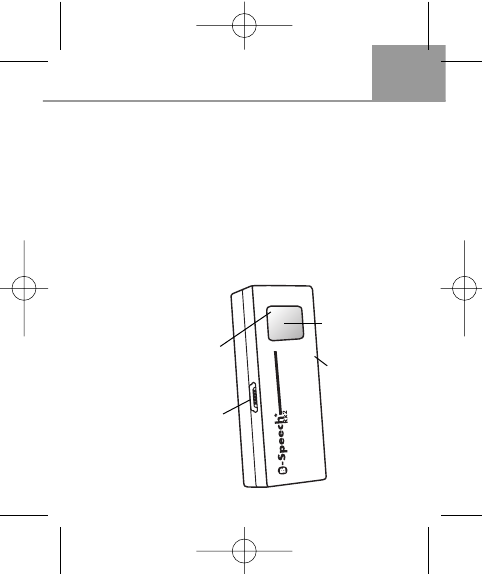
Get acquainted with
the B-Speech®RX2
GB
- 5 -
LED indicator
(under the cover)
On / Off switch
Mini USB charger
connection
3,5 mm stereo
Inlet socket
Manual_Receiver_RX2.qxp 16.06.2009 14:52
GB
- 6 -
Charging
1. Connect the cable charger mini USB plug to the mini
USB input of the B-Speech®RX2.
2. Connect the USB plug on the other end of the cable
charger to the USB input of your PC or laptop. The LED
lights up during charging.
3. When charging is done, the LED will go off.
4. Remove the cable charger
Pairing
Pairing the B-Speech®RX2 with Bluetooth®Audio source
"Pairing" means establishing a wireless connection between
the Bluetooth®audio source and the B-Speech®RX2.
To be able to use B-Speech®RX2 with a audio source, you
need to pair them.
After pairing, you can use B-Speech®RX2 with your
Bluetooth®Audio source.
The pairing process in detail
1. Before pairing, please check that both devices are fully
charged.
2. Ensure that there is no other active Bluetooth®device
around.
3. Turn the RX2 ON by pressing the On / Off button for 7
Seconds. The red/blue LED will flash alternately,
Manual_Receiver_RX2.qxp 16.06.2009 14:52
GB
- 7 -
RX2 is in pairing mode.
4. Search for the RX2 on your Bluetooth®Mobile or Bluetooth®
Audio transmitter. Pair the RX2 with your device and
enter the pairing code „0000".
5. Both devices should now find each other and pair.
The LED on the RX2 flashes slowly after successful
pairing.
6. The LED of the RX2 will turn blue, when both devices
are connected.
Note: Some Handsets need to be connected after pairing
and require authorisation. Please follow your handset's
manual for these additional steps.
Turning B-Speech® RX2 On/Off
The B-Speech®RX2 is turned on by pressing the On/Off
button for 4 Seconds. The blue LED will light up.
The B-Speech®RX2 is turned off by pressing the On/Off
button for about 5 seconds; the blue LED will go off.
Note: Read the user guide of your Bluetooth®transmitter to
find out how to turn it on / off.
Manual_Receiver_RX2.qxp 16.06.2009 14:52
GB
- 8 -
Playing music
1. Connect the RX2 with the delivered audio connection
wires with your home or car entertainment equipment or
any speaker system.
2. Make sure the transmitter (mobile phone or any A2DP
Bluetooth®source) is turned on and paired with RX2
within10 Meters.
3. The blue LED from the B-Speech®RX2 indicates that a
Bluetooth®connection exists by flashing slowly.
4. Send the music from your Bluetooth®source to the
B-Speech®RX2
If the connection disappears, the sound is disrupted or
breaks down: Move the transmitter nearer to the RX2.
If the connection does not automatically follow, start the
pairing process again.
Please note:
1. If for any reason the B-Speech®RX2 does not play any
music, it should be restarted.
To reset the B-Speech®RX2, repeat the paring process
as described above.
2. Normally, the connection between the transmitter and the
receiver is established once the pairing process is done.
The connection can break for the following reasons:
Manual_Receiver_RX2.qxp 16.06.2009 14:52
GB
- 9 -
- The distance between the devices is more than 10
meters or there is an obstacle between the devices.
- One or both of the devices have been turned off or must
be recharged.
Note on environmental protection:
After the implementation of the European Directive
2002/96/EU in the national legal system, the following
applies: Electrical and electronic devices may not be dis-
posed of with domestic waste. Consumers are obliged by
law to return electrical and electronic devices at the end of
their service lives to the public collecting points set up for
this purpose or point of sale. Details to this are defined by
the national law of the respective country.
This symbol on the product, the instruction manual or the package indi-
cates that a product is subject to these regulations. By recycling, reu-
sing the materials or other forms of utilising old devices, you are making
an important contribution to protecting our environment.
B-Speech® declares herewith that this device carries the CE mark in
accordance with the regulations and standards of the guideline R&TTE
(1999/5/EG). It conforms with the fundamental requirements, the
appropriate regulations and rules of the guideline 1999/5/EG.
You can find the complete declaration of conformity under
www.b-speech.com.
Manual_Receiver_RX2.qxp 16.06.2009 14:52
D
- 10 -
Manual_Receiver_RX2.qxp 16.06.2009 14:52