D Parts Mobilphon and Zubehoer TX4 B-Speech TX4 User Manual tx4

D-Parts Mobilphon & Zubehoer GmbH B-Speech TX4 tx4

User Manual

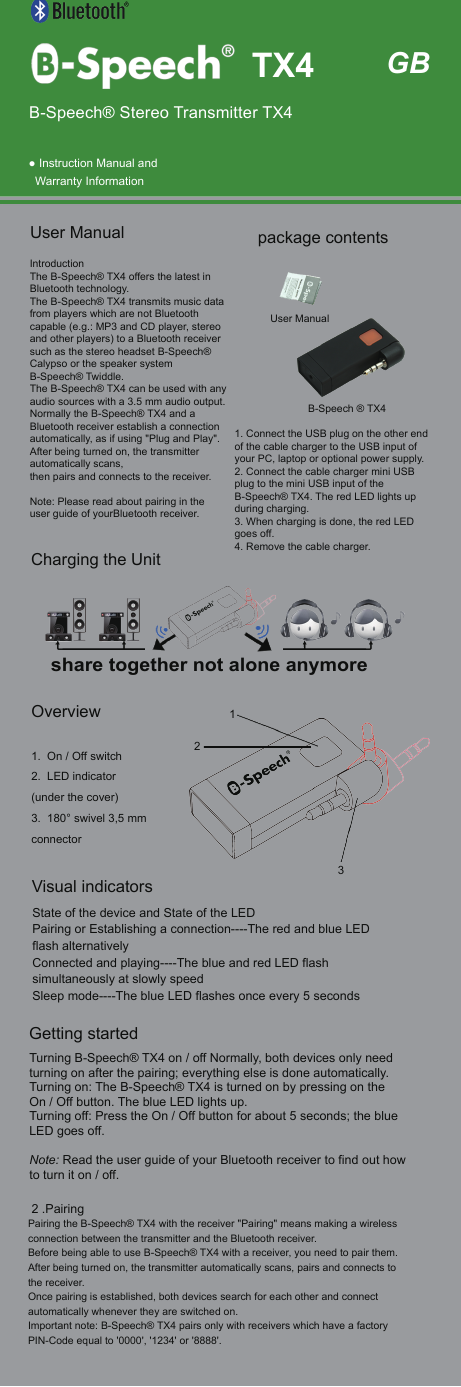
 ● Instruction Manual andWarranty InformationIntroductionThe B-Speech® TX4 offers the latest in Bluetooth technology.The B-Speech® TX4 transmits music data from players which are not Bluetooth capable (e.g.: MP3 and CD player, stereo and other players) to a Bluetooth receiver such as the stereo headset B-Speech® Calypso or the speaker system B-Speech® Twiddle.The B-Speech® TX4 can be used with any audio sources with a 3.5 mm audio output.Normally the B-Speech® TX4 and a Bluetooth receiver establish a connection automatically, as if using "Plug and Play".After being turned on, the transmitter automatically scans,then pairs and connects to the receiver.Note: Please read about pairing in the user guide of yourBluetooth receiver.User Manual   Getting startedTurning B-Speech® TX4 on / off Normally, both devices only need turning on after the pairing; everything else is done automatically.Turning on: The B-Speech® TX4 is turned on by pressing on the On / Off button. The blue LED lights up. Turning off: Press the On / Off button for about 5 seconds; the blue LED goes off.Note: Read the user guide of your Bluetooth receiver to find out how to turn it on / off. 2 .PairingPairing the B-Speech® TX4 with the receiver "Pairing" means making a wireless connection between the transmitter and the Bluetooth receiver.Before being able to use B-Speech® TX4 with a receiver, you need to pair them.After being turned on, the transmitter automatically scans, pairs and connects to the receiver.Once pairing is established, both devices search for each other and connect automatically whenever they are switched on.Important note: B-Speech® TX4 pairs only with receivers which have a factory PIN-Code equal to '0000', '1234' or '8888'.1. On / Off switch2. LED indicator(under the cover)3. 180° swivel 3,5 mmconnector1. Connect the USB plug on the other end of the cable charger to the USB input of your PC, laptop or optional power supply.2. Connect the cable charger mini USB plug to the mini USB input of the B-Speech® TX4. The red LED lights upduring charging.3. When charging is done, the red LED goes off.4. Remove the cable charger.GBB-Speech® Stereo Transmitter TX4B-Speech ® TX4User Manualpackage contents TX4Charging the UnitOverviewshare together not alone anymoreVisual indicatorsState of the device and State of the LEDPairing or Establishing a connection----The red and blue LED flash alternativelyConnected and playing----The blue and red LED flash simultaneously at slowly speedSleep mode----The blue LED flashes once every 5 seconds132
After pairing, you can use B-Speech® TX4 with the Bluetooth receiver. If you wish to use B-Speech® TX4 with another receiver, you need to pair them also.In this case, B-Speech® TX4 will not re-connect with the previous device until you pair them again.The pairing process1. Before pairing, please check that both devices are fully charged.2. Check that both devices are within 3 meters of each other.3. Turn the Bluetooth receiver on and make sure it is in pairing mode. (If in doubt, read your receiver user guide).4. Turn the TX4 on by pressing the On / Off button. The red and blue LED flashes alternating for 6 seconds; the TX4 is in pairing mode.5. Both devices should now find each other and pair. The red and blue LED on the TX4 flashes slowly at same time when the pairing is successful.Playing music1. Insert the connector of the turned on B-Speech® TX4 into the 3,5 mm socket of the source device.2. Make sure the receiver is turned on and within10 meters of the B-Speech® TX4.3. The red and blue LED from the B-Speech® TX4 indicates that a Bluetooth connection exists by flashing slowly at same time.4. If the connection disappears, the sound is disrupted or breaks down: Move the receiver nearer to the TX4. Put the receiver in search mode and it will connect again automatically. If the connection does not automatically follow, start the pairing process again.Please note:1. If for any reason the B-Speech® TX4 does not play any music, it should be restarted.(See chapter about pairing.)2. Normally, the connection between the transmitter and the receiver is established once the pairing process is done.The connection can break for the following reasons:- The distance between the devices is greater than 10 meters or an obstacle stands between the devices.- One or both of the devices have been turned off or must be recharged.To start the search or pairing function again put the Bluetooth receiver in search mode or start the pairing process. Technical data:•  Range 30~~100 meters• 3.5mm audio Jack, swivel up to 270 Deg.• 170mAh Rechargeable Li-polymer battery, up to 10 hours operation time • Superior audio performance using aptX® Hi-Fi quality stereo codec• Ultra-low power comsuption• High quality stereo output• High performance stereoRegistration and Safety Certifi cation/General InformationWe hereby declare, that this device carries the CE mark in accordance with the regulations and standards. It conforms with the fundamental requirements of the R&TTE- (1995/5/EC), EMC directive 2004/108/EC as well as the Low Voltage Directive 2006/95/EC.You can  fi nd the complete declaration of conformity under www.b-speech.com.Note on environmental protection:After the implementation of the European Directive 2002/96/ EU in the national legal system, the following applies: Electrical and electronic devices may not be disposed of with domestic waste. Consumers are obliged by lawto return electrical and electronic devices at the end of their service lives to the public collecting points set up for this purpose or point of sale. Details of this are de fined by the national law of the respective country. This symbol on the product, the instruction manual or the package indicates that a product is subject to these regulations. By recycling, re-using the materials or other forms of utilising old devices, you are making an important contribution to protecting our environment.FCC InformationThis device complies with Part 15 of the FCC rules.Operation is subject to the following two conditions: (1) this device may not cause harmful interference, and(2) this device must accept any interference received; including interference that may cause undesiredoperation.Federal Communications Commission (FCC) StatementThis Equipment has been tested and found to comply with the limits for a Class B digital device, pursuant toPart 15 of the FCC rules. These limits are designed to provide reasonable protection against harmfulinterference in a residential installation. This equipment generates, uses and can radiate radio frequencyenergy and, if not installed and used in accordance with the instructions, may cause harmful interference toradio communications.However, there is no guarantee that interference will not occur in a particular installation. If this equipmentdoes cause harmful interference to radio or television reception, which can be determined by turning theequipment off and on, the user is encouraged to try to correct the interference by one or more of the followingmeasures:- Reorient or relocate the receiving antenna.- Increase the separation between the equipment and receiver.- Connect the equipment into an outlet on a circuit different from that to which the receiver is connected.- Consult the dealer or an experienced radio/TV technician for help.Warning: Changes or modifications to this unit not expressly approved by the party responsible forcompliance could void the user authority to operate the equipment.Tested to comply with FCC standard. FOR HOME OR OFFICE USE.Warning :This equipment complies with FCC RF radiation exposure limits set forth for an uncontrolled environment. &This device and its antenna(s) must not be co-located or conjunction with any other antenna or transmitter.

Navigation menu