D and S Creation BEDDI6903 BEDDI Style Alam clock User Manual 6903 Style Instruction Manual 1 9 2016
D&S; Creation Limited BEDDI Style Alam clock 6903 Style Instruction Manual 1 9 2016
Users Manual
Instruction Manual
for
BEDDI Style
BEDDI Instruction Manual
The WITTI logo and BEDDI are trademarks of D&S Creation Limited. All other trademarks are properties of their respective owners.
Assembled in China www.wittidesign.com ©2016 D&S Creation Ltd. All Rights Reserved
Page: 1/6
Limited Warranty 1 year http://www.wittidesign.com/warranty
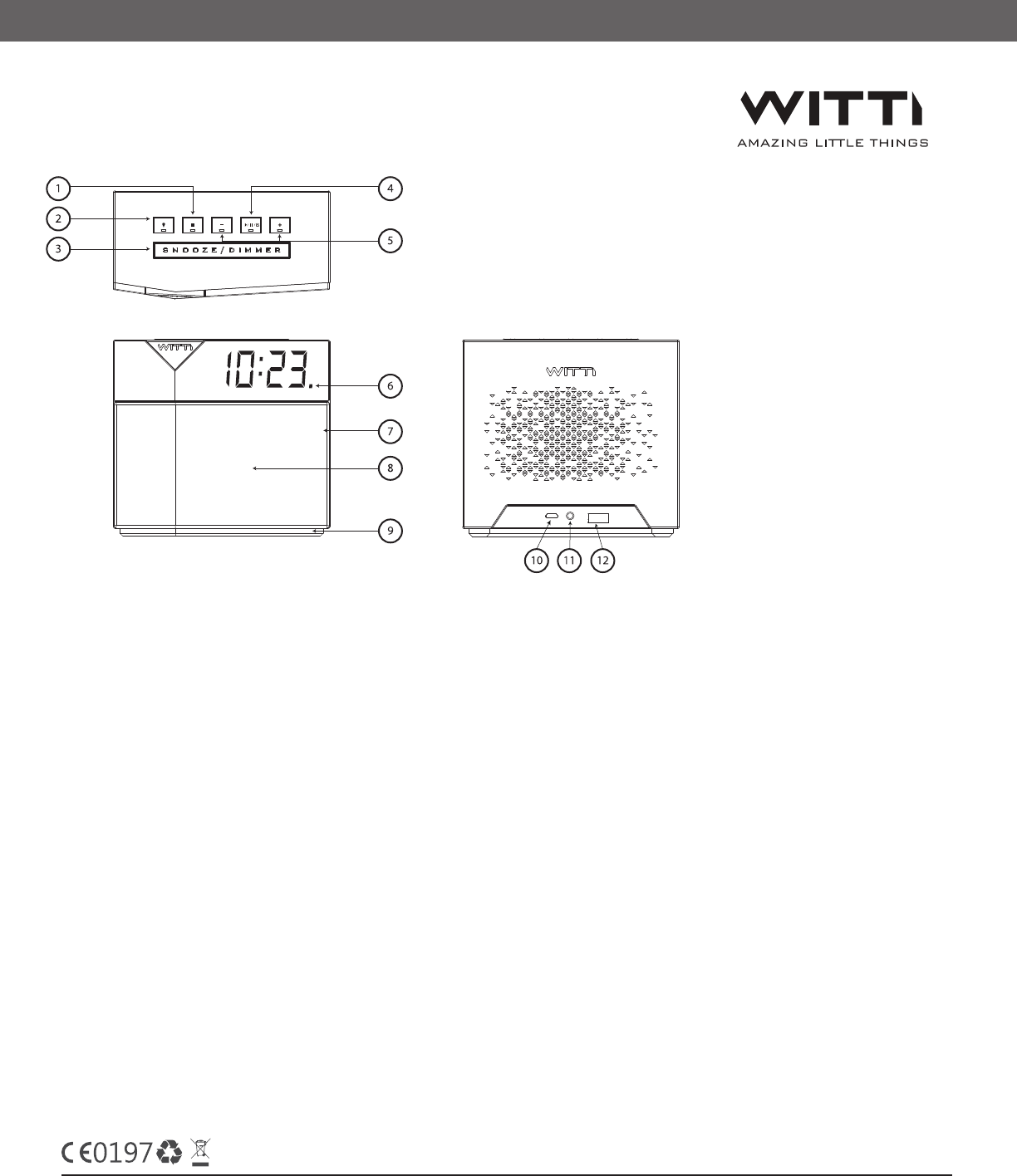
Smart Button ‒ You can customize the smart button via the App to trigger commands such
as “phone finder”, “play Spotify music”, etc. The Smart Button has three modes ‒ single press,
double press, and long press.
Light Mode Button ‒ You can customize the Light mode button via the App to trigger different light
effect. (Color changing, music light)
Snooze/Dimmer ‒ Press to snooze the alarm, or to adjust the clock brightness.
Play/Pause/Alarm off | Bluetooth button ‒ Play/pause when music is playing. Turn off alarm.
Long press to connect/disconnect Bluetooth audio.
Volume Control ‒ Let you adjust the volume when music is playing. Can be used to skip tracks in
advance control mode (configurable in app General Settings).
Bluetooth (Audio) status light ‒ If Bluetooth audio is connected, the status light will be on.
The Bluetooth control (BLE) is always connected when in range (unless your phone’s Bluetooth is off,
or BEDDI app is not running).
Replaceable speaker cover
High Quality Speaker
1
2
3
4
5
6
7
8
Understanding BEDDI Controls

The WITTI logo and BEDDI are trademarks of D&S Creation Limited. All other trademarks are properties of their respective owners.
Assembled in China www.wittidesign.com ©2016 D&S Creation Ltd. All Rights Reserved
Page: 2/6
Limited Warranty 1 year http://www.wittidesign.com/warranty
Mood Light ‒ 16 Million Color mood light with various light effects. You can press the light mode button
to turn it on/off. Settings can be customized via app.
Service Port ‒ This is only needed if firmware update is required.
5V 2A Power Input ‒ Plug in the provided adaptor.
USB Charging Port ‒ Charge your phone or other devices.
9
10
11
12
Setting Up BEDDI STYLE
• Plug in the BEDDI STYLE with the provided power adaptor
• Download the app on iOS or Android (keyword: BEDDI)
• Run the app, and follow the setup wizard to congure your BEDDI STYLE
Setting the Time
• BEDDI STYLE time is automatically synced to your smartphone once you are connected
Connecting Bluetooth
• BEDDI STYLE has two Bluetooth connections. Bluetooth Classic (Audio) for playing your music, and
Bluetooth Low Energy (BLE) for controlling your phone.
Bluetooth Audio
After pairing the first time, you can press and hold the “play/pause” button to connect to BEDDI STYLE when in
range.
The Bluetooth indicator light will start flashing when BEDDI STYLE is trying to connect to your phone, and
will stay on once it is connected.
User can also connect using the phone Bluetooth settings. Please note that BEDDI STYLE Bluetooth is always
on and waiting for connection.
Bluetooth Control
BEDDI STYLE uses BLE for control. Once your app is connected to BEDDI STYLE, it remains connected as long
as your phone is in range, unless you a) turn off your Bluetooth on your phone, b) stop the App, or c) use
the app to disconnect the connection.
Please note that the BLE connection must be active for some of the smart functions to work (i.e., Spotify
as your alarm sound, weather, traffic update.
The WITTI logo and BEDDI are trademarks of D&S Creation Limited. All other trademarks are properties of their respective owners.
Assembled in China www.wittidesign.com ©2016 D&S Creation Ltd. All Rights Reserved
Page: 3/6
Limited Warranty 1 year. http://www.wittidesign.com/warranty
Functions
Alarm
BEDDI STYLE features 4 different alarm settings. For each alarm, you can select a specific day or days of
the week, the alarm sound, an option to activate the wake-up light, and the option to play weather
and traffic information.
Alarm Sounds:
Default: You can choose from our pre-defined ring tones. Please note that even if your phone is not
connected to BEDDI STYLE, the default alarm sound can still be played.
Bluetooth Music: The last song that was played on your phone will be used. Please note that there must
be an active music player on your phone, and the phone must be connected to BEDDI STYLE via Bluetooth
Audio. If a song cannot be played, the default Beep sound will be used as the alarm sound.
Spotify: You can select a playlist as the alarm’s sound. Please note that this is for Spotify premium account
users only, and you must first setup Spotify in the app. Your phone must be connected to BEDDI STYLE
via Bluetooth audio, and the app must be active in the background. If a song cannot be played,
the default Beep sound will be used as alarm sound.
Note: All alarm sounds will be played with increasing volume. When the alarm goes off, the alarm volume
is not adjustable with the volume control button.
Weather information
This information will be played after you turn off the alarm.
Other Settings
In General Settings -> Alarm General Settings; you can customize more settings such as Alarm volume,
Wake-up light starting time, Snooze Time, and Auto Turnoff time. Please note that these settings will
be applied to all alarms.
Snooze
Pressing the Snooze/Dimmer bar will snooze the alarm. Snooze duration is customizable in
General Settings -> Alarm General Setting.
Turning off the Alarm
Pressing the “play/pause” button will turn off the alarm, you can also use the app to turn off the alarm.

The WITTI logo and BEDDI are trademarks of D&S Creation Limited. All other trademarks are properties of their respective owners.
Assembled in China www.wittidesign.com ©2016 D&S Creation Ltd. All Rights Reserved
Page: 4/6
Limited Warranty 1 year. http://www.wittidesign.com/warranty
Mood Light
This feature can be controlled with the app and there are various light effects to choose from. For example,
if you select “Music Light”, the mood light will react and change to the music you are playing. You can also
assign a smart button to turn the Mood Light on/off.
Nap/Sleep Mode
You can use the Nap or Sleep mode via the app, or assign the smart button to activate them. Pressing the
smart button will cycle through the interval 4 times and then turn off .
For Nap, after the set time has concluded, the default Beep alarm sound will be played.
For Sleep, after time is up, the audio which is currently playing will be stopped.
Phone Finder
You can assign the smart button to find your phone. The phone will play a beeping sound. Please note that
the phone must be within Bluetooth range (i.e., 15m) of BEDDI STYLE, and the app must be active in the
background for this feature to work.
Playing music
Once you have connected your phone to BEDDI STYLE via Bluetooth audio, you can use any music player
to play music via BEDDI STYLE.
Third Party Service
To control other 3rd party services, you need to setup each service individually under
Setting -> Service/Login. Once you have provided the necessary information, you can assign a smart button
to perform a task for that 3rd party service.
The WITTI logo and BEDDI are trademarks of D&S Creation Limited. All other trademarks are properties of their respective owners.
Assembled in China www.wittidesign.com ©2016 D&S Creation Ltd. All Rights Reserved
Page: 5/6
Limited Warranty 1 year. http://www.wittidesign.com/warranty
Weather information
Weather information can be played along with the alarm. You can also assign a smart button to play the
weather information. Please note that weather information is updated every hour. Your phone must be
connected to BEDDI STYLE via Bluetooth audio, and the app must be running in the background with your
phone’s location services activated.
White Noise Generator
The app comes with a list of white noise options. You can use the app to select which white noise
option to play, or assign a smart button to play your favorite white noise. Please note that the Bluetooth
connection must be active, and the app needs to be running in the background for the white noise
function to work.

The WITTI logo and BEDDI are trademarks of D&S Creation Limited. All other trademarks are properties of their respective owners.
Assembled in China www.wittidesign.com ©2016 D&S Creation Ltd. All Rights Reserved
Page: 6/6
Limited Warranty 1 year. http://www.wittidesign.com/warranty
This device complies with part 15 of the FCC rules. Operation is subject to the following two conditions: (1) this device
may not cause harmful interference, and (2) this device must accept any interference received, including interference
that may cause undesired operation.
NOTE: The manufacturer is not responsible for any radio or TV interference caused by unauthorized modifications to
this equipment. Such modifications could void the user’s authority to operate the equipment.
NOTE: This equipment has been tested and found to comply with the limits for a Class B digital device, pursuant to
part 15 of the FCC Rules. These limits are designed to provide reasonable protection against harmful interference in a
residential installation. This equipment generates uses and can radiate radio frequency energy and, if not installed
and used in accordance with the instructions, may cause harmful interference to radio communications. However,
there is no guarantee that interference will not occur in a particular installation. If this equipment does cause harmful
interference to radio or television reception, which can be determined by turning the equipment off and on, the user is
encouraged to try to correct the interference by one or more of the following measures:
- Reorient or relocate the receiving antenna.
- Increase the separation between the equipment and receiver.
-Connect the equipment into an outlet on a circuit different from that to which the receiver is connected.
-Consult the dealer or an experienced radio/TV technician for help
This equipment complies with FCC RF radiation exposure limits set forth for an uncontrolled environment.
This equipment should be installed and operated with minimum distance of 20 cm between the radiator and
your body.
CAUTION RISK OF EXPLOSION IF BATTERY IS REPLACED BY AN INCORRECT TYPE. DISPOSE OF USED BATTERIES
ACCORDING TO THE INSTRUCTIONS
Regulatory Conformance
Hereby, Corporation declares that this device is in compliance with the essential requirements and other relevant
provisions of Directive 1999/5/EC.
For the declaration of conformity, visit the Web site www.wittidesign.com/certification.
Notice: Observe the national local regulations in the location where the device is to be used. This device may be
restricted for use in some or all member states of the European Union (EU)
FCC and CE manual