DG Lab DG-100 Digital Audio Player User Manual CONTENTS
DG Lab Co., Ltd. Digital Audio Player CONTENTS
DG Lab >
User Manual
MANUAL
DIGITALAUDIOPLAYER
(DG-100)
CAUTION: Changes or modifications not expressly approved by the
manufacturer responsible for compliance could void the user’s authority
to operate the equipment
WARNING
This device complies with part 15 of the FCC Rules. Operation is subject to the
following two conditions: (1) This device may not cause harmful interference,
and (2) this device must accept any interference received, including
interference that may cause undesired operation.
INFORMATION TO USER:
This equipment has been tested and found to comply with the limit of a Class B
digital device, pursuant to Part 15 of the FCC Rules. These limits are designed
to provide reasonable protection against harmful interference in a residential
installation. This equipment generates, uses and can radiate radio frequency
energy and, if not installed and used in accordance with the instructions, may
cause harmful interference to radio communications. However, there is no
guarantee that interference will not occur in a particular installation; if this
equipment does cause harmful interference to radio or television reception,
which can be determined by turning the equipment off and on, the user is
encouraged to try to correct the interference by one or more of the following
measures:
1. Reorient / Relocate the receiving antenna.
2. Increase the separation between the equipment and receiver.
3. Connect the equipment into an outlet on a circuit difference from that to
which the receiver is connected.
4. Consult the dealer or an experienced radio/TV technician for help
CONTENTS
#Features
#Accessories
#Front&SideView
#LCDDisplay
#Controls
- PowerOn
- Playing
- PowerOff
- Select&Searchtrack
- Volumecontrol
- Repeat(A<->B)
- Hold
- USBStorage
#ConnectingDG-100withPC
- InstallationofUSBdevicedriverforWindows98/SE
- ConnectingDG-100withPC
- Managingfiles
- Formatting
- SeparatingDG-100fromPC
#Precautions
#ProductSpecification
#TroubleShooting
#Features
ㅇ1for2(MP3Player+USBStorageDevice)
- MainBody+BatteryCase=MP3Player
- MainBody=USBStorageDevice
ㅇBuilt-inMemory(64MB/128MB)
ㅇPlug&Play(NoNeedforFileManager)
ㅇUSB1.1Support
ㅇApproximately10HrsPlaybackTimewithAAABattery1EA
ㅇSupportedOperatingSystem
-Windows98/SE,WindowsME/2000/SE
(ForWindows98/SE,USBDeviceDriverCDisneeded.)
#Accessories
ㅇUSBDeviceDriverCDforWindows98/SE
ㅇNecklace
ㅇUser’sManual
ㅇBattery1EA(AAAAlkaline)
ㅇUSBExtensionCable
ㅇEarphone
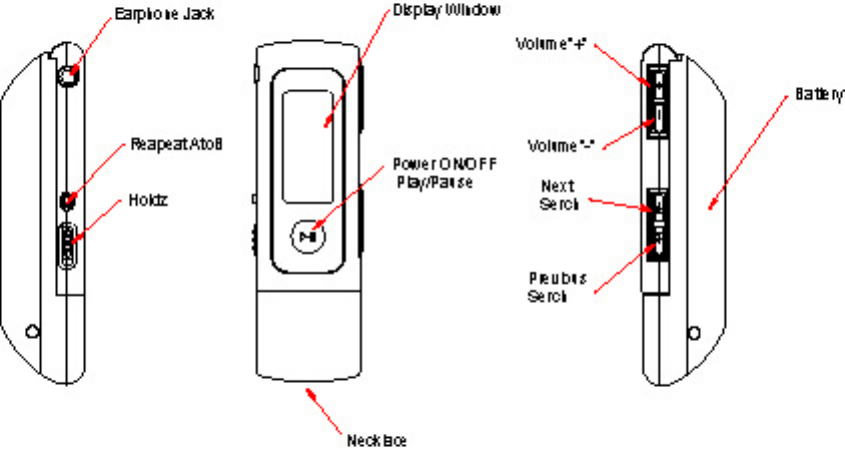
#Front&SideView
Repeat A to B
Hold
N
ex
t
Search
Previous
Search
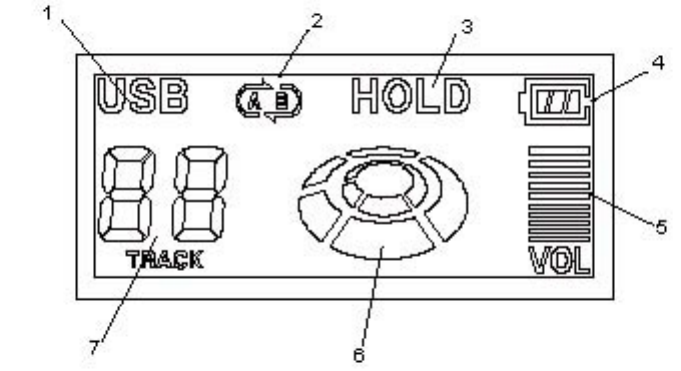
#LCDDisplay
1.USB
:DisplayedwhenconnectedwithPC
2.RepeatA↔B
:DisplayedwhileRepeatA↔Bisplayed
3.Hold
4.BatteryIndicator
5.VolumeLevel
6.PlayIcon
- Rotateswhileitisplaying
- Stopswhenitstops
- Rotatesathigherspeedwhileitsearchesatrack
7.TrackNumber(SevenSegment)
:Displaysthecurrenttracknumber
#Controls
- PowerOn(▶║)
:PressPlay/Stop(▶║)buttonanditwillplaythetrackyou
stoppedlasttime.(ResumeFunction)
WhennoMP3fileisstoredintheplayer,theplayerwill
bepoweredonforamomentandoffagainautomatically.
- Playing(▶║)
:PressPlay/Stop(▶║)buttoninplayingmodeanditwillstop
playing,andifyoupressthePlay/Stop(▶║)buttonagain
instopmode,itwillplayagain.
- PowerOff(▶║)
:PressthePlay/Stop(▶║)buttonlongerthan2secondin
playingorstopmodeandpowerwillbeoff.
Instopmode,powerwillbeoffautomaticallywithin2minutes.
Intheeventofinsufficientbatterypower,theplayermaybe
shutoffevenbeforethebatteryiscompletelyrundown.
- Select&SearchTrack(▶▶,◀◀)
:PresstheFF(▶▶)orREW(◀◀)buttontoselectnextor
previoustrack.
PresstheFF(▶▶),REW(◀◀)keylongerthan2secondthenit
searchsinsideonesong.Thissearchfunctionisonly
availableinpresentsong.
Ifsearchedtofirstendofsearchedsongthenplaysfrom
thefirstofpresentsong
.
Ifsearchedtolastendofsearchedsongthenplaysfrom
thefirstofnextsong.
- VolumeControl(+/-)
:Pressvolume(+/-)buttonforvolumecontrol.
ThevolumelevelisdisplayedontheLCDwindow.
Pressvolume(+/-)button3timesshortlytoincrease/decrease
onevolumelevel.
Pressthe+/-buttonlongertochangevolumelevel
continuously.
- Repeat(A↔B)
:PressRepeat(A↔B)buttontosetthestartingpointofA↔B
Repeat,andpresstheRepeat(A↔B)buttonagaintosetthe
endingpointofA↔BRepeat.
ForcancellationofA↔BRepeat,PresstheRepeat(A↔B)
buttonagain.
Thisfunctionisonlyavailableinpresenttrack.
- Hold
: Push Hold key to the “HOLDÆ”direction and the buttons of
theplayerdoesnotwork,with“HOLD”displayedonLCDwindow.
PullbackHoldswitchtotheoppositedirectionand
thefunctionsofthebuttonswillrecover.
- USBStorage
:RemovethebatterycasetomakeaportableUSBstoragedevice.
When you plug DG-100 without battery case into the USB port
of your computer, “Removable Disk” folder will be created
inMyComputeroutofWindowExplore.TheDG-100canbeused
inthesamewayasafloppydisketteorHDD.Youcanstoreor
deletenotonlymp3filesbutanydatafiles.
Note)MP3filesmustbeplacedintheROOTfolderoftheDG-
100sothatitcanplayright.
#ConnectingDG-100withPC
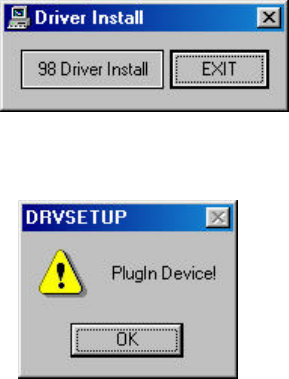
- InstallationofUSBDeviceDriverforWindows98/SE
(1)InserttheinstallationCDintheCD-ROMDriverofyour
computeranddoubleclick“DrvSetup.exe”fileintheCD.
(2)Click“98DriverInstall”button.
(3)Click“OK”buttontocompletetheinstallation.
Remark)ForinstallationinWindows98,youcanalso
doubleclick“98Install.bat”fileintheCD.
Doubleclick“98Uninstall.bat”intheCDto
uninstalltheUSBDeviceDriver.
- ConnectingDG-100withPC
(1)Removethebatterycasefromthemainbody
(2)Plug the main body into the USB port of your computer
directly and “Removable Disk” folder will be created in
“MyComputer”outof“WindowExplore”.
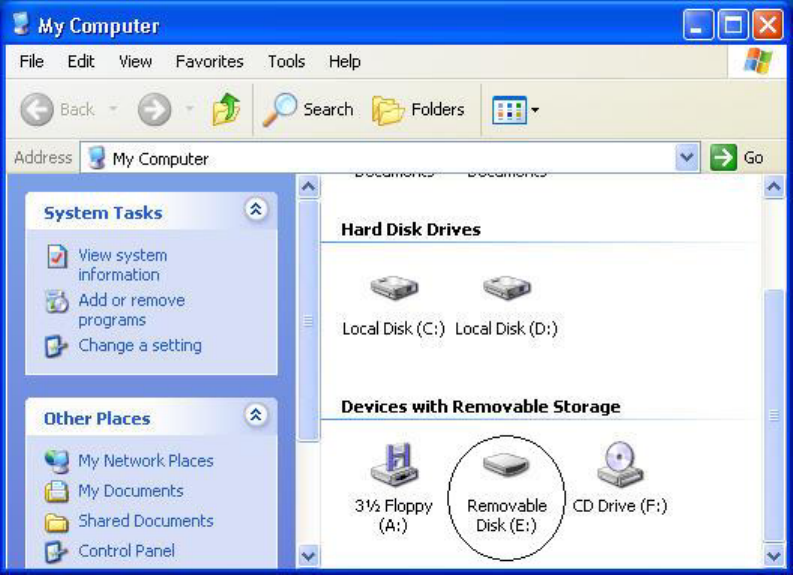
ThemainbodyofDG-100canbeusedinthesamewayasafloppy
disketteorHDD.Youcanstoreordeletenotonlymp3filesbut
anydatafiles.
“USB”iconwillbedisplayedintheLCDwindowwhenthemain
bodyispluggedintoyourcomputer.
WhenDG-100isremovedfromyourcomputer,the“Removable
Disk”folderwilldisappearinMyComputer”ofthe“Window
Explore”.
- Managingfiles
:WhenyouplugtheDG-100intotheUSBportofyourcomputer
directly,“RemovableDisk”folderwillbecreatedin“My
computer”outof“WindowExplore”.FirstwhenyoubuyDG-
100,thereisneitherfoldernorfileinRemovableDisk.
*MusicfilesmustbeplacedintheROOTfolderofDG-100so
thatitcanplayright.
*TheDG-100canbeusedinthesamewayasafloppydiskette
or HDD. You can store or delete not only mp3 files but any
datafiles.
Warning1)Pleasewait10secondsatleastbeforeyouremove
DG-100fromyourcomputersincethedatatransfer
processmaybestillunderwayeventhoughyour
computermonitortellsyouthedatahassuccessfully
transferredtoorfromDG-100.
Warning2)MusicfilesmustbeplacedintheROOTfolderof
DG-100sothatitcanplayright.
- Formatting
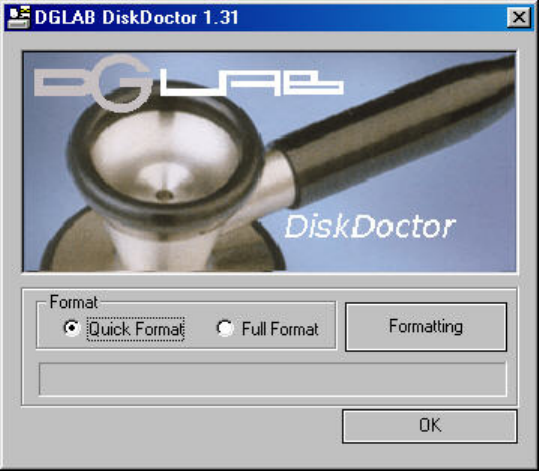
:ForformattingofDG-100,youshouldusetheprogram“DGLAB
DiskDoctor”exclusivelyprovidedbyDGLAB.
Caution1)IfDG-100isformattedbyWindowscommandMP3
filesinDG-100maynotbeplayedproperly.
Caution2)Youcan’trun“DGLABDiskDoctor”unlessDG-100
ispluggedintoyourcomputer.
(1)InserttheinstallationCDintotheCD-ROMdriverinyour
computeranddoubleclick“DiskDoctor.exe”filein
“FormatUtil”folder.
(2) Whenyouclick“Formatting”buttonafterselectingthe
formatoption(QuickFormatorFullFormat),Warning
messagewillbedisplayedasbelow.
Caution)Since“FullFormat”willtakemuchlongertime
than“QuickFormat”,itisgenerallyrecommended
touse“QuickFormat”option.
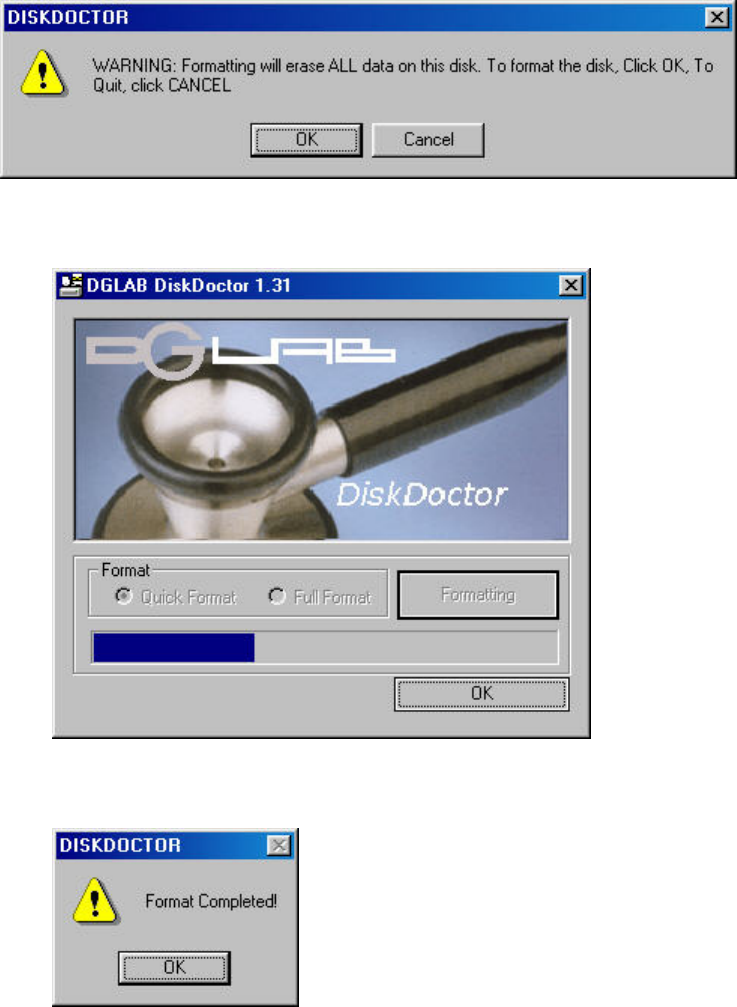
(3) Click “OK” button and the formatting process will begin
asbelow.
(4) When the formatting process is completed, the “Format
Completed!”messagewillbedisplayedasbelow.
(5) Click“OK”button.
(6) Escapefrom“DGLABDiskDoctor”byclicking“OK”button.
- SeperatingDG-100fromPC
:Makesurethatthedatatransfershouldbecompletedbefore
removingDG-100fromyourcomputer.
ThedatainDG-100maybeseverelydamagedintheeventthat

the DG-100 is removed from your computer while the data is
beingtransferred.
In Windows 2000/ME/XP, for safe removal, click the icon
“(hardware removal)” at the bottom right corner of your
computerscreenandfollowtheinstructionsthatyourcomputer
guidesyou.
InWindows98/SE,selectthe“RemovableDisk”,clickthe
right button of your mouse and click “Eject” button before
youpullDG-100outofyourcomputer.
#Precautions
1.Donotdroptheplayer(ashockisamajorcauseofbreakdown)
2.Besuretotakeoutthebatteryincasethattheplayerisnot
usedforalongtime.
3.Avoid exposure to dust, moisture, magnetic body, direct
sunlightandheat.
4.Pleaseavoidstaticelectricity.
The player may not be working, due to overflow of static
electricity.Whenthishappens,turntheplayeroffandonagain.
5.Donotdisassembletheplayer.
6.Forformatting,youshouldusetheprogram“DGLABDiskDoctor”
exclusivelyprovidedbyDGLAB.YoushouldnottrytoformatDG-
100byusingWindows
#ProductSpecification
ㅇModel:DG-100
ㅇMemory:Built-inMemory(64MB/128MB)
ㅇDisplay:Built-inDisplay(Character)
ㅇInterface:USB1.1
ㅇDownloadSpeed:Max12Mbps(dependingoncomputer)
ㅇPlaybackTime:Approximately10Hrs(AAABattery1EA)
ㅇAudioOutput:6.0mW/16Ω
ㅇS/NRatio:90dB
ㅇOutputFrequency:20Hz20KHz
ㅇOperatingTemperature:045℃
ㅇPower
-MP3Player:DC1.5V(AAABattery1EA)
-USBStorageDevice:PCUSBPowered
ㅇSupportedOS:Windows98/SE,WindowsME/2000/XP
ㅇSize:28.4x94.2x23.3mm
ㅇWeight:33g(w/obattery)
#TroubleShooting
- WhenyouhaveanyproblemwithDG-100,pleasecheckthe
followingsfirstbeforeconsultingaservicecenter.
1.NoPower
(1)Checkwhetherthebatteryisinsertedproperly.
(2)Checkthevoltageofbattery(ifbatteryisout,theplayer
won’twork)
2.Whenthepoweristurnedonandoffbyitself
(1)CheckwhethertheHoldswitchisplacedon“HOLD(”
position.
(2)Checkwhetherthebatteryhasenoughpower.
3. WhenthebuttonsofDG-100don’twork.
(1)CheckwhethertheHoldswitchisplacedon“HOLD(”position.
4.Nosoundfromearphones
(1)Checkwhethertheearphoneispluggedproperly
*Ifeither(rightorleft)oftheearphonesdoesnotwork,
Checkwhethertheearphoneispluggedproperly
5.CannotconnecttoPCorfiledownloaddoesn’twork
(1)Checkwhethertheplayeriscorrectlypluggedtoyour
computer.
(2)CheckwhetherUSBstoragedevicedriverforWindows98/SE
iscorrectlyinstalledincasethattheOSofyourcomputer
isWindows98/SE.
(3)Removetheplayerfromyourcomputerandplugitagain.