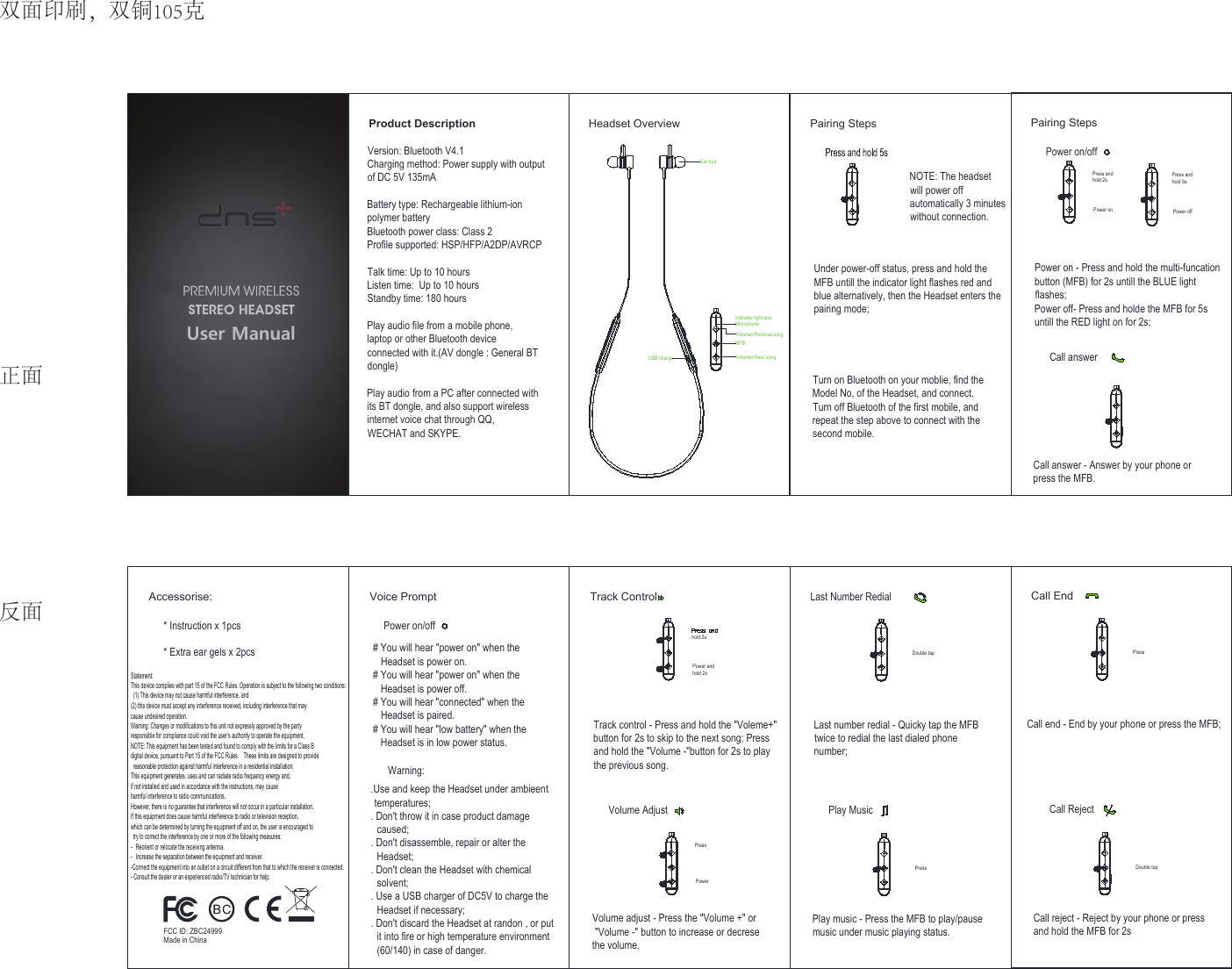
DNS 24999 Wireless stereo earbuds User Manual Bluetooth manual 20180604

SHENZHEN DNS INDUSTRIES CO., LTD. Wireless stereo earbuds Bluetooth manual 20180604

Contents

User Manual

PressPowerPairing StepsPower on/offPress andhold 2sPower on - Press and hold the multi-funcationbutton (MFB) for 2s untill the BLUE lightflashes;Power off- Press and holde the MFB for 5suntill the RED light on for 2s;Call answer - Answer by your phone orpress the MFB.Press andhold 5sPower on Power offCall answerPressLast Number RedialDouble tapLast number redial - Quicky tap the MFBtwice to redial the last dialed phonenumber;Play music - Press the MFB to play/pausemusic under music playing status.Play Music User ManualProduct Description Pairing StepsNOTE: The headsetwill power offautomatically 3 minuteswithout connection.Under power-off status, press and hold theMFB untill the indicator light flashes red andblue alternatively, then the Headset enters thepairing mode;Turn on Bluetooth on your moblie, find theModel No, of the Headset, and connect.Turn off Bluetooth of the first mobile, andrepeat the step above to connect with thesecond mobile.Accessorise:* Instruction x 1pcs* Extra ear gels x 2pcsVoice PromptPower on/off# You will hear "power on" when the   Headset is power on.# You will hear "power on" when the   Headset is power off.# You will hear "connected" when the   Headset is paired.# You will hear "low battery" when the   Headset is in low power status..Use and keep the Headset under ambieent temperatures;. Don't throw it in case product damage  caused;. Don't disassemble, repair or alter the  Headset;. Don't clean the Headset with chemical  solvent;. Use a USB charger of DC5V to charge the  Headset if necessary;. Don't discard the Headset at randon , or put  it into fire or high temperature environment  (60/140) in case of danger.Warning:Track Controlhold 2sTrack control - Press and hold the "Voleme+"button for 2s to skip to the next song; Pressand hold the "Volume -"button for 2s to playthe previous song.Volume adjust - Press the "Volume +" or "Volume -" button to increase or decresethe volume.Power andhold 2sVolume AdjustEar budVersion: Bluetooth V4.1Charging method: Power supply with outputof DC 5V 135mABattery type: Rechargeable lithium-ionpolymer batteryBluetooth power class: Class 2Profile supported: HSP/HFP/A2DP/AVRCPTalk time: Up to 10 hoursListen time:  Up to 10 hoursStandby time: 180 hoursPlay audio file from a mobile phone,laptop or other Bluetooth deviceconnected with it.(AV dongle : General BTdongle)Play audio from a PC after connected withits BT dongle, and also support wirelessinternet voice chat through QQ,WECHAT and SKYPE.Headset OverviewDouble tapCall EndPressCall end - End by your phone or press the MFB;Call reject - Reject by your phone or pressand hold the MFB for 2sCall RejectIndicator light andMicrophoneVolume-/Previous songMFBVolume+/Next songUSB chargeFCC ID: ZBC24999Made in China双面印刷,双铜105克正面反面Statement: This device complies with part 15 of the FCC Rules. Operation is subject to the following two conditions:  (1) This device may not cause harmful interference, and   (2) this device must accept any interference received, including interference that may   cause undesired operation. Warning: Changes or modifications to this unit not expressly approved by the party   responsible for compliance could void the user’s authority to operate the equipment.   NOTE: This equipment has been tested and found to comply with the limits for a Class B   digital device, pursuant to Part 15 of the FCC Rules.    These limits are designed to provide  reasonable protection against harmful interference in a residential installation.     This equipment generates, uses and can radiate radio frequency energy and,   if not installed and used in accordance with the instructions, may cause   harmful interference to radio communications. However, there is no guarantee that interference will not occur in a particular installation.     If this equipment does cause harmful interference to radio or television reception,   which can be determined by turning the equipment off and on, the user is encouraged to  try to correct the interference by one or more of the following measures: -  Reorient or relocate the receiving antenna. -  Increase the separation between the equipment and receiver. -Connect the equipment into an outlet on a circuit different from that to which the receiver is connected. - Consult the dealer or an experienced radio/TV technician for help.

Navigation menu