DNS HD0855 Wireless stereo earbuds User Manual 1

SHENZHEN DNS INDUSTRIES CO., LTD. Wireless stereo earbuds 1

User Manual

User Manual  For user’s safety, please read this manualbefore using the headset. The following matters should be paid attention to when using headphones: ◆Please avoid under the high volume mode, because it will lead to hearing loss caused by noise. ◆If you are in bad condition of potential danger, please stop using headphones in order to ensure safety. ◆Users should be reasonable control volume and time when listen to the headphones. ◆The volume should not be too high, cause you can't hear the voice around the volume. If volume is too high that may appear tinnitus, please lower down the volume. ◆Don'tlisten to music while driving. ◆With dry soft cloth to clean the headset! Should avoid the headphone into the Water because it will cause headset damage. ◆If  you  feel  obvious  discomfort,  stimulation,  or  other  adverse  reaction  when  using  the  headset,  should immediately stop using it. ◆The headphones should not be stored or used in temperature below 15°C   (5°F) or higher than 55°C (131°F), otherwise it will reduce headphones or battery life.  Charging and Battery Before charging this headset with charging cable, please check whether the charging cable is the original.  Warning:   This device complies with part 15 of the FCC Rules. Operation is subject to the following two conditions: (1) This device may not cause harmful interference, and (2) this device must accept any interference received, including interference that may cause undesired operation.  Warning: Changes or modifications to this unit not expressly approved by the party responsible for compliance could void the user’s authority to operate the equipment.    NOTE: This equipment has been tested and found to comply with the limits for a Class B digital device, pursuant to  Part  15  of  the  FCC  Rules.    These  limits  are  designed  to  provide  reasonable  protection  against  harmful interference in a residential installation.    This equipment generates, uses and can radiate radio frequency energy and,  if  not  installed  and  used  in  accordance  with  the  instructions,  may  cause  harmful  interference  to  radio communications. However, there is no guarantee that interference will not occur in a particular installation.    If this equipment does cause harmful interference to radio or television reception, which can be determined by turning the equipment off and on, the user is encouraged to try to correct the interference by one or more of the following measures:  - Reorient or relocate the receiving antenna. - Increase the separation between the equipment and receiver. -Connect the equipment into an outlet on a circuit different from that to which the receiver is connected. - Consult the dealer or an experienced radio/TV technician for help.  Please charging the headsets with original charging cable,it may damage the battery or the headset if you are using improper charging cable.  This headset built-in rechargeable batteries, so do not attempt to remove the battery from the headset to avoid damage it.
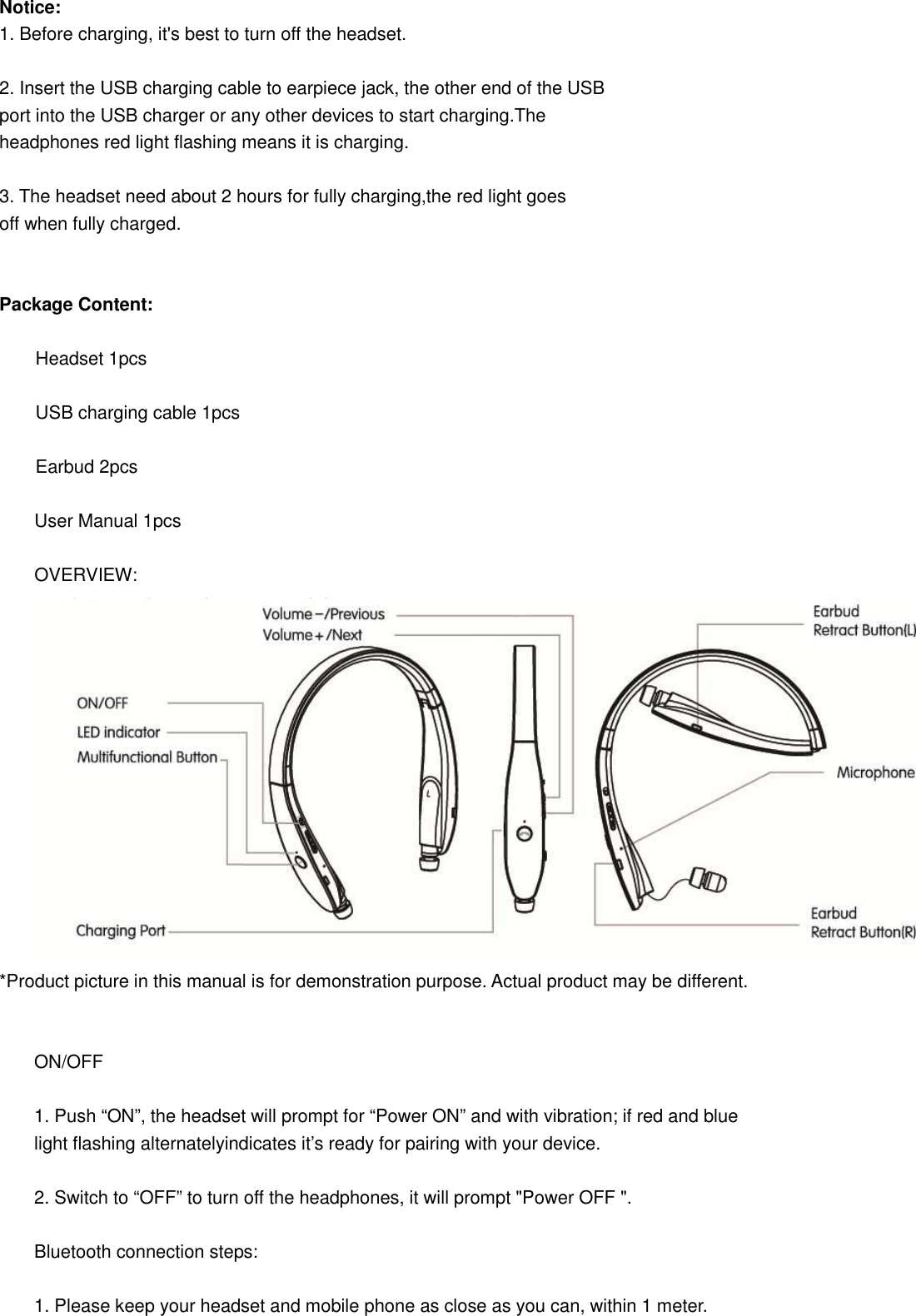
Notice: 1. Before charging, it's best to turn off the headset.  2. Insert the USB charging cable to earpiece jack, the other end of the USB   port into the USB charger or any other devices to start charging.The   headphones red light flashing means it is charging.  3. The headset need about 2 hours for fully charging,the red light goes   off when fully charged.   Package Content:          Headset 1pcs          USB charging cable 1pcs          Earbud 2pcs  User Manual 1pcs  OVERVIEW:  *Product picture in this manual is for demonstration purpose. Actual product may be different.   ON/OFF  1. Push “ON”, the headset will prompt for “Power ON” and with vibration; if red and blue light flashing alternatelyindicates it’s ready for pairing with your device.  2. Switch to “OFF” to turn off the headphones, it will prompt "Power OFF ".  Bluetooth connection steps:  1. Please keep your headset and mobile phone as close as you can, within 1 meter.
 2. Switch to "ON", it will prompts "pairing" after 5 seconds, and then Red and   Blue lights flashing alternately when headset is on and ready for pairing.  3. Turn on “Bluetooth” in setting and find headset name S801.  4. Click S801, Bluetooth headset gets connected with your mobile phone   automatically. Some may require pass code which is 0000.    Pair the headset with 2 mobile phones  1. After successfully paired with a mobile phone, close the Bluetooth function   of the mobile phone, and switch the button of S801 to OFF.  2. Same procedure to get the 2nd mobile phone paired with the Bluetooth headset.  3.Turn on the Bluetooth function of the 1st mobile phone; choose“S801” to finish the pairing status with the 2nd mobile phones.  Note:  1.  With you previously paired device’s Bluetooth turned on and in range ,   turn on S801.The headset will automatically reconnect to the same Bluetooth   device that connected last time.If you have a previously paired device that does   not auto-reconnect , navigate to the Bluetooth settings menu on your device,   turn on the Bluetooth feature, and select “S801” from your list of   paired Bluetooth devices .  2.  Pairing time exceeds 3 minutes, S801 will automatically shutdown ; in 3   minutes back to the effective distance can automatically return to the last   connected device .  3.  P.S.:    If connected with two moblie phones, only mobile phone 1 supports   wireless music and you can start conversation for both mobile phones. Battery   check up through iPhone.                                                                                Answer & End call / lncoming call vibration remind  Answer phone call:  When there is incoming call, there will be a voice prompt,134......2578. (phone number will be broadcasted) Click MFB to answer, or just operate your mobile phone.  End Call:  Press the multifunction button to hang up calls, or by direct hang up your   phone call.
Reject call:  When there is incoming call, headphone will broadcast the phone number with vibration, long press MFB to reject, or just reject it on   your mobile phone.  Last number redial:  Double click MFB.  Call Transfer: Double click the volume“-“when calling to have call transfer between phone and headset. Chinese/English Shift: Long press the MFB and volume“+”simultaneously for 2 seconds.  EQ Shift: Double click the volume “-“when playing music to have different sound effect (low bass boost, normal, high pitch boost). Default setting is low bass boost. Choose your favorite sound effect base on your habit and music style.  Power Prompt: Each time turning on S801, it will report headset battery power   remaining, such as “battery full”,“battery level high”, “battery level   medium” , “battery level low” , “recharge headset”.  Voice Dial: Unlock the mobile phone and double click the volume“+”to launch the voice   dial, and then just speak the people name you want to call. This function can work   only if your mobile phone support it.  Play/Pause/Tracks  During music playing, single click MFB to pause music, and click again MFB to back to play.  During music playing, single click “+/--”tochange songs.  During the call or listening to music, user can long press “+” or “--”button to adjust the volume. Mobile phone anti-lost indicator  When the headphone connected to smart phone, If the distance between   device and headphone out of 10 m, headphone will prompt “Beyond the   range of connections”. If coming back to the working distance within   3 min or after, the prompt will be off and reconnect automatically. If not coming back to the working distance in 10 min,   headphone will be power off, please switch the button to the   OFF and switch ON to the power on mode, headphone will back to work.    Restore Factory Settings
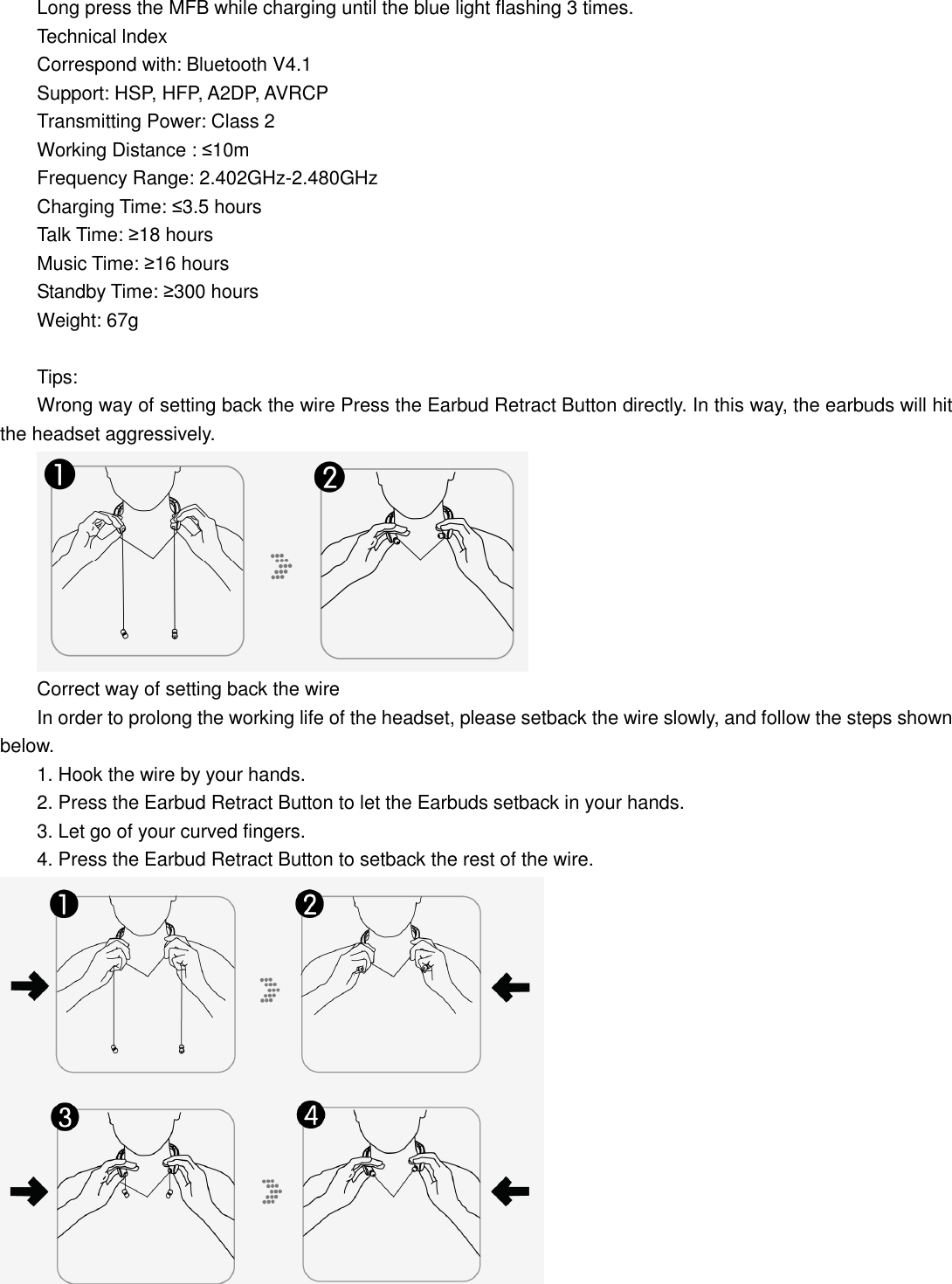
 Long press the MFB while charging until the blue light flashing 3 times. Technical lndex Correspond with: Bluetooth V4.1               Support: HSP, HFP, A2DP, AVRCP Transmitting Power: Class 2                                                                     Working Distance : ≤10m Charging Time: ≤3.5 hours Talk Time: ≥18 hours                                                                                                           Music Time: ≥16 hours Standby Time: ≥300 hours                                                                                                   Weight: 67g  Tips: Wrong way of setting back the wire Press the Earbud Retract Button directly. In this way, the earbuds will hit the headset aggressively.  Correct way of setting back the wire In order to prolong the working life of the headset, please setback the wire slowly, and follow the steps shown below. 1. Hook the wire by your hands. 2. Press the Earbud Retract Button to let the Earbuds setback in your hands. 3. Let go of your curved fingers. 4. Press the Earbud Retract Button to setback the rest of the wire.  Frequency Range: 2.402GHz-2.480GHz

Navigation menu