DOKI TECHNOLOGIES DW1601 dokiWatch User Manual Print

DOKI TECHNOLOGIES LIMITED dokiWatch Print

User manual

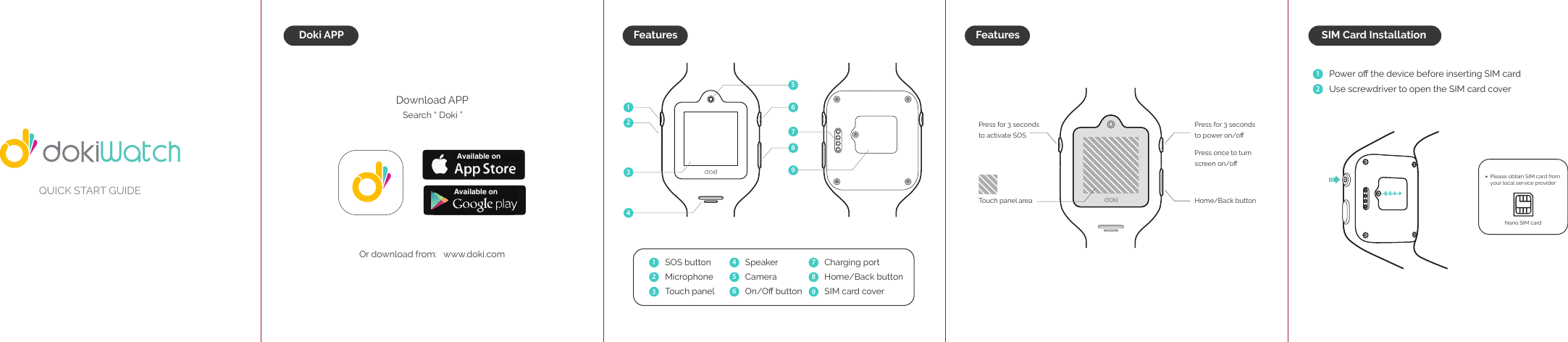
QUICK START GUIDEFeaturesDoki APPDownload APPSearch “ Doki ”Or download from:   www.doki.com SOS buttonMicrophoneTouch panelSpeakerCameraOn/Off button  Charging portHome/Back buttonSIM card cover  Press for 3 seconds to power on/offPress once to turn screen on/offHome/Back buttonPress for 3 seconds to activate SOS Touch panel area123456789Available onAvailable onFeaturesPlease obtain SIM card from your local service provider Nano SIM card Power off the device before inserting SIM card Use screwdriver to open the SIM card cover12SIM Card Installation*123456798
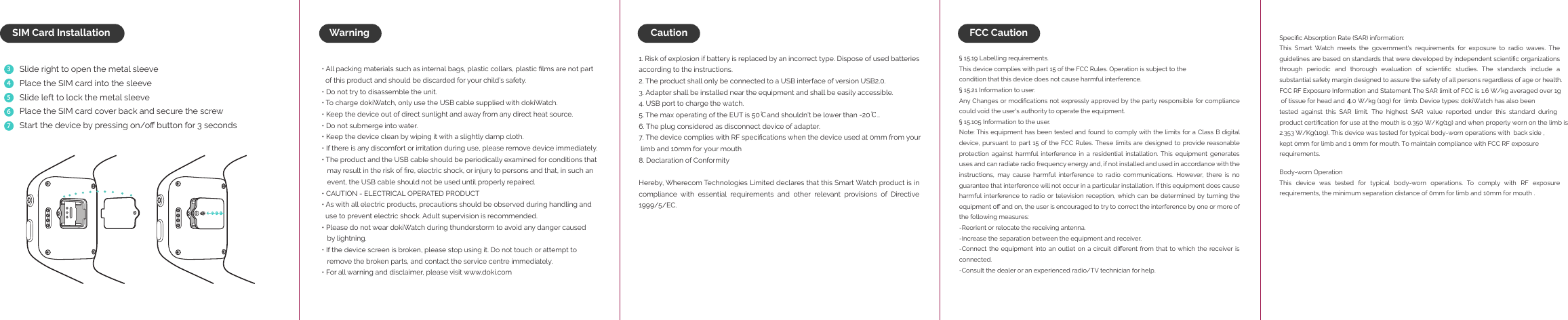
WarningSlide right to open the metal sleevePlace the SIM card into the sleeveSlide left to lock the metal sleevePlace the SIM card cover back and secure the screwStart the device by pressing on/off button for 3 seconds34567SIM Card Installation• All packing materials such as internal bags, plastic collars, plastic films are not part   of this product and should be discarded for your child’s safety.• Do not try to disassemble the unit.• To charge dokiWatch, only use the USB cable supplied with dokiWatch.• Keep the device out of direct sunlight and away from any direct heat source.• Do not submerge into water.• Keep the device clean by wiping it with a slightly damp cloth.• If there is any discomfort or irritation during use, please remove device immediately. • The product and the USB cable should be periodically examined for conditions that    may result in the risk of fire, electric shock, or injury to persons and that, in such an    event, the USB cable should not be used until properly repaired.• CAUTION - ELECTRICAL OPERATED PRODUCT • As with all electric products, precautions should be observed during handling and   use to prevent electric shock. Adult supervision is recommended. • Please do not wear dokiWatch during thunderstorm to avoid any danger caused    by lightning. • If the device screen is broken, please stop using it. Do not touch or attempt to    remove the broken parts, and contact the service centre immediately. • For all warning and disclaimer, please visit www.doki.com1. Risk of explosion if battery is replaced by an incorrect type. Dispose of used batteries        according to the instructions.2. The product shall only be connected to a USB interface of version USB2.0.3. Adapter shall be installed near the equipment and shall be easily accessible.4. USB port to charge the watch.5. The max operating of the EUT is 50℃and shouldn’t be lower than -20℃..6. The plug considered as disconnect device of adapter.7. The device complies with RF specifications when the device used at 0mm from your  limb and 10mm for your mouth8. Declaration of Conformity Hereby, Wherecom Technologies Limited declares that this Smart Watch product is in compliance with essential requirements and other relevant provisions of Directive 1999/5/EC.§ 15.19 Labelling requirements.This device complies with part 15 of the FCC Rules. Operation is subject to thecondition that this device does not cause harmful interference.§ 15.21 Information to user.Any Changes or modifications not expressly approved by the party responsible for compliance could void the user's authority to operate the equipment.§ 15.105 Information to the user.Note: This equipment has been tested and found to comply with the limits for a Class B digital device, pursuant to  part 15  of the FCC  Rules. These  limits are designed  to provide reasonable protection against harmful interference in a residential installation. This equipment generates uses and can radiate radio frequency energy and, if not installed and used in accordance with the instructions,  may  cause  harmful  interference  to  radio  communications.  However,  there  is  no guarantee that interference will not occur in a particular installation. If this equipment does cause harmful interference to  radio  or television  reception, which  can  be  determined by  turning  the equipment off and on, the user is encouraged to try to correct the interference by one or more of the following measures:-Reorient or relocate the receiving antenna.-Increase the separation between the equipment and receiver.-Connect the  equipment  into an  outlet on  a  circuit different from that  to which  the receiver is connected.-Consult the dealer or an experienced radio/TV technician for help.Specific Absorption Rate (SAR) information:This  Smart  Watch  meets  the  government's  requirements  for  exposure  to  radio  waves.  The guidelines are based on standards that were developed by independent scientific organizations through  periodic  and  thorough  evaluation  of  scientific  studies.  The  standards  include  a substantial safety margin designed to assure the safety of all persons regardless of age or health.FCC RF Exposure Information and Statement The SAR limit of FCC is 1.6 W/kg averaged over 1g  of tissue for head and    .0 W/kg (10g) for  limb. Device types: dokiWatch has also been tested against this SAR limit. The highest SAR value reported under this standard during product certification for use at the mouth is 0.350 W/Kg(1g) and when properly worn on the limb is 2.353 W/Kg(10g). This device was tested for typical body-worn operations with  back side , kept 0mm for limb and 1 0mm for mouth. To maintain compliance with FCC RF exposure requirements. Body-worn OperationThis  device  was  tested  for  typical  body-worn  operations.  To  comply  with  RF  exposure requirements, the minimum separation distance of 0mm for limb and 10mm for mouth .Caution FCC Caution 4

Navigation menu