DOM Sicherheitstechnik and KG ELS999 Keylock Cylinder User Manual Exhibit 8 Manual
DOM Sicherheitstechnik GmbH & Co. KG Keylock Cylinder Exhibit 8 Manual
Exhibit 8 Manual
Commissioning and Programming of On-Line cylinder with
Master- und Programming Card
Attention: When programming cylinders external the door please make sure that the locking
nose is blocked when activating the cylinder.
Before programming, the cylinder must know its system membership. This procedure is
unique and once in a lifetime of the cylinder and is not reversable.
1. Creating the system membership:
You require: +
✔ Turn the outer knob !
!!
!. You woke up the cylinder. The cylinder expects your input.
✔ Show the Master Card to the outer knob. Cylinder accepts Master Card "
""
" "
""
".
2. Communication between On-Line cylinder and ELS interface
✔ To start the communication between cylionder and ELS interface both units need to know
each other. The interface must be linked to the networkbecause powersupply is delivered
form the network. The busmaster equivalently connected to the mains.
Sequence:
!
!!
!
"
""
" wait 3 secs."
""
" wait 5 secs. "
""
" "
""
"
The last beep is significantly longer than the one before. Due to runtimes within the system
the procedure may be done 2-3 times until the last beep is significantly longer.
3. Creation of Programming Cards:
You require: + +
✔ Turn the outer knob !
!!
!. You woke up the cylinder. The cylinder expects your input.
✔ Show the master card to the outer knob. Cylinder accepted Master card "
""
".
Wait 3 secs. "
""
". The cylinder expects your input.
✔ Show Programming card to the outer knob "
""
". Programming card was excepted.
✔ If using two or three Programming cards, show each card sequentially to the outer knob.
Each card will be confirmed by a "
""
".
✔ Wait 5 secs. "
""
" "
""
". Procedure completed. Cylinder has stored your Programming Cards.
4. Programmation of locking media with Programming Card
You require: + +
✔ Turn the outer knob !
!!
!. You woke up the cylinder. The cylinder expects your input.
✔ Show the Programming card to the outer knob. Cylinder accepted Programming card
"
""
" wait 3 secs. "
""
". The cylinder expects your input.
✔ Show first media to the outer knob. "
""
" Locking medium was accepted.
✔ Show all media which should be stored in the cylinder sequentially to the outer knob. Each
medium will be confirmed by "
""
". Cylinder accepted input of locking media.
✔ Wait 5 secs. "
""
" "
""
". Procedure completed. Cylinder has stored the locking media.
Attention : Instead of using the Programming Card, the Master card can also be used.
5. Deletion of locking media when available:
Attention: Are the locking media no longer available you have to use the Handterminal
(option)
You require: + +
✔ Turn the outer knob !
!!
!. You woke up the cylinder. The cylinder expects your input.
✔ Show the Programming card to the outer knob. Cylinder accepted Programming card
"
""
" wait 3 secs. "
""
". The cylinder expects your input.
✔ Show the Programming card for a second time to the outer knob. Cylinder accepted
Programming card "
""
". Wait 3 secs. "
""
". The cylinder expects your input.
✔ Show the locking media prepared for deletion to the outer knob. "
""
" The locking medium
was accepted.
✔ Show all locking media which should be deleted sequentially to the outer knob. Each
medium will be confirmed with a "
""
".
✔ Wait 5 secs. "
""
" "
""
". Procedure completed. The cylinder has accepted the deletion of the
locking media.
6. Deleting all locking media:
You require: +
✔ Turn the outer knob !
!!
!. You woke up the cylinder. The cylinder expects your input.
✔ Show the Programming card to the outer knob. Cylinder accepted Programming card
"
""
" wait 3 secs. "
""
". The cylinder expects your input.
✔ Show the Programming card for a second time to the outer knob. Cylinder accepted
Programming card "
""
". Wait 3 secs. "
""
". The cylinder expects your input.
✔ Show the Programming card for a third time to the outer knob "
""
" "
""
". All locking media
have been deleted
7. Deletion of all Locking media and Programming Cards
You require: +
✔ Turn the outer knob !
!!
!. You woke up the cylinder. The cylinder expects your input.
✔ Show the Master card to the outer knob. Cylinder accepted Master Card
"
""
" wait 3 secs. "
""
". The cylinder expects your input.
✔ Show the Master Card a second time to the outer knob. Cylinder accepted Master Card
"
""
" wait 3 secs. "
""
". The cylinder expects your input.
✔ Show the Master Card a third time to the outer knob. Cylinder accepted Master
Card "
""
" "
""
". All Programming Cards and Locking media have been deleted. Cylinder
knows only the Master Card.
8. Deleting of individual Programming Cards:
You require: + +
✔ Turn the outer knob !
!!
!. You woke up the cylinder. The cylinder expects your input.
✔ Show the Master card to the outer knob. Cylinder accepted Master Card
"
""
" wait 3 secs. "
""
". The cylinder expects your input.
✔ Show the Master card a second time to the outer knob. Cylinder accepted Master Card
"
""
" wait 3 secs. "
""
". The cylinder expects your input.
✔ Show for deletion prepared Programming cards to the outer knob. "
""
" Programming card
accepted
✔ Show maximum three Programming Cards to the outer knob. Each input will be confirmed
by a "
""
" .
✔ Wait 5 sec. "
""
" "
""
". Procedure completed. Cylinder has deleted all Programming Cards.
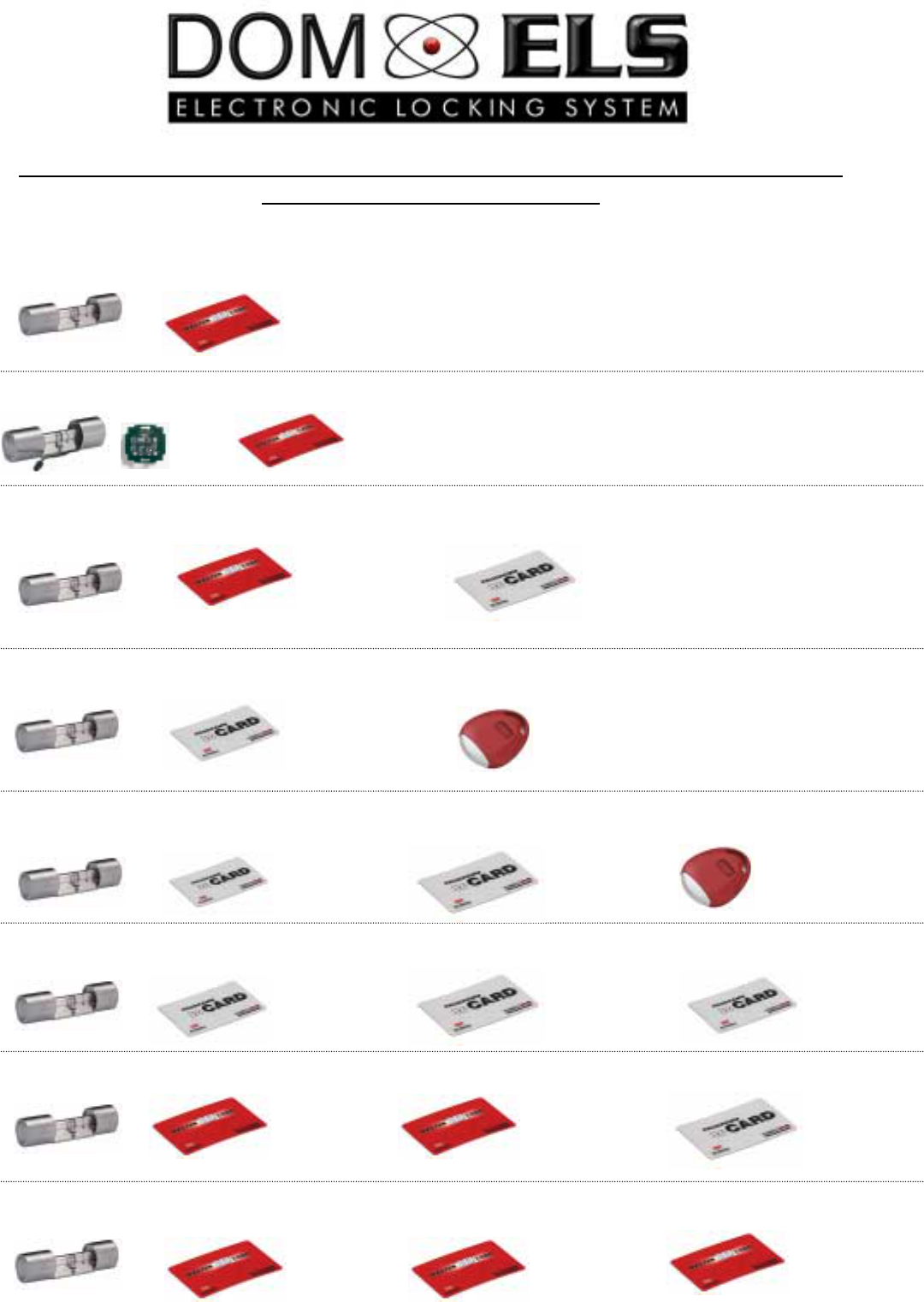
Quick reference for commissioning and programming of Off-Line cylinder with
Master- and Programming Card
Creation system membership:
!
!!
! "
""
" "
""
"
Creation of communication between cylinder and interface
!
!!
! "
""
" 3 sec. "
""
" 5 sec. "
""
" "
""
" last beep
significantly cantly longe
Creation of Programming Cards:
!
!!
! "
""
" 3 sec. "
""
" 5 sec. "
""
" "
""
"
Creation of Locking Media with Programming Card:
!
!!
! "
""
" 3 sec. "
""
" 5 sec. "
""
" "
""
"
Deletion of individual Locking media:
!
!!
! "
""
" 3 sec. "
""
" "
""
" 3 sec."
""
"´ 5 sec."
""
" "
""
"
Deletion of all Locking media:
!
!!
! "
""
" 3 sec. "
""
" "
""
" 3 sec. "
""
" "
""
" "
""
"
Deletion of individual Programming Cards:
!
!!
! "
""
" 3 sec "
""
" "
""
" 3 sec. "
""
" "
""
""
""
"
Deletion of all Programming Cards and locking media
!
!!
! "
""
" 3 sec."
""
" "
""
" 3 sec."
""
" "
""
""
""
"