DONGGUAN SMART HERO ELECTRONIC CO WLDB2323TX WIRELESS DOOR CHIME PUSH BUTTON User Manual

DONGGUAN SMART HERO ELECTRONIC PRODUCTS CO LTD WIRELESS DOOR CHIME PUSH BUTTON Users Manual

Users Manual

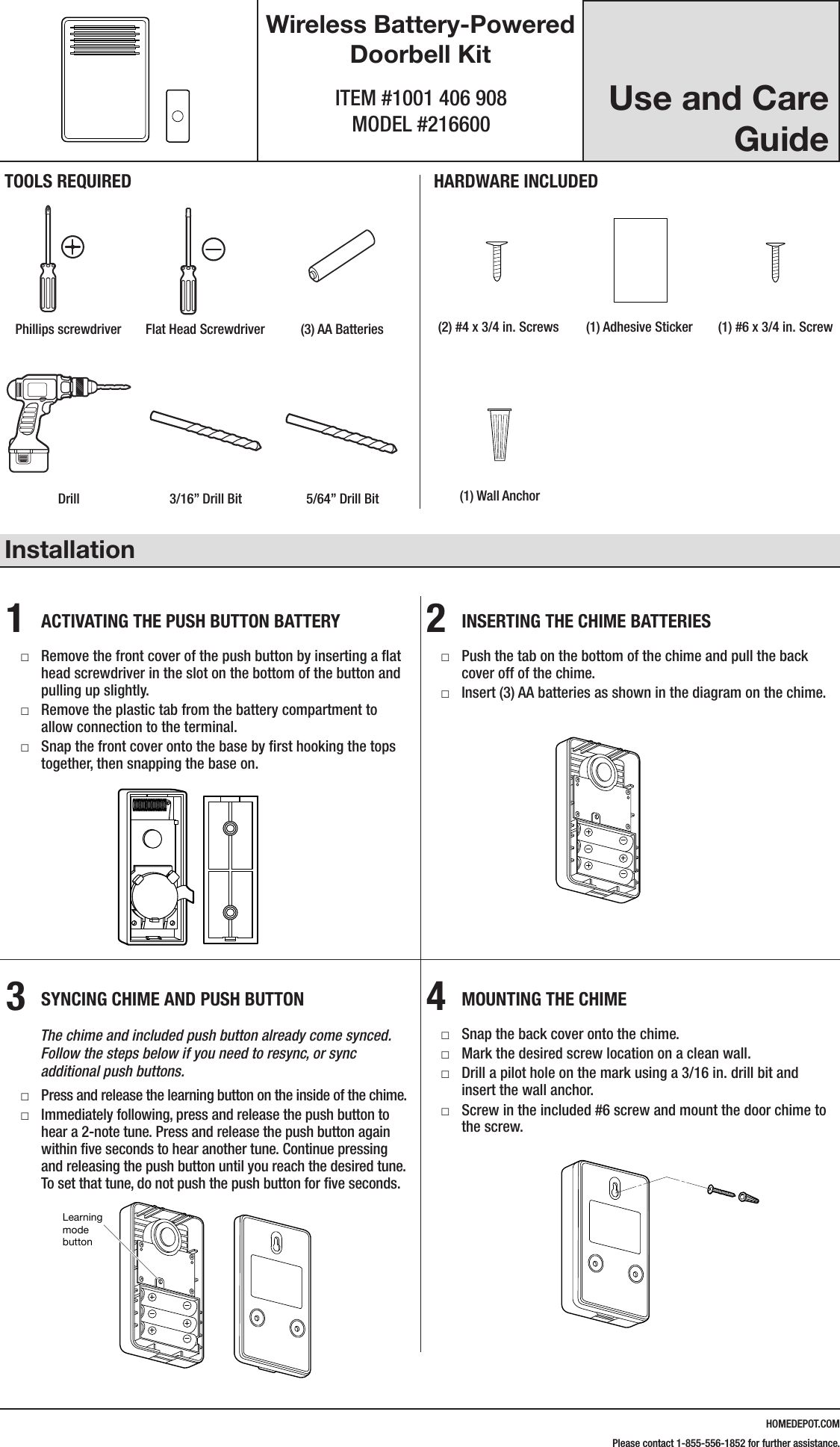
HOMEDEPOT.COMPlease contact 1-855-556-1852 for further assistance.Use and Care GuideWireless Battery-Powered Doorbell KitITEM #1001 406 908 MODEL #216600Installation1  ACTIVATING THE PUSH BUTTON BATTERY □Remove the front cover of the push button by inserting a flat head screwdriver in the slot on the bottom of the button and pulling up slightly. □Remove the plastic tab from the battery compartment to allow connection to the terminal. □Snap the front cover onto the base by first hooking the tops together, then snapping the base on.2  INSERTING THE CHIME BATTERIES □Push the tab on the bottom of the chime and pull the back cover off of the chime. □Insert (3) AA batteries as shown in the diagram on the chime.3  SYNCING CHIME AND PUSH BUTTON        The chime and included push button already come synced.               Follow the steps below if you need to resync, or sync            additional push buttons. □Press and release the learning button on the inside of the chime. □Immediately following, press and release the push button to hear a 2-note tune. Press and release the push button again within five seconds to hear another tune. Continue pressing and releasing the push button until you reach the desired tune. To set that tune, do not push the push button for five seconds.4  MOUNTING THE CHIME □Snap the back cover onto the chime. □Mark the desired screw location on a clean wall. □Drill a pilot hole on the mark using a 3/16 in. drill bit and insert the wall anchor. □Screw in the included #6 screw and mount the door chime to the screw.216600Inst.aiLearning mode buttonTOOLS REQUIREDPhillips screwdriver Flat Head Screwdriver (3) AA BatteriesHARDWARE INCLUDED#4x3/4#6x3/4#4x1 White Zinc #6x1 Self TappingScrewHardware.ai(2) #4 x 3/4 in. Screws (1) Adhesive Sticker (1) #6 x 3/4 in. ScrewDrill 3/16” Drill Bit 5/64” Drill Bit (1) Wall Anchor216600Inst.aiLearning mode button216600Inst.aiLearning mode button216600Inst.aiLearning mode button#4x3/4#6x3/4#4x1 White Zinc #6x1 Self TappingScrewHardware.ai#4x3/4#6x3/4#4x1 White Zinc #6x1 Self TappingScrewHardware.ai#4x3/4#6x3/4#4x1 White Zinc #6x1 Self TappingScrewHardware.ai216600Inst.aiLearning mode button
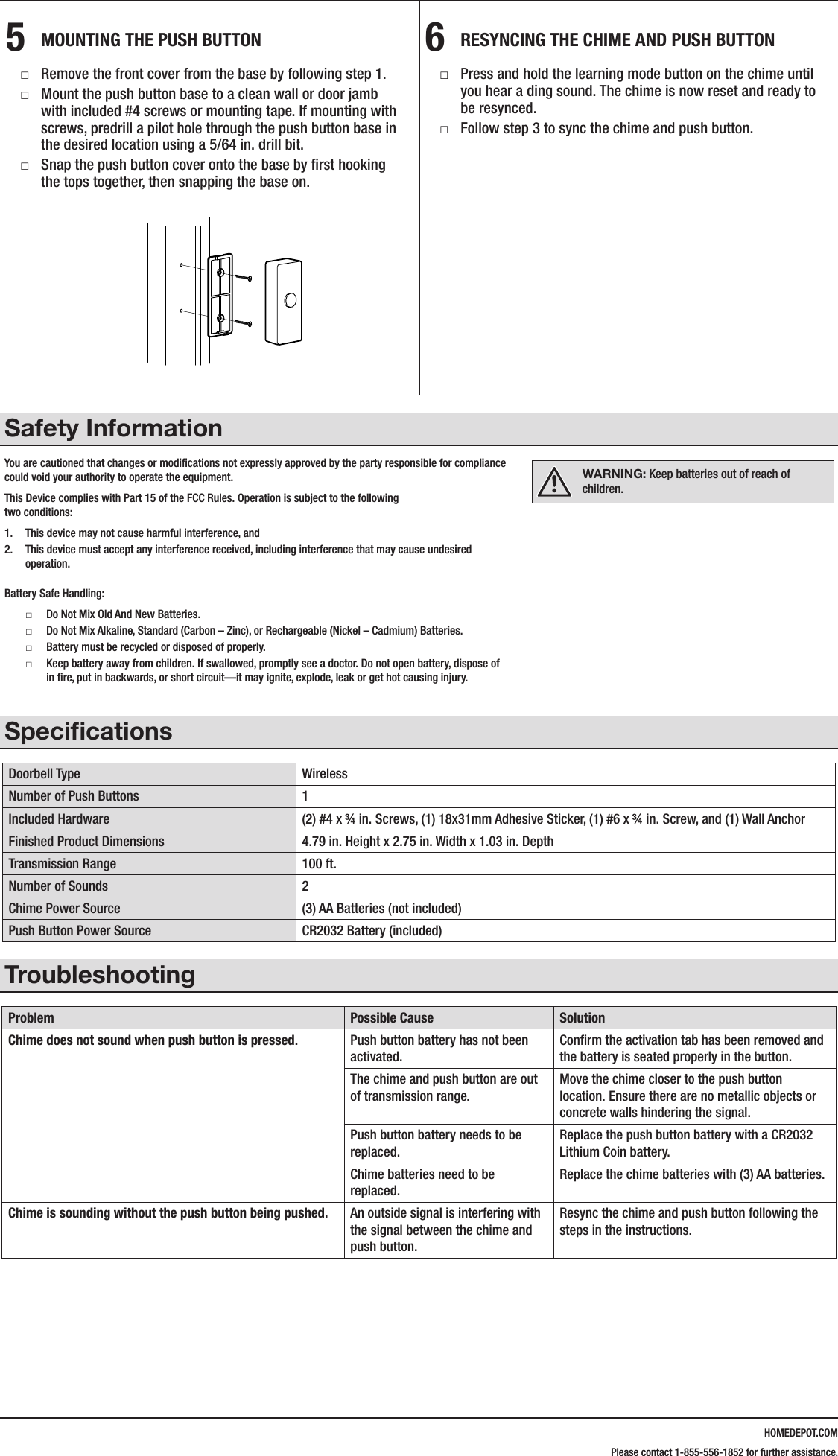
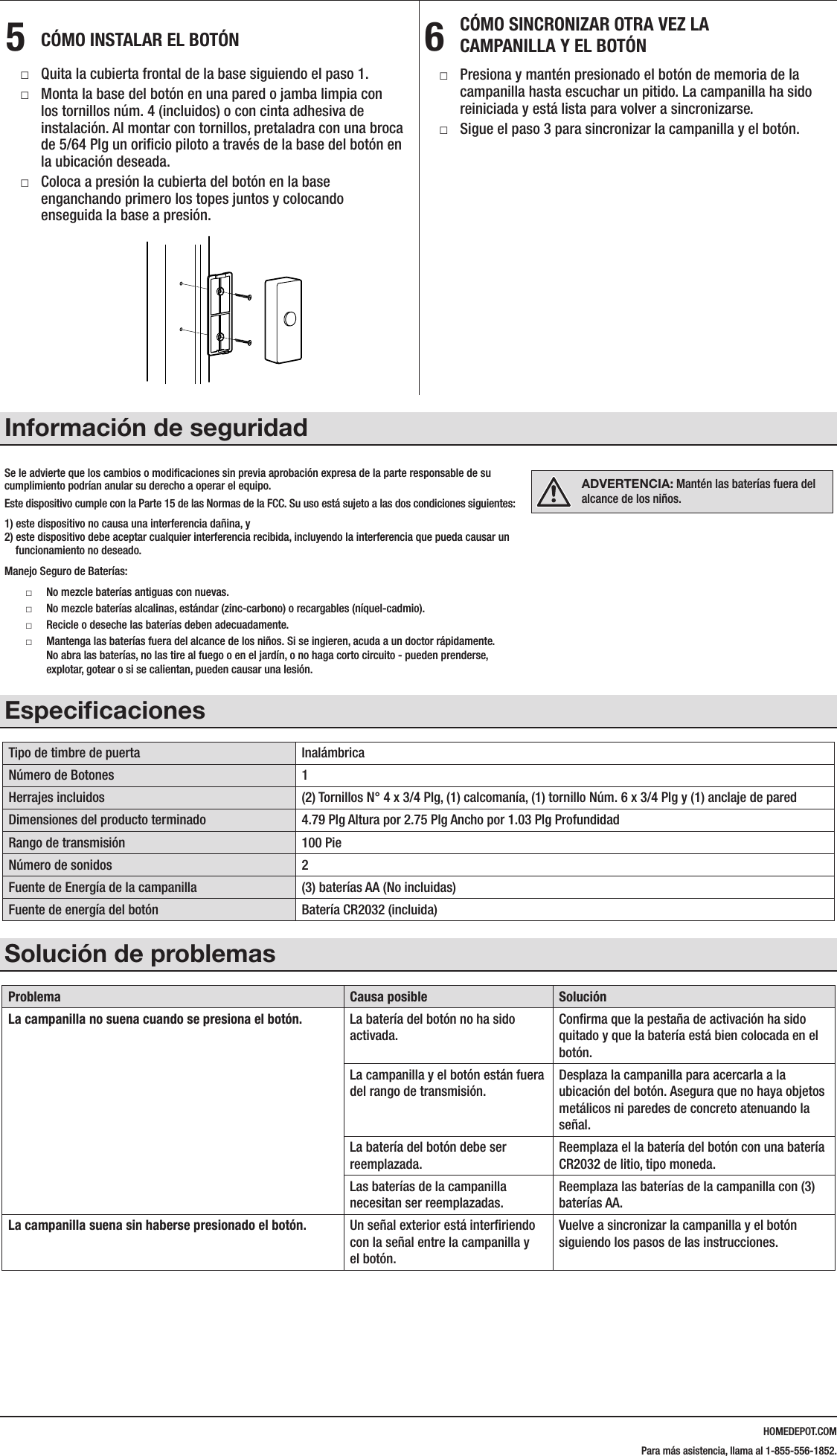
HOMEDEPOT.COMPlease contact 1-855-556-1852 for further assistance.5  MOUNTING THE PUSH BUTTON □Remove the front cover from the base by following step 1. □Mount the push button base to a clean wall or door jamb with included #4 screws or mounting tape. If mounting with screws, predrill a pilot hole through the push button base in the desired location using a 5/64 in. drill bit. □Snap the push button cover onto the base by first hooking the tops together, then snapping the base on.6  RESYNCING THE CHIME AND PUSH BUTTON □Press and hold the learning mode button on the chime until you hear a ding sound. The chime is now reset and ready to be resynced. □Follow step 3 to sync the chime and push button.Safety InformationYou are cautioned that changes or modifications not expressly approved by the party responsible for compliance could void your authority to operate the equipment.This  Device  complies  with  Part  15  of  the  FCC  Rules.  Operation  is  subject  to  the  following                                                                                                       two conditions:1.  This device may not cause harmful interference, and 2.  This device must accept any interference received, including interference that may cause undesired operation.Battery Safe Handling: □Do Not Mix Old And New Batteries.  □Do Not Mix Alkaline, Standard (Carbon – Zinc), or Rechargeable (Nickel – Cadmium) Batteries.  □Battery must be recycled or disposed of properly.  □Keep battery away from children. If swallowed, promptly see a doctor. Do not open battery, dispose of in fire, put in backwards, or short circuit—it may ignite, explode, leak or get hot causing injury.SpecificationsDoorbell Type WirelessNumber of Push Buttons 1Included Hardware (2) #4 x ¾ in. Screws, (1) 18x31mm Adhesive Sticker, (1) #6 x ¾ in. Screw, and (1) Wall AnchorFinished Product Dimensions 4.79 in. Height x 2.75 in. Width x 1.03 in. DepthTransmission Range 100 ft.Number of Sounds 2Chime Power Source (3) AA Batteries (not included)Push Button Power Source CR2032 Battery (included)TroubleshootingProblem Possible Cause SolutionChime does not sound when push button is pressed. Push button battery has not been activated.Confirm the activation tab has been removed and the battery is seated properly in the button.The chime and push button are out of transmission range.Move the chime closer to the push button location. Ensure there are no metallic objects or concrete walls hindering the signal.Push button battery needs to be replaced.Replace the push button battery with a CR2032 Lithium Coin battery.Chime batteries need to be replaced.Replace the chime batteries with (3) AA batteries.Chime is sounding without the push button being pushed. An outside signal is interfering with the signal between the chime and push button.Resync the chime and push button following the steps in the instructions.216600Inst.aiLearning mode buttonWARNING: Keep batteries out of reach of children.
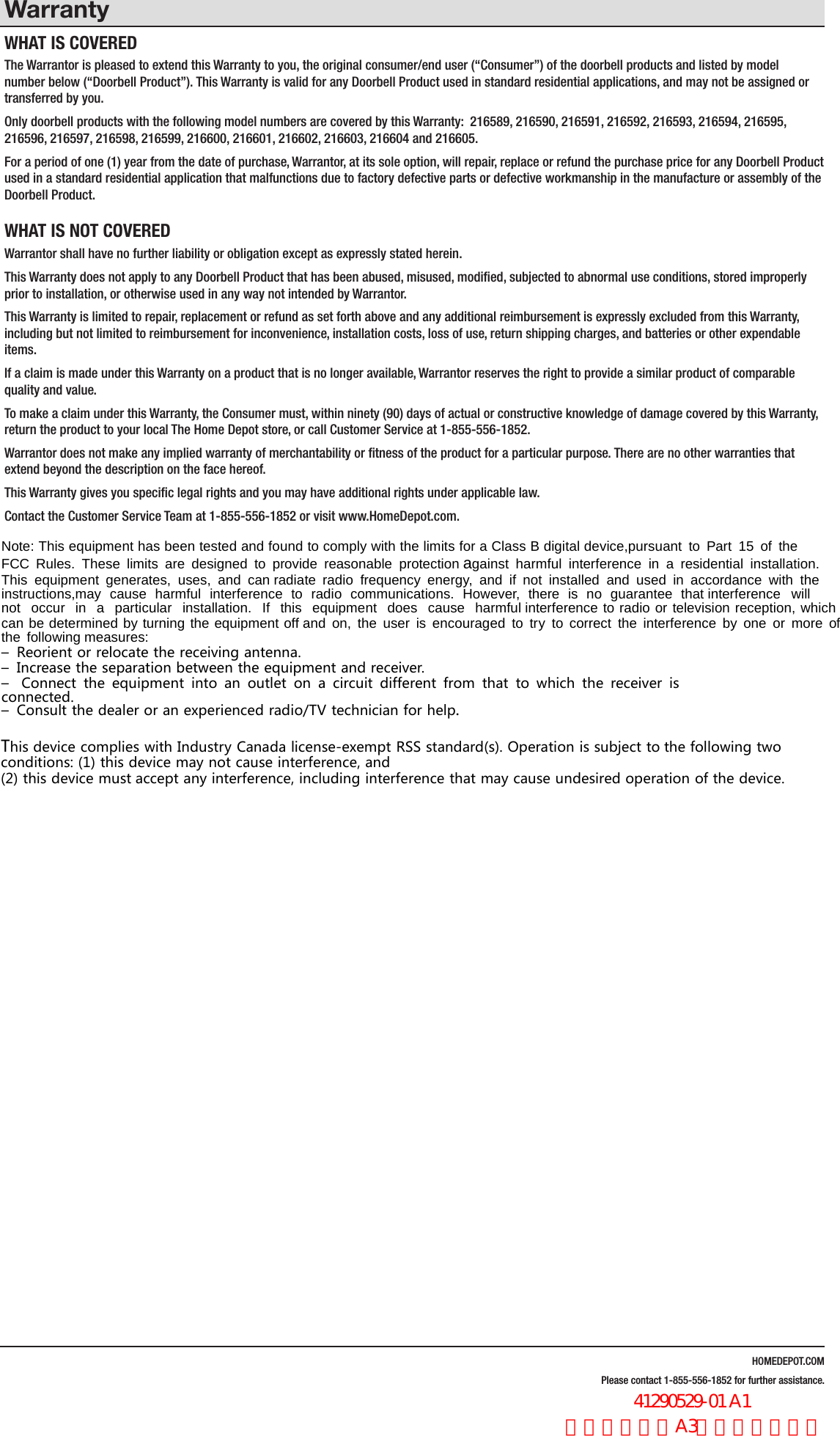
HOMEDEPOT.COMPlease contact 1-855-556-1852 for further assistance.WarrantyWHAT IS COVEREDThe Warrantor is pleased to extend this Warranty to you, the original consumer/end user (“Consumer”) of the doorbell products and listed by model number below (“Doorbell Product”). This Warranty is valid for any Doorbell Product used in standard residential applications, and may not be assigned or transferred by you. Only doorbell products with the following model numbers are covered by this Warranty:  216589, 216590, 216591, 216592, 216593, 216594, 216595, 216596, 216597, 216598, 216599, 216600, 216601, 216602, 216603, 216604 and 216605.For a period of one (1) year from the date of purchase, Warrantor, at its sole option, will repair, replace or refund the purchase price for any Doorbell Product used in a standard residential application that malfunctions due to factory defective parts or defective workmanship in the manufacture or assembly of the Doorbell Product.WHAT IS NOT COVEREDWarrantor shall have no further liability or obligation except as expressly stated herein. This Warranty does not apply to any Doorbell Product that has been abused, misused, modified, subjected to abnormal use conditions, stored improperly prior to installation, or otherwise used in any way not intended by Warrantor.This Warranty is limited to repair, replacement or refund as set forth above and any additional reimbursement is expressly excluded from this Warranty, including but not limited to reimbursement for inconvenience, installation costs, loss of use, return shipping charges, and batteries or other expendable items. If a claim is made under this Warranty on a product that is no longer available, Warrantor reserves the right to provide a similar product of comparable quality and value.To make a claim under this Warranty, the Consumer must, within ninety (90) days of actual or constructive knowledge of damage covered by this Warranty, return the product to your local The Home Depot store, or call Customer Service at 1-855-556-1852.Warrantor does not make any implied warranty of merchantability or fitness of the product for a particular purpose. There are no other warranties that extend beyond the description on the face hereof.This Warranty gives you specific legal rights and you may have additional rights under applicable law.Contact the Customer Service Team at 1-855-556-1852 or visit www.HomeDepot.com.1RWH 7KLV HTXLSPHQW KDV EHHQ WHVWHG DQG IRXQG WR FRPSO\ ZLWK WKH OLPLWV IRU D &ODVV % GLJLWDO GHYLFHSXUVXDQW WR 3DUW  RI WKH)&& 5XOHV 7KHVH OLPLWV DUH GHVLJQHG WR SURYLGH UHDVRQDEOH SURWHFWLRQDJDLQVW KDUPIXO LQWHUIHUHQFH LQ D UHVLGHQWLDO LQVWDOODWLRQ7KLV HTXLSPHQW JHQHUDWHV XVHV DQG FDQUDGLDWH UDGLR IUHTXHQF\ HQHUJ\ DQG LI QRW LQVWDOOHG DQG XVHG LQ DFFRUGDQFH ZLWK WKHLQVWUXFWLRQVPD\ FDXVH KDUPIXO LQWHUIHUHQFH WR UDGLR FRPPXQLFDWLRQV +RZHYHU WKHUH LV QR JXDUDQWHH WKDWLQWHUIHUHQFH ZLOOQRW RFFXU LQ D SDUWLFXODU LQVWDOODWLRQ ,I WKLV HTXLSPHQW GRHV FDXVH KDUPIXOLQWHUIHUHQFH WR UDGLR RU WHOHYLVLRQ UHFHSWLRQ ZKLFKFDQ EH GHWHUPLQHG E\ WXUQLQJ WKH HTXLSPHQW RIIDQG RQ WKH XVHU LV HQFRXUDJHG WR WU\ WR FRUUHFW WKH LQWHUIHUHQFH E\ RQH RU PRUH RIWKH IROORZLQJPHDVXUHV– Reorient or relocate the receiving antenna.– Increase the separation between the equipment and receiver.– Connect the equipment into an outlet on a circuit different from that to which the receiver isconnected.– Consult the dealer or an experienced radio/TV technician for help.This device complies with Industry Canada license-exempt RSS standard(s). Operation is subject tothe following twoconditions: (1) this device may not cause interference, and(2) this device mustaccept any interference, including interference that may cause undesired operation of the device.                  41290529-01 A1 英文,书纸,A3尺寸,双面印刷
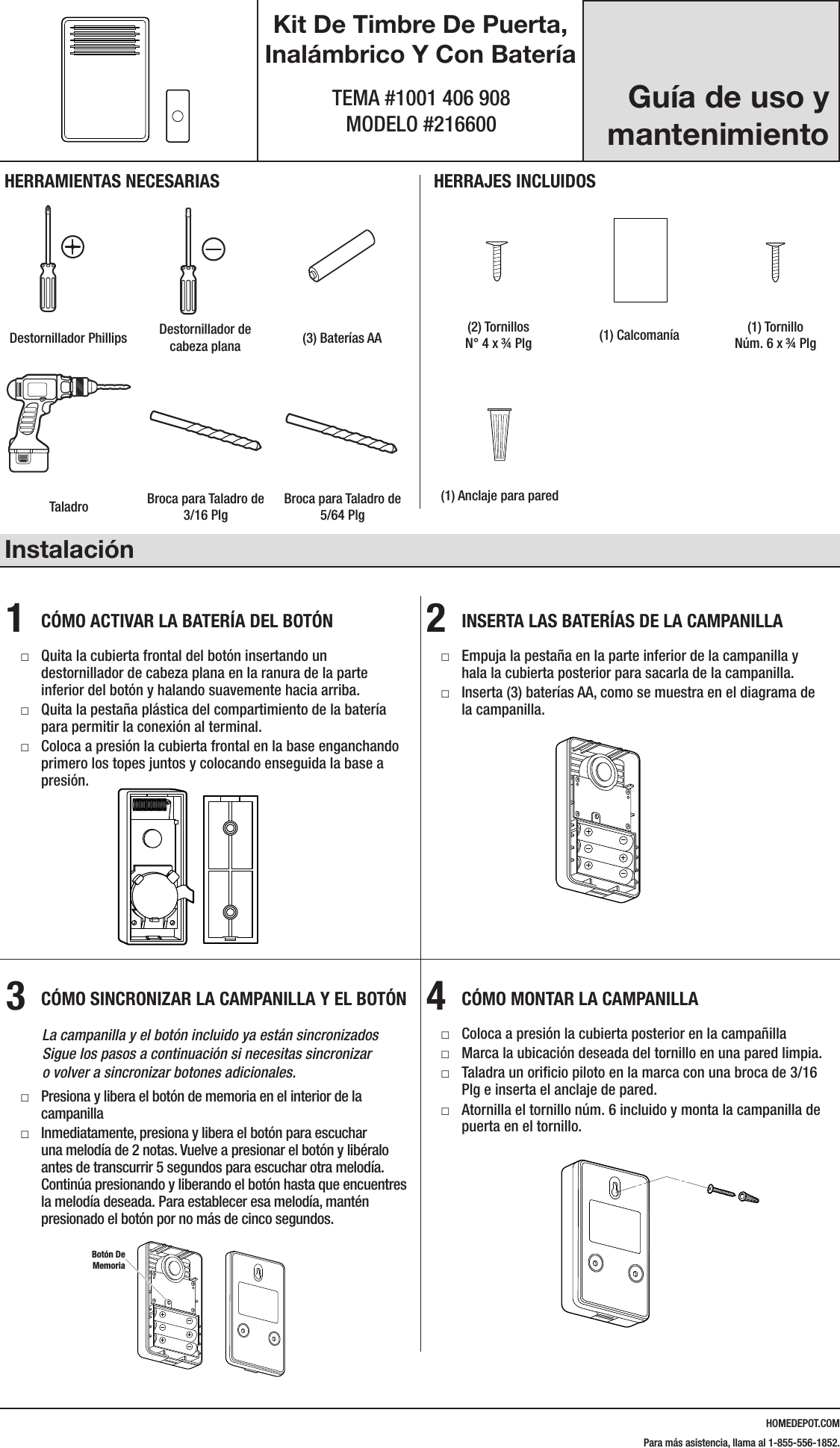
HOMEDEPOT.COMPara más asistencia, llama al 1-855-556-1852.Kit De Timbre De Puerta, Inalámbrico Y Con BateríaTEMA #1001 406 908 MODELO #216600Instalación1  CÓMO ACTIVAR LA BATERÍA DEL BOTÓN □Quita la cubierta frontal del botón insertando un destornillador de cabeza plana en la ranura de la parte inferior del botón y halando suavemente hacia arriba. □Quita la pestaña plástica del compartimiento de la batería para permitir la conexión al terminal. □Coloca a presión la cubierta frontal en la base enganchando primero los topes juntos y colocando enseguida la base a presión.2  INSERTA LAS BATERÍAS DE LA CAMPANILLA □Empuja la pestaña en la parte inferior de la campanilla y hala la cubierta posterior para sacarla de la campanilla.  □Inserta (3) baterías AA, como se muestra en el diagrama de la campanilla.3  CÓMO SINCRONIZAR LA CAMPANILLA Y EL BOTÓN   La campanilla y el botón incluido ya están sincronizados Sigue los pasos a continuación si necesitas sincronizar  o volver a sincronizar botones adicionales. □Presiona y libera el botón de memoria en el interior de la campanilla □Inmediatamente, presiona y libera el botón para escuchar una melodía de 2 notas. Vuelve a presionar el botón y libéralo antes de transcurrir 5 segundos para escuchar otra melodía. Continúa presionando y liberando el botón hasta que encuentres la melodía deseada. Para establecer esa melodía, mantén presionado el botón por no más de cinco segundos.4  CÓMO MONTAR LA CAMPANILLA □Coloca a presión la cubierta posterior en la campañilla □Marca la ubicación deseada del tornillo en una pared limpia. □Taladra un orificio piloto en la marca con una broca de 3/16 Plg e inserta el anclaje de pared. □Atornilla el tornillo núm. 6 incluido y monta la campanilla de puerta en el tornillo.216600Inst.aiLearning mode buttonHERRAMIENTAS NECESARIASDestornillador Phillips Destornillador de cabeza plana (3) Baterías AAHERRAJES INCLUIDOS#4x3/4#6x3/4#4x1 White Zinc #6x1 Self TappingScrewHardware.ai(2) Tornillos  N° 4 x ¾ Plg  (1) Calcomanía (1) Tornillo  Núm. 6 x ¾ Plg Taladro Broca para Taladro de 3/16 PlgBroca para Taladro de 5/64 Plg(1) Anclaje para pared216600Inst.aiLearning mode button216600Inst.aiLearning mode button216600Inst.aiLearning mode button#4x3/4#6x3/4#4x1 White Zinc #6x1 Self TappingScrewHardware.ai#4x3/4#6x3/4#4x1 White Zinc #6x1 Self TappingScrewHardware.ai#4x3/4#6x3/4#4x1 White Zinc #6x1 Self TappingScrewHardware.ai216600Inst.aiLearning mode buttonGuía de uso y mantenimientoBotón De Memoria
HOMEDEPOT.COMPara más asistencia, llama al 1-855-556-1852.5  CÓMO INSTALAR EL BOTÓN □Quita la cubierta frontal de la base siguiendo el paso 1. □Monta la base del botón en una pared o jamba limpia con los tornillos núm. 4 (incluidos) o con cinta adhesiva de instalación. Al montar con tornillos, pretaladra con una broca de 5/64 Plg un orificio piloto a través de la base del botón en la ubicación deseada.  □Coloca a presión la cubierta del botón en la base enganchando primero los topes juntos y colocando enseguida la base a presión.6  CÓMO SINCRONIZAR OTRA VEZ LA  CAMPANILLA Y EL BOTÓN □Presiona y mantén presionado el botón de memoria de la campanilla hasta escuchar un pitido. La campanilla ha sido reiniciada y está lista para volver a sincronizarse. □Sigue el paso 3 para sincronizar la campanilla y el botón.Información de seguridadEspecificacionesTipo de timbre de puerta InalámbricaNúmero de Botones 1Herrajes incluidos (2) Tornillos N° 4 x 3/4 Plg, (1) calcomanía, (1) tornillo Núm. 6 x 3/4 Plg y (1) anclaje de paredDimensiones del producto terminado 4.79 Plg Altura por 2.75 Plg Ancho por 1.03 Plg ProfundidadRango de transmisión 100 PieNúmero de sonidos 2Fuente de Energía de la campanilla (3) baterías AA (No incluidas)Fuente de energía del botón Batería CR2032 (incluida)Solución de problemasProblema Causa posible SoluciónLa campanilla no suena cuando se presiona el botón. La batería del botón no ha sido activada.Confirma que la pestaña de activación ha sido quitado y que la batería está bien colocada en el botón.La campanilla y el botón están fuera del rango de transmisión.Desplaza la campanilla para acercarla a la ubicación del botón. Asegura que no haya objetos metálicos ni paredes de concreto atenuando la señal.La batería del botón debe ser reemplazada.Reemplaza el la batería del botón con una batería CR2032 de litio, tipo moneda.Las baterías de la campanilla necesitan ser reemplazadas.Reemplaza las baterías de la campanilla con (3) baterías AA.La campanilla suena sin haberse presionado el botón. Un señal exterior está interfiriendo con la señal entre la campanilla y el botón.Vuelve a sincronizar la campanilla y el botón siguiendo los pasos de las instrucciones.216600Inst.aiLearning mode buttonADVERTENCIA: Mantén las baterías fuera del alcance de los niños.Se le advierte que los cambios o modificaciones sin previa aprobación expresa de la parte responsable de su cumplimiento podrían anular su derecho a operar el equipo.Este dispositivo cumple con la Parte 15 de las Normas de la FCC. Su uso está sujeto a las dos condiciones siguientes:1) este dispositivo no causa una interferencia dañina, y 2) este dispositivo debe aceptar cualquier interferencia recibida, incluyendo la interferencia que pueda causar un     funcionamiento no deseado.Manejo Seguro de Baterías: □No mezcle baterías antiguas con nuevas.  □No mezcle baterías alcalinas, estándar (zinc-carbono) o recargables (níquel-cadmio).  □Recicle o deseche las baterías deben adecuadamente.  □Mantenga las baterías fuera del alcance de los niños. Si se ingieren, acuda a un doctor rápidamente. No abra las baterías, no las tire al fuego o en el jardín, o no haga corto circuito - pueden prenderse, explotar, gotear o si se calientan, pueden causar una lesión.
HOMEDEPOT.COMPara más asistencia, llama al 1-855-556-1852.GarantíaQUÉ CUBRE LA GARANTÍAEl Garante se complace en extender esta Garantía a usted, el consumidor original/usuario final (“Consumidor”) de los timbres enumerados más abajo  por número de modelo (“Timbre”). Esta garantía es válida para cualquier Timbre usado en aplicaciones residenciales estándar y no puede ser cedida  ni transferida por usted. Sólo los timbres con los siguientes números de modelo están cubiertos por esta Garantía:  216589, 216590, 216591, 216592, 216593, 216594, 216595, 216596, 216597, 216598, 216599, 216600, 216601, 216602, 216603, 216604 y 216605.Por un período de un (1) año después de la fecha de compra, el Garante, a su entera discreción, reparará, reemplazará o reembolsará el precio de la compra de cualquier Timbre, usado en aplicaciones residenciales estándar, que no funcione bien debido a piezas, fabricación o ensamblaje defectuoso.QUÉ NO CUBRE LA GARANTÍAEl Garante no tendrá más responsabilidad u obligación salvo aquellas enunciadas aquí.  Esta Garantía no cubre cualquier Timbre que haya sido objeto de uso indebido o abusivo, alteraciones, uso bajo condiciones anormales, almacenamiento inadecuado antes de la instalación, ni que haya sido usado de alguna manera diferente a las establecidas por el Garante.Esta Garantía se limita a la reparación, reemplazo o reembolso como se dispone más arriba, y cualquier reembolso adicional está expresamente excluido de esta Garantía, por ejemplo, pero sin limitarse a, los reembolsos por inconvenientes, costos de instalación, pérdida por uso, cargos por envíos de devoluciones, y baterías u otros artículos perecederos. Si se hace un reclamo bajo esta Garantía sobre un producto que ya no está disponible, el Garante se reserva el derecho a reemplazar con un producto similar de calidad y valor equivalente.Para hacer una reclamación al amparo de esta Garantía, el  Consumidor tiene que, en un plazo de noventa (90) días desde la detección de un daño real o constructivo cubierto por esta Garantía, contactar al Servicio al Cliente por el 1-855-886-1852 o devolver el producto a su tienda local de The Home Depot.EL GARANTE NO DA NINGUNA GARANTÍA IMPLÍCITA DE COMERCIALIZACIÓN NI DE IDONEIDAD DEL PRODUCTO PARA UN PROPÓSITO PARTICULAR. NO HAY OTRA GARANTÍA MÁS ALLÁ DE LA DESCRITA POR ESTE MEDIO. Esta garantía otorga derechos legales específicos y usted pudiera gozar de otros derechos según la ley aplicable.Comuníquese con el Equipo de Servicio al Cliente por el 1-855-556-1852, o visite www.HomeDepot.com.Cet appareil est conforme aux CNR exempts de licence d'Industrie Canada. Le fonctionnement estsoumis aux deux conditions suivantes:(1) Cet dispositif ne peut causer des interférences; et(2) Cet appareil doit accepter toute interférence, y compris les interférences qui peuvent causer unmauvais fonctionnement de l'appareil.                  41290529-01 A1 法文,书纸,A3尺寸,双面印刷

Navigation menu