DTECH AUDIO UB-12E Body-Pack Transmitter User Manual UHF 11E 21E

DTECH AUDIO COMPANY LIMITED Body-Pack Transmitter UHF 11E 21E

User Manual

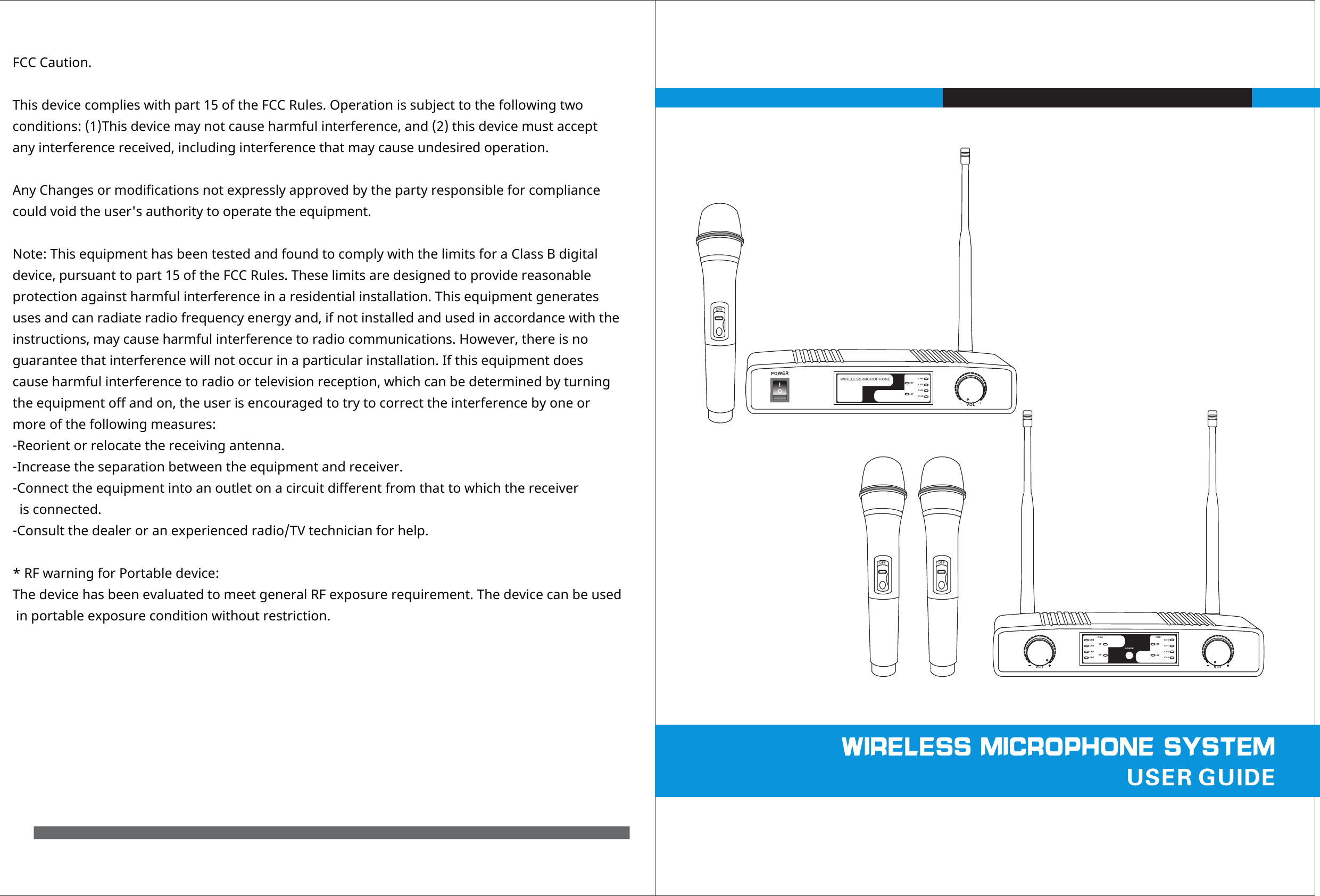
WIRELESS MICROPHONE SYSTEMUSER GUIDEVOLVOLCHACH4CH3CH2CH1RFAFRFAFCHBCH8CH7CH6CH5POW ERVOLRFAFCH4CH3CH2CH1WIRELESS MICROPHONEOFFOFFOFFFCC Caution.This device complies with part 15 of the FCC Rules. Operation is subject to the following two conditions: (1)This device may not cause harmful interference, and (2) this device must acceptany interference received, including interference that may cause undesired operation.Any Changes or modifications not expressly approved by the party responsible for compliancecould void the user's authority to operate the equipment.Note: This equipment has been tested and found to comply with the limits for a Class B digital device, pursuant to part 15 of the FCC Rules. These limits are designed to provide reasonableprotection against harmful interference in a residential installation. This equipment generates uses and can radiate radio frequency energy and, if not installed and used in accordance with the instructions, may cause harmful interference to radio communications. However, there is no guarantee that interference will not occur in a particular installation. If this equipment does cause harmful interference to radio or television reception, which can be determined by turningthe equipment off and on, the user is encouraged to try to correct the interference by one or more of the following measures:-Reorient or relocate the receiving antenna.-Increase the separation between the equipment and receiver.-Connect the equipment into an outlet on a circuit different from that to which the receiver   is connected.-Consult the dealer or an experienced radio/TV technician for help.* RF warning for Portable device:The device has been evaluated to meet general RF exposure requirement. The device can be used in portable exposure condition without restriction.
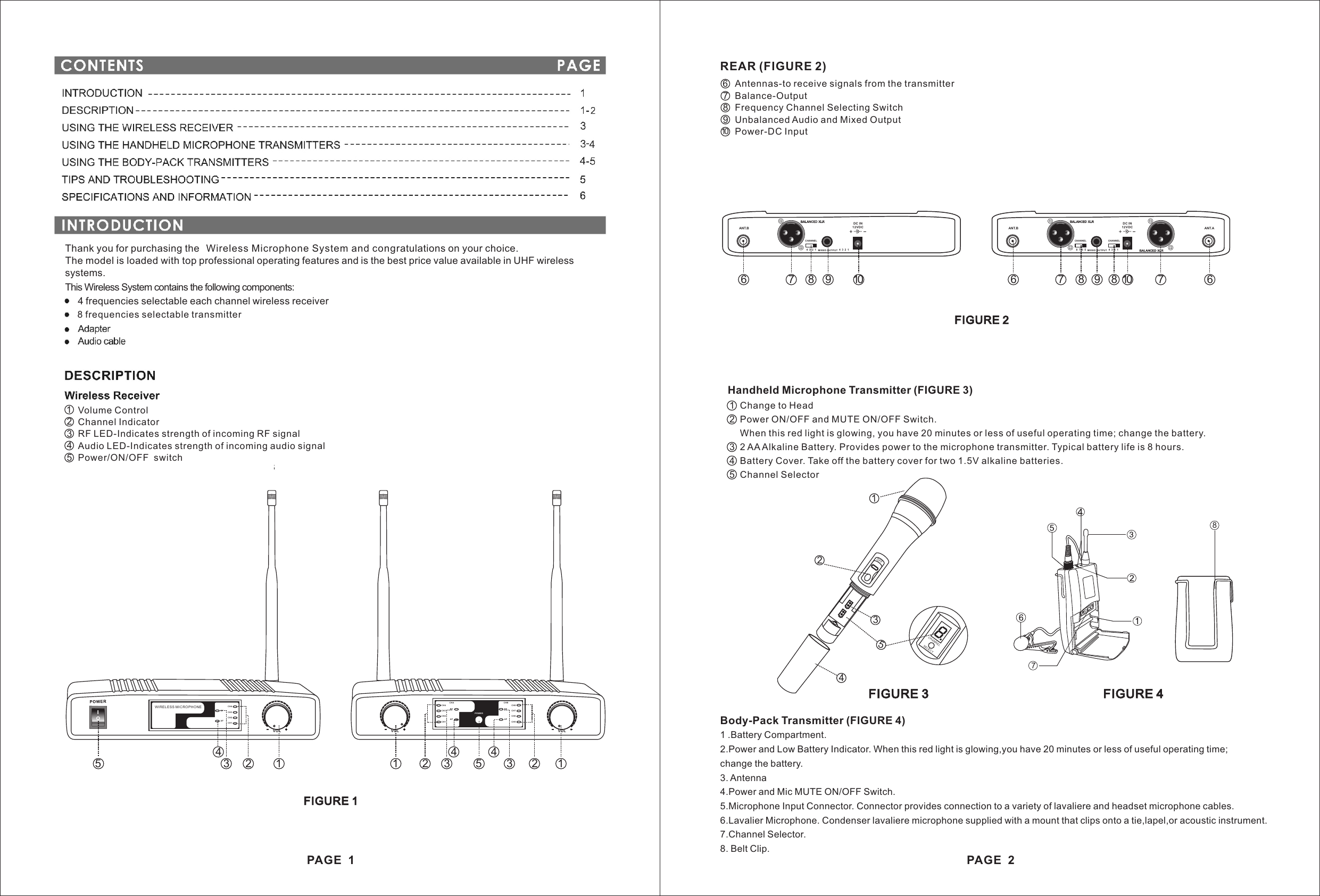
Thank you for purchasing the Wireless Microphone System and congratulations on your choice. The model is loaded with top professional operating features and is the best price value available in UHF wirelesssystems.This Wireless System contains the following components:4 frequencies selectable each channel wireless receiver8 frequencies selectable transmitterVolume ControlChannel IndicatorRF LED-Indicates strength of incoming RF signalAudio LED-Indicates strength of incoming audio signalPower/ON/OFF  switch 12345FIGURE 1PAGE  1VOLRFAFCH4CH3CH2CH1WIRELESS MI CROPHONEVOLVOLCHACH4CH3CH2CH1RFAFRFAFCHBCH8CH7CH6CH5POW ER11 2 23 34 455 2134REAR (FIGURE 2)Antennas-to receive signals from the transmitterBalance-OutputFrequency Channel Selecting SwitchUnbalanced Audio and Mixed OutputPower-DC Input678910FIGURE 3 FIGURE 4Body-Pack Transmitter (FIGURE 4)1 .Battery Compartment.2.Power and Low Battery Indicator. When this red light is glowing,you have 20 minutes or less of useful operating time;change the battery.3. Antenna4.Power and Mic MUTE ON/OFF Switch.5.Microphone Input Connector. Connector provides connection to a variety of lavaliere and headset microphone cables.6.Lavalier Microphone. Condenser lavaliere microphone supplied with a mount that clips onto a tie,lapel,or acoustic instrument.7.Channel Selector.8. Belt Clip.FIGURE 2Handheld Microphone Transmitter (FIGURE 3)1  Change to Head2  Power ON/OFF and MUTE ON/OFF Switch.    When this red light is glowing, you have 20 minutes or less of useful operating time; change the battery.3  2 AA Alkaline Battery. Provides power to the microphone transmitter. Typical battery life is 8 hours.4  Battery Cover. Take off the battery cover for two 1.5V alkaline batteries.5  Channel SelectorOFF213458788.CHANNELSELECT878PAGE  2DC IN12VDCMIX ED OUTP UT8 7 6 5 4 3 2 1CHANNEL CHANNELANT.B ANT.ADC IN12VDCMIX ED OUTP UT 4321CHANNELANT.B4 3 2 16 6 67 7 78 89 1098 10
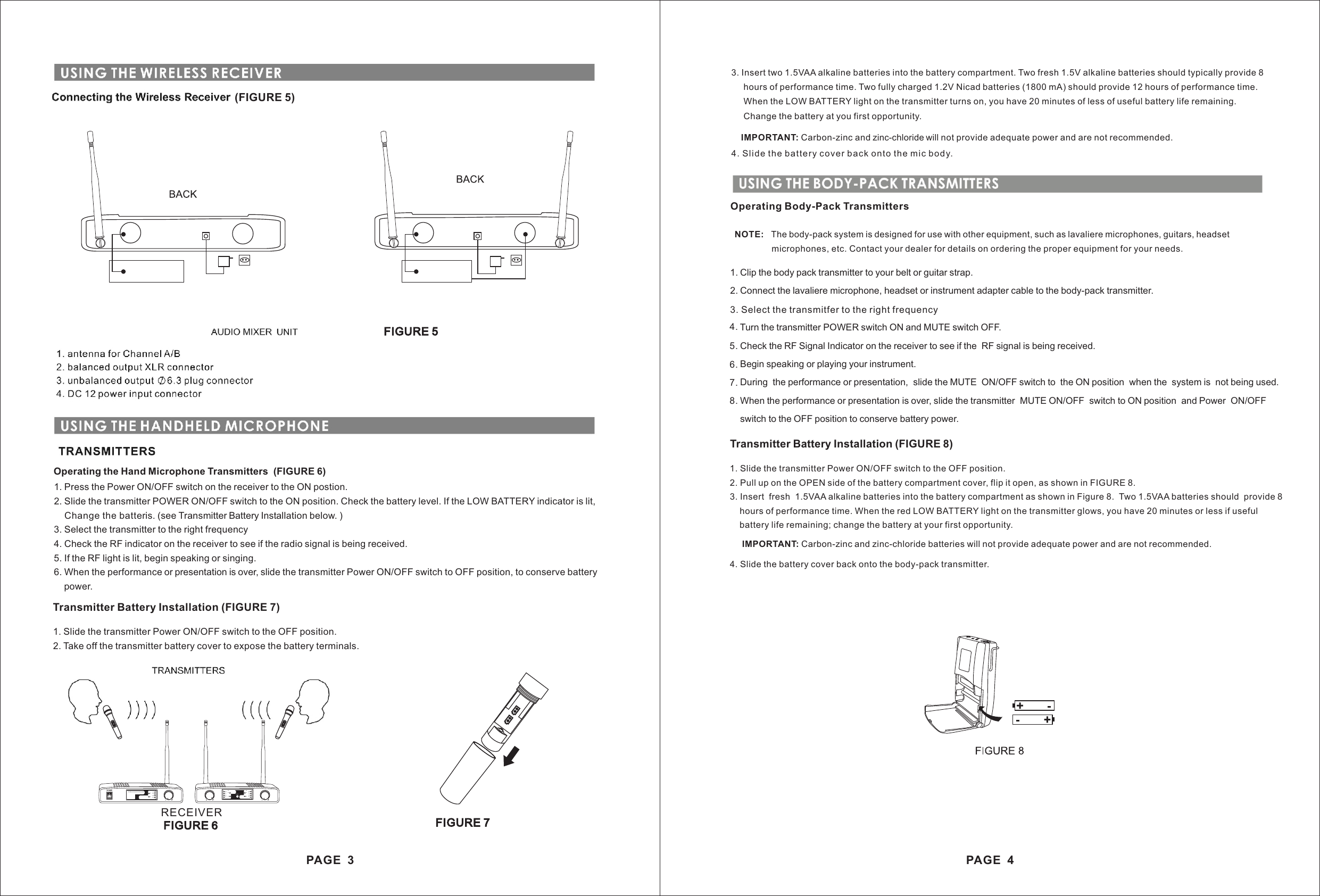
1. Clip the body pack transmitter to your belt or guitar strap.2. Connect the lavaliere microphone, headset or instrument adapter cable to the body-pack transmitter.3. Select the transmitter to the right frequency.4. Turn the transmitter POWER switch ON and MUTE switch OFF.5. Check the RF Signal Indicator on the receiver to see if the  RF signal is being received.6. Begin speaking or playing your instrument.7. During  the performance or presentation,  slide the MUTE  ON/OFF switch to  the ON position  when the  system is  not being used.8. When the performance or presentation is over, slide the transmitter  MUTE ON/OFF  switch to ON position  and Power  ON/OFF    switch to the OFF position to conserve battery power.3. Insert two 1.5VAA alkaline batteries into the battery compartment. Two fresh 1.5V alkaline batteries should typically provide 8     hours of performance time. Two fully charged 1.2V Nicad batteries (1800 mA) should provide 12 hours of performance time.     When the LOW BATTERY light on the transmitter turns on, you have 20 minutes of less of useful battery life remaining.     Change the battery at you first opportunity.         IMPORTANT: Carbon-zinc and zinc-chloride will not provide adequate power and are not recommended.4. Slide the battery cov er back onto the mic body.1. Slide the transmitter Power ON/OFF switch to the OFF position.2. Pull up on the OPEN side of the battery compartment cover, flip it open, as shown in FIGURE 8.3. Insert  fresh  1.5VAA alkaline batteries into the battery compartment as shown in Figure 8.  Two 1.5VAA batteries should  provide 8     hours of performance time. When the red LOW BATTERY light on the transmitter glows, you have 20 minutes or less if useful     battery life remaining; change the battery at your first opportunity.    Operating Body-Pack TransmittersNOTE:   The body-pack system is designed for use with other equipment, such as lavaliere microphones, guitars, headset               microphones, etc. Contact your dealer for details on ordering the proper equipment for your needs.Transmitter Battery Installation (FIGURE 8)IMPORTANT: Carbon-zinc and zinc-chloride batteries will not provide adequate power and are not recommended. 4. Slide the battery cover back onto the body-pack transmitter.USING THE BODY-PACK TRANSMITTERS3. Select the transmitfer to the right frequency4.5.6.7.8.PAGE  4OFFOFFFIGURE 5Operating the Hand Microphone Transmitters  (FIGURE 6)1. Press the Power ON/OFF switch on the receiver to the ON postion.2. Slide the transmitter POWER ON/OFF switch to the ON position. Check the battery level. If the LOW BATTERY indicator is lit,    Change the batteris. (see Transmitter Battery Installation below. )3. Select the transmitter to the right frequency4. Check the RF indicator on the receiver to see if the radio signal is being received.5. If the RF light is lit, begin speaking or singing.6. When the performance or presentation is over, slide the transmitter Power ON/OFF switch to OFF position, to conserve battery    power.Transmitter Battery Installation (FIGURE 7)1. Slide the transmitter Power ON/OFF switch to the OFF position.2. Take off the transmitter battery cover to expose the battery terminals.(FIGURE 5)PAGE  3FIGURE 6FIGURE 7VOLVOLCHACH4CH3CH2CH1RFAFRFAFCHBCH8CH7CH6CH5POWERVOLRFAFCH4CH3CH2CH1WIREL ESS MIC ROPHO NERECEIVER
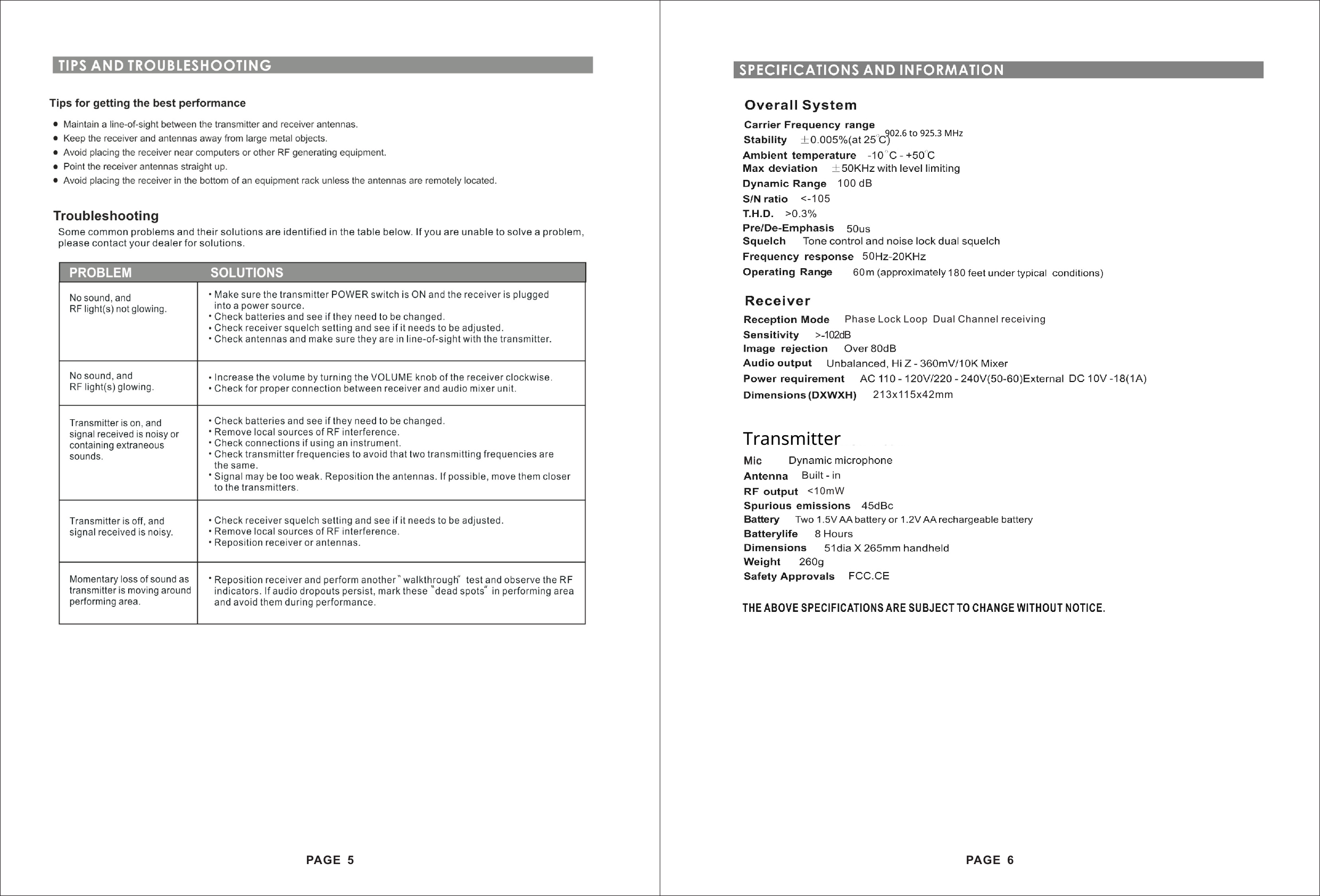
PAGE  5100 dB<-1055060 180Phase Lock Loop  Dual Channel receivingMicMic<10mW> 102dBPAGE  6213x115x42mm902.6 to 925.3 MHzTransmitter

Navigation menu