Dell Openmanage Server Administrator Version 6 5 Cim Reference Guide 6.5
2015-01-08
: Dell Dell-Dell-Openmanage-Server-Administrator-Version-6-5-Cim-Reference-Guide-137774 dell-dell-openmanage-server-administrator-version-6-5-cim-reference-guide-137774 dell pdf
Open the PDF directly: View PDF  .
.
Page Count: 124 [warning: Documents this large are best viewed by clicking the View PDF Link!]
- Dell OpenManage Server Administrator Version 6.5 CIM Reference Guide
- Contents
- Introduction
- CIM_PhysicalElement
- CIM_LogicalElement
- CIM_LogicalElement
- CIM_System
- CIM_ComputerSystem
- DELL_System
- CIM_LogicalDevice
- CIM_FRU
- CIM_Sensor
- CIM_DiscreteSensor
- CIM_NumericSensor
- CIM_TemperatureSensor
- CIM_CurrentSensor
- CIM_VoltageSensor
- CIM_Tachometer
- CIM_WatchDog
- CIM_CoolingDevice
- CIM_Fan
- CIM_UserDevice
- CIM_PointingDevice
- CIM_Keyboard
- CIM_PowerSupply
- CIM_Controller
- CIM_ParallelController
- CIM_SerialController
- CIM_PCIController
- CIM_PCIDevice
- CIM_PCIBridge
- CIM_Processor
- CIM_StorageExtent
- CIM_Memory
- CIM_CacheMemory
- CIM_SoftwareElement
- DELL_SoftwareFeature
- CIM_SystemResource
- CIM_IRQ
- CIM_MemoryMappedIO
- CIM_DMA
- CIM_RedundancyGroup
- CIM_ExtraCapacityGroup
- DELL_PSRedundancyGroup
- DELL_FanRedundancyGroup
- CIM_EnabledLogicalElementGroup
- CIM_ServiceAccessPoint
- CIM_RemoteServiceAccessPoint
- DELL_RemoteServiceAccessPort
- Dell-Defined Classes
- DELL_PostLog
- DELL_CMApplication
- DELL_CMDevice
- DELL_CMDeviceApplication
- DELL_CMInventory
- DELL_CMOS
- DELL_CMProductInfo
- DELL_BIOSExtensions
- DELL_BIOSSettings
- DELL_SDCardDevice
- DELL_NetworkPort
- DELL_PowerConsumptionAmpsSensor
- DELL_PowerConsumptionWattsSensor
- DELL_PowerConsumptionData
- DCIM_OEM_DataAccessModule
- DCIM_RegisteredProfile
- CIM_Dependency
- Index

Dell OpenManage
Server Administrator
Version 6.5
CIM Reference Guide

Notes and Cautions
NOTE: A NOTE indicates important information that helps you make better use of
your computer.
CAUTION: A CAUTION indicates potential damage to hardware or loss of data
instructions are not followed.
___________________
Information in this publication is subject to change without notice.
© 2011 Dell Inc. All rights reserved.
Reproduction of these materials in any manner whatsoever without the written permission of Dell Inc.
is strictly forbidden.
Trademarks used in this text: Dell™, the DELL logo, and OpenManage™ are trademarks of Dell Inc.
Microsoft® and Windows Server® are either trademarks or registered trademarks of Microsoft
Corporation in the United States and/or other countries. Intel®, Pentium®, Xeon®, Itanium®, i860®,
i960®, and Celeron® are registered trademarks and MMX™, i386™, i486™, SpeedStep™, and
Core™ are trademarks of Intel Corporation in the United States and/or other countries. AMD™,
AMD Athlon™, AMD Duron™, AMD-K5™, AMD-K6™, Opteron™, Sempron™, Phenom™ and
Turion™ are trademarks and AMD-K6 -2® and AMD-K6 -III® are registered trademarks of Advanced
Micro Devices, Inc. in the United States and/or other countries. Crusoe™ and Efficeon™ are
trademarks of Transmeta Corporation in the United States and/or other countries.
Other trademarks and trade names may be used in this document to refer to either the entities claiming
the marks and names or their products. Dell Inc. disclaims any proprietary interest in trademarks and trade
names other than its own.
2011 - 03

Contents 3
Contents
1 Introduction . . . . . . . . . . . . . . . . . . . . . . . . 9
Server Administrator . . . . . . . . . . . . . . . . . . . 9
What’s New in This Release . . . . . . . . . . . . . . . 9
Documenting CIM Classes and Their Properties . . . . 10
Base Classes . . . . . . . . . . . . . . . . . . . . 11
Parent Classes . . . . . . . . . . . . . . . . . . . 12
Classes That Describe Relationships . . . . . . . 12
Dell-Defined Classes . . . . . . . . . . . . . . . . 12
Common Properties of Classes . . . . . . . . . . . . . 13
Other Documents You May Need . . . . . . . . . . . . 15
Typographical Conventions . . . . . . . . . . . . . . . 16
2 CIM_PhysicalElement . . . . . . . . . . . . . . . 19
CIM_PhysicalElement . . . . . . . . . . . . . . . . . . 19
CIM_PhysicalPackage . . . . . . . . . . . . . . . . . 21
CIM_PhysicalFrame . . . . . . . . . . . . . . . . . . . 22
CIM_Chassis . . . . . . . . . . . . . . . . . . . . . . 23
DELL_Chassis . . . . . . . . . . . . . . . . . . . . . . 24
CIM_PhysicalComponent . . . . . . . . . . . . . . . . 26

4Contents
CIM_Chip . . . . . . . . . . . . . . . . . . . . . . . . 26
CIM_PhysicalMemory . . . . . . . . . . . . . . . . . . 28
CIM_PhysicalConnector . . . . . . . . . . . . . . . . . 30
CIM_Slot . . . . . . . . . . . . . . . . . . . . . . . . . 33
3 CIM_LogicalElement . . . . . . . . . . . . . . . . 37
CIM_LogicalElement . . . . . . . . . . . . . . . . . . 38
CIM_System . . . . . . . . . . . . . . . . . . . . . . . 39
CIM_ComputerSystem . . . . . . . . . . . . . . . . . . 40
DELL_System . . . . . . . . . . . . . . . . . . . . . . . 40
CIM_LogicalDevice . . . . . . . . . . . . . . . . . . . 41
CIM_FRU . . . . . . . . . . . . . . . . . . . . . . . . . 42
CIM_Sensor . . . . . . . . . . . . . . . . . . . . . . . 43
CIM_DiscreteSensor . . . . . . . . . . . . . . . . . . 44
CIM_NumericSensor . . . . . . . . . . . . . . . . . . 45
CIM_TemperatureSensor . . . . . . . . . . . . . . . . 48
CIM_CurrentSensor . . . . . . . . . . . . . . . . . . . 49
CIM_VoltageSensor . . . . . . . . . . . . . . . . . . . 50
CIM_Tachometer . . . . . . . . . . . . . . . . . . . . 51
CIM_WatchDog . . . . . . . . . . . . . . . . . . . . . 51
CIM_CoolingDevice . . . . . . . . . . . . . . . . . . . 53
CIM_Fan . . . . . . . . . . . . . . . . . . . . . . . . . 53

Contents 5
CIM_UserDevice . . . . . . . . . . . . . . . . . . . . 54
CIM_PointingDevice . . . . . . . . . . . . . . . . . . 55
CIM_Keyboard . . . . . . . . . . . . . . . . . . . . . . 56
CIM_PowerSupply . . . . . . . . . . . . . . . . . . . 57
CIM_Controller . . . . . . . . . . . . . . . . . . . . . 60
CIM_ParallelController . . . . . . . . . . . . . . . . . 61
CIM_SerialController . . . . . . . . . . . . . . . . . . 62
CIM_PCIController . . . . . . . . . . . . . . . . . . . 63
CIM_PCIDevice . . . . . . . . . . . . . . . . . . . . . 64
CIM_PCIBridge . . . . . . . . . . . . . . . . . . . . . 65
CIM_Processor . . . . . . . . . . . . . . . . . . . . . 66
CIM_StorageExtent . . . . . . . . . . . . . . . . . . . 75
CIM_Memory . . . . . . . . . . . . . . . . . . . . . . 76
CIM_CacheMemory . . . . . . . . . . . . . . . . . . . 76
CIM_SoftwareElement . . . . . . . . . . . . . . . . . 78
DELL_SoftwareFeature . . . . . . . . . . . . . . . . . 82
CIM_SystemResource . . . . . . . . . . . . . . . . . . 83
CIM_IRQ . . . . . . . . . . . . . . . . . . . . . . . . . 84
CIM_MemoryMappedIO . . . . . . . . . . . . . . . . . 86
CIM_DMA . . . . . . . . . . . . . . . . . . . . . . . . 87
CIM_RedundancyGroup . . . . . . . . . . . . . . . . . 88

6Contents
CIM_ExtraCapacityGroup . . . . . . . . . . . . . . . . 89
DELL_PSRedundancyGroup . . . . . . . . . . . . . . . 89
DELL_FanRedundancyGroup . . . . . . . . . . . . . . 90
CIM_EnabledLogicalElementGroup . . . . . . . . . . . 90
CIM_ServiceAccessPoint . . . . . . . . . . . . . . . . 91
CIM_RemoteServiceAccessPoint . . . . . . . . . . . . 91
DELL_RemoteServiceAccessPort . . . . . . . . . . . . 93
4 Dell-Defined Classes . . . . . . . . . . . . . . . . 95
DELL_PostLog . . . . . . . . . . . . . . . . . . . . . . 96
DELL_CMApplication . . . . . . . . . . . . . . . . . . 96
DELL_CMDevice . . . . . . . . . . . . . . . . . . . . . 97
DELL_CMDeviceApplication . . . . . . . . . . . . . . 98
DELL_CMInventory . . . . . . . . . . . . . . . . . . . 98
DELL_CMOS . . . . . . . . . . . . . . . . . . . . . . . 99
DELL_CMProductInfo . . . . . . . . . . . . . . . . . . 100
DELL_BIOSExtensions . . . . . . . . . . . . . . . . . . 101
DELL_BIOSSettings . . . . . . . . . . . . . . . . . . . 102
DELL_SDCardDevice . . . . . . . . . . . . . . . . . . 103
DELL_NetworkPort . . . . . . . . . . . . . . . . . . . 104
DELL_PowerConsumptionAmpsSensor . . . . . . . . . 108
DELL_PowerConsumptionWattsSensor . . . . . . . . . 109

Contents 7
DELL_PowerConsumptionData . . . . . . . . . . . . . 110
DCIM_OEM_DataAccessModule . . . . . . . . . . . . 111
DCIM_RegisteredProfile . . . . . . . . . . . . . . . . 112
5 CIM_Dependency . . . . . . . . . . . . . . . . . 113
DELL_FanSensor . . . . . . . . . . . . . . . . . . . . . 114
CIM_PackageTempSensor . . . . . . . . . . . . . . . 114
CIM_PackageVoltSensor . . . . . . . . . . . . . . . . 115
CIM_PackageCurrentSensor . . . . . . . . . . . . . . 116
CIM_PackageFanSensor . . . . . . . . . . . . . . . . 116
CIM_PackagePowerSupplySensor . . . . . . . . . . . 117
DELL_PackagePSRedundancy . . . . . . . . . . . . . 118
DELL_PSRedundancy . . . . . . . . . . . . . . . . . . 118
DELL_AssociatedSupplyPCAmps . . . . . . . . . . . . 119
DELL_AssociatedSystemPCWatts . . . . . . . . . . . 120
AssociatedSystemPCData . . . . . . . . . . . . . . . . 120
DELL_PowerProfileData . . . . . . . . . . . . . . . . 121
Index . . . . . . . . . . . . . . . . . . . . . . . . . . . . . . 123

8Contents

Introduction 9
1
Introduction
This reference guide documents the Dell OpenManage Server Administrator
Common Information Model (CIM) provider contained in the Management
Object File (MOF) dccim32.mof.
CIM provides a conceptual model for describing manageable objects in a
systems management environment. CIM is a modeling tool rather than a
programming language. CIM provides the structure for organizing objects
into a model of a managed environment. For modeling a managed
environment, CIM makes available a set of abstract and concrete classes of
objects. These classes model the basic characteristics of systems, networks,
and applications, as well as groupings of management-related data.
For more information about CIM, see the Distributed Management Task
Force (DMTF) website at dmtf.org and the Microsoft website at
microsoft.com.
Server Administrator
Server Administrator provides a suite of systems management information for
keeping track of your networked systems. In addition to providing systems
management agents that are independent of the management console, Server
Administrator supports these systems management standards: CIM and Simple
Network Management Protocol (SNMP).
In addition to supporting systems management industry standards, Server
Administrator provides additional systems management information about
the specific components of your Dell system.
What’s New in This Release
The release highlights of 6.5 are:
• New enumeration value (NIC Capabilities) to the Dell_NetworkPort
class.

10 Introduction
For a list of platforms, Operating Systems, and Browsers support added and
deprecated, refer to the Dell OpenManage Server Administrator Version 6.5
User's Guide and Dell Systems Software Support Matrix Version 6.5 at
support.dell.com/manuals.
Documenting CIM Classes and Their Properties
The Dell CIM provider extends support to Dell-specific software and
hardware components. The Dell MOF defines the classes for the Dell CIM
provider. All of the supported classes and properties in the MOF are
documented in this guide.
The following subsections define some of the basic building blocks of
CIM classes that are used in describing the dccim32 provider name.
These subsections also explain how the elements used in describing
these classes are organized. This section does not document the entire
CIM schema, but only those classes and properties supported by the
dccim32 provider. The list of properties for each supported class varies greatly.
The property values being presented could be NULL or empty string on some
systems, although in general, some non-empty values can be expected. Key
properties (listed below) always carry non-empty values. It is recommended
that you use only the following properties as key attributes:
•
CIM_PhysicalElement
: CreationClassName, Tag
•
CIM_System
: CreationClassName, Name
•
CIM_LogicalDevice
: SystemCreationClassName, SystemName,
CreationClassName, DeviceID
•
CIM_Dependency
: Antecedent, Dependent
•
CIM_SoftwareElement
: Name, Version, SoftwareElementState,
SoftwareElementID, TargetOperatingSystem
•
CIM_SoftwareFeature
: IdentifyingNumber, ProductName, Vendor,
Version, Name
•
CIM_IRQ
: CSCreationClassName, CSName, CreationClassName,
IRQNumber
•
CIM_MemoryMappedIO
: CSCreationClassName, CSName,
CreationClassName, StartingAddress

Introduction 11
•
CIM_DMA
: CSCreationClassName, CSName, CreationClassName,
DMAChannel
•
CIM_RedundancyGroup
: CreationClassName, Name
•
DELL_EsmLog
: RecordNumber
•
DELL_PostLog
: RecordNumber
•
DELL_BIOSExtensions
: systemBIOSCharacteristics
•
DELL_BIOSSettings
: DisplayName
•
CIM_ServiceAccessPoint
: SystemCreationClassName,
SystemName, CreationClassName, Name
Base Classes
The classes listed in the Server Administrator CIM provider class hierarchy
do not have a parent property. These base classes do not derive from
another class. The base classes are:
•
CIM_ManagedSystemElement
•
CIM_Dependency
•
DELL_EsmLog
•
DELL_PostLog
•
DELL_CMApplication
•
DELL_CMDevice
•
DELL_CMDeviceApplications
•
DELL_CMInventory
•
DELL_CMOS
•
DELL_CMProductInfo
The CIM_ManagedSystemElement class is the base class for the system
element hierarchy from which all other CIM classes are derived. As a result,
CIM_ManagedSystemElement has no parent. Examples of managed
system elements include software components such as files, devices such as
hard drives and controllers, and physical subcomponents of devices such as
chip sets and cards. For the CIM_ManagedSystemElement properties, see
Caption, CreationClassName, Description, Name, and Status in Table 1-1.

12 Introduction
The Dell-defined classes are not defined in the official schema by the DMTF,
the industry group that defines the standards for CIM, and hence do not have
parent classes. CIM_Dependency does not have a parent class because it is a
relationship or association between two managed system elements.
Parent Classes
Most classes in the dccim32 provider document both a Class Name and a
Parent Class property. The parent class is the class from which any given class
inherits its core properties. For example, the CIM_Controller class has the
CIM_LogicalDevice class as its parent, and has various types of
controllers (CIM_ParallelController, CIM_SerialController) as
its children.
Classes That Describe Relationships
Classes that derive from CIM_Dependency have CIM_Dependency as
their parent class, but they are documented in terms of antecedent and
dependent elements in a relationship rather than in terms of common
properties. Consider the following relationship between two
CIM_ManagedSystemElements:
The CIM_PackageCurrentSensor class monitors an entire physical
package, such as all the components contained in a given system chassis. The
CIM_PhysicalPackage class is dependent on the
CIM_PackageCurrentSensor class for this monitoring function.
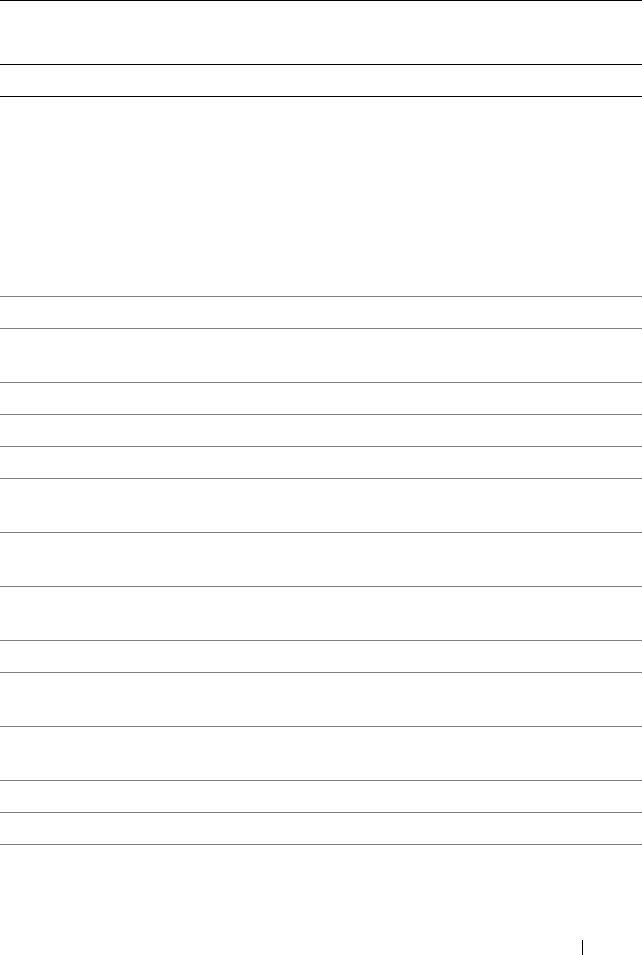
Dell-Defined Classes
Server Administrator has extended some CIM classes and has created new
classes to assist in managing systems and their components. In the diagrams
that appear in the documentation for each class, those classes created and
populated by Dell are designated by the gold (lighter gray) triangle icon.
Antecedent CIM_PackageCurrentSensor
Dependent CIM_PhysicalPackage
Introduction 13
Common Properties of Classes
Many classes have properties such as Caption, Description, and
CreationClassName. Table 1-1 defines properties that have the same meaning in
every class that has this property and are defined more than once in this guide.
Table 1-1. Common Properties of Classes
Property Description Data Type
Caption Describes the object using a short textual
description (one-line string).
string
CreationClassName Indicates the name of the class or the
subclass used in the creation of an instance.
When used with the other key properties of
this class, this property allows all instances of
this class and its subclasses to be uniquely
identified.
string
CSCreationClassName Indicates the computer system’s creation
class name.
string
CSName Indicates the computer system’s name. string
CurrentReading Indicates the actual current value indicated
by the sensor in amperes.
sint32
Description Provides a textual description of the object. string
LowerThresholdNonCritical If current reading is between lower threshold
noncritical and upper threshold noncritical,
the current state is normal. See Figure 3-2.
sint32
LowerThresholdCritical If the current reading is between upper
threshold critical and upper threshold fatal,
the current state is critical. See Figure 3-2.
sint32
IsLinear Indicates that the sensor is linear over its
dynamic range.
Boolean
14 Introduction
Manufacturer Provides the name of the organization
responsible for producing the
CIM_PhysicalElement or
CIM_SoftwareElement. This may be the
entity from whom the element is purchased,
but not necessarily. Purchase information is
contained in the Vendor property of
CIM_Product.
string
Name Defines the label by which the object is
known. When subclassed, the Name
property can be overridden to be a
Key property.
string
Status Provides a string indicating the status of the
component. Status values include:
Operational Status Values:
OK indicates that the object is
functioning normally.
Degraded means that the item is
functioning, but not optimally.
Stressed indicates that the element is
functioning, but needs attention. Examples
of Stressed states are overloaded, overheated,
and so on.
Nonoperational Status Values:
Non-recover means that a nonrecoverable
error has occurred.
Error means that an element has encountered
an operational condition that is severe as
compared to its normal mode of operation.
string
SystemCreationClassName Indicates the system’s creation class name. string
Table 1-1. Common Properties of Classes
(continued)
Property Description Data Type
Introduction 15
Other Documents You May Need
Besides this Dell OpenManage Server Administrator CIM Reference Guide,
you can find the following documents on the Dell Support website at
support.dell.com/manuals:
•
Dell OpenManage Server Administrator User’s Guide
documents the
features, installation, and uninstallation of Server Administrator.
•
Dell OpenManage Server Administrator Installation Guide
contains
instructions to help you install Dell OpenManage Server Administrator.
•
Dell OpenManage Management Station Software Installation Guide
contains instructions to help you install Dell OpenManage management
station software that includes Baseboard Management Utility, DRAC
Tools, and Active Directory Snap-In.
UnitModifier Provides the unit multiplier for the values
returned by this sensor. All the values
returned by this sensor are represented in
units of 10 raised to the power of the unit
modifier. If the unit modifier is –6, then the
units of the values returned are microvolts.
The units apply to all numeric properties of
the sensor, unless explicitly overridden by
the units’ qualifier.
sint32
UpperThresholdCritical If the current reading is between upper
threshold critical and upper threshold fatal,
the current status is critical. See Figure 3-2.
sint32
UpperThresholdNonCritical If the current reading is between lower
threshold noncritical and lower threshold
critical, the current status is noncritical.
See Figure 3-2.
sint32
Version Version should be in the form
<major>.<minor>.<revision>
or <major>.<minor><letter><revision>;
for example, 1.2.3 or 1.2a3.
string
Table 1-1. Common Properties of Classes
(continued)
Property Description Data Type

16 Introduction
•
Dell OpenManage Server Administrator Command Line Interface User’s
Guide
explains how to perform tasks using the text-based command line
interface.
•
Dell OpenManage Server Administrator Messages Reference Guide
lists the
messages that you can receive on your systems management console or on
your operating system’s event viewer. This guide explains the text, severity,
and cause of each message that the Server Administrator issues.
•
Dell OpenManage Server Administrator SNMP Reference Guide
documents
the SNMP management information base (MIB). The SNMP MIB defines
variables that cover the capabilities of Server Administrator systems
management agents.
•The
Glossary
for information on terms used in this document.
Typographical Conventions
The following example shows how most of the classes in the Dell CIM provider
are documented. Table 1-2 shows a partial class description for the DELL_DMA
class. (For a full class description, see Table 3-38)
Class Name appears in Courier typeface and provides the string that names
the class in the MOF.
Parent Class appears in Courier typeface and provides the name of the class
from which the present class is derived.
Property denotes the name of the attribute that is being defined for this class.
Description includes text that defines the property.
Data Type stipulates the format that the values of this property must take.
Common data types include Boolean, string, and various types of integer.
Boolean indicates that the property must be expressed as one of two
alternatives.
Introduction 17
Table 1-2. CIM_DMA Properties
Class Name: CIM_DMA
Parent Class: CIM_SystemResource
Property Description Data Type
DMAChannel A part of the object’s key value, the DMA channel
number.
uint32
Availability Availability of the DMA. Availability values are
defined as follows:
1 - Other
2 - Unknown
3 - Available
4 - In Use/Not Available
5 - In Use and Available/Shareable
uint16

18 Introduction
CIM_PhysicalElement 19
2
CIM_PhysicalElement
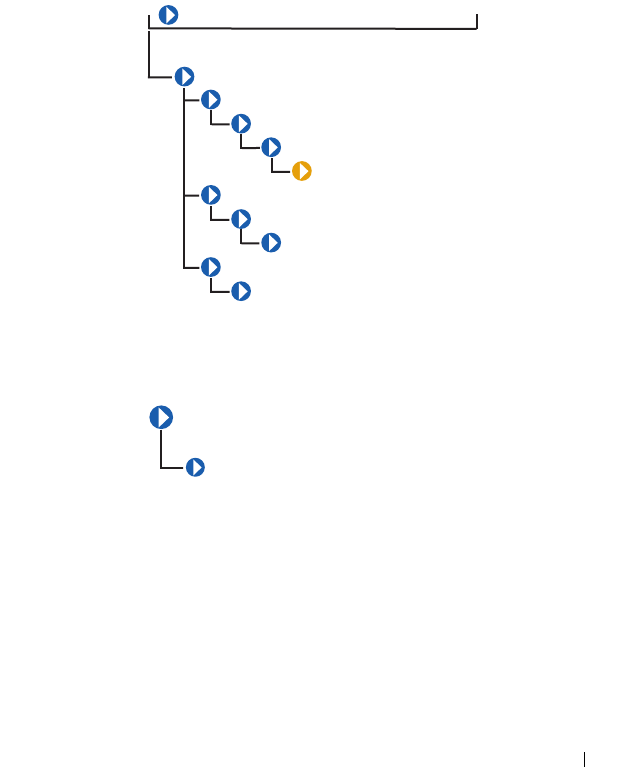
CIM_PhysicalElement is a CIM-defined class. The
CIM_PhysicalElement class contains the subclasses shown in Figure 2-1.
Figure 2-1. CIM_PhysicalElement Class Structure
CIM_PhysicalElement
Subclasses of the CIM_PhysicalElement class listed in Table 2-1 define
any component of a system that has a distinct physical identity. Physical
elements are tangible managed system elements (usually actual hardware
items) that have a physical manifestation of some sort. By contrast, processes,
files, and logical devices are not classified as physical elements. A managed
system element is not necessarily a discrete component. A single card
(which is a type of physical element) can host more than one logical device.
CIM_ManagedSystemElement
CIM_PhysicalElement
CIM_PhysicalPackage
CIM_PhysicalFrame
CIM_Chassis
DELL_Chassis
CIM_PhysicalComponent
CIM_Chip
CIM_PhysicalMemory
CIM_PhysicalConnector
CIM_Slot
CIM_ManagedSystemElement
CIM_PhysicalElement
20 CIM_PhysicalElement
One card, for example, could implement both a modem and a local area
network (LAN) adapter. In this case, the card would be represented by a single
physical element associated with multiple logical devices.
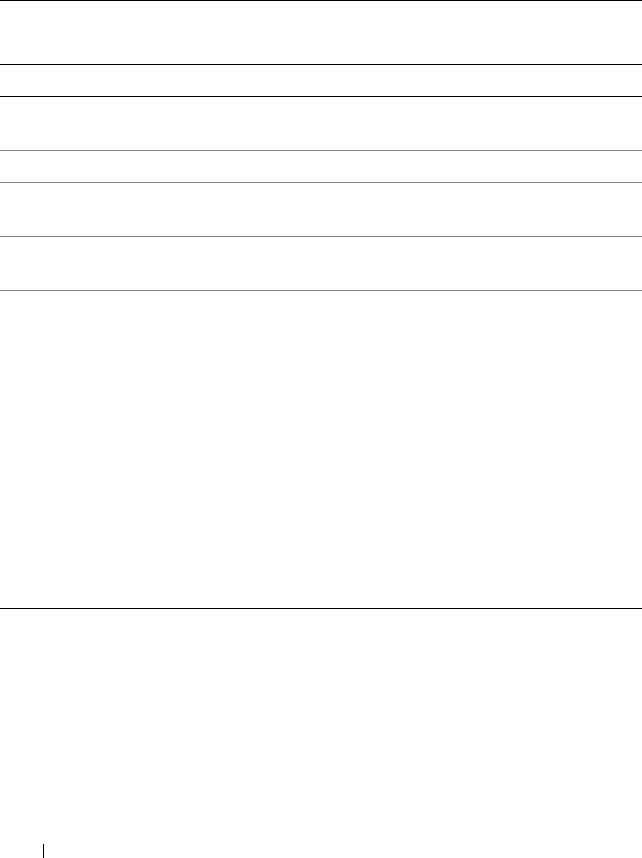
Table 2-1. CIM_PhysicalElement Properties
Class Name: CIM_PhysicalElement
Parent Class: CIM_ManagedSystemElement
Property Description Data Type
CreationClassN
ame
See Table 1-1.
Manufacturer See Table 1-1.
Model The name by which the physical element is generally
known.
string
SerialNumber A manufacturer-allocated number used to identify the
physical element.
string
Tag Uniquely identifies the physical element and serves as
the element’s key. The Ta g property can contain
information such as asset tag or serial number data.
The key for physical element is placed very high in the
object hierarchy in order to identify the hardware/entity
independently, regardless of physical placement in or on
cabinets, adapters, and so on. For example, a hot-
swappable or removable component can be taken from
its containing (scoping) package and temporarily
unused. The object still continues to exist and may even
be inserted into a different scoping container.
Therefore, the key for physical element is an arbitrary
string that is defined independently of any placement or
location-oriented hierarchy.
string
CIM_PhysicalElement 21
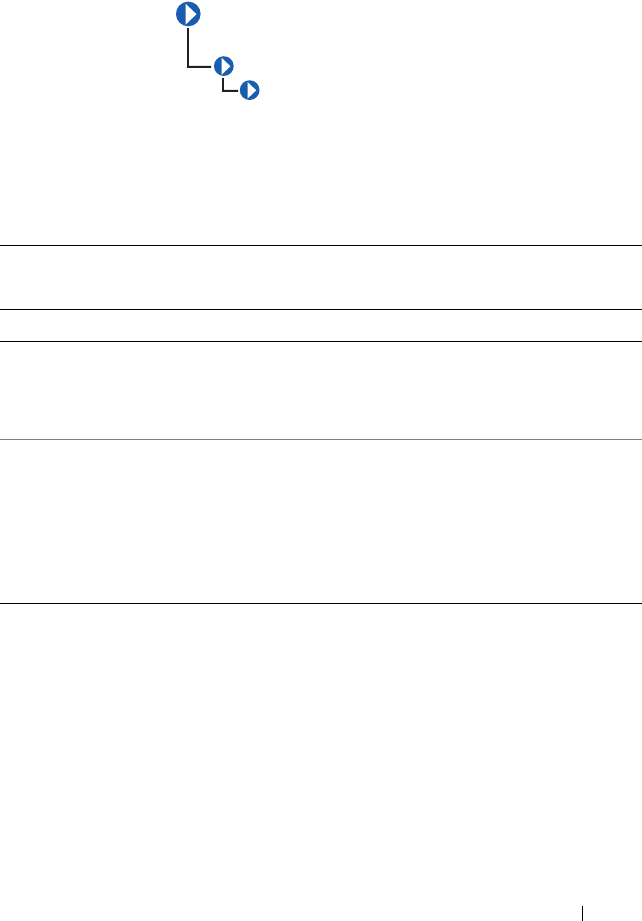
CIM_PhysicalPackage
The CIM_PhysicalPackage class listed in Table 2-2 represents physical
elements that contain or host other components. Examples are a rack
enclosure or an adapter card with multiple functions.
Table 2-2. CIM_PhysicalPackage Properties
Class Name: CIM_PhysicalPackage
Parent Class: CIM_PhysicalElement
Property Description Data Type
Removable A CIM_PhysicalPackage is removable if it is
designed to be taken in and out of the
physical container in which it is normally found
without impairing the function of the overall package.
Boolean
Replaceable A CIM_PhysicalPackage is replaceable if it is
possible to substitute a physically different element for
the original element, as in a field replaceable unit
(FRU). For example, some computer systems allow the
microprocessor to be upgraded to one of a higher clock
rating. In this case, the microprocessor is said to be
replaceable.
Boolean
CIM_PhysicalPackage
CIM_ManagedSystemElement
CIM_PhysicalElement
22 CIM_PhysicalElement
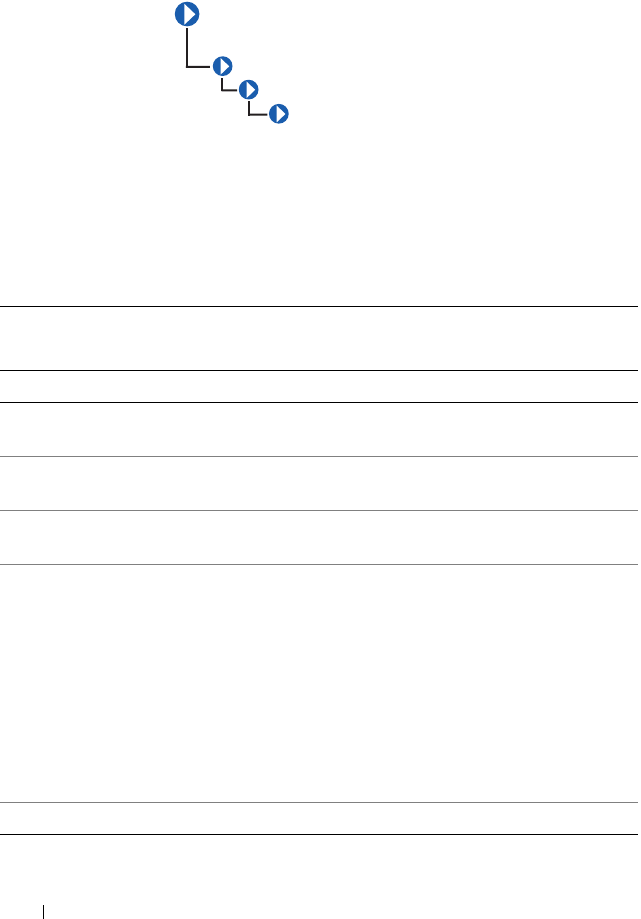
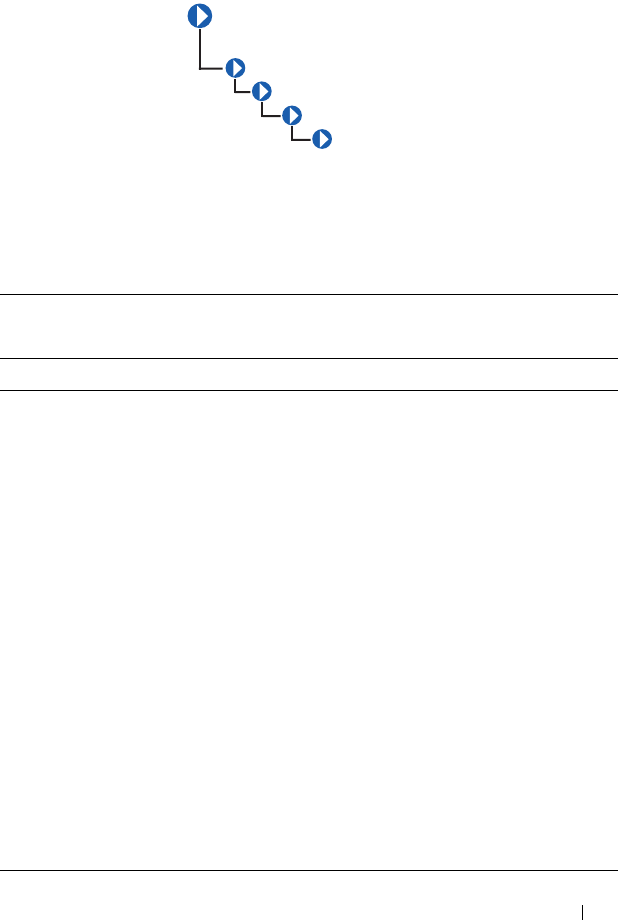
CIM_PhysicalFrame
The CIM_PhysicalFrame class described in Table 2-3 contains other
frame enclosures such as racks and chassis. Properties like VisibleAlarm or
AudibleAlarm, and data related to security breaches are also members of
this class.
Table 2-3. CIM_Physical Frame Properties
Class Name: CIM_PhysicalFrame
Parent Class: CIM_PhysicalPackage
Property Description Data Type
LockPresent Indicates whether the frame is protected with a
lock.
Boolean
AudibleAlarm Indicates whether the frame is equipped with an
audible alarm.
Boolean
VisibleAlarm Indicates that the equipment includes a
visible alarm.
Boolean
SecurityBreach An enumerated, integer-valued property
indicating that a physical breach of the frame is in
progress. Values for the SecurityBreach property
are:
1 - Other
2 - Unknown
3 - No breach
4 - Breach attempted
5 - Breach successful
uint16
IsLocked Indicates that the frame is currently locked. Boolean
CIM_PhysicalPackage
CIM_PhysicalFrame
CIM_ManagedSystemElement
CIM_PhysicalElement
CIM_PhysicalElement 23
CIM_Chassis
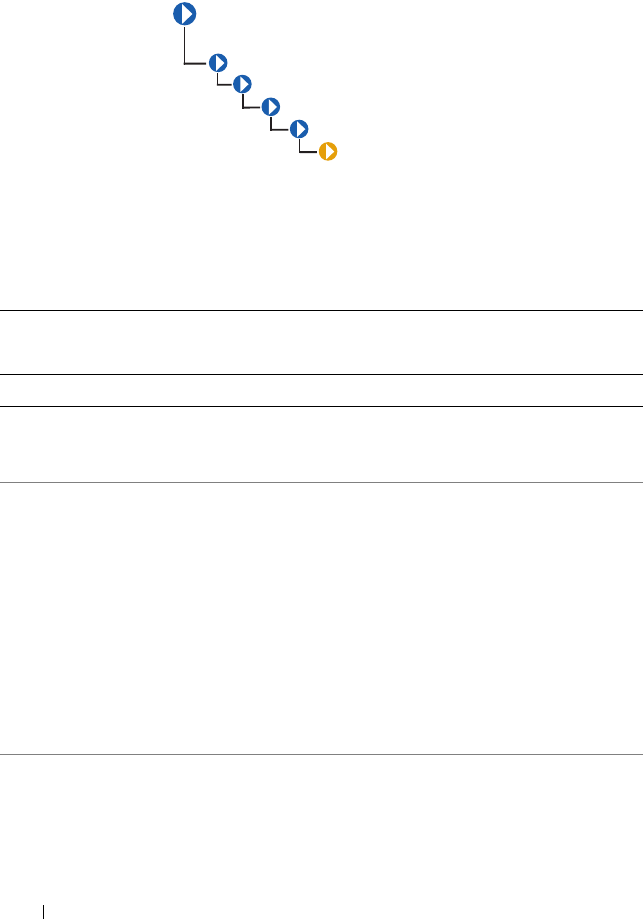
The CIM_Chassis class described in Table 2-4 represents the physical
elements that enclose physical elements such as power supplies, fans,
and processors.
Table 2-4. CIM_Chassis Parent Properties
Class Name: CIM_Chassis
Parent Class: CIM_PhysicalFrame
Property Description Data Type
ChassisTypes Values for the ChassisTypes property are:
1 - Other
2 - Unknown
3 - Mini-tower
4 - Tower
5 - Space-saving
6 - Main system chassis
7 - Expansion chassis
8 - Subchassis
9 - Space-saving
10 - Main system chassis
11 - Expansion chassis
12 - Subchassis
13 - Bus expansion chassis
14 - Peripheral chassis
15 - Storage chassis
16 - Rack-mount chassis
uint16
CIM_PhysicalPackage
CIM_PhysicalFrame
CIM_Chassis
CIM_ManagedSystemElement
CIM_PhysicalElement
24 CIM_PhysicalElement
DELL_Chassis
The DELL_Chassis class explained in Table 2-5 defines the identifying and
status properties of the chassis. DELL_Chassis inherits from CIM-defined
classes, but is populated by Dell properties.
Table 2-5. DELL_Chassis Properties
Class Name: DELL_Chassis
Parent Class: CIM_Chassis
Property Description Data Type
AssetTag Indicates the container AssetTag string. This
asset tag string is wri by the system
administrator.
string
SystemClass Refers to the system type that is installed and
running the instrumentation. Values for the
SystemClass property are:
1 - Other
2 - Unknown
3 - Workstation
4 - Server
5 - Desktop
6 - Portable
7 - Net PC
uint16
SystemID Indicates the system identifier code. uint16
CIM_PhysicalPackage
CIM_PhysicalFrame
CIM_Chassis
DELL_Chassis
CIM_
ManagedSystemElement
CIM_PhysicalElement
CIM_PhysicalElement 25
LogFormat Defines whether the event log data is
unicode formatted or binary (raw). Values for
the event LogFormat property are:
1 - Formatted (event log only)
2 - Unformatted
3 - Events_and_POST_Formatted (both the event
log and the power-on self-test (POST) log are
unicode for matted)
uint16
FanStatus Indicates the global status of fan sensors. string
TempStatus Indicates the global status of temperature
sensors.
string
VoltStatus Indicates the global status of voltage sensors. string
AmpStatus Indicates the global status of current sensors. string
PsStatus Indicates the global status of power supplies. string
MemStatus Indicates the global status of memory
devices.
string
ProcStatus Indicates the global status of processor
devices.
string
FanRedStatus Indicates the global status of the cooling
unit.
string
PsRedStatus Indicates the global status of the power unit. string
IsDefaultThrSupported Indicates whether resetting default
thresholds are supported.
Boolean
ChassisSystemProperties Indicates chassis characteristics, such as
energy smart and so on.
uint16
ChassisSystemRevision Indicates the chassis revision. uint16
EsmLogStatus Indicates the global status of ESM log. string
MemoryRedStatus Indicates the global status of memory
redundancy.
string
Table 2-5. DELL_Chassis Properties
(continued)
Class Name: DELL_Chassis
Parent Class: CIM_Chassis
Property Description Data Type
26 CIM_PhysicalElement
CIM_PhysicalComponent
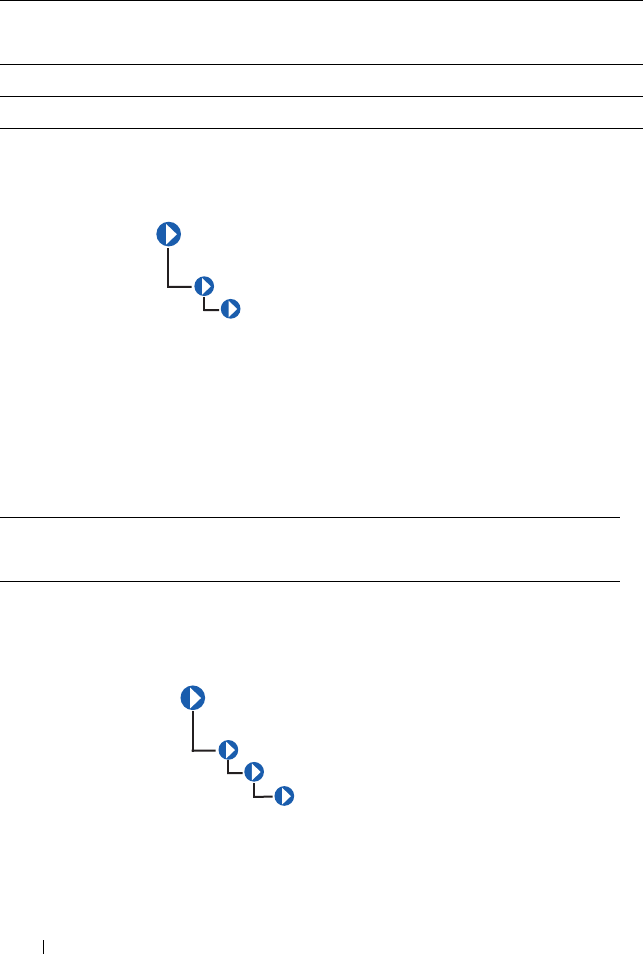
The CIM_PhysicalComponent class listed in Table 2-6 represents any
low-level or basic component within a package. A component object either
cannot or does not need to be broken down into its constituent parts. For
example, an application specific integrated circuit (ASIC) cannot be broken
down into smaller discrete parts.
CIM_Chip
The CIM_Chip class listed in Table 2-7 represents any type of integrated
circuit hardware, including ASICs, processors, memory chips, and so on.
ChassisExpressServiceCode Indicates the chassis express service code string
Table 2-6. CIM_PhysicalComponent Properties
Class Name: CIM_PhysicalComponent
Parent Class: CIM_PhysicalElement
Table 2-5. DELL_Chassis Properties
(continued)
Class Name: DELL_Chassis
Parent Class: CIM_Chassis
Property Description Data Type
CIM_PhysicalComponent
CIM_ManagedSystemElement
CIM_PhysicalElement
CIM_PhysicalComponent
CIM_Chip
CIM_
ManagedSystemElement
CIM_PhysicalElement

CIM_PhysicalElement 27
Table 2-7. CIM_Chip Properties
Class Name: CIM_Chip
Parent Class: CIM_PhysicalComponent
Property Description Data Type
FormFactor 0 - Unknown
1 - Other
2 - SIP
3 - DIP
4 - ZIP
5 - SOJ
6 - Proprietary
7 - SIMM
8 - DIMM
9 - TSOP
10 - PGA
11 - RIMM
12 - SODIMM
13 - SRIMM
14 - SMD
15 - SSMP
16 - QFP
17 - TQFP
18 - SOIC
19 - LCC
20 - PLCC
21 - BGA
22 - FPBGA
23 - LGA
24 - FB-DIMM
uint16
28 CIM_PhysicalElement
CIM_PhysicalMemory
The CIM_PhysicalMemory class described in Table 2-8 is a subclass of
CIM_Chip, representing low-level memory devices, such as SIMMS,
DIMMs, and so on.
Table 2-8. CIM_PhysicalMemory Properties
Class Name: CIM_PhysicalMemory
Parent Class: CIM_Chip
Property Description Data Type
FormFactor See Table 2-7. uint16
MemoryType Indicates the type of physical memory. Values for
the MemoryType property are:
0 - Unknown
1 - Other
2 - DRAM
3 - Synchronous DRAM
4 - Cache DRAM
5 - EDO
6 - EDRAM
7 - VRAM
8 - SRAM
9 - RAM
10 - ROM
uint16
CIM_PhysicalComponent
CIM_Chip
CIM_PhysicalMemory
CIM_ManagedSystemElement
CIM_PhysicalElement

CIM_PhysicalElement 29
MemoryType
(continued)
11 - Flash
12 - EEPROM
13 - FEPROM
14 - EPROM
15 - CDRAM
16 - 3DRAM
17 - SDRAM
18 - SGRAM
19 - RDRAM
20 - DDR
21 - DDR2
22 - DDR2 FB-DIMM
24 - DDR3
25 - FBD2
TotalWidth Indicates the total width, in bits, of the physical
memory, including check or error correction bits.
If there are no error correction bits, the value in
this property should match that specified for the
DataWidth property.
uint16
DataWidth Indicates the data width, in bits, of the physical
memory. A data width of 0 and a total width of 8
would indicate that the memory is solely used to
provide error correction bits.
uint16
Speed Indicates the speed of the physical memory, in
nanoseconds.
uint32
SpeedAsString Indicates the accurate speed of the physical
memory, in string format (with units).
string
Capacity Indicates the total capacity of this physical
memory, in bytes.
uint64
Table 2-8. CIM_PhysicalMemory Properties
(continued)
Class Name: CIM_PhysicalMemory
Parent Class: CIM_Chip
Property Description Data Type
30 CIM_PhysicalElement
CIM_PhysicalConnector
The CIM_PhysicalConnector class explained in Table 2-9 includes
physical elements such as plugs, jacks, or buses that connect physical
elements. Any object that can be used to connect and transmit signals or
power between two or more physical elements is a member of this class. For
example, slots and D-shell connectors are types of physical connectors. See
Table 2-10 for a list of valid connector type values.
BankLabel A string identifying the physically labeled bank
where the memory is located, for example, "Bank 0"
or "Bank A."
string
PositionInRow Specifies the position of the physical memory in a
“row.” For example, if it takes two 8-bit memory
devices to form a 16-bit row, then a value of 2
means that this memory is the second device.
0 is an invalid value for this property.
uint32
InterleavePosition Indicates the position of this physical memory in
an interleave. 0 indicates noninterleaved.
1 indicates the first position, 2 the second
position, and so on. For example, in a 2:1
interleave, a value of 1 indicates that the memory is
in the “even” position.
uint32
Table 2-8. CIM_PhysicalMemory Properties
(continued)
Class Name: CIM_PhysicalMemory
Parent Class: CIM_Chip
Property Description Data Type
CIM_PhysicalConnector
CIM_ManagedSystemElement
CIM_PhysicalElement
CIM_PhysicalElement 31
Table 2-9. CIM_PhysicalConnector Properties
Class Name: CIM_PhysicalConnector
Parent Class: CIM_PhysicalElement
Property Description Data Type
ConnectorPinout A free-form string describing the pin
configuration and signal usage of a physical
connector.
string
ConnectorType An array of integers defining the type of
physical connector. An array is specified to allow
the description of “combinations” of connector
information. For example, one array entry could
specify RS-232, another DB-25, and a third
entry could define the connector as male. See
Table 2-10 for the values of the ConnectorType
property.
uint16
Table 2-10. Connector Type Values
0 - Unknown 30 - unused 60 - Micro-DIN 90 - On Board IDE
Connector
1 - Other 31 - unused 61 - PS/2 91 - On Board Floppy
Connector
2 - Male 32 - IEEE-48 62 - Infrared 92 - 9 Pin Dual Inline
3 - Female 33 - AUI 63 - unused 93 - 25 Pin Dual Inline
4 - Shielded 34 - UTP
Category 3
64 - Access. bus 94 - 50 Pin Dual Inline
5 - Unshielded 35 - UTP
Category 4
65 - unused 95 - 68 Pin Dual Inline
6 - SCSI (A)
High-Density (50 pins)
36 - UTP
Category 5
66 - Centronics 96 - On Board Sound
Connector
7 - SCSI (A)
Low-Density (50 pins)
37 - BNC 67 - Mini-Centronics 97 - Mini-jack
8 - SCSI (P)
High-Density (68 pins)
38 - RJ11 68 - Mini-Centronics
Ty p e - 1 4
98 - PCI-X
9 - SCSI SCA-I (80 pins) 39 - RJ45 69 - Mini-Centronics
Ty p e - 2 0
99 - Sbus IEEE
1396-1993 32-bit
10 - SCSI SCA-II
(80 pins)
40 - Fiber MIC 70 - Mini-Centronics
Ty p e - 2 6
100 - Sbus IEEE
1396-1993 64-bit
32 CIM_PhysicalElement
11 - Fibre Channel
(DB-9 Copper)
41 - unused 71 - Bus Mouse 101 - unused
12 - Fibre Channel
(Fiber Optical)
42 - unused 72 - ADB 102 - GIO
13 - Fibre Channel SCA-
II (40 pins)
43 - PCI 73 - AGP 103 - XIO
14 - Fibre Channel SCA-
II (20 pins)
44 - ISA 74 - VME Bus 104 - HIO
15 - Fibre Channel BNC 45 - unused 75 - VME64 105 - NGIO
16 - ATA 3-1/2 Inch
(40 pins)
46 - VESA 76 - Proprietary 106 - PMC
17 - ATA 2-1/2 Inch
(44 pins)
47 - unused 77 - Proprietary
Processor Card Slot
107 - MTRJ
18 - ATA-2 48 - unused 78 - Proprietary
Memory Card Slot
108 - VF-45
19 - ATA-3 49 - unused 79 - Proprietary I/O
Riser Slot
109 - Future I/O
20 - ATA/66 50 - unused 80 - PCI-66 MHz 110 - SC
21 - DB-9 51 - unused 81 - AGP2X 111 - SG
22 - DB-15 52 - unused 82 - AGP4X 112 - Electrical
23 - DB-25 53 - USB 83 - PC-98 113 - Optical
24 - DB-36 54 - IEEE 1394 84 - PC-98-Hireso 114 - Ribbon
25 - RS-232C 55 - HIPPI 85 - PC-H98 115 - GLM
26 - RS-422 56 - HSSDC (6
pins)
86 - PC-98Note 116 - 1x9
27 - RS-423 57 - GBIC 87 - PC-98Full 117 - Mini SG
28 - RS-485 58 - DIN 88 - SSA SCSI 118 - LC
29 - RS-449 59 - Mini-DIN 89 - Circular 119 - HSSC
Table 2-10. Connector Type Values
(continued)
CIM_PhysicalElement 33
CIM_Slot
The CIM_Slot class described in Table 2-11 represents connectors into
which packages are inserted. For example, a physical package that is a hard
drive can be inserted into a small computer system interface-single connector
attachment (SCSI-SCA) slot. As another example, a card can be inserted
into a 16-, 32-, or 64-bit expansion slot on a host board.
Table 2-11. CIM_Slot Properties
Class Name: class CIM_Slot
Parent Class: CIM_PhysicalConnector
Property Description Data Type
ConnectorType See Table 2-10. uint16
SupportsHotPlug Indicates whether the slot supports hot-plug
adapter cards.
Boolean
MaxDataWidth Indicates the maximum bus width in bits of
adapter cards that can be inserted into this slot.
Values for the MaxDataWidth property are as
follows:
0 - Unknown
1 - Other
8- Bits
16 - Bits
32 - Bits
64 -Bits
128 - Bits
uint16
CIM_ManagedSystemElement
CIM_PhysicalElement
CIM_PhysicalConnector
CIM_Slot

34 CIM_PhysicalElement
SystemSlotType Indicates the type of system slot. Values for the
SystemSlotType property are as follows:
1 - Other
2 - Unknown
3 - ISA
4 - MCA
5 - EISA
6 - PCI
7 - PCMCIA
8 - VL-VESA
9 - Proprietary
10 - Processor Card Slot
11 - Proprietary Memory Card Slot
12 - I/O Riser Card Slot
13 - NuBus
14 - PCI - 66MHz Capable
15 - AGP
16 - AGP 2X
17 - AGP 4X
18 - PCI-X
19 - AGP 8X
160 - PC-98/C20
161 - PC-98/C24
162 - PC-98/E
163 - PC-98/Local Bus
164 - PC-98/Card
165 - PCI Express
166 - PCI Express x1
167 - PCI Express x2
Table 2-11. CIM_Slot Properties
(continued)
Class Name: class CIM_Slot
Parent Class: CIM_PhysicalConnector
Property Description Data Type

CIM_PhysicalElement 35
SystemSlotType
(continued)
168 - PCI Express x4
169 - PCI Express x8
170 - PCI Express x16
171 - PCI Express Gen 2
172 - PCI Express Gen 2 x1
173 - PCI Express Gen 2 x2
174 - PCI Express Gen 2 x4
175 - PCI Express Gen 2 x8
176 - PCI Express Gen 2 x16
Table 2-11. CIM_Slot Properties
(continued)
Class Name: class CIM_Slot
Parent Class: CIM_PhysicalConnector
Property Description Data Type

36 CIM_PhysicalElement
38 CIM_LogicalElement
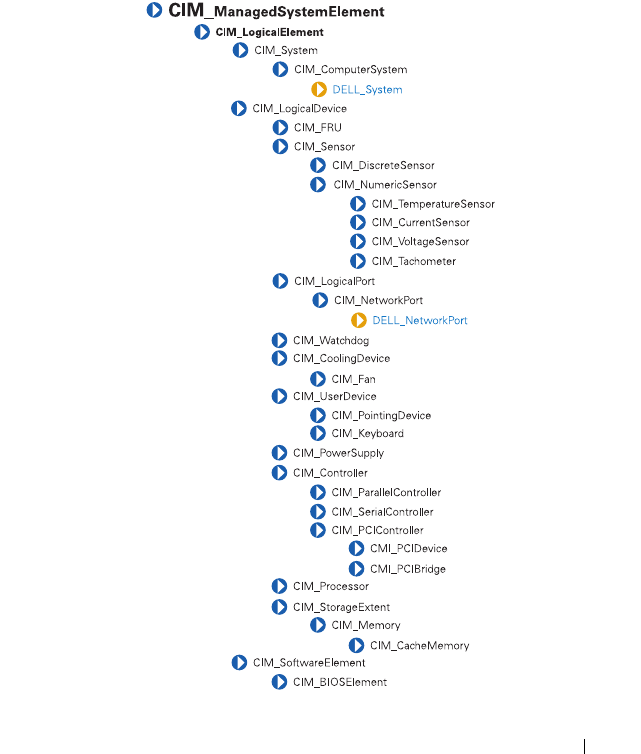
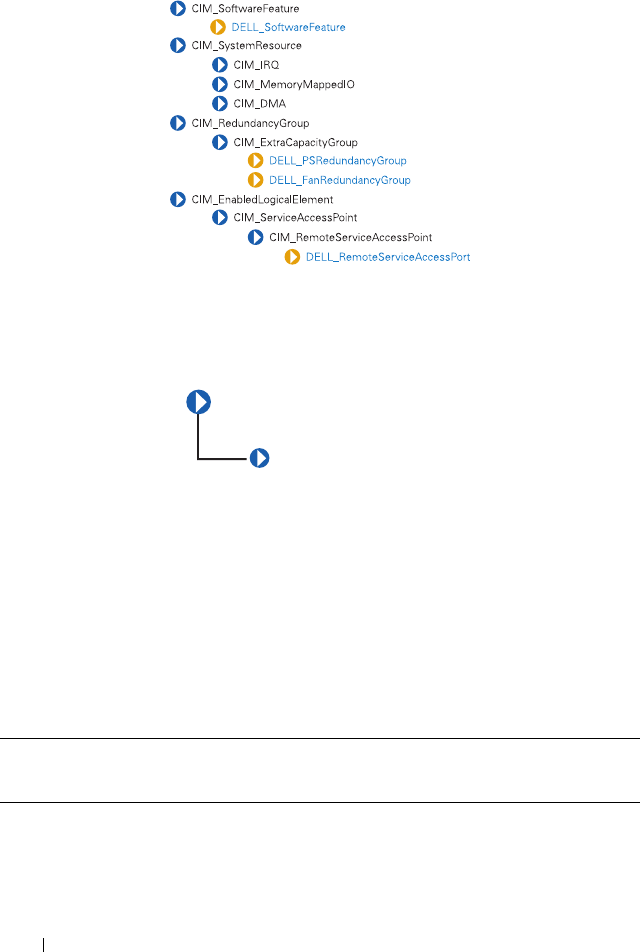
CIM_LogicalElement
Table 3-1 lists the following characteristics for members of the
CIM_LogicalElement class:
• Represent abstractions used to manage and coordinate aspects of a
physical environment such as files, processes, systems, system capabilities,
and network components in the form of logical devices
• Represent devices, where devices are abstractions of hardware entities that
may or may not be realized in physical hardware
Table 3-1. CIM_LogicalElement Properties
Class Name: CIM_LogicalElement
Parent Class: CIM_ManagedSystemElement
CIM_ManagedSystemElement
CIM_LogicalElement
CIM_LogicalElement 39
CIM_System
The CIM_System class shown in Table 3-2 defines a collection of managed
system elements that operates as a functional whole. An instance of the
CIM_System class contains a well-defined list of components that work
together to perform a specific function.
Table 3-2. CIM_System Properties
Class Name: CIM_System
Parent Class: CIM_LogicalElement
Property Description Data Type
CreationClassName See Table 1-1. string
Name Indicates the name of a specific system, such as a
particular storage system or server.
string
PrimaryOwnerContact Provides information on how the primary system
owner can be reached, for example, a phone
number or e-mail address.
string
PrimaryOwnerName Indicates the name of the primary system owner. string
Roles An array of strings that specifies the roles this
system plays in the IT environment. For example,
for an instance of a network system, the Roles
property might contain the string "storage system."
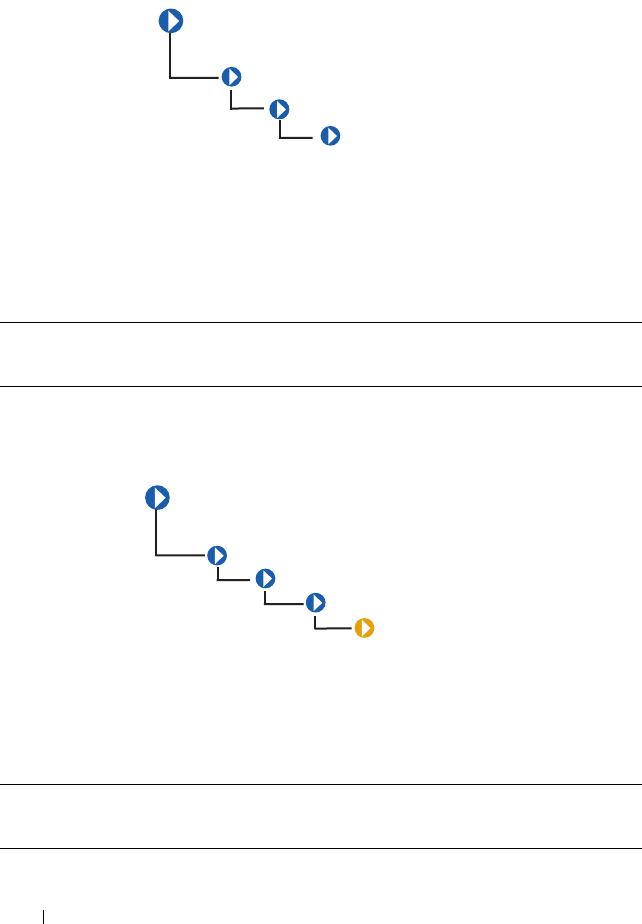
string
CIM_ManagedSystemElement
CIM_LogicalElement
CIM_System
40 CIM_LogicalElement
CIM_ComputerSystem
The CIM_ComputerSystem class listed in Table 3-3 contains some or all of
the following CIM_ManagedSystemElements: file system, operating
system, processor, and memory (volatile and/or nonvolatile storage).
For properties, see Table 3-2.
DELL_System
The DELL_System class listed in Table 3-4 is the set of all Dell
instrumented systems, including server, and storage systems. For properties,
see Table 3-2.
Table 3-3. CIM_ComputerSystem Properties
Class Name: CIM_ComputerSystem
Parent Class: CIM_System
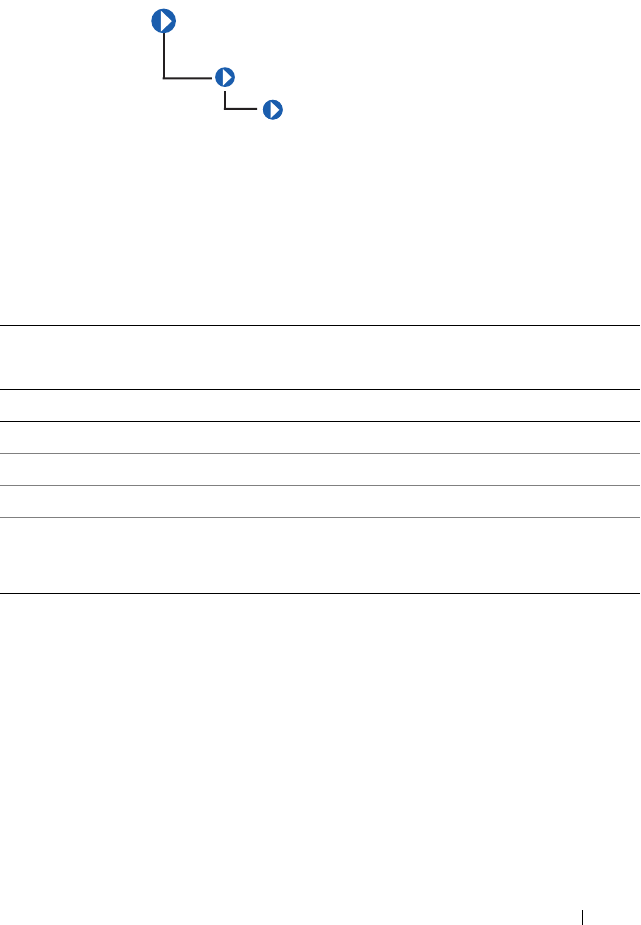
Table 3-4. DELL_System Properties
Class Name: DELL_System
Parent Class: CIM_ComputerSystem
CIM_ManagedSystemElement
CIM_LogicalElement
CIM_System
CIM_ComputerSystem
DELL_System
CIM_
ManagedSystemElement
CIM_LogicalElement
CIM_System
CIM_ComputerSystem
CIM_LogicalElement 41
CIM_LogicalDevice
The CIM_LogicalDevice class described in Table3-5 models a hardware
entity that may be realized in physical hardware. CIM_LogicalDevice
includes any characteristics of a logical device that manages its operation or
configuration. An example of a logical device is a temperature sensor’s
reading of actual temperature.
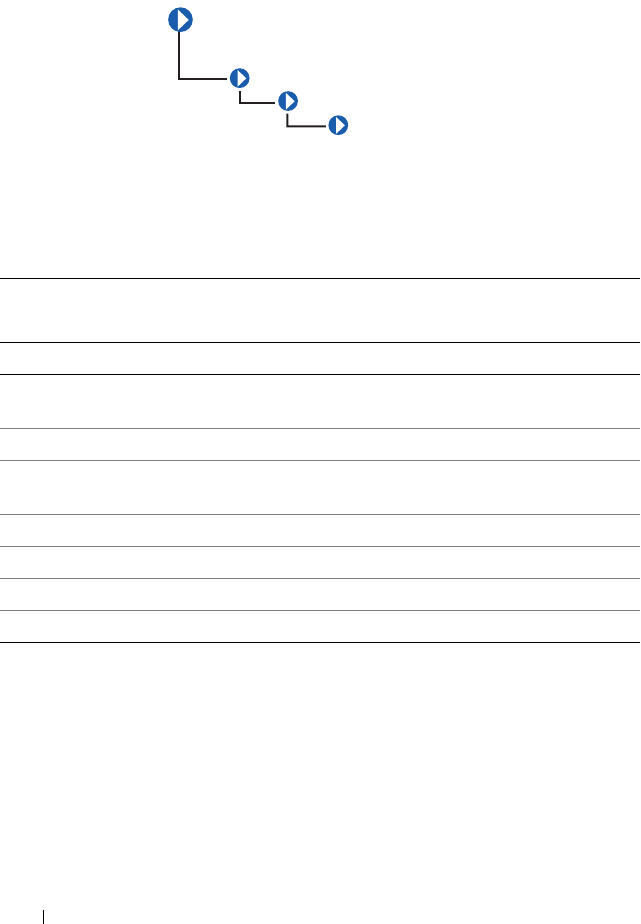
Table 3-5. CIM_Logical Device Properties
Class Name: CIM_LogicalDevice
Parent Class: CIM_LogicalElement
Property Description Data Type
SystemCreationClassName See Table 1-1. string
SystemName Indicates the scoping system’s name. string
CreationClassName See Table 1-1. string
DeviceID Identifies an address or other identifying
information to uniquely name the logical
device.
string
CIM_ManagedSystemElement
CIM_LogicalElement
CIM_LogicalDevice
42 CIM_LogicalElement
CIM_FRU
The CIM_FRU class described in Table 3-6 contains manufacturing
information related to the Field Replaceable Units (FRU) of a system such as
a system planar or I/O riser card.
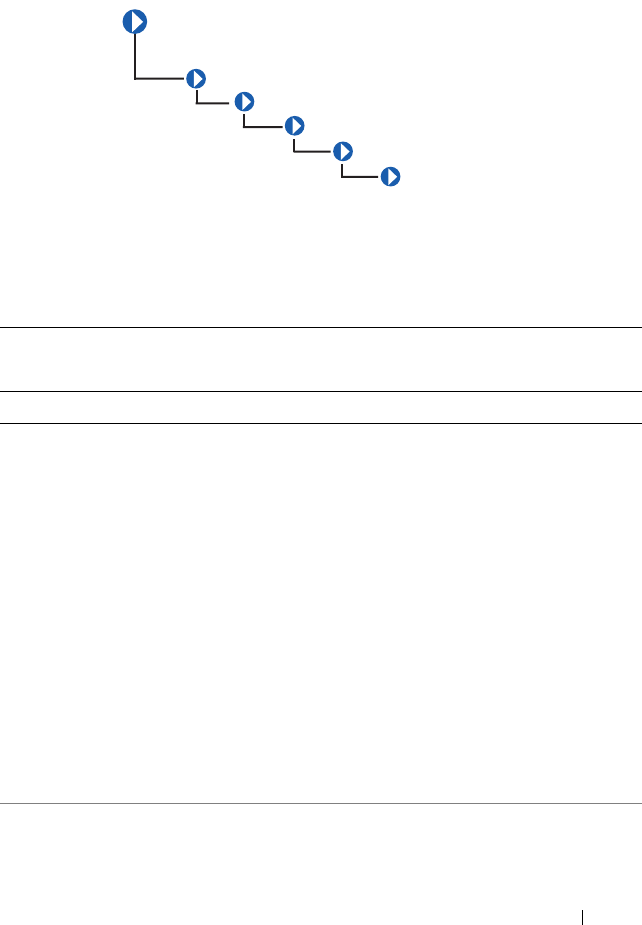
Table 3-6. CIM_FRU Properties
Class Name: CIM_FRU
Parent Class: CIM_LogicalDevice
Property Description Data Type
FRUInformationState Indicates the state and availability of
FRU information.
uint 16
FRUDeviceName Indicates the device name of the FRU. string
FRUManufacturingDateName Indicates the manufacturing date of the
FRU in ticks.
datetime
FRUManufacturerName Indicates the name of the manufacturer. string
FRUPartNumberName Indicates the FRU part number. string
FRUSerialNumberName Indicates the FRU serial number. string
FRURevisionName Indicates the FRU Revision number. string
CIM_ManagedSystemElement
CIM_LogicalElement
CIM_LogicalDevice
CIM_FRU
CIM_LogicalElement 43
CIM_Sensor
The CIM_Sensor class explained in Table 3-7 contains hardware devices
capable of measuring the characteristics of some physical property, for
example, the temperature or voltage characteristics of a computer system.
Table 3-7. CIM_Sensor Properties
Class Name: CIM_Sensor
Parent Class: CIM_LogicalDevice
Property Description Data Type
SensorType The type of the sensor, for example, voltage or
temperature sensor.
Values for the SensorType property are:
0 - Unknown
1 - Other
2 - Temperature sensors measure the environmental
temperature.
3 - Voltage sensors measure electrical voltage.
4 - Current sensors measure current readings.
5 - Tachometers measure speed/revolutions of a device.
For example, a fan device can have an associated
tachometer that measures its speed.
6 - Batteries maintain the time and date and save the
system’s BIOS configuration when the system is
switched off.
uint16
OtherSensorType
Description
The type of sensor when the SensorType property is
set to Other.
string
CIM_ManagedSystemElement
CIM_LogicalElement
CIM_LogicalDevice
CIM_Sensor
CIM_NumericSensor
CIM_CurrentSensor
44 CIM_LogicalElement
CIM_DiscreteSensor
The CIM_DiscreteSensor class described in Table 3-8 has a set of legal
string values that it can report. The CIM_DiscreteSensor always has a
current reading that corresponds to one of the enumerated values.
PossibleStates Enumerates the string outputs of the sensor. For
example, a NumericSensor can report states based on
threshold readings.
string
CurrentState Indicates the current state of the sensor. This value is
always one of the Possible States.
string
PollingInterval Indicates the polling interval, in nanoseconds, that
the sensor hardware or instrumentation uses to
determine the current state of the sensor.
uint64
Table 3-8. CIM_DiscreteSensor Properties
Class Name: CIM_DiscreteSensor
Parent Class: CIM_Sensor
Property Description Data Type
CurrentReading See Table 1-1. sint32
PossibleValues Enumerates the string outputs that can be reported by
the sensor.
sint32
Table 3-7. CIM_Sensor Properties
(continued)
Class Name: CIM_Sensor
Parent Class: CIM_LogicalDevice
Property Description Data Type
CIM_
ManagedSystemElement
CIM_LogicalElement
CIM_LogicalDevice
CIM_Sensor
CIM_DiscreteSensor
CIM_LogicalElement 45
CIM_NumericSensor
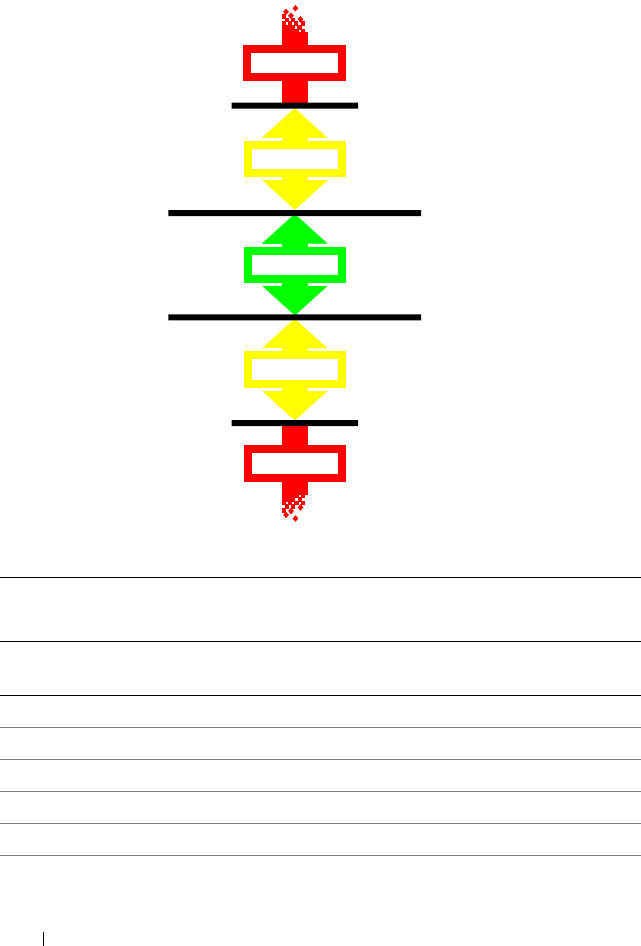
The CIM_NumericSensor class described in Table 3-9 returns numeric
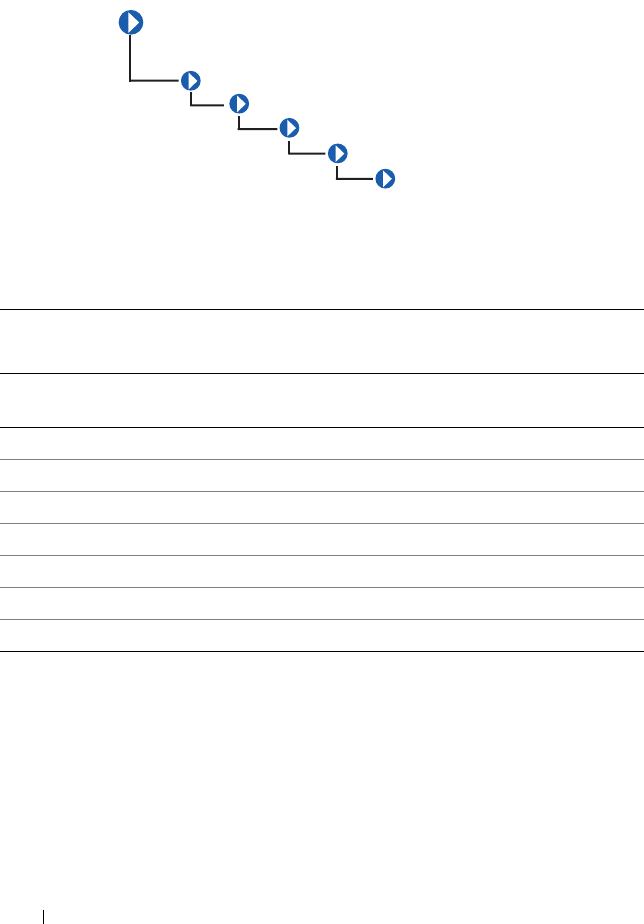
settings and may also support threshold settings. Figure 3-2 shows the
relationship among upper and lower critical and upper and lower non-critical
threshold values. The normal range falls between upper and lower non-critical
thresholds.
CIM_ManagedSystemElement
CIM_LogicalElement
CIM_LogicalDevice
CIM_Sensor
CIM_NumericSensor
46 CIM_LogicalElement
Figure 3-2. Ranges for Threshold Values
Table 3-9. CIM_NumericSensor Properties
Class Name: CIM_NumericSensor
Parent Class: CIM_Sensor
Property Description Data
Type
UnitModifier See Table 1-1. sint32
CurrentReading See Table 1-1. sint32
IsLinear See Table 1-1. Boolean
LowerThresholdNonCritical See Table 1-1. sint32
UpperThresholdNonCritical See Table 1-1. sint32
LowerThresholdCritical See Table 1-1. sint32
WARNING
NORMAL
WARNING
FATAL
FATAL
LOWER CRITICAL
LOWER
User Definable
UPPER
User Definable
UPPER CRITICAL
NONCRITICAL
NONCRITICAL
CIM_LogicalElement 47
UpperThresholdCritical See Table 1-1. sint32
SupportedThresholds An array representing the thresholds
supported by this sensor. The supported
values are as follows:
1 - LowerThresholdNonCritical
2 - UpperThresholdNonCritical
3 - LowerThresholdCritical
4 - UpperThresholdCritical
uint16
EnabledThresholds An array representing the thresholds that are
currently enabled for this sensor.
Enabled threshold values are as follows:
1 - LowerThresholdNonCritical
2 - UpperThresholdNonCritical
3 - LowerThresholdCritical
4 - UpperThresholdCritical
uint16
SettableThresholds An array representing the writable thresholds
supported by sensor.
Settable threshold values are:
1 - LowerThresholdNonCritical
2 - UpperThresholdNonCritical
uint16
Table 3-9. CIM_NumericSensor Properties
(continued)
Class Name: CIM_NumericSensor
Parent Class: CIM_Sensor
Property Description Data
Type
48 CIM_LogicalElement
CIM_TemperatureSensor
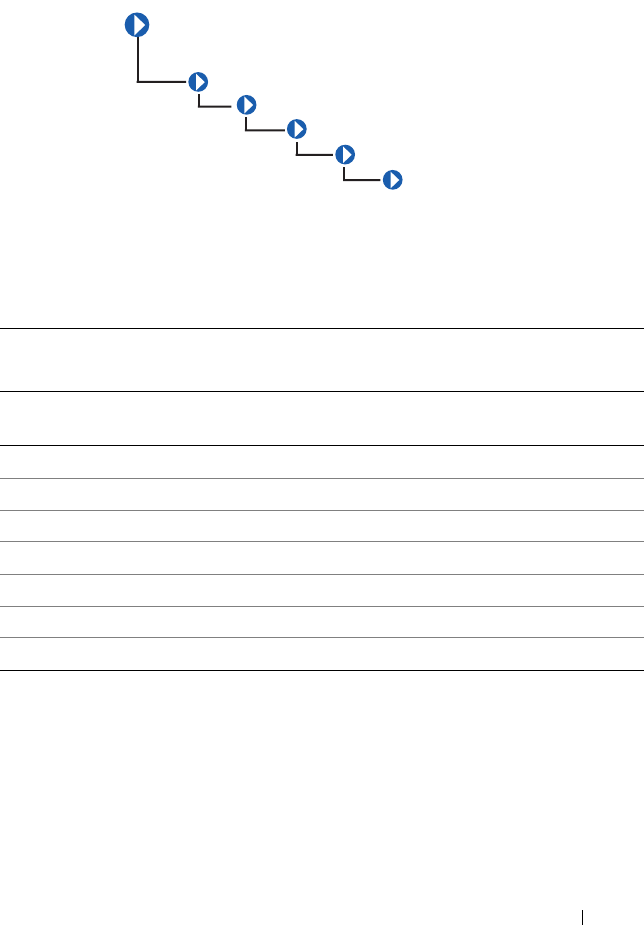
The CIM_TemperatureSensor class listed in Table 3-10 contains sensors
that sample ambient temperature and return a value in degrees Celsius.
Table 3-10. CIM_TemperatureSensor Properties
Class Name: CIM_TemperatureSensor
Parent Class: CIM_NumericSensor
Property Description Data
Type
UnitModifier See Table 1-1. sint32
CurrentReading See Table 1-1. sint32
IsLinear See Table 1-1. Boolean
LowerThresholdNonCritical See Table 1-1. sint32
UpperThresholdNonCritical See Table 1-1. sint32
LowerThresholdCritical See Table 1-1. sint32
UpperThresholdCritical See Table 1-1. sint32
CIM_ManagedSystemElement
CIM_LogicalElement
CIM_LogicalDevice
CIM_Sensor
CIM_NumericSensor
CIM_TemperatureSensor
CIM_LogicalElement 49
CIM_CurrentSensor
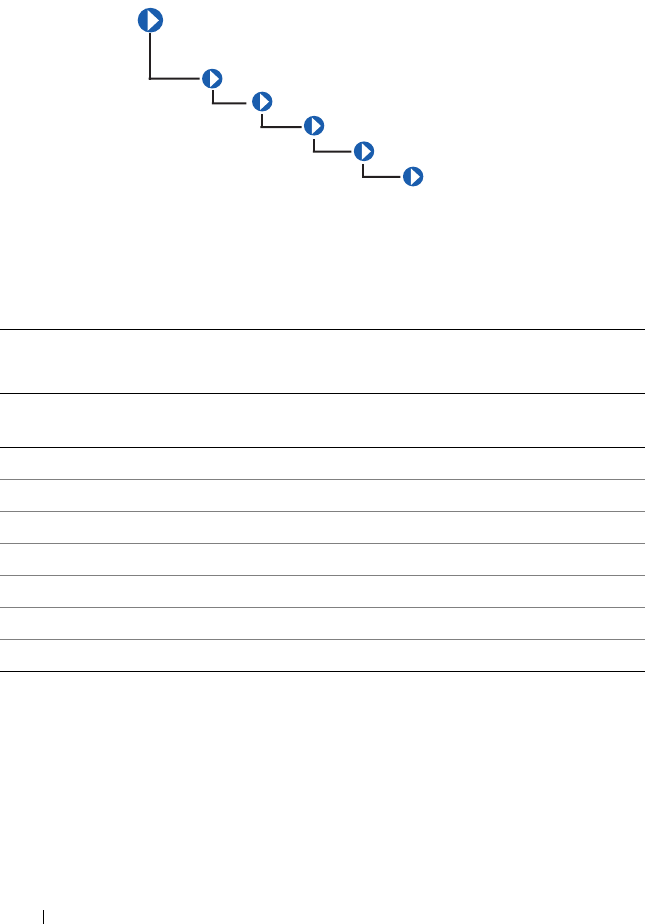
The CIM_CurrentSensor class listed in Table 3-11 contains sensors that
measure amperage and returns a value in amperes and watts.
Table 3-11. CIM_CurrentSensor Properties
Class Name: CIM_CurrentSensor
Parent Class: CIM_NumericSensor
Property Description Data
Type
UnitModifier See Table 1-1. sint32
CurrentReading See Table 1-1. sint32
IsLinear See Table 1-1. Boolean
LowerThresholdNonCritical See Table 1-1. sint32
UpperThresholdNonCritical See Table 1-1. sint32
LowerThresholdCritical See Table 1-1. sint32
UpperThresholdCritical See Table 1-1. sint32
CIM_ManagedSystemElement
CIM_LogicalElement
CIM_LogicalDevice
CIM_Sensor
CIM_NumericSensor
CIM_CurrentSensor
50 CIM_LogicalElement
CIM_VoltageSensor
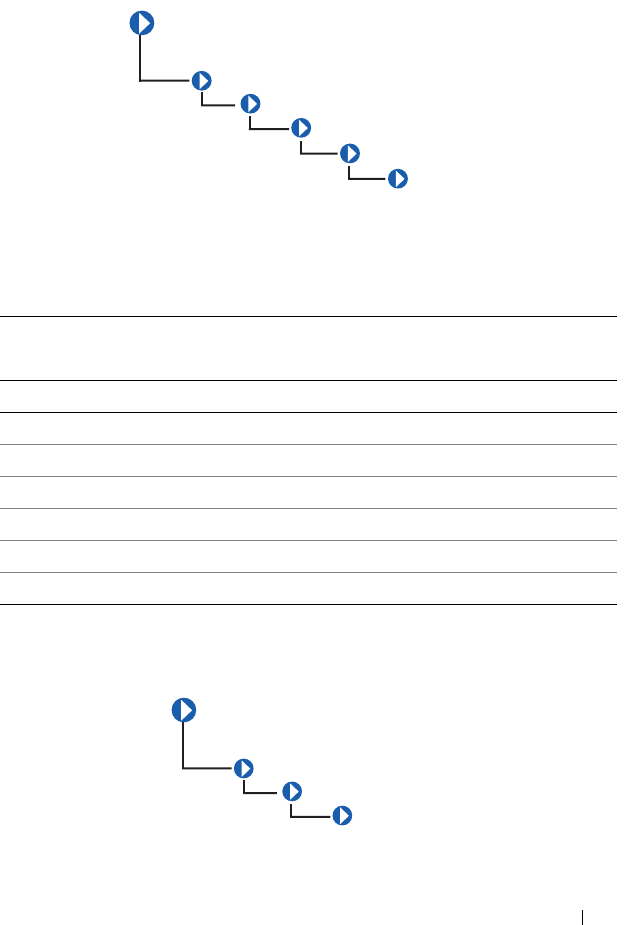
The CIM_VoltageSensor class shown in Table 3-12 contains sensors that
measure voltage and return a value in volts.
Table 3-12. CIM_VoltageSensor Properties
Class Name: CIM_VoltageSensor
Parent Class: CIM_NumericSensor
Property Description Data
Type
UnitModifier See Table 1-1. sint32
CurrentReading See Table 1-1. sint32
IsLinear See Table 1-1. Boolean
LowerThresholdNonCritical See Table 1-1. sint32
UpperThresholdNonCritical See Table 1-1. sint32
LowerThresholdCritical See Table 1-1. sint32
UpperThresholdCritical See Table 1-1. sint32
CIM_ManagedSystemElement
CIM_LogicalElement
CIM_LogicalDevice
CIM_Sensor
CIM_NumericSensor
CIM_VoltageSensor
CIM_LogicalElement 51
CIM_Tachometer
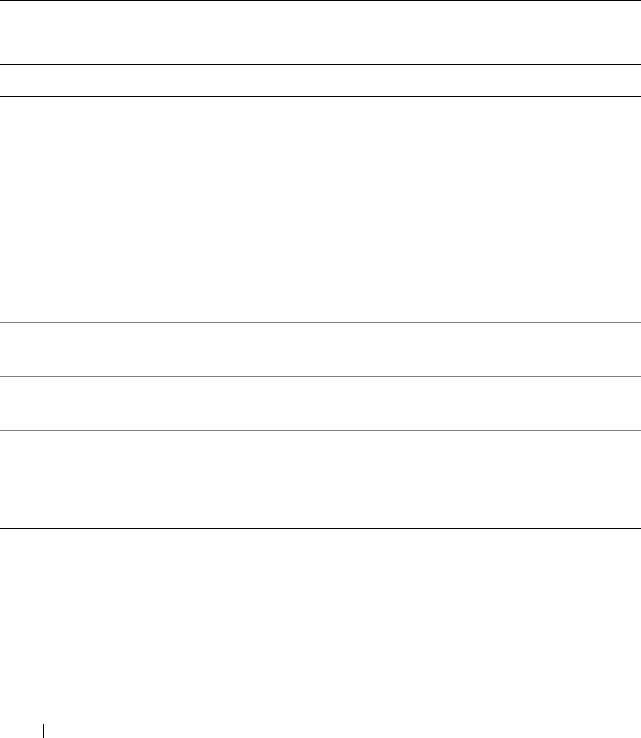
The CIM_Tachometer class listed in Table 3-13 contains devices that
measure revolutions per minute (RPM) of a fan and return the value in RPMs.
CIM_WatchDog
Table 3-13. CIM_Tachometer Properties
Class Name: CIM_Tachometer
Parent Class: CIM_NumericSensor
Property Description Data Type
SensorType See Table 1-1. uint16
UnitModifier See Table 1-1. sint32
CurrentReading See Table 1-1. sint32
IsLinear See Table 1-1. Boolean
LowerThresholdNonCritical See Table 1-1. sint32
UpperThresholdNonCritical See Table 1-1. sint32
CIM_
ManagedSystemElement
CIM_LogicalElement
CIM_LogicalDevice
CIM_Sensor
CIM_NumericSensor
CIM_Tachometer
CIM_ManagedSystemElement
CIM_LogicalElement
CIM_LogicalDevice
CIM_Watchdog
52 CIM_LogicalElement
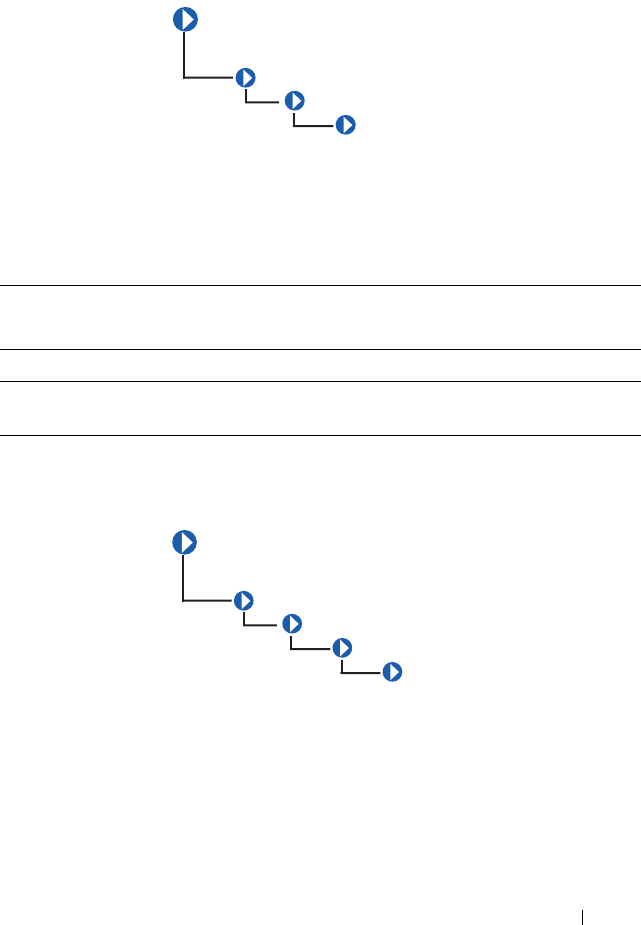
The CIM_WatchDog class described in Table 3-14 represents a timer that is
implemented in system hardware. The watchdog feature allows the hardware to
monitor the state of the operating system, BIOS, or a software component
installed on the system. If the monitored component fails to rearm the timer
before its expiration, the hardware assumes that the system is in a critical state
and could reset the system. This feature can also be used as an application
watchdog timer for a mission-critical application. In this case, the application
would assume responsibility for rearming the timer before expiration.
Table 3-14. CIM_WatchDog Properties
Class Name: CIM_WatchDog
Parent Class: CIM_LogicalDevice
Property Description Data Type
MonitoredEntity Indicates the entity that is currently being
monitored by the watchdog feature. This
property is used to identify the module that is
responsible for rearming the watchdog at
periodic intervals. Values for the
MonitoredEntity property are:
1 - Unknown
2 - Other
3 - Operating System
uint16
MonitoredEntity
Description
A string describing additional textual
information about the monitored entity.
string
TimeoutInterval Indicates the time-out interval used by the
watchdog, in microseconds.
uint32
TimerResolution Indicates the resolution of the watchdog
timer. For example, if this value is 100, then
the timer can expire anytime between –100
microseconds and +100 microseconds.
uint32
CIM_LogicalElement 53
CIM_CoolingDevice
The CIM_CoolingDevice class described in Table 3-15 contains a set of
devices that work to keep the ambient internal temperature of the system at a
safe value.
CIM_Fan
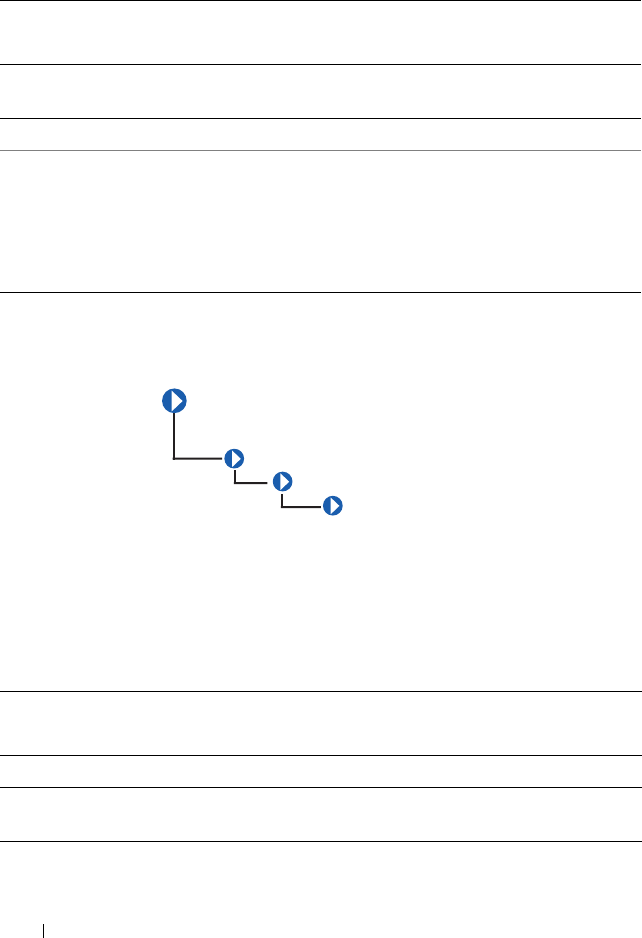
The CIM_Fan class explained in Table 3-16 contains a set of devices that
work to keep the ambient internal temperature of the system at a safe value
by circulating air.
Table 3-15. CIM_CoolingDevice Properties
Class Name: CIM_CoolingDevice
Parent Class: CIM_LogicalDevice
Property Description Data Type
ActiveCooling Specifies whether the device provides active (as opposed
to passive) cooling.
Boolean
CIM_ManagedSystemElement
CIM_LogicalElement
CIM_LogicalDevice
CIM_CoolingDevice
CIM_ManagedSystemElement
CIM_LogicalElement
CIM_LogicalDevice
CIM_CoolingDevice
CIM_Fan
54 CIM_LogicalElement
CIM_UserDevice
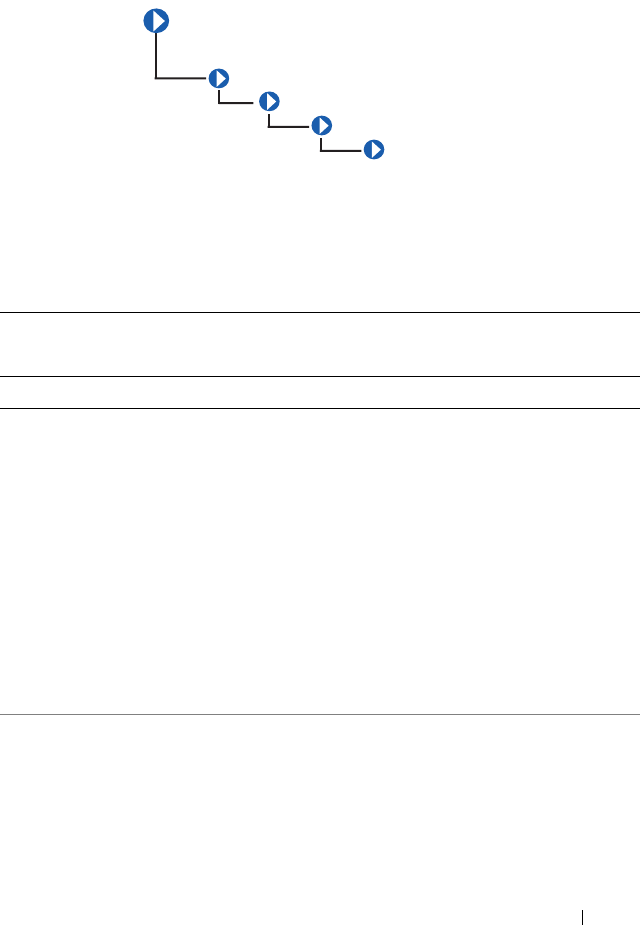
The CIM_UserDevice class shown in Table 3-17 contains logical devices
that allow a computer system’s users to input, view, or hear data. Classes
derived from CIM_UserDevice include CIM_Keyboard and
CIM_PointingDevice.
Table 3-16. CIM_Fan Properties
Class Name: CIM_Fan
Parent Class: CIM_CoolingDevice
Property Description Data
Type
VariableSpeed Specifies whether the fan supports variable speeds. Boolean
DesiredSpeed Indicates the currently requested fan speed, defined in
RPM. When the value = TRUE, the fan supports
variable speeds. When a variable speed fan is supported
(Variable S p e e d Boolean = TRUE), the actual speed is
determined using a sensor (CIM_Tachometer) that is
associated with the fan.
uint64
Table 3-17. CIM_UserDevice Properties
Class Name: CIM_UserDevice
Parent Class: CIM_LogicalDevice
Property Description Data Type
IsLocked Indicates whether the device is locked, preventing user
input or output.
Boolean
CIM_ManagedSystemElement
CIM_LogicalElement
CIM_LogicalDevice
CIM_UserDevice
CIM_LogicalElement 55
CIM_PointingDevice
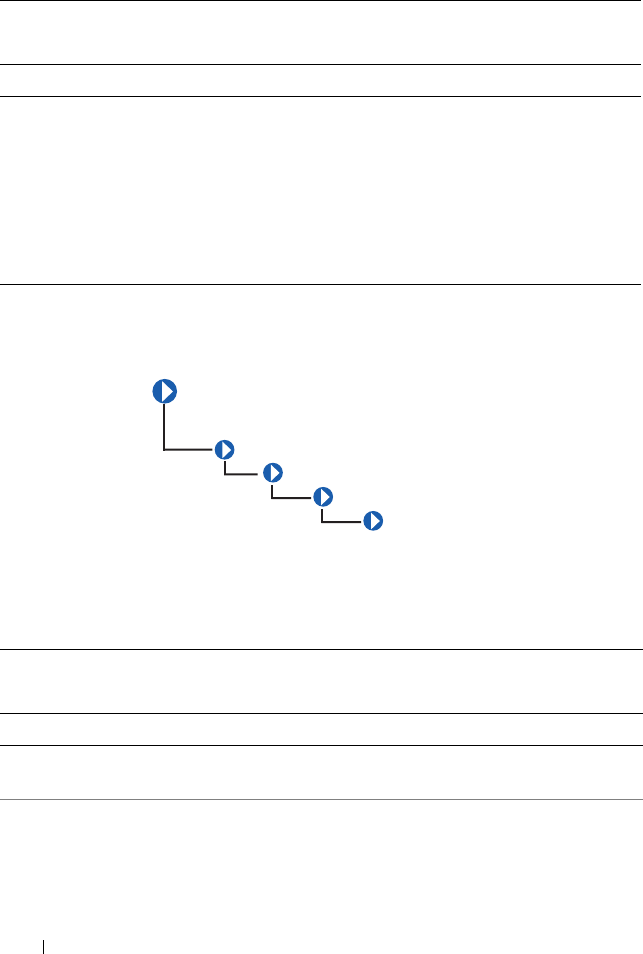
The CIM_PointingDevice class described in Table 3-18 includes those
devices used to point to regions of a display. Examples are a mouse or a
trackball.
Table 3-18. CIM_PointingDevice Properties
Class Name: CIM_PointingDevice
Parent Class: CIM_UserDevice
Property Description Data Type
PointingType Indicates the type of pointing device. Values for the
PointingType property are:
1 - Other
2 - Unknown
3 - Mouse
4 - Trackball
5 - Trackpoint
6 - Glidepoint
7 - Touch pad
8 - Touch screen
9 - Mouse—optical sensor
uint16
NumberOfButtons Indicates the number of buttons. If the
CIM_PointingDevice has no buttons, a value of 0
is returned.
uint8
CIM_
ManagedSystemElement
CIM_LogicalElement
CIM_LogicalDevice
CIM_UserDevice
CIM_PointingDevice
56 CIM_LogicalElement
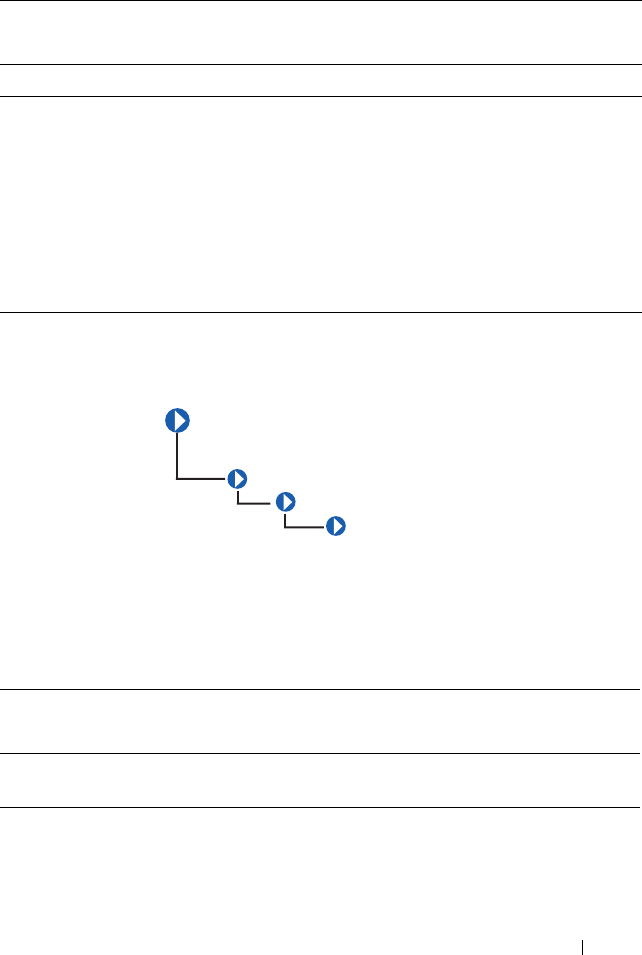
CIM_Keyboard
The CIM_Keyboard class explained in Table 3-19 includes devices that
allow users to enter data.
Handedness Integer indicating whether the CIM_PointingDevice
is configured for right- or left-handed operation.
Values for the Handedness property are as follows:
0 - Unknown
1 - Not applicable
2 - Right-handed operation
3 - Left-handed operation
uint16
Table 3-19. CIM_Keyboard Properties
Class Name: CIM_Keyboard
Parent Class: CIM_UserDevice
Property Description Data Type
NumberOfFunctionKeys Indicates the number of function keys on the
keyboard.
uint16
Layout A free-form string indicating the format and
layout of the keyboard.
string
Table 3-18. CIM_PointingDevice Properties
(continued)
Class Name: CIM_PointingDevice
Parent Class: CIM_UserDevice
Property Description Data Type
CIM_ManagedSystemElement
CIM_LogicalElement
CIM_LogicalDevice
CIM_UserDevice
CIM_Keyboard
CIM_LogicalElement 57
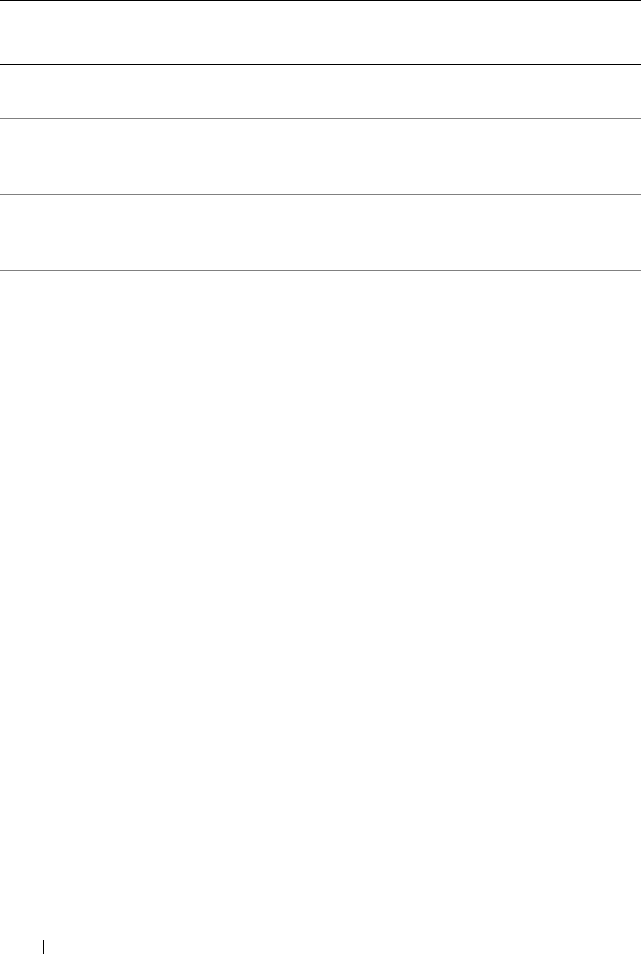
CIM_PowerSupply
The CIM_PowerSupply class described in Table 3-20 contains devices that
provide current and voltage for the operation of the system and its
components.
Password An integer indicating whether a hardware-level
password is enabled at the keyboard, preventing
local input. Values for the Password property are:
1 - Other
2 - Unknown
3 - Disabled
4 - Enabled
5 - Not implemented
uint16
Table 3-20. CIM_PowerSupply Properties
Class Name: CIM_PowerSupply
Parent Class: CIM_LogicalDevice
Property Description Data
Type
IsSwitchingSupply Indicates that the power supply is a switching
power supply and not a linear power supply.
Boolean
Table 3-19. CIM_Keyboard Properties
(continued)
Class Name: CIM_Keyboard
Parent Class: CIM_UserDevice
Property Description Data Type
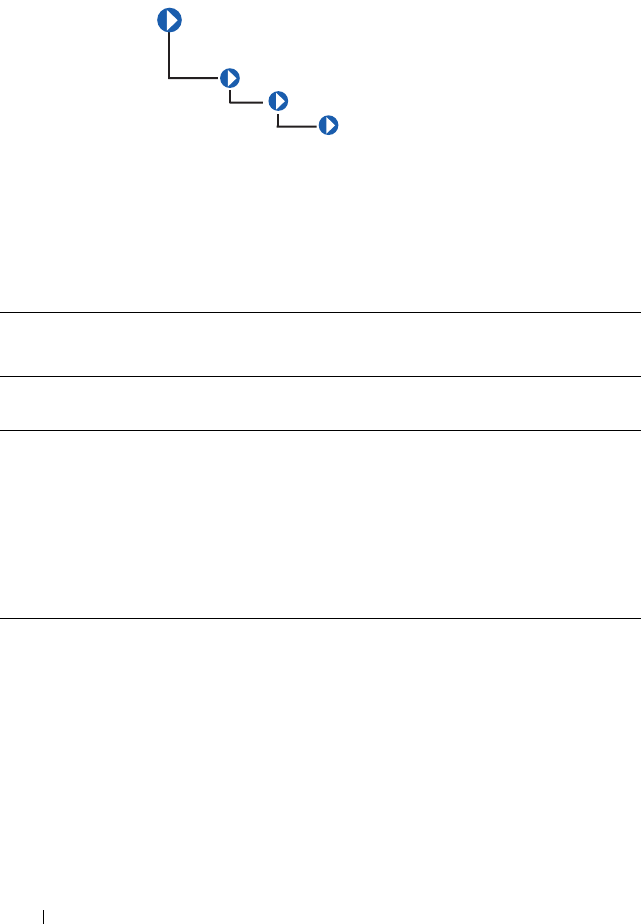
CIM_ManagedSystemElement
CIM_LogicalElement
CIM_LogicalDevice
CIM_PowerSupply
58 CIM_LogicalElement
Range1InputVoltageLow Indicates the low voltage in millivolts of input
voltage range 1 for this power supply. A value of
0 denotes unknown.
uint32
Range1InputVoltageHigh Indicates the high voltage in millivolts of input
voltage range 1 for this power supply. A value of
0 denotes unknown.
uint32
ActiveInputVoltage Indicates which input voltage range is currently
in use. Range 1, 2, or both can be specified
using the values 3, 4, or 5, respectively. If the
supply is not drawing power, a value of 6
(neither) can be specified. This information is
necessary in the case of an uninterruptible
power supply (UPS), a subclass of power supply.
Values for the ActiveInputVoltage property are:
1 - Other
2 - Unknown
3 - Range 1
4 - Range 2
5 - Both range 1 and range 2
6 - Neither range 1 nor range 2
uint16
Table 3-20. CIM_PowerSupply Properties
(continued)
Class Name: CIM_PowerSupply
Parent Class: CIM_LogicalDevice
Property Description Data
Type
CIM_LogicalElement 59
ActiveInputVoltage Indicates which input voltage range is currently
in use. Range 1, 2, or both can be specified
using the values 3, 4, or 5, respectively. If the
supply is not drawing power, a value of 6
(neither) can be specified. This information is
necessary in the case of an uninterruptible
power supply (UPS), a subclass of power supply.
Values for the ActiveInputVoltage property are:
1 - Other
2 - Unknown
3 - Range 1
4 - Range 2
5 - Both range 1 and range 2
6 - Neither range 1 nor range 2
uint16
TotalOutputPower Represents the total output power of the power
supply in milliwatts. A value of 0 denotes that
the power output is unknown.
uint32
PMCapable Indicates the Power Monitoring capability. Boolean
Table 3-20. CIM_PowerSupply Properties
(continued)
Class Name: CIM_PowerSupply
Parent Class: CIM_LogicalDevice
Property Description Data
Type
60 CIM_LogicalElement
CIM_Controller
The CIM_Controller class shown in Table 3-21 groups miscellaneous
control-related devices. Examples of controllers are small computer system
interface (SCSI) controllers, Universal Serial Bus (USB) controllers, and serial
controllers.
Table 3-21. CIM_Controller Properties
Class Name: CIM_Controller
Parent Class: CIM_LogicalDevice
Property Description Data
Type
ProtocolSupported The protocol used by the controller to access
controlled devices. Values for the
ProtocolSupported property are:
1 - Other
2 - Unknown
3 - PCI
4 - Parallel protocol
uint16
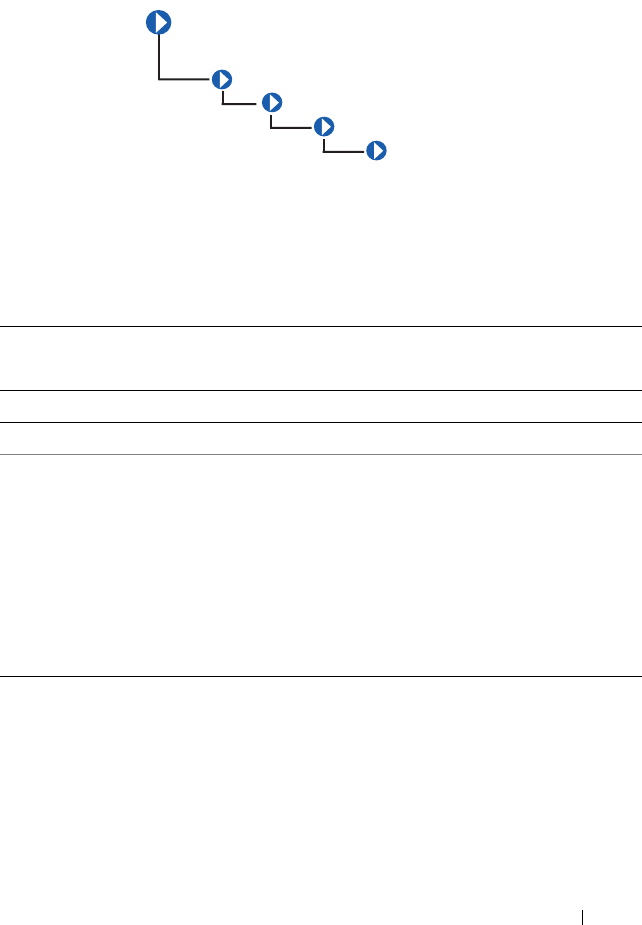
CIM_ManagedSystemElement
CIM_LogicalElement
CIM_LogicalDevice
CIM_Controller
CIM_LogicalElement 61
CIM_ParallelController
The CIM_ParallelController class identified in Table 3-22 contains a
set of objects that control parallel devices. Parallel controllers transfer 8 or 16
bits of data at a time to the devices they control, for example, a parallel port
controlling a printer.
Table 3-22. CIM_ParallelController Properties
Class Name: CIM_ParallelController
Parent Class: CIM_Controller
Property Description Data Type
DMASupport Set to TRUE if the parallel controller supports DMA. Boolean
Security An enumeration indicating the operational security for
the controller. Values for the Security property are:
1 - Other
2 - Unknown
3 - None
4 - External interface locked out
5 - External interface enabled
6 - Boot bypass
uint16
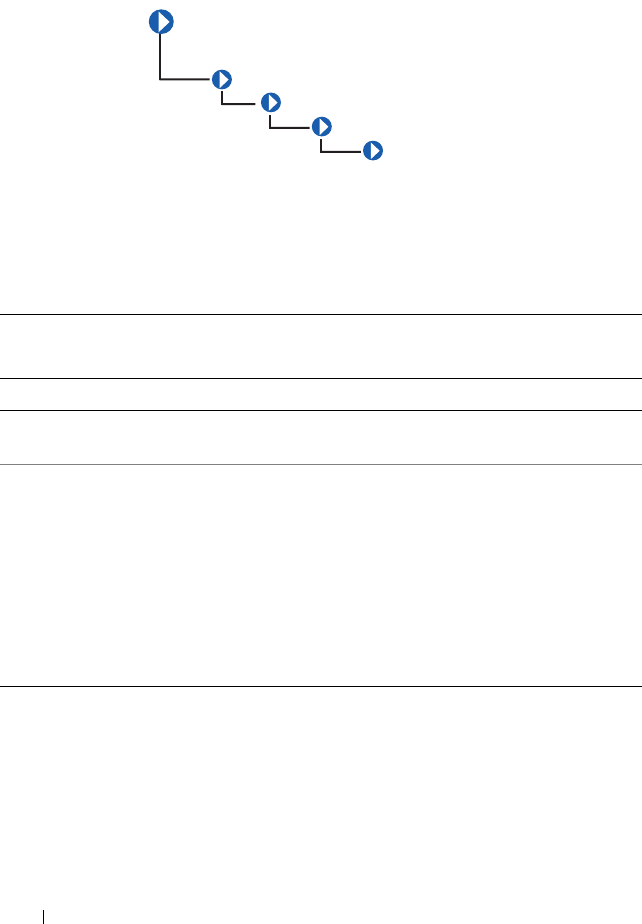
CIM_ManagedSystemElement
CIM_LogicalElement
CIM_LogicalDevice
CIM_Controller
CIM_ParallelController
62 CIM_LogicalElement
CIM_SerialController
The CIM_SerialController class explained in Table 3-23 contains
controllers that transfer data one bit at a time to the devices they control, for
example, a serial port controlling a modem.
Table 3-23. CIM_SerialController Properties
Class Name: CIM_SerialController
Parent Class: CIM_Controller
Property Description Data Type
MaxBaudRate Indicates the maximum baud rate in bits per second
supported by the serial controller.
uint32
Security An enumeration indicating the operational security for
the controller. Values for the Security property are:
1 - Other
2 - Unknown
3 - None
4 - External interface locked out
5 - External interface enabled
6 - Boot bypass
uint16
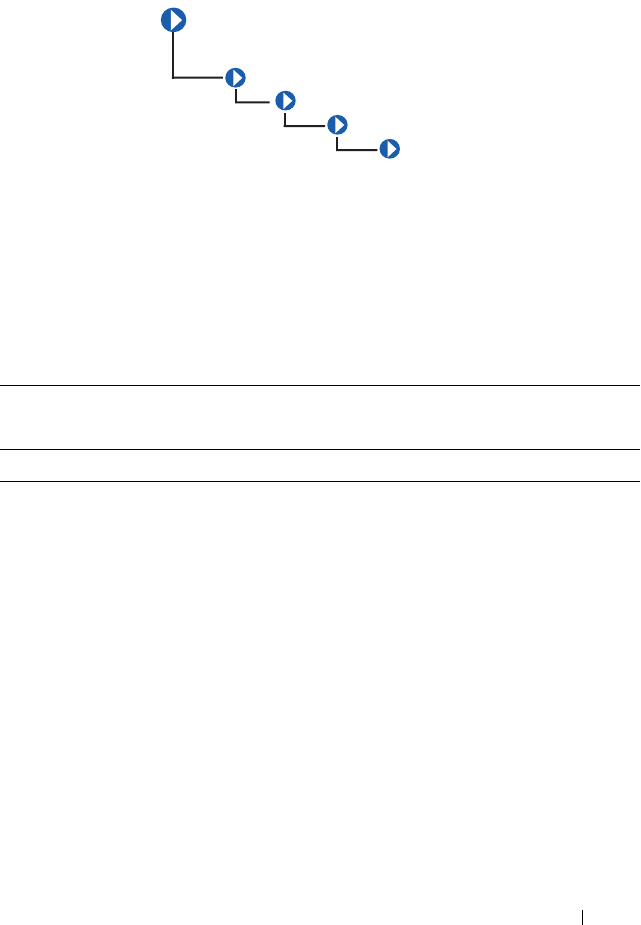
CIM_ManagedSystemElement
CIM_LogicalElement
CIM_LogicalDevice
CIM_Controller
CIM_SerialController
CIM_LogicalElement 63
CIM_PCIController
The CIM_PCIController class listed in Table 3-24 contains a set of
devices that follow the Peripheral Component Interconnect (PCI) protocol
defined by the Personal Computer Memory Card International Association
(PCMCIA). The PCI protocol defines how data is transferred between
devices. The CIM_PCIController class contains PCI adapters and
bridges.
Table 3-24. CIM_PCIController Properties
Class Name: CIM_PCIController
Parent Class: CIM_Controller
Property Description Data Type
CommandRegister The current contents of the register that provide
basic control over the device’s ability to respond to,
and/or perform PCI accesses. The data in the
capabilities array is gathered from the PCI status
register and the PCI capabilities list as defined in the
PCI specification.
uint16
CIM_ManagedSystemElement
CIM_LogicalElement
CIM_LogicalDevice
CIM_Controller
CIM_PCIController
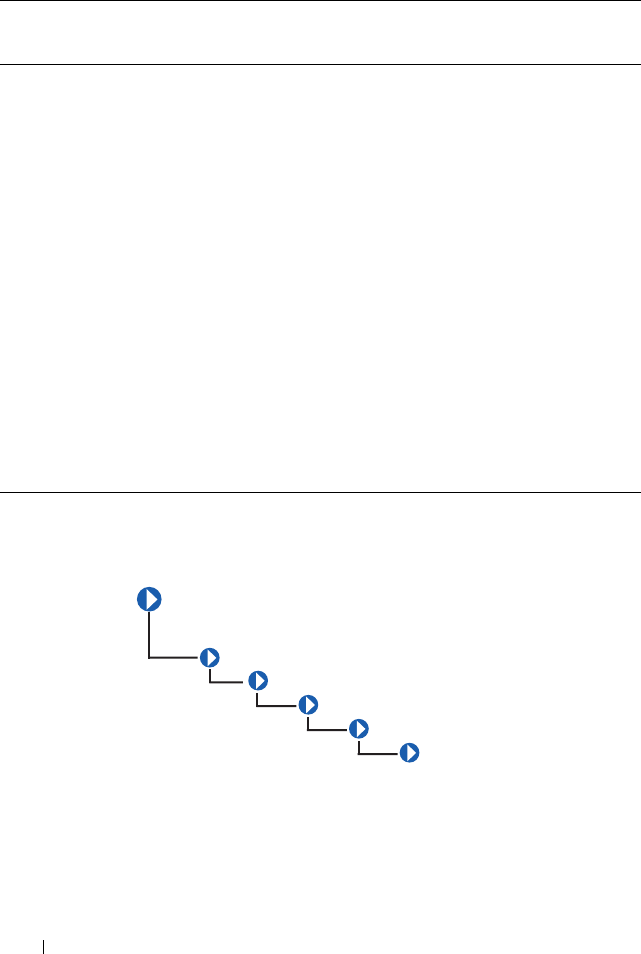
64 CIM_LogicalElement
CIM_PCIDevice
The CIM_PCIDevice class shown in Table 3-25 describes the capabilities
and management of a PCI device controller on an adapter card.
CommandRegister
(continued)
Values for the CommandRegister property are:
0 - Unknown
1 - Other
2 - Supports 66 MHz
3 - Supports user-definable features
4 - Supports fast back-to-back transactions
5 - PCI-X capable
6 - PCI power management supported
7 - Message signaled interrupts supported
8 - Parity error recovery capable
9 - AGP supported
10 - Vital product data supported
11 - Provides slot identification
12 - Hot swap supported
Table 3-24. CIM_PCIController Properties
(continued)
Class Name: CIM_PCIController
Parent Class: CIM_Controller
Property Description Data Type
CIM_
ManagedSystemElement
CIM_LogicalElement
CIM_LogicalDevice
CIM_Controller
CIM_PCIController
CIM_PCIDevice
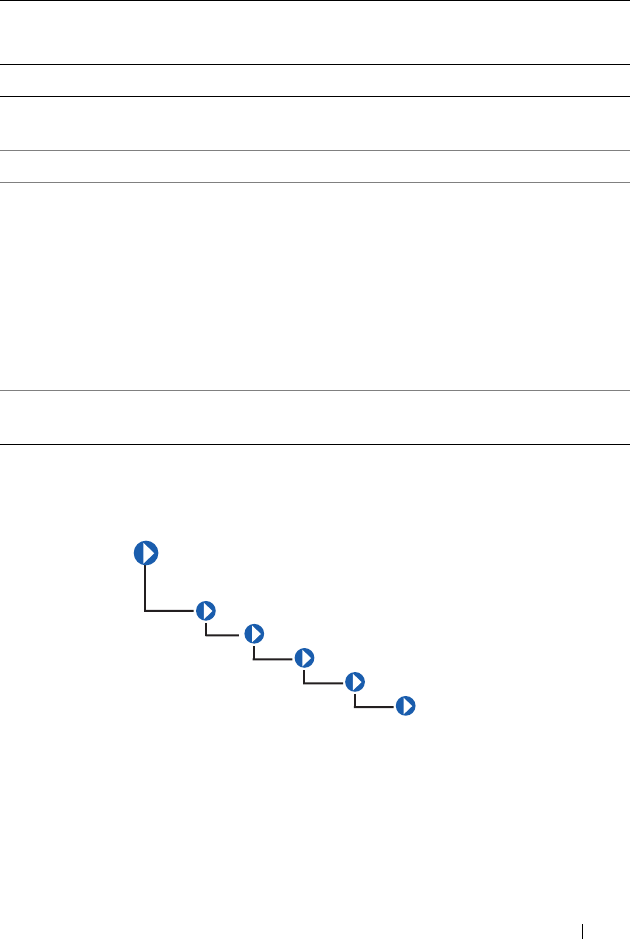
CIM_LogicalElement 65
CIM_PCIBridge
The CIM_PCIBridge class shown in Table 3-26 describes the capabilities
and management of a PCI controller providing bridge-to-bridge capability. An
example is a PCI to Industry-Standard Architecture (ISA) bus bridge.
Table 3-25. CIM_PCIDevice Properties
Class Name: CIM_PCIDevice
Parent Class: CIM_PCIController
Property Description Data Type
BaseAddress Identifies an array of up to six double-
word base memory addresses.
uint32
SubsystemID Identifies a subsystem identifier code. uint16
SubsystemVendorID Identifies a subsystem vendor ID. ID
information is reported from a PCI device
via protocol-specific requests. This
information is also present in the
CIM_PhysicalElement class (the
manufacturer property) for hardware, and
the CIM_Product class (the vendor
property) for information related to
product acquisition.
uint16
ExpansionROMBaseAddress Identifies a double-word expansion ROM
base memory address.
uint32
CIM_
ManagedSystemElement
CIM_LogicalElement
CIM_LogicalDevice
CIM_Controller
CIM_PCIController
CIM_PCIBridge
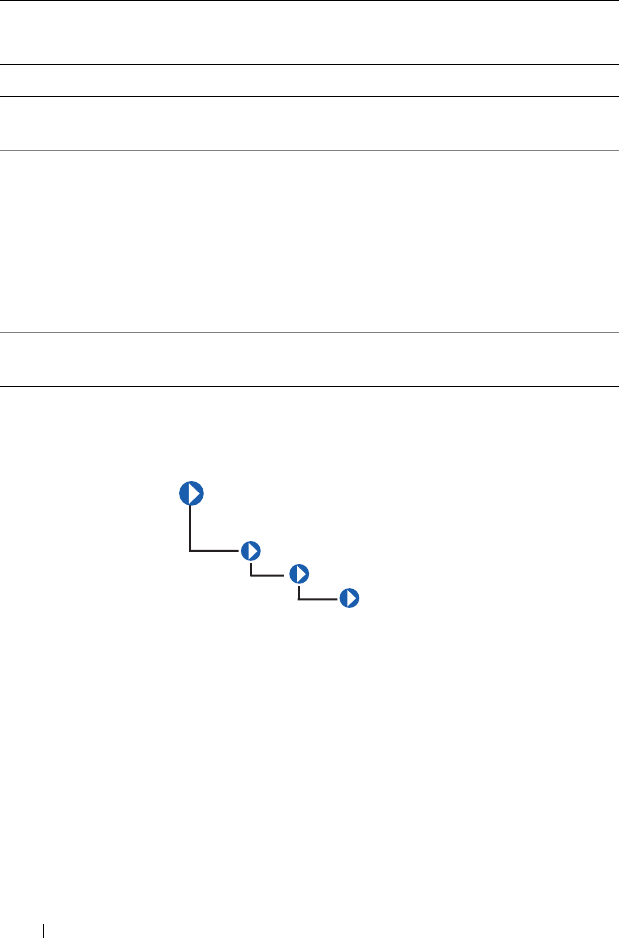
66 CIM_LogicalElement
CIM_Processor
The CIM_Processor class described in Table 3-27 contains devices that
interpret and execute commands, for example, the Intel Xeon microprocessor.
Table 3-26. CIM_PCIBridge Properties
Class Name: CIM_PCIBridge
Parent Class: CIM_PCIController
Property Description Data Type
BaseAddress Identifies an array of double-word base memory
addresses.
uint32
BridgeType Indicates the type of bridge. A bridge is PCI to
<value>, except for the Host, which is a host-to-PCI
bridge. Values for the BridgeType property are as
follows:
0 - Host
1- ISA
128 - Other
uint16
BaseAddress Identifies an array of double-word base memory
addresses.
uint32
CIM_ManagedSystemElement
CIM_LogicalElement
CIM_LogicalDevice
CIM_Processor

CIM_LogicalElement 67
Table 3-27. CIM_Processor Properties
Class Name: CIM_Processor
Parent Class: CIM_LogicalDevice
Property Description Data
Type
Role A string describing the role of the microprocessor, for
example, central microprocessor or math processor.
string
UpgradeMethod Provides microprocessor socket information
including data on how this microprocessor can be
upgraded (if upgrades are supported). This property
is an integer enumeration. Values for the
UpgradeMethod property are as follows:
1 - Other
2 - Unknown
3 - Daughter board
4 - ZIF socket
5 - Replacement/piggy back
6 - None
7 - LIF socket
8 - Slot 1
9 - Slot 2
10 - 370-pin socket
19 - Socket mPGA604
20 - Socket LGA771
21 - Socket LGA775
22 - Socket S1
23 - Socket AM2
24- Socket F (1207)
25- Socket LGA1366
uint16
MaxClockSpeed Indicates the maximum speed (in MHz) of this
microprocessor.
uint32
Core count Indicates the number of core processors detected. uint16
CoreEnabledCount Indicates the number of core processors enabled. uint16
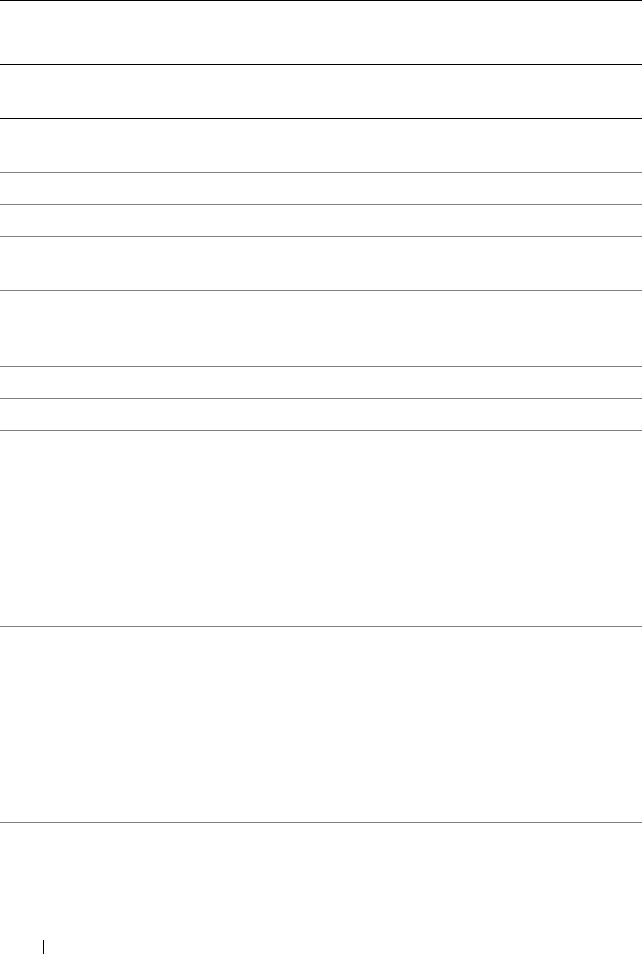
68 CIM_LogicalElement
CurrentClockSpeed Indicates the current speed (in MHz) of this
microprocessor.
uint32
DataWidth Indicates the processor data width in bits. uint16
AddressWidth Indicates the processor address width in bits. uint16
Stepping Indicates the revision level of the processor within
the microprocessor family.
string
UniqueID Identifies a globally unique identifier for the
microprocessor. This identifier may only be unique
within a microprocessor family.
string
Brand Indicates the brand name of the processor. string
Model Indicates the model name of the processor. string
ExtendedCharacteri
stics
Indicates the extended capabilities of the processor.
This attribute is a bit field. The following are the
definitions of a bit when set to one:
Bit 0 — Virtualization Technology (VT) supported
Bit 1 — Demand-Based Switching (DBS) supported
Bit 2 — eXecute Disable (XD) supported
Bit 3 — Hyper Threading (HT) supported
uint16
ExtendedStates Indicates the setting of the extended capabilities of
the processor. This attribute is a bit field. The
following are the definitions of a bit when set to one:
Bit 0 — Virtualization Technology (VT) enabled
Bit 1 — Demand-Based Switching (DBS) enabled
Bit 2 — eXecute Disable (XD) enabled
Bit 3 — Hyper Threading (HT) enabled
uint16
CPUStatus Indicates the current status of the microprocessor.
For example, it may be disabled by the user through
uint16
Table 3-27. CIM_Processor Properties
(continued)
Class Name: CIM_Processor
Parent Class: CIM_LogicalDevice
Property Description Data
Type

CIM_LogicalElement 69
the BIOS or disabled due to a POST error. Values for
the CPUStatus property are as follows:
0 - Unknown
1 - Microprocessor enabled
2 - Microprocessor disabled by user via BIOS setup
3 - Microprocessor disabled by BIOS (POST error)
4 - Microprocessor is idle
5 - Other
Family Refers to the processor family type. Values for the
Family property are as follows:
1- Other
2 -Unknown
3 - 8086
4 - 80286
5 - 80386
6 - 80486
7 - 8087
8 - 80287
9 - 80387
10 - 80487
11 - Pentium Brand
12 - Pentium Pro
13 - Pentium II
14 - Pentium processor with MMX technology
15 - Celeron
16 -Pentium II Xeon
17 - Pentium III
uint16
Table 3-27. CIM_Processor Properties
(continued)
Class Name: CIM_Processor
Parent Class: CIM_LogicalDevice
Property Description Data
Type

70 CIM_LogicalElement
Family
(continued)
18 - M1 family
19 - M2 family
24 - AMD Duron Processor
25 -K5 family
26 - K6 family
27 - K6 -2
28 - K6-3
29 - AMD Athlon Processor Family
30 - AMD29000 Family
31 - K6-2+
32 - Power PC Family
33 - Power PC 601
34 - Power PC 603
35 - Power PC 603+
36 - Power PC 604
37 - Power PC 620
38 - Power PC X704
39 - Power PC 750
40 - Intel Core Duo processor
41 - Intel Core Duo mobile processor
42 - Intel Core Solo mobile processor
43 - Intel Atom processor
48 - Alpha Family
49 - Alpha 21064
50 - Alpha 21066
51 - Alpha 21164
52 - Alpha 21164PC
53 - Alpha 21164a
Table 3-27. CIM_Processor Properties
(continued)
Class Name: CIM_Processor
Parent Class: CIM_LogicalDevice
Property Description Data
Type

CIM_LogicalElement 71
Family
(continued)
54 - Alpha 21264
55 - Alpha 21364
60 - AMD Opteron 4100 Series Processor
64 - MIPS Family
65 - MIPS R4000
66 - MIPS R4200
67 - MIPSR4400
68 - MIPS R4600
69 - MIPS R10000
80 - SPARC Family
81 - SuperSPARC
82 - microSPARC II
83 - microSPARC IIep
84 - UltraSPARC
85 - UltraSPARC II
86 - UltraSPARC IIi
87 - UltraSPARC III
88 - UltraSPARC IIIi
96 - 68040
97 - 68xxx Family
98 - 68000
99 - 68010
100 - 68020
101 - 68030
112 - Hobbit family
120 - Crusoe 5000 Family
121 - Crusoe 3000 Family
122 - Efficeon 8000 Family
Table 3-27. CIM_Processor Properties
(continued)
Class Name: CIM_Processor
Parent Class: CIM_LogicalDevice
Property Description Data
Type

72 CIM_LogicalElement
Family
(continued)
128 - Weitek
130 - Itanium Processor
131 - AMD Athlon 64 Processor Family
132 - AMD Opteron Processor Family
133 - AMD Sempron Processor Family
134 - AMD Turion 64 Mobile Technology
135 - Dual-Core AMD Opteron Processor family
136 - AMD Athlon 64 X2 Dual-Core Processor family
137 - AMD Turion 64 X2 Mobile Technology
138 - Quad-Core AMD Opteron Processor Family
139 - Third-Generation AMD Opteron Processor Family
140 - AMD Phenom FX Quad-Core Processor Family
141 - AMD Phenom X4 Quad-Core Processor Family
142 - AMD Phenom X2 Dual-Core Processor Family
143 - AMD Athlon X2 Dual-Core Processor Family
144 - PA-RISC family
145 - PA-RISC 8500
146 - PA-RISC 8000
147 - PA-RISC 7300LC
148 - PA-RISC 7200
149 - PA-RISC 7100LC
150 - PA-RISC 7100
160 - V30 family
161 - Quad-Core Intel Xeon processor 3200 Series
162 - Dual-Core Intel Xeon processor 3000 Series
163 - Quad-Core Intel Xeon processor 5300 Series
164 - Dual-Core Intel Xeon processor 5100 Series
165 - Dual-Core Intel Xeon processor 5000 Series
Table 3-27. CIM_Processor Properties
(continued)
Class Name: CIM_Processor
Parent Class: CIM_LogicalDevice
Property Description Data
Type

CIM_LogicalElement 73
Family
(continued)
166 - Dual-Core Intel Xeon processor LV
167 - Dual-Core Intel Xeon processor ULV
168 - Dual-Core Intel Xeon processor 7100 Series
169 - Quad-Core Intel Xeon processor 5400 Series
170 - Quad-Core Intel Xeon processor
171- Dual-Core Intel Xeon processor 5200 Series
172- Dual-Core Intel Xeon processor 7200 Series
173- Quad-Core Intel Xeon processor 7300 Series
174- Quad-Core Intel Xeon processor 7400 Series
175- Multi-Core Intel Xeon processor 7400 Series
176 - Pentium III Xeon
177 - Pentium III Processor with Intel SpeedStep
178 - Technology
179 - Pentium 4
180 - Intel Xeon
181 - AS400 Family
182 - Intel Xeon Processor MP
183 - AMD Athlon XP family
184 - AMD Athlon MP family
185 - Intel Itanium 2
186 - Intel Pentium M processor
187 - Intel Celeron D Processor
188 - Intel Pentium D Processor
189 - Intel Pentium Extreme Edition processor
190 - Intel Core 2 processor
192 - Intel Core 2 Solo processor
193 - Intel Core 2 Extreme processor
194 - Intel Core 2 Quad processor
Table 3-27. CIM_Processor Properties
(continued)
Class Name: CIM_Processor
Parent Class: CIM_LogicalDevice
Property Description Data
Type

74 CIM_LogicalElement
Family
(continued)
195 - Intel Core 2 Extreme mobile processor
196 - Intel Core 2 Duo mobile processor
197 - Intel Core 2 Solo mobile processor
198 - Intel Core i7 Processor
199 - Dual-Core Intel Celeron Processor
200 - S/390 and zSeries family
201 - ESA/390 G4
202 - ESA/390 G5
203 - ESA/390 G6
204 - z/Architecture base
206 - CEh 206 Intel Core i3 processor
214 - Multi-Core Intel Xeon processor
215 - Dual-Core Intel Xeon processor 3xxx Series
216 - Quad-Core Intel Xeon processor 3xxx Series
217 - D9h 217 VIA Nano Processor Family
218 - Dual-Core Intel Xeon processor 5xxx Series
219 - Quad-Core Intel Xeon processor 5xxx Series
221 - Dual-Core Intel Xeon processor 7xxx Series
222 - Quad-Core Intel Xeon processor 7xxx Series
223 - Multi-Core Intel Xeon processor 7xxx Series
224 - E0h 224 Multi-Core Intel Xeon processor 3400
Series
230 - Embedded AMD Opteron Quad-Core Processor Family
231 - AMD Phenom Triple-Core Processor Family
232 - AMD Turion Ultra Dual-Core Mobile Processor Family
233 - AMD Turion Dual-Core Mobile Processor Family
234 - AMD Athlon Dual-Core Processor Family
235 - AMD Sempron SI Processor Family
Table 3-27. CIM_Processor Properties
(continued)
Class Name: CIM_Processor
Parent Class: CIM_LogicalDevice
Property Description Data
Type
CIM_LogicalElement 75
CIM_StorageExtent
CIM_StorageExtent identified in Table 3-28 contains devices that
manage data storage, for example, hard drives or microprocessor memory.
Family
(continued)
238 - AMD Opteron Six-Core Processor Family
250 - i860
251 - i960
260 - SH-3
261 - SH-4
280 - ARM
281 - StrongARM
300 - 6x86
301 - MediaGX
302 - MII
320 - WinChip
350 - DSP
500 - Video processor
Table 3-28. CIM_StorageExtent Properties
Class Name: CIM_StorageExtent
Parent Class: CIM_LogicalDevice
Table 3-27. CIM_Processor Properties
(continued)
Class Name: CIM_Processor
Parent Class: CIM_LogicalDevice
Property Description Data
Type
CIM_
ManagedSystemElement
CIM_LogicalElement
CIM_LogicalDevice
CIM_StorageExtent
76 CIM_LogicalElement
CIM_Memory
The CIM_Memory class identified in Table 3-29 describes the capabilities
and management of storage extent devices, for example, cache memory or
system memory.
CIM_CacheMemory
The CIM_CacheMemory class explained in Table 3-30 describes the capabilities
and management of cache memory. Cache memory allows a microprocessor to
access data and instructions faster than normal system memory.
Table 3-29. CIM_Memory Properties
Class Name: CIM_Memory
Parent Class: CIM_StorageExtent
CIM_ManagedSystemElement
CIM_LogicalElement
CIM_LogicalDevice
CIM_StorageExtent
CIM_Memory
CIM_
ManagedSystemElement
CIM_LogicalElement
CIM_LogicalDevice
CIM_StorageExtent
CIM_Memory
CIM_CacheMemory

CIM_LogicalElement 77
Table 3-30. CIM_CacheMemory Properties
Class Name: CIM_CacheMemory
Parent Class: CIM_Memory
Property Description Data Type
Level Defines whether this is the primary, secondary, or
tertiary cache. Values for the Level property are as
follows:
1 - Other
2 - Unknown
3 - Primary
4 - Secondary
5 - Tertiary
6 - Not applicable
uint16
WritePolicy Either defines whether this cache is a write-back or
write-through cache or whether this information varies
with address or is defined individually for each
input/output (I/O). Values for the WritePolicy
property are as follows:
1 - Other
2 - Unknown
3 - Write-back
4 - Write-through
5 - Varies with address
6 - Determination per I/O
uint16
CacheType Defines whether this cache is for instruction caching,
data caching, or both (unified). Values for the
CacheType property are as follows:
1 - Other
2 - Unknown
3 - Instruction
4 - Data
5 - Unified
uint16
78 CIM_LogicalElement
CIM_SoftwareElement
The CIM_SoftwareElement class described in Table 3-31 is used to define
CIM_SoftwareFeature. The CIM_SoftwareElement class consists of
individually manageable or deployable parts for a particular platform. A software
element’s platform is uniquely identified by its underlying hardware architecture
and operating system (for example, a system running Microsoft Windows Server
2003 on an Intel microprocessor). A software element’s implementation on a
particular platform depends on the platform’s operating system.
LineSize Indicates the size, in bytes, of a single cache bucket or
line.
uint32
ReadPolicy Defines the policy used by the cache for handling read
requests. Values for the ReadPolicy property are as
follows:
1 - Other
2 - Unknown
3 - Read
4 - Read-ahead
5 - Read and read-ahead
6 - Determination per I/O
uint16
Table 3-30. CIM_CacheMemory Properties
(continued)
Class Name: CIM_CacheMemory
Parent Class: CIM_Memory
Property Description Data Type
CIM_ManagedSystemElement
CIM_LogicalElement
CIM_SoftwareElement
CIM_LogicalElement 79
Table 3-31. CIM_SoftwareElement Properties
Class Name: CIM_SoftwareElement
Parent Class: CIM_LogicalElement
Property Description Data
Type
Name Indicates the name that identifies this software
element.
string
Version Provides the version in the form
<major>.<minor>.<revision> or
<major>.<minor><letter><revision>;
for example, 1.2.3 or 1.2a3.
string
Manufacturer See Table 1-1. string
BuildNumber Indicates the internal identifier for this build of
the software element.
string
IdentificationCode Provides the manufacturer’s identifier for this
software element. Often this is a stock keeping
unit (SKU) or a part number.
string
SoftwareElementType Indicates the type of software element. Values for
SoftwareElementType are:
1 - Other
2 - Unknown
3 - BIOS
4 - ESM
5 - PSPB
6 - System Backplane
7 - Hendrix (PV20x) Kernel
8 - Hendrix (PV20x) Application
9 - Front Panel
10 - BMC
11 - Hot Plug PCI
12 - SDR
13 - Peripheral Bay Backplane
uint16
80 CIM_LogicalElement
CIM_BIOSElement
The CIM_BIOSElement class listed in Table 3-32 describes the BIOS for
the system. The BIOS controls the following:
• Communications between the microprocessor and peripheral devices,
such as the keyboard and the video adapter.
• Miscellaneous functions, such as system messages.
• Miscellaneous functions, such as system messages.
SoftwareElementType
(continued)
14 - Slimfast Secondary Backplane
15 - Generic Secondary Backplane (ESM 3&4)
16 - RAC4
17 - iDRAC
18 - iDRAC6
19 Lifecycle Controller
20 Unified Server Configurator
uint16
Table 3-31. CIM_SoftwareElement Properties
(continued)
Class Name: CIM_SoftwareElement
Parent Class: CIM_LogicalElement
Property Description Data
Type
CIM_ManagedSystemElement
CIM_LogicalElement
CIM_SoftwareElement
CIM_BIOSElement
CIM_LogicalElement 81
CIM_SoftwareFeature
The CIM_SoftwareFeature class shown in Table 3-33 defines a particular
function or capability of a product or application system. This class is
intended to be meaningful to a consumer, or user of a product, rather than to
explain how the product is built or packaged. When a software feature can
exist on multiple platforms or operating systems (for example, a client
component of a three-tiered client/server application might run on
Windows Server 2003), a software feature is a collection of all the software
elements for these different platforms. The users of the model must be aware
of this situation because typically they are interested in a sub-collection of the
software elements required for a particular platform.
Table 3-32. CIM_BIOSElement Properties
Class Name: CIM_BIOSElement
Parent Class: CIM_SoftwareElement
Property Description Data Type
Version Provides the product version information. string
Manufacturer See Table 1-1 string
PrimaryBIOS Specifies whether a given BIOS is the primary BIOS for the
system. When the value = TRUE, the BIOS is the
primary BIOS.
Boolean
CIM_ManagedSystemElement
CIM_LogicalElement
CIM_SoftwareFeature
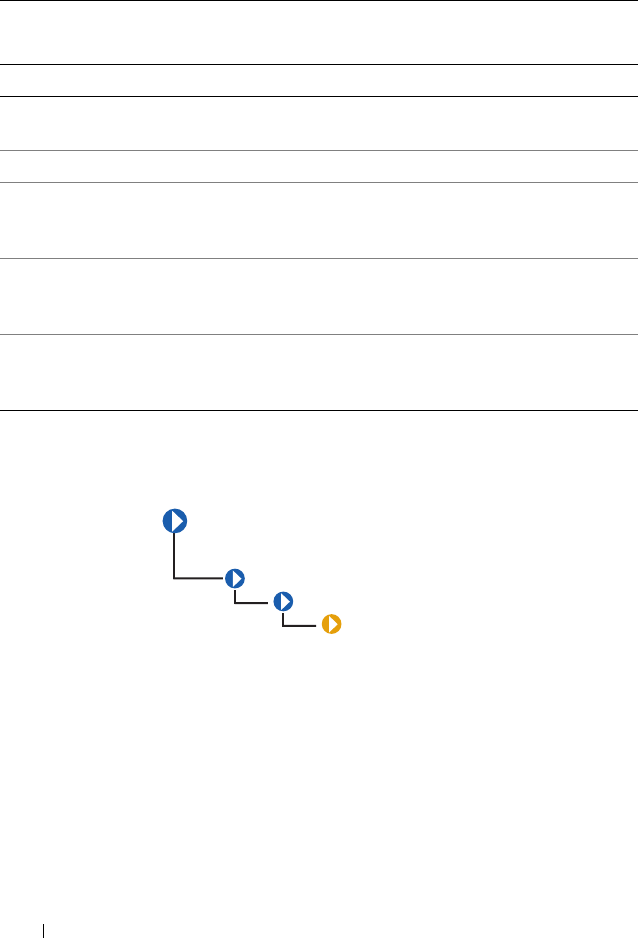
82 CIM_LogicalElement
DELL_SoftwareFeature
The DELL_SoftwareFeature described in Table 3-34 defines the
universal resource locator (URL) of the systems management software and
the language in which systems management information displays. Defining
these properties enables users to manage a system using an Internet browser.
You can access Server Administrator using the secure hypertext transfer
protocol (https) and a preassigned port number of 1311, or you can specify a
port number of your own choice.
Table 3-33. CIM_SoftwareFeature Properties
Class Name: CIM_SoftwareFeature
Parent Class: CIM_LogicalElement
Property Description Data Type
IdentifyingNumber Provides product identification such as a serial
number on software.
string
ProductName Identifies the commonly used product name. string
Vendor Identifies the name of the product’s supplier.
Corresponds to the vendor property in the product
object in the DMTF solution exchange standard.
string
Version Identifies the product version information.
Corresponds to the version property in the product
object in the DMTF solution exchange standard.
string
Name Defines the label by which the object is known to the
users. This label is a user-defined name that uniquely
identifies the element.
string
DELL_SoftwareFeature
CIM_ManagedSystemElement
CIM_LogicalElement
CIM_SoftwareFeature
CIM_LogicalElement 83
CIM_SystemResource
The CIM_SystemResource class listed in Table 3-35 provides access to
system resources from an operating system. SystemResources consist of
interrupt requests (IRQs) and direct memory access (DMA) capabilities.
Table 3-34. DELL_SoftwareFeature Properties
Class Name: DELL_SoftwareFeature
Parent Class: CIM_SoftwareFeature
Property Description Data Type
OmsaURL Defines the URL for Server Administrator. string
Language Sets the language for systems management information. string
AgentVersion Defines the version information of local CIM agent (same
as ISVC version.)
string
Table 3-35. CIM_SystemResource Properties
Class Name: CIM_SystemResource
Parent Class: CIM_LogicalElement
CIM_ManagedSystemElement
CIM_LogicalElement
CIM_SystemResource
84 CIM_LogicalElement
CIM_IRQ
The CIM_IRQ class described in Table 3-36 contains IRQ information. An
IRQ is a signal that data is about to be sent to or received by a peripheral
device. The signal travels by an IRQ line to the microprocessor. Each
peripheral connection must be assigned an IRQ number. For example, the
first serial port in your computer (COM1) is assigned to IRQ4 by default.
Table 3-36. CIM_IRQ Properties
Class Name: CIM_IRQ
Parent Class: CIM_SystemResource
Property Description Data Type
CSCreationClassName See Table 1-1. string
CSName See Table 1-1. string
CreationClassName See Table 1-1. string
IRQNumber Identifies the interrupt request number. uint32
Availability Indicates the availability of the IRQ. Values for
the Availability property are as follows:
1 - Other
2 - Unknown
3 - Available
4 - In use/not available
5 - In use and available
uint16
CIM_ManagedSystemElement
CIM_LogicalElement
CIM_SystemResource
CIM_IRQ
CIM_LogicalElement 85
TriggerLevel Indicates whether the interrupt is triggered by
the hardware signal going high or low. Values for
the TriggerLevel property are as follows:
1 - Other
2 - Unknown
3 - Active low
4 - Active high
uint16
TriggerType Indicates whether edge (value=4) or level
triggered (value=3) interrupts occur.
1 - Other
2 - Unknown
uint16
Trigge r Type 3 - Level
4 - Edge
uint16
Shareable Indicates whether the IRQ can be shared.
A value of TRUE indicates that the IRQ can be
shared.
Boolean
Hardware Indicates whether the interrupt is hardware- or
software-based. (A value of TRUE indicates that
the interrupt is hardware based.) On a personal
computer, a hardware IRQ is a physical wire to a
programmable interrupt controller (PIC) chip
set through which the microprocessor can be
notified of time critical events. Some IRQ lines
are reserved for standard devices such as the
keyboard, diskette drive, and the system clock.
A software interrupt is a programmatic
mechanism to allow an application to get the
attention of the processor.
Boolean
Table 3-36. CIM_IRQ Properties
(continued)
Class Name: CIM_IRQ
Parent Class: CIM_SystemResource
Property Description Data Type
86 CIM_LogicalElement
CIM_MemoryMappedIO
The CIM_MemoryMappedIO class explained in Table 3-37 addresses both
memory and port I/O resources for personal computer architecture memory
mapped I/O.
Table 3-37. CIM_MemoryMappedIO Properties
Class Name: CIM_MemoryMappedIO
Parent Class: CIM_SystemResource
Property Description Data Type
CSCreationClassName See Table 1-1. string
CSName See Table 1-1. string
CreationClassName See Table 1-1. string
StartingAddress Identifies the starting address of memory
mapped I/O.
uint64
EndingAddress Identifies the ending address of memory mapped
I/O.
uint64
MappedResource Indicates the type of memory mapped I/O.
MappedResource defines whether memory or
I/O is mapped, and for I/O, whether the mapping
is to a memory or a port space. Memory mapped
I/O values are as follows:
1 - Other
2 - Mapped memory
3 - I/O mapped to memory space
4 - I/O mapped to port space
uint16
CIM_ManagedSystemElement
CIM_LogicalElement
CIM_SystemResource
CIM_MemoryMappedIO
CIM_LogicalElement 87
CIM_DMA
The CIM_DMA class explained in Table 3-38 contains DMA information.
A DMA channel allows certain types of data transfer between RAM and a
device to bypass the microprocessor.
Table 3-38. CIM_DMA Properties
Class Name: CIM_DMA
Parent Class: CIM_SystemResource
Property Description Data Type
CSCreationClassName See Table 1-1. string
CSName See Table 1-1. string
CreationClassName See Table 1-1. string
DMAChannel Identifies a part of the object’s key value,
the DMA channel number.
uint32
Availability Indicates the availability of the DMA. Values for
the Availability property are as follows:
1 - Other
2 - Unknown
3 - Available
4 - In use/not available
5 - In use and available/shareable
uint16
CIM_ManagedSystemElement
CIM_LogicalElement
CIM_SystemResource
CIM_DMA
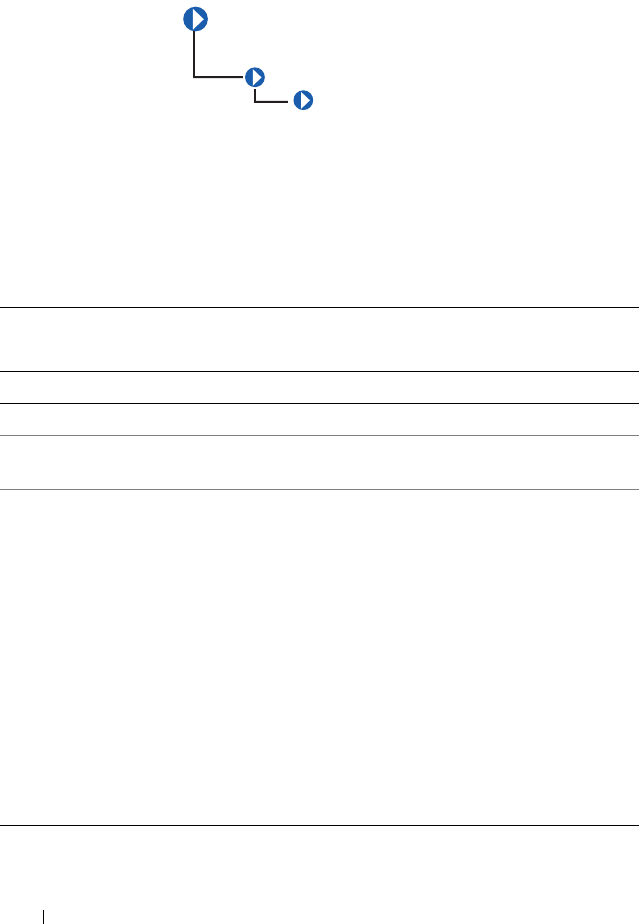
88 CIM_LogicalElement
CIM_RedundancyGroup
The CIM_RedundancyGroup class explained in Table 3-39 is a set of
components that provide more instances of a critical component than are
required for the system’s operation. The extra components are used in case of
critical component failure. For example, multiple power supplies allow a
working power supply to take over when another power supply has failed.
Table 3-39. CIM_RedundancyGroup Properties
Class Name: CIM_RedundancyGroup
Parent Class: CIM_LogicalElement
Property Description Data Type
CreationClassName See Table 1-1 string
Name Serves as the key for the redundancy group’s
instance in an enterprise environment.
string
RedundancyStatus Provides information on the state of the redundancy
group. Values for the RedundancyStatus property
are as follows:
0 - Unknown
1 - Other
2 - Fully redundant. Fully redundant means that all of the
configured redundancy is still available.
3 - Degraded redundancy. Degraded redundancy means
that some failures have been experienced but some
reduced amount of redundancy is still available.
4 - Redundancy lost. Redundancy lost means that a
sufficient number of failures have occurred so that no
redundancy is available and the next failure experienced
causes overall failure.
uint16
CIM_ManagedSystemElement
CIM_LogicalElement
CIM_RedundancyGroup
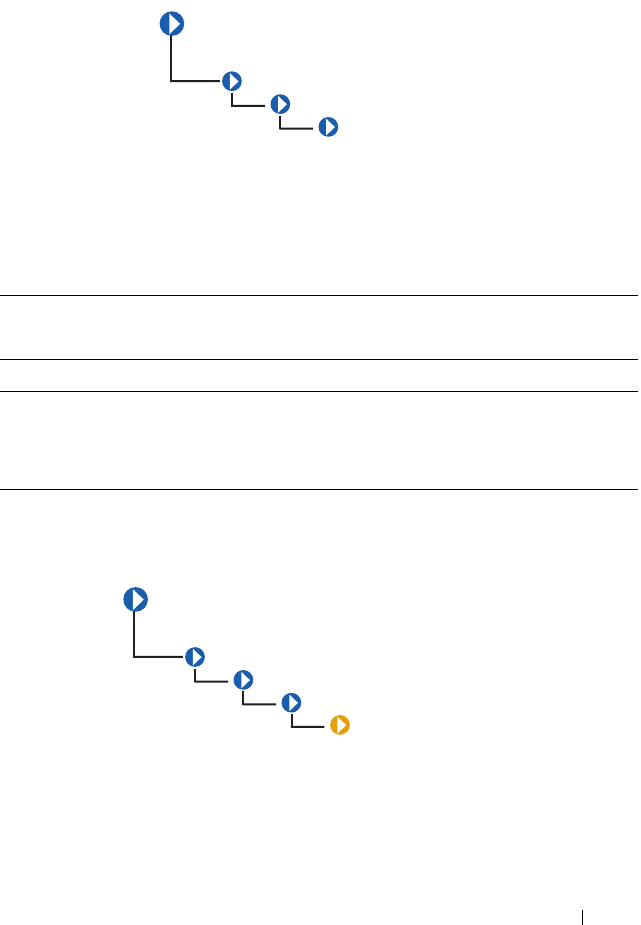
CIM_LogicalElement 89
CIM_ExtraCapacityGroup
The CIM_ExtraCapacityGroup class explained in Table 3-40 applies to
systems that have more capability and components than are required for
normal operation, for example, systems that have extra fans or power supplies.
DELL_PSRedundancyGroup
The DELL_PSRedundancyGroup described in Table 3-41 is a Dell-specific
extension of the CIM_PowerSupply class. The
DELL_PSRedundancyGroup class defines what constitutes
power supply redundancy in a system.
Table 3-40. CIM_ExtraCapacityGroup Properties
Class Name: CIM_ExtraCapacityGroup
Parent Class: CIM_RedundancyGroup
Property Description Data Type
MinNumberNeeded Specifies the smallest number of elements that must
be operational in order to have redundancy. For
example, in an N+1 redundancy relationship, the
MinNumberNeeded property should be set to N.
uint32
CIM_ManagedSystemElement
CIM_LogicalElement
CIM_RedundancyGroup
CIM_ExtraCapacityGroup
CIM_ManagedSystemElement
CIM_LogicalElement
CIM_RedundancyGroup
CIM_ExtraCapacityGroup
DELL_PSRedundancyGroup
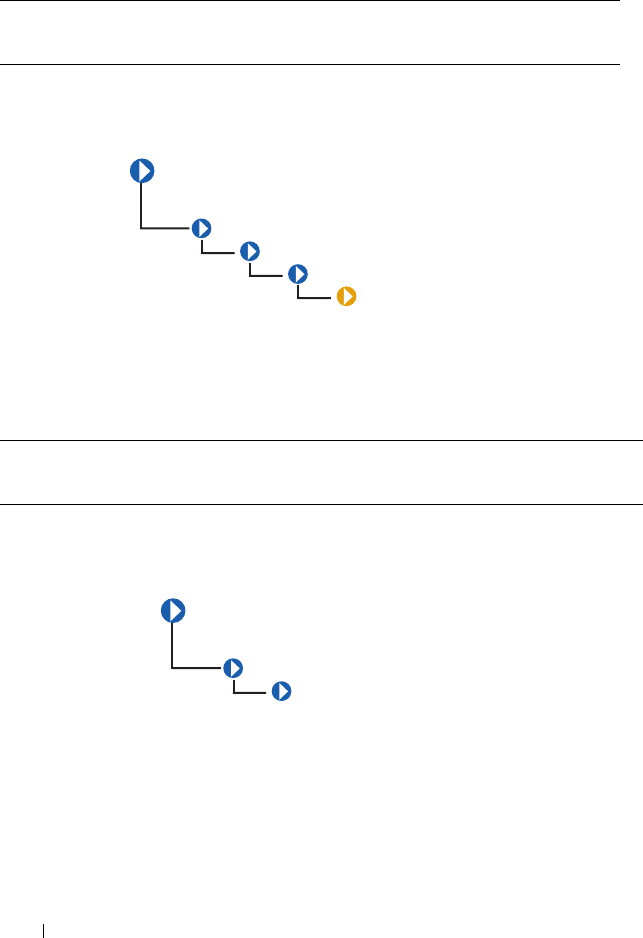
90 CIM_LogicalElement
DELL_FanRedundancyGroup
The DELL_FanRedundancyGroup described in Table 3-42 defines what
constitutes fan redundancy in a system.
CIM_EnabledLogicalElementGroup
The CIM_EnabledLogicalElementGroup class described in Table 3-43
extends the CIM_LogicalElementGroup class to abstract the concept of
an element that is enabled or disabled, such as a LogicalDevice or
ServiceAccessPoint.
Table 3-41. DELL_PSRedundancyGroup Properties
Class Name: DELL_PSRedundancyGroup
Parent Class: CIM_ExtraCapacityGroup
Table 3-42. DELL_FanRedundancyGroup Properties
Class Name: DELL_FanRedundancyGroup
Parent Class: CIM_ExtraCapacityGroup
CIM_ManagedSystemElement
CIM_LogicalElement
CIM_RedundancyGroup
CIM_ExtraCapacityGroup
DELL_FanRedundancyGroup
CIM_ManagedSystemElement
CIM_LogicalElement
CIM_EnabledLogicalElement
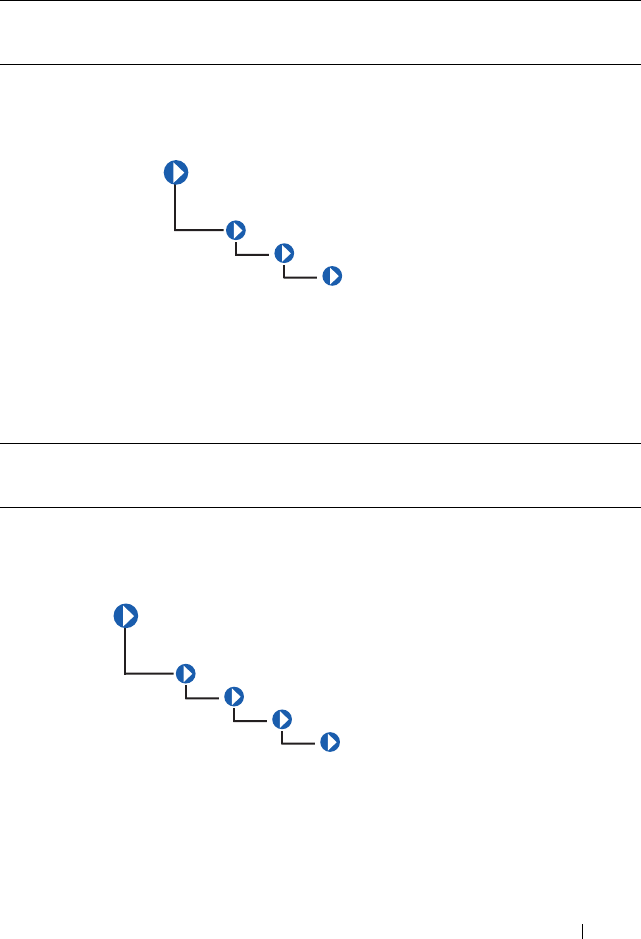
CIM_LogicalElement 91
CIM_ServiceAccessPoint
The CIM_ServiceAccessPointGroup class described in Table 3-44
represents the ability to utilize or invoke a service. Access points indicate that
a service is available to other entities for use.
CIM_RemoteServiceAccessPoint
The CIM_RemoteServiceAccessPointGroup class identified in
Table 3-45 describes the accessing and addressing of information for a remote
connection that is known to a local network element. This information is
contained in the local network element since this is the context in which it is
Table 3-43. CIM_EnabledLogicalElementGroup Properties
Class Name: CIM_EnabledLogicalElementGroup
Parent Class: CIM_LogicalElementGroup
Table 3-44. CIM_ServiceAccessPointGroup Properties
Class Name: CIM_ServiceAccessPointGroup
Parent Class: CIM_EnabledLogicalElement
CIM_ManagedSystemElement
CIM_LogicalElement
CIM_EnabledLogicalElement
CIM_ServiceAccessPoint
CIM_ManagedSystemElement
CIM_LogicalElement
CIM_EnabledLogicalElement
CIM_ServiceAccessPoint
CIM_RemoteServiceAccessPoint
92 CIM_LogicalElement
remote. The relevance of the remote service access point and information on
its use are described by subclassing or associating to the
CIM_RemoteServiceAccessPointGroup class.
Table 3-45. CIM_RemoteServiceAccessPointGroup Properties
Class Name: CIM_RemoteServiceAccessPointGroup
Parent Class: CIM_ServiceAccessPointGroup
Property Description Data Type
AccessInfo Describes accessing or addressing of information for a
remote connection. This can be a host name, network
address, and other similar information.
string
InfoFormat Indicates an enumerated integer describing the format
and interpretation of the AccessInfo property.
This property can have the following values:
1 - Other
2 - Host Name
3 - IPv4 Address
4 - IPv6 Address
5 - IPX Address
6 - DECnet Address
7 - SNA Address
8 - Autonomous System Number
9 - MPLS Label
10..99 - DMTF Reserved
100 - Dial String
101 - Ethernet Address
102 - Token Ring Address
103 - ATM Address
104 - Frame Relay Address
105..199 - DMTF Reserved
200 - URL
32768..65535 - Vendor Specific
uint16
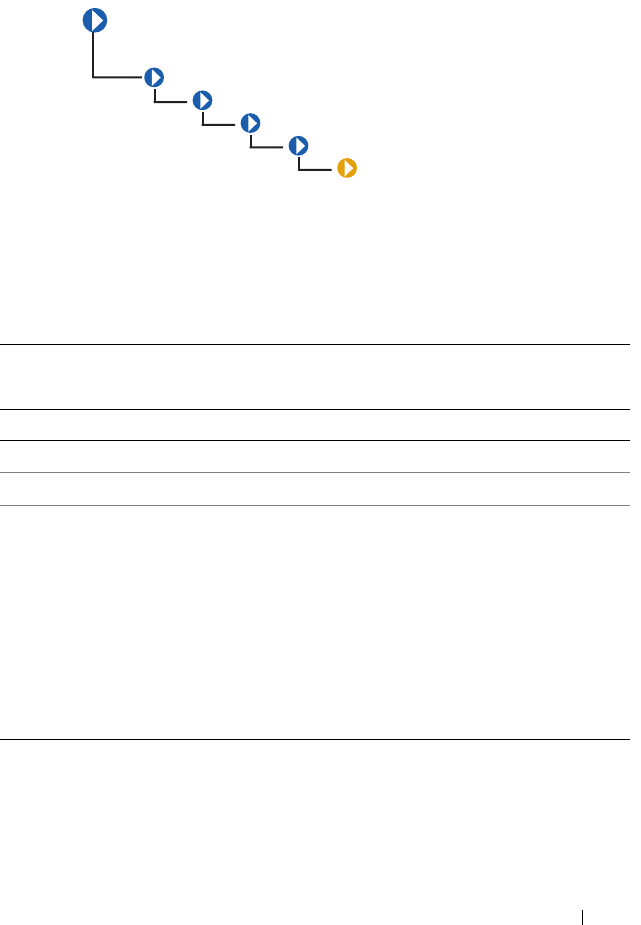
CIM_LogicalElement 93
DELL_RemoteServiceAccessPort
The DELL_RemoteServiceAccessPortGroup class described in
Table 3-46 is an extended class of the CIM_RemoteServiceAccessPointGroup
class. The DELL_RemoteServiceAccessPortGroup class provides
information about Dell implementation-specific attributes.
Table 3-46. DELL_RemoteServiceAccessPortGroup Properties
Class Name: DELL_RemoteServiceAccessPortGroup
Parent Class: CIM_RemoteServiceAccessPointGroup
Property Description Data Type
PortName Displays the name of the service access port. string
VersionString Indicates the version of the access point service. string
RemoteAccessType Indicated the type of remote access service. This
property can have the following values:
0 - BMC
8 - IMC
9 - CMC
10 - iDRAC6
11 - iDRAC6 for modular systems
13 - BMC
uint16
CIM_ManagedSystemElement
CIM_LogicalElement
CIM_EnabledLogicalElement
CIM_ServiceAccessPoint
CIM_RemoteServiceAccessPoint
DELL_RemoteServiceAccessPort

94 CIM_LogicalElement
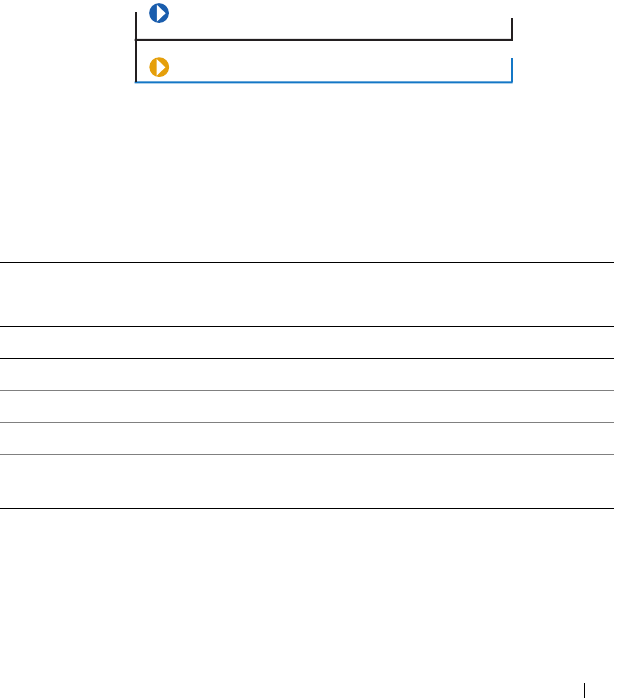
Dell-Defined Classes 95
4
Dell-Defined Classes
The Dell-defined classes are defined and populated by Dell rather than by
CIM. None of these classes have a parent class and are on the same level as
CIM_ManagedSystemElement. For information on how the logs are
formatted, see Table 2-5.
Figure 4-1. Dell_EsmLog
The DELL_EsmLog class described in Table 4-1 records failure threshold
violations collected by Server Administrator’s embedded server management
(ESM) capabilities.
Table 4-1. DELL_EsmLog Properties
Class Name: DELL_EsmLog
Parent Class: None
Property Description Data Type
recordNumber Provides an index to the ESM table. uint32
logRecord Provides the ESM message content. string
eventTime Indicates the time that the message is generated. datetime
status Indicates the severity of the event that caused the log
to be generated.
string
CIM_ManagedSystemElement
DELL_EsmLog
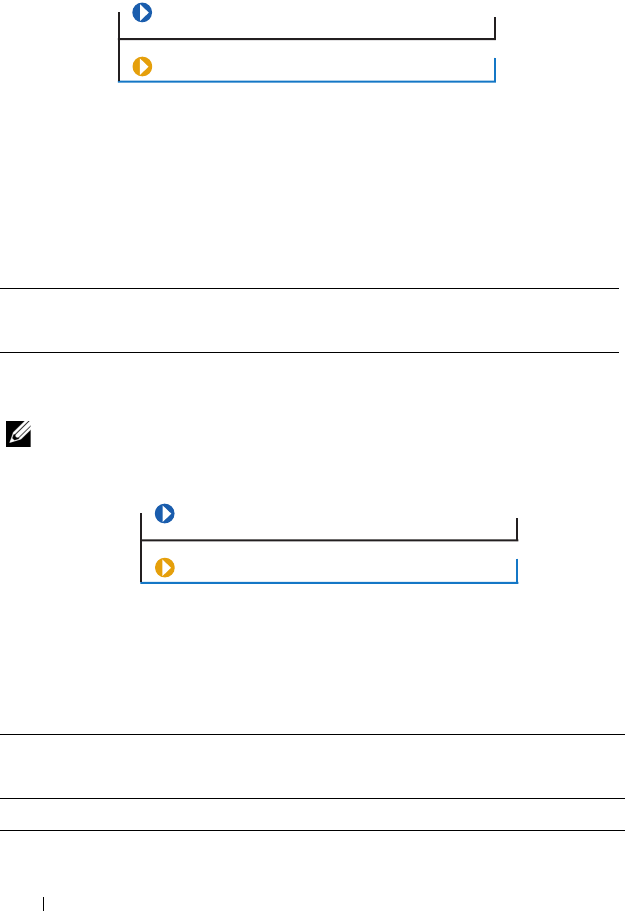
96 Dell-Defined Classes
DELL_PostLog
The DELL_PostLog identified in Table 4-2 is a record of the system’s
power-on self-test (POST). When you turn on a system, the POST tests
various system components, such as random-access memory (RAM),
the hard drives, and the keyboard.
DELL_CMApplication
NOTE: Dell-updateable components, such as BIOS and firmware, are considered
applications.
The DELL_CMApplication class identified in Table 4-3 contains
information related to the Dell change management applications.
.
Table 4-2. DELL_PostLog Properties
Class Name: DELL_PostLog
Parent Class: None
Table 4-3. Dell_CMApplication
Class Name: DELL_CMApplication
Parent Class: None
Property Description Data Type
componentType Defines the application type. string
CIM_ManagedSystemElement
DELL_PostLog
CIM_ManagedSystemElement
DELL_CMApplication
Dell-Defined Classes 97
DELL_CMDevice
The DELL_CMDevice identified in Table 4-4 contains information related
to the Dell change management device.
subComponentID Defines an application string. string
version Indicates the current version of the application. string
name Indicates the name of the application. string
deviceKey Indicates the device key of the application. string
Table 4-4. DELL_CMDevice Properties
Class Name: DELL_CMDevice
Parent Class: None
Property Description Data Type
componentID Defines a component string. string
name Indicates the name of the device. string
vendorID Defines an ID for vendor supplying the device. string
subVendorID Defines an ID for an additional vendor supplying
the device.
string
deviceID Indicates the ID of the device. string
subDeviceID Indicates the ID for additional device. string
bus Indicates the PCI bus number. string
Table 4-3. Dell_CMApplication
(continued)
Class Name: DELL_CMApplication
Parent Class: None
CIM_ManagedSystemElement
DELL_CMDevice
98 Dell-Defined Classes
DELL_CMDeviceApplication
The DELL_CMDeviceApplication class identified in Table 4-5 contains
information related to the Dell change management association between the
device and application.
DELL_CMInventory
device Indicates the PCI device number. string
function Indicates the PCI Function number. string
Table 4-5. DELL_CMDeviceApplication Properties
Class Name: DELL_CMDeviceApplication
Parent Class: None
Property Description Data Type
antecedent Refers to the device. string
dependent Refers to the application. string
Table 4-4. DELL_CMDevice Properties
(continued)
Class Name: DELL_CMDevice
Parent Class: None
Property Description Data Type
CIM_ManagedSystemElement
DELL_CMDeviceApplications
CIM_ManagedSystemElement
DELL_CMInventory
Dell-Defined Classes 99
The DELL_CMInventory identified in Table 4-6 contains information
related to the Dell Change Management inventory.
DELL_CMOS
The DELL_CMOS class identified in Table 4-7 contains information related to
the Dell change management operating system.
Table 4-6. DELL _CMInventory Properties
Class Name: DELL_CMInventory
Parent Class: None
Property Description Data Type
local Indicates the locale of the system. string
schemaVersion Indicates the Inventory schema implemented by the
system.
string
systemID Defines the System ID. string
CIM_ManagedSystemElement
DELL_CMOS
100 Dell-Defined Classes
DELL_CMProductInfo
Table 4-7. DELL_CMOS Properties
Class Name: DELL_CMOS
Parent Class: None
Property Description Data Type
architecture Indicates the architecture of the operating system. string
vendor Indicates the vendor of the operating system. string
majorVersion Indicates the major version of the operating system. string
minorVersion Indicates the minor version of the operating system. string
spMajorVersion Indicates the current service pack number for the
operating system’s major version.
string
spMinorVersion Indicates the current service pack number for the
operating system’s minor version.
string
CIM_ManagedSystemElement
DELL_CMProductInfo
Dell-Defined Classes 101
The DELL_CMProductInfo identified in Table 4-8 contains information
related to the Dell change management product.
Table 4-8. DELL_CMProductInfo Properties
DELL_BIOSExtensions
The DELL_BIOSExtensions identified in Table 4-9 contains information
related to the specific extension of the data attributes on your system.
Class Name: DELL_CMProductInfo
Parent Class: None
Property Description Data Type
name Indicates the name of the product. string
description Provides a short description of the product. string
vendor Indicates the name of the product manufacturer. string
version Indicates the current version number of the product. string
Table 4-9. DELL_BIOSExtensions Properties
Class Name: DELL_BIOSExtensions
Parent Class: CIM_ManagedSystemElement
Property Description Data Type
systemBIOSCharacteristics Indicates the characteristics of
BIOS on your system.
uint64
systemBIOSCharacteristicsExt1 Indicates the specific extension of
the data attributes on your system.
uint8
systemBIOSCharacteristicsExt2 Indicates the specific extension of
the data attributes on your system.
uint8
102 Dell-Defined Classes
DELL_BIOSSettings
The DELL_BIOSSettings identified in Table 4-10 contains information
related to setting parameters in the Dell System Management BIOS.
Table 4-10. DELL_BIOSSettings Properties
Class Name: DELL_BIOSSettings
Parent Class: CIM_ManagedSystemElement
Property Description Data Type
DellInstanceID Defines the instance ID of this
class.
uint32
TrustedPlatformModule Enables or Disables the Trusted
Platform Module (TPM). Values for
the TPM property are:
0 - Other
1 - Unsupported
2 - Off
3 - On with BIOS Management
4 - On without BIOS Measurement
uint8
Dell-Defined Classes 103
DELL_SDCardDevice
The DELL_SDCard Devices identified in Table 4-11 contains
information related to the SD card devices.
Table 4-11. DELL_SDCardDevice Properties
Class Name: DELL_SDCardDevice
Parent Class: CIM_LogicalDevice
Property Description Data Type
sdType An enumerated storage device type.
The values for this property are:
1 - Other
2 - Unknown
3 - Hypervisor SD
4 - Virtual Flash SD
uint8
sdCertified Indicates the licensing information
of SD media. The values for this
property are:
0 - Unknown
1 - Unlicensed
2 - Licensed
uint8
sdCardSizeMB Indicates the size of the storage
device in MB.
uint32
sdCardFreeSizeMB Indicates the available size of SD
Media in MB.
uint32
sdCardState Indicates the value of the SD Card.
The values for this property are:
0 - Present
1 and 2 - Reserved
3 - Offline Detected
4 - Failed Detected
5 - Active
6 - Bootable
7 - Write Protected
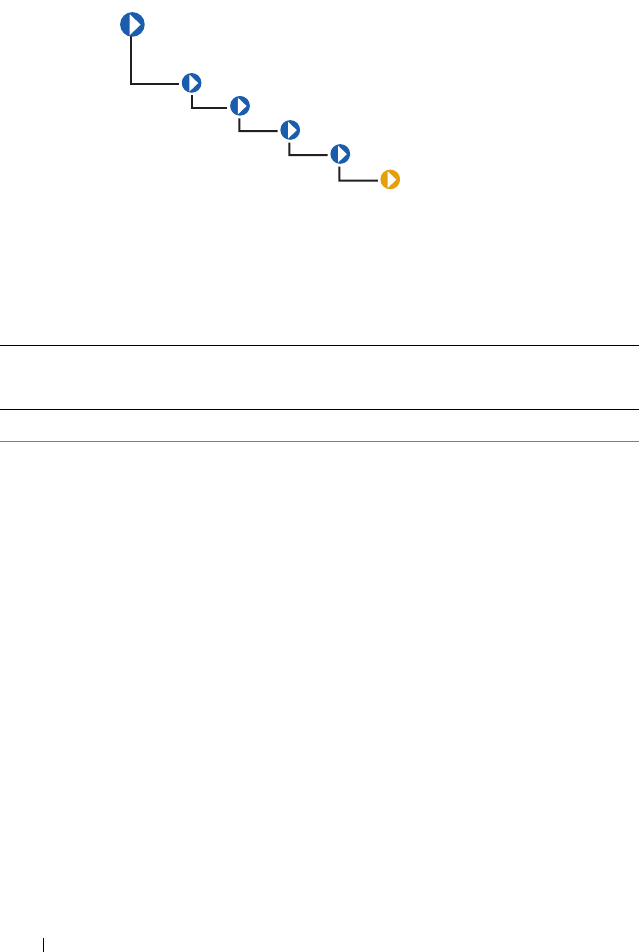
104 Dell-Defined Classes
DELL_NetworkPort
The Dell_Network Port class described in Table 4-12 represents the
Dell specific features of the network adapters.
Table 4-12. Dell_NetworkPort Properties
Class Name: DELL_NetworkPort
Parent Class: CIM_Network Port
Property Description Data Type
NIC Capabilities NIC Capabilities bitmask indicates the
capabilities of the NIC.
The bitmask for the NIC Capability
property are:
Bit 0, Value 0 - Reporting NIC capabilities
via this attribute is not supported.
Bit 0, Value 1 - Reporting NIC capabilities
via this attribute is supported.
Bit 1, Value 0 - NIC is not TOE capable.
Bit 1, Value 1 - NIC is TOE capable.
Bit 2, Value 0 - NIC is not iSCSI capable.
Bit 2, Value 1 - NIC is iSCSI capable.
Bit 3, Value 0 - NIC is not FCoE capable.
Bit 3, Value 1 - NIC is FCoE capable.
uint 32
CIM_
ManagedSystemElement
CIM_LogicalElement
CIM_LogicalDevice
CIM_LogicalPort
CIM_NetworkPort
DELL_NetworkPort

Dell-Defined Classes 105
NIC TOE
Capability
Defines the TOE capability of the NIC.
Values for the NIC TOE Capability
property are:
0 - NIC/driver does not support querying
for capability.
1 - NIC/driver supports querying for
capability but query returned an error.
2 - NIC/driver supports querying for
capability and query says it is capable.
4 - NIC/driver supports querying for
capability and query says it is not capable.
8 - NIC/driver supports querying for
capability but an error prevented querying
NIC/driver.
16 - NIC/driver supports querying for
capability but NIC/driver did not respond
to query.
NOTE: Boolean value is defined if TOE is
enabled. (Boolean is TOEEnable)
uint 32
Table 4-12. Dell_NetworkPort Properties
(continued)
Class Name: DELL_NetworkPort
Parent Class: CIM_Network Port
Property Description Data Type

106 Dell-Defined Classes
NIC RDMA
Capability
Defines the RDMA capability of the NIC.
Values for the NIC RDMA Capability
property are:
0 - NIC/driver does not support querying
for capability.
1 - NIC/driver supports querying for
capability but query returned an error.
2 - NIC/driver supports querying for
capability and query says it is capable.
4 - NIC/driver supports querying for
capability and query says it is not capable.
8 - NIC/driver supports querying for
capability but an error prevented querying
NIC/driver.
16 - NIC/driver supports querying for
capability but NIC/driver did not respond
to query.
NOTE: Boolean value is defined if RDMA is
enabled. (Boolean is RDMAEnable).
uint 32
Table 4-12. Dell_NetworkPort Properties
(continued)
Class Name: DELL_NetworkPort
Parent Class: CIM_Network Port
Property Description Data Type

Dell-Defined Classes 107
NIC iSCSI
Capability
Defines the iSCSI capability of the NIC.
Values for the NIC iSCSI Capability
property are:
0 - NIC/driver does not support querying
for capability.
1 - NIC/driver supports querying for
capability but query returned an error.
2 - NIC/driver supports querying for
capability and query says it is capable.
4 - NIC/driver supports querying for
capability and query says it is not capable.
8 - NIC/driver supports querying for
capability but an error prevented querying
NIC/driver.
16 - NIC/driver supports querying for
capability but NIC/driver did not respond
to query.
NOTE: Boolean value is defined if iSCSI is
enabled. (Boolean is iSCSIEnable).
uint 32
NIC Status Indicates the status of the NIC or driver.
The values for the NIC Status property are:
0 - Unknown
1 - Conencted
2 - Disconnected
3 - Driver Bad
4 - Driver Disabled
10 - Hardware Initializing
uint 32
12 - Hardware Closing
13 - Hardware Not Ready
Table 4-12. Dell_NetworkPort Properties
(continued)
Class Name: DELL_NetworkPort
Parent Class: CIM_Network Port
Property Description Data Type
108 Dell-Defined Classes
DELL_PowerConsumptionAmpsSensor
The DELL_PowerConsumptionAmpsSensor identified in Table 4-13
contains information related to monitoring the power consumption.
BusNumber Indicates the PCI bus number. uint 8
DeviceNumber Indicates the PCI device number. uint 8
FunctionNumber Indicates the PCI function number. uint 8
DriverVersion Indicates the NIC driver version. string
IPAddresss Indicates the NIC IP Address. string
SubnetMask Indicates the NIC subnet mask. string
DHCPServer Indicates the DHCP server. string
DefaultGateway Indicates the Default Gateway. string
CurrentMacAddres
s
Indicates the NIC current MAC address. string
OSAdapterDescrip
tion
Describes the Operating System adapter. string
OSAdapterVendor Describes the Operating System vendor. string
OSProductName Describes the product name of the
Operating System.
string
ServiceName Indicates the service name. string
Table 4-13. DELL_PowerConsumptionAmpsSensor
Class Name: DELL_PowerConsumptionAmpsSensor
Parent Class: CIM_Numeric Sensor
Property Description Data Type
UnitModifier See Table 1-1. sint32
Table 4-12. Dell_NetworkPort Properties
(continued)
Class Name: DELL_NetworkPort
Parent Class: CIM_Network Port
Property Description Data Type
Dell-Defined Classes 109
DELL_PowerConsumptionWattsSensor
The DELL_PowerConsumptionWattsSensor identified in Table 4-14
contains information related to monitoring the power consumption.
CurrentReading See Table 1-1. sint32
IsLinear See Table 1-1. Boolean
LowerThresholdNonCritical See Table 1-1. sint32
UpperThresholdNonCritical See Table 1-1. sint32
LowerThresholdCritical See Table 1-1. sint32
UpperThresholdCritical See Table 1-1. sint32
Table 4-14. DELL _PowerConsumptionWattsSensor
Class Name: DELL_PowerConsumptionWattsSensor
Parent Class: CIM_Numeric Sensor
Property Description Data Type
UnitModifier See Table 1-1. sint32
CurrentReading See Table 1-1. sint32
IsLinear See Table 1-1. Boolean
LowerThresholdNonCritical See Table 1-1. sint32
UpperThresholdNonCritical See Table 1-1. sint32
LowerThresholdCritical See Table 1-1. sint32
UpperThresholdCritical See Table 1-1. sint32
Table 4-13. DELL_PowerConsumptionAmpsSensor
(continued)
Class Name: DELL_PowerConsumptionAmpsSensor
Parent Class: CIM_Numeric Sensor
110 Dell-Defined Classes
DELL_PowerConsumptionData
The DELL_PowerConsumptionData identified in Table 4-15 contains
information about the total power consumed from a start time and peak
values registered during a time period.
Table 4-15. DELL _PowerConsumptionData
Class Name: DELL_PowerConsumptionData
Parent Class: CIM_Logical Device
Property Description Data
Type
cumulative
PowerReading
Indicates the total power consumed from a start time. uint 32
peakAmpReading Indicates the time from which the peak amperage
reading is being monitored.
uint 16
peakWattReading Indicates the time from which the peak watt reading is
being monitored.
uint 16
ResetCounters Is the function used to reset the peak readings. uint 32
powerCapSetting This refers to the user configured power setting. uint 16
instHeadroom This refers to the instantaneous headroom. uint 32
peakHeadRoom Is the function used to set the power budget. uint 32
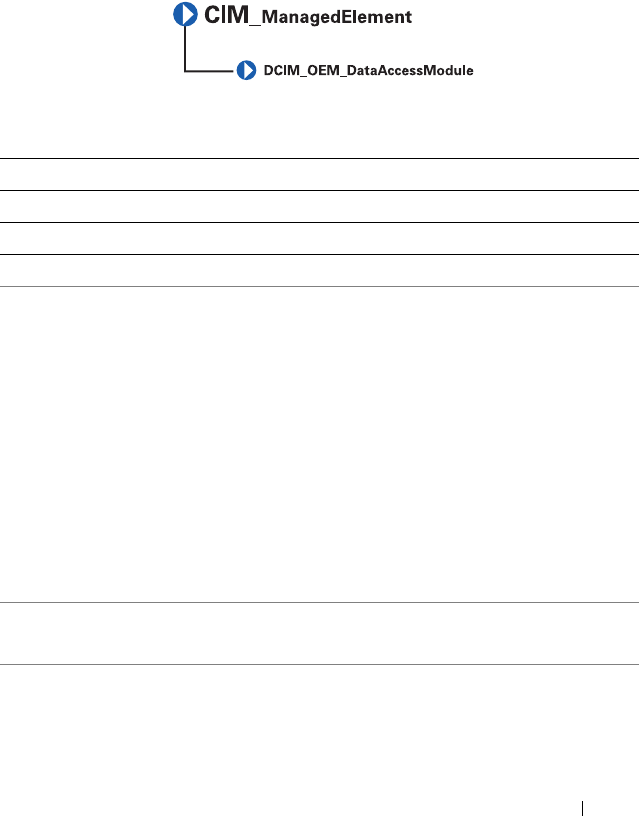
Dell-Defined Classes 111
DCIM_OEM_DataAccessModule
The DCIM_OEM_DataAccessModule class is derived from the
CIM_ManagedElement class. This class models hardware information in a
proprietary format.
Table 4-16. DCIM_OEM_DataAccessModule Properties
Class Name: DCIM_OEM_DataAccessModule
Parent Class: CIM_ManagedElement
Property Description Data Type
InstanceID Identifies the instance. string
GlobalStatus Represents the global health status of the system. This
property can have the following values:
0 - Other
1 - Unknown
2 - OK
3 - Warning / Non-Critical
4 - Critical
5 - Non-Recoverable
.. - Reserved
NOTE: GlobalStatus property is available only for Linux
systems.
sint32
SendCmd The SendCmd method is used to invoke proprietary
hardware management operation.
string
iDRACIPv4 Provides Remote Access controller (iDRAC ) IPv4
address.
string
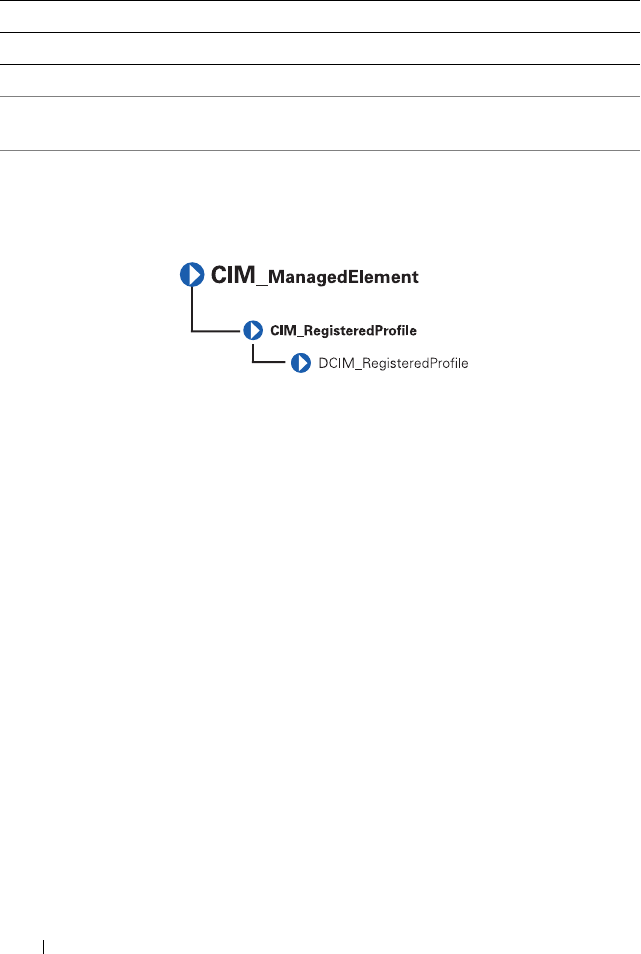
112 Dell-Defined Classes
DCIM_RegisteredProfile
The DCIM_RegisteredProfile class is derived from the
CIM_RegisteredProfile class. This class advertises the capabilities of
DCIM_OEM_DataAccessModule.
iDRACIPv6 Provides Remote Access controller (iDRAC ) IPv6
address.
string
Table 4-16. DCIM_OEM_DataAccessModule Properties
(continued)
Class Name: DCIM_OEM_DataAccessModule
Parent Class: CIM_ManagedElement
Property Description Data Type
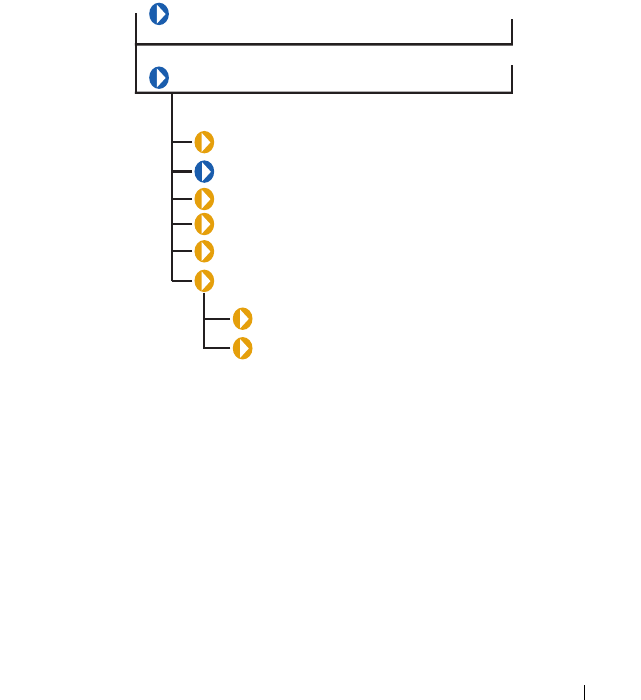
CIM_Dependency 113
5
CIM_Dependency
The CIM_Dependency class is an association used to establish dependency
relationships between two managed system elements. CIM_Dependency
shown in Figure 5-1 does not have a parent class because it is a relationship
or association between two elements.
Figure 5-1. CIM_Dependency Class Structure
Each class derived from CIM_Dependency has an element called an
antecedent that represents the independent object in this association,
and another element called a dependent that represents the object that is
dependent on the antecedent. For example, consider two managed system
elements: Chassis1 and PowerSupply3. Chassis1 is the antecedent element
because a managed power supply would always be either contained in,
or grouped with, a chassis.
CIM_ManagedSystemElement
CIM_Dependency
DELL_FanSensor
CIM_PackageTempSensor
CIM_PackageVoltSensor
CIM_PackageCurrentSensor
CIM_PackageFanSensor
CIM_PackagePowerSupplySensor
DELL_PackagePSRedundancy
DELL_PS Redundancy
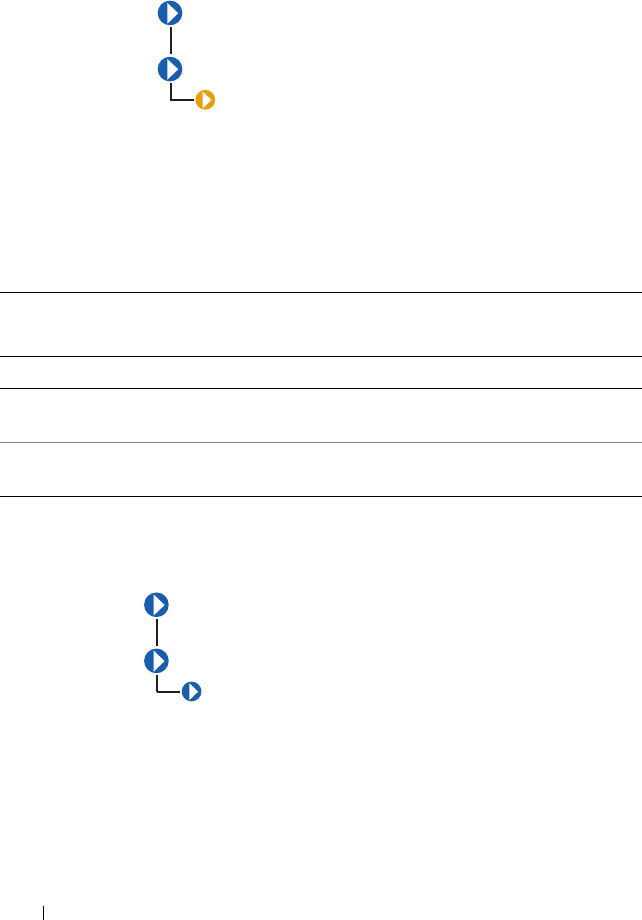
114 CIM_Dependency
DELL_FanSensor
The DELL_FanSensor class described in Table 5-1 defines a Dell-specific
association between a fan and a sensor. The CIM_PackageFanSensor
class contains fans that assist in cooling the entire package as opposed to a fan
dedicated to cooling only some of the components in the package.
CIM_PackageTempSensor
The CIM_PackageTempSensor class listed in Table 5-2 contains
temperature sensors that are often installed in a package such as a chassis or a
rack to assist in the monitoring of the package in general. This relationship is
described by the CIM_PackageTempSensor association.
Table 5-1. DELL_FanSensor Properties
Class Name: DELL_FanSensor
Parent Class: CIM_Dependency
Element Description
Antecedent CIM_Tachometer refers to the tachometer (fan sensor) that
measures the RPM of the fan.
Dependent CIM_Fan refers to the fan whose revolutions are measured by the
tachometer.
CIM_ManagedSystemElement
CIM_Dependency
DELL_FanSensor
CIM_ManagedSystemElement
CIM_Dependency
CIM_PackageTempSensor
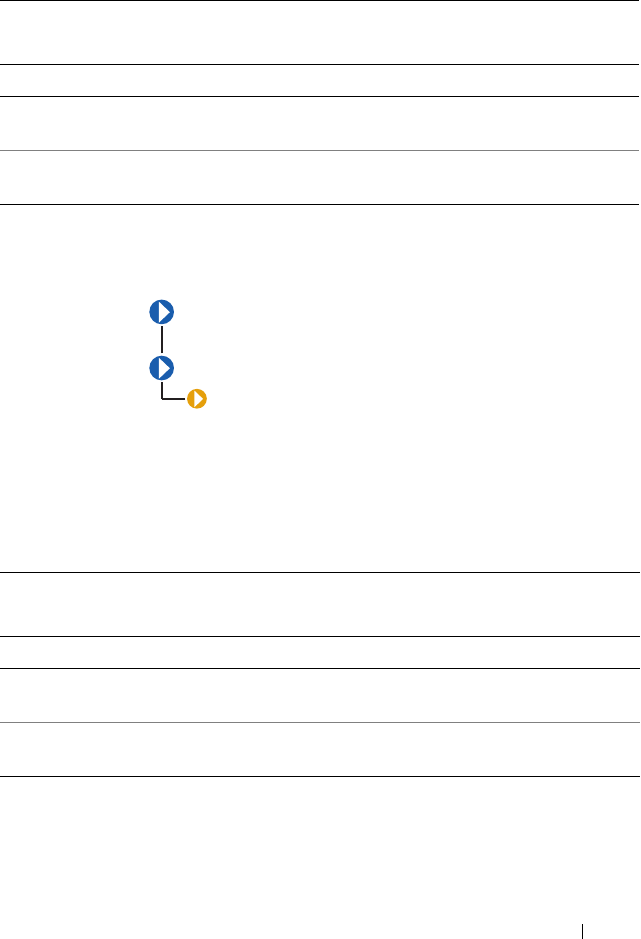
CIM_Dependency 115
CIM_PackageVoltSensor
The CIM_PackageVoltSensor identified in Table 5-3 contains voltage
sensors that are often installed in a package such as a chassis or a rack to assist
in the monitoring of the package in general. This relationship is described by
the CIM_PackageVoltSensor association.
Table 5-2. CIM_PackageTempSensor Properties
Class Name: CIM_PackageTempSensor
Parent Class: CIM_Dependency
Element Description
Antecedent CIM_TempSensor refers to the temperature sensor for the
package.
Dependent CIM_PhysicalPackage refers to the physical package whose
environment is being monitored.
Table 5-3. CIM_PackageVoltage Properties
Class Name: CIM_PackageVoltSensor
Parent Class: CIM_Dependency
Element Description
Antecedent CIM_PackageVoltSensor refers to the voltage sensor for the
package.
Dependent CIM_PhysicalPackage refers to the physical package whose
voltages are being monitored.
CIM_ManagedSystemElement
CIM_Dependency
CIM_PackageVoltSensor
116 CIM_Dependency
CIM_PackageCurrentSensor
The CIM_PackageCurrentSensor shown in Table 5-4 contains
amperage sensors that are often installed in a package such as a chassis or a rack
to assist in the monitoring of the package in general. This relationship is
described by the CIM_PackageCurrentSensor association.
CIM_PackageFanSensor
Table 5-4. CIM_PackageCurrentSensor Properties
Class Name: CIM_PackageCurrentSensor
Parent Class: CIM_Dependency
Element Description
Antecedent CIM_CurrentSensor refers to the amperage sensor for the
package.
Dependent CIM_PhysicalPackage refers to the physical package whose
amperage is being monitored.
CIM_ManagedSystemElement
CIM_Dependency
CIM_PackageCurrentSensor
CIM_ManagedSystemElement
CIM_Dependency
CIM_PackageFanSensor
CIM_Dependency 117
The CIM_PackageFanSensor class described in Table 5-5 contains fan
sensors that monitor the whole package.
CIM_PackagePowerSupplySensor
The CIM_PackagePowerSupplySensor class described in Table 5-6
contains power supplies that provide power to the whole package.
Table 5-5. CIM_PackageFanSensor Properties
Class Name: CIM_PackageFanSensor
Parent Class: CIM_Dependency
Element Description
Antecedent CIM_Fan refers to the cooling device for the package.
Dependent CIM_PhysicalPackage refers to the physical package whose
environment is being monitored.
Table 5-6. CIM_PackagePowerSupplySensor Properties
Class Name: CIM_PackagePowerSupplySensor
Parent Class: CIM_Dependency
Element Description
Antecedent CIM_PowerSupplySensor refers to the power supply sensor that
monitors wattage for the entire package.
Dependent CIM_PhysicalPackage refers to the package whose wattage is
being monitored.
CIM_ManagedSystemElement
CIM_Dependency
CIM_PackagePowerSupplySensor
118 CIM_Dependency
DELL_PackagePSRedundancy
The DELL_PackagePSRedundancy class listed in Table 5-7 defines what
constitutes power supply redundancy for an entire package.
DELL_PSRedundancy
The DELL_PSRedundancy class shown in Table 5-8 defines what
constitutes power supply redundancy for Dell systems.
Table 5-7. DELL_PackagePSRedundancy Properties
Class Name: DELL_PackagePSRedundancy
Parent Class: CIM_Dependency
Element Description
Antecedent DELL_PSRedundancyGroup refers to power supplies that
deliver wattage for the entire package.
Dependent CIM_PhysicalPackage refers to the package to which the
wattage is being supplied.
CIM_ManagedSystemElement
CIM_Dependency
DELL_PackagePSRedundancy
CIM_ManagedSystemElement
CIM_Dependency
DELL_PSRedundancy
CIM_Dependency 119
DELL_AssociatedSupplyPCAmps
The DELL_AssociatedSupplyPCAmps identified in Table 5-9 is a
PowerConsumptionAmpsSensor associated with a CIM_PowerSupply
which is defined by this class.
Table 5-8. DELL_PSRedundancy Properties
Class Name: DELL_PSRedundancy
Parent Class: CIM_Dependency
Element Description
Antecedent CIM_PowerSupplySensor refers to the power supply sensor
that monitors wattage for the entire package.
Dependent CIM_PhysicalPackage refers to the package whose wattage
is being monitored.
Table 5-9. DELL _AssociatedSupplyPCAmps
Class Name: DELL_AssociatedSupplyPCAmps
Parent Class: CIM_Dependency
Property Description Data Type
Antecedent Indicates the PowerSupply instance. uint 16
Dependent Indicates the
PowerConsumptionAmpsSensor
associated with the CIM_PowerSupply.
uint 16
120 CIM_Dependency
DELL_AssociatedSystemPCWatts
The DELL_AssociatedSystemPCWatts identified in Table 5-10 a
PowerConsumptionAmpsSensor associated with a Dell_System
which is defined by this class.
AssociatedSystemPCData
The AssociatedSystemPCData identified in Table 5-11 is a
PowerConsumptionData associated with a Dell_System which is defined
by this class.
Table 5-10. DELL _AssociatedSystemPCWatts
Class Name: DELL_AssociatedSystemPCWatts
Parent Class: CIM_Dependency
Property Description Data Type
Antecedent Indicates the Dell_System instance. uint 16
Dependent Indicates the
PowerConsumptionWattsSensor
associated with the system.
uint 16
Table 5-11. AssocaitedSystemPCData
Class Name: DELL_AssociatedSupplyPCAmps
Parent Class: CIM_Dependency
Property Description Data Type
Antecedent Indicates the Dell_System instance. uint 16
Dependent Indicates the PowerConsumptionData
associated with the Power Supply.
uint 16
CIM_Dependency 121
DELL_PowerProfileData
The DELL_PowerProfileData identified in Table 5-12 contains
information related to power profiling and power knob data.
Table 5-12. DELL _PowerProfileData
Class Name: DELL_PowerProfileData
Parent Class: CIM_LogicalDevice
Property Description Data Type
chassisIndex Indicates the chassisIndex for this power
profile.
uint 8
supportedProfile Indicates the supported profiles. uint 16
profileSetting Indicates the Profile setting. uint 16
customCPUCaps Indicates the Custom Profile CPU management
capability.
uint 16
customCPUSettings Indicates the Custom Profile CPU management
setting.
uint 16
customMemCaps Indicates the Custom Profile memory
management capability.
uint 16
customMemSettings Indicates the Custom Profile memory
management capability.
uint 16
customFanSettings Indicates the Custom Profile fan management
setting.
uint 16

122 CIM_Dependency

Index 123
Index
C
CIM classes and properties, 10
base classes, 11
classes that describe
relationships, 12
common properties of classes, 13
conventions, 12
parent classes, 12
CIM_Chip, 26
CIM_Dependency
CIM_PackageCurrentSensor, 116
CIM_PackageFanSensor, 116
CIM_PackagePowerSupplySensor,
117
CIM_PackageTempSensor, 114
CIM_PackageVoltSensor, 115
DELL_FanSensor, 114
DELL_PackagePSRedundancy, 1
18
DELL_PSRedundancy, 118
CIM_LogicalElement
CIM_BIOSElement, 78
CIM_CacheMemory, 76
CIM_ComputerSystem, 40
CIM_Controller, 60
CIM_CurrentSensor, 49
CIM_DiscreteSensor, 44
CIM_DMA, 87
CIM_ExtraCapacityGroup, 89
CIM_Fan, 53
CIM_FRU, 42
CIM_IRQ, 84
CIM_Keyboard, 56
CIM_LogicalDevice, 41
CIM_LogicalPort, 43
CIM_MemoryMappedIO, 86
CIM_NumericSensor, 45
CIM_ParallelController, 61
CIM_PCIBridge, 65
CIM_PCIController, 63
CIM_PointingDevice, 55
CIM_PowerSupply, 57
CIM_Processor, 66
CIM_RedundancyGroup, 88
CIM_Sensor, 42
CIM_SerialController, 62
CIM_SoftwareElement, 78
CIM_SoftwareFeature, 81
CIM_System, 39
CIM_SystemResource, 83
CIM_Tachometer, 51, 104
CIM_TemperatureSensor, 48
CIM_UserDevice, 54
CIM_VoltageSensor, 50
CIM_Watchdog, 104
DELL_FanExtraCapacityGroup,
90
DELL_PSRedundancyGroup, 89
DELL_System, 40
CIM_PhysicalComponent, 26
CIM_PhysicalElememt

124 Index
CIM_PhysicalConnector, 30
CIM_PhysicalMemory, 28
CIM_PhysicalElement, 19
CIM_Chassis, 23
CIM_Chip, 26
CIM_PhysicalComponent, 26
CIM_PhysicalFrame, 22
CIM_PhysicalPackage, 21
CIM_Slot, 33
DELL_Chassis, 24
structure of, 19
CIM_PhysicalElementClass
structure of, 19
CIM_SoftwareElement, 78
class name, 16
common properties of classes, 13
current reading, 13
D
data type, 16
DCIM_OEM_DataAccessModul
e, 93
DCIM_RegisteredProfile, 112
Dell OpenManage Server
Agent, 9
DELL_CMApplication, 96
DELL_CMDevice, 97
DELL_CMDeviceApplication, 9
8
DELL_CMInventory, 98
DELL_CMOS, 99
DELL_CMProductInfo, 100
DELL_PostLog, 96
DELL_PSRedundancy, 118
description, 16
P
parent class, 16
property, 16
S
Server Administrator 1.0, 9
V
version, 15
