Dell Openmanage Deployment Toolkit Version 2 4 Quick Reference Guide 2.4 Command Line Interface
2014-11-13
: Dell Dell-Openmanage-Deployment-Toolkit-Version-2-4-Quick-Reference-Guide-117722 dell-openmanage-deployment-toolkit-version-2-4-quick-reference-guide-117722 dell pdf
Open the PDF directly: View PDF  .
.
Page Count: 442 [warning: Documents this large are best viewed by clicking the View PDF Link!]
- Introduction
- Command Syntax Overview
- SYSCFG
- RAIDCFG
- UPINIT
- RACADM
- DRAC III, DRAC 4, and DRAC 5 Property Database Group and Object Definitions
- Messages and Codes
- BMC Platform Events Filter Alert Messages
- Sample File Formats
- Summary of SYSCFG and RAIDCFG Options
- Glossary
- Index
www.dell.com | support.dell.com
Dell™ OpenManage™
Deployment Toolkit Version 2.4
Command Line Interface
Reference Guide

Notes and Notices
NOTE: A NOTE indicates important information that helps you make better use of
your computer.
NOTICE: A NOTICE indicates either potential damage to hardware or loss of data
and tells you how to avoid the problem.
____________________
Information in this document is subject to change without notice.
© 2007 Dell Inc. All rights reserved.
Reproduction in any manner whatsoever without the written permission of Dell Inc. is strictly forbidden.
Trademarks used in this text: Dell, the DELL logo, OpenManage, and PowerEdge are trademarks of
Dell Inc.; Microsoft, Windows, Windows NT, and Windows Server are registered trademarks of Microsoft
Corporation; Novell and SUSE are registered trademarks of Novell, Inc. in the United States and other
countries; Red Hat and Red Hat Enterprise Linux are registered trademarks of Red Hat, Inc.; Intel,
Pentium, and EtherExpress are registered trademarks of Intel Corporation; UNIX is a registered
trademark of The Open Group in the United States and other countries.
Other trademarks and trade names may be used in this document to refer to either the entities claiming
the marks and names or their products. Dell Inc. disclaims any proprietary interest in trademarks and
trade names other than its own.
October 2007

Contents 3
Contents
1 Introduction . . . . . . . . . . . . . . . . . . . . . . . . 9
What’s New . . . . . . . . . . . . . . . . . . . . . . . . 9
Requirements . . . . . . . . . . . . . . . . . . . . . . 10
Supported Systems . . . . . . . . . . . . . . . . . 10
Toolkit Utilities . . . . . . . . . . . . . . . . . . . . . 10
Overview . . . . . . . . . . . . . . . . . . . . . . 10
System Configuration Utility . . . . . . . . . . . . 10
RAID Configuration Utility . . . . . . . . . . . . . 10
RAC Configuration Utility . . . . . . . . . . . . . . 11
Disk Partitioning Utility . . . . . . . . . . . . . . . 11
Replication . . . . . . . . . . . . . . . . . . . . . . . 11
Other Dell Documents You Might Need . . . . . . . . . 13
Obtaining Technical Assistance . . . . . . . . . . . . 13
2 Command Syntax Overview . . . . . . . . . . . 15
Command Line Syntax . . . . . . . . . . . . . . . 15
Case Sensitivity . . . . . . . . . . . . . . . . . . 17
Command Line Option Delimiters . . . . . . . . . 17
Read and Write Commands . . . . . . . . . . . . 18
File Input and Output Commands . . . . . . . . . 18
Log Files . . . . . . . . . . . . . . . . . . . . . . 18
Help Option . . . . . . . . . . . . . . . . . . . . . 19
Error Checking and Error Messages . . . . . . . . . . 19

4Contents
3SYSCFG . . . . . . . . . . . . . . . . . . . . . . . . . . 21
Features . . . . . . . . . . . . . . . . . . . . . . . . . 21
SYSCFG General Options . . . . . . . . . . . . . . . . 22
SYSCFG for BIOS Configuration . . . . . . . . . . . . . 27
Options for BIOS Configuration . . . . . . . . . . 27
SYSCFG for BMC and
Remote Access Controller Configuration . . . . . . . . 63
BMC and Remote Access Controller
Configuration Options . . . . . . . . . . . . . . . 64
SYSCFG for State Configuration . . . . . . . . . . . . . 103
SYSCFG Options for State Configuration . . . . . . 103
SYSCFG for System Configuration . . . . . . . . . . . . 105
Options for System Configuration . . . . . . . . . 105
PCI Reporting . . . . . . . . . . . . . . . . . . . . 114
Environment Variable File . . . . . . . . . . . . . 114
4 RAIDCFG . . . . . . . . . . . . . . . . . . . . . . . . 117
Features . . . . . . . . . . . . . . . . . . . . . . . . . 117
Supported RAID Controllers . . . . . . . . . . . . . . . 117
RAIDCFG Dependencies . . . . . . . . . . . . . . . . . 118
RAIDCFG Options and Arguments . . . . . . . . . . . . 118
RAID Configuration Utility Options and
Arguments . . . . . . . . . . . . . . . . . . . . . . . . 124
General Help . . . . . . . . . . . . . . . . . . . . 124
Enumerating RAID Controllers . . . . . . . . . . . 125
Creating Virtual Disks . . . . . . . . . . . . . . . 127

Contents 5
Enumerating Array Disks . . . . . . . . . . . . . . 141
Enumerating Virtual Disks . . . . . . . . . . . . . 146
Deleting Virtual Disks . . . . . . . . . . . . . . . 149
Assigning and Unassigning Global
Hot Spares . . . . . . . . . . . . . . . . . . . . . 150
Setting Environment Variables . . . . . . . . . . . 151
RAID Replication Options . . . . . . . . . . . . . 156
Miscellaneous Options . . . . . . . . . . . . . . . 157
Quick Reference to RAIDCFG Commands . . . . . . . . 159
5UPINIT. . . . . . . . . . . . . . . . . . . . . . . . . . 163
Features . . . . . . . . . . . . . . . . . . . . . . . . . 163
Creating a Partition Using UPINIT . . . . . . . . . . . 163
UPINIT Dependencies . . . . . . . . . . . . . . . . . . 164
UPINIT Options and Arguments . . . . . . . . . . . . . 164
6 RACADM . . . . . . . . . . . . . . . . . . . . . . . . 171
Features . . . . . . . . . . . . . . . . . . . . . . . . . 171
RACADM Options . . . . . . . . . . . . . . . . . . . . 172
Error Messages . . . . . . . . . . . . . . . . . . 176
RAC Configuration Utility Options, Subcommands,
and Arguments . . . . . . . . . . . . . . . . . . . . . 176
racadm Command . . . . . . . . . . . . . . . . . 177
config/getconfig . . . . . . . . . . . . . . . . . . 179
getconfig Subcommand Description . . . . . . . . 181
fwupdate . . . . . . . . . . . . . . . . . . . . . . 183
Synopsis . . . . . . . . . . . . . . . . . . . . . . 183

6Contents
Description . . . . . . . . . . . . . . . . . . . . . 183
Input . . . . . . . . . . . . . . . . . . . . . . . . 184
Output . . . . . . . . . . . . . . . . . . . . . . . . 185
Examples . . . . . . . . . . . . . . . . . . . . . . 185
Updating the Firmware . . . . . . . . . . . . . . . 186
getssninfo . . . . . . . . . . . . . . . . . . . . . 186
getsysinfo . . . . . . . . . . . . . . . . . . . . . . 188
getraclog . . . . . . . . . . . . . . . . . . . . . . 191
Synopsis . . . . . . . . . . . . . . . . . . . . . . 191
Description . . . . . . . . . . . . . . . . . . . . . 192
Output . . . . . . . . . . . . . . . . . . . . . . . . 192
Restrictions . . . . . . . . . . . . . . . . . . . . . 192
gettracelog . . . . . . . . . . . . . . . . . . . . . 192
Synopsis . . . . . . . . . . . . . . . . . . . . . . 193
Description . . . . . . . . . . . . . . . . . . . . . 193
Output . . . . . . . . . . . . . . . . . . . . . . . . 193
help . . . . . . . . . . . . . . . . . . . . . . . . . 193
racdump . . . . . . . . . . . . . . . . . . . . . . 194
racreset . . . . . . . . . . . . . . . . . . . . . . . 194
racresetcfg . . . . . . . . . . . . . . . . . . . . . 196
setrac . . . . . . . . . . . . . . . . . . . . . . . . 197
A DRAC III, DRAC 4, and DRAC 5
Property Database Group and
Object Definitions . . . . . . . . . . . . . . . . . 199
DRAC III Object Groups . . . . . . . . . . . . . . . . . 199
DRAC 4 Object Groups . . . . . . . . . . . . . . . . . . 229
DRAC 5 Object Groups . . . . . . . . . . . . . . . . . . 258

Contents 7
B Messages and Codes . . . . . . . . . . . . . . 311
SYSCFG Error Codes and Messages . . . . . . . . . . 311
Failure Messages . . . . . . . . . . . . . . . . . 311
UPINIT Common Error Codes and Messages . . . . . . 319
Failure Messages . . . . . . . . . . . . . . . . . 319
UPINIT Linux-Specific Error Codes and Messages . . 321
UPINIT Windows PE-Specific Error Codes
and Messages . . . . . . . . . . . . . . . . . . . . . . 321
RAIDCFG Error Codes and Messages . . . . . . . . . . 321
Failure Messages . . . . . . . . . . . . . . . . . 321
RACADM Firmware Error Codes and Messages . . . . 335
RACADM Utility Error Codes and Messages . . . . . . 337
C BMC Platform Events Filter
Alert Messages . . . . . . . . . . . . . . . . . . . 341
D Sample File Formats . . . . . . . . . . . . . . . 343
Sample SYSCFG Utility .ini File Format . . . . . . . . . 343
Sample RAIDCFG Utility .ini File Format . . . . . . . . 359
Sample RACADM Utility .ini File Format . . . . . . . . 360

8Contents
E Summary of SYSCFG and
RAIDCFG Options . . . . . . . . . . . . . . . . . 367
SYSCFG Options . . . . . . . . . . . . . . . . . . . . . 367
RAIDCFG Options . . . . . . . . . . . . . . . . . . . . 391
Glossary . . . . . . . . . . . . . . . . . . . . . . . . . . . 397
Index . . . . . . . . . . . . . . . . . . . . . . . . . . . . . . 441

Introduction 9
Introduction
Dell™ OpenManage™ Deployment Toolkit (DTK) includes a set of utilities
for configuring and deploying Dell PowerEdge™ systems. DTK is designed for
customers who need to build scripted installations in order to deploy large
numbers of systems in a reliable fashion without having to dramatically
change their current deployment processes.
DTK consists of command line utilities to configure various system features,
sample scripts to perform common deployment tasks, and documentation for
each utility. You can use DTK in a Microsoft® Windows® Preinstallation
Environment (Windows PE) or a Linux environment.
What’s New
Deployment Toolkit version 1.0 was the first release of a Dell-designed and
tested suite of utilities, sample script files, and best practices models to use
for configuring and deploying Dell systems in a customized, predictable, and
unattended manner. DTK versions 1.1, 1.3, and 1.4 included added support
and additional utility options. DTK version 2.0 was the first release with
flexibility to use DTK in either a Windows PE or an embedded Linux
environment.
The new features for DTK version 2.4 include:
• Support for Dell PowerEdge systems T105, R200, R805, R900, M600, M605
NOTE: R805, M600, and M605 are scheduled to be available in Q4 CY07 - Q1
CY08.
• Support for installing Windows PE 2.0
• Support for PowerEdge Expandable RAID controller (PERC) 6 and Serial
Attached SCSI (SAS) 6
• Support for Redundant Array of Independent Disks (RAID) 6 and RAID 60
• Support for installing Microsoft Windows Server
®
2008
NOTE: Microsoft Windows Server 2008 is scheduled to be available in the
first half of 2008. For the latest information, see
http://www.microsoft.com/windowsserver2008/default.mspx

10 Introduction
Requirements
For Windows PE, the DTK utilities support Windows PE version 2005 (released
with Microsoft Windows Server® 2003, Service Pack 1 [SP1]).
For embedded Linux, the DTK utilities can be run on Red Hat® Enterprise
Linux® (version 4, update 4) 32-bit.
Supported Systems
For the list of Dell systems supported for this version of DTK, see the
readme.txt file located at the root folder or the Dell Systems Software Support
Matrix on the Dell Support website at support.dell.com.
Toolkit Utilities
Overview
DTK contains utilities that allow you to configure the BIOS, baseboard
management controller (BMC), remote access controller (RAC), RAID
controllers, and hard-drive partitions on supported Dell systems. Additionally,
the utilities can be integrated with the sample files provided with the toolkit
to fully configure one-to-many target systems in a scripted mass system
deployment.
NOTE: In a Linux environment, the DTK utilities do not have a .exe extension.
System Configuration Utility
The SYSCFG utility performs the following tasks:
• Reports and sets BIOS configuration options
• Reports and sets BMC/RAC configuration options
• Reports and sets user-configurable states
• Reports system information, including PCI device detection
RAID Configuration Utility
The RAIDCFG utility reports and sets RAID configuration options.

Introduction 11
RAC Configuration Utility
The RACADM utility reports and sets RAC configuration options for Dell
Remote Access Controller (DRAC) III (Linux only) and DRAC 4.
NOTE: DRAC 5 is configured by SYSCFG.
Disk Partitioning Utility
The UPINIT script creates, formats, and populates a Dell Utility Partition.
Replication
File Format
The -i and -o options use a .ini file format for SYSCFG options. All
name/value entries that follow the [syscfg] section header in the .ini file
belong to the SYSCFG utility. For an example of the syscfg.ini file, see "Sample
SYSCFG Utility .ini File Format."
SYSCFG Replication Rules
Not all BIOS and BMC options can be replicated using a .ini file.
For example, boot sequence and device sequence are only replicated if a
device name list can be supplied. A numerical device list cannot be replicated
since these index values can change from system to system. In addition,
because the service tag information is static, it is not commented out in the
output file or replicated. See the description of each option for further
replication information.
The syscfg.ini file cannot be used across different systems. The file output
operation places system identification information at the beginning of the
[syscfg] section. This information is used to determine if the file can be
accepted as input for a system. The following information is used for
system identification:
• System ID Byte(s)
•System Name
• BIOS Version
If these values do not match the values found on the system, the file input
operation fails.

12 Introduction
The following is the SYSCFG behavior during replication:
• Options not available in SYSCFG are termed invalid options. If SYSCFG
encounters an invalid option in the
syscfg.ini
file, the SYSCFG utility
terminates.
• Unsupported options are options available in SYSCFG but not applicable
on certain systems. If SYSCFG encounters an unsupported option,
SYSCFG logs this option and continues to the next option.
For example, the
virtualization
option is not available on
x
8
xx
series systems.
• Unsupported arguments are arguments valid in SYSCFG but not
applicable on certain systems. If SYSCFG encounters an unsupported
argument, SYSCFG terminates.
For example,
syscfg –-embsataraid=ahci
is not applicable on
some
x
9
xx
series systems.
• SYSCFG logs a message in the log file for each option processed in the
syscfg.ini
file. To generate the log file, use the
logfile
option.
RAID Replication
The RAID replication feature reads the RAID configuration information from
the source system and creates a raid.ini file. This raid.ini file can be applied
on the RAID configurations of the target system. The RAID replication
requires both, the source system and the target system to have similar
RAID controllers.
RACADM Replication
The RACREP.BAT sample script applies RAC configuration options to the
target system based on the configuration information that has been saved in a
configuration file. User input is optional, depending on variables set in the
RACREP.BAT sample script. This script uses the RACADM.EXE utility to
configure the RAC in the target system using the RAC configuration file,
raccfg.ini. The raccfg.ini configuration file is passed as the first parameter to
the RACREP.BAT script. If this parameter is not passed, the default variable
values used in this script are set in the TKENVSET.BAT scripts. An optional
second parameter can be passed to this file, which specifies the IP address
used in configuring the RAC. The raccfg.ini file is generated with the
RACCAP.BAT sample script.

Introduction 13
Other Dell Documents You Might Need
Besides this Command Line Interface Reference Guide, you can find the
following guides on the Dell OpenManage documentation page of the Dell
Support website at support.dell.com or on the Dell Systems Documentation CD.
• The
Dell OpenManage Installation and Security User's Guide
provides
additional information about performing an unattended installation of
Dell OpenManage
Server Administrator on systems running supported
Windows, Red Hat Enterprise Linux, and SUSE
®
Linux Enterprise Server
operating systems.
• The
Dell OpenManage Server Administrator Compatibility Guide
provides
compatibility information about Server Administrator installation and
operation on various hardware platforms (or systems) running supported
Windows, Red Hat Enterprise Linux, and SUSE Linux Enterprise Server
operating systems.
• The
Dell Remote Access Controller Racadm User's Guide
provides
additional information about using the RACADM command line utility.
• The
Dell Update Packages User's Guide
provides information about
obtaining and using Dell Update Packages as part of your system update
strategy.
Additionally, the Deployment Toolkit readme.txt file, which is available as
part of the DTK download and on the Dell Support website at
support.dell.com, provides the latest available information about the
installation and operation of the DTK components.
Obtaining Technical Assistance
If at any time you do not understand a procedure described in this guide or if
your product does not perform as expected, help tools are available to assist
you. For more information about these help tools, see "Getting Help" in your
system's Hardware Owner's Manual.
Additionally, Dell Enterprise Training and Certification is available; see
www.dell.com/training for more information. This service may not be offered
in all locations.

14 Introduction

Command Syntax Overview 15
Command Syntax Overview
Syntax refers to the way a command and its parameters are entered.
Dell™ OpenManage™ Deployment Toolkit (DTK) Command Line Interface
(CLI) commands can be arranged in any order in a command line instance as
long as they conform to the basic command line syntax.
Command Line Syntax
The general usage models of the DTK utilities are as follows:
•SYSCFG
syscfg option1 [arg1] ... option
X
[arg
X
]
OR
syscfg bmcoption1 bmcsuboption1
[arg1]...bmcsuboption
X
[arg
X
]
• RAIDCFG
raidcfg [mandatory options] <optional arguments>
•RACADM
racadm <
options
> <
subcommand
> <
subcommand_options
>
•UPINIT
For WinPE:upinit --disk=0 --size=32 --file=
t:\upimage.bin
For Linux:upinit --disk=/dev/sda --size=32 --file=
/tmp/upimage.bin
The DTK command line switches, configuration file formatting, and error
reporting follow similar style and behavior. However, individual DTK utilities
can sometimes differ from one another in significant ways. You should
familiarize yourself with the command line syntax and utility-specific options
and arguments for each utility before using DTK.
NOTE: Some of the command line options in DTK are followed by an asterisk.
Such options are used for reporting purposes only.
16 Command Syntax Overview
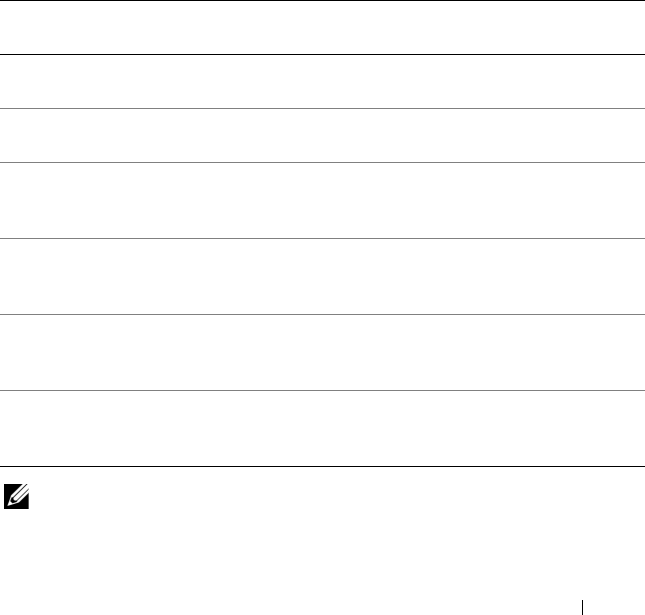
Table 2-1 lists the generic command line characters and arguments present in
the command line options with a short description of these characters.
Table 2-1. Command Line Syntax
Element Description
- Single-character options are prefixed with a preceding hyphen (-).
NOTE: This delimiter is not applicable to Baseboard Management
Controller (BMC) suboptions.
-- Multi-character options are prefixed with two (2) preceding hyphens
(--).
utilname Generic designation for a DTK utility name.
o Generic single-character designation for an option.
optionXGeneric multi-character designation for a utility name, where X can
be used to distinguish multiple options used in the same command
line instance.
argXGeneric designation for an argument, where X can be used to distinguish
multiple arguments used in the same command line instance.
[mandatory
option]
Generic designation for a mandatory argument.
<optional
argument>
Generic designation for an optional argument.
<string> Generic designation for a string.
<filename> Generic designation for a filename.
[ ] Indicates a component of the command line. Enter only the
information within the brackets, not the brackets themselves.
... Indicates that the previous argument can be repeated several times in
a command. Enter only the information, not the ellipsis (...) itself.
| Separates two mutually exclusive choices in a syntax line. For
example:
usb: Turns the usb controller on or off.
Argument: enable | disable | legacy
Enter only one choice: --usb=enable, --usb=disable, or
--usb=legacy
.
Command Syntax Overview 17
Case Sensitivity
• Command line options, predefined and user-defined arguments, and
filenames given as arguments are all case sensitive.
• Unless specified otherwise, enter all commands, options, arguments, and
command line switches in lowercase letters.
Command Line Option Delimiters
• Single-character options are
prefixed
with a preceding hyphen (-).
• Multi-character options are
prefixed
with two (2) preceding hyphens (--).
Example: utilname -o --option
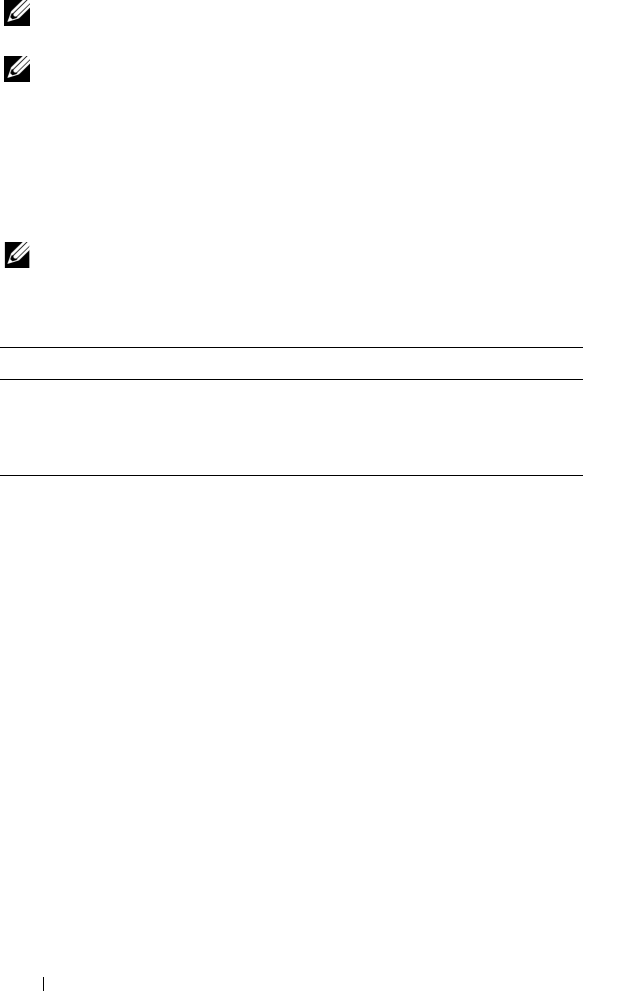
Table 2-2 lists some examples of valid and invalid DTK command lines.
NOTE: Options that specify report or set actions should not be mixed in a command
line instance.
Table 2-2. DTK Command Line Examples
Valid/
Invalid
DTK Command Line Example
valid syscfg --option1 --
option2
syscfg --asset --floppy
invalid syscfg --option1=argument
--option2 --option3
syscfg --asset=1750 --
floppy --bootseq
valid syscfg -o=filename --
option1
--option2
syscfg -o=/tmp/myfile.txt
--floppy
--bootseq
valid syscfg -l=filename --
option1
--option2
syscfg -l=
/tmp/myfile.txt --floppy
--bootseq
valid syscfg -i=filename --
option1
--option2
syscfg -i=
/tmp/myfile.txt --floppy
--bootseq
valid syscfg --option=
argument bmcoption --
option1=argument
syscfg --embnic=on
pcp --hostname=webserver
18 Command Syntax Overview
NOTE: Example 2 is invalid because the report and set actions are used in the
same command line.
NOTE: Examples 3, 4, and 5 are valid because the aliases use neither report nor set
actions.
Read and Write Commands
Options can report a certain value or set of values based on the presence of an
argument. These read or write actions are implied in the DTK command line
arguments. The get, read, set, or write commands, for example, are not required.
NOTE: Options that specify read or write actions should not be mixed in a
command line instance.
File Input and Output Commands
• File input is specified by the
-i
<
filename
> command, where
<
filename
> is the name of the input file.
• File output is specified by the
-o
<
filename
> command, where
<
filename
> is the name of the output file.
Log Files
The -l <
filename
> or --logfile <
filename
> option records
information output on the command line to the specified log file. Each new
line of output is preceded by a time stamp.
If the log file already exists, information is appended to the file. This allows
multiple tools to use the same log file to record information. This option
should be used instead of redirection to record a utility’s output since time
data can assist with task diagnosis.
Table 2-3. Read and Write Command Examples
Valid/Invalid DTK Command Line Example
valid syscfg --option1 --option2
valid syscfg --option1=arg --option2=arg
invalid syscfg --option1=arg --option2

Command Syntax Overview 19
The log duplicates all standard output and error information to the specified
file. Each log file begins with a time stamp and utility name. For example,
YYYY/MM/DD HH:MM:SS
<
utilname
> - <
output text
>.
The following is an example of the logging behavior:
2003/11/28 10:23:17 syscfg -
option1
=on
2003/11/28 10:23:17 syscfg -
option2
=on
2003/11/28 10:23:17 syscfg -
option3
=off
NOTE: The log files may contain sensitive information such as passwords and
authentication information. To protect such information, it is recommended that
only the administrator access the log files.
Help Option
The -h and --help options display general usage information for the utility.
If the argument matches a valid option, that option's usage information is
displayed. If the option has arguments, the arguments are displayed,
separated by a | character. If the argument does not match a valid option, a
usage error is given (and usage information is displayed). This option cannot
be replicated.
Error Checking and Error Messages
The DTK utilities check your commands for correct syntax when you enter
them. When a command is executed successfully, a message displays stating
that your command has been successful. Unrecognized or invalid options and
arguments result in a usage error that displays the DTK utility name and
version along with a short message. For information about the error messages,
see "Messages and Codes."

20 Command Syntax Overview

SYSCFG 21
SYSCFG
This section documents the Deployment Toolkit (DTK) system
configuration utility. It describes the command line parameters,
configuration file format, and individual executables used to configure server
BIOS and baseboard management controller (BMC) settings, DTK state
settings, and system information including PCI device detection.
Features
The SYSCFG utility has the following general features:
• Displays help and usage information
• Outputs configuration options to a file or screen
• Reads configuration options from a file or CLI parameters
• Configures BMC/remote access controller (RAC) users, local area network
(LAN) channel and serial channel settings, BMC/RAC platform event
filter (PEF) settings, and BMC/RAC serial-over-LAN (SOL) settings
• Configures the nonmaskable interrupt (NMI) and power button
• Reports the BMC/RAC firmware version, BMC/RAC device global unique
identifier (GUID), and BMC/RAC LAN channel and serial channel
information
• Reports BMC/RAC session information
• Clears BMC/RAC system event log (SEL)
• Restores BMC/RAC factory defaults
• Records and reports the state data value
• Displays system configuration information
• Returns specific error codes and messages
• Logs activity to a given filename
• Configures the BIOS features
NOTE: In Microsoft® Windows® Preinstallation Environment (Windows PE), the
SYSCFG utility is located at \dell\toolkit\tools. In Linux, you can find it in
/opt/dell/toolkit/bin.

22 SYSCFG
SYSCFG General Options
NOTE: Some of the options in SYSCFG are followed by an asterisk. These commands
do not accept any suboptions or arguments. The values associated with these
commands are those that are reported by the BIOS. These values cannot be modified.
Table 3-1 lists the SYSCFG general options.
Table 3-1. SYSCFG General Options
Options Suboptions Valid
Arguments
Description
No option NA NA If an option is not given, the SYSCFG utility outputs
usage information. The usage information is
displayed in the format shown below.
Example:
A:>syscfg
syscfg version 1.X.123 A06
© 2005 Dell Inc. All rights reserved.
Usage: syscfg --option[=argument]
or
syscfg --option [argument] or
syscfg option --suboption
[=suboptionargument]
For more information about a
particular command, use the option
'-h' followed by the command name.
Example: syscfg -h bmcversion.
Options without preceding
delimiters have suboptions.
Example: syscfg lancfgparams
Options with preceding delimiters
do not have suboptions.
Example: syscfg --powerbutton
option1 option4 option7
option2 option5 option8
option3 option6 option9

SYSCFG 23
--envar valid
filename
valid path
media
should be
writable
When used with the –s option, this option stores
the environment variable data to a file. This file
can be called from other scripts to set the
environment variable. The value of <filename>
need not be specified if the DTKENVSCR
environment variable is set to a valid filename. In
this case, the filename pointed to by
DTKENVSCR is used to store the environment
variable data.
Example:
syscfg --mem -s=temp --envar=
z:\scripts\file.bat
When used without the -s option, --envar takes
the default variable.
Linux Example:
syscfg --svctag --envar=
/tmp/myvars.txt
svctag = 2G8LC1S
syscfg_var = ’2G8LC1S’
source /tmp/myvars.txt
Windows PE Example:
syscfg --svctag --envar=
i:\myvars.bat
svctag = 2G8LC1S
syscfg_var = ’2G8LC1S’
call i:\myvars.bat
Table 3-1. SYSCFG General Options (continued)
Options Suboptions Valid
Arguments
Description

24 SYSCFG
-h
or
--help
NA none
or
<valid
option
name>
Without an argument, this option displays general
usage information for the utility. If the argument
matches a valid option, that option's usage
information is displayed. If the option has
arguments, the arguments are displayed, separated
by a | character. If the option has suboptions, all
suboptions, valid arguments, and a description are
listed. If the argument does not match a valid
option, a usage error is given (and usage
information is displayed). This option cannot be
replicated.
Example:
A:>syscfg -h lanchannelaccess
lanchannelaccess: Reports LAN
channel access information.
Suboptions:
pefalerting: Enable or disable PEF
(Platform Event Filter) alerting.
Arguments: enable | disable
ipmioverlan: Enable or disable IPMI
over LAN access.
Arguments: disable | alwaysavail
channelprivlmt: Sets the maximum
privilege level that can be
accepted on the LAN channel.
Arguments: user | operator |
administrator
Table 3-1. SYSCFG General Options (continued)
Options Suboptions Valid
Arguments
Description

SYSCFG 25
-i
or
--infile
NA <filename> This option directs the SYSCFG utility to take
input from a .ini file. The utility searches the file
for a section heading identical to the utility name.
An error is returned if the file or section is not
found. If the section is found, each name/value
pair is applied to the system. The names must
match a valid option, and the arguments must be
in the proper format for the option. If an option is
not available on a system and it is specified in a
file, the utility ignores the option. If any errors are
found in the format of the names or values, an
error is returned and the options are not applied to
the system. If this option is used with other
function command options, they are applied in
the order in which they appear on the command
line, overriding any previous commands. This
option can be replicated.
Example:
A:>syscfg -i
filename
.ini
-l
or
--logfile
NA <filename> This option logs the command line output to a
time-stamped file. The utility either appends the
information to an existing log file or creates a new
file. The log file contains the same information as
the standard output, plus timestamp information.
Users should use this option instead of redirection
for task diagnosis. This option can be replicated.
See "Log Files" for more information.
Example:
A:>syscfg -l
logfile
Table 3-1. SYSCFG General Options (continued)
Options Suboptions Valid
Arguments
Description

26 SYSCFG
-o
or
--outfile-o
or --
outfile
NA <filename> This option outputs all replicable options to the
specified filename. The format of the output is in
a .ini format, with the utility name as the section
header. If a file with the same name already exists,
the information is appended to the file. If this
option is used with other function commands, the
commands are applied in the order in which they
appear. This option captures replicable BMC and
BIOS options.
Example:
A:>syscfg -o
filename.ini
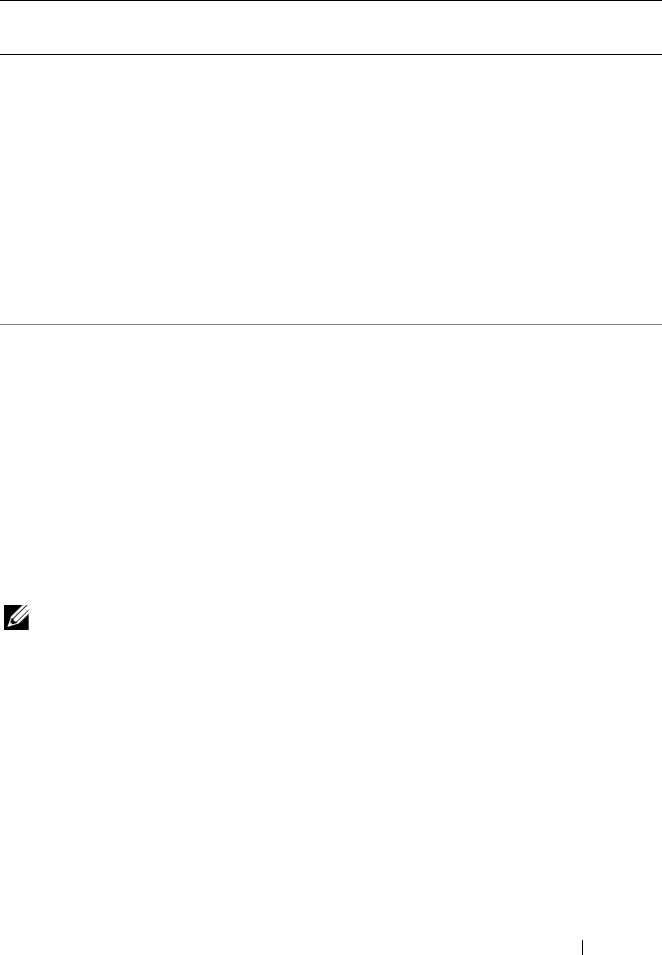
-s NA <string> This option prints the variable name and the value
assigned to it to the console. This option when
used with --envar, picks up the environment
variable data and stores it in a file. This file can be
called from a script. See "--envar" for more
information.
Example:
A:>syscfg -s ENVNAME --svctag
svctag=SERVICE
ENVNAME=SERVICE
--envar NA <filename> This option stores the environment variable data
to a file so that this file can be called from other
scripts.
Must have a valid path, and media should be
writable.
Table 3-1. SYSCFG General Options (continued)
Options Suboptions Valid
Arguments
Description
SYSCFG 27
SYSCFG for BIOS Configuration
SYSCFG uses BIOS interfaces to manipulate boot order and BIOS settings.
It configures all options available on the BIOS setup screen, including boot
order, embedded device configuration, and asset tag management.
Options for BIOS Configuration
Table 3-2 documents valid options and arguments along with a description of
their expected behavior. Options and arguments are case sensitive. All options
and predefined arguments are lowercase unless stated otherwise.
NOTE: Some of the following options or arguments might not be available on all
systems due to the BIOS version or hardware feature set. Running SYSCFG without
arguments displays only those options that are valid for your system.
--version* This option displays the version information,
current time, and date for the utility. This option
cannot be replicated.
Example:
A:>syscfg --version
syscfg version 1.X.XX AXX
© 2005 Dell Inc. All rights
reserved.
NOTE: The asterisk is not part of the command
syntax.
Table 3-1. SYSCFG General Options (continued)
Options Suboptions Valid
Arguments
Description
28 SYSCFG
Table 3-2. SYSCFG Options and Arguments for BIOS Configuration
Option Valid
Arguments
Description
--acpower on, off, last This option sets the behavior for the system after
AC power is lost. This option specifies how the
system responds to the restoration of AC power
and is particularly useful in systems that are turned
off using a power strip. When set to on, the system
turns on after AC is restored. When set to off, the
system does not turn on after AC is restored.
When set to last, the system turns on if the
system was on when AC power was lost; if the
system was off when AC power was lost, the
system remains off when power is restored.
This option is available on all supported systems.
This value can be replicated.
Example:
A:>syscfg --acpower=on
acpower=on
--
adjcacheprefetch
enable,
disable
When this option is set to enabled, the processor
fetches the cache line containing the currently
requested data, and prefetches the following
cache line.
When this option is set to disabled, the processor
fetches only the cache line containing the
currently requested data.
Example:
A:>syscfg --adjcacheprefetch=
enable
adjcacheprefetch=enable

SYSCFG 29
--asset <string> This option reports or sets the customer-
programmable asset tag number for a system. The
maximum length of an asset tag is 10 characters.
Asset tag values cannot contain any spaces. This
option is available on all supported systems. This
value can be replicated.
Example:
A:>syscfg --asset=
ASSETTAG
asset=
ASSETTAG
--assignintr standard,
distributed
This option controls the interrupt assignment of
PCI devices in the system. This option is set to
standard by default, causing standard interrupt
routing that uses interrupt A, B, C, D for all PCIe
devices. When set to distributed, the interrupt
routing is swizzled at the MCH root ports to
minimize sharing of interrupts across all PCIe
(and PCI-X in the Programmable Interrupt
Controller (PIC) mode) devices.
Example:
A:>syscfg --assignintr=standard
assignintr=standard
--bezelir enable,
disable
This option enables or disables the ESM to
monitor and log front bezel intrusion conditions.
Example:
A:>syscfg --bezelir=enable
bezelir=enable
Table 3-2. SYSCFG Options and Arguments for BIOS Configuration (continued)
Option Valid
Arguments
Description

30 SYSCFG
--bootseq numerical
list, separated
by commas
or
list of device
names,
separated by
commas
This option sets the boot order for a system.
Without an argument, this option prints the boot
order list. The argument must be formatted as a
comma-separated numerical list with no spaces.
The list must be within the bounds of the current
boot list, i.e. the low and high numbers must
match, and the same number of entries must be
supplied. This option is available on all supported
systems. Systems that use a numerical list for
boot order cannot be replicated.
Some systems also allow the boot order to be
expressed as a list of device names. Device names
are formatted as a name.location.instance string,
where name is the name of the device, location is
either slot or embedded (emb), and instance is
the numerical position of the device. Some device
name examples are shown below. Systems that
support a list of device names for boot order can
be replicated.
Numerical Lists Examples
A:>syscfg --bootseq=2,3,4,5,1,6
The following devices are set in
the boot sequence:
Device 2:* usbcdrom.slot.1 - USB
CD-ROM device
Device 3:* virtualcd.slot.1 –
VIRTUAL CDROM
Device 4:* hdd.emb.0 - Hard drive
C:
Device 5:* nic.emb.1 - MBA
v2.5.12 Slot 0500
Device 1:* virtualfloppy.slot.1 -
VIRTUAL FLOPPY
Table 3-2. SYSCFG Options and Arguments for BIOS Configuration (continued)
Option Valid
Arguments
Description

SYSCFG 31
Device 6:* usbfloppy.slot.1 - USB
Floppy device
NOTE: The asterisk indicates that the device is
enabled in the BIOS.
Device Name Examples
Example of device names:
nic.slot.1 (network adapter 1 in PCI slot)
nic.emb.1 (network adapter 1 on system
board)
hdd.emb.0 (hard drive C:)
cdrom.emb.0 (CD drive)
Device Name Lists Examples
Example 1:
#syscfg --bootseq
The following devices are set in
the boot sequence:
Device 2:* cdrom.emb.0 - IDE CD-
ROM device
Device 3:* hdd.emb.0 - Hard drive
C:
Device 5:* virtual.slot.1 -
VIRTUALCDROM DRIVE
Device 1:* floppy.emb.0 - Diskette
drive A:
Device 6:* virtual.slot.2 -
VIRTUALFLOPPY DRIVE
Device 4:* nic.emb.1 - IBA GE Slot
0638 v1226
Table 3-2. SYSCFG Options and Arguments for BIOS Configuration (continued)
Option Valid
Arguments
Description

32 SYSCFG
Example 2:
#syscfg --bootseq=
nic.emb.1,virtual.slot.1
The following devices are set in
the boot sequence:
Device 4:* nic.emb.1 - IBA GE Slot
0638 v1226
Device 6:* virtual.slot.2 -
VIRTUALFLOPPY DRIVE
Device 2:* cdrom.emb.0 - IDE CD-
ROM device
Device 3:* hdd.emb.0 - Hard drive
C:
Device 5:* virtual.slot.1 -
VIRTUALCDROM DRIVE
Device 1:* floppy.emb.0 - Diskette
drive A:
NOTE: The asterisk indicates that the device is
enabled in the BIOS.
--bootseqretry enable,
disable
This option enables or disables the boot sequence
retry feature. When set to enable, the system will
re-attempt to set the boot order after a 30 seconds
timeout if the last boot attempt has failed. This
option can be replicated.
A:>syscfg --bootseqretry=enable
bootseqretry=enable
Table 3-2. SYSCFG Options and Arguments for BIOS Configuration (continued)
Option Valid
Arguments
Description

SYSCFG 33
--conboot enable,
disable
This option configures or reports whether console
redirection occurs after boot. This option is
available on all supported systems that support
console redirection. This option can be replicated.
Example:
A:>syscfg --conboot=enable
conboot=enable
--conred serial1,
serial2, off,
bmcsol, mmb
This option configures or reports the
communication port for console redirection. If
this option is set to a serial port, then the serial
port option is not available. See the descriptions
for --serial1 and --serial2. If only one serial port is
present on a system, the serial2 argument is not
available. This option can be replicated.
Example:
A:>syscfg --conred=serial1
conred=serial1
--conterm vt100, ansi This option configures or reports the terminal
type for console redirection. This option is
available on all supported systems that support
console redirection. This option can be replicated.
Example:
A:>syscfg --conterm=vt100
conterm=vt100
--dbpm enable,
disable
This option enables or disables demand-based
power management. This option can be
replicated.
Example:
A:>syscfg --dbpm=enable
dbpm=enable
Table 3-2. SYSCFG Options and Arguments for BIOS Configuration (continued)
Option Valid
Arguments
Description

34 SYSCFG
--devseq numerical
list, separated
by commas
or
list of device
names,
separated by
commas
This option sets the hard-drive sequence for a
system. Without an argument, this option
displays the device list. The argument must be
formatted as a comma-separated numerical list of
device index values. The list must be within the
bounds of the current boot list. For example, the
low and high numbers must match. Systems that
use a numerical list for boot order cannot be
replicated. This option is available on all
supported systems.
Some systems allow the boot order to be
expressed as a list of device names. Systems that
support device names also support replication of
the boot order through the output file option.
Device names are formatted as a
name.location.instance string, where name is the
name of the device, location is either slot or
embedded (emb), and instance is the numerical
position of the device. Some device name
examples are shown below. Systems that support a
list of device names for boot order can be
replicated.
numerical
list, separated
by commas
or
list of device
names,
separated by
commas
Example 1:
A:>syscfg --devseq
The following devices are set in
the disk device sequence:
Device 1:* hdd.emb.0 - System BIOS
boot devices
Device 2:* scsiraid.slot.3 - PERC
4/SC Adapter(bus 02 dev 02)
Device 3:* usbkey.slot.0 - Hard-
disk-emulated USB flash drive
Table 3-2. SYSCFG Options and Arguments for BIOS Configuration (continued)
Option Valid
Arguments
Description
SYSCFG 35
Example 2:
A:>syscfg --devseq=
hdd.emb.1,scsiraid.emb.1
The following devices are set in
the disk device sequence:Device
1:* hdd.emb.0 - System BIOS boot
devices
Device 2:* scsiraid.emb.1 - AIC-
7899, A:00 Seagate
NOTE: The asterisk indicates that the device is
enabled in the BIOS.
--embhypervisor off, on This option enables or disables the embedded
hypervisor port.
Example:
A:>syscfg --embhypervisor=on
embhypervisor=on
--embideraid on, off This option enables or disables the embedded
IDE RAID controller. This option is only valid for
supported systems that have IDE ROMB. This
option can be replicated.
Example:
A:>syscfg --embideraid=on
embideraid=on
Table 3-2. SYSCFG Options and Arguments for BIOS Configuration (continued)
Option Valid
Arguments
Description
36 SYSCFG
--embnic1 on, off,
onnopxe,
onwithiscsi
This option turns the first embedded NIC on
with PXE on, off, or on without PXE enabled.
This option is only valid for supported systems
that have an NIC. If the NIC is enabled without
PXE, it is not found in the boot order. If the NIC
is turned on with PXE, it is placed at the end of the
boot order. The onnopxe argument is not
supported on all systems.
The onwithiscsi argument enables the embedded
NIC to boot from the iSCSI server. The embnic1
option can be replicated.
Example:
A:>syscfg --embnic1=onnopxe
embnic1=onnopxe
--embnic2 on, off,
onnopxe,
onwithiscsi
This option turns the second embedded NIC on
with PXE enabled, off, or on without PXE
enabled. This option is only valid for supported
systems that have two embedded NICs. If the
second NIC is enabled without PXE, it is not
found in the boot order. If the second NIC is
turned on with PXE, it is placed at the end of the
boot order. The onnopxe argument is not
supported on all systems. This option can be
replicated.
The onwithiscsi argument enables the embedded
NIC to boot from the iSCSI server. The embnic2
option can be replicated.
Example:
A:>syscfg --embnic2=onnopxe
embnic2=onnopxe
Table 3-2. SYSCFG Options and Arguments for BIOS Configuration (continued)
Option Valid
Arguments
Description

SYSCFG 37
--embnic3 on, off,
onnopxe,
onwithiscsi
This option turns the third embedded NIC on
with PXE enabled, off, or on without PXE
enabled. This option is only valid for supported
systems that have three embedded NICs. If the
second NIC is enabled without PXE, it is not
found in the boot order. If the third NIC is turned
on with PXE, it is placed at the end of the boot
order. The onnopxe argument is not supported on
all systems. This option can be replicated.
The onwithiscsi argument enables the embedded
NIC to boot from the iSCSI server. The embnic3
option can be replicated.
Example:
A:>syscfg --embnic3=onnopxe
embnic3=onnopxe
--embnic4 on, off,
onnopxe,
onwithiscsi
This option turns the fourth embedded NIC on
with PXE enabled, off, or on without PXE
enabled. This option is only valid for supported
systems that have four embedded NICs. If the
fourth NIC is enabled without PXE, it is not
found in the boot order. If the fourth NIC is
turned on with PXE, it is placed at the end of the
boot order. The onnopxe argument is not
supported on all systems. This option can be
replicated.
The onwithiscsi argument enables the embedded
NIC to boot from the iSCSI server. The embnic4
option can be replicated.
Example:
A:>syscfg --embnic4=onnopxe
embnic4=onnopxe
Table 3-2. SYSCFG Options and Arguments for BIOS Configuration (continued)
Option Valid
Arguments
Description
38 SYSCFG
--embnics on, off This option enables or disables both embedded
NICs. This option is only present on systems that
do not support the embnic1 and embnic2
options. This option can be replicated.
Example:
A:>syscfg --embnics=on
embnics=on
--embnic1pxe enable,
disable
This option enables or disables PXE on the first
embedded NIC. If PXE is disabled, the first NIC
is not found in the boot order. If PXE is enabled,
the first NIC is placed at the end of the boot
order. This option is only present on systems that
do not support the embnic1 option. This option
can be replicated.
Example:
A:>syscfg --embnic1pxe=enable
embnic1pxe=enable
--embnic2pxe enable,
disable
This option enables or disables PXE on the
second embedded NIC. If PXE is disabled, the
second NIC is not found in the boot order. If PXE
is enabled, the second NIC is placed at the end of
the boot order. This option is only present on
systems that do not support the embnic2 option.
This option can be replicated.
Example:
A:>syscfg --embnic2pxe=disable
embnic2pxe=disable
Table 3-2. SYSCFG Options and Arguments for BIOS Configuration (continued)
Option Valid
Arguments
Description
SYSCFG 39
--embsataraid off,
combined,
ata, raid,
qdma
This option configures an embedded SATA RAID
controller. This option can be replicated.
off — disables the embedded SATA RAID
controller.
combined — sets the SATA RAID controller to
combined mode.
ata — sets SATA RAID controller to ATA mode.
raid — sets SATA RAID controller to RAID
mode.
qdma — sets the SATA RAID controller to
support ATAPI devices at transfer rates much
higher than PIO. A device driver must be installed
on your system to use the the QDMA mode.
Example:
A:>syscfg --embsataraid=off
embsataraid=off
--embscsi1 on, off This option enables or disables the first
embedded SCSI controller. This option is only
valid for supported systems that have an
embedded SCSI controller. This option can be
replicated.
Example:
A:>syscfg --embscsi1=on
embscsi1=on
--embscsi2 on, off This option enables or disables the second
embedded SCSI controller. This option is only
valid for supported systems that have an
embedded SCSI controller. This option can be
replicated.
Example:
A:>syscfg --embscsi2=on
embscsi2=on
Table 3-2. SYSCFG Options and Arguments for BIOS Configuration (continued)
Option Valid
Arguments
Description
40 SYSCFG
--embscsiraid raid, off, scsi This option enables or disables the embedded
SCSI RAID controller. This option is only valid
for supported systems that have SCSI ROMB.
Some systems do not support the scsi argument.
This option can be replicated.
NOTICE: If you change the controller from
SCSI to RAID mode, data loss may occur.
Backup any data you need to save before
changing modes.
Example:
A:>syscfg --embscsiraid=raid
embscsiraid=raid
--embscsiraidchb raid, scsi This option sets the second channel on an
embedded RAID controller to SCSI or RAID.
This option is only valid for supported systems
that support RAID/RAID and RAID/SCSI
settings for channels A and B. This option can be
replicated.
Example:
A:>syscfg --embscsiraidchb=raid
embscsiraidchb=raid
Table 3-2. SYSCFG Options and Arguments for BIOS Configuration (continued)
Option Valid
Arguments
Description

SYSCFG 41
--extserial com1, com2,
rad
This option sets the behavior of the external serial
connector. When set to com1, the BIOS maps the
external serial connector to COM port 1. The
com1 setting is the default.
When set to com2, the external serial connector
is routed to the COM2 interface. Terminal escape
sequences can toggle the external connector
between the system (COM2) and the remote
access device.
When set to rad, the external serial connector is
routed to the remote access device interface.
Terminal escape sequences can toggle the
external connector between the system (COM2)
and the remote access device.
This option can be replicated.
NOTE: This option is not supported on PowerEdge
1955 systems.
Example:
A:>syscfg --extserial=com1
extserial=com1
On Dell
™
PowerEdge
™
x9xx systems, the --
serialcomm option can be used with the external
serial (--extserial) option instead of the --conred
option.
--fiberchannel enable,
disable
This option enables or disables embedded fiber
channel. This option can be replicated.
Example:
A:>syscfg --fiberchannel=enable
fiberchannel=enable
Table 3-2. SYSCFG Options and Arguments for BIOS Configuration (continued)
Option Valid
Arguments
Description
42 SYSCFG
--floppy auto, off,
readonly
This option sets the diskette drive controller to
auto, off, or read-only. This option is available on
all supported systems that have a supported
diskette drive. This option can be replicated.
Example:
A:>syscfg --floppy=auto
floppy=auto
--fsbr 115200,
57600,
19200, 9600
This option sets the console redirection fail safe
baud rate in bps.
Example:
A:>syscfg --fsbr=9600
fsbr=9600
--hddfailover off, on This option specifies the device in the hard disk
drive sequence menu that has not been
attempted in the boot sequence.When set to on,
all devices are attempted in order. When set to
off, only the first device in the hard disk sequence
is attempted. This option can be replicated.
Example:
A:>syscfg --hddfailover=on
hddfailover=on
--hwprefetcher enable,
disable
When set to enable, this option makes the
processor look ahead and see what data might be
needed next. When some data is found, it loads
several steps in advance.
When set to disable, it does not look ahead.
This option can be replicated.
Example:
A:>syscfg --hwprefetcher=enable
hwprefetcher=enable
Table 3-2. SYSCFG Options and Arguments for BIOS Configuration (continued)
Option Valid
Arguments
Description
SYSCFG 43
--idecdrom auto, off This option enables or disables the CD drive.
This option can be replicated.
Example:
A:>syscfg --idecdrom=auto
idecdrom=auto
--idracgui enable,
disable
Enables and disables the iDRAC GUI. This
option can be replicated.
Example:
A:>syscfg --idracgui=disable
idracgui=disable
--integratedraid enable,
disable
This option enables or disables the integrated
RAID controller. This option can be replicated.
Example:
A:>syscfg --integratedraid=disable
integratedraid=disable
--integratedsas enable,
disable
This option enables or disables the integrated
SAS controller. This option can be replicated.
Example:
A:>syscfg --integratedsas=enable
integratedsas=enable
--internalusb off, on This option enables or disables all the user-
accessible USB ports. This option can be
replicated.
Example:
A:>syscfg --internalusb=on
internalusb=on
Table 3-2. SYSCFG Options and Arguments for BIOS Configuration (continued)
Option Valid
Arguments
Description
44 SYSCFG
--ioat enable,
disable
This option enables or disables the I/O
Acceleration Technology (I/OAT) DMA Engine
option. This option must be enabled only if the
hardware and software support I/OAT on your
system. This option can be replicated.
Example:
A:>syscfg --ioat=enable
ioat=enable
--lcd default,
none, user
This option selects whether to display the default
string (model name and number) or a user-
defined string in the front-panel LCD (Liquid
Crystal Display). This option can be replicated.
Example:
A:>syscfg --lcd=default
lcd=default
--lcd1 <string> This option sets the first line of user-defined text
on the system LCD. This option can be
replicated.
NOTE: Before setting user strings for this option,
ensure that --lcd is set to user.
NOTE: If you have a PowerEdge x6xx, x7xx, or x8xx
system, you need to reboot your system for the
settings to take effect.
--lcd2 <string> This option sets the second line of user-defined
LCD strings.
--logicproc enable,
disable
This option enables or disables logical processing
for a system. This option is available on all
systems that support logical processing
(Hyperthreading). This option can be replicated.
Example:
A:>syscfg --logicproc=enable
logicproc=enable
Table 3-2. SYSCFG Options and Arguments for BIOS Configuration (continued)
Option Valid
Arguments
Description
SYSCFG 45
--lpt lpt1, lpt2,
lpt3, disable
This option configures or reports the I/O address
of the LPT (parallel) port. This option is available
on all supported systems with an LPT port. This
option is recorded to an output file for replication.
Example:
A:>syscfg --lpt=lpt1
lpt=lpt1
--lptmode ps2, at This option configures or reports the mode of an
LPT (parallel) port. This option is available on all
supported systems with an LPT port. This option
is recorded to an output file for replication.
Example:
A:>syscfg --lptmode=ps2
lptmode=ps2
--memintleave enable,
disable
This option enables or disables the memory
interleave mode. This option can be replicated.
Example:
A:>syscfg --memintleave=enable
memintleave=enable
--memremap off, auto This option enables or disables memory
remapping.
A:>syscfg --memremap=off
memintleave=off
--memtest enable,
disable
This option enables or disables the POST
extended memory test.
Example:
A:>syscfg --memtest=disable
memtest=disable
Table 3-2. SYSCFG Options and Arguments for BIOS Configuration (continued)
Option Valid
Arguments
Description

46 SYSCFG
--mouse off, on This option turns the mouse controller on or off.
This option can be replicated.
Example:
A:>syscfg --mouse=off
mouse=off
--nextboot valid device
name (from
the --bootseq
option device
list)
This option sets the specified device as the first
device in the boot order for the next boot cycle
only. The device must be a device from the
--bootseq option device list. Run the --bootseq
option to see a list of available device names. See -
-bootseq for more information. This option is not
replicated.
Example 1:
A:>syscfg --bootseq
Device 1: floppy.emb.0 - Diskette
Drive A:
Device 2: cdrom.emb.0 - CD-ROM
device
Device 3: hdd.emb.0 - Hard Drive
C:
Device 4: nic.emb.1 - Intel Boot
Agent Version 4.0.17
Device 5: nic.emb.2 - Intel Boot
Agent Version 4.0.17
Example 2:
A:>syscfg --nextboot=nic.emb.1
nextboot=nic.emb.1
Table 3-2. SYSCFG Options and Arguments for BIOS Configuration (continued)
Option Valid
Arguments
Description

SYSCFG 47
--noraidprompt* NA This option specifies that the BIOS must not
prompt for confirmation when changing the
mode of a RAID controller. This option can only
be used with the --embscsiraid or --
embscsiraidchb options. Without this option, the
user is prompted during POST to confirm the
change of a RAID controller from RAID(SCSI) to
SCSI(RAID). This option is not replicated.
NOTICE: When changing a RAID controller
from SCSI to RAID or from RAID to SCSI, data
is lost on the affected hard drives. You do not
see the message warning you of this data
loss when using the --noraidprompt option. To
avoid data loss, back up any information on
the hard drives before changing the type of
controller used with the drives.
Example:
A:>syscfg --embscsiraid=raid --
noraidprompt
embscsiraid=raid
NOTE: The asterisk is not part of the command
syntax.
--numlock on, off This option enables or disables the keyboard
number lock during POST. This option is not
replicated.
Example:
A:>syscfg --numlock=on
numlock=on
Table 3-2. SYSCFG Options and Arguments for BIOS Configuration (continued)
Option Valid
Arguments
Description

48 SYSCFG
--oldsetuppwd <string> This option is required to set a new setup
password when a setup password is currently set.
The setup password locks the BIOS setup screen.
The argument string supplied to this option is the
current password. If this password is not correct,
the new setup password is not applied to the
system. Generally, passwords are limited to
alphanumeric characters and cannot exceed 32
characters in length. This option is not replicated.
Example:
A:>syscfg --setuppwd=
asetuppassword
--oldsetuppwd=
currentpassword
The password has been set. Please
use a warm reboot to apply the
password to the system.
Table 3-2. SYSCFG Options and Arguments for BIOS Configuration (continued)
Option Valid
Arguments
Description

SYSCFG 49
--oldsyspwd <string> This option supplies the current system password
for the BIOS. This option is only given when
setting the new system password. If this password
does not match the current system password, the
new password is not applied to the system.
The system password is required when booting
the system. The argument string supplied to this
option will be the password. Generally, passwords
are limited to alphanumeric characters and
cannot exceed 32 characters in length. This
option is not replicated.
Example 1:
A:>syscfg --syspwd=
anotherpassword
--oldsyspwd=
password
The password has been set. Please
use a warm reboot to apply the
password to the system.
Example 2:
A:>syscfg --syspwd=asyspassword
--oldsyspwd=currentpassword
The old password entered is
incorrect. The new password will
not be set. Please try again.
--opticaldrivectrl enable,
disable
This option enables or disables the optical
CD-ROM controller.
Example:
A:>syscfg --opticaldrivectrl=
enable
opticaldrivectrl=enable
Table 3-2. SYSCFG Options and Arguments for BIOS Configuration (continued)
Option Valid
Arguments
Description

50 SYSCFG
--osmode enable,
disable
This option enables or disables operating system
installation mode for installing operating systems.
Enabling this option causes the BIOS to only
report 256 MB to the operating system. Some
operating systems cannot be installed if a system
has more than 2 GB of memory. This option can
be replicated.
Example:
A:>syscfg --osmode=enable
osmode=enable
--
oswatchdogtimer
enable,
disable
If your system stops responding, the watchdog
timer aids in the recovery of your operating
system. When this option is set to enable, the
operating system is allowed to initialize the timer.
When set to disable (the default), the timer will
have no effect on the system.
Example:
A:>syscfg --oswatchdogtimer=enable
oswatchdogtimer=enable
--ovrwrt* NA This option is only used with the -o option to
cause the output file to be overwritten if a file of
the same name already exists. This option cannot
be replicated.
Example:
A:>syscfg -o=
filename
.ini --ovrwrt
The file
filename
has been
overwritten.
NOTE: The asterisk is not part of the command
syntax.
Table 3-2. SYSCFG Options and Arguments for BIOS Configuration (continued)
Option Valid
Arguments
Description
SYSCFG 51
--powerbutton enable,
disable
This option enables or disables the power button
for a system. This option is recorded to an output
file for replication. This option is available on all
supported systems.
Example:
A:>syscfg --powerbutton=enable
powerbutton=enable
NOTE: The system must be rebooted for BIOS
options to take effect.
--pwdlock lock, unlock This option locks the system password. If the
system password is locked, it can be modified only
through the F2 screen with the setup password.
This option can be replicated.
Example:
A:>syscfg --pwdlock=lock
pwdlock=lock
--redmem off, spare,
mirror, raid
This option allows selection of the desired
redundant memory mode, or disables redundant
memory. This option can be replicated.
Example:
A:>syscfg --redmem=off
redmem=off
NOTE: The system must be rebooted for BIOS
options to take effect.
--rptkeyerr enable,
disable
This option configures or reports whether the
BIOS reports keyboard errors during POST.
This option can be replicated.
Example:
A:>syscfg --rptkeyerr=disable
rptkeyerr=disable
Table 3-2. SYSCFG Options and Arguments for BIOS Configuration (continued)
Option Valid
Arguments
Description
52 SYSCFG
--sata0 auto, off This option enables or disables SATA port 0.
This option can be replicated.
Example:
A:>syscfg --sata0=auto
sata0=auto
NOTE: This option maps to --sata_a for PowerEdge
x9xx systems.
--sata1 auto, off This option enables or disables SATA port 1.
This option can be replicated.
Example:
A:>syscfg --sata1=auto
sata1=auto
NOTE: This option maps to --sata_b for
PowerEdge x9xx systems.
--sata2 auto, off This option enables or disables SATA port 2.
This option can be replicated.
Example:
A:>syscfg --sata2=auto
sata2=auto
NOTE: This option maps to --sata_c for
PowerEdge x9xx systems.
--sata3 auto, off This option enables or disables SATA port 3.
This option can be replicated.
Example:
A:>syscfg --sata3=auto
sata3=auto
NOTE: This option maps to --sata_d for
PowerEdge x9xx systems.
Table 3-2. SYSCFG Options and Arguments for BIOS Configuration (continued)
Option Valid
Arguments
Description
SYSCFG 53
--sata4 auto, off This option enables or disables SATA port 4.
This option can be replicated.
Example:
A:>syscfg --sata_4=auto
sata_4=auto
NOTE: This option maps to --sata_e for
PowerEdge x9xx systems.
--sata5 auto, off This option enables or disables SATA port 5.
This option can be replicated.
Example:
A:>syscfg --sata_5=auto
sata_5=auto
NOTE: This option maps to --sata_f for
PowerEdge x9xx systems.
--sata6 auto, off This option enables or disables SATA port 6.
This option can be replicated.
Example:
A:>syscfg --sata_6=auto
sata_6=auto
NOTE: This option maps to --sata_g for
PowerEdge x9xx systems.
--sata7 auto, off This option enables or disables SATA port 7.
This option can be replicated.
Example:
A:>syscfg --sata_7=auto
sata_7=auto
NOTE: This option maps to --sata_h for
PowerEdge x9xx systems.
Table 3-2. SYSCFG Options and Arguments for BIOS Configuration (continued)
Option Valid
Arguments
Description
54 SYSCFG
--snoopfilter enable,
disable
This option enables or disables the snoop filter
option from the system BIOS.
Example:
A:>syscfg --snoopfilter=enable
snoopfilter=enable
--speaker on, off This option turns the built-in speaker on or off.
This option can be replicated.
NOTE: The --speaker option is not supported on
certain PowerEdge systems.
Example:
A:>syscfg --speaker=on
speaker=on
--serial1 disable,
com1, com3,
com1_bmc,
bmcserial,
bmclan, rac
This option configures or reports the first serial
port communication port. This option can be
replicated.
bmcserial — maps serial port 1 to BMC Serial.
bmclan — routes the serial traffic destined for
serial1 out to NIC1.
com1_bmc — maps serial port 1 to COM port 1
BMC.
rac — maps serial port 1 to the RAC device.
Example:
A:>syscfg --serial1=rac
serial1=rac
--serial2 auto, disable,
com2, com4
This option configures or reports the second serial
port communication port. This option can be
replicated.
Example:
A:>syscfg --serial2=disable
serial2=disable
Table 3-2. SYSCFG Options and Arguments for BIOS Configuration (continued)
Option Valid
Arguments
Description

SYSCFG 55
--serialcomm on, com1cr,
com2cr, off
This option sets the behavior of the serial port
communication. When set to on, this option tells
the BIOS to enable COM port 1 and COM port
2. These ports are made available for use by the
operating system or applications. BIOS Console
Redirection is disabled.
When set to com1cr, this option tells the BIOS to
enable COM port 1 and COM port 2. These ports
are made available for use by the operating system
or applications. BIOS Console Redirection is
through COM port 1.
When set to com2cr, this option tells the BIOS to
enable COM port 1 and COM port 2. These ports
are made available for use by the operating system
or applications. BIOS Console Redirection is
through COM port 2.
When set to off, this option tells the BIOS to
disable COM port 1 and COM port 2.
This option is replicated.
Example:
A:>syscfg --serialcomm=on
serialcomm=on
On Dell PowerEdge x9xx systems, the --
serialcomm option can be used with the external
serial (--extserial) option instead of the --conred
option.
Table 3-2. SYSCFG Options and Arguments for BIOS Configuration (continued)
Option Valid
Arguments
Description

56 SYSCFG
--setuppwd <string> This option sets the setup password for the BIOS.
The setup password locks the BIOS F2 screen.
The argument string supplied to this option is the
password. Generally, passwords are limited to
alphanumeric characters and cannot exceed
32 characters in length. If a current setup password
is set, it must be given through the --oldsetuppwd
option. This option is not replicated.
Example 1:
A:>syscfg --setuppwd=
asetuppassword
The password has been set. Please
use a warm reboot to apply the
password to the system.
Example 2:
A:>syscfg --setuppwd=
asetuppassword
--oldsetuppwd=currentpassword
The password has been set. Please
use a warm reboot to apply the
password to the system.
Example 3:
A:>syscfg --setuppwd=
asetuppassword
--oldsetuppwd=currentpassword
The old password entered is
incorrect. The new password will
not be set. Please try again.
NOTE: You cannot disable your password using
DTK. To disable your password, you must use the
system BIOS.
Table 3-2. SYSCFG Options and Arguments for BIOS Configuration (continued)
Option Valid
Arguments
Description

SYSCFG 57
--sma enable,
disable
This option enables or disables processor
sequential memory access.
Example:
A:>syscfg --sma=disable
sma=disable
--svctag* NA This option reports the service tag for a system. If
the system is modular, it displays the service tag
for PowerEdge 1855. If used with the -s general
option, the environment variable is set to the
service tag.
Example:
A:>syscfg --svctag
svctag=113CD1S
NOTE: The asterisk is not part of the command
syntax.
Table 3-2. SYSCFG Options and Arguments for BIOS Configuration (continued)
Option Valid
Arguments
Description

58 SYSCFG
--syspwd <string> This option sets the system password for the
BIOS. The system password is required when
booting the system. The argument string supplied
to this option is the password. Generally,
passwords are limited to alphanumeric characters
and cannot exceed 32 characters in length. If a
current system password is set, it must be given
through the --oldsyspwd option. This option is not
replicated.
Example 1:
A:>syscfg --syspwd=
password
The password has been set. Please
use a warm reboot to apply the
password to the system.
Example 2:
A:>syscfg --syspwd=
password
--oldsyspwd=
password
The password has been set. Please
use a warm reboot to apply the
password to the system.
NOTE: You cannot disable your password using
DTK. To disable your password, you must use the
system BIOS.
--tpm
NOTE: For details about the tpm suboptions and arguments, see Table 3-3. This option
is available only on xx0x systems.
Table 3-2. SYSCFG Options and Arguments for BIOS Configuration (continued)
Option Valid
Arguments
Description

SYSCFG 59
--usb on, legacy, off This option sets or reports the status of the USB
port. When set to on, USB keyboards and mice
function only for systems with operating systems
that have native USB support. When set to
legacy, USB keyboards and mice are supported
through the BIOS to function in operating
systems that do not natively support USB. This
option can be replicated.
Example:
A:>syscfg --usb=on
usb=on
--usbflash auto, fdd,
hdd
This option sets or reports the emulation for a USB
flash device. The USB flash device can be set to
emulate a hard drive (hdd) or a
diskette drive (fdd). This option can be
replicated.
Example:
A:>syscfg --usbflash=auto
usbflash=auto
NOTE: This option cannot be set on x9xx and xx0x
systems.
--usbports enable,
enablebackon
ly, disable
This option enables or disables USB ports. When
set to enable, it enables all user accessible USB
ports. When set to enablebackonly, the front user
accessible ports are disabled. When set to disable,
both front and back user accessible ports are
disabled.
This option can be replicated.
Example:
A:>syscfg --usbports=enable
usbports=enable
Table 3-2. SYSCFG Options and Arguments for BIOS Configuration (continued)
Option Valid
Arguments
Description
60 SYSCFG
Table 3-3 lists the suboptions and arguments for the tpm option.
--virtualization enable,
disable
This option enables or disables virtualization in
the CPU. When set to enable, it enables the
additional hardware capabilities provided by
Virtualization Technology in applicable CPUs.
When set to disable, it disables the additional
hardware capabilities provided by Virtualization
Technology.
This option can be replicated.
Example:
A:>syscfg --virtualization=enable
virtualization=enable
--virtualmedia enable,
disable
This option enables or disables virtual media in
Dell Remote Access Controller (DRAC) 5.
Example:
A:>syscfg --virtualmedia=enable
virtualmedia=enable
Table 3-2. SYSCFG Options and Arguments for BIOS Configuration (continued)
Option Valid
Arguments
Description

SYSCFG 61
Table 3-3. Suboptions and Arguments for the tpm Option
Option Suboption Arguments Description
tpm --tpmsecurity off Does not report the presence of TPM to
the operating system.
onwithpbm Directs the BIOS to store the TCG
compliant measurements to the TPM
during a POST operation.
onwithoutp
bm
Directs the BIOS to bypass the pre-boot
measurements.
Example:
A:>syscfg tpm --tpmsecurity =
onwithoutpbm --
setuppwdoverride

62 SYSCFG
--tpmactivation enabled Enables and activates the TPM feature.
disabled Disables and deactivates the TPM feature.
nochange Does not alter the operational state of the
TPM feature.
Example:
A:>syscfg tpm --
tpmactivation=enabled --
setuppwdoverride
NOTE: You cannot set tpmactivation when tpmsecurity is
set to off.
NOTE: After setting tpmactivation to enabled or disabled, if
you reboot your system, DTK displays the ’TPM
Configuration Honoured system will reset
and the system reboots again’ message and
reboots once again.
--tpmclear NA Clears the contents of the TPM chip
without erasing the tpmsecurity and
tpmactivation settings.
Example:
A:>syscfg tpm --
tpmactivation=enabled --
tpmclear --setuppwdoverride
--
undotpmclear
NA Undoes the result of the tpmclear setting.
If you specify this setting before specifying
the tpmclear setting, the ‘There is
currently no pending TPM Clear
request’ message is displayed.
Example:
A:>syscfg tpm --
tpmactivation=enabled --
undotpmclear --
setuppwdoverride
Table 3-3. Suboptions and Arguments for the tpm Option (continued)
Option Suboption Arguments Description
SYSCFG 63
SYSCFG for BMC and Remote Access Controller
Configuration
SYSCFG configures BMC and Remote Access Controller settings.
NOTE: Some of the following options or arguments might not be available on all
systems.
NOTE: For options that use text strings such as username, password, hostname,
and community string, using some characters such as <space>, <, >, |, or = on the
command line can be misinterpreted by the command line parser and cause errors.
NOTE: The following options or arguments are also applicable to DRAC 5.
The following tables document valid options, suboptions, and arguments
along with a description of the expected behavior of each option and
suboption. Options, suboptions, and arguments are case sensitive. All
options, suboptions, and predefined arguments are lowercase unless explicitly
stated otherwise.
--valsetuppwd <string> Validates the setup password for TPM
authentication. If you try to change DTK
settings, you will be prompted to enter this
password to access the settings.
Example:
A:>syscfg tpm --
tpmactivation=enabled --
tpmclear --valsetuppwd=
<setup_password>
--
setuppwdover
ride
NA On systems that do not have a setup
password configured, if you set this option,
you will not be prompted for a password to
access DTK settings.
A:>syscfg tpm --
tpmactivation=enabled --
tpmclear --setuppwdoverride
Table 3-3. Suboptions and Arguments for the tpm Option (continued)
Option Suboption Arguments Description

64 SYSCFG
The following section documents all the valid options, suboptions, and their
arguments along with a description of the expected behavior using an
example. Some features that need to be noted while reading this section are:
• Unless otherwise specified, all suboptions to options are optional.
• If a suboption is not specified for an option, all valid suboption values are
displayed for the option. If suboptions are specified, then only those
suboptions are reported.
• Wherever options or suboptions take empty strings as input, the string
NULL should be input. For example, options such as
username
and
suboptions such as
commstring
and
hostname
can take an empty string as
input.
NOTE: Some of the following options or arguments might not be available on all
systems.
NOTE: The following options or arguments are also applicable to DRAC 5.
BMC and Remote Access Controller Configuration Options
Table 3-4 lists the options, suboptions, and predefined arguments for
configuring your system BMC and remote access controller (RAC).

SYSCFG 65
Table 3-4. BMC and Remote Access Controller Configuration Options
Options Suboptions Valid Arguments Description
bmcversion Displays the version
information for the
BMC and the BMC
firmware. This option
cannot be replicated.
--devid NA Reports the BMC
device ID.
--devrevision NA Reports the BMC
device revision.
--majorfwrevision NA Reports the BMC
device major firmware
revision.
--minorfwrevision NA Reports the BMC
device minor firmware
revision.
Example:
A:>syscfg
bmcversion
devid=32
devrevision=0
majorfwrevision=
0
minorfwrevision=
40

66 SYSCFG
--clearsel* NA NA Clears the SEL. This
option cannot be
replicated.
Example:
A:>syscfg --
clearsel
Clearing SEL...
NOTE: The asterisk is
not part of the command
syntax.
--deviceguid* NA NA Displays the GUID for
the BMC. This option
cannot be replicated.
Example:
A:>syscfg --
deviceguid
deviceguid=
XXXXXXXXXX
NOTE: The asterisk is
not part of the command
syntax.
Table 3-4. BMC and Remote Access Controller Configuration Options (continued)
Options Suboptions Valid Arguments Description

SYSCFG 67
--encryptkey NA <hexadecimal
number>
Encrypts the IPMI
sessions.
The hexadecimal
number entered as an
argument is not case
sensitive although the
value returned by the
encryptkey option is
always in uppercase.
The value returned is
appended with zeroes
so that it is always 40
characters long.
Example:
A:>syscfg --
encryptkey=abcd
encryptkey=
ABCD000000000000
0000000000000000
00000000
--identify NA 0–254
NOTE: Use 0 to
stop flashing the
LED.
Flashes the
identification LED for
a specified number of
seconds.
NOTE: This option
applies only to
PowerEdge systems
with a BMC.
lanchannelacce
ss
or
lca
Sets or displays the
LAN channel access
settings such as
alerting, IPMI over
LAN, and user
privilege. This option
can be replicated.
Table 3-4. BMC and Remote Access Controller Configuration Options (continued)
Options Suboptions Valid Arguments Description

68 SYSCFG
--pefalerting enable, disable Enables or disables
PEF alerts. This
suboption can be
replicated.
--ipmioverlan disable,
alwaysavail
Sets the LAN channel
access mode. This
suboption can be
replicated.
--channelprivlmt user, operator,
administrator
Sets the maximum
privilege level accepted
for the LAN channel.
This suboption can be
replicated.
Example (to configure
the LAN channel with
alerts and IPMI over
LAN enabled):
A:>syscfg
lanchannelaccess
--pefalerting=
enable
--ipmioverlan=
alwaysavail
lanchannelaccess
pefalerting=
enable
ipmioverlan=
alwaysavail
lanchannelinfo
or
lci
Displays media and
protocol information
about the LAN
channel. This option
cannot be replicated.
Table 3-4. BMC and Remote Access Controller Configuration Options (continued)
Options Suboptions Valid Arguments Description

SYSCFG 69
lancfgparams
or
lcp
Configures and displays
LAN configuration
parameters. This
option can be
replicated.
--ipaddrsrc static, dhcp Sets the IP address
source for the LAN
channel. This
suboption can be
replicated.
--ipaddress <ipaddress> Sets the IP address for
the LAN channel.
This suboption cannot
be replicated.
--subnetmask <subnetmask> Sets the subnet mask
for the LAN channel.
This suboption can be
replicated.
--gateway <gateway> Sets the gateway for the
LAN channel. This
suboption can be
replicated.
Table 3-4. BMC and Remote Access Controller Configuration Options (continued)
Options Suboptions Valid Arguments Description

70 SYSCFG
--commstring <string> Sets the community
string (maximum of
16 printable ASCII
characters) used in a
platform event trap
(PET). This suboption
can be replicated.
--destipaddr <ipaddress> Sets the destination IP
address for the alert
destination specified
with the alertdest
suboption. The
destipaddr suboption is
dependent on the
alertdest suboption. If
the alertdest suboption
is not specified on the
command line, the first
alert destination
(alertdest=1) is
set with this IP address.
This suboption can be
replicated.
--alertdest 1, 2, 3, 4 Sets the destination for
the LAN alert.
This suboption can be
replicated.
--vlantag enable, disable Enables or disables
VLAN tagging. This
suboption can be
replicated.
--vlanid <string> Sets the 12-bit VLAN
ID. This suboption can
be replicated.
Table 3-4. BMC and Remote Access Controller Configuration Options (continued)
Options Suboptions Valid Arguments Description

SYSCFG 71
--vlanpriority 0–7 Sets the VLAN priority
value. This suboption
can be replicated.
--macaddress NA Displays the BMC
MAC address. This
suboption cannot be
replicated.
--nicselection shared,
sharedfailover,
dedicated
Sets the operating
mode of the NIC to
shared/sharedfailover/d
edicated. Some of these
options are not
applicable on certain
systems.
fullduplex enable, disable Enables or disables full
duplex on the RAC
network interface.
--autoneg enable, disable Enables or disables
autonegotiation.
--speed 10,100 Sets the network
interface speed to 10 or
100 Mbps.
--dnsdhcp enable, disable Enables or disables
obtaining the DNS
server IP address
through DHCP.
--dnsserver1 <ipaddress> Sets the IP address of
the primary DNS server
for domain name
resolution.
--dnsserver2 <ipaddress> Sets the IP address of
the secondary DNS
server for domain name
resolution.
Table 3-4. BMC and Remote Access Controller Configuration Options (continued)
Options Suboptions Valid Arguments Description

72 SYSCFG
--dnsregisterrac enable, disable Enables or disables
binding of the RAC
name to the IP address.
--dnsracname <string> Sets the name of the
RAC.
--
domainnamefromdhcp
enable, disable Enables or disables
getting the RAC
domain name through
DHCP.
--domainname <string> Sets the domain name
of the RAC.
Example 1 (to display
the current LAN
configuration settings):
A:>syscfg --
lancfgparams
lancfgparams
destipaddr=
192.168.100.15
vlantag=enable
vlanid=1000
vlanpriority=7
macaddress=
0:6:5b:fb:c8:a7
commstring=
public
ipaddrsrc=static
ipaddress=
192.168.100.10
subnetmask=
255.255.255.0
gateway=
192.168.100.1
Table 3-4. BMC and Remote Access Controller Configuration Options (continued)
Options Suboptions Valid Arguments Description

SYSCFG 73
Example 2 (to set the
LAN configuration
parameters):
A:>syscfg
lancfgparams
--destipaddr=
192.168.100.15
--vlantag=enable
--vlanid=1000
--vlanpriority=7
--commstring=
public
--ipaddrsrc=
static
--ipaddress=
192.168.100.10
--subnetmask=
255.255.255.0
--gateway=
192.168.100.1
lancfgparams
destipaddr=
192.168.100.15
vlantag=enable
vlanid=1000
vlanpriority=7
macaddress=
0:6:5b:fb:c8:a7
commstring=
public
ipaddrsrc=static
ipaddress=
192.168.100.10
subnetmask=
255.255.255.0
gateway=
192.168.100.1
Table 3-4. BMC and Remote Access Controller Configuration Options (continued)
Options Suboptions Valid Arguments Description

74 SYSCFG
lanuseraccess
or
lua
Configures the
privilege level and
channel accessibility
associated with a
specified User ID for
the LAN channel.
--userid 2–10 if your
system has a
DRAC 4
controller
2–16 if your
system has a
DRAC 5
controller
Sets the User ID. This
suboption can be
replicated.
--usrprivlmt user, operator,
administrator,
noaccess
Sets the maximum
BMC user privilege
level for the LAN
channel for the userid
specified using the
userid suboption. This
suboption can be
replicated. This
suboption is dependent
on the userid
suboption.
--
currentenableduserids
NA Reports the number of
currently enabled User
IDs on the LAN
channel.
Table 3-4. BMC and Remote Access Controller Configuration Options (continued)
Options Suboptions Valid Arguments Description

SYSCFG 75
--
useridswithfixednames
NA Reports the number of
User IDs with fixed
names on the LAN
channel.
Example 1 (to enable
User ID 2 on the LAN
channel with
administrator
privileges):
A:>syscfg
lanuseraccess
--userid=2
--usrprivlmt=
administrator
userid=2
usrprivlmt=
administrator
Example 2 (to enable
User ID 4 on the LAN
channel with user
privileges):
A:>syscfg
lanuseraccess
--userid=4
--usrprivlmt=
user
userid=4
usrprivlmt=user
Table 3-4. BMC and Remote Access Controller Configuration Options (continued)
Options Suboptions Valid Arguments Description

76 SYSCFG
--loaddefaults* NA NA Restores the BMC to
the defaults that were
originally loaded on the
controller. This option
is used to return the
BMC to a known-good
state. This option
cannot be replicated.
NOTE: The NMI, power
button, and SOL defaults
are not reset by using
this option.
Example:
A:>syscfg --
loaddefaults
Loading
defaults...
NOTE: The asterisk is
not part of the command
syntax.
Table 3-4. BMC and Remote Access Controller Configuration Options (continued)
Options Suboptions Valid Arguments Description

SYSCFG 77
--nextboot NA valid device
name (from
the
--bootseq
option
device list)
This option sets the
specified device as the
first device in the boot
order for the next boot
cycle only. The device
must be a device from
the
--bootseq option device
list. Run the --bootseq
option to see a list of
available device names.
See --bootseq for more
information. This
option is not replicated.
Example 1:
A:>syscfg --
bootseq
Device 1:
floppy.emb.0 -
Diskette Drive
A:
Device 2:
cdrom.emb.0 -
CD-ROM device
Device 3:
hdd.emb.0 - Hard
Drive C:
Device 4:
nic.emb.1 -
Intel Boot Agent
Version 4.0.17
Table 3-4. BMC and Remote Access Controller Configuration Options (continued)
Options Suboptions Valid Arguments Description

78 SYSCFG
Device 5:
nic.emb.2 -
Intel Boot Agent
Version 4.0.17
Example 2:
A:>syscfg --nextboot=
nic.emb.1
nextboot=nic.emb.1
--nmibutton NA enable, disable This option enables or
disables the NMI
button.
This option can be
replicated.
Example:
A:>syscfg --
nmibutton=
enable
nmibutton=
enable
Table 3-4. BMC and Remote Access Controller Configuration Options (continued)
Options Suboptions Valid Arguments Description

SYSCFG 79
passwordaction Configures and tests
the password for the
specified User ID. This
option cannot be
replicated. All three
suboptions, action,
userid, and password,
must be included in the
command line.
--userid 2–10 if your
system has a
DRAC 4
controller
2–16 if your
system has a
DRAC 5
controller
Specifies the BMC
User ID. This
suboption cannot be
replicated.
--action setpassword,
testpassword
Sets or tests the
password for the
specified User ID. This
suboption cannot be
replicated.
--password <string> Sets the password
(maximum of 16
printable ASCII
characters) for the
specified BMC User
ID. This suboption
cannot be replicated.
Example (to set and
test the password for
User ID 3):
Table 3-4. BMC and Remote Access Controller Configuration Options (continued)
Options Suboptions Valid Arguments Description

80 SYSCFG
A:>syscfg
passwordaction
--userid=3
--action=
setpassword
--password=
bmcmaster
passwordaction
userid=3
action=
setpassword
password=
*********
A:>syscfg
passwordaction
--userid=3
--action=
testpassword
--password=
bmcmastor
Password test
failed.
pefcfgparams
or
pcp
Configures and displays
PEF configuration
parameters. This
option can be
replicated.
Table 3-4. BMC and Remote Access Controller Configuration Options (continued)
Options Suboptions Valid Arguments Description

SYSCFG 81
--filter fanfail, voltfail,
discretevoltfail,
tempwarn,
tempfail,
intrusion,
redundegraded,
redunlost,
procwarn, procfail,
powerwarn,
powerfail,
hardwarelogfail,
autorecovery,
batterywarn,
batteryfail,
powerabsent,
procabsent,
systempowerwarn,
systempowerfail
Specifies a PEF value.
This suboption can
be replicated.
See "BMC Platform
Events Filter Alert
Messages" for a
complete list of all
possible PEF messages
along a description of
each event.
NOTE: The fanfail
option is not supported
on x0xx systems.
--filteraction powercycle, reset,
powerdown,
powerreduction,
none
Sets the event filter
action for the filter
specified using the
filter suboption. This
suboption depends on
the filter suboption.
This suboption can
be replicated.
Table 3-4. BMC and Remote Access Controller Configuration Options (continued)
Options Suboptions Valid Arguments Description

82 SYSCFG
--hostname <string> Sets the host name
(maximum of 62
printable ASCII
characters) for the
BMC. This suboption
can be replicated.
The --hostname string
must comprise only
these characters:
hyphen (-), underscore
(_), and period (.).
The length of the --
hostname string must
be 48 characters or less
for x8xx systems and 62
characters or less for
x9xx systems and later.
--filteralert enable, disable Enables or disables
alerts for the filter
specified using the
filter suboption. This
suboption is dependent
on the
filter suboption. This
suboption can be
replicated.
--alertpolnum 1, 2, 3, 4 Specifies the alert
policy entry number.
This suboption can be
replicated.
Table 3-4. BMC and Remote Access Controller Configuration Options (continued)
Options Suboptions Valid Arguments Description

SYSCFG 83
--alertpolstatus enable, disable Enables or disables the
alert policy specified
using the alertpolnum
suboption. This
suboption can be
replicated. This
suboption is dependent
on the alertpolnum
suboption.
Table 3-4. BMC and Remote Access Controller Configuration Options (continued)
Options Suboptions Valid Arguments Description

84 SYSCFG
Example (to set the
PEF configuration
parameters):
Example 1 (To
configure the PEF so
that the system is
powered down in
response to a fan failure
event):
A:>syscfg
pefcfgparams
--filter=fanfail
--filteraction=
powerdown
pefcfgparams
filter=fanfail
filteraction=
powerdown
Example 2 (To
configure the PEF so
that a PEF alert is not
sent to the destination
IP address in response
to a chassis intrusion
event):
A:>syscfg
pefcfgparams
--filter=
intrusion
--filteralert=
disable
pefcfgparams
filter=intrusion
filteralert=
disable
Table 3-4. BMC and Remote Access Controller Configuration Options (continued)
Options Suboptions Valid Arguments Description

SYSCFG 85
--powerbutton NA enable, disable This option enables or
disables the power
button. This option can
be replicated.
Example:
A:>syscfg --
powerbutton=
enable
powerbutton=
enable
Table 3-4. BMC and Remote Access Controller Configuration Options (continued)
Options Suboptions Valid Arguments Description

86 SYSCFG
--powerctl NA powerdown
</argument>
This option performs a
chassis powerdown and
controls the reset of the
system.
Powerdown shuts off
the system.
powercycle
</argument>
Powercycle shuts off
the system and
automatically turns on
your system after a few
seconds.
reset
</argument>
Resets the system.
softshutdown
</argument>
In Linux, the system
shuts down
immediately.
In Windows PE, this
option does not work.
NOTE: This option
applies only to
PowerEdge systems that
are configured with a
BMC.
This argument requires
ACPI support to
function properly.
--racreset NA NA This option resets the
RAC. It cannot be
accompanied with any
other option. This
option cannot be
replicated.
Table 3-4. BMC and Remote Access Controller Configuration Options (continued)
Options Suboptions Valid Arguments Description

SYSCFG 87
--
serialchannelac
cess
or
sca
Sets or displays the
channel access settings
for the serial channel.
This option can be
replicated.
--ipmioverserial disable,
alwaysavail
Sets the serial channel
access mode.
This suboption can be
replicated.
--channelprivlmt user, operator,
administrator
Sets the maximum
privilege level accepted
for the serial channel.
This suboption can be
replicated.
Example (to configure
the serial channel with
IPMI over serial disabled
and the maximum
privilege level set to
administrator):
A:>syscfg
serialchannelacc
ess
--
ipmioverserial=
disable
--
channelprivlmt=
administrator
serialchannelacc
ess
ipmioverserial=
disable
channelprivlmt=
administrator
Table 3-4. BMC and Remote Access Controller Configuration Options (continued)
Options Suboptions Valid Arguments Description

88 SYSCFG
--
serialchannelinfo
or
sci
Displays media and
protocol information
about the serial
channel. This option
cannot be replicated.
--mediumtype NA Displays the medium
type for the serial
channel. This
suboption cannot be
replicated.
--prottype NA Displays the protocol
type for the serial
channel. This
suboption cannot be
replicated.
--ssnsupport NA Displays the session
support information for
the serial channel. This
suboption cannot be
replicated.
--activessncount NA Displays the number of
sessions that are
activated on the serial
channel. This
suboption cannot be
replicated.
Example:
A:>syscfg
serialchannelinf
o
--mediumtype
mediumtype=
asynch
Table 3-4. BMC and Remote Access Controller Configuration Options (continued)
Options Suboptions Valid Arguments Description

SYSCFG 89
serialcfgparams
or
scp
Configures and displays
serial configuration
parameters. This
option can be
replicated.
--connectionmode basic, terminal Sets the connection
mode used to perform
IPMI messaging to the
BMC. This suboption
can be replicated.
--msgcommflowctrl noflowctrl, rtscts Sets the IPMI message
communication flow
control. This suboption
can be replicated.
--msgcommdtrhangup NA Reports the IPMI
message
communication DTR
hang-up. This
suboption cannot be
replicated.
--msgcommbitrate 9600, 19200,
38400, 57600
Sets the IPMI message
communication baud
rate in bits per second
(bps). This suboption
can be replicated.
--tmcfglineediting enable, disable Sets the line editing
value for terminal
mode configuration.
This suboption can be
replicated.
--tmcfgdelctrl del, bksp Sets the delete control
value for terminal
mode configuration.
This suboption can be
replicated.
Table 3-4. BMC and Remote Access Controller Configuration Options (continued)
Options Suboptions Valid Arguments Description

90 SYSCFG
--tmcfgechoctrl echo, noecho Sets the echo control
value for terminal
mode configuration.
This suboption can be
replicated.
--tmcfghandshakectrl enable, disable Sets the handshake
control value for
terminal mode
configuration. This
suboption can
be replicated.
--tmcfgnewlineseq noterm, crlf, null,
cr, lfcr,1f
Sets the new line
sequence value for
terminal mode
configuration. This
suboption can be
replicated.
--
tmcfginputnewlineseq
cr, null Sets the input new line
sequence value for
terminal mode
configuration. This
suboption can
be replicated.
Table 3-4. BMC and Remote Access Controller Configuration Options (continued)
Options Suboptions Valid Arguments Description

SYSCFG 91
Example (to display the
current serial
configuration settings):
A:> syscfg
serialcfgparams
serialcfgparams
tmcfgdelctrl=del
tmcfgechoctrl=
echo
tmcfghandshakect
rl=enable
connectionmode=
terminal
tmcfgnewlineseq=
crlf
msgcommflowctrl=
rtscts
tmcfginputnewlin
eseq=cr
msgcommdtrhangup
=disable
msgcommbitrate=
19200
tmcfglineediting
=enable
serialuseraccess
or
sua
Configures the
privilege level and
channel accessibility
associated with a
specified User ID for
the serial channel. This
option can be
replicated.
Table 3-4. BMC and Remote Access Controller Configuration Options (continued)
Options Suboptions Valid Arguments Description

92 SYSCFG
--userid 2–10 if your
system has a
DRAC 4
controller
2–16 if your
system has a
DRAC 5
controller
Sets the User ID. This
suboption can be
replicated.
--usrprivlmt user, operator,
administrator,
noaccess
Sets the maximum
BMC user privilege
level for the serial
channel for the User ID
specified using the
userid suboption. This
suboption can be
replicated. This
suboption is dependent
on the
userid suboption.
--
currentenableduserids
NA Reports the number of
currently enabled User
IDs on the serial
channel. This
suboption can
be replicated.
--
useridswithfixednames
NA Reports the number of
User IDs with fixed
names on the serial
channel. This
suboption can be
replicated.
Table 3-4. BMC and Remote Access Controller Configuration Options (continued)
Options Suboptions Valid Arguments Description

SYSCFG 93
Example 1 (to enable
User ID 2 on the serial
channel with
administrator
privileges):
A:>syscfg
serialuseraccess
--userid=2
--usrprivlmt=
administrator
--status=enable
userid=2
usrprivlmt=
administrator
status=enable
Example 2 (to enable
User ID 4 on the serial
channel with user
privileges):
A:>syscfg
serialuseraccess
--userid=4
--usrprivlmt=
user
--status=enable
userid=4
usrprivlmt=user
status=enable
Table 3-4. BMC and Remote Access Controller Configuration Options (continued)
Options Suboptions Valid Arguments Description

94 SYSCFG
solaction This option enables or
disables Serial-Over-
LAN (SOL) access for a
particular user.
This option can be
replicated.
A:>syscfg
solaction --
userid=2 --
action=disable
solaction
userid=2 action=
disable
--userid 2–10 if your
system has a
DRAC 4
controller
2–16 if your
system has a
DRAC 5
controller
Specifies the BMC user
ID. This suboption can
be replicated.
--action enable, disable Enables or disables the
user ID specified using
the userid suboption.
This suboption can be
replicated and is
dependent on the
userid suboption.
Table 3-4. BMC and Remote Access Controller Configuration Options (continued)
Options Suboptions Valid Arguments Description

SYSCFG 95
solcfgparams Configures and displays
SOL configuration
parameters. This
option can be
replicated.
--solenable enable, disable Enables or disables
whether the SOL
payload type can be
activated. This option
can be replicated.
--solprivlevel user, operator,
administrator
Sets the minimum user
privilege level required
to activate the SOL.
This option can be
replicated.
--solcharaccuminterval 1–255 Sets the Character
Accumulate Interval in
5-ms increments
(1–255). This sets the
typical amount of time
that the BMC will wait
before transmitting a
partial SOL character
data packet. This
option can be
replicated.
Table 3-4. BMC and Remote Access Controller Configuration Options (continued)
Options Suboptions Valid Arguments Description

96 SYSCFG
--solcharsendthreshold 1–255 Specifies that the BMC
will automatically send
an SOL character data
packet containing this
number of characters in
increments of 5
(1–255) as soon as this
number of characters
(or greater) has been
accepted from the
baseboard serial
controller into the
BMC. This option can
be replicated.
NOTE: On x8xx systems,
the maximum limit for --
solcharsendthreshold is
200. On x9xx systems,
the maximum limit is 255.
On the Dell PowerEdge
SC1435 system, the
maximum limit is 255.
Table 3-4. BMC and Remote Access Controller Configuration Options (continued)
Options Suboptions Valid Arguments Description

SYSCFG 97
--solbitrate 9600, 19200 Sets the serial channel
communication bit rate
(in bps) with the BMC
when SOL is activated.
This option can be
replicated.
NOTE: The arguments
for --solbitrate vary with
various generations of
Dell systems. If an
argument valid for a
particular generation is
entered for another
generation, the
‘Parameter out of
range’ error is
displayed.
Valid arguments are:
19200 - for x8xx systems
57600 - for x9xx systems
that do not have DRAC
5 installaed
115200 - for x9xx
systems that have
DRAC 5 installaed
Table 3-4. BMC and Remote Access Controller Configuration Options (continued)
Options Suboptions Valid Arguments Description

98 SYSCFG
Example 1 (to display
the current SOL
configuration):
A:> syscfg
solcfgparams
solcfgparams
solenable=enable
solprivlevel=
administrator
solcharaccuminte
rval=25
solcharsendthres
hold=25
solbitrate=9600
Table 3-4. BMC and Remote Access Controller Configuration Options (continued)
Options Suboptions Valid Arguments Description

SYSCFG 99
solcfgparams Example 2 (to set the
SOL configuration
parameters):
A:>syscfg
solcfgparams
--solenable=
disable
--solprivlevel=
administrator
--
solcharaccuminte
rval=25
--
solcharsendthres
hold=100
--solbitrate=
9600
solcfgparams
solenable=
disable
solprivlevel=
administrator
solcharaccuminte
rval=25
solcharsendthres
hold=100
solbitrate=9600
Table 3-4. BMC and Remote Access Controller Configuration Options (continued)
Options Suboptions Valid Arguments Description

100 SYSCFG
ssninfo Displays information
about the number of
possible active sessions
and the number of
currently active
sessions on all channels
on the BMC. This
option cannot be
replicated.
--maxactivessns NA Displays the maximum
possible active BMC
sessions. This
suboption cannot be
replicated.
--currentactivessns NA Displays the number of
currently active
sessions on all channels
of the BMC. This
suboption cannot
be replicated.
Example:
A:>syscfg
ssninfo
currentactives
sns=1
maxactivessns=
4
Table 3-4. BMC and Remote Access Controller Configuration Options (continued)
Options Suboptions Valid Arguments Description

SYSCFG 101
useraction Enables and disables
BMC, sua, and lua user
IDs. This option can be
replicated.
--userid 2–10 if your
system has a
DRAC 4
controller
2–16 if your
system has a
DRAC 5
controller
Specifies the BMC user
ID. This suboption can
be replicated.
--action enable, disable Enables or disables the
user ID specified using
the userid suboption.
This suboption can be
replicated. This
suboption is dependent
on the userid
suboption.
Example (to disable
User ID 3):
A:>syscfg
useraction
--userid=3 --
action=disable
useraction
userid=3
action=disable
Table 3-4. BMC and Remote Access Controller Configuration Options (continued)
Options Suboptions Valid Arguments Description

102 SYSCFG
username Sets the BMC User ID
and username. This
option can be
replicated.
--userid 2–10 if your
system has a
DRAC 4
controller
2–16 if your
system has a
DRAC 5
controller
Specifies the User ID.
This suboption can
be replicated.
--name <string> Sets the username
(maximum of 16
printable ASCII
characters) for the User
ID specified using the
userid suboption. This
suboption can be
replicated. This
suboption is dependent
on the userid
suboption.
Example 1 (to
configure User ID 3
with a user name):
A:>syscfg
username
--userid=3
--name=
bmcmaster
username
userid=3
name=
bmcmaster
Table 3-4. BMC and Remote Access Controller Configuration Options (continued)
Options Suboptions Valid Arguments Description
SYSCFG 103
SYSCFG for State Configuration
The SYSCFG utility allows the user to write a state data value on a system.
This value is preserved across reboot or power-off operations. Users can use
this state data value for storing important state information, such as the
progress of a multi-reboot deployment process.
SYSCFG Options for State Configuration
Table 3-5 documents all valid options and arguments along with a description
of the expected behavior of each option.
NOTE: Some of the following options or arguments might not be available on all
systems.
Example 2 (to display
the username for User
ID 3):
A:>syscfg
username --
userid=3 --name
username
userid=3
name=
bmcmaster
--version* NA NA Displays the version
information for the
SYSCFG utility.
NOTE: The asterisk is
not part of the command
syntax.
Table 3-4. BMC and Remote Access Controller Configuration Options (continued)
Options Suboptions Valid Arguments Description
104 SYSCFG
Table 3-5. SYSCFG Options and Arguments for State Configuration
Option Valid
Arguments
Description
-b
or
--byte
<string> This option specifies a value to write to state data. The
format of the argument must be in decimal format unless
the -x option is given. If the -x option is given, the value is
interpreted as hexadecimal format. The value can
optionally contain 0x. The decimal range is 0–255, and the
hexadecimal range is 0x00–0xFF.
Example:
A:>syscfg -b 1
The state byte has been set to 1.
A:>syscfg -b 2 -x
The state byte has been set to 0x02.
-r
or
--read*
NA This option reads the value of state data. When used with
the -x option, the value is reported in hexadecimal format
(0xNN).
Example:
A:>sysfg -r -x
The state byte has been set to 0x02.
A:>syscfg -r
The state byte has been set to 2.
NOTE: The asterisk is not part of the command syntax.
-x
or
--hex
None This option specifies that a value should be in hexadecimal
format.
Example:
A:>sysfg -r -x
The state byte has been set to 0x01.
A:>sysfg -x -b 0x02
The state byte has been set to 0x02.
NOTE: The asterisk is not part of the command syntax.
SYSCFG 105
SYSCFG for System Configuration
SYSCFG enables system configuration and reporting. It reports system
identification values, processor types and speeds, memory size, and detects
device using PCI scan.
Options for System Configuration
Table 3-6 documents valid options and arguments along with a description of
the expected behavior of each option. Options and arguments are case
sensitive. All options and predefined arguments are lowercase unless stated
otherwise.
NOTE: Some of the following options or arguments might not be available on all
systems.
Table 3-6. SYSCFG Options and Arguments for System Configuration
Option Valid
Arguments
Description
--asset None This option reports the customer-programmable asset tag
number for a system. This option displays the asset tag for
a system. For modular systems, the SYSCFG utility
reports the asset tag for both the server module and the
asset tag for its chassis.
Example:
A:>syscfg--asset
asset=ASSET
--biosver* None This option reports the BIOS version for a system. If used
with the -s option, the environment variable is set to the
BIOS version.
Example:
A:>syscfg --biosver
biosver=A08
NOTE: The asterisk is not part of the command syntax.

106 SYSCFG
--chassvctag* None This option reports the chassis service tag for modular
systems.
Example:
A:>syscfg --chassvctag
chassvctag=SVCTAG1
--cpucount* None This command reports the number of processors found on
the system.
Example 1:
A:>syscfg --cpucount
cpucount=1
Example 2:
A:>syscfg --cpucount
cpucount=2
NOTE: The asterisk is not part of the command syntax.
--cpuspeed* None This option reports the speed of all processors in a system.
Example:
A:>syscfg --cpuspeed
cpuspeed=1000MHz
NOTE: The asterisk is not part of the command syntax.
Table 3-6. SYSCFG Options and Arguments for System Configuration (continued)
Option Valid
Arguments
Description

SYSCFG 107
--envfile <filename> This option reads the environment variable file (included
in DTK as sys.ini) and sets environment variables to
names in the file, based on the system's information.
Primarily, this command performs a PCI scan and matches
the vendor/device numbers of the devices to those
specified in the environment variable file. For more
information, see the "Environment Variable File" section.
Example:
A:>syscfg --envfile sys.ini
DELLNIC1=INTEL PRO100
DELLNIC2=INTEL PRO100
DVIDEO1=RAGEXL
DIDE1=PEQUR/ROSS IDE
DSCSI1=AIC-7899
--mem* None This option reports the amount of system memory
physically installed in the system, not the amount of
memory available to an operating system. If used with the -
s option, the environment variable is set to the amount of
system memory. The last two characters of the memory
value indicate the order of magnitude used (KB or MB).
Example:
A:>syscfg --mem
mem=256MB
NOTE: The asterisk is not part of the command syntax.
Table 3-6. SYSCFG Options and Arguments for System Configuration (continued)
Option Valid
Arguments
Description

108 SYSCFG
-n <filename> This option specifies an input file to use for resolving PCI
vendor and device numbers to strings. The file must be
present (with read rights) and contain a properly formatted
list. See "PCI Reporting" for more information. This
option must be used with the --pci option.
Example:
A:>syscfg -n pci.txt --pci
PCI Bus: 2, Device: 4, Function: 0
Vendor: 8086 - Intel Corp.
Device: 1229 - 82557/8/9 [Ethernet
Pro 100]
Sub Vendor:8086 - Intel Corp.
Sub Device:1017 - EtherExpress PRO/100+
Dual Port Server Adapter
Slot: 01
Class: 02 - Network
SubClass: 00 - Ethernet
--ovrwrt* None When used with the --outfile option, this option specifies
that the output file should be overwritten if it exists.
Example:
A:>syscfg -outfile=out.ini --ovrwrt
NOTE: The asterisk is not part of the command syntax.
Table 3-6. SYSCFG Options and Arguments for System Configuration (continued)
Option Valid
Arguments
Description

SYSCFG 109
--pci* None This option performs a scan of all PCI buses and displays
the results. The utility uses an open source pci.ids file for
vendor/device name resolution. The utility looks for a file
called pci.ids in the current working directory. If the file is
not found in the current working directory, the directory
containing the SYSCFG executable is searched. If the -n
option is used to specify a filename, this filename is used
for resolution. If a specific filename is not given and the
pci.ids file cannot be found, Unknown will be printed for
all vendor and device codes.
For more information, see the "PCI Reporting" section.
Example 1 (the pci.ids filename is specified in the
command line instance):
A:>syscfg -n pci.ids --pci
PCI Bus: 0, Device: 0, Function: 0
Vendor: 1166 - ServerWorks
Device: 0012 - CMIC-LE
Slot: 00
Class: 06 - Bridge
SubClass: 00 - CPU/PCI
PCI Bus: 0, Device: 0, Function: 1
Vendor: 1166 - ServerWorks
Device: 0012 - CMIC-LE
Slot: 00
Class: 06 - Bridge
SubClass: 00 - CPU/PCI
PCI Bus: 0, Device: 0, Function: 2
Vendor: 1166 - ServerWorks
Device: 0000 - Unknown
Table 3-6. SYSCFG Options and Arguments for System Configuration (continued)
Option Valid
Arguments
Description

110 SYSCFG
Slot: 00
Class: 06 - Bridge
SubClass: 00 - CPU/PCI
None Example 2 (the pci.ids file is located in the same directory
as the utility so that names resolve):
A:>syscfg --pci
PCI Bus: 0, Device: 0, Function: 0
Vendor: 1166 - ServerWorks
Device: 0012 - CMIC-LE
Slot: 00
Class: 06 - Bridge
SubClass: 00 - CPU/PCI
PCI Bus: 0, Device: 0, Function: 1
Vendor: 1166 - ServerWorks
Device: 0012 - CMIC-LE
Slot: 00
Class: 06 - Bridge
SubClass: 00 - CPU/PCI
PCI Bus: 0, Device: 0, Function: 2
Vendor: 1166 - ServerWorks
Device: 0000 - Unknown
Slot: 00
Class: 06 - Bridge
SubClass: 00 - CPU/PCI
Table 3-6. SYSCFG Options and Arguments for System Configuration (continued)
Option Valid
Arguments
Description

SYSCFG 111
None Example 3 (a pci.ids file does not exist):
A:>syscfg --pci
PCI Bus: 0, Device: 0, Function: 0
Vendor: 1166 - Unknown
Device: 0012 - Unknown
Slot: 00
Class: 06 - Bridge
SubClass: 00 - CPU/PCI
PCI Bus: 0, Device: 0, Function: 1
Vendor: 1166 - Unknown
Device: 0012 - Unknown
Slot: 00
Class: 06 - Bridge
SubClass: 00 - CPU/PCI
PCI Bus: 0, Device: 0, Function: 2
Vendor: 1166 - Unknown
Device: 0000 - Unknown
Slot: 00
Class: 06 - Bridge
SubClass: 00 - CPU/PCI
NOTE: The asterisk is not part of the command syntax.
-s <string> This option sets an environment variable to the value of a
function command option. The string argument must be
alphanumeric without any spaces or symbols. The variable
name is upper-cased before being set. This option must be
used with at least one function command.
Example:
A:>syscfg -s ENVNAME --svctag
ENVNAME=
SERVICE
Table 3-6. SYSCFG Options and Arguments for System Configuration (continued)
Option Valid
Arguments
Description

112 SYSCFG
--slot* None This option reports the slot of a modular system. If the
system is not modular, the slot is reported as 0. If used with
the -s option, the environment variable is set to the slot.
Example 1 (for a modular system):
A:>syscfg --slot
slot=1
Example 2 (for a non-modular system):
A:>syscfg --slot
slot=0
NOTE: This option is valid for PowerEdge 1855 servers only.
The asterisk is not part of the command syntax.
--svctag* None This option reports the service tag for a system. If used
with the -s option, the environment variable is set to the
BIOS version.
Example:
A:>syscfg --svctag
svctag=113CD1S
NOTE: The asterisk is not part of the command syntax.
--sysasset None This option reports the system asset tag for modular
systems.
Example:
A:>syscfg --sysasset
sysasset=ASSET01
Table 3-6. SYSCFG Options and Arguments for System Configuration (continued)
Option Valid
Arguments
Description
SYSCFG 113
--sysid* None This function command reports the unique system id
bytes for a server. Servers contain a unique ID value based
on their model. The ID value is reported as a hexadecimal
value with a leading 0x, lowercase hexadecimal letters, and
zero-padded to 2 bytes. If used with the -s general option,
the environment variable is set to the system ID.
Example:
A:>syscfg --sysid
sysid=0x00df
NOTE: The asterisk is not part of the command syntax.
--sysname* None This function command reports the system identification
string for a server, which is the string displayed under the
Dell logo during POST. If used with the -s option, the
environment variable is set to the system name.
Example:
A:>syscfg --sysname
sysname=PowerEdge 1550/1000
NOTE: The asterisk is not part of the command syntax.
--syssvctag* None This option reports the system service tag for a modular
system.
Example:
A:>syscfg --syssvctag
syssvctag=BLADE01
NOTE: The asterisk is not part of the command syntax.
--uuid* None This option reports the UUID for a system. The UUID is a
unique system identifier used in PXE requests.
Example:
A:>syscfg --uuid
uuid=44454C4C-5300-104C-8044-
B1C04F423131
NOTE: The asterisk is not part of the command syntax.
Table 3-6. SYSCFG Options and Arguments for System Configuration (continued)
Option Valid
Arguments
Description

114 SYSCFG
PCI Reporting
The scan of the PCI bus will use a file to resolve PCI vendor and device codes
to vendor information strings. The format of the PCI output is as follows:
PCI Bus: 2, Device: 4, Function: 0
Vendor: 8086 - Intel Corp.
Device: 1229 - 82557/8/9 [Ethernet Pro 100]
Sub Vendor:8086 - Intel Corp.
Sub Device:1017 - EtherExpress PRO/100+ Dual Port
Server Adapter
Slot: 01
Class: 02 - Network
SubClass: 00 - Ethernet
If the file for vendor resolution is not present, the utility will print Unknown
next to a vendor name. If the file for environment variable names is not present,
the utility will fail the environment variable operation.
The pci.ids file is located at \DELL\TOOLKIT\TOOLS on Windows
systems and /opt/dell/toolkit/bin on Linux systems. For more information
and examples, see the --pci option in Table 3-3.
Environment Variable File
The environment variable file can be used for discovering and recording
system information to environment variables. The file consists of several .ini-
formatted sections that map PCI vendor/device numbers to environment
variable values. The environment variable file is sys.ini in
\DELL\TOOLKIT\TOOLS on Windows systems and on Linux systems, you
can find it in /opt/dell/toolkit/bin. For example, the [DELLNIC] section
header designates that an environment variable named dellnic1 should be
set to the value of the name/value pair whose name matches the NIC's
vendor/device number. If multiple NICs are present on a system, the
environment variables are numbered sequentially: dellnic1, dellnic2,
and so on.

SYSCFG 115
Environmental Variable File Excerpt (sys.ini)
[DELLNIC]
;environment variable will be set to INTELPRO100F for
vendor 8086, dev 1001
8086,1001=INTELPRO1000F
;environment variable will be set to INTELPRO100T for
vendor 8086, dev 1004
8086,1004=INTELPRO1000T
;environment variable will be set to INTELPRO100XT for
vendor 8086, dev 1008
8086,1008=INTELPRO1000XT
The names of the environment variables can be changed in the Variable
Names section. If a name is changed, the section that corresponds to that
name must be changed as well.
Also available in the .ini file is a section that maps the system ID number to a
string. This string can be used to identify the system during the discovery phase
of deployment. The section name is the environment variable that will be set to
the value of the name/value pair whose name matches the system ID.
To change the name of the environment variable, change the value of the
MACHINE name in the Variable Names section, and change the
corresponding section name.

116 SYSCFG

RAIDCFG 117
RAIDCFG
This section documents the Deployment Toolkit (DTK) RAID configuration
utility. The RAIDCFG utility provides a single command line tool that can
configure all supported RAID controllers.
Features
The RAID configuration utility has the following general features:
• Displays help and usage information.
• Reads configuration options from the Command Line Interface (CLI)
parameters.
• Enumerates RAID controllers, physical disks, and virtual disks.
• Creates and deletes virtual disks.
• Logs activity to a given filename.
• Returns specific error codes and messages.
• Assigns and unassigns global and dedicated hot spares.
NOTE: In Microsoft® Windows® Preinstallation Environment (Windows PE), you
can find the RAIDCFG utility in \DELL\TOOLKIT\TOOLS. In Linux, you can find it in
/opt/dell/toolkit/bin.
Supported RAID Controllers
The RAIDCFG utility supports the following RAID controllers:
• PERC 3/DC, PERC 3/QC, PERC 3/SC
• PERC 4/SC, PERC 4/DC, PERC 4/Di, PERC 4/IM
• PERC 4e/DC, PERC 4e/Di, PERC 4e/Si
• PERC 5/E Adapter, PERC 5/I Integrated, PERC 5/i Adapter
• CERC SATA 1.5/6-Channel (CH), CERC SATA 1.5/2S, and PERC 3/Di
(These controllers are supported in Linux only.)
• SAS 5iR Integrated, SAS 5iR Adapter

118 RAIDCFG
• SAS 6iR Integrated, SAS 6iR Adapter
• PERC 6/E Adapter, PERC 6/i Integrated, PERC 6/i Adapter
RAIDCFG Dependencies
For the RAIDCFG utility to run successfully in Windows PE, it requires that
the mr2kserv utility is located in the same directory as RAIDCFG. The
RAIDCFG utility also requires that lsivil.dll (for Windows) or lsivil.so (for
Linux) and sasvil.dll (for Windows) or sasvil.dll (for Linux) be in the same
directory as RAIDCFG.
The mr2kserv is a service that is automatically started by the DTK startup
script. This service is required to configure all LSI RAID controllers in
Windows PE. This will be automatically started by the DTK startup script.
This service provides Plug and Play support.
RAIDCFG Options and Arguments
Table 4-1 lists all of the valid options, parameters, and arguments for the
RAIDCGFG utility. For more information on valid RAIDCFG options and
their specific uses, see "RAID Configuration Utility Options and Arguments."
Mandatory command line options must be present in the command.
Optional command line options can be typed in any order after all mandatory
options have been typed. Many options have both a short and long format.
Short and long format options cannot be used in the same command line
instance.
Table 4-1 shows some examples of valid and invalid short and long format
command line instances. See "RAID Configuration Utility Options and
Arguments" for an explanation of the specific order for each option. See
Table 4-13 for a list of frequently used RAID commands.
NOTE: Some of the following options or arguments might not be available on all
systems.
RAIDCFG 119
Table 4-1. RAIDCFG Short and Long Format Options
Option Valid Arguments Short Description Mandatory or
Optional
No option
-h
-?
or
/?
NA Displays general usage information
for the utility. The usage information
consists of a comprehensive list of
valid options, parameters, and
arguments.
Optional.
See Table 4-2
for specific
usage
information.
-ac
or
action
cvd
or
createvdisk
Creates a virtual disk.
NOTE: When providing multiple
physical disks for the createvdisk
command, do not separate the disks
with spaces. For example, -ad=1:4,
1:5 causes an error. The correct
syntax for displaying multiple physical
disks is -ad=1:4,1:5,1:6.
See Table 4-4
for specific
usage
information.
-ac
or
action
dvd
or
deletevdisk
Deletes a virtual disk. See Table 4-7
for specific
usage
information.
-ac
or
action
rghs
or
removeglobalhots
pare
Unassigns all global hot spares to disks
on the specified controller.
Optional.
See Table 4-8
for specific
usage
information.
-ac
or
action
sghs
or
setglobalhotspare
Assigns the specified disks as global
hot spares on the specified controller.
Optional.
See Table 4-8
for specific
usage
information.
-ad
or
adisk
NA Specifies an array disk command. See Table 4-5
for specific
usage
information.
120 RAIDCFG
-ad
or
adisk
ch:targ, ch:targ, ...
or ch:targ:lun,...
or ch:targ:enc
channel:target, or
channel:target:lu
n, or
channel:target:en
closure
Specifies an array disk.
For SCSI controllers, the value of lun
should always be 0.
For SAS controllers, the value of
enclosure can be non-zero, in which
case you need to specify values for
channel, target, and enclosure.
NOTE: You can also use pdisk or -pd
instead of adisk or -ad to specify an
array disk.
Optional.
See Table 4-5
for specific
usage
information.
-c
or
controllerid
<valid controller
ID number>
Specifies a RAID controller. See Table 4-3
for specific
usage
information.
-cp
or
cachepolicy
d, c Specifies the virtual disk cache policy. Optional.
See Table 4-4
for specific
usage
information.
-ctrl
or
controller
NA Displays a list of the supported RAID
controllers in the system, along with
select property information.
Mandatory,
must be
typed in the
correct order.
See Table 4-3
for specific
usage
information.
-envc
or
envcommand
<string> Sets a user-defined environmental
variable (<string>) to the value
returned from a function call.
See Table 4-9
for specific
usage
information.
Table 4-1. RAIDCFG Short and Long Format Options (continued)
Option Valid Arguments Short Description Mandatory or
Optional
RAIDCFG 121
-envn
or
envname
<string> Sets the environment variable
(<string>) that equates to the value
returned from a function call.
See Table 4-9
for specific
usage
information.
-fd
or
failoverdrive
ch:targ, ch:targ, ...
or ch:targ:lun,...
or ch:targ:enc
channel:target, or
channel:target:lu
n, or
channel:target:en
closure
Specifies the location of the failover
drive in an array.
For SCSI controllers, the value of lun
should always be 0.
For SAS controllers, the value of
enclosure can be non-zero, in which
case you need to specify values for
channel, target, and enclosure.
NOTE: From DTK 2.4 onwards, the -fd
option creates dedicated hot spares
instead of global hot spares. To set
global hot spares, see Table 4-8.
Optional.
See Table 4-4
for specific
usage
information.
-i <filename> Reads the RAID configuration
information from the given .ini
filename and creates the RAID
configurations on the specified
controllers.
Mandatory.
See
Table 4-11
for specific
usage
information.
-l
or
logfile
<filename> Logs command line output to a file. Optional.
See
Table 4-12
for specific
usage
information.
-o <filename> Reads the RAID configurations from
all available controllers and write
these configurations in the given .ini
filename.
Mandatory.
See
Table 4-11
for specific
usage
information.
Table 4-1. RAIDCFG Short and Long Format Options (continued)
Option Valid Arguments Short Description Mandatory or
Optional
122 RAIDCFG
-r
or
raid
<valid RAID level
number>
Sets the RAID level for the array.
Valid RAID values are 0, 1, 5, 10, 50.
If no value is specified for RAID, 0 is
taken as the default level.
Optional.
See Table 4-4
for specific
usage
information.
-rp
or
readpolicy
ra, ara, nra, rc, nrc Sets the read policy for the virtual
disk.
Optional.
See Table 4-4
for specific
usage
information.
-se
or
setenvironme
nt
NA Sets a user-defined environment
variable to the value returned from
the function call. Function calls are:
getcontrollerslots,
getfirmware,
getcontrollertype,
getadisks, getadiskcount,
getfreeadisks,
getfreeadiskcount,
getfreeadisksize,
gethotspares.
Mandatory.
See Table 4-9
for specific
usage
information.
-si
or
silent
NA Does not display any information on
the terminal console.
Optional.
See
Table 4-12
for specific
usage
information.
-sz
or
size
<number> Sets the maximum size on the virtual
disk in MB or GB if the size is not
provided.
The default size is in MB. If GB
follows the number, the size is
expressed in GB.
Optional.
See Table 4-4
for specific
usage
information.
Table 4-1. RAIDCFG Short and Long Format Options (continued)
Option Valid Arguments Short Description Mandatory or
Optional
RAIDCFG 123
-sp
or
spanlength
<number> The span size of RAID 5, which is a
mandatory parameter for RAID 50.
NOTE: Spanlength is applicable only
for RAID 50. The minimum permissible
spanlength value is 3. The number of
array disks for creating virtual disks
should not be a prime number and
should be divisible by the specified
spanlength.
Mandatory.
See Table 4-4
for specific
usage
information.
-ssz
or
stripesize
<number> Sets the stripe size on the virtual disk
in KB.
NOTE: When creating virtual disks, do
not specify the units for chunk (stripe)
size. The units are always listed in KB.
Optional.
See Table 4-4
for specific
usage
information.
-vd
or
vdisk
NA Displays the virtual disks under all of
the controllers along with the physical
array disks that make up the virtual
disks.
See Table 4-6
for specific
usage
information.
-vd
or
vdisk
<valid virtual
disk ID number>
Displays the specified virtual disk. Optional.
See Table 4-6
for specific
usage
information.
-ver
or
version
NA Displays the version number of the
utility.
Optional.
See
Table 4-12
for specific
usage
information.
Table 4-1. RAIDCFG Short and Long Format Options (continued)
Option Valid Arguments Short Description Mandatory or
Optional
124 RAIDCFG
RAID Configuration Utility Options and Arguments
The following tables document valid options, parameters, and arguments
along with a description of the expected behavior of each option. Options,
parameters, and predefined arguments are case sensitive and entered in
lowercase, unless stated otherwise. The information is grouped by task in the
following sections:
• General Help
• Enumerating RAID Controllers
• Creating Virtual Disks
• Enumerating Array Disks
• Enumerating Virtual Disks
• Deleting Virtual Disks
• Miscellaneous Options
NOTE: Some of the following options or arguments might not be available on all
systems.
General Help
Table 4-2 lists the RAIDCFG general help options.
-wp
or
writepolicy
wb, wt, wc, nwc Sets the write policy for a virtual disk.
The valid arguments are: wb (write-
back caching),
wt (write-through caching), wc (write-
caching), and nwc (no-write-caching).
Optional.
See
Table 4-12
for specific
usage
information.
Table 4-1. RAIDCFG Short and Long Format Options (continued)
Option Valid Arguments Short Description Mandatory or
Optional

RAIDCFG 125
Enumerating RAID Controllers
Table 4-3 lists the RAIDCFG options, parameters, and predefined arguments
for enumerating RAID controllers.
Table 4-2. General Help
Options Parame
ters
Valid
Arguments
Description
No
option
-h
-?
or
/?
NA NA Displays general usage information for the utility.
The usage information consists of a
comprehensive list of valid options, parameters,
and arguments. This option is optional and can
be added to the command line in any order.
Example:
A:>raidcfg -h
Provides users with general help
options that may be used with this
utility.
[raidcfg]
Version 2.4
Help: options in <> are mandatory
options in [] are optional and can
be in any order after mandatory
ones.
raidcfg <controller>
raidcfg <-ctrl>
Lists all controllers on the host
and select property information.
...
—output continues, listing all possible
option/parameter/argument combinations—

126 RAIDCFG
Table 4-3. Enumerating RAID Controllers
Mandatory
Options and
Arguments
Optional
Paramet
ers
Valid
Parameters
Arguments
Description
-ctrl
or
controller
NA NA Lists all the RAID controllers on the host
system, along with select property
information. This option is mandatory.
Example:
Controller_ID/Slot_ID: 0
Controller_PCI_ID: 2:14:0
Controller_Name: PERC 4e/Di
Channels: 2
No.of Virtual_Disks: 1
Array_Disks:
0:0:0,1:2:0,1:3:0,1:4:0,1:5:0
Firmware Version: 513O
Controller_ID/Slot_ID: 3
Controller_PCI_ID: 3:11:0
Controller_Name: PERC 4/DC
Channels: 2
No.of Virtual_Disks: 0
Firmware Version: 350O
RAIDCFG Command successful!
RAIDCFG 127
Creating Virtual Disks
Table 4-4 lists the RAIDCFG options, parameters, and predefined arguments
for creating virtual disks.
NOTE: If you create a virtual disk on Windows PE, you need to reboot your system.
NOTE: On CERC SATA 1.5/2S, CERC SATA 1.5/6CH, SAS 5/iR, and SAS 6/iR
controllers, use the entire array disk to create a virtual disk.
-c
or
controlle
rid
<valid
controller
ID
number>
Displays the properties for the RAID
controller with the specified controller ID.
This option combination is mandatory.
Example:
A:>raidcfg -ctrl -c=2
Controller_ID/Slot_ID: 2
Controller_PCI_ID: 8:14:0
Controller_Name: PERC 4e/DC
Channels: 2
Virtual_Disks: 1
Firmware Version: 521S
RAIDCFG Command successful!
Table 4-3. Enumerating RAID Controllers (continued)
Mandatory
Options and
Arguments
Optional
Paramet
ers
Valid
Parameters
Arguments
Description

128 RAIDCFG
Table 4-4. Creating Virtual Disks
Mandatory
Options and
Arguments
Optional
Parameters
Valid Parameter
Arguments
Description
-ctrl -ac=cvd
-c=id -ad=
ch:targ,ch:targ,
...
[or
ch:targ:encl,...]
or
controller
action=
createvdisk
controllerid=
id adisk=
channel:target:
lun,...
channel:target:
lun,...
[or
channel:target:
enclosure,...]
NA NA Creates a virtual disk comprising the
properties supplied. This option
combination is mandatory.
For SCSI controllers, the value of lun
should always be 0.
For SAS controllers, the value of
enclosure can be non-zero, in which
case you need to specify values
for channel, target, and enclosure.
Example:
A:>raidcfg -ctrl -ac=cvd -
c=2
-ad=1:4,1:8 -r=1 -ssz=32 -
cp=d -rp=nra
-wp=wt -fd=1:1
RAIDCFG command successful!

RAIDCFG 129
-cp
or
cachepolicy
d, c Sets the cache policy for the virtual
disk. The valid arguments are:
d — (Direct I/O) Reads are not
buffered in cache memory.
c — (Cache I/O) All reads are buffered
in cache memory.
NOTE: This option is not supported on
the following controllers: CERC SATA
1.5/6 CH, CERC SATA 1.5/2S, and PERC
3/Di.
NOTE: The PERC 4/IM controller has a
fixed set of read, write, and cache
policies. If you set any of these policies
while creating a virtual disk, your
settings will be ignored.
The -cp option is optional and can
be added to the command line in
any order after the mandatory
option combination.
For SCSI controllers, the value of lun
should always be 0.
For SAS controllers, the value of
enclosure can be non-zero, in which
case you need to specify values for
channel, target, and enclosure.
Table 4-4. Creating Virtual Disks (continued)
Mandatory
Options and
Arguments
Optional
Parameters
Valid Parameter
Arguments
Description

130 RAIDCFG
-fd
or
failoverdrive
ch:targ, ch:targ,
...
or ch:targ:lun,...
or ch:targ:enc
channel:target,
or
channel:target:l
un, or
channel:target:
enclosure
Sets the failover drive for the virtual
disk. The -fd option is optional and can
be added to the command line in any
order after the mandatory option
combination.
NOTE: From DTK 2.4 onwards, the -fd
option creates dedicated hot spares
instead of global hot spares. For
information about setting global hot
spares, see Table 4-8.
For SCSI controllers, the value of lun
should always be 0.
For SAS controllers, the value of
enclosure can be non-zero, in which
case you need to specify values for
channel, target, and enclosure.
Table 4-4. Creating Virtual Disks (continued)
Mandatory
Options and
Arguments
Optional
Parameters
Valid Parameter
Arguments
Description

RAIDCFG 131
-r
or
-raid
0, 1, 5, 6, 10, 50,
60
Sets the RAID type or level for the
virtual disk.
NOTE: If this option is not specified for
any RAID controller, RAID 0 is taken as
the default.
The valid arguments are:
0 — RAID 0 uses data striping, which
is writing data in equal-sized segments
across the array disks. RAID 0 does not
provide data redundancy.
1 — RAID 1 is the simplest form of
maintaining redundant data. In RAID
1, data is mirrored or duplicated on
one or more drives.
5 — RAID 5 provides data redundancy
by using data striping in combination
with parity information. Rather than
dedicating a drive to parity, the parity
information is striped across all disks in
the array.
6 — RAID 6 is an extension of RAID 5
and uses an additional parity block. It
uses block-level striping with two
parity blocks distributed across all
member disks. RAID 6 provides
protection against double disk failures
and failures while a single disk is
rebuilding. In case there is only one
array, RAID 6 may be a better option
than a hotspare disk.
10 — RAID 10 is a stripe of mirrors.
Multiple RAID 1 mirrors are created,
and a RAID 0 stripe is created
over these.
Table 4-4. Creating Virtual Disks (continued)
Mandatory
Options and
Arguments
Optional
Parameters
Valid Parameter
Arguments
Description

132 RAIDCFG
50 — RAID 50 is a dual level array that
uses multiple RAID 5 sets in a single
array. A single hard drive failure can
occur in each of the RAID 5 without
any loss of data on the entire array.
Although the RAID 50 has increased
write performance, when a hard drive
fails and reconstruction takes place,
performance decreases, data/program
access is slower, and transfer speeds on
the array are affected.
60 — RAID 60 is a combination of
RAID 6 and RAID 0. A RAID 0 array is
striped across RAID 6 elements.It
requires at least 8 disks.
Table 4-4. Creating Virtual Disks (continued)
Mandatory
Options and
Arguments
Optional
Parameters
Valid Parameter
Arguments
Description

RAIDCFG 133
-ctrl -ac=cvd
-c=id -ad=
ch:targ,ch:targ,
...
[or
ch:targ:encl,...]
or
controller
action=
createvdisk
controllerid=
id adisk=
channel:target:
lun,
channel:target:
lun,...
[or
channel:target:
enclosure,...]
-rp
or
readpolicy
ra, ara, nra, rc,
nrc
Sets the SCSI read policy for the
virtual disk. Specify the SCSI read
policy for the logical drive. The valid
arguments are:
ra — (read-ahead) The controller reads
sequential sectors of the disk when
seeking data.
ara — (Adaptive Read-Ahead) The
controller initiates read-ahead only if
the two most recent read requests
accessed sequential sectors of the disk.
If subsequent read requests access
random sectors of the disk, the
controller reverts to No-Read-Ahead
policy. The controller continues to
evaluate whether or not read requests
are accessing sequential sectors of the
disk and can initiate read-ahead if
necessary.
nra — (No-Read-Ahead) The
controller does not read sequential
sectors of the disk when seeking data.
NOTE: The ra, ara, and nra options are
supported on the following RAID
controllers only:
•PERC 3/DC, PERC 3/QC, PERC
3/Di, PERC 3/SC
•PERC4/SC, PERC 4/DC, PERC
4/Di, PERC 4/IM, PERC4e/DC,
PERC 4e/Di, PERC 4e/Si
•PERC 5/E Adapter, PERC 5/I
Integrated, PERC 5/i Adapter
•PERC 6/i Integrated, PERC 6/i
Adapter, PERC 6/E Adapter
Table 4-4. Creating Virtual Disks (continued)
Mandatory
Options and
Arguments
Optional
Parameters
Valid Parameter
Arguments
Description

134 RAIDCFG
NOTE: The PERC 4/IM controller has a
fixed set of read, write, and cache
policies. If you set any of these policies
while creating a virtual disk, your
settings will be ignored.
rc — (Read-Caching) Enables read
caching.
nrc — (No-Read-Caching) Disables
read caching.
NOTE: The rc and nrc options are
supported on the following RAID
controllers only: CERC SATA 1.5/CH and
PERC 3/Di.
The -rp option is optional and can
be added to the command line in
any order after the mandatory
option combination.
NOTICE: If the controller is
changed from SCSI to RAID mode,
expect data loss to occur. Back up
any data you want to save before
changing the modes.
Table 4-4. Creating Virtual Disks (continued)
Mandatory
Options and
Arguments
Optional
Parameters
Valid Parameter
Arguments
Description

RAIDCFG 135
-ctrl -ac=cvd
-c=id -ad=
ch:targ,ch:targ,
...
[or
ch:targ:encl,...]
or
controller
action=
createvdisk
controllerid=
id adisk=
channel:target:
lun,...
channel:target:
lun,...
[or
channel:target:
enclosure,...]
-sp
or
spanlength
<number> Creates a virtual disk comprised of the
properties supplied. The -sp option is
optional and can be the added to the
command line in any order after the
mandatory option combination.
NOTE: Spanlength is applicable only for
RAID 50 and RAID 60. The minimum
permissible spanlength value for RAID
50 is 3 and for RAID 60 is 4. The number
of array disks for creating a virtual disk
should not be a prime number and
should be divisible by the specified
spanlength.
For SCSI controllers, the value of lun
should always be 0.
For SAS controllers, the value of
enclosure can be non-zero, in which
case you need to specify values for
channel, target, and enclosure.
Table 4-4. Creating Virtual Disks (continued)
Mandatory
Options and
Arguments
Optional
Parameters
Valid Parameter
Arguments
Description

136 RAIDCFG
-ctrl -ac=cvd
-c=id -ad=
ch:targ,ch:targ,
...
[or
ch:targ:encl,...]
or
controller
action=
createvdisk
controllerid=
id adisk=
channel:target:
lun,
channel:target:
lun,...
[or
channel:target:
enclosure,...]
-ssz
or
stripesize
<number> Sets the stripe size for the virtual disk.
The stripe size is the amount of array
disk space used on each array disk
included in the stripe. A valid
argument is a number that is less than
the size of the virtual disk. The -ssz
option is optional and can be added to
the command line in any order after
the mandatory option combination.
However, do not specify a unit for
stripe size when creating virtual disks.
The unit is always displayed in KB.
For SCSI controllers, the value of lun
should always be 0.
For SAS controllers, the value of
enclosure can be non-zero, in which
case you need to specify values for
channel, target, and enclosure.
Table 4-4. Creating Virtual Disks (continued)
Mandatory
Options and
Arguments
Optional
Parameters
Valid Parameter
Arguments
Description

RAIDCFG 137
-ctrl -ac=cvd
-c=id -ad=
ch:targ,ch:targ
,...
[or
ch:targ:encl,...]
or
controller
action=
createvdisk
controllerid=
id adisk=
channel:target:
lun,
channel:target:
lun,...
[or
channel:target:
enclosure,...]
-str
or
strict
<number> Strict (-str parameter) is the
percentage of expected array disk
utilization.
Example:
A:> raidcfg -ctrl -ac=
cvd -c=0 -ad=0:0,0:1 -r=
1 -str=20
If the unused portion of an array disk is
greater than the above percent, raidcfg
will abort.
For SCSI controllers, the value of lun
should always be 0.
For SAS controllers, the value of
enclosure can be non-zero, in which
case you need to specify values for
channel, target, and enclosure.
Table 4-4. Creating Virtual Disks (continued)
Mandatory
Options and
Arguments
Optional
Parameters
Valid Parameter
Arguments
Description

138 RAIDCFG
-ctrl -ac=cvd
-c=id -ad=
ch:targ,ch:targ,
...
[or
ch:targ:encl,...]
or
controller
action=
createvdisk
controllerid=
id adisk=
channel:target:
lun,...
channel:target:
lun,...
[or
channel:target:
enclosure,...]
-sz
or
-size
<number> Sets the maximum size of the virtual
disk in MB or GB. A valid argument is
a number representing the maximum
size for the virtual disk. The -sz option
is optional and can be the added to the
command line in any order after the
mandatory option combination.
The minimum virtual disk size that
you can create for various controllers is
given below.
• For CERC-SATA 1.5/6ch
controllers:
RAID 0: 10MB
RAID 1: 9MB
RAID 5: 9MB
• For PERC 3 controllers:
RAID 0: 10MB
RAID 1: 10MB
RAID 5: 10MB
• For PERC 4 (except PERC 4/IM)
controllers:
RAID 0: 10MB
RAID 1: 10MB
RAID 5: 10MB
Table 4-4. Creating Virtual Disks (continued)
Mandatory
Options and
Arguments
Optional
Parameters
Valid Parameter
Arguments
Description

RAIDCFG 139
• For PERC 5 controllers:
RAID 0: 100MB
RAID 1: 100MB
RAID 5: 100MB
• For PERC 6 controllers:
RAID 0: 100MB
RAID 1: 100MB
RAID 5: 100MB
RAID 6: 100MB
RAID 60: 100MB
NOTE: If this option is not provided,
RAIDCFG will determine the maximum
possible virtual disk size and create it.
RAID 10, RAID 50, and RAID 60 do
not accept this option.
Table 4-4. Creating Virtual Disks (continued)
Mandatory
Options and
Arguments
Optional
Parameters
Valid Parameter
Arguments
Description

140 RAIDCFG
-wp
or
writepolicy
wb, wt, wc, nwc Sets the write policy for the virtual
disk. The valid arguments are:
wb — (Write-Back Caching) sets the
controller to send a write-request
completion signal as soon as the data is
in the controller cache but has not yet
been written to disk.
wt — (Write-Through Caching) sets
the controller to send a write-request
completion signal only after the data is
written to the disk.
NOTE: The wb and wt options are
supported on the following RAID
controllers only:
•PERC 3/DC, PERC 3/QC, PERC
3/Di, PERC 3/SC
•PERC 4/IM, PERC 4/SC, PERC
4/Di, PERC 4/DC, PERC 4e/DC,
and PERC 4e/Di
•PERC 5/E Adapter, PERC 5/I
Integrated, PERC 5/i Adapter
•PERC 6/i Integrated, PERC 6/i
Adapter, PERC 6/E Adapter
NOTE: The PERC 4/IM controller has a
fixed set of read, write, and cache
policies. If you set any of these policies
while creating a virtual disk, your
settings will be ignored.
wc — (Write-Caching) sets the
controller to send a write-request
completion signal only after the data is
written to the disk.
Table 4-4. Creating Virtual Disks (continued)
Mandatory
Options and
Arguments
Optional
Parameters
Valid Parameter
Arguments
Description

RAIDCFG 141
Enumerating Array Disks
Table 4-5 lists the RAIDCFG options, parameters, and predefined arguments
for enumerating array disks (hard drives).
nwc — (No-Write-Caching) specifies
that the controller does not send a
write-request completion signal after
the data is written to the disk.
NOTE: The wc and nwc options are
supported on the following RAID
controllers only: CERC SATA 1.5/CH and
PERC 3/Di.
The -wp option is optional and can be
added to the command line in any order
after the mandatory option
combination.
For SCSI controllers, the value of lun
should always be 0.
For SAS controllers, the value of
enclosure can be non-zero, in which
case you need to specify values for
channel, target, and enclosure.
Table 4-4. Creating Virtual Disks (continued)
Mandatory
Options and
Arguments
Optional
Parameters
Valid Parameter
Arguments
Description

142 RAIDCFG
Table 4-5. Enumerating Array Disks (Hard Drives)
Mandatory
Options and
Arguments
Optional
Parameter
Valid
Parameter
Arguments
Description
-ad -c=id
or
adisk
controllerid=
id
NA NA Lists all the array disks attached to the
specified RAID controller. This option
combination is mandatory.
NOTE: You can also use pdisk or -pd
instead of adisk or -ad to specify an array
disk.
Example:
A:>raidcfg -ad -c=2
Controller: PERC 4e/DC
****** Physical Drive ******
Drive Vendor: FUJITSU
Drive Model: MAP3367NC
Drive Location: 0:0:0
Drive Size: 34680 MB
Drive Avail: 0 MB
****** Physical Drive ******
Drive Vendor: SEAGATE
Drive Model: ST336607LC
Drive Location: 0:1:0
Drive Size: 34680 MB
Drive Avail: 0 MB

RAIDCFG 143
****** Physical Drive ******
Drive Vendor: FUJITSU
Drive Model: MAP3367NC
Drive Location: 0:2:0
Drive Size: 34680 MB
Drive Avail: 34680 MB
****** Physical Drive ******
Drive Vendor: SEAGATE
Drive Model: ST336607LC
Drive Location: 0:3:0
Drive Size: 34680 MB
Drive Avail: 34680 MB
****** Physical Drive ******
Drive Vendor: SEAGATE
Drive Model: ST373405LC
Drive Location: 0:4:0
Drive Size: 69880 MB
Drive Avail: 69880 MB
****** Physical Drive ******
Drive Vendor: SEAGATE
Drive Model: ST318453LC
Drive Location: 0:5:0
Drive Size: 17280 MB
Drive Avail: 17280 MB
Table 4-5. Enumerating Array Disks (Hard Drives) (continued)
Mandatory
Options and
Arguments
Optional
Parameter
Valid
Parameter
Arguments
Description

144 RAIDCFG
RAIDCFG Command successful!
****** Physical Drive ******
Drive Vendor: FUJITSU
Drive Model: MAN3367MC
Drive Location: 1:2:0
Drive Size: 34678MB
Drive Avail: 34678MB
****** Physical Drive ******
Drive Vendor: FUJITSU
Drive Model: MAN3367MC
Drive Location: 1:4:0
Drive Size: 34678MB
Drive Avail: 24438MB
RAIDCFG command successful!
Table 4-5. Enumerating Array Disks (Hard Drives) (continued)
Mandatory
Options and
Arguments
Optional
Parameter
Valid
Parameter
Arguments
Description

RAIDCFG 145
-ad -c=id
or
adisk
controllerid=
id
-vd=id
vdisk=id
<valid
virtual
disk>
Lists the array disks that make up the
virtual disk on the specified RAID
controller. This option combination is
mandatory.
Example:
A:>raidcfg -ad -c=2 -vd=0
Controller: PERC 4e/DC
Drive Vendor: FUJITSU
Drive Model: MAP3367NC
Drive Location: 0:0:0
Drive Size: 34680 MB
Drive Avail: 0 MB
****** Physical Drive ******
Drive Vendor: SEAGATE
Drive Model: ST336607LC
Drive Location: 0:1:0
Drive Size: 34680 MB
Drive Avail: 0 MB
RAIDCFG Command successful!
Table 4-5. Enumerating Array Disks (Hard Drives) (continued)
Mandatory
Options and
Arguments
Optional
Parameter
Valid
Parameter
Arguments
Description

146 RAIDCFG
Enumerating Virtual Disks
Table 4-6 lists the RAIDCFG options, parameters, and predefined arguments
for enumerating virtual disks.
-ad -c=id
or
adisk
controllerid=
id vdisk=id
-ad=
ch:targ,ch:t
arg,...
adisk=
channel:tar
get,
channel:tar
get,...
<valid
array disk>
<valid
array disk>
Displays information about the specified
array disk. This option combination is
mandatory.
Example:
A:>raidcfg -ad -c=2 -ad=
0:1,0:2
Controller: PERC 4e/DC
****** Physical Drive ******
Drive Vendor: SEAGATE
Drive Model: ST336607LC
Drive Location: 0:1:0
Drive Size: 34680 MB
Drive Avail: 0 MB
****** Physical Drive ******
Drive Vendor: FUJITSU
Drive Model: MAP3367NC
Drive Location: 0:2:0
Drive Size: 34680 MB
Drive Avail: 34680 MB
RAIDCFG Command successful!
Table 4-5. Enumerating Array Disks (Hard Drives) (continued)
Mandatory
Options and
Arguments
Optional
Parameter
Valid
Parameter
Arguments
Description

RAIDCFG 147
Table 4-6. Enumerating Virtual Disks
Mandatory
Options and
Arguments
Optional
Parameter
Valid
Parameter
Arguments
Description
-vd
or
vdisk
NA NA Lists the virtual disks for each controller
along with the array disks that make up each
virtual disk. This option is mandatory.
Example:
A:>raidcfg -vd
Controller: PERC 4e/DC
Virtual disk not found
Controller: PERC 4e/DC
VDisk ID: 0
Size: 34680 MB
Type: RAID 1
Read Policy: Normal Read Ahead
Write Policy: Writeback
Cache Policy: Direct_IO
Drives: 0:0:0,0:1:0
Controller: PERC 4/SC
Virtual disk not found
Controller: PERC 4/SC
Virtual disk not found
RAIDCFG Command successful!

148 RAIDCFG
-vd
or
vdisk
-c
or
controller
id
<valid
controller ID
number>
Lists all the virtual disks under the
indicated controllers. Each virtual disk is
displayed with the physical disk that
comprises it. The -c option is optional and
can be added to the command line in any
order after the mandatory option.
Example:
A:>raidcfg -vd -c=2
Controller: PERC 4e/DC
VDisk ID: 0
Size: 34680 MB
Type: RAID 1
Read Policy: Normal Read Ahead
Write Policy: Writeback
Cache Policy: Direct_IO
Drives: 0:0:0,0:1:0
RAIDCFG Command successful!
Table 4-6. Enumerating Virtual Disks (continued)
Mandatory
Options and
Arguments
Optional
Parameter
Valid
Parameter
Arguments
Description
RAIDCFG 149
Deleting Virtual Disks
Table 4-7 lists the RAIDCFG options, parameters, and predefined arguments
for deleting virtual disks.
NOTE: If you delete a virtual disk on PERC 4/IM on Windows PE, you need to reboot
the system.
-vd -c=id
or
vdisk
controllerid=
id
-vd
or
vdisk
<valid
virtual disk
ID
number>
Displays details about a single virtual disk
under the indicated controller. The -vd -c=
id option combination is mandatory. The
second -vd option is optional and can be
added to the command line in any order
after the mandatory option combination.
Example:
A:>raidcfg -vd -c=2 -vd=0
Controller: PERC 4e/DC
VDisk ID: 0
Size: 34680 MB
Type: RAID 1
Read Policy: Normal Read Ahead
Write Policy: Writeback
Cache Policy: Direct_IO
Drives: 0:0:0,0:1:0
Dedicated HS: 1:2:0
RAIDCFG Command successful!
Table 4-6. Enumerating Virtual Disks (continued)
Mandatory
Options and
Arguments
Optional
Parameter
Valid
Parameter
Arguments
Description
150 RAIDCFG
NOTE: When virtual disks are being created, the RAID controller starts the
background initialization operation. Virtual disks cannot be deleted until this
operation completes. This limitation affects mostly PERC 3/Di and CERC SATA
controllers.
NOTE: If the raid.ini file contains the [Reset] section, then the RAIDCFG utility
removes all the hot spares (dedicated and global) and virtual disks on the specified
RAID controllers in the system.
Assigning and Unassigning Global Hot Spares
Table 4-8 lists the RAIDCFG options, parameters, and predefined arguments
for assigning and unassigning global hot spares.
Table 4-7. Deleting Virtual Disks
Mandatory
Options and
Arguments
Optional
Parameter
Valid
Parameter
Arguments
Description
-vd -ac=dvd -
c=id
or
vdisk
action=
deletevdisk
controllerid=
id
NA NA Deletes all virtual disks on the indicated
controller. This option combination is
mandatory.
Example:
A:>raidcfg -vd -ac=dvd -c=2
RAIDCFG command successful!
-vd -ac=dvd -
c=id
or
vdisk
action=
deletevdisk
controllerid=
id
-vd
or
vdisk
<valid
virtual disk
ID
number>
Deletes the indicated virtual disk on the
indicated controller. The -vd -ac=dvd -c=id
option combination is mandatory.
The second -vd option is optional and can be
added to the command line in any order
after the mandatory option.
Example:
A:>raidcfg -vd -ac=dvd -c=2 -
vd=0
RAIDCFG command successful!
RAIDCFG 151
Setting Environment Variables
Table 4-9 lists the RAIDCFG options, parameters, and predefined arguments
for setting the CLI environment.
Table 4-8. Assigning and Unassigning Global Hot Spares
Mandatory
Options and
Arguments
Optional
Parameter
Valid
Parameter
Arguments
Description
-ctrl -ac=
sghs -c=id -
ad|-pd=
ch:targ:encl,c
h:targ:encl
NA NA Assigns the specified disks as global hot
spares on the specified controller.
Example:
A:>raidcfg -ctrl -ac=sghs -c=2
-ad=0:1,0:2
RAIDCFG command successful!
-ctrl ac=rghs
-c=id -ad|-
pd=
ch:targ:encl,c
h:targ:encl
NA NA Unassigns all global hot spares to disks on
the specified controller.
Example:
A:>raidcfg -ctrl -ac=rghs -c=2
RAIDCFG command successful!

152 RAIDCFG
Table 4-9. Setting Environment
Mandatory
Options and
Arguments
Optional
Parameter
Valid
Parameter
Arguments
Description
-se -envn=
<string> -
envc=
<function>
or
setenvironme
nt
envname=
<string>
envcommand
=
<function>
NA NA Sets a user-defined environment variable to
the value returned from the
getcontrollerslots function call.
This option combination is mandatory.
Example:
A:>raidcfg -se -envn=CNTRL -
envc=getcontrollerslots
CNTRL=0 1 2
RAIDCFG command successful!
-se -envn=
<string> -
envc=
<function>
or
setenvironme
nt
envname=
<string>
envcommand
=
<function>
-f
or
filename
<filename
>
When used, this option captures the
environment output to the given filename.
This option either appends the information
to an existing file or creates a new file.
RAIDCFG 153
Table 4-10 lists the function calls of the setenvironment option.
-se -envn=
<string> -
envc=
<function> -
c=id
or
setenvironme
nt
envname=
<string>
envcommand
=
<function>
controllerid=
id
NA NA Sets a user-defined environment variable to
the value returned from the getfirmware,
getcontrollertype, getadisks,
getadiskcount, getfreeadisks,
getfreeadiskcount,
getfreeadisksize, or gethotspares
function call. This option combination is
mandatory.
Example:
A:>raidcfg -se -envn=FIRMWARE -
envc=getfirmware -c=2
FIRMWARE=531T
RAIDCFG command successful!
Table 4-10. Function Calls of the setenvironment Option
Function Call Description
getfirmware Returns the firmware version of the specified controllers.
Example:
A:>raidcfg -se -envn=FIRMWARE -envc=
getfirmware -c=2
FIRMWARE=531T
RAIDCFG command successful!
Table 4-9. Setting Environment (continued)
Mandatory
Options and
Arguments
Optional
Parameter
Valid
Parameter
Arguments
Description
154 RAIDCFG
getcontrollertype Returns LSI for LSI controllers and ADAP for Adaptec
controllers.
Example:
A:>raidcfg -se -envn=CONTROLLERTYPE -envc=
getcontrollertype -c=2
CONTROLLERTYPE=LSI
RAIDCFG command successful!
getadisks Returns the array disks attached to the controller.
Example:
A:>raidcfg -se -envn=ADISKS -envc=getadisks -
c=2
ADISKS=0:0:1,0:1:1,0:2:1
RAIDCFG command successful!
getfreeadiskcoun
t
Returns the number of free array disks found in the specified
controller.
Example:
A:>raidcfg -se -envn=FREEADISKCOUNT -envc=
getfreeadiskcount -c=2
FREEADISKCOUNT=2
RAIDCFG command successful!
getfreeadisksize Returns the total size of the free array disks in megabytes.
Example:
A:>raidcfg -se -envn=FREEADISKSIZE -envc=
getfreeadisksize -c=2
FREEADISKSIZE=15346
RAIDCFG command successful!
Table 4-10. Function Calls of the setenvironment Option (continued)
Function Call Description
RAIDCFG 155
gethotspares Returns the global hot spares (global failover disks) found on the
specified controller.
Example:
A:>raidcfg -se -envn=HOTSPARES -envc=
gethotspares -c=2
HOTSPARES=1:8:1,1:9:1
RAIDCFG command successful!
getfreeadisks Returns the free array disks.
A:>raidcfg -se -envn=GETFREEADISKS -envc=
getfreeadisks -c=2
GETFREEADISKS=0:3:1,0:4:1
RAIDCFG command successful!
getadiskcount Returns the total number of array disks.
A:>raidcfg -se -envn=GETADISKCOUNT -envc=
getadiskcount -c=2
GETADISKCOUNT=1
RAIDCFG command successful!
Table 4-10. Function Calls of the setenvironment Option (continued)
Function Call Description

156 RAIDCFG
RAID Replication Options
Table 4-11 lists the RAID replication options.
Table 4-11. RAID Replication Options
Mandatory
Options
and
Arguments
Optional
Parameters
Valid
Parameter
Arguments
Description
-i NA <filename> Reads the RAID configuration information
from the given .ini filename and creates the
RAID configurations on the specified
controllers. This option is mandatory.
Example:
A:> raidcfg -i=\tmp\raid.ini
-o NA <filename> Reads the RAID configurations from all
available controllers and writes these
configurations in the raid.ini file under the
/tmp directory (in Linux systems). This option
is mandatory.
Example:
A:> raidcfg -o=\tmp\raid.ini
The contents of the raid.ini
file are:
[vdisk0]
controllerid=0
size=123456
raid=5
readpolicy=ra
writepolicy=wt
stripesize=32
cachepolicy=d
adisk=0:0:1,0:1:1,0:2:1
[vdisk1]

RAIDCFG 157
Miscellaneous Options
Table 4-12 lists all other RAIDCFG options, parameters, and predefined
arguments.
controllerid=0
size=65345
raid=1
readpolicy=ra
writepolicy=wt
stripesize=64
cachepolicy=d
adisk=0:3:1,0:4:1
If the controller uses global hot spares, the
raid.ini file contains the following section:
[GlobalHotspare0]
controllerid=0
failoverdrive=0:8:0
Table 4-11. RAID Replication Options (continued)
Mandatory
Options
and
Arguments
Optional
Parameters
Valid
Parameter
Arguments
Description

158 RAIDCFG
Table 4-12. Miscellaneous Optional Parameters
Mandatory
Options and
Arguments
Optional
Parameter
Valid
Parameter
Arguments
Description
any -l
or
logfile
<filename> Logs command line output to a file. The
utility either appends the information to an
existing log file or creates a new file. The log
file contains the same information as
standard output. This option is optional and
can be added to the command line in any
order after the mandatory options have been
added.
Example:
A:>raidcfg -ctrl -l=log.txt
Controller_ID/Slot_ID: 0
Controller_PCI_ID: 4:2:1
Controller_Name: Dell PERC
3/Di
Channels: 2
Virtual_Disks: 0
Firmware Version: V2.8-
0[6064]
Controller_ID/Slot_ID: 2
Controller_PCI_ID: 2:0:0
Controller_Name: PERC 3/DC
Channels: 2
Virtual_Disks: 0
Firmware Version: 1.74
RAIDCFG command successful!
RAIDCFG 159
Quick Reference to RAIDCFG Commands
Table 4-13 lists the basic RAIDCFG commands.
any -si
or
silent
NA Does not display any information on the
terminal console. This option is optional and
can be added to the command line in any
order after any mandatory options have been
added.
Example:
A:>raidcfg -ctrl -si
RAIDCFG command successful!
any -ver
or
version
NA Displays the version number of the
RAIDCFG utility. This option is optional and
can be added to the command line in
any order after any mandatory options have
been added.
Example:
A:>raidcfg -ver
RAIDCFG V2.4
Copyright (c) 2005-2007 Dell
Inc.
RAIDCFG Command successful!
Table 4-13. Basic RAIDCFG Commands
Purpose Command Description
To list all the RAID
controllers in a system
raidcfg -ctrl Lists all the RAID controllers in
the system.
Note the slot ID of the controllers.
You will need it for all the other
commands.
Table 4-12. Miscellaneous Optional Parameters (continued)
Mandatory
Options and
Arguments
Optional
Parameter
Valid
Parameter
Arguments
Description
160 RAIDCFG
To list all the disks
attached to a particular
controller
raidcfg adisk -
c=slotid
Lists all the disks attached to the
controller. The slot ID is obtained
from the first command.
Note the drive location of the
disks. You will need this
information later.
To create a virtual disk
with all the default
settings
raidcfg -ctrl -
ac=cvd -c=
slotid -ad=
x:y,x:y,...
Creates a virtual disk of maximum
available size for type RAID 0.
RAID 0 is the default.
The slot ID in <-c=slotid> and
the array disks in <-ad=...> are
obtained from the first two
commands.
To create a virtual disk
of a certain size with all
the default settings
raidcfg -ctrl -
ac=cvd -c=
slotid -ad=
x:y,x:y,... -
sz=5GB
Creates a virtual disk of 5GB size
for type RAID 0. RAID 0 is the
default.
The slot ID in <-c=slotid> and
the array disks in <-ad=...> are
obtained from the first two
commands.
To create a virtual disk
of a certain size and
make it RAID 1
raidcfg -ctrl -
ac=cvd -c=
slotid -ad=
x:y,x:y -sz=5GB
-r=1
Creates a virtual disk of 5GB size
for type RAID 1.
The slot ID in <-c=slotid> and
the array disks in <-ad=...> are
obtained from the first two
commands.
To create a virtual disk
of a certain size and
make it RAID 5
raidcfg -ctrl -
ac=cvd -c=
slotid -ad=
x:y,x:y,x:y,...
-sz=5GB -r=5
Creates a virtual disk of 5GB size
for type RAID 5.
The slot ID in <-c=slotid> and
the array disks in <-ad=...> are
obtained from the first two
commands.
Table 4-13. Basic RAIDCFG Commands (continued)
Purpose Command Description
RAIDCFG 161
To create a virtual disk
of a certain size and
make it RAID 1 with a
hot spare
raidcfg -ctrl -
ac=cvd -c=
slotid -ad=
x:y,x:y -sz=5GB
-r=1 -fd=x:y
Creates a virtual disk of 5GB size
for type RAID 1.
The slot ID in <-c=slotid>
and the array disks in <-ad=...>
are obtained from the first two
commands.
The option <-fd> stands for
failover drive and requires the drive
location of the drive you want the
dedicated hot spare to be in. The
drive location is obtained from the
second command.
To create a virtual disk
of RAID 10
raidcfg -ctrl -
ac=cvd -c=
slotid -ad=
x:y,x:y,x:y,x:y
-r=10
Creates a virtual disk of max size
for type RAID 10.
The slot ID in<-c=slotid> and
the array disks in <-ad=...> are
obtained from the first two
commands. The drive location is
obtained from the second
command.
To create a virtual disk
of RAID 50
raidcfg -ctrl -
ac=cvd -c=
slotid -ad=
x:y,x:y,x:y,x:y
,x:y,x:y -r=50
-sp=x
Creates a virtual disk of maximum
size for type RAID 50.
The slot ID in <-c=slotid> and
the array disks in <-ad=...> are
obtained from the first two
commands. The drive location is
obtained from the second
command.
Table 4-13. Basic RAIDCFG Commands (continued)
Purpose Command Description
162 RAIDCFG
To create a virtual disk
of RAID 6
raidcfg -ctrl -
ac=cvd -c=
slotid -ad=
x:y,x:y,x:y,x:y
,x:y,x:y -r=6 -
sp=x
Creates a virtual disk of maximum
size for type RAID 6.
The slot ID in <-c=slotid> and
the array disks in <-ad=...> are
obtained from the first two
commands. The drive location is
obtained from the second
command.
NOTE: The minimum number of
drives required to create a virtual
disk of RAID 6 is 4.
To create a virtual disk
of RAID 60
raidcfg -ctrl -
ac=cvd -c=
slotid -ad=
x:y,x:y,x:y,x:y
,x:y,x:y -r=60
-sp=x
Creates a virtual disk of maximum
size for type RAID 60.
The slot ID in <-c=slotid> and
the array disks in <-ad=...> are
obtained from the first two
commands. The drive location is
obtained from the second
command.
NOTE: The minimum number of
drives required to create a virtual
disk of RAID 60 is 8.
To view all the virtual
disks in a system
raidcfg vdisk Lists the virtual disks on a system
for all RAID controllers.
To view all the virtual
disks for a specific
controller
raidcfg vdisk -
c=slotid
Lists all the virtual disks on a
specific controller.
The slot ID in <-c=slotid> is
obtained from the first command.
To delete a specific
virtual disk on a
controller
raidcfg vdisk -
ac=dvd -c=
slotid -vd=
vdiskid
Deletes a specific virtual disk on a
controller.
The slot ID in <-c=slotid> is
obtained from the first command
and the vdiskid in
<-vd=vdiskid> is obtained
from command 10.
Table 4-13. Basic RAIDCFG Commands (continued)
Purpose Command Description

UPINIT 163
UPINIT
The UPINIT utility is used to make a utility partition (UP) on a hard drive,
format the partition, and extract the partition contents onto the disk.
Features
The UPINIT utility has the following general features:
• Displays help and usage information.
• Returns specific error codes and messages.
NOTE: In Microsoft® Windows® Preinstallation Environment (Windows PE), you
can find the UPINIT utility in \DELL\TOOLKIT\TEMPLATES\SCRIPTS. In Linux, you
can find it in /opt/dell/toolkit/templates/scripts.
Creating a Partition Using UPINIT
The size of the virtual disk where a utility partition is to be created must be a
minimum of 8 GB.
UPINIT performs the following steps:
• Ensures that the UP image file is present and readable.
• Ensures that no partitions are present on the target disk.
• Creates a utility partition of type Dell Utility (DE)
If there is an existing UP, UPINIT does not create a new one. It only
updates the existing UP. If no UP is found, UPINIT exits.
• Updates the boot sector with the UP boot sector image. If required, it
updates the master boot record as well.
• Mounts the partition.

164 UPINIT
• Uncompresses the UP file onto the UP image.
• Unmounts the partition.
NOTE: On Windows PE, UPINIT runs as a batch file. In Linux, it is a shell script that
uses standard Linux commands to accomplish the same tasks done by the
Windows PE counterpart. Both command lines are identical and the output of the
two utilities will be identical if the same image is used.
UPINIT Dependencies
In Linux, UPINIT looks for the following files:
•
mbr
file in the
dell/drmk
directory
•
sysdrmk
in the
dell/toolkit/bin
directory
In Windows, UPINIT looks for the following files:
•
createup.cfg
,
mountup.cfg
,
umountup.cfg, listup.cfg
in the
DELL\TOOLKIT\TEMPLATE\SCRIPTS
directory
•
sysdrmk.exe
in the
DELL\TOOLKIT\TOOLS
directory
UPINIT Options and Arguments
Table 5-1 lists the valid options and arguments for the UPINIT utility.

UPINIT 165
Table 5-1. UPINIT Options and Arguments
Option Valid
Arguments
Description
none none If no options are given, the tool will output usage
information. The usage information will be printed in
the format shown below.
Example 1:
A:>upinit
upinit version 1.0
© 2005 Dell Inc. All rights reserved
upinit.sh --disk|-d=disk --size|-s=size
--file|-f=file
[--overwrite|-o] [--help|-
h]
--help or -h prints help.
--disk or -d disk device on which to
create the Dell Utility Partition.
--size or -s Size in MB for the Dell
Utility Partition.
--file or -f filename of Dell Utility
Partition Image File.
--overwrite or -o Installs the Dell
Utility partition over an existing one.
Example 2:
upinit --disk=/dev/sda --size=32 --
file=upimg.bin
In the example, upinit creates a Dell
Utility Partition of size 32 MB on
/dev/sda using upimg.bin file.
NOTE: The --overwrite option should be used for
upgrading/downgrading purposes. The --size option is not
required when using the --overwrite option because the
--overwrite option does not resize an existing Dell™ Utility
Partition. If any partitions exist, they will not be deleted.

166 UPINIT
-h none This function command requires an argument that
matches a valid option. If the argument matches a valid
option, that option’s usage information is displayed.
This option cannot be used with other options.
Windows PE Example:
upinit version 1.0
© 2005 Dell Inc. All rights reserved
This utility creates a utility
partition for your system.
This utility requires a Utility
Partition image file which can be found
on your Dell Systems Build and Update
Utility CD. For more information,
please consult the Deployment Toolkit
Documentation.
Usage:
upinit.bat [--overwrite] --disk=ID or -
d=ID --size=size or -s=size
--file=file or -f=file
--help or -h prints usage.
--disk or -d ID of the disk on which
to create the Dell Utility Partition.
--size or -s Size in MB for the Dell
Utility Partition.
--file or -f Filename of the Dell
Utility Partition Image File.
--overwrite or -o Overwrites an
existing Dell Utility Partition.
Example:
upinit --disk=0 --size=32 --file=
upimg.bin
Table 5-1. UPINIT Options and Arguments (continued)
Option Valid
Arguments
Description

UPINIT 167
In the example, upinit creates a Dell Utility Partition of
size 32 MB using the upimg.bin image file.
The --overwrite option should be used for
upgrading/downgrading purposes. The --size option is
not required when using the --overwrite option because
the --overwrite option does not resize an existing Dell
Utility Partition. If any partitions exist, they will not be
deleted.
Linux Example:
upinit version 1.0
© 2005 Dell Inc. All rights reserved
This utility creates a utility
partition for your system.
This utility requires a Utility
Partition image file which can be found
on your Dell Systems Build and Update
Utility CD. For more information,
please consult the Deployment Toolkit
Documentation.
Usage:
upinit.sh --disk|-d=disk --size|-s=size
--file|-f=file
[--overwrite|-o] [--help|-
h]
--help or -h prints help.
--disk or -d disk device on which to
create the Dell Utility Partition.
--size or -s Size in MB for the Dell
Utility Partition.
--file or -f filename of Dell Utility
Partition Image File.
--overwrite or -o Installs the Dell
Utility partition over an existing one.
Table 5-1. UPINIT Options and Arguments (continued)
Option Valid
Arguments
Description

168 UPINIT
Example:
upinit --disk=/dev/sda --size=32 --
file=upimg.bin
In the example, upinit creates a Dell Utility Partition of
size 32 MB on /dev/sda using the upimg.bin file.
The --overwrite option should be used for
upgrading/downgrading purposes. The --size option is
not required when using the --overwrite option because
the --overwrite option does not resize an existing Dell
Utility Partition. If any partitions exist, they will not be
deleted.
disk integer,
required
(Windows)
string,
required
(Linux)
Specifies the disk on which to create a utility partition.
This disk will be checked to ensure that there are no
existing partitions. Utility will exit with an error if the
disk has partitions other than a utility partition.
Use option --overwrite to overwrite an existing utility
partition.
Example:
A:> upinit --disk=0 --size=32 --file=c:\upimage.bin
(WinPE Example)
# upinit --disk=/dev/hda --size=32 --file=
/home/BIN/upimage.bin (Linux Example)
size integer,
required
The size of the utility partition to create. The created
utility will be at least the size specified by size and be as
close to actual size as drive geometry will allow.
Example:
A:> upinit --disk=0 --size=32 --file=
c:\upimage.bin
Table 5-1. UPINIT Options and Arguments (continued)
Option Valid
Arguments
Description
UPINIT 169
file string,
required
Specifies a file that will be decompressed onto the utility
partition. This file will be checked for existence and
availability before any partitions are created on the disk.
If the file is not specified, the utility will simply create
the utility partition, format it, and exits. It will be up to
the user to mount and populate the utility partition. It is
very unlikely that the user will NOT specify the utility
partition format.
Example:
A:> upinit --disk=0 --size=32 --file=
c:\upimage.bin
--overwrite string,
optional
Overwrites an existing utility partition. It does not create
a new partition or delete an existing partition.
Table 5-1. UPINIT Options and Arguments (continued)
Option Valid
Arguments
Description

170 UPINIT

RACADM 171
RACADM
The RACADM utility provides a scriptable interface that allows you to locally
or remotely configure your remote access controller (RAC).
Using the RACADM utility, you can enter command line options to configure
RAC properties. When you enter command line options, the RACADM
utility sets or retrieves object property values in the RAC properties database.
You can also use the RACADM utility to write scripts that will automatically
configure multiple RACs. For example, when configuring in batch mode, a
series of calls to the RACADM utility can perform actions such as upgrading
RAC firmware, setting a property to a specific value, and reading the
configuration of the RAC. All command switches are case sensitive. For more
information about configuring multiple RACs, see "RAC Configuration File"
in the Dell Remote Access Controller Racadm User's Guide.
NOTICE: Commands and code samples in this section are RAC-specific. Some
commands or samples may not be applicable to your RAC. Also, the -r option for
performing racadm commands remotely is not available for the RACADM utility.
NOTE: In Microsoft® Windows® Preinstallation Environment (Windows PE), you
can find the RACADM utility in \DELL\TOOLKIT\TOOLS. In Linux, you can find it in
/opt/dell/toolkit/bin. The RAC service must be started before issuing racadm
commands. In Linux systems, the RAC service is started by the racsvc3.sh (for
DRAC III, DRAC III/XT, ERA, ERA/O, and ERA/MC RACs) or the racsvc4.sh (for DRAC
4/P and DRAC 4/I RACs) script located at /opt/dell/toolkit/bin. In Windows systems,
the RAC service is called racsvc and is located at \DELL\DRIVERS\RAC 4.
Features
The RAC configuration utility has the following general features:
• Displays help and usage information.
• Configures RAC information.
• Saves RAC configuration information to a configuration file.
• Logs activity to a given filename.
• Returns specific error codes and messages.
172 RACADM
RACADM Options
Table 6-1 lists the options and arguments for the RACADM utility that apply
to deployment. For more information about the valid RACADM options, see
"RAC Configuration Utility Options, Subcommands, and Arguments."
NOTE: Some of the following options or arguments might not be available on all
systems.
Table 6-1. RACADM Options
RACADM Options
and Arguments
RACADM
Subcommands
Short Description
-i NA Tells the RACADM utility to interactively
query the user for the user's user name
and password.
-l<integer> NA Specifies the log level for debug. See
"Log/Verbose Levels."
NOTE: Ensure that you run this option from
a writable folder.
-L<filename> NA Specifies the location for the debug log
file.
-p<password> NA Specifies the password used to
authenticate the command transaction. If
the
-p option is used, the -i option is not
allowed.
-u<username> NA Specifies the user name that is used to
authenticate the command transaction. If
not specified, the default user name
racadmusr is used. If the -u option is
used, the -p option must be used, and the
-i option (interactive) is not allowed.
-v<integer> NA Specifies the verbose level for screen
output. See "Log/Verbose Levels."
NA clearasrscreen Clears the last automatic server restart
(ASR) (crash) screen.
NA clrraclog Clears the RAC log.
RACADM 173
NA clrsel Clears RAC system event log (SEL).
NA config Configures the RAC. See
"config/getconfig" for more information
about the subcommand options and
arguments.
NA coredump Displays the last RAC coredump.
NA coredumpdelete Deletes the last RAC coredump.
NA fwupdate Updates the firmware on the RAC. See
"fwupdate" for more information about
the subcommand options and arguments.
NA getconfig Gets the RAC configuration data. See
"config/getconfig" for more information
about the subcommand options and
arguments.
NA getniccfg Displays the current network settings.
NA getssninfo Retrieves session information for one or
more currently active or pending sessions
from the Session Manager's session table.
See "getssninfo" for more information
about the subcommand options and
arguments.
NA getraclog Displays the RAC log. See "getraclog" for
more information about the
subcommand options and arguments.
NA getractime Displays the current RAC time.
NA getsel Displays records from the SEL.
NA getssninfo Displays the session information. See
"getssninfo" for more information about
the subcommand options and arguments.
NA getsvctag Displays the service tag information.
Table 6-1. RACADM Options (continued)
RACADM Options
and Arguments
RACADM
Subcommands
Short Description
174 RACADM
NA getsysinfo Retrieves session information for one or
more currently active or pending sessions
from the Session Manager's session table.
See "getsysinfo" for more information
about the subcommand options and
arguments.
NA gettracelog Displays the RAC diagnostic trace log.
See "gettracelog" for more information
about the subcommand options and
arguments.
NA help Lists all of the subcommands available to
use with the RACADM utility and
provides a short description for each. See
"getraclog" for more information about
the subcommand options and arguments.
NA localauthenticate Enables or disables the local operating
system authentication.
NA localConRedirDisable Performs local vKVM disable from local
system.
NA racdump Displays status and general RAC
information. See "racdump" for more
information about the subcommand
options and arguments.
NA racreset Resets the RAC. See "racreset" for more
information about the subcommand
options and arguments.
NA racresetcfg Resets all database configuration
parameters to default values; equivalent
to a soft reset. See "racresetcfg" for more
information about the subcommand
options and arguments.
Table 6-1. RACADM Options (continued)
RACADM Options
and Arguments
RACADM
Subcommands
Short Description

RACADM 175
NA setrac Sets RAC parameters from the managed
system. See "setrac" for more information
about the subcommand options and
arguments.
NA serveraction Performs system power management
operations.
NA setniccfg Modifies the network configuration
properties.
NA sslcertupload Uploads an SSL (Secure Socket Layer)
certificate to the RAC.
NA sslcertdownload Downloads an SSL certificate from the
RAC.
NA sslcertview Displays the SSL certificate information.
NA sslcsrgen Generates a certificate CSR (certificate
signing request) from the RAC.
NA sslkeyupload Uploads an SSL key to the RAC.
NA testemail Tests RAC e-mail notifications.
NA testtrap Tests RAC SNMP trap notifications.
NA version Displays the RACADM version
information.
NA vmdisconnect Disconnects virtual media connections.
NA vmkey Performs virtual media key operations.
NA usercertupload Uploads a user certificate to the DRAC.
NA usecertview Displays the user certificate information.
Table 6-1. RACADM Options (continued)
RACADM Options
and Arguments
RACADM
Subcommands
Short Description

176 RACADM
Error Messages
When using RACADM utility commands and subcommands, you may
encounter one or more of the following errors:
• Local error messages occur when problems occur with syntax,
typographical errors, incorrect names, and so on.
Example:
racadm <
subcmd
> : ERROR : <
message
>
• Transport error messages occur when the RACADM utility
communication paths to the RAC are not accessible.
Example:
racadm <
subcmd
> : Transport : ERROR : <
message
>
• RAC firmware errors occur when a fault exists in the RAC firmware
operation.
Example:
racadm <
subcmd
> : Firmware : ERROR : <
message
>
RAC Configuration Utility Options, Subcommands,
and Arguments
The following sections document all valid options, subcommands, and
arguments along with a description of the expected behavior of many option-
subcommand-argument combinations. Options, subcommands, and
arguments are case sensitive. All options, subcommands, and predefined
arguments are lowercase unless explicitly stated otherwise.
• racadm Command
• config/getconfig
•fwupdate
• getssninfo
• getsysinfo
• getraclog
• racdump
RACADM 177
• racreset
• racresetcfg
• setrac
NOTE: Some of the following options or arguments might not be available on all
systems.
racadm Command
Description
Without options, the RACADM utility executes the help command, which
displays a list of available tests and a one-line description of each. The
RACADM utility help <
subcommand
> displays any syntax and command
line options.
racadm Syntax
racadm <
options
> <
subcommand
> <
subcommand_options
>
racadm Options
The base racadm command has the following options and arguments:
Enabling and Disabling Remote Security
NOTE: It is recommended that you run these commands on your local system. You
must reset the RAC controller to enable these commands.
Table 6-2. racadm Command Help Option
Command Definition
racadm Command line status and configuration utility for RACs.
Table 6-3. Base racadm Command Options and Arguments
Option Description
-l <lvl> Specifies the log level for debug.
NOTE: Ensure that you run this option from a writable folder.
-v <lvl> Specifies the verbose level for screen output.
-L <file> Specifies a debug log file.
178 RACADM
Enter the following command to enable remote security:
racadm config -g cfgRacTuning -o
cfgRacTuneRemoteRacadmEnable 1
Enter the following command to disable remote security:
racadm config -g cfgRacTuning -o
cfgRacTuneRemoteRacadmEnable 0
Log/Verbose Levels
Example:
racadm -l 0x3 -L log <
subcommand
[
subcommand_options
]>
The argument 0x3 for the log level is the OR of STDOUT and STDERR
messages. Both of these message types are written to the filename log. The
verbose, or -v, option defaults to 0x3, or STDOUT, STDERR.
racadm Subcommands/Arguments
Table 6-4. Log/Verbose Levels
Option Description
0x1 Standard out messages
0x2 Standard error messages
0x4 Debug messages
Table 6-5. racadm Subcommands and Arguments
Command Description
config/getconfig Configures the RAC and displays the RAC configuration.
fwupdate Executes or gets status on RAC firmware updates.
getsysinfo Displays general RAC and system information.
getraclog Lists RAC subcommands.
getraclog
<subcommand>
Lists usage statement for the specified subcommand.
racdump Dumps RAC status and state information for debug.
racreset Resets the RAC.

RACADM 179
config/getconfig
Synopsis
racadm config [-p -c] -f <
filename
>
racadm config -g <
groupName
> -o <
objectName
> [-i
<
index
>] <
Value
>
NOTE: Option -f excludes the use of the g, o, and i options.
racadm getconfig [-p] -f <
filename
>
racadm getconfig -g <
groupName
> [-i <
index
>]
racadm getconfig -u <
username
>
racadm getconfig -h
config Subcommand Description
The configuration subcommand allows the user to set RAC configuration
parameters individually or to batch them as part of a configuration file. After
the .cfg file has been correctly parsed, each object is read. If the content is the
same, a write to the RAC does not occur. If the data is different, that RAC
object is written with the new value.
racresetcfg Resets the RAC to the default configuration.
setrac Sets time, managed system name, operating system name, and
type from the managed system to the RAC.
Table 6-6. config/getconfig Subcommands
Command Definition
config Configures the RAC.
getconfig Gets the RAC configuration data.
Table 6-5. racadm Subcommands and Arguments (continued)
Command Description
180 RACADM
Input
Output
This subcommand generates error output upon encountering either of the
following:
• Invalid syntax, group name, object name, index, or other invalid database
members
• RACADM utility transport failures
If errors are not encountered, this subcommand returns an indication of how
many configuration objects that were written out of how many total objects
were in the .cfg file.
Table 6-7. config Subcommand Options
Option Description
-f The -f <filename> option causes config to read the contents of the file
specified by <filename> and configure the RAC. The file must contain
data in the format specified in "Parsing Rules."
-p The -p, or password option, directs config to delete the password entries
contained in the config file
-f <filename> after the configuration is complete.
-g The -g <groupName>, or group option, must be used with the -o option.
The <groupName> specifies the group containing the object that is to be
set.
-o The -o <objectName> <Value>, or object option, must be used with the
-g option. This option specifies the object name that is written with the
string <Value>.
-i The -i <index>, or index option, is only valid for indexed groups and can
be used to specify a unique group. The <index> is a decimal integer from
1–16. The index is specified here by the index value, not a named value.
-c The -c, or check option, is used with the config subcommand and allows
the user to parse the .cfg file to find syntax errors. If errors are found, the
line number and a short description of what is incorrect are displayed.
Writes do not occur to the RAC. This option is a check only.
RACADM 181
getconfig Subcommand Description
The getconfig subcommand allows the user to retrieve RAC configuration
parameters on an individual basis, or all the configuration groups may be
retrieved and saved into a file.
Input
Table 6-8. getconfig Subcommand Options
Option Description
-f The -f <filename>, or filename option, causes getconfig to create the file
<filename>. It then reads all the configuration data from the RAC and
places it into the file <filename>. The created file is a format that can be
used with the racadm config -f <filename> command.
-p The -p, or password option, causes getconfig to include password
information in the file for all passwords except for the user passwords
(which are stored encrypted and cannot be decrypted).
A# cfgUserAdmPassword line is displayed as an indication that the
password is present, but password text is not displayed.
-g The -g <groupName>, or group option, can be used to display the
configuration for a single group. The groupName is the name for the group
used in the racadm.cfg files. If the group is an indexed group, use the -i
option.
-h The -h, or help option, displays a list of all available configuration groups so
the user may enter the desired group. This option is useful when you do not
remember exact group names.
-i The -i <index>, or index option, is valid only for indexed groups and can
be used to specify a unique group. The <index> is a decimal integer from 1
through 16. If -i <index> is not specified, a value of 1 is assumed for
groups, which are tables that have multiple entries. The index is specified
by the index value, not a “named” value.
-u The -u <username>, or user name option, can be used to display the
configuration for the specified user. The <username> option is the log in
user name for the user.

182 RACADM
Output
This subcommand generates error output upon encountering either of the
following:
• Invalid syntax, group name, object name, index, or other invalid database
members
• RACADM utility transport failures
If errors are not encountered, this subcommand displays the contents of the
specified configuration.
Examples
•racadm getconfig -g cfgLanNetworking
Displays all of the configuration parameters (objects) that are contained in
the group
cfgLanNetworking
.
•racadm config -g cfgLanNetworking -o
cfgNicIpAddress 10.35.10.100
Sets the
cfgNicIpAddress
configuration parameter (object) to the value
10.35.10.110. This IP address object is contained in the group
cfgLanNetworking
.
•racadm getconfig -f myrac.cfg
Reads
all
of the configuration objects, from all of the RAC group
configuration parameters and place them in a file called
myrac.cfg
.
•racadm config -f myrac.cfg
Configures or reconfigures the RAC. The
myrac.cfg
file may be created
from the command specified in the previous example if the RAC has a
desired configuration to be replicated. The
myrac.cfg
file may also be
edited manually as long as the parsing rules are followed.
NOTE: The myrac.cfg file does not contain password information. To include
this information in the file, it must be input manually. If you want to remove
password information from the myrac.cfg file, use the -p option.
•racadm getconfig -h
Displays a list of the available configuration groups on the RAC.
•racadm getconfig -u root
Displays the configuration parameters for the user named root.

RACADM 183
fwupdate
NOTE: To use this command, you must have Configure DRAC 4 permission.
Table 6-9 describes the fwupdate subcommand.
Synopsis
racadm fwupdate -u [-w] [-D]
racadm fwupdate -s
racadm fwupdate -g [-u ] [-w][-D] [-a <
IP address
>]
[-f <
path/file
>]
racadm fwupdate -c
racadm fwupdate -p -f <
update filename
> [-u] [-w] [-D]
Description
The fwupdate subcommand allows the caller to update the firmware on the
DRAC 4. The user may:
• Start updating a firmware update file that has previously been loaded into
the RAM disk update area.
• Check the status of the firmware update process.
• Instruct the DRAC 4 firmware to get the firmware update file from a
TFTP server and load it into the RAM disk area.
The user may specify the IP address and path/filename or IP address and
directory, or use the default values found in the database. The user may
also specify that the update be started after loading, or to terminate and
make a separate call to start the update process.
• Load the update file into the DRAC 4 RAM disk area.
Table 6-9. fwupdate
Subcommand Definition
fwupdate Updates the firmware on the Dell Remote
Access Controller (DRAC 4).
184 RACADM
Input
Table 6-10 describes the fwupdate subcommand options.
NOTE: The -p and -u options are not supported for the serial/telnet console.
Table 6-10. fwupdate Subcommand Options
Option Description
-u The update option performs a checksum of the firmware update file and starts
the actual update process. If this option is typed by itself, it is assumed that a
firmware update file has already been loaded into the RAM disk using the -g
or -p options. This option may also be used along with the -g or -p options.
After the firmware update file has been loaded, the update process is started
within the same call. At the end of the update, the DRAC 4 performs a soft
reset.
-w The wait option represents a delay in seconds to wait before proceeding with
the update. The -w option is only valid with the -u option.
-s The status option returns the current status of where you are in the update
process. This option is always typed by itself. Do not type the -s options with
other options. If you do, the status will display as if it was the only option
typed.
-g The get option instructs the firmware to get the firmware update file from
the TFTP server and place it in the RAM disk area. The user may also
specify the -a and/or the -f or -d options that are described next. In the
absence of the -a or -f options the defaults are read from properties
contained in the group cfgRemoteHosts, using properties
cfgRhostsFwUpdateIpAddr and cfgRhostsFwUpdatePath.
-a The IP Address option specifies the IP address of the TFTP server.
-d The -d, or directory, option specifies the directory on the TFTP server or on
the DRAC 4’s host server where the firmware update file resides. Do not use
the -f option with the -d option.
-c The -c, or checksum, option allows the user to verify an update file that has
been loaded into the RAM disk area. The update file can be loaded by one of
the two loading mechanisms (racadm CLI or TFTP). This option essentially
gets the size of the firmware update file and calculates the checksum, and
verifies the file token. The TFTP interface verifies the checksum after
loading automatically. This option is used mainly when using FTP. The -c
option is not used with other options. (The -u option will always checksum
before programming. It can be used along with the -u option).

RACADM 185
Output
Displays a message indicating which operation is being performed.
Examples
• racadm fwupdate -g - a 143.166.154.143 -f firmimg.dm1
In this example, the
-g
option tells the firmware to download the firmware
update file from a location (specified by the
-f
option) on the TFTP server
at a specific IP address (specified by the
-a
option). The update file is then
loaded into RAM disk. Since the
-u
option is not present, an update does
not
occur.
• racadm fwupdate -s
This option reads the current status of the firmware update.
-D After the update is complete, the DRAC 4 is reset. Upon boot, a call is made
to reset all firmware configuration parameters to the default values. For
more information, see "racresetcfg."
-p The -p, or put, option is used when you want to FTP the firmware update
file from the managed system to the DRAC 4. If the -f option is used, the
name of the update image must be firming.dm1. The update file is sent by
way of FTP into the DRAC 4. Checksum runs on the newly loaded image.
If the checksum is not correct, an error message is displayed. The user is not
required to use fwupdate
-s option to do this. If you type the -u option on the same command line,
the update process starts.
Table 6-10. fwupdate Subcommand Options (continued)
Option Description
186 RACADM
• racadm fwupdate -u
The
-u
option starts the update process. This command assumes that a valid
firmware update file has been previously loaded using the
-g
or
-p
option. The
update file checksum is verified for correctness before proceeding.
• racadm fwupdate -g -u -a 143.166.154.143 -f firmimg.dm1
In this example, the
-g
option tells the firmware to download the firmware
update file from a location (specified by the
-f
option) on the TFTP server
at a specific IP address (specified by the
-a
option). The update file is then
loaded into RAM disk. The
-u
option tells the firmware to proceed with
the update after the firmware is loaded.
Updating the Firmware
If you use the -f option, specify the firmimg.dm1 file.
If you are updating your firmware locally, use one of the following commands
to update your firmware:
racadm fwupdate -p -u -d <directory>
racadm fwupdate -p -u -f <filename>
Example:
racadm fwupdate -p -u -d \my\updatefiles\path
racadm fwupdate -p -u -f
\my\updatefiles\path\<
filename
>
If you are updating your firmware remotely, use the following command to
update your firmware:
racadm <
RAC_IP
> -u <
user
> -p <
password
> fwupdate -g -
u -a <
TFTP_IP
> -d <
TFTP_dir_path
>
NOTE: The -p option does not support remote firmware updates.
getssninfo
Table 6-11. getssninfo Subcommand
Command Definition
getssninfo Retrieves session information for one or more currently active or
pending sessions from the Session Manager's session table.
RACADM 187
Synopsis
racadm getssninfo [-A] [-u <
username
> | *]
Description
The getssninfo command returns a list of currently active or pending users
and optionally includes summary session table information. The summary
information provides the total number of sessions in each of the following
defined Session Manager states:
•Free
• Preliminary
• Unvalidated
•Valid
• Invalid
Input
Output
None
Examples
•racadm getssninfo
Session table summary status:
1 VALID
15 AVAILABLE
Table 6-12. getssninfo Subcommand Options
Option Description
-A The -A option eliminates the printing of data headers.
-u The -u <username> user name option limits the printed output to only the
detail session records for the given user name. If an * symbol is given as the
user name, all users are listed. Summary information is not printed when
this option is specified.
188 RACADM
•racadm getssninfo -A
1 15
"Web" "RAC\root" 192.168.1.23 "Thu, 06 Mar 2003
10:32:39 GMT-06:00" "NONE"
•racadm getssninfo -A -u *
"Web" "RAC\root" 192.168.1.23 "Thu, 06 Mar 2003
10:32:39 GMT-06:00" "NONE"
getsysinfo
Synopsis
racadm getsysinfo [-d] [-s] [-w] [-A][-c]
Description
The getsysinfo command returns information about the RAC, system, or
watchdog status, depending on the command options. The order of data on
output is always the same: RAC information, system information, and
watchdog information.
Type
---------
User
-------
IP Address
-------------
Login
Date/Time
------------
Consoles
----------
Web RAC root
192.168.1.23
Thu, 06 Mar
2003
10:32:39
GMT-06:00
NONE
Table 6-13. getsysinfo Subcommand
Command Definition
getsysinfo Displays RAC information, system information, and watchdog status
information.

RACADM 189
Input
If a -d, -s, or -w option is not specified, then these three options are used as
defaults.
Output
Every data element is output as a string with the exception of the following:
• System information/operating system type
• Watchdog information/recovery action
Enumeration values or bitmaps are defined for these elements. When the -A
(API) option is included on the command, the enumeration/bit value of the
element is listed in the output. Otherwise, the enumeration or bit value is
mapped to a string before being output.
Table 6-14. getsysinfo Subcommand Options
Option Description
-d Displays RAC information.
-s Displays system information.
-w Displays watchdog information.
-A Eliminates the printing of headers/labels.
-c Displays chassis information.
190 RACADM
The following bullet items define the mapping of values to strings:
Examples
•racadm getsysinfo -A -w -s
"123456" "PowerEdge 1650" "A08" "EF23VQ-0023" ""
0x100 "Server1"
"Microsoft Windows 2000 version 5.0, Build Number
2195, Service Pack 2" "1.60"
"Watchdog Info:" 2 39 40
•racadm getsysinfo -w -s
System Information:
System ID = 123456
System Model = PowerEdge 1650
Table 6-15. Mapping of Values to Strings
Value Description
System
information/operating
system type
A bitmap defines three subfields for this value, as follows:
• IA type - Bit position 0 (least significant bit):
0 = 32 bit, 1 = 64 bit
• Major operating system - Bit positions 1–7:
000000 = Microsoft Windows 000001 = Red Hat
®
Enterprise Linux
®
,
000010 = Novell
®
NetWare
®
• Minor operating system - Bit positions 8–15:
0 = Red Hat Linux, 00000000 = Windows NT
®
,
00000001 = Windows 2000, 0 = NetWare
Watchdog recovery
action
An enumeration defines the meaning of this value:
• 0 = no-action
• 1 = hard-reset
• 2 = power-down
• 3 = power-cycle
RACADM 191
BIOS Version = A08
Asset Tag = EF23VQ-0023
Service Tag = 2MP9Z01
Hostname = Server1
OS name = Microsoft Windows 2000 version
5.0,
Build 2195 Service Pack 2
ESM Version = 1.60
Watchdog Information:
Recovery Action = Power Down
Present countdown value = 36
Initial countdown value = 40
getraclog
NOTICE: The system may hang if this command is run. You may have to powercycle
the system if it hangs.
NOTE: To use this command, you must have Log In DRAC 4 permission.
Table 6-16 describes the getraclog command.
Synopsis
racadm getraclog -i
racadm getraclog [-A] [-c
count
] \[-s
start-record
]
[-v] [-V] [-m]
Table 6-16. getraclog
Command Definition
getraclog -i Displays the number of entries in the DRAC 4 log.
getraclog Displays the DRAC 4 log entries.

192 RACADM
Description
NOTE: The command name and the racadm subcommand names may be different.
This behavior is normal.
The getraclog -i command displays the number of entries in the DRAC 4 log.
The following options allow the getraclog command to read entries:
•
-A
— Provides API-formatted output (no header).
•
-c
— Provides the maximum count of entries to be returned.
•
<blank>
— Displays the entire log; racadm and serial only (default).
•
-s
— Provides the associated number of the first displayed entry (default =
0 [list begins with the first DRAC 4 log entry]).
•
-v
— Provides
verbose
output.
•
-V
— Provides
Very verbose
output.
•
-m
— Displays 24 rows at a time, and queries for more (such as the UNIX
®
more
command).
Output
One line of output is displayed for each DRAC 4 log entry.
Restrictions
The output buffer size is too big for execution across IPMI transport.
gettracelog
NOTICE: The system may hang if this command is run. You may have to powercycle
the server if it hangs.
NOTE: To use this command, you must have Log In DRAC 4 permission.
Table 6-17 describes the gettracelog command.
Table 6-17. gettracelog
Command Definition
gettracelog -i Displays the number of entries in the DRAC 4 trace log.
gettracelog Displays the DRAC 4 trace log entries.
RACADM 193
Synopsis
racadm gettracelog -i
racadm gettracelog -m
Description
The gettracelog -i command displays the number of entries in the DRAC 4
trace log. The gettracelog command (without the -i option) reads entries.
The -m option displays 24 rows at a time, and queries for more (such as the
UNIX more command).
Output
One line of output is displayed for each trace log entry.
help
Synopsis
racadm help
racadm help <
subcommand
>
Description
The help subcommand lists all of the subcommands that are available under
the racadm command along with a one-line description. You may also enter a
subcommand after help to get the syntax for a specific subcommand.
Input
None
Output
racadm help displays a complete list of subcommands.
Table 6-18. help Subcommand
Command Definition
help Lists all of the subcommands available to use with the RACADM
utility and provides a short description for each.
194 RACADM
racadm help <subcommand> displays usage information for the specified
subcommand only.
racdump
Synopsis
racadm racdump
Description
The racdump subcommand provides a single command to get a dump, status,
and general RAC board information with a single command.
The following commands are executed as a result of the single racdump
subcommand:
• getsysinfo
• coredump
• memmap
• netstat
• getssninfo
• getsensors
Input
None
Output
The output of the individual commands are displayed.
racreset
Table 6-19. racdump Subcommand
Command Definition
racdump Displays status and general RAC information.
Table 6-20. racreset Subcommand
Command Definition
racreset Resets the RAC.
RACADM 195
Synopsis
racadm racreset [hard | soft | graceful] [
delay
]
Description
The racreset subcommand issues a reset to the RAC. The user is allowed to
select how many seconds of delay occur before the reset sequence is started.
The reset event is written into the RAC log.
The default option is soft. If you do not enter an option, the RACADM utility
waits three seconds and then runs the soft option with the racreset
subcommand.
NOTE: A reboot is not necessary to apply configuration settings to the RAC. When
the configuration settings affect other system components, on the other hand, a
reboot is necessary for the affected components to detect the changes. For
example, if remote floppy boot is enabled by the RACADM utility, the remote floppy
image will not be accessible by the system until the next reboot.
Input
NOTICE: You must reboot your system after performing a hard reset of the RAC as
described in the following table.
Table 6-21. racreset Subcommand Options
Option Description
hard A hard reset resets the entire RAC and is as close to a power-on reset as
can be achieved using software. The RAC log, database, and selected
daemons are shutdown gracefully prior to the reset. A hard reset should
be considered as a final effort. PCI configuration is lost.
soft A soft reset is a microprocessor and microprocessor subsystem reset that
resets the processor core to restart the software. PCI configurations are
preserved. The RAC log, database, and selected daemons are shutdown
gracefully prior to the reset.
graceful A graceful reset is the same as a soft reset.
<delay>The user is allowed to select how many seconds of delay occur before the
reset sequence is started. A valid delay entry is between 1–60 seconds.
The default is 3 seconds.
196 RACADM
Output
None
Examples
•racadcm racreset soft 1
Start the RAC soft reset sequence in 1 second.
•racadm racreset soft 20
Start the RAC soft reset sequence after 20 seconds.
racresetcfg
Synopsis
racadm racresetcfg
Description
The racresetcfg command removes all database property entries that have
been configured by the user. The database has default properties for all
entries that are used to restore the card back to its original default settings.
After resetting the database properties, the RAC resets automatically.
NOTICE: Before using this command, ensure that you want to restore your
database to its original default state with default user root and default password
calvin.
NOTE: After issuing a racresetcfg subcommand, stop and then restart the
following services: Server Agent, Server Agent Event Monitor, and SNMP. See the
Dell OpenManage Server Administrator’s User’s Guide for information on stopping
and restarting the services in your operating system.
Input
None
Table 6-22. racresetcfg Subcommand
Command Definition
racadm
racresetcfg
Resets all database configuration parameters to default values;
equivalent to a soft reset.
RACADM 197
Output
None
setrac
Synopsis
racadm setrac [-h -o -T -d]
Description
This command sets time, managed system name, operating system name, or
operating system type from the managed system to the RAC. If no options are
entered, all four parameters are set. The -d option allows the user to display
the parameters only without actually writing them to the RAC firmware.
Any combination of options, or no options, may be entered.
Input
Table 6-23. setrac Subcommand
Command Definition
setrac Sets RAC parameters from the managed system.
Table 6-24. setrac Subcommand Options
Option Description
-h Gets the Hostname from the managed system and writes it to the RAC.
This parameter is available for viewing using the getsysinfo command, and
under the object ID interface using config/getconfig as
[ifcRacManagedNodeOs] ifcRacMnOsHostname.
-o Gets the OS Name from the managed system and writes it to the RAC.
This parameter is available for viewing under the object ID interface using
config/getconfig as [ifcRacManagedNodeOs] ifcRacMnOsName.
-T Gets the OS Type from the managed system and writes it to the RAC.
This parameter is available for viewing using the getsysinfo command and
under the object ID interface using config/getconfig as
[ifcRacManagedNodeOs] ifcRacMnOsOsType.

198 RACADM
Output
A message is displayed indicating the values obtained from the managed
system, and if they are being written to the RAC or only displayed.
Examples
•racadm setrac -d
Only the parameter values are displayed.
•racadm setrac -h
The UTC time and managed system name are taken from the managed
system and written to the RAC.
-d The -d, or display option, allows the user to get the UTC time,
Hostname, OS Name, and OS Type from the managed system and
display these items only. Parameters are not written to the RAC. If the
-d option is entered along with other options, then those parameters are
displayed only.
Table 6-24. setrac Subcommand Options (continued)
Option Description

DRAC III, DRAC 4, and DRAC 5 Property Database Group and Object Definitions 199
DRAC III, DRAC 4, and DRAC 5
Property Database Group and
Object Definitions
The Dell Remote Access Controller (DRAC) III, DRAC 4, and DRAC 5
property database contain the configuration information for the DRAC III,
DRAC 4, and DRAC 5 controllers respectively. Data is organized by
associated object, and objects are organized by object group. The IDs for the
groups and objects that the property database supports are listed in this
section.
Use the group and object IDs with the RACADM utility to configure the
DRAC controllers. The following sections describe each object and indicate
whether the object is readable, writable, or both.
NOTICE: Object and group IDs in this section are system specific. Some may not be
applicable to your system.
DRAC III Object Groups
Use the following syntax to configure DRAC III controllers:
racadm getconfig -g <groupName> -o <objectName>
<Value>
For example, to always monitor the external source of power such an AC power
adapter, type:
racadm config -g cfgMonitor -o
cfgMonitorExtPwrScrRule 1
Table A-1 lists the object groups for DRAC III, a brief description of the
objects, and valid values for these objects.

200 DRAC III, DRAC 4, and DRAC 5 Property Database Group and Object Definitions
Table A-1. DRAC III Object Groups and Objects
Object Group Objects Description Valid Values Default
idRACInfo
The
idRACInfo
group
contains
display
parameters
to provide
information
about the
specifics of
the RAC
being
queried.
idRacType Identifies the type of
RAC. This object has
read-only attributes.
0=invalid,
1=other, 2=
unknown,
3=DRAC
III, 4=all
other RACs
0x3 or
0x4
idRacProductInfo Identifies the product
using a text string. This
object has read-only
attributes.
String of up
to 63 ASCII
characters.
RAC
idRacDescriptionInfo A text description of the
RAC type. This object has
read-only attributes.
String of up
to 255 ASCII
characters.
RAC
idRacVersionInfo A string containing the
current firmware version
of the product, where x is
the current revision. This
object has read-only
attributes.
String of up
to 63 ASCII
characters.
RAC
firmware
version
x.x
idRacName A user-assigned name to
identify this controller.
This object has read/write
attributes.
String of up
to 15 ASCII
characters.
RAC
idPcmciaInfo Text description of the
PCMCIA modem card.
This object has read-only
attributes.
String of up
to 63 ASCII
characters.
Null
string

DRAC III, DRAC 4, and DRAC 5 Property Database Group and Object Definitions 201
idRacMisc Generic property
undefined at this release.
This object has read/write
attributes.
String of up
to 63 ASCII
characters.
Null
string
cfgMonitor
The
cfgMonitor
group
contains
parameters
to configure
the
monitoring
of the
optional
external AC
power
adapter and
the onboard
battery.
cfgMonitorExtPwrScrRule 0=disable, do not monitor
the external power source.
1=always monitor the
external power source.
2=only monitor the
external power source if it
is connected.
This object has read/write
attributes.
0x0, 0x1, or
0x2
0x2
cfgMonitorBatteryRule The battery is not optional
at the first release.
1=always monitor the
onboard battery.
This object has read/write
attributes.
0x1 0x1
cfgLanNetworking
This group
contains
parameters
to configure
the RAC
network
adapter
interface.
cfgNicEnable 0=disable
1=enable the RAC
network adapter
This object has read/write
attributes.
Boolean,
either 1 or 0
(TRUE or
FALSE)
1
Table A-1. DRAC III Object Groups and Objects (continued)
Object Group Objects Description Valid Values Default

202 DRAC III, DRAC 4, and DRAC 5 Property Database Group and Object Definitions
cfgNicIpAddress IP address of the RAC
network adapter. This
object has read/write
attributes.
A string of "."
separated
numeric
fields
containing
the static IP
address.
192.168.2
0.1
cfgNicNetmask The network mask used by
the RAC network adapter.
This object has read/write
attributes.
A string of "."
separated
numeric
fields
containing
the static
network
mask.
255.255.2
55.0
cfgNicGateway The gateway used by the
RAC network adapter.
This object has read/write
attributes.
A string of "."
separated
numeric
fields
containing
the static
gateway.
192.168.2
0.1
cfgNicUseDhcp 0=use the static RAC
network adapter
parameters described
above.
1=use DHCP and obtain
the necessary parameters
from the DHCP server for
the RAC network adapter.
This object has read/write
attributes.
Boolean,
either 1 or 0
(TRUE or
FALSE).
0
Table A-1. DRAC III Object Groups and Objects (continued)
Object Group Objects Description Valid Values Default

DRAC III, DRAC 4, and DRAC 5 Property Database Group and Object Definitions 203
cfgCurrentLanNetworking
This group
contains
parameters
that are
currently in
use by the
RAC
network
adapter
interface.
cfgNicCurrentIpAddress The current IP address of
the RAC network adapter.
This object has read-only
attributes.
A string of "."
separated
numeric
fields
containing
the IP
address.
None
cfgNicCurrentNetmask The current network mask
used by the RAC network
adapter. This object has
read-only attributes.
A string of "."
separated
numeric
fields
containing
the network
mask.
None
cfgNicCurrentGateway The current gateway used
by the RAC network
adapter. This object has
read-only attributes.
A string of "."
separated
numeric
fields
containing
the gateway
address.
None
cfgNicCurrentDhcpWas
Used Indicates whether or not
DHCP was used to
configure the network
adapter.
0=IP address is static.
1=IP address was
obtained from a DHCP
server.
This object has read-only
attributes.
Boolean,
either 1 or 0
(TRUE or
FALSE).
None
Table A-1. DRAC III Object Groups and Objects (continued)
Object Group Objects Description Valid Values Default

204 DRAC III, DRAC 4, and DRAC 5 Property Database Group and Object Definitions
cfgDialupNetworking
This group
contains
parameters
to configure
the
capabilities
of the
DRAC III
dial-in and
dial-out
(demand
dial).
cfgDialupDialInEnable 0=enable
1=disable the dial in
capabilities.
This object has read/write
attributes.
Boolean,
either 1 or 0
(TRUE or
FALSE).
1
cfgDialupDialOutEnable 0=enable
1=disable the dial out
capabilities.
This object has read/write
attributes.
Boolean,
either 1 or 0
(TRUE or
FALSE).
1
cfgDialupDialInDhcpEn
able 0=enable
1=disable
Gets the IP address from
the DHCP server to
become the PPP IP
address(es). Depending
on the network adapter
configuration, either 1 or 2
DHCP addresses are used
(the RAC is the client).
This object has read/write
attributes.
Boolean,
either 1 or 0
(TRUE or
FALSE).
0
Table A-1. DRAC III Object Groups and Objects (continued)
Object Group Objects Description Valid Values Default

DRAC III, DRAC 4, and DRAC 5 Property Database Group and Object Definitions 205
cfgDialupDialInBaseIp
Addr Static IP base address for
PPP. When static
addresses are enabled, two
IP addresses are used. The
first is the base, and the
second is base+1. When
the base IP address is
0.0.0.0,
cfgDialupDialInDfltIpA
ddr is used instead.
This object has read/write
attributes.
A string of "."
separated
numeric
fields
containing
the IP
address.
0.0.0.0
cfgDialupDialInDfltIp
Addr Statically configures the
IP base address for PPP.
Used when either
cfgDialupDialInBaseIpA
ddr is 0 or when DHCP
fails to obtain IP addresses
from the DHCP server
(only when DHCP is
enabled using
cfgDialupDialInDhcpEn
able). When set to
0.0.0.0, a unique address
on the 10.0.0.0 network is
autogenerated.
This object has read/write
attributes.
A string of "."
separated
numeric
fields
containing
the IP
address.
Autogene
rated
cfgDialupDiIdleTimeout 0=infinite, otherwise,
when the line is idle for
this many seconds, the
line is disconnected.
This object has read/write
attributes.
Hexadecimal
values.
0x3C (60
seconds)
Table A-1. DRAC III Object Groups and Objects (continued)
Object Group Objects Description Valid Values Default

206 DRAC III, DRAC 4, and DRAC 5 Property Database Group and Object Definitions
cfgDialupDiMaxConnect
Time 0=infinite, otherwise, the
maximum time in seconds
that the link will stay
connected before the
connection is terminated.
This object has read/write
attributes.
Hexadecimal
values.
0x0
cfgDialupDialType 0x0=pulse, 0x1=tone
This object has read/write
attributes.
Hexadecimal
values.
0x1
cfgDialupModemInitStr
ing A command string passed
to the modem to initialize
it. This object has
read/write attributes.
String of up
to 63 ASCII
characters
meaningful
to the
modem.
ATL1M1
X3E0S0
=2
cfgDialupModemBaud
Rate Baud rate of the modem.
This object has read/write
attributes.
Hexadecimal
values.
0x9600
or 38400
cfgDialupDialInAuthType 0=PAP protocol, 1=
CHAP, 2=MS CHAP (MS
CHAP is not supported.)
This object has read/write
attributes.
Hexadecimal
values.
0x1
cfgDialupDialOutModem
ConnectTimeout 0=infinite, otherwise, the
maximum time in seconds
that the link will stay
connected before the
connection is terminated.
This object has read/write
attributes.
Hexadecimal
values.
0x1E or
30
Table A-1. DRAC III Object Groups and Objects (continued)
Object Group Objects Description Valid Values Default

DRAC III, DRAC 4, and DRAC 5 Property Database Group and Object Definitions 207
cfgRemoteHosts
The group
contains
parameters
to configure
various
firmware
update
loading,
remote
floppy boot,
IP addresses,
enables, and
so on.
cfgRhostsSmtpEmailEna
ble 0=disable, 1=enable the
SMTP protocol to send e-
mail alerts.
This object requires a
RAC reset before it
becomes active.
This object has read/write
attributes.
Boolean,
either 1 or 0
(TRUE or
FALSE).
1
cfgRhostsFloppyTftpEna
ble 0=disable, 1=enable
remote floppy boot.
This object requires a
RAC reset before it
becomes active.
This object has read/write
attributes.
Boolean,
either 1 or 0
(TRUE or
FALSE).
0
cfgRhostsFwUpdateTftp
Enable 0=disable, 1=enable
loading the firmware
update file through TFTP.
This object requires a
RAC reset before it
becomes active.
This object has read/write
attributes.
Boolean
either 1 or 0
(TRUE or
FALSE).
1
Table A-1. DRAC III Object Groups and Objects (continued)
Object Group Objects Description Valid Values Default

208 DRAC III, DRAC 4, and DRAC 5 Property Database Group and Object Definitions
cfgRhostsSmtpServerIp
Addr The IP address of the
server used in e-mail
alerts.
This object requires a
RAC reset before it
becomes active.
This object has read/write
attributes.
A string of "."
separated
numeric
fields
containing
the IP
address.
127.0.0.1
cfgRhostsFloppyTftpIp
Addr The IP address of the
TFTP server where the
boot image is located.
This object has read/write
attributes.
A string of "."
separated
numeric
fields
containing
the IP
address.
192.168.0
.3
cfgRhostsFloppyTftpPath The path name pointing
to the remote floppy boot
image. If this is a filename
only, the path needs to be
specified in the TFTP
server, or the entire path
can be specified here.
This object has read/write
attributes.
String of up
to 255 ASCII
characters
that
designate a
valid path
name.
BOOTI
MG.BIN
cfgRhostsFwUpdateIp
Addr The address of the TFTP
server where the firmware
update image is located.
This object has read/write
attributes.
A string of "."
separated
numeric
fields
containing
the IP
address.
192.168.0
.4
Table A-1. DRAC III Object Groups and Objects (continued)
Object Group Objects Description Valid Values Default

DRAC III, DRAC 4, and DRAC 5 Property Database Group and Object Definitions 209
cfgRhostsFwUpdatePath The path name pointing
to the firmware update
binary file. If this is a
filename only, then the
path needs to be specified
in the TFTP server.
Otherwise, the entire path
can be specified here.
This object has read/write
attributes.
String of up
to 255 ASCII
characters
that
designate a
valid path
name.
FIRMIM
G.BIN
cfgUserAdmin
This group
contains
parameters
to allow
configuratio
n of users
that are
allowed
access to the
RAC.
cfgUserAdminUserName The name of the user for
this index. The user index
is created by writing a
string into this name field
if the index is empty.
Writing a "" string deletes
the user at that index. You
cannot change the name.
You must delete and then
recreate.
This object has read/write
attributes.
A string of
up to 19
ASCII
characters.
None
cfgUserAdminPassword The password for this user.
The user passwords are
encrypted and cannot be
seen or displayed after this
property is written.
This object has write-only
attributes.
A string of
up to 255
ASCII
characters.
None
Table A-1. DRAC III Object Groups and Objects (continued)
Object Group Objects Description Valid Values Default

210 DRAC III, DRAC 4, and DRAC 5 Property Database Group and Object Definitions
cfgUserAdminAlertFilter
RacEventMask See "RAC-Generated
Event Mask Definitions"
in the Dell Remote Access
Controller Racadm User's
Guide.
This object has read/write
attributes.
Hexadecimal
values.
0x777777
cfgUserAdminAlertFilter
SysEventMask See "RAC-Generated
Event Mask Definitions"
in the Dell Remote Access
Controller Racadm User's
Guide.
This object has read/write
attributes.
Hexadecimal
values.
0x777777
cfgUserAdminPageNume
ricEnable 0=disable, 1=enable
numeric paging on a per
user basis.
This object has read/write
attributes.
Boolean,
either 1 or 0
(TRUE or
FALSE).
0
cfgUserAdminPageNume
ricNumber The default sets the entry
to an empty string.
A string of
up to 95
ASCII
characters.
""
Table A-1. DRAC III Object Groups and Objects (continued)
Object Group Objects Description Valid Values Default

DRAC III, DRAC 4, and DRAC 5 Property Database Group and Object Definitions 211
cfgUserAdminPageNume
ricMessage A string of digits
consisting of the
following: 0-9, SENI. In
the numeric message, S
will be replaced by the
decimal value of the
message severity. The E is
replaced by the three-
decimal digit event
number. The Nis replaced
by the two-decimal digit
sensor number. The I is
replaced by the IP address
of the RAC (dotted-
decimal notation with the
dots deleted).
This object has read/write
attributes.
A string of
up to 32
ASCII
characters.
SE
cfgUserAdminPageNume
ricHangupDelay Number of seconds to
extend the time duration
of a numeric page. This
object has read/write
attributes.
Integer from
0 to any
positive
number.
0x0
cfgUserAdminPageAlpha
Enable 0=disable, 1=enable
alpha numeric paging on a
per user basis.
This object has read/write
attributes.
Boolean
either 1 or 0
(TRUE or
FALSE).
0
cfgUserAdminPageAlpha
Number See "Telephone Number
Properties" in the Dell
Remote Access Controller
Racadm User's Guide for
valid telephone number
characters.
This object has read/write
attributes.
A string of
up to 95
ASCII
characters.
""
Table A-1. DRAC III Object Groups and Objects (continued)
Object Group Objects Description Valid Values Default

212 DRAC III, DRAC 4, and DRAC 5 Property Database Group and Object Definitions
cfgUserAdminPageAlpha
Protocol Number of data bits, N=
no parity, E=even parity,
number of stop bits.
This object has read/write
attributes.
8N1 or 7E0 8N1
cfgUserAdminPageAlpha
BaudRate Baud rate for the modem.
This object has read/write
attributes.
Integer from
0 to 115200.
0x4B0 or
1200
cfgUserAdminPageAlpha
CustomMsg User-defined message to
be sent on an alpha page.
This object has read/write
attributes.
A string of
up to 31
ASCII
characters.
""
cfgUserAdminPageAlpha
ModemConnectTimeout 0=infinite (The time in
seconds that the remote
system has to answer the
telephone.)
This object has read/write
attributes.
Integer from
0 to any
positive
number.
0x3C or
60
cfgUserAdminPageAlpha
PagerId Assigned by the paging
service. This object has
read/write attributes.
A string of
up to 31
ASCII
characters.
""
cfgUserAdminPageAlpha
Password Assigned by the paging
service. This object has
read/write attributes.
A string of
up to 31
ASCII
characters.
""
cfgUserAdminEmailEna
ble 0=disable, 1=enable e-
mail alerting on a per user
basis.
This object has read/write
attributes.
Boolean
either 1 or 0
(TRUE or
FALSE).
0
Table A-1. DRAC III Object Groups and Objects (continued)
Object Group Objects Description Valid Values Default

DRAC III, DRAC 4, and DRAC 5 Property Database Group and Object Definitions 213
cfgUserAdminEmailAddr
ess Standard e-mail address,
such as
john_doe@mycompany.co
m.
This object has read/write
attributes.
A string of
up to 63
ASCII
characters.
""
cfgUserAdminEmailCust
omMsg User-defined message to
be sent on a e-mail alert.
This object has read/write
attributes.
A string of
up to 31
ASCII
characters.
""
cfgUserAdminPageMode
mInitString Characters that make up a
valid modem initialization
string. This object has
read/write attributes.
A string of
up to 31
ASCII
characters.
AT+GCI
=B5
cfgTraps
This group
contains
parameters
to configure
the delivery
of SNMP
traps.
cfgTrapsDestIpAddr IP address of an SNMP
trap daemon. This object
has read/write attributes.
A string of "."
separated
numeric
fields
containing
the IP
address.
""
cfgTrapsEnable 0=disabled, 1=enabled
for this indexed entry. This
object has read/write
attributes.
Boolean,
either 1 or 0
(TRUE or
FALSE).
1
cfgTrapsSnmpCommunity A SNMP community
name. This object has
read/write attributes.
A string of
up to 31
ASCII
characters.
""
Table A-1. DRAC III Object Groups and Objects (continued)
Object Group Objects Description Valid Values Default

214 DRAC III, DRAC 4, and DRAC 5 Property Database Group and Object Definitions
cfgTrapsFilterRacEvent
Mask See "RAC-Generated
Event Mask Definitions"
in the Dell Remote Access
Controller Racadm User's
Guide.
This object has read/write
attributes.
Hexadecimal
values.
0x777777
cfgTrapsFilterSysEvent
Mask See "RAC-Generated
Event Mask Definitions"
in the Dell Remote Access
Controller Racadm User's
Guide.
This object has read/write
attributes.
Hexadecimal
values.
0x777777
cfgDemandDial
This group
contains
parameters
to configure
dial-out
capabilities
of the
DRAC III
controller.
cfgDemandDialIpAddr This address is the
destination IP address.
This IP address may not
be the IP address of the
system that responds to
the telephone number.
However, the system that
responds to the telephone
number must be able to
route to this IP address.
This object has read/write
attributes.
A string of "."
separated
numeric
fields
containing
the IP
address.
""
cfgDemandDialPhone
Number The telephone number of
a system that is able to
route packets to the IP
address set in
cfgDemandDialIpAddress.
This object has read/write
attributes.
A string of
up to 95
ASCII
characters.
""
Table A-1. DRAC III Object Groups and Objects (continued)
Object Group Objects Description Valid Values Default

DRAC III, DRAC 4, and DRAC 5 Property Database Group and Object Definitions 215
cfgDemandDialPppUser
Name User name for PPP
authentication. This
object has read/write
attributes.
A string of
up to 31
ASCII
characters.
""
cfgDemandDialPppPass
word Password for PPP
authentication. This
object has read/write
attributes.
A string of
up to 31
ASCII
characters.
""
cfgAuthType PPP authentication type;
0=Any (including clear
text), 1=CHAP, 2=MS
CHAP (MS CHAP is not
supported.)
This object has read/write
attributes.
0, 1, 2 0x0
cfgDialinUsers
This group
contains
parameters to
configure the
dial in PPP
authentica-
tion capabil-
ity of the
DRAC III.
cfgDialinUsrPppUserNa
me User name for PPP
authentication. This
object has read/write
attributes.
A string of
up to 15
ASCII
characters.
""
cfgDialinUsrPppUserPass
word Password for PPP
authentication. This
object has read/write
attributes.
A string of
up to 15
ASCII
characters.
""
cfgDialinUsrCallbackType 0=None, 1=Admin
preset, 2=User-specified.
Used by the callback
control protocol (CBCP).
This object has read/write
attributes.
Hexadecimal
values.
0x0
Table A-1. DRAC III Object Groups and Objects (continued)
Object Group Objects Description Valid Values Default

216 DRAC III, DRAC 4, and DRAC 5 Property Database Group and Object Definitions
cfgDialinUsrCallbackNu
mber Administrative preset
telephone number for
CBCP if a 1 is selected in
cfgDialinUsrCallbackTyp
e.
This object has read/write
attributes.
A string of
up to 95
ASCII
characters.
""
cfgSessionManagement
This group
contains
parameters
to configure
the number
of sessions
that can
connect to
the RAC.
cfgSsnMgtMaxConRedir
Sessions The maximum number of
simultaneous console
redirect sessions that are
allowed at one time from
the RAC Web-based
remote access interface.
This object has read/write
attributes.
0x1, 0x2,
0x3, 0x4
0x4
cfgSsnMgtMaxSessions The maximum number of
simultaneous sessions that
are allowed at one time
from the RAC Web-based
remote access interface.
This object has read/write
attributes.
0x1 through
0x10
0x10 or
16
cfgSsnMgtMaxSessions
PerUser The maximum number of
simultaneous sessions
allowed per user.. This
object has read/write
attributes.
0x1 through
0x10
0x10 or
16
Table A-1. DRAC III Object Groups and Objects (continued)
Object Group Objects Description Valid Values Default

DRAC III, DRAC 4, and DRAC 5 Property Database Group and Object Definitions 217
cfgSerial
This group
contains
configuration
parameters
for the
system
external
serial port or
DRAC III
VT-100
serial
connector.
cfgSerialBaudRate Sets the baud rate on the
external serial port. This
object has read/write
attributes.
9600, 28800,
57600,
115200
9600
cfgSerialConsoleEnable 0=disabled, 1=enabled
Enables the serial port and
terminal interface. This
object requires a RAC
reset before it becomes
active.
This object has read/write
attributes.
Boolean,
either 1 or 0
(TRUE or
FALSE).
1
cfgSerialConsoleQuitKey Terminates text console
redirection when using
VT-100. This object has
read/write attributes.
A string of 3
or fewer
characters.
<F3>
The
<CR>
key
represent
s a
carriage
return;
press
<Enter>
as a
substitut
e for
<CR>.
Table A-1. DRAC III Object Groups and Objects (continued)
Object Group Objects Description Valid Values Default

218 DRAC III, DRAC 4, and DRAC 5 Property Database Group and Object Definitions
cfgSerialConsoleIdleTim
eout The maximum amount of
line idle time (in seconds)
before the line is
disconnected.
This object has read/write
attributes.
0x12c Integer
from 1 to
any
positive
number.
Table A-1. DRAC III Object Groups and Objects (continued)
Object Group Objects Description Valid Values Default

DRAC III, DRAC 4, and DRAC 5 Property Database Group and Object Definitions 219
cfgSerialConsoleShellType This object has read/write
attributes.
1=DRAC III
style VT-100
block screen
interface;
has limited
command
function
compared to
type 2
2=UNIX®-
style
command
line data
stream
interface.
3=dial-in to
UNIX-style
command
line data
stream
interface.
4=PPP dial-
in through
an external
modem.
(An external
modem
must be
attached to
the external
serial port.
On DRAC
III this is the
serial cable.)
1
Table A-1. DRAC III Object Groups and Objects (continued)
Object Group Objects Description Valid Values Default

220 DRAC III, DRAC 4, and DRAC 5 Property Database Group and Object Definitions
cfgSerialConsoleNoAuth Allows you to disable
authentication on serial
shell. This object has
read/write attributes.
0=log-in
prompt is
Enabled on
the serial
shell.
1=log-in
prompt is
Disabled on
serial shell.
0
cfgSerialConsoleComma
nd The serial command runs
after login at the start of a
session and allows you to
set up a command such as
connect com2 that
autoruns when a session
begins.
This object has read/write
attributes.
Empty
string
(no
comman
d).
cfgSerialTelnetEnable Enables/disables Telnet
console. This object has
read/write attributes.
0=disabled,
1=enabled
0
cfgSerialConsoleColor Enables/disables the serial
text console color when
connecting using the
connect video command.
This object has read/write
attributes.
0=
monochrom
e, 1=color
0
cfgSerialConsoleAnsi Enables/disables the serial
text console ANSI
graphics mode when
connecting using the
connect video command.
This object has read/write
attributes.
0=VT100
graphics
mode, 1=
ANSI
graphics
mode.
1
Table A-1. DRAC III Object Groups and Objects (continued)
Object Group Objects Description Valid Values Default

DRAC III, DRAC 4, and DRAC 5 Property Database Group and Object Definitions 221
cfgSerialTelnetColor Enables/disables the
Telnet text console color
when connecting using
the connect video
command.
This object has read/write
attributes.
0=
monochrom
e, 1=color
1
cfgSerialTelnetAnsi Enables/disables the
Telnet text console ANSI
graphics mode when
connecting using the
connect video command.
This object has read/write
attributes.
0=VT-100
graphics
mode, 1=
ANSI
graphics
mode.
1
cfgNetTuning
The group
contains
parameters
to tune the
RAC
network
configuration
.
cfgNetTuningNicMtu The size in bytes of the
maximum transmission
unit used by the RAC
network adapter. This
object has read/write
attributes.
Integer from
576 to 1500.
0x5dc
(1500)
cfgNetTuningIpTtl The maximum IP packet
lifetime in seconds. This
object has read/write
attributes.
Integer from
1 to 255.
0x40 (64)
cfgNetTuningIpReassTtl The maximum IP packet
fragment reassembly time
in ½ second units. This
object has read/write
attributes.
Integer from
60 to 240.
0x3c (60)
Table A-1. DRAC III Object Groups and Objects (continued)
Object Group Objects Description Valid Values Default

222 DRAC III, DRAC 4, and DRAC 5 Property Database Group and Object Definitions
cfgNetTuningTcpSrttBase The smoothed round trip
time-out base minimum
value for TCP round trip
retransmission time in
½ second units. This
object has read/write
attributes.
Integer from
0 to 256.
0x0 (0)
cfgNetTuningTcpSrttDflt The smoothed round trip
time-out base default
value for TCP
retransmission round trip
time in ½ second units.
This object has read/write
attributes.
Integer from
6 to 384.
0x6 (6)
cfgNetTuningTcpReXmt
Min The minimum number of
TCP retransmission time
in ½ second units. This
object has read/write
attributes.
Integer from
0 to 1024.
0x2 (2)
cfgNetTuningTcpReXmt
Max The maximum number of
TCP retransmission time
in ½ second units.
This object has read/write
attributes.
Integer from
8 to 124.
0x80
(128)
cfgNetTuningTcpMsl The maximum TCP
segment lifetime in ½
second units.
This object has read/write
attributes.
Integer from
60 to 240.
0x3c (60)
Table A-1. DRAC III Object Groups and Objects (continued)
Object Group Objects Description Valid Values Default

DRAC III, DRAC 4, and DRAC 5 Property Database Group and Object Definitions 223
cfgOobSnmp
The group
contains
parameters
to configure
the SNMP
agent and
trap
capabilities
of the RAC.
cfgOobSnmpTrapsEnable 0=disable, 1=enable
transmission of SNMP
traps.
This object has read/write
attributes.
Boolean,
either 1 or 0
(TRUE or
FALSE).
1
cfgOobSnmpAgentEnable 0=disable, 1=enable the
RAC SNMP agent.
This object has read/write
attributes.
Boolean,
either 1 or 0
(TRUE or
FALSE).
0
cfgRacTuning
The group
contains
various
tuning
configuration
parameters.
cfgRacTuneMnNwIpAddr
Base A base of two IP addresses
used for the PPP
connection to the RAC.
This object requires a
RAC reset before it
becomes active.
This object has read/write
attributes.
A string of "."
separated
numeric
fields
containing
the IP
address.
192.168.2
34.235
cfgRacTuneHostVncPort The fixed port number for
the client connection.
This object requires a
RAC reset before it
becomes active.
This object has read/write
attributes.
5951 5981
cfgRacTuneGenericFtp
User The user name used in
FTP authentication. This
object has read/write
attributes.
A string of
up to 15
ASCII
characters.
racadm
Table A-1. DRAC III Object Groups and Objects (continued)
Object Group Objects Description Valid Values Default

224 DRAC III, DRAC 4, and DRAC 5 Property Database Group and Object Definitions
cfgRacTuneGenericFtp
Passwd The user password. This
object has read/write
attributes.
A string of
up to 15
ASCII
characters.
racadm
cfgRacTuneRemoteCrs
Port The port connection from
the browser to the
firmware console
redirection server. This
object requires a RAC
reset before it becomes
active.
This object has read/write
attributes.
Integer from
5900 to any
positive valid
port number.
0Validx4
5B86000
or 5900
cfgRacTuneFwUpdateRe
setDelay The maximum number in
seconds to wait between
when the firmware update
file is loaded and the
update sequence is
started.
This object has read/write
attributes.
Integer from
0 to 600.
0x46 or
70
cfgRacTuneDialOutIdle
Time 0=infinite, otherwise,
when line is idle for this
many seconds, the line is
disconnected. This object
requires a RAC reset
before it becomes active.
This object has read/write
attributes.
Integer from
0 to any
positive
value.
0x28 or
40
Table A-1. DRAC III Object Groups and Objects (continued)
Object Group Objects Description Valid Values Default

DRAC III, DRAC 4, and DRAC 5 Property Database Group and Object Definitions 225
cfgRacTuneDialOutMax
ConnectTime 0=infinite, otherwise,
maximum time in seconds
that the link will stay
connected before the
connection is terminated.
This object requires a
RAC reset before it
becomes active.
This object has read/write
attributes.
Integer from
1 to 128.
0x0
cfgRacTuneD3debugEna
ble 0=disable, 1=enable the
RAC debug command.
This object requires a
RAC reset before it
becomes active.
This object has read/write
attributes.
Boolean,
either 1 or 0
(TRUE or
FALSE).
1
cfgRacTuneRemoteRaca
dmEnable 0=disable, 1=enable
This object requires a
RAC reset before it
becomes active. This
object has read/write
attributes.
Boolean,
either 1 or 0
(TRUE or
FALSE).
Table A-1. DRAC III Object Groups and Objects (continued)
Object Group Objects Description Valid Values Default

226 DRAC III, DRAC 4, and DRAC 5 Property Database Group and Object Definitions
cfgRacTuneMnConsole
DisableAllowed This command is
applicable only to
Microsoft® Windows®
2000 and Windows
Server® 2003 operating
systems. When TRUE, a
user performing remote
console redirection
through the RAC Web-
based remote access
interface can disable the
managed system’s
keyboard and mouse.
When FALSE, the
managed system’s
keyboard and mouse
cannot be disabled.
Boolean,
either 1 or 0
(TRUE or
FALSE).
FALSE
cfgRacTuneHostCom2Ba
udRate 115200,
57600,
19200, and
9600
57600
ifcRacManagedNodeOs
This group
contains
parameters
to configure
the RAC
with
managed
system and
operating
system
naming
information.
ifcRacMnOsHostname The host name of the
managed system. This
object has read/write
attributes.
A string of
up to 255
ASCII
characters.
""
Table A-1. DRAC III Object Groups and Objects (continued)
Object Group Objects Description Valid Values Default

DRAC III, DRAC 4, and DRAC 5 Property Database Group and Object Definitions 227
ifcRacMnOsOsName The operating system
name of the managed
system. This object has
read/write attributes.
A string of
any ASCII
characters.
""
ifcRacMnOsOsType See the getsysinfo
command. This object has
read-only attributes.
Not user-
writable
0
cfgRacSecurity
cfgRacSecCapabilities The current RAC security
capability setting. This
object has read-only
attributes.
0x1ff 0x1ff
cfgRacSecCsrKeySize The Web SSL handshake
RSA key size. This object
has read-only attributes.
512 or 1024 1024
cfgRacSecCsrCommon
Name The certificate signing
request (CSR) common
name. This object has
read/write attributes.
A string of
any ASCII
characters.
""
cfgRacSecCsrOrganization
Name The CSR organization
name. This object has
read/write attributes.
A string of
any ASCII
characters.
""
cfgRacSecCsrOrganization
Unit The CSR organization
unit. This object has
read/write attributes.
A string of
any ASCII
characters.
""
cfgRacSecCsrLocalityNa
me The CSR locality name.
This object has read/write
attributes.
A string of
any ASCII
characters.
""
cfgRacSecCsrStateName The CSR state. This
object has read/write
attributes.
A string of
any ASCII
characters.
""
Table A-1. DRAC III Object Groups and Objects (continued)
Object Group Objects Description Valid Values Default
228 DRAC III, DRAC 4, and DRAC 5 Property Database Group and Object Definitions
cfgRacSecCsrCountryCo
de The CSR country code.
This object has read/write
attributes.
The two-
letter
country
code.
""
cfgRacSecCsrEmailAddr The CSR e-mail address.
This object has read/write
attributes.
A string of
any ASCII
characters.
""
cfgRacSecVncInEncrypt
Enable FALSE=disable, TRUE=
enable
Enables VNC (virtual
network computing)
console redirection
encryption. This object
requires a RAC reset
before it becomes active.
This object has read/write
attributes.
Boolean,
either 1 or 0
(TRUE or
FALSE).
TRUE
cfgRacSecAuthLocalRac
Enable Enables RAC local base
authentication. This
object has read-only
attributes
0x01 0x01
cfgRacSecAuthLocalOs
Enable FALSE=disable, TRUE=
enable
Enables RAC operating
system base
authentication. This
object requires a RAC
reset before it
becomes active.
This object has read/write
attributes.
Boolean,
either 1 or 0
(TRUE or
FALSE).
TRUE
Table A-1. DRAC III Object Groups and Objects (continued)
Object Group Objects Description Valid Values Default

DRAC III, DRAC 4, and DRAC 5 Property Database Group and Object Definitions 229
DRAC 4 Object Groups
Use the following syntax to configure DRAC 4 controllers:
racadm getconfig -g <groupName> -o <objectName>
<Value>
For example, to enable the DRAC 4 NIC, type:
racadm config -g cfgLanNetworking -o cfgNicEnable 1
Table A-2 lists the object groups for DRAC 4, a brief description of the
objects, and valid values for these objects.
Table A-2. DRAC 4 Object Groups and Objects
Object Group Objects Description Valid Values Default
idRacInfo
This group
contains dis-
play parame-
ters to
provide
information
about the
specifics of
the DRAC 4
being que-
ried.
idRacProductInfo Uses a text string to
identify the product. This
object has read-only
attributes.
String of up to
63 ASCII
characters.
DRAC 4
idRacDescription
Info A text description of the
RAC type. This object
has read-only attributes.
String of up to
255 ASCII
characters.
RAC
idRacVersionInfo A string containing the
current firmware version
of the product, where x is
the current revision. This
object has read-only
attributes.
String of up to
63 ASCII
characters.
RAC
Firmware
Version x.x

230 DRAC III, DRAC 4, and DRAC 5 Property Database Group and Object Definitions
idRacName A user assigned name to
identify this controller.
This object has read/write
attributes.
String of up to
15 ASCII
characters.
RAC
idRacMisc Generic property
undefined at this release.
This object has read/write
attributes.
String of up to
63 ASCII
characters.
Null string
idRacType Identifies the remote
access controller type as
the DRAC 4. This object
has read-only attributes.
5
cfgLanNetworking
This group
contains
parameters
to configure
the DRAC 4
NIC.
cfgDNSDomain
NameFromDHCP Obtains the domain
name from the DHCP
server. This parameter is
only valid if
cfgDNSRegisterRac is set
to 1 (TRUE).
This object has read/write
attributes.
Boolean,
either 1 or 0
(TRUE or
FALSE).
0
cfgDNSDomain
Name The DNS domain name.
This parameter is only
valid if
cfgDNSRegisterRac is set
to 1 (TRUE) and
if cfgDNSDomainName
FromDHCP is set to 0
(FALSE).
This object has read/write
attributes.
String of up to
254 ASCII
characters. At
least one of
the characters
must be
alphabetic.
MYDOMAIN
Table A-2. DRAC 4 Object Groups and Objects (continued)
Object Group Objects Description Valid Values Default

DRAC III, DRAC 4, and DRAC 5 Property Database Group and Object Definitions 231
cfgDNSRacName Displays the RAC name,
which is RAC-service tag
(by default). This
parameter is only valid if
cfgDNSRegisterRac is set
to 1 (TRUE).
This object has read/write
attributes.
String of up to
63 ASCII
characters.
Only
alphanumeric
characters and
hyphens (-)
are allowed. At
least one of
the characters
must be
alphabetic.
RAC-service
tag
cfgDNSRegister
Rac Registers the DRAC 4
name on the DNS server.
This object has read/write
attributes.
Boolean,
either 1 or 0
(TRUE or
FALSE).
0
cfgDNSServersFr
omDHCP Retrieves DNS server
addresses from the
DHCP server. This object
has read/write attributes.
Boolean,
either 1 or 0
(TRUE or
FALSE).
0
cfgDNSServer1 Retrieves the IP address
for DNS server 1. This
parameter is only valid if
cfgDNSServersFromDH
CP parameter is set to 0
(FALSE).
This object has read/write
attributes.
Any legal IP
address.
192.168.0.5
cfgDNSServer2 Retrieves the IP address
for DNS server 2. This
parameter is only valid if
cfgDNSServersFromDH
CP is set to 0 (FALSE).
This object has read/write
attributes.
Any legal IP
address
including
0.0.0.0
192.168.0.6
Table A-2. DRAC 4 Object Groups and Objects (continued)
Object Group Objects Description Valid Values Default

232 DRAC III, DRAC 4, and DRAC 5 Property Database Group and Object Definitions
cfgNicEnable 0=Disable.
1=Enable the DRAC 4
NIC.
This object has read/write
attributes.
Boolean,
either 1 or 0
(TRUE or
FALSE).
1
cfgNicIpAddress The IP address of the
DRAC 4 NIC. This
object has read/write
attributes.
A string of "."
separated
numeric fields
containing the
static IP
address.
192.168.0.120
cfgNicNetmask The network mask used
by the DRAC 4 NIC.
This object has read/write
attributes.
A string of "."
separated
numeric fields
containing the
static network
mask.
255.255.255.0
cfgNicGateway The gateway used by the
DRAC 4 NIC. This
object has read/write
attributes.
A string of "."
separated
numeric fields
containing the
static gateway.
192.168.0.120
cfgNicUseDhcp 0=Use the static DRAC
4 NIC parameters
described above.
1=Use DHCP and obtain
the necessary parameters
from the DHCP server
for the DRAC 4 NIC.
This object has read/write
attributes.
Boolean,
either 1 or 0
(TRUE or
FALSE).
0
cfgNicMacAddress MAC address for the
integrated NIC. This
object has read-only
attributes.
Table A-2. DRAC 4 Object Groups and Objects (continued)
Object Group Objects Description Valid Values Default

DRAC III, DRAC 4, and DRAC 5 Property Database Group and Object Definitions 233
cfgCurrentLanNetworking
This group
contains
parameters
that are
currently in
use by the
DRAC 4
NIC.
cfgNicCurrentIp
Address The current IP address of
the DRAC 4 NIC. This
object has read-only
attributes.
A string of "."
separated
numeric fields
containing the
IP address.
None
cfgNicCurrentNet
mask The current network
mask used by the DRAC
4 NIC. This object has
read-only attributes.
A string of "."
separated
numeric fields
containing the
network mask.
None
cfgNicCurrentGa
teway The current gateway used
by the DRAC 4 NIC.
This object has read-only
attributes.
A string of "."
separated
numeric fields
containing the
gateway
address.
None
cfgNicCurrentDh
cpWasUsed Indicates whether or not
DHCP was used to
configure the NIC.
0 = IP address is static
1 = IP address was
obtained from a DHCP
server.
This object has read-only
attributes.
Boolean,
either 1 or 0
(TRUE or
FALSE).
None
cfgDNSCurrent
DomainName Current DNS domain
name. This object has
read-only attributes.
Table A-2. DRAC 4 Object Groups and Objects (continued)
Object Group Objects Description Valid Values Default

234 DRAC III, DRAC 4, and DRAC 5 Property Database Group and Object Definitions
cfgDNSCurrent
Server1 Current IP address used
for DNS Server 1. This
object has read-only
attributes.
cfgDNSCurrent
Server2 Current IP address used
for DNS Server 2. This
object has read-only
attributes.
cfgRemoteHosts
The group
contains
parameters
to configure
various
firmware
update
loading, IP
addresses,
enables,
and so on.
cfgRhostsSmtpE
mailEnable 0=disable, 1=enable the
SMTP protocol to send e-
mail alerts.
This object has read/write
attributes.
Boolean,
either 1 or 0
(TRUE or
FALSE).
1
cfgRhostsSmtpSe
rverIpAddr IP address of the server
used in e-mail alerts.
This object has read/write
attributes.
A string of "."
separated
numeric fields
containing the
IP address.
127.0.0.1
cfgRhostsFwUpd
ateTftpEnable 0=disable, 1=enable
loading the firmware
update file through
TFTP.
This object has read/write
attributes.
Boolean,
either 1 or 0
(TRUE or
FALSE).
1
Table A-2. DRAC 4 Object Groups and Objects (continued)
Object Group Objects Description Valid Values Default

DRAC III, DRAC 4, and DRAC 5 Property Database Group and Object Definitions 235
cfgRhostsFwUpd
ateIpAddr The address of the TFTP
server where the firmware
update image is located.
This object has read/write
attributes.
A string of "."
separated
numeric fields
containing the
IP address.
192.168.0.4
cfgRhostsFwUpd
ateIpAddr The address of the TFTP
server where the firmware
update image is located.
This object has read/write
attributes.
A string of "."
separated
numeric fields
containing the
IP address.
192.168.0.4
cfgRhostsFwUpd
atePath The path name pointing to
the firmware update binary
file. If this is a filename
only, then the path needs
to be specified in the
TFTP server. Otherwise,
the entire path can be
specified here.
This object has read/write
attributes.
String of up to
255 ASCII
characters that
designate a
valid path
name.
""
Table A-2. DRAC 4 Object Groups and Objects (continued)
Object Group Objects Description Valid Values Default

236 DRAC III, DRAC 4, and DRAC 5 Property Database Group and Object Definitions
cfgUserAdmin
This group
contains
parameters
to allow
configuratio
n of users
that are
allowed
access to the
DRAC 4.
cfgUserAdminPriv
ilege Use the bit mask numbers
below to set role-based
authority privileges for a
DRAC 4 user:
• To log in to DRAC 4,
the bit mask number is
0x80000001
• To configure DRAC 4,
the bit mask number is
0x80000002
• To configure users, the
bit mask number is
0x80000004
• To clear logs, the bit
mask number is
0x80000008
• To execute server
control commands, the
bit mask number is
0x80000010
• To access console
redirection, the bit
mask number is
0x80000020
• To access virtual media,
the bit mask number is
0x80000040
• To test alerts, the bit
mask number is
0x80000080
• To execute debug
commands, the bit
mask number is
0x8000
0100
This object has read/write
attributes.
0x80000000 to
0x800001ff,
and 0x0
0
Table A-2. DRAC 4 Object Groups and Objects (continued)
Object Group Objects Description Valid Values Default

DRAC III, DRAC 4, and DRAC 5 Property Database Group and Object Definitions 237
cfgUserAdminUs
erName The name of the user for
this index. The user index
is created by writing a
string into this name field
if the index is empty.
Writing a "" string deletes
the user at that index.
You cannot change the
name. You must delete
and then recreate the
name. The string must
not contain "/" (forward
slash), "\" (backslash), "."
(period), "@" (at symbol)
or quotations marks.
This object has read/write
attributes.
String of up to
19 ASCII
characters.
None
cfgUserAdminPas
sword The password for this
user. The user passwords
are encrypted and cannot
be seen or displayed after
this property is written.
This object has write-only
attributes.
String of up to
20 ASCII
characters.
None
cfgUserAdminAle
rtFilterRacEvent
Mask
See "RAC-Generated
Event Mask Definitions"
in the Dell Remote Access
Controller Racadm User's
Guide.
This object has read/write
attributes.
Hexadecimal
values.
0x777777
Table A-2. DRAC 4 Object Groups and Objects (continued)
Object Group Objects Description Valid Values Default

238 DRAC III, DRAC 4, and DRAC 5 Property Database Group and Object Definitions
cfgUserAdminAle
rtFilterSysEvent
Mask
See "RAC-Generated
Event Mask Definitions"
in the Dell Remote Access
Controller Racadm User's
Guide.
This object has read/write
attributes.
Hexadecimal
values.
0x777777
cfgUserAdminE
mailEnable 0=disable, 1=enable e-
mail alerting on a per user
basis.
This object has read/write
attributes.
Boolean,
either 1 or 0
(TRUE or
FALSE).
0
cfgUserAdminE
mailAddress Standard e-mail address,
such as
john_doe@mycompany.c
om. This object has
read/write attributes.
String of up to
63 ASCII
characters.
""
cfgUserAdminE
mailCustomMsg User-defined message to
be sent on an e-mail alert.
This object has read/write
attributes.
String of up to
31 ASCII
characters.
""
cfgUserAdminInd
ex Index of user entry. This
object has read-only
attributes.
cfgTraps
This group
contains
parameters
to configure
the delivery
of SNMP
traps.
cfgTrapsDestIpA
ddr IP address of an SNMP
trap daemon. This object
has read/write attributes.
A string of "."
separated
numeric fields
containing the
IP address.
""
Table A-2. DRAC 4 Object Groups and Objects (continued)
Object Group Objects Description Valid Values Default

DRAC III, DRAC 4, and DRAC 5 Property Database Group and Object Definitions 239
cfgTrapsEnable 0=disabled, 1=enabled
for this indexed entry.
This object has read/write
attributes.
Boolean,
either 1 or 0
(TRUE or
FALSE).
1
cfgTrapsSnmpCo
mmunity An SNMP community
name. This object has
read/write attributes.
String of up to
31 ASCII
characters.
""
cfgTrapsFilterRac
EventMask See "RAC-Generated
Event Mask Definitions"
in the Dell Remote Access
Controller Racadm User's
Guide.
This object has read/write
attributes.
Hexadecimal
values.
0x300000
cfgTrapsFilterSys
EventMask See "RAC-Generated
Event Mask Definitions"
in the Dell Remote Access
Controller Racadm User's
Guide.
This object has read/write
attributes.
Hexadecimal
values.
0x777777
cfgTrapsIndex Index of the trap entry.
This object has read-only
attributes.
See "RAC-
Generated
Event Mask
Definitions" in
the Dell
Remote Access
Controller
Racadm User's
Guide.
0x77777
Table A-2. DRAC 4 Object Groups and Objects (continued)
Object Group Objects Description Valid Values Default

240 DRAC III, DRAC 4, and DRAC 5 Property Database Group and Object Definitions
cfgSessionManagement
This group
contains
parameters
to configure
the number
of sessions
that can
connect to
the DRAC 4.
cfgSsnMgtMaxSe
ssions The maximum number
of simultaneous sessions
that are allowed at one
time from the DRAC 4
Web-based remote access
interface.
This object has read/write
attributes.
0x1, 0x2, 0x3,
0x4
0x4
cfgSsnMgtMaxSe
ssionsPerUser The maximum number
of simultaneous sessions
allowed per user.
This object has read/write
attributes.
0x1 through
0x4
0x4
cfgSsnMgtSshTel
netIdleTimeout Defines the Secure Shell
(SSH) idle time-out. This
property sets the amount
of time in seconds that a
connection is allowed to
remain idle (there is no
user input). The session
is cancelled if the time
limit set by this property
is reached. Changes to
this setting do not affect
the current session (you
must log out and log in
again to make the new
settings effective).
This object has read/write
attributes.
0x0 through
0x780 seconds
(0-32
minutes)
0 = No time-
out
0x12C
seconds (5
minutes)
Table A-2. DRAC 4 Object Groups and Objects (continued)
Object Group Objects Description Valid Values Default

DRAC III, DRAC 4, and DRAC 5 Property Database Group and Object Definitions 241
cfgSerial
This group
contains
configuratio
n parameters
for the
system
external
serial port.
cfgSerialBaudRate Sets the baud rate on the
external serial port. (Type
decimal values).
To modify this property,
you must have Configure
DRAC 4 permission. For
best results redirecting
BIOS System Setup
screens, Dell
recommends using
115200.
This object has read/write
attributes.
9600, 28800,
57600, 115200
115200
cfgSerialConsole
Enable 0=disabled, 1=enabled
Enables the serial port
and terminal interface.
To modify this property,
you must have Configure
DRAC 4 permission.
This object has read/write
attributes.
Boolean,
either 1 or 0
(TRUE or
FALSE).
0
cfgSerialConsole
QuitKey This key sequence
terminates text console
redirection when using
VT-100.
This object has read/write
attributes.
A string of 3 or
fewer
characters.
Terminates
text console
redirection
when using
VT-100.
<CR><~>
<.> key
combination
Table A-2. DRAC 4 Object Groups and Objects (continued)
Object Group Objects Description Valid Values Default

242 DRAC III, DRAC 4, and DRAC 5 Property Database Group and Object Definitions
cfgSerialConsole
IdleTimeout The maximum amount
of line idle time (in
seconds) before the line is
disconnected. (Type
hexadecimal values.) This
object has read/write
attributes.
Integer from 1
to any positive
number.
0x12c
cfgSerialConsole
ShellType Sets the serial console
shell type. (Type
hexadecimal values.)
To modify this property,
you must have Configure
DRAC 4 permission. This
object has read/write
attributes.
1 = VT100
block screen
interface, has
limited
command
function
compared to
type 2.
2 = UNIX®-
style
command line
data stream
interface.
2
cfgSerialConsole
NoAuth Allows you to disable
authentication on serial
shell.
To modify this property,
you must have Configure
DRAC 4 permission. This
object has read/write
attributes.
0=log-in
prompt is
Enabled on
the serial shell.
1=log-in
prompt is
Disabled on
serial shell.
0
Table A-2. DRAC 4 Object Groups and Objects (continued)
Object Group Objects Description Valid Values Default

DRAC III, DRAC 4, and DRAC 5 Property Database Group and Object Definitions 243
cfgSerialConsole
Command The serial command runs
after login at the start of a
session and allows you to
set up a command such
as connect com2 that
autoruns when a session
begins.
To modify this property,
you must have Configure
DRAC 4 permission.This
object has read/write
attributes.
connect com2 Empty string
(no
command)
cfgSerialHistory
Size Sets the size of the serial
history buffer..
To modify this property,
you must have Configure
DRAC 4 permission.This
object has read/write
attributes.
Any integer
less than or
equal to 8192.
(If a value
larger than
8192 is
supplied, no
error is
returned and
the history size
is set to 8192.)
8192
characters
cfgSerialSshEnable Enables/disables secure
shell on the DRAC 4.
To modify this property,
you must have Configure
DRAC 4 permission.This
object has read/write
attributes.
0=disabled,
1=enabled
1=enabled
cfgSerialTelnetEn
able Enables/disables Telnet
console. To modify this
property, you must have
Configure DRAC 4
permission.This object
has read/write attributes.
0=disabled,
1=enabled
0=Telnet
disabled
Table A-2. DRAC 4 Object Groups and Objects (continued)
Object Group Objects Description Valid Values Default

244 DRAC III, DRAC 4, and DRAC 5 Property Database Group and Object Definitions
cfgSerialCom2Re
dirEnable Enables/disables the
console through the
COM 2 port.
To modify this property,
you must have Configure
DRAC 4 permission. This
object has read/write
attributes.
0=Disabled,
1=Enabled
1=COM 2
(console
enabled)
cfgSerialTelnet7fls
Backspace When enabled, the
DRAC 4 will interpret
0x7f characters as
backspaces from a telnet
session. Some telnet
clients send 0x7f
characters when you press
<Backspace>. Normally,
when you press
<Backspace>, 0x08
characters are sent.
To modify this property,
you must have Configure
DRAC 4 permission. This
object has read/write
attributes.
0=Disabled,
1=Enabled
0
Table A-2. DRAC 4 Object Groups and Objects (continued)
Object Group Objects Description Valid Values Default

DRAC III, DRAC 4, and DRAC 5 Property Database Group and Object Definitions 245
cfgNetTuning
The group
contains
parameters to
tune the
DRAC 4 net-
work configu-
ration.
cfgNetTuningNic
Autoneg Enables autonegotiation
of physical link speed and
duplex. If enabled,
autonegotiation takes
priority over values set in
the
cfgNetTuningNic100MB
and
cfgNetTuningNicFullDu
plex objects.
To modify this property,
you must have Configure
DRAC 4 permission. This
object has read/write
attributes.
1 or 0 1
cfgNetTuningNic
100MB Sets the DRAC 4 link
speed to 100 Mbit (1) or
10 Mbit (0).
To modify this property,
you must have Configure
DRAC 4 permission. This
object has read/write
attributes.
1 or 0 1
cfgNetTuningNic
FullDuplex Sets the duplex to full
duplex(1) or half duplex
(0).
To modify this property,
you must have Configure
DRAC 4 permission. This
object has read/write
attributes.
1 or 0 1
Table A-2. DRAC 4 Object Groups and Objects (continued)
Object Group Objects Description Valid Values Default

246 DRAC III, DRAC 4, and DRAC 5 Property Database Group and Object Definitions
cfgNetTuningNic
Mtu The size in bytes of the
maximum transmission
unit used by the DRAC 4
NIC. (Type hexadecimal
values.)
To modify this property,
you must have Configure
DRAC 4 permission. This
object has read/write
attributes.
Integer from
576 to 1500
0x5dc (1500)
cfgNetTuningIp
Ttl The maximum IP packet
lifetime in seconds. (Type
hexadecimal values.)
To modify this property,
you must have Configure
DRAC 4 permission. This
object has read/write
attributes.
Integer from 1
to 255
0x40 (64)
cfgNetTuningIp
ReassTtl The maximum IP packet
fragment reassembly time
in ½ second units. (Type
hexadecimal values.)
To modify this property,
you must have Configure
DRAC 4 permission. This
object has read/write
attributes.
Integer from
60 to 240
0x3c (60)
Table A-2. DRAC 4 Object Groups and Objects (continued)
Object Group Objects Description Valid Values Default

DRAC III, DRAC 4, and DRAC 5 Property Database Group and Object Definitions 247
cfgNetTuningTcp
SrttBase The smoothed round trip
time-out base minimum
value for TCP round trip
retransmission time in ½
second units. (Type
hexadecimal values.)
To modify this property,
you must have Configure
DRAC 4 permission. This
object has read/write
attributes.
Integer from 0
to 256
0x0 (0)
cfgNetTuningTcp
SrttDflt The smoothed round trip
time-out base default
value for TCP
retransmission round trip
time in ½ second units.
(Type hexadecimal
values.)
To modify this property,
you must have Configure
DRAC 4 permission. This
object has read/write
attributes.
Integer from 6
to 384
0x6 (6)
cfgNetTuningTcp
ReXmtMin The minimum number of
TCP retransmission time
in ½ second units. (Type
hexadecimal values.)
To modify this property,
you must have Configure
DRAC 4 permission. This
object has read/write
attributes.
Integer from 2
to 1024
0x2 (2)
Table A-2. DRAC 4 Object Groups and Objects (continued)
Object Group Objects Description Valid Values Default

248 DRAC III, DRAC 4, and DRAC 5 Property Database Group and Object Definitions
cfgNetTuningTcp
ReXmtMax The maximum number
of TCP retransmission
time in ½ second units.
(Type hexadecimal
values.)
To modify this property,
you must have Configure
DRAC 4 permission. This
object has read/write
attributes.
Integer from 8
to 1024
0x80 (128)
cfgNetTuningTcp
Msl The maximum TCP
segment lifetime in ½
second units. (Type
hexadecimal values.)
To modify this property,
you must have Configure
DRAC 4 permission. This
object has read/write
attributes.
Integer from
60 to 240
0x3c (60)
cfgNetTuningIp
SubnetsAreLocal Packets addressed to
subnets of the local net
do not go to the gateway.
To modify this property,
you must have Configure
DRAC 4 permission. This
object has read/write
attributes.
1 or 0 1
Table A-2. DRAC 4 Object Groups and Objects (continued)
Object Group Objects Description Valid Values Default

DRAC III, DRAC 4, and DRAC 5 Property Database Group and Object Definitions 249
cfgOobSnmp
The group
contains
parameters
to configure
the SNMP
agent and
trap
capabilities
of the
DRAC 4.
cfgOobSnmpAge
ntCommunity Use this to modify the
SNMP Community
Name.
To modify this property,
you must have Configure
DRAC 4 permission. This
object has read/write
attributes.
A string of up
to 31 ASCII
characters.
public
cfgOobSnmpTrap
sEnable 0=disable, 1=enable
transmission of SNMP
traps.
To modify this property,
you must have Configure
DRAC 4 permission. This
object has read/write
attributes.
Boolean,
either 1 or 0
(TRUE or
FALSE).
1
cfgOobSnmpAge
ntEnable
0=disable, 1=enable the
DRAC 4 SNMP agent.
To modify this property,
you must have Configure
DRAC 4 permission. This
object has read/write
attributes.
Boolean,
either 1 or 0
(TRUE or
FALSE).
0
Table A-2. DRAC 4 Object Groups and Objects (continued)
Object Group Objects Description Valid Values Default

250 DRAC III, DRAC 4, and DRAC 5 Property Database Group and Object Definitions
cfgRacTuning
The group
contains var-
ious tuning
configura-
tion parame-
ters.
cfgRacTuneHttp
Port Use this property to
configure the DRAC 4
HTTP port. (Type
hexadecimal values.)
To modify this property,
you must have Configure
DRAC 4 permission. This
object has read/write
attributes.
0 – 65535 80
cfgRacTuneHttps
Port Use this property to
configure the DRAC 4
HTTPS port. (Type
hexadecimal values.)
To modify this property,
you must have Configure
DRAC 4 permission. This
object has read/write
attributes.
0 – 65535 443
cfgRacTuneSsh
Port Use this property to
configure the DRAC 4
SSH port. (Type
hexadecimal values.)
To modify this property,
you must have Configure
DRAC 4 permission. This
object has read/write
attributes.
0 – 65535 22
Table A-2. DRAC 4 Object Groups and Objects (continued)
Object Group Objects Description Valid Values Default

DRAC III, DRAC 4, and DRAC 5 Property Database Group and Object Definitions 251
cfgRacTuneTelnet
Port Use this property to
configure the DRAC 4
telnet port. (Type
hexadecimal values.)
To modify this property,
you must have Configure
DRAC 4 permission. This
object has read/write
attributes.
0 – 65535 23
cfgRacTuneFwU
pdateResetDelay The maximum number
in seconds to wait
between when the
firmware update file is
loaded and the update
sequence is started.
To modify this property,
you must have Configure
DRAC 4 permission. This
object has read/write
attributes.
Integer from 0
to 600
0x46 or 70
cfgRacTuneD3de
bugEnable 0=disable, 1=enable
the DRAC 4 debug
command.
To modify this property,
you must have Configure
DRAC 4 permission. This
object has read/write
attributes.
Boolean,
either 1 or 0
(TRUE or
FALSE).
1
cfgRacTuneRemo
teRacadmEnable 0=disable, 1=enable
To modify this property,
you must have Configure
DRAC 4 permission. This
object has read/write
attributes.
Boolean,
either 1 or 0
(TRUE or
FALSE).
1
Table A-2. DRAC 4 Object Groups and Objects (continued)
Object Group Objects Description Valid Values Default

252 DRAC III, DRAC 4, and DRAC 5 Property Database Group and Object Definitions
cfgRacTuneHost
Com2BaudRate To modify this property,
you must have Configure
DRAC 4 permission. This
object has read/write
attributes.
For best results when
redirecting BIOS System
Setup screens, Dell
recommends setting this
baud rate to 57600.
115200,
57600, 19200,
and 9600
57600
cfgRacTuneCon
RedirPort Determines the port used
during vKVM sessions
with the Console
Redirection window.
After changing this
property, the RAC must
be reset prior to opening
any new Console
Redirection sessions.
(Type hexadecimal
values.)
To modify this property,
you must have Configure
DRAC 4 permission. This
object has read/write
attributes. This object
requires a DRAC 4 reset
before it becomes active.
0-65535 5900
(0x170c)
Table A-2. DRAC 4 Object Groups and Objects (continued)
Object Group Objects Description Valid Values Default

DRAC III, DRAC 4, and DRAC 5 Property Database Group and Object Definitions 253
ifcRacManagedNodeOs
This group
contains
parameters
to configure
the DRAC 4
with
managed
system and
operating
system
naming
information.
ifcRacMnOsHost
name The host name of the
managed system.
To modify this property,
you must have Configure
DRAC 4 permission. This
object has read/write
attributes.
String of up to
255 ASCII
characters.
""
ifcRacMnOsOsNa
me The operating system
name of the managed
system. To modify this
property, you must have
Configure DRAC 4
permission. This object
has read/write attributes.
String of
ASCII
characters.
""
ifcRacMnOsOsTy
pe Manage system operating
system type. This object
has read-only attributes.
Not user-
writable.
0
cfgRacSecurity
This group
contains
parameters
to configure
the DRAC 4
SSL (Secure
Socket
Layer)
security
features.
cfgRacSecCsrCo
mmonName The CSR (certificate
signing request) common
name.
To modify this property,
you must have Configure
DRAC 4 permission. This
object has read-only
attributes.
String of
ASCII
characters.
""
Table A-2. DRAC 4 Object Groups and Objects (continued)
Object Group Objects Description Valid Values Default

254 DRAC III, DRAC 4, and DRAC 5 Property Database Group and Object Definitions
cfgRacSecCsrOrg
anizationName The CSR organization
name. To modify this
property, you must have
Configure DRAC 4
permission. This object
has read/write attributes.
String of
ASCII
characters.
""
cfgRacSecCsrOrg
anizationUnit The CSR organization
unit. To modify this
property, you must have
Configure DRAC 4
permission. This object
has read/write attributes.
String of
ASCII
characters.
""
cfgRacSecCsrLoc
alityName The CSR locality name.
To modify this property,
you must have Configure
DRAC 4 permission. This
object has read/write
attributes.
String of
ASCII
characters.
""
cfgRacSecCsrSta
teName The CSR state. To
modify this property, you
must have Configure
DRAC 4 permission. This
object has read/write
attributes.
String of
ASCII
characters.
""
cfgRacSecCsrCo
untryCode The CSR country code.
To modify this property,
you must have Configure
DRAC 4 permission. This
object has read/write
attributes.
The two-letter
country code.
""
cfgRacSecCsrEma
ilAddr The CSR e-mail address.
To modify this property,
you must have Configure
DRAC 4 permission. This
object has read/write
attributes.
String of
ASCII
characters.
""
Table A-2. DRAC 4 Object Groups and Objects (continued)
Object Group Objects Description Valid Values Default

DRAC III, DRAC 4, and DRAC 5 Property Database Group and Object Definitions 255
cfgRacSecCsrKey
Size DRAC 4 SSL asymmetric
key size. (Type
hexadecimal values.) To
modify this property, you
must have Configure
DRAC 4 permission. This
object has read/write
attributes.
Positive
integers
0x400
cfgRacVirtual
This group
contains
parameters
to configure
the DRAC 4
Virtual
Media
feature.
cfgFloppyEmulat
ion 0 (False) is the default
setting, causing the
DRAC 4 IDE Option
ROM utility to display
DELL VIRTUALS-120
instead of
VIRTUALFLOPPY
DRIVE. Operating
systems, such as
Microsoft Windows,
assign drive letters A or B
to the RAC Virtual
Floppy drive and
configure the drive as a
floppy drive. The RAC
Virtual CD is required to
assign drive letters D and
higher..
To modify this property,
you must have Configure
DRAC 4 permission. This
object has read/write
attributes.
1 or 0 (True or
False)
0
Table A-2. DRAC 4 Object Groups and Objects (continued)
Object Group Objects Description Valid Values Default

256 DRAC III, DRAC 4, and DRAC 5 Property Database Group and Object Definitions
cfgVirMediaDisa
ble 0 (Enabled) enables the
Dell Virtual floppy on the
next system restart.
1 (Disabled) disables the
Dell Virtual floppy and
CD-ROM on the next
system restart. After
restart:
• The operating system
cannot access the
drives.
• The virtual devices do
not appear in the BIOS
Setup screen.
The DRAC 4 IDE Option
ROM utility displays the
following messages when
this feature is disabled:
Drive Number: 0
failed to detect
Virtual device
Drive Number: 1
failed to detect
Virtual device
To modify this property,
you must have Configure
DRAC 4 permission. This
object has read/write
attributes.
You must restart your
system to enable all
changes.
1 or 0
(Disabled or
Enabled)
0 (Enabled)
Table A-2. DRAC 4 Object Groups and Objects (continued)
Object Group Objects Description Valid Values Default

DRAC III, DRAC 4, and DRAC 5 Property Database Group and Object Definitions 257
cfgVirAtapiSrvPort Sets the port number or
virtual media connection.
(Type hexadecimal
values).
To modify this property,
you must have Access
Virtual Media
permission. This object
has read/write attributes.
Any unused
port number
between 0 and
65535
decimal.
0E54 in
hexadecimal(
3668 in
decimal)
cfgActiveDirectory
This group
contains
parameters
to configure
the DRAC 4
Active
Directory
feature.
cfgADRacDomain Active Directory Domain
in which the DRAC
resides.
To modify this property,
you must have Configure
DRAC 4 permission. This
object has read/write
attributes.
Any printable
text string
with no white
space. Length
is limited to
254 characters.
(blank)
cfgADRacName Name of DRAC as
recorded in the Active
Directory forest.
To modify this property,
you must have Configure
DRAC 4 permission. This
object has read/write
attributes.
Any printable
text string
with no white
space. Length
is limited to
254 characters.
(blank)
Table A-2. DRAC 4 Object Groups and Objects (continued)
Object Group Objects Description Valid Values Default
258 DRAC III, DRAC 4, and DRAC 5 Property Database Group and Object Definitions
DRAC 5 Object Groups
Use the following syntax to configure DRAC 5 controllers:
racadm getconfig -g <groupName> -o <objectName>
<Value>
For example, to enable the virtual media key feature of DRAC 5, type:
racadm config -g cfgRacVirtual -o cfgVirMediaKeyEnable 1
cfgADEnable 1 (True) allows Active
Directory authentication
to take place. 0 (False)
enables local DRAC 4
authentication only.
To modify this property,
you must have Configure
DRAC 4 permission. This
object has read/write
attributes.
1 or 0 (True or
False)
0
cfgADAuthTime
out Time in seconds to wait
for Active Directory
queries to complete.
(Type hexadecimal
values.)
To modify this property,
you must have Configure
DRAC 4 permission. This
object has read/write
attributes.
Integer greater
than 15
0x78 (120
seconds)
cfgADRootDom
ain Root domain of the
Domain Forest.
To modify this property,
you must have Configure
DRAC 4 permission. This
object has read/write
attributes.
Any printable
text string
with no white
space. Length
is limited to
254 characters.
(blank)
Table A-2. DRAC 4 Object Groups and Objects (continued)
Object Group Objects Description Valid Values Default

DRAC III, DRAC 4, and DRAC 5 Property Database Group and Object Definitions 259
Table A-2 lists the object groups for DRAC 5, a brief description of the
objects, and valid values for these objects.
Table A-3. DRAC 5 Object Groups and Objects
Object Group Objects Description Valid Values Default
idRacInfo
This group
contains
display
parameters to
provide
information
about the
specifics of
the DRAC 5
being queried.
idRacProduct
Info Uses a text string to
identify the product.
This object has read-only
attributes.
String of up to
63 ASCII
characters.
"Dell
Remote
Access
Controller
5"
idRacDescript
ionInfo A text description of the
RAC type. This object has
read-only attributes.
String of up to
255 ASCII
characters.
"This
system
componen
t provides
a complete
set of
remote
manageme
nt
functions
for Dell
PowerEdge
servers."
idRacVersion
Info A string containing the
current product firmware
version. This object has
read-only attributes.
String of up to
63 ASCII
characters.
"1.0"

260 DRAC III, DRAC 4, and DRAC 5 Property Database Group and Object Definitions
idRacBuildIn
fo A string containing the
current product build
version. This object has
read-only attributes.
String of up to
16 ASCII
characters.
The
current
RAC
firmware
build
version.
For
example,
"05.12.06".
idRacName A user assigned name to
identify this controller.
This object has read-only
attributes.
String of up to
15 ASCII
characters.
DRAC 5
idRacType Identifies the remote
access controller type as
the DRAC 5. This object
has read-only attributes.
6
Table A-3. DRAC 5 Object Groups and Objects
Object Group Objects Description Valid Values Default

DRAC III, DRAC 4, and DRAC 5 Property Database Group and Object Definitions 261
cfgLanNetworking
This group
contains
parameters to
configure the
DRAC 5 NIC.
cfgDNSDom
ainNameFro
mDHCP
Specifies that the RAC
DNS Domain Name
should be assigned from
the network DHCP server.
This object has read/write
attributes.
1 (TRUE)
0 (FALSE)
1
cfgDNSDom
ainName The DNS domain name.
This parameter is only
valid if
cfgDNSDomainNameFro
mDHCP is set to 0
(FALSE).
To modify this property,
you must have Configure
DRAC 5 permission. This
object has read/write
attributes.
Microsoft® Active
Directory® only supports
Fully Qualified Domain
Names (FQDN) of 64
bytes or fewer.
String of up to
254 ASCII
characters. At
least one of the
characters must
be alphabetic.
Characters are
restricted to
alphanumeric,
'-' and '.' .
""
cfgDNSRac
Name Displays the RAC name,
which is rac-service tag (by
default). This parameter is
only valid if
cfgDNSRegisterRac is set
to 1 (TRUE).
To modify this property,
you must have Configure
DRAC 5 permission. This
object has read/write
attributes.
String of up to
254 ASCII
characters. At
least one of the
characters must
be alphabetic.
Some DNS
servers only
register names
of 31 characters
or fewer.
rac-service
tag
Table A-3. DRAC 5 Object Groups and Objects
Object Group Objects Description Valid Values Default

262 DRAC III, DRAC 4, and DRAC 5 Property Database Group and Object Definitions
cfgDNSRegis
terRac Registers the DRAC 5
name on the DNS server.
To modify this property,
you must have Configure
DRAC 5 permission. This
object has read/write
attributes.
1 (TRUE)
0 (FALSE)
0
cfgDNSServe
rsFromDHCP Specifies that the DNS
server IP addresses should
be assigned from the
DHCP server on the
network.
To modify this property,
you must have Configure
DRAC 5 permission. This
object has read/write
attributes.
1 (TRUE)
0 (FALSE)
0
cfgDNSServer
1Specifies the IP address for
DNS server 1. This
property is only valid if
cfgDNSServersFromDHC
P is set to 0 (FALSE).
cfgDNSServer1 and
cfgDNSServer2 may be set
to identical values while
swapping addresses.
To modify this property,
you must have Configure
DRAC 5 permission. This
object has read/write
attributes.
A string
representing a
valid IP
address. For
example:
"192.168.0.20".
Table A-3. DRAC 5 Object Groups and Objects
Object Group Objects Description Valid Values Default

DRAC III, DRAC 4, and DRAC 5 Property Database Group and Object Definitions 263
cfgDNSServer
2Retrieves the IP address for
DNS server 2. This
property is only valid if
cfgDNSServersFromDHC
P is set to 0 (FALSE).
cfgDNSServer1 and
cfgDNSServer2 may be set
to identical values while
swapping addresses.
To modify this property,
you must have Configure
DRAC 5 permission. This
object has read/write
attributes.
A string
representing a
valid IP
address. For
example:
"192.168.0.20".
0.0.0.0
cfgNicEnable Enables or disables the
RAC network interface
controller. If the NIC is
disabled, the remote
network interfaces to the
RAC will no longer be
accessible, and the RAC
will only be available
through the serial or local
RACADM interfaces.
To modify this property,
you must have Configure
DRAC 5 permission. This
object has read/write
attributes.
1 (TRUE)
0 (FALSE)
0
Table A-3. DRAC 5 Object Groups and Objects
Object Group Objects Description Valid Values Default

264 DRAC III, DRAC 4, and DRAC 5 Property Database Group and Object Definitions
cfgNicIpAdd
ress Specifies the static IP
address to assign to the
RAC. This property is only
valid if cfgNicUseDhcp is
set to 0 (FALSE).
To modify this property,
you must have Configure
DRAC 5 permission. This
object has read/write
attributes.
This parameter is only
configurable if the
cfgNicUseDhcp parameter
is set to 0 (FALSE).
A string
representing a
valid IP
address. For
example:
"192.168.0.20".
192.168.0.
120
cfgNicNetma
sk The subnet mask used for
static assignment of the
RAC IP address. This
property is only valid if
cfgNicUseDhcp is set to 0
(FALSE).
To modify this property,
you must have Configure
DRAC 5 permission. This
object has read/write
attributes.
This parameter is only
configurable if the
cfgNicUseDhcp parameter
is set to 0 (FALSE).
A string
representing a
valid subnet
mask. For
example:
"255.255.255.0".
255.255.25
5.0
Table A-3. DRAC 5 Object Groups and Objects
Object Group Objects Description Valid Values Default

DRAC III, DRAC 4, and DRAC 5 Property Database Group and Object Definitions 265
cfgNicGatew
ay The gateway IP address
used for static assignment
of the RAC IP address.
This property is only valid
if cfgNicUseDhcp is set to
0 (FALSE).
To modify this property,
you must have Configure
DRAC 5 permission. This
object has read/write
attributes.
This parameter is only
configurable if the
cfgNicUseDhcp parameter
is set to 0 (FALSE).
A string
representing a
valid IP
address. For
example:
"192.168.0.1".
192.168.0.
1
Table A-3. DRAC 5 Object Groups and Objects
Object Group Objects Description Valid Values Default

266 DRAC III, DRAC 4, and DRAC 5 Property Database Group and Object Definitions
cfgNicUseDh
cp Specifies whether DHCP is
used to assign the RAC IP
address. If this property is
set to 1 (TRUE), then the
RAC IP address, subnet
mask, and gateway are
assigned from the DHCP
server on the network. If
this property is set to 0
(FALSE), the static IP
address, subnet mask, and
gateway is assigned from
the cfgNicIpAddress,
cfgNicNetmask, and
cfgNicGateway properties.
To modify this property,
you must have Configure
DRAC 5 permission. This
object has read/write
attributes.
If you are updating your
system remotely, use the
setniccfg command.
1 (TRUE)
0 (FALSE)
0
cfgNicSelecti
on Specifies the current mode
of operation for the RAC
network interface
controller (NIC). For
details about the
supported modes, see the
Dell Remote Access
Controller 5 Firmware
Version 1.30 User's Guide.
To modify this property,
you must have Configure
DRAC 5 permission. This
object has read/write
attributes.
0 (shared)
1 (shared with
failover)
2 (dedicated)
2
Table A-3. DRAC 5 Object Groups and Objects
Object Group Objects Description Valid Values Default

DRAC III, DRAC 4, and DRAC 5 Property Database Group and Object Definitions 267
cfgNicMacAd
dress The RAC NIC MAC
address. This object has
read-only attributes.
A string
representing
the RAC NIC
MAC address.
The
current
MAC
address of
the RAC
NIC. For
example,
"00:12:67:5
2:51:A3".
cfgNicVLan
Enable Enables or disables the
VLAN capabilities of the
RAC/BMC.
To modify this property,
you must have Configure
DRAC 5 permission. This
object has read/write
attributes.
1 (TRUE)
0 (FALSE)
0
cfgNicVLanId Specifies the VLAN ID for
the network VLAN
configuration. This
property is only valid if
cfgNicVLanEnable is set
to 1 (enabled).
To modify this property,
you must have Configure
DRAC 5 permission. This
object has read/write
attributes.
0-4094 0
Table A-3. DRAC 5 Object Groups and Objects
Object Group Objects Description Valid Values Default

268 DRAC III, DRAC 4, and DRAC 5 Property Database Group and Object Definitions
cfgNicVLan
Priority Specifies the VLAN
Priority for the network
VLAN configuration. This
property is only valid if
cfgNicVLanEnable is set
to 1 (enabled).
To modify this property,
you must have Configure
DRAC 5 permission. This
object has read/write
attributes.
0-7 0
cfgRemoteHosts
This group
provides
properties
that allow
configuration
of various
remote
components,
which include
the SMTP
server for e-
mail alerts
and TFTP
server IP
addresses for
firmware
updates.
cfgRhostsSmt
pServerIpAddr The IP address of the
network SMTP server. The
SMTP server transmits e-
mail alerts from the RAC if
the alerts are configured
and enabled.
To modify this property,
you must have Configure
DRAC 5 permission. This
object has read/write
attributes.
A string
representing a
valid SMTP
server IP
address. For
example,
192.168.0.55.
0.0.0.0
cfgRhostsFw
UpdateTftpE
nable
Enables or disables the
RAC firmware update from
a network TFTP server..
To modify this property,
you must have Configure
DRAC 5 permission. This
object has read/write
attributes.
1 (TRUE)
0 (FALSE)
0
Table A-3. DRAC 5 Object Groups and Objects
Object Group Objects Description Valid Values Default

DRAC III, DRAC 4, and DRAC 5 Property Database Group and Object Definitions 269
cfgRhostsFwU
pdateIpAddr Specifies the network
TFTP server IP address
that is used for TFTP RAC
firmware update
operations.
To modify this property,
you must have Configure
DRAC 5 permission. This
object has read/write
attributes.
A string
representing a
valid TFTP
server IP
address. For
example,
192.168.0.61.
0.0.0.0
cfgRhostsFw
UpdatePath Specifies TFTP path where
the RAC firmware image
file exists on the TFTP
server. The TFTP path is
relative to the TFTP root
path on the TFTP server.
The server may still require
you to specify the drive (for
example, C).
To modify this property,
you must have Configure
DRAC 5 permission. This
object has read/write
attributes.
String.
Maximum
length = 255.
""
Table A-3. DRAC 5 Object Groups and Objects
Object Group Objects Description Valid Values Default

270 DRAC III, DRAC 4, and DRAC 5 Property Database Group and Object Definitions
cfgUserAdmin
This group
provides
configuration
information
about the
users who are
allowed to
access the
RAC through
the available
remote
interfaces.
cfgUserAdmi
nIpmiLanPriv
ilege
The maximum privilege on
the IPMI LAN channel.
To modify this property,
you must have Configure
Users permission. This
object has read/write
attributes.
2 (User)
3 (Operator)
4
(Administrator)
15 (No access)
4 (User 2)
15 (All
others)
cfgUserAdmi
nIpmiSerialPr
ivilege
The maximum privilege on
the IPMI serial channel.
To modify this property,
you must have Configure
Users permission. This
object has read/write
attributes.
2 (User)
3 (Operator)
4
(Administrator)
15 (No access)
4 (User 2)
15 (All
others)
Table A-3. DRAC 5 Object Groups and Objects
Object Group Objects Description Valid Values Default

DRAC III, DRAC 4, and DRAC 5 Property Database Group and Object Definitions 271
cfgUserAdmin
Privilege This property specifies the
allowed role-based
authority privileges allowed
for the user. The value is
represented as a bitmask
that allows for any
combination of privilege
values.
For details about the bit
masks for user privileges,
see the Dell Remote Access
Controller 5 Firmware
Version 1.30 User's Guide.
To modify this property,
you must have Configure
Users permission. This
object has read/write
attributes.
0x0000000 to
0x00001ff, and
0x0
0x0000000
Table A-3. DRAC 5 Object Groups and Objects
Object Group Objects Description Valid Values Default

272 DRAC III, DRAC 4, and DRAC 5 Property Database Group and Object Definitions
cfgUserAdmin
UserName The name of the user for
this index. The user index
is created by writing a
string into this name field
if the index is empty.
Writing a string of double
quotes ("") deletes the user
at that index. You cannot
change the name. You
must delete and then
recreate the name. The
string must not contain "/"
(forward slash, "\"
(backslash), "." (period),
"@" ("at" symbol) or
quotations marks.
This property value MUST
be unique from other user
instances.
To modify this property,
you must have Configure
Users permission. This
object has read/write
attributes.
String.
Maximum
length = 16.
""
cfgUserAdmin
Password The password for this user.
The user passwords are
encrypted and cannot be
seen or displayed after this
property is written.
To modify this property,
you must have Configure
Users permission. This
object has write-only
attributes.
A string of up
to 20 ASCII
characters.
""
Table A-3. DRAC 5 Object Groups and Objects
Object Group Objects Description Valid Values Default

DRAC III, DRAC 4, and DRAC 5 Property Database Group and Object Definitions 273
cfgUserAdmin
Enable Enables or disables an
individual user..
To modify this property,
you must have Configure
Users permission.
1 (TRUE)
0 (FALSE)
0
cfgUserAdmin
SolEnable Enables or disables Serial
Over LAN (SOL) user
access.
To modify this property,
you must have Configure
Users permission.
1 (TRUE)
0 (FALSE)
0
cfgEmailAlert
This group
contains
parameters to
configure the
RAC e-mail
alerting
capabilities.
cfgEmailAlert
Index The unique index of an
alert instance. This object
has read-only attributes.
1-4 This
parameter
is
populated
based on
the
existing
instances.
cfgEmailAlert
Enable Specifies the destination e-
mail address for e-mail
alerts. For example,
user1@company.com. This
object has read-write
attributes.
1 (TRUE)
0 (FALSE)
0
cfgEmailAlert
Address The e-mail address of the
alert source. This object
has read-only attributes.
E-mail address
format, with a
maximum
length of 64
ASCII
characters.
""
Table A-3. DRAC 5 Object Groups and Objects
Object Group Objects Description Valid Values Default

274 DRAC III, DRAC 4, and DRAC 5 Property Database Group and Object Definitions
cfgEmailAlert
CustomMsg Specifies a custom message
that is sent with the
alert.This object has read-
only attributes.
String.
Maximum
Length = 32.
""
cfgSessionManagement
This group
contains
parameters to
configure the
number of
sessions that
can connect to
the DRAC 5.
cfgSsnMgtCo
nsRedirMaxS
essions
Specifies the maximum
number of console
redirection sessions
allowed on the RAC. This
object has read/write
attributes.
1-2 2
cfgSsnMgtRac
admTimeout Defines the idle time-out
in seconds for the Remote
RACADM interface. If a
remote RACADM session
remains inactive for more
than the specified sessions,
the session will be closed.
To modify this property,
you must have Configure
DRAC 5 permission. This
object has read/write
attributes.
10-1920 30
Table A-3. DRAC 5 Object Groups and Objects
Object Group Objects Description Valid Values Default

DRAC III, DRAC 4, and DRAC 5 Property Database Group and Object Definitions 275
cfgSsnMgtW
ebserverTime
out
Defines the Web server
time-out. This property
sets the amount of time in
seconds that a connection
is allowed to remain idle
(there is no user input).
The session is cancelled if
the time limit set by this
property is reached.
Changes to this setting do
not affect the current
session (you must log out
and log in again to make
the new settings effective).
An expired Web server
session logs out the current
session.
To modify this property,
you must have Configure
DRAC 5 permission. This
object has read/write
attributes.
60-1920 300
Table A-3. DRAC 5 Object Groups and Objects
Object Group Objects Description Valid Values Default

276 DRAC III, DRAC 4, and DRAC 5 Property Database Group and Object Definitions
cfgSsnMgtSs
hIdleTimeout Defines the Secure Shell
idle time-out. This
property sets the amount
of time in seconds that a
connection is allowed to
remain idle (there is no
user input). The session is
cancelled if the time limit
set by this property is
reached. Changes to this
setting do not affect the
current session (you must
log out and log in again to
make the new settings
effective).
An expired Secure Shell
session displays the
following error message
only after you press
<Enter>:
Warning: Session no
longer valid, may have
timed out
After the message appears,
the system returns you to
the shell that generated the
Secure Shell session.
To modify this property,
you must have Configure
DRAC 5 permission. This
object has read/write
attributes.
0 (No time-
out)
60 – 1920
300
Table A-3. DRAC 5 Object Groups and Objects
Object Group Objects Description Valid Values Default

DRAC III, DRAC 4, and DRAC 5 Property Database Group and Object Definitions 277
cfgSsnMgtTel
netTimeout Defines the Telnet idle
time-out. This property
sets the amount of time in
seconds that a connection
is allowed to remain idle
(there is no user input).
The session is cancelled if
the time limit set by this
property is reached.
Changes to this setting do
not affect the current
session (you must log out
and log in again to make
the new settings effective).
An expired Telnet session
displays the following error
message only after you
press <Enter>:
Warning: Session no
longer valid, may have
timed out
After the message appears,
the system returns you to
the shell that generated the
Telnet session.
To modify this property,
you must have Configure
DRAC 5 permission. This
object has read/write
attributes.
0 (No timeout)
60 – 1920
0
Table A-3. DRAC 5 Object Groups and Objects
Object Group Objects Description Valid Values Default

278 DRAC III, DRAC 4, and DRAC 5 Property Database Group and Object Definitions
cfgSerial
This group
contains
configuration
parameters for
the DRAC 5
serial port.
cfgSerialBaud
Rate Sets the baud rate on the
DRAC 5 serial port.
To modify this property,
you must have Configure
DRAC 5 permission. This
object has read/write
attributes.
9600, 28800,
57600, 115200
57600
cfgSerialCons
oleEnable Enables or disables the
RAC serial console
interface.
To modify this property,
you must have Configure
DRAC 5 permission. This
object has read/write
attributes.
1 (TRUE)
0 (FALSE)
0
Table A-3. DRAC 5 Object Groups and Objects
Object Group Objects Description Valid Values Default

DRAC III, DRAC 4, and DRAC 5 Property Database Group and Object Definitions 279
cfgSerialCons
oleQuitKey This key or key
combination terminates
text console redirection
when using the connect
com2 command. The
cfgSerialConsoleQuitKey
value can be represented by
one of the following:
Decimal value — For
example: "95"
Hexidecimal value — For
example: "0x12"
Octal value — For
example: "007"
ASCII value — For
example: "^a"
ASCII values may be
represented using the
following Escape Key
codes:
(a) ^ followed by any
alphabetic (a-z, A-Z)
(b) ^ followed by the
listed special characters: [ ]
\ ^ _
The "^" is the <Ctrl>
key.
To modify this property,
you must have Configure
DRAC 5 permission. This
object has read/write
attributes.
STRING
MaxLen = 4
^\
(<Ctrl><
\>)
Table A-3. DRAC 5 Object Groups and Objects
Object Group Objects Description Valid Values Default

280 DRAC III, DRAC 4, and DRAC 5 Property Database Group and Object Definitions
cfgSerialCons
oleIdleTimeo
ut
The maximum number of
seconds to wait before an
idle serial session is
disconnected.
To modify this property,
you must have Configure
DRAC 5 permission. This
object has read/write
attributes.
0 = No time-
out
60 – 1920
300
cfgSerialCons
oleNoAuth Enables or disables the
RAC serial console login
authentication.
To modify this property,
you must have Configure
DRAC 5 permission. This
object has read/write
attributes.
0 (enables serial
login
authentication)
1 (disables
serial login
authentication)
0
cfgSerialCons
oleCommand Specifies a serial command
that is executed after a user
logs into the serial console
interface.
To modify this property,
you must have Configure
DRAC 5 permission. This
object has read/write
attributes.
Example:
"connect com2"
""
cfgSerialHist
orySize Specifies the maximum
size of the serial history
buffer.
To modify this property,
you must have Configure
DRAC 5 permission. This
object has read/write
attributes.
0 – 8192 8192
Table A-3. DRAC 5 Object Groups and Objects
Object Group Objects Description Valid Values Default

DRAC III, DRAC 4, and DRAC 5 Property Database Group and Object Definitions 281
cfgSerialSshE
nable Enables or disables the
secure shell (SSH)
interface on the DRAC 5.
To modify this property,
you must have Configure
DRAC 5 permission. This
object has read/write
attributes.
1 (TRUE)
0 (FALSE)
1
cfgSerialTeln
etEnable Enables or disables the
telnet console interface on
the RAC.
To modify this property,
you must have Configure
DRAC 5 permission. This
object has read/write
attributes.
1 (TRUE)
0 (FALSE)
0
cfgSerialCom
2RedirEnable Enables or disables the
console for COM 2 port
redirection.
To modify this property,
you must have Configure
DRAC 5 permission. This
object has read/write
attributes.
1 (TRUE)
0 (FALSE)
1
Table A-3. DRAC 5 Object Groups and Objects
Object Group Objects Description Valid Values Default

282 DRAC III, DRAC 4, and DRAC 5 Property Database Group and Object Definitions
cfgNetTuning
This group
enables users
to configure
the advanced
network
interface
parameters
for the RAC
NIC. When
configured,
the updated
settings may
take up to a
minute to
become
active.
cfgNetTuning
NicAutoneg Enables autonegotiation of
physical link speed and
duplex. If enabled,
autonegotiation takes
priority over values set in
the
cfgNetTuningNic100MB
and
cfgNetTuningNicFullDupl
ex objects.
To modify this property,
you must have Configure
DRAC 5 permission. This
object has read/write
attributes.
1 (TRUE)
0 (FALSE)
1
cfgNetTuning
Nic100MB Specifies the speed to use
for the RAC NIC. This
property is not used if
cfgNetTuningNicAutoNeg
is set to 1 (enabled).
To modify this property,
you must have Configure
DRAC 5 permission. This
object has read/write
attributes.
0 (10 MBit)
1 (100 MBit)
1
cfgNetTuning
NicFullDuplex Specifies the duplex
setting for the RAC NIC.
This property is not used if
cfgNetTuningNicAutoNeg
is set to 1 (enabled).
To modify this property,
you must have Configure
DRAC 5 permission. This
object has read/write
attributes.
0 (Half Duplex)
1 (Full Duplex)
1
Table A-3. DRAC 5 Object Groups and Objects
Object Group Objects Description Valid Values Default

DRAC III, DRAC 4, and DRAC 5 Property Database Group and Object Definitions 283
cfgNetTuning
NicMtu The size in bytes of the
maximum transmission
unit used by the DRAC 5
NIC.
To modify this property,
you must have Configure
DRAC 5 permission. This
object has read/write
attributes.
576 – 1500 1500
cfgNetTuning
TcpSrttDflt The smoothed round trip
time-out base default value
for TCP retransmission
round trip time in ½
second units. (Type
hexadecimal values.)
To modify this property,
you must have Configure
DRAC 5 permission. This
object has read/write
attributes.
6-384 6
cfgOobSnmp
The group
contains
parameters to
configure the
SNMP agent
and trap
capabilities of
the DRAC 5.
cfgOobSnmp
AgentComm
unity
Specifies the SNMP
Community Name used
for SNMP traps.
To modify this property,
you must have Configure
DRAC 5 permission. This
object has read/write
attributes.
String.
Maximum
Length = 31.
public
Table A-3. DRAC 5 Object Groups and Objects
Object Group Objects Description Valid Values Default

284 DRAC III, DRAC 4, and DRAC 5 Property Database Group and Object Definitions
cfgOobSnmp
AgentEnable Enables or disables the
SNMP agent in the RAC.
To modify this property,
you must have Configure
DRAC 5 permission. This
object has read/write
attributes.
1 (TRUE)
0 (FALSE)
0
cfgRacTuning
This group is
used to
configure
various RAC
configuration
properties,
such as valid
ports and
security port
restrictions.
cfgRacTune
HttpPort Specifies the port number
to use for HTTP network
communication with the
RAC.
To modify this property,
you must have Configure
DRAC 5 permission. This
object has read/write
attributes.
10 – 65535 80
cfgRacTune
HttpsPort Specifies the port number
to use for HTTPS network
communication with the
RAC.
To modify this property,
you must have Configure
DRAC 5 permission. This
object has read/write
attributes.
10 – 65535 443
cfgRacTuneIp
RangeEnable Enables or disables the IP
Address Range validation
feature of the RAC.
To modify this property,
you must have Configure
DRAC 5 permission.
1 (TRUE)
0 (FALSE)
0
Table A-3. DRAC 5 Object Groups and Objects
Object Group Objects Description Valid Values Default

DRAC III, DRAC 4, and DRAC 5 Property Database Group and Object Definitions 285
cfgRacTuneIp
RangeAddr Specifies the acceptable IP
address bit pattern in
positions determined by
the 1's in the range mask
property
(cfgRacTuneIpRangeMask
).
To modify this property,
you must have Configure
DRAC 5 permission.
String, IP
address
formatted. For
example,
192.168.0.44.
192.168.1.
1
cfgRacTuneIp
RangeMask String, IP-address
formatted. For example,
255.255.255.0.
To modify this property,
you must have Configure
DRAC 5 permission.
Standard IP
mask values
with left-
justified bits.
255.255.25
5.0
cfgRacTuneIp
BlkEnable Enables or disables the IP
address blocking feature of
the RAC.
To modify this property,
you must have Configure
DRAC 5 permission.
1 (TRUE)
0 (FALSE)
0
cfgRacTuneIp
BlkFailcount The maximum number of
login failure to occur
within the window before
the login attempts from
the IP address are rejected.
To modify this property,
you must have Configure
DRAC 5 permission.
2-16 5
Table A-3. DRAC 5 Object Groups and Objects
Object Group Objects Description Valid Values Default

286 DRAC III, DRAC 4, and DRAC 5 Property Database Group and Object Definitions
cfgRacTuneI
pBlkFailWin
dow
Defines the timespan in
seconds that the failed
attempts are counted.
When the failure attempts
age to this limit, the
failures are dropped from
the count.
To modify this property,
you must have Configure
DRAC 5 permission.
2-65535 60
cfgRacTuneIp
BlkPenaltyTi
me
Defines the timespan in
seconds that session
requests from an IP address
with excessive failures are
rejected.
To modify this property,
you must have Configure
DRAC 5 permission.
2-65535 300
cfgRacTuneSs
hPort Specifies the port number
used for the RAC SSH
interface.
To modify this property,
you must have Configure
DRAC 5 permission. This
object has read/write
attributes.
1-65535 22
cfgRacTune
TelnetPort Specifies the port number
used for the RAC telnet
interface.
To modify this property,
you must have Configure
DRAC 5 permission. This
object has read/write
attributes.
1-65535 23
Table A-3. DRAC 5 Object Groups and Objects
Object Group Objects Description Valid Values Default

DRAC III, DRAC 4, and DRAC 5 Property Database Group and Object Definitions 287
cfgRacTune
RemoteRaca
dmEnable
Enables or disables the
Remote RACADM
interface in the RAC.
To modify this property,
you must have Configure
DRAC 5 permission. This
object has read/write
attributes.
1 (TRUE)
0 (FALSE)
1
cfgRacTuneC
onRedirEncry
ptEnable
Encrypts the video in a
console redirection session.
To modify this property,
you must have Configure
DRAC 5 permission. This
object has read/write
attributes.
1 (TRUE)
0 (FALSE)
0
cfgRacTuneC
onRedirPort Specifies the port to be
used for keyboard and
mouse traffic during
Console Redirection
activity with the RAC. This
object requires a DRAC 5
reset before it becomes
active.
To modify this property,
you must have Configure
DRAC 5 permission. This
object has read/write
attributes.
1-65535 5901
Table A-3. DRAC 5 Object Groups and Objects
Object Group Objects Description Valid Values Default

288 DRAC III, DRAC 4, and DRAC 5 Property Database Group and Object Definitions
cfgRacTuneC
onRedirVideo
Port
Specifies the port to be
used for video traffic
during Console
Redirection activity with
the RAC. This object
requires a DRAC 5 reset
before it becomes active.
To modify this property,
you must have Configure
DRAC 5 permission. This
object has read/write
attributes.
1-65535 5901
cfgRacTuneA
srEnable Enables or disables the
crash screen capture
feature of the RAC. This
object requires a DRAC 5
reset before it becomes
active.
To modify this property,
you must have Configure
DRAC 5 permission. This
object has read/write
attributes.
1 (TRUE)
0 (FALSE)
1
cfgRacTuneD
aylightOffset Specifies the daylight
savings offset (in minutes)
to use for the RAC Time.
To modify this property,
you must have Configure
DRAC 5 permission. This
object has read/write
attributes.
0-60 0
Table A-3. DRAC 5 Object Groups and Objects
Object Group Objects Description Valid Values Default

DRAC III, DRAC 4, and DRAC 5 Property Database Group and Object Definitions 289
cfgRacTuneTi
mezoneOffset Specifies the timezone
offset (in minutes) from
GMT/UTC to use for the
RAC Time. Some common
timezone offsets for
timezones in the United
States are shown below:
-480 (PST — Pacific
Standard Time)
-420 (MST — Mountain
Standard Time)
-360 (CST — Central
Standard Time)
-300 (EST — Eastern
Standard Time)
To modify this property,
you must have Configure
DRAC 5 permission. This
object has read/write
attributes.
-720 – 780 0
cfgRacTune
WebserverEn
able
Enables and disables the
RAC webserver. If this
property is disabled, the
RAC will not be accessible
using client web browsers
or remote RACADM. This
property has no effect on
the telnet/ssh/serial or local
RACADM interfaces.
To modify this property,
you must have Configure
DRAC 5 permission. This
object has read/write
attributes.
0 (FALSE)
1 (TRUE)
1
Table A-3. DRAC 5 Object Groups and Objects
Object Group Objects Description Valid Values Default

290 DRAC III, DRAC 4, and DRAC 5 Property Database Group and Object Definitions
cfgRacTune
LocalServer
Video
Enables (switches ON) or
disables (switches OFF)
the local server video.
To modify this property,
you must have Configure
DRAC 5 permission. This
object has read/write
attributes.
0 (FALSE)
1 (TRUE)
1
cfgRacTune
LocalConfig
Disable
Enables or disables the
ability of a local user to
configure the DRAC 5
using local racadm or the
Dell OpenManage Server
Administrator Utilities.
To modify this property,
you must have Configure
DRAC 5 permission. This
object has read/write
attributes.
0 (FALSE)
1 (TRUE)
0
cfgRacTune
CtrlEConfig
Disable
Enables or disables the
ability to disable the ability
of the local user to
configure the DRAC 5
from the BIOS POST
option-ROM.
To modify this property,
you must have Configure
DRAC 5 permission. This
object has read/write
attributes.
0 (FALSE)
1 (TRUE)
0
Table A-3. DRAC 5 Object Groups and Objects
Object Group Objects Description Valid Values Default

DRAC III, DRAC 4, and DRAC 5 Property Database Group and Object Definitions 291
ifcRacManagedNodeOs
This group
contains
properties
that describe
the Managed
Server
operating
system.
ifcRacMnOs
Hostname The host name of the
managed system.
To modify this property,
you must have Configure
DRAC 5 permission. This
object has read/write
attributes.
String.
Maximum
Length = 255.
""
ifcRacMnOs
OsName The operating system
name of the managed
system.
To modify this property,
you must have Configure
DRAC 5 permission. This
object has read/write
attributes.
String.
Maximum
Length = 255.
""
cfgRacSecurity
This group is
used to
configure
settings
related to the
RAC SSL
certificate
signing
request
(CSR)
feature. The
properties in
this group
MUST be
configured
prior to
generating a
CSR from the
RAC.
cfgRacSecCsr
CommonNa
me
Specifies the CSR
Common Name (CN).
To modify this property,
you must have Configure
DRAC 5 permission. This
object has read/write
attributes.
String.
Maximum
Length = 254.
""
Table A-3. DRAC 5 Object Groups and Objects
Object Group Objects Description Valid Values Default

292 DRAC III, DRAC 4, and DRAC 5 Property Database Group and Object Definitions
cfgRacSecCsr
Organization
Name
Specifies the CSR
Organization Name (O).
To modify this property,
you must have Configure
DRAC 5 permission. This
object has read/write
attributes.
String.
Maximum
Length = 254.
""
cfgRacSecCsr
Organization
Unit
Specifies the CSR
Organization Unit (OU).
To modify this property,
you must have Configure
DRAC 5 permission. This
object has read/write
attributes.
String.
Maximum
Length = 254.
""
cfgRacSecCsr
LocalityName Specifies the CSR
Organization Locality (L).
To modify this property,
you must have Configure
DRAC 5 permission. This
object has read/write
attributes.
String.
Maximum
Length = 254.
""
cfgRacSecCsr
StateName Specifies the CSR
Organization State Name
(S).
To modify this property,
you must have Configure
DRAC 5 permission. This
object has read/write
attributes.
String.
Maximum
Length = 254.
""
Table A-3. DRAC 5 Object Groups and Objects
Object Group Objects Description Valid Values Default

DRAC III, DRAC 4, and DRAC 5 Property Database Group and Object Definitions 293
cfgRacSecCsr
CountryCode Specifies the CSR
Organization Country
Code (CC).
To modify this property,
you must have Configure
DRAC 5 permission. This
object has read/write
attributes.
String.
Maximum
Length = 2.
""
cfgRacSecCsr
EmailAddr Specifies the CSR e-mail
Address.
To modify this property,
you must have Configure
DRAC 5 permission. This
object has read/write
attributes.
String.
Maximum
Length = 254.
""
cfgRacSecCsr
KeySize Specifies the SSL
asymmetric key size for the
CSR.
To modify this property,
you must have Configure
DRAC 5 permission. This
object has read/write
attributes.
1024
2048
4096
1024
Table A-3. DRAC 5 Object Groups and Objects
Object Group Objects Description Valid Values Default

294 DRAC III, DRAC 4, and DRAC 5 Property Database Group and Object Definitions
cfgRacVirtual
This group
contains
parameters to
configure the
DRAC 5
Virtual Media
feature.
cfgVirMedia
Attached This object is used to
attach your virtual devices
to the system via the USB
bus. When the devices are
attached the server will
recognize valid USB Mass
Storage devices attached to
the system. This is
equivalent to attaching a
local USB CDROM/Floppy
drive to a USB port on the
system. When the devices
are attached you then can
connect to the virtual
devices remotely using
DRAC5 web-based
interface or the CLI.
Setting this object to 0 will
cause the devices to detach
from the USB bus.
You must restart your
system to enable all
changes.
To modify this property,
you must have Configure
DRAC 5 permission. This
object has read/write
attributes.
1 (TRUE)
0 (FALSE)
0
Table A-3. DRAC 5 Object Groups and Objects
Object Group Objects Description Valid Values Default

DRAC III, DRAC 4, and DRAC 5 Property Database Group and Object Definitions 295
cfgVirAtapiSr
vPort Specifies the port number
used for encrypted virtual
media connections to the
RAC.
To modify this property,
you must have Access
Virtual Media permission.
This object has read/write
attributes.
1 – 65535 3669
cfgVirAtapiSr
vPortSsl Sets the port used for SSL
Virtual Media connections.
To modify this property,
you must have Configure
DRAC 5 permission. This
object has read/write
attributes.
Any unused
port number
between 0 and
65535 decimal.
3669
cfgVirMedia
KeyEnable Enables or disables the
virtual media key feature of
the RAC.
To modify this property,
you must have Configure
DRAC 5 permission. This
object has read/write
attributes.
1 (TRUE)
0 (FALSE)
0
Table A-3. DRAC 5 Object Groups and Objects
Object Group Objects Description Valid Values Default

296 DRAC III, DRAC 4, and DRAC 5 Property Database Group and Object Definitions
cfgVirMedia
BootOnce Enables or disables the
virtual media boot-once
feature of the RAC. If this
property is enabled when
the host server is rebooted,
this feature will attempt to
boot from the virtual
media devices—if the
appropriate media is
installed in the device.
To modify this property,
you must have Configure
DRAC 5 permission. This
object has read/write
attributes.
1 (Enabled)
0 (Disabled)
0
cfgFloppyEm
ulation When set to 0, the Virtual
Floppy drive is recognized
as a removable disk by
Windows operating
systems. Windows
operating systems will
assign a drive letter that is
C: or higher during
enumeration. When set to
1, the Virtual Floppy drive
will be seen as a floppy
drive by Windows
operating systems.
Windows operating
systems will assign a drive
letter of A: or B:.
To modify this property,
you must have Configure
DRAC 5 permission. This
object has read/write
attributes.
1 (TRUE)
0 (FALSE)
1
Table A-3. DRAC 5 Object Groups and Objects
Object Group Objects Description Valid Values Default

DRAC III, DRAC 4, and DRAC 5 Property Database Group and Object Definitions 297
cfgActiveDirectory
This group
contains
parameters to
configure the
DRAC 5
Active
Directory
feature.
cfgADRacDo
main Active Directory Domain
in which the DRAC
resides.
To modify this property,
you must have Configure
DRAC 5 permission. This
object has read/write
attributes.
Any printable
text string with
no white space.
Length is
limited to 254
characters.
""
cfgADRacNa
me Name of DRAC as
recorded in the Active
Directory forest.
To modify this property,
you must have Configure
DRAC 5 permission. This
object has read/write
attributes.
Any printable
text string with
no white space.
Length is
limited to 254
characters.
""
cfgADEnable Enables or disables Active
Directory user
authentication on the
RAC. If this property is
disabled, local RAC
authentication is used for
user logins instead.
To modify this property,
you must have Configure
DRAC 5 permission. This
object has read/write
attributes.
1 (TRUE)
0 (FALSE)
0
Table A-3. DRAC 5 Object Groups and Objects
Object Group Objects Description Valid Values Default

298 DRAC III, DRAC 4, and DRAC 5 Property Database Group and Object Definitions
cfgADSpecify
ServerEnable 1 (True) enables you to
specify an LDAP or a
Global Catalog server. 0
(False) disables this option.
To modify this property,
you must have Configure
DRAC 5 permission. This
object has read/write
attributes.
1 (TRUE)
0 (FALSE)
0
cfgADDomain
Controller DRAC 5 uses the value you
specify, to search the LDAP
server for user names.
To modify this property,
you must have Configure
DRAC 5 permission. This
object has read/write
attributes.
Valid IP address
or fully
qualified
domain name
(FQDN).
No default
values
cfgADGlobal
Catalog DRAC 5 uses the value you
specify, to search the
Global Catalog server for
user names.
To modify this property,
you must have Configure
DRAC 5 permission. This
object has read/write
attributes.
Valid IP address
or FQDN.
No default
values
cfgADSmart
CardLogonE
nable
Enables or disables the
Smart Card logon on
DRAC 5.
To modify this property,
you must have Configure
DRAC 5 permission. This
object has read/write
attributes.
1 (TRUE)
0 (FALSE)
0
Table A-3. DRAC 5 Object Groups and Objects
Object Group Objects Description Valid Values Default

DRAC III, DRAC 4, and DRAC 5 Property Database Group and Object Definitions 299
cfgADCRLE
nable Enables or disables the
Certificate Revocation List
(CRL) check for Active
Directory-based Smart
Card users.
To modify this property,
you must have Configure
DRAC 5 permission. This
object has read/write
attributes.
1 (TRUE)
0 (FALSE)
0
cfgADAuthTi
meout Specifies the number of
seconds to wait for Active
Directory authentication
requests to complete
before timing out.
To modify this property,
you must have Configure
DRAC 5 permission. This
object has read/write
attributes.
15-300 120
cfgADRootDo
main Root domain of the
Domain Forest.
To modify this property,
you must have Configure
DRAC 5 permission. This
object has read/write
attributes.
Any printable
text string with
no white space.
Length is
limited to 254
characters.
""
Table A-3. DRAC 5 Object Groups and Objects
Object Group Objects Description Valid Values Default

300 DRAC III, DRAC 4, and DRAC 5 Property Database Group and Object Definitions
cfgADType Determines the schema
type to use with Active
Directory.
To modify this property,
you must have Configure
DRAC 5 permission. This
object has read/write
attributes.
1 = Enables
Extended
Schema with
Active
Directory.
2 = Enables
Standard
Schema with
Active
Directory.
1 =
Extended
Schema
cfgStandardSchema
This group
contains
parameters to
configure the
Standard
Schema
settings.
cfgSSADRole
GroupIndex Index of the Role Group as
recorded in the Active
Directory. This object has
read-only attributes.
Integer from 1
to 5.
cfgSSADRole
GroupName Name of the Role Group as
recorded in the Active
Directory forest.
To modify this property,
you must have Configure
DRAC 5 permission. This
object has read/write
attributes.
Any printable
text string with
no white space.
Length is
limited to 254
characters.
(blank)
cfgSSADRole
GroupDomain Active Directory Domain
in which the Role Group
resides.
To modify this property,
you must have Configure
DRAC 5 permission. This
object has read/write
attributes.
Any printable
text string with
no white space.
Length is
limited to 254
characters.
(blank)
Table A-3. DRAC 5 Object Groups and Objects
Object Group Objects Description Valid Values Default

DRAC III, DRAC 4, and DRAC 5 Property Database Group and Object Definitions 301
cfgSSADRole
GroupPrivilege For information about bit
mask numbers used to set
role-based authority
privileges for a Role Group,
see Dell Remote Access
Controller 5 Firmware
Version 1.30 User's Guide.
To modify this property,
you must have Configure
DRAC 5 permission. This
object has read/write
attributes.
0x00000000 to
0x000001ff
(blank)
Table A-3. DRAC 5 Object Groups and Objects
Object Group Objects Description Valid Values Default

302 DRAC III, DRAC 4, and DRAC 5 Property Database Group and Object Definitions
cfgIpmiSerial
This group
specifies
properties
used to
configure the
IPMI serial
interface of
the BMC.
cfgIpmiSerial
Connection
Mode
When the DRAC 5
cfgSerialConsoleEnable
property is set to 0
(disabled), the DRAC 5
serial port becomes the
IPMI serial port. This
property determines the
IPMI defined mode of the
serial port.
In Basic mode, the port
uses binary data with the
intent of communicating
with an application
program on the serial
client. In Terminal mode,
the port assumes that a
dumb ASCII terminal is
connected and allows very
simple commands to be
entered.
To modify this property,
you must have Configure
DRAC 5 permission. This
object has read/write
attributes.
1 (Terminal)
0 (Basic)
1
cfgIpmiSerial
BaudRate Specifies the baud rate for
a serial connection over
IPMI.
To modify this property,
you must have Configure
DRAC 5 permission. This
object has read/write
attributes.
9600, 19200,
57600, 115200
57600
Table A-3. DRAC 5 Object Groups and Objects
Object Group Objects Description Valid Values Default

DRAC III, DRAC 4, and DRAC 5 Property Database Group and Object Definitions 303
cfgIpmiSerial
ChanPrivLim
it
Specifies the maximum
privilege level allowed on
the IPMI serial channel.
To modify this property,
you must have Configure
DRAC 5 permission. This
object has read/write
attributes.
2 (User)
3 (Operator)
4
(Administrator)
4
cfgIpmiSerial
FlowControl Specifies the flow control
setting for the IPMI serial
port.
To modify this property,
you must have Configure
DRAC 5 permission. This
object has read/write
attributes.
0 (None)
1 (CTS/RTS)
2 (XON/XOFF)
1
cfgIpmiSerial
HandshakeC
ontrol
Enables or disables the
IPMI terminal mode
handshake control.
To modify this property,
you must have Configure
DRAC 5 permission. This
object has read/write
attributes.
1 (TRUE)
0 (FALSE)
1
cfgIpmiSerial
LineEdit Enables or disables line
editing on the IPMI serial
interface.
To modify this property,
you must have Configure
DRAC 5 permission. This
object has read/write
attributes.
1 (TRUE)
0 (FALSE)
1
Table A-3. DRAC 5 Object Groups and Objects
Object Group Objects Description Valid Values Default

304 DRAC III, DRAC 4, and DRAC 5 Property Database Group and Object Definitions
cfgIpmiSerial
EchoControl Enables or disables echo
control on the IPMI serial
interface.
To modify this property,
you must have Configure
DRAC 5 permission. This
object has read/write
attributes.
1 (TRUE)
0 (FALSE)
1
cfgIpmiSerial
DeleteControl Enables or disables delete
control on the IPMI serial
interface.
To modify this property,
you must have Configure
DRAC 5 permission. This
object has read/write
attributes.
1 (TRUE)
0 (FALSE)
0
cfgIpmiSerial
NewLineSeq
uence
Specifies the newline
sequence specification for
the IPMI serial interface.
To modify this property,
you must have Configure
DRAC 5 permission. This
object has read/write
attributes.
0 (None)
1 (CR-LF)
2 (NULL)
3 (<CR>)
4 (<LF-CR>)
5 (<LF>)
1
cfgIpmiSerial
InputNewLin
eSequence
Specifies the input newline
sequence specification for
the IPMI serial interface.
To modify this property,
you must have Configure
DRAC 5 permission. This
object has read/write
attributes.
0 (<Enter>)
1 (NULL)
1
Table A-3. DRAC 5 Object Groups and Objects
Object Group Objects Description Valid Values Default

DRAC III, DRAC 4, and DRAC 5 Property Database Group and Object Definitions 305
cfgIpmiSol
This group is
used to
configure the
Serial-Over-
LAN
capabilities of
the system.
cfgIpmiSolEn
able Enables or disables Serial
Over LAN (SOL).
To modify this property,
you must have Configure
DRAC 5 permission. This
object has read/write
attributes.
1 (TRUE)
0 (FALSE)
1
cfgIpmiSolBa
udRate The baud rate for serial
communication over LAN.
To modify this property,
you must have Configure
DRAC 5 permission. This
object has read/write
attributes.
9600, 19200,
57600, 115200
57600
cfgIpmiSolMi
nPrivilege Specifies the minimum
privilege level required for
serial over LAN access.
To modify this property,
you must have Configure
DRAC 5 permission. This
object has read/write
attributes.
2 (User)
3 (Operator)
4
(Administrator)
4
cfgIpmiSolAc
cumulateInte
rval
Specifies the typical
amount of time that the
BMC waits before
transmitting a partial SOL
character data packet. This
value is 1-based 5ms
increments.
To modify this property,
you must have Configure
DRAC 5 permission. This
object has read/write
attributes.
1-255 10
Table A-3. DRAC 5 Object Groups and Objects
Object Group Objects Description Valid Values Default

306 DRAC III, DRAC 4, and DRAC 5 Property Database Group and Object Definitions
cfgIpmiSolSe
ndThreshold The SOL threshold limit
value.
To modify this property,
you must have Configure
DRAC 5 permission. This
object has read/write
attributes.
1-255 255
cfgIpmiLan
This group is
used to
configure the
IPMI-Over-
LAN
capabilities of
the system.
cfgIpmiLanEn
able Enables or disables the
IPMI-Over-LAN interface.
To modify this property,
you must have Configure
DRAC 5 permission. This
object has read/write
attributes.
1 (TRUE)
0 (FALSE)
1
cfgIpmiLanPr
ivLimit Specifies the maximum
privilege level allowed for
IPMI over LAN access.
To modify this property,
you must have Configure
DRAC 5 permission. This
object has read/write
attributes.
2 (User)
3 (Operator)
4
(Administrator)
0
cfgIpmiLanAl
ertEnable Enables or disables global
e-mail alerting. This
property overrides all
individual e-mail alerting
enable/disable properties.
To modify this property,
you must have Configure
DRAC 5 permission. This
object has read/write
attributes.
1 (TRUE)
0 (FALSE)
1
Table A-3. DRAC 5 Object Groups and Objects
Object Group Objects Description Valid Values Default

DRAC III, DRAC 4, and DRAC 5 Property Database Group and Object Definitions 307
cfgIpmiEncry
ptionKey The IPMI encryption key.
To modify this property,
you must have Configure
DRAC 5 permission. This
object has read/write
attributes.
A string of
hexadecimal
digits from 0 to
20 characters
with no spaces.
"00000000
000000000
000"
cfgIpmiPetCo
mmunityNa
me
The SNMP community
name for traps.
To modify this property,
you must have Configure
DRAC 5 permission. This
object has read/write
attributes.
A string up to
18 characters.
"public"
cfgIpmiPef
This group is
used to
configure the
platform
event filters
available on
the managed
server.
cfgIpmiPefNa
me Specifies the name of the
platform event filter. This
object has read-only
attributes.
String.
Maximum
Length = 255.
The name
of the
index filter.
cfgIpmiPefIn
dex Specifies the index of a
specific platform event
filter. This object has read-
only attributes.
1-17 The index
value of a
platform
event filter
object.
Table A-3. DRAC 5 Object Groups and Objects
Object Group Objects Description Valid Values Default

308 DRAC III, DRAC 4, and DRAC 5 Property Database Group and Object Definitions
cfgIpmiPefAc
tion Specifies the action that is
performed on the managed
system when the alert is
triggered.
To modify this property,
you must have Configure
DRAC 5 permission. This
object has read/write
attributes.
0 (None)
1 (Power
Down)
2 (Reset)
3 (Power Cycle)
0
cfgIpmiPefEn
able Enables or disables a
specific platform event
filter..
To modify this property,
you must have Configure
DRAC 5 permission. This
object has read/write
attributes.
1 (TRUE)
0 (FALSE)
1
cfgIpmiPet
This group is
used to
configure
platform
event traps on
the managed
system.
cfgIpmiPetIn
dex Unique identifier for the
index corresponding to the
trap.
To modify this property,
you must have Configure
DRAC 5 permission. This
object has read/write
attributes.
1-4 The
appropriat
e index
value.
Table A-3. DRAC 5 Object Groups and Objects
Object Group Objects Description Valid Values Default

DRAC III, DRAC 4, and DRAC 5 Property Database Group and Object Definitions 309
cfgIpmiPetAle
rtDestIpAddr Specifies the destination IP
address for the trap
receiver on the network.
The trap receiver receives
an SNMP trap when an
event is triggered on the
managed system.
To modify this property,
you must have Configure
DRAC 5 permission. This
object has read/write
attributes.
String
representing a
valid IP
address. For
example,
192.168.0.67.
0.0.0.0
cfgIpmiPetAl
ertEnable Enables or disables a
specific trap.
To modify this property,
you must have Configure
DRAC 5 permission. This
object has read/write
attributes.
1 (TRUE)
0 (FALSE)
1
Table A-3. DRAC 5 Object Groups and Objects
Object Group Objects Description Valid Values Default

310 DRAC III, DRAC 4, and DRAC 5 Property Database Group and Object Definitions
Messages and Codes 311
Messages and Codes
This section documents the error messages and codes used in Dell™
OpenManage™ Deployment Toolkit (DTK).
SYSCFG Error Codes and Messages
The SYSCFG utility checks your commands for correct syntax and valid
input. When you enter a command, a message is displayed stating the results
of the command.
Failure Messages
The SYSCFG utility failure messages provide error codes to help diagnose
why some commands do not succeed.
Table B-1 lists SYSCFG error codes and messages.
Table B-1. SYSCFG Error Codes and Messages
Error
Code
Message
0 Success
1 Attempt to read write-only parameter.
2 Password cannot exceed 16 characters.
3 A BMC was either not detected or is not supported.
4 This username is already in use. Enter a unique
username.
5 Access mode not supported.
6 Cannot return number of requested data bytes.
7 User ID 1 cannot be assigned a username.
8 Cannot execute duplicated request.
9 There was an error clearing the SEL.

312 Messages and Codes
10 Clear SEL cannot be accompanied with any other
option.
11 racreset cannot be accompanied with any other
option.
12 Cannot execute command. Command, or request
parameter(s), not supported in present state.
13 Command not supported on given channel.
14 The community string may only contain printable
ASCII characters.
15 Destination unavailable. Cannot deliver request to
selected destination.
16 Cannot execute command. Insufficient privilege
level.
17 Command illegal for specified sensor or record
type.
18 Invalid commstring value.
19 Hardware subsystem error. Invalid data field in
request.
20 Invalid destination IP address.
21 The GUID is invalid.
22 Invalid gateway.
23 Invalid hostname.
24 Invalid IP address.
25 Invalid DNS IP address.
26 Invalid sub net mask.
27 Invalid value for PEF. PEF value should be between
1 and 16.
28 Reservation Canceled or Invalid Reservation ID.
29 Invalid time to live value.
Table B-1. SYSCFG Error Codes and Messages (continued)
Error
Code
Message

Messages and Codes 313
30 Invalid VLANID value.
31 Invalid Command. Used to indicate an unrecognized
or unsupported command.
32 Command invalid for given LUN.
33 Load defaults cannot be accompanied with any other
option.
34 There was an error loading the defaults.
35 Node Busy. Command could not be processed because
command processing resources are temporarily
unavailable.
36 Out of space. Command could not be completed
because of a lack of storage space required to
execute the given command operation.
37 This parameter is not supported.
38 Parameter out of range. One or more parameters in
the data field of the Request are out of range.
39 The password may only contain printable ASCII
characters.
40 Password test failed.
41 Request data length invalid.
42 Request data field length limit exceeded.
43 Requested Sensor, data, or record not present.
44 Request data truncated.
45 Command response could not be provided.
46 Command response could not be provided. BMC
initialization or initialization agent in
progress.
47 Command response could not be provided. Device in
firmware update mode.
Table B-1. SYSCFG Error Codes and Messages (continued)
Error
Code
Message

314 Messages and Codes
48 Command response could not be provided. SDR
Repository in update mode.
49 Cannot execute command, SEL erase in progress.
50 Attempt to set the 'set in progress' value when
not in the 'set in complete' state.
51 The SOL character accumulate interval is invalid.
52 The SOL character send threshold is invalid.
53 The SOL retry interval is invalid.
54 Command completed successfully.
55 Time-out while processing command. Response
unavailable.
56 Unspecified error.
57 The password may only contain printable ASCII
characters.
58 Username cannot exceed 16 characters.
59 Invalid VLANID value. Enter in dddd format.
60 Attempt to write read-only parameter.
61 BMC is busy.
62 Response data did not return successfully.
63 BMC time out error.
64 Option requires an argument.
65 The asset tag for this system is not available.
66 The asset tag cannot be more than 10 characters
long.
67 The required BIOS interfaces cannot be found on
this system.
68 The BIOS version information is not available.
Table B-1. SYSCFG Error Codes and Messages (continued)
Error
Code
Message

Messages and Codes 315
69 There is not enough free system memory to complete
the BIOS update.
70 The BIOS update file version is a different
version class (A00, X00) than the current system
BIOS. Use the --force option to use this BIOS
image.
71 The BIOS update file version is older than the
current system bios. Use the --force option to use
this BIOS image.
72 The BIOS update file version is identical to the
current system bios. Use the --force option to use
this BIOS image.
73 The sequence list must be a comma-separated
numerical list of valid unique boot device numbers
(ex: 2, 1, 3).
74 The sequence list must be a comma-separated list
of valid unique device names (ex: nic.emb.1,
hdd.emb.1) or a comma-separated numerical list of
valid unique boot device numbers (ex: 2, 1, 3).
75 There was an error setting the sequence.
76 The list is not formatted correctly. See the help
for more details.
77 The size of returned buffer is larger than the
size of allocated buffer.
78 There was a problem getting the state byte.
79 The state byte is not available on this system.
80 There was a problem setting the state byte.
81 The state byte must be a value between 0 and 255
decimal.
82 The CPU information is not available.
Table B-1. SYSCFG Error Codes and Messages (continued)
Error
Code
Message

316 Messages and Codes
83 The dependent option required for this subcommand
is missing in the command line.
84 Duplicate sub command has been entered.
85 The script file does contain not a valid DTK
environment script signature.
86 The format of the environment variable is
incorrect.
87 The --envar option can only be used for a single
option.
88 The --envar option can only be used for report
operations.
89 The individual sub commands should be specified
for the -s option.
90 Getting external serial connector settings failed.
91 Setting external serial connector settings failed.
92 There was an error opening the file.
93 File does not have write permission.
94 The file contains invalid options.
95 The replication information does not match for
this system.
96 There can only be one section in the input file.
97 Bad ini file, the section cannot be found.
98 The format of the bios image file is incorrect.
99 Report operations and set operations must be
separate.
100 Help is not available for the option.
101 The -x (--hex) option can only be used with -b or
-r.
102 Input file not found.
Table B-1. SYSCFG Error Codes and Messages (continued)
Error
Code
Message

Messages and Codes 317
103 Input file cannot be read.
104 Invalid argument for option.
105 Function table lookup error.
106 The machine ID was not found in the file.
107 The system memory information is not available.
108 Mode can only be used with the --pci option.
109 The device name or index must be present in the
boot order.
110 The output file could not be opened. Please make
sure the path exists and the media is not
write protected.
111 Could not write to output file, disk may be full.
112 The current password must be supplied with a new
password using --oldsyspwd.
113 The current password must be supplied with a new
password using --oldsetuppwd.
114 The current password can only be supplied when
setting a new password.
115 Actions are not allowed for this filter. Only
alerts are allowed.
116 There was an error getting the option.
117 The option is not available or cannot be
configured through software.
118 There was an error setting the option.
119 The -n (--namefile) option can only be used with -
-pci.
120 The password may only contain alphanumeric
characters.
121 The BIOS passwords have been disabled via jumper.
Table B-1. SYSCFG Error Codes and Messages (continued)
Error
Code
Message

318 Messages and Codes
122 The password length must be between 1 and 32.
123 This password is locked and can only be unlocked
by the admin user.
124 There was an error setting the password.
125 The LCD string length must be between 1 and %s.
126 The LCD string may only contain alphanumeric
characters.
127 There was an error setting the LCD string.
128 The second channel can only be set if the RAID
controller is set to RAID.
129 The set operation requires sub commands.
130 The service tag for this system is not available.
131 The system ID value is not available.
132 The system information string is not available.
133 A system error has occurred.
134 Usage error.
135 The uuid information is not present on this system
136 Version cannot be accompanied with any other
option.
137 The self-identify blinker timer should be set to
0..255 second(s).
138 Encrypt key is too long.
139 Encrypt key is invalid, accepted characters are 0
to 9 or A to F.
140 Parameter has been temporarily disabled due to a
dependency on other settings.
141 The old password supplied is incorrect. The new
password will not be set. Please try again.
Table B-1. SYSCFG Error Codes and Messages (continued)
Error
Code
Message

Messages and Codes 319
UPINIT Common Error Codes and Messages
The UPINIT utility checks your commands for correct syntax. When you
enter a command, a message is displayed stating the results of the command.
Failure Messages
The UPINIT utility failure messages provide error codes to help diagnose why
some commands do not succeed.
142 Cannot stat /etc/omreg.cfg file. Please ensure
/etc/omreg.cfg file is present and is valid for
your environment. You can copy this file from the
DTK iso.
143 Getting nicselection settings failed.
144 HAPI Driver Load Error.
145 Filter action power reduction is only supported
for the system power warn/fail filters.
146 TPM Clear settings requires setup password.
147 There is currently no TPM Clear request pending.
148 Password is not required for retrieving the TPM
options.
149 Setup password is required for setting the TPM
options.
150 Invalid Password override.
151 Invalid TPM set option.
152 There was an error setting the TPM option.
153 There is no setup password installed on this
system.
154 The setup password supplied is incorrect. Please
try again.
Table B-1. SYSCFG Error Codes and Messages (continued)
Error
Code
Message
320 Messages and Codes
Table B-2 lists error codes and messages common to Linux and
Microsoft®Windows® PE environments.
Table B-2. UPINIT Common Error Codes and Messages
Error
Code
Message
0 Dell Utility Partition created successfully.
1 Error: Disk ID not specified.
2 Error: SIZE not specified.
3 Error: Utility Partition Image file not specified.
4 Error: DRMK Path not specified.
5 Error: Dell Utility Partition already exits. Please use --overwrite option to
upgrade or overwrite.
6 Error: Partitions exists. Please clear all the partitions before running
upinit.sh.
7 Error: DOS file(s) not found at the specified path.
8 Error: UP IMAGE not found at the specified location.
9 Error: format failed.
10 Error: Invalid size. Size should be a number between 32 and 2000.
11 Error: sysdrmk failed.
12 System Error.
13 Error: Invalid Argument: <argument>.
14 Error: Unzip failed.
Messages and Codes 321
UPINIT Linux-Specific Error Codes and Messages
Table B-3 lists error codes and messages specific to the Linux environment.
UPINIT Windows PE-Specific Error Codes and
Messages
Table B-4 lists error codes and messages specific to the Windows PE
environment.
RAIDCFG Error Codes and Messages
The RAIDCFG utility checks your commands for correct syntax when you
enter them. When you enter a command, a message displays stating the
results of the command.
Failure Messages
The RAIDCFG utility failure messages provide error codes to help diagnose
why some commands do not succeed. See Table B-5 for a list of the error
codes and the associated messages.
Table B-5 lists RAIDCFG error codes and messages.
Table B-3. UPINIT Linux-Specific Error Codes and Messages
Error Code Message
31 Error: Invalid disk specified.
32 Error: Mount failed.
33 Cannot create mount point <mount point>. File exists.
34 Error: fdisk failed.
Table B-4. UPINIT Windows PE-Specific Error Codes and Messages
Error Code Message
31 Error: DISKPART failed.
32 Error: DISKPART command file not found.

322 Messages and Codes
Table B-5. RAIDCFG Error Codes and Messages
Error Code Message
0 RAIDCFG Command successful!
1 Error! Incorrect Syntax.
2 Failure!
3 Illegal operation
4 Unsupported operation
5 Device not found.
6 Format boot drive illegal
7 Buffer too small.
8 Virtual Disk contains boot partition. Use
force option to delete.
9 Init boot drive failed.
10 Format boot drive failed.
11 Cannot write boot drive.
12 Unsupported RAID value.
13 Invalid RAID configuration.
14 Span depth not in range.
15 RAID 1 failed.
16 Exactly 2 array disks are required to create
a RAID 1 virtual disk.
17 Unsupported stripe size value.
18 RAID 5 only.
19 RAID 5 error.
20 A minimum of 3 array disks are required to
create a RAID 5 virtual disk.
21 RAID 0 failed.
22 RAID 10 failed.

Messages and Codes 323
23 RAID 50 failed.
24 RAID 5 not supported.
25 RAID 50 not supported.
26 Size too small for given RAID type.
27 Wrong number of disks for RAID 1-
concatenated.
28 Insufficient space to mirror disks.
29 Create Mirror not supported.
30 Disk in use.
31 Disk Lock operation failed.
32 Disk locked.
33 Disk Unlock operation failed.
34 Disk Unlocked.
35 Disk failed on rebuild.
36 Hot Spare not free.
37 Disk Diagnostic failed.
38 Disk Rebuild failed.
39 Disk Format failed.
40 Cancel of Disk Diagnostic failed.
41 Cancel of Disk Rebuild failed.
42 Cancel of Disk Format failed
43 Assign Hot Spare failed
44 Disk too Small for Hot Spare.
45 Unassign Hot Spare failed.
46 Prepare Disk for Removal failed.
Table B-5. RAIDCFG Error Codes and Messages (continued)
Error Code Message

324 Messages and Codes
47 Disk Online failed.
48 Disk Offline failed.
49 UnMount Operation failed.
50 Mount Operation failed.
51 Cannot Format Array Disk.
52 Bad chunk size.
53 Invalid disk.
54 Virtual disk not found.
55 Virtual disk locked.
56 Drive in use.
57 Reached maximum physical size.
58 Reached maximum count of virtual disks.
59 There is not enough free space on the array
disk(s) to allow the operation to complete;
the size of the virtual disk is too large;
or communication to the array disk(s) has
been lost.
60 Limit your array disk selection to those
disks already included in another single
virtual disk or to those array disks that
are not used at all by another virtual disk.
61 Invalid Parameter
62 Failed drive cannot be added.
63 The controller cannot support the number of
array disks that you have selected. Choose a
smaller number.
64 Delete virtual disk failed. Controller busy.
65 Delete virtual disk failed.
Table B-5. RAIDCFG Error Codes and Messages (continued)
Error Code Message

Messages and Codes 325
66 Create virtual disk failed.
67 Create virtual disk failed. Controller busy.
68 Create virtual disk failed. Failed to map
virtual disk to operating system disk.
69 Create virtual disk failed. Failed to map
virtual disk to operating system disk.
70 Virtual disk initialization failed.
71 Virtual disk initialization failed.
Controller busy.
72 Virtual disk reconstruction failed.
Controller busy.
73 Virtual disk resynching failed. Controller
busy.
74 Flush Virtual disk's cache failed on
controller.
75 Virtual disk partition specified not found.
76 Unsupported cache policy value.
77 Unsupported write policy value.
78 Unsupported read policy value.
79 Cancel initialization on virtual disk
failed.
80 Cancel reconstruction on virtual disk
failed.
81 Cancel resynchronization on virtual disk
failed.
82 The maximum number of virtual disks that can
be created has been reached.
Table B-5. RAIDCFG Error Codes and Messages (continued)
Error Code Message

326 Messages and Codes
83 The new virtual disk must use only the
remaining free space on the array disks used
in the last virtual disk you created. Select
all array disks that are used in the last
virtual disk you created.
84 You have selected an array disk that is in a
degraded or failed state. Choose another
array disk.
85 Delete the last created virtual disk first.
86 Virtual disk initialized for use and no
override requested.
87 Virtual disk type requested is invalid for
the attempted operation.
88 Virtual disk Move operation failed. Cannot
rename, virtual disk is already in use.
89 Failover invalid.
90 Virtual disk resynching.
91 Virtual disk resynch failed.
92 Virtual disk reconstruct failed.
93 Cannot format a virtual disk that contains a
boot or system partition.
94 Cannot initialize a virtual disk that
contains a boot or system partition.
95 Virtual disk Copy failed.
96 Virtual disk mirror set required.
97 Virtual disk Create - Read-only failed.
98 Virtual disk Create - Read-write failed.
99 Virtual disk - Clear-to-zero failed.
Table B-5. RAIDCFG Error Codes and Messages (continued)
Error Code Message

Messages and Codes 327
100 Virtual Disk Requires Non Multilevel.
101 Virtual Disk Promote Operation failed.
102 Specified virtual disk has no drive letter
assigned to it.
103 Cannot expose virtual disk.
104 Cannot reconfigure virtual disk.
105 Cannot stop the reconfiguration of the
virtual disk.
106 SMART report count not supported.
107 Operations on hidden virtual disks are not
allowed.
108 Virtual disk is in use.
109 The virtual disk is in use. It cannot be
reconfigured at this time.
110 Virtual disk operation is temporarily
unavailable. Initialization in progress.
111 Virtual disk operation is temporarily
unavailable. Reconstruction in progress.
112 Virtual disk operation is temporarily
unavailable. Rebuild in progress.
113 Virtual disk operation is temporarily
unavailable. Check consistency in progress.
114 Specified virtual disk too small.
115 Virtual disk operation not supported. Size
too small.
116 Operation is temporarily unavailable. Space
in use.
117 Cannot reconfigure to the given RAID level.
Table B-5. RAIDCFG Error Codes and Messages (continued)
Error Code Message

328 Messages and Codes
118 Cannot reconfigure from current RAID level
to the given RAID level.
119 One of the array disks selected for the
virtual disk is already in use.
120 Virtual disk operation not supported. Cannot
use non-RAID disk.
121 Controller Read Configuration failed.
122 Controller Write Configuration failed.
123 Controller cache flush failed.
124 Enable alarm on controller failed.
125 Disable alarm on controller failed.
126 Quiet alarm on controller failed.
127 Controller failed to perform the task.
128 Specified bus not found for controller.
129 Call to set cache mode on the controller
failed.
130 Unexpected controller error.
131 Controller out of memory.
132 Invalid controller state.
133 Controller failed.
134 Controller busy.
135 Controller does not exist.
136 Controller name is invalid.
137 Controller is iterated.
138 Rename of virtual disk was not successful.
139 The controller was not able to erase the
file system from the specified virtual disk.
Table B-5. RAIDCFG Error Codes and Messages (continued)
Error Code Message

Messages and Codes 329
140 The controller was not able to add space to
the specified concatenation set.
141 The controller was not able to get the
status of the specified mirror set.
142 The controller was not able to set the
requested failover space.
143 The controller cannot get the failover space
information.
144 Controller cannot unmirror the specified
virtual disk.
145 The controller could not split the specified
virtual disk.
146 The controller could not lock the specified
virtual disk.
147 Controller IO paused.
148 No controller parameter support.
149 Controller does not recognize parameter
symbol.
150 Controller Battery Recondition failed.
151 Controller Get disk signature failed.
152 Controller Read Flags failed.
153 Controller Set Flags failed.
154 Controller Remove Snap Shot failed.
155 Controller not supported.
156 Controller device initialization failure.
157 Partner controller already opened read-
write.
158 No partner controller found.
Table B-5. RAIDCFG Error Codes and Messages (continued)
Error Code Message

330 Messages and Codes
159 The virtual disk is not valid for requested
operation.
160 Cannot communicate with controller.
161 Set operation failed.
162 Operation to update error count of SMART
device has failed.
163 Operation to clear error count of SMART
device has failed.
164 Driver could not execute.
165 Cannot delete virtual disk.
166 Cannot set temperature probe. Invalid value
entered.
167 Cannot set enclosure tag. Invalid value
entered.
168 Cannot set enclosure alarm.
169 Temperature probe value out of range.
170 Cannot set cache mode.
172 Data will be lost on the secondary disk and
a reboot will be forced.
173 Cluster Services (MSCS) is running. Deleting
a virtual disk that contains a cluster
resource can result in unpredictable errors
or system hangs (quorum disk). You should
shut down cluster services before deleting
cluster resources. Are you sure you want to
proceed?
174 Cannot perform Create Virtual Disk or Delete
Virtual Disk while the other server in a
cluster is online. Please shut one of the
servers down and retry the operation.
Table B-5. RAIDCFG Error Codes and Messages (continued)
Error Code Message

Messages and Codes 331
176 Invalid array disks or failover drives
selected for reconfigure/create operation.
Please make sure that all array disks and
failover drives associated with the virtual
disk are selected.
177 The maximum number of partitions have
already been created on one of the selected
array disk(s). Each array disk can hold
portions (partitions) of up to 10 virtual
disks. This virtual disk cannot be created
because one or more array disk(s) have
reached the partition limit.
178 The virtual disk is in use. Please close any
applications that use the virtual disk and
unmount any file systems that reside on the
virtual disk.
179 The firmware version is not supported.
Please update the firmware from
http://support.dell.com.
180 The specified device does not have enough
free space to be used as failover space for
the specified virtual disk.
181 The operation failed. Please rescan the
controller and retry the operation.
182 The operation cannot be performed while a
task is running on the specified virtual
disk.
183 The specified virtual disk has no dead disk
segments.
Table B-5. RAIDCFG Error Codes and Messages (continued)
Error Code Message

332 Messages and Codes
184 The operation cannot be performed at this
time. The firmware can recondition a battery
that has a Degraded or Power Low state. The
firmware will not recondition a battery that
is functioning normally or that has a Ready,
Failed or Missing state.
185 The version of the controller firmware
installed on your system does not support
this operation.
186 There are no disks of the correct type
available to be assigned as a hot spare.
187 There are no disks of sufficient size
available to be assigned as a hot spare.
188 There are no disks of the correct type and
sufficient size available to be assigned as
a hot spare.
189 The Create Virtual Disk task was successful
but the operating system may not be aware of
the new virtual disk.
191 The import of foreign configurations is
complete. Some configurations could not be
imported.
192 Enable alarm command failed. The enclosure
processor is busy or a firmware download is
in progress.
193 Disable alarm command failed. The enclosure
processor is busy or a firmware download is
in progress.
194 Quiet alarm command failed. The enclosure
processor is busy or a firmware download is
in progress.
Table B-5. RAIDCFG Error Codes and Messages (continued)
Error Code Message

Messages and Codes 333
195 An error occurred while resetting a
temperature probe.
200 No array disks found!
201 Invalid Virtual Disk ID!
202 RAID Type & Size are required to create a
virtual disk. Ensure that the RAID type and
the size are correct.
203 Invalid Environment command!
204 File is not writable!
205 Setting Environment Variable Command failed!
206 Filename is not provided!
207 Invalid Strict option! Please provide a
valid number between 1 and 100.
208 Span depth is not needed for this RAID type.
209 Array disk(s) cannot be part of virtual
disk(s) and also be hotspares.
210 Cannot have silent and logfile switch with
the same command.
211 Invalid array disk(s)!
212 Invalid failover disk(s)!
213 Creation of a virtual disk on this RAID
controller requires the use of the entire
disk space of the array disks. The size or -
sz parameter is not needed.
214 Invalid size given! size=max or -sz=max is
not supported for this RAID controller.
215 The value given for envname or -envn is null
or too long.
Table B-5. RAIDCFG Error Codes and Messages (continued)
Error Code Message

334 Messages and Codes
216 Invalid virtual disk size!
217 The strict option provided failed! Virtual
disk is not created.
218 Unable to determine optimum size for Virtual
disk. Ensure that the array disks are of the
same protocol (i.e. SAS, SATA, SCSI). If
there is a mismatch of the array disks then
the RAIDCFG will not be able to determine
the optimum size. In addition, also ensure
that there is drive size available for the
specified virtual disk.
219 One or more array disks selected to create
virtual disk or hotspare doesn't have enough
disk space. Please make sure that all the
array disks and failover drives selected
have enough free space.
220 The number of array disks provided is
incorrect for the requested RAID Type! RAID
1 requires exactly 2 array disks, RAID 5
requires at least 3 array disks, RAID 10
requires at least 4 array disks and RAID 50
requires at least 6 array disks.
221 Input file cannot be read.
222 Input file not found.
223 Error in opening the file.
Table B-5. RAIDCFG Error Codes and Messages (continued)
Error Code Message

Messages and Codes 335
RACADM Firmware Error Codes and Messages
Table B-6 lists RACADM firmware error codes and messages.
Table B-6. RACADM Firmware Error Codes and Messages
Error Code Message
1 UNKNOWN COMMAND.
2 OUTPUT ERROR
3 TOO FEW ARGUMENTS
4 UNKNOWN PARAMETER
5 CAN'T LOCK RESOURCE
6 RESOURCE LOCKED
7 USER NOT IN DATABASE
8 WRONG PASSWORD
9 Login incorrect
10 NOT ACCESSIBLE VIA TELNET CONNECTION
11 ACCESS DENIED
12 INVALID ARGUMENT
13 INVALID GROUP NAME
14 USER DATABASE FULL
15 CAN'T CHANGE FACTORY DEFAULT
16 USER ALREADY IN DATABASE
17 CLOSING TELNET CONNECTION
18 USER DATABASE NOT INITIALIZED
19 INVALID COMMAND SHELL CALL
20 INVALID INPUT FILE
21 TFTP ERROR
22 PCI ERROR

336 Messages and Codes
23 SERVER IS IN GRAPHICS MODE
24 SYSTEM DATE AND TIME NOT SET
25 OUT OF MEMORY
26 ACCESS LOCKED
27 PAGING ERROR
28 PAGING ALREADY IN PROGRESS
29 ERROR ACCESSING DEVICE
30 WRONG NUMBER OF ARGUMENTS
31 NO SCREEN FOR ASR STORED
32 CAN'T ADD HISTORY MONITOR
33 INVALID IDENTIFIER
34 CANNOT WRITE TO FLASH
35 FIRMWARE FILE INVALID
36 CANNOT READ REGISTER
37 CANNOT UNLOCK RESOURCE
38 TIME OUT
39 SERVER IN TEXT MODE
40 WRONG GRAPHICS MODE
41 CONFIG SPACE LOCKED
42 MASTER LOCKED
43 ASB BUS LOCKED
44 HISTORY MONITORS NOT YET AVAILABLE
45 NO VALID VALUE FOR THIS FIELD
46 DIAGNOSTIC TASK ERROR
47 DIAGNOSTIC TASK IS ALREADY RUNNING
Table B-6. RACADM Firmware Error Codes and Messages (continued)
Error Code Message
Messages and Codes 337
RACADM Utility Error Codes and Messages
Table B-7 lists RACADM utility error codes and messages.
48 NO DIAGNOSTIC TASK RUNNING
49 READ ONLY
50 SNARFING IS NOT AVAILABLE
51 TEXT RESOLUTION OF SERVER CHANGED
52 MODULE NOT LOADED
53 IPMI ERROR
54 ERROR IN DIAGNOSTIC FUNCTION
Table B-7. RACADM Error Codes and Messages
Error Code Message
513 An unknown failure occurred.
514 Librac library not initialized.
515 An invalid parameter was passed into
function.
516 Invalid DRSTYPE specified.
517 Librac library already initialized.
518 Invalid transport type specified.
519 Invalid library user.
520 A connection to the RAC controller could
not be established.
521 Failed to perform read operation with RAC
controller.
Table B-6. RACADM Firmware Error Codes and Messages (continued)
Error Code Message

338 Messages and Codes
522 Failed to perform write operation with RAC
controller.
523 Invalid message ID.
524 Invalid message type.
525 Invalid response message.
526 Specified user buffer is too small to hold
data.
527 Authentication failed - Invalid user name
or password.
528 Invalid CHAP protocol response encountered.
529 CHAP buffer too small.
530 Timeout occurred.
531 Insufficient user privileges to perform
operation.
532 TFTP write error encountered.
533 TFTP read error encountered.
534 TFTP local file write error encountered.
535 TFTP local file read error encountered.
536 TFTP write request failed.
537 TFTP read request failed.
538 Failed to open file.
539 Failed to load socket library.
540 Invalid socket library.
541 Unable to resolve HostName.
542 Failed to create socket.
543 Socket read operation failed.
Table B-7. RACADM Error Codes and Messages (continued)
Error Code Message

Messages and Codes 339
544 Socket write operation failed.
545 Failed to create SSL context object.
546 Failed to create SSL BIO object.
547 Unable to create SSL socket connection.
548 Failed to initialize socket.
549 Failed to login to RAC successfully.
550 Invalid session ID specified.
551 Failed to logout from RAC successfully.
552 Command execution failed.
553 FTP Get operation failed.
554 FTP Put operation failed.
555 Failed to initialize FTP interface.
556 Failed to load SSL library.
557 Failed to initialize librac library.
558 Invalid session ID.
559 SpcmpObjectName failed.
560 SpcmpObjectIdGet failed.
561 SpcmpObjectIdSet failed.
562 Failed to send SPCMP message to RAC.
563 Invalid transport session info.
Table B-7. RACADM Error Codes and Messages (continued)
Error Code Message

340 Messages and Codes
564 LAN Proxy error - please make sure your
proxy settings are configured correctly.
565 RAC service not currently installed.
566 RAC service is not started.
567 RAC service is starting.
568 RAC controller not present.
569 RAC controller is currently resetting.
Table B-7. RACADM Error Codes and Messages (continued)
Error Code Message

BMC Platform Events Filter Alert Messages 341
BMC Platform Events Filter Alert
Messages
All possible Platform Event Filter (PEF) Alert Messages along with a
description of each event are listed in Table C-1.
Table C-1. BMC PEF Alert Events
Event Description
Fan Probe Failure The fan is running too slow or not at all.
Voltage Probe Failure The voltage is too low for proper operation.
Discrete Voltage Probe
Failure
The voltage is too low for proper operation.
Temperature Probe Warning The temperature is approaching excessively high or
low limits.
Temperature Probe Failure The temperature is either too high or too low for
proper operation.
Chassis Intrusion Detected The system chassis has been opened.
Redundancy (PS or Fan)
Degraded
Redundancy for the fans and/or power supplies has
been reduced.
Redundancy (PS or Fan)
Lost
No redundancy remains for the system's fans and/or
power supplies.
Processor Warning A processor is running at less than peak performance
or speed.
Processor Failure A processor has failed.
PPS/VRM/DCtoDC
Warning
The power supply, voltage regulator module, or
DC-to-DC converter is pending a failure condition.
Power Supply/VRM/D2D
Failure
The power supply, voltage regulator module, or
DC-to-DC converter has failed.
Hardware log is full or
emptied
Either an empty or a full hardware log requires
administrator attention.

342 BMC Platform Events Filter Alert Messages
Automatic System Recovery The system is hung or is not responding and is
taking an action configured by Automatic System
Recovery.
System Power Probe
Warning
The system is setting actions when a power
consumption probe detects a warning value.
System Power Probe Failure The system is setting actions when a power
consumption probe detects a failure value.
Table C-1. BMC PEF Alert Events
Event Description

Sample File Formats 343
Sample File Formats
This appendix lists the sample SYSCFG utility .ini, RAIDCFG utility .ini,
and the RACADM utility .ini files.
Sample SYSCFG Utility .ini File Format
[syscfg]
sysname=PowerEdge R805
sysid=0221
biosver=0.2.6
;svctag=VSPT067
;do not edit information above this line
acpower=last
asset=
bootseq=
nic.emb.1,nic.emb.2,nic.emb.3,satacdrom.emb.0,nic.emb
.4
bootseqretry=enable
conboot=enable
conterm=vt100
dbpm=disable
embhypervisor=on
embnic1=on
embnic2=onwithiscsi
embnic3=onwithiscsi
embnic4=onwithiscsi

344 Sample File Formats
extserial=com1
fsbr=115200
integratedsas=enable
internalusb=on
lancfgparams
alertdest=1
destipaddr=0.0.0.0
lancfgparams
alertdest=2
destipaddr=0.0.0.0
lancfgparams
alertdest=3
destipaddr=0.0.0.0
lancfgparams
alertdest=4
destipaddr=0.0.0.0
commstring=public
gateway=192.168.0.1
;ipaddress=192.168.0.120
ipaddrsrc=static
nicselection=dedicated
autoneg=enable
dnsserver1=0.0.0.0
dnsserver2=0.0.0.0
dnsdhcp=disable
dnsracname=megh

Sample File Formats 345
dnsregisterrac=disable
domainname=
domainnamednsdhcp=disable
fullduplex=enable
speed=100Mbps
subnetmask=255.255.255.0
vlanid=1
vlanpriority=0
vlantag=disable
lanchannelaccess
ipmioverlan=alwaysavail
channelprivlmt=administrator
pefalerting=disable
lanuseraccess
userid=2
usrprivlmt=administrator
lanuseraccess
userid=3
usrprivlmt=noaccess
lanuseraccess
userid=4
usrprivlmt=noaccess
lanuseraccess
userid=5
usrprivlmt=noaccess
lanuseraccess

346 Sample File Formats
userid=6
usrprivlmt=noaccess
lanuseraccess
userid=7
usrprivlmt=noaccess
lanuseraccess
userid=8
usrprivlmt=noaccess
lanuseraccess
userid=9
usrprivlmt=noaccess
lanuseraccess
userid=10
usrprivlmt=noaccess
lanuseraccess
userid=11
usrprivlmt=noaccess
lanuseraccess
userid=12
usrprivlmt=noaccess
lanuseraccess
userid=13
usrprivlmt=noaccess
lanuseraccess
userid=14
usrprivlmt=noaccess

Sample File Formats 347
lanuseraccess
userid=15
usrprivlmt=noaccess
lanuseraccess
userid=16
usrprivlmt=noaccess
lcd=default
lcd1=jagan!
memtest=enable
nmibutton=disable
numlock=on
opticaldrivectrl=enable
oswatchdogtimer=enable
pefcfgparams
alertpolnum=1
alertpolstatus=enable
pefcfgparams
alertpolnum=2
alertpolstatus=enable
pefcfgparams
alertpolnum=3
alertpolstatus=enable
pefcfgparams
alertpolnum=4
alertpolstatus=enable
pefcfgparams

348 Sample File Formats
filter=fanfail
filteralert=enable
filteraction=none
pefcfgparams
filter=discretevoltfail
filteralert=enable
filteraction=none
pefcfgparams
filter=tempwarn
filteralert=enable
filteraction=none
pefcfgparams
filter=tempfail
filteralert=enable
filteraction=none
pefcfgparams
filter=intrusion
filteralert=enable
filteraction=none
pefcfgparams
filter=redundegraded
filteralert=enable
filteraction=none
pefcfgparams
filter=redunlost
filteralert=enable

Sample File Formats 349
filteraction=none
pefcfgparams
filter=procwarn
filteralert=enable
filteraction=none
pefcfgparams
filter=procfail
filteralert=enable
filteraction=none
pefcfgparams
filter=powerwarn
filteralert=enable
filteraction=none
pefcfgparams
filter=powerfail
filteralert=enable
filteraction=none
pefcfgparams
filter=hardwarelogfail
filteralert=enable
pefcfgparams
filter=autorecovery
filteralert=enable
pefcfgparams
filter=procabsent
filteralert=enable

350 Sample File Formats
filteraction=none
pefcfgparams
filter=powerabsent
filteralert=enable
filteraction=none
pefcfgparams
filter=batterywarn
filteralert=enable
filteraction=none
pefcfgparams
filter=batteryfail
filteralert=enable
filteraction=none
pefcfgparams
filter=systempowerwarn
filteralert=enable
filteraction=none
pefcfgparams
filter=systempowerfail
filteralert=enable
filteraction=none
hostname=DTK2.4-host
powerbutton=enable
pwdlock=unlock
rptkeyerr=enable
serialcfgparams

Sample File Formats 351
connectionmode=basic
msgcommbitrate=57600
msgcommflowctrl=rtscts
tmcfgdelctrl=bksp
tmcfgechoctrl=echo
tmcfghandshakectrl=enable
tmcfginputnewlineseq=cr
tmcfglineediting=enable
tmcfgnewlineseq=crlf
serialchannelaccess
ipmioverserial=alwaysavail
channelprivlmt=administrator
serialcomm=on
serialuseraccess
userid=2
usrprivlmt=administrator
serialuseraccess
userid=3
usrprivlmt=noaccess
serialuseraccess
userid=4
usrprivlmt=noaccess
serialuseraccess
userid=5
usrprivlmt=noaccess
serialuseraccess

352 Sample File Formats
userid=6
usrprivlmt=noaccess
serialuseraccess
userid=7
usrprivlmt=noaccess
serialuseraccess
userid=8
usrprivlmt=noaccess
serialuseraccess
userid=9
usrprivlmt=noaccess
serialuseraccess
userid=10
usrprivlmt=noaccess
serialuseraccess
userid=11
usrprivlmt=noaccess
serialuseraccess
userid=12
usrprivlmt=noaccess
serialuseraccess
userid=13
usrprivlmt=noaccess
serialuseraccess
userid=14
usrprivlmt=noaccess

Sample File Formats 353
serialuseraccess
userid=15
usrprivlmt=noaccess
serialuseraccess
userid=16
usrprivlmt=noaccess
solaction
userid=2
action=enable
solaction
userid=3
action=disable
solaction
userid=4
action=disable
solaction
userid=5
action=disable
solaction
userid=6
action=disable
solaction
userid=7
action=disable
solaction
userid=8

354 Sample File Formats
action=disable
solaction
userid=9
action=disable
solaction
userid=10
action=disable
solaction
userid=11
action=disable
solaction
userid=12
action=disable
solaction
userid=13
action=disable
solaction
userid=14
action=disable
solaction
userid=15
action=disable
solaction
userid=16
action=disable
solcfgparams

Sample File Formats 355
solbitrate=57600
solcharaccuminterval=10
solcharsendthreshold=220
solenable=enable
solprivlevel=administrator
sysid=0221
sysname=PowerEdge R805
tpm
tpmactivation=nochange
tpmsecurity=onwithoutpbm
usbports=enable
useraction
userid=2
action=enable
useraction
userid=3
action=disable
useraction
userid=4
action=disable
useraction
userid=5
action=disable
useraction
userid=6
action=disable

356 Sample File Formats
useraction
userid=7
action=disable
useraction
userid=8
action=disable
useraction
userid=9
action=disable
useraction
userid=10
action=disable
useraction
userid=11
action=disable
useraction
userid=12
action=disable
useraction
userid=13
action=disable
useraction
userid=14
action=disable
useraction
userid=15

Sample File Formats 357
action=disable
useraction
userid=16
action=disable
username
userid=2
name=root
username
userid=3
name=NULL
username
userid=4
name=NULL
username
userid=5
name=NULL
username
userid=6
name=NULL
username
userid=7
name=NULL
username
userid=8
name=NULL
username

358 Sample File Formats
userid=9
name=NULL
username
userid=10
name=NULL
username
userid=11
name=NULL
username
userid=12
name=NULL
username
userid=13
name=NULL
username
userid=14
name=NULL
username
userid=15
name=NULL
username
userid=16
name=NULL
;uuid=44454C4C530010508054D6C04F303637
virtualization=disable
virtualmedia=enable

Sample File Formats 359
Sample RAIDCFG Utility .ini File Format
[Reset]
controllerid=1,2,3,6
[vdisk0]
controllerid=4
size=139392
raid=1
readpolicy=ra
writepolicy=wb
stripesize=64
cachepolicy=d
adisk=0:1:1,0:0:1
[vdisk1]
controllerid=4
size=139392
raid=1
readpolicy=ra
writepolicy=wb
stripesize=64
cachepolicy=c
adisk=0:3:1,0:2:1
[vdisk2]
controllerid=2
size=278784
raid=0
readpolicy=ra

360 Sample File Formats
writepolicy=wb
stripesize=64
cachepolicy=d
adisk=0:5:1,0:4:1
failoverdrive=0:9:1
[vdisk3]
controllerid=4
size=278784
raid=5
readpolicy=ra
writepolicy=wb
stripesize=64
cachepolicy=c
adisk=0:8:1,0:7:1,0:6:1
[GlobalHotspare0]
controllerid=0
failoverdrive=0:8:0
Sample RACADM Utility .ini File Format
[idRacInfo]
#idRacType=0x05
#idRacProductInfo=Dell Remote Access Controller 4/I
#idRacDescriptionInfo=This system component provides
a complete set of #remote management functions for
Dell PowerEdge servers.
#idRacVersionInfo=1.20 (Build 01.17)
idRacName=DRAC 4/I

Sample File Formats 361
idRacMisc=
[cfgLanNetworking]
cfgNicEnable=1
cfgNicIpAddress=10.98.8.121
cfgNicNetmask=255.255.255.0
cfgNicGateway=192.168.0.1
cfgNicUseDhcp=0
#cfgNicMacAddress=00:11:43:34:5f:4a
cfgDNSServersFromDHCP=0
cfgDNSServer1=192.168.0.5
cfgDNSServer2=192.168.0.6
cfgDNSRegisterRac=0
cfgDNSRacName=RAC-HHS7C1S
cfgDNSDomainNameFromDHCP=0
cfgDNSDomainName=MYDOMAIN
[cfgCurrentLanNetworking]
#cfgNicCurrentIpAddress=10.98.8.121
#cfgNicCurrentNetmask=255.255.255.0
#cfgNicCurrentGateway=192.168.0.1
#cfgNicCurrentDhcpWasUsed=0
#cfgDNSCurrentDhcpWasUsed=0
#cfgDNSCurrentServer1=192.168.0.5
#cfgDNSCurrentServer2=192.168.0.6
#cfgDNSCurrentDomainName=MYDOMAIN

362 Sample File Formats
[cfgRemoteHosts]
cfgRhostsSmtpEmailEnable=1
cfgRhostsFwUpdateTftpEnable=1
cfgRhostsSmtpServerIpAddr=127.0.0.1
cfgRhostsFwUpdateIpAddr=192.168.0.4
cfgRhostsFwUpdatePath=
[cfgUserAdmin]
#cfgUserAdminIndex=1
cfgUserAdminUserName=root
#cfgUserAdminPassword=
cfgUserAdminPrivilege=0
cfgUserAdminAlertFilterRacEventMask=0x300000
cfgUserAdminAlertFilterSysEventMask=0x77777
cfgUserAdminEmailEnable=0
cfgUserAdminEmailAddress=
cfgUserAdminEmailCustomMsg=
[cfgSessionManagement]
cfgSsnMgtMaxSessions=0x4
cfgSsnMgtMaxSessionsPerUser=0x4
[cfgSerial]
cfgSerialBaudRate=115200
cfgSerialConsoleEnable=0

Sample File Formats 363
cfgSerialConsoleQuitKey=<CR>~.
cfgSerialConsoleIdleTimeout=0x12c
cfgSerialConsoleShellType=0x2
cfgSerialConsoleNoAuth=0
cfgSerialConsoleCommand=
cfgSerialTelnetEnable=0
cfgSerialCom2RedirEnable=1
cfgSerialTelnet7fIsBackspace=0
[cfgNetTuning]
cfgNetTuningNicMtu=0x5dc
cfgNetTuningIpTtl=0x40
cfgNetTuningTcpSrttBase=0x0
cfgNetTuningTcpSrttDflt=0x6
cfgNetTuningTcpReXmtMin=0x2
cfgNetTuningTcpReXmtMax=0x80
cfgNetTuningIpSubnetsAreLocal=0x1
cfgNetTuningIpReassTtl=0x3c
cfgNetTuningTcpMsl=0x3c
cfgNetTuningNicAutoneg=1
cfgNetTuningNic100MB=1
cfgNetTuningNicFullDuplex=1
[cfgOobSnmp]
cfgOobSnmpTrapsEnable=1
cfgOobSnmpAgentEnable=1

364 Sample File Formats
cfgOobSnmpAgentCommunity=public
[cfgRacTuning]
cfgRacTuneFwUpdateResetDelay=0x46
cfgRacTuneD3debugEnable=1
cfgRacTuneRemoteRacadmEnable=1
cfgRacTuneHostCom2BaudRate=57600
cfgRacTuneHttpPort=0x50
cfgRacTuneHttpsPort=0x1bb
cfgRacTuneTelnetPort=0x17
cfgRacTuneConRedirPort=0x170c
[ifcRacManagedNodeOs]
ifcRacMnOsHostname=(none)
ifcRacMnOsOsName=Linux 2.4.21-20.ELIhugemem
ifcRacMnOsOsType=0x2
[cfgRacSecurity]
cfgRacSecCsrKeySize=0x400
cfgRacSecCsrCommonName=
cfgRacSecCsrOrganizationName=
cfgRacSecCsrOrganizationUnit=
cfgRacSecCsrLocalityName=
cfgRacSecCsrStateName=
cfgRacSecCsrCountryCode=
cfgRacSecCsrEmailAddr=

Sample File Formats 365
[cfgRacVirtual]
cfgVirAtapiSvrPort=0xe54
cfgVirMediaDisable=0
cfgFloppyEmulation=0
[cfgActiveDirectory]
cfgADRacDomain=
cfgADRacName=
cfgADEnable=0
cfgADAuthTimeout=0x78
cfgADRootDomain=

366 Sample File Formats
Summary of SYSCFG and RAIDCFG Options 367
Summary of SYSCFG and RAIDCFG
Options
This appendix contains a summary of all the SYSCFG and RAIDCFG
options.
SYSCFG Options
Table E-1 lists all the SYSCFG options and gives a brief description of these
options. For details on these options, see the section, "SYSCFG".
Table E-1. SYSCFG Options
Options Suboptions Valid
Arguments
Description Replicated
--envar <filename>
<pathname
>
media
should be
writable
When used with the –s
option, this option stores the
environment variable data to
a file so that this file can be
called from other scripts.
-h
or
--help
none
or
<valid
option
name>
Without an argument, this
option displays general usage
information for the utility.
No
-i
or
--infile
<filename> Directs the SYSCFG utility
to take input from a .ini file.
Yes
-l
or
--logfile
<filename> Logs the command line
output to a time-stamped
file.
Yes
368 Summary of SYSCFG and RAIDCFG Options
-o
or
--outfile
<filename> Outputs all replicable
options to the specified
filename. The format of the
output is in a .ini format,
with the utility name as the
section header.
-s <string> Prints the variable name and
the value assigned to it to
the console.
--version* Displays the version
information, current time,
and date for the utility.
No
--acpower on, off, last Specifies the behavior of the
system after AC power is
lost.
Yes
--
adjcacheprefetc
h
enable,
disable
Enables the processor to
fetch the cache line
containing the currently
requested data and prefetch
the following cache line or
fetch only the cache line
containing the currently
requested data.
Yes
--assignintr standard,
distributed
Controls the interrupt
assignment of PCI devices in
the system.
--asset <string> Sets the asset tag value. Yes
--bezelir enable,
disable
Enables or disables the ESM
to monitor and log front
bezel intrusion conditions.
Yes
Table E-1. SYSCFG Options (continued)
Options Suboptions Valid
Arguments
Description Replicated
Summary of SYSCFG and RAIDCFG Options 369
--bootseq numerical
list,
separated by
commas
or
list of device
names,
separated by
commas
Sets the boot order. Yes (for
systems
that
support a
list of
device
names
only)
--bootseqretry enable,
disable
Enables or disables the boot
sequence retry feature.
Yes
--conboot enable,
disable
Enables or disables console
redirection after boot.
Yes
--conred off, serial1,
serial2,
bmcsol,
mmb
Sets console redirection to a
particular port.
Yes
--conterm vt100, ansi Sets console redirection
terminal type.
Yes
--dbpm enable,
disable
Enables or disables demand-
based power management.
Yes
--devseq numerical
list,
separated by
commas
or
list of device
names,
separated by
commas
Sets the boot order for hard
drives.
NOTE: This option appears
only if your system is
configured with two or more
bootable storage controllers.
If your system is not
configured with bootable
storage controllers and this
option is included in the
configuration file, the utility
generates a usage error.
Yes (for
systems
that
support a
list of
device
names
only)
Table E-1. SYSCFG Options (continued)
Options Suboptions Valid
Arguments
Description Replicated

370 Summary of SYSCFG and RAIDCFG Options
--
embhypervisor
enable,
disable
Enables or disables the
embedded hypervisor port.
Yes
--embideraid on, off Enables or disables the
embedded IDE RAID
controller.
Yes
--embnic1 on, off,
onnopxe,
onwithiscsi
Enables or disables the first
embedded network interface
controller (NIC).
Yes
--embnic2 on, off,
onnopxe,
onwithiscsi
Enables or disables the
second embedded NIC.
Yes
--embnic3 on, off,
onnopxe,
onwithiscsi
Enables or disables the third
embedded NIC.
Yes
--embnic4 on, off,
onnopxe,
onwithiscsi
Enables or disables the
fourth embedded NIC.
Yes
--embnics on, off Enables or disables the
embedded NICs.
Yes
--embnic1pxe enable,
disable
Enables or disables
Pre-boot
eXecution Environment
(
PXE) on the first embedded
NIC.
Yes
--embnic2pxe enable,
disable
Enables or disables PXE on
the second embedded NIC.
Yes
--embsataraid off,
combined,
ata, raid,
qdma
Configures the embedded
SATA (Serial Advanced
Technology Attachment)
RAID controller.
Yes
--embscsi1 on, off Enables or disables the first
SCSI controller.
Yes
--embscsi2 on, off Enables or disables the
second SCSI controller.
Yes
Table E-1. SYSCFG Options (continued)
Options Suboptions Valid
Arguments
Description Replicated
Summary of SYSCFG and RAIDCFG Options 371
--embscsiraid raid, off, scsi
or
raid, off
Enables or disables the
embedded SCSI RAID
controller.
Yes
--
embscsiraidchb
raid, scsi Sets the second channel of
the embedded SCSI RAID
controller to operate in
RAID or SCSI mode.
Yes
--extserial com1, com2,
rad
Sets the behavior of the
external serial connector.
Yes
--fiberchannel enable,
disable
Enables or disables
embedded fiber channel.
Yes
--floppy auto, off,
readonly
Enables or disables the
diskette drive controller.
Yes
--fsbr 115200,
57600,
19200, 9600
Sets the console redirection
fail safe baud rate.
Yes
--hwprefetcher enable,
disable
Enables or disables hardware
prefetching by the processor.
Yes
--hddfailover off, on Specifies which device in the
hard disk drive sequence
menu is attempted in the
boot sequence.
Yes
-i
or
--infile
<filename> Reads BIOS configuration
options from a file. A file can
be generated with the -o
option.
No
--idecdrom auto, off Enables or disables the CD
drive controller.
Yes
--idectrl auto, off Enables or disables the IDE
controller.
Yes
--idracgui enable,
disable
Enables or disables iDRAC
GUI.
Yes
Table E-1. SYSCFG Options (continued)
Options Suboptions Valid
Arguments
Description Replicated
372 Summary of SYSCFG and RAIDCFG Options
--integratedraid enable,
disable
Enables or disables the
integrated RAID controller.
Yes
--integratedsas enable,
disable
Sets the behavior for the
integrated SAS controller.
Yes
--internalusb off, on Enables or disables the
internal USB.
Yes
--ioat enable,
disable
Enables or disables the I/O
Acceleration Technology
(I/OAT)\nDMA Engine
option.
Yes
--lcd default,
none, user
Selects whether to display
the default string (model
name and number) or a user-
defined string in the front-
panel LCD (Liquid Crystal
Display).
Yes
--lcd1 <string> Sets the first line of user-
defined LCD strings.
NOTE: Before setting user
strings for this option, ensure
that --lcd is set to user.
NOTE: If you have a Dell™
PowerEdge™ x6xx, x7xx, or
x8xx system, you need to
reboot your system for the
settings to take effect.
Yes
Table E-1. SYSCFG Options (continued)
Options Suboptions Valid
Arguments
Description Replicated
Summary of SYSCFG and RAIDCFG Options 373
--lcd2 <string> Sets the second line of user-
defined LCD strings.
NOTE: Before setting user
strings for this option, ensure
that --lcd is set to user.
NOTE: If you have a Dell™
PowerEdge™ x6xx, x7xx, or
x8xx system, you need to
reboot your system for the
settings to take effect.
Yes
--logicproc enable,
disable
Enables or disables the
logical processor
(Hyperthreading).
Yes
--lpt disable, lpt1,
lpt2, lpt3
Disables or sets the parallel
port address.
Yes
--lptmode at, ps2 Sets the parallel port mode. Yes
--mem* none Reports the size of system
memory.
NOTE: The asterisk is not part
of the command syntax.
Yes
--memintleave enable,
disable
Enables or disables the
memory interleave mode.
Yes
--memremap off, auto Enables or disables memory
remapping.
Yes
--memtest enable,
disable
Enables or disables the
power-on self-test (POST)
extended memory test.
Yes
--mouse on, off Turns the mouse controller
on or off.
Yes
Table E-1. SYSCFG Options (continued)
Options Suboptions Valid
Arguments
Description Replicated
374 Summary of SYSCFG and RAIDCFG Options
--
noraidprompt*
none Disables the POST prompt
message when the SCSI
controller type is changed.
NOTE: The asterisk is not part
of the command syntax.
No
--numlock on, off Enables or disables the
keyboard number lock.
Yes
--oldsetuppwd <string> Confirms the existing setup
password when setting a new
setup password.
No
--oldsyspwd <string> Confirms the existing system
password when setting a new
system password.
No
--
opticaldrivectrl
enable,
disable
Enables or disables the
optical CD-ROM controller.
Yes
--osmode enable,
disable
Enables or disables the
operating system
installation mode.
Yes
--
oswatchdogtim
er
enable,
disable
If your system stops
responding, this option aids
in the recovery of your
operating system. When set
to enabled, the operating
system is allowed to initialize
the timer. When set to
disabled (the default), the
timer will have no effect on
the system.
Yes
--ovrwrt* none Overwrites the file contents
when used with the -o
option.
NOTE: The asterisk is not part
of the command syntax.
No
Table E-1. SYSCFG Options (continued)
Options Suboptions Valid
Arguments
Description Replicated
Summary of SYSCFG and RAIDCFG Options 375
--powerbutton enable,
disable
Enables or disables the front
bezel power button.
Yes
--pwdlock lock, unlock Enables or disables the
ability to set the system
password.
No
--redmem off, spare,
mirror, raid
Sets the redundant memory
mode.
If you perform operations
that change the --redmem
option, you must
immediately reboot the
system. This applies to
command line usage as well
as --infile usage.
Additionally, the --redmem
option should not be issued
with any other command
and should be immediately
followed by a system reboot.
This is important when you
develop scripts that can alter
the --redmem setting.
Yes
--rptkeyerr enable,
disable
Enables or disables the
reporting of keyboard errors
during POST.
Yes
--sata0 auto, off Enables or disables SATA
port 0.
NOTE: This option maps to
--sata_a for PowerEdge x9xx
systems.
Yes
Table E-1. SYSCFG Options (continued)
Options Suboptions Valid
Arguments
Description Replicated
376 Summary of SYSCFG and RAIDCFG Options
--sata1 auto, off Enables or disables SATA
port 1.
NOTE: This option maps to
--sata_b for PowerEdge x9xx
systems.
Yes
--sata2 auto, off Enables or disables SATA
port 2.
NOTE: This option maps to
--sata_c for PowerEdge x9xx
systems.
Yes
--sata3 auto, off Enables or disables SATA
port 3.
NOTE: This option maps to
--sata_d for PowerEdge x9xx
systems.
Yes
--sata4 auto, off Enables or disables SATA
port 4.
NOTE: This option maps to
--sata_e for PowerEdge x9xx
systems.
Yes
--sata5 auto, off Enables or disables SATA
port 5.
NOTE: This option maps to
--sata_f for PowerEdge x9xx
systems.
Yes
--sata6 auto, off Enables or disables SATA
port 6.
NOTE: This option maps to
--sata_g for PowerEdge x9xx
systems.
Yes
Table E-1. SYSCFG Options (continued)
Options Suboptions Valid
Arguments
Description Replicated
Summary of SYSCFG and RAIDCFG Options 377
--sata7 auto, off Enables or disables SATA
port 7.
NOTE: This option maps to
--sata_h for PowerEdge x9xx
systems.
Yes
--serial1 disable,
com1, com3,
com1_bmc,
bmcserial,
bmclan, rac
Sets the behavior for serial
port 1.
Yes
--serial2 auto,
disable,
com2, com4
Sets the behavior for serial
port 2.
Yes
--serialcomm on, com1cr,
com2cr, off
Sets the behavior of serial
port communication.
Yes
--setuppwd <string> Sets the setup password for
the system BIOS.
No
--sma enable,
disable
Enables or disables processor
sequential memory access.
Yes
--slot* none Reports the slot number for
a modular system.
NOTE: This option is valid for
PowerEdge 1855 systems only.
The asterisk is not part of the
command syntax.
Yes
--snoopfilter enable,
disable
Enables or disables the
snoop filter option from the
system BIOS.
Yes
--speaker on, off Turns the built-in speaker on
or off.
Yes
Table E-1. SYSCFG Options (continued)
Options Suboptions Valid
Arguments
Description Replicated
378 Summary of SYSCFG and RAIDCFG Options
--svctag* none Reports the service tag for
the system.
NOTE: The asterisk is not part
of the command syntax.
No
--syspwd <string> Sets the system password for
the system BIOS.
No
tpm --
tpmsecurity
off,
onwithpbm,
onwithoutpb
m
Configures the TPM security
feature.
Yes
--
tpmactivat
ion
enabled,
disabled,
nochange
Enables or disables the TPM
activation feature.
Yes
--tpmclear NA Clears the contents of the
TPM chip without erasing
the tpmsecurity and
tpmactivation settings.
No
--
undotpmcl
ear
NA Undoes the result of the
tpmclear setting. If you
specify this setting before
specifying the tpmclear
setting, the ‘There is
currently no pending TPM
Clear request’ message is
displayed.
No
--
valsetuppw
d
<string> Validates the setup password
for TPM authentication. If
you try to change DTK
settings, you will be
prompted to enter this
password to access the
settings.
No
Table E-1. SYSCFG Options (continued)
Options Suboptions Valid
Arguments
Description Replicated
Summary of SYSCFG and RAIDCFG Options 379
--
setuppwdo
verride
NA On systems that do not have
a setup password configured,
if you set this option, you
will not be prompted for a
password to access DTK
settings.
No
--usb on, off,
legacy
Enables or disables the USB
port.
Yes
--usbflash auto, fdd,
hdd
Sets the emulation of a USB
flash device to auto, diskette
(fdd), or hard drive (hdd).
Yes
--usbports enable,
enablebacko
nly, disable
Enables or disables USB
ports.
Yes
--virtualization enable,
disable
Enables or disables
virtualization in the CPU.
Yes
--virtualmedia enable,
disable
Enables or disables virtual
media in Dell Remote
Access Controllers 5 (DRAC
5).
Yes
bmcversion --devid
--
devrevision
--
majorfwrev
ision
--
minorfwre
vision
NA Displays revision
information for the BMC
and the firmware.
--clearsel NA NA Clears the SEL.
--deviceguid NA NA Displays the GUID for the
BMC.
Table E-1. SYSCFG Options (continued)
Options Suboptions Valid
Arguments
Description Replicated
380 Summary of SYSCFG and RAIDCFG Options
--encryptkey NA <hexadecim
al number>
Encrypts the Intelligent
Platform Management
Interface (IPMI) sessions.
Yes
--identify NA 0–254 Flashes the identification
LED for a specified number
of seconds.
lanchannelacce
ss
or
lca
--
pefalerting
enable,
disable
disable,
alwaysavail
user,
operator,
administrato
r
Sets or displays the LAN
channel access settings such
as alerting and user privilege
limits.
--
ipmioverla
n
--
channelpri
vlmt
lanchannelinfo
or
lci
--
mediumty
pe
NA
NA
NA
NA
Displays media and protocol
information about the LAN
channel.
--prottype
--
ssnsupport
--
activessnco
unt
Table E-1. SYSCFG Options (continued)
Options Suboptions Valid
Arguments
Description Replicated

Summary of SYSCFG and RAIDCFG Options 381
lancfgparams
or
lcp
--ipaddrsrc static, dhcp Configures and displays LAN
configuration parameters.
--ipaddress <ipaddress>
--
subnetmas
k
<subnetmas
k>
--gateway <gateway>
--
commstrin
g
<string>
--
destipaddr
<destipaddr
ess>
--alertdest 1, 2, 3, 4
--vlantag enable,
disable
--vlanid 0–4095
--
vlanpriorit
y
0–7
--
macaddres
s
NA
--
nicselectio
n
shared,
sharedfailov
er, dedicated
Table E-1. SYSCFG Options (continued)
Options Suboptions Valid
Arguments
Description Replicated

382 Summary of SYSCFG and RAIDCFG Options
fullduplex enable,
disable
--autoneg enable,
disable
--speed 10,100
--dnsdhcp enable,
disable
--
dnsserver1
<ipaddress>
--
dnsserver2
<ipaddress>
--
dnsregister
rac
enable,
disable
--
dnsracnam
e
<string>
--
domainna
mefromdh
cp
enable,
disable
--
domainna
me
<string>
Table E-1. SYSCFG Options (continued)
Options Suboptions Valid
Arguments
Description Replicated
Summary of SYSCFG and RAIDCFG Options 383
lanuseraccess
or
lua
--
usrprivlmt
user,
operator,
administrato
r, noaccess
Configures and displays user
access parameters for the
LAN channel.
Returns the number of User
IDs with fixed names.
--userid 2–10
--
currentena
bleduserids NA
--
useridswit
hfixednam
es
NA
--loaddefaults NA NA Restores the BMC to the
defaults that were originally
loaded on the controller.
This option is used to return
the BMC to a known-good
state.
--nextboot NA <device
name>
Sets the device for the next
boot operation only.
--nmibutton NA enable,
disable
Enables or disables the NMI
button.
passwordaction --action setpassword,
testpassword
Configures and displays
passwords associated with
User IDs.
Table E-1. SYSCFG Options (continued)
Options Suboptions Valid
Arguments
Description Replicated

384 Summary of SYSCFG and RAIDCFG Options
pefcfgparams
or
pcp
--filter fanfail,
voltfail,
discretevoltf
ail,
tempwarn,
tempfail,
intrusion,
redundegrad
ed,
redunlost,
procwarn,
procfail,
powerwarn,
powerfail,
hardwarelogf
ail,
autorecovery
,
batterywarn,
batteryfail,
powerabsent
, procabsent,
systempower
warn,
systempower
fail
Configures and displays PEF
configuration parameters.
See "BMC Platform Events
Filter Alert Messages" for a
complete list of all possible
PEF messages along a
description of each event.
--
filteraction
powercycle,
reset,
powerdown,
powerreduct
ion, none
--
hostname
<string>
--filteralert enable,
disable
Table E-1. SYSCFG Options (continued)
Options Suboptions Valid
Arguments
Description Replicated
Summary of SYSCFG and RAIDCFG Options 385
--
alertpolnu
m
1, 2, 3, 4
--
alertpolstat
us
enable,
disable
--powerbutton NA enable,
disable
Enables or disables the
power button.
--powerctl NA powerdown
</argument
>
powercycle<
/argument>
reset</argu
ment>
softshutdow
n
</argument
>
Performs a chassis
powerdown and controls the
reset of the system.
--racreset NA NA Resets the RAC. It cannot be
accompanied with any other
option.
No
serialchannelac
cess or
sca
--
ipmioverse
rial
disable,
alwaysavail
Sets or displays the channel
access settings for the serial
channel.
--
channelpri
vlmt
user,
operator,
administrato
r
Table E-1. SYSCFG Options (continued)
Options Suboptions Valid
Arguments
Description Replicated

386 Summary of SYSCFG and RAIDCFG Options
serialchannelinfo
or
sci
--
mediumty
pe
NA Displays serial channel
information.
--prottype NA
--
ssnsupport
NA
--
activessnco
unt
NA
Table E-1. SYSCFG Options (continued)
Options Suboptions Valid
Arguments
Description Replicated

Summary of SYSCFG and RAIDCFG Options 387
serialcfgparams
or
scp
--
connection
mode
basic,
terminal
Configures and displays
serial configuration
parameters.
NOTE: The BMC firmware
does not support serial port
Point-to-Point Protocol (PPP)
configurations.
--
msgcommf
lowctrl
noflowctrl,
rtscts
--
msgcomm
dtrhangup
NA
--
msgcomm
bitrate
9600, 19200
--
tmcfglinee
diting
enable,
disable
--
tmcfgdelct
rl
del, bksp
--
tmcfgecho
ctrl
echo,
noecho
--
tmcfghand
shakectrl
enable,
disable
--
tmcfgnewli
neseq
noterm, crlf,
null, cr, lfcr,
lf
--
tmcfginput
newlineseq
cr, null
Table E-1. SYSCFG Options (continued)
Options Suboptions Valid
Arguments
Description Replicated

388 Summary of SYSCFG and RAIDCFG Options
serialuseraccess
or
sua
--
usrprivlmt
user,
operator,
administrato
r, noaccess
Configures and displays user
access parameters for the
serial channel.
--userid 2–10
--
currentena
bleduserids
NA
--
useridswit
hfixednam
es
NA
--solaction Enables or disables Serial-
Over-LAN (SOL) access for
a particular user.
--userid 2–10 if your
system has a
DRAC 4
controller
2–16 if your
system has a
DRAC 5
controller
--action enable,
disable
Table E-1. SYSCFG Options (continued)
Options Suboptions Valid
Arguments
Description Replicated
Summary of SYSCFG and RAIDCFG Options 389
solcfgparams --solenable enable,
disable
Configures and displays SOL
configuration parameters.
--
solprivlevel
user,
operator,
administrato
r
--
solcharacc
uminterval
1–255
--
solcharsen
dthreshold
1–255
--solbitrate 9600, 19200
ssninfo --
maxactives
sns
NA Displays information about
the number of possible
active sessions and the
number of currently active
sessions on all channels on
the controller.
--
currentacti
vessns
NA
useraction --userid 2–10 Enables and disables User
IDs for the
serialchannelaccess and
lanchannelaccess options.
--action enable,
disable
username --name <string> Assigns user names to a
given User ID and displays
user names associated with a
given User ID.
--userid 2–10
--version NA NA Displays the version
information for the SYSCFG
utility.
-b <string> Specifies the value to write
to state data.
-r or --read NA Reads the value of state data.
Table E-1. SYSCFG Options (continued)
Options Suboptions Valid
Arguments
Description Replicated
390 Summary of SYSCFG and RAIDCFG Options
-x NA Specifies that the state data
value should be in
hexadecimal format.
--asset NA Reports the asset tag for a
system.
--biosver NA Reports the BIOS version for
a system.
--chassvctag NA Reports the chassis service
tag for modular systems.
--cpucount NA Reports the number of
processors in a system.
--cpuspeed NA Reports the speed of all
processors in a system.
--envfile <string> Specifies the input file to use
for resolving PCI vendor,
device, and class codes to
environment variables and
names.
--mem NA Reports the amount of
system memory in a system.
--n <string> Specifies an input file to use
for resolving PCI vendor and
device numbers to strings.
--ovrwrt NA Overwrites the specified file
contents when used with the
-o option.
--pci NA Scans all PCI buses and
reports the results.
--slot NA Reports the slot of a modular
system.
--svctag NA Reports the service tag for a
system.
Table E-1. SYSCFG Options (continued)
Options Suboptions Valid
Arguments
Description Replicated
Summary of SYSCFG and RAIDCFG Options 391
RAIDCFG Options
Table E-2 lists all the RAIDCFG options and gives a brief description of these
options. For details on these options, see the section, "RAIDCFG".
--sysasset NA Reports the asset tag for a
server module in a modular
system chassis.
--sysid NA Reports the unique system
ID bytes for a system.
--sysname NA Reports the system
identification string for a
system.
--syssvctag NA Reports the service tag for a
server module in a modular
system chassis.
--uuid NA Reports the unique universal
identifier (UUID) for a
system.
Table E-2. RAIDCFG Short and Long Format Options
Option Valid Arguments Short Description Mandatory or
Optional
No
option
-h
-?
or
/?
NA Displays general usage information
for the utility. The usage information
consists of a comprehensive list of
valid options, parameters, and
arguments.
Optional.
See Table 4-1
for specific
usage
information.
Table E-1. SYSCFG Options (continued)
Options Suboptions Valid
Arguments
Description Replicated
392 Summary of SYSCFG and RAIDCFG Options
-ac
or
action
cvd
or
createvdisk
Creates a virtual disk.
NOTE: When providing multiple
physical disks for the createvdisk
command, do not separate the disks
with spaces. For example, -ad=1:4,
1:5 causes an error. The correct
syntax for displaying multiple physical
disks is -ad=1:4,1:5,1:6.
See Table 4-4
for specific
usage
information.
-ac
or
action
dvd
or
deletevdisk
Deletes a virtual disk. See Table 4-7
for specific
usage
information.
-ad
or
adisk
NA Specifies an array disk command. See Table 4-5
for specific
usage
information.
-ad
or
adisk
ch:targ, ch:targ, ...
or ch:targ:lun,...
or ch:targ:enc
channel:target, or
channel:target:lu
n, or
channel:target:en
closure
Specifies an array disk.
For SCSI controllers, the value of lun
should always be 0.
For SAS controllers, the value of
enclosure can be non-zero, in which
case you need to specify values for
channel, target, and enclosure.
NOTE: You can also use pdisk or -pd
instead of adisk or -ad to specify an
array disk.
Optional.
See Table 4-5
for specific
usage
information.
-c
or
controlle
rid
<valid controller
ID number>
Specifies a RAID controller. See Table 4-3
for specific
usage
information.
Table E-2. RAIDCFG Short and Long Format Options (continued)
Option Valid Arguments Short Description Mandatory or
Optional
Summary of SYSCFG and RAIDCFG Options 393
-cp
or
cachepol
icy
d, c Specifies the virtual disk cache policy. Optional.
See Table 4-4
for specific
usage
information.
-ctrl
or
controller
NA Displays a list of the supported RAID
controllers in the system, along with
select property information.
Mandatory,
must be
typed in the
correct order.
See Table 4-3
for specific
usage
information.
-envc
or
envcom
mand
<string> Sets a user-defined environmental
variable (<string>) to the value
returned from a function call.
See Table 4-9
for specific
usage
information.
-envn
or
envname
<string> Sets the environment variable
(<string>) that equates to the value
returned from a function call.
See Table 4-9
for specific
usage
information.
-fd
or
failoverd
rive
ch:targ, ch:targ, ...
or ch:targ:lun,...
or ch:targ:enc
channel:target, or
channel:target:lu
n, or
channel:target:en
closure
Specifies the location of the failover
drive in an array.
For SCSI controllers, the value of lun
should always be 0.
For SAS controllers, the value of
enclosure can be non-zero, in which
case you need to specify values for
channel, target, and enclosure.
NOTE: From DTK 2.4 onwards, the -fd
option creates dedicated hot spares
instead of global hot spares. To set
global hot spares, see Table 4-8.
Optional.
See Table 4-4
for specific
usage
information.
Table E-2. RAIDCFG Short and Long Format Options (continued)
Option Valid Arguments Short Description Mandatory or
Optional
394 Summary of SYSCFG and RAIDCFG Options
-i <filename> Reads the RAID configuration
information from the given .ini
filename and creates the RAID
configurations on the specified
controllers.
Mandatory.
See
Table 4-11
for specific
usage
information.
-l
or
logfile
<filename> Logs command line output to a file. Optional.
See
Table 4-12
for specific
usage
information.
-o <filename> Reads the RAID configurations from
all available controllers and write
these configurations in the given .ini
filename.
Mandatory.
See
Table 4-11
for specific
usage
information.
-r
or
raid
<valid RAID level
number>
Sets the RAID level for the array.
Valid RAID values are 0, 1, 5, 10, 50.
If no value is specified for RAID, 0 is
taken as the default level.
Optional.
See Table 4-4
for specific
usage
information.
-rp
or
readpoli
cy
ra, ara, nra, rc, nrc Sets the read policy for the virtual
disk.
Optional.
See Table 4-4
for specific
usage
information.
Table E-2. RAIDCFG Short and Long Format Options (continued)
Option Valid Arguments Short Description Mandatory or
Optional
Summary of SYSCFG and RAIDCFG Options 395
-se
or
setenviro
nment
NA Sets a user-defined environment
variable to the value returned from
the function call. Function calls are:
getcontrollerslots,
getfirmware,
getcontrollertype,
getadisks, getadiskcount,
getfreeadisks,
getfreeadiskcount,
getfreeadisksize,
gethotspares.
Mandatory.
See Table 4-9
for specific
usage
information.
-si
or
silent
NA Does not display any information on
the terminal console.
Optional.
See
Table 4-12
for specific
usage
information.
-sz
or
size
<number> Sets the maximum size on the virtual
disk in MB or GB if the size is not
provided.
The default size is in MB. If GB
follows the number, the size is
expressed in GB.
Optional.
See Table 4-4
for specific
usage
information.
-sp
or
spanleng
th
<number> The span size of RAID 5, which is a
mandatory parameter for RAID 50.
NOTE: Spanlength is applicable only
for RAID 50. The minimum permissible
spanlength value is 3. The number of
array disks for creating virtual disks
should not be a prime number and
should be divisible by the specified
spanlength.
Mandatory.
See Table 4-4
for specific
usage
information.
Table E-2. RAIDCFG Short and Long Format Options (continued)
Option Valid Arguments Short Description Mandatory or
Optional

396 Summary of SYSCFG and RAIDCFG Options
-ssz
or
stripesiz
e
<number> Sets the stripe size on the virtual disk
in KB.
NOTE: When creating virtual disks, do
not specify the units for chunk (stripe)
size. The units are always listed in KB.
Optional.
See Table 4-4
for specific
usage
information.
-vd
or
vdisk
NA Displays the virtual disks under all of
the controllers along with the physical
array disks that make up the virtual
disks.
See Table 4-6
for specific
usage
information.
-vd
or
vdisk
<valid virtual
disk ID number>
Displays the specified virtual disk. Optional.
See Table 4-6
for specific
usage
information.
-ver
or
version
NA Displays the version number of the
utility.
Optional.
See
Table 4-12
for specific
usage
information.
-wp
or
writepoli
cy
wb, wt, wc, nwc Sets the write policy for a virtual disk.
The valid arguments are: wb (write-
back caching),
wt (write-through caching), wc (write-
caching), and nwc (no-write-caching).
Optional.
See
Table 4-12
for specific
usage
information.
Table E-2. RAIDCFG Short and Long Format Options (continued)
Option Valid Arguments Short Description Mandatory or
Optional

Glossary 397
Glossary
The following list defines or identifies technical terms, abbreviations, and
acronyms used in your system documents.
A
Abbreviation for ampere(s).
AC
Abbreviation for alternating current.
AC power switch
A switch with two AC power inputs that provides AC power redundancy by failing
over to a standby AC input in the event of a failure to the primary AC input.
access
Refers to the actions a user can take on a variable value. Examples include read-
only and read-write.
ACL
Abbreviation for access control list. ACL files are text files that contain lists that
define who can access resources stored on a Novell
®
Web server.
adapter card
An expansion card that plugs into an expansion-card connector on the system's
system board. An adapter card adds some specialized function to the system by
providing an interface between the expansion bus and a peripheral device.
Examples of adapter cards include network cards, sound cards, and SCSI adapters.
ADB
Abbreviation for assign database.
AGP
Abbreviation for advanced graphics port.
ANSI
Abbreviation for American National Standards Institute.

398 Glossary
API
Abbreviation for application program interface, which is a set of routines,
protocols, and tools for building software applications that act as an interface
between the operating system and application programs.
argument
The value supplied with an option, such as in the following command line
instance:
utilname --option=argument
ARP
Acronym for Address Resolution Protocol, which is a method for finding a host’s
Ethernet address from its Internet address.
ASCII
Acronym for American Standard Code for Information Interchange. A text file
containing only characters from the ASCII character set (usually created with a
text editor, such as Notepad in Microsoft
®
Windows
®
), is called an ASCII file.
ASIC
Acronym for application-specific integrated circuit.
ASPI
Acronym for advanced SCSI programming interface.
asset tag code
An individual code assigned to a system, usually by a system administrator, for
security or tracking purposes.
attribute
As it relates to DMI, an attribute is a piece of information related to a component.
Attributes can be combined to form groups. If an attribute is defined as read-write,
it may be defined by a management application.
autoexec.bat file
The
autoexec.bat
file is executed when you boot your system (after executing any
commands in the
config.sys
file). This start-up file contains commands that
define the characteristics of each device connected to your system, and it finds
and executes programs stored in locations other than the active directory.

Glossary 399
backup
A copy of a program or data file. As a precaution, you should back up your system's
hard drive on a regular basis. Before making a change to the configuration of your
system, you should back up important start-up files from your operating system.
baud rate
A measurement of data transmission speed. For example, modems are designed
to transmit data at one or more specified baud rate(s) through the COM (serial)
port of a system.
beep code
A diagnostic message in the form of a pattern of beeps from your system's speaker.
For example, one beep, followed by a second beep, and then a burst of three beeps
is beep code 1-1-3.
BGA
Abbreviation for ball grid array, an integrated circuit (IC) package that uses an
array of solder balls, instead of pins, to connect to a system board.
binary
A base-2 numbering system that uses 0 and 1 to represent information. The system
performs operations based on the ordering and calculation of these numbers.
BIOS
Acronym for basic input/output system. Your system's BIOS contains programs
stored on a flash memory chip. The BIOS controls the following:
• Communications between the microprocessor and peripheral devices, such as
the keyboard and the video adapter
• Miscellaneous functions, such as system messages
bit
The smallest unit of information interpreted by your system.
BMC
Abbreviation for baseboard management controller, which is the controller
interface between the RAC and the managed system’s ESM.

400 Glossary
boot routine
When you start your system, it clears all memory, initializes devices, and loads
the operating system. Unless the operating system fails to respond, you can reboot
(also called warm boot) your system by pressing <Ctrl><Alt><Del>;
otherwise, you must perform a cold boot by pressing the reset button or by turning
the system off and then back on.
bootable diskette
You can start your system from a diskette. To make a bootable diskette on a system
running Windows, insert a diskette in the diskette drive, type
sys a:
at the
command line prompt, and press <Enter>. Use this bootable diskette if your
system does not boot from the hard drive.
bpi
Abbreviation for bits per inch.
bps
Abbreviation for bits per second.
BTU
Abbreviation for British thermal unit.
bus
An information pathway between the components of a system. Your system
contains an expansion bus that allows the microprocessor to communicate with
controllers for all the various peripheral devices connected to the system. Your
system also contains an address bus and a data bus for communication between
the microprocessor and RAM.
byte
Eight contiguous bits of information, the basic data unit used by your system.
C
Abbreviation for Celsius.
CA
Abbreviation for certification authority.

Glossary 401
cache
A fast storage area that keeps a copy of data or instructions for quicker data retrieval.
For example, your system's BIOS may cache ROM code in faster RAM. Or, a
disk-cache utility may reserve RAM in which to store frequently accessed
information from your system's disk drives; when a program makes a request to a
disk drive for data that is in the cache, the disk-cache utility can retrieve the data
from RAM faster than from the disk drive.
capability
Refers to the actions that an object can perform, or actions that can be taken on
a managed object. For example, if a card is hot-pluggable, it is capable of being
replaced while the system power is on.
CDRAM
Abbreviation for cached DRAM, which is a high-speed DRAM memory chip
developed by Mitsubishi that includes a small SRAM cache.
CD-ROM
Abbreviation for compact disc read-only memory. CD drives use optical
technology to read data from CDs. CDs are read-only storage devices; you cannot
write new data to a CD with standard CD drives.
CHAP
Acronym for Challenge-Handshake Authentication Protocol, an authentication
scheme used by PPP servers to validate the identity of the originator of the
connection upon connection or any time later.
m for Challenge-Handshake Authentication chip
chip
A set of microminiaturized, electronic circuits that are designed for use as
processors and memory in systems. Small chips can hold from a handful to tens
of thousands of transistors. They look like tiny chips of aluminum, no more than
1/16 inch square by 1/30 inch thick, which is where the term
chip
came from.
Large chips, which can be more than a half inch square, hold millions of
transistors. It is actually only the top one thousandth of an inch of a chip's surface
that holds the circuits. The rest of it is just a base.

402 Glossary
CIM
Acronym for Common Information Model, which is a model for describing
management information from the DMTF. CIM is implementation independent,
allowing different management applications to collect the required data from a
variety of sources. CIM includes schemas for systems, networks, applications and
devices, and new schemas will be added. It provides mapping techniques for
interchange of CIM data with MIB data from SNMP agents.
CIMOM
Acronym for common information model object manager.
CI/O
Abbreviation for comprehensive input/output.
CLI
Abbreviation for command line interface.
CMOS
Acronym for complementary metal-oxide semiconductor. In systems, CMOS
memory chips are often used for NVRAM storage.
command
The combination of an option and argument or just an option if no argument is
required, such as in the following command line instances:
utilname --option
utilname --option=argument
command line example
A series of valid commands, options, and arguments typed in the command line.
For example, the DTK utility name and all necessary options and arguments as
they are entered through the operating system shell:
A:>utilname --option --option=argument
COMn
The device names for the first through fourth serial ports on your system are
COM1, COM2, COM3, and COM4. The default interrupt for COM1 and COM3
is IRQ4, and the default interrupt for COM2 and COM4 is IRQ3. Therefore, you
must be careful when configuring software that runs a serial device so that you
don't create an interrupt conflict.

Glossary 403
config.sys file
The
config.sys
file is executed when you boot your system (before running any
commands in the
autoexec.bat
file). This start-up file contains commands that
specify which devices to install and which drivers to use. This file also contains
commands that determine how the operating system uses memory and controls
files.
ConsoleOne
Novell ConsoleOne is a Java-based foundation for graphical utilities that manage
and administer network resources from different locations and platforms.
ConsoleOne provides a single point of control for all Novell and external products.
console redirection
Console redirection is a function that directs a managed system’s display screen,
mouse functions, and keyboard functions to the corresponding devices on a
management station. You may then use the management station’s system console
to control the managed system.
controller
A chip that controls the transfer of data between the microprocessor and memory
or between the microprocessor and a peripheral device such as a disk drive or the
keyboard.
control panel
The part of the system that contains indicators and controls, such as the power
switch, hard drive access indicator, and power indicator.
conventional memory
The first 640 KB of RAM. Conventional memory is found in all systems. Unless
they are specially designed, MS-DOS
®
programs are limited to running in
conventional memory.
COO
Abbreviation for cost of ownership.
cooling unit
Sets of fans or other cooling devices in a system chassis.

404 Glossary
coprocessor
A chip that relieves the system's microprocessor of specific processing tasks. A
math coprocessor, for example, handles numeric processing. A graphics
coprocessor handles video rendering. The Intel
®
Pentium
®
microprocessor, for
example, includes a built-in math coprocessor.
cpi
Abbreviation for characters per inch.
CPU
Abbreviation for central processing unit.
See
also microprocessor.
CRC
Abbreviation for cyclic redundancy code, which is a number derived from, and
stored or transmitted with, a block of data in order to detect corruption. By
recalculating the CRC and comparing it to the value originally transmitted, the
receiver can detect some types of transmission errors.
CSR
Abbreviation for certificate signing request.
cursor
A marker, such as a block, underscore, or pointer that represents the position at
which the next keyboard or mouse action will occur.
DAT
Acronym for digital audio tape.
dB
Abbreviation for decibel(s).
dBA
Abbreviation for adjusted decibel(s).
DC
Abbreviation for direct current.

Glossary 405
device driver
A program that allows the operating system or some other program to interface
correctly with a peripheral device, such as a printer. Some device drivers—such
as network drivers—must be loaded from the
config.sys
file (with a device=
statement) or as memory-resident programs (usually, from the
autoexec.bat
file).
Others—such as video drivers—must load when you start the program for which
they were designed.
DHCP
Abbreviation for Dynamic Host Configuration Protocol, a protocol that provides
a means to dynamically allocate IP addresses to computers on a LAN.
DIMM
Acronym for dual in-line memory module. A small circuit board containing
DRAM chips that connects to the system board.
DIN
Acronym for Deutsche Industrie Norm, which is the standards-setting
organization for Germany. A DIN connector is one that conforms to one of the
many standards defined by DIN. DIN connectors are used widely in personal
computers. For example, the keyboard connector for personal computers is a
DIN connector.
DIP
Acronym for dual in-line package. A circuit board, such as a system board or
expansion card, may contain DIP switches for configuring the circuit board.
DIP switches are always toggle switches, with an on and an off position.
directory
Directories help keep related files organized on a disk in an hierarchical, inverted
tree structure. Each disk has a root directory; for example, a
C:\>
prompt normally
indicates that you are at the root directory of hard drive C. Additional directories
that branch off of the root directory are called subdirectories. Subdirectories may
contain additional directories branching off of them.
display adapter
See
video adapter.
DKS
Abbreviation for dynamic kernel support.

406 Glossary
DMA
Abbreviation for direct memory access. A DMA channel allows certain types of
data transfer between RAM and a device to bypass the microprocessor.
DMTF
Abbreviation for Distributed Management Task Force, a consortium of
companies representing hardware and software providers.
dpi
Abbreviation for dots per inch.
DRAM
Acronym for dynamic random-access memory. A system's RAM is usually made
up entirely of DRAM chips. Because DRAM chips cannot store an electrical charge
indefinitely, your system continually refreshes each DRAM chip in the system.
drive-type number
Your system can recognize a number of specific hard drives. Each is assigned a
drive-type number that is stored in NVRAM. The hard drive(s) specified in your
system's System Setup program must match the actual drive(s) installed in the
system. The System Setup program also allows you to specify physical parameters
(logical cylinders, logical heads, cylinder number, and logical sectors per pack) for
drives not included in the table of drive types stored in NVRAM.
DSU
Abbreviation for disk storage unit.
DTE
Abbreviation for data terminal equipment. Any device, such as a computer system,
that can send data in digital form by means of a cable or communication line.
The DTE is connected to the cable or communication line through a data
communication equipment (DCE) device, such as a modem.
ECC
Abbreviation for error checking and correction.
ECP
Abbreviation for Extended Capabilities Port.

Glossary 407
EDO
Acronym for extended data output dynamic random access memory which is a
type of DRAM that is faster than conventional DRAM. EDO RAM can start
fetching the next block of memory at the same time that it sends the previous
block to the microprocessor.
EEPROM
Acronym for electrically erasable programmable read-only memory.
EIDE
Abbreviation for enhanced integrated drive electronics. EIDE devices add one or
more of the following enhancements to the traditional IDE standard:
• Data transfer rates of up to 16 MB/sec
• Support for drives other than just hard drives, such as CD and tape drives
• Support for hard drives with capacities greater than 528 MB
• Support for up to two controllers, each with up to two devices attached
EISA
Acronym for Extended Industry-Standard Architecture, a 32-bit expansion-bus
design. The expansion-card connectors in an EISA system are also compatible
with 8- or 16-bit ISA expansion cards.
To avoid a configuration conflict when installing an EISA expansion card, you
must use the EISA Configuration Utility. This utility allows you to specify which
expansion slot contains the card and obtains information about the card's required
system resources from a corresponding EISA configuration file.
EMC
Abbreviation for electromagnetic compatibility.
EMI
Abbreviation for electromagnetic interference.
EMM
Abbreviation for expanded memory manager. A utility that uses extended
memory to emulate expanded memory.
EMS
Abbreviation for Expanded Memory Specification.

408 Glossary
EPP
Abbreviation for Enhanced Parallel Port which provides improved bidirectional
data transmission. Many devices are designed to take advantage of the
EPP standard, especially devices, such as network or SCSI adapters that connect
to the parallel port of a portable computer.
EPROM
Acronym for erasable programmable read-only memory.
ESD
Abbreviation for electrostatic discharge.
ESM
Abbreviation for embedded systems management, which is a set of instruction
coding in system software and firmware that notifies a user about potential
hardware problems on a system.
expanded memory
A technique for accessing RAM above 1 MB. To enable expanded memory on
your system, you must use an EMM. You should configure your system to support
expanded memory only if you run application programs that can use (or require)
expanded memory.
expansion bus
Your system contains an expansion bus that allows the microprocessor to
communicate with controllers for peripheral devices, such as a network card or
an internal modem.
expansion-card connector
A connector on the system's system board or riser board for plugging in an
expansion card.
extended memory
RAM above 1 MB. Most software that can use it, such as the Windows operating
system, requires that extended memory be under the control of an XMM.
external cache memory
A RAM cache using SRAM chips. Because SRAM chips operate at several times
the speed of DRAM chips, the microprocessor can retrieve data and instructions
faster from external cache memory than from RAM.

Glossary 409
FAT
Acronym for file allocation table. FAT and FAT32 are file systems that are defined
as follows:
• FAT — A file system used by MS-DOS, Windows 3.x, Windows 95, and
Windows 98. Windows NT® and Windows 2000 also can use the FAT file
system. The operating system maintains a table to keep track of the status of
various segments of disk space used for file storage.
• FAT32 — A derivative of the FAT file system. FAT32 supports smaller cluster sizes
than FAT, thus providing more efficient space allocation on FAT32 drives.
• FAT16 — A derivative of the FAT file system. A volume using FAT16 can hold a
maximum of 65,526 clusters. FAT16 is used for hard disk volumes ranging in size
from 16 MB to 2,048 MB.
FEPROM
Acronym for flash erasable programmable read-only memory. Flash memory is a
kind of nonvolatile storage device similar to EEPROM, but the erasing is done
only in blocks or the entire chip.
Fibre Channel
A data transfer interface technology that allows for high-speed I/O and networking
functionality in a single connectivity technology. The Fibre Channel Standard
supports several topologies, including Fibre Channel Point-to-Point, Fibre
Channel Fabric (generic switching topology), and Fibre Channel Arbitrated Loop
(FC_AL).
firmware
Software (programs or data) that has been written onto read-only memory
(ROM). Firmware can boot and operate a device. Each controller contains
firmware which helps provide the controller's functionality.
flash BIOS
A BIOS that is stored in flash memory rather than in ROM. A flash BIOS chip
can be updated in place, whereas a ROM BIOS must be replaced with a
newer chip.
flash memory
A type of EEPROM chip that can be reprogrammed from a utility on diskette
while still installed in a system; most EEPROM chips can only be rewritten with
special programming equipment.

410 Glossary
format
To prepare a hard drive or diskette for storing files. An unconditional format
deletes all data stored on the disk.
FPBGA
Abbreviation for field programmable gate array, a programmable logic chip (PLD)
with a high density of gates.
FRU
Abbreviation for field replaceable unit.
ft
Abbreviation for feet.
FTP
Abbreviation for file transfer protocol.
FQDN
Abbreviation for fully qualified domain name. It consists of a host and domain
name, including top-level domain.
Example:
www.webopedia.com
.
www
is the host,
webopedia
is the second-level domain, and
.com
is the top-level
domain.
function commands
Commands that specify an action to be performed.
G
Abbreviation for gravities.
GB
Abbreviation for gigabyte(s). A gigabyte equals 1024 megabytes or 1,073,741,824
bytes.
gcc
Abbreviation for gnu C complier.

Glossary 411
GMT
Abbreviation for Greenwich Mean Time, which is the standard time common to
every place in the world. GMT nominally reflects the mean solar time along the
prime meridian (0 longitude) that runs through the Greenwich Observatory
outside of London, UK.
graphics coprocessor
See
coprocessor.
graphics mode
A video mode that can be defined as x horizontal by y vertical pixels by z colors.
GUI
Acronym for graphical user interface.
GUID
Globally unique identifier. A 16-byte identifier based on the host's network
interface card (NIC) address and time stamp.
h
Abbreviation for hexadecimal. A base-16 numbering system, often used in
programming to identify addresses in the system's RAM and I/O memory
addresses for devices. The sequence of decimal numbers from 0 through 16, for
example, is expressed in hexadecimal notation as: 0, 1, 2, 3, 4, 5, 6, 7, 8, 9, A, B,
C, D, E, F, 10. In text, hexadecimal numbers are often followed by h.
HBA
Abbreviation for host bus adapter. A PCI adapter card that resides in the system
whose only function is to convert data commands from PCI-bus format to storage
interconnect format (examples: SCSI, Fibre Channel) and communicate directly
with hard drives, tape drives, CD drives, or other storage devices.
heat sink
A metal plate with metal pegs or ribs that help dissipate heat. Most
microprocessors include a heat sink.
HMA
Abbreviation for high memory area. The first 64 KB of extended memory above
1 MB. A memory manager that conforms to the XMS can make the HMA a direct
extension of conventional memory.
Also
see
XMM.

412 Glossary
host adapter
A host adapter implements communication between the system's bus and the
controller for a peripheral device. (hard drive controller subsystems include
integrated host adapter circuitry.) To add a SCSI expansion bus to your system,
you must install or connect the appropriate host adapter.
hot plug
The ability to remove and replace a redundant part while the system is still
running. Also called a
hot spare.
HPFS
Abbreviation for the High Performance File System option in the Windows NT
operating systems.
HTTP
Abbreviation for Hypertext Transfer Protocol. HTTP is the client-server TCP/IP
protocol used on the World Wide Web for the exchange of HTML documents.
HTTPS
Abbreviation for HyperText Transmission Protocol, Secure. HTTPS is a variant
of HTTP used by Web browsers for handling secure transactions. HTTPS is a
unique protocol that is simply SSL underneath HTTP. You need to use https://
for HTTP URLs with SSL, whereas you continue to use http:// for HTTP URLs
without SSL.
Hz
Abbreviation for hertz.
ICES
Abbreviation for Interface-Causing Equipment Standard (in Canada).
ICMB
Abbreviation for Intelligent Chassis Management Bus.
ICMP
Abbreviation for Internet Control Message Protocol. ICMP is a TCP/IP protocol
used to send error and control messages.
ICU
Abbreviation for ISA Configuration Utility.

Glossary 413
ID
Abbreviation for identifier, commonly used when referring to a user identifier
(user ID), object identifier (object ID), or hardware identifier (controller ID).
IDE
Abbreviation for Integrated Drive Electronics. IDE is a computer system
interface, used primarily for hard drives and CDs.
I/O
Abbreviation for input/output. The keyboard is an input device, and a printer is
an output device. In general, I/O activity can be differentiated from
computational activity. For example, when a program sends a document to the
printer, it is engaging in output activity; when the program sorts a list of terms,
it is engaging in computational activity.
IHV
Abbreviation for independent hardware vendor. IHVs often develop their own
MIBs for components that they manufacture.
interlacing
A technique for increasing video resolution by only updating alternate horizontal
lines on the screen. Because interlacing can result in noticeable screen flicker,
most users prefer noninterlaced video adapter resolutions.
internal microprocessor cache
An instruction and data cache built in to the microprocessor. The Intel Pentium
microprocessor includes a 16-KB internal cache, which is set up as an 8-KB read-
only instruction cache and an 8-KB read/write data cache.
IP address
Abbreviation for Internet Protocol address.
See
TCP/IP.
IPMB
Abbreviation for intelligent platform management bus, which is a bus used in
systems management technology.
IPMI
Abbreviation for Intelligent Platform Management Interface, which is a part of
systems management technology.

414 Glossary
IPX
Abbreviation for internetwork packet exchange.
IRQ
Abbreviation for interrupt request. A signal that data is about to be sent to or
received by a peripheral device travels by an IRQ line to the microprocessor. Each
peripheral connection must be assigned an IRQ number. For example, the first
serial port in your system (COM1) is assigned to IRQ4 by default. Two devices
can share the same IRQ assignment, but you cannot operate both devices
simultaneously.
ISA
Acronym for Industry-Standard Architecture. A 16-bit expansion bus design. The
expansion-card connectors in an ISA system are also compatible with 8-bit ISA
expansion cards.
ISV
Abbreviation for independent software vendor.
ITE
Abbreviation for information technology equipment.
Java
A cross-platform programming language developed by Sun Microsystems.
JSSE
Abbreviation for Java Secure Socket Extension.
jumper
Jumpers are small blocks on a circuit board with two or more pins emerging from
them. Plastic plugs containing a wire fit down over the pins. The wire connects
the pins and creates a circuit. Jumpers provide a simple and reversible method of
changing the circuitry in a printed circuit board.
K
Abbreviation for kilo-, indicating 1000.
KB
Abbreviation for kilobyte(s), 1024 bytes.

Glossary 415
KB/sec
Abbreviation for kilobyte(s) per second.
Kbit(s)
Abbreviation for kilobit(s), 1024 bits.
Kbit(s)/sec
Abbreviation for kilobit(s) per second.
key combination
A command requiring you to press multiple keys at the same time. For example,
you can reboot your system by pressing the <Ctrl><Alt><Del> key combination.
kHz
Abbreviation for kilohertz, 1000 hertz.
LAN
Acronym for local area network. A LAN system is usually confined to the same
building or a few nearby buildings, with all equipment linked by wiring dedicated
specifically to the LAN.
lb
Abbreviation for pound(s).
LCC
Abbreviation for leaded or leadless chip carrier.
LCD
Abbreviation for liquid crystal display.
A type of display used in many portable computers. LCDs utilize two sheets of
polarizing material with a liquid crystal solution between them. An electric current
passed through the liquid causes the crystals to align so that light cannot pass
through them. Each crystal, therefore, is like a shutter, either allowing light to
pass through or blocking the light.
LIF
Acronym for low insertion force. Some systems use LIF sockets and connectors
to allow devices, such as the microprocessor chip, to be installed or removed with
minimal stress to the device.

416 Glossary
LED
Abbreviation for light-emitting diode. An electronic device that lights up when a
current is passed through it.
local bus
On a system with local-bus expansion capability, certain peripheral devices (such
as the video adapter circuitry) can be designed to run much faster than they would
with a traditional expansion bus. Some local-bus designs allow peripherals to run
at the same speed and with the same width data path as the system's
microprocessor.
LPTn
The device names for the first through third parallel printer ports on your system
are LPT1, LPT2, and LPT3.
LRA
Abbreviation for local response agent.
mA
Abbreviation for milliampere(s).
MAC
Acronym for media access control, which is a network sublayer between a network
node and the network physical layer.
MAC address
Acronym for media access control address, which is a unique address embedded
in the physical components of a NIC.
mAh
Abbreviation for milliampere-hour(s).
managed system
A managed system is any system that is monitored and managed using Server
Administrator. Systems running Server Administrator can be managed locally or
remotely through a supported Web browser.
See
remote management system.
math coprocessor
See
coprocessor.

Glossary 417
Mb
Abbreviation for megabit.
MB
Abbreviation for megabyte(s). The term megabyte means 1,048,576 bytes;
however, when referring to hard drive storage, the term is often rounded to mean
1,000,000 bytes.
MB/sec
Abbreviation for megabytes per second.
Mbps
Abbreviation for megabits per second.
MBR
Abbreviation for master boot record.
MCA
Abbreviation for Micro Channel Architecture, which is designed for
multiprocessing. MCA eliminates potential conflicts that arise when installing new
peripheral devices. MCA is not compatible with either EISA or XT bus architecture,
so older cards cannot be used with it.
memory
A system can contain several different forms of memory, such as RAM, ROM,
and video memory. Frequently, the word memory is used as a synonym for RAM;
for example, an unqualified statement such as "a system with 16 MB of memory"
refers to a system with 16 MB of RAM.
memory address
A specific location, usually expressed as a hexadecimal number, in the system's
RAM.
memory manager
A utility that controls the implementation of memory in addition to conventional
memory, such as extended or expanded memory.
memory module
A small circuit board containing DRAM chips that connects to the system board.

418 Glossary
MHz
Abbreviation for megahertz.
MIB
Acronym for management information base. The MIB is used to send detailed
status/commands from or to an SNMP managed device.
microprocessor
The primary computational chip inside the system that controls the interpretation
and execution of arithmetic and logic functions. Software written for one
microprocessor must usually be revised to run on another microprocessor. CPU
is a synonym for microprocessor.
MIDI
Acronym for musical instrument digital interface.
modem
A device that allows your system to communicate with other systems over
telephone lines.
modular system
A system that can include multiple server modules. Each server module functions
as an individual system. To function as a system, a server module is inserted into
a chassis which includes power supplies, fans, a system management module, and
at least one network switch module. The power supplies, fans, system
management module, and network switch module are shared resources of the
server modules in the chassis.
See
server module.
MOF
Acronym for managed object format, which is an ASCII file that contains the
formal definition of a CIM schema.
mouse
A pointing device that controls the movement of the cursor on a screen. Mouse-
aware software allows you to activate commands by clicking a mouse button while
pointing at objects displayed on the screen.
MPEG
Acronym for Motion Picture Experts Group. MPEG is a digital video file format.

Glossary 419
ms
Abbreviation for millisecond(s).
MTBF
Abbreviation for mean time between failures.
multifrequency monitor
A monitor that supports several video standards. A multifrequency monitor can
adjust to the frequency range of the signal from a variety of video adapters.
mV
Abbreviation for millivolt(s).
name
The name of an object or variable is the exact string that identifies it in an SNMP
Management Information Base (MIB) file or in a CIM Management Object File
(MOF).
NDIS
Abbreviation for Network Driver Interface Specification.
NDS
Abbreviation for NetWare
®
Directory Structure.
NIC
Acronym for network interface controller.
NICI
Abbreviation for NetWare International Cryptographic Infrastructure.
NIF
Acronym for network interface function. This term is equivalent to NIC.
NLM
Abbreviation for NetWare Loadable Module.
NMI
Abbreviation for nonmaskable interrupt. A device sends an NMI to signal the
microprocessor about hardware errors, such as a parity error.

420 Glossary
noninterlaced
A technique for decreasing screen flicker by sequentially refreshing each horizontal
line on the screen.
ns
Abbreviation for nanosecond(s), one billionth of a second.
NTFS
Abbreviation for the Windows NT File System option in the Windows NT
operating system. NTFS is an advanced file system designed for use specifically
within the Windows NT operating system. It supports file system recovery,
extremely large storage media, and long filenames. It also supports object-oriented
applications by treating all files as objects with user-defined and system-defined
attributes.
See
also
FAT and FAT32.
NTLM
Abbreviation for Windows NT LAN Manager. NTLM is the security protocol for
the Windows NT operating system.
NuBus
Proprietary expansion bus used on Apple Macintosh personal computers.
NVRAM
Acronym for nonvolatile random-access memory. Memory that does not lose its
contents when you turn off your system. NVRAM is used for maintaining the
date, time, and system configuration information.
OID
Abbreviation for object identifier. An implementation-specific integer or pointer
that uniquely identifies an object.
online access service
A service that typically provides access to the Internet, e-mail, bulletin boards,
chat rooms, and file libraries.
operation
The process of applying a command through the appropriate interface.

Glossary 421
option
An argument to a command that modifies its function rather than providing data
and is usually set off by a delimiter such as
-
or
/
. Some options may or must be
followed by a value, for example:
utilname
-option
=argument
OTP
Abbreviation for one-time programmable.
PAM
Acronym for Pluggable Authentication Modules. PAM allows system
administrators to set an authentication policy without having to recompile
authentication programs.
parallel port
An I/O port used most often to connect a parallel printer to your system. You can
usually identify a parallel port on your system by its 25-hole connector.
parameter
A value or option that you specify to a program. A parameter is sometimes called
a switch or an argument.
partition
You can divide a hard drive into multiple physical sections called partitions with
the
fdisk
command. Each partition can contain multiple logical drives. After
partitioning the hard drive, you must format each logical drive with the format
command.
PC card
A credit-card sized, removable module for portable computers standardized by
PCMCIA. PC Cards are also known as
PCMCIA cards.
PC Cards are 16-bit devices
that are used to attach modems, network adapters, sound cards, radio transceivers,
solid state disks and hard disks to a portable computer. The PC Card is a plug-
and-play device, which is configured automatically by the Card Services software.
PCI
Abbreviation for Peripheral Component Interconnect. The predominant 32-bit
or 64-bit local-bus standard developed by Intel Corporation.

422 Glossary
PCMCIA
Personal Computer Memory Card International Association. An international
trade association that has developed standards for devices, such as modems and
external hard drives, that can be plugged into portable computers.
PERC
Acronym for PowerEdge
™
Expandable RAID controller.
peripheral device
An internal or external device—such as a printer, a disk drive, or a keyboard—
connected to a system.
PGA
Abbreviation for pin grid array, a type of microprocessor socket that allows you to
remove the microprocessor chip.
physical memory array
The physical memory array is the entire physical memory of a system. Variables for
physical memory array include maximum size, total number of memory slots on
the motherboard, and total number of slots in use.
physical memory array mapped
The physical memory array mapped refers to the way physical memory is divided.
For example, one mapped area may have 640 KB and the other mapped area may
have between 1 MB and 127 MB.
PIC
Acronym for programmable interrupt controller.
PIP
Acronym for peripheral interchange program.
pixel
A single point on a video display. Pixels are arranged in rows and columns to create
an image. A video resolution, such as 640 x 480, is expressed as the number of
pixels across by the number of pixels up and down.
PKCS #7
Abbreviation for Public Key Cryptography Standard #7. PKCS #7 is an RSA Data
Security, Inc., standard for encapsulating signed data such as a certificate chain.

Glossary 423
PKIS
Abbreviation for Novell Public Key Infrastructure Services.
PLCC
Abbreviation for plastic leaded chip carrier.
PEF
Abbreviation for Platform Event Filter.
A PEF is a function that compares an event against a set of configurable event
filters and triggers a selectable action, such as, an alert on a match.
Plug and Play
An industry-standard specification that makes it easier to add hardware devices
to personal computers. Plug and Play provides automatic installation and
configuration, compatibility with existing hardware, and dynamic support of
mobile computing environments.
PME
Abbreviation for Power Management Event. A PME is a pin on a peripheral
component interconnect that allows a PCI device to assert a wake event.
POST
Acronym for power-on self-test. Before the operating system loads when you turn
on your system, the POST tests various system components such as RAM, the
disk drives, and the keyboard.
power supply
An electrical system that converts AC current from the wall outlet into the DC
currents required by the system circuitry. The power supply in a personal
computer typically generates multiple voltages.
power unit
A set of power supplies in a system chassis.
ppm
Abbreviation for pages per minute.
PPP
Short for Point-to-Point Protocol; it is a method of connecting a computer to the
Internet.

424 Glossary
PQFP
Abbreviation for plastic quad flat pack, a type of microprocessor socket in which
the microprocessor chip is permanently mounted.
program diskette set
The set of diskettes from which you can perform a complete installation of an
operating system or application program. When you reconfigure a program, you
often need its program diskette set.
protected mode
An operating mode supported by 80286 or higher microprocessors, protected
mode allows operating systems to implement:
• A memory address space of 16 MB to 4 GB
• Multitasking
• Virtual memory, a method for increasing addressable memory by using the hard
drive
provider
A provider is an extension of a CIM schema that communicates with managed
objects and accesses data and event notifications from a variety of sources.
Providers forward this information to the CIM Object Manager for integration
and interpretation.
PS/2
Abbreviation for Personal System/2.
PXE
Abbreviation for Pre-boot eXecution Environment.
QFP
Abbreviation for quad flat pack.
RAC
Acronym for remote access controller.
RAID
Acronym for redundant array of independent drives.

Glossary 425
RAM
Acronym for random-access memory. A system's primary temporary storage area
for program instructions and data. Each location in RAM is identified by a number
called a memory address. Any information stored in RAM is lost when you turn
off your system.
RAMDAC
Acronym for random-access memory digital-to-analog converter.
RAM disk
A memory-resident program that emulates a hard drive.
RAS
Acronym for remote access service, which is a service provided by some Microsoft
Windows operating systems that allows most of the services that would be
available on a network to be accessed over a modem. The service includes support
for dial-up and logon tasks and presents the same network interface as the normal
network drivers used for the NIC.
RBAC
Abbreviation for role-based access control.
RDRAM
Acronym for Rambus DRAM. A dynamic RAM chip technology from Rambus,
Inc. Direct RDRAMs are used in systems. Direct RDRAM chips are housed in
RIMM modules, which are similar to DIMMs but have different pin settings. The
chips can be built with dual channels, doubling the transfer rate to 3.2 GB/sec.
read-only file
A read-only file is one that you are prohibited from editing or deleting. A file can
have read-only status if:
• Its read-only attribute is enabled.
• It resides on a physically write-protected diskette or on a diskette in a write-
protected drive.
• It is located on a network in a directory to which the system administrator has
assigned read-only rights to you.
readme file
A text file included with a software package or hardware product that contains
information supplementing or updating the documentation for the software or

426 Glossary
hardware. Typically, readme files provide installation information, describe new
product enhancements or corrections that have not yet been documented, and
list known problems or other things you need to be aware of as you use the software
or hardware.
real mode
An operating mode supported by 80286 or higher microprocessors, real mode
imitates the architecture of an 8086 microprocessor.
refresh rate
The rate at which the monitor redraws the video image on the monitor screen.
More precisely, the refresh rate is the frequency, measured in Hz, at which the
screen's horizontal lines are recharged (sometimes also referred to as its vertical
frequency). The higher the refresh rate, the less video flicker can be seen by the
human eye. The higher refresh rates are also noninterlaced.
remote management system
A remote management system is any system that accesses the Server
Administrator home page on a managed system from a remote location using a
supported Web browser.
See
managed system.
RFI
Abbreviation for radio frequency interference.
RGB
Abbreviation for red/green/blue.
RIMM
Acronym for Rambus In-line Memory Module, which is the Rambus equivalent
of a DIMM module.
ROM
Acronym for read-only memory. Your system contains some programs essential
to its operation in ROM code. Unlike RAM, a ROM chip retains its contents even
after you turn off your system. Examples of code in ROM include the program
that initiates your system's boot routine and the POST.
rpm
Abbreviation for revolutions per minute.

Glossary 427
RPM
Abbreviation for RPM Package Manager.
RSA
Abbreviation for Rivest, Shamir, and Adleman, the inventors of a public key
encryption technology developed by RSA Data Security, Inc.
RTC
Abbreviation for real-time clock. Battery-powered clock circuitry inside the system
that keeps the date and time after you turn off the system.
SAN
Acronym for storage area network.
SAS
Acronym for Secure Authentication Services.
SATA
Abbreviation for Serial Advanced Technology Attachment.
SCA
Abbreviation for single connector attachment.
schema
A collection of class definitions that describes managed objects in a particular
environment. A CIM schema is a collection of class definitions used to represent
managed objects that are common to every management environment, which is
why CIM is called the Common Information Model.
SCSI
Acronym for small computer system interface. An I/O bus interface with faster
data transmission rates than standard ports. You can connect up to seven devices
(15 for some newer SCSI types) to one SCSI interface.
SEL
Acronym for system event log.
The system event log is a time-stamped nonvolatile record of the most recent
platform events that have been logged in the shelf.

428 Glossary
SDMS
Abbreviation for SCSI device management system.
sec
Abbreviation for second(s).
SEC
Abbreviation for single-edge contact.
secure port server
An application that makes Web pages available for viewing by Web browsers using
the HTTPS protocol.
See
Web server.
serial port
An I/O port used most often to connect a modem to your system. You can usually
identify a serial port on your system by its 9-pin connector.
settings
Settings are conditions of a manageable object help to determine what happens
when a certain value is detected in a component. For example, a user can set the
upper critical threshold of a temperature probe to 75 degrees Celsius. If the probe
reaches that temperature, the setting results in an alert being sent to the
management system so that user intervention can be taken. Some settings, when
reached, can trigger a system shutdown or other response that can prevent damage
to the system.
server module
A modular system component that functions as an individual system. To function
as a system, a server module is inserted into a chassis which includes power
supplies, fans, a system management module, and at least one network switch
module. The power supplies, fans, system management module, and network
switch module are shared resources of the server modules in the chassis.
See
modular system.
service tag number
A bar code label that identifies each system in the event that you need to call for
customer or technical support.
SGRAM
Acronym for synchronous graphics RAM.

Glossary 429
shadowing
A computer's system and video BIOS code is usually stored on ROM chips.
Shadowing refers to the performance-enhancement technique that copies BIOS
code to faster RAM chips in the upper memory area (above 640 KB) during the
boot routine.
SIMD
Abbreviation for Single Instruction Multiple Data.
SIMM
Acronym for single in-line memory module. A small circuit board containing
DRAM chips that connects to the system board.
SIP
Acronym for single in-line package, which is a type of housing for electronic
components in which the connecting pins protrude from one side. A SIP is also
called a Single In-line Pin Package (SIPP).
SKU
Acronym for stock keeping unit.
SMART
Acronym for Self-Monitoring Analysis and Reporting Technology. A technology
that allows hard drives to report errors and failures to the system BIOS, which
then displays an error message on the screen. To take advantage of this technology,
you must have a SMART-compliant hard drive and the proper support in the
system BIOS.
SMBIOS
Acronym for system management BIOS.
SMD
Abbreviation for surface mount device.
SMTP
Abbreviation for Simple Mail Transfer Protocol.

430 Glossary
SNMP
Abbreviation for Simple Network Management Protocol. SNMP, a popular
network control and monitoring protocol, is part of the original TCP/IP protocol
suite. SNMP provides the format in which vital information about different
network devices, such as network servers or routers, can be sent to a management
application.
SNMP trap
A notification (event) generated by the RAC or ESM that contains information
about state changes on the managed system or about potential hardware problems.
SODIMM
Acronym for small outline-DIMM. A DIMM module with a thinner profile due
to the use of TSOP chip packages. SODIMMs are commonly used in
portable computers.
SOIC
Abbreviation for Small Outline IC, a small-dimension, plastic, rectangular,
surface mount chip package that uses gull-wing pins extending outward.
SOJ
Abbreviation for small outline package J-lead, a small-dimension, plastic,
rectangular surface mount chip package with j-shaped pins on its two long sides.
SOL
Abbreviation for Serial Over LAN. SOL enables suitably designed servers to
transparently redirect the serial character stream of a baseboard UART to/from a
remote client over a shared LAN. The architecture requires software running on
the managed system's BMC and client software running on a management station
and/or a central network proxy.
SRAM
Abbreviation for static random-access memory. Because SRAM chips do not require
continual refreshing, they are substantially faster than DRAM chips.
SSH
Abbreviation for Secure Shell.
SSH is a program that may be used to log into another system over a network, to
execute commands in a remote system, and to move files from one system to
another. It provides strong authentication and secure communication over
insecure channels.

Glossary 431
SSL
Abbreviation for secure socket layer.
state
Refers to the condition of an object that can have more than one condition. For
example, an object may be in the
not ready
state.
status
Refers to the health or functioning of an object. For example, a temperature probe
can have the status normal if the probe is measuring acceptable temperatures.
When the probe begins reading temperatures that exceed limits set by the user,
it reports a critical status.
support commands
Commands that specify how an action should be performed.
SVGA
Abbreviation for super video graphics array. VGA and SVGA are video standards
for video adapters with greater resolution and color display capabilities than
previous standards.
To display a program at a specific resolution, you must install the appropriate
video drivers and your monitor must support the resolution. Similarly, the number
of colors that a program can display depends on the capabilities of the monitor,
the video driver, and the amount of video memory installed in the system.
switch
On a system board, switches control various circuits or functions in your computer
system. These switches are known as DIP switches; they are normally packaged
in groups of two or more switches in a plastic case. Two common DIP switches
are used on system boards: slide switches and rocker switches. The names of the
switches are based on how the settings (on and off) of the switches are changed.
syntax
The rules that dictate how you must type a command or instruction so that the
system understands it. A variable's syntax indicates its data type.

432 Glossary
system board
As the main circuit board, the system board usually contains most of your system's
integral components, such as the following:
• Microprocessor
•RAM
• Controllers for standard peripheral devices, such as the keyboard
• Various ROM chips
Frequently used synonyms for system board are motherboard and logic board.
system configuration information
Data stored in memory that tells a system what hardware is installed and how the
system should be configured for operation.
system diskette
System diskette is a synonym for bootable diskette.
system memory
System memory is a synonym for RAM.
System Setup program
A BIOS-based program that allows you to configure your system's hardware and
customize the system's operation by setting such features as password protection
and energy management. Some options in the System Setup program require that
you reboot the system (or the system may reboot automatically) in order to make
a hardware configuration change. Because the System Setup program is stored in
NVRAM, any settings remain in effect until you change them again.
system.ini file
A start-up file for the Windows operating system. When you start Windows, it
consults the
system.ini
file to determine a variety of options for the
Windows operating environment. Among other things, the
system.ini
file records
which video, mouse, and keyboard drivers are installed for Windows.
Running the Control Panel or Windows Setup program may change options in
the
system.ini
file. On other occasions, you may need to change or add options
to the
system.ini
file manually with a text editor, such as Notepad.
table
In SNMP MIBs, a table is a two dimensional array that describes the variables
that make up a managed object.

Glossary 433
TAP
Abbreviation for Telelocator Alphanumeric Protocol, which is a protocol used for
submitting requests to a pager service.
TCP/IP
Abbreviation for Transmission Control Protocol/Internet Protocol. A system for
transferring information over a computer network containing dissimilar systems,
such as systems running Windows and UNIX
®
.
termination
Some devices (such as the last device at each end of a SCSI cable) must be
terminated to prevent reflections and spurious signals in the cable. When such
devices are connected in a series, you may need to enable or disable the
termination on these devices by changing jumper or switch settings on the devices
or by changing settings in the configuration software for the devices.
text editor
An application program for editing text files consisting exclusively of ASCII
characters. Windows Notepad is a text editor, for example. Most word processors
use proprietary file formats containing binary characters, although some can read
and write text files.
TFTP
Abbreviation for Trivial File Transfer Protocol. TFTP is a version of the TCP/IP
FTP protocol that has no directory or password capability.
text mode
A video mode that can be defined as x columns by y rows of characters.
threshold values
Systems are normally equipped with various sensors that monitor temperature,
voltage, current, and fan speed. The sensor's threshold values specify the ranges
(min and max values) for determining whether the sensor is operating under
normal, noncritical, critical or fatal conditions. Server Administrator-supported
threshold values are
• UpperThresholdFatal
• UpperThresholdCritical
• UpperThresholdNon-critical
• Normal
• LowerThresholdNon-critical

434 Glossary
• LowerThresholdCritical
• LowerThresholdFatal
time-out
A specified period of system inactivity that must occur before an energy
conservation feature is activated.
tpi
Abbreviation for tracks per inch.
TQFP
Abbreviation for thin quad flat pack.
TSR
Abbreviation for terminate-and-stay-resident. A TSR program runs in the
background. Most TSR programs implement a predefined key combination
(sometimes referred to as a hot key) that allows you to activate the TSR program's
interface while running another program. When you finish using the TSR
program, you can return to the other application program and leave the TSR
program resident in memory for later use. TSR programs can sometimes cause
memory conflicts. When troubleshooting, rule out the possibility of such a
conflict by rebooting your system without starting any TSR programs.
TSOP
Abbreviation for thin small outline package. A very thin, plastic, rectangular
surface mount chip package with gull-wing pins on its two short sides.
UART
Acronym for universal asynchronous receiver transmitter, the electronic circuit that
makes up the serial port.
UDP
Abbreviation for user datagram protocol.
UL
Abbreviation for Underwriters Laboratories.
UMB
Abbreviation for upper memory blocks.

Glossary 435
unicode
A fixed width, 16-bit world wide character encoding, developed and maintained
by the Unicode Consortium.
UPS
Abbreviation for uninterruptible power supply. A battery-powered unit that
automatically supplies power to your system in the event of an electrical failure.
URL
Abbreviation for Uniform Resource Locator (formerly Universal Resource
Locator).
USB
Abbreviation for Universal Serial Bus. A USB connector provides a single
connection point for multiple USB-compliant devices, such as mice, keyboards,
printers, and computer speakers. USB devices can also be connected and
disconnected while the system is running.
utility
A program used to manage system resources—memory, disk drives, or printers, for
example.
utility partition
A bootable partition on the hard drive that provides utilities and diagnostics for
your hardware and software. When activated, the partition boots and provides an
executable environment for the partition's utilities.
UTC
Abbreviation for Universal Coordinated Time.
See
GMT.
UTP
Abbreviation for unshielded twisted pair.
UUID
Abbreviation for Universal Unique Identification.
V
Abbreviation for volt(s).
VAC
Abbreviation for volt(s) alternating current.

436 Glossary
Validation
Process of checking a command.
varbind
An algorithm used to assign an object identifier (OID). The varbind gives rules
for arriving at the decimal prefix that uniquely identifies an enterprise, as well as
the formula for specifying a unique identifier for the objects defined in that
enterprise's MIB.
variable
A component of a managed object. A temperature probe, for example, has a variable
to describe its capabilities, its health or status, and certain indexes that you can
use to help you in locating the right temperature probe.
VCCI
Abbreviation for Voluntary Control Council for Interference.
VDC
Abbreviation for volt(s) direct current.
VGA
Abbreviation for video graphics array. VGA and SVGA are video standards for
video adapters with greater resolution and color display capabilities than previous
standards. To display a program at a specific resolution, you must install the
appropriate video drivers and your monitor must support the resolution. Similarly,
the number of colors that a program can display depends on the capabilities of
the monitor, the video driver, and the amount of video memory installed for the
video adapter.
VGA feature connector
On some systems with a built-in VGA video adapter, a VGA feature connector
allows you to add an enhancement adapter, such as a video accelerator, to your
system. A VGA feature connector can also be called a VGA pass-through
connector.

Glossary 437
video adapter
The logical circuitry that provides—in combination with the monitor—your
system's video capabilities. A video adapter may support more or fewer features
than a specific monitor offers. Typically, a video adapter comes with video drivers
for displaying popular application programs and operating systems in a variety of
video modes.
On some systems, a video adapter is integrated into the system board. Also
available are many video adapter cards that plug into an expansion-card
connector.
Video adapters often include memory separate from RAM on the system board.
The amount of video memory, along with the adapter's video drivers, may affect
the number of colors that can be simultaneously displayed. Video adapters can
also include their own coprocessor for faster graphics rendering.
video driver
A program that allows graphics-mode application programs and operating systems
to display at a chosen resolution with the desired number of colors. A software
package may include some generic video drivers. Any additional video drivers may
need to match the video adapter installed in the system.
video memory
Most VGA and SVGA video adapters include memory chips in addition to your
system's RAM. The amount of video memory installed primarily influences the
number of colors that a program can display (with the appropriate video drivers
and monitor capabilities).
video mode
Video adapters normally support multiple text and graphics display modes.
Character-based software displays in text modes that can be defined as
x
columns
by
y
rows of characters. Graphics-based software displays in graphics modes that
can be defined as
x
horizontal by
y
vertical pixels by
z
colors.
video resolution
Video resolution—800 x 600, for example—is expressed as the number of pixels
across by the number of pixels up and down. To display a program at a specific
graphics resolution, you must install the appropriate video drivers and your
monitor must support the resolution.

438 Glossary
virtual memory
A method for increasing addressable RAM by using the hard drive. For example,
in a system with 16 MB of RAM and 16 MB of virtual memory set up on the hard
drive, the operating system would manage the system as though it had 32 MB of
physical RAM.
virus
A self-starting program designed to inconvenience you. Virus programs have been
known to corrupt the files stored on a hard drive or to replicate themselves until
a computer system or network runs out of memory. The most common way that
virus programs move from one system to another is by infected diskettes, from
which they copy themselves to the hard drive. To guard against virus programs,
you should do the following:
• Periodically run a virus-checking utility on your system's hard drive
• Always run a virus-checking utility on any diskettes (including commercially sold
software) before using them
VLSI
Abbreviation for very-large-scale integration.
VLVESA
Acronym for very low voltage enterprise system architecture.
VNC
Abbreviation for virtual network computing.
vpp
Abbreviation for peak-point voltage.
VRAM
Acronym for video random-access memory. Some video adapters use VRAM chips
(or a combination of VRAM and DRAM) to improve video performance. VRAM
is dual-ported, allowing the video adapter to update the screen and receive new
image data at the same time.
VT-100
Abbreviation for Video Terminal 100, which is used by the most common terminal
emulation programs.

Glossary 439
W
Abbreviation for watt(s).
Wakeup on LAN
The ability for the power in a client station to be turned on by the network. Remote
wake-up enables software upgrading and other management tasks to be performed
on users' machines after the work day is over. It also enables remote users to gain
access to machines that have been turned off. Intel calls remote wake-up
Wake-on-
LAN
.
WAN
Abbreviation for wide area network.
Web server
An application that makes Web pages available for viewing by Web browsers using
the HTTP protocol.
WH
Abbreviation for watt-hour(s).
winbom.ini file
Winbom.ini
provides a bill-of-materials to guide the installation and
configuration process.
Winbom.ini
is used in different ways throughout the
preinstallation and manufacturing process.You can start a computer using
Windows PE as the operating system, and run the command factory -winpe to
preinstall Windows from a configuration set specified in the
Winbom.ini
file.
win.ini file
A start-up file for the Windows operating system. When you start Windows, it
consults the
win.ini
file to determine a variety of options for the Windows
operating environment. Among other things, the
win.ini
file records what
printer(s) and fonts are installed for Windows. The
win.ini
file also usually
includes sections that contain optional settings for Windows application
programs that are installed on the hard drive. Running the Control Panel or
Windows Setup program may change options in the
win.ini
file. On other
occasions, you may need to change or add options to the
win.ini
file manually
with a text editor such as Notepad.

440 Glossary
Windows 95
An integrated and complete Microsoft Windows operating system that does not
require MS-DOS and that provides advanced operating system performance,
improved ease of use, enhanced workgroup functionality, and simplified file
management and browsing.
Windows NT
High-performance server and workstation operating system software developed by
Microsoft that is intended for technical, engineering, and financial applications.
write-protected
Read-only files are said to be write-protected. You can write-protect a 3.5-inch
diskette by sliding its write-protect tab to the open position or by setting the
write-protect feature in the System Setup program.
X.509 Certificate
An X.509 certificate binds a public encryption key to the identity or other attribute
of its principal. Principals can be people, application code (such as a signed applet)
or any other uniquely identified entity (such as a secure port server or Web server).
XMM
Abbreviation for extended memory manager, a utility that allows application
programs and operating systems to use extended memory in accordance with the
XMS.
XMS
Abbreviation for eXtended Memory Specification.
X Windows system
The graphical user interface used in the Red Hat Enterprise Linux environment.
ZIF
Acronym for zero insertion force. Some systems use ZIF sockets and connectors
to allow devices such as the microprocessor chip to be installed or removed with
no stress applied to the device.
ZIP
A 3.5-inch removable disk drive from Iomega. Originally, it provided 100-MB
removable cartridges. The drive is bundled with software that can catalog the
disks and lock the files for security. A 250-MB version of the Zip drive also reads
and writes the 100-MB Zip cartridges.

Index 441
Index
D
disk partitioning
UPINIT, 163
disk partitioning utilities, 11
disk partitioning utility, 11
DTK utilities
overview, 10
E
error codes, 311
error messages, 19, 311
F
features
RACADM, 171
RAIDCFG, 117
SYSCFG, 21
UPINIT, 163
M
messages and codes, 311
O
options
RACADM, 172
options and arguments
RAIDCFG, 118
UPINIT, 164
overview
DTK utilities, 10
R
RAC configuration utilities
RACADM, 11
RAC configuration utility, 11
RACADM, 171
features, 171
options, subcommands, and
arguments, 176
RACADM subcommands
config/getconfig, 179
getssninfo, 186
getsysinfo, 188
help, 193
racdump, 194
racreset, 194
racresetcfg, 196
setrac, 197
RAID configuration utilities, 10

442 Index
RAID configuration utility
RAIDCFG, 10
RAIDCFG, 117
error codes and messages, 321
features, 117
options and arguments, 118, 124
supported RAID controllers, 117,
163, 171
replication, 11
requirements, 10
S
supported systems, 10
SYSCFG, 21
error checking and messages, 311
features, 21
options and arguments, 27
system configuration and update
utilities, 10
SYSCFG, 10
U
UPINIT, 163
creating a partition, 163
features, 163
options and arguments, 164
utility, 163
utilities
disk partitioning, 11
RAC configuration, 11
RACADM, 11, 171
RAIDCFG, 10, 117
SYSCFG, 10, 21
UPINIT, 163
utility
UPINIT, 163
utility types
RAID configuration, 10
system configuration and
update, 10
W
what’s new, 9
