Dell Openmanage Server Administrator Version 6 0 3 Quick Reference Guide 6.0.3 Message
2014-11-13
: Dell Dell-Openmanage-Server-Administrator-Version-6-0-3-Quick-Reference-Guide-117353 dell-openmanage-server-administrator-version-6-0-3-quick-reference-guide-117353 dell pdf
Open the PDF directly: View PDF  .
.
Page Count: 224 [warning: Documents this large are best viewed by clicking the View PDF Link!]
- Introduction
- Event Message Reference
- Miscellaneous Messages
- Temperature Sensor Messages
- Cooling Device Messages
- Voltage Sensor Messages
- Current Sensor Messages
- Chassis Intrusion Messages
- Redundancy Unit Messages
- Power Supply Messages
- Memory Device Messages
- Fan Enclosure Messages
- AC Power Cord Messages
- Hardware Log Sensor Messages
- Processor Sensor Messages
- Pluggable Device Messages
- Battery Sensor Messages
- Chassis Management Controller Messages
- System Event Log Messages for IPMI Systems
- Temperature Sensor Events
- Voltage Sensor Events
- Fan Sensor Events
- Processor Status Events
- Power Supply Events
- Memory ECC Events
- BMC Watchdog Events
- Memory Events
- Hardware Log Sensor Events
- Drive Events
- Intrusion Events
- BIOS Generated System Events
- R2 Generated System Events
- Cable Interconnect Events
- Battery Events
- Power And Performance Events
- Entity Presence Events
- Storage Management Message Reference
- Index
www.dell.com | support.dell.com
Dell™ OpenManage™
Server Administrator
Messages Reference Guide

Notes and Cautions
NOTE: A NOTE indicates important information that helps you make better use of
your computer.
CAUTION: A CAUTION indicates potential damage to hardware or loss of data if
instructions are not followed.
____________________
Information in this document is subject to change without notice.
© 2009 Dell Inc. All rights reserved.
Reproduction of these materials in any manner whatsoever without the written permission of Dell Inc.
is strictly forbidden.
Trademarks used in this text: Dell, the DELL logo and Dell OpenManage are trademarks of Dell Inc.;
VMware is registered trademark or trademark of VMware, Inc. in the United States and/or other
jurisdictions; Microsoft, Windows and Windows Server are either trademarks or registered trademarks
of Microsoft Corporation in the United States and/or other countries; Red Hat and Red Hat Enterprise
Linux are registered trademark of Red Hat, Inc.; SUSE is a registered trademark of Novell, Inc. in the
United States and other countries.
Other trademarks and trade names may be used in this document to refer to either the entities claiming
the marks and names or their products. Dell Inc. disclaims any proprietary interest in trademarks and
trade names other than its own.
February 2009

Contents 3
Contents
1 Introduction . . . . . . . . . . . . . . . . . . . . . . . . 7
What’s New in this Release . . . . . . . . . . . . . . . . 7
Messages Not Described in This Guide . . . . . . . . . 8
Understanding Event Messages . . . . . . . . . . . . . 8
Sample Event Message Text . . . . . . . . . . . . 10
Viewing Alerts and Event Messages . . . . . . . . . . 11
Logging Messages to a Unicode File . . . . . . . 12
Viewing Events in Windows 2000 Advanced
Server and Windows Server 2003 . . . . . . . . . 12
Viewing Events in Red Hat Enterprise Linux
and SUSE Linux Enterprise Server . . . . . . . . . 12
Viewing Events in VMware ESXi . . . . . . . . . . 13
Viewing the Event Information . . . . . . . . . . . 14
Understanding the Event Description . . . . . . . 14
2 Event Message Reference . . . . . . . . . . . 19
Miscellaneous Messages . . . . . . . . . . . . . . . . 19
Temperature Sensor Messages . . . . . . . . . . . . . 22
Cooling Device Messages . . . . . . . . . . . . . . . 25
Voltage Sensor Messages . . . . . . . . . . . . . . . 28
Current Sensor Messages . . . . . . . . . . . . . . . . 31

4Contents
Chassis Intrusion Messages . . . . . . . . . . . . . . 35
Redundancy Unit Messages . . . . . . . . . . . . . . . 37
Power Supply Messages . . . . . . . . . . . . . . . . 41
Memory Device Messages . . . . . . . . . . . . . . . 45
Fan Enclosure Messages . . . . . . . . . . . . . . . . 46
AC Power Cord Messages . . . . . . . . . . . . . . . . 48
Hardware Log Sensor Messages . . . . . . . . . . . . 49
Processor Sensor Messages . . . . . . . . . . . . . . 51
Pluggable Device Messages . . . . . . . . . . . . . . 54
Battery Sensor Messages . . . . . . . . . . . . . . . . 56
Chassis Management Controller Messages . . . . . . 58
3 System Event Log Messages
for IPMI Systems . . . . . . . . . . . . . . . . . . . 59
Temperature Sensor Events . . . . . . . . . . . . . . . 59
Voltage Sensor Events . . . . . . . . . . . . . . . . . . 60
Fan Sensor Events . . . . . . . . . . . . . . . . . . . . 61
Processor Status Events . . . . . . . . . . . . . . . . . 63
Power Supply Events . . . . . . . . . . . . . . . . . . 64
Memory ECC Events . . . . . . . . . . . . . . . . . . . 66
BMC Watchdog Events . . . . . . . . . . . . . . . . . 66
Memory Events . . . . . . . . . . . . . . . . . . . . . 67

Contents 5
Hardware Log Sensor Events . . . . . . . . . . . . . . 68
Drive Events . . . . . . . . . . . . . . . . . . . . . . . 69
Intrusion Events . . . . . . . . . . . . . . . . . . . . . 71
BIOS Generated System Events . . . . . . . . . . . . . 72
R2 Generated System Events . . . . . . . . . . . . . . 78
Cable Interconnect Events . . . . . . . . . . . . . . . 79
Battery Events . . . . . . . . . . . . . . . . . . . . . . 79
Power And Performance Events . . . . . . . . . . . . 80
Entity Presence Events . . . . . . . . . . . . . . . . . 80
4 Storage Management
Message Reference . . . . . . . . . . . . . . . . 81
Alert Monitoring and Logging . . . . . . . . . . . . . . 81
Alert Message Format with
Substitution Variables . . . . . . . . . . . . . . . . . . 82
Alert Message Change History . . . . . . . . . . . . . 84
Alert Descriptions and Corrective Actions . . . . . . . 85
Index . . . . . . . . . . . . . . . . . . . . . . . . . . . . . . 203

6Contents

Introduction 7
Introduction
Dell™ OpenManage™ Server Administrator produces event messages
stored primarily in the operating system or Server Administrator event logs.
This document describes the event messages created by Server Administrator
version 6.0.3 and displayed in the Server Administrator Alert log.
Server Administrator creates events in response to sensor status changes and
other monitored parameters. The Server Administrator event monitor uses
these status change events to add descriptive messages to the operating
system event log or the Server Administrator Alert log.
Each event message that Server Administrator adds to the Alert log consists
of a unique identifier called the event ID for a specific event source category
and a descriptive message. The event message includes the severity, cause of
the event, and other relevant information, such as the event location and the
monitored item’s previous state.
Tables provided in this guide list all Server Administrator event IDs in numeric
order. Each entry includes the event ID’s corresponding description, severity level,
and cause. Message text in angle brackets (for example,
<State>
) describes the
event-specific information provided by the Server Administrator.
What’s New in this Release
The following changes have been made for this release:
• Support for the VMware
®
ESXi version 3.5 Update 4 hypervisor.
• Support for the Server Administrator Web Server.
• Supports Serial Attached SCSI (SAS) controllers only for this release.

8Introduction
• No SNMP trap support for this release.
• No support for LRA numbers for this release.
• Added two new alerts 1013 and 2382 in the “Miscellaneous Messages” and
“Alert Descriptions and Corrective Actions” sections respectively.
• Added the POST Code Errors table in the “BIOS Generated System
Events” section.
• Support for Solid State Drives (SSD). Added new SSD alert 2370 in the
“Storage Management Message Reference” section.
Messages Not Described in This Guide
This guide describes only event messages created by Server Administrator and
displayed in the Server Administrator Alert log. For information on other
messages produced by your system, consult one of the following sources:
• Your system’s
Installation and Troubleshooting Guide
• Operating system documentation
• Application program documentation
Understanding Event Messages
This section describes the various types of event messages generated by
the Server Administrator. When an event occurs on your system, the Server
Administrator sends information about one of the following event types to
the systems management console:
Introduction 9
Server Administrator generates events based on status changes in the
following sensors:
•
Temperature Sensor
— Helps protect critical components by alerting the
systems management console when temperatures become too high inside
a chassis; also monitors a variety of locations in the chassis and in any
attached systems.
•
Fan Sensor
— Monitors fans in various locations in the chassis and in any
attached systems.
•
Voltage Sensor
— Monitors voltages across critical components in various
chassis locations and in any attached systems.
•
Current Sensor
— Monitors the current (or amperage) output from the
power supply (or supplies) in the chassis and in any attached systems.
•
Chassis Intrusion Sensor
— Monitors intrusion into the chassis and any
attached systems.
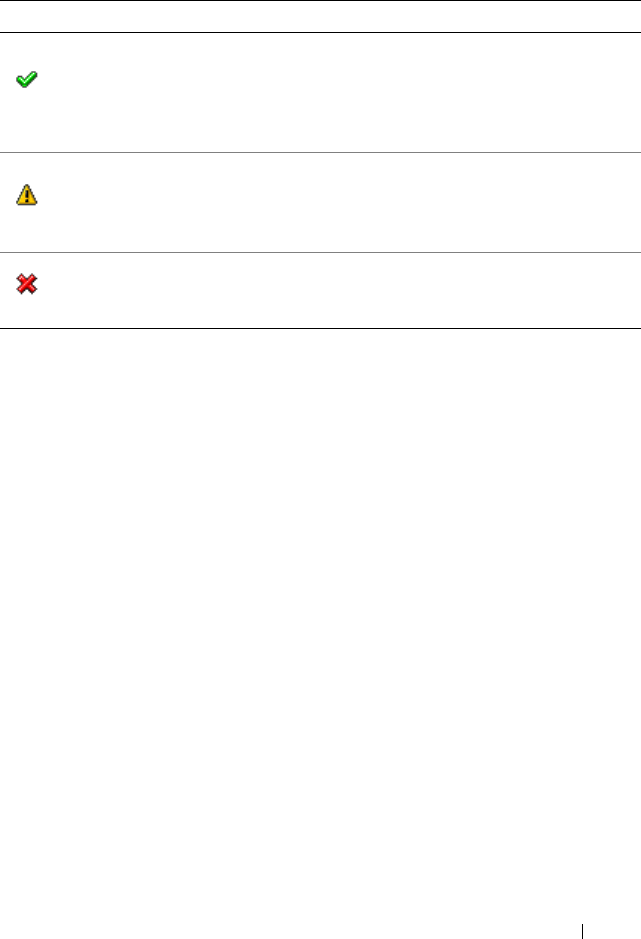
Table 1-1. Understanding Event Messages
Icon Alert Severity Component Status
OK /Normal /
Informational
An event that describes the successful operation of a unit.
The alert is provided for informational purposes and does
not indicate an error condition. For example, the alert may
indicate the normal start or stop of an operation, such as
power supply or a
sensor reading returning to normal.
Warning /
Non-critical
An event that is not necessarily significant, but may indicate a
possible future problem.
For example, a Warning/Non-critical
alert may indicate that a component (such as a temperature
probe in an enclosure) has crossed a warning threshold.
Critical /
Failure / Error
A significant event that indicates actual or imminent loss of
data or loss of function.
For example,
crossing a failure
threshold or a hardware failure such as
an array disk.

10 Introduction
•
Redundancy Unit Sensor
— Monitors redundant units (critical units
such as fans, AC power cords, or power supplies) within the chassis;
also monitors the chassis and any attached systems. For example,
redundancy allows a second or
n
th fan to keep the chassis components at a
safe temperature when another fan has failed. Redundancy is normal when
the intended number of critical components are operating. Redundancy is
degraded when a component fails, but others are still operating.
Redundancy is lost when there is one less critical redundancy device than
required.
•
Power Supply Sensor
— Monitors power supplies in the chassis and in any
attached systems.
•
Memory Prefailure Sensor
— Monitors memory modules by counting the
number of Error Correction Code (ECC) memory corrections.
•
Fan Enclosure Sensor
— Monitors protective fan enclosures by detecting
their removal from and insertion into the system, and by measuring how
long a fan enclosure is absent from the chassis. This sensor monitors the
chassis and any attached systems.
•
AC Power Cord Sensor
— Monitors the presence of AC power for an
AC power cord.
•
Hardware Log Sensor
— Monitors the size of a hardware log.
•
Processor Sensor
— Monitors the processor status in the system.
•
Pluggable Device Sensor
— Monitors the addition, removal,
or configuration errors for some pluggable devices, such as memory cards.
•
Battery Sensor
— Monitors the status of one or more batteries in
the system.
Sample Event Message Text
The following example shows the format of the event messages logged by
Server Administrator.
EventID: 1000
Source: Server Administrator
Category: Instrumentation Service
Type: Information

Introduction 11
Date and Time: Mon Oct 21 10:38:00 2002
Computer:
<computer name>
Description:
Server Administrator starting
Data: Bytes in Hex
Viewing Alerts and Event Messages
NOTE: The Red Hat® Enterprise Linux®, SUSE® Linux Enterprise Server
and
Microsoft® Windows® content mentioned in the following section do not apply to
the VMware® ESXi version 3.5 Update 4 release.
An event log is used to record information about important events.
Server Administrator generates alerts that are added to the operating system
event log and to the Server Administrator Alert log. To view these alerts in
Server Administrator:
1
Select the
System
object in the tree view.
2
Select the
Logs
tab.
3
Select the
Alert
subtab.
You can also view the event log using your operating system’s event viewer.
Each operating system’s event viewer accesses the applicable operating
system event log.
The location of the event log file depends on the operating system you are using.
• In the Microsoft
®
Windows
®
2000 Advanced Server and Windows
Server
®
2003 operating systems, messages are logged to the system event
log and optionally to a Unicode text file,
dcsys32.log
(viewable using
Notepad), that is located in the
install_path
\omsa\log
directory.
The default
install_path
is
C:\Program Files\Dell\SysMgt
.
• In the Red Hat Enterprise Linux, SUSE Linux Enterprise Server and
VMware ESXi operating systems, messages are logged to the system log
file. The default name of the system log file is
/var/log/messages
. You can
view the messages file using a text editor such as vi or emacs.

12 Introduction
Logging Messages to a Unicode File
Logging messages to a Unicode text file is optional. By default, the feature is
disabled. To enable this feature, modify the Event Manager section of the
dcemdy32.ini file as follows:
•In Windows, locate the file at <install_path>\dataeng\ini and set
UnitextLog.enabled=True
. The default <install_path> is C:\Program
Files\Dell\SysMgt. Restart the DSM SA Event Manager service.
•In Red Hat Enterprise Linux and SUSE Linux Enterprise Server, locate the file at
<install_path>/dataeng/ini and set
UnitextLog.enabled=True
. The
default install_path is /opt/dell/srvadmin. Issue the "/etc/init.d/dataeng restart"
command to restart the Server Administrator event manager service.
The following subsections explain how to open the Windows 2000 Advanced
Server, Windows Server 2003, Red Hat Enterprise Linux, SUSE Linux
Enterprise Server and VMware ESXi event viewers.
Viewing Events in Windows 2000 Advanced Server and Windows
Server 2003
1
Click the
Start
button, point to
Settings
, and click
Control Panel
.
2
Double-click
Administrative Tools
, and then double-click
Event Viewer
.
3
In the
Event Viewer
window, click the
Tree
tab and then click
System Log
.
The
System Log
window displays a list of recently logged events.
4
To view the details of an event, double-click one of the event items.
NOTE: You can find the event log file dcsys32.log, at <install_path>\omsa\log
directory. The default <install_path> is C:\Program Files\Dell\SysMgt.
Viewing Events in Red Hat Enterprise Linux and SUSE Linux
Enterprise Server
1
Log in as
root
.
2
Use a text editor such as vi or emacs to view the file named
/var/log/
messages
.

Introduction 13
The following example shows the Red Hat Enterprise Linux and SUSE Linux
Enterprise Server message log, /var/log/messages. The text in boldface type
indicates the message text.
...
Feb 6 14:20:51 server01 Server Administrator:
Instrumentation Service EventID: 1000
Server Administrator starting
Feb 6 14:20:51 server01 Server Administrator:
Instrumentation Service EventID: 1001
Server Administrator startup complete
Feb 6 14:21:21 server01 Server Administrator:
Instrumentation Service EventID: 1254 Chassis
intrusion detected Sensor location: Main chassis
intrusion Chassis location: Main System Chassis
Previous state was: OK (Normal) Chassis intrusion
state: Open
Feb 6 14:21:51 server01 Server Administrator:
Instrumentation Service EventID: 1252 Chassis
intrusion returned to normal Sensor location: Main
chassis intrusion Chassis location: Main System
Chassis Previous state was: Critical (Failed) Chassis
intrusion state: Closed
Viewing Events in VMware ESXi
1
Log in to the VMware ESXi system with VMware Infrastructure (VI)
Client.
2
Click
Administration
on the navigation bar.
3
Select
System Logs
.
4
Select
Server Log
[
/var/log/messages
] entry on the drop-down list.
14 Introduction
Viewing the Event Information
The event log for each operating system contains some or all of the following
information:
•
Date
— The date the event occurred.
•
Time
— The local time the event occurred.
•
Ty p e
— A classification of the event severity: Information, Warning,
or Error.
•
User
— The name of the user on whose behalf the event occurred.
•
Computer
— The name of the system where the event occurred.
•
Source
— The software that logged the event.
•
Category
— The classification of the event by the event source.
•
Event ID
— The number identifying the particular event type.
•
Description
— A description of the event. The format and contents of
the event description vary, depending on the event type.
Understanding the Event Description
Table 1-2 lists in alphabetical order each line item that may appear in the
event description.
Table 1-2. Event Description Reference
Description Line Item Explanation
Action performed was:
<Action>
Specifies the action that was performed,
for example:
Action performed was: Power cycle
Action requested was:
<Action>
Specifies the action that was requested,
for example:
Action requested was: Reboot, shutdown OS first
Additional Details:
<Additional details for
the event>
Specifies additional details available for the hot
plug event, for example:
Memory device: DIMM1_A Serial
number: FFFF30B1
Introduction 15
<Additional power
supply status
information>
Specifies information pertaining to the event,
for example:
Power supply input AC is off,
Power supply
POK (power OK) signal is not normal,
Power supply is turned off
Chassis intrusion
state:
<Intrusion
state>
Specifies the chassis intrusion state (open or
closed), for example:
Chassis intrusion state: Open
Chassis location:
<Name
of chassis>
Specifies name of the chassis that generated the
message, for example:
Chassis location: Main System
Chassis
Configuration error
type:
<type of configuration
error>
Specifies the type of configuration error that
occurred, for example:
Configuration error type: Revision
mismatch
Current sensor value
(in Amps):
<Reading>
Specifies the current sensor value in amps,
for example:
Current sensor value (in Amps):
7.853
Date and time of
action:
<Date and time>
Specifies the date and time the action was
performed, for example:
Date and time of action: Sat Jun 12
16:20:33 2004
Device location:
<
Location in chassis
>
Specifies the location of the device in the specified
chassis, for example:
Device location: Memory Card A
Discrete current state:
<State>
Specifies the state of the current sensor, for
example:
Discrete current state: Good
Table 1-2. Event Description Reference (continued)
Description Line Item Explanation
16 Introduction
Discrete temperature
state:
<State>
Specifies the state of the temperature sensor,
for example:
Discrete temperature state: Good
Discrete voltage state:
<State>
Specifies the state of the voltage sensor,
for example:
Discrete voltage state: Good
Fan sensor value:
<Reading>
Specifies the fan speed in revolutions per minute
(RPM) or On/Off, for example:
Fan sensor value (in RPM): 2600
Fan sensor value: Off
Log type:
<Log type>
Specifies the type of hardware log, for example:
Log type: ESM
Memory device bank
location:
<Bank name in
chassis>
Specifies the name of the memory bank in the
system that generated the message, for example:
Memory device bank location: Bank_1
Memory device location:
<Device name in
chassis>
Specifies the location of the memory module in the
chassis, for example:
Memory device location: DIMM_A
Number of devices
required for full
redundancy:
<Number>
Specifies the number of power supply or cooling
devices required to achieve full redundancy, for
example:
Number of devices required for full
redundancy: 4
Peak value (in Watts):
<Reading>
Specifies the peak value in Watts, for example:
Peak value (in Watts): 125
Possible memory module
event cause:
<list of
causes>
Specifies a list of possible causes for the memory
module event, for example:
Possible memory module event cause:
Single bit warning error rate
exceeded
Single bit error logging disabled
Table 1-2. Event Description Reference (continued)
Description Line Item Explanation
Introduction 17
Power Supply type:
<type of power supply>
Specifies the type of power supply, for example:
Power Supply type: VRM
Previous redundancy
state was:
<State>
Specifies the status of the previous redundancy
message, for example:
Previous redundancy state was: Lost
Previous state was:
<State>
Specifies the previous state of the sensor, for
example:
Previous state was: OK (Normal)
Processor sensor
status:
<status>
Specifies the status of the processor sensor,
for example:
Processor sensor status:
Configuration error
Redundancy unit:
<Redundancy location in
chassis>
Specifies the location of the redundant power
supply or cooling unit in the chassis, for example:
Redundancy unit: Fan Enclosure
Sensor location:
<Location in chassis>
Specifies the location of the sensor in the specified
chassis, for example:
Sensor location: CPU1
Temperature sensor
value:
<Reading>
Specifies the temperature in degrees Celsius,
for example:
Temperature sensor value
(in degrees Celsius): 30
Voltage sensor value
(in Volts):
<Reading>
Specifies the voltage sensor value in volts,
for example:
Voltage sensor value (in Volts):
1.693
Table 1-2. Event Description Reference (continued)
Description Line Item Explanation

18 Introduction
Event Message Reference 19
Event Message Reference
The following tables lists in numerical order each event ID and its
corresponding description, along with its severity and cause.
NOTE: For corrective actions, see the appropriate documentation.
Miscellaneous Messages
Miscellaneous messages in Table 2-1 indicate that certain alert systems are up
and working.
Table 2-1. Miscellaneous Messages
Event
ID
Description Severity Cause
0000 Log was cleared Information User cleared the log from
Server Administrator.
0001 Log backup created Information The log was full, copied to
backup, and cleared.
1000 Server Administrator
starting
Information Server Administrator is
beginning to initialize.
1001 Server Administrator
startup complete
Information Server Administrator
completed its initialization.
1002 A system BIOS update
has been scheduled for
the next reboot
Information The user has chosen to
update the flash basic input/
output system (BIOS).
1003 A previously scheduled
system BIOS update has
been canceled
Information The user decides to cancel
the flash BIOS update, or an
error occurs during the flash.
20 Event Message Reference
1004 Thermal shutdown
protection has been
initiated
Error This message is generated
when a system is configured
for thermal shutdown due
to an error event. If a
temperature sensor reading
exceeds the error threshold
for which the system is
configured, the operating
system shuts down and
the system powers off.
This event may also be
initiated on certain systems
when a fan enclosure is
removed from the system for
an extended period of time.
1005 SMBIOS data is absent Error The system does not
contain the required systems
management BIOS
version 2.2 or higher, or the
BIOS is corrupted.
1006 Automatic System
Recovery (ASR) action
was performed
Action performed was:
<Action>
Date and time of
action:
<Date and
time>
Error This message is generated
when an automatic system
recovery action is performed
due to a hung operating
system. The action
performed and the time of
action are provided.
1007 User initiated host
system control action
Action requested was:
<Action>
Information User requested a host system
control action to reboot,
power off, or power cycle the
system. Alternatively the
user had indicated protective
measures to be initiated in
the event of a thermal
shutdown.
Table 2-1. Miscellaneous Messages (continued)
Event
ID
Description Severity Cause
Event Message Reference 21
1008 Systems Management
Data Manager Started
Information Systems Management
Data Manager services
were started.
1009 Systems Management
Data Manager Stopped
Information Systems Management
Data Manager services
were stopped.
1011 RCI table is corrupt Error This message is generated
when the BIOS Remote
Configuration Interface
(RCI) table is corrupted
or cannot be read by the
systems management
software.
1012 IPMI Status
Interface: <
the IPMI
interface being used
>,
<
additional
information if
available and
applicable
>
Information This message is generated
to indicate the Intelligent
Platform Management
Interface (IPMI)) status of
the system.
Additional information,
when available, includes
Baseboard Management
Controller (BMC) not
present, BMC not
responding, System Event
Log (SEL) not present, and
SEL Data Record (SDR) not
present.
1013 System Peak Power
detected new peak
value
Peak value (in Watts):
<Reading>
Information The system peak power
sensor detected a new peak
value in power consumption.
The new peak value in Watts
is provided.
Table 2-1. Miscellaneous Messages (continued)
Event
ID
Description Severity Cause

22 Event Message Reference
Temperature Sensor Messages
Temperature sensors listed in Table 2-2 help protect critical components
by alerting the systems management console when temperatures become
too high inside a chassis. The temperature sensor messages use additional
variables: sensor location, chassis location, previous state, and temperature
sensor value or state.
Table 2-2. Temperature Sensor Messages
Event
ID
Description Severity Cause
1050 Temperature sensor has failed
Sensor location: <Location in
chassis>
Chassis location: <Name of
chassis>
Previous state was: <State>
If sensor type is not discrete:
Temperature sensor value
(in degrees Celsius):
<Reading>
If sensor type is discrete:
Discrete temperature state:
<State>
Error A temperature
sensor on the
backplane board,
system board, or
the carrier in the
specified system
failed. The sensor
location, chassis
location, previous
state, and
temperature sensor
value are provided.
1051 Temperature sensor value
unknown
Sensor location: <Location in
chassis>
Chassis location: <Name of
chassis>
If sensor type is not discrete:
Temperature sensor value (in
degrees Celsius):
<Reading>
If sensor type is discrete:
Discrete temperature state:
<State>
Information A temperature
sensor on the
backplane board,
system board, or
drive carrier in the
specified system
could not obtain a
reading. The sensor
location, chassis
location, previous
state, and
a nominal
temperature sensor
value are provided.

Event Message Reference 23
1052 Temperature sensor returned
to a normal value
Sensor location:
<Location in
chassis>
Chassis location:
<Name of
chassis>
Previous state was:
<State>
If sensor type is not discrete:
Temperature sensor value (in
degrees Celsius):
<Reading>
If sensor type is discrete:
Discrete temperature state:
<State>
Information A temperature
sensor on the
backplane board,
system board, or
drive carrier in the
specified system
returned to a valid
range after crossing
a failure threshold.
The sensor
location, chassis
location, previous
state, and
temperature sensor
value are provided.
1053 Temperature sensor detected
a warning value
Sensor location:
<Location in
chassis>
Chassis location:
<Name of
chassis>
Previous state was:
<State>
If sensor type is not discrete:
Temperature sensor value (in
degrees Celsius):
<Reading>
If sensor type is discrete:
Discrete temperature state:
<State>
Warning A temperature
sensor on the
backplane board,
system board,
CPU, or drive
carrier in the
specified system
exceeded its
warning threshold.
The sensor
location, chassis
location, previous
state, and
temperature sensor
value are provided.
Table 2-2. Temperature Sensor Messages (continued)
Event
ID
Description Severity Cause
24 Event Message Reference
1054 Temperature sensor detected
a failure value
Sensor location:
<Location in
chassis>
Chassis location:
<Name of
chassis>
Previous state was:
<State>
If sensor type is not discrete:
Temperature sensor value (in
degrees Celsius):
<Reading>
If sensor type is discrete:
Discrete temperature state:
<State>
Error A temperature
sensor on the
backplane board,
system board, or
drive carrier in the
specified system
exceeded its failure
threshold. The
sensor location,
chassis location,
previous state, and
temperature sensor
value are provided.
1055 Temperature sensor detected
a non-recoverable value
Sensor location:
<Location in
chassis>
Chassis location:
<Name of
chassis>
Previous state was:
<State>
If sensor type is not discrete:
Temperature sensor value (in
degrees Celsius):
<Reading>
If sensor type is discrete:
Discrete temperature state:
<State>
Error A temperature
sensor on the
backplane board,
system board, or
drive carrier in the
specified system
detected an error
from which it
cannot recover.
The sensor
location, chassis
location, previous
state, and
temperature sensor
value are provided.
Table 2-2. Temperature Sensor Messages (continued)
Event
ID
Description Severity Cause

Event Message Reference 25
Cooling Device Messages
Cooling device sensors listed in Table 2-3 monitor how well a fan is
functioning. Cooling device messages provide status and warning information
for fans in a particular chassis.
Table 2-3. Cooling Device Messages
Event
ID
Description Severity Cause
1100 Fan sensor has
failed
Sensor location:
<Location in
chassis>
Chassis location:
<Name of chassis>
Previous state was:
<State>
Fan sensor value:
<Reading>
Error A fan sensor in the specified
system is not functioning.
The sensor location, chassis
location, previous state, and fan
sensor value are provided.
1101 Fan sensor value
unknown
Sensor location:
<Location in
chassis>
Chassis location:
<Name of chassis>
Previous state was:
<State>
Fan sensor value:
<Reading>
Error A fan sensor in the specified
system could not obtain a
reading. The sensor location,
chassis location, previous state,
and a nominal fan sensor value
are provided.

26 Event Message Reference
1102 Fan sensor returned
to a normal value
Sensor location:
<Location in
chassis>
Chassis location:
<Name of chassis>
Previous state was:
<State>
Fan sensor value:
<Reading>
Information A fan sensor reading on the
specified system returned to a
valid range after crossing a
warning threshold. The sensor
location, chassis location,
previous state, and fan sensor
value are provided.
1103 Fan sensor detected
a warning value
Sensor location:
<Location in
chassis>
Chassis location:
<Name of chassis>
Previous state was:
<State>
Fan sensor value:
<Reading>
Warning A fan sensor reading in the
specified system exceeded a
warning threshold. The sensor
location, chassis location,
previous state, and fan sensor
value are provided.
Table 2-3. Cooling Device Messages (continued)
Event
ID
Description Severity Cause

Event Message Reference 27
1104 Fan sensor detected
a failure value
Sensor location:
<Location in
chassis>
Chassis location:
<Name of chassis>
Previous state was:
<State>
Fan sensor value:
<Reading>
Error A fan sensor in the specified
system detected the failure of
one or more fans. The sensor
location, chassis location,
previous state, and fan sensor
value are provided.
1105 Fan sensor detected
a
non-recoverable
value
Sensor location:
<Location in
chassis>
Chassis location:
<Name of chassis>
Previous state was:
<State>
Fan sensor value:
<Reading>
Error A fan sensor detected an error
from which it cannot recover.
The sensor location, chassis
location, previous state, and fan
sensor value are provided.
Table 2-3. Cooling Device Messages (continued)
Event
ID
Description Severity Cause
28 Event Message Reference
Voltage Sensor Messages
Voltage sensors listed in Table 2-4 monitor the number of volts across critical
components. Voltage sensor messages provide status and warning information
for voltage sensors in a particular chassis.
Table 2-4. Voltage Sensor Messages
Event
ID
Description Severity Cause
1150 Voltage sensor has failed
Sensor location: <Location
in chassis>
Chassis location: <Name of
chassis>
Previous state was: <State>
If sensor type is not
discrete:
Voltage sensor value (in
Volts):
<Reading>
If sensor type is discrete:
Discrete voltage state:
<State>
Error A voltage sensor in
the specified system
failed. The sensor
location, chassis
location, previous
state, and voltage
sensor value are
provided.
1151 Voltage sensor value unknown
Sensor location: <Location
in chassis>
Chassis location: <Name of
chassis>
Previous state was: <State>
If sensor type is not
discrete:
Voltage sensor value
(in Volts):
<Reading>
If sensor type is discrete:
Discrete voltage state:
<State>
Warning A voltage sensor in
the specified system
could not obtain
a reading. The sensor
location, chassis
location, previous
state, and a nominal
voltage sensor value
are provided.

Event Message Reference 29
1152 Voltage sensor returned to
a normal value
Sensor location: <Location
in chassis>
Chassis location: <Name of
chassis>
Previous state was: <State>
If sensor type is not
discrete:
Voltage sensor value
(in Volts):
<Reading>
If sensor type is discrete:
Discrete voltage state:
<State>
Information A voltage sensor in
the specified system
returned to a valid
range after crossing
a failure threshold.
The sensor location,
chassis location,
previous state, and
voltage sensor value
are provided.
1153 Voltage sensor detected a
warning value
Sensor location: <Location
in chassis>
Chassis location: <Name of
chassis>
Previous state was: <State>
If sensor type is not
discrete:
Voltage sensor value
(in Volts):
<Reading>
If sensor type is discrete:
Discrete voltage state:
<State>
Warning A voltage sensor in
the specified system
exceeded its warning
threshold. The sensor
location, chassis
location, previous
state, and voltage
sensor value are
provided.
Table 2-4. Voltage Sensor Messages (continued)
Event
ID
Description Severity Cause
30 Event Message Reference
1154 Voltage sensor detected
a failure value
Sensor location: <Location
in chassis>
Chassis location: <Name of
chassis>
Previous state was: <State>
If sensor type is not
discrete:
Voltage sensor value
(in Volts):
<Reading>
If sensor type is discrete:
Discrete voltage state:
<State>
Error A voltage sensor in
the specified system
exceeded its failure
threshold. The sensor
location, chassis
location, previous
state, and voltage
sensor value are
provided.
1155 Voltage sensor detected a
non-recoverable value
Sensor location: <Location
in chassis>
Chassis location: <Name of
chassis>
Previous state was: <State>
If sensor type is not
discrete:
Voltage sensor value
(in Volts):
<Reading>
If sensor type is discrete:
Discrete voltage state:
<State>
Error A voltage sensor in
the specified system
detected an error
from which it cannot
recover. The sensor
location, chassis
location, previous
state, and voltage
sensor value are
provided.
Table 2-4. Voltage Sensor Messages (continued)
Event
ID
Description Severity Cause
Event Message Reference 31
Current Sensor Messages
Current sensors listed in Table 2-5 measure the amount of current
(in amperes) that is traversing critical components. Current sensor messages
provide status and warning information for current sensors in a particular
chassis.
Table 2-5. Current Sensor Messages
Event
ID
Description Severity Cause
1200 Current sensor has failed
Sensor location: <Location in
chassis>
Chassis location: <Name of
chassis>
Previous state was: <State>
If sensor type is not discrete:
Current sensor value
(in Amps):
<Reading>
OR
Current sensor value
(in Watts):
<Reading>
If sensor type is discrete:
Discrete current state:
<State>
Error A current sensor
in the specified
system failed.
The sensor
location, chassis
location, previous
state, and current
sensor value
are provided.
32 Event Message Reference
1201 Current sensor value unknown
Sensor location: <Location in
chassis>
Chassis location: <Name of
chassis>
Previous state was: <State>
If sensor type is not discrete:
Current sensor value (in Amps):
<Reading>
OR
Current sensor value (in
Watts):
<Reading>
If sensor type is discrete:
Discrete current state:
<State>
Error A current sensor
in the specified
system could not
obtain a reading.
The sensor
location, chassis
location, previous
state, and a
nominal current
sensor value are
provided.
1202 Current sensor returned to
a normal value
Sensor location: <Location in
chassis>
Chassis location: <Name of
chassis>
Previous state was: <State>
If sensor type is not discrete:
Current sensor value (in Amps):
<Reading>
OR
Current sensor value (in
Watts):
<Reading>
If sensor type is discrete:
Discrete current state:
<State>
Information A current sensor
in the specified
system returned
to a valid range
after crossing a
failure threshold.
The sensor
location, chassis
location, previous
state, and current
sensor value are
provided.
Table 2-5. Current Sensor Messages (continued)
Event
ID
Description Severity Cause
Event Message Reference 33
1203 Current sensor detected a
warning value
Sensor location: <Location in
chassis>
Chassis location: <Name of
chassis>
Previous state was: <State>
If sensor type is not discrete:
Current sensor value (in Amps):
<Reading>
OR
Current sensor value (in
Watts):
<Reading>
If sensor type is discrete:
Discrete current state:
<State>
Warning A current sensor
in the specified
system exceeded
its warning
threshold.
The sensor
location, chassis
location, previous
state, and current
sensor value
are provided.
1204 Current sensor detected a
failure value
Sensor location: <Location in
chassis>
Chassis location: <Name of
chassis>
Previous state was: <State>
If sensor type is not discrete:
Current sensor value (in Amps):
<Reading>
OR
Current sensor value (in
Watts):
<Reading>
If sensor type is discrete:
Discrete current state:
<State>
Error A current sensor
in the specified
system exceeded
its failure
threshold.
The sensor
location, chassis
location, previous
state, and current
sensor value
are provided.
Table 2-5. Current Sensor Messages (continued)
Event
ID
Description Severity Cause
34 Event Message Reference
1205 Current sensor detected a
non-recoverable value
Sensor location: <Location in
chassis>
Chassis location: <Name of
chassis>
Previous state was: <State>
If sensor type is not discrete:
Current sensor value (in Amps):
<Reading>
OR
Current sensor value (in
Watts):
<Reading>
If sensor type is discrete:
Discrete current state:
<State>
Error A current sensor
in the specified
system detected
an error from
which it
cannot recover.
The sensor
location, chassis
location, previous
state, and current
sensor value
are provided.
Table 2-5. Current Sensor Messages (continued)
Event
ID
Description Severity Cause

Event Message Reference 35
Chassis Intrusion Messages
Chassis intrusion messages listed in Table 2-6 are a security measure. Chassis
intrusion means that someone is opening the cover to a system’s chassis.
Alerts are sent to prevent unauthorized removal of parts from a chassis.
Table 2-6. Chassis Intrusion Messages
Event
ID
Description Severity Cause
1250 Chassis intrusion sensor
has failed
Sensor location:
<Location in chassis>
Chassis location: <Name
of chassis>
Previous state was:
<State>
Chassis intrusion state:
<Intrusion state>
Error A chassis intrusion sensor
in the specified system
failed. The sensor
location, chassis location,
previous state, and
chassis intrusion state
are provided.
1251 Chassis intrusion sensor
value unknown
Sensor location:
<Location in chassis>
Chassis location: <Name
of chassis>
Previous state was:
<State>
Chassis intrusion state:
<Intrusion state>
Error A chassis intrusion sensor
in the specified system
could not obtain a
reading. The sensor
location, chassis location,
previous state, and
chassis intrusion state
are provided.
36 Event Message Reference
1252 Chassis intrusion
returned to normal
Sensor location:
<Location in chassis>
Chassis location: <Name
of chassis>
Previous state was:
<State>
Chassis intrusion state:
<Intrusion state>
Information A chassis intrusion sensor
in the specified system
detected that a cover was
opened while the system
was operating but has
since been replaced.
The sensor location,
chassis location, previous
state, and chassis
intrusion state are
provided.
1253 Chassis intrusion in
progress
Sensor location:
<Location in chassis>
Chassis location: <Name
of chassis>
Previous state was:
<State>
Chassis intrusion state:
<Intrusion state>
Warning A chassis intrusion sensor
in the specified system
detected that a system
cover is currently being
opened and the system is
operating. The sensor
location, chassis location,
previous state, and chassis
intrusion state are
provided.
Table 2-6. Chassis Intrusion Messages (continued)
Event
ID
Description Severity Cause
Event Message Reference 37
Redundancy Unit Messages
Redundancy means that a system chassis has more than one of certain critical
components. Fans and power supplies, for example, are so important for
preventing damage or disruption of a computer system that a chassis may
have “extra” fans or power supplies installed. Redundancy allows a second
or nth fan to keep the chassis components at a safe temperature when the
primary fan has failed. Redundancy is normal when the intended number of
critical components are operating. Redundancy is degraded when a
1254 Chassis intrusion
detected
Sensor location:
<Location in chassis>
Chassis location: <Name
of chassis>
Previous state was:
<State>
Chassis intrusion state:
<Intrusion state>
Warning A chassis intrusion sensor
in the specified system
detected that the system
cover was opened while
the system was operating.
The sensor location,
chassis location, previous
state, and chassis
intrusion state are
provided.
1255 Chassis intrusion sensor
detected a non-
recoverable value
Sensor location:
<Location in chassis>
Chassis location: <Name
of chassis>
Previous state was:
<State>
Chassis intrusion state:
<Intrusion state>
Error A chassis intrusion sensor
in the specified system
detected an error from
which it cannot recover.
The sensor location,
chassis location, previous
state, and chassis
intrusion state are
provided.
Table 2-6. Chassis Intrusion Messages (continued)
Event
ID
Description Severity Cause
38 Event Message Reference
component fails but others are still operating. Redundancy is lost when the
number of components functioning falls below the redundancy threshold.
Table 2-7 lists the redundancy unit messages.
The number of devices required for full redundancy is provided as part of
the message, when applicable, for the redundancy unit and the platform.
For details on redundancy computation, see the respective platform
documentation.
Table 2-7. Redundancy Unit Messages
Event
ID
Description Severity Cause
1300 Redundancy sensor has
failed
Redundancy unit:
<Redundancy location
in chassis>
Chassis location:
<Name of chassis>
Previous redundancy
state was:
<State>
Warning A redundancy sensor in the
specified system failed.
The redundancy unit location,
chassis location, previous
redundancy state, and the
number of devices required
for full redundancy
are provided.
1301 Redundancy sensor
value unknown
Redundancy unit:
<Redundancy location
in chassis>
Chassis location:
<Name of chassis>
Previous redundancy
state was:
<State>
Warning A redundancy sensor in the
specified system could not
obtain a reading.
The redundancy unit location,
chassis location, previous
redundancy state, and the
number of devices required
for full redundancy
are provided.
Event Message Reference 39
1302 Redundancy not
applicable
Redundancy unit:
<Redundancy location
in chassis>
Chassis location:
<Name of chassis>
Previous redundancy
state was:
<State>
Information A redundancy sensor in the
specified system detected
that a unit was not redundant.
The redundancy location,
chassis location, previous
redundancy state, and the
number of devices required
for full redundancy are
provided.
1303 Redundancy is offline
Redundancy unit:
<Redundancy location
in chassis>
Chassis location:
<Name of chassis>
Previous redundancy
state was:
<State>
Information A redundancy sensor in the
specified system detected that
a redundant unit is offline.
The redundancy
unit location, chassis location,
previous redundancy state,
and the number of devices
required for full redundancy
are provided.
1304 Redundancy regained
Redundancy unit:
<Redundancy location
in chassis>
Chassis location:
<Name of chassis>
Previous redundancy
state was:
<State>
Information A redundancy sensor in the
specified system detected that
a “lost” redundancy device has
been reconnected or replaced;
full redundancy is in effect.
The redundancy unit location,
chassis location, previous
redundancy state, and the
number of devices required
for full redundancy are
provided.
Table 2-7. Redundancy Unit Messages (continued)
Event
ID
Description Severity Cause
40 Event Message Reference
1305 Redundancy degraded
Redundancy unit:
<Redundancy location
in chassis>
Chassis location:
<Name of chassis>
Previous redundancy
state was:
<State>
Warning A redundancy sensor in
the specified system detected
that one of the components of
the redundancy unit has failed
but the unit is still redundant.
The redundancy unit location,
chassis location, previous
redundancy state, and
the number of devices
required for full redundancy
are provided.
1306 Redundancy lost
Redundancy unit:
<Redundancy location
in chassis>
Chassis location:
<Name of chassis>
Previous redundancy
state was:
<State>
Error A redundancy sensor in the
specified system detected that
one of the components in the
redundant unit has been
disconnected, has failed, or is
not present. The redundancy
unit location, chassis location,
previous redundancy state, and
the number of devices
required for full redundancy
are provided.
Table 2-7. Redundancy Unit Messages (continued)
Event
ID
Description Severity Cause

Event Message Reference 41
Power Supply Messages
Power supply sensors monitor how well a power supply is functioning.
Power supply messages listed in Table 2-8 provide status and warning
information for power supplies present in a particular chassis.
Table 2-8. Power Supply Messages
Event
ID
Description Severity Cause
1350 Power supply sensor has
failed Sensor location:
<Location in chassis>
Chassis location: <Name
of chassis>
Previous state was:
<State>
Power Supply type:
<type
of power supply>
<Additional power supply
status information>
If in configuration error
state:
Configuration error type:
<type of configuration
error>
Error A power supply sensor
in the specified system
failed. The sensor
location, chassis location,
previous state, and
additional power supply
status information
are provided.
42 Event Message Reference
1351 Power supply sensor value
unknown
Sensor location:
<Location in chassis>
Chassis location: <Name
of chassis>
Previous state was:
<State>
Power Supply type: <type
of power supply>
<Additional power supply
status information>
If in configuration error
state:
Configuration error type:
<type of configuration
error>
Warning A power supply sensor in
the specified system
could not obtain
a reading. The sensor
location, chassis location,
previous state, and
additional power supply
status information
are provided.
1352 Power supply returned to
normal Sensor location:
<Location in chassis>
Chassis location: <Name
of chassis>
Previous state was:
<State>
Power Supply type: <type
of power supply>
<Additional power supply
status information>
If in configuration error
state:
Configuration error type:
<type of configuration
error>
Information A power supply has been
reconnected or replaced.
The sensor location,
chassis location, previous
state, and additional
power supply status
information are provided.
Table 2-8. Power Supply Messages (continued)
Event
ID
Description Severity Cause

Event Message Reference 43
1353 Power supply detected a
warning Sensor location:
<Location in chassis>
Chassis location: <Name
of chassis>
Previous state was:
<State>
Power Supply type: <type
of power supply>
<Additional power supply
status information>
If in configuration error
state:
Configuration error type:
<type of configuration
error>
Warning A power supply sensor
reading in the specified
system exceeded
a user-definable warning
threshold. The sensor
location, chassis location,
previous state, and
additional power supply
status information
are provided.
1354 Power supply detected a
failure
Sensor location:
<Location in chassis>
Chassis location: <Name
of chassis>
Previous state was:
<State>
Power Supply type: <type
of power supply>
<Additional power supply
status information>
If in configuration error
state:
Configuration error type:
<type of configuration
error>
Error A power supply has been
disconnected or has
failed. The sensor
location, chassis location,
previous state, and
additional power supply
status information
are provided.
Table 2-8. Power Supply Messages (continued)
Event
ID
Description Severity Cause
44 Event Message Reference
1355 Power supply sensor
detected a non-
recoverable value
Sensor location:
<Location in chassis>
Chassis location: <Name
of chassis>
Previous state was:
<State>
Power Supply type: <type
of power supply>
<Additional power supply
status information>
If in configuration error
state:
Configuration error type:
<type of configuration
error>
Error A power supply sensor in
the specified system
detected an error from
which it cannot recover.
The sensor location,
chassis location, previous
state, and additional
power supply status
information are provided.
Table 2-8. Power Supply Messages (continued)
Event
ID
Description Severity Cause
Event Message Reference 45
Memory Device Messages
Memory device messages listed in Table 2-9 provide status and warning
information for memory modules present in a particular system.
Memory devices determine health status by monitoring the ECC memory
correction rate and the type of memory events that have occurred.
NOTE: A critical status does not always indicate a system failure or loss of data.
In some instances, the system has exceeded the ECC correction rate. Although
the system continues to function, you should perform system maintenance as
described in Table 2-9.
NOTE: In Table 2-9, <status> can be either critical or non-critical.
Table 2-9. Memory Device Messages
Event
ID
Description Severity Cause
1403 Memory device status is
<status>
Memory device
location:
<location in
chassis>
Possible memory module
event cause:
<list of
causes>
Warning A memory device correction
rate exceeded an acceptable
value. The memory device
status and location are
provided.
1404 Memory device status is
<status>
Memory device
location:
<location in
chassis>
Possible memory module
event cause: <list of
causes>
Error A memory device correction
rate exceeded an acceptable
value, a memory spare bank was
activated, or a multibit ECC
error occurred. The system
continues to function normally
(except for a multibit error).
Replace the memory module
identified in the message
during the system’s next
scheduled maintenance.
Clear the memory error on
multibit ECC error.
The memory device status and
location are provided.
46 Event Message Reference
Fan Enclosure Messages
Some systems are equipped with a protective enclosure for fans.
Fan enclosure messages listed in Table 2-10 monitor whether foreign objects
are present in an enclosure and how long a fan enclosure is missing from
achassis.
Table 2-10. Fan Enclosure Messages
Event
ID
Description Severity Cause
1450 Fan enclosure sensor
has failed
Sensor location:
<Location in chassis>
Chassis location:
<Name of chassis>
Critical/
Failure /
Error
The fan enclosure sensor in
the specified system failed.
The sensor location and
chassis location are provided.
1451 Fan enclosure sensor
value unknown
Sensor location:
<Location in chassis>
Chassis location:
<Name of chassis>
Warning The fan enclosure sensor in
the specified system could not
obtain a reading. The sensor
location and chassis location
are provided.
1452 Fan enclosure inserted
into system
Sensor location:
<Location in chassis>
Chassis location:
<Name of chassis>
Information A fan enclosure has been
inserted into the specified
system. The sensor location
and chassis location are
provided.
1453 Fan enclosure removed
from system
Sensor location:
<Location in chassis>
Chassis location:
<Name of chassis>
Warning A fan enclosure has been
removed from the specified
system. The sensor location
and chassis location are
provided.
Event Message Reference 47
1454 Fan enclosure removed
from system for an
extended amount of
time
Sensor location:
<Location in chassis>
Chassis location:
<Name of chassis>
Error A fan enclosure has been
removed from the specified
system for a user-definable
length of time. The sensor
location and chassis location
are provided.
1455 Fan enclosure sensor
detected a non-
recoverable value
Sensor location:
<Location in chassis>
Chassis location:
<Name of chassis>
Error A fan enclosure sensor in the
specified system detected an
error from which it cannot
recover. The sensor location
and chassis location
are provided.
Table 2-10. Fan Enclosure Messages (continued)
Event
ID
Description Severity Cause
48 Event Message Reference
AC Power Cord Messages
AC power cord messages listed in Table 2-11 provide status and warning
information for power cords that are part of an AC power switch, if your
system supports AC switching.
Table 2-11. AC Power Cord Messages
Event
ID
Description Severity Cause
1500 AC power cord sensor
has failed Sensor
location: <Location in
chassis>
Chassis location:
<Name of chassis>
Critical/
Failure/
Error
An AC power cord sensor in
the specified system failed.
The AC power cord status
cannot be monitored. The
sensor location and chassis
location information are
provided.
1501 AC power cord is not
being monitored
Sensor location:
<Location in chassis>
Chassis location:
<Name of chassis>
Information The AC power cord status is
not being monitored. This
occurs when a system’s
expected AC power
configuration is set to
nonredundant. The sensor
location and chassis location
information are provided.
1502 AC power has been
restored
Sensor location:
<Location in chassis>
Chassis location:
<Name of chassis>
Information An AC power cord that did
not have AC power has had
the power restored.
The sensor location and
chassis location information
are provided.
Event Message Reference 49
Hardware Log Sensor Messages
Hardware logs provide hardware status messages to systems management
software. On certain systems, the hardware log is implemented as a circular
queue. When the log becomes full, the oldest status messages are overwritten
when new status messages are logged. On some systems, the log is not
circular. On these systems, when the log becomes full, subsequent hardware
status messages are lost. Hardware log sensor messages listed in Table 2-12
provide status and warning information about the noncircular logs that may
fill up, resulting in lost status messages.
1503 AC power has been lost
Sensor location:
<Location in chassis>
Chassis location:
<Name of chassis>
Critical/
Failure/
Error
An AC power cord has lost its
power, but there is sufficient
redundancy to classify this as
a warning. The sensor location
and chassis location
information are provided.
1504 AC power has been lost
Sensor location:
<Location in chassis>
Chassis location:
<Name of chassis>
Error An AC power cord has lost its
power, and lack of redundancy
requires this to be classified as
an error. The sensor location
and chassis location
information are provided.
1505 AC power has been lost
Sensor location:
<Location in chassis>
Chassis location:
<Name of chassis>
Error An AC power cord sensor in
the specified system failed.
The AC power cord status
cannot be monitored. The
sensor location and chassis
location information are
provided.
Table 2-11. AC Power Cord Messages (continued)
Event
ID
Description Severity Cause
50 Event Message Reference
Table 2-12. Hardware Log Sensor Messages
Event
ID
Description Severity Cause
1550 Log monitoring has
been disabled
Log type:
<Log type>
Warning A hardware log sensor in the
specified system is disabled. The
log type information is provided.
1551 Log status is unknown
Log type:
<Log type>
Information A hardware log sensor in the
specified system could not
obtain a reading. The log type
information is provided.
1552 Log size is no longer
near or at capacity
Log type:
<Log type>
Information The hardware log on the
specified system is no longer near
or at its capacity, usually as the
result of clearing the log. The log
type information is provided.
1553 Log size is near
capacity
Log type:
<Log type>
Warning The size of a hardware log on the
specified system is near or at the
capacity of the hardware log. The
log type information is provided.
1554 Log size is full
Log type:
<Log type>
Error The size of a hardware log on
the specified system is full. The
log type information is provided.
1555 Log sensor has failed
Log type:
<Log type>
Error A hardware log sensor in the
specified system failed. The
hardware log status cannot be
monitored. The log type
information is provided.
Event Message Reference 51
Processor Sensor Messages
Processor sensors monitor how well a processor is functioning. Processor
messages listed in Table 2-13 provide status and warning information for
processors in a particular chassis.
Table 2-13. Processor Sensor Messages
Event
ID
Description Severity Cause
1600 Processor sensor has
failed
Sensor Location:
<Location in chassis>
Chassis Location:
<Name of chassis>
Previous state was:
<State>
Processor sensor
status:
<status>
Critical/
Failure/
Error
A processor sensor in the
specified system is not
functioning. The sensor
location, chassis location,
previous state and processor
sensor status are provided.
1601 Processor sensor value
unknown Sensor
Location:
<Location in
chassis>
Chassis Location:
<Name of chassis>
Previous state was:
<State>
Processor sensor
status:
<status>
Critical/
Failure/
Error
A processor sensor in the
specified system could not
obtain a reading. The sensor
location, chassis location,
previous state and processor
sensor status are provided.
52 Event Message Reference
1602 Processor sensor
returned to a normal
value
Sensor Location:
<Location in chassis>
Chassis Location:
<Name of chassis>
Previous state was:
<State>
Processor sensor
status:
<status>
Information A processor sensor in the
specified system transitioned
back to a normal state.
The sensor location,
chassis location, previous state
and processor sensor status
are provided.
1603 Processor sensor
detected a warning
value
Sensor Location:
<Location in chassis>
Chassis Location:
<Name of chassis>
Previous state was:
<State>
Processor sensor
status:
<status>
Warning A processor sensor in the
specified system is in a
throttled state. The sensor
location, chassis location,
previous state and processor
sensor status are provided.
Table 2-13. Processor Sensor Messages (continued)
Event
ID
Description Severity Cause

Event Message Reference 53
1604 Processor sensor
detected a failure
value
Sensor Location:
<Location in chassis>
Chassis Location:
<Name of chassis>
Previous state was:
<State>
Processor sensor
status:
<status>
Error A processor sensor in the
specified system is disabled,
has a configuration error, or
experienced a thermal trip.
The sensor location, chassis
location, previous state and
processor sensor status
are provided.
1605 Processor sensor
detected a non-
recoverable value
Sensor Location:
<Location in chassis>
Chassis Location:
<Name of chassis>
Previous state was:
<State>
Processor sensor
status:
<status>
Error A processor sensor in the
specified system has failed.
The sensor location, chassis
location, previous state and
processor sensor status
are provided.
Table 2-13. Processor Sensor Messages (continued)
Event
ID
Description Severity Cause

54 Event Message Reference
Pluggable Device Messages
The pluggable device messages listed in Table 2-14 provide status and error
information when some devices, such as memory cards, are added or removed.
Table 2-14. Pluggable Device Messages
Event
ID
Description Severity Cause
1650 <Device plug event
type unknown>
Device location:
<Location in chassis,
if available>
Chassis location:
<Name of chassis,
if available>
Additional details:
<Additional details
for the events,
if available>
Information A pluggable device event message
of unknown type was received.
The device location, chassis
location, and additional event
details, if available, are provided.
1651 Device added to
system
Device location:
<Location in
chassis>
Chassis location:
<Name of chassis>
Additional details:
<Additional details
for the events>
Information A device was added in the
specified system. The device
location, chassis location,
and additional event details,
if available, are provided.
Event Message Reference 55
1652 Device removed from
system
Device location:
<Location in
chassis>
Chassis location:
<Name of
chassis>
Additional details:
<Additional details
for the events>
Information A device was removed from the
specified system. The device
location, chassis location,
and additional event details,
if available, are provided.
1653 Device configuration
error
detected
Device location:
<Location in
chassis>
Chassis location:
<Name of
chassis>
Additional details:
<Additional details
for the events>
Error A configuration error was
detected for a pluggable device
in the specified system.
The device may have been
added to the system incorrectly.
Table 2-14. Pluggable Device Messages (continued)
Event
ID
Description Severity Cause
56 Event Message Reference
Battery Sensor Messages
Battery sensors monitor how well a battery is functioning. Battery messages
listed in Table provide status and warning information for batteries in a
particular chassis.
Table 2-15. Battery Sensor Messages
Event
ID
Description Severity Cause
1700 Battery sensor has failed
Sensor location: <Location in
chassis>
Chassis location: <Name of
chassis>
Previous state was: <State>
Battery sensor status:
<status>
Critical/
Failure/
Error
A battery sensor in
the specified system
is not functioning.
The sensor location,
chassis location,
previous state, and
battery sensor status
are provided.
1701 Battery sensor value unknown
Sensor Location:
<Location in
chassis>
Chassis Location:
<Name of
chassis>
Previous state was:
<State>
Battery sensor status:
<status>
Warning A battery sensor in
the specified system
could not retrieve a
reading. The sensor
location, chassis
location, previous
state, and battery
sensor status are
provided.
1702 Battery sensor returned to a
normal value
Sensor Location:
<Location in
chassis>
Chassis Location:
<Name of
chassis>
Previous state was:
<State>
Battery sensor status:
<status>
Information A battery sensor in
the specified system
detected that a
battery transitioned
back to a normal
state. The sensor
location, chassis
location, previous
state, and battery
sensor status are
provided.
Event Message Reference 57
1703 Battery sensor detected a
warning value
Sensor Location:
<Location in
chassis>
Chassis Location:
<Name of
chassis>
Previous state was:
<State>
Battery sensor status:
<status>
Warning A battery sensor in
the specified system
detected that
a battery is in
a predictive failure
state. The sensor
location, chassis
location, previous
state, and battery
sensor status are
provided.
1704 Battery sensor detected a
failure value
Sensor Location:
<Location in
chassis>
Chassis Location:
<Name of
chassis>
Previous state was:
<State>
Battery sensor status:
<status>
Error A battery sensor in
the specified system
detected that
a battery has failed.
The sensor location,
chassis location,
previous state,
and battery sensor
status are provided.
1705 Battery sensor detected a
non-recoverable value
Sensor Location:
<Location in
chassis>
Chassis Location:
<Name of
chassis>
Previous state was:
<State>
Battery sensor status:
<status>
Error A battery sensor in
the specified system
detected that a
battery has failed.
The sensor location,
chassis location,
previous state, and
battery sensor status
are provided.
Table 2-15. Battery Sensor Messages (continued)
Event
ID
Description Severity Cause
58 Event Message Reference
Chassis Management Controller Messages
Alerts sent by Dell™ PowerEdge™ M1000e Blade Enclosure are organized by
severity. That is, the event ID of the CMC trap indicates the severity
(informational, warning, critical, or non-recoverable) of the alert. Each CMC
alert includes the originating system name, location, and event message text.
The alert message text matches the corresponding Chassis Event Log
message text that is logged by the sending CMC for that event.
Table 2-16. Chassis Management Controller Messages
EventID Description Severity Cause
2000 CMC generated a
test trap
Informational A user-initiated test trap
was issued, through the
CMC GUI or RACADM
CLI.
2002 CMC reported a
return-to-normal
or informational
Informational CMC informational
event, as described in the
drsCAMessage variable
binding supplied with
the alert.
2003 CMC reported a
warning
Warning CMC warning event, as
described in the
drsCAMessage variable
supplied with the alert.
2004 CMC reported a
critical event
Critical CMC critical event, as
described in the
drsCAMessage variable
binding supplied with
the alert.
2005 CMC reported a
non-recoverable
event
Non-Recoverable CMC non-recoverable
event, as described in the
drsCAMessage variable
binding supplied with
the alert.
System Event Log Messages for IPMI Systems 59
System Event Log Messages for
IPMI Systems
The tables in this chapter list the system event log (SEL) messages,
their severity, and cause.
NOTE: For corrective actions, see the appropriate documentation.
Temperature Sensor Events
The temperature sensor event messages help protect critical components by
alerting the systems management console when the temperature rises inside
the chassis. These event messages use additional variables, such as sensor
location, chassis location, previous state, and temperature sensor value or state.
Table 3-1. Temperature Sensor Events
Event Message Severity Cause
<
Sensor Name/Location
>
temperature sensor
detected a failure
<
Reading
> where <
Sensor
Name/Location
> is the
entity that this sensor
is monitoring. For
example, "PROC Temp" or
"Planar Temp."
Reading is specified in
degree Celsius. For
example 100 C.
Critical Temperature of the backplane
board, system board, or the carrier
in the specified system <Sensor
Name/Location> exceeded the
critical threshold.
<Sensor Name/Location
>
temperature sensor
detected a warning
<
Reading
>.
Warning Temperature of the backplane
board, system board, or the carrier
in the specified system <Sensor
Name/Location> exceeded the
non-critical threshold.
60 System Event Log Messages for IPMI Systems
Voltage Sensor Events
The voltage sensor event messages monitor the number of volts across critical
components. These messages provide status and warning information for
voltage sensors for a particular chassis.
<
Sensor Name/Location
>
temperature sensor
returned to warning state
<
Reading
>.
Warning Temperature of the backplane
board, system board, or the carrier
in the specified system <Sensor
Name/Location> returned from
critical state to non-critical state.
<
Sensor Name/Location
>
temperature sensor
returned to normal state
<
Reading
>.
Information Temperature of the backplane
board, system board, or the carrier
in the specified system <Sensor
Name/Location> returned to
normal operating range.
Table 3-2. Voltage Sensor Events
Event Message Severity Cause
<Sensor Name/Location>
voltage sensor detected
a failure <Reading> where
<Sensor Name/Location> is
the entity that this sensor
is monitoring.
Reading is specified in
volts.
For example, 3.860 V.
Critical The voltage of the monitored
device has exceeded the critical
threshold.
<Sensor Name/Location>
voltage sensor state
asserted.
Critical The voltage specified by
<Sensor Name/Location> is in
critical state.
<Sensor Name/Location>
voltage sensor state
de-asserted.
Information The voltage of a previously
reported
<Sensor Name/Location> is
returned to normal state.
Table 3-1. Temperature Sensor Events (continued)
Event Message Severity Cause
System Event Log Messages for IPMI Systems 61
Fan Sensor Events
The cooling device sensors monitor how well a fan is functioning. These
messages provide status warning and failure messages for fans for a particular
chassis.
<Sensor Name/Location>
voltage sensor detected a
warning <Reading>.
Warning Voltage of the monitored
entity
<Sensor Name/Location>
exceeded the warning
threshold.
<Sensor Name/Location>
voltage sensor returned to
normal <Reading>.
Information The voltage of a previously
reported
<Sensor Name/Location> is
returned to normal state.
Table 3-3. Fan Sensor Events
Event Message Severity Cause
<
Sensor Name/Location
>
Fan sensor detected a
failure <
Reading
>
where <
Sensor Name/
Location
> is the
entity that this
sensor is monitoring.
For example "BMC Back
Fan" or "BMC Front
Fan."
Reading is specified
in RPM. For example,
100 RPM.
Critical The speed of the specified <Sensor
Name/Location> fan is not sufficient
to provide enough cooling to the
system.
<Sensor Name/Location
>
Fan sensor returned to
normal state
<
Reading
>.
Information The fan specified by <Sensor Name/
Location> has returned to its normal
operating speed.
Table 3-2. Voltage Sensor Events (continued)
Event Message Severity Cause
62 System Event Log Messages for IPMI Systems
<
Sensor Name/Location
>
Fan sensor detected a
warning <
Reading
>.
Warning The speed of the specified <Sensor
Name/Location> fan may not be
sufficient to provide enough cooling
to the system.
<
Sensor Name/Location
>
Fan Redundancy sensor
redundancy degraded.
Information The fan specified by <Sensor Name/
Location> may have failed and hence,
the redundancy has been degraded.
<
Sensor Name/Location
>
Fan Redundancy sensor
redundancy lost.
Critical The fan specified by <Sensor Name/
Location> may have failed and hence,
the redundancy that was degraded
previously has been lost.
<Sensor Name/Location>
Fan Redundancy sensor
redundancy regained
Information The fan specified by <Sensor Name/
Location> may have started
functioning again and hence, the
redundancy has been regained.
Table 3-3. Fan Sensor Events (continued)
Event Message Severity Cause
System Event Log Messages for IPMI Systems 63
Processor Status Events
The processor status messages monitor the functionality of the processors in a
system. These messages provide processor health and warning information of
a system.
Table 3-4. Processor Status Events
Event Message Severity Cause
<
Processor Entity
> status
processor sensor IERR,
where <
Processor Entity
>
is the processor that
generated the event. For
example, PROC for a single
processor system and PROC
# for multiprocessor
system.
Critical IERR internal error generated
by the <Processor Entity>.
This event is generated due to
processor internal error.
<
Processor Entity
> status
processor sensor Thermal
Trip.
Critical The processor generates this
event before it shuts down
because of excessive heat caused
by lack of cooling or heat
synchronization.
<
Processor Entity
> status
processor sensor recovered
from IERR.
Information This event is generated when
a processor recovers from
the internal error.
<
Processor Entity
> status
processor sensor disabled.
Warning This event is generated for all
processors that are disabled.
<
Processor Entity
> status
processor sensor
terminator not present.
Information This event is generated if the
terminator is missing on an
empty processor slot.
< Processor Entity>
presence was deasserted.
Critical This event is generated when
the system could not detect
the processor.
<Processor Entity>
presence was asserted.
Information This event is generated when
the earlier processor detection
error was corrected.
64 System Event Log Messages for IPMI Systems
Power Supply Events
The power supply sensors monitor the functionality of the power supplies.
These messages provide status and warning information for power supplies
for a particular system.
<Processor Entity>
thermal
tripped was deasserted.
Information This event is generated when the
processor has recovered from an
earlier thermal condition.
<Processor Entity>
configuration error was
asserted.
Critical This event is generated when the
processor configuration is
incorrect.
<Processor Entity>
configuration error was
deasserted.
Information This event is generated when the
earlier processor configuration
error was corrected.
<Processor Entity>
throttled was asserted.
Warning This event is generated when the
processor slows down to prevent
overheating.
<Processor Entity>
throttled was deasserted.
Information This event is generated when the
earlier processor throttled event
was corrected.
Table 3-5. Power Supply Events
Event Message Severity Cause
<Power Supply Sensor
Name> power supply sensor
removed.
Critical This event is generated when the
power supply sensor is removed.
<Power Supply Sensor
Name> power supply sensor
AC recovered.
Information This event is generated when the
power supply has been replaced.
<Power Supply Sensor
Name> power supply sensor
returned to normal state.
Information This event is generated when the
power supply that failed or
removed was replaced and the
state has returned to normal.
Table 3-4. Processor Status Events (continued)
Event Message Severity Cause
System Event Log Messages for IPMI Systems 65
<Entity Name> PS
Redundancy
sensor redundancy
degraded.
Information Power supply redundancy is
degraded if one of the power
supply sources is removed or
failed.
<Entity Name> PS
Redundancy
sensor redundancy lost.
Critical Power supply redundancy is lost
if only one power supply is
functional.
<Entity Name> PS
Redundancy
sensor redundancy
regained.
Information This event is generated if the
power supply has been
reconnected or replaced.
<Power Supply Sensor
Name>
predictive failure
was asserted
Critical This event is generated when the
power supply is about to fail.
<Power Supply Sensor
Name>
input lost was
asserted
Critical This event is generated when the
power supply is unplugged.
<Power Supply Sensor
Name> predictive failure
was deasserted
Information This event is generated when the
power supply has recovered from
an earlier predictive failure event.
<Power Supply Sensor
Name> input lost was
deasserted
Information This event is generated when the
power supply is plugged in.
Table 3-5. Power Supply Events (continued)
Event Message Severity Cause
66 System Event Log Messages for IPMI Systems
Memory ECC Events
The memory ECC event messages monitor the memory modules in a system.
These messages monitor the ECC memory correction rate and the type of
memory events that occurred.
BMC Watchdog Events
The BMC watchdog operations are performed when the system hangs or
crashes. These messages monitor the status and occurrence of these events
in a system.
Table 3-6. Memory ECC Events
Event Message Severity Cause
ECC error correction
detected on Bank #
DIMM [A/B].
Information This event is generated when there is a
memory error correction on a particular
Dual Inline Memory Module (DIMM).
ECC uncorrectable
error detected on
Bank # [DIMM].
Critical This event is generated when the
chipset is unable to correct the memory
errors. Usually, a bank number is
provided and DIMM may or may not be
identifiable, depending on the error.
Correctable memory
error logging
disabled.
Critical This event is generated when the
chipset in the ECC error correction rate
exceeds a predefined limit.
Table 3-7. BMC Watchdog Events
Event Message Severity Cause
BMC OS Watchdog timer
expired.
Information This event is generated when the
BMC watchdog timer expires and no
action is set.
BMC OS Watchdog
performed system
reboot.
Critical This event is generated when the
BMC watchdog detects that the
system has crashed (timer expired
because no response was received
from Host) and the action is set
to reboot.
System Event Log Messages for IPMI Systems 67
Memory Events
The memory modules can be configured in different ways in particular
systems. These messages monitor the status, warning, and configuration
information about the memory modules in the system.
BMC OS Watchdog
performed system power
off.
Critical This event is generated when the
BMC watchdog detects that the
system has crashed (timer expired
because no response was received
from Host) and the action is set to
power off.
BMC OS Watchdog
performed system power
cycle.
Critical This event is generated when the
BMC watchdog detects that the
system has crashed (timer expired
because no response was received
from Host) and the action is set to
power cycle.
Table 3-8. Memory Events
Event Message Severity Cause
Memory RAID
redundancy
degraded.
Warning This event is generated when there is
a memory failure in a RAID-configured
memory configuration.
Memory RAID
redundancy lost.
Critical This event is generated when redundancy
is lost in a RAID-configured memory
configuration.
Memory RAID
redundancy
regained
Information This event is generated when the
redundancy lost or degraded earlier is
regained in a RAID-configured
memory configuration.
Memory Mirrored
redundancy
degraded.
Warning This event is generated when there is
a memory failure in a mirrored
memory configuration.
Table 3-7. BMC Watchdog Events (continued)
Event Message Severity Cause
68 System Event Log Messages for IPMI Systems
Hardware Log Sensor Events
The hardware logs provide hardware status messages to the system
management software. On particular systems, the subsequent hardware
messages are not displayed when the log is full. These messages provide status
and warning messages when the logs are full.
Memory Mirrored
redundancy lost.
Critical This event is generated when redundancy is
lost in a mirrored memory configuration.
Memory Mirrored
redundancy
regained.
Information This event is generated when the
redundancy lost or degraded earlier is
regained in a mirrored
memory configuration.
Memory Spared
redundancy
degraded.
Warning This event is generated when there is
a memory failure in a spared
memory configuration.
Memory Spared
redundancy lost.
Critical This event is generated when redundancy is
lost in a spared memory configuration.
Memory Spared
redundancy
regained.
Information This event is generated when the
redundancy lost or degraded earlier is
regained in a spared memory configuration.
Table 3-9. Hardware Log Sensor Events
Event Message Severity Cause
Log full
detected.
Critical This event is generated when the SEL device
detects that only one entry can be added to
the SEL before it is full.
Log cleared. Information This event is generated when the SEL
is cleared.
Table 3-8. Memory Events (continued)
Event Message Severity Cause
System Event Log Messages for IPMI Systems 69
Drive Events
The drive event messages monitor the health of the drives in a system.
These events are generated when there is a fault in the drives indicated.
Table 3-10. Drive Events
Event Message Severity Cause
Drive <
Drive #
>
asserted fault state.
Critical This event is generated when the
specified drive in the array is faulty.
Drive <
Drive #
> de-
asserted fault state.
Information This event is generated when the
specified drive recovers from a faulty
condition.
Drive
<Drive #>
drive presence was
asserted
Informational This event is generated when the
drive is installed.
Drive
<Drive #>
predictive failure
was asserted
Warning This event is generated when the
drive is about to fail.
Drive
<Drive #>
predictive failure
was deasserted
Informational This event is generated when the
drive from earlier predictive failure is
corrected.
Drive
<Drive #>
hot spare was
asserted
Warning This event is generated when the
drive is placed in a hot spare.
Drive <Drive #>
hot spare was
deasserted
Informational This event is generated when the
drive is taken out of hot spare.
Drive
<Drive #>
consistency check in
progress was asserted
Warning This event is generated when the
drive is placed in consistency check.
Drive
<Drive #>
consistency check in
progress was
deasserted
Informational This event is generated when the
consistency check of the drive is
completed.
70 System Event Log Messages for IPMI Systems
Drive
<Drive #>
in critical array was
asserted
Critical This event is generated when the
drive is placed in critical array.
Drive
<Drive #>
in critical array was
deasserted
Informational This event is generated when the
drive is removed from critical array.
Drive
<Drive #>
in failed array was
asserted
Critical This event is generated when the
drive is placed in the fail array.
Drive
<Drive #>
in failed array was
deasserted
Informational This event is generated when the
drive is removed from the fail array.
Drive
<Drive #>
rebuild in progress
was asserted
Informational This event is generated when the
drive is rebuilding.
Drive
<Drive #>
rebuild aborted was
asserted
Warning This event is generated when the
drive rebuilding process is aborted.
Table 3-10. Drive Events (continued)
Event Message Severity Cause
System Event Log Messages for IPMI Systems 71
Intrusion Events
The chassis intrusion messages are a security measure. Chassis intrusion
alerts are generated when the system's chassis is opened. Alerts are sent to
prevent unauthorized removal of parts from the chassis.
Table 3-11. Intrusion Events
Event Message Severity Cause
<Intrusion sensor
Name> sensor detected
an intrusion.
Critical This event is generated when the
intrusion sensor detects an intrusion.
<Intrusion sensor
Name> sensor returned
to normal state.
Information This event is generated when the
earlier intrusion has been corrected.
<Intrusion sensor
Name>
sensor intrusion
was asserted while
system was ON
Critical This event is generated when the
intrusion sensor detects an intrusion
while the system is on.
<Intrusion sensor
Name>
sensor intrusion
was asserted while
system was OFF
Critical This event is generated when the
intrusion sensor detects an intrusion
while the system is off.
72 System Event Log Messages for IPMI Systems
BIOS Generated System Events
The BIOS-generated messages monitor the health and functionality of the
chipsets, I/O channels, and other BIOS-related functions.
Table 3-12. BIOS Generated System Events
Event Message Severity Cause
System Event I/O
channel chk.
Critical This event is generated when a
critical interrupt is generated in the
I/O Channel.
System Event PCI
Parity Err.
Critical This event is generated when a parity
error is detected on the PCI bus.
System Event Chipset
Err.
Critical This event is generated when a chip
error is detected.
System Event PCI
System Err.
Information This event indicates historical data,
and is generated when the system
has crashed and recovered.
System Event PCI
Fatal Err.
Critical This error is generated when a fatal
error is detected on the PCI bus.
System Event PCIE
Fatal Err.
Critical This error is generated when a fatal
error is detected on the PCIE bus.
POST Err Critical This event is generated when an error
occurs during system boot. See the
system documentation for more
information on the error code.
POST fatal error
#<number> or <error
description>
Critical This event is generated when a fatal
error occurs during system boot.
See “Table 3-13” for more information.
Memory Spared
redundancy lost
Critical This event is generated when memory
spare is no longer redundant.
Memory Mirrored
redundancy lost
Critical This event is generated when memory
mirroring is no longer redundant.
Memory RAID
redundancy lost
Critical This event is generated when memory
RAID is no longer redundant.
System Event Log Messages for IPMI Systems 73
Err Reg Pointer
OEM Diagnostic data
event was asserted
Information This event is generated when an OEM
event occurs. OEM events can be used
by Dell™ service team to better
understand the cause of the failure.
System Board PFault
Fail Safe state
asserted
Critical This event is generated when the
system board voltages are not at
normal levels.
System Board PFault
Fail Safe state
deasserted
Information This event is generated when earlier
PFault Fail Safe system voltages return
to a normal level.
Memory Add
(BANK# DIMM#)
presence was asserted
Information This event is generated when memory
is added to the system.
Memory Removed
(BANK# DIMM#)
presence was asserted
Information This event is generated when memory
is removed from the system.
Memory Cfg Err
configuration error
(BANK# DIMM#) was
asserted
Critical This event is generated when
memory configuration is incorrect for
the system.
Mem Redun Gain
redundancy regained
Information This event is generated when memory
redundancy is regained.
Mem ECC Warning
transition to non-
critical from OK
Warning This event is generated when
correctable ECC errors have increased
from a normal rate.
Mem ECC Warning
transition to
critical from less
severe
Critical This event is generated when
correctable ECC errors reach a
critical rate.
Mem CRC Err
transition to non-
recoverable
Critical This event is generated when CRC
errors enter a non-recoverable state.
Table 3-12. BIOS Generated System Events (continued)
Event Message Severity Cause
74 System Event Log Messages for IPMI Systems
Mem Fatal SB CRC
uncorrectable ECC was
asserted
Critical This event is generated when CRC
errors occur while storing to memory.
Mem Fatal NB CRC
uncorrectable ECC was
asserted
Critical This event is generated when CRC
errors occur while removing from
memory.
Mem Overtemp
critical over
temperature
was asserted
Critical This event is generated when system
memory reaches critical temperature.
USB Over-current
transition to non-
recoverable
Critical This event is generated when the USB
exceeds a predefined current level.
Hdwr version err
hardware
incompatibility
(BMC/iDRAC Firmware
and CPU mismatch) was
asserted
Critical This event is generated when there is
a mismatch between the BMC and
iDRAC firmware and the processor in
use or vice versa.
Hdwr version err
hardware
incompatibility(BMC /
iDRAC Firmware and
CPU mismatch) was
deasserted
Information This event is generated when the
earlier mismatch between the BMC
and iDRAC firmware and the processor
is corrected.
SBE Log Disabled
correctable memory
error logging
disabled was asserted
Critical This event is generated when the ECC
single bit error rate is exceeded.
Table 3-12. BIOS Generated System Events (continued)
Event Message Severity Cause
System Event Log Messages for IPMI Systems 75
CPU Protocol Err
transition to
non-recoverable
Critical This event is generated when the
processor protocol enters
a non-recoverable state.
CPU Bus PERR
transition to
non-recoverable
Critical This event is generated when
the processor bus PERR enters
a non-recoverable state.
CPU Init Err
transition to
non-recoverable
Critical This event is generated when the
processor initialization enters
a non-recoverable state.
CPU Machine Chk
transition to
non-recoverable
Critical This event is generated when the
processor machine check enters
a non-recoverable state.
Logging Disabled
all event logging
disabled was asserted
Critical This event is generated when all event
logging is disabled.
LinkT/FlexAddr: Link
Tuning sensor, device
option ROM failed to
support link tuning
or flex address (Mezz
XX) was asserted
Critical This event is generated when the
PCI device option ROM for a NIC
does not support link tuning or the
Flex addressing feature.
LinkT/FlexAddr: Link
Tuning sensor, failed
to program virtual
MAC address
(<location>) was
asserted.
Critical This event is generated when BIOS
fails to program virtual MAC address
on the given NIC device.
Table 3-12. BIOS Generated System Events (continued)
Event Message Severity Cause
76 System Event Log Messages for IPMI Systems
POST Code Table
Table 3-13 lists the POST Code errors that are generated when a fatal error
occurs during system boot.
PCIE NonFatal Er: Non
Fatal IO Group
sensor, PCIe
error(<location>)
Warning This event is generated in association
with a CPU IERR.
I/O Fatal Err: Fatal
IO Group sensor,
fatal IO error
(<location>)
Critical This event is generated in association
with a CPU IERR and indicates the
PCI/PCIe device that caused the CPU
IERR.
Unknown system event
sensor unknown system
hardware failure was
asserted
Critical This event is generated when an
unknown hardware failure is detected.
Table 3-13. POST Code Errors
Fatal Error Code Description Cause
80 No memory detected This error code implies
that no memory is
installed.
81 Memory detected but is not
configurable
This error code
indicates memory
configuration error
that could be result of
bad memory,
mismatched memory
or bad socket.
82 Memory configured but not
usable.
This error code
indicates memory sub-
system failure.
Table 3-12. BIOS Generated System Events (continued)
Event Message Severity Cause
System Event Log Messages for IPMI Systems 77
83 System BIOS shadow failure This error code
indicates system BIOS
shadow failure.
84 CMOS failure This error code
indicates that CMOS
RAM is not working.
85 DMA controller failure This error code
indicates DMA
controller failure.
86 Interrupt controller failure This error code
indicates interrupt
controller failure.
87 Timer refresh failure This error code
indicates timer refresh
failure.
88 Programmable interval
timer error
This error code
indicates a
programmable interval
timer error.
89 Parity error This error code
indicates a parity error.
8A SIO failure This error code
indicates SIO failure.
8B Keyboard controller failure This error code
indicates keyboard
controller failure.
8C SMI initialization failure This error code
indicates SMI
initialization failure.
C0 Shutdown test failure This error code
indicates a shutdown
test failure.
Table 3-13. POST Code Errors (continued)
Fatal Error Code Description Cause
78 System Event Log Messages for IPMI Systems
R2 Generated System Events
C1 POST Memory test failure This error code
indicates bad memory
detection.
C2 RAC configuration failure Check screen for the
actual error message
C3 CPU configuration failure Check screen for the
actual error message
C4 Incorrect memory
configuration
Memory population
order not correct.
FE General failure after video Check screen for the
actual error message
Table 3-14. R2 Generated Events
Description Severity Cause
System Event: OS stop
event OS graceful
shutdown detected
Information The OS was shutdown/restarted
normally.
OEM Event data record
(after OS graceful
shutdown/restart event)
Information Comment string accompanying
an OS shutdown/restart.
System Event: OS stop
event runtime critical
stop
Critical The OS encountered a critical
error and was stopped
abnormally.
OEM Event data record
(after OS bugcheck event)
Information OS bugcheck code and
paremeters.
Table 3-13. POST Code Errors (continued)
Fatal Error Code Description Cause
System Event Log Messages for IPMI Systems 79
Cable Interconnect Events
The cable interconnect messages are used for detecting errors in the hardware
cabling.
Battery Events
Table 3-15. Cable Interconnect Events
Description Severity Cause
Cable sensor <Name/
Location>
Configuration error was
asserted.
Critical This event is generated when
the cable is not connected or
is incorrectly connected.
Cable sensor <Name/
Location>
Connection was asserted.
Information This event is generated when
the earlier cable connection
error was corrected.
Table 3-16. Battery Events
Description Severity Cause
<Battery sensor Name/
Location>
Failed was asserted
Critical This event is generated when
the sensor detects a failed or
missing battery.
<Battery sensor Name/
Location>
Failed was deasserted
Information This event is generated when
the earlier failed battery was
corrected.
<Battery sensor Name/
Location>
is low was asserted
Warning This event is generated when
the sensor detects a low battery
condition.
<Battery sensor Name/
Location>
is low was deasserted
Information This event is generated when
the earlier low battery condition
was corrected.
80 System Event Log Messages for IPMI Systems
Power And Performance Events
The power and performance events are used to detect degradation in system
performance with change in power supply.
Entity Presence Events
The entity presence messages are used for detecting different hardware
devices.
Table 3-17. Power And Performance Events
Description Severity Cause
System Board Power
Optimized:
Performance status
sensor for System
Board, degraded,
<description of
why> was
deasserted
Normal This event is generated when
system performance was
restored.
System Board Power
Optimized:
Performance status
sensor for System
Board, degraded,
<description of
why> was asserted
Warning This event is generated when
change in power supply
degrades system
performance.
Table 3-18. Entity Presence Events
Description Severity Cause
<Device Name>
presence was
asserted
Information This event is generated when the device
was detected.
<Device Name>
absent was asserted
Critical This event is generated when the device
was not detected.
Storage Management Message Reference 81
Storage Management Message
Reference
The Dell™ OpenManage™ Server Administrator Storage Management’s alert
or event management features let you monitor the health of storage resources
such as controllers, enclosures, physical disks, and virtual disks.
Alert Monitoring and Logging
The Storage Management Service performs alert monitoring and logging.
By default, the Storage Management Service starts when the managed system
starts up. If you stop the Storage Management Service, then alert monitoring
and logging stops. Alert monitoring does the following:
• Updates the status of the storage object that generated the alert.
• Propagates the storage object’s status to all the related higher objects in
the storage hierarchy. For example, the status of a lower-level object will be
propagated up to the status displayed on the
Health
tab for the top-level
Storage
object.
• Logs an alert in the Alert log and the operating system (OS) application log.
NOTE: Dell OpenManage Server Administrator Storage Management does not log
alerts regarding the data I/O path. These alerts are logged by the respective RAID
drivers in the system alert log.
See the Storage Management Online Help for updated information.
82 Storage Management Message Reference
Alert Message Format with Substitution
Variables
When you view an alert in the Server Administrator alert log, the alert identifies
the specific components such as the controller name or the virtual disk name to
which the alert applies. In an actual operating environment, a storage system
can have many combinations of controllers and disks as well as user-defined
names for virtual disks and other components. Because each environment is
unique in its storage configuration and user-defined names, an accurate alert
message requires that the Storage Management Service be able to insert the
environment-specific names of storage components into an alert message.
This environment-specific information is inserted after the alert message
text as shown for alert 2127 in Table 4-1.
For other alerts, the alert message text is constructed from information
passed directly from the controller (or another storage component) to the
Alert Log. In these cases, the variable information is represented with a%
(percent sign) in the Storage Management documentation. An example of
such an alert is shown in Table 4-1.
The variables required to complete the message vary depending on the type
of storage object and whether the storage object is in a SAS configuration.
The following table identifies the possible variables used to identify each
storage object.
NOTE: Some alert messages relating to an enclosure or an enclosure component,
such as a fan or EMM, are generated by the controller when the enclosure or
enclosure component ID cannot be determined.
Table 4-1. Alert Message Format
Alert ID Message Text Displayed in the
Storage Management Service
Documentation
Message Text Displayed in the Alert Log with
Variable Information Supplied
2127 Background Initialization
started
Background Initialization started: Virtual
Disk 3 (Virtual Disk 3) Controller 1
(PERC 5/E Adapter)
2334 Controller event log% Controller event log: Current capacity of the
battery is above threshold.: Controller 1
(PERC 5/E Adapter)
Storage Management Message Reference 83
Table 4-2. Message Format with Variables for Each Storage Object
Storage Object Message Variables
A, B, C and X, Y, Z in the following examples are variables
representing the storage object name or number.
Controller Message Format: Controller A (Name)
Message Format: Controller A
Example: 2326 A foreign configuration has been detected.:
Controller 1 (PERC 5/E Adapter)
NOTE: The controller name is not always displayed.
Battery Message Format: Battery X Controller A
Example: 2174 The controller battery has been removed: Battery 0
Controller 1
Virtual Disk Message Format: Virtual Disk X (Name) Controller A (Name)
Message Format: Virtual Disk X Controller A
Example: 2057 Virtual disk degraded: Virtual Disk 11 (Virtual Disk
11) Controller 1 (PERC 5/E Adapter)
NOTE: The virtual disk and controller names are not always displayed.
Enclosure: Message Format: Enclosure X:Y Controller A, Connector B
Example: 2112 Enclosure shutdown: Enclosure 0:2 Controller 1,
Connector 0
SAS Power
Supply
Message Format: Power Supply X Controller A, Connector B,
Enclosure C
Example: 2312 A power supply in the enclosure has an AC failure.:
Power Supply 1, Controller 1, Connector 0, Enclosure 2
SAS
Temperature
Probe
Message Format: Temperature Probe X Controller A, Connector B,
Enclosure C
Example: 2101 Temperature dropped below the minimum warning
threshold: Temperature Probe 1, Controller 1, Connector 0,
Enclosure 2
84 Storage Management Message Reference
Alert Message Change History
The following table describes the changes made to the Storage Management
alerts from the previous release of Storage Management to the current release.
SAS Fan Message Format: Fan X Controller A, Connector B, Enclosure C
Example: 2121 Device returned to normal: Fan 1, Controller 1,
Connector 0, Enclosure 2
SAS EMM Message Format: EMM X Controller A, Connector B, Enclosure C
Example: 2121 Device returned to normal: EMM 1, Controller 1,
Connector 0, Enclosure 2
Table 4-3. Alert Message Change History
Alert Message Change History
Storage Management 3.0.3 Comments
Product Versions
to which
Changes Apply
Storage Management 3.0.3
Server Administrator 6.0.3
Dell OpenManage 6.0.3
New Alerts 2370
Documentation
Change
Removed SNMP Traps and LRA
numbers. Modified the Clear
Alert Number and Related Alert
Number for alert 2250.
Storage Management 3.0.2 Comments
Product Versions
to which
Changes Apply
Storage Management 3.0.2
Server Administrator 6.0.1
Dell OpenManage 6.0.1
New Alerts 2382
Table 4-2. Message Format with Variables for Each Storage Object (continued)
Storage Object Message Variables
A, B, C and X, Y, Z in the following examples are variables
representing the storage object name or number.
Storage Management Message Reference 85
Alert Descriptions and Corrective Actions
The following sections describe alerts generated by the RAID controllers
supported by Storage Management. The alerts are displayed in the Server
Administrator Alert subtab or through Windows Event Viewer. These alerts
can also be forwarded.
To locate an alert, scroll through the following table to find the alert number
displayed on the Server Administrator Alert tab or search this file for the alert
message text or number. See "Understanding Event Messages" for more
information on severity levels.
For more information regarding alert descriptions and the appropriate
corrective actions, see the online help.
Table 4-4. Storage Management Messages
Event ID Description Severity Cause and Action Related Alert
Information
2048 Device failed Critical /
Failure / Error
Cause: A storage
component such as
a physical disk or an
enclosure has failed.
The failed component
may have been
identified by the
controller while
performing a task such
as a rescan or
a check consistency.
Action: Replace the failed
component. You can
identify which disk has
failed by locating the disk
that has a red “X” for its
status. Perform a rescan
after replacing the failed
component.
Clear Alert
Number:
2121.
Related Alert
Number:
2095, 2201,
2203
86 Storage Management Message Reference
2049 Physical disk
removed
Warning /
Non-critical
Cause: A physical disk has
been removed from the
disk group. This alert can
also be caused by loose or
defective cables or by
problems with the
enclosure.
Action: If a physical disk
was removed from the disk
group, either replace the
disk or restore the original
disk. On some controllers,
a removed disk has a red
"X" for its status. On other
controllers, a removed disk
may have an Offline
status or is not displayed
on the user interface.
Perform a rescan after
replacing or restoring the
disk. If a disk has not been
removed from the disk
group, then check for
problems with the cables.
See the
online help
for
more information on
checking
the cables. Make
sure that the enclosure is
powered on. If the problem
persists, check the
enclosure documentation
for further diagnostic
information.
Clear Alert
Number:
2052.
Related Alert
Number:
2054, 2057,
2056, 2076,
2079, 2081,
2083, 2129,
2202, 2204,
2270, 2292,
2299, 2369
Table 4-4. Storage Management Messages (continued)
Event ID Description Severity Cause and Action Related Alert
Information

Storage Management Message Reference 87
2050 Physical disk
offline
Warning /
Non-critical
Cause: A physical disk in
the disk group is offline.
The user may have
manually put the physical
disk offline.
Action: Perform a rescan.
You can also select the
offline disk and perform
aMake Online operation.
Clear Alert
Number:
2158.
Related Alert
Number:
2099, 2196
2051 Physical disk
degraded
Warning /
Non-critical
Cause: A physical disk has
reported an error condition
and may be degraded.
The physical disk may
have reported the error
condition in response to
a consistency check or
other operation.
Action: Replace the
degraded physical disk.
You can identify which disk
is degraded by locating the
disk that has a red "X" for
its status. Perform a rescan
after replacing the disk.
Clear Alert
Number:
None.
Related Alert
Number:
2070
2052 Physical disk
inserted
OK / Normal /
Informational
Cause: This alert is for
informational purposes.
Action: None
Clear Alert
Number:
None.
Related Alert
Number:
2065, 2305,
2367
Table 4-4. Storage Management Messages (continued)
Event ID Description Severity Cause and Action Related Alert
Information
88 Storage Management Message Reference
2053 Virtual disk
created
OK / Normal /
Informational
Cause: This alert is for
informational purposes.
Action: None
Clear Alert
Number:
None.
Related Alert
Number:
None.
2054 Virtual disk
deleted
Warning /
Non-critical
Cause: A virtual disk has
been deleted. Performing a
Reset Configuration may
detect that a virtual disk
has been deleted and
generate this alert.
Action: None
Clear Alert
Number:
None.
Related Alert
Number:
None.
2055 Virtual disk
configura-
tion changed
OK / Normal /
Informational
Cause: This alert is for
informational purposes.
Action: None
Clear Alert
Number:
None.
Related Alert
Number:
None.
Table 4-4. Storage Management Messages (continued)
Event ID Description Severity Cause and Action Related Alert
Information
Storage Management Message Reference 89
2056 Virtual disk
failed
Critical /
Failure / Error
Cause: One or more
physical disks included in
the virtual disk have failed.
If the virtual disk is
non-redundant (does not
use mirrored or parity data),
then the failure of a single
physical disk can cause the
virtual disk to fail. If the
virtual disk is redundant,
then more physical disks
have failed than can be
rebuilt using mirrored or
parity information.
Action:
Create a new virtual
disk and restore from a
backup.
The disk controller, rebuild
the virtual disk by first
configuring a hot spare for
the disk, and then
initiating a write operation
to the disk. The write
operation will initiate a
rebuild of the disk.
Clear Alert
Number:
None.
Related Alert
Number:
2048, 2049,
2050, 2076,
2079, 2081,
2129, 2346
Table 4-4. Storage Management Messages (continued)
Event ID Description Severity Cause and Action Related Alert
Information
90 Storage Management Message Reference
2057 Virtual disk
degraded
Warning /
Non-critical
Cause 1: This alert
message occurs when a
physical disk included in a
redundant virtual disk fails.
Because the virtual disk is
redundant (uses mirrored
or parity information) and
only one physical disk has
failed, the virtual disk can
be rebuilt.
Action 1: Configure a hot
spare for the virtual disk if
one is not already
configured. Rebuild the
virtual disk. When using an
Expandable RAID
Controller (PERC) PERC
PERC 5/E, PERC 5/i or a
(SAS) 5/iR controller,
rebuild the virtual disk by
first configuring a hot spare
for the disk, and then
initiating a write operation
to the disk. The write
operation will initiate a
rebuild of the disk.
Clear Alert
Number:
None.
Related Alert
Number:
2048, 2049,
2050, 2076,
2079, 2081,
2123, 2129,
2346
Table 4-4. Storage Management Messages (continued)
Event ID Description Severity Cause and Action Related Alert
Information
Storage Management Message Reference 91
2057
contd.
Cause 2: A physical disk in
the disk group has been
removed.
Action 2: If a physical disk
was removed from the disk
group, either replace the
disk or restore the original
disk. You can identify
which disk has been
removed by locating the
disk that has a red “X” for
its status. Perform a rescan
after replacing the disk.
2058 Virtual disk
check
consistency
started
OK / Normal /
Informational
Cause: This alert is for
informational purposes.
Action: None
Clear Alert
Number:
2085.
Related Alert
Number:
None.
2059 Virtual disk
format
started
OK / Normal /
Informational
Cause: This alert is for
informational purposes.
Action: None
Clear Alert
Number:
2086.
Related Alert
Number:
None.
2060 Copy of data
started on
physical disk
1 from
physical
disk 2.
OK / Normal /
Informational
Cause: This alert is for
informational purposes.
Action: None
Clear Alert
Number:
None.
Related Alert
Number:
2075
Table 4-4. Storage Management Messages (continued)
Event ID Description Severity Cause and Action Related Alert
Information
92 Storage Management Message Reference
2061 Virtual disk
initializa-tion
started
OK / Normal /
Informational
Cause: This alert is for
informational purposes.
Action: None
Clear Alert
Number:
2088.
Related Alert
Number:
None.
2062 Physical disk
initializa-tion
started
OK / Normal /
Informational
Cause: This alert is for
informational purposes.
Action: None.
Clear Alert
Number:
2089.
Related Alert
Number:
None.
2063 Virtual disk
reconfig-
uration
started
OK / Normal /
Informational
Cause: This alert is for
informational purposes.
Action: None
Clear Alert
Number:
2090.
Related Alert
Number:
None.
2064 Virtual disk
rebuild
started
OK / Normal /
Informational
Cause: This alert is for
informational purposes.
Action: None
Clear Alert
Number:
2091.
Related Alert
Number:
None.
2065 Physical disk
rebuild
started
OK / Normal /
Informational
Cause: This alert is for
informational purposes.
Action: None
Clear Alert
Number:
2092.
Related Alert
Number:
2099, 2121,
2196
Table 4-4. Storage Management Messages (continued)
Event ID Description Severity Cause and Action Related Alert
Information
Storage Management Message Reference 93
2067 Virtual disk
check
consistency
cancelled
OK / Normal /
Informational
Cause: The check
consistency operation was
cancelled because a
physical disk in the array
has failed or because a user
cancelled the check
consistency operation.
Action: If the physical disk
failed, then replace the
physical disk. You can
identify which disk failed
by locating the disk that
has a red “X” for its status.
Perform a rescan after
replacing the disk. When
performing a consistency
check, be aware that the
consistency check can take
a long time. The time it
takes depends on the size
of the physical disk or
the virtual disk.
Clear Alert
Number:
None.
Related Alert
Number:
None.
Table 4-4. Storage Management Messages (continued)
Event ID Description Severity Cause and Action Related Alert
Information
94 Storage Management Message Reference
2070 Virtual disk
initialization
cancelled
OK / Normal /
Informational
Cause: The virtual disk
initialization cancelled
because a physical disk
included in the virtual disk
has failed or because a user
cancelled the virtual disk
initialization.
Action: If a physical disk
failed, then replace the
physical disk. You can
identify which disk has
failed by locating the disk
that has a red “X” for its
status. Perform a rescan
after replacing the disk.
Restart the format physical
disk operation. Restart the
virtual disk initialization.
Clear Alert
Number:
None.
Related Alert
Number:
None.
2074 Physical disk
rebuild
cancelled
OK / Normal /
Informational
Cause: The user has
cancelled the rebuild
operation.
Action: Restart the rebuild
operation.
Clear Alert
Number:
None.
Related Alert
Number:
None.
2075 Copy of data
completed on
physical
disk %2 from
physical
disk %1
OK / Normal /
Informational
Cause: This alert is
provided for informational
purposes.
Action: None
Clear Alert
Number:
None.
Related Alert
Number:
2060.
Table 4-4. Storage Management Messages (continued)
Event ID Description Severity Cause and Action Related Alert
Information
Storage Management Message Reference 95
2076 Virtual disk
Check
Consistency
failed
Critical /
Failure / Error
Cause: A physical disk
included in the virtual disk
failed or there is an error in
the parity information. A
failed physical disk can
cause errors in parity
information.
Action: Replace the failed
physical disk. You can
identify which disk has
failed by locating the disk
that has a red “X” for its
status. Rebuild the physical
disk. When finished,
restart the check
consistency operation.
Clear Alert
Number:
None.
Related Alert
Number:
None.
2077 Virtual disk
format failed
Critical /
Failure / Error
Cause: A physical disk
included in the virtual disk
failed.
Action: Replace the failed
physical disk. You can
identify which physical disk
has failed by locating the
disk that has a red "X" for
its status. Rebuild the
physical disk. When
finished, restart the virtual
disk format operation.
Clear Alert
Number:
None.
Related Alert
Number:
None.
2079 Virtual disk
initialization
failed
Critical /
Failure / Error
Cause: A physical disk
included in the virtual disk
has failed or a user has
cancelled the initialization.
Action: If a physical disk
has failed, then replace the
physical disk.
Clear Alert
Number:
None.
Related Alert
Number:
None.
Table 4-4. Storage Management Messages (continued)
Event ID Description Severity Cause and Action Related Alert
Information
96 Storage Management Message Reference
2080 Physical disk
initialization
failed
Critical /
Failure / Error
Cause: The physical disk
has failed or is corrupt.
Action: Replace the failed
or corrupt disk. You can
identify a disk that has
failed by locating the disk
that has a red “X” for its
status. Restart the
initialization.
Clear Alert
Number:
None.
Related Alert
Number:
None.
2081 Virtual disk
reconfig-
uration failed
Critical /
Failure / Error
Cause: A physical disk
included in the virtual disk
has failed or is corrupt.
A user may also have
cancelled
the reconfiguration.
Action: Replace the failed
or corrupt disk. You can
identify a disk that has
failed by locating the disk
that has a red “X” for
its status.
If the physical disk is part
of a redundant array, then
rebuild the physical disk.
When finished, restart
the reconfiguration.
Clear Alert
Number:
None.
Related Alert
Number:
None.
Table 4-4. Storage Management Messages (continued)
Event ID Description Severity Cause and Action Related Alert
Information

Storage Management Message Reference 97
2082 Virtual disk
rebuild failed
Critical /
Failure / Error
Cause: A physical disk
included in the virtual disk
has failed or is corrupt.
A user may also have
cancelled the rebuild.
Action: Replace the failed
or corrupt disk. You can
identify a disk that has
failed by locating the disk
that has a red “X” for its
status. Restart the virtual
disk rebuild.
Clear Alert
Number:
None.
Related Alert
Number:
2048
2083 Physical disk
rebuild failed
Critical /
Failure / Error
Cause: A physical disk
included in the virtual disk
has failed or is corrupt.
A user may also have
cancelled the rebuild.
Action: Replace the failed
or corrupt disk. You can
identify a disk that has
failed by locating the disk
that has a red “X” for its
status. Rebuild the virtual
disk rebuild.
Clear Alert
Number:
None.
Related Alert
Number:
None.
2085 Virtual disk
check
consistency
completed
OK / Normal /
Informational
Cause: This alert is for
informational purposes.
Action: None
Clear Alert
Status: Alert
2085 is a clear
alert for alert
2058.
Related Alert
Number:
None.
Table 4-4. Storage Management Messages (continued)
Event ID Description Severity Cause and Action Related Alert
Information

98 Storage Management Message Reference
2086 Virtual disk
format
completed
OK / Normal /
Informational
Cause: This alert is for
informational purposes.
Action: None
Clear Alert
Status: Alert
2086 is a clear
alert for alert
2059.
Related Alert
Number:
None.
2087 Copy of data
resumed from
physical disk
%2 to physical
disk %1
OK / Normal /
Informational
Cause: This alert is for
informational purposes.
Action: None
Clear Alert
Status: None
Related Alert
Number: 260.
2088 Virtual disk
initializ-ation
completed
OK / Normal /
Informational
Cause: This alert is for
informational purposes.
Action: None
Clear Alert
Status: Alert
2088 is a clear
alert for alerts
2061 and
2136.
Related Alert
Number:
None.
2089 Physical disk
initialization
completed
OK / Normal /
Informational
Cause: This alert is for
informational purposes.
Action: None
Clear Alert
Status: Alert
2089 is a clear
alert for alert
2062.
Related Alert
Number:
None.
Table 4-4. Storage Management Messages (continued)
Event ID Description Severity Cause and Action Related Alert
Information

Storage Management Message Reference 99
2090 Virtual disk
reconfig-
uration
completed
OK / Normal /
Informational
Cause: This alert is for
informational purposes.
Action: None
Clear Alert
Status: Alert
2090 is a clear
alert for alert
2063.
Related Alert
Number:
None.
2091 Virtual disk
rebuild
completed
OK / Normal /
Informational
Cause: This alert is for
informational purposes.
Action: None
Clear Alert
Status: Alert
2091 is a clear
alert for alert
2064.
Related Alert
Number:
None.
2092 Physical disk
rebuild
completed
OK / Normal /
Informational
Cause: This alert is for
informational purposes.
Action: None
Clear Alert
Status: Alert
2092 is a clear
alert for alert
2065.
Related Alert
Number:
None.
Table 4-4. Storage Management Messages (continued)
Event ID Description Severity Cause and Action Related Alert
Information
100 Storage Management Message Reference
2094 Predictive
Failure
reported.
Warning /
Non-critical
Cause: The physical disk is
predicted to fail. Many
physical disks contain Self
Monitoring Analysis and
Reporting Technology
(SMART). When enabled,
SMART monitors the
health of the disk based on
indications such as the
number of write operations
that have been performed
on the disk.
Action: Replace the
physical disk. Even though
the disk may not have
failed yet, it is strongly
recommended that you
replace the disk.
If this disk is part of a
redundant virtual disk,
perform the Offline task
on the disk; replace the
disk; and then assign a hot
spare and the rebuild will
start automatically.
Clear Alert
Number:
None.
Related Alert
Number:
None.
Table 4-4. Storage Management Messages (continued)
Event ID Description Severity Cause and Action Related Alert
Information
Storage Management Message Reference 101
2094
cond.
If this disk is a hot spare,
then unassign the hot
spare; perform the Prepare
to Remove task on the disk;
replace the disk; and assign
the new disk as a hot spare.
CAUTION: If this
disk is part of a
nonredundant disk,
back up your data
immediately. If the
disk fails, you will
not be able to recover
the data.
2095
NOTE: Not
Applicable
for
VMware
ESXi 3.5
Update 4
SCSI sense
data.
OK / Normal /
Informational
Cause: A SCSI device
experienced an error, but
may have recovered.
Action: None.
Clear Alert
Number:
None.
Related Alert
Number:
2273
2098 Global hot
spare assigned
OK / Normal /
Informational
Cause: A user has assigned
a physical disk as a global
hot spare. This alert is for
informational purposes.
Action: None
Clear Alert
Number:
None.
Related Alert
Number:
2277
2099 Global hot
spare
unassigned
OK / Normal /
Informational
Cause: A user has
unassigned a physical disk
as a global hot spare. This
alert is for informational
purposes.
Action: None
Clear Alert
Number:
None.
Related Alert
Number:
None.
Table 4-4. Storage Management Messages (continued)
Event ID Description Severity Cause and Action Related Alert
Information

102 Storage Management Message Reference
2100 Temp-erature
exceeded the
maximum
warning
threshold
Warning /
Non-critical
Cause: The physical disk
enclosure is too hot.
A variety of factors can
cause the excessive
temperature. For example,
a fan may have failed,
the thermostat may be set
too high, or the room
temperature may be
too hot.
Action: Check for factors
that may cause
overheating. For example,
verify that the enclosure
fan is working. You should
also check the thermostat
settings and examine
whether the enclosure is
located near a heat source.
Make sure the enclosure
has enough ventilation and
that the room temperature
is not too hot. See the
physical disk enclosure
documentation for more
diagnostic information.
Clear Alert
Number:
2353.
Related Alert
Number:
2112
2101 Temp-erature
dropped
below the
minimum
warning
threshold
Warning /
Non-critical
Cause: The physical disk
enclosure is too cool.
Action: Check if the
thermostat setting is too
low and if the room
temperature is too cool.
Clear Alert
Number:
2353.
Related Alert
Number:
None.
Table 4-4. Storage Management Messages (continued)
Event ID Description Severity Cause and Action Related Alert
Information

Storage Management Message Reference 103
2102 Temp-erature
exceeded the
maximum
failure
threshold
Critical /
Failure / Error
Cause: The physical disk
enclosure is too hot.
A variety of factors can
cause the excessive
temperature. For example,
a fan may have failed, the
thermostat may be set
too high, or the room
temperature may be
too hot.
Action: Check for factors
that may cause
overheating. For example,
verify that the enclosure
fan is working. You should
also check the thermostat
settings and examine
whether the enclosure is
located near a heat source.
Make sure the enclosure
has enough ventilation and
that the room temperature
is not too hot. See the
physical disk enclosure
documentation for more
diagnostic information.
Clear Alert
Number:
None.
Related Alert
Number:
None.
2103 Temp-erature
dropped
below the
minimum
failure
threshold
Critical /
Failure / Error
Cause: The physical disk
enclosure is too cool.
Action: Check if the
thermostat setting is too
low and if the room
temperature is too cool.
Clear Alert
Number:
None.
Related Alert
Number:
2112
Table 4-4. Storage Management Messages (continued)
Event ID Description Severity Cause and Action Related Alert
Information
104 Storage Management Message Reference
2104 Controller
battery is
recond-
itioning
OK / Normal /
Informational
Cause: This alert is for
informational purposes.
Action: None
Clear Alert
Number:
2105.
Related Alert
Number:
None.
2105 Controller
battery
recondition is
completed
OK / Normal /
Informational
Cause: This alert is for
informational purposes.
Action: None
Clear Alert
Status: Alert
2105 is a clear
alert for alert
2104.
Related Alert
Number:
None.
2106 Smart FPT
exceeded
Warning /
Non-critical
Cause: A disk on the
specified controller has
received a SMART alert
(predictive failure)
indicating that the disk is
likely to fail in the near
future.
Action: Replace the disk
that has received the
SMART alert. If the
physical disk is a member
of a non-redundant virtual
disk, then back up the data
before replacing the disk.
CAUTION: Removing
a physical disk that
is included in a
non-redundant virtual
disk will cause the
virtual disk to fail and
may cause data loss.
Clear Alert
Number:
None.
Related Alert
Number:
None.
Table 4-4. Storage Management Messages (continued)
Event ID Description Severity Cause and Action Related Alert
Information
Storage Management Message Reference 105
2107 Smart config-
uration
change
Critical /
Failure / Error
Cause: A disk has received
a SMART alert (predictive
failure) after a
configuration change.
The disk is likely to fail in
the near future.
Action: Replace the disk
that has received the
SMART alert. If the
physical disk is a member
of a nonredundant virtual
disk, then back up the data
before replacing the disk.
CAUTION: Removing
a physical disk that
is included in a
non-redundant virtual
disk will cause the
virtual disk to fail and
may cause data loss.
Clear Alert
Number:
None.
Related Alert
Number:
None.
Table 4-4. Storage Management Messages (continued)
Event ID Description Severity Cause and Action Related Alert
Information
106 Storage Management Message Reference
2108 Smart
warning
Warning /
Non-critical
Cause: A disk has received
a SMART alert (predictive
failure). The disk is likely
to fail in the near future.
Action: Replace the disk
that has received the
SMART alert. If the
physical disk is a member
of a non-redundant virtual
disk, then back up the data
before replacing the disk.
CAUTION: Removing
a physical disk that
is included in a
non-redundant virtual
disk will cause the
virtual disk to fail and
may cause data loss.
Clear Alert
Number:
None.
Related Alert
Number:
None.
Table 4-4. Storage Management Messages (continued)
Event ID Description Severity Cause and Action Related Alert
Information
Storage Management Message Reference 107
2109 SMART
warning
temp-erature
Warning /
Non-critical
Cause: A disk has reached
an unacceptable
temperature and received a
SMART alert (predictive
failure). The disk is likely
to fail in the near future.
Action 1: Determine why
the physical disk has
reached an unacceptable
temperature. A variety of
factors can cause the
excessive temperature. For
example, a fan may have
failed, the thermostat may
be set too high, or the
room temperature may be
too hot or cold. Verify that
the fans in the server or
enclosure are working. If
the physical disk is in an
enclosure, you should
check the thermostat
settings and examine
whether the enclosure is
located near a heat source.
Clear Alert
Number:
None.
Related Alert
Number:
None.
Table 4-4. Storage Management Messages (continued)
Event ID Description Severity Cause and Action Related Alert
Information
108 Storage Management Message Reference
2109
contd
Make sure the enclosure
has enough ventilation and
that the room temperature
is not too hot. See the
physical disk enclosure
documentation for more
diagnostic information.
Action 2: If you cannot
identify why the disk has
reached an unacceptable
temperature, then replace
the disk. If the physical
disk is a member of a
non-redundant virtual disk,
then back up the data
before replacing the disk.
CAUTION: Removing
a physical disk that
is included in a
non-redundant virtual
disk will cause the
virtual disk to fail and
may cause data loss.
Table 4-4. Storage Management Messages (continued)
Event ID Description Severity Cause and Action Related Alert
Information
Storage Management Message Reference 109
2110 SMART
warning
degraded
Warning /
Non-critical
Cause: A disk is degraded
and has received a SMART
alert (predictive failure).
The disk is likely to fail in
the near future.
Action: Replace the disk
that has received the
SMART alert. If the
physical disk is a member
of a non-redundant virtual
disk, then back up the data
before replacing the disk.
CAUTION: Removing
a physical disk that
is included in a
non-redundant virtual
disk will cause the
virtual disk to fail and
may cause data loss.
Clear Alert
Number:
None.
Related Alert
Number:
None.
2111 Failure
prediction
threshold
exceeded due
to test
Warning /
Non-critical
Cause: A disk has
received a SMART alert
(predictive failure) due to
test conditions.
Action: None
Clear Alert
Number:
None.
Related Alert
Number:
None.
Table 4-4. Storage Management Messages (continued)
Event ID Description Severity Cause and Action Related Alert
Information

110 Storage Management Message Reference
2112 Enclosure was
shut down
Critical /
Failure / Error
Cause: The physical disk
enclosure is either hotter or
cooler than the maximum
or minimum allowable
temperature range.
Action: Check for factors
that may cause overheating
or excessive cooling. For
example, verify that the
enclosure fan is working.
You should also check the
thermostat settings and
examine whether the
enclosure is located near a
heat source. Make sure the
enclosure has enough
ventilation and that the
room temperature is not
too hot or too cold. See the
enclosure documentation
for more diagnostic
information.
Clear Alert
Number:
None.
Related Alert
Number:
None.
2114 A consistency
check on a
virtual disk
has been
paused
(suspend-ed)
OK / Normal /
Informational
Cause: The check
consistency operation on
a virtual disk was paused
by a user.
Action: To resume the
check consistency
operation, right-click the
virtual disk in the tree view
and select Resume Check
Consistency.
Clear Alert
Number:
2115.
Related Alert
Number:
None.
Table 4-4. Storage Management Messages (continued)
Event ID Description Severity Cause and Action Related Alert
Information
Storage Management Message Reference 111
2115 A consistency
check on a
virtual disk
has been
resumed
OK / Normal /
Informational
Cause: The check
consistency operation on a
virtual disk has resumed
processing after being
paused by a user. This alert
is for informational
purposes.
Action: None
Clear Alert
Status: Alert
2115 is a clear
alert for alert
2114.
Related Alert
Number:
None.
2116 A virtual disk
and its mirror
have been
split
OK / Normal /
Informational
Cause: A user has caused a
mirrored virtual disk to be
split. When a virtual disk is
mirrored, its data is copied
to another virtual disk in
order to maintain
redundancy. After being
split, both virtual disks
retain a copy of the data,
although because the
mirror is no longer intact,
updates to the data are no
longer copied to the mirror.
This alert is for
informational purposes.
Action: None
Clear Alert
Number:
None.
Related Alert
Number:
None.
Table 4-4. Storage Management Messages (continued)
Event ID Description Severity Cause and Action Related Alert
Information
112 Storage Management Message Reference
2117 A mirrored
virtual disk
has been
unmirrored
OK / Normal /
Informational
Cause: A user has caused a
mirrored virtual disk to be
unmirrored. When a
virtual disk is mirrored, its
data is copied to another
virtual disk in order to
maintain redundancy. After
being unmirrored, the disk
formerly used as the mirror
returns to being a physical
disk and becomes available
for inclusion in another
virtual disk. This alert is for
informational purposes.
Action: None
Clear Alert
Number:
None.
Related Alert
Number:
None.
2118 Change write
policy
OK / Normal /
Informational
Cause: A user has changed
the write policy for a
virtual disk. This alert is for
informational purposes.
Action: None
Clear Alert
Number:
None.
Related Alert
Number:
None.
2120 Enclosure
firmware
mismatch
Warning /
Non-critical
Cause: The firmware on
the EMM is not the same
version. It is required that
both modules have the
same version of the
firmware. This alert may be
caused when a user
attempts to insert an EMM
module that has a different
firmware version than an
existing module.
Action: Download the
same version of the
firmware to both EMM
modules.
Clear Alert
Number:
None.
Related Alert
Number:
None.
Table 4-4. Storage Management Messages (continued)
Event ID Description Severity Cause and Action Related Alert
Information
Storage Management Message Reference 113
2121 Device
returned to
normal
OK / Normal /
Informational
Cause: A device that was
previously in an error state
has returned to a normal
state. For example, if an
enclosure became too hot
and subsequently cooled
down, then you may
receive this alert. This alert
is for informational
purposes.
Action: None
Clear Alert
Status: Alert
2121 is a clear
alert for alert
2048.
Related Alert
Number:
2050, 2065,
2158
2122 Redund-ancy
degraded
Warning /
Non-critical
Cause: One or more of the
enclosure components has
failed.
For example, a fan or power
supply may have failed.
Although the enclosure is
currently operational, the
failure of additional
components could cause
the enclosure to fail.
Action: Identify and replace
the failed component. To
identify the failed
component, select the
enclosure in the tree view
and click the Health
subtab. Any failed
component will be
identified with a red "X" on
the enclosure’s Health
subtab. Alternatively, you
can select the Storage
object and click the
Health subtab.
Clear Alert
Status: 2124.
Related Alert
Number:
2048
Table 4-4. Storage Management Messages (continued)
Event ID Description Severity Cause and Action Related Alert
Information
114 Storage Management Message Reference
2122
contd.
The controller status
displayed on the Health
subtab indicates whether
a controller has a failed or
degraded component.
See the enclosure
documentation for
information on replacing
enclosure components and
for other diagnostic
information.
2123 Redundancy
lost
Warning /
Non-critical
Cause: A virtual disk or an
enclosure has lost data
redundancy. In the case of
a virtual disk, one or more
physical disks included in
the virtual disk have failed.
Due to the failed physical
disk or disks, the virtual
disk is no longer
maintaining redundant
(mirrored or parity) data.
The failure of an additional
physical disk will result in
lost data. In the case of an
enclosure, more than one
enclosure component has
failed. For example, the
enclosure may have
suffered the loss of all fans
or all power supplies.
Action: Identify and
replace the failed
components. To identify the
failed component, select
the Storage object and
click the Health subtab.
Clear Alert
Number:
2124.
Related Alert
Number:
2048, 2049,
2057
Table 4-4. Storage Management Messages (continued)
Event ID Description Severity Cause and Action Related Alert
Information

Storage Management Message Reference 115
2123
contd.
The controller status
displayed on the Health
subtab indicates whether a
controller has a failed or
degraded component.
Click the controller that
displays a Warning or
Failed status. This action
displays the controller
Health subtab which
displays the status of the
individual controller
components. Continue
clicking the components
with a Warning or Health
status until you identify
the failed component.
See the online help for
more information. See the
enclosure documentation
for information on
replacing enclosure
components and for other
diagnostic information.
2124 Redund-ancy
normal
OK / Normal /
Informational
Cause: Data redundancy
has been restored to a
virtual disk or an enclosure
that previously suffered a
loss of redundancy. This
alert is for informational
purposes.
Action: None
Clear Alert
Number:
Alert 2124 is a
clear alert for
alerts 2122
and 2123.
Related Alert
Number:
None.
Table 4-4. Storage Management Messages (continued)
Event ID Description Severity Cause and Action Related Alert
Information
116 Storage Management Message Reference
2125 Controller
cache
preserved for
missing or
offline virtual
disk
Warning /
Non-critical
Cause: Virtual disk
controller was
disconnected, during IO
operation.
Action: Import foreign
disks, if any. Check if the
enclosure containing the
virtual disk is disconnected
from the controller.
Clear Alert
Number: No
Related Alert
Number: No
2126 SCSI sense
sector
reassign
Warning /
Non-critical
Cause: A sector of the
physical disk is corrupted
and data cannot be
maintained on this portion
of the disk. This alert is for
informational purposes.
CAUTION: Any data
residing on the
corrupt portion of the
disk may be lost and
you may need to
restore your data from
backup.
Action: If the physical disk
is part of a non-redundant
virtual disk, then back up
the data and replace the
physical disk.
CAUTION: Removing
a physical disk that is
included in a non-
redundant virtual disk
will cause the virtual
disk to fail and may
cause data loss.
Clear Alert
Number:
None.
Related Alert
Number:
None.
Table 4-4. Storage Management Messages (continued)
Event ID Description Severity Cause and Action Related Alert
Information
Storage Management Message Reference 117
2126
contd.
NOTE: Not
Applicable
for
VMware
ESXi 3.5
Update 4.
If the disk is part of a
redundant virtual disk,
then any data residing on
the corrupt portion of
the disk will be reallocated
elsewhere in the
virtual disk.
2127 Back-ground
initialization
(BGI) started
OK / Normal /
Informational
Cause: BGI of a virtual disk
has started. This alert is for
informational purposes.
Action: None
Clear Alert
Status: 2130.
Related Alert
Number:
None.
2128 BGI cancelled OK / Normal /
Informational
Cause: BGI of a virtual disk
has been cancelled. A user
or the firmware may have
stopped BGI.
Action: None
Clear Alert
Number:
None.
Related Alert
Number:
None.
2129 BGI failed Critical /
Failure / Error
Cause: BGI of a virtual disk
has failed.
Action: None
Clear Alert
Number:
None.
Related Alert
Number:
2340
Table 4-4. Storage Management Messages (continued)
Event ID Description Severity Cause and Action Related Alert
Information
118 Storage Management Message Reference
2130 BGI
completed
OK / Normal /
Informational
Cause: BGI of a virtual disk
has completed. This alert is
for informational purposes.
Action: None
Clear Alert
Number:
Alert 2130 is a
clear alert for
alert 2127.
Related Alert
Number:
None.
2131 Firmware
version
mismatch
Warning /
Non-critical
Cause: The firmware on
the controller is not a
supported version.
Action: Install a supported
version of the firmware. If
you do not have a
supported version of the
firmware available, you can
download it from the Dell
Support site at
support.dell.com or you
can check with your
support provider for
information on how to
obtain the most current
firmware.
Clear Alert
Number:
None.
Related Alert
Number:
None.
Table 4-4. Storage Management Messages (continued)
Event ID Description Severity Cause and Action Related Alert
Information
Storage Management Message Reference 119
2132 Driver version
mismatch
Warning /
Non-critical
Cause: The controller
driver is not a supported
version.
Action: Install a supported
version of the driver.. If you
do not have a supported
driver version available,
you can download it from
the Dell Support site at
support.dell.com or you
can check with your
support provider for
information on how to
obtain the most current
driver.
Clear Alert
Number:
None.
Related Alert
Number:
None.
2135 Array
Manager is
installed on
the system
NOTE: Not
supported
with Dell
OpenManage
Server
Administrator
version 6.0.1.
Warning /
Non-critical
Cause: Storage
Management has been
installed on a system that
has an Array Manager
installation.
Action: Installing Storage
Management and Array
Manager on the same
system is not a supported
configuration. Uninstall
either Storage
Management or Array
Manager.
Clear Alert
Number:
None.
Related Alert
Number:
None.
2136 Virtual disk
initialization
OK / Normal /
Informational
Cause: Virtual disk
initialization is in progress.
This alert is for
informational purposes.
Action: None
Clear Alert
Number:
2088.
Related Alert
Number:
None.
Table 4-4. Storage Management Messages (continued)
Event ID Description Severity Cause and Action Related Alert
Information
120 Storage Management Message Reference
2137 Comm-unica-
tion
timeout
Warning /
Non-critical
Cause: The controller is
unable to communicate
with an enclosure.
There are several reasons
why communication may
be lost. For example, there
may be a bad or loose
cable. An unusual amount
of I/O may also interrupt
communication with the
enclosure. In addition,
communication loss may
be caused by software,
hardware, or firmware
problems, bad or failed
power supplies, and
enclosure shutdown.
When viewed in the Alert
Log, the description for this
event displays several
variables. These variables
are: controller and enclosure
names, type of
communication problem,
return code, and
SCSI status.
Clear Alert
Number:
2162.
Related Alert
Number:
None.
Table 4-4. Storage Management Messages (continued)
Event ID Description Severity Cause and Action Related Alert
Information
Storage Management Message Reference 121
2137
contd.
Action: Check for
problems with the cables.
See the online help for
more information on
checking the cables.
You should also check to
see if the enclosure has
degraded or failed
components. To do so,
select the enclosure object
in the tree view and click
the Health subtab. The
Health subtab displays the
status of the enclosure
components. Verify that
the controller has
supported driver and
firmware versions installed
and that the EMMs are
each running the same
version of supported
firmware.
2138 Enclosure
alarm enabled
OK / Normal /
Informational
Cause: A user has enabled
the enclosure alarm. This
alert is for informational
purposes.
Action: None
Clear Alert
Number:
None.
Related Alert
Number:
None.
2139 Enclosure
alarm
disabled
OK / Normal /
Informational
Cause: A user has disabled
the enclosure alarm.
Action: None
Clear Alert
Number:
None.
Related Alert
Number:
None.
Table 4-4. Storage Management Messages (continued)
Event ID Description Severity Cause and Action Related Alert
Information
122 Storage Management Message Reference
2140 Dead disk
segments
restored
OK / Normal /
Informational
Cause: Disk space that was
formerly “dead” or
inaccessible to a redundant
virtual disk has been
restored. This alert is for
informational purposes.
Action: None
Clear Alert
Number:
None.
Related Alert
Number:
None.
2141 Physical disk
dead
segments
recovered
OK / Normal /
Informational
Cause: Portions of the
physical disk were formerly
inaccessible. The disk
space from these dead
segments has been
recovered and is now
usable. Any data residing
on these dead segments
has been lost. This alert is
for informational purposes.
Action: None
Clear Alert
Number:
None.
Related Alert
Number:
None.
2142 Controller
rebuild rate
has changed
OK / Normal /
Informational
Cause: A user has changed
the controller rebuild rate.
This alert is for
informational purposes.
Action: None
Clear Alert
Number:
None.
Related Alert
Number:
None.
2143 Controller
alarm enabled
OK / Normal /
Informational
Cause: A user has enabled
the controller alarm. This
alert is for informational
purposes.
Action: None
Clear Alert
Number:
None.
Related Alert
Number:
None.
Table 4-4. Storage Management Messages (continued)
Event ID Description Severity Cause and Action Related Alert
Information
Storage Management Message Reference 123
2144 Controller
alarm
disabled
OK / Normal /
Informational
Cause: A user has disabled
the controller alarm.
This alert is for
informational purposes.
Action: None
Clear Alert
Number:
None.
Related Alert
Number:
None.
2145 Controller
battery low
Warning /
Non-critical
Cause: The controller
battery charge is low.
Action: Recondition the
battery. See the online help
for more information.
Clear Alert
Number:
None.
Related Alert
Number:
None.
2146 Bad block
replace-ment
error
Warning /
Non-critical
Cause: A portion of a
physical disk is damaged.
Action: See the Dell
OpenManage Server
Administrator Storage
Management online help
for more information.
Clear Alert
Number:
None.
Related Alert
Number:
None.
2147 Bad block
sense
error
Warning /
Non-critical
Cause: A portion of a
physical disk is damaged.
Action: See the Dell
OpenManage Server
Administrator Storage
Management online help
for more information.
Clear Alert
Number:
None.
Related Alert
Number:
None.
2148 Bad block
medium error
Warning /
Non-critical
Cause: A portion of a
physical disk is damaged.
Action: See the Dell
OpenManage Server
Administrator Storage
Management online help
for more information.
Clear Alert
Number:
None.
Related Alert
Number:
None.
Table 4-4. Storage Management Messages (continued)
Event ID Description Severity Cause and Action Related Alert
Information
124 Storage Management Message Reference
2149 Bad block
extended
sense error
Warning /
Non-critical
Cause: A portion of a
physical disk is damaged.
Action: See the Dell
OpenManage Server
Administrator Storage
Management online help
for more information.
Clear Alert
Number:
None.
Related Alert
Number:
None.
2150 Bad block
extended
medium error
Warning /
Non-critical
Cause: A portion of a
physical disk is damaged.
Action: See the Dell
OpenManage Server
Administrator Storage
Management online help
for more information.
Clear Alert
Number:
None.
Related Alert
Number:
None.
2151 Enclosure
asset tag
changed
OK / Normal /
Informational
Cause: A user has changed
the enclosure asset tag.
This alert is for
informational purposes.
Action: None
Clear Alert
Number:
None.
Related Alert
Number:
None.
2152 Enclosure
asset name
changed
OK / Normal /
Informational
Cause: A user has changed
the enclosure asset name.
This alert is for
informational purposes.
Action: None
Clear Alert
Number:
None.
Related Alert
Number:
None.
Table 4-4. Storage Management Messages (continued)
Event ID Description Severity Cause and Action Related Alert
Information
Storage Management Message Reference 125
2153 Service tag
changed
OK / Normal /
Informational
Cause: An enclosure
service tag was changed.
In most circumstances,
this service tag should only
be changed by Dell support
or your service provider.
Action: Ensure that the tag
was changed under
authorized circumstances.
Clear Alert
Number:
None.
Related Alert
Number:
None.
2154 Maximum
temp-erature
probe
warning
threshold
value
changed
OK / Normal /
Informational
Cause: A user has changed
the value for the maximum
temperature probe warning
threshold. This alert is for
informational purposes.
Action: None
Clear Alert
Number:
None.
Related Alert
Number:
None.
2155 Minimum
temp-erature
probe
warning
threshold
value
changed
OK / Normal /
Informational
Cause: A user has changed
the value for the minimum
temperature probe warning
threshold. This alert is for
informational purposes.
Action: None
Clear Alert
Number:
None.
Related Alert
Number:
None.
2156 Controller
alarm has
been tested
OK / Normal /
Informational
Cause: The controller
alarm test has run
successfully. This alert is for
informational purposes.
Action: None
Clear Alert
Number:
None.
Related Alert
Number:
None.
Table 4-4. Storage Management Messages (continued)
Event ID Description Severity Cause and Action Related Alert
Information
126 Storage Management Message Reference
2157 Controller
config-
uration has
been reset
OK / Normal /
Informational
Cause: A user has reset the
controller configuration.
See the online help for
more information.
This alert is for
informational purposes.
Action: None
Clear Alert
Number:
None.
Related Alert
Number:
None.
2158 Physical disk
online
OK / Normal /
Informational
Cause: An offline physical
disk has been made online.
This alert is for
informational purposes.
Action: None
Clear Alert
Status: Alert
2158 is a clear
alert for alert
2050.
Related Alert
Number:
2048, 2050,
2065, 2099,
2121, 2196,
2201, 2203
2159 Virtual disk
renamed
OK / Normal /
Informational
Cause: A user has renamed
a virtual disk.
On the PERC 5/E,
PERC 5/i or SAS 5/iR
controller, this alert
displays the new virtual
disk name.
This alert is for
informational purposes.
Action: None
Clear Alert
Number:
None.
Related Alert
Number:
None.
Table 4-4. Storage Management Messages (continued)
Event ID Description Severity Cause and Action Related Alert
Information
Storage Management Message Reference 127
2162 Comm-
unication
regained
OK / Normal /
Informational
Cause: Communication
with an enclosure has been
restored. This alert is for
informational purposes.
Action: None
Clear Alert
Status: Alert
2162 is a clear
alert for alerts
2137 and
2292.
Related Alert
Number:
None.
2163 Rebuild
completed
with errors
Critical /
Failure / Error
Cause: You might be
attempting a RAID
configuration that is not
supported by the
controller..
Action: See the Storage
Management online help
for more information.
Clear Alert
Number:
None.
Related Alert
Number:
None.
2164 See the
Readme file
for a list of
validated
controller
driver
versions
OK / Normal /
Informational
Cause: Storage
Management is unable to
determine whether the
system has the minimum
required versions of the
RAID controller drivers.
This alert is for
informational purposes.
Action: See the Readme
file for driver and firmware
requirements. In particular,
if Storage Management
experiences performance
problems, you should verify
that you have the
minimum supported
versions of the drivers and
firmware installed.
Clear Alert
Number:
None.
Related Alert
Number:
None.
Table 4-4. Storage Management Messages (continued)
Event ID Description Severity Cause and Action Related Alert
Information
128 Storage Management Message Reference
2165 The RAID
controller
firmware and
driver
validation was
not
performed.
The config-
uration file
cannot be
opened.
Warning /
Non-critical
Cause: Storage
Management is unable to
determine whether the
system has the minimum
required versions of the
RAID controller firmware
and drivers. This situation
may occur for a variety of
reasons. For example,
the installation directory
path to the configuration
file may not be correct.
The configuration file may
also have been removed or
renamed.
Action: Reinstall Storage
Management
Clear Alert
Number:
None.
Related Alert
Number:
None.
2166 The RAID
controller
firmware and
driver
validation
was not
performed.
The config-
uration file is
out of date or
corrupted.
Warning /
Non-critical
Cause: Storage
Management is unable to
determine whether the
system has the minimum
required versions of the
RAID controller firmware
and drivers. This situation
has occurred because a
configuration file is
unreadable or missing data.
The configuration file may
be corrupted.
Action: Reinstall Storage
Management.
Clear Alert
Number:
None.
Related Alert
Number:
None.
Table 4-4. Storage Management Messages (continued)
Event ID Description Severity Cause and Action Related Alert
Information
Storage Management Message Reference 129
2167 The current
kernel version
and the non-
RAID SCSI
driver version
are older than
the minimum
required
levels. See
readme.txt
for a list of
validated
kernel and
driver
versions.
NOTE: Not
Applicable for
VMware ESXi
3.5 Update 4.
Warning /
Non-critical
Cause: The version of the
kernel and the driver do not
meet the minimum
requirements. Storage
Management may not be
able to display the storage
or perform storage
management functions
until you have updated the
system to meet the
minimum requirements.
Action: See the Readme
file for a list of validated
kernel and driver versions.
Update the system to meet
the minimum
requirements and then
reinstall Storage
Management.
Clear Alert
Number:
None.
Related Alert
Number:
None.
Table 4-4. Storage Management Messages (continued)
Event ID Description Severity Cause and Action Related Alert
Information

130 Storage Management Message Reference
2168 The non-
RAID SCSI
driver version
is older than
the minimum
required
level. See
readme.txt
for the
validated
driver version.
NOTE: Not
Applicable for
VMware ESXi
3.5 Update 4.
Warning /
Non-critical
Cause: The version of the
driver does not meet the
minimum requirements.
Storage Management may
not be able to display the
storage or perform storage
management functions
until you have updated the
system to meet the
minimum requirements.
Action: See the Readme
file for the validated driver
version. Update the system
to meet the minimum
requirements and then
reinstall Storage
Management.
Clear Alert
Number:
None.
Related Alert
Number:
None.
2169 The
controller
battery needs
to be
replaced.
Critical /
Failure / Error
Cause: The controller
battery cannot recharge.
The battery may be old or
it may have been already
recharged the maximum
number of times.
In addition, the battery
charger may not be
working.
Action: Replace the battery
pack.
Clear Alert
Number:
None.
Related Alert
Number:
2118
2170 The
controller
battery charge
level is
normal.
OK / Normal /
Informational
Cause: This alert is for
informational purposes.
Action: None
Clear Alert
Number:
None.
Related Alert
Number:
None.
Table 4-4. Storage Management Messages (continued)
Event ID Description Severity Cause and Action Related Alert
Information
Storage Management Message Reference 131
2171 The
controller
battery temp-
erature is
above normal.
Warning /
Non-critical
Cause: The battery may
be recharging, the room
temperature may be too
hot, or the fan in the
system may be degraded
or failed.
Action: If this alert was
generated due to a battery
recharge, the situation will
correct when the recharge
is complete. You should
also check if the room
temperature is normal and
that the system
components are
functioning properly.
Clear Alert
Number:
2172.
Related Alert
Number:
None.
2172 The
controller
battery temp-
erature is
normal.
OK / Normal /
Informational
Cause: This alert is for
informational purposes.
Action: None
Clear Alert
Status: Alert
2172 is a clear
alert for alert
2171.
Related Alert
Number:
None.
Table 4-4. Storage Management Messages (continued)
Event ID Description Severity Cause and Action Related Alert
Information

132 Storage Management Message Reference
2173 Un-supported
config-
uration
detected. The
SCSI rate of
the enclosure
man-agement
modules
(EMMs) is
not the same.
EMM0 %1
EMM1 %2.
Warning /
Non-critical
Cause: The EMMs in the
enclosure have a different
SCSI rate. This is an
unsupported configuration.
All EMMs in the enclosure
should have the same SCSI
rate. The % (percent sign)
indicates a substitution
variable. The text for this
substitution variable is
displayed with the alert in
the Alert Log and can vary
depending on the
situation.
Action: No action required.
Clear Alert
Number:
None.
Related Alert
Number:
None.
2174 The
controller
battery has
been
removed.
Warning /
Non-critical
Cause: The controller
cannot communicate with
the battery, the battery may
be removed, or the contact
point between the
controller and the battery
may be burnt or corroded.
Action: Replace the battery
if it has been removed. If
the contact point between
the battery and the
controller is burnt or
corroded, you will need to
replace either the battery
or the controller, or both.
See the hardware
documentation for
information on how to
safely access, remove, and
replace the battery.
Clear Alert
Number:
None.
Related Alert
Number:
2188, 2318
Table 4-4. Storage Management Messages (continued)
Event ID Description Severity Cause and Action Related Alert
Information
Storage Management Message Reference 133
2175 The
controller
battery has
been
replaced.
OK / Normal /
Informational
Cause: This alert is for
informational purposes.
Action: None
Clear Alert
Number:
None.
Related Alert
Number:
None.
2176 The
controller
battery Learn
cycle has
started.
OK / Normal /
Informational
Cause: This alert is for
informational purposes.
Action: None
Clear Alert
Number:
2177.
Related Alert
Number:
None.
2177 The
controller
battery Learn
cycle has
completed.
OK / Normal /
Informational
Cause: This alert is for
informational purposes.
Action: None
Clear Alert
Status: Alert
2177 is a clear
alert for alert
2176.
Related Alert
Number:
None.
Table 4-4. Storage Management Messages (continued)
Event ID Description Severity Cause and Action Related Alert
Information

134 Storage Management Message Reference
2178 The
controller
battery Learn
cycle has
timed out.
Warning /
Non-critical
Cause: The controller
battery must be fully
charged before the Learn
cycle can begin. The
battery may be unable to
maintain a full charge
causing the Learn cycle
to timeout. Additionally,
the battery must be able to
maintain cached data for a
specified period of time in
the event of a power loss.
For example, some
batteries maintain cached
data for 24 hours. If the
battery is unable to
maintain cached data for
the required period of
time, then the Learn cycle
will timeout.
Action: Replace the battery
pack as the battery is
unable to maintain a full
charge.
Clear Alert
Number:
None.
Related Alert
Number:
None.
2179 The
controller
battery Learn
cycle has
been
postponed.
OK / Normal /
Informational
Cause: This alert is for
informational purposes.
Action: None
Clear Alert
Number:
None.
Related Alert
Number:
None.
Table 4-4. Storage Management Messages (continued)
Event ID Description Severity Cause and Action Related Alert
Information
Storage Management Message Reference 135
2180 The
controller
battery Learn
cycle will start
in %1 days.
OK / Normal /
Informational
Cause: This alert is for
informational purposes.
The %1 indicates a
substitution variable.
The text for this
substitution variable is
displayed with the alert in
the Alert Log and can vary
depending on the
situation.
Action: None
Clear Alert
Number:
None.
Related Alert
Number:
None.
2181 The
controller
battery Learn
cycle will start
in %1 hours.
OK / Normal /
Informational
Cause: The %1 indicates a
substitution variable.
The text for this
substitution variable is
displayed with the alert in
the Alert Log and can vary
depending on the
situation. This alert is for
informational purposes.
Action: None
Clear Alert
Number:
None.
Related Alert
Number:
None.
2182 An invalid
SAS config-
uration has
been
detected.
Critical /
Failure / Error
Cause: The controller and
attached enclosures are not
cabled correctly.
Action: See the hardware
documentation for
information on correct
cabling configurations.
Clear Alert
Number:
None.
Related Alert
Number:
None.
2183 Replace
member
operation
failed on
physical
disk %1
Critical /
Failure / Error
Cause: The physical disk
being replaced has failed.
Action: None
Clear Alert
Number:
None.
Related Alert
Number:
2060.
Table 4-4. Storage Management Messages (continued)
Event ID Description Severity Cause and Action Related Alert
Information
136 Storage Management Message Reference
2184 Replace
member
operation
cancelled on
physical disk
OK / Normal /
Informational
Cause: User cancelled the
replace member operation.
Action: None
Clear Alert
Number:
None
Related Alert
Number:
2060
2185 Replace
member
operation
stopped for
rebuild of hot
spare on
physical disk
Wa rn i ng /
Non-critical
Cause: This alert is
provided for informational
purposes
Action: None
Clear Alert
Number:
None
Related Alert
Number:
2060
2186 The
controller
cache has
been
discarded.
Warning /
Non-critical
Cause: The controller has
flushed the cache and any
data in the cache has been
lost. This may happen if
the system has memory or
battery problems that
cause the controller to
distrust the cache. Although
user data may have been
lost, this alert does not
always indicate that relevant
or user data has been lost.
Action: Verify that the
battery and memory are
functioning properly.
Clear Alert
Number:
None.
Related Alert
Number:
None.
2187 Single-bit
ECC error
limit
exceeded.
Warning /
Non-critical
Cause: The system
memory is malfunctioning.
Action: Replace the
battery pack.
Clear Alert
Number:
None.
Related Alert
Number:
None.
Table 4-4. Storage Management Messages (continued)
Event ID Description Severity Cause and Action Related Alert
Information
Storage Management Message Reference 137
2188 The
controller
write policy
has been
changed to
Write
Through.
OK / Normal /
Informational
Cause: The controller
battery is unable to
maintain cached data for
the required period of
time. For example, if the
required period of time is
24 hours, the battery is
unable to maintain cached
data for 24 hours. It is
normal to receive this alert
during the battery Learn
cycle as the Learn cycle
discharges the battery
before recharging it.
When discharged,
the battery cannot
maintain cached data.
Action: Check the health
of the battery. If the battery
is weak, replace the battery
pack.
Clear Alert
Number:
None.
Related Alert
Number:
None.
2189 The
controller
write policy
has been
changed to
Write Back.
OK / Normal /
Informational
Cause: This alert is for
informational purposes.
Action: None
Clear Alert
Number:
None.
Related Alert
Number:
None.
2190 The
controller has
detected a
hot-plugged
enclosure.
OK / Normal /
Informational
Cause: The SAS controller
with firware version 6.1 or
later has detected a
hot-plugged enclosure.
This alert is for
informational purposes.
Action: None
Clear Alert
Number:
None.
Related Alert
Number:
None.
Table 4-4. Storage Management Messages (continued)
Event ID Description Severity Cause and Action Related Alert
Information
138 Storage Management Message Reference
2191 Multiple
enclosures are
attached to
the controller.
This is an
unsupported
config-
uration.
Critical /
Failure / Error
Cause: There are too many
enclosures are attached to
the controller port. When
the enclosure limit is
exceeded, the controller
loses contact with all
enclosures attached to
the port.
Action: Remove the last
enclosure. You must
remove the enclosure that
has been added last and is
causing the enclosure limit
to exceed.
Clear Alert
Number:
None.
Related Alert
Number:
2211
2192 The virtual
disk Check
Consistency
has made
corrections
and
completed.
OK / Normal /
Informational
Cause: The virtual disk
Check Consistency has
identified errors and made
corrections. For example,
the Check Consistency
may have encountered a
bad disk block and
remapped the disk block to
restore data consistency.
This alert is for
informational purposes.
Action: This alert is for
informational purposes
only and no additional
action is required. As a
precaution, monitor the
Alert Log for other errors
related to this virtual disk.
If problems persist, contact
Dell Technical Support.
Clear Alert
Number:
None.
Related Alert
Number:
None.
Table 4-4. Storage Management Messages (continued)
Event ID Description Severity Cause and Action Related Alert
Information
Storage Management Message Reference 139
2193 The virtual
disk reconfig-
uration has
resumed.
OK / Normal /
Informational
Cause: This alert is for
informational purposes.
Action: None
Clear Alert
Number:
None.
Related Alert
Number:
None.
2194 The virtual
disk Read
policy has
changed.
OK / Normal /
Informational
Cause: This alert is for
informational purposes.
Action: None
Clear Alert
Number:
None.
Related Alert
Number:
None.
2195 Dedicated
hot spare
assigned.
Physical disk
%1
OK / Normal /
Informational
Cause: This alert is for
informational purposes.
Action: None.
Clear Alert
Number:
2196.
Related Alert
Number:
None.
2196 Dedicated
hot spare
unassigned.
Physical disk
%1
OK / Normal /
Informational
Cause: This alert is for
informational purposes.
Action: None.
Clear Alert
Status: Alert
2196 is a clear
alert for alert
2195.
Related Alert
Number:
None.
2197 Replace
member
operation has
stopped for
rebuild.
OK / Normal /
Informational
Cause: This alert is
provided for informational
purposes.
Action: None
Clear Alert
Number:
None
Related Alert
Number: 260.
Table 4-4. Storage Management Messages (continued)
Event ID Description Severity Cause and Action Related Alert
Information

140 Storage Management Message Reference
2198 The physical
disk is too
small to be
used for
Replace
member
operation
OK / Normal /
Informational
Cause: Replace member
operation cannot be
performed on the physical
disk as the target disk is
smaller for than the source
disk. This alert is for
informational purposes.
Action: None
Clear Alert
Number:
None
Related Alert
Number:
None
2199 The virtual
disk cache
policy has
changed.
OK / Normal /
Informational
Cause: This alert is for
informational purposes.
Action: None
Clear Alert
Number:
None.
Related Alert
Number:
None.
2200 Replace
member
operation is
not possible
as comb-
ination of
SAS and
SATA
physical disks
is not
supported in
the same
virtual disk.
Wa rn i ng /
Noncritical
Cause: Replace member
operation cannot be
performed because the
target physical disk is of a
different type (SAS/SATA)
from the rest of the virtual
disk. SAS and SATA are not
supported on the same
virtual disk. This alert is for
informational purposes.
Action: None
Clear Alert
Number:
None.
Related Alert
Number:
None.
Table 4-4. Storage Management Messages (continued)
Event ID Description Severity Cause and Action Related Alert
Information
Storage Management Message Reference 141
2201 A global hot
spare failed.
Warning /
Non-critical
Cause: The controller is
not able to communicate
with a disk that is assigned
as a dedicated hot spare.
The disk may have been
removed. There may also
be a bad or loose cable.
Action: Check if the disk is
healthy and that it has not
been removed. Check the
cables. If necessary, replace
the disk and reassign the
hot spare.
Clear Alert
Number:
None.
Related Alert
Number:
2048
2202 A global hot
spare
has been
removed.
OK / Normal /
Informational
Cause: The controller is
unable to communicate
with a disk that is assigned
as a global hot spare.
The disk may have been
removed. There may also
be a bad or loose cable.
Action: Check if the disk is
healthy and that it has not
been removed. Check the
cables. If necessary, replace
the disk and reassign the
hot spare.
Clear Alert
Number:
None.
Related Alert
Number:
None.
Table 4-4. Storage Management Messages (continued)
Event ID Description Severity Cause and Action Related Alert
Information

142 Storage Management Message Reference
2203 A dedicated
hot spare
failed.
Warning /
Non-critical
Cause: The controller is
unable to communicate
with a disk that is assigned
as a dedicated hot spare.
The disk may have failed or
been removed. There may
also be a bad or loose cable.
Action: Check if the disk is
healthy and that it has not
been removed. Check the
cables. If necessary, replace
the disk and reassign the
hot spare.
Clear Alert
Number:
None.
Related Alert
Number:
2048
2204 A dedicated
hot spare has
been
removed.
OK / Normal /
Informational
Cause: The controller is
unable to communicate
with a disk that is assigned
as a dedicated hot spare.
The disk may have been
removed. There may also
be a bad or loose cable.
Action: Check if the disk is
healthy and that it has not
been removed. Check the
cables. If necessary,
replace the disk and
reassign the hot spare.
Clear Alert
Number:
None.
Related Alert
Number:
None.
2205 A dedicated
hot spare has
been auto-
matically
unassigned.
OK / Normal /
Informational
Cause: The hot spare is no
longer required because the
virtual disk it was assigned
to has been deleted.
Action: None.
Clear Alert
Number:
None.
Related Alert
Number:
2098, 2161,
2196
Table 4-4. Storage Management Messages (continued)
Event ID Description Severity Cause and Action Related Alert
Information
Storage Management Message Reference 143
2206 The only hot
spare
available is a
SATA disk.
SATA disks
cannot
replace
SAS disks.
Warning /
Non-critical
Cause: The only physical
disk available to be assigned
as a hot spare is using
SATA technology.
The physical disks in the
virtual disk are using SAS
technology. Because of this
difference in technology,
the hot spare cannot
rebuild data if one of the
physical disks in the virtual
disk fails.
Action: Add a SAS disk
that is large enough to be
used as the hot spare and
assign the new disk as a hot
spare.
Clear Alert
Number:
None.
Related Alert
Number:
None.
2207 The only hot
spare available
is a SAS disk.
SAS disks
cannot
replace SATA
disks.
Warning /
Non-critical
Cause: The only physical
disk available to be
assigned as a hot spare is
using SAS technology.
The physical disks in the
virtual disk are using SATA
technology. Because of this
difference in technology,
the hot spare cannot
rebuild data if one of the
physical disks in the virtual
disk fails.
Action: Add a SATA disk
that is large enough to be
used as the hot spare and
assign the new disk as a hot
spare.
Clear Alert
Number:
None.
Related Alert
Number:
None.
Table 4-4. Storage Management Messages (continued)
Event ID Description Severity Cause and Action Related Alert
Information
144 Storage Management Message Reference
2210 Battery
requires
recondition-
ing. Initiate
the battery
learn cycle.
Warning /
Non-critical
Cause: Battery requires
reconditioning.
Action: Initiate the battery
learn cycle.
Clear Alert
Number:
None.
Related Alert
Number:
None.
2211 The physical
disk is not
supported.
Warning /
Non-critical
Cause: The physical disk
may not have a supported
version of the firmware or
the disk may not be
supported by Dell.
Action: If the disk is
supported by Dell,
update the firmware to a
supported version. If the
disk is not supported by
Dell, replace the disk with
one that is supported.
Clear Alert
Number:
None.
Related Alert
Number:
None.
2212 The
controller
battery temp-
erature is
above normal.
OK / Normal /
Informational
Cause: This alert is for
informational purposes.
Action: None
Clear Alert
Number:
None.
Related Alert
Number:
None.
2213 Recharge
count
maximum
exceeded
Warning /
Non-critical
Cause: The battery has
been recharged more times
than the battery recharge
limit allows.
Action: Replace the
battery pack.
Clear Alert
Number:
None.
Related Alert
Number:
None.
Table 4-4. Storage Management Messages (continued)
Event ID Description Severity Cause and Action Related Alert
Information
Storage Management Message Reference 145
2214 Battery
charge in
progress
OK / Normal /
Informational
Cause: This alert is for
informational purposes.
Action: None.
Clear Alert
Number:
None.
Related Alert
Number:
None.
2215 Battery
charge
process
interrupted
OK / Normal /
Informational
Cause: This alert is for
informational purposes.
Action: None.
Clear Alert
Number:
None.
Related Alert
Number:
None.
2216 The battery
learn mode
has changed
to auto.
OK / Normal /
Informational
Cause: This alert is for
informational purposes.
Action: None
Clear Alert
Number:
None.
Related Alert
Number:
None.
2217 The battery
learn mode
has changed
to warn.
OK / Normal /
Informational
Cause: This alert is for
informational purposes.
Action: None
Clear Alert
Number:
None.
Related Alert
Number:
None.
2218 None of the
Controller
Property are
changed.
OK / Normal /
Informational
Cause: This alert is for
informational purposes.
Action: You should change
at least one controller
property and run the
command again.
Clear Alert
Number:
None.
Related Alert
Number:
None.
Table 4-4. Storage Management Messages (continued)
Event ID Description Severity Cause and Action Related Alert
Information

146 Storage Management Message Reference
2219 Abort Check
Consistency
on Error,
Allow
Revertible
Hot Spare
and Replace
Member,
Auto Replace
Member on
Predictive
Failure, and
Load balance
changed.
OK / Normal /
Informational
Cause: This alert is for
informational purposes.
Action: None
Clear Alert
Number:
None.
Related Alert
Number:
None.
2220 Allow
Revertible
Hot Spare
and Replace
Member,
Auto Replace
Member
operation on
Predictive
Failure, and
Load balance
changed.
OK / Normal /
Informational
Cause: This alert is for
informational purposes.
Action: None
Clear Alert
Number:
None.
Related Alert
Number:
None.
2221 Auto Replace
Member
operation on
Predictive
Failure, Abort
Check
Consistency
on Error, and
Load balance
changed.
OK / Normal /
Informational
Cause: This alert is for
informational purposes.
Action: None
Clear Alert
Number:
None.
Related Alert
Number:
None.
Table 4-4. Storage Management Messages (continued)
Event ID Description Severity Cause and Action Related Alert
Information

Storage Management Message Reference 147
2222 Load balance
and Auto
Replace
Member
operation on
Predictive
Failure
changed.
OK / Normal /
Informational
Cause: This alert is
generated due to user
initiated change in
controller properties.
This alert is for
informational purposes.
Action: None
Clear Alert
Number:
None.
Related Alert
Number:
None.
2223 Abort Check
Consistency
on Error,
Allow
Revertible
Hot Spare
and Replace
Member, and
Load balance
changed.
OK / Normal /
Informational
Cause: This alert is
generated due to user
initiated change in
controller properties.
This alert is for
informational purposes.
Action: None
Clear Alert
Number:
None.
Related Alert
Number:
None.
2224 Allow
Revertible
Hot Spare
and Replace
Member and
Load balance
changed.
OK / Normal /
Informational
Cause: This alert is
generated due to user
initiated change in
controller properties.
This alert is for
informational purposes.
Action: None
Clear Alert
Number:
None.
Related Alert
Number:
None.
2225 Abort Check
Consistency
on Error and
Load balance
changed.
OK / Normal /
Informational
Cause: This alert is
generated due to user
initiated change in
controller properties.
This alert is for
informational purposes.
Action: None
Clear Alert
Number:
None.
Related Alert
Number:
None.
Table 4-4. Storage Management Messages (continued)
Event ID Description Severity Cause and Action Related Alert
Information

148 Storage Management Message Reference
2226 Load balance
changed
OK / Normal /
Informational
Cause: This alert is for
informational purposes.
Action: None
Clear Alert
Number:
None.
Related Alert
Number:
None.
2227 Abort Check
Consistency
on Error,
Allow
Revertible
Hot Spare
and Replace
Member, and
Auto Replace
Member
Operation on
Predictive
Failure
changed.
OK / Normal /
Informational
Cause: This alert is
generated due to user
initiated change in
controller properties.
This alert is for
informational purposes.
Action: None
Clear Alert
Number:
None.
Related Alert
Number:
None.
2228 Allow
Revertible
Hot Spare
and Replace
Member and
Auto Replace
Member
operation on
Predictive
Failure
changed.
OK / Normal /
Informational
Cause: This alert is
generated due to user
initiated change in
controller properties.
This alert is for
informational purposes.
Action: None
Clear Alert
Number:
None.
Related Alert
Number:
None.
Table 4-4. Storage Management Messages (continued)
Event ID Description Severity Cause and Action Related Alert
Information

Storage Management Message Reference 149
2229 Abort Check
Consistency
on Error and
Auto Replace
Member
operation on
Predictive
Failure
changed.
OK / Normal /
Informational
Cause: This alert is
generated due to user
initiated change in
controller properties.
This alert is for
informational purposes.
Action: None
Clear Alert
Number:
None.
Related Alert
Number:
None.
2230 Auto Replace
Member
operation on
Predictive
Failure
changed.
OK / Normal /
Informational
Cause: This alert is for
informational purposes.
Action: None
Clear Alert
Number:
None.
Related Alert
Number:
None.
2231 Allow
Revertible
Hot Spare
and Replace
Member and
Abort Check
Consistency
on Error
changed.
OK / Normal /
Informational
Cause: This alert is for
informational purposes.
Action: None
Clear Alert
Number:
None.
Related Alert
Number:
None.
2232 The
controller
alarm is
silenced.
OK / Normal /
Informational
Cause: This alert is for
informational purposes.
Action: None
Clear Alert
Number:
None.
Related Alert
Number:
None.
Table 4-4. Storage Management Messages (continued)
Event ID Description Severity Cause and Action Related Alert
Information
150 Storage Management Message Reference
2233 The Back-
ground
initialization
(BGI) rate
has changed.
OK / Normal /
Informational
Cause: This alert is for
informational purposes.
Action: None
Clear Alert
Number:
None.
Related Alert
Number:
None.
2234 The Patrol
Read rate has
changed.
OK / Normal /
Informational
Cause: This alert is for
informational purposes.
Action: None
Clear Alert
Number:
None.
Related Alert
Number:
None.
2235 The Check
Consistency
rate has
changed.
OK / Normal /
Informational
Cause: This alert is for
informational purposes.
Action: None
Clear Alert
Number:
None.
Related Alert
Number:
None.
2236 Allow
Revertible
Hot Spare
and Replace
Member
property
changed.
OK / Normal /
Informational
Cause: This alert is for
informational purposes.
Action: None
Clear Alert
Number:
None.
Related Alert
Number:
None.
2237 Abort Check
Consistency
on Error
modified.
OK / Normal /
Informational
Cause: This alert is for
informational purposes.
Action: None
Clear Alert
Number:
None.
Related Alert
Number:
None.
Table 4-4. Storage Management Messages (continued)
Event ID Description Severity Cause and Action Related Alert
Information
Storage Management Message Reference 151
2238 The
controller
debug log file
has been
exported.
OK / Normal /
Informational
Cause: The user has
attempted to export the
controller debug log.
This alert is for
informational purposes.
Action: None
Clear Alert
Number:
None.
Related Alert
Number:
None.
2239 A foreign
config-
uration has
been cleared.
OK / Normal /
Informational
Cause: The user has
attempted to clear a
foreign configuration.
This alert is for
informational purposes.
Action: None
Clear Alert
Number:
None.
Related Alert
Number:
None.
2240 A foreign
configuration
has been
imported.
OK / Normal /
Informational
Cause: The user has
attempted to import a
foreign configuration.
This alert is for
informational purposes.
Action: None
Clear Alert
Number:
None.
Related Alert
Number:
None.
2241 The Patrol
Read mode
has changed.
OK / Normal /
Informational
Cause: The controller has
changed the petrol read
mode. This alert is for
informational purposes.
Action: None
Clear Alert
Number:
None.
Related Alert
Number:
None.
2242 The Patrol
Read has
started.
OK / Normal /
Informational
Cause: The controller has
started the Petrol Read
operation. This alert is for
informational purposes.
Action: None
Clear Alert
Number:
2243.
Related Alert
Number:
None.
Table 4-4. Storage Management Messages (continued)
Event ID Description Severity Cause and Action Related Alert
Information
152 Storage Management Message Reference
2243 The Patrol
Read has
stopped.
OK / Normal /
Informational
Cause: The controller has
stopped the Petrol Read
operation. This alert is for
informational purposes.
Action: None
Clear Alert
Status: Alert
2243 is a clear
alert for alert
2242.
Related Alert
Number:
None.
2244 A virtual disk
blink has
been
initiated.
OK / Normal /
Informational
Cause: This alert is for
informational purposes.
Action: None
Clear Alert
Number:
None.
Related Alert
Number:
None.
2245 A virtual disk
blink has
ceased.
OK / Normal /
Informational
Cause: This alert is for
informational purposes.
Action: None
Clear Alert
Number:
None.
Related Alert
Number:
None.
2246 The
controller
battery is
degraded.
Warning /
Non-critical
Cause: The controller
battery charge is weak.
Action: As the charge
weakens, the charger
should automatically
recharge the battery. If the
battery has reached its
recharge limit, replace the
battery pack. Monitor the
battery to make sure that it
recharges successfully.
If the battery does not
recharge, replace the
battery pack.
Clear Alert
Number:
None.
Related Alert
Number:
None.
Table 4-4. Storage Management Messages (continued)
Event ID Description Severity Cause and Action Related Alert
Information
Storage Management Message Reference 153
2247 The
controller
battery is
charging.
OK / Normal /
Informational
Cause: This alert is for
informational purposes.
Action: None
Clear Alert
Number:
2358.
Related Alert
Number:
None.
2248 The
controller
battery is
executing a
Learn cycle.
OK / Normal /
Informational
Cause: This alert is for
informational purposes.
Action: None
Clear Alert
Number:
None.
Related Alert
Number:
None.
2249 The physical
disk Clear
operation has
started.
OK / Normal /
Informational
Cause: This alert is for
informational purposes.
Action: None
Clear Alert
Number:
None.
Related Alert
Number:
None.
2250 Redundant
Path is broken
Warning /
Non-critical
Cause: This alert is
provided for informational
purposes.
Action: Check the
connection to the
enclosure, which is
degraded.
Clear Alert
Number:
2370
Related Alert
Number:
2370
2251 The physical
disk blink has
initiated.
OK / Normal /
Informational
Cause: This alert is for
informational purposes.
Action: None
Clear Alert
Number:
None.
Related Alert
Number:
None.
Table 4-4. Storage Management Messages (continued)
Event ID Description Severity Cause and Action Related Alert
Information
154 Storage Management Message Reference
2252 The physical
disk blink has
ceased.
OK / Normal /
Informational
Cause: This alert is for
informational purposes.
Action: None
Clear Alert
Number:
None.
Related Alert
Number:
None.
2253 Redundant
path restored
OK / Normal /
Informational
Cause: This alert is
provided for informational
purposes.
Action: None.
Clear Alert
Number:
None.
Related Alert
Number:
None.
2254 The Clear
operation has
cancelled.
OK / Normal /
Informational
Cause: This alert is for
informational purposes.
Action: None
Clear Alert
Number:
None.
Related Alert
Number:
None.
2255 The physical
disk has been
started.
OK / Normal /
Informational
Cause: This alert is for
informational purposes.
Action: None
Clear Alert
Number:
None.
Related Alert
Number:
2048, 2050,
2065, 2099,
2121, 2196,
2201, 2203
2257 Controller
preserved
cache is
discarded
Warning /
Non-critical
Cause: The controller
cache is discarded by the
user. This alert is for
informational purposes.
Action: None
Clear Alert
Number:
None.
Related Alert
Number:
None.
Table 4-4. Storage Management Messages (continued)
Event ID Description Severity Cause and Action Related Alert
Information
Storage Management Message Reference 155
2258 Controller
has preserved
cache
Warning /
Non-critical
Cause: IO interrupted for a
virtual disk which is
connected to the
controller.
Action: Check for foreign
configuration and import if
any. Check for cable fault.
Recover any virtual disk
lost by the controller.
Clear Alert
Number:
None.
Related Alert
Number:
None.
2259 An enclosure
blink
operation has
initiated.
OK / Normal /
Informational
Cause: This alert is for
informational purposes.
Action: None
Clear Alert
Number:
2260.
Related Alert
Number:
None.
2260 An enclosure
blink has
ceased
OK / Normal /
Informational
Cause: This alert is for
informational purposes.
Action: None.
Clear Alert
Number:
None.
Related Alert
Number:
None.
2261 A global
rescan has
initiated.
OK / Normal /
Informational
Cause: This alert is for
informational purposes.
Action: None
Clear Alert
Number:
None.
Related Alert
Number:
None.
2262 SMART
thermal
shutdown is
enabled.
OK / Normal /
Informational
Cause: This alert is for
informational purposes.
Action: None
Clear Alert
Number:
None.
Related Alert
Number:
None.
Table 4-4. Storage Management Messages (continued)
Event ID Description Severity Cause and Action Related Alert
Information

156 Storage Management Message Reference
2263 SMART
thermal
shutdown is
disabled.
OK / Normal /
Informational
Cause: This alert is for
informational purposes.
Action: None
Clear Alert
Number:
None.
Related Alert
Number:
None.
2264 A device is
missing.
Warning /
Non-critical
Cause: The controller
cannot communicate with
a device. The device may
be removed. There may
also be a bad or loose cable.
Action: Check if the device
is in and not removed. If it
is in, check the cables.
You should also check the
connection to the
controller battery and the
battery health. A battery
with a weak or depleted
charge may cause this alert.
Clear Alert
Number:
None.
Related Alert
Number:
None.
Table 4-4. Storage Management Messages (continued)
Event ID Description Severity Cause and Action Related Alert
Information

Storage Management Message Reference 157
2265 A device is in
an unknown
state.
Warning /
Non-critical
Cause: The controller
cannot communicate with
a device. The state of the
device cannot be
determined. There may
be a bad or loose cable.
The system may also be
experiencing problems
with the application
programming interface
(API). There could also be
a problem with the driver
or firmware.
Action: Check the cables.
Check if the controller has
a supported version of
the driver and firmware.
You can download the most
current version of the
driver and firmware from
support.dell.com.
Rebooting the system may
also resolve this problem.
Clear Alert
Number:
None.
Related Alert
Number:
2048, 2050
2266 Controller log
file entry: %1
OK / Normal /
Informational
Cause: The %1 indicates a
substitution variable.
The text for this
substitution variable is
generated by the controller
and is displayed with the
alert in the Alert Log.
This text can vary
depending on the
situation. This alert is for
informational purposes.
Action: None
Clear Alert
Number:
None.
Related Alert
Number:
None.
Table 4-4. Storage Management Messages (continued)
Event ID Description Severity Cause and Action Related Alert
Information

158 Storage Management Message Reference
2267 The
controller
reconstruct
rate has
changed.
OK / Normal /
Informational
Cause: This alert is for
informational purposes.
Action: None
Clear Alert
Number:
None.
Related Alert
Number:
None.
2268 %1, Storage
Management
has lost
communica-
tion with the
controller. An
immediate
reboot is
strongly
recomm-
ended to
avoid further
problems.
If the reboot
does not
restore
communicati
on, then
contact
technical
support for
more info-
rmation.
Critical /
Failure / Error
Cause: Storage
Management has lost
communication with a
controller. This may occur
if the controller driver or
firmware is experiencing a
problem. The %1 indicates
a substitution variable.
The text for this
substitution variable is
displayed with the alert
in the Alert Log and can
vary depending on
the situation.
Action: Reboot the system.
If the problem is not
resolved, contact technical
support. See your system
documentation for
information about
contacting technical
support by using
telephone, fax, and
Internet services.
Clear Alert
Number:
None.
Related Alert
Number:
None.
2269 The physical
disk Clear
operation has
completed.
OK / Normal /
Informational
Cause: This alert is for
informational purposes.
Action: None
Clear Alert
Number:
None.
Related Alert
Number:
None.
Table 4-4. Storage Management Messages (continued)
Event ID Description Severity Cause and Action Related Alert
Information
Storage Management Message Reference 159
2270 The physical
disk Clear
operation
failed.
Critical /
Failure / Error
Cause: A Clear task was
being performed on a
physical disk but the task
was interrupted and did
not complete successfully.
The controller may have
lost communication with
the disk. The disk may
have been removed or the
cables may be loose or
defective.
Action: Verify that the disk
is present and not in a
Failed state. Make sure the
cables are attached
securely. See the online
help for more information
on checking the cables.
Restart the Clear task.
Clear Alert
Number:
None.
Related Alert
Number:
None.
2271 The Patrol
Read
corrected a
media error.
OK / Normal /
Informational
Cause: The Patrol Read
task has encountered an
error such as a bad disk
block that cannot be
remapped. This alert is for
informational purposes.
Action: None
Clear Alert
Number:
None.
Related Alert
Number:
None.
Table 4-4. Storage Management Messages (continued)
Event ID Description Severity Cause and Action Related Alert
Information
160 Storage Management Message Reference
2272 Patrol Read
found an un-
correctable
media error.
Critical /
Failure / Error
Cause: The Patrol Read
task has encountered an
error that cannot be
corrected. There may be
a bad disk block that
cannot be remapped.
Action: Back up your data.
If you are able to back up
the data successfully, then
fully initialize the disk and
then restore from back up.
Clear Alert
Number:
None.
Related Alert
Number:
None.
2273 A block on
the physical
disk has been
punctured by
the controller.
Critical /
Failure / Error
Cause: The controller
encountered an
unrecoverable medium
error when attempting to
read a block on the physical
disk and marked that block
as invalid. If the controller
encountered the
unrecoverable medium
error on a source physical
disk during a rebuild or
reconfigure operation,
it will also puncture the
corresponding block on
the target physical disk.
The invalid block will
be cleared on a write
operation.
Action: Back up your data.
If you are able to back up
the data successfully, then
fully initialize the disk and
then restore from back up.
Clear Alert
Number:
None.
Related Alert
Number:
None.
Table 4-4. Storage Management Messages (continued)
Event ID Description Severity Cause and Action Related Alert
Information
Storage Management Message Reference 161
2274 The physical
disk rebuild
has resumed.
OK / Normal /
Informational
Cause: This alert is for
informational purposes.
Action: None
Clear Alert
Number:
None.
Related Alert
Number:
None.
2276 The
dedicated hot
spare is too
small.
Warning /
Non-critical
Cause: The dedicated hot
spare is not large enough to
protect all virtual disks that
reside on the disk group.
Action: Assign a larger disk
as the dedicated hot spare.
Clear Alert
Number:
None.
Related Alert
Number:
None.
2277 The global
hot spare is
too small.
Warning /
Non-critical
Cause: The global hot spare
is not large enough to
protect all virtual disks that
reside on the controller.
Action: Assign a larger disk
as the global hot spare.
Clear Alert
Number:
None.
Related Alert
Number:
None.
Table 4-4. Storage Management Messages (continued)
Event ID Description Severity Cause and Action Related Alert
Information

162 Storage Management Message Reference
2278 The
controller
battery charge
level is below
a normal
threshold.
OK / Normal /
Informational
Cause: The battery is
discharging. A battery
discharge is a normal
activity during the battery
Learn cycle. Before
completing, the battery
Learn cycle recharges the
battery. You should receive
alert 2179 when the
recharge occurs.
Action1: Check if the
battery Learn cycle is in
progress. Alert 2176
indicates that the battery
Learn cycle has initiated.
The battery also displays
the Learn state while the
Learn cycle is in progress.
Action2: If a Learn cycle is
not in progress, replace the
battery pack.
Clear Alert
Number:
None.
Related Alert
Number:
2199
2279 The
controller
battery charge
level is
operating
within normal
limits.
OK / Normal /
Informational
Cause: This alert indicates
that the battery is
recharging during the
battery Learn cycle.
This alert is provided for
informational purposes.
Action: None
Clear Alert
Number:
None.
Related Alert
Number:
None.
Table 4-4. Storage Management Messages (continued)
Event ID Description Severity Cause and Action Related Alert
Information
Storage Management Message Reference 163
2280 A disk media
error has been
corrected.
OK / Normal /
Informational
Cause: A disk media error
was detected while the
controller was completing a
background task. A bad
disk block was identified.
The disk block has been
remapped.
Action: Consider replacing
the disk. If you receive this
alert frequently, be sure to
replace the disk. You
should also routinely back
up your data.
Clear Alert
Number:
None.
Related Alert
Number:
None.
2281 Virtual
disk has
in-consistent
data.
OK / Normal /
Informational
Cause: The virtual disk has
inconsistent data. This may
be caused when a power loss
or system shutdown occurs
while data is being written
to the virtual disk. This alert
is for informational
purposes.
Action: None
Clear Alert
Number:
None.
Related Alert
Number:
2127
Table 4-4. Storage Management Messages (continued)
Event ID Description Severity Cause and Action Related Alert
Information

164 Storage Management Message Reference
2282 Hot spare
SMART
polling failed.
Critical /
Failure / Error
Cause: The controller
firmware attempted a
SMART polling on the hot
spare but was unable to
complete it. The controller
has lost communication
with the hot spare.
Action: Check the health
of the disk assigned as a
hot spare. You may need to
replace the disk and
reassign the hot spare.
Make sure the cables are
attached securely. See the
Cables Attached Correctly
section in the
Dell OpenManage Server
Administrator Storage
Management User’s Guide
for more information on
checking the cables.
Clear Alert
Number:
None.
Related Alert
Number:
None.
2285 A disk media
error was
corrected
during
recovery.
OK / Normal /
Informational
Cause: This alert is for
informational purposes.
Action: None
Clear Alert
Number:
None.
Related Alert
Number:
None.
Table 4-4. Storage Management Messages (continued)
Event ID Description Severity Cause and Action Related Alert
Information
Storage Management Message Reference 165
2286 A Learn cycle
start is
pending while
the battery
charges.
OK / Normal /
Informational
Cause: This alert is for
informational purposes.
Action: None
Clear Alert
Number:
None.
Related Alert
Number:
None.
2287 The Patrol
Read is
paused.
OK / Normal /
Informational
Cause: This alert is for
informational purposes.
Action: None
Clear Alert
Number:
2288.
Related Alert
Number:
None.
2288 The patrol
read has
resumed.
OK / Normal /
Informational
Cause: This alert is for
informational purposes.
Action: None
Clear Alert
Status: Alert
2288 is a clear
alert for alert
2287.
Related Alert
Number:
None.
Table 4-4. Storage Management Messages (continued)
Event ID Description Severity Cause and Action Related Alert
Information
166 Storage Management Message Reference
2289 Multi-bit
ECC error.
Critical /
Failure / Error
Cause: An error involving
multiple bits has been
encountered during a read
or write operation. The
error correction algorithm
recalculates parity data
during read and write
operations. If an error
involves only a single bit, it
may be possible for the
error correction algorithm
to correct the error and
maintain parity data. An
error involving multiple
bits, however, usually
indicates data loss. In some
cases, if the multi-bit error
occurs during a read
operation, the data on the
disk may be correct/valid. If
the multi-bit error occurs
during a write operation,
data loss has occurred.
Clear Alert
Number:
None.
Related Alert
Number:
None.
Action: Replace the dual
in-line memory module
(DIMM). The DIMM is a
part of the controller
battery pack. See your
hardware documentation
for information on
replacing the DIMM. You
may need to restore data
from backup.
Table 4-4. Storage Management Messages (continued)
Event ID Description Severity Cause and Action Related Alert
Information
Storage Management Message Reference 167
2290 Single-bit
ECC error.
Warning /
Non-critical
Cause: An error involving a
single bit has been
encountered during a read
or write operation. The
error correction algorithm
has corrected this error.
Action: None
Clear Alert
Number:
None.
Related Alert
Number:
None.
2291 An EMM has
been
discovered.
OK / Normal /
Informational
Cause: This alert is for
informational purposes.
Action: None
Clear Alert
Number:
None.
Related Alert
Number:
None.
2292 Comm-
unication
with the
enclosure has
been lost.
Critical /
Failure / Error
Cause: The controller has
lost communication with an
EMM. The cables may be
loose or defective.
Action: Make sure the
cables are attached
securely. Reboot the
system.
Clear Alert
Number:
2162.
Related Alert
Number:
None.
2293 The EMM
has failed.
Critical /
Failure / Error
Cause: The failure may be
caused by a loss of power to
the EMM. The EMM self
test may also have
identified a failure.
There could also be a
firmware problem or a
multi-bit error.
Action: Replace the EMM.
See the hardware
documentation for
information on replacing
the EMM.
Clear Alert
Number:
None.
Related Alert
Number:
None.
Table 4-4. Storage Management Messages (continued)
Event ID Description Severity Cause and Action Related Alert
Information
168 Storage Management Message Reference
2294 A device has
been inserted.
OK / Normal /
Informational
Cause: This alert is for
informational purposes.
Action: None
Clear Alert
Number:
None.
Related Alert
Number:
None.
2295 A device has
been
removed.
Critical /
Failure / Error
Cause: A device has been
removed and the system is
no longer functioning in
optimal condition.
Action: Replace the device.
Clear Alert
Number:
None.
Related Alert
Number:
None.
2296 An EMM has
been inserted.
OK / Normal /
Informational
Cause: This alert is for
informational purposes.
Action: None
Clear Alert
Number:
None.
Related Alert
Number:
None.
2297 An EMM has
been
removed.
Critical /
Failure / Error
Cause: An EMM has
been removed.
Action: Reinsert the EMM.
See the
hardware documentation
for information
on replacing the EMM.
Clear Alert
Number:
None.
Related Alert
Number:
None.
Table 4-4. Storage Management Messages (continued)
Event ID Description Severity Cause and Action Related Alert
Information

Storage Management Message Reference 169
2298 There is a bad
sensor on an
enclosure.
Warning /
Non-critical
Cause: The enclosure has a
bad sensor. The enclosure
sensors monitor the fan
speeds, temperature
probes, etc. The
%1indicates a substitution
variable. The text for this
substitution variable is
displayed with the alerts in
the Alert Log and can vary
depending on the
situation.
Action: See the hardware
documentation for more
information.
Clear Alert
Number:
None.
Related Alert
Number:
None.
2299 Bad PHY %1 Critical /
Failure / Error
Cause: There is a problem
with a physical connection
or PHY. The %1 indicates a
substitution variable.
The text for this
substitution variable is
displayed with the alert in
the Alert Log and can vary
depending on the
situation.
Action: Contact Dell
technical support.
Clear Alert
Number:
None.
Related Alert
Number:
None.
Table 4-4. Storage Management Messages (continued)
Event ID Description Severity Cause and Action Related Alert
Information

170 Storage Management Message Reference
2300 The enclosure
is unstable.
Critical /
Failure / Error
Cause: The controller is
not receiving a consistent
response from the
enclosure. There could be
a firmware problem or an
invalid cabling
configuration. If the cables
are too long, they will
degrade the signal.
Action: Power down all
enclosures attached to the
system and reboot the
system. If the problem
persists, upgrade the
firmware to the latest
supported version. You can
download the most current
version of the driver and
firmware from
support.dell.com.
Make sure the cable
configuration is valid.
See the hardware
documentation for valid
cabling configurations.
Clear Alert
Number:
None.
Related Alert
Number:
None.
2301 The enclosure
has a
hardware
error.
Critical /
Failure / Error
Cause: The enclosure or an
enclosure component is in
a Failed or Degraded state.
Action: Check the health
of the enclosure and its
components. Replace any
hardware that is in a Failed
state. See the hardware
documentation for more
information.
Clear Alert
Number:
None.
Related Alert
Number:
None.
Table 4-4. Storage Management Messages (continued)
Event ID Description Severity Cause and Action Related Alert
Information

Storage Management Message Reference 171
2302 The enclosure
is not
responding.
Critical /
Failure / Error
Cause: The enclosure or an
enclosure component is in
a Failed or Degraded state.
Action: Check the health
of the enclosure and its
components. Replace any
hardware that is in a Failed
state. See the hardware
documentation for more
information.
Clear Alert
Number:
None.
Related Alert
Number:
None.
2303 The enclosure
cannot
support both
SAS and
SATA
physical disks.
Physical disks
may be
disabled.
OK / Normal /
Informational
Cause: This alert is for
informational purposes.
Action: None
Clear Alert
Number:
None.
Related Alert
Number:
None.
2304 An attempt to
hot plug an
EMM has
been
detected.
This type of
hot plug is
not
supported.
OK / Normal /
Informational
Cause: This alert is for
informational purposes.
Action: None
Clear Alert
Number:
None.
Related Alert
Number:
2211
Table 4-4. Storage Management Messages (continued)
Event ID Description Severity Cause and Action Related Alert
Information
172 Storage Management Message Reference
2305 The physical
disk is too
small to be
used for a
rebuild.
Warning /
Non-critical
Cause: The physical disk
is too small to rebuild
the data.
Action: Remove the
physical disk and insert
a new physical disk that is
the same size or larger than
the disk that is being
rebuilt. The new physical
disk must also use the same
technology (for example,
SAS or SATA) as the disk
being rebuilt. If the rebuild
does not start
automatically after you
have inserted a suitable
physical disk, then run the
Rebuild task. See the
Replacing a Failed Disk
section in the Dell
OpenManage Server
Administrator Storage
Management User’s Guide
for more information.
Clear Alert
Number:
None.
Related Alert
Number:
2326
Table 4-4. Storage Management Messages (continued)
Event ID Description Severity Cause and Action Related Alert
Information

Storage Management Message Reference 173
2306 Bad block
table is
80% full.
Warning /
Non-critical
Cause: The bad block table
is used for remapping bad
disk blocks. This table fills,
as bad disk blocks are
remapped. When the table
is full, bad disk blocks can
no longer be remapped, and
disk errors can no longer be
corrected. At this point,
data loss can occur. The bad
block table is now 80% full.
Action: Back up your data.
Replace the disk generating
this alert and restore from
back up.
Clear Alert
Number:
None.
Related Alert
Number:
2307
2307 Bad block
table is full.
Unable to log
block %1
Critical /
Failure / Error
Cause: The bad block table
is used for remapping bad
disk blocks. This table fills,
as bad disk blocks are
remapped. When the table
is full, bad disk blocks can
no longer be remapped and
disk errors can no longer be
corrected. At this point,
data loss can occur. The %1
indicates a substitution
variable. The text for this
substitution variable is
displayed with the alert in
the Alert Log and can vary
depending on the
situation.
Action: Replace the disk
generating this alert. If
necessary, restore your data
from backup.
Clear Alert
Number:
None.
Related Alert
Number:
2048
Table 4-4. Storage Management Messages (continued)
Event ID Description Severity Cause and Action Related Alert
Information
174 Storage Management Message Reference
2309 A physical
disk is incom-
patible.
Warning /
Non-critical
Cause: You have attempted
to replace a disk with
another disk that is using an
incompatible technology.
For example, you may have
replaced one side of a
mirror with a SAS disk
when the other side of
the mirror is using SATA
technology.
Action: See the hardware
documentation for
information on replacing
disks.
Clear Alert
Number:
None.
Related Alert
Number:
None.
2310 A virtual
disk is
permanently
degraded.
Critical /
Failure / Error
Cause: A redundant virtual
disk has lost redundancy.
This may occur when the
virtual disk suffers the
failure of multiple physical
disks. In this case, both the
source physical disk and
the target disk with
redundant data have failed.
A rebuild is not possible
because there is no
redundancy.
Action: Replace the failed
disks and restore from
backup.
Clear Alert
Number:
None.
Related Alert
Number:
None.
Table 4-4. Storage Management Messages (continued)
Event ID Description Severity Cause and Action Related Alert
Information
Storage Management Message Reference 175
2311 The firmware
on the EMMs
is not the
same version.
EMM0 %1
EMM1 %2
Warning /
Non-critical
Cause: The firmware on
the EMM modules is not
the same version. It is
required that both modules
have the same version of
the firmware. This alert
may be caused if you
attempt to insert an EMM
module that has a different
firmware version than an
existing module. The %1
and %2 indicate a
substitution variable.
The text for these
substitution variables is
displayed with the alert in
the Alert Log and can vary
depending on the
situation.
Action: Upgrade to the
same version of the
firmware on both
EMM modules.
Clear Alert
Number:
None.
Related Alert
Number:
None.
2312 A power
supply in the
enclosure has
an AC failure.
Warning /
Non-critical
Cause: The power supply
has an AC failure.
Action: Replace the power
supply.
Clear Alert
Number:
2325.
Related Alert
Number:
2122, 2324.
2313 A power
supply in the
enclosure has
a DC failure.
Warning /
Non-critical
Cause: The power supply
has a DC failure.
Action: Replace the power
supply.
Clear Alert
Number:
2323.
Related Alert
Number:
2122, 2322.
Table 4-4. Storage Management Messages (continued)
Event ID Description Severity Cause and Action Related Alert
Information
176 Storage Management Message Reference
2314 The
initialization
sequence of
SAS
components
failed during
system
startup. SAS
management
and
monitoring is
not possible.
Critical /
Failure / Error
Cause: Storage
Management is unable
to monitor or manage
SAS devices.
Action: Reboot the system.
If problem persists, make
sure you have supported
versions of the drivers and
firmware. Also, you may
need to reinstall Storage
Management or Server
Administrator because of
some missing installation
components.
Clear Alert
Number:
None.
Related Alert
Number:
None.
2315 Diagnostic
message %1
OK / Normal /
Informational
Cause: The %1 indicates a
substitution variable.
The text for this
substitution variable is
generated by the utility
that ran the diagnostics
and is displayed with the
alert in the Alert Log.
This text can vary
depending on the
situation. This alert is for
informational purposes.
Action: None
Clear Alert
Number:
None.
Related Alert
Number:
None.
Table 4-4. Storage Management Messages (continued)
Event ID Description Severity Cause and Action Related Alert
Information
Storage Management Message Reference 177
2316 Diagnostic
message %1
Critical /
Failure / Error
Cause: A diagnostics test
failed. The %1 indicates a
substitution variable.
The text for this
substitution variable is
generated by the utility
that ran the diagnostics
and is displayed with the
alert in the Alert Log.
This text can vary
depending on the
situation.
Action: See the
documentation for the
utility that ran the
diagnostics for more
information.
Clear Alert
Number:
None.
Related Alert
Number:
None.
2318 Problems
with the
battery or the
battery
charger have
been
detected.
The battery
health is poor.
Warning /
Non-critical
Cause: The battery or the
battery charger is not
functioning properly.
Action: Replace the battery
pack.
Clear Alert
Number:
None.
Related Alert
Number:
2188
Table 4-4. Storage Management Messages (continued)
Event ID Description Severity Cause and Action Related Alert
Information
178 Storage Management Message Reference
2319 Single-bit
ECC error.
The DIMM is
degrading.
Warning /
Non-critical
Cause: The DIMM is
beginning to malfunction.
Action: Replace the
DIMM to avoid data loss or
data corruption. The
DIMM is a part of the
controller battery pack.
See your hardware
documentation for
information on replacing
the DIMM or contact
technical support.
Clear Alert
Number:
None.
Related Alert
Number:
2320
2320 Single-bit
ECC error.
The DIMM is
critically
degraded.
Critical /
Failure / Error
Cause: The DIMM is
malfunctioning. Data loss
or data corruption may be
imminent.
Action: Replace the
DIMM immediately to
avoid data loss or data
corruption. The DIMM is a
part of the controller
battery pack. See your
hardware documentation
for information on
replacing the DIMM or
contact technical support.
Clear Alert
Number:
None.
Related Alert
Number:
2321
Table 4-4. Storage Management Messages (continued)
Event ID Description Severity Cause and Action Related Alert
Information

Storage Management Message Reference 179
2321 Single-bit
ECC error.
The DIMM is
critically
degraded.
There will be
no further
reporting.
Critical /
Failure / Error
Cause: The DIMM is
malfunctioning. Data loss
or data corruption is
imminent. The DIMM
must be replaced
immediately. No further
alerts will be generated.
Action: Replace the
DIMM immediately.
The DIMM is a part of the
controller battery pack.
See your hardware
documentation for
information on replacing
the DIMM.
Clear Alert
Number:
None.
Related Alert
Number:
None.
2322 The DC
power supply
is switched
off.
Critical /
Failure / Error
Cause: The power supply
unit is switched off.
Either a user switched off
the power supply unit or it
is defective.
Action: Check if the power
switch is turned off. If it is
turned off, turn it on. If the
problem persists, check if
the power cord is attached
and functional. If the
problem is still not
corrected or if the power
switch is already turned on,
replace the power
supply unit.
Clear Alert
Number:
2323.
Related Alert
Number:
None.
Table 4-4. Storage Management Messages (continued)
Event ID Description Severity Cause and Action Related Alert
Information
180 Storage Management Message Reference
2323 The power
supply is
switched on.
OK / Normal /
Informational
Cause: This alert is for
informational purposes.
Action: None
Clear Alert
Status: Alert
2323 is a clear
alert for alerts
2313 and
2322.
Related Alert
Number:
None.
2324 The AC
power supply
cable has
been
removed.
Critical /
Failure / Error
Cause: The power cable
may be pulled out
or removed. The power
cable may also have
overheated and become
warped and nonfunctional.
Action: Replace the power
cable.
Clear Alert
Number:
2325.
Related Alert
Number:
None.
2325 The power
supply cable
has been
inserted.
OK / Normal /
Informational
Cause: This alert is for
informational purposes.
Action: None
Clear Alert
Status: Alert
2325 is a clear
alert for alerts
2324 and
2312.
Related Alert
Number:
None.
Table 4-4. Storage Management Messages (continued)
Event ID Description Severity Cause and Action Related Alert
Information
Storage Management Message Reference 181
2326 A foreign
config-
uration has
been
detected.
OK / Normal /
Informational
Cause: This alert is for
informational purposes.
The controller has physical
disks that were moved from
another controller.
These physical disks
contain virtual disks that
were created on the other
controller. See the Import
Foreign Configuration and
Clear Foreign
Configuration section in the
Dell OpenManage Server
Administrator Storage
Management User’s Guide
for more information.
Action: None
Clear Alert
Number:
None.
Related Alert
Number:
None.
2327 The NVRAM
has corrupted
data. The
controller is
reinitializing
the NVRAM.
Warning /
Non-critical
Cause: The NVRAM has
corrupted data. This may
occur after a power surge, a
battery failure, or for other
reasons. The controller is
reinitializing the NVRAM.
Action: None. The
controller is taking the
required corrective action.
If this alert is generated
often (such as during each
reboot), replace the
controller.
Clear Alert
Number:
None.
Related Alert
Number:
2266
2328 The NVRAM
has corrupt
data.
Warning /
Non-critical
Cause: The NVRAM
has corrupt data. The
controller is unable to
correct the situation.
Action: Replace the
controller.
Clear Alert
Number:
None.
Related Alert
Number:
None.
Table 4-4. Storage Management Messages (continued)
Event ID Description Severity Cause and Action Related Alert
Information
182 Storage Management Message Reference
2329 SAS port
report: %1
Warning /
Non-critical
Cause: The text for this
alert is generated by the
controller and can vary
depending on the
situation. The %1 indicates
a substitution variable.
The text for this
substitution variable is
generated by the controller
and is displayed with the
alert in the Alert Log.
This text can vary
depending on the
situation.
Action: Run the PHY
integrity test diagnostic.
Make sure the cables are
attached securely. If the
problem persists, replace
the cable with a valid cable
according to SAS
specifications. If the
problem still persists,
you may need to replace
some devices such as the
controller or EMM. See the
hardware documentation
for more information.
Clear Alert
Number:
None.
Related Alert
Number:
None.
Table 4-4. Storage Management Messages (continued)
Event ID Description Severity Cause and Action Related Alert
Information

Storage Management Message Reference 183
2330 SAS port
report: %1
OK / Normal /
Informational
Cause: The %1 indicates
a substitution variable.
The text for this
substitution variable is
generated by the controller
and is displayed with the
alert in the Alert Log.
This text can vary
depending on the
situation. This alert is for
informational purposes.
Action: None
Clear Alert
Number:
None.
Related Alert
Number:
None.
2331 A bad disk
block has
been
reassigned.
OK / Normal /
Informational
Cause: The disk has a bad
block. Data has been
readdressed to another disk
block and no data loss has
occurred.
Action: Monitor the disk
for other alerts or
indications of poor health.
For example, you may
receive alert 2306. Replace
the disk if you suspect
there is a problem.
Clear Alert
Number:
None.
Related Alert
Number:
None.
2332 A controller
hot plug has
been
detected.
OK / Normal /
Informational
Cause: This alert is for
informational purposes.
Action: None
Clear Alert
Number:
None.
Related Alert
Number:
None.
Table 4-4. Storage Management Messages (continued)
Event ID Description Severity Cause and Action Related Alert
Information
184 Storage Management Message Reference
2334 Controller
event log: %1
OK / Normal /
Informational
Cause: The %1 indicates a
substitution variable.
The text for this
substitution variable is
generated by the controller
and is displayed with the
alert in the Alert Log.
This text is from events in
the controller event log
that were generated while
Storage Management was
not running. This text can
vary depending on the
situation. This alert is for
informational purposes.
Action: None
Clear Alert
Number:
None.
Related Alert
Number:
None.
Table 4-4. Storage Management Messages (continued)
Event ID Description Severity Cause and Action Related Alert
Information
Storage Management Message Reference 185
2335 Controller
event log: %1
Warning /
Non-critical
Cause: The %1 indicates a
substitution variable.
The text for this
substitution variable is
generated by the controller
and is displayed with the
alert in the Alert Log.
This text is from events in
the controller event log
that were generated while
Storage Management was
not running. This text can
vary depending on the
situation.
Action: If there is a
problem, review the
controller event log and the
Server Administrator Alert
Log for significant events
or alerts that may assist in
diagnosing the problem.
Check the health of the
storage components. See
the hardware
documentation for more
information.
Clear Alert
Number:
None.
Related Alert
Number:
None.
Table 4-4. Storage Management Messages (continued)
Event ID Description Severity Cause and Action Related Alert
Information
186 Storage Management Message Reference
2336 Controller
event log: %1
Critical /
Failure / Error
Cause: The %1 indicates a
substitution variable. The
text for this substitution
variable is generated by the
controller and is displayed
with the alert in the Alert
Log. This text is from
events in the controller
event log that were
generated while Storage
Management was not
running. This text can vary
depending on the
situation.
Action: See the hardware
documentation for more
information.
Clear Alert
Number:
None.
Related Alert
Number:
None.
2337 The controller
is unable to
recover
cached data
from the
battery
backup
unit (BBU).
Critical /
Failure / Error
Cause: The controller was
unable to recover data from
the cache. This may occur
when the system is without
power for an extended
period of time when the
battery is discharged.
Action: Check if the
battery is charged and in
good health. When the
battery charge is
unacceptably low, it cannot
maintain cached data.
Check if the battery has
reached its recharge limit.
The battery may need to be
recharged or replaced.
Clear Alert
Number:
None.
Related Alert
Number:
None.
Table 4-4. Storage Management Messages (continued)
Event ID Description Severity Cause and Action Related Alert
Information
Storage Management Message Reference 187
2338 The
controller has
recovered
cached data
from the
BBU.
OK / Normal /
Informational
Cause: This alert is for
informational purposes.
Action: None
Clear Alert
Number:
None.
Related Alert
Number:
None.
2339 The factory
default
settings have
been restored.
OK / Normal /
Informational
Cause: This alert is for
informational purposes.
Action: None
Clear Alert
Number:
None.
Related Alert
Number:
None.
Table 4-4. Storage Management Messages (continued)
Event ID Description Severity Cause and Action Related Alert
Information

188 Storage Management Message Reference
2340 The BGI
completed
with
un-correctable
errors.
Critical /
Failure / Error
Cause: The BGI task
encountered errors that
cannot be corrected.
The virtual disk contains
physical disks that have
unusable disk space or disk
errors that cannot be
corrected.
Action: Replace the
physical disk that contains
the disk errors. Review
other alert messages to
identify the physical disk
that has errors. If the
virtual disk is redundant,
you can replace the
physical disk and continue
using the virtual disk. If the
virtual disk is
non-redundant, you may
need to recreate the virtual
disk after replacing the
physical disk. After
replacing the physical disk,
run Check Consistency to
check the data.
Clear Alert
Number:
None.
Related Alert
Number:
None.
2341 The Check
Consistency
made
corrections
and
completed.
OK / Normal /
Informational
Cause: This alert is for
informational purposes.
Action: None
Clear Alert
Number:
None.
Related Alert
Number:
None.
Table 4-4. Storage Management Messages (continued)
Event ID Description Severity Cause and Action Related Alert
Information
Storage Management Message Reference 189
2342 The Check
Consistency
found
inconsist-ent
parity data.
Data
redundancy
may be lost.
Warning /
Non-critical
Cause: The data on a
source disk and the
redundant data on a target
disk is inconsistent.
Action: Restart the Check
Consistency task. If you
receive this alert again,
check the health of the
physical disks included in
the virtual disk. Review the
alert messages for
significant alerts related to
the physical disks. If you
suspect that a physical disk
has a problem, replace it
and restore from backup.
Clear Alert
Number:
None.
Related Alert
Number:
2341, 2343
2343 The Check
Consistency
logging of
inconsistent
parity data is
disabled.
Warning /
Non-critical
Cause: The Check
Consistency can no
longer report errors in
the parity data.
Action: See the hardware
documentation for more
information.
Clear Alert
Number:
None.
Related Alert
Number:
None.
Table 4-4. Storage Management Messages (continued)
Event ID Description Severity Cause and Action Related Alert
Information

190 Storage Management Message Reference
2346 Error
occurred: %1
Warning /
Non-critical
Cause: A physical device
may have an error. The %1
indicates a substitution
variable. The text for this
substitution variable is
generated by the firmware
and is displayed with the
alert in the Alert Log.
This text can vary
depending on the
situation.
Action: Verify the health of
attached devices. Review
the Alert Log for
significant events. Run the
PHY integrity diagnostic
tests. You may need to
replace faulty hardware.
Make sure the cables are
attached securely. See the
hardware documentation
for more information.
Clear Alert
Number:
None.
Related Alert
Number:
2048, 2050,
2056, 2057,
2076, 2079,
2081, 2083,
2095, 2129,
2201, 2203,
2270, 2282,
2369
2347 The rebuild
failed due to
errors on the
source
physical disk.
Critical /
Failure / Error
Cause: You are attempting
to rebuild data that resides
on a defective disk.
Action: Replace the source
disk and restore from
backup.
Clear Alert
Number:
None.
Related Alert
Number:
2195, 2346
Table 4-4. Storage Management Messages (continued)
Event ID Description Severity Cause and Action Related Alert
Information
Storage Management Message Reference 191
2348 The rebuild
failed due to
errors on the
target
physical disk.
Critical /
Failure / Error
Cause: You are attempting
to rebuild data on a disk
that is defective.
Action: Replace the target
disk. If a rebuild does not
automatically start after
replacing the disk, initiate
the Rebuild task. You may
need to assign the new disk
as a hot spare to initiate
the rebuild.
Clear Alert
Number:
None.
Related Alert
Number:
2195, 2346
2349 A bad disk
block could
not be
reassigned
during a write
operation.
Critical /
Failure / Error
Cause: A write operation
could not complete
because the disk contains
bad disk blocks that could
not be reassigned. Data
loss may have occurred and
data redundancy may also
be lost.
Action: Replace the disk.
Clear Alert
Number:
None.
Related Alert
Number:
2346
2350 There was an
unrecoverable
disk media
error during
the rebuild.
Critical /
Failure / Error
Cause: The rebuild
encountered an
unrecoverable disk
media error.
Action: Replace the disk.
Clear Alert
Number:
None.
Related Alert
Number:
2095, 2273
2351 A physical
disk is marked
as missing.
OK / Normal /
Informational
Cause: This alert is for
informational purposes.
Action: None.
Clear Alert
Number:
2352.
Related Alert
Number:
None.
Table 4-4. Storage Management Messages (continued)
Event ID Description Severity Cause and Action Related Alert
Information
192 Storage Management Message Reference
2352 A physical
disk that was
marked as
missing has
been
replaced.
OK / Normal /
Informational
Cause: This alert is for
informational purposes.
Action: None.
Clear Alert
Status: Alert
2352 is a clear
alert for alert
2351.
Related Alert
Number:
None.
2353 The enclosure
temp-erature
has returned
to normal.
OK / Normal /
Informational
Cause: This alert is for
informational purposes.
Action: None.
Clear Alert
Status: Alert
2353 is a clear
alert for alerts
2100 and
2101.
Related Alert
Number:
None.
Table 4-4. Storage Management Messages (continued)
Event ID Description Severity Cause and Action Related Alert
Information
Storage Management Message Reference 193
2356 SAS SMP
communicati
ons error %1.
Critical /
Failure / Error
Cause: The %1 indicates a
substitution variable.
The text for this
substitution variable is
generated by the firmware
and is displayed with the
alert in the Alert Log.
This text can vary
depending on the
situation. The reference to
SMP in this text refers to
SAS Management
Protocol.
Action: There may be a
SAS topology error. See the
hardware documentation
for information on correct
SAS topology
configurations. There may
be problems with the
cables such as a loose
connection or an invalid
cabling configuration.
See the hardware
documentation for
information on correct
cabling configurations.
Check if the firmware is a
supported version.
Clear Alert
Number:
None.
Related Alert
Number:
None.
Table 4-4. Storage Management Messages (continued)
Event ID Description Severity Cause and Action Related Alert
Information

194 Storage Management Message Reference
2357 SAS expander
error: %1
Critical /
Failure / Error
Cause: The %1 indicates a
substitution variable. The
text for this substitution
variable is generated by the
firmware and is displayed
with the alert in the Alert
Log. This text can vary
depending on the
situation.
Action: There may be a
problem with the
enclosure. Check the
health of the enclosure and
its components. by
selecting the enclosure
object in the tree view. The
Health subtab displays a
red "X" or yellow
exclamation point for
enclosure components that
are failed or degraded. See
the enclosure
documentation for more
information.
Clear Alert
Number:
None.
Related Alert
Number:
None.
2358 The battery
charge cycle is
complete.
OK / Normal /
Informational
Cause: This alert is for
informational purposes.
Action: None.
Clear Alert
Number:
None.
Related Alert
Number:
None.
Table 4-4. Storage Management Messages (continued)
Event ID Description Severity Cause and Action Related Alert
Information
Storage Management Message Reference 195
2359 The physical
disk is not
certified.
Warning /
Non-critical
Cause: The physical disk
does not comply with the
standards set by Dell and is
not supported.
Action: Replace the
physical disk with a
physical disk that is
supported.
Clear Alert
Number:
None.
Related Alert
Number:
None.
2360 A user has
discarded
data from the
controller
cache.
OK / Normal /
Informational
Cause: This alert is for
informational purposes.
Action: None.
Clear Alert
Number:
None.
Related Alert
Number:
None.
2361 Physical
disk(s) that
are part of a
virtual disk
have been
removed
while the
system was
shut down.
This removal
was
discovered
during system
startup.
OK / Normal /
Informational
Cause: This alert is for
informational purposes.
Action: None.
Clear Alert
Number:
None.
Related Alert
Number:
None.
Table 4-4. Storage Management Messages (continued)
Event ID Description Severity Cause and Action Related Alert
Information

196 Storage Management Message Reference
2362 Physical
disk(s) have
been removed
from a
virtual disk.
The virtual
disk will be in
Failed state
during the
next system
reboot.
OK / Normal /
Informational
Cause: This alert is for
informational purposes.
Action: None.
Clear Alert
Number:
None.
Related Alert
Number:
None.
2364 All virtual
disks are
missing from
the controller.
This situation
was
discovered
during system
start-up.
OK / Normal /
Informational
Cause: This alert is for
informational purposes.
Action: None.
Clear Alert
Number:
None.
Related Alert
Number:
None.
2366 Dedicated
spare
imported as
global due to
missing arrays
OK / Normal /
Informational
Cause: This alert is for
informational purposes.
Action: None.
Clear Alert
Number:
None.
Related Alert
Number:
None.
Table 4-4. Storage Management Messages (continued)
Event ID Description Severity Cause and Action Related Alert
Information
Storage Management Message Reference 197
2367 Rebuild not
possible as
SAS/SATA is
not supported
in the same
virtual disk.
Warning /
Non-critical
Cause: The physical disk is
using an incompatible
technology.
Action: All physical disks in
the virtual disk must use
the same technology. You
cannot use both SAS and
SATA physical disks in the
same virtual disk. Remove
the physical disk and insert
a new physical disk that
uses the correct technology.
If the rebuild does not start
automatically after you
have inserted a suitable
physical disk, then run the
Rebuild task.
Clear Alert
Number:
None.
Related Alert
Number:
2326
2368 The SCSI
Enclosure
Processor
(SEP) has
been
rebooted as
part of the
firmware
download
operation and
will be
unavailable
until the
operation
completes.
OK / Normal /
Informational
Cause: This alert is for
informational purposes.
Action: None.
Clear Alert
Number:
None.
Related Alert
Number:
2049, 2052,
2162, 2292
Table 4-4. Storage Management Messages (continued)
Event ID Description Severity Cause and Action Related Alert
Information
198 Storage Management Message Reference
2369 Virtual Disk
Re-dundancy
has been
degraded.
OK / Normal /
Informational
Cause: A physical disk in a
RAID 6 virtual disk has
either failed or been
removed.
Action: Replace the
missing or failed physical
disk.
Clear Alert
Number:
2121.
Related Alert
Number:
2048, 2049,
2050, 2076,
2346
2370 Redundant
Path View
Cleared
OK / Normal /
Informational
Cause: This alert is
provided for informational
purposes.
Action: None.
Clear Alert
Number:
None.
Related Alert
Number:
None.
2371 Attempted
import of
Unsupported
Virtual Disk
type RAID%1
OK / Normal /
Informational
Cause: This alert is for
informational purposes.
Action: None.
Clear Alert
Number:
None.
Related Alert
Number:
None.
2372 Attempted
import of
Virtual Disk
exceeding the
limit
supported on
the controller.
OK / Normal /
Informational
Cause: This alert is
provided for informational
purposes.
Action: None.
Clear Alert
Number:
None.
Related Alert
Number:
None.
Table 4-4. Storage Management Messages (continued)
Event ID Description Severity Cause and Action Related Alert
Information
Storage Management Message Reference 199
2373 Attempted
import of
unsupported
Virtual Disk
type RAID
%1
OK / Normal /
Informational
Cause: This alert is
provided for informational
purposes. User is
attempting to import a
foreign virtual disk with
unsupported RAID level on
the controller
Action: None.
Clear Alert
Number:
None.
Related Alert
Number:
None.
2374 Attempted
import of
Virtual Disk
with missing
span
OK / Normal /
Informational
Cause: This alert is
provided for informational
purposes. User is
attempting to import a
foreign virtual disk with a
missing span.
Action: None.
Clear Alert
Number:
None.
Related Alert
Number:
None.
2375 Attempted
import of
Virtual Disk
with missing
physical disk
OK / Normal /
Informational
Cause: User is attempting
to import a foreign virtual
disk with a missing physical
disk. This alert is provided
for informational purposes.
Action: None.
Clear Alert
Number:
None.
Related Alert
Number:
None.
2376 Attempted
import of
Virtual Disk
with stale
physical disk
OK / Normal /
Informational
Cause: User is attempting
to import a foreign virtual
disk with a stale physical
disk. This alert is provided
for informational purposes.
Action: None.
Clear Alert
Number:
None.
Related Alert
Number:
None.
2377 Attempted
import of an
orphan drive
OK / Normal /
Informational
Cause: User is attempting
to import an orphan drive.
This alert is provided for
informational purposes.
Action: None.
Clear Alert
Number:
None.
Related Alert
Number:
None.
Table 4-4. Storage Management Messages (continued)
Event ID Description Severity Cause and Action Related Alert
Information
200 Storage Management Message Reference
2378 Attempted
import of an
incomp-atible
physical drive
OK / Normal /
Informational
Cause: User is attempting
to import an incompatible
physical drive. This alert is
provided for informational
purposes.
Action: None.
Clear Alert
Number:
None.
Related Alert
Number:
None.
2379 An overflow
of the foreign
configuration
has occurred.
Yo u c a n
import the
foreign
configuration
in multiple
attempts
OK / Normal /
Informational
Cause: This alert is
provided for informational
purposes.
Action: None.
Clear Alert
Number:
None.
Related Alert
Number:
None.
2380 Foreign
config-
uration has
been partially
imported.
Some config-
uration failed
to import.
OK / Normal /
Informational
Cause: This alert is
provided for informational
purposes.
Action: None.
Clear Alert
Number:
None.
Related Alert
Number:
None.
Table 4-4. Storage Management Messages (continued)
Event ID Description Severity Cause and Action Related Alert
Information
Storage Management Message Reference 201
2381 Controller
preserved
cache is
recovered.
OK / Normal /
Informational
Cause: This alert is
provided for informational
purposes.
Action: None
Clear Alert
Number:
None.
Related Alert
Number:
None.
2382 An un-
supported
config-
uration was
detected.
The controlle
r does not
support
physical disks
of type Solid
State Device
(SSD):
<Physical
DiskID>,<c
ontrollerID>,
<con-nector
ID>
Warning /
Non-critical
Cause: A physical disk of
media type SSD is
attached to a controller
that does not support SSD
disks.
Action: Replace the
unsupported physical disk
with a physical disk of
media type Hard Disk
Drive.
Clear Alert
Number:
None.
Related Alert
Number:
None.
Table 4-4. Storage Management Messages (continued)
Event ID Description Severity Cause and Action Related Alert
Information

202 Storage Management Message Reference

Index 203
Index
Symbols
%1, Storage Management has
lost communication with
this RAID controller and
attached storage. An
immediate reboot is strongly
recommended to avoid
further problems. If the
reboot does not restore
communication, there may
be a hardware failure., 158
Numerics
0001, 19
1000, 19
1001, 19
1002, 19
1003, 19
1004, 20
1005, 20
1006, 20
1007, 20
1008, 21
1009, 21
1011, 21
1012, 21
1050, 22
1051, 22
1052, 23
1053, 23
1054, 24
1055, 24
1100, 25
1101, 25
1102, 26
1103, 26
1104, 27
1105, 27
1150, 28
1151, 28
1152, 29
1153, 29
1154, 30
1155, 30
1200, 31
1201, 32
1202, 32
1203, 33
1204, 33
1205, 34

204 Index
1250, 35
1251, 35
1252, 36
1253, 36
1254, 37
1255, 37
1300, 38
1301, 38
1302, 39
1303, 39
1304, 39
1305, 40
1306, 40
1350, 41
1351, 42
1352, 42
1353, 43
1354, 43
1355, 44
1403, 45
1404, 45
1450, 46
1451, 46
1452, 46
1453, 46
1454, 47
1455, 47
1500, 48
1501, 48
1502, 48
1503, 49
1504, 49
1505, 49
1550, 50
1551, 50
1552, 50
1553, 50
1554, 50
1555, 50
1600, 51
1601, 51
1602, 52
1603, 52
1604, 53
1605, 53
1650, 54
1651, 54
1652, 55
1653, 55
1700, 56
1701, 56
1702, 56
1703, 57
1704, 57

Index 205
1705, 57
2000, 58
2002, 58
2003, 58
2004, 58
2005, 58
2048, 85
2049, 86
2050, 87
2051, 87
2052, 87
2053, 88
2054, 88
2055, 88
2056, 89
2057, 90
2058, 91
2059, 91
2060, 91
2061, 92
2062, 92
2063, 92
2064, 92
2065, 92
2067, 93
2070, 94
2074, 94
2075, 94
2076, 95
2077, 95
2079, 95
2080, 96
2081, 96
2082, 97
2083, 97
2085, 97
2086, 98
2087, 98
2088, 98
2089, 98
2090, 99
2091, 99
2092, 99
2094, 100
2095, 101
2098, 101
2099, 101
2100, 102
2101, 102
2102, 103
2103, 103
2104, 104
2105, 104
2106, 104

206 Index
2107, 105
2108, 106
2109, 107
2110, 109
2111, 109
2112, 110
2114, 110
2115, 111
2116, 111
2117, 112
2118, 112
2120, 112
2121, 113
2122, 113
2123, 114
2124, 115
2125, 116
2126, 116
2127, 117
2128, 117
2129, 117
2130, 118
2131, 118
2132, 119
2135, 119
2136, 119
2137, 120
2138, 121
2139, 121
2140, 122
2141, 122
2142, 122
2143, 122
2144, 123
2145, 123
2146, 123
2147, 123
2148, 123
2149, 124
2150, 124
2151, 124
2152, 124
2153, 125
2154, 125
2155, 125
2156, 125
2157, 126
2158, 126
2159, 126
2162, 127
2163, 127
2164, 127
2165, 128
2166, 128

Index 207
2167, 129
2168, 130
2169, 130
2170, 130
2171, 131
2173, 132
2174, 132
2175, 133
2176, 133
2177, 133
2178, 134
2179, 134
2180, 135
2181, 135
2182, 135
2183, 135
2184, 136
2185, 136
2186, 136
2187, 136
2188, 137
2189, 137
2190, 137
2191, 138
2192, 138
2193, 139
2194, 139
2195, 139
2196, 139
2197, 139
2198, 140
2199, 140
2200, 140
2201, 141
2202, 141
2203, 142
2204, 142
2205, 142
2206, 143
2207, 143
2210, 144
2211, 144
2212, 144
2213, 144
2214, 145
2215, 145
2216, 145
2217, 145
2218, 145
2219, 146
2220, 146
2221, 146
2222, 147
2223, 147

208 Index
2224, 147
2226, 148
2227, 148
2228, 148
2229, 149
2230, 149
2231, 149
2232, 149
2233, 150
2234, 150
2235, 150
2236, 150
2237, 150
2238, 151
2239, 151
2240, 151
2241, 151
2242, 151
2243, 152
2244, 152
2245, 152
2246, 152
2247, 153
2248, 153
2249, 153
2251, 153
2252, 154
2254, 154
2255, 154
2257, 154
2258, 155
2259, 155
2260, 155
2261, 155
2262, 155
2263, 156
2264, 156
2265, 157
2266, 157
2267, 158
2268, 158
2269, 158
2270, 159
2271, 159
2272, 160
2273, 160
2274, 161
2276, 161
2277, 161
2278, 162
2279, 162
2280, 163
2281, 163
2282, 164

Index 209
2285, 164
2286, 165
2287, 165
2288, 165
2289, 166
2290, 167
2291, 167
2292, 167
2293, 167
2294, 168
2295, 168
2296, 168
2297, 168
2298, 169
2299, 169
2300, 170
2301, 170
2302, 171
2303, 171
2304, 171
2305, 172
2306, 173
2307, 173
2309, 174
2310, 174
2311, 175
2312, 175
2313, 175
2314, 176
2315, 176
2316, 177
2318, 177
2319, 178
2320, 178
2321, 179
2322, 179
2323, 180
2324, 180
2325, 180
2326, 181
2327, 181
2328, 181
2329, 182
2330, 183
2331, 183
2332, 183
2334, 184
2335, 185
2336, 186
2337, 186
2338, 187
2339, 187
2340, 188
2341, 188

210 Index
2342, 189
2343, 189
2346, 190
2347, 190
2348, 191
2349, 191
2350, 191
2351, 191
2352, 192
2353, 192
2356, 193
2357, 194
2358, 194
2359, 195
2360, 195
2361, 195
2362, 196
2364, 196
2366, 196
2367, 197
2368, 197
2369, 198
2370, 198
2371, 198
2372, 198
2373, 199
2374, 199
2375, 199
2376, 199
2377, 199
2378, 200
2379, 200
2380, 200
2381, 201
2382, 201
A
A bad disk block could not be
reassigned during a write
operation., 191
A bad disk block has been
reassigned., 183
A block on the physical disk has
been punctured by the
controller., 160
A consistency check on a virtual
disk has been paused
(suspended), 110
A consistency check on a virtual
disk has been resumed, 111
A controller hot plug has been
detected., 183
A controller rescan has been
initiated., 150
A dedicated hot spare
failed., 142

Index 211
A dedicated hot spare has been
automatically
unassigned., 142
A dedicated hot spare has been
removed., 142
A device has been inserted., 168
A device has been removed., 168
A device is in an unknown
state., 157
A device is missing., 156
A disk media error has been
corrected., 163
A disk media error was corrected
during recovery., 164
A foreign configuration has been
cleared., 151
A foreign configuration has been
detected., 181
A foreign configuration has been
imported., 151
A global hot spare failed., 141
A global hot spare has been
removed., 141
A global rescan has
initiated., 155
A Learn cycle start is pending
while the battery
charges., 165
A mirrored virtual disk has been
unmirrored, 112
A physical disk is
incompatible., 174
A physical disk is marked as
missing., 191
A physical disk that was marked
as missing has been
replaced., 192
A power supply in the enclosure
has a DC failure., 175
A power supply in the enclosure
has an AC failure., 175
A previously scheduled system
BIOS update has been
canceled, 19
A system BIOS update has been
scheduled for the next
reboot, 19
A user has discarded data from
the controller cache., 195
A virtual disk and its mirror have
been split, 111
A virtual disk blink has been
initiated., 152
A virtual disk blink has
ceased., 152
A virtual disk is permanently
degraded., 174
AC power cord is not being
monitored, 48
AC power cord messages, 48
AC power cord sensor, 10
AC power cord sensor has
failed, 48, 69
AC power has been lost, 49

212 Index
AC power has been restored, 48
All virtual disks are missing from
the controller. This situation
was discovered during
system start-up., 196
An attempt to hot plug an EMM
has been detected. This type
of hot plug is not
supported., 171
An EMM has been
discovered., 167
An EMM has been inserted., 168
An EMM has been removed., 168
An enclosure blink has
ceased, 155
An enclosure blink operation has
initiated., 155
An invalid SAS configuration has
been detected., 135
Array Manager is installed on the
system, 119
Asset name changed, 124
Asset tag changed, 124
Automatic System Recovery
(ASR) action was
performed, 20
B
Background initialization
cancelled, 117
Background initialization
completed, 118
Background initialization
failed, 117
Background initialization
started, 117
Bad block extended medium
error, 124
Bad block extended sense
error, 124
Bad block medium error, 123
Bad block replacement error, 123
Bad block sense error, 123
Bad block table is 80% full., 173
Bad block table is full. Unable to
log block %1, 173
Bad PHY %1, 169
Battery charge in progress, 145
Battery charge process
interrupted, 145
battery messages, 79
BIOS Generated System
Events, 72
bios generated system
messages, 72
BMC Watchdog Events, 66
BMC watchdog messages, 66

Index 213
C
cable interconnect messages, 79
Change write policy, 112
Chassis intrusion detected, 37,
65
Chassis intrusion in progress, 36,
65
chassis intrusion messages, 35
Chassis intrusion returned to
normal, 36
chassis intrusion sensor, 9
Chassis intrusion sensor
detected a non-recoverable
value, 37, 65
Chassis intrusion sensor has
failed, 35
Chassis intrusion sensor value
unknown, 35, 64
Chassis Management Controller
Messages, 37
Communication regained, 127
Communication timeout, 120
Communication with the
enclosure has been lost., 167
Controller alarm disabled, 123
Controller alarm enabled, 122
Controller alarm has been
tested, 125
Controller battery is
reconditioning, 104
Controller battery low, 123
Controller battery recondition is
completed, 104
Controller configuration has
been reset, 126
Controller event log
%1, 184-186
Controller log file entry
%1, 157
Controller rebuild rate has
changed, 122
cooling device messages, 25
current sensor, 9
Current sensor detected a failure
value, 33
Current sensor detected a non-
recoverable value, 34
Current sensor detected a
warning value, 33
Current sensor has failed, 31, 63
current sensor messages, 31
Current sensor returned to a
normal value, 32, 63
Current sensor value
unknown, 32
D
Dead disk segments
restored, 122
Dedicated hot spare assigned.
Physical disk %1, 139

214 Index
Dedicated hot spare unassigned.
Physical disk %1, 139
Dedicated spare imported as
global due to missing
arrays, 196
Device failed, 85
Device returned to normal, 113
Diagnostic message %1, 176-177
Drive Events, 69
Driver version mismatch, 119
drives messages, 69
E
Enclosure alarm disabled, 121
Enclosure alarm enabled, 121
Enclosure firmware
mismatch, 112
Enclosure was shut down, 110
entity presence messages, 80
Error occurred
%1, 190
event description reference, 14
F
Failure prediction threshold
exceeded due to test, 109
Fan enclosure inserted into
system, 46
fan enclosure messages, 46
Fan enclosure removed from
system, 46
Fan enclosure removed from
system for an extended
amount of time, 47
fan enclosure sensor, 10
Fan enclosure sensor detected a
non-recoverable value, 47
Fan enclosure sensor has
failed, 46
Fan enclosure sensor value
unknown, 46
fan sensor, 9
Fan sensor detected a failure
value, 27
Fan sensor detected a non-
recoverable value, 27
Fan sensor detected a warning
value, 26
Fan Sensor Events, 61
Fan sensor has failed, 25, 60
fan sensor messages, 61
Fan sensor returned to a normal
value, 26
Fan sensor value unknown, 25,
60
Firmware version mismatch, 118

Index 215
G
Global hot spare assigned, 101
Global hot spare unassigned, 101
H
hardware log sensor, 10
Hardware Log Sensor Events, 68
hardware log sensor messages, 68
Hot spare SMART polling
failed., 164
I
Intrusion Events, 71
intrusion messages, 71
L
Log backup created, 19
Log monitoring has been
disabled, 50, 71
Log size is near or at capacity, 50
Log size returned to a normal
level, 50
Log status is unknown, 50, 71
Log was cleared, 19
M
Maximum temperature probe
warning threshold value
changed, 125
Memory device ECC Correctable
error count crossed a warning
threshold, 45
Memory device ECC Correctable
error count sensor crossed a
failure threshold, 45
memory device messages, 45
Memory device monitoring has
been disabled, 45
Memory ECC Events, 66
memory ecc messages, 66
Memory Events, 67
memory modules messages, 67
memory prefailure sensor, 10
messages
AC power cord, 48, 69
battery, 79
battery sensor, 56
bios generated system, 72
BMC watchdog, 66
cable interconnect, 79
chassis intrusion, 35
cooling device, 25
current sensor, 31
drives, 69
entity presence, 80
fan enclosure, 46
fan sensor, 61
hardware log sensor, 68

216 Index
intrusion, 71
memory device, 45
memory ecc, 66
memory modules, 67
miscellaneous, 19
pluggable device, 54, 72
power supply, 41, 64
processor sensor, 51
processor status, 63
r2 generated system, 76
redundancy unit, 37
storage management, 85
temperature sensor, 22, 59
voltage sensor, 28, 60
Minimum temperature probe
warning threshold value
changed, 125
Multi-bit ECC error., 166
Multiple enclosures are attached
to the controller. This is an
unsupported
configuration., 138
P
Patrol Read found an
uncorrectable media
error., 160
Physical disk dead segments
recovered, 122
Physical disk degraded, 87
Physical disk initialization
started, 92
Physical disk initialize
completed, 98
Physical disk initialize failed, 96
Physical disk inserted, 87
Physical disk offline, 87
Physical disk online, 126
Physical disk rebuild
cancelled, 94
Physical disk rebuild
completed, 99
Physical disk rebuild failed, 97
Physical disk rebuild started, 92
Physical disk removed, 86
Physical disk(s) have been
removed from a virtual disk.
The virtual disk will be in
Failed state during the next
system reboot., 196
Physical disk(s) that are part of a
virtual disk have been
removed while the system
was shut down. This removal
was discovered during
system start-up., 195
pluggable device sensor, 10
Power And Performance
Events, 80
Power supply detected a
failure, 43
Power supply detected a
warning, 43, 67
Power Supply Events, 64

Index 217
power supply messages, 41, 64
Power supply returned to
normal, 42, 67
power supply sensor, 10
Power supply sensor detected a
non-recoverable value, 44
Power supply sensor has
failed, 41
Power supply sensor value
unknown, 42
Predictive Failure reported, 100
Problems with the battery or the
battery charger have been
detected. The battery health
is poor., 177
processor sensor, 10
Processor sensor detected a
failure value, 53, 72
Processor sensor detected a non-
recoverable value, 53
Processor sensor detected a
warning value, 52, 72
Processor sensor has failed, 51,
72
Processor sensor returned to a
normal state, 52, 72
Processor sensor value
unknown, 51, 72
Processor Status Events, 63
processor status messages, 63
R
r2 generated system
messages, 76
Rebuild completed with
errors, 127
Rebuild not possible as SAS/
SATA is not supported in the
same virtual disk., 197
Recharge count maximum
exceeded, 144
Redundancy degraded, 40, 113
Redundancy is offline, 39
Redundancy lost, 40, 114
Redundancy normal, 115
Redundancy not applicable, 39,
66
Redundancy regained, 39
Redundancy sensor has failed, 38
Redundancy sensor value
unknown, 38, 66
redundancy unit messages, 37
redundancy unit sensor, 10
S
SAS expander error
%1, 194
SAS port report
%1, 182-183
SAS SMP communications error
%1., 193

218 Index
SCSI sense data, 101
SCSI sense sector reassign, 116
See the Readme file for a list of
validated controller driver
versions, 127
sensor
AC power cord, 10
chassis intrusion, 9
current, 9
fan, 9
fan enclosure, 10
hardware log, 10
memory prefailure, 10
power supply, 10
processor, 10, 51
redundancy unit, 10
temperature, 9
voltage, 9
Server Administrator starting, 19
Server Administrator startup
complete, 19
Service tag changed, 125
Single-bit ECC error limit
exceeded., 136
Single-bit ECC error., 167
Single-bit ECC error. The
DIMM is critically
degraded., 178
Single-bit ECC error. The
DIMM is critically degraded.
There will be no further
reporting., 179
Single-bit ECC error. The
DIMM is degrading., 178
Smart configuration change, 105
Smart FPT exceeded, 104
SMART thermal shutdown is
disabled., 156
SMART thermal shutdown is
enabled., 155
Smart warning, 106
Smart warning degraded, 109
Smart warning temperature, 107
SMBIOS data is absent, 20
System Event Log Messages, 59
system management data
manager started, 21
system management data
manager stopped, 21
T
Temperature dropped below the
minimum failure
threshold, 103
Temperature dropped below the
minimum warning
threshold, 102
Temperature exceeded the
maximum failure
threshold, 103
Temperature exceeded the
maximum warning
threshold, 102

Index 219
temperature sensor, 9
Temperature sensor detected a
failure value, 24
Temperature sensor detected a
non-recoverable value, 24
Temperature sensor detected a
warning value, 23
Temperature Sensor Events, 59
Temperature sensor has
failed, 22, 59
temperature sensor
messages, 22, 59
Temperature sensor returned to a
normal value, 23, 60
Temperature sensor value
unknown, 22, 59
The AC power supply cable has
been removed., 180
The background initialization
(BGI) rate has changed., 150
The battery charge cycle is
complete., 194
The BGI completed with
uncorrectable errors., 188
The Check Consistency found
inconsistent parity data.
Data redundancy may be
lost., 189
The Check Consistency logging
of inconsistent parity data is
disabled., 189
The Check Consistency made
corrections and
completed., 188
The Check Consistency rate has
changed., 150
The Clear operation has
cancelled., 154
The controller alarm is
silenced., 149
The controller battery charge
level is below a normal
threshold., 162
The controller battery charge
level is normal., 130
The controller battery charge
level is operating within
normal limits., 162
The controller battery has been
removed., 132
The controller battery has been
replaced., 133
The controller battery is
charging., 153
The controller battery is
degraded., 152
The controller battery is
executing a Learn cycle., 153
The controller battery Learn
cycle has been
postponed., 134
The controller battery Learn
cycle has completed., 133

220 Index
The controller battery Learn
cycle has started., 133
The controller battery Learn
cycle has timed out., 134
The controller battery Learn
cycle will start in %
days., 135
The controller battery needs to
be replaced., 130
The controller battery
temperature is above
normal, 131
The controller battery
temperature is above
normal., 144
The controller battery
temperature is normal., 131
The controller cache has been
discarded., 136
The controller debug log file has
been exported., 151
The controller has recovered
cached data from the
BBU., 187
The controller is unable to
recover cached data from the
battery backup unit
(BBU)., 186
The controller reconstruct rate
has changed., 158
The controller write policy has
been changed to Write
Back., 137
The controller write policy has
been changed to Write
Through., 137
The current kernel version and
the non-RAID SCSI driver
version are older than the
minimum required levels.See
the Readme file for a list of
validated kernel and driver
versions., 129
The DC power supply is
switched off., 179
The dedicated hot spare is too
small., 161
The EMM has failed., 167
The enclosure cannot support
both SAS and SATA physical
disks. Physical disks may be
disabled., 171
The enclosure has a hardware
error., 170
The enclosure is not
responding., 171
The enclosure is unstable., 170
The enclosure temperature has
returned to normal., 192
The factory default settings have
been restored., 187
The firmware on the EMMs is
not the same version. EMM0
%1 EMM1 %2, 175
The global hot spare is too
small., 161

Index 221
The initialization sequence of
SAS components failed
during system startup. SAS
management and monitoring
is not possible., 176
The non-RAID SCSI driver
version is older than the
minimum required level.See
the Readme file for the
validated driver version., 130
The NVRAM has corrupt
data., 181
The NVRAM has corrupted data.
The controller is
reinitializing the
NVRAM., 181
The only hot spare available is a
SAS disk. SAS disks cannot
replace SATA disks., 143
The only hot spare available is a
SATA disk. SATA disks
cannot replace SAS
disks., 143
The Patrol Read corrected a
media error., 159
The patrol read has
resumed., 165
The Patrol Read has started., 151
The Patrol Read has
stopped., 152
The Patrol Read is paused., 165
The Patrol Read mode has
changed., 151
The Patrol Read rate has
changed., 150
The physical disk blink has
ceased., 154
The physical disk blink has
initiated., 153
The physical disk Clear
operation failed., 159
The physical disk Clear
operation has
completed., 158
The physical disk Clear
operation has started., 153
The physical disk has been
started., 154
The physical disk is not
certified., 195
The physical disk is not
supported., 144
The physical disk is too small to
be used for a rebuild., 172
The physical disk rebuild has
resumed., 161
The power supply cable has been
inserted., 180
The power supply is switched
on., 180
The RAID controller firmware
and driver validation was not
performed. The
configuration file cannot be
opened., 128

222 Index
The RAID controller firmware
and driver validation was not
performed. The
configuration file is out of
date or corrupted., 128
The rebuild failed due to errors
on the source physical
disk., 190
The rebuild failed due to errors
on the target physical
disk., 191
The SCSI Enclosure Processor
(SEP) has been rebooted as
part of the firmware
download operation and will
be unavailable until the
operation completes., 197
The virtual disk cache policy has
changed., 140
The virtual disk Check
Consistency has made
corrections and
completed., 138
The virtual disk Read policy has
changed., 139
The virtual disk reconfiguration
has resumed., 139
There is a bad sensor on an
enclosure., 169
There was an unrecoverable disk
media error during the
rebuild., 191
Thermal shutdown protection
has been initiated, 20
U
understanding
event description, 14
Unsupported configuration
detected. The SCSI rate of
the enclosure management
modules (EMMs) is not the
same. EMM0 %1 EMM1
%2, 132
User initiated host system
reset, 20
V
viewing
event information, 13
event messages, 11
events in Red Hat Linux, 12
events in SUSE Linux Enterprise
Server, 12
events in Windows 2000, 12
Virtual disk check consistency
cancelled, 93
Virtual disk check consistency
completed, 97
Virtual disk check consistency
failed, 95
Virtual disk check consistency
started, 91
Virtual disk configuration
changed, 88
Virtual disk created, 88
Virtual disk degraded, 90

Index 223
Virtual disk deleted, 88
Virtual disk failed, 89
Virtual disk format changed, 95
Virtual disk format
completed, 98
Virtual disk format started, 91
Virtual disk has inconsistent
data., 163
Virtual disk initialization, 119
Virtual disk initialization
cancelled, 94
Virtual disk initialization
completed, 98
Virtual disk initialization
failed, 95
Virtual disk initialization
started, 92
Virtual disk rebuild
completed, 99
Virtual disk rebuild failed, 97
Virtual disk rebuild started, 92
Virtual disk reconfiguration
completed, 99
Virtual disk reconfiguration
failed, 96
Virtual disk reconfiguration
started, 92
Virtual Disk Redundancy has
been degraded., 198
Virtual disk renamed, 126
voltage sensor, 9
Voltage sensor detected a failure
value, 30, 62
Voltage sensor detected a non-
recoverable value, 30
Voltage sensor detected a
warning value, 29
Voltage Sensor Events, 60
Voltage sensor has failed, 28, 61
voltage sensor messages, 28, 60
Voltage sensor returned to a
normal value, 29
Voltage sensor value
unknown, 28, 61

224 Index
