Dell Alienware Alpha Specifications User Manual Reference Guide En Us
User Manual: Dell alienware-alpha - Alienware Alpha Specifications
Open the PDF directly: View PDF  .
.
Page Count: 13
Views
Specifications
Copyright © 2014 Dell Inc. All rights reserved. This product is protected by U.S. and international copyright and
intellectual property laws. Dell and the Dell logo are trademarks of Dell Inc. in the United States and/or other
jurisdictions. All other marks and names mentioned herein may be trademarks of their respective companies.
2014 ‑ 09 Rev. A00
Regulatory model: D07U | Type: D07U001
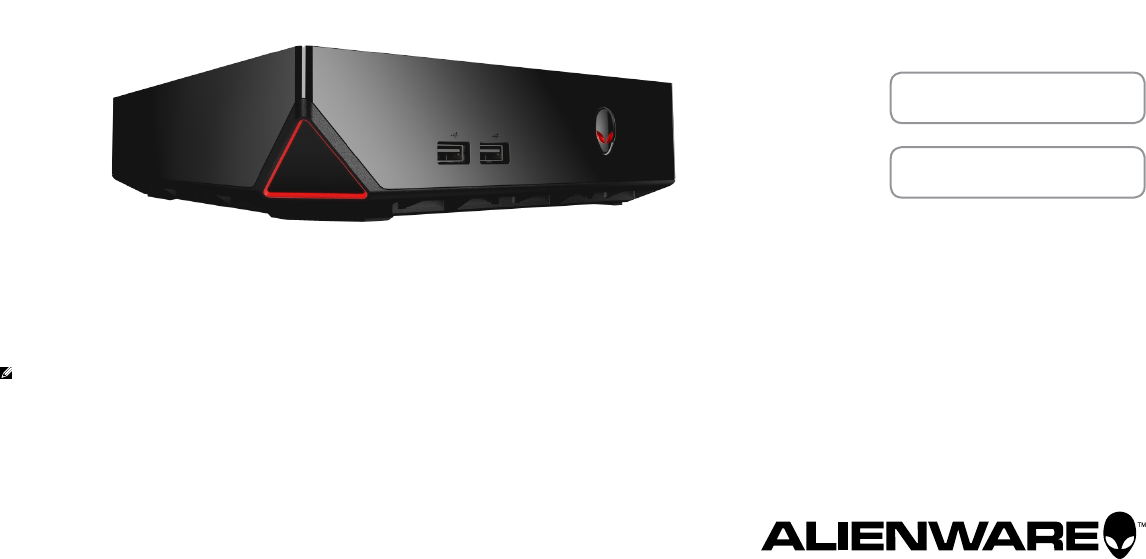
Computer model: Alienware Alpha
NOTE: The images in this document may differ from your computer
depending on the configuration you ordered.
Alienware Alpha
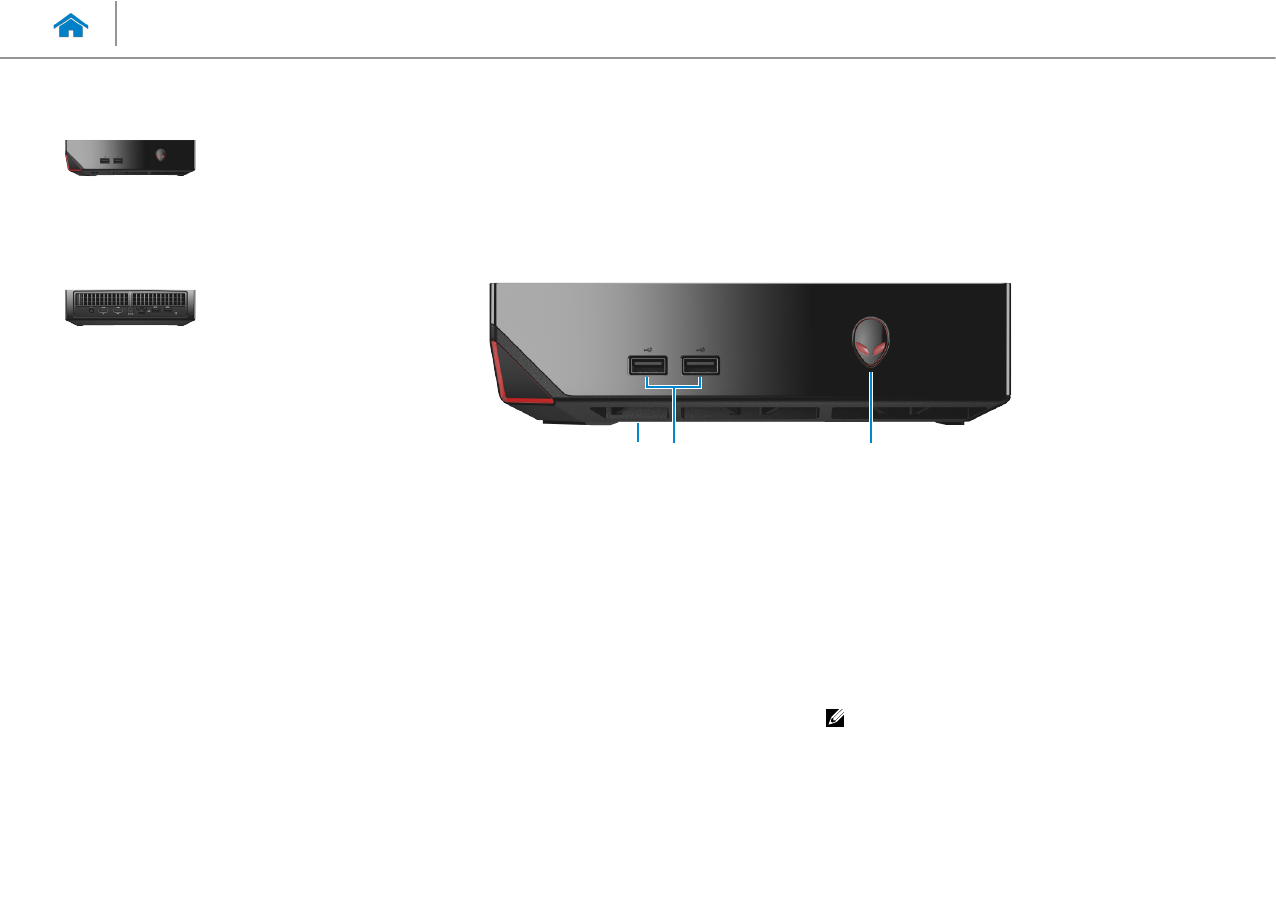
1 USB 2.0 port (beneath USB port cover)
Connect a Bluetooth/wireless receiver for wireless
keyboard, mouse, and so on.
2 USB 2.0 ports (2)
Connect peripherals such as storage devices, printers,
andso on. Provide data transfer speeds up to 480 Mbps.
3 Power button
Press to turn on the computer if it is turned off or
insleepstate.
Press to shut down the computer if it is turned on.
Press and hold for 4 seconds to force shut‑down the
computer.
NOTE: You can customize the power‑button behavior
in Power Options. For more information,
see Me and My Dell at dell.com/support.
Front
132
Views
Specifications
Front
Back
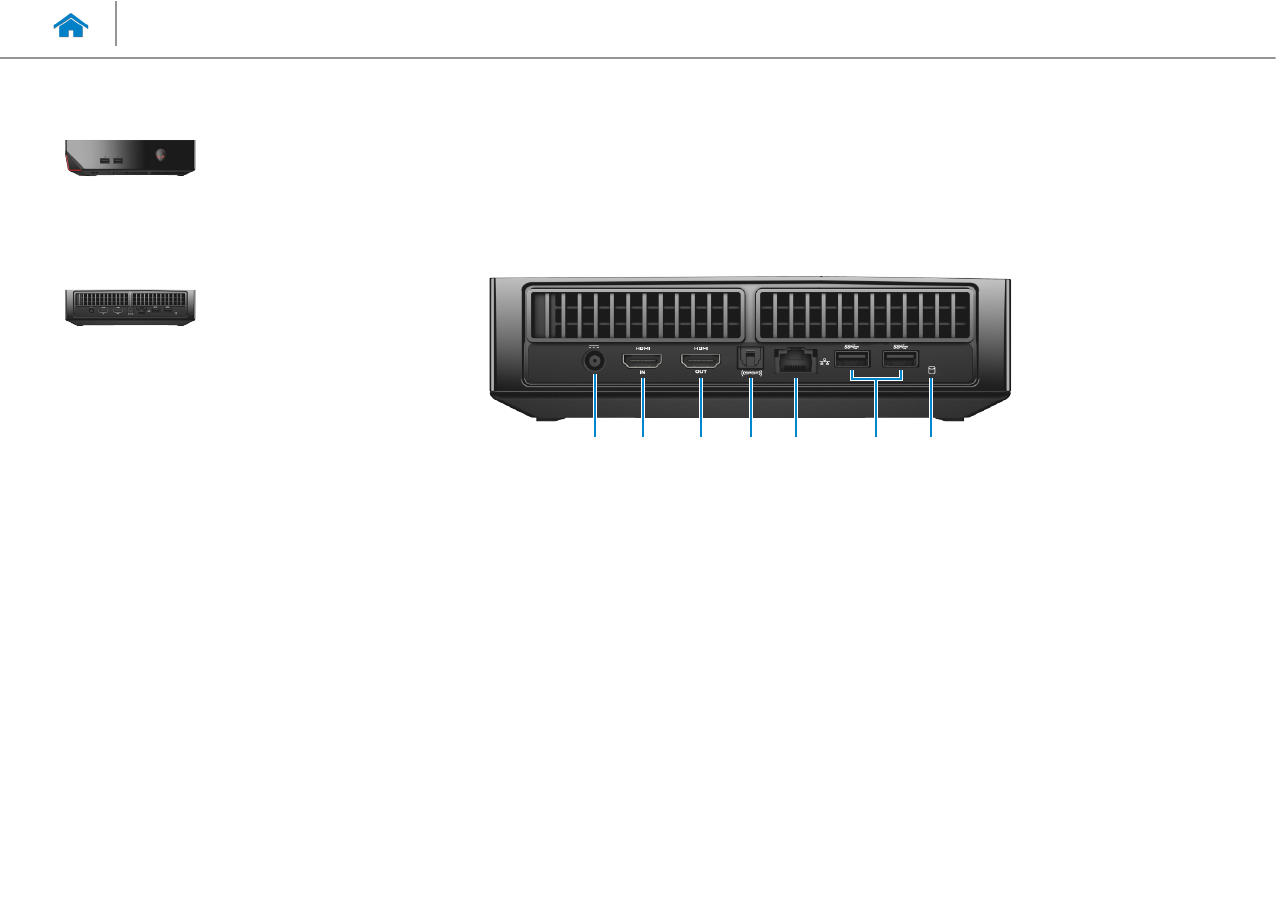
1 Power-adapter port
Connect a power adapter to provide power to
yourcomputer.
2 HDMI-in port
Connect a gaming console, Blu‑ray player, or other
HDMI‑out enabled devices.
3 HDMI-out port
Connect a monitor, TV, or other HDMI‑in enabled devices.
Provides video and audio output.
4 Optical S/PDIF port
Connect an amplifier, speakers, or a TV for digital audio
output through optical cables.
5 Network port
Connect an Ethernet (RJ45) cable from a router or a
broadband modem for network or internet access.
The two lights next to the port indicate the connectivity
status and network activity.
6 USB 3.0 ports (2)
Connect peripherals such as storage devices, printers, and
so on. Provide data transfer speeds up to 5 Gbps.
7 Hard-drive activity light
Turns on when the computer reads from or writes to the
hard drive.
Back
541 2 3 76
Views
Specifications
Front
Back
Specifications
Views
System
Information Memory Ports and
Connectors
Dimensions and
Weight StorageCommunications Video Audio
Power Adapter Computer
Environment
Dimensions and Weight
Height 55 mm (2.17 in)
Width 200 mm (7.87 in)
Depth 200 mm (7.87 in)
Weight (maximum) 1.81 kg (4 lb)
NOTE: The weight of your computer varies depending on the configuration ordered
and the manufacturing variability.
Specifications
Views
System
Information Memory Ports and
Connectors
Dimensions and
Weight StorageCommunications Video Audio
Power Adapter Computer
Environment
System Information
Computer model Alienware Alpha
Processor • 4th Generation Intel Dual Core i3
• 4th Generation Intel Quad Core i5
• 4th Generation Intel Quad Core i7
Chipset Intel H81
DMI speed 5.0 GT/s
Processor data width 64 bits
Specifications
Views
System
Information Memory Ports and
Connectors
Dimensions and
Weight StorageCommunications Video Audio
Power Adapter Computer
Environment
Ports and Connectors
External:
Network One RJ45 port
USB • Three USB 2.0 ports
• Two USB 3.0 ports
Video/Audio • One optical S/PDIF port
• One HDMI‑in port
• One HDMI‑out port
Internal:
M.2 One M.2 card slot for WLAN and Bluetooth
Specifications
Views
System
Information Memory Ports and
Connectors
Dimensions and
Weight StorageCommunications Video Audio
Power Adapter Computer
Environment
Communications
Ethernet 10/100/1000 Mbps Realtek RTL8151 Ethernet controller integrated on systemboard
Wireless • Wi‑Fi 802.11 a/g/n
• Wi‑Fi 802.11 a/g/n/ac
• Bluetooth 4.0
Specifications
Views
System
Information Memory Ports and
Connectors
Dimensions and
Weight StorageCommunications Video Audio
Power Adapter Computer
Environment
Power Adapter
Type 130 W
Input voltage 100 VAC–240 VAC
Input frequency 50 Hz–60 Hz
Output current 6.70 A
Rated output voltage 19.50 VDC
Temperature range:
Operating 0°C to 40°C (32°F to 104°F)
Storage –40°C to 70°C (–40°F to 158°F)
Specifications
Views
System
Information Memory Ports and
Connectors
Dimensions and
Weight StorageCommunications Video Audio
Power Adapter Computer
Environment
Computer Environment
Airborne contaminant level G2 or lower as defined by ISA‑S71.04‑1985
Operating Storage
Temperature range 5°C to 35°C (41°F to 95°F) –40°C to 65°C (–40°F to 149°F)
Relative humidity (maximum) 10% to 90% (non‑condensing) 0% to 95% (non‑condensing)
Vibration (maximum)*0.26 GRMS 1.37 GRMS
Shock (maximum) 40 G for 2 ms with a change
in velocity of 20 in/s (51 cm/s)†
105 G for 2 ms with a change
in velocity of 52.5 in/s (133 cm/s)
Altitude (maximum) –15.24 m to 3048 m
(–50 ft to 10,000 ft)
–15.24 m to 10,668 m
(–50 ft to 35,000 ft)
* Measured using a random vibration spectrum that simulates user environment.
† Measured using a 2 ms half‑sine pulse when the hard drive is in use.
