Dell Compellent Sc4020 Storage Center 7.2 Release Notes User Manual Sc2000 Notes30 En Us
User Manual: Dell dell-compellent-sc4020 - Dell Storage Center 7.2 Release Notes
Open the PDF directly: View PDF  .
.
Page Count: 24
- Dell Storage Center 7.2 Release Notes
- Document Revision History
- Supported Storage Systems
- New in This Release
- Dell Storage Manager 2016
- Drive Spare Rightsizing
- Live Volume with Auto Failover Support
- SC7020F All-Flash Storage Systems
- SC7020 Storage System Update
- SC5020F All-Flash Storage Systems
- SC5020 Storage Systems
- SC460 Expansion Enclosures
- SCv3000 Series Storage Systems
- SCv300, SCv3020, and SCv360 Expansion Enclosures
- Storage Center 7.2 Feature Availability and Licenses
- Storage Center 7.2 Scalability
- Fixed Issues
- Fixed Issues Related to Data Reduction
- Fixed Issues Related to Hardware
- Fixed Issues Related to Replication and Live Volume
- Fixed Issues Related to Alerts and Reporting
- Fixed Issues Related to Security
- Fixed Issues Related to Storage Management
- Fixed Issues Related to Updating, SupportAssist, and Licensing
- Open Issues
- Storage Center Update Information
- Support Resources
Dell Storage Center 7.2
Release Notes
This document describes the new features, enhancements, xed issues, and open issues in Storage Center 7.2.
Current Version: 7.2.30
Release Date: 2017 - 11
Previous Version: 7.2.11
Document Revision History
Document Number: 680-021-020
Revision Date Description
A February 2017 Initial release of Storage Center 7.2
B May 2017 Updated for Storage Center 7.2.10
C June 2017 Added supported platforms for the Live Volume with Auto Failover feature
D July 2017 Updated for Storage Center 7.2.11
E August 2017 Added support for SC8000, SC4020, and SCv2000 series storage systems
F September 2017 Updated raw capacity for SC9000 storage systems
G October 2017 Added support for SCv3000 series storage systems and SCv300, SCv320,
SCv360, and SC460 expansion enclosures
H November 2017 Updated for Storage Center 7.2.30
Contents
Supported Storage Systems.................................................................................................................................................... 1
New in This Release................................................................................................................................................................ 2
Storage Center 7.2 Feature Availability and Licenses............................................................................................................... 3
Storage Center 7.2 Scalability................................................................................................................................................ 10
Fixed Issues........................................................................................................................................................................... 13
Open Issues...........................................................................................................................................................................19
Storage Center Update Information...................................................................................................................................... 23
Support Resources............................................................................................................................................................... 23
Supported Storage Systems
Storage Center 7.2.1 is supported on the SC7020 storage system.
Storage Center 7.2.11 or later is supported on the following storage systems:
• SC9000
• SC8000
• SC7020F
Document Number: 680-021-020
Rev. H
2017 - 11
• SC7020
• SC5020F
• SC5020
• SC4020
• SCv3000 Series
• SCv2000 Series
New in This Release
The following features were added to Storage Center 7.2.
Dell Storage Manager 2016
Dell Storage Manager 2016 R3 is required to manage storage systems running Storage Center 7.2.1.
Dell Storage Manager 2016 R3.11 or later is required to manage storage systems running Storage Center 7.2.11 or later.
Drive Spare Rightsizing
When Storage Center consumes a spare drive, Drive Spare Rightsizing allows Storage Center to modify the size of a larger capacity
spare drive to match the capacity of the drive being replaced in the tier. After Storage Center modies the size of the drive, the drive
cannot be modied to its original size without assistance from Dell Technical Support. Drive Spare Rightsizing is enabled by default
for all controllers running Storage Center version 7.2.11 or later.
This feature allows Dell Technical Support to dispatch larger capacity drives of the same disk class when the same size drive is not
available, providing faster delivery times.
Live Volume with Auto Failover Support
In Storage Center 7.2.10, the Live Volume Auto Failover feature is supported on Windows Server 2016 Hyper-V.
The Live Volume Auto Failover feature is also supported on the following platforms:
• Windows Server 2012 Hyper-V
• Windows Server 2012 R2 Hyper-V
• VMware vSphere 5.5
• VMware vSphere 6.0
• VMware vSphere 6.5
SC7020F All-Flash Storage Systems
Storage Center 7.2 introduces support for SC7020F all-ash storage systems.
The SC7020F consists of a 3U chassis with dual storage controllers, redundant power supplies, and up to 30 internal 2.5-inch hot
swappable SSDs. The SC7020F can be expanded up to 500 drives using SC420F all-ash expansion enclosures.
NOTE: The SC7020F must be updated to Storage Center 7.2.11 or later when it is installed.
SC7020 Storage System Update
Storage Center 7.2 performs the reallocation of SC7020 system resources from le and block to block only. The system resources
that are reallocated include the CPUs, memory, and front-end iSCSI ports. An SC7020 running Storage Center 7.2 allows access to
block storage from all the iSCSI ports on the SC7020 mezzanine cards.
NOTE: In Storage Center 7.1, access to block storage was limited to the right two iSCSI ports on the SC7020 mezzanine
cards.
2Dell Storage Center 7.2 Release Notes

SC5020F All-Flash Storage Systems
Storage Center 7.2 introduces support for SC5020F all-ash storage systems.
The SC5020F consists of a 3U chassis with dual storage controllers, redundant power supplies, and up to 30 internal 2.5-inch hot
swappable SSDs. The SC5020F can be expanded up to 222 drives using SC420F all-ash expansion enclosures.
NOTE: The SC5020F must be updated to Storage Center 7.2.11 or later when it is installed.
SC5020 Storage Systems
Storage Center 7.2 introduces support for SC5020 storage systems.
The SC5020 consists of a 3U chassis with dual storage controllers, redundant power supplies, and up to 30 internal 2.5-inch hot
swappable SAS hard drives. The SC5020 can be expanded up to 222 drives using SC400, SC420, and SC460 expansion enclosures.
NOTE: The SC5020 must be updated to Storage Center 7.2.11 or later when it is installed.
SC460 Expansion Enclosures
Storage Center 7.2.11 introduces support for SC460 expansion enclosures.
The SC460 consists of a 4U chassis with redundant EMMs, redundant power supplies, and up to 60 3.5-inch hot swappable SAS
hard drives.
The SC460 expansion enclosure is supported on SC5020, SC7020, and SC9000 storage systems.
SCv3000 Series Storage Systems
Storage Center 7.2.11 introduces support for SCv3000 series storage systems.
The SCv3000 series consists of a 3U chassis with dual storage controllers and redundant power supplies. The SCv3000 storage
system includes up to 16 3.5-inch hot swappable SAS hard drives and the SCv3020 storage system includes up to 30 2.5-inch hot
swappable SAS hard drives.
SCv3000 series storage systems can be expanded up to 222 drives using SCv300 and SCv320, and SCv360 expansion enclosures.
SCv300, SCv3020, and SCv360 Expansion Enclosures
Storage Center 7.2.11 introduces support for SCv300, SCv320, and SCv360 expansion enclosures.
SCv300, SCv320, and SCv360 expansion enclosures are supported on SCv3000 series storage systems.
• The SCv300 consists of a 2U chassis with redundant EMMs, redundant power supplies, and up to 12 3.5-inch hot swappable
SAS hard drives.
• The SCv320 consists of a 2U chassis with redundant EMMs, redundant power supplies, and up to 24 2.5-inch hot swappable
SAS hard drives.
• The SCv360 consists of a 4U chassis with redundant EMMs, redundant power supplies, and up to 60 3.5-inch hot swappable
SAS hard drives.
Storage Center 7.2 Feature Availability and Licenses
The core licenses and support for optional licensed features varies depending on the storage system.
Dell Storage Center 7.2 Release Notes 3

SC9000 Features and Licenses
SC9000 storage systems provide the following licensed features and optional value-added bundles.
Core Software Bundle
• Data Instant Replay (Snapshots)
• Data Reduction (Compression and Deduplication)
• Dell Storage Manager
• Dynamic Capacity
• Dynamic Controllers
• Live Migrate
• Local Data Protection
• Multi-VLAN Tagging
• Virtual Ports
• Volume QoS
• VVols
Optional Licenses
• Replay Manager
• Live Volume and Live Volume with Auto Failover
• Remote Instant Replay (Replication), including Cross-Platform Replication
• SED FIPS Secure Data
• Storage Manager Chargeback
Storage Protection Bundle
• Replay Manager
• Live Volume and Live Volume with Auto Failover
• Remote Instant Replay (Replication), including Cross-Platform Replication
Storage Optimization Bundle
• Data Progression
• Fast Track
Total Feature Bundle
• SED FIPS Secure Data
• Storage Manager Chargeback
• Storage Optimization Bundle
• Storage Protection Bundle
SC8000 Features and Licenses
SC8000 storage systems provide the following licensed features:
Core Licenses
• Data Instant Replay (Snapshots)
• Data Reduction (Compression and Deduplication)
• Dell Storage Manager
• Dynamic Capacity
4Dell Storage Center 7.2 Release Notes

• Dynamic Controllers
• Live Migrate
• Local Data Protection
• Multi-VLAN Tagging
• Volume QoS
• VVols
Optional Licenses
• Replay Manager
• Data Progression
• Fast Track
• Live Volume and Live Volume with Auto Failover
• Remote Instant Replay (Replication), including Cross-Platform Replication
• SED FIPS Secure Data
• Storage Manager Chargeback
• Virtual Ports
SC7020F Features and Licenses
SC7020F all-ash storage systems provide the following licensed features and optional value-added bundles.
Total Feature Bundle
• Data Instant Replay (Snapshots)
• Data Progression
• Data Reduction (Compression and Deduplication)
• Dell Storage Manager
• Dynamic Capacity
• Dynamic Controllers
• Live Migrate
• Live Volume and Live Volume with Auto Failover
• Local Data Protection
• Multi-VLAN Tagging
• Remote Instant Replay (Replication), including Cross-Platform Replication
• Replay Manager
• SED FIPS Secure Data
• Storage Manager Chargeback
• Virtual Ports
• Volume QoS
• VVols
SC7020 Features and Licenses
SC7020 storage systems provide the following licensed features and optional value-added bundles.
Core Software Bundle
• Data Instant Replay (Snapshots)
• Data Reduction (Compression and Deduplication)
• Dell Storage Manager
• Dynamic Capacity
Dell Storage Center 7.2 Release Notes 5

• Dynamic Controllers
• Live Migrate
• Local Data Protection
• Multi-VLAN Tagging
• Virtual Ports
• Volume QoS
• VVols
Optional Licenses
• Replay Manager
• Live Volume and Live Volume with Auto Failover
• Remote Instant Replay (Replication), including Cross-Platform Replication
• SED FIPS Secure Data
• Storage Manager Chargeback
Storage Protection Bundle
• Replay Manager
• Live Volume and Live Volume with Auto Failover
• Remote Instant Replay (Replication), including Cross-Platform Replication
Storage Optimization Bundle
• Data Progression
• Fast Track
Total Feature Bundle
• SED FIPS Secure Data
• Storage Manager Chargeback
• Storage Optimization Bundle
• Storage Protection Bundle
SC5020F Features and Licenses
SC5020F all-ash storage systems provide the following licensed features and optional value-added bundles.
Total Feature Bundle
• Data Instant Replay (Snapshots)
• Data Progression
• Data Reduction (Compression and Deduplication)
• Dell Storage Manager
• Dynamic Capacity
• Dynamic Controllers
• Live Migrate
• Live Volume and Live Volume with Auto Failover
• Local Data Protection
• Multi-VLAN Tagging
• Remote Instant Replay (Replication), including Cross-Platform Replication
• Replay Manager
• SED FIPS Secure Data
6Dell Storage Center 7.2 Release Notes

• Storage Manager Chargeback
• Virtual Ports
• Volume QoS
• VVols
SC5020 Features and Licenses
SC5020 storage systems provide the following licensed features and optional value-added bundles.
Core Software Bundle
• Data Instant Replay (Snapshots)
• Data Reduction (Compression and Deduplication)
• Dell Storage Manager
• Dynamic Capacity
• Dynamic Controllers
• Live Migrate
• Local Data Protection
• Multi-VLAN Tagging
• Virtual Ports
• Volume QoS
• VVols
Optional Licenses
• Replay Manager
• Live Volume and Live Volume with Auto Failover
• Remote Instant Replay (Replication), including Cross-Platform Replication
• SED FIPS Secure Data
• Storage Manager Chargeback
Storage Protection Bundle
• Replay Manager
• Live Volume and Live Volume with Auto Failover
• Remote Instant Replay (Replication), including Cross-Platform Replication
Storage Optimization Bundle
• Data Progression
• Fast Track
Total Feature Bundle
• SED FIPS Secure Data
• Storage Manager Chargeback
• Storage Optimization Bundle
• Storage Protection Bundle
Dell Storage Center 7.2 Release Notes 7

SC4020 Features and Licenses
SC4020 storage systems provide the following licensed features:
Core Licenses
• Data Instant Replay (Snapshots)
• Data Reduction (Compression and Deduplication)
• Dell Storage Manager
• Dynamic Capacity
• Dynamic Controllers
• Live Migrate
• Local Data Protection
• Multi-VLAN Tagging
• Volume QoS
• VVols
Optional Licenses
• Replay Manager
• Data Progression
• Fast Track
• Live Volume and Live Volume with Auto Failover
• Remote Instant Replay (Replication), including Cross-Platform Replication
• SED FIPS Secure Data
• Storage Manager Chargeback
• Virtual Ports
Performance/Optimization Bundle
• Data Progression
• Fast Track
Remote Data Protection Bundle
• Remote Instant Replay (Replication)
Remote Data Protection with Live Volume Bundle
• Remote Instant Replay (Replication)
• Live Volume and Live Volume with Auto Failover
SCv3000 Series Features and Licenses
SCv3000 series storage systems provide the following licensed features and optional value-added bundles.
Core Software Bundle
• Data Instant Replay (Snapshots)
• Data Compression
• Dell Storage Manager
• Dynamic Capacity
• Dynamic Controllers
• Live Migrate
8Dell Storage Center 7.2 Release Notes

• Local Data Protection
• Virtual Ports
• Volume QoS
• VVols
Optional Licenses
• Replay Manager
• Live Volume and Live Volume with Auto Failover
• Remote Instant Replay (Replication), including Cross-Platform Replication
• SED FIPS Secure Data
• Storage Manager Chargeback
Storage Protection Bundle
• Replay Manager
• Live Volume and Live Volume with Auto Failover
• Remote Instant Replay (Replication), including Cross-Platform Replication
Storage Optimization Bundle
• Data Progression
• Fast Track
Total Feature Bundle
• SED FIPS Secure Data
• Storage Manager Chargeback
• Storage Optimization Bundle
• Storage Protection Bundle
SCv2000 Series Features and Licenses
SCv2000 series storage systems provide the following licensed features:
Core Licenses
• Dell Storage Manager
• Dynamic Capacity
• Dynamic Controllers
Optional Licenses
• Flex Port
• Local Data Protection (Snapshots)
• Remote Data Protection (Asynchronous replication only)
Dell Storage Center 7.2 Release Notes 9
Storage Center 7.2 Scalability
The following scalability guidelines apply to Storage Center 7.2.
Storage System Scalability Guidelines
The following scalability guidelines apply to SC9000, SC8000, SC7020F, SC7020, SC5020F, SC5020, SC4020, SCv3000 Series,
and SCv2000 Series storage systems.
NOTE: Raw storage space is expressed in decimal units (for example, 1 TB = 1012 bytes). Addressable storage space is
expressed in base 2 units (for example, 1 TB = 240 bytes). Therefore, a 1 TB drive measured in decimal units is equal to
0.909 TB base 2 units.
Storage System Supported Maximum
SC9000 (Dual-Controller) with 128 GB or 256
GB of memory per controller
• 3.2 PB raw and 2.0 PB addressable storage space using the standard 2 MB
page size
• 750 TB raw and 500 TB addressable storage space using a 512 KB page size
SC8000 (Dual-Controller) with 64 GB of
memory per controller
• 3.1 PB raw and 2.0 PB addressable storage space using the standard 2 MB
page size
• 750 TB raw and 500 TB addressable storage space using a 512 KB page size
SC8000 (Dual-Controller) with 16 GB of
memory per controller
• 750 TB raw and 500 TB addressable storage space using the standard 2 MB
page size
• 400 TB raw and 300 TB addressable storage space using a 512 KB page size
SC7020F or SC7020 with 128 GB of memory
per controller
• 3.1 PB raw and 2.0 PB addressable storage space using the standard 2 MB
page size
• 750 TB raw and 500 TB addressable storage space using a 512 KB page size
SC5020F or SC5020 with 64 GB of memory
per controller
• 2 PB raw and 1350 TB addressable storage space using the standard 2 MB
page size
• 0.5 PB raw and 338 TB addressable storage space using a 512 KB page size
SC4020 with 16 GB of memory per controller • 1054 TB raw and 700 TB addressable storage space using the standard 2 MB
page size
• 500 TB raw and 400 TB addressable storage space using a 512 KB page size
SCv3000 Series with 16 GB of memory per
controller
• 2 PB raw and 1350 TB addressable storage space using a 4 MB page size
• 1 PB raw and 675 TB addressable storage space using the standard 2 MB
page size
SCv2000 Series with 8 GB of memory per
controller
• 672 TB raw and 450 TB addressable storage space using the standard 2 MB
page size
Storage Center Scalability Guidelines
The following scalability guidelines are the maximum recommended design guidelines for storage systems running Storage Center 7.2.
SC9000, SC8000, SC7020F, SC7020, SC5020F, SC5020, and SC4020 Storage Systems
The following scalability guidelines are the maximum recommended design guidelines for storage systems running Storage Center 7.2.
Storage Center Object Supported Maximum
Disk Folder 10 disk folders
Server • 500 servers (Total number of servers includes physical servers, virtual servers, and server
clusters)
10 Dell Storage Center 7.2 Release Notes
Storage Center Object Supported Maximum
• 500 server folders
• 1000 server HBA initiator ports (Total number of HBA initiator ports includes all physical and
virtual ports that are visible to the SAN)
Volume • 500 TB maximum volume size (or the maximum addressable storage space, whichever is less)
• 2000 volumes
• 500 volume folders
Deduplication 1 PB data ingestion limit (SC4020 – 500 TB data ingestion limit)
Live Volume 100 Live Volumes
Thin Import 10 volumes (maximum simultaneous imports)
QoS Proles • 100 Volume QoS Proles
• 100 Group QoS Proles
• 100 Volumes per Group QoS Prole
Data Instant Replay
(Snapshots)
• Snapshots:
– SC9000 – 32,000 snapshots
– SC8000 – 16,000 snapshots
– SC7020F or SC7020 – 16,000 snapshots
– SC5020F or SC5020 – 8000 snapshots
– SC4020 – 8000 snapshots
• 1000 snapshot proles
• 100 snapshot history proles
• 200 consistency groups
• 100 volumes per consistency group (SC4020 – 40 volumes per consistency group)
Replications • Source replications:
– SC9000 – 1000 source replications
– SC8000 – 500 source replications
– SC7020F or SC7020 – 1000 source replications
– SC5020F or SC5020 – 500 source replications
– SC4020 –500 source replications
• 2000 target replications (SC4020 – 1000 replications for FC and 230 replications for iSCSI)
SCv3000 Series Storage Systems
The following scalability guidelines are the maximum recommended design guidelines for SCv3000 series storage systems running
Storage Center 7.2.
Storage Center Object Supported Maximum
Disk Folder 10 disk folders
Server • 250 servers (Total number of servers includes physical servers, virtual servers, and server
clusters)
• 250 server folders
• 500 server HBA initiator ports (Total number of HBA initiator ports includes all physical and
virtual ports that are visible to the SAN)
Volume • 500 TB maximum volume size (or the maximum addressable storage space, whichever is less)
• 1000 volumes
• 500 volume folders
Dell Storage Center 7.2 Release Notes 11
Storage Center Object Supported Maximum
Live Volume 100 Live Volumes
Thin Import 10 volumes (maximum simultaneous imports)
QoS Proles • 100 Volume QoS Proles
• 100 Group QoS Proles
• 100 Volumes per Group QoS Prole
Data Instant Replay
(Snapshots)
• 4000 snapshots
• 1000 snapshot proles
• 100 snapshot history proles
• 200 consistency groups
• 25 volumes per consistency group
Replications • 250 source replications
• 250 target replications
SCv2000 Series Storage System
The following scalability guidelines are the maximum recommended design guidelines for SCv2000 series storage systems running
Storage Center 7.2.
Storage Center Object Supported Maximum
Disk Folder 4 disk folders
Server • 100 servers (Total number of servers includes physical servers, virtual servers, and server
clusters.)
• 100 server folders
• 200 server HBA initiator ports (Total number of HBA initiator ports includes all physical and
virtual ports that are visible to the SAN.)
Volume • 500 TB maximum volume size (or the maximum addressable storage space, whichever is less)
• 1000 volumes
• 500 volume folders
Thin Import 10 volumes (maximum simultaneous imports)
QoS Proles • 100 Volume QoS Proles
• 100 Group QoS Proles
• 100 Volumes per Group QoS Prole
Data Instant Replay
(Snapshots)
NOTE: Data Instant
Replay is a licensed
feature.
• 2000 snapshots
• 1000 snapshot proles
• 100 snapshot history proles
• 100 consistency groups
• 25 volumes per consistency group
Replications • 124 source replications
• 500 target replications
12 Dell Storage Center 7.2 Release Notes
Fixed Issues
The following sections summarize the issues xed in Storage Center 7.2.
NOTE: Storage Center 7.2.11 contains all the issues xed in Storage Center 7.1.12 and earlier. For more information, see
the
Storage Center 7.1 Release Notes
.
Fixed Issues Related to Data Reduction
The following issues are xed in Storage Center 7.2.
Table 1. Fixed Data Reduction Issues in Storage Center 7.2.30
Issue Description
SCOS-43864 A storage system might experience read latency spikes while Deduplication is running.
SCOS-42569 A storage system might experience read latency during ingestion of data on a volume with
Deduplication enabled.
SCOS-42446 Data ingestion might fail if a number of drives are removed from a storage system during a RAID
restripe operation.
SCOS-42281 Controllers in a storage system might reboot due to stale metadata pointer access.
SCOS-42024 In rare instances, increased latency might occur because of high CPU utilization while performing
data progression on a storage system with Deduplication enabled volumes.
SCOS-38263 A storage system might report more used drive space than actual used drive space after the
rehydration of compressed data.
SCOS-21857 A storage system might experience high CPU utilization during data ingestion.
Table 2. Fixed Data Reduction Issues in Storage Center 7.2.11
Issue Description
SCOS-42157 Performing a non-service aecting update of a dual-controller storage system to Storage Center
7.2.10 might result in I/O timeouts for some volumes when the controllers are running dierent
versions of the Storage Center software.
Table 3. Fixed Data Reduction Issues in Storage Center 7.2.10
Issue Description
SCOS-40135 A storage system with Deduplication enabled might display a false positive metadata validation
failure message in the Storage Center console and generate validation failure alerts in the
Deduplication map table.
SCOS-39128 A storage system with Deduplication enabled might experience increased latency while expiring
deduplicated data or during Data Progression.
SCOS-34642 A controller might reset if too many storage system resources are consumed during Deduplication
and snapshot expiration of deduplicated pages.
SCOS-27942 A storage system with Deduplication enabled might fail to remove page pool devices during a
RAID rebalance because of performance issues.
SCOS-24830 A controller might reset during lost space recovery in the Deduplication page manager.
SCOS-24167 A storage system with Deduplication enabled volumes might experience performance issues
during the Deduplication page manager clean-up process.
Dell Storage Center 7.2 Release Notes 13
Issue Description
SCOS-22379 The Compression and Deduplication page manager defragmentation process might cause high
CPU utilization and impact system performance.
SCOS-21671 Rehydration of deduplicated or compressed data does not place the data in the tier specied by
the volume storage prole.
Table 4. Fixed Data Reduction Issues in Storage Center 7.2.1
Issue Description
SCOS-31054 Enabling Deduplication on a volume that is part of a replication might result in hundreds of
Ingestion failure due to SecondaryStorage infrastructure is not
ready log messages.
SCOS-22590 A storage system running Storage Center 7.1.3 with Deduplication enabled might experience
performance issues during the defragmentation portion of Data Progression.
SCOS-21275 After updating from Storage Center 7.1.1, a storage system might fail to enable Deduplication on
some volumes.
SCOS-21160 On a storage system with compression enabled, the secondary storage deactivate process might
fail to ush prefetch pages.
SCOS-21129 A storage system might incorrectly report snapshot bad pages when the system is low on
memory.
SCOS-20960 The IOPS of a storage system might decrease and I/O latency might increase signicantly
because of high CPU usage during the Data Progression defragmentation process.
SCOS-20449 A controller reset might occur because of out of range memory access during the Data
Progression defragmentation process.
SCOS-20240 Data Progression might fail to move pages to tier 3 for volumes that are larger than 32 TB. If a
specic history has multiple view volumes, Data Progression might fail to move pages for volumes
smaller than 32 TB.
SCOS-20075 A storage system with Flash Optimized storage types and Deduplication enabled might suer an
outage during On Demand Data Progression if the system is low on space in tier 1 RAID 10.
SCOS-19570 A storage system running Storage Center 7.1 with compression enabled and over 25 TB of data
ingested into the Deduplication process might suer from I/O delays because of high CPU usage
at the end of Data Progression.
SCOS-19002 Enabling Deduplication on a storage system while one controller is in a failed state might result in
volumes that appear to be deduplicated, when in fact they are not deduplicated.
SCOS-14931 On Demand Data Progression may not complete successfully when Deduplication is enabled on a
volume.
SCOS-13649 Volumes on separate controllers might show the same Deduplication reduction rates when the
Deduplication reduction rates are dierent.
SCOS-13159 Deduplication and Compression might take volumes oine when responses to storage type status
are incorrect.
14 Dell Storage Center 7.2 Release Notes
Fixed Issues Related to Hardware
The following issues are xed in Storage Center 7.2.
Table 5. Fixed Hardware Issues in Storage Center 7.2.30
Issue Description
SCOS-41806 Storage system iSCSI ports might hibernate when a failed TCP checksum is received on an
inbound packet.
SCOS-41452 Larger than normal Ping payloads might cause a storage system iSCSI I/O card to hibernate.
SCOS-16813 A single disk with failing I/Os might cause storage system-wide performance degradation.
Table 6. Fixed Hardware Issues in Storage Center 7.2.11
Issue Description
SCOS-42111 An SC7020 or SC5020 storage system might lock access to drives connected to the Storage
Enclosure Processor (SEP) if the storage system is unable to read the chassis signature for the
SEP rmware.
Table 7. Fixed Hardware Issues in Storage Center 7.2.10
Issue Description
SCOS-41017 An iSCSI I/O card might fail to exit hibernate mode after a reset.
SCOS-40207 On storage systems running Storage Center 7.1.3 or 7.1.4, an iSCSI I/O card might reset because
of an IORP timeout that is 10 seconds greater than the IORP requested timeout.
SCOS-36797 A target port on a storage system with Fibre Channel host bus adapters might fail to respond to
an incoming login attempt.
SCOS-20800 In certain degraded conditions, data miscompares might occur when running software FCoE on
an Intel X520 adapter in an ESXi 5.5 or 6.0 host.
SCOS-18759 The QLe246x Fibre Channel I/O Card takes longer to rebalance in Storage Center 7.1 than it did in
previous versions of Storage Center.
HPEM-507 An SC7020 or SC5020 storage system might unexpectedly reset because of false temperature,
power supply, or fan alerts.
Table 8. Fixed Hardware Issues in Storage Center 7.2.1
Issue Description
SCOS-18490 When connected directly to the Storage Center using the Storage Manager Client, an error
occurs in the hardware change wizard while performing a hardware migration from an SC040
running Storage Center 6.7 to an SC8000 running Storage Center 7.1.
SCOS-18174 On SC7020 storage systems, the status of a new Liebert UPS is not changing from DC to AC in
the Storage Manager Client when power is restored to the UPS.
SCOS-10427 In rare instances, an SCv2000 series or SC4020 storage system may not initialize following a reset
or power cycle.
Dell Storage Center 7.2 Release Notes 15
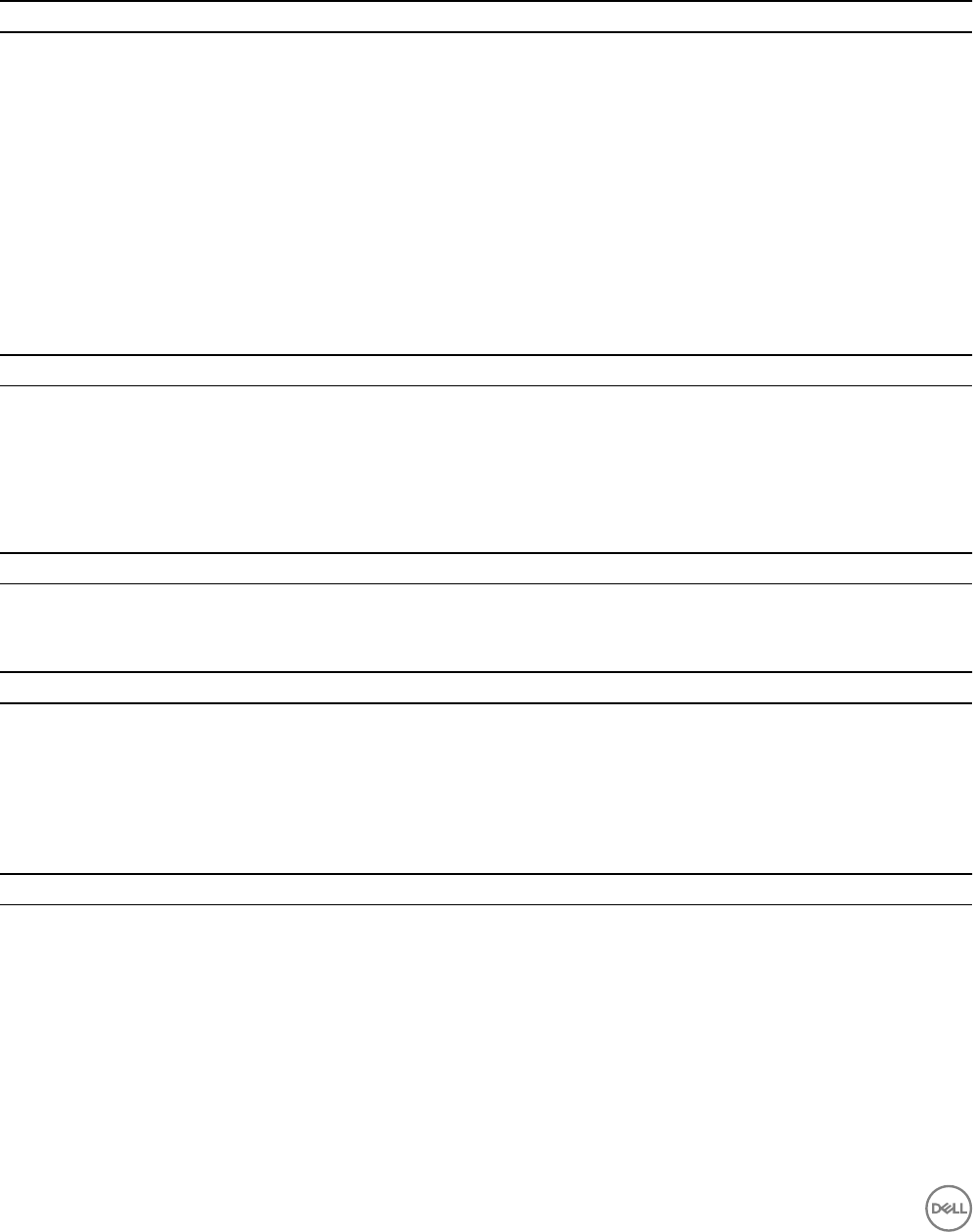
Fixed Issues Related to Replication and Live Volume
The following issues are xed in Storage Center 7.2.
Table 9. Fixed Replication and Live Volume Issues in Storage Center 7.2.10
Issue Description
SCOS-40210 When performing an update from Storage Center 6.7.5 to 7.1.4 on a storage system with a
secondary Live Volume, I/O might become stuck on volumes on the source system.
SCOS-36665 A controller reset might occur while attempting to fail over a Windows cluster on an RDM volume
mapped to non-unied ESXi hosts when using Live Volume High Consistency.
SCOS-35656 Live Volume proxy disk space might be counted towards the total available system disk space.
SCOS-32134 Access to a volume might be lost if out of memory errors occur before the replication enters the
suspending state.
SCOS-7793 A storage system might fail to delete a replication when the QoS node is blocked and there is
outstanding I/O.
Table 10. Fixed Replication and Live Volume Issues in Storage Center 7.2.1
Issue Description
SCOS-22156 The VVols feature in ESXi 6.0 Update 2 fails to work properly with Storage Center 7.1.2.
Fixed Issues Related to Alerts and Reporting
The following issues are xed in Storage Center 7.2.
Table 11. Fixed Alert and Reporting Issues in Storage Center 7.2.30
Issue Description
SCOS-45091 The SNMP service might stop unexpectedly and require a restart.
Table 12. Fixed Alert and Reporting Issues in Storage Center 7.2.10
Issue Description
SCOS-29664 The storage system might report hundreds of Log Corrupt Page Address error messages during a
RAID restripe.
HPEM-493 The syslog daemon might restart and cause an SC7020 or SC5020 storage system to reset
unexpectedly due to a large number of false temperature, power supply, or fan alerts.
Table 13. Fixed Alert and Reporting Issues in Storage Center 7.2.1
Issue Description
SCOS-21331 The Storage Center email process might stop and fail to restart. Because of this issue, the
Storage Center alert email queue lls up, which might cause a controller to reset.
16 Dell Storage Center 7.2 Release Notes
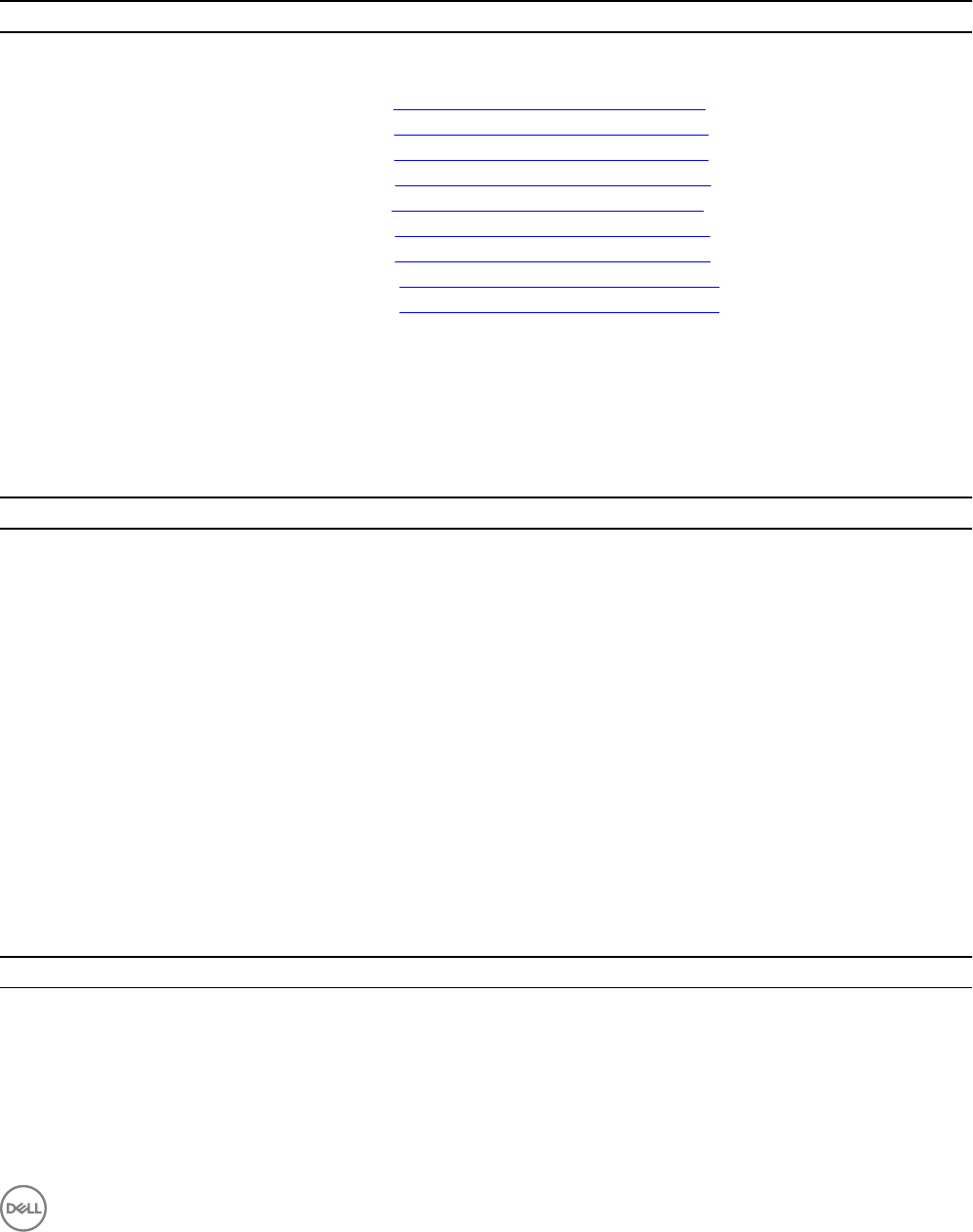
Fixed Issues Related to Security
The following issues are xed in Storage Center 7.2:
Table 14. Fixed Security Issues in Storage Center 7.2.10
Issue Description
SCOS-40490 Updated the OpenSSL version on the Storage Center to OpenSSL 1.0.1u to address the following
security vulnerabilities:
• CVE-2016-2177 www.cvedetails.com/cve/CVE-2016-2177/
• CVE-2016-2178 www.cvedetails.com/cve/CVE-2016-2178/
• CVE-2016-2179 www.cvedetails.com/cve/CVE-2016-2179/
• CVE-2016-2180 www.cvedetails.com/cve/CVE-2016-2180/
• CVE-2016-2181 www.cvedetails.com/cve/CVE-2016-2181/
• CVE-2016-2182 www.cvedetails.com/cve/CVE-2016-2182/
• CVE-2016-2183 www.cvedetails.com/cve/CVE-2016-2183/
• CVE-2016-6302 www.cvedetails.com/cve/CVE-2016-6302/
• CVE-2016-6303 www.cvedetails.com/cve/CVE-2016-6303/
SCOS-40083 Clickjacking vulnerability found on web server ports in Storage Center.
Fixed Issues Related to Storage Management
The following storage management issues are xed in Storage Center 7.2.
Table 15. Fixed Storage Management Issues in Storage Center 7.2.30
Issue Description
SCOS-41405 An SSD with an endurance life that extends beyond February 2106 displays a premature end of
endurance life.
SCOS-41036 A single large raid device consumes all SSD drive space when adding only a small amount of
drives.
SCOS-41018 A controller might reboot when deleting a very large number of objects such as volumes, servers,
or volume mappings.
SCOS-40063 A replacement drive cannot be managed in the same enclosure slot as a failed drive that could not
complete the system archiving process.
SCOS-2658 A rare timing window in which rebalancing local ports at the same time as volume level operations
(view volume creation, mapping/unmapping to a server, etc.) leads to the rebalance not
completing.
SCOS-1392 When upgrading from a 3G SAS I/O card to a 6G SAS I/O card using the hardware change
wizard, the new I/O card is displayed in slot 100x, where x is the slot number.
Table 16. Fixed Storage Management Issues in Storage Center 7.2.10
Issue Description
SCOS-40999 Metadata on inconsistent RAID mirrors/stripes might cause Data Progression failures and lead to
inecient system space usage and performance degradation.
SCOS-40856 A controller might reset if the iSCSI initiator is redirected to an IPv4 address of 0.0.0.0.
SCOS-40725 A controller might reset when updating statistics for page moves between classes if the source
page is on a device marked for deletion.
Dell Storage Center 7.2 Release Notes 17
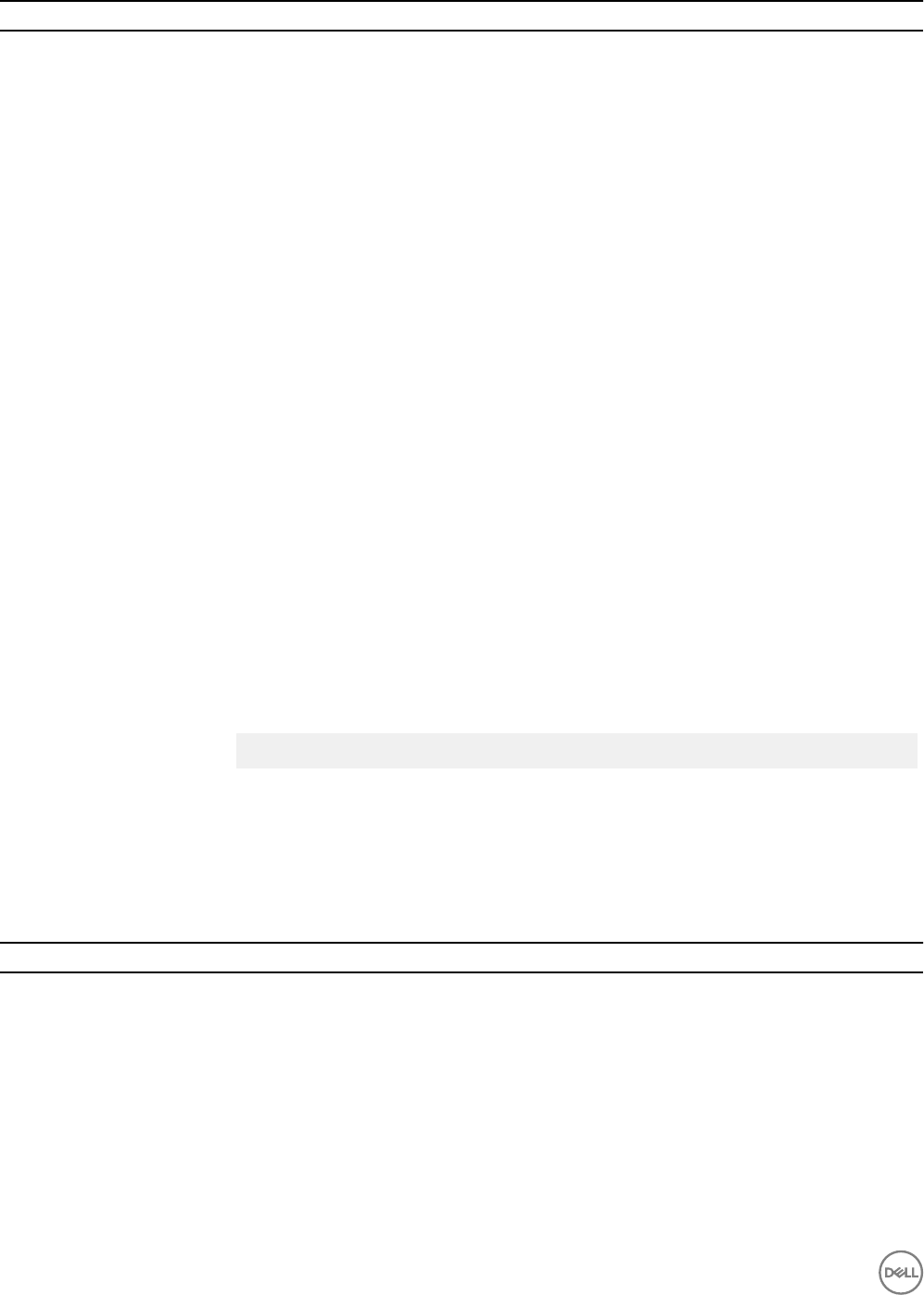
Issue Description
SCOS-40677 When setting up an SC7020 storage system using Dell Storage Manager, the "Launch Initial
Conguration" link might be redisplayed after clicking nish in the initial setup wizard.
SCOS-40529 A controller reset might occur if there are a large number of metadata space allocation requests at
the same time for a volume.
SCOS-40491 SNMP management queries might fail to function properly on storage systems running Storage
Center 7.1.
SCOS-37561 A controller might reset unexpectedly under certain rare timing conditions.
SCOS-40094 Storage Center might delay Data Progression/restripe activity to unacceptable levels if there are
other higher priority background processes.
SCOS-37719 A controller might reset after updating to Storage Center 7.1.3, 7.1.4, or 7.1.5. because of an issue
with memory fragmentation.
SCOS-36475 A storage system might encounter high CPU usage during page validation stage of Data
Progression. This issue is limited to pages consumed from the storage type.
SCOS-36534 Storage Center is unable to create more than a single spare drive on an SC280 enclosure if an
SC220 and SC280 were connected to the storage system during the initial system conguration.
SCOS-36336 A controller might reset when the lock associated with a particular message type cannot be
found. Due to variable timing conditions within the platform, messages can arrive out of order.
SCOS-36319 On storage systems that only have spinning drives and have large volumes with a large number of
new page writes, existing snapshots take a very long to expire.
SCOS-35648 Removing a port from a fault domain while a controller is down might result in storage system
conguration issues.
SCOS-32925 In rare instances, a storage system might experience performance degradations due to a
mismatch in a virtualization threshold value.
SCOS-31707 Importing multiple volumes from an external device using Thin Import causes the volumes to
appear as external devices with the following error:
illegal character found for Attribute: Name
[Illegal Chracters: [<, >, &] ]]
SCOS-18247 Drives in the archived disk folder might count against the total number of managed drives in the
storage system.
SCOS-4797 If QoS limiting is not enabled, system latency might increase when writing to volumes using RAID
5 or RAID 6.
Table 17. Fixed Storage Management Issues in Storage Center 7.2.1
Issue Description
SCOS-21562 In Storage Center 7.1, manual and scheduled restripes are restricted to 12 hours per day.
SCOS-21399 A controller might reset during cross-platform replication initialization with a PS Series array.
SCOS-20142 A controller might reset when the settings of a new Fault Domain are modied.
SCOS-18899 A storage system might incorrectly report snapshot bad pages when the system is low on
memory.
SCOS-18540 A controller revert might take several minutes to complete while deactivating the history of a large
volume (several TBs) if the storage system has space management snapshots.
SCOS-14111 Secondary storage deactivation process is not ushing prefetch pages.
18 Dell Storage Center 7.2 Release Notes

Fixed Issues Related to Updating, SupportAssist, and Licensing
The following issues are xed in Storage Center 7.2.
Table 18. Fixed Updating, SupportAssist, and Licensing Issues in Storage Center 7.2.30
Issue Description
SCOS-40558 A storage system with SupportAssist enabled that is unable to successfully complete the sending
of SupportAssist information might be unable to manage new drives or manually remove drives
safely.
Table 19. Fixed Updating, SupportAssist, and Licensing Issues in Storage Center 7.2.11
Issue Description
SCOS-42056 After updating a storage system to Storage Center 7.2.10, the storage system might stop sending
SupportAssist information to Dell Technical Support on a regular schedule.
SCOS–18488 The Storage Center System Manager user interface is not disabled after updating a dual-
controller storage system from Storage Center 6.6.5 to Storage Center 7.1.1.
Table 20. Fixed Updating, SupportAssist, and Licensing Issues in Storage Center 7.2.10
Issue Description
SCOS-40141 After updating a storage system to Storage Center 7.1.4, controllers might reset while processing
the Link Conguration initialization step.
SCOS-35674 An SC4020 storage system might suer an outage after updating from Storage Center 6.7 to 7.1 if
the storage system exceeds the maximum number of snapshots.
SCOS-35458 Applying a core license might fail when the storage system tries to validate a feature set that does
not exist in the Storage Center software.
Open Issues
The following issues are present in Storage Center 7.2.
Open Issues Related to Data Reduction
The following open issues are related to Data Reduction.
Table 21. Open Data Reduction Issues
Issue Description
SCOS-13237 The Storage Type Data Reduction statistics might be incorrect if the amount of data eligible for
Data Reduction contains fewer than 256 pages.
Workaround: None
Dell Storage Center 7.2 Release Notes 19
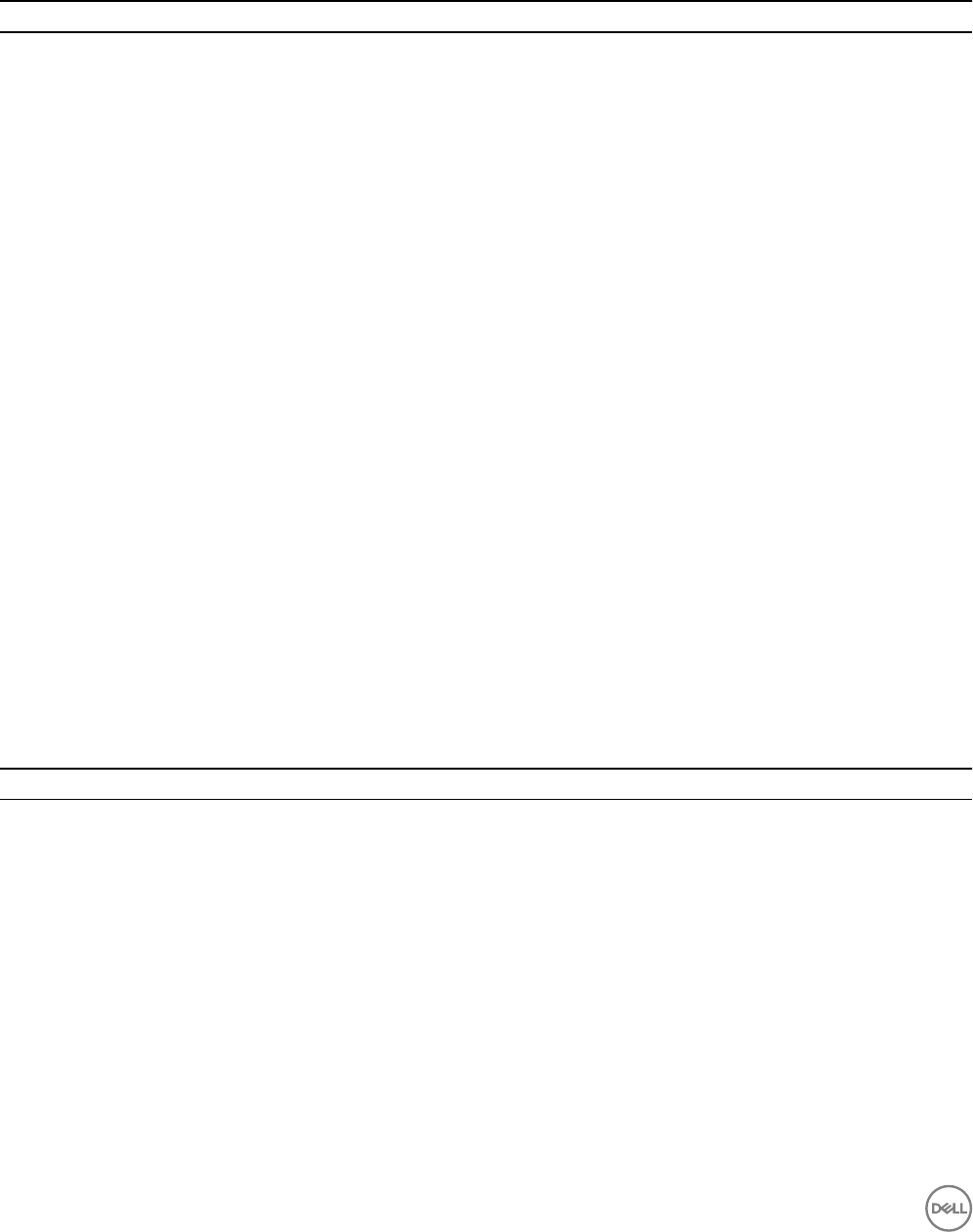
Open Issues Related to Replications and Live Volumes
The following open issues are related to replications and Live Volumes.
Table 22. Open Replication and Live Volume Issues
Issue Description
SCOS-41280 Using a cluster shared volume (CSV) on a Storage Center within a Windows 2016 cluster solution
might result in an I/O failure during an infrastructure fault condition where one of the Windows
hosts is isolated from both its peer and its quorum witness.
Workaround: Use redundant physical switches to reduce the possibility of the I/O failure.
SCOS-41191 When the Dell Storage Manager Client is directly connected to a Storage Center, the option to
delete a volume associated with a Live Volume or Live Migration is displayed, but it is not
supported.
Workaround: Connect to the Storage Center through the Dell Storage Manager Data Collector,
and delete the Live Volume or Live Migration before deleting the volume.
SCOS-18102 The status of a cross-platform replication partner changes to down when the number of
snapshots exceed 1025.
Workaround: The maximum number of supported snapshots for a cross-platform replication is
512. To resolve this issue, manually remove the snapshots until there are fewer than 512 snapshots
and change the expiration dates of snapshots for the replication volume to a manageable
expiration time.
SCOS-17981 Server mappings may not be completely removed when a server is removed from an OS cluster
using Dell Storage Manager before the server is removed from the OS cluster.
Workaround: Remove the server from the cluster through the OS rst. After the server is
rebooted, remove the server object using Dell Storage Manager.
SCOS-12067 When importing a volume, Storage Manager does not allow you to select 0 as the LUN number.
Workaround: None
Open Issues Related to Reporting
The following open issues are related to hardware.
Table 23. Open Reporting Issues
Issue Description
SCOS-38226 In rare instances, a Sync LiveVolume Auto Failover alert is not cleared when the condition is
corrected.
Workaround: Use Dell Storage Manager to manually acknowledge and clear the alert.
SCOS-38023 The email alert message that provides the location of a failed drive might be confusing.
Workaround: In the email alert message, the physical location of the drive is displayed after the
[StatusAlert] text and is shown as the Disk xx-yy, where xx is the enclosure ID and yy is the
enclosure drive slot.
20 Dell Storage Center 7.2 Release Notes
Open Issues Related to Storage Management
The following open issues are related to Storage Management.
Table 24. Open Storage Management Issues
Issue Description
SCOS-41547 This issue is limited to a storage system on which a new version of the Storage Center software
has been downloaded, but not yet installed. When a storage controller is replaced in the storage
system, the storage system might fail to automatically update the low-level rmware to the same
version as the active storage controller. As a result, the storage controllers in the storage system
might end up with dierent versions of the low-level rmware.
Workaround: Install the downloaded Storage Center updates immediately after completing the
storage controller replacement process.
SCOS-41051 When connected to a Storage Center through a Data Collector, Dell Storage Manager does not
allow you to change the name of an enclosure and asset tag.
Workaround: Use the Dell Storage Manager Client to connect directly to the Storage Center, then
change the name of the enclosure and the asset tag.
SCOS-40668 Importing a volume from a Dell PowerVault MD-Series iSCSI storage array might take longer than
expected.
Workaround: Use Dell Storage Manager to change the MTU on the iSCSI fault domain from 1500
to 1472.
SCOS-40311 If a portable volume USB device is connected to the lead controller and the lead controller fails
over, a portable volume copy might fail to resume when the storage system fails back to the
original lead controller.
Workaround: Disconnect and reconnect the portable volume USB device to resume the copy.
SCOS–22260 iSCSI I/O cards fail to honor an MTU value change made on a router.
Workaround: Contact Dell Technical Support.
SCOS-22150 In very rare instances, a controller failover on an SC7020 or SC5020 storage system might
prevent Secure Console access.
Workaround: Contact Dell Technical Support.
SCOS-22026 Removing an HBA or deleting a server object before unmapping it from volumes could result in
the server losing access to volumes and a controller failover will not complete properly.
Workaround: Remove volume mappings from the HBA prior to removing the HBA or server
object from the system.
SCOS-14951 After deleting volumes and snapshots, Storage Center does not immediately report the deleted
volume space as free space for a disk folder.
Workaround: Contact Dell Technical Support.
SCOS-8627 AIX servers cannot boot from SAN using Dell Storage Software Suite for AIX version 2.2.0.17.
Workaround: Use the latest version of Storage Center and the Dell Storage Software Suite for
AIX listed in the Dell Storage Compatibility Matrix.
HPEM-541 In rare instances, SC7020 updates do not complete successfully and the Storage Center might
indicate that updates are still required.
Workaround: Contact Dell Technical Support.
Dell Storage Center 7.2 Release Notes 21
Open Issues Related to User Management
The following open issues are related to Storage Center user management.
Table 25. Open User Management Issues
Issue Description
SCOS-11192 Storage Center cannot authenticate directory service users that are congured to use an
alternate DNS sux.
Workaround: None
Open Issues Related to Hardware
The following open issues are related to hardware.
Table 26. Open Hardware Issues
Issue Description
SCOS-6516 In rare instances, the internal boot device on an SC9000 controller may become unusable
following an unexpected power event and the controller will not boot.
Workaround: Contact Dell Technical Support.
Open Issues Related to Vendors
The following open issues are related to vendors.
Table 27. Open Vendor Issues
Issue Description
SQAI-7 Emulex 8Gb Fibre Channel server adapters (for example, LPe1200x, LPe1205, and OEM
equivalents) are unable to boot from SAN when using Emulex boot code 7.x.
Workaround: Use boot code 5.x rather than boot code 7.x with the Emulex LPe1200x, LPe1205,
and OEM equivalent server adapters.
SQAI-2 An ESXi 5.5 or 6.0 host with an Emulex FC/FCoE HBA running driver version 11.0.x.x might crash
during a controller failover.
Workaround: Update the Emulex FC/FCoE HBA to driver version 11.1.145.18, which is available on
the VMware website.
SQAI-3 Software FCoE timeouts might occur when using QLogic CNAs in NIC mode.
Workaround: See the Dell Storage Compatibility Matrix for the list of supported rmware and
drivers.
SCOS-27133 Server bandwidth to the onboard 10 Gb ethernet ports on an SC7020 drops signicantly on reads
when the server iSCSI initiator has interrupt moderation set to default (enabled).
Workaround: From the server, disable interrupt moderation on the iSCSI cards as described in Dell
EMC SC Series Storage: Microsoft Multipath I/O Best Practices.
SCOS-23090 An ESXi 5.5 (Update 3b) host using FCoE and QLogic 8262 might cause the host to fail during
controller failovers.
Workaround: Avoid using ESXi 5.5 9 (Update 3b).
SCOS-18123 Fibre Channel volumes that are mapped to a Hyper-V virtual machine using NPIV are not
discovered by the virtual machine when the server has a QLogic HBA with out-of-date drivers.
22 Dell Storage Center 7.2 Release Notes
Issue Description
Workaround: Update the HBA to the latest version of the QLogic driver listed in the Dell Storage
Compatibility Matrix.
SCOS-10166 Emulex FC and FCoE driver version 10.7.170.0 might cause an ESXi 5.5 or 6.0 host to fail during
controller failovers.
Workaround: Use the latest recommended driver version for the Emulex adapters. See the Dell
Storage Compatibility Matrix.
SCOS-9404 A storage system might experiences high max latency on the onboard 10 GbE network ports
when the server iSCSI initiator has Nagles’ algorithm enabled.
Workaround: Disable Nagle’s algorithm on the host server when connecting to the SC7020
onboard 10 GbE network ports as described in Dell EMC SC Series Storage: Microsoft Multipath
I/O Best Practices.
CQ00358236 ESXi 5.x hosts with QxE82xx iSCSI adapters using QLA4xxx driver version 634.5.18 (ESXi 5.1) or
6.34.55.20 (ESXi 5.5) might fail to log in to the Storage Center after a controller reset or failover.
Workaround: Use the latest recommended driver version for the QLogic adapters. See the Dell
Storage Compatibility Matrix.
CQ00252780 On a storage system with iSCSI front-end ports, if a controller or port is in a failover process
when a Windows boot from SAN is requested, the boot might fail.
Workaround: Subsequent boot from SAN requests succeed when the controller or port is up.
Storage Center Update Information
Contact Dell Technical Support to determine the Storage Center software version that is required to update to Storage Center 7.2.
NOTE: When updating both the Storage Center software and Dell Storage Manager, update the Dell Storage Manager
before updating the Storage Center software.
Support Resources
The following section provides resources for nding more information on using a Storage Center storage system.
Related Documentation
The following documents are available for a storage system running Storage Center 7.2.
•Dell Storage Center Software Update Guide
Describes how to update Storage Center software from an earlier version to the current version.
•Dell Storage Center Update Utility Administrator’s Guide
Describes how to use the Storage Center Update Utility to install Storage Center software updates. Updating Storage Center
software using the Storage Center Update Utility is intended for use only by sites that cannot update Storage Center using
standard methods.
•Dell Storage Manager Installation Guide
Provides installation and setup instructions.
•Dell Storage Manager Administrator’s Guide
Provides instructions for using the Data Collector Manager and the Dell Storage Manager Client.
•Dell Storage Manager Online Help
Provides context-sensitive help for the Dell Storage Manager Client, Data Collector Manager, and Storage Manager Server
Agent.
•Dell Storage Manager Release Notes
Dell Storage Center 7.2 Release Notes 23

Provides information about Dell Storage Manager releases, including new features, enhancements, xed issues, and open issues.
•Dell Storage REST API Release Notes
Provides information about the Dell Storage REST API, which allows you to manage the Storage Manager Data Collector and
Storage Centers.
Finding Documentation
The following locations contain documentation for a storage system running Storage Center 7.2.
•Dell Support
Provides documentation for Dell storage products. Go to www.dell.com/support.
•Dell TechCenter
Provides technical white papers, best practice guides, and frequently asked questions about Dell storage products. Go to http://
en.community.dell.com/techcenter/storage/.
Contacting Dell
Dell provides several online and telephone-based support and service options. Availability varies by country and product, and some
services might not be available in your area.
To contact Dell for sales, technical support, or customer service issues, go to www.dell.com/support.
• For customized support, type your system service tag on the support page and click Submit.
• For general support, browse the product list on the support page and select your product.
Copyright © 2017 Dell Inc. or its subsidiaries. All rights reserved. Dell, EMC, and other trademarks are trademarks of Dell Inc. or its
subsidiaries. Other trademarks may be trademarks of their respective owners.
24 Dell Storage Center 7.2 Release Notes
