Dell Data Protection Protected Workspace User's Guide User Manual En Us
User Manual: Dell dell-data-protection-protected-workspace Dell Data Protection Protected Workspace User's Guide
Open the PDF directly: View PDF  .
.
Page Count: 31
Dell Data Protection | Protected
Workspace
DellDataProtection
|
ProtectedWorks
p
acev2.3
User’s Guide
© 2013 Dell Inc.
Trademarks used in this text: Dell™, the DELL logo, Dell Precision™, OptiPlex™, Latitude™, and Vostro™ are trademarks of Dell Inc.
Intel®, Pentium®, Xeon®, Core™ and Celeron® are registered trademarks of Intel Corporation in the U.S. and other countries.
Microsoft® and Windows® are registered trademarks of Microsoft Corporation in the United States and/or other countries.
June 2013 Rev. A00
3
TableofContents
Purpose and Intended Audience ............................................................................................................... 5
What is Dell Data Protection | Protected Workspace? ........................................................................... 5
Dell Data Protection | Protected Workspace Icons ................................................................................. 5
Dell Data Protection | Protected Workspace Desktop Icon ...................................................................................... 5
Dell Data Protection | Protected Workspace System Tray Icon ................................................................................ 5
Dell Data Protection | Protected Workspace Start Menu Folder ............................................................................... 5
Common End User Tasks........................................................................................................................... 6
Starting the Dell Data Protection | Protected Workspace Environment or Launching new Browser Window ............... 6
Additional ways to launch a new browser window .................................................................................................. 7
Dell Data Protection | Protected Workspace Setup ................................................................................................. 9
Changing your home page in Dell Data Protection | Protected Workspace protected browsers ................................ 10
InternetExplorer...........................................................................................................................................10
MozillaFirefox...............................................................................................................................................11
Downloading a File in Dell Data Protection | Protected Workspace ......................................................................... 12
FileDownloadAdditionalDialogs..................................................................................................................14
Opening a document with Dell Data Protection | Protected Workspace .................................................................. 15
Dell Data Protection | Protected Workspace Auto Restore ..................................................................................... 18
Dell Data Protection | Protected Workspace Threat Detection ................................................................................ 18
Dell Data Protection | Protected Workspace System Tray Options .................................................... 21
Open Internet Explorer ........................................................................................................................................ 21
Open Firefox ....................................................................................................................................................... 21
Restore............................................................................................................................................................... 21
Suspect Activity Details… ..................................................................................................................................... 22
Import Bookmarks… ............................................................................................................................................ 22
4
Preferences… ...................................................................................................................................................... 22
About… .............................................................................................................................................................. 23
Exit .................................................................................................................................................................... 23
Preference Menu Options......................................................................................................................... 24
General Tab ........................................................................................................................................................ 24
Basics.............................................................................................................................................................24
Border............................................................................................................................................................25
Apps Tab ............................................................................................................................................................ 26
Privacy Tab (v2.2.1-14451 only) .......................................................................................................................... 27
PrivacySettings..............................................................................................................................................27
Auto-Restore Tab ................................................................................................................................................ 28
AutomaticRestore.........................................................................................................................................28
Security Tab ....................................................................................................................................................... 29
ActivityBlocking............................................................................................................................................29
Downloads.....................................................................................................................................................30
Trusted Sites Tab ................................................................................................................................................ 30
Subscription Renewal ............................................................................................................................... 31
5
PurposeandIntendedAudience
Thisdocumentisintendedtoprovideinformationandinstructionfortasksthatareconsideredday‐to‐
dayforendusersoftheDDP|ProtectedWorkspaceproduct.
WhatisDellDataProtection|ProtectedWorkspace?
DDP|ProtectedWorkspace(DDP|PW)isanisolatedenvironmentthatiscreatedonthePCandcanrun
webbrowsersanddocumentviewerswhichareisolatedfromthenativePC.Thisprotected
environmenthelpsprotectanenduserPCfrombeinginfectedwithmalwareandhelpsstopother
maliciousattacks.BybrowsinginaprotectedbrowserintheDDP|PWisolatedenvironmentandby
viewingdocumentswithintheprotectedenvironment,DDP|PWisabletostopmalwarefrombeing
installedonthelocalPCandexposingthatPCtoothertypesofattacksandsecurityvulnerabilities.
DellDataProtection|ProtectedWorkspaceIcons
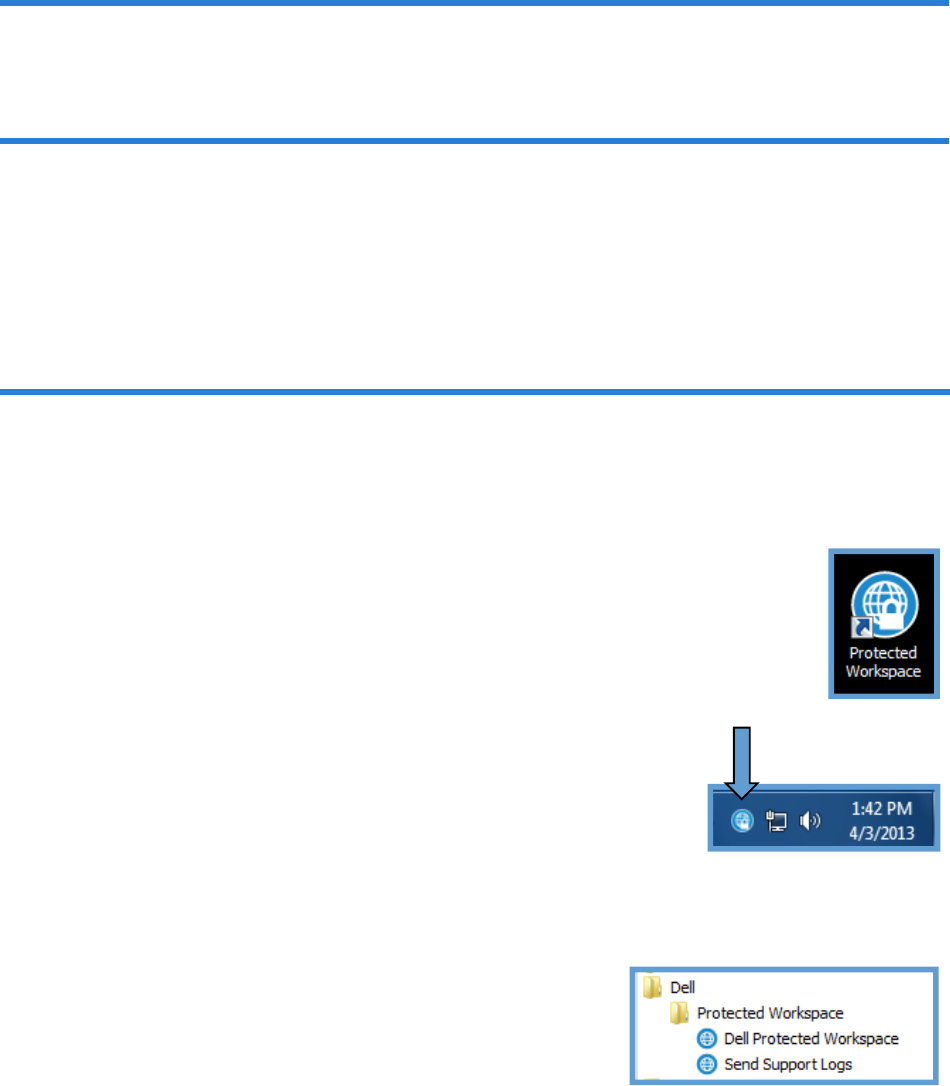
AftertheInstallationofDDP|ProtectedWorkspace,onenewiconwillbelocatedonthedesktop,one
newiconwillbelocatedinthesystemtray(whiletheapplicationisrunning)andanewfolderwillbe
createdwithintheStartMenu.Thefollowingsectionhelpstoidentifyeachofthesenewiconsand
whattheirfunctionsare.
DellDataProtection|ProtectedWorkspaceDesktopIcon
TheDDP|ProtectedWorkspaceiconfoundonthedesktopisapointofexecutionforthe
application.DoubleclickingonthisiconwillstarttheDDP|PWapplicationifitisnotcurrently
runningorwilllaunchanewbrowserwindowifitisrunninginthebackground.Thisiconcan
pinnedtothequicklaunchtoolbartoallowforeasieraccess.
DellDataProtection|ProtectedWorkspaceSystemTrayIcon
TheDDP|ProtectedWorkspacesystemtrayiconcanbefoundinthePCsystem
traywhenDDP|PWprotectedenvironmentisrunning.EndUseractions,suchas
openinganewbrowserwindow,restoringDDP|PWtoacleanstateormodifying
userpreferencesareavailablefromthistrayicon.Moredetailsonwhatoptions
areavailableandhowtousethemcanbefoundlaterinthisdocument.
DellDataProtection|ProtectedWorkspaceStartMenuFolder
DDP|ProtectedWorkspacecanalsobelaunched(eitherstartingthe
programoropeninganewbrowserwindow)bygoingtothestartmenu,
choosingAllPrograms,thenDell,thenProtectedWorkspace.Within
thisfolderistheDDP|PWlink.Additionally,thisfoldercontainsa
supporttoolthatcanbeusedtosendsupportlogstothesupportteam
incaseofanissuewiththeproduct.
6
CommonEndUserTasks
Thefollowingsectionoffersstepbystepinstructionsformostdaytodayendusertasks.
StartingtheDellDataProtection|ProtectedWorkspaceEnvironmentorLaunchingnew
BrowserWindow
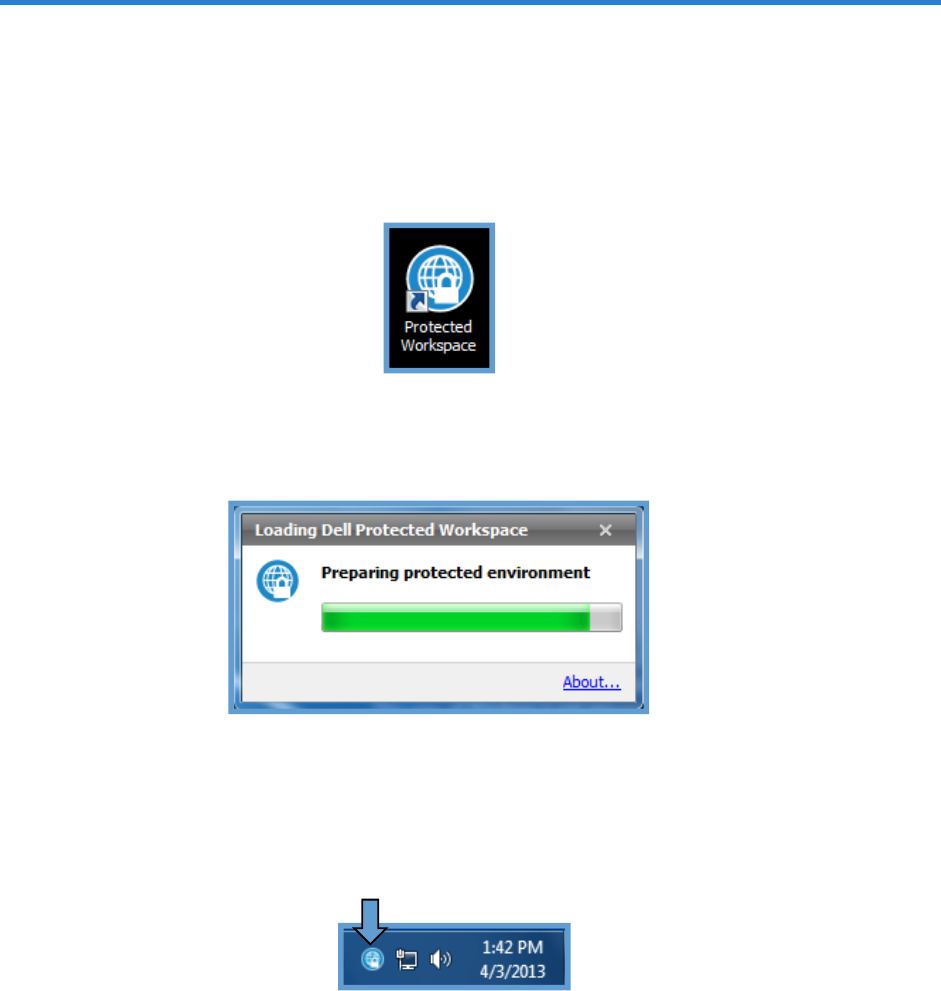
TostarttheDDP|ProtectedWorkspaceisolatedenvironmentortolaunchanewprotectedbrowser
windowwithintheprotectedenvironment,double‐clickontheDDP|PWicononthedesktop.
Afterclickingontheicon,adialogboxwithprogressbarwillappeariftheproductisnotrunning
already.Itwillbedisplayedoverthesystemtrayandwillshowtheprogressoftheprotected
environmentstartup.
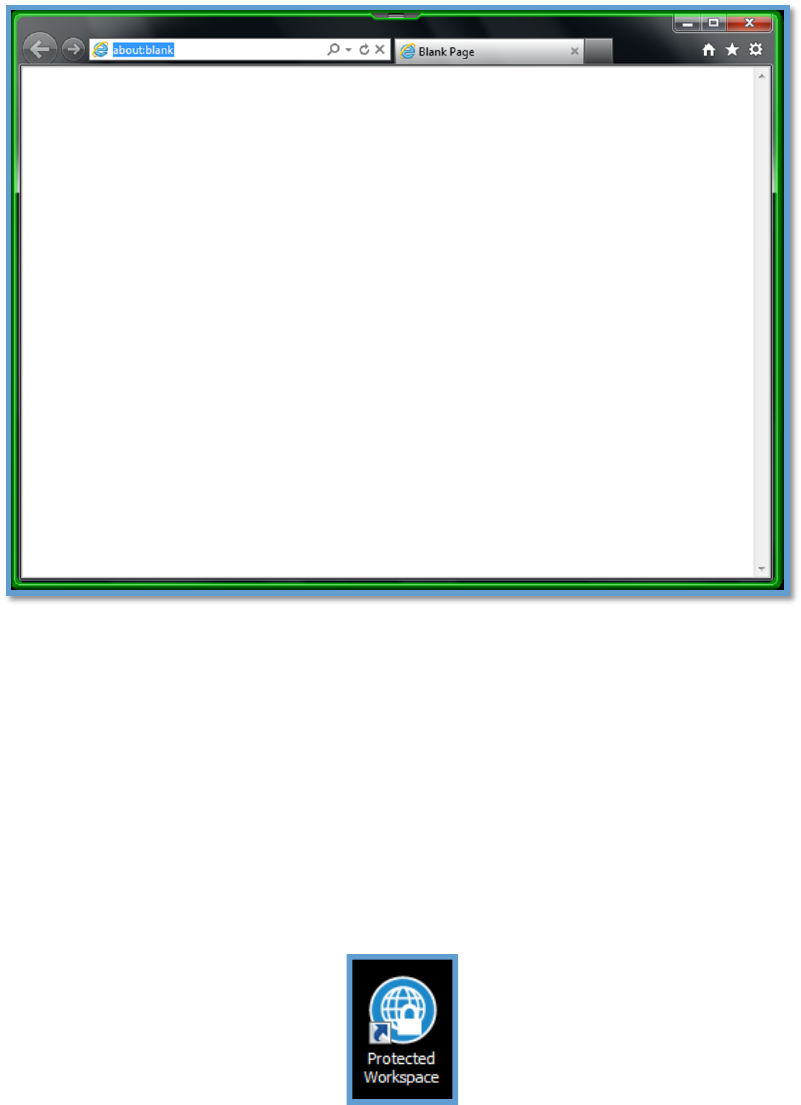
Oncethisdialogboxclosesoriftheenvironmentisalreadyrunning,theDDP|ProtectedWorkspace
systemtrayiconwillbevisibleandanewbrowserwillopenintheprotectedenvironment.Anew
protectedbrowserwindowwillbedisplayedimmediatelyoroncetheprotectedenvironmentfinishes
loading.
7
ApplicationsrunningintheDDP|ProtectedWorkspaceisolatedenvironmentcontainacustomizable
bordercolor(shownasneongreenabove)thathighlightsanywindowsopenedwithintheprotected
environment.Thisistohelptheenduserdistinguishbetweenthenativeapplicationsandthoserunning
intheisolatedenvironment.
Additionalwaystolaunchanewbrowserwindow
WhenDDP|ProtectedWorkspaceisalreadyrunningandauserwantstoopenaneworadditional
browserwindowintheisolatedenvironment,theycanaccomplishthisbydoingoneofthreesimple
tasks.
Thefirstistodouble‐clickontheDDP|ProtectedWorkspaceicononthedesktop.
8
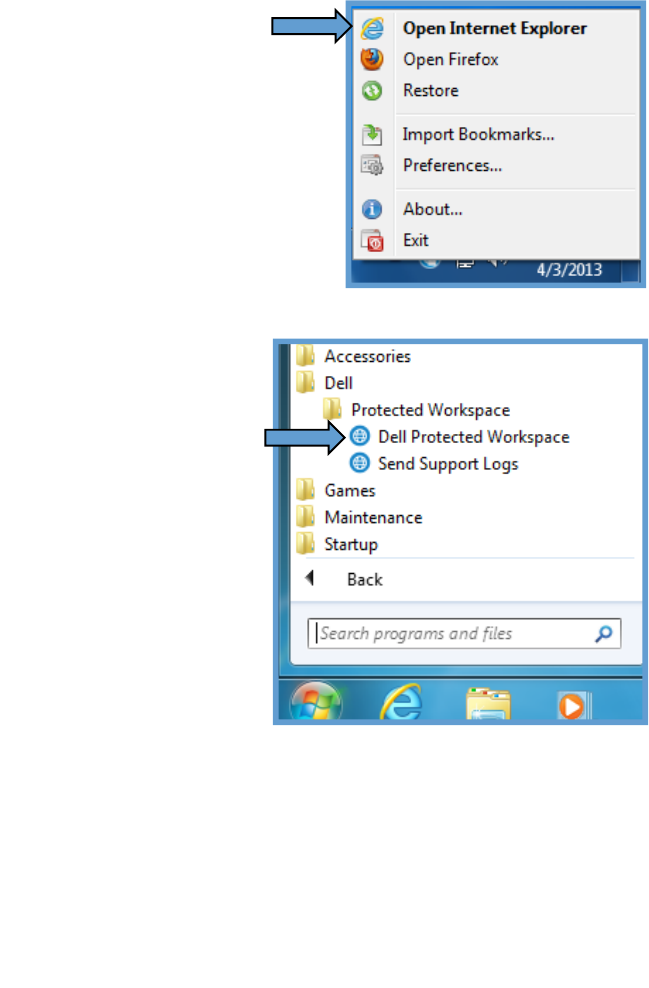
ThesecondistorightclickontheDDP|ProtectedWorkspacesystemtrayicon,andselecteither“Open
Firefox”or“OpenInternetExplorer”fromthemenu.Notethatthepreferredbrowser(theoneopened
bydoubleclickingtheDDP|ProtectedWorkspacedesktop
icon)isbold.Inthisscreenshot,InternetExploreristhe
preferredbrowser.
Finally,theusercangototheStartMenu,chooseAllPrograms,
opentheDellfolder,thentheProtectedWorkspacefolder,and
finallychoose“DellProtectedWorkspace”.
9
DellDataProtection|ProtectedWorkspaceSetup
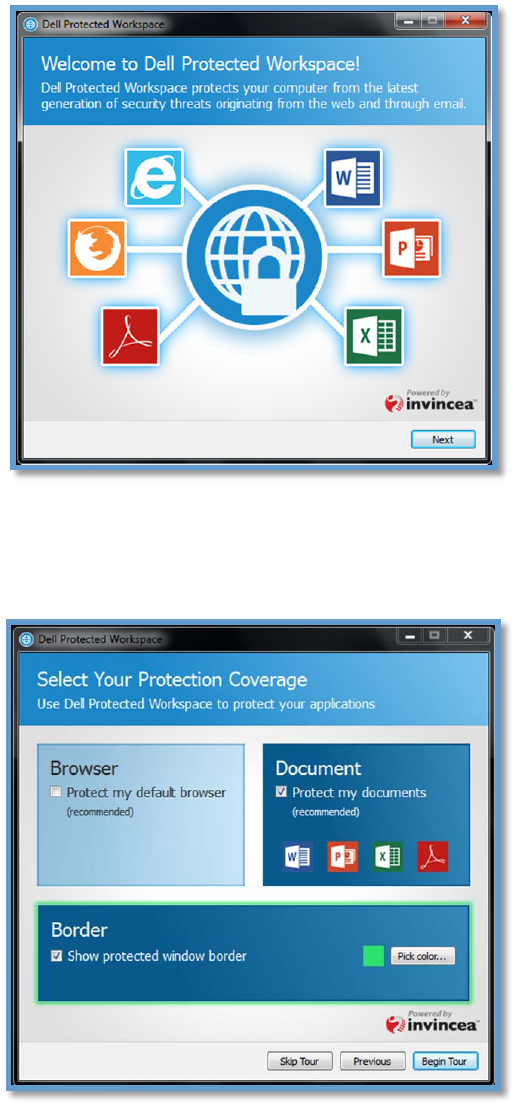
WhenDDP|ProtectedWorkspaceisrunforthefirsttime,afirstrunwizardwillbedisplayed.
WhentheenduserselectsNext,theywillbeguidedthroughaquicktouroftheDDP|Protected
Workspaceproduct.Enduserscanclick“Next”toprogressthroughthefirstruntour,“Previous”to
returntothepriorscreen,or“SkipTour”toexittheprocess.
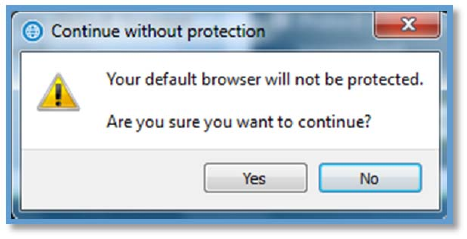
Inthe“SelectYourProtection”setupuserscancustomizesomeofthebehaviorsoftheprotected
environment.ThefirstoptionallowstheusertochooseiftheDDP|ProtectedWorkspaceprotected
10
environmentwillbeusedtoprotectthedefaultwebbrowser.IftheBrowseroptionisleftunselected,
userswillgetanotificationinformingthemthatthedefaultbrowserwillnotbeprotected.
Thenextoptionisfordocumentprotection.DDP|ProtectedWorkspacewillprotectMicrosoftWord,
MicrosoftPowerPoint,andMicrosoftExceldocumentaswellasAdobeAcrobatorAdobeReader
documents.
Thefinaloptiononthisscreenisabouttheborderthatwillbeshownontheapplicationwindowsinthe
protectedenvironment.Ausermaychoosetodisablethebordercompletely,byunselectingthisoption
(notrecommended)ormaychoosetodefineanalternativecolorbypressingthe“Pickcolor…”button.
Oncefinished,pressingthe“StartTour”buttonwillallowtheendusertowalkthroughthefirstruntour
beforestartingtheproductforthefirsttime.Alternatively,userscanclick“SkipTour”tostartthe
product.
ChangingyourhomepageinDellDataProtection|ProtectedWorkspaceprotected
browsers
InternetExplorer
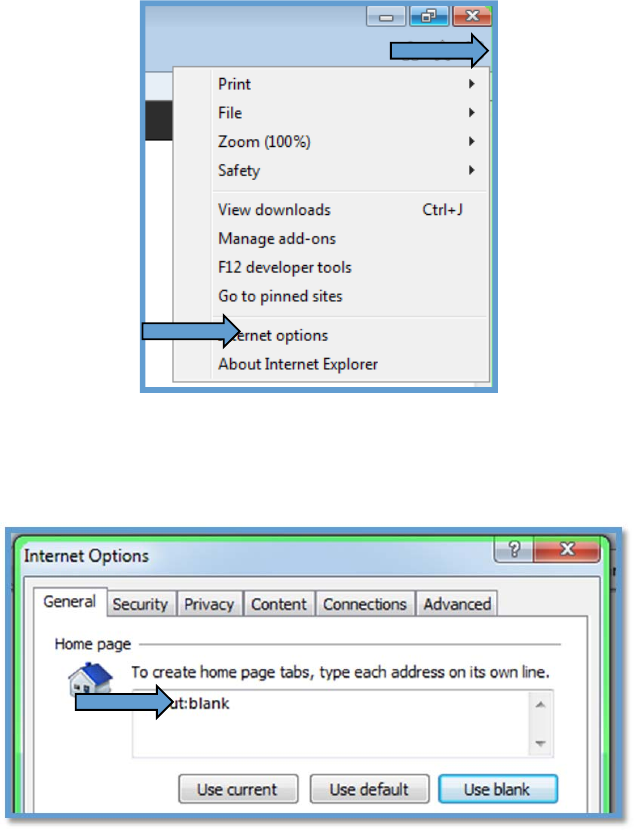
ThehomepageofabrowserrunningintheDDP|ProtectedWorkspaceenvironmentiscustomizable
likeanyotherwebbrowser.TochangethehomepagefromInternetExplorerrunningintheprotected
environment,select“Tools”orthetoolsicon,fromthemenuatthetopofprotectedInternetExplorer
window.Afterthedropdownmenuappears,select“InternetOptions”fromthelistofoptions.
Note:ScreenshotsbelowarefromIE9,buttheoutlinedstepsshouldalsoworkforIE7throughIE10.
11
WhentheInternetOptionsboxappears,deleteanytextthatexistsintheboxbelow“Tocreate
homepagetabs,typeeachaddressonitsownline.”Oncethisboxiscleared,entertheaddressforthe
newhomepage,suchashttp://www.google.com.
ClickOKwhenfinished.OpenanewDDP|ProtectedWorkspacebrowserwindowtoverifythe
homepageisnowsettothenewpageentered.
MozillaFirefox
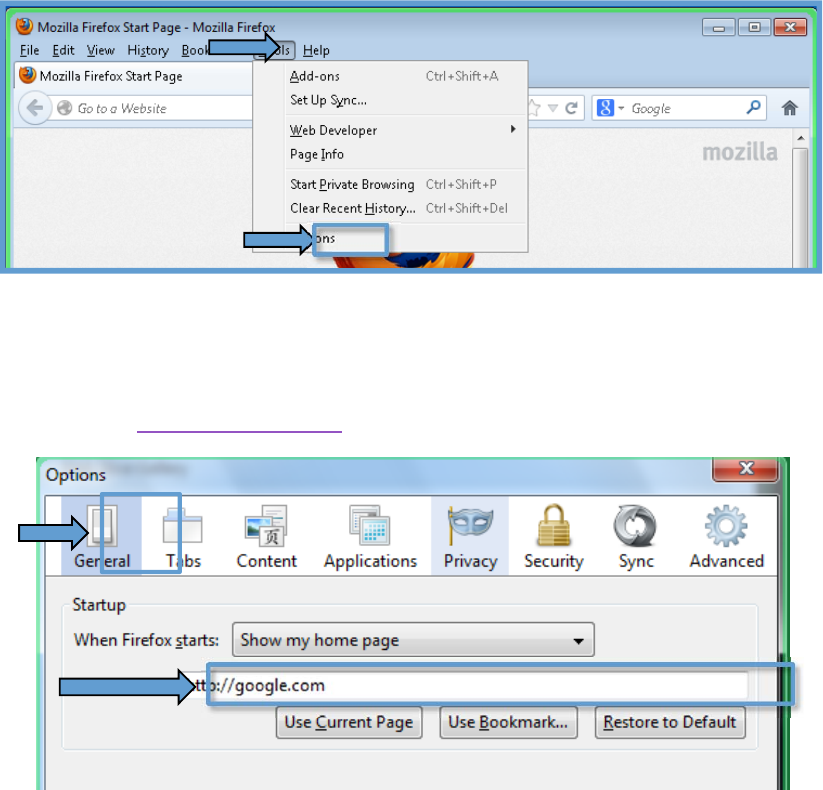
TochangethehomepageforMozillaFirefoxintheprotectedenvironment,select“Tools”fromthe
menuatthetopofaprotectedFirefoxwindow.Afterthedropdownmenuappears,select“Options”
fromthelistofoptions.
12
WhentheOptionsboxappears,verifythatthe“General”tabisselected.Nextto“WhenFirefoxstarts:”
select“Showmyhomepage”fromthedropdown(ifnotselectedalready).Nowdeleteanytextthat
existsintheboxlabeled“HomePage”.Oncethisboxiscleared,entertheaddressforthenew
homepage,suchashttp://www.google.com.Thenclick“OK”.
DownloadingaFileinDellDataProtection|ProtectedWorkspace
WithintheDDP|ProtectedWorkspaceprotectedenvironment,downloadingfilesisslightlydifferent
thaninatypicalwebbrowser.SincetheDDP|PWenvironmentisisolatedfromthePC,thereisaspecial
downloadinterfacethatisneededtodownloadfiles.Thisalsoallowsforsomefilestobecheckedfor
maliciouscontentbeforebeingsaved.
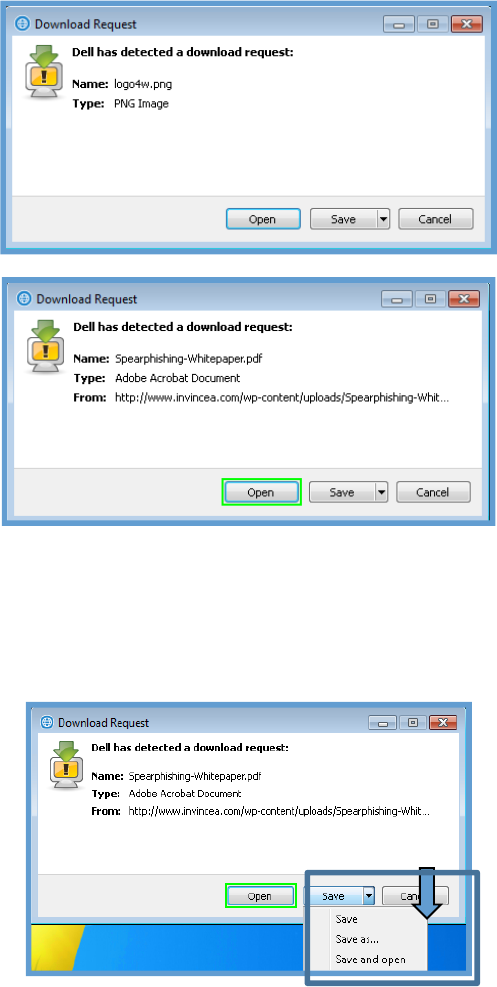
TodownloadafilewithintheDDP|ProtectedWorkspaceenvironment,clickonafiledownloadlinkon
awebsitedisplayedintheprotectedenvironment.Oncethedownloadstarts,aDDP|PWDownload
Requestdialogwillappear.Thisisusedtoconfirmthattheuserintendedtodownloadafile,andthe
filewasn’tdownloadedbyaccidentorviaamaliciouswebsite.
Ifthedownloadwasintended,thenchoose“Save”tocontinue,otherwisechoose“Cancel.Asthe
downloadprogresses,adownloadprogressdialogwillbedisplayed.Usersalsohavetheabilityto
“Open”thedownloadeditemdirectlyfromtheprotectedenvironment.Pressingthe“Open”buttonwill
13
downloadthefiletoatemporarydirectoryandthenwillopenitinthedefaultapplicationforthatfile
type.Thisoptionisnotavailableforexecutablefilesorfilesthatdonothaveadefaultapplicationon
thePC.
Whenusersarepresentedwithafilethatcanbeopenedinaprotectedapplication,suchasaPDFfile,
the“Open”buttonwillbehighlightedwithaborderaroundittoindicatethat.
Alternatively,usershavetheoptiontousethe“Save”dropdownmenu(byclickingonthedownward
facingarrow)todoa“SaveAs...”or“Saveandopen.”
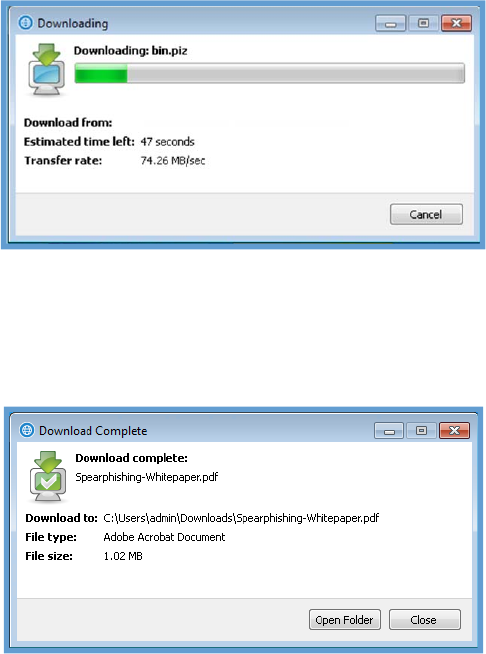
WhilethefileisbeingdownloadedtothePC,adownloaddialogboxwillbedisplayedwithaprogress
bar.ThedownloadprocessmaytakeslightlylongerfromtheDDP|ProtectedWorkspaceenvironment
thananormalwebbrowserduetotheextrasecuritylayersthatareinplace.
14
Whenthefilehasfinisheddownloading,DDP|ProtectedWorkspacewillscanitandfinishthetransfer
fromtheisolatedenvironmenttothehostPC.Afinalizingdialogwilldisplayduringthisprocess.When
theprocesshascompleted,aDownloadCompletedialogwilldisplay.Fromthisdialog,thedialogbox
caneitherbeclosedorthefolderthatthefilewasdownloadedtocanbeopened.
The“Save”buttononaDDP|ProtectedWorkspacedownloadrequestfilewillsavethefiletothe
defaultdownloadfolder.ThedefaultdownloadfolderistheUserDownloadsfolder,whichistypically
foundatC:\Users\<username>\Downloads.
FileDownloadAdditionalDialogs
DDP|ProtectedWorkspacealsohasadvanceddownloadfeaturesthathelptoprotecttheenduserPC.
SomeoftheseoptionsmaypreventcertainfilesfrombeingdownloadedintheDDP|PWenvironment.
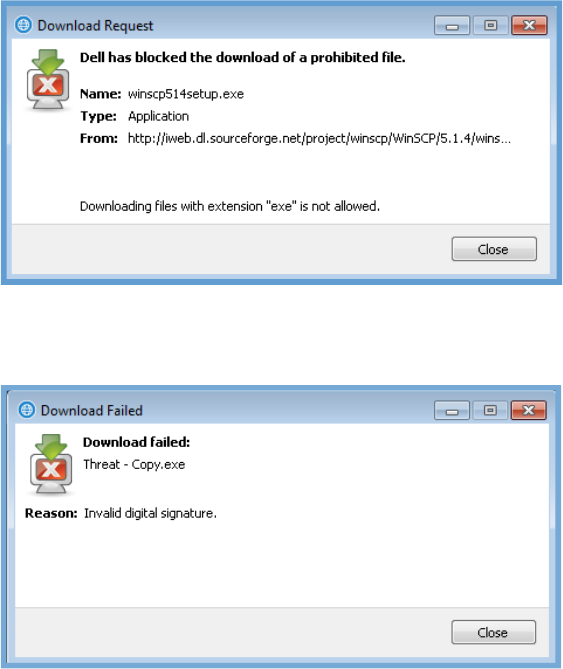
Oneoftheseoptionsistheabilitytoblockdownloadsforcertaintypesoffiles.Ifafiledownloadis
blockedbytype,thefollowingmessagewillbedisplayedwhenarequesttodownloadthefiletype
happens.Thisoptioncanbeenableinthepreferencesmenu.Whenenabled,thefollowingextensions
willbeblocked:
bas,bat,chm,cmd,com,cpl,crt,dll,exe,hlp,hta,inf,ins,isp,msc,msi,msp,
mst,pif,reg,scr,sct,shb,shs,sys,vb,vbe,vbs,wsc,wsf,wsh
15
Additionally,downloadscanbeblockedifthedigitalsignatureofafileisnotvalid.Thiscanbeenabled
viatheuserpreferencemenuaswell.Thefollowingdialogwillbedisplayediftheseconditionsaremet.
OpeningadocumentwithDellDataProtection|ProtectedWorkspace
InadditiontopreventingmalwarefrominfectingtheenduserPCviaawebsiteorfiledownload,DDP|
ProtectedWorkspacealsoofferstheabilitytoisolatedocumentsinsidetheprotectedenvironment.
ThishelpstopreventmaliciousdocumentsfromaffectingtheenduserPC.
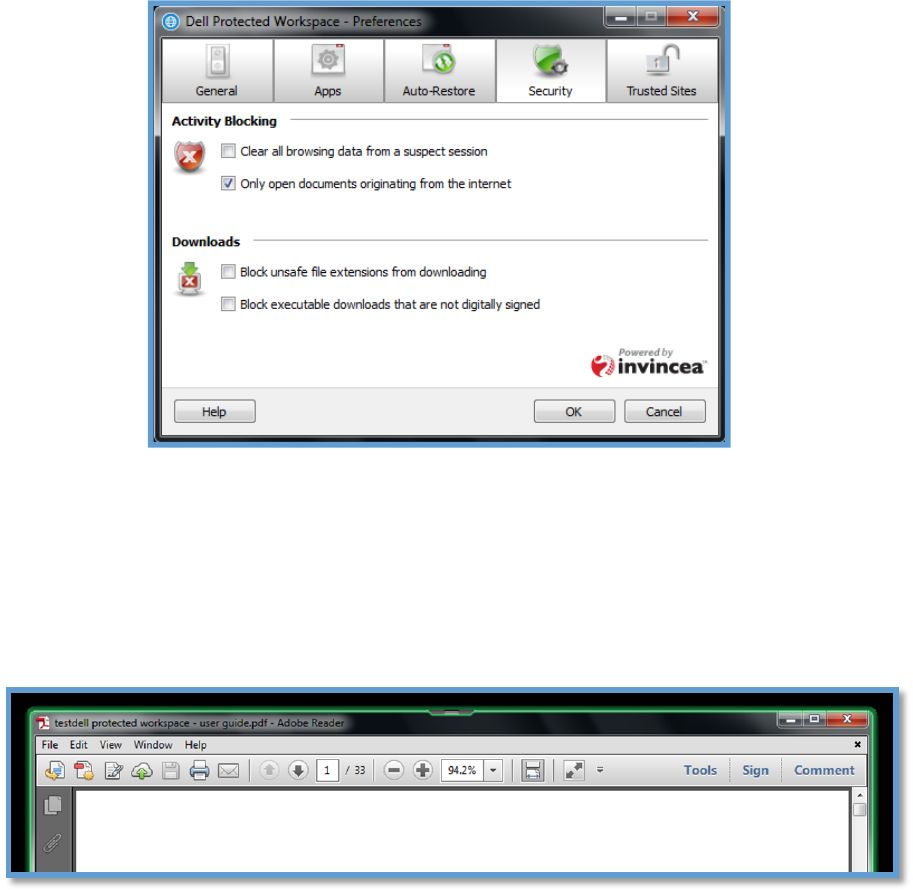
Bydefault,DDP|PWwillonlyopendocumentsoriginatingfromtheinternetinaprotected
environment.Tochangethissetting,rightclickontheDDP|PWiconinthesystemtrayandselect
Preferences.OncethePreferenceswindowopens,selecttheSecuritytab.UndertheActivityBlocking
sectionuncheck“Onlyopendocumentsoriginatingfromtheinternet”option.Thiswillnowopenall
documentsinDDP|PWregardlessofwheretheyoriginatefrom.
16
AnexampleofthedocumentprotectionfeatureisusingtheDDP|ProtectedWorkspaceenvironment
toviewPDFdocuments.WhendocumentprotectionisenabledforPDFfilesdouble‐clickingonanyPDF
fileonthecomputerwillopenthedocumentinaprotectedinstanceofthedocumentapplication.
Theprotecteddocumentscanbeidentifiedbythecustomizedbordercolorthatsurroundsthe
applicationwhenitisactive,justastheprotectedbrowsershows.Thewindowbelowdisplaysagreen
border,identifyingittobeinsidetheprotectedenvironment.
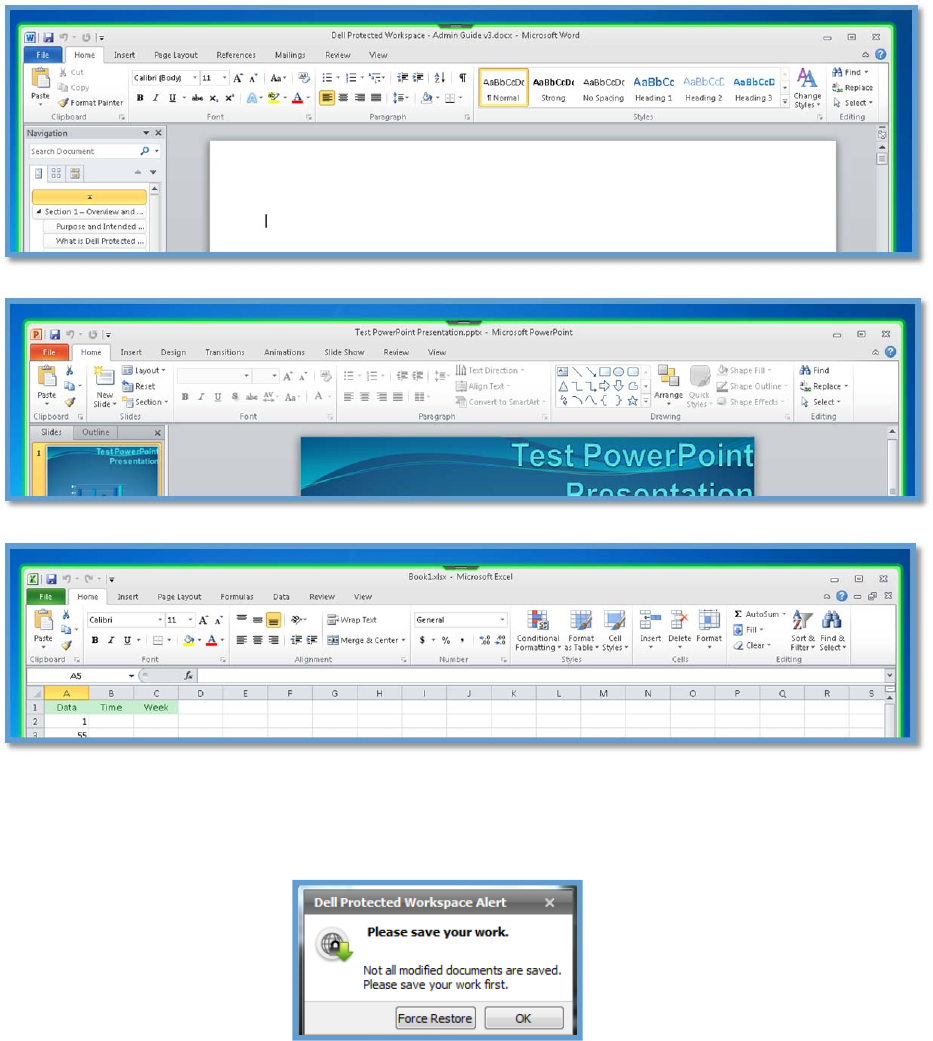
MicrosoftWord,MicrosoftExcel,andMicrosoftPowerPointfilesalsocanbeaccessedintheDDP|
ProtectedWorkspaceenvironment.Afterdouble‐clickingasupportedfiletype,thedocumentwillopen
intheprotectedapplicationintheDDP|PWenvironment.Belowarescreenshotsofprotectedinstances
ofMicrosoftWord,MicrosoftExcel,andMicrosoftPowerPointintheDDP|PWenvironment.These
applicationsdisplaythesamecoloredborderastheprotectedbrowsersandPDFreaderstohelp
identifythattheapplicationisbeingprotectedbyDDP|PW.
17
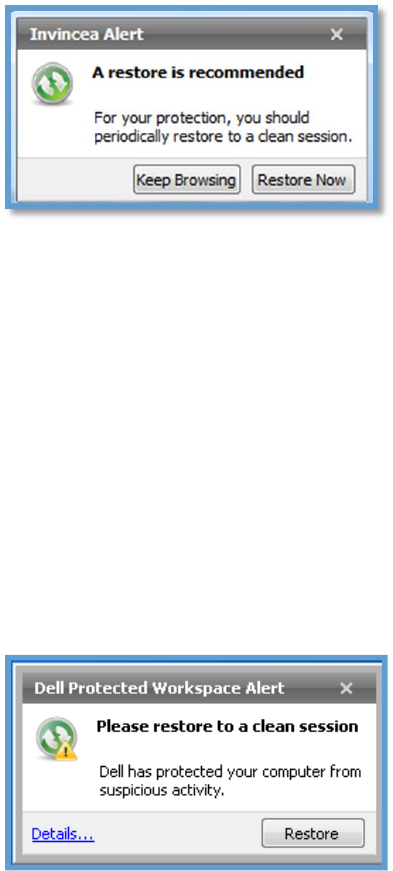
Intheeventofarestorewhileyouareworkinginadocument,anotificationwillinformuserstosave
theworksoarestoremayhappen.
18
DellDataProtection|ProtectedWorkspaceAutoRestore
TheDDP|ProtectedWorkspaceproducthasanautorestorefeaturebuilt‐inthatwillrestorethe
protectedenvironmentbacktoacleanstateonasetschedule.Thisschedulecanbecustomizedbythe
enduser.
Whenanautorestorehappens,thefollowingdialogappears.Thisallowstheusertorestore
immediatelyortodelaytherestoreuntilabettertime.Itisrecommendedthatthe“RestoreNow”
optionbeusedtoensuretheprotectedenvironmentisresettoacleanstate.
ItisrecommendedthatAuto‐Restorebeenabledtoensurethatafreshbrowserisusedeachday.The
recommended(anddefault)settingisthattheDDP|ProtectedWorkspaceenvironmentberestored
every72hoursifnotmorefrequently.Restoringtheprotectedenvironmentwillhelptoensurethatthe
environmentisalwayscleanandfreeofmaliciousactivity.
ItisalsoimportanttonotethattheDDP|ProtectedWorkspaceenvironmentisrestartedeachtimethe
computerisrestartedoranewuserlogsontothePC.TheAuto‐Restoretimerwillrestarteachtimethe
productisrestartedwhentheauto‐restoretimerisin“AfterElapsed”mode.
DellDataProtection|ProtectedWorkspaceThreatDetection
DDP|ProtectedWorkspacehasabuiltinthreatdetectionagentthatwilldetectunsafebehaviorwithin
theprotectedenvironment.Whenathreatisdetected,theDDP|PWproductwillnotifytheenduser
thatarestoreoftheenvironmentisneeded.Anotificationalertwillbedisplayedabovethesystemtray
indicatingsuspiciousactivity.
Userscanclickthe“Restore”button,whichwillrestarttheprotectedenvironmenttoacleanstate.
Usersalsohavetheoptiontoclosethenotificationandcontinueworking.Whendoingso,theDDP|
ProtectedWorkspaceIconwillbedisplayedinred.
19
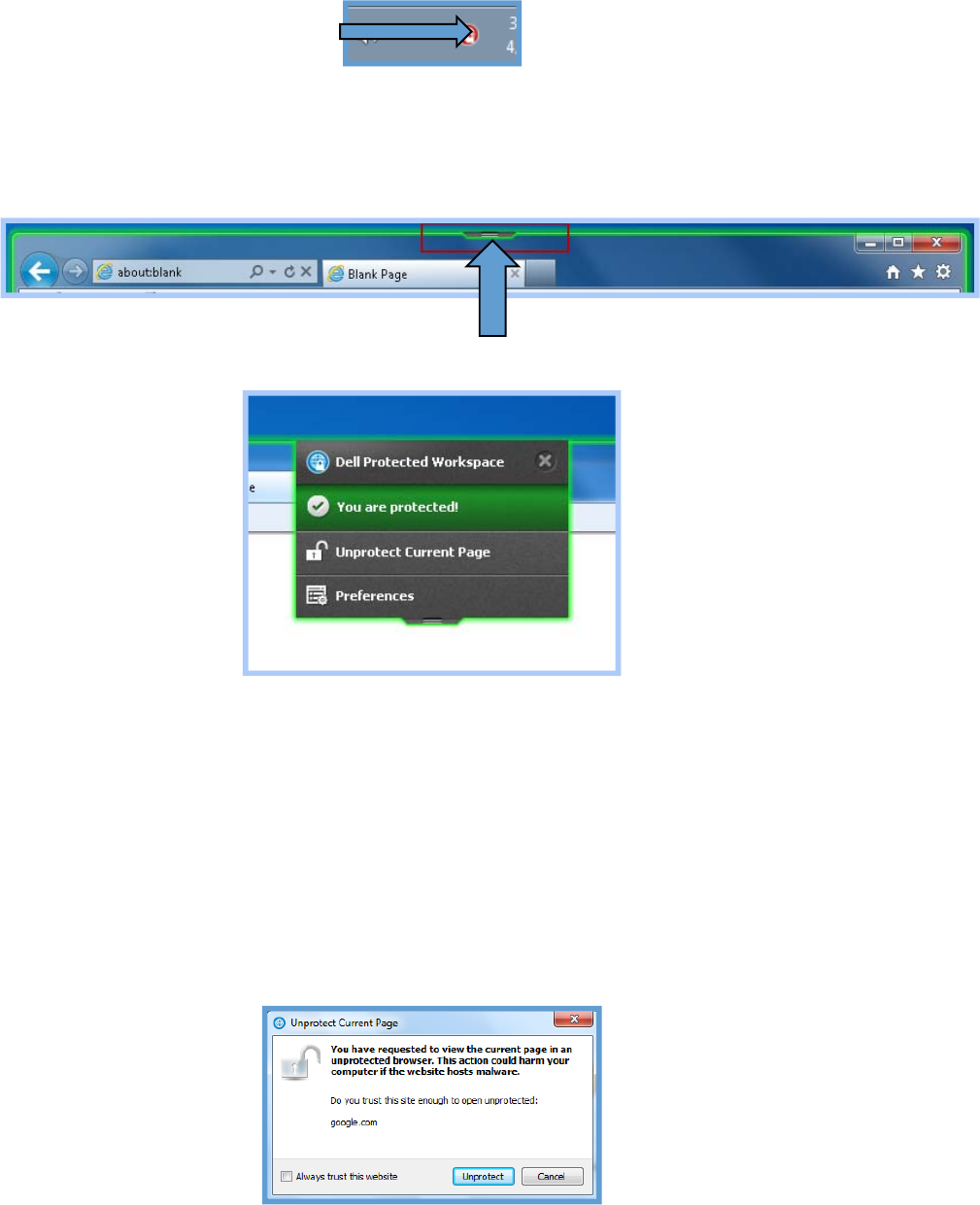
UsingtheDellDataProtection|ProtectedWorkspaceBrowserDropDownMenu
TheBrowserDropDownmenuisaconvenientmenuthatcanbeusedfortwodifferentpurposes.The
menuisfoundontheinthemiddleofthetopedgeoftheanyprotectedbrowserwindow.
Bypressingthegraybutton,adropdownmenuwillappear.
Themenuprovidesfortwoaccessibleoptions.Thefirstistheabilitytoopenthepreferencesmenu.
Thisactionisthesameasopeningthepreferencesmenufromthesystemtrayicon.
Thesecondoptionistoopenthecurrentpagethatisbeingviewedinthebrowserinanunprotected
browserwindow.ThisisusefulifapageisnotrenderingcorrectlyinsideoftheDDP|Protected
Workspacebrowser.SelectingthisoptionwilltakethecurrentURLandopenwithinanunprotected
browser(usingthesamebrowserasintheprotectedenvironment).
Theuserwillbepromptedbeforethesiteismovetotheunprotectedbrowsertoensuretheyareaware
ofthepotentialdangerofbrowsingoutsideoftheprotectedenvironment.Theusercanchooseto
continuebypressingthe“Unprotect”buttonorcancanceltheactionbypressingthe“Cancel”button.
20
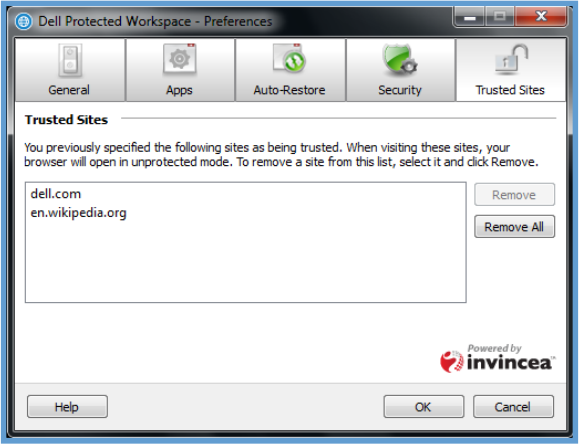
Thereisalsoanoptionto“Alwaystrustthiswebsite”whichwillalwaysopenthesiteinanunprotected
browserifitisbrowsedtoinaprotectedsession.Thesesitescanbemanagedinthepreferencesmenu.
Thepreferencesmenuallowsfortheusertoviewthesitesthathavebeenpermanentlylistedastrusted
sitesandtoalsoremoveasiteifitnolongerneedstobetrusted.Thiscanbedonebyselectingthesite
inthelistandpressingthe“Remove”button.Iftheuserwishestoremoveallsites,theycanpressthe
“Removeall”button.
21
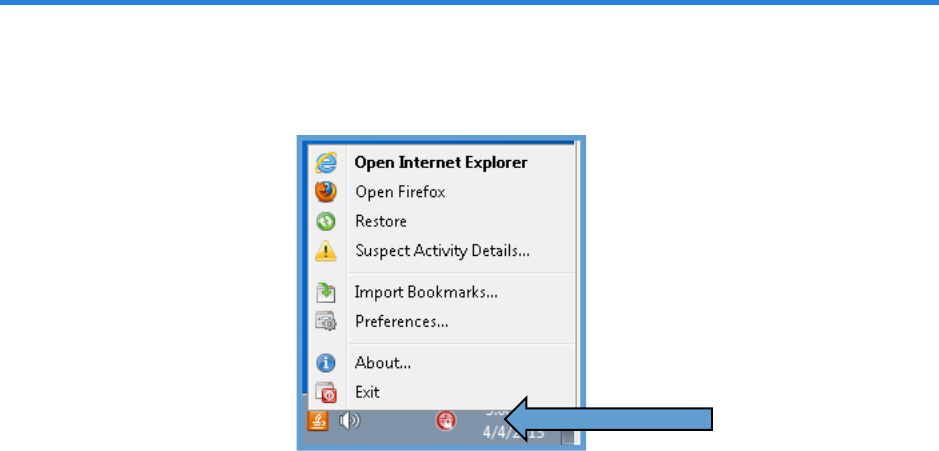
DellDataProtection|ProtectedWorkspaceSystemTrayOptions
ThefollowingsectionoutlinesthemenuoptionsavailablefromtheDDP|ProtectedWorkspaceSystem
TrayIcon.TheSystemTrayMenucanbeaccessedbyright‐clickingontheDDP|PWIconinthesystem
tray.
OpenInternetExplorer
“OpenInternetExplorer”isusedtoopenanewInternetExplorerwindowwithintheDDP|Protected
Workspaceenvironment.IfInternetExploreristheonlybrowseravailableorissetasthepreferred
browser,itwillappearboldandatthetopofthemenu.
OpenFirefox
“OpenFirefox”isusedtoopenaMozillaFirefoxbrowserwindowwithintheDDP|Protected
Workspaceenvironment.IfMozillaFirefoxisnotavailableinthesecuredenvironment,itwillnotbe
displayedinthismenu.Thepreferredbrowserdefinedinthepreferencesmenuisboldandlistedfirst
(i.e.ifMozillaFirefoxisthepreferredbrowser,itwillbelistedfirstinthismenuandwillbebold.)
Restore
TheRestoreoptionisusedtorestoretheDDP|ProtectedWorkspaceenvironmenttoacleanstateif
suspiciousactivityhasbeendetectedoriftheenvironmentneedstoberesetforanyotherreason.Itis
recommendedthattheDDP|PWenvironmentisrestoredatleastonceevery72hoursiftheenduserPC
isnotshutofforrebootedeachnight.
22
SuspectActivityDetails…
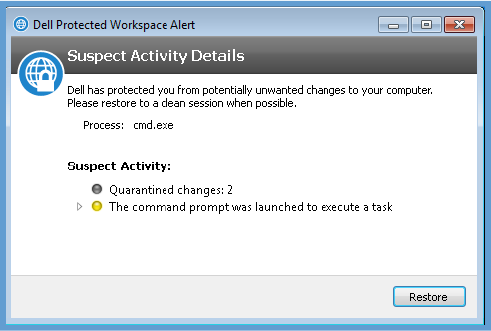
WhensuspiciousactivityhasbeendetectedbyDDP|ProtectedWorkspacethreatdetectionengine,
usersmayselectthe“SuspectActivityDetails…”optiontoviewfurtherinformationregardingthe
activity.Userscanclickthe“Restore”buttonfromthiswindowtorestoretheDDP|PWenvironment
backtoacleanstate.
ImportBookmarks…
TheImportBookmarks…optionisusedtoimportbookmarksfromthenativewebbrowser(s)intothe
protectedbrowsers.Currently,bookmarkscanbeimportedfromInternetExplorerand/orMozilla
Firefox.BookmarksshouldbeimportedwhentheDDP|ProtectedWorkspaceBrowserisfirstinstalled
andanytimethatthebookmarksinthenativebrowsersareupdated.Thebookmarksarenot
automaticallysyncedsoanyfutureadditionsofbookmarksinthenativebrowserthatneedtobe
openedintheprotectedbrowsersessionswillneedtobere‐synchedtoDDP|PWviathislink.Also,
bookmarkscannotbeexportedorsyncedfromtheDDP|PWenvironmentbrowsersbacktothenative
browser(s).
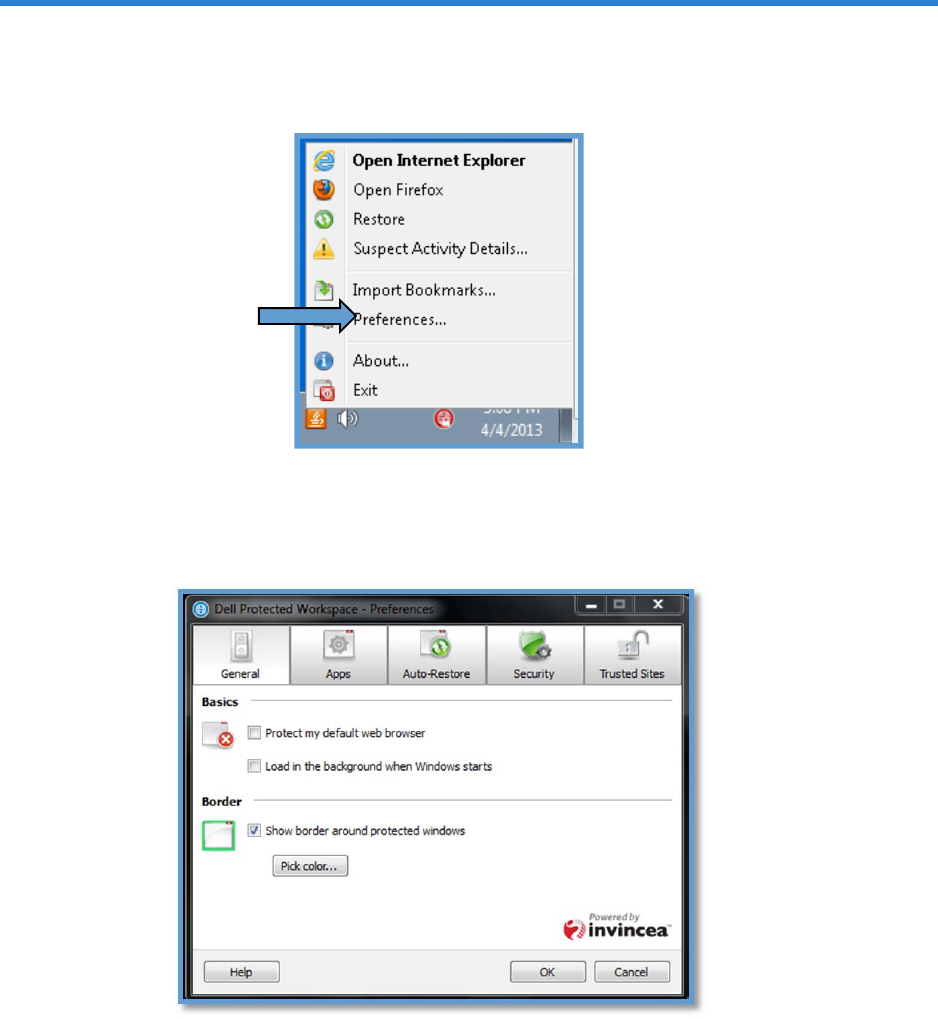
Preferences…
ThePreferences…optionisusedtoconfigurecustomizablesettingsfortheDDP|ProtectedWorkspace
environmentapplications,suchasauto‐restoreorsettingDDP|PWasthedefaultbrowser.The
Preferenceoptionsareexplainedingreaterdetailinthenextsection.
23
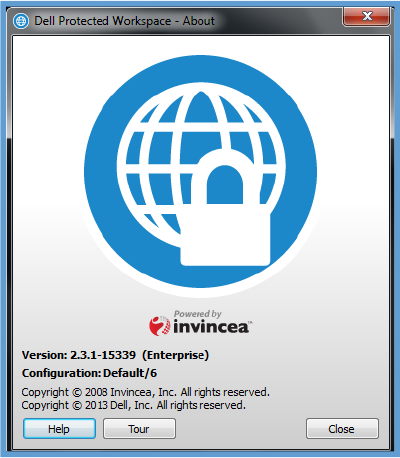
About…
TheAbout…optionisusedtoviewthecurrentversionoftheDDP|ProtectedWorkspacesoftwarethat
isrunningandtoaccessavailablehelpinformationbyclickingonthe“Help”buttonlocatedinthelower
leftcorneroftheAboutwindow.UsersmayalsoruntheTouragainbyselectingthe“Tour”button.
Exit
TheExitoptionisusedtocleanlyclosedowntheDDP|ProtectedWorkspaceenvironmentwhenitisno
longerneededorwhenitneedstoberestartedcompletely.
24
PreferenceMenuOptions
Thefollowingsectionidentifiestheoptionsthatareavailableintheuserpreferencesinterface.The
PreferencesinterfacecanbeaccessedbyrightclickingontheDDP|ProtectedWorkspaceSystemtray
iconandselectingPreferences…
GeneralTab
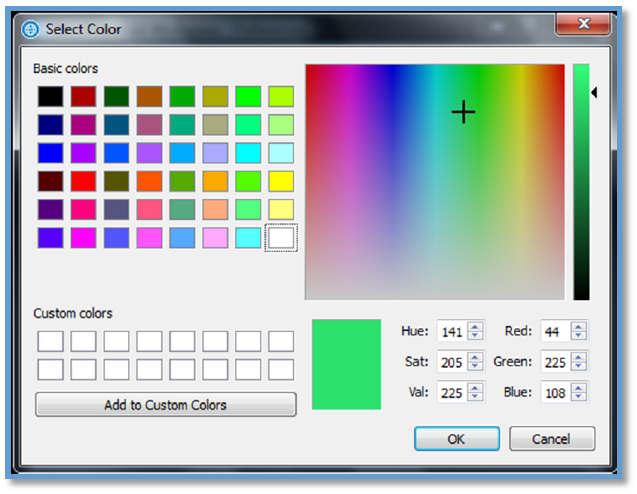
TheGeneralTabprovidesoptionsforbrowserhandlingandapplicationstartup,alongwiththeabilityto
controltheprotectedenvironmentapplicationborders.
Basics
TheBasicssectionoftheGeneraltaballowsmodificationofthetwodifferentoptionslistedbelow.
Protectmydefaultwebbrowser
Whenthischeckboxisselected,DDP|ProtectedWorkspacewillfunctionasthedefaultbrowserand
willhandlealldefaultbrowserrequestsfromotherapplication.Byuncheckingthisoption,DDP|PWwill
25
needtobemanuallyopenedinordertostartanewprotectedbrowsingsession.Itisrecommended
thatthisoptionbeselectedtoprovidethemostprotectionforyourPC.
LoadinthebackgroundwhenWindowsstarts
ThischeckboxwilldefineiftheDDP|ProtectedWorkspaceproductwillstartautomaticallyinthe
backgroundeachtimethecomputerisrestartedandastheuserlogsin.Itisrecommendedthatthis
optionbecheckedsothatthefirsttimetheproductisused,thereisnodelayinbringingupthebrowser
window.
Border
TheBordersectionoftheGeneraltaballowstheusertoenableordisableacoloredborderthatis
shownaroundprotectedapplicationwindows.Toenabletheborder,simplychecktheoptionbox.
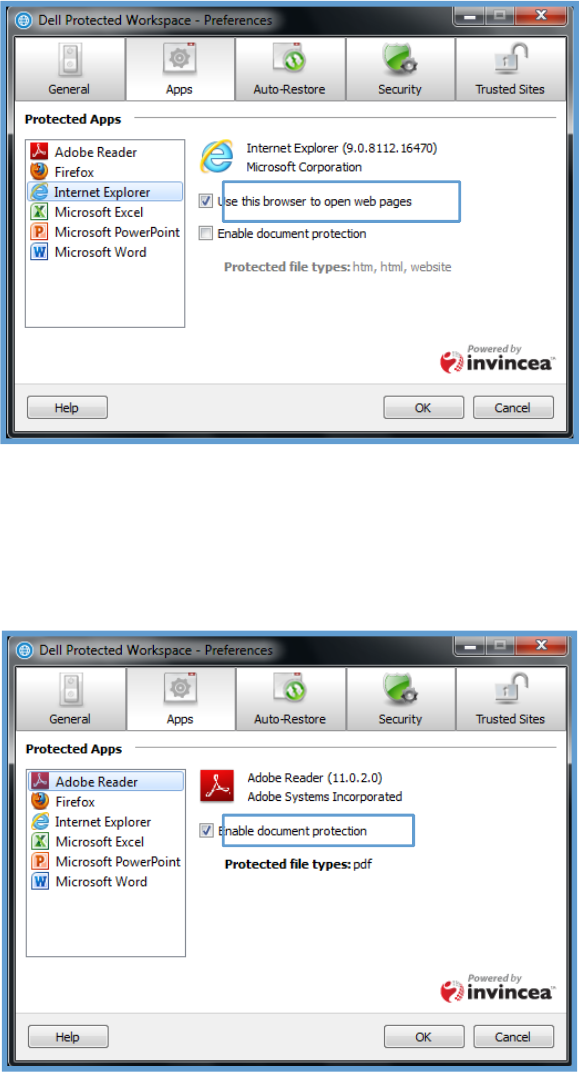
Whenthisboxisnotchecked,noborderwillbedisplayed.Bydefault,thebrowserdisplayswithagreen
border,butthiscanbecustomizedbypressingthe“PickColor…”buttonandchoosinganewcolorfrom
thecolorpicker.ThenewcolorwilltakeaffectwhentheOKbuttonispressedonthePreferences
dialog.
ColorSelectorDialog
Toselectanewbordercolor,selectoneofthepre‐populatedcolors,orenteryourowncolor
combination.PressOKtoselectthenewcolor.
26
AppsTab
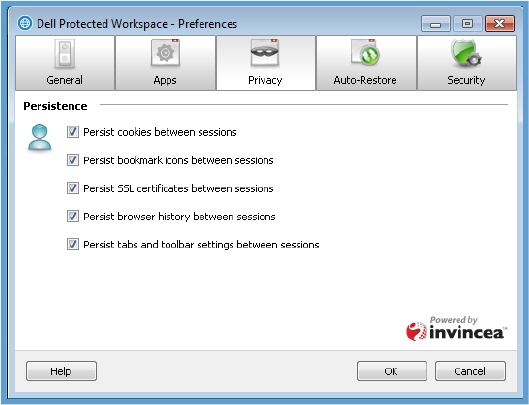
TheAppsTabprovidestheabilitytospecifywhichprogramswithintheprotectedenvironmentwillbe
usedtohandlebrowsinganddocumentprotection.Forwebbrowsing,allavailablewebbrowserswill
belisted,andtheusercanchoosewhichonewillbepreferredforbrowsingintheprotected
environment.Thiscanbedonebyselecting“Usethisbrowsertoopenwebpages”forthebrowserthat
ispreferred.
Additionally,fordocumenthandling,certainapplicationcanbespecifiedtohandledifferentdocuments
types.Bydefault,AdobeReaderisenabledtoprotectPDFdocumentswithintheprotected
environment,butalternativeapplicationsmaybeavailable,suchasAdobeAcrobat.Documenthandling
canalsobeenabledonInternetExplorerorFirefoxforstaticpageshtm/htmlpagesstoredonthelocal
PC.
27
PrivacyTab(v2.2.1‐14451only)
ThePrivacyTabprovidesoptionsforconfiguringthepersistenceofwebbrowsercontentbetween
restoresoftheDDP|ProtectedWorkspaceenvironment.
PrivacySettings
WithinthePrivacyTab,theoptiontochoosepersistenceofprotectedbrowsersettingsisavailable.By
selectedthecheckboxnexttoanyoption,theprotectedbrowserwillretainsettingssuchasbrowsing
history,bookmarks,passwords,auto‐completevaluesandotherconfigurationwhentheprotected
environmentisrestartedorrestored.De‐selectinganyoralloftheseoptionswillcauseinformationand
settingstobediscardedeachtimeDDP|ProtectedWorkspaceenvironmentisrestartedorrestored.
Therecommendedsettingistoleaveallboxescheckedforpersistence.
Thefollowingisalistofthesettingsavailable:
Persistcookiesbetweensessions
Persistbookmarkiconsbetweensessions
PersistSSLcertificatesbetweensessions
Persistbrowserhistorybetweensessions
Persisttabsandtoolbarsettingbetweensessions
28
Auto‐RestoreTab
TheAuto‐RestoreTabprovidesoptionsforconfiguringtheAuto‐Restoresettings.
AutomaticRestore
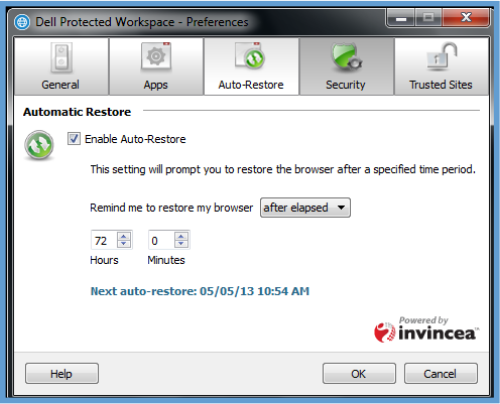
TheAutomaticRestoresectionoftheAuto‐Restoretabprovidestheabilitytoenableanddisablea
scheduledrestoreoftheDDP|ProtectedWorkspaceenvironment.TheAuto‐Restorecanbe
customizedtooccuronadefinedschedule.
SelectingtheEnableAuto‐Restorecheckboxwillenabletheautorestorefeaturewiththesettings
selected.TherestorewillcloseallopenDDP|ProtectedWorkspaceBrowserwindowsandrestorethe
DDP|PWbrowsertoacleanstate.Ifthecheckboxisunselected,Auto‐Restorewillbedisabled.
Remindmetorestoremybrowseroption
The“Remindmetorestoremybrowser”optionprovidesadropdownmenuwiththreeoptions:daily,
weeklyandafterelapsed.TheenduserwillbeabletocustomizethescheduleonwhichtheDDP|
ProtectedWorkspaceenvironmentisautorestoredbasedontheseavailableoptions.
DailyOption
The“Daily”optionchangesthedialogboxtoallowtheendusertoselectwhatspecifictimeeachday
theprotectedenvironmentwillautorestore.
WeeklyOption
The“Weekly”optionchangesthedialogboxtoallowtheendusertoselectwhatdayoftheweekthe
protectedenvironmentwillbeautorestoredandatwhatexacttimethatdaytheautorestorewill
occur.
AfterElapsedOption
The“AfterElapsed”optionallowstheendusertoselectthetimeperiodinhoursandminutesbetween
protectedenvironmentrestores.ThistimeperiodwillbeginfromthelasttimetheDDP|Protected
WorkspaceBrowserwasrestoredorstarted.Forexample,ifthisoptionissetto12hours,the
29
protectedenvironmentwillberestoredaftertheenvironmenthasbeencontinuallyrunningforthat
periodoftime.Thetimerresetseachtimearestoreorrestartoftheproductisdone.Bydefault,Auto‐
Restoreisenabledandsettorestoreevery72hours.
Nextauto‐restoreDisplay
TheNextauto‐restoredisplayindicateswhenthenextauto‐restorewilltakeplacebasedonthesettings
thatareconfigured.
SecurityTab
TheSecurityTabprovidesoptionsforconfiguringtheSecuritysettings.
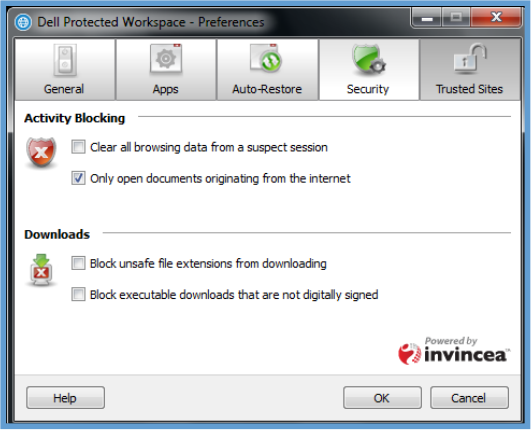
ActivityBlocking
TheActivityBlockingsectionoftheSecuritytabgivestheendusertheabilitytoconfigureadditional
optionsonhowcertainactivitiesarehandled.Selectingthecheckmarkinfrontofanoptionwillenable
thatfeature.
Clearallbrowsingdatafromasuspectsession
ThisoptionallowsfortheDDP|ProtectedWorkspaceenvironmenttoclearallbrowsingdataduringa
suspectsession(whenasuspiciousactivityalertisdisplayed).Iftheoptionisnotchecked,thenthe
browsinghistoryanddatawillremainintactwhentherestorehappens.Itisrecommendedthatthis
optionbeenabledtoensuremaliciouschangestohomepagesorbookmarksarenotpersisted.
Onlyopendocumentsoriginatingfromtheinternet
ThisoptionwillallowonlydocumentsfromtheinternettobeopenedintheDDP|Protected
Workspaceenvironment.Documentswhicharecreatedlocallycanbeopenedoutsideoftheprotected
environment.Whennotselected,alldocumentswillbeopenedintheprotectedenvironment(for
documenttypesthatarehandledbyDDP|PW).
30
Downloads
TheDownloadssectionoftheSecurityTabgivestheendusertheabilitytoconfigureadditionaloptions
onhowfilesarehandledwhendownloaded.
Blockunsafefileextensionsfromdownloading
ThisoptionallowsforDDP|ProtectedWorkspacetoimmediatelystopanyblacklistedfiletypesfrom
beingdownloadedbyabrowserintheprotectedenvironment.Ifthisoptionisnotchecked,thefiles
willbedownloadedtotheDDP|PWdownloadsfolderunlessaninfectionisdetected.
Thefollowingisalistoffiletypesthatwillbeblockedbyenablingthisoption:
bas,bat,chm,cmd,com,cpl,crt,dll,exe,hlp,hta,inf,ins,isp,msc,msi,msp,
mst,pif,reg,scr,sct,shb,shs,sys,vb,vbe,vbs,wsc,wsf,wsh
Blockexecutabledownloadsthatarenotdigitallysigned
ThisoptionallowsforDDP|ProtectedWorkspacetoimmediatelystopdownloadingexecutablefiles
withoutadigitalsignature.Executabledownloadsthataredigitallysigned(verifiedwithinthePE
header)willbedownloaded.Ifthisoptionisnotchecked,thefileswillbedownloadedtothe
“downloads”folderunlessaninfectionisdetected.
TrustedSitesTab
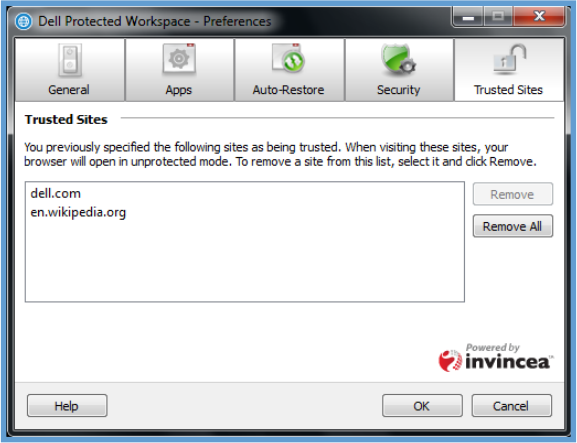
TheTrustedSitesTabprovidestheabilitytoremovepreviouslyspecifiedTrustedSites.
Thistabdisplaysthesitesthatweretrustedviathe“Unprotectedthispage”optioninthedropdown
menu.Domains/URLsthatwerespecifiedas“Alwaystrustthissite”willbelisted.Ifauserwishesto
removeasingledomain/URLfromthislist,theycanselectthedomain/URLtoberemovedandthen
canpressthe“Remove”button.Ifauserwishestoclearallofthedomains/URLslisted,theycanpress
the“RemoveAll”button.
31
SubscriptionRenewal
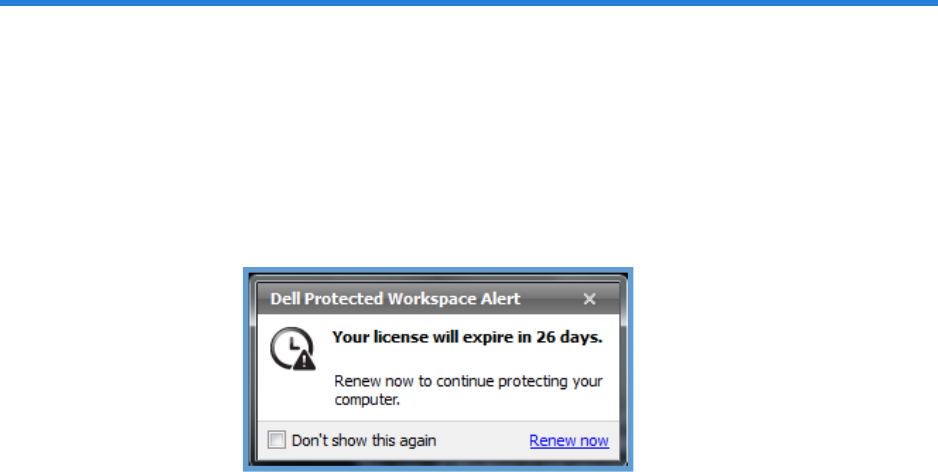
DDP|ProtectedWorkspaceisasubscriptionbasedproductthatincludesaoneyearsubscription(when
preinstalledonaDELLsystem).Whentheendofthesubscriptionisapproaching,DDP|PWwilldisplaya
dialogabovethesystemtraytoindicatethatthesubscriptionneedstoberenewed.
At30dayspriortotheendoftheoneyearsubscriptiontoDDP|ProtectedWorkspace,userswillseea
notificationabovethesystemtraywithalinktorenewthelicense.Thenotificationwillbedisplayed
eachtimetheproductisrestartedunlessthe“Don’tshowthisagain”checkboxisselected.Thedialog
willthenreappearsevendayspriortotheendofthesubscription.
TorenewaDDP|PWsubscription,followthe“Renewnow”linktothesubscriptionrenewalpage.This
actionmustbecompletedfromeachPCthatneedstoberenewed,asthe“Renewnow”URLincludes
theuniqueidentifierneededtoreneweachPCssubscription.
