Delonghi Coffeemaker Esam6700 Users Manual
Delonghi-Gran-Dama-Avant-Esam-6700-Instruction-Manual-715578 delonghi-gran-dama-avant-esam-6700-instruction-manual-715578
ESAM6700 to the manual 18d67653-229c-4eca-8e17-0a7236005cad
2015-01-24
: Delonghi Delonghi-Coffeemaker-Esam6700-Users-Manual-311190 delonghi-coffeemaker-esam6700-users-manual-311190 delonghi pdf
Open the PDF directly: View PDF  .
.
Page Count: 25
De’Longhi America, Inc.
Park 80 West, Plaza One
Saddle Brook, NJ 07663
1-866-528-8323 (1-866-Latte-Best)
De’Longhi Canada, Inc.
6150 McLaughlin Road
Mississauga, Ontario
L5R 4E1 Canada
1-888-335-6644
Fiducia Italiana S.A de C.V.
Pestalozzi 814
Col. Del Valle
Del. Benito Juarez
México D.F. 03100
tels: 5543 1447 y 5543 6492
Lada sin costo: 01800 711 8805
www.delonghi.com
5713212301/07.09
DE
GB
FULLY AUTOMATIC COFFEE CENTER
MACHINE À CAFÈ AUTOMATIQUE
CAFETERA SUPERAUTOMATICA
MACCHINA PER CAFFÈ SUPERAUTOMATICA
ESAM6700
Instructions for use. Keep these instructions
Mode d’emploi. Conservez cette notice
Instrucciones para el uso. Repase y guarde
estas instrucciones.
Lea cuidadosamente este
instructivo antes de usar su aparato
Istruzioni per l’uso
Leggere e conservare queste istruzioni
Register this product on-line and receive a free
trial issue of Cook’s Illustrated. Visit www.
delonghiregistration.com. Visit www.delonghiusa.com
for a list of service centers near you.
(U.S. and Canada Only)
Enregistrez ce produit en ligne et recevez un
numéro gratuit de Cook’s Illustrated. Visitez www.
delonghiregistration.com.
Visitez www.delonghiusa.com
pour y voir une liste des centres de réparation proches de
chez vous. (É.-U. et Canada uniquement)
Registre este producto en línea y reciba un ejemplar
gratis de Cook’s Illustrated. Visite www.delonghire-
gistration.com.
Visite www.delonghiusa.com para ver la
lista de centros de servicios cercanos a usted. (Solamente
en los Estados Unidos y Canada)
Registra questo prodotto “on-line” per ricevere una copia
omaggio della rivista Cook’s Illustrated. Visita www.
delonghiregistration.com.
Visita www.delonghiusa.com
per una lista dei centri di servizio a te piu vicini. (Solo
negli Stati Uniti e Canada)
Electronic Characteristics: Caractéristiques électriques: Caracteristicas electricas: Caratteristiche elettriche:
120V~60HZ 1350W

2
2
3
A23
A24
B4
B6
B5
B1
B2
B3
AB
C
A1
A19
A20
A2
A5A4
A6
A7
A8
A13
A14
A12
A11
A15
A16A17A18
A21
A9
A10
Ready
espresso
C1C15 C16 C3
C4
C5
C2
C6C12
C13
C14
C7C8C10 C9C11
A22
A3
3
4
4
4
12 3
5
56
8910
15
11
13 14
12
7
5
35
22 23
normal coffee
M
A
X
38
31
30
28 29
40 41
37
17 18 19
20 21
27
16
26
36
32 33
24 25
39
1
22
1
22
34
5
35
22 23
normal coffee
M
A
X
38
31
30
28 29
40 41
37
17 18 19
20 21
27
16
26
36
32 33
24 25
39
1
22
1
22
34
6
35
22 23
normal coffee
M
A
X
38
31
30
28 29
40 41
37
17 18 19
20 21
27
16
26
36
32 33
24 25
39
1
22
1
22
34

7
INDEX
IMPORTANT SAFEGUARDS .................... 8
SHORT CORD INSTRUCTIONS ................ 8
INTRODUCTION ................................. 9
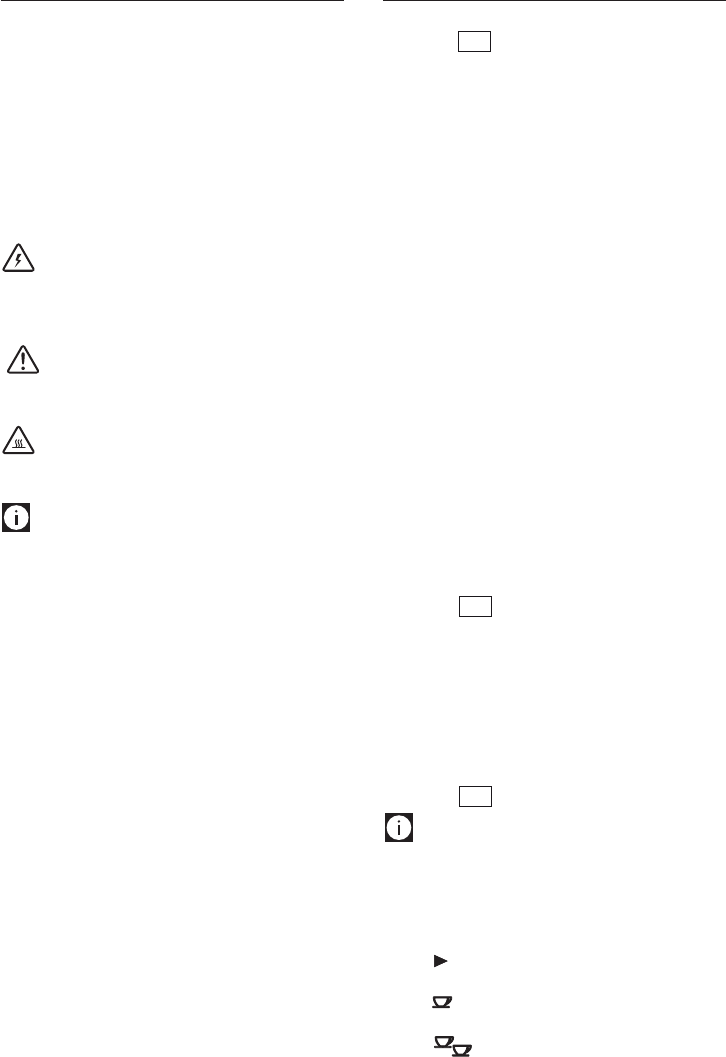
Symbols used in these instructions .................9
Letters in brackets ...........................................9
Troubleshooting and repairs ............................9
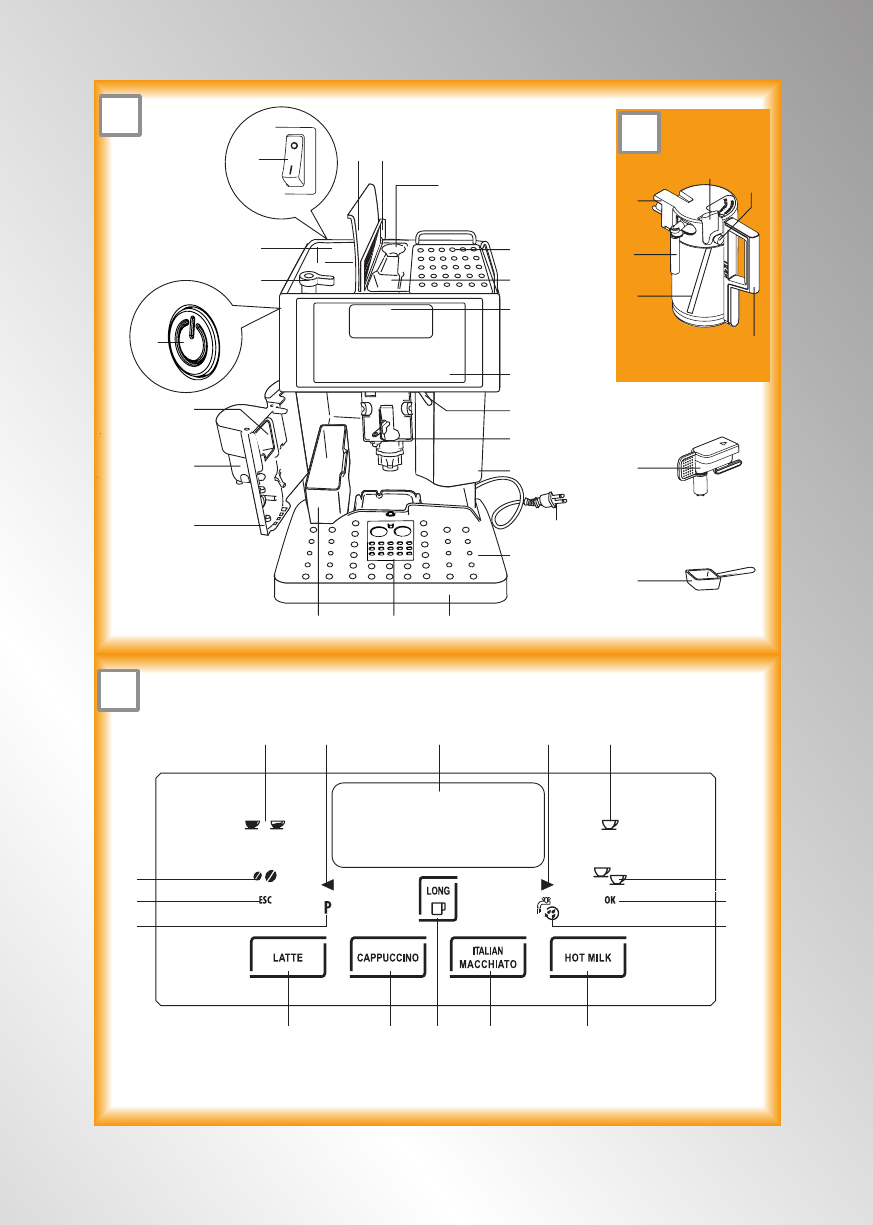
DESCRIPTION.................................... 9
Description of appliance ..................................9
Description of milk container ...........................9
Description of control panel (touch screen) .....9
PRELIMINARY CHECKS .......................10
Controls after transport .................................. 10
Installing the appliance .................................. 10
Connecting the appliance ............................... 10
Setting up the appliance ................................. 11
TURNING THE APPLIANCE ON ...............11
TURNING THE APPLIANCE OFF .............11
CHANGING THE MENU SETTINGS ...........12
Setting the language ..................................... 12
Setting the clock ............................................ 12
Setting auto-start time ...................................12
Setting the temperature .................................12
Setting auto-off ..............................................12
Resetting default values (reset) .....................13
Statistics function ..........................................13
Acoustic signal (Beep enabled) ...................... 13
MAKING COFFEE ..............................13
Selecting the coffee taste ...............................13
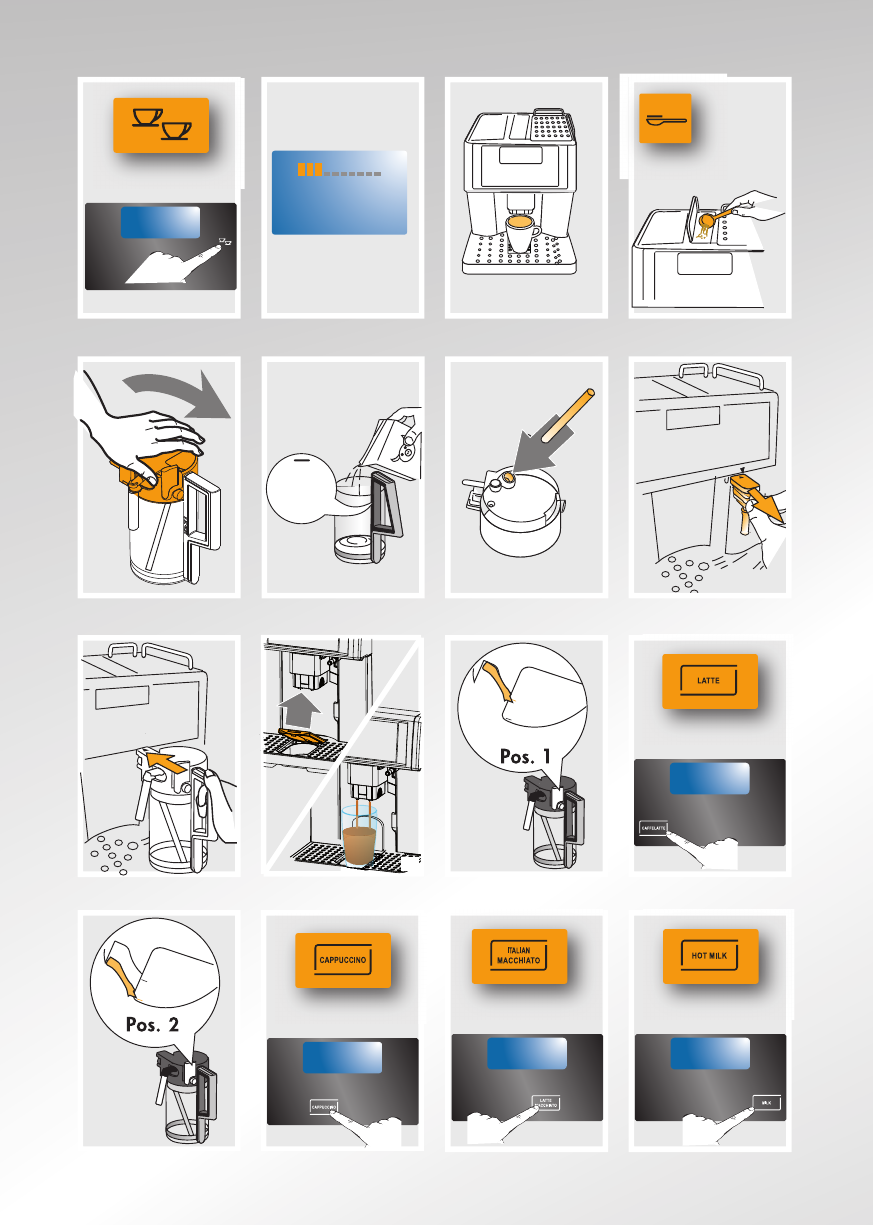
Selecting the quantity of coffee in the cup ..... 13
ESPRESSO (oz) .............................................13
LONG COFFEE (oz) .........................................13
Programming the espresso “my coffee”
quantity .......................................................... 13
Programming the long “my coffee” quantity ..14
Regulating the coffee mill ..............................14
Making espresso coffee using coffee beans ... 14
Making long coffee using coffee beans .......... 14
Making espresso or long coffee using
pre-ground coffee ..........................................15
MAKING DRINKS WITH MILK ................15
Filling and attaching the milk container ..........15
Making latte .................................................. 15
Making cappuccino ........................................ 16
Making Italian macchiato ...............................16
Making hot milk .............................................16
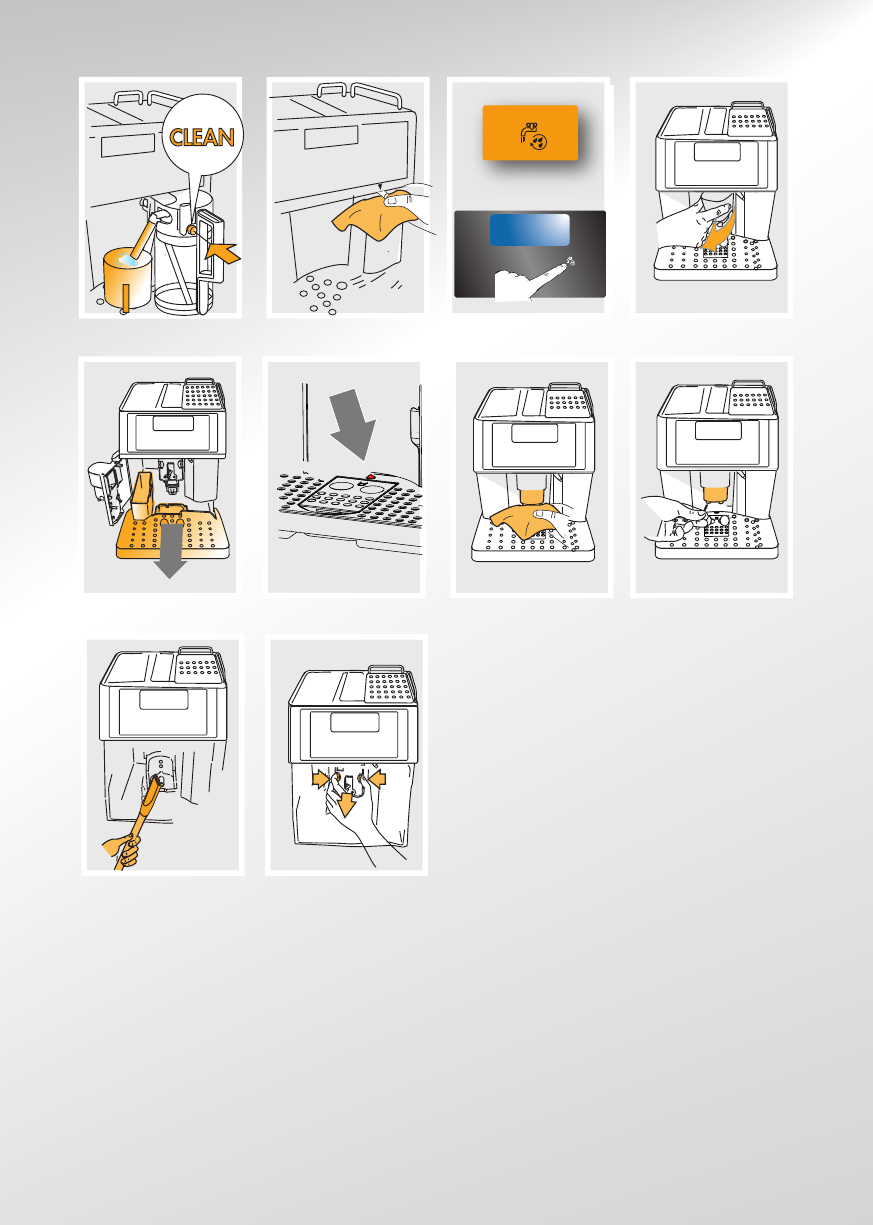
Cleaning the milk container after use .............16
Programming the size for each beverage
button ............................................................ 16
HOT WATER .....................................17
Preparation .................................................... 17
Changing the quantity ....................................17
CLEANING .......................................17
Cleaning the coffee maker ..............................17
Cleaning the coffee grounds container ...........17
Cleaning the drip tray ..................................... 18
Cleaning the water tank ..................................18
Cleaning the coffee nozzles ............................ 18
Cleaning the pre-ground coffee feed funnel ...18
Cleaning the inside of the machine ................18
Cleaning the brew group ................................ 18
Cleaning the milk container ............................19
DESCALING .....................................19
SETTING WATER HARDNESS .................20
Measuring water hardness .............................20
Setting water hardness .................................. 20
USING COMPARTMENT FOR LATTE GLASS 20
DISPLAYED MESSAGES .......................21
TROUBLESHOOTING ...........................22
LIMITED WARRANTY ..........................24

8
IMPORTANT SAFEGUARDS
When using electrical appliances, basic safety precautions should always be followed, inclu-
ding the following.
• Readallinstructionscarefully.
• Makesurethevoltageofyourelectricalsystemcorrespondstothevoltageshownonthe
bottom of the machine.
• Donottouchhotsurfaces.Usehandlesorknobs.
• Toprotectagainstre,electricalshockandpersonalinjury,donotimmersecord,plugor
appliance in water or other liquid.
• Keeptheapplianceoutofthereachofchildrenanddonotleaveapplianceunattended
while in operation.
• Unplugfromtheoutletwhennotinuseandbeforecleaning.
• Donotoperatewithadamagedcordorplug,oraftertheappliancemalfunctions,orhas
been damaged in any manner. Return the appliance to the nearest authorized service
facility for examination, repair or adjustment.
• Theuseofaccessoryattachmentsnotrecommendedbythemanufacturermayresultin
re,electricalshock,orpersonalinjury.
• Donotuseoutdoors.
• Makesurethepowercorddoesnothangovertheedgeofthetableorcounter-toptoavoid
getting accidentally caught or entangled.
• Donotplacetheapplianceoritselectricalpartsonornearelectricstoves,cookingsurfa-
ces, or gas burners.
• Plugcordintothewalloutlet.Todisconnect,rstturnmachine“off”,thenremoveplug
from wall outlet.
• Donotusetheapplianceforotherthantheintendeduse.Thisapplianceistobeutilized
for domestic use only. The manufacturer declines all responsibility for any damage caused
by improper, incorrect, or irresponsible use.
WARNING: To reduce the risk of fire or electric shock, do not remove the cover or the exterior of the
unit. Don’t attempt to repair or modify the machine, doing so will void the warranty. Repair should
be done by authorized service personnel only!
SAVE THESE INSTRUCTIONS
THIS APPLIANCE IS FOR HOUSEHOLD USE ONLY
SHORT CORD INSTRUCTIONS
A short power cord is provided to reduce risks resulting from becoming entangled in or tripping
over a longer cord.
- Longer, detachable power supply cords or extension cords are available and may be used if care is
exercised in their use.
- If an extension cord is used, the marked electrical rating should be at least as great as the electrical
rating of the appliance. If the appliance is provided with 3- wire, grounding type cord, the extension
should be a GROUNDING TYPE 3 - WIRE CORD. The longer cord should be arranged so that it will
not drape over the counter-top or table top where it can be pulled on by children or tripped over.
- Your product is equipped with a polarized alternating current line plug (a plug having one blade
widerthantheother).Thisplugwilltintothepoweroutletonlyoneway.Thisisasafetyfeature.
If you are unable to insert the plug fully into the outlet, try reversing the plug. If the plug should still
failtot,contactyourelectriciantoreplaceyourobsoleteoutlet.Donotdefeatthesafetypurpose
of the polarized plug.
9
INTRODUCTION
Thank you for choosing the ESAM 6700 automatic
coffee and cappuccino maker.
We hope you enjoy using your new appliance.
Take a few minutes to read these instructions.
This will avoid all risks and damage to the
machine.
Symbols used in these instructions
Important warnings are identied by these
symbols.
These warnings must absolutely be respected.
Danger!
Failure to observe the warning could result in
possibly life threatening injury from electric
shock.
Important!
Failure to observe the warning could result in
injury or damage to the appliance.
Danger Of burns!
Failure to observe the warning could result in
scalds or burns.
Information :
This symbol identies important advice or
information for the user. .
Letters in brackets
The letters in brackets refer to the legend in the
description of the appliance on page 3.
Troubleshooting and repairs
In the event of problems, rst try and resolve
them following the information given in the
sections “Displayed messages” on page 21 and
“Troubleshooting” on page 23.
If this does not resolve the problem or you
require further information, you should consult
Customer Service by calling the number given on
the “Customer Service” sheet.
If your country is not among those listed on the
sheet, call the number given in the guarantee.
If repairs are required, contact De’Longhi
customer services only.
The addresses are given in the warranty
certicateprovidedwiththemachine.
DESCRIPTION
Description of appliance
(page 3 - A )
A1. Grinding coarseness regulator knob
A2. Container for coffee beans
A3. Main switch (some models only)
A4. Bean container lid
A5. Cover for pre-ground coffee funnel
A6. Measuring scoop compartment
A7. Cup warmer shelf
A8. Ground coffee funnel
A9. Display
A10. Touch screen (control panel)
A11. Hot water and steam nozzle
A12. Brew group
A13. Water tank
A14. Power cable
A15. Cup tray
A16. Drip tray
A17. Compartment for latte glass
A18. Grounds tray
A19. Service door
A20. Coffee spout (adjustable height)
A21. Coffee guide
A22. ON/STAND-BY button
A23. Hot water spout
A24. Coffee scoop
Description of milk container
(page 3 - B )
B1. Milk frother selector
B2. Milk container handle
B3. CLEAN button
B4. Milk intake tube
B5. Frothed milk spout
B6. Lid for milk frother
Description of control panel (touch screen)
(page 3 - C )
Information: Only the icons relating to
the controls enabled for the particular function
currently being used will be lit on the touch
screen.
C1. Display: guides the user in using the
appliance.
C2. : icon: to scroll forwards through the
programming menu.
C3. icon: to deliver one cup of espresso
coffee.
C4. icon: to deliver one cup of espresso
10
coffee.
C5. OKicon:toenableandconrmtheselected
function.
C6. icon: to rinse or deliver hot water.
C7. HOT MILK icon: to deliver a cup of steamed
milk.
C8. ITALIAN MACCHIATO icon: to deliver a
shot of espresso with a small amount of
foam on top.
C9. LONG icon: to deliver one cup of
C10. CAPPUCCINO icon: to deliver a
cappuccino.
C11. LATTE icon: to deliver a latte.
C12. P icon: to access the programming menu.
C13. ESC icon: to exit the selected function in
the menu.
C14. icon: to select the coffee’s strength.
C15. icon: to select the coffee size.
C16. icon: to scroll backwards through the
programming menu.
Information : A light touch is enough to
activate the icon.
PRELIMINARY CHECKS
Controls after transport
After removing the packaging, make sure the
product is complete and undamaged and that all
accessories are present.
Do not use the appliance if it is visibly damaged.
Contact Customer Service.
Installing the appliance
Important!
When you install the appliance, you should follow
the safety warnings below:
• Theappliancegivesoffheat.Afterpositioning
the appliance on the work top, leave a space
of at least 1 in (3 cm) between the appliance
and the side and rear walls and at least 6 in
(15 cm) above the coffee maker.
• Waterpenetratingtheappliancecouldcause
damage. Do not place the appliance near
taps or sinks.
• The appliance could be damaged if the
water it contains freezes. Do not install the
appliance in a room where the temperature
could drop below freezing point.
• Arrangethepowercableinsuchawaythat
it cannot be damaged by sharp edges or
contact with hot surfaces (e.g. electric hot
plates).
Connecting the appliance
Important! Check that the power outlet
supply voltage corresponds to the value
indicated on the rating plate on the bottom of the
appliance.
Connect the appliance to an efciently earthed
and correctly installed outlet with a minimum
current rating of 12A only. If the power outlet
does not match the plug on the appliance, have
the outlet replaced with a suitable type by a
qualiedprofessional.
11
Setting up the appliance
Information :
• Coffee has been used to factory test the
appliance and it is therefore completely
normal for there to be traces of coffee in the
mill.
The machine is, however, guaranteed to be
new.
• You should customize water hardness as
soon as possible following the instructions
in the section “Setting water hardness” on
page 20.
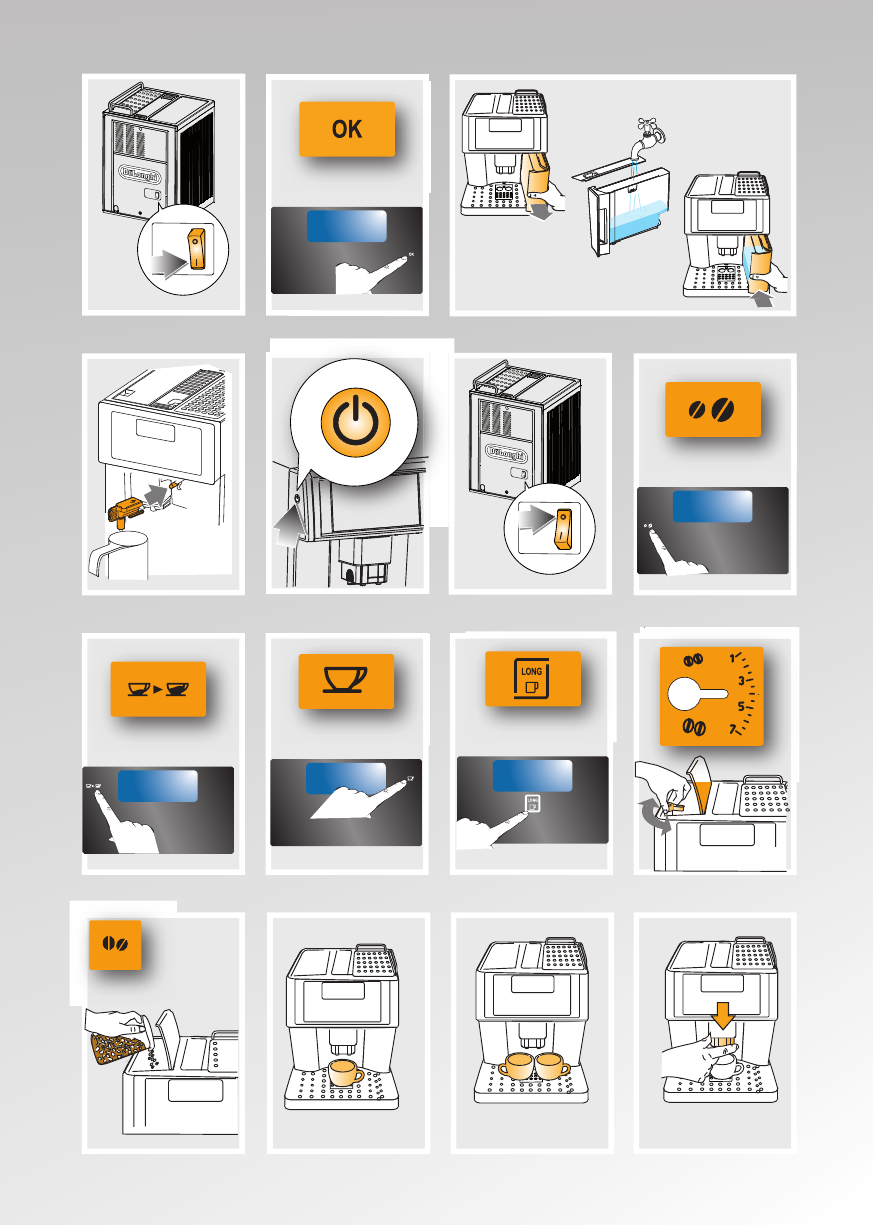
1. Plug the appliance into the power outlet and
(in models provided with main switch) place
the main switch on the back of the appliance
intheIposition(g.1).
You must rst select the language (the
languages scroll through at intervals of about
two seconds):
2. When English appears, press the OK icon for
3 seconds (g. 2). Once the language has
been saved, the message “English installed”
is displayed.
Follow the instructions indicated by the
appliance:
3. “FILLTANK!”:removethewatertank,llto
the MAX line with fresh water then replace in
theappliance(g.3).
4. “INSERT WATER SPOUT AND PRESS OK”:
Check that the hot water spout is inserted on
the nozzle and place a container underneath
(g.4).
Press the OKicon(g.2).“PLEASEWAIT...”is
displayed and the appliance begins to deliver
hot water.
Theapplianceendstherststartupprocedure,
then the message “Turning off, please wait...” is
displayed and the appliance goes off.
The coffee maker is now ready for normal use.
Information: When using the appliance
forthersttime,youneedtomake4-5cupsof
coffee and 4-5 cappuccinos before the appliance
starts to give satisfactory results.
TURNING THE APPLIANCE ON
Information: In models provided with main
switch, before turning the appliance on, make
sure the main switch on the back of the appliance
isintheIposition(g.1).
Each time the appliance is turned on, it performs
an automatic preheat and rinse cycle which
cannot be interrupted.
The appliance is ready for use only after
completion of this cycle.
Danger of burns! During rinsing, a little
hot water comes out of the coffee spouts and is
collected in the drip tray underneath.
Avoid contact with splashes of water.
• Toturntheapplianceon,pressthebuttonon
the left side of the machine (g.5):the
message “Heating up... please wait” is dis
When heating is complete, the message changes
to: “Rinsing”. As well as heating the boiler, this
also heats the internal circuits by circulating hot
water.
The appliance is at temperature when the
message “STANDARD COFFEE standard taste”
is displayed.
TURNING THE APPLIANCE OFF
Each time the appliance is turned off, it performs
an automatic rinse cycle which cannot be
interrupted.
Danger of burns! During rinsing, a little hot
water flows from the coffee spouts.
Avoid contact with splashes of water.
To turn the appliance off, press the button
(g.5).Theapplianceperformstherinsecycle
then goes off.
Information: In models provided with
main switch, if the appliance is not used for an
extended period, place the main switch on the
back of the appliance in the 0position(g.6).
12
CHANGING THE MENU SETTINGS
Setting the language
To modify the language on the display, proceed
as follows:
1. Press the P icon to enter the programming
menu;
2. Press the or icon until “Set language”
is displayed;
3. Press the OK icon;
4. Press the or icon until the required
language is displayed;
5. Press the OK icon to conrm (or the ESC
icon to cancel the operation);
6. Press the ESC icon to exit the menu.
Setting the clock
To adjust the time on the display, proceed as
follows:
1. Press the P icon to enter the programming
menu;
2. Press the or icon until “Adjust time” is
displayed;
3. Press the OK icon: the hours flash on the
display;
4. Press the or icon to change the
hours;
5. Press the OK icon to conrm (or the ESC
icon to cancel the operation): the minutes
flash on the display;
6. Press the or icon to change the
minutes;
7. Press the OK icon to conrm (or the ESC
icon to cancel the operation);
8. Press the ESC icon to exit the programming
menu.
Setting auto-start time
You can set the auto-start time in order to
have the appliance ready at a certain time (for
example in the morning) so you can make coffee
immediately.
1. Press the P icon to enter the programming
menu;
2. Press the or icon until “Auto-start
disabled” is displayed; “Enable?” is displayed
and the hours flash on the display;
3. Press the OK icon: the hours flash on the
display;
4. Press the or icon to change the
hours;
5. Press the OK icon to conrm: the minutes
flash on the display;
6. Press the or icon to change the
minutes;
7. Press the OK icon to conrm: “Auto-start
Enabled?” is displayed;
8. Press the ESC icon to exit the menu: a symbol
appears next to the clock to indicate that
auto-start has been programmed.
To deactivate the function:
1. Press the P icon to enter the programming
menu;
2. Press the or icon until “Auto-start
Enabled?” is displayed;
3. Press the OK icon: the hours flash on the
display;
4. Press the ESC icon. This deactivates the
function and the symbol disappears from
the display.
5. Press the ESC icon to exit the menu.
Information : To activate this function, the
time must have been set previously.
Setting the temperature
To modify the temperature (low, medium, high)
of the water used to make the coffee, proceed
as follows:
1. Press the P icon to enter the menu;
2. Press the or icon until “Temperature”
is displayed;
3. Press the OK icon;
4. Press the or icon until the required
temperature (low, medium or high) is
displayed;
5. Press the OK icon to conrm (or the ESC
icon to cancel the operation);
6. Press the ESC icon to exit the menu.
Setting auto-off
Information: The appliance is set to switch
automatically to stand-by if not used for 30
minutes. The time can be changed so that the
appliance switches off after 1 or 2 hours.
1. Press the P icon to enter the menu;
2. Press the or icon until “Auto-off” is
displayed;
3. Press the OK icon;
4. Press the or icon until the required
13
number of hours of operation (30 minutes, 1
or 2 hours) is displayed;
5. Press the OK icon to conrm (or the ESC
icon to cancel the operation);
6. Press the ESC icon to exit the menu.
Resetting default values (reset)
This resets all menu settings and programmed
quantities back to the default values (with the
exception of the language, time and beep which
remains as set as well as the counter for the
statistics function).
1. Press the P icon to enter the menu;
2. Press the or icon until “Default values”
is displayed;
3. Press the OK icon;
4. Themessage“Conrm?”isdisplayed.
5. Press the OKicontoconrmandexit(orthe
ESC icon to cancel the operation).
Statistics function
This displays statistics relating to the machine.
To display, proceed as follows:
1. Press the P icon to enter the menu;
2. Press the or icon until “Statistics” is
displayed;
3. Press the OK icon;
4. By pressing the or icon, you can check:
- how many coffees have been made;
- how many drinks with milk have been made;
- how many times the machine has been
descaled;
- the total number of liters of water delivered;
5. Press the ESC icon twice to exit the menu.
Acoustic signal (Beep enabled)
This activates or deactivates the beep emitted
by the machine each time an icon is pressed or
an accessory is inserted/removed. The beep is
enabled by default.
1. Press the P icon to enter the menu;
2. Press the or icon until “Beep enabled” is
displayed;
3. Press the OKicontoconrm,“Conrm?”is
displayed;
4. Press the OKiconagaintoconrmactivation
or the ESC icon to deactivate the function;
5. Press the ESC icon to exit the menu.
Information : The descale and water hard-
ness functions will be explained later in the
manual.
MAKING COFFEE
Selecting the coffee taste
The appliance is preset to make coffee with a
standard taste.
You can choose between 5 different coffee
tastes:
Extra-mild taste
Mild taste
Standard taste
Strong taste
Extra-strong taste
To change the flavor, press the icon
(g. 7) repeatedly until the required taste is
displayed.
Selecting the quantity of coffee in the cup
To select the quantity of coffee, press the
iconrepeatedly(g.8)untiltherequiredquantity
of coffee is displayed. The quantities delivered
are different according to the type of coffee
selected:
ESPRESSO
(oz)
LONG
COFFEE (oz)
MY COFFEE max: ≃6 max: ≃ 8.5
SHORT
COFFEE
≃1.4 ≃ 4.2
STANDARD
COFFEE
≃ 2≃ 6
LONG COFFEE ≃ 3 ≃ 7
EXTRA LONG
COFFEE
≃ 4 ≃ 8.5
Programming the espresso “my coffee”
quantity
The appliance is set by default to automatically
deliver 1 oz of espresso coffee.
To modify this quantity, proceed as follows:
1. Press the iconrepeatedly(g.8)until
“MY COFFEE” is displayed.
2. Press and hold the one cup icon(g.9)
for about 8 seconds until “Program quantity”
is displayed, then release. The machine
starts delivering the coffee and the icon
flashes;
3. As soon as the coffee in the cup reaches the
14
required level, press the icon again.
The quantity set has now been programmed.
Information: This setting is valid for mak-
ing both one and two cups. You cannot program
a quantity for two cups. To obtain 2 quantities of
“my coffee press the button.
Programming the long “my coffee” quantity
The appliance is set by default to automatically
deliver ≃ 3.4 oz of LONG coffee. To modify this
quantity, proceed as follows:
1. Press the iconrepeatedly(g.8)until
“MY COFFEE” is displayed.
2. Press the LONG icon(g.10)until“Pro-
gram quantity” is displayed, then release.
The machine starts delivering the coffee and
the LONG icon flashes;
3. As soon as the coffee in the cup reaches the
required level, press the LONG icon again.
The quantity set has now been programmed.
Regulating the coffee mill
The coffee mill is preset in the factory to prepare
coffee correctly and should not require regulating
initially.
However, if after making the rst few coffees
you nd that delivery is either too fast or too
slow (a drop at a time), this can be corrected
byregulatingthegrindingadjustmentknob(g.
11).
Important! The grinding coarseness
regulator must only be turned when the coffee
mill is in operation (when you hear the grinder
in motion).
For slower coffee delivery
and a creamier coffee, turn
oneclicktowards“1”(ner
ground coffee).
For more rapid coffee deliv-
ery (not in drops), turn one
click towards “7” (coarser
ground coffee).
Information: These adjustments will only
be evident after at least two cups of coffee have
been made.
Making espresso coffee using coffee beans
Important! Do not use caramelized or
candied coffee beans as they could stick to the
coffee mill and make it unusable.
1. Fillthecontainerwithcoffeebeans(g.12).
2. Place under the coffee spouts:
-onecup,ifyouwantonecoffee(g.13);
-twocups,ifyouwanttwocoffees(g.14);
3. Lower the spouts as near as possible to the
cup.Thismakesacreamiercoffee(g.15).
4. Choose the strength by hitting the
and size by hitting the .
5. Press the icon corresponding to the number
of coffees required (one cup or two cups
)(g.9and16).
6. Preparation begins. A progress bar appears
on the display and gradually advances as the
procedureprogresses(g.17).
Once the coffee has been made, the appliance is
ready to use again.
Information:
• Whilethemachineismakingcoffee,delivery
can be interrupted at any moment by pressing
the lit cup icon.
• Forahottercoffee,beforedeliveryrinsethe
appliance through by pressing the icon
andconrmingwiththeOKicon.Hotwater
flows out of the coffee spouts and heats the
internal circuit of the machine so that the
coffee delivered will be hotter.
• Foranevenhottercoffee,heatthecupsby
rinsing them with the hot water.
• If the coffee is delivered in drops, too fast
and not creamy enough or too cold, read the
tips in the “Troubleshooting” section on page
22.
Making long coffee using coffee beans
Information: When this function is
activated, a long coffee similar to drip coffee is
obtained.
Important! Do not use caramelized or
candied coffee beans as they could stick to the
coffee mill and make it unusable.
1. Fillthecontainerwithcoffeebeans(g.12).
2. Adjust the height of the spout according to
15
the cup used. Put the cup for long coffee
underthespouts(g.18);
3. Choose the strength by hitting the
and size by hitting the .
4. Press the LONG icon (g. 10). Preparation
begins. A progress bar appears on the display
and gradually advances as the procedure
progresses.
Information:
• Whilethemachineismakingcoffee,delivery
can be interrupted at any moment by pressing
the LONG icon.
• Onlyonecupoflongcoffeecanbemadeata
time.
• When delivering more than 4.2 oz, the
appliance automatically grinds more coffee
halfway through delivery.
Making espresso or long coffee using pre-
ground coffee
Important!
• Never add pre-ground coffee when the
machine is off or it could spread through the
inside of the machine and dirty it.
• Never use more than one level measuring
scoop or it could dirty the inside of the
machine or block the funnel.
Information: If you use pre-ground coffee,
you can only make one cup of coffee at a time.
1. Press the icon repeatedly (g. 7)
until “Pre-ground” flashes on the display.
2. Put one level measuring scoop of pre-ground
coffeeintothefunnel(g.19).
3. Place a cup under the coffee spouts.
4. To make espresso coffee, press the one cup
icon (g. 9). To make a long coffee,
press the LONGicon(g.10).
Information: LONG COFFEE: when deliver-
ing more than 4.2 oz, the appliance requests a
new level measure of pre-ground coffee halfway
through delivery. When you have added the pre-
groundcoffee,conrmbypressingtheOK icon.
MAKING DRINKS WITH MILK
Filling and attaching the milk container
1. Turn the lid of the milk container clockwise
untilit becomes noticeablydifcultto turn,
thenremovethelid(g.20).
2. Fill the milk container with a sufcient
quantity of milk, not exceeding the MAX level
markedonthehandle(g.21).
Information! We recommend using skim
or 2% milk at refrigerator temperature (about
41°F). To avoid milk with poor froth or large
bubbles, always clean the milk lid and hot water
nozzle as described in the section “Cleaning the
milk container” on page 19.
3. Make sure the milk intake tube is correctly
inserted in the bottom of the milk container
lid(g.22).
4. Replace the milk container lid and turn
counterclockwise as far as it will go until you
hear it click.
5. Remove the hot water spout from the nozzle
(g.23).
6. Attach the container to the nozzle and push as
farasitwillgo(g.24).Themachineemits
a beep when milk container is attached
correctly (if the beep function is enabled).
7. Placeasufcientlylargecupunderthecoffee
spouts and frothed milk spout.
To use particularly tall cups/glasses, raise
the lid (A17) of the special compartment in
thecuptray(g.25).
Making latte
1. After attaching the milk container, place
frothed milk regulator (B1) on lid to position
2forLATTE(g.26).
2. Press the LATTE icon(g.27).
The message “Caffelatte... Jug selector in
position: 2” appears. After a few seconds,
frothed milk is delivered from the milk
spout into the cup below. The milk will stop
automatically and delivery of coffee will
begin.
Information: If during delivery you want
to stop preparing milk, press the LATTE icon or
interrupt preparation of the coffee by pressing
the icon.
16
Making cappuccino
1. After attaching the milk container, place
frothed milk regulator (B1) on lid to position
2 for CAPPUCCINO (g. 28). The quantity
of froth can be adjusted by moving the
regulator towards number 2 for a denser
froth.
Moving it towards number 1 obtains a less
dense froth.
2. Press the CAPPUCCINO icon (g. 29). The
message “Cappuccino... Jug selector in
position: 1” appears . After a few seconds,
frothed milk flows out of the milk spout into
the cup below.
The milk will stop automatically and delivery
of coffee will begin.
Information! If during delivery you want to
stop preparing milk, press the CAPPUCCINO icon
or interrupt preparation of the coffee by pressing
the icon.
Making Italian macchiato
1. After attaching the milk container, place
frothed milk regulator (B1) on lid to position
2forITALIANMACCHIATO(g.28)
2. Press the ITALIAN MACCHIATO icon (g.
30). The message “Macchiato... Jug selector
in position: 2” appears.
After a few seconds, frothed milk flows out
of the milk spout into the cup below.
The milk will stop automatically and delivery
of coffee will begin.
Information: If during delivery you want to
stop preparing milk, press the italian MACCHIATO
icon or interrupt preparation of the coffee by
pressing the icon.
Making hot milk
1. After attaching the milk container, position
the frothed milk regulator (B1) according to
the quantity of froth you require (pos. 1 =
little froth; pos. 2 = abundant froth).
2. Press the HOT MILK icon (g. 31). “HOT
MILK” appears on the display and after a few
seconds, frothed milk is delivered from the
milk spout into the cup below. Delivery of
milk stops automatically.
Information: If during delivery you want to
stop preparing milk, press the HOT MILK icon
once.
Cleaning the milk container after use
Important! Danger of burns When cleaning
the internal tubes of the milk container, a little hot
water comes out of the frothed milk tube (B5).
Avoid contact with splashes of water.
When “Press CLEAN button” flashes on the
display (each time you use a milk function):
1. Leave the jug attached the machine (you do
not need to empty it);
2. Place a cup or other recipient under the
frothed milk spout.
3. Pressthe CLEAN button (g. 32) andkeep
pressing until the progress bar which
appears on the display together with the
message “Cleaning...” is complete.
4. Remove the milk container and always clean
thenozzlewithasponge(g.33).
Information!
• When“PressCLEANbutton”ashesonthe
display, you can still prepare any type of
coffee or milk. If you have to make a number
of drinks with milk, wait until you have
delivered the last cup before cleaning the
container.
• The milk left in the jug can be kept in the
refrigerator.
Programming the size for each beverage
button
The appliance is factory preset to automatically
deliver standard quantities.
To change these quantities, proceed as follows:
1. Place a cup under the coffee spouts and milk
spout.
2. Press the icon corresponding to the function
you want to program (LATTE, CAPPUCCINO,
ITALIAN MACCHIATO or HOT MILK) until
“Milk for... Program quantity” appears on
the display and the icon corresponding to
the selected function flashes.
3. Release the icon. The appliance starts
delivering milk.
4. When the required quantity of milk has been
delivered into the cup, press the icon again.
5. After a few seconds, the appliance starts
delivering coffee into the cup and the
message “Coffee for... Program quantity”
is displayed (with the exception of the HOT
MILK function) and the icon flashes.
17
6. As soon as the coffee in the cup reaches the
required level, press the icon. Coffee
delivery stops.
The machine is now reprogrammed with the new
quantities.
HOT WATER
Preparation
Important! Danger of burns. Never leave
the machine unsupervised while delivering hot
water. The hot water spout becomes hot while
water is being delivered and must be held by the
handle only.
1. Make sure the hot water spout is attached
correctly(g.4).
2. Place a container under the spout (as close
as possible to avoid splashes).
3 Press the icon (g. 34). The message
“Rinsing” “Hot water...” is displayed.
4. Press the icon to select the “Hot water...”
function (the selected message flashes on
the display) and conrm the selection by
pressing the OK icon (or cancel the selection
by pressing the ESC icon).
5. Water flows out of the spout. Delivery stops
automatically after 8.5 oz (250ml).
6. To interrupt delivery of hot water manually,
press the icon again.
Important! You should not deliver hot
water for more than two minutes at a time.
Changing the quantity
The appliance is factory preset to automatically
deliver 8.5 oz (250ml). To modify these quantities,
proceed as follows:
1. Position a container under the spouts.
2. Once the “Hot water” function has been
selected, press and hold the OK icon (about 8
seconds) until “Hot water Program quantity”
appears and the icon flashes.
• Whenthe hot water in the cup reaches the
required level, press the icon again.
The machine is now reprogrammed with the new
quantity.
CLEANING
Cleaning the coffee maker
The following parts of the appliance must be
cleaned regularly:
- coffee grounds container (A18),
- drip tray (A16),
- water tank (A13),
- coffee spouts (A20) and hot water nozzle
(A11),
- pre-ground coffee feed funnel (A8),
- inside the machine, accessible after opening
the service door (A19),
- brew group (A12),
- milk container (B)
- control panel (C)
Important!
• Do not use solvents, abrasive detergents
or alcohol to clean the coffee maker. With
De’Longhi superautomatic coffee makers,
you need not use chemical products to clean
the machine. The descaler recommended
by De’Longhi is made from natural and
completely biodegradable substances.
• Noneofthecomponentsoftheappliancecan
be washed in a dishwasher with the exception
of the milk container (B).
• Do not use metal objects to remove
encrustations or coffee deposits as they
could scratch metal or plastic surfaces.
Cleaning the coffee grounds container
When “EMPTY GROUNDS CONTAINER” is
displayed, the grounds container must be emptied
and cleaned. Until the grounds container has
been cleaned, the appliance continues to display
the message and coffee cannot be made.
To clean:
• open the service door on the front of the
appliance(g.35),extractthedriptray(g.
36), empty and clean.
• Empty the grounds container (A18) and
clean thoroughly to remove all residues left
on the bottom.
Important! when removing the drip tray,
the grounds container must be emptied, even if
it is not completely full.
If this is not done, when you make the next
coffees, the grounds containermayllupmore
than expected and clog the machine.
18
Cleaning the drip tray
Important! If the drip tray is not emptied
regularly, the water could overflow from the edge
and seep inside or around the machine. This
could damage the machine, the surface it rests
on or the surrounding area.
Thedriptrayisttedwithalevelindicator(red)
showingthelevelofwater itcontains (g.37).
Before the indicator protrudes from the cup tray,
the drip tray must be emptied and cleaned.
To remove the tray:
1. Opentheservicedoor(g.35);
2. Remove the drip tray and the grounds
container (Fig. 36);
3. Empty the drip tray and grounds container
(A18) and wash them;
4. Replace the drip tray complete with grounds
container (A18);
5. Close the service door.
Cleaning the water tank
1. Clean the water tank (A13) regularly (about
once a month) with a damp cloth and a little
mild dish soap.
2. Clean to remove all soap residues, then rinse
the water tank thoroughly.
Cleaning the coffee nozzles
1. Clean the nozzle periodically using a sponge
orcloth(g.38).
2. Check regularly that the holes in the coffee
spout are not blocked.
If necessary, remove coffee deposits with a
toothpick(g.39).
Cleaning the pre-ground coffee feed funnel
• Checkregularly(aboutonceamonth)that
the pre-ground coffee funnel is not blocked.
If necessary, remove coffee deposits with a
dull knife.
Danger of electric shock! Before perform-
ing any cleaning operations, the machine must
be turned off and disconnected from the main
power supply. Never immerse the coffee maker
in water.
Cleaning the inside of the machine
1. Check regularly (about once a week) that the
inside of the machine is not dirty. If neces-
sary, remove coffee deposits with a dull knife
and sponge.
2. Remove the residues with a vacuum cleaner
(g.40).
Cleaning the brew group
The brew group must be cleaned at least once
a month.
Important! The brew group (A8) must not
be removed when the appliance is on. Do not
attempt to use force to remove the brew group
as this could damage the machine.
1. Make sure the machine is correctly turned
off (see Turning off, page 31).
2. Opentheservicedoor(g.35);
3. Remove the drip tray and grounds container
(g.36);
4. Press the two red release buttons inwards
and at the same time pull the brew group
outwards(g.41).
Important! Do not use detergents or liq-
uid soap to clean the brew group. The detergent
would remove the lubricant applied to the inside
of the piston, causing the brew group to seize up
and become unusable.
5. Soak the brew group in water for about 5
minutes, then rinse under the tap.
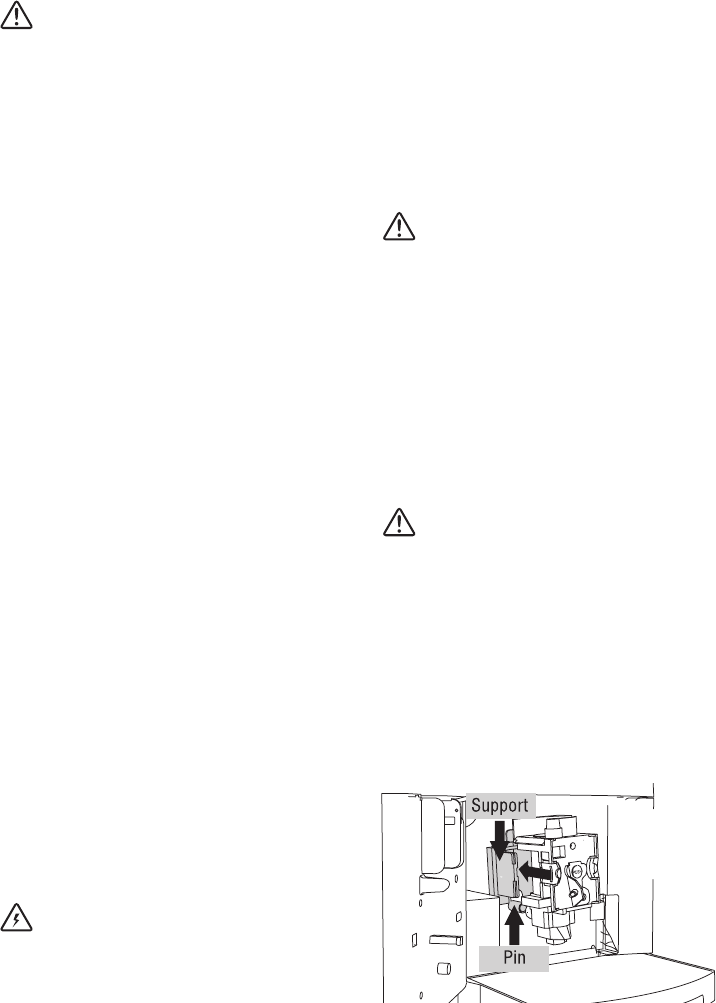
6. After cleaning, replace the brew group by
sliding it onto the internal support and pin at
the bottom, then push the PUSH symbol fully
in until it clicks into place.
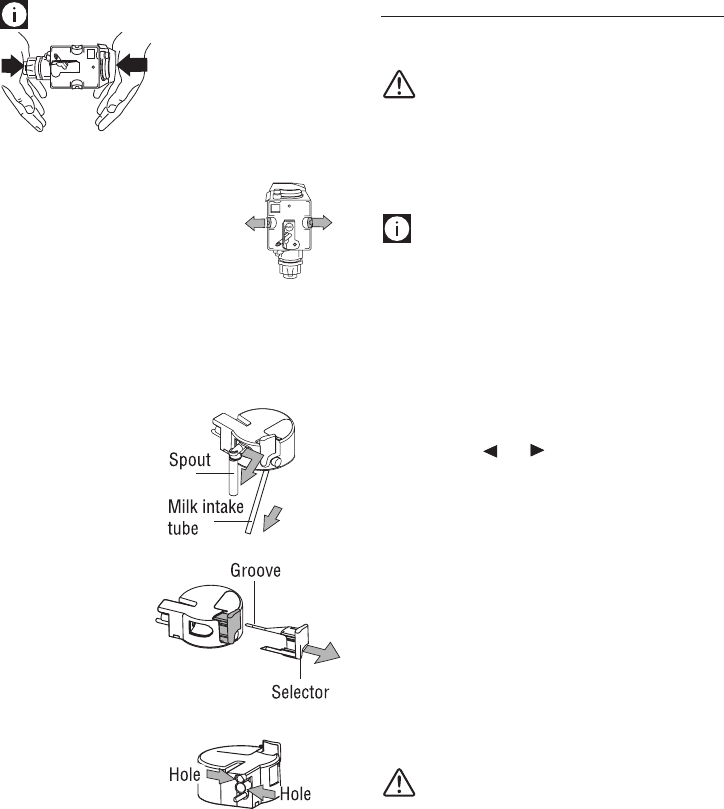
19
Information!
If the brew group is
difcult to insert, you
must rst adapt it to the
right dimension by
pressing it forcefully from
thebottomandtopasshowninthegure.
7. Once inserted, make sure the
two red buttons have snapped
out.
8. Replace the drip tray and
grounds container.
9. Close the service door.
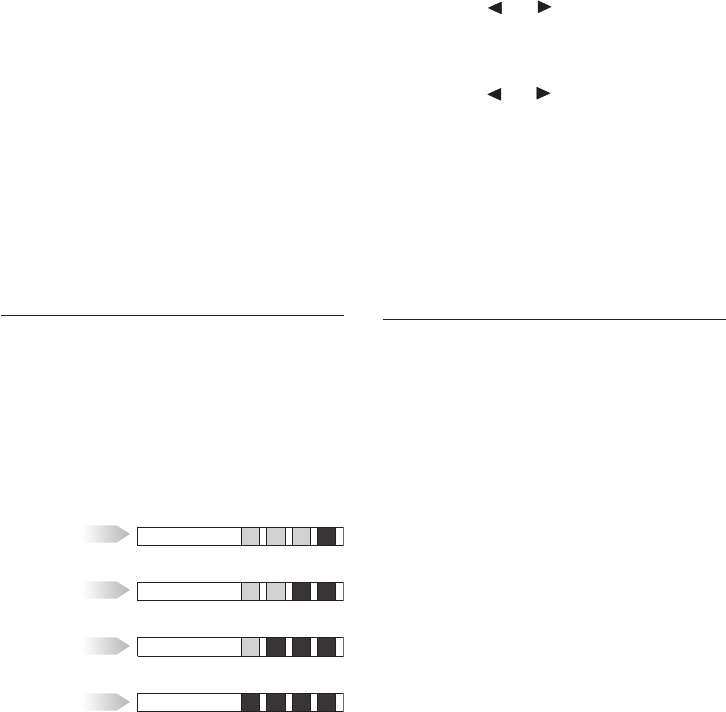
Cleaning the milk container
Clean the milk container each time you prepare
milk as described below:
1. Clean the milk
container each
time you prepare
milk as described
below:
2. Remove the milk
spout and intake
tube.
3. Remove the
selector by
pulling it
outwards.
4. Wash all the
components
thoroughly with
hot water and
mild dish soap.
All components
can be washed
in a dishwasher,
placing them in the top basket of the
dishwasher.
Make sure there are no milk residues left
insidetheholesandthe grooveon thene
end of the selector.
5. Check that the intake tube and spout are not
clogged with milk residues.
6. Replace the selector, milk spout and intake
tube.
7. Replace the lid on the milk container, turning
it counterclockwise to hook it in place.
DESCALING
Descale the machine when the message
“DESCALE!” flashes on the LCD display.
Important! Descaler contains acids which
may irritate the skin and eyes. It is vital to adhere
to the manufacturer’s safety warnings given on
the descaler pack and the warnings relating to
the procedure to follow in the event of contact
with the skin and eyes.
Information! Use De’Longhi recommended
descaler only. Under no circumstances should
you use sulphamic or acetic based descalers.
Their use invalidates the warranty. Failure to
descale the appliance as described above also
invalidates the warranty.
1. Turn the machine on.
2. Enter the programming menu by pressing
the P icon.
3. Press the or icon until “Descaling” is
displayed.
4. Select by pressing the OK icon.
“DescalingConrm?”isdisplayed.PressOK
to activate the function.
5. The message “ Add descaler. Conrm?” is
displayed.
6. Before conrming, empty the water tank
(A13).
Pour the descaler diluted with water
(respecting the proportions indicated on the
descaler bottle) into the water tank.
Place an empty container with a minimum
capacity of 50 oz (1.5 L) under the hot water
spout.
Important! Danger di of burns Hot water
containing descaler flows out of the hot water
spout. Avoid contact with splashes of water.
7. ConrmbypressingtheOK icon.
8. The message “Descaling Underway...” is
displayed. The descaling program starts and
the descaler liquid comes out of the water
spout.
The descale program automatically performs a
series of rinses and pauses to remove limescale
deposits from inside the machine.
After about 30 minutes, the message “Rinsing
FILL TANK!” is displayed.
20
Setting water hardness
1. Press the P icon to enter the programming
menu.
2. Press the or icon and select “Water
hardness”.
3. Conrm the selection by pressing the OK
icon.
4. Press the or icon to set the number
of squares formed on the reactive strip (see
gureintheprevioussection).
5. Press the OKicontoconrmthesetting.
6. Press the ESC icon to exit the menu.
The machine is now reprogrammed with the new
water hardness setting.
USING COMPARTMENT FOR LATTE
GLASS
To accommodate larger latte cups under the cof-
fee spouts, lift compartment door (A17) towards
machine and place glass in compartment.
9. The appliance is now ready for rinsing
through with clean water.
Remove the water tank, empty, rinse under
running water, ll with clean water and
replace. “Rinsing... Press OK” is displayed.
10. Empty the container used to collect the
descaler solution and replace it under the hot
water spout.
11. Press the OK icon to start rinsing. Hot water
flows out of the spout and the message
“Rinsing...” is displayed.
12. When the water tank is completely empty,
the message “Rinsing complete... Press OK”
is displayed.
13. Press the OKicon,llthewatertankandthe
appliance is ready for use.
SETTING WATER HARDNESS
The DESCALE message is displayed after a
period of time established according to water
hardness.
The machine is factory set for a hardness value
of 4 (very hard water).
The machine can also be programmed according
to the actual hardness of the tap water in the
various regions, varying the frequency with
which the message is displayed.
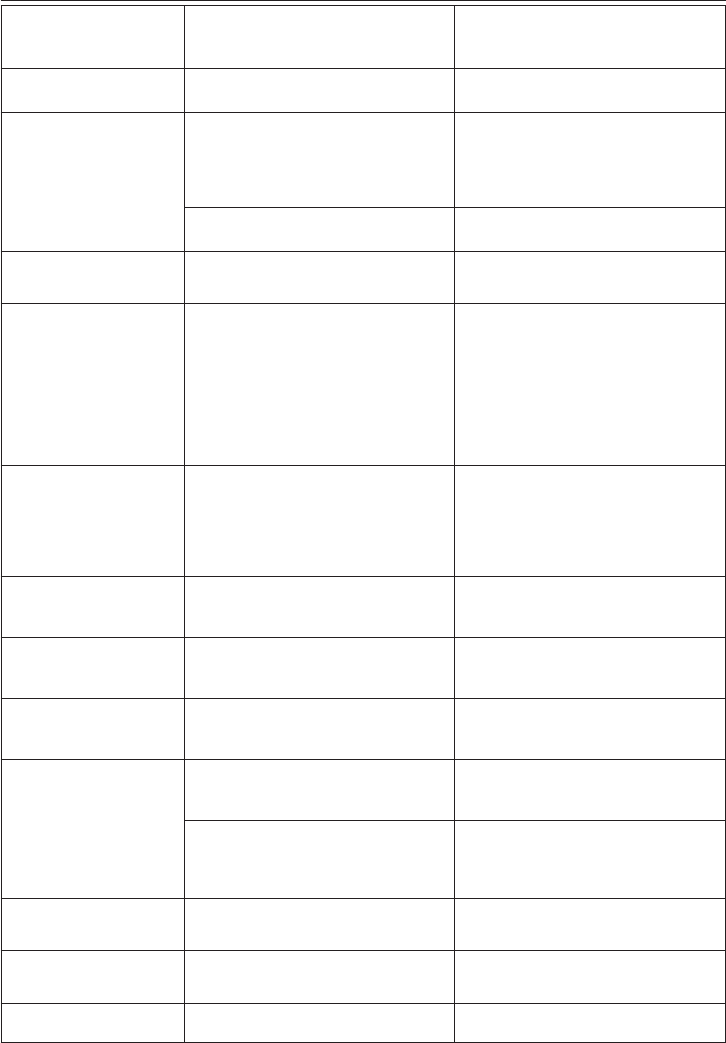
soft water
l
slightly hard water
ll
hard water
lll
very hard water
llll
Measuring water hardness
1. Remove the “TOTAL HARDNESS TEST”
indicator paper from its pack.
2. Immerse the paper completely in a glass of
water for about a second.
3. Remove the paper from the water and shake
lightly.
After about a minute, 1, 2, 3, or 4 red squares
form, depending on the hardness of the water.
Each square corresponds to one level.
21
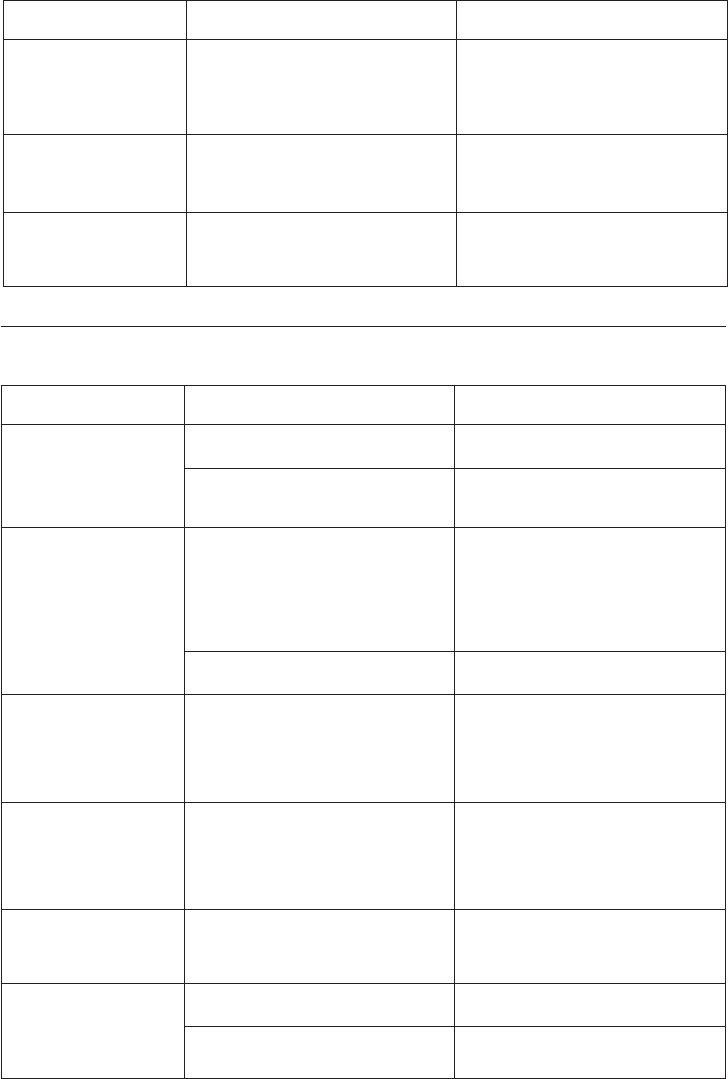
DISPLAYED MESSAGES
DISPLAYED MESSAGE POSSIBLE CAUSE REMEDY
FILL TANK! • Thewatertankisemptyorpositioned
incorrectly.
• Fillthetankwithwaterand/orinsertit
correctly, pushing it as far as it will go.
GROUND TOO FINE
ADJUST MILL!
Insert water spout and
press OK
• Thegrindingistooneandthecoffeeis
delivered too slowly.
• Makethecoffeeagainandturnthe
grinding adjustment knob one click
clockwise towards “7” while the coffee
mill is in operation. The effect is only
visible after delivering two coffees.
• Themachinecannotmakecoffeeas
there is air in the hydraulic circuit
• PresstheOK icon to deliver water from
the spout until it flows out normally.
INSERT WATER
SPOUT!
• Thewaterspoutisnotinsertedoris
inserted incorrectly.
• Insertwaterspoutasfarasitwillgo.
EMPTY GROUNDS
CONTAINER
• Thegroundscontaineristoofullor
more than 3 days have passed since you
last made coffee (this guarantees correct
hygiene of the machine).
• Emptythegroundscontainerandclean,
then replace.
Important: when removing the drip tray,
the grounds container MUST be emptied,
even if it is not completely full.
If this is not done, when you make the
next coffees, the grounds container may
llupmorethanexpectedandclogthe
machine.
INSERT GROUNDS
CONTAINER
• Aftercleaning,thegroundscontainer
has not been replaced.
• Opentheservicedoorandinsertthe
grounds container.
If grounds container is inside the
machine and message is still displayed,
there may be a damaged mircoswitch
and customer service should be called.
INSERT MILK
CONTAINER!
• Themilkcontainerisnotinserted.. • Insertmilkcontainerasfarasitwillgo.
DESCALE! • Themachinemustbedescaled. • Thedescalingproceduredescribedin
the “Descaling” section needs to be
performed as soon as possible.
LESS COFFEE! • Toomuchgroundcoffeehasbeenused. • Selectamildertasteorreducethe
quantity of pre-ground coffee, then make
the coffee again.
ADD PRE-GROUND
COFFEE!
• The“pre-groundcoffee”functionhas
been selected without placing any pre-
ground coffee in the funnel.
• Placepre-groundcoffeeinthefunnel.
• Thefunnel(A8)isblocked. • Emptythefunnelwiththehelpofa
dull knife, as described in the section
“Cleaning the pre-ground coffee feed
funnel”.
FILL BEANS
CONTAINER!
• Thecoffeebeanshaverunout. • Fillbeancontainer
INSERT BREW GROUP
ASSEMBLY!
• Thebrewgrouphasnotbeenreplaced
after cleaning.
• Insertthebrewgroupasdescribedinthe
section “Cleaning the brew group”.
CLOSE DOOR! • Theservicedoorisopen • Closetheservicedoor.
22
DISPLAYED MESSAGE POSSIBLE CAUSE REMEDY
GENERAL ALARM! • Theinsideoftheapplianceisverydirty. • Cleantheinsideoftheappliance
thoroughly as described in the section
“Cleaning the inside of the machine”.
If the message is still displayed after
cleaning, contact customer services.
PRESS CLEAN
BUTTON
• Milkhasbeendeliveredrecentlyandthe
tubes inside the milk container must be
cleaned.
• PresstheCLEANbuttonandkeepit
pressed until the progress bar which
appears on the display together with the
message “Cleaning” is complete.
ADD PRE-GROUND
COFFEE!
PRESS OK
• TheapplianceisdeliveringaLONG
coffee of more than 4.2 oz (125 ml).
• Addalevelmeasureofpre-ground
coffeeandconrmbypressingtheOK
icon.
TROUBLESHOOTING
Below is a list of some of the possible malfunctions.
If the problem cannot be resolved as described, contact customer service.
PROBLEM POSSIBLE CAUSE REMEDY
The coffee is not hot • Thecupshavenotbeenpreheated. • Warmthecupsbyrinsingthemwithhot
water.
• Thebrewgrouphascooleddown
because 2-3 minutes have elapsed since
the last coffee was made.
• Beforemakingcoffee,rinseasdescribed
in the notes in the section “Preparing
coffee using coffee beans”.
The coffee is not
creamy enough
• Thecoffeeisgroundtoocoarsely. • Turnthegrindingadjustmentknobone
click anticlockwise towards “1” while the
coffeemillisinoperation(g.11).
Continue one click at a time until coffee
delivery is satisfactory.
The effect is only visible after delivering
two coffees.
• Wrongtypeofcoffee. • Useatypeofcoffeeforespressocoffee
makers.
The coffee is delivered
too slowly or a drop at
a time.
• Thecoffeeisgroundtoonely. • Turnthegrindingadjustmentknob
one click clockwise towards “7” while
thecoffeemillisinoperation(g.11).
Continue one click at a time until coffee
delivery is satisfactory. The effect is only
visible after delivering two coffees.
The coffee is delivered
too quickly.
• Thecoffeeisgroundtoocoarsely. • Avoidturningthegrindingcoarseness
regulator excessively otherwise when
you select two cups, the coffee may be
delivered a drop at a time.
The effect is only visible after delivering
two coffees.
Coffee does not come
out of one of the
spouts.
• Thespoutsareblocked. • Cleanthespoutswithatoothpick(g.
39).
The coffee does not
come out of the spouts,
but from around the
service door (A19).
• Theholesinthespoutsarecloggedwith
dry coffee dust. • Cleanthespoutswithatoothpick,
sponge or hard bristled kitchen brush.
• Thecoffeeguide(A21)insidetheservice
door is blocked and cannot swing. • Thoroughlycleanthecoffeeguide
(A21), particularly near the hinges.
23
PROBLEM POSSIBLE CAUSE REMEDY
The milk contains
bubbles or squirts out
of the milk spout
• Themilkisnotcoldenoughorisnot
semi-skimmed. • Youshouldideallyuseskimmedorsemi-
skimmed milk at refrigerator temperature
(about 41°F).
If the result is still disappointing, try
another brand of milk.
• Themilkfrotherselectorisincorrectly
adjusted. • Adjustfollowingtheinstructionsinthe
section on preparing drinks with milk.
• Themilkcontainerlidisdirty. • Cleanthemilkcontainerlidasdescribed
in the section “Cleaning the milk
container”.
The appliance does not
come on.
• Itisnotpluggedintothepoweroutlet. • Plugintothepoweroutlet.
Il caffè LONG ha troppa
crema
• Ilcaffèèmacinatotroppone. • Ruotarelamanopoladiregolazione
macinatura di uno scatto verso il numero
7 in senso orario, mentre il macinacaffè
èinfunzione(g.11).Procedere
unoscattoallavoltanoadottenere
un’erogazione soddisfacente. L’effetto è
visibile solo dopo l’erogazione di 2 caffè.

24
This warranty applies to Super Automatic Espresso Machines with the De’Longhi brand name.
LIMITED WARRANTY
What does the warranty cover?
We warrant each appliance to be free from defects in material and workmanship. Our obligation under
this warranty is limited to repair at our factory or authorized service center of any defective parts or
part thereof, other than parts damaged in transit. The repaired or new model will be returned at the
company expense.
This warranty shall apply only if the appliance is used in accordance with the factory directions, which
accompany it, and on an alternating current ( AC ) circuit.
How long does the coverage last?
This warranty runs for two years ( 2 ) from the purchase date found on your receipt and applies only to
the original purchaser for use.
What is not covered by the warranty?
The warranty does not cover defects or damage of the appliance, which result from repairs or alterations
to the appliance outside our factory or authorized service centers, nor shall it apply to any appliance,
which has been subject to abuse, misuse, negligence or accidents. Also, consequential and incidental
damage resulting from the use of this product or arising out of any breach of contract or breach of this
warranty are not recoverable under this warranty. Some states do not allow the exclusion or limitation
of incidental or consequential damage, so the above limitation may not apply to you.
How do you get service?
If repairs become necessary, see contact information below:
U.S. Residents:
Please contact our toll free hotline at 1-866-528-8323 (1-866-Latte-Best) or log onto our website at
www.delonghi.com.
For all accessories, spare parts or replacement parts, please contact our parts division at 1-800-865-
6330.
Residents of Canada:
Residents of Canada: Please contact our toll free hotline at 1-888-335-6644 or log onto our website at
www.delonghi.com.
Residents of Mexico:
Please refer to the Limited Warranty statement for Mexico (see page 63 ).
Please refer to the back page of the manual for De’Longhi addresses.
The above warranty is in lieu of all other express warranties and representations. All implied warranties
are limited to the applicable warranty period set forth above. This limitation does not apply if you enter
into an extended warranty with De’Longhi. Some states do not allow limitations on how long an implied
warranty lasts, so the above exclusions may not apply to you. De’Longhi does not authorize any other
person or company to assume for it any liability in connection with the sale or use of its appliance.
How does state law apply?
Thiswarrantygivesyouspeciclegalrights,andyoumayalsohaveotherrights,whichvaryfromstate
to state
