Delta Digital Keypad Kpe Le02 Users Manual 5011666101 K201
Delta-Electronics-Digital-Keypad-Kpe-Le02-Users-Manual-338838 delta-electronics-digital-keypad-kpe-le02-users-manual-338838
KPE-LE02 to the manual d83d9511-db40-4a67-abae-5f37b7e2a44d
2015-01-21
: Delta Delta-Digital-Keypad-Kpe-Le02-Users-Manual-244580 delta-digital-keypad-kpe-le02-users-manual-244580 delta pdf
Open the PDF directly: View PDF  .
.
Page Count: 2
5011666101-K201
20071112
KPE-LE02 Digital Keypad for VFD-E Series
Instruction Sheet
Please thoroughly read this instruction sheet before installation and putting it into use.
The content of this instruction sheet and the driver file may be revised without prior notice. Please consult
our distributors or download the most updated instruction version at
http://www.delta.com.tw/industrialautomation.
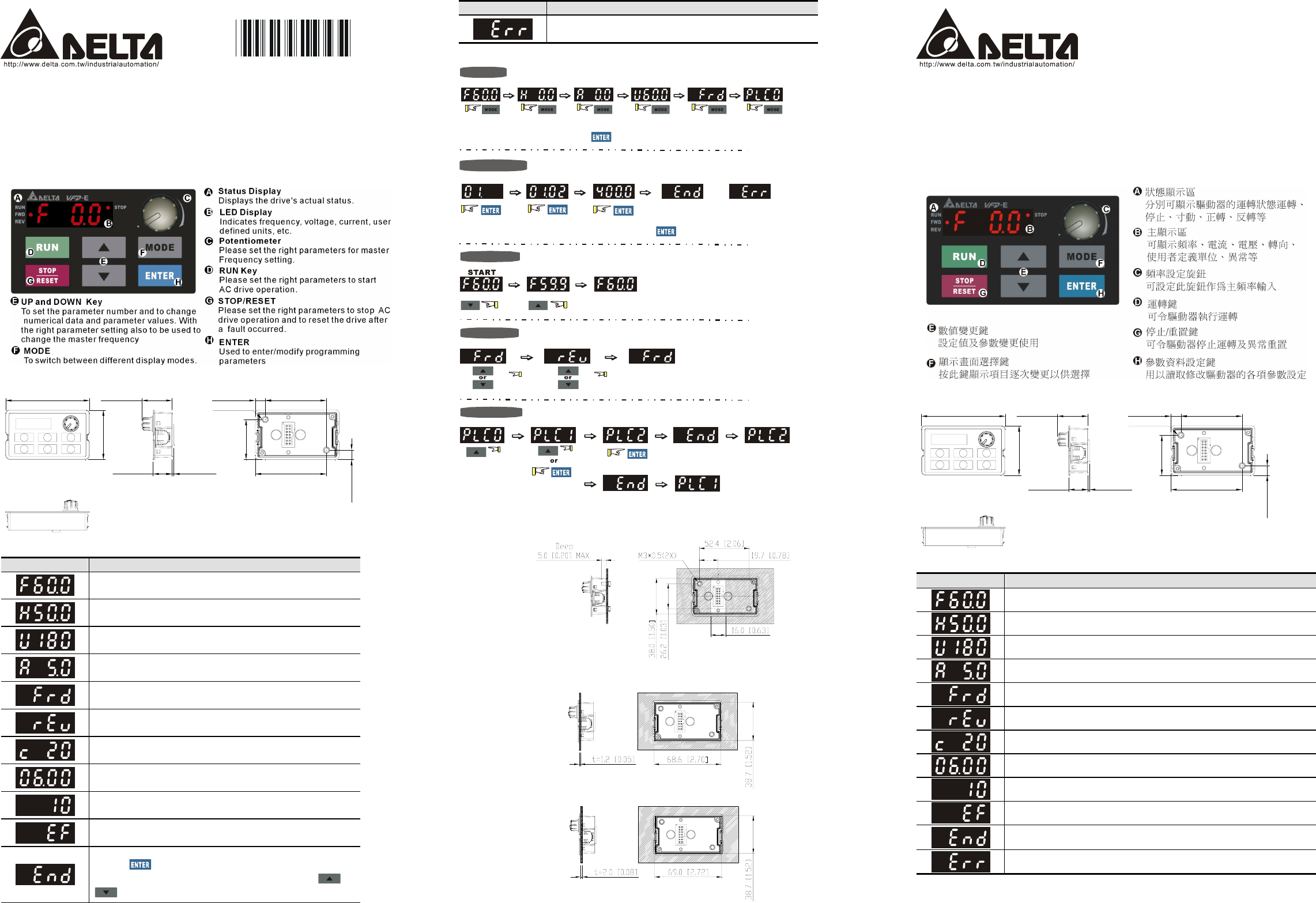
X Description of the Digital Keypad
Y Dimensions in mm [inch]
71.9 [2.83]
42.4 [1.67]
1.5 [0.06]16.3 [0.64]
52.4 [2.06]8.6 [0.34]
61.0 [2.40]
34.3 [1.35]
8.1 [0.32]
25.9 [1.02]
M3*0.5(2X)
Z Display Messages
Display Message Descriptions
Displays the AC drive Master Frequency.
Displays the actual output frequency at terminals U/T1, V/T2, and W/T3.
User defined unit (where U = F x Pr.00.05)
Displays the output current at terminals U/T1, V/T2, and W/T3.
Displays the AC motor drive forward run status.
Displays the AC motor drive reverse run status.
The counter value (C).
Displays the selected parameter.
Displays the actual stored value of the selected parameter.
External Fault.
Displays “End” for approximately 1 second if input has been accepted by
pressing key. After a parameter value has been set, the new value
is automatically stored in memory. To modify an entry, use the and
keys.
Display Message Descriptions
Displays “Err”, if the input is invalid.
[ How to Operate the Digital Keypad
To change data
Setting direction
Setting PLC Mode
Setting Mode
Setting parameters
(When operation source is digital keypad)
PLC2 mode active
PLC1 mode active
START
GO START
NOTE: In the selected mode, press to set the parameters.
Success to
set parameter. Input data error
or
NOTE
:
In the parameter setting mode, you can press to the selected mode.
\ Installation
Method 1. Direct installation (unit: mm[inch])
Method 2. Mounting by the plate thickness (unit: mm[inch])
A. Thickness=1.2mm[0.05 inches]
B. Thickness=2.0mm[0.08 inches]
KPE-LE02 VFD-E
系列之數位操作器
說明書
請詳細閱讀下列說明後才使用本產品,以確保使用安全。
由於產品精益求精,當內容規格有所修正時,請洽詢代理商或至台達網站
(http://www.delta.com.tw/industrialautomation )下載最新版本。
X鍵盤面板外觀
Y鍵盤面板鍵盤面板尺寸
71.9 [2.83]
42.4 [1.67]
1.5 [0.06]16.3 [0.64]
52.4 [2.06]8.6 [0.34]
61.0 [2.40]
34.3 [1.35]
8.1 [0.32]
25.9 [1.02]
M3*0.5(2X)
Z功能顯示項目說明
顯示項目 說明
顯示驅動器目前的設定頻率
顯示驅動器實際輸出到馬達的頻率
顯示用戶定義之物理量 (U = F x 00-05)
顯示負載電流
正轉命令
反轉命令
顯示計數值
顯示參數項目
顯示參數內容值
外部異常顯示
若由顯示區讀到 End 的訊息(如左圖所示)大約一秒鐘,表示資料已被接受並
自動存入內部存貯器
若設定的資料不被接受或數值超出時即會顯示
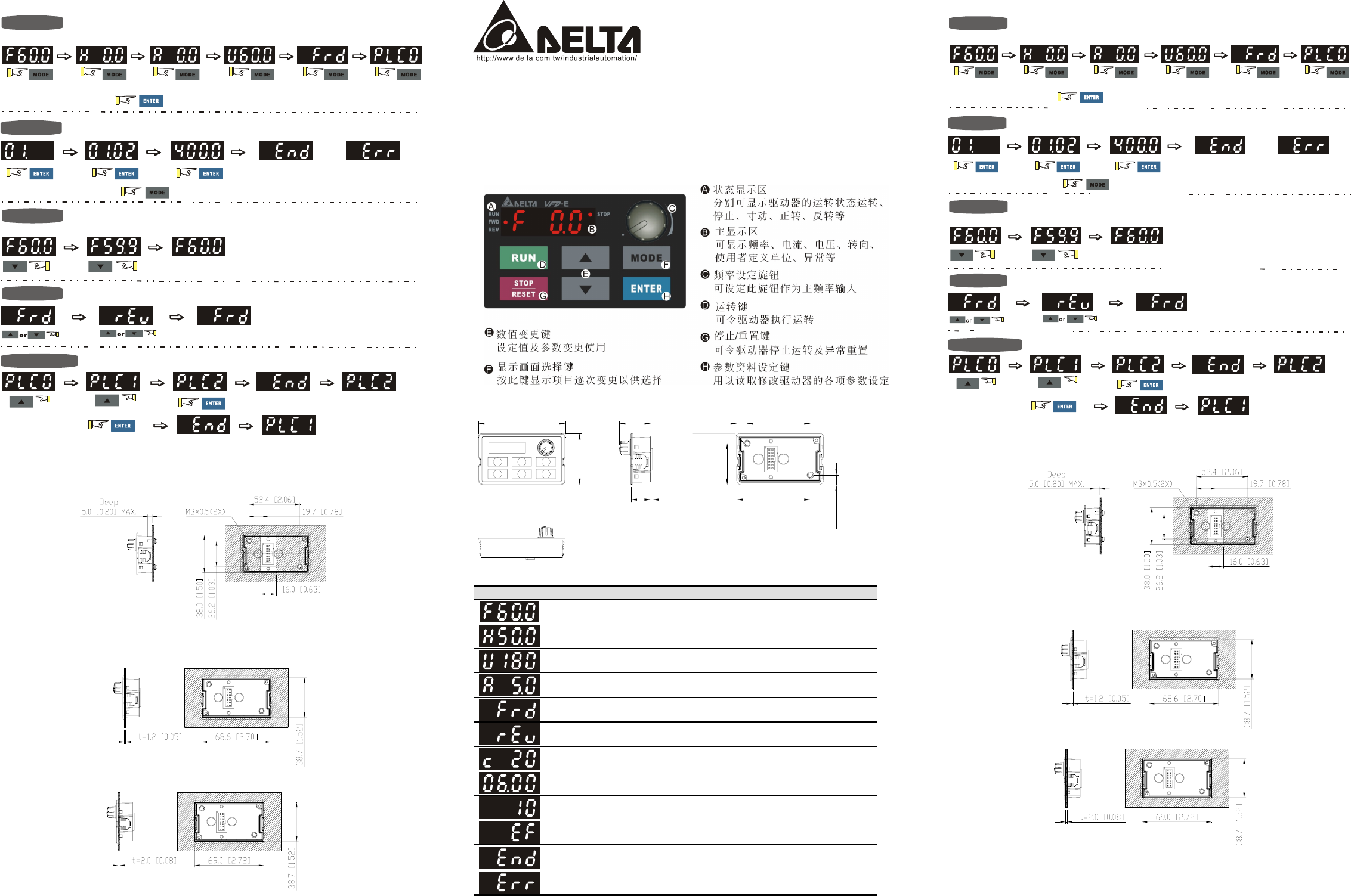
[鍵盤面板操作流程
START
畫面選擇
資料修改
轉向設定
參數設定
GO START
START
()
運轉命令來源為數位操作面版時
PLC
模式設定
重點:在畫面選擇模式中 進入參數設定
顯示輸入
資料正確
顯示輸入
資料錯誤
或
重點:在參數設定模式中
可往返回畫面選擇模式
or
進入 模式
PLC1
進入 模式
PLC2
\安裝方法
方法 1. 直接安裝 (單位: mm[inch])
方法 2. 依板厚來安裝 (單位: mm[inch])
A. 板厚=1.2mm[0.05 inches]
B. 板厚=2.0mm[0.08 inches]
KPE-LE02 VFD-E
系列之數位操作器
說明書
請詳細閱讀下列說明後才使用本產品,以確保使用安全。
由於產品精益求精,當內容規格有所修正時,請洽詢代理商或至台達網站
(http://www.delta.com.tw/industrialautomation)下載最新版本。
X鍵盤面板外觀
Y鍵盤面板鍵盤面板尺寸
71.9 [2.83]
42.4 [1.67]
1.5 [0.06]16.3 [0.64]
52.4 [2.06]8.6 [0.34]
61.0 [2.40]
34.3 [1.35]
8.1 [0.32]
25.9 [1.02]
M3*0.5(2X)
Z功能顯示項目說明
顯示項目 說明
顯示驅動器目前的設定頻率
顯示驅動器實際輸出到馬達的頻率
顯示用戶定義之物理量 (U = F x 00-05)
顯示負載電流
正轉命令
反轉命令
顯示計數值
顯示參數項目
顯示參數內容值
外部異常顯示
若由顯示區讀到 End 的訊息(如左圖所示)大約一秒鐘,表示資料已被接受並自
動存入內部存貯器
若設定的資料不被接受或數值超出時即會顯示
[鍵盤面板操作流程
START
畫面選擇
資料修改
轉向設定
參數設定
GO START
START
()
運轉命令來源為數位操作面版時
PLC
模式設定
重點:在畫面選擇模式中 進入參數設定
顯示輸入
資料正確
顯示輸入
資料錯誤
或
重點:在參數設定模式中 可往返回畫面選擇模式
or
進入 模式
PLC1
進入 模式
PLC2
\安裝方法
方法 1. 直接安裝 (單位: mm[inch])
方法 2. 依板厚來安裝 (單位: mm[inch])
A. 板厚=1.2mm[0.05 inches]
B. 板厚=2.0mm[0.08 inches]
